A new (micro) maintenance release of our RApiDatetime
package is now on CRAN, coming
only a good week after the 0.0.10
release which itself had a two year gap to its predecessor
release.
RApiDatetime
provides a number of entry points for C-level functions of the R API for
Date and Datetime calculations. The functions
asPOSIXlt and asPOSIXct convert between long
and compact datetime representation, formatPOSIXlt and
Rstrptime convert to and from character strings, and
POSIXlt2D and D2POSIXlt convert between
Date and POSIXlt datetime. Lastly,
asDatePOSIXct converts to a date type. All these functions
are rather useful, but were not previously exported by R for C-level use
by other packages. Which this package aims to change.
This release adds a single (and ) around one variable as the
rchk container and service by Tomas now flagged this. Which
is somewhat peculiar, as this is old code also borrowed from R
itself but no point arguing so I just added this.
Details of the release follow based on the NEWS file.
Courtesy of my CRANberries, there is also a diffstat report for this release.Changes in RApiDatetime version 0.0.11 (2026-01-19)
- Add PROTECT (and UNPROTECT) to appease rchk
This post by Dirk Eddelbuettel originated on his Thinking inside the box blog. If you like this or other open-source work I do, you can sponsor me at GitHub.
Hurray!
I have officially reached the 6-week mark, the halfway point of my Outreachy internship. The time has flown by incredibly fast, yet it feels short because there is still so much exciting work to do.
I remember starting this journey feeling overwhelmed, trying to gain momentum. Today, I feel much more confident. I began with the apps_startstop task during the contribution period, writing manual test steps and creating preparation Perl scripts for the desktop environments. Since then, I ve transitioned into full automation and taken a liking to reading openQA upstream documentation when I have issues or for reference.
In all of this, I ve committed over 30 hours a week to the project. This dedicated time has allowed me to look in-depth into the Debian ecosystem and automated quality assurance.
Reviewing my 12-week goal, which included extending automated tests for live image testing, installer testing, and documentation, I am happy to report that I am right on track. My work on desktop apps tests has directly improved the quality of both the Live Images and the netinst (network installer) ISOs.
I have successfully extended the apps_startstop tests for two Desktop Environments (DEs): Cinnamon and LXQt. These tests ensure that common and DE specific apps launch and close correctly across different environments.
One of my favorite challenges was suggested by my mentor, Roland: synergizing the tests to reduce redundancy. I observed that some applications (like Firefox and LibreOffice) behave identically across different desktops. Instead of duplicating Perl scripts/code for every single DE, I used symbolic links. This allows the use of the same Perl script and possibly the same needles, making the test suite lighter and much easier to maintain.

During the contribution phase, I noticed how rigid the documentation and coding style requirements are. While this ensures high standards and uniformity, it can be intimidating for newcomers and time-consuming for reviewers.
To help, I created a contributor guide [MR !97]. This guide addresses the project s writing style. My goal is to reduce the back-and-forth during reviews, making the process more efficient for everyone and helping new contributors.
For the second half of the internship, I plan to:
This journey has been an amazing experience of learning and connecting with the wider open-source community, especially Debian Women and the Linux QA team.
I am deeply grateful to my mentors, Tassia Camoes Araujo, Roland Clobus, and Philip Hands, for their constant guidance and for believing in my ability to take on this project.
Here s to the next 6 weeks
Hello world
. I am an intern here at Outreachy working with Debian OpenQA Image testing team. The work consists of testing Images with OpenQA. The internship has reached midpoint and here are some of the highlights that I have had so far.
I have learned a lot during my internship. I have always been on the silent path of life with little communication. I once told myself being a developer would hide me behind a computer to avoid socializing. Being in open source especially this internship has helped me out with communication and networking. The team work in the project has helped me a lot
I have had challenges , solved problems and learned new skills all this while
So far so good. I am grateful to be a contributor towards the project and hope to continue learning.
I'm going to FOSDEM 2026!
I'm presenting in the Containers dev room. My talk is Java Memory Management
in Containers
and it's scheduled as the first talk on the first day. I'm the warm-up act!
The Java devroom has been a stalwart at FOSDEM since 2004 (sometimes in other
forms), but sadly there's no Java devroom this year. There's a story about
that, but it's not mine to tell.
Please recommend to me any interesting talks! Here's a few that caught my eye:
Debian/related:
smartd properly.A decent approach to data safety is to run regularly scheduled short and long
SMART tests on all disks to detect potential damage. Running such tests on all
disks at once isn't ideal, so I set up a script to create a staggered
configuration and test multiple groups of disks at different times. Note that it
is mandatory to read the devices at each reboot because their names and order
can change.Of course, the same principle (short/long test at regular intervals along the
week) should be applied for a simpler configuration, as in the case of my home
NAS with a pair of RAID1 devices.What follows is a simple script to create a staggered smartd.conf at boot
time:#!/bin/bash
#
# Save this as /usr/local/bin/create-smartd-conf.sh
#
# Dynamically generate smartd.conf with staggered SMART test scheduling
# at boot time based on discovered ATA devices
# HERE IS A LIST OF DIRECTIVES FOR THIS CONFIGURATION FILE.
# PLEASE SEE THE smartd.conf MAN PAGE FOR DETAILS
#
# -d TYPE Set the device type: ata, scsi[+TYPE], nvme[,NSID],
# sat[,auto][,N][+TYPE], usbcypress[,X], usbjmicron[,p][,x][,N],
# usbprolific, usbsunplus, sntasmedia, sntjmicron[,NSID], sntrealtek,
# ... (platform specific)
# -T TYPE Set the tolerance to one of: normal, permissive
# -o VAL Enable/disable automatic offline tests (on/off)
# -S VAL Enable/disable attribute autosave (on/off)
# -n MODE No check if: never, sleep[,N][,q], standby[,N][,q], idle[,N][,q]
# -H Monitor SMART Health Status, report if failed
# -s REG Do Self-Test at time(s) given by regular expression REG
# -l TYPE Monitor SMART log or self-test status:
# error, selftest, xerror, offlinests[,ns], selfteststs[,ns]
# -l scterc,R,W Set SCT Error Recovery Control
# -e Change device setting: aam,[N off], apm,[N off], dsn,[on off],
# lookahead,[on off], security-freeze, standby,[N off], wcache,[on off]
# -f Monitor 'Usage' Attributes, report failures
# -m ADD Send email warning to address ADD
# -M TYPE Modify email warning behavior (see man page)
# -p Report changes in 'Prefailure' Attributes
# -u Report changes in 'Usage' Attributes
# -t Equivalent to -p and -u Directives
# -r ID Also report Raw values of Attribute ID with -p, -u or -t
# -R ID Track changes in Attribute ID Raw value with -p, -u or -t
# -i ID Ignore Attribute ID for -f Directive
# -I ID Ignore Attribute ID for -p, -u or -t Directive
# -C ID[+] Monitor [increases of] Current Pending Sectors in Attribute ID
# -U ID[+] Monitor [increases of] Offline Uncorrectable Sectors in Attribute ID
# -W D,I,C Monitor Temperature D)ifference, I)nformal limit, C)ritical limit
# -v N,ST Modifies labeling of Attribute N (see man page)
# -P TYPE Drive-specific presets: use, ignore, show, showall
# -a Default: -H -f -t -l error -l selftest -l selfteststs -C 197 -U 198
# -F TYPE Use firmware bug workaround:
# none, nologdir, samsung, samsung2, samsung3, xerrorlba
# -c i=N Set interval between disk checks to N seconds
# # Comment: text after a hash sign is ignored
# \ Line continuation character
# Attribute ID is a decimal integer 1 <= ID <= 255
# except for -C and -U, where ID = 0 turns them off.
set -euo pipefail
# Test schedule configuration
BASE_SCHEDULE="L/../../6" # Long test on Saturdays
TEST_HOURS=(01 03 05 07) # 4 time slots: 1am, 3am, 5am, 7am
DEVICES_PER_GROUP=3
main()
# Get array of device names (e.g., sda, sdb, sdc)
mapfile -t devices < <(ls -l /dev/disk/by-id/ grep ata awk ' print $11 ' grep sd cut -d/ -f3 sort -u)
if [[ $ #devices[@] -eq 0 ]]; then
exit 1
fi
# Start building config file
cat << EOF
# smartd.conf - Auto-generated at boot
# Generated: $(date '+%Y-%m-%d %H:%M:%S')
#
# Staggered SMART test scheduling to avoid concurrent disk load
# Long tests run on Saturdays at different times per group
#
EOF
# Process devices into groups
local group=0
local count_in_group=0
for i in "$ !devices[@] "; do
local dev="$ devices[$i] "
local hour="$ TEST_HOURS[$group] "
# Add group header at start of each group
if [[ $count_in_group -eq 0 ]]; then
echo ""
echo "# Group $((group + 1)) - Tests at $ hour :00 on Saturdays"
fi
# Add device entry
#echo "/dev/$ dev -a -o on -S on -s ($ BASE_SCHEDULE /$ hour ) -m root"
echo "/dev/$ dev -a -o on -S on -s (L/../../6/$ hour ) -s (S/../.././$(((hour + 12) % 24))) -m root"
# Move to next group when current group is full
count_in_group=$((count_in_group + 1))
if [[ $count_in_group -ge $DEVICES_PER_GROUP ]]; then
count_in_group=0
group=$(((group + 1) % $ #TEST_HOURS[@] ))
fi
done
main "$@"To run such a script at boot, add a unit file to the systemd configuration.sudo systemctl edit --full /etc/systemd/system/regenerate-smartd-conf.service
sudo systemctl enable regenerate-smartd-conf.serviceWhere the unit service is the following:[Unit]
Description=Generate smartd.conf with staggered SMART test scheduling
# Wait for all local filesystems and udev device detection
After=local-fs.target systemd-udev-settle.service
Before=smartd.service
Wants=systemd-udev-settle.service
DefaultDependencies=no
[Service]
Type=oneshot
# Only generate the config file, don't touch smartd here
ExecStart=/bin/bash -c '/usr/local/bin/create-smartd-config.sh > /etc/smartd.conf'
StandardOutput=journal
StandardError=journal
RemainAfterExit=yes
[Install]
WantedBy=multi-user.target

Note 9

Power Use
In 93 minutes having the PinePhone Pro, Librem 5, and FLX1s online with open ssh sessions from my workstation the PinePhone Pro went from 100% battery to 26%, the Librem 5 went from 95% to 69%, and the FLX1s went from 100% to 99%. The battery discharge rate of them was reported as 3.0W, 2.6W, and 0.39W respectively. Based on having a 16.7Wh battery 93 minutes of use should have been close to 4% battery use, but in any case all measurements make it clear that the FLX1s will have a much longer battery life. Including the measurement of just putting my fingers on the phones and feeling the temperature (FLX1s felt cool and the others felt hot).
The PinePhone Pro and the Librem 5 have an optional Caffeine mode which I enabled for this test, without that enabled the phone goes into a sleep state and disconnects from Wifi. So those phones would use much less power with caffeine mode enabled, but they also couldn t get fast response to notifications etc. I found the option to enable a Caffeine mode switch on the FLX1s but the power use was reported as being the same both with and without it.
Charging
One problem I found with my phone is that in every case it takes 22 seconds to negotiate power. Even when using straight USB charging (no BC or PD) it doesn t draw any current for 22 seconds. When I connect it it will stay at 5V and varying between 0W and 0.1W (current rounded off to zero) for 22 seconds or so and then start charging. After the 22 second display the phone will make the tick sound indicating that it s charging and the power meter will measure that it s drawing some current.
I added the table from my previous post about phone charging speed [6] with an extra row for the FLX1s. For charging from my PC USB ports the results were the worst ever, the port that does BC did not work at all it was looping trying to negotiate after a 22 second negotiation delay the port would turn off. The non-BC port gave only 2.4W which matches the 2.5W given by the spec for a High-power device which is what that port is designed to give. In a discussion on the Purism forum about the Librem5 charging speed one of their engineers told me that the reason why their phone would draw 2A from that port was because the cable was identifying itself as a USB-C port not a High-power device port. But for some reason out of the 7 phones I tested the FLX1s and the One Plus 6 are the only ones to limit themselves to what the port is apparently supposed to do. Also the One Plus 6 charges slowly on every power supply so I don t know if it is obeying the spec or just sucking.
On a cheap AliExpress charger the FLX1s gets 5.9V and on a USB battery it gets 5.8V. Out of all 42 combinations of device and charger I tested these were the only ones to involve more than 5.1V but less than 9V. I welcome comments suggesting an explanation.
The case that I received has a hole for the USB-C connector that isn t wide enough for the plastic surrounds on most of my USB-C cables (including the Dell dock). Also to make a connection requires a fairly deep insertion (deeper than the One Plus 6 or the Note 9). So without adjustment I have to take the case off to charge it. It s no big deal to adjust the hole (I have done it with other cases) but it s an annoyance.
| Phone | Top z640 | Bottom Z640 | Monitor | Ali Charger | Dell Dock | Battery | Best | Worst |
|---|---|---|---|---|---|---|---|---|
| FLX1s | FAIL | 5.0V 0.49A 2.4W | 4.8V 1.9A 9.0W | 5.9V 1.8A 11W | 4.8V 2.1A 10W | 5.8V 2.1A 12W | 5.8V 2.1A 12W | 5.0V 0.49A 2.4W |
| Note9 | 4.8V 1.0A 5.2W | 4.8V 1.6A 7.5W | 4.9V 2.0A 9.5W | 5.1V 1.9A 9.7W | 4.8V 2.1A 10W | 5.1V 2.1A 10W | 5.1V 2.1A 10W | 4.8V 1.0A 5.2W |
| Pixel 7 pro | 4.9V 0.80A 4.2W | 4.8V 1.2A 5.9W | 9.1V 1.3A 12W | 9.1V 1.2A 11W | 4.9V 1.8A 8.7W | 9.0V 1.3A 12W | 9.1V 1.3A 12W | 4.9V 0.80A 4.2W |
| Pixel 8 | 4.7V 1.2A 5.4W | 4.7V 1.5A 7.2W | 8.9V 2.1A 19W | 9.1V 2.7A 24W | 4.8V 2.3A 11.0W | 9.1V 2.6A 24W | 9.1V 2.7A 24W | 4.7V 1.2A 5.4W |
| PPP | 4.7V 1.2A 6.0W | 4.8V 1.3A 6.8W | 4.9V 1.4A 6.6W | 5.0V 1.2A 5.8W | 4.9V 1.4A 5.9W | 5.1V 1.2A 6.3W | 4.8V 1.3A 6.8W | 5.0V 1.2A 5.8W |
| Librem 5 | 4.4V 1.5A 6.7W | 4.6V 2.0A 9.2W | 4.8V 2.4A 11.2W | 12V 0.48A 5.8W | 5.0V 0.56A 2.7W | 5.1V 2.0A 10W | 4.8V 2.4A 11.2W | 5.0V 0.56A 2.7W |
| OnePlus6 | 5.0V 0.51A 2.5W | 5.0V 0.50A 2.5W | 5.0V 0.81A 4.0W | 5.0V 0.75A 3.7W | 5.0V 0.77A 3.7W | 5.0V 0.77A 3.9W | 5.0V 0.81A 4.0W | 5.0V 0.50A 2.5W |
| Best | 4.4V 1.5A 6.7W | 4.6V 2.0A 9.2W | 8.9V 2.1A 19W | 9.1V 2.7A 24W | 4.8V 2.3A 11.0W | 9.1V 2.6A 24W |
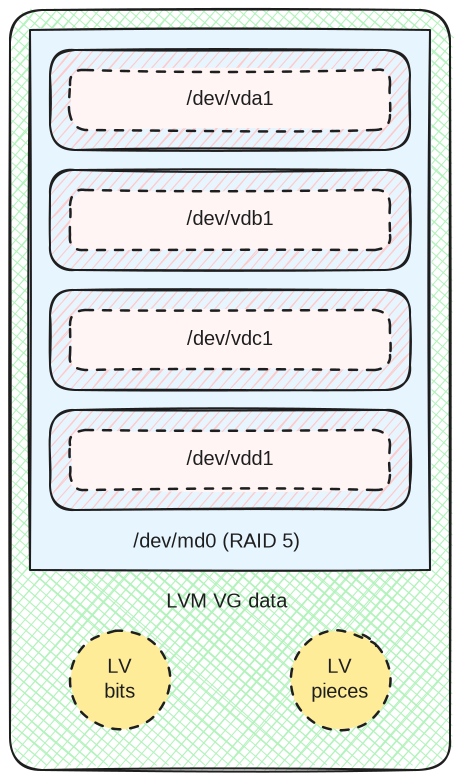
$ lsblk -Mo NAME,TYPE,SIZE NAME TYPE SIZE vda disk 101M vdb disk 101M vdc disk 101M vdd disk 101M
$ sgdisk --zap-all --new=0:0:0 -t 0:fd00 /dev/vda $ sgdisk --zap-all --new=0:0:0 -t 0:fd00 /dev/vdb $ sgdisk --zap-all --new=0:0:0 -t 0:fd00 /dev/vdc $ sgdisk --zap-all --new=0:0:0 -t 0:fd00 /dev/vdd $ lsblk -Mo NAME,TYPE,SIZE NAME TYPE SIZE vda disk 101M vda1 part 100M vdb disk 101M vdb1 part 100M vdc disk 101M vdc1 part 100M vdd disk 101M vdd1 part 100M
$ mdadm --create /dev/md0 --level=raid5 --bitmap=internal --raid-devices=4 \ > /dev/vda1 /dev/vdb1 /dev/vdc1 /dev/vdd1 $ lsblk -Mo NAME,TYPE,SIZE NAME TYPE SIZE vda disk 101M vda1 part 100M vdb disk 101M vdb1 part 100M vdc disk 101M vdc1 part 100M vdd disk 101M vdd1 part 100M md0 raid5 292.5M $ cat /proc/mdstat md0 : active raid5 vdd1[4] vdc1[2] vdb1[1] vda1[0] 299520 blocks super 1.2 level 5, 512k chunk, algorithm 2 [4/4] [UUUU] bitmap: 0/1 pages [0KB], 65536KB chunk
$ pvcreate /dev/md0 Physical volume "/dev/md0" successfully created. $ vgcreate data /dev/md0 Volume group "data" successfully created $ lvcreate -L 100m -n bits data Logical volume "bits" created. $ lvcreate -L 100m -n pieces data Logical volume "pieces" created. $ mkfs.ext4 -q /dev/data/bits $ mkfs.ext4 -q /dev/data/pieces $ lsblk -Mo NAME,TYPE,SIZE NAME TYPE SIZE vda disk 101M vda1 part 100M vdb disk 101M vdb1 part 100M vdc disk 101M vdc1 part 100M vdd disk 101M vdd1 part 100M md0 raid5 292.5M data-bits lvm 100M data-pieces lvm 100M $ vgs VG #PV #LV #SN Attr VSize VFree data 1 2 0 wz--n- 288.00m 88.00m
/dev/vda with a bigger disk. We add it back to the RAID 5 array
after copying the partitions from /dev/vdb:
$ cat /proc/mdstat md0 : active (auto-read-only) raid5 vdb1[1] vdd1[4] vdc1[2] 299520 blocks super 1.2 level 5, 512k chunk, algorithm 2 [4/3] [_UUU] bitmap: 0/1 pages [0KB], 65536KB chunk $ sgdisk --replicate=/dev/vda /dev/vdb $ sgdisk --randomize-guids /dev/vda $ mdadm --manage /dev/md0 --add /dev/vda1 $ cat /proc/mdstat md0 : active raid5 vda1[5] vdb1[1] vdd1[4] vdc1[2] 299520 blocks super 1.2 level 5, 512k chunk, algorithm 2 [4/4] [UUUU] bitmap: 0/1 pages [0KB], 65536KB chunk
/dev/vda because we have no spare capacity. We need a second disk replacement,
like /dev/vdb:
$ cat /proc/mdstat md0 : active (auto-read-only) raid5 vda1[5] vdd1[4] vdc1[2] 299520 blocks super 1.2 level 5, 512k chunk, algorithm 2 [4/3] [U_UU] bitmap: 0/1 pages [0KB], 65536KB chunk $ sgdisk --replicate=/dev/vdb /dev/vdc $ sgdisk --randomize-guids /dev/vdb $ mdadm --manage /dev/md0 --add /dev/vdb1 $ cat /proc/mdstat md0 : active raid5 vdb1[6] vda1[5] vdd1[4] vdc1[2] 299520 blocks super 1.2 level 5, 512k chunk, algorithm 2 [4/4] [UUUU] bitmap: 0/1 pages [0KB], 65536KB chunk
/dev/vda and
/dev/vdb:
$ sgdisk --new=0:0:0 -t 0:fd00 /dev/vda $ sgdisk --new=0:0:0 -t 0:fd00 /dev/vdb $ mdadm --create /dev/md1 --level=raid1 --bitmap=internal --raid-devices=2 \ > /dev/vda2 /dev/vdb2 $ cat /proc/mdstat md1 : active raid1 vdb2[1] vda2[0] 101312 blocks super 1.2 [2/2] [UU] bitmap: 0/1 pages [0KB], 65536KB chunk md0 : active raid5 vdb1[6] vda1[5] vdd1[4] vdc1[2] 299520 blocks super 1.2 level 5, 512k chunk, algorithm 2 [4/4] [UUUU] bitmap: 0/1 pages [0KB], 65536KB chunk
/dev/md1 to the volume group:
$ pvcreate /dev/md1 Physical volume "/dev/md1" successfully created. $ vgextend data /dev/md1 Volume group "data" successfully extended $ vgs VG #PV #LV #SN Attr VSize VFree data 2 2 0 wz--n- 384.00m 184.00m $ lsblk -Mo NAME,TYPE,SIZE NAME TYPE SIZE vda disk 201M vda1 part 100M vda2 part 100M vdb disk 201M vdb1 part 100M vdb2 part 100M md1 raid1 98.9M vdc disk 101M vdc1 part 100M vdd disk 101M vdd1 part 100M md0 raid5 292.5M data-bits lvm 100M data-pieces lvm 100M
/dev/vdc:
$ cat /proc/mdstat md1 : active (auto-read-only) raid1 vda2[0] vdb2[1] 101312 blocks super 1.2 [2/2] [UU] bitmap: 0/1 pages [0KB], 65536KB chunk md0 : active (auto-read-only) raid5 vda1[5] vdd1[4] vdb1[6] 299520 blocks super 1.2 level 5, 512k chunk, algorithm 2 [4/3] [UU_U] bitmap: 0/1 pages [0KB], 65536KB chunk $ sgdisk --replicate=/dev/vdc /dev/vdb $ sgdisk --randomize-guids /dev/vdc $ mdadm --manage /dev/md0 --add /dev/vdc1 $ cat /proc/mdstat md1 : active (auto-read-only) raid1 vda2[0] vdb2[1] 101312 blocks super 1.2 [2/2] [UU] bitmap: 0/1 pages [0KB], 65536KB chunk md0 : active raid5 vdc1[7] vda1[5] vdd1[4] vdb1[6] 299520 blocks super 1.2 level 5, 512k chunk, algorithm 2 [4/4] [UUUU] bitmap: 0/1 pages [0KB], 65536KB chunk
/dev/md1 from RAID 1 to RAID 5:
$ mdadm --grow /dev/md1 --level=5 --raid-devices=3 --add /dev/vdc2 mdadm: level of /dev/md1 changed to raid5 mdadm: added /dev/vdc2 $ cat /proc/mdstat md1 : active raid5 vdc2[2] vda2[0] vdb2[1] 202624 blocks super 1.2 level 5, 64k chunk, algorithm 2 [3/3] [UUU] bitmap: 0/1 pages [0KB], 65536KB chunk md0 : active raid5 vdc1[7] vda1[5] vdd1[4] vdb1[6] 299520 blocks super 1.2 level 5, 512k chunk, algorithm 2 [4/4] [UUUU] bitmap: 0/1 pages [0KB], 65536KB chunk $ pvresize /dev/md1 $ vgs VG #PV #LV #SN Attr VSize VFree data 2 2 0 wz--n- 482.00m 282.00m
/dev/vdd:
$ cat /proc/mdstat md0 : active (auto-read-only) raid5 vda1[5] vdc1[7] vdb1[6] 299520 blocks super 1.2 level 5, 512k chunk, algorithm 2 [4/3] [UUU_] bitmap: 0/1 pages [0KB], 65536KB chunk md1 : active (auto-read-only) raid5 vda2[0] vdc2[2] vdb2[1] 202624 blocks super 1.2 level 5, 64k chunk, algorithm 2 [3/3] [UUU] bitmap: 0/1 pages [0KB], 65536KB chunk $ sgdisk --replicate=/dev/vdd /dev/vdc $ sgdisk --randomize-guids /dev/vdd $ mdadm --manage /dev/md0 --add /dev/vdd1 $ cat /proc/mdstat md0 : active raid5 vdd1[4] vda1[5] vdc1[7] vdb1[6] 299520 blocks super 1.2 level 5, 512k chunk, algorithm 2 [4/4] [UUUU] bitmap: 0/1 pages [0KB], 65536KB chunk md1 : active (auto-read-only) raid5 vda2[0] vdc2[2] vdb2[1] 202624 blocks super 1.2 level 5, 64k chunk, algorithm 2 [3/3] [UUU] bitmap: 0/1 pages [0KB], 65536KB chunk
$ mdadm --grow /dev/md1 --raid-devices=4 --add /dev/vdd2 mdadm: added /dev/vdd2 $ cat /proc/mdstat md0 : active raid5 vdd1[4] vda1[5] vdc1[7] vdb1[6] 299520 blocks super 1.2 level 5, 512k chunk, algorithm 2 [4/4] [UUUU] bitmap: 0/1 pages [0KB], 65536KB chunk md1 : active raid5 vdd2[3] vda2[0] vdc2[2] vdb2[1] 303936 blocks super 1.2 level 5, 64k chunk, algorithm 2 [4/4] [UUUU] bitmap: 0/1 pages [0KB], 65536KB chunk $ pvresize /dev/md1 $ vgs VG #PV #LV #SN Attr VSize VFree data 2 2 0 wz--n- 580.00m 380.00m $ lsblk -Mo NAME,TYPE,SIZE NAME TYPE SIZE vda disk 201M vda1 part 100M vda2 part 100M vdb disk 201M vdb1 part 100M vdb2 part 100M vdc disk 201M vdc1 part 100M vdc2 part 100M vdd disk 301M vdd1 part 100M vdd2 part 100M md0 raid5 292.5M data-bits lvm 100M data-pieces lvm 100M md1 raid5 296.8M
--consistency-policy=ppl.
lsblk output, /dev/md1 appears unused because the logical
volumes do not use any space from it yet. Once you create more logical
volumes or extend them, lsblk will reflect the usage.
mrcal-show-projection-uncertainty
--method cross-reprojection-rrp-Jfp is available today, and works in the
usual moving-chessboard-stationary camera case. Fully boardless coming later.
mrcal-show-stereo-pair-diff tool reports an extrinsics+intrinsics
diff between two calibrations of a stereo pair; experimental
analyses/extrinsics-stability.py tool reports an extrinsics-only diff. These
are in contrast to the intrinsics-only uncertainty and diffs in the existing
mrcal-show-projection-diff and mrcal-show-projection-uncertainty tools.
Some documentation in the uncertainty and differencing pages.
_mrcal_triangulated_error(). This is demoed in
test/test-sfm-triangulated-points.py. And I've been using
_mrcal_triangulated_error() in structure-from-motion implementations within
other optimization routines.
/backup/serverA.domain/.sync/foo
/backup/serverA.domain/daily.0/foo
/backup/serverA.domain/daily.1/foo
/backup/serverA.domain/daily.2/foo
...
/backup/serverA.domain/daily.6/foo
/backup/serverA.domain/weekly.0/foo
/backup/serverA.domain/weekly.1/foo
...
/backup/serverA.domain/monthly.0/foo
/backup/serverA.domain/monthly.1/foo
...
/backup/serverA.domain/yearly.0/foo
I can browse and rescue files easily, going back in time when needed.
The rsnapshot project README explains more, there is a long rsnapshot HOWTO although I usually find the rsnapshot man page the easiest to digest.
I have stored multi-TB Git-LFS data on GitLab.com for some time. The yearly renewal is coming up, and the price for Git-LFS storage on GitLab.com is now excessive (~$10.000/year). I have reworked my work-flow and finally migrated debdistget to only store Git-LFS stubs on GitLab.com and push the real files to S3 object storage. The cost for this is barely measurable, I have yet to run into the 25/month warning threshold.
But how do you backup stuff stored in S3?
For some time, my S3 backup solution has been to run the minio-client mirror command to download all S3 objects to my laptop, and rely on rsnapshot to keep backups of this. While 4TB NVME s are relatively cheap, I ve felt that this disk and network churn on my laptop is unsatisfactory for quite some time.
What is a better approach?
I find S3 hosting sites fairly unreliable by design. Only a couple of clicks in your web browser and you have dropped 100TB of data. Or by someone else who steal your plaintext-equivalent cookie. Thus, I haven t really felt comfortable using any S3-based backup option. I prefer to self-host, although continously running a mirror job is not sufficient: if I accidentally drop the entire S3 object store, my mirror run will remove all files locally too.
The rsnapshot approach that allows going back in time and having data on self-managed servers feels superior to me.
What if we could use rsnapshot with a S3 client instead of rsync?
Someone else asked about this several years ago, and the suggestion was to use the fuse-based s3fs which sounded unreliable to me. After some experimentation, working around some hard-coded assumption in the rsnapshot implementation, I came up with a small configuration pattern and a wrapper tool to implement what I desired.
Here is my configuration snippet:
cmd_rsync /backup/s3/s3rsync
rsync_short_args -Q
rsync_long_args --json --remove
lockfile /backup/s3/rsnapshot.pid
snapshot_root /backup/s3
backup s3:://hetzner/debdistget-gnuinos ./debdistget-gnuinos
backup s3:://hetzner/debdistget-tacos ./debdistget-tacos
backup s3:://hetzner/debdistget-diffos ./debdistget-diffos
backup s3:://hetzner/debdistget-pureos ./debdistget-pureos
backup s3:://hetzner/debdistget-kali ./debdistget-kali
backup s3:://hetzner/debdistget-devuan ./debdistget-devuan
backup s3:://hetzner/debdistget-trisquel ./debdistget-trisquel
backup s3:://hetzner/debdistget-debian ./debdistget-debian
The idea is to save a backup of a couple of S3 buckets under /backup/s3/.
I have some scripts that take a complete rsnapshot.conf file and append my per-directory configuration so that this becomes a complete configuration. If you are curious how I roll this, backup-all invokes backup-one appending my rsnapshot.conf template with the snippet above.
The s3rsync wrapper script is the essential hack to convert rsnapshot s rsync parameters into something that talks S3 and the script is as follows:
#!/bin/sh
set -eu
S3ARG=
for ARG in "$@"; do
case $ARG in
s3:://*) S3ARG="$S3ARG "$(echo $ARG sed -e 's,s3:://,,');;
-Q*) ;;
*) S3ARG="$S3ARG $ARG";;
esac
done
echo /backup/s3/mc mirror $S3ARG
exec /backup/s3/mc mirror $S3ARG
It uses the minio-client tool. I first tried s3cmd but its sync command read all files to compute MD5 checksums every time you invoke it, which is very slow. The mc mirror command is blazingly fast since it only compare mtime s, just like rsync or git.
First you need to store credentials for your S3 bucket. These are stored in plaintext in ~/.mc/config.json which I find to be sloppy security practices, but I don t know of any better way to do this. Replace AKEY and SKEY with your access token and secret token from your S3 provider:
/backup/s3/mc alias set hetzner AKEY SKEY
If I invoke a sync job for a fully synced up directory the output looks like this:
root@hamster /backup# /run/current-system/profile/bin/rsnapshot -c /backup/s3/rsnapshot.conf -V sync
Setting locale to POSIX "C"
echo 1443 > /backup/s3/rsnapshot.pid
/backup/s3/s3rsync -Qv --json --remove s3:://hetzner/debdistget-gnuinos \
/backup/s3/.sync//debdistget-gnuinos
/backup/s3/mc mirror --json --remove hetzner/debdistget-gnuinos /backup/s3/.sync//debdistget-gnuinos
"status":"success","total":0,"transferred":0,"duration":0,"speed":0
/backup/s3/s3rsync -Qv --json --remove s3:://hetzner/debdistget-tacos \
/backup/s3/.sync//debdistget-tacos
/backup/s3/mc mirror --json --remove hetzner/debdistget-tacos /backup/s3/.sync//debdistget-tacos
"status":"success","total":0,"transferred":0,"duration":0,"speed":0
/backup/s3/s3rsync -Qv --json --remove s3:://hetzner/debdistget-diffos \
/backup/s3/.sync//debdistget-diffos
/backup/s3/mc mirror --json --remove hetzner/debdistget-diffos /backup/s3/.sync//debdistget-diffos
"status":"success","total":0,"transferred":0,"duration":0,"speed":0
/backup/s3/s3rsync -Qv --json --remove s3:://hetzner/debdistget-pureos \
/backup/s3/.sync//debdistget-pureos
/backup/s3/mc mirror --json --remove hetzner/debdistget-pureos /backup/s3/.sync//debdistget-pureos
"status":"success","total":0,"transferred":0,"duration":0,"speed":0
/backup/s3/s3rsync -Qv --json --remove s3:://hetzner/debdistget-kali \
/backup/s3/.sync//debdistget-kali
/backup/s3/mc mirror --json --remove hetzner/debdistget-kali /backup/s3/.sync//debdistget-kali
"status":"success","total":0,"transferred":0,"duration":0,"speed":0
/backup/s3/s3rsync -Qv --json --remove s3:://hetzner/debdistget-devuan \
/backup/s3/.sync//debdistget-devuan
/backup/s3/mc mirror --json --remove hetzner/debdistget-devuan /backup/s3/.sync//debdistget-devuan
"status":"success","total":0,"transferred":0,"duration":0,"speed":0
/backup/s3/s3rsync -Qv --json --remove s3:://hetzner/debdistget-trisquel \
/backup/s3/.sync//debdistget-trisquel
/backup/s3/mc mirror --json --remove hetzner/debdistget-trisquel /backup/s3/.sync//debdistget-trisquel
"status":"success","total":0,"transferred":0,"duration":0,"speed":0
/backup/s3/s3rsync -Qv --json --remove s3:://hetzner/debdistget-debian \
/backup/s3/.sync//debdistget-debian
/backup/s3/mc mirror --json --remove hetzner/debdistget-debian /backup/s3/.sync//debdistget-debian
"status":"success","total":0,"transferred":0,"duration":0,"speed":0
touch /backup/s3/.sync/
rm -f /backup/s3/rsnapshot.pid
/run/current-system/profile/bin/logger -p user.info -t rsnapshot[1443] \
/run/current-system/profile/bin/rsnapshot -c /backup/s3/rsnapshot.conf \
-V sync: completed successfully
root@hamster /backup#
You can tell from the paths that this machine runs Guix. This was the first production use of the Guix System for me, and the machine has been running since 2015 (with the occasional new hard drive). Before, I used rsnapshot on Debian, but some stable release of Debian dropped the rsnapshot package, paving the way for me to test Guix in production on a non-Internet exposed machine. Unfortunately, mc is not packaged in Guix, so you will have to install it from the MinIO Client GitHub page manually.
Running the daily rotation looks like this:
root@hamster /backup# /run/current-system/profile/bin/rsnapshot -c /backup/s3/rsnapshot.conf -V daily
Setting locale to POSIX "C"
echo 1549 > /backup/s3/rsnapshot.pid
mv /backup/s3/daily.5/ /backup/s3/daily.6/
mv /backup/s3/daily.4/ /backup/s3/daily.5/
mv /backup/s3/daily.3/ /backup/s3/daily.4/
mv /backup/s3/daily.2/ /backup/s3/daily.3/
mv /backup/s3/daily.1/ /backup/s3/daily.2/
mv /backup/s3/daily.0/ /backup/s3/daily.1/
/run/current-system/profile/bin/cp -al /backup/s3/.sync /backup/s3/daily.0
rm -f /backup/s3/rsnapshot.pid
/run/current-system/profile/bin/logger -p user.info -t rsnapshot[1549] \
/run/current-system/profile/bin/rsnapshot -c /backup/s3/rsnapshot.conf \
-V daily: completed successfully
root@hamster /backup#
Hopefully you will feel inspired to take backups of your S3 buckets now!
No man s Sky (or as it s known in our house, "spaceship game") is a space
exploration/sandbox game that was originally released 10 years ago. Back then I
tried it on my brother s PS4 but I couldn t get into it. In 2022 it launched
for the Nintendo Switch1 and the game finally clicked for me.
I play it very casually. I mostly don t play at all, except sometimes when
there are time-limited expeditions running, which I find refreshing, and
usually have some exclusives as a reward for play.
One of the many things you can do in the game is collect star ships. I started
keeping a list of notable ones I ve found, and I ve decided to occasionally
blog about them.
The Horizon Vector NX is a small sporty ship that players on Nintendo Switch
could claim within the first month or so after it launched. The colour scheme
resembles the original neon switch controllers. Although the ship type occurs
naturally in the game in other configurations, I think differently-painted
wings are unique to this ship.
For most of the last 4 years, my copy of this ship was confined to the Switch,
until November 2024, when they added cross-save capability to the game. I was
then able to access the ship when playing on Linux (or Mac).
Brunei entry stamp on my passport. Picture by Ravi Dwivedi, released under CC-BY-SA 4.0.
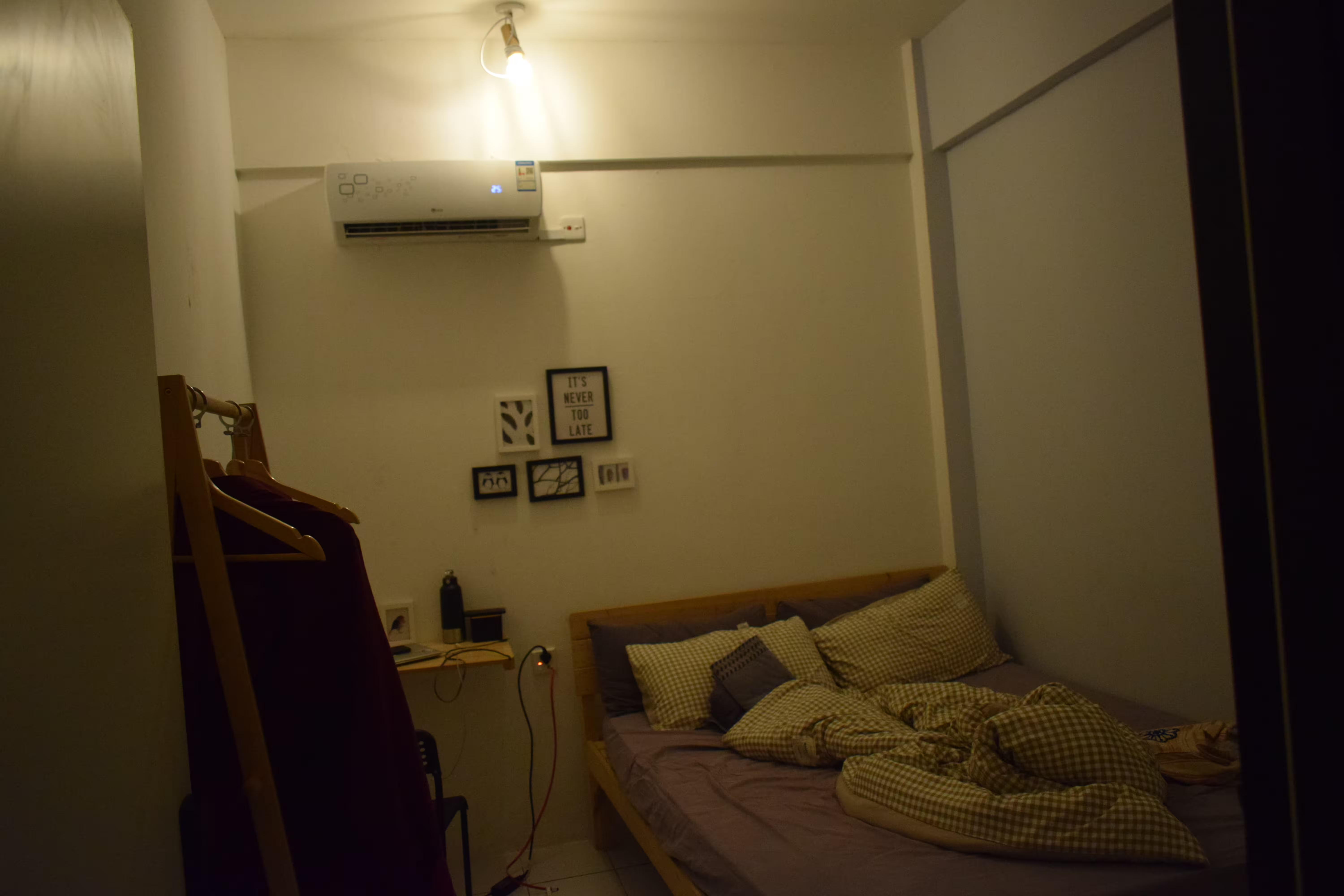
Our room in Brunei. Picture by Ravi Dwivedi, released under CC-BY-SA 4.0

Jame Asr Hassanil Bolkiah Mosque. Picture by Ravi Dwivedi, released under CC-BY-SA 4.0

Omar Ali Saifuddien Mosque. Picture by Ravi Dwivedi, released under CC-BY-SA 4.0
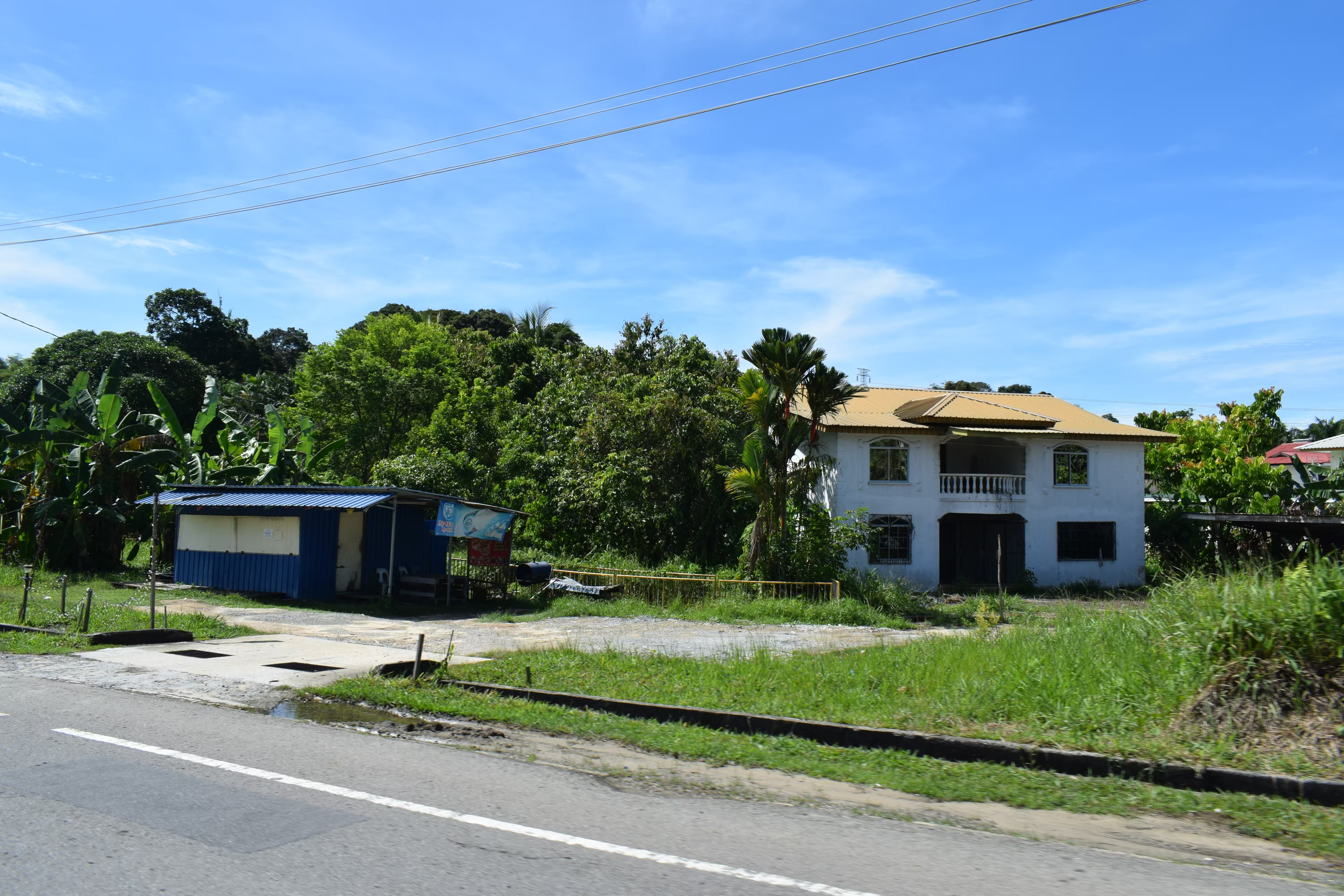
A shot of Brunei s countryside. Picture by Ravi Dwivedi, released under CC-BY-SA 4.0.
Version 0.0.26 of RcppSpdlog arrived
on CRAN moments ago, and will
be uploaded to Debian and built for
r2u shortly. The (nice)
documentation
site has been refreshed too. RcppSpdlog
bundles spdlog, a
wonderful header-only C++ logging library with all the bells and
whistles you would want that was written by Gabi Melman, and also includes fmt by Victor Zverovich. You can learn
more at the nice package
documention site.
Brian Ripley noticed an infelicity when building under C++20 which he
is testing hard and fast. Sadly, this came a day late for yesterday s
upload of release 0.0.25 with another trivial fix so another incremental
release was called for. We already accommodated C++20 and its use of
std::format (in lieu of the included
fmt::format) but had not turned it on
unconditionally. We do so now, but offer an opt-out for those
who prefer the previous build type.
The NEWS entry for this release follows.
Courtesy of my CRANberries, there is also a diffstat report detailing changes. More detailed information is on the RcppSpdlog page, or the package documention site.Changes in RcppSpdlog version 0.0.26 (2026-01-16)
- Under C++20 or later, switch to using
std::formatto avoid a compiler nag that CRAN now complains about
This post by Dirk Eddelbuettel originated on his Thinking inside the box blog. If you like this or other open-source work I do, you can sponsor me at GitHub.
Via (I think) @mcc on the Fediverse, I
learned of GetMusic: a sort-of "clearing house"
for Free Bandcamp codes. I think the way it works is, some artists
release a limited set of download codes for their albums in order to
promote them, and GetMusic help them to keep track of that, and helps
listeners to discover them.
GetMusic mail me occasionally, and once they highlighted an album The Arcane &
Paranormal
Earth which
they described as "Post-Industrial in the vein of Coil and Nurse With Wound
with shades of Aphex Twin, Autechre and assorted film music."
Well that description hooked me immediately but I missed out on the code.
However, I sampled the album on Bandcamp directly a few times as well as
a few of his others (Ye Gods is a side-project of Antoni Maiovvi, which
itself is a pen-name) and liked them very much. I picked up the full
collection of Ye Gods albums in one go for 30% off.
Here's a stand-out track:
On Earth by Ye Gods
So I guess this service works! Although I didn't actually get a free code
in this instance, it promoted the artist, introduced me to something I really
liked and drove a sale.
The Debian LTS Team, funded by [Freexian s Debian LTS offering]
(https://www.freexian.com/lts/debian/), is pleased to report its activities for
December.
Version 0.0.25 of RcppSpdlog arrived
on CRAN right now, and will be
uploaded to Debian and built for r2u shortly along with a
minimal refresh of the documentation site. RcppSpdlog
bundles spdlog, a
wonderful header-only C++ logging library with all the bells and
whistles you would want that was written by Gabi Melman, and also includes fmt by Victor Zverovich. You can learn
more at the nice package
documention site.
This release fixes a minuscule cosmetic issue from the previous
release a week ago. We rely on two #defines that R sets to
signal to spdlog that we
are building in the R context (which matters for the R-specific logging
sink, and picks up something Gabi added upon my suggestion at
the very start of this package). But I use the same
#defines to now check in Rcpp that we are building with R and, in
this case, wrongly conclude R headers have already been installed so Rcpp (incorrectly) nags about that. The
solution is to add two #undefine and proceed as normal
(with Rcpp controlling and taking
care of R header includion too) and that is what we do here. All good
now, no nags from a false positive.
The NEWS entry for this release follows.
Courtesy of my CRANberries, there is also a diffstat report detailing changes. More detailed information is on the RcppSpdlog page, or the package documention site.Changes in RcppSpdlog version 0.0.25 (2026-01-15)
- Ensure
#definesignaling R build (needed with spdlog) is unset before including R headers to not falsely triggering message from Rcpp
This post by Dirk Eddelbuettel originated on his Thinking inside the box blog. If you like this or other open-source work I do, you can sponsor me at GitHub.
A brand new release 0.1.15 of the RcppSimdJson
package is now on CRAN.
RcppSimdJson
wraps the fantastic and genuinely impressive simdjson library by Daniel Lemire and collaborators. Via
very clever algorithmic engineering to obtain largely branch-free code,
coupled with modern C++ and newer compiler instructions, it results in
parsing gigabytes of JSON parsed per second which is quite
mindboggling. The best-case performance is faster than CPU speed as
use of parallel SIMD instructions and careful branch avoidance can lead
to less than one cpu cycle per byte parsed; see the video of the talk by Daniel Lemire
at QCon.
This version updates to the current 4.2.4 upstream release. It also
updates the RcppExports.cpp file with glue between C++
and R. We want move away from using Rf_error() (as
Rcpp::stop() is generally preferable). Packages (such as
this one) that are declaring an interface have an actual
Rf_error() call generated in RcppExports.cpp
which can protect which is what current Rcpp code
generation does. Long story short, a minor internal reason.
The short NEWS entry for this release follows.
Courtesy of my CRANberries, there is also a diffstat report for this release. For questions, suggestions, or issues please use the issue tracker at the GitHub repo.Changes in version 0.1.15 (2026-01-14)
- simdjson was upgraded to version 4.2.4 (Dirk in #97
RcppExports.cppwas regenerated to aid a Rcpp transition- Standard maintenance updates for continuous integration and URLs
This post by Dirk Eddelbuettel originated on his Thinking inside the box blog. If you like this or other open-source work I do, you can now sponsor me at GitHub.
An update to the gunsales package is
now on CRAN. As in the last
update nine years ago (!!), changes are mostly internal. An upcoming
dplyr change requires a switch from the old and soon
to-be-removed underscored verb form; that was kindly addressed in an
incoming pull request. We also updated the CI scripts a few times during
this period as needed, and switched to using Authors@R, and refreshed
and updated a number of URL references.
Courtesy of my CRANberries, there
is also a diffstat report for this
release.
This post by Dirk Eddelbuettel originated on his Thinking inside the box blog. If you like this or other open-source work I do, you can sponsor me at GitHub.
This post is an unpublished review for The Innovation Engine Government-funded Academic ResearchDavid Patterson does not need an introduction. Being the brain behind many of the inventions that shaped the computing industry (repeatedly) over the past 40 years, when he put forward an opinion article in Communications of the ACM targeting the current day political waves in the USA, I could not avoid choosing it to write this review. Patterson worked for a a public university (University of California at Berkeley) between 1976 and 2016, and in this article he argues how government-funded academic research (GoFAR) allows for faster, more effective and freer development than private sector-funded research would, putting his own career milestones as an example of how public money that went to his research has easily been amplified by a factor of 10,000:1 for the country s economy, and 1,000:1 particularly for the government. Patterson illustrates this quoting five of the home-run research projects he started and pursued with government funding, eventually spinning them off as successful startups:
Next.