Search Results: "ads"

1 September 2025

Birger Schacht: Status update, August 2025

Due to the freeze I did not do that many uploads in the last few months, so there were various new releases I packaged once Trixie was released. Regarding the release of Debian 13, Trixie, I wrote a small summary of the changes in my packages. I uploaded an unreleased version of cage to experimental, to prepare for the transition to wlroots-0.19. Both sway and labwc already had packages in experimental that depended on the new wlroots version. When the transition happened, I uploaded the cage version to unstable, as well as labwc 0.9.1 and sway 1.11. I updated Most of the packages I uploaded using git-debpush, some of them could not be uploaded this way due to upstream using git submodules (this is 1107219). I also created 1112040 - git-debpush: should also say which tag it created and 1111504 - git-debpush: pristine-tar check warns about pristine-tar data thats not present (which is already fixed). I uploaded wayback 0.2 to NEW, where it is waiting for review, (ITP). In my dayjob I added extended the place lookup form of apis-core-rdf to allow searching places and selecting them on a map using leaflet and the nominatim API. Another issue I worked on was about highlighting those inputs of our generic list filter that are used to filter the results. I released a couple of bugfix releases for the v0.50 release, then v0.51 and two bugfix releases and then v0.52 and another couple of bugfix releases. v0.53 will land in a couple of days. I also released v0.6.2 of apis-highlighter-ng, which is sort of a plugin for apis-core-rdf, that allows to highlight parts of a text and link them to whatever Django object (in our case relations).

31 August 2025

Russell Coker: Links August 2025

Dimitri John Ledkov wrote an informative blog post about self encrypting disks and UEFI with Linux [1]. This Coffeezilla video highlights an interesting scam, run a broker for day traders and don t execute trades, just be the counterparty for every trade and rely on day traders losing [2]. First Sight is a Dust SciFi short film that s worthy of Black Mirror [3]. Apple published an interesting article about the operation of the Secure Enclave in iPhone, Mac, and all other significant Apple hardware [4]. Reese Waters made an amusing video about a conservative catfight that s going on, nice to see horrible people attacking each other [5]. Chengyuan Ma wrote an informative summary of the history of the Great Firewall of China [6]. The V2Ray proxy has a nice feature set! Interesting article about the JP Morgan Workplace Activity Data Utility (WADU) AI spyware system [7]. Corporate work is going to become even more horrible. Veritasium has a great video about the history of vulcanised rubber and the potential for significant problems if rubber leaf blight spreads to other countries [8]. Jalopnik has an interesting article about how Reagan killed the safest car ever built [9]. David Brin wrote an interesting article Tolkien Enemy of Progress about fiction that justifies autocratic rule [10].

Otto Kek l inen: Managing procrastination and distractions

Featured image of post Managing procrastination and distractionsI ve noticed that procrastination and inability to be consistently productive at work has become quite common in recent years. This is clearly visible in younger people who have grown up with an endless stream of entertainment literally at their fingertips, on their mobile phone. It is however a trap one can escape from with a little bit of help. Procrastination is natural they say humans are lazy by nature after all. Probably all of us have had moments when we choose to postpone a task we know we should be working on, and instead spent our time doing secondary tasks (valorisation). Classic example is cleaning your apartment when you should be preparing for an exam. Some may procrastinate by not doing any work at all, and just watching YouTube videos or the like. To some people, typically those who are in their 20s and early in their career, procrastination can be a big challenge and finding the discipline to stick to planned work may need intentional extra effort, and perhaps even external help. During my 20+ year career in software development I ve been blessed to work with engineers of various backgrounds and each with their unique set of strengths. I have also helped many grow in various areas and overcome challenges, such as lack of intrinsic motivation and managing procrastination, and some might be able to get it in check with some simple advice.

Distance yourself from the digital distractions The key to avoiding distractions and procrastination is to make it inconvenient enough that you rarely do it. If continuing to do work is easier than switching to procrastination, work is more likely to continue. Tips to minimize digital distractions, listed in order of importance:
  1. Put your phone away. Just like when you go to a movie and turn off your phone for two hours, you can put the phone away completely when starting to work. Put the phone in a different room to ensure there is enough physical distance between you and the distraction, so it is impossible for you to just take a quick peek .
  2. Turn off notifications from apps. Don t let the apps call you like sirens luring Odysseus. You don t need to have all the notifications. You will see what the apps have when you eventually open them at a time you choose to use them.
  3. Remove or disable social media apps, games and the like from your phone and your computer. You can install them back when you have vacation. You can probably live without them for some time. If you can t remove them, explore your phone s screen time restriction features to limit your own access to apps that most often waste your time. These features are sometimes listed in the phone settings under digital health .
  4. Have a separate work computer and work phone. Having dedicated ones just for work that are void of all unnecessary temptations helps keep distance from the devices that could derail your focus.
  5. Listen to music. If you feel your brain needs a dose of dopamine to get you going, listening to music helps satisfy your brain s cravings while still being able to simultaneously keep working.
Doing a full digital detox is probably not practical, or not sustainable for an extended time. One needs apps to stay in touch with friends and family, and staying current in software development probably requires spending some time reading news online and such. However the tips above can help contain the distractions and minimize the spontaneous attention the distractions get. Some of the distractions may ironically be from the work itself, for example Slack notifications or new email notifications. I recommend turning them off for a couple of hours every day to have some distraction free time. It should be enough to check work mail a couple times a day. Checking them every hour probably does not add much overall value for the company unless your work is in sales or support where the main task itself is responding to emails.

Distraction free work environment Following the same principle of distancing yourself from distractions, try to use a dedicated physical space for working. If you don t have a spare room to dedicate to work, use a neighborhood caf or sign up for a local co-working space or start commuting to the company office to find a space to be focused on work in.

Break down tasks into smaller steps Sometimes people postpone tasks because they feel intimidated by the size or complexity of a task. In particular in software engineering problems may be vague and appear large until one reaches the breakthrough that brings the vision of how to tackle it. Breaking down problems into smaller more manageable pieces has many advantages in software engineering. Not only can it help with task-avoidance, but it can also make the problem easier to analyze, suggest solutions and test them and build a solid foundation to expand upon to ultimately later reach a full solution on the entire larger problem. Working on big problems as a chain of smaller tasks may also offer more opportunities to celebrate success on completing each subtask and help getting in a suitable cadence of solving a single thing, taking a break and then tackling the next issue. Breaking down a task into concrete steps may also help with getting more realistic time estimations. Sometimes procrastination isn t real someone could just be overly ambitious and feel bad about themselves for not doing an unrealistic amount of work.

Intrinsic motivation Of course, you should follow your passion when possible. Strive to pick a career that you enjoy, and thus maximize the intrinsic motivation you experience. However, even a dream job is still a job. Nobody is ever paid to do whatever they want. Any work will include at least some tasks that feel like a chore or otherwise like something you would not do unless paid to. Some would say that the definition of work itself is having to do things one would otherwise not do. You can only fully do whatever you want while on vacation or when you choose to not have a job at all. But if you have a job, you simply need to find the intrinsic motivation to do it. Simply put, some tasks are just unpleasant or boring. Our natural inclination is to avoid them in favor of more enjoyable activities. For these situations we just have to find the discipline to force ourselves to do the tasks and figuratively speaking whip ourselves into being motivated to complete the tasks.

Extrinsic motivation As the name implies, this is something people external to you need to provide, such as your employer or manager. If you have challenges in managing yourself and delivering results on a regular basis, somebody else needs to set goals and deadlines and keep you accountable for them. At the end of the day this means that eventually you will stop receiving salary or other payments unless you did your job. Forcing people to do something isn t nice, but eventually it needs to be done. It would not be fair for an employer to pay those who did their work the same salary as those who procrastinated and fell short on their tasks. If you work solo, you can also simulate the extrinsic motivation by publicly announcing milestones and deadlines to build up pressure for yourself to meet them and avoid publicly humiliation. It is a well-studied and scientifically proven phenomenon that most university students procrastinate at the start of assignments, and truly start working on them only once the deadline is imminent.

External help for addictions If procrastination is mainly due to a single distraction that is always on your mind, it may be a sign of an addiction. For example, constantly thinking about a computer game or staying up late playing a computer game, to the extent that it seriously affects your ability to work, may be a symptom of an addiction, and getting out of it may be easier with external help.

Discipline and structure Most of the time procrastination is not due to an addiction, but simply due to lack of self-discipline and structure. The good thing is that those things can be learned. It is mostly a matter of getting into new habits, which most young software engineers pick up more or less automatically while working along the more senior ones. Hopefully these tips can help you stay on track and ensure you do everything you are expected to do with clear focus, and on time!

30 August 2025

Junichi Uekawa: Changing Chrome Remote Desktop desktop size in GCP Windows.

Changing Chrome Remote Desktop desktop size in GCP Windows. When I connect to GCP Windows hosts with default configuration I get 640x480 desktop. Enabling display device in the device configuration enables resizing from Windows.

Utkarsh Gupta: FOSS Activites in August 2025

Here s my monthly but brief update about the activities I ve done in the F/L/OSS world.

Debian
Debian 13 was released! Woot! Whilst I didn t get a chance to do much, here s still a few things that I worked on:
  • Helped Anshul with Golang 1.25 packaging and upload.
  • Assited Anshul in fixing Golang bugs in the stable release via a -pu.
  • Mentoring for newcomers.
  • Moderation of -project mailing list.

Ubuntu
I joined Canonical to work on Ubuntu full-time back in February 2021. Whilst I can t give a full, detailed list of things I did, here s a quick TL;DR of what I did:
  • Released Questing snapshot 4! \o/
  • Prepared for 25.10 Beta, held weekly release syncs, et al.
  • Granted FFe and triaged a bunch of other bugs from both, Release team and Archive Admin POV. :)
  • Got a recognition award for helping Chlo with Google Guest Agent packages.
  • Preparing for the a round of internal review, 360s, and trying to not be sick. :)

Debian (E)LTS
This month I have worked 16.00 hours on Debian Long Term Support (LTS) and 4.50 hours on its sister Extended LTS project and did the following things:
  • [LTS] Prepared the LTS update for wordpress, bumping the package from 5.7.11 to 5.7.13.
    • Prepared an update for stable, too, and pinged Craig. Haven t heard yet.
    • Got incredibly sick so will carry on the coordination work and release the updates to all the releases. Everything s mostly ready and tested.
    • Gave Salvatore a quick heads up via IRC.
  • [E/LTS] Frontdesk duty from 28th July to 04th August.
  • [E/LTS] Helped Daniel Leidert in showing him around as he did his first frontdesk rota. Yay!
    • We paired on an hour long meets call and discussed various toolings and workflows.
    • Pair-reviewed a few CVEs together.
    • Also discussed how to triage newly supported packages for ELTS, too!
  • [LTS] Attended the monthly LTS meeting on Jitsi. Summary here.
    • [ELTS] Raised questions about installing debusine on Ubuntu.
      • Still trying to play around to get a bit more comfortable before starting to do actual uploads there.
  • [LTS] Helping a few folks - like assisting Lee to see if we have a reproducer for CVE-2025-27613 for git, et al.
  • [Stable] Been working on fixing 2 packages:
    • ruby-graphql: The Debian Security team asked to fix that via p-u so prepared a patch update.
    • ruby-saml: The update is finally ready but not tested yet - should be a quick one though.
    • Got incredibly sick and couldn t move things forward but will take care of the work in the following month.

Until next time.
:wq for today.

29 August 2025

Raju Devidas: Fixing Auto-Rotate screen orientation on PostmarketOS devices running MATE DE

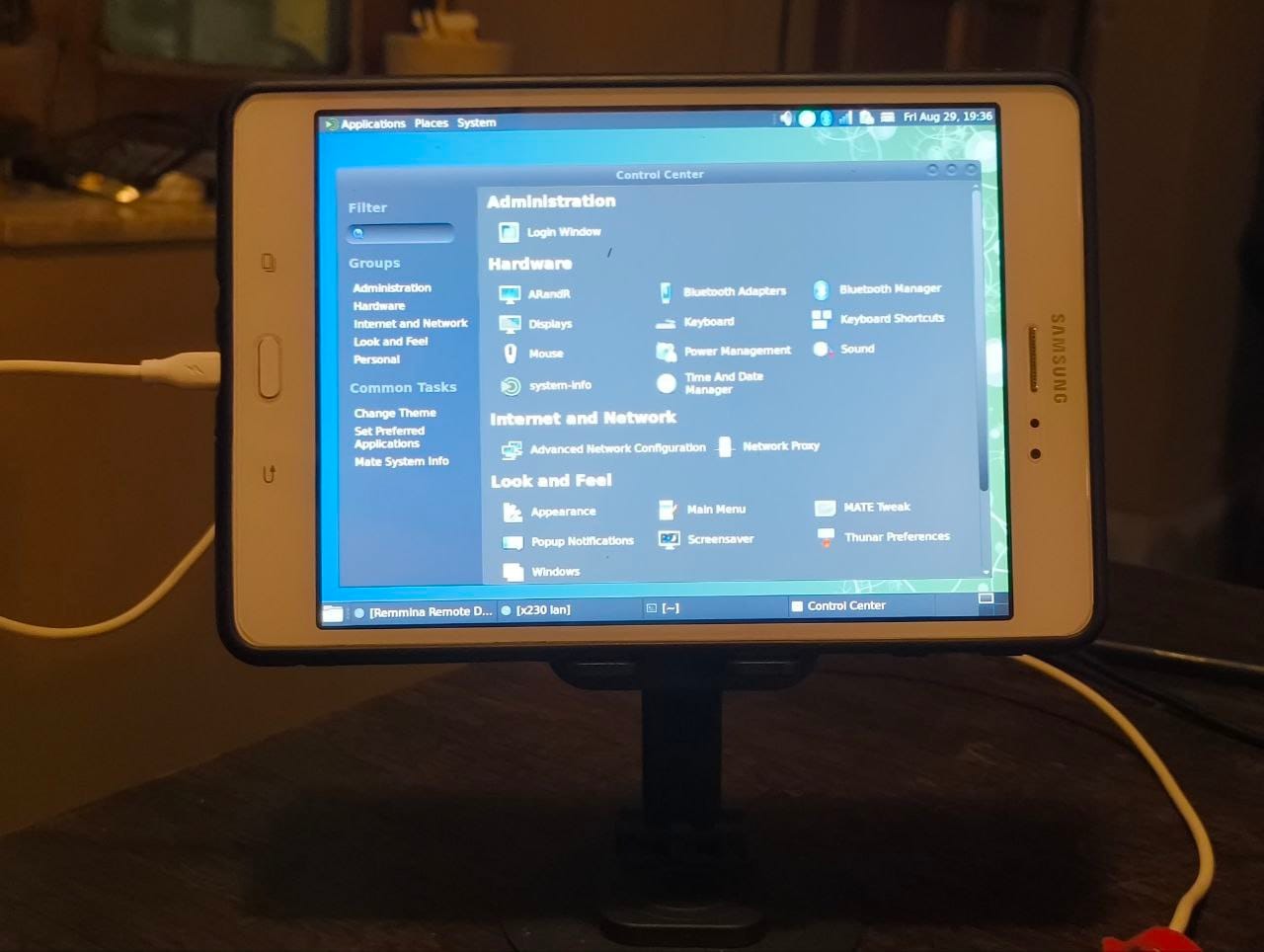
Fixing Auto-Rotate screen orientation on PostmarketOS devices running MATE DEI have been using my Samsung Galaxy Tab A (2015) with PostmarketOS on and off since last year. It serves as a really good e-book reader with KOReader installed on it. Have tried phosh and plasma-mobile on it, works nicely but slows the device down heavily (2 GB RAM and old processor) so I use MATE Desktop environment on it.Lately I have started using this tablet along with my laptop as a second screen for work. And it has been working super nicely for that. The only issue being that I have to manually rotate the screen to landscape every time I reboot the device. It resets the screen orientation to portrait after a reboot. So I went through the pmOS wiki and a neat nice hack documented there worked very well for me. First we will test if the auto-rotate sensor works and if we can read values from it. So we install some basic necessary packages
$ sudo apk add xrandr xinput inotify-tools iio-sensor-proxy
Enable the service for iio-sensor-proxy
sudo rc-update add iio-sensor-proxy
Reboot the device. Now in the device terminal start the sensor monitor-sensor
user@samsung-gt58 ~> monitor-sensor
    Waiting for iio-sensor-proxy to appear
+++ iio-sensor-proxy appeared
=== Has accelerometer (orientation: normal, tilt: vertical)
=== Has ambient light sensor (value: 5.000000, unit: lux)
=== No proximity sensor
=== No compass
    Light changed: 14.000000 (lux)
    Accelerometer orientation changed: left-up
    Tilt changed: tilted-down
    Light changed: 12.000000 (lux)
    Tilt changed: vertical
    Light changed: 13.000000 (lux)
    Light changed: 11.000000 (lux)
    Light changed: 13.000000 (lux)
    Accelerometer orientation changed: normal
    Light changed: 5.000000 (lux)
    Light changed: 6.000000 (lux)
    Light changed: 5.000000 (lux)
    Accelerometer orientation changed: right-up
    Light changed: 3.000000 (lux)
    Light changed: 4.000000 (lux)
    Light changed: 5.000000 (lux)
    Light changed: 12.000000 (lux)
    Tilt changed: tilted-down
    Light changed: 19.000000 (lux)
    Accelerometer orientation changed: bottom-up
    Tilt changed: vertical
    Light changed: 1.000000 (lux)
    Light changed: 2.000000 (lux)
    Light changed: 4.000000 (lux)
    Accelerometer orientation changed: right-up
    Tilt changed: tilted-down
    Light changed: 11.000000 (lux)
    Accelerometer orientation changed: normal
    Tilt changed: vertical
    Tilt changed: tilted-down
    Light changed: 18.000000 (lux)
    Light changed: 21.000000 (lux)
    Light changed: 22.000000 (lux)
    Light changed: 19.000000 (lux)
    Accelerometer orientation changed: left-up
    Light changed: 17.000000 (lux)
    Tilt changed: vertical
    Light changed: 14.000000 (lux)
    Tilt changed: tilted-down
    Light changed: 16.000000 (lux)
    Light changed: 18.000000 (lux)
    Light changed: 17.000000 (lux)
    Light changed: 18.000000 (lux)
    Light changed: 17.000000 (lux)
    Light changed: 18.000000 (lux)
    Light changed: 17.000000 (lux)
    Light changed: 18.000000 (lux)
    Light changed: 17.000000 (lux)
As you can see we can read the rotation values from the sensor as I am rotating the tablet in different orientations. Now we just need to use a script which changes the screen orientation using xrandr according to the sensor value.
#!/bin/sh
killall monitor-sensor
monitor-sensor > /dev/shm/sensor.log 2>&1 &
while inotifywait -e modify /dev/shm/sensor.log; do
  ORIENTATION=$(tail /dev/shm/sensor.log   grep &aposorientation&apos   tail -1   grep -oE &apos[^ ]+$&apos)
  case "$ORIENTATION" in
    normal)
      xrandr -o normal
      xinput set-prop "Goodix Capacitive TouchScreen" "Coordinate Transformation Matrix" 1 0 0 0 1 0 0 0 1
      ;;
    left-up)
      xrandr -o left
      xinput set-prop "Goodix Capacitive TouchScreen" "Coordinate Transformation Matrix" 0 -1 1 1 0 0 0 0 1
      ;;
    bottom-up)
      xrandr -o inverted
      xinput set-prop "Goodix Capacitive TouchScreen" "Coordinate Transformation Matrix" -1 0 1 0 -1 1 0 0 1
      ;;
    right-up)
      xrandr -o right
      xinput set-prop "Goodix Capacitive TouchScreen" "Coordinate Transformation Matrix" 0 1 0 -1 0 1 0 0 1
      ;;
  esac
done

auto-rotate-screen.sh

You need to replace the name of your touch input device in the script, you can get the name by using xinput --list , make sure to type this on the device terminal.
user@samsung-gt58 ~> xinput --list
* Virtual core pointer                    	id=2	[master pointer  (3)]
*   * Virtual core XTEST pointer              	id=4	[slave  pointer  (2)]
*   * Zinitix Capacitive TouchScreen          	id=10	[slave  pointer  (2)]
*   * Toad One Plus                           	id=12	[slave  pointer  (2)]
* Virtual core keyboard                   	id=3	[master keyboard (2)]
    * Virtual core XTEST keyboard             	id=5	[slave  keyboard (3)]
    * GPIO Buttons                            	id=6	[slave  keyboard (3)]
    * pm8941_pwrkey                           	id=7	[slave  keyboard (3)]
    * pm8941_resin                            	id=8	[slave  keyboard (3)]
    * Zinitix Capacitive TouchScreen          	id=11	[slave  keyboard (3)]
    * samsung-a2015 Headset Jack              	id=9	[slave  keyboard (3)]
In our script here we are using a Zinitix capacitive screen, it will be different for yours.Once your script is ready with the correct touchscreen name. Save and make the script executable. chmod +x auto-rotate-screen.sh Then test your script in your terminal ./auto-rotate.sh , stop the script using Ctrl + CNow we need add this script to auto-start. On MATE DE you can go to System > Control Center > Startup Applications, then click on Custom Add button, browse the script location, give it a name and then click on Add button. Now reboot the tablet/device, login and see the auto rotation working.
0:00
/0:09

  1. Auto-Rotation wiki article on PostmarketOS Wiki https://wiki.postmarketos.org/wiki/Auto-rotation

28 August 2025

Samuel Henrique: Debian 13: My list of exciting new features

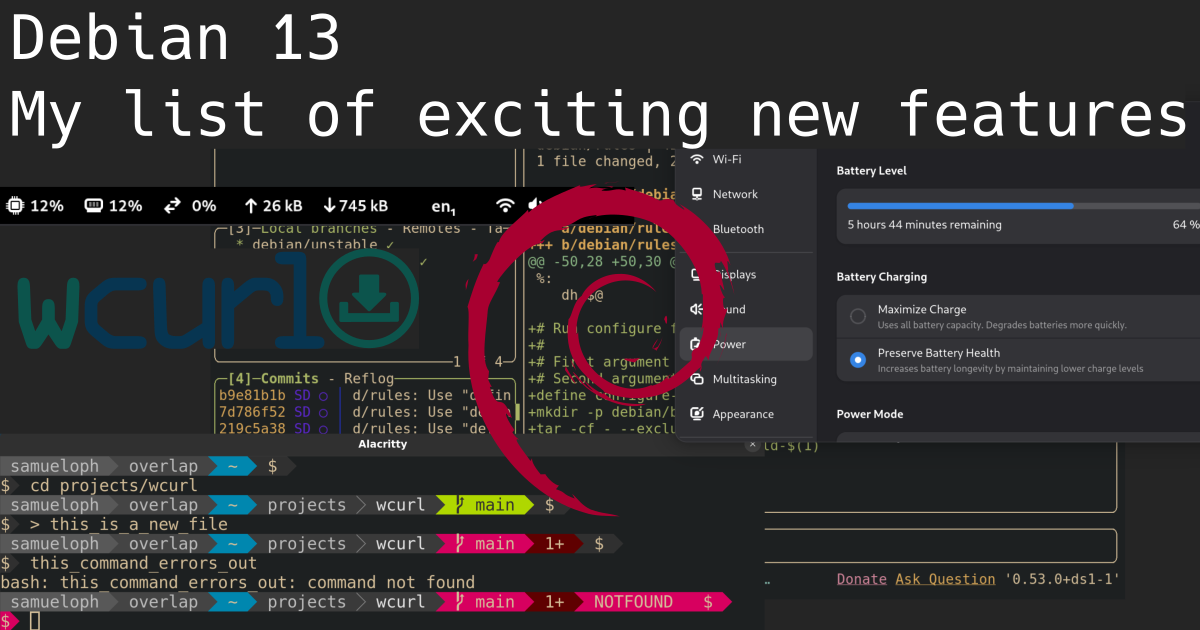
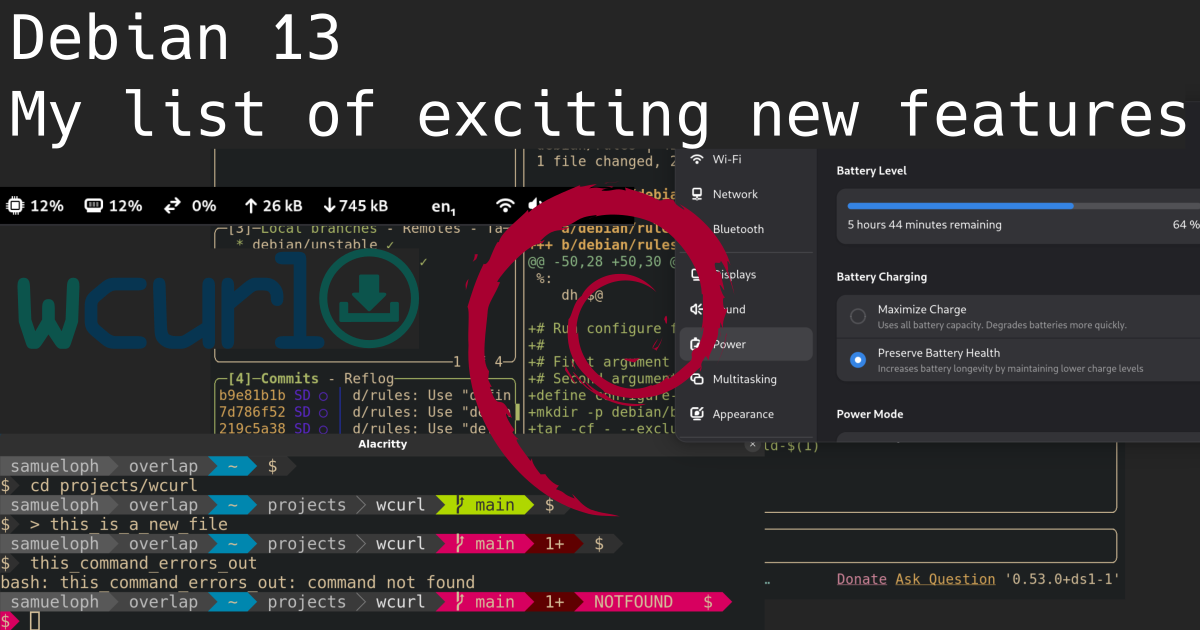
A bunch of screenshots overlaid on top of each other showing different tools: lazygit, gnome settings, gnome system monitor, powerline-go, and the wcurl logo, the text at the top says 'Debian 13: My list of exciting new features', and there's a Debian logo in the middle of image

Beyond Debian: Useful for other distros too Every two years Debian releases a new major version of its Stable series, meaning the differences between consecutive Debian Stable releases represent two years of new developments both in Debian as an organization and its native packages, but also in all other packages which are also shipped by other distributions (which are getting into this new Stable release). If you're not paying close attention to everything that's going on all the time in the Linux world, you miss a lot of the nice new features and tools. It's common for people to only realize there's a cool new trick available only years after it was first introduced. Given these considerations, the tips that I'm describing will eventually be available in whatever other distribution you use, be it because it's a Debian derivative or because it just got the same feature from the upstream project. I'm not going to list "passive" features (as good as they can be), the focus here is on new features that might change how you configure and use your machine, with a mix between productivity and performance.

Debian 13 - Trixie I have been a Debian Testing user for longer than 10 years now (and I recommend it for non-server users), so I'm not usually keeping track of all the cool features arriving in the new Stable releases because I'm continuously receiving them through the Debian Testing rolling release. Nonetheless, as a Debian Developer I'm in a good position to point out the ones I can remember. I would also like other Debian Developers to do the same as I'm sure I would learn something new. The Debian 13 release notes contain a "What's new" section , which lists the first two items here and a few other things, in other words, take my list as an addition to the release notes. Debian 13 was released on 2025-08-09, and these are nice things you shouldn't miss in the new release, with a bonus one not tied to the Debian 13 release.

1) wcurl wcurl logo Have you ever had to download a file from your terminal using curl and didn't remember the parameters needed? I did. Nowadays you can use wcurl; "a command line tool which lets you download URLs without having to remember any parameters." Simply call wcurl with one or more URLs as parameters and it will download all of them in parallel, performing retries, choosing the correct output file name, following redirects, and more. Try it out:
wcurl example.com
wcurl comes installed as part of the curl package on Debian 13 and in any other distribution you can imagine, starting with curl 8.14.0. I've written more about wcurl in its release announcement and I've done a lightning talk presentation in DebConf24, which is linked in the release announcement.

2) HTTP/3 support in curl Debian has become the first stable Linux distribution to ship curl with support for HTTP/3. I've written about this in July 2024, when we first enabled it. Note that we first switched the curl CLI to GnuTLS, but then ended up releasing the curl CLI linked with OpenSSL (as support arrived later). Debian was the first stable Linux distro to enable it, and within rolling-release-based distros; Gentoo enabled it first in their non-default flavor of the package and Arch Linux did it three months before we pushed it to Debian Unstable/Testing/Stable-backports, kudos to them! HTTP/3 is not used by default by the curl CLI, you have to enable it with --http3 or --http3-only. Try it out:
curl --http3 https://www.example.org
curl --http3-only https://www.example.org

3) systemd soft-reboot Starting with systemd v254, there's a new soft-reboot option, it's an userspace-only reboot, much faster than a full reboot if you don't need to reboot the kernel. You can read the announcement from the systemd v254 GitHub release Try it out:
# This will reboot your machine!
systemctl soft-reboot

4) apt --update Are you tired of being required to run sudo apt update just before sudo apt upgrade or sudo apt install $PACKAGE? So am I! The new --update option lets you do both things in a single command:
sudo apt --update upgrade
sudo apt --update install $PACKAGE
I love this, but it's still not yet where it should be, fingers crossed for a simple apt upgrade to behave like other package managers by updating its cache as part of the task, maybe in Debian 14? Try it out:
sudo apt upgrade --update
# The order doesn't matter
sudo apt --update upgrade
This is especially handy for container usage, where you have to update the apt cache before installing anything, for example:
podman run debian:stable bin/bash -c 'apt install --update -y curl'

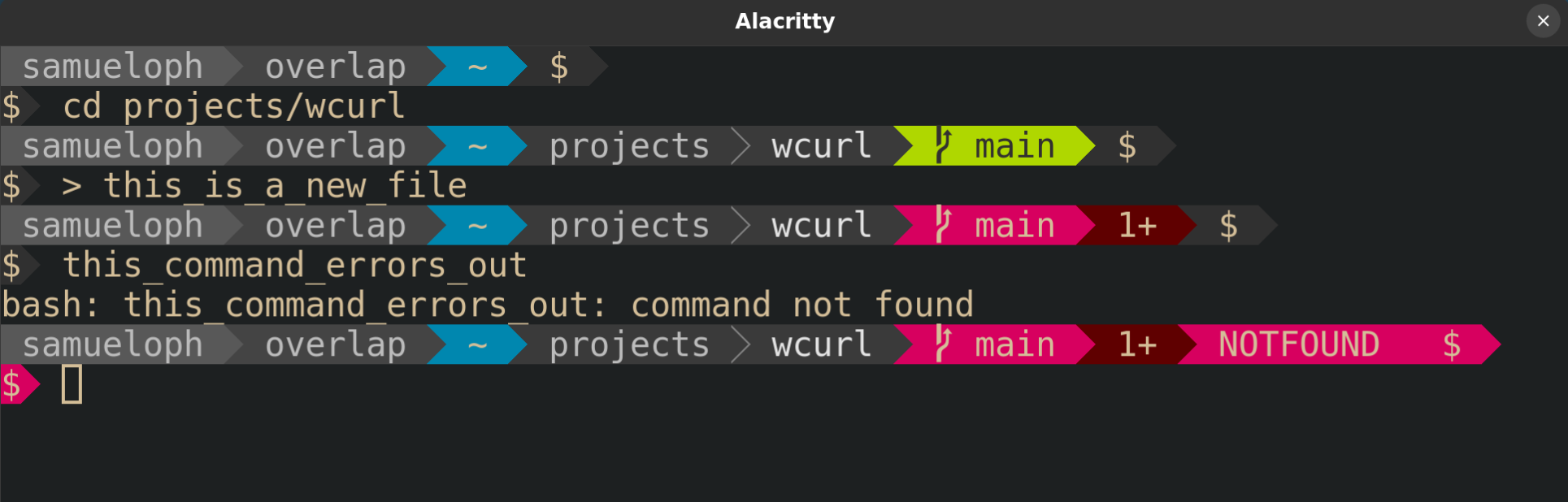
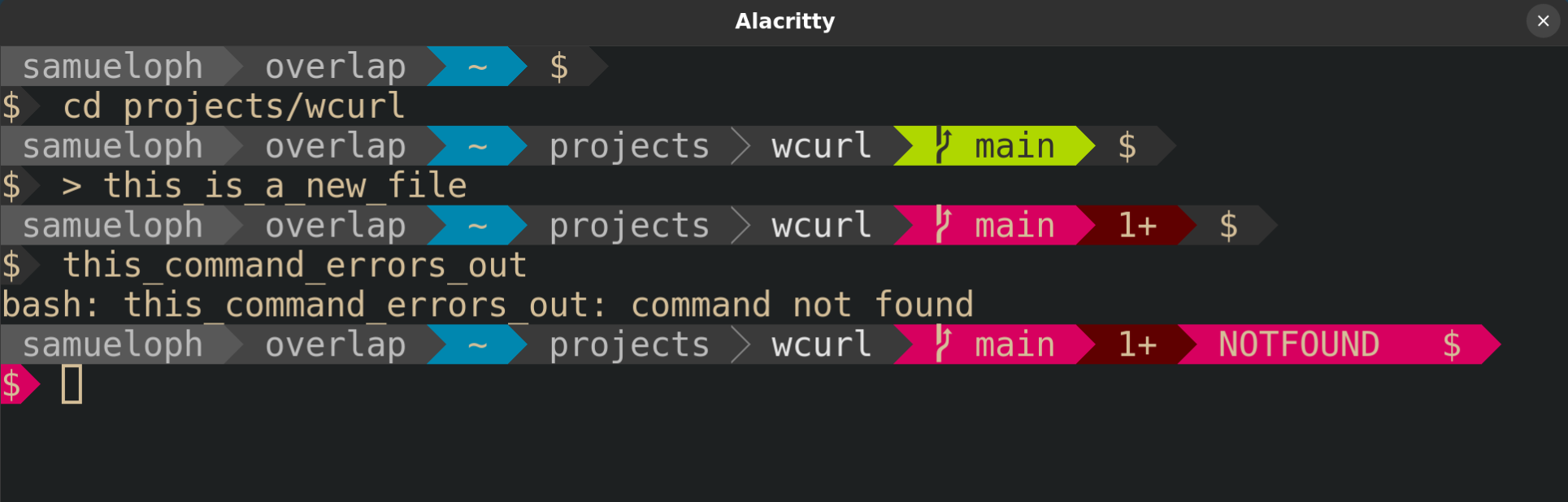
5) powerline-go powerline-go is a powerline-style prompt written in Golang, so it's much more performant than its Python alternative powerline. powerline-style prompts are quite useful to show things like the current status of the git repo in your working directory, exit code of the previous command, presence of jobs in the background, whether or not you're in an ssh session, and more. A screenshot of a terminal with powerline-go enabled, showing how the PS1 changes inside a git repository and when the last command fails Try it out:
sudo apt install powerline-go
Then add this to your .bashrc:
function _update_ps1()  
    PS1="$(/usr/bin/powerline-go -error $? -jobs $(jobs -p   wc -l))"

    # Uncomment the following line to automatically clear errors after showing
    # them once. This not only clears the error for powerline-go, but also for
    # everything else you run in that shell. Don't enable this if you're not
    # sure this is what you want.

    #set "?"
 

if [ "$TERM" != "linux" ] && [ -f "/usr/bin/powerline-go" ]; then
    PROMPT_COMMAND="_update_ps1; $PROMPT_COMMAND"
fi
Or this to .zshrc:
function powerline_precmd()  
    PS1="$(/usr/bin/powerline-go -error $? -jobs $ $ (%):%j :-0 )"

    # Uncomment the following line to automatically clear errors after showing
    # them once. This not only clears the error for powerline-go, but also for
    # everything else you run in that shell. Don't enable this if you're not
    # sure this is what you want.

    #set "?"
 
If you'd like to have your prompt start in a newline, like I have in the screenshot above, you just need to set -newline in the powerline-go invocation in your .bashrc/.zshrc.

6) Gnome System Monitor Extension Tips number 6 and 7 are for Gnome users. Gnome is now shipping a system monitor extension which lets you get a glance of the current load of your machine from the top bar. Screenshot of the top bar of Gnome with the system monitor extension enabled, showing the load of: CPU, memory, network and disk I've found this quite useful for machines where I'm required to install third-party monitoring software that tends to randomly consume more resources than it should. If I feel like my machine is struggling, I can quickly glance at its load to verify if it's getting overloaded by some process. The extension is not as complete as system-monitor-next, not showing temperatures or histograms, but at least it's officially part of Gnome, easy to install and supported by them. Try it out:
sudo apt install gnome-system-monitor gnome-shell-extension-manager
And then enable the extension from the "Extension Manager" application.

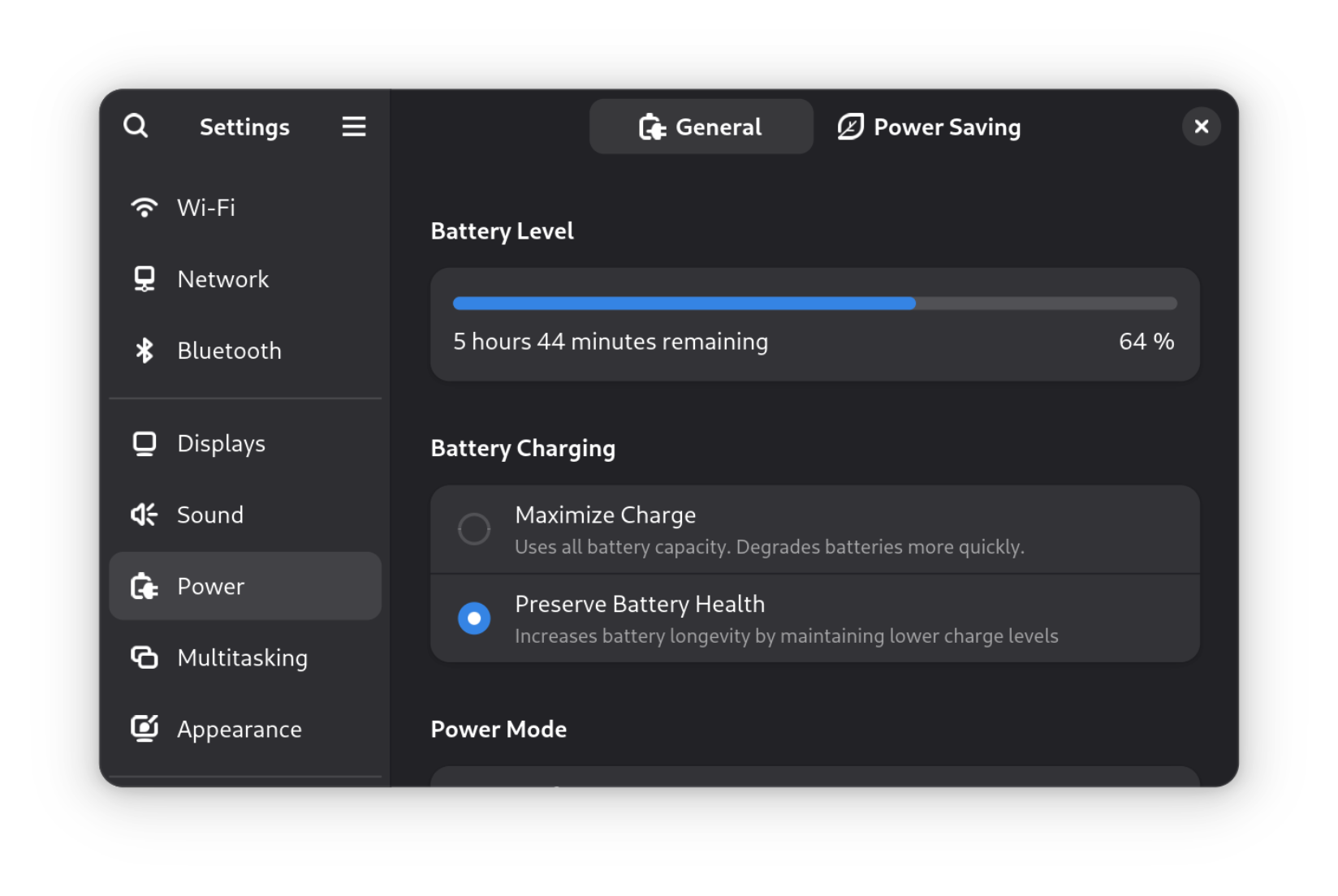
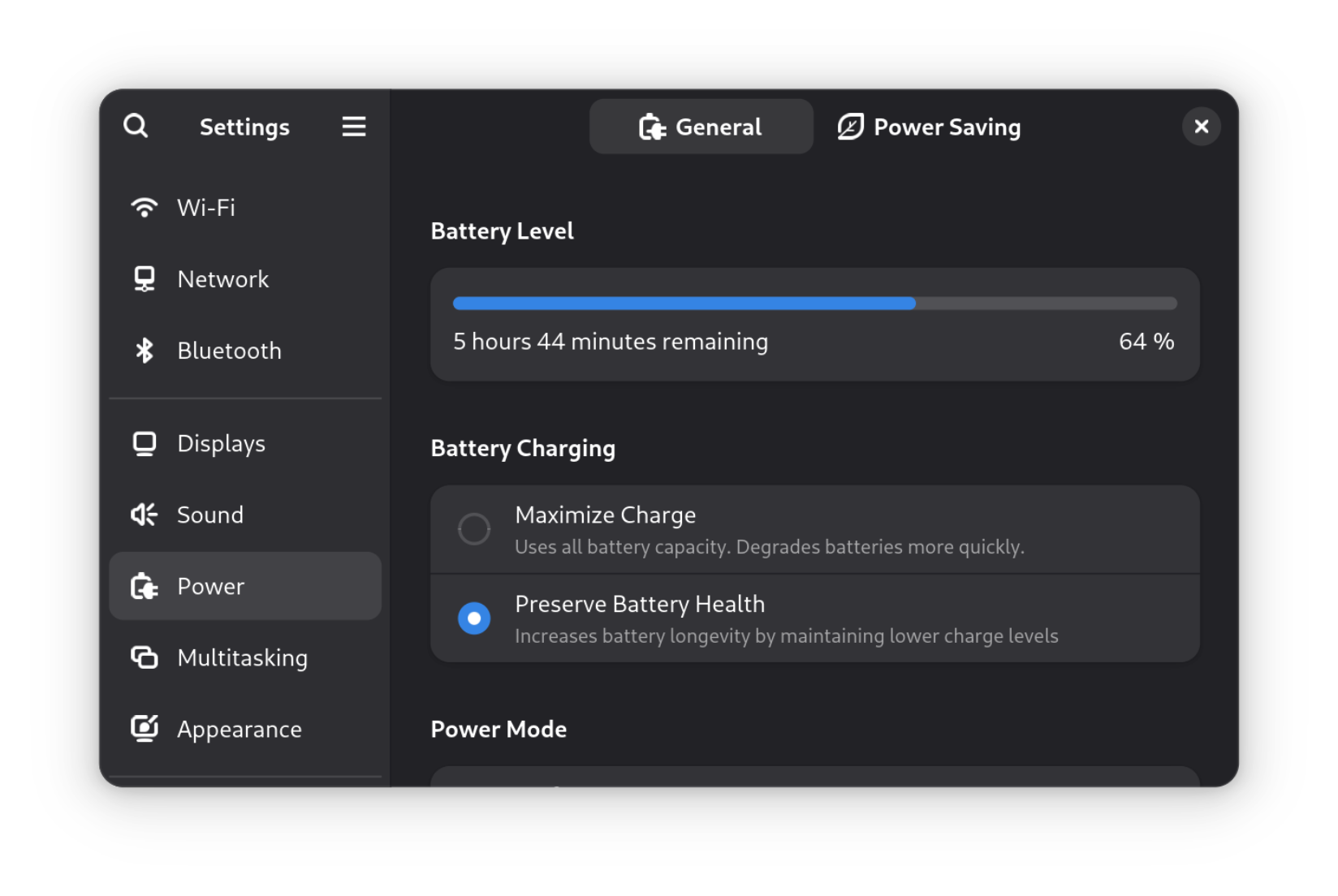
7) Gnome setting for battery charging profile After having to learn more about batteries in order to get into FPV drones, I've come to have a bigger appreciation for solutions that minimize the inevitable loss of capacity that accrues over time. There's now a "Battery Charging" setting (under the "Power") section which lets you choose between two different profiles: "Maximize Charge" and "Preserve Battery Health". A screenshot of the Gnome settings for Power showing the options for Battery Charging On supported laptops, this setting is an easy way to set thresholds for when charging should start and stop, just like you could do it with the tlp package, but now from the Gnome settings. To increase the longevity of my laptop battery, I always keep it at "Preserve Battery Health" unless I'm traveling. What I would like to see next is support for choosing different "Power Modes" based on whether the laptop is plugged-in, and based on the battery charge percentage. There's a GNOME issue tracking this feature, but there's some pushback on whether this is the right thing to expose to users. In the meantime, there are some workarounds mentioned in that issue which people who really want this feature can follow. If you would like to learn more about batteries; Battery University is a great starting point, besides getting into FPV drones and being forced to handle batteries without a Battery Management System (BMS). And if by any chance this sparks your interest in FPV drones, Joshua Bardwell's YouTube channel is a great resource: @JoshuaBardwell.

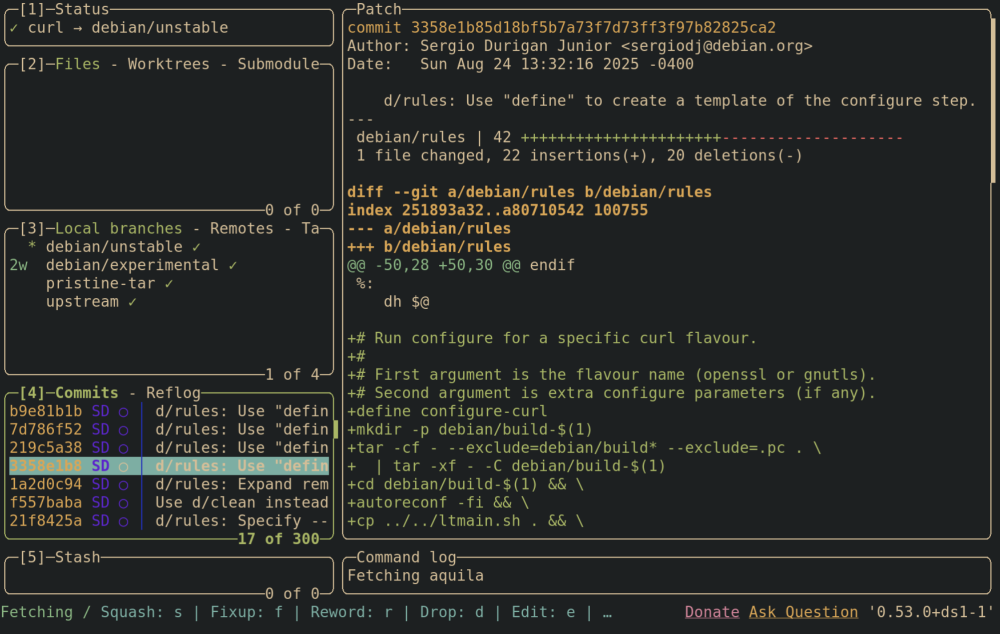
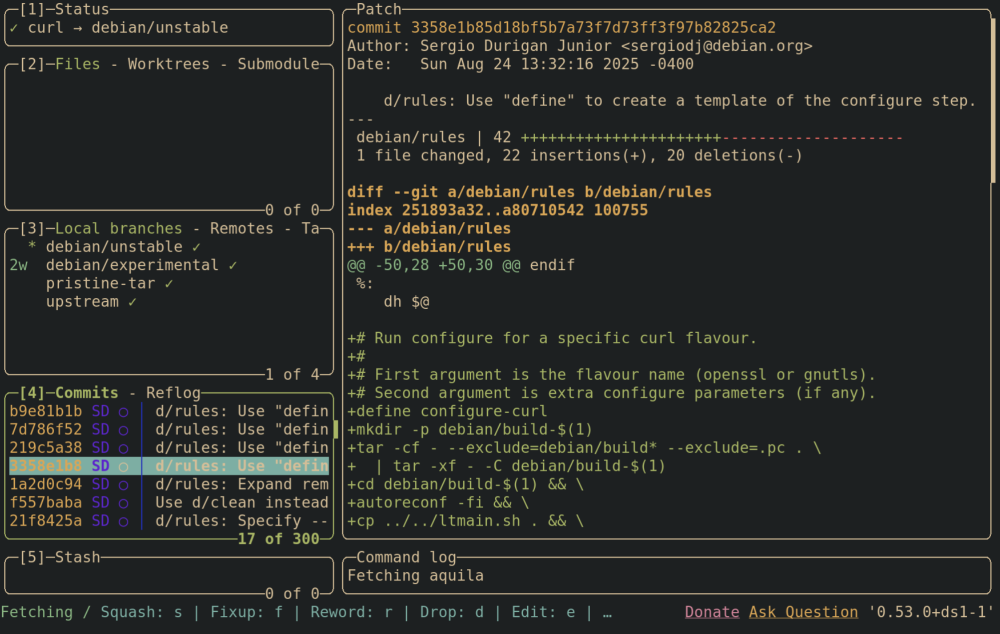
8) Lazygit Emacs users are already familiar with the legendary magit; a terminal-based UI for git. Lazygit is an alternative for non-emacs users, you can integrate it with neovim or just use it directly. I'm still playing with lazygit and haven't integrated it into my workflows, but so far it has been a pleasant experience. Screenshot of lazygit from the Debian curl repository, showing a selected commit and its diff, besides the other things from the lazygit UI You should check out the demos from the lazygit GitHub page. Try it out:
sudo apt install lazygit
And then call lazygit from within a git repository.

9) neovim neovim has been shipped in Debian since 2016, but upstream has been doing a lot of work to improve the experience out-of-the-box in the last couple of years. If you're a neovim poweruser, you're likely not installing it from the official repositories, but for those that are, Debian 13 comes with version 0.10.4, which brings the following improvements compared to the version in Debian 12:
  • Treesitter support for C, Lua, Markdown, with the possibility of adding any other languages as needed;
  • Better spellchecking due to treesitter integration (spellsitter);
  • Mouse support enabled by default;
  • Commenting support out-of-the-box; Check :h commenting for details, but the tl;dr is that you can use gcc to comment the current line and gc to comment the current selection.
  • OSC52 support. Especially handy for those using neovim over an ssh connection, this protocol lets you copy something from within the neovim process into the clipboard of the machine you're using to connect through ssh. In other words, you can copy from neovim running in a host over ssh and paste it in the "outside" machine.

10) [Bonus] Running old Debian releases The bonus tip is not specific to the Debian 13 release, but something I've recently learned in the #debian-devel IRC channel. Did you know there are usable container images for all past Debian releases? I'm not talking "past" as in "some of the older releases", I'm talking past as in "literally every Debian release, including the very first one". Tianon Gravi "tianon" is the Debian Developer responsible for making this happen, kudos to him! There's a small gotcha that the releases Buzz (1.1) and Rex (1.2) require a 32-bit host, otherwise you will get the error Out of virtual memory!, but starting with Bo (1.3) all should work in amd64/arm64. Try it out:
sudo apt install podman

podman run -it docker.io/debian/eol:bo
Don't be surprised when noticing that apt/apt-get is not available inside the container, that's because apt first appeared in Debian Slink (2.1).

Changes since publication

2025-08-30
  • Mention that Arch also enabled HTTP/3.

Samuel Henrique: Debian 13: My list of exciting new features

A bunch of screenshots overlaid on top of each other showing different tools: lazygit, gnome settings, gnome system monitor, powerline-go, and the wcurl logo, the text at the top says 'Debian 13: My list of exciting new features', and there's a Debian logo in the middle of image

Beyond Debian: Useful for other distros too Every two years Debian releases a new major version of its Stable series, meaning the differences between consecutive Debian Stable releases represent two years of new developments both in Debian as an organization and its native packages, but also in all other packages which are also shipped by other distributions (which are getting into this new Stable release). If you're not paying close attention to everything that's going on all the time in the Linux world, you miss a lot of the nice new features and tools. It's common for people to only realize there's a cool new trick available only years after it was first introduced. Given these considerations, the tips that I'm describing will eventually be available in whatever other distribution you use, be it because it's a Debian derivative or because it just got the same feature from the upstream project. I'm not going to list "passive" features (as good as they can be), the focus here is on new features that might change how you configure and use your machine, with a mix between productivity and performance.

Debian 13 - Trixie I have been a Debian Testing user for longer than 10 years now (and I recommend it for non-server users), so I'm not usually keeping track of all the cool features arriving in the new Stable releases because I'm continuously receiving them through the Debian Testing rolling release. Nonetheless, as a Debian Developer I'm in a good position to point out the ones I can remember. I would also like other Debian Developers to do the same as I'm sure I would learn something new. The Debian 13 release notes contain a "What's new" section , which lists the first two items here and a few other things, in other words, take my list as an addition to the release notes. Debian 13 was released on 2025-08-09, and these are nice things you shouldn't miss in the new release, with a bonus one not tied to the Debian 13 release.

1) wcurl wcurl logo Have you ever had to download a file from your terminal using curl and didn't remember the parameters needed? I did. Nowadays you can use wcurl; "a command line tool which lets you download URLs without having to remember any parameters." Simply call wcurl with one or more URLs as parameters and it will download all of them in parallel, performing retries, choosing the correct output file name, following redirects, and more. Try it out:
wcurl example.com
wcurl comes installed as part of the curl package on Debian 13 and in any other distribution you can imagine, starting with curl 8.14.0. I've written more about wcurl in its release announcement and I've done a lightning talk presentation in DebConf24, which is linked in the release announcement.

2) HTTP/3 support in curl Debian has become the first stable Linux distribution to ship curl with support for HTTP/3. I've written about this in July 2024, when we first enabled it. Note that we first switched the curl CLI to GnuTLS, but then ended up releasing the curl CLI linked with OpenSSL (as support arrived later). Debian was the first Linux distro to enable it in the default build of the curl package, but Gentoo enabled it a few weeks earlier in their non-default flavor of the package, kudos to them! HTTP/3 is not used by default by the curl CLI, you have to enable it with --http3 or --http3-only. Try it out:
curl --http3 https://www.example.org
curl --http3-only https://www.example.org

3) systemd soft-reboot Starting with systemd v254, there's a new soft-reboot option, it's an userspace-only reboot, much faster than a full reboot if you don't need to reboot the kernel. You can read the announcement from the systemd v254 GitHub release Try it out:
# This will reboot your machine!
systemctl soft-reboot

4) apt --update Are you tired of being required to run sudo apt update just before sudo apt upgrade or sudo apt install $PACKAGE? So am I! The new --update option lets you do both things in a single command:
sudo apt --update upgrade
sudo apt --update install $PACKAGE
I love this, but it's still not yet where it should be, fingers crossed for a simple apt upgrade to behave like other package managers by updating its cache as part of the task, maybe in Debian 14? Try it out:
sudo apt upgrade --update
# The order doesn't matter
sudo apt --update upgrade
This is especially handy for container usage, where you have to update the apt cache before installing anything, for example:
podman run debian:stable bin/bash -c 'apt install --update -y curl'

5) powerline-go powerline-go is a powerline-style prompt written in Golang, so it's much more performant than its Python alternative powerline. powerline-style prompts are quite useful to show things like the current status of the git repo in your working directory, exit code of the previous command, presence of jobs in the background, whether or not you're in an ssh session, and more. A screenshot of a terminal with powerline-go enabled, showing how the PS1 changes inside a git repository and when the last command fails Try it out:
sudo apt install powerline-go
Then add this to your .bashrc:
function _update_ps1()  
    PS1="$(/usr/bin/powerline-go -error $? -jobs $(jobs -p   wc -l))"

    # Uncomment the following line to automatically clear errors after showing
    # them once. This not only clears the error for powerline-go, but also for
    # everything else you run in that shell. Don't enable this if you're not
    # sure this is what you want.

    #set "?"
 

if [ "$TERM" != "linux" ] && [ -f "/usr/bin/powerline-go" ]; then
    PROMPT_COMMAND="_update_ps1; $PROMPT_COMMAND"
fi
Or this to .zshrc:
function powerline_precmd()  
    PS1="$(/usr/bin/powerline-go -error $? -jobs $ $ (%):%j :-0 )"

    # Uncomment the following line to automatically clear errors after showing
    # them once. This not only clears the error for powerline-go, but also for
    # everything else you run in that shell. Don't enable this if you're not
    # sure this is what you want.

    #set "?"
 
If you'd like to have your prompt start in a newline, like I have in the screenshot above, you just need to set -newline in the powerline-go invocation in your .bashrc/.zshrc.

6) Gnome System Monitor Extension Tips number 6 and 7 are for Gnome users. Gnome is now shipping a system monitor extension which lets you get a glance of the current load of your machine from the top bar. Screenshot of the top bar of Gnome with the system monitor extension enabled, showing the load of: CPU, memory, network and disk I've found this quite useful for machines where I'm required to install third-party monitoring software that tends to randomly consume more resources than it should. If I feel like my machine is struggling, I can quickly glance at its load to verify if it's getting overloaded by some process. The extension is not as complete as system-monitor-next, not showing temperatures or histograms, but at least it's officially part of Gnome, easy to install and supported by them. Try it out:
sudo apt install gnome-system-monitor gnome-shell-extension-manager
And then enable the extension from the "Extension Manager" application.

7) Gnome setting for battery charging profile After having to learn more about batteries in order to get into FPV drones, I've come to have a bigger appreciation for solutions that minimize the inevitable loss of capacity that accrues over time. There's now a "Battery Charging" setting (under the "Power") section which lets you choose between two different profiles: "Maximize Charge" and "Preserve Battery Health". A screenshot of the Gnome settings for Power showing the options for Battery Charging On supported laptops, this setting is an easy way to set thresholds for when charging should start and stop, just like you could do it with the tlp package, but now from the Gnome settings. To increase the longevity of my laptop battery, I always keep it at "Preserve Battery Health" unless I'm traveling. What I would like to see next is support for choosing different "Power Modes" based on whether the laptop is plugged-in, and based on the battery charge percentage. There's a GNOME issue tracking this feature, but there's some pushback on whether this is the right thing to expose to users. In the meantime, there are some workarounds mentioned in that issue which people who really want this feature can follow. If you would like to learn more about batteries; Battery University is a great starting point, besides getting into FPV drones and being forced to handle batteries without a Battery Management System (BMS). And if by any chance this sparks your interest in FPV drones, Joshua Bardwell's YouTube channel is a great resource: @JoshuaBardwell.

8) Lazygit Emacs users are already familiar with the legendary magit; a terminal-based UI for git. Lazygit is an alternative for non-emacs users, you can integrate it with neovim or just use it directly. I'm still playing with lazygit and haven't integrated it into my workflows, but so far it has been a pleasant experience. Screenshot of lazygit from the Debian curl repository, showing a selected commit and its diff, besides the other things from the lazygit UI You should check out the demos from the lazygit GitHub page. Try it out:
sudo apt install lazygit
And then call lazygit from within a git repository.

9) neovim neovim has been shipped in Debian since 2016, but upstream has been doing a lot of work to improve the experience out-of-the-box in the last couple of years. If you're a neovim poweruser, you're likely not installing it from the official repositories, but for those that are, Debian 13 comes with version 0.10.4, which brings the following improvements compared to the version in Debian 12:
  • Treesitter support for C, Lua, Markdown, with the possibility of adding any other languages as needed;
  • Better spellchecking due to treesitter integration (spellsitter);
  • Mouse support enabled by default;
  • Commenting support out-of-the-box; Check :h commenting for details, but the tl;dr is that you can use gcc to comment the current line and gc to comment the current selection.
  • OSC52 support. Especially handy for those using neovim over an ssh connection, this protocol lets you copy something from within the neovim process into the clipboard of the machine you're using to connect through ssh. In other words, you can copy from neovim running in a host over ssh and paste it in the "outside" machine.

10) [Bonus] Running old Debian releases The bonus tip is not specific to the Debian 13 release, but something I've recently learned in the #debian-devel IRC channel. Did you know there are usable container images for all past Debian releases? I'm not talking "past" as in "some of the older releases", I'm talking past as in "literally every Debian release, including the very first one". Tianon Gravi "tianon" is the Debian Developer responsible for making this happen, kudos to him! There's a small gotcha that the releases Buzz (1.1) and Rex (1.2) require a 32-bit host, otherwise you will get the error Out of virtual memory!, but starting with Bo (1.3) all should work in amd64/arm64. Try it out:
sudo apt install podman

podman run -it docker.io/debian/eol:bo
Don't be surprised when noticing that apt/apt-get is not available inside the container, that's because apt first appeared in Debian Slink (2.1).

27 August 2025

Matthew Palmer: StrongBox: Simple, Safe Data Encryption for Rust

Some time ago, I wanted to encrypt a bunch of data in an application I was writing in Rust, mostly to be stored in a database, but also session cookies and sensitive configuration variables. Since Rust is widely known as a secure-yet-high-performance programming language, I was expecting that there would be a widely-used crate that gave me a secure, high-level interface to strong, safe cryptography. Imagine my surprise when I discovered that just didn t seem to exist. Don t get me wrong: Rust is replete with fast, secure, battle-tested cryptographic primitives. The RustCrypto group provides all manner of robust, widely-used crates for all manner of cryptography-related purposes. They re the essential building blocks for practical cryptosystems, but using them directly in an application is somewhat akin to building a car from individual atoms of iron and carbon. So I wrote my own high-level data encryption library, called it StrongBox, and have been happily encrypting and decrypting data ever since.

Cryptography So Simple Even I Can t Get It Wrong The core of StrongBox is the StrongBox trait, which has only two methods: encrypt and decrypt, each of which takes just two arguments. The first argument is the plaintext (for encrypt) or the ciphertext (for decrypt) to work on. The second argument is the encryption context, for use as Authenticated Additional Data, an important part of many uses of encryption. There s essentially no configuration or parameters to get wrong. You can t choose the encryption algorithm, or block cipher mode, and you don t have to worry about generating a secure nonce. You create a StrongBox with a key, and then you call encrypt and decrypt. That s it.

Practical Cryptographic Affordances Ok, ok that s not quite it. Because StrongBox is even easier to use than what I ve described, thanks to the companion crate, StructBox. When I started using StrongBox in the wild , it quickly became clear that what I almost always wanted to encrypt in my application wasn t some ethereal plaintext . I wanted to encrypt things, specifically structs (and enums). So, through the magic of Rust derive macros, I built StructBox, which provides encrypt and decrypt operations on any Serde-able type. Given that using Serde encoders can be a bit fiddly to use, it s virtually easier to get an encrypted, serialized struct than it is to get a plaintext serialized struct.

Key Problems in Cryptography The thing about cryptography is that it largely turns all data security problems into key management problems. All the fancy cryptographic wonkery is for naught if you don t manage the encryption keys well. So, most of the fancy business in StrongBox isn t the encryption and decryption, but instead solving problems around key management.

Different Keys for Different Purposes Using the same key for all of your cryptographic needs is generally considered a really bad idea. It opens up all manner of risks, that are easily avoided if you use different keys for different things. However, having to maintain a big pile of different keys is a nightmare, so nobody s going to do that. Enter: key derivation. Create one safe, secure root key, and then use a key derivation function to spawn as many other keys as you need. Different keys for each database column, another one to encrypt cookies, and so on. StrongBox supports this through the StemStrongBox type. You ll typically start off by creating a StemStrongBox with the root key, and then derive whatever other StrongBoxes you need, for encrypting and decrypting different kinds of data.

You Spin Me Round Sometimes, keys need to be rotated. Whether that s because you actually know (or even have reason to suspect) someone has gotten the key, or just because you re being appropriately paranoid, sometimes key rotation has to happen. As someone who has had to rotate keys in situations where such an eventuality was not planned for, I can say with some degree of authority: it absolutely sucks to have to do an emergency key rotation in a system that isn t built to make that easy. That s why StrongBox natively supports key rotation. Every StrongBox takes one encryption key, and an arbitrary number of decryption keys, and will automatically use the correct key to decrypt ciphertexts.

Will You Still Decrypt Me, Tomorrow? In addition to manual key rotation, StrongBox also supports time-based key rotation with the RotatingStrongBox type. This comes in handy when you re encrypting a lot of ephemeral data, like cookies (or server-side session data). It provides a way to automatically expire old data, and prevents attacks that become practical when large amounts of data are encrypted using a single key.

Invasion of the Invisible Salamanders! I mostly mention this just because I love the name, but there is a kind of attack possible in common AEAD modes called the invisible salamanders attack. StrongBox implements mitigations against this, by committing to the key being used so that an attacker can t forge a ciphertext that decrypts validly to different plaintexts when using different keys. This is why I love cryptography: everything sounds like absolute goddamn magic.

Call Me Crazy, Support Me Maybe? If you re coding in Rust (which you probably should be), encrypting your stored data (which you definitely should be), and StrongBox makes your life easier (which it really will), you can show your appreciation for my work by contributing to my open source code-fund. Simply by shouting me a refreshing beverage, you ll be helping me out, and helping to grow the software commons. Alternately, if you re looking for someone to Speak Rust to Computers on a professional basis, I m available for contracts or full-time remote positions.

25 August 2025

Gunnar Wolf: The comedy of computation, or, how I learned to stop worrying and love obsolescence

This post is a review for Computing Reviews for The comedy of computation, or, how I learned to stop worrying and love obsolescence , a book published in Stanford University Press
The Comedy of Computation is not an easy book to review. It is a much enjoyable book that analyzes several examples of how being computational has been approached across literary genres in the last century how authors of stories, novels, theatrical plays and movies, focusing on comedic genres, have understood the role of the computer in defining human relations, reactions and even self-image. Mangrum structures his work in six thematic chapters, where he presents different angles on human society: How have racial stereotypes advanced in human imagination and perception about a future where we interact with mechanical or computational partners (from mechanical tools performing jobs that were identified with racial profiles to intelligent robots that threaten to control society); the genericity of computers and people can be seen as generic, interchangeable characters, often fueled by the tendency people exhibit to confer anthropomorphic qualities to inanimate objects; people s desire to be seen as truly authentic , regardless of what it ultimately means; romantic involvement and romance-led stories (with the computer seen as a facilitator for human-to-human romances, distractor away from them, or being itself a part of the couple); and the absurdity in antropomorphization, in comparing fundamentally different aspects such as intelligence and speed at solving mathematical operations, as well as the absurdity presented blatantly as such by several techno-utopian visions. But presenting this as a linear set of concepts that are presented does not do justice to the book. Throughout the sections of each chapter, a different work serves as the axis Novels and stories, Hollywood movies, Broadway plays, some covers for the Time magazine, a couple of presenting the would-be future, even a romantic comedy entirely written by bots . And for each of them, Benjamin Mangrum presents a very thorough analysis, drawing relations and comparing with contemporary works, but also with Shakespeare, classical Greek myths, and a very long etc tera. This book is hard to review because of the depth of work the author did: Reading it repeatedly made me look for other works, or at least longer references for them. Still, despite being a work with such erudition, Mangrum s text is easy and pleasant to read, without feeling heavy or written in an overly academic style. I very much enjoyed reading this book. It is certainly not a technical book about computers and society in any way; it is an exploration of human creativity and our understanding of the aspects the author has found as central to understanding the impact of computing on humankind. However, there is one point I must mention before closing: I believe the editorial decision to present the work as a running text, with all the material conceptualized as footnotes presented as a separate, over 50 page long final chapter, detracts from the final result. Personally, I enjoy reading the footnotes because they reveal the author s thought processes, even if they stray from the central line of thought. Even more, given my review copy was a PDF, I could not even keep said chapter open with one finger, bouncing back and forth. For all purposes, I missed out on the notes; now that I finished reading and stumbled upon that chapter, I know I missed an important part of the enjoyment.

22 August 2025

Daniel Lange: Polkitd (Policy Kit Daemon) in Trixie ... allowing remote users to suspend, reboot, power off the local system

As per the previous Polkit blog post the policykit framwork has lost the ability to understand its own .pkla files and policies need to be expressed in Javascript with .rules files now. To re-enable allowing remote users (think ssh) to reboot, hibernate, suspend or power off the local system, create a 10-shutdown-reboot.rules file in /etc/polkit-1/rules.d/:
polkit.addRule(function(action, subject)
if ((action.id == "org.freedesktop.login1.reboot-multiple-sessions"
action.id == "org.freedesktop.login1.reboot"
action.id == "org.freedesktop.login1.suspend-multiple-sessions"
action.id == "org.freedesktop.login1.suspend"
action.id == "org.freedesktop.login1.hibernate-multiple-sessions"
action.id == "org.freedesktop.login1.hibernate"
action.id == "org.freedesktop.login1.power-off-multiple-sessions"
action.id == "org.freedesktop.login1.power-off") &&
(subject.isInGroup("sudo") (subject.user == "root")))

return polkit.Result.YES;

);
and run systemctl restart polkit.

Russell Coker: Dell T320 H310 RAID and IT Mode

The Problem Just over 2 years ago my Dell T320 server had a motherboard failure [1]. I recently bought another T320 that had been gutted (no drives, PSUs, or RAM) and put the bits from my one in it. I installed Debian and the resulting installation wouldn t boot, I tried installing with both UEFI and BIOS modes with the same result. Then I realised that the disks I had installed were available even though I hadn t gone through the RAID configuration (I usually make a separate RAID-0 for each disk to work best with BTRFS or ZFS). I tried changing the BIOS setting for SATA disks between RAID and AHCI modes which didn t change things and realised that the BIOS setting in question probably applies to the SATA connector on the motherboard and that the RAID card was in IT mode which means that each disk is seen separately. If you are using ZFS or BTRFS you don t want to use a RAID-1, RAID-5, or RAID-6 on the hardware RAID controller, if there are different versions of the data on disks in the stripe then you want the filesystem to be able to work out which one is correct. To use IT mode you have to flash a different unsupported firmware on the RAID controller and then you either have to go to some extra effort to make it bootable or have a different device to boot from. The Root Causes Dell has no reason to support unusual firmware on their RAID controllers. Installing different firmware on a device that is designed for high availability is going to have some probability of data loss and perhaps more importantly for Dell some probability of customers returning hardware during the support period and acting innocent about why it doesn t work. Dell has a great financial incentive to make it difficult to install Dell firmware on LSI cards from other vendors which have equivalent hardware as they don t want customers to get all the benefits of iDRAC integration etc without paying the Dell price premium. All the other vendors have similar financial incentives so there is no official documentation or support on converting between different firmware images. Dell s support for upgrading the Dell version is pretty good, but it aborts if it sees something different. The Attempts I tried following the instructions in this document to flash back to Dell firmware [2]. This document is about the H310 RAID card in my Dell T320 AKA a LSI SAS 9211-8i . The sas2flash.efi program didn t seem to do anything, it returned immediately and didn t give an error message. This page gives a start of how to get inside the Dell firmware package but doesn t work [3]. It didn t cover the case where sasdupie aborts with an error because it detects the current version as 00.00.00.00 not something that the upgrade program is prepared to upgrade from. But it s a place to start looking for someone who wants to try harder at this. This forum post has some interesting information, I gave up before trying it, but it may be useful for someone else [4]. The Solution Dell tower servers have as a standard feature an internal USB port for a boot device. So I created a boot image on a spare USB stick and installed it there and it then loads the kernel and mounts the filesystem from a SATA hard drive. Once I got that working everything was fine. The Debian/Trixie installer would probably have allowed me to install an EFI device on the internal USB stick as part of the install if I had known what was going to happen. The system is now fully working and ready to sell. Now I just need to find someone who wants IT mode on the RAID controller and hopefully is willing to pay extra for it. Whatever I sell the system for it seems unlikely to cover the hours I spent working on this. But I learned some interesting things about RAID firmware and hopefully this blog post will be useful to other people, even if only to discourage them from trying to change firmware.

21 August 2025

Matthew Palmer: Progress on my open source funding experiment

When I recently announced that I was starting an open source crowd-funding experiment, I wasn t sure what would happen. Perhaps there d be radio silence, or a huge out-pouring of interest from people who wanted to see more open source code in the world. What s happened so far has been interesting. I chose to focus on action-validator because it s got a number of open feature requests, and it solves a common problem that people have. The thing is, I ve developed and released a lot of open source over the multiple decades I ve been noodling around with computers. Much of that has been of use to many people, the overwhelming majority of whom I will never, ever meet, hear from, or even know that I ve helped them out. One person, however, I do know about a generous soul named Andy, who (as far as I know) doesn t use action-validator, but who does use another tool I wrote some years ago: lvmsync. It s somewhat niche, essentially rsync for LVM-backed block devices , so I m slightly surprised that it s my most-starred repository, at nearly 400(!) stars. Andy is one of the people who finds it useful, and he was kind enough to reach out and offer a contribution in thanks for lvmsync existing. In the spirit of my open source code-fund, I applied Andy s contribution to the general pool, and as a result have just released action-validator v0.8.0, which supports a new --rootdir command-line option, fixing action-validator issue #54. Everyone who uses --rootdir in their action-validator runs has Andy to thank, and I thank him too. This is, of course, still early days in my experiment. You can be like Andy, and make the open source world a better place, by contributing to my code-fund, and you can get your name up in lights, too. Whether you re an action-validator user, have gotten utility from any of the other things I ve written, or just want to see more open source code in the world, your contribution is greatly appreciated.

20 August 2025

Dirk Eddelbuettel: x13binary 1.1.61.1 on CRAN: Micro Fix

The x13binary team is happy to share the availability of Release 1.1.61.1 of the x13binary package providing the X-13ARIMA-SEATS program by the US Census Bureau which arrived on CRAN earlier today. This release responds to a recent change in gfortran version 15 which now picks up a missing comma in a Fortran format string for printing output. The change is literally a one-char addition which we also reported upstream. At the same time this release also updates one README.md URL to an archive.org URL of an apparently deleted reference. There is now also an updated upstream release 1.1-62 which we should package next. Courtesy of my CRANberries, there is also a diffstat report for this release showing changes to the previous release.

This post by Dirk Eddelbuettel originated on his Thinking inside the box blog. If you like this or other open-source work I do, you can sponsor me at GitHub.

Dirk Eddelbuettel: RcppArmadillo 14.6.3-1 on CRAN: Minor Upstream Bug Fixes

armadillo image Armadillo is a powerful and expressive C++ template library for linear algebra and scientific computing. It aims towards a good balance between speed and ease of use, has a syntax deliberately close to Matlab, and is useful for algorithm development directly in C++, or quick conversion of research code into production environments. RcppArmadillo integrates this library with the R environment and language and is widely used by (currently) 1268 other packages on CRAN, downloaded 41 million times (per the partial logs from the cloud mirrors of CRAN), and the CSDA paper (preprint / vignette) by Conrad and myself has been cited 642 times according to Google Scholar. Conrad made three minor bug fix releases since the 4.6.0 release last month. We need to pace releases at CRAN so we do not immediately upload there on each upstream release and then CRAN also had the usual (and well-deserved) summer rest leading to a slight delay relative to the last upstream. The minor changes in the three releases are summarized below. All our releases are always available via the GitHub repo and hence also via r-universe, and still rigorously tested via our own reverse-dependency checks. We also note that the package once again passed with flying colours and no human intervention which remains impressive given the over 1200 reverse dependencies.

Changes in RcppArmadillo version 14.6.3-1 (2025-08-14)
  • Upgraded to Armadillo release 14.6.3 (Caffe Mocha)
    • Fix OpenMP related crashes in Cube::slice() on Arm64 CPUs

Changes in RcppArmadillo version 14.6.2-1 (2025-08-08) (GitHub Only)
  • Upgraded to Armadillo release 14.6.2 (Caffe Mocha)
    • Fix for corner-case speed regression in sum()
    • Better handling of OpenMP in omit_nan() and omit_nonfinite()

Changes in RcppArmadillo version 14.6.1-1 (2025-07-21) (GitHub Only)
  • Upgraded to Armadillo release 14.6.1 (Caffe Mocha)
    • Fix for speed regression in mean()
    • Fix for detection of compiler configuration
    • Use of pow optimization now optional

Courtesy of my CRANberries, there is a diffstat report relative to previous release. More detailed information is on the RcppArmadillo page. Questions, comments etc should go to the rcpp-devel mailing list off the Rcpp R-Forge page.

This post by Dirk Eddelbuettel originated on his Thinking inside the box blog. If you like this or other open-source work I do, you can sponsor me at GitHub.

Emmanuel Kasper: Benchmarking 3D graphic cards and their drivers

I have in the past benchmarked network links and disks, so as to have a rough idea of the performance of the hardware I am confronted at $WORK. As I started to dabble into Linux gaming (on non-PC hardware !), I wanted to have some numbers from the graphic stack as well. I am using the command glmark2 --size 1920x1080 which is testing the performance of an OpenGL implementation, hardware + drivers. OpenGL is the classic 3D API used by most opensource gaming on Linux (Doom3 Engine, SuperTuxCart, 0AD, Cube 2 Engine). Vulkan is getting traction as a newer 3D API however the equivalent Vulkan vkmark benchmark was crashing using the NVIDIA semi-proprietary drivers. (vkmark --size 1920x1080 was throwing an ugly Error: Selected present mode Mailbox is not supported by the used Vulkan physical device. )
# apt install glmark2
$ lspci   grep -i vga # integrated GPU
00:02.0 VGA compatible controller: Intel Corporation HD Graphics 615 (rev 02)
$ glmark2 --size 1920x1080
...
...
glmark2 Score: 2063
$ lspci   grep -i vga # integrated GPU
00:02.0 VGA compatible controller: Intel Corporation Meteor Lake-P [Intel Graphics] (rev 08)
glmark2 Score: 3095
$ lspci   grep -i vga # discrete GPU, using nouveau
0000:01:00.0 VGA compatible controller: NVIDIA Corporation AD107GL [RTX 2000 / 2000E Ada Generation] (rev a1)
glmark2 Score: 2463
$ lspci   grep -i vga # discrete GPU, using nvidia-open semi-proprietary driver
0000:01:00.0 VGA compatible controller: NVIDIA Corporation AD107GL [RTX 2000 / 2000E Ada Generation] (rev a1)
glmark2 score: 4960
Nouveau has currently some graphical glitches with Doom3 so I am using the nvidia-open driver for this hardware. In my testing with Doom3 and SuperTuxKart, post 2015 integrated Intel Hardware is more than enough to play in HD resolution.

18 August 2025

Jonathan Dowland: Amiga redux

Matthew blogged about his Amiga CDTV project, a truly unique Amiga hack which also manages to be a novel Doom project (no mean feat: it's a crowded space) This re-awakened my dormant wish to muck around with my childhood Amiga some more. When I last wrote about it (four years ago ) I'd upgraded the disk drive emulator with an OLED display and rotary encoder. I'd forgotten to mention I'd also sourced a modern trapdoor RAM expansion which adds 2MiB of RAM. The Amiga can only see 1.5MiB1 of it at the moment, I need perform a mainboard modification to access the final 512kiB2, which means some soldering.
[Amiga Test Kit](https://github.com/keirf/Amiga-Stuff) showing 2MiB RAM Amiga Test Kit showing 2MiB RAM
What I had planned to do back then: replace the switch in the left button of the original mouse, which was misbehaving; perform the aformentioned mainboard mod; upgrade the floppy emulator wiring to a ribbon cable with plug-and-socket, for easier removal; fit an RTC chip to the RAM expansion board to get clock support in the OS. However much of that might be might be moot, because of two other mods I am considering, PiStorm I've re-considered the PiStorm accelerator mentioned in Matt's blog. Four years ago, I'd passed over it, because it required you to run Linux on a Raspberry Pi, and then an m68k emulator as a user-space process under Linux. I didn't want to administer another Linux system, and I'm generally uncomfortable about using a regular Linux distribution on SD storage over the long term. However in the intervening years Emu68, a bare-metal m68k emulator has risen to prominence. You boot the Pi straight into Emu68 without Linux in the middle. For some reason that's a lot more compelling to me. The PiStorm enormously expands the RAM visible to the Amiga. There would be no point in doing the mainboard mod to add 512k (and I don't know how that would interact with the PiStorm). It also can provide virtual hard disk devices to the Amiga (backed by files on the SD card), meaning the floppy emulator would be superfluous. Denise Mainboard I've just learned about a truly incredible project: the Denise Mini-ITX Amiga mainboard. It fitss into a Mini-ITX case (I have a suitable one spare already). Some assembly required. You move the chips from the original Amiga over to the Denise mainboard. It's compatible with the PiStorm (or vice-versa). It supports PC-style PS/2 keyboards (I have a Model M in the loft, thanks again Simon) and has a bunch of other modern conveniences: onboard RTC; mini-ITX power (I'll need something like a picoPSU too) It wouldn't support my trapdoor RAM card but it takes a 72-pin DIMM which can supply 2MiB of Chip RAM, and the PiStorm can do the rest (they're compatible3). No stock at the moment but if I could get my hands on this, I could build something that could permanently live on my desk.

  1. the Boobip board's 1.5MiB is "chip" RAM: accessible to the other chips on the mainboard, with access mediated by the AGNUS chip.
  2. the final 512kiB is "Fast" RAM: only accessible to the CPU, not mediated via Agnus.
  3. confirmation

Otto Kek l inen: Best Practices for Submitting and Reviewing Merge Requests in Debian

Featured image of post Best Practices for Submitting and Reviewing Merge Requests in DebianHistorically the primary way to contribute to Debian has been to email the Debian bug tracker with a code patch. Now that 92% of all Debian source packages are hosted at salsa.debian.org the GitLab instance of Debian more and more developers are using Merge Requests, but not necessarily in the optimal way. In this post I share what I ve found the best practice to be, presented in the natural workflow from forking to merging.

Why use Merge Requests? Compared to sending patches back and forth in email, using a git forge to review code contributions brings several benefits:
  • Contributors can see the latest version of the code immediately when the maintainer pushes it to git, without having to wait for an upload to Debian archives.
  • Contributors can fork the development version and easily base their patches on the correct version and help test that the software continues to function correctly at that specific version.
  • Both maintainer and other contributors can easily see what was already submitted and avoid doing duplicate work.
  • It is easy for anyone to comment on a Merge Request and participate in the review.
  • Integrating CI testing is easy in Merge Requests by activating Salsa CI.
  • Tracking the state of a Merge Request is much easier than browsing Debian bug reports tagged patch , and the cycle of submit review re-submit re-review is much easier to manage in the dedicated Merge Request view compared to participants setting up their own email plugins for code reviews.
  • Merge Requests can have extra metadata, such as Approved , and the metadata often updates automatically, such as a Merge Request being closed automatically when the Git commit ID from it is pushed to the target branch.
Keeping these benefits in mind will help ensure that the best practices make sense and are aligned with maximizing these benefits.

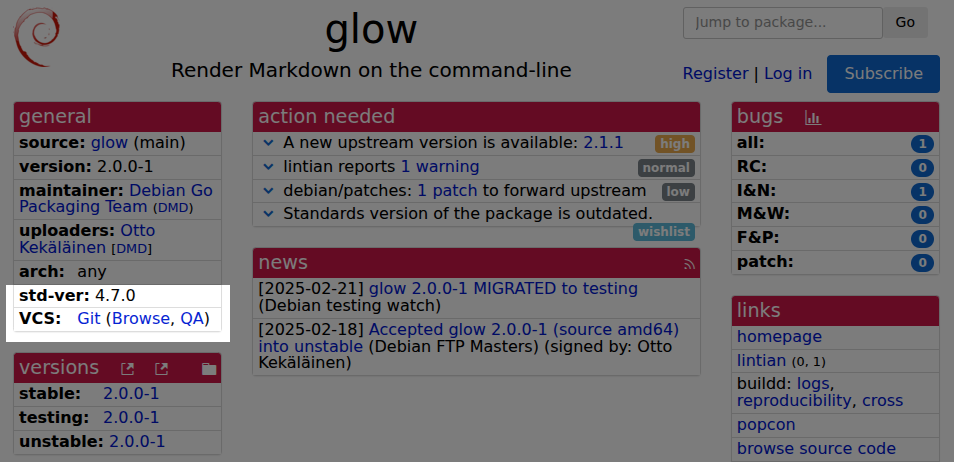
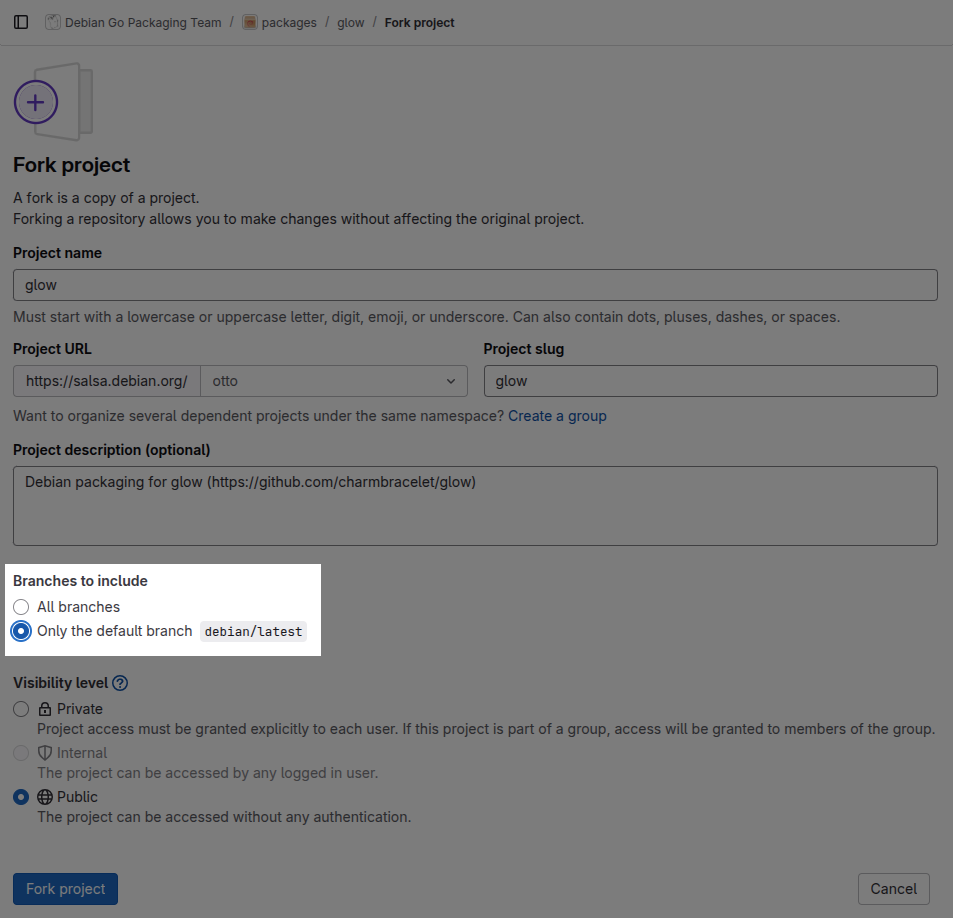
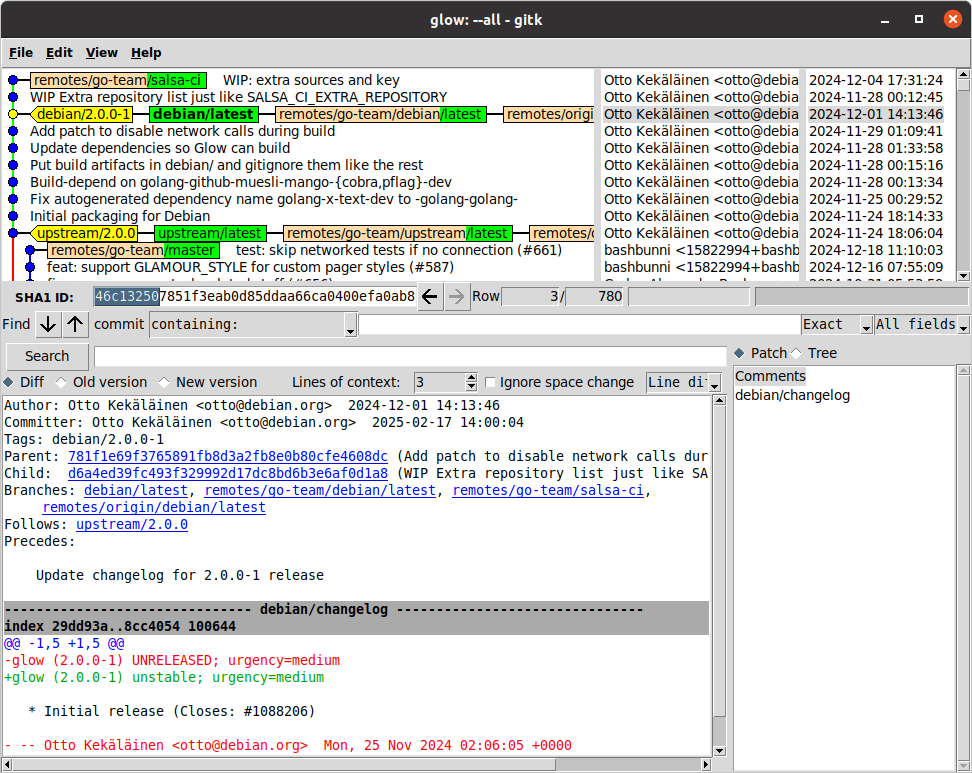
Finding the Debian packaging source repository and preparing to make a contribution Before sinking any effort into a package, start by checking its overall status at the excellent Debian Package Tracker. This provides a clear overview of the package s general health in Debian, when it was last uploaded and by whom, and if there is anything special affecting the package right now. This page also has quick links to the Debian bug tracker of the package, the build status overview and more. Most importantly, in the General section, the VCS row links to the version control repository the package advertises. Before opening that page, note the version most recently uploaded to Debian. This is relevant because nothing in Debian currently enforces that the package in version control is actually the same as the latest uploaded to Debian. Packaging source code repository links at tracker.debian.org Following the Browse link opens the Debian package source repository, which is usually a project page on Salsa. To contribute, start by clicking the Fork button, select your own personal namespace and, under Branches to include, pick Only the default branch to avoid including unnecessary temporary development branches. View after pressing Fork Once forking is complete, clone it with git-buildpackage. For this example repository, the exact command would be gbp clone --verbose git@salsa.debian.org:otto/glow.git. Next, add the original repository as a new remote and pull from it to make sure you have all relevant branches. Using the same fork as an example, the commands would be:
git remote add go-team https://salsa.debian.org/go-team/packages/glow.git
gbp pull --verbose --track-missing go-team
The gbp pull command can be repeated whenever you want to make sure the main branches are in sync with the original repository. Finally, run gitk --all & to visually browse the Git history and note the various branches and their states in the two remotes. Note the style in comments and repository structure the project has and make sure your contributions follow the same conventions to maximize the chances of the maintainer accepting your contribution. It may also be good to build the source package to establish a baseline of the current state and what kind of binaries and .deb packages it produces. If using Debcraft, one can simply run debcraft build in the Git repository.

Submitting a Merge Request for a Debian packaging improvement Always start by making a development branch by running git checkout -b <branch name> to clearly separate your work from the main branch. When making changes, remember to follow the conventions you already see in the package. It is also important to be aware of general guidelines on how to make good Git commits. If you are not able to immediately finish coding, it may be useful to publish the Merge Request as a draft so that the maintainer and others can see that you started working on something and what general direction your change is heading in. If you don t finish the Merge Request in one sitting and return to it another day, you should remember to pull the Debian branch from the original Debian repository in case it has received new commits. This can be done easily with these commands (assuming the same remote and branch names as in the example above):
git fetch go-team
git rebase -i go-team/debian/latest
Frequent rebasing is a great habit to help keep the Git history linear, and restructuring and rewording your commits will make the Git history easier to follow and understand why the changes were made. When pushing improved versions of your branch, use git push --force. While GitLab does allow squashing, I recommend against it. It is better that the submitter makes sure the final version is a neat and clean set of commits that the receiver can easily merge without having to do any rebasing or squashing themselves. When ready, remove the draft status of the Merge Request and wait patiently for review. If the maintainer does not respond in several days, try sending an email to <source package name>@packages.debian.org, which is the official way to contact maintainers. You could also post a comment on the MR and tag the last few committers in the same repository so that a notification email is triggered. As a last resort, submit a bug report to the Debian bug tracker to announce that a Merge Request is pending review. This leaves a permanent record for posterity (or the Debian QA team) of your contribution. However, most of the time simply posting the Merge Request in Salsa is enough; excessive communication might be perceived as spammy, and someone needs to remember to check that the bug report is closed.

Respect the review feedback, respond quickly and avoid Merge Requests getting stale Once you get feedback, try to respond as quickly as possible. When people participating have everything fresh in their minds, it is much easier for the submitter to rework it and for the reviewer to re-review. If the Merge Request becomes stale, it can be challenging to revive it. Also, if it looks like the MR is only waiting for re-review but nothing happens, re-read the previous feedback and make sure you actually address everything. After that, post a friendly comment where you explicitly say you have addressed all feedback and are only waiting for re-review.

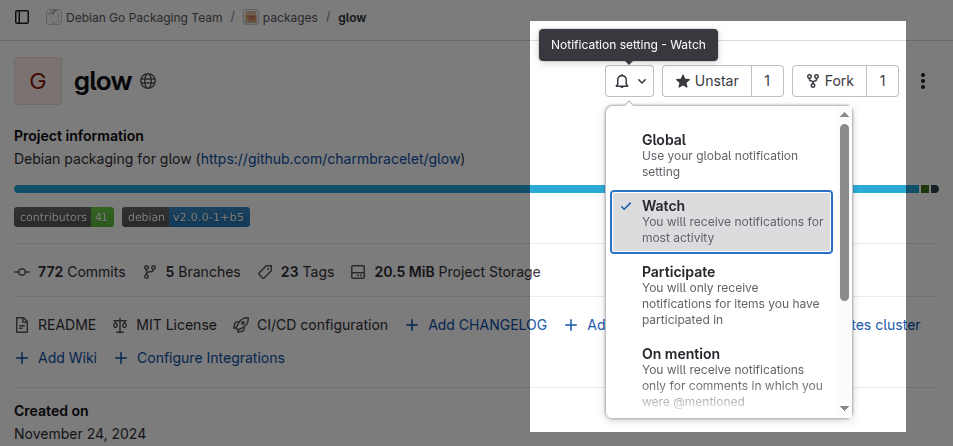
Reviewing Merge Requests This section about reviewing is not exclusive to Debian package maintainers anyone can contribute to Debian by reviewing open Merge Requests. Typically, the larger an open source project gets, the more help is needed in reviewing and testing changes to avoid regressions, and all diligently done work is welcome. As the famous Linus quote goes, given enough eyeballs, all bugs are shallow . On salsa.debian.org, you can browse open Merge Requests per project or for a whole group, just like on any GitLab instance. Reviewing Merge Requests is, however, most fun when they are fresh and the submitter is active. Thus, the best strategy is to ensure you have subscribed to email notifications in the repositories you care about so you get an email for any new Merge Request (or Issue) immediately when posted. Change notification settings from Global to Watch to get an email on new Merge Requests When you see a new Merge Request, try to review it within a couple of days. If you cannot review in a reasonable time, posting a small note that you intend to review it later will feel better to the submitter compared to not getting any response. Personally, I have a habit of assigning myself as a reviewer so that I can keep track of my whole review queue at https://salsa.debian.org/dashboard/merge_requests?reviewer_username=otto, and I recommend the same to others. Seeing the review assignment happen is also a good way to signal to the submitter that their submission was noted.

Reviewing commit-by-commit in the web interface Reviewing using the web interface works well in general, but I find that the way GitLab designed it is not ideal. In my ideal review workflow, I first read the Git commit message to understand what the submitter tried to do and why; only then do I look at the code changes in the commit. In GitLab, to do this one must first open the Commits tab and then click on the last commit in the list, as it is sorted in reverse chronological order with the first commit at the bottom. Only after that do I see the commit message and contents. Getting to the next commit is easy by simply clicking Next. Example review to demonstrate location of buttons and functionality When adding the first comment, I choose Start review and for the following remarks Add to review. Finally, I click Finish review and Submit review, which will trigger one single email to the submitter with all my feedback. I try to avoid using the Add comment now option, as each such comment triggers a separate notification email to the submitter.

Reviewing and testing on your own computer locally For the most thorough review, I pull the code to my laptop for local review with git pull <remote url> <branch name>. There is no need to run git remote add as pulling using a URL directly works too and saves from needing to clean up old remotes later. Pulling the Merge Request contents locally allows me to build, run and inspect the code deeply and review the commits with full metadata in gitk or equivalent.

Investing enough time in writing feedback, but not too much See my other post for more in-depth advice on how to structure your code review feedback. In Debian, I would emphasize patience, to allow the submitter time to rework their submission. Debian packaging is notoriously complex, and even experienced developers often need more feedback and time to get everything right. Avoid the temptation to rush the fix in yourself. In open source, Git credits are often the only salary the submitter gets. If you take the idea from the submission and implement it yourself, you rob the submitter of the opportunity to get feedback, try to improve and finally feel accomplished. Sure, it takes extra effort to give feedback, but the contributor is likely to feel ownership of their work and later return to further improve it. If a submission looks hopelessly low quality and you feel that giving feedback is a waste of time, you can simply respond with something along the lines of: Thanks for your contribution and interest in helping Debian. Unfortunately, looking at the commits, I see several shortcomings, and it is unlikely a normal review process is enough to help you finalize this. Please reach out to Debian Mentors to get a mentor who can give you more personalized feedback. There might also be contributors who just dump the code , ignore your feedback and never return to finalize their submission. If a contributor does not return to finalize their submission in 3-6 months, I will in my own projects simply finalize it myself and thank the contributor in the commit message (but not mark them as the author). Despite best practices, you will occasionally still end up doing some things in vain, but that is how volunteer collaboration works. We all just need to accept that some communication will inevitably feel like wasted effort, but it should be viewed as a necessary investment in order to get the benefits from the times when the communication led to real and valuable collaboration. Please just do not treat all contributors as if they are unlikely to ever contribute again; otherwise, your behavior will cause them not to contribute again. If you want to grow a tree, you need to plant several seeds.

Approving and merging Assuming review goes well and you are ready to approve, and if you are the only maintainer, you can proceed to merge right away. If there are multiple maintainers, or if you otherwise think that someone else might want to chime in before it is merged, use the Approve button to show that you approve the change but leave it unmerged. The person who approved does not necessarily have to be the person who merges. The point of the Merge Request review is not separation of duties in committing and merging the main purpose of a code review is to have a different set of eyeballs looking at the change before it is committed into the main development branch for all eternity. In some packages, the submitter might actually merge themselves once they see another developer has approved. In some rare Debian projects, there might even be separate people taking the roles of submitting, approving and merging, but most of the time these three roles are filled by two people either as submitter and approver+merger or submitter+merger and approver. If you are not a maintainer at all and do not have permissions to click Approve, simply post a comment summarizing your review and that you approve it and support merging it. This can help the maintainers review and merge faster.

Making a Merge Request for a new upstream version import Unlike many other Linux distributions, in Debian each source package has its own version control repository. The Debian sources consist of the upstream sources with an additional debian/ subdirectory that contains the actual Debian packaging. For the same reason, a typical Debian packaging Git repository has a debian/latest branch that has changes only in the debian/ subdirectory while the surrounding upstream files are the actual upstream files and have the actual upstream Git history. For details, see my post explaining Debian source packages in Git. Because of this Git branch structure, importing a new upstream version will typically modify three branches: debian/latest, upstream/latest and pristine-tar. When doing a Merge Request for a new upstream import, only submit one Merge Request for one branch: which means merging your new changes to the debian/latest branch. There is no need to submit the upstream/latest branch or the pristine-tar branch. Their contents are fixed and mechanically imported into Debian. There are no changes that the reviewer in Debian can request the submitter to do on these branches, so asking for feedback and comments on them is useless. All review, comments and re-reviews concern the content of the debian/latest branch only. It is not even necessary to use the debian/latest branch for a new upstream version. Personally, I always execute the new version import (with gbp import-orig --verbose --uscan) and prepare and test everything on debian/latest, but when it is time to submit it for review, I run git checkout -b import/$(dpkg-parsechangelog -SVersion) to get a branch named e.g. import/1.0.1 and then push that for review.

Reviewing a Merge Request for a new upstream version import Reviewing and testing a new upstream version import is a bit tricky currently, but possible. The key is to use gbp pull to automate fetching all branches from the submitter s fork. Assume you are reviewing a submission targeting the Glow package repository and there is a Merge Request from user otto s fork. As the maintainer, you would run the commands:
git remote add otto https://salsa.debian.org/otto/glow.git
gbp pull --verbose otto
If there was feedback in the first round and you later need to pull a new version for re-review, running gbp pull --force will not suffice, and this trick of manually fetching each branch and resetting them to the submitter s version is needed:
for BRANCH in pristine-tar upstream debian/latest
do
git checkout $BRANCH
git reset --hard origin/$BRANCH
git pull --force https://salsa.debian.org/otto/glow.git $BRANCH
done
Once review is done, either click Approve and let the submitter push everything, or alternatively, push all the branches you pulled locally yourself. In GitLab and other forges, the Merge Request will automatically be marked as Merged once the commit ID that was the head of the Merge Request is pushed to the target branch.

Please allow enough time for everyone to participate When working on Debian, keep in mind that it is a community of volunteers. It is common for people to do Debian stuff only on weekends, so you should patiently wait for at least a week so that enough workdays and weekend days have passed for the people you interact with to have had time to respond on their own Debian time. Having to wait may feel annoying and disruptive, but try to look at the upside: you do not need to do extra work simply while waiting for others. In some cases, that waiting can be useful thanks to the sleep on it phenomenon: when you yourself look at your own submission some days later with fresh eyes, you might notice something you overlooked earlier and improve your code change even without other people s feedback!

Contribute reviews! The last but not least suggestion is to make a habit of contributing reviews to packages you do not maintain. As we already see in large open source projects, such as the Linux kernel, they have far more code submissions than they can handle. The bottleneck for progress and maintaining quality becomes the reviews themselves. For Debian, as an organization and as a community, to be able to renew and grow new contributors, we need more of the senior contributors to shift focus from merely maintaining their packages and writing code to also intentionally interact with new contributors and guide them through the process of creating great open source software. Reviewing code is an effective way to both get tangible progress on individual development items and to transfer culture to a new generation of developers.

Why aren t 100% of all Debian source packages hosted on Salsa? As seen at trends.debian.net, more and more packages are using Salsa. Debian does not, however, have any policy about it. In fact, the Debian Policy Manual does not even mention the word Salsa anywhere. Adoption of Salsa has so far been purely organic, as in Debian each package maintainer has full freedom to choose whatever preferences they have regarding version control. I hope the trend to use Salsa will continue and more shared workflows emerge so that collaboration gets easier. To drive the culture of using Merge Requests and more, I drafted the Debian proposal DEP-18: Encourage Continuous Integration and Merge Request based Collaboration for Debian packages. If you are active in Debian and you think DEP-18 is beneficial for Debian, please give a thumbs up at dep-team/deps!21.

17 August 2025

C.J. Collier: The Very Model of a Patriot Online

It appears that the fragile masculinity tech evangelists have identified Debian as a community with boundaries which exclude them from abusing its members and they re so angry about it! In response to posts such as this, and inspired by Dr. Conway s piece, I ve composed a poem which, hopefully, correctly addresses the feelings of that crowd.
The Very Model of a Patriot Online
I am the very model of a modern patriot online,
My keyboard is my rifle and my noble cause is so divine.
I didn't learn my knowledge in a dusty college lecture hall,
But from the chans where bitter anonymity enthralls us all.
I spend a dozen hours every day upon my sacred quest,
To put the globo-homo narrative completely to the test.
My arguments are peer-reviewed by fellas in the comments section,
Which proves my every thesis is the model of complete perfection.
I m steeped in righteous anger that the libs call 'white fragility,'
For mocking their new pronouns and their lack of masculinity.
I m master of the epic troll, the comeback, and the searing snark,
A digital guerrilla who is fighting battles in the dark.
I know the secret symbols and the dog-whistles historical,
From Pepe the Frog to  Let s Go Brandon,  in order categorical;
In short, for fighting culture wars with rhetoric rhetorical,
I am the very model of a patriot polemical.
***
I stand for true expression, for the comics and the edgy clown,
Whose satire is too based for all the fragile folks in town.
They say my speech is 'violence' while my spirit they are trampling,
The way they try to silence me is really quite a startling sampling
Of 1984, which I've not read but thoroughly understand,
Is all about the tyranny that's gripping this once-blessed land.
My humor is a weapon, it s a razor-bladed, sharp critique,
(Though sensitive elites will call my masterpiece a form of  hate speech ).
They cannot comprehend my need for freedom from all consequence,
They call it 'hate,' I call it 'jokes,' they just don't have a lick of sense.
So when they call me  bigot  for the spicy memes I post pro bono,
I tell them their the ones who're cancelled, I'm the victim here, you know!
Then I can write a screed against the globalist cabal, you see,
And tell you every detail of their vile conspiracy.
In short, when I use logic that is flexible and personal,
I am the very model of a patriot controversial.
***
I'm very well acquainted with the scientific method, too,
It's watching lengthy YouTube vids until my face is turning blue.
I trust the heartfelt testimony of a tearful, blonde ex-nurse,
But what a paid fact-checker says has no effect and is perverse.
A PhD is proof that you've been brainwashed by the leftist mob,
While my own research on a meme is how I really do my job.
I know that masks will suffocate and vaccines are a devil's brew,
I learned it from a podcast host who used to sell brain-boosting goo.
He scorns the lamestream media, the CNNs and all the rest,
Whose biased reporting I've put fully to a rigorous test
By only reading headlines and confirming what I already knew,
Then posting my analysis for other patriots to view.
With every "study" that they cite from sources I can't stand to hear,
My own profound conclusions become ever more precisely clear.
In short, when I've debunked the experts with a confident "Says who?!",
I am the very model of a researcher who sees right through you.
***
But all these culture wars are just a sleight-of-hand, a clever feint,
To hide the stolen ballots and to cover up the moral taint
Of D.C. pizza parlors and of shipping crates from Wayfair, it s true,
It's all connected in a plot against the likes of me and you!
I've analyzed the satellite photography and watermarks,
I understand the secret drops, the cryptic Qs, the coded sparks.
The  habbening  is coming, friends, just give it two more weeks or three,
When all the traitors face the trials for their wicked treachery.
They say that nothing happened and the dates have all gone past, you see,
But that's just disinformation from the globalist enemy!
Their moving goalposts constantly, a tactic that is plain to see,
To wear us down and make us doubt the coming, final victory!
My mind can see the patterns that a simple sheep could never find,
The hidden puppet-masters who are poisoning our heart and mind.
In short, when I link drag queens to the price of gas and child-trafficking,
I am the very model of a patriot whose brain is quickening!
***
My pickup truck's a testament to everything that I hold dear,
With vinyl decals saying things the liberals all hate and fear.
The Gadsden flag is waving next to one that's blue and starkly thin,
To show my deep respect for law, except the feds who're steeped in sin.
There's Punisher and Molon Labe, so that everybody knows
I'm not someone to trifle with when push to final shoving goes.
I've got my tactical assault gear sitting ready in the den,
Awaiting for the signal to restore our land with my fellow men.
I practice clearing rooms at home when my mom goes out to the store,
A modern Minuteman who's ready for a civil war.
The neighbors give me funny looks, I see them whisper and take note,
They'll see what's what when I'm the one who's guarding checkpoints by their throat.
I am a peaceful man, of course, but I am also pre-prepared,
To neutralize the threats of which the average citizen's unscared.
In short, when my whole identity's a brand of tactical accessory,
You'll say a better warrior has never graced a Cabela's registry.
***
They say I have to tolerate a man who thinks he is a dame,
While feminists and immigrants are putting out my vital flame!
There taking all the jobs from us and giving them to folks who kneel,
And "woke HR" says my best jokes are things I'm not allowed to feel!
An Alpha Male is what I am, a lion, though I'm in this cubicle,
My life's frustrations can be traced to policies Talmudical.
They lecture me on privilege, I, who have to pay my bills and rent!
While they give handouts to the lazy, worthless, and incompetent!
My grandad fought the Nazis! Now I have to press a key for  one 
To get a call-rep I can't understand beneath the blazing sun
Of global, corporate tyranny that's crushing out the very soul
Of men like me, who've lost their rightful, natural, and just control!
So yes, I am resentful! And I'm angry! And I'm right to be!
They've stolen all my heritage and my masculinity!
In short, when my own failures are somebody else's evil plot,
I am the very model of the truest patriot we've got!
***
There putting chips inside of you! Their spraying things up in the sky!
They want to make you EAT THE BUGS and watch your very spirit die!
The towers for the 5G are a mind-control delivery tool!
To keep you docile while the children suffer in a grooming school!
The WEF, and Gates, and Soros have a plan they call the 'Great Reset,'
You'll own no property and you'll be happy, or you'll be in debt
To social credit overlords who'll track your every single deed!
There sterilizing you with plastics that they've hidden in the feed!
The world is flat! The moon is fake! The dinosaurs were just a lie!
And every major tragedy's a hoax with actors paid to cry!
I'M NOT INSANE! I SEE THE TRUTH! MY EYES ARE OPEN! CAN'T YOU SEE?!
YOU'RE ALL ASLEEP! YOU'RE COWARDS! YOU'RE AFRAID OF BEING TRULY FREE!
My heart is beating faster now, my breath is short, my vision's blurred,
From all the shocking truth that's in each single, solitary word!
I've sacrificed my life and friends to bring this message to the light, so...
You'd better listen to me now with all your concentrated might, ho!
***
For my heroic struggle, though it's cosmic and it's biblical,
Is waged inside the comments of a post that's algorithm-ical.
And still for all my knowledge that's both tactical and practical,
My mom just wants the rent I owe and says I'm being dramatical.


16 August 2025

Bits from Debian: Debian turns 32!

Alt 32th Debian Day by Daniel Lenharo On August 16, 1993, Ian Murdock announced the Debian Project to the world. Three decades (and a bit) later, Debian is still going strong, built by a worldwide community of developers, contributors, and users who believe in a free, universal operating system. Over the years, Debian has powered servers, desktops, tiny embedded devices, and huge supercomputers. We have gathered at DebConfs, squashed countless bugs, shared late-night hacking sessions, and helped keep millions of systems secure. Debian Day is a great excuse to get together, whether it is a local meetup, an online event, a bug squashing party, a team sprint or just coffee with fellow Debianites. Check out the Debian Day wiki to see if there is a celebration near you or to add your own. Here is to 32 years of collaboration, code, and community, and to all the amazing people who make Debian what it is. Happy Debian Day!

Next.

Previous.