Search Results: "Martin"

4 May 2009

Martin Michlmayr: Debian 5.0 (lenny) tar ball for the SheevaPlug

It took me a while because of travel and other projects, but I finally released a tar ball containing Debian lenny for the SheevaPlug along with some installation instructions. It should be really easy to install Debian this way, but I'll also make sure that SheevaPlug support will be in the Debian installer for the next release of Debian. For now, check out the tar ball I prepared!

1 May 2009

Martin Michlmayr: Adventures with the Qstarz BT-Q1000X GPS logger and receiver

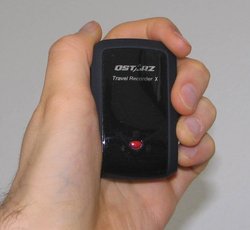
Qstarz BT-Q1000X GPS in my hand Spring has arrived in Europe and I'm looking forward to spending more time outdoors. While I was pondering some plans, I thought it would be nice to have a GPS. I've never used a GPS before but it seems it will allow me to combine outdoors activities such as walking and hiking with geek things. In particular, I'm interested in tracking where I'm going (what route, what distance, what speed, etc), geotagging photos and possibly contributing to OpenStreetMap. Since last week, I have a Qstarz BT-Q1000X (Travel Recorder X), a GPS logger and receiver, and I've been playing around with it a bit. This device uses the new MTK II chip, which gives good accuracy and long battery time. I've created a new gps category in which I'll share my experience using a GPS in general and specifically the Qstarz BT-Q1000X. I've also created a Qstarz BT-Q1000X and Debian page to describe how to use this GPS device on Linux and I'll add more information to the page as I try out different applications.

30 April 2009

Martin F. Krafft: The need for a GPG revocation certificate

Do you use GPG or PGP to sign or encrypt your emails and/or files? This is a reminder to those who answered yes: make sure you have a revocation certificate, as well as backups of your private/public key pair, ideally in multiple safe locations. It s always a good idea to keep backups. But what is more important with GPG is the revocation certificate. That s your emergency brake. If someone ever gains control over your key, this is the only way for you to minimise (further) abuse of your key and your identity. However, even a revocation certificate won t be able to prevent all abuse, by nature of the design of the GPG Web of Trust. You also need to exercise utmost care in protecting your key and making sure third parties cannot gain control over it. Do not keep it on machines you don t trust, and make sure to use a safe, non-guessable passphrase! With GnuPG, generating a revocation certificate is as easy as this; replace $KEYID with your 8 or 16 digit hexadecimal key ID:
gpg --gen-revoke $KEYID > $KEYID.revoke.asc

and store it away. Do not import it until you need to revoke your key! In my case, the process was this; lines requiring my input are prefixed with an arrow ( ):
  sec  1024D/330C4A75 2001-06-20 Martin F. Krafft <mail@martin-krafft.net>
  Create a revocation certificate for this key? (y/N) y
  Please select the reason for the revocation:
    0 = No reason specified
    1 = Key has been compromised
    2 = Key is superseded
    3 = Key is no longer used
    Q = Cancel
  (Probably you want to select 1 here)
  Your decision? 1
  Enter an optional description; end it with an empty line:
  > 
  Reason for revocation: Key has been compromised
  (No description given)
  Is this okay? (y/N) y
  You need a passphrase to unlock the secret key for
  user: "Martin F. Krafft <mail@martin-krafft.net>"
  1024-bit DSA key, ID 330C4A75, created 2001-06-20
  ASCII armored output forced.
  Revocation certificate created.
  Please move it to a medium which you can hide away; if Mallory gets
  access to this certificate he can use it to make your key unusable.
  It is smart to print this certificate and store it away, just in case
  your media become unreadable.  But have some caution:  The print system of
  your machine might store the data and make it available to others!

I then printed the file, put it in the safe, stored it on a removable disk and hid it away. Even though I exercise great care over my key material, I can now sleep better at night, knowing that I can at least minimise any damage done by an attacker who compromises my key. Also, that way I can make sure to declare unused keys as such, since there is no other way to revoke a published key for which you ve lost the private key or forgotten its passphrase. I ve left such traces in my past and wish I had known what I was doing at the time: A8FA196E, C22D1C01, 1EF0975C. This is your chance to do it right. Make yourself a revocation certificate now (along with backups)! And always exercise care and keep your key secure. NP: Mono: One More Step and You Die

29 April 2009

Clint Adams: Here she comes, big as life

What seems like eons ago, I ordered one of those SheevaPlug Development Kits. After about six weeks, they got around to shipping it, and then, yesterday, after I assume a tortoise had piloted it across the country on broken tricycle, it was finally delivered to me. I booted it up, observed that there was some kind of Ubuntu thing on it, and set myself to correct that problem. Within an hour I had managed to lock myself out. Here is something I should have read beforehand. Thanks to Martin Michlmayr, it is now running Debian and allowing me to log in. Here are some steps to follow if you would like to boot Debian off of a USB stick plugged into your Sheevaplug: That should be all there is to it. Next I'm wondering if SDIO wireless cards work.

22 April 2009

Martin Michlmayr: OSI signs an MOU with the Korea Software Copyright Committee

I visited Seoul last week to represent the Open Source Initiative (OSI) at an open source conference and to sign a Memorandum of Understanding (MOU) with the Korea Software Copyright Committee (SOCOP). SOCOP organized a conference with the title "Free Open Source Software License Insight Conference", and the international speakers included Brett Smith of the FSF, Brendan Scott of Open Source Law, Michael Cot of RedMonk and myself. From the questions we received, it seems that there is a lot of interest in legal questions related to open source. There were a number of folks from hardware companies that asked specific questions what they could do and couldn't do (e.g. related to including sources for GPL code and properly giving credit for BSD code). I think the conference was a great success. The talks were of high value and we got good questions. The audience was quite mixed, ranging from managers to developers. Even though they had simultaneous translation of the talks, the majority of the people listened in English... this gives me hope that some of these folks will end up becoming involved in the international open source community. Mr Koo and Dr Michlmayr signing MOU SOCOP is working on a number of activities related to open source, including: The day after the conference, I went to the SOCOP office to sign the MOU between SOCOP and OSI with Mr Yung Bo Koo, the chairman of SOCOP. The MOU says that we'll share knowledge and expertise, help with promotional activities and support each other's activities in other ways. I was delighted to sign the MOU between SOCOP and OSI, and I look forward to a fruitful cooperation between our organizations in the future. It's great to see so much interest and so many activities around open source in the Republic of Korea.

19 April 2009

Martin Meredith: Trying KDE again

When Kubuntu switched to KDE4 as it s main desktop, I was disheartened. KDE 4, at the time was just, well, pretty unusable for me. It kept crashing, I couldn t do the things that I wanted to, and I spent more time fighting with KDE than I did actually doing work. After about a week, I d had enough, and I switched to Gnome. Now, a lot of people are probably going to respond to this with Gnome vs KDE flames, but let me explain my viewpoint on the whole Desktop Environment war I prefer KDE, but if a desktop will let me do the work I need to do without getting in my way and causing issues, then I can learn to use it. The above is possibly the reason that I can get along ok with Windows XP, but if I have to use Vista, I ll end up wanting to throw the machine out of the window. So, for possibly the last year or so (I m not too sure on the timescale!) I ve been using Gnome in Ubuntu, and I must say, I ve liked it. the fact that I can login, and instantly get access to my servers without having to type in my SSH key password (yes, insecure I know!), and that everything seems to integrate in a nice way, well.. it s been fun. But still, my heart lies with KDE, and I ve been flipping back to it to see how KDE4 is coming along on a regular basis. So far, I ve seen it gradually improving, and well, it looks damned sexy to be honest, but there were a few things that I felt it was missing. The ability to have multiple rows of apps on the task switcher was a big one for me. I generally have a lot of windows open, and I don t like the Grouping functionality. So when I get more than a few apps open, I could only see the icons. That s been fixed in KDE4.2, and it does it in a nicer way than Gnome does it (only switching to two rows once there are a certain amount of windows open. Next on the list is the whole password management thing. Gnome does a GREAT job at this. I login, and it unlocks the default keyring, sets up the SSH agent, adds my key, unlocking it from the keyring, and I don t have to do anything but login with my normal user and password (though I intend to switch that to biometric login once I can be bothered to setup the fingerprint reader). I ve fixed that little issue (well, for SSH) by setting up an autostart script using ksshaskpass to add my SSH key when I login. So far, KDE seems pretty usable for me now, but then, I m quite happy to plod along on my Laptop and try things out. I m feeling a bit lost with all the new functionality, and wishing that the Ubuntu Gnome Notifications (from pidgin, which I use as my IM client) didn t look so ugly in the new sexy KDE Desktop (in fact, if anyone knows a way to get pidgin to use the Jaunty style notifications in KDE, let me know, as they d fit in quite well under the new KDE look :D) - I d like to see some sort of common ground for notifications across the desktops, but who knows when that s going to happen! I ll also try using it at work, if I can use it there without it getting in the way, then I will happily switch back permanently, but that s the ultimate test. I m pretty sure that KDE 4 will be usable for me soon, and I ll let you know if that s now

Martin F. Krafft: Extending the X keyboard map with xkb

xmodmap has long been the only way to modify the keyboard map of the X server, short of the complex configuration daemon approaches used by the large desktop managers, like KDE and GNOME. But it has always been a hack: it modifies the X keyboard map and thus requires a baseline to work from, kind of like a patch needs the correct context to be applicable. Worse yet, xmodmap weirdness required me to invoke it twice to get the effect I wanted. When the recent upgrade to X.org 7.4 broke larger parts of my elaborate xmodmap configuration, I took the time to finally ditch xmodmap and implement my modifications as proper xkb configuration.

Background information I had tried before to use per-user xkb configuration, but could not find the answers I want. It was somewhat by chance that I found Doug Palmer s Unreliable Guide to XKB configuration at the same time that Julien Cristau and Matthew W. S. Bell provided me the necessary hints on the #xorg/irc.freenode.org IRC channel to get me started. The other resource worth mentioning is Ivan Pascal s collection of XKB documents, which were instrumental in my gaining an understanding of xkb. And just as I am writing this document, Debian s X Strike Force have published their Input Hotplug Guide, which is a nice complement to this very document you are reading right now, since it focuses on auto-configuration of xkb with HAL. The default xkb configuration comes with a lot of flexibility, and often you don t need anything else. But when you do, then this is how to do it:

Installing a new keyboard map The most basic way to install a new keyboard map is using xkbcomp, which can also be used to dump the currently installed map into a file. So, to get a bit of an idea of what we ll be dealing with, please run the following commands:
xkbcomp $DISPLAY xkb.dump
editor xkb.dump
xkbcomp xkb.dump $DISPLAY

The file is complex and large, and it completely went against my aesthetics to simply edit it to have xkb work according to my needs. I sought a way in which I could use as much as possible of the default configuration, and only place self-contained additional snippets in place to do the things I wanted done differently. setxkbmap and rule files Thus began my voyage into the domain of rule files. But before we dive into those, let s take a look at setxkbmap. Despite the trivial invocation of e.g. setxkbmap us to install a standard US-American keyboard map, the command also takes arguments. More specifically, it allows you to specify the following high-level parameters, which determine the sequence of events between key press and an application receiving a KeyPress event:
  • Model: the keyboard model, which defines which keys are where
  • Layout: the keyboard layout, which defines what the keys actually are
  • Variant: slight variantions in the layout
  • Options: configurable aspects of keyboard features and possibilities
Thus, with the following command line, I would select a US layout with international (dead) keys for my Thinkpad keyboard, and switch to an alternate symbol group with the windows keys (more on that later):
setxkbmap -model thinkpad -layout us -variant intl -option grp:win_switch

In many cases, between all combinations of the aforementioned parameters, this is all you ever need. But I wanted more. If you append -print to the above command, it will print the keymap it would install, rather than installing it:
% setxkbmap -model thinkpad -layout us -variant intl -option grp:win_switch -print
xkb_keymap  
  xkb_keycodes    include "evdev+aliases(qwerty)"        ;
  xkb_types       include "complete"     ;
  xkb_compat      include "complete"     ;
  xkb_symbols     include "pc+us(intl)+inet(evdev)+group(win_switch)"    ;
  xkb_geometry    include "thinkpad(us)"         ;
 ;

There are two things to note:
  1. The -option grp:win_switch argument has been turned into an additional include group(win_switch) on the xkb_symbols line, just like the model, layout, and variant are responsible for other aspects in the output.
  2. The output seems related to what xkbcomp dumped into the xkb.dump file we created earlier. Upon closer inspection, it turns out that the dump file is simply a pre-processed version of the keyboard map, with include instructions exploded.
At this point, it became clear to me that this was the correct way forward, and I started to investigate those points in order. The translation from parameters to an xkb_keymap stanza by setxkbmap is actually governed by a rule file. A rule is nothing more than a set of criteria, and what setxkbmap should do in case they all match. On a Debian system, you can find this file in /usr/share/X11/xkb/rules/evdev, and /usr/share/X11/xkb/rules/evdev.lst is a listing of all available parameter values. The xkb_symbols include line in the above xkb_keymap output is the result of the following rules in the first file, which setxkbmap had matched (from top to bottom) and processed:
! model         layout              =       symbols
  [...]
  *             *                   =       pc+%l(%v)
! model                             =       symbols
  *                                 =       +inet(evdev)
! option                            =       symbols
  [...]
  grp:win_switch                    =       +group(win_switch)

It should now not be hard to deduce the xkb_symbols include line quoted above, starting from the setxkbmap command line. I ll reproduce both for you for convenience:
setxkbmap -model thinkpad -layout us -variant intl -option grp:win_switch
xkb_symbols     include "pc+us(intl)+inet(evdev)+group(win_switch)"    ;

A short note about the syntax here: group(win_switch) in the symbols column simply references the xkb_symbols stanza named win_switch in the symbols file group (/usr/share/X11/xkb/symbols/group). Thus, the rules file maps parameters to sets of snippets to include, and the output of setxkbmap applies those rules to create the xkb_keymap output, to be processed by xkbcomp (which setxkbmap invokes implicitly, unless the -print argument was given on invocation). It seems that for a criteria (option, model, layout, ) to be honoured, it has to appear in the corresponding listing file, evdev.lst in this case. There is also evdev.xml, but I couldn t figure out its role.

Attaching symbols to keys I ended up creating a symbols file of reasonable size, which I won t discuss here. Instead, let s solve the following two tasks for the purpose of this document:
  1. Make the Win-Hyphen key combination generate an en dash ( ), and Win-Shift-Hyphen an em dash ( ).
  2. Let the Caps Lock key generate Mod4, which can be used e.g. to control the window manager.
To approach these two tasks, let s create a symbols file in ~/.xkb/symbols/xkbtest and add two stanzas to it:
partial alphanumeric_keys
xkb_symbols "dashes"  
  key <AE11>  
    symbols[Group2] = [ endash, emdash ]
   ;
 ;
partial modifier_keys
xkb_symbols "caps_mod4"  
  replace key <CAPS>  
    [ VoidSymbol, VoidSymbol ]
   ;
  modifier_map Mod4   <CAPS>  ;
 ;

Now let me explain these in turn:
  1. We used the option grp:win_switch earlier, which told xkb that we would like to use the windows keys to switch to group 2. In the custom symbols file, we now simply define the symbols to be generated for each key, when the second group has been selected. Key <AE11> is the hyphen key. To find out the names of all the other keys on your keyboard, you can use the following command:
    xkbprint -label name $DISPLAY -   gv -orientation=seascape -
    
    
    I had to declare the stanza partial because it is not a complete keyboard map, but can only be used to augment/modify other maps. I also declared it alphanumeric_keys to tell xkb that I would be modifying alphanumeric keys inside it. If I also wanted to change modifier keys, I would also specify modifier_keys. The rest should be straight-forward. You can get the names of available symbols from keysymdef.h (/usr/include/X11/keysymdef.h on a Debian system, package x11proto-core-dev), stripping the XK_ prefix.
  2. The second stanza replaces the Caps Lock key definition and prevents it from generating symbols (VoidSymbol). The important aspect of the second stanza is the modifier_map instruction, which causes the key to generate the Mod4 modifier event, which I can later use to bind key combinations for my window manager (awesome).
The easiest way to verify those changes is to put the setxkbmap -print output of the keyboard map you would like to use as a baseline into ~/.xkb/keymap/xkbtest, and append snippets to be included to the xkb_symbols line, e.g.:
"pc+us(intl)+inet(evdev)+group(win_switch)+xkbtest(dashes)+xkbtest(caps_mod4)"

When you try to load this keyboard map with xkbcomp, it will fail because it cannot find the xkbtest symbol definition file. You have to let the tool know where to look, by appending a path to its search list (note the use of $HOME instead of ~, which the shell would not expand):
xkbcomp -I$HOME/.xkb ~/.xkb/keymap/xkbtest $DISPLAY

You can use xev to verify the results, or just type Win-Hyphen into a terminal; does it produce ? By the way, I found xev much more useful for such purposes when invoked as follows (thanks to Penny for the idea):
xev   sed -ne '/^KeyPress/,/^$/p'

Unfortunately, xev does not give any indication of which modifier symbols are generated. I have found no other way to verify the outcome, other than to tell my window manager to do something in response to e.g. Mod4-Enter, reloaded it, and then tried it out.

Rules again, and why I did not use them in the end Once I got this far, I proceeded to add option-to-symbol-snippet mappings to the rules file, and added each option to the listing file too. A few bugs [[!debbugs 524512 desc=later]], I finally had setxkbmap spit out the right xkb_keymap and could install the new keyboard map with xkbcomp, like so:
setxkbmap -I$HOME/.xkb [...] -print   xkbcomp -I$HOME/xkb - :0

I wrote a small script to automatically do that at the start of the X session and could have gone to play outside, if it hadn t been for the itch I felt due to the entire rule file stored in my configuration. I certainly did not like that, but I could also not find a way to extend a rule file with additional rules. When I looked at the aforementioned script again, it suddenly became obvious that I was going a far longer path than I had to. Even though the rule system is powerful and allows me to e.g. automatically include symbol maps to remap keys on my Thinkpad, based on the keyboard model I configured, the benefit (if any) did not justify the additional complexity. In the end, I simplified the script that loads the keyboard map, and defined a default xkb_keymap, as well as one for the Thinkpad, wich I identify by its fully-qualified hostname. If a specific file is available for a given host, it is used. Otherwise, the script uses the default.

16 April 2009

Martin F. Krafft: Government exaction

Do you listen to the radio? I don t, and there are multiple reasons for that: First and foremost, I don t like the music they play these days. Even though there are stations which will occasionally play a more eclectic tune, the Swiss government does not, to my knowledge, dictate any quota, like New Zealand actually requires stations to broadcast New Zealand music at least 20% of the time. The result is music made by producers, who stand pop icons with little clothing in front of microphones, instruct them to move their bodies in obscene ways, and coach them to croak songs someone else wrote en masse in some basement somewhere. All those songs sound alike. To ensure a constant supply of pop dolls, they hype television shows with titles such as Germany s seeks the next superstar , when most of Germany actually couldn t care less, and only those with vacuous brain capacity follow with excitement, because they wouldn t know what else to do. Second, I don t have the time or energy to listen to discussion rounds on the radio, especially not when topic are about society , which noone can define in the first place. Wittgenstein always had it right. The same goes for most commentaries. If I don t have anything to do, I prefer to listen to birds in the trees, rather than someone s polished opinion. The scariest aspect is that those people actually believe that they have something worthwhile to say, and so do their producers and the other staff, when in most cases, they don t. At least not worthwhile to people who have other things occupying their minds. I also don t like someone to make a pre-selection of news and squash that into 5-15 minute time slots, to be read out by dull-sounding speakers. I d rather skim over articles, and the Web ensures that I get the information I want much quicker than the radio stations can transmit them. And sports over the radio waves makes me come close to aural epileptic seizures. I am painting the sky black a bit. I am fully aware that there exist people with thought-provoking arguments, that some stations play interesting music I would otherwise never discover, and that the radio is a source of entertainment in the lives of thousands of other people who are less privileged than me. But when the Billag rang my doorbell today and wanted CHF 14,10 per month for posession of any device capable of turning radio waves into sound, including those radio waves broadcast over the Internet these days, I got a bit furious. In the past, they concentrated only on actual radio and TV receivers. When I moved into my previous flat in Zurich in 2002, they wanted money because my stereo had a tuner button. I refused to pay, opened the device, unsoldered the radio coil, and sent it to them with an angry letter of refusal; they let me off the hook. Since then, they changed the law in 2007 (but haven t actually updated the forms they force you to sign) to include audio players, cellular phones, and computers, which are all radio-capable. I d really prefer if they used their funds to revert that trend, or at least remove the loudspeakers from all mobile phones. But instead, this morning, I skid right into their claws. As I said before, the radio is also a social support system, and as such I have less of a problem to subsidise it. However, given that I strongly disagree with the quality level broadcast, I would prefer to direct my money towards causes I consider more useful, and with which I could better identify. Unfortunately, the whole system is governmentalised to the point where this choice is taken away from me. The Billag website helpfully offers answers to the common questions, including one along the lines of quality. They suggest that you get in touch directly with the programme directors to complain about their content, and offer suggestions. Shortly after I moved to Zurich, Radio Lora offered me a radio show. Radio Lora is a private station, but they also receive subsidies from the monies exacted by the government, so I am using them as an example here. I suggested that I concentrated only on progressive and psychedelic rock from the sixties and the seventies. They refused the show in the end, claiming that this would not be what their listeners want. So instead I now get to pay for content that is deemed more appropriate. I can only imagine the pains I d have to go through to be able to host a radio show concentrating on eclectic tunes on one of the public radio stations. And even if I succeeded (without becoming a full-time public radio broadcaster), then I could only contribute a few hours a week to that content. If you ask me, the Swiss government is overstepping its competencies a bit. NP: Mono: Hymn to the Immortal Wind

14 April 2009

Martin F. Krafft: Extreme bliss

I experience extreme ecstasy on this train ride to Fribourg to see the girl, who makes it no secret that she is looking forward to cooking for me. That per se is not the reason for my bliss; rather it s seeing her again after an endless 24 hours apart. I just had to share. NP: Russian Circles: Station

9 April 2009

Martin Meredith: My Boss, with a little help, starts the conversion to Linux

Ok, so at work, pretty much the whole company uses Windows, of some sort. The web team, however, are pretty adamant that they use the best tools available for them, and we use Ubuntu because of this (because it s the easiest option that we all have the same distro, and as long as it s Linux, we don t mind) Anyway, at the moment we re working through the process of moving all our internal business applications from Visual Basic.NET (urgh!) to PHP + a web based app. The Product Owner for this is one of the bosses, who currently uses Windows Vista. He has, however, seen us all using Ubuntu and it s got him interested in using it. He s said that he wants to try using Ubuntu, and see whether he can get his work done on that, and slowly transition to it, as obviously, he needs to be able to use Windows for the .NET stuff (which sadly, doesn t work well under WINE). So, we set him up a Virtual Machine, and he got to grips with what he was doing, great. Except for the fact that he had to allocate memory to it, switching back and forth between windows and Ubuntu was a pain. He eventually gave up on this idea, and got a spare machine, a spare monitor, and set it up next to his machine. Still, however, it was a bit of a pain, he d have to switch position on his desk, start using a different keyboard and mouse, and i was all a bit of hassle. Recently, we ve gotten a big screen (which isn t actually that big!) for the Web Team to monitor the servers, our order download service, etc etc. We were showing our manager some of the stuff we could do with it, and he asked the question So, how do you control it - to which my response was to move my mouse off of the edge of my screen, and onto the big screen. So is that a third monitor? he asked. No I replied, it s another machine. Enter Synergy So this is the point where I explained to our manager exactly what synergy is. Trying to explain it however, is a bit of a hassle, so I ll try my best here. Synergy is an application that allows you to control another machine s keyboard and mouse from your own PC. It s a bit of a mix between a KVM switch, and Remote Desktop, but it doesn t require extra hardware, and you dont have to relay the video across the network to show it on your screen too. At this point, our boss got a glint in his eye Does it work in Windows? he asked. At this point, I didn t realise that he had a seperate machine for Ubuntu. I told him it did anyway, but I wasn t too sure whether it worked with Vista Lets give it a go anyway So we went over to his machine, and I installed quicksynergy on his ubuntu box, while he downloaded the Windows installer for Synergy. 5 minutes later, he was grinning like a maniac as he moved his mouse from one machine to another. Now he s happily using Ubuntu without any hassle, it s just a third screen to him - with different stuff on it. I think the moral here is, there are different ways to get people to be able to use Linux, and Synergy is one of those great tools that enable people to use Linux without having all the hassle that comes with switching over. I think also, a quote from m manager sums it up.
This is one of the best things I ve seen all year. I thought it d take forever to setup, but it was so quick. I can be so much more productive now
I hope that this will be one of the turning points for my manager, and we ll have another convert by the end of the year

2 April 2009

Martin Michlmayr: Test kernel for Orion with performance patches available

Marvell posted some performance patches for ARM that speed up the copy_to_user and clear_user functions which are used to copy data around. I see quite a bit of performance increase with these patches on Orion, and I've prepared a test kernel so you can try them out too. This kernel should be treated as experimental, but I'm looking for testers with Orion-based hardware (e.g. QNAP TS-109, TS-209, and TS-409) who are interested in giving it a go. If your system has a rescue mode (the QNAP devices and the HP mv2120 do), I suggest you first make a backup of your flash. On the QNAP devices, you can do this with:
cat /dev/mtdblock1 /dev/mtdblock2 /dev/mtdblock3 > qnapimg.bin
Then edit the file /etc/apt/sources.list and add the following line:
deb http://people.debian.org/~tbm/orion lenny main
Now you can install the new kernel:
apt-get update
apt-get install linux-image-2.6.29-1-orion5x
Please ignore the warning that the package cannot be authenticated. This is because I haven't signed the repository. After the installation of the kernel, reboot and do some tests: Do you see any speedup? Do you see any problems?

31 March 2009

Martin Michlmayr: Kernel support for QNAP TS-119 and TS-219 Turbo NAS in 2.6.30

My patch for initial kernel support for the QNAP TS-119 and TS-219 Turbo NAS got accepted and will be in 2.6.30. I can run Debian on a USB disk without any problems but there are some issues left (some severe, some cosmetic): Unfortunately, I've no idea how to resolve these issues. However, the QNAP TS-119 and TS-219 have started shipping so hopefully someone else will investigate these issues.

Martin Meredith: vim, cherokee, etckeeper

Ok, so, today, I started using vim. I ve never really had the time before to learn how to use it. I think the most I d learned before today was just how to get out of vim if I ever accidentally got into it. Now, however, I m quite happy to do basic editing of files with it. I ve got to say, I m impressed with it s code highlighting features. I hope to eventually switch to vim permanently, but I m not that confident with it yet - my first command was nano ~/.vimrc *chuckles* Anyway, next comes cherokee. I m actually loving this webserver. It s so simplistic, yet so powerful, and it s admin interface is a dream. If anyone out there is interested in having a lightweight server, have a look at cherokee before you go and install lighttpd ! The most exciting new thing that I ve been using of late is etckeeper. (ok, maybe exciting isn t the word - but I like it!). This hooks into a RCS and basically keeps a track of your /etc/ folder. It will automagically commit changes made to it when using apt-get (or similar) and I ve actually set mine up to have bound branches. Meaning that my /etc/ is kept on a remote server. All my machines are now using etckeeper (with the exception of the eeePC, which is tucked away in a corner with a network lead plugged into the back, being used as a playground machine) and I m happy that if I ever have a hard disk crash, I can always get my configuration back from my server in a simple manner (which is massively useful for stuff like X). Anyway, just some stuff I ve been playing with of late. It seems I m switching more and more to the command line :D
Maybe I should start using w3m instead of Firefox?

30 March 2009

Martin F. Krafft: When Silence is Golden

Dear Miles & More service people: when I tell you that your actions and words (in the general terms of service) diverge, and you reply by putting your actions to words, maybe you also want to change the legal text, instead of contradicting yourself? Alternatively, instead of just restating the facts I ve included in my letter to you without adding any new information, maybe you just want to shut up? You ve definitely lost me, there shall never be another mile credited to my account. Fucking idiots. NP: Portishead: Third

25 March 2009

Martin F. Krafft: The demise of the Swiss train experience

On trains from Germany to Switzerland you used to notice the crossing of the border not only due to the appearance of the passport control folks in the train: once the Swiss train team replaced their German colleagues, passengers were finally able to travel in peace. Once you crossed the border, there would be no more almost-continuous blather through the speakers about where to find the restaurant, how lovely and relaxing it would be to enjoy fine cuisine there (I bet they never actually ate there themselves), and that the train crew regrets that some passengers are going to leave at the next stop, how much they hope that they ll soon come back, and how happy they are to welcome new passengers. Each announcement would last somewhere around 30 long seconds, and when it was finally over, they d repeat it in horrific English: wrong words, bad grammar, and pronunciation that made me cringe every time. But apparently, the German railway needs more business and their PR department seems to think that this is the way forward. Not the Swiss, or at least I thought until today. Heck, I even gave myself a GA for my 30th birthday, a year subscription for all Swiss public transport, because I enjoy travelling in Switzerland, and even if it s just to get work done. But just now, on the train from Fribourg back home, the productive and calm silence was interrupted by an announcement where to find the restaurant in four languages, and when the minibar passed the upper deck of our wagon, the voice again made sure we knew. It seems that the days on Swiss trains are gone, when short, smooth, and unobtrusive announcements would let you know about the next station, just in time for you to pack up and get ready to go, or a similarly pleasant message greeted you as you boarded the train, allowing you to make sure that you got on the right line. What a shame.

22 March 2009

Martin Michlmayr: Debian lenny images and docs for Debian on D-Link DNS-323

After integrating Matt Palmer's installer patches for D-Link DNS-323, I have now created installer images based on Debian lenny. They will work both on the D-Link DNS-323 as well as the Conceptronic CH3SNAS. I've also written an installation guide and other information, including how to use the recovery mechanism through the serial console.

19 March 2009

Martin F. Krafft: Release promises

Hey Meike, a new edition is planned, but first I need to finish my research and submit my thesis. Then I will immediately turn to the book, which I will update for lenny , and to which I will add a lot of content. My goal is to provide enough of a reason for everyone to buy the new edition, I do not want to disappoint those who have bought the first edition. Stay tuned over at the book s website or the book s announcement list. NP: The Penguin Cafe Orchestra: The Penguin Cafe Orchestra

18 March 2009

Meike Reichle: Release consequences, as seen at CLT'09

Hey Martin, I think you better get that new edition finished real quick! A whole pallet of sarge books, given away for free Translation: Picture taken at Chemnitzer Linuxtage 2009.

17 March 2009

Martin Michlmayr: Power consumption of the SheevaPlug

Various people were wondering how much power the SheevaPlug consumes exactly. Laurent Guerby, who runs the GCC Compile Farm, posted some data today. According to his measurements with an Energy Monitor 3000, the SheevaPlug uses:
3.1Wjust on, Linux booted
3.3Wserial
4.3Wserial + Ethernet
5.4Wserial + Ethernet + 100% CPU
6.0Wserial + Ethernet + USB disk
7.0Wserial + Ethernet + USB disk + 100% CPU
However, these figures should be seen as preliminary and relatively high values since power management for Kirkwood has not been implemented in the kernel yet. In particular, the Kirkwood chip has SATA and PCI-E but they could be turned off since they're not used by the SheevaPlug. This is currently not done in the kernel, so you can expect some improvements in this area.

15 March 2009

Martin Michlmayr: SheevaPlug: the NSLU2 killer

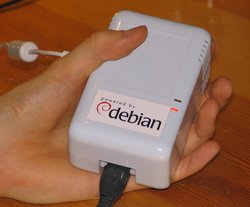
SheevaPlug in my hand I received a SheevaPlug this week, an intriguing device that packs incredible power and functionality into a tiny package. As many of you know, I've been doing a lot of work on Debian for the Linksys NSLU2 in the last few years. The NSLU2 is a key reason why ARM has become the third most popular architecture in Debian (after 32 and 64 bit x86), and I believe a main reason is that the NSLU2 is so incredibly cheap. At a price under $100, most people don't think too long and simply buy a device and do something cool with it. The SheevaPlug is being offered at the same price range but offers considerably more. Riku Voipio asked the right question: "What would you do with something approximately 10x more powerful with same prize/size range?" I believe the SheevaPlug is a killer replacement for the NSLU2 and here's why: I'm incredibly excited about the SheevaPlug and the first thing I did was to take the device apart and look at the inside. The results can be found in the SheevaPlug image gallery. My next project will be slightly more productive: porting Debian. As I see it, we should support the following three installation variants for the SheevaPlug: The first two should be relatively straight forward, but of course installing to the internal flash memory is particularly interesting given that 512 MB (plus compression) is enough for a basic installation of Debian. Unfortunately, installations to MTD flash are currently not supported in the Debian installer but I hope we can find a volunteer who wants to implement this functionality. My next steps are to put a kernel for the SheevaPlug into the archive and to get a basic installation going. From there we can look at more sophisticated installation options and other functionality.

Next.

Previous.