Using % ?_smp_flags can speed up your build a lot.
Above RPM macro enables SMP, use all CPU cores to build package and it looks good. We can easily buy multi core processor machine nowadays even if it is cheapest laptop.
In Debian, we can do parallel build by specifiying DEBBUILDOPT=-"j<job number>" in /etc/pbuilderrc and run pbuilder/cowbuilder, but this % ?_smp_flags can automatically use multiple cores without any setting, good. However, add % ?_smp_flags to each rpm spec file, it means that we need to modify each source package, is not handy.
Then back to Debian, I've made a quick hack to dpkg-buildpackage (disclaimer: I'm Perl beginner, you know :).
Pros) - Automatically use all CPU cores to build package, faster build.
Cons) - some package would be FTBFS (e.g. Bug#694726) but it should be fixed, right? ;)
It may break some builds but "enable multiple build by default, and specify single build exceptions to each problematic packages" is better, IMHO.
For some years LVM (the Linux Logical Volume Manager) has been used in most Linux systems. LVM allows one or more storage devices (either disks, partitions, or RAID sets) to be assigned to a Volume Group (VG) some of which can then allocated to a Logical Volume (LVs) which are equivalent to any other block device, a VG can have many LVs.
One of the significant features of LVM is that you can create snapshots of a LV. One common use is to have multiple snapshots of a LV for online backups and another is to make a snapshot of a filesystem before making a backup to external storage, the snapshot is unchanging so there s no problem of inconsistencies due to backing up a changing data set. When you create a snapshot it will have the same filesystem label and UUID so you should always mount a LVM device by it s name (which will be /dev/$VGNAME/$LVNAME).
One of the problems with the ReiserFS filesystem was that there was no way to know whether a block of storage was a data block, a metadata block, or unused. A reiserfsck --rebuild-tree would find any blocks that appeared to be metadata and treat them as such, deleted files would reappear and file contents which matched metadata (such as a file containing an image of a ReiserFS filesystem) would be treated as metadata. One of the impacts of this was that a hostile user could create a file which would create a SUID root program if the sysadmin ran a --rebuild-tree operation.
BTRFS solves the problem of filesystem images by using a filesystem specific UUID in every metadata block. One impact of this is that if you want to duplicate a BTRFS filesystem image and use both copies on the same system you need to regenerate all the checksums of metadata blocks with the new UUID. The way BTRFS works is that filesystems are identified by UUID so having multiple block devices with the same UUID causes the kernel to get confused. Making an LVM snapshot really isn t a good idea in this situation. It s possible to change BTRFS kernel code to avoid some of the problems of duplicate block devices and it s most likely that something will be done about it in future. But it still seems like a bad idea to use LVM with BTRFS.
The most common use of LVM is to divide the storage of a single disk or RAID array for the use of multiple filesystems. Each filesystem can be enlarged (through extending the LV and making the filesystem use the space) and snapshots can be taken. With BTRFS you can use subvolumes for the snapshots and the best use of BTRFS (IMHO) is to give it all the storage that s available so there is no need to enlarge a filesystem in typical use. BTRFS supports quotas on subvolumes which aren t really usable yet but in the future will remove the need to create multiple filesystems to control disk space use. An important but less common use of LVM is to migrate a live filesystem to a new disk or RAID array, but this can be done by BTRFS too by adding a new partition or disk to a filesystem and then removing the old one.
It doesn t seem that LVM offers any benefits when you use BTRFS. When I first experimented with BTRFS I used LVM but I didn t find any benefit in using LVM and it was only a matter of luck that I didn t use a snapshot and break things.
Snapshots of BTRFS Filesystems
One reason for creating a snapshot of a filesystem (as opposed to a snapshot of a subvolume) is for making backups of virtual machines without support from inside the virtual machine (EG running an old RHEL5 virtual machine that doesn t have the BTRFS utilities). Another is for running training on virtual servers where you want to create one copy of the filesystem for each student. To solve both these problems I am currently using files in a BTRFS subvolume. The BTRFS kernel code won t touch those files unless I create a loop device so I can only create a loop device for one file at a time.
One tip for doing this, don t use names such as /xenstore/vm1 for the files containing filesystem images, use names such as /xenstore/vm1-root. If you try to create a virtual machine named vm1 then Xen will look for a file named vm1 in the current directory before looking in /etc/xen and tries to use a filesystem image as a Xen configuration file. It would be nice if there was a path for Xen configuration files that either didn t include the current directory or included it at the end of the list. Including the current directory in the path is a DOS mistake that should have gone away a long time ago.
Psychology and Block Devices
ZFS has a similar design to BTRFS in many ways and has some similar issues. But one benefit for ZFS is that it manages block devices in a zpool , first you create a zpool with the block devices and after that you can create ZFS filesystems or ZVOL block devices. I think that most sysadmins would regard a zpool as something similar to LVM (which may or may not be correct depending on how you look at it) and immediately rule out the possibility of running a zpool on LVM.
BTRFS looks like a regular Unix filesystem in many ways, you can have a single block device that you mount with the usual mount command. The fact that BTRFS can support multiple block devices in a RAID configuration isn t so obvious and the fact that it implements equivalents to most LVM functionality probably isn t known to most people when they start using it. The most obvious way to start using BTRFS is to use it just like an Ext3/4 filesystem on an LV, and to use LVM snapshots to backup data, this is made even more likely by the fact that there is a program to convert a ext2/3/4 filesystem to BTRFS. This seems likely to cause data loss.
Republished by Slate. Translations available in French (Fran ais), Spanish (Espa ol), Chinese ( )
For almost 15 years, I have run my own email server which I use for all of my non-work correspondence. I do so to keep autonomy, control, and privacy over my email and so that no big company has copies of all of my personal email.
A few years ago, I was surprised to find out that my friend Peter Eckersley a very privacy conscious person who is Technology Projects Director at the EFF used Gmail. I asked him why he would willingly give Google copies of all his email. Peter pointed out that if all of your friends use Gmail, Google has your email anyway. Any time I email somebody who uses Gmail and anytime they email me Google has that email.
Since our conversation, I have often wondered just how much of my email Google really has. This weekend, I wrote a small program to go through all the email I have kept in my personal inbox since April 2004 (when Gmail was started) to find out.
One challenge with answering the question is that many people, like Peter, use Gmail to read, compose, and send email but they configure Gmail to send email from a non-gmail.com From address. To catch these, my program looks through each message s headers that record which computers handled the message on its way to my server and to pick out messages that have traveled through google.com, gmail.com, or googlemail.com. Although I usually filter them, my personal mailbox contains emails sent through a number of mailing lists. Since these mailing lists often hide the true provenance of a message, I exclude all messages that are marked as coming from lists using the (usually invisible) Precedence header.
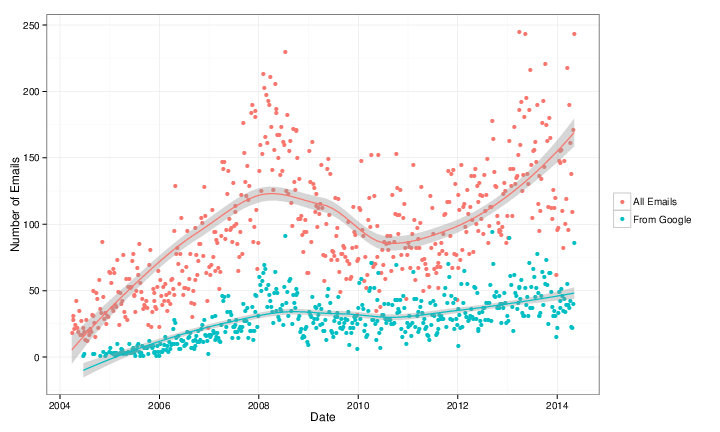
The following graph shows the numbers of emails in my personal inbox each week in red and the subset from Google in blue. Because the number of emails I receive week-to-week tends to vary quite a bit, I ve included a LOESS smoother which shows a moving average over several weeks.
From eyeballing the graph, the answer to seems to be that, although it varies, about a third of the email in my inbox comes from Google!
Keep in mind that this is all of my personal email and includes automatic and computer generated mail from banks and retailers, etc. Although it is true that Google doesn t have these messages, it suggests that the proportion of my truly personal email that comes via Google is probably much higher.
I would also like to know how much of the email I send goes to Google. I can do this by looking at emails in my inbox that I have replied to. This works if I am willing to assume that if I reply to an email sent from Google, it ends up back at Google. In some ways, doing this addresses the problem with the emails from retailers and banks since I am very unlikely to reply to those emails. In this sense, it also reflects a measure of more truly personal email.
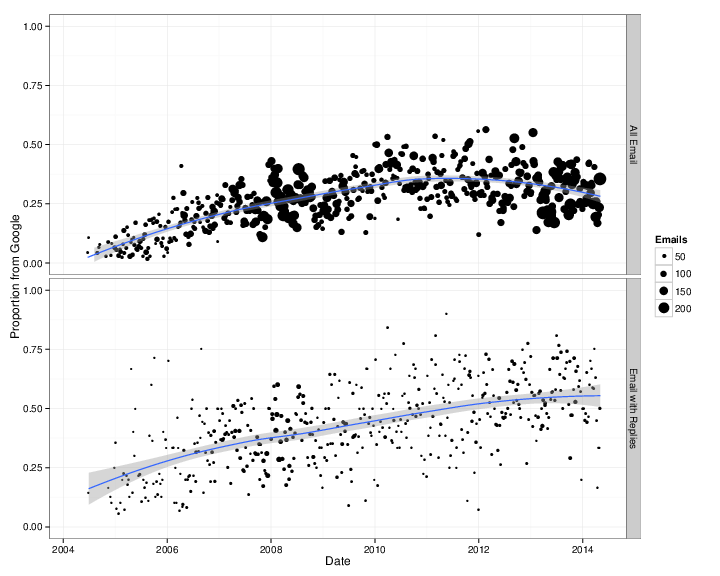
I ve broken down the proportions of emails I received that come from Google in the graph below for all email (top) and for emails I have replied to (bottom). In the graphs, the size of the dots represents the total number of emails counted to make that proportion. Once again, I ve included the LOESS moving average.
The answer is surprisingly large. Despite the fact that I spend hundreds of dollars a year and hours of work to host my own email server, Google has about half of my personal email! Last year, Google delivered 57% of the emails in my inbox that I replied to. They have delivered more than a third of all the email I ve replied to every year since 2006 and more than half since 2010. On the upside, there is some indication that the proportion is going down. So far this year, only 51% of the emails I ve replied to arrived from Google.
The numbers are higher than I imagined and reflect somewhat depressing news. They show how it s complicated to think about privacy and autonomy for communication between parties. I m not sure what to do except encourage others to consider, in the wake of the Snowden revelations and everything else, whether you really want Google to have all your email. And half of mine.
If you want to run the analysis on your own, you re welcome to the Python and R code I used to produce the numbers and graphs.
Hello, World!
I ve deployed my first instance of lenin to my backup VCS (lucifer.pault.ag), and it s going great.
(Screenshot of the first few instances for good measure)
I m excited to see how it develops!
Next Saturday I will be at DUCC-IT (Debian Ubuntu Community Conference Italia) in Cesena to speak about 3D printers, meet the Italian community and a number of friends and eat the excellent food chosen by the (dangerously good at it) ducc-it organizers :)
Recently I was wearing my Free Hugs shirt to different Free Software meetings, and I came up with the idea if we are advocating the Free in Software specificly, why not come up with Free Hugging Guidelines, too. So here they are, from now on considered to be named the RFHG.
Free Redistribution
Your hugs may not restrict any party from passing on the hugs they received from you.
Source Code
The hugs must be possible to be perceived and understandable in complete. You are not allowed to use any special techniques that can not be perceived.
Derived Works
Your hugs must be allowed to be modified, and must allow the modified forms of your hugs to be distributed under the same terms as they received them.
Integrity of The Author's Source Code
While you are allowed to pass on the hugs in modified form, you are not allowed to modify the DNA of the original person you received the hugs from. Genetic modification is out of the scope of the RFHG.
No Discrimination Against Persons or Groups
While we acknowledge that you might not feel willing to hug everyone, you must apply rules that do not distinquish by rules which would violate The Universal Declaration of Human Rights. Furthermore, you have the right to not hug a person if you are not in the mood for it. Please refrain from wearing any Free Hugs markers at those times though.
No Discrimination Against Fields of Endeavor
The hugs can not be restricted to be used in a specific field of endeavor. For example, you may not restrict the hugs from being passed on only in times of sorrow.
Distribution of Hugs
The rights attached to the hugs must apply to all to whom the hugs are redistributed without the need for execution of an additional license by those parties.
Hugs Must Not Be Specific to Rhonda
The rights attached to the hugs must not depend on the hugs being related to Rhonda. If the hugs are extracted from Rhonda and used or distributed without Rhonda nearby but otherwise within the terms of the hug's permissions, all parties to whom the hugs are distributed should have the same rights as those that are granted in conjunction with Rhonda.
Hugs Must Not Contaminate Other People
If you are contagious (e.g. got the flu, or worse) you have to apply appropriate counter measures to not transfer your illness with your hugs.
One last note: If you feel like it you don't have to wait until I wear my Free Hugs shirt again. I am fine with receiving (or giving) hugs like almost always. Surprise me. I at least know then that you read the RFHG. :)
Like always, enjoy!
I've had my amateur callsign far longer than I've had my email address or provider-indepent IP ranges.
While working with the tel: URI recently, I started thinking it would be useful to have a similar URI scheme for radio callsigns. After all, callsigns follow a well documented and globally unique pattern. Amateur operators are often mixing computing technology with radio. This could be a useful foundation for bigger things.
One possibility is in SIP. SIP already has the possibility to route messages using URIs other than sip:. For example, a SIP message can have a tel: URI in the request line. It could be equally feasible to do this for radio callsigns, especially for amateur radio.
Another possibility is placing call signs in HTML. Imagine if you could click M0GLR and some browser plugin looks up a directory to find out which frequencies or repeaters I've used recently.
From URI to URL
A URI typically identifies a resource. A URL helps locate the resource.
In radio, a URL would probably not be very similar to a HTTP scheme URL. A full URL for a radio contact might specify not just the callsign but also the desired frequency and transmission mode.
Instead of a directory path, it is likely you would need things like these as a bare minimum:
transmit frequency
receive frequence (or offset) if using a duplex mode
modulation (FM, SSB, etc)
bandwidth
mode: morse code, voice, video, packet data, etc
For a fixed station, especially a repeater, it may also be useful to encode the geographic location. For a station in orbit, however, it may be necessary to provide a completely different set of parameters describing the orbit or a pointer to where to find fresh parameters.
Please share your feedback
The idea is now actively under discussion on the IETF URI-review mailing list.
As promised, today I would like to write a bit about the making of
The Hacker's Guide to Python. It has
been a very interesting experimentation, and I think it is worth sharing it
with you.
The inspiration
All started out at the beginning of August 2013. I was spending my summer,
as the rest of the year, hacking on OpenStack.
As years passed, I got more and more deeply involved in the various tools
that we either built or contributed to within the OpenStack community. And I
somehow got the feeling that my experience with Python, the way we used it
inside OpenStack and other applications during these last years was worth
sharing. Worth writing something bigger than a few blog posts.
The OpenStack project is doing code reviews, and therefore so did I for
almost two years. That inspired a lot of topics, like
the definitive guide to method decorators
that I wrote at the time I started the hacker's guide. Stumbling upon the
same mistakes or misunderstanding over and over is, somehow, inspiring.
I also stumbled upon Nathan Barry's blog and book
Authority which were very helpful to
get started and some sort of guideline.
All of that brought me enough ideas to start writing a book about Python
software development for people already familiar with the language.
The writing
The first thing I started to do is to list all the topics I wanted to write
about. The list turned out to have subjects that had no direct interest for
a practical guide. For example, on one hand, very few developers know in
details how metaclasses work, but on the other hand, I never had to write a
metaclass during these last years. That's the kind of subject I decided not
to write about, dropped all subjects that I felt were not going to help my
reader to be more productive. Even if they could be technically interesting.
Then, I gathered all problems I saw during the code reviews I did during
these last two years. Some of them I only recalled in the days following the
beginning of that project. But I kept adding them to the table of contents,
reorganizing stuff as needed.
After a couple of weeks, I had a pretty good overview of the contents that
there I will write about. All I had to do was to fill in the blank (that
sounds so simple now).
The entire writing of the took hundred hours spread from August to November,
during my spare time. I had to stop all my other side projects for that.
The interviews
While writing the book, I tried to parallelize every thing I could. That
included asking people for interviews to be included in the book. I already
had a pretty good list of the people I wanted to feature in the book, so I
took some time as soon as possible to ask them, and send them detailed
questions.
I discovered two categories of interviewees. Some of them were very fast to
answer ( 1 week), and others were much, much slower. A couple of them even
set up Git repositories to answer the questions, because that probably
looked like an entire project to them. :-) So I had to not lose sight and
kindly ask from time to time if everything was alright, and at some point
started to kindly set some deadline.
In the end, the quality of the answers was awesome, and I like to think that
was because I picked the right people!
The proof-reading
Once the book was finished, I somehow needed to have people proof-reading
it. This was probably the hardest part of this experiment. I needed two
different types of reviews: technical reviews, to check that the content was
correct and interesting, and language review. That one is even more
important since English is not my native language.
Finding technical reviewers seemed easy at first, as I had ton of contacts
that I identified as being able to review the book. I started by asking a
few people if they would be comfortable reading a simple chapter and giving
me feedbacks. I started to do that in September: having the writing and the
reviews done in parallel was important to me in order to minimize latency
and the book's release delay.
All people I contacted answered positively that they would be interested in
doing a technical review of a chapter. So I started to send chapters to
them. But in the end, only 20% replied back. And even after that, a large
portion stopped reviewing after a couple of chapters.
Don't get me wrong: you can't be mad at people not wanting to spend their
spare time in book edition like you do.
However, from the few people that gave their time to review a few chapters,
I got tremendous feedback, at all level. That's something that was very
important and that helped a lot getting confident. Writing a book alone for
months without having anyone taking a look upon your shoulder can make you
doubt that you are creating something worth it.
As far as English proof-reading, I went ahead and used
ODesk to recruit a professional proof-reader. I looked
for people with the right skills: a good English level (being a native
English speaker at least), be able to understand what the book was about,
and being able to work with correct delays. I had mixed results from the
people I hired, but I guess that's normal. The only error I made was not to
parallelize those reviews enough, so I probably lost a couple of months on
that.
The toolchain
While writing the book, I did a few breaks to build a toolchain. What I call
a toolchain is set of tools used to render the final PDF, EPUB and MOBI
files of the guide.
After some research, I decided to settle on
AsciiDoc, using the
DocBook output, which is then being transformed to
LaTeX, and then to PDF, or either to EPUB directly. I realy on
Calibre to convert the EPUB file to MOBI. It
took me a few hours to do what I wanted, using some magic LaTeX tricks to
have a proper render, but it was worth it and I'm particularly happy with
the result.
For the cover design, I asked my talented friend
Nicolas to do something for me, and he
designed the wonderful cover and its little snake!
The publishing
Publishing in an interesting topic people kept asking me about. This is what
I had to answer a few dozens of time:
"Who is your editor?"
"Me."
I never had any plan for asking an editor to publish this book. Nowadays,
asking an editor to publish a book feels to me like asking a major company
to publish a CD. It feels awkward.
However, don't get me wrong: there can be a few upsides of having an editor.
They will find reviewers and review your book for you. Having the book
review handled for you is probably a very good thing, considering how it was
hard to me to get that in place. It can be especially important for a
technical book.
Also, your book may end up in brick and mortar stores and be part of a
collection, both improving visibility. That may improve your book's selling,
though the editor and all the intermediaries are going to keep the largest
amount of the money anyway.
"Oh, you will publish it yourself, great. So you will print it and sell it
to people?"
"Not really."
I've heard good stories about people using Gumroad to
sell electronic contents, so after looking for competitors in that market, I
picked them. I also had the idea to sell the book with Bitcoins, so I
settled on Coinbase, because they have a nice API to
do that.
Setting up everything was quite straight-forward, especially with Gumroad.
It only took me a few hours to do so. Writing the Coinbase application took
a few hours too.
"Oh, you will sell it only as an ebook? That's too bad. You need a paper
version. Many people will want a paper version."
My initial plan was to only sell online an electronic version. On the other
hand, since I kept hearing that a printed version should exist, I decided to
give it a try. I chose to work with Lulu because I knew
people using it, and it was pretty simple to set up.
The launch
Once I had everything ready, I built the selling page and connected
everything between Mailchimp, Gumroad, Coinbase, Google Analytics, etc.
Writing the launch email was really exciting. I used Mailchimp feature to
send the launch mail in several batches, just to have some margin in case of
a sudden last minute problem. But everything went fine. Hurrah!
I distributed around 200 copies of the ebook in the first 48 hours, for
about $5000. That covered all the cost I had from the writing the book, and
even more, so I was already pretty happy with the launch.
Retrospective
In retrospect, something that I didn't do the best way possible is probably
to build a solid mailing list of people interested, and to build an
important anticipation and incentive to buy the book at launch date. My
mailing list counted around 1500 people subscribed because they were
interested in the launch of the book subscribed; in the end, probably only
10-15% of them bought the book during the launch, which is probably a bit
lower than what I could expect.
But more than a month later, I distributed in total almost 500 copies of the
book (including physical units) for more than $10000, so I tend to think
that this was a success. I still sell a few copies of the book each weeks,
but the number are small compared to the launch.
I sold less than 10 copies of the ebook using Bitcoins, and I admit I'm a
bit disappointed and surprised about that.
Physical copies represent 10% of the book distribution. It's probably a lot
lower than most people that pushed me to do it thought it would be. But it
is still higher of what I thought it would be. So I still would advise to
have a paperback version of your book. At least because it's nice to have it
in your library.
I only got positive feedbacks, a few typo notices, and absolutely no refund
demand, which I really find amazing.
The good news is also that I've been contacted with a couple of Korean and
Chinese editors to get the book translated and published in those countries.
If everything goes well, the book should be translated in the upcoming
months and be available on these markets in 2015!
If you didn't get a copy,
it's still time to do so!
pub  2048R/9C6C32C7 2014-02-16 Laura ARJONA REINA <larjona99@gmail.com>
                               Laura ARJONA REINA <larjona@fsfe.org>
                               Laura ARJONA REINA <laura.arjona@upm.es>
                               Old key 0xE20474C3 no longer valid: lost secret key. (Clave antigua 0xE20474C4 ya no es v lida: clave secreta perdida.)
Fingerprint=F29B A6D8 D1DC A30F 3E34  53DF 5CD1 FDE5 9C6C 32C7
Please act as if it does not exist. The reason is that I cannot remember the passphrase of my master GPG key. This is why I didn t signed any of the keys of people that I met in Barcelona MiniDebconf. My geek self steem is a bit undermined, but feeling sorry for myself accomplishes nothing, so I think I will not hide problems and move on.
I ll post about my new key soon.
Long version
The bad news
The bad news are many.
I generated my key in February 2014 (I generated my very first GPG Key in 2010, as an exercise, but never used it again, and in 2014 I couldn t remember the passphrase, and the paper where it was written, had got lost before). Anyway, February 2014, new GPG key. I followed the Howto in FSFE wiki in order to use my brand new FSFE SmartCard. I have to admit that I didn t understand very well how all this works, and it seems that my main mistake was to miss-understand that since I was using a smartcard, with a PIN and an Admin PIN, remembering passphrases was no longer required (only remembering the PINs). I was WRONG! PINs are for daily use with the subkeys of your card (for encryption, decryption, and signing stuff different than GPG keys), you still have the master key that is not in the card (but in a separate medium in a safe place), and for the master key we still use passphrase, and the master key is the one that allows signing keys from other people, and changing, revoking, adding subkeys, etc.
So, it seems I used a random passphrase that I didn t write down and I could not remember, due to this terrible missunderstanding.
Another bad news is that I didn t generate a revocation certificate (well in fact, I was going to generate just before signing the first key of another person, and then I realize that it was asking the passphrase, hence the problem). First I thought that it should ask the PIN and my smartcard setup was wrong or anything, but after reading and interchanging emails with other people more experienced than me, I realized that I should remember that passphrase. And I couldn t. So there are no revocation certificates :(
Another bad news is that some (awesome) people already signed my key, and it will be difficult to meet again so they sign my new key. I was thinking about applying to the Debian new member process this summer, and I have not many opportunities to meet Debian people in person, so I gathered quite a lot signs last March in MiniDebConf Barcelona. Now I m again at the starting point (well, this is perfect excuse to try to join a Debian event soon :) I don t know how I would manage to do it, but I ll try!).
The good news (Always look at the bright side of life )
The main good news is that I didn t used the GPG key for signing/encrypting important stuff: I just interchanged some encrypted mail as test with friends, and signed some mails sent to public mailing lists (for signing mails I was using the smartcard PIN so I didn t notiece the problem).
The other main good news is that my key is not compromised (well, you can never be sure, but I think so). I cannot revoke it but I m quite sure nothing important depends on that key.
Other good news is that I have read a lot about how GPG works and how the smartcard works, keys and subkeys and all this stuff, and I think now I understand everything quite better. I have learned (and also tried) tools as nasty, John The Ripper and rephrase to try to recover the passphrase. I didn t recover it, but at least I know that all those (free software) tools exist and how to use them :)
And I have learned the lesson: to be extremely careful, test that everything works (not just try one or two things, test everything) and to not leave work for later (and for example, generate the revocation certificates just right after the keys).
Next steps
I ll send a message to all the friends that signed or downloaded my old GPG key apologysing and pointing to this blog post so they learn the details about why I create a new key.
I ll take this opportunity to download and use the Tails (The Agnostic Incognito System, a Debian derivative which is a live system and is focused in protecting privacy and anonymity of the user). Tails will be my safe, network disconnected environment to generate the new keys and do the sensible tasks with them. I think this time I will create my main key 4096-bit long (since now I understand that the main key is not stored in the card) and the subkeys can be 2048-bit or 3072 to fit in the smarcard.
Well, hands on! I ll write another blog post when my new GPG keys are ready. I hope third time s the charm!
Note: Thank you to all the people that gave me advice and support (knowledge, links, moral support) about this issue. You know who you are! Filed under: My experiences and opinion, Tools Tagged: Debian, encryption, English, Free Software, gpg, libre software, Moving into free software, mswl-cases
I have been looking for an App like this since I got my first iOS device in
december 2011. Finally, it is here! A single-player (bot-driven) poker
app for iOS, THETA Poker Pro, fully accessible and usable with VoiceOver.
AppleVis has a review.
It doesn't happen very often, but App programmers in the iOS Universe
do indeed sometimes think about Accessibility support, and the APIs
provided by Apple are useful enough to allow programmers to write
very accessible apps. You can say about Apple whatever you want,
currently, it is the company providing the best accessibility support on the market.
Why? Because they made accessibility a first-class citizen of their platform(s).
This is where policy helps. If you can dictate top-down that
you support people with disabilities, things actually
start to happen. If you have to ask, hope, and wait, like it is with
free software, things do not really progress as fast as the users need it.
Back to THETA Poker Pro: The default configuration is already very useable with VoiceOver.
However, if you want the cards placed on the board announced to you, so that
you do not have to discover them manually by touch, you can enable the
"Card Announcement" item in the Options menu. You can also set message delay
a bit slower, such that all messages are actually fully spoken and not cut off sometimes.
With these two settings adjusted, and maybe "Animation" set to "Very fast",
the game feels extremely nice. There is actually nothing I would
want to change, which does not happen very often when I test
a program for its accessibility.
With these settings changed, game play is very smooth with VoiceOver, you basically
just have to tap your cards to check, tap the deck to fold, or tap
your chips to raise. Very simple, and these three "buttons" are on
the bottom of the screen, so rather easy and quick to find.
All other activity is automatically announced by VoiceOver.
I have played a few hundred hands already with this App. It is a wonderful
way to pass time. For instance, I don't like to go to my
doctor, because I usually wait up to two or three hours. I had to pay
her a visit on monday. While waiting, I played "a few" hands, and
suddenly, I was already called in. When I came out again, I checked the
time and was rather surprised that yes, I have waited two hours again,
but this time, I didn't notice! :-)
Special thanks go to the author(s) of this app.
It is a good example of an App that was not specially made for the blind,
but which feels like it was. Thanks, you've made my week!
A small rant
OTOH, it makes me sad when I think about my beloved Linux platform and GUI accessibility.
We are stuck since 2004 with a bit of desktop support + a half-working
Firefox. During the D-Bus rewrite, quality of GUI accessibility
has dropped so much that I had to take time off from linux
gui accessibility to stay sane. It is back to where it was in 2006, yay,
but we haven't made a lot of real progress in the last 8 years.
Granted, firefox has improved, but to my taste, not enough.
I still do all my email, shell work, programming and some other things on Linux of course,
but I notice that I do more and more casual stuff
on iOS, it is just sooo much more useable. I do almost all my
surfing with mobile safari, because it just works. Firefox works sometimes, and
some other times working with it feels so slow that I am actually getting
angry.
The scratch-your-own-itch philosophy combined with a very small margin group is
poison for success. We'd need much more funding, and people working
actively on this stuff as their day job, if we ever want to
be competitive with existing solutions.
The recent flurry of activity with neovim have made me wonder if there could be something similar for the other editor, emacs.
If you poke around recent GNU Emacs releases you'll come across random signs that the code carries a lot of baggage:
/usr/share/emacs/23.4/etc/MACHINES
There are special considerations for a variety of this system which
is known as the Yellow Dog [GNU/]Linux'
Yellow Dog [GNU/]Linux has been dead for many years now.
/etc/emacs/site-start.d/50dictionaries-common.el
Contains references to skipping stuff that runs under Emacs 19, 20, 21, & 22.
None of these are huge things, and the core code of Emacs is a pleasure to read in many places, but it does make you think, or not, whichever the case may be it is all good :)
(I do all "real work" in emacs. I write all outgoing emails in vim, and use it for git/mercurial commit messsages, otherwise the only time I use it is for random one-line edits over slow links.)
Weblate 1.9 has been released today. It comes with lot of improvements and bug fixes and with experimental Zen mode for editing translations.
Full list of changes for 1.9:
Django 1.6 compatibility.
No longer maintained compatibility with Django 1.4.
Management commands for locking/unlocking translations.
Improved support for Qt TS files.
Users can now delete their account.
Avatars can be disabled.
Merged first and last name attributes.
Avatars are now fetched and cached server side.
Added support for shields.io badge.
You can find more information about Weblate on http://weblate.org, the code is hosted on Github. If you are curious how it looks, you can try it out on demo server. You can login there with demo account using demo password or register your own user. Ready to run appliances will be soon available in SUSE Studio Gallery.
Weblate is also being used https://l10n.cihar.com/ as official translating service for phpMyAdmin, Gammu, Weblate itself and others.
If you are free software project which would like to use Weblate, I'm happy to help you with set up or even host Weblate for you.
Further development of Weblate would not be possible without people providing donations, thanks to everybody who have helped so far!
Dashkiosk is a solution to manage dashboards on multiple
displays. It comes in four parts:
A server will manage the screens by sending URL to be
displayed. A web interface enables an administrator to configure
groups of dashboards and attach them to a set of displays.
A receiver runs in a browser attached to each screen. On
start, it contacts the server and waits for the URL to display.
An Android application provides a simple fullscreen webview to
display the receiver.
A Chromecast custom receiver which will run the regular
receiver to display dashboards using Google Chromecast
devices. The server is able to drive Chromecast devices through
nodecastor, a reimplementation of the sender API.
For a demo, have a look at the following video (it is also available
as an Ogg Theora video).
Just saw http://sny.no/2014/04/dbts and I feel compelled to note that distributed bug trackers are not new the earliest I personally encountered was Aaron Bentley s Bugs everywhere coming up on it s 10th birthday. BE meets many of the criteria in the dbts post I read earlier today, but it hasn t taken over the world and I think this is in large part due to the propogation nature of bugs being very different to code different solutions are needed.
XXXX: With distributed code versioning we often see people going to some effort to avoid conflicts semantic conflicts are common, and representation conflicts extremely common.The idions
Take for example https://bugs.launchpad.net/ubuntu/+source/ntp/+bug/805661. Here we can look at the nature of the content:
Concurrent cannot-conflict content e.g. the discussion about the bug. In general everyone should have this in their local bug database as soon as possible, and anyone can write to it.
Observations of fact e.g. the code change that should fix the bug has landed in Ubuntu or Commit C should fix the bug .
Reports of symptoms e.g. Foo does not work for me in Ubuntu with package versions X, Y and Z .
Collaboratively edited metadata tags, title, description, and arguably even the fields like package, open/closed, importance.
Note that only one of these things the commit to fix the bug happens in the same code tree as the code; and that the commit fixing it may be delayed by many things before the fix is available to users. Also note that conceptually conflicts can happen in any of those fields except 1).
Anyhow my humble suggestion for tackling the conflicts angle is to treat all changes to a bug as events in a timeline e.g. adding a tag foo is an event to add foo , rather than an event setting the tags list to bar,foo then multiple editors adding foo do not conflict (or need special handling). Collaboratively edited fields would be likely be unsatisfying with this approach though last-writer-wins isn t a great story. OTOH the number of people that edit the collaborative fields on any given bug tend to be quite low so one could defer that to manual fixups.
Further, as a developer wanting local access to my bug database, syncing all of these things is appealing but if I m dealing with a million-bug bug database, I may actually need the ability to filter what I sync or do not sync with some care. Even if I want everything, query performance on such a database is crucial for usability (something git demonstrated convincingly in the VCS space).
Lastly, I don t think distributed bug tracking is needed it doesn t solve a deeply burning use case offline access would be a 90% solution for most people. What does need rethinking is the hugely manual process most bug systems use today. Making tools like whoopsie-daisy widely available is much more interesting (and that may require distributed underpinnings to work well and securely). Automatic collation of distinct reports and surfacing the most commonly experienced faults to developers offers a path to evidence based assessment of quality something I think we badly need.
A long time ago, St phane Glondu implemented an alternative to the Buildd status pages. It was implemented in OCaml and had some unique features. I think that my favorite one was the ability to click on package names appearing in DepWaits.
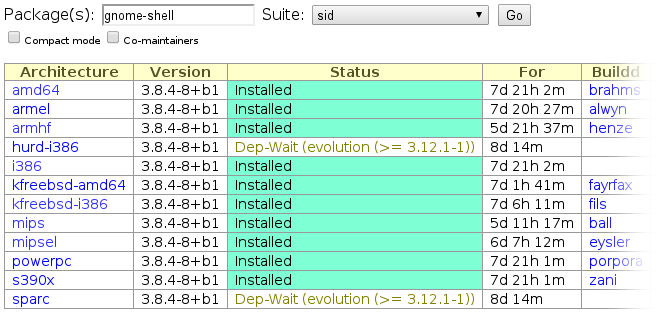
What you see on the image below is a simple example where the package gnome-shell Dep-Waits on a single package. This prevents buildd daemons to start the job as long as the specific version of the specified package or some new package are available. So, each package name in that field became now clickable and points to its buildd status page.
Similarly to Dep-Waits, results of edos-debcheck, which is used to spot installability issues of build dependencies, are now clickable too.
If you are a porter or if you are tracking down a build issue, I am sure you'll appreciate these two new features. Enjoy! As usual, if you notice some bugs or have some feature requests, please let me know.
A couple of weeks ago I finally got round to doing some major surgery on iptables-persistent.
First of all it is principally now called netfilter-persistent (although the source package hasn t been renamed) and has a plugin architecture so that it can be extended by other packages. One of those packages is iptables-persistent; others may follow. This opens the way to fixing #662743 and #697088 (patches always welcome).
There s also a new binary to handle loading/unloading of rules, instead of having all the logic in an init script. I was therefore able to add systemd support as a first-class unit, and I d appreciate patches for an Upstart service (as I m largely unfamiliar with it).
Plugins are simply dropped into /usr/share/netfilter-persistent/plugins.d and must follow certain minimum conventions, detailed in netfilter-persistent(1). They can be any executable, so compiled or interpreted binaries are acceptable.
This release finally gets the magic 1.0 identifier. It reaches Jessie today, and is already in Ubuntu Utopic.
Flattriptables-persistent overhaul is a post from: jwiltshire.org.ukFlattr
If you're looking to get started at packaging free software for
Debian, you should start with the excellent
New Maintainers' Guide or
the
Introduction to Debian Packaging
on the Debian wiki.
Once you know the basics, or if you prefer to learn by example, you may be
interested in the full walkthrough which follows. We will look at the
contents of three simple packages.
node-libravatar
This package is a
node.js library for the
Libravatar service.
Version 2.0.0-3
of that package contains the following files in its debian/ directory:
changelog
compat
control
copyright
docs
node-libravatar.install
rules
source/format
watch
debian/control
Source: node-libravatar
Priority: extra
Maintainer: Francois Marier <francois@debian.org>
Build-Depends: debhelper (>= 9)
Standards-Version: 3.9.4
Section: web
Homepage: https://github.com/fmarier/node-libravatar
Vcs-Git: git://git.debian.org/collab-maint/node-libravatar.git
Vcs-Browser: http://git.debian.org/?p=collab-maint/node-libravatar.git;a=summary
Package: node-libravatar
Architecture: all
Depends: $ shlibs:Depends , $ misc:Depends , nodejs
Description: libravatar library for NodeJS
 This library allows web application authors to make use of the free Libravatar
 service (https://www.libravatar.org). This service hosts avatar images for
 users and allows other sites to look them up using email addresses.
 .
 node-libravatar includes full support for federated avatar servers.
This is probably the most important file since it contains the bulk of the
metadata about this package.
Maintainer is a required field listing the maintainer of that package,
which can be a person or a team. It only contains a single value though, any
co-maintainers will be listed under the optional Uploaders field.
Build-Depends lists the packages which are needed to build the
package (e.g. a compiler), as opposed to those which are needed to
install the binary package (e.g. a library it uses).
Standards-Version refers to the version of the
Debian Policy that this package
complies with.
The Homepage field refers to the upstream homepage, whereas the
Vcs-* fields point to the repository where the packaging is stored. If
you take a look at the
node-libravatar packaging repository
you will see that it contains three branches:
upstream is the source as it was in the tarball downloaded from
upstream.
master is the upstream branch along with all of the Debian
customizations.
pristine-tar is unrelated to the other two branches and is used by the
pristine-tar tool
to reconstitute the original upstream tarball as needed.
After these fields comes a new section which starts with a Package
field. This is the definition of a binary package, not to be confused
with the Source field at the top of this file, which refers to the name of
the source package. In this particular example, they are both the same
and there is only one of each, however this is not always the case, as we'll
see later.
Inside that binary package definition, lives the Architecture field which
is normally one of these two:
all for a binary package that will work on all architectures but only
needs to be built once
any for a binary package that will work everywhere but that will need to
be built separately for each architecture
Finally, the last field worth pointing out is the Depends field which
lists all of the runtime dependencies that the binary package has. This is
what will be pulled in by apt-get when you apt-get install
node-libravatar. The two variables will be substituted later by debhelper.
debian/changelog
node-libravatar (2.0.0-3) unstable; urgency=low
  * debian/watch: poll github directly
  * Bump Standards-Version up to 3.9.4
 -- Francois Marier <francois@debian.org>  Mon, 20 May 2013 12:07:49 +1200
node-libravatar (2.0.0-2) unstable; urgency=low
  * More precise license tag and upstream contact in debian/copyright
 -- Francois Marier <francois@debian.org>  Tue, 29 May 2012 22:51:03 +1200
node-libravatar (2.0.0-1) unstable; urgency=low
  * New upstream release
    - new non-backward-compatible API
 -- Francois Marier <francois@debian.org>  Mon, 07 May 2012 14:54:19 +1200
node-libravatar (1.1.1-1) unstable; urgency=low
  * Initial release (Closes: #661771)
 -- Francois Marier <francois@debian.org>  Fri, 02 Mar 2012 15:29:57 +1300
This may seem at first like a mundane file, but it is very important since
it is the canonical source of the package version (2.0.0-3 in this
case). This is the only place where you need to bump the package version
when uploading a new package to the Debian archive.
The first line also includes the
distribution
where the package will be uploaded. It is usually one of these values:
stable-security for security fixes to the stable version of Debian that
cannot wait until the next stable point release and have been
approved by the security team
Packages uploaded to unstable will migrate automatically to testing
provided that a few conditions are met (e.g. no release-critical bugs were
introduced). The length of time before that migration is influenced by the
urgency field (low, medium or high) in the changelog entry.
Another thing worth noting is that the first upload normally needs to close
an ITP (Intent to Package) bug.
As can be gathered from the first two lines of this file, this is a
Makefile. This
is what controls how the package is built.
There's not much to see and that's because most of its content is
automatically added by debhelper. So
let's look at it in action by building the package:
$ git buildpackage -us -uc
and then looking at parts of the build log (../node-libravatar_2.0.0-3_amd64.build):
One of the first things we see is the debian/rules file being run with the
clean target. To find out what that does, have a look at the
dh_auto_clean
which states that it will attempt to delete build residues and run something
like make clean using the upstream Makefile.
Next we see the build target being invoked and looking at
dh_auto_configure
we see that this will essentially run ./configure and its
equivalents.
The
dh_auto_build
helper script then takes care of running make (or equivalent) on the
upstream code.
This should be familiar to anybody who has ever built a piece of free
software from scratch and has encountered the usual method for building
from source:
./configure
make
make install
Finally, we get to actually build the .deb:
 fakeroot debian/rules binary
dh binary
   dh_testroot
   dh_prep
   dh_installdirs
   dh_auto_install
   dh_install
...
   dh_md5sums
   dh_builddeb
dpkg-deb: building package  node-libravatar' in  ../node-libravatar_2.0.0-3_all.deb'.
Here we see a number of helpers, including
dh_auto_install
which takes care of running make install.
Going back to the debian/rules, we notice that there is manually defined
target at the bottom of the file:
override_dh_auto_test:
which essentially disables
dh_auto_test
by replacing it with an empty set of commands.
The reason for this becomes clear when we take a look at the test target
of the upstream Makefile and the
dependencies
it has: tap, a node.js library that is
not yet available in Debian.
In other words, we can't run the test suite on the build machines so we need
to disable it here.
debian/compat
9
This file simply specifies the version of debhelper that is required by the
various helpers used in debian/rules. Version 9 is the latest at the moment.
debian/copyright
Format: http://www.debian.org/doc/packaging-manuals/copyright-format/1.0/
Upstream-Name: node-libravatar
Upstream-Contact: Francois Marier <francois@libravatar.org>
Source: https://github.com/fmarier/node-libravatar
Files: *
Copyright: 2011 Francois Marier <francois@libravatar.org>
License: Expat
Files: debian/*
Copyright: 2012 Francois Marier <francois@debian.org>
License: Expat
License: Expat
 Permission is hereby granted, free of charge, to any person obtaining a copy of this
 software and associated documentation files (the "Software"), to deal in the Software
 without restriction, including without limitation the rights to use, copy, modify,
 merge, publish, distribute, sublicense, and/or sell copies of the Software, and to
 permit persons to whom the Software is furnished to do so, subject to the following
 conditions:
 .
 The above copyright notice and this permission notice shall be included in all copies
 or substantial portions of the Software.
 .
 THE SOFTWARE IS PROVIDED "AS IS", WITHOUT WARRANTY OF ANY KIND, EXPRESS OR IMPLIED,
 INCLUDING BUT NOT LIMITED TO THE WARRANTIES OF MERCHANTABILITY, FITNESS FOR A
 PARTICULAR PURPOSE AND NONINFRINGEMENT. IN NO EVENT SHALL THE AUTHORS OR COPYRIGHT
 HOLDERS BE LIABLE FOR ANY CLAIM, DAMAGES OR OTHER LIABILITY, WHETHER IN AN ACTION OF
 CONTRACT, TORT OR OTHERWISE, ARISING FROM, OUT OF OR IN CONNECTION WITH THE SOFTWARE
 OR THE USE OR OTHER DEALINGS IN THE SOFTWARE.
This machine-readable file lists all of the different licenses encountered in this
package.
It requires that the maintainer audits the upstream code for any copyright
statements that might be present in addition to the license of the package
as a whole.
debian/docs
README.md
This file contains a list of upstream files that will be copied into the
/usr/share/doc/node-libravatar/ directory by dh_installdocs.
debian/node-libravatar.install
lib/* usr/lib/nodejs/
The install file is used by
dh_install
to supplement the work done by dh_auto_install which, as we have seen
earlier, essentially just runs make install on the upstream Makefile.
Looking at that
upstream Makefile,
it becomes clear that the files will need to be installed manually by the
Debian package since that Makefile doesn't have an install target.
This is the file that allows Debian tools like the
Package Tracking System
to automatically detect that a new upstream version is available.
What it does is simply visit the
upstream page which contains all of the
release tarballs and look
for links which have an
href
matching the above regular expression.
Running uscan --report --verbose will show us all of the tarballs that can
be automatically discovered using this watch file:
-- Scanning for watchfiles in .
-- Found watchfile in ./debian
-- In debian/watch, processing watchfile line:
   https://github.com/fmarier/node-libravatar/tags /fmarier/node-libravatar/archive/node-libravatar-([0-9.]+)\.tar\.gz
-- Found the following matching hrefs:
     /fmarier/node-libravatar/archive/node-libravatar-2.0.0.tar.gz
     /fmarier/node-libravatar/archive/node-libravatar-1.1.1.tar.gz
     /fmarier/node-libravatar/archive/node-libravatar-1.1.0.tar.gz
     /fmarier/node-libravatar/archive/node-libravatar-1.0.1.tar.gz
     /fmarier/node-libravatar/archive/node-libravatar-1.0.0.tar.gz
Newest version on remote site is 2.0.0, local version is 2.0.0
 => Package is up to date
-- Scan finished
pylibravatar
This second package is the
equivalent Python library for the Libravatar service.
Version 1.6-2
of that package contains similar files in its debian/ directory, but let's
look at two in particular:
control
upstream/signing-key.asc
debian/control
Source: pylibravatar
Section: python
Priority: optional
Maintainer: Francois Marier <francois@debian.org>
Build-Depends: debhelper (>= 9), python-all, python3-all
Standards-Version: 3.9.5
Homepage: https://launchpad.net/pyLibravatar
...
Package: python-libravatar
Architecture: all
Depends: $ misc:Depends , $ python:Depends , python-dns, python
Description: Libravatar module for Python 2
 Module to make use of the federated Libravatar.org avatar hosting service
 from within Python applications.
...
Package: python3-libravatar
Architecture: all
Depends: $ misc:Depends , $ python3:Depends , python3-dns, python3
Description: Libravatar module for Python 3
 Module to make use of the federated Libravatar.org avatar hosting service
 from within Python applications.
...
Here is an example of a source package (pylibravatar) which builds two
separate binary packages: python-libravatar and python3-libravatar.
This highlights the fact that a given upstream source can be split into
several binary packages in the archive when it makes sense. In this case,
there is no point in Python 2 applications pulling in the Python 3 files, so
the two separate packages make sense.
Another common example is the use of a -doc package to separate the
documentation from the rest of a package so that it doesn't need to be
installed on production servers for example.
debian/upstream/signing-key.asc
-----BEGIN PGP PUBLIC KEY BLOCK-----
Version: GnuPG v1
mQINBEpQYz4BEAC7REQD1za69RUnkt6nRCFhSJmmoeJc+yEiWTKc9GOIMAwJDme1
+CMYgVn4Xzf1VQYwD/lE+mfWgyeMomLQjDM1mxx/LOM2a1WWPOk9+PvQwKfRJy92
...
UxDtZm/4yUmU6KvHvOGiDCMuIiB+MqhqJJ5wf80wXhzu8nmC+fyGt6nvu0ggMle8
sAMgXt/aQUTZE5zNCQ==
=RkTO
-----END PGP PUBLIC KEY BLOCK-----
This is simply the
OpenPGP key
that the upstream developer uses to sign release tarballs.
Since PGP signatures are available on the upstream
download page, it's possible
to instruct
uscan
to check signatures before downloading tarballs.
The way to do that is to use the pgpsigurlmange option in debian/watch:
which is simply a regular expression replacement string which takes the
tarball URL and converts it to the URL of the matching PGP signature.
fcheck
The last package we will look at
is a file integrity checker. It essentially goes through all of the files in
/usr/bin/ and /usr/lib/ and stores a hash of them in its database. When
one of these files changes, you get an email.
In particular, we will look at the following files in the debian/ directory of
version 2.7.59-18:
dirs
fcheck.cron.d
fcheck.postrm
fcheck.postinst
patches/
README.Debian
rules
source/format
debian/patches
This directory contains ten patches as well as a file called series which
lists the patches that should be applied to the upstream source and in which
order. Should you need to temporarily disable a patch, simply remove it from
this file and it will no longer be applied at build time.
Let's have a look at patches/04_cfg_sha256.patch:
This is a very simple patch which changes the default configuration of
fcheck to promote the use of a stronger hash function. At the top of the
file is a bunch of metadata in the
DEP-3 format.
Why does this package contain so many customizations to the upstream code
when Debian's policy is to push fixes upstream and work towards reduce the
delta between upstream and Debian's code? The answer can be found in
debian/control:
This package no longer has an upstream maintainer and its original source is
gone. In other words, the Debian package is where all of the new bug fixes
get done.
debian/source/format
3.0 (quilt)
This file contains what is called the source package format. What it
basically says is that the patches found in debian/patches/ will be
applied to the upstream source using the
quilt tool at build time.
debian/fcheck.postrm
#!/bin/sh
# postrm script for fcheck
#
# see: dh_installdeb(1)
set -e
# summary of how this script can be called:
#        * <postrm>  remove'
#        * <postrm>  purge'
#        * <old-postrm>  upgrade' <new-version>
#        * <new-postrm>  failed-upgrade' <old-version>
#        * <new-postrm>  abort-install'
#        * <new-postrm>  abort-install' <old-version>
#        * <new-postrm>  abort-upgrade' <old-version>
#        * <disappearer's-postrm>  disappear' <overwriter>
#          <overwriter-version>
# for details, see http://www.debian.org/doc/debian-policy/ or
# the debian-policy package
case "$1" in
    remove upgrade failed-upgrade abort-install abort-upgrade disappear)
    ;;
    purge)
      if [ -e /var/lib/fcheck/fcheck.dbf ]; then
        echo "Purging old database file ..."
        rm -f /var/lib/fcheck/fcheck.dbf
      fi
      rm -rf /var/lib/fcheck
      rm -rf /var/log/fcheck
      rm -rf /etc/fcheck
    ;;
    *)
        echo "postrm called with unknown argument \ $1'" >&2
        exit 1
    ;;
esac
# dh_installdeb will replace this with shell code automatically
# generated by other debhelper scripts.
#DEBHELPER#
exit 0
This script is one of the many possible
maintainer scripts that a
package can provide if needed.
This particular one, as the name suggests, will be run after the package is
removed (apt-get remove fcheck) or purged (apt-get remove --purge
fcheck). Looking at the case statement above, it doesn't do anything extra in the
remove case, but it deletes a few files and directories when called with
the purge argument.
debian/README.Debian
This optional README file contains Debian-specific instructions that might
be useful to users. It supplements the upstream README which is
often more generic and cannot assume a particular system configuration.
debian/rules
#!/usr/bin/make -f
# -*- makefile -*-
# Sample debian/rules that uses debhelper.
# This file was originally written by Joey Hess and Craig Small.
# As a special exception, when this file is copied by dh-make into a
# dh-make output file, you may use that output file without restriction.
# This special exception was added by Craig Small in version 0.37 of dh-make.
# Uncomment this to turn on verbose mode.
#export DH_VERBOSE=1
build-arch:
build-indep:
build: build-stamp
build-stamp:
    dh_testdir
    pod2man --section=8 $(CURDIR)/debian/fcheck.pod > $(CURDIR)/fcheck.8
    touch build-stamp
clean:
    dh_testdir
    dh_testroot
    rm -f build-stamp
    rm -f $(CURDIR)/fcheck.8
    dh_clean
install: build
    dh_testdir
    dh_testroot
    dh_prep
    dh_installdirs
    cp $(CURDIR)/fcheck $(CURDIR)/debian/fcheck/usr/sbin/fcheck
    cp $(CURDIR)/fcheck.cfg $(CURDIR)/debian/fcheck/etc/fcheck/fcheck.cfg
# Build architecture-independent files here.
binary-arch: build install
# Build architecture-independent files here.
binary-indep: build install
    dh_testdir
    dh_testroot
    dh_installdocs
    dh_installcron
    dh_installman fcheck.8
    dh_installchangelogs
    dh_installexamples
    dh_installlogcheck
    dh_link
    dh_strip
    dh_compress
    dh_fixperms
    dh_installdeb
    dh_shlibdeps
    dh_gencontrol
    dh_md5sums
    dh_builddeb
binary: binary-indep binary-arch
.PHONY: build clean binary-indep binary-arch binary install
This is an example of a old-style debian/rules file which you still
encounter in packages which haven't yet upgraded to the latest version of
debhelper 9, as can be shown by the contents of debian/compat:
8
It does essentially the same thing that what we've seen in the build log,
but in a more verbose way.
debian/dirs
usr/sbin
etc/fcheck
This file contains a list of directories that
dh_installdirs
will create in the build directory.
The reason why these directories need to be created is that files are copied
into these directories
in the install target of the debian/rules file.
Note that this is different from directories which are created at the time
of installation of the package. In that case, the directory
(e.g. /var/log/fcheck/) must be
created in the postinst script
and removed in the postrm script.
debian/fcheck.cron.d
#
# Regular cron job for the fcheck package
#
30 */2  * * *   root    test -x /usr/sbin/fcheck && if ! nice ionice -c3 /usr/sbin/fcheck -asxrf /etc/fcheck/fcheck.cfg >/var/run/fcheck.out 2>&1; then mailx -s "ALERT: [fcheck]  hostname --fqdn " root </var/run/fcheck.out ; /usr/sbin/fcheck -cadsxlf /etc/fcheck/fcheck.cfg ; fi ; rm -f /var/run/fcheck.out
This file is the cronjob which drives the checks performed by this
package. It will be copied to /etc/cron.d/fcheck by dh_installcron.
I received a complaint about the frequency of my life category
posts appearing on Planet Debian.
It's the first such complaint I've received, whereas I've received more
complimentary feedback, presumably from readers via Planet Debian.
It has made me self-conscious about my posts, though, and I don't want it to
affect my blogging, so I've pulled the life category from what I
feed to Planet Debian. If you want to keep up with the minutia of my life,
and you were doing that via Planet Debian, you'll have to follow my blog
directly.
My apologies if anyone was annoyed.
It took some time, but now it s finally done: KDE has translations for AppStream upstream metadata!
AppStream is a Freedesktop project to extend metadata about the software projects which is available in distributions, especially regarding applications. Distributions compile a metadata file from data collected from packages, .desktop files and possibly other information sources, and create an AppStream XML file from it, which is then directly or via a Xapian cache read by software-center-like applications such as GNOME-Software or KDEs Apper.
Since the metadata available from current sources is not standardized and rather poor, upstream projects can ship small XML files, AppStream upstream metadata or AppData in short. These files contain additional information about a project, such as a long description and links to screenshots. They also provide hints about public interfaces a software provides, for example binaries and libraries, making it possible for distributors to give users exactly the right package name in case they are missing a software component.
So, in order to represent graphical KDE applications like they deserve it in the new software centers making use of AppStream, we need to ship AppData files, with long descriptions, screenshots and a few URLs.
But how can you create these metadata files? In case you want your graphical KDE app to ship an AppData file, there is now a help page on the Techbase Wiki which provides all information needed to get started!
For non-visual stuff or software which just wants to publish it s provided interfaces with AppStream metadata, there is a dedicated page for that as well. Shipping metadata for non-GUI apps will help programmers to satisfy depedencies in order to compile new software, enhance bash-completion for missing binaries and provides some other neat stuff (take a look at this blogpost to get a taste of it).
And if you want to read a FAQ about the metadata stuff and get the bigger picture, just go to the Techbase Wiki page about AppStream metadata as well.
The pages are not 100% final, so if you have questions, please write me a mail and I ll update the pages, or simply correct/refine it by yourself (it s a wiki afterall).
And now to the best thing: As soon as you ship an AppStream upstream metadata file (*.appdata.xml* for apps or *.metainfo.xml* for other stuff), the KDE l10n-script (Scripty!) will automatically start translating it, just like we already do with .desktop files. No further actions are necessary.
I already have a large amount of metadata files here, partially auto-generated, which show that we have about 160+ applications in KDE which could get an AppData file, not counting any frameworks or other non-GUI stuff yet. Since that is a bit much to submit via Reviewboard (which I originally planned to do), I hope I can commit the changes directly to the respective repositories, where the maintainers can take a look at it and adjust it to their liking. If that idea does not receive approval, I will just publish a set of data at some place for the KDE app maintainers to take as a reference (the auto-generated stuff needs some fixup to be commit-ready (which I d do in case I can just commit changes)). Either way, it is safe now to write and ship AppData files in KDE projects!
In order to get your stuff translated, it is necessary that you follow the AppStream 0.6 metadata specification, and not one of ther older revisions. You can easily detect 0.6 metadata by the <component> root node, instead of <application>, or by it having a metadata_license tag. We don t support the older versions simply because it s not necessary, as there were only two KDE projects shipping AppData before, which are now using 0.6 data as well. Since 0.6, the metadata XML format is guaranteed to be stable, and the only reason which could make me change it in an incompatible way is to prevent something as bad as the end of the world from happening (== won t happen ). You can find the full specification (upstream and distro data) here.
All parsers are able to handle 0.6 data now, and the existing tools are almost all migrated already (might take a few months to hit the distributions though).
So, happy metadata-writing!
Thanks to all people who helped with making this happen, and especially Burkhard L ck and Albert Astals Cid for their patch-review and help with integrating the necessary changes into the KDE l10n-script.
The GNOME and many other infrastructures have been recently attacked by an huge amount of subscription-based spam against their Mailman istances. What the attackers were doing was simply launching a GET call against a specific REST API URL passing all the parameters it needed for a subscription request (and confirmation) to be sent out. Understanding it becomes very easy when you look at the following example taken from our apache.log:
May 3 04:14:38 restaurant apache: 81.17.17.90, 127.0.0.1 - - [03/May/2014:04:14:38 +0000] "GET /mailman/subscribe/banshee-list?email=example@me.com&fullname=&pw=123456789&pw-conf=123456789&language=en&digest=0&email-button=Subscribe HTTP/1.1" 403 313 "http://spam/index2.html" "Mozilla/5.0 (Windows NT 6.1; WOW64) AppleWebKit/537.36 (KHTML, like Gecko) Chrome/34.0.1847.131 Safari/537.36"
As you can the see attackers were sending all the relevant details needed for the subscription to go forward (and specifically the full name, the email, the digest option and the password for the target list). At first we tried to either stop the spam by banning the subnets where the requests were coming from, then when it was obvious that more subnets were being used and manual intervention was needed we tried banning their User-Agents. Again no luck, the spammers were smart enough to change it every now and then making it to match an existing browser User-Agent. (with a good percentage to have a lot of false-positives)
Now you might be wondering why such an attack caused a lot of issues and pain, well, the attackers made use of addresses found around the web for their malicius subscription requests. That means we received a lot of emails from people that have never heard about the GNOME mailing lists but received around 10k subscription requests that were seemingly being sent by themselves.
It was obvious we needed to look at a backup solution and luckily someone on our support channel suggested the freedesktop.org sysadmins recently added CAPTCHAs support to Mailman. I m now sharing the patch and providing a few more details on how to properly set it up on either DEB or RPM based distributions. Credits for the patch should be given to Debian Developer Tollef Fog Heen, who has been so kind to share it with us.
Before patching your installation make sure to install the python-recaptcha package (tested on Debian with Mailman 2.1.15) on DEB based distributions and python-recaptcha-client on RPM based distributions. (I personally tested it against Mailman release 2.1.15, RHEL 6)
The Patch
diff --git a/Mailman/Cgi/listinfo.py b/Mailman/Cgi/listinfo.py
index 4a54517..d6417ca 100644
--- a/Mailman/Cgi/listinfo.py
+++ b/Mailman/Cgi/listinfo.py
@@ -22,6 +22,7 @@

 import os
 import cgi
+import sys

 from Mailman import mm_cfg
 from Mailman import Utils
@@ -30,6 +31,8 @@ from Mailman import Errors
 from Mailman import i18n
 from Mailman.htmlformat import *
 from Mailman.Logging.Syslog import syslog
+sys.path.append("/usr/share/pyshared")
+from recaptcha.client import captcha

 # Set up i18n
 _ = i18n._
@@ -200,6 +203,9 @@ def list_listinfo(mlist, lang):
     replacements[''] = mlist.FormatFormStart('listinfo')
     replacements[''] = mlist.FormatBox('fullname', size=30)

+    # Captcha
+    replacements[''] = captcha.displayhtml(mm_cfg.RECAPTCHA_PUBLIC_KEY, use_ssl=False)
+
     # Do the expansion.
     doc.AddItem(mlist.ParseTags('listinfo.html', replacements, lang))
     print doc.Format()
diff --git a/Mailman/Cgi/subscribe.py b/Mailman/Cgi/subscribe.py
index 7b0b0e4..c1c7b8c 100644
--- a/Mailman/Cgi/subscribe.py
+++ b/Mailman/Cgi/subscribe.py
@@ -21,6 +21,8 @@ import sys
 import os
 import cgi
 import signal
+sys.path.append("/usr/share/pyshared")
+from recaptcha.client import captcha

 from Mailman import mm_cfg
 from Mailman import Utils
@@ -132,6 +130,17 @@ def process_form(mlist, doc, cgidata, lang):
     remote = os.environ.get('REMOTE_HOST',
                             os.environ.get('REMOTE_ADDR',
                                            'unidentified origin'))
+
+    # recaptcha
+    captcha_response = captcha.submit(
+        cgidata.getvalue('recaptcha_challenge_field', ""),
+        cgidata.getvalue('recaptcha_response_field', ""),
+        mm_cfg.RECPTCHA_PRIVATE_KEY,
+        remote,
+        )
+    if not captcha_response.is_valid:
+        results.append(_('Invalid captcha'))
+
     # Was an attempt made to subscribe the list to itself?
     if email == mlist.GetListEmail():
         syslog('mischief', 'Attempt to self subscribe %s: %s', email, remote)
Additional setup
Then on the /var/lib/mailman/templates/en/listinfo.html template (right below <mm-digest-question-end>) add:
      <tr>
        <td>Please fill out the following captcha</td>
        <td><mm-recaptcha-javascript></TD>
      </tr>
Make also sure to generate a public and private key at https://www.google.com/recaptcha and add the following paramaters on your mm_cfg.py file:
RECAPTCHA_PRIVATE_KEY
RECAPTCHA_PUBLIC_KEY
Loading reCAPTCHAs images from a trusted HTTPS source can be done by changing the following line:
EPEL 6 related details
A few additional details should be provided in case you are setting this up against a RHEL 6 host: (or any other machine using the EPEL 6 package python-recaptcha-client-1.0.5-3.1.el6)
Importing the recaptcha.client module will fail for some strange reason, importing it correctly can be done this way:
and then fix the imports also making sure sys.path.append( /usr/share/pyshared ) is not there:
from recaptcha import captcha
That s not all, the package still won t work as expected given the API_SSL_SERVER, API_SERVER and VERIFY_SERVER variables on captcha.py are outdated (filed as bug #1093855), substitute them with the following ones:

 Hello, World!
I ve deployed my first instance of
 (Screenshot of the first few instances for good measure)
I m excited to see how it develops!
 Recently I was wearing my

 As promised, today I would like to write a bit about the making of


 I have been looking for an App like this since I got my first iOS device in
december 2011. Finally, it is here! A single-player (bot-driven) poker
app for iOS,
 The recent flurry of activity with


 A long time ago,
 If you're looking to get started at packaging free software for
 I received a complaint about the frequency of my life category
posts appearing on

 ). You can find the full specification (upstream and distro data)
 Thanks to all people who helped with making this happen, and especially Burkhard L ck and Albert Astals Cid for their patch-review and help with integrating the necessary changes into the KDE l10n-script.
 The GNOME and many other infrastructures have been recently attacked by an huge amount of subscription-based spam against their Mailman istances. What the attackers were doing was simply launching a GET call against a specific REST API URL passing all the parameters it needed for a subscription request (and confirmation) to be sent out. Understanding it becomes very easy when you look at the following example taken from our apache.log: