Search Results: "nic"

9 September 2011

Mark Brown: Making patches easy to review

One of the big things that seems to cause a learning curve for many new contributors for Linux and other projects that make a big effort with code review is the process of putting patches together in a way that makes the code review process more smoothly. This is a fairly straightforward thing but it takes a bit of getting used to for people who aren t used to the idea of patches and commits as a means of communication rather than just a mechanical thing you do to get changes into the codebase. In cases I ve seen the difficulty . I m mostly going to talk about this in the Linux context where patches are reviewed by e-mail but the same ideas apply if you re using a tool like gerrit to do the reviews; it s also mostly focused on detailed review rather than design level review. The basic idea is fairly simple the goal is to make it as easy as possible for someone to read and understand the change that s being made. The result here should be something that s easy for people to review. Keeping in line with the coding style is just a generally good idea for code legibility which is obviously a key thing for people reading the code to review it. Having a clear description of the change means that the reviewer knows what the patch is supposed to do and can verify that the patch does that rather than having to spend effort figuring out if whatever the code is doing is intentional. Making changes small and simple makes them much easier to think about the idea itself is easier to keep in your head and there s fewer things to check so the process of validating things is easier. It s not just about making life easier for reviewers. The process of making simple changes and describing them clearly can be really helpful for spotting issues when writing code; it forces you to think through what s being done much more clearly than might happen otherwise. There s also an ongoing benefit to anyone working with the code in the future. Since each change ends up including at least some explanation of what the code is supposed to do and since revision control systems generally have some equivalent of git annotate it s usually reasonably straightforward to find the changes that introduced the code that you re looking at. Small changes with good changelog entries mean it s much more likely that the changelog will provide a useful explanation as to what the author was thinking and explain why the code is the way that it is. It s much harder for documentation to go missing from the SCM than it is for it to go missing elsewhere, and it s much more likely that documentation in the commit is going to be up to date than external documentation, especially prewritten design documentation. In the context of large scale reviews the usual technique is to combine reviews of individual changes with a read through of the final code after all the individual changes have been applied. Often the build up of the code through incremental changes is a enough to show the overall design but a read through of the final code can be helpful in allowing people to understand where things are going.

Posted from Santa Rosa, California, United States.

Russell Coker: Modern Laptops Suck

One of the reasons why I m moving from a laptop to a cloud lifestyle [1] is that laptops suck nowadays. Engineering Trade-offs Laptops have always had disadvantages when compared to desktop systems. The screen has to be smaller, the keyboard is inconveniently small on the smaller laptops and netbooks, you don t get PCI slots (CardBus isn t nearly as good), you usually can t have multiple hard drives and expansion options for other things are limited. Also due to the difficulty in designing a computer that uses a small volume it s very difficult to repair a laptop and there are no realistic options for upgrading the motherboard to use a faster CPU etc. This is OK, it s engineering trade-offs that we have to deal with. CPU Speed Modern laptops however have some bad design choices. Firstly they appear to be trying to compete with desktop systems for CPU speed. This was reasonable when desktop systems had 200MHz CPUs which dissipated about 15W (see the Wikipedia page about CPU power dissipation) but now that desktop CPUs are dissipating 65W at the low end and more than 100W at the high end it s really not practical to try and compete. My Thinkpad T61 has a T7500 CPU that can dissipate 35W, getting that much heat out of a laptop case is a significant engineering challenge no matter how you do it. It s a pity that no-one seems to be making laptops with large screens that have a low-power CPU. Sure it takes a moderate amount of CPU power to use a large display for games or playing video, but if you want to use a laptop for work purposes then not much CPU power is required. For tasks which take a lot of CPU power you can offload it to the cloud, I can ssh to a server to do compiles, and one of my clients is setting up an Adobe After Effects render farm [2] (in the broadest sense of the word Cloud can include a server accessed by ssh and a few servers on the LAN running After Effects). Thin Laptops The next problem is laptops being thin, it is really convenient to have a thin laptop, but the thinner it is the smaller the fans have to be and the faster the cooling air has to travel through small heat sinks. At the best of times this results in more noise from the cooling fan (which really isn t so bad). But it also increases the rate at which dust builds up inside the case and insulates the heat sink. When a laptop is thin and light for convenience and also wide to have a large display it just can t be that strong, so laptops tend to bend. If I put an Australian 10c piece (the size of a US Quarter) under one of the feet of my Thinkpad T61 the other three feet touch the desk! Presumably the laptop would bend in every way imaginable if you were to put it on your lap which of course you can t do because there are cooling vents in the bottom so it can give you a hot lap and an overheated laptop. My first Thinkpad was 61mm high according to the IBM spec sheet. I measured my latest one at 34mm. As 61mm wasn t too bad I think I could survive now with a laptop that was 45mm high and had more strength and less cooling problems. My Thinkpad T61 currently has some serious cooling problems, I suspect that something is broken inside. As it s out of warranty I took it apart but couldn t find anything wrong, so I guess I ll have to pay to get it repaired. This will be the third time I ve had a Thinkpad repaired because of cooling problems, but the first time one has been out of warranty. I blame the engineering trade-offs required to make them thin. Portable Desktop/Server systems If you want a small portable computer that delivers great performance then a Mac Mini seems to be a good option [3]. The people who use a laptop at their desk at work and their desk at home would probably be better served by a Mac Mini. The Mac Mini can be purchased with SSD storage to reduce the risk of data loss due to being dropped. Admittedly the Mac Mini needs to be plugged in before it can be used, but if you had a USB Ethernet device and a USB hub then only three cables would be required, power, USB, and video one more cable than the typical office laptop use with Ethernet and power. Some modern laptop/netbook systems (such as the Thinkpad T61 and the EeePC 701) seem to be designed to use the keyboard as part of the cooling system. If you run it with the lid closed then it becomes significantly hotter. This makes laptops unsuitable for use as a portable server. Probably one exception to this is the Apple laptops which have a rubbery keyboard that doesn t allow air flow of course anyone who likes the feel of a real keyboard won t buy an Apple laptop for that reason (but a keyboard that has one really hot section above the CPU doesn t feel great either). In the past I ve used laptops as servers once they become unsuitable for their primary use, probably in future I won t be able to do that. ARM Laptops There are some laptops and tablets with ARM CPUs that should dissipate little heat. But I m not aware of any such devices that I consider to be practical Linux laptops. I ve done some work with iPaQ s running Familiar in the past, it was a nice system but it was a niche market and everything was different from every other system I ve ever used. That made all the work take longer. What would be ideal is an ARM based laptop (not netbook a big screen is good) that boots from a regular CF or SD card (so the main storage can be installed in another machine to fix any boot failures) and which is supported by a major Linux distribution. Does anyone know of any work towards such a goal?

Raphaël Hertzog: People behind Debian: Enrico Zini, member of the New Maintainer Frontdesk

Enrico ZiniEven though Enrico is not smiling on this picture, he s one of the friendliest Debian person that I know. I always enjoy his presentations because he can t refrain from inserting jokes or other funny tricks. :-) That said he s serious too, there s lots of good stuff that he has developed over the years (starting with Debtags) and he has put a lot of effort in reforming the New Maintainer process. Read on to learn more about his various projects. Raphael: Who are you? Enrico: Hi, I m Enrico Zini, a DD from Italy. I m 35 and I work as a freelance Free Software developer. One of my historical roles in Debian is taking care of Debtags, but that is not all I do: my paid work led me to write and maintain some weather forecast related software in Debian, and recently I gained a Front Desk hat, and then a DAM hat. Raphael: How did you start contributing to Debian? Enrico: It was 2001, I was at uni, I was using Debian. At some point I wanted to learn packaging so I read through the whole Policy from top to bottom. Then I thought: why package only for myself? . There were many DDs at my uni, and it only seemed natural to me to join Debian as well. Evidently this was also natural for Zack [Note from editor: Stefano Zacchiroli], who had become DD 6 months earlier and didn t hesitate to advocate me. I found the Policy and the Developer s Reference to be very interesting things to read, and I welcomed my AM s questions as an excuse to learn more. I completely understand those people who have fun trying to answer all the questions in the NM templates while they wait for an AM. With my super DAM powers I can see that my AM report was submitted on October 16, 2001 by my AM Martin Michlmayr, and that James Troup created my account 9 days later, on October 25. Raphael: You have a special interest in the New Maintainer (NM) Process since you are a Debian Account Manager (DAM) and a member of the NM Frontdesk. Thanks to your work the process is much less academic/bureaucratic than it used to be. Can you remember us the main changes? Enrico: One of the first things I noticed when I become a Front Desk member is that there was a tendency to advocate people too early, thinking by the time they ll get an AM, they ll know enough . Unfortunately, this didn t always work, and once the real NM process started it would turn into a very long and demotivating experience both for the applicant and for the AM. So we tried raising the bar on advocacies, and that seems to have helped a lot. If people join NM when they are ready, it means that NM is quick and painless both for them and their AMs, who are therefore able to process more applicants. We also did a rather radical cleanup of the NM templates , which are a repository of questions that Application Managers can ask to their applicants. We realized that AMs were just sending the whole templates to their applicants, so we moved all non-essential questions to separate files, to drastically reduce the amounts of questions that are asked by default. Other improvements in the NM process came from other parts of Debian: nowadays there are lots of ways to learn and gradually gain experience and reputation inside the project before joining NM, which means that we get many candidates who we can process quickly. For example, packages can now be uploaded via sponsors, and the Mentors project helps new contributors to find sponsors and get their first packages reviewed. Then one can now become Debian Maintainer and take full responsibility of their own packages, gaining experience and reputation. The idea of working in teams also helped: big teams like the Perl, Python, KDE, Ocaml, Haskell teams (and many more) are excellent entry points for people who have something to package. But Debian is not just for packagers, and one could join teams like the Website team, the Press and Publicity team, the Events and Merchandise team or their local translation team. Becoming DDs the non-uploading way is not just for non-technical people: one could enjoy programming but not packaging. An interesting way to get involved in that way is to help writing or maintaining some of the many Debian services. Note that I m not suggesting this as a way to learn how to program, but as a way to get involved in Debian by writing code. Finally, we started to appreciate the importance of having people activities in Debian explicitly visible, which means that the more obviously good work one has done in Debian, the less questions we need to ask. Jan Dittberner s DDPortfolio is an excellent resource for AMs and Front Desk, and I m maintaining a service called minechangelogs that for people who have done lots of work in Debian is able to fully replace the Tasks&Skills parts of the NM process. Raphael: What are your plans for Debian Wheezy? Enrico: For Wheezy I hope to be able to streamline and simplify Debtags a bit more. At Debconf11 I had a conversation with FTP-masters on how to make some tags more official, and I now have to work a bit more on that. I d also like to considerably downsize the codebase behind the debtags package, now that its job is quite clear and I don t need to experiment with fancy features the way I did in the past. I have to say that I enjoy programming more than I enjoy packaging, so most of my plans in Debian are not tied to releases. For example, I d like to finish and deploy the new NM website codebase soon: it would mean to have a codebase that s much easier to maintain, and in which it s much easier to implement new features. I d also like to design a way to allow maintainers to review the tag submission to their own packages instead of having to wait for me or David Paleino to do a regular review of all the submissions. Finally, I d like to promote the usage of apt-xapian-index in more cutting-edge packaging applications. And to design a way to maintain up to date popcon information in one s local index. And improve and promote those services that I maintain, and I tend to often have ideas for new ones. Raphael: If you could spend all your time on Debian, what would you work on? Enrico: If I could spend all my time on Debian, I would do a lot of software development: I love doing software development, but most of my development energy is spent on my paid work. I guess I would start my all your time in Debian by taking better care of the things that I m already doing, and by promoting them better so that I wouldn t end up being the only person maintaining them. After that, however, I reckon that I do have a tendency of noticing new, interesting problems in need(?) of a solution, and I guess I would end up wildly experimenting new ideas in Debian much like a victorian mad scientist. Which reminds me that I most definitely need minions! Where can I find minions? Raphael: You re the author of the Debian Community Guidelines. I have always felt that this document should be more broadly advertised. For example by integrating it in the Developer s Reference. What do you think? Enrico: The DCG was really a collection of tips to improve one s online communication, based on ideas and feedback that I collected from pestering many experienced and well-respected people for some time. Like every repository of common sense, I think it should be widely promoted but never ever turned into law. It wouldn t be a bad idea to mention it in the Developer s Reference, or to package it as a separate file in the developers-reference package. The reasons I haven t actively been pushing for that to happen are two: there isn t much in the DCG that is specific to Debian, and I don t have the resources to do a proper job maintaining it. It d be great if somebody could take over its maintenance and make it become some proper, widespread, easy-to-quote online reference document, like one of those HOWTOs that all serious people have read at some point in their lives. Raphael: What s the biggest problem of Debian? Enrico: It s sometimes hard to get feedback or help if you work on something unusual. That is partly to be expected, and partly probably due to me not having yet learnt how to get people involved in what I do. Raphael: What motivates you to continue to contribute year after year? Enrico: Debian keeps evolving, so there is always something to learn. And Debian is real, so everything I do is constantly measured against reality. What more intellectual stimulation could one possibly want? Raphael: Is there someone in Debian that you admire for their contributions? Enrico: I don t think I could reasonably list everyone I admire in Debian: pretty much in every corner of the project there is someone, sometimes not very well known, who is putting a lot of Quality in what they do. Someone who decided that X should work well in Debian or that Debian should work well for Y or that Z is something Debian people can rely on and makes sure that it is so. Those are the people who make sure Debian is and will be not just a hobby, but a base upon which I can rely for my personal and working life.
Thank you to Enrico for the time spent answering my questions. I hope you enjoyed reading his answers as I did.

Subscribe to my newsletter to get my monthly summary of the Debian/Ubuntu news and to not miss further interviews. You can also follow along on Identi.ca, Twitter and Facebook.

5 comments Liked this article? Click here. My blog is Flattr-enabled.

8 September 2011

Dirk Eddelbuettel: Faster (recursive) function calls: Another quick Rcpp case study

There was another question recently on StackOverflow that I had meant to discuss in a follow-up post here. User deltanovember asked about slow recursive functions and used the very classic Fibonacci number as an example. To recap, Fibonacci number are defined with two initial values F(0) = 0 and F(1) = 1; thereafter the Fibonacci number F(n) is defined as the sum of the two preceding numbers: F(n) = F(n-2) + F(n-1). This leads to very straightforward implementations using recursion:
## R implementation of recursive Fibonacci sequence
fibR <- function(n)  
    if (n == 0) return(0)
    if (n == 1) return(1)
    return (fibR(n - 1) + fibR(n - 2))
 
Unfortunately, this elegant implementation which remain close to the abtract formulation of the recurrence algorithm performs very poorly in R as there is noticeable overhead in function calls which becomes dominant in a recursion. This lead to the original question on StackOverflow, and the accepted answer uses a trick presented by Pat Burns in his lovely R Inferno: rewrite the solution using a computer science trick called memoization:
fibonacci <- local( 
    memo <- c(1, 1, rep(NA, 100))
    f <- function(x)  
        if(x == 0) return(0)
        if(x < 0) return(NA)
        if(x > length(memo))
        stop("'x' too big for implementation")
        if(!is.na(memo[x])) return(memo[x])
        ans <- f(x-2) + f(x-1)
        memo[x] <<- ans
        ans
     
 )
That is a fair answer, and even more was suggested with a link to a terrific analysis calling the Fibonacci recurrence the worst algorithm in the world. That is also fair, but all the basic research into better algorithms exploiting some structure of the problem to advance performance (and of course understanding) is overlooking one crucial part: algorithm analysis is essentially independent of the language. So whatever improvements we obtain by thinking really hard about a problem are then available for other implementations too. So with a tip of the hat to the old Larry Wall quote about Lazyness, Impatience and Hubris, I would like to suggest what I consider a much simpler route to much better performance: recode it in C++ using both Rcpp (for the R/C++ integration) and inline for the on-the-fly compilation, linking and loading of C++ code into R.
## inline to compile, load and link the C++ code
require(inline)
## we need a pure C/C++ function as the generated function
## will have a random identifier at the C++ level preventing
## us from direct recursive calls
incltxt <- '
  int fibonacci(const int x)  
     if (x == 0) return(0);
     if (x == 1) return(1);
     return (fibonacci(x - 1)) + fibonacci(x - 2);
   '
## now use the snippet above as well as one argument conversion
## in as well as out to provide Fibonacci numbers via C++
fibRcpp <- cxxfunction(signature(xs="int"),
                       plugin="Rcpp",
                       incl=incltxt,
                       body
                       ='
   int x = Rcpp::as<int>(xs);
   return Rcpp::wrap( fibonacci(x) );
')
This single R function call cxxfunction() takes the code embedded in the arguments to the body variable (for the core function) and the incltxt variable for the helper function we need to call. This helper function is needed for the recursion as cxxfunction() will use an randomized internal identifier for the function called from R preventing us from calling this (unknown) indentifier. But the rest of the algorithm is simple, and as beautiful as the initial recurrence. Three lines, three statements, and three cases for F(0), F(1) and the general case F(n) solved by recursive calls. This also illustrates how easy it is to get an integer from R to C++ and back: the as and wrap simply do the right thing converting to and from the SEXP types used internally by the C API of R. A performance comparison of the basic R version fibR, its byte-compiled variant fibRC and and the C++ version fibRcpp shown above is very compelling. We have added a file fibonacci.r to the large and still growing set of examples included with Rcpp, and we can just execute that script with Rscript or (as here) r from the littler package:
edd@max:~/svn/rcpp/pkg/Rcpp/inst/examples/Misc$ r fibonacci.r
Loading required package: inline
Loading required package: methods
Loading required package: compiler
        test replications elapsed relative user.self sys.self
3 fibRcpp(N)            1   0.092   1.0000      0.09     0.00
2   fibRC(N)            1  61.480 668.2609     61.47     0.00
1    fibR(N)            1  61.877 672.5761     61.83     0.02
edd@max:~/svn/rcpp/pkg/Rcpp/inst/examples/Misc$ 
So the recursion for the original argument of N=35 takes just over a minute at about 61.5 and 61.9 seconds, respectively, for the R version and its byte-compiled variant (as per the column titled elapsed). So byte-compilation essentially offers no help for the bottleneck of slow function calls. The C++ versions relying on Rcpp which created in a few lines of code and a single call to cxxfunction however takes just 92 milliseconds---or a relative gain of well over six-hundred times. That provides another nice demonstration of what Rcpp can do. Improved algorithms for well-understood problems are surely one way to accelerate solutions. But there are (many ?) times when we do not have the luxury of being able to think through to a new and improved approach. Or worse, such an approach may even introduce new errors or inaccurracies if we get it wrong on a first try. With Rcpp, we are able to the express the problem as written in its original statement: a simple recursion. The gain relative to a slow R implementation is noteworthy---and could of course be improved further if we really needed to by relying on better algorithms like memoization. But for day to day tasks, I gladly take speedups of (up to) a few hundred times thanks to Rcpp without having to do hard algorithmic work. Before closing, a quick reminder that I will be giving two classes on Rcpp in a few weeks. These will be in New York on September 24, and San Franciso on October 8, see this blog post as well as this page at Revolution Analytics (who are a co-organiser of the classes) for details and registration information.

David Welton: Zero to Profitable - LiberWriter Lessons Learned

Here's how I have created the beginnings of a profitable Kindle formatting and conversion service, LiberWriter, from scratch. Last Winter, I read one of the best business books I have read in a long time, Rob Walling's Start Small, Stay Small: <iframe frameborder="0" marginheight="0" marginwidth="0" scrolling="no" src="http://rcm.amazon.com/e/cm?lt1=_blank&amp;bc1=000000&amp;IS2=1&amp;bg1=FFFFFF&amp;fc1=000000&amp;lc1=0000FF&amp;t=dedasys-20&amp;o=1&amp;p=8&amp;l=as4&amp;m=amazon&amp;f=ifr&amp;ref=ss_til&amp;asins=B003YH9MMI" style="width: 120px; height: 240px;"></iframe> Rather than being a "big idea" book that includes one big idea and lots of stories to support it, it's a very practical book on how to go about creating a small online business. I've always been someone who loves to build things, from various open source projects, to diverse web sites that people have found valuable. However, I am not a "business guy". I'm not that good at making money, so the simple approach in the book is really better for people like me: make something and sell it. Advertising can certainly work, but it's so much harder to figure out the numbers compared with a product, where you can compare the cost of providing the product to the price people will pay for it. And that's just one thing; the book has tons of ideas about practical ways of going about putting together a profitable small online business. It's not a "get rich quick" book - part of the idea is that if you are looking at a niche that is fairly small, it will simply not be of interest to larger companies, so you aren't going to get outspent and outcompeted by them. In any event, though, at about the same time I read the book, I was poking around looking at Amazon's KDP, which allows you to self publish for the Kindle, and noticing how difficult the process is. The native format of Amazon's books is HTML with several XML files thrown in for good measure. Now, for someone technical, that's certainly not an insurmountable obstacle, but for many authors, it's a very unpleasant prospect. Granted, you can also manipulate a Word file to make it suitable for the KDP, but even that is something that many people dont' find to be a productive use of their time. They're authors, and they want to write. Having spotted a niche that looked interesting - I love to read, and I like the idea of helping out authors - I discarded the book idea I was looking at myself and did some writing of my own: source code for a project that would automate the process of converting and formatting Kindle books. The core of the system was a fun evenings/weekends project, and soon it was able to produce pretty good books. After "inflicting" the beta version of the system on several people, such as Rich Bowen (thanks again, Rich!), I got it beat into shape and started accepting the first paying customers. It's very exciting to have those first few people pay for something you made - it's a great feeling! Initially, my thought was to sell it as a way to write books directly for the Kindle, however, it soon became evident that 99% of people have already written their books with Microsoft Word, so what they were really interested in was a conversion and formatting system that would take a Word document, poke and prod, stitch and stretch it some, and output a nice looking book for the Kindle. One of the lessons from Rob's book was that stuff doesn't have to be perfect if it works. Initially, I had people putting their word documents into LiberWriter not with the smooth(ish) upload process we have now, but by cutting and pasting in their documents! As a computer guy, doing things in a hacky way is sometimes very unpleasant, but you know what? It worked, and it was easy for people to handle, so I ran with it until a better system was in place. Writing code was the easy part, and definitely within my "comfort zone". Some of the other things I've had to do have been much more difficult, and as a consequence, more of a learning experience. For instance, I realized early on that the process would never be 100% automatic, so I'd have to get some people to work on the books, with the idea being to provide them tools to make the process as simple, quick, and easy as possible. I'm always on the lookout for new things to script within the system. However, need people it does, and finding them and engaging them has been a difficult process. As per the book's suggestion, I've primarily used oDesk to find contractors, and have grardually begun to find some people who work really well. It has taken time, and has not been easy, though. I'm not an introvert, but in some ways I'm happiest when doing my own thing. Being the 'boss' is new. One of the tricky aspects of oDesk is that pretty much any job posting gets tons of responses, some of them from people who appear to have barely read the posting. One trick I learned is to request that the potential contractor creates an account with LiberWriter. Very simple and not a waste of time, and yet a majority of applicants ignored the request. Through most of the spring and summer, LiberWriter remained something strictly for the evenings and weekends, as I was busy with client work during the days, and with my daughter during the afternoons, but as August rolled around, I found some more time on my hands, and really started investing more energy in LiberWriter. It has been very rewarding to see a corresponding increase in the number of customers. We (at this point, between myself and the contractors, LiberWriter is a group, and no longer "I") also raised prices - another valuable piece of advice from the book, and... pretty much anyone who writes for people jumping into online businesses. As tech people, we often tend to aim low in terms of prices. Indeed, soonish, prices will likely go up again. Another challenge has been turning it as much as possible into a "productized service". Since Kindle books are fairly simple in what you can do with them, as long as you don't get too fancy, it's possible to automate *most* things, but not everything, so it's not just a product that people buy and it works and that's that; there's a human element involved, which means more communication, and more potential for things to go off the rails. I've been investing time in automating the workflow of the system, but have a lot more to do on that front. Also, one of the things our customers love about the service is being able to deal with "real people", something that is more difficult at Amazon. That's good for us in one way, but in the future, it will be critical to document things and make them as simple as possible to avoid generating unneccessary support requests, as it can easily take up a lot of time. Indeed, because LiberWriter does attract customers who are often not all that technical, making the user experience as easy and straightforward for them as possible (and then some) is extremely important. It can be exasperating once in a while, but I do my best to channel any frustrated energy on my part into making the site ever easier and ever more straightforward. In other words, instead of "how the heck do they not get that?!" it's "what can I do to make sure the tools and information they need are even easier for them to get?". There's lots to do on that front, but on the whole it's actually part of the project that I've grown to like a lot. Rather than dealing with other techies like myself, our customers are people who really benefit from what we offer because we can save them so much time and frustration. Marketing the system is fun, but another area where I have a lot to learn: I'm not a natural when it comes to marketing or selling. One thing that has worked well so far is finding forums where your target users hang out, and then.... spam them as often as possible? No way! Be yourself, and provide genuine help and value to people in the forums. By being on the level, and not trying to sell! sell! sell! people are friendlier and more receptive to your message. It can be time consuming, but I suppose it's the sort of thing where taking the wrong short cut could be very detrimental over the long haul. Without disclosing too much, I don't think I'll ever get rich from LiberWriter, but it is incredibly satisfying to have created and marketed a product of my own that goes beyond just selling my own time. LiberWriter doesn't bring in as much as consulting, yet, but it feels like much more of an investment, something that will have some momentum of its own, and of course it has been an incredible learning experience. I like programming, but being outside of my "comfort zone", doing stuff that's new and challenging is also a very positive part of the project. If things continue to grow the way they have been, I could envision depending on LiberWriter as my primary source of income in the very near future. That's a bit of a jump into the unknown in some ways, but I'd love it. I have worked very hard on it lately, and one of the things I am enjoying is always having new ideas about how to improve every aspect of the system, from customer service to the mechanics of the conversion process, to tracking the finances. In some ways it's tiring because I'm thinking about it *all* the time, but it's that "good kind of tired". It's been a tumultous summer, and in the past few weeks we (well, my wife much more than me!) had a new baby boy, and bought a house here in Padova. To keep things interesting for the future, I applied to the Startup Chile program with LiberWriter. I suspect they're more interested in startups with high growth potential, but I feel strongly that the approach outlined in Rob's book is one that people outside of Silicon Valley, without easy access to venture capital and the huge talent pool that area has, should consider, rather than trying to copy what makes Silicon Valley work like it does. Whether I get accepted or not, LiberWriter will continue to grow, and, I sincerely hope, thrive. A big thanks to all our customers, and to my wife Ilenia, and children, Helen and Daniel for tollerating all the time I spend with the computer. I wrestled a bit with writing this post, as I don't want to "jinx things", and I've only just got a small taste of "success", but I've always enjoyed reading about how "ordinary people" have managed to create their own small businesses, people like those behind Balsamiq, "Bingo Card Creator", and the like, and I figure that writing up my own experiences is a way of "paying it forward".

Russell Coker: Moving from a Laptop to a Cloud Lifestyle

My Laptop History In 1998 I bought my first laptop, it was a Thinkpad 385XD, it had a PentiumMMX 233MHz CPU, 96M of RAM, and an 800*600 display. This was less RAM than I could have afforded in a desktop system and the 800*600 display didn t compare well to the 1280*1024 resolution 17 inch Trinitron monitor I had been using. Having only 1/3 the pixels is a significant loss and a 12.1 inch TFT display of that era compared very poorly with a good Trinitron monitor. In spite of this I found it a much better system to use because it was ALWAYS with me, I used it for many things that were probably better suited to a PDA (there probably aren t many people who have carried a 7.1 pound (3.2Kg) laptop to as many places as I did). But some of my best coding was done on public transport. But I didn t buy my first laptop for that purpose, I bought it because I was moving to another country and there just wasn t any other option for having a computer. In late 1999 I bought my second laptop, it was a Thinkpad 600E [1]. It had twice the CPU speed, twice the RAM, and a 1024*768 display that displayed color a lot better. Since then I had another three Thinkpads, a T21, a T43, and now a T61. One of the ways I measure a display is the number of 80*25 terminal windows that I can display at one time, my first Thinkpad could display four windows with a significant amount of overlap. My second could display four with little overlap, my third (with 1280*1024 resolution) could display four clearly and another two with overlap, and my current Thinkpad does 1680*1050 and can display four windows clearly and another five without excessive overlap. For most of the last 13 years my Thinkpads weren t that far behind what I could afford to get as a desktop system, until now. A Smart Phone as the Primary Computing Device For the past 6 months the Linux system I ve used most frequently is my Sony Ericsson Xperia X10 Android phone [2]. Most of my computer use is on my laptop, but the many short periods of time using my phone add up. This has forced some changes to the way I work. I now use IMAP instead of POP for receiving mail so I can use my phone and my laptop with the same mail spool. This is a significant benefit for my email productivity, instead of having 100 new mailing list messages waiting for me when I get home I can read them on my phone and then have maybe 1 message that can t be addressed without access to something better than a phone. My backlog of 10,000 unread mailing list messages lasted less than a month after getting an Android phone! A few years ago I got an EeePC 701 that I use for emergency net access when a server goes down. But even a 920g EeePC is more weight than I want to carry, as I need to have a mobile phone anyway there is effectively no extra mass or space used to have a phone capable of running a ssh client. My EeePC doesn t get much use nowadays. A Cheap 27 inch Monitor from Dell Dell Australia is currently selling a 27 inch monitor that does 2560*1440 (WQHD) for $899AU. Dell Australia offers a motor club discount which pretty much everyone in Australia can get as almost everyone is either a member of such a club or knows a member well enough to use their membership number for the discount. This discount reduces the price to $764.15. The availability of such a great cheap monitor has caused me to change my working habits. It doesn t make sense to have a reasonably powerful laptop used in one location for almost all the time when a desktop system with a much better monitor can be used. The Plan Now that my 27 inch monitor has arrived I have to figure out a way of making things work. I still need to work from a laptop on occasion but my main computer use is going to be a smart-phone and a desktop system. Email is already sorted out, I already have three IMAP client systems (netbook, laptop, and phone), adding a desktop system as a fourth isn t going to change anything. The next issue is software development. In the past I haven t used version control systems that much for my hobby work, I have just released a new version every time I had some significant changes. Obviously to support development on two or three systems I need to use a VCS rigorously. I m currently considering Subversion and Git. Subversion is really easy to use (for me), but it seems to be losing popularity. Git is really popular so if I use it for my own projects then I could allow anonymous access for anyone who s interested maybe that will encourage more people to contribute. One thing I haven t even investigated yet is how to manage my web browsing work-flow in a distributed manner. My pattern when using a laptop is to have many windows and tabs open at the same time for issues that I am researching and to only close them days or weeks later when I have finished with the issue. For example if I m buying some new computer gear I will typically open a web browser window with multiple tabs related to the equipment (hardware, software, prices, etc) and keep them all open until I have received it and got it working. Chromium, Mozilla, and presumably other modern web browsers have a facility to reopen windows after a crash. It would be ideal for me if there was some sort of similar facility that allowed me to open the windows that are open on another system and to push window open commands to another system. For example when doing web browsing on my phone I would like to be able to push the URLs of pages that can t be viewed on a phone to my desktop system and have them open waiting for me when I get home. It would be nice if web browsing could be conceptually similar to a remote desktop service in terms of what the user sees. Finally in my home directory there are lots of random files. Probably about half of them could be deleted if I was more organised (disk space is cheap and most of the files are small). For the rest it would be good if they could be accessed from other locations. I have read about people putting the majority of their home directory under version control, but I m not sure that would work well for me. It would be good if I could do something similar with editor sessions, if I had a file open in vi on my desktop before I left home it would be good if I could get a session on my laptop to open the same file (well the same named file checked out of the VCS). Configuring the Desktop System One of the disadvantages of a laptop is that RAID usually isn t viable. With a desktop system software RAID-1 is easy to configure but it results in two disks making heat and noise. For my new desktop system I m thinking of using a DRBD device for /home to store the data locally as well as almost instantly copying it to RAID-1 storage on the server. The main advantage of DRBD over NFS, NBD, and iSCSI is that I can keep working if the server becomes unavailable (EG use the desktop system to ask Google how to fix a server fault). Also with DRBD it s a configuration option to allow synchronous writes to return after the data is written locally which is handy if the server is congested. Another option that I m considering is a diskless system using NBD or iSCSI for all storage. This will prevent using swap (you can t swap to a network device to avoid deadlocks) but that won t necessarily be a problem given the decrease in RAM prices as I can just buy enough RAM to not need swap. The Future Eventually I want to be able to use a tablet for almost everything including software development. While a tablet display isn t going to be great for coding I m sure that I can make use of enough otherwise wasted time to justify the expense. I will probably need a tablet that acts like a regular Linux computer not an Android tablet.

7 September 2011

Soeren Sonnenburg: Shogun at Google Summer of Code 2011

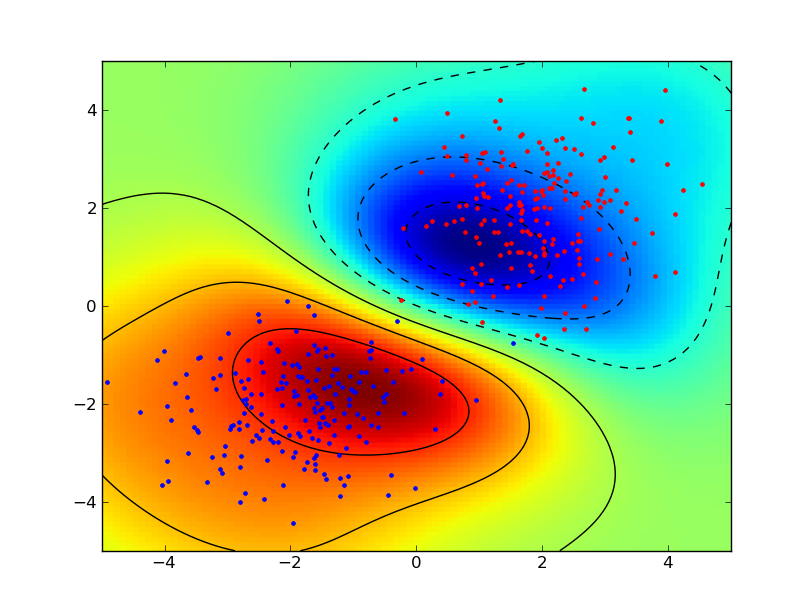
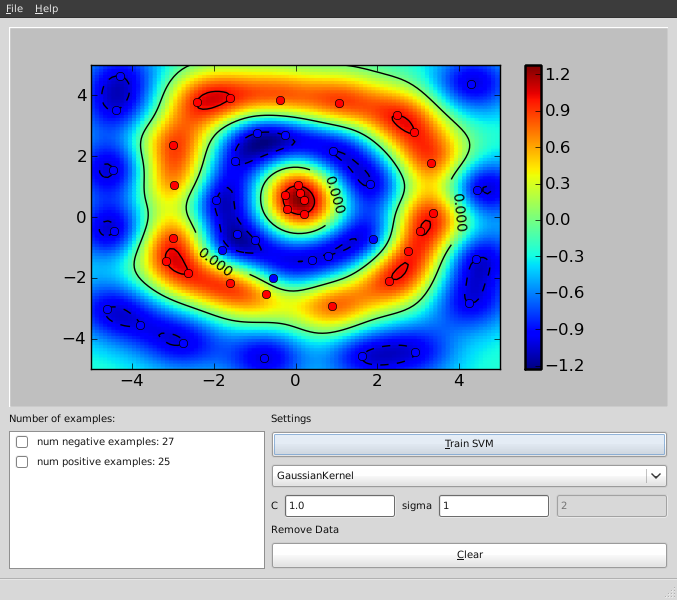
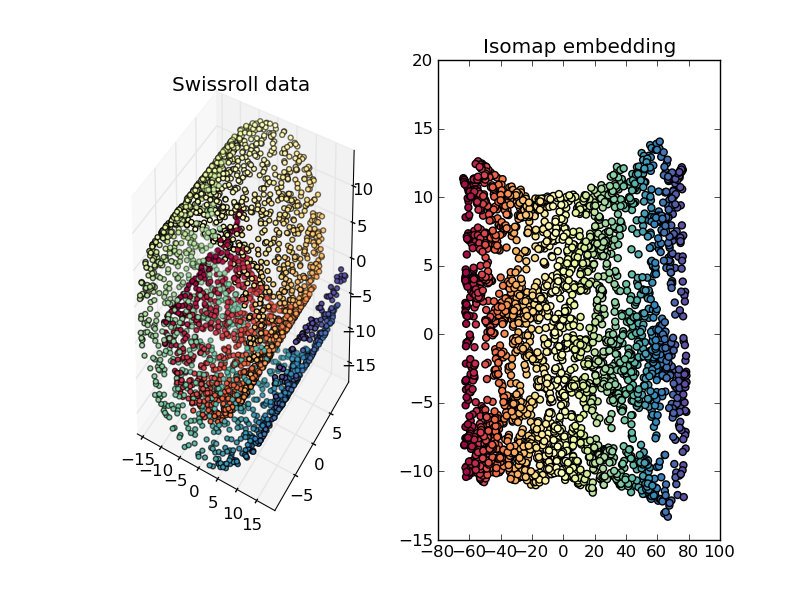
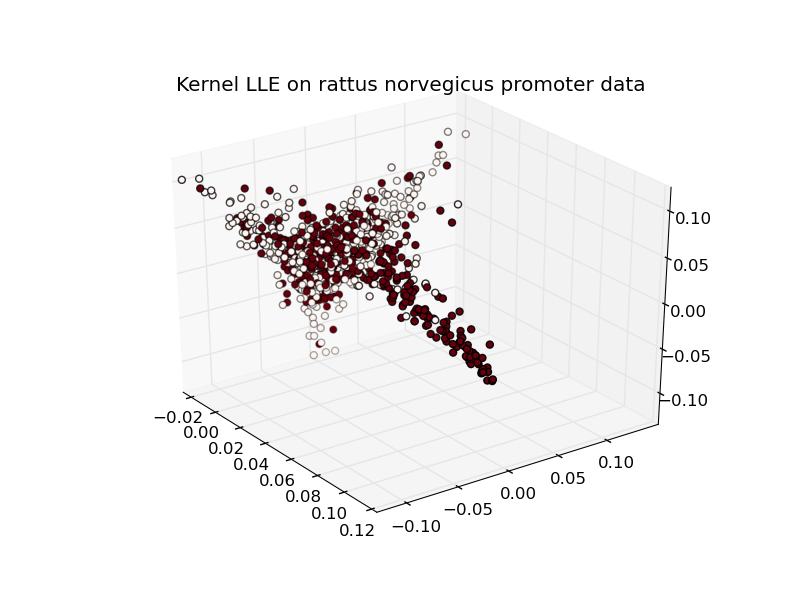
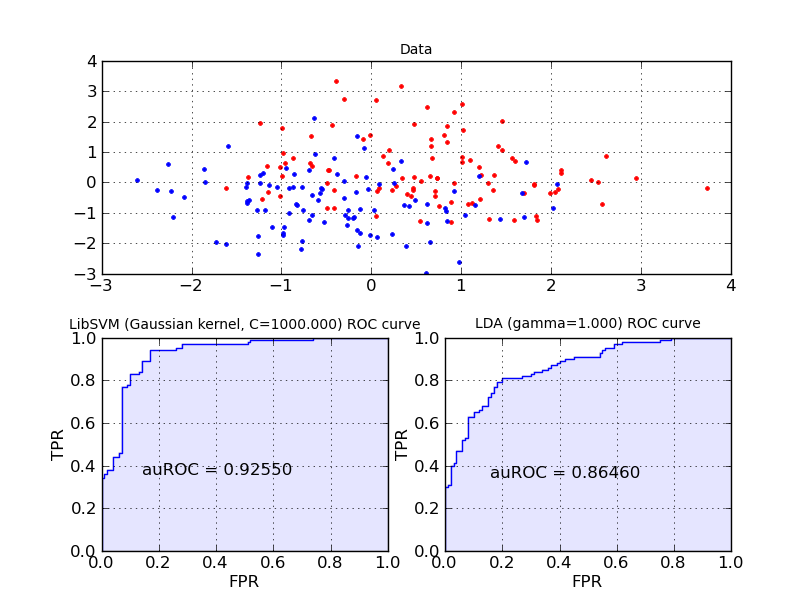
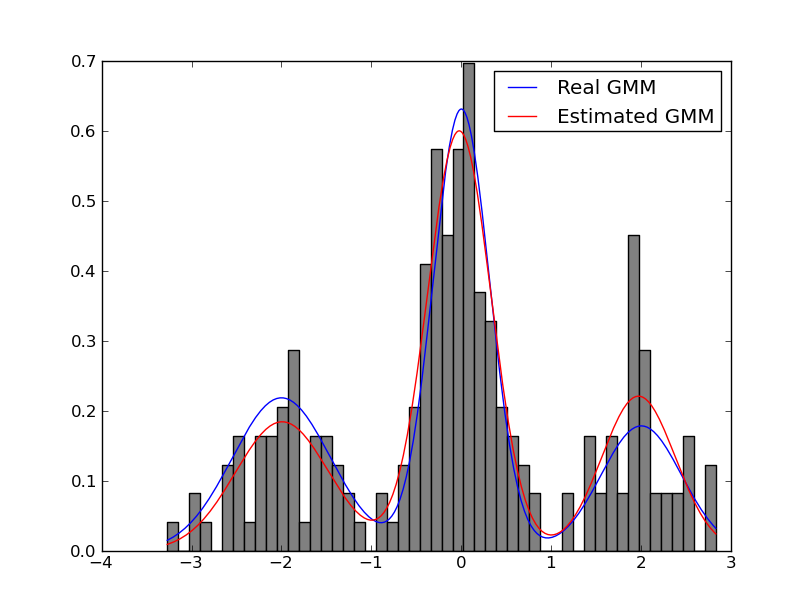
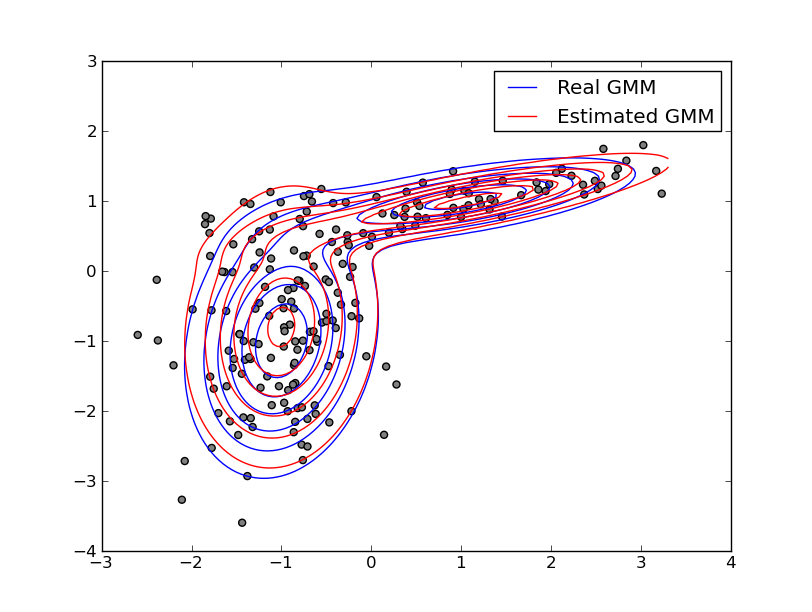
Google Summer of Code 2011 gave a big boost to the development of the shogun machine learning toolbox. In case you have never heard of shogun or machine learning: Machine Learning involves algorithms that do intelligent'' and even automatic data processing and is nowadays used everywhere to e.g. do face detection in your camera, compress the speech in you mobile phone, powers the recommendations in your favourite online shop, predicts solulabily of molecules in water, the location of genes in humans, to name just a few examples. Interested? Then you should give it a try. Some very simple examples stemming from a sub-branch of machine learning called supervised learning illustrate how objects represented by two-dimensional vectors can be classified in good or bad by learning a so called support vector machine. I would suggest to install the python_modular interface of shogun and to run the example interactive_svm_demo.py also included in the source tarball. Two images illustrating the training of a support vector machine follow (click to enlarge): svm svm interactive Now back to Google Summer of Code: Google sponsored 5 talented students who were working hard on various subjects. As a result we now have a new core developer and various new features implemented in shogun: Interfaces to new languages like java, c#, ruby, lua written by Baozeng; A model selection framework written by Heiko Strathman, many dimension reduction techniques written by Sergey Lisitsyn, Gaussian Mixture Model estimation written by Alesis Novik and a full-fledged online learning framework developed by Shashwat Lal Das. All of this work has already been integrated in the newly released shogun 1.0.0. In case you want to know more about the students projects continue reading below, but before going into more detail I would like to summarize my experience with GSoC 2011. My Experience with Google Summer of Code We were a first time organization, i.e. taking part for the first time in GSoC. Having received many many student applications we were very happy to hear that we at least got 5 very talented students accepted but still had to reject about 60 students (only 7% acceptance rate!). Doing this was an extremely tough decision for us. Each of us ended up in scoring students even then we had many ties. So in the end we raised the bar by requiring contributions even before the actual GSoC started. This way we already got many improvements like more complete i/o functions, nicely polished ROC and other evaluation routines, new machine learning algorithms like gaussian naive bayes and averaged perceptron and many bugfixes. The quality of the contributions and independence of the student aided us coming up with the selection of the final five. I personally played the role of the administrator and (co-)mentor and scheduled regular (usually) monthly irc meetings with mentors and students. For other org admins or mentors wanting into GSoC here come my lessons learned: Now please read on to learn about the newly implemented features: Dimension Reduction Techniques Sergey Lisitsyn (Mentor: Christian Widmer) Dimensionality reduction is the process of finding a low-dimensional representation of a high-dimensional one while maintaining the core essence of the data. For one of the most important practical issues of applied machine learning, it is widely used for preprocessing real data. With a strong focus on memory requirements and speed, Sergey implemented the following dimension reduction techniques: See below for the some nice illustrations of dimension reduction/embedding techniques (click to enlarge). isomap swissrollrno kllelocal tangent space alignment Cross-Validation Framework Heiko Strathmann (Mentor: Soeren Sonnenburg) Nearly every learning machine has parameters which have to be determined manually. Before Heiko started his project one had to manually implement cross-validation using (nested) for-loops. In his highly involved project Heiko extend shogun's core to register parameters and ultimately made cross-validation possible. He implemented different model selection schemes (train,validation,test split, n-fold cross-validation, stratified cross-validation, etc and did create some examples for illustration. Note that various performance measures are available to measure how good'' a model is. The figure below shows the area under the receiver operator characteristic curve as an example. foo Interfaces to the Java, C#, Lua and Ruby Programming Languages Baozeng (Mentor: Mikio Braun and Soeren Sonnenburg) Boazeng implemented swig-typemaps that enable transfer of objects native to the language one wants to interface to. In his project, he added support for Java, Ruby, C# and Lua. His knowlegde about swig helped us to drastically simplify shogun's typemaps for existing languages like octave and python resolving other corner-case type issues. The addition of these typemaps brings a high-performance and versatile machine learning toolbox to these languages. It should be noted that shogun objects trained in e.g. python can be serialized to disk and then loaded from any other language like say lua or java. We hope this helps users working in multiple-language environments. Note that the syntax is very similar across all languages used, compare for yourself - various examples for all languages ( python, octave, java, lua, ruby, and csharp) are available. Largescale Learning Framework and Integration of Vowpal Wabbit Shashwat Lal Das (Mentor: John Langford and Soeren Sonnenburg) Shashwat introduced support for 'streaming' features into shogun. That is instead of shogun's traditional way of requiring all data to be in memory, features can now be streamed from e.g. disk, enabling the use of massively big data sets. He implemented support for dense and sparse vector based input streams as well as strings and converted existing online learning methods to use this framework. He was particularly careful and even made it possible to emulate streaming from in-memory features. He finally integrated (parts of) vowpal wabbit, which is a very fast large scale online learning algorithm based on SGD. Expectation Maximization Algorithms for Gaussian Mixture Models Alesis Novik (Mentor: Vojtech Franc) The Expectation-Maximization algorithm is well known in the machine learning community. The goal of this project was the robust implementation of the Expectation-Maximization algorithm for Gaussian Mixture Models. Several computational tricks have been applied to address numerical and stability issues, like An illustrative example of estimating a one and two-dimensional Gaussian follows below. 1D GMM2D GMM Final Remarks All in all, this year s GSoC has given the SHOGUN project a great push forward and we hope that this will translate into an increased user base and numerous external contributions. Also, we hope that by providing bindings for many languages, we can provide a neutral ground for Machine Learning implementations and that way bring together communities centered around different programming languages. All that s left to say is that given the great experiences from this year, we d be more than happy to participate in GSoC2012.

Emmanuel Bouthenot: Sympa in Squeeze Backports

For those interested in Sympa, version 6.1.4 has been uploaded to squeeze-backports. This version fixes around two dozen bugs since the version present in squeeze (6.0.1). I strongly recommend to use this version with squeeze as it fixes some very annoying bugs. How to install it: For squeeze users Be sure to have squeeze-backports repository enabled in your sources.list as explained on Debian Backports website then:
apt-get -t squeeze-backports install sympa
For lenny users For lenny users with a running sympa installation who plan to upgrade to squeeze and use sympa from squeeze-backports, it is recommended to upgrade directly from the version 5.3.4 (lenny's version) to 6.1.4. To do so, you just need to add some apt pinning in /etc/apt/preferences (see below) and then dist-ugprade normally.
Package: sympa
Pin: version 6.1.4*
Pin-Priority: 500
Sympa 6.1.6 is already out and should be uploaded in unstable soon, it should also be backported to squeeze-backports if all goes fine. Special thanks to Gerfried (rhonda) and Alexander (formorer) for their work on Debian Backports.

6 September 2011

Lars Wirzenius: Entropy key: a review

I recently bought a Simtec Entropy Key. It's a hardware randomness generator encapsulated as a USB device, the size of a flash drive. It's good for any host or cluster that uses a lot of kernel-provided random numbers (/dev/random), or does things that cause the kernel to use a lot of random numbers. Opening a lot of network connections, or generating session keys for public key encryption. That kind of stuff. If the kernel has too little entropy available to generate good random numbers, things will stall until it gets some more. The ekey gives you real random bits, not just software-produced pseudo-random numbers. In other words, it's some kind of magic. I got the device in a DVD box, with a leaflet explaining how to install stuff, a CD with the software, an envelope with a secret key, and the actual device itself. I read the leaflet, which said to install the ekeyd daemon first. I ignored the CD, since a) my laptop has no optical drive and b) the software is in Debian stable (squeeze) anyway, so apt-getting it is easier and faster. I was utterly disappointed with the software. I didn't have to edit a single hard disk sector, or do a BIOS upgrade, or anything. Utterly, totally, boring. I had reserved an afternoon and evening for this, but I had to find something else to do instead. After plugging in the device in a spare USB port, I opened the envelope and ran a command to specify the secret key. The key and host processors use encryption to make sure nobody can eavesdrop on the randomness -- that would give them an edge in cracking SSL and GPG encryption, I guess. Here's an example of how it works. Before I plug in the device, the kernel has some, but not too much entropy available:
liw@havelock$ cat /proc/sys/kernel/random/entropy_avail 
1053
A few seconds after the ekey is inserted:
liw@havelock$ cat /proc/sys/kernel/random/entropy_avail 
3968
And here's the kicker: pretty much regardless of what I do, the entropy stays at about 4 kilounits (I don't know if it's bits or bytes, and I'm too lazy to check). In the end, the only thing I can really complain about is the typography and layout of the leaflet. The text is clear enough, but it's laid out too densely. It needs more whitespace. Some pictures of bunnies or kittens would be nice, too.

4 September 2011

Sune Vuorela: Network status aware apps

Am I online or not? There is a summary at the end for the quick readers. It is in many modern applications important to be able to more or less gracefully handle if the application user is online or not. For example, there is no need to try to fetch emails if the device (computer, phone, tablet, laptop, ) doesn t have network (wifi, cable, umts, ip over avian carriers, ..). KDE has of course made nice functionality for this, and here I will try to describe how to make your app network status aware and what to be aware of in the process. Solid background All this is going on in Solid, using two parts of Solid and a bit of KDE s infrastructure: The networkstatus KDED module is trying it best to gather information from the computer to see if one is connected or not. It has the possibility to gather information from various sources, and handle changes and such. The as of writing available sources that the networkstatus module gathers information from is Collecting from different sources is important, because some people might have configurations like Manage wireless thru wicd , manage umts dongle with Network Manager and manage wired network with /etc/network/interfaces and all of it needs to be combined. Solid reports, if wicd thinks online , and network manager thinks offline that the user is Connected.. Solid States There is a enum with 5 values in Solid to describe the current state of the network:

enum Status
Unknown,
Unconnected,
Disconnecting,
Connecting,
Connected
;
Connected is the easy state. Here, Solid knows that you are having some kind of connection according to at least one of the sources. But it might just be a local network connection, and not actually a internet connection. So one here should handle connection failures gracefully. Unconnected is a similar easy state. Here, Solid knows that you don t have any internet connection according to the sources it knows about. One should here not try to do any networking. Connecting and Disconnecting is that a state change is happening, so that you can prepare to react on it. Solid also has the state of Unknown, used for cases where Solid doesn t have the required data to actually know it. A example could be a system without any of the data providers. You should here probably try to connect, and be able to handle failures gracefully. Also described as Proceed with caution . The bright reader might here notice that one both in the Unknown and Connected case actually should do the same. Querying for network status At any given time:

Solid::Networking::Status currentStatus = Solid::Networking::status();
if(currentStatus==Connected currentStatus==Unknown)
//try to do networking things
else
//mark application as offline.

Here, we first query Solid for current status, and then if the state is Connected OR Unknown, then we proceed. Getting notified Maybe you don t want the roundtrip of asking (resulting in a dbus rountrip each time) when you need to know the state changes. Then you of course can get notified. class MyNetworkAwareClass : public QObject
Q_OBJECT
public:
MyNetworkAwareClass();
void doNetworkActivity();
private Q_SLOTS:
void networkStatusChanged(Solid::Networking::Status newstatus);
private:
Solid::Networking::Status m_current_state
;
MyNetworkAwareClass::MyNetworkAwareClass : m_current_state(Solid::Networking::Status())
connect(Solid::Networking::notifier(), SIGNAL(statusChanged(Solid::Networking::Status),this,SLOT(networkStatusChanged(Solid::Networking::Status)));

void MyNetworkAwareClass::networkStatusChanged(Solid::Networking::Status newstate)
m_current_state = newstate;
void MyNetworkAwareClass::doNetworkActivity()
if(m_current_state == Unknown m_current_state == Connected)
//try to do network activity


I guess this should be pretty self explaining. Summary Oh. And I m out looking for a job.

Christoph Egger: A week of Debian GNU/kFreeBSD

While other people are squashing RC bugs I was using this week to fix (or investigationg) some more kFreeBSD issues -- mostly looking at failed build logs and trying to fix the problems and after some nice fish for dinner writing things up.

3 September 2011

Thorsten Glaser: Saturday Noon Cat wlog-entry-writing

As written about here earlier, cats have a nice life. I walked into my home seeing three cats in a row, all black: two lazing around, the third (with white spots, and belonging to a different neighbour from the other two) ambulating. I went up and got my PocketPC with the already mentioned camera application to take a shoot. Sadly, the more shy cat went away, but I got some pictures of the other two here they are, internet photo stars follow the hyperlink to get a large version. two of three black cats I met today  in a row! Later I came back from geocaching (2 GC.COM-only, 1 OC-only *yay!* found, one not found due to not taking any hardware with me) the bigger guy lazed around in the bush next to where I usually park my bike. Lucky

2 September 2011

Asheesh Laroia: Debian bug squashing party at SIPB, MIT


(Photo credit: Obey Arthur Liu; originally on Picasa, license.) Three weekends ago, I participated in a Debian bug squashing party. It was more fun than I had guessed! The event worked: we squashed bugs. Geoffrey Thomas (geofft) organized it as an event for MIT's student computing group, SIPB. In this post, I'll review the good parts and the bad. I'll conclude with beaming photos of my two mentees and talk about the bugs they fixed. So, the good:

The event was a success, but as always, there are some things that could have gone more smoothly. Here's that list: Still, it turned out well! I did three NMUs, corresponding to three patches submitted for release-critical bugs by my two mentees. Those mentees were: Jessica enjoying herself Jessica McKellar is a software engineer at Ksplice Oracle and a recent graduate of MIT's EECS program. She solved three release-critical bugs. This was her first direct contribution to Debian. In particular: Jessica has since gotten involved in the Twisted project's personal package archive. Toward the end of the sprint, she explained, "I like fixing bugs. I will totally come to the next bug squashing party." Noah grinning Noah Swartz is a recent graduate of Case Western Reserve University where he studied Mathematics and played Magic. He is an intern at the MIT Media Lab where he contributes to DoppelLab in Joe Paradiso's Responsive Environments group. This was definitely his first direct contribution to Debian. It was also one of the most intense command-line experiences he has had so far. Noah wasn't originally planning to come, but we were having lunch together before the hackathon, and I convinced him to join us. Noah fixed #625177, a fails-to-build-from-source (FTBFS) bug in nslint. The problem was that "-Wl" was instead written in all lowercase in the debian/rules file, as "-wl". Noah fixed that, making sure the package properly built in pbuilder, and then spent some quality time with lintian figuring out the right way to write a debian/changelog. That's a wrap! We'll hopefully have one again in a few months, and before that, I hope to write up a guide so that we run things even more smoothly next time.

Tanguy Ortolo: rxvt-unicode: generate key symbols

rxvt-unicode is a terminal emulator with some interesting features. Here is one of them I find most amazing and elegant: it can generate the symbol characters corresponding to keyboard keys. It works by pressing and releasing + ( is the symbol for the Control key, and is Shift, of course), then the key which symbol you want to get. For instance, to get the Caps lock symbol, you type + , , which gives you the following symbol: . Here are some other nice examples: (Return) (AltGr aka Level3 Shift) (BackSpace) (Insert) (Delete) (Home) (End) (Prior) (Next). Beware that this will not cancel the effect of Caps, Num lock keys: you will get their symbols but also enter the corresponding mode.

1 September 2011

Sune Vuorela: First Plasma Active experience

John Layt recently blogged about his adventure with having children use Plasma Active with quite some success. The task I was this evening out at a board meeting in my local scout group, and for such a event you of course need the following I ve heard from various people that an iPad is great for such meetings, and produces much less paper waste, so of course, I wanted to try with my brand new Plasma Active tablet. Before meeting So before meeting: Charge tablet & fetch needed documents.
Possible issues: Everything was on a my imap server. Minutes was a plain text file, Agenda was a docx file, treasures report was a xls spreadsheet, and the various other papers were pdf files. For fetching, I ve heard a lot about Kontact Touch and everything using Akonadi. Besides me not being fully able to properly enter my password in the first 10 tries, and a sometimes flaky internet connection, everything here was a breeze. To the three first documents, the answer was Calligra Mobile . Rendered even the docx file better than libreoffice did. And Calligra Mobile was nice and touch friendly and worked pretty well for this. There is also something called Calligra Active , which is supposed to be way cooler, but still misses at least one essential feature to be used for a touchscreen only. It can only open documents passed to it on command line. And I m not yet very comfortable with a onscreen keyboard. For the last, there was Okular. The desktop edition of Okular. I was impressed by *how* usable Okular were for a touch screen device. A quick and dirty edition of a mobile Okular could probably be done with remove all toolbars and menubars and such and if no file is passed on command line, then open a file selector window and open selected file , which shouldn t take a person knowing the Okular code much time. But that s still just the Quick and dirty edition During And during the meeting, everything worked flawlessly, except the internet on site, so I was happy I had prepared in advance. As a extra bonus, Plasma Active offered the nice KDE Games, as John Layt also mentioned, for the parts of the meeting where it was a bit boring. So. At least for me and in this case, Plasma Active did its job, at least to a A. And it is still described as Alpha software. Issues There is, though, a few important usability issues: For QWidget based applications, oxygen s nice desktop feature of being able to move the application by dragging it from almost everywhere is just completely useless on a touch screen device when you are only using full screen applications. Luckily, oxygen-settings can disable this. Update: People tells me that this has already been fixed. The Network Manager Plasma Widget, in case of no network , is very hard to activate in order to select a network. A bit larger touch area here would be very nice. Currently, it feels like it is only slightly larger than a dot: . Future Oh boy, I m looking forward for Plasma Active getting to Beta or RC status. Or Final! And btw, I m looking for a job.

Matthew Garrett: The Android/GPL situation

There was another upsurge in discussion of Android GPL issues last month, triggered by couple of posts by Edward Naughton, followed by another by Florian Mueller. The central thrust is that section 4 of GPLv2 terminates your license on violation, and you need the copyright holders to grant you a new one. If they don't then you don't get to distribute any more copies of the code, even if you've now come into compliance. TLDR; most Android vendors are no longer permitted to distribute Linux.

I'll get to that shortly. There's a few other issues that could do with some clarification. The first is Naughton's insinuation that Google are violating the GPL due to Honeycomb being closed or their "license washing" of some headers. There's no evidence whatsoever that Google have failed to fulfil their GPL obligations in terms of providing source to anyone who received GPL-covered binaries from them. If anyone has some, please do get in touch. Some vendors do appear to be unwilling to hand over code for GPLed bits of Honeycomb. That's an issue with the vendors, not Google.

His second point is more interesting, but the summary is "Google took some GPLed header files and relicensed them under Apache 2.0, and they've taken some other people's GPLv2 code and put it under Apache 2.0 as well". As far as the headers go, there's probably not much to see here. The intent was to produce a set of headers for the C library by taking the kernel headers and removing the kernel-only components. The majority of what's left is just structure definitions and function prototypes, and is almost certainly not copyrightable. And remember that these are the headers that are distributed with the kernel and intended for consumption by userspace. If any of the remaining macros or inline functions are genuinely covered by the GPLv2, any userspace application including them would end up a derived work. This is clearly not the intention of the authors of the code. The risk to Google here is indistinguishable from zero.

How about the repurposing of other code? Naughton's most explicit description is:

For example, Android uses bootcharting logic, which uses the 'bootchartd' script provided by www.bootchart.org, but a C re-implementation that is directly compiled into our init program. The license that appears at www.bootchart.org is the GPLv2, not the Apache 2.0 license that Google claims for its implementation.

, but there's no indication that Google's reimplementation is a derived work of the GPLv2 original.

In summary: No sign that Google's violating the GPL.

Florian's post appears to be pretty much factually correct, other than this bit discussing the SFLC/Best Buy case:

I personally believe that intellectual property rights should usually be enforced against infringing publishers/manufacturers rather than mere resellers, but that's a separate issue.

The case in question was filed against Best Buy because Best Buy were manufacturing infringing devices. It was a set of own-brand Blu Ray players that incorporated Busybox. Best Buy were not a mere reseller.

Anyway. Back to the original point. Nobody appears to disagree that section 4 of the GPLv2 means that violating the license results in total termination of the license. The disagreement is over what happens next. Armijn Hemel, who has done various work on helping companies get back into compliance, believes that simply downloading a new copy of the code will result in a new license being granted, and that he's received legal advice that supports that. Bradley Kuhn disagrees. And the FSF seem to be on his side.

The relevant language in v2 is:

You may not copy, modify, sublicense, or distribute the Program except as expressly provided under this License. Any attempt otherwise to copy, modify, sublicense or distribute the Program is void, and will automatically terminate your rights under this License.

The relevant language in v3 is:

You may not propagate or modify a covered work except as expressly provided under this License. Any attempt otherwise to propagate or modify it is void, and will automatically terminate your rights under this License

which is awfully similar. However, v3 follows that up with:

However, if you cease all violation of this License, then your license from a particular copyright holder is reinstated (a) provisionally, unless and until the copyright holder explicitly and finally terminates your license, and (b) permanently, if the copyright holder fails to notify you of the violation by some reasonable means prior to 60 days after the cessation.

In other words, with v3 you get your license back providing you're in compliance. This doesn't mesh too well with the assumption that you can get a new license by downloading a new copy of the software. It seems pretty clear that the intent of GPLv2 was that the license termination was final and required explicit reinstatement.

So whose interpretation is correct? At this point we really don't know - the only people who've tried to use this aspect of the GPL are the SFLC, and as part of their settlements they've always reinstated permission to distribute Busybox. There's no clear legal precedent. Which makes things a little awkward.

It's not possible to absolutely say that many Android distributors no longer have the right to distribute Linux. But nor is it possible to absolutely say that they haven't lost that right. Any sufficiently motivated kernel copyright holder probably could engage in a pretty effective shakedown racket against Android vendors. Whether they will do remains to be seen, but honestly if I were an Android vendor I'd be worried. There's plenty of people out there who hold copyright over significant parts of the kernel. Would you really bet on all of them being individuals of extreme virtue?

comment count unavailable comments

Thorsten Glaser: Subversion for Dummies (or visitors of the #cvs IRC channel)

Oh well someone came into the #cvs channel on IRC without a clue, again. I ve made a nice picture to show the competition (rival, whatever) to newbies (warning, sarcasm ahead)

31 August 2011

Axel Beckert: Useful but Unknown Unix Tools: How wdiff and colordiff help to choose the right Swiss Army Knife

In light of the fact that it seems possible to fit the plastic caps of a Debian branded Swiss Army Knife (Last orders today!) on an existing Swiss Army Knife (German written howto as PDF), I started to think about which Victorinox Cybertool would be the best fitting for me. And because the Victorinox comparison page doesn t really show diffs, just columns with floating text which are not very helpful for generating diffs in your head, I used command line tools for that purpose: wdiff Because the floating texts are not line- but just whitespace-based, the tool of choice is not diff but wdiff, a word-based diff. It encloses additions and removals in + + and [- -] blocks. (No, those aren t Japanese smileys although they look a lot like some. ^^). The easiest and clearest way is to copy and paste the texts from Victorinox comparison page into some text files and compare them with wdiff:
$ wdiff cybertool34.txt cybertool41.txt
+Schraubendreher 2.5mm,+ Pinzette, N hahle mit Nadel hr, +Holzs ge,+ Bit-Schl ssel( 5 mm Innensechskant f r die D-SUB Steckverbinder, 4 mm Innensechskant f r Bits, Bit Phillips 0, Bit Phillips 1, Bit-Schlitzschrauben 4 mm, Bit Phillips 2, Bit Hex 4 mm, Bit Torx 8, Bit Torx 10, Bit Torx 15 ), Kombizange( H lsenpresser, Drahtschneider ), Stech-Bohrahle, Kugelschreiber( auch zum DIP-Switch verstellen ), Mehrzweckhaken (Pakettr ger), +Metalls ge( Metallfeile, Nagelfeile, Nagelreiniger ),+ Dosen ffner( kleiner Schraubendreher ), Kleine Klinge, Grosse Klinge, Ring, inox, Mini-Schraubendreher, Kapselheber( Schraubendreher, Drahtabisolierer ), +Holzmeissel / Schaber,+ Bit-Halter, Stecknadel, inox, Schere, Korkenzieher, Zahnstocher
So this already extracted the information which are the seven tools which are in the Cybertool 41, but not in the Cybertool 34. Nevertheless the diff is still not easily recognizable on the first glance. There are several ways to help here. First wdiff has an option --no-common (the according short option is -3) which just shows added and removed words:
$ wdiff -3 cybertool34.txt cybertool41.txt
======================================================================
 +Schraubendreher 2.5mm,+ 
======================================================================
  +Holzs ge,+ 
======================================================================
  +Metalls ge( Metallfeile, Nagelfeile, Nagelreiniger ),+ 
======================================================================
  +Holzmeissel / Schaber,+ 
======================================================================
This is already way better to quickly recognize the actual differences. But if you still also want to see the common tools of the two knifes you need some visual help: One option is to use wdiff s --terminal (or short -t) option. Added words are then displayed inverse and removed words are shown underlined (background and foreground colors hardcoded as there is no invert colors style in CSS or HTML):

$ wdiff -t cybertool34.txt cybertool41.txt
Schraubendreher 2.5mm, Pinzette, N hahle mit Nadel hr, Holzs ge, Bit-Schl ssel( 5 mm Innensechskant f r die D-SUB Steckverbinder, 4 mm Innensechskant f r Bits, Bit Phillips 0, Bit Phillips 1, Bit-Schlitzschrauben 4 mm, Bit Phillips 2, Bit Hex 4 mm, Bit Torx 8, Bit Torx 10, Bit Torx 15 ), Kombizange( H lsenpresser, Drahtschneider ), Stech-Bohrahle, Kugelschreiber( auch zum DIP-Switch verstellen ), Mehrzweckhaken (Pakettr ger), Metalls ge( Metallfeile, Nagelfeile, Nagelreiniger ), Dosen ffner( kleiner Schraubendreher ), Kleine Klinge, Druckkugelschreiber, Grosse Klinge, Ring, inox, Mini-Schraubendreher, Kapselheber( Schraubendreher, Drahtabisolierer ), Holzmeissel / Schaber, Bit-Halter, Stecknadel, inox, Schere, Korkenzieher, Zahnstocher

But some still like to to use color instead of the contrast-rich inverse and the easily to oversee underlining. This is where colordiff comes into play: colordiff colordiff is like syntax highlighting for diffs on the command line. I works with classic and unified diffs as well as with wdiffs and debdiffs (the debdiff command is part of the devscripts package).
$ wdiff cybertool34.txt cybertool41.txt colordiff
+Schraubendreher 2.5mm,+ Pinzette, N hahle mit Nadel hr, +Holzs ge,+ Bit-Schl ssel( 5 mm Innensechskant f r die D-SUB Steckverbinder, 4 mm Innensechskant f r Bits, Bit Phillips 0, Bit Phillips 1, Bit-Schlitzschrauben 4 mm, Bit Phillips 2, Bit Hex 4 mm, Bit Torx 8, Bit Torx 10, Bit Torx 15 ), Kombizange( H lsenpresser, Drahtschneider ), Stech-Bohrahle, Kugelschreiber( auch zum DIP-Switch verstellen ), Mehrzweckhaken (Pakettr ger), +Metalls ge( Metallfeile, Nagelfeile, Nagelreiniger ),+ Dosen ffner( kleiner Schraubendreher ), Kleine Klinge, Grosse Klinge, Ring, inox, Mini-Schraubendreher, Kapselheber( Schraubendreher, Drahtabisolierer ), +Holzmeissel / Schaber,+ Bit-Halter, Stecknadel, inox, Schere, Korkenzieher, Zahnstocher
$ wdiff cybertool29.txt cybertool41.txt colordiff
+Schraubendreher 2.5mm,+ Pinzette, N hahle mit Nadel hr, +Holzs ge,+ Bit-Schl ssel( 5 mm Innensechskant f r die D-SUB Steckverbinder, 4 mm Innensechskant f r Bits, Bit Phillips 0, Bit Phillips 1, Bit-Schlitzschrauben 4 mm, Bit Phillips 2, Bit Hex 4 mm, Bit Torx 8, Bit Torx 10, Bit Torx 15 ), +Kombizange( H lsenpresser, Drahtschneider ),+ Stech-Bohrahle, +Kugelschreiber( auch zum DIP-Switch verstellen ), Mehrzweckhaken (Pakettr ger), Metalls ge( Metallfeile, Nagelfeile, Nagelreiniger ),+ Dosen ffner( kleiner Schraubendreher ), Kleine Klinge, [-Druckkugelschreiber,-] Grosse Klinge, Ring, inox, Mini-Schraubendreher, Kapselheber( Schraubendreher, Drahtabisolierer ), +Holzmeissel / Schaber,+ Bit-Halter, Stecknadel, inox, +Schere,+ Korkenzieher, Zahnstocher
(Coloured Screenshots done with ANSI HTML Adapter from the package aha.) Some, especially those who are used to git, are probably confused by the default choice of diff colors. This is easily fixable by writing the following into you ~/.colordiffrc:
newtext=green
oldtext=red
diffstuff=darkblue
cvsstuff=darkyellow
(See also /etc/colordiff for the defaults and hints.) colordiff has by the way two operating modes: So now let us compare the Cybertool 29 with Cybertool 34 in a normal diff (by using the texts from above and replacing all commata with newline characters) with git-like colors:
$ colordiff cybertool29-lines.txt cybertool34-lines.txt
12a13,14
> Kombizange( H lsenpresser
> Drahtschneider )
13a16,17
> Kugelschreiber( auch zum DIP-Switch verstellen )
> Mehrzweckhaken (Pakettr ger)
16d19
< Druckkugelschreiber
25a29
> Schere
Or as unifed diff with some context:
$ colordiff -u cybertool29-lines.txt cybertool34-lines.txt
--- cybertool29-lines.txt     2011-08-31 20:55:37.195546238 +0200
+++ cybertool34-lines.txt   2011-08-31 20:55:11.667710504 +0200
@@ -10,10 +10,13 @@
 Bit Torx 8
 Bit Torx 10
 Bit Torx 15 )
+Kombizange( H lsenpresser
+Drahtschneider )
 Stech-Bohrahle
+Kugelschreiber( auch zum DIP-Switch verstellen )
+Mehrzweckhaken (Pakettr ger)
 Dosen ffner( kleiner Schraubendreher )
 Kleine Klinge
-Druckkugelschreiber
 Grosse Klinge
 Ring
 inox
@@ -23,5 +26,6 @@
 Bit-Halter
 Stecknadel
 inox
+Schere
 Korkenzieher
 Zahnstocher
So if you want nicely colored diffs with Subversion like you re used to with git, you can use svn diff colordiff.

Keith Packard: Altos1.0

AltOS 1.0 TeleMini support and a host of new features Bdale and I are pleased to announce the release of AltOS version 1.0. AltOS is the core of the software for all of the Altus Metrum products. It consists of cc1111-based microcontroller firmware and Java-based ground station software. AltOS Firmware TeleMini support, Kalman Filtering and more Support for the new TeleMini altimeter is included in version 1.0 along with a wealth of other new features: AltosUI New Features AltosUI has also seen quite a bit of work for the 1.0.1 release. Of course, many of the changes in AltosUI are to accomodate the new TeleMini altimeter and changes in the AltOS firmware for TeleMetrum. In addition, we ve also added lots of new features in response to user requests.
30 August 2011

Keith Packard: TeleMini

TeleMini Dual-deploy altimeter with telemetry now available TeleMini is a miniature dual-deploy flight computer with data logging and radio telemetry. Small enough to fit comfortably in an 18mm tube, this powerful package does everything you need on a single board: I don t have anything in these images to show just how tiny this board is but the spacing between the screw terminals is 2.54mm (0.1in), and the whole board is only 13mm wide (1/2in). We ve been flying these for quite a while; testing the hardware and tuning the firmware. My new 29mm mmt airframe, Koala, sports a TeleMini board for apogee-only deployment. It s been really nice to have something flying on G s and H s that doesn t depend on the vagaries of delay grains.

Next.

Previous.