No more nagging me about the placeholder image from Wikipedia I used in
yesterday's report!
Set up
Here's what the team did today:
tumbleweed
Stefano started the day by hacking away on our video archive. We eventually want
to upload all our videos to YouTube to give them exposure, but sadly our archive
metadata is in a pretty poor shape.
With the script tumbleweed wrote, we can scrape the archive for matches against
the old DebConf's pentabarf XML we have.
tumbleweed also helped Ivo with the ansible PXE setup he's working on. Some
recent contributions from a collaborator implemented new features (like a nice
menu to choose from) but also came with a few annoying bugs.
ivodd
Ivo continued working on the PXE setup today. He also tried to break our ansible
setup by using fresh installs with different user cases (locales, interfaces,
etc.), with some success.
The reason he and Stefano are working so hard on the PXE boot is that we had a
discussion about the future of our USB install method. The general consensus on
this was although we would not remove it, we would not actively maintain it
anymore.
PXE is less trouble for multiple machines. For single machines or if you don't
control the DHCP server, using ansible manually on a fresh Debian install will
be the recommended way.
olasd
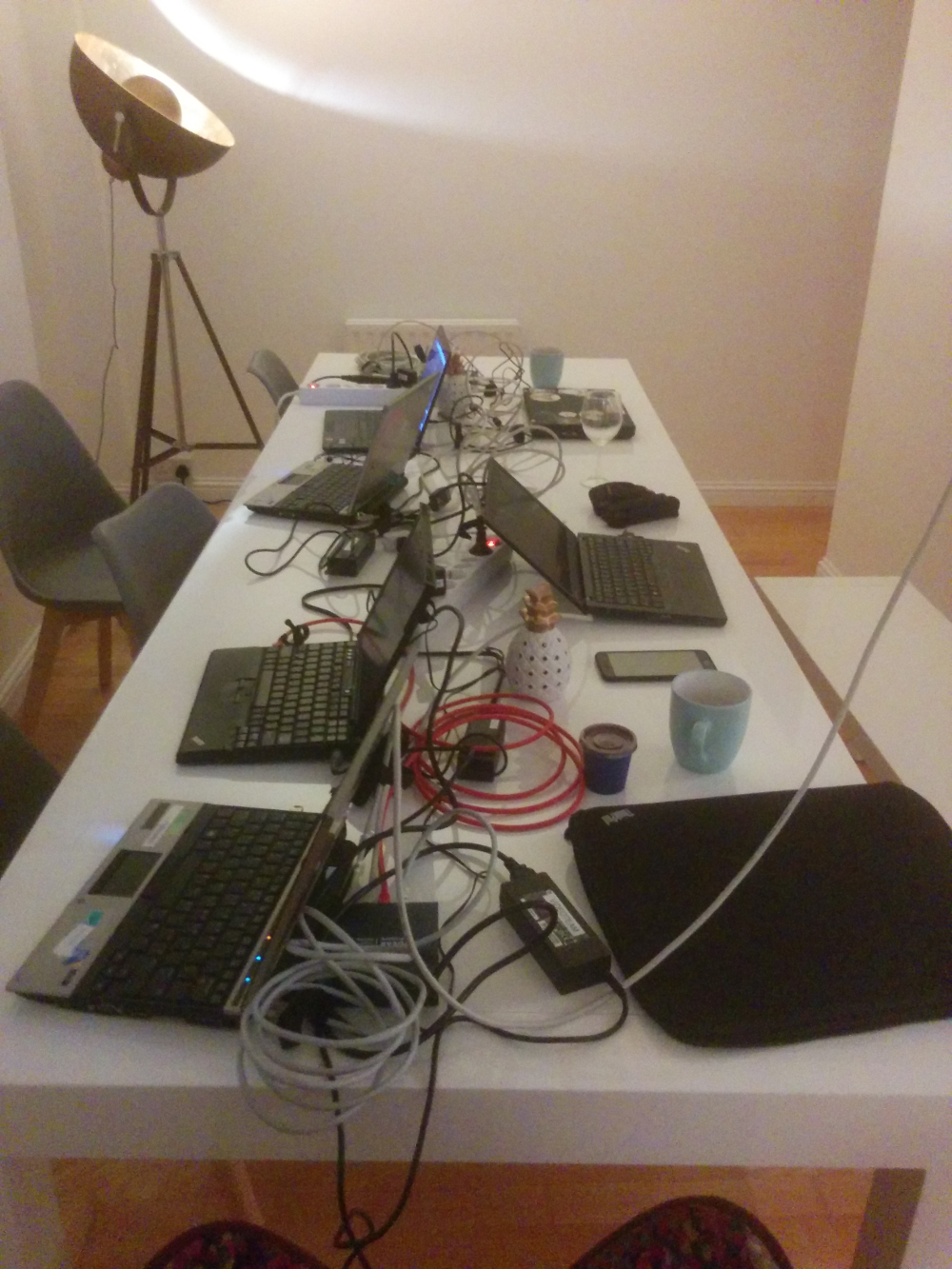
After a very long drive, olasd arrived late in the evening with all our gear.
Hurray! We were thus able to set up some test boxes and start wiring the airbnb
properly. Tomorrow will certainly be more productive with all this stuff at our
disposition.
pollo
Today I mainly worked on setting up our documentation website. After some
debate, we decided that sphinx was the right tool for the job.
I am a few pages in and if I work well I think we'll have something to show for
at the end of the sprint!
I also was thrown back into ansible after witnessing a bug in the locale
management. I'm still rusty, but it's slowly coming back to me.
Let's end this blog post with a picture of the neon pineapple that sits on the
wall of the solarium.
A maintenance release 0.3.3.3.1 of RcppEigen is now on CRAN (and will get to Debian soon). It brings Eigen 3.3.* to R.
The impetus was a request from CRAN to change the call to Rcpp::Rcpp.plugin.maker() to only use :: as the function has in fact been exported and accessible for a pretty long time. So now the usage pattern catches up. Otherwise, Haiku-OS is now supported and a minor Travis tweak was made.
The complete NEWS file entry follows.
Courtesy of CRANberries, there is also a diffstat report for the most recent release.Changes in RcppEigen version 0.3.3.3.1 (2017-11-19)
- Compilation under Haiku-OS is now supported (Yu Gong in #45).
- The
Rcpp.plugin.makerhelper function is called via::as it is in fact exported (yet we had old code using:::).- A spurious argument was removed from an example call.
- Travis CI now uses https to fetch the test runner script.
This post by Dirk Eddelbuettel originated on his Thinking inside the box blog. Please report excessive re-aggregation in third-party for-profit settings.
A maintenance release RcppClassic 0.9.9 is now at CRAN. This package provides a maintained version of the otherwise deprecated first Rcpp API; no new projects should use it.
Per a request from CRAN, we changed the call to Rcpp::Rcpp.plugin.maker() to only use :: as the function has in fact been exported and accessible for a pretty long time. So now the usage pattern catches up.
Courtesy of CRANberries, there are changes relative to the previous release.
Questions, comments etc should go to the rcpp-devel mailing list off the R-Forge page.
This post by Dirk Eddelbuettel originated on his Thinking inside the box blog. Please report excessive re-aggregation in third-party for-profit settings.
Following up on propelling disk images,
Propellor can now build custom ARM disk images for a variety of
different ARM boards. The disk image build can run on a powerful laptop or
server, so it's super fast and easy compared with manually installing
Debian on an ARM board.
Here's a simple propellor config for a Olimex LIME board, with ssh access
and a root password:
lime :: Host
lime = host "lime.example.com" $ props
& osDebian Unstable ARMHF
& Machine.olimex_A10_OLinuXino_LIME
& hasPartition (partition EXT4 mountedAt "/" setSize MegaBytes 8192)
& hasPassword (User "root")
& Ssh.installed
& Ssh.permitRootLogin (RootLogin True)
To make a disk image for that board, I only have to add this property to my
laptop:
& imageBuiltFor lime
(RawDiskImage "/srv/lime.img")
(Debootstrapped mempty)
Propellor knows what kernel to install and how to make the image bootable
for a bunch of ARM boards,
including the Olimex LIME, the SheevaPlug, Banana Pi, and CubieTruck.
To build the disk image targeting ARM, propellor uses qemu. So it's helpful
that, after the first build, propellor incrementally updates disk images,
quite quickly and efficiently.
Once the board has the image installed, you can run propellor on it to
further maintain it, and if there's a hardware problem, you can quickly
replace it with an updated image.
![]() |
olimex_A10_OLinuXino_LIME :: Property (HasInfo + DebianLike)
olimex_A10_OLinuXino_LIME = FlashKernel.installed "Olimex A10-OLinuXino-LIME"
requires sunixi "A10-OLinuXino-Lime"
requires armmp
My home server is a CubieTruck which serves as a wireless access point,
solar panel data collector, and git-annex autobuilder. It's deployed from
a disk image built by propellor,
using this config.
I've been involved with building disk image for ARM boards for a long
time -- it was part of my job for five years -- and this is the first time
I've been entirely happy with the process.
It's not the house's cat per say, but it's been hanging out around the house
for most of the day and makes cute faces trying to convince us to let it come
inside. Nice try cat. Nice try.
Here are some glamour professional photos of what the place looks like on a
perfect summer day, just for the kick of it:
Of course, reality has trouble matching all the post-processing filters.
Plan for the week
Now on a more serious note; apart from enjoying the beautiful city of Cambridge,
here's what the team plans to do this week:
tumbleweed
Stefano wants to continue refactoring our ansible setup. A lot of things have
been added in the last year, but some of it are hacks we should remove and
implement correctly.
highvoltage
Jonathan won't be able to come to Cambridge, but plans to work remotely, mainly
on our desktop/xfce session implementation. Another pile of hacks waiting to be
cleaned!
ivodd
Ivo has been working a lot of the pre-ansible part of our installation and plans
to continue working on that. At the moment, creating an installation USB key is
pretty complicated and he wants to make that simpler.
olasd
Nicolas completely reimplemented our streaming setup for DC17 and wants to
continue working on that.
More specifically, he wants to write scripts to automatically setup and teardown
- via API calls - the distributed streaming network we now use.
Finding a way to push TLS certificates to those mirrors, adding a live stream
viewer on video.debconf.org and adding a viewer to our archive are also
things he wants to look at.
pollo
For my part, I plan to catch up with all the commits in our ansible repository I
missed since last year's sprint and work on documentation.
It would be very nice if we could have a static website describing our work so
that others (at mini-debconfs for examples) could replicate it easily.
If I have time, I'll also try to document all the ansible roles we have written.
Stay tuned for more daily reports!
I've so far identified ten sources for IMDB title IDs for movies in
the public domain or with a free license. This is the statistics
reported when running 'make stats' in the git repository:
249 entries ( 6 unique) with and 288 without IMDB title ID in free-movies-archive-org-butter.json
2301 entries ( 540 unique) with and 0 without IMDB title ID in free-movies-archive-org-wikidata.json
830 entries ( 29 unique) with and 0 without IMDB title ID in free-movies-icheckmovies-archive-mochard.json
2109 entries ( 377 unique) with and 0 without IMDB title ID in free-movies-imdb-pd.json
291 entries ( 122 unique) with and 0 without IMDB title ID in free-movies-letterboxd-pd.json
144 entries ( 135 unique) with and 0 without IMDB title ID in free-movies-manual.json
350 entries ( 1 unique) with and 801 without IMDB title ID in free-movies-publicdomainmovies.json
4 entries ( 0 unique) with and 124 without IMDB title ID in free-movies-publicdomainreview.json
698 entries ( 119 unique) with and 118 without IMDB title ID in free-movies-publicdomaintorrents.json
8 entries ( 8 unique) with and 196 without IMDB title ID in free-movies-vodo.json
3186 unique IMDB title IDs in total
The entries without IMDB title ID are candidates to increase the
data set, but might equally well be duplicates of entries already
listed with IMDB title ID in one of the other sources, or represent
movies that lack a IMDB title ID. I've seen examples of all these
situations when peeking at the entries without IMDB title ID. Based
on these data sources, the lower bound for movies listed in IMDB that
are legal to distribute on the Internet is between 3186 and 4713.
It would be great for improving the accuracy of this measurement,
if the various sources added IMDB title ID to their metadata. I have
tried to reach the people behind the various sources to ask if they
are interested in doing this, without any replies so far. Perhaps you
can help me get in touch with the people behind VODO, Public Domain
Torrents, Public Domain Movies and Public Domain Review to try to
convince them to add more metadata to their movie entries?
Another way you could help is by adding pages to Wikipedia about
movies that are legal to distribute on the Internet. If such page
exist and include a link to both IMDB and The Internet Archive, the
script used to generate free-movies-archive-org-wikidata.json should
pick up the mapping as soon as wikidata is updates.
As usual, if you use Bitcoin and want to show your support of my
activities, please send Bitcoin donations to my address
15oWEoG9dUPovwmUL9KWAnYRtNJEkP1u1b.
There's an old net story from the 80's, which I can't find right now, but
is about two computers, 10 feet apart, having a ridiculously long network
route between them, packets traveling into other states or countries and
back, when they could have flowed over a short cable.
Ever since I read that, I've been collecting my own ridiculously long
routes. ssh bouncing from country to country, making letters I type travel
all the way around the world until they echo back on my screen. Tasting the
latency that's one of the only ways we can viscerally understand just how
big a tangle of wires humanity has built.
Yesterday, I surpassed all that, and I did it in a way that hearkens right
back to the original story. I had two computers, 20 feet apart, I wanted
one to talk to the other, and the route between the two ended up traveling
not around the Earth, but almost the distance to the Moon.
I was rebuilding my home's access point, and ran into a
annoying bug that prevented it from
listening to wifi. I knew it was still connected over ethernet to the
satellite receiver.
I connected my laptop to the satellite receiver over wifi. But, I didn't
know the IP address to reach the access point. Then I remembered
I had set it up so incoming ssh to the satellite receiver was directed
to the access point.
So, I sshed to a computer in New Jersey. And from there I sshed to my
access point. And the latency was amazing. Because, every time I pressed a
key:


It finally happened
On the 6th of April 2017, I finally took the plunge and applied for Debian Developer status. On 1 August, during DebConf in Montr al, my application was approved. If you re paying attention to the dates you might notice that that was nearly 4 months ago already. I was trying to write a story about how it came to be, but it ended up long. Really long (current draft is around 20 times longer than this entire post). So I decided I d rather do a proper bio page one day and just do a super short version for now so that someone might end up actually reading it.
How it started
In 1999 no wait, I can t start there, as much as I want to, this is a short post, so In 2003, I started doing some contract work for the Shuttleworth Foundation. I was interested in collaborating with them on tuXlabs, a project to get Linux computers into schools. For the few months before that, I was mostly using SuSE Linux. The open source team at the Shuttleworth Foundation all used Debian though, which seemed like a bizarre choice to me since everything in Debian was really old and its boot-floppies installer program kept crashing on my very vanilla computers.

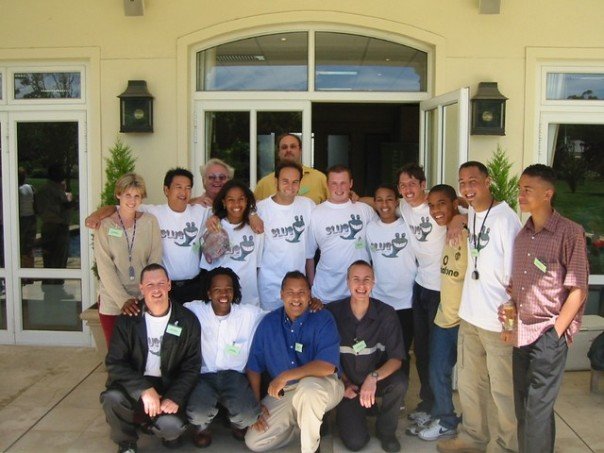
SLUG (Schools Linux Users Group) group photo. SLUG was founded to support the tuXlab schools that ran Linux.

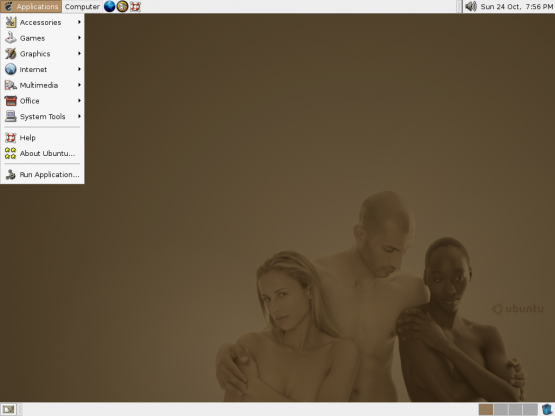
Ubuntu 4.10 default desktop Image from distrowatch
Like each month, here comes a report about the work of paid contributors to Debian LTS.
Individual reports
In October, about 197 work hours have been dispatched among 13 paid contributors. Their reports are available:
No comment Liked this article? Click here. My blog is Flattr-enabled.
I've been tempted to run own ElectrumX server for quite some. First attempt was to run this on Turris Omnia router, however that turned out to be impossible due to memory requirements both Bitcoind and ElectrumX have.
This time I've dedicated host for this and it runs fine:
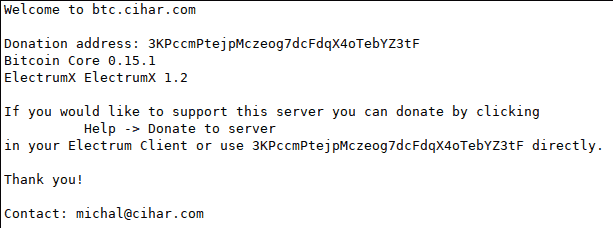
The server runs Debian sid (probably it would be doable on stretch as well, but I didn't try much) and the setup was pretty simple.
First we need to install some things - Bitcoin daemon and ElectrumX dependencies:
# Bitcoin daemon, not available in stretch
apt install bitcoind
# We will checkout ElectrumX from git
apt install git
# ElectrumX deps
apt install python3-aiohttp
# Build environment for ElectrumX deps
apt install build-essentials python3-pip libleveldb-dev
# ElectrumX deps not packaged in Debian
pip3 install plyvel pylru
# Download ElectrumX sources
su - electrumx -c 'git clone https://github.com/kyuupichan/electrumx.git'
adduser bitcoind
adduser electrumx
/home/bitcoind/.bitcoin/bitcoin.conf:
txindex=1
listen=1
rpcuser=bitcoin
rpcpassword=somerandompassword
/etc/electrumx.conf:
COIN=BitcoinSegwit
DB_DIRECTORY=/home/electrumx/.electrumx
DAEMON_URL=http://bitcoin:somerandompassword@localhost:8332/
TCP_PORT=50001
SSL_PORT=50002
HOST=::
DONATION_ADDRESS=3KPccmPtejpMczeog7dcFdqX4oTebYZ3tF
SSL_CERTFILE=/etc/letsencrypt/live/btc.cihar.com/fullchain.pem
SSL_KEYFILE=/etc/letsencrypt/live/btc.cihar.com/privkey.pem
REPORT_HOST=btc.cihar.com
BANNER_FILE=banner
/etc/systemd/system/electrumx.service:
[Unit]
Description=Electrumx
After=bitcoind.target
[Service]
EnvironmentFile=/etc/electrumx.conf
ExecStart=/home/electrumx/electrumx/electrumx_server.py
User=electrumx
LimitNOFILE=8192
TimeoutStopSec=30min
[Install]
WantedBy=multi-user.target
/etc/systemd/system/bitcoind.service:
[Unit]
Description=Bitcoind
After=network.target
[Service]
ExecStart=/usr/bin/bitcoind
User=bitcoind
TimeoutStopSec=30min
Restart=on-failure
RestartSec=30
[Install]
WantedBy=multi-user.target
# Enable services so that they start on boot
systemctl enable electrumx.service bitcoind.service
# Start services
systemctl start electrumx.service bitcoind.service
~/.bitcoin/blocks/). Only get blocks from sources you trust absolutely as it might change your view of history, see Bitcoin wiki for more information on the topic. There is also magnet link in the ElectrumX docs to download ElectrumX database to speed up this process. This should be safe to download from untrusted source.
The last think I'd like to mention is resources usage. You should have at least 4 GB of memory to run this, 8 GB is really preferred (both services consume around 4GB). On disk space, Bitcoin currently consumes 170 GB and ElectrumX 25 GB. Ideally all this should be running on the SSD disk.
You can however offload some of the files to slower storage as old blocks are rarely accessed and this can save some space on your storage. Following script will move around 50 GB of blockchain data to /mnt/btc/blocks (use only when Bitcoin daemon is not running):
1 2 3 4 5 6 7 8 9 10 11 | #!/bin/sh
set -e
DEST=/mnt/btc/blocks
cd ~/.bitcoin/blocks/
find . -type f \( -name 'blk00[0123]*.dat' -o -name 'rev00[0123]*dat' \) sed 's@^\./@@' while read name ; do
mv $name $DEST/$name
ln -s $DEST/$name $name
done
|
3KPccmPtejpMczeog7dcFdqX4oTebYZ3tF.
Doing a lot with all kinds of tables in ScalaFX, I stumbled upon a bug in ScalaFX that, with the help of the bug report, I was able to circumvent. It is a subtle bug where types are mixed between scalafx.SOMETHING and the corresponding javafx.SOMETHING.

In one of the answers it is stated that:
The issue is with implicit conversion from TableColumn not being located by Scala. I am not clear why this is happening (maybe a Scala bug).But the provided work-around at least made it work. Until today I stumbled onto a (probably) just another instance of this bug, but where the same work-around does not help. I am using TreeTableViews and try to replace the children of the root by filtering out one element. The code I use is of course very different, but here is a reduced and fully contained example, based on the original bug report and adapted to use a TreeTableView:
import scalafx.Includes._
import scalafx.scene.control.TreeTableColumn._
import scalafx.scene.control.TreeItem._
import scalafx.application.JFXApp.PrimaryStage
import scalafx.application.JFXApp
import scalafx.scene.Scene
import scalafx.scene.layout._
import scalafx.scene.control._
import scalafx.scene.control.TreeTableView
import scalafx.scene.control.Button
import scalafx.scene.paint.Color
import scalafx.beans.property. ObjectProperty, StringProperty
import scalafx.collections.ObservableBuffer
// TableTester.scala
object TableTester extends JFXApp
val characters = ObservableBuffer[Person](
new Person("Peggy", "Sue", "123", Color.Violet),
new Person("Rocky", "Raccoon", "456", Color.GreenYellow),
new Person("Bungalow ", "Bill", "789", Color.DarkSalmon)
)
val table = new TreeTableView[Person](
new TreeItem[Person](new Person("","","",Color.Red))
expanded = true
children = characters.map(new TreeItem[Person](_))
)
columns ++= List(
new TreeTableColumn[Person, String]
text = "First Name"
cellValueFactory =
_.value.value.value.firstName
prefWidth = 180
,
new TreeTableColumn[Person, String]()
text = "Last Name"
cellValueFactory =
_.value.value.value.lastName
prefWidth = 180
)
stage = new PrimaryStage
title = "Simple Table View"
scene = new Scene
content = new VBox()
children = List(
new Button("Test it")
onAction = p =>
val foo: ObservableBuffer[TreeItem[Person]] = table.root.value.children.map(p =>
val bar: TreeItem[Person] = p
p
)
table.root.value.children = foo
,
table)
// Person.scala
class Person(firstName_ : String, lastName_ : String, phone_ : String, favoriteColor_ : Color = Color.Blue)
val firstName = new StringProperty(this, "firstName", firstName_)
val lastName = new StringProperty(this, "lastName", lastName_)
val phone = new StringProperty(this, "phone", phone_)
val favoriteColor = new ObjectProperty(this, "favoriteColor", favoriteColor_)
firstName.onChange((x, _, _) => System.out.println(x.value))
With this code what one gets on compilation with the latest Scala and ScalaFX is:
[error] found : scalafx.collections.ObservableBuffer[javafx.scene.control.TreeItem[Person]]
[error] required: scalafx.collections.ObservableBuffer[scalafx.scene.control.TreeItem[Person]]
[error] val foo: ObservableBuffer[TreeItem[Person]] = table.root.value.children.map(p =>
[error] ^
[error] one error found
And in this case, adding import statements didn t help, what a pity. Unfortunately this bug is open since 2014 with a helpwanted tag and nothing is going on. I guess I have to try to dive into the source code of ScalaFX
About me
Hello, world! For those who are meeting me for the first time, I am a 31 year old History teacher from Porto Alegre, Brazil.
Some people might know me from the Python community, because I have been leading PyLadies Porto Alegre and helping organize Django Girls workshops in my state since 2016. If you don't, that's okay. Either way, it's nice to have you here.
Ever since I learned about Rails Girls Summer of Code, during the International Free Software Forum - FISL 16, I have been wanting to get into a tech internship program. Google Summer of Code made into my radar as well, but I didn't really feel like I knew enough to try and get into those programs... until I found Outreachy. From their site:
Outreachy is an organization that provides three-month internships for people from groups traditionally underrepresented in tech. Interns work remotely with mentors from Free and Open Source Software (FOSS) communities on projects ranging from programming, user experience, documentation, illustration and graphical design, to data science.There were many good projects to choose from on this round, a lot of them with few requirements - and most with requirements that I believed I could fullfill, such as some knowledge of HTML, CSS, Python or Django. I ought to say that I am not an expert in any of those. And, since you're reading this, I'm going to be completely honest. Coding is hard. Coding is hard to learn, it takes a lot of studying and a lot of practice. Even though I have been messing around computers pretty much since I was a kid, because I was a girl lucky enough to have a father who owned a computer store, I hadn't began learning how to program until mid-2015 - and I am still learning. I think I became such an autodidact because I had to (and, of course, because I was given the conditions to be, such as having spare time to study when I wasn't at school). I had to get any and all information from my surroundings and turn into knowledge that I could use to achieve my goals. In a time when I could only get new computer games through a CD-ROM and the computer I was allowed to use didn't have a CD-ROM drive, I had to try and learn how to open a computer cabinet and connect/disconnect hardware properly, so I could use my brother's CD-ROM drive on the computer I was allowed to and install the games without anyone noticing. When, back in 1998, I couldn't connect to the internet because the computer I was allowed to use didn't have a modem, I had to learn about networks to figure out how to do it from my brother's computer on the LAN (local network). I would go to the community public library and read books and any tech magazines I could get my hands into (libraries didn't usually have computers to be used by the public back then). It was about 2002 when I learned how to create HTML sites by studying at the source code from pages I had saved to read offline in one of the very, very few times I was allowed to access the internet and browse the web. Of course, the site I created back then never saw the light of the day, because I didn't have really have internet access at home. So, how come it is that only now, 14 years later, I am trying to get into tech? Because when I finished high school in 2003, I was still a minor and my family didn't allow me to go to Vocational School and take an IT course. (Never mind that my own oldest brother had graduated in IT and working with for almost a decade.) I ended up going to study... teacher training in History as an undergrad course. A lot has happened since then. I took the exam to become a public school teacher and more than two years had passed without being called to work. I spent 3 years in odd-jobs that paid barely enough to pay rent (and, sometimes, not even that). Since the IT is the new thing and all jobs are in IT, finally, finally it seemed okay for me to take that Vocational School training in a public school - and so I did. I gotta say, I thought that while I studied, I would be able to get some sort of job or internship to help with my learning. After all, I had seen it easily happening with people I met before getting into the course. And by "people", of course, I mean white men. For me, it took a whole year of searching, trying and interviewing for me to get an internship related to the field - tech support in a school computer lab, running GNU/Linux. And, in that very same week, I was hired as a public school teacher. There is a lot more... actually, there is so much more to this story, but I think I have told enough for now. Enough to know where I came from and who I am, as of now. I hope you stick around. I am bound to write here every two weeks, so I guess I will see you then! o/
Hosted Weblate provides also free hosting for free software projects. The hosting requests queue has grown too long, so it's time to process it and include new project.
This time, the newly hosted projects include:
I ve been using Kitten
Block for
years, since I don t really need the blood pressure spike caused by
accidentally following links to certain UK newspapers. Unfortunately it
hasn t been ported to Firefox 57. I tried emailing the author a couple of
months ago, but my email bounced.
However, if your primary goal is just to block the websites in question
rather than seeing kitten pictures as such (let s face it, the internet is
not short of alternative sources of kitten pictures), then it s easy to do
with uBlock
Origin.
After installing the extension if necessary, go to Tools Add-ons
Extensions uBlock Origin Preferences My filters, and add
www.dailymail.co.uk and www.express.co.uk, each on its own line. (Of
course you can easily add more if you like.) Voil : instant tranquility.
Incidentally, this also works fine on Android. The fact that it was easy to
install a good ad blocker without having to mess about with a rooted device
or strange proxy settings was the main reason I switched to Firefox on my phone.
Narabu is a new intraframe video codec. You probably want to read
part 1,
part 2,
part 3,
part 4
and
part 5
first.
Like I wrote in part 5, there basically isn't a big splashy ending where
everything is resolved here; you're basically getting some graphs with
some open questions and some interesting observations.
First of all, though, I'll need to make a correction: In the last part,
I wrote that encoding takes 1.2 ms for 720p luma-only on my GTX 950,
which isn't correct I remembered the wrong number. The right number is
2.3 ms, which I guess explains even more why I don't think it's acceptable
at the current stage. (I'm also pretty sure it's possible to rearchitect
the encoder so that it's much better, but I am moving on to other
video-related things for the time being.)
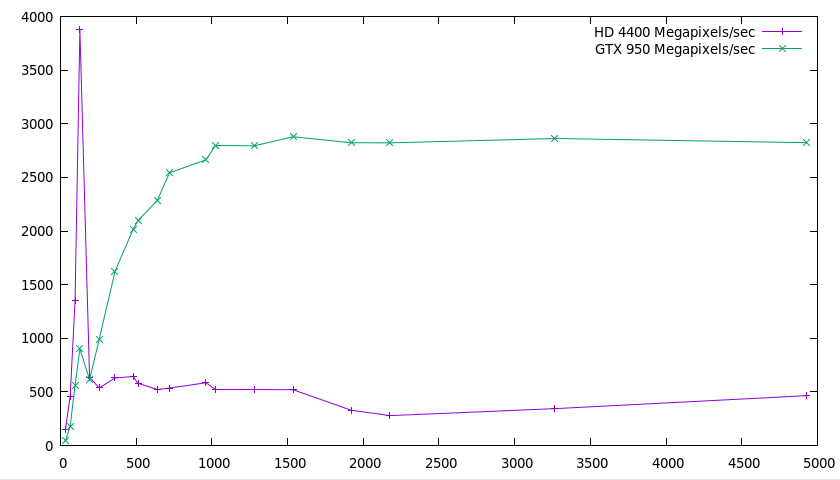
I encoded a picture straight off my DSLR (luma-only) at various resolutions,
keeping the aspect. Then I decoded it a bunch of times on my GTX 950
(low-end last-generation NVIDIA) and on my HD 4400 (ultraportable Haswell
laptop) and measured the times. They're normalized for megapixels per second
decoded; remember that doubling width (x axis) means quadruple the pixels.
Here it is:
I'm not going to comment much beyond two observations:
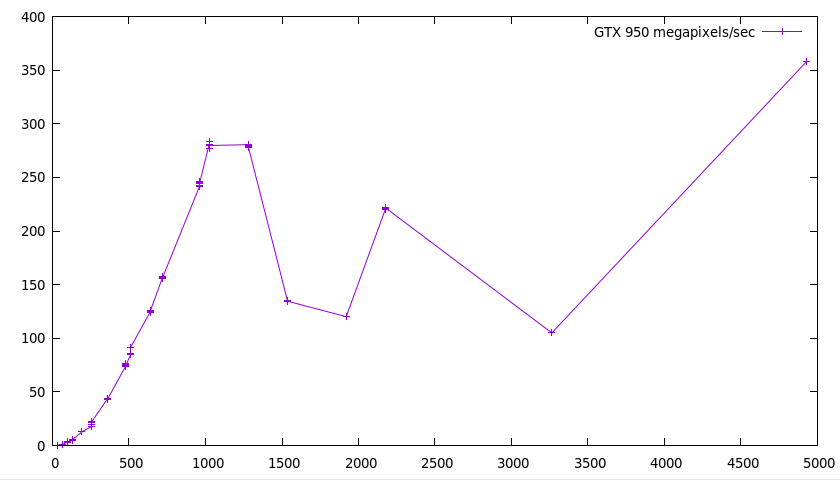
This is interesting. I have few explanations. Probably more benchmarking and
profiling would be needed to make sense of any of it. In fact, it's so
strange that I would suspect a bug, but it does indeed seem to create a
valid bitstream that is decoded by the decoder.
Do note, however, that seemingly even on the smallest resolutions, there's a
1.7 ms base cost (you can't see it on the picture, but you'd see it in an
unnormalized graph). I don't have a very good explanation for this either
(even though there are some costs that are dependent on the alphabet size
instead of the number of pixels), but figuring it out would probably be a
great start for getting the performance up.
So that concludes the series, on a cliffhanger. :-) Even though it's not in a
situation where you can just take it and put it into something useful, I hope
it was an interesting introduction to the GPU! And in the meantime, I've
released version 1.6.3 of Nageru, my live video
mixer (also heavily GPU-based) with various small adjustments and bug fixes
found before and during Tr ndisk. And Movit is getting compute shaders
for that extra speed boost, although parts of it is bending my head.
Exciting times in GPU land :-)
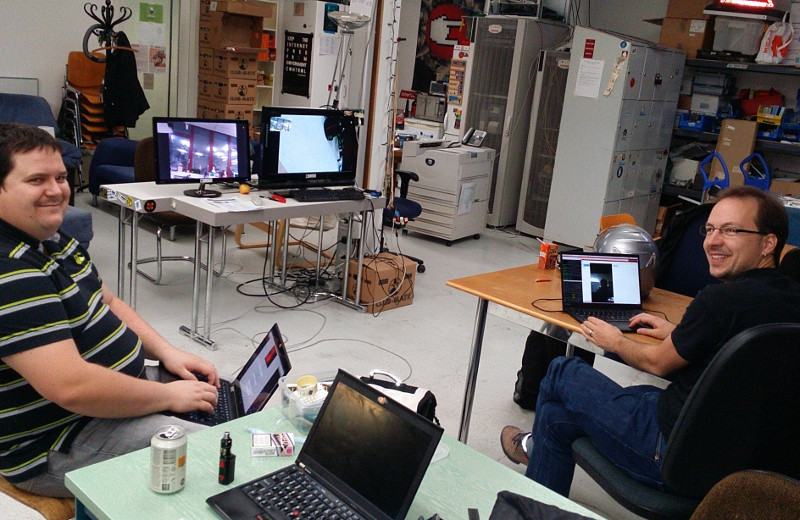
Francois is using Raspberry Pi and PiCam to develop a telepresence network for hackerspaces (the big screens in the middle of the photo).
The original version of the telepresence solution is using WebRTC. Ring's OpenDHT potentially offers more privacy and resilience.
Next.