Search Results: "ag"

7 June 2017

Alexander Wirt: Upcoming Alioth Sprint

As some of you already know we do need a replacement for alioth.debian.org. It is based on wheezy and a heavily modified version of Fusionforge. Unfortunately I am the last admin left for alioth and I am not really familiar with fusionforge. After some chatting with a bunch of people we decided that we should replace alioth with a stripped down version of new services. We want to start with the basic things, git and and identity provider. For git there are two candidates: gitlab and pagure. Gitlab is really nice, but has a big problem: it is Opencore, which that it is not entirely opensource. I don t think we should use software licensed under such a model for one of our core services. That brings us to the last candidate: pagure. Pagure is a nice project based on gitolite, it is developed by the fedora project which use it for all their repos. Pagure isn t packaged for Debian yet, but that is work in progress (#829046). If you can lend a helping hand to the packager, please do so. To get things started we will have a Alioth Sprint from 18th to 20th August 2017 in Hamburg, Germany. If you want to join us, add yourself to the wikipage. For further discussions I created a mailinglist on alioth. Please subscribe if you are interested in that topic.

Alexander Wirt: New blog

After a long time I decided to move my blog again to something with git and markdown in the background. I decided to give hugo a chance on my uberspace account. Uberspace is a nice, geek driven hoster in germany from geeks for geeks. The blog itself is hosted on github, it pushes commits to a simple golang based webhook service based on adnanh/webhook.

Jeremy Bicha: GNOME Tweak Tool 3.25.2

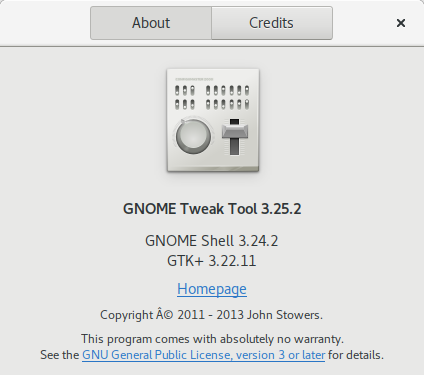
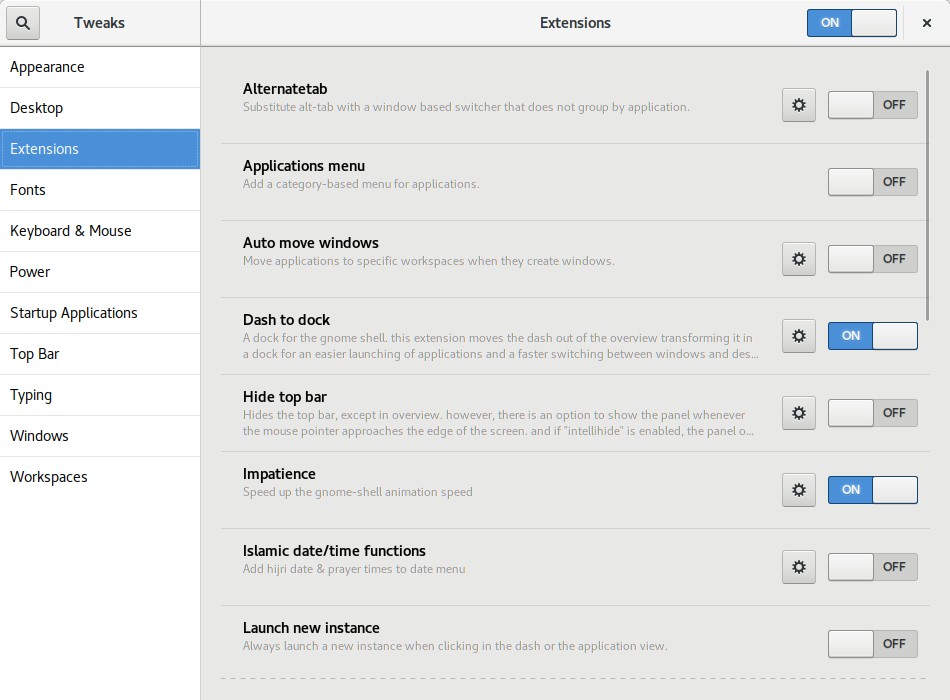
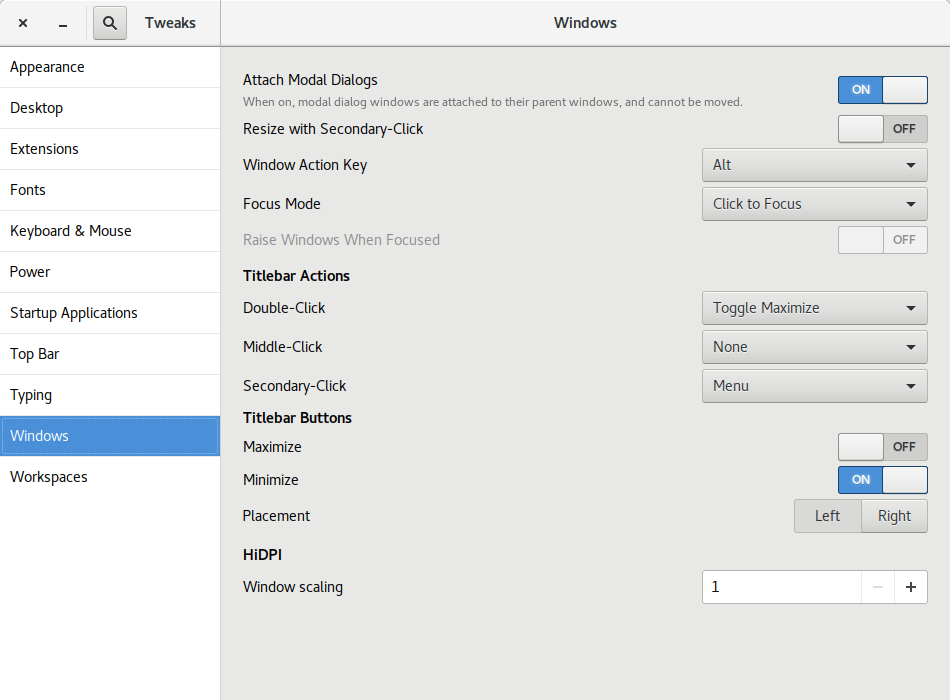
Today, I released the first development snapshot (3.25.2) of what will be GNOME Tweak Tool 3.26. Many of the panels have received UI updates. Here are a few highlights. Before this version, Tweak Tool didn t report its own version number on its About dialog! Also, as far as I know, there was no visible place in the default GNOME install for you to see what version of GTK+ is on your system. Especially now that GNOME and GTK+ releases don t share the same version numbers any more, I thought it was useful information to be in a tweak app. Florian M llner updated the layout of the GNOME Shell Extensions page: Rui Matos added a new Disable While Typing tweak to the Touchpad section. Alberto Fanjul added a Battery Percentage tweak for GNOME Shell s top bar. I added a Left/Right Placement tweak for the window buttons (minimize, maximize, close) . This screenshot shows a minimize and close button on the left. I think it s well known that Ubuntu s window buttons have been on the left for years but GNOME has kept the window buttons on the right. In fact, the GNOME 3 default is a single close button (see the other screenshots). For Unity (Ubuntu s default UI from 2011 until this year), it made sense for the buttons to be on the left because of how Unity s menu bar worked (the right side was used by the indicator system status menus). I don t believe the Ubuntu Desktop team has decided yet which side the window buttons will be on or which buttons there will be. I m ok with either side but I think I have a slight preference towards putting them on the right like Windows does. One reason I m not too worried about the Ubuntu default is that it s now very easy to switch them to the other side! If Ubuntu includes a dock like the excellent Dash to Dock in the default install, I think it makes sense for Ubuntu to add a minimize button by default. My admittedly unusual opinion is that there s no need for a maximize button.
  1. For one thing, GNOME is thoroughly tested with one window button; adding a second one shouldn t be too big of a deal, but maybe adding a 3rd button might not work as well with the design of some apps.
  2. When I maximize an app, I either double-click the titlebar or drag the app to the top of the screen so a maximize button just isn t needed.
  3. A dedicated maximize just doesn t make as much sense when there is more than one possible maximization state. Besides traditional maximize, there is now left and right semi-maximize. There s even a goal for GNOME 3.26 to support quarter-tiling .
Other Changes and Info

Petter Reinholdtsen: Idea for storing trusted timestamps in a Noark 5 archive

This is a copy of an email I posted to the nikita-noark mailing list. Please follow up there if you would like to discuss this topic. The background is that we are making a free software archive system based on the Norwegian Noark 5 standard for government archives. I've been wondering a bit lately how trusted timestamps could be stored in Noark 5. Trusted timestamps can be used to verify that some information (document/file/checksum/metadata) have not been changed since a specific time in the past. This is useful to verify the integrity of the documents in the archive. Then it occured to me, perhaps the trusted timestamps could be stored as dokument variants (ie dokumentobjekt referered to from dokumentbeskrivelse) with the filename set to the hash it is stamping? Given a "dokumentbeskrivelse" with an associated "dokumentobjekt", a new dokumentobjekt is associated with "dokumentbeskrivelse" with the same attributes as the stamped dokumentobjekt except these attributes: This assume a service following IETF RFC 3161 is used, which specifiy the given MIME type for replies and the .tsr file ending for the content of such trusted timestamp. As far as I can tell from the Noark 5 specifications, it is OK to have several variants/renderings of a dokument attached to a given dokumentbeskrivelse objekt. It might be stretching it a bit to make some of these variants represent crypto-signatures useful for verifying the document integrity instead of representing the dokument itself. Using the source of the service in formatDetaljer allow several timestamping services to be used. This is useful to spread the risk of key compromise over several organisations. It would only be a problem to trust the timestamps if all of the organisations are compromised. The following oneliner on Linux can be used to generate the tsr file. $input is the path to the file to checksum, and $sha256 is the SHA-256 checksum of the file (ie the ".tsr" value mentioned above).
openssl ts -query -data "$inputfile" -cert -sha256 -no_nonce \
    curl -s -H "Content-Type: application/timestamp-query" \
      --data-binary "@-" http://zeitstempel.dfn.de > $sha256.tsr
To verify the timestamp, you first need to download the public key of the trusted timestamp service, for example using this command:
wget -O ca-cert.txt \
  https://pki.pca.dfn.de/global-services-ca/pub/cacert/chain.txt
Note, the public key should be stored alongside the timestamps in the archive to make sure it is also available 100 years from now. It is probably a good idea to standardise how and were to store such public keys, to make it easier to find for those trying to verify documents 100 or 1000 years from now. :) The verification itself is a simple openssl command:
openssl ts -verify -data $inputfile -in $sha256.tsr \
  -CAfile ca-cert.txt -text
Is there any reason this approach would not work? Is it somehow against the Noark 5 specification?

Michal Čihař: Gammu family releases

During last weeks I was finally able to push out some releases of Gammu and related tools. Those were mostly waiting for quite some time in Git, but still will be useful for many users. Gammu 1.38.3 brings several SMSD performance improvements (I'd like to hear feedback here how much it helped in real world workloads), fixes USSD related crashes and adds support for new devices. python-gammu 2.8 finally brings emoji fixes to Python users as well. Those were fixed in Gammu quite some time ago, but the Python API still didn't handle them properly. There was also simplification in the calls API. Wammu release will follow shortly in next days, the most important change there being license change to GPLv3 or later.

Filed under: Debian English Gammu python-gammu Wammu

6 June 2017

Gunnar Wolf: Made with Creative Commons: Starting a translation project

Dear Lazyweb, About a week ago, I learnt about the release of an interesting book by the fine people at Creative Commons: Made with Creative Commons. The book itself is, of course, CC BY-SA-licensed. I downloaded it and started reading right away. Some minutes later, I ordered a dead-tree copy, which arrived a couple of days ago. (I'm linking to the publisher's page, but bought it from Amazon M xico... Shipping it from Denmark would not have been as cheap and fast, I guess). Anyway, given my workplace, given the community I know, given I know something like this is much needed... I will start a Spanish translation of the content. There are at least two other people interested in participating, and I haven't yet publicized my intentions (this is the first public statement about it). So, dear Lazyweb: What I need is a good framework for doing this. I started by creating a Git repository, and we were discussing to translate to Markdown (to later format according to the desired output) but then I thought... If we want the translation to be updateable, and to be able to properly accept other people's work, maybe a better format is warranted? So, my current idea is to create a Markdown version for the English original, and find a way to shoehorn^Wseparate it by paragraphs and feed it to Gettext, which is the best translation framework I have used (but is meant for code translation, not for full-text)... Dear lazyweb: What tools do you recommend me to use? Quite important to me: Are they Free tools? Are they easy to use by third-parties, maybe incorporating work via Git? Or, at least, via a Web front-end that allows me as a project lead to review and approve/fix/reject strings? Thanks, lazyweb!

Reproducible builds folks: Reproducible Builds: week 110 in Stretch cycle

Here's what happened in the Reproducible Builds effort between Sunday May 28 and Saturday June 3 2017: Past an upcoming events Documentation updates Toolchain development and fixes Patches and bugs filed 4 package reviews have been added, 6 have been updated and 25 have been removed in this week, adding to our knowledge about identified issues. Weekly QA work During our reproducibility testing, FTBFS bugs have been detected and reported by: diffoscope development tests.reproducible-builds.org Mattia Rizzolo: Daniel Kahn Gillmor: Vagrant Cascadian: Holger Levsen: Misc. This week's edition was written by Chris Lamb, Bernhard M. Wiedemann and Holger Levsen & reviewed by a bunch of Reproducible Builds folks on IRC & the mailing lists.

Russ Allbery: Review: Star Healer

Review: Star Healer, by James White
Series: Sector General #6
Publisher: Orb
Copyright: 1984
Printing: 2002
ISBN: 0-312-87770-6
Format: Trade paperback
Pages: 206
Star Healer is the sixth book of the Sector General series, and I think it may be the first novel in the series that was written as a novel instead of a fix-up of short stories. That makes it not a bad place to start in the series if one would rather not deal with fix-ups or barely-disguised short story collections. There isn't a huge amount of character development over the course of this series (at least to this point), so the main thing you would lose by starting here is some built-up reason for caring about the main character. This is the third book in the Alien Emergencies omnibus (the book referenced in the publication information here). Most of the previous stories have focused on Conway, a Senior Physician in the sprawling and wonderfully well-equipped multi-species hospital called Sector General and, in recent stories, the head physician in the hospital's ambulance ship. Becoming a Senior Physician at Sector General is quite the accomplishment, and a fine point to reach in the career of any doctor specializing in varied life forms, but there is another tier above: the Diagnosticians, who are the elite of Sector General. The difference is education tapes. Deep knowledge of even one specific type of life is a lot to ask of a doctor, as shown by the increasing specialization of human medicine. Sector General, which deals with wildly varying ailments of thousands of species including entirely unknown ones (if, admittedly, primarily trauma, at least in the stories shown), would be an impossible task. White realizes this and works around it with education tapes that temporarily embed in a doctor's head the experience of a doctor of another species entirely. This provides the native expertise missing, but it comes with the full personality of the doctor who recorded the tape, including preferences for food and romantic attachment that may be highly disorienting. Senior Physicians use a tape at a time, and then have it erased again when they don't need it. Diagnosticians juggle four or more tapes at the same time, and keep them for long periods or even permanently, allowing them to do ground-breaking original research. The opening of Star Healer is an offer from the intimidating Chief Psychologist of Sector General: he has a shot at Diagnostician. But it's a major decision that he should think over first, so the next step is to take a vacation of sorts on a quiet world with a small human scientific station. Oh, and there's a native medical problem, although not one with much urgency. Conway doesn't do a lot of resting, because of course he gets pulled into trying to understand the mystery of an alien species that is solitary to the point of deep and unbreakable social taboos against even standing close to other people. This is a nice cultural puzzle in line with the rest of the series, but it also leaves Conway with a new ally: an alien healer in a society in which being a doctor is difficult to the point of near hopelessness. It's not much of a spoiler to say that of course Conway decides to try for Diagnostician after his "vacation." The rest of the book is him juggling multiple cases with his new and often conflicting modes of thinking, and tackling problems that require a bit less in the way of puzzle-solving and a bit more in the way of hard trade-off decisions and quick surgical action. Senior Physicians may be able to concentrate on just one puzzle at a time; Diagnosticians have to juggle several. And they're larger, more long-term problems, focusing on how to improve a general problem for a whole species rather than just heal a specific injured alien. One interesting aspect of this series, which is very much on display here, is that Sector General most definitely does not have a Prime Directive. They are cautious about making contact with particularly primitive civilizations for fear that spacefarers would give them an inferiority complex, but sometimes they do anyway. And if they run into some biological system that offends their sensibilities, they try to fix it, not just observe it. White frequently shows species caught in what the characters call "biological traps," unable to develop farther because of some biological adaptation that gets in their way, and Sector General tries to fix those. It's an interesting ethical problem that I wish they'd think about a bit more. It's not clear they're wrong, and I think it's correct to take an expansive view of the mission to heal, but there's also a sense in which Sector General is modifying culture and biology to make aliens more like them. (The parallels between this and all the abusive paternalism that human cultures do around disability is a little too close to home to be comfortable, and now I kind of wish it hadn't occurred to me.) The gender roles, sadly, continue to be dire, although mostly ignorable because the one major female character is generally just shown as another doctor with little attention to sex. But apparently women (of every species!) cannot become Diagnosticians because they have an insurmountable biological aversion to sharing their minds with a learning tape from any doctor who doesn't find them physically attractive, which is just... sigh. It's sad that someone who could write an otherwise remarkably open-minded and pacifist series of stories, in sharp contrast with most of SF history, would still have that large of a blind spot. Apart from the times gender comes up, I liked this book more than the rest of the series, in part because I strongly prefer novels to short stories. There's more room to develop the story, and while characterization continues to not be White's strong point and that space mostly goes to more puzzles instead, he does provide an interesting set of interlocking puzzles. The problem posed by the aliens Conway meets on his "vacation" isn't fully resolved here (presumably that's for a future book), but he does solve several other significant problems and develops his own problem-solving style in more depth than in previous stories. Mildly recommended, particularly if you like this series in general. Followed by Code Blue - Emergency. Rating: 7 out of 10

Dirk Eddelbuettel: anytime 0.3.0

A new version of the anytime package is now on CRAN. It marks the eleventh release since the inaugural version late last summer. anytime is a very focused package aiming to do just one thing really well: to convert anything in integer, numeric, character, factor, ordered, ... format to either POSIXct or Date objects -- and to do so without requiring a format string. See the anytime page, or the GitHub README.md for a few examples. This release brings a little more consistency to how numeric or integer arguments are handled. Previously, we were overly eager in accepting something such as 20150605 (i.e. today) as a (numerical or integer) input to both anytime() and anydate(). That is well-intentioned, but ultimately foolish. We relied on heuristic cutoffs to determine whether input was "meant to be" a date or time offset. There lies madness. We now differentiate whether we were called via anytime() (in which case numerical data is second offset to the epoch, just as.POSICct()) or anytime() (in which case it is days offset to the (date) epoch, just like as.Date()). The previous behaviour can be restored via a options, both function-local as well as global are supported. And of course, there is no change for all other (and more common) input formats, notably character or factor. A full list of changes follows.

Changes in anytime version 0.3.0 (2017-06-05)
  • Numeric input is now always an offset to epoch, with anytime() using seconds, and anydate() using dates. (#65 fixing #63).
  • Old behaviour can be re-enabled with an option also supporting a global setting getOption("anytimeOldHeuristic")
  • RStudio versions 1.1.129 or later can run all functions without fear of crashing due to a change in their use of Boost.
  • Replaced init.c with registration code inside of RcppExports.cpp thanks to Rcpp 0.12.11.

Courtesy of CRANberries, there is a comparison to the previous release. More information is on the anytime page. For questions or comments use the issue tracker off the GitHub repo.

This post by Dirk Eddelbuettel originated on his Thinking inside the box blog. Please report excessive re-aggregation in third-party for-profit settings.

5 June 2017

Clint Adams: nibus daisens

What s up with narcissists and sexual predators frequently reapplying their lipstick?
Posted on 2017-06-05
Tags: ranticore

Jonathan Dowland: On blogging

For a while now, I've wanted to increase my frequency of blogging. I've got roughly 24 draft posts which I haven't finished writing, stretching back to at least 2009, and several other topics that I haven't even begun to write about but have something in the back of my mind which I'd like to express. I have been self-censoring to an extent for two reasons: Neither of these are good enough reasons to do so: in the case of Facebook, I make very little use of it, and if people didn't find my posts interesting they can mute me, block me or ignore them. In the case of Twitter, my interest in it as a platform has waned since they have made it increasingly difficult to interact with them as a developer. I've given up trying to archive my own tweets, and so on longer think of it as a good place to express anything in isolation. Going forward I'm going to make an effort to ignore their influence on me.

John Goerzen: Flying with my brothers

Picture one Sunday morning. Three guys are seemingly-randomly walking into a Mennonite church in rural Nebraska. One with long hair and well-maintained clothes from the 70s. Another dressed well enough to be preaching. And the third simply dressed to be comfortable, with short hair showing evidence of having worn a headset for a couple of hours that morning. This was the scene as we made a spur-of-the-moment visit to that church which resulted in quite some surprise all around, since my brother knew a number of people there. For instance:
Pastor: Peter! What are you doing here? Peter: [jokingly] Is that how you greet visitors here?
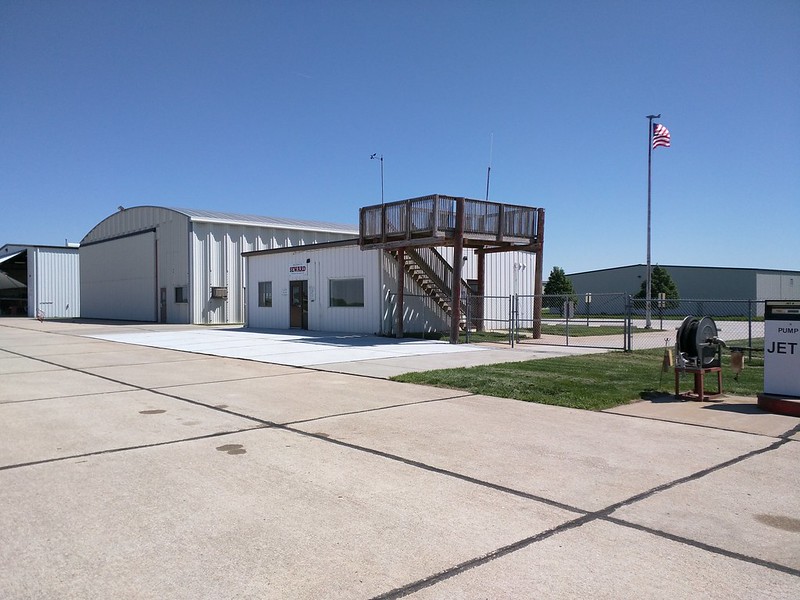
And then, of course, Peter would say, Well, we were flying home from South Dakota and figured we d stop in at Beatrice for fuel. And drop in on you. Followed by some surprise that we would stop at their little airport (which is quite a nice one). This all happened because it was windy. This is the fun adventure of aviation. Sometimes you plan to go to Texas, but the weather there is terrible, so you discover a 100-year-old landmark in Indiana instead. Or sometimes, like a couple of weeks ago, we planned to fly straight home but spent a few hours exploring rural Nebraska. The three of us flew to Sioux Falls, SD, in a little Cessna to visit my uncle and aunt up there. On our flight up, we stopped at the little airport in Seward, NE. It was complete with this unique elevated deck. In my imagination, this is used for people to drink beer while watching the planes land. IMG_20170512_113323 In South Dakota, we had a weekend full of card and board games, horseshoes, and Crokinole with my uncle and aunt, who are always fun to visit. We had many memories of visits up there as children and the pleasant enjoyment of the fact that we didn t need an 8-hour drive to get there. We flew back with a huge bag of large rhubarb from their garden (that too is something of a tradition!) It was a fun weekend to spend with my brothers first time we d been able to do this in a long while. And it marked the 11th state I ve flown into, and over 17,000 miles of flying.

4 June 2017

Dirk Eddelbuettel: RcppArmadillo 0.7.900.2.0

armadillo image The new RcppArmadillo release 0.7.900.2.0 is now on CRAN, and the Debian package was just updated as well. Armadillo is a powerful and expressive C++ template library for linear algebra aiming towards a good balance between speed and ease of use with a syntax deliberately close to a Matlab. RcppArmadillo integrates this library with the R environment and language--and is widely used by (currently) 350 other packages on CRAN---an increase of 32 since the last CRAN release of 0.7.800.2.0 in April! With the 7.900.* series of Armadillo, Conrad has started to more fully utilize OpenMP (also see Wikipedia on OpenMP) for operations that can be parallelized. To use this in your package you need to update its src/Makevars ,.win file similarly to what the skeleton default now uses
PKG_CXXFLAGS = $(SHLIB_OPENMP_CXXFLAGS) 
PKG_LIBS = $(SHLIB_OPENMP_CFLAGS) $(LAPACK_LIBS) $(BLAS_LIBS) $(FLIBS)
and you may want to enable C++11 while you are at it---though this may pose issues with older-than-ancient RHEL installations which are still (way too) pervasive so we do not do it by default (yet). Here, we once again rely on the build infrastructure automagically provided by R itself: if and when OpenMP is available, R will use it via $(SHLIB_OPENMP_CXXFLAGS) etc; see the fine WRE manual for details. That said, some operating systems make this harder than other, and macOS usually takes the crown. See for example this blog post by James for surviving in that environment. I am a little short of details because on Linux these things just work, and have for well over a decade. The rcpp-devel mailing list will be the best place for questions. Changes in this release relative to the previous CRAN release are as follows:

Changes in RcppArmadillo version 0.7.900.2.0 (2017-06-02)
  • Upgraded to Armadillo release 7.900.2 (Evil Banana Republic)
    • Expanded clamp() to handle cubes
    • Computationally expensive element-wise functions (such as exp(), log(), cos(), etc) can now be automatically sped up via OpenMP; this requires a C++11/C++14 compiler with OpenMP 3.0+ support for GCC and clang compilers
    • One caveat: when using GCC, use of -march=native in conjunction with -fopenmp may lead to speed regressions on recent processors
  • Added gcc 7 to support compiler check (James Balamuta in #128 addressing #126).
  • A unit test helper function for rmultinom was corrected (#133).
  • OpenMP support was added to the skeleton helper in inline.R

Courtesy of CRANberries, there is a diffstat report. More detailed information is on the RcppArmadillo page. Questions, comments etc should go to the rcpp-devel mailing list off the R-Forge page.

This post by Dirk Eddelbuettel originated on his Thinking inside the box blog. Please report excessive re-aggregation in third-party for-profit settings.

Lars Wirzenius: Vmdb2 first alpha release: Debian disk image creation tool

tl;dr: Get vmdebootstrap replacement from http://git.liw.fi/vmdb2 and run it from the source tree. Tell me if something doesn't work. Send patches. Many years ago I wrote vmdebootstrap, a tool for installing Debian on a disk image for virtual machines. I had a clear personal need: I was setting up a CI system and it needed six workers: one each for Debian oldstable, stable, and unstable, on two architectures (i386, amd64). Installing Debian six times in the same way is a lot of work, so I figured how difficult can it be to automate it. Turns out that not difficult at all, except to install a bootloader. (Don't ask me why I didn't use any of the other tools for this. It was long ago, and while some of the tools that now exist probably did exist then, I like writing code and learning things while doing it.) After a while I was happy with what the program did, but didn't want to upload it to Debian, and didn't want to add the kinds of things other people wanted, so I turned vmdebootstrap over to Neil Williams, who added a ton of new features. Unfortunately, it turned out that my initial architecture was not scaleable, and also the code I wrote wasn't very good, and there weren't any tests. Neil did heroic work forcing my crappy software into doing things I never envisioned. Last year he needed a break and asked me to take vmdebootstrap back. I did, and have been hiding from the public eye ever since, since I was so ashamed of the code. (I created a new identity and pretended to be an international assassin and backup specialist, travelling the world forcing people to have at least one tested backup of their system. If you've noticed reports in the press about people reporting near-death experiences while holding a shiny new USB drive, that would've been my fault.) Pop quiz: if you have a program with ten boolean options ("do this, except if that option is given, do the other thing"), how many black box tests do you need to test all the functionality? If one run of the program takes half an hour, how long will a full test suite run? I did some hard thinking about vmdebootstrap, and came to the sad conclusion that it had reached the end of its useful life as a living software project. There was no reasonable way to add most of the additional functionality people were asking for, and even maintaining the current code was too tedious a task to consider seriously. It was time to make a clean break of the past and start over, without caring about backwards compatibility. After all, the old code wasn't going anywhere so anyone who needed it could still use it. There was no need to burden a new program with my past mistakes. All new mistakes were called for. At the Cambridge mini-Debconf of November, 2016, I gave a short presentation of what I was going to do. I also posted about my plans to the debian-cloud list. In short, I would write a new, more flexible and cleaner replacement to be called vmdb2. For various personal reasons, I've not been able to spend as much time on vmdb2 as I'd like to, but I've now reached the point where I'd like to announce the first alpha version publically. The source code is hosted here: http://git.liw.fi/vmdb2 . There are .deb packages at my personal public APT repo (http://liw.fi/code/), but vmdb2 is easy enough to run directly from a git checkout:
sudo ./vmdb2 foo.vmdb --output foo.img
There's no need to install it to try it. What works: What doesn't work: I'm not opposed to adding support for those, but they're not directly interesting to me. For example, I only have amd64 machines. The best way to get support for additional features is to tell me how, preferably in the form of patches. (If I have to read tons of docs, or other people's code, and then write code and iterate while other people tell me it doesn't work, it's probably not happening.) Why would you be interested in vmdb2? There's a lot of other tools to do what it does, so perhaps you shouldn't care. That's fine. I like writing tools for myself. But if this kind of tool is of interest to you, please do have a look. A short tutorial: vmdb2 wants you to give it a "specification file" (conventionally suffixed .vmdb, because someone stole the .spec suffix, but vmdb2 doesn't care about the name). Below is an example. vmdb2 image specification files are in YAML, since I like YAML, and specify a sequence of steps to take to build the image. Each step is a tiny piece of self-contained functionality provided by a plugin.
steps:
  - mkimg: "  output  "
    size: 4G
  - mklabel: msdos
    device: "  output  "
  - mkpart: primary
    device: "  output  "
    start: 0%
    end: 100%
    part-tag: root-part
The above create an image (name is specified with the --output option), which is four gigabytes in size, and create a partitition table and a single partition that fills the whole disk. The "tag" is given so that later steps can easily refer to the partition. If you prefer another way to partition the disk, you can achieve that by adding more "mkpart" steps. For example, for UEFI you'll want to have an EFI partition.
  - mkfs: ext4
    partition: root-part
  - mount: root-part
    fs-tag: root-fs
The above formats the partition with the ext4 filesystem, and then mounts it. The mount point will be a temporary directory created by vmdb2, and a tag is again given to the mount point so it can be referred to.
  - unpack-rootfs: root-fs
The above unpacks a tar archive to put content into the filesystem, if the tar archive exists. The tar archive is specified with the --rootfs-tarball command line option.
  - debootstrap: stretch
    mirror: http://http.debian.net/debian
    target: root-fs
    unless: rootfs_unpacked
  - apt: linux-image-amd64
    fs-tag: root-fs
    unless: rootfs_unpacked
  - cache-rootfs: root-fs
    unless: rootfs_unpacked
The above will run debootstrap and install a kernel into the filesystem, but skip doing that if the rootfs tarball was used. Also, the tarball is created if it didn't exist. This way the tarball is used by all but the first run, which saves a bit of time. On my laptop and with a local mirror, debootstrap and kernel installation takes on the order of nine minutes (500 to 600 seconds), whereas unpacking the tar archive is a bit faster (takes around 30 seconds). When iterating over things other than debootstrap, this speeds things up something wonderful, and seems worth the complexity. The "unless:" mechanism is generic. All the steps share some state, and the unpack-rootfs step sets the "rootfs_unpacked" flag in the shared state. The "unless:" field tells vmdb2 to check for the flag and if it is not set, or if it is set to false ("unless it is set to true"), vmdb2 will execute the step. vmdb2 may get more such flags in the future, if there's need.
  - chroot: root-fs
    shell:  
      sed -i '/^root:[^:]*:/s//root::/' /etc/passwd
      echo pc-vmdb2 > /etc/hostname
The above executes a couple of shell commands in a chroot of the root filesystem we've just created. In this case they remove a login password from root, and set the hostname. This is a replacement of the vmdebootstrap "customize" script, but it can be inserted anywhere into the sequence of steps. There's boot chroot and non-chroot variants of the step. This is a good point to mention that writing customize scripts gets quite repetitive and tedious after a while, so vmdb2 has a plugin to run Ansible instead. You can customize your image with that instead, while the image is being built and not have to wait until you boot the image and running Ansible over ssh.
  - grub: bios
    root-fs: root-fs
    root-part: root-part
    device: "  output  "
    console: serial
Finally, install a boot loader, grub. This shows the BIOS variant, UEFI is also supported. This also configures grub and the kernel to use a serial console. There's a "yarn" (test suite) to build and smoke test an image with vmdb2 to make sure at least the basic functionality works. The smoke test boots the image under Qemu, logs in as root, and tells the VM to power off. Very, very basic, but has already found actual bugs in vmdb2. The smoke test needs the serial console to work. As with vmdebootstrap originally, I don't particularly want to maintain the package in Debian. I've added Debian packaging (so that I can install it on my own machines), but I already have enough packages to maintain, so I'm hoping someone else will volunteer to take on the Debian maintainership and bug handling duties. If you would like vmdb2 to do more things to suit you better, I'm happy to explain how to write plugins to provide more types of steps. If you are currently using vmdebootstrap, either directly or as part of another tool, I encourage you to have a look at vmdb2. In the long term, I would like to retire vmdebootstrap entirely, once vmdb2 can do everything vmdebootstrap can do, and few people use vmdebootstrap. This may take a while. In any case, whether you want a new image building tool or not, happy hacking.

3 June 2017

Norbert Preining: TeX Live 2017 released

TeX Live 2017 has been released! CTAN mirrors are busy updating. Get out bottles of good wine, and enjoy a good long download
Besides the huge amount of package updates due to the 2 month testing hiatus, I want to pick a few changes before copying the complete changelog entry: Additional TEXMF trees tlmgr got a new functionality to easily add and remove additional TEXMF trees to the search path. MikTeX had this features since long, and it was often requested. As it turned out, it is a rather trivial thing to achieve by some texmf.cnf lines. The rest is just front end in tlmgr. Here a few invocations (not very intelligent usage, though):

$ tlmgr conf auxtrees show
tlmgr: no auxiliary texmf trees defined.
$ tlmgr conf auxtrees add /projects/book-abc
$ tlmgr conf auxtrees
List of auxiliary texmf trees:
  /projects/book-abc
$ tlmgr conf auxtrees remove /projects/book-abc
$ tlmgr conf auxtrees show
tlmgr: no auxiliary texmf trees defined.
TeX Live Manager interactive shell tlmgr also got an interactive shell now, that can also be used for scripting. Available commands are all the usual command line actions, plus a few more (see documentation). Again, here a simple session:
$ tlmgr shell
protocol 1
tlmgr> load local
OK
tlmgr> load remote
tlmgr: package repositories
	main = /home/norbert/public_html/tlnet (verified)
	koma = http://www.komascript.de/repository/texlive/2017 (verified)
OK
tlmgr> update --list
tlmgr: package repositories
	main = /home/norbert/public_html/tlnet (verified)
	koma = http://www.komascript.de/repository/texlive/2017 (verified)
tlmgr: saving backups to /home/norbert/tl/2017/tlpkg/backups
tlmgr: no updates available
OK
tlmgr> byebye
$
User versus System mode for updmap and fmtutil I have reported on this during BachoTeX/TUG 2017, here are the slides, that the two central configuration programs updmap and fmtutil will change their operation mode slightly by disallowing invocations without mde specification. That is, one either needs to call updmap -sys (or updmap-sys, nothing changed here from previous years) or updmap -user (or updmap-user, new in TeX Live 2017). We hope by this and the accompanying web page of recommendations to help users not to shoot themselves to often by calling updmap without knowing the consequences. The upcoming proceedings of the BachoTeX will also comtain an article fully documenting both updmap and fmtutil including the most recent changes.
These were only a few changes where I had my fingers in the development. For the full list, read on below. Now get ready for partying, and also for the end of the peace, because daily package updates will restart in the next days. Enjoy Changes since TeX Live 2016 The following list of changes is directly from the TeX Live documentation.

Mike Hommey: Announcing git-cinnabar 0.5.0 beta 1

Git-cinnabar is a git remote helper to interact with mercurial repositories. It allows to clone, pull and push from/to mercurial remote repositories, using git. Get it on github. These release notes are also available on the git-cinnabar wiki. What s new since 0.4.0?

Holger Levsen: 20170603-stretch

Stretch So I have done my (hopefully) last uploads for Stretch (r0) today and want to share how pleased I've been with this release cycle. It was the smoothest freeze I've witnessed so far, I really liked the clear and documented rules from the Release Team, their regular release infos on d-d-a and publically logged IRC meetings plus the easy-to-remember URL http://release.debian.org (nicely redirecting to https), where one can easily find those relevant dates, emails and rules. Plus, useful bug views via https://udd.debian.org. There is more, but to me the last (and probably most important) factor to all this has been that most of this actually hasn't been new in this release cycle, but rather that by now a significant number of developers are aware of this and mostly have acted accordingly and communicated this further. Kudos and many thanks to the Release team, you have been amazing! Many thanks also to everyone who has contributed nicely to those 24838 source packages! You rock as well. And then I'll also like the upcoming quieter two weeks, also to prepare the Debian Edu Stretch announcement :) And then, finally, I really really look forward to the next development cycle and being able to meaningful start working on reproducible Buster!

Ingo Juergensmann: Back to the roots: FidoNet - I'm back!

Last month I blogged about Fidonet. This month I can report that I'm back in FidoNet. While I was 2:2449/413 back then, my new node number is now 2:2452/413@fidonet. The old network 2:2449 is still listed in the Fidonet nodelist, but no longer active, but maybe I can revive that network at a later time. Who knows. The other problem I complained last month about was missing software in Debian. There is binkd and ifcico as mailer software and crashmail and ifmail as a tosser, but no reader software. So how did I get started again? First, I got into mood by watching all parts of the BBS documentary about BBSes: It's a nice watch, so even when you don't plan to start a BBS or join Fidonet like I did, you can see Tom Jennings and others talking about BBSes in general and Fidonet. It's somewhat a nice way-back machine and it made me to actually start my comeback to Fidonet. I tried to compile some projects from Sourceforge like fidoip or GoldEdPlus, but all projects were in a state where they didn't compile without additional work under Debian. At least with those included debian/rules that have. So I decided to reactivate my old Fidonet software on my Amiga. Instead of GMS_Mailer I found AmiBinkd on Aminet which runs quite well. With that setup I was able to call to other Fidonet nodes and do some filerequests. That way I found out that 2:2452/250 is one of the still reachable Fidonet boxes in Germany and soon I became 2:2452/413. Still running on my Amiga with Mailmanager as Tosser and Reader and AmiBinkd as a mailer. Using Fidonet is quite different nowadays as you don't need to call out via phone line anymore, but use Internet connections instead. Although this is nice and much faster and with no additional costs and you can use "crash mail", it's not the same fun as dialing into a mailbox by modem and hear the typical sqeaking sound of a modem connecting. So I bought a Zyxel U-1496E modem on Ebay for 5.50 and connected it to my FritzBox 7490. This works quite well and I could place calls via the modem using TrapDoor as a mailer on my Amiga. Anyway, using my Amiga was only a temporary solution to get me up & running again. The goal is to run a full featured Fidonet node on Debian on my colocated server in the datacenter and in the meanwhile I was able to switch the DNS record from my Amiga to the server in the datacenter, running with binkd from Debian and Husky suite as tosser. Husky is complete Fidonet suite, including tosser, areafix, filefix, tic-file processor, etc. However there are no Debian packages available - at least not easily to find. Philipp Giebel pointed me in an Fidonet echoarea to his own personal repository for Debian and Raspbian:
https://www.kuehlbox.wtf/index.php#repo
He was very helpful in getting me started on Linux with Husky and shared many of his config files with me. Big thanks for that! He also used our discussions to write a blog article about this. Although it's German only you can find the necessary config files. You can find that on:
https://www.stimpyrama.org/blog/17-computer/138-ftnsetup
It covers nearly all necessary aspects:
  • how to setup his repo in your apt sources
  • install the necessary packages
  • configuration of husky, binkd and goldedplus with example configs
  • some tips & tricks like some keyboard shortcuts for goldedplus, etc.
So, this is really helpful for everyone that wants to join Fidonet as well. You can use goldedplus as a reader for Fidonet, or when you just want to be a point and not a full node, you might want to try OpenXP on Linux. OpenXP includes everything you'll need for a point, like a mailer, reader and tosser. You can even use it as a mail reader via POP3/IMAP or to read Internet News (aka newsgroups). It's still possible to run a Fidonet node on Amiga, on Linux and of course other operations systems like Windows and even OS/2. And with HotdogEd there is even Fidonet software available on your Android smartphone! But why Fidonet if you already have the Internet at your fingertips? Well, this is something you need to decide for yourself, but for me there are several reasons why I joined Fidonet after 17 years of inactivity again:
  • It's not the Internet! :-) This means basically no spam mails. At least I didn't experience any spam so far.
  • It's a small and welcoming community.
  • There is not only Fidonet itself (with zone 1:* to 5:*), but other zones as well, like for example AmigaNet with zone 39:* or fsxNet with zone 21:*. FTN technology makes it easy to setup a own network based on a certain topic.
  • It's a technology that enabled people to communicate worldwide with each other, long before the Internet was available for everyone! This is some kind of technical heritage I find worthwhile to preserve.
  • Although most people of us can enjoy a free and open Internet, this is not valid for everyone in the world. Nowadays some regimes decide to block and censor the Internet for their citizens. Fidonet or FTN technology can enable those citizens to still communicate free and without censorship when even Tor is not working anymore because the Internet at all has been taken down in a country. Often enough you can still use phone lines and therefor you can use modems to connect to mailboxes and exchange mails and files. FTN is optimized for this kind of dialup connections and this is one of the main reasons why I don't want to only offer connections via Internet but also by modem to my Fidonet node.
So, be invited to join Fidonet as well!
Kategorie:

2 June 2017

Evgeni Golov: Breaking glass, OnePlus service and Android backups

While visiting our Raleigh office, I managed to crack the glass on the screen of my OnePlus 3. Luckily it was a clean crack from the left upper corner, to the right lower one. The crack was not really interfering with neither touch nor display, so I had not much pressure in fixing it. eBay lists new LCD sets for 110-130 , and those still require manual work of getting the LCD assembly out of the case, replacing it, etc. There are also glass-only sets for ~20 , but these require the complete removal of the glued glass part from the screen, and reattaching it, nothing you want to do at home. But there is also still the vendor, who can fix it, right? Internet suggested they would do it for about 100 , which seemed fair. As people have been asking about the support experience, here is a quick write up what happened:
  • Opened the RMA request online on Sunday, providing a brief description of the issue and some photos
  • Monday morning answer from the support team, confirming this is way out of warranty, but I can get the device fixed for about 93
  • After confirming that the extra cost is expected, I had an UPS sticker to ship the device to CTDI in Poland
  • UPS even tried a pick-up on Tuesday, but I was not properly prepared, so I dropped the device later at a local UPS point
  • It arrived in Poland on Wednesday
  • On Thursday the device was inspected, pictures made etc
  • Friday morning I had a quote in my inbox, asking me to pay 105 - the service partner decided to replace the front camera too, which was not part of the original 93 approximation.
  • Paid the money with my credit card and started waiting.
  • The actual repair happened on Monday.
  • Quality controlled on Tuesday.
  • Shipped to me on Wednesday.
  • Arrived at my door on Thursday.
All in all 9 working days, which is not great, but good enough IMHO. And the repair is good, and it was not (too) expensive. So I am a happy user of an OnePlus 3 again. Well, almost. Before sending the device for repairs, had to take a backup and wipe it. I would not send it with my, even encrypted, data on it. And backups and Android is something special. Android will backup certain data to Google, if you allow it to. Apps can forbid that. Sadly this also blocks non-cloud backups with adb backup. So to properly backup your system, you either need root or you create a full backup of the system in the recovery and restore that. I did the backup using TWRP, transferred it to my laptop, wiped the device, sent it in, got it back, copied the backup to the phone, restored it and... Was locked out of the device, it would not take my password anymore. Well, it seems that happens, just delete some files and it will be fine. It's 2017, are backups of mobile devices really supposed to be that hard?!

1 June 2017

Thorsten Alteholz: My Debian Activities in May 2017

FTP assistant This month I only marked 39 packages for accept and rejected 5 packages. Debian LTS This was my thirty-fifth month that I did some work for the Debian LTS initiative, started by Raphael Hertzog at Freexian. This month my all in all workload has been 27.25h. During that time I did LTS uploads or prepared one for Jessie/Sid: For [DLA 948-1] dropbear and [DLA 958-1] libonig I only did the LTS bookkeeping and sent the DLA. The icu upload would not have been possible without the help of Roberto. I also tried to work on jasper, libxml2, libytnef and swftools but unfortunately all upstreams did not finish their respective patches this month, so maybe there will be an upload in June. Other stuff Again this has been a busy LTS month, so I only uploaded a new version of smstools, which closed most of its bugs and adopted adopted ptpd as DOPOM. As a prerequisite of wview I uploaded radlib. Unfortunately I could not do anything for wview, so work on this has to be postponed. Another new package is te923con, which I hope is able to read data from my weather station. Last but no least I fixed an RC bug in alljoyn-services-1504.

Next.

Previous.