Search Results: "ag"

23 June 2017

Arturo Borrero Gonz lez: Backup router/switch configuration to a git repository

git Most routers/switches out there store their configuration in plain text, which is nice for backups. I m talking about Cisco, Juniper, HPE, etc. The configuration of our routers are being changed several times a day by the operators, and in this case we lacked some proper way of tracking these changes. Some of these routers come with their own mechanisms for doing backups, and depending on the model and version perhaps they include changes-tracking mechanisms as well. However, they mostly don t integrate well into our preferred version control system, which is git. After some internet searching, I found rancid, which is a suite for doing tasks like this. But it seemed rather complex and feature-full for what we required: simply fetch the plain text config and put it into a git repo. Worth noting that the most important drawback of not triggering the change-tracking from the router/switch is that we have to follow a polling approach: loggin into each device, get the plain text and the commit it to the repo (if changes detected). This can be hooked in cron, but as I said, we lost the sync behaviour and won t see any changes until the next cron is run. In most cases, we lost authorship information as well. But it was not important for us right now. In the future this is something that we will have to solve. Also, some routers/switches lack some basic SSH security improvements, like public-key authentication, so we end having to hard-code user/pass in our worker script. Since we have several devices of the same type, we just iterate over their names. For example, this is what we use for hp comware devices:
#!/bin/bash
# run this script by cron
USER="git"
PASSWORD="readonlyuser"
DEVICES="device1 device2 device3 device4"
FILE="flash:/startup.cfg"
GIT_DIR="myrepo"
GIT="/srv/git/$ GIT_DIR .git"
TMP_DIR="$(mktemp -d)"
if [ -z "$TMP_DIR" ] ; then
	echo "E: no temp dir created" >&2
	exit 1
fi
GIT_BIN="$(which git)"
if [ ! -x "$GIT_BIN" ] ; then
	echo "E: no git binary" >&2
	exit 1
fi
SCP_BIN="$(which scp)"
if [ ! -x "$SCP_BIN" ] ; then
	echo "E: no scp binary" >&2
	exit 1
fi
SSHPASS_BIN="$(which sshpass)"
if [ ! -x "$SSHPASS_BIN" ] ; then
	echo "E: no sshpass binary" >&2
	exit 1
fi
# clone git repo
cd $TMP_DIR
$GIT_BIN clone $GIT
cd $GIT_DIR
for device in $DEVICES; do
	mkdir -p $device
	cd $device
	# fetch cfg
	CONN="$ USER @$ device "
	$SSHPASS_BIN -p "$PASSWORD" $SCP_BIN $ CONN :$ FILE  .
	# commit
	$GIT_BIN add -A .
	$GIT_BIN commit -m "$ device : configuration change" \
		-m "A configuration change was detected" \
		--author="cron <cron@example.com>"
	$GIT_BIN push -f
	cd ..
done
# cleanup
rm -rf $TMP_DIR
You should create a read-only user git in the devices. And beware that each device model has the config file stored in a different place. For reference, in HP comware, the file to scp is flash:/startup.cfg. And you might try creating the user like this:
local-user git class manage
 password hash xxxxx
 service-type ssh
 authorization-attribute user-role security-audit
#
In Junos/Juniper, the file you should scp is /config/juniper.conf.gz and the script should gunzip the data before committing. For the read-only user, try is something like this:
system  
	[...]
	login  
		[...]
		class git  
			permissions maintenance;
			allow-commands scp.*;
		 
		user git  
			uid xxx;
			class git;
			authentication  
				encrypted-password "xxx";


The file to scp in HP procurve is /cfg/startup-config. And for the read-only user, try something like this:
aaa authorization group "git user" 1 match-command "scp.*" permit
aaa authentication local-user "git" group "git user" password sha1 "xxxxx"
What would be the ideal situation? Get the device controlled directly by git (i.e. commit > git hook > device update) or at least have the device to commit the changes by itself to git. I m open to suggestions :-)

22 June 2017

John Goerzen: First Experiences with Stretch

I ve done my first upgrades to Debian stretch at this point. The results have been overall good. On the laptop my kids use, I helped my 10-year-old do it, and it worked flawlessly. On my workstation, I got a kernel panic on boot. Hmm. Unfortunately, my system has to use the nv drivers, which leaves me with an 80 25 text console. It took some finagling (break=init in grub, then manually insmoding the appropriate stuff based on modules.dep for nouveau), but finally I got a console so I could see what was breaking. It appeared that init was crashing because it couldn t find liblz4. A little digging shows that liblz4 is in /usr, and /usr wasn t mounted. I ve filed the bug on systemd-sysv for this. I run root on ZFS, and further digging revealed that I had datasets named like this: This used to be fine. The mountpoint property of the usr dataset put it at /usr without incident. But it turns out that this won t work now, unless I set ZFS_INITRD_ADDITIONAL_DATASETS in /etc/default/zfs for some reason. So I renamed them so usr was under ROOT, and then the system booted. Then I ran samba not liking something in my bind interfaces line (to be fair, it did still say eth0 instead of br0). rpcbind was failing in postinst, though a reboot seems to have helped that. More annoying was that I had trouble logging into my system because resolv.conf was left empty (despite dns-* entries in /etc/network/interfaces and the presence of resolvconf). I eventually repaired that, and found that it kept removing my search line. Eventually I removed resolvconf. Then mariadb s postinst was silently failing. I eventually discovered it was sending info to syslog (odd), and /etc/init.d/apparmor teardown let it complete properly. It seems like there may have been an outdated /etc/apparmor.d/cache/usr.sbin.mysql out there for some reason. Then there was XFCE. I use it with xmonad, and the session startup was really wonky. I had to zap my sessions, my panel config, etc. and start anew. I am still not entirely sure I have it right, but I at do have a usable system now.

Dirk Eddelbuettel: nanotime 0.2.0

A new version of the nanotime package for working with nanosecond timestamps just arrived on CRAN. nanotime uses the RcppCCTZ package for (efficient) high(er) resolution time parsing and formatting up to nanosecond resolution, and the bit64 package for the actual integer64 arithmetic. Thanks to a metric ton of work by Leonardo Silvestri, the package now uses S4 classes internally allowing for greater consistency of operations on nanotime objects.

Changes in version 0.2.0 (2017-06-22)
  • Rewritten in S4 to provide more robust operations (#17 by Leonardo)
  • Ensure tz="" is treated as unset (Leonardo in #20)
  • Added format and tz arguments to nanotime, format, print (#22 by Leonardo and Dirk)
  • Ensure printing respect options()$max.print, ensure names are kept with vector (#23 by Leonardo)
  • Correct summary() by defining names<- (Leonardo in #25 fixing #24)
  • Report error on operations that are meaningful for type; handled NA, NaN, Inf, -Inf correctly (Leonardo in #27 fixing #26)

We also have a diff to the previous version thanks to CRANberries. More details and examples are at the nanotime page; code, issue tickets etc at the GitHub repository.

This post by Dirk Eddelbuettel originated on his Thinking inside the box blog. Please report excessive re-aggregation in third-party for-profit settings.

Norbert Preining: Signal handling in R

Recently I have been programming quite a lot in R, and today stumbled over the problem to implement a kind of monitoring loop in R. Typically that would be a infinite loop with sleep calls, but I wanted to allow for waking up from the sleep via sending UNIX style signals, in particular SIGINT. After some searching I found Beyond Exception Handling: Conditions and Restarts from the Advanced R book. But it didn t really help me a lot to program an interrupt handler.
My requirements were: Unfortunately it seems not to be possible to ignore interrupts at all from with the R code. The best one can do is install interrupt handlers and try to repeat the code which was executed while the interrupt happened. This is what I tried to implement with the following code below. I still have to digest the documentation about conditions and restarts, and play around a lot, but at least this is an initial working version.
workfun <- function()  
  i <- 1
  do_repeat <- FALSE
  while (TRUE)  
    message("begin of the loop")
    withRestarts(
       
        # do all the work here
        cat("Entering work part i =", i, "\n");
        Sys.sleep(10)
        i <- i + 1
        cat("finished work part\n")
       , 
      gotSIG = function()   
        message("interrupted while working, restarting work part")
        do_repeat <<- TRUE
        NULL
       
    )
    if (do_repeat)  
      cat("restarting work loop\n")
      do_repeat <- FALSE
      next
      else  
      cat("between work and sleep part\n")
     
    withRestarts(
       
        # do the sleep part here
        cat("Entering sleep part i =", i, "\n")
        Sys.sleep(10)
        i <- i + 1
        cat("finished sleep part\n")
       , 
      gotSIG = function()  
        message("got work to do, waking up!")
        NULL
       
    )
    message("end of the loop")
   
 
cat("Current process:", Sys.getpid(), "\n");
withCallingHandlers( 
    workfun()
   ,
  interrupt = function(e)  
    invokeRestart("gotSIG")
   )
While not perfect, I guess I have to live with this method for now.

Dirk Eddelbuettel: RcppCCTZ 0.2.3 (and 0.2.2)

A new minor version 0.2.3 of RcppCCTZ is now on CRAN. RcppCCTZ uses Rcpp to bring CCTZ to R. CCTZ is a C++ library for translating between absolute and civil times using the rules of a time zone. In fact, it is two libraries. One for dealing with civil time: human-readable dates and times, and one for converting between between absolute and civil times via time zones. The RcppCCTZ page has a few usage examples and details. This version ensures that we set the TZDIR environment variable correctly on the old dreaded OS that does not come with proper timezone information---an issue which had come up while preparing the next (and awesome, trust me) release of nanotime. It also appears that I failed to blog about 0.2.2, another maintenance release, so changes for both are summarised next.

Changes in version 0.2.3 (2017-06-19)
  • On Windows, the TZDIR environment variable is now set in .onLoad()
  • Replaced init.c with registration code inside of RcppExports.cpp thanks to Rcpp 0.12.11.

Changes in version 0.2.2 (2017-04-20)
  • Synchronized with upstream CCTZ
  • The time_point object is instantiated explicitly for nanosecond use which appears to be required on macOS

We also have a diff to the previous version thanks to CRANberries. More details are at the RcppCCTZ page; code, issue tickets etc at the GitHub repository.

This post by Dirk Eddelbuettel originated on his Thinking inside the box blog. Please report excessive re-aggregation in third-party for-profit settings.

21 June 2017

Joey Hess: DIY professional grade solar panel installation

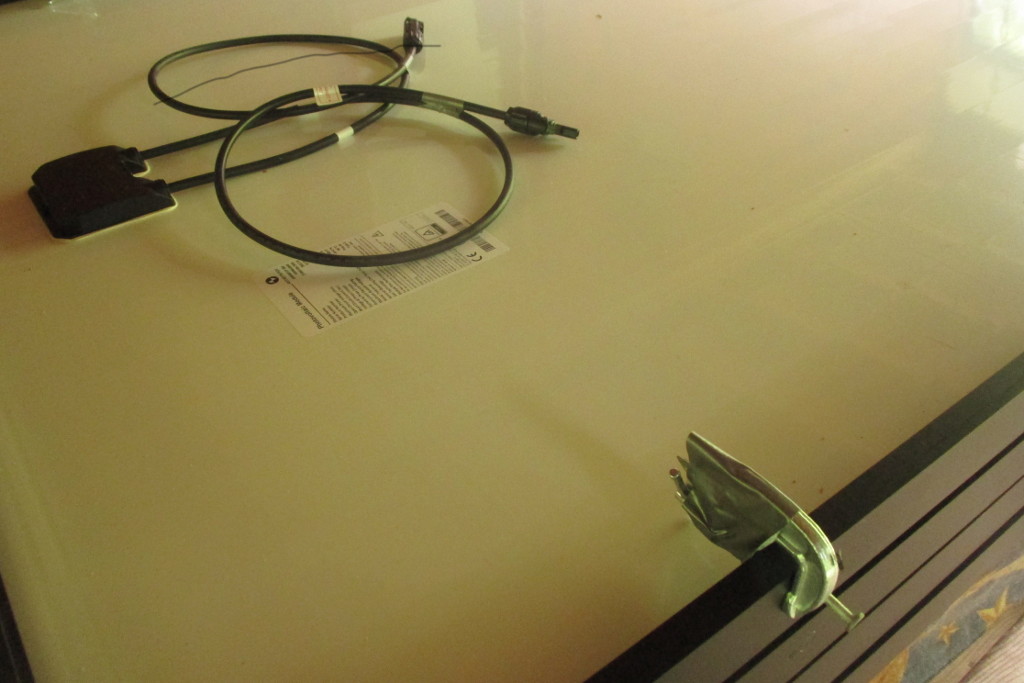
I've installed 1 kilowatt of solar panels on my roof, using professional grade eqipment. The four panels are Astronergy 260 watt panels, and they're mounted on IronRidge XR100 rails. Did it all myself, without help. house with 4 solar panels on roof I had three goals for this install:
  1. Cheap but sturdy. Total cost will be under $2500. It would probably cost at least twice as much to get a professional install, and the pros might not even want to do such a small install.
  2. Learn the roof mount system. I want to be able to add more panels, remove panels when working on the roof, and understand everything.
  3. Make every day a sunny day. With my current solar panels, I get around 10x as much power on a sunny day as a cloudy day, and I have plenty of power on sunny days. So 10x the PV capacity should be a good amount of power all the time.
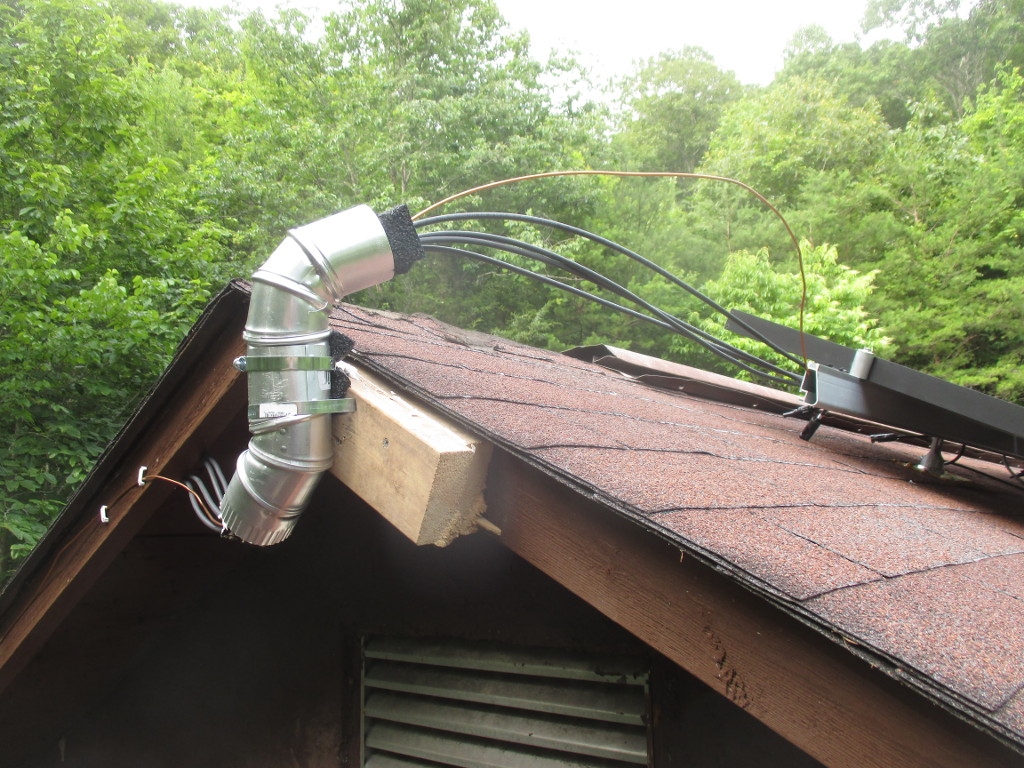
My main concerns were, would I be able to find the rafters when installing the rails, and would the 5x3 foot panels be too unweildly to get up on the roof by myself. I was able to find the rafters, without needing a stud finder, after I removed the roof's vent caps, which exposed the rafters. The shingles were on straight enough that I could follow the lines down and drilled into the rafter on the first try every time. And I got the rails on spaced well and straight, although I could have spaced the FlashFeet out better (oops). My drill ran out of juice half-way, and I had to hack it to recharge on solar power, but that's another story. Between the learning curve, a lot of careful measurement, not the greatest shoes for roofing, and waiting for recharging, it took two days to get the 8 FlashFeet installed and the rails mounted. Taking a break from that and swimming in the river, I realized I should have been wearing my water shoes on the roof all along. Super soft and nubbly, they make me feel like a gecko up there! After recovering from an (unrelated) achilles tendon strain, I got the panels installed today. Turns out they're not hard to handle on the roof by myself. Getting them up a ladder to the roof by yourself would normally be another story, but my house has a 2 foot step up from the back retaining wall to the roof, and even has a handy grip beam as you step up. roof next to the ground with a couple of cinderblock steps The last gotcha, which I luckily anticipated, is that panels will slide down off the rails before you can get them bolted down. This is where a second pair of hands would have been most useful. But, I macguyvered a solution, attaching temporary clamps before bringing a panel up, that stopped it sliding down while I was attaching it. clamp temporarily attached to side of panel I also finished the outside wiring today. Including the one hack of this install so far. Since the local hardware store didn't have a suitable conduit to bring the cables off the roof, I cobbled one together from pipe, with foam inserts to prevent chafing. some pipe with 5 wires running through it, attached to the side of the roof While I have 1 kilowatt of power on my roof now, I won't be able to use it until next week. After ordering the upgrade, I realized that my old PWM charge controller would be able to handle less than half the power, and to get even that I would have needed to mount the fuse box near the top of the roof and run down a large and expensive low-voltage high-amperage cable, around OO AWG size. Instead, I'll be upgrading to a MPPT controller, and running a single 150 volt cable to it. Then, since the MPPT controller can only handle 1 kilowatt when it's converting to 24 volts, not 12 volts, I'm gonna have to convert the entire house over from 12V DC to 24V DC, including changing all the light fixtures and rewiring the battery bank...

Reproducible builds folks: Reproducible Builds: week 112 in Stretch cycle

Here's what happened in the Reproducible Builds effort between Sunday June 11 and Saturday June 17 2017: Upcoming events Upstream patches and bugs filed Reviews of unreproducible packages 1 package review has been added, 19 have been updated and 2 have been removed in this week, adding to our knowledge about identified issues. Weekly QA work During our reproducibility testing, FTBFS bugs have been detected and reported by: diffoscope development tests.reproducible-builds.org As you might have noticed, Debian stretch was released last week. Since then, Mattia and Holger renamed our testing suite to stretch and added a buster suite so that we keep our historic results for stretch visible and can continue our development work as usual. In this sense, happy hacking on buster; may it become the best Debian release ever and hopefully the first reproducible one! Axel Beckert is currently in the process of setting up eight LeMaker HiKey960 boards. These boards were sponsored by Hewlett Packard Enterprise and will be hosted by the SOSETH students association at ETH Zurich. Thanks to everyone involved here and also thanks to Martin Michlmayr and Steve Geary who initiated getting these boards to us. Misc. This week's edition was written by Chris Lamb, Holger Levsen & reviewed by a bunch of Reproducible Builds folks on IRC & the mailing lists.

Vincent Bernat: IPv4 route lookup on Linux

TL;DR: With its implementation of IPv4 routing tables using LPC-tries, Linux offers good lookup performance (50 ns for a full view) and low memory usage (64 MiB for a full view).
During the lifetime of an IPv4 datagram inside the Linux kernel, one important step is the route lookup for the destination address through the fib_lookup() function. From essential information about the datagram (source and destination IP addresses, interfaces, firewall mark, ), this function should quickly provide a decision. Some possible options are: Since 2.6.39, Linux stores routes into a compressed prefix tree (commit 3630b7c050d9). In the past, a route cache was maintained but it has been removed1 in Linux 3.6.

Route lookup in a trie Looking up a route in a routing table is to find the most specific prefix matching the requested destination. Let s assume the following routing table:
$ ip route show scope global table 100
default via 203.0.113.5 dev out2
192.0.2.0/25
        nexthop via 203.0.113.7  dev out3 weight 1
        nexthop via 203.0.113.9  dev out4 weight 1
192.0.2.47 via 203.0.113.3 dev out1
192.0.2.48 via 203.0.113.3 dev out1
192.0.2.49 via 203.0.113.3 dev out1
192.0.2.50 via 203.0.113.3 dev out1
Here are some examples of lookups and the associated results:
Destination IP Next hop
192.0.2.49 203.0.113.3 via out1
192.0.2.50 203.0.113.3 via out1
192.0.2.51 203.0.113.7 via out3 or 203.0.113.9 via out4 (ECMP)
192.0.2.200 203.0.113.5 via out2
A common structure for route lookup is the trie, a tree structure where each node has its parent as prefix.

Lookup with a simple trie The following trie encodes the previous routing table: Simple routing trie For each node, the prefix is known by its path from the root node and the prefix length is the current depth. A lookup in such a trie is quite simple: at each step, fetch the nth bit of the IP address, where n is the current depth. If it is 0, continue with the first child. Otherwise, continue with the second. If a child is missing, backtrack until a routing entry is found. For example, when looking for 192.0.2.50, we will find the result in the corresponding leaf (at depth 32). However for 192.0.2.51, we will reach 192.0.2.50/31 but there is no second child. Therefore, we backtrack until the 192.0.2.0/25 routing entry. Adding and removing routes is quite easy. From a performance point of view, the lookup is done in constant time relative to the number of routes (due to maximum depth being capped to 32). Quagga is an example of routing software still using this simple approach.

Lookup with a path-compressed trie In the previous example, most nodes only have one child. This leads to a lot of unneeded bitwise comparisons and memory is also wasted on many nodes. To overcome this problem, we can use path compression: each node with only one child is removed (except if it also contains a routing entry). Each remaining node gets a new property telling how many input bits should be skipped. Such a trie is also known as a Patricia trie or a radix tree. Here is the path-compressed version of the previous trie: Patricia trie Since some bits have been ignored, on a match, a final check is executed to ensure all bits from the found entry are matching the input IP address. If not, we must act as if the entry wasn t found (and backtrack to find a matching prefix). The following figure shows two IP addresses matching the same leaf: Lookup in a Patricia trie The reduction on the average depth of the tree compensates the necessity to handle those false positives. The insertion and deletion of a routing entry is still easy enough. Many routing systems are using Patricia trees:

Lookup with a level-compressed trie In addition to path compression, level compression2 detects parts of the trie that are densily populated and replace them with a single node and an associated vector of 2k children. This node will handle k input bits instead of just one. For example, here is a level-compressed version our previous trie: Level-compressed trie Such a trie is called LC-trie or LPC-trie and offers higher lookup performances compared to a radix tree. An heuristic is used to decide how many bits a node should handle. On Linux, if the ratio of non-empty children to all children would be above 50% when the node handles an additional bit, the node gets this additional bit. On the other hand, if the current ratio is below 25%, the node loses the responsibility of one bit. Those values are not tunable. Insertion and deletion becomes more complex but lookup times are also improved.

Implementation in Linux The implementation for IPv4 in Linux exists since 2.6.13 (commit 19baf839ff4a) and is enabled by default since 2.6.39 (commit 3630b7c050d9). Here is the representation of our example routing table in memory3: Memory representation of a trie There are several structures involved: The trie can be retrieved through /proc/net/fib_trie:
$ cat /proc/net/fib_trie
Id 100:
  +-- 0.0.0.0/0 2 0 2
      -- 0.0.0.0
        /0 universe UNICAST
     +-- 192.0.2.0/26 2 0 1
         -- 192.0.2.0
           /25 universe UNICAST
         -- 192.0.2.47
           /32 universe UNICAST
        +-- 192.0.2.48/30 2 0 1
            -- 192.0.2.48
              /32 universe UNICAST
            -- 192.0.2.49
              /32 universe UNICAST
            -- 192.0.2.50
              /32 universe UNICAST
[...]
For internal nodes, the numbers after the prefix are:
  1. the number of bits handled by the node,
  2. the number of full children (they only handle one bit),
  3. the number of empty children.
Moreover, if the kernel was compiled with CONFIG_IP_FIB_TRIE_STATS, some interesting statistics are available in /proc/net/fib_triestat4:
$ cat /proc/net/fib_triestat
Basic info: size of leaf: 48 bytes, size of tnode: 40 bytes.
Id 100:
        Aver depth:     2.33
        Max depth:      3
        Leaves:         6
        Prefixes:       6
        Internal nodes: 3
          2: 3
        Pointers: 12
Null ptrs: 4
Total size: 1  kB
[...]
When a routing table is very dense, a node can handle many bits. For example, a densily populated routing table with 1 million entries packed in a /12 can have one internal node handling 20 bits. In this case, route lookup is essentially reduced to a lookup in a vector. The following graph shows the number of internal nodes used relative to the number of routes for different scenarios (routes extracted from an Internet full view, /32 routes spreaded over 4 different subnets with various densities). When routes are densily packed, the number of internal nodes are quite limited. Internal nodes and null pointers

Performance So how performant is a route lookup? The maximum depth stays low (about 6 for a full view), so a lookup should be quite fast. With the help of a small kernel module, we can accurately benchmark5 the fib_lookup() function: Maximum depth and lookup time The lookup time is loosely tied to the maximum depth. When the routing table is densily populated, the maximum depth is low and the lookup times are fast. When forwarding at 10 Gbps, the time budget for a packet would be about 50 ns. Since this is also the time needed for the route lookup alone in some cases, we wouldn t be able to forward at line rate with only one core. Nonetheless, the results are pretty good and they are expected to scale linearly with the number of cores. The measurements are done with a Linux kernel 4.11 from Debian unstable. I have gathered performance metrics accross kernel versions in Performance progression of IPv4 route lookup on Linux . Another interesting figure is the time it takes to insert all those routes into the kernel. Linux is also quite efficient in this area since you can insert 2 million routes in less than 10 seconds: Insertion time

Memory usage The memory usage is available directly in /proc/net/fib_triestat. The statistic provided doesn t account for the fib_info structures, but you should only have a handful of them (one for each possible next-hop). As you can see on the graph below, the memory use is linear with the number of routes inserted, whatever the shape of the routes is. Memory usage The results are quite good. With only 256 MiB, about 2 million routes can be stored!

Routing rules Unless configured without CONFIG_IP_MULTIPLE_TABLES, Linux supports several routing tables and has a system of configurable rules to select the table to use. These rules can be configured with ip rule. By default, there are three of them:
$ ip rule show
0:      from all lookup local
32766:  from all lookup main
32767:  from all lookup default
Linux will first lookup for a match in the local table. If it doesn t find one, it will lookup in the main table and at last resort, the default table.

Builtin tables The local table contains routes for local delivery:
$ ip route show table local
broadcast 127.0.0.0 dev lo proto kernel scope link src 127.0.0.1
local 127.0.0.0/8 dev lo proto kernel scope host src 127.0.0.1
local 127.0.0.1 dev lo proto kernel scope host src 127.0.0.1
broadcast 127.255.255.255 dev lo proto kernel scope link src 127.0.0.1
broadcast 192.168.117.0 dev eno1 proto kernel scope link src 192.168.117.55
local 192.168.117.55 dev eno1 proto kernel scope host src 192.168.117.55
broadcast 192.168.117.63 dev eno1 proto kernel scope link src 192.168.117.55
This table is populated automatically by the kernel when addresses are configured. Let s look at the three last lines. When the IP address 192.168.117.55 was configured on the eno1 interface, the kernel automatically added the appropriate routes:
  • a route for 192.168.117.55 for local unicast delivery to the IP address,
  • a route for 192.168.117.255 for broadcast delivery to the broadcast address,
  • a route for 192.168.117.0 for broadcast delivery to the network address.
When 127.0.0.1 was configured on the loopback interface, the same kind of routes were added to the local table. However, a loopback address receives a special treatment and the kernel also adds the whole subnet to the local table. As a result, you can ping any IP in 127.0.0.0/8:
$ ping -c1 127.42.42.42
PING 127.42.42.42 (127.42.42.42) 56(84) bytes of data.
64 bytes from 127.42.42.42: icmp_seq=1 ttl=64 time=0.039 ms
--- 127.42.42.42 ping statistics ---
1 packets transmitted, 1 received, 0% packet loss, time 0ms
rtt min/avg/max/mdev = 0.039/0.039/0.039/0.000 ms
The main table usually contains all the other routes:
$ ip route show table main
default via 192.168.117.1 dev eno1 proto static metric 100
192.168.117.0/26 dev eno1 proto kernel scope link src 192.168.117.55 metric 100
The default route has been configured by some DHCP daemon. The connected route (scope link) has been automatically added by the kernel (proto kernel) when configuring an IP address on the eno1 interface. The default table is empty and has little use. It has been kept when the current incarnation of advanced routing has been introduced in Linux 2.1.68 after a first tentative using classes in Linux 2.1.156.

Performance Since Linux 4.1 (commit 0ddcf43d5d4a), when the set of rules is left unmodified, the main and local tables are merged and the lookup is done with this single table (and the default table if not empty). Moreover, since Linux 3.0 (commit f4530fa574df), without specific rules, there is no performance hit when enabling the support for multiple routing tables. However, as soon as you add new rules, some CPU cycles will be spent for each datagram to evaluate them. Here is a couple of graphs demonstrating the impact of routing rules on lookup times: Routing rules impact on performance For some reason, the relation is linear when the number of rules is between 1 and 100 but the slope increases noticeably past this threshold. The second graph highlights the negative impact of the first rule (about 30 ns). A common use of rules is to create virtual routers: interfaces are segregated into domains and when a datagram enters through an interface from domain A, it should use routing table A:
# ip rule add iif vlan457 table 10
# ip rule add iif vlan457 blackhole
# ip rule add iif vlan458 table 20
# ip rule add iif vlan458 blackhole
The blackhole rules may be removed if you are sure there is a default route in each routing table. For example, we add a blackhole default with a high metric to not override a regular default route:
# ip route add blackhole default metric 9999 table 10
# ip route add blackhole default metric 9999 table 20
# ip rule add iif vlan457 table 10
# ip rule add iif vlan458 table 20
To reduce the impact on performance when many interface-specific rules are used, interfaces can be attached to VRF instances and a single rule can be used to select the appropriate table:
# ip link add vrf-A type vrf table 10
# ip link set dev vrf-A up
# ip link add vrf-B type vrf table 20
# ip link set dev vrf-B up
# ip link set dev vlan457 master vrf-A
# ip link set dev vlan458 master vrf-B
# ip rule show
0:      from all lookup local
1000:   from all lookup [l3mdev-table]
32766:  from all lookup main
32767:  from all lookup default
The special l3mdev-table rule was automatically added when configuring the first VRF interface. This rule will select the routing table associated to the VRF owning the input (or output) interface. VRF was introduced in Linux 4.3 (commit 193125dbd8eb), the performance was greatly enhanced in Linux 4.8 (commit 7889681f4a6c) and the special routing rule was also introduced in Linux 4.8 (commit 96c63fa7393d, commit 1aa6c4f6b8cd). You can find more details about it in the kernel documentation.

Conclusion The takeaways from this article are:
  • route lookup times hardly increase with the number of routes,
  • densily packed /32 routes lead to amazingly fast route lookups,
  • memory use is low (128 MiB par million routes),
  • no optimization is done on routing rules.

  1. The routing cache was subject to reasonably easy to launch denial of service attacks. It was also believed to not be efficient for high volume sites like Google but I have first-hand experience it was not the case for moderately high volume sites.
  2. IP-address lookup using LC-tries , IEEE Journal on Selected Areas in Communications, 17(6):1083-1092, June 1999.
  3. For internal nodes, the key_vector structure is embedded into a tnode structure. This structure contains information rarely used during lookup, notably the reference to the parent that is usually not needed for backtracking as Linux keeps the nearest candidate in a variable.
  4. One leaf can contain several routes (struct fib_alias is a list). The number of prefixes can therefore be greater than the number of leaves. The system also keeps statistics about the distribution of the internal nodes relative to the number of bits they handle. In our example, all the three internal nodes are handling 2 bits.
  5. The measurements are done in a virtual machine with one vCPU. The host is an Intel Core i5-4670K running at 3.7 GHz during the experiment (CPU governor was set to performance). The benchmark is single-threaded. It runs a warm-up phase, then executes about 100,000 timed iterations and keeps the median. Timings of individual runs are computed from the TSC.
  6. Fun fact: the documentation of this first tentative of more flexible routing is still available in today s kernel tree and explains the usage of the default class .

20 June 2017

Steve McIntyre: So, Stretch happened...

Things mostly went very well, and we've released Debian 9 this weekend past. Many many people worked together to make this possible, and I'd like to extend my own thanks to all of them. As a project, we decided to dedicate Stretch to our late founder Ian Murdock. He did much of the early work to get Debian going, and inspired many more to help him. I had the good fortune to meet up with Ian years ago at a meetup attached to a Usenix conference, and I remember clearly he was a genuinely nice guy with good ideas. We'll miss him. For my part in the release process, again I was responsible for producing our official installation and live images. Release day itself went OK, but as is typical the process ran late into Saturday night / early Sunday morning. We made and tested lots of different images, although numbers were down from previous releases as we've stopped making the full CD sets now. Sunday was the day for the release party in Cambridge. As is traditional, a group of us met up at a local hostelry for some revelry! We hid inside the pub to escape from the ridiculouly hot weather we're having at the moment. Party Due to a combination of the lack of sleep and the heat, I nearly forgot to even take any photos - apologies to the extra folks who'd been around earlier whom I missed with the camera... :-(

Foteini Tsiami: Internationalization, part one

The first part of internationalizing a Greek application, is, of course, translating all the Greek text to English. I already knew how to open a user interface (.ui) file with Glade and how to translate/save it from there, and mail the result to the developers. If only it was that simple! I learned that the code of most open source software is kept on version control systems, which fortunately are a bit similar to Wikis, which I was familiar with, so I didn t have a lot of trouble understanding the concepts. Thanks to a very brief git crash course from my mentors, I was able to quickly start translating, committing, and even pushing back the updated files. The other tricky part was internationalizing the python source code. There Glade couldn t be used, a text editor like Pluma was needed. And the messages were part of the source code, so I had to be extra careful not to break the syntax. The English text then needed to be wrapped around _(), which does the gettext call which dynamically translates the messages into the user language. All this was very educative, but now that the first part of the internationalization, i.e. the Greek-to-English translations, are over, I think I ll take some time to read more about the tools that I used!

Norbert Preining: TeX Live 2017 hits Debian/unstable

Yesterday I uploaded the first packages of TeX Live 2017 to Debian/unstable, meaning that the new release cycle has started. Debian/stretch was released over the weekend, and this opened up unstable for new developments. The upload comprised the following packages: asymptote, cm-super, context, context-modules, texlive-base, texlive-bin, texlive-extra, texlive-extra, texlive-lang, texworks, xindy.
I mentioned already in a previous post the following changes: The last two changes are described together with other news (easy TEXMF tree management) in the TeX Live release post. These changes more or less sum up the new infra structure developments in TeX Live 2017. Since the last release to unstable (which happened in 2017-01-23) about half a year of package updates have accumulated, below is an approximate list of updates (not split into new/updated, though). Enjoy the brave new world of TeX Live 2017, and please report bugs to the BTS! Updated/new packages:
academicons, achemso, acmart, acro, actuarialangle, actuarialsymbol, adobemapping, alkalami, amiri, animate, aomart, apa6, apxproof, arabluatex, archaeologie, arsclassica, autoaligne, autobreak, autosp, axodraw2, babel, babel-azerbaijani, babel-english, babel-french, babel-indonesian, babel-japanese, babel-malay, babel-ukrainian, bangorexam, baskervaldx, baskervillef, bchart, beamer, beamerswitch, bgteubner, biblatex-abnt, biblatex-anonymous, biblatex-archaeology, biblatex-arthistory-bonn, biblatex-bookinother, biblatex-caspervector, biblatex-cheatsheet, biblatex-chem, biblatex-chicago, biblatex-claves, biblatex-enc, biblatex-fiwi, biblatex-gb7714-2015, biblatex-gost, biblatex-ieee, biblatex-iso690, biblatex-manuscripts-philology, biblatex-morenames, biblatex-nature, biblatex-opcit-booktitle, biblatex-oxref, biblatex-philosophy, biblatex-publist, biblatex-shortfields, biblatex-subseries, bibtexperllibs, bidi, biochemistry-colors, bookcover, boondox, bredzenie, breqn, bxbase, bxcalc, bxdvidriver, bxjalipsum, bxjaprnind, bxjscls, bxnewfont, bxorigcapt, bxpapersize, bxpdfver, cabin, callouts, chemfig, chemformula, chemmacros, chemschemex, childdoc, circuitikz, cje, cjhebrew, cjk-gs-integrate, cmpj, cochineal, combofont, context, conv-xkv, correctmathalign, covington, cquthesis, crimson, crossrefware, csbulletin, csplain, csquotes, css-colors, cstldoc, ctex, currency, cweb, datetime2-french, datetime2-german, datetime2-romanian, datetime2-ukrainian, dehyph-exptl, disser, docsurvey, dox, draftfigure, drawmatrix, dtk, dviinfox, easyformat, ebproof, elements, endheads, enotez, eqnalign, erewhon, eulerpx, expex, exsheets, factura, facture, fancyhdr, fbb, fei, fetamont, fibeamer, fithesis, fixme, fmtcount, fnspe, fontmfizz, fontools, fonts-churchslavonic, fontspec, footnotehyper, forest, gandhi, genealogytree, glossaries, glossaries-extra, gofonts, gotoh, graphics, graphics-def, graphics-pln, grayhints, gregoriotex, gtrlib-largetrees, gzt, halloweenmath, handout, hang, heuristica, hlist, hobby, hvfloat, hyperref, hyperxmp, ifptex, ijsra, japanese-otf-uptex, jlreq, jmlr, jsclasses, jslectureplanner, karnaugh-map, keyfloat, knowledge, komacv, koma-script, kotex-oblivoir, l3, l3build, ladder, langsci, latex, latex2e, latex2man, latex3, latexbug, latexindent, latexmk, latex-mr, leaflet, leipzig, libertine, libertinegc, libertinus, libertinust1math, lion-msc, lni, longdivision, lshort-chinese, ltb2bib, lualatex-math, lualibs, luamesh, luamplib, luaotfload, luapackageloader, luatexja, luatexko, lwarp, make4ht, marginnote, markdown, mathalfa, mathpunctspace, mathtools, mcexam, mcf2graph, media9, minidocument, modular, montserrat, morewrites, mpostinl, mptrees, mucproc, musixtex, mwcls, mweights, nameauth, newpx, newtx, newtxtt, nfssext-cfr, nlctdoc, novel, numspell, nwejm, oberdiek, ocgx2, oplotsymbl, optidef, oscola, overlays, pagecolor, pdflatexpicscale, pdfpages, pdfx, perfectcut, pgfplots, phonenumbers, phonrule, pkuthss, platex, platex-tools, polski, preview, program, proofread, prooftrees, pst-3dplot, pst-barcode, pst-eucl, pst-func, pst-ode, pst-pdf, pst-plot, pstricks, pstricks-add, pst-solides3d, pst-spinner, pst-tools, pst-tree, pst-vehicle, ptex2pdf, ptex-base, ptex-fontmaps, pxbase, pxchfon, pxrubrica, pythonhighlight, quran, ran_toks, reledmac, repere, resphilosophica, revquantum, rputover, rubik, rutitlepage, sansmathfonts, scratch, seealso, sesstime, siunitx, skdoc, songs, spectralsequences, stackengine, stage, sttools, studenthandouts, svg, tcolorbox, tex4ebook, tex4ht, texosquery, texproposal, thaienum, thalie, thesis-ekf, thuthesis, tikz-kalender, tikzmark, tikz-optics, tikz-palattice, tikzpeople, tikzsymbols, titlepic, tl17, tqft, tracklang, tudscr, tugboat-plain, turabian-formatting, txuprcal, typoaid, udesoftec, uhhassignment, ukrainian, ulthese, unamthesis, unfonts-core, unfonts-extra, unicode-math, uplatex, upmethodology, uptex-base, urcls, variablelm, varsfromjobname, visualtikz, xassoccnt, xcharter, xcntperchap, xecjk, xepersian, xetexko, xevlna, xgreek, xsavebox, xsim, ycbook.

19 June 2017

Jeremy Bicha: GNOME Tweak Tool 3.25.3

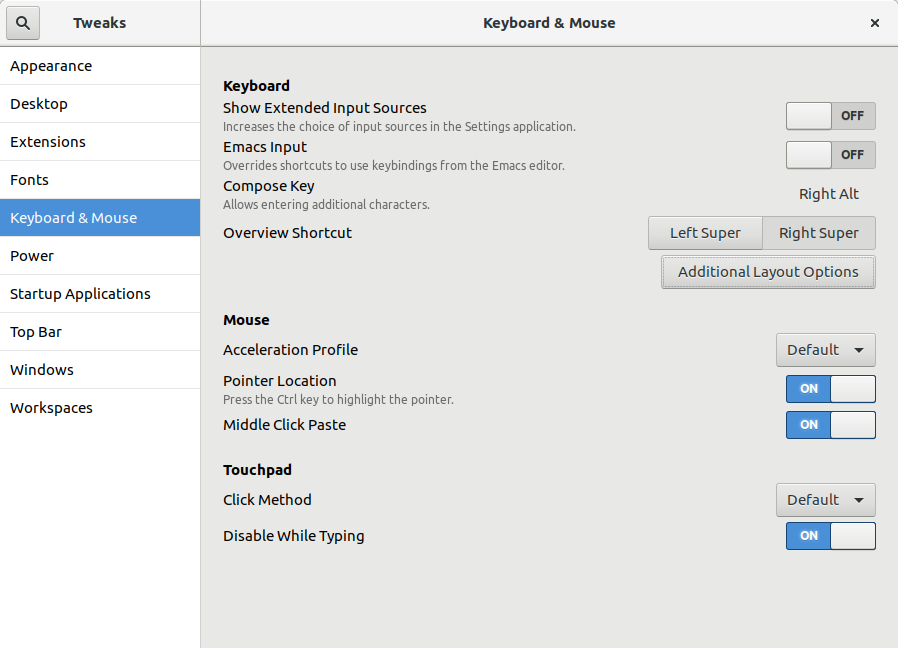
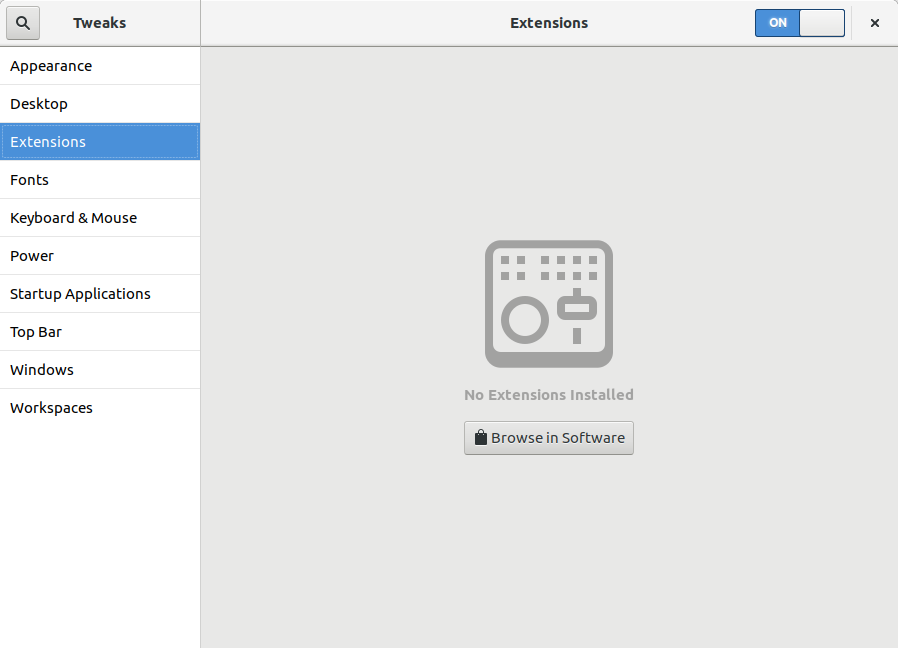
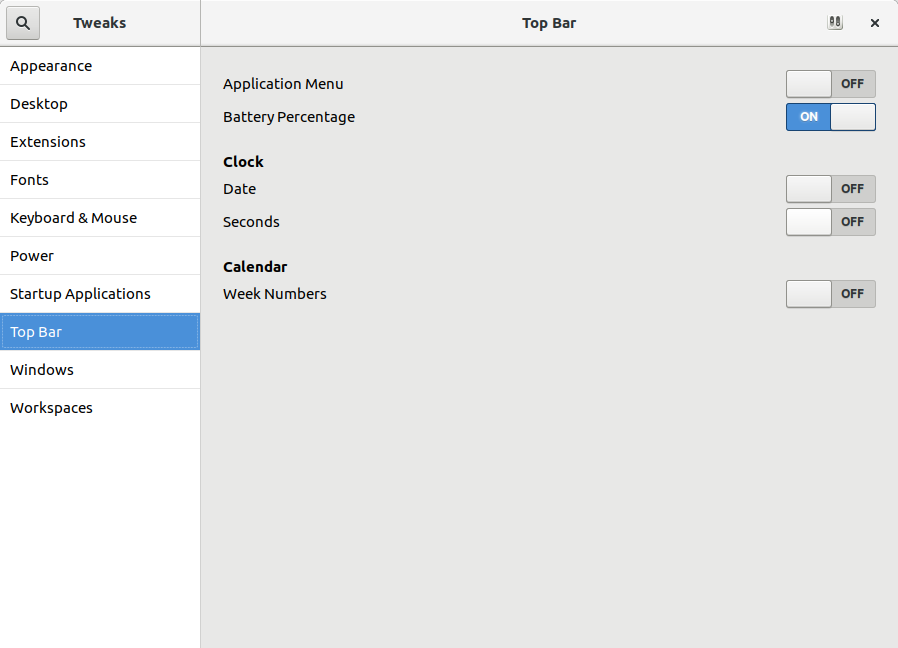
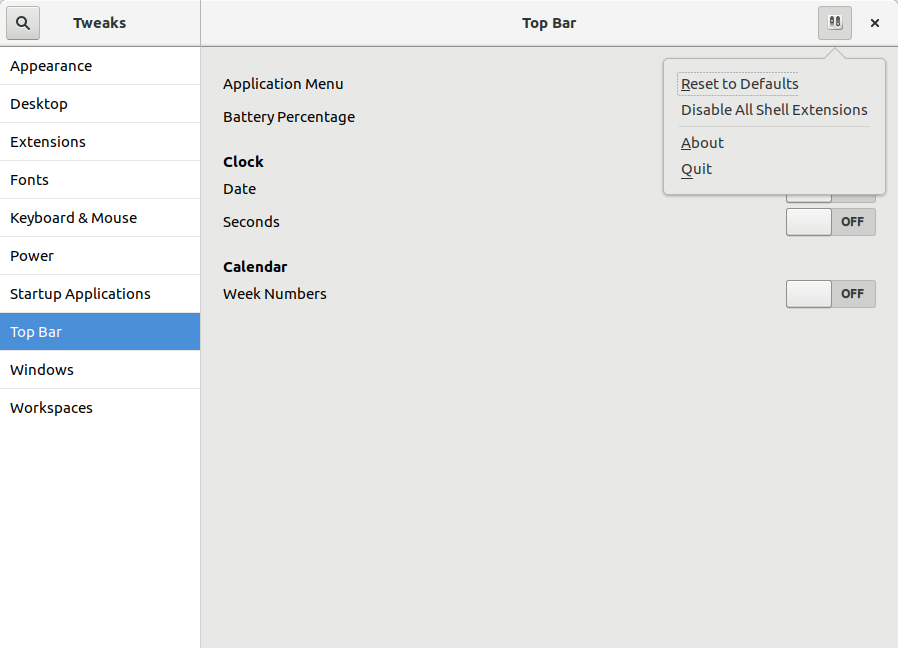
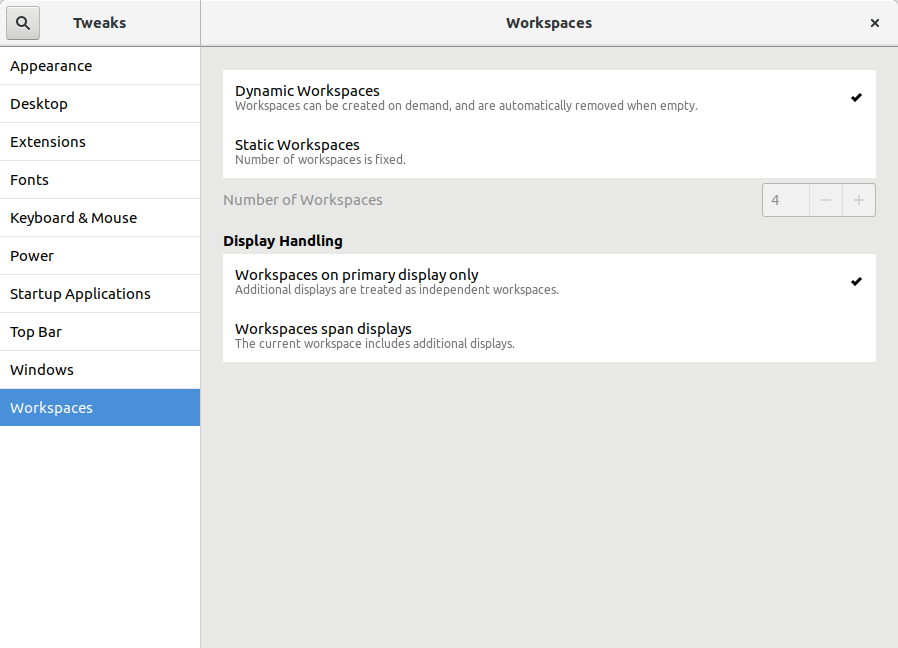
Today I released the second development snapshot (3.25.3) of what will be GNOME Tweak Tool 3.26. I consider the initial User Interface (UI) rework proposed by the GNOME Design Team to be complete now. Every page in Tweak Tool has been updated, either in this snapshot or the previous development snapshot. The hard part still remains: making the UI look as good as the mockups. Tweak Tool s backend makes this a bit more complicated than usual for an app like this. Here are a few visual highlights of this release. The Typing page has been moved into an Additional Layout Options dialog in the Keyboard & Mouse page. Also, the Compose Key option has been given its own dialog box. Florian M llner added content to the Extensions page that is shown if you don t have any GNOME Shell extensions installed yet. A hidden feature that GNOME has had for a long time is the ability to move the Application Menu from the GNOME top bar to a button in the app s title bar. This is easy to enable in Tweak Tool by turning off the Application Menu switch in the Top Bar page. This release improves how well that works, especially for Ubuntu users where the required hidden appmenu window button was probably not pre-configured. Some of the ComboBoxes have been replaced by ListBoxes. One example is on the Workspaces page where the new design allows for more information about the different options. The ListBoxes are also a lot easier to select than the smaller ComboBoxes were. For details of these and other changes, see the commit log or the NEWS file. GNOME Tweak Tool 3.26 will be released alongside GNOME 3.26 in mid-September.

Shirish Agarwal: Seizures, Vigo and bi-pedal motion

Dear all, an update is in order. While talking to physiotherapist couple of days before, came to know the correct term to what was I experiencing. I had experienced convulsive seizure , spasms being a part of it. Reading the wikipedia entry and the associated links/entries it seems I am and was very very lucky. The hospital or any hospital is a very bad bad place. I have seen all horror movies which people say are disturbing but have never been disturbed as much as I was in hospital. I couldn t help but hear people s screams and saw so many cases which turned critical. At times it was not easy to remain positive but dunno from where there was a will to live which pushed me and is still pushing me. One of the things that was painful for a long time were the almost constant stream of injections that were injected in me. It was almost an afterthought that the nurse put a Vigo in me. Similar to the Vigo injected in me. While the above medical device is similar, mine had a cross, the needle was much shorter and is injected into the vein. After that all injections are injected into that including common liquid which is salt,water and something commonly given to patients to stabilize first. I am not remembering the name atm. I also had a urine bag which was attached to my penis in a non-invasive manner. Both my grandfather and grandma used to cry when things went wrong while I didn t feel any pain but when the urine bag was disattached and attached again, so seems things have improved there. I was also very conscious of getting bed sores as both my grandpa and grandma had them when in hospital. As I had no strength I had to beg. plead do everything to make sure that every few hours I was turned from one side to other. I also had an air bag which is supposed to alleviate or relief this condition. Constant physiotherapy every day for a while slowly increased my strength and slowly both the vigo and feeding tube put inside my throat was removed. I have no remembrance as to when they had put the feeding tube as it was all rubber and felt bad when it came out. Further physiotherapy helped me crawl till the top of the bed, the bed was around 6 feet in length and and more than enough so I could turn both sides without falling over. Few days later I found I could also sit up using my legs as a lever and that gave confidence to the doctors to remove the air bed so I could crawl more easily. Couple of more days later I stood on my feet for the first time and it was like I had lead legs. Each step was painful but the sense and feeling of independence won over whatever pain was there. I had to endure wet wipes from nurses and ward boys in place of a shower everyday and while they were respectful always it felt humiliating. The first time I had a bath after 2 weeks or something, every part of my body cried and I felt like a weakling. I had thought I wouldn t be able to do justice to the physiotherapy session which was soon after but after the session was back to feeling normal. For a while I was doing the penguin waddle which while painful was also had humor in it. I did think of shooting the penguin waddle but decided against it as I was half-naked most of the time ( the hospital clothes never fit me properly) Cut to today and I was able to climb up and down the stairs on my own and circled my own block, slowly but was able to do it on my own by myself. While I always had a sense of wonderment for bi-pedal motion as well as all other means of transport, found much more respect of walking. I live near a fast food eating joint so I see lot of youngsters posing in different ways with their legs to show interest to their mates. And this I know happens both on the conscious and sub-conscious levels. To be able to see and discern that also put a sense of wonder in nature s creations. All in all, I m probabl6y around 40% independent and still 60% interdependent. I know I have to be patient with myself and those around me and explain to others what I m going through. For e.g. I still tend to spill things and still can t touch-type much. So, the road is long, I can only pray and hope best wishes for anybody who is my condition and do pray that nobody goes through what I went through, especiallly not children. I am also hoping that things like DxtER and range of non-invasive treatments make their way into India and the developing world at large. Anybody who is overweight and is either disgusted or doesn t like the gym route, would recommend doing sessions with a physiotherapist that you can trust. You have to trust that her judgement will push you a bit more and not more that the gains you make are toppled over. I still get dizziness spells while doing therapy but will to break it as I know dizziness doesn t help me. I hope my writings give strength and understanding to either somebody who is going through it, or relatives or/and caregivers so they know the mental status of the person who s going through it. Till later and sorry it became so long. Update I forgot to share this inspirational story from my city which I shared with a friend days ago. Add to that, she is from my city. What it doesn t share is that Triund is a magical place. I had visited once with a friend who had elf ears (he had put on elf ears) and it is kind of place which alchemist talks about, a place where imagination does turn wild and there is magic in the air.
Filed under: Miscellenous Tagged: #air bag, #bed sores, #convulsive epileptic seizure, #crawling, #horror, #humiliation, #nakedness, #penguin waddle, #physiotherapy, #planet-debian, #spilling things, #urine bag, #Vigo medical device

Michal &#268;iha&#345;: Call for Weblate translations

Weblate 2.15 is almost ready (I expect no further code changes), so it's really great time to contribute to it's translations! Weblate 2.15 should be released early next week. As you might expect, Weblate is translated using Weblate, so the contributions should be really easy. In case there is something unclear, you can look into Weblate documentation. I'd especially like to see improvements in the Italian translation which was one of the first in Weblate beginnings, but hasn't received much love in past years.

Filed under: Debian English SUSE Weblate

18 June 2017

Simon Josefsson: OpenPGP smartcard under GNOME on Debian 9.0 Stretch

I installed Debian 9.0 Stretch on my Lenovo X201 laptop today. Installation went smooth, as usual. GnuPG/SSH with an OpenPGP smartcard I use a YubiKey NEO does not work out of the box with GNOME though. I wrote about how to fix OpenPGP smartcards under GNOME with Debian 8.0 Jessie earlier, and I thought I d do a similar blog post for Debian 9.0 Stretch . The situation is slightly different than before (e.g., GnuPG works better but SSH doesn t) so there is some progress. May I hope that Debian 10.0 Buster gets this right? Pointers to which package in Debian should have a bug report tracking this issue is welcome (or a pointer to an existing bug report). After first login, I attempt to use gpg --card-status to check if GnuPG can talk to the smartcard.
jas@latte:~$ gpg --card-status
gpg: error getting version from 'scdaemon': No SmartCard daemon
gpg: OpenPGP card not available: No SmartCard daemon
jas@latte:~$ 
This fails because scdaemon is not installed. Isn t a smartcard common enough so that this should be installed by default on a GNOME Desktop Debian installation? Anyway, install it as follows.
root@latte:~# apt-get install scdaemon
Then try again.
jas@latte:~$ gpg --card-status
gpg: selecting openpgp failed: No such device
gpg: OpenPGP card not available: No such device
jas@latte:~$ 
I believe scdaemon here attempts to use its internal CCID implementation, and I do not know why it does not work. At this point I often recall that want pcscd installed since I work with smartcards in general.
root@latte:~# apt-get install pcscd
Now gpg --card-status works!
jas@latte:~$ gpg --card-status
Reader ...........: Yubico Yubikey NEO CCID 00 00
Application ID ...: D2760001240102000006017403230000
Version ..........: 2.0
Manufacturer .....: Yubico
Serial number ....: 01740323
Name of cardholder: Simon Josefsson
Language prefs ...: sv
Sex ..............: male
URL of public key : https://josefsson.org/54265e8c.txt
Login data .......: jas
Signature PIN ....: not forced
Key attributes ...: rsa2048 rsa2048 rsa2048
Max. PIN lengths .: 127 127 127
PIN retry counter : 3 3 3
Signature counter : 8358
Signature key ....: 9941 5CE1 905D 0E55 A9F8  8026 860B 7FBB 32F8 119D
      created ....: 2014-06-22 19:19:04
Encryption key....: DC9F 9B7D 8831 692A A852  D95B 9535 162A 78EC D86B
      created ....: 2014-06-22 19:19:20
Authentication key: 2E08 856F 4B22 2148 A40A  3E45 AF66 08D7 36BA 8F9B
      created ....: 2014-06-22 19:19:41
General key info..: sub  rsa2048/860B7FBB32F8119D 2014-06-22 Simon Josefsson 
sec#  rsa3744/0664A76954265E8C  created: 2014-06-22  expires: 2017-09-04
ssb>  rsa2048/860B7FBB32F8119D  created: 2014-06-22  expires: 2017-09-04
                                card-no: 0006 01740323
ssb>  rsa2048/9535162A78ECD86B  created: 2014-06-22  expires: 2017-09-04
                                card-no: 0006 01740323
ssb>  rsa2048/AF6608D736BA8F9B  created: 2014-06-22  expires: 2017-09-04
                                card-no: 0006 01740323
jas@latte:~$ 
Using the key will not work though.
jas@latte:~$ echo foo gpg -a --sign
gpg: no default secret key: No secret key
gpg: signing failed: No secret key
jas@latte:~$ 
This is because the public key and the secret key stub are not available.
jas@latte:~$ gpg --list-keys
jas@latte:~$ gpg --list-secret-keys
jas@latte:~$ 
You need to import the key for this to work. I have some vague memory that gpg --card-status was supposed to do this, but I may be wrong.
jas@latte:~$ gpg --recv-keys 9AA9BDB11BB1B99A21285A330664A76954265E8C
gpg: failed to start the dirmngr '/usr/bin/dirmngr': No such file or directory
gpg: connecting dirmngr at '/run/user/1000/gnupg/S.dirmngr' failed: No such file or directory
gpg: keyserver receive failed: No dirmngr
jas@latte:~$ 
Surprisingly, dirmngr is also not shipped by default so it has to be installed manually.
root@latte:~# apt-get install dirmngr
Below I proceed to trust the clouds to find my key.
jas@latte:~$ gpg --recv-keys 9AA9BDB11BB1B99A21285A330664A76954265E8C
gpg: key 0664A76954265E8C: public key "Simon Josefsson " imported
gpg: no ultimately trusted keys found
gpg: Total number processed: 1
gpg:               imported: 1
jas@latte:~$ 
Now the public key and the secret key stub are available locally.
jas@latte:~$ gpg --list-keys
/home/jas/.gnupg/pubring.kbx
----------------------------
pub   rsa3744 2014-06-22 [SC] [expires: 2017-09-04]
      9AA9BDB11BB1B99A21285A330664A76954265E8C
uid           [ unknown] Simon Josefsson 
sub   rsa2048 2014-06-22 [S] [expires: 2017-09-04]
sub   rsa2048 2014-06-22 [E] [expires: 2017-09-04]
sub   rsa2048 2014-06-22 [A] [expires: 2017-09-04]
jas@latte:~$ gpg --list-secret-keys
/home/jas/.gnupg/pubring.kbx
----------------------------
sec#  rsa3744 2014-06-22 [SC] [expires: 2017-09-04]
      9AA9BDB11BB1B99A21285A330664A76954265E8C
uid           [ unknown] Simon Josefsson 
ssb>  rsa2048 2014-06-22 [S] [expires: 2017-09-04]
ssb>  rsa2048 2014-06-22 [E] [expires: 2017-09-04]
ssb>  rsa2048 2014-06-22 [A] [expires: 2017-09-04]
jas@latte:~$ 
I am now able to sign data with the smartcard, yay!
jas@latte:~$ echo foo gpg -a --sign
-----BEGIN PGP MESSAGE-----
owGbwMvMwMHYxl2/2+iH4FzG01xJDJFu3+XT8vO5OhmNWRgYORhkxRRZZjrGPJwQ
yxe68keDGkwxKxNIJQMXpwBMRJGd/a98NMPJQt6jaoyO9yUVlmS7s7qm+Kjwr53G
uq9wQ+z+/kOdk9w4Q39+SMvc+mEV72kuH9WaW9bVqj80jN77hUbfTn5mffu2/aVL
h/IneTfaOQaukHij/P8A0//Phg/maWbONUjjySrl+a3tP8ll6/oeCd8g/aeTlH79
i0naanjW4bjv9wnvGuN+LPHLmhUc2zvZdyK3xttN/roHvsdX3f53yTAxeInvXZmd
x7W0/hVPX33Y4nT877T/ak4L057IBSavaPVcf4yhglVI8XuGgaTP666Wuslbliy4
5W5eLasbd33Xd/W0hTINznuz0kJ4r1bLHZW9fvjLduMPq5rS2co9tvW8nX9rhZ/D
zycu/QA=
=I8rt
-----END PGP MESSAGE-----
jas@latte:~$ 
Encrypting to myself will not work smoothly though.
jas@latte:~$ echo foo gpg -a --encrypt -r simon@josefsson.org
gpg: 9535162A78ECD86B: There is no assurance this key belongs to the named user
sub  rsa2048/9535162A78ECD86B 2014-06-22 Simon Josefsson 
 Primary key fingerprint: 9AA9 BDB1 1BB1 B99A 2128  5A33 0664 A769 5426 5E8C
      Subkey fingerprint: DC9F 9B7D 8831 692A A852  D95B 9535 162A 78EC D86B
It is NOT certain that the key belongs to the person named
in the user ID.  If you *really* know what you are doing,
you may answer the next question with yes.
Use this key anyway? (y/N) 
gpg: signal Interrupt caught ... exiting
jas@latte:~$ 
The reason is that the newly imported key has unknown trust settings. I update the trust settings on my key to fix this, and encrypting now works without a prompt.
jas@latte:~$ gpg --edit-key 9AA9BDB11BB1B99A21285A330664A76954265E8C
gpg (GnuPG) 2.1.18; Copyright (C) 2017 Free Software Foundation, Inc.
This is free software: you are free to change and redistribute it.
There is NO WARRANTY, to the extent permitted by law.
Secret key is available.
pub  rsa3744/0664A76954265E8C
     created: 2014-06-22  expires: 2017-09-04  usage: SC  
     trust: unknown       validity: unknown
ssb  rsa2048/860B7FBB32F8119D
     created: 2014-06-22  expires: 2017-09-04  usage: S   
     card-no: 0006 01740323
ssb  rsa2048/9535162A78ECD86B
     created: 2014-06-22  expires: 2017-09-04  usage: E   
     card-no: 0006 01740323
ssb  rsa2048/AF6608D736BA8F9B
     created: 2014-06-22  expires: 2017-09-04  usage: A   
     card-no: 0006 01740323
[ unknown] (1). Simon Josefsson 
[ unknown] (2)  Simon Josefsson 
gpg> trust
pub  rsa3744/0664A76954265E8C
     created: 2014-06-22  expires: 2017-09-04  usage: SC  
     trust: unknown       validity: unknown
ssb  rsa2048/860B7FBB32F8119D
     created: 2014-06-22  expires: 2017-09-04  usage: S   
     card-no: 0006 01740323
ssb  rsa2048/9535162A78ECD86B
     created: 2014-06-22  expires: 2017-09-04  usage: E   
     card-no: 0006 01740323
ssb  rsa2048/AF6608D736BA8F9B
     created: 2014-06-22  expires: 2017-09-04  usage: A   
     card-no: 0006 01740323
[ unknown] (1). Simon Josefsson 
[ unknown] (2)  Simon Josefsson 
Please decide how far you trust this user to correctly verify other users' keys
(by looking at passports, checking fingerprints from different sources, etc.)
  1 = I don't know or won't say
  2 = I do NOT trust
  3 = I trust marginally
  4 = I trust fully
  5 = I trust ultimately
  m = back to the main menu
Your decision? 5
Do you really want to set this key to ultimate trust? (y/N) y
pub  rsa3744/0664A76954265E8C
     created: 2014-06-22  expires: 2017-09-04  usage: SC  
     trust: ultimate      validity: unknown
ssb  rsa2048/860B7FBB32F8119D
     created: 2014-06-22  expires: 2017-09-04  usage: S   
     card-no: 0006 01740323
ssb  rsa2048/9535162A78ECD86B
     created: 2014-06-22  expires: 2017-09-04  usage: E   
     card-no: 0006 01740323
ssb  rsa2048/AF6608D736BA8F9B
     created: 2014-06-22  expires: 2017-09-04  usage: A   
     card-no: 0006 01740323
[ unknown] (1). Simon Josefsson 
[ unknown] (2)  Simon Josefsson 
Please note that the shown key validity is not necessarily correct
unless you restart the program.
gpg> quit
jas@latte:~$ echo foo gpg -a --encrypt -r simon@josefsson.org
-----BEGIN PGP MESSAGE-----
hQEMA5U1Fip47NhrAQgArTvAykj/YRhWVuXb6nzeEigtlvKFSmGHmbNkJgF5+r1/
/hWENR72wsb1L0ROaLIjM3iIwNmyBURMiG+xV8ZE03VNbJdORW+S0fO6Ck4FaIj8
iL2/CXyp1obq1xCeYjdPf2nrz/P2Evu69s1K2/0i9y2KOK+0+u9fEGdAge8Gup6y
PWFDFkNj2YiVa383BqJ+kV51tfquw+T4y5MfVWBoHlhm46GgwjIxXiI+uBa655IM
EgwrONcZTbAWSV4/ShhR9ug9AzGIJgpu9x8k2i+yKcBsgAh/+d8v7joUaPRZlGIr
kim217hpA3/VLIFxTTkkm/BO1KWBlblxvVaL3RZDDNI5AVp0SASswqBqT3W5ew+K
nKdQ6UTMhEFe8xddsLjkI9+AzHfiuDCDxnxNgI1haI6obp9eeouGXUKG
=s6kt
-----END PGP MESSAGE-----
jas@latte:~$ 
So everything is fine, isn t it? Alas, not quite.
jas@latte:~$ ssh-add -L
The agent has no identities.
jas@latte:~$ 
Tracking this down, I now realize that GNOME s keyring is used for SSH but GnuPG s gpg-agent is used for GnuPG. GnuPG uses the environment variable GPG_AGENT_INFO to connect to an agent, and SSH uses the SSH_AUTH_SOCK environment variable to find its agent. The filenames used below leak the knowledge that gpg-agent is used for GnuPG but GNOME keyring is used for SSH.
jas@latte:~$ echo $GPG_AGENT_INFO 
/run/user/1000/gnupg/S.gpg-agent:0:1
jas@latte:~$ echo $SSH_AUTH_SOCK 
/run/user/1000/keyring/ssh
jas@latte:~$ 
Here the same recipe as in my previous blog post works. This time GNOME keyring only has to be disabled for SSH. Disabling GNOME keyring is not sufficient, you also need gpg-agent to start with enable-ssh-support. The simplest way to achieve that is to add a line in ~/.gnupg/gpg-agent.conf as follows. When you login, the script /etc/X11/Xsession.d/90gpg-agent will set the environment variables GPG_AGENT_INFO and SSH_AUTH_SOCK. The latter variable is only set if enable-ssh-support is mentioned in the gpg-agent configuration.
jas@latte:~$ mkdir ~/.config/autostart
jas@latte:~$ cp /etc/xdg/autostart/gnome-keyring-ssh.desktop ~/.config/autostart/
jas@latte:~$ echo 'Hidden=true' >> ~/.config/autostart/gnome-keyring-ssh.desktop 
jas@latte:~$ echo enable-ssh-support >> ~/.gnupg/gpg-agent.conf 
jas@latte:~$ 
Log out from GNOME and log in again. Now you should see ssh-add -L working.
jas@latte:~$ ssh-add -L
ssh-rsa AAAAB3NzaC1yc2EAAAADAQABAAABAQDFP+UOTZJ+OXydpmbKmdGOVoJJz8se7lMs139T+TNLryk3EEWF+GqbB4VgzxzrGjwAMSjeQkAMb7Sbn+VpbJf1JDPFBHoYJQmg6CX4kFRaGZT6DHbYjgia59WkdkEYTtB7KPkbFWleo/RZT2u3f8eTedrP7dhSX0azN0lDuu/wBrwedzSV+AiPr10rQaCTp1V8sKbhz5ryOXHQW0Gcps6JraRzMW+ooKFX3lPq0pZa7qL9F6sE4sDFvtOdbRJoZS1b88aZrENGx8KSrcMzARq9UBn1plsEG4/3BRv/BgHHaF+d97by52R0VVyIXpLlkdp1Uk4D9cQptgaH4UAyI1vr cardno:000601740323
jas@latte:~$ 
Topics for further discussion or research include 1) whether scdaemon, dirmngr and/or pcscd should be pre-installed on Debian desktop systems; 2) whether gpg --card-status should attempt to import the public key and secret key stub automatically; 3) why GNOME keyring is used by default for SSH rather than gpg-agent; 4) whether GNOME keyring should support smartcards, or if it is better to always use gpg-agent for GnuPG/SSH, 5) if something could/should be done to automatically infer the trust setting for a secret key. Enjoy!

Alexander Wirt: alioth needs your help

It may look that the decision for pagure as alioth replacement is already finalized, but that s not really true. I got a lot of feedback and tips in the last weeks, those made postpone my decision. Several alternative systems were recommended to me, here are a few examples: and probably several others. I won t be able to evaluate all of those systems in advance of our sprint. That s where you come in: if you are familiar with one of those systems, or want to get familiar with them, join us on our mailing list and create a wiki page below https://wiki.debian.org/Alioth/GitNext with a review of your system. What do we need to know? If you want to start on such a review, please announce it on the mailinglist. If you have questions, ask me on IRC, Twitter or mail. Thanks for your help!

Eriberto Mota: Como migrar do Debian Jessie para o Stretch

Bem vindo ao Debian Stretch! Ontem, 17 de junho de 2017, o Debian 9 (Stretch) foi lan ado. Eu gostaria de falar sobre alguns procedimentos b sicos e regras para migrar do Debian 8 (Jessie). Passos iniciais
# apt-get update
# apt-get dist-upgrade
Migrando
deb http://ftp.br.debian.org/debian/ stretch main
deb-src http://ftp.br.debian.org/debian/ stretch main
   
deb http://security.debian.org/ stretch/updates main
deb-src http://security.debian.org/ stretch/updates main
# apt-get update
# apt-get dist-upgrade
Caso haja algum problema, leia as mensagens de erro e tente resolver o problema. Resolvendo ou n o tal problema, execute novamente o comando:
# apt-get dist-upgrade
Havendo novos problemas, tente resolver. Busque solu es no Google, se for necess rio. Mas, geralmente, tudo dar certo e voc n o dever ter problemas. Altera es em arquivos de configura o Quando voc estiver migrando, algumas mensagens sobre altera es em arquivos de configura o poder o ser mostradas. Isso poder deixar alguns usu rios pedidos, sem saber o que fazer. N o entre em p nico. Existem duas formas de apresentar essas mensagens: via texto puro em shell ou via janela azul de mensagens. O texto a seguir um exemplo de mensagem em shell:
Ficheiro de configura o '/etc/rsyslog.conf'
 ==> Modificado (por si ou por um script) desde a instala o.
 ==> O distribuidor do pacote lan ou uma vers o atualizada.
 O que deseja fazer? As suas op es s o:
 Y ou I : instalar a vers o do pacote do maintainer
 N ou O : manter a vers o actualmente instalada
 D : mostrar diferen as entre as vers es
 Z : iniciar uma shell para examinar a situa o
 A a o padr o   manter sua vers o atual.
*** rsyslog.conf (Y/I/N/O/D/Z) [padr o=N] ?
A tela a seguir um exemplo de mensagem via janela: Nos dois casos, recomend vel que voc escolha por instalar a nova vers o do arquivo de configura o. Isso porque o novo arquivo de configura o estar totalmente adaptado aos novos servi os instalados e poder ter muitas op es novas ou diferentes. Mas n o se preocupe, pois as suas configura es n o ser o perdidas. Haver um backup das mesmas. Assim, para shell, escolha a op o "Y" e, no caso de janela, escolha a op o "instalar a vers o do mantenedor do pacote". muito importante anotar o nome de cada arquivo modificado. No caso da janela anterior, trata-se do arquivo /etc/samba/smb.conf. No caso do shell o arquivo foi o /etc/rsyslog.conf. Depois de completar a migra o, voc poder ver o novo arquivo de configura o e o original. Caso o novo arquivo tenha sido instalado ap s uma escolha via shell, o arquivo original (o que voc tinha anteriormente) ter o mesmo nome com a extens o .dpkg-old. No caso de escolha via janela, o arquivo ser mantido com a extens o .ucf-old. Nos dois casos, voc poder ver as modifica es feitas e reconfigurar o seu novo arquivo de acordo com as necessidades. Caso voc precise de ajuda para ver as diferen as entre os arquivos, voc poder usar o comando diff para compar -los. Fa a o diff sempre do arquivo novo para o original. como se voc quisesse ver como fazer com o novo arquivo para ficar igual ao original. Exemplo:

# diff -Naur /etc/rsyslog.conf /etc/rsyslog.conf.dpkg-old
Em uma primeira vista, as linhas marcadas com "+" dever o ser adicionadas ao novo arquivo para que se pare a com o anterior, assim como as marcadas com "-" dever o ser suprimidas. Mas cuidado: normal que haja algumas linhas diferentes, pois o arquivo de configura o foi feito para uma nova vers o do servi o ou aplicativo ao qual ele pertence. Assim, altere somente as linhas que realmente s o necess rias e que voc mudou no arquivo anterior. Veja o exemplo:
+daemon.*;mail.*;\
+ news.err;\
+ *.=debug;*.=info;\
+ *.=notice;*.=warn  /dev/xconsole
+*.* @sam
No meu caso, originalmente, eu s alterei a ltima linha. Ent o, no novo arquivo de configura o, s terei interesse em adicionar essa linha. Bem, se foi voc quem fez a configura o anterior, voc saber fazer a coisa certa. Geralmente, n o haver muitas diferen as entre os arquivos. Outra op o para ver as diferen as entre arquivos o comando mcdiff, que poder ser fornecido pelo pacote mc. Exemplo:
# mcdiff /etc/rsyslog.conf /etc/rsyslog.conf.dpkg-old
Problemas com ambientes e aplica es gr ficas poss vel que voc tenha algum problema com o funcionamento de ambientes gr ficos, como Gnome, KDE etc, ou com aplica es como o Mozilla Firefox. Nesses casos, prov vel que o problema seja os arquivos de configura o desses elementos, existentes no diret rio home do usu rio. Para verificar, crie um novo usu rio no Debian e teste com ele. Se tudo der certo, fa a um backup das configura es anteriores (ou renomeie as mesmas) e deixe que a aplica o crie uma configura o nova. Por exemplo, para o Mozilla Firefox, v ao diret rio home do usu rio e, com o Firefox fechado, renomeie o diret rio .mozilla para .mozilla.bak, inicie o Firefox e teste. Est inseguro? Caso voc esteja muito inseguro, instale um Debian 8, com ambiente gr fico e outras coisas, em uma m quina virtual e migre para Debian 9 para testar e aprender. Sugiro VirtualBox como virtualizador. Divirta-se!

Michal &#268;iha&#345;: python-gammu for Windows

It has been few months since I'm providing Windows binaries for Gammu, but other parts of the family were still missing. Today, I'm adding python-gammu. Unlike previous attempts which used crosscompilation on Linux using Wine, this is also based on AppVeyor. Still I don't have to touch Windows to do that, what is nice :-). This has been introducted in python-gammu 2.9 and depend on Gammu 1.38.4. What is good on this is that pip install python-gammu should now work with binary packages if you're using Python 3.5 or 3.6. Maybe I'll find time to look at option providing Wammu as well, but it's more tricky there as it doesn't support Python 3, while the python-gammu for Windows can currently only be built for Python 3.5 and 3.6 (due to MSVC dependencies of older Python versions).

Filed under: Debian English Gammu python-gammu Wammu

Vasudev Kamath: Rust - Shell like Process pipelines using subprocess crate

I had to extract copyright information from the git repository of the crate upstream. The need aroused as part of updating debcargo, tool to create Debian package source from the Rust crate. General idea behind taking copyright information from git is to extract starting and latest contribution year for every author/committer. This can be easily achieved using following shell snippet
for author in $(git log --format="%an"   sort -u); do
   author_email=$(git log --format="%an <%ae>" --author="$author"   head -n1)
   first=$(git \
   log --author="$author" --date=format:%Y --format="%ad" --reverse \
               head -n1)
   latest=$(git log --author="$author" --date=format:%Y --format="%ad" \
               head -n1)
   if [ $first -eq $latest ]; then
       echo "$first, $author_email"
   else
       echo "$first-$latest, $author_email"
   fi
done
Now challenge was to execute these command in Rust and get the required answer. So first step was I looked at std::process, default standard library support for executing shell commands. My idea was to execute first command to extract authors into a Rust vectors or array and then have 2 remaining command to extract years in a loop. (Yes I do not need additional author_email command in Rust as I can easily get both in the first command which is used in for loop of shell snippet and use it inside another loop). So I setup to 3 commands outside the loop with input and output redirected, following is snippet should give you some idea of what I tried to do.
let authors_command = Command::new("/usr/bin/git")
             .arg("log")
             .arg("--format=\"%an <%ae>\"")
             .spawn()?;
let output = authors_command.wait()?;
let authors: Vec<String> = String::from_utf8(output.stdout).split('\n').collect();
let head_n1 = Command::new("/usr/bin/head")
             .arg("-n1")
             .stdin(Stdio::piped())
             .stdout(Stdio::piped())
             .spwn()?;
for author in &authors  
             ...
 
And inside the loop I would create additional 2 git commands read their output via pipe and feed it to head command. This is where I learned that it is not straight forward as it looks :-). std::process::Command type does not implement Copy nor Clone traits which means one use of it I will give up the ownership!. And here I started fighting with borrow checker. I need to duplicate declarations to make sure I've required commands available all the time. Additionally I needed to handle error output at every point which created too many nested statements there by complicating the program and reducing its readability When all started getting out of control I gave a second thought and wondered if it would be good to write down this in shell script ship it along with debcargo and use the script Rust program. This would satisfy my need but I would need to ship additional script along with debcargo which I was not really happy with. Then a search on crates.io revealed subprocess, a crate designed to be similar with subprocess module from Python!. Though crate is not highly downloaded it still looked promising, especially the trait implements a trait called BitOr which allows use of operator to chain the commands. Additionally it allows executing full shell commands without need of additional chaining of argument which was done above snippet. End result a much simplified easy to read and correct function which does what was needed. Below is the function I wrote to extract copyright information from git repo.
fn copyright_fromgit(repo: &str) -> Result<Vec<String>>  
    let tempdir = TempDir::new_in(".", "debcargo")?;
    Exec::shell(OsStr::new(format!("git clone --bare    ",
                                repo,
                                tempdir.path().to_str().unwrap())
                              .as_str())).stdout(subprocess::NullFile)
                              .stderr(subprocess::NullFile)
                              .popen()?;
    let author_process =  
         Exec::shell(OsStr::new("git log --format=\"%an <%ae>\"")).cwd(tempdir.path())  
         Exec::shell(OsStr::new("sort -u"))
      .capture()?;
    let authors = author_process.stdout_str().trim().to_string();
    let authors: Vec<&str> = authors.split('\n').collect();
    let mut notices: Vec<String> = Vec::new();
    for author in &authors  
        let reverse_command = format!("git log --author=\" \" --format=%ad --date=format:%Y \
                                    --reverse",
                                   author);
        let command = format!("git log --author=\" \" --format=%ad --date=format:%Y",
                           author);
        let first =  
             Exec::shell(OsStr::new(&reverse_command)).cwd(tempdir.path())  
             Exec::shell(OsStr::new("head -n1"))
          .capture()?;
         let latest =  
             Exec::shell(OsStr::new(&command)).cwd(tempdir.path())   Exec::shell("head -n1")
          .capture()?;
        let start = i32::from_str(first.stdout_str().trim())?;
        let end = i32::from_str(latest.stdout_str().trim())?;
        let cnotice = match start.cmp(&end)  
            Ordering::Equal => format!(" ,  ", start, author),
            _ => format!(" - ,  ", start, end, author),
         ;
        notices.push(cnotice);
     
    Ok(notices)
 
Of course it is not as short as the shell or probably Python code, but that is fine as Rust is system level programming language (which is intended to replace C/C++) and doing complex Shell code (complex due to need of shell pipelines) in approximately 50 lines of code in safe and secure way is very much acceptable. Besides code is as much readable as a plain shell snippet thanks to the operator implemented by subprocess crate.

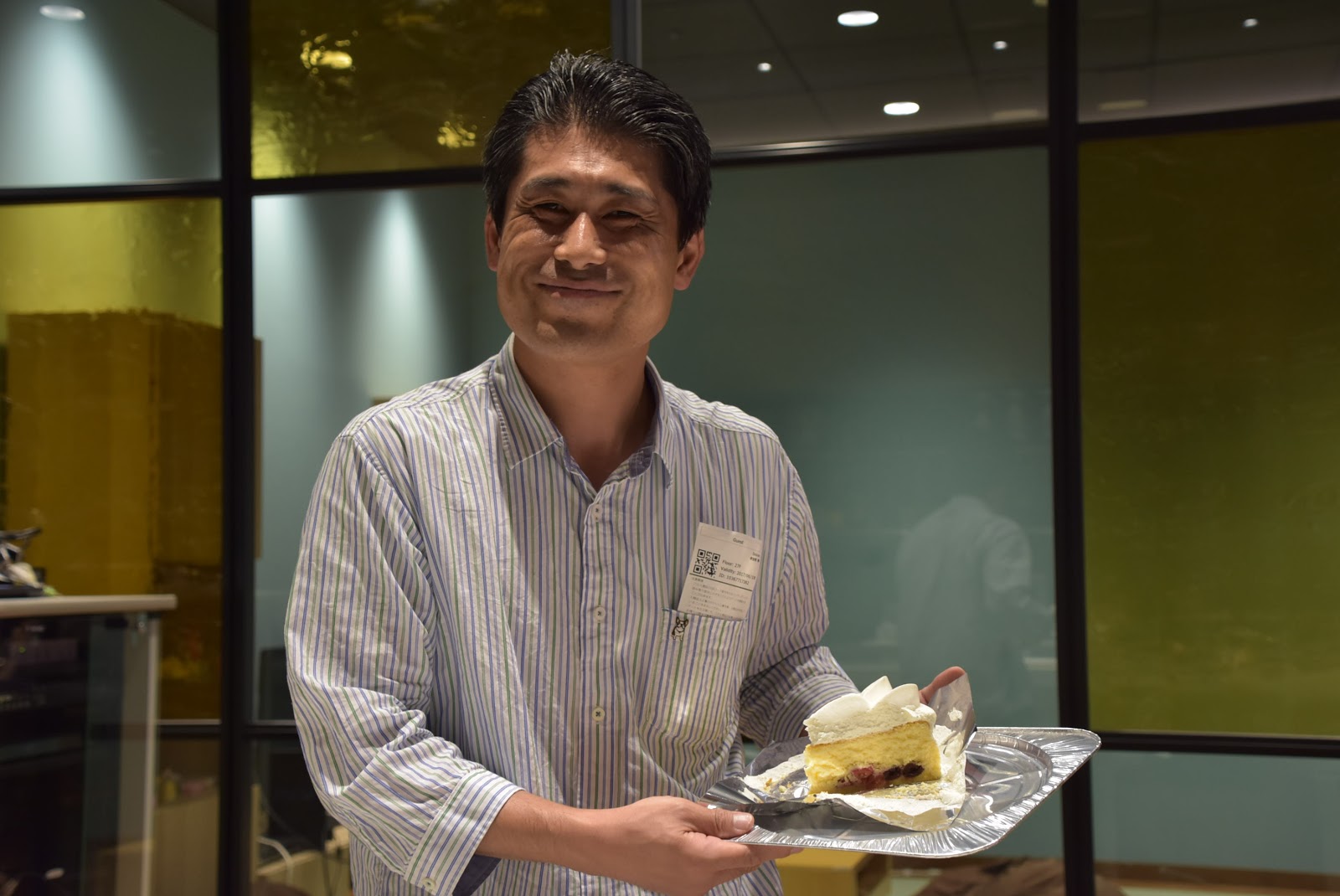
Hideki Yamane: Debian9 release party in Tokyo

We celebrated Debian9 "stretch" release in Tokyo (thanks to Cybozu, Inc. for the place).


We enjoyed beer, wine, sake, soft drinks, pizza, sandwich, snacks and cake&coffee (Nicaraguan one, it reminds me DebConf12 :)

Next.

Previous.