A new version of RcppAnnoy, our Rcpp-based R integration of the nifty Annoy library by Erik, is now on CRAN. Annoy is a small, fast, and lightweight C++ template header library for approximate nearest neighbours.
This release mostly just catches up with the Annoy release 1.6.2 of last Friday. No new features were added on our side.
Courtesy of CRANberries, there is also a diffstat report for this release.
Updated 2015-11-16 for WebM
Although it is mostly known for animation, Blender includes a non-linear video editing system that is available in all the current stable versions of Debian, Ubuntu and Fedora.
Here are some screenshots showing how to start editing a video of a talk from a conference.
In this case, there are two input files:
A video file from a DSLR camera, including an audio stream from a microphone on the camera
A separate audio file with sound captured by a lapel microphone attached to the speaker's smartphone. This is a much better quality sound and we would like this to replace the sound included in the video file.
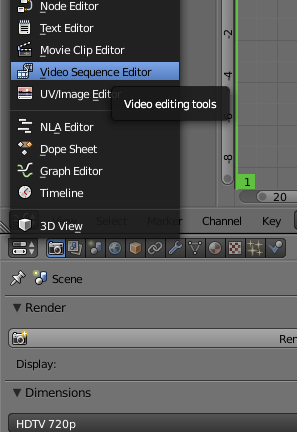
Open Blender and choose the video editing mode
Launch Blender and choose the video sequence editor from the pull down menu at the top of the window:
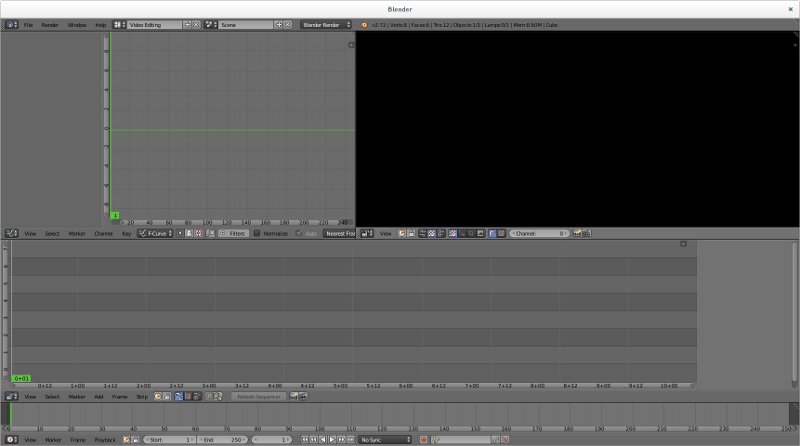
Now you should see all the video sequence editor controls:
Setup the properties for your project
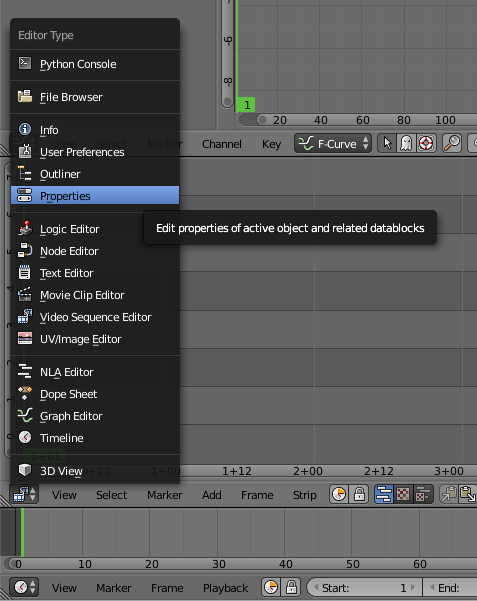
Click the context menu under the strip editor panel and change the panel to a Properties panel:
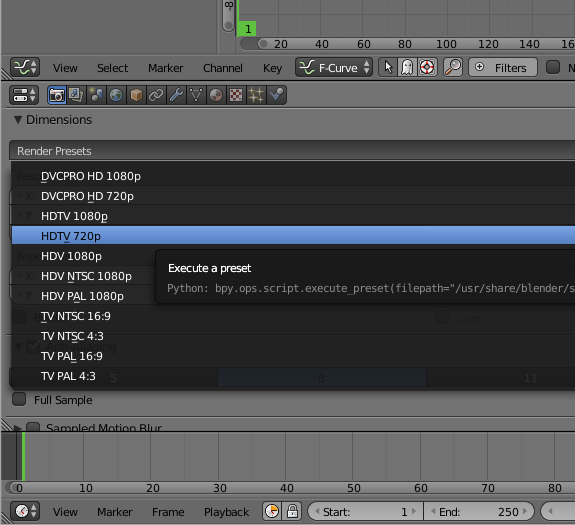
The video file we are playing with is 720p, so it seems reasonable to use 720p for the output too. Change that here:
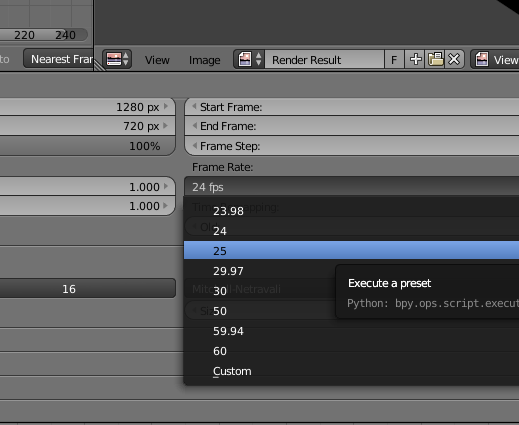
The input file is 25fps so we need to use exactly the same frame rate for the output, otherwise you will either observe the video going at the wrong speed or there will be a conversion that is CPU intensive and degrades the quality. Also check that the resolution_percentage setting under the picture dimensions is 100%:
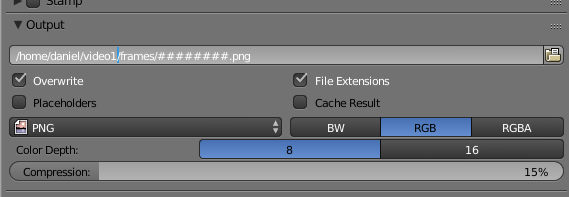
Now specify output to PNG files. Later we will combine them into a WebM file with a script. Specify the directory where the files will be placed and use the # placeholder to specify the number of digits to use to embed the frame number in the filename:
Now your basic rendering properties are set. When you want to generate the output file, come back to this panel and use the Animation button at the top.
Editing the video
Use the context menu to change the properties panel back to the strip view panel:
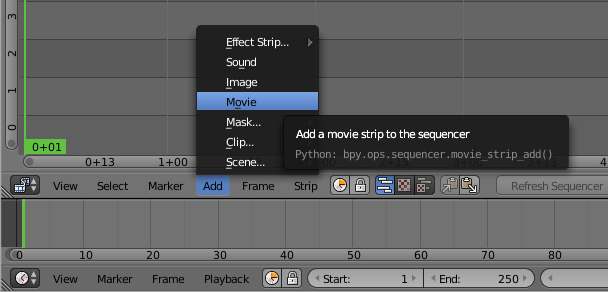
Add the video file:
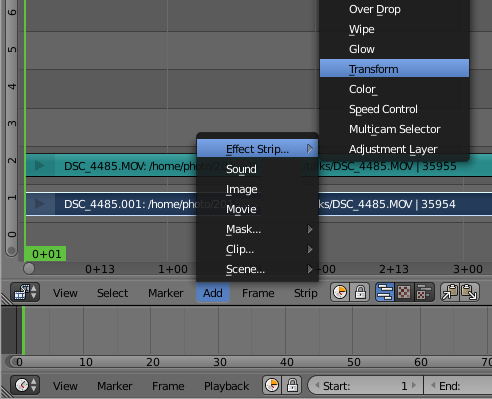
and then right click the video strip (the lower strip) to highlight it and then add a transform strip:
Audio waveform
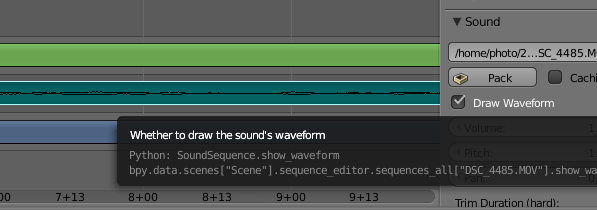
Right click the audio strip to highlight it and then go to the properties on the right hand side and click to show the waveform:
Rendering length
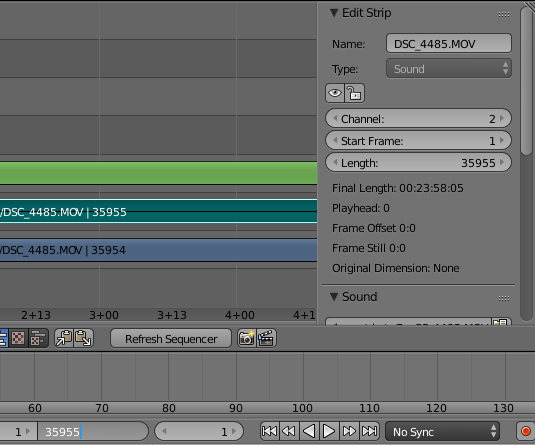
By default, Blender assumes you want to render 250 frames of output. Looking in the properties to the right of the audio or video strip you can see the actual number of frames. Put that value in the box at the bottom of the window where it says 250:
Enable AV-sync
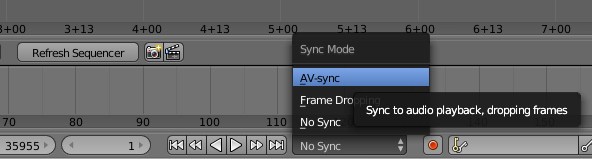
Also at the bottom of the window is a control to enable AV-sync. If your audio and video are not in sync when you preview, you need to set this AV-sync option and also make sure you set the frame rate correctly in the properties:
Add the other sound strip
Now add the other sound file that was recorded using the lapel microphone:
Enable the waveform display for that sound strip too, this will allow you to align the sound strips precisely:
You will need to listen to the strips to make an estimate of the time difference. Use this estimate to set the "start frame" in the properties for your audio strip, it will be a negative value if the audio strip starts before the video. You can then zoom the strip panel to show about 3 to 5 seconds of sound and try to align the peaks. An easy way to do this is to look for applause at the end of the audio strips, the applause generates a large peak that is easily visible.
Once you have synced the audio, you can play the track and you should not be able to hear any echo. You can then silence the audio track from the camera by right clicking it, look in the properties to the right and change volume to 0.
Make any transforms you require
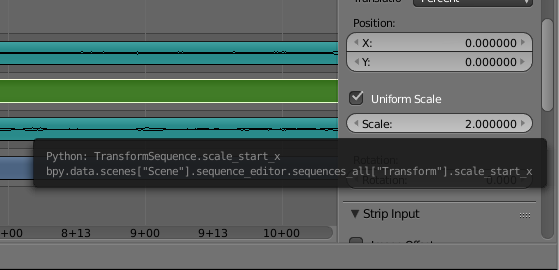
For example, to zoom in on the speaker, right click the transform strip (3rd from the bottom) and then in the panel on the right, click to enable "Uniform Scale" and then set the scale factor as required:
Render the video output to PNG
Click the context menu under the Curves panel and choose Properties again.
Click the Animation button to generate a sequence of PNG files for each frame.
Render the audio output
On the Properties panel, click the Audio button near the top. Choose a filename for the generated audio file.
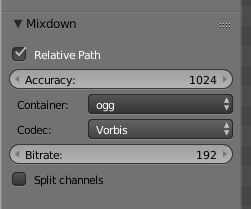
Look on the bottom left-hand side of the window for the audio file settings, change it to the ogg container and Vorbis codec:
Ensure the filename has a .ogg extension
Now look at the top right-hand corner of the window for the Mixdown button. Click it and wait for Blender to generate the audio file.
Combine the PNG files and audio file into a WebM video file
You will need to have a few command line tools installed for manipulating the files from scripts. Install them using the package manager, for example, on a Debian or Ubuntu system:
# apt-get install mjpegtools vpx-tools mkvtoolnix
Now create a script like the following:
#!/bin/bash -e
# Set this to match the project properties
FRAME_RATE=25
# Set this to the rate you desire:
TARGET_BITRATE=1000
WORK_DIR=$ HOME /video1
PNG_DIR=$ WORK_DIR /frames
YUV_FILE=$ WORK_DIR /video.yuv
WEBM_FILE=$ WORK_DIR /video.webm
AUDIO_FILE=$ WORK_DIR /audio-mixed.ogg
NUM_FRAMES= find $ PNG_DIR  -type f   wc -l
png2yuv -I p -f $FRAME_RATE -b 1 -n $NUM_FRAMES \
    -j $ PNG_DIR /%08d.png > $ YUV_FILE
vpxenc --good --cpu-used=0 --auto-alt-ref=1 \
   --lag-in-frames=16 --end-usage=vbr --passes=2 \
   --threads=2 --target-bitrate=$ TARGET_BITRATE  \
   -o $ WEBM_FILE -noaudio $ YUV_FILE
rm $ YUV_FILE
mkvmerge -o $ WEBM_FILE  -w $ WEBM_FILE -noaudio $ AUDIO_FILE
rm $ WEBM_FILE -noaudio
Next steps
There are plenty of more comprehensive tutorials, including some videos on Youtube, explaining how to do more advanced things like fading in and out or zooming and panning dynamically at different points in the video.
If the lighting is not good (faces too dark, for example), you can right click the video strip, go to the properties panel on the right hand side and click Modifiers, Add Strip Modifier and then select "Color Balance". Use the Lift, Gamma and Gain sliders to adjust the shadows, midtones and highlights respectively.
I'm pleased with the way that Lumail2 development is proceeding, and it is reaching a point where there will be a second source-release.
I've made a lot of changes to the repository recently, and most of them boil down to moving code from the C++ side of the application, over to the Lua side.
This morning, for example, I updated the handing of index.limit to be entirely Lua based.
When you open a Maildir folder you see the list of messages it contains, as you would expect.
The notion of the index.limit is that you can limit the messages displayed, for example:
See all messages: Config:set( "index.limit", "all")
See only new/unread messages: Config:set( "index.limit", "new")
See only messages which arrived today: Config:set( "index.limit", "today")
See only messages which contain "Steve" in their formatted version: Config:set( "index.limit", "steve")
These are just examples that are present as defaults, but they give an idea of how things can work. I guess it isn't so different to Mutt's "limit" facilities - but thanks to the dynamic Lua nature of the application you can add your own with relative ease.
One of the biggest changes, recently, was the ability to display coloured text! That was always possible before, but a single line could only be one colour. Now colours can be mixed within a line, so this works as you might imagine:
Panel:append( "$[RED]This is red, $[GREEN]green, $[WHITE]white, and $[CYAN]cyan!" )
Other changes include a persistant cache of "stuff", which is Lua-based, the inclusion of at least one luarocks library to parse Date: headers, and a simple API for all our objects.
All good stuff. Perhaps time for a break in the next few weeks, but right now I think I'm making useful updates every other evening or so.
Writing programs is fun, but making them fast can be a pain. Python programs
are no exception to that, but the basic profiling toolchain is actually not
that complicated to use. Here, I would like to show you how you can quickly
profile and analyze your Python code to find what part of the code you should
optimize.
What's profiling?
Profiling a Python program is doing a dynamic analysis that measures the
execution time of the program and everything that compose it. That means
measuring the time spent in each of its functions. This will give you data
about where your program is spending time, and what area might be worth
optimizing.
It's a very interesting exercise. Many people focus on local optimizations,
such as determining e.g. which of the Python functions range or xrange is
going to be faster. It turns out that knowing which one is faster may never be
an issue in your program, and that the time gained by one of the functions
above might not be worth the time you spend researching that, or arguing about
it with your colleague.
Trying to blindly optimize a program without measuring where it is actually
spending its time is a useless exercise. Following your guts alone is not
always sufficient.
There are many types of profiling, as there are many things you can measure. In
this exercise, we'll focus on CPU utilization profiling, meaning the time spent
by each function executing instructions. Obviously, we could do many more kind
of profiling and optimizations, such as memory profiling which would measure
the memory used by each piece of code something I talk about in
The Hacker's Guide to Python.
cProfile
Since Python 2.5, Python provides a C module called
cProfile which has a
reasonable overhead and offers a good enough feature set. The basic usage goes
down to:
This prints out all the function called, with the time spend in each and the
number of times they have been called.
Advanced visualization with KCacheGrind
While being useful, the output format is very basic and does not make easy to
grab knowledge for complete programs.
For more advanced visualization, I leverage
KCacheGrind. If you did any C
programming and profiling these last years, you may have used it as it is
primarily designed as front-end for Valgrind generated
call-graphs.
In order to use, you need to generate a cProfile result file, then convert it
to KCacheGrind format. To do that, I use
pyprof2calltree.
And the KCacheGrind window magically appears!
Concrete case: Carbonara optimization
I was curious about the performances of
Carbonara,
the small timeserie library I wrote for
Gnocchi. I decided to do some basic profiling
to see if there was any obvious optimization to do.
In order to profile a program, you need to run it. But running the whole
program in profiling mode can generate a lot of data that you don't care
about, and adds noise to what you're trying to understand. Since Gnocchi has
thousands of unit tests and a few for Carbonara itself, I decided to profile
the code used by these unit tests, as it's a good reflection of basic features
of the library.
Note that this is a good strategy for a curious and naive first-pass profiling.
There's no way that you can make sure that the hotspots you will see in the
unit tests are the actual hotspots you will encounter in production. Therefore,
a profiling in conditions and with a scenario that mimics what's seen in
production is often a necessity if you need to push your program optimization
further and want to achieve perceivable and valuable gain.
I activated cProfile using the method described above, creating a
cProfile.Profile object around my tests (I actually
started to implement that in testtools).
I then run KCacheGrind as described above. Using KCacheGrind, I generated
the following figures.
The test I profiled here is called test_fetch and is pretty easy to
understand: it puts data in a timeserie object, and then fetch the aggregated
result. The above list shows that 88 % of the ticks are spent in set_values
(44 ticks over 50). This function is used to insert values into the timeserie,
not to fetch the values. That means that it's really slow to insert data, and
pretty fast to actually retrieve them.
Reading the rest of the list indicates that several functions share the rest of
the ticks, update, _first_block_timestamp, _truncate, _resample, etc.
Some of the functions in the list are not part of Carbonara, so there's no
point in looking to optimize them. The only thing that can be optimized is,
sometimes, the number of times they're called.
The call graph gives me a bit more insight about what's going on here. Using my
knowledge about how Carbonara works, I don't think that the whole stack on the
left for _first_block_timestamp makes much sense. This function is supposed
to find the first timestamp for an aggregate, e.g. with a timestamp of 13:34:45
and a period of 5 minutes, the function should return 13:30:00. The way it
works currently is by calling the resample function from Pandas on a
timeserie with only one element, but that seems to be very slow. Indeed,
currently this function represents 25 % of the time spent by set_values (11
ticks on 44).
Fortunately, I recently added a small function called _round_timestamp that
does exactly what _first_block_timestamp needs that without calling any
Pandas function, so no resample. So I ended up rewriting that function this
way:
And then I re-run the exact same test to compare the output of cProfile.
The list of function seems quite different this time. The number of time spend
used by set_values dropped from 88 % to 71 %.
The call stack for set_values shows that pretty well: we can't even see the
_first_block_timestamp function as it is so fast that it totally disappeared
from the display. It's now being considered insignificant by the profiler.
So we just speed up the whole insertion process of values into Carbonara by a
nice 25 % in a few minutes. Not that bad for a first naive pass, right?
noun ter ror ism \ ter- r- i-z m\ no plural
The mistaken belief that it is possible to change the world through acts of
cowardice.
First use in English 1795 in reference to the Jacobin rule in Paris, France.
ex.: They killed a lot of people, but their terrorism only intensified the
people's resolve.
The second update in the 0.12.* series of Rcpp is now on the CRAN network for GNU R. As usual, I will also push a Debian package. This follows the 0.12.0 release from late July which started to add some serious new features, and builds upon the 0.12.1 release in September. It also marks the sixth release this year where we managed to keep a steady bi-montly release frequency.
Rcpp has become the most popular way of enhancing GNU R with C or C++ code. As of today, 512 packages on CRAN depend on Rcpp for making analytical code go faster and further. That is up by more than fifty package from the last release in September (and we recently blogged about crossing 500 dependents).
This release once again features pull requests from two new contributors with Nathan Russell and Tianqi Chen joining in. As shown below, other recent contributors (such as such as Dan) are keeping at it too. Keep'em coming! Luke Tierney also email about a code smell he spotted and which we took care of. A big Thank You! to everybody helping with code, bug reports or documentation. See below for a detailed list of changes extracted from the NEWS file.
Changes in Rcpp version 0.12.2 (2015-11-14)
Changes in Rcpp API:
Correct return type in product of matrix dimensions (PR #374 by Florian)
Before creating a single String object from a SEXP, ensure that it is from a vector of length one (PR #376 by Dirk, fixing #375).
No longer use STRING_ELT as a left-hand side, thanks to a heads-up by Luke Tierney (PR #378 by Dirk, fixing #377).
Rcpp Module objects are now checked more carefully (PR #381 by Tianqi, fixing #380)
An overflow in Matrix column indexing was corrected (PR #390 by Qiang, fixing a bug reported by Allessandro on the list)
Nullable types can now be assigned R_NilValue in function signatures. (PR #395 by Dan, fixing issue #394)
operator<<() now always shows decimal points (PR #396 by Dan)
Matrix classes now have a transpose() function (PR #397 by Dirk fixing #383)
operator<<() for complex types was added (PRs #398 by Qiang and #399 by Dirk, fixing #187)
Changes in Rcpp Attributes:
Enable export of C++ interface for functions that return void.
Changes in Rcpp Sugar:
Added new Sugar function cummin(), cummax(), cumprod() (PR #389 by Nathan Russell fixing #388)
Enabled sugar math operations for subsets; e.g. x[y] + x[z]. (PR #393 by Kevin and Qiang, implementing #392)
Changes in Rcpp Documentation:
The NEWS file now links to GitHub issue tickets and pull requests.
The Rcpp.bib file with bibliographic references was updated.
Over the rainy weekend we watched two movies: Monuments Men (in Japanese it is called Michelangelo Project!) and Interstellar. Both blockbuster movies from the usual American companies, they are light-years away when it comes to quality. The Monuments Men are boring, without a story, without depth, historically inaccurate, a complete failure. Interstellar, although a long movie, keeps you frozen in the seat while being as scientific as possible and starts your brain working heavily.
My personal verdict: 3 rotten eggs (because Rotten Tomatoes are not stinky enough) for the Monuments Men, and 4 stars for Interstellar.
Story
First for the plot of the two movies: The Monuments Men is loosely based on a true story about rescuing pieces of art at the end of the second world war, before the Nazis destroy them or the Russian take them away. A group of art experts is sent into Europe and manages to find several hiding places of art taken by the Nazis.
Interstellar is set in near future where the conditions on the earth are deteriorating to a degree that human life seems to be soon impossible. Some years before the movie plays a group of astronauts were sent through a wormhole into a different galaxy to search for new inhabitable planets. Now it is time to check out these planets, and try to establish colonies there. Cooper, a retired NASA officer and pilot, now working as farmer, and his daughter are guided by some mysterious way to a secret NASA facility. Cooper is drafted for being a pilot on the reconnaissance mission, and leaves earth and our galaxy through the same wormhole. (Not telling more!)
Monuments Men
Looking at the cast of Monuments Men (George Clooney, Matt Damon, Bill Murray, John Goodman, Jean Dujardin, Bob Balaban, Hugh Bonneville, and Cate Blanchett) one would expect a great movie but from the very first to the very last scene, it is a slowly meandering shallow flow of sticked together scenes without much coherence. Tension is generated only through unrelated events (stepping onto a landmine, patting a horse), but never developed properly. Dialogs are shallow and boring with one exception: When Frank Stokes (George Clooney) meets the one German and inquires general about the art, predicting his future being hanged.
Historically, the movie is as inaccurate as it can be despite Clooney stating that 80 percent of the story is still completely true and accurate, and almost all of the scenes happened . That contrasts starkly with the verdict of Nigel Pollard (Swansea University): There s a kernel of history there, but The Monuments Men plays fast and loose with it in ways that are probably necessary to make the story work as a film, but the viewer ends up with a fairly confused notion of what the organisation was, and what it achieved.
The movie leaves a bitter aftertaste, hailing of American heroism paired with the usual stereotypes (French amour, German retarded, Russian ignorance, etc). Together with the half baked dialogues it feels like a permanent coitus interruptus.
Interstellar
Interstellar cannot serve with a similar cast, but still a few known people (Matthew McConaughey, Anne Hathaway, and Michael Caine!). But I believe this is actually a sign of quality. Well balancing scientific accuracy and the requirements for blockbusters, the movie successfully spans the bridge between complicated science, in particular general gravity, and entertainment. While not going so far to call the move edutainment (like both the old and new Cosmos), it is surprising how much of hard science is packed into this movie. This is mostly thanks to the theoretical physicist Kip Thorne acting as scientific consultant for the movie, but also due to the director Christopher Nolan being serious about it and studying relativity at Caltech.
Of course, scientific accuracy has limits nobody knows what happens if one crosses the event horizon of a black hole, and even the existence of wormholes is purely theoretical by now. Still, throughout the movie it follows the two requirements laid out by Kip Thorne: First, that nothing would violate established physical laws. Second, that all the wild speculations would spring from science and not from the fertile mind of a screenwriter.
I think the biggest compliment was that, despite the length, despite a long day out (see next blog), despite the rather unfamiliar topic, my wife, who is normally not interested in space movies and that kind, didn t fall asleep throughout the movie, and I had to stop several times to explain details of the theory of gravity and astronomy. So in some sense it was perfect edutainment!
Patches submitted which have not made their way to the archive yet:
#804729 on pbuilder by Reiner Herrmann: tell dblatex to build in a deterministic path.
reproducible.debian.net
The fifth and sixth armhf build nodes have been set up, resulting in five more builder jobs for armhf. More than 10,000 packages have now been identified as reproducible with the reproducible toolchain on armhf. (Vagrant Cascadian, h01ger)
Helmut Grohne and Mattia Rizzolo now have root access on all 12 build nodes used by reproducible.debian.net and jenkins.debian.net. (h01ger)
reproducible-builds.org is now linked from all package pages and the reproducible.debian.net dashboard. (h01ger)
profitbricks-build5-amd64 and profitbricks-build6-amd64, responsible for running amd64 tests now run 398.26 days in the future. This means that one of the two builds that are being compared will be run on a different minute, hour, day, month, and year. This is not yet the case for armhf. FreeBSD tests are also done with 398.26 days difference. (h01ger)
The design of the Arch Linux test page has been greatly improved. (Levente Polyak)
diffoscope development
Three releases of diffoscope happened this week numbered 39 to 41. It includes support for EPUB files (Reiner Herrmann) and Free Pascal unit files, usually having .ppu as extension (Paul Gevers).
The rest of the changes were mostly targetting at making it easier to run diffoscope on other systems. The tlsh, rpm, and debian modules are now all optional. The test suite will properly skip tests that need optional tools or modules when they are not available. As a result, diffosope is now available on PyPI and thanks to the work of Levente Polyak in Arch Linux.
Getting these versions in Debian was a bit cumbersome. Version 39 was uploaded with an expired key (according to the keyring on ftp.debian.org which will hopefully be updated soon) which is currently handled by keeping the files in the queue without REJECTing them. This prevented any other Debian Developpers to upload the same version. Version 40 was uploaded as a source-only upload but failed to build from source which had the undesirable side effect of removing the previous version from unstable. The package faild to build from source because it was built passing -I to debbuild. This excluded the ELF object files and static archives used by the test suite from the archive, preventing the test suite to work correctly. Hopefully, in a nearby future it will be possible to implement a sanity check to prevent such mistakes in the future.
It has also been identified that ppudump outputs time in the system timezone without considering the TZ environment variable. Zachary Vance and Paul Gevers raised the issue on the appropriatechannels.
strip-nondeterminism development
Chris Lamb released strip-nondeterminism version 0.014-1 which disables stripping Mono binaries as it is too aggressive and the source of the problem is being worked on by Mono upstream.
Package reviews
133 reviews have been removed, 115 added and 103 updated this week.
Chris West and Chris Lamb reported 57 new FTBFS bugs.
Misc.
The video of h01ger and Chris Lamb's talk at MiniDebConf Cambridge is now available.
h01ger gave a talk at CCC Hamburg on November 13th, which was well received and sparked some interest among Gentoo folks. Slides and video should be available shortly.
Frederick Kautz has started to revive Dhiru Kholia's work on testing Fedora packages.
Your editor wish to once again thank #debian-reproducible regulars for reviewing these reports weeks after weeks.
Discworld Noir was a
superb adventure game, but is also notoriously unreliable, even in
Windows on real hardware;
using Wine is just not going to work.
After many attempts at bringing it back into working order, I've settled
on an approach that seems to work: now that qemu and libvirt
have made virtualization and emulation easy, I can run it in a version
of Windows that was current at the time of its release. Unfortunately,
Windows 98 doesn't virtualize particularly well either, so this
still became a relatively extensive
yak-shaving
exercise.
These instructions assume that /srv/virt is a suitable place to put
disk images, but you can use anywhere you want.
The emulated PC
After some trial and error, it seems to work if I configure
qemu to emulate the following:
Fully emulated hardware instead of virtualization (qemu-system-i386 -no-kvm)
Intel Pentium III
Intel i440fx-based motherboard with ACPI
Real-time clock in local time
No HPET
256 MiB RAM
IDE primary master: IDE hard disk (I used 30 GiB, which is massively
overkill for this game; qemu can use sparse files so it actually ends
up less than 2 GiB on the host system)
IDE primary slave, secondary master, secondary slave: three CD-ROM drives
PS/2 keyboard and mouse
Realtek AC97 sound card
Cirrus video card with 16 MiB video RAM
A modern laptop CPU is an order of magnitude faster than what Discworld Noir
needs, so full emulation isn't a problem, despite being inefficient.
There is deliberately no networking, because Discworld Noir doesn't need it,
and a 17 year old operating system with no privilege separation is
very much not safe to use on the modern Internet!
Software needed
Windows 98 installation CD-ROM as a .iso file
(cp /dev/cdrom windows98.iso) - in theory you could also use a
real optical drive, but my laptop doesn't usually have one of those.
I used the OEM disc, version 4.10.1998 (that's the original Windows 98,
not the Second Edition), which came with a long-dead PC, and didn't
bother to apply any patches.
A Windows 98 license key. Again, I used an OEM key from a past PC.
A complete set of Discworld Noir (English) CD-ROMs as .iso files.
I used the UK "Sold Out Software" budget release, on 3 CDs.
Don't start the installation immediately. Instead, boot the installation
CD to a DOS prompt with CD-ROM support. From here, run
fdisk
and create a single partition filling the emulated hard disk. When
finished, hard-reboot the virtual machine (press Ctrl+C on the
qemu-system-i386 process and run it again).
The DOS FORMAT.COM utility is on the Windows CD-ROM but not in the root
directory or the default %PATH%, so you'll have to run:
d:\win98\format c:
to create the FAT filesystem. You might have to reboot again at this point.
The reason for doing this the hard way is that the Windows 98 installer
doesn't detect qemu as supporting ACPI. You want ACPI support, so that
Windows will issue IDLE instructions from its idle loop, instead of
occupying a CPU core with a busy-loop. To get that, boot to a DOS
prompt again, and use:
setup /p j /iv
/p j forces ACPI support
(Thanks to "Richard S" on the Virtualbox forums
for this tip.)
/iv is unimportant, but it disables the annoying "billboards" during
installation, which advertised once-exciting features like support for
dial-up modems and JPEG wallpaper.
I used a "Typical" installation; there didn't seem to be much point in
tweaking the installed package set when everything is so small by
modern standards.
Windows 98 has built-in support for the Cirrus VGA card that we're
emulating, so after a few reboots, it should be able to run in a
semi-modern resolution and colour depth. Discworld Noir
apparently prefers a 640 480 16-bit video mode, so right-click
on the desktop background, choose Properties and set that up.
Audio drivers
This is the part that took me the longest to get working. Of the sound
cards that qemu can emulate, Windows 98 only supports the SoundBlaster 16
out of the box. Unfortunately, the Soundblaster 16 emulation in qemu is
incomplete,
and in particular version 2.1 (as shipped in Debian 8) has a tendency to
make Windows lock up during boot.
I've seen advice in various places to emulate an Eqsonic ES1370
(SoundBlaster AWE 64), but that didn't work for me: one of the drivers I
tried caused Windows to lock up at a black screen during boot, and the other
didn't detect the emulated hardware.
The next-oldest sound card that qemu can emulate is a Realtek AC97,
which was often found integrated into motherboards in the late 1990s.
This one seems to work, with the "A400" driver bundle linked above.
For Windows 98 first edition, you need a driver bundle that includes
the old "VXD" drivers, not just the "WDM" drivers supported by
Second Edition and newer.
The easiest way to get that into qemu seems to be to turn it into a CD image:
Run the installer from E:, then reboot with the Windows 98 CD inserted, and
Windows should install the driver.
Installing Discworld Noir
Boot up the virtual machine with CD 1 in the emulated drive:
You might be thinking "... why not insert all three CDs into D:, E: and F:?"
but the installer expects subsequent disks to appear in the same drive
where CD 1 was initially, so that won't work. Instead, when prompted for
a new CD, switch to the qemu monitor with Ctrl+Alt+2 (note that this
is 2, not F2). At the (qemu) prompt,
use info block to see a list of emulated drives, then issue a
command like
change ide0-cd1 /srv/virt/DWN_ENG_2.iso
to swap the CD. Then switch back to Windows' console with Ctrl+Alt+1
and continue installation. I used a Full installation of Discworld Noir.
Transferring the virtual machine to GNOME Boxes
Having finished the "control freak" phase of installation, I wanted a
slightly more user-friendly way to run this game, so I transferred
the virtual machine to be used by libvirtd, which is the backend for
both GNOME Boxes and virt-manager:
virsh create discworldnoir.xml
Here is the configuration I used. It's a mixture
of automatic configuration from virt-manager, and hand-edited configuration
to make it match the qemu-system-i386 command-line.
Running the game
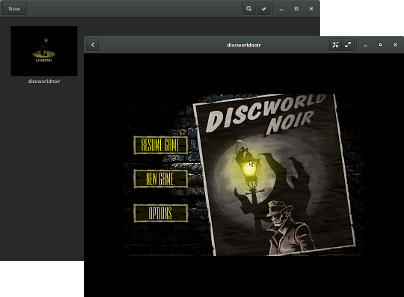
If all goes well, you should now see a discworldnoir virtual machine
in GNOME Boxes, in which you can boot Windows 98 and play the game.
Have fun!
Many of the people who have bought Windows phones seek relief sooner or later. Sometimes this comes about due to peer pressure or the feeling of isolation, in other cases it is the frustration of the user interface or the realization that they can't run cool apps like Lumicall.
Frequently, the user has been given the phone as a complimentary upgrade when extending a contract without perceiving the time, effort and potential cost involved in getting their data out of the phone, especially if they never owned a smartphone before.
When a Windows phone user does decide to cut their losses, they are usually looking to a friend or colleague with technical expertise to help them out. Personally, I'm not sure that anybody I would regard as an IT expert has ever had a Windows phone though, meaning that many experts are probably also going to be scratching their heads when somebody asks them for help. Therefore, I've put together this brief guide to help deal with these phones more expediently when they are encountered.
The Windows phones have really bad support for things like CalDAV and WebDAV so don't get your hopes up about using such methods to backup the data to any arbitrary server. Searching online you can find some hacks that involve creating a Google or iCloud account in the phone and then modifying the advanced settings to send the data to an arbitrary server. These techniques vary a lot between specific versions of the Windows Phone OS and so the techniques I've described below are probably easier.
Identify the Windows Live / Hotmail account
The user may not remember or realize that a Microsoft account was created when they first obtained the phone. It may have been created for them by the phone, a friend or the salesperson in the phone shop.
Look in the settings (Accounts) to find the account ID / email address. If the user hasn't been using this account, they may not recognize it and probably won't know the password for it. It is essential to try and obtain (or reset) the password before going any further, so start with the password recovery process. Microsoft may insist on sending a password reset email to some other email address that the user has previously provided or linked to their phone.
Extracting data from the phone
In many cases, the easiest way to extract the data is to download it from Microsoft live.com rather than extracting it from the phone. Even if the user doesn't realize it, the data is probably all replicated in live.com and so there is no further loss of privacy by logging in there to extract it.
Set up an IMAP mail client
An IMAP client will be used to download the user's emails (from the live.com account they may never have used) and SMS.
Install Mozilla Thunderbird (IceDove on Debian), GNOME Evolution or a similar program on the user's PC.
Configure the IMAP mail client to connect to the live.com account. Some clients, like Thunderbird, will automatically set up all the server details when you enter the live.com account ID. For manual account setup, the details here may help.
Email backup
If the user was not using the live.com account ID for email correspondence, there may not be a lot of mail in it. There may be some billing receipts or other things that are worth keeping though.
Create a new folder (or set of folders) in the user's preferred email account and drag and drop the messages from the live.com Inbox to the new folder(s).
SMS backup
SMS backup can also be done through live.com. It is slightly more complicated than email backup, but similar.
In the live.com Outlook email index page, look for the settings button and click Manage Categories.
Enable the Contacts and Photos categories with a tick in each of them.
Go back to the main Inbox page and look for the categories section on the bottom left-hand side of the screen, under the folder list. Click the Contacts category.
The page may now appear blank. That is normal.
On the top right-hand corner of the page, click the Arrange menu and choose Conversation.
All the SMS messages should now appear on the screen.
Under the mail folders list on the left-hand side of the page, click to create a new folder with a name like SMS.
Select all the SMS messages and look for the option to move them to a folder. Send them to the SMS folder you created.
Now use the IMAP mail client to locate the SMS folder and copy everything from there to a new folder in the user's preferred mail server or local disk.
Contacts backup
On the top left-hand corner of the live.com email page, there is a chooser to select other live.com applications. Select People.
You should now see a list of all the user's contacts. Look for the option to export them to Outlook and other programs. This will export them as a CSV file.
You can now import the CSV file into another application. GNOME Evolution has an import wizard with an option for Outlook file format. To load the contacts into a WebDAV address book, such as DAViCal, configure the address book in Evolution and then select it as the destination when running the CSV import wizard.
WARNING: beware of using the Mozilla Thunderbird address book with contact data from mobile devices and other sources. It can't handle more than two email addresses per contact and this can lead to silent data loss if contacts are not fully saved.
Calendar backup
Now go to the live.com application chooser again and select the calendar application. Microsoft provides instructions to extract the calendar, summarised here:
Look for the Share button at the top somewhere and click it.
On the left-hand side of the page, click Get a link
On the right-hand side, choose Show event details to ensure you get a full calendar and then click Create underneath it.
Look for the link with a webcals prefix. If you are downloading with a tool like wget, change the scheme prefix to https. Fetch the file from this link and save it with an ics extension.
Inspect the ics calendar file to make sure it looks like real iCalendar data.
You can now import the ics file into another application. GNOME Evolution has an import wizard with an option for iCalendar file format. To load the calendar entries into a CalDAV server, such as DAViCal, configure the calendar server in Evolution and then select it as the destination when running the import wizard.
Backup the user's photos, videos and other data files
Hopefully you will be able to do this step without going through live.com. Try enabling the MTP or PTP mode in the phone and attach it to the computer using the USB cable. Hopefully the computer will recognize it in at least one of those modes.
Use the computer's file manager or another tool to simply backup the entire directory structure.
Reset the phone to factory defaults
Once the user has their hands on a real phone, it is likely they will never want to look at that Windows phone again. It is time to erase the Windows phone, there is no going back.
Go to the Settings and About and tap the factory reset option. It is important to do this before obliterating the live.com account, otherwise there are scenarios where you could be locked out of the phone and unable to erase it.
Erasing may take some time. The phone will reboot and then display an animation of some gears spinning around for a few minutes and then reboot again. Wait for it to completely erase.
Permanently close the Microsoft live.com account
Keeping track of multiple accounts and other services is tedious and frustrating for most people, especially with services that try to force the user to receive email in different places.
You can help eliminate user fatigue by helping them permanently close the live.com account so they never have to worry about it again.
Follow the instructions on the Microsoft site.
At some point it will suggest certain actions you should take before closing the account, most can be ignored. One thing you should do is remove the link between the live.com account ID and the phone. It is a good idea to do this as otherwise you may have problems erasing the device, if you haven't already done so. Before completely closing the account, also verify that the factory reset of the phone completed successfully.
Dispose of the Windows phone safely
If you can identify any faults with the phone, the user may be able to return it under the terms of the warranty. Some phone companies may allow the user to exchange it for something more desirable when it fails under warranty.
It may be tempting to sell the phone to a complete stranger on eBay or install a custom ROM on it. In practice, neither option may be worth the time and effort involved. You may be tempted to put it beyond use so nobody else will suffer with it, but please try to do so in a way that is respectful of the environment.
Putting the data into a new phone
Prepare the new phone with a suitable ROM such as Replicant or Cyanogenmod.
Install the F-Droid app on the new phone.
From F-droid, install the DAVdroid app. DAVdroid will allow you to quickly sync the new phone against any arbitrary CalDAV and WebDAV server to populate it with the user's calendar and contact / address book data.
Now is a good time to install other interesting apps like Lumicall, Conversations and K-9 Mail.
Firefox 42,
which was released last week, introduced a new feature in its Private
Browsing mode:
tracking protection.
If you are interested in how this list is put together and then used
in Firefox, this post is for you.
Safe Browsing lists
There are many possible ways to download URL lists to the browser and check
against that list before loading anything. One of those is already
implemented as part of our malware and phishing protection. It uses
the Safe Browsing v2.2 protocol.
In a nutshell, the way that this works is that each URL on the block list is
hashed (using SHA-256) and then that list of hashes is
downloaded by Firefox and stored into a data structure on disk:
~/.cache/mozilla/firefox/XXXX/safebrowsing/mozstd-track* on Linux
~/Library/Caches/Firefox/Profiles/XXXX/safebrowsing/mozstd-track* on Mac
C:\Users\XXXX\AppData\Local\mozilla\firefox\profiles\XXXX\safebrowsing\mozstd-track* on Windows
This
sbdbdump script
can be used to extract the hashes contained in these files and will output
something like this:
The name of the blocklist being dumped here (mozstd-track-digest256) is set in the urlclassifier.trackingTable preference which you can find in about:config. The most important part of the output shown above is the addComplete line which contains a hash that we will see again in a later section.
List lookups
Once it's time to load a resource, Firefox hashes the URL, as well as
a few variations
of it, and then looks for it in the local lists.
If there's no match, then the load proceeds. If there's a match, then we do
an
additional check
against a pairwise allowlist.
The pairwise allowlist (hardcoded in the urlclassifier.trackingWhitelistTable pref)
is designed to encode what we call "entity relationships". The list groups related domains together for
the purpose of checking whether a load is first or third party (e.g. twitter.com and
twimg.com both belong to the same entity).
Entries on this list (named mozstd-trackwhite-digest256) look like this:
twitter.com/?resource=twimg.com
which translates to "if you're on the twitter.com site, then don't block
resources from twimg.com.
If there's a match on the second list, we don't block the load.
It's only when we get a match on the first list and not the second one that
we go ahead and
cancel the network load.
If you visit our test
page, you will see
tracking protection in action with a shield icon in the URL bar. Opening the
developer tool console will expose the URL of the resource that was blocked:
The resource at "https://trackertest.org/tracker.js" was blocked because tracking protection is enabled.
Creating the lists
The blocklist is created by Disconnect according to their
definition of tracking.
The Disconnect list is on their Github
page,
but the copy we use in Firefox is the copy we have in our own
repository.
Similarly the Disconnect entity list is from
here but our
copy is in our
repository.
Should you wish to be notified of any changes to the lists, you
can simply subscribe to this Atom
feed.
To convert this JSON-formatted list into the binary format needed by the
Safe Browsing code, we run a custom list generation
script whenever
the list changes on GitHub.
If you run that script locally using the same configuration as our server
stack, you can see the conversion from the original list to the binary hashes.
Here's a sample entry from the mozstd-track-digest256.log file:
This in combination with the sbdbdump script mentioned earlier, will allow you to
audit the contents of the local lists.
Serving the lists
The way that the binary lists are served to Firefox is through a
custom server component written by Mozilla:
shavar.
Every hour, Firefox requests updates from shavar.services.mozilla.com. If new data is available, then the whole list is downloaded again. Otherwise, all it receives in return is an empty 204 response.
Should you want to play with it and run your own server, follow the
installation
instructions
and then go into about:config to change these preferences to point to
your own instance:
Learn more
If you want to learn more about how tracking protection works in Firefox,
you can find all of the technical details on the Mozilla
wiki or you can ask
questions on our
mailing list.
Thanks to Tanvi Vyas for reviewing a draft
of this post.
I previously wrote about my experience moving to a 4K monitor.
I've been relatively happy with it except for one thing: I found that 1GB video RAM simply isn't sufficient for a stable system. This wasn't immediately obvious as it appeared to work in the beginning, but over time I've observed that it was not sufficient.
I'm not using it for gaming or 3D rendering. My typical desktop involves several virtual workspaces with terminal windows, web browsers, a mail client, IRC and Eclipse. Sometimes I use vlc for playing media files.
Using the nvidia-settings tool, I observed that the Used Dedicated memory statistic would frequently reach the maximum, 1024MB. On a few occasions, X crashed with errors indicating it was out of memory.
After observing these problems, I put another card with 4GB video RAM into the system and I've observed it using between 1024 MB and 1300 MB at any one time. This leaves me feeling that people with only basic expectations for their desktop should aim for at least 2GB video RAM for 4k.
That said, I've continued to enjoy many benefits of computing with a 4K monitor. In addition to those mentioned in my previous blog, here are some things that were easier for me with 4K:
Using gitk to look through many commits on the master branch of reSIProcate and cherry-pick some things to the resiprocate-1.9 branch. gitk only used half the screen and I was able to use the right hand side of the screen to look at the code in an editor in more detail.
Simultaneously monitoring logs from two Android devices running Lumicall and a repro SIP proxy server in three terminal windows arranged side by side, up to 125 lines of text in each.
Using WebRTC sites in the Mozilla browser while having a browser console window, source code and SIP proxy logs all open at the same time, none of them overlapping.
You can do much of this with a pair of monitors, but there is something quite nice about doing it all on a single 4K screen.
Sharing knowledge about RTC, for use within our communities and also for other communities using the free and open technology
Engaging with collaborators who are not involved in packaging teams, for example, the Debian RTC team has also had interest from upstream developers who are not on other Debian or Fedora mailing lists
Minimizing the effort required by the system administrators (the DSA team in Debian or Infrastructure team in Fedora) by triaging user problems and planning and testing any proposed changes.
Freeing up developer time to work on new features, such as the exciting work I'm doing on telepathy-resiprocate.
There are also many opportunities for project work that go beyond traditional packaging responsibilities. Wouldn't it be interesting to find ways to integrate the publish/subscribe capabilities of SIP and XMPP with the Fedmsg infrastructure?
Bringing XMPP to FedoraProject.org
We recently launched XMPP for debian.org and it would not be hard to replicate for FedoraProject.org users. Sure, some people are happy running their own XMPP servers. There are just as many people who prefer to focus on development and have something like XMPP provided for them.
With the strong emphasis on building a roster/buddy-list, XMPP can also help to facilitate long-term engagement in the community and users may identify more closely with the project.
I haven't offered XMPP on the FedRTC.org trial service because it would be inconvenient for people to migrate buddy lists to the FedoraProject.org domain when the service is officially adopted.
Collaboration across communities
There are various other places where we can share knowledge between teams in different communities and people are invited to participate.
The Free-RTC mailing list is a great place to discuss free RTC strategies and initiatives.
The XMPP operators mailing list provides a forum to discuss operational issues in the XMPP space, such as keeping out the spammers.
Would you like to participate?
Please consider joining some of the mailing lists I've mentioned, replying to the thread on the Fedora devel mailing list, volunteering for the Debian RTC team or emailing me personally.
Like each month, here comes a report about the work of paid contributors to Debian LTS.
Individual reports
In September, 85.50 work hours have been dispatched among 8 paid contributors. Their reports are available:
Ben Hutchings did 14 hours (13.5h allocated, thus only catching up 0.5 hours out of the 5.5 extra hours he had left from former month).
Chris Lamb did 11 hours (12h allocated, he will catch up later).
Guido G nther did 4 hours (out of 8 hours allocated, thus keeping 4 extra hours for November).
Mike Gabriel did nothing (out of 8 hours allocated, he will catch up in November).
Evolution of the situation
November crossed a new record with 114.5 hours funded. This is mainly thanks to our first Platinum sponsor: TOSHIBA (through Toshiba Software Development Vietnam). They don t know yet if they can sponsor us in the long term (they hope so), but it s still a nice news as we jumped from 50% to 65% of the objective of the equivalent of a full-time position with a single new sponsor.
Currently no change is expected for next month as we don t have any other new sponsor in the process of joining us.
We still need more support to be able to support all the packages we could not afford to support during the squeeze cycle. We are currently discussing which package we can or cannot support on the LTS list, see the thread Unsupported packages for Wheezy LTS for the current situation.
In terms of security updates waiting to be handled, the situation is close to last month: the dla-needed.txt file lists 21 packages awaiting an update (6 more than last month), the list of open vulnerabilities in Squeeze shows about 23 affected packages in total (exactly like last month).
Thanks to our sponsors
The new sponsors are in bold.
Now this could just be the prodigious amounts of sugar and ghee I've been eating the past few days, but I'm bursting with energy for working on Debian so here is a list of things I want to do in the upcoming year.
Finish packaging the latest Dovecot (2.2.19).
This will happen soon. Sooner if you people will stop filing bugs all the time. The rest of the items are more long term.
Recruit more members for the Dovecot packaging team.
Undertake to respond to all bug reports and other Debian correspondence within three days.
Finally get the Minix port to a state where other people can use it and work on it too.
Relearn Debian development from scratch so that I can be familliar with and apply the latest techniques. Write down what I've learned.
Arrange (or more realistically get someone to arrange) a Debian event in Northern or Eastern India.
Watch all the Debconf 15 videos.
To keep all of this on track, I shall adopt the practice lately seen on Debian Planet of periodically posting a report of my Debian activities.
I m excited to see other people thinking about userspace-to-kernel attack surface reduction ideas. Theo de Raadt recently published slides describing Pledge. This uses the same ideas that seccomp implements, but with less granularity. While seccomp works at the individual syscall level and in addition to killing processes, it allows for signaling, tracing, and errno spoofing. As de Raadt mentions, Pledge could be implemented with seccomp very easily: libseccomp would just categorize syscalls.
I don t really understand the presentation s mention of Optional Security , though. Pledge, like seccomp, is an opt-in feature. Nothing in the kernel refuses to run unpledged programs. I assume his point was that when it gets ubiquitously built into programs (like stack protector), it s effectively not optional (which is alluded to later as comprehensive applicability ~= mandatory mitigation ). Regardless, this sensible (though optional) design gets me back to his slide on seccomp, which seems to have a number of misunderstandings:
A Turing complete eBPF program watches your program Strictly speaking, seccomp is implemented using a subset of BPF, not eBPF. And since BPF (and eBPF) programs are guaranteed to halt, it makes seccomp filters not Turing complete.
Who watches the watcher? I don t even understand this. It s in the kernel. The kernel watches your program. Just like always. If this is a question of BPF program verification, there is literally a program verifier that checks various properties of the BPF program.
seccomp program is stored elsewhere This, with the next statement, is just totally misunderstood. Programs using seccomp define their program in their own code. It s used the same way as the Pledge examples are shown doing.
Easy to get desyncronized either program is updated As above, this just isn t the case. The only place where this might be true is when using seccomp on programs that were not written natively with seccomp. In that case, yes, desync is possible. But that s one of the advantages of seccomp s design: a program launcher (like minijail or systemd) can declare a seccomp filter for a program that hasn t yet been ported to use one natively.
eBPF watcher has no real idea what the program under observation is doing I don t understand this statement. I don t see how Pledge would have a real idea either: they re both doing filtering. If we get AI out of our syscall filters, we re in serious trouble. :)
OpenBSD has some interesting advantages in the syscall filtering department, especially around sockets. Right now, it s hard for Linux syscall filtering to understand why a given socket is being used. Something like SOCK_DNS seems like it could be quite handy.
Another nice feature of Pledge is the path whitelist feature. As it s still under development, I hope they expand this to include more things than just paths. Argument inspection is a weak point for seccomp, but under Linux, most of the arguments are ultimately exposed to the LSM layer. Last year I experimented with creating a seccomp LSM for path matching where programs could declare whitelists, similar to standard LSMs.
So, yes, Linux could match this API on seccomp . It d just take some extensions to libseccomp to implement pledge(), as I described at the top. With OpenBSD doing a bunch of analysiswork on common programs, it d be excellent to see this usable on Linux too. So far on Linux, only a few programs (e.g. Chrome, vsftpd) have bothered to do this using seccomp, and it could be argued that this is ultimately due to how fine grained it is.
A little over a year ago I wrote about how I'd been using a Mac as my
main work machine. I hadn't written anything on the subject since. Here
are four useful Mac programs that I can recommend to people.
Sizeup, from Irradiated Software. A bit
Like Windows' aero snap, but on steroids. I love this. I regularly move
windows between two desktops (external and internal display), resize and
centre them or put them in one quarter of the screen with just a few presses.
The "snapback" feature is also great.
X Lossless Decoder (XLD). A handy
transcoder that can use QuickTime encoders and so can write out
Apple/Quicktime/iTunes-encoded AAC/MP4 files en-mass, translating file
meta-data.
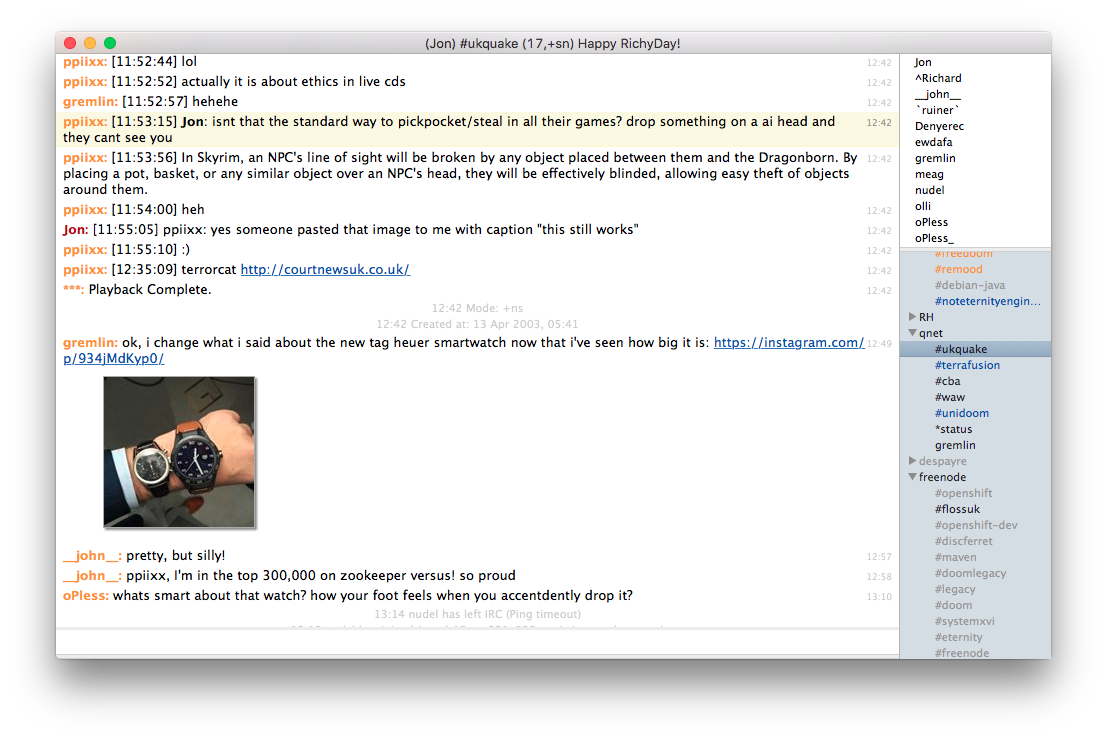
LimeChat
LimeChat, an IRC client. I theme it to look like
Colloquy. The net result
is pretty clean. I like using a proportional-font for text things, so getting
IRC out of a terminal is a win for me.
LimeChat automatically fetches and thumbnails URIs to images that people paste
in channels, which is either incredibly convenient or a curse, depending on the
channel. You can toggle that behaviour but only across the whole client, not on
a channel or network basis.
Finally, 1Password is an incredibly slick
password manager. I use it in a very basic fashion: no mobile client, no syncing
to anything outside of my workstation. You could also use LastPass
which is similar and has a Linux client. I haven't tried it, but there's a third
party tool to read 1Password password stores on Linux written by Ryan Coleman of
SDL fame called 1pass.
Hello World,
In this part of the world, today is a great day. Today is Diwali - the festival of lightsOn this day, I am very happy to announce the release of apt-offline, version 1.7. This release brings in a large number of fixes and is a recommended update. Thanks to Bernd Dietzel for uncovering the shell injection bug which could be exploited by carefully crafting the signature file. Since apt-offline could be run as 'root', this one was an important bug. Also thanks to him for the fix.During my tests, I also realized that apt-offline's --install-src-packages implementation had broken over time. --install-src-packages option can be useful to users who would like the offline ability to download a [Debian] source package, along with all its Build Dependencies.For further details on many of the other fixes, please refer to the git repository at the homepage. Packages for Debian (and derivatives) are already in the queue.Wishing You and Your Loved Ones a Very Happy Diwali.
Wishing you all a happy Diwali and Gujarati New Year (V.S. 2072 called Plavanga.)Instead of being something sane like a flat disk supported by four elephants standing on a tortoise, the Earth is an oblate spheroid in heliocentric orbit. The Moon too offends by maintaining an unreasonably non-epicyclic orbit. Combined this means that the Americas (plus Iceland if there any Hindus there) observe Diwali today whereas in India and the rest of the world it is tomorrow. Technically in these longitudes the Ashvayuja amavasya tithi pervades both Tuesday and Wednesday but as Lakshmi Puja takes place at the pradosha kala it means it should be celebrated today though no doubt most of the non-astronomically minded people will just follow India any way. The New Year is on Thursday all over the world.Regardless of when you celebrate, may your year be full of happiness, good fortune and prosperity.
If you have a HTTPS-enabling proxy in front of your gitweb, so that it tries
to do <base href="http://..."> (because it doesn't know that the user
is actually using HTTPS), here's the Apache configuration variable to tell
it otherwise:
SetEnv HTTPS ON
So now git.sesse.net works with HTTPS after
Let's Encrypt, without the CSS being broken. Woo. (Well, the clone URL
still says http. So, halfway there, at least.)
 A new version of RcppAnnoy, our Rcpp-based R integration of the nifty Annoy library by Erik, is now on CRAN. Annoy is a small, fast, and lightweight C++ template header library for approximate nearest neighbours.
This release mostly just catches up with the Annoy release 1.6.2 of last Friday. No new features were added on our side.
Courtesy of CRANberries, there is also a diffstat report for this release.

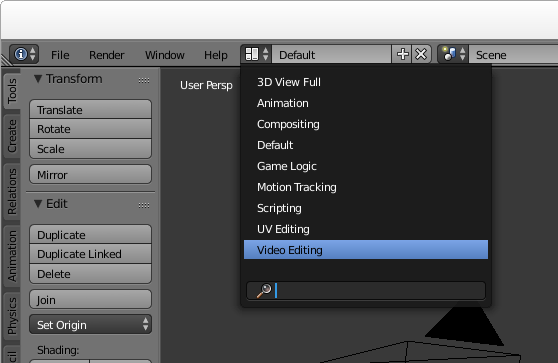 Now you should see all the video sequence editor controls:
 Setup the properties for your project
Click the context menu under the strip editor panel and change the panel to a Properties panel:
 The video file we are playing with is 720p, so it seems reasonable to use 720p for the output too. Change that here:
 The input file is 25fps so we need to use exactly the same frame rate for the output, otherwise you will either observe the video going at the wrong speed or there will be a conversion that is CPU intensive and degrades the quality. Also check that the resolution_percentage setting under the picture dimensions is 100%:
 Now specify output to PNG files. Later we will combine them into a WebM file with a script. Specify the directory where the files will be placed and use the # placeholder to specify the number of digits to use to embed the frame number in the filename:
 Now your basic rendering properties are set. When you want to generate the output file, come back to this panel and use the Animation button at the top.
Editing the video
Use the context menu to change the properties panel back to the strip view panel:
 Add the video file:
 and then right click the video strip (the lower strip) to highlight it and then add a transform strip:
 Audio waveform
Right click the audio strip to highlight it and then go to the properties on the right hand side and click to show the waveform:
 Rendering length
By default, Blender assumes you want to render 250 frames of output. Looking in the properties to the right of the audio or video strip you can see the actual number of frames. Put that value in the box at the bottom of the window where it says 250:
 Enable AV-sync
Also at the bottom of the window is a control to enable AV-sync. If your audio and video are not in sync when you preview, you need to set this AV-sync option and also make sure you set the frame rate correctly in the properties:
 Add the other sound strip
Now add the other sound file that was recorded using the lapel microphone:
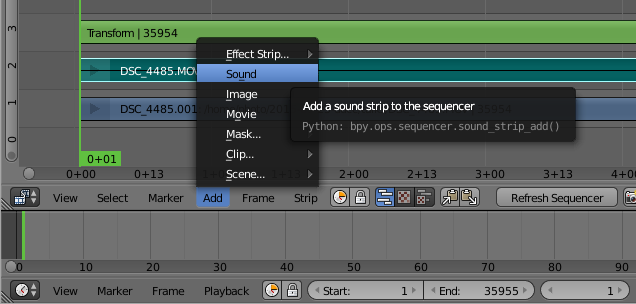 Enable the waveform display for that sound strip too, this will allow you to align the sound strips precisely:
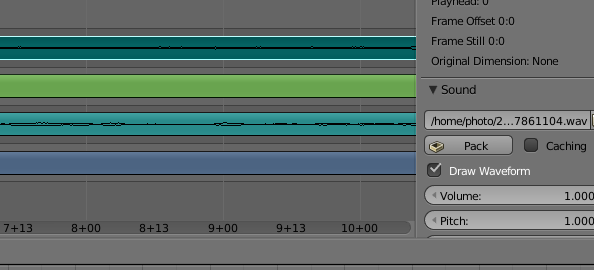 You will need to listen to the strips to make an estimate of the time difference. Use this estimate to set the "start frame" in the properties for your audio strip, it will be a negative value if the audio strip starts before the video. You can then zoom the strip panel to show about 3 to 5 seconds of sound and try to align the peaks. An easy way to do this is to look for applause at the end of the audio strips, the applause generates a large peak that is easily visible.
Once you have synced the audio, you can play the track and you should not be able to hear any echo. You can then silence the audio track from the camera by right clicking it, look in the properties to the right and change volume to 0.
Make any transforms you require
For example, to zoom in on the speaker, right click the transform strip (3rd from the bottom) and then in the panel on the right, click to enable "Uniform Scale" and then set the scale factor as required:
 Render the video output to PNG
Click the context menu under the Curves panel and choose Properties again.
Click the Animation button to generate a sequence of PNG files for each frame.
Render the audio output
On the Properties panel, click the Audio button near the top. Choose a filename for the generated audio file.
Look on the bottom left-hand side of the window for the audio file settings, change it to the ogg container and Vorbis codec:
 Ensure the filename has a .ogg extension
Now look at the top right-hand corner of the window for the Mixdown button. Click it and wait for Blender to generate the audio file.
Combine the PNG files and audio file into a WebM video file
You will need to have a few command line tools installed for manipulating the files from scripts. Install them using the package manager, for example, on a Debian or Ubuntu system:
 I'm pleased with the way that
 Writing programs is fun, but making them fast can be a pain. Python programs
are no exception to that, but the basic profiling toolchain is actually not
that complicated to use. Here, I would like to show you how you can quickly
profile and analyze your Python code to find what part of the code you should
optimize.
What's profiling?
Profiling a Python program is doing a dynamic analysis that measures the
execution time of the program and everything that compose it. That means
measuring the time spent in each of its functions. This will give you data
about where your program is spending time, and what area might be worth
optimizing.
It's a very interesting exercise. Many people focus on local optimizations,
such as determining e.g. which of the Python functions


 noun ter ror ism \ ter- r- i-z m\ no plural
The mistaken belief that it is possible to change the world through acts of
cowardice.
First use in English 1795 in reference to the Jacobin rule in Paris, France.
ex.: They killed a lot of people, but their terrorism only intensified the
people's resolve.
 Over the rainy weekend we watched two movies:
 My personal verdict: 3 rotten eggs (because
 What happened in the

 These instructions assume that


 Like
 Now this could just be the prodigious amounts of sugar and ghee I've been eating the past few days, but I'm bursting with energy for working on Debian so here is a list of things I want to do in the upcoming year.
 I m excited to see other people thinking about userspace-to-kernel attack surface reduction ideas. Theo de Raadt recently published slides describing

 A little over a year ago I wrote about how I'd been using a

 In this part of the world, today is a great day. Today is
 If you have a HTTPS-enabling proxy in front of your gitweb, so that it tries
to do <base href="http://..."> (because it doesn't know that the user
is actually using HTTPS), here's the Apache configuration variable to tell
it otherwise: