Search Results: "ean"

22 May 2011

Thomas Girard: Introducing CORBA

What is CORBA? The wikipedia page says it all:
The Common Object Request Broker Architecture (CORBA) is a standard
defined by the Object Management Group (OMG) that enables software
components written in mutiple computer languages and running on
multiple computers to work together (i.e., it supports mutiple
platforms).
The standard was created twenty years ago, in 1991. The technology can be used in many programming languages: Python, Java, C++, C, etc. Hence you can write a software in your favorite programming language, exposing services that others will be able to call using a different language. (Nowadays you can do the same with WebServices. This article is about CORBA.) All CORBA specifications are available on [OMGSPEC]; latest version is [CORBA3.1]. [MCHALE] book is a very good way to learn CORBA.
How does it work? CORBA is language agnostic because it relies on its own language: the Interface Definition Language (IDL for short). The IDL defines the contract between the client (software calling the service) and the server (software implementing the service). The service is exposed through a remote object. IDL is used to define:
  • modules, which are called namespaces in C++ (or packages in Java)
  • structs, which are like C structs: they can contain data only (the data part of the contract)
  • interfaces, which contain methods specification (the service part of the contract)
  • exceptions that can be raised by a method
  • typedefs which are type aliases
  • unions, la C
  • enums, enumerations
  • constants
IDL comes with existing types:
  • char, octet
  • string, wstring
  • short, long, long long (signed if unspecified, unsigned if prefixed with unsigned)
  • float, double, long double
  • arrays
  • sequences
  • any which can be any existing or user-defined type
From this contract, the following code will be generated using a dedicated tool:
  • client-side code, called stubs
  • server-side code, called skeletons
So to call a CORBA remote service in a given programming language, we will generate stubs from the IDL, then write code relying on these stubs. To provide a CORBA service in a given progamming language, we will generate skeletons from the IDL, then extend them with our implementation. The dispatching and networking machinery is handled by the Object Request Broker (ORB for short). That's the most important part of the CORBA system: it's the component that hides away remoting aspects to make distant objects appear as if they were embedded within the local, client-side code.
Telecom Log Service example The Telecom Log Service [TLOG] is an OMG specified service that defines two interfaces:
  • Log, to add, search and delete records
  • LogMgr, a Log container to lookup a given log, or list all contained logs
The specification details five sub-interfaces of the log service, grouped into three different approaches:
  • basic implementation. This is the service depicted below.
  • event-based implementation. The Event Service [EVENT] is another CORBA service specification. Combining both services means that software emitting events can be plugged to an Event Log without modification.
  • notify-based implementation. The Notification Service [NOTIF] is another CORBA service specification, built on top of the Event Service, with added filtering facility. Again, combining these two services provide easier integration with existing software.
Here is the UML representation of key base interfaces (in yellow), basic implementation (in blue) and important date structures (in green): http://thomas.g.girard.free.fr/CORBA/tls.png Here is the simplified IDL for these parts:
#include <TimeBase.idl>  // IDL can include each other
#pragma prefix "omg.org" // extra prefix to use in front of type names

// DsLogAdmin definition
// Because of the #pragma prefix above, the complete name of this module
// is omg.org/DsLogAdmin
module DsLogAdmin
 
        // E X C E P T I O N --------------------------------------------------
        exception InvalidGrammar  ;                    // empty exception
        exception InvalidConstraint  ;                 // empty exception
        exception LogFull   short n_records_written;  ; // one attribute
        exception LogOffDuty  ;                        // empty exception
        exception LogLocked  ;                         // empty exception
        exception LogDisabled  ;                       // empty exception

        // T Y P E   A L I A S ------------------------------------------------
        typedef unsigned long LogId;
        typedef sequence<LogId> LogIdList; // LogIdList is a sequence of LogId
        typedef unsigned long long RecordId;
        typedef string Constraint;
        typedef TimeBase::TimeT TimeT; // TimeT type defined in TimeBase module
        typedef sequence<any> Anys;    // Anys is the name of a sequence of any

        // S T R U C T U R E S ------------------------------------------------
        struct NVPair  
                string name;
                any    value;
         ; // <-- Mandatory semi-colon
        typedef sequence<NVPair> NVList; // Give a name to a sequence of NVPair

        struct LogRecord  
                RecordId id;
                TimeT    time;
                NVList   attr_list;
                any      info;
         ;
        typedef sequence<LogRecord> RecordList;
        // I N T E R F A C E S ------------------------------------------------
        // Iterator interface specification
        interface Iterator  
                // get() method:
                // - two input parameters
                // - returning a list of LogRecord
                // - possibly raising InvalidParam exception
                RecordList get(in  unsigned long position,
                               in  unsigned long how_many)
                        raises (InvalidParam);
                void destroy();
         ;  // <-- Mandatory semi-colon

        // Forward declaration
        interface LogMgr;
        interface Log
         
                LogMgr my_factory();
                LogId id();
                // retrieve() method:
                // - two input parameters
                // - one output parameter
                // - returning a list of LogRecord
                // This method will actually return two objects: the
                // RecordList and the Iterator
                RecordList retrieve(in  TimeT from_time,
                                    in  long how_many,
                                    out Iterator i);
                RecordList query(in  string grammar,
                                 in  Constraint c,
                                 out Iterator i)
                        raises (InvalidGrammar, InvalidConstraint);
                unsigned long delete_records(in  string grammar,
                                             in  Constraint c)
                        raises (InvalidGrammar, InvalidConstraint);
                void write_records(in  Anys records) 
                        raises (LogFull, LogOffDuty, LogLocked, LogDisabled);
         ;
        typedef sequence<Log> LogList; // Give name LogList to sequence of Log

        // inteface BasicLog derives from interface Log
        interface BasicLog : Log  
                void destroy();
         ;
        interface LogMgr
         
                LogList list_logs();
                Log find_log(in LogId id);
                LogIdList list_logs_by_id();
         ;
        // inteface BasicLogFactory derives from interface LogMgr
        interface BasicLogFactory : LogMgr
         
                BasicLog create(
                        in  LogFullActionType full_action,
                        in  unsigned long long max_size,
                        out LogId id)
                        raises (InvalidLogFullAction);
                BasicLog create_with_id(
                        in  LogId id,
                        in  LogFullActionType full_action,
                        in  unsigned long long max_size)
                        raises (LogIdAlreadyExists, InvalidLogFullAction);
         ;
 ; // <-- Mandatory semi-colon
The complete IDL file for the Basic Telecom Log Service is available here.
[CORBA3.1] http://www.omg.org/spec/CORBA/3.1/
[MCHALE] http://www.ciaranmchale.com/corba-explained-simply/
[OMGSPEC] http://www.omg.org/technology/documents/spec_catalog.htm#Middleware
[TLOG] http://www.omg.org/spec/TLOG/
[EVENT] http://www.omg.org/spec/EVNT/
[NOTIF] http://www.omg.org/spec/NOT/
Simon Josefsson: OpenWRT with Huawei E367 and TP-Link TL-WR1043ND

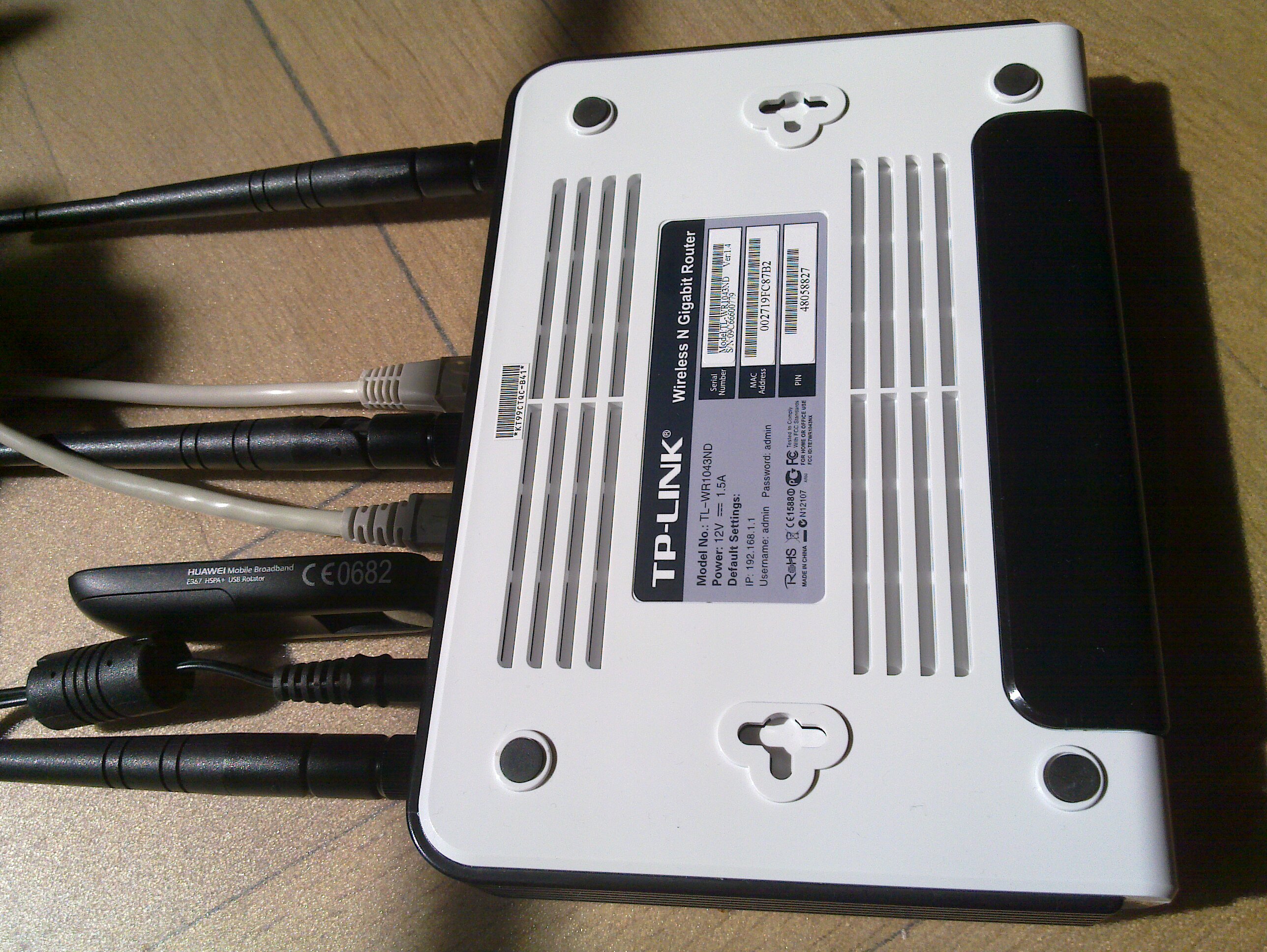
The ability to connect a 3G modem to a wireless router to form a Internet connected ad-hoc network of machines is very powerful. I ve done this many times and have written about it before (e.g., see my OpenWRT writeup page) but I recently did it with modern hardware again. Here I will use the TP-Link TL-WR1043ND wireless router (available here for around $50) together with the Huawei E367 3G UMTS/HSDPA modem. Other wireless routers and modem should work fine. The software is OpenWRT 10.03 although I hope to redo this with LibreWRT eventually. My writeup is mostly focused around what is happening around the prompt, so it is mostly a cut n'paste terminal session with a comment interlined.
TL-WR1043ND and Huawei 367

Router and modem


The first step is to flash the firmware with OpenWRT. The OpenWRT wiki page for the TL-WR1043ND covers this in detail, and for any other hardware you should find what you need in the OpenWRT wiki. If you have already installed OpenWRT on the TL-WR1043ND, and want to wipe it out and start from scratch (like I did for this writeup) here is how to do it:
root@choco:~# cd /tmp
root@choco:/tmp# wget http://downloads.openwrt.org/backfire/10.03/ar71xx/openwrt-ar71xx-tl-wr1043nd-v1-squashfs-sysupgrade.bin
Connecting to downloads.openwrt.org (78.24.191.177:80)
openwrt-ar71xx-tl-wr 100%  *******************************   2688k 00:00:00 ETA
root@choco:/tmp# md5sum openwrt-ar71xx-tl-wr1043nd-v1-squashfs-sysupgrade.bin
9927973ba5da65d0d52e255397452b87  openwrt-ar71xx-tl-wr1043nd-v1-squashfs-sysupgrade.bin
root@choco:/tmp# mtd -r write /tmp/openwrt-ar71xx-tl-wr1043nd-v1-squashfs-sysupgrade.bin firmware
Unlocking firmware ...
Writing from /tmp/openwrt-ar71xx-tl-wr1043nd-v1-squashfs-sysupgrade.bin to firmware ...
Rebooting ...
The device will reboot automatically when it is done. After say 30 seconds, try to connect to it using the default IPv4 address 192.168.1.1. I have connected the WAN port to the Internet and connect to the router over local network connected to the router s LAN1 input. Let s configure OpenWRT, I m calling the host choco and giving it the IPv4 address 192.168.1.46. I ll also set a good root password to disable telnet, and add some SSH keys to simplify remote login.
jas@latte:~$ telnet 192.168.1.1
Trying 192.168.1.1...
Connected to 192.168.1.1.
Escape character is '^]'.
 === IMPORTANT ============================
  Use 'passwd' to set your login password
  this will disable telnet and enable SSH
 ------------------------------------------
BusyBox v1.15.3 (2010-04-06 03:14:11 CEST) built-in shell (ash)
Enter 'help' for a list of built-in commands.
  _______                     ________        __
          .-----.-----.-----.          .----.    _
     -      _     -__                   _    _ 
  _______    __ _____ __ __ ________ __    ____ 
           __  W I R E L E S S   F R E E D O M
 Backfire (10.03, r20728) --------------------------
  * 1/3 shot Kahlua    In a shot glass, layer Kahlua
  * 1/3 shot Bailey's  on the bottom, then Bailey's,
  * 1/3 shot Vodka     then Vodka.
 ---------------------------------------------------
root@OpenWrt:/# passwd
Changing password for root
New password:
Retype password:
Password for root changed by root
root@OpenWrt:/# sed -i -e 's/OpenWrt/choco/' /etc/config/system
root@OpenWrt:/# sed -i -e 's/192.168.1.1/192.168.1.46/' /etc/config/network
root@OpenWrt:/# cat>/etc/dropbear/authorized_keys
ssh-rsa AAAAB3NzaC1yc2...
^D
root@OpenWrt:/# dropbearkey -y -f /etc/dropbear/dropbear_rsa_host_key
Public key portion is:
ssh-rsa AAAA... root@OpenWrt
Fingerprint: md5 45:fd:62...
root@OpenWrt:/#
You could reboot the machine here to switch from telnet to SSH, but I ll install a bunch of packages while I m at it. Run opkg update to update the package list, and then install the wireless modules for the TL-WR1043ND.
root@OpenWrt:/# opkg update
Downloading http://downloads.openwrt.org/backfire/10.03/ar71xx/packages/Packages.gz.
Inflating http://downloads.openwrt.org/backfire/10.03/ar71xx/packages/Packages.gz.
Updated list of available packages in /var/opkg-lists/packages.
root@OpenWrt:/# opkg install kmod-ath9k wpad-mini
...
Configuring iw.
Configuring kmod-crypto-core.
Configuring kmod-crypto-arc4.
Configuring kmod-crypto-aes.
Configuring wireless-tools.
Configuring kmod-cfg80211.
Configuring kmod-mac80211.
Configuring kmod-ath.
Configuring kmod-ath9k.
Configuring crda.
Configuring wpad-mini.
root@OpenWrt:/#
Next I ll install some packages that will are needed for the modem.
root@OpenWrt:/# opkg install comgt kmod-usb-serial kmod-usb2 kmod-usb-uhci kmod-usb-ohci usb-modeswitch
...
Configuring kmod-nls-base.
Configuring kmod-usb-core.
Configuring chat.
Configuring kmod-usb-ohci.
Configuring kmod-usb2.
Configuring comgt.
Configuring usb-modeswitch.
Configuring kmod-usb-serial.
Configuring kmod-usb-uhci.
root@OpenWrt:/#
Now let s reboot the machine and try to get things to really work.
root@OpenWrt:/# sync
root@OpenWrt:/# reboot
Use SSH to connect to the router, and don t forget the use its new IPv4 address! 3G modems are notoriously known for not acting as a modem directly. Instead they often simulate a CD-ROM that will install device driver software, for inferior operating systems. Fortunately the usb_modeswitch tool fixes the hardware for us. My Huawei E367 start up with the USB vendor/product IDs 0x12d1:0 1446, you normally find this out by looking in /proc/bus/usb/devices. Here is the output on my device:
root@choco:~# cat /proc/bus/usb/devices
...
T:  Bus=01 Lev=01 Prnt=01 Port=00 Cnt=01 Dev#=  2 Spd=480 MxCh= 0
D:  Ver= 2.00 Cls=00(>ifc ) Sub=00 Prot=00 MxPS=64 #Cfgs=  1
P:  Vendor=12d1 ProdID=1446 Rev= 0.00
S:  Manufacturer=Huawei Technologies
S:  Product=HUAWEI Mobile
C:* #Ifs= 2 Cfg#= 1 Atr=c0 MxPwr=500mA
I:* If#= 0 Alt= 0 #EPs= 2 Cls=08(stor.) Sub=06 Prot=50 Driver=(none)
E:  Ad=81(I) Atr=02(Bulk) MxPS= 512 Ivl=0ms
E:  Ad=01(O) Atr=02(Bulk) MxPS= 512 Ivl=0ms
I:* If#= 1 Alt= 0 #EPs= 2 Cls=08(stor.) Sub=06 Prot=50 Driver=(none)
E:  Ad=02(O) Atr=02(Bulk) MxPS= 512 Ivl=0ms
E:  Ad=82(I) Atr=02(Bulk) MxPS= 512 Ivl=0ms
root@choco:~#
This means I have to go find a usb-modeswitch configuration for this device. Fortunately, I found it on my Debian Squeeze box in /etc/usb_modeswitch.d/12d1:1446 (from the usb-modeswitch-data package). There was a slight problem with the file, it didn t specify the correct USB vendor/product ID of the device after it has been switched . My Huawei E367 switches to 12d1:1506, so I add 1506 to the TargetProductList list. Here is the final configuration:
root@choco:~# cat>/etc/usb-modeswitch.conf
EnableLogging=1
DefaultVendor= 0x12d1
DefaultProduct=0x1446
TargetVendor=  0x12d1
TargetProductList="1001,1406,140b,140c,1412,141b,14ac,1506"
CheckSuccess=20
MessageContent="55534243123456780000000000000011062000000100000000000000000000"
root@choco:~#
Now you should be able to run usb_modeswitch to perform the switch :
root@choco:~# usb_modeswitch 
Looking for target devices ...
 No devices in target mode or class found
Looking for default devices ...
 Found default devices (1)
Accessing device 002 on bus 001 ...
Using endpoints 0x01 (out) and 0x81 (in)
Inquiring device details; driver will be detached ...
Looking for active driver ...
 No driver found. Either detached before or never attached
SCSI inquiry data (for identification)
-------------------------
  Vendor String: HUAWEI
   Model String: Mass Storage
Revision String: 2.31
-------------------------
USB description data (for identification)
-------------------------
Manufacturer: Huawei Technologies
     Product: HUAWEI Mobile
  Serial No.: not provided
-------------------------
Setting up communication with interface 0 ...
Trying to send the message to endpoint 0x01 ...
 OK, message successfully sent
Checking for mode switch (max. 20 times, once per second) ...
 Waiting for original device to vanish ...
 Original device can't be accessed anymore. Good.
 Searching for target devices ...
 Searching for target devices ...
 Searching for target devices ...
 Searching for target devices ...
 Searching for target devices ...
 Found correct target device
Mode switch succeeded. Bye.
root@choco:~#
The /proc/bus/usb/devices file will now contain information about the real device:
root@choco:~# cat /proc/bus/usb/devices
...
T:  Bus=01 Lev=01 Prnt=01 Port=00 Cnt=01 Dev#=  3 Spd=480 MxCh= 0
D:  Ver= 2.00 Cls=ef(misc ) Sub=02 Prot=01 MxPS=64 #Cfgs=  1
P:  Vendor=12d1 ProdID=1506 Rev= 0.00
S:  Manufacturer=Huawei Technologies
S:  Product=HUAWEI Mobile
C:* #Ifs= 7 Cfg#= 1 Atr=c0 MxPwr=500mA
A:  FirstIf#= 1 IfCount= 2 Cls=02(comm.) Sub=00 Prot=00
I:* If#= 0 Alt= 0 #EPs= 3 Cls=ff(vend.) Sub=01 Prot=01 Driver=(none)
E:  Ad=81(I) Atr=03(Int.) MxPS=  64 Ivl=2ms
E:  Ad=82(I) Atr=02(Bulk) MxPS= 512 Ivl=0ms
E:  Ad=01(O) Atr=02(Bulk) MxPS= 512 Ivl=4ms
I:* If#= 1 Alt= 0 #EPs= 1 Cls=ff(vend.) Sub=01 Prot=09 Driver=(none)
E:  Ad=83(I) Atr=03(Int.) MxPS=  64 Ivl=2ms
I:* If#= 2 Alt= 0 #EPs= 2 Cls=ff(vend.) Sub=01 Prot=08 Driver=(none)
E:  Ad=84(I) Atr=02(Bulk) MxPS= 512 Ivl=0ms
E:  Ad=02(O) Atr=02(Bulk) MxPS= 512 Ivl=4ms
I:* If#= 3 Alt= 0 #EPs= 2 Cls=ff(vend.) Sub=01 Prot=03 Driver=(none)
E:  Ad=85(I) Atr=02(Bulk) MxPS= 512 Ivl=0ms
E:  Ad=03(O) Atr=02(Bulk) MxPS= 512 Ivl=4ms
I:* If#= 4 Alt= 0 #EPs= 2 Cls=ff(vend.) Sub=01 Prot=02 Driver=(none)
E:  Ad=86(I) Atr=02(Bulk) MxPS= 512 Ivl=0ms
E:  Ad=04(O) Atr=02(Bulk) MxPS= 512 Ivl=4ms
I:* If#= 5 Alt= 0 #EPs= 2 Cls=08(stor.) Sub=06 Prot=50 Driver=(none)
E:  Ad=87(I) Atr=02(Bulk) MxPS= 512 Ivl=0ms
E:  Ad=05(O) Atr=02(Bulk) MxPS= 512 Ivl=0ms
I:* If#= 6 Alt= 0 #EPs= 2 Cls=08(stor.) Sub=06 Prot=50 Driver=(none)
E:  Ad=06(O) Atr=02(Bulk) MxPS= 512 Ivl=0ms
E:  Ad=88(I) Atr=02(Bulk) MxPS= 512 Ivl=0ms
root@choco:~#
Let s put that command in /etc/rc.local so that it will be run on every boot.
root@choco:~# cat /etc/rc.local
# Put your custom commands here that should be executed once
# the system init finished. By default this file does nothing.
/usr/bin/usb_modeswitch
exit 0
root@choco:~#
We are not quite ready, the usbserial module needs to be told which USB vendor/product to use. The /etc/modules.d/60-usb-serial file is used during boot to set the right parameters. You can also run rmmod followed by insmod with the proper parameters to avoid a reboot. You can use the gcom info tool to find some information about the modem. Normally you use /dev/ttyUSB0 but for some reason it does not work for me and instead I had to use /dev/ttyUSB3.
root@choco:~# cat>/etc/modules.d/60-usb-serial
usbserial vendor=0x12d1 product=0x1506 maxSize=4096
root@choco:~# rmmod usbserial
root@choco:~# insmod usbserial vendor=0x12d1 product=0x1506 maxSize=4096
root@choco:~# gcom -d /dev/ttyUSB3 info
##### Wireless WAN Modem Configuration #####
Product text:
====
Manufacturer: huawei
Model: E367
Revision: 11.807.05.00.00
IMEI: 353613040739180
+GCAP: +CGSM,+DS,+ES
OK
====
Manufacturer:           huawei
IMEI and Serial Number: 353613040739180
Manufacturer's Revision:
11.807.05.00.
Hardware Revision:      NOT
Network Locked:         ERROR:
Customisation:          NOT SUPPORT
Band settings:          (NOT)
APN:                    ERROR:
##### END #####
root@choco:~#
Let s configure network and wireless. The configurations files are /etc/config/network and /etc/config/wireless. Edit them using your favorite editor, or vi. I m setting up a PSK2 encrypted WLAN and I have a WDS to connect two wireless routers. Note that you need to use the correct PIN for your SIM card (here I m using 8328) and set the APN correctly (I m using bredband.tre.se ). Reboot after making these changes.
root@choco:~# cat /etc/config/network
config 'interface' 'loopback'
       option 'ifname'   'lo'
       option 'proto'    'static'
       option 'ipaddr'   '127.0.0.1'
       option 'netmask'  '255.0.0.0'
config 'interface' 'lan'
        option 'ifname'   'eth0.1'
        option 'type'     'bridge'
        option 'proto'    'static'
        option 'ipaddr'   '192.168.1.46'
        option 'netmask'  '255.255.255.0'
#config 'interface' 'wan'
#        option 'ifname' 'eth0.2'
#        option 'proto' 'dhcp'
config 'switch'
	option 'name' 'rtl8366rb'
        option 'reset' '1'
        option 'enable_vlan' '1'
config 'switch_vlan'
        option 'device' 'rtl8366rb'
        option 'vlan' '1'
        option 'ports' '1 2 3 4 5t'
config 'switch_vlan'
        option 'device' 'rtl8366rb'
        option 'vlan' '2'
        option 'ports' '0 5t'
config interface wan
        option ifname   ppp0
        option proto    3g
        option device   /dev/ttyUSB0
        option apn      bredband.tre.se
        option pincode  8328
root@choco:~# cat /etc/config/wireless
config wifi-device  radio0
	option type     mac80211
	option channel  5
	option macaddr	00:27:19:fc:87:b2
	option hwmode	11ng
	option htmode	HT20
	list ht_capab	SHORT-GI-40
	list ht_capab	DSSS_CCK-40
config wifi-iface
	option device   radio0
	option network  lan
	option mode     ap
	option ssid     Grisslan
	option encryption psk2
	option key	  notforyoutosee
config wifi-iface
        option device     radio0
        option network    lan
        option mode       wds
        option bssid      00:1F:C6:60:D3:11
        option ssid       GrisslanWDS
        option encryption psk2
        option key        thisisalsosecret
root@choco:~# reboot
root@choco:~#
Once the machine have rebooted, you can bring up the 3G connection by using ifup wan . Look at the log by using logread and tail the log in the background by doing logread -f & .
root@choco:~# ifup wan
Trying to set PIN
PIN set successfully
root@choco:~# logread  tail -20
May 21 13:41:20 choco local2.info chat[2419]: send (ATD*99***1#^M)
May 21 13:41:20 choco local2.info chat[2419]: expect (CONNECT)
May 21 13:41:20 choco local2.info chat[2419]: ^M
May 21 13:41:20 choco local2.info chat[2419]: ATD*99***1#^M^M
May 21 13:41:20 choco local2.info chat[2419]: CONNECT
May 21 13:41:20 choco local2.info chat[2419]:  -- got it
May 21 13:41:20 choco local2.info chat[2419]: send ( ^M)
May 21 13:41:20 choco daemon.info pppd[2412]: Serial connection established.
May 21 13:41:20 choco daemon.info pppd[2412]: Using interface ppp0
May 21 13:41:20 choco daemon.notice pppd[2412]: Connect: ppp0 <--> /dev/ttyUSB0
May 21 13:41:24 choco daemon.warn pppd[2412]: Could not determine remote IP address: defaulting to 10.64.64.64
May 21 13:41:24 choco daemon.notice pppd[2412]: local  IP address 95.209.96.115
May 21 13:41:24 choco daemon.notice pppd[2412]: remote IP address 10.64.64.64
May 21 13:41:24 choco daemon.notice pppd[2412]: primary   DNS address 80.251.201.177
May 21 13:41:24 choco daemon.notice pppd[2412]: secondary DNS address 80.251.201.178
May 21 13:41:24 choco daemon.info dnsmasq[1028]: reading /tmp/resolv.conf.auto
May 21 13:41:24 choco daemon.info dnsmasq[1028]: using nameserver 80.251.201.178#53
May 21 13:41:24 choco daemon.info dnsmasq[1028]: using nameserver 80.251.201.177#53
May 21 13:41:24 choco daemon.info dnsmasq[1028]: using local addresses only for domain lan
May 21 13:41:25 choco user.notice rdate: Synced with ptbtime1.ptb.de
root@choco:~#
Hooray! Or almost so usually the first time you connect, I often get incorrect DNS servers from the server. It shows up like this in the log:
May 21 12:25:04 choco daemon.notice pppd[1157]: primary   DNS address 10.11.12.13
May 21 12:25:04 choco daemon.notice pppd[1157]: secondary DNS address 10.11.12.14
The exact reason why this happens is beyond me. There are patches floating around for pppd, but I haven t tried them. A common workaround is to hardcode static DNS servers (like Google DNS or OpenDNS). I have come up with my own workaround, based on the observation that when the problem has occurred it will not happen again if I disconnect and reconnect. Thus I have written a small script which is invoked whenever an interface is brought up (typically the WAN interface).
# Written by Simon Josefsson May 2011.
root@choco:~# cat> /etc/hotplug.d/iface/01-reconnect-if-dns-is-broken
case "$ ACTION:-ifup " in
    ifup)
	    if grep -q 10.11.12.13 /tmp/resolv.conf.auto; then
		(sleep 30 && ifdown wan && ifup wan) &
	    fi
	    ;;
esac
root@choco:~# chmod +x /etc/hotplug.d/iface/01-reconnect-if-dns-is-broken
root@choco:~#
That s it! If you found this writeup useful, please flattr it.

21 May 2011

Vincent Bernat: Network lab with User Mode Linux

To setup a virtual network lab, you get a lot of alternatives. You can for example use GNS3, Netkit, Marionnet or VNUML. Some of those tools, like GNS3, allow to add some closed source equipments like a Cisco 7200 or a Juniper router. All those tools are a great way to setup your network lab. Look at them! If you want to setup a virtual network lab for educational purpose, one of those should fit your purpose. However, none of those solution were a perfect match for me. I did not want to maintain some root filesystem. I wanted my lab to start in a few seconds. I wanted to keep all configuration files (including the ones for the virtual hosts) into one subdirectory of my home and be able to modify them while the lab was running. I also wanted to be able to plug some Cisco router using Dynamips/Dynagen. None of the listed solution above matched all those criteria. Therefore, I setup my own lab script with User Mode Linux. This is not a complete solution, but is more like a home-made solution to match one particular need. You cannot use the final result without tweaking it. Again, look at the other solutions first. We will go step by step to understand how the lab was built. If you are in a hurry, you can look at the result which is published on GitHub.

User Mode Linux User Mode Linux (or UML) is a Linux kernel running as a process instead of running on top of some processor. With Debian, you can install it using apt-get install user-mode-linux. You get a linux command that will run your Linux kernel as a simple process. No need to be root.
 1
 2
 3
 4
 5
 6
 7
 8
 9
10
11
12
13
14
15
16
17
18
19
20
21
22
23
24
25
$ linux
Core dump limits :
    soft - 0
    hard - NONE
Checking that ptrace can change system call numbers...OK
Checking syscall emulation patch for ptrace...OK
Checking advanced syscall emulation patch for ptrace...OK
Checking for tmpfs mount on /dev/shm...nothing mounted on /dev/shm
Checking PROT_EXEC mmap in /tmp/user/500/...OK
Checking for the skas3 patch in the host:
  - /proc/mm...not found: No such file or directory
  - PTRACE_FAULTINFO...not found
  - PTRACE_LDT...not found
UML running in SKAS0 mode
Adding 5632000 bytes to physical memory to account for exec-shield gap
Initializing cgroup subsys cpuset
Linux version 2.6.32 (2.6.32) (root@tito) (gcc version 4.4.5 (Debian 4.4.5-10) ) #2 Thu Jan 27 12:49:46 UTC 2011
[...]
console [mc-1] enabled
Couldn't stat "root_fs" : err = 2
Failed to initialize ubd device 0 :Couldn't determine size of device's file
registered taskstats version 1
VFS: Cannot open root device "98:0" or unknown-block(98,0)
Please append a correct "root=" boot option; here are the available partitions:
Kernel panic - not syncing: VFS: Unable to mount root fs on unknown-block(98,0)
You get a Linux kernel that will just panic because it does not find a disk to mount to run init from it. Usually, you build some root file system and give it as an argument to your UML kernel.

Basic setup However, you can also use your host filesystem as a root filesystem. We also specify /bin/sh as init instead of /sbin/init. This will be the first process to be started by our UML kernel.
 1
 2
 3
 4
 5
 6
 7
 8
 9
10
11
12
13
$ linux init=/bin/sh rootfstype=hostfs
[...]
Linux version 2.6.32 (2.6.32) (root@tito) (gcc version 4.4.5 (Debian 4.4.5-10) ) #2 Thu Jan 27 12:49:46 UTC 2011
[...]
VFS: Mounted root (hostfs filesystem) readonly on device 0:12.
IRQ 3/console-write: IRQF_DISABLED is not guaranteed on shared IRQs
IRQ 2/console: IRQF_DISABLED is not guaranteed on shared IRQs
IRQ 10/winch: IRQF_DISABLED is not guaranteed on shared IRQs
/bin/sh: can't access tty; job control turned off
# uname -a
Linux (none) 2.6.32 #2 Thu Jan 27 12:49:46 UTC 2011 x86_64 GNU/Linux
# echo $$
1
You may want to setup a bit your environment:
1
2
3
4
5
6
7
8
9
# hostname -b R1
# export TERM=xterm
# export PATH=/usr/local/bin:/usr/bin:/bin:/sbin:/usr/local/sbin:/usr/sbin
# mount -t proc proc /proc
# mount -t sysfs sysfs /sys
# mount -t tmpfs tmpfs /var/run -o rw,nosuid,nodev
# mount -t tmpfs tmpfs /var/log -o rw,nosuid,nodev
# mount -o bind /usr/lib/uml/modules /lib/modules
# mount -t hostfs hostfs /home/bernat/mylab -o /home/bernat/mylab
We setup /proc and /sys correctly. We also turn /var/run and /var/log as tmpfs filesystems. This will allow most daemons to run correctly: they will be able to write runtime data in /var/run and to write logs in /var/log. You can even launch your favorite syslog daemon. The line about /lib/modules is to ensure that our UML kernel is able to access its kernel modules. For example, we can now use modprobe tun. The line about /home allows to mount the home directory of your host inside UML. This was already the case, but it was mounted as read-only. One important thing to notice is that while you seem to be root inside UML, you did not run linux as root. Therefore, when the UML kernel tries to write a file it will still be bound by the permissions granted by your host kernel. See this example:
1
2
3
4
# mount -o remount,rw /
# touch /tmp/test1
# touch /etc/test1
touch: cannot touch  /etc/test1': Permission denied
This is a great way to ensure that your lab will not destroy your host. Do not run linux as root. What is interesting with such a setup is that you share the filesystem with your host. You can modify some configuration file on your host and your UML will see the modification right away. You can also modify a file inside UML and see the modification on your host too.

Console & job control There is a slight problem with this environment. You may be used to it if you already started your own GNU/Linux system with init=/bin/sh. The problem is that you don t have job control. Job control allows you to put tasks in background and interrupt them while they are running. It is job control that allows you to stop a program with ^C. Here, you don t have job control. See:
1
2
# cat
^C^C^C^C
You are stuck. The only way to go out is to kill the linux process on your host. Job control is a great mystery for me. I don t know how to enable it by hand. However, getty is able to enable job control for you. Just type this command:
1
# exec getty -n -l /bin/sh 38400 /dev/tty0
You get job control. We keep /bin/sh, but you may prefer /bin/bash since on most systems, /bin/sh is rather basic.

Writable root filesystem Let s get back to our root filesystem. Most daemons can run just fine with our setup. For example, we can start Nginx, a popular web server:
1
2
3
# mkdir /var/log/nginx
# /etc/init.d/nginx start
Starting nginx: nginx.
However, it will use the configuration file in /etc/nginx. You don t want to modify this directory for all your labs. The best way to handle this is to start Nginx with a custom configuration file:
1
2
# /etc/init.d/nginx stop
# nginx -c /home/bernat/mylab/nginx.conf
While keeping the configuration files related to your lab in your home is an important objective (all your lab related files are in the same place and you can modify them at will), it may be more convenient to still use /etc/init.d/nginx script to control Nginx. Moreover, some daemons do not allow to specify a configuration file. You will then need to modify your root filesystem. This is a pretty common problem with Live CD and it is solved by using an union mount. This is a special kind of mount that will merge two filesystems into one. One of the two filesystems can be read-only and all the changes will be reported to the second one. We will use AUFS. Ensure that you have aufs-tools package installed. Let s start from scratch for this example.
 1
 2
 3
 4
 5
 6
 7
 8
 9
10
$ linux init=/bin/sh rootfstype=hostfs
[...]
# mount -n -t proc proc /proc
# mount -n -t sysfs sysfs /sys
# mount -o bind /usr/lib/uml/modules /lib/modules
# mount -n -t tmpfs tmpfs /tmp -o rw,nosuid,nodev
# mkdir /tmp/ro /tmp/rw /tmp/aufs
# mount -n -t hostfs hostfs /tmp/ro -o /,ro
# mount -n -t aufs aufs /tmp/aufs -o noatime,dirs=/tmp/rw:/tmp/ro=ro
# exec chroot /tmp/aufs /bin/bash
It seems that AUFS with hostfs is rather fragile. We could have merged our root filesystem with some directory in our lab using hostfs like this:
1
2
3
4
# mount -n -t hostfs hostfs /tmp/rw -o /home/bernat/mylab/root,rw
# mount -n -t hostfs hostfs /tmp/ro -o /,ro
# mount -n -t aufs aufs /tmp/aufs -o noatime,dirs=/tmp/rw:/tmp/ro=ro
# exec chroot /tmp/aufs /bin/bash
However, the kernel panics on most operations. Therefore, /tmp/rw stays in a tmpfs filesystem. This means that any change to the root filesystem will be lost. I also was unable to issue a correct pivot_root before chroot. This is not really important here. UPDATED: It seems that there are other drawbacks to this setup. For some reason, if you have a separate /usr partition on your host system, you won t be able to write to it until you specify the noxino option to AUFS. Another issue is that AUFS does not notice most changes on the hostfs filesystem. You can fix this with option udba=inotify. However, this is incompatible with the noxino option. Therefore, you need to choose what is best for your lab. You can also mount some parts of your home with hostfs (for example, the source directory of the piece of software that you would like to test). Let s consider that Nginx configuration is in /home/bernat/lab/nginx. We simply uses a symbolic link:
1
2
# rm -rf /etc/nginx
# ln -s /home/bernat/mylab/nginx /etc/nginx
Since we lose the modifications to the root filesystem, the symbolic link should be done each time we start the lab. However, we can modify directly the configuration files in the host or in the UML.

Networking We know how to start our UML. Let s see how we can add some wires to it. UML supports several network adapters. The two most useful are TAP and VDE backend.

TAP A TAP interface is a virtual network kernel device which can be used by userland applications to inject layer 2 frames in it. If the kernel sends frames in a TAP device, they will be received by the application listening to it. This also works the other way around. A TAP interface is a regular ethernet device for the kernel. This means that you can bridge it or use tcpdump on it. The drawback of such interfaces is that you need to be root to create them. The application using them does not need to be run as root. I usually use this nifty shell function to setup TAP interfaces:
 1
 2
 3
 4
 5
 6
 7
 8
 9
10
11
12
13
14
15
16
17
18
19
20
21
22
23
__add_to_bridge()  
    # Optionally, add it to given bridge
    [ -z "$2" ]    
        [ -f /sys/class/net/$2/brforward ]    
            sudo brctl addbr $2
            sudo brctl stp $2 off
            sudo ip link set $2 up
         
        [ -f /sys/class/net/$2/brif/$1 ]    
            # We need to check if it is in another bridge
            bridge=$(echo /sys/class/net/*/brif/$1 2> /dev/null   \
                sed 's+/sys/class/net/\([^/]*\)/.*+\1+') 2> /dev/null
            [ -n "$bridge" ] && \
                sudo brctl delif $bridge $1
            sudo brctl addif $2 $1


tap()  
    sudo tunctl -b -u $(whoami) -t $1 > /dev/null
    sudo ip link set up dev $1
    __add_to_bridge $1 $2
 
It will create the interface and put it into a bridge. For example, you can create two interfaces linked together through a bridge to allow two UML to talk each other:
1
2
$ tap tap-R1 br-R1R2
$ tap tap-R2 br-R1R2
We can setup two UML which will use those interfaces. The first one is setup like this:
1
2
3
4
$ linux init=/bin/sh rootfstype=hostfs eth0=tuntap,tap-R1
[...]
# ip link set up dev eth0
# ip addr add 192.168.0.1/24 dev eth0
The second one:
1
2
3
4
5
6
7
8
9
$ linux init=/bin/sh rootfstype=hostfs eth0=tuntap,tap-R2
[...]
# ip link set up dev eth0
# ip addr add 192.168.0.2/24 dev eth0
# ping 192.168.0.1
PING 192.168.0.1 (192.168.0.1) 56(84) bytes of data.
Warning: time of day goes back (-13832us), taking countermeasures.
64 bytes from 192.168.0.1: icmp_req=20 ttl=64 time=0.633 ms
64 bytes from 192.168.0.1: icmp_req=21 ttl=64 time=0.157 ms
If you are running a firewall on your host, ensure that you let your host forward those packets. By default, bridging code forwards the frames through Netfilter.

VDE A VDE switch is a software emulation of a regular network switch. It is a userland component and does not need to be run as root. You need to install vde2 package to make use of it. You can run a switch using vde_switch command. You will get a console by pressing Enter. From this console, you can configure the switch: add ports, configure VLAN, etc. Like for TAP interfaces, let s setup two UML connected to this switch. The first one is like this:
1
2
3
4
$ linux init=/bin/sh rootfstype=hostfs eth0=vde
[...]
# ip link set up dev eth0
# ip addr add 192.168.0.1/24 dev eth0
And the second one:
1
2
3
4
5
6
7
8
9
$ linux init=/bin/sh rootfstype=hostfs eth0=vde
[...]
# ip link set up dev eth0
# ip addr add 192.168.0.2/24 dev eth0
# ping 192.168.0.1
PING 192.168.0.1 (192.168.0.1) 56(84) bytes of data.
64 bytes from 192.168.0.1: icmp_req=1 ttl=64 time=2.93 ms
Warning: time of day goes back (-8101us), taking countermeasures.
64 bytes from 192.168.0.1: icmp_req=2 ttl=64 time=0.503 ms

The lab So far, we had a look at what can be used to setup a lab. We need to put everything together into some script to setup the lab in a quick way. For each lab that I want to setup, I copy my latest script to a new location and adapt to the topology I want. I have put everything described below in GitHub. Feel free to browse and fork. Our lab will be about setting up a redundant VPN between two remote sites of the same company. This company is using OSPF as an IGP on each site and we will use BGP to let each site know the routes advertised in the other site. We will only use VDE switches for the layer 2 part. Redundant VPN lab Let s implement this lab. You should grab the sources first:
1
2
$ git clone https://github.com/vincentbernat/network-lab.git
$ cd network-lab/lab-redundant-vpn
You have a setup script which will setup the whole lab for you. You also have one directory for each UML. Those directories only contain configuration for the various daemons used inside UML. To make this lab work, ensure that you have quagga (Quagga, an Internet routing daemon supporting both OSPF and BGP) and racoon packages.

UML configuration First look at the end of script. There is something like this:
 1
 2
 3
 4
 5
 6
 7
 8
 9
10
11
12
13
14
15
16
17
18
19
20
21
22
23
24
25
26
27
case $$ in
    1)
        # Inside UML. Three states:
        [...]
        ;;
    *)
        TMP=$(mktemp -d)
        trap "rm -rf $TMP" EXIT
        check_dependencies
        setup_screen
        # Setup switches
        setup_switch site1
        setup_switch site101
        setup_switch internet
        # Start VM
        start_vm R1 eth0=vde,$TMP/switch-site1.sock
        start_vm R2 eth0=vde,$TMP/switch-site101.sock
        start_vm V1 eth0=vde,$TMP/switch-site1.sock eth1=vde,$TMP/switch-internet.sock
        start_vm V2 eth0=vde,$TMP/switch-site1.sock eth1=vde,$TMP/switch-internet.sock
        start_vm V3 eth0=vde,$TMP/switch-site101.sock eth1=vde,$TMP/switch-internet.sock
        start_vm V4 eth0=vde,$TMP/switch-site101.sock eth1=vde,$TMP/switch-internet.sock
        start_vm I1 eth0=vde,$TMP/switch-internet.sock
        display_help
        cleanup
        screen -X quit
        ;;
esac
The script will check its PID ($$). If it is 1, this means it has been invoked as init. Otherwise, it means it has been launched by the user. We will see the init part later. When called, we first check some dependencies, then we setup screen. Everything is run inside a screen session. No multiple windows. The next step is to setup the various switches needed for our lab. We take one switch for each site and one switch for Internet . The function that setups the switch just invokes vde_switch with the help of start-stop-daemon to record the PID (to shutdown the lab properly). Then, we start our various UML. For each of them, we need to specify which network adapters we need. For R1 and R2, we don t use a network adapter to connect to the internal network. We will use a dummy0 interface. To emulate Internet, we use another UML, I1. For each UML, our script will be used as init. In this case, its PID will be 1. As we have seen earlier, the script checks if it is called as init. If it is the case, it will setup the UML. During this setup, host specific configuration will be applied:
 1
 2
 3
 4
 5
 6
 7
 8
 9
10
11
12
13
14
15
16
17
18
19
20
21
22
23
24
25
26
27
28
29
30
31
32
33
34
35
36
37
38
39
40
41
42
43
44
45
46
47
48
49
50
echo "[+] Setup UML"
sysctl -w net.ipv4.ip_forward=1
case $ uts  in
    R1)
        modprobe dummy
        ip link set up dev dummy0
        ip addr add 192.168.15.1/24 dev dummy0
        ip addr add 192.168.1.10/24 dev eth0
        setup_quagga
        ;;
    R2)
        modprobe dummy
        ip link set up dev dummy0
        ip addr add 192.168.115.1/24 dev dummy0
        ip addr add 192.168.101.10/24 dev eth0
        setup_quagga
        ;;
    V1)
        ip addr add 192.168.1.11/24 dev eth0
        ip addr add 1.1.2.1/24 dev eth1
        ip route add default via 1.1.2.10
        setup_quagga
        setup_racoon 1.1.2.1 1.1.1.1 192.168.0.0/19-192.168.100.0/19
        ;;
    V2)
        ip addr add 192.168.1.12/24 dev eth0
        ip addr add 1.1.2.2/24 dev eth1
        ip route add default via 1.1.2.10
        setup_quagga
        setup_racoon 1.1.2.2 1.1.1.2 192.168.0.0/19-192.168.100.0/19
        ;;
    V3)
        ip addr add 192.168.101.13/24 dev eth0
        ip addr add 1.1.1.1/24 dev eth1
        ip route add default via 1.1.1.10
        setup_quagga
        setup_racoon 1.1.1.1 1.1.2.1 192.168.100.0/19-192.168.0.0/19
        ;;
    V4)
        ip addr add 192.168.101.14/24 dev eth0
        ip addr add 1.1.1.2/24 dev eth1
        ip route add default via 1.1.1.10
        setup_quagga
        setup_racoon 1.1.1.2 1.1.2.2 192.168.100.0/19-192.168.0.0/19
        ;;
    I1)
        ip addr add 1.1.1.10/24 dev eth0
        ip addr add 1.1.2.10/24 dev eth0
        ;;
esac
After all this, we drop to a shell to allow you to issue additional commands interactively.

Testing We need to wait one minute after the lab has been started. We can then check the routing table of various equipments. For example, here is R1 routing table (you need to type vtysh to get Quagga console):
 1
 2
 3
 4
 5
 6
 7
 8
 9
10
11
R1# show ip route
Codes: K - kernel route, C - connected, S - static, R - RIP, O - OSPF,
       I - ISIS, B - BGP, > - selected route, * - FIB route
C>* 127.0.0.0/8 is directly connected, lo
O   192.168.1.0/24 [110/10] is directly connected, eth0, 00:25:42
C>* 192.168.1.0/24 is directly connected, eth0
O   192.168.15.0/24 [110/10] is directly connected, dummy0, 00:25:42
C>* 192.168.15.0/24 is directly connected, dummy0
O>* 192.168.115.0/24 [110/20] via 192.168.1.11, eth0, 00:02:24
  *                           via 192.168.1.12, eth0, 00:02:24
We can see that if this router wants to contact R2, it has learned a multipath route with OSPF and can then sends its packets through V1 or V2, as expected. Here is the routing table of V3:
 1
 2
 3
 4
 5
 6
 7
 8
 9
10
11
12
V3# show ip route
Codes: K - kernel route, C - connected, S - static, R - RIP, O - OSPF,
       I - ISIS, B - BGP, > - selected route, * - FIB route
K>* 0.0.0.0/0 via 1.1.1.10, eth1
C>* 1.1.1.0/24 is directly connected, eth1
C>* 127.0.0.0/8 is directly connected, lo
O   192.168.15.0/24 [110/20] via 192.168.101.14, eth0, 00:04:26
B>* 192.168.15.0/24 [20/20] via 192.168.1.11 (recursive via 1.1.1.10), 00:07:16
O   192.168.101.0/24 [110/10] is directly connected, eth0, 00:07:30
C>* 192.168.101.0/24 is directly connected, eth0
O>* 192.168.115.0/24 [110/20] via 192.168.101.10, eth0, 00:07:18
We see that to contact R1, V3 knows two routes. One with BGP through the VPN. This is the one that will be used. The other one is through V4 but will not be used unless the BGP route is lost. We can ping R2 from R1:
1
2
3
4
R1# ping -I 192.168.15.1 192.168.115.1
PING 192.168.115.1 (192.168.115.1) from 192.168.15.1 : 56(84) bytes of data.
Warning: time of day goes back (-459129us), taking countermeasures.
64 bytes from 192.168.115.1: icmp_req=1 ttl=62 time=1.10 ms
Let s suppose we break the link between V1 and the Internet (using ip link set down eth1 on V1). The previous multipath route on R1 is now a single route through V2. Moreover, V3 has lost its BGP route to V1 and is now using its OSPF route through V4:
 1
 2
 3
 4
 5
 6
 7
 8
 9
10
11
V3# show ip route
Codes: K - kernel route, C - connected, S - static, R - RIP, O - OSPF,
       I - ISIS, B - BGP, > - selected route, * - FIB route
K>* 0.0.0.0/0 via 1.1.1.10, eth1
C>* 1.1.1.0/24 is directly connected, eth1
C>* 127.0.0.0/8 is directly connected, lo
O>* 192.168.15.0/24 [110/20] via 192.168.101.14, eth0, 00:10:13
O   192.168.101.0/24 [110/10] is directly connected, eth0, 00:13:17
C>* 192.168.101.0/24 is directly connected, eth0
O>* 192.168.115.0/24 [110/20] via 192.168.101.10, eth0, 00:13:05
We could enhance the resiliance of such a setup by adding a dedicated link between V1 and V2 and between V3 and V4 and running OSPF on this link (or iBGP). This would allow us to support several outages on our network.

Conclusion The script used to setup this lab can be adapted to setup other labs with little effort. Please, note that it depends on the configuration of your environment. However, the whole lab is contained in a single directory and is very small. You can email it to your friends or publish it on GitHub. It can also be extended to support Dynagen to include some Cisco equipments in your lab (for example, to experiment with VRF or MPLS).

Craig Small: JFFNMS 0.9.0 Released

After 3 release candidates jffnms is now at version 0.9.0. Both the web frontend and backend (engines) have had extensive re-work done to them to cleanup and tighten up the code. There should be a lot less warnings and errors from PHP when you set to a higher error level.

Tollef Fog Heen: Upgrading Alioth

A while ago, we got another machine for hosting Alioth and so we started thinking about how to use that machine. It's a used machine and not massively faster than the current hardware, so just moving everything over wouldn't actually get us that much of a performance upgrade. However, Alioth is using FusionForge, which is supposed to be able to run on a cluster of machines. After all, this was originally built for SourceForge.net, which certainly does not run on a single host. So, a split of services is what we'll do. This weekend, we're having a sprint in Collabora's office in Cambridge, actually implementing the split and doing a bit of general planning for the future. Last afternoon (Friday), European time, we started the migration. The first step is to move all the data off the Xen guest on wagner, where Alioth is currently hosted. This finished a few minutes ago; it turns out syncing about 8.5 million files across almost 400G of data takes a little while. The new host is called vasks and will host the database, run the main apache and be the canonical location for the various SCM repositories. We are not decomissioning wagner, but it'll be reinstalled without Xen or other virtualisation which should help performance a bit. It'll host everything that has lower performance requirements such as cron jobs, mailing lists and so on. I'll try to keep you all updated and feel free to drop by #alioth on irc.debian.org if you have any questions.

Lars Wirzenius: Obnam 0.17: second BETA release

I have just pushed out version 0.17 of Obnam, my backup application. My personal Debian repository has binaries for squeeze in i386, amd64, and armel architectures. A summary of the changes:

18 May 2011

Maximilian Attems: klibc 1.5.22 release

This release has several ipconfig (klibc dhclient) enhancements, arm porting fixes and usual cleanups: For details see klibc 1.5.22 release announcements or klibc git.

17 May 2011

Gerfried Fuchs: It's MY Life

Sometimes people will tell you what you should do. Sometimes they will even shout at you for simply asking a question on why they want something done because it isn't clear just from itself. And others likes to jump the boat and join in just for the fun of it... Gladly, this is MY life, and I choose how much abuse I'm willing to take, especially for a voluntary work that I didn't even enroll for but got put into. Sometimes through my dedication to getting quality into things and seeing that others simply neglect these areas, but they need to get addressed anyway, no matter how little respect is shown for people investing in these boring areas. The topic of It's MY Life is an old one and thus it is no surprise that a fair amount of songs surrounding it popped up over time. In my previous blog entry I wrote about different interpretations, some responses seem to hint that I wasn't clear enough about that I really meant different interpretations of the same lyrics, not just regular cover versions. The following set of songs is special in a different sense: It is about the same song title and thus does also cover different bands. Like always, enjoy! And think about how you interact with others. I know that I'm sometimes crossing a line myself too, no one is perfect. What though makes the difference is the willingness to learn, and especially: To excuse. But in the end: It's MY life!

/music permanent link Comments: 3 Flattr this

16 May 2011

Lars Wirzenius: TDDD, more thoughts

My previous blog entry about Test Driven Distro Development (TDDD) was rather rambling. Here is the condensed version, plus some further thoughts. I would like to automatically determine whether "testing" is minimally ready to be released, at any given point in time. To implement this, I would like to see Debian get tools that would allow us to define specific minimal functionality that should work in a Debian release, and automatically verify that it does. I would like us to use these tools to determine whether a release is ready for release, with manual override from the release team. Ideally, we would use the tools to prevent breakages from moving into "testing", so that it gets closer to always being releasable. Getting test coverage sufficiently high that we can replace the release team's judgement abour releasablity will never happen: Debian is rather too large and and complex for that. However, we can reap much benefit from even relatively small coverage. Here is my initial suggestion for the minimal criteria that should be satisfied, at all times, in "testing". They are aimed at making sure that even if something else breaks, at least the basic stuff works well enough that one can log in and fix things. These are minimal criteria. They're not meant to verify that everything in Debian works. After these work, adding more coverage is not just possible, but reasonably easy in many cases. Want to make sure DNS gets configured right? Write a test that logs in and does a lookup inside the test system. After the tools have evolved, writing a simple test like that should be only a line or two. The tests I am talking here are system tests, or acceptance tests for the whole system, not just for individual packages. Unit tests would test individual functions or methods or classes; integration tests would test groups of them, or possibly entire programs; system tests test groups of programs/packages. The point is not to verify that every package works in every possible case, but that the system as a whole works. Most package-specific functional tests should be part of the package's own test suite. We should also run those, but that's somewhat orthogonal to the vision I'm trying to articulate here. At least the following scenarios should be tested (the above tests should be run after each scenario): It may be useful to run the tests against "unstable" as well as "testing". However, rejecting an upload to "unstable" may be less wise than preventing packages from being copied from "unstable" to "testing". Exactly how this the development processes should adopt TDDD is an interesting question, but a reasonable toolset should be adaptable to anything we want to do. (Indeed, it would be possible to structure the toolset so that it isn't specific to developing a distro: a "system-test" tool that a sysadmin could use to verify that a server works would probably be useful to some people. Perhaps such a tool exists and could be adapted for TDDD?) Running these tests for security updates to "stable" would obviously also be a possibility that should perhaps be considered. Running these tests would happen something like this: I would further like to see Debian make it possible to have isolated branches for development. This would help with, for example, large transitions that take a long time. The transition could be prepared in a branch of its own, and when it's ready to be pushed into unstable, the automatic tests outlined above could be used to verify the transition doesn't break anything too critical. (If the tests fail, the push fails; if necessary, that can be overridden manually, but that should be rare.) In my view, branches would greatly benefit Debian development, but they're not necessary for starting to implement TDDD. My condensed versions are still too long.

15 May 2011

Steve Kemp: Images transitioned, and mysql solications.

Images Moved
So I've retired my old picture hosting sub-domain, and moved all the files which were hosted by the dynamic system into a large web-root. This means no more uploads are possible, but each link continues to work. For example: Happily the system generated "random" links, and it was just a matter of moving each uploaded file into that static location, then removing the CGI application. The code for the new site has now been made public, although I suspect there will need to be some email-pong if anybody wishes to use it. Comments welcome.
MySQL replacements?
Lets pretend I work for a company which has dealings with many MySQL users. Lets pretend that, even though it is true, such that I don't have to get into specifics. Let us pretend that we have many many hundreds of users who are very happy with MySQL, but that we have a few users who have "issues". That might be:
  • mysqld segfaulting every few months, with no real idea why.
    • Transactions are involved. So are stored proceedures.
    • MySQL paid support might have been perfect, or it might have lead to "yup, its a bug. good luck rebuilding with this patch. let us know how it turns out kthxbai."
    • Alternatively it might not have been re-producable.
  • Master-Master and Master-Slave setups being "unreliable" such that data inconsistencies arise despite MySQL regarding them as being in sync.
    • Good luck resolving that when you have two almost-identical "mysqldump" outputs which are 6Gb each and which cause "diff" to exit with "out of memory" even on a 64Gb host.
    • Is it possible to view differences in table-data, via the binary records? That'd be a fun project .. for a masochist.
  • Poor usage of resources.
  • Heavy concurrancy caused by poorly developed applications in a load-balanced environment, leading to stalling queries. (Wordpress + Poor wordpress plugins I'm looking at you; you're next on my killfile).
To compound this problem some of these installations may or may not be running Etch. let us pretend they are not, just to simplify things. (They mostly arent' these days, but I'm sure I could think of one or two if I tried) So, in this hypothetical situation what would you recommend? I know there are new forks aplenty of MySQL. Drizzle et al. I suspect most of the forks will be short-lived - lots of this stuff is hard and non-sexy. I suspect the long-lived forks are probably concentrating on edge-cases we've not hit (yet), or on sexy exciting things like new storage engines and going nosql like all the cool kids. Realistically going down the postgresql road is liable to lead to wholly different sets of problems, and a significant re-engineering of several sites, applications and tools with no proof of stability. Without wanting to jump ship entirely, what, if any, are our options?
PS. MySQL I still mostly love you, but my two most recent applications were written to use redis instead. Just a coincidence... I swear. No, put down that axe. Please can't we just talk about it?/p> ObQoote: "I've calculated your chance of survival, but I don't think you'll like it. " - Hitchhikers Film.

Clint Adams: Fast and Furious Fourier Transform

A while ago, MusicBrainz used a technique called TRM for associating audio fingerprints with tracks. This relied on a proprietary, non-free database controlled by a for-profit company. Your choices were to either use it and have music fingerprinting, or to not have the ability to fingerprint, since no one who knew how to develop a free database was doing so. After some time with TRMs, MusicBrainz underwent a transition to PUIDs, and after running in parallel for some time, TRMs were dropped. PUIDs rely on a proprietary, non-free database controlled by a for-profit company. Amazingly, things have changed. Now you can use free software to contribute to a publicly-available database. If you have a music collection cleanly and properly tagged with MusicBrainz IDs, I urge you to participate in this project.

Christian Perrier: 2011 week 19 Debian work

That was a damn busy week. It was mostly centered about attending SambaXP, the annual Samba user and developers conference, in G ttingen, Germany. The only free software conference I attend with expenses paid by my employer, Onera. This year was the 10th edition and, as last year, to the "who was there for the nth edition" game, I won by staying alone as they asked who attended all editions of the conference. :-) That was a great week, with time spent with people as interesting as Andrew Tridgell, Jeremy Allison, John Terpstra, Volker Lendecke, Kai Blin, to name a few. A good opportunity, again, to get input from our packaging work for that big piece of software, as well as getting visibility about the future of Samba. I also had a great, even if short talk, with the kind Karolin Seeger, the release manager of Samba for 3 years now. We talked about....children, as she's now a mother since last year (with a non negligible impact on her professionnal life, as often in Germany). Great meeting, too, with Brad Kuhn, from the Software Freedom Conservacy, who had a keynote about GPL licence enforcment activities. It becomes more and more sure that Samba3 and Samba4 will reconverge together after the Samba Team releases Samba 3.6. It brings plans for our packaging work: I think we'll stick with having samba 3.6 in wheezy while the brand new shiny Samba4 probably stays separate in some way. Our users (and /me first) clearly need stability in the file and print services first. Of course, I did some packaging work there: samba 3.6.0pre3 was uploaded to experimental, about 10 days after its official announcement. I also worked on the samba *binary* package bugs, triaging them as usual. We now have 51 bugs opened against the samba binary package: 18 unclassified, 11 moreinfo (several likely to be closed as unreproducible or user error), 1 wontfix, 8 with a pending patch and 13 forwarded upstream. I'm also thinking about a possible way to ask about SMB2 support in samba: it won't be activated by default in 3.6 (mostly because us, distros, requested for that and, by "us", I mean Debian, RHEL, SuSe and their derivatives, so quite a large consensus). Still, it would be good to put some light on SMB2 support and a debconf question about it could be a solution (not shown by default and defaulting to no SMB2). I also worked quite extensively on packages maintained by No l K the, Ralf Treinen and me, aka "the pkg-running team". I did setup a git repo for my new "garmin-ant-downloader" package, that allows downloading track files from Garmin Forerunner 405 GPS watches (guess what is the brand and model of mine!). My first packaging git repository! Thanks to Ralf for his advice and help in this. I triaged bugs in the other two packages we maintain: pytrainer (more bugs forwarded upstream) and garmin-forerunner-tools (which was later uploaded by Ralf). I also setup a team mailign list so, now, we're a real team...:-) Few activity on the l10n front: a few Smith reviews are in progress and I completed 1 or 2 French translations, and reviewed some others. Regular activity, then. The only specific stuff is that I'm now pushing harder for the French DDTP effort, doing many reviews and translations there. We try to reach 100% in the "popcon500" packages. Later, we'll try to head at reaching the hieghts reached by the Italian and German teams, who are, on this l10n activity, way ahead from us. Finally, during the SambaXP conference, and as usual (except last year because of too heavy work duties), I visited my German friends, living "close to" G ttingen, accomppanied by Luk Claes and his friend and colleague Ivo, who were also attending SambaXP. Great barbecue at Andreas and Kathrin Tille's place, facing the Wernigerode castle at sunset. And the best sp tzle ever at Meike and Alex Reichle's place in Hildesheim, with a french touch on the salad's dressing as well as great Chilean wine brought by Meike's coworker Wolfram. Always a great time to see these good friends even if that means driving a few hours (and being flashed....twice!...by german speed cameras on the way to and back Andreas place!) To complete the week, I ran a 34km/800m+ trail today in the Rambouillet forest, completing it in 3h31. I'll probably blog separately about running updates as it is now quite some time that I didn't. Guess what? I'll be sleeping well tonight...

John Goerzen: Napoleon, Winter in May, and Silly String

This is just a diary of a random day sort of post. Nothing all that particularly unusual, but then perhaps if I only blog about the unusual, the typical gets lost. This week started out with temperatures as high at 99F. Today we didn t even reach 60, and tonight will be cold almost to freezing. It s Kansas, so while we remark on the strange weather, we re not particularly surprised by it. This morning, Jacob and Oliver went over to play across the street. Jacob then went with Terah to a birthday party for one of his classmates, while Oliver helped plant some trees with his grandparents. I was at home this morning, which gave me a small but welcome break from the past week: we had something going on 6 out of the last 7 evenings, and little time to do anything else. So I got out the Kindle and read from War and Peace. I started at the kitchen table while eating some granola, and then sat on the couch. The day was cold, windy, and overcast, and I like to use natural light, so there were only a few places to sit with enough light. I sat there reading the account of Napoleon s capture of Moscow in 1812, the characters lives uprooted by those events, and stories of violent mobs forming. And, of course, Tolstoy s essays on the mistake of overstating the importance of famous figures in history were common. I am now about 3/4 through War and Peace, which means I ve read 1,044 pages and have (only) 348 to go. As I got up to try to find slippers or a blanket for my cold feet at one point, I remembered a conversation I had while eating lunch this week. I was reading on the Kindle while reading, and a person I knew happened to walk past. She asked what I was reading. I said simply, War and Peace. There was this stunned silence, so I added, for fun. It s great! Which is true. She said, Oooookay, John, you just enjoy that then and went on her way. This isn t the first time I ve had a conversation like that about this book. It seems to be held up as some example of long, dry, literature that people are made to read but don t want to. I think that only long is accurate here. Anyhow, pretty soon Oliver arrived and, much to my surprise, said Doh! (meaning no ) when I asked him if he was ready for lunch. Instead he stood there looking at me sweetly. Taking a guess, I said, Oliver, would you like to watch train videos? Yeah yeah yeah yeah! So we did. He particularly enjoyed the steam engines today, and eventually was ready for lunch at 12:30. Jacob and Terah got home just as he was finishing. Oliver got his nap, and I played with Jacob for a bit. Ever since he had heard of the British wedding in preschool, he s been interested in weddings, so I showed him pictures from Terah and me at our wedding. This was a big hit. Then he went with Terah to decorate a Sunday School room at church, so I read a bit more Tolstoy. Tolstoy s characters sometimes are prone to not just changes in mood but changes in outlook and worldview changing from cold, logical, and uncaring to warm and loving, or from despair at the vanity and shallowness of humanity to elation at the simple honesty of a peasant and renewed trust in the human spirit. At first I marveled at this tendency in certain characters, but on reflection, and in consideration of the timeline of the novel, which spans several years, it didn t seem quite so strange. Things can happen to change the mood of individuals, or even a country; I can remember the national mood changing after 9/11, and again after Obama s election, for instance. I also felt a contrast with some of the characters who, due to their decisions or circumstances, lost things that mattered while chasing things that weren t as important. I felt fortunate to be at this place, with Jacob, Oliver, and Terah, and decided that we all ought to do something fun in the evening, but hadn t quite figured out what. And about that, the clouds started to break and Oliver woke up from his nap. I went up to his room, and much to his delight, played peekaboo with him for quite awhile. Eventually he was done with that game, but spotted my phone, so I helped guide his finger to launch Youtube and watch a train video over the wifi. This was certainly a Big Deal to him. After Terah and Jacob got back, I figured it was time figure out something fun to do. And what could be more fun, I decided on the spur of the moment, than a drive into town to pick up some cans of Silly String for the boys, neither of which had ever used it before. So we went to a restaurant, then bought the surprise toy (I hadn t told them what it would be beforehand), then went to an ice cream place, and finally back home. Oliver loved it. He needed my help to press the nozzle to make it come out, but still had a great time and shrieked with delight. Jacob then tried out his can, and stood in one place spraying his bright green strings all over the place. Then he took to running around the yard spraying string randomly in every direction until he finally completely emptied out the can. And after that, he gathered up some of the different colors of string and rolled them up into a ball which he was very proud of. A nice day.

Clint Adams: I hate Android

Processor       : ARMv6-compatible processor rev 6 (v6l)
BogoMIPS        : 132.71
Features        : swp half thumb fastmult edsp java 
CPU implementer : 0x41
CPU architecture: 7
CPU variant     : 0x0
CPU part        : 0xb76
CPU revision    : 6
Cache type      : write-back
Cache clean     : cp15 c7 ops
Cache lockdown  : format C
Cache format    : Harvard
I size          : 16384
I assoc         : 4
I line length   : 32
I sets          : 128
D size          : 16384
D assoc         : 4
D line length   : 32
D sets          : 128
Hardware        : SMDK6410
Revision        : 0000

13 May 2011

Gustavo Noronha Silva: My experience with GNOME 3 so far

You know, GNOME Shell and I are not really strangers to each other for a long time now. I have been using it almost daily as my main desktop since late 2009, when I started shipping it to Debian experimental. That means that I had ample opportunity to both get used to it and witness the huge improvements it had with every new release. My general feeling towards GNOME 3 is this: . Yes, I love it! I love the new themes, I love the window borders, I love the top panel, the overview, the dynamic workspaces, I love the Me menu, I love the clock and the calendar, the system indicators with the beautiful symbolic icons, being able to search for applications in such a nice way, the window animations, the multi-screen support, the new nautilus, the dash, looking glass. It s hard for me to even express how thankful I am and how much admiration I have for the awesome folks who helped bring this to life. Thanks so much!
My GNOME3 desktop

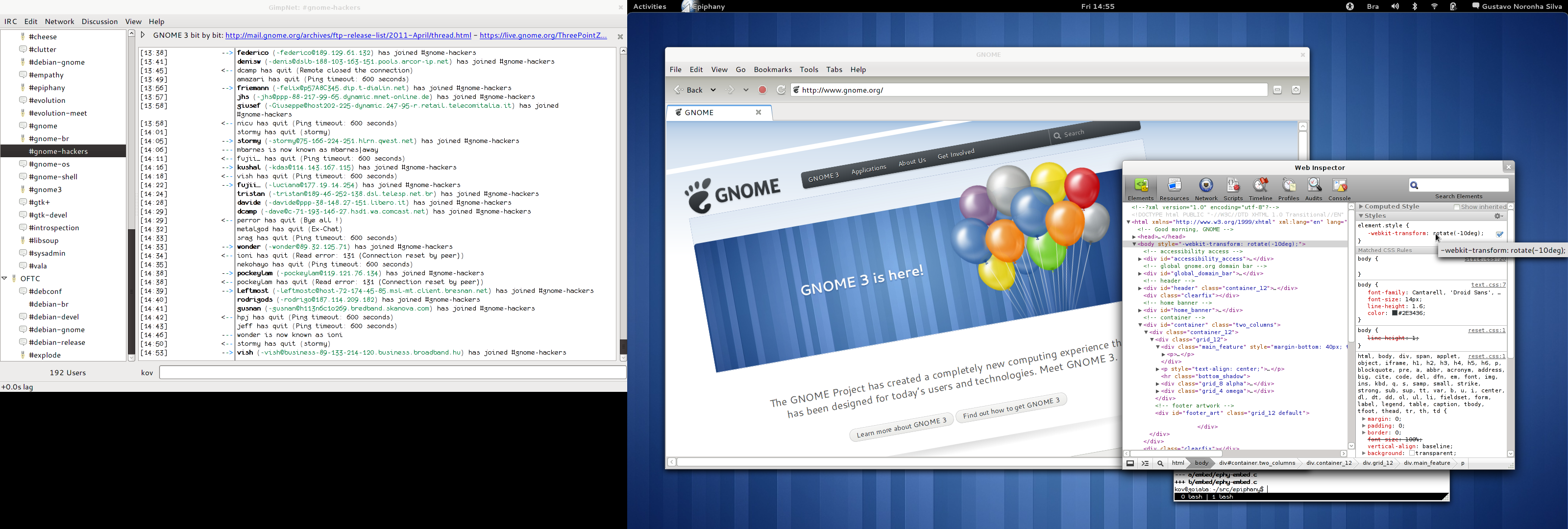
My GNOME 3 desktop

After all this time, there are only two things I can say I dislike about GNOME3, apart from some minor wishlists: the alt-tab behaviour and the message tray. Let me expand on those. Message Tray Of the very few things I dislike, there is only 1 I hate and cannot see myself living with: the accordion animation in the message tray. No, really, it s such a terrible, terrible idea. Every single time I try to use that thing I overshoot while moving the mouse to the left, then overshoot again moving the mouse to the right because the frigging icon has moved. It s no good knowing that I can click in the text or in the empty area to its right, it feels wrong. It s terrible that my actual target is moving at all. Every single time I use it is a small frustration for me it s as if the message tray was playing games with me, laughing at me for not having good enough mouse pointer driving skills even more than the infamous sub-menus used to. And I had to go through that penance whenever I wanted to find the person I was chating with to resume the conversation. I wrote an extension that disables the accordion animation by simply not showing the title at all when you hover the icon, and I patched GNOME Shell s CSS to make the icons a bit bigger, so that it s easier for me to hit them with the mouse. It s clearly not ideal, and you still have to click the various people icons to figure out which of your friends who were lazy enough to not add a picture to their IM profiles is that one, but it s still much better than chasing the (smaller) ones around to figure that out. Perhaps we should have the icons be bigger and always have the title bellow them? I don t know, I trust the awesome designers who designed the awesomess that s everywhere else will come up with a great idea.
My Message Tray

My message tray with bigger icons and no accordion animation.

Alt Tab The number 1 feature of workspaces for me has always been locality being able to not see all of the other applications and windows that are open elsewhere. This lowers the amount of noise when I m trying to find something. The overview is very nice in this matter only windows in the current workspace are shown, and even when you have an extra screen, the windows in there appear in that screen. The alt-tab behaviour, on the other hand, of showing all windows and apps, even with the separator, bothers me. It s really useful to have when you want to go to a specific window no matter where it is (I usually use the dash for that, though), but it adds noise when you want to go to a specific window _in this_ workspace, which is the most common use case for my usage. So I copied the alt-tab code over to an extension and modified it so that only windows in the current workspace would be considered. In addition to that, with the windows in the extra screen always being there no matter what workspace you re in (which I think is an awesome idea), they are effectively in all workspaces, so they add constant noise even with my extension. It s also weird to have to look at the main screen to switch to a window in the extra screen. There s a huge discontinuity. What I would prefer is having alt-tab to follow the mouse regarding screens only show windows in the extra screen if you hit alt-tab in there, making sure the selector thing appears in there as well.

Lars Wirzenius: vmdebootstrap, for real

Some months ago I wished for a tool to create virtual disk images, something similar to debootstrap except it would create a disk image instead of a directory. It would be used like this:
sudo ./vmdebootstrap --image test.img --size 1G \
--log test.log --mirror http://mirror.lan/debian/
debootstrap is wonderful for creating a basic Debian system for use with chroot. In the modern world, something similar but for virtual machines (such as KVM) would be nice to have, I thought. Particularly if it is something that is not tied to a particular virtualization technology, and does not require running in an actual virtual machine (for speed and simplicity). I could imagine using a tool like this for automatically building appliance-like system images, for example for FreedomBox. Being able to do that in a fully automatic manner would make development simpler and more easy for others to reproduce, and would allow for things like automatic integration testing: build image, boot it in a virtual machine, run automatic tests, report results. There are a bunch of tools that almost do this, but not quite. For example, live-build builds a disk image, but it's one that is aimed for live CDs and such. This brings in some limitations. By default, the image is not persistent. You can make a persistent image, but that requires you to provide a second partition (or disk) that holds the modified parts, using copy-on-write. It also means that if the bootloader or initramfs needs to be updated, then the read-only image needs to be updated. That's fine for live CDs, but not so good if you want a real installed system that you can upgrade to all future releases of Debian. (Ben Armstrong kindly helped me use live-build the right way. Thanks!) There's also grml-debootstrap which seems to work on a real system, but not installing onto a virtual disk image (and the difference is crucial to me). Based on feedback I received back then, and some experimentation I've done the past couple of days, I wrote a very rudimentary version of the tool I want. The code is on gitorius. (You need my cliapp library to run it.) Be warned: it really is a very rudimentary version. For example, it provides not flexibility in choice of partitioning, filesystem type, what packages get installed, etc. It does not configure networking, and the root password is disabled. Some of that flexibility would be quite easy to add. It also uses extlinux as the bootloader, since I utterly failed to get grub2 to install onto the virtual disk. (I did, however, manage to overwrite my develpment machine's bootloader.) The command above works, and results in a RAW format disk image that boots under KVM. It might boot off a hard disk or USB flashdrive too, but I haven't tried that. I now have several questions:

12 May 2011

Andrew Pollock: [life] Bike to Work Day 2011

Today was Bike to Work Day, and I biked to work, just like I do most other days. I missed out on it last year because I was still out on paternity leave at the time. That means I've almost been back at work a year. Since we only have one car, and when Zoe was little and sleeping a lot, it made most sense for me to start biking to work again. I'm really glad I did, because not only is it faster compared to the round trip time that Sarah would need to take to drop me off and pick me up, it's a lot easier on her and Zoe. It used to be a challenge for Sarah to get from home to work and back in the mornings without Zoe falling asleep in the car. The only times I've needed a lift have been in wet weather during winter, and when I've been sick. Now that we're out of winter, we should have endless sunshine for months, and it's starting to warm up, which makes biking so much more pleasant. It takes about 10-12 minutes door to door, which is short and sweet, and most of that is on the lovely Stevens Creek Trail. I'm glad I've been able to stick at it for the whole year. I see no reason to stop any time soon.

Matthew Garrett: LightDM, or: an examination of a misunderstanding of the problem

LightDM's a from-scratch implementation of an X display manager, ie the piece of software that handles remote X connections, starts any local X servers, provides a login screen and kicks off the initial user session. It's split into a nominally desktop-agnostic core (built directly on xcb and glib) and greeters, the idea being that it's straightforward to implement an environment-specific greeter that integrates nicely with your desktop session. It's about 6500 lines of code in the core, 3500 lines of code in the gtk bindings to the core and about 1000 in the sample gtk greeter, for a total of about 11,000 lines of code for a full implementation. This compares to getting on for 60,000 in gdm. Ubuntu plan to switch to LightDM in their next release (11.10).

This is a ridiculous idea.

To a first approximation, when someone says "Lightweight" what they mean is "I don't understand the problems that the alternative solves". People see gtk and think "Gosh, that's kind of big for a toolkit library. I'll write my own". And at some point they have to write a file dialog. And then they need to implement support for handling remote filesystems. And then they need to know whether the system has a functioning network connection or not, and so they end up querying state from Network Manager. And then they suddenly have a library that's getting on for the size of gtk, has about the same level of complexity and has had much less testing because why would you want to use a lightweight toolkit that either does nothing or is 90% of the size of the alternative and crashes all the time.

Adding functionality means that code gets larger. Given two codebases that are of significantly different sizes, the two possible conclusions are either that (a) the smaller one is massively more competently written than the larger one, or (b) the smaller one does less. The gdm authors have never struck me as incompetent, even if some people may disagree with some of their design decisions, and the LightDM authors don't seem to have argued on that basis either. So the obvious conclusion is that LightDM does less.

And, indeed, LightDM does less. Part of this is by design - as the proposal to the Gnome development list shows, one of the key advantages of LightDM is claimed as it not starting a Gnome session. And from that statement alone, we can already see that there's been a massive failure of understanding the complexity of the problem.

Let's go back to the comparisons of code size. LightDM's simple GTK greeter is about 1000 lines of code. gdm's greeter is almost 20,000. Some of this is arbitrary shiny stuff like the slidy effects that occur, but a lot of it is additional functionality. For example, some of it is devoted to handling the interface with AccountsService so gdm can automatically update when users are created or deleted. Some of it is providing UI for accessibility functionality. Some of it is drawing a clock, which I'll admit may be a touch gratuitous.

But if your argument is that your software is better because it's doing less, you should be able to ensure that you can demonstrate that the differences aren't important. And the differences here are important. For example, one of the reasons gdm starts a local gnome session is that it wants gnome-power-manager to be there to handle power policy. Closing the lid of my laptop should suspend the system regardless of whether it's logged in or not. LightDM takes a different approach. Because there's no session, it has to take care of this kind of thing itself. So the backend daemon code speaks to upower directly, and the greeters ask the daemon to implement their policy decisions.

This is pretty obviously miserable. Now you've got two sets of policy - one at the login screen, and one in your session. How do I ensure they're consistent? The only sane solution is to ignore the functionality the backend provides and have my greeter run gnome-power-manager. And now how about accessibility preferences? Again, if I want to have the same selection of policy, I need to run the same code. So you end up with a greeter that's about as complex and large as the gdm one, and unused functionality in the backend. Lighter weight through code duplication. We have always been at war with Eurasia.

The entirety of LightDM's design is based on a false premise - that you can move a large set of common greeter functionality into a daemon and just leave UI presentation up to the greeter code. And if you believe that, then yes, you can absolutely implement a greeter in 1000 lines of code. It'll behave differently to your desktop - the range of policy you can implement will be limited to what the daemon provides, even if your desktop environment has a different range of features. It'll have worse accessibility for much the same reason. And eventually you'll end up with a daemon that's absolutely huge in order to attempt to provide the superset of functionality that each different desktop makes use of.

The only real problem LightDM solves is that it makes it easier to write custom greeters, and if you're really seeking to differentiate your project based on your login screen then maybe your priorities are a little out of line. I'm sure that Ubuntu will release with a beautiful 3D greeter that has a wonderful transition to the desktop. It's just a shame that it won't do any of the useful things that the existing implementations already do.

And if you think that when LightDM finally has the full feature set of gdm, kdm and lxdm it'll still be fewer lines of code and take less memory - I hear the BSD kernel is lighter weight than Linux. Have fun with it.

( Comments Comment on this)

11 May 2011

Matt Brown: Linux ignores IPv6 router advertisements when forwarding is enabled

IPv6 adoption is increasing, and along with it come a new set of behaviours and defaults that system administrators and users must learn and become familiar with. I was recently caught out by Linux s handling of IPv6 router advertisements (RAs) when forwarding is also enabled on the interface. It took me a while to figure out and searching for obvious terms (such as those in the first half of the title of this post) didn t immediately yield useful answers, so here is my attempt to help shed some light on the subject. By default Linux will ignore IPv6 RAs if the interface is configured to forward traffic. This is in line with RFC2462 which states that a device should be either a Host or a Router. If you re forwarding packets you re a router and you re therefore expected to be sending RAs, not receiving them. This policy does make a certain amount of sense but there are obviously situations where it can be useful to accept RAs and still forward packets over the interface[0]. The confusing part is that the Linux IPv6 stack allows the accept_ra sysctl to be set to 1 (enabled) at the same time as the forwarding sysctl is set to 1, yet all incoming RAs are ignored with no hint as to why. If you re not aware that the default behaviour is to ignore RAs when forwarding is enabled it looks very much like autoconfiguration has simply broken. The key piece of information is that makes everything as clear as mud is realising that the forwarding and accept_ra sysctl s are not simple boolean enabled/disabled flags like many of their brethren. There are instead three possible values for each, all clearly documented in sysctl.txt, when you take the time to read it. Ironically the documentation states the type of the values as BOOLEAN even though they re not at least it helped me to feel better about my hasty assumption that the sysctl s were boolean values.
accept_ra BOOLEAN
Accept Router Advertisements; autoconfigure using them. Possible values are:
0 Do not accept Router Advertisements.
1 Accept Router Advertisements if forwarding is disabled.
2 Overrule forwarding behaviour. Accept Router Advertisements
even if forwarding is enabled. Functional default: enabled if local forwarding is disabled.
disabled if local forwarding is enabled.
The documentation for forwarding is similar, but much longer, so you can refer to the link above to see it. Conclusion: If you want to autoconfigure IPv6 addresses on an interface that you re also forwarding IPv6 traffic over, you need to set accept_ra to 2. No doubt there are more IPv6 quirks and defaults like this waiting to trap me in the future :) [0] Arguably you really don t want to be autoconfiguring addresses on your router ever, but that s a philosophical debate that isn t really relevant to this post.

Julian Andres Klode: Project APT2: new cache format and small things

I did not write much code or merge much of my prototype code, but some things happened since the last blog post about APT2 specific things in August and I forgot to write about them. First of all, I dropped the GVariant-based cache. The format strings were simply getting ugly long and were not very understandable, performance was just much too slow (needing more than a few nanoseconds for a package lookup is obviously too slow for solving dependency problems); furthermore, building the cache was also slow and complicated because we needed all attributes of an object at once to pass them to GVariant, leading to ugly API. I replaced the GVariant cache with one that can be easily mmap()ed and is described completely in C. It s derived from APT s cache design (but more robust, as it includes the size of the cache and we can thus detect to small files, although that s scheduled for the next ABI break in APT as well), but has fewer duplicate data, and uses arrays where APT uses linked lists. The reason for arrays is simple: They take up less space and can be represented naturally in Python and other languages using array-based lists. The cache also contains a coalesced hash table which does use a linked list, but that one is a bit different, as it is for searching only and not exposed. Everything non-stringy is 64-bit aligned in order to keep things as simple as possible. All integers are fixed size, thus the format is architecture-independent if you fix byte orders. The format is described at http://people.debian.org/~jak/apt2-doc/apt-Cache-Format.html. I stole one more idea from cupt and changed the configuration system to verify types of variables. APT2 s configuration system knows more types than cupt s, though, including regular expressions, directory and filenames (i.e. it does not let you store a value /d/ in a file variable), strings (which store everything), unsigned and signed integers, and boolean options; all of which are checked when parsing files (producing warnings) or command-line options (producing errors). I have also simplified the type world by removing all iterator types except for one, replacing them with get_thing() and n_things() functions in the objects holding the arrays. Makes cool bindings slightly harder, but makes the C API much easier to use from C. Most things expected from a package manager are still missing, but what is there looks good in most cases (especially AptConfiguration has a nice API, and no complaints from valgrind anywhere). Currently I am working on Python bindings so I can interact with the functions easily and check things in an interactive fashion; and I am also writing a document explaining the concepts behind APT2, drafts at http://people.debian.org/~jak/midlevel.pdf. I also have some more code pending further thoughts (including complete index parsing), but it might still take some time before I have something usable in the wild. On other package managers: From time to time I also use Cupt, look at Cupt code, hack Cupt code, and report bugs against Cupt. I still do not really understand the (extreme) nesting of directory structures in the source code, why there are so (extremely) many source files split all over them, or the general concepts of Cupt, but I can hack together what I need for my personal testing. I also play with yum whenever I end up on a Fedora system (which happens from time to time).
Filed under: APT2

Next.

Previous.