Search Results: "zed"

20 December 2022

Russ Allbery: Review: Tess of the Road

Review: Tess of the Road, by Rachel Hartman
Series: Tess of the Road #1
Publisher: Random House
Copyright: 2018
Printing: 2022
ISBN: 1-101-93130-2
Format: Kindle
Pages: 536
Tess of the Road is the first book of a YA fantasy duology set in the same universe as Seraphina and Shadow Scale. It's hard to decide what to say about reading order (and I now appreciate the ambiguous answers I got). Tess of the Road is a sequel to Seraphina and Shadow Scale in the sense that there are numerous references to the previous duology, but it has a different protagonist and different concerns. You don't need to read the other duology first, but Tess of the Road will significantly spoil the resolution of the romance plot in Seraphina, and it will be obvious that you've skipped over background material. That said, Shadow Scale is not a very good book, and this is a much better book. I guess the summary is this: if you're going to read the first duology, read it first, but don't feel obligated to do so. Tess was always a curious, adventurous, and some would say unmanageable girl, nothing like her twin. Jeanne is modest, obedient, virtuous, and practically perfect in every way. Tess is not; after a teenage love affair resulting in an out-of-wedlock child and a boy who disappeared rather than marry her, their mother sees no alternative but to lie about which of the twins is older. If Jeanne can get a good match among the nobility, the family finances may be salvaged. Tess's only remaining use is to help her sister find a match, and then she can be shuffled off to a convent. Tess throws herself into court politics and does exactly what she's supposed to. She engineers not only a match, but someone Jeanne sincerely likes. Tess has never lacked competence. But this changes nothing about her mother's view of her, and Tess is depressed, worn, and desperately miserable in Jeanne's moment of triumph. Jeanne wants Tess to stay and become the governess of her eventual children, retaining their twin bond of the two of them against the world. Their older sister Seraphina, more perceptively, tries to help her join an explorer's expedition. Tess, in a drunken spiral of misery, insults everyone and runs away, with only a new pair of boots and a pack of food. This is going to be one of those reviews where the things I didn't like are exactly the things other readers liked. I see why people loved this book, and I wish I had loved it too. Instead, I liked parts of it a great deal and found other parts frustrating or a bit too off-putting. Mostly this is a preference problem rather than a book problem. My most objective complaint is the pacing, which was also my primary complaint about Shadow Scale. It was not hard to see where Hartman was going with the story, I like that story, I was on board with going there, but getting there took for-EV-er. This is a 536 page book that I would have edited to less than 300 pages. It takes nearly a hundred pages to get Tess on the road, and while some of that setup is necessary, I did not want to wallow in Tess's misery and appalling home life for quite that long. A closely related problem is that Hartman continues to love flashbacks. Even after Tess has made her escape, we get the entire history of her awful teenage years slowly dribbled out over most of the book. Sometimes this is revelatory; mostly it's depressing. I had guessed the outlines of what had happened early in the book (it's not hard), and that was more than enough motivation for me, but Hartman was determined to make the reader watch every crisis and awful moment in detail. This is exactly what some readers want, and sometimes it's even what I want, but not here. I found the middle of the book, where the story is mostly flashbacks and flailing, to be an emotional slog. Part of the problem is that Tess has an abusive mother and goes through the standard abuse victim process of being sure that she's the one who's wrong and that her mother is justified in her criticism. This is certainly realistic, and it eventually lead to some satisfying catharsis as Tess lets go of her negative self-image. But Tess's mother is a narcissistic religious fanatic with a persecution complex and not a single redeeming quality whatsoever, and I loathed reading about her, let alone reading Tess tiptoeing around making excuses for her. The point of this in the story is for Tess to rebuild her self-image, and I get it, and I'm sure this will work for some readers, but I wanted Tess's mother (and the rest of her family except her sisters) to be eaten by dragons. I do not like the emotional experience of hating a character in a book this much. Where Tess of the Road is on firmer ground is when Tess has an opportunity to show her best qualities, such as befriending a quigutl in childhood and, in the sort of impulsive decision that shows her at her best, learning their language. (For those who haven't read the previous books, quigutls are a dog-sized subspecies of dragon that everyone usually treats like intelligent animals, although they're clearly more than that.) Her childhood quigutl friend Pathka becomes her companion on the road, which both gives her wanderings some direction and adds some useful character interaction. Pathka comes with a plot that is another one of those elements that I think will work for some readers but didn't work for me. He's in search of a Great Serpent, a part of quigutl mythology that neither humans or dragons pay attention to. That becomes the major plot of the novel apart from Tess's emotional growth. Pathka also has a fraught relationship with his own family, which I think was supposed to parallel Tess's relationships but never clicked for me. I liked Tess's side of this relationship, but Pathka is weirdly incomprehensible and apparently fickle in ways that I found unsatisfying. I think Hartman was going for an alien tone that didn't quite work for me. This is a book that gets considerably better as it goes along, and the last third of the book was great. I didn't like being dragged through the setup, but I loved the character Tess became. Once she reaches the road crew, this was a book full of things that I love reading about. The contrast between her at the start of the book and the end is satisfying and rewarding. Tess's relationship with her twin Jeanne deserves special mention; their interaction late in the book is note-perfect and much better than I had expected. Unfortunately, Tess of the Road doesn't have a real resolution. It's only the first half of Tess's story, which comes back to that pacing problem. Ah well. I enjoyed this but I didn't love it. The destination was mostly worth the journey, but I thought the journey was much too long and I had to spend too much time in the company of people I hated far more intensely than was comfortable. I also thought the middle of the book sagged, a problem I have now had with two out of three of Hartman's books. But I can see why other readers with slightly different preferences loved it. I'm probably invested enough to read the sequel, although I'm a bit grumbly that the sequel is necessary. Followed by In the Serpent's Wake. Rating: 7 out of 10

19 December 2022

Simon Josefsson: Second impressions of Guix 1.4

While my first impression of Guix 1.4rc2 on NV41PZ was only days ago, the final Guix 1.4 release has happened. I thought I should give it a second try, although being at my summer house with no wired ethernet I realized this may be overly optimistic. However I am happy to say that a guided graphical installation on my new laptop went smooth without any problem. Practicing OS installations has a tendency to make problems disappear. My WiFi issues last time was probably due to a user interface mistake on my part: you have to press a button to search for wireless networks before seeing them. I m not sure why I missed this the first time, but maybe the reason was that I didn t really expect WiFi to work on this laptop with one Intel-based WiFi card without firmware and a USB-based WiFi dongle. I haven t went back to the rc2 image, but I strongly believe it wasn t a problem with that image but my user mistake. Perhaps some more visual clues could be given that Guix found a usable WiFi interface, as this isn t completely obvious now. My main pet problem with the installation is the language menu. It contains a bazillion languages, and I want to find Swedish in it. However the list is half-sorted so it looks like it is alphabetized but paging through the list I didn t find svenska , but did notice that the sorting restarts after a while. Eventually I find my language of chose, but a better search interface would be better. Typing s to find it jumps around in the list. This may be a user interface misunderstanding on my part: I may be missing whatever great logic I m sure there is to find my language in that menu. I did a simple installation, enabling GNOME, Cups and OpenSSH. Given the experience with sharing /home with my Trisquel installation last time, I chose to not mount it this time, fixing this later on if I want to share files between OSes. Watching the installation proceed with downloading packages over this slow WiFi was meditative, and I couldn t help but wonder what logic there was to the many steps where it says it is going to download X MB of software, downloads a set of packages, and then starts another iteration saying it is going to download Y MB and then downloads another set of packages. Maybe there is a package dependency tree being worked out while I watch. After logging into GNOME I had to provide the WiFi password another time, it seems it wasn t saved during installation, or I was too impatient to wait for WiFi to come up automatically. Using the GNOME WiFi selection menu worked fine. The webcam issue is still present, the image is distorted and it doesn t happen in Trisquel. Other than that, everythings appear to work, but it has to be put through more testing. Upgrading Guix after installation is still suffering from the same issue I noticed with the rc2 images, this time I managed to save the error message in case someone wants to provide an official fix or workaround. The initial guix pull command also takes forever, even on this speedy laptop, but after the initial run it is faster. Here are the error messages (pardon the Swedish):
jas@kaka ~$ sudo -i
...
root@kaka ~# guix pull
...
root@kaka ~# guix system reconfigure /etc/config.scm 
guix system: fel: aborting reconfiguration because commit 8e2f32cee982d42a79e53fc1e9aa7b8ff0514714 of channel 'guix' is not a descendant of 989a3916dc8967bcb7275f10452f89bc6c3389cc
tips: Use  --allow-downgrades' to force this downgrade.
root@kaka ~# 
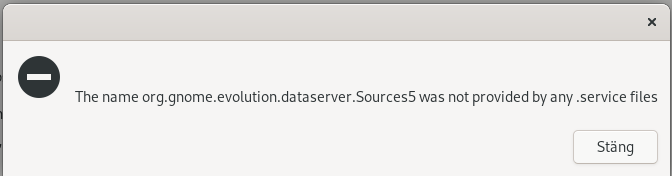
I ll avoid using allow-downgrades this time to see if there is a better solution available. Update: Problem resolved: my muscle memory typed sudo -i before writing the commands above. If I stick to the suggested guix pull (as user) followed by sudo guix system reconfigure /etc/config.scm everything works. I ll leave this in case someone else runs into this problem. I m using the Evolution mail/calendar/contacts application, and it was not installed via GNOME so I had to manually install it using guix package -i evolution . Following the guided setup worked remarkable well (it auto-detects all my email settings after giving it my email address), although at the end I get a surprising error message:
Puzzling error message from Evolution
If I didn t know a bit about how Evolution works internally, I would have been stuck here the solution is to install the evolution data server package. This should probably be a dependency from the main package? Fix it by guix package -i evolution-data-server . It works directly, no need to even restart Evolution or go through the configuration dialog again. After this, I m happily using email against my Dovecot server and contacts/calendars against my Nextcloud server via GNOME s builtin Nextcloud connector which was straight-forward to setup.

Russ Allbery: Review: Artifact Space

Review: Artifact Space, by Miles Cameron
Series: Arcana Imperii #1
Publisher: Gollancz
Copyright: June 2021
ISBN: 1-4732-3262-7
Format: Kindle
Pages: 483
Artifact Space is a military (mostly) science fiction novel, the first of an expected trilogy. Christian Cameron is a prolific author of historical fiction under that name, thrillers under the name Gordon Kent, and historical fantasy under the name Miles Cameron. This is his first science fiction novel. Marca Nbaro is descended from one of the great spacefaring mercantile families, but it's not doing her much good. She is a ward of the Orphanage, the boarding school for orphaned children of the DHC, generous in theory and a hellhole in practice. Her dream to serve on one of the Greatships, the enormous interstellar vessels that form the backbone of the human trading network, has been blocked by the school authorities, a consequence of the low-grade war she's been fighting with them throughout her teenage years. But Marca is not a person to take no for an answer. Pawning her family crest gets her just enough money to hire a hacker to doctor her school records, adding the graduation she was denied and getting her aboard the Greatship Athens as a new Midshipper. I don't read a lot of military science fiction, but there is one type of story that I love that military SF is uniquely well-suited to tell. It's not the combat or the tactics or the often-trite politics. It's the experience of the military as a system, a collective human endeavor. One ideal of the military is that people come to it from all sorts of backgrounds, races, and social classes, and the military incorporates them all into a system built for a purpose. It doesn't matter who you are or what you did before: if you follow the rules, do your job, and become part of a collaboration larger than yourself, you have a place and people to watch your back whether or not they know you or like you. Obviously, like any ideal, many militaries don't live up to this, and there are many stories about those failures. But the story of that ideal, told well, is a genre I like a great deal and is hard to find elsewhere. This sort of military story shares some features with found family, and it's not a coincidence that I also like found family stories. But found family still assumes that these people love you, or at least like you. For some protagonists, that's a tricky barrier both to cross and to believe one has crossed. The (admittedly idealized) military doesn't assume anyone likes you. It doesn't expect that you or anyone around you have the right feelings. It just expects you to do your job and work with other people who are doing their job. The requirements are more concrete, and thus in a way easier to believe in. Artifact Space is one of those military science fiction stories. I was entirely unsurprised to see that the author is a former US Navy career officer. The Greatships here are, technically, more of a merchant marine than a full-blown military. (The author noted in an interview that he based them on the merchant ships of Venice.) The weapons are used primarily for defense; the purpose of the Greatships is trade, and every crew member has a storage allotment in the immense cargo area that they're encouraged to use. The setting is in the far future, after a partial collapse and reconstruction of human society, in which humans have spread through interstellar space, settled habitable planets, and built immense orbital cities. The Athens is trading between multiple human settlements, but its true destination is far into the deep black: Tradepoint, where it can trade with the mysterious alien Starfish for xenoglas, a material that humans have tried and failed to reproduce and on which much of human construction now depends. This is, to warn, one of those stories where the scrappy underdog of noble birth makes friends with everyone and is far more competent than anyone expects. The story shape is not going to surprise you, and you have to have considerable tolerance for it to enjoy this book. Marca is ridiculously, absurdly central to the plot for a new Middie. Sometimes this makes sense given her history; other times, she is in the middle of improbable accidents that felt forced by the author. Cameron doesn't entirely break normal career progression, but Marca is very special in a way that you only get to be as the protagonist of a novel. That said, Cameron does some things with that story shape that I liked. Marca's hard-won survival skills are not weirdly well-suited for her new life aboard ship. To the contrary, she has to unlearn a lot of bad habits and let go of a lot of anxiety. I particularly liked her relationship with her more-privileged cabin mate, which at first seemed to only be a contrast between Thea's privilege and Marca's background, but turned into both of them learning from each other. There's a great mix of supporting characters, with a wide variety of interactions with Marca and a solid sense that all of the characters have their own lives and their own concerns that don't revolve around her. There is, of course, a plot to go with this. I haven't talked about it much because I think the summaries of this book are a bit of a spoiler, but there are several layers of political intrigue, threats to the ship, an interesting AI, and a good hook in the alien xenoglas trade. Cameron does a deft job balancing the plot with Marca's training and her slow-developing sense of place in the ship (and fear about discovery of her background and hacking). The pacing is excellent, showing all the skill I'd expect from someone with a thriller background and over forty prior novels under his belt. Cameron portrays the tedious work of learning a role on a ship without boring the reader, which is a tricky balancing act. I also like the setting: a richly multicultural future that felt like it included people from all of Earth, not just the white western parts. That includes a normalized androgyne third gender, which is the sort of thing you rarely see in military SF. Faster-than-light travel involves typical physics hand-waving, but the shape of the hand-waving is one I've not seen before and is a great excuse for copying the well-known property of oceangoing navies that longer ships can go faster. (One tech grumble, though: while Cameron does eventually say that this is a known tactic and Marca didn't come up with anything novel, deploying spread sensors for greater resolution is sufficiently obvious it should be standard procedure, and shouldn't have warranted the character reactions it got.) I thoroughly enjoyed this. Artifact Space is the best military SF that I've read in quite a while, at least back to John G. Hemry's JAG in space novels and probably better than those. It's going to strike some readers, with justification, as cliched, but the cliches are handled so well that I had only minor grumbling at a few absurd coincidences. Marca is a great character who is easy to care about. The plot was tense and satisfying, and the feeling of military structure, tradition, jargon, and ship pride was handled well. I had a very hard time putting this down and was sad when it ended. If you're in the mood for that class of "learning how to be part of a collaborative structure" style of military SF, recommended. Artifact Space reaches a somewhat satisfying conclusion, but leaves major plot elements unresolved. Followed by Deep Black, which doesn't have a release date at the time of this writing. Rating: 9 out of 10

15 December 2022

Reproducible Builds: Supporter spotlight: David A. Wheeler on supply chain security

The Reproducible Builds project relies on several projects, supporters and sponsors for financial support, but they are also valued as ambassadors who spread the word about our project and the work that we do. This is the sixth instalment in a series featuring the projects, companies and individuals who support the Reproducible Builds project. We started this series by featuring the Civil Infrastructure Platform project and followed this up with a post about the Ford Foundation as well as a recent ones about ARDC, the Google Open Source Security Team (GOSST), Jan Nieuwenhuizen on Bootstrappable Builds, GNU Mes and GNU Guix and Hans-Christoph Steiner of the F-Droid project. Today, however, we will be talking with David A. Wheeler, the Director of Open Source Supply Chain Security at the Linux Foundation.

Holger Levsen: Welcome, David, thanks for taking the time to talk with us today. First, could you briefly tell me about yourself? David: Sure! I m David A. Wheeler and I work for the Linux Foundation as the Director of Open Source Supply Chain Security. That just means that my job is to help open source software projects improve their security, including its development, build, distribution, and incorporation in larger works, all the way out to its eventual use by end-users. In my copious free time I also teach at George Mason University (GMU); in particular, I teach a graduate course on how to design and implement secure software. My background is technical. I have a Bachelor s in Electronics Engineering, a Master s in Computer Science and a PhD in Information Technology. My PhD dissertation is connected to reproducible builds. My PhD dissertation was on countering the Trusting Trust attack, an attack that subverts fundamental build system tools such as compilers. The attack was discovered by Karger & Schell in the 1970s, and later demonstrated & popularized by Ken Thompson. In my dissertation on trusting trust I showed that a process called Diverse Double-Compiling (DDC) could detect trusting trust attacks. That process is a specialized kind of reproducible build specifically designed to detect trusting trust style attacks. In addition, countering the trusting trust attack primarily becomes more important only when reproducible builds become more common. Reproducible builds enable detection of build-time subversions. Most attackers wouldn t bother with a trusting trust attack if they could just directly use a build-time subversion of the software they actually want to subvert.
Holger: Thanks for taking the time to introduce yourself to us. What do you think are the biggest challenges today in computing? There are many big challenges in computing today. For example:
Holger: Do you think reproducible builds are an important part in secure computing today already? David: Yes, but first let s put things in context. Today, when attackers exploit software vulnerabilities, they re primarily exploiting unintentional vulnerabilities that were created by the software developers. There are a lot of efforts to counter this: We re just starting to get better at this, which is good. However, attackers always try to attack the easiest target. As our deployed software has started to be hardened against attack, attackers have dramatically increased their attacks on the software supply chain (Sonatype found in 2022 that there s been a 742% increase year-over-year). The software supply chain hasn t historically gotten much attention, making it the easy target. There are simple supply chain attacks with simple solutions: Unfortunately, attackers know there are other lines of attack. One of the most dangerous is subverted build systems, as demonstrated by the subversion of SolarWinds Orion system. In a subverted build system, developers can review the software source code all day and see no problem, because there is no problem there. Instead, the process to convert source code into the code people run, called the build system , is subverted by an attacker. One solution for countering subverted build systems is to make the build systems harder to attack. That s a good thing to do, but you can never be confident that it was good enough . How can you be sure it s not subverted, if there s no way to know? A stronger defense against subverted build systems is the idea of verified reproducible builds. A build is reproducible if given the same source code, build environment and build instructions, any party can recreate bit-by-bit identical copies of all specified artifacts. A build is verified if multiple different parties verify that they get the same result for that situation. When you have a verified reproducible build, either all the parties colluded (and you could always double-check it yourself), or the build process isn t subverted. There is one last turtle: What if the build system tools or machines are subverted themselves? This is not a common attack today, but it s important to know if we can address them when the time comes. The good news is that we can address this. For some situations reproducible builds can also counter such attacks. If there s a loop (that is, a compiler is used to generate itself), that s called the trusting trust attack, and that is more challenging. Thankfully, the trusting trust attack has been known about for decades and there are known solutions. The diverse double-compiling (DDC) process that I explained in my PhD dissertation, as well as the bootstrappable builds process, can both counter trusting trust attacks in the software space. So there is no reason to lose hope: there is a bottom turtle , as it were.
Holger: Thankfully, this has all slowly started to change and supply chain issues are now widely discussed, as evident by efforts like Securing the Software Supply Chain: Recommended Practices Guide for Developers which you shared on our mailing list. In there, Reproducible Builds are mentioned as recommended advanced practice, which is both pretty cool (we ve come a long way!), but to me it also sounds like this will take another decade until it s become standard normal procedure. Do you agree on that timeline? David: I don t think there will be any particular timeframe. Different projects and ecosystems will move at different speeds. I wouldn t be surprised if it took a decade or so for them to become relatively common there are good reasons for that. Today the most common kinds of attacks based on software vulnerabilities still involve unintentional vulnerabilities in operational systems. Attackers are starting to apply supply chain attacks, but the top such attacks today are typosquatting (creating packages with similar names) and dependency confusion) (convincing projects to download packages from the wrong repositories). Reproducible builds don t counter those kinds of attacks, they counter subverted builds. It s important to eventually have verified reproducible builds, but understandably other issues are currently getting prioritized first. That said, reproducible builds are important long term. Many people are working on countering unintentional vulnerabilities and the most common kinds of supply chain attacks. As these other threats are countered, attackers will increasingly target build systems. Attackers always go for the weakest link. We will eventually need verified reproducible builds in many situations, and it ll take a while to get build systems able to widely perform reproducible builds, so we need to start that work now. That s true for anything where you know you ll need it but it will take a long time to get ready you need to start now.
Holger: What are your suggestions to accelerate adoption? David: Reproducible builds need to be: I think there s a snowball effect. Once many projects packages are reproducible, it will be easier to convince other projects to make their packages reproducible. I also think there should be some prioritization. If a package is in wide use (e.g., part of minimum set of packages for a widely-used Linux distribution or framework), its reproducibility should be a special focus. If a package is vital for supporting some societally important critical infrastructure (e.g., running dams), it should also be considered important. You can then work on the ones that are less important over time.
Holger: How is the Best Practices Badge going? How many projects are participating and how many are missing? David: It s going very well. You can see some automatically-generated statistics, showing we have over 5,000 projects, adding more than 1/day on average. We have more than 900 projects that have earned at least the passing badge level.
Holger: How many of the projects participating in the Best Practices badge engaging with reproducible builds? David: As of this writing there are 168 projects that report meeting the reproducible builds criterion. That s a relatively small percentage of projects. However, note that this criterion (labelled build_reproducible) is only required for the gold badge. It s not required for the passing or silver level badge. Currently we ve been strategically focused on getting projects to at least earn a passing badge, and less on earning silver or gold badges. We would love for all projects to get earn a silver or gold badge, of course, but our theory is that projects that can t even earn a passing badge present the most risk to their users. That said, there are some projects we especially want to see implementing higher badge levels. Those include projects that are very widely used, so that vulnerabilities in them can impact many systems. Examples of such projects include the Linux kernel and curl. In addition, some projects are used within systems where it s important to society that they not have serious security vulnerabilities. Examples include projects used by chemical manufacturers, financial systems and weapons. We definitely encourage any of those kinds of projects to earn higher badge levels.
Holger: Many thanks for this interview, David, and for all of your work at the Linux Foundation and elsewhere!



For more information about the Reproducible Builds project, please see our website at reproducible-builds.org. If you are interested in ensuring the ongoing security of the software that underpins our civilisation and wish to sponsor the Reproducible Builds project, please reach out to the project by emailing contact@reproducible-builds.org.
12 December 2022

Russ Allbery: Review: The Unbroken

Review: The Unbroken, by C.L. Clark
Series: Magic of the Lost #1
Publisher: Orbit
Copyright: March 2021
ISBN: 0-316-54267-9
Format: Kindle
Pages: 490
The Unbroken is the first book of a projected fantasy trilogy. It is C.L. Clark's first novel. Lieutenant Touraine is one of the Sands, the derogatory name for the Balladairan Colonial Brigade. She, like the others of her squad, are conscript soldiers, kidnapped by the Balladairan Empire from their colonies as children and beaten into "civilized" behavior by Balladairan training. They fought in the Balladairan war against the Taargens. Now, they've been reassigned to El-Wast, capital city of Qaz l, the foremost of the southern colonies. The place where Touraine was born, from which she was taken at the age of five. Balladaire is not France and Qaz l is not Algeria, but the parallels are obvious and strongly implied by the map and the climates. Touraine and her squad are part of the forces accompanying Princess Luca, the crown princess of the Balladairan Empire, who has been sent to take charge of Qaz l and quell a rebellion. Luca's parents died in the Withering, the latest round of a recurrent plague that haunts Balladaire. She is the rightful heir, but her uncle rules as regent and is reluctant to give her the throne. Qaz l is where she is to prove herself. If she can bring the colony in line, she can prove that she's ready to rule: her birthright and her destiny. The Qaz li are uninterested in being part of Luca's grand plan of personal accomplishment. She steps off her ship into an assassination attempt, foiled by Touraine's sharp eyes and quick reactions, which brings the Sand to the princess's attention. Touraine's reward is to be assigned the execution of the captured rebels, one of whom recognizes her and names her mother before he dies. This sets up the core of the plot: Qaz li rebellion against an oppressive colonial empire, Luca's attempt to use the colony as a political stepping stone, and Touraine caught in between. One of the reasons why I am happy to see increased diversity in SFF authors is that the way we tell stories is shaped by our cultural upbringing. I was taught to tell stories about colonialism and rebellion in a specific ideological shape. It's hard to describe briefly, but the core idea is that being under the rule of someone else is unnatural as well as being an injustice. It's a deviation from the way the world should work, something unexpected that is inherently unstable. Once people unite to overthrow their oppressors, eventual success is inevitable; it's not only right or moral, it's the natural path of history. This is what you get when you try to peel the supremacy part away from white supremacy but leave the unshakable self-confidence and bedrock assumption that the universe cares what we think. We were also taught that rebellion is primarily ideological. One may be motivated by personal injustice, but the correct use of that injustice is to subsume it into concepts such as freedom and democracy. Those concepts are more "real" in some foundational sense, more central to the right functioning of the world, than individual circumstance. When the now-dominant group tells stories of long-ago revolution, there is no personal experience of oppression and survival in which to ground the story; instead, it's linked to anticipatory fear in the reader, to the idea that one's privileges could be taken away by a foreign oppressor and that the counter to this threat is ideological unity. Obviously, not every white fantasy author uses this story shape, but the tendency runs deep because we're taught it young. You can see it everywhere in fantasy, from Lord of the Rings to Tigana. The Unbroken uses a much different story shape, and I don't think it's a coincidence that the author is Black. Touraine is not sympathetic to the Qaz li. These are not her people and this is not her life. She went through hell in Balladairan schools, but she won a place, however tenuous. Her personal role model is General Cantic, the Balladairan Blood General who was also one of her instructors. Cantic is hard as nails, unforgiving, unbending, and probably a war criminal, but also the embodiment of a military ethic. She is tough but fair with the conscript soldiers. She doesn't put a stop to their harassment by the regular Balladairan troops, but neither does she let it go too far. Cantic has power, she knows how to keep it, and there is a place for Touraine in Cantic's world. And, critically, that place is not just hers: it's one she shares with her squad. Touraine's primary loyalty is not to Balladaire or to Qaz l. It's to the Sands. Her soldiers are neither one thing nor the other, and they disagree vehemently among themselves about what Qaz l and their other colonial homes should be to them, but they learned together, fought together, and died together. That theme is woven throughout The Unbroken: personal bonds, third and fourth loyalties, and practical ethics of survival that complicate and contradict simple dichotomies of oppressor and oppressed. Touraine is repeatedly offered ideological motives that the protagonist in the typical story shape would adopt. And she repeatedly rejects them for personal bonds: trying to keep her people safe, in a world that is not looking out for them. The consequence is that this book tears Touraine apart. She tries to walk a precarious path between Luca, the Qaz li, Cantic, and the Sands, and she falls off that path a lot. Each time I thought I knew where this book was going, there's another reversal, often brutal. I tend to be a happily-ever-after reader who wants the protagonist to get everything they need, so this isn't my normal fare. The amount of hell that Touraine goes through made for difficult reading, worse because much of it is due to her own mistakes or betrayals. But Clark makes those decisions believable given the impossible position Touraine is in and the lack of role models she has for making other choices. She's set up to fail, and the price of small victories is to have no one understand the decisions that she makes, or to believe her motives. Luca is the other viewpoint character of the book (and yes, this is also a love affair, which complicates both of their loyalties). She is the heroine of a more typical genre fantasy novel: the outsider princess with a physical disability and a razor-sharp mind, ambitious but fair (at least in her own mind), with a trusted bodyguard advisor who also knew her father and a sincere desire to be kinder and more even-handed in her governance of the colony. All of this is real; Luca is a protagonist, and the reader is not being set up to dislike her. But compared to Touraine's grappling with identity, loyalty, and ethics, Luca is never in any real danger, and her concerns start to feel too calculated and superficial. It's hard to be seriously invested in whether Luca proves herself or gets her throne when people are being slaughtered and abused. This, I think, is the best part of this book. Clark tells a traditional ideological fantasy of learning to be a good ruler, but she puts it alongside a much deeper and more complex story of multi-faceted oppression. She has the two protagonists fall in love with each other and challenges them to understand each other, and Luca does not come off well in this comparison. Touraine is frustrated, impulsive, physical, and sometimes has catastrophically poor judgment. Luca is analytical and calculating, and in most ways understands the political dynamics far better than Touraine. We know how this story usually goes: Luca sees Touraine's brilliance and lifts her out of the ranks into a role of importance and influence, which Touraine should reward with loyalty. But Touraine's world is more real, more grounded, and more authentic, and both Touraine and the reader know what Luca could offer is contingent and comes with a higher price than Luca understands. (Incidentally, the cover of The Unbroken, designed by Lauren Panepinto with art by Tommy Arnold, is astonishingly good at capturing both Touraine's character and the overall feeling of the book. Here's a larger version.) The writing is good but uneven. Clark loves reversals, and they did keep me reading, but I think there were too many of them. By the end of the book, the escalation of betrayals and setbacks was more exhausting than exciting, and I'd stopped trusting anything good would last. (Admittedly, this is an accurate reflection of how Touraine felt.) Touraine's inner monologue also gets a bit repetitive when she's thrashing in the jaws of an emotional trap. I think some of this is first-novel problems of over-explaining emotional states and character reasoning, but these problems combine to make the book feel a bit over-long. I'm also not in love with the ending. It's perhaps the one place in the book where I am more cynical about the politics than Clark is, although she does lay the groundwork for it. But this book is also full of places small and large where it goes a different direction than most fantasy and is better for it. I think my favorite small moment is Touraine's quiet refusal to defend herself against certain insinuations. This is such a beautiful bit of characterization; she knows she won't be believed anyway, and refuses to demean herself by trying. I'm not sure I can recommend this book unconditionally, since I think you have to be in the mood for it, but it's one of the most thoughtful and nuanced looks at colonialism and rebellion I can remember seeing in fantasy. I found it frustrating in places, but I'm also still thinking about it. If you're looking for a political fantasy with teeth, you could do a lot worse, although expect to come out the other side a bit battered and bruised. Followed by The Faithless, and I have no idea where Clark is going to go with the second book. I suppose I'll have to read and find out. Content note: In addition to a lot of violence, gore, and death, including significant character death, there's also a major plague. If you're not feeling up to reading about panic caused by contageous illness, proceed with caution. Rating: 7 out of 10

10 December 2022

Simon Josefsson: Trisquel 11 on NV41PZ: First impressions

My NovaCustom NV41PZ laptop arrived a couple of days ago, and today I had some time to install it. You may want to read about my purchasing decision process first. I expected a rough ride to get it to work, given the number of people claiming that modern laptops can t run fully free operating systems. I first tried the Trisquel 10 live DVD and it booted fine including network, but the mouse trackpad did not work. Before investigating it, I noticed a forum thread about Trisquel 11 beta3 images, and being based on Ubuntu 22.04 LTS and has Linux-libre 5.15 it seemed better to start with more modern software. After installing through the live DVD successfully, I realized I didn t like MATE but wanted to keep using GNOME. I reverted back to installing a minimal environment through the netinst image, and manually installed GNOME (apt-get install gnome) since I prefer that over MATE, together with a bunch of other packages. I ve been running it for a couple of hours now, and here is a brief summary of the hardware components that works.
CPUAlder Lake Intel i7-1260P
Memory2x32GB Kingston DDR4 SODIMM 3200MHz
StorageSamsung 980 Pro 2TB NVME
BIOSDasharo Coreboot
GraphicsIntel Xe
Screen (internal)14 1920 1080
Screen (HDMI)Connected to Dell 27 2560 1440
Screen (USB-C)Connected to Dell 27 2560 1440 via Wavlink port extender
WebcamBuiltin 1MP Camera
MicrophoneIntel Alder Lake
KeyboardISO layout, all function keys working
MouseTrackpad, tap clicking and gestures
Ethernet RJ45Realtek RTL8111/8168/8411 with r8169 driver
Memory cardO2 Micro comes up as /dev/mmcblk0
Docking stationWavlink 4xUSB, 2xHDMI, DP, RJ45,
ConnectivityUSB-A, USB-C
AudioIntel Alder Lake
Hardware components and status
So what s not working? Unfortunately, NovaCustom does not offer any WiFi or Bluetooth module that is compatible with Trisquel, so the AX211 (1675x) Wifi/Bluetooth card in it is just dead weight. I imagine it would be possible to get the card to work if non-free firmware is loaded. I don t need Bluetooth right now, and use the Technoetic N-150 USB WiFi dongle when I m not connected to wired network. Compared against my X201, the following factors have improved. I m still unhappy about the following properties with both the NV41PZ and the X201. Hopefully my next laptop will have improved on this further. I hope to be able to resolve the WiFi part by replacing the WiFi module, there appears to be options available but I have not tested them on this laptop yet. Does anyone know of a combined WiFi and Bluetooth M.2 module that would work on Trisquel? While I haven t put the laptop to heavy testing yet, everything that I would expect a laptop to be able to do seems to work fine. Including writing this blog post!

Timo Jyrinki: Running Cockpit inside ALP

(quoted from my other blog at since a new OS might be interesting for many and this is published in separate planets)
ALP - The Adaptable Linux Platform is a new operating system from SUSE to run containerized and virtualized workloads. It is in early prototype phase, but the development is done completely openly so it s easy to jump in to try it.For this trying out, I used the latest encrypted build as of the writing, 22.1 from ALP images. I imported it in virt-manager as a Generic Linux 2022 image, using UEFI instead of BIOS, added a TPM device (which I m interested in otherwise) and referring to an Ignition JSON file in the XML config in virt-manager.The Ignition part is pretty much fully thanks to Paolo Stivanin who studied the secrets of it before me. But here it goes - and this is required for password login in Cockpit to work in addition to SSH key based login to the VM from host - first, create config.ign file:
 
"ignition": "version": "3.3.0" ,
"passwd":
"users": [

"name": "root",
"passwordHash": "YOURHASH",
"sshAuthorizedKeys": [
"ssh-... YOURKEY"
]

]
,
"systemd":
"units": [
"name": "sshd.service",
"enabled": true
]
,
"storage":
"files": [

"overwrite": true,
"path": "/etc/ssh/sshd_config.d/20-enable-passwords.conf",
"contents":
"source": "data:,PasswordAuthentication%20yes%0APermitRootLogin%20yes%0A"
,
"mode": 420

]


where password SHA512 hash can be obtained using openssl passwd -6 and the ssh key is your public ssh key.That file is put to eg /tmp and referred in the virt-manager s XML like follows:
  <sysinfo type="fwcfg">
<entry name="opt/com.coreos/config" file="/tmp/config.ign"/>
</sysinfo>
Now we can boot up the VM and ssh in - or you could log in directly too but it s easier to copy-paste commands when using ssh.Inside the VM, we can follow the ALP documentation to install and start Cockpit:
podman container runlabel install registry.opensuse.org/suse/alp/workloads/tumbleweed_containerfiles/suse/alp/workloads/cockpit-ws:latest
podman container runlabel --name cockpit-ws run registry.opensuse.org/suse/alp/workloads/tumbleweed_containerfiles/suse/alp/workloads/cockpit-ws:latest
systemctl enable --now cockpit.service
Check your host s IP address with ip -a, and open IP:9090 in your host s browser:Cockpit login screenLogin with root / your password and you shall get the front page:Cockpit front page and many other pages where you can manage your ALP deployment via browser:Cockpit podman pageAll in all, ALP is in early phases but I m really happy there s up-to-date documentation provided and people can start experimenting it whenever they want. The images from the linked directory should be fairly good, and test automation with openQA has been started upon as well.You can try out the other example workloads that are available just as well.

Simon Josefsson: How to complicate buying a laptop

I m about to migrate to a new laptop, having done a brief pre-purchase review of options on Fosstodon and reaching a decision to buy the NovaCustom NV41. Given the rapid launch and decline of Mastodon instances, I thought I d better summarize my process and conclusion on my self-hosted blog until the fediverse self-hosting situation improves. Since 2010 my main portable computing device has been the Lenovo X201 that replaced the Dell Precision M65 that I bought in 2006. I have been incredibly happy with the X201, even to the point that in 2015 when I wanted to find a replacement, I couldn t settle on a decision and eventually realized I couldn t articulate what was wrong with the X201 and decided to just buy another X201 second-hand for my second office. There is still no deal-breaker with the X201, and I m doing most of my computing on it including writing this post. However, today I can better articulate what is lacking with the X201 that I desire, and the state of the available options on the market has improved since my last attempt in 2015. Briefly, my desired properties are: My workload for the machine is Emacs, Firefox, Nextcloud client, GNOME, Evolution (mail & calendar), LibreOffice Calc/Writer, compiling software and some podman/qemu for testing. I have used Debian as the main operating system for the entire life of this laptop, but have experimented with PureOS recently. My current X201 is useful enough for this, although support for 4K displays and a faster machine wouldn t hurt. Based on my experience in 2015 that led me to make no decision, I changed perspective. This is a judgement call and I will not be able to fulfil all criteria. I will have to decide on a balance and the final choice will include elements that I really dislike, but still it will hopefully be better than nothing. The conflict for me mainly center around these parts: A simple choice for me would be to buy one of the FSF RYF certified laptops. Right now that list only contains the 10+ year old Lenovo series, and I actually already have a X200 with libreboot that I bought earlier for comparison. The reason the X200 didn t work out as a replacement for me was the lack of a mouse trackpad, concerns about non-free EC firmware, Intel ME uncertainty (is it really neutralized?) and non-free CPU microcode (what are the bugs that it fixes?), but primarily that for some reason that I can t fully articulate it feels weird to use a laptop manufactured by Lenovo but modified by third parties to be useful. I believe in market forces to pressure manufacturers into Doing The Right Thing, and feel that there is no incentive for Lenovo to use libreboot in the future when this market niche is already fulfilled by re-sellers modifying Lenovo laptops. So I d be happier buying a laptop from someone who is natively supportive of they way I m computing. I m sure this aspect could be discussed a lot more, and maybe I ll come back to do that, and could even reconsider my thinking (the right-to-repair argument is compelling). I will definitely continue to monitor the list of RYF-certified laptops to see if future entries are more suitable options for me. Eventually I decided to buy the NovaCustom NV41 laptop, and it arrived quickly and I m in the process of setting it up. I hope to write a separate blog about it next.

John Goerzen: Music Playing: Both Whole-House and Mobile

It s been nearly 8 years since I last made choices about music playing. At the time, I picked Logitech Media Server (LMS, aka Slimserver and Squeezebox server) for whole-house audio and Ampache with the DSub Android app. It s time to revisit that approach. Here are the things I m looking for: The current setup Here are the current components: LMS makes an excellent whole-house audio system. I can pull up the webpage (or use an Android app like Squeezer) to browse my music library, queue things up to play, and so forth. I can also create playlists, which it saves as m3u files. This whole setup is boringly reliable. It just works, year in, year out. The main problem with this is that LMS has no real streaming/offline mobile support. It is also a rather dated system, with a painful UI for playlist management, and in general doesn t feel very modern. (It s written largely in Perl also!) So, I paired with it is Ampache. As a streaming player, Ampache is fantastic; I can access it from a web browser, and it will transcode my FLAC files to the quality I ve set in my user prefs. The DSub app for Android is fantastic and remembers my last-play locations and such. The problem is that Ampache doesn t write its playlists back to m3u format, so I can t use them with LMS. I have to therefore maintain all the playlists in LMS, and it has a smallish limit on the number of tracks per playlist. Ampache also doesn t auto-update from LMS playlists, so I have to delete and recreate the playlists catalog periodically to get updates into Ampache. Not fun. The new experiment I m trying out a new system based on these components: This looks a lot more complicated than what I had before, but in reality it only has one additional layer. Since Snapcast is a general audio syncing tool, and Jellyfin doesn t itself output audio, Mopidy and its extensions is the glue . There s a lot to like about this setup. There is one single canonical source for music and playlists. Jellyfin can do a lot more besides music, and its mobile app gives me video access also. The setup, in general, works pretty well. There are a few minor glitches, but nothing huge. For instance, Jellyfin fails to clear the play queue on the mopidy side. But there is one problem, though: when playing a playlist, it is played out of order. Jellyfin itself has the same issue internally, so I m unsure where the bug lies. Rejected option: Jellyfin with jellycli This could be a nice option; instead of mopidy with a plugin, just run jellycli in headless mode as a more native client. It also has the playlist ordering bug, and in addition, fails to play a couple of my albums which Mopidy-Jellyfin handles fine. But, if those bugs were addressed, it has a ton of promise as a simpler glue between Jellyfin and Snapcast than Mopidy. Rejected option: Mopidy-Subidy Plugin with Ampache Mopidy has a Subsonic plugin, and Ampache implements the Subsonic API. This would theoretically let me use a Mopidy client to play things on the whole-house system, coming from the same Ampache system. Although I did get this connected with some trial and error (legacy auth on, API version 1.13.0), it was extremely slow. Loading the list of playlists took minutes, the list of albums and artists many seconds. It didn t cache any answers either, so it was unusably slow. Rejected option: Ampache localplay with mpd Ampache has a feature called localplay which allows it to control a mpd server. I tested this out with mpd and snapcast. It works, but is highly limited. Basically, it causes Ampache to send a playlist a literal list of URLs to the mpd server. Unfortunately, seeking within a track is impossible from within the Ampache interface. I will note that once a person is using mpd, snapcast makes a much easier whole-house solution than the streaming option I was trying to get working 8 years ago.

8 December 2022

Shirish Agarwal: Wayland, Hearing aids, Multiverse & Identity

Wayland First up, I read Antoine Beaupr s Wayland to Sway migration with interest. While he said it s done and dusted or something similar, the post shows there s still quite a ways to go. I wouldn t say it s done or whatever till it s integrated so well that a person installs it and doesn t really need to fiddle with config files as an average user. For specific use-cases you may need to, but that should be outside of a normal user (layperson) experience. I have been using mate for a long long time and truth be told been very happy with it. The only thing I found about Wayland on mate is this discussion or rather this entry. The roadmap on Ubuntu Mate is also quite iffy. The Mate Wayland entry on Debian wiki also perhaps need an updation but dunno much as the latest update it shares is 2019 and it s 2022. One thing to note, at least according to Antoine, things should be better as and when it gets integrated even on legacy hardware. I would be interested to know how it would work on old desktops and laptops rather than new or is there some barrier? I, for one would have liked to see or know about why lightdm didn t work on Wayland and if there s support. From what little I know lightdm is much lighter than gdm3 and doesn t require much memory and from what little I have experienced works very well with mate. I have been using it since 2015/16 although the Debian changelog tells me that it has been present since 2011. I was hoping to see if there was a Wayland specific mailing list, something like debian-wayland but apparently there s not :(. Using mate desktop wayland (tried few other variations on the keywords) but search fails to find any meaningful answer :(. FWIW and I don t know the reason why but Archwiki never fails to amaze me. Interestingly, it just says No for mate. I probably would contact upstream in the coming days to know what their plans are and hopefully they will document what their plans are on integrating Wayland in both short-term and long-term with an update, or if there is something more recent they have documented elsewhere, get that update on the Debian wiki so people know. The other interesting thread I read was Russel Coker s Thinkpad X1 Carbon Gen5 entry. I would be in the market in a few months to find/buy a Thinkpad but probably of AMD rather than Intel because part of recent past history with Intel as well as AMD having a bit of an edge over Intel as far as graphics is concerned. I wonder why Russel was looking into Intel and not AMD. Would be interested to know why Intel and not AMD? Any specific reason ???

Hearing Aids I finally bought hearing aids about a couple of weeks back and have been practicing using them. I was able to have quite a few conversations although music is still I m not able to listen clearly but it is still a far cry from before and for the better. I am able to have conversations with people and also reply and they do not have to make that extra effort that they needed to. Make things easier for everybody. The one I bought is at the starting range although the hearing aids go all the way to 8 lakhs for a pair (INR 800,000), the more expensive ones having WiFi, Bluetooth and more channels, it all depends on how much can one afford. And AFAIK there is not a single Indian manufacturer who is known in this business.

One thing I did notice is while the hearing aids are remarkably sturdy if they fall down as they are small, yet you have to be careful of both dust and water . That does makes life a bit difficult as my house and city both gets sand quite a bit everyday. I don t think they made any India-specific changes, if they had, would probably make things better. I haven t yet looked at it, but it may be possible to hack it remotely. There may or may not be security issues involved, probably would try once I ve bit more time am bit more comfortable to try and see what I can find out. If I had bought it before, maybe I would have applied for the Debian event happening in Kerala, if nothing else, would have been to document what happened there in detail.  I probably would have to get a new motherboard for my desktop probably in a year or two as quite a few motherboards also have WiFi (WiFi 6 ?) think on the southbridge. I at least would have a look in new year and know more as to what s been happening. For last at least 2-3 years there has been a rumor which has been confirmed time and again that the Tata Group has been in talks with multiple vendors to set chip fabrication and testing business but to date they haven t been able to find one. They do keep on giving press conferences about the same but that s all they do :(. Just shared the latest one above.

The Long War Terry Pratchett, Stephen Braxter Long Earth Terry Pratchett, Stephen Braxter ISBN13: 9780062067777 Last month there was also a seconds books sale where I was lucky enough to get my hands on the Long War. But before I share about the book itself, I had a discussion with another of my friends and had to re-share part of that conversation. While the gentleman was adamant that non-fiction books are great, my point as always is both are equal. As I shared perhaps on this blog itself, perhaps multiple times, that I had seen a YT video in which a professor shared multiple textbooks of physics and shared how they are wrong and have been wrong and kept them in a specific corner. He took the latest book which he honestly said doesn t have any mistakes as far as he know and yet still kept in that same corner denoting that it is highly possible that future understanding will make the knowledge or understanding we know different. An example of physics in the nano world and how that is different and basically turns our understanding than what we know. Now as far as the book is concerned, remember Michael Crichton s Timeline. Now that book was originally written in the 1960 s while this one was written by both the honorable gentleman in 2013. So almost 50+ years difference between the two books, and that even shows how they think about things. In this book, you no longer need a big machine, but have something called a stepper machine which is say similar to a cellphone, that size and that frame, thickness etc. In this one, the idea of multiverse is also there but done a tad differently. In this, we do not have other humans or copy humans but have multiple earths that may have same or different geography as how evolution happened. None of the multiverse earths have humans but have different species depending on the evolution that happened there. There are something called as trolls but they have a much different meaning and way about them about how most fantasy authors portray trolls. While they are big in this as well, they are as gentle as bears or rabbits. So the whole thing is about real estate and how humans have spread out on multiple earths and the politics therein. Interestingly, the story was trashed or given negative reviews on Goodreads. The sad part is/was that it was written and published in 2013 when perhaps the possibility of war or anything like that was very remote especially in the States, but now we are now in 2022 and just had an insurrection happen and whole lot of Americans are radicalized, whether you see the left or the right depending on your ideology. An American did share few weeks ago how some shares are looking at Proportional Representation and that should make both parties come more towards the center and be a bit more transparent. What was interesting to me is the fact that states have much more rights to do elections and electioneering the way they want rather than a set model which everyone has common which is what happens in India. This also does poke holes into the whole Donald Trump stolen democracy drama but that s a different story altogether. One of the more interesting things I came to know about is that there are 4 books in the long series and this was the second book in itself. I do not want to dwell on the characters themselves as frankly speaking I haven t read all the four books and it would be gross injustice on my part to talk about the characters themselves. Did I enjoy reading the book, for sure. What was interesting and very true of human nature is that even if we have the ability or had the ability to have whole worlds to ourselves, we are bound to mess it up. And in that aspect, I don t think he is too far off the mark. If I had a whole world, wouldn t I try to exploit it to the best or worse of my ability. One of the more interesting topics in the book is the barter system they have thought of that is called as favors. If you are in multiple worlds, then having a currency, even fiat money is of no use and they have to find ways and means to trade with one another. The book also touches a bit on slavery but only just and doesn t really explore it as much as it could have.

Identity Now this has many meanings to it. Couple of weeks ago, saw a transgender meet. For the uninitiated or rather people like me, basically it is about people who are born in one gender but do not identify with it but the other and they express it first through their clothes and expression and the end of the journey perhaps is with having the organs but this may or may not be feasible, as such surgery is expensive and also not available everywhere. After section 377 was repealed few years ago, we do have a third gender on forms as well as have something called a Transgender Act but how much the needle has moved in society is still a question. They were doing a roadshow near my house hence I was able to talk with them with my new hearing aids and while there was lot of traffic was able to understand some of their issues. For e.g. they find it difficult to get houses on rent, but then it is similar for bachelor guys or girls also. One could argue to what degree it is, and that perhaps maybe. Also, there is a myth that they are somehow promiscuous but that I believe is neither here or there. Osho said an average person thinks about the opposite sex every few seconds or a minute. I am sure even Freud would have similar ideas. So, if you look in that way everybody is promiscuous as far as thought is concerned. The other part being opportunity but that again is function of so many other things. Some people are able to attract a lot of people, others might not. And then whether they chose to act on that opportunity or not is another thing altogether. Another word that is or was used is called gender fluid, but that too is iffy as gender fluid may or may not mean transgender. Also, while watching some nature documentary few days/weeks back had come to know that trees have something like 18 odd genders. That just blows me out of the mind and does re-question this whole idea of sexuality and identity to only two which seems somewhat regressive at least to me. If we think humans are part of nature, then we need to be open up perhaps a bit more. But identity as I shared above has more than one meaning. For e.g. citizenship, that one is born in India is even messier to know, understand and define. I had come across this article about couple of months back. Now think about this. Now, there have been studies and surveys about citizenship and it says something like 60% birth registrations are done in metro cities. Now Metro cities are 10 as defined by Indian state. But there are roughly an odd 4k cities in India and probably twice the number of villages and those are conservative numbers as we still don t record things meticulously, maybe due to the Indian oral tradition or just being lazy or both, one part is also that if you document people and villages and towns, then you are also obligated to give them some things as a state and that perhaps is not what the Indian state wants. A small village in India could be anywhere from few hundreds of people to a few thousand. And all the new interventions whether it is PAN, Aadhar has just made holes rather than making things better. They are not inclusive but exclusive. And none of this takes into account Indian character and the way things are done in India. In most households, excluding the celebs (they are in a world of pain altogether when it comes to baby names but then it s big business but that s an entire different saga altogether, so not going to touch that.) I would use or say my individual case as that is and seems to be something which is regular even today. I was given a nickname when I was 3 years old and given a name when I was 5-6 when I was put in school. I also came to know in school few kids who didn t like their names and couple of them cajoled and actually changed their names while they were kids, most of us just stayed with what we got. I do remember sharing about nakushi or something similar a name given to few girls in Maharashtra by their parents and the state intervened and changed their names. But that too is another story in itself. What I find most problematic is that the state seems to be blind, and this seems to be by design rather than a mistake. Couple of years back, Assam did something called NRC (National Register of Citizens) and by the Govt s own account it was a failure of massive proportions. And they still want to bring in CAA, screwing up Assam more. And this is the same Govt. went shown how incorrect it was, blamed it all on the High Court and it s the same Govt. that shopped around for judges to put somebody called Mr. Saibaba (an invalid 90 year adivasi) against whom the Govt. hasn t even a single proof as of date. Apparently, they went to 6 judges who couldn t give what the decision the Govt. wanted. All this info. is in public domain. So the current party ruling, i.e. BJP just wants to make more divisions rather than taking people along as they don t have answers either on economy, inflation or issues that people are facing. One bright light has been Rahul Gandhi who has been doing a padhyatra (walking) from Kanyakumari to Kashmir and has had tremendous success although mainstream media has showed almost nothing what he is doing or why he is doing that. Not only he had people following him, there are and were many who took his example and using the same values of inclusiveness are walking where they can. And this is not to do with just a political party but more with a political thought of inclusiveness, that we are one irrespective of what I believe, eat, wear etc. And that gentleman has been giving press conferences while our dear P.M. even after 8 years doesn t have the guts to do a single press conference. Before closing, I do want to take another aspect, Rahul Gandhi s mother is an Italian or was from Italy before she married. But for BJP she is still Italian. Rishi Sunak, who has become the UK Prime Minister they think of him as Indian and yet he has sworn using the Queen s name. And the same goes for Canada Kumar (Akshay Kumar) and many others. How the right is able to blind and deaf to what it thinks is beyond me. All these people have taken an oath in the name of the Queen and they have to be loyal to her or rather now King Charles III. The disconnect continues.

Jonathan Dowland: Portland, Oregon and Beatdown Records, Newcastle

Powell's frontage Powell's frontage
I'm over on the west coast of the States attending 15th IEEE/ACM International Conference on Utility and Cloud Computing (UCC2022) in Vancouver, WA. Vancouver is a city on the southern extent of Washington, on the north side of the Columbia River from the (better known) Portland, Oregon. (Perhaps more about Vancouver in another post.) In between conference sessions I've made a couple of trips out to Portland to see bits and pieces. My friends with experience here all raved about Powell's City of Books, and with good reason. I managed to escape without a mortal wound to my finances, but only just.
Music Millennium. Keep Portland Weird! Music Millennium. Keep Portland Weird!
Likewise Music Millennium, emblazoned with the unofficial city slogan "Keep Portland Weird!" was a worthwhile pilgrimage. I was saved only by knowing that I had to carry home whatever I bought on the plane. Visiting MM made me realise something about my favourite record store at home, Beatdown Records: It is a truly world-class record store. I have bought from (and sold at) many times over the years, but the last time I had a realisation that it was somewhere a bit special was in between two of the UK's Covid lockdowns. My father and I both qualified for early access to the first two rounds of COVID-19 vaccinations on offer in the UK the Astra Zeneca and The Centre for Life (across the road from Beatdown Records) was the nearest place to go and get them. By the time of our second shot, shops had started to open up again and things had loosened up a bit. We had time to kill around the appointment so I took my Dad to Beatdown. The shop has a reasonably-sized front room with a selection of CDs and records, but the real gold is in the back. Dad hadn't realised there was a back. He's a pretty quiet person so when I took him to the back and he loudly exclaimed " Wow", it was quite satisfying.

30 November 2022

Russell Coker: Links November 2022

Here s the US Senate Statement of Frances Haugen who used to work for Facebook countering misinformation and espionage [1]. She believes that Facebook is capable of dealing with the online radicalisation and promotion of bad things on it s platform but is unwilling to do so for financial reasons. We need strong regulation of Facebook and it probably needs to be broken up. Interesting article from The Atlantic about filtered cigarettes being more unhealthy than unfiltered [2]. Every time I think I know how evil tobacco companies are I get surprised by some new evidence. Cory Doctorow wrote an insightful article about resistance to rubber hose cryptanalysis [3]. Cory Doctorow wrote an interesting article When Automation Becomes Enforcement with a new way of thinking about Snapchat etc [4]. Cory Doctorow wrote an insightful and informative article Big Tech Isn t Stealing News Publishers Content, It s Stealing Their Money [5] which should be read by politicians from all countries that are trying to restrict quoting news on the Internet. Interesting articl;e on Santiago Genoves who could be considered as a pioneer of reality TV for deliberately creating disputes between a group of young men and women on a raft in the Atlantic for 3 months [6]. Matthew Garrett wrote an interesting review of the Freedom Phone, seems that it s not good for privacy and linked to some companies doing weird stuff [7]. Definitely worth reading. Cory Doctorow wrote an interesting and amusing article about backdoors for machine learning [8] Petter Reinholdtsen wrote an informative post on how to make a bootable USB stick image from an ISO file [9]. Apparently Lenovo provides ISO images to update laptops that don t have DVD drives. :( Barry Gander wrote an interesting article about the fall of Rome and the decline of the US [10]. It s a great concern that the US might fail in the same way as Rome. Ethan Siegel wrote an interesting article about Iapetus, a moon of Saturn that is one of the strangest objects in the solar system [11]. Cory Doctorow s article Revenge of the Chickenized Reverse-Centaurs has some good insights into the horrible things that companies like Amazon are doing to their employees and how we can correct that [12]. Charles Stross wrote an insightful blog post about Billionaires [13]. They can t do much for themselves with the extra money beyond about $10m or $100m (EG Steve Jobs was unable to extend his own life much when he had cancer) and their money is trivial when compared to the global economy. They are however effective parasites capable of performing great damage to the country that hosts them. Cory Doctorow has an interesting article about how John Deere is being evil again [14]. This time with potentially catastrophic results.

29 November 2022

Sam Hartman: Introducing Carthage

For the past four years, I ve been working on Carthage, a free-software Infrastructure as Code framework. We ve finally reached a point where it makes sense to talk about Carthage and what it can do. This is the first in a series of blog posts to introduce Carthage, discuss what it can do and show how it works. Why Another IAC Framework It seems everywhere you look, there are products designed to support the IAC pattern. On the simple side, you could check a Containerfile into Git. Products like Terraform and Vagrant allow you to template cloud infrastructure and VMs. There are more commercial offerings than I can keep up with. We were disappointed by what was out there when we started Carthage. Other products have improved, but for many of our applications we re happy with what Carthage can build. The biggest challenge we ran into is that products wanted us to specify things at the wrong level. For some of our cyber training work we wanted to say things like We want 3 blue teams, each with a couple defended networks, a red team, and some neutral infrastructure for red to exploit. Yet the tools we were trying to use wanted to lay things out at the individual machine/container level. We found ourselves contemplating writing a program to generate input for some other IAC tool. Things were worse for our internal testing. Sometimes we d be shipping hardware to a customer. But sometimes we d be virtualizing that build out in a lab. Sometimes we d be doing a mixture. So we wanted to completely separate the descriptions of machines, networks, and software from any of the information about whether that was realized on hardware, VMs, containers, or a mixture. Dimensional Breakdown In discussing Carthage with Enrico Zini, he pointed me at Cognitive Dimensions of notation as a way to think about how Carthage approaches the IAC problem. I m more interested in the idea of breaking down a design along the idea of dimensions that allow examining the design space than I am particular adherence to Green s original dimensions. Low Viscosity, High Abstraction Reuse One of the guiding principles is that we want to be able to reuse different components at different scales and in different environments. These include being able to do things like: Hidden Dependencies To accomplish these abstraction goals, dependencies need to be non-local. For example, a software role might need to integrate with a directory if a directory is present in the environment. When writing the role, no one is going to know which directory to use, nor whether a directory is present. Taking that as an explicit input into the role is error-prone when the role is combined into large abstract units (bigger roles or collections of machines). Instead it is better to have a non-local dependency, and to find the directory if it is available. We accomplish this using dependency injection. In addition to being non-local, dependencies are sometimes hidden. It is very easy to overwhelm our cognitive capacity with even a fairly simple IAC description. An effective notation allows us to focus on the parts that matter when working with a particular part of the description. I ve found hiding dependencies, especially indirect dependencies, to be essential in building complex descriptions. Obviously, tools are required for examining these dependencies as part of debugging. First Class Modeling Clearly one of the goals of IAC descriptions is to actually build and manage infrastructure. It turns out that there are all sorts of things you want to do with the description well before you instantiate the infrastructure. You might want to query the description to build network diagrams, understand interdependencies, or even build inventory/bill of materials. We often find ourselves building Ansible inventory, switch configurations, DNS zones, and all sorts of configuration artifacts. These artifacts may be installed into infrastructure that is instantiated by the description, but they may be consumed in other ways. Allowing the artifacts to be consumed externally means that you can avoid pre-commitment and focus on whatever part of the description you originally want to work on. You may use an existing network at first. Later the IAC description may replace that, or perhaps it never will. As a result, Carthage separates modeling from instantiation. The model can generally be built and queried without needing to interact with clouds, VMs, or containers. We ve actually found it useful to build Carthage layouts that cannot ever be fully instantiated, for example because they never specify details like whether a model should be instantiated on a container or VM, or what kind of technology will realize a modeled network. This allows developing roles before the machines that use them or focusing on how machines will interact and how the network will be laid out before the details of installing on specific hardware. The modeling separation is by far the difference I value most between Carthage and other systems. A Tool for Experts. In Neal Stephenson s essay In the Beginning Was the Command Line , Stephenson points out that the kind of tools experts need are not the same tools that beginners need. The illustration of why a beginner might not be satisfied with a Hole Hog drill caught my attention. Carthage is a tool for experts. Despite what cloud providers will tell you, IAC is not easy. Doubly so when you start making reusable components. Trying to hide that or focus on making things easy to get started can make it harder for experts to efficiently solve the problems they are facing. When we have faced trade offs between making Carthage easy to pick up and making it powerful for expert users, we have chosen to support the experts. That said, Carthage today is harder to pick up than it needs to be. It s a relatively new project with few external users as of this time. Our documentation and examples need improvement, just like every project at this level of maturity. Similarly, as the set of things people try to do expand, we will doubtless run into bugs that our current test cases don t cover. So Carthage absolutely will get easier to learn and use than it is today. Also, we ve already had success building beginner-focused applications on top of Carthage. For our cyber training, we built web applications on top of Carthage that made rebuilding and exploring infrastructure easy. We ve had success using relatively understood tools like Ansible as integration and customization points for Carthage layouts. But in all these cases, when the core layout had significant reusable components and significant complexity in the networking, only an IAC expert was going to be able to maintain and develop that layout. What Carthage can do. Carthage has a number of capabilities today. One of Carthage s strengths is its extensible design. Abstract interfaces make it easy to add new virtualization platforms, cloud services, and support for various ways of managing real hardware. This approach has been validated by incrementally adding support for virtualization architectures and cloud services. As development has progressed, adding new integrations continues to get faster because we are able to reuse existing infrastructure. Today, Carthage can model: Carthage has excellent facilities for dealing with images on which VMs and Containers can be based, although it does have a bit of a Debian/Ubuntu bias in how it thinks about images: When instantiating infrastructure, Carthage can work with: We have also looked at Oracle Cloud and I believe Openstack, although that code is not merged. Future posts will talk about core Carthage concepts and how to use Carthage to build infrastructure.

comment count unavailable comments

19 November 2022

Joerg Jaspert: From QNAP QTS to TrueNAS Scale

History, Setup So for quite some time I have a QNAP TS-873x here, equipped with 8 Western Digital Red 10 TB disks, plus 2 WD Blue 500G M2 SSDs. The QNAP itself has an AMD Embedded R-Series RX-421MD with 4 cores and was equipped with 48G RAM. Initially I had been quite happy, the system is nice. It was fast, it was easy to get to run and the setup of things I wanted was simple enough. All in a web interface that tries to imitate a kind of workstation feeling and also tries to hide that it is actually a webinterface. Natually with that amount of disks I had a RAID6 for the disks, plus RAID1 for the SSDs. And then configured as a big storage pool with the RAID1 as cache. Below the hood QNAP uses MDADM Raid and LVM (if you want, with thin provisioning), in some form of emdedded linux. The interface allows for regular snapshots of your storage with flexible enough schedules to create them, so it all appears pretty good.

QNAP slow Fast forward some time and it gets annoying. First off you really should have regular raid resyncs scheduled, and while you can set priorities on them and have them low priority, they make the whole system feel very sluggish, quite annoying. And sure, power failure (rare, but can happen) means another full resync run. Also, it appears all of the snapshots are always mounted to some /mnt/snapshot/something place (df on the system gets quite unusable). Second, the reboot times. QNAP seems to be affected by the more features, fuck performance virus, and bloat their OS with more and more features while completly ignoring the performance. Everytime they do an upgrade it feels worse. Lately reboot times went up to 10 to 15 minutes - and then it still hadn t started the virtual machines / docker containers one might run on. Another 5 to 10 minutes for those. Opening the file explorer - ages on calculating what to show. Trying to get the storage setup shown? Go get a coffee, but please fetch the beans directly from the plantation, or you are too fast. Annoying it was. And no, no broken disks or fan or anything, it all checks out fine.

Replace QNAPs QTS system So I started looking around what to do. More RAM may help a little bit, but I already had 48G, the system itself appears to only do 64G maximum, so not much chance of it helping enough. Hardware is all fine and working, so software needs to be changed. Sounds hard, but turns out, it is not.

TrueNAS And I found that multiple people replaced the QNAPs own system with a TrueNAS installation and generally had been happy. Looking further I found that TrueNAS has a variant called Scale - which is based on Debian. Doubly good, that, so I went off checking what I may need for it.

Requirements Heck, that was a step back. To install TrueNAS you need an HDMI out and a disk to put it on. The one that QTS uses is too small, so no option.
QNAPs  internal USB disk QNAPs original internal USB drive, DOM
So either use one of the SSDs that played cache (and should do so again in TrueNAS, or get the QNAP original replaced. HDMI out is simple, get a cheap card and put it into one of the two PCIe-4x slots, done. The disk thing looked more complicated, as QNAP uses some internal usb stick thing . Turns out it is just a USB stick that has an 8+1pin connector. Couldn t find anything nice as replacement, but hey, there are 9-pin to USB-A adapters.
9PIN to USB A a 9pin to USB A adapter
With that adapter, one can take some random M2 SSD and an M2-to-USB case, plus some cabling, and voila, we have a nice system disk.
USB 9pin  to USB-A cable connected to Motherboard and some more cable 9pin adapter to USB-A connected with some more cable
Obviously there isn t a good place to put this SSD case and cable, but the QNAP case is large enough to find space and use some cable ties to store it safely. Space enough to get the cable from the side, where the mainboard is to the place I mounted it, so all fine.
Mounted  SSD in external case, also shows the video card Mounted SSD in its external case
The next best M2 SSD was a Western Digital Red with 500G - and while this is WAY too much for TrueNAS, it works. And hey, only using a tiny fraction? Oh so much more cells available internally to use when others break. Or something Together with the Asus card mounted I was able to install TrueNAS. Which is simple, their installer is easy enough to follow, just make sure to select the right disk to put it on.

Preserving data during the move Switching from QNAP QTS to TrueNAS Scale means changing from MDADM Raid with LVM and ext4 on top to ZFS and as such all data on it gets erased. So a backup first is helpful, and I got myself two external Seagate USB Disks of 6TB each - enough for the data I wanted to keep. Copying things all over took ages, especially as the QNAP backup thingie sucks, it was breaking quite often. Also, for some reason I did not investigate, the performance of it was real bad. It started at a maximum of 50MB/s, but the last terabyte of data was copied at MUCH less than that, and so it took much longer than I anticipated. Copying back was slow too, but much less so. Of course reading things usually is faster than writing, with it going around 100MB/s most of the time, which is quite a bit more - still not what USB3 can actually do, but I guess the AMD chip doesn t want to go that fast.

TrueNAS experience The installation went mostly smooth, the only real trouble had been on my side. Turns out that a bad network cable does NOT help the network setup, who would have thought. Other than that it is the usual set of questions you would expect, a reboot, and then some webinterface. And here the differences start. The whole system boots up much faster. Not even a third of the time compared to QTS. One important thing: As TrueNAS scale is Debian based, and hence a linux kernel, it automatically detects and assembles the old RAID arrays that QTS put on. Which TrueNAS can do nothing with, so it helps to manually stop them and wipe the disks. Afterwards I put ZFS on the disks, with a similar setup to what I had before. The spinning rust are the data disks in a RAIDZ2 setup, the two SSDs are added as cache devices. Unlike MDADM, ZFS does not have a long sync process. Also unlike the MDADM/LVM/EXT4 setup from before, ZFS works different. It manages the raid thing but it also does the volume and filesystem parts. Quite different handling, and I m still getting used to it, so no, I won t write some ZFS introduction now.

Features The two systems can not be compared completly, they are having a pretty different target audience. QNAP is more for the user that wants some network storage that offers a ton of extra features easily available via a clickable interface. While TrueNAS appears more oriented to people that want a fast but reliable storage system. TrueNAS does not offer all the extra bloat the QNAP delivers. Still, you have the ability to run virtual machines and it seems it comes with Rancher, so some kubernetes/container ability is there. It lacks essential features like assigning PCI devices to virtual machines, so is not useful right now, but I assume that will come in a future version. I am still exploring it all, but I like what I have right now. Still rebuilding my setup to have all shares exported and used again, but the most important are working already.

16 November 2022

Antoine Beaupr : Wayland: i3 to Sway migration

I started migrating my graphical workstations to Wayland, specifically migrating from i3 to Sway. This is mostly to address serious graphics bugs in the latest Framwork laptop, but also something I felt was inevitable. The current status is that I've been able to convert my i3 configuration to Sway, and adapt my systemd startup sequence to the new environment. Screen sharing only works with Pipewire, so I also did that migration, which basically requires an upgrade to Debian bookworm to get a nice enough Pipewire release. I'm testing Wayland on my laptop, but I'm not using it as a daily driver because I first need to upgrade to Debian bookworm on my main workstation. Most irritants have been solved one way or the other. My main problem with Wayland right now is that I spent a frigging week doing the conversion: it's exciting and new, but it basically sucked the life out of all my other projects and it's distracting, and I want it to stop. The rest of this page documents why I made the switch, how it happened, and what's left to do. Hopefully it will keep you from spending as much time as I did in fixing this. TL;DR: Wayland is mostly ready. Main blockers you might find are that you need to do manual configurations, DisplayLink (multiple monitors on a single cable) doesn't work in Sway, HDR and color management are still in development. I had to install the following packages:
apt install \
    brightnessctl \
    foot \
    gammastep \
    gdm3 \
    grim slurp \
    pipewire-pulse \
    sway \
    swayidle \
    swaylock \
    wdisplays \
    wev \
    wireplumber \
    wlr-randr \
    xdg-desktop-portal-wlr
And did some of tweaks in my $HOME, mostly dealing with my esoteric systemd startup sequence, which you won't have to deal with if you are not a fan.

Why switch? I originally held back from migrating to Wayland: it seemed like a complicated endeavor hardly worth the cost. It also didn't seem actually ready. But after reading this blurb on LWN, I decided to at least document the situation here. The actual quote that convinced me it might be worth it was:
It s amazing. I have never experienced gaming on Linux that looked this smooth in my life.
... I'm not a gamer, but I do care about latency. The longer version is worth a read as well. The point here is not to bash one side or the other, or even do a thorough comparison. I start with the premise that Xorg is likely going away in the future and that I will need to adapt some day. In fact, the last major Xorg release (21.1, October 2021) is rumored to be the last ("just like the previous release...", that said, minor releases are still coming out, e.g. 21.1.4). Indeed, it seems even core Xorg people have moved on to developing Wayland, or at least Xwayland, which was spun off it its own source tree. X, or at least Xorg, in in maintenance mode and has been for years. Granted, the X Window System is getting close to forty years old at this point: it got us amazingly far for something that was designed around the time the first graphical interface. Since Mac and (especially?) Windows released theirs, they have rebuilt their graphical backends numerous times, but UNIX derivatives have stuck on Xorg this entire time, which is a testament to the design and reliability of X. (Or our incapacity at developing meaningful architectural change across the entire ecosystem, take your pick I guess.) What pushed me over the edge is that I had some pretty bad driver crashes with Xorg while screen sharing under Firefox, in Debian bookworm (around November 2022). The symptom would be that the UI would completely crash, reverting to a text-only console, while Firefox would keep running, audio and everything still working. People could still see my screen, but I couldn't, of course, let alone interact with it. All processes still running, including Xorg. (And no, sorry, I haven't reported that bug, maybe I should have, and it's actually possible it comes up again in Wayland, of course. But at first, screen sharing didn't work of course, so it's coming a much further way. After making screen sharing work, though, the bug didn't occur again, so I consider this a Xorg-specific problem until further notice.) There were also frustrating glitches in the UI, in general. I actually had to setup a compositor alongside i3 to make things bearable at all. Video playback in a window was laggy, sluggish, and out of sync. Wayland fixed all of this.

Wayland equivalents This section documents each tool I have picked as an alternative to the current Xorg tool I am using for the task at hand. It also touches on other alternatives and how the tool was configured. Note that this list is based on the series of tools I use in desktop. TODO: update desktop with the following when done, possibly moving old configs to a ?xorg archive.

Window manager: i3 sway This seems like kind of a no-brainer. Sway is around, it's feature-complete, and it's in Debian. I'm a bit worried about the "Drew DeVault community", to be honest. There's a certain aggressiveness in the community I don't like so much; at least an open hostility towards more modern UNIX tools like containers and systemd that make it hard to do my work while interacting with that community. I'm also concern about the lack of unit tests and user manual for Sway. The i3 window manager has been designed by a fellow (ex-)Debian developer I have a lot of respect for (Michael Stapelberg), partly because of i3 itself, but also working with him on other projects. Beyond the characters, i3 has a user guide, a code of conduct, and lots more documentation. It has a test suite. Sway has... manual pages, with the homepage just telling users to use man -k sway to find what they need. I don't think we need that kind of elitism in our communities, to put this bluntly. But let's put that aside: Sway is still a no-brainer. It's the easiest thing to migrate to, because it's mostly compatible with i3. I had to immediately fix those resources to get a minimal session going:
i3 Sway note
set_from_resources set no support for X resources, naturally
new_window pixel 1 default_border pixel 1 actually supported in i3 as well
That's it. All of the other changes I had to do (and there were actually a lot) were all Wayland-specific changes, not Sway-specific changes. For example, use brightnessctl instead of xbacklight to change the backlight levels. See a copy of my full sway/config for details. Other options include:
  • dwl: tiling, minimalist, dwm for Wayland, not in Debian
  • Hyprland: tiling, fancy animations, not in Debian
  • Qtile: tiling, extensible, in Python, not in Debian (1015267)
  • river: Zig, stackable, tagging, not in Debian (1006593)
  • velox: inspired by xmonad and dwm, not in Debian
  • vivarium: inspired by xmonad, not in Debian

Status bar: py3status waybar I have invested quite a bit of effort in setting up my status bar with py3status. It supports Sway directly, and did not actually require any change when migrating to Wayland. Unfortunately, I had trouble making nm-applet work. Based on this nm-applet.service, I found that you need to pass --indicator for it to show up at all. In theory, tray icon support was merged in 1.5, but in practice there are still several limitations, like icons not clickable. Also, on startup, nm-applet --indicator triggers this error in the Sway logs:
nov 11 22:34:12 angela sway[298938]: 00:49:42.325 [INFO] [swaybar/tray/host.c:24] Registering Status Notifier Item ':1.47/org/ayatana/NotificationItem/nm_applet'
nov 11 22:34:12 angela sway[298938]: 00:49:42.327 [ERROR] [swaybar/tray/item.c:127] :1.47/org/ayatana/NotificationItem/nm_applet IconPixmap: No such property  IconPixmap 
nov 11 22:34:12 angela sway[298938]: 00:49:42.327 [ERROR] [swaybar/tray/item.c:127] :1.47/org/ayatana/NotificationItem/nm_applet AttentionIconPixmap: No such property  AttentionIconPixmap 
nov 11 22:34:12 angela sway[298938]: 00:49:42.327 [ERROR] [swaybar/tray/item.c:127] :1.47/org/ayatana/NotificationItem/nm_applet ItemIsMenu: No such property  ItemIsMenu 
nov 11 22:36:10 angela sway[313419]: info: fcft.c:838: /usr/share/fonts/truetype/dejavu/DejaVuSans.ttf: size=24.00pt/32px, dpi=96.00
... but that seems innocuous. The tray icon displays but is not clickable. Note that there is currently (November 2022) a pull request to hook up a "Tray D-Bus Menu" which, according to Reddit might fix this, or at least be somewhat relevant. If you don't see the icon, check the bar.tray_output property in the Sway config, try: tray_output *. The non-working tray was the biggest irritant in my migration. I have used nmtui to connect to new Wifi hotspots or change connection settings, but that doesn't support actions like "turn off WiFi". I eventually fixed this by switching from py3status to waybar, which was another yak horde shaving session, but ultimately, it worked.

Web browser: Firefox Firefox has had support for Wayland for a while now, with the team enabling it by default in nightlies around January 2022. It's actually not easy to figure out the state of the port, the meta bug report is still open and it's huge: it currently (Sept 2022) depends on 76 open bugs, it was opened twelve (2010) years ago, and it's still getting daily updates (mostly linking to other tickets). Firefox 106 presumably shipped with "Better screen sharing for Windows and Linux Wayland users", but I couldn't quite figure out what those were. TL;DR: echo MOZ_ENABLE_WAYLAND=1 >> ~/.config/environment.d/firefox.conf && apt install xdg-desktop-portal-wlr

How to enable it Firefox depends on this silly variable to start correctly under Wayland (otherwise it starts inside Xwayland and looks fuzzy and fails to screen share):
MOZ_ENABLE_WAYLAND=1 firefox
To make the change permanent, many recipes recommend adding this to an environment startup script:
if [ "$XDG_SESSION_TYPE" == "wayland" ]; then
    export MOZ_ENABLE_WAYLAND=1
fi
At least that's the theory. In practice, Sway doesn't actually run any startup shell script, so that can't possibly work. Furthermore, XDG_SESSION_TYPE is not actually set when starting Sway from gdm3 which I find really confusing, and I'm not the only one. So the above trick doesn't actually work, even if the environment (XDG_SESSION_TYPE) is set correctly, because we don't have conditionals in environment.d(5). (Note that systemd.environment-generator(7) do support running arbitrary commands to generate environment, but for some some do not support user-specific configuration files... Even then it may be a solution to have a conditional MOZ_ENABLE_WAYLAND environment, but I'm not sure it would work because ordering between those two isn't clear: maybe the XDG_SESSION_TYPE wouldn't be set just yet...) At first, I made this ridiculous script to workaround those issues. Really, it seems to me Firefox should just parse the XDG_SESSION_TYPE variable here... but then I realized that Firefox works fine in Xorg when the MOZ_ENABLE_WAYLAND is set. So now I just set that variable in environment.d and It Just Works :
MOZ_ENABLE_WAYLAND=1

Screen sharing Out of the box, screen sharing doesn't work until you install xdg-desktop-portal-wlr or similar (e.g. xdg-desktop-portal-gnome on GNOME). I had to reboot for the change to take effect. Without those tools, it shows the usual permission prompt with "Use operating system settings" as the only choice, but when we accept... nothing happens. After installing the portals, it actualyl works, and works well! This was tested in Debian bookworm/testing with Firefox ESR 102 and Firefox 106. Major caveat: we can only share a full screen, we can't currently share just a window. The major upside to that is that, by default, it streams only one output which is actually what I want most of the time! See the screencast compatibility for more information on what is supposed to work. This is actually a huge improvement over the situation in Xorg, where Firefox can only share a window or all monitors, which led me to use Chromium a lot for video-conferencing. With this change, in other words, I will not need Chromium for anything anymore, whoohoo! If slurp, wofi, or bemenu are installed, one of them will be used to pick the monitor to share, which effectively acts as some minimal security measure. See xdg-desktop-portal-wlr(1) for how to configure that.

Side note: Chrome fails to share a full screen I was still using Google Chrome (or, more accurately, Debian's Chromium package) for some videoconferencing. It's mainly because Chromium was the only browser which will allow me to share only one of my two monitors, which is extremely useful. To start chrome with the Wayland backend, you need to use:
chromium  -enable-features=UseOzonePlatform -ozone-platform=wayland
If it shows an ugly gray border, check the Use system title bar and borders setting. It can do some screensharing. Sharing a window and a tab seems to work, but sharing a full screen doesn't: it's all black. Maybe not ready for prime time. And since Firefox can do what I need under Wayland now, I will not need to fight with Chromium to work under Wayland:
apt purge chromium
Note that a similar fix was necessary for Signal Desktop, see this commit. Basically you need to figure out a way to pass those same flags to signal:
--enable-features=WaylandWindowDecorations --ozone-platform-hint=auto

Email: notmuch See Emacs, below.

File manager: thunar Unchanged.

News: feed2exec, gnus See Email, above, or Emacs in Editor, below.

Editor: Emacs okay-ish Emacs is being actively ported to Wayland. According to this LWN article, the first (partial, to Cairo) port was done in 2014 and a working port (to GTK3) was completed in 2021, but wasn't merged until late 2021. That is: after Emacs 28 was released (April 2022). So we'll probably need to wait for Emacs 29 to have native Wayland support in Emacs, which, in turn, is unlikely to arrive in time for the Debian bookworm freeze. There are, however, unofficial builds for both Emacs 28 and 29 provided by spwhitton which may provide native Wayland support. I tested the snapshot packages and they do not quite work well enough. First off, they completely take over the builtin Emacs they hijack the $PATH in /etc! and certain things are simply not working in my setup. For example, this hook never gets ran on startup:
(add-hook 'after-init-hook 'server-start t) 
Still, like many X11 applications, Emacs mostly works fine under Xwayland. The clipboard works as expected, for example. Scaling is a bit of an issue: fonts look fuzzy. I have heard anecdotal evidence of hard lockups with Emacs running under Xwayland as well, but haven't experienced any problem so far. I did experience a Wayland crash with the snapshot version however. TODO: look again at Wayland in Emacs 29.

Backups: borg Mostly irrelevant, as I do not use a GUI.

Color theme: srcery, redshift gammastep I am keeping Srcery as a color theme, in general. Redshift is another story: it has no support for Wayland out of the box, but it's apparently possible to apply a hack on the TTY before starting Wayland, with:
redshift -m drm -PO 3000
This tip is from the arch wiki which also has other suggestions for Wayland-based alternatives. Both KDE and GNOME have their own "red shifters", and for wlroots-based compositors, they (currently, Sept. 2022) list the following alternatives: I configured gammastep with a simple gammastep.service file associated with the sway-session.target.

Display manager: lightdm gdm3 Switched because lightdm failed to start sway:
nov 16 16:41:43 angela sway[843121]: 00:00:00.002 [ERROR] [wlr] [libseat] [common/terminal.c:162] Could not open target tty: Permission denied
Possible alternatives:

Terminal: xterm foot One of the biggest question mark in this transition was what to do about Xterm. After writing two articles about terminal emulators as a professional journalist, decades of working on the terminal, and probably using dozens of different terminal emulators, I'm still not happy with any of them. This is such a big topic that I actually have an entire blog post specifically about this. For starters, using xterm under Xwayland works well enough, although the font scaling makes things look a bit too fuzzy. I have also tried foot: it ... just works! Fonts are much crisper than Xterm and Emacs. URLs are not clickable but the URL selector (control-shift-u) is just plain awesome (think "vimperator" for the terminal). There's cool hack to jump between prompts. Copy-paste works. True colors work. The word-wrapping is excellent: it doesn't lose one byte. Emojis are nicely sized and colored. Font resize works. There's even scroll back search (control-shift-r). Foot went from a question mark to being a reason to switch to Wayland, just for this little goodie, which says a lot about the quality of that software. The selection clicks are a not quite what I would expect though. In rxvt and others, you have the following patterns:
  • single click: reset selection, or drag to select
  • double: select word
  • triple: select quotes or line
  • quadruple: select line
I particularly find the "select quotes" bit useful. It seems like foot just supports double and triple clicks, with word and line selected. You can select a rectangle with control,. It correctly extends the selection word-wise with right click if double-click was first used. One major problem with Foot is that it's a new terminal, with its own termcap entry. Support for foot was added to ncurses in the 20210731 release, which was shipped after the current Debian stable release (Debian bullseye, which ships 6.2+20201114-2). A workaround for this problem is to install the foot-terminfo package on the remote host, which is available in Debian stable. This should eventually resolve itself, as Debian bookworm has a newer version. Note that some corrections were also shipped in the 20211113 release, but that is also shipped in Debian bookworm. That said, I am almost certain I will have to revert back to xterm under Xwayland at some point in the future. Back when I was using GNOME Terminal, it would mostly work for everything until I had to use the serial console on a (HP ProCurve) network switch, which have a fancy TUI that was basically unusable there. I fully expect such problems with foot, or any other terminal than xterm, for that matter. The foot wiki has good troubleshooting instructions as well. Update: I did find one tiny thing to improve with foot, and it's the default logging level which I found pretty verbose. After discussing it with the maintainer on IRC, I submitted this patch to tweak it, which I described like this on Mastodon:
today's reason why i will go to hell when i die (TRWIWGTHWID?): a 600-word, 63 lines commit log for a one line change: https://codeberg.org/dnkl/foot/pulls/1215
It's Friday.

Launcher: rofi rofi?? rofi does not support Wayland. There was a rather disgraceful battle in the pull request that led to the creation of a fork (lbonn/rofi), so it's unclear how that will turn out. Given how relatively trivial problem space is, there is of course a profusion of options:
Tool In Debian Notes
alfred yes general launcher/assistant tool
bemenu yes, bookworm+ inspired by dmenu
cerebro no Javascript ... uh... thing
dmenu-wl no fork of dmenu, straight port to Wayland
Fuzzel ITP 982140 dmenu/drun replacement, app icon overlay
gmenu no drun replacement, with app icons
kickoff no dmenu/run replacement, fuzzy search, "snappy", history, copy-paste, Rust
krunner yes KDE's runner
mauncher no dmenu/drun replacement, math
nwg-launchers no dmenu/drun replacement, JSON config, app icons, nwg-shell project
Onagre no rofi/alfred inspired, multiple plugins, Rust
menu no dmenu/drun rewrite
Rofi (lbonn's fork) no see above
sirula no .desktop based app launcher
Ulauncher ITP 949358 generic launcher like Onagre/rofi/alfred, might be overkill
tofi yes, bookworm+ dmenu/drun replacement, C
wmenu no fork of dmenu-wl, but mostly a rewrite
Wofi yes dmenu/drun replacement, not actively maintained
yofi no dmenu/drun replacement, Rust
The above list comes partly from https://arewewaylandyet.com/ and awesome-wayland. It is likely incomplete. I have read some good things about bemenu, fuzzel, and wofi. A particularly tricky option is that my rofi password management depends on xdotool for some operations. At first, I thought this was just going to be (thankfully?) impossible, because we actually like the idea that one app cannot send keystrokes to another. But it seems there are actually alternatives to this, like wtype or ydotool, the latter which requires root access. wl-ime-type does that through the input-method-unstable-v2 protocol (sample emoji picker, but is not packaged in Debian. As it turns out, wtype just works as expected, and fixing this was basically a two-line patch. Another alternative, not in Debian, is wofi-pass. The other problem is that I actually heavily modified rofi. I use "modis" which are not actually implemented in wofi or tofi, so I'm left with reinventing those wheels from scratch or using the rofi + wayland fork... It's really too bad that fork isn't being reintegrated... For now, I'm actually still using rofi under Xwayland. The main downside is that fonts are fuzzy, but it otherwise just works. Note that wlogout could be a partial replacement (just for the "power menu").

Image viewers: geeqie ? I'm not very happy with geeqie in the first place, and I suspect the Wayland switch will just make add impossible things on top of the things I already find irritating (Geeqie doesn't support copy-pasting images). In practice, Geeqie doesn't seem to work so well under Wayland. The fonts are fuzzy and the thumbnail preview just doesn't work anymore (filed as Debian bug 1024092). It seems it also has problems with scaling. Alternatives: See also this list and that list for other list of image viewers, not necessarily ported to Wayland. TODO: pick an alternative to geeqie, nomacs would be gorgeous if it wouldn't be basically abandoned upstream (no release since 2020), has an unpatched CVE-2020-23884 since July 2020, does bad vendoring, and is in bad shape in Debian (4 minor releases behind). So for now I'm still grumpily using Geeqie.

Media player: mpv, gmpc / sublime This is basically unchanged. mpv seems to work fine under Wayland, better than Xorg on my new laptop (as mentioned in the introduction), and that before the version which improves Wayland support significantly, by bringing native Pipewire support and DMA-BUF support. gmpc is more of a problem, mainly because it is abandoned. See 2022-08-22-gmpc-alternatives for the full discussion, one of the alternatives there will likely support Wayland. Finally, I might just switch to sublime-music instead... In any case, not many changes here, thankfully.

Screensaver: xsecurelock swaylock I was previously using xss-lock and xsecurelock as a screensaver, with xscreensaver "hacks" as a backend for xsecurelock. The basic screensaver in Sway seems to be built with swayidle and swaylock. It's interesting because it's the same "split" design as xss-lock and xsecurelock. That, unfortunately, does not include the fancy "hacks" provided by xscreensaver, and that is unlikely to be implemented upstream. Other alternatives include gtklock and waylock (zig), which do not solve that problem either. It looks like swaylock-plugin, a swaylock fork, which at least attempts to solve this problem, although not directly using the real xscreensaver hacks. swaylock-effects is another attempt at this, but it only adds more effects, it doesn't delegate the image display. Other than that, maybe it's time to just let go of those funky animations and just let swaylock do it's thing, which is display a static image or just a black screen, which is fine by me. In the end, I am just using swayidle with a configuration based on the systemd integration wiki page but with additional tweaks from this service, see the resulting swayidle.service file. Interestingly, damjan also has a service for swaylock itself, although it's not clear to me what its purpose is...

Screenshot: maim grim, pubpaste I'm a heavy user of maim (and a package uploader in Debian). It looks like the direct replacement to maim (and slop) is grim (and slurp). There's also swappy which goes on top of grim and allows preview/edit of the resulting image, nice touch (not in Debian though). See also awesome-wayland screenshots for other alternatives: there are many, including X11 tools like Flameshot that also support Wayland. One key problem here was that I have my own screenshot / pastebin software which will needed an update for Wayland as well. That, thankfully, meant actually cleaning up a lot of horrible code that involved calling xterm and xmessage for user interaction. Now, pubpaste uses GTK for prompts and looks much better. (And before anyone freaks out, I already had to use GTK for proper clipboard support, so this isn't much of a stretch...)

Screen recorder: simplescreenrecorder wf-recorder In Xorg, I have used both peek or simplescreenrecorder for screen recordings. The former will work in Wayland, but has no sound support. The latter has a fork with Wayland support but it is limited and buggy ("doesn't support recording area selection and has issues with multiple screens"). It looks like wf-recorder will just do everything correctly out of the box, including audio support (with --audio, duh). It's also packaged in Debian. One has to wonder how this works while keeping the "between app security" that Wayland promises, however... Would installing such a program make my system less secure? Many other options are available, see the awesome Wayland screencasting list.

RSI: workrave nothing? Workrave has no support for Wayland. activity watch is a time tracker alternative, but is not a RSI watcher. KDE has rsiwatcher, but that's a bit too much on the heavy side for my taste. SafeEyes looks like an alternative at first, but it has many issues under Wayland (escape doesn't work, idle doesn't work, it just doesn't work really). timekpr-next could be an alternative as well, and has support for Wayland. I am also considering just abandoning workrave, even if I stick with Xorg, because it apparently introduces significant latency in the input pipeline. And besides, I've developed a pretty unhealthy alert fatigue with Workrave. I have used the program for so long that my fingers know exactly where to click to dismiss those warnings very effectively. It makes my work just more irritating, and doesn't fix the fundamental problem I have with computers.

Other apps This is a constantly changing list, of course. There's a bit of a "death by a thousand cuts" in migrating to Wayland because you realize how many things you were using are tightly bound to X.
  • .Xresources - just say goodbye to that old resource system, it was used, in my case, only for rofi, xterm, and ... Xboard!?
  • keyboard layout switcher: built-in to Sway since 2017 (PR 1505, 1.5rc2+), requires a small configuration change, see this answer as well, looks something like this command:
     swaymsg input 0:0:X11_keyboard xkb_layout de
    
    or using this config:
     input *  
         xkb_layout "ca,us"
         xkb_options "grp:sclk_toggle"
      
    
    That works refreshingly well, even better than in Xorg, I must say. swaykbdd is an alternative that supports per-window layouts (in Debian).
  • wallpaper: currently using feh, will need a replacement, TODO: figure out something that does, like feh, a random shuffle. swaybg just loads a single image, duh. oguri might be a solution, but unmaintained, used here, not in Debian. wallutils is another option, also not in Debian. For now I just don't have a wallpaper, the background is a solid gray, which is better than Xorg's default (which is whatever crap was left around a buffer by the previous collection of programs, basically)
  • notifications: currently using dunst in some places, which works well in both Xorg and Wayland, not a blocker, salut a possible alternative (not in Debian), damjan uses mako. TODO: install dunst everywhere
  • notification area: I had trouble making nm-applet work. based on this nm-applet.service, I found that you need to pass --indicator. In theory, tray icon support was merged in 1.5, but in practice there are still several limitations, like icons not clickable. On startup, nm-applet --indicator triggers this error in the Sway logs:
     nov 11 22:34:12 angela sway[298938]: 00:49:42.325 [INFO] [swaybar/tray/host.c:24] Registering Status Notifier Item ':1.47/org/ayatana/NotificationItem/nm_applet'
     nov 11 22:34:12 angela sway[298938]: 00:49:42.327 [ERROR] [swaybar/tray/item.c:127] :1.47/org/ayatana/NotificationItem/nm_applet IconPixmap: No such property  IconPixmap 
     nov 11 22:34:12 angela sway[298938]: 00:49:42.327 [ERROR] [swaybar/tray/item.c:127] :1.47/org/ayatana/NotificationItem/nm_applet AttentionIconPixmap: No such property  AttentionIconPixmap 
     nov 11 22:34:12 angela sway[298938]: 00:49:42.327 [ERROR] [swaybar/tray/item.c:127] :1.47/org/ayatana/NotificationItem/nm_applet ItemIsMenu: No such property  ItemIsMenu 
     nov 11 22:36:10 angela sway[313419]: info: fcft.c:838: /usr/share/fonts/truetype/dejavu/DejaVuSans.ttf: size=24.00pt/32px, dpi=96.00
    
    ... but it seems innocuous. The tray icon displays but, as stated above, is not clickable. If you don't see the icon, check the bar.tray_output property in the Sway config, try: tray_output *. Note that there is currently (November 2022) a pull request to hook up a "Tray D-Bus Menu" which, according to Reddit might fix this, or at least be somewhat relevant. This was the biggest irritant in my migration. I have used nmtui to connect to new Wifi hotspots or change connection settings, but that doesn't support actions like "turn off WiFi". I eventually fixed this by switching from py3status to waybar.
  • window switcher: in i3 I was using this bespoke i3-focus script, which doesn't work under Sway, swayr an option, not in Debian. So I put together this other bespoke hack from multiple sources, which works.
  • PDF viewer: currently using atril (which supports Wayland), could also just switch to zatura/mupdf permanently, see also calibre for a discussion on document viewers
See also this list of useful addons and this other list for other app alternatives.

More X11 / Wayland equivalents For all the tools above, it's not exactly clear what options exist in Wayland, or when they do, which one should be used. But for some basic tools, it seems the options are actually quite clear. If that's the case, they should be listed here:
X11 Wayland In Debian
arandr wdisplays yes
autorandr kanshi yes
xdotool wtype yes
xev wev yes
xlsclients swaymsg -t get_tree yes
xrandr wlr-randr yes
lswt is a more direct replacement for xlsclients but is not packaged in Debian. See also: Note that arandr and autorandr are not directly part of X. arewewaylandyet.com refers to a few alternatives. We suggest wdisplays and kanshi above (see also this service file) but wallutils can also do the autorandr stuff, apparently, and nwg-displays can do the arandr part. Neither are packaged in Debian yet. So I have tried wdisplays and it Just Works, and well. The UI even looks better and more usable than arandr, so another clean win from Wayland here. TODO: test kanshi as a autorandr replacement

Other issues

systemd integration I've had trouble getting session startup to work. This is partly because I had a kind of funky system to start my session in the first place. I used to have my whole session started from .xsession like this:
#!/bin/sh
. ~/.shenv
systemctl --user import-environment
exec systemctl --user start --wait xsession.target
But obviously, the xsession.target is not started by the Sway session. It seems to just start a default.target, which is really not what we want because we want to associate the services directly with the graphical-session.target, so that they don't start when logging in over (say) SSH. damjan on #debian-systemd showed me his sway-setup which features systemd integration. It involves starting a different session in a completely new .desktop file. That work was submitted upstream but refused on the grounds that "I'd rather not give a preference to any particular init system." Another PR was abandoned because "restarting sway does not makes sense: that kills everything". The work was therefore moved to the wiki. So. Not a great situation. The upstream wiki systemd integration suggests starting the systemd target from within Sway, which has all sorts of problems:
  • you don't get Sway logs anywhere
  • control groups are all messed up
I have done a lot of work trying to figure this out, but I remember that starting systemd from Sway didn't actually work for me: my previously configured systemd units didn't correctly start, and especially not with the right $PATH and environment. So I went down that rabbit hole and managed to correctly configure Sway to be started from the systemd --user session. I have partly followed the wiki but also picked ideas from damjan's sway-setup and xdbob's sway-services. Another option is uwsm (not in Debian). This is the config I have in .config/systemd/user/: I have also configured those services, but that's somewhat optional: You will also need at least part of my sway/config, which sends the systemd notification (because, no, Sway doesn't support any sort of readiness notification, that would be too easy). And you might like to see my swayidle-config while you're there. Finally, you need to hook this up somehow to the login manager. This is typically done with a desktop file, so drop sway-session.desktop in /usr/share/wayland-sessions and sway-user-service somewhere in your $PATH (typically /usr/bin/sway-user-service). The session then looks something like this:
$ systemd-cgls   head -101
Control group /:
-.slice
 user.slice (#472)
    user.invocation_id: bc405c6341de4e93a545bde6d7abbeec
    trusted.invocation_id: bc405c6341de4e93a545bde6d7abbeec
   user-1000.slice (#10072)
      user.invocation_id: 08f40f5c4bcd4fd6adfd27bec24e4827
      trusted.invocation_id: 08f40f5c4bcd4fd6adfd27bec24e4827
     user@1000.service   (#10156)
        user.delegate: 1
        trusted.delegate: 1
        user.invocation_id: 76bed72a1ffb41dca9bfda7bb174ef6b
        trusted.invocation_id: 76bed72a1ffb41dca9bfda7bb174ef6b
       session.slice (#10282)
         xdg-document-portal.service (#12248)
           9533 /usr/libexec/xdg-document-portal
           9542 fusermount3 -o rw,nosuid,nodev,fsname=portal,auto_unmount,subt 
         xdg-desktop-portal.service (#12211)
           9529 /usr/libexec/xdg-desktop-portal
         pipewire-pulse.service (#10778)
           6002 /usr/bin/pipewire-pulse
         wireplumber.service (#10519)
           5944 /usr/bin/wireplumber
         gvfs-daemon.service (#10667)
           5960 /usr/libexec/gvfsd
         gvfs-udisks2-volume-monitor.service (#10852)
           6021 /usr/libexec/gvfs-udisks2-volume-monitor
         at-spi-dbus-bus.service (#11481)
           6210 /usr/libexec/at-spi-bus-launcher
           6216 /usr/bin/dbus-daemon --config-file=/usr/share/defaults/at-spi2 
           6450 /usr/libexec/at-spi2-registryd --use-gnome-session
         pipewire.service (#10403)
           5940 /usr/bin/pipewire
         dbus.service (#10593)
           5946 /usr/bin/dbus-daemon --session --address=systemd: --nofork --n 
       background.slice (#10324)
         tracker-miner-fs-3.service (#10741)
           6001 /usr/libexec/tracker-miner-fs-3
       app.slice (#10240)
         xdg-permission-store.service (#12285)
           9536 /usr/libexec/xdg-permission-store
         gammastep.service (#11370)
           6197 gammastep
         dunst.service (#11958)
           7460 /usr/bin/dunst
         wterminal.service (#13980)
           69100 foot --title pop-up
           69101 /bin/bash
           77660 sudo systemd-cgls
           77661 head -101
           77662 wl-copy
           77663 sudo systemd-cgls
           77664 systemd-cgls
         syncthing.service (#11995)
           7529 /usr/bin/syncthing -no-browser -no-restart -logflags=0 --verbo 
           7537 /usr/bin/syncthing -no-browser -no-restart -logflags=0 --verbo 
         dconf.service (#10704)
           5967 /usr/libexec/dconf-service
         gnome-keyring-daemon.service (#10630)
           5951 /usr/bin/gnome-keyring-daemon --foreground --components=pkcs11 
         gcr-ssh-agent.service (#10963)
           6035 /usr/libexec/gcr-ssh-agent /run/user/1000/gcr
         swayidle.service (#11444)
           6199 /usr/bin/swayidle -w
         nm-applet.service (#11407)
           6198 /usr/bin/nm-applet --indicator
         wcolortaillog.service (#11518)
           6226 foot colortaillog
           6228 /bin/sh /home/anarcat/bin/colortaillog
           6230 sudo journalctl -f
           6233 ccze -m ansi
           6235 sudo journalctl -f
           6236 journalctl -f
         afuse.service (#10889)
           6051 /usr/bin/afuse -o mount_template=sshfs -o transform_symlinks - 
         gpg-agent.service (#13547)
           51662 /usr/bin/gpg-agent --supervised
           51719 scdaemon --multi-server
         emacs.service (#10926)
            6034 /usr/bin/emacs --fg-daemon
           33203 /usr/bin/aspell -a -m -d en --encoding=utf-8
         xdg-desktop-portal-gtk.service (#12322)
           9546 /usr/libexec/xdg-desktop-portal-gtk
         xdg-desktop-portal-wlr.service (#12359)
           9555 /usr/libexec/xdg-desktop-portal-wlr
         sway.service (#11037)
           6037 /usr/bin/sway
           6181 swaybar -b bar-0
           6209 py3status
           6309 /usr/bin/i3status -c /tmp/py3status_oy4ntfnq
           6969 Xwayland :0 -rootless -terminate -core -listen 29 -listen 30 - 
       init.scope (#10198)
         5909 /lib/systemd/systemd --user
         5911 (sd-pam)
     session-7.scope (#10440)
       5895 gdm-session-worker [pam/gdm-password]
       6028 /usr/libexec/gdm-wayland-session --register-session sway-user-serv 
[...]
I think that's pretty neat.

Environment propagation At first, my terminals and rofi didn't have the right $PATH, which broke a lot of my workflow. It's hard to tell exactly how Wayland gets started or where to inject environment. This discussion suggests a few alternatives and this Debian bug report discusses this issue as well. I eventually picked environment.d(5) since I already manage my user session with systemd, and it fixes a bunch of other problems. I used to have a .shenv that I had to manually source everywhere. The only problem with that approach is that it doesn't support conditionals, but that's something that's rarely needed.

Pipewire This is a whole topic onto itself, but migrating to Wayland also involves using Pipewire if you want screen sharing to work. You can actually keep using Pulseaudio for audio, that said, but that migration is actually something I've wanted to do anyways: Pipewire's design seems much better than Pulseaudio, as it folds in JACK features which allows for pretty neat tricks. (Which I should probably show in a separate post, because this one is getting rather long.) I first tried this migration in Debian bullseye, and it didn't work very well. Ardour would fail to export tracks and I would get into weird situations where streams would just drop mid-way. A particularly funny incident is when I was in a meeting and I couldn't hear my colleagues speak anymore (but they could) and I went on blabbering on my own for a solid 5 minutes until I realized what was going on. By then, people had tried numerous ways of letting me know that something was off, including (apparently) coughing, saying "hello?", chat messages, IRC, and so on, until they just gave up and left. I suspect that was also a Pipewire bug, but it could also have been that I muted the tab by error, as I recently learned that clicking on the little tiny speaker icon on a tab mutes that tab. Since the tab itself can get pretty small when you have lots of them, it's actually quite frequently that I mistakenly mute tabs. Anyways. Point is: I already knew how to make the migration, and I had already documented how to make the change in Puppet. It's basically:
apt install pipewire pipewire-audio-client-libraries pipewire-pulse wireplumber 
Then, as a regular user:
systemctl --user daemon-reload
systemctl --user --now disable pulseaudio.service pulseaudio.socket
systemctl --user --now enable pipewire pipewire-pulse
systemctl --user mask pulseaudio
An optional (but key, IMHO) configuration you should also make is to "switch on connect", which will make your Bluetooth or USB headset automatically be the default route for audio, when connected. In ~/.config/pipewire/pipewire-pulse.conf.d/autoconnect.conf:
context.exec = [
      path = "pactl"        args = "load-module module-always-sink"  
      path = "pactl"        args = "load-module module-switch-on-connect"  
    #  path = "/usr/bin/sh"  args = "~/.config/pipewire/default.pw"  
]
See the excellent as usual Arch wiki page about Pipewire for that trick and more information about Pipewire. Note that you must not put the file in ~/.config/pipewire/pipewire.conf (or pipewire-pulse.conf, maybe) directly, as that will break your setup. If you want to add to that file, first copy the template from /usr/share/pipewire/pipewire-pulse.conf first. So far I'm happy with Pipewire in bookworm, but I've heard mixed reports from it. I have high hopes it will become the standard media server for Linux in the coming months or years, which is great because I've been (rather boldly, I admit) on the record saying I don't like PulseAudio. Rereading this now, I feel it might have been a little unfair, as "over-engineered and tries to do too many things at once" applies probably even more to Pipewire than PulseAudio (since it also handles video dispatching). That said, I think Pipewire took the right approach by implementing existing interfaces like Pulseaudio and JACK. That way we're not adding a third (or fourth?) way of doing audio in Linux; we're just making the server better.

Keypress drops Sometimes I lose keyboard presses. This correlates with the following warning from Sway:
d c 06 10:36:31 curie sway[343384]: 23:32:14.034 [ERROR] [wlr] [libinput] event5  - SONiX USB Keyboard: client bug: event processing lagging behind by 37ms, your system is too slow 
... and corresponds to an open bug report in Sway. It seems the "system is too slow" should really be "your compositor is too slow" which seems to be the case here on this older system (curie). It doesn't happen often, but it does happen, particularly when a bunch of busy processes start in parallel (in my case: a linter running inside a container and notmuch new). The proposed fix for this in Sway is to gain real time privileges and add the CAP_SYS_NICE capability to the binary. We'll see how that goes in Debian once 1.8 gets released and shipped.

Improvements over i3

Tiling improvements There's a lot of improvements Sway could bring over using plain i3. There are pretty neat auto-tilers that could replicate the configurations I used to have in Xmonad or Awesome, see:

Display latency tweaks TODO: You can tweak the display latency in wlroots compositors with the max_render_time parameter, possibly getting lower latency than X11 in the end.

Sound/brightness changes notifications TODO: Avizo can display a pop-up to give feedback on volume and brightness changes. Not in Debian. Other alternatives include SwayOSD and sway-nc, also not in Debian.

Debugging tricks The xeyes (in the x11-apps package) will run in Wayland, and can actually be used to easily see if a given window is also in Wayland. If the "eyes" follow the cursor, the app is actually running in xwayland, so not natively in Wayland. Another way to see what is using Wayland in Sway is with the command:
swaymsg -t get_tree

Other documentation

Conclusion In general, this took me a long time, but it mostly works. The tray icon situation is pretty frustrating, but there's a workaround and I have high hopes it will eventually fix itself. I'm also actually worried about the DisplayLink support because I eventually want to be using this, but hopefully that's another thing that will hopefully fix itself before I need it.

A word on the security model I'm kind of worried about all the hacks that have been added to Wayland just to make things work. Pretty much everywhere we need to, we punched a hole in the security model: Wikipedia describes the security properties of Wayland as it "isolates the input and output of every window, achieving confidentiality, integrity and availability for both." I'm not sure those are actually realized in the actual implementation, because of all those holes punched in the design, at least in Sway. For example, apparently the GNOME compositor doesn't have the virtual-keyboard protocol, but they do have (another?!) text input protocol. Wayland does offer a better basis to implement such a system, however. It feels like the Linux applications security model lacks critical decision points in the UI, like the user approving "yes, this application can share my screen now". Applications themselves might have some of those prompts, but it's not mandatory, and that is worrisome.

Antoine Beaupr : A ZFS migration

In my tubman setup, I started using ZFS on an old server I had lying around. The machine is really old though (2011!) and it "feels" pretty slow. I want to see how much of that is ZFS and how much is the machine. Synthetic benchmarks show that ZFS may be slower than mdadm in RAID-10 or RAID-6 configuration, so I want to confirm that on a live workload: my workstation. Plus, I want easy, regular, high performance backups (with send/receive snapshots) and there's no way I'm going to use BTRFS because I find it too confusing and unreliable. So off we go.

Installation Since this is a conversion (and not a new install), our procedure is slightly different than the official documentation but otherwise it's pretty much in the same spirit: we're going to use ZFS for everything, including the root filesystem. So, install the required packages, on the current system:
apt install --yes gdisk zfs-dkms zfs zfs-initramfs zfsutils-linux
We also tell DKMS that we need to rebuild the initrd when upgrading:
echo REMAKE_INITRD=yes > /etc/dkms/zfs.conf

Partitioning This is going to partition /dev/sdc with:
  • 1MB MBR / BIOS legacy boot
  • 512MB EFI boot
  • 1GB bpool, unencrypted pool for /boot
  • rest of the disk for zpool, the rest of the data
     sgdisk --zap-all /dev/sdc
     sgdisk -a1 -n1:24K:+1000K -t1:EF02 /dev/sdc
     sgdisk     -n2:1M:+512M   -t2:EF00 /dev/sdc
     sgdisk     -n3:0:+1G      -t3:BF01 /dev/sdc
     sgdisk     -n4:0:0        -t4:BF00 /dev/sdc
    
That will look something like this:
    root@curie:/home/anarcat# sgdisk -p /dev/sdc
    Disk /dev/sdc: 1953525168 sectors, 931.5 GiB
    Model: ESD-S1C         
    Sector size (logical/physical): 512/512 bytes
    Disk identifier (GUID): [REDACTED]
    Partition table holds up to 128 entries
    Main partition table begins at sector 2 and ends at sector 33
    First usable sector is 34, last usable sector is 1953525134
    Partitions will be aligned on 16-sector boundaries
    Total free space is 14 sectors (7.0 KiB)
    Number  Start (sector)    End (sector)  Size       Code  Name
       1              48            2047   1000.0 KiB  EF02  
       2            2048         1050623   512.0 MiB   EF00  
       3         1050624         3147775   1024.0 MiB  BF01  
       4         3147776      1953525134   930.0 GiB   BF00
Unfortunately, we can't be sure of the sector size here, because the USB controller is probably lying to us about it. Normally, this smartctl command should tell us the sector size as well:
root@curie:~# smartctl -i /dev/sdb -qnoserial
smartctl 7.2 2020-12-30 r5155 [x86_64-linux-5.10.0-14-amd64] (local build)
Copyright (C) 2002-20, Bruce Allen, Christian Franke, www.smartmontools.org
=== START OF INFORMATION SECTION ===
Model Family:     Western Digital Black Mobile
Device Model:     WDC WD10JPLX-00MBPT0
Firmware Version: 01.01H01
User Capacity:    1 000 204 886 016 bytes [1,00 TB]
Sector Sizes:     512 bytes logical, 4096 bytes physical
Rotation Rate:    7200 rpm
Form Factor:      2.5 inches
Device is:        In smartctl database [for details use: -P show]
ATA Version is:   ATA8-ACS T13/1699-D revision 6
SATA Version is:  SATA 3.0, 6.0 Gb/s (current: 6.0 Gb/s)
Local Time is:    Tue May 17 13:33:04 2022 EDT
SMART support is: Available - device has SMART capability.
SMART support is: Enabled
Above is the example of the builtin HDD drive. But the SSD device enclosed in that USB controller doesn't support SMART commands, so we can't trust that it really has 512 bytes sectors. This matters because we need to tweak the ashift value correctly. We're going to go ahead the SSD drive has the common 4KB settings, which means ashift=12. Note here that we are not creating a separate partition for swap. Swap on ZFS volumes (AKA "swap on ZVOL") can trigger lockups and that issue is still not fixed upstream. Ubuntu recommends using a separate partition for swap instead. But since this is "just" a workstation, we're betting that we will not suffer from this problem, after hearing a report from another Debian developer running this setup on their workstation successfully. We do not recommend this setup though. In fact, if I were to redo this partition scheme, I would probably use LUKS encryption and setup a dedicated swap partition, as I had problems with ZFS encryption as well.

Creating pools ZFS pools are somewhat like "volume groups" if you are familiar with LVM, except they obviously also do things like RAID-10. (Even though LVM can technically also do RAID, people typically use mdadm instead.) In any case, the guide suggests creating two different pools here: one, in cleartext, for boot, and a separate, encrypted one, for the rest. Technically, the boot partition is required because the Grub bootloader only supports readonly ZFS pools, from what I understand. But I'm a little out of my depth here and just following the guide.

Boot pool creation This creates the boot pool in readonly mode with features that grub supports:
    zpool create \
        -o cachefile=/etc/zfs/zpool.cache \
        -o ashift=12 -d \
        -o feature@async_destroy=enabled \
        -o feature@bookmarks=enabled \
        -o feature@embedded_data=enabled \
        -o feature@empty_bpobj=enabled \
        -o feature@enabled_txg=enabled \
        -o feature@extensible_dataset=enabled \
        -o feature@filesystem_limits=enabled \
        -o feature@hole_birth=enabled \
        -o feature@large_blocks=enabled \
        -o feature@lz4_compress=enabled \
        -o feature@spacemap_histogram=enabled \
        -o feature@zpool_checkpoint=enabled \
        -O acltype=posixacl -O canmount=off \
        -O compression=lz4 \
        -O devices=off -O normalization=formD -O relatime=on -O xattr=sa \
        -O mountpoint=/boot -R /mnt \
        bpool /dev/sdc3
I haven't investigated all those settings and just trust the upstream guide on the above.

Main pool creation This is a more typical pool creation.
    zpool create \
        -o ashift=12 \
        -O encryption=on -O keylocation=prompt -O keyformat=passphrase \
        -O acltype=posixacl -O xattr=sa -O dnodesize=auto \
        -O compression=zstd \
        -O relatime=on \
        -O canmount=off \
        -O mountpoint=/ -R /mnt \
        rpool /dev/sdc4
Breaking this down:
  • -o ashift=12: mentioned above, 4k sector size
  • -O encryption=on -O keylocation=prompt -O keyformat=passphrase: encryption, prompt for a password, default algorithm is aes-256-gcm, explicit in the guide, made implicit here
  • -O acltype=posixacl -O xattr=sa: enable ACLs, with better performance (not enabled by default)
  • -O dnodesize=auto: related to extended attributes, less compatibility with other implementations
  • -O compression=zstd: enable zstd compression, can be disabled/enabled by dataset to with zfs set compression=off rpool/example
  • -O relatime=on: classic atime optimisation, another that could be used on a busy server is atime=off
  • -O canmount=off: do not make the pool mount automatically with mount -a?
  • -O mountpoint=/ -R /mnt: mount pool on / in the future, but /mnt for now
Those settings are all available in zfsprops(8). Other flags are defined in zpool-create(8). The reasoning behind them is also explained in the upstream guide and some also in [the Debian wiki][]. Those flags were actually not used:
  • -O normalization=formD: normalize file names on comparisons (not storage), implies utf8only=on, which is a bad idea (and effectively meant my first sync failed to copy some files, including this folder from a supysonic checkout). and this cannot be changed after the filesystem is created. bad, bad, bad.
[the Debian wiki]: https://wiki.debian.org/ZFS#Advanced_Topics

Side note about single-disk pools Also note that we're living dangerously here: single-disk ZFS pools are rumoured to be more dangerous than not running ZFS at all. The choice quote from this article is:
[...] any error can be detected, but cannot be corrected. This sounds like an acceptable compromise, but its actually not. The reason its not is that ZFS' metadata cannot be allowed to be corrupted. If it is it is likely the zpool will be impossible to mount (and will probably crash the system once the corruption is found). So a couple of bad sectors in the right place will mean that all data on the zpool will be lost. Not some, all. Also there's no ZFS recovery tools, so you cannot recover any data on the drives.
Compared with (say) ext4, where a single disk error can recovered, this is pretty bad. But we are ready to live with this with the idea that we'll have hourly offline snapshots that we can easily recover from. It's trade-off. Also, we're running this on a NVMe/M.2 drive which typically just blinks out of existence completely, and doesn't "bit rot" the way a HDD would. Also, the FreeBSD handbook quick start doesn't have any warnings about their first example, which is with a single disk. So I am reassured at least.

Creating mount points Next we create the actual filesystems, known as "datasets" which are the things that get mounted on mountpoint and hold the actual files.
  • this creates two containers, for ROOT and BOOT
     zfs create -o canmount=off -o mountpoint=none rpool/ROOT &&
     zfs create -o canmount=off -o mountpoint=none bpool/BOOT
    
    Note that it's unclear to me why those datasets are necessary, but they seem common practice, also used in this FreeBSD example. The OpenZFS guide mentions the Solaris upgrades and Ubuntu's zsys that use that container for upgrades and rollbacks. This blog post seems to explain a bit the layout behind the installer.
  • this creates the actual boot and root filesystems:
     zfs create -o canmount=noauto -o mountpoint=/ rpool/ROOT/debian &&
     zfs mount rpool/ROOT/debian &&
     zfs create -o mountpoint=/boot bpool/BOOT/debian
    
    I guess the debian name here is because we could technically have multiple operating systems with the same underlying datasets.
  • then the main datasets:
     zfs create                                 rpool/home &&
     zfs create -o mountpoint=/root             rpool/home/root &&
     chmod 700 /mnt/root &&
     zfs create                                 rpool/var
    
  • exclude temporary files from snapshots:
     zfs create -o com.sun:auto-snapshot=false  rpool/var/cache &&
     zfs create -o com.sun:auto-snapshot=false  rpool/var/tmp &&
     chmod 1777 /mnt/var/tmp
    
  • and skip automatic snapshots in Docker:
     zfs create -o canmount=off                 rpool/var/lib &&
     zfs create -o com.sun:auto-snapshot=false  rpool/var/lib/docker
    
    Notice here a peculiarity: we must create rpool/var/lib to create rpool/var/lib/docker otherwise we get this error:
     cannot create 'rpool/var/lib/docker': parent does not exist
    
    ... and no, just creating /mnt/var/lib doesn't fix that problem. In fact, it makes things even more confusing because an existing directory shadows a mountpoint, which is the opposite of how things normally work. Also note that you will probably need to change storage driver in Docker, see the zfs-driver documentation for details but, basically, I did:
    echo '  "storage-driver": "zfs"  ' > /etc/docker/daemon.json
    
    Note that podman has the same problem (and similar solution):
    printf '[storage]\ndriver = "zfs"\n' > /etc/containers/storage.conf
    
  • make a tmpfs for /run:
     mkdir /mnt/run &&
     mount -t tmpfs tmpfs /mnt/run &&
     mkdir /mnt/run/lock
    
We don't create a /srv, as that's the HDD stuff. Also mount the EFI partition:
mkfs.fat -F 32 /dev/sdc2 &&
mount /dev/sdc2 /mnt/boot/efi/
At this point, everything should be mounted in /mnt. It should look like this:
root@curie:~# LANG=C df -h -t zfs -t vfat
Filesystem            Size  Used Avail Use% Mounted on
rpool/ROOT/debian     899G  384K  899G   1% /mnt
bpool/BOOT/debian     832M  123M  709M  15% /mnt/boot
rpool/home            899G  256K  899G   1% /mnt/home
rpool/home/root       899G  256K  899G   1% /mnt/root
rpool/var             899G  384K  899G   1% /mnt/var
rpool/var/cache       899G  256K  899G   1% /mnt/var/cache
rpool/var/tmp         899G  256K  899G   1% /mnt/var/tmp
rpool/var/lib/docker  899G  256K  899G   1% /mnt/var/lib/docker
/dev/sdc2             511M  4.0K  511M   1% /mnt/boot/efi
Now that we have everything setup and mounted, let's copy all files over.

Copying files This is a list of all the mounted filesystems
for fs in /boot/ /boot/efi/ / /home/; do
    echo "syncing $fs to /mnt$fs..." && 
    rsync -aSHAXx --info=progress2 --delete $fs /mnt$fs
done
You can check that the list is correct with:
mount -l -t ext4,btrfs,vfat   awk ' print $3 '
Note that we skip /srv as it's on a different disk. On the first run, we had:
root@curie:~# for fs in /boot/ /boot/efi/ / /home/; do
        echo "syncing $fs to /mnt$fs..." && 
        rsync -aSHAXx --info=progress2 $fs /mnt$fs
    done
syncing /boot/ to /mnt/boot/...
              0   0%    0.00kB/s    0:00:00 (xfr#0, to-chk=0/299)  
syncing /boot/efi/ to /mnt/boot/efi/...
     16,831,437 100%  184.14MB/s    0:00:00 (xfr#101, to-chk=0/110)
syncing / to /mnt/...
 28,019,293,280  94%   47.63MB/s    0:09:21 (xfr#703710, ir-chk=6748/839220)rsync: [generator] delete_file: rmdir(var/lib/docker) failed: Device or resource busy (16)
could not make way for new symlink: var/lib/docker
 34,081,267,990  98%   50.71MB/s    0:10:40 (xfr#736577, to-chk=0/867732)    
rsync error: some files/attrs were not transferred (see previous errors) (code 23) at main.c(1333) [sender=3.2.3]
syncing /home/ to /mnt/home/...
rsync: [sender] readlink_stat("/home/anarcat/.fuse") failed: Permission denied (13)
 24,456,268,098  98%   68.03MB/s    0:05:42 (xfr#159867, ir-chk=6875/172377) 
file has vanished: "/home/anarcat/.cache/mozilla/firefox/s2hwvqbu.quantum/cache2/entries/B3AB0CDA9C4454B3C1197E5A22669DF8EE849D90"
199,762,528,125  93%   74.82MB/s    0:42:26 (xfr#1437846, ir-chk=1018/1983979)rsync: [generator] recv_generator: mkdir "/mnt/home/anarcat/dist/supysonic/tests/assets/\#346" failed: Invalid or incomplete multibyte or wide character (84)
*** Skipping any contents from this failed directory ***
315,384,723,978  96%   76.82MB/s    1:05:15 (xfr#2256473, to-chk=0/2993950)    
rsync error: some files/attrs were not transferred (see previous errors) (code 23) at main.c(1333) [sender=3.2.3]
Note the failure to transfer that supysonic file? It turns out they had a weird filename in their source tree, since then removed, but still it showed how the utf8only feature might not be such a bad idea. At this point, the procedure was restarted all the way back to "Creating pools", after unmounting all ZFS filesystems (umount /mnt/run /mnt/boot/efi && umount -t zfs -a) and destroying the pool, which, surprisingly, doesn't require any confirmation (zpool destroy rpool). The second run was cleaner:
root@curie:~# for fs in /boot/ /boot/efi/ / /home/; do
        echo "syncing $fs to /mnt$fs..." && 
        rsync -aSHAXx --info=progress2 --delete $fs /mnt$fs
    done
syncing /boot/ to /mnt/boot/...
              0   0%    0.00kB/s    0:00:00 (xfr#0, to-chk=0/299)  
syncing /boot/efi/ to /mnt/boot/efi/...
              0   0%    0.00kB/s    0:00:00 (xfr#0, to-chk=0/110)  
syncing / to /mnt/...
 28,019,033,070  97%   42.03MB/s    0:10:35 (xfr#703671, ir-chk=1093/833515)rsync: [generator] delete_file: rmdir(var/lib/docker) failed: Device or resource busy (16)
could not make way for new symlink: var/lib/docker
 34,081,807,102  98%   44.84MB/s    0:12:04 (xfr#736580, to-chk=0/867723)    
rsync error: some files/attrs were not transferred (see previous errors) (code 23) at main.c(1333) [sender=3.2.3]
syncing /home/ to /mnt/home/...
rsync: [sender] readlink_stat("/home/anarcat/.fuse") failed: Permission denied (13)
IO error encountered -- skipping file deletion
 24,043,086,450  96%   62.03MB/s    0:06:09 (xfr#151819, ir-chk=15117/172571)
file has vanished: "/home/anarcat/.cache/mozilla/firefox/s2hwvqbu.quantum/cache2/entries/4C1FDBFEA976FF924D062FB990B24B897A77B84B"
315,423,626,507  96%   67.09MB/s    1:14:43 (xfr#2256845, to-chk=0/2994364)    
rsync error: some files/attrs were not transferred (see previous errors) (code 23) at main.c(1333) [sender=3.2.3]
Also note the transfer speed: we seem capped at 76MB/s, or 608Mbit/s. This is not as fast as I was expecting: the USB connection seems to be at around 5Gbps:
anarcat@curie:~$ lsusb -tv   head -4
/:  Bus 02.Port 1: Dev 1, Class=root_hub, Driver=xhci_hcd/6p, 5000M
    ID 1d6b:0003 Linux Foundation 3.0 root hub
     __ Port 1: Dev 4, If 0, Class=Mass Storage, Driver=uas, 5000M
        ID 0b05:1932 ASUSTek Computer, Inc.
So it shouldn't cap at that speed. It's possible the USB adapter is failing to give me the full speed though. It's not the M.2 SSD drive either, as that has a ~500MB/s bandwidth, acccording to its spec. At this point, we're about ready to do the final configuration. We drop to single user mode and do the rest of the procedure. That used to be shutdown now, but it seems like the systemd switch broke that, so now you can reboot into grub and pick the "recovery" option. Alternatively, you might try systemctl rescue, as I found out. I also wanted to copy the drive over to another new NVMe drive, but that failed: it looks like the USB controller I have doesn't work with older, non-NVME drives.

Boot configuration Now we need to enter the new system to rebuild the boot loader and initrd and so on. First, we bind mounts and chroot into the ZFS disk:
mount --rbind /dev  /mnt/dev &&
mount --rbind /proc /mnt/proc &&
mount --rbind /sys  /mnt/sys &&
chroot /mnt /bin/bash
Next we add an extra service that imports the bpool on boot, to make sure it survives a zpool.cache destruction:
cat > /etc/systemd/system/zfs-import-bpool.service <<EOF
[Unit]
DefaultDependencies=no
Before=zfs-import-scan.service
Before=zfs-import-cache.service
[Service]
Type=oneshot
RemainAfterExit=yes
ExecStart=/sbin/zpool import -N -o cachefile=none bpool
# Work-around to preserve zpool cache:
ExecStartPre=-/bin/mv /etc/zfs/zpool.cache /etc/zfs/preboot_zpool.cache
ExecStartPost=-/bin/mv /etc/zfs/preboot_zpool.cache /etc/zfs/zpool.cache
[Install]
WantedBy=zfs-import.target
EOF
Enable the service:
systemctl enable zfs-import-bpool.service
I had to trim down /etc/fstab and /etc/crypttab to only contain references to the legacy filesystems (/srv is still BTRFS!). If we don't already have a tmpfs defined in /etc/fstab:
ln -s /usr/share/systemd/tmp.mount /etc/systemd/system/ &&
systemctl enable tmp.mount
Rebuild boot loader with support for ZFS, but also to workaround GRUB's missing zpool-features support:
grub-probe /boot   grep -q zfs &&
update-initramfs -c -k all &&
sed -i 's,GRUB_CMDLINE_LINUX.*,GRUB_CMDLINE_LINUX="root=ZFS=rpool/ROOT/debian",' /etc/default/grub &&
update-grub
For good measure, make sure the right disk is configured here, for example you might want to tag both drives in a RAID array:
dpkg-reconfigure grub-pc
Install grub to EFI while you're there:
grub-install --target=x86_64-efi --efi-directory=/boot/efi --bootloader-id=debian --recheck --no-floppy
Filesystem mount ordering. The rationale here in the OpenZFS guide is a little strange, but I don't dare ignore that.
mkdir /etc/zfs/zfs-list.cache
touch /etc/zfs/zfs-list.cache/bpool
touch /etc/zfs/zfs-list.cache/rpool
zed -F &
Verify that zed updated the cache by making sure these are not empty:
cat /etc/zfs/zfs-list.cache/bpool
cat /etc/zfs/zfs-list.cache/rpool
Once the files have data, stop zed:
fg
Press Ctrl-C.
Fix the paths to eliminate /mnt:
sed -Ei "s /mnt/? / " /etc/zfs/zfs-list.cache/*
Snapshot initial install:
zfs snapshot bpool/BOOT/debian@install
zfs snapshot rpool/ROOT/debian@install
Exit chroot:
exit

Finalizing One last sync was done in rescue mode:
for fs in /boot/ /boot/efi/ / /home/; do
    echo "syncing $fs to /mnt$fs..." && 
    rsync -aSHAXx --info=progress2 --delete $fs /mnt$fs
done
Then we unmount all filesystems:
mount   grep -v zfs   tac   awk '/\/mnt/  print $3 '   xargs -i  umount -lf  
zpool export -a
Reboot, swap the drives, and boot in ZFS. Hurray!

Benchmarks This is a test that was ran in single-user mode using fio and the Ars Technica recommended tests, which are:
  • Single 4KiB random write process:
     fio --name=randwrite4k1x --ioengine=posixaio --rw=randwrite --bs=4k --size=4g --numjobs=1 --iodepth=1 --runtime=60 --time_based --end_fsync=1
    
  • 16 parallel 64KiB random write processes:
     fio --name=randwrite64k16x --ioengine=posixaio --rw=randwrite --bs=64k --size=256m --numjobs=16 --iodepth=16 --runtime=60 --time_based --end_fsync=1
    
  • Single 1MiB random write process:
     fio --name=randwrite1m1x --ioengine=posixaio --rw=randwrite --bs=1m --size=16g --numjobs=1 --iodepth=1 --runtime=60 --time_based --end_fsync=1
    
Strangely, that's not exactly what the author, Jim Salter, did in his actual test bench used in the ZFS benchmarking article. The first thing is there's no read test at all, which is already pretty strange. But also it doesn't include stuff like dropping caches or repeating results. So here's my variation, which i called fio-ars-bench.sh for now. It just batches a bunch of fio tests, one by one, 60 seconds each. It should take about 12 minutes to run, as there are 3 pair of tests, read/write, with and without async. My bias, before building, running and analysing those results is that ZFS should outperform the traditional stack on writes, but possibly not on reads. It's also possible it outperforms it on both, because it's a newer drive. A new test might be possible with a new external USB drive as well, although I doubt I will find the time to do this.

Results All tests were done on WD blue SN550 drives, which claims to be able to push 2400MB/s read and 1750MB/s write. An extra drive was bought to move the LVM setup from a WDC WDS500G1B0B-00AS40 SSD, a WD blue M.2 2280 SSD that was at least 5 years old, spec'd at 560MB/s read, 530MB/s write. Benchmarks were done on the M.2 SSD drive but discarded so that the drive difference is not a factor in the test. In practice, I'm going to assume we'll never reach those numbers because we're not actually NVMe (this is an old workstation!) so the bottleneck isn't the disk itself. For our purposes, it might still give us useful results.

Rescue test, LUKS/LVM/ext4 Those tests were performed with everything shutdown, after either entering the system in rescue mode, or by reaching that target with:
systemctl rescue
The network might have been started before or after the test as well:
systemctl start systemd-networkd
So it should be fairly reliable as basically nothing else is running. Raw numbers, from the ?job-curie-lvm.log, converted to MiB/s and manually merged:
test read I/O read IOPS write I/O write IOPS
rand4k4g1x 39.27 10052 212.15 54310
rand4k4g1x--fsync=1 39.29 10057 2.73 699
rand64k256m16x 1297.00 20751 1068.57 17097
rand64k256m16x--fsync=1 1290.90 20654 353.82 5661
rand1m16g1x 315.15 315 563.77 563
rand1m16g1x--fsync=1 345.88 345 157.01 157
Peaks are at about 20k IOPS and ~1.3GiB/s read, 1GiB/s write in the 64KB blocks with 16 jobs. Slowest is the random 4k block sync write at an abysmal 3MB/s and 700 IOPS The 1MB read/write tests have lower IOPS, but that is expected.

Rescue test, ZFS This test was also performed in rescue mode. Raw numbers, from the ?job-curie-zfs.log, converted to MiB/s and manually merged:
test read I/O read IOPS write I/O write IOPS
rand4k4g1x 77.20 19763 27.13 6944
rand4k4g1x--fsync=1 76.16 19495 6.53 1673
rand64k256m16x 1882.40 30118 70.58 1129
rand64k256m16x--fsync=1 1865.13 29842 71.98 1151
rand1m16g1x 921.62 921 102.21 102
rand1m16g1x--fsync=1 908.37 908 64.30 64
Peaks are at 1.8GiB/s read, also in the 64k job like above, but much faster. The write is, as expected, much slower at 70MiB/s (compared to 1GiB/s!), but it should be noted the sync write doesn't degrade performance compared to async writes (although it's still below the LVM 300MB/s).

Conclusions Really, ZFS has trouble performing in all write conditions. The random 4k sync write test is the only place where ZFS outperforms LVM in writes, and barely (7MiB/s vs 3MiB/s). Everywhere else, writes are much slower, sometimes by an order of magnitude. And before some ZFS zealot jumps in talking about the SLOG or some other cache that could be added to improved performance, I'll remind you that those numbers are on a bare bones NVMe drive, pretty much as fast storage as you can find on this machine. Adding another NVMe drive as a cache probably will not improve write performance here. Still, those are very different results than the tests performed by Salter which shows ZFS beating traditional configurations in all categories but uncached 4k reads (not writes!). That said, those tests are very different from the tests I performed here, where I test writes on a single disk, not a RAID array, which might explain the discrepancy. Also, note that neither LVM or ZFS manage to reach the 2400MB/s read and 1750MB/s write performance specification. ZFS does manage to reach 82% of the read performance (1973MB/s) and LVM 64% of the write performance (1120MB/s). LVM hits 57% of the read performance and ZFS hits barely 6% of the write performance. Overall, I'm a bit disappointed in the ZFS write performance here, I must say. Maybe I need to tweak the record size or some other ZFS voodoo, but I'll note that I didn't have to do any such configuration on the other side to kick ZFS in the pants...

Real world experience This section document not synthetic backups, but actual real world workloads, comparing before and after I switched my workstation to ZFS.

Docker performance I had the feeling that running some git hook (which was firing a Docker container) was "slower" somehow. It seems that, at runtime, ZFS backends are significant slower than their overlayfs/ext4 equivalent:
May 16 14:42:52 curie systemd[1]: home-docker-overlay2-17e4d24228decc2d2d493efc401dbfb7ac29739da0e46775e122078d9daf3e87\x2dinit-merged.mount: Succeeded.
May 16 14:42:52 curie systemd[5161]: home-docker-overlay2-17e4d24228decc2d2d493efc401dbfb7ac29739da0e46775e122078d9daf3e87\x2dinit-merged.mount: Succeeded.
May 16 14:42:52 curie systemd[1]: home-docker-overlay2-17e4d24228decc2d2d493efc401dbfb7ac29739da0e46775e122078d9daf3e87-merged.mount: Succeeded.
May 16 14:42:53 curie dockerd[1723]: time="2022-05-16T14:42:53.087219426-04:00" level=info msg="starting signal loop" namespace=moby path=/run/docker/containerd/daemon/io.containerd.runtime.v2.task/moby/af22586fba07014a4d10ab19da10cf280db7a43cad804d6c1e9f2682f12b5f10 pid=151170
May 16 14:42:53 curie systemd[1]: Started libcontainer container af22586fba07014a4d10ab19da10cf280db7a43cad804d6c1e9f2682f12b5f10.
May 16 14:42:54 curie systemd[1]: docker-af22586fba07014a4d10ab19da10cf280db7a43cad804d6c1e9f2682f12b5f10.scope: Succeeded.
May 16 14:42:54 curie dockerd[1723]: time="2022-05-16T14:42:54.047297800-04:00" level=info msg="shim disconnected" id=af22586fba07014a4d10ab19da10cf280db7a43cad804d6c1e9f2682f12b5f10
May 16 14:42:54 curie dockerd[998]: time="2022-05-16T14:42:54.051365015-04:00" level=info msg="ignoring event" container=af22586fba07014a4d10ab19da10cf280db7a43cad804d6c1e9f2682f12b5f10 module=libcontainerd namespace=moby topic=/tasks/delete type="*events.TaskDelete"
May 16 14:42:54 curie systemd[2444]: run-docker-netns-f5453c87c879.mount: Succeeded.
May 16 14:42:54 curie systemd[5161]: run-docker-netns-f5453c87c879.mount: Succeeded.
May 16 14:42:54 curie systemd[2444]: home-docker-overlay2-17e4d24228decc2d2d493efc401dbfb7ac29739da0e46775e122078d9daf3e87-merged.mount: Succeeded.
May 16 14:42:54 curie systemd[5161]: home-docker-overlay2-17e4d24228decc2d2d493efc401dbfb7ac29739da0e46775e122078d9daf3e87-merged.mount: Succeeded.
May 16 14:42:54 curie systemd[1]: run-docker-netns-f5453c87c879.mount: Succeeded.
May 16 14:42:54 curie systemd[1]: home-docker-overlay2-17e4d24228decc2d2d493efc401dbfb7ac29739da0e46775e122078d9daf3e87-merged.mount: Succeeded.
Translating this:
  • container setup: ~1 second
  • container runtime: ~1 second
  • container teardown: ~1 second
  • total runtime: 2-3 seconds
Obviously, those timestamps are not quite accurate enough to make precise measurements... After I switched to ZFS:
mai 30 15:31:39 curie systemd[1]: var-lib-docker-zfs-graph-41ce08fb7a1d3a9c101694b82722f5621c0b4819bd1d9f070933fd1e00543cdf\x2dinit.mount: Succeeded. 
mai 30 15:31:39 curie systemd[5287]: var-lib-docker-zfs-graph-41ce08fb7a1d3a9c101694b82722f5621c0b4819bd1d9f070933fd1e00543cdf\x2dinit.mount: Succeeded. 
mai 30 15:31:40 curie systemd[1]: var-lib-docker-zfs-graph-41ce08fb7a1d3a9c101694b82722f5621c0b4819bd1d9f070933fd1e00543cdf.mount: Succeeded. 
mai 30 15:31:40 curie systemd[5287]: var-lib-docker-zfs-graph-41ce08fb7a1d3a9c101694b82722f5621c0b4819bd1d9f070933fd1e00543cdf.mount: Succeeded. 
mai 30 15:31:41 curie dockerd[3199]: time="2022-05-30T15:31:41.551403693-04:00" level=info msg="starting signal loop" namespace=moby path=/run/docker/containerd/daemon/io.containerd.runtime.v2.task/moby/42a1a1ed5912a7227148e997f442e7ab2e5cc3558aa3471548223c5888c9b142 pid=141080 
mai 30 15:31:41 curie systemd[1]: run-docker-runtime\x2drunc-moby-42a1a1ed5912a7227148e997f442e7ab2e5cc3558aa3471548223c5888c9b142-runc.ZVcjvl.mount: Succeeded. 
mai 30 15:31:41 curie systemd[5287]: run-docker-runtime\x2drunc-moby-42a1a1ed5912a7227148e997f442e7ab2e5cc3558aa3471548223c5888c9b142-runc.ZVcjvl.mount: Succeeded. 
mai 30 15:31:41 curie systemd[1]: Started libcontainer container 42a1a1ed5912a7227148e997f442e7ab2e5cc3558aa3471548223c5888c9b142. 
mai 30 15:31:45 curie systemd[1]: docker-42a1a1ed5912a7227148e997f442e7ab2e5cc3558aa3471548223c5888c9b142.scope: Succeeded. 
mai 30 15:31:45 curie dockerd[3199]: time="2022-05-30T15:31:45.883019128-04:00" level=info msg="shim disconnected" id=42a1a1ed5912a7227148e997f442e7ab2e5cc3558aa3471548223c5888c9b142 
mai 30 15:31:45 curie dockerd[1726]: time="2022-05-30T15:31:45.883064491-04:00" level=info msg="ignoring event" container=42a1a1ed5912a7227148e997f442e7ab2e5cc3558aa3471548223c5888c9b142 module=libcontainerd namespace=moby topic=/tasks/delete type="*events.TaskDelete" 
mai 30 15:31:45 curie systemd[1]: run-docker-netns-e45f5cf5f465.mount: Succeeded. 
mai 30 15:31:45 curie systemd[5287]: run-docker-netns-e45f5cf5f465.mount: Succeeded. 
mai 30 15:31:45 curie systemd[1]: var-lib-docker-zfs-graph-41ce08fb7a1d3a9c101694b82722f5621c0b4819bd1d9f070933fd1e00543cdf.mount: Succeeded. 
mai 30 15:31:45 curie systemd[5287]: var-lib-docker-zfs-graph-41ce08fb7a1d3a9c101694b82722f5621c0b4819bd1d9f070933fd1e00543cdf.mount: Succeeded.
That's double or triple the run time, from 2 seconds to 6 seconds. Most of the time is spent in run time, inside the container. Here's the breakdown:
  • container setup: ~2 seconds
  • container run: ~4 seconds
  • container teardown: ~1 second
  • total run time: about ~6-7 seconds
That's a two- to three-fold increase! Clearly something is going on here that I should tweak. It's possible that code path is less optimized in Docker. I also worry about podman, but apparently it also supports ZFS backends. Possibly it would perform better, but at this stage I wouldn't have a good comparison: maybe it would have performed better on non-ZFS as well...

Interactivity While doing the offsite backups (below), the system became somewhat "sluggish". I felt everything was slow, and I estimate it introduced ~50ms latency in any input device. Arguably, those are all USB and the external drive was connected through USB, but I suspect the ZFS drivers are not as well tuned with the scheduler as the regular filesystem drivers...

Recovery procedures For test purposes, I unmounted all systems during the procedure:
umount /mnt/boot/efi /mnt/boot/run
umount -a -t zfs
zpool export -a
And disconnected the drive, to see how I would recover this system from another Linux system in case of a total motherboard failure. To import an existing pool, plug the device, then import the pool with an alternate root, so it doesn't mount over your existing filesystems, then you mount the root filesystem and all the others:
zpool import -l -a -R /mnt &&
zfs mount rpool/ROOT/debian &&
zfs mount -a &&
mount /dev/sdc2 /mnt/boot/efi &&
mount -t tmpfs tmpfs /mnt/run &&
mkdir /mnt/run/lock

Offsite backup Part of the goal of using ZFS is to simplify and harden backups. I wanted to experiment with shorter recovery times specifically both point in time recovery objective and recovery time objective and faster incremental backups. This is, therefore, part of my backup services. This section documents how an external NVMe enclosure was setup in a pool to mirror the datasets from my workstation. The final setup should include syncoid copying datasets to the backup server regularly, but I haven't finished that configuration yet.

Partitioning The above partitioning procedure used sgdisk, but I couldn't figure out how to do this with sgdisk, so this uses sfdisk to dump the partition from the first disk to an external, identical drive:
sfdisk -d /dev/nvme0n1   sfdisk --no-reread /dev/sda --force

Pool creation This is similar to the main pool creation, except we tweaked a few bits after changing the upstream procedure:
zpool create \
        -o cachefile=/etc/zfs/zpool.cache \
        -o ashift=12 -d \
        -o feature@async_destroy=enabled \
        -o feature@bookmarks=enabled \
        -o feature@embedded_data=enabled \
        -o feature@empty_bpobj=enabled \
        -o feature@enabled_txg=enabled \
        -o feature@extensible_dataset=enabled \
        -o feature@filesystem_limits=enabled \
        -o feature@hole_birth=enabled \
        -o feature@large_blocks=enabled \
        -o feature@lz4_compress=enabled \
        -o feature@spacemap_histogram=enabled \
        -o feature@zpool_checkpoint=enabled \
        -O acltype=posixacl -O xattr=sa \
        -O compression=lz4 \
        -O devices=off \
        -O relatime=on \
        -O canmount=off \
        -O mountpoint=/boot -R /mnt \
        bpool-tubman /dev/sdb3
The change from the main boot pool are: Main pool creation is:
zpool create \
        -o ashift=12 \
        -O encryption=on -O keylocation=prompt -O keyformat=passphrase \
        -O acltype=posixacl -O xattr=sa -O dnodesize=auto \
        -O compression=zstd \
        -O relatime=on \
        -O canmount=off \
        -O mountpoint=/ -R /mnt \
        rpool-tubman /dev/sdb4

First sync I used syncoid to copy all pools over to the external device. syncoid is a thing that's part of the sanoid project which is specifically designed to sync snapshots between pool, typically over SSH links but it can also operate locally. The sanoid command had a --readonly argument to simulate changes, but syncoid didn't so I tried to fix that with an upstream PR. It seems it would be better to do this by hand, but this was much easier. The full first sync was:
root@curie:/home/anarcat# ./bin/syncoid -r  bpool bpool-tubman
CRITICAL ERROR: Target bpool-tubman exists but has no snapshots matching with bpool!
                Replication to target would require destroying existing
                target. Cowardly refusing to destroy your existing target.
          NOTE: Target bpool-tubman dataset is < 64MB used - did you mistakenly run
                 zfs create bpool-tubman  on the target? ZFS initial
                replication must be to a NON EXISTENT DATASET, which will
                then be CREATED BY the initial replication process.
INFO: Sending oldest full snapshot bpool/BOOT@test (~ 42 KB) to new target filesystem:
44.2KiB 0:00:00 [4.19MiB/s] [========================================================================================================================] 103%            
INFO: Updating new target filesystem with incremental bpool/BOOT@test ... syncoid_curie_2022-05-30:12:50:39 (~ 4 KB):
2.13KiB 0:00:00 [ 114KiB/s] [===============================================================>                                                         ] 53%            
INFO: Sending oldest full snapshot bpool/BOOT/debian@install (~ 126.0 MB) to new target filesystem:
 126MiB 0:00:00 [ 308MiB/s] [=======================================================================================================================>] 100%            
INFO: Updating new target filesystem with incremental bpool/BOOT/debian@install ... syncoid_curie_2022-05-30:12:50:39 (~ 113.4 MB):
 113MiB 0:00:00 [ 315MiB/s] [=======================================================================================================================>] 100%
root@curie:/home/anarcat# ./bin/syncoid -r  rpool rpool-tubman
CRITICAL ERROR: Target rpool-tubman exists but has no snapshots matching with rpool!
                Replication to target would require destroying existing
                target. Cowardly refusing to destroy your existing target.
          NOTE: Target rpool-tubman dataset is < 64MB used - did you mistakenly run
                 zfs create rpool-tubman  on the target? ZFS initial
                replication must be to a NON EXISTENT DATASET, which will
                then be CREATED BY the initial replication process.
INFO: Sending oldest full snapshot rpool/ROOT@syncoid_curie_2022-05-30:12:50:51 (~ 69 KB) to new target filesystem:
44.2KiB 0:00:00 [2.44MiB/s] [===========================================================================>                                             ] 63%            
INFO: Sending oldest full snapshot rpool/ROOT/debian@install (~ 25.9 GB) to new target filesystem:
25.9GiB 0:03:33 [ 124MiB/s] [=======================================================================================================================>] 100%            
INFO: Updating new target filesystem with incremental rpool/ROOT/debian@install ... syncoid_curie_2022-05-30:12:50:52 (~ 3.9 GB):
3.92GiB 0:00:33 [ 119MiB/s] [======================================================================================================================>  ] 99%            
INFO: Sending oldest full snapshot rpool/home@syncoid_curie_2022-05-30:12:55:04 (~ 276.8 GB) to new target filesystem:
 277GiB 0:27:13 [ 174MiB/s] [=======================================================================================================================>] 100%            
INFO: Sending oldest full snapshot rpool/home/root@syncoid_curie_2022-05-30:13:22:19 (~ 2.2 GB) to new target filesystem:
2.22GiB 0:00:25 [90.2MiB/s] [=======================================================================================================================>] 100%            
INFO: Sending oldest full snapshot rpool/var@syncoid_curie_2022-05-30:13:22:47 (~ 5.6 GB) to new target filesystem:
5.56GiB 0:00:32 [ 176MiB/s] [=======================================================================================================================>] 100%            
INFO: Sending oldest full snapshot rpool/var/cache@syncoid_curie_2022-05-30:13:23:22 (~ 627.3 MB) to new target filesystem:
 627MiB 0:00:03 [ 169MiB/s] [=======================================================================================================================>] 100%            
INFO: Sending oldest full snapshot rpool/var/lib@syncoid_curie_2022-05-30:13:23:28 (~ 69 KB) to new target filesystem:
44.2KiB 0:00:00 [1.40MiB/s] [===========================================================================>                                             ] 63%            
INFO: Sending oldest full snapshot rpool/var/lib/docker@syncoid_curie_2022-05-30:13:23:28 (~ 442.6 MB) to new target filesystem:
 443MiB 0:00:04 [ 103MiB/s] [=======================================================================================================================>] 100%            
INFO: Sending oldest full snapshot rpool/var/lib/docker/05c0de7fabbea60500eaa495d0d82038249f6faa63b12914737c4d71520e62c5@266253254 (~ 6.3 MB) to new target filesystem:
6.49MiB 0:00:00 [12.9MiB/s] [========================================================================================================================] 102%            
INFO: Updating new target filesystem with incremental rpool/var/lib/docker/05c0de7fabbea60500eaa495d0d82038249f6faa63b12914737c4d71520e62c5@266253254 ... syncoid_curie_2022-05-30:13:23:34 (~ 4 KB):
1.52KiB 0:00:00 [27.6KiB/s] [============================================>                                                                            ] 38%            
INFO: Sending oldest full snapshot rpool/var/lib/flatpak@syncoid_curie_2022-05-30:13:23:36 (~ 2.0 GB) to new target filesystem:
2.00GiB 0:00:17 [ 115MiB/s] [=======================================================================================================================>] 100%            
INFO: Sending oldest full snapshot rpool/var/tmp@syncoid_curie_2022-05-30:13:23:55 (~ 57.0 MB) to new target filesystem:
61.8MiB 0:00:01 [45.0MiB/s] [========================================================================================================================] 108%            
INFO: Clone is recreated on target rpool-tubman/var/lib/docker/ed71ddd563a779ba6fb37b3b1d0cc2c11eca9b594e77b4b234867ebcb162b205 based on rpool/var/lib/docker/05c0de7fabbea60500eaa495d0d82038249f6faa63b12914737c4d71520e62c5@266253254
INFO: Sending oldest full snapshot rpool/var/lib/docker/ed71ddd563a779ba6fb37b3b1d0cc2c11eca9b594e77b4b234867ebcb162b205@syncoid_curie_2022-05-30:13:23:58 (~ 218.6 MB) to new target filesystem:
 219MiB 0:00:01 [ 151MiB/s] [=======================================================================================================================>] 100%
Funny how the CRITICAL ERROR doesn't actually stop syncoid and it just carries on merrily doing when it's telling you it's "cowardly refusing to destroy your existing target"... Maybe that's because my pull request broke something though... During the transfer, the computer was very sluggish: everything feels like it has ~30-50ms latency extra:
anarcat@curie:sanoid$ LANG=C top -b  -n 1   head -20
top - 13:07:05 up 6 days,  4:01,  1 user,  load average: 16.13, 16.55, 11.83
Tasks: 606 total,   6 running, 598 sleeping,   0 stopped,   2 zombie
%Cpu(s): 18.8 us, 72.5 sy,  1.2 ni,  5.0 id,  1.2 wa,  0.0 hi,  1.2 si,  0.0 st
MiB Mem :  15898.4 total,   1387.6 free,  13170.0 used,   1340.8 buff/cache
MiB Swap:      0.0 total,      0.0 free,      0.0 used.   1319.8 avail Mem 
    PID USER      PR  NI    VIRT    RES    SHR S  %CPU  %MEM     TIME+ COMMAND
     70 root      20   0       0      0      0 S  83.3   0.0   6:12.67 kswapd0
4024878 root      20   0  282644  96432  10288 S  44.4   0.6   0:11.43 puppet
3896136 root      20   0   35328  16528     48 S  22.2   0.1   2:08.04 mbuffer
3896135 root      20   0   10328    776    168 R  16.7   0.0   1:22.93 zfs
3896138 root      20   0   10588    788    156 R  16.7   0.0   1:49.30 zfs
    350 root       0 -20       0      0      0 R  11.1   0.0   1:03.53 z_rd_int
    351 root       0 -20       0      0      0 S  11.1   0.0   1:04.15 z_rd_int
3896137 root      20   0    4384    352    244 R  11.1   0.0   0:44.73 pv
4034094 anarcat   30  10   20028  13960   2428 S  11.1   0.1   0:00.70 mbsync
4036539 anarcat   20   0    9604   3464   2408 R  11.1   0.0   0:00.04 top
    352 root       0 -20       0      0      0 S   5.6   0.0   1:03.64 z_rd_int
    353 root       0 -20       0      0      0 S   5.6   0.0   1:03.64 z_rd_int
    354 root       0 -20       0      0      0 S   5.6   0.0   1:04.01 z_rd_int
I wonder how much of that is due to syncoid, particularly because I often saw mbuffer and pv in there which are not strictly necessary to do those kind of operations, as far as I understand. Once that's done, export the pools to disconnect the drive:
zpool export bpool-tubman
zpool export rpool-tubman

Raw disk benchmark Copied the 512GB SSD/M.2 device to another 1024GB NVMe/M.2 device:
anarcat@curie:~$ sudo dd if=/dev/sdb of=/dev/sdc bs=4M status=progress conv=fdatasync
499944259584 octets (500 GB, 466 GiB) copi s, 1713 s, 292 MB/s
119235+1 enregistrements lus
119235+1 enregistrements  crits
500107862016 octets (500 GB, 466 GiB) copi s, 1719,93 s, 291 MB/s
... while both over USB, whoohoo 300MB/s!

Monitoring ZFS should be monitoring your pools regularly. Normally, the [[!debman zed]] daemon monitors all ZFS events. It is the thing that will report when a scrub failed, for example. See this configuration guide. Scrubs should be regularly scheduled to ensure consistency of the pool. This can be done in newer zfsutils-linux versions (bullseye-backports or bookworm) with one of those, depending on the desired frequency:
systemctl enable zfs-scrub-weekly@rpool.timer --now
systemctl enable zfs-scrub-monthly@rpool.timer --now
When the scrub runs, if it finds anything it will send an event which will get picked up by the zed daemon which will then send a notification, see below for an example. TODO: deploy on curie, if possible (probably not because no RAID) TODO: this should be in Puppet

Scrub warning example So what happens when problems are found? Here's an example of how I dealt with an error I received. After setting up another server (tubman) with ZFS, I eventually ended up getting a warning from the ZFS toolchain.
Date: Sun, 09 Oct 2022 00:58:08 -0400
From: root <root@anarc.at>
To: root@anarc.at
Subject: ZFS scrub_finish event for rpool on tubman
ZFS has finished a scrub:
   eid: 39536
 class: scrub_finish
  host: tubman
  time: 2022-10-09 00:58:07-0400
  pool: rpool
 state: ONLINE
status: One or more devices has experienced an unrecoverable error.  An
        attempt was made to correct the error.  Applications are unaffected.
action: Determine if the device needs to be replaced, and clear the errors
        using 'zpool clear' or replace the device with 'zpool replace'.
   see: https://openzfs.github.io/openzfs-docs/msg/ZFS-8000-9P
  scan: scrub repaired 0B in 00:33:57 with 0 errors on Sun Oct  9 00:58:07 2022
config:
        NAME        STATE     READ WRITE CKSUM
        rpool       ONLINE       0     0     0
          mirror-0  ONLINE       0     0     0
            sdb4    ONLINE       0     1     0
            sdc4    ONLINE       0     0     0
        cache
          sda3      ONLINE       0     0     0
errors: No known data errors
This, in itself, is a little worrisome. But it helpfully links to this more detailed documentation (and props up there: the link still works) which explains this is a "minor" problem (something that could be included in the report). In this case, this happened on a server setup on 2021-04-28, but the disks and server hardware are much older. The server itself (marcos v1) was built around 2011, over 10 years ago now. The hard drive in question is:
root@tubman:~# smartctl -i -qnoserial /dev/sdb
smartctl 7.2 2020-12-30 r5155 [x86_64-linux-5.10.0-15-amd64] (local build)
Copyright (C) 2002-20, Bruce Allen, Christian Franke, www.smartmontools.org
=== START OF INFORMATION SECTION ===
Model Family:     Seagate BarraCuda 3.5
Device Model:     ST4000DM004-2CV104
Firmware Version: 0001
User Capacity:    4,000,787,030,016 bytes [4.00 TB]
Sector Sizes:     512 bytes logical, 4096 bytes physical
Rotation Rate:    5425 rpm
Form Factor:      3.5 inches
Device is:        In smartctl database [for details use: -P show]
ATA Version is:   ACS-3 T13/2161-D revision 5
SATA Version is:  SATA 3.1, 6.0 Gb/s (current: 3.0 Gb/s)
Local Time is:    Tue Oct 11 11:02:32 2022 EDT
SMART support is: Available - device has SMART capability.
SMART support is: Enabled
Some more SMART stats:
root@tubman:~# smartctl -a -qnoserial /dev/sdb   grep -e  Head_Flying_Hours -e Power_On_Hours -e Total_LBA -e 'Sector Sizes'
Sector Sizes:     512 bytes logical, 4096 bytes physical
  9 Power_On_Hours          0x0032   086   086   000    Old_age   Always       -       12464 (206 202 0)
240 Head_Flying_Hours       0x0000   100   253   000    Old_age   Offline      -       10966h+55m+23.757s
241 Total_LBAs_Written      0x0000   100   253   000    Old_age   Offline      -       21107792664
242 Total_LBAs_Read         0x0000   100   253   000    Old_age   Offline      -       3201579750
That's over a year of power on, which shouldn't be so bad. It has written about 10TB of data (21107792664 LBAs * 512 byte/LBA), which is about two full writes. According to its specification, this device is supposed to support 55 TB/year of writes, so we're far below spec. Note that are still far from the "non-recoverable read error per bits" spec (1 per 10E15), as we've basically read 13E12 bits (3201579750 LBAs * 512 byte/LBA = 13E12 bits). It's likely this disk was made in 2018, so it is in its fourth year. Interestingly, /dev/sdc is also a Seagate drive, but of a different series:
root@tubman:~# smartctl -qnoserial  -i /dev/sdb
smartctl 7.2 2020-12-30 r5155 [x86_64-linux-5.10.0-15-amd64] (local build)
Copyright (C) 2002-20, Bruce Allen, Christian Franke, www.smartmontools.org
=== START OF INFORMATION SECTION ===
Model Family:     Seagate BarraCuda 3.5
Device Model:     ST4000DM004-2CV104
Firmware Version: 0001
User Capacity:    4,000,787,030,016 bytes [4.00 TB]
Sector Sizes:     512 bytes logical, 4096 bytes physical
Rotation Rate:    5425 rpm
Form Factor:      3.5 inches
Device is:        In smartctl database [for details use: -P show]
ATA Version is:   ACS-3 T13/2161-D revision 5
SATA Version is:  SATA 3.1, 6.0 Gb/s (current: 3.0 Gb/s)
Local Time is:    Tue Oct 11 11:21:35 2022 EDT
SMART support is: Available - device has SMART capability.
SMART support is: Enabled
It has seen much more reads than the other disk which is also interesting:
root@tubman:~# smartctl -a -qnoserial /dev/sdc   grep -e  Head_Flying_Hours -e Power_On_Hours -e Total_LBA -e 'Sector Sizes'
Sector Sizes:     512 bytes logical, 4096 bytes physical
  9 Power_On_Hours          0x0032   059   059   000    Old_age   Always       -       36240
240 Head_Flying_Hours       0x0000   100   253   000    Old_age   Offline      -       33994h+10m+52.118s
241 Total_LBAs_Written      0x0000   100   253   000    Old_age   Offline      -       30730174438
242 Total_LBAs_Read         0x0000   100   253   000    Old_age   Offline      -       51894566538
That's 4 years of Head_Flying_Hours, and over 4 years (4 years and 48 days) of Power_On_Hours. The copyright date on that drive's specs goes back to 2016, so it's a much older drive. SMART self-test succeeded.

Remaining issues
  • TODO: move send/receive backups to offsite host, see also zfs for alternatives to syncoid/sanoid there
  • TODO: setup backup cron job (or timer?)
  • TODO: swap still not setup on curie, see zfs
  • TODO: document this somewhere: bpool and rpool are both pools and datasets. that's pretty confusing, but also very useful because it allows for pool-wide recursive snapshots, which are used for the backup system

fio improvements I really want to improve my experience with fio. Right now, I'm just cargo-culting stuff from other folks and I don't really like it. stressant is a good example of my struggles, in the sense that it doesn't really work that well for disk tests. I would love to have just a single .fio job file that lists multiple jobs to run serially. For example, this file describes the above workload pretty well:
[global]
# cargo-culting Salter
fallocate=none
ioengine=posixaio
runtime=60
time_based=1
end_fsync=1
stonewall=1
group_reporting=1
# no need to drop caches, done by default
# invalidate=1
# Single 4KiB random read/write process
[randread-4k-4g-1x]
rw=randread
bs=4k
size=4g
numjobs=1
iodepth=1
[randwrite-4k-4g-1x]
rw=randwrite
bs=4k
size=4g
numjobs=1
iodepth=1
# 16 parallel 64KiB random read/write processes:
[randread-64k-256m-16x]
rw=randread
bs=64k
size=256m
numjobs=16
iodepth=16
[randwrite-64k-256m-16x]
rw=randwrite
bs=64k
size=256m
numjobs=16
iodepth=16
# Single 1MiB random read/write process
[randread-1m-16g-1x]
rw=randread
bs=1m
size=16g
numjobs=1
iodepth=1
[randwrite-1m-16g-1x]
rw=randwrite
bs=1m
size=16g
numjobs=1
iodepth=1
... except the jobs are actually started in parallel, even though they are stonewall'd, as far as I can tell by the reports. I sent a mail to the fio mailing list for clarification. It looks like the jobs are started in parallel, but actual (correctly) run serially. It seems like this might just be a matter of reporting the right timestamps in the end, although it does feel like starting all the processes (even if not doing any work yet) could skew the results.

Hangs during procedure During the procedure, it happened a few times where any ZFS command would completely hang. It seems that using an external USB drive to sync stuff didn't work so well: sometimes it would reconnect under a different device (from sdc to sdd, for example), and this would greatly confuse ZFS. Here, for example, is sdd reappearing out of the blue:
May 19 11:22:53 curie kernel: [  699.820301] scsi host4: uas
May 19 11:22:53 curie kernel: [  699.820544] usb 2-1: authorized to connect
May 19 11:22:53 curie kernel: [  699.922433] scsi 4:0:0:0: Direct-Access     ROG      ESD-S1C          0    PQ: 0 ANSI: 6
May 19 11:22:53 curie kernel: [  699.923235] sd 4:0:0:0: Attached scsi generic sg2 type 0
May 19 11:22:53 curie kernel: [  699.923676] sd 4:0:0:0: [sdd] 1953525168 512-byte logical blocks: (1.00 TB/932 GiB)
May 19 11:22:53 curie kernel: [  699.923788] sd 4:0:0:0: [sdd] Write Protect is off
May 19 11:22:53 curie kernel: [  699.923949] sd 4:0:0:0: [sdd] Write cache: enabled, read cache: enabled, doesn't support DPO or FUA
May 19 11:22:53 curie kernel: [  699.924149] sd 4:0:0:0: [sdd] Optimal transfer size 33553920 bytes
May 19 11:22:53 curie kernel: [  699.961602]  sdd: sdd1 sdd2 sdd3 sdd4
May 19 11:22:53 curie kernel: [  699.996083] sd 4:0:0:0: [sdd] Attached SCSI disk
Next time I run a ZFS command (say zpool list), the command completely hangs (D state) and this comes up in the logs:
May 19 11:34:21 curie kernel: [ 1387.914843] zio pool=bpool vdev=/dev/sdc3 error=5 type=2 offset=71344128 size=4096 flags=184880
May 19 11:34:21 curie kernel: [ 1387.914859] zio pool=bpool vdev=/dev/sdc3 error=5 type=2 offset=205565952 size=4096 flags=184880
May 19 11:34:21 curie kernel: [ 1387.914874] zio pool=bpool vdev=/dev/sdc3 error=5 type=2 offset=272789504 size=4096 flags=184880
May 19 11:34:21 curie kernel: [ 1387.914906] zio pool=bpool vdev=/dev/sdc3 error=5 type=1 offset=270336 size=8192 flags=b08c1
May 19 11:34:21 curie kernel: [ 1387.914932] zio pool=bpool vdev=/dev/sdc3 error=5 type=1 offset=1073225728 size=8192 flags=b08c1
May 19 11:34:21 curie kernel: [ 1387.914948] zio pool=bpool vdev=/dev/sdc3 error=5 type=1 offset=1073487872 size=8192 flags=b08c1
May 19 11:34:21 curie kernel: [ 1387.915165] zio pool=bpool vdev=/dev/sdc3 error=5 type=2 offset=272793600 size=4096 flags=184880
May 19 11:34:21 curie kernel: [ 1387.915183] zio pool=bpool vdev=/dev/sdc3 error=5 type=2 offset=339853312 size=4096 flags=184880
May 19 11:34:21 curie kernel: [ 1387.915648] WARNING: Pool 'bpool' has encountered an uncorrectable I/O failure and has been suspended.
May 19 11:34:21 curie kernel: [ 1387.915648] 
May 19 11:37:25 curie kernel: [ 1571.558614] task:txg_sync        state:D stack:    0 pid:  997 ppid:     2 flags:0x00004000
May 19 11:37:25 curie kernel: [ 1571.558623] Call Trace:
May 19 11:37:25 curie kernel: [ 1571.558640]  __schedule+0x282/0x870
May 19 11:37:25 curie kernel: [ 1571.558650]  schedule+0x46/0xb0
May 19 11:37:25 curie kernel: [ 1571.558670]  schedule_timeout+0x8b/0x140
May 19 11:37:25 curie kernel: [ 1571.558675]  ? __next_timer_interrupt+0x110/0x110
May 19 11:37:25 curie kernel: [ 1571.558678]  io_schedule_timeout+0x4c/0x80
May 19 11:37:25 curie kernel: [ 1571.558689]  __cv_timedwait_common+0x12b/0x160 [spl]
May 19 11:37:25 curie kernel: [ 1571.558694]  ? add_wait_queue_exclusive+0x70/0x70
May 19 11:37:25 curie kernel: [ 1571.558702]  __cv_timedwait_io+0x15/0x20 [spl]
May 19 11:37:25 curie kernel: [ 1571.558816]  zio_wait+0x129/0x2b0 [zfs]
May 19 11:37:25 curie kernel: [ 1571.558929]  dsl_pool_sync+0x461/0x4f0 [zfs]
May 19 11:37:25 curie kernel: [ 1571.559032]  spa_sync+0x575/0xfa0 [zfs]
May 19 11:37:25 curie kernel: [ 1571.559138]  ? spa_txg_history_init_io+0x101/0x110 [zfs]
May 19 11:37:25 curie kernel: [ 1571.559245]  txg_sync_thread+0x2e0/0x4a0 [zfs]
May 19 11:37:25 curie kernel: [ 1571.559354]  ? txg_fini+0x240/0x240 [zfs]
May 19 11:37:25 curie kernel: [ 1571.559366]  thread_generic_wrapper+0x6f/0x80 [spl]
May 19 11:37:25 curie kernel: [ 1571.559376]  ? __thread_exit+0x20/0x20 [spl]
May 19 11:37:25 curie kernel: [ 1571.559379]  kthread+0x11b/0x140
May 19 11:37:25 curie kernel: [ 1571.559382]  ? __kthread_bind_mask+0x60/0x60
May 19 11:37:25 curie kernel: [ 1571.559386]  ret_from_fork+0x22/0x30
May 19 11:37:25 curie kernel: [ 1571.559401] task:zed             state:D stack:    0 pid: 1564 ppid:     1 flags:0x00000000
May 19 11:37:25 curie kernel: [ 1571.559404] Call Trace:
May 19 11:37:25 curie kernel: [ 1571.559409]  __schedule+0x282/0x870
May 19 11:37:25 curie kernel: [ 1571.559412]  ? __kmalloc_node+0x141/0x2b0
May 19 11:37:25 curie kernel: [ 1571.559417]  schedule+0x46/0xb0
May 19 11:37:25 curie kernel: [ 1571.559420]  schedule_preempt_disabled+0xa/0x10
May 19 11:37:25 curie kernel: [ 1571.559424]  __mutex_lock.constprop.0+0x133/0x460
May 19 11:37:25 curie kernel: [ 1571.559435]  ? nvlist_xalloc.part.0+0x68/0xc0 [znvpair]
May 19 11:37:25 curie kernel: [ 1571.559537]  spa_all_configs+0x41/0x120 [zfs]
May 19 11:37:25 curie kernel: [ 1571.559644]  zfs_ioc_pool_configs+0x17/0x70 [zfs]
May 19 11:37:25 curie kernel: [ 1571.559752]  zfsdev_ioctl_common+0x697/0x870 [zfs]
May 19 11:37:25 curie kernel: [ 1571.559758]  ? _copy_from_user+0x28/0x60
May 19 11:37:25 curie kernel: [ 1571.559860]  zfsdev_ioctl+0x53/0xe0 [zfs]
May 19 11:37:25 curie kernel: [ 1571.559866]  __x64_sys_ioctl+0x83/0xb0
May 19 11:37:25 curie kernel: [ 1571.559869]  do_syscall_64+0x33/0x80
May 19 11:37:25 curie kernel: [ 1571.559873]  entry_SYSCALL_64_after_hwframe+0x44/0xa9
May 19 11:37:25 curie kernel: [ 1571.559876] RIP: 0033:0x7fcf0ef32cc7
May 19 11:37:25 curie kernel: [ 1571.559878] RSP: 002b:00007fcf0e181618 EFLAGS: 00000246 ORIG_RAX: 0000000000000010
May 19 11:37:25 curie kernel: [ 1571.559881] RAX: ffffffffffffffda RBX: 000055b212f972a0 RCX: 00007fcf0ef32cc7
May 19 11:37:25 curie kernel: [ 1571.559883] RDX: 00007fcf0e181640 RSI: 0000000000005a04 RDI: 000000000000000b
May 19 11:37:25 curie kernel: [ 1571.559885] RBP: 00007fcf0e184c30 R08: 00007fcf08016810 R09: 00007fcf08000080
May 19 11:37:25 curie kernel: [ 1571.559886] R10: 0000000000080000 R11: 0000000000000246 R12: 000055b212f972a0
May 19 11:37:25 curie kernel: [ 1571.559888] R13: 0000000000000000 R14: 00007fcf0e181640 R15: 0000000000000000
May 19 11:37:25 curie kernel: [ 1571.559980] task:zpool           state:D stack:    0 pid:11815 ppid:  3816 flags:0x00004000
May 19 11:37:25 curie kernel: [ 1571.559983] Call Trace:
May 19 11:37:25 curie kernel: [ 1571.559988]  __schedule+0x282/0x870
May 19 11:37:25 curie kernel: [ 1571.559992]  schedule+0x46/0xb0
May 19 11:37:25 curie kernel: [ 1571.559995]  io_schedule+0x42/0x70
May 19 11:37:25 curie kernel: [ 1571.560004]  cv_wait_common+0xac/0x130 [spl]
May 19 11:37:25 curie kernel: [ 1571.560008]  ? add_wait_queue_exclusive+0x70/0x70
May 19 11:37:25 curie kernel: [ 1571.560118]  txg_wait_synced_impl+0xc9/0x110 [zfs]
May 19 11:37:25 curie kernel: [ 1571.560223]  txg_wait_synced+0xc/0x40 [zfs]
May 19 11:37:25 curie kernel: [ 1571.560325]  spa_export_common+0x4cd/0x590 [zfs]
May 19 11:37:25 curie kernel: [ 1571.560430]  ? zfs_log_history+0x9c/0xf0 [zfs]
May 19 11:37:25 curie kernel: [ 1571.560537]  zfsdev_ioctl_common+0x697/0x870 [zfs]
May 19 11:37:25 curie kernel: [ 1571.560543]  ? _copy_from_user+0x28/0x60
May 19 11:37:25 curie kernel: [ 1571.560644]  zfsdev_ioctl+0x53/0xe0 [zfs]
May 19 11:37:25 curie kernel: [ 1571.560649]  __x64_sys_ioctl+0x83/0xb0
May 19 11:37:25 curie kernel: [ 1571.560653]  do_syscall_64+0x33/0x80
May 19 11:37:25 curie kernel: [ 1571.560656]  entry_SYSCALL_64_after_hwframe+0x44/0xa9
May 19 11:37:25 curie kernel: [ 1571.560659] RIP: 0033:0x7fdc23be2cc7
May 19 11:37:25 curie kernel: [ 1571.560661] RSP: 002b:00007ffc8c792478 EFLAGS: 00000246 ORIG_RAX: 0000000000000010
May 19 11:37:25 curie kernel: [ 1571.560664] RAX: ffffffffffffffda RBX: 000055942ca49e20 RCX: 00007fdc23be2cc7
May 19 11:37:25 curie kernel: [ 1571.560666] RDX: 00007ffc8c792490 RSI: 0000000000005a03 RDI: 0000000000000003
May 19 11:37:25 curie kernel: [ 1571.560667] RBP: 00007ffc8c795e80 R08: 00000000ffffffff R09: 00007ffc8c792310
May 19 11:37:25 curie kernel: [ 1571.560669] R10: 000055942ca49e30 R11: 0000000000000246 R12: 00007ffc8c792490
May 19 11:37:25 curie kernel: [ 1571.560671] R13: 000055942ca49e30 R14: 000055942aed2c20 R15: 00007ffc8c795a40
Here's another example, where you see the USB controller bleeping out and back into existence:
mai 19 11:38:39 curie kernel: usb 2-1: USB disconnect, device number 2
mai 19 11:38:39 curie kernel: sd 4:0:0:0: [sdd] Synchronizing SCSI cache
mai 19 11:38:39 curie kernel: sd 4:0:0:0: [sdd] Synchronize Cache(10) failed: Result: hostbyte=DID_ERROR driverbyte=DRIVER_OK
mai 19 11:39:25 curie kernel: INFO: task zed:1564 blocked for more than 241 seconds.
mai 19 11:39:25 curie kernel:       Tainted: P          IOE     5.10.0-14-amd64 #1 Debian 5.10.113-1
mai 19 11:39:25 curie kernel: "echo 0 > /proc/sys/kernel/hung_task_timeout_secs" disables this message.
mai 19 11:39:25 curie kernel: task:zed             state:D stack:    0 pid: 1564 ppid:     1 flags:0x00000000
mai 19 11:39:25 curie kernel: Call Trace:
mai 19 11:39:25 curie kernel:  __schedule+0x282/0x870
mai 19 11:39:25 curie kernel:  ? __kmalloc_node+0x141/0x2b0
mai 19 11:39:25 curie kernel:  schedule+0x46/0xb0
mai 19 11:39:25 curie kernel:  schedule_preempt_disabled+0xa/0x10
mai 19 11:39:25 curie kernel:  __mutex_lock.constprop.0+0x133/0x460
mai 19 11:39:25 curie kernel:  ? nvlist_xalloc.part.0+0x68/0xc0 [znvpair]
mai 19 11:39:25 curie kernel:  spa_all_configs+0x41/0x120 [zfs]
mai 19 11:39:25 curie kernel:  zfs_ioc_pool_configs+0x17/0x70 [zfs]
mai 19 11:39:25 curie kernel:  zfsdev_ioctl_common+0x697/0x870 [zfs]
mai 19 11:39:25 curie kernel:  ? _copy_from_user+0x28/0x60
mai 19 11:39:25 curie kernel:  zfsdev_ioctl+0x53/0xe0 [zfs]
mai 19 11:39:25 curie kernel:  __x64_sys_ioctl+0x83/0xb0
mai 19 11:39:25 curie kernel:  do_syscall_64+0x33/0x80
mai 19 11:39:25 curie kernel:  entry_SYSCALL_64_after_hwframe+0x44/0xa9
mai 19 11:39:25 curie kernel: RIP: 0033:0x7fcf0ef32cc7
mai 19 11:39:25 curie kernel: RSP: 002b:00007fcf0e181618 EFLAGS: 00000246 ORIG_RAX: 0000000000000010
mai 19 11:39:25 curie kernel: RAX: ffffffffffffffda RBX: 000055b212f972a0 RCX: 00007fcf0ef32cc7
mai 19 11:39:25 curie kernel: RDX: 00007fcf0e181640 RSI: 0000000000005a04 RDI: 000000000000000b
mai 19 11:39:25 curie kernel: RBP: 00007fcf0e184c30 R08: 00007fcf08016810 R09: 00007fcf08000080
mai 19 11:39:25 curie kernel: R10: 0000000000080000 R11: 0000000000000246 R12: 000055b212f972a0
mai 19 11:39:25 curie kernel: R13: 0000000000000000 R14: 00007fcf0e181640 R15: 0000000000000000
mai 19 11:39:25 curie kernel: INFO: task zpool:11815 blocked for more than 241 seconds.
mai 19 11:39:25 curie kernel:       Tainted: P          IOE     5.10.0-14-amd64 #1 Debian 5.10.113-1
mai 19 11:39:25 curie kernel: "echo 0 > /proc/sys/kernel/hung_task_timeout_secs" disables this message.
mai 19 11:39:25 curie kernel: task:zpool           state:D stack:    0 pid:11815 ppid:  2621 flags:0x00004004
mai 19 11:39:25 curie kernel: Call Trace:
mai 19 11:39:25 curie kernel:  __schedule+0x282/0x870
mai 19 11:39:25 curie kernel:  schedule+0x46/0xb0
mai 19 11:39:25 curie kernel:  io_schedule+0x42/0x70
mai 19 11:39:25 curie kernel:  cv_wait_common+0xac/0x130 [spl]
mai 19 11:39:25 curie kernel:  ? add_wait_queue_exclusive+0x70/0x70
mai 19 11:39:25 curie kernel:  txg_wait_synced_impl+0xc9/0x110 [zfs]
mai 19 11:39:25 curie kernel:  txg_wait_synced+0xc/0x40 [zfs]
mai 19 11:39:25 curie kernel:  spa_export_common+0x4cd/0x590 [zfs]
mai 19 11:39:25 curie kernel:  ? zfs_log_history+0x9c/0xf0 [zfs]
mai 19 11:39:25 curie kernel:  zfsdev_ioctl_common+0x697/0x870 [zfs]
mai 19 11:39:25 curie kernel:  ? _copy_from_user+0x28/0x60
mai 19 11:39:25 curie kernel:  zfsdev_ioctl+0x53/0xe0 [zfs]
mai 19 11:39:25 curie kernel:  __x64_sys_ioctl+0x83/0xb0
mai 19 11:39:25 curie kernel:  do_syscall_64+0x33/0x80
mai 19 11:39:25 curie kernel:  entry_SYSCALL_64_after_hwframe+0x44/0xa9
mai 19 11:39:25 curie kernel: RIP: 0033:0x7fdc23be2cc7
mai 19 11:39:25 curie kernel: RSP: 002b:00007ffc8c792478 EFLAGS: 00000246 ORIG_RAX: 0000000000000010
mai 19 11:39:25 curie kernel: RAX: ffffffffffffffda RBX: 000055942ca49e20 RCX: 00007fdc23be2cc7
mai 19 11:39:25 curie kernel: RDX: 00007ffc8c792490 RSI: 0000000000005a03 RDI: 0000000000000003
mai 19 11:39:25 curie kernel: RBP: 00007ffc8c795e80 R08: 00000000ffffffff R09: 00007ffc8c792310
mai 19 11:39:25 curie kernel: R10: 000055942ca49e30 R11: 0000000000000246 R12: 00007ffc8c792490
mai 19 11:39:25 curie kernel: R13: 000055942ca49e30 R14: 000055942aed2c20 R15: 00007ffc8c795a40
I understand those are rather extreme conditions: I would fully expect the pool to stop working if the underlying drives disappear. What doesn't seem acceptable is that a command would completely hang like this.

References See the zfs documentation for more information about ZFS, and tubman for another installation and migration procedure.

12 November 2022

Debian Brasil: About Debian Brasil at Latinoware 2022

From November 2nd to 4th, 2022, the 19th edition of Latinoware - Latin American Congress of Free Software and Open Technologies took place in Foz do Igua u. After 2 years happening online due to the COVID-19 pandemic, the event was back in person and we felt Debian Brasil community should be there. Out last time at Latinoware was in 2016 The Latinoware organization provided the Debian Brazil community with a booth so that we could have contact with people visiting the open exhibition area and thus publicize the Debian project. During the 3 days of the event, the booth was organized by me (Paulo Henrique Santana) as Debian Developer, and by Leonardo Rodrigues as Debian contributor. Unfortunately Daniel Lenharo had an issue and could not travel to Foz do Igua u (we miss you there!). Latinoware 2022 booth 1 A huge number of people visited the booth, and the beginners (mainly students) who didn't know Debian, asked what our group was about and we explained various concepts such as what Free Software is, GNU/Linux distribution and Debian itself. We also received people from the Brazilian Free Software community and from other Latin American countries who were already using a GNU/Linux distribution and, of course, many people who were already using Debian. We had some special visitors as Jon maddog Hall, Debian Developer Emeritus Ot vio Salvador, Debian Developer Eriberto Mota, and Debian Maintainers Guilherme de Paula Segundo and Paulo Kretcheu. Latinoware 2022 booth 4 Photo from left to right: Leonardo, Paulo, Eriberto and Ot vio. Latinoware 2022 estande 5 Photo from left to right: Paulo, Fabian (Argentina) and Leonardo. In addition to talking a lot, we distributed Debian stickers that were produced a few months ago with Debian's sponsorship to be distributed at DebConf22 (and that were left over), and we sold several Debian t-shirts) produced by Curitiba Livre community). Latinoware 2022 booth 2 Latinoware 2022 booth 3 We also had 3 talks included in Latinoware official schedule. I) talked about: "how to become a Debian contributor by doing translations" and "how the SysAdmins of a global company use Debian". And Leonardo) talked about: "advantages of Open Source telephony in companies". Latinoware 2022 booth 6 Photo Paulo in his talk. Many thanks to Latinoware organization for once again welcoming the Debian community and kindly providing spaces for our participation, and we congratulate all the people involved in the organization for the success of this important event for our community. We hope to be present again in 2023. We also thank Jonathan Carter for approving financial support from Debian for our participation at Latinoware. Portuguese version
Bastian Venthur: Mastodon

Due to recent events around Twitter, I finally decided to give Mastodon a try. Naturally, I find the idea of an open and decentralized platform much more appealing than the privately owned walled gardens that became so hugely popular in the past two decades. I m curious whether Mastodon can keep up the momentum of the last two weeks and eventually establish itself as an alternative to Twitter. On that note, I think it will be interesting to see how well moderation of hate speech etc. works- and scales on Mastodon. I believe that Twitter, Facebook and the likes, spend a significant amount of resources on content moderation, so this may become a huge headache for Mastodon instance admins when it gets more popular. Choosing an Instance For no particular reason, I went with the mastodon.social instance, so my handle is @venthur@mastodon.social. After my first steps, I realized that choosing the instance does have an impact, particularly if you follow the local timeline. mastodon.social is currently one of the biggest instances and therefore the local timeline is very busy and the topics naturally very random. Maybe I ll try out a more specialized instance such as fosstodon at some point one of the awesome features of Mastodon is that it actually supports the migration of accounts between instances! I wonder if there are plans to have an official Debian instance? First Impressions So far I m quite happy with Mastodon. There s good quality content and I already found a few people that I was following on Twitter here on Mastodon too. Interestingly, some of them actually are more active on Mastodon than on Twitter. But truth to be told: many of them do cross-post on both mediums, and most of the people I follow on Twitter are not on Mastodon yet. I do like the concepts of the local- and federated timelines, although they are quite busy. I like that you can set the language of your (individual) toots which allows users to filter their timelines for languages. In practice, this does not work so well yet, and I still see a lot of different languages in my local and federated timelines. I assume the problem is that people just forget to set the language of their toots so the default language is used. This problem should be easily solvable in the frontend by guessing the language once a few words have been typed. I also like the idea that you can follow hashtags, although for me the results were mixed. I tried to follow #debian and #python and got a lot of toots that were not really relevant for me in the case of #python I got quite spammed with job ads so I had to unfollow it again. Unfollwing a hashtag is not very intuitive, as the tags are not in your list of people you follow, so you have to find the page of the hashtag itself (e.g. #debian) and unfollow from there. You see, there are some rough edges here and there, but I find the overall experience much more enjoyable than Twitter. Debian Folks in the Fediverse? Which brings me to: are there any Debian Developers or -Maintainers out there to follow in the fediverse? I found most of the ones I m following on Twitter, but I m sure there s more hiding out there.

Wouter Verhelst: Day 3 of the Debian Videoteam Sprint in Cape Town

The Debian Videoteam has been sprinting in Cape Town, South Africa -- mostly because with Stefano here for a few months, four of us (Jonathan, Kyle, Stefano, and myself) actually are in the country on a regular basis. In addition to that, two more members of the team (Nicolas and Louis-Philippe) are joining the sprint remotely (from Paris and Montreal). Videoteam sprint (Kyle and Stefano working on things, with me behind the camera and Jonathan busy elsewhere.) We've made loads of progress! Some highlights: The sprint isn't over yet (we're continuing until Sunday), but loads of things have already happened. Stay tuned!

11 November 2022

Debian Brasil: About Debian Brasil at Latinoware 2022

From November 2nd to 4th, 2022, the 19th edition of Latinoware - Latin American Congress of Free Software and Open Technologies took place in Foz do Igua u. After 2 years happening online due to the COVID-19 pandemic, the event was back in person and we felt Debian Brasil community should be there. Out last time at Latinoware was in 2016 The Latinoware organization provided the Debian Brazil community with a booth so that we could have contact with people visiting the open exhibition area and thus publicize the Debian project. During the 3 days of the event, the booth was organized by me (Paulo Henrique Santana) as Debian Developer, and by Leonardo Rodrigues as Debian contributor. Unfortunately Daniel Lenharo had an issue and could not travel to Foz do Igua u (we miss you there!). Latinoware 2022 booth 1 A huge number of people visited the booth, and the beginners (mainly students) who didn't know Debian, asked what our group was about and we explained various concepts such as what Free Software is, GNU/Linux distribution and Debian itself. We also received people from the Brazilian Free Software community and from other Latin American countries who were already using a GNU/Linux distribution and, of course, many people who were already using Debian. We had some special visitors as Jon maddog Hall, Debian Developer Emeritus Ot vio Salvador, Debian Developer Eriberto Mota, and Debian Maintainers Guilherme de Paula Segundo and Paulo Kretcheu. Latinoware 2022 booth 4 Photo from left to right: Leonardo, Paulo, Eriberto and Ot vio. Latinoware 2022 estande 5 Photo from left to right: Paulo, Fabian (Argentina) and Leonardo. In addition to talking a lot, we distributed Debian stickers that were produced a few months ago with Debian's sponsorship to be distributed at DebConf22 (and that were left over), and we sold several Debian t-shirts) produced by Curitiba Livre community). Latinoware 2022 booth 2 Latinoware 2022 booth 3 We also had 3 talks included in Latinoware official schedule. I) talked about: "how to become a Debian contributor by doing translations" and "how the SysAdmins of a global company use Debian". And Leonardo) talked about: "advantages of Open Source telephony in companies". Latinoware 2022 booth 6 Photo Paulo in his talk. Many thanks to Latinoware organization for once again welcoming the Debian community and kindly providing spaces for our participation, and we congratulate all the people involved in the organization for the success of this important event for our community. We hope to be present again in 2023. We also thank Jonathan Carter for approving financial support from Debian for our participation at Latinoware. Portuguese version

Next.

Previous.