Search Results: "xam"

22 December 2023

Joachim Breitner: The Haskell Interlude Podcast

It was pointed out to me that I have not blogged about this, so better now than never: Since 2021 I am together with four other hosts producing a regular podcast about Haskell, the Haskell Interlude. Roughly every two weeks two of us interview someone from the Haskell Community, and we chat for approximately an hour about how they came to Haskell, what they are doing with it, why they are doing it and what else is on their mind. Sometimes we talk to very famous people, like Simon Peyton Jones, and sometimes to people who maybe should be famous, but aren t quite yet. For most episodes we also have a transcript, so you can read the interviews instead, if you prefer, and you should find the podcast on most podcast apps as well. I do not know how reliable these statistics are, but supposedly we regularly have around 1300 listeners. We don t get much feedback, however, so if you like the show, or dislike it, or have feedback, let us know (for example on the Haskell Disourse, which has a thread for each episode). At the time of writing, we released 40 episodes. For the benefit of my (likely hypothetical) fans, or those who want to train an AI voice model for nefarious purposes, here is the list of episodes co-hosted by me: Can t decide where to start? The one with Ryan Trinkle might be my favorite. Thanks to the Haskell Foundation and its sponsors for supporting this podcast (hosting, editing, transscription).

20 December 2023

Ulrike Uhlig: How volunteer work in F/LOSS exacerbates pre-existing lines of oppression, and what that has to do with low diversity

This is a post I wrote in June 2022, but did not publish back then. After first publishing it in December 2023, a perfectionist insecure part of me unpublished it again. After receiving positive feedback, i slightly amended and republish it now. In this post, I talk about unpaid work in F/LOSS, taking on the example of hackathons, and why, in my opinion, the expectation of volunteer work is hurting diversity. Disclaimer: I don t have all the answers, only some ideas and questions.

Previous findings In 2006, the Flosspols survey searched to explain the role of gender in free/libre/open source software (F/LOSS) communities because an earlier [study] revealed a significant discrepancy in the proportion of men to women. It showed that just about 1.5% of F/LOSS community members were female at that time, compared with 28% in proprietary software (which is also a low number). Their key findings were, to name just a few:
  • that F/LOSS rewards the producing code rather than the producing software. It thereby puts most emphasis on a particular skill set. Other activities such as interface design or documentation are understood as less technical and therefore less prestigious.
  • The reliance on long hours of intensive computing in writing successful code means that men, who in general assume that time outside of waged labour is theirs , are freer to participate than women, who normally still assume a disproportionate amount of domestic responsibilities. Female F/LOSS participants, however, seem to be able to allocate a disproportionate larger share of their leisure time for their F/LOSS activities. This gives an indication that women who are not able to spend as much time on voluntary activities have difficulties to integrate into the community.
We also know from the 2016 Debian survey, published in 2021, that a majority of Debian contributors are employed, rather than being contractors, and rather than being students. Also, 95.5% of respondents to that study were men between the ages of 30 and 49, highly educated, with the largest groups coming from Germany, France, USA, and the UK. The study found that only 20% of the respondents were being paid to work on Debian. Half of these 20% estimate that the amount of work on Debian they are being paid for corresponds to less than 20% of the work they do there. On the other side, there are 14% of those who are being paid for Debian work who declared that 80-100% of the work they do in Debian is remunerated.

So, if a majority of people is not paid, why do they work on F/LOSS? Or: What are the incentives of free software? In 2021, Louis-Philippe V ronneau aka Pollo, who is not only a Debian Developer but also an economist, published his thesis What are the incentive structures of free software (The actual thesis was written in French). One very interesting finding Pollo pointed out is this one:
Indeed, while we have proven that there is a strong and significative correlation between the income and the participation in a free/libre software project, it is not possible for us to pronounce ourselves about the causality of this link.
In the French original text:
En effet, si nous avons prouv qu il existe une corr lation forte et significative entre le salaire et la participation un projet libre, il ne nous est pas possible de nous prononcer sur la causalit de ce lien.
Said differently, it is certain that there is a relationship between income and F/LOSS contribution, but it s unclear whether working on free/libre software ultimately helps finding a well paid job, or if having a well paid job is the cause enabling work on free/libre software. I would like to scratch this question a bit further, mostly relying on my own observations, experiences, and discussions with F/LOSS contributors.

Volunteer work is unpaid work We often hear of hackathons, hack weeks, or hackfests. I ve been at some such events myself, Tails organized one, the IETF regularly organizes hackathons, and last week (June 2022!) I saw an invitation for a hack week with the Torproject. This type of event generally last several days. While the people who organize these events are being paid by the organizations they work for, participants on the other hand are generally joining on a volunteer basis. Who can we expect to show up at this type of event under these circumstances as participants? To answer this question, I collected some ideas:
  • people who have an employer sponsoring their work
  • people who have a funder/grant sponsoring their work
  • people who have a high income and can take time off easily (in that regard, remember the Gender Pay Gap, women often earn less for the same work than men)
  • people who rely on family wealth (living off an inheritance, living on rights payments from a famous grandparent - I m not making these situations up, there are actual people in such financially favorable situations )
  • people who don t need much money because they don t have to pay rent or pay low rent (besides house owners that category includes people who live in squats or have social welfare paying for their rent, people who live with parents or caretakers)
  • people who don t need to do care work (for children, elderly family members, pets. Remember that most care work is still done by women.)
  • students who have financial support or are in a situation in which they do not yet need to generate a lot of income
  • people who otherwise have free time at their disposal
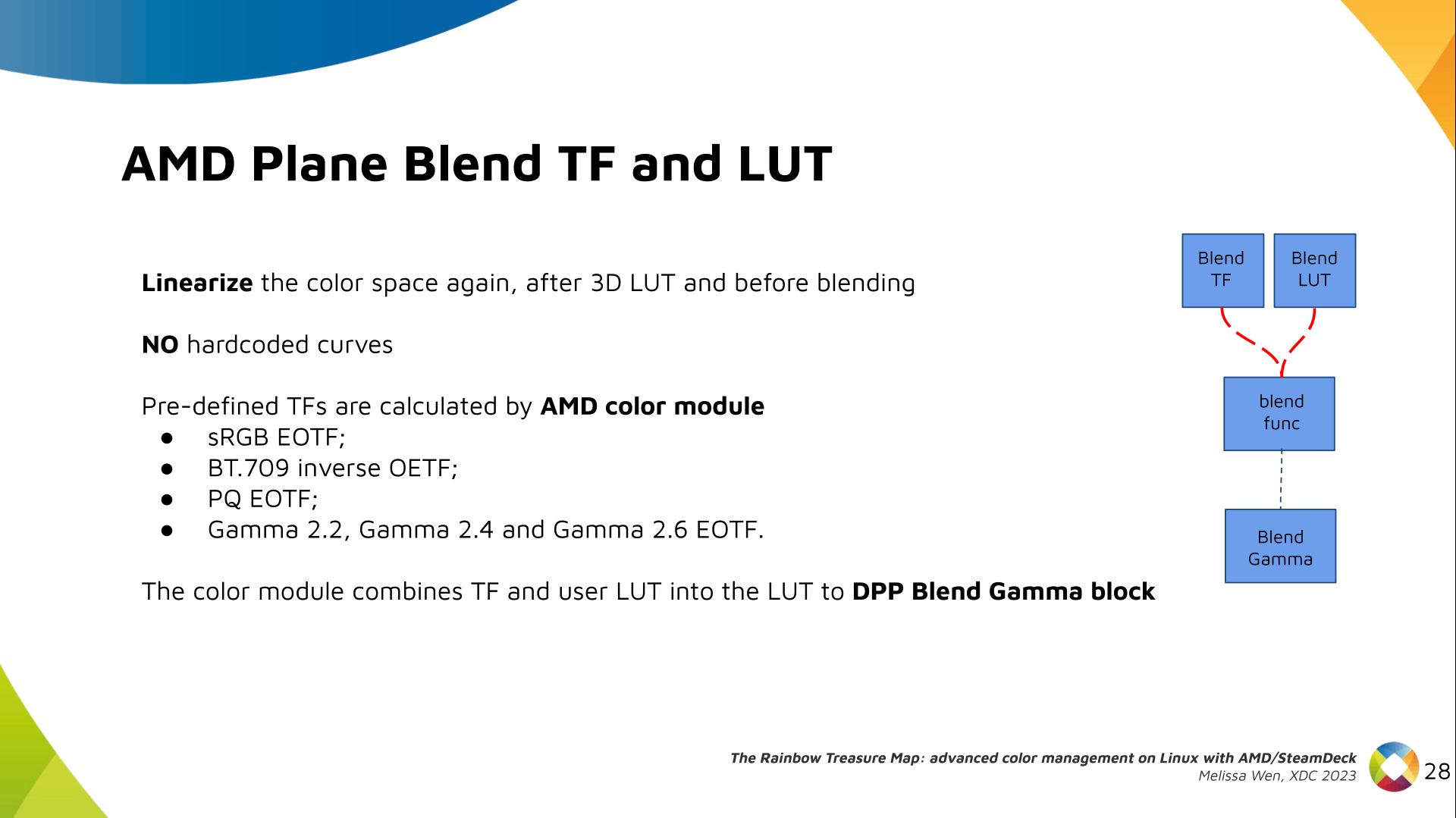
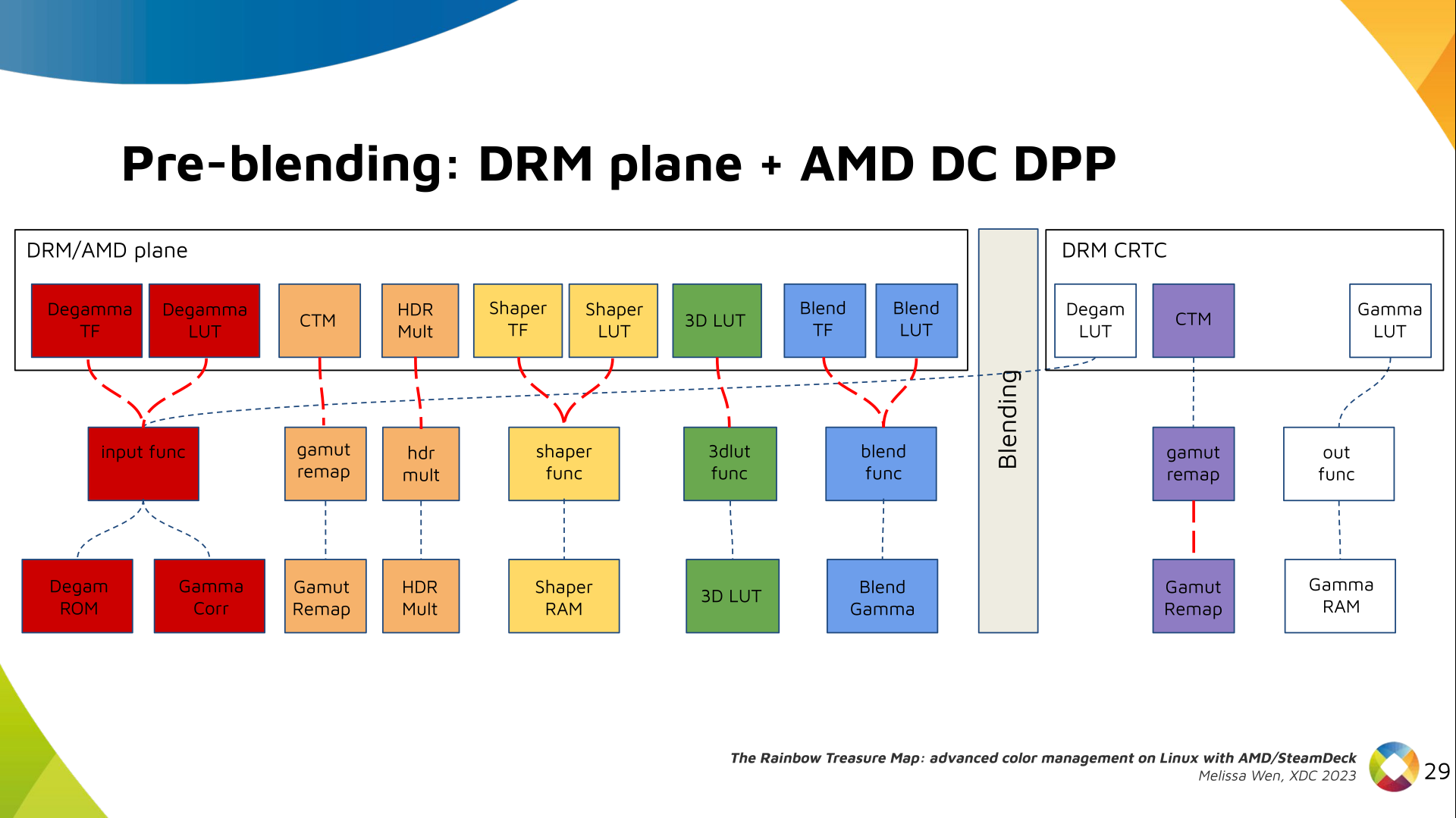
So, who, in your opinion, fits these unwritten requirements? Looking at this list, it s pretty clear to me why we d mostly find white men from the Global North, generally with higher education in hackathons and F/LOSS development. ( Great, they re a culture fit! ) Yes, there will also always be some people of marginalized groups who will attend such events because they expect to network, to find an internship, to find a better job in the future, or to add their participation to their curriculum. To me, this rings a bunch of alarm bells.

Low diversity in F/LOSS projects a mirror of the distribution of wealth I believe that the lack of diversity in F/LOSS is first of all a mirror of the distribution of wealth on a larger level. And by wealth I m referring to financial wealth as much as to social wealth in the sense of Bourdieu: Families of highly educated parents socially reproducing privilege by allowing their kids to attend better schools, supporting and guiding them in their choices of study and work, providing them with relations to internships acting as springboards into well paid jobs and so on. That said, we should ask ourselves as well:

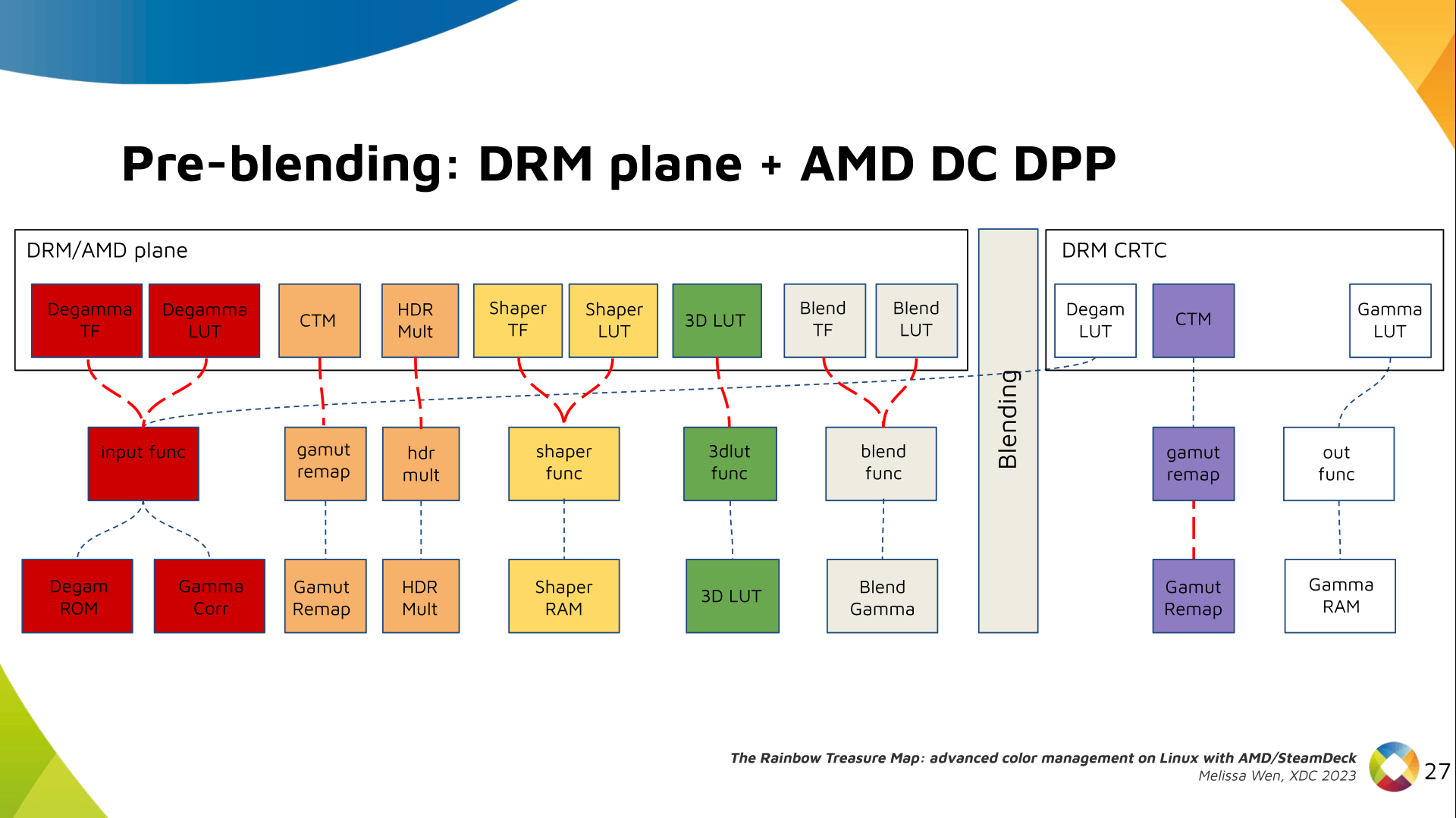
Do F/LOSS projects exacerbate existing lines of oppression by relying on unpaid work? Let s look again at the causality question of Pollo s research (in my words):
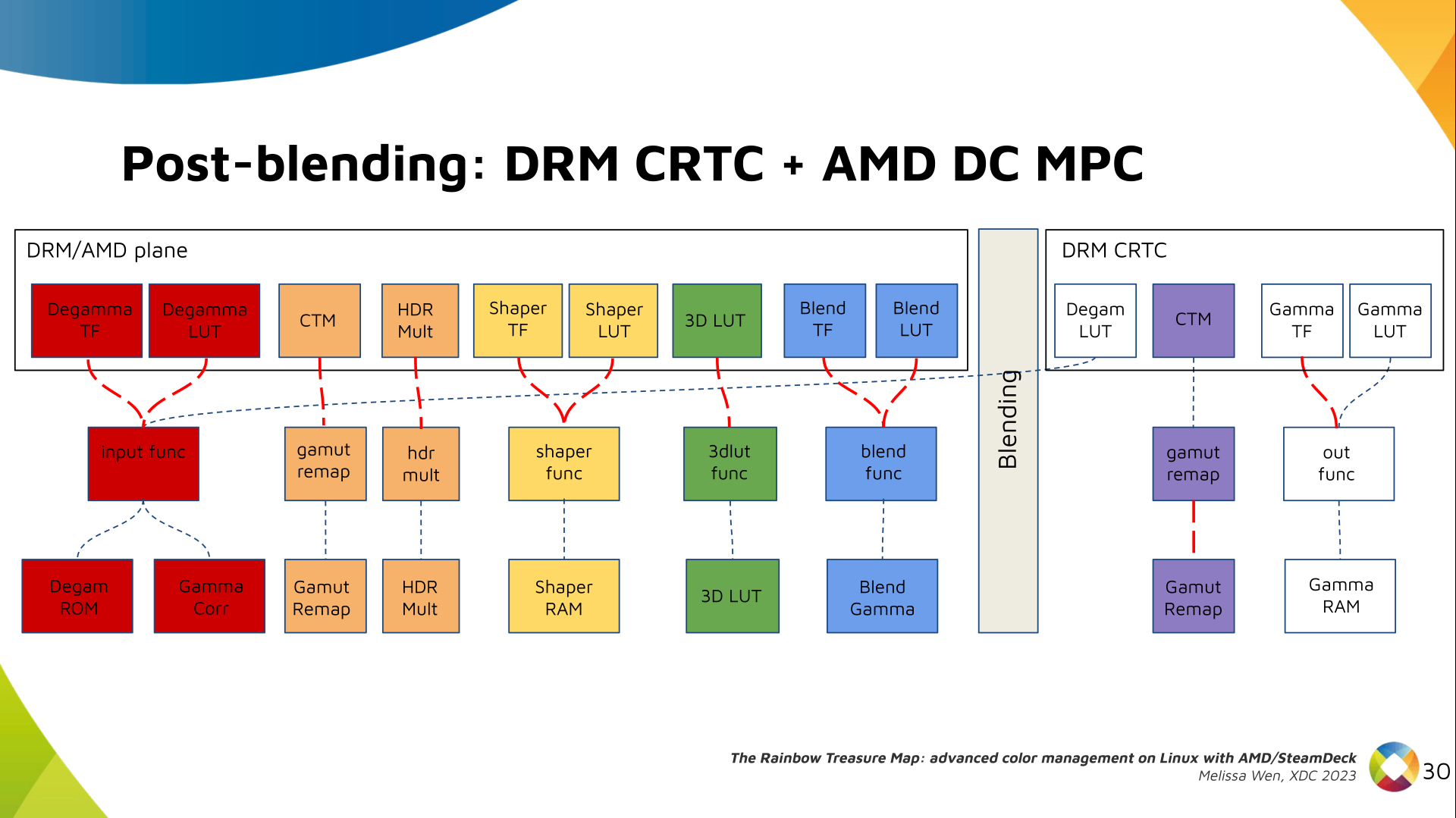
It is unclear whether working on free/libre software ultimately helps finding a well paid job, or if having a well paid job is the cause enabling work on free/libre software.
Maybe we need to imagine this cause-effect relationship over time: as a student, without children and lots of free time, hopefully some money from the state or the family, people can spend time on F/LOSS, collect experience, earn recognition - and later find a well-paid job and make unpaid F/LOSS contributions into a hobby, cementing their status in the community, while at the same time generating a sense of well-being from working on the common good. This is a quite common scenario. As the Flosspols study revealed however, boys often get their own computer at the age of 14, while girls get one only at the age of 20. (These numbers might be slightly different now, and possibly many people don t own an actual laptop or desktop computer anymore, instead they own mobile devices which are not exactly inciting them to look behind the surface, take apart, learn, appropriate technology.) In any case, the above scenario does not allow for people who join F/LOSS later in life, eg. changing careers, to find their place. I believe that F/LOSS projects cannot expect to have more women, people of color, people from working class backgrounds, people from outside of Germany, France, USA, UK, Australia, and Canada on board as long as volunteer work is the status quo and waged labour an earned privilege.

Wait, are you criticizing all these wonderful people who sacrifice their free time to work towards common good? No, that s definitely not my intention, I m glad that F/LOSS exists, and the F/LOSS ecosystem has always represented a small utopia to me that is worth cherishing and nurturing. However, I think we still need to talk more about the lack of diversity, and investigate it further.

Some types of work are never being paid Besides free work at hacking events, let me also underline that a lot of work in F/LOSS is not considered payable work (yes, that s an oxymoron!). Which F/LOSS project for example, has ever paid translators a decent fee? Which project has ever considered that doing the social glue work, often done by women in the projects, is work that should be paid for? Which F/LOSS projects pay the people who do their Debian packaging rather than relying on yet another already well-paid white man who can afford doing this work for free all the while holding up how great the F/LOSS ecosystem is? And how many people on opensourcedesign jobs are looking to get their logo or website done for free? (Isn t that heart icon appealing to your altruistic empathy?) In my experience even F/LOSS projects which are trying to do the right thing by paying everyone the same amount of money per hour run into issues when it turns out that not all hours are equal and that some types of work do not qualify for remuneration at all or that the rules for the clocking of work are not universally applied in the same way by everyone.

Not every interaction should have a monetary value, but Some of you want to keep working without being paid, because that feels a bit like communism within capitalism, it makes you feel good to contribute to the greater good while not having the system determine your value over money. I hear you. I ve been there (and sometimes still am). But as long as we live in this system, even though we didn t choose to and maybe even despise it - communism is not about working for free, it s about getting paid equally and adequately. We may not think about it while under the age of 40 or 45, but working without adequate financial compensation, even half of the time, will ultimately result in not being able to care for oneself when sick, when old. And while this may not be an issue for people who inherit wealth, or have an otherwise safe economical background, eg. an academic salary, it is a huge problem and barrier for many people coming out of the working or service classes. (Oh and please, don t repeat the neoliberal lie that everyone can achieve whatever they aim for, if they just tried hard enough. French research shows that (in France) one has only 30% chance to become a class defector , and change social class upwards. But I managed to get out and move up, so everyone can! - well, if you believe that I m afraid you might be experiencing survivor bias.)

Not all bodies are equally able We should also be aware that not all of us can work with the same amount of energy either. There is yet another category of people who are excluded by the expectation of volunteer work, either because the waged labour they do already eats all of their energy, or because their bodies are not disposed to do that much work, for example because of mental health issues - such as depression-, or because of physical disabilities.

When organizing events relying on volunteer work please think about these things. Yes, you can tell people that they should ask their employer to pay them for attending a hackathon - but, as I ve hopefully shown, that would not do it for many people, especially newcomers. Instead, you could propose a fund to make it possible that people who would not normally attend can attend. DebConf is a good example for having done this for many years.

Conclusively I would like to urge free software projects that have a budget and directly pay some people from it to map where they rely on volunteer work and how this hurts diversity in their project. How do you or your project exacerbate pre-existing lines of oppression by granting or not granting monetary value to certain types of work? What is it that you take for granted? As always, I m curious about your feedback!

Worth a read These ideas are far from being new. Ashe Dryden s well-researched post The ethics of unpaid labor and the OSS community dates back to 2013 and is as important as it was ten years ago.

Russell Coker: Abuse and Free Software

People in positions of power can get away with mistreating other people. For any organisation to operate effectively there have to be mechanisms to address bad behaviour, both to help the organisation to achieve it s goals and to protect people who work for it. When an organisation operates in the public interest there is a greater reason to try to prevent bad behaviour as hurting people is not in the public interest. There are many forms of power, in the free software community a reputation for doing good technical work or work related to supporting software development gives some power and influence. We have seen examples of technical contributions used to excuse mistreatment of other people. The latest example of using a professional reputation to cover for abuse is Eben Moglen who has done some good legal work in the past while also treating members of the community badly (as documented by Matthew Garrett) [1]. Matthew has also documented how since 2016 Eben has not been doing good work for the free software community [2]. When news comes out about people who did good work while abusing other people they are usually defended with claims such as we can t lose the great contributions of this one person so it s worth losing the contributions of everyone who can t work with them , but in such situations it s very common to discover that they haven t been doing great work. This might be partly due to abusive people being better at self-promoting than actually doing good work and might be partly due to the fact that people who are afraid to speak out when they are doing good work might suddenly feel ready to go public if the person s work (defence) is decreasing. Bradley Kuhn s article about this situation is worth reading [3]. I don t have as much knowledge of the people involved in these disputes as Matthew, but I know enough about what is happening to be confident that Matthew s summary is accurate.

Melissa Wen: The Rainbow Treasure Map Talk: Advanced color management on Linux with AMD/Steam Deck.

Last week marked a major milestone for me: the AMD driver-specific color management properties reached the upstream linux-next! And to celebrate, I m happy to share the slides notes from my 2023 XDC talk, The Rainbow Treasure Map along with the individual recording that just dropped last week on youtube talk about happy coincidences!

Steam Deck Rainbow: Treasure Map & Magic Frogs While I may be bubbly and chatty in everyday life, the stage isn t exactly my comfort zone (hallway talks are more my speed). But the journey of developing the AMD color management properties was so full of discoveries that I simply had to share the experience. Witnessing the fantastic work of Jeremy and Joshua bring it all to life on the Steam Deck OLED was like uncovering magical ingredients and whipping up something truly enchanting. For XDC 2023, we split our Rainbow journey into two talks. My focus, The Rainbow Treasure Map, explored the new color features we added to the Linux kernel driver, diving deep into the hardware capabilities of AMD/Steam Deck. Joshua then followed with The Rainbow Frogs and showed the breathtaking color magic released on Gamescope thanks to the power unlocked by the kernel driver s Steam Deck color properties.

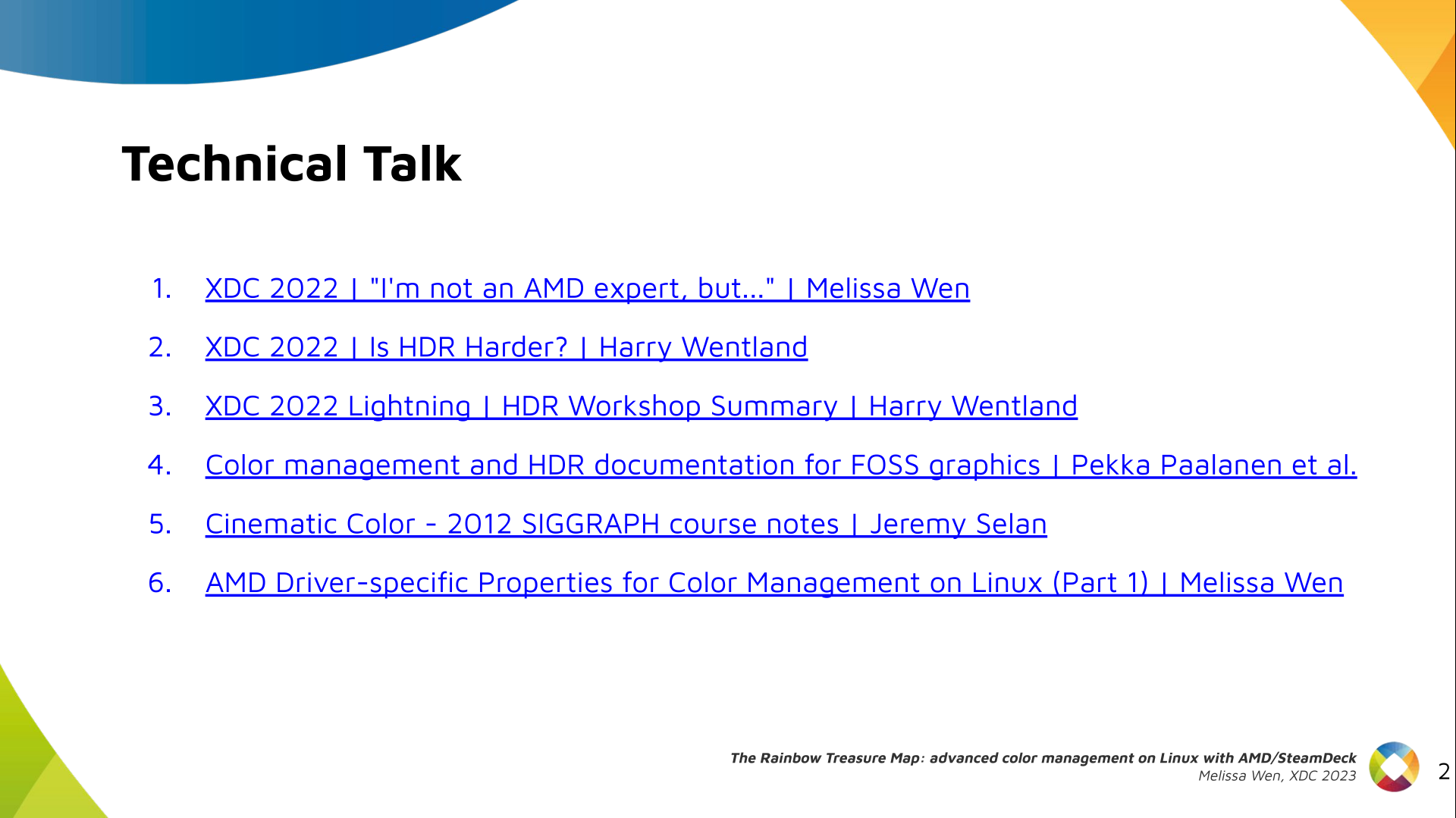
Packing a Rainbow into 15 Minutes I had so much to tell, but a half-slot talk meant crafting a concise presentation. To squeeze everything into 15 minutes (and calm my pre-talk jitters a bit!), I drafted and practiced those slides and notes countless times. So grab your map, and let s embark on the Rainbow journey together! Slide 1: The Rainbow Treasure Map - Advanced Color Management on Linux with AMD/SteamDeck Intro: Hi, I m Melissa from Igalia and welcome to the Rainbow Treasure Map, a talk about advanced color management on Linux with AMD/SteamDeck. Slide 2: List useful links for this technical talk Useful links: First of all, if you are not used to the topic, you may find these links useful.
  1. XDC 2022 - I m not an AMD expert, but - Melissa Wen
  2. XDC 2022 - Is HDR Harder? - Harry Wentland
  3. XDC 2022 Lightning - HDR Workshop Summary - Harry Wentland
  4. Color management and HDR documentation for FOSS graphics - Pekka Paalanen et al.
  5. Cinematic Color - 2012 SIGGRAPH course notes - Jeremy Selan
  6. AMD Driver-specific Properties for Color Management on Linux (Part 1) - Melissa Wen
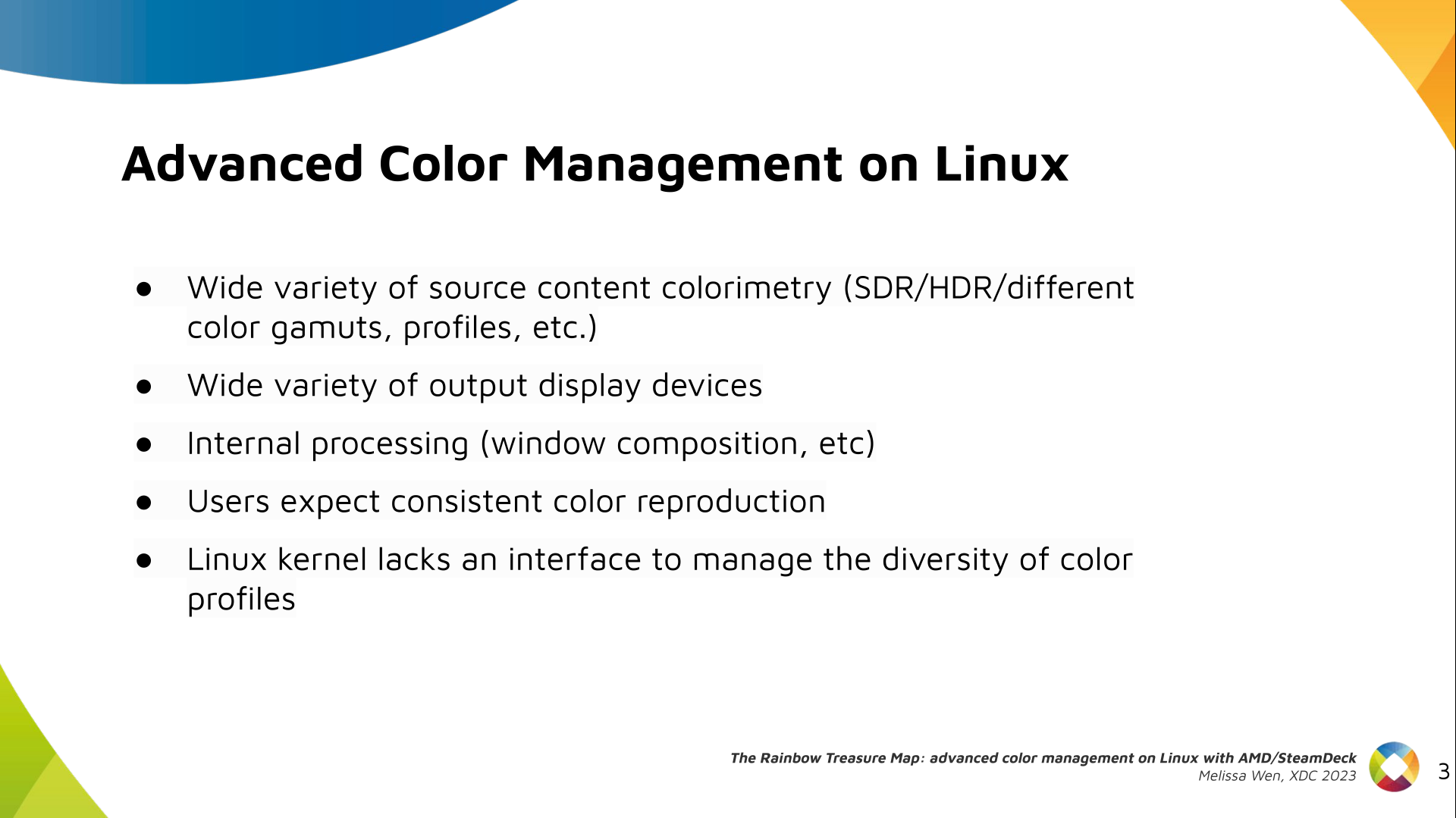
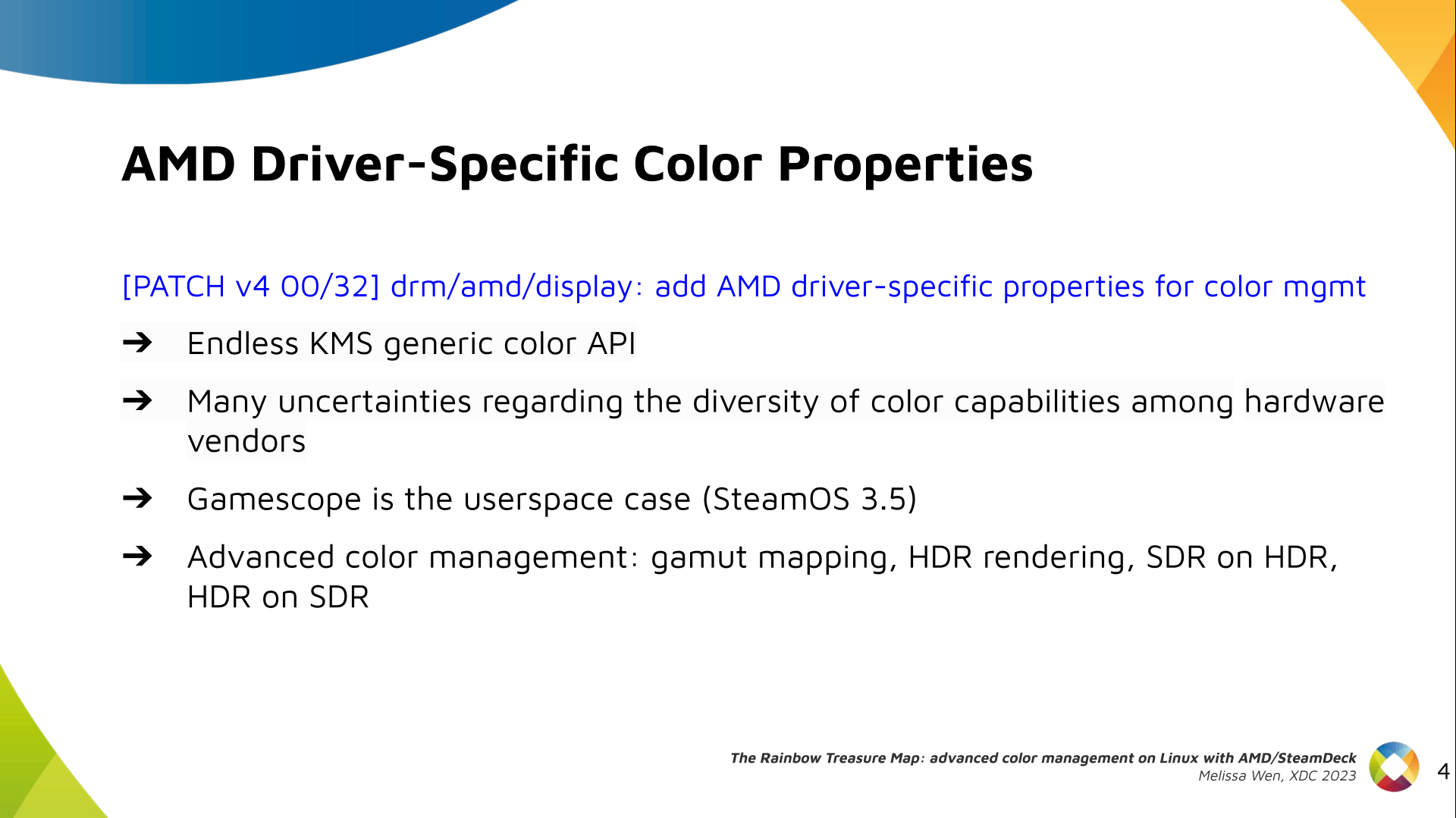
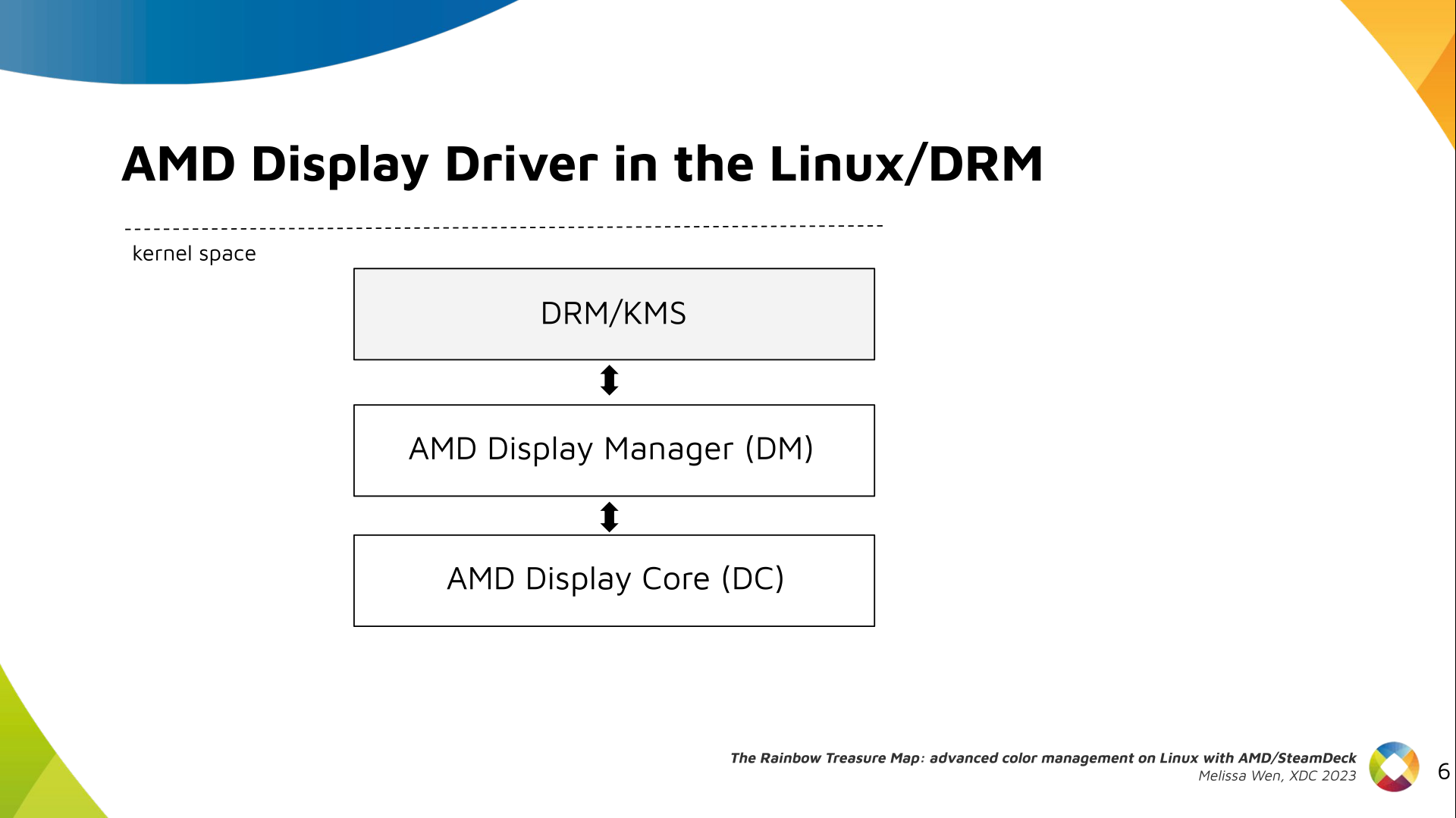
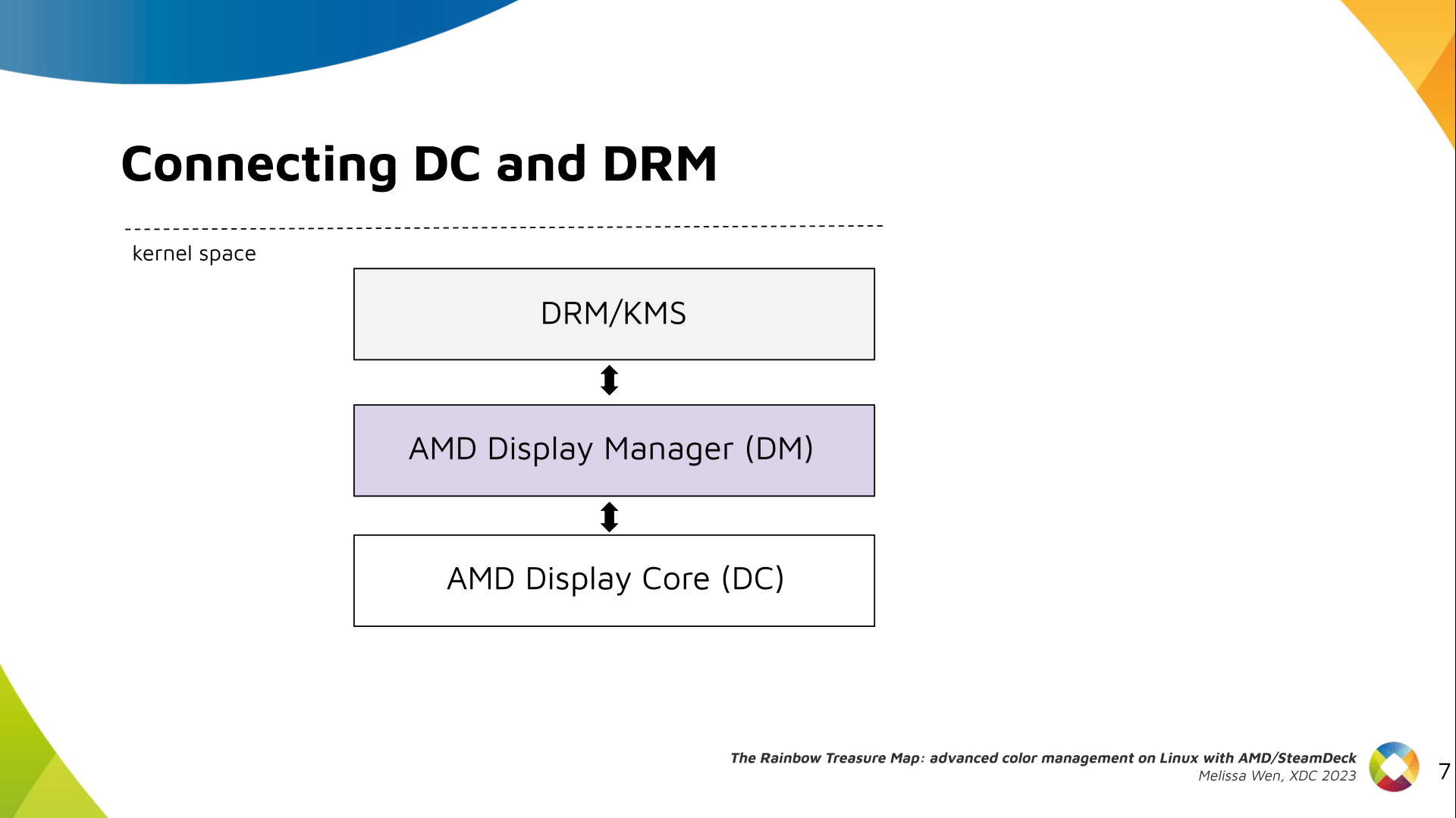
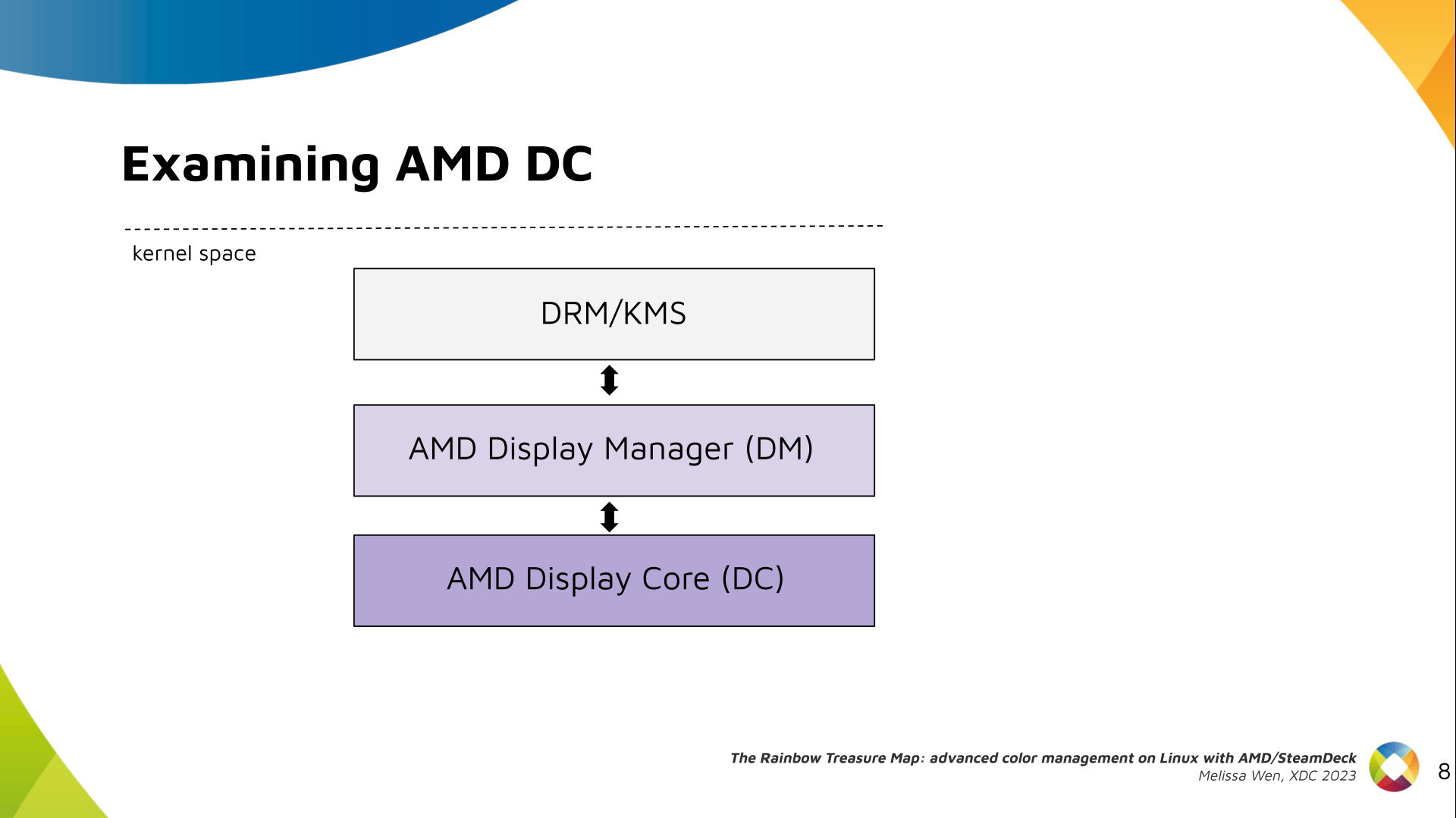
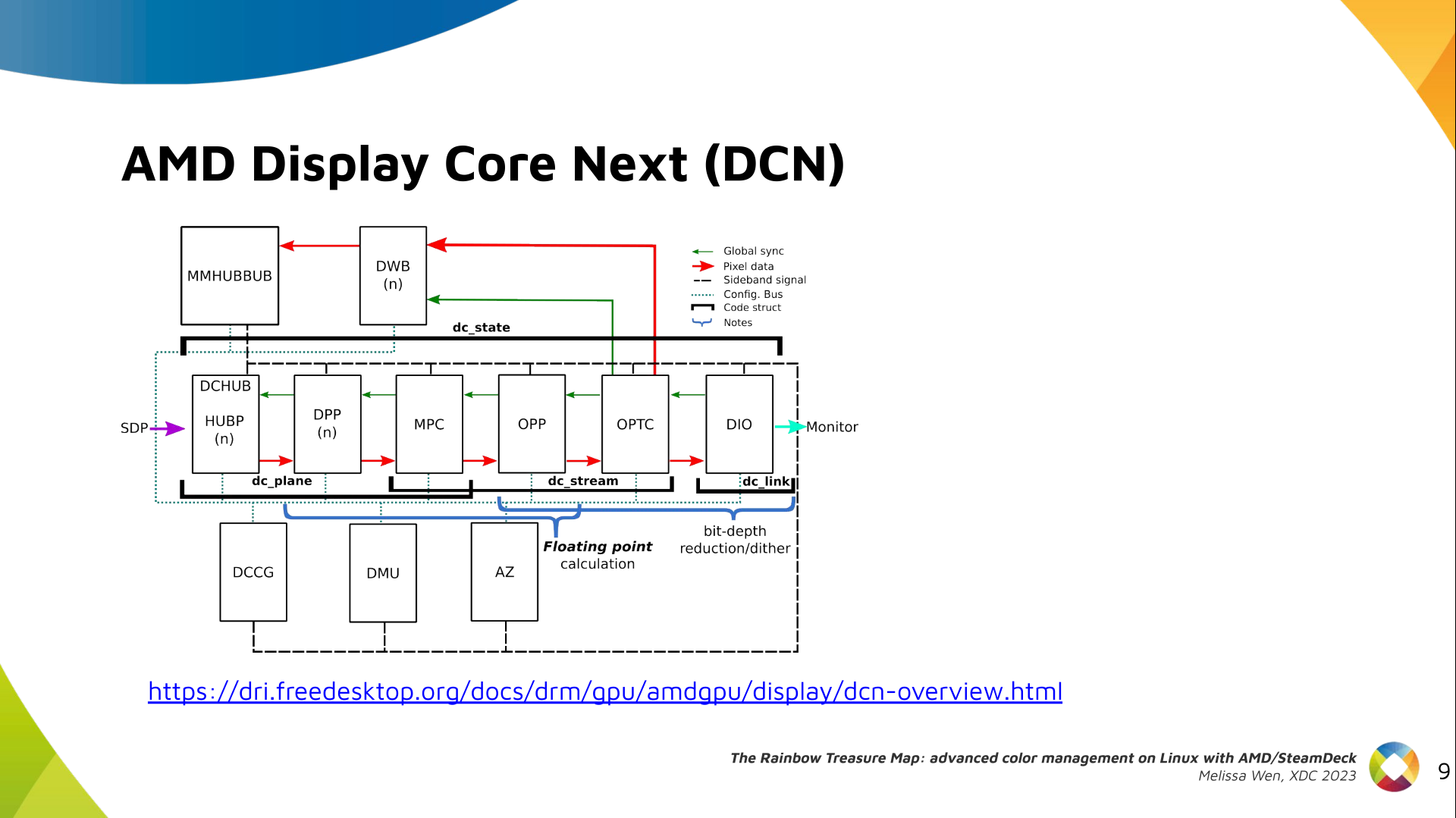
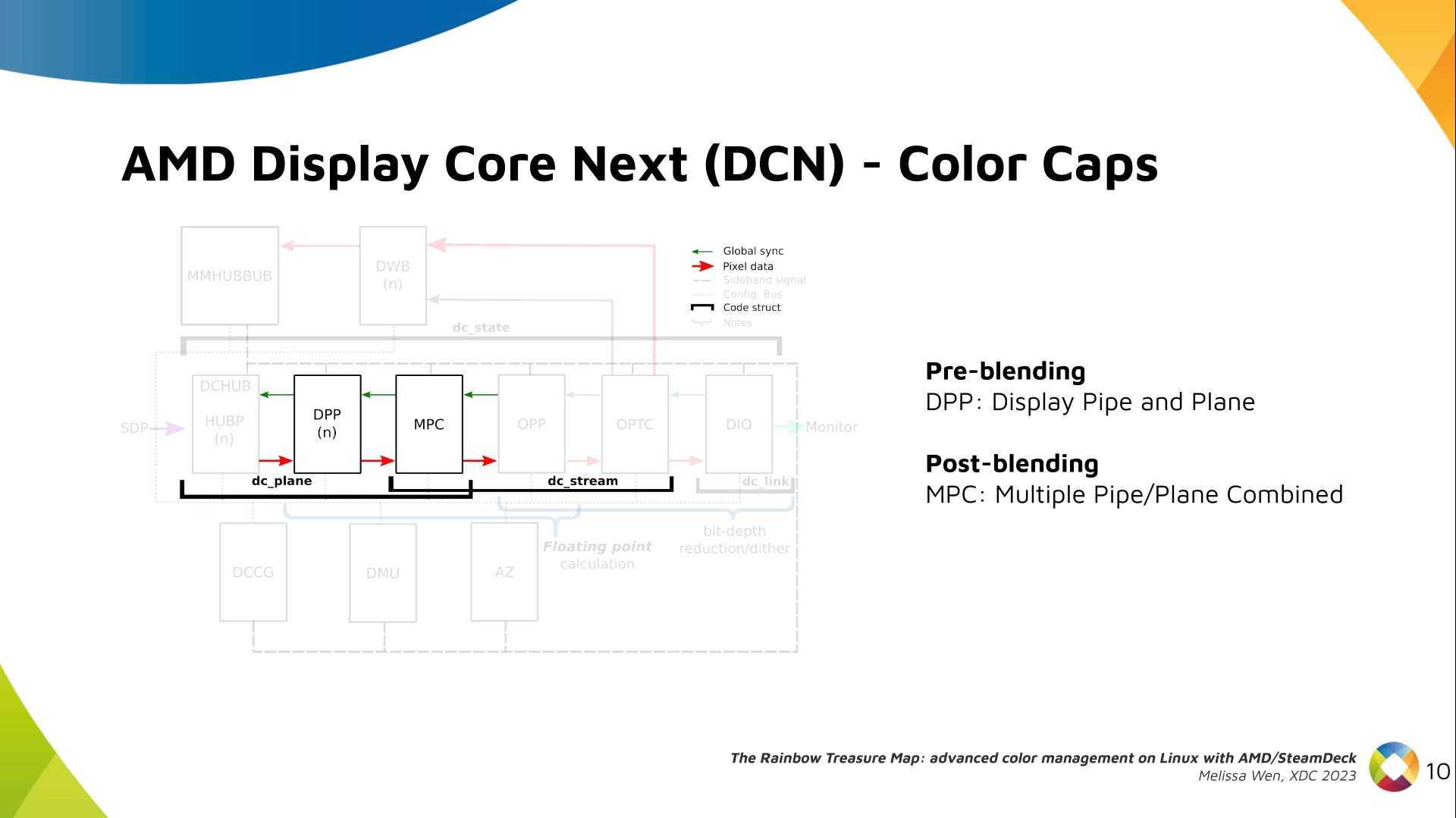
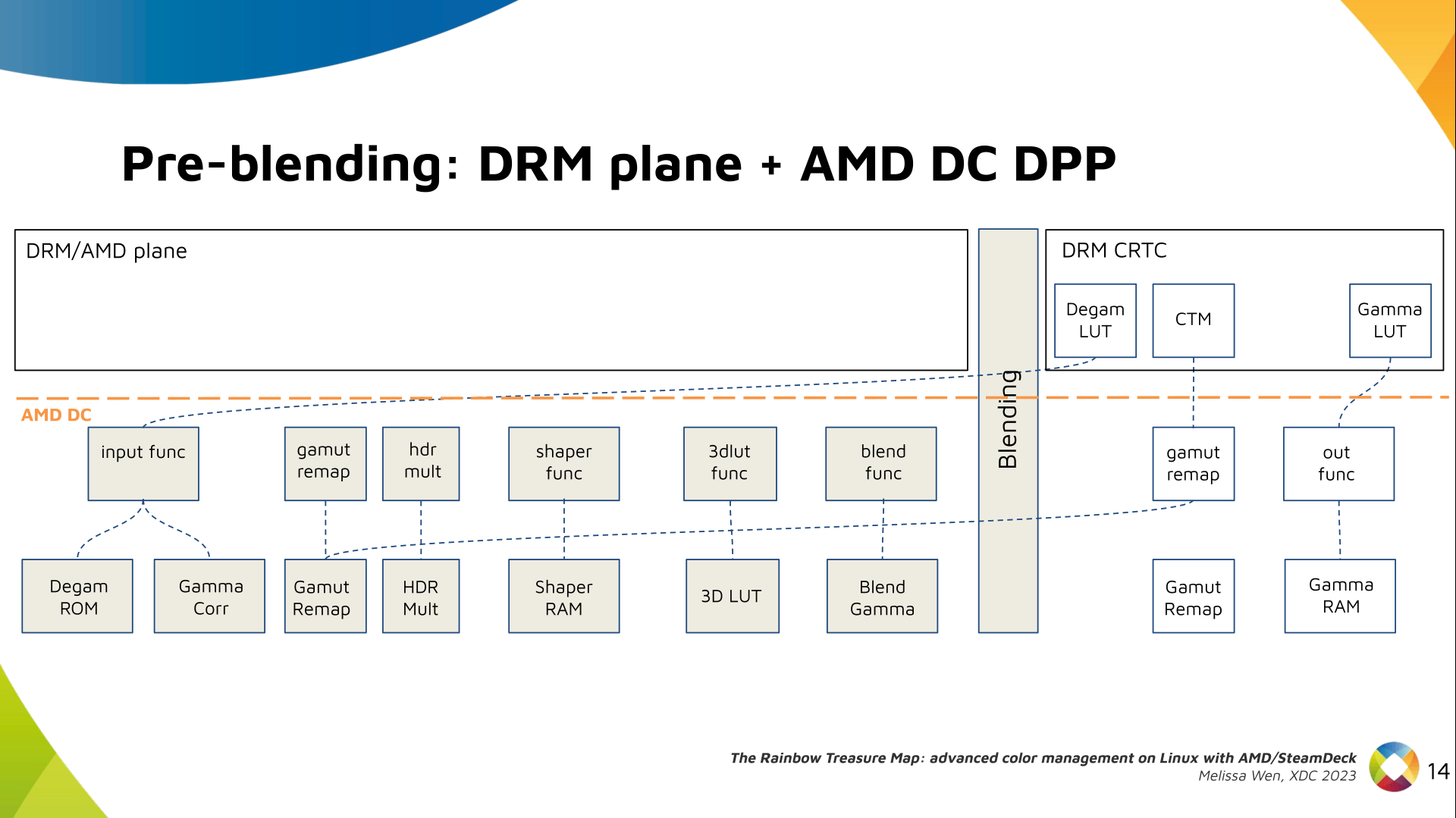
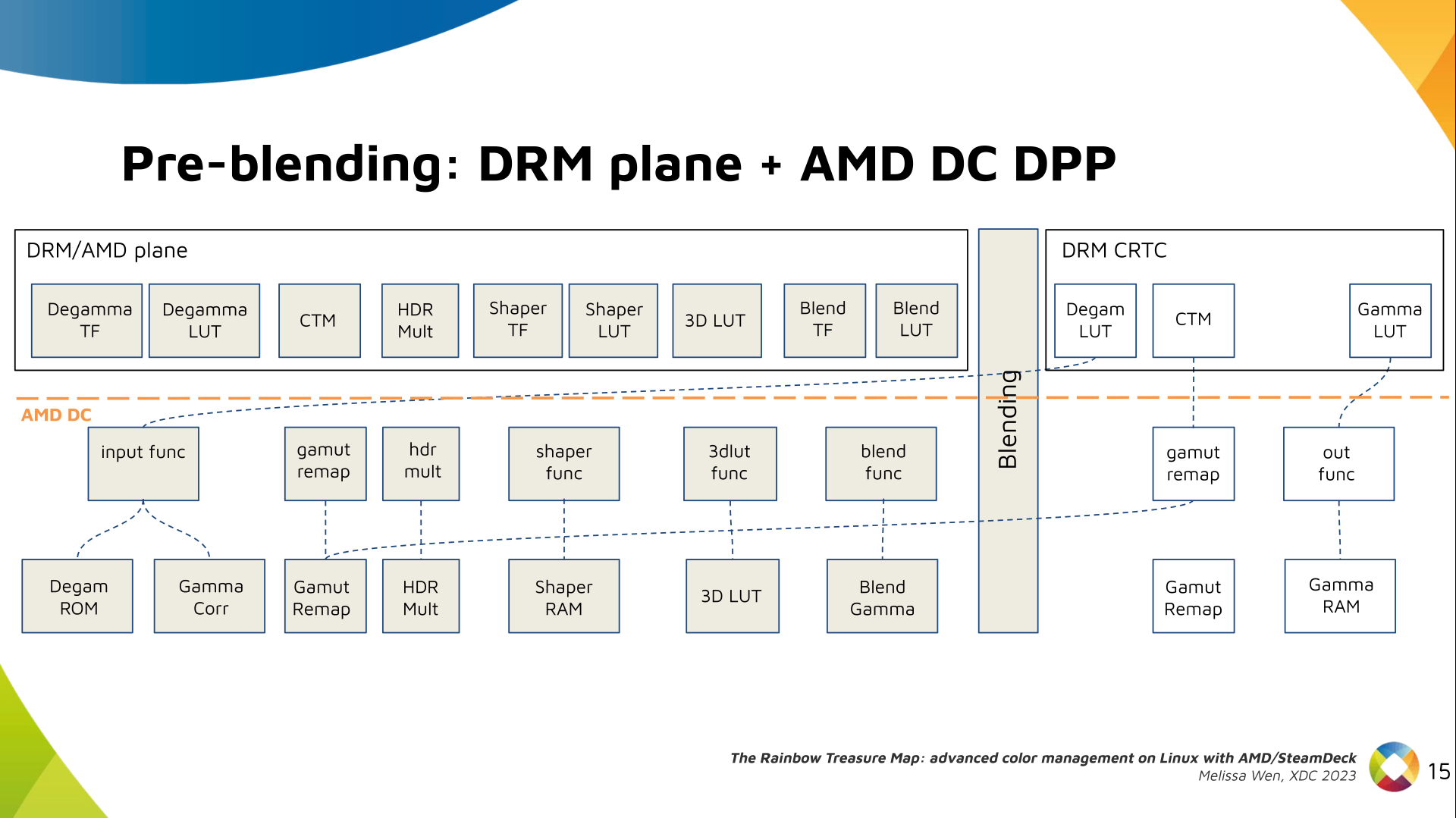
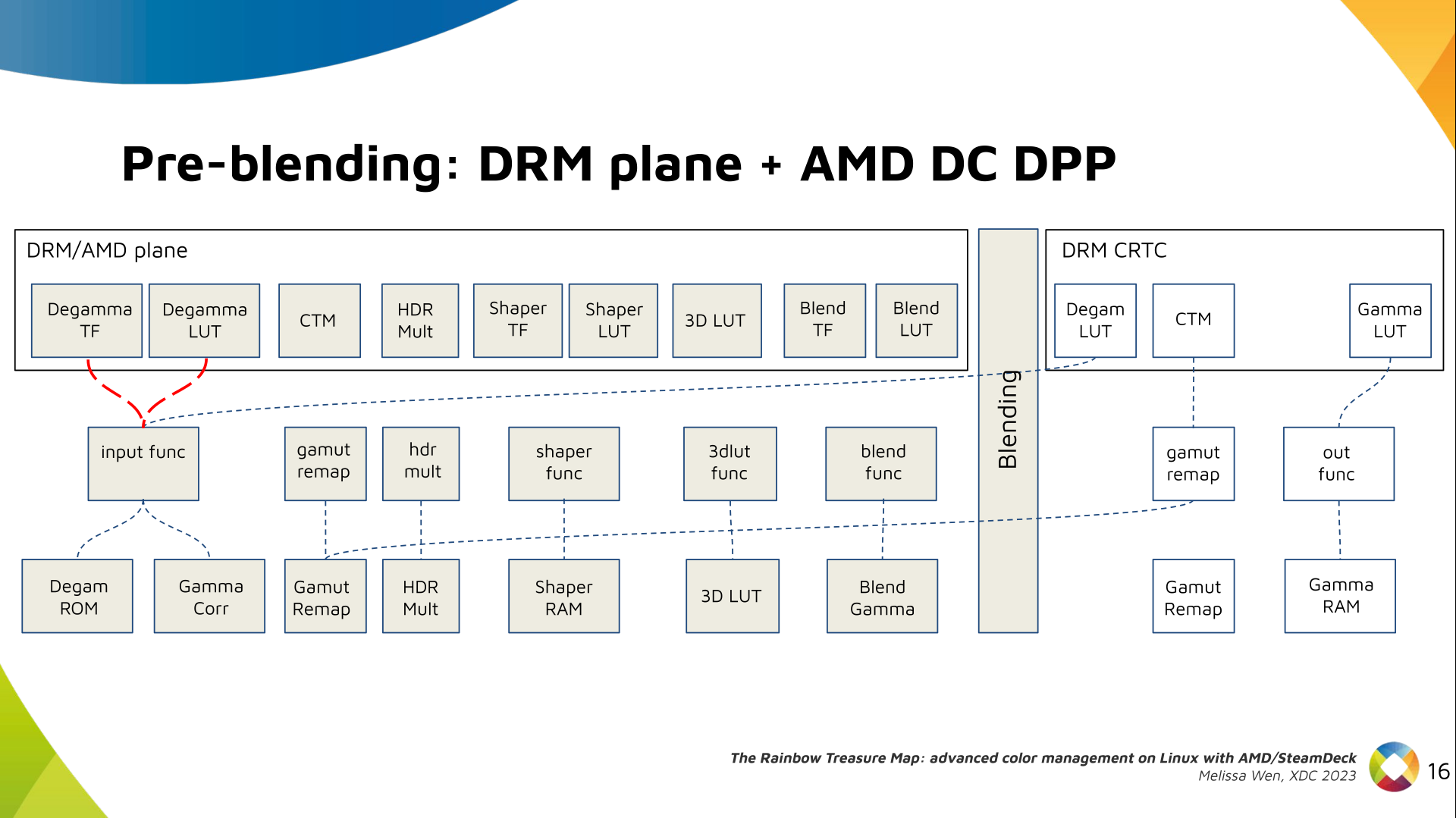
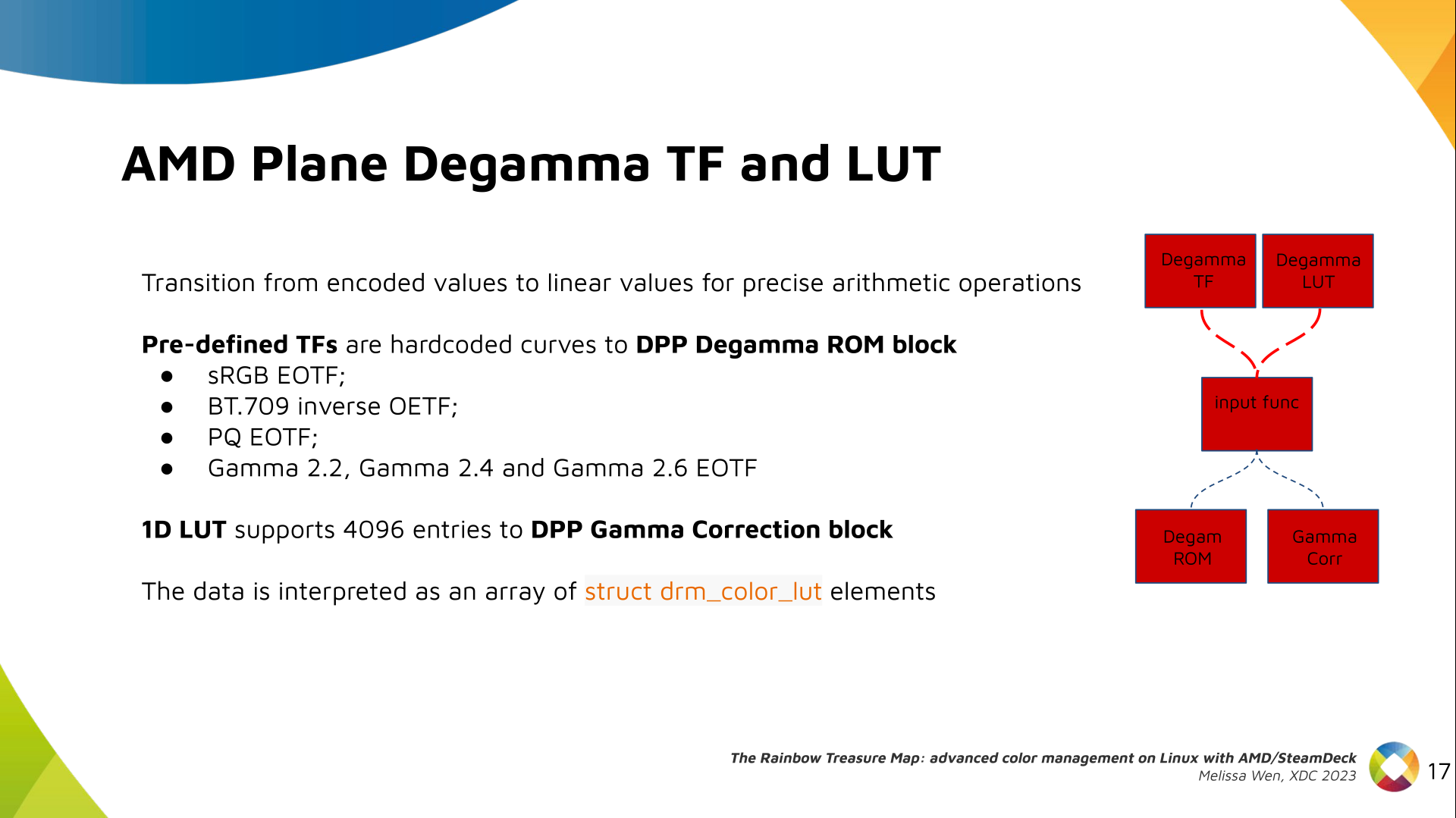
Slide 3: Why do we need advanced color management on Linux? Context: When we talk about colors in the graphics chain, we should keep in mind that we have a wide variety of source content colorimetry, a variety of output display devices and also the internal processing. Users expect consistent color reproduction across all these devices. The userspace can use GPU-accelerated color management to get it. But this also requires an interface with display kernel drivers that is currently missing from the DRM/KMS framework. Slide 4: Describe our work on AMD driver-specific color properties Since April, I ve been bothering the DRM community by sending patchsets from the work of me and Joshua to add driver-specific color properties to the AMD display driver. In parallel, discussions on defining a generic color management interface are still ongoing in the community. Moreover, we are still not clear about the diversity of color capabilities among hardware vendors. To bridge this gap, we defined a color pipeline for Gamescope that fits the latest versions of AMD hardware. It delivers advanced color management features for gamut mapping, HDR rendering, SDR on HDR, and HDR on SDR. Slide 5: Describe the AMD/SteamDeck - our hardware AMD/Steam Deck hardware: AMD frequently releases new GPU and APU generations. Each generation comes with a DCN version with display hardware improvements. Therefore, keep in mind that this work uses the AMD Steam Deck hardware and its kernel driver. The Steam Deck is an APU with a DCN3.01 display driver, a DCN3 family. It s important to have this information since newer AMD DCN drivers inherit implementations from previous families but aldo each generation of AMD hardware may introduce new color capabilities. Therefore I recommend you to familiarize yourself with the hardware you are working on. Slide 6: Diagram with the three layers of the AMD display driver on Linux The AMD display driver in the kernel space: It consists of three layers, (1) the DRM/KMS framework, (2) the AMD Display Manager, and (3) the AMD Display Core. We extended the color interface exposed to userspace by leveraging existing DRM resources and connecting them using driver-specific functions for color property management. Slide 7: Three-layers diagram highlighting AMD Display Manager, DM - the layer that connects DC and DRM Bridging DC color capabilities and the DRM API required significant changes in the color management of AMD Display Manager - the Linux-dependent part that connects the AMD DC interface to the DRM/KMS framework. Slide 8: Three-layers diagram highlighting AMD Display Core, DC - the shared code The AMD DC is the OS-agnostic layer. Its code is shared between platforms and DCN versions. Examining this part helps us understand the AMD color pipeline and hardware capabilities, since the machinery for hardware settings and resource management are already there. Slide 9: Diagram of the AMD Display Core Next architecture with main elements and data flow The newest architecture for AMD display hardware is the AMD Display Core Next. Slide 10: Diagram of the AMD Display Core Next where only DPP and MPC blocks are highlighted In this architecture, two blocks have the capability to manage colors:
  • Display Pipe and Plane (DPP) - for pre-blending adjustments;
  • Multiple Pipe/Plane Combined (MPC) - for post-blending color transformations.
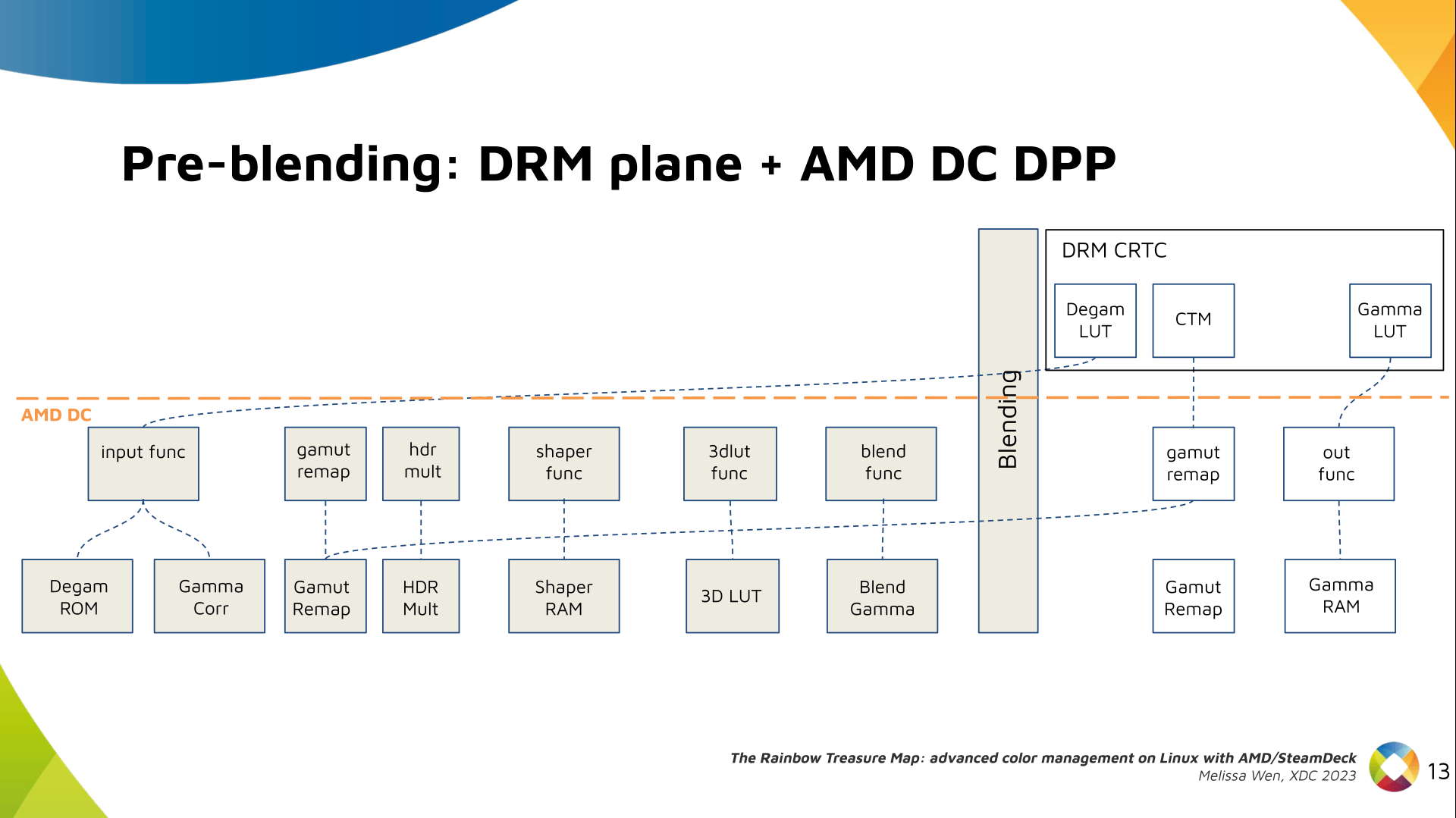
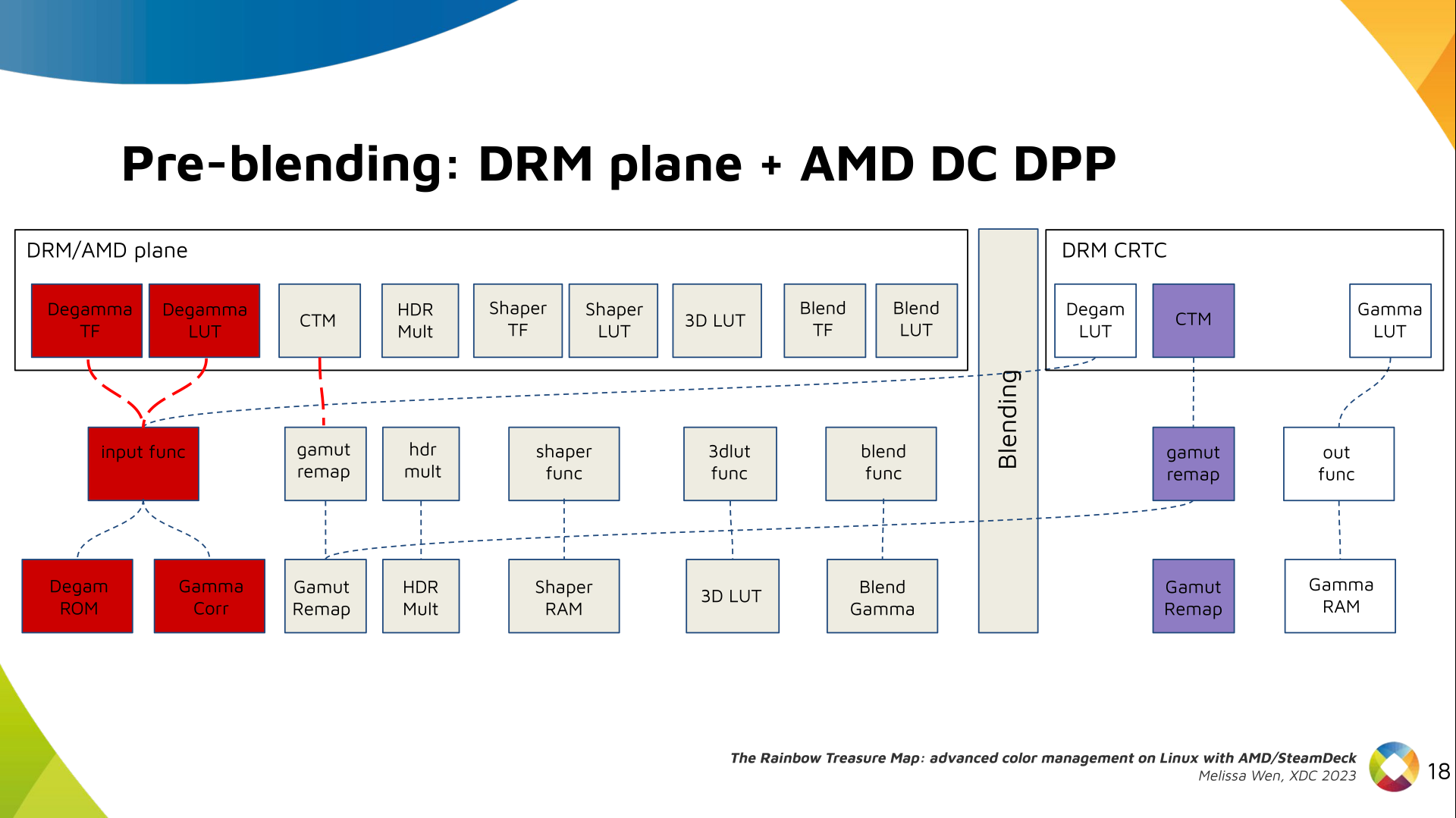
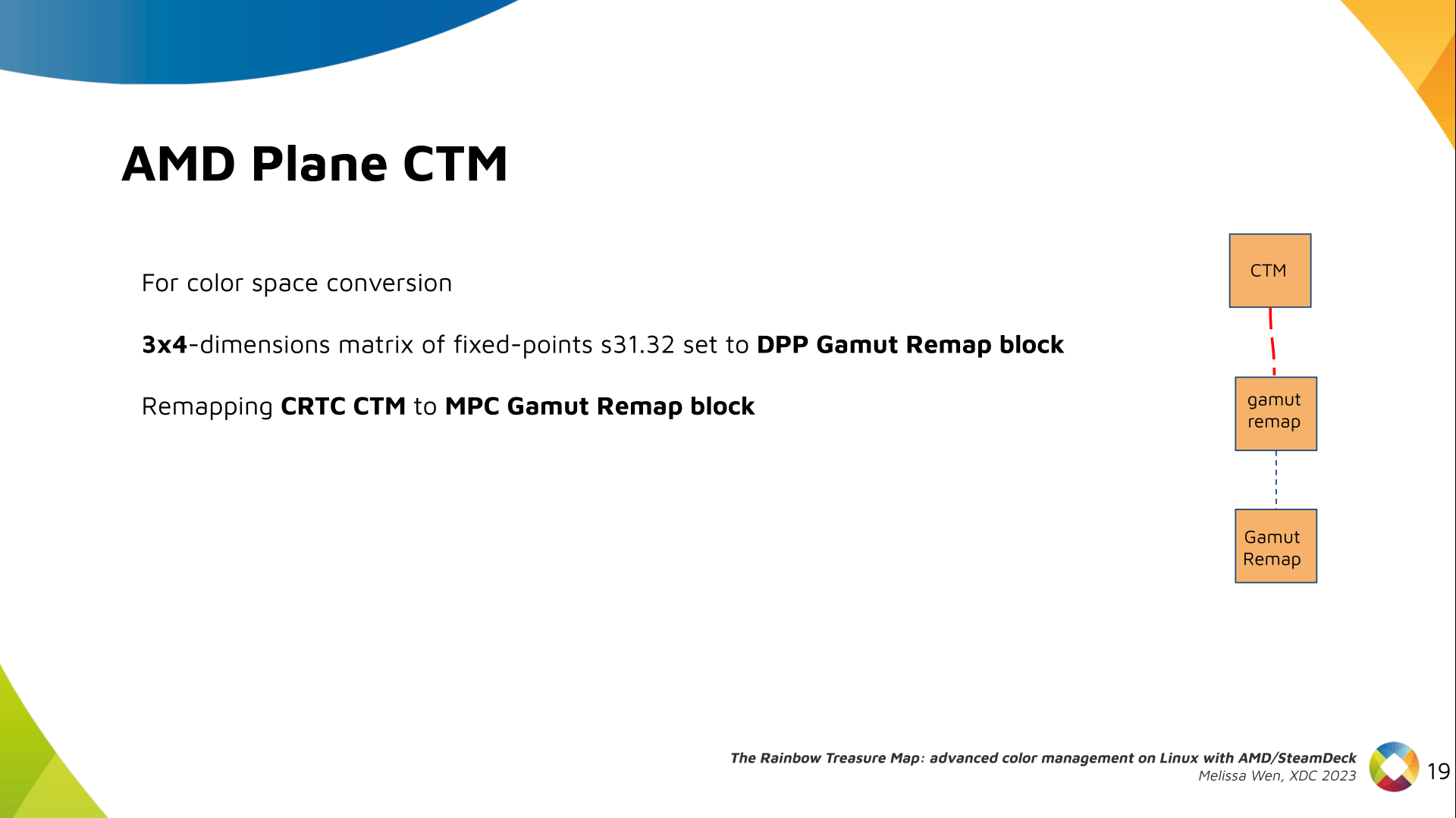
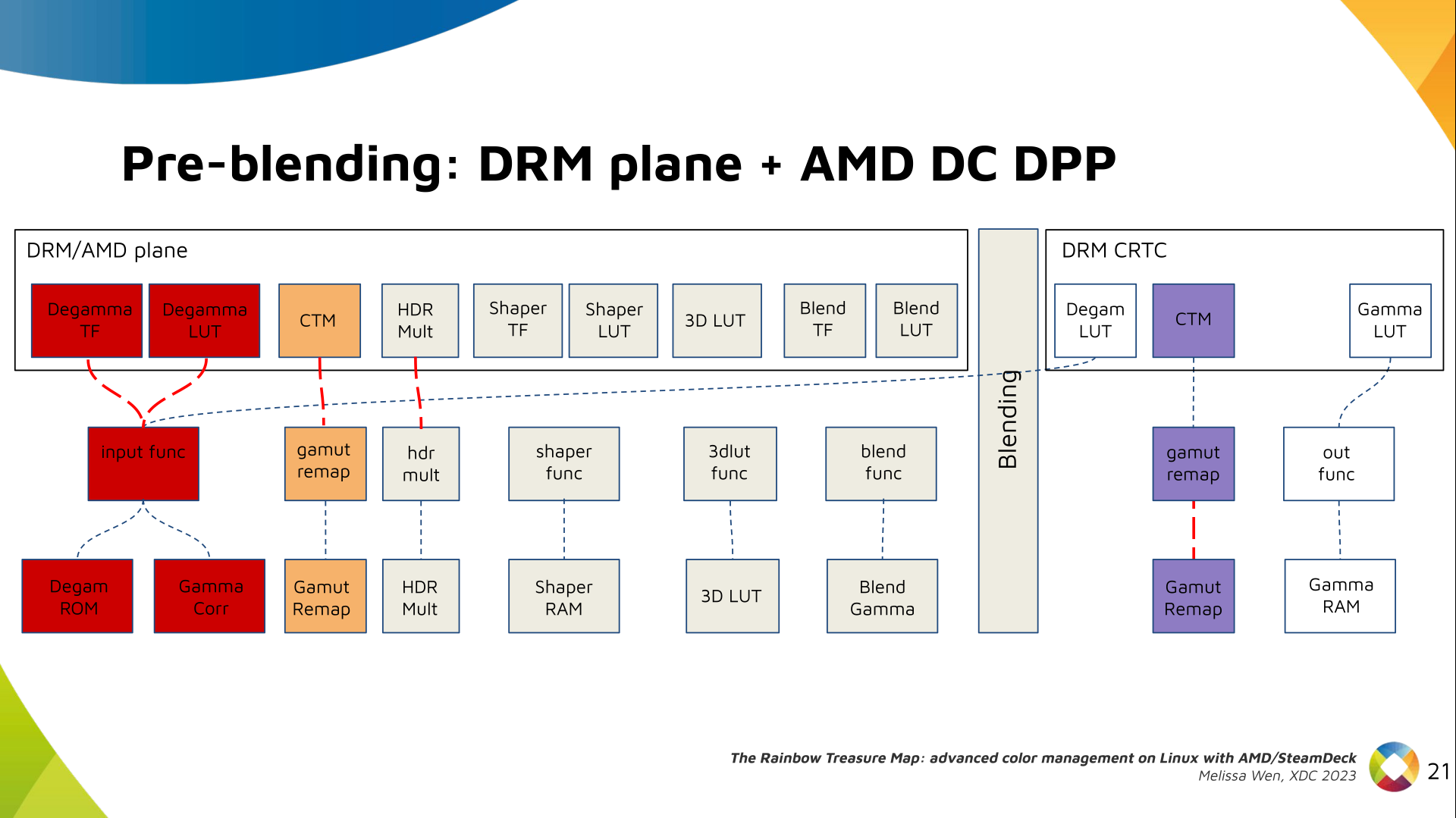
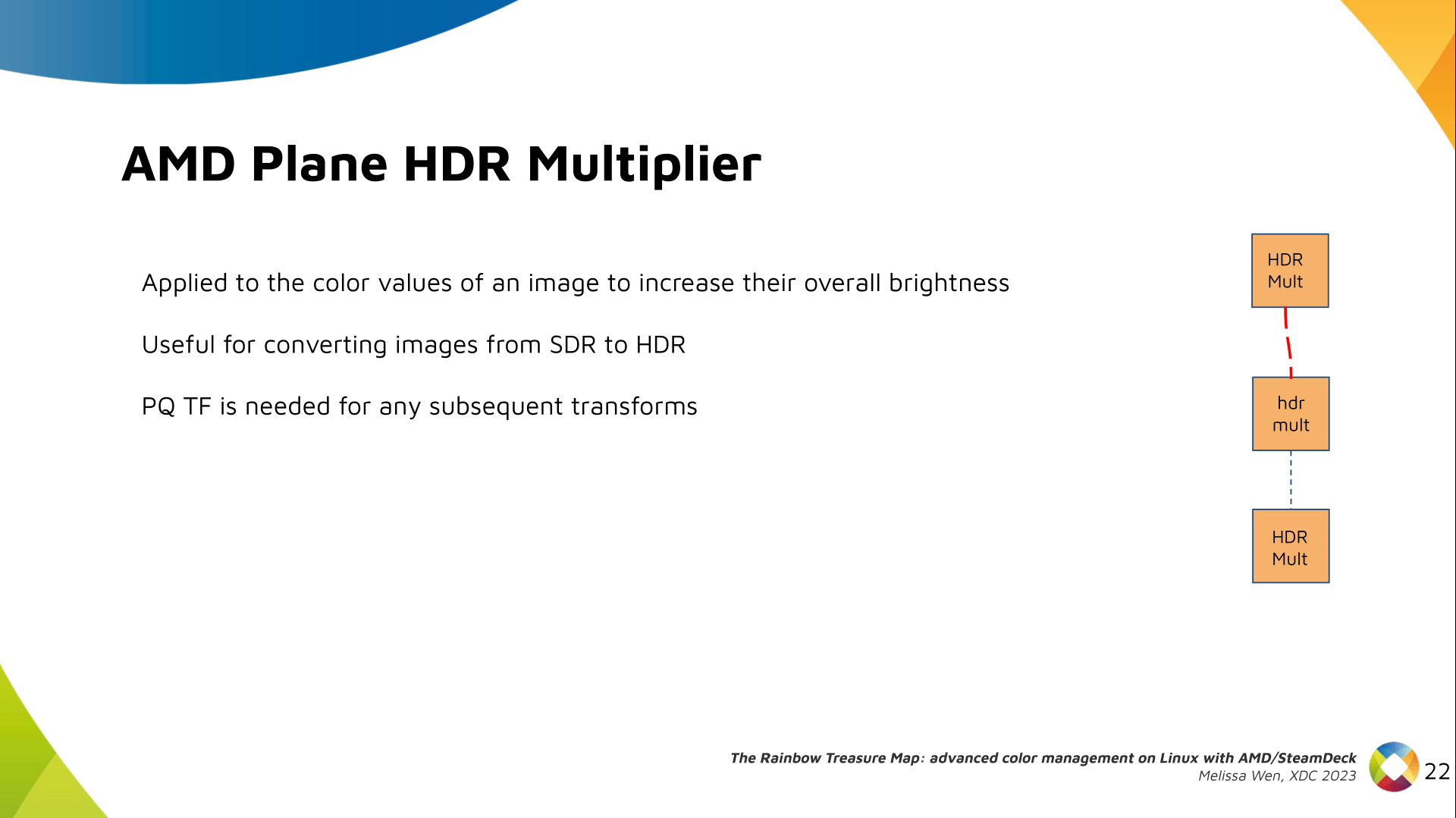
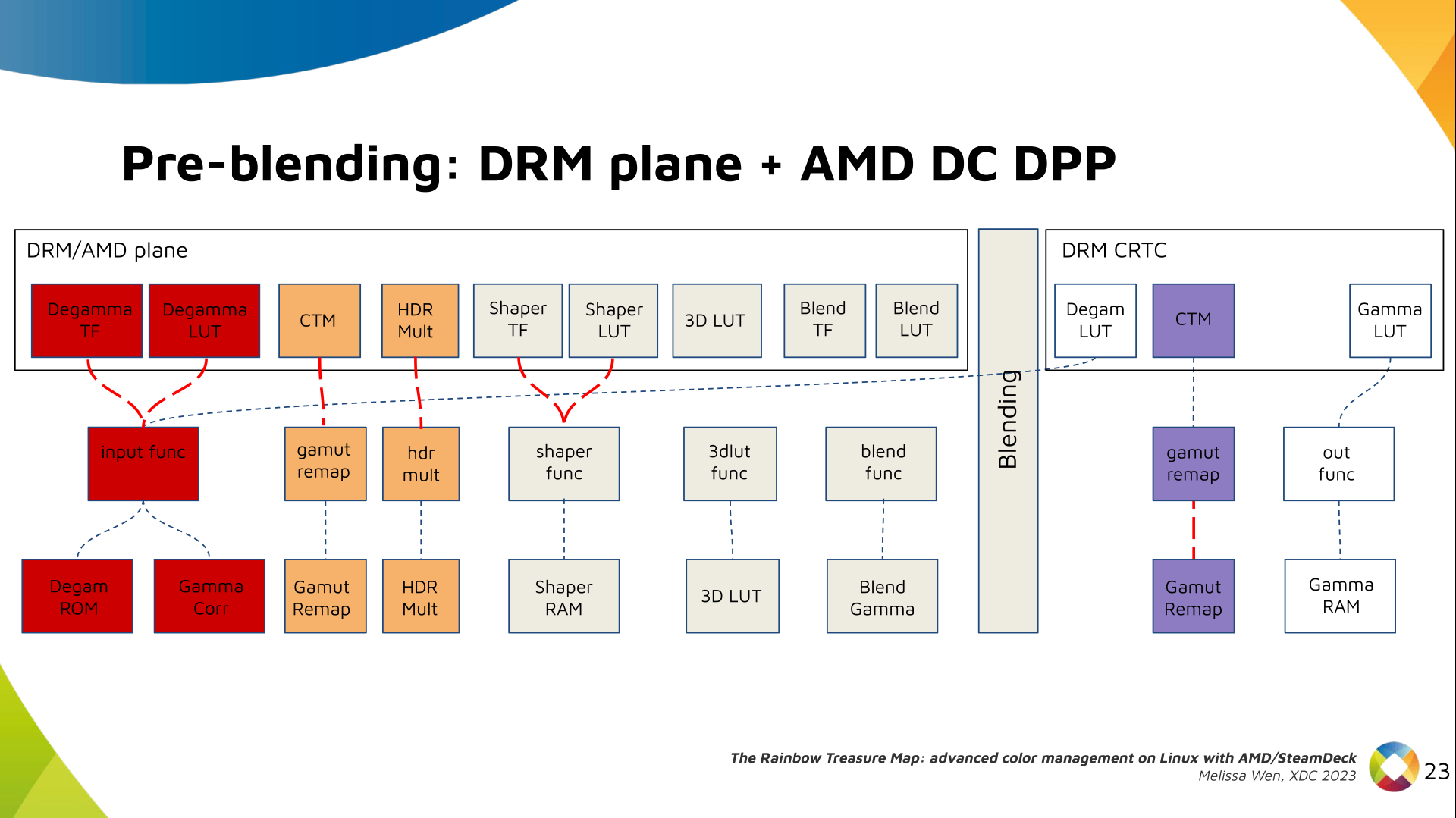
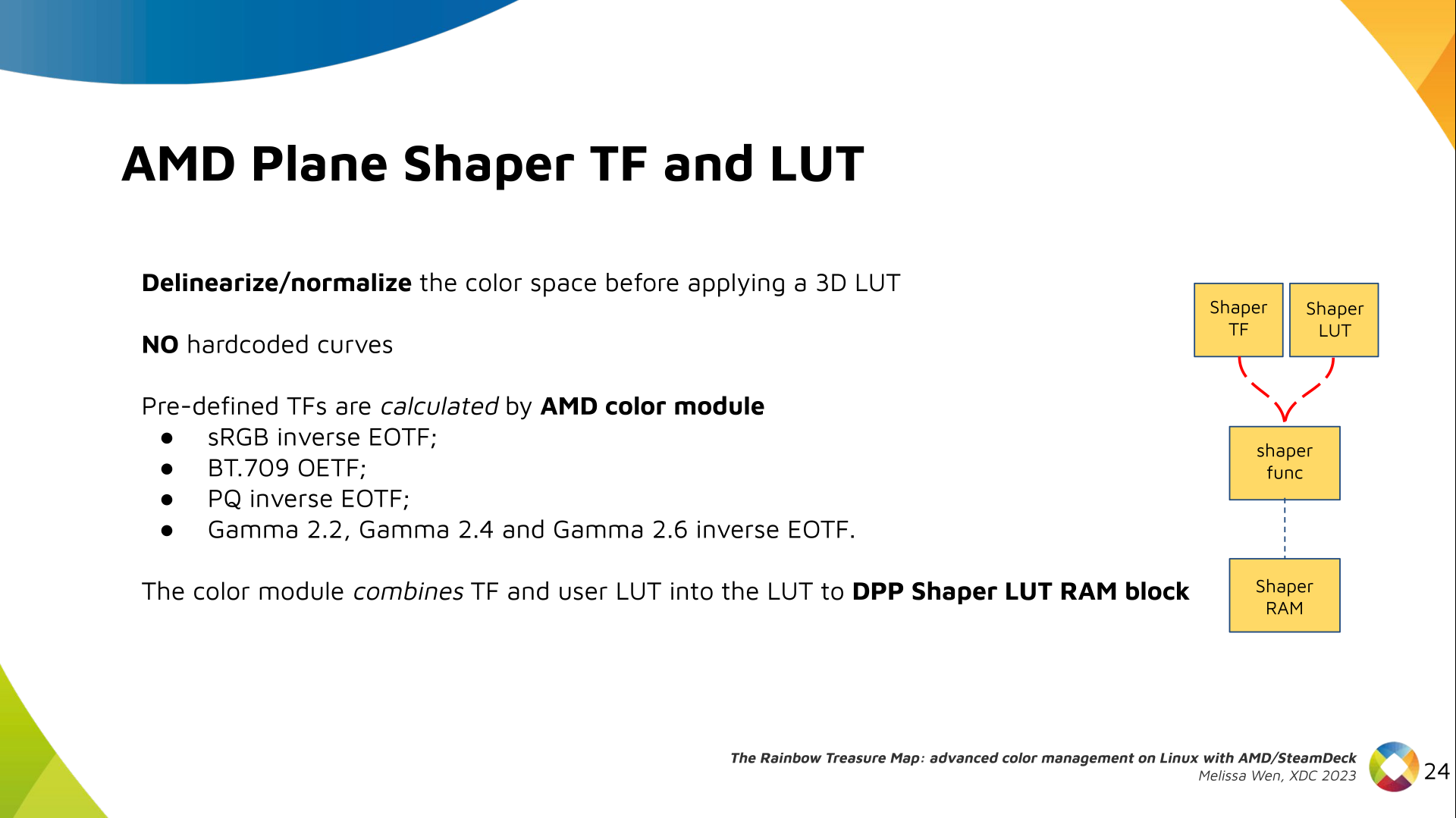
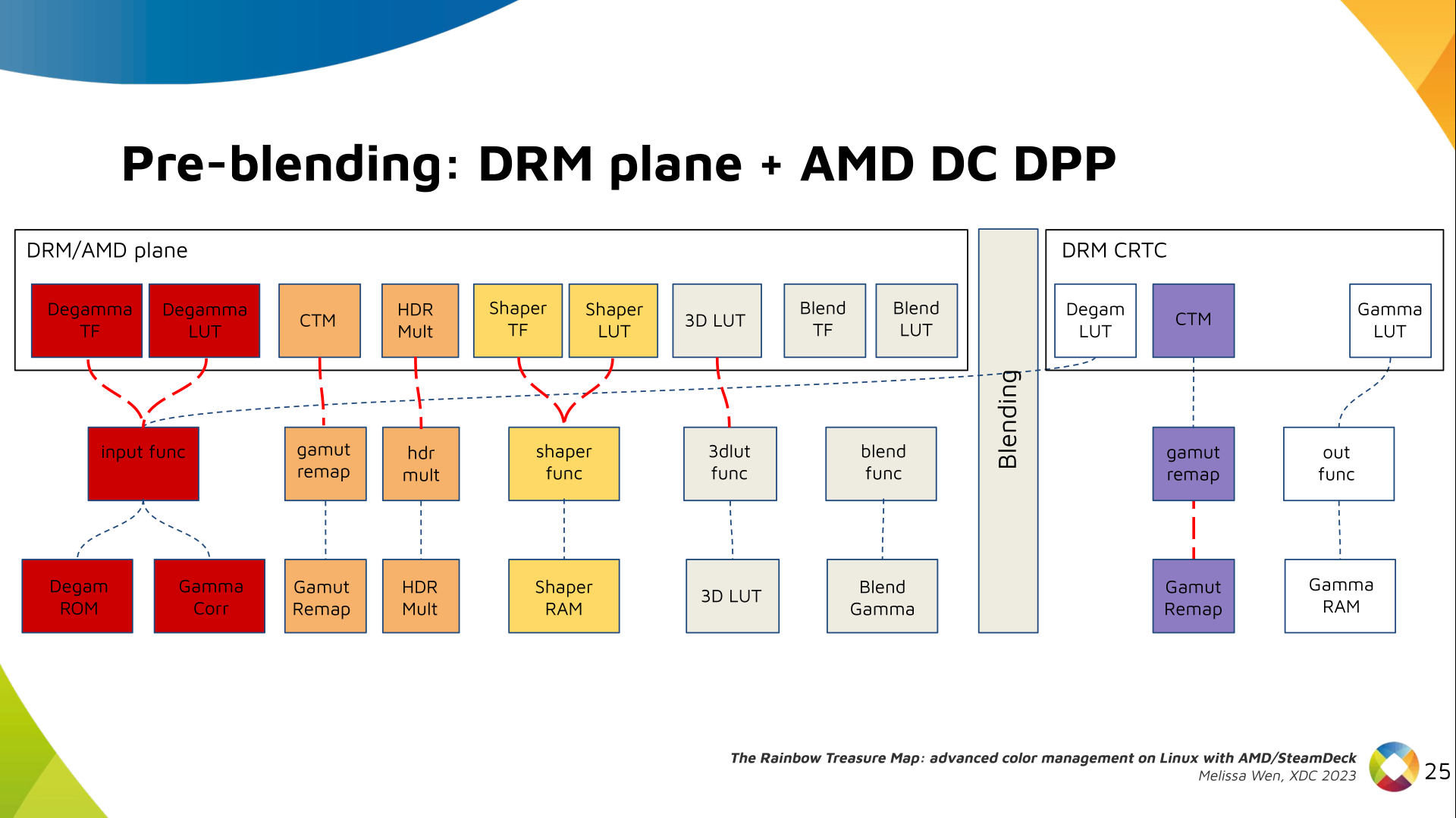
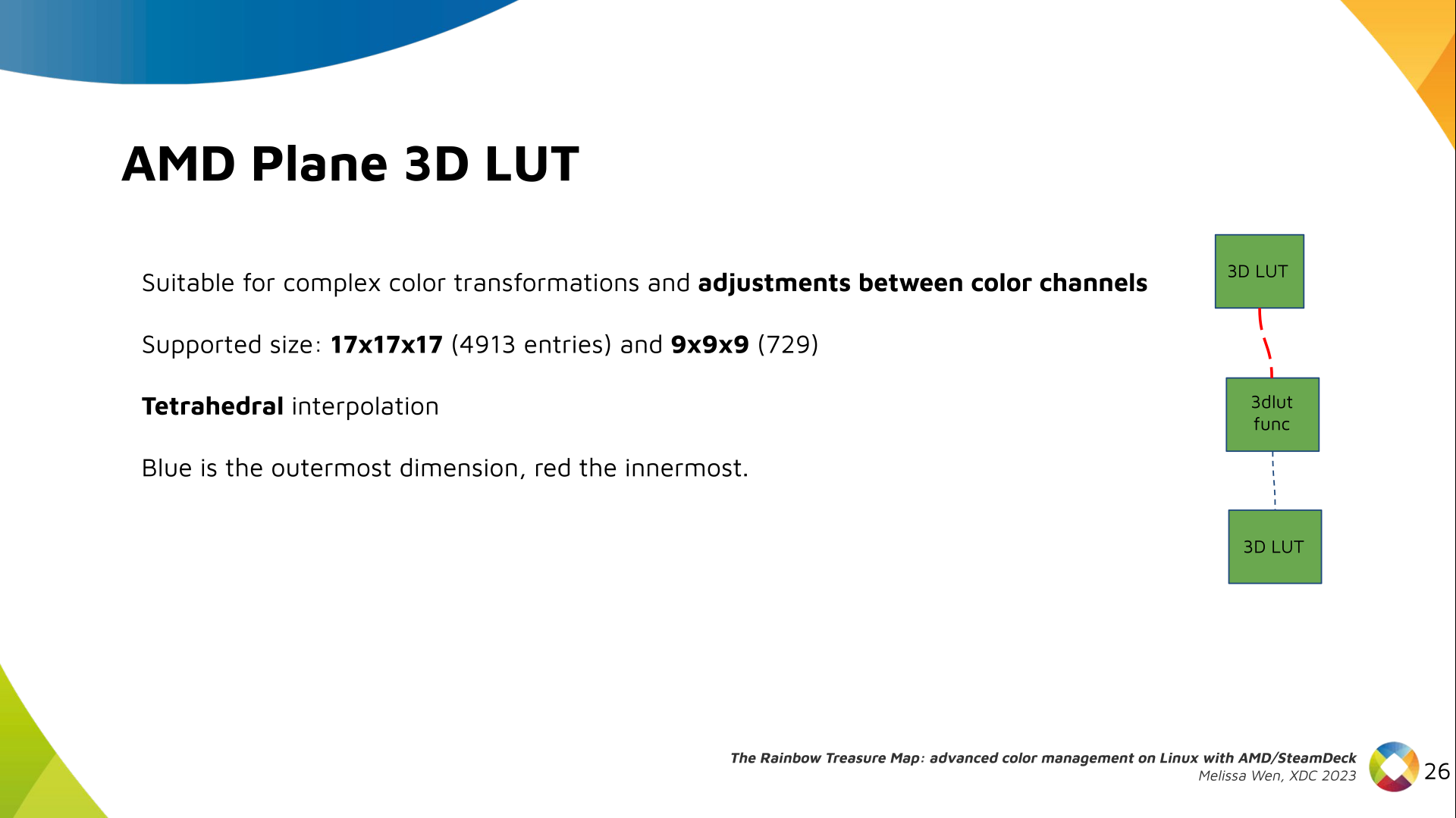
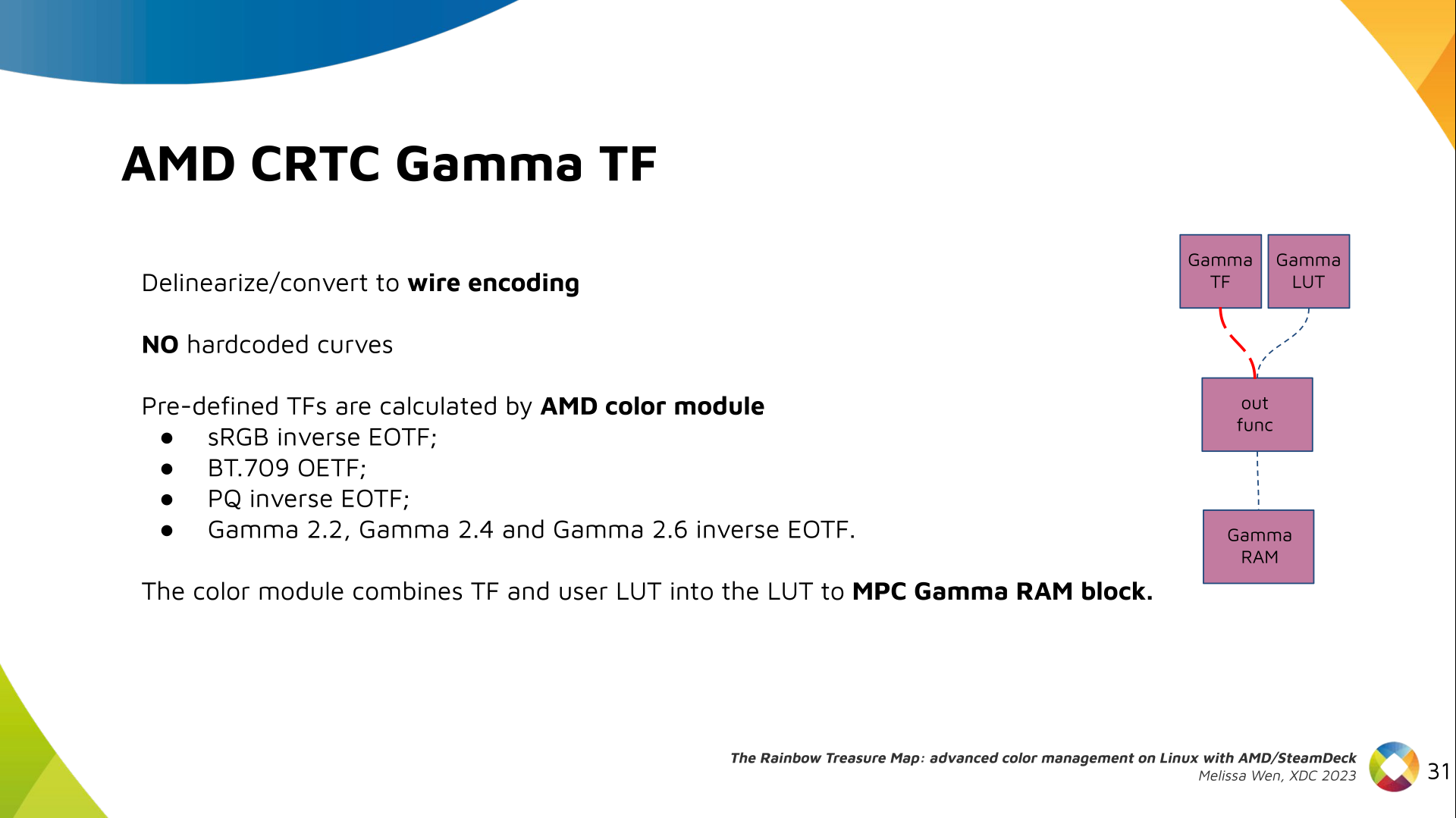
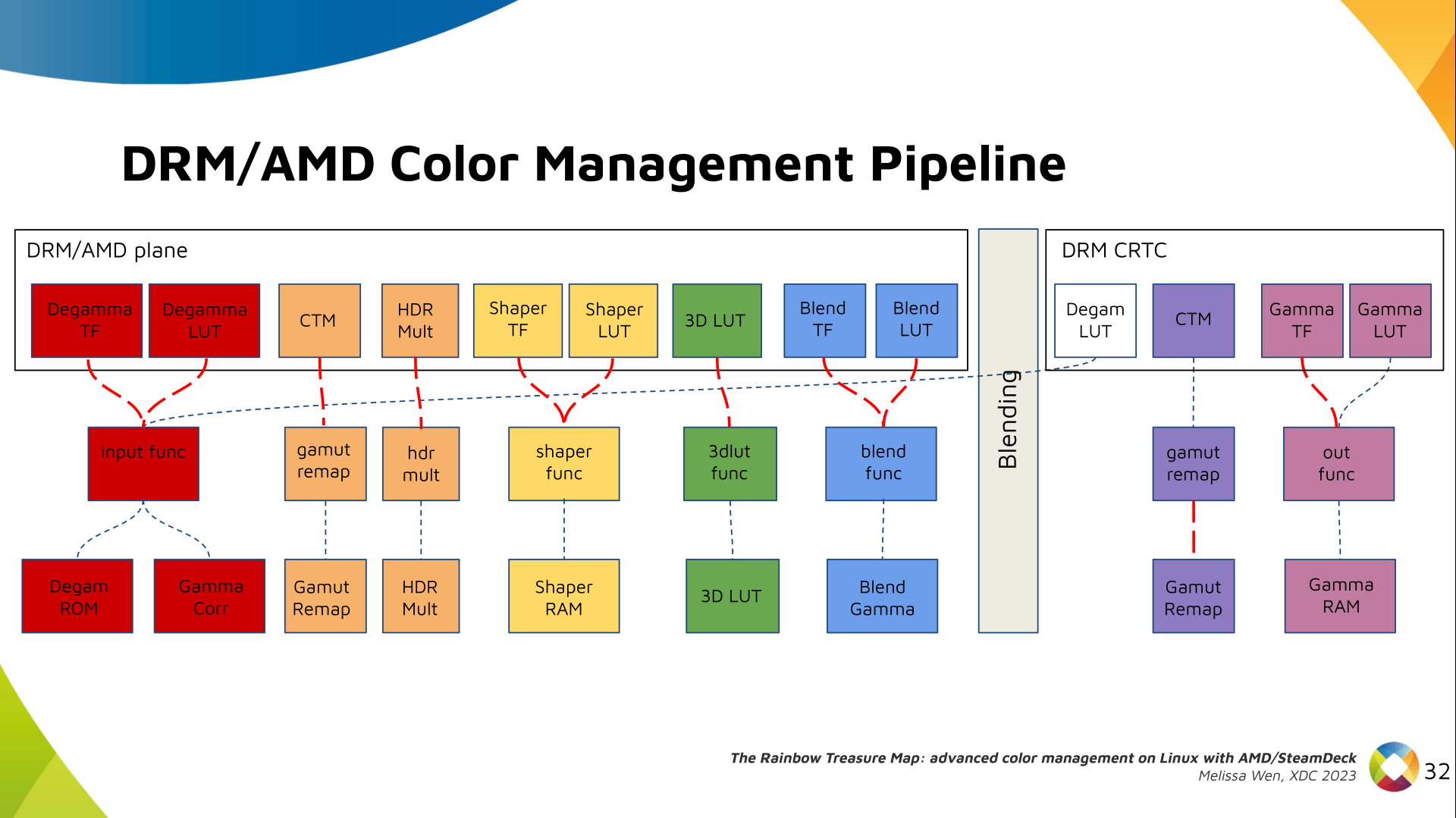
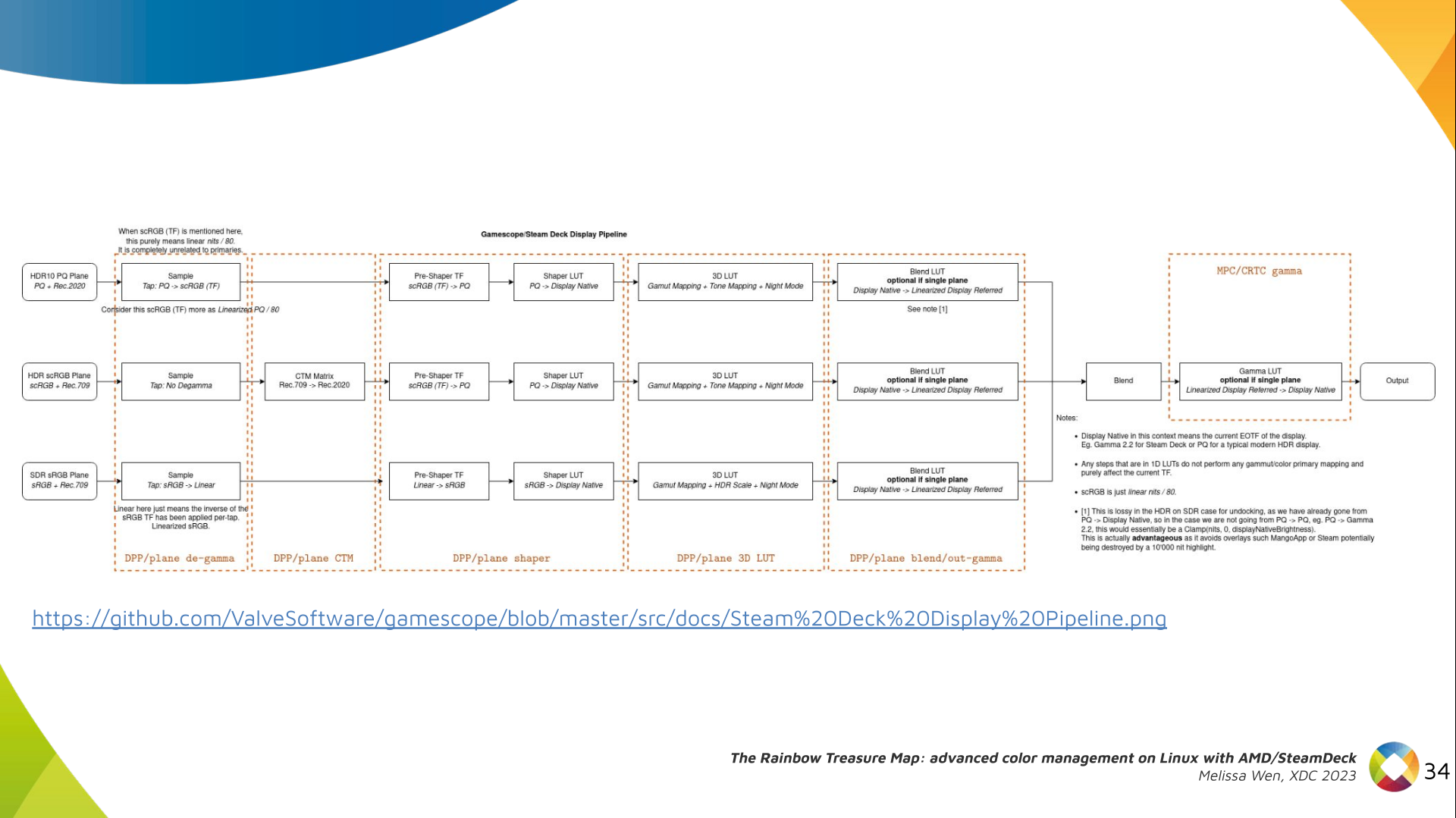
Let s see what we have in the DRM API for pre-blending color management. Slide 11: Blank slide with no content only a title 'Pre-blending: DRM plane' DRM plane color properties: This is the DRM color management API before blending. Nothing! Except two basic DRM plane properties: color_encoding and color_range for the input colorspace conversion, that is not covered by this work. Slide 12: Diagram with color capabilities and structures in AMD DC layer without any DRM plane color interface (before blending), only the DRM CRTC color interface for post blending In case you re not familiar with AMD shared code, what we need to do is basically draw a map and navigate there! We have some DRM color properties after blending, but nothing before blending yet. But much of the hardware programming was already implemented in the AMD DC layer, thanks to the shared code. Slide 13: Previous Diagram with a rectangle to highlight the empty space in the DRM plane interface that will be filled by AMD plane properties Still both the DRM interface and its connection to the shared code were missing. That s when the search begins! Slide 14: Color Pipeline Diagram with the plane color interface filled by AMD plane properties but without connections to AMD DC resources AMD driver-specific color pipeline: Looking at the color capabilities of the hardware, we arrive at this initial set of properties. The path wasn t exactly like that. We had many iterations and discoveries until reached to this pipeline. Slide 15: Color Pipeline Diagram connecting AMD plane degamma properties, LUT and TF, to AMD DC resources The Plane Degamma is our first driver-specific property before blending. It s used to linearize the color space from encoded values to light linear values. Slide 16: Describe plane degamma properties and hardware capabilities We can use a pre-defined transfer function or a user lookup table (in short, LUT) to linearize the color space. Pre-defined transfer functions for plane degamma are hardcoded curves that go to a specific hardware block called DPP Degamma ROM. It supports the following transfer functions: sRGB EOTF, BT.709 inverse OETF, PQ EOTF, and pure power curves Gamma 2.2, Gamma 2.4 and Gamma 2.6. We also have a one-dimensional LUT. This 1D LUT has four thousand ninety six (4096) entries, the usual 1D LUT size in the DRM/KMS. It s an array of drm_color_lut that goes to the DPP Gamma Correction block. Slide 17: Color Pipeline Diagram connecting AMD plane CTM property to AMD DC resources We also have now a color transformation matrix (CTM) for color space conversion. Slide 18: Describe plane CTM property and hardware capabilities It s a 3x4 matrix of fixed points that goes to the DPP Gamut Remap Block. Both pre- and post-blending matrices were previously gone to the same color block. We worked on detaching them to clear both paths. Now each CTM goes on its own way. Slide 19: Color Pipeline Diagram connecting AMD plane HDR multiplier property to AMD DC resources Next, the HDR Multiplier. HDR Multiplier is a factor applied to the color values of an image to increase their overall brightness. Slide 20: Describe plane HDR mult property and hardware capabilities This is useful for converting images from a standard dynamic range (SDR) to a high dynamic range (HDR). As it can range beyond [0.0, 1.0] subsequent transforms need to use the PQ(HDR) transfer functions. Slide 21: Color Pipeline Diagram connecting AMD plane shaper properties, LUT and TF, to AMD DC resources And we need a 3D LUT. But 3D LUT has a limited number of entries in each dimension, so we want to use it in a colorspace that is optimized for human vision. It means in a non-linear space. To deliver it, userspace may need one 1D LUT before 3D LUT to delinearize content and another one after to linearize content again for blending. Slide 22: Describe plane shaper properties and hardware capabilities The pre-3D-LUT curve is called Shaper curve. Unlike Degamma TF, there are no hardcoded curves for shaper TF, but we can use the AMD color module in the driver to build the following shaper curves from pre-defined coefficients. The color module combines the TF and the user LUT values into the LUT that goes to the DPP Shaper RAM block. Slide 23: Color Pipeline Diagram connecting AMD plane 3D LUT property to AMD DC resources Finally, our rockstar, the 3D LUT. 3D LUT is perfect for complex color transformations and adjustments between color channels. Slide 24: Describe plane 3D LUT property and hardware capabilities 3D LUT is also more complex to manage and requires more computational resources, as a consequence, its number of entries is usually limited. To overcome this restriction, the array contains samples from the approximated function and values between samples are estimated by tetrahedral interpolation. AMD supports 17 and 9 as the size of a single-dimension. Blue is the outermost dimension, red the innermost. Slide 25: Color Pipeline Diagram connecting AMD plane blend properties, LUT and TF, to AMD DC resources As mentioned, we need a post-3D-LUT curve to linearize the color space before blending. This is done by Blend TF and LUT. Slide 26: Describe plane blend properties and hardware capabilities Similar to shaper TF, there are no hardcoded curves for Blend TF. The pre-defined curves are the same as the Degamma block, but calculated by the color module. The resulting LUT goes to the DPP Blend RAM block. Slide 27: Color Pipeline Diagram  with all AMD plane color properties connect to AMD DC resources and links showing the conflict between plane and CRTC degamma Now we have everything connected before blending. As a conflict between plane and CRTC Degamma was inevitable, our approach doesn t accept that both are set at the same time. Slide 28: Color Pipeline Diagram connecting AMD CRTC gamma TF property to AMD DC resources We also optimized the conversion of the framebuffer to wire encoding by adding support to pre-defined CRTC Gamma TF. Slide 29: Describe CRTC gamma TF property and hardware capabilities Again, there are no hardcoded curves and TF and LUT are combined by the AMD color module. The same types of shaper curves are supported. The resulting LUT goes to the MPC Gamma RAM block. Slide 30: Color Pipeline Diagram with all AMD driver-specific color properties connect to AMD DC resources Finally, we arrived in the final version of DRM/AMD driver-specific color management pipeline. With this knowledge, you re ready to better enjoy the rainbow treasure of AMD display hardware and the world of graphics computing. Slide 31: SteamDeck/Gamescope Color Pipeline Diagram with rectangles labeling each block of the pipeline with the related AMD color property With this work, Gamescope/Steam Deck embraces the color capabilities of the AMD GPU. We highlight here how we map the Gamescope color pipeline to each AMD color block. Slide 32: Final slide. Thank you! Future works: The search for the rainbow treasure is not over! The Linux DRM subsystem contains many hidden treasures from different vendors. We want more complex color transformations and adjustments available on Linux. We also want to expose all GPU color capabilities from all hardware vendors to the Linux userspace. Thanks Joshua and Harry for this joint work and the Linux DRI community for all feedback and reviews. The amazing part of this work comes in the next talk with Joshua and The Rainbow Frogs! Any questions?
References:
  1. Slides of the talk The Rainbow Treasure Map.
  2. Youtube video of the talk The Rainbow Treasure Map.
  3. Patch series for AMD driver-specific color management properties (upstream Linux 6.8v).
  4. SteamDeck/Gamescope color management pipeline
  5. XDC 2023 website.
  6. Igalia website.

19 December 2023

Matthew Garrett: Making SSH host certificates more usable

Earlier this year, after Github accidentally committed their private RSA SSH host key to a public repository, I wrote about how better support for SSH host certificates would allow this sort of situation to be handled in a user-transparent way without any negative impact on security. I was hoping that someone would read this and be inspired to fix the problem but sadly that didn't happen so I've actually written some code myself.

The core part of this is straightforward - if a server presents you with a certificate associated with a host key, then make the trust in that host be whoever signed the certificate rather than just trusting the host key. This means that if someone needs to replace the host key for any reason (such as, for example, them having published the private half), you can replace the host key with a new key and a new certificate, and as long as the new certificate is signed by the same key that the previous certificate was, you'll trust the new key and key rotation can be carried out without any user errors. Hurrah!

So obviously I wrote that bit and then thought about the failure modes and it turns out there's an obvious one - if an attacker obtained both the private key and the certificate, what stops them from continuing to use it? The certificate isn't a secret, so we basically have to assume that anyone who possesses the private key has access to it. We may have silently transitioned to a new host key on the legitimate servers, but a hostile actor able to MITM a user can keep on presenting the old key and the old certificate until it expires.

There's two ways to deal with this - either have short-lived certificates (ie, issue a new certificate every 24 hours or so even if you haven't changed the key, and specify that the certificate is invalid after those 24 hours), or have a mechanism to revoke the certificates. The former is viable if you have a very well-engineered certificate issuing operation, but still leaves a window for an attacker to make use of the certificate before it expires. The latter is something SSH has support for, but the spec doesn't define any mechanism for distributing revocation data.

So, I've implemented a new SSH protocol extension that allows a host to send a key revocation list to a client. The idea is that the client authenticates to the server, receives a key revocation list, and will no longer trust any certificates that are contained within that list. This seems simple enough, but a naive implementation opens the client to various DoS attacks. For instance, if you simply revoke any key contained within the received KRL, a hostile server could revoke any certificates that were otherwise trusted by the client. The easy way around this is for the client to ensure that any revoked keys are associated with the same CA that signed the host certificate - that way a compromised host can only revoke certificates associated with that CA, and can't interfere with anyone else.

Unfortunately that still means that a single compromised host can still trigger revocation of certificates inside that trust domain (ie, a compromised host a.test.com could push a KRL that invalidated the certificate for b.test.com), because there's no way in the KRL format to indicate that a given revocation is associated with a specific hostname. This means we need a mechanism to verify that the KRL update is legitimate, and the easiest way to handle that is to sign it. The KRL format specifies an in-band signature but this was deprecated earlier this year - instead KRLs are supposed to be signed with the sshsig format. But we control both the server and the client, which means it's easy enough to send a detached signature as part of the extension data.

Putting this all together: you ssh to a server you've never contacted before, and it presents you with a host certificate. Instead of the host key being added to known_hosts, the CA key associated with the certificate is added. From now on, if you ssh to that host and it presents a certificate signed by that CA, it'll be trusted. Optionally, the host can also send you a KRL and a signature. If the signature is generated by the CA key that you already trust, any certificates in that KRL associated with that CA key will be incorporated into local storage. The expected flow if a key is compromised is that the owner of the host generates a new keypair, obtains a new certificate for the new key, and adds the old certificate to a KRL that is signed with the CA key. The next time the user connects to that host, they receive the new key and new certificate, trust it because it's signed by the same CA key, and also receive a KRL signed with the same CA that revokes trust in the old certificate.

Obviously this breaks down if a user is MITMed with a compromised key and certificate immediately after the host is compromised - they'll see a legitimate certificate and won't receive any revocation list, so will trust the host. But this is the same failure mode that would occur in the absence of keys, where the attacker simply presents the compromised key to the client before trust in the new key has been created. This seems no worse than the status quo, but means that most users will seamlessly transition to a new key and revoke trust in the old key with no effort on their part.

The work in progress tree for this is here - at the point of writing I've merely implemented this and made sure it builds, not verified that it actually works or anything. Cleanup should happen over the next few days, and I'll propose this to upstream if it doesn't look like there's any showstopper design issues.

comment count unavailable comments

Fran ois Marier: Filtering your own spam using SpamAssassin

I know that people rave about GMail's spam filtering, but it didn't work for me: I was seeing too many false positives. I personally prefer to see some false negatives (i.e. letting some spam through), but to reduce false positives as much as possible (and ideally have a way to tune this). Here's the local SpamAssassin setup I have put together over many years. In addition to the parts I describe here, I also turn off greylisting on my email provider (KolabNow) because I don't want to have to wait for up to 10 minutes for a "2FA" email to go through. This setup assumes that you download all of your emails to your local machine. I use fetchmail for this, though similar tools should work too.

Three tiers of emails The main reason my setup works for me, despite my receiving hundreds of spam messages every day, is that I split incoming emails into three tiers via procmail:
  1. not spam: delivered to inbox
  2. likely spam: quarantined in a soft_spam/ folder
  3. definitely spam: silently deleted
I only ever have to review the likely spam tier for false positives, which is on the order of 10-30 spam emails a day. I never even see the the hundreds that are silently deleted due to a very high score. This is implemented based on a threshold in my .procmailrc:
# Use spamassassin to check for spam
:0fw: .spamassassin.lock
  /usr/bin/spamassassin
# Throw away messages with a score of > 12.0
:0
* ^X-Spam-Level: \*\*\*\*\*\*\*\*\*\*\*\*
/dev/null
:0:
* ^X-Spam-Status: Yes
$HOME/Mail/soft_spam/
# Deliver all other messages
:0:
$ DEFAULT 
I also use the following ~/.muttrc configuration to easily report false negatives/positives and examine my likely spam folder via a shortcut in mutt:
unignore X-Spam-Level
unignore X-Spam-Status
macro index S "c=soft_spam/\n" "Switch to soft_spam"
# Tell mutt about SpamAssassin headers so that I can sort by spam score
spam "X-Spam-Status: (Yes No), (hits score)=(-?[0-9]+\.[0-9])" "%3"
folder-hook =soft_spam 'push ol'
folder-hook =spam 'push ou'
# <Esc>d = de-register as non-spam, register as spam, move to spam folder.
macro index \ed "<enter-command>unset wait_key\n<pipe-entry>spamassassin -r\n<enter-command>set wait_key\n<save-message>=spam\n" "report the message as spam"
# <Esc>u = unregister as spam, register as non-spam, move to inbox folder.
macro index \eu "<enter-command>unset wait_key\n<pipe-entry>spamassassin -k\n<enter-command>set wait_key\n<save-message>=inbox\n" "correct the false positive (this is not spam)"

Custom SpamAssassin rules In addition to the default ruleset that comes with SpamAssassin, I've also accrued a number of custom rules over the years. The first set comes from the (now defunct) SpamAssassin Rules Emporium. The second set is the one that backs bugs.debian.org and lists.debian.org. Note this second one includes archived copies of some of the SARE rules and so I only use some of the rules in the common/ directory. Finally, I wrote a few custom rules of my own based on specific kinds of emails I have seen slip through the cracks. I haven't written any of those in a long time and I suspect some of my rules are now obsolete. You may want to do your own testing before you copy these outright. In addition to rules to match more spam, I've also written a ruleset to remove false positives in French emails coming from many of the above custom rules. I also wrote a rule to get a bonus to any email that comes with a patch:
describe FM_PATCH   Includes a patch
body FM_PATCH   /\bdiff -pruN\b/
score FM_PATCH  -1.0
since it's not very common in spam emails :)

SpamAssassin settings When it comes to my system-wide SpamAssassin configuration in /etc/spamassassin/, I enable the following plugins:
loadplugin Mail::SpamAssassin::Plugin::AntiVirus
loadplugin Mail::SpamAssassin::Plugin::AskDNS
loadplugin Mail::SpamAssassin::Plugin::ASN
loadplugin Mail::SpamAssassin::Plugin::AutoLearnThreshold
loadplugin Mail::SpamAssassin::Plugin::Bayes
loadplugin Mail::SpamAssassin::Plugin::BodyEval
loadplugin Mail::SpamAssassin::Plugin::Check
loadplugin Mail::SpamAssassin::Plugin::DKIM
loadplugin Mail::SpamAssassin::Plugin::DNSEval
loadplugin Mail::SpamAssassin::Plugin::FreeMail
loadplugin Mail::SpamAssassin::Plugin::FromNameSpoof
loadplugin Mail::SpamAssassin::Plugin::HashBL
loadplugin Mail::SpamAssassin::Plugin::HeaderEval
loadplugin Mail::SpamAssassin::Plugin::HTMLEval
loadplugin Mail::SpamAssassin::Plugin::HTTPSMismatch
loadplugin Mail::SpamAssassin::Plugin::ImageInfo
loadplugin Mail::SpamAssassin::Plugin::MIMEEval
loadplugin Mail::SpamAssassin::Plugin::MIMEHeader
loadplugin Mail::SpamAssassin::Plugin::OLEVBMacro
loadplugin Mail::SpamAssassin::Plugin::PDFInfo
loadplugin Mail::SpamAssassin::Plugin::Phishing
loadplugin Mail::SpamAssassin::Plugin::Pyzor
loadplugin Mail::SpamAssassin::Plugin::Razor2
loadplugin Mail::SpamAssassin::Plugin::RelayEval
loadplugin Mail::SpamAssassin::Plugin::ReplaceTags
loadplugin Mail::SpamAssassin::Plugin::Rule2XSBody
loadplugin Mail::SpamAssassin::Plugin::SpamCop
loadplugin Mail::SpamAssassin::Plugin::TextCat
loadplugin Mail::SpamAssassin::Plugin::TxRep
loadplugin Mail::SpamAssassin::Plugin::URIDetail
loadplugin Mail::SpamAssassin::Plugin::URIEval
loadplugin Mail::SpamAssassin::Plugin::VBounce
loadplugin Mail::SpamAssassin::Plugin::WelcomeListSubject
loadplugin Mail::SpamAssassin::Plugin::WLBLEval
Some of these require extra helper packages or Perl libraries to be installed. See the comments in the relevant *.pre files. My ~/.spamassassin/user_prefs file contains the following configuration:
required_hits   5
ok_locales en fr
# Bayes options
score BAYES_00 -4.0
score BAYES_40 -0.5
score BAYES_60 1.0
score BAYES_80 2.7
score BAYES_95 4.0
score BAYES_99 6.0
bayes_auto_learn 1
bayes_ignore_header X-Miltered
bayes_ignore_header X-MIME-Autoconverted
bayes_ignore_header X-Evolution
bayes_ignore_header X-Virus-Scanned
bayes_ignore_header X-Forwarded-For
bayes_ignore_header X-Forwarded-By
bayes_ignore_header X-Scanned-By
bayes_ignore_header X-Spam-Level
bayes_ignore_header X-Spam-Status
as well as manual score reductions due to false positives, and manual score increases to help push certain types of spam emails over the 12.0 definitely spam threshold. Finally, I have the FuzzyOCR package installed since it has occasionally flagged some spam that other tools had missed. It is a little resource intensive though and so you may want to avoid this one if you are filtering spam for other people. As always, feel free to leave a comment if you do something else that works well and that's not included in my setup. This is a work-in-progress.

Antoine Beaupr : (Re)introducing screentest

I have accidentally rewritten screentest, an old X11/GTK2 program that I was previously using to, well, test screens.

Screentest is dead It was removed from Debian in May 2023 but had already missed two releases (Debian 11 "bullseye" and 12 "bookworm") due to release critical bugs. The stated reason for removal was:
The package is orphaned and its upstream is no longer developed. It depends on gtk2, has a low popcon and no reverse dependencies.
So I had little hope to see this program back in Debian. The git repository shows little activity, the last being two years ago. Interestingly, I do not quite remember what it was testing, but I do remember it to find dead pixels, confirm native resolution, and various pixel-peeping. Here's a screenshot of one of the screentest screens: screentest screenshot showing a white-on-black checkered background, with some circles in the corners, shades of gray and colors in the middle Now, I think it's safe to assume this program is dead and buried, and anyways I'm running wayland now, surely there's something better? Well, no. Of course not. Someone would know about it and tell me before I go on a random coding spree in a fit of procrastination... riiight? At least, the Debconf video team didn't seem to know of any replacement. They actually suggested I just "invoke gstreamer directly" and "embrace the joy of shell scripting".

Screentest reborn So, I naively did exactly that and wrote a horrible shell script. Then I realized the next step was to write an command line parser and monitor geometry guessing, and thought "NOPE, THIS IS WHERE THE SHELL STOPS", and rewrote the whole thing in Python. Now, screentest lives as a ~400-line Python script, half of which is unit test data and command-line parsing.

Why screentest Some smarty pants is going to complain and ask why the heck one would need something like that (and, well, someone already did), so maybe I can lay down a list of use case:
  • testing color output, in broad terms (answering the question of "is it just me or this project really yellow?")
  • testing focus and keystone ("this looks blurry, can you find a nice sharp frame in that movie to adjust focus?")
  • test for native resolution and sharpness ("does this projector really support 4k for 30$? that sounds like bullcrap")
  • looking for dead pixels ("i have a new monitor, i hope it's intact")

What does screentest do? Screentest displays a series of "patterns" on screen. The list of patterns is actually hardcoded in the script, copy-pasted from this list from the videotestsrc gstreamer plugin, but you can pass any pattern supported by your gstreamer installation with --patterns. A list of patterns relevant to your installation is available with the gst-inspect-1.0 videotestsrc command. By default, screentest goes through all patterns. Each pattern runs indefinitely until the you close the window, then the next pattern starts. You can restrict to a subset of patterns, for example this would be a good test for dead pixels:
screentest --patterns black,white,red,green,blue
This would be a good sharpness test:
screentest --patterns pinwheel,spokes,checkers-1,checkers-2,checkers-4,checkers-8
A good generic test is the classic SMPTE color bars and is the first in the list, but you can run only that test with:
screentest --patterns smpte
(I will mention, by the way, that as a system administrator with decades of experience, it is nearly impossible to type SMPTE without first typing SMTP and re-typing it again a few times before I get it right. I fully expect this post to have numerous typos.)
Here's an example of the SMPTE pattern from Wikipedia: SMPTE color bars For multi-monitor setups, screentest also supports specifying which output to use as a native resolution, with --output. Failing that, it will try to look at the outputs and use the first it will find. If it fails to find anything, you can specify a resolution with --resolution WIDTHxHEIGHT. I have tried to make it go full screen by default, but stumbled a bug in Sway that crashes gst-launch. If your Wayland compositor supports it, you can possibly enable full screen with --sink waylandsink fullscreen=true. Otherwise it will create a new window that you will have to make fullscreen yourself. For completeness, there's also an --audio flag that will emit the classic "drone", a sine wave at 440Hz at 40% volume (the audiotestsrc gstreamer plugin. And there's a --overlay-name option to show the pattern name, in case you get lost and want to start with one of them again.

How this works Most of the work is done by gstreamer. The script merely generates a pipeline and calls gst-launch to show the output. That both limits what it can do but also makes it much easier to use than figuring out gst-launch. There might be some additional patterns that could be useful, but I think those are better left to gstreamer. I, for example, am somewhat nostalgic of the Philips circle pattern that used to play for TV stations that were off-air in my area. But that, in my opinion, would be better added to the gstreamer plugin than into a separate thing. The script shows which command is being ran, so it's a good introduction to gstreamer pipelines. Advanced users (and the video team) will possibly not need screentest and will design their own pipelines with their own tools. I've previously worked with ffmpeg pipelines (in another such procrastinated coding spree, video-proxy-magic), and I found gstreamer more intuitive, even though it might be slightly less powerful. In retrospect, I should probably have picked a new name, to avoid crashing the namespace already used by the project, which is now on GitHub. Who knows, it might come back to life after this blog post; it would not be the first time. For now, the project lives along side the rest of my scripts collection but if there's sufficient interest, I might move it to its own git repositories. Comments, feedback, contributions are as usual welcome. And naturally, if you know something better for this kind of stuff, I'm happy to learn more about your favorite tool! So now I have finally found something to test my projector, which will likely confirm what I've already known all along: that it's kind of a piece of crap and I need to get a proper one.

Dirk Eddelbuettel: tinythemes 0.0.1 at CRAN: New Package

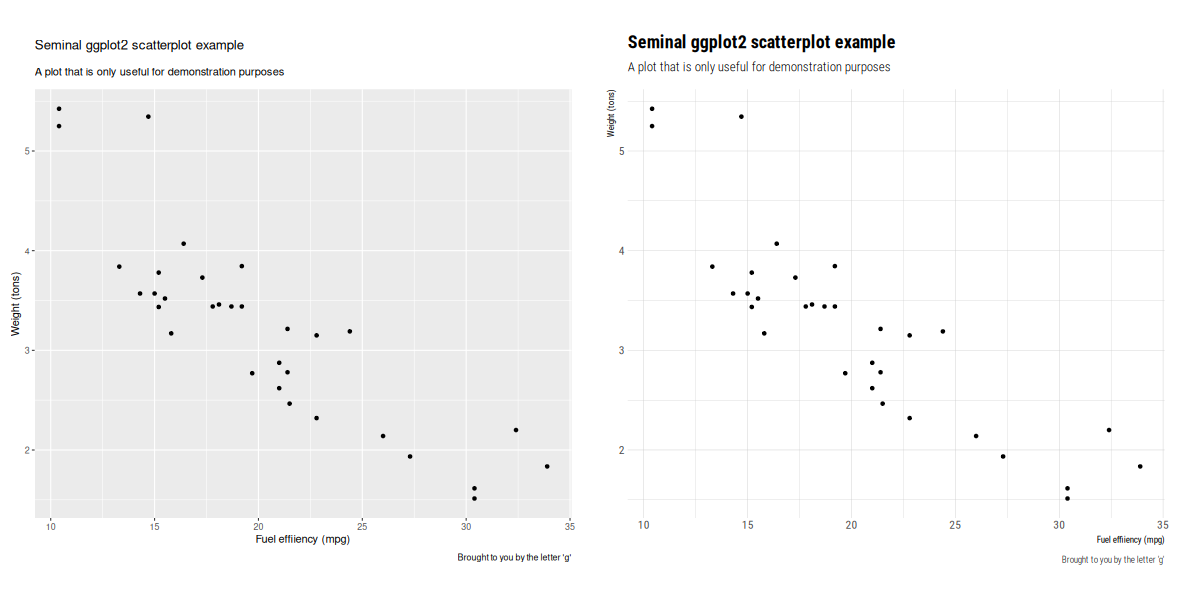
Delighted to announce a new package that arrived on CRAN today: tinythemes. It repackages the theme_ipsum_rc() function by Bob Rudis from his hrbrthemes package in a zero (added) dependency way. A simple example is (also available as a demo inside the packages in the next update) contrasts the default style (on left) with the one added by this package (on the right): The GitHub repo also shows this little example: total dependencies of hrbrthemes over what ggplot2 installs:
> db <- tools::CRAN_package_db()
> deps <- tools::package_dependencies(c("ggplot2", "hrbrthemes"), recursive=TRUE, db=db
> Filter(\(x) x != "ggplot2", setdiff(deps[[2]], deps[[1]]))
 [1] "extrafont"         "knitr"             "rmarkdown"         "htmltools"        
 [5] "tools"             "gdtools"           "extrafontdb"       "Rttf2pt1"         
 [9] "Rcpp"              "systemfonts"       "gfonts"            "curl"             
[13] "fontquiver"        "base64enc"         "digest"            "ellipsis"         
[17] "fastmap"           "evaluate"          "highr"             "xfun"             
[21] "yaml"              "bslib"             "fontawesome"       "jquerylib"        
[25] "jsonlite"          "stringr"           "tinytex"           "cachem"           
[29] "memoise"           "mime"              "sass"              "fontBitstreamVera"
[33] "fontLiberation"    "shiny"             "crul"              "crayon"           
[37] "stringi"           "cpp11"             "urltools"          "httpcode"         
[41] "fs"                "rappdirs"          "httpuv"            "xtable"           
[45] "sourcetools"       "later"             "promises"          "commonmark"       
[49] "triebeard"        
>
Comments and suggestions are welcome at the GitHub repo. If you like this or other open-source work I do, you can sponsor me at GitHub.

This post by Dirk Eddelbuettel originated on his Thinking inside the box blog. Please report excessive re-aggregation in third-party for-profit settings.

17 December 2023

Dirk Eddelbuettel: littler 0.3.19 on CRAN: Several Updates

max-heap image The twentieth release of littler as a CRAN package landed a few minutes ago, following in the now seventeen year history (!!) as a package started by Jeff in 2006, and joined by me a few weeks later. littler is the first command-line interface for R as it predates Rscript. It allows for piping as well for shebang scripting via #!, uses command-line arguments more consistently and still starts faster. It also always loaded the methods package which Rscript only began to do in recent years. littler lives on Linux and Unix, has its difficulties on macOS due to yet-another-braindeadedness there (who ever thought case-insensitive filesystems as a default were a good idea?) and simply does not exist on Windows (yet the build system could be extended see RInside for an existence proof, and volunteers are welcome!). See the FAQ vignette on how to add it to your PATH. A few examples are highlighted at the Github repo:, as well as in the examples vignette. This release contains a fair number of small changes and improvements to some of the example scripts is run daily. The full change description follows.

Changes in littler version 0.3.19 (2023-12-17)
  • Changes in examples scripts
    • The help or usage text display for r2u.r, ttt.r, check.r has been improved, expanded or corrected, respectively
    • installDeps.r has a new argument for dependency selection
    • An initial 'single test file' runner tttf.r has been added
    • r2u.r has two new options for setting / varying the Debian build version of package that is built, and one for BioConductor builds, one for a 'dry run' build, and a new --compile option
    • installRSPM.r, installPPM.r, installP3M.r have been updates to reflect the name changes
    • installRub.r now understands 'package@universe' too
    • tt.r flips the default of the --effects switch

My CRANberries service provides a comparison to the previous release. Full details for the littler release are provided as usual at the ChangeLog page, and also on the package docs website. The code is available via the GitHub repo, from tarballs and now of course also from its CRAN page and via install.packages("littler"). Binary packages are available directly in Debian as well as (in a day or two) Ubuntu binaries at CRAN thanks to the tireless Michael Rutter. Comments and suggestions are welcome at the GitHub repo. If you like this or other open-source work I do, you can sponsor me at GitHub.

This post by Dirk Eddelbuettel originated on his Thinking inside the box blog. Please report excessive re-aggregation in third-party for-profit settings.

16 December 2023

Thomas Lange: Adding a writeable data partition to an ISO image

Some years ago a customer needed a live ISO containing a customized FAI environment (not for installing but for extended hardware stress tests), but on an USB stick with the possibility to store the logs of the tests on the USB stick. But an ISO file system (iso9660) remains read-only, even when put onto an USB stick. I had the idea to add another partition onto the USB stick after the ISO was written to it (using cp or dd). You can use fdisk with an ISO file, add a new partition, loop mount the ISO and format this partition. That's all. This worked perfect for my customer. I forgot this idea for a while but a few weeks ago I remembered it. What could be possible when my FAI (Fully Automatic Installation) image would also provide such a partition? Which things could be provided on this partition? Could I provide a FAI ISO and my users would be able to easily put their own .deb package onto it without remastering the ISO or building an ISO on their own? Now here's the shell script, that extends an ISO or an USB stick with an ext4 or exFAT partition and set the file system label to MY-DATA. https://github.com/faiproject/fai/blob/master/bin/mk-data-partition Examples how to use mk-data-partition
Add a data partition of size 1G to the Debian installer ISO using an ext4 partition
# mk-data-partition -s 1G debian-12.2.0-amd64-netinst.iso
Create the data partition using an exFAT file system on USB named /dev/sdb.
First copy (or dd) the ISO onto the USB stick. Then add the data partition
to the USB stick.
# cp faicd64-large_6.0.3.iso /dev/sdb
# mk-data-partition -F /dev/sdb
Create the data partition and copy directories A and B to it
# mk-data-partition -c debian-12.2.0-amd64-netinst.iso A B
The next FAI version will use this in different parts of an installation. A blog post about this will follow. A new idea for our Debian installer ISO Here are my ideas how the Debian installer could use such a partition if it automatically detects and mounts it (by it's file system label): The advantage of this approach is that there's no need for the user to remaster the official Debian installer ISO, which is not easy for end users. We only have to extend the installer to use files from this data partition in some portions of the installation. Additional udebs, packages or firmware could automatically be used by the installer. Companies could easily create an OEM installer of Debian. What do you think about this idea? Please send feedback to lange@debian.org

14 December 2023

Arturo Borrero Gonz lez: OpenTofu: handcrafted include-file mechanism with YAML

Post logo I recently started playing with Terraform/OpenTofu almost on a daily basis. The other day I was working with Amazon Managed Prometheus (or AMP), and wanted to define prometheus alert rules on YAML files. I decided that I needed a way to put the alerts on a bunch of files, and then load them by the declarative code, on the correct AMP workspace. I came up with this code pattern that I m sharing here, for my future reference, and in case it is interesting to someone else. The YAML file where I specify the AMP workspace, and where the alert rule files live:
---
alert_files:
  my_alerts_production:
    amp:
      workspace: "production"
    files: "alert_rules/production/*.yaml"
  my_alerts_staging:
    amp:
      workspace: "staging"
    files: "alert_rules/staging/*.yaml"
Note the files entry contains a file pattern. I will later expand the pattern using the fileset() function. Each rule file would be something like this:
---
name: "my_rule_namespace"
rule_data:  
  # this is prometheus-specific config
  groups:
    - name: "example_alert_group"
      rules:
      - alert: Example_Alert_Cpu
        # just arbitrary values, to produce an example alert
        expr: avg(rate(ecs_cpu_seconds_total container=~"something" [2m])) > 1
        for: 10s
        annotations:
          summary: "CPU usage is too high"
          description: "The container average CPU usage is too high."
I m interested in the data structure mutating into something similar to this:
---
alert_files:
  my_alerts_production:
    amp:
      workspace: "production"
    alerts_data:
      - name: rule_namespace_1
        rule_data:  
          # actual alert definition here
          [..]
      - name: rule_namespace_2
        rule_data:  
          # actual alert definition here
          [..]
  my_alerts_staging:
    amp:
      workspace: "staging"
    alerts_data:
      - name: rule_namespace_1
        rule_data:  
          # actual alert definition here
          [..]
      - name: rule_namespace_2
        rule_data:  
          # actual alert definition here
          [..]
This is the algorithm that does the trick:
locals  
  alerts_config =  
    for x, y in  
      for k, v in local.config.alert_files :
      k =>  
        amp : (v.amp),
        files : fileset("", v.files)
       
        : x =>  
      amp : (y.amp),
      alertmanager_data : [
        for z in(y.files) :
        yamldecode(file(z))
      ]


Because the declarative nature of the Terraform/OpenTofu language, I needed to implement 3 different for loops. Each loop reads the map and transforms it in some way, passing the result into the next loop. A bit convoluted if you ask me. To explain the logic, I think it makes more sense to read it from inside out. First loop:
    for k, v in local.config.alert_files :
    k =>  
        amp : (v.amp),
        files : fileset("", v.files)
     
This loop iterates the input YAML map in key-value pairs, remapping each amp entry, and expanding the file globs using the fileset() into a temporal files entry. Second loop:
    for x, y in  
        # previous fileset() loop
        : x =>  
      amp : (y.amp),
      alertmanager_data : [
        # yamldecode() loop
      ]
     
This intermediate loop is responsible for building the final data structure. It iterates the previous fileset() loop to remap it calling the next loop, the yamldecode() one. Note how the amp entry is being rebuilt in each remap (first loop and this one), otherwise we would lose it! Third loop:
    alertmanager_data : [
        for z in(y.files) :
        yamldecode(file(z))
    ]
And finally, this is maybe the easiest loop of the 3, we iterate the temporal file entry that was created in the first loop, calling yamldecode() for each of the file names generated by fileset(). The resulting data structure should allow you to easily create resources later in a for_each loop.

13 December 2023

Jonathan Dowland: equivalence problems with StreamGraph

I've been tackling an equivalence problem with rewritten programs in StrIoT, our proof-of-concept stream-processing system. The StrIoT Logical Optimiser applies a set of rewrite rules to a stream-processing program, generating a set of variants that can be reasoned about, ranked, and deployed. The problem I've been tackling is that a variant may appear to be semantically equivalent to another, but compare (with ==) as distinct. The issue relates to the design of our data-type representing programs, in particular, a consequence of our choice to outsource the structural aspect to a 3rd-party library (Algebra.Graph). The Graph library deems nodes that compare as equivalent (again with ==) to be the same. Since a stream-processing program may contain many operators which are equivalent, but distinct, we needed to add a field to our payload type to differentiate them: so we opted for an Integer field, vertexId (something I've described as a "wart" elsewhere) Here's a simplified example of our existing payload type, StreamVertex:
data StreamVertex = StreamVertex
      vertexId   :: Int
    , operator   :: StreamOperator
    , parameters :: [ExpQ]
    , intype     :: String
    , outtype    :: String
     
A rewrite rule might introduce or eliminate operators from a stream-processing program. For example, consider the rule which "hoists" a filter upstream from a merge operator. In pseudo-Haskell,
streamFilter p . streamMerge [a , b, ...]
=>
streamMerge [ streamFilter p a
            , streamFilter p b
            , ...]
The original streamFilter is removed, and new streamFilters are introduced, one per stream arriving at streamMerge. In general, rules may need to synthesise new operators, and thus new vertexIds. Another rewrite rule might perform the reverse operation. But the individual rules operate in isolation: and so, the program variant that results after applying a rule and then applying an inverse rule may not have the same vertexIds, or the same order of vertexIds, as the original program. I thought of the outline of two possible solutions to this. "well-numbered" StreamGraphs The first was to encode (and enforce) some rules about how vertexIds are used. If they always began from (say) 1, and were strictly-ascending from the source operator(s), and rewrite rules guaranteed that a "well numbered" input would be "well numbered" after rewriting, this would be sufficient to rule out a rewritten-but-semantically-equivalent program being considered distinct. The trouble with this approach is using properties of a numerical system built around vertexId as a stand-in for the real structural problem. I was not sure I could prove both that the stand-in system was sound and that it was a proper analogue for the underlying structural issue. It feels to me more that the choice to use an external library to encode the structure of a stream-processing program was the issue: the structure itself is a fundamental part of the semantics of the program. What if we had encoded the structure of programs within the same data-type? alternative data-type StrIoT programs are trees. The root is the sink node: there is always exactly one. There can be multiple source (leaf nodes), but they always converge. Operators can have multiple inputs (including zero). The root node has no output, but all other operators have exactly one. I explored transforming StreamVertex into a tree by adding a field representing incoming streams, and dispensing with Graph and vertexId. Something like this
data StreamProg = StreamProg StreamOperator [Exp] String String [StreamProg]
A uni-directional transformation from Graph StreamVertex to StreamProg is all that's needed to implement something like ==, so we don't need to keep track of vertexId mappings. Unfortunately, we can't fix the actual Eq (Graph StreamVertex) implementation this way: it delegates to Eq StreamVertex, and we just don't have enough information to fix the problem at that level. But, we can write a separate graphEq and use that instead where we need to. could I go further? Spoiler: I haven't. But I've been sorely tempted. We still have a separate StreamOperator type, which it would be nice to fold in; and we still have to use a list around the incoming nodes, since different operators accept different numbers of incoming streams. It would be better to encode the correct valences in the type. In 2020 I explored iteratively reducing the StreamVertex data-type to try and get it as close as possible to the ideal end-user API: simple functions. I wrote about one step along that path in Template Haskell and Stream-processing programs, but concluded that, since this was not my main PhD focus, I wouldn't go further. But it was nagging at my subconcious ever since. I allowed myself a couple of days exploring some advanced concepts including typed Template Haskell (that has had some developments since 2020), generalised abstract data types (GADTs) and more generic programming to see what could be achieved. I'll summarise all that in the next blog post.

Melissa Wen: 15 Tips for Debugging Issues in the AMD Display Kernel Driver

A self-help guide for examining and debugging the AMD display driver within the Linux kernel/DRM subsystem. It s based on my experience as an external developer working on the driver, and are shared with the goal of helping others navigate the driver code. Acknowledgments: These tips were gathered thanks to the countless help received from AMD developers during the driver development process. The list below was obtained by examining open source code, reviewing public documentation, playing with tools, asking in public forums and also with the help of my former GSoC mentor, Rodrigo Siqueira.

Pre-Debugging Steps: Before diving into an issue, it s crucial to perform two essential steps: 1) Check the latest changes: Ensure you re working with the latest AMD driver modifications located in the amd-staging-drm-next branch maintained by Alex Deucher. You may also find bug fixes for newer kernel versions on branches that have the name pattern drm-fixes-<date>. 2) Examine the issue tracker: Confirm that your issue isn t already documented and addressed in the AMD display driver issue tracker. If you find a similar issue, you can team up with others and speed up the debugging process.

Understanding the issue: Do you really need to change this? Where should you start looking for changes? 3) Is the issue in the AMD kernel driver or in the userspace?: Identifying the source of the issue is essential regardless of the GPU vendor. Sometimes this can be challenging so here are some helpful tips:
  • Record the screen: Capture the screen using a recording app while experiencing the issue. If the bug appears in the capture, it s likely a userspace issue, not the kernel display driver.
  • Analyze the dmesg log: Look for error messages related to the display driver in the dmesg log. If the error message appears before the message [drm] Display Core v... , it s not likely a display driver issue. If this message doesn t appear in your log, the display driver wasn t fully loaded and you will see a notification that something went wrong here.
4) AMD Display Manager vs. AMD Display Core: The AMD display driver consists of two components:
  • Display Manager (DM): This component interacts directly with the Linux DRM infrastructure. Occasionally, issues can arise from misinterpretations of DRM properties or features. If the issue doesn t occur on other platforms with the same AMD hardware - for example, only happens on Linux but not on Windows - it s more likely related to the AMD DM code.
  • Display Core (DC): This is the platform-agnostic part responsible for setting and programming hardware features. Modifications to the DC usually require validation on other platforms, like Windows, to avoid regressions.
5) Identify the DC HW family: Each AMD GPU has variations in its hardware architecture. Features and helpers differ between families, so determining the relevant code for your specific hardware is crucial.
  • Find GPU product information in Linux/AMD GPU documentation
  • Check the dmesg log for the Display Core version (since this commit in Linux kernel 6.3v). For example:
    • [drm] Display Core v3.2.241 initialized on DCN 2.1
    • [drm] Display Core v3.2.237 initialized on DCN 3.0.1

Investigating the relevant driver code: Keep from letting unrelated driver code to affect your investigation. 6) Narrow the code inspection down to one DC HW family: the relevant code resides in a directory named after the DC number. For example, the DCN 3.0.1 driver code is located at drivers/gpu/drm/amd/display/dc/dcn301. We all know that the AMD s shared code is huge and you can use these boundaries to rule out codes unrelated to your issue. 7) Newer families may inherit code from older ones: you can find dcn301 using code from dcn30, dcn20, dcn10 files. It s crucial to verify which hooks and helpers your driver utilizes to investigate the right portion. You can leverage ftrace for supplemental validation. To give an example, it was useful when I was updating DCN3 color mapping to correctly use their new post-blending color capabilities, such as: Additionally, you can use two different HW families to compare behaviours. If you see the issue in one but not in the other, you can compare the code and understand what has changed and if the implementation from a previous family doesn t fit well the new HW resources or design. You can also count on the help of the community on the Linux AMD issue tracker to validate your code on other hardware and/or systems. This approach helped me debug a 2-year-old issue where the cursor gamma adjustment was incorrect in DCN3 hardware, but working correctly for DCN2 family. I solved the issue in two steps, thanks for community feedback and validation: 8) Check the hardware capability screening in the driver: You can currently find a list of display hardware capabilities in the drivers/gpu/drm/amd/display/dc/dcn*/dcn*_resource.c file. More precisely in the dcn*_resource_construct() function. Using DCN301 for illustration, here is the list of its hardware caps:
	/*************************************************
	 *  Resource + asic cap harcoding                *
	 *************************************************/
	pool->base.underlay_pipe_index = NO_UNDERLAY_PIPE;
	pool->base.pipe_count = pool->base.res_cap->num_timing_generator;
	pool->base.mpcc_count = pool->base.res_cap->num_timing_generator;
	dc->caps.max_downscale_ratio = 600;
	dc->caps.i2c_speed_in_khz = 100;
	dc->caps.i2c_speed_in_khz_hdcp = 5; /*1.4 w/a enabled by default*/
	dc->caps.max_cursor_size = 256;
	dc->caps.min_horizontal_blanking_period = 80;
	dc->caps.dmdata_alloc_size = 2048;
	dc->caps.max_slave_planes = 2;
	dc->caps.max_slave_yuv_planes = 2;
	dc->caps.max_slave_rgb_planes = 2;
	dc->caps.is_apu = true;
	dc->caps.post_blend_color_processing = true;
	dc->caps.force_dp_tps4_for_cp2520 = true;
	dc->caps.extended_aux_timeout_support = true;
	dc->caps.dmcub_support = true;
	/* Color pipeline capabilities */
	dc->caps.color.dpp.dcn_arch = 1;
	dc->caps.color.dpp.input_lut_shared = 0;
	dc->caps.color.dpp.icsc = 1;
	dc->caps.color.dpp.dgam_ram = 0; // must use gamma_corr
	dc->caps.color.dpp.dgam_rom_caps.srgb = 1;
	dc->caps.color.dpp.dgam_rom_caps.bt2020 = 1;
	dc->caps.color.dpp.dgam_rom_caps.gamma2_2 = 1;
	dc->caps.color.dpp.dgam_rom_caps.pq = 1;
	dc->caps.color.dpp.dgam_rom_caps.hlg = 1;
	dc->caps.color.dpp.post_csc = 1;
	dc->caps.color.dpp.gamma_corr = 1;
	dc->caps.color.dpp.dgam_rom_for_yuv = 0;
	dc->caps.color.dpp.hw_3d_lut = 1;
	dc->caps.color.dpp.ogam_ram = 1;
	// no OGAM ROM on DCN301
	dc->caps.color.dpp.ogam_rom_caps.srgb = 0;
	dc->caps.color.dpp.ogam_rom_caps.bt2020 = 0;
	dc->caps.color.dpp.ogam_rom_caps.gamma2_2 = 0;
	dc->caps.color.dpp.ogam_rom_caps.pq = 0;
	dc->caps.color.dpp.ogam_rom_caps.hlg = 0;
	dc->caps.color.dpp.ocsc = 0;
	dc->caps.color.mpc.gamut_remap = 1;
	dc->caps.color.mpc.num_3dluts = pool->base.res_cap->num_mpc_3dlut; //2
	dc->caps.color.mpc.ogam_ram = 1;
	dc->caps.color.mpc.ogam_rom_caps.srgb = 0;
	dc->caps.color.mpc.ogam_rom_caps.bt2020 = 0;
	dc->caps.color.mpc.ogam_rom_caps.gamma2_2 = 0;
	dc->caps.color.mpc.ogam_rom_caps.pq = 0;
	dc->caps.color.mpc.ogam_rom_caps.hlg = 0;
	dc->caps.color.mpc.ocsc = 1;
	dc->caps.dp_hdmi21_pcon_support = true;
	/* read VBIOS LTTPR caps */
	if (ctx->dc_bios->funcs->get_lttpr_caps)  
		enum bp_result bp_query_result;
		uint8_t is_vbios_lttpr_enable = 0;
		bp_query_result = ctx->dc_bios->funcs->get_lttpr_caps(ctx->dc_bios, &is_vbios_lttpr_enable);
		dc->caps.vbios_lttpr_enable = (bp_query_result == BP_RESULT_OK) && !!is_vbios_lttpr_enable;
	 
	if (ctx->dc_bios->funcs->get_lttpr_interop)  
		enum bp_result bp_query_result;
		uint8_t is_vbios_interop_enabled = 0;
		bp_query_result = ctx->dc_bios->funcs->get_lttpr_interop(ctx->dc_bios, &is_vbios_interop_enabled);
		dc->caps.vbios_lttpr_aware = (bp_query_result == BP_RESULT_OK) && !!is_vbios_interop_enabled;
	 
Keep in mind that the documentation of color capabilities are available at the Linux kernel Documentation.

Understanding the development history: What has brought us to the current state? 9) Pinpoint relevant commits: Use git log and git blame to identify commits targeting the code section you re interested in. 10) Track regressions: If you re examining the amd-staging-drm-next branch, check for regressions between DC release versions. These are defined by DC_VER in the drivers/gpu/drm/amd/display/dc/dc.h file. Alternatively, find a commit with this format drm/amd/display: 3.2.221 that determines a display release. It s useful for bisecting. This information helps you understand how outdated your branch is and identify potential regressions. You can consider each DC_VER takes around one week to be bumped. Finally, check testing log of each release in the report provided on the amd-gfx mailing list, such as this one Tested-by: Daniel Wheeler:

Reducing the inspection area: Focus on what really matters. 11) Identify involved HW blocks: This helps isolate the issue. You can find more information about DCN HW blocks in the DCN Overview documentation. In summary:
  • Plane issues are closer to HUBP and DPP.
  • Blending/Stream issues are closer to MPC, OPP and OPTC. They are related to DRM CRTC subjects.
This information was useful when debugging a hardware rotation issue where the cursor plane got clipped off in the middle of the screen. Finally, the issue was addressed by two patches: 12) Issues around bandwidth (glitches) and clocks: May be affected by calculations done in these HW blocks and HW specific values. The recalculation equations are found in the DML folder. DML stands for Display Mode Library. It s in charge of all required configuration parameters supported by the hardware for multiple scenarios. See more in the AMD DC Overview kernel docs. It s a math library that optimally configures hardware to find the best balance between power efficiency and performance in a given scenario. Finding some clk variables that affect device behavior may be a sign of it. It s hard for a external developer to debug this part, since it involves information from HW specs and firmware programming that we don t have access. The best option is to provide all relevant debugging information you have and ask AMD developers to check the values from your suspicions.
  • Do a trick: If you suspect the power setup is degrading performance, try setting the amount of power supplied to the GPU to the maximum and see if it affects the system behavior with this command: sudo bash -c "echo high > /sys/class/drm/card0/device/power_dpm_force_performance_level"
I learned it when debugging glitches with hardware cursor rotation on Steam Deck. My first attempt was changing the clock calculation. In the end, Rodrigo Siqueira proposed the right solution targeting bandwidth in two steps:

Checking implicit programming and hardware limitations: Bring implicit programming to the level of consciousness and recognize hardware limitations. 13) Implicit update types: Check if the selected type for atomic update may affect your issue. The update type depends on the mode settings, since programming some modes demands more time for hardware processing. More details in the source code:
/* Surface update type is used by dc_update_surfaces_and_stream
 * The update type is determined at the very beginning of the function based
 * on parameters passed in and decides how much programming (or updating) is
 * going to be done during the call.
 *
 * UPDATE_TYPE_FAST is used for really fast updates that do not require much
 * logical calculations or hardware register programming. This update MUST be
 * ISR safe on windows. Currently fast update will only be used to flip surface
 * address.
 *
 * UPDATE_TYPE_MED is used for slower updates which require significant hw
 * re-programming however do not affect bandwidth consumption or clock
 * requirements. At present, this is the level at which front end updates
 * that do not require us to run bw_calcs happen. These are in/out transfer func
 * updates, viewport offset changes, recout size changes and pixel
depth changes.
 * This update can be done at ISR, but we want to minimize how often
this happens.
 *
 * UPDATE_TYPE_FULL is slow. Really slow. This requires us to recalculate our
 * bandwidth and clocks, possibly rearrange some pipes and reprogram
anything front
 * end related. Any time viewport dimensions, recout dimensions,
scaling ratios or
 * gamma need to be adjusted or pipe needs to be turned on (or
disconnected) we do
 * a full update. This cannot be done at ISR level and should be a rare event.
 * Unless someone is stress testing mpo enter/exit, playing with
colour or adjusting
 * underscan we don't expect to see this call at all.
 */
enum surface_update_type  
UPDATE_TYPE_FAST, /* super fast, safe to execute in isr */
UPDATE_TYPE_MED,  /* ISR safe, most of programming needed, no bw/clk change*/
UPDATE_TYPE_FULL, /* may need to shuffle resources */
 ;

Using tools: Observe the current state, validate your findings, continue improvements. 14) Use AMD tools to check hardware state and driver programming: help on understanding your driver settings and checking the behavior when changing those settings.
  • DC Visual confirmation: Check multiple planes and pipe split policy.
  • DTN logs: Check display hardware state, including rotation, size, format, underflow, blocks in use, color block values, etc.
  • UMR: Check ASIC info, register values, KMS state - links and elements (framebuffers, planes, CRTCs, connectors). Source: UMR project documentation
15) Use generic DRM/KMS tools:
  • IGT test tools: Use generic KMS tests or develop your own to isolate the issue in the kernel space. Compare results across different GPU vendors to understand their implementations and find potential solutions. Here AMD also has specific IGT tests for its GPUs that is expect to work without failures on any AMD GPU. You can check results of HW-specific tests using different display hardware families or you can compare expected differences between the generic workflow and AMD workflow.
  • drm_info: This tool summarizes the current state of a display driver (capabilities, properties and formats) per element of the DRM/KMS workflow. Output can be helpful when reporting bugs.

Don t give up! Debugging issues in the AMD display driver can be challenging, but by following these tips and leveraging available resources, you can significantly improve your chances of success. Worth mentioning: This blog post builds upon my talk, I m not an AMD expert, but presented at the 2022 XDC. It shares guidelines that helped me debug AMD display issues as an external developer of the driver. Open Source Display Driver: The Linux kernel/AMD display driver is open source, allowing you to actively contribute by addressing issues listed in the official tracker. Tackling existing issues or resolving your own can be a rewarding learning experience and a valuable contribution to the community. Additionally, the tracker serves as a valuable resource for finding similar bugs, troubleshooting tips, and suggestions from AMD developers. Finally, it s a platform for seeking help when needed. Remember, contributing to the open source community through issue resolution and collaboration is mutually beneficial for everyone involved.

12 December 2023

Raju Devidas: Nextcloud AIO install with docker-compose and nginx reverse proxy

Nextcloud AIO install with docker-compose and nginx reverse proxyNextcloud is a popular self-hosted solution for file sync and share as well as cloud apps such as document editing, chat and talk, calendar, photo gallery etc. This guide will walk you through setting up Nextcloud AIO using Docker Compose. This blog post would not be possible without immense help from Sahil Dhiman a.k.a. sahilisterThere are various ways in which the installation could be done, in our setup here are the pre-requisites.
Step 1 : The docker-compose file for nextcloud AIOThe original compose.yml file is present in nextcloud AIO&aposs git repo here . By taking a reference of that file, we have own compose.yml here.
services:
  nextcloud-aio-mastercontainer:
    image: nextcloud/all-in-one:latest
    init: true
    restart: always
    container_name: nextcloud-aio-mastercontainer # This line is not allowed to be changed as otherwise AIO will not work correctly
    volumes:
      - nextcloud_aio_mastercontainer:/mnt/docker-aio-config # This line is not allowed to be changed as otherwise the built-in backup solution will not work
      - /var/run/docker.sock:/var/run/docker.sock:ro # May be changed on macOS, Windows or docker rootless. See the applicable documentation. If adjusting, don&apost forget to also set &aposWATCHTOWER_DOCKER_SOCKET_PATH&apos!
    ports:
      - 8080:8080
    environment: # Is needed when using any of the options below
      # - AIO_DISABLE_BACKUP_SECTION=false # Setting this to true allows to hide the backup section in the AIO interface. See https://github.com/nextcloud/all-in-one#how-to-disable-the-backup-section
      - APACHE_PORT=32323 # Is needed when running behind a web server or reverse proxy (like Apache, Nginx, Cloudflare Tunnel and else). See https://github.com/nextcloud/all-in-one/blob/main/reverse-proxy.md
      - APACHE_IP_BINDING=127.0.0.1 # Should be set when running behind a web server or reverse proxy (like Apache, Nginx, Cloudflare Tunnel and else) that is running on the same host. See https://github.com/nextcloud/all-in-one/blob/main/reverse-proxy.md
      # - BORG_RETENTION_POLICY=--keep-within=7d --keep-weekly=4 --keep-monthly=6 # Allows to adjust borgs retention policy. See https://github.com/nextcloud/all-in-one#how-to-adjust-borgs-retention-policy
      # - COLLABORA_SECCOMP_DISABLED=false # Setting this to true allows to disable Collabora&aposs Seccomp feature. See https://github.com/nextcloud/all-in-one#how-to-disable-collaboras-seccomp-feature
      - NEXTCLOUD_DATADIR=/opt/docker/cloud.raju.dev/nextcloud # Allows to set the host directory for Nextcloud&aposs datadir.   Warning: do not set or adjust this value after the initial Nextcloud installation is done! See https://github.com/nextcloud/all-in-one#how-to-change-the-default-location-of-nextclouds-datadir
      # - NEXTCLOUD_MOUNT=/mnt/ # Allows the Nextcloud container to access the chosen directory on the host. See https://github.com/nextcloud/all-in-one#how-to-allow-the-nextcloud-container-to-access-directories-on-the-host
      # - NEXTCLOUD_UPLOAD_LIMIT=10G # Can be adjusted if you need more. See https://github.com/nextcloud/all-in-one#how-to-adjust-the-upload-limit-for-nextcloud
      # - NEXTCLOUD_MAX_TIME=3600 # Can be adjusted if you need more. See https://github.com/nextcloud/all-in-one#how-to-adjust-the-max-execution-time-for-nextcloud
      # - NEXTCLOUD_MEMORY_LIMIT=512M # Can be adjusted if you need more. See https://github.com/nextcloud/all-in-one#how-to-adjust-the-php-memory-limit-for-nextcloud
      # - NEXTCLOUD_TRUSTED_CACERTS_DIR=/path/to/my/cacerts # CA certificates in this directory will be trusted by the OS of the nexcloud container (Useful e.g. for LDAPS) See See https://github.com/nextcloud/all-in-one#how-to-trust-user-defined-certification-authorities-ca
      # - NEXTCLOUD_STARTUP_APPS=deck twofactor_totp tasks calendar contacts notes # Allows to modify the Nextcloud apps that are installed on starting AIO the first time. See https://github.com/nextcloud/all-in-one#how-to-change-the-nextcloud-apps-that-are-installed-on-the-first-startup
      # - NEXTCLOUD_ADDITIONAL_APKS=imagemagick # This allows to add additional packages to the Nextcloud container permanently. Default is imagemagick but can be overwritten by modifying this value. See https://github.com/nextcloud/all-in-one#how-to-add-os-packages-permanently-to-the-nextcloud-container
      # - NEXTCLOUD_ADDITIONAL_PHP_EXTENSIONS=imagick # This allows to add additional php extensions to the Nextcloud container permanently. Default is imagick but can be overwritten by modifying this value. See https://github.com/nextcloud/all-in-one#how-to-add-php-extensions-permanently-to-the-nextcloud-container
      # - NEXTCLOUD_ENABLE_DRI_DEVICE=true # This allows to enable the /dev/dri device in the Nextcloud container.   Warning: this only works if the &apos/dev/dri&apos device is present on the host! If it should not exist on your host, don&apost set this to true as otherwise the Nextcloud container will fail to start! See https://github.com/nextcloud/all-in-one#how-to-enable-hardware-transcoding-for-nextcloud
      # - NEXTCLOUD_KEEP_DISABLED_APPS=false # Setting this to true will keep Nextcloud apps that are disabled in the AIO interface and not uninstall them if they should be installed. See https://github.com/nextcloud/all-in-one#how-to-keep-disabled-apps
      # - TALK_PORT=3478 # This allows to adjust the port that the talk container is using. See https://github.com/nextcloud/all-in-one#how-to-adjust-the-talk-port
      # - WATCHTOWER_DOCKER_SOCKET_PATH=/var/run/docker.sock # Needs to be specified if the docker socket on the host is not located in the default &apos/var/run/docker.sock&apos. Otherwise mastercontainer updates will fail. For macos it needs to be &apos/var/run/docker.sock&apos
    # networks: # Is needed when you want to create the nextcloud-aio network with ipv6-support using this file, see the network config at the bottom of the file
      # - nextcloud-aio # Is needed when you want to create the nextcloud-aio network with ipv6-support using this file, see the network config at the bottom of the file
      # - SKIP_DOMAIN_VALIDATION=true
    # # Uncomment the following line when using SELinux
    # security_opt: ["label:disable"]
volumes: # If you want to store the data on a different drive, see https://github.com/nextcloud/all-in-one#how-to-store-the-filesinstallation-on-a-separate-drive
  nextcloud_aio_mastercontainer:
    name: nextcloud_aio_mastercontainer # This line is not allowed to be changed as otherwise the built-in backup solution will not work
I have not removed many of the commented options in the compose file, for a possibility of me using them in the future.If you want a smaller cleaner compose with the extra options, you can refer to
services:
  nextcloud-aio-mastercontainer:
    image: nextcloud/all-in-one:latest
    init: true
    restart: always
    container_name: nextcloud-aio-mastercontainer
    volumes:
      - nextcloud_aio_mastercontainer:/mnt/docker-aio-config
      - /var/run/docker.sock:/var/run/docker.sock:ro
    ports:
      - 8080:8080
    environment:
      - APACHE_PORT=32323
      - APACHE_IP_BINDING=127.0.0.1
      - NEXTCLOUD_DATADIR=/opt/docker/nextcloud
volumes:
  nextcloud_aio_mastercontainer:
    name: nextcloud_aio_mastercontainer
I am using a separate directory to store nextcloud data. As per nextcloud documentation you should be using a separate partition if you want to use this feature, however I did not have that option on my server, so I used a separate directory instead. Also we use a custom port on which nextcloud listens for operations, we have set it up as 32323 above, but you can use any in the permissible port range. The 8080 port is used the setup the AIO management interface. Both 8080 and the APACHE_PORT do not need to be open on the host machine, as we will be using reverse proxy setup with nginx to direct requests. once you have your preferred compose.yml file, you can start the containers using
$ docker-compose -f compose.yml up -d 
Creating network "clouddev_default" with the default driver
Creating volume "nextcloud_aio_mastercontainer" with default driver
Creating nextcloud-aio-mastercontainer ... done
once your container&aposs are running, we can do the nginx setup.

Step 2: Configuring nginx reverse proxy for our domain on host. A reference nginx configuration for nextcloud AIO is given in the nextcloud git repository here . You can modify the configuration file according to your needs and setup. Here is configuration that we are using

map $http_upgrade $connection_upgrade  
    default upgrade;
    &apos&apos close;
 
server  
    listen 80;
    #listen [::]:80;            # comment to disable IPv6
    if ($scheme = "http")  
        return 301 https://$host$request_uri;
     
    listen 443 ssl http2;      # for nginx versions below v1.25.1
    #listen [::]:443 ssl http2; # for nginx versions below v1.25.1 - comment to disable IPv6
    # listen 443 ssl;      # for nginx v1.25.1+
    # listen [::]:443 ssl; # for nginx v1.25.1+ - keep comment to disable IPv6
    # http2 on;                                 # uncomment to enable HTTP/2        - supported on nginx v1.25.1+
    # http3 on;                                 # uncomment to enable HTTP/3 / QUIC - supported on nginx v1.25.0+
    # quic_retry on;                            # uncomment to enable HTTP/3 / QUIC - supported on nginx v1.25.0+
    # add_header Alt-Svc &aposh3=":443"; ma=86400&apos; # uncomment to enable HTTP/3 / QUIC - supported on nginx v1.25.0+
    # listen 443 quic reuseport;       # uncomment to enable HTTP/3 / QUIC - supported on nginx v1.25.0+ - please remove "reuseport" if there is already another quic listener on port 443 with enabled reuseport
    # listen [::]:443 quic reuseport;  # uncomment to enable HTTP/3 / QUIC - supported on nginx v1.25.0+ - please remove "reuseport" if there is already another quic listener on port 443 with enabled reuseport - keep comment to disable IPv6
    server_name cloud.example.com;
    location /  
        proxy_pass http://127.0.0.1:32323$request_uri;
        proxy_set_header X-Forwarded-For $proxy_add_x_forwarded_for;
        proxy_set_header X-Forwarded-Port $server_port;
        proxy_set_header X-Forwarded-Scheme $scheme;
        proxy_set_header X-Forwarded-Proto $scheme;
        proxy_set_header X-Real-IP $remote_addr;
        proxy_set_header Accept-Encoding "";
        proxy_set_header Host $host;
    
        client_body_buffer_size 512k;
        proxy_read_timeout 86400s;
        client_max_body_size 0;
        # Websocket
        proxy_http_version 1.1;
        proxy_set_header Upgrade $http_upgrade;
        proxy_set_header Connection $connection_upgrade;
     
    ssl_certificate /etc/letsencrypt/live/cloud.example.com/fullchain.pem; # managed by Certbot
    ssl_certificate_key /etc/letsencrypt/live/cloud.example.com/privkey.pem; # managed by Certbot
    ssl_session_timeout 1d;
    ssl_session_cache shared:MozSSL:10m; # about 40000 sessions
    ssl_session_tickets off;
    ssl_protocols TLSv1.2 TLSv1.3;
    ssl_ciphers ECDHE-ECDSA-AES128-GCM-SHA256:ECDHE-RSA-AES128-GCM-SHA256:ECDHE-ECDSA-AES256-GCM-SHA384:ECDHE-RSA-AES256-GCM-SHA384:ECDHE-ECDSA-CHACHA20-POLY1305:ECDHE-RSA-CHACHA20-POLY1305:DHE-RSA-AES128-GCM-SHA256:DHE-RSA-AES256-GCM-SHA384:DHE-RSA-CHACHA20-POLY1305;
    ssl_prefer_server_ciphers on;
    # Optional settings:
    # OCSP stapling
    # ssl_stapling on;
    # ssl_stapling_verify on;
    # ssl_trusted_certificate /etc/letsencrypt/live/<your-nc-domain>/chain.pem;
    # replace with the IP address of your resolver
    # resolver 127.0.0.1; # needed for oscp stapling: e.g. use 94.140.15.15 for adguard / 1.1.1.1 for cloudflared or 8.8.8.8 for google - you can use the same nameserver as listed in your /etc/resolv.conf file
 
Please note that you need to have valid SSL certificates for your domain for this configuration to work. Steps on getting valid SSL certificates for your domain are beyond the scope of this article. You can give a web search on getting SSL certificates with letsencrypt and you will get several resources on that, or may write a blog post on it separately in the future.once your configuration for nginx is done, you can test the nginx configuration using
$ sudo nginx -t 
nginx: the configuration file /etc/nginx/nginx.conf syntax is ok
nginx: configuration file /etc/nginx/nginx.conf test is successful
and then reload nginx with
$ sudo nginx -s reload

Step 3: Setup of Nextcloud AIO from the browser.To setup nextcloud AIO, we need to access it using the web browser on URL of our domain.tld:8080, however we do not want to open the 8080 port publicly to do this, so to complete the setup, here is a neat hack from sahilister
ssh -L 8080:127.0.0.1:8080 username:<server-ip>
you can bind the 8080 port of your server to the 8080 of your localhost using Unix socket forwarding over SSH.The port forwarding only last for the duration of your SSH session, if the SSH session breaks, your port forwarding will to. So, once you have the port forwarded, you can open the nextcloud AIO instance in your web browser at 127.0.0.1:8080
Nextcloud AIO install with docker-compose and nginx reverse proxy
you will get this error because you are trying to access a page on localhost over HTTPS. You can click on advanced and then continue to proceed to the next page. Your data is encrypted over SSH for this session as we are binding the port over SSH. Depending on your choice of browser, the above page might look different.once you have proceeded, the nextcloud AIO interface will open and will look something like this.
Nextcloud AIO install with docker-compose and nginx reverse proxynextcloud AIO initial screen with capsicums as password
It will show an auto generated passphrase, you need to save this passphrase and make sure to not loose it. For the purposes of security, I have masked the passwords with capsicums. once you have noted down your password, you can proceed to the Nextcloud AIO login, enter your password and then login. After login you will be greeted with a screen like this.
Nextcloud AIO install with docker-compose and nginx reverse proxy
now you can put the domain that you want to use in the Submit domain field. Once the domain check is done, you will proceed to the next step and see another screen like this
Nextcloud AIO install with docker-compose and nginx reverse proxy
here you can select any optional containers for the features that you might want. IMPORTANT: Please make sure to also change the time zone at the bottom of the page according to the time zone you wish to operate in.
Nextcloud AIO install with docker-compose and nginx reverse proxy
The timezone setup is also important because the data base will get initialized according to the set time zone. This could result in wrong initialization of database and you ending up in a startup loop for nextcloud. I faced this issue and could only resolve it after getting help from sahilister . Once you are done changing the timezone, and selecting any additional features you want, you can click on Download and start the containersIt will take some time for this process to finish, take a break and look at the farthest object in your room and take a sip of water. Once you are done, and the process has finished you will see a page similar to the following one.
Nextcloud AIO install with docker-compose and nginx reverse proxy
wait patiently for everything to turn green.
Nextcloud AIO install with docker-compose and nginx reverse proxy
once all the containers have started properly, you can open the nextcloud login interface on your configured domain, the initial login details are auto generated as you can see from the above screenshot. Again you will see a password that you need to note down or save to enter the nextcloud interface. Capsicums will not work as passwords. I have masked the auto generated passwords using capsicums.Now you can click on Open your Nextcloud button or go to your configured domain to access the login screen.
Nextcloud AIO install with docker-compose and nginx reverse proxy
You can use the login details from the previous step to login to the administrator account of your Nextcloud instance. There you have it, your very own cloud!

Additional Notes:

How to properly reset Nextcloud setup?While following the above steps, or while following steps from some other tutorial, you may have made a mistake, and want to start everything again from scratch. The instructions for it are present in the Nextcloud documentation here . Here is the TLDR for a docker-compose setup. These steps will delete all data, do not use these steps on an existing nextcloud setup unless you know what you are doing.
  • Stop your master container.
docker-compose -f compose.yml down -v
The above command will also remove the volume associated with the master container
  • Stop all the child containers that has been started by the master container.
docker stop nextcloud-aio-apache nextcloud-aio-notify-push nextcloud-aio-nextcloud nextcloud-aio-imaginary nextcloud-aio-fulltextsearch nextcloud-aio-redis nextcloud-aio-database nextcloud-aio-talk nextcloud-aio-collabora
  • Remove all the child containers that has been started by the master container
docker rm nextcloud-aio-apache nextcloud-aio-notify-push nextcloud-aio-nextcloud nextcloud-aio-imaginary nextcloud-aio-fulltextsearch nextcloud-aio-redis nextcloud-aio-database nextcloud-aio-talk nextcloud-aio-collabora
  • If you also wish to remove all images associated with nextcloud you can do it with
docker rmi $(docker images --filter "reference=nextcloud/*" -q)
  • remove all volumes associated with child containers
docker volume rm <volume-name>
  • remove the network associated with nextcloud
docker network rm nextcloud-aio

Additional references.
  1. Nextcloud Github
  2. Nextcloud reverse proxy documentation
  3. Nextcloud Administration Guide
  4. Nextcloud User Manual
  5. Nextcloud Developer&aposs manual

9 December 2023

Simon Josefsson: Classic McEliece goes to IETF and OpenSSH

My earlier work on Streamlined NTRU Prime has been progressing along. The IETF document on sntrup761 in SSH has passed several process points. GnuPG s libgcrypt has added support for sntrup761. The libssh support for sntrup761 is working, but the merge request is stuck mostly due to lack of time to debug why the regression test suite sporadically errors out in non-sntrup761 related parts with the patch. The foundation for lattice-based post-quantum algorithms has some uncertainty around it, and I have felt that there is more to the post-quantum story than adding sntrup761 to implementations. Classic McEliece has been mentioned to me a couple of times, and I took some time to learn it and did a cut n paste job of the proposed ISO standard and published draft-josefsson-mceliece in the IETF to make the algorithm easily available to the IETF community. A high-quality implementation of Classic McEliece has been published as libmceliece and I ve been supporting the work of Jan Moj to package libmceliece for Debian, alas it has been stuck in the ftp-master NEW queue for manual review for over two months. The pre-dependencies librandombytes and libcpucycles are available in Debian already. All that text writing and packaging work set the scene to write some code. When I added support for sntrup761 in libssh, I became familiar with the OpenSSH code base, so it was natural to return to OpenSSH to experiment with a new SSH KEX for Classic McEliece. DJB suggested to pick mceliece6688128 and combine it with the existing X25519+sntrup761 or with plain X25519. While a three-algorithm hybrid between X25519, sntrup761 and mceliece6688128 would be a simple drop-in for those that don t want to lose the benefits offered by sntrup761, I decided to start the journey on a pure combination of X25519 with mceliece6688128. The key combiner in sntrup761x25519 is a simple SHA512 call and the only good I can say about that is that it is simple to describe and implement, and doesn t raise too many questions since it is already deployed. After procrastinating coding for months, once I sat down to work it only took a couple of hours until I had a successful Classic McEliece SSH connection. I suppose my brain had sorted everything in background before I started. To reproduce it, please try the following in a Debian testing environment (I use podman to get a clean environment).
# podman run -it --rm debian:testing-slim
apt update
apt dist-upgrade -y
apt install -y wget python3 librandombytes-dev libcpucycles-dev gcc make git autoconf libz-dev libssl-dev
cd ~
wget -q -O- https://lib.mceliece.org/libmceliece-20230612.tar.gz   tar xfz -
cd libmceliece-20230612/
./configure
make install
ldconfig
cd ..
git clone https://gitlab.com/jas/openssh-portable
cd openssh-portable
git checkout jas/mceliece
autoreconf
./configure # verify 'libmceliece support: yes'
make # CC="cc -DDEBUG_KEX=1 -DDEBUG_KEXDH=1 -DDEBUG_KEXECDH=1"
You should now have a working SSH client and server that supports Classic McEliece! Verify support by running ./ssh -Q kex and it should mention mceliece6688128x25519-sha512@openssh.com. To have it print plenty of debug outputs, you may remove the # character on the final line, but don t use such a build in production. You can test it as follows:
./ssh-keygen -A # writes to /usr/local/etc/ssh_host_...
# setup public-key based login by running the following:
./ssh-keygen -t rsa -f ~/.ssh/id_rsa -P ""
cat ~/.ssh/id_rsa.pub > ~/.ssh/authorized_keys
adduser --system sshd
mkdir /var/empty
while true; do $PWD/sshd -p 2222 -f /dev/null; done &
./ssh -v -p 2222 localhost -oKexAlgorithms=mceliece6688128x25519-sha512@openssh.com date
On the client you should see output like this:
OpenSSH_9.5p1, OpenSSL 3.0.11 19 Sep 2023
...
debug1: SSH2_MSG_KEXINIT sent
debug1: SSH2_MSG_KEXINIT received
debug1: kex: algorithm: mceliece6688128x25519-sha512@openssh.com
debug1: kex: host key algorithm: ssh-ed25519
debug1: kex: server->client cipher: chacha20-poly1305@openssh.com MAC: <implicit> compression: none
debug1: kex: client->server cipher: chacha20-poly1305@openssh.com MAC: <implicit> compression: none
debug1: expecting SSH2_MSG_KEX_ECDH_REPLY
debug1: SSH2_MSG_KEX_ECDH_REPLY received
debug1: Server host key: ssh-ed25519 SHA256:YognhWY7+399J+/V8eAQWmM3UFDLT0dkmoj3pIJ0zXs
...
debug1: Host '[localhost]:2222' is known and matches the ED25519 host key.
debug1: Found key in /root/.ssh/known_hosts:1
debug1: rekey out after 134217728 blocks
debug1: SSH2_MSG_NEWKEYS sent
debug1: expecting SSH2_MSG_NEWKEYS
debug1: SSH2_MSG_NEWKEYS received
debug1: rekey in after 134217728 blocks
...
debug1: Sending command: date
debug1: pledge: fork
debug1: permanently_set_uid: 0/0
Environment:
  USER=root
  LOGNAME=root
  HOME=/root
  PATH=/usr/bin:/bin:/usr/sbin:/sbin:/usr/local/bin
  MAIL=/var/mail/root
  SHELL=/bin/bash
  SSH_CLIENT=::1 46894 2222
  SSH_CONNECTION=::1 46894 ::1 2222
debug1: client_input_channel_req: channel 0 rtype exit-status reply 0
debug1: client_input_channel_req: channel 0 rtype eow@openssh.com reply 0
Sat Dec  9 22:22:40 UTC 2023
debug1: channel 0: free: client-session, nchannels 1
Transferred: sent 1048044, received 3500 bytes, in 0.0 seconds
Bytes per second: sent 23388935.4, received 78108.6
debug1: Exit status 0
Notice the kex: algorithm: mceliece6688128x25519-sha512@openssh.com output. How about network bandwidth usage? Below is a comparison of a complete SSH client connection such as the one above that log in and print date and logs out. Plain X25519 is around 7kb, X25519 with sntrup761 is around 9kb, and mceliece6688128 with X25519 is around 1MB. Yes, Classic McEliece has large keys, but for many environments, 1MB of data for the session establishment will barely be noticeable.
./ssh -v -p 2222 localhost -oKexAlgorithms=curve25519-sha256 date 2>&1   grep ^Transferred
Transferred: sent 3028, received 3612 bytes, in 0.0 seconds
./ssh -v -p 2222 localhost -oKexAlgorithms=sntrup761x25519-sha512@openssh.com date 2>&1   grep ^Transferred
Transferred: sent 4212, received 4596 bytes, in 0.0 seconds
./ssh -v -p 2222 localhost -oKexAlgorithms=mceliece6688128x25519-sha512@openssh.com date 2>&1   grep ^Transferred
Transferred: sent 1048044, received 3764 bytes, in 0.0 seconds
So how about session establishment time?
date; i=0; while test $i -le 100; do ./ssh -v -p 2222 localhost -oKexAlgorithms=curve25519-sha256 date > /dev/null 2>&1; i= expr $i + 1 ; done; date
Sat Dec  9 22:39:19 UTC 2023
Sat Dec  9 22:39:25 UTC 2023
# 6 seconds
date; i=0; while test $i -le 100; do ./ssh -v -p 2222 localhost -oKexAlgorithms=sntrup761x25519-sha512@openssh.com date > /dev/null 2>&1; i= expr $i + 1 ; done; date
Sat Dec  9 22:39:29 UTC 2023
Sat Dec  9 22:39:38 UTC 2023
# 9 seconds
date; i=0; while test $i -le 100; do ./ssh -v -p 2222 localhost -oKexAlgorithms=mceliece6688128x25519-sha512@openssh.com date > /dev/null 2>&1; i= expr $i + 1 ; done; date
Sat Dec  9 22:39:55 UTC 2023
Sat Dec  9 22:40:07 UTC 2023
# 12 seconds
I never noticed adding sntrup761, so I m pretty sure I wouldn t notice this increase either. This is all running on my laptop that runs Trisquel so take it with a grain of salt but at least the magnitude is clear. Future work items include: Happy post-quantum SSH ing! Update: Changing the mceliece6688128_keypair call to mceliece6688128f_keypair (i.e., using the fully compatible f-variant) results in McEliece being just as fast as sntrup761 on my machine. Update 2023-12-26: An initial IETF document draft-josefsson-ssh-mceliece-00 published.

7 December 2023

Dima Kogan: roslanch and =LD_PRELOAD=

This is part 2 of our series entitled "ROS people don't know how to use computers". This is about ROS1. ROS2 is presumably broken in some completely different way, but I don't know. Unlike normal people, the ROS people don't "run" applications. They "launch" "nodes" from "packages" (these are "ROS" packages; obviously). You run
roslaunch PACKAGE THING.launch
Then it tries to find this PACKAGE (using some rules that nobody understands), and tries to find the file THING.launch within this package. The .launch file contains inscrutable xml, which includes other inscrutable xml. And if you dig, you eventually find stuff like
<node pkg="PACKAGE"
      name="NAME"
      type="TYPE"
      args="...."
      ...>
This defines the thing that runs. Unexpectedly, the executable that ends up running is called TYPE. I know that my particular program is broken, and needs an LD_PRELOAD (exciting details described in another rant in the near future). But the above definition doesn't have a clear way to add that. Adding it to the type fails (with a very mysterious error message). Reading the docs tells you about launch-prefix, which sounds exactly like what I want. But when I add LD_PRELOAD=/tmp/whatever.so I get
RLException: Roslaunch got a 'No such file or directory' error while attempting to run:
LD_PRELOAD=/tmp/whatever.so ..../TYPE .....
But this is how you're supposed to be attaching gdb and such! Presumably it looks at the first token, and makes sure it's a file, instead of simply prepending it to the string it passes to the shell. So your options are: I'm expert-enough. You do this:
launch-prefix="/lib64/ld-linux-x86-64.so.2 --preload /tmp/whatever.so"

4 December 2023

Ian Jackson: Don t use apt-get source; use dgit

tl;dr: If you are a Debian user who knows git, don t work with Debian source packages. Don t use apt source, or dpkg-source. Instead, use dgit and work in git. Also, don t use: VCS links on official Debian web pages, debcheckout, or Debian s (semi-)official gitlab, Salsa. These are suitable for Debian experts only; for most people they can be beartraps. Instead, use dgit. > Struggling with Debian source packages? A friend of mine recently asked for help on IRC. They re an experienced Debian administrator and user, and were trying to: make a change to a Debian package; build and install and run binary packages from it; and record that change for their future self, and their colleagues. They ended up trying to comprehend quilt. quilt is an ancient utility for managing sets of source code patches, from well before the era of modern version control. It has many strange behaviours and footguns. Debian s ancient and obsolete tarballs-and-patches source package format (which I designed the initial version of in 1993) nowadays uses quilt, at least for most packages. You don t want to deal with any of this nonsense. You don t want to learn quilt, and suffer its misbehaviours. You don t want to learn about Debian source packages and wrestle dpkg-source. Happily, you don t need to. Just use dgit One of dgit s main objectives is to minimise the amount of Debian craziness you need to learn. dgit aims to empower you to make changes to the software you re running, conveniently and with a minimum of fuss. You can use dgit to get the source code to a Debian package, as a git tree, with dgit clone (and dgit fetch). The git tree can be made into a binary package directly. The only things you really need to know are:
  1. By default dgit fetches from Debian unstable, the main work-in-progress branch. You may want something like dgit clone PACKAGE bookworm,-security (yes, with a comma).
  2. You probably want to edit debian/changelog to make your packages have a different version number.
  3. To build binaries, run dpkg-buildpackage -uc -b.
  4. Debian package builds are often disastrously messsy: builds might modify source files; and the official debian/rules clean can be inadequate, or crazy. Always commit before building, and use git clean and git reset --hard instead of running clean rules from the package.
Don t try to make a Debian source package. (Don t read the dpkg-source manual!) Instead, to preserve and share your work, use the git branch. dgit pull or dgit fetch can be used to get updates. There is a more comprehensive tutorial, with example runes, in the dgit-user(7) manpage. (There is of course complete reference documentation, but you don t need to bother reading it.) Objections But I don t want to learn yet another tool One of dgit s main goals is to save people from learning things you don t need to. It aims to be straightforward, convenient, and (so far as Debian permits) unsurprising. So: don t learn dgit. Just run it and it will be fine :-). Shouldn t I be using official Debian git repos? Absolutely not. Unless you are a Debian expert, these can be terrible beartraps. One possible outcome is that you might build an apparently working program but without the security patches. Yikes! I discussed this in more detail in 2021 in another blog post plugging dgit. Gosh, is Debian really this bad? Yes. On behalf of the Debian Project, I apologise. Debian is a very conservative institution. Change usually comes very slowly. (And when rapid or radical change has been forced through, the results haven t always been pretty, either technically or socially.) Sadly this means that sometimes much needed change can take a very long time, if it happens at all. But this tendency also provides the stability and reliability that people have come to rely on Debian for. I m a Debian maintainer. You tell me dgit is something totally different! dgit is, in fact, a general bidirectional gateway between the Debian archive and git. So yes, dgit is also a tool for Debian uploaders. You should use it to do your uploads, whenever you can. It s more convenient and more reliable than git-buildpackage and dput runes, and produces better output for users. You too can start to forget how to deal with source packages! A full treatment of this is beyond the scope of this blog post.

comment count unavailable comments

3 December 2023

Iustin Pop: Life, getting sick and unfit

Like clockwork, like every autumn, got sick again. Just a flu, actually probably two in a row. I don t really understand it - from January to September I m feeling really awesome, and I manage to do sports five days a week, or more. Then September comes, and things start degrading, and then October or November, I get sick and it takes me ~3 weeks to recover, during which I m not even managing reliably 5K steps a day (from walking), not even talking about running or swimming or biking. My Garmin statistics for November compared to October (which wasn t a good month either) are depressing. Let s not even bring up for example July I can see three potential pathways: Basically all three pathways are similar, just not sure what s the root cause (vs. a trigger). I just did a D test, and despite taking regularly supplements, it was below normal range. So clearly somewhere there, lack of vitamin D is a problem. I probably should do a yearly check-up at end of September? Sigh, I still haven t found the detailed user manual for Homo Sapiens. If anyone has it, specifically for version late 1900 s, I d be thankful. Till next time, hopefully by then things will get better.

Dirk Eddelbuettel: dang 0.0.16: New Features, Some Maintenance

A new release of my mixed collection of things package dang package arrived at CRAN a little while ago. The dang package regroups a few functions of mine that had no other home as for example lsos() from a StackOverflow question from 2009 (!!), the overbought/oversold price band plotter from an older blog post, the market monitor blogged about as well as the checkCRANStatus() function tweeted about by Tim Taylor. And more so take a look. This release brings a number of updates, including a rather nice improvement to the market monitor making updates buttery smooth and not flickering (with big thanks to Paul Murrell who calmly pointed out once again that base R does of course have the functionality I was seeking) as well as three new functions (!!) and then a little maintenance on the -Wformat print format string issue that kept everybody busy this week. The NEWS entry follows.

Changes in version 0.0.16 (2023-12-02)
  • Added new function str.language() based on post by Bill Dunlap
  • Added new argument sleep in intradayMarketMonitor
  • Switched to dev.hold() and dev.flush() in intradayMarketMonitor with thanks to Paul Murrell
  • Updated continued integration setup, twice, and package badges
  • Added new function shadowedPackages
  • Added new function limitDataTableCores
  • Updated two error() calls to updated tidyCpp signature to not tickle -Wformat warnings under R-devel
  • Updated two URL to please link checks in R-devel
  • Switch two tests for variable of variable to is.* and inherits(), respectively

Courtesy of my CRANberries, there is a comparison to [the previous release][previous releases]. For questions or comments use the the issue tracker at the GitHub repo. If you like this or other open-source work I do, you can now sponsor me at GitHub.

This post by Dirk Eddelbuettel originated on his Thinking inside the box blog. Please report excessive re-aggregation in third-party for-profit settings.

2 December 2023

Dirk Eddelbuettel: tidyCpp 0.0.7 on CRAN: Maintenance

A maintenance release of the tidyCpp package arrived on CRAN this morning. The packages offers a clean C++ layer (as well as one small C++ helper class) on top of the C API for R which aims to make use of this robust (if awkward) C API a little easier and more consistent. See the vignette for motivating examples. This release follows a number of other releases this week in accomodating the recently added -Wformat -Wformat-security from the development branch of R. It also includes a new example snippet illustrating creation of a numeric matrix. The NEWS entry follows.

Changes in tidyCpp version 0.0.7 (2023-11-30)
  • Add an example for a numeric matrix creator
  • Update the continuous integration setup
  • Accomodate print format warnings from r-devel

Thanks to my CRANberries, there is also a diffstat report for this release. For questions, suggestions, or issues please use the issue tracker at the GitHub repo. If you like this or other open-source work I do, you can now sponsor me at GitHub.

This post by Dirk Eddelbuettel originated on his Thinking inside the box blog. Please report excessive re-aggregation in third-party for-profit settings.

Next.

Previous.