Search Results: "js"

23 February 2017

Steinar H. Gunderson: Fyrrom recording released

The recording of yesterday's Fyrrom (Samfundet's unofficial take on Boiler Room) is now available on YouTube. Five video inputs, four hours, two DJs, no dropped frames. Good times. Soundcloud coming soon!

19 February 2017

Gregor Herrmann: RC bugs 2016/52-2017/07

debian is in deep freeze for the upcoming stretch release. still, I haven't dived into fixing "general" release-critical bugs yet; so far I mostly kept to working on bugs in the debian perl group: thanks to the release team for pro-actively unblocking the packages with fixes which were uploaded after the begin of the freeze!

18 February 2017

Dirk Eddelbuettel: RPushbullet 0.3.1

RPpushbullet demo A new release 0.3.1 of the RPushbullet package, following the recent 0.3.0 release is now on CRAN. RPushbullet is interfacing the neat Pushbullet service for inter-device messaging, communication, and more. It lets you easily send alerts like the one to the to your browser, phone, tablet, ... -- or all at once. This release owes once again a lot to Seth Wenchel who helped to update and extend a number of features. We fixed one more small bug stemming from the RJSONIO to jsonlite transition, and added a few more helpers. We also enabled Travis testing and with it covr-based coverage analysis using pretty much the same setup I described in this recent blog post.

Changes in version 0.3.1 (2017-02-17)
  • The target device designation was corrected (#39).
  • Three new (unexported) helper functions test the validity of the api key, device and channel (Seth in #41).
  • The summary method for the pbDevices class was corrected (Seth in #43).
  • New helper functions pbValidateConf, pbGetUser, pbGetChannelInfo were added (Seth in #44 closing #40).
  • New classes pbUser and pbChannelInfo were added (Seth in #44).
  • Travis CI tests (and covr coverage analysis) are now enabled via an encrypted config file (#45).

Courtesy of CRANberries, there is also a diffstat report for this release. More details about the package are at the RPushbullet webpage and the RPushbullet GitHub repo.

This post by Dirk Eddelbuettel originated on his Thinking inside the box blog. Please report excessive re-aggregation in third-party for-profit settings.

15 February 2017

Antoine Beaupr : A look at password managers

As we noted in an earlier article, passwords are a liability and we'd prefer to get rid of them, but the current reality is that we do use a plethora of passwords in our daily lives. This problem is especially acute for technology professionals, particularly system administrators, who have to manage a lot of different machines. But it also affects regular users who still use a large number of passwords, from their online bank to their favorite social-networking site. Despite the remarkable memory capacity of the human brain, humans are actually terrible at recalling even short sets of arbitrary characters with the precision needed for passwords. Therefore humans reuse passwords, make them trivial or guessable, write them down on little paper notes and stick them on their screens, or just reset them by email every time. Our memory is undeniably failing us and we need help, which is where password managers come in. Password managers allow users to store an arbitrary number of passwords and just remember a single password to unlock them all. But there is a large variety of password managers out there, so which one should we be using? At my previous job, an inventory was done of about 40 different free-software password managers in different stages of development and of varying quality. So, obviously, this article will not be exhaustive, but instead focus on a smaller set of some well-known options that may be interesting to readers.

KeePass: the popular alternative The most commonly used password-manager design pattern is to store passwords in a file that is encrypted and password-protected. The most popular free-software password manager of this kind is probably KeePass. An important feature of KeePass is the ability to auto-type passwords in forms, most notably in web browsers. This feature makes KeePass really easy to use, especially considering it also supports global key bindings to access passwords. KeePass databases are designed for simultaneous access by multiple users, for example, using a shared network drive. KeePass has a graphical interface written in C#, so it uses the Mono framework on Linux. A separate project, called KeePassX is a clean-room implementation written in C++ using the Qt framework. Both support the AES and Twofish encryption algorithms, although KeePass recently added support for the ChaCha20 cipher. AES key derivation is used to generate the actual encryption key for the database, but the latest release of KeePass also added using Argon2, which was the winner of the July 2015 password-hashing competition. Both programs are more or less equivalent, although the original KeePass seem to have more features in general. The KeePassX project has recently been forked into another project now called KeePassXC that implements a set of new features that are present in KeePass but missing from KeePassX like:
  • auto-type on Linux, Mac OS, and Windows
  • database merging which allows multi-user support
  • using the web site's favicon in the interface
So far, the maintainers of KeePassXC seem to be open to re-merging the project "if the original maintainer of KeePassX in the future will be more active and will accept our merge and changes". I can confirm that, at the time of writing, the original KeePassX project now has 79 pending pull requests and only one pull request was merged since the last release, which was 2.0.3 in September 2016. While KeePass and derivatives allow multiple users to access the same database through the merging process, they do not support multi-party access to a single database. This may be a limiting factor for larger organizations, where you may need, for example, a different password set for different technical support team levels. The solution in this case is to use separate databases for each team, with each team using a different shared secret.

Pass: the standard password manager? I am currently using password-store, or pass, as a password manager. It aims to be "the standard Unix password manager". Pass is a GnuPG-based password manager that features a surprising number of features given its small size:
  • copy-paste support
  • Git integration
  • multi-user/group support
  • pluggable extensions (in the upcoming 1.7 release)
The command-line interface is simple to use and intuitive. The following, will, for example, create a pass repository, a 20 character password for your LWN account and copy it to the clipboard:
    $ pass init
    $ pass generate -c lwn 20
The main issue with pass is that it doesn't encrypt the name of those entries: if someone were to compromise my machine, they could easily see which sites I have access to simply by listing the passwords stored in ~/.password-store. This is a deliberate design decision by the upstream project, as stated by a mailing list participant, Allan Odgaard:
Using a single file per item has the advantage of shell completion, using version control, browse, move and rename the items in a file browser, edit them in a regular editor (that does GPG, or manually run GPG first), etc.
Odgaard goes on to point out that there are alternatives that do encrypt the entire database (including the site names) if users really need that feature. Furthermore, there is a tomb plugin for pass that encrypts the password store in a LUKS container (called a "tomb"), although it requires explicitly opening and closing the container, which makes it only marginally better than using full disk encryption system-wide. One could also argue that password file names do not hold secret information, only the site name and username, perhaps, and that doesn't require secrecy. I do believe those should be kept secret, however, as they could be used to discover (or prove) which sites you have access to and then used to perform other attacks. One could draw a parallel with the SSH known_hosts file, which used to be plain text but is now hashed so that hosts are more difficult to discover. Also, sharing a database for multi-user support will require some sort of file-sharing mechanism. Given the integrated Git support, this will likely involve setting up a private Git repository for your team, something which may not be accessible to the average Linux user. Nothing keeps you, however, from sharing the ~/.password-store directory through another file sharing mechanism like (say) Syncthing or Dropbox. You can use multiple distinct databases easily using the PASSWORD_STORE_DIR environment variable. For example, you could have a shell alias to use a different repository for your work passwords with:
    alias work-pass="PASSWORD_STORE_DIR=~/work-passwords pass"
Group support comes from a clever use of the GnuPG multiple-recipient encryption support. You simply have to specify multiple OpenPGP identities when initializing the repository, which also works in subdirectories:
    $ pass init -p Ateam me@example.com joelle@example.com
    mkdir: created directory '/home/me/.password-store/Ateam'
    Password store initialized for me@example.com, joelle@example.com
    [master 0e3dbe7] Set GPG id to me@example.com, joelle@example.com.
     1 file changed, 2 insertions(+)
     create mode 100644 Ateam/.gpg-id
The above will configure pass to encrypt the passwords in the Ateam directory for me@example.com and joelle@example.com. Pass depends on GnuPG to do the right thing when encrypting files and how those identities are treated is entirely delegated to GnuPG's default configuration. This could lead to problems if arbitrary keys can be injected into your key ring, which could confuse GnuPG. I would therefore recommend using full key fingerprints instead of user identifiers. Regarding the actual encryption algorithms used, in my tests, GnuPG 1.4.18 and 2.1.18 seemed to default to 256-bit AES for encryption, but that has not always been the case. The chosen encryption algorithm actually depends on the recipient's key preferences, which may vary wildly: older keys and versions may use anything from 128-bit AES to CAST5 or Triple DES. To figure out which algorithm GnuPG chose, you may want to try this pipeline:
    $ echo test   gpg -e -r you@example.com   gpg -d -v
    [...]
    gpg: encrypted with 2048-bit RSA key, ID XXXXXXX, created XXXXX
      "You Person You <you@example.com>"
    gpg: AES256 encrypted data
    gpg: original file name=''
    test
As you can see, pass is primarily a command-line application, which may make it less accessible to regular users. The community has produced different graphical interfaces that are either using pass directly or operate on the storage with their own GnuPG integration. I personally use pass in combination with Rofi to get quick access to my passwords, but less savvy users may want to try the QtPass interface, which should be more user-friendly. QtPass doesn't actually depend on pass and can use GnuPG directly to interact with the pass database; it is available for Linux, BSD, OS X, and Windows.

Browser password managers Most users are probably already using a password manager through their web browser's "remember password" functionality. For example, Chromium will ask if you want it to remember passwords and encrypt them with your operating system's facilities. For Windows, this encrypts the passwords with your login password and, for GNOME, it will store the passwords in the gnome-keyring storage. If you synchronize your Chromium settings with your Google account, Chromium will store those passwords on Google's servers, encrypted with a key that is stored in the Google Account itself. So your passwords are then only as safe as your Google account. Note that this was covered here in 2010, although back then Chromium didn't synchronize with the Google cloud or encrypt with the system-level key rings. That facility was only added in 2013. In Firefox, there's an optional, profile-specific master password that unlocks all passwords. In this case, the issue is that browsers are generally always open, so the vault is always unlocked. And this is for users that actually do pick a master password; users are often completely unaware that they should set one. The unlocking mechanism is a typical convenience-security trade-off: either users need to constantly input their master passwords to login or they don't, and the passwords are available in the clear. In this case, Chromium's approach of actually asking users to unlock their vault seems preferable, even though the developers actually refused to implement the feature for years. Overall, I would recommend against using a browser-based password manager. Even if it is not used for critical sites, you will end up with hundreds of such passwords that are vulnerable while the browser is running (in the case of Firefox) or at the whim of Google (in the case of Chromium). Furthermore, the "auto-fill" feature that is often coupled with browser-based password managers is often vulnerable to serious attacks, which is mentioned below. Finally, because browser-based managers generally lack a proper password generator, users may fail to use properly generated passwords, so they can then be easily broken. A password generator has been requested for Firefox, according to this feature request opened in 2007, and there is a password generator in Chrome, but it is disabled by default and hidden in the mysterious chrome://flags URL.

Other notable password managers Another alternative password manager, briefly mentioned in the previous article, is the minimalistic Assword password manager that, despite its questionable name, is also interesting. Its main advantage over pass is that it uses a single encrypted JSON file for storage, and therefore doesn't leak the name of the entries by default. In addition to copy/paste, Assword also supports automatically entering passphrases in fields using the xdo library. Like pass, it uses GnuPG to encrypt passphrases. According to Assword maintainer Daniel Kahn Gillmor in email, the main issue with Assword is "interaction between generated passwords and insane password policies". He gave the example of the Time-Warner Cable registration form that requires, among other things, "letters and numbers, between 8 and 16 characters and not repeat the same characters 3 times in a row". Another well-known password manager is the commercial LastPass service which released a free-software command-line client called lastpass-cli about three years ago. Unfortunately, the server software of the lastpass.com service is still proprietary. And given that LastPass has had at least two serious security breaches since that release, one could legitimately question whether this is a viable solution for storing important secrets. In general, web-based password managers expose a whole new attack surface that is not present in regular password managers. A 2014 study by University of California researchers showed that, out of five password managers studied, every one of them was vulnerable to at least one of the vulnerabilities studied. LastPass was, in particular, vulnerable to a cross-site request forgery (CSRF) attack that allowed an attacker to bypass account authentication and access the encrypted database.

Problems with password managers When you share a password database within a team, how do you remove access to a member of the team? While you can, for example, re-encrypt a pass database with new keys (thereby removing or adding certain accesses) or change the password on a KeePass database, a hostile party could have made a backup of the database before the revocation. Indeed, in the case of pass, older entries are still in the Git history. So access revocation is a problematic issue found with all shared password managers, as it may actually mean going through every password and changing them online. This fundamental problem with shared secrets can be better addressed with a tool like Vault or SFLvault. Those tools aim to provide teams with easy ways to store dynamic tokens like API keys or service passwords and share them not only with other humans, but also make them accessible to machines. The general idea of those projects is to store secrets in a central server and send them directly to relevant services without human intervention. This way, passwords are not actually shared anymore, which is similar in spirit to the approach taken by centralized authentication systems like Kerberos. If you are looking at password management for teams, those projects may be worth a look. Furthermore, some password managers that support auto-typing were found to be vulnerable to HTML injection attacks: if some third-party ad or content is able to successfully hijack the parent DOM content, it masquerades as a form that could fool auto-typing software as demonstrated by this paper that was submitted at USENIX 2014. Fortunately, KeePass was not vulnerable according to the security researchers, but LastPass was, again, vulnerable.

Future of password managers? All of the solutions discussed here assume you have a trusted computer you regularly have access to, which is a usage pattern that seems to be disappearing with a majority of the population. You could consider your phone to be that trusted device, yet a phone can be lost or stolen more easily than a traditional workstation or even a laptop. And while KeePass has Android and iOS ports, those do not resolve the question of how to share the password storage among those devices or how to back them up. Password managers are fundamentally file-based, and the "file" concept seems to be quickly disappearing, faster than we technologists sometimes like to admit. Looking at some relatives' use of computers, I notice it is less about "files" than images, videos, recipes, and various abstract objects that are stored in the "cloud". They do not use local storage so much anymore. In that environment, password managers lose their primary advantage, which is a local, somewhat offline file storage that is not directly accessible to attackers. Therefore certain password managers are specifically designed for the cloud, like LastPass or web browser profile synchronization features, without necessarily addressing the inherent issues with cloud storage and opening up huge privacy and security issues that we absolutely need to address. This is where the "password hasher" design comes in. Also known as "stateless" or "deterministic" password managers, password hashers are emerging as a convenient solution that could possibly replace traditional password managers as users switch from generic computing platforms to cloud-based infrastructure. We will cover password hashers and the major security challenges they pose in a future article.
Note: this article first appeared in the Linux Weekly News.

Antoine Beaupr : A look at password managers

As we noted in an earlier article, passwords are a liability and we'd prefer to get rid of them, but the current reality is that we do use a plethora of passwords in our daily lives. This problem is especially acute for technology professionals, particularly system administrators, who have to manage a lot of different machines. But it also affects regular users who still use a large number of passwords, from their online bank to their favorite social-networking site. Despite the remarkable memory capacity of the human brain, humans are actually terrible at recalling even short sets of arbitrary characters with the precision needed for passwords. Therefore humans reuse passwords, make them trivial or guessable, write them down on little paper notes and stick them on their screens, or just reset them by email every time. Our memory is undeniably failing us and we need help, which is where password managers come in. Password managers allow users to store an arbitrary number of passwords and just remember a single password to unlock them all. But there is a large variety of password managers out there, so which one should we be using? At my previous job, an inventory was done of about 40 different free-software password managers in different stages of development and of varying quality. So, obviously, this article will not be exhaustive, but instead focus on a smaller set of some well-known options that may be interesting to readers.

KeePass: the popular alternative The most commonly used password-manager design pattern is to store passwords in a file that is encrypted and password-protected. The most popular free-software password manager of this kind is probably KeePass. An important feature of KeePass is the ability to auto-type passwords in forms, most notably in web browsers. This feature makes KeePass really easy to use, especially considering it also supports global key bindings to access passwords. KeePass databases are designed for simultaneous access by multiple users, for example, using a shared network drive. KeePass has a graphical interface written in C#, so it uses the Mono framework on Linux. A separate project, called KeePassX is a clean-room implementation written in C++ using the Qt framework. Both support the AES and Twofish encryption algorithms, although KeePass recently added support for the ChaCha20 cipher. AES key derivation is used to generate the actual encryption key for the database, but the latest release of KeePass also added using Argon2, which was the winner of the July 2015 password-hashing competition. Both programs are more or less equivalent, although the original KeePass seem to have more features in general. The KeePassX project has recently been forked into another project now called KeePassXC that implements a set of new features that are present in KeePass but missing from KeePassX like:
  • auto-type on Linux, Mac OS, and Windows
  • database merging which allows multi-user support
  • using the web site's favicon in the interface
So far, the maintainers of KeePassXC seem to be open to re-merging the project "if the original maintainer of KeePassX in the future will be more active and will accept our merge and changes". I can confirm that, at the time of writing, the original KeePassX project now has 79 pending pull requests and only one pull request was merged since the last release, which was 2.0.3 in September 2016. While KeePass and derivatives allow multiple users to access the same database through the merging process, they do not support multi-party access to a single database. This may be a limiting factor for larger organizations, where you may need, for example, a different password set for different technical support team levels. The solution in this case is to use separate databases for each team, with each team using a different shared secret.

Pass: the standard password manager? I am currently using password-store, or pass, as a password manager. It aims to be "the standard Unix password manager". Pass is a GnuPG-based password manager that features a surprising number of features given its small size:
  • copy-paste support
  • Git integration
  • multi-user/group support
  • pluggable extensions (in the upcoming 1.7 release)
The command-line interface is simple to use and intuitive. The following, will, for example, create a pass repository, a 20 character password for your LWN account and copy it to the clipboard:
    $ pass init
    $ pass generate -c lwn 20
The main issue with pass is that it doesn't encrypt the name of those entries: if someone were to compromise my machine, they could easily see which sites I have access to simply by listing the passwords stored in ~/.password-store. This is a deliberate design decision by the upstream project, as stated by a mailing list participant, Allan Odgaard:
Using a single file per item has the advantage of shell completion, using version control, browse, move and rename the items in a file browser, edit them in a regular editor (that does GPG, or manually run GPG first), etc.
Odgaard goes on to point out that there are alternatives that do encrypt the entire database (including the site names) if users really need that feature. Furthermore, there is a tomb plugin for pass that encrypts the password store in a LUKS container (called a "tomb"), although it requires explicitly opening and closing the container, which makes it only marginally better than using full disk encryption system-wide. One could also argue that password file names do not hold secret information, only the site name and username, perhaps, and that doesn't require secrecy. I do believe those should be kept secret, however, as they could be used to discover (or prove) which sites you have access to and then used to perform other attacks. One could draw a parallel with the SSH known_hosts file, which used to be plain text but is now hashed so that hosts are more difficult to discover. Also, sharing a database for multi-user support will require some sort of file-sharing mechanism. Given the integrated Git support, this will likely involve setting up a private Git repository for your team, something which may not be accessible to the average Linux user. Nothing keeps you, however, from sharing the ~/.password-store directory through another file sharing mechanism like (say) Syncthing or Dropbox). You can use multiple distinct databases easily using the PASSWORD_STORE_DIR environment variable. For example, you could have a shell alias to use a different repository for your work passwords with:
    alias work-pass="PASSWORD_STORE_DIR=~/work-passwords pass"
Group support comes from a clever use of the GnuPG multiple-recipient encryption support. You simply have to specify multiple OpenPGP identities when initializing the repository, which also works in subdirectories:
    $ pass init -p Ateam me@example.com joelle@example.com
    mkdir: created directory '/home/me/.password-store/Ateam'
    Password store initialized for me@example.com, joelle@example.com
    [master 0e3dbe7] Set GPG id to me@example.com, joelle@example.com.
     1 file changed, 2 insertions(+)
     create mode 100644 Ateam/.gpg-id
The above will configure pass to encrypt the passwords in the Ateam directory for me@example.com and joelle@example.com. Pass depends on GnuPG to do the right thing when encrypting files and how those identities are treated is entirely delegated to GnuPG's default configuration. This could lead to problems if arbitrary keys can be injected into your key ring, which could confuse GnuPG. I would therefore recommend using full key fingerprints instead of user identifiers. Regarding the actual encryption algorithms used, in my tests, GnuPG 1.4.18 and 2.1.18 seemed to default to 256-bit AES for encryption, but that has not always been the case. The chosen encryption algorithm actually depends on the recipient's key preferences, which may vary wildly: older keys and versions may use anything from 128-bit AES to CAST5 or Triple DES. To figure out which algorithm GnuPG chose, you may want to try this pipeline:
    $ echo test   gpg -e -r you@example.com   gpg -d -v
    [...]
    gpg: encrypted with 2048-bit RSA key, ID XXXXXXX, created XXXXX
      "You Person You <you@example.com>"
    gpg: AES256 encrypted data
    gpg: original file name=''
    test
As you can see, pass is primarily a command-line application, which may make it less accessible to regular users. The community has produced different graphical interfaces that are either using pass directly or operate on the storage with their own GnuPG integration. I personally use pass in combination with Rofi to get quick access to my passwords, but less savvy users may want to try the QtPass interface, which should be more user-friendly. QtPass doesn't actually depend on pass and can use GnuPG directly to interact with the pass database; it is available for Linux, BSD, OS X, and Windows.

Browser password managers Most users are probably already using a password manager through their web browser's "remember password" functionality. For example, Chromium will ask if you want it to remember passwords and encrypt them with your operating system's facilities. For Windows, this encrypts the passwords with your login password and, for GNOME, it will store the passwords in the gnome-keyring storage. If you synchronize your Chromium settings with your Google account, Chromium will store those passwords on Google's servers, encrypted with a key that is stored in the Google Account itself. So your passwords are then only as safe as your Google account. Note that this was covered here in 2010, although back then Chromium didn't synchronize with the Google cloud or encrypt with the system-level key rings. That facility was only added in 2013. In Firefox, there's an optional, profile-specific master password that unlocks all passwords. In this case, the issue is that browsers are generally always open, so the vault is always unlocked. And this is for users that actually do pick a master password; users are often completely unaware that they should set one. The unlocking mechanism is a typical convenience-security trade-off: either users need to constantly input their master passwords to login or they don't, and the passwords are available in the clear. In this case, Chromium's approach of actually asking users to unlock their vault seems preferable, even though the developers actually refused to implement the feature for years. Overall, I would recommend against using a browser-based password manager. Even if it is not used for critical sites, you will end up with hundreds of such passwords that are vulnerable while the browser is running (in the case of Firefox) or at the whim of Google (in the case of Chromium). Furthermore, the "auto-fill" feature that is often coupled with browser-based password managers is often vulnerable to serious attacks, which is mentioned below. Finally, because browser-based managers generally lack a proper password generator, users may fail to use properly generated passwords, so they can then be easily broken. A password generator has been requested for Firefox, according to this feature request opened in 2007, and there is a password generator in Chrome, but it is disabled by default and hidden in the mysterious chrome://flags URL.

Other notable password managers Another alternative password manager, briefly mentioned in the previous article, is the minimalistic Assword password manager that, despite its questionable name, is also interesting. Its main advantage over pass is that it uses a single encrypted JSON file for storage, and therefore doesn't leak the name of the entries by default. In addition to copy/paste, Assword also supports automatically entering passphrases in fields using the xdo library. Like pass, it uses GnuPG to encrypt passphrases. According to Assword maintainer Daniel Kahn Gillmor in email, the main issue with Assword is "interaction between generated passwords and insane password policies". He gave the example of the Time-Warner Cable registration form that requires, among other things, "letters and numbers, between 8 and 16 characters and not repeat the same characters 3 times in a row". Another well-known password manager is the commercial LastPass service which released a free-software command-line client called lastpass-cli about three years ago. Unfortunately, the server software of the lastpass.com service is still proprietary. And given that LastPass has had at least two serious security breaches since that release, one could legitimately question whether this is a viable solution for storing important secrets. In general, web-based password managers expose a whole new attack surface that is not present in regular password managers. A 2014 study by University of California researchers showed that, out of five password managers studied, every one of them was vulnerable to at least one of the vulnerabilities studied. LastPass was, in particular, vulnerable to a cross-site request forgery (CSRF) attack that allowed an attacker to bypass account authentication and access the encrypted database.

Problems with password managers When you share a password database within a team, how do you remove access to a member of the team? While you can, for example, re-encrypt a pass database with new keys (thereby removing or adding certain accesses) or change the password on a KeePass database, a hostile party could have made a backup of the database before the revocation. Indeed, in the case of pass, older entries are still in the Git history. So access revocation is a problematic issue found with all shared password managers, as it may actually mean going through every password and changing them online. This fundamental problem with shared secrets can be better addressed with a tool like Vault or SFLvault. Those tools aim to provide teams with easy ways to store dynamic tokens like API keys or service passwords and share them not only with other humans, but also make them accessible to machines. The general idea of those projects is to store secrets in a central server and send them directly to relevant services without human intervention. This way, passwords are not actually shared anymore, which is similar in spirit to the approach taken by centralized authentication systems like Kerberos). If you are looking at password management for teams, those projects may be worth a look. Furthermore, some password managers that support auto-typing were found to be vulnerable to HTML injection attacks: if some third-party ad or content is able to successfully hijack the parent DOM content, it masquerades as a form that could fool auto-typing software as demonstrated by this paper that was submitted at USENIX 2014. Fortunately, KeePass was not vulnerable according to the security researchers, but LastPass was, again, vulnerable.

Future of password managers? All of the solutions discussed here assume you have a trusted computer you regularly have access to, which is a usage pattern that seems to be disappearing with a majority of the population. You could consider your phone to be that trusted device, yet a phone can be lost or stolen more easily than a traditional workstation or even a laptop. And while KeePass has Android and iOS ports, those do not resolve the question of how to share the password storage among those devices or how to back them up. Password managers are fundamentally file-based, and the "file" concept seems to be quickly disappearing, faster than we technologists sometimes like to admit. Looking at some relatives' use of computers, I notice it is less about "files" than images, videos, recipes, and various abstract objects that are stored in the "cloud". They do not use local storage so much anymore. In that environment, password managers lose their primary advantage, which is a local, somewhat offline file storage that is not directly accessible to attackers. Therefore certain password managers are specifically designed for the cloud, like LastPass or web browser profile synchronization features, without necessarily addressing the inherent issues with cloud storage and opening up huge privacy and security issues that we absolutely need to address. This is where the "password hasher" design comes in. Also known as "stateless" or "deterministic" password managers, password hashers are emerging as a convenient solution that could possibly replace traditional password managers as users switch from generic computing platforms to cloud-based infrastructure. We will cover password hashers and the major security challenges they pose in a future article.
Note: this article first appeared in the Linux Weekly News.

14 February 2017

Reproducible builds folks: Reproducible Builds: week 94 in Stretch cycle

Here's what happened in the Reproducible Builds effort between Sunday February 5 and Saturday February 11 2017: Upcoming events Patches sent upstream Packages reviewed and fixed, and bugs filed Chris Lamb: Daniel Shahaf: "Z. Ren": Reviews of unreproducible packages 83 package reviews have been added, 8 have been updated and 32 have been removed in this week, adding to our knowledge about identified issues. 5 issue types have been added: 1 issue type has been updated: Weekly QA work During our reproducibility testing, the following FTBFS bugs have been detected and reported by: diffoscope development diffoscope versions 71, 72, 73, 74 & 75 were uploaded to unstable by Chris Lamb: strip-nondeterminism development strip-nondeterminism 0.030-1 was uploaded to unstable by Chris Lamb: buildinfo.debian.net development reproducible-website development Misc. This week's edition was written by Chris Lamb & reviewed by a bunch of Reproducible Builds folks on IRC & the mailing lists.

13 February 2017

Dirk Eddelbuettel: RcppTOML 0.1.1

Following up on the somewhat important RcppTOML 0.1.0 releaseas which brought RcppTOML to Windows, we have a first minor update 0.1.1. Two things changed: once again updated upstream code from Chase Geigle's cpptoml which now supports Date types too, and we added the ability to parse TOML from strings as opposed to only from files. TOML is a file format that is most suitable for configurations, as it is meant to be edited by humans but read by computers. It emphasizes strong readability for humans while at the same time supporting strong typing as well as immediate and clear error reports. On small typos you get parse errors, rather than silently corrupted garbage. Much preferable to any and all of XML, JSON or YAML -- though sadly these may be too ubiquitous now.
TOML is making good inroads with newer and more flexible projects such as the Hugo static blog compiler, or the Cargo system of Crates (aka "packages") for the Rust language.

Changes in version 0.1.1 (2017-xx-yy)
  • Synchronized multiple times with ccptoml upstream adding support for local datetime and local date and more (PR #9, #10, PR #11)
  • Dates are now first class types, some support for local versus UTC times was added (though it may be adviseable to stick with UTC)
  • Parsing from (R) character variables is now supported as well
  • Output from print.toml no longer prints extra newlines

Courtesy of CRANberries, there is a diffstat report for this release. More information and examples are on the RcppTOML page. Issues and bugreports should go to the GitHub issue tracker.

This post by Dirk Eddelbuettel originated on his Thinking inside the box blog. Please report excessive re-aggregation in third-party for-profit settings.

12 February 2017

Dirk Eddelbuettel: Letting Travis keep a secret

More and more packages, be it for R or another language, are now interfacing different application programming interfaces (API) which are exposed to the web. And many of these may require an API key, or token, or account and password. Which traditionally poses a problem in automated tests such as those running on the popular Travis CI service which integrates so well with GitHub. A case in point is the RPushbullet package where Seth Wenchel and I have been making a few recent changes and additions. And yesterday morning, I finally looked more closely into providing Travis CI with the required API key so that we could in fact run continuous integration with unit tests following each commit. And it turns that it is both easy and quick to do, and yet another great showcase for ad-hoc Docker use. The rest of this post will give a quick minimal run-down, this time using the gtrendsR package by Philippe Massicotte and myself. Start by glancing at the 'encrypting files' HOWTO from Travis itself. We assume you have Docker installed, and a suitable base package. We will need Ruby, so any base Linux image will do. In what follows, I use Ubuntu 14.04 but many other Debian, Ubunti, Fedora, ... flavours could be used provided you know how to pick the relevant packages. What is shown here should work on any recent Debian or Ubuntu flavour 'as is'. We start by firing off the Docker engine in the repo directory for which we want to create an encrypted file. The -v $(pwd):/mnt switch mounts the current directory as /mnt in the Docker instance:
edd@max:~/git/gtrendsr(master)$ docker run --rm -ti -v $(pwd):/mnt ubuntu:trusty
root@38b478356439:/# apt-get update    ## this takes a minute or two
Ign http://archive.ubuntu.com trusty InRelease
Get:1 http://archive.ubuntu.com trusty-updates InRelease [65.9 kB]
Get:2 http://archive.ubuntu.com trusty-security InRelease [65.9 kB]
# ... a dozen+ lines omitted ...
Get:21 http://archive.ubuntu.com trusty/restricted amd64 Packages [16.0 kB]    
Get:22 http://archive.ubuntu.com trusty/universe amd64 Packages [7589 kB]      
Fetched 22.4 MB in 6min 40s (55.8 kB/s)                                        
Reading package lists... Done
root@38b478356439:/# 
We then install what is needed to actually install the travis (Ruby) gem, as well as git which is used by it:
root@38b478356439:/# apt-get install -y ruby ruby-dev gem build-essential git
Reading package lists... Done
Building dependency tree       
Reading state information... Done
The following extra packages will be installed:
# ... lot of output ommitted ...
Processing triggers for ureadahead (0.100.0-16) ...
Processing triggers for sgml-base (1.26+nmu4ubuntu1) ...
root@38b478356439:/# 
This too may take a few minutes, depending on the networking bandwidth and other factors, and should in general succeed without the need for any intervention. Once it has concluded, we can use the now-complete infrastructure to install the travis command-line client:
root@38b478356439:/# gem install travis
Fetching: multipart-post-2.0.0.gem (100%)
Fetching: faraday-0.11.0.gem (100%)
Fetching: faraday_middleware-0.11.0.1.gem (100%)
Fetching: highline-1.7.8.gem (100%)
Fetching: backports-3.6.8.gem (100%)
Fetching: multi_json-1.12.1.gem (100%
# ... many lines omitted ...
Installing RDoc documentation for websocket-1.2.4...
Installing RDoc documentation for json-2.0.3...
Installing RDoc documentation for pusher-client-0.6.2...
Installing RDoc documentation for travis-1.8.6...
root@38b478356439:/#                        
This in turn will take a moment. Once done, we can use the travis client to login into GitHub. In my base this requires a password and a two-factor authentication code. Also note that we switch directories first to be in the actual repo we had mounted when launching docker.
root@38b478356439:/# cd /mnt/    ## change to repo directory
root@38b478356439:/mnt# travis --login
Shell completion not installed. Would you like to install it now?  y  y
We need your GitHub login to identify you.
This information will not be sent to Travis CI, only to api.github.com.
The password will not be displayed.
Try running with --github-token or --auto if you don't want to enter your password anyway.
Username: eddelbuettel
Password for eddelbuettel: ****************
Two-factor authentication code for eddelbuettel: xxxxxx
Successfully logged in as eddelbuettel!
root@38b478356439:/mnt# 
Now the actual work of encrypting. For this particular package, we need a file .Rprofile containing a short option() segment setting a user-id and password:
root@38b478356439:/mnt# travis encrypt-file .Rprofile
Detected repository as PMassicotte/gtrendsR, is this correct?  yes  
encrypting .Rprofile for PMassicotte/gtrendsR
storing result as .Rprofile.enc
storing secure env variables for decryption
Please add the following to your build script (before_install stage in your .travis.yml, for instance):
    openssl aes-256-cbc -K $encrypted_988d19a907a0_key -iv $encrypted_988d19a907a0_iv -in .Rprofile.enc -out .Rprofile -d
Pro Tip: You can add it automatically by running with --add.
Make sure to add .Rprofile.enc to the git repository.
Make sure not to add .Rprofile to the git repository.
Commit all changes to your .travis.yml.
root@38b478356439:/mnt#
That's it. Now we just need to follow-through as indicated, committing the .Rprofile.enc file, making sure to not commit its input file .Rprofile, and adding the proper openssl invocation with the keys known only to Travis to the file .travis.yml.

6 February 2017

Daniel Stender: Howto create a Debian 9 preview as Vagrant box with Packer

I ve got some little scripts and a template here to automatically create Vagrant boxes from cutting edge Debian testing daily snapshots (netinstall ISO image) using HashiCorp s Packer. To create Vagrant boxes with these, you first need a running binary of Packer. There is a Debian package available if that s also your working environment, but Packer is going to be introduced into the stable branch with the upcoming Stretch release itself. However, Ubuntu already has it, and some other derivatives, too. And there are prebuild binaries available from the developer s site which run fine out-of-the-box (you just have to put the single binary somewhere into you $PATH, or expand that to find it). The JSON template should run with any Packer which is available for any of the different systems. Vagrant itself isn t needed to build the box with Packer, but Virtualbox is of course needed to pre bake the machine image within a virtual machine. In Debian the base binaries of Virtualbox are in the contrib archive section, so that source might be added to /etc/apt/sources.list, if haven t already. The scripts have been tested to run with 5.1.10, and I haven t seen that any late versions are demanded in particular, but of course heavily outdated versions might not work properly. Packer installs the guest additions ISO file for Virtualbox into the virtual machine (and the shipped provisioning script then builds them inside). For that, the Debian package which ships that (which is in non-free) is recognized if it is installed, and then could be used by Packer. When the ISO isn t available in the places which Packer checks on the host the builder then automatically downloads the corresponding ISO from http://download.virtualbox.org/virtualbox. When the tarball with the scripts is unpacked, just do make create and the process should run through, if Packer and Virtualbox are available. If your environment doesn t have GNU Make nor wget you might want to copy the relevant lines from the Makefile and run it manually. But if it does, just do it like this:
/tmp/debian-testing-vagrantbox$ make create
virtualbox-iso output will be in this color.
==> virtualbox-iso: Downloading or copying Guest additions
    virtualbox-iso: Downloading or copying: file:///usr/share/virtualbox/VBoxGuestAdditions.iso
==> virtualbox-iso: Downloading or copying ISO
    virtualbox-iso: Downloading or copying: http://cdimage.debian.org/cdimage/daily-builds/daily/arch-latest/amd64/iso-cd/debian-testing-amd64-netinst.iso
    virtualbox-iso: Download progress: 10%
 ... 
    virtualbox-iso: Download progress: 96%
==> virtualbox-iso: Starting HTTP server on port 8219
==> virtualbox-iso: Creating virtual machine...
==> virtualbox-iso: Creating hard drive...
==> virtualbox-iso: Creating forwarded port mapping for communicator (SSH, WinRM, etc) (host port 2885)
==> virtualbox-iso: Starting the virtual machine...
==> virtualbox-iso: Waiting 10s for boot...
==> virtualbox-iso: Typing the boot command...
==> virtualbox-iso: Waiting for SSH to become available...
The Virtualbox window then pops up and the build process continues within the virtual machine for a while. You might want to file a Github issue when there s a problem on your machine, please! (please include the tail of your packer.log) The Packer template (debian-testing-vagrant.json) is described in the documentation of the virtualbox-iso builder. A preseeding script for the Debian Installer (preseed.cfg) is also included which gets injected into the virtual build environment during the build process. The creation progress of the Debian base installation could be easily monitored since the Virtualbox window is fully shown during the Packer run (if you loose your mouse pointer by clicking inside that window, do <Right>+<Control> to escape). For good performance, a fast internet connection is needed since a whole base system must be downloaded if that s available the whole automated process very only takes a couple of minutes to complete on a non-SSD machine. When Packer has finished and a fresh box is created (the size is about 690 MB), it then could be used with Vagrant. Just add the new box with:
/tmp/debian-testing-vagrantbox$ vagrant box add stretch-preview debian-testing-vagrant.box
==> box: Box file was not detected as metadata. Adding it directly...
==> box: Adding box 'stretch-preview' (v0) for provider: 
    box: Unpacking necessary files from: file:///tmp/debian-testing-vagrantbox/debian-testing-vagrant.box
==> box: Successfully added box 'stretch-preview' (v0) for 'virtualbox'!
It then could be initialized within a random working directory with:
/tmp/myproject$ vagrant init stretch-preview
A  Vagrantfile  has been placed in this directory. You are now
ready to  vagrant up  your first virtual environment! Please read
the comments in the Vagrantfile as well as documentation on
 vagrantup.com  for more information on using Vagrant.
After that, you could launch the virtual box with:
/tmp/myproject$ vagrant up
Bringing machine 'default' up with 'virtualbox' provider...
==> default: Importing base box 'stretch-preview'...
==> default: Matching MAC address for NAT networking...
==> default: Setting the name of the VM: myproject_default_1486321215067_75270
==> default: Clearing any previously set network interfaces...
==> default: Preparing network interfaces based on configuration...
    default: Adapter 1: nat
==> default: Forwarding ports...
    default: 22 (guest) => 2222 (host) (adapter 1)
==> default: Booting VM...
==> default: Waiting for machine to boot. This may take a few minutes...
    default: SSH address: 127.0.0.1:2222
    default: SSH username: vagrant
    default: SSH auth method: private key
    default: 
    default: Vagrant insecure key detected. Vagrant will automatically replace
    default: this with a newly generated keypair for better security.
    default: 
    default: Inserting generated public key within guest...
    default: Removing insecure key from the guest if it's present...
    default: Key inserted! Disconnecting and reconnecting using new SSH key...
==> default: Machine booted and ready!
==> default: Checking for guest additions in VM...
==> default: Mounting shared folders...
    default: /vagrant => /tmp/myproject
/tmp/myproject$
Then you can SSH into it by doing (touch is used here only to point to the shared folder):
/tmp/myproject$ touch hello!
/tmp/myproject$ vagrant ssh
The programs included with the Debian GNU/Linux system are free software;
the exact distribution terms for each program are described in the
individual files in /usr/share/doc/*/copyright.
Debian GNU/Linux comes with ABSOLUTELY NO WARRANTY, to the extent
permitted by applicable law.
/usr/bin/xauth:  file /home/vagrant/.Xauthority does not exist
vagrant@packer-virtualbox-iso-1486319595:~$ $ cat /etc/debian_version
9.0
vagrant@packer-virtualbox-iso-1486319595:~$ ls /vagrant/
hello!  Vagrantfile
vagrant@packer-virtualbox-iso-1486319595:~$ exit
logout
Connection to 127.0.0.1 closed.
/tmp/myproject$ vagrant halt
==> default: Attempting graceful shutdown of VM...
/tmp/myproject$
If you haven t worked with Vagrant before, maybe this is appealing. The user experience is somehwhat different from working with a chroot. Packer makes it very convenient to keep freshly created boxes for it coming. Have fun!

4 February 2017

Markus Koschany: My Free Software Activities in January 2017

Welcome to gambaru.de. Here is my monthly report that covers what I have been doing for Debian. If you re interested in Java, Games and LTS topics, this might be interesting for you. Debian Games Debian Java Debian LTS This was my eleventh month as a paid contributor and I have been paid to work 12,75 hours on Debian LTS, a project started by Rapha l Hertzog. In that time I did the following: Misc

3 February 2017

Dirk Eddelbuettel: RPushbullet 0.3.0

RPpushbullet demo A major new update of the RPushbullet package is now on CRAN. RPushbullet interfacing the neat Pushbullet service for inter-device messaging, communication, and more. It lets you easily send alerts like the one to the to your browser, phone, tablet, ... -- or all at once. This release owes a lot to Seth Wenchel who was instrumental in driving several key refactorings. We now use the curl package instead of relying on system() calls to the binary. We also switched from RJSONIO to jsonlite. A new helper function to create the required resourcefile was added, and several other changes were made as detailed below in the extract from the NEWS.Rd file.

Changes in version 0.3.0 (2017-02-03)
  • The curl binary use was replaced by use of the curl package; several new helper functions added (PRs #30, #36 by Seth closing #29)
  • Use of RJSONIO was replaced by use of jsonlite (PR #32 by Seth closing #31)
  • A new function pbSetup was added to aid creating the resource file (PRs #34, #37 by Seth and Dirk)
  • The package intialization was refactored so that non-loading calls such as RPushbullet::pbPost(...) now work (#33 closing #26)
  • The test suite was updated and extended
  • The Travis script was updated use run.sh
  • DESCRIPTION, README.md and other files were updated for current R CMD check standards
  • Deprecated parts such as 'type=address' were removed, and the documentation was updated accordingly.
  • Coverage support was added (in a 'on-demand' setting as automated runs would need a Pushbullet API token)

Courtesy of CRANberries, there is also a diffstat report for this release. More details about the package are at the RPushbullet webpage and the RPushbullet GitHub repo.

This post by Dirk Eddelbuettel originated on his Thinking inside the box blog. Please report excessive re-aggregation in third-party for-profit settings.

2 February 2017

Paul Wise: FLOSS Activities January 2017

Changes

Issues

Review

Administration
  • Debian: reboot 1 non-responsive VM, redirect 2 users to support channels, redirect 1 contributor to xkb upstream, redirect 1 potential contributor, redirect 1 bug reporter to mirror team, ping 7 folks about restarting processes with upgraded libs, manually restart the sectracker process due to upgraded libs, restart the package tracker process due to upgraded libs, investigate failures connecting to the XMPP service, investigate /dev/shm issue on abel.d.o, clean up after rename of the fedmsg group.
  • Debian mentors: lintian/security updates & reboot
  • Debian packages: deploy 2 contributions to the live server
  • Debian wiki: unblacklist 1 IP address, whitelist 10 email addresses, disable 18 accounts with bouncing email, update email for 2 accounts with bouncing email, reported 1 Debian member as MIA, redirect 1 user to support channels, add 4 domains to the whitelist.
  • Reproducible builds: rescheduled Debian pyxplot:amd64/unstable for themill.
  • Openmoko: security updates & reboots.

Debian derivatives
  • Send the annual activity ping mail.
  • Happy new year messages on IRC, forward to the list.
  • Note that SerbianLinux does not provide source packages.
  • Expand URL shortener on SerbianLinux page.
  • Invite PelicanHPC, Netrunner, DietPi, Hamara Linux (on IRC), BitKey to the census.
  • Add research publications link to the census template
  • Fix Symbiosis sources.list
  • Enquired about SalentOS downtime
  • Fixed and removed some 404 BlankOn links (blog, English homepage)
  • Fixed changes to AstraLinux sources.list
  • Welcome Netrunner to the census

Sponsors I renewed my support of Software Freedom Conservancy. The openchange 1:2.2-6+deb8u1 upload was sponsored by my employer. All other work was done on a volunteer basis.

1 February 2017

Wouter Verhelst: Resetting a Raspberry Pi to default using Ansible

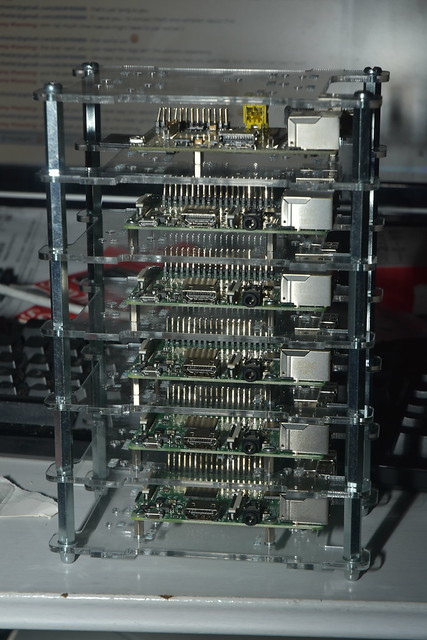
I got myself a bunch of Raspberry Pi 3s a short while ago: Stack of Raspberry Pis ...the idea being that I can use those to run a few experiments on. After the experiment, I would need to be able to somehow remove the stuff that I put on them again. The most obvious way to do that is to reimage them after every experiment; but the one downside of the multi-pi cases that I've put them in is that removing the micro-SD cards from the Pis without removing them from the case, while possible, is somewhat fiddly. That, plus the fact that I cared more about price than about speed when I got the micro-SD cards makes "image all the cards of these Raspberry Pis" something I don't want to do every day. So I needed a different way to reset them to a clean state, and I decided to use ansible to get it done. It required a bit of experimentation, but eventually I came up with this:
---
- name: install package-list fact
  hosts: all
  remote_user: root
  tasks:
  - name: install libjson-perl
    apt:
      pkg: libjson-perl
      state: latest
  - name: create ansible directory
    file:
      path: /etc/ansible
      state: directory
  - name: create facts directory
    file:
      path: /etc/ansible/facts.d
      state: directory
  - name: copy fact into ansible facts directory
    copy:
      dest: /etc/ansible/facts.d/allowclean.fact
      src: allowclean.fact
      mode: 0755
- name: remove extra stuff
  hosts: pis
  remote_user: root
  tasks:
  - apt: pkg=  item   state=absent purge=yes
    with_items: "  ansible_local.allowclean.cleanable_packages  "
- name: remove package facts
  hosts: pis
  remote_user: root
  tasks:
  - file:
      path: /etc/ansible/facts.d
      state: absent
  - apt:
      pkg: libjson-perl
      state: absent
      autoremove: yes
      purge: yes
This ansible playbook has three plays. The first play installs a custom ansible fact (written in perl) that emits a json file which defines cleanable_packages as a list of packages to remove. The second uses that fact to actually remove those packages; and the third removes the fact (and the libjson-perl library we used to produce the JSON). Which means, really, that all the hard work is done inside the allowclean.fact file. That looks like this:
#!/usr/bin/perl
use strict;
use warnings;
use JSON;
open PACKAGES, "dpkg -l ";
my @packages;
my %whitelist = (
    ...
);
while(<PACKAGES>)  
    next unless /^ii\s+(\S+)/;
    my $pack = $1;
    next if(exists($whitelist $pack ));
    if($pack =~ /(.*):armhf/)  
        $pack = $1;
     
    push @packages, $1;
 
my %hash;
$hash cleanable_packages  = \@packages;
print to_json(\%hash);
Basically, we create a whitelist, and compare the output of dpkg -l against that whitelist. If a certain package is in the whitelist, then we don't add it to our "packages" list; if it isn't, we do. The whitelist is just a list of package => 1 tuples. We just need the hash keys and don't care about the data, really; I could equally well have made it package => undef, I suppose, but whatever. Creating the whitelist is not that hard. I did it by setting up one raspberry pi to the minimum that I wanted, running
dpkg -l awk '/^ii/ print "\t\""$2"\" => 1," ' > packagelist
and then adding the contents of that packagelist file in place of the ... in the above perl script. Now whenever we apply the ansible playbook above, all packages (except for those in the whitelist) are removed from the system. Doing the same for things like users and files is left as an exercise to the reader. Side note: ... is a valid perl construct. You can write it, and the compiler won't complain. You can't run it, though.

31 January 2017

Chris Lamb: Free software activities in January 2017

Here is my monthly update covering what I have been doing in the free software world (previous month):
Reproducible builds

Whilst anyone can inspect the source code of free software for malicious flaws, most software is distributed pre-compiled to end users. The motivation behind the Reproducible Builds effort is to permit verification that no flaws have been introduced either maliciously or accidentally during this compilation process by promising identical results are always generated from a given source, thus allowing multiple third-parties to come to a consensus on whether a build was compromised. (I have previously been awarded a grant from the Core Infrastructure Initiative to fund my work in this area.) This month I:
I also made the following changes to our tooling:
diffoscope

diffoscope is our in-depth and content-aware diff utility that can locate and diagnose reproducibility issues.

  • Comparators:
    • Display magic file type when we know the file format but can't find file-specific details. (Closes: #850850).
    • Ensure our "APK metadata" file appears first, fixing non-deterministic tests. (998b288)
    • Fix APK extration with absolute filenames. (Closes: #850485).
    • Don't error if directory containing ELF debug symbols already exists. (Closes: #850807).
    • Support comparing .ico files (Closes: #850730).
    • If we don't have a tool (eg. apktool), don't blow up when attempting to unpack it.
  • Output formats:
    • Add Markdown output format. (Closes: #848141).
    • Add RestructuredText output format.
    • Use an optimised indentation routine throughout all presenters.
    • Move text presenter to use the Visitor pattern.
    • Correctly escape value of href="" elements (re. #849411).
  • Tests:
    • Prevent FTBFS by loading fixtures as UTF-8 in case surrounding terminal is not Unicode-aware. (Closes: #852926).
    • Skip tests if binutils can't handle the object file format. (Closes: #851588).
    • Actually compare the output of text/ReST/Markdown formats to fixtures.
    • Add tests for: Comparing two empty directories, HTML output, image.ICOImageFile, --html-dir, --text-color & no arguments (beyond the filenames) emits the text output.
  • Profiling:
    • Count the number of calls, not just the total time.
    • Skip as much profiling overhead when not enabled for a ~2% speedup.
  • Misc:
    • Alias an expensive Config() lookup for a 10% optimisation.
    • Avoid expensive regex creation until we actually need it, speeding up diff parsing by 2X.
    • Use Pythonic logging functions based on __name__, etc.
    • Drop milliseconds from logging output.

buildinfo.debian.net

buildinfo.debian.net is my experiment into how to process, store and distribute .buildinfo files after the Debian archive software has processed them.

  • Store files directly onto S3.
  • Drop big unique_together index to save disk space.
  • Show SHA256 checksums where space permits.


Debian LTS

This month I have been paid to work 12.75 hours on Debian Long Term Support (LTS). In that time I did the following:
  • "Frontdesk" duties, triaging CVEs, etc.
  • Issued DLA 773-1 for python-crypto fixing a vulnerability where calling AES.new with an invalid parameter could crash the Python interpreter.
  • Issued DLA 777-1 for libvncserver addressing two heap-based buffer overflow attacks based on invalid FramebufferUpdate data.
  • Issued DLA 778-1 for pcsc-lite correcting a use-after-free vulnerability.
  • Issued DLA 795-1 for hesiod which fixed a weak SUID check as well as removed the hard-coding of a fallback domain if the configuration file could not be found.
  • Issued DLA 810-1 for libarchive fixing a heap buffer overflow.

Uploads
  • python-django:
    • 1:1.10.5-1 New upstream stable release.
    • 1:1.11~alpha1-1 New upstream experimental release.
  • gunicorn (19.6.0-10) Moved debian/README.Debian to debian/NEWS so that the recent important changes will be displayed to users when upgrading to stretch.
  • redis:
    • 3:3.2.6-2 & 4:4.0-rc2-2 Tidy patches and rename RunTimeDirectory to RuntimeDirectory in .service files. (Closes: #850534)
    • 3:3.2.6-3 Remove a duplicate redis-server binary by symlinking /usr/bin/redis-check-rdb. This was found by the dedup service.
    • 3:3.2.6-4 Expand the documentation in redis-server.service and redis-sentinel.service regarding the default hardening options and how, in most installations, they can be increased.
    • 3:3.2.6-5, 3:3.2.6-6, 4:4.0-rc2-3 & 4:4.0-rc2-4 Add taskset calls to try and avoid build failures due to parallelism in upstream test suite.

I also made the following non-maintainer uploads:
  • cpio:
    • 2.12+dfsg-1 New upstream release (to experimental), refreshing all patches, etc.
    • 2.12+dfsg-2 Add missing autoconf to Build-Depends.
  • xjump (2.7.5-6.2) Make the build reproducible by passing -n to gzip calls in debian/rules. (Closes: #777354)
  • magicfilter (1.2-64.1) Make the build reproducible by passing -n to gzip calls in debian/rules. (Closes: #777478)


30 January 2017

Shirish Agarwal: Different strokes

Delhi Metro - courtesy wikipedia.org Statutory warning It s a long read. I start by sharing I regret, I did not hold onto the Budget and Economics 101 blog post for one more day. I had been holding/thinking on to it for almost couple of weeks before posting, if I had just waited a day more, I would have been able to share an Indian Express story . While I thought that the work for the budget starts around 3 months before the budget, I came to learn from that article that it takes 6 months. As can be seen in the article, it is somewhat of a wasted opportunity, part of it probably due to the Government (irrespective of any political party, dynasty etc.) mismanagement. What has not been stated in the article is what I had shared earlier, reading between the lines, it seems that the Government isn t able to trust what it hears from its advisers and man on the street. Unlike Chanakya and many wise people before him who are credited with advising about good governance, that a good king is one who goes out in disguise, learns how his/er subjects are surviving, seeing what ills them and taking or even not taking corrective steps after seeing the problem from various angles. Of course it s easier said then done, though lot of Indian kings did try and ran successful provinces. There were also some who were more interested in gambling, women and threw/frittered away their kingdoms. The 6-month things while not being said in the Express article is probably more about checking and re-checking figures and sources to make sure they are able to read whatever pattern the various Big Businesses, Industry, Social Welfare schemes and people are saying I guess. And unless mass digitalization as well as overhaul of procedures, Right to Information (RTI) happens, don t see any improvement in the way the information is collected, interpreted and shared with the public at large. It would also require people who are able to figure out how things work sharing the inferences (right or wrong) through various media so there is discussion about figures and policy-making. Such researchers and their findings are sadly missing in Indian public discourses and only found in glossy coffee table books :(. One of the most basic question for instance is, How much of any policy should be based on facts and figures and how much giving fillip to products and services needed in short to medium term ? Also how much morality should play a part in Public Policy ? Surprisingly, or probably not, most Indian budgets are populist by nature with some scientific basis but most of the times there is no dialog about how the FM came to some conclusion or Policy-making. I am guessing a huge part of that has also to do with basic illiteracy as well as Economic and Financial Illiteracy. Just to share a well-known world-over example, one of the policies where the Government of India has been somewhat lethargic is wired broadband penetration. As have shared umpteen times, while superficially broadband penetration is happening, most of the penetration is the unreliable and more expensive mobile broadband penetration. While this may come as a shock to many of the users of technology, BSNL, a Government company who provides broadband for almost 70-80% of the ADSL wired broadband subscribers gives 50:1 contention ratio to its customers. One can now understand the pathetic speeds along with very old copper wiring (20 odd years) on which the network is running. The idea/idiom of running network using duct-tape seems pretty apt in here  Now, the Government couple of years ago introduced FFTH Fiber-to-the-home but because the charges are so high, it s not going anywhere. The Government could say 10% discount in your Income Tax rates if you get FFTH. This would force people to get FFTH and would also force BSNL to clean up its act. It has been documented that a percentage increase in broadband equals a similar percentage rise in GDP. Having higher speeds of broadband would mean better quality of streaming video as well as all sorts of remote teaching and sharing of ideas which will give a lot of fillip to all sorts of IT peripherals in short, medium and long-term as well. Not to mention, all the software that will be invented/coded to take benefit of all that speed. Although, realistically speaking I am cynical that the Government would bring something like this  Moving on Behind a truck - Courtesy TheEconomist.com Another interesting story which I had shared was a bit about World History Now the Economist sort of confirmed how things are in Pakistan. What is and was interesting that the article is made by a politically left-leaning magazine which is for globalization, business among other things . So, there seem to be only three options, either I and the magazine are correct or we both are reading it wrong. The third and last option is that the United States realize that Pakistan can no longer be trusted as Pakistan is siding more and more with Chinese and Russians, hence the article. Atlhough it seems a somewhat far-fetched idea as I don t see the magazine getting any brownie points with President Trump. Unless, The Economist becomes more hawkish, more right-wingish due to the new establishment. I can t claim to have any major political understanding or expertise but it does seem that Pakistan is losing friends. Even UAE have been cautiously building bridges with us. Now how this will play out in the medium to long-term depends much on the personal equations of the two heads of state, happenings in geopolitics around the world and the two countries, decisions they take, it is a welcome opportunity as far they (the Saudis) have funds they want to invest and India can use those investments to make new infrastructure. Now, I need a bit of help of Java and VCS (Version control system) experts . There is a small game project called Mars-Sim. I asked probably a few more questions than I should have and the result was that I was made a member of the game team even though I had shared with them that I m a non-coder. I think such a game is important as it s foss. Both the game itself is foss as well as its build-tools with a basic wiki. Such a game would be useful not only to Debian but all free software distributions. Journeying into the game Unfortunately, the game as it is currently, doesn t work with openjdk8 but private conversations with the devs. have shared they will work on getting it to work on OpenJDK 9 which though is sometime away. Now as it is a game, I knew it would have multiple multimedia assets. It took me quite sometime to figure out where most of the multimedia assets are. I was shocked to find that there aren t any tool/s in Debian as well a GNU/Linux to know about types of content is there inside a directory and its sub-directories. I framed it in a query and found a script as an answer . I renamed the script to file-extension-information.sh (for lack of imagination of better name). After that, I downloaded a snapshot of the head of the project from https://sourceforge.net/p/mars-sim/code/HEAD/tree/ where it shows a link to download the snapshot. https://sourceforge.net/code-snapshots/svn/m/ma/mars-sim/code/mars-sim-code-3847-trunk.zip unzipped it and then ran the script on it [$] bash file-extension-information.sh mars-sim-code-3846-trunk
theme: 1770
dtd: 31915
py: 10815
project: 5627
JPG: 762476
fxml: 59490
vm: 876
dat: 15841044
java: 13052271
store: 1343
gitignore: 8
jpg: 3473416
md: 5156
lua: 57
gz: 1447
desktop: 281
wav: 83278
1: 2340
css: 323739
frag: 471
svg: 8948591
launch: 9404
index: 11520
iml: 27186
png: 3268773
json: 1217
ttf: 2861016
vert: 712
ogg: 12394801
prefs: 11541
properties: 186731
gradle: 611
classpath: 8538
pro: 687
groovy: 2711
form: 5780
txt: 50274
xml: 794365
js: 1465072
dll: 2268672
html: 1676452
gif: 38399
sum: 23040
(none): 1124
jsx: 32070
It gave me some idea of what sort of file were under the repository. I do wish the script defaulted to showing file-sizes in KB if not MB to better assess how the directory is made up but not a big loss . The above listing told me that at the very least theme, JPG, dat, wav, png, ogg and lastly gif files. For lack of better tools and to get an overview of where those multimedia assets used ncdu [shirish@debian] - [~/games/mars-sim-code-3846-trunk] - [10210]
[$] ncdu mars-sim/
--- /home/shirish/games/mars-sim-code-3846-trunk/mars-sim --------------------------------------------------------------------------------------
46.2 MiB [##########] /mars-sim-ui
15.2 MiB [### ] /mars-sim-mapdata
8.3 MiB [# ] /mars-sim-core
2.1 MiB [ ] /mars-sim-service
500.0 KiB [ ] /mars-sim-main
188.0 KiB [ ] /mars-sim-android
72.0 KiB [ ] /mars-sim-network
16.0 KiB [ ] pom.xml
12.0 KiB [ ] /.settings
4.0 KiB [ ] mars-sim.store
4.0 KiB [ ] mars-sim.iml
4.0 KiB [ ] .project
I found that all the media is distributed randomly and posted a ticket about it. As I m not even a java newbie, could somebody look at mokun s comment and help out please ? On the same project, there has been talk of migrating to github.com Now whatever little I know of git, it makes a copy of the whole repository under .git/ folder/directory so having multimedia assets under git is a bad, bad idea, as each multimedia binary format file would be unique and no possibility of diff. between two binary files even though they may be the same file with some addition or subtraction from earlier version. I did file a question but am unhappy with the answers given. Can anybody give some definitive answers if they have been able to do how I am proposing , if yes, how did they go about it ? And lastly Immigrants of the United States in 2000 by country of birth America was founded by immigrants. Everybody knows the story about American Indians, the originals of the land were over-powered by the European settlers. So any claim, then and now that immigration did not help United States is just a lie. This came due to a conversation on #debconf by andrewsh
[18:37:06] I d be more than happy myself to apply for an US tourist not transit visa when I really need it, as a transit visa isn t really useful, is just as costly as a tourist visa, and nearly as difficult to get as a tourist visa
[18:37:40] I m not entirely sure I wish to transit through the US in its Trumplandia incarnation either
[18:38:07] likely to be more difficult and unfun
FWIW I am in complete agreement with Andrew s assessment of how it might be with foreigners. It has been on my mind and thoughts for quite some time although andrewsh put it eloquently. But as always I m getting ahead of myself. The conversation is because debconf this year would be in Canada. For many a cheap flight, one of the likely layovers/stopover can be the United States. I actually would have gone one step further, even if it was cheap transit visa, it would equally be unfun as it would discriminate. About couple of years back, a friend of mine while explaining what visa is, put it rather succinctly the visa officer looks at only 3 things a. Your financial position something which tells that you can take care of your financial needs if things go south b. You are not looking to settle there unlawfully c. You are not a criminal. While costs do matter, what is disturbing more is the form of extremism being displayed therein. While Indians from the South Asian continent in US have been largely successful, love to be in peace (one-off incidents do and will happen anywhere) if I had to take a transit or tourist visa in this atmosphere, it would leave a bad taste in the mouth. When one of my best friends is a Muslim, 20% of the population in India is made of Muslims and 99% of the time both of us co-exist in peace I simply can t take any alternative ideology. Even in Freakonomics 2.0 the authors when they shared that it s less than 0.1 percent of Muslims who are engaged in terrorist activities, if they were even 1 percent than all the world s armed forces couldn t fight them and couldn t keep anyone safe. Which simply means that 99.99% of even all Muslims are good. This resonates strongly with me for number of reasons. One of my uncles in early to late 80 s had an opportunity for work to visit Russia for official work. He went there and there were Secret Police after him all the time. While he didn t know it, I later read it, that it was SOP (Standard Operating Procedure) when all and any foreigners came visiting the country, and not just foreigners, they had spies for their own citizens. Russka a book I read several years ago explained the paranoia beautifully. While U.S. in those days was a more welcoming place for him. I am thankful as well as find it strange that Canada and States have such different visa procedures. While Canada would simply look at the above things, probably discreetly inquire about you if you have been a bad boy/girl in any way and then make a decision which is fine. For United States, even for a transit visa I probably would have to go to Interview where my world view would probably be in conflict with the current American world view. Interestingly, while I was looking at conversations on the web and one thing that is missing there is that nobody has talked about intelligence community. What Mr. Trump is saying in not so many words is that our intelligence even with all the e-mails we monitor and everything we do, we still can t catch you. It almost seems like giving a back-handed compliment to the extremists saying you do a better job than our intelligence community. This doesn t mean that States doesn t have interesting things to give to the world, Star Trek conventions, Grand Canyon (which probably would require me more than a month or more to explore even a little part), NASA, Intel, AMD, SpaceX, CES (when it s held) and LPC (Linux Plumber s conference where whose who come to think of roadmap for GNU/Linux). What I wouldn t give to be a fly in the wall when LPC, CES happens in the States. What I actually found very interesting is that in the current Canadian Government, if what I read and heard is true, then Justin Trudeau, the Prime Minister of Canada made 50 of his cabinet female. Just like in the article, studies even in Indian parliament have shown that when women are in power, questions about social justice, equality, common good get asked and policies made. If I do get the opportunity to be part of debconf, I would like to see, hear, watch, learn how the women cabinet is doing things. I am assuming that reporting and analysis standards of whatever decisions are more transparent and more people are engaged in the political process to know what their elected representatives are doing. Mountain biking in British Columbia, Canada - source wikipedia.org One another interesting point I came to know is that Canada is home to bicycling paths. While I stopped bicycling years ago  as it has been becoming more and more dangerous to bicycle here in Pune as there is no demarcation for cyclists, I am sure lot of Canadians must be using this opportunity fully. Lastly, on the debconf preparation stage, things have started becoming a bit more urgent and hectic. From a monthly IRC meet, it has now become a weekly meet. Both the wiki and the website are slowly taking up shape. http://deb.li/dc17kbp is a nice way to know/see progress of the activities happening . One important decision that would be taken today is where people would stay during debconf. There are options between on-site and two places around the venue, one 1.9 km around, the other 5 km. mark. Each has its own good and bad points. It would be interesting to see which place gets selected and why.
Filed under: Miscellenous Tagged: #budget, #Canada, #debconf organization, #discrimination, #Equal Opportunity, #Fiber, #svn, #United States, #Version Control, Broadband, Git, Pakistan, Subversion

18 January 2017

Norbert Preining: Debian/TeX Live January 2017

As the freeze of the next release is closing in, I have updated a bunch of packages around TeX: All of the TeX Live packages (binaries and arch independent ones) and tex-common. I might see whether I get some updates of ConTeXt out, too.

texlive2016-debian The changes in the binaries are mostly cosmetic: one removal of a non-free (unclear-free) file, and several upstream patches got cherrypicked (dvips, tltexjp contact email, upmendex, dvipdfmx). I played around with including LuaTeX v1.0, but that breaks horribly with the current packages in TeX Live, so I refrained from it. The infrastructure package tex-common got a bugfix for updates from previous releases, and for the other packages there is the usual bunch of updates and new packages. Enjoy! New packages arimo, arphic-ttf, babel-japanese, conv-xkv, css-colors, dtxdescribe, fgruler, footmisx, halloweenmath, keyfloat, luahyphenrules, math-into-latex-4, mendex-doc, missaali, mpostinl, padauk, platexcheat, pstring, pst-shell, ptex-fontmaps, scsnowman, stanli, tinos, undergradmath, yaletter. Updated packages acmart, animate, apxproof, arabluatex, arsclassica, babel-french, babel-russian, baskervillef, beamer, beebe, biber, biber.x86_64-linux, biblatex, biblatex-apa, biblatex-chem, biblatex-dw, biblatex-gb7714-2015, biblatex-ieee, biblatex-philosophy, biblatex-sbl, bidi, calxxxx-yyyy, chemgreek, churchslavonic, cochineal, comicneue, cquthesis, csquotes, ctanify, ctex, cweb, dataref, denisbdoc, diagbox, dozenal, dtk, dvipdfmx, dvipng, elocalloc, epstopdf, erewhon, etoolbox, exam-n, fbb, fei, fithesis, forest, glossaries, glossaries-extra, glossaries-french, gost, gzt, historische-zeitschrift, inconsolata, japanese-otf, japanese-otf-uptex, jsclasses, latex-bin, latex-make, latexmk, lt3graph, luatexja, markdown, mathspec, mcf2graph, media9, mendex-doc, metafont, mhchem, mweights, nameauth, noto, nwejm, old-arrows, omegaware, onlyamsmath, optidef, pdfpages, pdftools, perception, phonrule, platex-tools, polynom, preview, prooftrees, pst-geo, pstricks, pst-solides3d, ptex, ptex2pdf, ptex-fonts, qcircuit, quran, raleway, reledmac, resphilosophica, sanskrit, scalerel, scanpages, showexpl, siunitx, skdoc, skmath, skrapport, smartdiagram, sourcesanspro, sparklines, tabstackengine, tetex, tex, tex4ht, texlive-scripts, tikzsymbols, tocdata, uantwerpendocs, updmap-map, uplatex, uptex, uptex-fonts, withargs, wtref, xcharter, xcntperchap, xecjk, xellipsis, xepersian, xint, xlop, yathesis.

Dirk Eddelbuettel: RProtoBuf 0.4.8: Windows support for proto3

Issue ticket #20 demonstrated that we had not yet set up Windows for version 3 of Google Protocol Buffers ("Protobuf") -- while the other platforms support it. So I made the change, and there is release 0.4.8. RProtoBuf provides R bindings for the Google Protocol Buffers ("Protobuf") data encoding and serialization library used and released by Google, and deployed as a language and operating-system agnostic protocol by numerous projects. The NEWS file summarises the release as follows:

Changes in RProtoBuf version 0.4.8 (2017-01-17)
  • Windows builds now use the proto3 library as well (PR #21 fixing #20)

CRANberries also provides a diff to the previous release. The RProtoBuf page has an older package vignette, a 'quick' overview vignette, a unit test summary vignette, and the pre-print for the JSS paper. Questions, comments etc should go to the GitHub issue tracker off the GitHub repo.

This post by Dirk Eddelbuettel originated on his Thinking inside the box blog. Please report excessive re-aggregation in third-party for-profit settings.

11 January 2017

Reproducible builds folks: Reproducible Builds: week 89 in Stretch cycle

What happened in the Reproducible Builds effort between Sunday January 1 and Saturday January 7 2017: GSoC and Outreachy updates Toolchain development Packages reviewed and fixed, and bugs filed Chris Lamb: Dhole: Reviews of unreproducible packages 13 package reviews have been added, 4 have been updated and 6 have been removed in this week, adding to our knowledge about identified issues. 2 issue types have been added/updated: Upstreaming of reproducibility fixes Merged: Opened: Weekly QA work During our reproducibility testing, the following FTBFS bugs have been detected and reported by: diffoscope development diffoscope 67 was uploaded to unstable by Chris Lamb. It included contributions from :
[ Chris Lamb ]
* Optimisations:
  - Avoid multiple iterations over archive by unpacking once for an ~8X
    runtime optimisation.
  - Avoid unnecessary splitting and interpolating for a ~20X optimisation
    when writing --text output.
  - Avoid expensive diff regex parsing until we need it, speeding up diff
    parsing by 2X.
  - Alias expensive Config() in diff parsing lookup for a 10% optimisation.
* Progress bar:
  - Show filenames, ELF sections, etc. in progress bar.
  - Emit JSON on the the status file descriptor output instead of a custom
    format.
* Logging:
  - Use more-Pythonic logging functions and output based on __name__, etc.
  - Use Debian-style "I:", "D:" log level format modifier.
  - Only print milliseconds in output, not microseconds.
  - Print version in debug output so that saved debug outputs can standalone
    as bug reports.
* Profiling:
  - Also report the total number of method calls, not just the total time.
  - Report on the total wall clock taken to execute diffoscope, including
    cleanup.
* Tidying:
  - Rename "NonExisting" -> "Missing".
  - Entirely rework diffoscope.comparators module, splitting as many separate
    concerns into a different utility package, tidying imports, etc.
  - Split diffoscope.difference into diffoscope.diff, etc.
  - Update file references in debian/copyright post module reorganisation.
  - Many other cleanups, etc.
* Misc:
  - Clarify comment regarding why we call python3(1) directly. Thanks to J r my
    Bobbio <lunar@debian.org>.
  - Raise a clearer error if trying to use --html-dir on a file.
  - Fix --output-empty when files are identical and no outputs specified.
[ Reiner Herrmann ]
* Extend .apk recognition regex to also match zip archives (Closes: #849638)
[ Mattia Rizzolo ]
* Follow the rename of the Debian package "python-jsbeautifier" to
  "jsbeautifier".
[ siamezzze ]
* Fixed no newline being classified as order-like difference.
reprotest development reprotest 0.5 was uploaded to unstable by Chris Lamb. It included contributions from:
[ Ximin Luo ]
* Stop advertising variations that we're not actually varying.
  That is: domain_host, shell, user_group.
* Fix auto-presets in the case of a file in the current directory.
* Allow disabling build-path variations. (Closes: #833284)
* Add a faketime variation, with NO_FAKE_STAT=1 to avoid messing with
  various buildsystems. This is on by default; if it causes your builds
  to mess up please do file a bug report.
* Add a --store-dir option to save artifacts.
Other contributions (not yet uploaded): reproducible-builds.org website development tests.reproducible-builds.org Misc. This week's edition was written by Chris Lamb, Holger Levsen and Vagrant Cascadian, reviewed by a bunch of Reproducible Builds folks on IRC & the mailing lists.

9 January 2017

Shirish Agarwal: The Great Indian Digital Tamasha

Indian Railways This is an extension to last month s article/sharing where I had shared the changes that had transpired in the last 2-3 months. Now am in a position to share the kind of issues a user can go through in case he is looking for support from IRCTC to help him/her go cashless. If you a new user to use IRCTC services you wouldn t go through this trouble. For those who might have TL;DR issues it s about how hard it can become to get digital credentials fixed in IRCTC (Indian Railway Catering and Tourism Corporation) a. 2 months back Indian Prime Minister gave a call incentivizing people to use digital means to do any commercial activities. One of the big organizations which took/takes part is IRCTC which handles the responsibility for e-ticketing millions of Rail tickets for common people. In India, a massive percentage moves by train as it s cheaper than going by Air. A typical fare from say Pune Delhi (capital of India) by second class sleeper would be INR 645/- for a distance of roughly 1600 odd kms and these are monopoly rates, there are no private trains and I m not suggesting anything of that sort, just making sure that people know. An economy class ticket by Air for the same distance would be anywhere between INR 2500-3500/- for a 2 hour flight between different airlines. Last I checked there are around 8 mainstream airlines including flag-carrier Air India. About 30% of the population live on less than a dollar and a half a day which would come around INR 100/-. There was a comment some six months back on getting more people out of the poverty line. But as there are lots of manipulations in numbers for who and what denotes above poor and below poor in India and lot of it has to do with politics it s not something which would be easily fixable. There are lots to be said in that arena but this article is not an appropriate blog-post for that. All in all, it s only 3-5% of the population at the most who can travel via Air if situation demands and around 1-2% who might be frequent, business or leisure travellers. Now while I can thankfully afford an Air Ticket if the situation so demands, my mother gets motion sickness so while together we can only travel by train. b. With the above background, I had registered with IRCTC few years ago with another number (dual-SIM) I had purchased and was thinking that I would be using this long-term (seems to my first big mistake, hindsight 50:50) . This was somewhere in 2006/2007. c. Few months later I found that the other service provider wasn t giving good service or was not upto mark. I was using IDEA (the main mobile operator) throughout those times. d. As I didn t need the service that much, didn t think to inform them that I want to change to another service provider at that point in time (possibly the biggest mistake, hindsight 50:50) e. In July 2016 itself IRCTC cut service fees, f. This was shared as a NEW news item/policy decision at November-end 2016 . g. While I have done all that has been asked by irctc-care haven t still got the issues resolved  IRCTC s e-mail id care@irctc.co.in Now in detail This is my first e-mail sent to IRCTC in June 2016
Dear Customer care, I had applied and got username and password sometime back . The
number I had used to register with IRCTC was xxxxxxxxxx (BSNL mobile number not used anymore) . My mobile was lost and along with that the number was also lost. I had filed a complaint with the police and stopped that number as well. Now I have an another mobile number but have forgotten both the password and the security answer that I had given when I had registered . I do have all the conversations I had both with the ticketadmn@irctc.co.in as well as care@irctc.co.in if needed to prove my identity. The new number I want to tie it with is xxxxxxxxxx (IDEA number in-use for last 10 years) I see two options :- a. Tie the other number with my e-mail address b. Take out the e-mail address from the database so that I can fill in
as a new applicant. Looking forward to hear from you.
There was lot of back and forth with various individuals on IRCTC and after a lot of back and forth, this is the final e-mail I got from them somewhere in August 2016, he writes
Dear Customer, We request you to send mobile bill of your mobile number if it is post paid or if it is prepaid then contact to your service provider and they will give you valid proof of your mobile number or they will give you in written on company head letter so that we may update your mobile number to update so that you may reset your password through mobile OTP.
and Kindly inform you that you can update your profile by yourself also. 1.login on IRCTC website
2.after login successfully move courser on my profile tab.
3.then click on update profile
4.re-enter your password then you can update your profile
5.click on user-profile then email id.
6. click on update. Still you face any problem related to update profile please revert to us with the screen shots of error message which you will get at the time of update profile . Thanks & Regards Parivesh Patel
Executive, Customer Care
care@irctc.co.in
http://www.irctc.co.in
[#3730034]
IRCTC s response seemed responsible, valid and thought it would be a cake-walk as private providers are supposed to be much more efficient than public ones. The experience proved how wrong was I trust them with doing the right thing 1. First I tried the twitter handle to see how IDEA uses their twitter handle. 2. The idea customer care twitter handle was mild in its response. 3. After sometime I realized that the only way out of this quagmire would perhaps be to go to a brick-mortar shop and get it resolved face-to-face. I went twice or thrice but each time something or the other would happen. On the fourth and final time, I was able to get to the big Official shop only to be told they can t do anything about this and I would have to the appellate body to get the reply. The e-mail address which they shared (and I found it later) was wrong. I sent a somewhat longish e-mail sharing all the details and got bounce-backs. The correct e-mail address for the IDEA Maharashtra appellate body is appellette.mh@idea.aditybirla.com I searched online and after a bit of hit and miss finally got the relevant address. Then finally on 30th December, 2016 wrote a short email to the service provider as follows
Dear Sir,
I have been using prepaid mobile connection number xxxxxxx taken from IDEA for last 10 odd years. I want to register myself with IRCTC for online railway booking using
my IDEA mobile number. Earlier, I was having a BSNL connection which I discontinued 4 years back, For re-registering myself with IRCTC, I have to fulfill their latest
requirements as shown in the email below . It is requested that I please be issued a letter confirming my
credentials with your esteemed firm. I contacted your local office at corner of Law College Road and
Bhandarkar Road, Pune (reference number Q1 84786060793) who
refused to provide me any letter and have advised me to contact on the
above e-mail address, hence this request is being forwarded to you. Please do the needful at your earliest.
Few days later I got this short e-mail from them
Dear Customer, Greetings for the day! This is with reference to your email regarding services. Please accept our apologies for the inconvenience caused to you and delay in response. We regret to inform you that we are unable to provide demographic details from our end as provision for same is not available with us. Should you need any further assistance, please call our Customer Service help line number 9822012345 or email us at customercare@idea.adityabirla.com by mentioning ten digit Idea mobile number in subject line. Thanks & Regards, Javed Khan Customer Service Team IDEA Cellular Limited- Maharashtra & Goa Circle.
Now I was at almost my wit s end. Few days before, I had re-affirmed my e-mail address to IDEA . I went to the IDEA care site, registered with my credentials. While the https connection to the page is weak, but let s not dwell on that atm. I logged into the site, I went through all the drop-down menus and came across My Account > Raise a request link which I clicked on . This came to a page where I could raise requests for various things. One of the options given there was Bill Delivery. As I wasn t a postpaid user but a prepaid user didn t know if that would work or not I still clicked on it. It said it would take 4 days for that to happen. I absently filed it away as I was somewhat sure that nothing would happen from my previous experience with IDEA. But this time the IDEA support staff came through and shared a toll-free SMS number and message format that I could use to generate call details from the last 6 months. The toll-free number from IDEA is 12345 and the message format is EBILL MON (short-form for month so if it s January would be jan, so on and so forth). After gathering all the required credentials, sent my last mail to IRCTC about a week, 10 days back
Dear Mr. Parivesh Patel, I was out-of-town and couldn t do the needful so sorry for the delay.
Now that I m back in town, I have been able to put together my prepaid
bills of last 6 months which should make it easy to establish my
identity. As had shared before, I don t remember my old password and the old
mobile number (BSNL number) is no longer accessible so can t go
through that route. Please let me know the next steps in correcting the existing IRCTC
account (which I haven t operated ever) so I can start using it to
book my tickets. Look forward to hearing from you.
Haven t heard anything them from them, apart from a generated token number, each time you send a reply happens. This time it was #4763548 The whole sequence of events throws a lot of troubling questions a. Could IRCTC done a better job of articulating their need to me instead of the run-around I was given ? b. Shouldn t there be a time limit to accounts from which no transactions have been done ? I hadn t done a single transaction since registering. When cell service providers including BSNL takes number out after a year of not using a number, why is that account active for so long ? c. As that account didn t have OTP at registration, dunno if it s being used for illegal activities or something. Update This doesn t seem to be a unique thing at all. Just sampling some of the tweets by people at @IRCTC_LTD https://twitter.com/praveen4al/status/775614978258718721 https://twitter.com/vis_nov25/status/786062572390932480 https://twitter.com/ShubhamDevadiya/status/794241443950948352 https://twitter.com/rajeshhindustan/status/798028633759584256 https://twitter.com/ameetsangita/status/810081624343908352 https://twitter.com/grkisback/status/813733835213078528 https://twitter.com/gbalaji_/status/804230235625394177 https://twitter.com/chandhu_nr/status/800675627384721409 , all of this just goes to show how un-unique the situation really is.
Filed under: Miscellenous Tagged: #customer-service, #demonetization, #IDEA-aditya birla, #IRCTC, #web-services, rant

Petter Reinholdtsen: Where did that package go? geolocated IP traceroute

Did you ever wonder where the web trafic really flow to reach the web servers, and who own the network equipment it is flowing through? It is possible to get a glimpse of this from using traceroute, but it is hard to find all the details. Many years ago, I wrote a system to map the Norwegian Internet (trying to figure out if our plans for a network game service would get low enough latency, and who we needed to talk to about setting up game servers close to the users. Back then I used traceroute output from many locations (I asked my friends to run a script and send me their traceroute output) to create the graph and the map. The output from traceroute typically look like this:
traceroute to www.stortinget.no (85.88.67.10), 30 hops max, 60 byte packets
 1  uio-gw10.uio.no (129.240.202.1)  0.447 ms  0.486 ms  0.621 ms
 2  uio-gw8.uio.no (129.240.24.229)  0.467 ms  0.578 ms  0.675 ms
 3  oslo-gw1.uninett.no (128.39.65.17)  0.385 ms  0.373 ms  0.358 ms
 4  te3-1-2.br1.fn3.as2116.net (193.156.90.3)  1.174 ms  1.172 ms  1.153 ms
 5  he16-1-1.cr1.san110.as2116.net (195.0.244.234)  2.627 ms he16-1-1.cr2.oslosda310.as2116.net (195.0.244.48)  3.172 ms he16-1-1.cr1.san110.as2116.net (195.0.244.234)  2.857 ms
 6  ae1.ar8.oslosda310.as2116.net (195.0.242.39)  0.662 ms  0.637 ms ae0.ar8.oslosda310.as2116.net (195.0.242.23)  0.622 ms
 7  89.191.10.146 (89.191.10.146)  0.931 ms  0.917 ms  0.955 ms
 8  * * *
 9  * * *
[...]
This show the DNS names and IP addresses of (at least some of the) network equipment involved in getting the data traffic from me to the www.stortinget.no server, and how long it took in milliseconds for a package to reach the equipment and return to me. Three packages are sent, and some times the packages do not follow the same path. This is shown for hop 5, where three different IP addresses replied to the traceroute request. There are many ways to measure trace routes. Other good traceroute implementations I use are traceroute (using ICMP packages) mtr (can do both ICMP, UDP and TCP) and scapy (python library with ICMP, UDP, TCP traceroute and a lot of other capabilities). All of them are easily available in Debian. This time around, I wanted to know the geographic location of different route points, to visualize how visiting a web page spread information about the visit to a lot of servers around the globe. The background is that a web site today often will ask the browser to get from many servers the parts (for example HTML, JSON, fonts, JavaScript, CSS, video) required to display the content. This will leak information about the visit to those controlling these servers and anyone able to peek at the data traffic passing by (like your ISP, the ISPs backbone provider, FRA, GCHQ, NSA and others). Lets pick an example, the Norwegian parliament web site www.stortinget.no. It is read daily by all members of parliament and their staff, as well as political journalists, activits and many other citizens of Norway. A visit to the www.stortinget.no web site will ask your browser to contact 8 other servers: ajax.googleapis.com, insights.hotjar.com, script.hotjar.com, static.hotjar.com, stats.g.doubleclick.net, www.google-analytics.com, www.googletagmanager.com and www.netigate.se. I extracted this by asking PhantomJS to visit the Stortinget web page and tell me all the URLs PhantomJS downloaded to render the page (in HAR format using their netsniff example. I am very grateful to Gorm for showing me how to do this). My goal is to visualize network traces to all IP addresses behind these DNS names, do show where visitors personal information is spread when visiting the page.

map of combined traces for URLs used by www.stortinget.no using GeoIP When I had a look around for options, I could not find any good free software tools to do this, and decided I needed my own traceroute wrapper outputting KML based on locations looked up using GeoIP. KML is easy to work with and easy to generate, and understood by several of the GIS tools I have available. I got good help from by NUUG colleague Anders Einar with this, and the result can be seen in my kmltraceroute git repository. Unfortunately, the quality of the free GeoIP databases I could find (and the for-pay databases my friends had access to) is not up to the task. The IP addresses of central Internet infrastructure would typically be placed near the controlling companies main office, and not where the router is really located, as you can see from the KML file I created using the GeoLite City dataset from MaxMind.

scapy traceroute graph for URLs used by www.stortinget.no I also had a look at the visual traceroute graph created by the scrapy project, showing IP network ownership (aka AS owner) for the IP address in question. The graph display a lot of useful information about the traceroute in SVG format, and give a good indication on who control the network equipment involved, but it do not include geolocation. This graph make it possible to see the information is made available at least for UNINETT, Catchcom, Stortinget, Nordunet, Google, Amazon, Telia, Level 3 Communications and NetDNA.

example geotraceroute view for www.stortinget.no In the process, I came across the web service GeoTraceroute by Salim Gasmi. Its methology of combining guesses based on DNS names, various location databases and finally use latecy times to rule out candidate locations seemed to do a very good job of guessing correct geolocation. But it could only do one trace at the time, did not have a sensor in Norway and did not make the geolocations easily available for postprocessing. So I contacted the developer and asked if he would be willing to share the code (he refused until he had time to clean it up), but he was interested in providing the geolocations in a machine readable format, and willing to set up a sensor in Norway. So since yesterday, it is possible to run traces from Norway in this service thanks to a sensor node set up by the NUUG assosiation, and get the trace in KML format for further processing.

map of combined traces for URLs used by www.stortinget.no using geotraceroute Here we can see a lot of trafic passes Sweden on its way to Denmark, Germany, Holland and Ireland. Plenty of places where the Snowden confirmations verified the traffic is read by various actors without your best interest as their top priority. Combining KML files is trivial using a text editor, so I could loop over all the hosts behind the urls imported by www.stortinget.no and ask for the KML file from GeoTraceroute, and create a combined KML file with all the traces (unfortunately only one of the IP addresses behind the DNS name is traced this time. To get them all, one would have to request traces using IP number instead of DNS names from GeoTraceroute). That might be the next step in this project. Armed with these tools, I find it a lot easier to figure out where the IP traffic moves and who control the boxes involved in moving it. And every time the link crosses for example the Swedish border, we can be sure Swedish Signal Intelligence (FRA) is listening, as GCHQ do in Britain and NSA in USA and cables around the globe. (Hm, what should we tell them? :) Keep that in mind if you ever send anything unencrypted over the Internet. PS: KML files are drawn using the KML viewer from Ivan Rublev, as it was less cluttered than the local Linux application Marble. There are heaps of other options too. As usual, if you use Bitcoin and want to show your support of my activities, please send Bitcoin donations to my address 15oWEoG9dUPovwmUL9KWAnYRtNJEkP1u1b.

Next.

Previous.