Jamie McClelland: Live video streaming using vp8enc and webm on Debian
The vp8 video codec and webm container format (which are alternates for theora/ogg and h264/flv) are getting lots of attention, especially as more web browsers are supporting html5 - which includes a new video tag that plays video directly in a web page, rather than requiring a plugin. With Google fully behind these new formats (and converting YouTube videos) and even skype using vp8, it seems as though it could supplant h264/flash as the default video codec and container.
After years under the boot of the proprietary flash video, this change could usher in a lot of exciting developments.
While the shift in formats is also significant for on-demand video, I'm focusing on live streaming in this blog.
There are a lot of tools needed to successfully stream a live video. Enough of them support vp8 and webm to create a live video stream, however, not all of the right versions of these tools have landed in Debian.
Without any patches or changes, if you try to send a live video stream to icecast using vp8 encoding and webm, you'll get something like this:
0 jamie@animal:~$ gst-launch v4l2src ! video/x-raw,width=320,height=240 ! vp8enc ! webmmux ! shout2send ip=icecast.server port=8000 password=secret mount=/test.webm
WARNING: erroneous pipeline: could not link webmmux0 to shout2send0
1 jamie@animal:~$
deb http://mirror.cc.columbia.edu/debian experimental main
deb http://mirror.cc.columbia.edu/debian sid main
deb-src http://mirror.cc.columbia.edu/debian sid main
Package: *
Pin: release n=sid
Pin-Priority: 200
apt-get update
apt-get install -t experimental libshout3
apt-get install gir1.2-clutter-gst-1.0 gir1.2-gst-plugins-base-1.0 gir1.2-gstreamer-1.0 gstreamer0.10-ffmpeg  gstreamer1.0-libav:amd64 gstreamer1.0-plugins-bad:amd64 gstreamer1.0-plugins-base:amd64 gstreamer1.0-plugins-base-apps gstreamer1.0-plugins-good:amd64 gstreamer1.0-pulseaudio:amd64 gstreamer1.0-tools gstreamer1.0-x:amd64 libclutter-gst-1.0-0:amd64 libgstreamer-plugins-bad1.0-0:amd64 libgstreamer-plugins-base1.0-0:amd64 libgstreamer-plugins-base1.0 libgstreamer1.0-0:amd64 libgstreamer1.0
sudo apt-get build-dep gstreamer1.0-plugins-good
sudo apt-get -t experimental install libshout-dev
apt-get source gstreamer1.0-plugins-good
cd gst-plugins-good1.0-1.0.4
dch -v 1.0.4-1+webmmux
fakeroot debian/rules binary
sudo dpkg -i ../gstreamer1.0-plugins-good_1.0.4-1+webmmux_amd64.deb
apt-get source icecast2
wget http://downloads.xiph.org/releases/icecast/icecast-2.4-beta.tar.gz
tar -xzvf icecast-2.4-beta.tar.gz
cp -r icecast2-2.3.2/debian icecast-2.3.99.0/
cd icecast-2.3.99.0/
rm debian/patches/ 1001_autotools_avoid_debian-subdir.patch,1002_add_missing_xspf_file,1003_fix_memory_leak.patch,series
dch -v 2.3.99.0-1
fakeroot debian/rules binary
gst-launch-1.0 v4l2src ! video/x-raw,width=320,height=240 ! vp8enc ! webmmux ! shout2send ip=icecast.server port=8000 password=secret mount=/test.webm
- Edit gst-rebuild, comment out gst-plugins-ugly from plugins var (line 14) and sources arg (line 14) - these caused errors for me.
- manually install the following packages from experimental (apt-get build-dep gets confused about how to find them):
- apt-get install -t experimental libavcodec-dev=6:9~beta3-1
- apt-get install -t experimental libavformat-dev=6:9~beta3-1
- apt-get install -t experimental libswscale-dev=6:9~beta3-1 libswscale2=6:9~beta3-1
- Then follow directions as advertised

 This week, I accepted a job on the faculty of at the
  I started using LastFM probably around 6 years ago, and loved its offering. I discovered a huge amount of music I would have never found otherwise.
Then, some time later, it changed its terms of use, and those of us not in some selected countries lost the ability to stream them for free. Bummer.
About one year ago, I decided to purchase a subscription. After all, getting to know new music is always good And listening to recommendations for friends with interesting music tastes is fun as well!
Of my last music purchases, both in CD and as MP3 downloads (not a spectacular volume, probably some 15 albums in the last year), I can only point to two that I knew the interpreter beforehand. So, we could say I have bought approx. 1 album per month completely thanks to LastFM.
But, as of January 15, they are changing their licensing terms, and LastFM streaming service will no longer be available in Mexico. All it will continue to give me is recommendations based on my listening habits, given I continue "scrobbling" - Much less useful, not to say completely useless given my usual patterns.
So, I'm sadly cancelling my subscription, and quite probably will stop using the service altogether. And yes, this will make me reevaluate freely licensed music services. But while I know of several free music distribution sites such as Jamendo, I will long for this LastFM abililty to deliver me music that is aligned to my current tastes (instead of looking them up by myself)
Any suggestions on where to look for a similar service?
I started using LastFM probably around 6 years ago, and loved its offering. I discovered a huge amount of music I would have never found otherwise.
Then, some time later, it changed its terms of use, and those of us not in some selected countries lost the ability to stream them for free. Bummer.
About one year ago, I decided to purchase a subscription. After all, getting to know new music is always good And listening to recommendations for friends with interesting music tastes is fun as well!
Of my last music purchases, both in CD and as MP3 downloads (not a spectacular volume, probably some 15 albums in the last year), I can only point to two that I knew the interpreter beforehand. So, we could say I have bought approx. 1 album per month completely thanks to LastFM.
But, as of January 15, they are changing their licensing terms, and LastFM streaming service will no longer be available in Mexico. All it will continue to give me is recommendations based on my listening habits, given I continue "scrobbling" - Much less useful, not to say completely useless given my usual patterns.
So, I'm sadly cancelling my subscription, and quite probably will stop using the service altogether. And yes, this will make me reevaluate freely licensed music services. But while I know of several free music distribution sites such as Jamendo, I will long for this LastFM abililty to deliver me music that is aligned to my current tastes (instead of looking them up by myself)
Any suggestions on where to look for a similar service?



 The title of the next James Bond movie! Or will that be the next OpenBSD release song?
 Normally around this time of year I would post a picture of one of my children in their Halloween costumes but alas this All-Hallows Eve, Hurricane Sandy has put an end to such frivolity. For, from out of this hell-born wind comes the tale of a creature so horrifying that even puissant warlocks of dark power cower in their Batman pajamas at the sound of his doom-laden moans rending the night as he wanders pitiously through the blackened streets searching for his forbidden love. I speak of the one known only as...

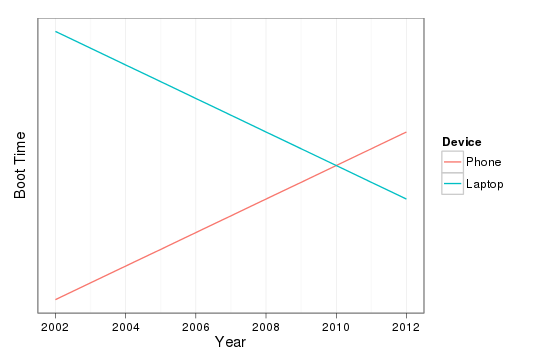 As the graph indicates, I think my cross-over was around 2010 when
I acquired an
As the graph indicates, I think my cross-over was around 2010 when
I acquired an  Thanks to
 James Bottomley just published a description of the Linux Foundation's
  Because I've not received a reply in the last couple days, because it
was a Seattle phone number but I haven't lived in Seattle for years,
and because I don't know of anyone in Seattle who was about to give
birth, I'm pretty confident that this was indeed a case of misdirected
text messages!
But whoever you are: Congratulations! I know it was a mistake, but
that really made my day!
Because I've not received a reply in the last couple days, because it
was a Seattle phone number but I haven't lived in Seattle for years,
and because I don't know of anyone in Seattle who was about to give
birth, I'm pretty confident that this was indeed a case of misdirected
text messages!
But whoever you are: Congratulations! I know it was a mistake, but
that really made my day!