Emmanuel Kasper: back to blogging and running a feed reader as a containerized systemd service

After reading about Jonathan McDowell feed reader install and the back to blogging initiative, I decided to install a feed reader to follow all those nice blog posts. With a feed reader you can compose your own feed of news based on blog posts, websites, mastodon toots. And then you are independant from ad oriented ranking algorithms of social networks.
Since Jonathan used FreshRSS as a feed reader, I started with the same software. On a quick glance on its github page, it sounded like a good project:
- active contributions
- different channels for stable and latest version of the software
- container images pointing to the stable release
- support multiple databases for storage, including PostgreSQL
- correct documentation mentioning security caveats
- upgrades from FreshRSS are easy to do and can be done separately from operating system upgrades
- I do not mess my based operating system with php (subjective) and in case of a compromized freshrss, the freshrss/apache install would be still restrained to its own Linux namespaces, separated from the rest of the system.
- start a container image based on the start command provided by the FreshRSS project. The
podmancommand line is nearly identical to thedockercommand line, excepts thatpodmanexpects the fully qualified domain name associated with the container image, and I chose to run the freshrss container on the localhost interface only. I also use a defined version tag, because using thelatesttag makes it complicated to track which exact ersion I have installed.
# podman pull docker.io/freshrss/freshrss:1.20.1
# podman run --detach --restart unless-stopped --log-opt max-size=10m \
  --publish 127.0.0.1:8081:80 \
  --env TZ=Europe/Paris \
  --env 'CRON_MIN=1,31' \
  --volume freshrss_data:/var/www/FreshRSS/data \
  --volume freshrss_extensions:/var/www/FreshRSS/extensions \
  --name freshrss \
  docker.io/freshrss/freshrss:1.20.1
- verify where the podman volumes have been created. This is where the user data of freshrss will be stored.
# podman volume ls
# podman volume inspect freshrss_data
- now that freshrss is installed, you can start its configuration wizard at localhost:8081. You should keep the default sqlite choice
- finally after running the wizard, you can login again and add some feeds
- verify that your config has been stored outside the container, and inside the volume (so that it will not be erased in case of upgrages)
# ls -l /var/lib/containers/storage/volumes/freshrss_data/_data/users/
- verify the state of sqlite database
echo '.tables'  sqlite3  /var/lib/containers/storage/volumes/freshrss_data/_data/users/<your freshrss user>/db.sqlite
category  entry     entrytag  entrytmp  feed      tag
# podman generate systemd --new --name freshrss tee /etc/systemd/system/container-freshrss.service
# podman stop freshrss
# systemctl enable --now container-freshrss.service
# systemctl status container-freshrss.service
  ...
# ss --listening --numeric --process '( sport = 8081 )'
Netid         State           Recv-Q          Send-Q                   Local Address:Port                   Peer Address:Port         Process
tcp           LISTEN          0               4096                         127.0.0.1:8081                        0.0.0.0:*             users:(("conmon",pid=4464,fd=5))
conmon (8) is the process managing the network namespace in which fresh-rss is running, hence it is displayed as the process owning the listening socket
Exposing FreshRSS to the external world
We have now a running service, but we need to make it reachable from the internet.
The simplest, classical way, is to create a subdomain and a VirtualHost configured as a reverse proxy to access the service at 127.0.0.1:8081. Fortunately the FreshRSS authors have documented this setup in https://github.com/FreshRSS/FreshRSS/tree/edge/Docker#alternative-reverse-proxy-using-apache
and those steps are no different from a standard application behind a web reverse proxy.
Upgrading freshrss container to a newer version
A documentation showing how to install a piece of software is nothing when
it does not show how to upgrade that said software. Installing is easy, upgrading is where the challenge is. Fortunately to the good stateless design of freshrss (everything is in the sqlite database, which is backed by a non-epheremal volume in our setup), switchting versions is a peace of cake.
# podman pull docker.io/freshrss/freshrss:1.20.2
# systemctl stop container-freshrss.service
# sed -i 's,docker.io/freshrss/freshrss:1.20.1,docker.io/freshrss/freshrss:1.20.2,' /etc/systemd/system/container-freshrss.service
# systemctl daemon-reload
# systemctl start container-freshrss.service


 It's time to mint a new blog tag
I want to write to pour praise on some software I recently discovered.
I'm not up to speed on Pipewire the latest piece of Linux plumbing related
to audio nor how it relates to the other bits (Pulseaudio, ALSA, JACK, what
else?). I recently tried to plug something into the line-in port on my external
audio interface, and wished to hear it on the machine. A simple task, you'd
think.
I'll refrain from writing about the stuff that didn't work well and
focus on the thing that did: A little tool called
It's time to mint a new blog tag
I want to write to pour praise on some software I recently discovered.
I'm not up to speed on Pipewire the latest piece of Linux plumbing related
to audio nor how it relates to the other bits (Pulseaudio, ALSA, JACK, what
else?). I recently tried to plug something into the line-in port on my external
audio interface, and wished to hear it on the machine. A simple task, you'd
think.
I'll refrain from writing about the stuff that didn't work well and
focus on the thing that did: A little tool called 

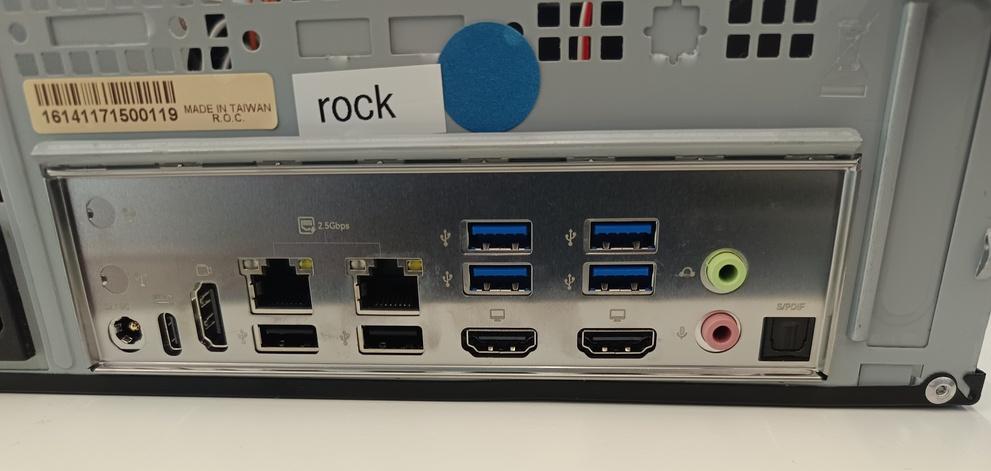
 It's been a while since I've posted about arm64 hardware. The last
machine I spent my own money on was
a
It's been a while since I've posted about arm64 hardware. The last
machine I spent my own money on was
a 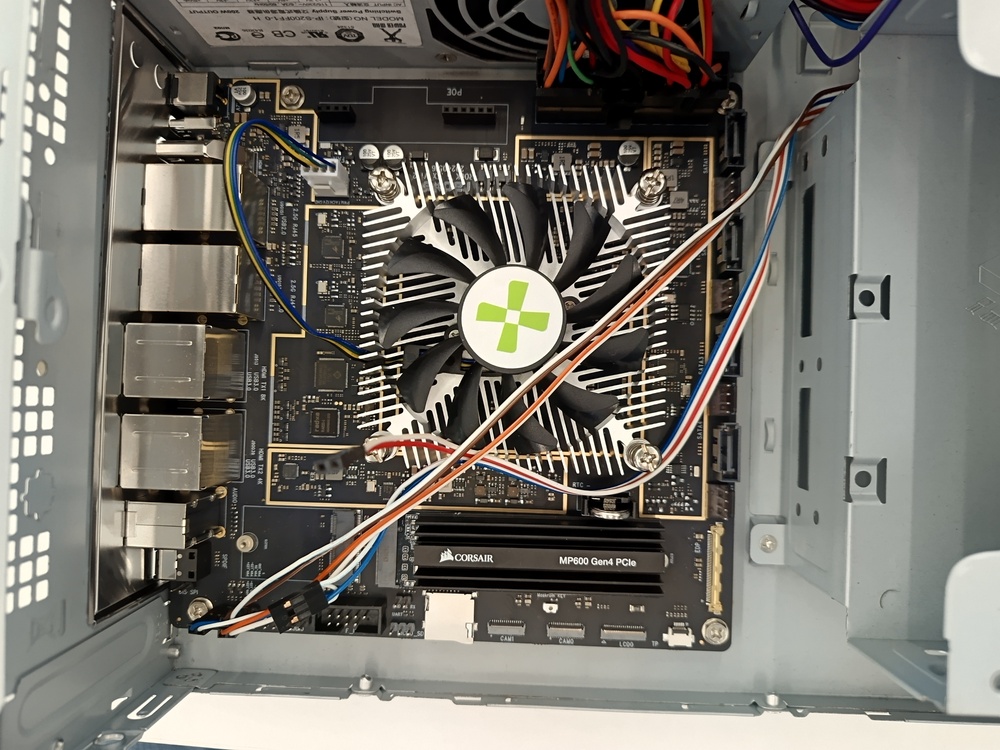










 After (quite) a summer break, here comes the 4th article of the 5-episode blog post series on Polis, written by Guido Berh rster, member of staff at my company Fre(i)e Software GmbH.
Have fun with the read on Guido's work on Polis,
After (quite) a summer break, here comes the 4th article of the 5-episode blog post series on Polis, written by Guido Berh rster, member of staff at my company Fre(i)e Software GmbH.
Have fun with the read on Guido's work on Polis, Almost all of my Debian contributions this month were
 A new minor release 0.1.5 of
  The Reproducible Builds project
  Vagrant: So my understanding of some of your recent work is basically
defining
Vagrant: So my understanding of some of your recent work is basically
defining  In my
In my