Search Results: "tachi"

16 June 2011

Wouter Verhelst: Attaching in mutt

All mail clients suck. Some just suck less. But they all have their own peculiarities. mutt, for instance, is a full-featured text-mode mail client. As such, it's pretty popular amongst many Linux enthousiasts, including me. A common error made amongst mutt users is to talk about attaching a file in a mail, but then forgetting to actually do so afterwards. This is because mutt starts an external editor to allow you to edit the message in question, which since it's not mutt itself would seem to make it impossible to attach a file while you're editing a mail, requiring one to remember to actually perform the attach step. One solution to this problem could be to use the little script that Steve wrote, which will complain if you mention something about an attachment in a mail without actually attaching anything. While I'm sure it works to some extent, this kind of script has the downside that it's never going to be 100% correct in all cases (you might mistype the word 'attach', or you might use another word that you didn't think about when you wrote the script, or you might be replying to someone who sent you an attachment). However, a better way could be to realize that mutt does, actually, support attaching files while you're editing a mail text, by way of the 'Attach:' pseudo-header. It requires two steps:
  1. Make sure that you have set 'edit_headers' to 'yes' in your configuration. This will cause mutt to fire your editor on a file that also contains the (relevant) headers for your mail, rather than just the body.
  2. When you want to attach a file, rather than trying to remember to do so after exiting your editor, just add an 'Attach:' header to the headers section of your mail, with as argument a filename optionally followed by a description. When mutt finds that header, it'll attach the named file, and all is well.
Yes, of course, that does mean you'll have to change your habits, and actually remember to add the damn pseudo-header rather than be like me and still forget to attach files. But hey, can't help you with that.

10 June 2011

Gunnar Wolf: Reading revolutions: Online digital text and implications for reading in academe A (very informal) review

It's been a long time since I last took some time to read First Monday A great online publication, if you are not familiar with it, that I would categorize (and no, I'm not probably well-informed in it to be authoritative) as dealing with social, psychological aspects of the cultural shifts the online world has brought upon us (often dealing with topics related to Free Software communities, the reason I first met the publication). Firstmonday is an Open Access champion from early on. It follows an approachable but academic format (this means, it is peer-reviewed, its articles give extensive lists of references, and the articles are not the short reads we have got used to finding on the net, but, quoting from their audience profile, English is not the first language of many First Monday readers; A large percentage of First Monday readers are not a part of academia; Cultures, educational backgrounds, and fields of study vary greatly among First Monday readers.) This means, it's at least a great publication for me to follow :) Anyway After a long time not following it, I have just read Reading revolutions: Online digital text and implications for reading in academe, by Barry W. Cull; First Monday, Volume 16, Number 6 - 6 June 2011 Nice, interesting read. As I was planning on telling about the article to a couple of friends more into the subjects than myself, I'll comment+quote some bits on it. Before going any further: The article makes several references to Maryanne Wolf. No relation to her I'm not lulling my (two? are you both still reading?) readers towards her work ;-) The article talks about the differences social, even dips into some physiological aspects that the activity of reading is sustaining due to the shift from an activity done mainly from books (or other similar printed material) to the computer screen. Of course, we all know from our own experience many of the basic traits Shorter attention spans, a different reading pattern (skimming instead of reading; browsing through several related items instead of in-depth reading a single text as a knowledge unit). The article begins with an overview of reading and humankind. Cull quotes Maryanne Wolf's phrase, despite the fact that it took our ancestors about 2,000 years to develop an alphabetic code, children are regularly expected to crack this code in about 2,000 days . An interesting point I never thaught of is the start of reading as a purely mental activity, detaching reason from verbalization, ~1200 years ago:
Interestingly, these early scribes first did their work by reading out loud to themselves. Not until the ninth century did monastic regulations begin requiring silent reading. By the thirteenth century the practice of men reading silently and alone became commonplace. This shift to silent reading was a profound change, one that Darnton suggested involved a greater mental adjustment than the shift to printed text
. One last important point in this older history, that I'm quoting because I know I'll need the reference later on for one of my texts is about reading as a social activity Yes, also related to the quietness I just mentioned:
Interestingly, with the democratization of the printed text, there was a return to reading aloud. Reading was a solitary silent process only for the educated elite who could afford to buy books. For the rest of the population, as Darnton pointed out, reading was a social activity which took place in workshops, barns, and taverns [and] while children played, women sewed, and men repaired tools.
After this introduction (obviously one of the most interesting parts to me), Cull gives numbers showing how reading is evolving (in the USA and Canada), and quotes some prediction on how the future will end up adapting. Of course, I live in a place with a very different society, so I cannot comment much. Then he confronts some studies regarding specifically leisure reading, as it is a much more trustable factor than just literacy (in a world as highly literate as ours is, many people only read when they have to and have never or very seldom experienced the pleasure of reading just for the sake of it), bringing into the discussion the Internet (and computers in general) usage patterns. I found also very interesting the next section, regarding the pattern changes many libraries are facing now, specially academic/research-oriented libraries:
For several millennia, right up until just two decades ago, the central role of a library was to collect and house physical texts: from clay tablets, to scrolls, to printed books (Battles, 2003; Manguel, 2006). While printed text remains essential to most academic libraries, today s libraries have also become a core conduit via which researchers access scholarly texts online. Just within the last few years, Canadian academic libraries, in a situation similar to libraries throughout the Western world, have reached an interesting tipping point librarians now spend the majority of their collections budgets on electronic instead of printed texts.
( )
Libraries are convinced that digital text, now in its infancy, is likely to have a long future. Not only do they purchase electronic texts, but most academic libraries have also become publishers of electronic texts, whether they are digitizing large portions of their book holdings, or focusing on scanning a relatively small number of archival documents from their unique special collections.
And yes, doing some work with our Institute's library, I can confirm this trend. About e-books: I have got quite into that topic since the Kindle won my heart (and my money!) half a year ago. The little device completly changed my reading habits, I have read lots more since I carry it. And yes, I have never considered a full tablet-like device The article talks long about the difference, about the disadvantage that multitasking means to the human brain (oh, do I suffer from it!) I liked this snippet, quoting Steve Jobs a couple of years ago, regarding an Apple e-book reader question:
When Apple was rumoured to be working on an e book reader a few years ago, CEO Steve Jobs expressed his lack of interest: It doesn t matter how good or bad the product is, the fact is that people don t read anymore, he reportedly said, continuing by stating that 40 percent of the people in the U.S. read one book or less last year. The whole conception is flawed at the top because people don t read anymore (Markoff, 2008). Nicholas Carr (2010) has summed up Apple s involvement in the tablet phenomenon this way: Jobs is no dummy. As a text delivery system, the iPad is perfectly suited to readers who don t read anymore .
The issue for me is, I do enjoy reading, but I am an information addict. I know that if I have parallel information flows, my attention will surely dilute between them. Of course, as I read this article on-screen, it was hard for me to take the needed discipline not to be distracted by IMs or IRC highlights during the whole reading (which was also as an excercise for myself ;-) ). I am surprised to see this on student preferences (and even more surprised to see this data comes from my university):
In a study of students at the Universidad Nacional Aut noma de M xico (UNAM), the majority of students preferred print, and 63 percent reported that they could bear reading a document on a computer screen for no more than one hour (Ram rez Leyva, 2003). When it comes to course textbooks, a marked student preference for paper over e books has recently been found (Woody, 2010).
As we approach the end, it talks about another important topics I have often tried (and often failed) to communicate to my users: That of paratext, the meaning of the different texts, covers, items, layouts, etc. that are not part of the text itself but do shape the way we face it. To some of us, this seems obvious. To others, it is so hard to understand It closes with two more topics I will refer to. One is the permanent connectivity. All the time, more people are connected virtually all of their waking time. This affects not only learning habits but priorities. Will this near constant access to information interfere with students desire to comprehend and remember information, necessary to the educational process of turning it into knowledge? Author and university business school lecturer Don Tapscott recently suggested that students might not have to stress about the details those you can check Finally, regarding the continuity and ellaboration found in texts that are each time more common He quotes Maryanne Wolf:
I am worried about kids who are immersed in digital culture. They will get to college and they will have been Twittering so much that they won t have the patience to read those really long cognitively convoluted and complex sentences. They may not have developed those rich networks which are required in order to read at a high level of sophistication. The effort is what we are going to lose. They are becoming not so much a lazy reader, but an atrophied reader
As you can see, not only this post is meant to tell my couple-of-interested-friends to read the article, but it's mainly meant as a mental placeholder for myself. I will be surely refering to some of these items.

6 February 2011

Kees Cook: fun with game memory

So, I was testing a (closed source) single-player offline game recently and thought this exercise might be fun to document. I didn t want to spend any time actually earning in-game money since I d played it before and I wanted to just skip ahead to other aspects of the game. I was curious how straight-forward adjusting my cash might be. So, noting the in-game bank account number of 219393 and account balance of 3000, I dived right in. First up, what s the memory layout of the heap look like? I looked at the brk and the mmap regions without a mapped library or file, marked with w in the permissions column, from /proc/PID/maps:
0827e000-08282000 rw-p 00000000 00:00 0
0a22e000-0b08a000 rw-p 00000000 00:00 0 [heap]
efa59000-efd00000 rw-p 00000000 00:00 0
efd00000-efd21000 rw-p 00000000 00:00 0
Knowing these, I could use gdb s find command, after attaching to the process:
$ gdb /some/cool/game

(gdb) attach PID

(gdb) find /w 0 0827e000, 0 08282000, 219393
(gdb) find /w 0 0a22e000, 0 0b08a000, 219393
0xaf03d08
0xaf06ca8
No hits in the first region, but I see two hits for the account number value in the second region. Let s start there and see what s near them
(gdb) x/8x 0xaf03d08
0xaf03d08: 0 00035901 0 00000000 0 00000000 0 0af06ce0
0xaf03d18: 0 0af06be0 0 00000059 0 0af03d98 0 0af041e8
(gdb) x/8x 0xaf06ca8
0xaf06ca8: 0 00035901 0 00000bb8 0 00000bb8 0 0820b148
0xaf06cb8: 0 00000001 0 00000000 0 00000000 0 00000000
In that second hit, I see the value 0xBB8, which is 3000, and matches our account balance. Let s see what happens if we just change both of those to add a bit a few orders of magnitude above the current value
(gdb) set var *0xaf06cac = 0 00100bb8
(gdb) set var *0xaf06cb0 = 0 00100bb8
(gdb) x/32x 0xaf06cac
0xaf06cac: 0 00100bb8 0 00100bb8 0 0820b148 0 00000001
(gdb) continue
And presto, clicking on the bank account details in-game shows a huge account balance of 1051576 now. No need to reverse-engineer any saved games, whew.

22 January 2011

Matthew Palmer: Debugging Debian Installer

I've been doing a bit of work recently on the netcfg portion of Debian Installer, with the largest work so far being adding IPv6 support. Unlike most of the rest of d-i, netcfg is written in C, and as such suffers from some difficulties in the realm of debugging. Worse, the whole d-i environment is rather bereft of the usual debugging tools (strace, lsof, etc) -- but most importantly, in this case, gdb. Thanks to some hints from Julien Cristau, I was reminded of the existence of gdbserver, a small part of gdb that allows you to debug a program running on a remote machine, using a copy of gdb running on your local machine. It's designed for debugging embedded systems, I think, because all of the heavy lifting (symbol lookups, etc) happens on your local machine, not where gdbserver is running. Here are the steps I took to get a useful gdbserver session inside d-i:
  1. Get the gdb sources (apt-get source gdb) and drop into the gdbserver tree (cd gdb-x.y.z/gdb/gdbserver)
  2. Configure gdbserver to build a static binary (LDFLAGS=-static ./configure). This is necessary because you don't want to have to faff around with library dependencies inside the d-i environment. Then build gdbserver (make).
  3. Copy gdbserver over to your d-i machine/VM (I like using netcat; nc -l -p 31310 >/bin/gdbserver on the d-i machine, and nc IPADDR 31310 <gdbserver where you built gdbserver), then make it executable (chmod /bin/gdbserver)
  4. Fire up gdbserver in d-i, attaching it to the process you wish to debug: gdbserver host:31337 --attach PID
  5. Now things get a little trickier... on your local machine, you need to have an unstripped copy of the binary you're debugging. For me, this is easy, because I'm building netcfg myself (to keep the symbols, I just run DEB_BUILD_OPTIONS=noopt dpkg-buildpackage -b -rfakeroot) but I'm not sure what you'd do if you were just tracing around for fun.
  6. Once you've got your binary, just run gdb BINARY on your host machine to start gdb running.
  7. For the "even trickier" part of the show, your local machine also needs copies of all the libraries your binary is linked against. If you don't have this, when you try to debug you'll get all sorts of "wrong library or version mismatch?" errors, and your backtraces will likely break (amongst other things). Again, for me, this is easy, because I'm only running the d-i initrd, but if you're debugging something later in the installation process you might need to unpack some udebs somewhere. All I have to do is keep the initrd build tree around (which lives in the installer tree, under build/tmp/netboot/tree). Once you've got your tree of libraries, you can continue.
  8. You need to tell gdb about that tree of libraries, by running the following in gdb: set solib-absolute-prefix /path/to/library/tree
  9. Now, tell gdb to connect to your gdbserver: target remote IPADDR:31337 -- gdb should tell you "Remote debugging using IPADDR:31337", and the gdbserver should say "Remote debugging from host LOCALIP:31337".
  10. Now, you should be able to interact with the program being debugged just like any other. Enjoy!

6 December 2010

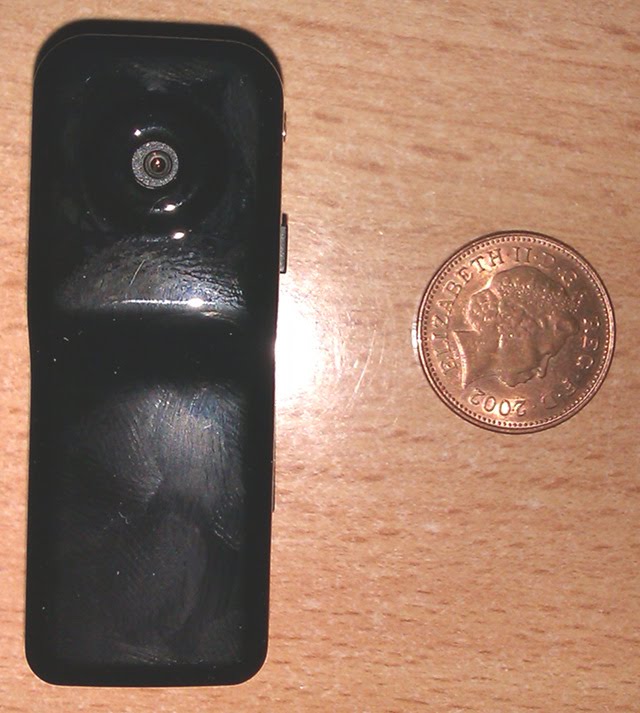
Vincent Sanders: New Video Camera

Last week they boys were playing with their remote control car in the snow (which was fun) and Alex wanted to record what his car saw. I immediately dissuaded him from the idea that he can use the family's DV camcorder taped to his car!

The camera and a UK penny
Later on that day though I saw a rocket project on LMR which used a micro camera and suggested such cameras were available from ebay very cheaply. I did a quick search and ordered on from a UK seller at 15 plus 2.99 pnp and thought no more of it.

This afternoon the camera arrived and it really is tiny and Alex is already scheming of ways to use it in addition to attaching it to his RC car.

The video output is low quality (very blurry in low light) and I have yet to figure out how to disable the time stamp (which is wrong) but it does indeed record video to the storage and can download it via USB and played using VLC.

So if you want a tiny video camera (and an 8Gig micro SD card) which is so cheap you do not care if it gets broken, I can recommend these.

<object class="BLOG_video_class" classid="clsid:D27CDB6E-AE6D-11cf-96B8-444553540000" codebase="http://download.macromedia.com/pub/shockwave/cabs/flash/swflash.cab#version=6,0,40,0" height="266" id="BLOG_video-e10aebbc1dd937ed" width="320"><param name="movie" value="http://www.youtube.com/get_player"><param name="bgcolor" value="#FFFFFF"><param name="allowfullscreen" value="true"><param name="flashvars" value="flvurl=http%3A%2F%2Fv7.nonxt4.googlevideo.com%2Fvideoplayback%3Fid%3De10aebbc1dd937ed%26itag%3D5%26app%3Dblogger%26ip%3D0.0.0.0%26ipbits%3D0%26expire%3D1293804875%26sparams%3Did%252Citag%252Cip%252Cipbits%252Cexpire%26signature%3D4F186A3751631F2931BE78DB408398983676DB8E.2FDDADC2413DD729039774AA440EAB1C95EA068A%26key%3Dck1&amp;iurl=http%3A%2F%2Fvideo.google.com%2FThumbnailServer2%3Fapp%3Dblogger%26contentid%3De10aebbc1dd937ed%26offsetms%3D5000%26itag%3Dw160%26sigh%3Dx99eVmNAybTlHHC3EkTV9GH9eUI&amp;autoplay=0&amp;ps=blogger"><embed allowfullscreen="true" bgcolor="#FFFFFF" flashvars="flvurl=http%3A%2F%2Fv7.nonxt4.googlevideo.com%2Fvideoplayback%3Fid%3De10aebbc1dd937ed%26itag%3D5%26app%3Dblogger%26ip%3D0.0.0.0%26ipbits%3D0%26expire%3D1293804875%26sparams%3Did%252Citag%252Cip%252Cipbits%252Cexpire%26signature%3D4F186A3751631F2931BE78DB408398983676DB8E.2FDDADC2413DD729039774AA440EAB1C95EA068A%26key%3Dck1&amp;iurl=http%3A%2F%2Fvideo.google.com%2FThumbnailServer2%3Fapp%3Dblogger%26contentid%3De10aebbc1dd937ed%26offsetms%3D5000%26itag%3Dw160%26sigh%3Dx99eVmNAybTlHHC3EkTV9GH9eUI&amp;autoplay=0&amp;ps=blogger" height="266" src="http://www.youtube.com/get_player" type="application/x-shockwave-flash" width="320"></object>

14 September 2010

Gregory Colpart: Capture input/output of a process with gdb

My tip of day. When you lose control of a process (for example with a process launched with disown or, another example, when you close your SSH terminal with unsynced mutt), thanks gdb.
$ tty
/dev/pts/13
$ gdb --pid= pidof mutt 
(gdb) call close(0)
(gdb) call close(1)
(gdb) call close(2)
(gdb) call open("/dev/pts/13", 2, 0)
(gdb) call dup(0)
(gdb) call dup(0)
(gdb) detach
Detaching from program: /usr/bin/mutt-org, process 2932
Thanks to this comment on superuser.com for the original idea. Edit: correction on dup() calls. Thanks to Peter Pentchev for his explanation in comments.

26 August 2010

Uwe Hermann: openbiosprog-spi, a DIY Open Hardware and Free Software USB-based SPI BIOS chip flasher using flashrom

openbiosprog-spi device If you're following me on identi.ca you probably already know that I've been designing a small PCB for a USB-based SPI chip programmer named openbiosprog-spi. The main use-case of the device is to help you recover easily from a failed BIOS upgrade (either due to using an incorrect BIOS image, due to power outages during the flashing progress, or whatever). The device only supports SPI chips, as used in recent mainboards (in DIP-8 form factor, or via manual wiring possibly also soldered-in SO-8 variants). It can identify, read, erase, or write the chips. Of course the whole "toolchain" of software tools I used for creating the hardware is open-source, and the hardware itself (schematics and PCB layouts) are freely released under a Creative Commons license (i.e., it's an "Open Hardware" device). The user-space source code is part of flashrom (GPL, version 2), the schematics and PCB layouts are licensed under the CC-BY-SA 3.0 license and were created using the open-source Kicad EDA suite (GPL, version 2). openbiosprog-spi schematics
openbiosprog-spi Kicad PCB layout The schematics, PCB layouts, and other material is available from gitorious:
  $ git clone git://gitorious.org/openbiosprog/openbiosprog-spi.git
You can also download the final Gerber files (ZIP) for viewing them, or sending them to a PCB manufacturer. Some more design notes: Basic usage example of the device on Linux (or other OSes supported by flashrom):
  $ flashrom -p ft2232_spi:type=2232H,port=A -r backup.bin (reads the current chip contents into a file)
openbiosprog-spi PCBs
openbiosprog-spi parts list Over at the main projects page of openbiosprog-spi at http://randomprojects.org/wiki/Openbiosprog-spi I have put up a lot more photos and information such as the bill of materials, the Kicad settings I used for creating the PCBs, the Gerber files and the Excellon drill files and so on. The first few prototype boards I ordered at PCB-POOL.COM (but you can use any other PCB manufacturer of course), the bill of materials (BOM) lists the Mouser and CSD electronics part numbers and prices, but you can also buy the stuff elsewhere, of course (Digikey, Farnell, whatever). I already hand-soldered one or two prototypes and tested the device. Both hardware and software worked fine basically, you just need a small one-liner patch to fix an issue in flashrom, but that should be merged upstream soonish. In order to make it easy for interested users to get the PCBs I'll probably make them available in the BatchPCB Market Place soonish, so you can easily order them from there (you do still need to solder the components though). Note: I'm not making any money off of this, this is a pure hobby project. All in all I have to say that this was a really fun little project, and a useful one too. This was my first hardware project using Kicad (I used gEDA/PCB, also an open-source EDA toolsuite, for another small project) and I must say it worked very nicely. I didn't even have to read any manual really, it was all pretty intuitive. Please consider not using Eagle (or other closed-source PCB software) for your next Open Hardware project, there are at least two viable open-source options (Kicad, gEDA/PCB) which both work just fine.

9 August 2010

Gustavo Noronha Silva: WebKitGTK+ and the Web Inspector

When I started working on WebKitGTK+ I was a web developer, writing IT applications using Python and Django, and building features for content portals running Plone (argh). Even though I was an Epiphany user ever since it was forked off Galeon, I still had to use Firefox for my work, because I couldn t really live without Firebug. It should come as no surprise, then, that one of my first patches to WebKitGTK+ was actually making the awesome Web Inspector work in our port. After the initial support, though, not a lot has been done to further improve it, partly because it was already good enough for many uses, partly because I somehow started doing non-web development again ;). These last weeks, through my R&D efforts in Collabora, I have been able to push Web Inspector features and integration a bit further. A simple change that boosts the Inspector s usability quite a bit is having the nodes that are being hovered highlighted. Along with that, the ability to attach the inspector to Epiphany s window should make it easier to use for poking the DOM. The Web Inspector has a number of settings that control its behaviour. Since, for instance, enabling javascript debugging may slow down javascript performance, the inspector usually has it disabled by default, and provides a button to enable it. It also provides an option for always enabling that feature, but that does not work right now, because we are not saving/restoring the relevant settings. A solution to that is in the works using the GSettings infrastructure that was recently merged into glib. Here s a simple screencast, showing these improvements in action (click the video to check it out in full size): <video controls="controls" src="http://kov.eti.br/media/webkit/inspector.ogv" width="400"></video>

24 June 2010

Matthew Garrett: Joojoo

I've had the opportunity to look into the Joojoo tablet recently. It's an interesting device in various ways, ranging from the screen being connected upside down and everything having to be rotated before display, to the ACPI implementation that's so generic it has no support for actually attaching most embedded controller interrupts to ACPI devices and so relies on a hacked kernel that exposes individual interrupts as ACPI events that are parsed in userspace, to the ChangeOrientation binary that's responsible for switching between landscape and portrait modes containing gems like ps aux grep fgplayer grep -v grep and containing references to org.freedesktop.PandaSystem, a somewhat gratuitous namespace grab. Hardware-wise it seems to be little more than battery, generic nvidia reference design board and touchscreen with an accelerometer and LED glued to the chipset's GPIO lines. The entire impression is one of an ambitious project not backed up by the level of technical expertise required to get things done properly. Frankly, I think Michael Arrington came out of this rather better than he could have done - behind the reasonably attractive UI, the entire device is pretty much held together by string and a following wind.

Of course, releasing shoddily put together technology isn't generally illegal and from that point of view Fusion Garage aren't any worse than a number of products I've had the misfortune to actually spend money on. But they're distributing Linux (stock Ubuntu with some additional packages and a modified kernel) without any source or an offer to provide source. I emailed them last week and got the following reply:

Dear Sir,

we are still actively making changes to the joojoo software. We will make
the source release available once we feel we are ready to do so and also
having the resources to get this sorted out and organized for publication.
We seek your kind understanding on our position and appreciate your
patience on this. Thank you.

Best Regards
joojoo Support Team


Strong work, Fusion Garage. Hardware and software may not be your strong points, but you're managing copyright infringement with the best of them.

14 June 2010

Russell Coker: Should Passwords Expire?

It s widely regarded that passwords should be changed regularly. The Australian government declared last week the National Cyber Security Awareness Week [1] and has published a list of tips for online security which includes Get a stronger password and change it at least twice a year . Can a Password be Semi-Public? Generally I think of a password as being either secret or broken. If a password is known to someone other than the sysadmin and the user who is authorised to use the account in question then you have potentially already lost all your secret data. If a password is disclosed to an unauthorised person on one occasion then merely changing the password is not going to do any good unless the root cause is addressed, otherwise another anothorised person will probably get the password at some future time. Hitachi has published a good document covering many issues related to password management [2]. I think it does a reasonable job of making sysadmins aware of some of the issues but there are some things I disagree with. I think it should be used as a list of issues to consider rather than a list of answers. The Hitachi document lists a number of ways that passwords may be compromised and suggests changing them every 60 to 90 days to limit the use of stolen passwords. This seems to imply that a password is something that s value slowly degrades over time as it s increasingly exposed. I think that the right thing to do is to change a password if you suspect that it has been compromised. There s not much benefit in having a password if it s going to be known by unauthorised people for 89 days before being changed! Fundamentally a password is something that can have it s value rapidly drop to zero without warning. It doesn t wear out. Why are terms such as Three Months used for Maximum Password Ages? The Hitachi document gives some calculations on the probability of a brute-force attack succeeding against a random password with 90 days of attacking at a rate of 100 attempts per second [2]. I think that if a service is run by someone who wouldn t notice the load of 100 attempts per second then you have bigger security problems than the possibility of passwords being subject to brute-force attacks. Also it s not uncommon to have policies to lock accounts after as few as three failed login attempts. Rumor has it that in the early days of computing when the hashed password data was world readable someone calculated that more than 3 months of CPU time on a big computer would be needed to obtain a password by brute-force. But since then the power of individual CPUs has increased dramatically, computers have become cheap enough that anyone can easily gain legal access to dozens of systems and illegal access to a million systems, and it has become a design feature in every OS that hashed passwords are not readable by general users. So the limiting factor is to what degree the server restricts the frequency of password guesses. I don t think that specifying the minimum password length and maximum password age based on the fraction of the key space that could be subject to a brute-force attack makes sense. I don t think that any attempt to make an industry-wide standard for the frequency of password changes (as the government is trying to do) makes sense. Can there be a Delay between a Password being Compromised and being Used by an Attacker? Hypothetically speaking, if a password was likely to be compromised (EG by having the paper it was written on lost or stored insecurely) for some time before an attacker exploited it, then if the password was changed during that time period it could solve the problem. For example when a company moves office there is the possibility of notepaper with passwords to be lost. So if the sysadmin caused every user password to expire at the time of the move then a hostile party would be unable to gain access. Another possibility is the theft of backup tapes that contain the list of unencrypted passwords. If users change their passwords every three months then the theft of some four month old backup tapes will be less of a problem. Another possibility concerns the resale of old computers, phones, and other devices that may contain passwords. A reasonably intelligent user won t sell their old hardware as soon as the replacement device arrives, they will want to use the new device for some time to ensure that it works correctly. If passwords expire during this trial period with the new device then passwords stored in the old device won t have any value. The down-side to this idea is that people probably sell their old gear fairly quickly and making passwords expire every two weeks would not be accepted well by the users. It seems to me that having bulk password changes (all passwords for one user or for one company) based on circumstances that lead to potential insecurity would do more good than changing passwords at a fixed schedule. How are Passwords typically Compromised? Dinei Flor ncio and Cormac Herley of Microsoft Research and Baris Coskun of Brooklyn Polytechnic University wrote a paper titled Do Strong Web Passwords Accomplish Anything? [3] which discusses this issue. The first thing that they note is that nowadays passwords are most commonly compromised by phishing and keylogging. In those cases passwords are typically used shortly after they are stolen and the strength of a password never does any good. That paper suggests that banks should use stronger user-names rather than stronger passwords to combat the threat of bulk brute-force attacks. Can a Password Last Forever? If a password is entered in a secure manner, authenticated by a secure server, and all network links are encrypted or physically protected then there should never be a need to change it. Of course nothing is perfectly secure, so for some things with minimal short-term value or which can be used without anyone noticing there is a benefit in changing the password. But in the case of Internet banking if a hostile party gets your login details then you will probably know about it in a few days when the bank calls you about the unusual transactions from foreign countries long before a 90 day password change schedule would have done any good. Maybe one of the issues determining whether a password should be changed regularly is whether an attacker could use long-term read-only access to gain some benefit. Being able to read all the email someone received for a year could be a significant benefit if that person was a public figure, and there s usually no way for an ISP customer to know that someone else is downloading all their mail via POP or IMAP. Should a Password be the only Authentication Method? It is generally agreed that an authenitcation method should ideally involve something you have plus something you know. That means a password and a physical device such as a smart card, token with a changing sequential password, or a key such as a Yubikey [4]. If the physical device can t be cloned (through some combination of technical difficulty and physical access control) then it significantly improves security. When a physical device is used the purpose of the password is merely to stop someone who steals the physical device from being immediately exploit everything the password only has to be strong enough to keep the accounts secure until a new token can be issued. The combination of something you have and something you know is very strong. Having a physical token stored on the desk next to the PC that is used for logging in provides a significant benefit, then an attacker needs to break in to the house and can t sniff the password by compromising the PC remotely. Conclusion In all aspects of security you need to consider what threats you face. If an attacker is likely to launch an immediate noisy attack (such as transferring the maximum funds out of an Internet banking account) then changing the password regularly won t do any good. If a subtle long-term attack is expected then changing the password can do a lot of good but a physical token is the ideal if the account is valuable enough. But to put things in to perspective, it s technically possible to use a mobile phone camera at close range (or a SLR with a big lens at long range) to take a photo of keys that allow reproducing them. But this hasn t stopped people from carrying their house keys in an obvious manner that permits photography or leaving them on their desk at work. Also I ve never heard of anyone routinely changing the door locks in case a hostile party might have got a key although I m sure that such practices are common in highly secure locations. Few people even take their house keys off the key-ring when they have their car serviced! Related Posts Defense in Depth and Sudo when using sudo can increase security and when it can t.
Logging Shell Commands how to log what the sysadmin does and what benefits that provides you, it doesn t help if the sysadmin is hostile.
Logging in as Root should you login directly as root?

1 April 2010

Adrian von Bidder: SCO: Ready to give up?

The answer is probably no way! I like the way Jon Corbet put it (article will be free in a few weeks):
The SCO affair is kind of like a bad zombie movie; the plot is implausible, the acting is horrible, and, even though you know the good guys must win in the end, that obnoxious zombie just keeps coming back and ruining the party.
Realistically, what will happen? The judge in the Chapter 11 case has so far been quite interested in helping SCO succeed, so I guess there will be an appeal on this. The contract claims in the cases surrounding this are probably not very relevant, so I'm not sure how much press they'll get (although I'm sure Pam will continue to cover the issue although I think the Apple vs. Hitachi patent cause should be the one that should be in the center of attention right now.) And, of course, there's the Canonical vs. SPI lawsuit coming up. I find it very difficult to tell in what direction that will get decided, but I hope it won't take as long as the SCO case.

9 February 2010

Martin-&#201;ric Racine: OpenOffice's style editing dialogs suck!

Working on some document today, it occurred to me, once again, that OpenOffice's method for designing and applying documents styling totally sucks! Granted, this was not the first time that I cam to this conclusion but, today, I've come to realize that OpenOffice's paradigms constantly make me waste time trying to form a mental image of how every style element is suppose to relate to the other one, yet without having the full picture available within a single, easy-to-read document. Also, there is a complete lack of consistency in how style elements work. Some want to be defined in millimeters, while others want to be defined in points, while other still in number of lines. What a mess! In short: to become remotely usable, OpenOffice needs to approach document styling via the "HTML document with a separate CSS style sheet" paradigm. In other words, I need to be able to edit styles globally, as a group and separately from the document content itself, rather than having to click my way through a multitude of dialogs, for each and every type of text elements. To compare this with web design, there, I can focus on the actual content, formatted around semantic text elements (headers, paragraphs, block quotes, etc.) and then decide on the presentation styling as a separate global process by attaching a CSS style sheet, in which the relation between each type of text element and how it will be displayed is crystal clear, because it's handled as a unified style editing process. I think that this is one area in which Free Software could innovate in a positive way, by distancing itself from the Redmondesque practices of Microsoft Word, from which OpenOffice borrows too much. How about having a proper Style Editor application (similar to a CSS editor), within the OpenOffice suite, while Open Writer itself would only be allowed to load the style sheets produced by it and to apply them to semantic text text elements?

7 February 2010

Ben Armstrong: Eee PC care at 2 years

In November 2007, we bought two of the first Eee PC netbooks available in North America: the model 4G in pearl white, one for me, and one for my wife. My plan was to start the Debian Eee PC project and get Debian working on them both which, thanks to the work of everyone on the team, has been a great success. Fast forward to February 2010, and they are still serving us well. Here is a list of hardware enhancements and issues over the past two years of continuous use: Battery life Asus claims 3.5hrs for the model 4G, though I don t think we ever experienced anything better than 2.5 hrs with wifi in operation. Today, I m down to something short of 2 hrs. If you consider the Lithium ion battery article on Wikipedia to be accurate, it is typical to permanently lose 20% capacity per year, so this sounds about right for the age of the battery. Touchpad The touchpad itself is fine. The buttons are not. They are hard to push and prone to become less responsive after a while, or to fail entirely. I now really have to bear down hard on my left button to make it work. Because the buttons are soldered to the motherboard, they would be hard to replace. Configuring the synaptics driver for tap-to-click is an acceptable workaround. Also, one of the first purchases we made was the Logitech VX Nano, one for each Eee, so most of the time now, we use our mice, falling back to the touchpad only when using a mouse is inconvenient due to space constraints (e.g. on the bus). Keyboard After two years of continuous use, both of our keyboards needed replacing. Some of the keys had been pounded flat and needed surgery (rubber springs sliced out of a scavenged Acer netbook keyboard and grafted on) to make them usable again. And aesthetically, the keyboards have really suffered, with a good percentage of the markings on the keycaps partially or completely eroded off. Fortunately, for $3 plus $10 shipping each, new keyboards can be ordered from a Chinese e-Bay seller. But with the new keyboards, there is still the problem with excessive flex in the keyboard making some keys less responsive than others. I m considering trying this hack to solve the problem. Display I have no complaints about the matte finish displays of either Eee. Both have stood up well. People tell me they don t care for a 7 display, but I find it bright, crisp and easy to get along with, so long as you maximize windows and increase font size as needed (e.g. for reading PDF books and magazines). When I really need the extra real estate, I just hook up an external monitor. Fan Some people complain about the noise of the fan, from the otherwise silent 4G (due to the lack of a hard drive) and seek ways to limit the amount of time the fan runs. We ve never had that problem. However, if any plastic bits break off inside the Eee, they will eventually find their way to your fan and get wedged. This has happened twice: once in my wife s Eee, and once in mine. Disassembly of the Eee to clear the blockage and get the fan running again was relatively painless both times. Plastic bits About those plastic bits: In my wife s case, I think the bit was some extruded plastic from the molding that had broken off. In my case, it was a deteriorating plastic post which was holding the hinge in place. More about this later. Sound Unfortunately, the integrated sound seems to be particularly sensitive to heat. During both fan failures, sound cut out. On my wife s system, it never fully recovered, and now only works on alternate Tuesdays, whereas on mine, after I unwedged the fan and brought the heat down, sound has functioned properly ever since. (Update: see my comments below on power adapters for an alternate theory about what killed sound.) We are waiting now for the delivery of a cheap ($1.42 including shipping, again from China) 3D Sound USB device which is reported to work on Linux. While some users complain about hum with this device, we re cautiously optimistic that on the Eee it won t be an issue. If it is, oh well, a buck and a half is a small gamble. Display hinge The plastic posts that hold the anchors for the machine screws for the hinge are fragile. Three out of four of these posts in my Eee have shattered, leaving the left hinge to float freely. For the past two days I was distressed about how I could fix this. Based on some helpful suggestions from #eeepc @ irc.freenode.net, I had worked out a plan to rebuild one of the posts with two-part epoxy, sand it and the fractured stub of the post, and use cyanoacrylate glue to affix it to the case. It sounded like fiddly work for which I didn t hold much hope of success. But this morning, I realized that the plastic in the bottom of the case was still sound, and that I could drop a screw into that hole, and with pliers, line up the anchor on the other side. This appears to work! I ll handle that hinge with care, but it should do me until I eventually repurpose the machine to some daily use that is less stressful on the hinge than daily travel on the bus. SSD and SDHC Some people were initially worried that the limited write life an SSD meant that you needed to take special measures to avoid its premature death, which I have always regarded as a myth. Our 4G SSDs each have no swap space, and ext3 filesystems. At the two year point, there are no problems. I expect our SSDs to outlast the other components. We did, however, eventually find the 4G to be a bit on the small side. We now each have Kingston 4G micro-SDHC cards for a bit of extra capacity for large media files and for some extra space for the apt cache. I recently priced the Lexan version of this card at $19 for a two-pack at Wal-mart, and these seem to work in the model 4G just as well (which seems to be an issue with this model not all SDHC cards work). Memory We found the 512M that came with the 4G somewhat constraining. Without any swap space (so we could maximize the space available on the small SSD) we decided our systems really needed a memory upgrade. At the time, 2G didn t seem overly expensive (though I no longer remember the exact price) so we splurged on 2G for each system, even though that was probably more than we needed. Power adapter When I first wrote this article, I forgot to mention the power adapter. The model 4G uses an unusual 9.5V power adapter for which it is hard to find a generic replacement. This unit is prone to fail in two places: in rare cases, (one out of 6 units that I have in some way assisted with: 3 of them mine, 3 belonging to others,) it will break at the wall plug end. The plug swivels into the unit for easy storage, but this adds a point of failure. More commonly, (in 3 out of six of the units,) the wires at the netbook plug end will fray due to stress on the non-angled cord, leading either to no connect, or to a short. In fact, since in the case of my wife s adapter, the netbook end of the cable shorted, making the cable heat up and the system spontaneously shut down after a little while, we can t say for sure whether the overheating of the Eee took out integrated sound, or whether this short did. On the one hand, I know for certain my own system, which never suffered a short, has responded to overheating by making the sound flaky, but it has never taken out sound completely. On the other hand, shorting the power cable can t be very good for the Eee, so who knows, maybe that s what ultimately killed my wife s Eee s sound. This is where it helps to have soldering skills, or a friend who can do the repair for you. In my case, it was the latter. While I was waiting for a replacement adapter I had ordered, we also found on eeeuser.com part#s for replacement plugs and sleeves from Digikey, total cost $20 including shipping, 10 pieces each. Cutting off the bad plugs on three units and attaching the new was a quick, straightforward operation, and succeeded in two out of three cases. Having carefully checked the failed repair, we deduced that the failure in that unit was at the wall end, and we judged there was nothing further we could do to try to save it. Even the unit that had previously shorted was returned to perfect health and has been in operation trouble-free ever since. Conclusion After over two years of continuous use, the model 4G has held up well for a $400 system. We definitely feel we have received our money s worth of value over that time. All of the problems we ve experienced so far have been fixable at very little expense, and we expect them to last at least another year before we seriously consider replacing them. In the next several months, I plan to order a high capacity 8-cell 10400mAh battery for my own system so that I can enjoy a 5-6 hr run time. The purchase will be roughly $55 including shipping, the most expensive purchase for my system to date, but still well worth it to extend the 4G s lifespan for another year or more.

1 December 2009

Dirk Eddelbuettel: Updated slides for 'Introduction to HPC with R' (now with correct URLs)

This is an updated version of yesterday's post with corrected URLs -- by copy-and-pasting I had still referenced the previous slides from UseR! 2009 in Rennes instead of last Friday's slides from the ISM presentation in Tokyo. The presentations page had the correct URLs, and this has been corrected below for this re-post. My apologies! As mentioned yesterday, I spent a few days last week in Japan as I had an opportunity to present the Introduction to High-Performance Computing with R tutorial at the Institute for Statistical Mathematics in Tachikawa near Tokyo thanks to an invitation by Junji Nakano. An updated version of the presentations slides (with a few typos corrected) is now available as is a 2-up handout version. Compared to previous versions, and reflecting the fact that this was the 'all-day variant' of almost five hours of lectures, the following changes were made: Comments and suggestions are, as always, appreciated.

Dirk Eddelbuettel: Updated slides for 'Introduction to HPC with R'

As mentioned yesterday, I spent a few days last week in Japan as I had an opportunity to present the Introduction to High-Performance Computing with R tutorial at the Institute for Statistical Mathematics in Tachikawa near Tokyo thanks to an invitation by Junji Nakano. An updated version of the presentations slides (with a few typos corrected) is now available as is a 2-up handout version. Compared to previous versions, and reflecting the fact that this was the 'all-day variant' of almost five hours of lectures, the following changes were made: Comments and suggestions are, as always, appreciated.

30 November 2009

Dirk Eddelbuettel: Back from Tokyo

Just got back from Tokyo a few hours ago: I had an opportunity to give my 'Introduction to High-Performance Computing with R' tutorial / lectures (for which previous slides can be found here). This was an all-day talk at the Institute for Statistical Mathematics at their new site in Tachikawa in the greater Tokyo area, thanks to an invitation by Junji Nakano. Lisa and I turned this into a brief one-week trip to Kyoto and Tokyo, and we had a truly wonderful time on what was our first visit to Japan. I should blog some more about it, but now I will give in to the jet lag and catch up on some sleep...

25 October 2009

Julian Andres Klode: I m back


I returned to Germany from my vacation in Greece yesterday, and I just installed my new hard drive into my laptop. The old Hitachi hard drive had some bad sectors after a very long usage time (compared to my other disks) we ll see how the new Samsung SpinPoint M7 will work. Another side benefit is the upgrade from 120GB to 500GB which means I don t have to delete files during the next months. It is also much faster (hdparm -t was 80MB/s, 2 times faster than the old one). I m currently running the release candidate of Ubuntu 9.10 Karmic Koala on this system, but I expect to return to my full Debian unstable developer environment during the next week(s). Karmic seems to be pretty stable already, but I have experienced problems with PulseAudio and my PCM control getting set to +13dB which is horrible. I will probably also pre-order a Nokia N900 soon, which will be my largest investment this year but I really need a new mobile phone, camera and music player. And not to forget the ability to develop software for it, and testing my software on those less powerful devices (compared to my laptop). All in all, I m back and soon ready to hack again. Posted in General

23 October 2009

Adrian von Bidder: Color Calibration

A topic I've been trying to understand more about for some time is color calibration. I've used lprof to get a very rough starting point for my old CRT (sorely in need of replacement by now...) Since hardware colorimeters are not cheap and probably not many can be used with Linux (I've not really looked, to be honest) I've wondered if I couldn't use the one device that is (should be) calibrated that I already have: my camera. With some kind of feedback loop like shoot screen, analyze img file, adjust settings, shoot again (and the same process for the printer, and, possibly a bit more error prone since the freshly calibrated printer would be used to produce the template, the scanner), shouldn't it be possible to arrive at sane settings? The camera explicitly allows using sRGB or Adobe RGB color model, so I'd think the colors should be more or less narrowly defined, at least when shooting raw or using manual white balance. (Another thought: I have a dual screen system. Can X even do this? And if X can do it, is it possible to tell Gimp to set this up? But this is just idle speculatio. I've not really looked at Google's results yet, either.) Update: Haven't really thought about ambient light. But the display emits light, so I'd shoot the screen in a darkened room, with white balance of the camera set manually. OTOH thanks Jo l if I can get a colorimeter for not much above 100$, it's not worth investing too much time. I had always thought these devices were much more expensive. divide_by_zero Yes, I know CRT are usually much better than LCD, but OTOH my screen apparently starts to show its age: it will suddenly, and visibly, change brightness and color every few hours. I suspect the high voltage circuitry is not too stable anymore... And I won't buy another CRT, those things are just huge...

1 October 2009

Gunnar Wolf: Strange scanning on my server?

Humm... Has anybody else seen a pattern like this? I am getting a flurry of root login attempts at my main server at the University since yesterday 7:30AM (GMT-5). Now, from the machines I run in the 132.248.0.0/16 network (UNAM), only two listen to the world with ssh at port 22 And yes, it is a very large network, but I am only getting this pattern on one of them (they are on different subnets, quite far apart). They are all attempting to log in as root, with a frequency that varies wildly, but is consistently over three times a minute right now. This is a sample of what I get in my logs: [update] Logs omitted from blog post, as it is too wide and breaks displays for most users. You can download the log file instead. Anyway This comes from all over the world, and all the attempts are made as root (no attempts from unprivileged users). Of course, I have PermitRootLogin to no in /etc/ssh/sshd_config, but I want to understand this as much as possible. Initially it struck me that most of the attempts appeared to come from Europe (quite atypical for the usual botnet distribution), so I passed my logs through:
  1. #!/usr/bin/perl
  2. use Geo::IP;
  3. use IO::File;
  4. use strict;
  5. my ($geoip, $fh, %by_ip, %by_ctry);
  6. $fh = IO::File->new('/tmp/sshd_log');
  7. $geoip=Geo::IP->new(GEOIP_STANDARD);
  8. while (my $lin = <$fh>) next unless $lin =~ /rhost=(\S+)/; $by_ip $1 ++ ;
  9. print " Incidence by IP:\n", "Num Ctry IP\n", ('='x60),"\n";
  10. for my $ip ( sort $by_ip $a <=> $by_ip $b keys %by_ip)
  11. my $ctry = ($ip =~ /^[\d\.]+$/) ?
  12. $geoip->country_code_by_addr($ip) :
  13. $geoip->country_code_by_name($ip);
  14. $by_ctry $ctry ++;
  15. printf "%3d %3s %s\n", $by_ip $ip , $ctry, $ip;
  16. print " Incidence by country:\n", "Num Country\n", "============\n";
  17. map printf "%3d %s\n", $by_ctry $_ , $_
  18. sort $by_ctry $b <=> $by_ctry $a
  19. keys(%by_ctry);
The top countries (where the number of attempts 5) are:
  1. 104 CN
  2. 78 US
  3. 58 BR
  4. 49 DE
  5. 43 PL
  6. 20 ES
  7. 20 IN
  8. 19 RU
  9. 17 CO
  10. 17 UA
  11. 16 IT
  12. 13 AR
  13. 12 ZA
  14. 10 CA
  15. 10 CH
  16. 8 GB
  17. 8 AT
  18. 8 JP
  19. 8 FR
  20. 7 KR
  21. 7 HK
  22. 7 PE
  23. 7 ID
  24. 6 PT
  25. 5 CZ
  26. 5 AU
  27. 5 BE
  28. 5 SE
  29. 5 RO
  30. 5 MX
I am attaching to this post the relevant log (filtering out all the information I could regarding legitimate users) as well as the full output. In case somebody has seen this kind of wormish botnetish behaviour lately please comment. [Update] I have tried getting some data regarding the attacking machines, running a simple nmap -O -vv against a random sample (five machines, I hope I am not being too agressive in anybody's eyes). They all seem to be running some flavor of Linux (according to the OS fingerprinting), but the list of open ports varies wildly I have seen the following:
  1. Not shown: 979 closed ports
  2. PORT STATE SERVICE
  3. 21/tcp open ftp
  4. 22/tcp open ssh
  5. 23/tcp open telnet
  6. 111/tcp open rpcbind
  7. 135/tcp filtered msrpc
  8. 139/tcp filtered netbios-ssn
  9. 445/tcp filtered microsoft-ds
  10. 593/tcp filtered http-rpc-epmap
  11. 992/tcp open telnets
  12. 1025/tcp filtered NFS-or-IIS
  13. 1080/tcp filtered socks
  14. 1433/tcp filtered ms-sql-s
  15. 1434/tcp filtered ms-sql-m
  16. 2049/tcp open nfs
  17. 4242/tcp filtered unknown
  18. 4444/tcp filtered krb524
  19. 6346/tcp filtered gnutella
  20. 6881/tcp filtered bittorrent-tracker
  21. 8888/tcp filtered sun-answerbook
  22. 10000/tcp open snet-sensor-mgmt
  23. 45100/tcp filtered unknown
  24. Device type: general purpose WAP PBX
  25. Running (JUST GUESSING) : Linux 2.6.X 2.4.X (96%), ( )
  26. Not shown: 993 filtered ports
  27. PORT STATE SERVICE
  28. 22/tcp open ssh
  29. 25/tcp open smtp
  30. 80/tcp open http
  31. 443/tcp open https
  32. 444/tcp open snpp
  33. 3389/tcp open ms-term-serv
  34. 4125/tcp closed rww
  35. Device type: general purpose phone WAP router
  36. Running (JUST GUESSING) : Linux 2.6.X (91%), ( )
  37. Not shown: 994 filtered ports
  38. PORT STATE SERVICE
  39. 22/tcp open ssh
  40. 25/tcp closed smtp
  41. 53/tcp closed domain
  42. 80/tcp open http
  43. 113/tcp closed auth
  44. 443/tcp closed https
  45. Device type: general purpose
  46. Running (JUST GUESSING) : Linux 2.6.X (90%)
  47. OS fingerprint not ideal because: Didn't receive UDP response. Please try again with -sSU
  48. Aggressive OS guesses: Linux 2.6.15 - 2.6.26 (90%), Linux 2.6.23 (89%), ( )
  49. Not shown: 982 closed ports
  50. PORT STATE SERVICE
  51. 21/tcp open ftp
  52. 22/tcp open ssh
  53. 37/tcp open time
  54. 80/tcp open http
  55. 113/tcp open auth
  56. 135/tcp filtered msrpc
  57. 139/tcp filtered netbios-ssn
  58. 445/tcp filtered microsoft-ds
  59. 1025/tcp filtered NFS-or-IIS
  60. 1080/tcp filtered socks
  61. 1433/tcp filtered ms-sql-s
  62. 1434/tcp filtered ms-sql-m
  63. 4242/tcp filtered unknown
  64. 4444/tcp filtered krb524
  65. 6346/tcp filtered gnutella
  66. 6881/tcp filtered bittorrent-tracker
  67. 8888/tcp filtered sun-answerbook
  68. 45100/tcp filtered unknown
  69. Device type: general purpose WAP broadband router
  70. Running (JUST GUESSING) : Linux 2.6.X 2.4.X (95%), ( )
  71. Not shown: 994 filtered ports
  72. PORT STATE SERVICE
  73. 22/tcp open ssh
  74. 25/tcp open smtp
  75. 53/tcp open domain
  76. 80/tcp open http
  77. 110/tcp open pop3
  78. 3389/tcp open ms-term-serv
  79. Warning: OSScan results may be unreliable because we could not find at least 1 open and 1 closed port
  80. Device type: firewall general purpose
  81. Running: Linux 2.6.X
  82. OS details: Smoothwall firewall (Linux 2.6.16.53), Linux 2.6.13 - 2.6.24, Linux 2.6.16
Of course, it strikes me that several among said machines seem to be Linuxes, but (appear to) run Microsoft services. Oh, and they also have P2P clients.
AttachmentSize
Results of parsing the logs21.58 KB
Relevant portion of the logs1.05 MB

13 September 2009

Brett Parker: Random Storage Idea...

So, I was reading some random mumblings on the interwebs, and the pigeon with USB stick being a quicker method of data transfer in SA than their intertubes... then there was a thread on a mailing list discussing this, and someone mentioned using stacks of microSD cards... so then my brain decided to launch itself orthogonally, as it often does. What we end up with is wondering just how much storage you could fit in to the space a 3.5" drive would normally take - not taking in to account any method of attaching it at this point. So, a 3.5" drive is approx 102mmx147mmx26mm, a microSD card is 11mmx15mmx1mm, so, assuming that we're just lying them side by side, and not optimising the way they're stored at all, you can fit (with space round the sides) 9*9*26 = 2106 microSD cards in the area of a 3.5" drive. Assuming that each of those is 16G that's just shy of 33.7TB of storage! So, that set me thinking a bit further... I reckon that in that space you could do a 6*6 grid of cards with room for connectors, and just about get it to 10 high...so, that's 360 microSD cards, and probably enough room for some control gear (haven't worked out quite what we'd use for that), I then went in to wondering if we could then create a small embedded system to talk to those 360 microSD cards, if we did that then you could potentially do RAID0 across the "platters" with RAID6 on each platter. Now, to my poor head that meant that there should be 340*16G of available storage, which is 5.44TB... of course, that involves somehow interfacing the 360 microSD cards... I'm thinking that it might be possible with some form of embedded system... Unfortunately, it appears that to actually build this with consumer components... and without including the interface gear which I haven't even begun to work out yet... we're talking around about 26 per microSD card, so, erm, 9360... but I still think it'd be a really neat project... now, if someone can arrange for me to win the lottery, have lots of spare time, and some more brain power... :) Oh dear... my brain appears to have ticked further through, and I've realised that with spacing between each microSD card, you could, in theory, easily fit 400 of them upended in the space available. Erm. Of course, this still doesn't answer the "how the hell do you then get them all to talk in any sane manner" question... but I'm sure that will work out in my head sometime...

Next.

Previous.