Search Results: "sven"

13 August 2020

Sven Hoexter: An Average IT Org

Supply chain attacks are a known issue, and also lately there was a discussion around the relevance of reproducible builds. Looking in comparison at an average IT org doing something with the internet, I believe the pressing problem is neither supply chain attacks nor a lack of reproducible builds. The real problem is the amount of prefabricated binaries supplied by someone else, created in an unknown build environment with unknown tools, the average IT org requires to do anything. The Mess the World Runs on By chance I had an opportunity to look at what some other people I know use, and here is the list I could compile by scratching just at the surface: Of course there are also all the script language repos - Python, Ruby, Node/Typescript - around as well. Looking at myself, who's working in a different IT org but with a similar focus, I have the following lingering around on my for work laptop and retrieved it as a binary from a 3rd party: Yes some of that is even non-free and might contain spyw^telemetry. Takeway I By guessing based on Pareto Principle probably 80% of the software mentioned above is also open source software. But, and here we leave Pareto behind, close to none is build by the average IT org from source. Why should the average IT org care about advanced issues like supply chain attacks on source code and mitigations, when it already gets into very hot water the day DockerHub closes down, HashiCorp moves from open core to full proprietary or Elastic decides to no longer offer free binary builds? The reality out there seems to be that infrastructure of "modern" IT orgs is managed similar to the Windows 95 installation of my childhood. You just grab running binaries from somewhere and run them. The main difference seems to be that you no longer have the inconvenience of downloading a .xls from geocities you've to rename to .rar and that it's legal. Takeway II In the end the binary supply is like a drug for the user, and somehow the Debian project is also just another dealer / middle man in this setup. There are probably a lot of open questions to think about in that context. Are we the better dealer because we care about signed sources we retrieve from upstream and because we engage in reproducible build projects? Are our own means of distributing binaries any better than a binary download from github via https with a manual checksum verification, or the Debian repo at download.docker.com? Is the approach of the BSD/Gentoo ports, where you have to compile at least some software from source, the better one? Do I really want to know how some of the software is actually build? Or some more candid ones like is gnutls a good choice for the https support in apt and how solid is the gnupg code base? Update: Regarding apt there seems to be some movement.

17 July 2020

Sven Hoexter: Debian and exFAT

As some might have noticed we now have Linux 5.7 in Debian/unstable and subsequently the in kernel exFAT implementation created by Samsung available. Thus we now have two exFAT implementations, the exfat fuse driver and the Linux based one. Since some comments and mails I received showed minor confusions, especially around the available tooling, it might help to clarify a bit what is required when. Using the Samsung Linux Kernel Implementation Probably the most common use case is that you just want to use the in kernel implementation. Easy, install a Linux 5.7 kernel package for your architecture and either remove the exfat-fuse package or make sure you've version 1.3.0-2 or later installed. Then you can just run mount /dev/sdX /mnt and everything should be fine. Your result will look something like this:
$ mount grep sdb
/dev/sdb on /mnt type exfat (rw,relatime,fmask=0022,dmask=0022,iocharset=utf8,errors=remount-ro
In the past this basic mount invocation utilized the mount.exfat helper, which was just a symlink to the helper which is shipped as /sbin/mount.exfat-fuse. The link was dropped from the package in 1.3.0-2. If you're running a not so standard setup, and would like to keep an older version of exfat-fuse installed you must invoke mount -i to prevent mount from loading any helper to mount the filesystem. See also man 8 mount. For those who care, mstone@ and myself had a brief discussion about this issue in #963752, which quickly brought me to the conclusion that it's in the best interest of a majority of users to just drop the symlink from the package. Sticking to the Fuse Driver If you would like to stick to the fuse driver you can of course just do it. I plan to continue to maintain all packages for the moment. Just keep the exfat-fuse package installed and use the mount.exfat-fuse helper directly. E.g.
$ sudo mount.exfat-fuse /dev/sdb /mnt
FUSE exfat 1.3.0
$ mount grep sdb
/dev/sdb on /mnt type fuseblk (rw,nosuid,nodev,relatime,user_id=0,group_id=0,default_permissions,allow_other,blksize=4096)
In case this is something you would like to make permanent, I would recommend that you create yourself a mount.exfat symlink pointing at the mount.exfat-fuse helper. mkfs and fsck - exfat-utils vs exfatprogs Beside of the filesystem access itself we now also have two implementations of tooling, which support filesystem creation, fscking and label adjustment. The older one is exfat-utils by the creator of the fuse driver, which is also part of Debian since the fuse driver was packaged in 2012. New in Debian is the exfatprogs package written by the Samsung engineers. And here the situation starts to get a bit more complicated. Both packages ship a mkfs.exfat and fsck.exfat tool, so we can not co-install them. In the end both packages declare a conflict with each other at the moment. As outlined in this thread I do not plan to overcomplicate the situation by using the alternatives system. I do feel strongly that this would just create more confusion without a real benefit. Since the tools do not have matching cli options, that could also cause additional issues and confusion. I plan to keep that as is, at least for the bullseye release. Afterwards it's possible, depending on how the usage evolves, to drop the mkfs.exfat and fsck.exfat from exfat-utils, they are in fact again only symlinks. pain point might be tools interfacing with the differing implementations. Currently I see only three reverse depedencies, so that should be manageable to consolidate if required. Last but not least it might be relevant to mention that the exfat-utils package also contains a dumpexfat tool which could be helpful if you're more into forensics, or looking into other lower level analysis of an exFAT filsystem. Thus there is a bit of an interest to have those tools co-installed in some - I would say - niche cases. buster-backports Well if you use buster with a backports kernel you're a bit on your own. In case you want to keep the fuse driver installed, but would still like to mount, e.g. for testing, with the kernel exFAT driver, you must use mount -i. I do not plan any uploads to buster-backports. If you need a mkfs.exfat on buster, I would recommend to just use the one from exfat-utils for now. It has been good enough for the past years, should not get sour before the bullseye release, which ships exfatprogs for you. Kudos My sincere kudos go to:

28 May 2020

Bits from Debian: New Debian Developers and Maintainers (March and April 2020)

The following contributors got their Debian Developer accounts in the last two months: The following contributors were added as Debian Maintainers in the last two months: Congratulations!
16 May 2020

Sven Hoexter: Quick and Dirty: masquerading / NAT with nftables

Since nftables is now the new default, a short note to myself on how to setup masquerading, like the usual NAT setup you use on a gateway.
nft add table nat
nft add chain nat postrouting   type nat hook postrouting priority 100 \;  
nft add rule nat postrouting ip saddr 192.168.1.0/24 oif wlan0 masquerade
In this case the wlan0 is basically the "WAN" interface, because I use an old netbook as a wired to wireless network adapter.

19 April 2020

Sven Hoexter: Emulating Raspi2 like hardware with Rasbian in 2020

To follow some older (as in two years) ARM assembler howto, I searched for a quick and dirty way to run a current Rasbian with qemu 4.2 on Debian/unstable. The end result are the following notes to get that up and running:
# Download a binary device tree file and matching kernel a good soul uploaded to github
wget https://github.com/vfdev-5/qemu-rpi2-vexpress/raw/master/kernel-qemu-4.4.1-vexpress
wget https://github.com/vfdev-5/qemu-rpi2-vexpress/raw/master/vexpress-v2p-ca15-tc1.dtb
# Download the official Rasbian image without X
wget -O raspbian_lite_latest.zip https://downloads.raspberrypi.org/raspbian_lite_latest
unzip raspbian_lite_latest.zip
# Convert it from the raw image to a qcow2 image and add some space
qemu-img convert -f raw -O qcow2 2020-02-13-raspbian-buster-lite.img rasbian.qcow2
qemu-img resize rasbian.qcow2 +2G
# start qemu
qemu-system-arm -m 2048M -M vexpress-a15 -cpu cortex-a15 \
 -kernel kernel-qemu-4.4.1-vexpress -no-reboot \
 -smp 2 -serial stdio \
 -dtb vexpress-v2p-ca15-tc1.dtb -sd rasbian.qcow2 \
 -append "root=/dev/mmcblk0p2 rw rootfstype=ext4 console=ttyAMA0,15200 loglevel=8" \
 -nic user,hostfwd=tcp::5555-:22
# login at the serial console as user pi with password raspberry
sudo -i
# enable ssh
systemctl enable ssh
# resize partition and filesystem
parted /dev/mmcblk0 resizepart 2 100%
resize2fs /dev/mmcblk0p2
Now I can login via ssh and start to play:
ssh pi@localhost -p 5555
So for me that is sufficient, I have network connectivity to install an editor, transfer files and can otherwise work with tmux to have some session multiplexing. Additional Notes

2 April 2020

Sven Hoexter: New TLDs and Automatic link detection was a bad idea

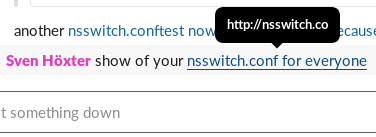
Update: Seems this is a Firefox specific bug in the Slack Webapplication, it works in Chrome and the Slack Electron Application as it should. Tested with Firefox ESR on Debian/buster and Firefox 74 on OS X. Ah I like it that we now have so many TLDs and matching on those seems to go bad more often now. Last occassion is Slack (which I think is a pile of shit written by morons, but that is a different story) which somehow does not properly match on .co domains. Leading to this auto linking: nsswitch.conf link Now I'm not sure if someone enocountered the same issue, or people just registered random domains just because they could. I found registrations for I've a few more .conf files in /etc which could be interesting in an IT environment, but for the sake of playing with it I registered nsswitch.co at godaddy. I do not want to endorse them in anyway, but for the first year it's only 13.08EUR right now, which is okay to pay for a stupid demo. So if you feel like it, you can probably register something stupid for yourself to play around with. I do not intent to renew this domain next year, so be aware of what happens then with the next owner.
29 March 2020

Sven Hoexter: Looking into Envertech Enverbridge EVB 202 SetID tool

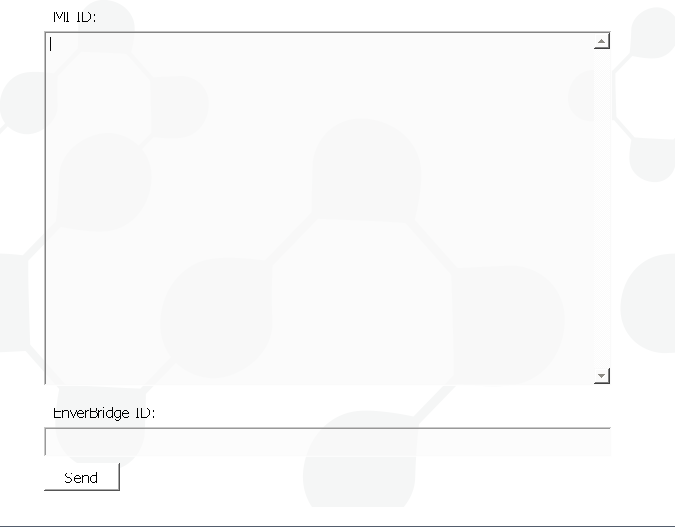
Disclaimer: I'm neither an experienced programmer nor proficient in reverse engineering, but I like at least to try to figure out how things work. Sometimes the solution is so easy, that even I manage to find it, still take this with a grain of salt. I lately witnessed the setup of an Envertech EnverBridge ENB-202 which is kind of a classic Chinese IoT device. Buy it, plug it in, use some strange setup software, and it will report your PV statistics to a web portal. The setup involved downloading a PE32 Windows executable, with an UI that basically has two input boxes and a sent button. You've to input the serial number(s) of your inverter boxes and the ID of your EnverBridge. That made me interested in what this setup process really looks like. The EnverBridge device itself has on one end a power plug, which is also used to communicate with the inverter via some Powerline protocol, and a network plug with a classic RJ45 end you plug into your network. If you power it up it will request an IPv4 address via DHCP. That brings us to the first oddity, the MAC address is in the BC:20:90 prefix which I could not find in the IEEE lists. Setting Up the SetID Software You can download the Windows software in a Zipfile, once you unpack it you end up with a Nullsoft installer .exe. Since this is a PE32 executable we've to add i386 as foreign architecture to install the wine32 package.
dpkg --add-architecture i386
apt update
apt install wine32:i386
wget http://www.envertec.com/uploads/bigfiles/Set%20ID.zip
unzip Set\ ID.zip
wine Set\ ID.exe
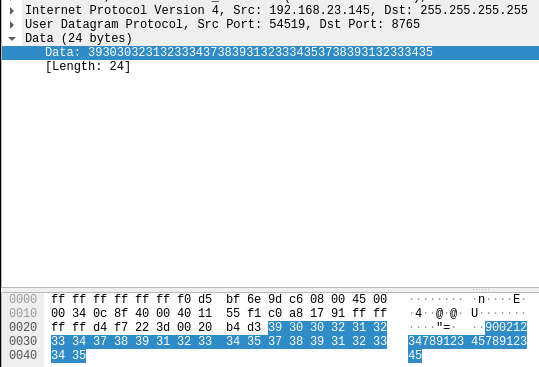
The end result is an installation in ~/.wine/drive_c/Program Files/SetID which reveals that this software is build with Qt5 according to the shipped dll's. The tool itself is in udpCilentNow.exe, and looks like this: Envertech SetID software The Network Communication To my own surprise, the communication is straight forward. A single UDP paket is sent to the broadcast address (255.255.255.255) on port 8765. Envertech SetID udp paket in wireshark I expected some strange binary protocol, but the payload is just simple numbers. They're a combination of the serial numbers of the inverter and the ID of the Enverbridge device. One thing I'm not 100% sure about are the inverter serial numbers, there are two of them, but on the inverter I've seen the serial numbers are always the same. So the payload is assembled like this: If you've more inverter the serials are just appended in the same way. Another strange thing is that the software does close to no input validation, they only check that the inverter serials start with CN and then just extract char 9 to 16. The response from the EnverBridge is also a single UDP paket to the broadcast address on port 8764, with exactly the same content we've sent. Writing a Replacement My result is probably an insult for all proficient Python coders, but based on a bit of research and some cut&paste programming I could assemble a small script to replicate the function of the Windows binary. I guess the usefulness of this exercise was mostly my personal entertainment, though it might help some none Windows users to setup this device. Usage is also very simple:
./enverbridge.py -h
Usage: enverbridge.py [options] MIIDs
Options:
  -h, --help         show this help message and exit
  -b BID, --bid=BID  Serial Number of your EnverBridge
./enverbridge.py -b 90087654 CN19100912345678 CN19100912345679
This is basically 1:1 the behaviour of the Windows binary, though I tried to add a bit more validation then the original binary and some more error messages. I also assume the serial numbers are also always the same so I take only one as the input, and duplicate it for the paket data.

12 November 2017

Sven Hoexter: Offering a Simtec Entropy Key

Since I started to lean a bit towards the concept of minimalism I've got rid of stuff, including all stationary computers. So for now I'm left with just my laptop and that's something where I do not want to attach an USB entropy key permanently. That's why I've a spare Simtec Entropy Key I no longer use, and I'm willing to sell. In case someone is interested, I'm willing to give it away for 20EUR + shipping. If you can convince me it'll be of use for the Debian project (end up on a DSA managed machine for example) I'm willing to give it away for less. If you're located in Cologne, Copenhagen or Barcelona we might be able, depending on the timing, to do a personal handover (with or without keysigning). Otherwise I guess shipping is mainly interesting for someone also located in Europe. You can use sven at stormbind dot net or hoexter at debian dot org to contact me and use GPG key 0xA6DC24D9DA2493D1.

29 September 2017

Sven Hoexter: Last rites to the lyx and elyxer packaging

After having been a heavy LyX user from 2005 to 2010 I've continued to maintain LyX more or less till now. Finally I'm starting to leave that stage and removed myself from the Uploaders list. The upload with some other last packaging changes is currently sitting in the git repo. Mainly because lintian on ftp-master currently rejects 'pakagename@packages.d.o' maintainer addresses (the alternative to the lists.alioth.d.o maintainer mailinglists). For elyxer I filled a request for removal. It hasn't seen any upstream activity for a while and the LyX build in HTML export support improved. My hope is that if I step away far enough someone else might actually pick it up. I had this strange moment when I lately realized that xchat got reintroduced to Debian after mapreri and myself spent some time last year to get it removed before the stretch release.

8 September 2017

Sven Hoexter: munin with TLS

Primarily a note for my future self so I don't have to find out what I did in the past once more. If you're running some smaller systems scattered around the internet, without connecting them with a VPN, you might want your munin master and nodes to communicate with TLS and validate certificates. If you remember what to do it's a rather simple and straight forward process. To manage the PKI I'll utilize the well known easyrsa script collection. For this special purpose CA I'll go with a flat layout. So it's one root certificate issuing all server and client certificates directly. Some very basic docs can be also found in the munin wiki. master setup For your '/etc/munin/munin.conf':
tls paranoid
tls_verify_certificate yes
tls_private_key /etc/munin/master.key
tls_certificate /etc/munin/master.crt
tls_ca_certificate /etc/munin/ca.crt
tls_verify_depth 1
A node entry with TLS will look like this:
[node1.stormbind.net]
    address [2001:db8::]
    use_node_name yes
Important points here: For easy-rsa the following command invocations are relevant:
./easyrsa init-pki
./easyrsa build-ca
./easrsa gen-req master
./easyrsa sign-req client master
./easyrsa set-rsa-pass master nopass
node setup For your '/etc/munin/munin-node.conf':
tls paranoid
tls_verify_certificate yes
tls_private_key /etc/munin/node1.key
tls_certificate /etc/munin/node1.crt
tls_ca_certificate /etc/munin/ca.crt
tls_verify_depth 1
For easy-rsa the following command invocations are relevant:
./easyrsa gen-req node1
./easyrsa sign-req server node1
./easyrsa set-rsa-pass node1 nopass
Important points here:

31 August 2017

Paul Wise: FLOSS Activities August 2017

Changes

Issues

Review

Administration
  • myrepos: get commit/admin access from joeyh at DebConf17, add commit/admin access for other patch submitters, apply my stack of patches
  • Debian: fix weird log file issues, redirect hardware donor, cleaned up a weird dir, fix some OOB info, ask for TLS on meetings-archive.d.n, check an I/O error, restart broken stunnels, powercycle 1 borked machine,
  • Debian mentors: lintian/security updates & reboot
  • Debian wiki: remove some stray cache files, whitelist 3 email domains, whitelist some email addresses, disable 1 spammer account, disable 1 accounts with bouncing email,
  • Debian QA: apply patch to fix PTS watch file errors, deploy changes
  • Debian derivatives census: run scripts for Purism, remove some noise from logs, trigger a recheck, merge fix by Unit193, deploy changes
  • Openmoko: security updates, reboots, enable unattended-upgrades

Communication
  • Attended DebConf17 and provided some input in BoFs
  • Sent Misc Dev News #44
  • Invite Google gLinux (on IRC) to the Debian derivatives census
  • Welcome Sven Haardiek (of GreenboneOS) to the Debian derivatives census
  • Inquire about the status of Canaima

Sponsors The samba bug report was sponsored by my employer. All other work was done on a volunteer basis.

22 August 2017

Sven Hoexter: whois databases and registration spam

Lately I experienced some new kind of spam, at least new to myself. Seems that spammer abuse registration input fields that do not implement strong enough validation, and echo back several values from the registration process in some kind of welcome mail. Basically filling the spam message in name and surname fields. So far I found a bunch of those originating from the following AS: AS49453, AS50896, AS200557 and AS61440. The first three belong to something identifying itself as "QUALITYNETWORK". The last one, AS61440, seems to be involved only partially with some networks being delegated to "Atomohost". To block them it's helpful to query the public radb service whois.radb.net for all networks belonging to the specific AS like this:
whois -h whois.radb.net -- '-i origin AS50896'
Another bunch of batch capable whois services are provided by Team Cymru. They've some examples at the end of https://www.team-cymru.org/IP-ASN-mapping.html. In this specific case the spam was for "www.robotas.ru" which is currently terminated at CloudFlare and redirects via JS document.location to "http://link31.net/b494d/ooo/", which in turn redirects via JS window.location to "http://revizor-online.ga/" which is again hosted at CloudFlare. The page at the end plays some strange youtube video - currently at around 1900 plays, so not that widely spread. In the end an interesting indicator about spam campaign success.

10 August 2017

Thorsten Glaser: New mksh and jupp releases, mksh FAQ, jupprc for JOE 4.4; MuseScore

mksh R56 was released with experimental fixes for the history no longer persisted when HISTFILE near-full and interactive shell cannot wait on coprocess by PID issues (I hope they do not introduce any regressioins) and otherwise as a bugfix release. You might wish to know the $EDITOR selection mechanism in dot.mkshrc changed. Some more alias characters are allowed again, and POSIX character classes (for ASCII, and EBCDIC, only) appeared by popular vote. mksh now has a FAQ; enjoy. Do feel free to contribute (answers, too, of course). The jupp text editor has also received a new release; asides from being much smaller, and updated (mksh too, btw) to Unicode 10, and some segfault fixes, it features falling back to using /dev/tty if stdin or stdout is not a terminal (for use on GNU with find xargs jupp, since they don t have our xargs(1) -o option yet), a new command to exit nonzero (sometimes, utilities invoking the generic visual editor need this), and presentation mode . Presentation mode, crediting Natureshadow, is basically putting your slides as (UTF-8, with fancy stuff inside) plaintext files into one directory, with sorting names (so e.g. zero-padded slide numbers as filenames), presenting them with jupp * in a fullscreen xterm. You d hit F6 to switch to one-file view first, then present by using F8 to go forward (F7 to go backward), and, for demonstrations, F9 to pipe the entire slide through an external command (could be just sh ) offering the previous one as default. Simple yet powerful; I imagine Sven Guckes would love it, were he not such a vim user. The new release is offered as source tarball (as usual) and in distribution packages, but also, again, a Win32 version as PKZIP archive (right-click on setup.inf and hit I nstall to install it). Note that this comes with its own (thankfully local) version of the Cygwin32 library (compatible down to Windows 95, apparently), so if you have Cygwin installed yourself you re better off compiling it there and using your own version instead. I ve also released a new DOS version of 2.8 with no code patches but an updated jupprc; the binary (self-extracting LHarc archive) this time comes with all resource files, not just jupp s. Today, the jupprc drop-in file for JOE 3.7 got a matching update (and some fixes for bugs discovered during that) and I added a new one for JOE 4.4 (the former being in Debian wheezy, the latter in jessie, stretch and buster/sid). It s a bit rudimentary (the new shell window functionality is absent) but, mostly, gives the desired jupp feeling, more so than just using stock jstar would. CVS ability to commit to multiple branches of a file at the same time, therefore grouping the commit (by commitid at least, unsure if cvsps et al. can be persuaded to recognise it). If you don t know what cvs(GNU) is: it is a proper (although not distributed) version control system and the best for centralised tasks. (For decentral tasks, abusing git as pseudo-VCS has won by popularity vote; take this as a comparison.) If desired, I can make these new versions available in my WTF APT repository on request. (Debian buster/sid users: please change https to http there, the site is only available with TLSv1.0 as it doesn t require bank-level security.) I d welcome it very much if people using an OS which does not yet carry either to package it there. Message me when one more is added, too In unrelated news I uploaded MuseScore 2.1 to Debian unstable, mostly because the maintainers are busy (though I could comaintain it if needed, I d just need help with the C++ and CMake details). Bonus side effect is that I can now build 2.2~ test versions with patches of mine added I plan to produce to fix some issues (and submit upstream) (read more )

22 July 2017

Niels Thykier: Improving bulk performance in debhelper

Since debhelper/10.3, there has been a number of performance related changes. The vast majority primarily improves bulk performance or only have visible effects at larger input sizes. Most visible cases are: For debhelper, this mostly involved: How to take advantage of these improvements in tools that use Dh_Lib: Credits: I would like to thank the following for reporting performance issues, regressions or/and providing patches. The list is in no particular order: Should I have missed your contribution, please do not hesitate to let me know.
Filed under: Debhelper, Debian

12 July 2017

Sven Hoexter: environment variable names with dots and busybox 1.26.0 ash

In case you're for example using Alpine Linux 3.6 based docker images, and you've been passing through environment variable names with dots, you might miss them now in your actual environment. It seems that with busybox 1.26.0 the busybox ash got a lot stricter regarding validation of environment variable names and now you can no longer pass through variable names with dots in them. They just won't be there. If you've been running ash interactively you could not add them in the past, but until now you could do something like this in your Dockerfile
ENV foo.bar=baz
and later on accces a variable "foo.bar". bash still allows those invalid variable names and is way more tolerant. So to be nice to your devs, and still bump your docker image version, you can add bash and ensure you're starting your application with /bin/bash instead of /bin/sh inside of your container. Links

12 June 2017

Sven Hoexter: UEFI PXE preseeded Debian installation on HPE DL120

We bought a bunch of very cheap low end HPE DL120 server. Enough to warrant a completely automated installation setup. Shouldn't be that much of a deal, right? Get dnsmasq up and running, feed it a preseed.cfg and be done with it. In practise it took us more hours then we expected. Setting up the hardware Our hosts are equipped with an additional 10G dual port NIC and we'd like to use this NIC for PXE booting. That's possible, but it requires you to switch to UEFI boot. Actually it enables you to boot from any available NIC. Setting up dnsmasq We decided to just use the packaged debian-installer from jessie and do some ugly things like overwritting files in /usr/lib via ansible later on. So first of all install debian-installer-8-netboot-amd64 and dnsmasq, then enroll our additional config for dnsmasq, ours looks like this:
domain=int.foobar.example
dhcp-range=192.168.0.240,192.168.0.242,255.255.255.0,1h
dhcp-boot=bootnetx64.efi
pxe-service=X86-64_EFI, "Boot UEFI PXE-64", bootnetx64.efi
enable-tftp
tftp-root=/usr/lib/debian-installer/images/8/amd64/text
dhcp-option=3,192.168.0.1
dhcp-host=00:c0:ff:ee:00:01,192.168.0.123,foobar-01
Now you've to link /usr/lib/debian-installer/images/8/amd64/text/bootnetx64.efi to /usr/lib/debian-installer/images/8/amd64/text/debian-installer/amd64/bootnetx64.efi. That got us of the ground and we had a working UEFI PXE boot that got us into debian-installer. Feeding d-i the preseed file Next we added some grub.cfg settings and parameterized some basic stuff to be handed over to d-i via the kernel command line. You'll find the correct grub.cfg in /usr/lib/debian-installer/images/8/amd64/text/debian-installer/amd64/grub/grub.cfg. We added the following two lines to automate the start of the installer:
set default="0"
set timeout=5
and our kernel command line looks like this:
 linux    /debian-installer/amd64/linux vga=788 --- auto=true interface=eth1 netcfg/dhcp_timeout=60 netcfg/choose_interface=eth1 priority=critical preseed/url=tftp://192.168.0.2/preseed.cfg quiet
Important points: preseeed.cfg, GPT and ESP One of the most painful points was the fight to find out the correct preseed values to install with GPT to create a ESP (EFI system partition) and use LVM for /. Relevant settings are:
# auto method must be lvm
d-i partman-auto/method string lvm
d-i partman-lvm/device_remove_lvm boolean true
d-i partman-md/device_remove_md boolean true
d-i partman-lvm/confirm boolean true
d-i partman-lvm/confirm_nooverwrite boolean true
d-i partman-basicfilesystems/no_swap boolean false
# Keep that one set to true so we end up with a UEFI enabled
# system. If set to false, /var/lib/partman/uefi_ignore will be touched
d-i partman-efi/non_efi_system boolean true
# enforce usage of GPT - a must have to use EFI!
d-i partman-basicfilesystems/choose_label string gpt
d-i partman-basicfilesystems/default_label string gpt
d-i partman-partitioning/choose_label string gpt
d-i partman-partitioning/default_label string gpt
d-i partman/choose_label string gpt
d-i partman/default_label string gpt
d-i partman-auto/choose_recipe select boot-root-all
d-i partman-auto/expert_recipe string \
boot-root-all :: \
538 538 1075 free \
$iflabel  gpt   \
$reusemethod    \
method  efi   \
format    \
. \
128 512 256 ext2 \
$defaultignore    \
method  format   format    \
use_filesystem    filesystem  ext2   \
mountpoint  /boot   \
. \
1024 4096 15360 ext4 \
$lvmok    \
method  format   format    \
use_filesystem    filesystem  ext4   \
mountpoint  /   \
. \
1024 4096 15360 ext4 \
$lvmok    \
method  format   format    \
use_filesystem    filesystem  ext4   \
mountpoint  /var   \
. \
1024 1024 -1 ext4 \
$lvmok    \
method  format   format    \
use_filesystem    filesystem  ext4   \
mountpoint  /var/lib   \
.
# This makes partman automatically partition without confirmation, provided
# that you told it what to do using one of the methods above.
d-i partman-partitioning/confirm_write_new_label boolean true
d-i partman/choose_partition select finish
d-i partman-md/confirm boolean true
d-i partman/confirm boolean true
d-i partman/confirm_nooverwrite boolean true
# This is fairly safe to set, it makes grub install automatically to the MBR
# if no other operating system is detected on the machine.
d-i grub-installer/only_debian boolean true
d-i grub-installer/with_other_os boolean true
d-i grub-installer/bootdev  string /dev/sda
I hope that helps to ease the processes to setup automated UEFI PXE installations for some other people out there still dealing with bare metal systems. Some settings took us some time to figure out, for example d-i partman-efi/non_efi_system boolean true required some searching on codesearch.d.n (amazing ressource if you're writing preseed files and need to find the correct templates) and reading scripts on git.d.o where you'll find the source for partman-* and grub-installer. Kudos Thanks especially to P.P. and M.K. to figure out all those details.

26 April 2017

Sven Hoexter: Chrome 58 ignores commonName in certificates

People using Chrome might have already noticed that some internal certificates created without a SubjectAlternativeName extension fail to verify. Finally the Google Chrome team stepped forward, and after only 17 years of having SubjectAlternativeName as the place for FQDNs to verify as valid for a certificate, they started to ignore the commonName. See also https://www.chromestatus.com/feature/4981025180483584. Currently Debian/stretch still has Chromium 57 but Chromium 58 is already in unstable. So some more people might notice this change soon. I hope that everyone who maintains some broken internal scripting to maintain internal CAs now re-reads the OpenSSL Cookbook to finally fix this stuff. In general I recommend to base your internal CA scripting on easy-rsa to avoid making every mistake in certificate management on your own.

24 February 2017

Sven Hoexter: Tcl and https - back to TclCurl

Must be the irony of life that I was about to give up the TclCurl Debian package some time ago, and now I'm using it again for some very old and horrible web scraping code. The world moved on to https but the Tcl http package only supports unencrypted http. You can combine it with the tls package as explained in the Wiki, but that seems to be overly complicated compared to just loading the TclCurl binding and moving on with something like this:
package require TclCurl
# download to a variable
curl::transfer -url https://sven.stormbind.net -bodyvar page
# or store it in a file
curl::transfer -url https://sven.stormbind.net -file page.html
Now the remaining problem is that the code is unmaintained upstream and there is one codebase on bitbucket and one on github. While I fed patches to the bitbucket repo and thus based the Debian package on that repo, the github repo diverted in a different direction.

14 February 2017

Sven Hoexter: moto g falcon up and running with LineageOS 14.1 nightly

After a few weeks of running Exodus on my moto g falcon, I've now done again the full wipe and moved on to LineageOS nightly from 20170213. Though that build is no longer online at the moment. It's running smooth so far for myself but there was an issue with the Google Play edition of the phone according to Reddit. Since I don't use gapps anyway I don't care. The only issue I see so far is that I can not reach the flash menu in the camera app. It's hidden behind a grey bar. Not nice but not a show stopper for me either.

Next.

Previous.