Search Results: "otto"

21 September 2025

Joey Hess: cheap DIY solar fence design

A year ago I installed a 4 kilowatt solar fence. I'm revisiting it this Sun Day, to share the design, now that I have prooved it out.
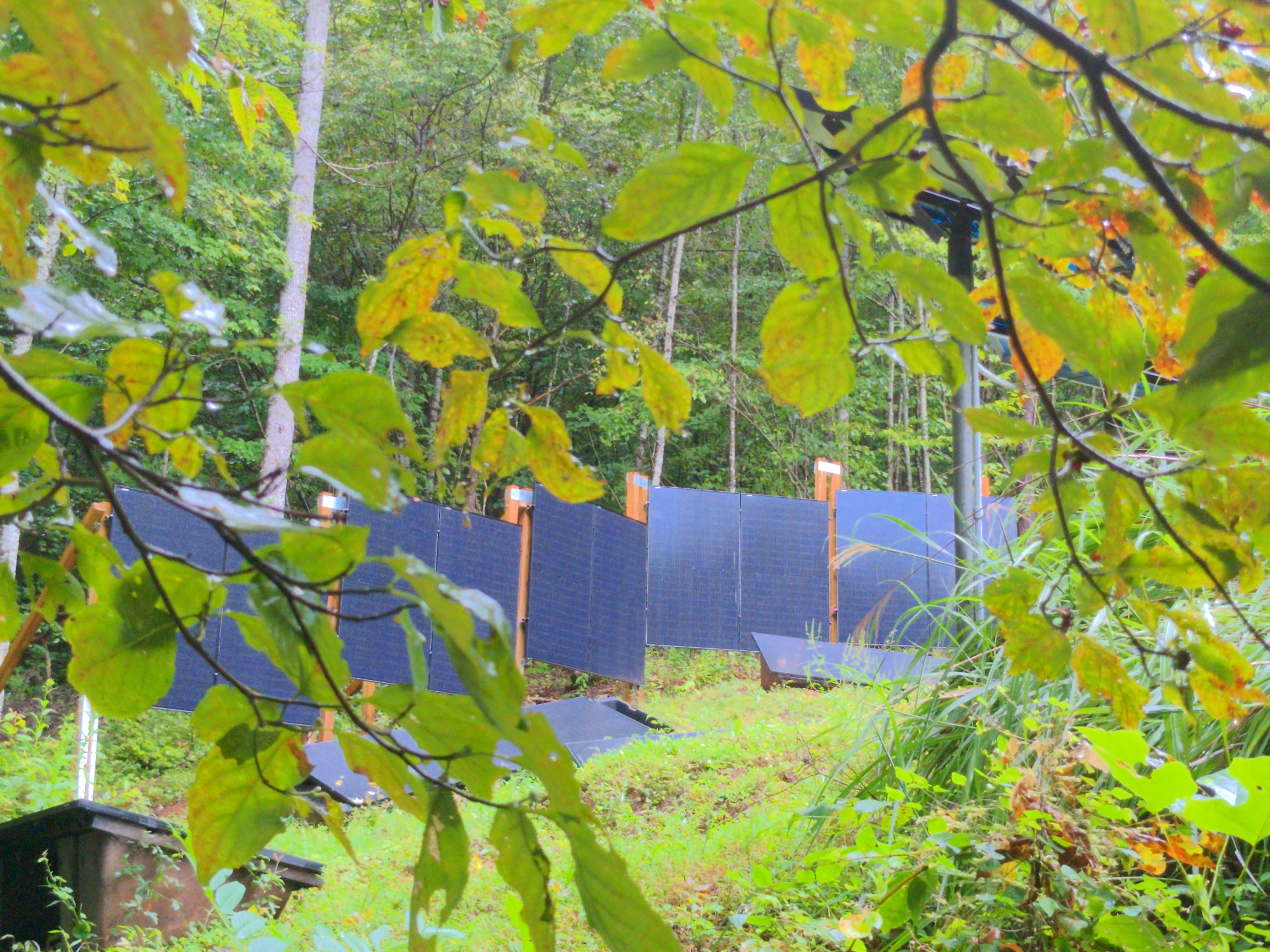
The solar fence and some other ground and pole mount solar panels, seen through leaves.
Solar fencing manufacturers have some good simple designs, but it's hard to buy for a small installation. They are selling to utility scale solar mostly. And those are installed by driving metal beams into the ground, which requires heavy machinery. Since I have experience with Ironridge rails for roof mount solar, I decided to adapt that system for a vertical mount. Which is something it was not designed for. I combined the Ironridge hardware with regular parts from the hardware store. The cost of mounting solar panels nowadays is often higher than the cost of the panels. I hoped to match the cost, and I nearly did. The solar panels cost $100 each, and the fence cost $110 per solar panel. This fence was significantly cheaper than conventional ground mount arrays that I considered as alternatives, and made a better use of a difficult hillside location. I used 7 foot long Ironridge XR-10 rails, which fit 2 solar panels per rail. (Longer rails would need a center post anyway, and the 7 foot long rails have cheaper shipping, since they do not need to be shipped freight.) For the fence posts, I used regular 4x4" treated posts. 12 foot long, set in 3 foot deep post holes, with 3x 50 lb bags of concrete per hole and 6 inches of gravel on the bottom.
detail of how the rails are mounted to the posts, and the panels to the rails
To connect the Ironridge rails to the fence posts, I used the Ironridge LFT-03-M1 slotted L-foot bracket. Screwed into the post with a 5/8 x 3 inch hot-dipped galvanized lag screw. Since a treated post can react badly with an aluminum bracket, there needs to be some flashing between the post and bracket. I used Shurtape PW-100 tape for that. I see no sign of corrosion after 1 year. The rest of the Ironridge system is a T-bolt that connects the rail to the L-foot (part BHW-SQ-02-A1), and Ironridge solar panel fasteners (UFO-CL-01-A1 and UFO-STP-40MM-M1). Also XR-10 end caps and wire clips. Since the Ironridge hardware is not designed to hold a solar panel at a 90 degree angle, I was concerned that the panels might slide downward over time. To help prevent that, I added some additional support brackets under the bottom of the panels. So far, that does not seem to have been a problem though. I installed Aptos 370 watt solar panels on the fence. They are bifacial, and while the posts block the back partially, there is still bifacial gain on cloudy days. I left enough space under the solar panels to be able to run a push mower under them.
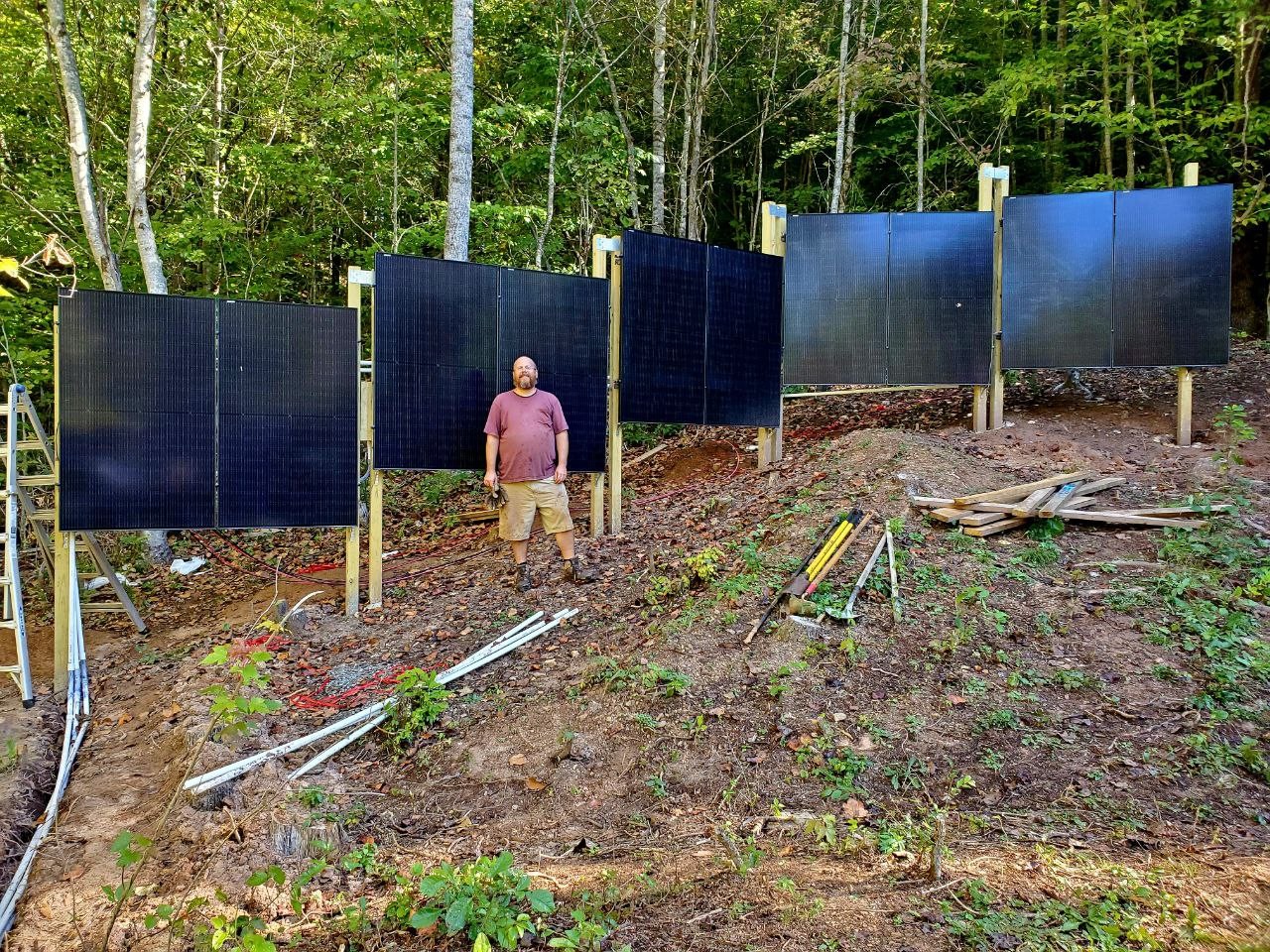
Me standing in front of the solar fence at end of construction
I put pairs of posts next to one-another, so each 7 foot segment of fence had its own 2 posts. This is the least elegant part of this design, but fitting 2 brackets next to one-another on a single post isn't feasible. I bolted the pairs of posts together with some spacers. A side benefit of doing it this way is that treated lumber can warp as it dries, and this prevented much twisting of the posts. Using separate posts for each segment also means that the fence can traverse a hill easily. And it does not need to be perfectly straight. In fact, my fence has a 30 degree bend in the middle. This means it has both south facing and south-west facing panels, so can catch the light for longer during the day. After building the fence, I noticed there was a slight bit of sway at the top, since 9 feet of wooden post is not entirely rigid. My worry was that a gusty wind could rattle the solar panels. While I did not actually observe that happening, I added some diagonal back bracing for peace of mind.
view of rear upper corner of solar fence, showing back bracing connection
Inspecting the fence today, I find no problems after the first year. I hope it will last 30 years, with the lifespan of the treated lumber being the likely determining factor. As part of my larger (and still ongoing) ground mount solar install, the solar fence has consistently provided great power. The vertical orientation works well at latitude 36. It also turned out that the back of the fence was useful to hang conduit and wiring and solar equipment, and so it turned into the electrical backbone of my whole solar field. But that's another story.. solar fence parts list
quantity cost per unit description
10 $27.89 7 foot Ironridge XR-10 rail
12 $20.18 12 foot treated 4x4
30 $4.86 Ironridge UFO-CL-01-A1
20 $0.87 Ironridge UFO-STP-40MM-M1
1 $12.62 Ironridge XR-10 end caps (20 pack)
20 $2.63 Ironridge LFT-03-M1
20 $1.69 Ironridge BHW-SQ-02-A1
22 $2.65 5/8 x 3 inch hot-dipped galvanized lag screw
10 $0.50 6 gravel per post
30 $6.91 50 lb bags of quickcrete
1 $15.00 Shurtape PW-100 Corrosion Protection Pipe Wrap Tape
N/A $30 other bolts and hardware (approximate)
$1100 total (Does not include cost of panels, wiring, or electrical hardware.)

17 September 2025

John Goerzen: Installing and Using Debian With My Decades-Old Genuine DEC vt510 Serial Terminal

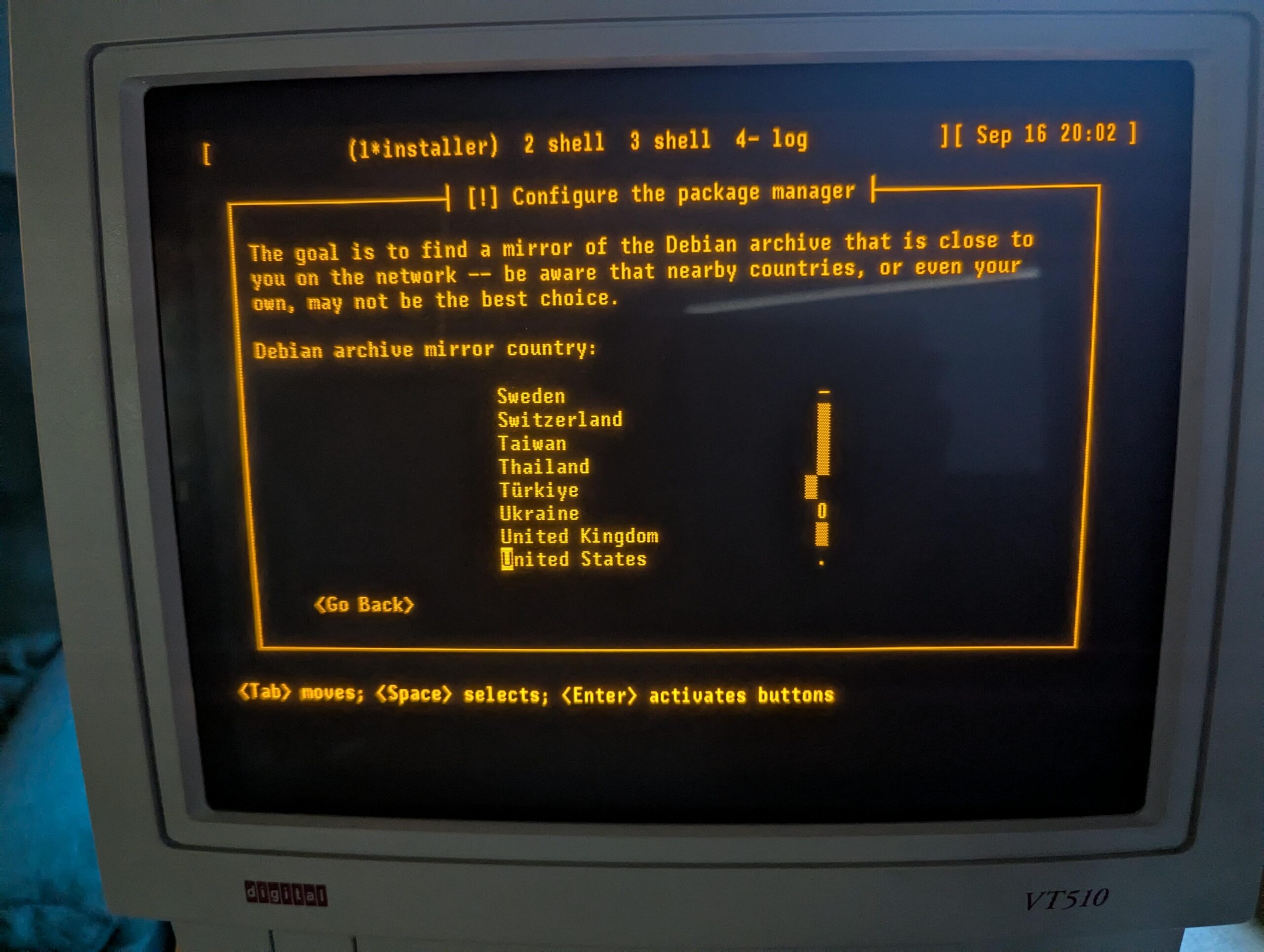
Six years ago, I was inspired to buy a DEC serial terminal. Since then, my collection has grown to include several DEC models, an IBM 3151, a Wyse WY-55, a Televideo 990, and a few others. When you are running a terminal program on Linux or MacOS, what you are really running is a terminal emulator. In almost all cases, the terminal emulator is emulating one of the DEC terminals in the vt100 through vt520 line, which themselves use a command set based on an ANSI standard. In short, you spend all day using a program designed to pretend to be the exact kind of physical machine I m using for this experiment! I have long used my terminals connected to a Raspberry Pi 4, but due to the difficulty of entering a root filesystem encryption password using a serial console on a Raspberry Pi, I am switching to an x86 Mini PC (with a N100 CPU). While I have used a terminal with the Pi, I ve never before used it as a serial console all the way from early boot, and I have never installed Debian using the terminal to run the installer. A serial terminal gives you a login prompt. A serial console gives you access to kernel messages, the initrd environment, and sometimes even the bootloader. This might be fun, I thought. I selected one of my vt510 terminals for this. It is one of my newer ones, having been built in 1993. But it has a key feature: I can remap Ctrl to be at the caps lock position, something I do on every other system I use anyhow. I could have easily selected an older one from the 1980s. A DEC vt510 terminal showing the Debian installer Kernel configuration To enable a serial console for Linux, you need to pass a parameter on the kernel command line. See the kernel documentaiton for more. I very frequently see instructions that are incomplete; they particularly omit flow control, which is most definitely needed for these real serial terminals. I run my terminal at 57600 bps, so the parameter I need is console=ttyS0,57600n8r. The r means to use hardware flow control (ttyS0 corresponds to the first serial port on the system; use ttyS1 or something else as appropriate for your situation). While booting the Debian installer, according to Debian s instructions, it may be useful to also add TERM=vt102 (the installer doesn t support the vt510 terminal type directly). The TERM parameter should not be specified on a running system after instlalation. Booting the Debian installer When you start the Debian installer, to get it into serial mode, you have a couple of options:
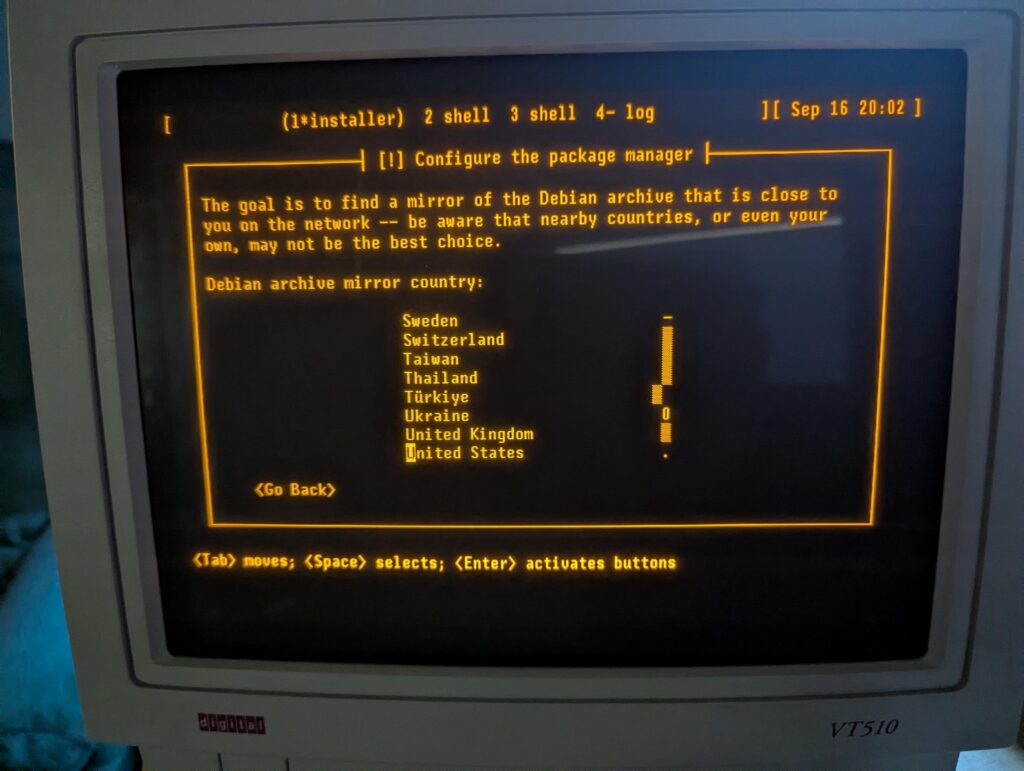
  1. You can use a traditional display and keyboard just long enough to input the kernel parameters described above
  2. You can edit the bootloader configuration on the installer s filesystem prior to booting from it
Option 1 is pretty easy. Option 2 is hard mode, but not that bad. On x86, the Debian installer boots in at least two different ways: it uses GRUB if you re booting under UEFI (which is most systems these days), or ISOLINUX if you are booting from the BIOS. If using GRUB, the file to edit on the installer image is boot/grub/grub.cfg. Near the top, add these lines:
serial --unit=0 --speed=57600 --word=8 --parity=no --stop=1
terminal_input console serial
terminal_output console serial
Unit 0 corresponds to ttyS0 as above. GRUB s serial command does not support flow control. If your terminal gets corrupted during the GRUB stage, you may need to configure it to a slower speed. Then, find the linux line under the Install menuentry. Edit it to insert console=ttyS0,57600n8r TERM=vt102 right after the vga=788. Save, unmount, and boot. You should see the GRUB screen displayed on your serial terminal. Select the Install option and the installer begins. If you are using BIOS boot, I m sure you can do something similar with the files in the isolinux directory, but haven t researched it. Now, you can install Debian like usual! Configuring the System I was pleasantly surprised to find that Debian s installer took care of many, but not all, of the things I want to do in order to make the system work nicely with a serial terminal. You can perform these steps from a chroot under the installer environment before a reboot, or later in the running system. First, while Debian does set up a getty (the program that displays the login prompt) on the serial console by default, it doesn t enable hardware flow control. So let s do that. Configuring the System: agetty with systemd Run systemctl edit serial-getty@ttyS0.service. This opens an editor that lets you customize the systemd configuration for a given service without having to edit the file directly. All you really need to do is modify the agetty command, so we just override it. At the top, in the designated area, write:
[Service]
ExecStart=
ExecStart=-/sbin/agetty --wait-cr -8 -h -L=always %I 57600 vt510
The empty ExecStart= line is necessary to tell systemd to remove the existing ExecStart command (otherwise, it will logically contain two ExecStart lines, which is an error). These arguments say: The systemd documentation refers to this page about serial consoles, which gives more background. However, I think it is better to use the systemctl edit method described here, rather than just copying the config file, since this lets things like new configurations with new Debian versions take effect. Configuring the System: Kernel and GRUB Your next stop is the /etc/default/grub file. Debian s installer automatically makes some changes here. There are three lines you want to change. First, near the top, edit GRUB_CMDLINE_LINUX_DEFAULT and add console=tty0 console=ttyS0,57600n8r. By specifying console twice, you allow output to go both to the standard display and to the serial console. By specifying the serial console last, you make it be the preferred one for things like entering the root filesystem password. Next, towards the bottom, make sure these two lines look like this:
GRUB_TERMINAL="console serial"
GRUB_SERIAL_COMMAND="serial --unit=0 --speed=57600 --word=8 --parity=no --stop=1"
Finally, near the top, you may want to raise the GRUB_TIMEOUT to somewhere around 10 to 20 seconds since things may be a bit slower than you re used to. Save the file and run update-grub. Now, GRUB will display on both your standard display and the serial console. You can edit the boot command from either. If you have a VGA or HDMI monitor attached, for instance, and need to not use the serial console, you can just edit the Linux command line in GRUB and remove the reference to ttyS0 for one boot. Easy! That s it. You now have a system that is fully operational from a serial terminal. My original article from 2019 has some additional hints, including on how to convert from UTF-8 for these terminals. Update 2025-09-17: It is also useful to set up proper locales. To do this, first edit /etc/locale.gen. Make sure to add, or uncomment:
en_US ISO-8859-1
en_US.IBM437 IBM437
en_US.UTF-8 UTF-8 
Then run locale-gen. Normally, your LANG will be set to en_us.UTF-8, which will select the appropriate encoding. Plain en_US will select ISO-8859-1, which you need for the vt510. Then, add something like this to your ~/.bashrc:
if [  tty  = "/dev/ttyS0" -o "$TERM" = "vt510" ]; then
        stty -iutf8
        # might add ixon ixoff
        export LANG=en_US
        export MANOPT="-E ascii"
        stty rows 25
fi
if [ "$TERM" = "screen" -o "$TERM" = "vt100" ]; then
    export LANG=en_US.utf8
fi
Finally, in my ~/.screenrc, I have this. It lets screen convert between UTF-8 and ISO-8859-1:
defencoding UTF-8
startup_message off
vbell off
termcapinfo * XC=B%, -,
maptimeout 5
bindkey -k ku stuff ^[OA
bindkey -k kd stuff ^[OB
bindkey -k kr stuff ^[OC
bindkey -k kl stuff ^[OD

14 September 2025

Ian Jackson: tag2upload in the first month of forky

tl;dr: tag2upload (beta) is going well so far, and is already handling around one in 13 uploads to Debian. Introduction and some stats We announced tag2upload s open beta in mid-July. That was in the middle of the the freeze for trixie, so usage was fairly light until the forky floodgates opened. Since then the service has successfully performed 637 uploads, of which 420 were in the last 32 days. That s an average of about 13 per day. For comparison, during the first half of September up to today there have been 2475 uploads to unstable. That s about 176/day. So, tag2upload is already handling around 7.5% of uploads. This is very gratifying for a service which is advertised as still being in beta! Sean and I are very pleased both with the uptake, and with the way the system has been performing. Recent UI/UX improvements During this open beta period we have been hard at work. We have made many improvements to the user experience. Current git-debpush in forky, or trixie-backports, is much better at detecting various problems ahead of time. When uploads do fail on the service the emailed error reports are now more informative. For example, anomalies involving orig tarballs, which by definition can t be detected locally (since one point of tag2upload is not to have tarballs locally) now generally result in failure reports containing a diffstat, and instructions for a local repro. Why we are still in beta There are a few outstanding work items that we currently want to complete before we declare the end of the beta. Retrying on Salsa-side failures The biggest of these is that the service should be able to retry when Salsa fails. Sadly, Salsa isn t wholly reliable, and right now if it breaks when the service is trying to handle your tag, your upload can fail. We think most of these failures could be avoided. Implementing retries is a fairly substantial task, but doesn t pose any fundamental difficulties. We re working on this right now. Other notable ongoing work We want to support pristine-tar, so that pristine-tar users can do a new upstream release. Andrea Pappacoda is working on that with us. See #1106071. (Note that we would generally recommend against use of pristine-tar within Debian. But we want to support it.) We have been having conversations with Debusine folks about what integration between tag2upload and Debusine would look like. We re making some progress there, but a lot is still up in the air. We are considering how best to provide tag2upload pre-checks as part of Salsa CI. There are several problems detected by the tag2upload service that could be detected by Salsa CI too, but which can t be detected by git-debpush. Common problems We ve been monitoring the service and until very recently we have investigated every service-side failure, to understand the root causes. This has given us insight into the kinds of things our users want, and the kinds of packaging and git practices that are common. We ve been able to improve the system s handling of various anomalies and also improved the documentation. Right now our failure rate is still rather high, at around 7%. Partly this is because people are trying out the system on packages that haven t ever seen git tooling with such a level of rigour. There are two classes of problem that are responsible for the vast majority of the failures that we re still seeing: Reuse of version numbers, and attempts to re-tag tag2upload, like git (and like dgit), hates it when you reuse a version number, or try to pretend that a (perhaps busted) release never happened. git tags aren t namespaced, and tend to spread about promiscuously. So replacing a signed git tag, with a different tag of the same name, is a bad idea. More generally, reusing the same version number for a different (signed!) package is poor practice. Likewise, it s usually a bad idea to remove changelog entries for versions which were actually released, just because they were later deemed improper. We understand that many Debian contributors have gotten used to this kind of thing. Indeed, tools like dcut encourage it. It does allow you to make things neat-looking, even if you ve made mistakes - but really it does so by covering up those mistakes! The bottom line is that tag2upload can t support such history-rewriting. If you discover a mistake after you ve signed the tag, please just burn the version number and add a new changelog stanza. One bonus of tag2upload s approach is that it will discover if you are accidentally overwriting an NMU, and report that as an error. Discrepancies between git and orig tarballs tag2upload promises that the source package that it generates corresponds precisely to the git tree you tag and sign. Orig tarballs make this complicated. They aren t present on your laptop when you git-debpush. When you re not uploading a new upstream version, the tag2upload service reuses existing orig tarballs from the archive. If your git and the archive s orig don t agree, the tag2upload service will report an error, rather than upload a package with contents that differ from your git tag. With the most common Debian workflows, everything is fine: If you base everything on upstream git, and make your orig tarballs with git archive (or git deborig), your orig tarballs are the same as the git, by construction. We recommend usually ignoring upstream tarballs: most upstreams work in git, and their tarballs can contain weirdness that we don t want. (At worst, the tarball can contain an attack that isn t visible in git, as with xz!) Alternatively, if you use gbp import-orig, the differences (including an attack like Jia Tan s) are imported into git for you. Then, once again, your git and the orig tarball will correspond. But there are other workflows where this correspondence may not hold. Those workflows are hazardous, because the thing you re probably working with locally for your routine development is the git view. Then, when you upload, your work is transplanted onto the orig tarball, which might be quite different - so what you upload isn t what you ve been working on! This situation is detected by tag2upload, precisely because tag2upload checks that it s keeping its promise: the source package is identical to the git view. (dgit push makes the same promise.) Get involved Of course the easiest way to get involved is to start using tag2upload. We would love to have more contributors. There are some easy tasks to get started with, in bugs we ve tagged newcomer mostly UX improvements such as detecting certain problems earlier, in git-debpush. More substantially, we are looking for help with sbuild: we d like it to be able to work directly from git, rather than needing to build source packages: #868527.

comment count unavailable comments

Otto Kek l inen: Zero-configuration TLS and password management best practices in MariaDB 11.8

Featured image of post Zero-configuration TLS and password management best practices in MariaDB 11.8Locking down database access is probably the single most important thing for a system administrator or software developer to prevent their application from leaking its data. As MariaDB 11.8 is the first long-term supported version with a few new key security features, let s recap what the most important things are every DBA should know about MariaDB in 2025. Back in the old days, MySQL administrators had a habit of running the clumsy mysql-secure-installation script, but it has long been obsolete. A modern MariaDB database server is already secure by default and locked down out of the box, and no such extra scripts are needed. On the contrary, the database administrator is expected to open up access to MariaDB according to the specific needs of each server. Therefore, it is important that the DBA can understand and correctly configure three things:

  1. Separate application-specific users with granular permissions allowing only necessary access and no more.
  2. Distributing and storing passwords and credentials securely
  3. Ensuring all remote connections are properly encrypted
For holistic security, one should also consider proper auditing, logging, backups, regular security updates and more, but in this post we will focus only on the above aspects related to securing database access.

How encrypting database connections with TLS differs from web server HTTP(S) Even though MariaDB (and other databases) use the same SSL/TLS protocol for encrypting remote connections as web servers and HTTPS, the way it is implemented is significantly different, and the different security assumptions are important for a database administrator to grasp. Firstly, most HTTP requests to a web server are unauthenticated, meaning the web server serves public web pages and does not require users to log in. Traditionally, when a user logs in over a HTTP connection, the username and password were transmitted in plaintext as a HTTP POST request. Modern TLS, which was previously called SSL, does not change how HTTP works but simply encapsulates it. When using HTTPS, a web browser and a web server will start an encrypted TLS connection as the very first thing, and only once established, do they send HTTP requests and responses inside it. There are no passwords or other shared secrets needed to form the TLS connection. Instead, the web server relies on a trusted third party, a Certificate Authority (CA), to vet that the TLS certificate offered by the web server can be trusted by the web browser. For a database server like MariaDB, the situation is quite different. All users need to first authenticate and log in to the server before getting being allowed to run any SQL and getting any data out of the server. The database server and client programs have built-in authentication methods, and passwords are not, and have never been, sent in plaintext. Over the years, MySQL and its successor, MariaDB, have had multiple password authentication methods: the original SHA-1-based hashing, later double SHA-1-based mysql_native_password, followed by sha256_password and caching_sha256_password in MySQL and ed25519 in MariaDB. The MariaDB.org blog post by Sergei Golubchik recaps the history of these well. Even though most modern MariaDB installations should be using TLS to encrypt all remote connections in 2025, having the authentication method be as secure as possible still matters, because authentication is done before the TLS connection is fully established. To further harden the authentication agains man-in-the-middle attacks, a new password the authentication method PARSEC was introduced in MariaDB 11.8, which builds upon the previous ed25519 public-key-based verification (similar to how modern SSH does), and also combines key derivation with PBKDF2 with hash functions (SHA512,SHA256) and a high iteration count. At first it may seem like a disadvantage to not wrap all connections in a TLS tunnel like HTTPS does, but actually not having the authentication done in a MitM resistant way regardless of the connection encryption status allows a clever extra capability that is now available in MariaDB: as the database server and client already have a shared secret that is being used by the server to authenticate the user, it can also be used by the client to validate the server s TLS certificate and no third parties like CAs or root certificates are needed. MariaDB 11.8 was the first LTS version to ship with this capability for zero-configuration TLS. Note that the zero-configuration TLS also works on older password authentication methods and does not require users to have PARSEC enabled. As PARSEC is not yet the default authentication method in MariaDB, it is recommended to enable it in installations that use zero-configuration TLS encryption to maximize the security of the TLS certificate validation.

Why the root user in MariaDB has no password and how it makes the database more secure Relying on passwords for security is problematic, as there is always a risk that they could leak, and a malicious user could access the system using the leaked password. It is unfortunately far too common for database passwords to be stored in plaintext in configuration files that are accidentally committed into version control and published on GitHub and similar platforms. Every application or administrative password that exists should be tracked to ensure only people who need it know it, and rotated at regular intervals to ensure old employees etc won t be able to use old passwords. This password management is complex and error-prone. Replacing passwords with other authentication methods is always advisable when possible. On a database server, whoever installed the database by running e.g. apt install mariadb-server, and configured it with e.g. nano /etc/mysql/mariadb.cnf, already has full root access to the operating system, and asking them for a password to access the MariaDB database shell is moot, since they could circumvent any checks by directly accessing the files on the system anyway. Therefore, MariaDB, since version 10.4 stopped requiring the root user to enter a password when connecting locally, and instead checks using socket authentication whether the user is the operating-system root user or equivalent (e.g. running sudo). This is an elegant way to get rid of a password that was actually unnecessary to begin with. As there is no root password anymore, the risk of an external user accessing the database as root with a leaked password is fully eliminated. Note that socket authentication only works for local connections on the same server. If you want to access a MariaDB server remotely as the root user, you would need to configure a password for it first. This is not generally recommended, as explained in the next section.

Create separate database users for normal use and keep root for administrative use only Out of the box a MariaDB installation is already secure by default, and only the local root user can connect to it. This account is intended for administrative use only, and for regular daily use you should create separate database users with access limited to the databases they need and the permissions required. The most typical commands needed to create a new database for an app and a user the app can use to connect to the database would be the following:
sql
CREATE DATABASE app_db;
CREATE USER 'app_user'@'%' IDENTIFIED BY 'your_secure_password';
GRANT ALL PRIVILEGES ON app_db.* TO 'app_user'@'%';
FLUSH PRIVILEGES;
Alternatively, if you want to use the parsec authentication method, run this to create the user:
sql
CREATE OR REPLACE USER 'app_user'@'%'
 IDENTIFIED VIA parsec
 USING PASSWORD('your_secure_password');
Note that the plugin auth_parsec is not enabled by default. If you see the error message ERROR 1524 (HY000): Plugin 'parsec' is not loaded fix this by running INSTALL SONAME 'auth_parsec';. In the CREATE USER statements, the @'%' means that the user is allowed to connect from any host. This needs to be defined, as MariaDB always checks permissions based on both the username and the remote IP address or hostname of the user, combined with the authentication method. Note that it is possible to have multiple user@remote combinations, and they can have different authentication methods. A user could, for example, be allowed to log in locally using the socket authentication and over the network using a password. If you are running a custom application and you know exactly what permissions are sufficient for the database users, replace the ALL PRIVILEGES with a subset of privileges listed in the MariaDB documentation. For new permissions to take effect, restart the database or run FLUSH PRIVILEGES.

Allow MariaDB to accept remote connections and enforce TLS Using the above 'app_user'@'%' is not enough on its own to allow remote connections to MariaDB. The MariaDB server also needs to be configured to listen on a network interface to accept remote connections. As MariaDB is secure by default, it only accepts connections from localhost until the administrator updates its configuration. On a typical Debian/Ubuntu system, the recommended way is to drop a new custom config in e.g. /etc/mysql/mariadb.conf.d/99-server-customizations.cnf, with the contents:
[mariadbd]
# Listen for connections from anywhere
bind-address = 0.0.0.0
# Only allow TLS encrypted connections
require-secure-transport = on
For settings to take effect, restart the server with systemctl restart mariadb. After this, the server will accept connections on any network interface. If the system is using a firewall, the port 3306 would additionally need to be allow-listed. To confirm that the settings took effect, run e.g. mariadb -e "SHOW VARIABLES LIKE 'bind_address';" , which should now show 0.0.0.0. When allowing remote connections, it is important to also always define require-secure-transport = on to enforce that only TLS-encrypted connections are allowed. If the server is running MariaDB 11.8 and the clients are also MariaDB 11.8 or newer, no additional configuration is needed thanks to MariaDB automatically providing TLS certificates and appropriate certificate validation in recent versions. On older long-term-supported versions of the MariaDB server one would have had to manually create the certificates and configure the ssl_key, ssl_cert and ssl_ca values on the server, and distribute the certificate to the clients as well, which was cumbersome, so good it is not required anymore. In MariaDB 11.8 the only additional related config that might still be worth setting is tls_version = TLSv1.3 to ensure only the latest TLS protocol version is used. Finally, test connections to ensure they work and to confirm that TLS is used by running e.g.:
shell
mariadb --user=app_user --password=your_secure_password \
 --host=192.168.1.66 -e '\s'
The result should show something along:
--------------
mariadb from 11.8.3-MariaDB, client 15.2 for debian-linux-gnu (x86_64)
...
Current user: app_user@192.168.1.66
SSL: Cipher in use is TLS_AES_256_GCM_SHA384, cert is OK
...
If running a Debian/Ubuntu system, see the bundled README with zcat /usr/share/doc/mariadb-server/README.Debian.gz to read more configuration tips.

Should TLS encryption be used also on internal networks? If a database server and app are running on the same private network, the chances that the connection gets eavesdropped on or man-in-the-middle attacked by a malicious user are low. However, it is not zero, and if it happens, it can be difficult to detect or prove that it didn t happen. The benefit of using end-to-end encryption is that both the database server and the client can validate the certificates and keys used, log it, and later have logs audited to prove that connections were indeed encrypted and show how they were encrypted. If all the computers on an internal network already have centralized user account management and centralized log collection that includes all database sessions, reusing existing SSH connections, SOCKS proxies, dedicated HTTPS tunnels, point-to-point VPNs, or similar solutions might also be a practical option. Note that the zero-configuration TLS only works with password validation methods. This means that systems configured to use PAM or Kerberos/GSSAPI can t use it, but again those systems are typically part of a centrally configured network anyway and are likely to have certificate authorities and key distribution or network encryption facilities already set up. In a typical software app stac however, the simplest solution is often the best and I recommend DBAs use the end-to-end TLS encryption in MariaDB 11.8 in most cases. Hopefully with these tips you can enjoy having your MariaDB deployments both simpler and more secure than before!

5 September 2025

Antonio Terceiro: Past halfway there: history of autopkgtest support in Debian

The Release of Debian 13 ("Trixie") last month marked another milestone on the effort to provide automated test support for Debian packages in their installed form. We have achieved the mark of 57% of the source packages in the archive declaring support for autopkgtest.
Release Packages with tests Total number of packages % of packages with tests
wheezy 5 17175 0%
jessie 1112 20596 5%
stretch 5110 24845 20%
buster 9966 28501 34%
bullseye 13949 30943 45%
bookworm 17868 34341 52%
trixie 21527 37670 57%
The code that generated this table is provided at the bottom. The growth rate has been consistently decreasing at each release after stretch. That probably means that the low hanging fruit -- adding support en masse for large numbers of similar packages, such as team-maintained packages for a given programming language -- has been picked, and from now on the work gets slightly harder. Perhaps there is a significant long tail of packages that will never get autopkgtest support. Looking for common prefixes among the packages missing a Testsuite: field gives me us the largest groups of packages missing autopkgtest support:
$ grep-dctrl -v -F Testsuite --regex -s Package -n . trixie   cut -d - -f 1   uniq -c   sort -n  tail -20
     50 apertium
     50 kodi
     51 lomiri
     53 maven
     55 libjs
     57 globus
     66 cl
     67 pd
     72 lua
     79 php
     88 puppet
     91 r
    111 gnome
    124 ruby
    140 ocaml
    152 rust
    178 golang
    341 fonts
    557 python
   1072 haskell
There seems to be a fair amount of Haskell and Python. If someone could figure out a way of testing installed fonts in a meaningful way, this would a be a good niche where we can cover 300+ packages. There is a another analysis that can be made, which I didn't: which percentage of new packages introduced in a given release have declared autopkgtest support, compared with the total of new packages in that release? My data only counts the totals, so we start with the technical debt of the almost all of the 17,000 packages with no tests in wheezy, which was the stable at the time I started Debian CI. How many of those got tests since then? Note that not supporting autopkgtest does not mean that a package is not tested at all: it can run build-time tests, which are also useful. Not supporting autopkgtest, though, means that their binaries in the archive can't be automatically tested in their installed, but then there is a entire horde of volunteers running testing and unstable on a daily basis who test Debian and report bugs. This is the script that produced the table in the beginning of this post:
#!/bin/sh
set -eu
extract()  
  local release
  local url
  release="$1"
  url="$2"
  if [ ! -f "$ release " ]; then
    rm -f "$ release .gz"
    curl --silent -o $ release .gz "$ url "
    gunzip "$ release .gz"
  fi
  local with_tests
  local total
  with_tests="$(grep-dctrl -c -F Testsuite --regex . $release)"
  total="$(grep-dctrl -c -F Package --regex . $release)"
  echo "  $ release    $ with_tests    $ total    $((100*with_tests/total))%  "
 
echo "  **Release**   **Packages with tests**   **Total number of packages**   **% of packages with tests**  "
echo " ------------- ------------------------- ------------------------------ ------------------------------ "
for release in wheezy jessie stretch buster; do
  extract "$ release " "http://archive.debian.org/debian/dists/$ release /main/source/Sources.gz"
done
for release in bullseye bookworm trixie; do
  extract "$ release " "http://ftp.br.debian.org/debian/dists/$ release /main/source/Sources.gz"
done

31 August 2025

Otto Kek l inen: Managing procrastination and distractions

Featured image of post Managing procrastination and distractionsI ve noticed that procrastination and inability to be consistently productive at work has become quite common in recent years. This is clearly visible in younger people who have grown up with an endless stream of entertainment literally at their fingertips, on their mobile phone. It is however a trap one can escape from with a little bit of help. Procrastination is natural they say humans are lazy by nature after all. Probably all of us have had moments when we choose to postpone a task we know we should be working on, and instead spent our time doing secondary tasks (valorisation). Classic example is cleaning your apartment when you should be preparing for an exam. Some may procrastinate by not doing any work at all, and just watching YouTube videos or the like. To some people, typically those who are in their 20s and early in their career, procrastination can be a big challenge and finding the discipline to stick to planned work may need intentional extra effort, and perhaps even external help. During my 20+ year career in software development I ve been blessed to work with engineers of various backgrounds and each with their unique set of strengths. I have also helped many grow in various areas and overcome challenges, such as lack of intrinsic motivation and managing procrastination, and some might be able to get it in check with some simple advice.
Distance yourself from the digital distractions The key to avoiding distractions and procrastination is to make it inconvenient enough that you rarely do it. If continuing to do work is easier than switching to procrastination, work is more likely to continue. Tips to minimize digital distractions, listed in order of importance:
  1. Put your phone away. Just like when you go to a movie and turn off your phone for two hours, you can put the phone away completely when starting to work. Put the phone in a different room to ensure there is enough physical distance between you and the distraction, so it is impossible for you to just take a quick peek .
  2. Turn off notifications from apps. Don t let the apps call you like sirens luring Odysseus. You don t need to have all the notifications. You will see what the apps have when you eventually open them at a time you choose to use them.
  3. Remove or disable social media apps, games and the like from your phone and your computer. You can install them back when you have vacation. You can probably live without them for some time. If you can t remove them, explore your phone s screen time restriction features to limit your own access to apps that most often waste your time. These features are sometimes listed in the phone settings under digital health .
  4. Have a separate work computer and work phone. Having dedicated ones just for work that are void of all unnecessary temptations helps keep distance from the devices that could derail your focus.
  5. Listen to music. If you feel your brain needs a dose of dopamine to get you going, listening to music helps satisfy your brain s cravings while still being able to simultaneously keep working.
Doing a full digital detox is probably not practical, or not sustainable for an extended time. One needs apps to stay in touch with friends and family, and staying current in software development probably requires spending some time reading news online and such. However the tips above can help contain the distractions and minimize the spontaneous attention the distractions get. Some of the distractions may ironically be from the work itself, for example Slack notifications or new email notifications. I recommend turning them off for a couple of hours every day to have some distraction free time. It should be enough to check work mail a couple times a day. Checking them every hour probably does not add much overall value for the company unless your work is in sales or support where the main task itself is responding to emails.

Distraction free work environment Following the same principle of distancing yourself from distractions, try to use a dedicated physical space for working. If you don t have a spare room to dedicate to work, use a neighborhood caf or sign up for a local co-working space or start commuting to the company office to find a space to be focused on work in.

Break down tasks into smaller steps Sometimes people postpone tasks because they feel intimidated by the size or complexity of a task. In particular in software engineering problems may be vague and appear large until one reaches the breakthrough that brings the vision of how to tackle it. Breaking down problems into smaller more manageable pieces has many advantages in software engineering. Not only can it help with task-avoidance, but it can also make the problem easier to analyze, suggest solutions and test them and build a solid foundation to expand upon to ultimately later reach a full solution on the entire larger problem. Working on big problems as a chain of smaller tasks may also offer more opportunities to celebrate success on completing each subtask and help getting in a suitable cadence of solving a single thing, taking a break and then tackling the next issue. Breaking down a task into concrete steps may also help with getting more realistic time estimations. Sometimes procrastination isn t real someone could just be overly ambitious and feel bad about themselves for not doing an unrealistic amount of work.

Intrinsic motivation Of course, you should follow your passion when possible. Strive to pick a career that you enjoy, and thus maximize the intrinsic motivation you experience. However, even a dream job is still a job. Nobody is ever paid to do whatever they want. Any work will include at least some tasks that feel like a chore or otherwise like something you would not do unless paid to. Some would say that the definition of work itself is having to do things one would otherwise not do. You can only fully do whatever you want while on vacation or when you choose to not have a job at all. But if you have a job, you simply need to find the intrinsic motivation to do it. Simply put, some tasks are just unpleasant or boring. Our natural inclination is to avoid them in favor of more enjoyable activities. For these situations we just have to find the discipline to force ourselves to do the tasks and figuratively speaking whip ourselves into being motivated to complete the tasks.

Extrinsic motivation As the name implies, this is something people external to you need to provide, such as your employer or manager. If you have challenges in managing yourself and delivering results on a regular basis, somebody else needs to set goals and deadlines and keep you accountable for them. At the end of the day this means that eventually you will stop receiving salary or other payments unless you did your job. Forcing people to do something isn t nice, but eventually it needs to be done. It would not be fair for an employer to pay those who did their work the same salary as those who procrastinated and fell short on their tasks. If you work solo, you can also simulate the extrinsic motivation by publicly announcing milestones and deadlines to build up pressure for yourself to meet them and avoid publicly humiliation. It is a well-studied and scientifically proven phenomenon that most university students procrastinate at the start of assignments, and truly start working on them only once the deadline is imminent.

External help for addictions If procrastination is mainly due to a single distraction that is always on your mind, it may be a sign of an addiction. For example, constantly thinking about a computer game or staying up late playing a computer game, to the extent that it seriously affects your ability to work, may be a symptom of an addiction, and getting out of it may be easier with external help.

Discipline and structure Most of the time procrastination is not due to an addiction, but simply due to lack of self-discipline and structure. The good thing is that those things can be learned. It is mostly a matter of getting into new habits, which most young software engineers pick up more or less automatically while working along the more senior ones. Hopefully these tips can help you stay on track and ensure you do everything you are expected to do with clear focus, and on time!

29 August 2025

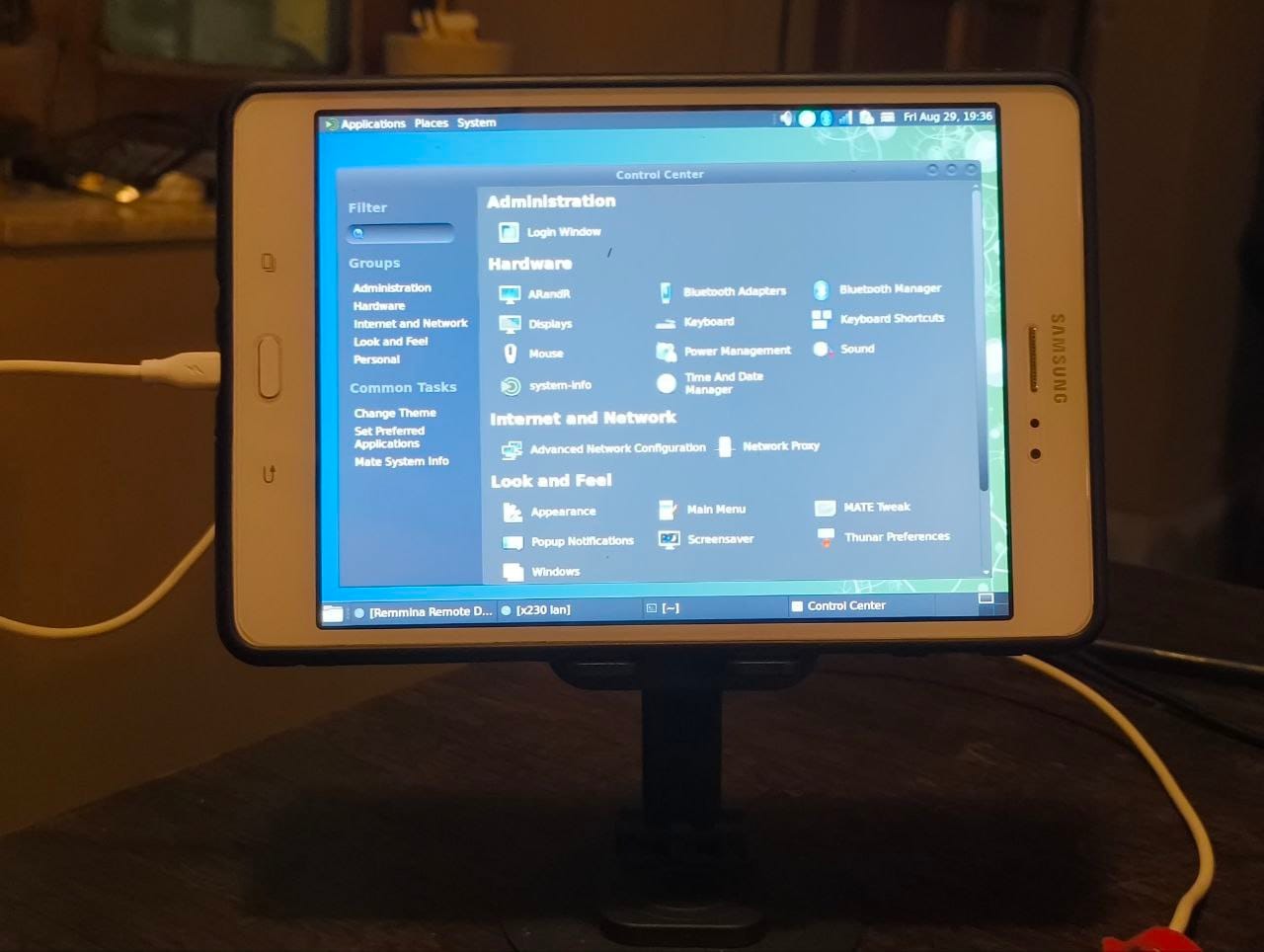
Raju Devidas: Fixing Auto-Rotate screen orientation on PostmarketOS devices running MATE DE

Fixing Auto-Rotate screen orientation on PostmarketOS devices running MATE DEI have been using my Samsung Galaxy Tab A (2015) with PostmarketOS on and off since last year. It serves as a really good e-book reader with KOReader installed on it. Have tried phosh and plasma-mobile on it, works nicely but slows the device down heavily (2 GB RAM and old processor) so I use MATE Desktop environment on it.Lately I have started using this tablet along with my laptop as a second screen for work. And it has been working super nicely for that. The only issue being that I have to manually rotate the screen to landscape every time I reboot the device. It resets the screen orientation to portrait after a reboot. So I went through the pmOS wiki and a neat nice hack documented there worked very well for me. First we will test if the auto-rotate sensor works and if we can read values from it. So we install some basic necessary packages

$ sudo apk add xrandr xinput inotify-tools iio-sensor-proxy
Enable the service for iio-sensor-proxy
sudo rc-update add iio-sensor-proxy
Reboot the device. Now in the device terminal start the sensor monitor-sensor
user@samsung-gt58 ~> monitor-sensor
    Waiting for iio-sensor-proxy to appear
+++ iio-sensor-proxy appeared
=== Has accelerometer (orientation: normal, tilt: vertical)
=== Has ambient light sensor (value: 5.000000, unit: lux)
=== No proximity sensor
=== No compass
    Light changed: 14.000000 (lux)
    Accelerometer orientation changed: left-up
    Tilt changed: tilted-down
    Light changed: 12.000000 (lux)
    Tilt changed: vertical
    Light changed: 13.000000 (lux)
    Light changed: 11.000000 (lux)
    Light changed: 13.000000 (lux)
    Accelerometer orientation changed: normal
    Light changed: 5.000000 (lux)
    Light changed: 6.000000 (lux)
    Light changed: 5.000000 (lux)
    Accelerometer orientation changed: right-up
    Light changed: 3.000000 (lux)
    Light changed: 4.000000 (lux)
    Light changed: 5.000000 (lux)
    Light changed: 12.000000 (lux)
    Tilt changed: tilted-down
    Light changed: 19.000000 (lux)
    Accelerometer orientation changed: bottom-up
    Tilt changed: vertical
    Light changed: 1.000000 (lux)
    Light changed: 2.000000 (lux)
    Light changed: 4.000000 (lux)
    Accelerometer orientation changed: right-up
    Tilt changed: tilted-down
    Light changed: 11.000000 (lux)
    Accelerometer orientation changed: normal
    Tilt changed: vertical
    Tilt changed: tilted-down
    Light changed: 18.000000 (lux)
    Light changed: 21.000000 (lux)
    Light changed: 22.000000 (lux)
    Light changed: 19.000000 (lux)
    Accelerometer orientation changed: left-up
    Light changed: 17.000000 (lux)
    Tilt changed: vertical
    Light changed: 14.000000 (lux)
    Tilt changed: tilted-down
    Light changed: 16.000000 (lux)
    Light changed: 18.000000 (lux)
    Light changed: 17.000000 (lux)
    Light changed: 18.000000 (lux)
    Light changed: 17.000000 (lux)
    Light changed: 18.000000 (lux)
    Light changed: 17.000000 (lux)
    Light changed: 18.000000 (lux)
    Light changed: 17.000000 (lux)
As you can see we can read the rotation values from the sensor as I am rotating the tablet in different orientations. Now we just need to use a script which changes the screen orientation using xrandr according to the sensor value.
#!/bin/sh
killall monitor-sensor
monitor-sensor > /dev/shm/sensor.log 2>&1 &
while inotifywait -e modify /dev/shm/sensor.log; do
  ORIENTATION=$(tail /dev/shm/sensor.log   grep &aposorientation&apos   tail -1   grep -oE &apos[^ ]+$&apos)
  case "$ORIENTATION" in
    normal)
      xrandr -o normal
      xinput set-prop "Goodix Capacitive TouchScreen" "Coordinate Transformation Matrix" 1 0 0 0 1 0 0 0 1
      ;;
    left-up)
      xrandr -o left
      xinput set-prop "Goodix Capacitive TouchScreen" "Coordinate Transformation Matrix" 0 -1 1 1 0 0 0 0 1
      ;;
    bottom-up)
      xrandr -o inverted
      xinput set-prop "Goodix Capacitive TouchScreen" "Coordinate Transformation Matrix" -1 0 1 0 -1 1 0 0 1
      ;;
    right-up)
      xrandr -o right
      xinput set-prop "Goodix Capacitive TouchScreen" "Coordinate Transformation Matrix" 0 1 0 -1 0 1 0 0 1
      ;;
  esac
done

auto-rotate-screen.sh

You need to replace the name of your touch input device in the script, you can get the name by using xinput --list , make sure to type this on the device terminal.
user@samsung-gt58 ~> xinput --list
* Virtual core pointer                    	id=2	[master pointer  (3)]
*   * Virtual core XTEST pointer              	id=4	[slave  pointer  (2)]
*   * Zinitix Capacitive TouchScreen          	id=10	[slave  pointer  (2)]
*   * Toad One Plus                           	id=12	[slave  pointer  (2)]
* Virtual core keyboard                   	id=3	[master keyboard (2)]
    * Virtual core XTEST keyboard             	id=5	[slave  keyboard (3)]
    * GPIO Buttons                            	id=6	[slave  keyboard (3)]
    * pm8941_pwrkey                           	id=7	[slave  keyboard (3)]
    * pm8941_resin                            	id=8	[slave  keyboard (3)]
    * Zinitix Capacitive TouchScreen          	id=11	[slave  keyboard (3)]
    * samsung-a2015 Headset Jack              	id=9	[slave  keyboard (3)]
In our script here we are using a Zinitix capacitive screen, it will be different for yours.Once your script is ready with the correct touchscreen name. Save and make the script executable. chmod +x auto-rotate-screen.sh Then test your script in your terminal ./auto-rotate.sh , stop the script using Ctrl + CNow we need add this script to auto-start. On MATE DE you can go to System > Control Center > Startup Applications, then click on Custom Add button, browse the script location, give it a name and then click on Add button. Now reboot the tablet/device, login and see the auto rotation working.
0:00
/0:09

  1. Auto-Rotation wiki article on PostmarketOS Wiki https://wiki.postmarketos.org/wiki/Auto-rotation

28 August 2025

Valhalla's Things: 1840s Underwear

Posted on August 28, 2025
Tags: madeof:atoms, craft:sewing, FreeSoftWear
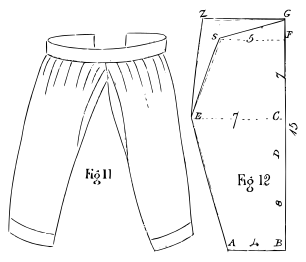
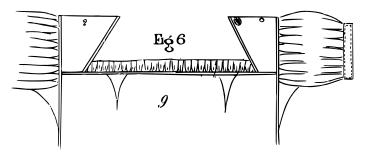
A woman wearing a knee-length shift with very short pleated sleeves and drawers that are a bit longer than needed to be ankle-length. The shift is too wide at the top, had to have a pleat taken in the center front, but the sleeves are still falling down. She is also wearing a black long sleeved t-shirt and leggings under said underwear, for decency. A bit more than a year ago, I had been thinking about making myself a cartridge pleated skirt. For a number of reasons, one of which is the historybounding potential, I ve been thinking pre-crinoline, so somewhere around the 1840s, and that s a completely new era for me, which means: new underwear. Also, the 1840s are pre-sewing machine, and I was already in a position where I had more chances to handsew than to machine sew, so I decided to embrace the slowness and sew 100% by hand, not even using the machine for straight seams. A woman turning fast enough that her petticoat extends a considerable distance from the body. The petticoat is white with a pattern of cording from the hem to just below hip level, with a decreasing number of rows of cording going up. If I remember correctly, I started with the corded petticoat, looking around the internet for instructions, and then designing my own based on the practicality of using modern wide fabric from my stash (and specifically some DITTE from costumers favourite source of dirty cheap cotton IKEA). Around the same time I had also acquired a sashiko kit, and I used the Japanese technique for sewing running stitches pushing the needle with a thimble that covers the base of the middle finger, and I can confirm that for this kind of things it s great! I ve since worn the petticoat a few times for casual / historyBounding / folkwearBounding reasons, during the summer, and I can confirm it s comfortable to use; I guess that during the winter it could be nice to add a flannel layer below it. The technical drawing and pattern for drawers from the book: each leg is cut out of a rectangle of fabric folded along the length, the leg is tapered equally, while the front is tapered more than the back, and comes to a point below the top of the original rectangle. Then I proceeded with the base layers: I had been browsing through The workwoman's guide and that provided plenty of examples, and I selected the basic ankle-length drawers from page 53 and the alternative shift on page 47. As for fabric, I had (and still have) a significant lack of underwear linen in my stash, but I had plenty of cotton voile that I had not used in a while: not very historically accurate for plain underwear, but quite suitable for a wearable mockup. Working with a 1830s source had an interesting aspect: other of the usual, mildly annoying, imperial units, it also used a lot a few obsolete units, especially nails, that my qalc, my usual calculator and converter, doesn t support. Not a big deal, because GNU units came to the rescue, and that one knows a lot of obscure and niche units, and it s quite easy to add those that are missing1 Working on this project also made me freshly aware of something I had already noticed: converting instructions for machine sewing garments into instructions for hand sewing them is usually straightforward, but the reverse is not always true. Starting from machine stitching, you can usually convert straight stitches into backstitches (or running backstitches), zigzag and overlocking into overcasting and get good results. In some cases you may want to use specialist hand stitches that don t really have a machine equivalent, such as buttonhole stitches instead of simply overcasting the buttonhole, but that s it. Starting from hand stitching, instead, there are a number of techniques that could be converted to machine stitching, but involve a lot of visible topstitching that wasn t there in the original instructions, or at times are almost impossible to do by machine, if they involve whipstitching together finished panels on seams that are subject to strong tension. Anyway, halfway through working with the petticoat I cut both the petticoat and the drawers at the same time, for efficiency in fabric use, and then started sewing the drawers. the top third or so of the drawers, showing a deep waistband that is closed with just one button at the top, and the front opening with finished edges that continue through the whole crotch, with just the overlap of fabric to provide coverage. The book only provided measurements for one size (moderate), and my fabric was a bit too narrow to make them that size (not that I have any idea what hip circumference a person of moderate size was supposed to have), so the result is just wide enough to be comfortably worn, but I think that when I ll make another pair I ll try to make them a bit wider. On the other hand they are a bit too long, but I think that I ll fix it by adding a tuck or two. Not a big deal, anyway. The same woman as in the opening image from the back, the shift droops significantly in the center back, and the shoulder straps have fallen down on the top of the arms. The shift gave me a bit more issues: I used the recommended gusset size, and ended up with a shift that was way too wide at the top, so I had to take a box pleat in the center front and back, which changed the look and wear of the garment. I have adjusted the instructions to make gussets wider, and in the future I ll make another shift following those. Even with the pleat, the narrow shoulder straps are set quite far to the sides, and they tend to droop, and I suspect that this is to be expected from the way this garment is made. The fact that there are buttonholes on the shoulder straps to attach to the corset straps and prevent the issue is probably a hint that this behaviour was to be expected. The technical drawing of the shift from the book, showing a the top of the body, two trapezoidal shoulder straps, the pleated sleeves and a ruffle on the front edge. I ve also updated the instructions so that they shoulder straps are a bit wider, to look more like the ones in the drawing from the book. Making a corset suitable for the time period is something that I will probably do, but not in the immediate future, but even just wearing the shift under a later midbust corset with no shoulder strap helps. I m also not sure what the point of the bosom gores is, as they don t really give more room to the bust where it s needed, but to the high bust where it s counterproductive. I also couldn t find images of original examples made from this pattern to see if they were actually used, so in my next make I may just skip them. Sleeve detail, showing box pleats that are about 2 cm wide and a few mm distance from each other all along the circumference, neatly sewn into the shoulder strap on one side and the band at the other side. On the other hand, I m really happy with how cute the short sleeves look, and if2 I ll ever make the other cut of shift from the same book, with the front flaps, I ll definitely use these pleated sleeves rather than the straight ones that were also used at the time. As usual, all of the patterns have been published on my website under a Free license:




  1. My ~/.units file currently contains definitions for beardseconds, bananas and the more conventional Nm and NeL (linear mass density of fibres).
  2. yeah, right. when.

18 August 2025

Otto Kek l inen: Best Practices for Submitting and Reviewing Merge Requests in Debian

Featured image of post Best Practices for Submitting and Reviewing Merge Requests in DebianHistorically the primary way to contribute to Debian has been to email the Debian bug tracker with a code patch. Now that 92% of all Debian source packages are hosted at salsa.debian.org the GitLab instance of Debian more and more developers are using Merge Requests, but not necessarily in the optimal way. In this post I share what I ve found the best practice to be, presented in the natural workflow from forking to merging.
Why use Merge Requests? Compared to sending patches back and forth in email, using a git forge to review code contributions brings several benefits:
  • Contributors can see the latest version of the code immediately when the maintainer pushes it to git, without having to wait for an upload to Debian archives.
  • Contributors can fork the development version and easily base their patches on the correct version and help test that the software continues to function correctly at that specific version.
  • Both maintainer and other contributors can easily see what was already submitted and avoid doing duplicate work.
  • It is easy for anyone to comment on a Merge Request and participate in the review.
  • Integrating CI testing is easy in Merge Requests by activating Salsa CI.
  • Tracking the state of a Merge Request is much easier than browsing Debian bug reports tagged patch , and the cycle of submit review re-submit re-review is much easier to manage in the dedicated Merge Request view compared to participants setting up their own email plugins for code reviews.
  • Merge Requests can have extra metadata, such as Approved , and the metadata often updates automatically, such as a Merge Request being closed automatically when the Git commit ID from it is pushed to the target branch.
Keeping these benefits in mind will help ensure that the best practices make sense and are aligned with maximizing these benefits.

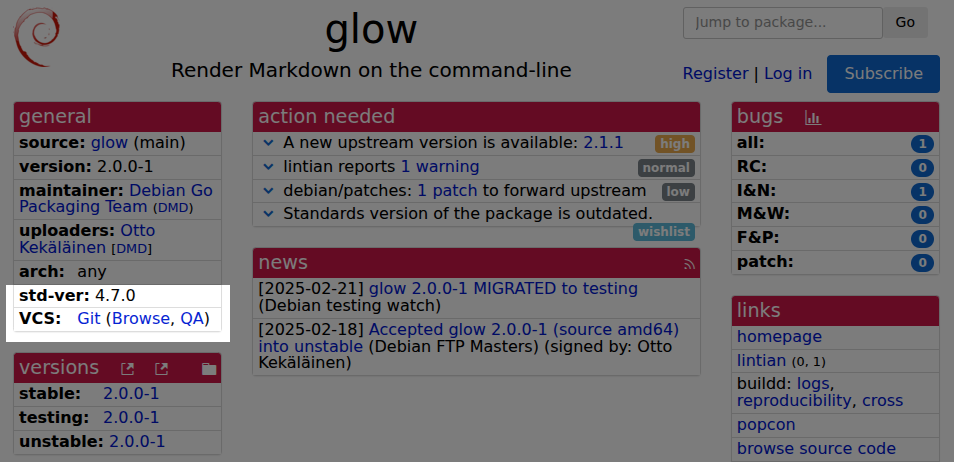
Finding the Debian packaging source repository and preparing to make a contribution Before sinking any effort into a package, start by checking its overall status at the excellent Debian Package Tracker. This provides a clear overview of the package s general health in Debian, when it was last uploaded and by whom, and if there is anything special affecting the package right now. This page also has quick links to the Debian bug tracker of the package, the build status overview and more. Most importantly, in the General section, the VCS row links to the version control repository the package advertises. Before opening that page, note the version most recently uploaded to Debian. This is relevant because nothing in Debian currently enforces that the package in version control is actually the same as the latest uploaded to Debian. Packaging source code repository links at tracker.debian.org Following the Browse link opens the Debian package source repository, which is usually a project page on Salsa. To contribute, start by clicking the Fork button, select your own personal namespace and, under Branches to include, pick Only the default branch to avoid including unnecessary temporary development branches. View after pressing Fork Once forking is complete, clone it with git-buildpackage. For this example repository, the exact command would be gbp clone --verbose git@salsa.debian.org:otto/glow.git. Next, add the original repository as a new remote and pull from it to make sure you have all relevant branches. Using the same fork as an example, the commands would be:
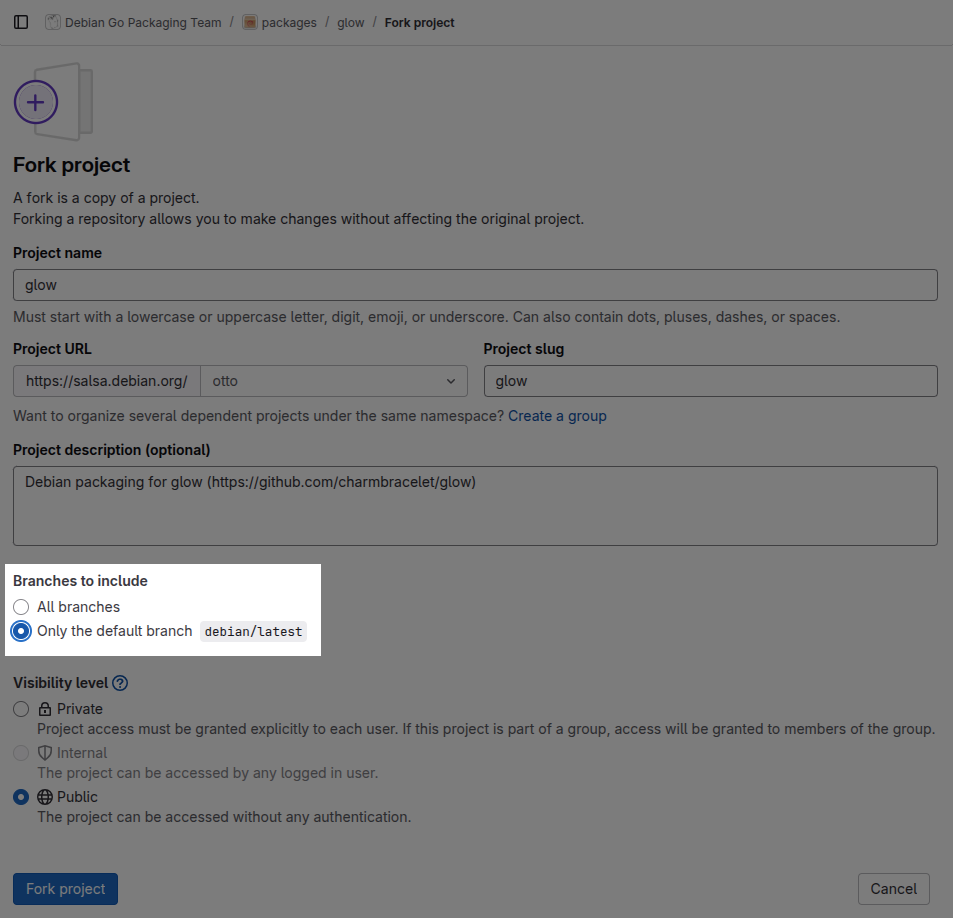
git remote add go-team https://salsa.debian.org/go-team/packages/glow.git
gbp pull --verbose --track-missing go-team
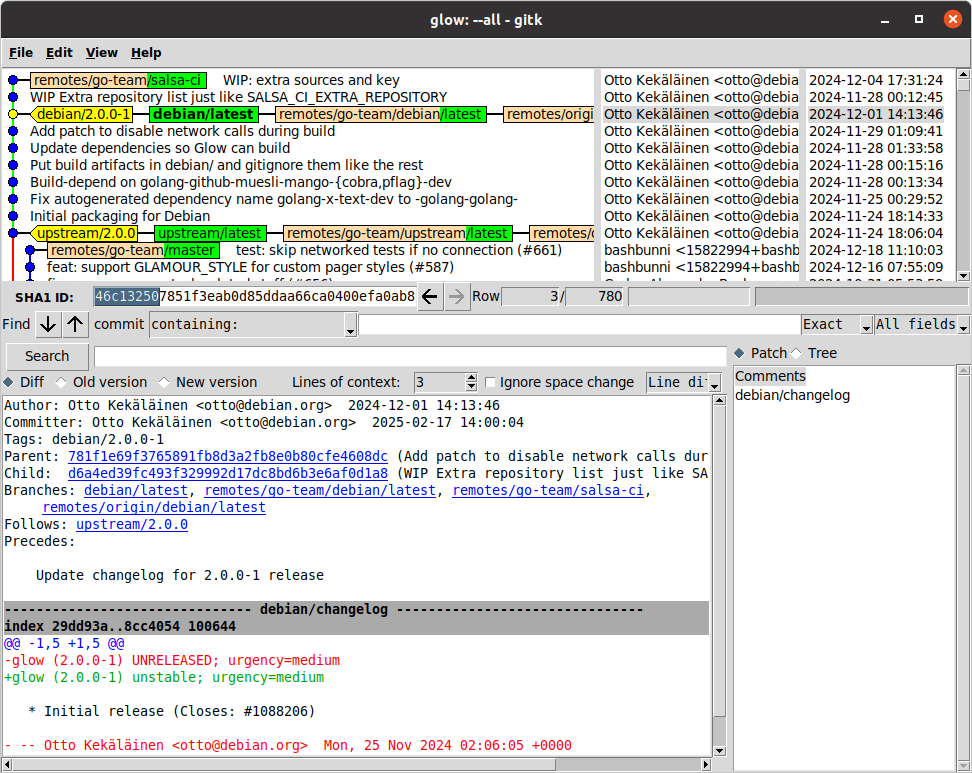
The gbp pull command can be repeated whenever you want to make sure the main branches are in sync with the original repository. Finally, run gitk --all & to visually browse the Git history and note the various branches and their states in the two remotes. Note the style in comments and repository structure the project has and make sure your contributions follow the same conventions to maximize the chances of the maintainer accepting your contribution. It may also be good to build the source package to establish a baseline of the current state and what kind of binaries and .deb packages it produces. If using Debcraft, one can simply run debcraft build in the Git repository.
Submitting a Merge Request for a Debian packaging improvement Always start by making a development branch by running git checkout -b <branch name> to clearly separate your work from the main branch. When making changes, remember to follow the conventions you already see in the package. It is also important to be aware of general guidelines on how to make good Git commits. If you are not able to immediately finish coding, it may be useful to publish the Merge Request as a draft so that the maintainer and others can see that you started working on something and what general direction your change is heading in. If you don t finish the Merge Request in one sitting and return to it another day, you should remember to pull the Debian branch from the original Debian repository in case it has received new commits. This can be done easily with these commands (assuming the same remote and branch names as in the example above):
git fetch go-team
git rebase -i go-team/debian/latest
Frequent rebasing is a great habit to help keep the Git history linear, and restructuring and rewording your commits will make the Git history easier to follow and understand why the changes were made. When pushing improved versions of your branch, use git push --force. While GitLab does allow squashing, I recommend against it. It is better that the submitter makes sure the final version is a neat and clean set of commits that the receiver can easily merge without having to do any rebasing or squashing themselves. When ready, remove the draft status of the Merge Request and wait patiently for review. If the maintainer does not respond in several days, try sending an email to <source package name>@packages.debian.org, which is the official way to contact maintainers. You could also post a comment on the MR and tag the last few committers in the same repository so that a notification email is triggered. As a last resort, submit a bug report to the Debian bug tracker to announce that a Merge Request is pending review. This leaves a permanent record for posterity (or the Debian QA team) of your contribution. However, most of the time simply posting the Merge Request in Salsa is enough; excessive communication might be perceived as spammy, and someone needs to remember to check that the bug report is closed.

Respect the review feedback, respond quickly and avoid Merge Requests getting stale Once you get feedback, try to respond as quickly as possible. When people participating have everything fresh in their minds, it is much easier for the submitter to rework it and for the reviewer to re-review. If the Merge Request becomes stale, it can be challenging to revive it. Also, if it looks like the MR is only waiting for re-review but nothing happens, re-read the previous feedback and make sure you actually address everything. After that, post a friendly comment where you explicitly say you have addressed all feedback and are only waiting for re-review.

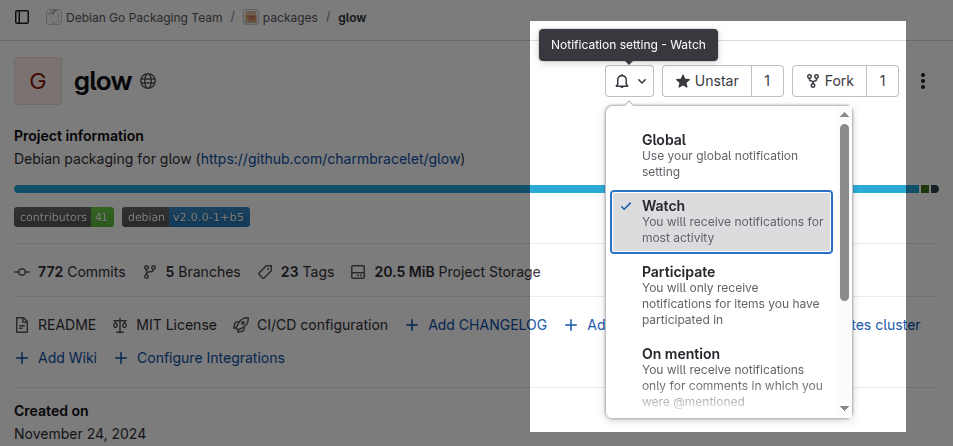
Reviewing Merge Requests This section about reviewing is not exclusive to Debian package maintainers anyone can contribute to Debian by reviewing open Merge Requests. Typically, the larger an open source project gets, the more help is needed in reviewing and testing changes to avoid regressions, and all diligently done work is welcome. As the famous Linus quote goes, given enough eyeballs, all bugs are shallow . On salsa.debian.org, you can browse open Merge Requests per project or for a whole group, just like on any GitLab instance. Reviewing Merge Requests is, however, most fun when they are fresh and the submitter is active. Thus, the best strategy is to ensure you have subscribed to email notifications in the repositories you care about so you get an email for any new Merge Request (or Issue) immediately when posted. Change notification settings from Global to Watch to get an email on new Merge Requests When you see a new Merge Request, try to review it within a couple of days. If you cannot review in a reasonable time, posting a small note that you intend to review it later will feel better to the submitter compared to not getting any response. Personally, I have a habit of assigning myself as a reviewer so that I can keep track of my whole review queue at https://salsa.debian.org/dashboard/merge_requests?reviewer_username=otto, and I recommend the same to others. Seeing the review assignment happen is also a good way to signal to the submitter that their submission was noted.
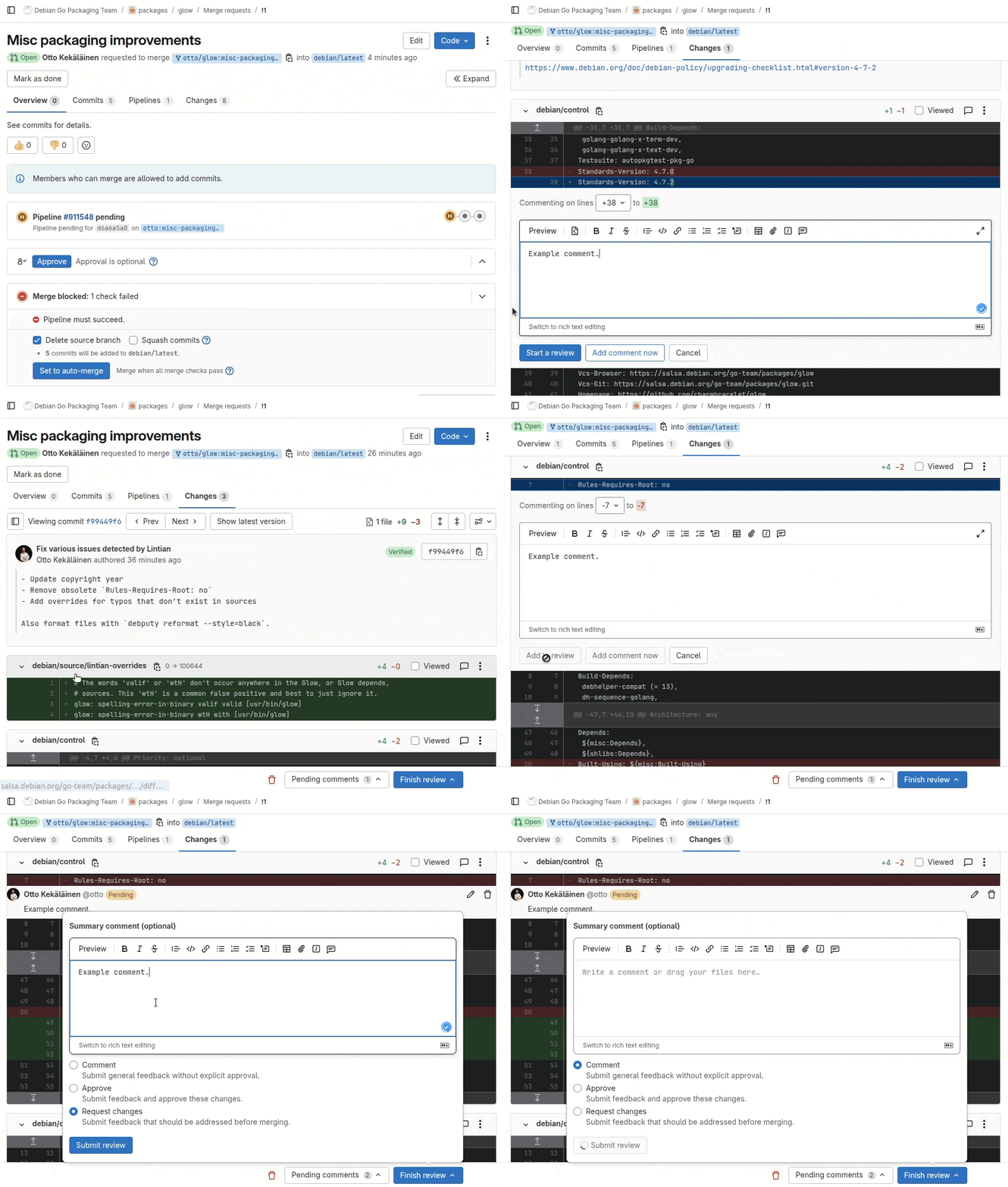
Reviewing commit-by-commit in the web interface Reviewing using the web interface works well in general, but I find that the way GitLab designed it is not ideal. In my ideal review workflow, I first read the Git commit message to understand what the submitter tried to do and why; only then do I look at the code changes in the commit. In GitLab, to do this one must first open the Commits tab and then click on the last commit in the list, as it is sorted in reverse chronological order with the first commit at the bottom. Only after that do I see the commit message and contents. Getting to the next commit is easy by simply clicking Next. Example review to demonstrate location of buttons and functionality When adding the first comment, I choose Start review and for the following remarks Add to review. Finally, I click Finish review and Submit review, which will trigger one single email to the submitter with all my feedback. I try to avoid using the Add comment now option, as each such comment triggers a separate notification email to the submitter.


Reviewing and testing on your own computer locally For the most thorough review, I pull the code to my laptop for local review with git pull <remote url> <branch name>. There is no need to run git remote add as pulling using a URL directly works too and saves from needing to clean up old remotes later. Pulling the Merge Request contents locally allows me to build, run and inspect the code deeply and review the commits with full metadata in gitk or equivalent.

Investing enough time in writing feedback, but not too much See my other post for more in-depth advice on how to structure your code review feedback. In Debian, I would emphasize patience, to allow the submitter time to rework their submission. Debian packaging is notoriously complex, and even experienced developers often need more feedback and time to get everything right. Avoid the temptation to rush the fix in yourself. In open source, Git credits are often the only salary the submitter gets. If you take the idea from the submission and implement it yourself, you rob the submitter of the opportunity to get feedback, try to improve and finally feel accomplished. Sure, it takes extra effort to give feedback, but the contributor is likely to feel ownership of their work and later return to further improve it. If a submission looks hopelessly low quality and you feel that giving feedback is a waste of time, you can simply respond with something along the lines of: Thanks for your contribution and interest in helping Debian. Unfortunately, looking at the commits, I see several shortcomings, and it is unlikely a normal review process is enough to help you finalize this. Please reach out to Debian Mentors to get a mentor who can give you more personalized feedback. There might also be contributors who just dump the code , ignore your feedback and never return to finalize their submission. If a contributor does not return to finalize their submission in 3-6 months, I will in my own projects simply finalize it myself and thank the contributor in the commit message (but not mark them as the author). Despite best practices, you will occasionally still end up doing some things in vain, but that is how volunteer collaboration works. We all just need to accept that some communication will inevitably feel like wasted effort, but it should be viewed as a necessary investment in order to get the benefits from the times when the communication led to real and valuable collaboration. Please just do not treat all contributors as if they are unlikely to ever contribute again; otherwise, your behavior will cause them not to contribute again. If you want to grow a tree, you need to plant several seeds.

Approving and merging Assuming review goes well and you are ready to approve, and if you are the only maintainer, you can proceed to merge right away. If there are multiple maintainers, or if you otherwise think that someone else might want to chime in before it is merged, use the Approve button to show that you approve the change but leave it unmerged. The person who approved does not necessarily have to be the person who merges. The point of the Merge Request review is not separation of duties in committing and merging the main purpose of a code review is to have a different set of eyeballs looking at the change before it is committed into the main development branch for all eternity. In some packages, the submitter might actually merge themselves once they see another developer has approved. In some rare Debian projects, there might even be separate people taking the roles of submitting, approving and merging, but most of the time these three roles are filled by two people either as submitter and approver+merger or submitter+merger and approver. If you are not a maintainer at all and do not have permissions to click Approve, simply post a comment summarizing your review and that you approve it and support merging it. This can help the maintainers review and merge faster.

Making a Merge Request for a new upstream version import Unlike many other Linux distributions, in Debian each source package has its own version control repository. The Debian sources consist of the upstream sources with an additional debian/ subdirectory that contains the actual Debian packaging. For the same reason, a typical Debian packaging Git repository has a debian/latest branch that has changes only in the debian/ subdirectory while the surrounding upstream files are the actual upstream files and have the actual upstream Git history. For details, see my post explaining Debian source packages in Git. Because of this Git branch structure, importing a new upstream version will typically modify three branches: debian/latest, upstream/latest and pristine-tar. When doing a Merge Request for a new upstream import, only submit one Merge Request for one branch: which means merging your new changes to the debian/latest branch. There is no need to submit the upstream/latest branch or the pristine-tar branch. Their contents are fixed and mechanically imported into Debian. There are no changes that the reviewer in Debian can request the submitter to do on these branches, so asking for feedback and comments on them is useless. All review, comments and re-reviews concern the content of the debian/latest branch only. It is not even necessary to use the debian/latest branch for a new upstream version. Personally, I always execute the new version import (with gbp import-orig --verbose --uscan) and prepare and test everything on debian/latest, but when it is time to submit it for review, I run git checkout -b import/$(dpkg-parsechangelog -SVersion) to get a branch named e.g. import/1.0.1 and then push that for review.

Reviewing a Merge Request for a new upstream version import Reviewing and testing a new upstream version import is a bit tricky currently, but possible. The key is to use gbp pull to automate fetching all branches from the submitter s fork. Assume you are reviewing a submission targeting the Glow package repository and there is a Merge Request from user otto s fork. As the maintainer, you would run the commands:
git remote add otto https://salsa.debian.org/otto/glow.git
gbp pull --verbose otto
If there was feedback in the first round and you later need to pull a new version for re-review, running gbp pull --force will not suffice, and this trick of manually fetching each branch and resetting them to the submitter s version is needed:
for BRANCH in pristine-tar upstream debian/latest
do
git checkout $BRANCH
git reset --hard origin/$BRANCH
git pull --force https://salsa.debian.org/otto/glow.git $BRANCH
done
Once review is done, either click Approve and let the submitter push everything, or alternatively, push all the branches you pulled locally yourself. In GitLab and other forges, the Merge Request will automatically be marked as Merged once the commit ID that was the head of the Merge Request is pushed to the target branch.

Please allow enough time for everyone to participate When working on Debian, keep in mind that it is a community of volunteers. It is common for people to do Debian stuff only on weekends, so you should patiently wait for at least a week so that enough workdays and weekend days have passed for the people you interact with to have had time to respond on their own Debian time. Having to wait may feel annoying and disruptive, but try to look at the upside: you do not need to do extra work simply while waiting for others. In some cases, that waiting can be useful thanks to the sleep on it phenomenon: when you yourself look at your own submission some days later with fresh eyes, you might notice something you overlooked earlier and improve your code change even without other people s feedback!

Contribute reviews! The last but not least suggestion is to make a habit of contributing reviews to packages you do not maintain. As we already see in large open source projects, such as the Linux kernel, they have far more code submissions than they can handle. The bottleneck for progress and maintaining quality becomes the reviews themselves. For Debian, as an organization and as a community, to be able to renew and grow new contributors, we need more of the senior contributors to shift focus from merely maintaining their packages and writing code to also intentionally interact with new contributors and guide them through the process of creating great open source software. Reviewing code is an effective way to both get tangible progress on individual development items and to transfer culture to a new generation of developers.

Why aren t 100% of all Debian source packages hosted on Salsa? As seen at trends.debian.net, more and more packages are using Salsa. Debian does not, however, have any policy about it. In fact, the Debian Policy Manual does not even mention the word Salsa anywhere. Adoption of Salsa has so far been purely organic, as in Debian each package maintainer has full freedom to choose whatever preferences they have regarding version control. I hope the trend to use Salsa will continue and more shared workflows emerge so that collaboration gets easier. To drive the culture of using Merge Requests and more, I drafted the Debian proposal DEP-18: Encourage Continuous Integration and Merge Request based Collaboration for Debian packages. If you are active in Debian and you think DEP-18 is beneficial for Debian, please give a thumbs up at dep-team/deps!21.

25 July 2025

Valhalla's Things: Roll Top Backpack, Handsewn

Posted on July 25, 2025
Tags: madeof:atoms, craft:sewing, FreeSoftWear
a backpack in a cream fabric with a short dark brown bottom; it closes by rolling down the top and is kept closed by a strap that feeds through two D-rings. I might be slightly insane? Or am I going to prove something about the nature and accessibility of sewing and MYOG1 as a hobby? I love my modular backpack, but it has a very modern look that is maybe not the best thing when otherwise dressed in historybounding dress, and it s also a bit bigger than I planned or needed it to be. So, when one of the shops I buy from had some waterproof cotton canvas on sale I failed my saving throw against temptations and bought a few meters, with the intent to make myself a backpack in a different style. It needs to be a backpack, because my back doesn t like asymmetrical bags2, and as far as I know 19th century backpacks weren t the most comfortable things, so I decided to go for a vaguely timeless roll top model that has the added advantage not to require a lot of hardware for the closure, just a few D-rings. Leather straps would look cool, but also require some tools that I still don t have, so I decided to look for some cotton webbing, and when I finally found some in 25 mm and 50 mm width I could finally start on the project. Except for one thing: thread. As much as I believe that regular n 50 cotton thread got a bad reputation from sellers who decided to cut quality in favour of profit, it is not up to the task of sewing a backpack. Nor that I d use regular sew-all poly thread either. I do have some of the thread I used for my other backpack, which would have been strong enough, but it s also in black, which isn t exactly the look I was aiming for on the natural / ecru colour of both the canvas and the webbing. I also misremembered it as only being available in that colour (it isn t), so I wasn t tempted into doing a full online order of technical materials just for that. On the other hand, I did have in my stash some strong thread I could trust for this job, in natural / ecru. There was only one problem: it was 33 2 Tex linen, and not suitable for the sewing machine. You can t handsew a backpack. Or can you? Of course it s going to be much slower, but I m still in a situation where I have more time and space for handsewing than I have for machine sewing. And as for strength, my perception is that for the same stitch length an handsewn backstitch is stronger than a machine lockstitch, or at least it is more effort to unpick (and thus harder to accidentally unravel if the thread breaks). And so I tried. And it worked. a needle coming straight up through layers of fabric and webbing, in the motion called stabbing. Having to backstitch everything instead of being able to use a running backstitch of course meant that it was slower than other sewing projects, and any time there were more than two layers of fabric I had to use the stabbing motion rather than the sewing one, which is even slower, but other than a few places with many layers of both fabric and webbing it wasn t hard. And to be fair, the seams were fewer and shorter than other sewing projects, and with the usual interruptions and uneven time availability it was done in less than a month, which is somewhat typical for one of my handsewn projects. the layers of the base pinned into the sides, trying to keep everything properly aligned especially on the corners in a way that would be very messy if fed as-is to a sewing machine. It may have been because of the pattern, but I think it s relevant that it was also easier than other backpacks I ve made, with significantly less cursing, even when doing seams that would have been quite fiddly when sewn by machine. I have to admit that now I m tempted to plan another backpack using the same pattern or a slight variation, sewn by machine in a different fabric, to see the difference in the time it takes and to check if the changes I think would make it easier to sew by machine are actually the right thing to do. But maybe I ll wait a bit, other projects are in the queue. The pattern is as usual online, released as #FreeSoftWear. Having used it for a while, I have to say that it is just the right size to fit all the things I usually carry, The fact that it only opens from the top means that finding things that have fallen to the very bottom involves a bit of rummaging, but not having to change a zipper every few years when (not if) it breaks is also very nice, so I m not sure which shape of backpack I prefer. the back of the backpack, showing the shoulder straps made with wide webbing that end in two D-rings, and a pattern of horizontal webbing sewn at 4 cm intervals to attach accessories. The soft back of course is an issue when the backpack is filled with small items, but the molle webbing is there exactly because I have plans to solve it, beside the trivial put something flat towards the back . As an object, I m happy with the result. As a project, it was way more than successful, exceeding all expectations, especially for something somewhat experimental like this one was.

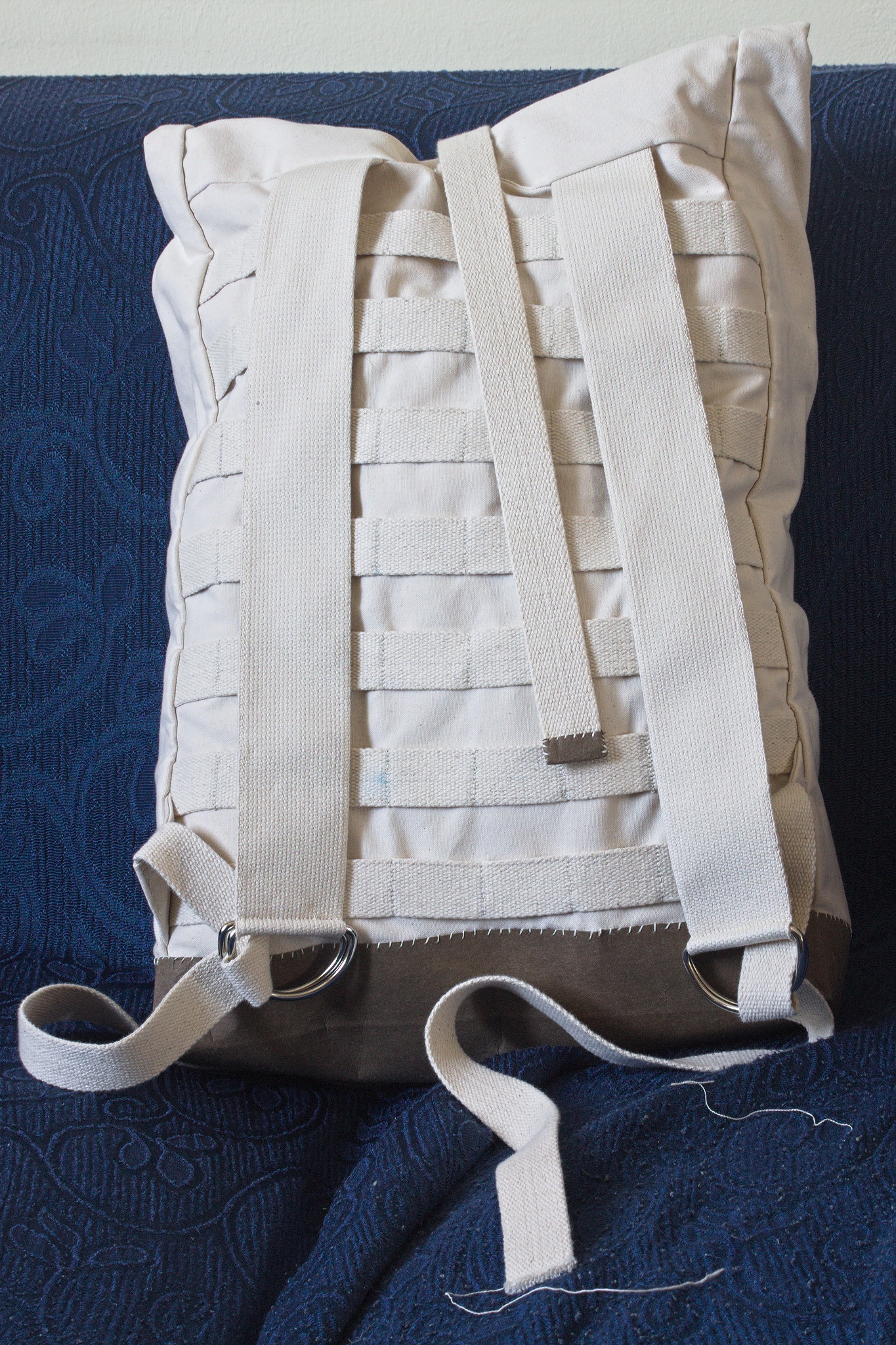
  1. Make Your Own Gear, i.e. sewing or otherwise constructing outdoorish equipment.
  2. at least not if I fill them with stuff as I usually do with my backpack :D

Reproducible Builds (diffoscope): diffoscope 302 released

The diffoscope maintainers are pleased to announce the release of diffoscope version 302. This version includes the following changes:
[ Chris Lamb ]
* Mask stderr from the extract-vmlinux script.
* Make it much more explicit that we return 'success' from the
  extract-vmlinux script instead of just falling through to the bottom of the
  script.
* Use Difference.from_operation in an attempt to pipeline the output of
  extract-vmlinux, potentially avoiding it all residing in memory. This is an
  attempt to prevent out of memory issues on try.diffoscope.org.
[ Siva Mahadevan ]
* Use --print-armap long option with nm in the "ar" comparator for wider
  compatibility.
You find out more by visiting the project homepage.

23 July 2025

Russell Coker: Annoying Wrongness on TV

One thing that annoys me on TV shows and movies is getting the details wrong. Yes it s fiction and yes some things can t be done correctly and in some situations correctly portraying things goes against the plot. But otherwise I think they should try to make it accurate. I was just watching The Americans (a generally good show that I recommend watching) and in Season 4 Episode 9 there s a close up of a glass of wine which clearly shows that the Tears of Wine effect is missing, the liquid in the glass obviously has the surface tension of water not of wine. When they run a show about spies then have to expect that the core audience will be the type of detail oriented people who notice these things. Having actors not actually drink alcohol on set is a standard practice, if they have to do 10 takes of someone drinking a glass of wine then that would be a problem if they actually drank real wine. But they could substitute real wine for the close up shots and of course just getting it right the first time is a good option. Some ridiculous inaccuracy we just need to deal with, like knives making a schwing sound when pulled out of scabbards and silenced guns usually still being quite loud (so many people are used to it being wrong). Organisations like the KGB had guns that were actually silent, but they generally looked obviously different to regular guns and had a much lower effective range. The gold coins shown on TV are another ridiculous thing. The sound of metal hitting something depends on how hard it is and how dense it is. Surely most people have heard the sounds of dropping steel nuts and ball bearings and the sound of dropping lead sinkers and knows that the sounds of items of similar size and shape differ greatly based on density and hardness. A modern coin made of copper, cupro-nickel (the current silver coins), or copper-aluminium (the current gold coins) sounds very different to a gold coin when dropped on a bench. For a show like The Witcher it wouldn t be difficult to make actual gold coins of a similar quality to iron age coin production, any jeweller could make the blanks and making stamps hard enough to press gold isn t an engineering challenge (stamping copper coins would be much more difficult). The coins used for the show could be sold to fans afterwards. Once coins are made they can t be just heaped up. Even if you are a sorcerer you probably couldn t fill a barrel a meter high with gold coins and not have it break from the weight and/or have the coins at the bottom cold welded. Gold coins are supposed to have a precise amount of gold and if you pile them up too high then the cold welding process will transfer gold between coins changing the value. If someone was going to have a significant quantity of gold stored then it would be in gold ingots with separators between layers to prevent cold welding. Movies tend not to show coins close up, I presume that s because they considered it too difficult to make coins and they just use some random coins from their own country. Another annoying thing is shows that don t match up the build dates of objects used. It s nice when they get it right like the movie Titanic featuring a M1911 pistol which is something that a rich person in 1912 would likely have. The series Carnival Row (which I recommend) has weapons that mostly match our WW1 era, everything that doesn t involve magic seems legit. One of the worst examples of this is the movie Anna (by Luc Besson which is mostly a recreation of his film Nikita but in the early 90s and with the KGB). That film features laptops with color screens and USB ports before USB was invented and when color screens weren t common on laptops, as an aside military spec laptops tend to have older designs than consumer spec ones. I ve mostly given up on hoping that movies will get hacking scenes that are any more accurate than knives making a schwing sound. But it shouldn t be that hard for them to find computer gear that was manufactured in the right year to use for the film. Why can t they hire experts on technology to check everything?

17 July 2025

Otto Kek l inen: Debcraft Easiest way to modify and build Debian packages

Featured image of post Debcraft   Easiest way to modify and build Debian packagesDebian packaging is notoriously hard. Far too many new contributors give up while trying, and many long-time contributors leave due to burnout from having to do too many thankless maintenance tasks. Some just skip testing their changes properly because it feels like too much toil. Debcraft is my attempt to solve this by automating all the boring stuff, and making it easier to learn the correct practices and helping new and old packagers better track changes in both source code and build artifacts.

The challenge of declarative packaging code Unlike how rpm or apk packages are done, the deb package sources by design avoid having one massive procedural packaging recipe. Instead, the packaging is defined in multiple declarative files in the debian/ subdirectory. For example, instead of a script running install -m 755 bin/btop /usr/bin/btop there is a file debian/btop.install containing the line usr/bin/btop. This makes the overall system more robust and reliable, and allows, for example, extensive static analysis to find problems without having to build the package. The notable exception is the debian/rules file, which contains procedural code that can modify any aspect of the package build. Almost all other files are declarative. Benefits include, among others, that the effect of a Debian-wide policy change can be relatively easily predicted by scanning what attributes and configurations all packages have declared. The drawback is that to understand the syntax and meaning of each file, one must understand which build tools read which files and traverse potentially multiple layers of abstraction. In my view, this is the root cause for most of the perceived complexity.

Common complaints about .deb packaging Related to the above, people learning Debian packaging frequently voice the following complaints:
  • Debian has too many tools to learn, often with overlapping or duplicate functionality.
  • Too much outdated and inconsistent documentation that makes learning the numerous tools needlessly hard.
  • Lack of documentation of the generally agreed best practices, mainly due to Debian s reluctance as a project to pick one tool and deprecate the alternatives.
  • Multiple layers of abstraction and lack of clarity on what any single change in the debian/ subdirectory leads to in the final package.
  • Requirement of Debian packages to be developed on a Debian system.

How Debcraft solves (some of) this Debcraft is intentionally opinionated for the sake of simplicity, and makes heavy use of git, git-buildpackage, and most importantly Linux containers, supporting both Docker and Podman. By using containers, Debcraft frees the user from the requirement of having to run Debian. This makes .deb packaging more accessible to developers running some other Linux distro or even Mac or Windows (with WSL). Of course we want developers to run Debian (or a derivative like Ubuntu) but we want them even more to build, test and ship their software as .deb. Even for Debian/Ubuntu users having everything done inside clean hermetic containers of the latest target distribution version will yield more robust, secure and reproducible builds and tests. All containers are built automatically on-the-fly using best practices for layer caching, making everything easy and fast. Debcraft has simple commands to make it easy to build, rebuild, test and update packages. The most fundamental command is debcraft build, which will not only build the package but also fetch the sources if not already present, and with flags such as --distribution or --source-only build for any requested Debian or Ubuntu release, or generate source packages only for Debian or PPA upload purposes. For ease of use, the output is colored and includes helpful explanations on what is being done, and suggests relevant Debian documentation for more information. Most importantly, the build artifacts, along with various logs, are stored in separate directories, making it easy to compare before and after to see what changed as a result of the code or dependency updates (utilizing diffoscope among others). While the above helps to debug successful builds, there is also the debcraft shell command to make debugging failed builds significantly easier by dropping into a shell where one can run various dh commands one-by-one. Once the build works, testing autopkgtests is as easy as running debcraft test. As with all other commands, Debcraft is smart enough to read information like the target distribution from the debian/changelog entry. When the package is ready to be released, there is the debcraft release command that will create the Debian source package in the correct format and facilitate uploading it either to your Personal Package Archive (PPA) or if you are a Debian Developer to the official Debian archive.

Automatically improve and update packages Additionally, the command debcraft improve will try to fix all issues that are possible to address automatically. It utilizes, among others, lintian-brush, codespell and debputy. This makes repetitive Debian maintenance tasks easier, such as updating the package to follow the latest Debian policies. To update the package to the latest upstream version there is also debcraft update. It will read the package configuration files such as debian/gbp.conf and debian/watch and attempts to import the latest upstream version, refresh patches, build and run autopkgtests. If everything passes, the new version is committed. This helps automate the process of updating to new upstream versions.

Try out Debcraft now! On a recent version of Debian and Ubuntu, Debcraft can be installed simply by running apt install debcraft. To use Debcraft on some other distribution or to get the latest features available in the development version install it using:
git clone https://salsa.debian.org/debian/debcraft.git
cd debcraft
make install-local
To see exact usage instructions run debcraft --help.

Contributions welcome Current Debcraft version 0.5 still has some rough edges and missing features, but I have personally been using it for over a year to maintain all my packages in Debian. If you come across some issue, feel free to file a report at https://salsa.debian.org/debian/debcraft/-/issues or submit an improvement at https://salsa.debian.org/debian/debcraft/-/merge_requests. The code is intentionally written entirely in shell script to keep the barrier to code contribution as low as possible.
By the way, if you aspire to become a Debian Developer, and want to follow my examples in using state-of-the-art tooling and collaborate using salsa.debian.org, feel free to reach out for mentorship. I am glad to see more people contribute to Debian!

15 July 2025

Valhalla's Things: Federated instant messaging, 100% debianized

Posted on July 15, 2025
Tags: madeof:bits, topic:xmpp, topic:debian
This is an approximation of what I told at my talk Federated instant messaging, 100% debianized at DebConf 25, for people who prefer reading text. There will also be a video recording, as soon as it s ready :) at the link above. Communicating is a basic human need, and today some kind of computer-mediated communication is a requirement for most people, especially those in this room. With everything that is happening, it s now more important than ever that these means of communication aren t controlled by entities that can t be trusted, whether because they can stop providing the service at any given time or worse because they are going to abuse it in order to extract more profit. If only there was a well established chat system based on some standard developed in an open way, with all of the features one expects from a chat system but federated so that one can choose between many different and independent providers, or even self-hosting. But wait, it does exist! I m not talking about IRC, I m talking about XMPP! While it has been around since the last millennium, it has not remained still, with hundred of XMPP Extension Protocols, or XEPs that have been developed to add all of the features that nobody in 1999 imagined we could need in Instant Messaging today, and more, such as IoT devices or even social networks. There is a myth that this makes XMPP a mess of incompatible software, but there is an XEP for that: XEP-0479: XMPP Compliance Suites 2023, which is a list of XEPs that needs to be supported by Instant Messaging servers and clients, including mobile ones, and all of the recommended ones will mostly just work. These include conversations.im on android, dino on linux, which also works pretty nicely on linux phones, gajim for a more fully featured option that includes the kitchen sink, profanity for text interface fanatics like me, and I ve heard that monal works decently enough on the iThings. One thing that sets XMPP apart from other federated protocols, is that it has already gone through the phase where everybody was on one very big server, which then cut out federation, and we ve learned from the experience. These days there are still a few places that cater to newcomers, like https://account.conversations.im/, https://snikket.org/ (which also includes tools to make it easier to host your own instance) and https://quicksy.im/, but most people are actually on servers of a manageable size. My strong recommendation is for community hosting: not just self-hosting for yourself, but finding a community you feel part of and trust, and share a server with them, whether managed by volunteers from the community itself, or by a paid provider. If you are a Debian Developer, you already have one: you can go to https://db.debian.org/ , select Change rtc password to set your own password, wait an hour or so and you re good to go, as described at the bottom of https://wiki.debian.org/Teams/DebianSocial. A few years ago it had remained a bit behind, but these days it s managed by an active team, and if you re missing some features, or just want to know what s happening with it, you can join their BoF on Friday afternoon (and also thank them for their work). But for most people in this room, I d also recommend finding a friend or two who can help as a backup, and run a server for your own families or community: as a certified lazy person who doesn t like doing sysadmin jobs, I can guarantee it s perfectly feasible, about in the same range of difficulty as running your own web server for a static site. The two most popular servers for this, prosody and ejabberd, are well maintained in Debian, and these days there isn t a lot more to do than installing them, telling them your hostname, setting up a few DNS entries, and then you mostly need to keep the machine updated and very little else. After that, it s just applying system security updates, upgrading everything every couple years (some configuration updates may be needed, but nothing major) and maybe helping some non-technical users, if you are hosting your non-technical friends (the kind who would need support on any other platform).
Question time (including IRC questions) included which server would be recommended for very few users (I use prosody and I m very happy with it, but I believe ejabberd works also just fine), then somebody reminded me that I had forgotten to mention https://www.chatons.org/ , which lists free, ethical and decentralized services, including xmpp ones. I was also asked a comparison with matrix, which does cover a very similar target as XMPP, but I am quite biased against it, and I d prefer to talk well of my favourite platform than badly of its competitor.

13 July 2025

Bits from Debian: DebConf25 starts today in Brest on Monday, July 14, 2025

DebConf25, the 25th annual Debian Developer Conference, is taking place in Brest, France from 14 to 19 July 2025. Debian contributors from all over the world have come together at the Campus of IMT Atlantique Bretagne-Pays de la Loire, Brest, to participate and work in a conference exclusively ran by volunteers. As the conference begins on July 14, the French National Day, Debian can make France's motto its own: "Libert , galit , fraternit ", Freedom for Free and Open Source Software, Equity for the equal right (and duties) of everyone to use, modify and share Free Software, Fraternity which perfectly covers what our code of conduct defines. Today the main conference starts with around 500 expected attendants and over 140 scheduled activities, including 45-minute and 20-minute talks, Bird of a Feather ("BoF") team meetings, workshops, a job fair, as well as a variety of other events. The full schedule is updated each day, including activities planned ad-hoc by attendees over the course of the conference. If you would like to engage remotely, you can follow the video streams available from the DebConf25 website for the events happening in the three talk rooms: M ridienne, Grand amphi and Petit amphi accessible from the DebConf25 homepage. Or you can join the conversations happening inside the talk rooms via the OFTC IRC network in the #debconf-meridienne, #debconf-grandamphi, #debconf-petitamphi, and #debconf-bof channels. Please also join us in the #debconf channel for common discussions related to DebConf. You can also follow the live coverage of news about DebConf25 provided by our micronews service or the @debian profile on your favorite social network. DebConf is committed to a safe and welcoming environment for all participants. Please see our Code of Conduct page for more information on this. Debian thanks the commitment of numerous sponsors to support DebConf25, particularly our Platinum Sponsors: Infomaniak, Proxmox, Viridien, EDF, and AMD. DebConf25 logo

12 July 2025

Louis-Philippe V ronneau: Adulting

In the last past weeks, I have done something I had been meaning to do for a while but always pushed back at the bottom of my TODO pile: prepare for my death. I am still quite young and perfectly healthy (mentally and physically) and I do plan to live a long and full life, but death is something that comes from us all and can strike anytime. Having witnessed friends and colleagues who lost loved ones who did not prepare adequately for their passing, dealing with all this legal stuff ahead of time seems like the best gift you can leave them. Writing my will was the easiest part of this "preparation for death" process. I have few material possessions and I'm leaving everything to my SO. As for the copyright for my code, I have decided everything I wrote will be licensed under CC0 (public domain) when I die. Quebec where I live also accepts holograph wills, which means I didn't have to hire a notary. Apart from the will, I also wrote a protection mandate1, filled out Quebec's organ donation form2, took a contract for prearranged funeral services3 and finally, wrote a disaster recovery plan. This recovery plan was by far the longest and most tedious part of this entire ordeal. If all your machines use full-disk encryption and you die or forget your passwords (for example after a head injury), can your data be recovered? How do you arbitrate between easy recovery and data security? If all your local devices burn down and you also pass away in the process, how will your next of kin access your remote backups and extract the relevant data (in my case, my password manager)? I had to ask myself many complex questions in this process and although I won't be sharing my disaster recovery plan here (security through obscurity), I urge you to take the time to do something similar yourself and make sure you will leave a house in order when you go away.

  1. in case I become incapacitated and can't make choices by myself anymore.
  2. it's sadly still opt-in here...
  3. you pay now for the services you want, the money is kept in a trust in your name and you can't be charged extra when you do pass away. This protects you from inflation and is a great way to make sure your next of kin don't have to deal with the complexities of funeral services while grieving.

Freexian Collaborators: Monthly report about Debian Long Term Support, June 2025 (by Roberto C. S nchez)

Like each month, have a look at the work funded by Freexian s Debian LTS offering.

Debian LTS contributors In June, 20 contributors have been paid to work on Debian LTS, their reports are available:
  • Abhijith PA did 14.0h (out of 14.0h assigned).
  • Adrian Bunk did 23.5h (out of 23.5h assigned).
  • Andreas Henriksson did 3.0h (out of 3.0h assigned and 17.0h from previous period), thus carrying over 17.0h to the next month.
  • Andrej Shadura did 2.0h (out of 3.0h assigned and 7.0h from previous period), thus carrying over 8.0h to the next month.
  • Bastien Roucari s did 20.0h (out of 20.0h assigned).
  • Ben Hutchings did 8.0h (out of 7.5h assigned and 16.0h from previous period), thus carrying over 15.5h to the next month.
  • Carlos Henrique Lima Melara did 12.0h (out of 12.0h assigned).
  • Chris Lamb did 18.0h (out of 18.0h assigned).
  • Daniel Leidert did 22.0h (out of 22.5h assigned and 1.0h from previous period), thus carrying over 1.5h to the next month.
  • Emilio Pozuelo Monfort did 23.5h (out of 16.75h assigned and 6.75h from previous period).
  • Guilhem Moulin did 14.0h (out of 11.5h assigned and 3.5h from previous period), thus carrying over 1.0h to the next month.
  • Jochen Sprickerhof did 21.0h (out of 0.5h assigned and 22.75h from previous period), thus carrying over 2.25h to the next month.
  • Lucas Kanashiro did 20.0h (out of 20.0h assigned).
  • Markus Koschany did 23.25h (out of 17.0h assigned and 6.25h from previous period).
  • Roberto C. S nchez did 21.25h (out of 20.75h assigned and 3.25h from previous period), thus carrying over 2.75h to the next month.
  • Santiago Ruano Rinc n did 12.75h (out of 15.0h assigned), thus carrying over 2.25h to the next month.
  • Sean Whitton did 1.0h (out of 4.25h assigned and 1.75h from previous period), thus carrying over 5.0h to the next month.
  • Sylvain Beucler did 23.5h (out of 23.5h assigned).
  • Thorsten Alteholz did 15.0h (out of 15.0h assigned).
  • Tobias Frost did 2.5h (out of 12.0h assigned), thus carrying over 9.5h to the next month.

Evolution of the situation In June, we released 35 DLAs.
  • Notable security updates:
    • mariadb-10.5, prepared by Otto Kek l inen, fixes vulnerabilities which could result in denial of service, information disclosure, or unauthorized data modification
    • python-django, prepared by Chris Lamb, fixes vulnerabilities which would result in log injection or denial of service
    • webkit2gtk, prepared by Emilio Pozuelo Monfort, fixes many vulnerabilities which could results in a wide range of issues
    • xorg-server, prepared by Emilio Pozuelo Monfort, fixes multiple vulnerabilities which may result in privilege escalation
    • sudo, prepared by Thorsten Alteholz, fixes a vulnerability which could result in privilege escalation
  • Notable non-security updates:
    • debian-security-support, prepared by Santiago Ruano Rinc n, updates status of packages which receive limited security support or which have reached the end of security support
    • dns-root-data, prepared by Sylvain Beucler, updates the DNSSEC trust anchors
This month s contributions from outside the regular team include the mariadb-10.5 update mentioned above, prepared by Otto Kek l inen (the package maintainer); an update to libfile-find-rule-perl, prepared by Salvatore Bonaccorso (a member of the Debian Security Team); an update to activemq, prepared by Emmanuel Arias (a maintainer of the package). Additionally, LTS Team members contributed stable updates of the following packages:
  • curl, prepared by Carlos Henrique Lima Melara
  • python-tornado, prepared by Daniel Leidert
  • python-flask-cors, prepared by Daniel Leidert
  • common-vfs, prepared by Daniel Leidert
  • cjson, prepared by Adrian Bunk
  • icu, prepared by Adrian Bunk
  • node-tar-fs, prepared by Adrian Bunk
  • rar, prepared by Adrian Bunk
Something of particular noteworthiness is that LTS contributor Carlos Henrique Lima Melara discovered a regression in the upstream fix for CVE-2023-2753 in curl. The corrective action which he took included providing a patch to upstream, uploading a stable update of curl, and further updating the version of curl in LTS. DebConf, the annual Debian Conference, is coming up in July and, as is customary each year, the week preceding the conference will feature an event called DebCamp. The DebCamp week provides an opportunity for teams and other interested groups/individuals to meet together in person in the same venue as the conference itself, with the purpose of doing focused work, often called sprints . LTS coordinator Roberto C. S nchez has announced that the LTS Team is planning to hold a sprint primarily focused on the Debian security tracker and the associated tooling used by the LTS Team and the Debian Security Team.

Thanks to our sponsors Sponsors that joined recently are in bold.

4 July 2025

Valhalla's Things: Emergency Camisole

Posted on July 4, 2025
Tags: madeof:atoms, craft:sewing, FreeSoftWear
A camisole of white linen fabric; the sides have two vertical strips of filet cotton lace, about 5 cm wide, the top of the front is finished with another lace with triangular points and the straps are made with another insertion lace, about 2 cm wide. And this is the time when one realizes that she only has one white camisole left. And it s summer, so I m wearing a lot of white shirts, and I always wear a white camisole under a white shirt (unless I m wearing a full chemise). Not a problem, I have a good pattern for a well fitting camisole that I ve done multiple times, I don t even need to take my measurements and draft things, I can get some white jersey from the stash and quickly make a few. From the stash. Where I have a roll of white jersey and one of off-white jersey. It s in the inventory. With the position field set to a place that no longer exists. uooops. But I have some leftover lightweight (woven) linen fabric. Surely if I cut the pattern as is with 2 cm of allowance and then sew it with just 1 cm of allowance it will work even in a woven fabric, right? Wrong. I mean, it would have probably fit, but it was too tight to squeeze into, and would require adding maybe a button closure to the front. feasible, but not something I wanted. But that s nothing that can t be solved with the Power of Insertion Lace, right? One dig through the Lace Stash1 and some frantic zig-zag sewing later, I had a tube wide enough for me to squiggle in, with lace on the sides not because it was the easiest place for me to put it, but because it was the right place for it to preserve my modesty, of course. Encouraged by this, I added a bit of lace to the front, for the look of it, and used some more insertion lace for the straps, instead of making them out of fabric. And, it looks like it can work. I plan to wear it tonight, so that I can find out whether there is something that chafes or anything, but from a quick test it feels reasonable. a detail of the side of the camisole, showing the full pattern of the filet lace (alternating Xs and Os), the narrow hem on the back (done with an hemming foot) and the fact that the finishing isn't very neat (but should be stable enough for long term use). At bust level it s now a bit too wide, and it gapes a bit under the arms, but I don t think that it s going to cause significant problems, and (other than everybody on the internet) nobody is going to see it, so it s not a big deal. I still have some linen, but I don t think I m going to make another one with the same pattern: maybe I ll try to do something with a front opening, but I ll see later on, also after I ve been looking for the missing jersey in a few more potential places. As for now, the number of white camisoles I have has doubled, and this is progress enough for today.


  1. with many thanks to my mother s friend who gave me quite a bit of vintage cotton lace.

30 June 2025

Otto Kek l inen: Corporate best practices for upstream open source contributions

Featured image of post Corporate best practices for upstream open source contributions
This post is based on presentation given at the Validos annual members meeting on June 25th, 2025.
When I started getting into Linux and open source over 25 years ago, the majority of the software development in this area was done by academics and hobbyists. The number of companies participating in open source has since exploded in parallel with the growth of mobile and cloud software, the majority of which is built on top of open source. For example, Android powers most mobile phones today and is based on Linux. Almost all software used to operate large cloud provider data centers, such as AWS or Google, is either open source or made in-house by the cloud provider. Pretty much all companies, regardless of the industry, have been using open source software at least to some extent for years. However, the degree to which they collaborate with the upstream origins of the software varies. I encourage all companies in a technical industry to start contributing upstream. There are many benefits to having a good relationship with your upstream open source software vendors, both for the short term and especially for the long term. Moreover, with the rollout of CRA in EU in 2025-2027, the law will require software companies to contribute security fixes upstream to the open source projects their products use. To ensure the process is well managed, business-aligned and legally compliant, there are a few do s and don t do s that are important to be aware of.

Maintain your SBOMs For every piece of software, regardless of whether the code was done in-house, from an open source project, or a combination of these, every company needs to produce a Software Bill of Materials (SBOM). The SBOMs provide a standardized and interoperable way to track what software and which versions are used where, what software licenses apply, who holds the copyright of which component, which security fixes have been applied and so forth. A catalog of SBOMs, or equivalent, forms the backbone of software supply-chain management in corporations.

Identify your strategic upstream vendors The SBOMs are likely to reveal that for any piece of non-trivial software, there are hundreds or thousands of upstream open source projects in use. Few organizations have resources to contribute to all of their upstreams. If your organization is just starting to organize upstream contribution activities, identify the key projects that have the largest impact on your business and prioritize forming a relationship with them first. Organizations with a mature contribution process will be collaborating with tens or hundreds of upstreams.

Appoint an internal coordinator and champions Having a written policy on how to contribute upstream will help ensure a consistent process and avoid common pitfalls. However, a written policy alone does not automatically translate into a well-running process. It is highly recommended to appoint at least one internal coordinator who is knowledgeable about how open source communities work, how software licensing and patents work, and is senior enough to have a good sense of what business priorities to optimize for. In small organizations it can be a single person, while larger organizations typically have a full Open Source Programs Office. This coordinator should oversee the contribution process, track all contributions made across the organization, and further optimize the process by working with stakeholders across the business, including legal experts, business owners and CTOs. The marketing and recruiting folks should also be involved, as upstream contributions will have a reputation-building aspect as well, which can be enhanced with systematic tracking and publishing of activities. Additionally, at least in the beginning, the organization should also appoint key staff members as open source champions. Implementing a new process always includes some obstacles and occasional setbacks, which may discourage employees from putting in the extra effort to reap the full long-term benefits for the company. Having named champions will empower them to make the first few contributions themselves, setting a good example and encouraging and mentoring others to contribute upstream as well.

Avoid excessive approvals To maintain a high quality bar, it is always good to have all outgoing submissions reviewed by at least one or two people. Two or three pairs of eyeballs are significantly more likely to catch issues that might slip by someone working alone. The review also slows down the process by a day or two, which gives the author time to sleep on it , which usually helps to ensure the final submission is well-thought-out by the author. Do not require more than one or two reviewers. The marginal utility goes quickly to zero beyond a few reviewers, and at around four or five people the effect becomes negative, as the weight of each approval decreases and the reviewers begin to take less personal responsibility. Having too many people in the loop also makes each feedback round slow and expensive, to the extent that the author will hesitate to make updates and ask for re-reviews due to the costs involved. If the organization experiences setbacks due to mistakes slipping through the review process, do not respond by adding more reviewers, as it will just grind the contribution process to a halt. If there are quality concerns, invest in training for engineers, CI systems and perhaps an internal certification program for those making public upstream code submissions. A typical software engineer is more likely to seriously try to become proficient at their job and put effort into a one-off certification exam and then make multiple high-quality contributions, than it is for a low-skilled engineer to improve and even want to continue doing more upstream contributions if they are burdened by heavy review processes every time they try to submit an upstream contribution.

Don t expect upstream to accept all code contributions Sure, identifying the root cause of and fixing a tricky bug or writing a new feature requires significant effort. While an open source project will certainly appreciate the effort invested, it doesn t mean it will always welcome all contributions with open arms. Occasionally, the project won t agree that the code is correct or the feature is useful, and some contributions are bound to be rejected. You can minimize the chance of experiencing rejections by having a solid internal review process that includes assessing how the upstream community is likely to understand the proposal. Sometimes how things are communicated is more important than how they are coded. Polishing inline comments and git commit messages help ensure high-quality communication, along with a commitment to respond quickly to review feedback and conducting regular follow-ups until a contribution is finalized and accepted.

Start small to grow expertise and reputation In addition to keeping the open source contribution policy lean and nimble, it is also good to start practical contributions with small issues. Don t aim to contribute massive features until you have a track record of being able to make multiple small contributions. Keep in mind that not all open source projects are equal. Each has its own culture, written and unwritten rules, development process, documented requirements (which may be outdated) and more. Starting with a tiny contribution, even just a typo fix, is a good way to validate how code submissions, reviews and approvals work in a particular project. Once you have staff who have successfully landed smaller contributions, you can start planning larger proposals. The exact same proposal might be unsuccessful when proposed by a new person, and successful when proposed by a person who already has a reputation for prior high-quality work.

Embrace all and any publicity you get Some companies have concerns about their employees working in the open. Indeed, every email and code patch an employee submits, and all related discussions become public. This may initially sound scary, but is actually a potential source of good publicity. Employees need to be trained on how to conduct themselves publicly, and the discussions about code should contain only information strictly related to the code, without any references to actual production environments or other sensitive information. In the long run most employees contributing have a positive impact and the company should reap the benefits of positive publicity. If there are quality issues or employee judgment issues, hiding the activity or forcing employees to contribute with pseudonyms is not a proper solution. Instead, the problems should be addressed at the root, and bad behavior addressed rather than tolerated. When people are working publicly, there tends to also be some degree of additional pride involved, which motivates people to try their best. Contributions need to be public for the sponsoring corporation to later be able to claim copyright or licenses. Considering that thousands of companies participate in open source every day, the prevalence of bad publicity is quite low, and the benefits far exceed the risks.

Scratch your own itch When choosing what to contribute, select things that benefit your own company. This is not purely about being selfish - often people working on resolving a problem they suffer from are the same people with the best expertise of what the problem is and what kind of solution is optimal. Also, the issues that are most pressing to your company are more likely to be universally useful to solve than any random bug or feature request in the upstream project s issue tracker.

Remember there are many ways to help upstream While submitting code is often considered the primary way to contribute, please keep in mind there are also other highly impactful ways to contribute. Submitting high-quality bug reports will help developers quickly identify and prioritize issues to fix. Providing good research, benchmarks, statistics or feedback helps guide development and the project make better design decisions. Documentation, translations, organizing events and providing marketing support can help increase adoption and strengthen long-term viability for the project. In some of the largest open source projects there are already far more pending contributions than the core maintainers can process. Therefore, developers who contribute code should also get into the habit of contributing reviews. As Linus law states, given enough eyeballs, all bugs are shallow. Reviewing other contributors submissions will help improve quality, and also alleviate the pressure on core maintainers who are the only ones providing feedback. Reviewing code submitted by others is also a great learning opportunity for the reviewer. The reviewer does not need to be better than the submitter - any feedback is useful; merely posting review feedback is not the same thing as making an approval decision. Many projects are also happy to accept monetary support and sponsorships. Some offer specific perks in return. By human nature, the largest sponsors always get their voice heard in important decisions, as no open source project wants to take actions that scare away major financial contributors.

Starting is the hardest part Long-term success in open source comes from a positive feedback loop of an ever-increasing number of users and collaborators. As seen in the examples of countless corporations contributing open source, the benefits are concrete, and the process usually runs well after the initial ramp-up and organizational learning phase has passed. In open source ecosystems, contributing upstream should be as natural as paying vendors in any business. If you are using open source and not contributing at all, you likely have latent business risks without realizing it. You don t want to wake up one morning to learn that your top talent left because they were forbidden from participating in open source for the company s benefit, or that you were fined due to CRA violations and mismanagement in sharing security fixes with the correct parties. The faster you start with the process, the less likely those risks will materialize.

23 June 2025

Russell Coker: PFAs

For some time I ve been noticing news reports about PFAs [1]. I hadn t thought much about that issue, I grew up when leaded petrol was standard, when almost all thermometers had mercury, when all small batteries had mercury, and I had generally considered that I had already had so many nasty chemicals in my body that as long as I don t eat bottom feeding seafood often I didn t have much to worry about. I already had a higher risk of a large number of medical issues than I d like due to decisions made before I was born and there s not much to do about it given that there are regulations restricting the emissions of lead, mercury etc. I just watched a Veritasium video about Teflon and the PFA poisoning related to it s production [2]. This made me realise that it s more of a problem than I realised and it s a problem that s getting worse. PFA levels in the parts-per-trillion range in the environment can cause parts-per-billion in the body which increases the risks of several cancers and causes other health problems. Fortunately there is some work being done on water filtering, you can get filters for a home level now and they are working on filters that can work at a sufficient scale for a city water plant. There is a map showing PFAs in the environment in Australia which shows some sites with concerning levels that are near residential areas [3]. One of the major causes for that in Australia is fire retardant foam Australia has never had much if any Teflon manufacturing AFAIK. Also they noted that donating blood regularly can decrease levels of PFAs in the bloodstream. So presumably people who have medical conditions that require receiving donated blood regularly will have really high levels.

Next.

Previous.