Search Results: "Thomas Goirand"

19 April 2014

Thomas Goirand: OpenStack 2014.1, aka Icehouse, is out

The new version of OpenStack is out, and I have just finished uploading it all into Debian Sid. With a total of 38 packages that I uploaded yesterday (which was exhausting!), most, if not all, were only moving from Experimental to Sid with only tiny updates, and this represents the achievement of 6 months of packaging work. The new feature list is impressive, and I would like to highlight some part of it: For the moment, I haven t packaged Sahara (eg: Hadoop as a service), but it might come later as a customer of us might require it. There s a lot less unit tests issues in the packages I uploaded to Sid: all SQLAlchemy issues have been dealt with. I wasn t confident with the Havana release that Sid / Testing would be a good environment for OpenStack, but this time with Icehouse, I think it should be much better. Please test this brand new release and report issues on the BTS. As always, the packages are available also as Wheezy backports through the usual channels (see the official install guide).

28 March 2014

Thomas Goirand: Automatic backport script

Since I have to do a lot of backports for the OpenStack packages in Debian Wheezy, I got tired of doing them by hand. Therefore, I have created a script to automate the task. I m not particularly proud (or ashamed) of that script, but I just want to share it. Probably some fellow readers will happily provide me with enhancements and ideas. Note that the use of mk-build-deps implies that the equivs package has to be installed. What I do is run this build-backport script within a cowbuilder, to make sure I always have a clean backport environment.
#!/bin/sh
set -e
set -x
PKG_NAME=$ 1 
BPO_DISTRO=wheezy-backports
BPO_POSTFIX=bpo70+1
REPO_ROOT=/home/ftp
REPO_DEST=icehouse-backports
if [  whoami  = "jenkins" ] ; then
        BUILD_ROOT=/var/lib/jenkins/jobs/openstack-pkg-tools/builds/$ BUILD_NUMBER 
else
        BUILD_ROOT=~/sources
fi
# Get info from packages.debian.org
PKG_INFO_FILE= mktemp -t pkg_info_file.XXXXXX 
wget --no-check-certificate -O $ PKG_INFO_FILE  http://packages.debian.org/sid/$ PKG_NAME 
DEB_VERSION= rmadison $ PKG_NAME    grep sid   awk ' print $3 ' 
UPSTREAM_VERSION= echo $ DEB_VERSION    cut -d'-' -f1    cut -d":" -f2 
DSC_URL= cat $ PKG_INFO_FILE    grep dsc   cut -d'"' -f2 
rm $ PKG_INFO_FILE 
# Prepare build folder and go in it
MY_CWD= pwd 
rm -rf $ BUILD_ROOT /$PKG_NAME
mkdir -p $ BUILD_ROOT /$PKG_NAME
cd $ BUILD_ROOT /$PKG_NAME
# Download the .dsc and extract it
dget -d -u $ DSC_URL 
PKG_SRC_NAME= ls *.dsc   cut -d_ -f1 
PKG_NAME_FIRST_CHAR= echo $ PKG_SRC_NAME    awk ' print substr($0,1,1) ' 
dpkg-source -x *.dsc
echo "Now running mk-build-deps -i $ PKG_SRC_NAME -$ UPSTREAM_VERSION /debian/control"
mk-build-deps -i $ PKG_SRC_NAME -$ UPSTREAM_VERSION /debian/control
# Build the package as backport using cowbuilder
cd $ PKG_SRC_NAME -$ UPSTREAM_VERSION 
dch --bpo -m "Backported for $ BPO_DISTRO ."
dpkg-buildpackage
cd ..  
PKG_FINAL_DEST=$ REPO_ROOT /debian/pool/$ REPO_DEST /main/$ PKG_NAME_FIRST_CHAR /$ PKG_SRC_NAME 
ssh archive.gplhost.com "mkdir -p $ PKG_FINAL_DEST "
scp *.orig.tar.* *$ DEB_VERSION ~$ BPO_POSTFIX * archive.gplhost.com:$ PKG_FINAL_DEST 

Thomas Goirand: WordPress auto-updates stupidity

Out of laziness, like many, I use WordPress for this blog. I did try others, but was disappointed (after my blog got hacked a few times), so I just use that. WordPress has a long history of security issues. So upstream decided to preform automatic updates. This would have been a good thing if automatic update didn t completely mess my blog each and every single time. On my hosting system, PHP scripts have to be chmod +x to be executed. Otherwise, there s a error, and Apache wont execute the PHP script. The same way, an error will happen if a directory is world writable (eg: chmod 777). This is in order to prevent some of the most common hacks: a hacker finds a way to upload a PHP script (often via a feature of the hosted software), and then uses the uploaded script to do nasty things (like installing phishing sites, send spam, you name it ). Checking on these basic unix rights prevents uploaded scripts to be executed, and it s normally a way harder for hackers to find a way to chmod the PHP scripts than it is to just upload it. Unfortunately, WordPress, on each upgrade, is resetting these unix rights. Someone got to explain to me the reason why it absolutely needs to chmod 777 the hosted folders, and why it wouldn t keep the chmod +x on the php scripts. Direct result? My blog often gets completely broken by these automated updates. And I didn t find a way to disable them (if someone knows, please send me a quick email). I have reported the bug upstream: https://core.trac.wordpress.org/ticket/27568

15 February 2014

Thomas Goirand: OpenStack 2013.2.2 uploaded

This is the 2nd point release of OpenStack Havana (this is the name of the current stable release of OpenStack). It was out on Thursday (US time), and I uploaded it on Friday (Chinese time). Unfortunately, I realized that the latest python-keystoneclient didn t support the token and endpoint command line options, effectively breaking Keystone itself, and all automated endpoint registration in all core packages. So after fixing Keystone and openstack-pkg-tools, I had to re-upload a 2nd Debian release. However, after this glitch, the packages passed successfully our CI testing suite: my friends at eNovance and I run the tempest functional test suite each time there s this kind of major update, so that we can validate the packages are working as expected. And all went well after the new keystone command line options were fixed in the postinst scripts. As a side note, I fail to see consistency on deprecating these interfaces. While we still have the old glance index thing in the Glance client (this is really old), keystoneclient just broke backward compatibility, when keystone is quite recent. So, it looks to me that it wasn t a great idea to just remove token and endpoint this way (though I can understand the need of consistency). Hopefully, this will all be fixed anyway, when we move to the unified python-openstackclient command lines instead of per-project clients. I realized today that the pkg-openstack team now maintains more than 100 packages. This of course includes general purpose Python modules, which probably will move to the Python module team if it one day supports Git (life is too short: I do not wish to learn such a deprecated technology as SVN). Though this is still a lot of packages, and some more are coming: as per the OpenStack TODO list wiki page, Ironic (a replacement for nova-baremetal), TripleO (OpenStack on OpenStack), Tuskar (contols where things are deployed with TripleO) and Designate (DNS as a Service) are already packaged, and I am waiting for the Icehouse (this is the name of the next stable release) beta3 to be out to upload them to Experimental. This is scheduled for the 6th of March. I believe I am currently nearly up-to-date with the current global-requirements.txt (eg: python dependencies of OpenStack), pending a few Python module upgrades, so hopefully, packaging OpenStack Icehouse beta3 will smooth.

9 February 2014

Thomas Goirand: Removal of XCP / Xen-API from Jessie and Sid

This is sad, but no choice, due to the lack of upstream support: http://bugs.debian.org/cgi-bin/bugreport.cgi?bug=738322 I just hope xenserver-core will work soon in Debian, so we can fix this unfortunate situation.

5 January 2014

Thomas Goirand: OpenRC now in Experimental

I thought it would have been smooth, though it wasn t. OpenRC shipped /sbin/rc, which conflicted with the rc shell (an implementation of the AT&T Plan 9 shell), and /sbin/runscript was conflicting with minicom. With the help of upstream authors, /sbin/rc was renamed /sbin/openrc, and /sbin/runscript was renamed /sbin/openrc-run. However, the main goal is reached: after last summer Google Summer of Code project, and a bit of rework for the ruff edges, OpenRC made it to Debian. So, if you wish to try OpenRC, which is a direct replacement for sysv-rc, just add the Debian Experimental repository to your sources.list, and do apt-get install openrc . The only issue will be the first reboot, though that should be fine if one manually shuts down every running daemon, and then type what the postinst suggests as command echoed on the screen. Suggestions on how to improve this is welcome. I warmly also welcome more general feedback. I d like to publicly thank Patrick Lauer, Benda ( ), WIlliam Hubbs, Alexander Vershilov (who are all OpenRC upstreams), Bill Wang who was the GSoC studdent working on OpenRC, Roger Leigh who is the current sysv-init/sysv-rc maintainer, for their help and support when porting OpenRC to Debian. Without them, it wouldn t have been possible.

10 November 2013

Thomas Goirand: Symplifying sysv-rc init.d scripts

Peter Reinholdtsen posted an article on planet.debian.org about symplifying init scripts. I don t think that s a good idea. I tried to do that, and then scrapped all my code, because I ve found OpenRC that was doing what I wrote, in a much better way. We shouldn t reivent the wheel, OpenRC is there already!

31 October 2013

Thomas Goirand: OpenRC runscript example for rsyslog

The point of switching to a new init system is to get rid of huge init scripts. Well, here s an example OpenRC runscript, rewriting /etc/init.d/rsyslog:
#!/sbin/runscript
command=/usr/sbin/rsyslogd
name="enhanced syslogd"
depend()
 
        provide rsyslogd syslog
        need $remote_fs $time
 
Pretty minimalistic to me... For the record, the original sysv-rc script was 126 lines, and the above is just 10 lines.

30 October 2013

Thomas Goirand: OpenRC running on Debian / kFreeBSD

I have always pretended that OpenRC would be very easy to port to Debian GNU/kFreeBSD. Well, now I stop pretending: http://youtu.be/zoNoi8BgQjs This was done within a few hours working with upstream. Now, next-up: Debian GNU/Hurd. Hoping that porters will volunteer to do the work.

17 October 2013

Thomas Goirand: OpenStack Havana 2013.2 Debian packages available

OpenStack upstream was released today. Thanks to the release team and a big up to TTX for his work. By the time you read this, probably all of my uploads have reached your local Debian mirror. Please try Havana using either Sid from any Debian mirror, or using the Wheezy backports available here: deb http://havana.pkgs.enovance.com/debian havana main
deb http://archive.gplhost.com/debian havana-backports main Yes, you will need *both* repositories. This is unofficial, though these are the exact same packages as in Sid, just rebuilt for Wheezy. On the package side, here s what is new: - All packages who needs it can now be configured through debconf for the RabbitMQ settings. This is on top of what was already available for Grizzly, which is automated configuration for: keystone auth token, the database, the API endpoints and much more. (remember: this is fully optional, you can always use the non-interactive mode ) - All Quantum pluggin packages have been removed, and now everything is self-contained in the neutron-common package. The selection of which plugin to use is done directly using the core_plugin= directive in /etc/neutron/neutron.conf. This will also control the init.d script of neutron-server, so that it loads the corresponding ini file in /etc/neutron/plugins. The plugin selection is done through Debconf, so that users don t have to write the full path of the plugin class, which is (for most) very cryptic (am I the only one who thinks that writing neutron.plugins.openvswitch.ovs_neutron_plugin.OVSNeutronPluginV2 in a configuration file is user friendly?). - All of the package descriptions and Debconf templates have been reviewed by the Debian internationalization team, and most strings are translated in Czech, Danish, French, Italian, Japanese and Russian (sometimes even more) for almost all packages (thanks everyone!). I d like to publicly thanks eNovance for sponsoring my packaging work, and Mehdi Abaakouk for his work on our CI with the tempest tests. Happy Havana release testing,
Please report bugs through the Debian BTS.

12 October 2013

Thomas Goirand: Jenkins remote build trigger (eg: from git push) tokens

After upgrading my Sid virtual machine hosting my Jenkins, build after git push stopped working. This is because version 1.503 and above require an auth token for triggering the build. Since it took me some time to search the web, I ve decided to blog about it to save time to other Jenkins users. Under each project configuration screen, in the Build Triggers section, tick the Trigger builds remotely (e.g., from scripts) option. Then enter a random token (I used a password generator for it). Then in your post-receive hook, use what s below:
wget -q --no-check-certificate https://<jenkins-url>/job/heat/build?token=<your-token> -O -

8 October 2013

Thomas Goirand: OpenStack 2013.2~rc1, aka Havana, fully available in Debian Experimental

Announcement After a very long work, over the course of 4 months, I have finished packaging the first RC1 of OpenStack. This comes on time, just 9 days before the official Havana release. Please do try this RC1 before the official 2013.2, code name Havana, is released, and hopefully uploaded to Debian. All of the packages are available from Debian Experimental, keeping Grizzly in Sid. However, there is also some private repositories that I maintain, holding Wheezy backports: deb http://havana.pkgs.enovance.com/debian havana main deb http://archive.gplhost.com/debian havana-backports main The first repository holds the packages maintained within the Alioth group. These are built directly from my Jenkins machine, on each git push. The 2nd repository is holding backports from Sid to Wheezy for the packages that I don t actively maintain (though a lot of them are in the Python module team, in which I do a lot of packaging and updates as well). A few numbers A few numbers about this now. I had to work on 145 source packages: at least backport them to Wheezy, and push them in the GPLHost archive repository above. This generates 360 binary packages. Out of these, I maintain 77 source packages within the Alioth OpenStack group, generating 209 .deb files. That s a lot of stuff to deal with (and I feel sometimes a bit dizzy about it). While OpenStack is a big jigsaw puzzle to solve for the users, it is even more for someone who has to deal with all the (sometimes buried in the the code) Python dependencies. I hope others will come and join me in this packaging effort, since over the time, there s more and more work to be done, as the project grows. Note that most of the work is unfortunately done on packaging (and updating) the Python dependencies, working on the packages themselves is done last, at the end of the cycle. Other things not packaged (yet) Before the release (and the forthcoming Hongkong summit on the 5th of November), I hope to be able to finish packaging TripleO. TripleO is in fact OpenStack on OpenStack, which works with nova-baremetal. I have no idea how to test or install this, though it sounds like a lot of fun. There are 6 source packages that need to be done. Also, pending on the FTP masters NEW queue, is Trove: Database as a Service. I hope this one can get through soon. There is, also, Marconi, which is an incubated project for a new message queuing service, which probably will replace RabbitMQ (I m not sure yet what it does, and I will be happy to hear about it at the summit). Lastly, there s Ironic, which will at some point, replace nova-baremetal. That is, it does cloud computing over bare metal, without virtualization. All of these new projects are still in an incubation stage, and are not part of the official release yet. Though, I have learned over the course of this past year, that with OpenStack, it s never early enough to start the packaging work. Thanks to my sponsor! Please note that all of this wouldn t be possible without eNovance sponsoring my packaging work. A big up to all of them for supporting and loving Debian! You guys rox. Also a special thanks to Mehdi / Sileth, for his work testing everything with the Tempest functional tests and the CI platform.

Thomas Goirand: My old 1024 bits key is dead, please use 0xAC6B43FE

-----BEGIN PGP SIGNED MESSAGE-----
Hash: SHA256
Hi,
I am not using my old GPG key, 0x98EF9A49 anymore. My new key, using
4096 SHA2 256,
with fingerprint:
A0B1 A9F3 5089 5613 0E7A  425C D416 AD15 AC6B 43FE
has replaced the old one in the Debian keyring. Please don't encrypt
message to me using the old key anymore.
Since the idea is that we shouldn't trust 1024 bits keys anymore, I'm
not signing this message with the old key, but only with the new one,
which has gathered enough signatures from Debian Developers (more than a
dozen).
Thomas Goirand (zigo)
-----BEGIN PGP SIGNATURE-----
Version: GnuPG v1.4.12 (GNU/Linux)
iQIcBAEBCAAGBQJSVC02AAoJENQWrRWsa0P+3wAP/i2ORGgXMoQVtjoUNX+x/Ovz
yoNSLztmih4pOLw9+qHJfM+OkBKUPwrkyjgBWkwD2IxoM2WRgNZaY5q/jBEaMVgq
psegqAm99zkX0XJTIYfqwOZFA1JLWMi1uLJQO71j0tkJWPzBSa6Jhai81X89HKgq
PqQXver+WbORHkYGIWwBvwj+VbPZ+ssY7sjbdWTaiMcaYjzLQR4s994FOFfTWH8G
5zLdwj+lD/+tBH90qcB9ETlbSE1WG4zBwz5f4++FcPYVUfBPosE/hcyhIp6p3SPK
8F6B51pUvqwRe52unZcoA30gEtlz+VNHGQ3yF3T1/HPlfkyysAypnZOw0md6CFv8
oIgsT+JBXVavfxxAJtemogyAQ/DPBEGuYmr72SSav+05BluBcK8Oevt3tIKnf7Q5
lPTs7lxGBKI0kSxKttm+JcDNkm70+Olh6bwh2KUPBSyVw0Sf6fmQdJt97tC4q7ky
945l42IGTOSY0rqdmOgCRu8Q5W1Ela9EDZN2jPmPu4P6nzqIRHUw3gS+YBeF1i+H
/2jw4yXSXSYQ+fVWJqNb5R2raR37ytNWcZvZvt4gDxBWRqnaK+UTN6tdF323HKmr
V/67+ewIhFtH6a9W9mPakyfiHqoK6QOyOhdjQIzL+g26QMrjJdOEWkqzvuIboGsw
OnyYVaKsZSFoKBs0kOFw
=qjaO
-----END PGP SIGNATURE-----

5 August 2013

Thomas Goirand: Why using Mailman when MLMMJ is available?

Daniel Pocock just wrote a blog post about how to setup mailman for virtual hosting. Well, it strikes me that mailman is a bad solution, for many reasons. First, it imposes you to use @lists.example.com lists instead of @example.com. I m not sure if that is mandatory, but at least I ve seen only mailman setups done this way. At least, it is how mostly everyone does the setup. I think that s really ugly. Any mailbox should be fine, IMO. What I found particularly lame about Mailman, is that these issues (plus the ones which Daniel listed) have been known for YEARS, though nobody came up with a patch to fix it. And it s really not hard. Why do I know it? Well, because I ve been using MLMMJ for years without such troubles. The current situation where everyone is with mailman is really LAME. Not only MLMMJ is better because it is easier to install and supports virtual hosting out of the box, but also it is written in C and is much faster than Mailman. MLMMJ has been used in high traffic lists like for SUSE and Gentoo. The fact that some major sites decided to do the switch isn t a proof that MLMMJ is perfect, but is a good indication that it at least works well without too much trouble. Also, with mailman, you have to use the subject lines to control your list subscriptions and send command to it. No need to do that with MLMMJ, because everything is controled with the mailbox extension. For example, mylist+subscribe@example.com can be used to subscribe (instead of mylist-requests@lists.example.com, then fill-in the subject line with mailman). So, if you don t like some of the (bad) limitations of Mailman, would like to test something faster, and easier to setup, have a try with MLMMJ (see mlmmj.org for more details, and see the README.Debian inside my package).

29 July 2013

Thomas Goirand: OpenStack Havana b2 available, openstack-debian-images approved

I have finished preparing the beta 2 of the next release of OpenStack. It is currently only available from out Git on Alioth (in /git/openstack), and directly from my jenkins repository, which creates Wheezy backports for it:
deb ftp://havana.pkgs.enovance.com/debian havana main
deb http://archive.gplhost.com/debian havana-backports main
As for every OpenStack release, a large number of Python modules needed to be packaged and are waiting in the FTP master NEW queue to be approved: oslo-sphinx, python-django-discover-runner, python-hacking, python-jsonrpclib, python-lesscpy, python-neutronclient, python-nosehtmloutput, python-requestbuilder, python-termcolor, sphinxcontrib-httpdomain and sphinxcontrib-pecanwsme. Let s hope that they will be approved before the next beta release in september (time where OpenStack Havana will be in feature freeze). The total number of packages maintained by the OpenStack team (on which I really am the only active maintainer for the moment ), there s 53 packages, plus these 11 packages waiting in the NEW queue. That s a big number of package, and I wouldn t mind some help One thing that annoyed all the community is that Quantum, the OpenStack network virtualization module, had to be renamed as Neutron, because of a trademark from Quantum (you probably remember the Quantum Fireball hard drives? Well, it s the same company ). Another good news is that my openstack-debian-images package has just been approved and landed in Sid. With it, you can automate the process of building a Debian image for OpenStack with a simple shell command (there s a man page that I wrote with it: read it if you need to build images). It is made of a single shell script to build the image, using kpartx, parted, mbr, debootstrap, extlinux and friends. I tried to keep it simple, not involving a huge amount of components. With the release of cloud-init 0.7.2-3, I have fixed a few bugs (3 important bugs, out of which 2 where RC bugs), thanks to contributions in the debian-cloud@lists.debian.org mailing list. This includes adding new init.d scripts, so we now have support for user data. This doesn t only benefits OpenStack images, but anyone willing to start virtual machines in the cloud (nowadays, every cloud implementation needs cloud-init installed in the virtual images). This means you can include a script in the metadata of the virtual machine you start it, and it will be executed at startup. If everything goes as planned (that is, no new RC bug), I will upload an update of cloud-init to backports in 5 days (there is already a version there, but it doesn t have the necessary init.d scripts to execute the user data scripts), and openstack-debian-images in 9 days. Then it will be possible to build OpenStack images with absolutely all the tools available from Wheezy (and backports). I hope to be able to discuss that during Debconf 13.

24 July 2013

Thomas Goirand: The v sikness is spreading

It seems to be a new fashion. Instead of tagging software with a normal version number, many upstream adds a one letter prefix. Instead of version 0.1.2, it becomes version v0.1.2. This sickness has spread all around in Github (to tell only about the biggest one), from one repository to the next, from one author to the next. It has consequences, because Github (and others) conveniently provides tarballs out of Git tags. Then the tarball names becomes packagename-v0.1.2.tar.gz instead of package packagename-0.1.2.tar.gz. I ve even seen worse, like tags called packagename-0.1.2. Then the tarball becomes packagename-packagename-0.1.2. Consequently, we have to go around a lot of problems like mangling in our debian/watch files and so on (probably the debian/gbp.conf if you use that ). This is particularly truth when upstream doesn t make tarball and only provides tags on github (which is really fine to me, but then tags have to be made in a logical way). Worse: I ve seen this v-prefixing disease as examples in some howtos. What s wrong with you guys? From where is coming this v sickness? Have you guys watch too much the v 2009 series on TV, and you are a fan of the visitors? How come a version number isn t just made of numbers? Or is this just a v like the virus of prefixing release names with a v ? So, if you are an upstream author, reading debian planet, with your software packaged in Debian, and caught the bad virus of prefixing your version numbers with a v, please give-up on that. Adding a v to your tags is meaningless anyway, and it s just annoying us downstream. Edit: Some people pointed to me some (IMO wrong) reasons why to prefix version numbers. My original post was only half serious, and responding with facts and common sense breaks the fun! :) Anyway, the most silly one being that Linus has been using it. I wont comment on that one, it s obvious that it s not a solid argumentation. Then the second one is for tab completion. Well, if your bash-completion script is broken, fix it so that it does what you need, rather than going around the problem by polluting your tags. Then the 3rd argument was if you were merging 2 repositories. First this never happened to me to merge 2 completely different repos, and I very much doubt that this is an operation that you have to do often. Second, if you merge the repositories, the tags are loosing all meanings, and I don t really think you will need them anyway. Then the last one would be working with submodules. I haven t done it, and that might be the only case where it makes sense, though this has nothing to do with prefixing with v (you would need a much smarter approach, like prefixing with project names, which in that case makes sense). So I stand by my post: prefixing with v makes no sense.

7 June 2013

Thomas Goirand: Compute node with 256 GB of RAM, 2CPU with 6 cores each (24 threads total)

Will that be enough? Let s load some VMs in that beast! :) too_much_ram_and_cpu

2 June 2013

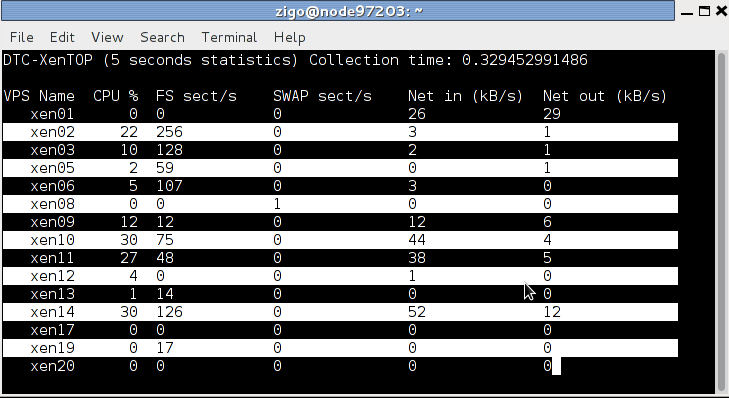
Thomas Goirand: dtc-xentop: monitoring of CPU, I/O and network for your Xen VMs

What has always been annoying me with Xen, is that xentop is well a piece of shit! It just displays the current numbers of sectors or network bytes read / write. But as an administrator, what you care about, is to know which of your VM is taking all the resources, making your whole server starve. The number of sectors read/write since the VM has started is of very low importance. What you care about is to have an idea of the current transfer rate. And the same apply for networking. So, tonight, within few hours, I hacked a small python shell script using ncurses to do what I needed, which tells how much resources have been used over the last 5 seconds (and not since the VM started). This way, it is easy to know which VM is killing your server. dtc-xentop The script is adapted to my own needs only. Which means that it works only for DTC-Xen VMs of GPLHost. In my case, VM uses exactly 2 partitions, one for the filesystem, and one for the swap, which means that I display exactly that. I m sure it wouldn t be hard to adapt it so that it would work for all cases (which would mean finding out what device uses a VM and getting the statistics from /sys using that information, instead of determining it using the name of the VM). But I don t need it, so the script will stay this way. Before writing this tonight, I didn t know ncurses. Well, it s really not hard, especially in Python! It took me about 2 hours to write^Whack the script (cheating on the dtc-xen soap server which I already had available).

29 April 2013

Thomas Goirand: Jenkins: building debian packages after a git push (my 2cents of a howto)

The below is written in the hope it will be helpful for my fellow DDs. Why using build after push ? Simple answer: to save time, to always use a clean build environment, to automate more tests. Real answer: because you are lazy, and tired of always having to type these build commands, and that watching the IRC channel is more fun than watching the build process. Other less important answers: building takes some CPU time, and makes your computer run slower for other tasks. It is really nice that building doesn t consume CPU cycles on your workstation/laptop, and that a server does the work, not disturbing you while you are working. It is also super nice that it can maintain a Debian repository for you after a successful build, available for everyone to use and test, which would be harder to achieve on your work machine (which may be behind a router doing NAT, or even sometimes turned off, etc.). It s also kind of fun to have an IRC robot telling everyone when a build is successful, so that you don t have to tell them, they can see it and start testing your work. Install a SID box that can build with cowbuilder
Install Jenkins WARNING: Probably, before really installing, you should read what s bellow (eg: Securing Jenkins). Simply apt-get install jenkins from experimental (the SID version has some security issues, and has been removed from Wheezy, on a request of the maintainer). Normally, after installing jenkins, you can access it through:
http://<ip-of-your-server>:8080/
There is no auth by default, so anyone will be able to access your jenkins web GUI and start any script under the jenkins user (sic!). Jenkins auth
Before doing anything else, you have to enable Jenkins auth, otherwise, you have everything accessible from the outside, meaning that more or less, anyone browsing your jenkins server could be allowed to run any command. It might sound simple, but in fact, Jenkins auth is tricky to activate, and it is very easy to get yourself locked out, with no working web access. So here s the steps: 1. Click on Manage Jenkins then on Configure system 2. Check the enable security checkbox 3. Under security realm select Jenkins s own user database and leave allow users to sign up . Important: leave Anyone can do anything for the moment (otherwise, you will lock yourself out). 5. At the bottom of the screen, click on the SAVE button. 6. On the top right, click to login / create an account. Create yourself an account, and stay logged in. 7. Once logged-in, go back again in the Manage Jenkins -> Configure system , under security. 8. Switch to Project based matrix authentication strategy . Under User/group to add , enter the new login you ve just created, and click on Add . 9. Select absolutely all checkboxes for that user, so that you make yourself an administrator. 10. For the Anonymous user, for Job, check Read, Build and Workspace. For Overall select Read. 11. At the bottom of the screen, hit save again. Now, anonymous (eg: not logged-in) users should be able to see all projects, and be able to click on the build now button. Note that if you lock yourself out, the way to fix is to turn off Jenkins, edit config.xml, remove the useSecurity thing, and all what is in authorizationStragegy and securityRealm , then restart Jenkins. I had to do that multiple times until I had it right (as it isn t really obvious you got to leave Jenkins completely insecure when creating a new user). Securing Jenkins: Proxy Jenkins through apache to use it over SSL
When doing a quick $search-engine search, you will see lots of tutorials to use apache as a proxy, which seems to be the standard way to run Jenkins. Add the following to /etc/apache2/sites-available/default-ssl:
ProxyPass / http://localhost:8080/
ProxyPassReverse / http://localhost:8080/
ProxyRequests Off
Then perform the following commands on the shell:
htpasswd -c /etc/apache2/jenkins_htpasswd <your-jenkins-username>
a2enmod proxy
a2enmod proxy_http
a2enmod ssl
a2ensite default-ssl
a2dissite default
apache2ctl restart
Then disable access to the port 8080 of jenkins from outside:
iptables -I INPUT -d <ip-of-your-server> -p tcp --dport 8080 -j REJECT
Of course, this doesn t mean you shouldn t take the steps to activate Jenkins own authentication, which is disabled by default (sic!). Build a script to build packages in a cowbuilder I thought it was hard. In fact it was not. All together, this was kind of fun to hack. Yes hack. What I did yet another kind of 10km ugly shell script. The way to use it is simply: build-openstack-pkg <package-name>. On my build server, I have put that script in /usr/bin, so that it is accessible from the default path.Ugly, but it does the job! Jenkins build script for openstack At the end of the script, scan_repo() generates the necessary files for a Debian repository to work under /home/ftp. I use pure-ftpd to serve it. /home/ftp must be owned by jenkins:jenkins so that the build script can copy packages in it. This build script is by no mean state of the art, and in fact, it s quite hack-ish (so I m not particularly proud of it, but it does its job ). If I am showing it in this blog post, it is just to show an example of what can be done. It is left as an exercise to the reader to create another build script adapted to its own needs, and write something cleaner and more modular. Dependency building Let s say that you are using the Built-Using: field, and that package B needs to be built if package A changes. Well, Jenkins can be configured to do that. Simply edit the configuration of project B (you will find it, it s easy ). My use case: In my case, for building Glance, Heat, Keystone, Nova, Quantum, Cinder and Ceilometer, which are all components of Openstack, I have written a small (about 500 lines) library of shell functions, and an also small (90 lines) Makefile, which are packaged in openstack-pkg-tools (so Nova, Glance, etc. all build-depends on openstack-pkg-tools). The shell functions are included in each maintainer scripts (debian/*.config and debian/*.postinst mainly) to avoid having some pre-depends that would break debconf flow. The Makefile of openstack-pkg-tools is included in debian/rules of each packages. In such a case, trying to manage the build process by hand is boring and time consuming (spending your time watching the build process of package A, so that you can manually start the build of package B, then wait again ). But it is also error prone: it is easy to do a mistakes in the build order, you can forget to dpkg -i the new version of package A, etc. But that s not it. Probably at some point, you will want Jenkins to rebuild everything. Well, that s easy to do. Simply create a dummy project, and have other project to build after that one. The build steps could simply be: echo Dummy project as a shell script (I m not even sure that s needed ). Configuring git to start a build on each push In Jenkins, pass your mouse over the Build now URL. Well, we just need to wget that URL in your Alioth repository. A small drawing is better than long explanation:
for i in  ls /git/openstack  ; do
    echo "wget -q --no-check-certificate \
    https://<ip-of-your-server>/job/$ PROJ_NAME /build?delay=0sec \
    -O /dev/null" >/git/openstack/$ i /hooks/post-receive \
        && chmod 0770 /git/openstack/$ i /hooks/post-receive;
done
The chmod 0770 is necessary if you don t want every Alioth users to have access to your Jenkins server web interface and see an eventual htpassword protection that you can add to your jenkins box (I m not covering that, but it is fairly easy to add such protection). Note that all of the members of your Alioth group will then have access to this post-receive hook, containing the password of your htaccess, so you must trust everyone in your Alioth group to not do nasty things with your Jenkins. Bonus point: IRC robot If you would like to see the result of your build published on IRC, Jenkins can do that. Click on Manage Jenkins , then on Manage Plugins . Then click on available and check the box in front of IRC plugin . Go at the bottom of the screen and click on Add . Then check the box to restart Jenkins automatically. Once it is restarted, go again under Manage jenkins then Configure system . Select the IRC Notification and configure it to join the network and the channel you want. Click on Advanced to select the IRC nick name of your bot, and make sure you change the port (by default jenkins has 194, when IRC normally uses 6667). Be patient when waiting for the IRC robot to connect / disconnect, this can take some time. Now, for each jenkins Job, you can tick the IRC Notification option. Doing piuparts after build One nice thing with automated builds, is that most of the time, you don t need to wait starring at them. So you can add as many tests as you want, the Jenkins IRC robot will anyway let you know sooner or later the result of your build. So adding piuparts tests in the build script seems the correct thing to do. Though that is still on my todo, so maybe that will be for my next blog post.
4 April 2013

Thomas Goirand: Git packaging workflow

Seeing what has been posted recently in planet.d.o, I would like to share as well my thoughts and work-flow, and tell that I do agree with Joey Hess on many of his arguments. Especially when he tells that Debian fetishises upstream tarballs. We re in 2013, at the age of Internet, and more and more upstream authors are using Git, and more and more they don t care about releasing tarballs. I ve seen some upstream authors who simply stopped doing so completely, as a Git tag is really enough. I also fully agree than disk space and network speed isn t much of a problem these days. When there are tags available, I use the following debian/gbp.conf:
[DEFAULT]
upstream-branch = master
debian-branch = debian
upstream-tag = %(version)s
compression = xz
[git-buildpackage]
export-dir = ../build-area/
On many of my packages, I now just use Git tags from upstream if they are available. To make it more easy, I now nearly always use the following piece of code in my debian/rules files:
DEBVERS         ?= $(shell dpkg-parsechangelog   sed -n -e 's/^Version: //p')
VERSION         ?= $(shell echo '$(DEBVERS)'   sed -e 's/^[[:digit:]]*://' -e 's/[-].*//')
DEBFLAVOR       ?= $(shell dpkg-parsechangelog   grep -E ^Distribution:   cut -d" " -f2)
DEBPKGNAME      ?= $(shell dpkg-parsechangelog   grep -E ^Source:   cut -d" " -f2)
DEBIAN_BRANCH   ?= $(shell cat debian/gbp.conf   grep debian-branch   cut -d'=' -f2   awk ' print $1 ')
GIT_TAG         ?= $(shell echo '$(VERSION)'   sed -e 's/~/_/')
get-upstream-sources:
        git remote add upstream git://git.example.org/proj/foo.git   true
        git fetch upstream
        if ! git checkout master ; then \
                echo "No upstream branch: checking out" ; \
                git checkout -b master upstream/master ; \
        fi
        git checkout $(DEBIAN_BRANCH)
make-orig-file:
        if [ ! -f ../$(DEBPKGNAME)_$(VERSION).orig.tar.xz ] ; then \
                git archive --prefix=$(DEBPKGNAME)-$(GIT_TAG)/ $(GIT_TAG)   xz >../$(DEBPKGNAME)_$(VERSION).orig.tar.xz ; \
        fi
        [ ! -e ../build-area ] && mkdir ../build-area   true
        [ ! -e ../build-area/$(DEBPKGNAME)_$(VERSION).orig.tar.xz ] && cp ../$(DEBPKGNAME)_$(VERSION).orig.tar.xz ../build-area   true
Packaging a new upstream VERSION now means that I only have to edit the debian/changelog, do ./debian/rules get-upstream-source so that I get new commits and tags, then git merge -X theirs VERSION to import the changes, then finally invoke ./debian/rules make-orig-file to create the orig.tar.xz. My debian branch is now ready for git-buildpackage. Note that the sed with the GIT_TAG thing is there because unfortunately, Git doesn t support the ~ char in tags, and that most of the time, upstream do not use _ in version numbers. Let s say upstream is releasing version 1.2.3rc1, then I simply do git tag 1.2.3_rc1 1.2.3rc1 so that I have a new tag which points to the same commit as 1.2.3rc1, but that can be used for the Debian 1.2.3~rc1-1 release and the make-orig-file. All this might looks overkill at first, but in fact it is really convenient and efficient. Also, even though there is a master branch above, it isn t needed to build the package. Git is smarter than this, so even if you haven t checked out upstream master branch from the upstream remote, make-orig-file and git-buildpackage will simply continue to work. Which is cool, because this means you can store a single branch on Alioth (which is what I do).

Next.

Previous.