Search Results: "tim"

6 October 2015

Matthew Garrett: Going my own way

Reaction to Sarah's post about leaving the kernel community was a mixture of terrible and touching, but it's still one of those things that almost certainly won't end up making any kind of significant difference. Linus has made it pretty clear that he's fine with the way he behaves, and nobody's going to depose him. That's unfortunate, because earlier today I was sitting in a presentation at Linuxcon and remembering how much I love the technical side of kernel development. "Remembering" is a deliberate choice of word - it's been increasingly difficult to remember that, because instead I remember having to deal with interminable arguments over the naming of an interface because Linus has an undying hatred of BSD securelevel, or having my name forever associated with the deepthroating of Microsoft because Linus couldn't be bothered asking questions about the reasoning behind a design before trashing it.

In the end it's a mixture of just being tired of dealing with the crap associated with Linux development and realising that by continuing to put up with it I'm tacitly encouraging its continuation, but I can't be bothered any more. And, thanks to the magic of free software, it turns out that I can avoid putting up with the bullshit in the kernel community and get to work on the things I'm interested in doing. So here's a kernel tree with patches that implement a BSD-style securelevel interface. Over time it'll pick up some of the power management code I'm still working on, and we'll see where it goes from there. But, until there's a significant shift in community norms on LKML, I'll only be there when I'm being paid to be there. And that's improved my mood immeasurably.

(Edited to add a context link for the "deepthroating of Microsoft" reference)

comment count unavailable comments

Gergely Nagy: What dh-exec is, and what it isn't for

Strange as it may be, it turns out I never wrote about dh-exec yet, even though it is close to being four years old. Gosh, time flies so fast when you're having fun! Since its first introduction, there's been a reasonable uptake in dh-exec use: as of this writing, 129 packages build-depend on dh-exec. One might think this would be a cause for celebration, that the package is put to great use. But it's not.You see, a significant number of those 129 packages are doing it wrong, and need not build-depend on dh-exec at all.The purpose of dh-exec is to allow one to do things stock debhelper can't do, such as renaming files during the dh_install phase, or applying architecture or build profile based filtering, or doing environment variable substitution. There are many legit uses for all of these features, but there are some which can be easily solved without using dh-exec. So first, I'll talk a bit about the don'ts.What not to use dh-exec forOne of the most abused part of dh-exec is its variable substitution feature, and it is often used without need, to install multiarch-related files. While that is one intended use-case, there are few situations currently in the archive that stock debhelper can't handle. Let me explain the situation!Lets assume we have an upstream package, where the build system is something as common as autotools or CMake, for which debhelper can automatically set the appropriate flags and paths. Furthermore, lets assume that the upstream build system would install the following files:
/usr/lib/x86_64-linux-gnu/libalala.so.1.2.3
/usr/lib/x86_64-linux-gnu/libalala.so.1
/usr/lib/x86_64-linux-gnu/libalala.so
/usr/lib/x86_64-linux-gnu/libalala.a
/usr/lib/x86_64-linux-gnu/pkgconfig/libalala.pc
/usr/include/lalala/lalala.h
We want to include the first two in the libalala1 package, the rest in libalala-dev, so what do we do? We use stock debhelper, of course! That is all you need. In this case, there is absolutely no need for dh-exec. While using dh-exec without need is not much of an issue, because it only increases the space required for the build and build times by a tiny bit, I would still strongly recommend not introducing dh-exec needlessly. Why? Because of simplicity and aesthetics.So, if you find yourself doing any of these, or similar, that's a sign you are doing things wrong:
usr/lib/$ DEB_HOST_MULTIARCH 
usr/lib/$ DEB_HOST_MULTIARCH /*.so.* /usr/lib/$ DEB_HOST_MULTIARCH /
usr/lib/$ DEB_HOST_MULTIARCH /pkgconfig/*.pc /usr/lib/$ DEB_HOST_MULTIARCH /pkgconfig
usr/lib/$ DEB_HOST_MULTIARCH /package/*.so /usr/lib/$ DEB_HOST_MULTIARCH /package
Unless there are other directories under usr/lib that are not the multiarch triplet, using stock debhelper and wildcards is not only more succinct, simpler and more elegant, but also lighter on resources required.When dh-exec becomes usefulChanging installation pathsOnce you want to change where things get installed, then dh-exec becomes useful:
usr/lib/*.so.* /usr/lib/$ DEB_HOST_MULTIARCH 
usr/lib/$ DEB_HOST_MULTIARCH /package/* /usr/lib/$ DEB_HOST_MULTIARCH /package-plugins/
some/dir/*.so.* /usr/lib/$ DEB_HOST_MULTIARCH 
This usually happens when upstream's build system can't easily be taught about multiarch paths. For most autotools and CMake-based packages, this is not the case.Variable substitutionConsider this case:
#!/usr/bin/dh-exec
/usr/share/octave/packages/mpi-$ DEB_VERSION_UPSTREAM /hello2dimmat.m /usr/share/doc/octave-mpi/examples/hello2dimmat.m
/usr/share/octave/packages/mpi-$ DEB_VERSION_UPSTREAM /hellocell.m /usr/share/doc/octave-mpi/examples/hellocell.m
Here, the build supplies $ DEB_VERSION_UPSTREAM , and using dh-exec allows one to have a generic debian/links file, that does not need updating whenever the upstream version changes. We can't use wildcards here, because dh_link does not expand them.Renaming filesIn case one needs to rename files during the dh_install phase, dh-exec can be put to use for great results:
ssh-agent-filter.bash-completion => usr/share/bash-completion/completions/ssh-agent-filter
FilteringSometimes one would wish to conditionally install something based on the architecture, or the build profile. In this case, dh-exec is the tool to turn to:
<!stage1 !stage2> ../../libdde-linux26/Makeconf* usr/share/libdde_linux26
usr/lib/gvfs/gvfsd-afc                                          [!hurd-any]
usr/lib/gvfs/gvfsd-gphoto2                                      [linux-any]

Norbert Preining: Craft Beer Kanazawa 2015

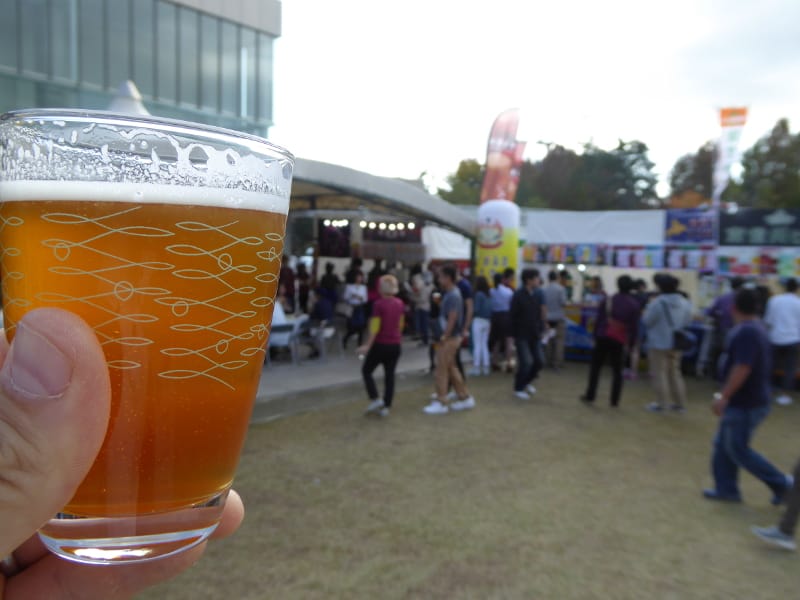
Last weekend the yearly Craft Beer Kanazawa Festival took place in central Kanazawa. This year 14 different producers brought about 80 different kind of beers for us to taste. Compared with 6 years ago when I came to Japan and Japan was still more or less Kirin-Asahi-Sapporo country without any distinguishable taste, the situation as improved vastly, and we can now enjoy lots of excellent local beers!
beer-festival-1 Returning from a trip to Swansea and a conference in Fukuoka, I arrived at Kanazawa train station and went directly to the beer festival. A great welcome back in Kanazawa, but due to excessive sleep deprivation and the feeling of finally I want to come home , I only enjoyed 6 beers from 6 different producers. In the gardens behind the Shinoki Cultural Center lots of small tents with beer and food were set up. Lots of tables and chairs were also available, but most people enjoyed flocking around in the grass around the tents. What a difference to last year s rainy and cold beer festival!
beer-festival-5 This year s producers were (in order from left to right, page links according to language): beer-festival-3 With only 6 beers to my avail (due to ticket system), I choose the ones I don t have nearby. Mind that the following comments are purely personal and do not define a quality standards  I just say what I like from worst to best: beer-festival-2 A great beer festival and I am looking for next years festival to try a few more. In the mean time I will stock up beers at home, so that I have always a good Yoho Brewery beer at hand! Enjoy

5 October 2015

Julien Danjou: Gnocchi talk at OpenStack Paris Meetup #16

Last week, I've been invited to the OpenStack Paris meetup #16, whose subject was about metrics in OpenStack. Last time I spoke at this meetup was back in 2012, during the OpenStack Paris meetup #2. A very long time ago!
I talked for half an hour about Gnocchi, the OpenStack project I've been running for 18 months now. I started by explaining the story behind the project and why we needed to build it. Ceilometer has an interesting history and had a curious roadmap these last year, and I summarized that briefly. Then I talk about how Gnocchi works and what it offers to users and operators. The slides where full of JSON, but I imagine it offered a interesting view of what the API looks like and how easy it is to operate. This also allowed me to emphasize how many use cases are actually really covered and solved, contrary to what Ceilometer did so far. The talk has been well received and I got a few interesting questions at the end. The video of the talk (in French) and my slides are available on my talk page and below. I hope you'll enjoy it.

4 October 2015

Lunar: Reproducible builds: week 23 in Stretch cycle

What happened in the reproducible builds effort this week: Toolchain fixes Andreas Metzler uploaded autogen/1:5.18.6-1 in experimental with several patches for reproducibility issues written by Valentin Lorentz. Groovy upstream has merged a change proposed by Emmanuel Bourg to remove timestamps generated by groovydoc. Ben Hutchings submitted a patch to add support for SOURCE_DATE_EPOCH in linux-kbuild as an alternate way to specify the build timestamp. Reiner Herrman has sent a patch adding support for SOURCE_DATE_EPOCH in docbook-utils. Packages fixed The following packages became reproducible due to changes in their build dependencies: commons-csv. fest-reflect, sunxi-tools, xfce4-terminal, The following packages became reproducible after getting fixed: Some uploads fixed some reproducibility issues but not all of them: Patches submitted which have not made their way to the archive yet: Tomasz Rybak uploaded pycuda/2015.1.3-1 which should fix reproducibility issues. The package has not been tested as it is in contrib. akira found an embedded code copy of texi2html in fftw. reproducible.debian.net Email notifications are now only sent once a day per package, instead of on each status change. (h01ger) disorderfs has been temporarily disabled to see if it had any impact on the disk space issues. (h01ger) When running out of disk space, build nodes will now automatically detect the problem. This means test results will not be recorded as FTBFS and the problem will be reported to Jenkins maintainers. (h01ger) The navigation menu of package pages has been improved. (h01ger) The two amd64 builders now use two different kernel versions: 3.16 from stable and 4.1 from backports on the other. (h01ger) We now graph the number of packages which needs to be fixed. (h01ger) Munin now creates graphs on how many builds were performed by build nodes (example). (h01ger) A migration plan has been agreed with DSA on how to turn Jenkins into an official Debian service. A backport of jenkins-job-builder for Jessie is currently missing. (h01ger) Package reviews 119 reviews have been removed, 103 added and 45 updated this week. 16 fail to build from source issues were reported by Chris Lamb and Mattia Rizzolo. New issue this week: timestamps_in_manpages_generated_by_docbook_utils. Misc. Allan McRae has submitted a patch to make ArchLinux pacman record a .BUILDINFO file.

Jonathan Carter: Long Overdue Debconf 15 Post

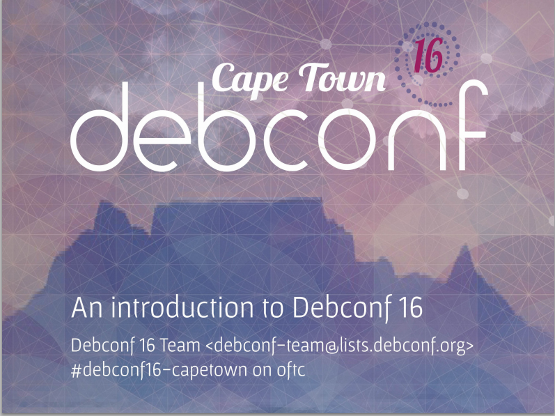
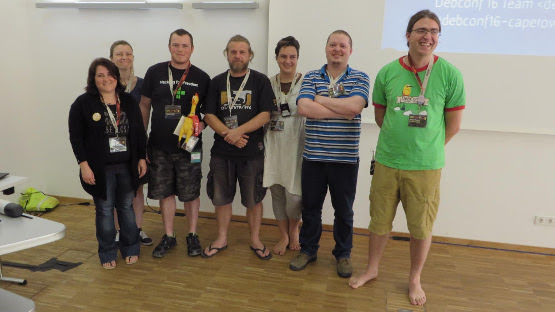
Debconf 15 In August (that was 2 months ago, really!?) I attended DebCamp and DebConf in Heidelberg, Germany. This blog post is somewhat belated due to the debbug (flu obtained during DebConf) and all the catching up I had to do since then. Debcamp Debcamp was great, I got to hack on some of my Python related packages that were in need of love for a long time and also got to spend a lot of time tinkering with VLC for the Video Team. Even better than that, I caught up with a lot of great people I haven t seen in ages (and met new ones) and stayed up waaaaay too late drinking beer, playing Mao and watching meteor showers. Debconf At Debconf, I gave a short talk about AIMS Desktop (slides) but also expanded on the licensing problems we ve had with Ubuntu on that project. Not all was bleak on the Ubuntu front though, some Ubuntu/Canonical folk were present at DebConf and said that they d gladly get involved with porting Ubiquity (the Ubuntu installer, a front-end to d-i) to Debian. That would certainly be useful to many derivatives including potentiall AIMS Desktop if it were to move over to Debian. AIMS Desktop talk slides: We re hosting DebConf in Cape Town next year and did an introduction during a plenary (slides). It was interesting spending some time with the DC15 team and learning how they work, it s amazing all the detail they have to care about and how easy they made it look from the outside, I hope the DC16 team will pull that off as well. Debconf 16 Slides: DC16 at DC15 talk DebConf 16 team members present at DebConf16 during DC16 presentation: I uploaded my photos to DebConf Gallery, Facebook and Google, take your pick ;-), many sessions were recorded, catch them on video.debian.net. If I had to summarize everything that I found interesting I d have to delay posting this entry even further, topics that were particularly interesting were: Pollito s First Trip to Africa In my state of flu with complete lack of concentration for anything work related, I went ahead and made a little short story documenting Pollito s (the DebConf mascot chicken) first trip to Africa. It s silly but it was fun to make and some people enjoyed it ^_^ Well, what else can I say? DebConf 15 was a blast! Hope to see you at Debconf 16!

2 October 2015

Daniel Pocock: Want to be selected for Google Summer of Code 2016?

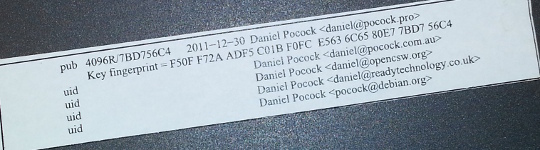
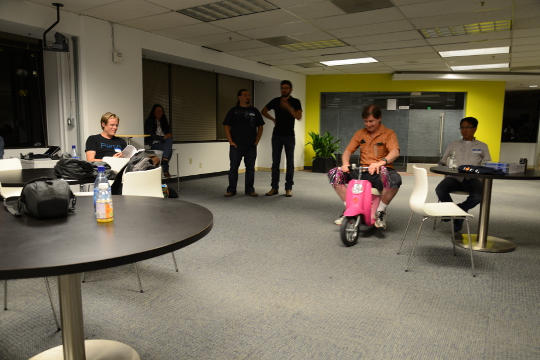
I've mentored a number of students in 2013, 2014 and 2015 for Debian and Ganglia and most of the companies I've worked with have run internships and graduate programs from time to time. GSoC 2015 has just finished and with all the excitement, many students are already asking what they can do to prepare and be selected for Outreachy or GSoC in 2016. My own observation is that the more time the organization has to get to know the student, the more confident they can be selecting that student. Furthermore, the more time that the student has spent getting to know the free software community, the more easily they can complete GSoC. Here I present a list of things that students can do to maximize their chance of selection and career opportunities at the same time. These tips are useful for people applying for GSoC itself and related programs such as GNOME's Outreachy or graduate placements in companies. Disclaimers There is no guarantee that Google will run the program again in 2016 or any future year until the Google announcement. There is no guarantee that any organization or mentor (including myself) will be involved until the official list of organizations is published by Google. Do not follow the advice of web sites that invite you to send pizza or anything else of value to prospective mentors. Following the steps in this page doesn't guarantee selection. That said, people who do follow these steps are much more likely to be considered and interviewed than somebody who hasn't done any of the things in this list. Understand what free software really is You may hear terms like free software and open source software used interchangeably. They don't mean exactly the same thing and many people use the term free software for the wrong things. Not all projects declaring themselves to be "free" or "open source" meet the definition of free software. Those that don't, usually as a result of deficiencies in their licenses, are fundamentally incompatible with the majority of software that does use genuinely free licenses. Google Summer of Code is about both writing and publishing your code and it is also about community. It is fundamental that you know the basics of licensing and how to choose a free license that empowers the community to collaborate on your code well after GSoC has finished. Please review the definition of free software early on and come back and review it from time to time. The The GNU Project / Free Software Foundation have excellent resources to help you understand what a free software license is and how it works to maximize community collaboration. Don't look for shortcuts There is no shortcut to GSoC selection and there is no shortcut to GSoC completion. The student stipend (USD $5,500 in 2014) is not paid to students unless they complete a minimum amount of valid code. This means that even if a student did find some shortcut to selection, it is unlikely they would be paid without completing meaningful work. If you are the right candidate for GSoC, you will not need a shortcut anyway. Are you the sort of person who can't leave a coding problem until you really feel it is fixed, even if you keep going all night? Have you ever woken up in the night with a dream about writing code still in your head? Do you become irritated by tedious or repetitive tasks and often think of ways to write code to eliminate such tasks? Does your family get cross with you because you take your laptop to Christmas dinner or some other significant occasion and start coding? If some of these statements summarize the way you think or feel you are probably a natural fit for GSoC. An opportunity money can't buy The GSoC stipend will not make you rich. It is intended to make sure you have enough money to survive through the summer and focus on your project. Professional developers make this much money in a week in leading business centers like New York, London and Singapore. When you get to that stage in 3-5 years, you will not even be thinking about exactly how much you made during internships. GSoC gives you an edge over other internships because it involves publicly promoting your work. Many companies still try to hide the potential of their best recruits for fear they will be poached or that they will be able to demand higher salaries. Everything you complete in GSoC is intended to be published and you get full credit for it. Imagine a young musician getting the opportunity to perform on the main stage at a rock festival. This is how the free software community works. It is a meritocracy and there is nobody to hold you back. Having a portfolio of free software that you have created or collaborated on and a wide network of professional contacts that you develop before, during and after GSoC will continue to pay you back for years to come. While other graduates are being screened through group interviews and testing days run by employers, people with a track record in a free software project often find they go straight to the final interview round. Register your domain name and make a permanent email address Free software is all about community and collaboration. Register your own domain name as this will become a focal point for your work and for people to get to know you as you become part of the community. This is sound advice for anybody working in IT, not just programmers. It gives the impression that you are confident and have a long term interest in a technology career. Choosing the provider: as a minimum, you want a provider that offers DNS management, static web site hosting, email forwarding and XMPP services all linked to your domain. You do not need to choose the provider that is linked to your internet connection at home and that is often not the best choice anyway. The XMPP foundation maintains a list of providers known to support XMPP. Create an email address within your domain name. The most basic domain hosting providers will let you forward the email address to a webmail or university email account of your choice. Configure your webmail to send replies using your personalized email address in the From header. Update your ~/.gitconfig file to use your personalized email address in your Git commits. Create a web site and blog Start writing a blog. Host it using your domain name. Some people blog every day, other people just blog once every two or three months. Create links from your web site to your other profiles, such as a Github profile page. This helps reinforce the pages/profiles that are genuinely related to you and avoid confusion with the pages of other developers. Many mentors are keen to see their students writing a weekly report on a blog during GSoC so starting a blog now gives you a head start. Mentors look at blogs during the selection process to try and gain insight into which topics a student is most suitable for. Create a profile on Github Github is one of the most widely used software development web sites. Github makes it quick and easy for you to publish your work and collaborate on the work of other people. Create an account today and get in the habbit of forking other projects, improving them, committing your changes and pushing the work back into your Github account. Github will quickly build a profile of your commits and this allows mentors to see and understand your interests and your strengths. In your Github profile, add a link to your web site/blog and make sure the email address you are using for Git commits (in the ~/.gitconfig file) is based on your personal domain. Start using PGP Pretty Good Privacy (PGP) is the industry standard in protecting your identity online. All serious free software projects use PGP to sign tags in Git, to sign official emails and to sign official release files. The most common way to start using PGP is with the GnuPG (GNU Privacy Guard) utility. It is installed by the package manager on most Linux systems. When you create your own PGP key, use the email address involving your domain name. This is the most permanent and stable solution. Print your key fingerprint using the gpg-key2ps command, it is in the signing-party package on most Linux systems. Keep copies of the fingerprint slips with you. This is what my own PGP fingerprint slip looks like. You can also print the key fingerprint on a business card for a more professional look. Using PGP, it is recommend that you sign any important messages you send but you do not have to encrypt the messages you send, especially if some of the people you send messages to (like family and friends) do not yet have the PGP software to decrypt them. If using the Thunderbird (Icedove) email client from Mozilla, you can easily send signed messages and validate the messages you receive using the Enigmail plugin. Get your PGP key signed Once you have a PGP key, you will need to find other developers to sign it. For people I mentor personally in GSoC, I'm keen to see that you try and find another Debian Developer in your area to sign your key as early as possible. Free software events Try and find all the free software events in your area in the months between now and the end of the next Google Summer of Code season. Aim to attend at least two of them before GSoC. Look closely at the schedules and find out about the individual speakers, the companies and the free software projects that are participating. For events that span more than one day, find out about the dinners, pub nights and other social parts of the event. Try and identify people who will attend the event who have been GSoC mentors or who intend to be. Contact them before the event, if you are keen to work on something in their domain they may be able to make time to discuss it with you in person. Take your PGP fingerprint slips. Even if you don't participate in a formal key-signing party at the event, you will still find some developers to sign your PGP key individually. You must take a photo ID document (such as your passport) for the other developer to check the name on your fingerprint but you do not give them a copy of the ID document. Events come in all shapes and sizes. FOSDEM is an example of one of the bigger events in Europe, linux.conf.au is a similarly large event in Australia. There are many, many more local events such as the Debian UK mini-DebConf in Cambridge, November 2015. Many events are either free or free for students but please check carefully if there is a requirement to register before attending. On your blog, discuss which events you are attending and which sessions interest you. Write a blog during or after the event too, including photos. Quantcast generously hosted the Ganglia community meeting in San Francisco, October 2013. We had a wild time in their offices with mini-scooters, burgers, beers and the Ganglia book. That's me on the pink mini-scooter and Bernard Li, one of the other Ganglia GSoC 2014 admins is on the right. Install Linux GSoC is fundamentally about free software. Linux is to free software what a tree is to the forest. Using Linux every day on your personal computer dramatically increases your ability to interact with the free software community and increases the number of potential GSoC projects that you can participate in. This is not to say that people using Mac OS or Windows are unwelcome. I have worked with some great developers who were not Linux users. Linux gives you an edge though and the best time to gain that edge is now, while you are a student and well before you apply for GSoC. If you must run Windows for some applications used in your course, it will run just fine in a virtual machine using Virtual Box, a free software solution for desktop virtualization. Use Linux as the primary operating system. Here are links to download ISO DVD (and CD) images for some of the main Linux distributions: If you are nervous about getting started with Linux, install it on a spare PC or in a virtual machine before you install it on your main PC or laptop. Linux is much less demanding on the hardware than Windows so you can easily run it on a machine that is 5-10 years old. Having just 4GB of RAM and 20GB of hard disk is usually more than enough for a basic graphical desktop environment although having better hardware makes it faster. Your experiences installing and running Linux, especially if it requires some special effort to make it work with some of your hardware, make interesting topics for your blog. Decide which technologies you know best Personally, I have mentored students working with C, C++, Java, Python and JavaScript/HTML5. In a GSoC program, you will typically do most of your work in just one of these languages. From the outset, decide which language you will focus on and do everything you can to improve your competence with that language. For example, if you have already used Java in most of your course, plan on using Java in GSoC and make sure you read Effective Java (2nd Edition) by Joshua Bloch. Decide which themes appeal to you Find a topic that has long-term appeal for you. Maybe the topic relates to your course or maybe you already know what type of company you would like to work in. Here is a list of some topics and some of the relevant software projects:


  • System administration, servers and networking: consider projects involving monitoring, automation, packaging. Ganglia is a great community to get involved with and you will encounter the Ganglia software in many large companies and academic/research networks. Contributing to a Linux distribution like Debian or Fedora packaging is another great way to get into system administration.
  • Desktop and user interface: consider projects involving window managers and desktop tools or adding to the user interface of just about any other software.
  • Big data and data science: this can apply to just about any other theme. For example, data science techniques are frequently used now to improve system administration.
  • Business and accounting: consider accounting, CRM and ERP software.
  • Finance and trading: consider projects like R, market data software like OpenMAMA and connectivity software (Apache Camel)
  • Real-time communication (RTC), VoIP, webcam and chat: look at the JSCommunicator or the Jitsi project
  • Web (JavaScript, HTML5): look at the JSCommunicator
Before the GSoC application process begins, you should aim to learn as much as possible about the theme you prefer and also gain practical experience using the software relating to that theme. For example, if you are attracted to the business and accounting theme, install the PostBooks suite and get to know it. Maybe you know somebody who runs a small business: help them to upgrade to PostBooks and use it to prepare some reports. Make something Make some small project, less than two week's work, to demonstrate your skills. It is important to make something that somebody will use for a practical purpose, this will help you gain experience communicating with other users through Github. For an example, see the servlet Juliana Louback created for fixing phone numbers in December 2013. It has since been used as part of the Lumicall web site and Juliana was selected for a GSoC 2014 project with Debian. There is no better way to demonstrate to a prospective mentor that you are ready for GSoC than by completing and publishing some small project like this yourself. If you don't have any immediate project ideas, many developers will also be able to give you tips on small projects like this that you can attempt, just come and ask us on one of the mailing lists. Ideally, the project will be something that you would use anyway even if you do not end up participating in GSoC. Such projects are the most motivating and rewarding and usually end up becoming an example of your best work. To continue the example of somebody with a preference for business and accounting software, a small project you might create is a plugin or extension for PostBooks. Getting to know prospective mentors Many web sites provide useful information about the developers who contribute to free software projects. Some of these developers may be willing to be a GSoC mentor. For example, look through some of the following: Getting on the mentor's shortlist Once you have identified projects that are interesting to you and developers who work on those projects, it is important to get yourself on the developer's shortlist. Basically, the shortlist is a list of all students who the developer believes can complete the project. If I feel that a student is unlikely to complete a project or if I don't have enough information to judge a student's probability of success, that student will not be on my shortlist. If I don't have any student on my shortlist, then a project will not go ahead at all. If there are multiple students on the shortlist, then I will be looking more closely at each of them to try and work out who is the best match. One way to get a developer's attention is to look at bug reports they have created. Github makes it easy to see complaints or bug reports they have made about their own projects or other projects they depend on. Another way to do this is to search through their code for strings like FIXME and TODO. Projects with standalone bug trackers like the Debian bug tracker also provide an easy way to search for bug reports that a specific person has created or commented on. Once you find some relevant bug reports, email the developer. Ask if anybody else is working on those issues. Try and start with an issue that is particularly easy and where the solution is interesting for you. This will help you learn to compile and test the program before you try to fix any more complicated bugs. It may even be something you can work on as part of your academic program. Find successful projects from the previous year Contact organizations and ask them which GSoC projects were most successful. In many organizations, you can find the past students' project plans and their final reports published on the web. Read through the plans submitted by the students who were chosen. Then read through the final reports by the same students and see how they compare to the original plans. Start building your project proposal now Don't wait for the application period to begin. Start writing a project proposal now. When writing a proposal, it is important to include several things:
  • Think big: what is the goal at the end of the project? Does your work help the greater good in some way, such as increasing the market share of Linux on the desktop?
  • Details: what are specific challenges? What tools will you use?
  • Time management: what will you do each week? Are there weeks where you will not work on GSoC due to vacation or other events? These things are permitted but they must be in your plan if you know them in advance. If an accident or death in the family cut a week out of your GSoC project, which work would you skip and would your project still be useful without that? Having two weeks of flexible time in your plan makes it more resilient against interruptions.
  • Communication: are you on mailing lists, IRC and XMPP chat? Will you make a weekly report on your blog?
  • Users: who will benefit from your work?
  • Testing: who will test and validate your work throughout the project? Ideally, this should involve more than just the mentor.
If your project plan is good enough, could you put it on Kickstarter or another crowdfunding site? This is a good test of whether or not a project is going to be supported by a GSoC mentor. Learn about packaging and distributing software Packaging is a vital part of the free software lifecycle. It is very easy to upload a project to Github but it takes more effort to have it become an official package in systems like Debian, Fedora and Ubuntu. Packaging and the communities around Linux distributions help you reach out to users of your software and get valuable feedback and new contributors. This boosts the impact of your work. To start with, you may want to help the maintainer of an existing package. Debian packaging teams are existing communities that work in a team and welcome new contributors. The Debian Mentors initiative is another great starting place. In the Fedora world, the place to start may be in one of the Special Interest Groups (SIGs). Think from the mentor's perspective After the application deadline, mentors have just 2 or 3 weeks to choose the students. This is actually not a lot of time to be certain if a particular student is capable of completing a project. If the student has a published history of free software activity, the mentor feels a lot more confident about choosing the student. Some mentors have more than one good student while other mentors receive no applications from capable students. In this situation, it is very common for mentors to send each other details of students who may be suitable. Once again, if a student has a good Github profile and a blog, it is much easier for mentors to try and match that student with another project. GSoC logo generic Conclusion Getting into the world of software engineering is much like joining any other profession or even joining a new hobby or sporting activity. If you run, you probably have various types of shoe and a running watch and you may even spend a couple of nights at the track each week. If you enjoy playing a musical instrument, you probably have a collection of sheet music, accessories for your instrument and you may even aspire to build a recording studio in your garage (or you probably know somebody else who already did that). The things listed on this page will not just help you walk the walk and talk the talk of a software developer, they will put you on a track to being one of the leaders. If you look over the profiles of other software developers on the Internet, you will find they are doing most of the things on this page already. Even if you are not selected for GSoC at all or decide not to apply, working through the steps on this page will help you clarify your own ideas about your career and help you make new friends in the software engineering community.


1 October 2015

Mike Gabriel: My FLOSS activities in August/September 2015

Here comes my "monthly" FLOSS report for August and September 2015. As 50% of August 2015 had been dedicated to taking some time off (spending time in Sweden with the family), it happened that even more workload had to be processed in September 2015. Received Sponsorship My monthly 8h portion of working for the Debian LTS project I had to dispatch from August into September. Thus, I received 16h of paid work for working on Debian LTS in September 2015. For details, see below. Thanks to Raphael Hertzog for having me on the team [1]. Thanks to all the people and companies sponsoring the Debian LTS Team's work. The development of GOsa Plugin SchoolManager (for details, see below) was done on contract for a school in Nothern Germany. The code will be released under the same license as the GOsa software itself. Completion of MATE 1.10 in Debian testing/unstable and Ubuntu 15.10 In the first half of September all MATE 1.10 packages finally landed in Debian testing (aka stretch). Martin Wimpress handled most of the packaging changes, whereas my main job was being reviewer and uploader of his efforts. Thanks to John Paul Adrian Glaubitz for jumping in as reviewer and uploader during my vacation time. read more

30 September 2015

Ben Armstrong: Halifax Mainland Common: Early Fall, 2015

A friend and I regularly meet to chat over coffee and then usually finish up by walking the maintained trail in the Halifax Mainland Common Park, but today we decided to take a brief excursion onto the unmaintained trails criss-crossing the park. The last gasp of a faint summer and early signs of fall are evident everywhere. Some mushrooms are dried and cracked in a mosaic pattern: image image Ferns and other brush are browning amongst the various greens of late summer: image A few late blueberries still cling to isolated bushes here and there: image The riot of fall colours in this small clearing, dotted with cotton-grass, burst into view as we round a corner, set behind by a backdrop of nearby buildings: image image The ferns here are vivid, like a slow burning fire that will take the rest of fall to burn out: image We appreciate one last splash of colour before we head back under the cover of woods to rejoin the maintained trail: image So many times we ve travelled our usual route on automatic . I m happy today we left the more travelled trail to share in these glimpses of the changing of seasons in a wilderness preserved for our enjoyment immediately at hand to a densely populated part of the city. facebooktwittergoogle_plusredditpinterestlinkedinmail

Chris Lamb: Free software activities in September 2015

Inspired by Rapha l Hertzog, here is a monthly update covering a large part of what I have been doing in the free software world:
Debian The Reproducible Builds project was also covered in depth on LWN as well as in Lunar's weekly reports (#18, #19, #20, #21, #22).
Uploads
  • redis A new upstream release, as well as overhauling the systemd configuration, maintaining feature parity with sysvinit and adding various security hardening features.
  • python-redis Attempting to get its Debian Continuous Integration tests to pass successfully.
  • libfiu Ensuring we do not FTBFS under exotic locales.
  • gunicorn Dropping a dependency on python-tox now that tests are disabled.


RC bugs


I also filed FTBFS bugs against actdiag, actdiag, bangarang, bmon, bppphyview, cervisia, choqok, cinnamon-control-center, clasp, composer, cpl-plugin-naco, dirspec, django-countries, dmapi, dolphin-plugins, dulwich, elki, eqonomize, eztrace, fontmatrix, freedink, galera-3, golang-git2go, golang-github-golang-leveldb, gopher, gst-plugins-bad0.10, jbofihe, k3b, kalgebra, kbibtex, kde-baseapps, kde-dev-utils, kdesdk-kioslaves, kdesvn, kdevelop-php-docs, kdewebdev, kftpgrabber, kile, kmess, kmix, kmldonkey, knights, konsole4, kpartsplugin, kplayer, kraft, krecipes, krusader, ktp-auth-handler, ktp-common-internals, ktp-text-ui, libdevice-cdio-perl, libdr-tarantool-perl, libevent-rpc-perl, libmime-util-java, libmoosex-app-cmd-perl, libmoosex-app-cmd-perl, librdkafka, libxml-easyobj-perl, maven-dependency-plugin, mmtk, murano-dashboard, node-expat, node-iconv, node-raw-body, node-srs, node-websocket, ocaml-estring, ocaml-estring, oce, odb, oslo-config, oslo.messaging, ovirt-guest-agent, packagesearch, php-svn, php5-midgard2, phpunit-story, pike8.0, plasma-widget-adjustableclock, plowshare4, procps, pygpgme, pylibmc, pyroma, python-admesh, python-bleach, python-dmidecode, python-libdiscid, python-mne, python-mne, python-nmap, python-nmap, python-oslo.middleware, python-riemann-client, python-traceback2, qdjango, qsapecng, ruby-em-synchrony, ruby-ffi-rzmq, ruby-nokogiri, ruby-opengraph-parser, ruby-thread-safe, shortuuid, skrooge, smb4k, snp-sites, soprano, stopmotion, subtitlecomposer, svgpart, thin-provisioning-tools, umbrello, validator.js, vdr-plugin-prefermenu, vdr-plugin-vnsiserver, vdr-plugin-weather, webkitkde, xbmc-pvr-addons, xfsdump & zanshin.

Norbert Preining: 6 years in Japan

Exactly 6 years ago, on October 1, 2009, I started my work at the Japan Advanced Institute of Science and Technology (JAIST), arriving the previous day in a place not completely unknown, but with a completely different outlook: I had a position as Associate Professor, and somehow was looking forward to an interesting and challenging time. japan-flag 6 years later I am still here at the JAIST, but things have changed considerably, and my future is even less clear than 6 years ago. So it is time to reflect a bit about the last years. The biggest achievement My biggest achievement in these 6 years is probably that I managed to learn Japanese to a degree that I can teach in Japanese (math, logic, etc), can read Japanese books to a certain degree, and have generally no problem communicating in daily life. Said that, there is still a long way to go. Reading, and much more writing, is still requiring concentration and power, far from the natural flow in my other languages. While talking feels rather natural, the complexity of the written language is a huge hurdle. But this is probably the good, the high point of the 6 years, a great challenge, that keeps my mind busy and working and challenged over long time, with still more to do. The happiest thing Many events here in Japan were of great fun and enjoyment for me. The rich culture, paired with a spectacular love for traditional handicraft I haven t seen anywhere else, is a guarantee for enjoyable and intellectually stimulating activities. But the biggest joy of my time here of course was that I found a lovely, beautiful, and caring wife. Not knowing the challenges of an international marriage, I was caught without preparation, and so we had (and still have) rough times due to the cultural differences, and different expectations. But this is what makes life interesting, and so I am always grateful for this chance. Whatever happens in the future, she will be part of my decisions and the center of my life. The biggest disappointment Of course, when you live in a country for some time, you learn to know the highs and lows. As someone interested in politics and social systems, Japan is a pain in the butt in many respects. But the biggest disappointment was in a different area: Working environment. While I love my work and had great surroundings, there is something that always is present in the background: Foreigners here are not considered assets, but embellishment. Meaning that they are the first ones to loose their jobs when times are difficult, meaning that they are not considered as full members. After many years at a university here, and with no outlook on a job after March, I can only say, Japan is a country of Japanese first , especially when it comes to jobs. Of course, other countries are not that different, but looking at the average mixture of nationalities at universities in Europe or the US, and comparing them to Japanese universities, a bleak image is arising. I enjoyed my time here, I worked hard and did a lot for my university, but the economically hard times make it necessary to change things, and that means getting rid of foreigners. That is the reason why the work environment is the biggest disappointment in these years. Future The future is unclear, as it always was. The dire fate of many researchers. Being in my 40ies without a permanent position and a family, I am forced to think hard what my next options are. The hide-and-seek games of Japanese (and other) universities seem to me less and less an option. Sad as it is, after having worked 20+ years in academics, having done some interesting (for me) research and having managed to secure a name in our community, I am not sure where my future is. Continuing on definite contracts does not sound like a great option for me. Several things for the future come to my mind: starting my own business, work as programmer (maybe Google still wants me after I rejected them 2 years ago), work as mountain guide (have done that for some years before going to Japan). All of that is possible, but my loosing the time to research will always be a pain, since I enjoy cracking my brain on some complicated and deep logical problems. Whatever comes, I will take it as a chance to learn new things. And in one way or another it will work out, I hope.

Yves-Alexis Perez: Kernel recipes 2015: Hardened kernels for everyone

As part of my ongoing effort to provide grsecurity patched kernels for Debian, I gave a talk this morning at Kernel Recipes 2015. Slides and video should be available at one point, but you can find the former here in the meantime. I'm making some progresses on #605090 which I should be able to push soon.

Rapha&#235;l Hertzog: My Free Software Activities in September 2015

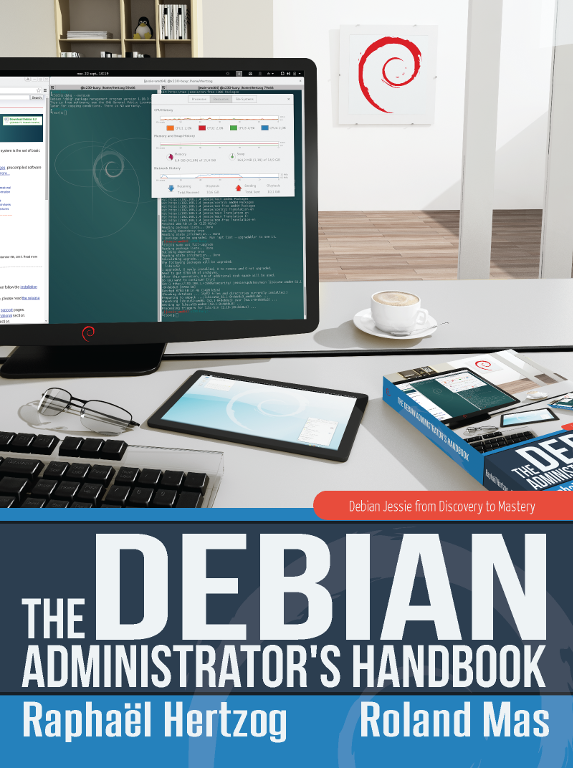
My monthly report covers a large part of what I have been doing in the free software world. I write it for my donators (thanks to them!) but also for the wider Debian community because it can give ideas to newcomers and it s one of the best ways to find volunteers to work with me on projects that matter to me. Debian LTS This month I have been paid to work 8 hours on Debian LTS. In that time, I mostly did CVE triaging (in the last 3 days since I m of LTS frontdesk duty this week). I pushed 14 commits to the security tracker. There were multiple CVE without any initial investigation so I checked the status of the CVE not only in squeeze but also in wheezy/jessie. On unpaid time, I wrote and sent the summary of the work session held during DebConf. And I tried to initiate a discussion about offering mysql-5.5 in squeeze-lts. We also have setup lts-security@debian.org so that we can better handle embargoed security updates. The Debian Administrator s Handbook Debian Handbook: cover of the jessie editionI spent a lot of time on my book, the content update has been done but now we re reviewing it before preparing the paperback. I also started updating its French translation. You can help review it too. While working on the book I noticed that snort got removed from jessie and the SE linux reference policy as well. I mailed their maintainers to recommend that they provide them in jessie-backports at least those packages are relatively important/popular and it s a pity that they are missing in jessie. I hope to finish the book update in the next two weeks! Distro Tracker I spent a lot of time to revamp the mail part of Distro Tracker. But as it s not finished yet, I don t have anything to show yet. That said I pushed an important fix concerning the mail subscriptions (see #798555), basically all subscriptions of packages containing a dash were broken. It just shows that the new tracker is not yet widely used for mail subscription I also merged a patch from Andrew Starr-Bochicchio (#797633) to improve the description of the WNPP action items. And I reviewed another patch submitted by Orestis Ioannou to allow browsing of old news (see #756766). And I filed #798011 against bugs.debian.org to request that a new X-Debian-PR-Severity header field be added to outgoing BTS mail so that Distro Tracker can filter mails by severity and offer people to subscribe to RC bugs only. Misc Debian work I filed many bugs this month and almost all of them are related to my Kali work: Thanks See you next month for a new summary of my activities.
3 comments Liked this article? Click here. My blog is Flattr-enabled.

29 September 2015

Norbert Preining: Multi-boot stick update: TAILS 1.6, SysresCD 4.6.0, GParted 0.23, Debian 8.2

Updates for my multi-boot/multi-purpose USB stick: All components have been updated to the latest versions and I have confirmed that all of them still boot properly although changes in the grub.cfg file are necessary. So going through these explanations one will end up with a usable USB stick that can boot you into TAILS, System Rescue CD, GNU Parted Live CD, GRML, and also can boot into an installation of Debian 8.2 Jessie installation. All this while still being able to use the USB stick as normal media. multi-usb-disk Since there have been a lot of updates, and also changes in the setup and grub config file, I include the full procedure here, that is, merging and updating these previous posts: USB stick with Tails and SystemRescueCD, Tails 1.2.1, Debian jessie installer, System Rescue CD on USB, USB stick update: TAILS 1.4, GParted 0.22, SysResCD 4.5.2, Debian Jessie, and USB stick update: Debian is back, plus GRML. Let us repeat some things from the original post concerning the wishlist and the main players: I have a long wishlist of items a boot stick should fulfill Requirements A USB stick, the iso images of TAILS 1.6, SystemRescueCD 4.6.0, GParted Lice CD 0.23.0, GRML 2014.11, and some tool to access iso images, for example ISOmaster (often available from your friendly Linux distribution). I assume that you have already an USB stick prepared as described previously. If this is not the case, please go there and follow the section on preparing your usb stick. Three types of boot options We will employ three different approaches to boot special systems: the one is directly from an iso image (easiest, simple to update), the other via extraction of the necessary kernels and images (bit painful, needs some handwork), and the last one is a mixture necessary to get Debian booting (most painful, needs additional downloads and handwork). At the moment we have the following status with respect to boot methods: Booting from ISO image Grub has gained quite some time ago the ability to boot directly from an ISO image. In this case the iso image is mounted via loopback, and the kernel and initrd are specified relatively to the iso image root. This system makes it extremely easy to update the respective boot option: just drop the new iso image onto the USB stick, and update the isofile setting. One could even use some -latest method, but I prefer to keep the exact name. For both SystemRescueCD, GNOME Partition Live CD, and GRML, just drop the iso files into /boot/iso/, in my case /boot/iso/systemrescuecd-x86-4.6.0.iso and /boot/iso/gparted-live-0.23.0-1-i586.iso. After that, entries like the following have to be added to grub.cfg. For the full list see grub.cfg:
submenu "System Rescue CD 4.6.0 (via ISO) ---> "  
  set isofile="/boot/iso/systemrescuecd-x86-4.6.0.iso"
  menuentry "SystemRescueCd (64bit, default boot options)"  
        set gfxpayload=keep
        loopback loop (hd0,1)$isofile
        linux   (loop)/isolinux/rescue64 isoloop=$isofile
        initrd  (loop)/isolinux/initram.igz
   
  ...
 
 
submenu "GNU/Gnome Parted Live CD 0.23.0 (via ISO) ---> "  
  set isofile="/boot/iso/gparted-live-0.23.0-1-i586.iso"
  menuentry "GParted Live (Default settings)" 
    loopback loop (hd0,1)$isofile
    linux (loop)/live/vmlinuz boot=live union=overlay username=user config components quiet noswap noeject  ip= net.ifnames=0 nosplash findiso=$isofile
    initrd (loop)/live/initrd.img
   
  ...
 
 
submenu "GRML 2014.11 ---> "  
  menuentry "Grml Rescue System 64bit"  
        iso_path="/boot/iso/grml64-full_2014.11.iso"
        export iso_path
        loopback loop (hd0,1)$iso_path
        set root=(loop)
        kernelopts=" ssh=foobarbaz toram  "
        export kernelopts
        configfile /boot/grub/loopback.cfg
    
 
Note the added isoloop=$isofile and findiso=$isofile that helps the installer find the iso images. Booting via extraction of kernels and images This is a bit more tedious, but still not too bad. Installation of TAILS files Assuming you have access to the files on the TAILS CD via the directory ~/tails, execute the following commands:
mkdir -p /usbstick/boot/tails
cp -a ~/tails/live/* /usbstick/boot/tails/
The grub.cfg entries look now similar to the following:
submenu "TAILS Environment 1.6 ---> "  
  menuentry "Tails64 Live System"  
        linux   /boot/tails/vmlinuz2 boot=live live-media-path=/boot/tails config live-media=removable nopersistent noprompt timezone=Etc/UTC block.events_dfl_poll_msecs=1000 splash noautologin module=Tails
        initrd  /boot/tails/initrd2.img
 
   
  ...
 
The important part here is the live-media-path=/boot/tails, otherwise TAILS will not find the correct files for booting. The rest of the information was extracted from the boot setup of TAILS itself. Mixture of iso image and extraction Debian jessie As mentioned in the previous post, booting Debian/Jessie installation images via any method laid out above didn t work, since the iso images is never found. It turned out that the current installer iso images do not contain the iso-scan package, which is responsible for searching and loading of iso images. But with a small trick one can overcome this: One needs to replace the initrd that is on the ISO image with one that contains the iso-scan package. And we do not need to create these initrd by ourselves, but simply use the ones from hd-media type installer. I downloaded the following four gzipped initrds from one of the Debian mirrors: i386/initrd text mode, i386/initrd gui mode, amd64/initrd text mode, amd64/initrd gui mode, and put them into the USB stick s boot/debian/install.386, boot/debian/install.386/gtk, boot/debian/install.amd, boot/debian/install.amd/gtk, respectively. Finally, I added entries similar to this one (rest see the grub.cfg file):
submenu "Debian 8.2 Jessie NetInstall ---> "  
    set isofile="/boot/iso/firmware-8.2.0-amd64-i386-netinst.iso"
    menuentry '64 bit Install'  
        set background_color=black
        loopback loop (hd0,1)$isofile
        linux    (loop)/install.amd/vmlinuz iso-scan/ask_second_pass=true iso-scan/filename=$isofile vga=788 -- quiet 
        initrd   /boot/debian/install.amd/initrd.gz
     
    ...
 
Again an important point, don t forget the two kernel command line options: iso-scan/ask_second_pass=true iso-scan/filename=$isofile, otherwise you probably will have to make the installer scan all disks and drives completely, which might take ages. Current status of USB stick Just to make sure, the usb stick should contain at the current stage the following files:
/boot/
    iso/
        firmware-8.2.0-amd64-i386-netinst.iso
        gparted-live-0.23.0-1-i586.iso
        grml64-full_2014.11.iso
        systemrescuecd-x86-4.6.0.iso
    tails/
        vmlinuz Tails.module initrd.img ....
    grub/
        fonts/
            lots of files
        locale/
            lots of files
        x86_64-efi/
            lots of files
        font.pf2
        grubenv
        grub.cfg            *this file we create in the next step!!*
/EFI
    BOOT/
        BOOTX64.EFI
The Grub config file grub.cfg The final step is to provide a grub config file in /usbstick/boot/grub/grub.cfg. I created one by looking at the isoboot.cfg files both in the SystemRescueCD, TAILS iso images, GParted iso image, and the Debian/Jessie image, and converting them to grub syntax. Excerpts have been shown above in the various sections. I spare you all the details, grab a copy here: grub.cfg Conclusion That s it. Now you can anonymously provide data about your evil government, rescue your friends computer, fix a forgotten Windows password, and above all, install a proper free operating system. If you have any comments, improvements or suggestions, please drop me a comment. I hope this helps a few people getting a decent USB boot stick running. Enjoy.

28 September 2015

Antoine Beaupr : Fun experiments with laptop battery

After reading up on a eye-opening blog from Petter Reinholdtsen about laptop batteries, or more specifically Lithium-Ion laptop batteries, I figured I needed to try out the "TLP Linux Advanced Power Management" that I had been keeping an eye on for a while. tlp is yet another tool to control power usage on laptops (mostly Thinkpad, mine is a X120e). The novelty of tlp is the "hands off" approach: everything should be automatically configured for you... Obviously, that means I then went on working for a few hours on breaking and fixing my laptop in random operations. I opened a bunch of pull requests on the interesting battery status package that Petter produced to make it work with my setup and make it display graphs directly (instead of into a file). I also rewrote the graphing tool in Python with SciPy in order to have cleaner labels and be able to deduce the date at which a battery would be completely unusuable because it can't recharge high enough. (At the time of writing, the battery estimated death time is december 7th, but that data is skewed because of a quick change in the battery charge after the BIOS upgrade, below.) I then went on to try to limit my laptop charging to 80%, since this seems to make the battery last longer (sources from Petter: 1, 2, 3). Unfortunately, even after building a local (and trivial) backport of the tlp package to Debian stable (8.2/Jessie), I still couldn't access those controls, as TLP is really just a set of shell scripts that glue a bunch of stuff together.
The backport was simply:
apt-get source tlp
cd tlp*/
debuild
sudo dpkg -i ../tlp*.deb
I read here and there (and in Petter's post) that I needed the tp-smapi-dkms package, so I went ahead an installed it:
sudo apt install tp-smapi-dkms
(Yes, Jessie has a neat apt command now, it's great, upgrade now.) Unfortunately, this still didn't work. I think the error back then was something like:
thinkpad_ec: thinkpad_ec_request_row: arg0 rejected: (0x01:0x00)->0x00
thinkpad_ec: thinkpad_ec_read_row: failed requesting row: (0x01:0x00)->0xfffffffb
thinkpad_ec: initial ec test failed
I have seen suggestions here and there to try the acpi-call-dkms package, but that was useless as it doesn't support my model (but may work with others!). The error there was:
acpi_call: Cannot get handle: Error: AE_NOT_FOUND
Note: I still have it installed - it's unclear what impact it has, and I do not want to break my current setup.
So I then started to look at upgrading my BIOS, for some reason. I was running version 1.13 (8FET29WW) from 05/06/2011. I was able to update to 1.17 (8FET33WW) from 11/07/2012, using the memdisk binary from the syslinux-common package, with some help from the quite useful grub-imageboot package:
sudo apt install syslinux-common grub-imageboot
wget https://download.lenovo.com/ibmdl/pub/pc/pccbbs/mobiles/8fuj10uc.iso
sudo mkdir /boot/images
sudo mv 8fuj10uc.iso /boot/images
sudo reboot
I found the image on the Thinkpad x120e support page from Lenovo (which happily bounces around, so don't rely on the above URLs too much). When I rebooted, I was offered to boot from the image by grub, which went on fine, considering it was running some version of DOS, which is always a bit scary considering it is software that is somewhat almost as old as me.
I wish I could have installed some free software in the BIOS instead of the outdated crap that Lenovo provides, but unfortunately, it seems this will never be possible with Libreboot or Coreboot, mostly because Intel is evil and installs backdoors in all their computers. Fun times.
Fortunately and surprisingly, the update worked and went on pretty smoothly. After that, I was able to set the charge limit with:
echo 80   sudo tee /sys/devices/platform/smapi/BAT0/stop_charge_thresh
Amazing! I had almost forgotten why I almost bricked my system on a thursday, good thing that worked! Now the fun part was that, after some reboots or something I did, I am not sure what, the above stopped working: I couldn't load the drivers at all anymore, dmesg treating me with a nasty:
thinkpad_ec: thinkpad_ec_read_row: failed requesting row: (0x01:0x00)->0xfffffff0
thinkpad_ec: initial ec test failed
Now that is some obscure error message material! Fun stuff. I tried uninstalling tlp, the smapi modules, the acpi-call modules, rebooting, turning the machine off, removing the battery, nothing worked. Even more hilarious, the charge controler was now stuck at 80%: I had artificially destroyed 20% of the battery capacity in software. Ouch. I think this may have been related to uninstalling the tp-smapi-dkms package without unloading it at first. I found some weird entries in my kern.log like this:
tp_smapi unloaded.
thinkpad_ec: thinkpad_ec_read_row: failed requesting row: (0x14:0x00)->0xfffffff0
hdaps: cannot power off
hdaps: driver unloaded.
thinkpad_ec: unloaded.
I think that after that point, I couldn't load either module, not even thinkpad_ec... After tearing out a few more hairs and hammering my head on the keyboard randomly, I thought I could just try another BIOS upgrade, just for the fun of it. Turns out you actually can't rerun the upgrade, but you can change the model number through the same software, and this seems to reset some stuff. So I went back in the ISO image I had loaded earlier, and went on to change the model number (actually setting it to the same value, but whatever, it still ran the update). It turns out this seems to have reset a bunch of stuff and now everything works. I can use tlp setcharge and all the neat tools go well. The two key commands are:
# limit charging to 80% of the battery, but not lower than 40%
sudo tlp setcharge 40 80
# clear the above setting and just charge the battery to 100%
sudo tlp fullcharge
It seems that the 40% bit isn't supported by my laptop, but whatever: the battery stays charged when on AC power anyways, so I don't really understand what the setting is for in the first place. The error there is:
smapi smapi: smapi_request: SMAPI error: Function is not supported by SMAPI BIOS (func=2116)
smapi smapi: __get_real_thresh: cannot get start_thresh of bat=0: Function is not supported by SMAPI BIOS
The second command is what I will need to remember to run before I unplug the laptop for a trip. I suspect this will be really annoying and I may end up disabling all this stuff and just yank the power cable out when the battery reaches 80%, by hand, when I need to. But it was a fun geeking out, and hopefully this will be useful for others. And of course, the graphs from Petter will be interesting in a few months... Before the BIOS upgrade, the battery capacity was reported as 100% (actually, at 100.03%, which was strange). Now, the capacity is at 98.09%, which is probably just a more accurate reading that was fixed in the BIOS upgrade. Finally, also see the useful thinkwiki troubleshooting page and especially their interesting BIOS upgrade documentation which inspired me to write my own version. I would have gladly contributed to theirs, but I seem to have lost my password on this site, with no recovery possible... The arch linux wiki has obviously excellent documentation as well, as usual.

27 September 2015

Sven Hoexter: 1blu hack and the usual TLS certificate key madness

Some weeks ago the german low cost hoster 1blu got hacked and there was a bit of fuss later about the TLS certificates issued by 1blu. I think they reissued all of them. Since I knew that some hoster offer to generate the complete cert + key package for the customer I naively assumed that only the lazy and novice customers were the victims of that issue. Today, while helping someone, I learned that 1blu forces you to use the key generated by them for certificates included in a virtual server bundle and probably other bundles. That makes those bundles a lot less attractive since the included certificate is not useful at all. One could of course argue that a virtual server is not trustworthy anyway, but I'd like to believe for now that it's more complicated to extract stuff from all running virtual servers compared to dumping the central database / key repository. Maybe it's time to create a wrapper around openssl that is less opaque to novice users so we can get rid of key generation by a third party one day. In the end it's a disasterous trend that only got started because of usability issues.

Dominique Dumont: How to automount optical media on Debian Linux for Kodi

Hello This problem has been bugging me for a while: how to setup my Kodi based home cinema to automatically mount an optical media ? Turns out the solution is quite simple, now that Debian has switched for systemd. Just add the following line to /etc/fstab:
/dev/sr0 /media/bluray auto defaults,nofail,x-systemd.automount 0 2
Where: Do not specify noauto: this would prevent systemd to automatically mount a disc, which defeats the purpose. To test you setup: Then, journalctl should show something like:
Sept. 27 16:07:01 frodo systemd[1]: Mounted /media/bluray.
And that s it. No need to have obsolete packages like udisk-glue or autofs. Last but not least: this blog is moderated, please do not waste your time (and mine) posting rants. All the best.
Tagged: automount, debian, kodi, optical, systemd

Niels Thykier: There is nothing like (missing) iptables (rules) to make you use tor

I have been fiddling with setting up both iptables and tor on my local machine. Most of it was fairly easy to do, once I dedicated the time to actually do it. Configuring both at the same time also made things easier for me, but YMMV. Regardless, it did take quite a while researching, tweaking and testing most of that time was spent on the iptables front for me. I ended up doing this incrementally. The major 5 steps I went through were:
  1. Created a basic incoming (INPUT) firewall enforcing
  2. Installed tor + torsocks and aliased a few commands to run with torsocks
  3. Created a basic outgoing (OUTPUT) firewall permissive
  4. Make the outgoing firewall enforcing
  5. Migrate the majority of programs and services to use tor.
Some of these overlapped time-wise and I certainly revisited the configuration a couple of times. A couple of things, that I learned:
Filed under: Debian

Ben Armstrong: Annual Bluff Hike, 2015

Here is a photo journal of our hike on the Bluff Wilderness Trail with my friend, Ryan Neily, as is our tradition at this time of year. Rather than hike all four loops, as we achieved last year, we chose to cover only the Pot Lake and Indian Hill loops. Like our meandering pace, our conversations were enjoyable and far ranging, with Nature doing her part, stimulating our minds and bodies and refreshing our spirits.
A break at the summit of Pot Lake loop. Click to start slideshow.A break at the summit of Pot Lake loop. Click to start slideshow.
Northern bayberry A few showers quickly dissipated into light mist on the first leg of the hike Ryan, enjoying one of the many beautiful views Cormorant or shag. Hard to say from this poor, zoomed cellphone shot. Darkened pool amongst the rugged trees Late summer colours A riot of life shoots up in every crevice Large boulders and trees, forming a non-concrete alley along the trail margin Huckleberries still plentiful on the Indian Hill loop Sustenance to keep us going Not at all picked over, like the Pot Lake loop We break here for lunch Just about ready to embark on the last half We are surprised by the productivity of these short, scrubby huckleberries Barely rising from the reindeer moss, each huckleberry twig provides sweet, juicy handfuls A small pond on the trip back A break on the home stretch Common juniper, which nevertheless is not so common out here Immature green common juniper berries (actually cones)
facebooktwittergoogle_plusredditpinterestlinkedinmail

Lunar: Reproducible builds: week 22 in Stretch cycle

What happened in the reproducible builds effort this week: Toolchain fixes Packages fixed The following 22 packages became reproducible due to changes in their build dependencies: breathe, cdi-api, geronimo-jpa-2.0-spec, geronimo-validation-1.0-spec, gradle-propdeps-plugin, jansi, javaparser, libjsr311-api-java, mac-widgets, mockito, mojarra, pastescript, plexus-utils2, powerline, python-psutil, python-sfml, python-tldap, pythondialog, tox, trident, truffle, zookeeper. The following packages became reproducible after getting fixed: Some uploads fixed some reproducibility issues but not all of them: Patches submitted which have not made their way to the archive yet: diffoscope development The changes to make diffoscope run under Python 3, along with many small fixes, entered the archive with version 35 on September 21th. Another release was made the very next day fixed two encoding-related issues discovered when running diffoscope on more Debian packages. strip-nondeterminism development Version 0.12.0 now preserves file permissions on modified zip files and dh_strip_nondeterminism has been made compatible with older debhelper. disorderfs development Version 0.3.0 implemented a multi-user mode that was required to build Debian packages using disorderfs. It also added command line options to control the ordering of files in directory (either shuffled or reversed) and another to do arbitrary changes to the reported space used by files on disk. A couple days later, version 0.4.0 was released to support locks, flush, fsync, fsyncdir, read_buf, and write_buf. Almost all known issues have now been fixed. reproducible.debian.net disorderfs is now used during the second build. This makes file ordering issue very easy to identify as such. (h01ger) Work has been done on making the distributed build setup more reliable. (h01ger) Documentation update Matt Kraii fixed the example on how to fix issues related to dates in Sphinx. Recent Sphinx versions should also be compatible with SOURCE_DATE_EPOCH. Package reviews 53 reviews have been removed, 85 added and 13 updated this week. 46 packages failing to build from source has been identified by Chris Lamb, Chris West, and Niko Tyni. Chris Lamb was the lucky reporter of bug #800000 on vdr-plugin-prefermenu. Issues related to disorderfs are being tracked with a new issue.

Next.

Previous.