Search Results: "spa"

9 April 2011

Axel Beckert: Finding packages for deinstallation on the commandline with aptitude

Although I often don t agree with Erich (especially if GNOME is involved ;-), he recently posted something on Planet Debian which I found very helpful. I also own a netbook where disk space is sacre. It s an ASUS EeePC 701 with just 4GB disk space. And it runs Debian Sid, so dependencies change often, leaving packages installed which formerly had hard dependencies on, but are now left with just recommendations pointing to it. Quite a few times I asked myself if it s possible to find those packages and if so, how to do it. Well, I don t have to ask myself that anymore, since Erich recently posted the appropriate filter patterns for my favourite package manager aptitude for this task in his posting Finding packages for deinstallation . Thanks, Erich! Since those filters aren t very easy to remember, I d like to extend the usefulness of his posting towards the commandline. I for myself added the following aliases to my shell setup:
alias aptitude-just-recommended='aptitude -o "Aptitude::Pkg-Display-Limit=!?reverse-depends(~i) ~M !?essential"'
alias aptitude-also-via-dependency='aptitude -o "Aptitude::Pkg-Display-Limit=~i !~M ?reverse-depends(~i) !?essential"'
As youam suggested on IRC, I also added the filter !?essential since we won t touch essential packages when cleaning up the list of installed packages anyway. Hope this helps further.

Olly Betts: Xapian GSoC Applications for 2011

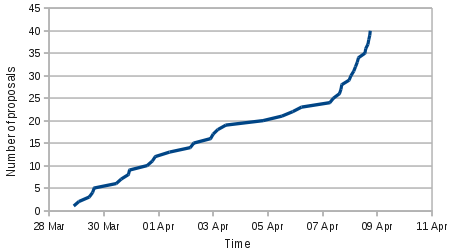
Student applications for GSoC closed a few hours ago. This is Xapian's first year as a mentoring organisation (though I've been involved in previous years with SWIG and Debian) and we've been blown away by the response from students. If you'd have asked me when we'd got accepted, I'd have guessed we might get 20 applications and feel we'd done well, but counting up now we have 42. Ignoring two which were withdrawn (one duplicate, one a spam which surprisingly got withdrawn when I politely suggested such applications weren't useful), here is a graph of applications against time: Graph of student applications to Xapian in GSoC 2011 If you're an admin or a mentor, you can produce a similar graph for your own org(s) - just download this OpenDocument spreadsheet and follow the instructions inside. Now the task of selection starts in earnest. I've gone through and marked the seven spam proposals as ineligible (that's one line proposals, proposals with no connection at all to Xapian, and proposals which are just a title and/or paste from our ideas list with a generic biography). That leaves 33, but not all are really in the running, before our student applicants start to despair! I don't have a good picture yet, but it looks like there are something like 10-15 we'll be seriously considering.

8 April 2011

Wouter Verhelst: Blocking newsletter spam

It's incredible how many people are of the misguided belief that just because I happen to run a company, I am automatically interested in their newsletter about whatever it is that they are doing, no matter how far it is removed from the kinds of things my company actually does. Are these people spammers? Yes, definitely, and I don't want to do business with them. But there's a major difference between this kind of mails and your common nigerian scammer or counterfeit blue pill "salesperson". Unlike the latter, some newsletter spammers are interested in forming a genuine business relationship with my company. They're going about it the wrong way, but that doesn't necessarily mean they're trying to trick me into doing something that would not be in my best interest they're not just after my money. Although their methods are wrong, that does not mean they're entirely clueless. Some of these unwanted newsletters are sent with VERP-style return paths, which suggests that if the mail bounces at SMTP time, I would no longer receive their junk. So bouncing them is what I do. Exim makes this very easy:
acl_check_mail:
  deny
	message = Your domain has been blacklisted
	log_message = domain blacklisted
	condition = $ 
			lookup $sender_address_domain 
			wildlsearch /etc/exim4/blacklist-domains 
			 true 
			 false 
		      
  accept
What this does is use a wildlsearch lookup to verify whether the domain of the envelope sender (i.e., as specified in the MAIL FROM: SMTP command) exists in the /etc/exim4/blacklist-domains file. Since we use a wildlsearch, we can use the * as a wildcard *grep.be would mean 'grep.be, or any of its subdomains', whereas *.grep.be would mean 'any of the grep.be subdomains'. This is because at least one of the people I've blacklisted that way sends their newsletter through a distributed service, and the VERP-style header is based upon the server that actually communicates with my system; and others have a subdomain for the newsletter, but don't use it (or use a different one) for regular mail. If I'm not interested in their spam, I'm probably also not interested in their other mail, so therefore the wildcard (is this overkill? Maybe, but I don't care I don't do business with spammers). This ACL is then activated for the SMTP MAIL FROM: command (search for acl_smtp_mail variable in the exim specification). This makes it impossible for the spammer to reach postmaster@ from the same domain, too, but that doesn't matter; they can always use a different address. One might be wondering why I'm using this kind of domain-based blacklisting rather than a regular bayesian spamfilter, or anything of the sorts. The reason is fairly simple: because the general format of these newsletters is distinctly different from regular spam. For instance, some of these newsletter spammers are in fact competitors who didn't bother to check who they're sending mail to. As a result, their newsletters would contain key words that would appear in mails which I send to my regular customers, too; if I were to classify them as spam in my bayesian classifier, that would increase the chance of the classifier misclassifying a mail from an actual customer as spam. Most of these are very similar in format to newsletters that I did consciously subscribe to, and which are therefore not spam, etc. Finally, bouncing mail rather than blackholing it or filing it in a separate folder (as I have spamassassin do) has the added advantage of making it clear to a newsletter spammer that their junk is not wanted. Most (though certainly not all) will then remove me from their newsletter, saving me bandwith and processing power. And since we do this at MAIL FROM: time, rather than upon completion of the RCPT TO: or DATA commands, I'm not actually giving away any information that they don't have, either.

7 April 2011

Amaya Rodrigo: Baking for the weekend


Madeleines / Magdalenas
Originally uploaded by Amayita.
Madeleines / Magdalenas (http://en.wikipedia.org/wiki/Madeleine_%28cake%29), home made, and Jolly Roger themed!
And Flan: 4 minutes, pressure cooker made, Cr me caramel (http://en.wikipedia.org/wiki/Cr%C3%A8me_caramel)
I adapted the recipes to make them healthier (fructose instead of sugar, whole brown flour instead of white, refined one).

Raphaël Hertzog: People behind Debian: Adam D. Barratt, release manager

Adam D. Barratt is a Debian developer since 2008, in just a few years he got heavily involved to the point of being now Release manager , a high responsibility role within the community. He worked hard with the other members of the release team to make Squeeze happen. You could expect the release managers to have some rest after a big release, but it s not really the case. With the long freeze, loads of transitions have accumulated and they are now busy to get all those updated packages in the new testing (wheezy). Despite this Adam took some time to answer my questions. He shares with us his impression on the Squeeze release, his opinion on time-based freezes (regular/predictable freeze) and much more. Read on. My questions are in bold, the rest is by Adam. Who are you? I m a 31 year old software developer and part-time sysadmin for a software and IT services company based in the south of England. I have no children, no pets and a long-suffering partner who puts up with me spending far too much time tinkering with things and people making fun of her Macbook during Debconf. As well as being on the release team, I m a member of the maintainer teams for devscripts and lintian. Can you describe your journey in Debian and in the release team? I was introduced to Debian as part of an infrastructure upgrade at work, moving from a set of Red Hat and Solaris-based systems. As part of that, we submitted some bugs for issues we found during the upgrade and for small patches we included in some software to add extra functionality we wanted. From that starting point I became more interested in Debian in general and began following some of the mailing lists and IRC channels. When Julian Gilbey asked for help with the maintenance of devscripts, I submitted some patches for some of the outstanding bug reports and was invited to join the team which was being created to handle maintenance for the package. One of the then Release Managers was also on the team and asked if I d be interested in working on a couple of updates they wanted to the scripts which generate the proposed-updates overview pages. I added the new functionality which was merged in to the live scripts and a little while later I was invited to join the team, shortly before Debconf 9. As most readers will be aware, we unfortunately reached a point during last year where we didn t have anyone filling the Release Manager role. During that period, I became more active in handling transitions and requests for updates to stable and as time went on more people started to suggest that I should put myself forward for the position, or refer to me as already being RM. I procrastinated over the decision for some time but after discussions during Debconf 10 I came round to the idea that we should have the RM role filled again and agreed to take it on, together with Neil. The rest, as they say How much time do you usually spend working for the release team ? I ve been trying to work out how to usefully answer this question. My initial answer was approximately two hours each day , but the longer I thought about it the more I started debating exactly what I should include under the umbrella of release work; after some to-and-fro I ve decided to stick with my initial answer. During periods when Debian is frozen and particularly in the lead up to the release that time commitment increases significantly, particularly over weekends. I m reliably informed that at that point the correct answer to the question is too much time . :-) What s your own retrospective of the Squeeze release? What went well and what needs to be improved? Overall, I believe the release went well and that we should all be proud of the Squeeze release. The parts of the release cycle which highlighted the need for improvement all share, imo, a single root cause communication, particularly around freeze-related plans. We worked hard during the freeze itself to improve our communication with the rest of the project and want to continue in that vein during the Wheezy cycle. One thing that I personally found quite difficult at times before the freeze was keeping track of the transitions which were still waiting for a place in the queue; it s also something that we could improve on at this early stage of the Wheezy cycle. In order to help us keep a clear overview of requests for transitions, stable updates and binNMUs, it would be helpful if they could be filed as appropriately user-tagged bugs. This not only allows us to easily get an overview of the status of requests from the BTS but also aids transparency by allowing anyone else to do so; as a useful additional feature, it means that we can use the BTS s blocking functionality to indicate reasons why a request cannot be fulfilled right now. Are you in favor of time based freeze? I think there s merit in having a time frame that we can work towards in order to achieve the goals which we set ourselves for the release, as individual maintainers, maintenance teams and a project. I do have concerns that even with such a time frame in place there will still be uploads made very close to the proposed freeze point and transitions which may be unfinished, for example because of an unforeseen entanglement with or reliance on the transition of another package. One thing I m interested in is how exact and specific that time frame should be and the balance between predictability and being able to achieve everything we want for a great release; this is something we can cover in the debate on this subject which I know many people have strong opinions about. What are your plans for Debian Wheezy? The Wheezy to-do list I started before the final Squeeze release begins multiarch, multiarch, multiarch . It looks like we re finally going to get that achieved during this release cycle, thanks to a great deal of hard work from various people. I m also interested in seeing the C.UTF-8 locale standardised throughout Debian and continuing to work on our tools and processes to make tracking of transitions and stable updates simpler (or at least appearing to be so :-) and more transparent. With my package maintenance hats on, I d like to help ensure that both devscripts and lintian are able to keep pace with changes in the development landscape in Debian (e.g. more useful package diffing for source format v3 packages) and continue to be tools that are an integral part of package development in Debian. Some people (including me) would like a rolling distribution constantly usable by end-users. Do you think that the release process currently geared towards producing stable can be accommodated to support this? I m not yet convinced that the concept of a rolling, constantly usable distribution can be easily integrated in to the workflow that exists around preparing stable releases in Debian. The testing distribution was created as, and continues to be used as, a tool to enable the release team to create the next stable release that it happens to be something that people can use every day for much of the time is mostly a happy side-effect of the fact that we don t gratuitously break it, but is by no means guaranteed to be the case early in the release cycle or during large, disruptive, transitions. It s been suggested that testing and rolling could be basically the same for most of the cycle, with rolling then continuing to be updated when testing is frozen. This would essentially mean an extra suite which is only used for a few months every couple of years or so, which is one of the things that testing was intended to avoid (i.e. the old frozen suite) and seems like a lot of overhead to introduce in order to reduce disruption to some users during the freeze. The early part of the release cycle also tends to include a number of larger transitions which often require packages to either be removed from testing or broken as part of migrating the transition, if they are not able to be successfully updated in time. What s the biggest problem of Debian? The thing that I ve been noticing myself becoming frustrated by recently is a tendency to debate the minor details of proposals, rather than concentrating on getting the key points right to begin with. Clearly for some projects such as multiarch the details may be as important as the big picture, but in most cases the people working on a development should be allowed to look after the smaller details themselves. That s not meant to imply that feedback from other parts of the project should not be welcomed, simply that if we consider Debian to be a do-ocracy then we need to permit people the freedom to do . Is there someone in Debian that you admire for their contributions? All previous release managers, for making the job look much easier than it seems when you re in the hot seat . :-) Outside of the release team, Joey Hess for his contributions to various parts of the Debian development environment over the years, such as debhelper and debian-installer, and Colin Watson for his enviable willingness to tackle a wide variety of different projects within Debian.
Thank you to Adam for the time spent answering my questions. I hope you enjoyed reading his answers as I did. Subscribe to my newsletter to get my monthly summary of the Debian/Ubuntu news and to not miss further interviews. You can also follow along on Identi.ca, Twitter and Facebook.

No comment Liked this article? Click here. My blog is Flattr-enabled.

6 April 2011

Dirk Eddelbuettel: Rcpp workshop / master class on April 28 in Chicago

I realized I never announced this on the blog, so without further ado.... Rcpp Workshop in Chicago on April 28, 2011 This year's R/Finance conference will be preceded by a full-day masterclass on Rcpp and related topics which will be held on Thursday, April 28, 2011, on the University of Illinois at Chicago campus. Join Dirk Eddelbuettel and Romain Francois for six hours of detailed and hands-on instructions and discussions around Rcpp, inline, RInside, RcppArmadillo and other packages---in an intimate small-group setting. The full-day format allows to combine a morning introductory session with a more advanced afternoon session while leaving room for sufficient breaks. There will be about six hours of instructions, a one-hour lunch break and two half-hour coffee breaks. Morning session: "A hands-on introduction to R and C++" The morning session will provide a practical introduction to the Rcpp package (and other related packages). The focus will be on simple and straightforward applications of Rcpp in order to extend R and/or to significantly accelerate the execution of simple functions. The tutorial will cover the inline package which permits embedding of self-contained C, C++ or Fortran code in R scripts. We will also discuss RInside to embed R code in C++ applications, as well as standard Rcpp extension packages such as RcppArmadillo for linear algebra and RcppGSL. Afternoon session: "Advanced R and C++ topics" This afternoon tutorial will provide a hands-on introduction to more advanced Rcpp features. It will cover topics such as writing packages that use Rcpp, how 'Rcpp modules' and the new R ReferenceClasses interact, and how 'Rcpp sugar' lets us write C++ code that is often as expressive as R code. Another possible topic, time permitting, may be writing glue code to extend Rcpp to other C++ projects. We also hope to leave some time to discuss problems brought by the class participants. Prerequisites Knowledge of R as well as general programming knowledge; C or C++ knowledge is helpful but not required. Users should bring a laptop set up so that R packages can be built. That means on Windows, Rtools needs to be present and working, and on OS X the Xcode package should be installed. Registration Registration is available via the R/Finance conference at

http://www.RinFinance.com/register/
or directly at RegOnline
http://www.regonline.com/930153
The cost is USD 500 for the whole day, and space will be limited. Questions Please contact us directly at RomainAndDirk@r-enthusiasts.com.

Mehdi Dogguy: Buildd status pages: say goodbye to external dependencies

Last week, I had to put my daily (real) work off for a bit, to get some rest. I took this occasion to implement a few ideas I had for the Buildd Status Pages. Mainly, I wanted to get rid of my external dependencies which are: Besides of getting rid of external dependencies, there were also a few feature requests (#618676, #612174, #518526) waiting for a while and it was good time to fix them. Hopefully, there are related to what I was fixing. The final version is now deployed and can be used. The implemented changes are : I think that I tested well enough this new version and it works okay. Nevertheless, if you encounter a bug or a strange behavior, please don t hesitate to contact me (either by mail or on irc) or submit a bug report against buildd.debian.org. The next steps (probably) are :

5 April 2011

Gunnar Wolf: Saving your back and hands from RSI and similar pain

I took part in a occupational-health-related thread recently, and wrote a bit of my experience which might be helpful for my readers, many of them avid keyboard users, with usually 8hr of typing per day. ( ) I suffered not from RSI but from painful back aches. I started using standard keyboards in a different fashion, not putting so much stress on my wrists (and on the muscles connecting them to the rest of the body, of course): I exclusively use US keymaps (with some modifications to allow for proper Spanish input and characters), but instead of making the middle row my fingers' home row, I type with the base position of my fingers in a V shape Fingers resting on (approx.) w-e-f-v-spacebar and spacebar-m-l-;-]; the fingers doing most of the travelling are the index and middle, and with no straining for the little fingers to reach or backspace. On the other side, the most straining keys become Control and Shift, which requires closing the hands a bit too much, but are not that bad. My way does induce some new kind of stress, as my arms also have to move to reach 6 and 7, but it... Works for me . It looks weird and is somewhat strange to get used to, but I must say it has worked great for me. I work this way on regular and laptop keyboards, even on my netbook's noticeably smaller one.

Michal Čihař: phpMyAdmin translation status

We're heading to release candidates for phpMyAdmin 3.4.0, so the translators have less time to make the translations better. The Italian translation got to 100% this week thanks to Rouslan Placella. So there are now 14 translations at 100%: There are still lot of translations which would need some love, for example: The progress recently started to work on Bulgarian and Brazilian Portuguese translations seems to be stalled for now, what is not good. You can help make translation to your language better! If your language is missing just let me know (either in comments or by email).

Filed under: English Phpmyadmin 0 comments Flattr this!

Bernhard R. Link: Paternalism and Freedom

As seen in some mailinglist discussion:
"It seems to be a common belief between some developers that users should have to read dozens of pages of documentation before attempting to do anything.
"I m happy that not all of us share this elitist view of software. I thought we were building the Universal Operating System, not the Operating System for bearded gurus."
I think this is an interesting quote as it shows an important misunderstand of what Debian is for many people. Debian (and Linux in general) was in its beginnings quite complicated and often not very easy to use. People still felt a deep relieve to have it and a strong love. Why? Because it's not so much about about how you can use it, but how you can fix it. A system that only has a nice surface and hides everything below it, that does in a majority of cases just what you most likely want it is nice. But if the only options are "On", "Off" and perhaps some "something is not working as it should, try to fix it" (aka "Repair") it is essentially a form of paternalism: There is your superior that decided what is good for you, you would not understand it anyway, just swallow what you get. Not very surprisingly many people to be in the position of the inferior of a computer (the less the more stupid the computer is, but even modern computers are still stupid enough for most people). So what those people want is not necessarily a system that can only be used after reading a dozen pages of documentation, but a system they know they can force to do what they want even if that might then mean reading some pages of documentation. So a good software in that sense might have some nice interface and some defaults working most of the time. But more importantly it has a good documentation, easy enough internals so one can grasp them and be transparent enough that one can understand why it is currently not working and what to do against this and then allowing enough user interference to fix it. If all I get offered is some "interface for users too stupid to understand it anyway" and all options to fix it are checking and unchecking all boxes and restarting a lot or perhaps some gracious offer of "There is the source code, just read that spaghetti code, you can there see anything it does though you might need to build a debug version just to see why it does not work" then I would not call any strong feelings against this situation "elitist".

Cyril Brulebois: Running X from LXC

Mandatory warning: What follows is for testing only, and insecure (root all over the place, giving access to host devices from the container, etc.). Problem of the day Giving Linux containers a try Getting devices Example, with a Radeon card, KMS enabled, let s assume those devices are wanted:
crw-rw---- 1 root video 226, 0 Apr  5 02:34 /dev/dri/card0
crw-rw---- 1 root video  29, 0 Apr  5 02:34 /dev/fb0
crw------- 1 root root    4, 7 Apr  5 02:34 /dev/tty7
crw------- 1 root root    4, 8 Apr  5 02:34 /dev/tty8
Note the major, minor right between owner groups and dates, and edit the config file accordingly, adding those lines (watch the syntax, it doesn t like extra whitespaces):
lxc.cgroup.devices.allow = c 226:0 rwm
lxc.cgroup.devices.allow = c 29:0 rwm
lxc.cgroup.devices.allow = c 4:7 rwm
lxc.cgroup.devices.allow = c 4:8 rwm
Once the container restarted, create the devices:
cd /dev
mkdir -p dri
mknod -m 666 dri/card0 c 226 0
mknod -m 666 fb0       c 29 0
mknod -m 666 tty7      c 4 7
mknod -m 666 tty8      c 4 8
Getting serious Enjoy:
export DISPLAY=:0
awesome &
# this is not a benchmark:
glxgears &
# direct rendering:
glxinfo egrep '(direct renderer)'
which printed here:
direct rendering: Yes
OpenGL renderer string: Gallium 0.4 on ATI RS690

3 April 2011

Steve Kemp: A couple of small tweaks

Today I made a couple of small tweaks to my systems. First of all I updated my email handling to allow further restrictions to be applied to incoming mail. Generally the way I handle incoming mail is to first of all test the recipient, then apply spam checks. To allow mail for a new localpart to be received I'll run this:
cd /srv/example.com/users/valid
touch localpart
The result of the file /srv/example.com/users/valid/localpart existing is that mail is accepted for localpart@example.com. As of today that still works - any file beneath users/valid allows the appropriate localpart to receive email. But now a directory indicates an ACL. So I can create:
rm    /srv/example.com/users/valid/root
mkdir /srv/example.com/users/valid/root/
touch /srv/example.com/users/valid/root/1.2.3.4
touch /srv/example.com/users/valid/root/2.3.4.5
Now only the named IP addresses may mail root@example.com. Finally I updated the proxy which is handling incoming access to my websites, so that I actually take advantage of the regular expression support.
    '(xen-hosting.net www.xen-hosting.net)':  
        'rules':  
            '^/': 'http://kvm-hosting.org/'
         ,
     ,
    '(xen-hosting.org www.xen-hosting.org)':  
        'rules':  
            '^/': 'http://kvm-hosting.org/'
         ,
     ,
Using regular expressions meant that I didn't have seperate matches for xen-hosting.org and www.xen-hosting.org. (Obviously I could have combined all four hosts into one regexp, but it looks cleaner this way.) ObQuote: "Nobody likes a perky goth" - Blood Ties.

Craig Small: Gjay 0.3.2 released

After getting past a series of silly errors gjay version 0.3.2 is now available. The source code was uploaded to SourceForge and the debian package has been uploaded to the FTP master site. This version fixes the linking bug that have been extensively reported in a lot of Debian packages. This is where you are using symbols of a library from another but not explicitly linking to it. It means some versions of GCC will fail to link. gjay will now create playlists for Music Player Daemon or mpd and get mpd to run them too. It does need for mpd and gjay to be on the same computer, or at least the same directory structure, so both programs know what file is. While gjay has a full view of the filesystem, mpd uses a relative one off its own concept of a root directory. As a result of the two music players, both the audacious and mpd client libraries are not linked to gjay but are linked at runtime using dlsym(). It means you don t need the audacious libraries if you like mpd or vice versa. I m not that experienced in using dlsym so hopefully I ve not stuffed it up; it works for me! In theory, gjay could pass its playlists onto other music players. The problem is knowing how to get the list into the player. After it does its sorting and randomising, gjay ends up with a linked list of file-names. Now for audacious or (with some caveats) mpd it is pretty simple because they use file-names but others don t do this. If you know how it is done with your favourite player then let me know.

Francois Marier: Encrypted system backup to DVD

Inspired by World Backup Day, I decided to take a backup of my laptop. Thanks to using a free operating system I don't have to backup any of my software, just configuration and data files, which fit on a single DVD.

In order to avoid worrying too much about secure storage and disposal of these backups, I have decided to encrypt them using a standard encrypted loopback filesystem.

(Feel free to leave a comment if you can suggest an easier way of doing this.)

Cryptmount setupInstall cryptmount:
apt-get install cryptmount
and setup two encrypted mount points in /etc/cryptmount/cmtab:
backup  
dev=/backup.dat
dir=/backup
fstype=ext2 fsoptions=defaults cipher=aes

keyfile=/backup.key
keyhash=sha1 keycipher=des3


testbackup
dev=/cdrom/backup.dat
dir=/backup
fstype=ext2 fsoptions=defaults cipher=aes

keyfile=/cdrom/backup.key
keyhash=sha1 keycipher=des3

Initialize the encrypted filesystemMake sure you have at least 4.3 GB of free disk space on / and then run:
mkdir /backup
dd if=/dev/zero of=/backup.dat bs=1M count=4096
cryptmount --generate-key 32 backup
cryptmount --prepare backup
mkfs.ext2 -m 0 /dev/mapper/backup
cryptmount --release backup

Burn the data to a DVDMount the newly created partition:
cryptmount backup
and then copy the files you want to /backup/ before unmounting that partition:
cryptmount -u backup
Finally, use your favourite DVD-burning program to burn these two files:

Test your backupBefore deleting these two files, test the DVD you've just burned by mounting it:
mount /cdrom
cryptmount testbackup
and looking at a random sampling of the files contained in /backup.

Once you are satisfied that your backup is fine, umount the DVD:
cryptmount -u testbackup
umount /cdrom
and remove the temporary files:
rm /backup.dat /backup.key

Rog rio Brito: Running GRUB2 on PowerPC Macs

Here I write a little bit about my experiences running GRUB2 with a PowerPC Mac (actually, an iBook G4), since the current documentation is lacking in many places (outdated, incorrect, etc.). Some of what I say is platform agnostic, though, and may be of interest to users of GRUB in general.

Basics using GRUB2 with PowerPC First of all, it is important to understand (at least superficially) how botting on a Mac works. One of the first programs that run in your Mac is the OpenFirmware. It works with more or less the same purpose of a BIOS in a regular x86 system. The basic idea is the same: get the computer running with whatever programs you want it to run. The implementation, though, differs quite a bit. First of all, OpenFirmware (OF) usually presents itself as a command-line interface that is programmable, differently from the common day BIOSes from x86 boxes. As it is programmable, it is more flexible, but this flexibility comes at the price of an increased complexity. I may write some things more in a future article, if there is any interest. For now, it just suffices to say that to get to the OF prompt in a Mac, you have to press a combination keys during the time that your Mac gives a chime when you turn it on. At that moment, you have to press (simulaneously) Cmd + Option + O + F. (Note: the Cmd key is the key that has an Apple drawn on it, usually on the side of the space bar).

Limitations of Open Firmware Differently from usual BIOSes of x86 computers, Open Firmware can read the contents of a partition in your HD (or other devices), as long as it is formatted in the original HFS format (not in HFS+ or one of its descendents). This is the reason why some older versions of Linux create an HFS partition in your HD, even if you don't intent to run or use anything besides Linux. The yaboot bootloader consists of, among other things, one binary that is understandable by OpenFirmware. That binary is a file called yaboot, after the name of the booloader. As an aside, you have to indicate to OF what is the file that you want it to load during the boot process, so that it knows what to do. The way to indicate this is to "bless" the file (and the folder that contains it). Some ways to bless a file are to, for example, use the bless command in MacOS X or the hattrib -b command from hfsutils. Files in an HFS filesystem have two attributes that many other filesystems don't: a creator ID (the "application" that created the file) and the type ID (which determines what kind of file it is). OpenFirmware, in particular, looks for files with the type tbxi for the bootstrap process. The yaboot binary is loaded by OF into memory and, then, control is passed to the yaboot program, which then reads its configuration file (yaboot.conf) from the same folder where the binary was in. The file yaboot.conf contains instructions for yaboot to do its job. The file yaboot.conf is very similar in construction to configurations of an older bootloader for x86 computers, lilo.conf. Also, in a way similar to what LILO requires, after you install some new kernel, change some parameter in the configuration file, etc., you have to run a program that will set up everything so that the boot process can know of your new configuration. With LILO, this command was called lilo, while with yaboot the command is called ybin (which, essentially, takes care of putting yaboot.conf in the bootstrap/HFS partition and blesses the yaboot binary).

Going to GRUB2 One of the characteristics of yaboot (which is left as an exercise to the reader to determine if it is a drawback or not) is exactly the way that changes in the configuration have to be copied to the special HFS partition: the step of running ybin. GRUB2 (and its older sibling, GRUB legacy) do away with that: during boot-time, it can understand the filesystems that you have in your computer and interactively load whatever you want from there, also from a command-line like OF, before any (regular) operating system has even been started. But how do you start GRUB2? Well, the way that this is performed is copying a binary to that special HFS partition. Here things start to be hairy, because GRUB2 has a lot of functionality, but it comes at the price of it consuming a lot of space (especially if you are using encrypted partitions or some kind of logical volume managements with some journalling filesystem that allows files to be compressed etc. on top of it). The list goes on. Usually, that special HFS partition only has 800KB, which, BTW, is the size of an old 3.5" floppy used with older Macs (note: due to some contraints on partitions and aligments of such partitions on cylinders, it is not uncommon for disk partitioning software to create partitions slighly larger than 800KB, but not much larger than that). A full-featured binary of GRUB2 to be placed on that HFS partition can have much more than those 800KB. But how do you get that binary, in the first place? And how do you fit that in the HFS partition?

Creating the GRUB2 binary To answer the first question, you have to construct it from your grub-ieee1275 package (I'm assuming here that you are using Debian or Ubuntu, but similar instructions may apply to other distributions). Then, a first step would be to create such binary with:
 mkdir /tmp/foo
 cd /tmp/foo
 cp -a /usr/lib/grub/powerpc-ieee1275/* .
 grub-mkimage -O powerpc-ieee1275 -o ../grub.img *.mod
The last command of these create an executable named grub.img that is callable from OF and which contains every module from grub-ieee1275. This executable that I call here grub.img is called, in GRUB2 parlance, the core image and it it seems to be named core.img in many systems. On my system, with those commands, the binary grub.img is about 1208KB, which is 50% larger than that 800KB partition. And you would like it to be much smaller, becase you want to still have your yaboot bootloader by default while you are evaluating your bootloaders (or using it as a backup plan). As GRUB2 follow a modular design, you can mix and match the features that you want. This already hints you to the way we can fit it in the HFS partition, and it is always the same story: just trim the fat.

Creating the configuration file You will also have to have GRUB2 configuration's file (or you will have to play with way more commands than you'd want to). An important distinction here is that you usually have 2 or more partitions on your Mac:
  • the special bootstrap/HFS partition where OF is going to look at (I'll call it /dev/hda2 here);
  • the partition where your / filesystem resides (denoted by /dev/hda3 here);
  • some partition to hold /boot (I don't have one of these, but let's say that it is /dev/hda7 for our discussion purposes), usually containing your kernels and initial ramdisks.
  • other partitions.
With this in mind, you can With Let's say that this last one, in Linux parlance, is /dev/hda3 (as is the case of this author), and optionally a partition where your Linux kernel resides (people usually use it to store the /boot subtree of a Linux filesystem). Let's say that this last one is /dev/hda7. Then, you would compose something like the following as a configuration file for GRUB2 (named grub.cfg):
insmod part_apple
insmod ext2
set root='(hd,apple7)'
menuentry "Linux"  
    linux /vmlinux root=/dev/hda3
    initrd /initrd
 
There are one two important points here that deserve more comments:
  • Note that, differently from a regular x86 system, in a Mac system with only one HD the way that you specify an HD does not have a trailing zero. For instance, in the case above of the variable root, we have (hd,apple7), while in a "common PC" we would have the (hd part replaced with (hd0. That's something that you should make your distribution aware of, if they aren't yet. As an addendum, I don't know how it works with systems with more than one HD, as I only have (PowerPC) Macs that are notebooks. If you can share any experiences, please do.
  • One point of caution here: what GRUB2 calls root is not necessarily the root of your filesystem (i.e., the partition that holds /), but the device that everything that is "not fully qualified" is interpreted as being relative to. The "not fully qualified" above means anything that is not prefixed with GRUB's device notation. As an example, (hd,apple2)/boot/vmlinux if fully qualified for GRUB's purpose, while /boot/vmlinux is not.

Putting it all together The next step is to just copy the files grub.img and grub.cfg to the special HFS partition. You can do that using hmount, hcopy, and humount or you can use the regular Linux hfs module to copy to that partition. Then, boot your system, get into the OF prompt and execute:
boot hd:2,grub.img
Here, the 2 above is a reference to my HFS partition. Substitute that with yours, appropriately. You will then see the common (familiar?) GRUB prompt and, from there, everything else that you know will (hopefully) work.

The list of modules that "Works for Me(TM)" As I mentioned above, I use a subset of all modules that come with grub-ieee1275 to create my grub.img binary. Here is the list of modules that I use and that gives me a reasonably sized bootloader:
bitmap.mod        datehook.mod  gzio.mod         lsmmap.mod      reboot.mod          terminal.mod
bitmap_scale.mod  datetime.mod  halt.mod         memdisk.mod     regexp.mod          test.mod
blocklist.mod     echo.mod      help.mod         memrw.mod       relocator.mod       trig.mod
boot.mod          elf.mod       hexdump.mod      minicmd.mod     scsi.mod            true.mod
bufio.mod         ext2.mod      hfs.mod          msdospart.mod   search.mod          video.mod
cat.mod           fat.mod       hfsplus.mod      normal.mod      search_fs_file.mod  video_fb.mod
cmp.mod           font.mod      ieee1275_fb.mod  part_apple.mod  search_fs_uuid.mod  videoinfo.mod
configfile.mod    fshelp.mod    linux.mod        part_msdos.mod  search_label.mod
cpio.mod          gettext.mod   loadenv.mod      parttool.mod    setjmp.mod
crypto.mod        gfxmenu.mod   loopback.mod     probe.mod       sleep.mod
date.mod          gfxterm.mod   ls.mod           read.mod        suspend.mod
Just for the record, my grub.img file has 624KB, and that can certainly be shrunk.

The command line that "Works for Me(TM)" to create the image Actually, I lied when I told you that I used the lines above to create my grub.img file, because I'm lazy and I don't want to type the .img extension. I also embed my configuration file in the binary that I create with GRUB2, so that I don't have two files to copy to my HFS partition, but only one. I do that with:
grub-mkimage -c grub.cfg -o ../grub -O powerpc-ieee1275 -d . *.mod
OK. No more lies here. The nice aspect of GRUB is that one you install that image, you don't have to touch that HFS partition anymore: you simply update your regular filesystem's /boot/grub/grub.cfg file (which is usually performed when you install a new kernel, at least with Debian) and you're ready to go. The good way to do that is to use a minimal configuration file embedded in your grub binary in your HFS partition that will hook into the system's /boot/grub/grub.cfg to read newer kernels and leave the HFS partition (and your system's NVRAM) alone. Here is what I am using right now:
search --no-floppy --fs-uuid --set=root 35d26869-f7c9-4852-a9b8-100314560c34
set prefix=($root)/boot/grub
configfile /boot/grub/grub.cfg
You will, of course, want to modify the file above as you install newer kernels (perhaps even that unsupported operating system from that fruity company, who knows?). Don't forget to change the UUID's, and partition numbers to fit your needs. Well, that's it. I hope that it helps somebody out there, as the information that I got otherwise was way outdated, incomplete, etc. to keep up with GRUB2 from these days. Now, let's go patch the tools that we have so that not everybody who wants to use GRUB2 have to learn about its workings. Oh, of course, you can now have your kernels in ext4, btrfs, xfs etc. partitions without the fear that your bootloader won't load them.

31 March 2011

Luciano Bello: Avancez

Este post tambi n est escrito en espa ol. If you follow me on Twitter/Facebook, you probably know that I went to Gothenburg, Sweden, during my last trip to Europe. But you probably don t know what I did in such remote city. Few months ago, I applied to a PhD student position at Chalmers. I was lucky enough to be shortlisted, so I went to some in-situ interviews. And, incredibly, I have been accepted! :-) Chalmers is a TOP 100 university. Most of the papers I read during the last months has been written by Chalmers researchers and for me is a great honor to be part of an academic institution with such prestige. I m going to move to the nice Gothenburg city in August. And I m happy :)

Pau Garcia i Quiles: A wish a day 7: make emerge a generic package manager for Windows

A while ago I said Koen from Emweb made an interesting proposal at FOSDEM about emerge, the KDE Windows build tool. Yesterday, Jaros aw Staniek and I reaffirmed our commitment to emerge . Today, I d like to go a bit further: let s bring more developers to emerge by opening it up to other projects. Keep reading! What is emerge, why is it important and what was Koen s proposal? Fact: Microsoft Windows is very different to Unix in regards to development. On Unix platforms -that includes Linux and Mac OS X-, software is usually installed to /usr: applications in /usr/bin and /usr/sbin, libraries in /usr/lib, headers in /usr/include, common resources in /usr/share, etc. Also, dependency management is usually something you can count on: when you install kdelibs5-dev in Ubuntu, it will automatically install libqt4-dev, kdelibs5-data, libfreetype (runtime), etc That makes setting up a development environment a very easy task: look for shared libraries, header files, etc in the common places and you will probably find them. On Windows there is nothing like that. When you want to compile an application, you need to provide (build and install) all its dependencies, and you need to tell Visual Studio where to find everything. Even CMake usually needs some help in the form of a hint for CMAKE_PREFIX_PATH. As you may imagine, building KDE, which has more than 200 third party dependencies and tens of modules (and with the move + split to git, many more) becomes an almost insurmountable task. Emerge to the rescue: inspired by Gentoo s emerge, Ralf Habacker, Christian Ehrlicher, Patrick Spendrin and others (yours faithfully included) developed a tool which downloads the source, configures, builds, installs and packages KDE and its dependencies. It makes a world of difference when building KDE. Actually, it makes building KDE on Windows possible. Once more: thank you very much guys, impressive tool. There are two well-differentiated parts in emerge, the engine and the recipes . The engine takes care of downloading the sources (tarballs, checkouts from Subversion and git clones, etc) , configuring and building for the usual build systems (QMake, CMake, NMake makefiles, etc), installing, bundling packages together and much more. All that for four compilers (MSVC2008, MSVC2010, MinGW32 and MinGW-W64). It s the equivalent to Gentoo s emerge, Debian s dpkg + debhelper/cdbs or Homebrew and MacPorts for Macintosh. The recipes are the package-specific instructions a particular piece of software needs to build: what s the name of the tarball? URL to download from? What versions are available? What build system to use to configure and build? Does it need any Windows-specific patch? They are written in Python using some helper modules emerge provides (the debhelper-like part I mentioned above). Currently, there are about 70 recipes in emerge, organized in our portage tree (bear in mind the names are taken from Gentoo but the internals of the tool are completely different). With those 70 recipes, we are able to build most KDE modules. Problem is to provide all the optional features, we are missing probably 200 to 250 more recipes. Given that KDE on Windows is quite short on developers, we have to decide: either we fix bugs and improve the integration of KDE on Windows, or we keep track of the dependencies. I won t lie: for KDE on Windows, I d rather focus on development than on packaging. Given that writing and maintaining recipes does not strictly require programming skills (although they help :-) ), during my talk at FOSDEM I kept asking people to join the KDE on Windows team as packagers, even if you know little to nothing about software development. If you think about it, that s what we have in Linux distributions: there are hundreds (thousands?) of packagers in Debian, Fedora, openSuse, etc which take care of the recipes to build software developed by someone else ( upstream , in the parlance). What we have in KDE on Windows, where we are the KDE packagers, the KDE developers (upstream) and the emerge developers, is actually an anomaly. Then Koen took the microphone and said: why don t you open emerge to other projects? And I there I realized he was damn right We have developed an awesome tool to download, configure, build, package and install third party software on Windows, to manage dependencies, to update, etc. For four compilers, no less. The engine of emerge is not really tied to KDE. We already have a lot of recipes for software which is not KDE specific: openssl, Qt, bzip2, libpng, mysql, etc. I see no actual reason to disallow Gnome, GStreamer, OpenSceneGraph, LibreOffice and many others in (assuming someone wants to take care of them, of course no, do not look at me! I don t have time!). Currently, the only barrier preventing those recipes in is emerge is developed in the KDE repository and you need a KDE developer account to commit your recipes. That s about it. There is also a perception problem: if emerge is developed in KDE, it s because it s a KDE-thingy, right? . Well, no. One way to avoid that would be to graduate emerge from KDE and make it an independent project, one in which the current developers have accounts, and new developers get an emerge project account instead of a KDE account to commit recipes. Please note graduating does not mean expelling , firing or anything peyorative. It does not mean that emerge developers (engine and recipes) are worse than KDE developers, or less KDE developers than our god David Faure: in KDE, we consider Debian, Fedora, openSuse, etc KDE packagers as equals, they are also KDE developers and many of them are in the KDE eV (funny thing is I am not). My wish for today: think of one application or library you d like to see in Windows and become its maintainer in emerge for Windows. For now, let s do this in the kde-windows mailing list and if this idea succeeds, then we ll talk about graduating. You could also try to add support for a new compiler (OpenWatcom, Intel C++, etc) but that s a lot more more and it s not a priority now. PS: Yes, I know about CoApp, Microsoft s similar effort, with some magic involved. I ve been watching and trying it since day 1. I m really interested. It s just not there yet and I do not have spare time to help Garrett (hey Microsoft, hire me and I ll have all the time in the world! :-) )

30 March 2011

Alejandro Rios P.: Linux guy working in a Windows desktop

After >7 years of working on my own Linux machine, I now have to work on a Windows XP laptop for my new employer.

It's been almost a week and a half now, and I think I'm starting to get used to it (as far as a Gnome user can be), thanks to the following tools, that I had to install in order to survive and not getting mad:


There is also a GEdit for windows, but I seldom use it.

Eddy Petrișor: Do you agree that Linux desktops are here?

I found some time ago this site which aims at proving that Linux desktops are currently over 1%. So, I registered my and my wife's Debian GNU/Linux desktops to contribute to the statistic.

http://www.dudalibre.com/gnulinuxcounter?lang=en

As publicity for GNU/Linux, this project has potential to put Linux on the radar of more producers, so, please, add your desktops to the counter!

29 March 2011

Francois Marier: Preventing man-in-the-middle attacks on fetchmail and postfix

Recent attacks against the DNS infrastructure have exposed the limitations of relying on TLS/SSL certificates for securing connections on the Internet.

Given that typical mail servers don't rotate their keys very often, it's not too cumbersome to hardcode their fingerprints and prevent your mail software from connecting to them should the certificate change. This is similar to how most people use ssh: assume that the certificate is valid on the first connection, but be careful if the certificate changes afterwards.

FetchmailHere's how to specify a certificate for a POP/IMAP server (Gmail in this example).

First of all, you need to download the server certificate:

openssl s_client -connect pop.gmail.com:995 -showcerts
openssl s_client -connect imap.gmail.com:993 -showcerts

Then copy the output of that command to a file, say gmail.out, and extract its md5 fingerprint:

openssl x509 -fingerprint -md5 -noout -in gmail.out

Once you have the fingerprint, add it to your ~/.fetchmailrc:

poll pop.gmail.com protocol pop3 user "remoteusername" is "localusername" password "mypassword" fetchall ssl sslproto ssl3 sslfingerprint "12:34:AB:CD:56:78:EF:12:34:AB:CD:56:78:EF:12:34"

PostfixSimilarly, to detect changes to the certificate on your outgoing mail server (used as a smarthost on your local postfix instance), extract its sha1 fingerprint:

openssl s_client -connect mail.yourisp.net:465 -showcerts
openssl x509 -fingerprint -sha1 -noout -in isp.out

Then add the fingerprint to /etc/postfix/main.cf:

relayhost = mail.isp.net
smtp_sasl_password_maps = hash:/etc/postfix/sasl_passwd
smtp_sasl_auth_enable = yes
smtp_sasl_security_options = noanonymous
smtp_tls_security_level = fingerprint
smtp_tls_mandatory_ciphers = high
smtp_tls_mandatory_protocols = !SSLv2, !SSLv3
smtp_tls_fingerprint_digest = sha1
smtp_tls_fingerprint_cert_match =
12:34:AB:CD:56:78:EF:90:12:AB:CD:34:56:EF:78:90:AB:CD:12:34

Next.

Previous.