Search Results: "reg"

5 June 2010

Russell Coker: Bugs in Google Chrome

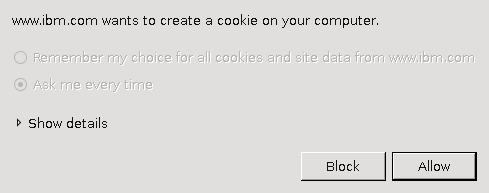
I m currently running google-chrome-beta version 5.0.375.55-r47796 on Debian/Unstable. It s the fastest web browser I ve used in recent times it s the first time that I ve run a browser that feels faster than my recollection of running IBM WebExplorer for OS/2 on a 486-66 system! It has a good feature set, and it s the only browser I ve used that in a typical configuration will make proper use of the screen space by not having a permanent status bar at the bottom of the sceen and by having tabs in the title-bar. But it s not perfect, here is a list of some bugs: Chrome Titlebar when maximisedChrome Titlebar when not maximisedRight of Chrome Titlebar when not maximised Above are three partial screen captures of Chrome, the first is when maximised and the second is when the window isn t maximised. Notice the extra vertical space above the tab in the title bar in the second picture. The third picture shows the right side of the titlebar and you can see a space below the three buttons where you can drag the window around no matter how many tabs you open that space below the three buttons is reserved. If the Chrome developers had removed the extra vertical space in the titlebar and reserved slightly more horizontal space then you would be able to drag the window around. While an anonymous commentator made a good point that the extra vertical space can be used to drag the window around when the maximum number of tabs are open, it seems that there are other ways of achieving that goal without wasting ~18 vertical pixels. Doing so would be a lot less ugly than what they did with finding text in the page. When I visit a web site that uses cookies from an Incognito Window (which means that cookies etc aren t stored) there is no option to say allow all cookies . This is really annoying when you get to a web site such as the IBM one which stores 5 cookies when you first load the page and then at least one new cookie write for every page you visit. Given that cookie data will be discarded as soon as the window is closed it seems like a good idea to have an option to allow all cookies for Incognito Windows even if all cookies aren t allowed for regular windows. Blocking all cookies would be OK too, anything but having to click on Block or Allow multiple times for each page load. The J and K keys don t work in a view of Venus version 0~bzr95-2+lenny1 (the latest version in Debian/Lenny). I once had a situation where I entered a . at the end of a domain name (which is quite legal there is always an implied dot) and Chrome then wouldn t take note of my request to accept all cookies from the domain. I haven t been able to reproduce that bug, but I have noticed that it stores the settings for whether cookies should be stored separately for domains that end in . , so www.cnn.com. is different from www.cnn.com . Iceweasel seems to just quietly strip the trailing dot. Of course this is better than Konqueror which won t even load a URL with a dot at the end. Chrome can be relied on to restore all windows rapidly after a crash, unlike Iceweasel which restores them at it s normal load speed (slow) and Konqueror which doesn t tend to restore windows. This is good as it does seem to crash regularly. In a response to my post about Chrome and SE Linux [1] Ben Hutchings pointed out that the --no-sandbox option to chrome disables the creation of a PID namespace and therefore makes debugging a lot easier, if I get a lot of spare time I ll try and track down some of the Chrome SEGVs. The JavaScript compiler is either buggy or it s not buggy in situations where people expect IE bugs. When using the Dell Australia web site I can t always order all options. When trying to order a Dell R300 1RU server with hot-plug disks in a hardware RAID array it seems impossible to get all the necessary jumpers which is a precondition to completing the order fortunately I only wanted to blog about how cheap Dell servers are so I don t actually need to complete an order. Dell s web site is also difficult in Iceweasel on occasion, so it s obviously more demanding than most sites. It might be a good test site for people who work on browsers as it s both demanding and important. When I select a URL to be opened in a new window (or when JavaScript does this) then the new tab is opened with about:blank listed as the URL. If the URL is for a PDF file (or something else that is to be downloaded) then the URL entry field is never updated to give the real URL. I believe that this is wrong, either the new tab shouldn t be opened or it should have the correct URL on display there is no benefit with a tab open to show nothing but about:blank in the URL entry field. Also if a URL takes some time to load then it may keep about:blank in the URL entry field for some time. This means that if you use the middle mouse button to rapidly open a few new tabs you won t be able to see what is to be loaded in each one. Sometimes I have several tabs loading and I m happy to close some unimportant ones if they are slow but some are worth waiting for. Overall that s not too bad. I can use Dell s site in Iceweasel, so the only critical bug is the cookies issue in Incognito Windows which makes the Incognito feature almost unusable for some sites.


4 June 2010

MJ Ray: Talks: RMS Kosovo, MJR Plymouth

RMS will be visiting Kosovo today to speak at the national library. There is no entrance fee, however the number of seats is limited to 250, so please register by writing to register@flossk.org. Less illustriously, MJR will be visiting Plymouth to run a social media surgery as part of Doing business the co-operative way on Friday 25 June (tickets 25 or 75 email now). I ve a few good ideas for what to cover if people are interested but don t have specific questions (and I ll post a few of them here later), but what tip would you give to a new social media user?

2 June 2010

Axel Beckert: xen-tools back in Debian Unstable

After xen-tools had been removed from Debian Unstable by the upstream developer last December due to no more upstream development, I took over upstream development as well as Debian package maintainership in January. Since then a lot happened: But despite all the things which were to fix after Steve discontinued the xen-tools developement, Steve Kemp did a great job to bring xen-tools so far initially. I m really happy that this software exists and that s the reason why I won t let it die so fast. :-) xen-tools 4.2 beta 1 released Last weekend I released xen-tools 4.2 beta 1 which I also uploaded to Debian Unstable. And thanks to the active ftp-master team, xen-tools went through the NEW queue in less than 12 hours and is now available again in Debian Unstable. 4.2 beta 1 still has some known bugs, the worst ones are in xen-delete-image. But no fear, it doesn t delete more than wanted, just not enough or things which don t exist anyway. :-) There are also some smaller issues to fix for a final 4.2 release. We may also create an PPA for Ubuntu Lucid in the future to work around the lack of xen-tools in Ubuntu Lucid. What about Fedora/RedHat/CentOS support? Since rinse is out of date with regards to current Fedora releases, rpmstrap seems to be out of date for even longer (it has been removed from Debian before the Lenny release) and febootstrap neither seems to work out of the box nor seems to support bootstrapping to mount points (because it wants to delete them first and fails), bootstrapping Fedora ist currently not supported. The copy installation method should work though. rinse still is able to bootstrap CentOS 4 and 5, but the installation seems incomplete. We ll try to work around these issues for the final 4.2 release. We haven t looked at mach and mock so far, but according to Lucas, both are out of date, too. Sure, implementing Lucas howto in form of a script would be a possible way, but we think it would just create yet another not so well supported clone of rinse, rpmstrap, mach, mock or febootstrap. Because of that, Dmitry works on support for the installation of Xen DomUs via kickstart. Fate of xen-shell? Xen-shell has also been removed from Debian Unstable last December because Steve stopped its developement, too. But in comparison to xen-tools itself, we didn t resurrect xen-shell since none of us currently has use for it. So if you are currently using xen-shell and intend to continue to do so, you should hurry up if you want to see it in Debian Squeeze. We can also help you, but we surely can t and won t do it alone nor will we take the majority of the necessary workload.

1 June 2010

Russell Coker: Can SE Linux Implement Traditional Unix Users and Groups?

I was asked by email whether SE Linux could implement traditional Unix users and groups. The Strictly Literal Answer to that Question The core of the SE Linux access control is the domain-type model where every process has a domain and every object that a process can access (including other processes) has a type. Domains are not strongly differentiated from types. It would be possible to create a SE Linux policy that created a domain for every combination of UID and GID that is valid for a user shell given that such combinations are chosen by the sysadmin who could limit them to some degree. There are about 2^32 possible UIDs and about 2^32 possible GIDs, as every domain is listed in kernel memory we obviously can t have 2^64 domains, but we could have enough to map a typical system that s in use. Of course the possible combinations of supplemental groups probably makes this impossible for even relatively small systems, but we can use a simpler model that doesn t emulate supplemental groups. For files there are more possible combinations because anyone who is a member of a group can create a SETGID directory and let other users create files in it. But in a typical system the number of groups is not much greater than the number of users the maximum number of groups is typically the number of users plus about 60. So if we had 100 users then the number of combinations of UID and GID would be something like 100*(100+60)=16,000 it should be possible to have that many domains in a SE Linux policy (but not desirable). Then all that would be needed is rules specifying that each domain (which is based on a combination of UID and GID) can have certain types of access to certain other types based on them having either the same UID or the same GID. Such a policy would be large, it would waste a lot of kernel memory, it would need to be regenerated whenever a user is added, and it s generally something you don t want to use. No-one has considered implementing such a policy, I merely describe it to illustrate why certain configuration options are not desirable. The rest of this post is about realistic things that you can do with SE Linux policy and how it will be implemented in Debian/Squeeze. My previous post titled Is SE Linux Unixish? addresses this issue at a more conceptual level and also considers MAC vs DAC [1]. The History of mapping Unix Accounts to SE Linux Access Control In the early releases of SE Linux (long before it was included in Fedora) every user who could login to a system needed to have their user-name compiled into the policy. The policy specified which roles the user could access, the roles specified which domains could be accessed, and therefore what the user could do. The identity of files on disk was used for two purposes, one was logging (you could see who created a file) and the other was a permission check for the SE Linux patched version of Vixie cron which would not execute any command on behalf of a user unless the identity on the crontab file in the cron spool matched the identity used to run it this is an analogy of the checks that Vixie cron makes on the Unix UID of the crontab file (some other cron daemons do fewer checks). Having to recompile policy source every time you added a user was annoying. So a later development was to allow arbitrary mappings between Unix account names and SE Linux Identities (which included a default identity) and another later development was to have a utility program semanage to map particular Unix account and group names to SE Linux identities. This was all done years ago. Fedora Core 5 which was released in 2006 had the modular policy which included these features (apart from mapping Unix groups to SE Linux identities which was more recent). Fedora Core 5 also introduced MCS which was comprised of a set of categories that a security context may have. The sysadmin would configure the set of categories that each account would have. A recent development has been a concept named UBAC (User Based Access Control) which basically means that a process running directly on behalf of a regular user (IE with a SE Linux identity that s not system_u) can only access files that have an identity of system_u or which have the same identity as the process. This means that you can only access your own files or system files not files of other users which may have inappropriate Unix permissions. So for example if a user with a SE Linux identity of john gives their home directory the Unix permission mode of 0777 then a user with a SE Linux identity of jane can t access their files. Of course this means that if you have a group of people working together on a project then they probably need to all have the same Identity and in practice you would probably end up with everyone having the same identity. I ve given up on the idea of using UBAC in Debian. The Current Plan for Users and SE Linux Access Control in Debian My plan is to have things work in Squeeze in much the same way as in Lenny. You have a SE Linux identity assigned to a login session and everything related to it (including cron jobs) based on the Unix account name or possibly the Unix group name (if there are login entries for both the user-name and the group-name then the user-name entry has precedence). The mapping between Unix accounts and SE Linux identities is configured by the sysadmin and SE Linux identities don t matter much for the Targeted configuration (which is what most people use). The identity determines which roles may be used and also has a limit on the MCS categories. The MCS categories are also specified in the login configuration which has to be a sub-set of the categories used by the identity record. So for example the following is the output of a couple of commands run on a Debian/Unstable system. They show that the test Unix account is assigned a SE Linux identity of staff_u and an MCS range of s0-s0:c1 (this means it creates files by default at level s0 and can also write to other files at that level, but can also have read/write access to files at the level s0:c1 ). The staff_u identity (as shown in the output of semanage user -l can be used with all categories in the set s0:c0.c1023 where the dot means the set of categories from c0 to c1023 inclusive) but in the case of the test user only one category will be used. The test group however (as expressed with %test ) is given the identity user_u and is not permitted to use any categories.
# semanage login -l
Login Name    SELinux User    MLS/MCS Range           
%test         user_u          s0                     
__default__   unconfined_u    s0-s0:c0.c1023         
root          unconfined_u    s0-s0:c0.c1023         
system_u      system_u        s0-s0:c0.c1023         
test          staff_u         s0-s0:c1               
# semanage user -l
             Labeling   MLS/       MLS/                         
SELinux User Prefix     MCS Level  MCS Range         SELinux Roles
root         sysadm     s0         s0-s0:c0.c1023    staff_r sysadm_r system_r
staff_u      staff      s0         s0-s0:c0.c1023    staff_r sysadm_r
sysadm_u     sysadm     s0         s0-s0:c0.c1023    sysadm_r
system_u     user       s0         s0-s0:c0.c1023    system_r
unconfined_u unconfined s0         s0-s0:c0.c1023    system_r unconfined_r
user_u       user       s0         s0                user_r
I hope to get the policy written to support multiple user roles in time for the release of Squeeze. If I don t make it then I will put such a policy on my own web site and try to get it included in an update. The policy currently basically works for a Targeted configuration where the users are not confined (apart from MCS). How MMCS Basically Works The vast majority of SE Linux users run with the MCS policy rather than the MLS policy. For Debian I have written a modified version of MCS that I call MMCS. MMCS is mandatory (you can t relabel files to escape it) and it prevents write-down. If a process has the range s0-s0:c1,c3 then it has full access to files labelled as s0, s0:c1, s0:c3, and s0:c1,c3 and any files it creates will be labeled as s0. If a process has the range s0:c1-s0:c1,c3 then it has read-only access to files labelled as s0 and s0:c3 and read-write access to files labelled as s0:c1 and s0:c1,c3. This means that any secret data it accesses that was labelled with category c1 can t be leaked down to a file that is not labelled with that category. Now MCS currently has no network access controls, so there s nothing stopping a user from using scp or other network utilities to transfer files. But that s the way with most usable systems. I don t think that this is necessarily a problem, the almost total lack of network access controls in a traditional Unix model doesn t seem to concern most people. Now to REALLY Answer that Question SE Linux is a Mandatory Access Control (MAC) system, this makes it inherently different to a Discretionary Access Control (DAC) system such as traditional Unix access controls. Unix permissions are based on each file having a UID, a GID, and a set of permissions and each process having a UID, a GID, and a set of supplementary GIDs. If a user runs a setuid or setgid program then the process will have extra privileges. It also has a lot of stuff that most people aren t aware of such as real vs effective UIDs, the tag bit, setgid directories, and lots more including some quite arbitrary things like making ports <1024 special. SE Linux is based on every object (process, file, socket, etc) having a single security label which includes an identity, a role, a type, and a sensitivity label (MCS categories or an MLS range). There is no support for an object to have more than one label. The SE Linux equivalent to setuid/setgid files is a label for a file which triggers a domain transition when it s executed. This differs from setuid files in that the domain transition is complete (the old privileges can t be restored) and the transition is generally not to a strict super-set of the access (usually a different sub-set of possible access and sometimes to lesser access). These differences are quite fundamental. So really SE Linux can t implement traditional Unix access control. What SE Linux is designed to do is to provide a second layer of defense and to also provide access controls that have different aims than that of Unix permissions such as being mandatory and implementing features such as MLS.

Debian News: New Debian Developers (May 2010)

The following developers got their Debian accounts in the last month: Congratulations!

31 May 2010

Piotr Galiszewski: The end of the first mockups iteration

Last week was very busy for me. Unfortunately, I spent most of my time no my study duties. An exam session is fast approaching, so in next 3 weeks the situation will not be better. But as I promised, during second part of week, I am working full time on my project.

So, here are missing mockups of future Aptitude Qt GUI:

Changes Preview tab:

Only one "Preview Tab" can be opened at the same time. Changes will be live updated here.

Resolver:

Perform Changes tab:


This time I am not too innovative. I think that current Aptitude GTK design for this tabs is quite intuitive and good-looking, so I have added only minor tweaks.

To sum up mockups topic, below are links to all presented mockups (with some comments which raises during my recent private discussions). Now, I am open for any suggestions and comments about current design. At the end of next week, second iteration will be presented. Depending of the level of required changes there could be third iteration, before sending mockups to Piotr "Patpi" Pe zowski, who is the person behind Kadu Usability Project. I am glad that he agreed to spend his spare time and help me with this task :)

Packages tab:

This tab in second iteration will have only small changes. I was told that will be nice to select multiple categories at the same time. I agree, so categories list will support multi selection. There will be also an option in configuration window (There is no mockup now. Currently, I do not know what option will be configurable and it is not the most important thing at this stage. The window will be patterned upon KDE configuration windows) to move this list on the right side of this tab.

It will be possible to have multiple "Packages tabs" opened at the same time. It will not be allowed to close first "Package Tab". Ctrl + T shortcut, action in main menu and toolbar (I have forgotten about toolbar in this iteration - maybe it is not necessary?) will open new tab. There will be also an option that each text search will do this. I will try to add shortcuts wherever is it possible to allow using the GUI without mouse.

"Show changes" button will be change to "Resolve dependencies" when necessary.

Updates widget:

Most of the comments from "Packages tab" apply here too. In the table showing updates will be also "Current Version" column.


Package Informations tab:

Only one clarification: multiple "Packages Informations" tabs for the same package will not be allowed.

I am looking forward to read any comments regarding presented design. Please leave comment below this post or contact me directly (see About Me page).

On Monday/Tuesday I will write first weekly report.

Cheers.

Matt Zimmerman: Summary of development plans for Ubuntu 10.10

With the 10.10 developer summit behind us, several teams have published engineering plans for the 10.10 release cycle, including:

Gunnar Wolf: Update: A correspondingly pleasant dinner

Update: A correspondingly pleasant dinner
And just to round off my last post (and of course, following a completely non-technical thematic), what is the logical consequence of feeling introspective and blogging just before preparing dinner? Of course Dinner gets prepared with sharing it in mind. The dish ends up even looking as if meant to be served! So this was it: One of my simplest and still favorite dishes: Tostadas. But, yes, these are heterodox tostadas, as they share the basic tostadiness (a hard, roasted and cracky toasted corn tortilla with a soft leguminous layer to give it some consistency, and with... stuff on top. Yes, stuff is sometimes too generic, but that's the beauty of it). What did I come up with? In the strict order with which they were approached at feeding time, and described bottom to top:
  1. Closest to traditional, top left: Mashed beans, bits of panela cheese with little bits of chipotle and soybean-based vegetarian chorizo
  2. Something I have only seen in Guatemala, and which I intend to take a better look at next time I'm there (top right): Mashed frijoles, , cochinita pibil (canned, shame on me, and frankly lacking in taste), grated beet (betabel/remolacha/betarraga/whatnot), grated cabbage
  3. The heterodoxiest of them all, and the idea that led me to the others (center): Mashed lima/fava beans (according to Google habas), cochinita pibil, nopales, and a hint of habanero sauce.
Yum! [update] On a completely unrelated notice, but not worth opening a third post in a row... Some minutes after I published the earlier post, I got a visit to http://gwolf.org/blog/pleasant-perception-changes?utm_source=twitterfeed&utm_medium=twitter. Now, it beats me: I don't use twitter. I don't even care about twitter. And were my message so deep somebody just twitted (twat it?) right away, I still find the time lapse too short. Who's auto-twitting me? Maybe a planet or other such aggregator?

Gunnar Wolf: Pleasant perception changes

My day started late, although I didn't scratch the plan: Enjoy 40Km cycling, as as every last Sunday of the month we have the delicious Ciclot n 32Km, plus ~10km from and to my house. Approximately 12:00-14:20, including stopping at a service station to patch my rear tire. Yes, I was pressing my way up the last bridge (Circuito Interior over Coyoac n and Universidad) when the road was opened to motorized traffic. Two hours of cycling are enough to make me a happy person. However, I have been downish lately, and during the afternoon (which I spent doing some home maintenance, as I usually do on weekends), I felt this downness grow somewhat. Nothing terrible, just I guess the processes that I have to live through. Then, after ~1hr reading a somewhat tough book, I closed it thinking, "this was a good day". And surprised myself with the reflection. So, while I don't think this can put me back into the activity/productivity status I have held and would love to regain... Is certainly a very nice push forward. Time to get something for dinner, as my body also reminded me it is not exempt of such needs (as it faithfully reminds me, often more frequently than it should)

30 May 2010

Gregor Herrmann: RC bugs 2010/19 - 2010/21

as a short reminder that there are still a few RC bugs waiting to be fixed here's a short list of the ones I've worked on in the last time:

David Paleino: GoogleCode redirector

I recently saw a couple of bugreports all complaining about debian/watch files failing with GoogleCode. Since I'm myself maintaining some packages whose upstream authors use Google as their hoster, I felt it was a good idea to offer a service for uscan(1) and DEHS. You can reach the service at http://googlecode.debian.net. To use it in your debian/watch, just use:
http://googlecode.debian.net/p/<project>/<regex>
For example:
http://googlecode.debian.net/p/pyproj/pyproj-(\d+.*).tar.gz
The source code is available at debian-it.it (you should give this url to git clone). This service is currently in beta testing; suggestions and patches are more than welcome! Also, feel free to report any issue you might encounter!

29 May 2010

Russell Coker: Logging in as Root

Martin Meredith wrote a blog post about logging in as root and the people who so strongly advocate against it [1]. The question is whether you should ssh directly to the root account on a remote server or whether you should ssh to a non-root account and use sudo or su to gain administrative privileges. Does sudo/su make your system more secure? Some years ago the administrator of a SE Linux Play Machine used the same home directory for play users to login as for administrative logins as for his own logins he used newrole to gain administrative access (like su or sudo but for SE Linux). His machine was owned by one of his friends who created a shell function named newrole in one of his login scripts that used netcat to send the administrative password out over the net. He didn t immediately realise that this was a problem until his friend changed the password and locked him out! This is one example of a system being 0wned due to having the double-authentication of course if he had logged in directly with administrative privs while using the same home directory that the attacker could write to then he would still have lost but the attacker would have had to do a little more work. When you login you have lots of shell scripts run on your behalf which have the ability to totally control your environment, if someone has taken over those scripts then they can control everything you see, when you think you run sudo or something they can get the password. When you ssh in to a server your security relies on the security of the client end-point, the encryption of the ssh protocol (including keeping all keys secure to prevent MITM attacks), and the integrity of all the programs that are executed before you have control of the remote system. One benefit for using sshd to spawn a session without full privileges is in the case where you fear an exploit against sshd and are running SE Linux or some other security system that goes way beyond Unix permissions. It is possible to configure SE Linux in the strict configuration to deny administrative rights to any shell that is launched directly by the sshd. Therefore someone who cracks sshd could only wait until an administrator logs in and runs newrole and they wouldn t be able to immediately take over the system. If the sysadmin suspected that a sshd compromise is possible then a sysadmin could login through some other method (maybe visit the server and login at the console) to upgrade the sshd. This is however a very unusual scenario and I suspect that most people who advocate using sudo exclusively don t use a SE Linux strict configuration. Does su/sudo improve auditing? If you have multiple people with root access to one system it can be difficult to determine who did what. If you force everyone to use su or sudo then you will have a record of which Unix account was used to start the root session. Of course if multiple people start root shells via su and leave them running then it can be difficult to determine which of the people who had such shells running made the mistake but at least that reduces the list of suspects. If you put PermitUserEnvironment yes in /etc/ssh/sshd_config then you have the option of setting environment variables by ssh authorized_keys entries, so you could have an entry such as the following: environment= ORIG_USER=john@example.com ssh-rsa AAAAB3Nz[...]/w== john@example.com Then you could have the .bashrc file (or a similar file for your favorite shell) have code such as the following to log the relevant data to syslogd:
if [ "$SSH_TTY" = "" ]; then
logger -p auth.info "user $ORIG_USER ran command \"$BASH_EXECUTION_STRING\" as root"
else
logger -p auth.info "user $ORIG_USER logged in as root on tty $(tty)"
fi I think that forcing the use of su or sudo might improve the ability to track other sysadmins if the system is not well configured. But it seems obvious that the same level of tracking can be implemented in other ways with a small amount of effort. It took me about 30 minutes to devise the above shell code and configuration options, it should take people who read this blog post about 5 minutes to implement it (or maybe 10 minutes if they use a different shell or have some other combination of Bash configuration that results in non-obvious use of initialisation scripts (EG if you have a .bash_profile file then .bashrc may not be executed). Once you have the above infrastructure for logging root login sessions it wouldn t be difficult to run a little script that asks the sysadmin what is the purpose for your root login and logs what they type. If several sysadmins are logged in at the same time and one of them describes the purpose of their login as to reconfigure LDAP then you know who to talk to if your LDAP server stops working! Should you run commands with minimum privilege? It s generally regarded that running each command with the minimum privilege is a good idea. But if the only reason you login to a server is to do root tasks (restarting daemons, writing to files that are owned by root, etc) then there really isn t a lot of potential for achieving anything by doing so. If you need to use a client for a particular service (EG a web browser to test the functionality of a web server or proxy server) then you can login to a different account for that purpose the typical sysadmin desktop has a dozen xterms open at once, using one for root access to do the work and another for non-root access to do the testing is probably a good option. Can root be used for local access? Linux Journal has an article about the distribution that used to be known as Lindows (later Linspire) which used root as the default login for desktop use [2]. It suggests using a non-root account because If someone can trick you into running a program or if a virus somehow runs while you are logged in, that program then has the ability to do anything at all of course someone could trick you into running a program or virus that attempts to run sudo (to see if you enabled it without password checks) and if that doesn t work waits until you run sudo and sniffs the password (using pty interception or X event sniffing). The article does correctly note that you can easily accidentally damage your system as root. Given that the skills of typical Linux desktop users are significantly less than those of typical system administrators it seems reasonable to assume that certain risks of mistake which are significant for desktop users aren t a big deal with skilled sysadmins. I think that it was a bad decision by the Lindows people to use root for everything due to the risk of errors. If you make a mistake on a desktop system as non-root then if your home directory was backed up recently and you use IMAP or caching IMAP for email access then you probably won t lose much of note. But if you make a serious mistake as root then the minimum damage is being forced to do a complete reinstall, which is time consuming and annoying even if you have the installation media handy and your Internet connection has enough quota for the month to complete the process. Finally there are some services that seek out people who use the root account for desktop use. Debian has some support channels on IRC [3] and I decided to use the root account from my SE Linux Play Machine [4] to see how they go. #debian has banned strings matching root. #linpeople didn t like me because Deopped you on channel #linpeople because it is registered with channel services . #linuxhelp and #help let me in, but nothing seemed to be happening in those channels. Last time I tried this experiment I had a minor debate with someone who repeated a mantra about not using root and didn t show any interest in reading my explanation of why root:user_r:user_t is safe for IRC. I can t imagine that good the #debian people expect to gain from denying people the ability to access that channel with an IRC client that reports itself to be running as root. Doing so precludes the possibility of educating them if you think that they are doing something wrong (such as running a distribution like Lindows/Linspire). Conclusion I routinely ssh directly to servers as root. I ve been doing so for as long as ssh has been around and I used to telnet to systems as root before that. Logging in to a server as root without encryption is in most cases a really bad idea, but before ssh was invented it was the only option that was available. For the vast majority of server deployments I think that there is no good reason to avoid sshing directly as root.

28 May 2010

Russell Coker: Brother MFC-9120CN Color LASER Printer

I have just bought a Brother MFC-9120CN Multi-Function Color LED LASER Printer for a relative. It was a replacement for the Lexmark printer which turned out not to support Linux properly [1]. This printer cost about $545. I bought it from OfficeWorks [2] under their price-matching deal. If you find a better price anywhere else they will beat it by 5%. I went to StaticIce.com.au and found the cheapest online store in Australia that sold the printer and then took the URL of the online store to OfficeWorks on a USB stick. After they verified the price they sold me the printer for 5% less than the online cost plus the delivery cost, which saved my relative a little more than $50. Craig Sanders had convinced me to choose a LASER printer because the toner doesn t have a short shelf-life unlike the ink for ink-jet printers. My parents have been using a LASER printer for more than 12 years and each toner cartridge lasts at least 4 years which is a much better result than all the ink-jet printers I ve supported which tend to regularly need more expensive ink. I guess I ll find out over the next few years whether this printer lives up to the general reputation of LASER printers in this regard. The LED printers use LEDs for the LASER light, this apparently makes them more reliable and efficient but means that they tend to have a lower resolution, and often the horizontal and vertical resolutions are not equal. The printer I got is listed as 600*2400dpi resolution but that might end up giving much the same result as a 600*600dpi printer. But 600*600dpi should be good enough for a long time anyway. A4 paper (the standard size for office paper in Australia) is 210*297mm, that is about 8.27*11.69 inches or 4961*7015 pixels at 600dpi. Even if we assume that 10% of the width and height is wasted on margins that would take a 28 megapixel camera to produce a picture that can actually use 600dpi for the most common case where high quality is needed for home use printing a single photo on an A4 sheet. The printer ships with 64M of RAM which was not enough to print some pictures that I sent it, it has a slot for a 144pin SO-DIMM (laptop RAM) for memory expansion, it can take one SO-DIMM of up to 512M capacity that is at least PC-100. I ve got a spare 256M PC-133 memory module that I will install in it, hopefully that will be enough to print pictures. Buying PC-100/PC-133 RAM nowadays probably isn t going to be easy, particularly not 512M modules as many of the laptops which used PC-100/PC-133 RAM didn t support that capacity (I believe that my ancient Thinkpads which used such memory didn t support 512M modules). The requirement was for a printer that could print photos in reasonable quality, could make photo-copies, and ideally work as a scanner. I got CUPS to talk to it without much effort, I just installed a PPD file from the Brother Solutions Center web site [3] and it just worked. It occurred to me later that I should have tried configuring it before installing the PPD file maybe the version of CUPS in Debian/Squeeze supports the Brother printer natively. So the current state of the printer is that it prints documents very well, it doesn t print photos but that should be solved when I add more RAM, and I just have to try and get scanning to work. Everyone is happy! The only down-side is that the printer is huge. It takes a lot of desk space to run it (they will need a new desk in their computer room), and when it s in it s box it s much larger than most things that you will normally transport by car. Update: I ve installed a 256M PC-133 SO-DIMM and can now print full color pictures. Thanks for Rodney Brown for giving me some Thinkpad parts which included RAM.

27 May 2010

Matt Zimmerman: Rethinking the Ubuntu Developer Summit

This is a repost from the ubuntu-devel mailing list, where there is probably some discussion happening by now. After each UDS, the organizers evaluate the event and consider how it could be further improved in the future. As a result of this process, the format of UDS has evolved considerably, as it has grown from a smallish informal gathering to a highly structured matrix of hundreds of 45-to-60-minute sessions with sophisticated audiovisual facilities. If you participated in UDS 10.10 (locally or online), you have hopefully already completed the online survey, which is an important part of this evaluation process. A survey can t tell the whole story, though, so I would also like to start a more free-form discussion here among Ubuntu developers as well. I have some thoughts I d like to share, and I m interested in your perspectives as well. Purpose The core purpose of UDS has always been to help Ubuntu developers to explore, refine and share their plans for the subsequent release. It has expanded over the years to include all kinds of contributors, not only developers, but the principle remains the same. We arrive at UDS with goals, desires and ideas, and leave with a plan of action which guides our work for the rest of the cycle. The status quo UDS looks like this: This screenshot is only 1600 1200, so there are another 5 columns off the right edge of the screen for a total of 18 rooms. With 7 time slots per day over 5 days, there are over 500 blocks in the schedule grid. 9 tracks are scattered over the grid. We produce hundreds of blueprints representing projects we would like to work on. It is an impressive achievement to pull this event together every six months, and the organizers work very hard at it. We accomplish a great deal at every UDS, and should feel good about that. We must also constantly evaluate how well it is working, and make adjustments to accommodate growth and change in the project. How did we get here? (this is all from memory, but it should be sufficiently accurate to have this discussion) In the beginning, before it was even called UDS, we worked from a rough agenda, adding items as they came up, and ticking them off as we finished talking about them. Ad hoc methods worked pretty well at this scale. As the event grew, and we held more and more discussions in parallel, it was hard to keep track of who was where, and we started to run into contention. Ubuntu and Launchpad were planning their upcoming work together at the same time. One group would be discussing topic A, and find that they needed the participation of person X, who was already involved in another discussion on topic B. The A group would either block, or go ahead without the benefit of person X, neither of which was seen to be very effective. By the end of the week, everyone was mentally and physically exhausted, and many were ill. As a result, we decided to adopt a schedule grid, and ensure that nobody was expected to be in two places at once. Our productivity depended on getting precisely the right people face to face to tackle the technical challenges we faced. This meant deciding in advance who should be present in each session, and laying out the schedule to satisfy these constraints. New sessions were being added all the time, so the UDS organizers would stay up late at night during the event, creating the schedule grid for the next day. In the morning, over breakfast, everyone would tell them about errors, and request revisions to the schedule. Revisions to the schedule were painful, because we had to re-check all of the constraints by hand. So, in the geek spirit, we developed a program which would read in the constraints and generate an error-free schedule. The UDS organizers ran this at the end of each day during the event, checked it over, and posted it. In the morning, over breakfast, everyone would tell them about constraints they hadn t been aware of, and request revisions to the schedule. Revisions to the schedule were painful, because a single changed constraint would completely rearrange the schedule. People found themselves running all over the place to different rooms throughout the day, as they were scheduled into many different meetings back-to-back. At around this point, UDS had become too big, and had too many constraints, to plan on the fly (unconference style). We resolved to plan more in advance, and agree on the scheduling constraints ahead of time. We divided the event into tracks, and placed each track in its own room. Most participants could stay in one place throughout the day, taking part in a series of related meetings except where they were specifically needed in an adjacent track. We created the schedule through a combination of manual and automatic methods, so that scheduling constraints could be checked quickly, but a human could decide how to resolve conflicts. There was time to review the schedule before the start of the event, to identify and fix problems. Revisions to the schedule during the event were fewer and less painful. We added keynote presentations, to provide opportunities to communicate important information to everyone, and ease back into meetings after lunch. Everyone was still exhausted and/or ill, and tiredness took its toll on the quality of discussion, particularly toward the end of the week. Concerns were raised that people weren t participating enough, and might stay on in the same room passively when they might be better able to contribute to a different session happening elsewhere. As a result, the schedule was randomly rearranged so that related sessions would not be held in the same room, and everyone would get up and move at the end of each hour. This brings us roughly to where things stand today. Problems with the status quo
  1. UDS is big and complex. Creating and maintaining the schedule is a lot of work in itself, and this large format requires a large venue, which in turn requires more planning and logistical work (not to mention cost). This is only worthwhile if we get proportionally more benefit out of the event itself.
  2. UDS produces many more blueprints than we need for a cycle. While some of these represent an explicit decision not to pursue a project, most of them are set aside simply because we can t fit them in. We have the capacity to implement over 100 blueprints per cycle, but we have *thousands* of blueprints registered today. We finished less than half of the blueprints we registered for 10.04. This means that we re spending a lot of time at UDS talking about things which can t get done that cycle (and may never get done).
  3. UDS is (still) exhausting. While we should work hard, and a level of intensity helps to energize us, I think it s a bit too much. Sessions later in the week are substantially more sluggish than early on, and don t get the full benefit of the minds we ve brought together. I believe that such an intense format does not suit the type of work being done at the event, which should be more creative and energetic.
  4. The format of UDS is optimized for short discussions (as many as we can fit into the grid). This is good for many technical decisions, but does not lend itself as well to generating new ideas, deeply exploring a topic, building broad consensus or tackling big picture issues facing the project. These deeper problems sometimes require more time. They also benefit tremendously from face-to-face interaction, so UDS is our best opportunity to work on them, and we should take advantage of it.
  5. UDS sessions aim for the minimum level of participation necessary, so that we can carry on many sessions in parallel: we ask, who do we need in order to discuss this topic? This is appropriate for many meetings. However, some would benefit greatly from broader participation, especially from multiple teams. We don t always know in advance where a transformative idea will come from, and having more points of view represented would be valuable for many UDS topics.
  6. UDS only happens once per cycle, but design and planning need to continue throughout the cycle. We can t design everything up front, and there is a lot of information we don t have at the beginning. We should aim to use our time at UDS to greatest effect, but also make time to continue this work during the development cycle. design a little, build a little, test a little, fly a little
Proposals
  1. Concentrate on the projects we can complete in the upcoming cycle. If we aren t going to have time to implement something until the next cycle, the blueprint can usually be deferred to the next cycle as well. By producing only moderately more blueprints than we need, we can reduce the complexity of the event, avoid waste, prepare better, and put most of our energy into the blueprints we intend to use in the near future.
  2. Group related sessions into clusters, and work on them together, with a similar group of people. By switching context less often, we can more easily stay engaged, get less fatigued, and make meaningful connections between related topics.
  3. Organize for cross-team participation, rather than dividing teams into tracks. A given session may relate to a Desktop Edition feature, but depends on contributions from more than just the Desktop Team. There is a lot of design going on at UDS outside of the Design track. By working together to achieve common goals, we can more easily anticipate problems, benefit from diverse points of view, and help each other more throughout the cycle.
  4. Build in opportunities to work on deeper problems, during longer blocks of time. As a platform, Ubuntu exists within a complex ecosystem, and we need to spend time together understanding where we are and where we are going. As a project, we have grown rapidly, and need to regularly evaluate how we are working and how we can improve. This means considering more than just blueprints, and sometimes taking more than an hour to cover a topic.

26 May 2010

Nico Golde: fail2ban + dns = fail

fail2ban is used by many people to prevent certain types of DoS attacks. I use it myself to reduce trackback spam a little bit.

While this tool becomes quite handy in such situations it is also not generally recommend because you can shoot yourself in the foot. If one of the used filters has a bug and results in incorrect parsing your fail2ban installation might end up banning arbitrary IP addresses or even your own IP range (not even mentioning IP spoofing).
There existed at least two bugs of this kind to my knowledge and since regex might not always be easy I'm sure there will be more in the future.

Since I didn't want to look for a specific regex bug in one of the filters I thought about IP spoofing again and looked at fail2bans filters. What I needed was a filter processing log entries of a service listening on a UDP socket as TCP/IP spoofing over the internet doesn't really work well these days. Finding such a filter would mean an instant win situation. To my surprise there is such a filter: config/filter.d/named.conf

This filter is used to parse log entries consisting of denied DNS queries produced by bind. Interestingly there is even an article at debian-administration describing how to setup fail2ban to mitigate a DNS DDoS attack. This is of course a bad idea and I have no idea why this filter is shipped in a default fail2ban installation. DoSing abritary IP addresses with this filter in use becomes as easy as firing up scapy and querying the server with a forged source IP:

>>> send(IP(dst="81.169.172.197",src="xx.46.63.71")/UDP()/DNS(rd=1,qd=DNSQR(qname="foao.modprobe.de")))
.
Sent 1 packets.

This ends up as:
May 26 22:32:22 modprobe named[30245]: client xx.46.63.71#53: query 'foao.modprobe.de/A/IN' denied

in the bind logs which in turn results in:
2010-05-26 22:32:05,551 fail2ban.actions: WARNING [named-refused] Ban xx.46.63.71

In this example the spoofed IP was xx.46.63.71 which is not under my control.

Mission statement: don't use fail2ban unless you really want to shoot yourself in the foot or know pretty well what you're doing :-)

Adrian von Bidder: The Debian Umbrella: Soon.

Update: I'm taking orders now. I was planning to take orders for the Debian Swirl umbrella starting tonight, but a bit of research showed that shipping prices for parcels are insane (CHF 37 for europe), but it seems I can get away with sending this as a Swiss Post Maxi Letter instead, which would result in a shipping price of CHF 12.50 for four and CHF 24 for up to eight umbrellas (1kg or 2kg.) So now I'll go and look into getting some kind of flattish box to stay within the allowed dimensions before I can be sure this is possible. In any case, I expect the delivery in the first week of June. Since I'll not be coming to Debconf, it would be nice if somebody could take some umbrellas to New York. I'm currently not travelling much, so I'd have to rely on a friendly volunteer. (I'm based in Basel, Switzerland; I am known to go to Z rich regularly.)

Russell Coker: UBAC and SE Linux in Debian

A recent development in SE Linux policy is the concept of UBAC (User Based Access Control) which prevents SE Linux users (identitied) from accessing each other s files. SE Linux user identities may map 1:1 to Unix users (as was required in the early versions of SE Linux), you might have unique identities for special users and a default identity for all the other users, or you might have an identity per group or use some other method of assigning identities to groups. The UBAC constraints in the upstream reference policy prevent a process with a SE Linux identity other than system_u from accessing any files with an identity other than system_u. So basically any regular user can access files from the system but not other users and system processes (daemons) can access files from all users. Of course this is just one layer of protection, so while the UBAC constraint doesn t prevent a user from accessing any system files the domain-type access controls may do so. If you used a unique SE Linux identity for each Unix account then UBAC would prevent any user from accessing a file created by another user. For my current policy that I am considering uploading to Debian/Unstable I have allowed the identity unconfined_u to access files owned by all identities. This means that unconfined_u is an identity for administrators, if I proceed on this path then I will grant the same rights to sysadm_u. UBAC was not enabled in Fedora last time I checked, so I m wondering whether there is any point in including it I don t feel obliged to copy everything that Fedora does, but there is some benefit in maintaining compatibility across distributions. For protecting users from each other it seems that MCS (which is Mandatory in the Debian policy) is adequate. MCS allows a much better level of access control. For example I could assign categories c0 to c10 to a set of different projects and allow the person who manages all the projects to be assigned all those categories when they login. That user could then use the command runcon -l s0:c1 bash to start a shell for the purpose of managing files from project 1 and any file or process created by that command would have the category c1 and be prevented from writing to a file with a different category. Of course the down-side to removing UBAC is that since RBAC was removed there is no other way of separating SE Linux users, while MCS is good for what it does it wasn t designed for the purpose of isolating different types of user. So I ll really want to get RBAC reinstalled before Squeeze is released if I remove UBAC. Regardless of this I will need to get RBAC working on Squeeze eventually anyway. I ve had a SE Linux Play Machine running with every release of SE Linux for the last 8 years and I don t plan to stop now.

25 May 2010

Aurelien Jarno: EGLIBC and PowerPCSPE port

This has been roughly one year since Debian switched from GLIBC to EGLIBC, so it s probably the time to make a small report about this change. First of all, on the GLIBC upstream side, things has improved a bit since we now have regular stable release, thanks to Petr Baudis aka Pasky. The good point is that the stable releases are imported into the EGLIBC stable repositories. On the EGLIBC side the switch has helped to reduce the number of patches in the Debian package (for example, resolv.conf is automatically reloaded if needed), and has brought some bug fixes and improvements, especially for the arm, mips and powerpc targets. It should be noted that the newly created PowerPCSPE port for PowerPC e500 series CPU also benefits from EGLIBC, as it is not natively supported by GLIBC.

Matt Zimmerman: The behavioral economics of free software

People who use and promote free software cite various reasons for their choice, but do those reasons tell the whole story? If, as a community, we want free software to continue to grow in popularity, especially in the mainstream, we should understand better the true reasons for choosing it especially our own. Some believe that it offers higher quality, that the availability of source code results in a better product with higher reliability. Although it s difficult to do an apples-to-apples comparison of software, there are certainly instances where free software components have been judged superior to their proprietary counterparts. I m not aware of any comprehensive analysis of the general case, though, and there is plenty of anecdotal evidence on both sides of the debate. Others prefer it for humanitarian reasons, because it s better for society or brings us closer to the world we want to live in. These are more difficult to analyze objectively, as they are closely linked to the individual, their circumstances and their belief system. For developers, a popular reason is the possibility of modifying the software to suit their needs, as enshrined in the Free Software Foundation s freedom 1. This is reasonable enough, though the practical value of this opportunity will vary greatly depending on the software and circumstances. The list goes on: cost savings, educational benefits, universal availability, social rewards, etc. The wealth of evidence of cognitive bias indicates that we should not take these preferences at face value. Not only are human choices seldom rational, they are rarely well understood even by the human themselves. When asked to explain our preferences, we often have a ready answer indeed, we may never run out of reasons but they may not withstand analysis. We have many different ways of fooling ourselves with regard to our own past decisions and held beliefs, as well as those of others. Behavioral economics explores the way in which our irrational behavior affects economies, and the results are curious and subtle. For example, the riddle of experience versus memory (TED video), or the several examples in The Marketplace of Perception (Harvard Magazine article). I think it would be illuminating to examine free software through this lens, and consider that the vagaries of human perception may have a very strong influence on our choices. Some questions for thought: If you re aware of any studies along these lines, I would be interested to read about them.

Gunnar Wolf: One more fatal accident in my usual environment

I was about to close down a good day of hard work, a heavy but useful day... I had even decided to take some time off to listen to some good music, and was heading off to bed on a good mood... Until I decided to read my contacts' latest rants. And I found very sad news - again. A ten year old kid was killed while cycling in Calle Nezahualpilli, Colonia Ajusco. I happen to know quite well that precise area - I lived very close to that street for some months in 2008. I eat in a small restaurant (what we call either a cocina econ mica, comida corrida or fondita) on that street. One of my usual bycicle workshops is also on that street - In fact, I wanted to go today, as both of my bikes' rear tires are flat, but had no time to make it. Anyway... Colonia Ajusco and Colonia Santo Domingo ("colonia" is basically... a neighbourhood in es_MX) are two very popular, economically depressed areas, just North-East of the University. Probably hundreds or thousands of students live in rented rooms in the area, as UNAM with its 300,000 students does not have any dorms (due to political reasons leading all the way back to the 1960s). Santo Domingo and Ajusco are also the part where Mexico City's main valley finishes. The hills begin, not too abruptly (we have a ~150m difference in the ~2Km spanned by both colonias). And... When I lived there, I was amazed at the amount of people moving by bike. The streets are too slow for motorized transit to properly flow, and it's often annoying to have to cross the region. It is mostly safe for cyclists. Anyway, this kid was having a good time on the street, and was killed by a microbus driver fighting his fellow over more clients. The driver, yes, was caught (by his passengers and other bystanders, according to the note), and did not run away as they often do in cases such as this one. Still, the kid died almost instantly, so catching the driver serves very little consolation. This Friday we will have BiciUNAMonos second monthly meeting. It is too soon, and I don't think we will end up going there. But I do feel this accident falls squarely inside UNAM user's territory. We cannot ignore it just because it happened outside our University's gates.

Next.

Previous.