Search Results: "ina"

8 November 2014

Ingo Juergensmann: Bind9 vs. PowerDNS - part 2

AttachmentSize
dnssec.sh.txt3.55 KB
Two weeks ago I wrote about implementing DNSSEC with Bind9 or PowerDNS and asked for opinions, because Bind9 appeared to me to be too complex to set it up with regular key signing and such and PowerDNS seemed to me to be nice and easy, but some kind of black box where I don't now what's happening. I think I've now found the best and most suitable way for me to deal with DNSSEC. Or in short words: Bind9 won! It won because of its inline-signing config option that you can use in bind9.9, which happens to be in backports. Another tip I can give due to my findings on the web: if you plan to implement DNSSEC with Bind9, do NOT! search for "bind dnssec" on the web. This will only bring up old HowTos and manuals which leaves you with the burden of manually update your keys. Just add the magic word "inline-signing" to your search phrase and you'll find proper results like the one from Michael McNally on a subpage of ISC.org: In-line Signing With NSEC3 in BIND 9.9+ -- A Walk-through. It's a fairly good starting point, but still left me with several manual steps to do to get a DNSSEC-signed zone. I'm quite a lazy guy when it comes down to manual steps that needs to get executed repeatedly, as many others in IT as well, I think. So I wrote some sort of small wrapper script to do the necessary steps of creating the keys, adding the necessary config options to your named.conf.local, enabling nsec3params, add the DS records to your zone file and displaying the DNSKEY to you, so that you just need to upload it to your registrar. One problem was still open: when doing auto-signing/inline-signing with bind9, you are left with your plain text zone file whereas your signed zone file will keep to increase the serial with each key rollover. When changing your plain text zone file by adding, changing or removing RRs of that domain, you'll be left with the manual task of finding out was your actual serial is that is currently used, because it's not your serial +1 from your plain text zone file anymore. This is of course an awkward part I wanted to get rid off. And therefor my script includes an option to edit zone files with your favorite editor, increase the serial automatically by determing the currently highest number, either on disk or in DNS and raising this serial by 1. Finally the zone is automatically reloaded by rndc. That way I now have the same comfort as in PowerDNS with Bind9, but also know what's going on, because it's not a black box anymore. Me happy. :-) P.S.: I don't know whether this script is of interest to other users, because it relies heavily on my own setting, e.g. paths and such. But if there's interest, just ask... P.P.S.: Well, I think it's better when you can decide yourself if my script is of interest to you... please find it attached...
Kategorie:

7 November 2014

Riku Voipio: Adventures in setting up local lava service

Linaro uses LAVA as a tool to test variety of devices. So far I had not installed it myself, mostly due to assuming it to be enermously complex to set up. But thanks to Neil Williams work on packaging, installation has got a lot easier. Follow the Official Install Doc and Official install to debian Doc, roughly looking like: 1. Install Jessie into kvm

kvm -m 2048 -drive file=lava2.img,if=virtio -cdrom debian-testing-amd64-netinst.iso
2. Install lava-server

apt-get update; apt-get install -y postgresql nfs-kernel-server apache2
apt-get install lava-server
# answer debconf questions
a2dissite 000-default && a2ensite lava-server.conf
service apache2 reload
lava-server manage createsuperuser --username default --email=foo.bar@example.com
$EDITOR /etc/lava-dispatcher/lava-dispatcher.conf # make sure LAVA_SERVER_IP is right
That's the generic setup. Now you can point your browser to the IP address of the kvm machine, and log in with the default user and the password you made. 3 ... 1000 Each LAVA instance is site customized for the boards, network, serial ports, etc. In this example, I now add a single arndale board.

cp /usr/lib/python2.7/dist-packages/lava_dispatcher/default-config/lava-dispatcher/device-types/arndale.conf /etc/lava-dispatcher/device-types/
sudo /usr/share/lava-server/add_device.py -s arndale arndale-01 -t 7001
This generates us a almost usable config for the arndale. For site specifics I have usb-to-serial. Outside kvm, I provide access to serial ports using the following ser2net config:

7001:telnet:0:/dev/ttyUSB0:115200 8DATABITS NONE 1STOPBIT
7002:telnet:0:/dev/ttyUSB1:115200 8DATABITS NONE 1STOPBIT
TODO: make ser2net not run as root and ensure usb2serial devices always get same name.. For automatic power reset, I wanted something cheap, yet something that wouldn't require much soldering (I'm not a real embedded engineer.. I prefer software side ;) . Discussed with Hector, who hinted about prebuilt relay boxes. Chose one from Ebay, a kmtronic 8-port USB Relay. So now I have this cute boxed nonsense hack. The USB relay is driven with a short script, hard-reset-1

stty -F /dev/ttyACM0 9600
echo -e '\xFF\x01\x00' > /dev/ttyACM0
sleep 1
echo -e '\xFF\x01\x01' > /dev/ttyACM0
Sidenote: If you don't have or want automated power relay for lava, you can always replace this this script with something along "mpg123 puny_human_press_the_power_button_now.mp3" Both the serial port and reset script are on server with dns name aimless. So we take the /etc/lava-dispatcher/devices/arndale-01.conf that add_device.py created and make it look like:

device_type = arndale
hostname = arndale-01
connection_command = telnet aimless 7001
hard_reset_command = slogin lava@aimless -i /etc/lava-dispatcher/id_rsa /home/lava/hard-reset-1
Since in my case I'm only going to test with tftp/nfs boot, the arndale board needs only to be setup to have a u-boot bootloader ready on power-on. Now everything is ready for a test job. I have a locally built kernel and device tree, and I export the directory using the httpd available by default in debian.. Python!

cd out/
python -m SimpleHTTPServer
Go to the lava web server, select api->tokens and create a new token. Next we add the token and use it to submit a job

$ sudo apt-get install lava-tool
$ lava-tool auth-add http://default@lava-server/RPC2/
$ lava-tool submit-job http://default@lava-server/RPC2/ lava_test.json
submitted as job id: 1
$
The first job should now be visible in the lava web frontend, in the scheduler -> jobs part. If everything goes fine, the relay will click in a moment and the job will finish in a few minutes.

Johannes Schauer: automatically suspending cpu hungry applications

TLDR: Using the awesome window manager: how to automatically send SIGSTOP and SIGCONT to application windows when they get unfocused or focused, respectively, to let the application not waste CPU cycles when not in use. I don't require any fancy looking GUI, so my desktop runs no full-blown desktop environment like Gnome or KDE but instead only awesome as a light-weight window manager. Usually, the only application windows I have open are rxvt-unicode as my terminal emulator and firefox/iceweasel with the pentadactyl extension as my browser. Thus, I would expect that CPU usage of my idle system would be pretty much zero but instead firefox decides to constantly eat 10-15%. Probably to update some GIF animations or JavaScript (or nowadays even HTML5 video animations). But I don't need it to do that when I'm not currently looking at my browser window. Disabling all JavaScript is no option because some websites that I need for uni or work are just completely broken without JavaScript, so I have to enable it for those websites. Solution: send SIGSTOP when my firefox window looses focus and send SIGCONT once it gains focus again. The following addition to my /etc/xdg/awesome/rc.lua does the trick:
local capi =   timer = timer  
client.add_signal("focus", function(c)
if c.class == "Iceweasel" then
awful.util.spawn("kill -CONT " .. c.pid)
end
end)
client.add_signal("unfocus", function(c)
if c.class == "Iceweasel" then
local timer_stop = capi.timer timeout = 10
local send_sigstop = function ()
timer_stop:stop()
if client.focus.pid ~= c.pid then
awful.util.spawn("kill -STOP " .. c.pid)
end
end
timer_stop:add_signal("timeout", send_sigstop)
timer_stop:start()
end
end)
Since I'm running Debian, the class is "Iceweasel" and not "Firefox". When the window gains focus, a SIGCONT is sent immediately. I'm executing kill because I don't know how to send UNIX signals from lua directly. When the window looses focus, then the SIGSTOP signal is only sent after a 10 second timeout. This is done for several reasons: With this change, when I now open htop, the process consuming most CPU resources is htop itself. Success! Another cool advantage is, that firefox can now be moved completely into swap space in case I run otherwise memory hungry applications without ever requiring any memory from swap until I really use it again. I haven't encountered any disadvantages of this setup yet. If 10 seconds prove to be too short to copy and paste I can easily extend this delay. Even clicking on links in my terminal works flawlessly - the new tab will just only load once firefox gets focused again. EDIT: thanks to Helmut Grohne for suggesting to compare the pid instead of the raw client instance to prevent misbehaviour when firefox opens additional windows like the preferences dialog.

Russ Allbery: On tolerating personal abuse

While I don't consider myself part of the science fiction community directly (my con-going days are probably over), I do follow it across a wide variety of blogs. There are a lot of hard conversations and considerable soul-searching going on right now concerning an on-line commentator in that community who had been nasty and vicious to people, but originally for reasons that many people thought were good causes. (I had been one of those people. It's always very, very tempting to appreciate a good vitriolic rant from someone who shares your world view. And very easy to lose track of the people those rants are aimed at, or the excesses to which those rants go.) I'm not going to go into the details of the SF community issues here, since I have no context other than what I've read, and it's something to work out within that community. But I've been taking it as a useful reminder that abusive behavior is not acceptable, even if it comes from people who are arguably on your side. Anger is important. Anger is often how the world changes. But anger and abuse are not the same thing. I wrote something a little bit ago in a different context. Given that reminder, and given some of the arguments that are going on in the free software community as well, it seemed like a good idea to post a somewhat edited version of it in a more public place: None of us should be willing to continue to participate in a project in which we're expected to tolerate being abused and attacked, and all consequences of that abuse are our problem to deal with. It is simply not fun, and not motivating, and not interesting, and does not lead to us doing good work. I say this from lots of hard-won personal experience. I was deeply involved in Usenet governance for many years. I have made all the same arguments that I see today in favor of "blunt" speech, vitriol, and attacks. I have been a passionate advocate for the "free speech" approach. I have told other people to just filter and use killfiles. I have said that words aren't worth getting worked up about, and it's easy to ignore people. I was wrong. It took a long time for me to figure out that I was wrong, not just for other people, but for myself as well. It took me much longer to walk away from Usenet governance for good because the environment was too toxic. It remains one of the best decisions I have ever made in my life. It was the best bit of self-care that I ever did. I learned from that experience, and earlier this year, I walked away from a job for related reasons. I enjoyed the work, the job was much easier than the job that I have now, and I had a lot of time to work on free software and on Debian, but the emotional environment was toxic. (It was not as openly abusive, but it was an environment of disrespect, hierarchical dominance games, fear, blame, and emotional blackmail.) As a result, I've had to shift priorities considerably, but I'm a much happier person. It's worth having less time for things that I was previously enjoying to not to have to deal with an emotionally negative and confrontational environment. Life is too short, and I have the luxury of having choices. Both of those incidents taught me that it's very easy for me to leave that sort of situation to fester for too long, and that I underestimate how much of an improvement it is for my quality of life to walk away from abusive and negative emotional situations. I am belatedly learning how to be more ready and willing to do this. I very much understand the people who are concerned with ensuring there is space for strongly-worded opinions and heartfelt anger. But we have to draw a line, and that line needs to rule out emotional abuse of people in our community even in the name of passionate polemics about something that's important. We have to enforce that line, and if that means ejecting people from our community, that's what we have to do. Because, if we don't, we're also ejecting people from our community: the quiet people, the people who are just trying to get work done, or the people who have had past experience with abusive environments and understand the need to bail when an environment starts going in that direction. I'm not going to put up with the sort of environment I put up with when doing Big Eight newsgroup creation. I'm not saying this as some sort of threat -- I'm saying this to try to be very clear that not standing up for the members of our community and not supporting each other against abuse and emotional attacks also has consequences, and will destroy that community for a lot of us. I'm saying that I am not interested in living in an environment of fear and blame. And one should never underestimate the human power of giving people space and community in which they can be comfortable, relaxed, and truly happy. Walking the line between this stance and the "tone argument," in which people who are being abused or disenfranchised are attacked for being angry, is very difficult. There are some helpful rules of thumb, such as distinguishing between punching up and punching down, but those rules of thumb can fail or be distorted, as the SF community is learning. It's important that people be able to express anger. It's also important that people be able to name names and identify specific behaviors that they believe are worthy of that anger. But when that anger escalates into attacks, there is a real danger that passionate righteousness turns into passionate abusiveness, a danger of losing the sense of community in our own sense of righteousness. And that's not something we can or should accept. It's going to take a lot of hard work, a lot of open conversation, and a lot of empathy and care to find that line. There are many things in the world right now that should provoke anger, and with that anger comes power for good. But with that anger can also come a destructive blindness. The anger I want is the anger that drives us to change the world together, the anger that leads to confronting others with a reflection of their own better natures and challenging them to become better, more compassionate people. The anger that leads a man to feed the homeless in the true meaning of civil disobedience. Not the anger that crushes our enemies.

Dirk Eddelbuettel: RcppRedis 0.1.2

A new release of RcppRedis is now on CRAN. It contains additional commands for hashes and sets, all contributed by John Laing and Whit Armstrong.
Changes in version 0.1.2 (2014-11-06)
  • New commands execv, hset, hget, sadd, srem, and smembers contributed by John Laing and Whit Armstrong over several pull requests.
Courtesy of CRANberries, there is also a diffstat report for the most recent release. As always, more detailed information is on the RcppRedis page page.

This post by Dirk Eddelbuettel originated on his Thinking inside the box blog. Please report excessive re-aggregation in third-party for-profit settings.

6 November 2014

Matthias Klumpp: The state of AppStream/GNOME-Software in Debian Jessie

or Why do I not see any update notifications on my brand-new Debian Jessie installation?? This is a short explanation of the status quo, and also explains the no update notifications issue in a slightly more detailed way, since I am already getting bug reports for that. As you might know, GNOME provides GNOME-Software for installation of applications via PackageKit. In order to work properly, GNOME-Software needs AppStream metadata, which is not yet available in Debian. There was a GSoC student working on the necessary code for that, but the code is not yet ready and doesn t produce good results yet. Therefore, I postponed AppStream integration to Jessie+1, with an option to include some metadata for GNOME and KDE to use via a normal .deb package. Then, GNOME was updated to 3.14. GNOME 3.14 moved lots of stuff into GNOME-Software, including the support for update-notifications (which have been in g-s-d before). GNOME-Software is also the only thing which can edit the application groups in GNOME-Shell, at least currently. So obviously, there was no a much stronger motivation to support GNOME-Software in Jessie. The appstream-glib library, which GNOME-Software uses exclusively to read AppStream metadata, didn t support the DEP-11 metadata format which Debian uses in place of the original AppSTream XML for a while, but does so in it s current development branch. So that component had to be packaged first. Later, GNOME-Software was uploaded to the archive as well, but still lacked the required metadata. That data was provided by me as a .deb package later, locally generated using the current code by my SoC student (the data isn t great, but better than nothing). So far with the good news. But there are multiple issues at time. First of all, the appstream-data package didn t pass NEW so far, due to it s complex copyright situation (nothing we can t resolve, since app-install-data, which appstream-data would replace, is in Debian as well). Also, GNOME-Software is exclusively using offline-updates (more information also on [1] and [2]) at time. This isn t always working at the moment, since I haven t had the time to test it properly and I didn t expect it to be used in Debian Jessie as well[3]. Furthermore, the offline-updates feature requires systemd (which isn t an issue in itself, I am quite fine with that, but people not using it will get unexpected results, unless someone does the work to implement offline-updates with sysvinit). Since we are in freeze at time, and obviously this stuff is not ready yet, GNOME is currently without update notifications and without a way to change the shell application groups. So, how can we fix this? One way would of course be to patch notification support back into g-s-d, if the new layout there allows doing that. But that would not give us the other features GNOME-Software provides, like application-group-editing. Implementing that differently and patching it to make it work would be more or at least the same amount of work like making GNOME-Software run properly. I therefore prefer getting GNOME-Software to run, at least with basic functionality. That would likely mean hiding things like the offline-update functionality, and using online-updates with GNOME-PackageKit instead. Obviously, this approach has it s own issues, like doing most of the work post-freeze, which kind of defeats the purpose of the freeze and would need some close coordination with the release-team. So, this is the status quo at time. It is kind of unfortunate that GNOME moved crucial functionality into a new component which requires additional integration work by the distributors so quickly, but that s something which isn t worth to talk about. We need a way forward to bring update-notifications back, and there is currently work going on to do that. For all Debian users: Please be patient while we resolve the situation, and sorry for the inconvenience. For all developers: If you would like to help, please contact me or Laurent Bigonville, there are some tasks which could use some help.
As a small remark: If you are using KDE, you are lucky Apper provides the notification support like it always did, and thanks to improvements in aptcc and PackageKit, it even is a bit faster now. For the Xfce and <other_desktop> people, you need to check if your desktop provides integration with PackageKit for update-checking. At least Xfce doesn t, but after GNOME-PackageKit removed support for it (which was moved to gnome-settings-daemon and now to GNOME-Software) nobody stepped up to implement it yet (so if you want to do it it s not super-complicated, but knowledge of C and GTK+ is needed). - [3]: It looks like dpkg tries to ask a debconf question for some reason, or an external tool like apt-listchanges is interfering with the process, which must run completely unsupervised. There is some debugging needed to resolve these Debian-specific issues.

Dirk Eddelbuettel: A Software Carpentry workshop at Northwestern

On Friday October 31, 2014, and Saturday November 1, 2014, around thirty-five graduate students and faculty members attended a Software Carpentry workshop. Attendees came primarily from the Economics department and the Kellogg School of Management, which was also the host and sponsor providing an excellent venue with the Allen Center on the (main) Evanston campus of Northwestern University. The focus of the two-day workshop was an introduction, and practical initiation, to working effectively at the shell, getting introduced and familiar with the git revision control system, as well as a thorough introduction to working and programming in R---from the basics all the way to advanced graphing as well as creating reproducible research documents. The idea of the workshop had come out of discussion during our R/Finance 2014 conference. Bob McDonald of Northwestern, one of this year's keynote speakers, and I were discussing various topic related to open source and good programming practice --- as well as the lack of a thorough introduction to either for graduate students and researcher. And once I mentioned and explained Software Carpentry, Bob was rather intrigued. And just a few months later we were hosting a workshop (along with outstanding support from Jackie Milhans from Research Computing at Northwestern). We were extremely fortunate in that Karthik Ram and Ramnath Vaidyanathan were able to come to Chicago and act as lead instructors, giving me an opportunity to get my feet wet. The workshop began with a session on shell and automation, which was followed by three session focusing on R: a core introduction, a session focused on function, and to end the day, a session on the split-apply-combine approach to data transformation and analysis. The second day started with two concentrated session on git and the git workflow. In the afternoon, one session on visualization with R as well as a capstone-alike session on reproducible research rounded out the second day.

Things that worked The experience of the instructors showed, as the material was presented and an effective manner. The selection of topics, as well as the pace were seen by most students to be appropriate and just right. Karthik and Ramnath both did an outstanding job. No students experienced any real difficulties installing software, or using the supplied information. Participants were roughly split between Windows and OS X laptops, and had generally no problem with bash, git, or R via RStudio. The overall Software Carpentry setup, the lesson layout, the focus on hands-on exercises along with instruction, the use of the electronic noteboard provided by etherpad and, of course, the tried-and-tested material worked very well.

Things that could have worked better Even more breaks for exercises could have been added. Students had difficulty staying on pace in some of the exercise: once someone fell behind even for a small error (maybe a typo) it was sometimes hard to catch up. That is a general problem for hands-on classes. I feel I could have done better with the scope of my two session. Even more cohesion among the topics could have been achieved via a single continually used example dataset and analysis.

Acknowledgments Robert McDonald from Kellogg, and Jackie Milhans from Research Computing IT, were superb hosts and organizers. Their help in preparing for the workshop was tremendous, and the pick of venue was excellent, and allowed for a stress-free two days of classes. We could not have done this without Karthik and Ramnath, so a very big Thank You to both of them. Last but not least the Software Carpentry 'head office' was always ready to help Bob, Jackie and myself during the earlier planning stage, so another big Thank You! to Greg and Arliss.

Dirk Eddelbuettel: RPushbullet 0.1.1

A minor bugfix release 0.1.1 of the RPushbullet package (interfacing the neat Pushbullet service) landed on CRAN yesterday morning. It cleans up a small issue related to the ability to transfer files between devices via the Pushbullet service where the ability to select a (non-default) target device has now been restored. With that, allow me to borrow one excellent use case of RPushbullet from the blog of Karl Broman: how to use RPushbullet for error notifications from R:
options(error = function()  
    library(RPushbullet)
    pbPost("note", "Error", geterrmessage())
 )
This is very clever: should an error occur, you get immediate notification in browser or on your phone. Left as an exercise for the reader is to combine this with the equally excellent rfoaas package (github cran) to get appropriately colourful error messages... More details about the package are at the RPushbullet webpage and the RPushbullet GitHub repo. Courtesy of CRANberries, there is also a diffstat report for this release.

This post by Dirk Eddelbuettel originated on his Thinking inside the box blog. Please report excessive re-aggregation in third-party for-profit settings.

5 November 2014

Carl Chenet: Send the same short message on Twitter, Pump.io, Diaspora* and a lot more

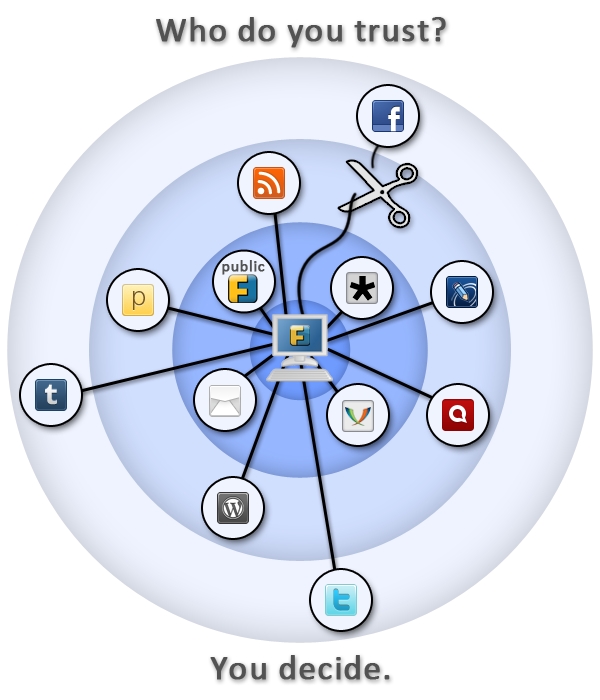
Follow me on Identi.ca or Twitter or Diaspora*diaspora-banner This is a feedback about installing a self hosted instance of Friendica on a Debian server (Jessie). If you re not interested in why I use Friendica, just go to Prerequisite for Friendica section below. Frustration about social networks Being a huge user of short messages, I was quite frustated to spend so much time on my Twitter account. To be quite honest, there is no much I like about this social network, except the huge population of people being potentially interested in what I write. twitter-logo I also have been using Identi.ca (now powered by Pump.io) for a while. But I tried for a while to manage both networks Pump.io and Twitter by hand and it was quite painful. And something was telling me another social network was going to appear from nowhere one of these days and I ll be just horrible to try to keep it up this way. identica-logo So I was looking for a scalable solution not asking too much personal investment. Subscribing to Diaspora* some days ago on the Framasphere pod, tintouli told me to try Friendica. Hmmm, what s Friendica ? f-intro Friendica is a content manager you can plug on almost anything: social networks (Facebook, Twitter, Pump.io, Diaspora*, ), but also WordPress, XMPP, emails I m in fact just discovering the power of this tool but to plug it on my different social network accounts was quite a good use case for me. And I guess if you re still reading, for you too. I tried to use some shared public servers but I was not quite happy with the result, one connector was still missing or public servers were really unstable. So I m at last self hosting my Friendica. Here is how. Prerequisite for Friendica You need to install the following packages: # apt-get install apache2 libapache2-mod-php5 php5 php5-curl php5-gd php5-mysql mysql-server git Having a already self-modified /etc/php5/apache2/php.ini, I encountered a small issue with libCurl and had to manually add the following line in the php.ini: extension=curl.so Setting up MySQL Connect to MySQL and create an empty database with a dedicated user: # mysql -u root -pV3rYS3cr3t -e create database friendica; GRANT ALL PRIVILEGES ON friendica.* TO friendica@localhost IDENTIFIED BY R3AlLyH4rdT0Gu3ss mysql Setting up Apache My server hosts several services, so I use a subdomain friendica.mydomain.com. If you use a subdomain, of course check you do have declared this subdomain in your DNS zone. apache-logo I use SSL encryption with a wildcard certificate for all my subdomains. My Friendica data are stored in /var/www/friendica. Here is my virtual host configuration for Friendica stored in the file /etc/apache2/sites-available/friendicassl.conf : <VirtualHost *:443>
ServerName friendica.mydomain.com
DocumentRoot /var/www/friendica/
DirectoryIndex index.php index.html
ErrorLog /var/log/apache2/friendica-error-ssl.log
TransferLog /var/log/apache2/friendica-access-ssl.log SSLEngine on
SSLCertificateFile /etc/ssl/certs/mydomain/mydomain.com.crt
SSLCertificateKeyFile /etc/ssl/private/mydomain.com.key
SSLVerifyClient None <Directory /var/www/friendica/>
AllowOverride All
Options FollowSymLinks
Order allow,deny
Allow from all
</Directory>
</VirtualHost> After writing the configuration file, just launch the following commands and it should be good for the Apache configuration: # a2ensite friendicassl && /etc/init.d/apache2 reload friendica-trust Setting up Friendica Get the master zip file of Friendica, copy it on your server and decompress it. Something like : # cd /var/www/ && wget https://github.com/friendica/friendica/archive/master.zip && unzip master.zip && mv friendica-master friendica You need to give www-data (Apache user) the rights to write in /var/www/friendica/view/smarty3/ : # chown -R www-data:www-data /var/www/friendica/view/smarty3 && chmod -R ug+w var/www/friendica/view/smarty3 Ok, I guess we re all set, lets launch the installation process! Using your web browser, connect to friendica.mydomain.com. First step you ll see the installation window which checks the prerequisite before installing. Complete if something is missing.
friendica-installation

First window of the Friendica installation process

Second step asks the host/user/password of the database, complete and the installation process starts. Hopefully all goes just fine. Next you ll have to create a /var/www/friendica/.htconfig.php with the content that the last page of the installation process provides. Just copy/paste, check the rights of this file and now you can connect again to see the register page of friendica at the url https://friendlica.mydomain.com/register . Pretty cool! Register a user That s a fairly easy step. You just need to check before that your server is able to send emails, because the password is going to be sent to you by email. If it is ok, you should now identify on the welcome page of friendica and access your account. That s a huge step to broadcast your short messages everywhere, but we have some last steps before being able to send your short messages on all the social networks we need. A small break, create an app for twitter on apps.twitter.com To send your short messages to Twitter, you need to create an app on apps.twitter.com. Just check you re logged in Twitter and connect to apps.twitter.com. Create an app called with a unique name (apparently), then go to the Keys and Access tokens page, note the consumer key and the consumer secret. You ll later need the name of the app, the consumer key and the consumer secret. friendica-decentralized-network Install and configure the addons Friendica uses an addon system in order to plug on the different third-parties it needs. We are going to configure Twitter, Pump.io and the Diaspora* plug. Let s go back to our server and launches some commands: # cd /tmp && git clone https://github.com/friendica/friendica-addons.git && cd friendica-addons # tar xvf twitter.tgz -C /var/www/friendica/addon # tar xvf pumpio.tgz -C /var/www/friendica/addon # cp -a diaspora /var/www/friendica/addon You need to modify your /var/www/friendica/.htconfig.php file and add the following content at the end: // names of your addons, separated by a comma $a->config['system']['addon'] = pumpio, twitter, diaspora ; // your Twitter consumer key
$a->config['twitter']['consumerkey'] = P4Jl2Pe4j7Lj91eIn0AR8vIl2 ; // your Twitter consumer secret
$a->config['twitter']['consumersecret'] = 1DnVkllPik9Ua8jW4fncxwtXZJbs9iFfI5epFzmeI8VxM9pqP1 ; // you Twitter app name $a->config['twitter']['application_name'] = whatever-twitter ; banner_friendica Connect again to Friendica. Go to settings => social networks, you will see the options for Twitter, Pump.io and Diaspora*. Complete the requested information for each of them. Important options you should not forget to check are: Pump.io Twitter Diaspora* Done? Now it s time to send your first broadcasted short message. Yay! Send a short message to your different social networks Connect to Friendica, click on the network page, write your short message in the Share box. Click on the lock lock, you ll see the following setup: friendica-post-default It means your short messages will be broadcasted to the three networks. Or more, it s up to you! That s my setup, feel free to modify. Now close the lock window and send your message. For me it takes some time to appear on Twitter and Diaspora* and it immediatly appears on Identi.ca. Last words friendica-stand Friendica offers to take back the control of your data, by broadcasting content on different media from a single source. While self hosting, you keep your data whatever happends and are not subject to companies losing your data like recently Twitpic. Moreover the philosophy behind Friendica pushed me to dig and test the solution What about you? How do you proceed to broadcast your short messages? Does Friendica offer a good solution in your opinion? Are you interested in the philosophy behind this project? Feel free to share your thoughs in the comments. LAST MINUTE: hey, this article is on Hacker News, don t hesitate to vote for it if you liked it!

4 November 2014

Rapha&#235;l Hertzog: My Debian LTS report for October 2014

During October, I spent 10 hours on paid LTS work. I should have worked 4 hours more, but for various reasons this did not happen. Instead I ll spend 4 more hours in November. During this time, I did the following: After a few months of work on LTS, I m starting to have a better grasp on the worflow and on what can be done or not. But I m still astonished that we have so few squeeze users on the mailing list. If you re using Squeeze, please subscribe to the list and test the packages that contributors are submitting for tests/validation. It really helps to have some feedback from real users before releasing an update, in particular when the Debian contributor who prepared the update is not a user of said package not everybody has the skills required to prepare security updates, but everybody can help test packages, you have no excuses. ;-) And we still need more organizations joining the LTS project, either by providing help (like Catalyst did by letting Andrew Bartlett work on LTS, thanks to them!) or by sponsoring the
project
and letting others do the work.

No comment Liked this article? Click here. My blog is Flattr-enabled.

Tiago Bortoletto Vaz: A few words on the recent Brazilian elections

The Brazilian presidential election was exceedingly intense this year. Among many inferences that we can make by following the news and investigating data from the voting results I'd like to share this one, which in my opinion reflects quite well the vote preferences in the country. First, let me introduce you "Bel gua", a small town located in the Northeast region of Brazil. It has 6,524 habitants, 3 buses and 2 hospitals. According to the Brazilian Institute of Geography and Statistics (IBGE), the income per person in Bel gua is $146 BRL (or U$59) per month. Believe it or not, it used to be much less. Actually, the city reported in 2013 the highest economic jump in the country, rising more than a thousand positions in the ranking of GDP per capita (from position 4,991 to 3,849). This recent growth was consequence of the social welfare program of the Brazilian government, which also boosted artisanal and manioc flour production. This federal assistance is called "Bolsa fam lia", which benefits 1.814 families in Bel gua.
"Bolsa Fam lia currently gives families with per-capita monthly income below $140 BRL (poverty line, ~$56 USD) a monthly stipend of $32 BRL (~$13 USD) per vaccinated child (< 16 years old) attending school (up to 5), and $38 BRL (~$15 USD) per youth (16 or 17 years old) attending school (up to 2). Furthermore, to families whose per-capita monthly income below $70 BRL (extreme poverty line, ~$28 USD), the program gives the Basic Benefit $70 BRL per month." (from Wikipedia)
Contrary to what many of my middle-class friends believe, and as you can calculate yourself, this little amount of money does not offer anybody a luxury life. It does not make anybody stopping working, nor stopping looking for paid job (but yes, it makes people to start saying NO to forced labor, which is amazing, right?).
/images/belagua.jpg

Bel gua, where Dilma got 93.93% of votes (photo by Clarissa Carramilo / from G1)

Also, Bel gua has no much physicians around because doctors in Brazil usually wouldn't live in a such city. But now Bel gua population can be treated by foreign doctors imported by the recently launched program "Mais M dicos" (More Physicians for Brazil), which hosts two Cuban doctors 15km away. Finally, Bel gua people have light, due to the "Luz para Todos" ("Light for All") program. It's not surprising that Bel gua has re-elected the party which has motivated these changes. For 2014 presidential election, Bel gua people gave 3.558 votes (93.93%) to Dilma Rousseff (candidate of the current government, from a left-ish party), against 230 (6,07%) to A cio Neves (from the right coalition), being the city with the largest amount of votes for Dilma, proportionally, followed by "Serrano do Maranh o" (93,75%), which is located in the same region. On the other hand, the city which gave, proportionally, the largest amount of votes for A cio Neves has a population of 5,564,635 habitants, where most of citizens are not Brazilians, not yet. Miami, located in US, was the city where Brazilian residents would elect A cio by 7,225 votes (91,79%), against 646 (8,21%) for Dilma, followed by Atlanta/US (89,47%) and Houston/US (89,22%).
/images/miami.jpg

Miami, where 91,79% of Brazilians voted A cio (photo by Marc Averette / from Wikipedia)

It's so clear that we do what people call "selfish vote". In general, we don't care about which party has better proposals for the society as whole. Rich people will go against any serious social equality proposal, which will necessarily be followed by higher taxes on their fortunes. As middle class citizens, we care about dollar rates, because we want to get cheaper iStuff from Miami. We're also very upset by the fact that new apartments are being built without that small room in the back, which has been used to accommodate a subservient housemaid who, until last year was not even legally considered a worker. Those people from Bel gua, who used to live in extreme poverty for decades, serving as slaves, they mostly care about having something to eat. Now they eat, so they can think better, they can work, they can sell what they produce in their little yard. And like middle-class and rich citizens, they will give their vote in exchange of what they think is better for them. The big difference here is, if we ask Bel gua people why they voted for Dilma, with no embarrassment they will make it very clear, that's because her government has provided them lots of benefits. Asking the same question for most Brazilians in Miami, Atlant, Houston or S o Paulo, you'll get not only a bunch of allegedly moral/altruistic reasons, but they will also try to delegitimize in many ways the votes from those marginalized citizens. You'll never get the real reasons from them. They will even try to convince you that whoever receives federal assistance should automatically lose right to vote. Such a statement may seem ridiculous, however it has been very present recently. Actually, such hate speech is happening right now. While I'm writing this post about 2500 people are protesting in S o Paulo streets, asking for an immediate military coup because they don't agree with the elections result. These people keep pushing the limits of ridiculousness. Dilma won with 51.64% of valid votes, a very tight result. The country is clearly divided, mostly by hate, unfortunately.

2 November 2014

Dirk Eddelbuettel: RcppArmadillo 0.4.500.0

A few days ago, Conrad provided another minor release of Armadillo. Once again, I had created a GitHub-only pre-release of his pre-release which was tested against (then) all ninety (!!) CRAN dependents of our RcppArmadillo package, providing a further test for Conrad's code and uploaded RcppArmadillo 0.4.500.0 to CRAN and Debian once his release was finalized. The few changes from his end are summarized below; our end also includes an update / extension to the sample() method provided by Christian Gunning --- and used to great effect in the excellent Rcpp Gallery post by Jonathan Olmsted.
Changes in RcppArmadillo version 0.4.500.0 (2014-10-30)
  • Upgraded to Armadillo release Version 4.500 ("Singapore Sling")
    • faster handling of complex vectors by norm()
    • expanded chol() to optionally specify output matrix as upper or lower triangular
    • better handling of non-finite values when saving matrices as text files
  • The sample functionality has been extended to provide the Walker Alias method (including new unit tests) via a pull request by Christian Gunning
Courtesy of CRANberries, there is also a diffstat report for the most recent release. As always, more detailed information is on the RcppArmadillo page. Questions, comments etc should go to the rcpp-devel mailing list off the R-Forge page.

This post by Dirk Eddelbuettel originated on his Thinking inside the box blog. Please report excessive re-aggregation in third-party for-profit settings.

Thomas Goirand: OpenStack packaging activity: October 2014

Wednesday 1:
Uploaded python-xstatic-jquery removing the .pth file from package.
Uploaded python-taskflow 0.4 to experimental, needed by Cinder Juno RC1
Uploaded Cinder Juno RC1 to experimental Thuesday 2:
Finally understood that the issue with murano-dashboard was that it doesn t build without django-nose >= 1.2. Opened new patch at: https://review.openstack.org/125565
Uploaded murano-dashboard to Experimental, now using django-nose from wheezy-backports in my jenkins setup, so murano-dashboard can be built for Wheezy.
Uploaded python-oslotest 1.1.0.0 (really is upstream 1.1.0)
Uploaded python-oslo.serialization 1.0.0-1 (needed by Ceilometer Juno RC1)
Uploaded Ceilometer Juno RC1
Uploaded Heat Juno RC1
Uploaded oslo.rootwrap 1.3.0.0
Uploaded oslo.db 1.0.2 (bugfix release)
Wrote a new system in openstack-pkg-tools to generate init scripts and. service files from a template, so we don t have to write N times the same thing. Friday 3:
Reworked openstack-pkg-tools to generate automatically sysv-rc init scripts, upstart jobs and systemd unit files, making the system more unified and consistent.
Applied the new system to all packages in Juno.
Uploaded Keystone 2014.1.3-1 to Sid
Uploaded Nova 2014.1.3-1 to Sid
Uploaded Glance 2014.1.3-1 to Sid
Uploaded Neutron 2014.1.3-1 to Sid
Uploaded Horizon 2014.1.3-1 to Sid
Uploaded Cinder 2014.1.3-1 to Sid
Uploaded Trove 2014.1.3-1 to Sid
Uploaded Ceilometer 2014.1.3-1 to Sid Saturday 4:
Uploaded Horizon Juno RC1 to Experimental
Uploaded oslotest 1.1.0.0 to Experimental
Uploaded Ironic Juno RC1 to Experimental
Uploaded Designate Juno RC1 to Experimental
Uploaded Nova Juno RC1 to Experimental
Uploaded Neutron Juno RC1 to Experimental
Uploaded openstack-meta-packages 0.10 to Sid
Uploaded openstack-pkg-tools 13 to Experimental
Uploaded murano-agent Juno RC1 to Experimental Sunday 5:
Uploaded Sahara Juno RC1 to Experimental (it s been approved by FTP masters)
Uploaded Murano Juno RC1 to Experimental (it s been approved by FTP masters)
Fixed all debian/watch file to understand ~b and ~rc releases (fixed applied on both Icehouse and Juno branches, though no upload yet, I ll wait until uploads are needed to have this in the archive ).
Uploaded Trove Juno RC1 to Experimental
Uploaded Sahara Juno RC1 to Experimental With this last upload, everything of Juno RC1 is in Debian Experimental! \o/ Monday 6:
Uploaded some fixes for Nova 2014.1.3-2 in Sid:
* Removed contrib/boto_v6/* in debian/copyright, replaced bin/nova-manage by nova/cmd/ baremetal_, manage.py.
* Mangling upstream rc and beta versions in watch file.
* Added 9990_update_german_programm_messages.patch, thanks to Helge Kreutzmann <debian@helgefjell.de>.
* Fixed correct de.po (Closes: #763682).
* Added nl.po initial Debconf translation, thanks to Frans Spiesschaert <Frans.Spiesschaert@yucom.be> (Closes: #764125).
* Standards-Version is now 3.9.6 (no change).
Upstreamed german translation of po file: https://review.openstack.org/126212
Uploaded Designate 2014.1-12 to Sid, added new de.po also to the Juno branch on alioth (but didn t upload the fix yet).
Uploaded sphinxcontrib-httpdomain new upstream 1.3.0 release, added Python 3.x support to the package, and transitionning to the correct namespaced python-sphinxcontrib.httpdomain package name.
Spent most of the day fixing python-xstatic issues:
o uploaded libjs-twitter-bootstrap-datepicker 1.3.1
o uploaded python-xstatic-bootstrap-datepicker requiring this libjs package
o fixed python-xstatic-jquery-ui package
Now Horizon Juno RC1 builds well, and can be installed again. \o/ Tuesday 7:
Backported python-libvirt 1.2.8 in Wheezy (for Nova Juno support )
Uploaded Ceilometer Juno RC1 with ceilometer-agent-ipmi added (the package will therefore go through the NEW queue).
Uploaded python-requestbuilder 0.2.2-1, needed by the maintainers of euca2ools.
Ported the unified generated init system scripts to Icehouse packages.
Uploaded to Sid updates for: openstack-pkg-tools, ceilometer, cinder, glance, keystone, cinder, nova. Wednesday 8:
Uploaded openstack-pkg-tools 16 to Sid
Uploaded murano-dashboard (with upstream fix to remove font-awesome, which was the reason for FTP master s rejection)
Uploaded ceilometer Juno RC1 with new IPMI agent package (needed for Ironic support).
Uploaded heat 2014.1.3 which I forgot.
Tested https://review.openstack.org/#/c/126777/ which solves the bug I sent to launchpad and approved the patch.
Uploaded python-requestbuilder 0.2.3 Thesday 9:
Worked on fixing Neutron Alembic migration with SQLite3.
Uploade Neutron 2014.2~rc1-3 with a fix for a patch that was destroying dhcp.py. This still doesn t include the Alembic migration fixes, which are still a WIP. Firday 10:
Finished fixing Neutron SQLite 3 Alembic migrations.
Uploaded neutron 2014.2~rc1-3 with the fixes.
Fixed Ceilometer wrong generation of sample config file, using upstream patch (after discussing with Julien Danjou so he wrote it).
Uploaded Ceilometer 2014.2~rc1-4 with the fix
Checked that all packages can be installed in non-interactive mode. This works well now! \o/ Saturday 11:
Uploaded new version of python-xstatic-angular-cookies (ie: 1.2.24.1-2) which allows a higher version of libjs-angularjs (otherwise the package is not installable in Sid/Jessie since last version of angularjs is uploaded). Sunday 12:
Uploaded factory-boy fix for FTBFS
Uploaded python-django-appconf FTBFS
Uploaded Horizon Juno RC2
Uploaded Heat Juno RC3
Uploaded Trove Juno RC2
Uploaded Glance Juno RC2
Uploaded Sahara Juno RC2
Uploaded Nova Juno RC2
Uploaded Neutron Juno RC2
Uploaded Cinder Juno RC2
Uploaded murano-dashboard Juno RC2 Monday 13:
Uploaded python-heatclient 0.2.12-1 to Experimental
Uploaded python-yaql with RC bugfix to Sid (missing dep on python3-ply). Thuesday 14:
Fixed arping newly added dependency in Neutron
Started testing install of all of openstack Juno at once Wednesday 15:
Fixed missing configuration files in Ceilometer (ceilometer-api couldn t start)
Upgraded to Ceilometer Juno RC3.
Backported python-setuptools, as keystone and others are broken due to the namespace of modules not working correctly with the old version of python-pkg-resources. With the new one, everything is back in order. Thesday 16:
Uploaded to Debian Experimental the final release of Juno (ie: 2014.2) for:
Sahara
Nova
Ceilometer
Cinder
Heat
Neutron
Glance
Keystone
Horizon (with fix for Django 1.7 in the wsgi file)
Uploaded to Sid:
Swift 2.2.0
Horizon 2014.1.3-3 with fix for Django 1.7 in the wsgi file that was crashing apache. OpenStack Juno packages are out!!! (ready the day of the upstream release ) Friday 17:
Investigated Trove RC bug #765348, couldn t reproduce, and therefore closed it.
Uploaded Ironic Juno final to Experimental
Uploaded Designate Juno final to Experimental
Uploaded a fix for python-jingo which failed to build with Django 1.7. Sent pull request upstream: https://github.com/jbalogh/jingo/pull/63
Uploaded CVE-2014-7230 & CVE-2014-7231 fixes for both Cinder and Nova in Debian Sid, as per OSSA 2014-036 patches. No need to upload a fix for Trove, as 2014.1.3 already has the fixes. Saturday 18:
Started building Trusty packages
Fixed oslo-config so that it never depends on python3-argparse, which doesn t exist (uploaded to Experimental)
Uploaded python-django-pyscss 1.0.3-2 with python-simplejson now as build-depends (it failed to build in my Trusty jenkins without it).
Uploaded a fix for stevedore and oslo-config to not depends on python3-argparse in Ubuntu (added debian/py3dist-overrides) Sunday 19:
Uploaded python-taskflow with ordereddict in debian/pydist-overrides.
Backported JS packages for Horizon and libvirt for Trusty (from Sid). My new Jenkin server is now producing a full set of Juno packages for Ubuntu trusty. And of course, it s updated on each git push, just like for the Wheezy backports. Monday 20:
Added FORCE_COULEUR=1 when running tests in python-couleur, so that it doesn t fail when running with git-buildpackage. Uploaded result in Sid.
Fixed python-mockito so that it never downloads distribute or nose on its clean target, which was annoying when running git-buildpackage. Uploaded to Sid.
Started to work again on automatic package deployment using openstack-deploy, from the openstack-meta-packages source package. Thuesday 21, Wednesday 22:
Worked on testing packages, did couples of minor fixes, reworked some of the default configuration files to match the install-guide, move configuration directive to the correct new section in nova.conf, etc. Thursday 23:
Patch the Neutron chapter in the install-guide to take into account the changes done on Thuesday 21, Wednesday 22, and simplify the install procedure in Debian. https://review.openstack.org/#/c/130501/ Friday 24:
Busy packing my stuff for moving to France Not much packaging work, except more auto-deploy stuff and some tests. Saturday 25:
Uploaded Nova, Neutron, Cinder and Horizon Icehouse in Sid, including some debconf translation updates, beating the Jessie freeze deadline in 10 days.
Fixed and uploaded openstack-debian-images in Sid: the login option wasn t modifying the default sudoers file, which always contained debian , instead of the custom login. Sunday 26:
Traveled to Moscow Monday 27 & Tuesday 28:
Fixed some murano & murano-dashboard stuff, thanks to the help of some murano team members in Moscow office. Uploaded fixes for murano & murano-dashboard. Tested that murano-dashboard works well, and now it does! :)
Uploaded version dependency fixes for python-xstatic-angular-cookies and python-xstatic-d3 which couldn t be installed in Sid/Jessie because of libjs-* updates. Wednesday 29:
Meeting with Saratov team
Updated sahara endpoints, but didn t upload the package yet to Debian. Thursday 30:
Uploaded ruby-raemon needed for Astute (part of Fuel web).
Packaged ruby-symboltable (not uploaded yet). Friday 31:
Wrote unit test runner for python-webpy (the current package doesn t have unit test runs).
Uploaded python-dbutils (needed by python-web.py unit tests) to Sid: now in NEW queue
Uploaded python-nose-parametrized & python-nose-timer to Sid: now in NEW queue
Uploaded sahara -2 fixing the API endpoint registration URL and service name.
Uploaded python-sphinxcontrib.plantuml to Sid: : now in NEW queue

1 November 2014

Andreas Metzler: GnuTLS 3 and libgcrypt transitions finished

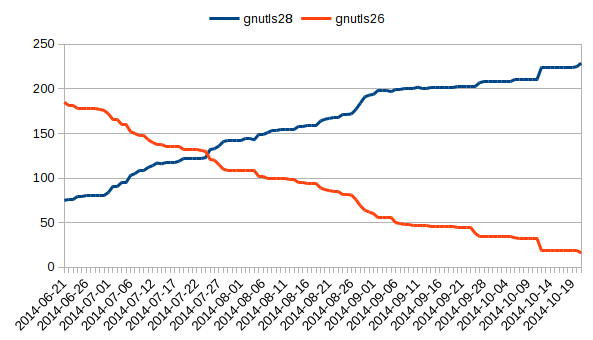
With today's removals of gnutls26 and libgcrypt11 from jessie the respective transitions have been finished. Thanks to everybody who help accomplishing this, package maintainers and the release team, with a special thanks to Emilio. It started from a bad position: Since 2011 we had co-installable gnutls26 and gnutls28 in Debian with separate (and conflicting) development packages. Simply providing libgnutls-dev from gnutls28 was not possible because there are some incompatibilities and because we had license problems. So we ended up gradually switching packages over by sourceful uploads.
GnuTLS progress diagram, binary packages in sid Looking back, this worked both well and badly: On one hand it played nicely with testing migration. It did not break a lot of important packages at a single time or block packages from migration to testing. On the other hand over a 100 sourceful uploads are a lot, and the transition took a long time.

Joachim Breitner: Can one recommend Debian stable to Desktop users?

My significant other is running Debian stable on her laptop, and it has worked fine for quite a while. But since a week or two, she could not access her University IMAP account via Evolution. Obviously quite a showstopper! Today I had a closer look, and my suspicion was that the University changed their SSL configuration due to the recent POODLE attack and that Evolution was incompatible with that. After some more searching, I found that Ubuntu had applied a patch, originally from Fedora, two weeks ago. For Debian, there is a bug report but no sign of action. So I fetched the sources, applied the patch, built the package, installed it and things were working again. Yay for that! But this is obviously not the best way to handle such issues. I know that Debian is volunteer driven and we often lack the manpower for certain things, so I don t want to rant about this particular issue. I also continue to be a happy user of Debian unstable on my laptop, and Debian stable on my servers. But I seriously wonder: Can I really recommend Debian stable to users, for their laptops and desktops? If not, what are the alternatives? Ubuntu obviously comes to mind, having some full-time staff for such issues... But that would be giving up on promoting Debian as the universal operating system. Update (2010-11-3): Laney just uploaded a fixed package. Thanks!

Thorsten Alteholz: My Debian Activities in October 2014

FTP assistant This month has been the month before the freeze. Lots of people uploaded a package at the last moment and wanted to have it in testing before everything is over. This resulted in even more processed package than in September. I was able to accept 407 packages and had to reject 77. The whole FTP team managed it to bring the NEW queue below 40 waiting packages. As the Release team doesn t like to see binary-NEW packages appearing in unstable (at least those which change the soname of a lib), this number will increase again. But, that s life I am glad that a freeze happens only every few years. So I would particularly thank my dear wife for her patience, when she saw me sitting in front of that damned computer again and again. Squeeze LTS This was my fourth month that I did some work for the Squeeze LTS initiative, started by Raphael Hertzog at Freexian. This month I got assigned a workload of 13.75h and I spent these hours to upload new versions of I also prepared a new upload of wget and still wait for some feedback. In this case some default values had to be changed and I better wait a bit before I break some scripts. Moreover five CVEs accumulated for php5, so I guess another upload has to be done for this package. This will be ready in the next days I also tried to work on libtasn1-3 and librack-ruby. There hadn t been DSAs for these packages and I tried to dig into the upstream repositories. Unfortunately I failed to find the correct patches. Kudos to the Security Team who have to struggle with all kind of commit messages on a daily basis. Other packages I didn t have time to do any work on my own packages. But during my ftp-time I saw one or another package that deals with some kind of home automation. Up to now there doesn t seem to be a Debian group who deals with this topic. Maybe it is time to start one? Support If you would like to support my Debian work you could either be part of the Freexian initiative (see above) or consider to send some bitcoins to 1JHnNpbgzxkoNexeXsTUGS6qUp5P88vHej. Contact me at donation@alteholz.eu if you prefer another way to donate. Every kind of support is most appreciated.

Riku Voipio: Using networkd for kvm tap networking

Setting up basic systemd-network was recently described by Joachim, and the post inspired me to try it as well. The twist is that in my case I need a bridge for my KVM with Lava server and arm/aarch64 qemu system emulators...For background, qemu/kvm support a few ways to provide network to guests. The default is user networking, which requires no privileges, but is slow and based on ancient SLIRP code. The other common option is tap networking, which is fast, but complicated to set up. Turns out, with networkd and qemu bridge helper, tap is easy to set up.

$ for file in /etc/systemd/network/*; do echo $file; cat $file; done
/etc/systemd/network/eth.network
[Match]
Name=eth1
[Network]
Bridge=br0

/etc/systemd/network/kvm.netdev
[NetDev]
Name=br0
Kind=bridge

/etc/systemd/network/kvm.network
[Match]
Name=br0
[Network]
DHCP=yes

Diverging from Joachims simple example, we replaced "DHCP=yes" with "Bridge=br0". Then we proceed to define the bridge (in the kvm.netdev) and give it an ip via dhcp in kvm.network. From the kvm side, if you haven't used the bridge helper before, you need to give the helper permissions (setuid root or cap_net_admin) to create a tap device to attach on the bridge. The helper needs an configuration file to tell what bridge it may meddle with.

# cat > /etc/qemu/bridge.conf <<__END__
allow br0
__END__
# setcap cap_net_admin=ep /usr/lib/qemu/qemu-bridge-helper
Now we can start kvm with bridge networking as easily as with user networking:

$ kvm -m 2048 -drive file=jessie.img,if=virtio -net bridge -net nic,model=virtio -serial stdio
The manpages systemd.network(5) and systemd.netdev(5) do a great job explaining the files. Qemu/kvm networking docs are unfortunately not as detailed.

30 October 2014

Chris Lamb: Are you building an internet fridge?

Mikkel Rasmussen:
If you look at the idea of "The Kitchen of Tomorrow" as IKEA thought about it is the core idea is that cooking is slavery. It's the idea that technology can free us from making food. It can do it for us. It can recognise who we are, we don't have to be tied to the kitchen all day, we don't have to think about it. Now if you're an anthropologist, they would tell you that cooking is perhaps one of the most complicated things you can think about when it comes to the human condition. If you think about your own cooking habits they probably come from your childhood, the nation you're from, the region you're from. It takes a lot of skill to cook. It's not so easy. And actually, it's quite fun to cook. there's also a lot of improvisation. I don't know if you ever tried to come home to a fridge and you just look into the fridge: oh, there's a carrot and some milk and some white wine and you figure it out. That's what cooking is like it's a very human thing to do.
https://chris-lamb.co.uk/wp-content/2014/fridge.jpg

The physical version of your smart recipe site?


Therefore, if you think about it, having anything that automates this for you or decides for you or improvises for you is actually not doing anything to help you with what you want to do, which is that it's nice to cook. More generally, if you make technology for example that has at its core the idea that cooking is slavery and that idea is wrong, then your technology will fail. Not because of the technology, but because it simply gets people wrong. This happens all the time. You cannot swing a cat these days without hitting one of those refrigerator companies that make smart fridges. I don't know you've ever seen them, like a "intelligent fridge". There's so many of them that there is actually a website called "Fuck your internet fridge" by a guy who tracks failed prototypes on intelligent fridges. Why? Because the idea is wrong. Not the technology, but the idea about who we are - that we do not want the kitchen to be automated for us. We want to cook. We want Japanese knives. We want complicated cooking. And so what we are saying here is not that technology is wrong as such. It's just you need to base it especially when you are innovating really big ideas on something that's a true human insight. And cooking as slavery is not a true human insight and therefore the prototypes will fail.
(I hereby nominate "internet fridge" as the term to describe products or ideas that whilst technologically sound is based on fundamentally flawed anthropology.) Hearing "I hate X" and thinking that simply removing X will provide real value to your users is short-sighted, especially when you don't really understand why humans are doing X in the first place.

EvolvisForge blog: Tip of the day: bind tomcat7 to loopback i/f only

We already edit /etc/tomcat7/server.xml after installing the tomcat7 Debian package, to get it to talk AJP instead of HTTP (so we can use libapache2-mod-jk to put it behind an Apache 2 httpd, which also terminates SSL): We already comment out the block
    <Connector port="8080" protocol="HTTP/1.1"  
               connectionTimeout="20000"
               URIEncoding="UTF-8"
               redirectPort="8443" />
and remove the comment chars around the line
    <Connector port="8009" protocol="AJP/1.3" redirectPort="8443" />
so all we need to do is edit that line to make it look like
    <Connector address="127.0.0.1" port="8009" protocol="AJP/1.3" redirectPort="8443" />
and we re all set. (Your apache2 vhost needs a line
JkMount /?* ajp13_worker
and everything Just Works with the default configuration.) Now, tomcat7 is only accessible from localhost (Legacy IP), and we don t need to firewall the AJP (or HTTP/8080) port. Do make sure your Apache 2 access configuration works, though

Juliana Louback: JSCommunicator at xTupleCon 2014

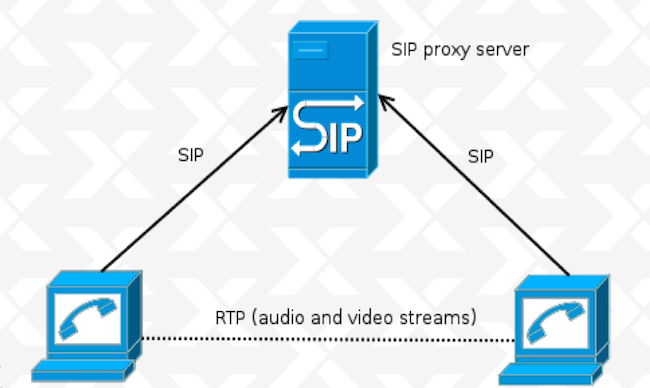
Two weeks ago I left NYC for a day trip to Norfolk, Virginia, to attend xTupleCon 2014. For those who don t know, xTuple is an incredibly reknown open source Enterprise Resource Planning (ERP) software. If you ve been following this blog, you might recall that during my participation in the Google Summer of Code 2014, I wrote a beta JSCommunicator extension for xTuple (to see how I went about doing that, look up Kickstarting the JSCommunicator-xTuple extension). Now, I wasn t flying down to Virginia on the eve of my first grad school midterms (gasp!) for fun - although I will admit, I enjoyed myself a fair amount. My GSoC mentor, Daniel Pocock was giving a talk about WebRTC and JSCommunicator at xTupleCon and invited me to participate. So that was the first perk of going to xTupleCon, I got to finally meet my GSoC mentor in person! During the presentation, Daniel provided a high level expanation of WebRTC and how it works. WebRTC (Web Real Time Communications) enables real time transmission of audio, video and data streams through browser-to-browser applications. This is one of the many perks of WebRTC; it doesn t require installation of plugins, making its use less vulnerable to security breaches. Websockets are used for the signalling channel and the SIP or XMPP can be used as the signaling protocol - in JSCommunicator, we used SIP. What was also done in JSCommunicator and can be done in other applications is to use a library to implement the signaling and SIP stack. JSCommunicator uses (and I highly reccomend) JsSIP. The basic SIP architecture is comprised of peers and a SIP Proxy Server that supports SIP over Websockets transport: sipArch If you have users behind NAT, you ll also need a TURN server for relay: sipArch2 In both cases, setup is not too difficult, particularly if using reSIProcate which offers both the SIP proxy and the TURN server. Daniel Pocock has an excellent post on how to setup and configure your SIP proxy and TURN server. With regard to JSCommunicator, it is a generic telephone in HTML5 which can easily be embedded in any web site or web app. Almost every aspect of JSCommunicator is easily customizable. More about JSCommunicator setup and architecture is detailed in a previous post. The JSCommunicator-xTuple extension can be installed in xTuple as an npm package (xtuple-jscommunicator). It is still at a very beta - or even pre-beta - stage and there are various limitations; the configuration must be hard-coded and dialing is done manually as opposed to clicking on a contact. Some of these limitations are features are on the wish list for future work. For example, some ideas for the next version of the extension are a click to dial from CRM records functionality and to bring up CRM records for an incomming call. Additionaly, the SIP proxy could be automatically installed with the xTuple server installation if desired. We closed the presentation with a live demo during which I made a video call from a JSCommunicator instance embedded in freephonebox.net to the JSCommunicator xTuple extension running on Daniel s laptop. Despite the occasionally iffy hotel Wifi, the demo was a hit - at one point I even left the conference room and took a quick walk around the hotel and invited other xTupleCon attendees to say hello to those in the room. The audience s reception was more enthusiastic than I anticipated, giving way to a pretty extensive Q&A session. It s great to see more and more people interested in WebRTC, I can t emphasize enough what a useful and versatile tool it is. Here s an action shot of part of the xTuple WebRTC presentation: xtuple

Next.

Previous.