Search Results: "ean"

20 September 2011

MJ Ray: Six of the Best Podcasts?

I m listening to quite a few podcasts recently. Here are my current favourites: And now for number six, what are you listening to? Anything you d recommend?

19 September 2011

Joey Hess: happy haskell hacker

There are certian things haskell is very good at, and I had the pleasure of using it for one such thing yesterday. I wanted to support expressions like find(1) does, in git-annex. Something like:
git-annex drop --not --exclude '*.mp3' --and \
    -\( --in usbdrive --or --in archive -\) --and \
    --not --copies 3
So, parens and booleans and some kind of domain-specific operations. It's easy to build a data structure in haskell that can contain this sort of expression.
 - A Token can either be a single word, or an Operation of an arbitrary type. - 
data Token op = Token String   Operation op
        deriving (Show, Eq)
data Matcher op = Any
          And (Matcher op) (Matcher op)
          Or (Matcher op) (Matcher op)
          Not (Matcher op)
          Op op
        deriving (Show, Eq)
(The op could just be a String, but is parameterized for reasons we'll see later.) As command-line options, the expression is already tokenised, so all I needed to do to parse it is consume a list of the Tokens. The only mildly tricky thing is handling the parens right -- I chose to not make it worry if there were too many, or too few closing parens.
generate :: [Token op] -> Matcher op
generate ts = generate' Any ts
generate' :: Matcher op -> [Token op] -> Matcher op
generate' m [] = m
generate' m ts = uncurry generate' $ consume m ts
consume :: Matcher op -> [Token op] -> (Matcher op, [Token op])
consume m [] = (m, [])
consume m ((Operation o):ts) = (m  And  Op o, ts)
consume m ((Token t):ts)
          t == "and" = cont $ m  And  next
          t == "or" = cont $ m  Or  next
          t == "not" = cont $ m  And  (Not next)
          t == "(" = let (n, r) = consume next rest in (m  And  n, r)
          t == ")" = (m, ts)
          otherwise = error $ "unknown token " ++ t
        where
                (next, rest) = consume Any ts
                cont v = (v, rest)
Once a Matcher is built, it can be used to check if things match the expression the user supplied. This next bit of code almost writes itself.
 - Checks if a Matcher matches, using a supplied function to check
 - the value of Operations. - 
match :: (op -> v -> Bool) -> Matcher op -> v -> Bool
match a m v = go m
        where
                go Any = True
                go (And m1 m2) = go m1 && go m2
                go (Or m1 m2) = go m1   go m2
                go (Not m1) = not (go m1)
                go (Op o) = a o v
And that's it! This is all nearly completly generic and could be used for a great many things that need support for this sort of expression, as long as they can be checked in pure code. A trivial example:
*Utility.Matcher> let m = generate [Operation True, Token "and", Token "(", Operation False, Token "or", Token, "not", Operation False, Token ")"]
*Utility.Matcher> match (const . id) m undefined 
True
For my case though, I needed to run some IO actions to check if expressions about files were true. This is where I was very pleased to see a monadic version of match could easily be built.
 - Runs a monadic Matcher, where Operations are actions in the monad. - 
matchM :: Monad m => Matcher (v -> m Bool) -> v -> m Bool
matchM m v = go m
        where
                go Any = return True
                go (And m1 m2) = liftM2 (&&) (go m1) (go m2)
                go (Or m1 m2) =  liftM2 ( ) (go m1) (go m2)
                go (Not m1) = liftM not (go m1)
                go (Op o) = o v
With this and about 100 lines of code to implement specific tests like --copies and --in, git-annex now supports the example at the top. Just for comparison, find(1) has thousands of lines of C code to build a similar parse tree from the command line parameters and run it. Although I was surprised to see that it optimises expressions by eg, reordering cheaper tests first. The last time I wrote this kind of thing was in perl, and there the natural way was to carefully translate the expression into perl code, which was then evaled. Meaning the code was susceptible to security holes. Anyway, this is nothing that has not been done a hundred times in haskell before, but it's very nice that it makes it so clean, easy, and generic.

Sylvain Beucler: Building Android NDK samples

I searched forever for a way to just build the examples in the Android NDK, preferably from the command line. Here's how. First step: build the C++ code:
cd /usr/src/android-ndk-r6/samples/san-angeles/
/usr/src/android-ndk-r6/ndk-build
Simple enough. Second step:
You will then need to generate your final .apk through the usual means. -- Android NDK Dev Guide
Thanks a ****ing lot! In addition the documentation is very much Eclipse-centered - and I can't be bothered to install and configure all the Eclipse stack for a mere Java wrapper for the above-generated .so file XD We first need to use the 'android' wrapper and download the "SDK Platform Android 2.2, API 8, revision 3" - aka "android-8", the first environment to support OpenGL ES 2.
/usr/src/android-sdk-linux_x86/tools/android
It appears we first need to "manage the project", more precisely import from an existing project: http://developer.android.com/guide/developing/projects/projects-cmdline.html So we create a project by importing the sources from the current directory:
/usr/src/android-sdk-linux_x86/tools/android update project \
  --name san-angeles --path . --target "android-8"
Then we use ant to build the thing: http://developer.android.com/guide/developing/building/building-cmdline.html
apt-get install ant openjdk-6-jdk
ant debug  # avoid messing with signing
We now have a bin/san-angeles-debug.apk and we can run it in the emulator. Create a new "Virtual device" using the "android-8" platform we downloaded above, and launch it. Given the time needed to boot the OS, I suggest enabling snapshots. Scaling to display resulted in a very tiny, dark and slow display, in a first step I suggest using a non-scaled one.
/usr/src/android-sdk-linux_x86/tools/android
At last we can run it! Install it in the emulator:
/usr/src/android-sdk-linux_x86/platform-tools/adb install -r bin/san-angeles-debug.apk
You'll find a DemoActivity in your apps directory :)
Note: I tried to compile the "hello-gl2", showcasing OpenGL ES 2.0, but sadly it crashes:
Sorry! The application GL2JNI (process com.android.gl2jni) has stopped unexpectedly. Please try again.
The emulator apparently doesn't advertise EGL_OPENGL_ES2_BIT (checked in in GL2JNIView.java). If you try to by-pass it, you'll get loads of:
E/libEGL ( 333): called unimplemented OpenGL ES API
It's worth noting the OpenGLES20 sample from the "API Demos" application uses a fall-back OpenGL ES 1 renderer if v2 is not available - it made me mistakenly believe that OpenGL ES 2 was supported only from Java >( OpenGL ES 2 is not supported in the emulator as of 2011-09-17 - period.

Stefano Zacchiroli: why there are so many debian derivatives

A while ago I've been interviewed for a forthcoming article in the LinuxUser magazine on the topic of why there are so many Debian derivatives and on the potential impact, on them, of the (potential) advent of the so called "Debian Rolling" experiment. Below you can find my take on those topics. Questions are by Ferdinand Thommes, who has been involved in various Debian derivatives, including the forthcoming Siduction.
1.) Why do you think people base distributions on Debian? Looking at how many there is, since Corel and Libranet set sail in 1999, there must be a reason why, for one, people fork Debian in the first place, and secondly, why they choose Debian to do so and not some other distribution.
There are always advantages in creating a so called "derivative" distribution with respect to creating one from scratch. The main one is the possibility of reusing the packaging work which is already done in the "upstream" distro, focusing derivatives' efforts on customization, usually with clear target public in mind. Debian pushes most of those advantages (for derivatives) at their extremes. But there are also a couple of "political" reasons for basing derivatives on Debian. One is quite subtle and applies mostly to commercial distributions. If you are designing one such commercial distro, you have to be based on an independent distro with no commercial interests, lest risking that petty (technical or otherwise) choices might be made just to undermine your business. Among "popular" GNU/Linux distros, Debian is essentially the only one which is both volunteer-based and not ascribable to any specific company. The last reason why I think many derivatives are based on Debian is our vocation to universality. Since we are not targeting any specific public, but rather trying to provide an operating system suitable for several different use cases (e.g. the tasks supported by the Debian installer or the choice of Debian Pure Blends), we offer an ideal starting point for those who are going to have customization as their main business.
2.) What could be the benefits for Debian and for its Derivates, if the discussions about a second Debian Release based on the Testing branch really come to be reality?
We are considering the possibility of adding a new Debian suite which is "rolling" like Testing, in the sense that new software releases flow in regularly rather than only at periodic bumps corresponding to major distribution releases. There seem to be user demand for that and I personally believe that such a scheme could address the needs of both advanced desktop users and of developers, which are now strand to mix and match Debian suites ending up using package combinations which benefit, as a whole, of very little quality check. The main issues to face to get there is how to make sure that adding such a suite would not get in the way of preparing high quality Stable releases, in terms of quality control, developer focus, etc. Note that such a hypothetical "rolling" suite needs does not necessarily need to be based on Debian Testing, although that is a good starting point. The reason why it's not a good endpoint is that Testing has been created (circa 2000), and is still used, as an internal tool to prepare the forthcoming Debian Stable release. As such, it is not entirely suitable for final user consumption. For instance, during the Debian "freeze" period the flow of new software releases that reach Testing is greatly reduced up to stopping completely just before the release of a new Debian Stable. I've been told that users of testing-based (derivative) rolling releases regularly complain about this aspect during Debian freezes, which is not surprising. The main advantage for derivatives which are already offering a Debian-based "rolling" release will then be the possibility of basing their work on a suite less bound to the life cycle of Debian Stable than Testing is at present. On the converse side, that would also mean that derivatives will need to differentiate more from Debian than by just saying they are "rolling", which is a good thing: differences among distros are healthy and drive innovation. With those derivatives, on the other hand, which will recognize their goals as being aligned with Debian's goals---Debian Stable today, maybe Debian "rolling" tomorrow---we will be happy to join efforts.

18 September 2011

Craig Small: Getting music into the iPod Shuffle

IPod shuffle

Image via Wikipedia

Sounds easy doesn t it? You got a nice debian computer filled with mp3s and you got an iPod Shuffle. You want to get the mp3s onto the Shuffle, simple really! Well, no. I ve got a 2nd Generation iPod Shuffle; its a little blue thing the size of a postage stamp with no screen. Specifically a model A1204. It uses the headphone socket with a special connector to get it connected via USB. It also steadfastly refused to play anything I transferred onto it. gtkpod was first. I knew I was in trouble when my model doesn t appear in their list of supported devices. 2nd Generation Shuffles do, just not an A1204. After a lot of fiddling around and playing with special files and firewire IDs I got a file onto it. Great, but then turning the iPod on I got the green and orange sequence of lights which means no file found. Next, was Rhythmbox. It is supposed to understand iPods too. The funny thing was that it saw the music file I put on the iPod by gtkpod, but adding any file gave me the same colour sequence. What was worse is if you tried to look at the information about the iPod, Rhythmbox crashed. It seemed I was doomed to use iTunes on the windows computer in the living room. A program that seems designed not to work the way I want. (It tries to load all the mp3 files from my son s games into the iPod but ignores my music on the samba share, for starters). I just wanted the files on the player and the player to recognise and play them. It didn t seem like a too hard a task, but I was stuck. That was until I found a small (643 lines) python script called rebuild-db that builds the special iPod files with my music. I found the file at the rebuild-db sourceforge page and it was very simple process. Now I plug the iPod in, wait for the window to appear, push my songs onto the iPod and run the script. It s quick and simple and more importantly it works. Not bad for a program that hasn t been developed since April 2006.

17 September 2011

Andrew Pollock: [life/americania] Whirlwind visit to the Windy City

Our friend Susan was going to be in Chicago for a conference, and as we hadn't seen Chicago yet, and it was on the list of cities we wanted to visit, we made the semi-spur of the moment decision to have a three day weekend there last weekend. We got the Virgin America red-eye flight from SFO, which left on Friday at around 5pm, and got into Chicago at around 11:30pm, local time. Zoe didn't do as well as she has previously, and didn't sleep very well on the flight over, despite us getting lucky and scoring an empty seat between us on an otherwise fairly full flight. I think she's getting too big to comfortably sleep in the Ergo baby carrier (or isn't keen on sleeping vertically any more). We stayed at the Swissotel, because that was where Susan was staying (and was where her conference was) and nearby hotels seemed to be around the same price range. When we checked in, we let them talk us into an upgrade to a larger room, which had fantastic views of Lake Michigan and the Chicago River. Lake Michigan is just mind-bogglingly big. It's an inland sea. What can I say? I was totally in love with Chicago. The weather while we were there was unbelievable. Clear skies. High 20's (Celsius). It was more humid than the Bay Area, but less humid than Brisbane. The first thing we did on Saturday was go visit a friend of Sarah's who lived in Bryn Mawr. We took the "L" there. The elevated train was an interesting affair, and turned out to be less accessible than we'd been led to believe from some light research in advance. In fact, I found Chicago in general to be fairly wheelchair (and by extension, stroller) unfriendly. We had to lug Zoe's stroller up and down stairs quite a bit to get from the river level to where the hotel was. Zoe seemed to find it amusing, at least. Aside from that problem, the city seemed pretty flat. I'm really glad that we got out of the city and into Bryn Mawr, because it was really great to see that aspect of Chicago life as well. Lovely, quiet, tree-lined streets with wide sidewalks. Beautiful buildings. Sarah's friend was fostering 8 kittens, so Zoe got to have a play with all of them, which she thought was pretty cool. After we returned to the city, Sarah and I kicked back in Millennium Park while Zoe napped in the stroller. Saturday, being 9/10/11 in US date format, seemed to be particularly popular for weddings, and there were a lot of couples getting wedding photos taken in the park. That night, we tried to have some deep dish pizza at Uno, the home of deep dish pizza, but the line was ridiculous. We subsequently learned about Due, and went there the following night. The pizza was good, and I found the crust to be slightly different from what we'd get at Patxi's. We checked out the Navy Pier on both Sunday and Monday, taking Zoe to the Chicago Children's Museum both days (we got free entry thanks to our membership at the Children's Discovery Museum of San Jose). We had grand plans of checking out the Shedd Aquarium, but it turned out that Monday was a "free for all Illinois residents" day, and the line at 11am was ridiculous, so we gave it a miss and took at water taxi back to Navy Pier. It was Zoe's first boat ride, and she enjoyed it. I got some unbelievably good photos of the city skyline from the boat. Our flight out was at 7pm, so we took the train to Midway. I was very impressed that we could get all the way to the airport by train for the standard price. I love flat-rate fares. I really love a city with good mass public transit. The only thing that detracted from this in Chicago was the accessibility issues. We explicitly went to the Orange Line Clarke/Lake station to go to Midway because it was listed as being wheelchair accessible, and we had a stroller and a suitcase. We ended up going up to the wrong platform, and getting across to the other side was a bit of a mission. We'd entered the station from the street level, took the elevator up, and then realised we were on the wrong side. We had to go back down the elevator to the level below the street, cross the street from underneath it, and then go back up the elevator on the other side. Aside from these sorts of shenanigans, the whole elevated train thing was pretty cool (but I wouldn't have wanted to have an apartment with the train line right outside my window). If only the cars had glass roofs, the Loop would have been a lot more scenic. Overall, it'd be hard to say whether I liked Chicago or New York City better. I liked the clean, flat nature of Chicago, the architecture and the lower density of buildings, but I also really love New York just because it's New York, and has an awesome (probably equally stroller-unfriendly) subway system. Photos from the trip are here.

Dirk Eddelbuettel: littler 0.1.5

Brown-bag release time for littler. One of the <emph>minor cleanups</emph> in the 0.1.4 release from Thursday actually introduced a nasty little bug as you can't call Rf_KillAllDevices() when you do not have any graphics device. Doh. So with apologies for the lower quality release, and the two hour malfuntioning window for CRANberries that it cause, a repaired version is now out there. The very brief (upstream) ChangeLog is as follows:
2011-09-17  Dirk Eddelbuettel  <edd>
        * configure.in: Mark as release 0.1.5
        * littler.c (littler_CleanUp): Remove call to Rf_KillAllDevices() 
littler provides r (pronounced littler), a shebang / scripting / quick eval / pipelining front-end to the the R language and data analysis environment. As usual, our code is available via our svn archive or from tarballs off my littler page and the local directory here. A fresh package is in Debian's incoming queue and will hit mirrors shortly.

Benjamin Mako Hill: Software Freedom Day Boston 2011

This year, Software Freedom Day in Boston is being organized by Asheesh and Deb and OpenHatch which means a focus on increasing involvement in free software communities. If you are all interested in getting involved in the free software community in any way and at any level -- or interested in hearing about how that might happen someday -- this is a great event to attend. For my part, I'll be giving a short talk on getting involved in Debian. The event will be held on Saturday, September 17 at Cambridge College -- between Harvard and Central squares -- with an after party at Tommy Doyle's in Harvard.

16 September 2011

Rapha&#235;l Hertzog: How to triage bugs in the Debian bug tracking system

Triaging bugs is one of the easiest way to start contributing to Debian. I ll teach you the basics in this article. 1. Prerequisites All interactions with the Debian Bug Tracking System (BTS) happen through email so you need to have an email account with an address that you re willing to make public. All the mail that you send to the BTS will be archived and publicly available through its web-interface. This also means that you should have some spam filters in place because it will inevitably be harvested by spammers. :-( To ensure that this email address is consistently used by the various tools that we re going to use, it s a good idea to put this email address in the DEBEMAIL environment variable. You can also specify your full name in DEBFULLNAME (in case you don t want to use the name associated with your Unix account). You usually do this by modifying ~/.bashrc (if you use bash as login shell):
export DEBEMAIL="hertzog@debian.org"
export DEBFULLNAME="Rapha l Hertzog"
You should also install the devscripts package, it provides the bts command that we re going to use. 2. Find a package or a team with too many bugs You can literally pick any popular software that s in Debian, they almost always get more bug reports than the maintainers can handle. Instead of picking a package, you can also select a packaging team and concentrate your efforts on the set of packages managed by the team. In any case, it s important to receive the bug traffic for the packages that you re going to work on. If you went for a specific package, you should subscribe to the package via the Package Tracking System (there s a subscribe box on the bottom left corner once you selected the source package of interest). If you decided to help a team, there s usually a dedicated mailing list receiving all bug traffic. You can browse a list of packages with the most bugs if you have troubles finding a package to work on. A stack of bug reports to triage 3. Triage bugs! Bug triaging is all about making sure that bugs are correctly classified so that when a developer looks at the bug list, he can quickly find bugs with all the information required to be able to fix them! 3.1 Adding information to bug Adding supplementary information is easily done just by sending a mail to XXXX@bugs.debian.org (replace XXXX with the bug number). But often you want to reply to a message in the bug history, in that case bts --mbox show XXXX is for you. It will grab the corresponding mailbox and open a mailer (mutt by default) on it. Now you can directly reply in your favorite mailer. 3.2 Classifying bugs The Debian BTS uses tags (click the link and read the doc!) to classify bugs. bts tag XXXX + foo will add the foo tag (replace the + with a to remove a tag). If you want to explain why you re adding a tag, you should instead reply in the bug log as explained above, put control@bugs.debian.org in Bcc (Blind Carbon Copy) and start the body of your message with your tag command:
tag XXXX + foo
thanks
But what tag should you add? When a bug is submitted, you should try to reproduce the bug. If you can reproduce it, then tag the bug confirmed (example in #641710). If you can t, you should request more information (ex: a sample document triggering the bug, a configuration file, the output of some relevant command, etc.) until you can reproduce it or conclude that it was a user mistake. When you request supplementary information due to this, you should tag the bug unreproducible moreinfo (example in #526774). moreinfo should be later dropped when the requested information are provided, and unreproducible should be dropped if those information were enough to actually help reproduce the bug (example in #526774). During that initial evaluation, it s also worth differentiating packaging bugs (which are specific to Debian) from upstream bugs (which are relevant also for non-Debian users). The latter should be tagged upstream (and forwarded upstream if the bug is reproducible or contains enough information for the upstream developers, example in #635112). If you saw a (viable) patch in the bug log, the bug should be tagged patch . This is usually done by the patch submitter but sometimes it s forgotten (example in #632460). Take care though to not reinstate the patch tag if it was initially set but then dropped by the package maintainer after a review of the patch. If the title of the bug report is not descriptive enough, you can change it with a retitle XXXX new-title command (example in #170850). You can also change the severity of the bug report depending on the impact of the problem (with a command severity XXXX new-severity , what a surprise!). Request for new features are wishlist , most documentation problems are minor . On the other side of the scale, you can use important for bugs that are very annoying but that should not block a release. serious , grave and critical are used for release critical bugs, check the official definitions of the severities (examples in 502738 or #506498). 3.3 Closing non-bugs and bugs that are already fixed If your analysis of the bug report is that it s not really a bug but a user mistake, then you should close it by sending a mail to XXXX-done@bugs.debian.org with some explanations of the user s mistake so that he can get past his problem (example in #592853). If the problem was a real bug, but one that is apparently already fixed, you should try to quickly find the version that fixed the bug. If you can t find it in the changelog (there s a link to it in the PTS, or you can use /usr/share/doc/package/changelog.Debian.gz), you ll make the safe assumption that the upstream version you re currently using is the first one where this is fixed. Then you send a mail to XXXX-done@bugs.debian.org but you start your mail with Version: version-that-fixed-the-bug and continue with a small explanation of why you believe the bug to be fixed by this version (example in #122948). 3.4 Reassigning misfiled bug reports Bug reports are not always filed against the proper package. Users file bugs against applications where they experience the bugs, but the real bug might be in an underlying library or application. When that happens, you should use the reassign XXXX correct-package version command to get it filed against the correct package. The version parameter is optional but should be provided if possible, it should be the oldest version that we know to have the problem (example in #626232). 3.5 Forwarding bugs Forwarding bugs means opening bug reports in the upstream bug tracker for issues that have been reported in Debian but that applies to the upstream (unmodified) source code. Be sure to include all the relevant information and a link to the corresponding Debian bug. Depending on the upstream bug tracker, you might have to open an account to be able to file new bug reports. On the Debian side, you must record that a bug has been forwarded with bts forwarded XXXX upstream-bug-url . upstream-bug-url is the URL corresponding to the upstream bug report you created (ex: http://projects.ciarang.com/p/feed2omb/issues/21/ recorded in #609345 ). If the upstream authors fix the bug you reported, you can tag the Debian bug with fixed-upstream so that it s easier to find bugs to close when the next upstream release comes out (example in #637275). 3.6 Updating version information The Debian BTS uses version tracking to know which package versions are affected by a given bug. It s particularly important to have correct version information for release critical bugs since it might affect the migration of packages to testing. You can learn more on this topic here: http://wiki.debian.org/HowtoUseBTS. 4. More advice Colin Watson wrote a constructive rant explaining some mistakes that bug triagers are often doing. While it refers mainly to Ubuntu s launchpad, the advice apply equally as well to Debian. Check it out to become a better bug triager! Note that you can refer to this article with this shorter URL: http://raphaelhertzog.com/go/bugtriaging/

Do you want to read more tutorials like this one? Click here to subscribe to my free newsletter, you can opt to receive future articles by email.

One comment Liked this article? Click here. My blog is Flattr-enabled.

John Goerzen: Mexico Part 5: Food, Restaurants, and Dueling Karaoke Guys

The fifth in a series; see also parts 1, 2, 3, and 4. One piece of advice we got in Mexico went like this: the nicer a place looks, the worse the food and prices will be. Roadside taco stands will be great, and nice-looking restaurants not so much. That seemed to be accurate. We only tried one real nice-looking restaurant and it was very good (though pricy), but it may have been sort of an exception. But perhaps the most interesting bit about eating in Mexico wasn t the food. It s the adventure. We ate one day at Guadalajara s San Juan de Dios market. In that huge labyrinth somewhere was a set of restaurants. They d tend to have a small cooking area, usually just open, and a few tables. We chose one. And at this point, I have to take brief detour and explain something. There are a lot of people in Mexico that do things for tips, and quite often without being asked. Some other examples might be washing a car s windshield at a stoplight. So anyhow, we had ordered our food, and before long, a guy wanders down the aisle and plonks down a boombox. And turns it on. And then he pulled out a microphone, which we quite soon realized was connected to the boombox. (I guess making it more of a karaoke box.) Anyhow, he started singing a song decently and seemed to be enjoying it. About 45 seconds into it, a competing boombox man plonked down a competing boombox 25 feet away, turned it on, and yes, you guessed it pulled out a microphone and started singing a different song. Worse than the first person but louder. Eventually the boombox people left and our lunchtime conversation could resume. But pretty soon a drum guy showed up. He had a bunch of drums on a strap so he could just walk around and play them. He apparently decided that an excellent place to play them would be directly behind my head. I did not entirely agree with his decision, but hey, it beat the competing karaoke guys. Eventually the drum guy left, and somehow between the time I looked down to get out money to pay our bill and the time I had it counted out, a clown had shown up and made several balloon animals for our boys. I tipped him, we paid, and then headed on. You might think from this story that this would be an annoying series of events. And honestly, if it had happened in a big mall in the USA, it would probably have been both annoying and creepy. But really I enjoyed it. The fact that dueling karaoke happened, despite sounding really awful, was pretty funny and really seeing this whole parade of people was interesting too. It made American restaurants seem a little boring. You always know what s going to happen here (and if something surprising does happen, the place probably gets a bad review on Yelp.) Interesting things sometimes happen at mealtimes in Mexico and I like it that way. I had a torta ahogada (drowned sandwich) at that restaurant. And at this point, another brief aside. I m the kind of person that can go to an average American restaurant, see items on the menu helpfully indicated as spicy, order one, and genuinely wonder if other people would find them spicy, because I either don t notice spiciness at all, or maybe notice a tiny bit if I concentrate really hard. Others, meanwhile, might take a bite and lunge for the water. Having said that, I know people that lived in Thailand for awhile and I have nowhere near their tolerance for spiciness. So, having been in Mexico a whole 24 hours or so, I decided not to follow Jonathan s wise lead in ordering a torta with the spicy sauce on the side. I figured I hadn t had anything spicy yet, so maybe this was would be nice and mild for me. Via Jonathan s translation, I ordered it with the spicy sauce. I believe the phrase I heard him use was con chile . The waitress looked at me, gave me an amused the American is ordering it con chile? Hahaha . sort of smile, and went off. Pretty soon our food arrived. (The food always seems to arrive pretty soon in Mexico, by the way.) Oliver was having a bit of a culture shock that day, and mostly refusing to eat (once hunger got the best of him later, he really enjoyed Mexican food.) But the rest of us dug in, including me. I enjoyed my torta. It was spicy, but not too bad. I took some big bites (it was, after all, a thick sandwich) and was really enjoying it. For about a minute. Slowest-acting spiciness I ve had in awhile. Then it hit me. Spiciness, and lots of it. I took a big gulp of my horchata (a creamy sweet rice drink that I found at many restaurants). That helped. A little. I really liked the torta and ate it, but it wouldn t surprise me if the waitress noticed how extremely quickly a drank my horchata Another interesting experience was in Guanajuato. It was raining as we walked towards the Guanajuato market. Their market was large and similar in concept to the Guadalajara one, though a lot smaller. The restaurants were all in a row, in a side of the building that was open to the outside. Most were on the ground level but it looked like a restaurant or two were upstairs. As we approached, all of a sudden people were yelling at us. First it was a guy on the second story, then pretty soon people at the restaurants on the first floor did so as well. They were yelling rapidly in Spanish, waving their menus around in the air. I m imagining they were naming foods they sold or reasons to eat there, but I don t know enough Spanish to know. As we walked down the long row of restaurants, the ones we left behind would quiet down in disgust and other hopeful restaurant owners would take up the yelling and waving cause. I imagine if we did some time-lapse videography and walked up and down that row, we could produce an effect not unlike the sound of a dot-matrix printer going back and forth on the page. Anyhow, we selected one of the quieter restaurants pretty much random. The others then quieted down until another person chanced to walk past at which point it would get loud again. The lunch there was good but I think I mainly will remember it for the selection process! On our way into Guanajuato, we stopped at a wonderful roadside taco place. In typical fashion, they had a large vertical pork thing (I don t know the proper word for it) from which they would carve off meat on the spot anytime someone ordered something with pastor. We found a table. And we ordered a few tacos and such. They were usually a few pesos each (working out to less than a dollar), small round things on a soft tortilla, with meat, cilantro, and onion on top. And typically delicious. They had very little in common with an American taco . We d often order a few, and if we wanted more, just order more. They were made quickly enough for that. Tacos were very similar from one restaurant to the next. My favorite flavors were pastor (pork), chorizo (sausage), and bistec (beef steak). A restaurant in Guadalajara sadly I ve forgotten its name, since we kept calling it the potato place had what I might call a Mexican version of the loaded baked potato, with a meat, queso (cheese), a delicious sauce with a flavor unlike anything I d had before, and some garnish. But really my favorite thing from that restaurant was their amazing juices. I am not much of a juice drinker normally, but in Mexico I went for them whenever they were offered. What passes as fruit juice in the USA has about as much resemblance to a real Mexican fruit juice as Taco Bell has to a real Mexican taco stand. (Very little, in case that wasn t crystal clear.) That particular restaurant offered three types of juices, which were, if I m remembering right, aguas, frescas, and jugos. I has a jugo verde (green juice) on the first visit there. It was good, but the one I can still remember was called, I think, the fresa fresca (fresh strawberry juice). And it was incredible. I m not sure how to describe it, other than real. One observation before I end. It seemed a common thread at some Mexican roadside taco stands to not have soap in their restrooms. Instead there would be a plastic cup holding I kid you not powder-form Tide laundry detergent. It was amusing anyhow. My hands left those places extremely soft and smelling like laundry. One of the last restaurants we visited on our trip was in Ajijic, near the Chapala lake. It was actually right on the lake and served seafood. This was the only restaurant with prices as high as I d be used to in the United States. I ordered a stew served in a stone bowl. It came out sizzling, and since the very thick stone bowl retains heat well, it kept sizzling the entire time I was eating. It was excellent as usual. Coming up in part 6: some thoughts on returning to the United States, our decision to visit, communication, and tips for anyone else considering a first visit to Mexico.

15 September 2011

Dirk Eddelbuettel: littler 0.1.4

Matthias Klose, the tireless force behind the Debian / Ubuntu gcc, python, and what have you packages, sent me a minimal patch to let littler build when the ld linker uses the --as-needed option (as Ubuntu builds now do): all it took was a little reordering of arguments. With that, I did a little cleanup as it has been a while since version 0.1.3. The brief (upstream) ChangeLog is as follows:
2011-09-15  Dirk Eddelbuettel  <edd>
        * configure.in: Mark as release 0.1.4
        * Makefile.am: Applied patch by Mathias Klose to prevent FTBFS with
          'ld --as-needed', cf LP bug 770980.
        * littler.c: A few small tweaks suggested by 'gcc -Wall'
        * examples/install2.r: Added a second R package installer example
        * examples/update.r: Switch to '/usr/bin/r -t' as shebang line
        * examples/fsizes.r: Dito
        * littler.c: Update copyrights to 2011
        * README: Idem
littler provides r (pronounced littler), a shebang / scripting / quick eval / pipelining front-end to the the R language and data analysis environment. As usual, our code is available via our svn archive or from tarballs off my littler page and the local directory here. A fresh package is in Debian's incoming queue and will hit mirrors shortly.

Michal &#268;iha&#345;: Limiting involvement in Gammu

As people on Gammu mailing lists probably already noticed, I don't have enough time for Gammu in past months. Simply mi priorities have shifted and can not spend so much time there anymore. I've decided to make clear cut what I'm going to do and what not. First of all I'm not going to put any extra effort on support for platforms I don't use. Today's release of Wammu no longer includes Windows binaries (they were broken anyway). Gammu releases will include them as long as they do not need extra effort. The very same applies to Ubuntu packages. Sorry, but backporting packages which are using up to date tools from Debian sid is more effort than I can put into it. Of course volunteers are welcome for both areas. For phones support, I will limit my attention to things I'm interested in or use daily (what means AT phones, Meego and possibly Symbian). Others (especially S40 Nokia phones) can not expect much support from me. And of course I still plan to maintain the projects themselves, Debian packages and packages in openSUSE Build Service.

Filed under: English Gammu 0 comments Flattr this!

14 September 2011

Mike Hommey: Building a custom kernel for the Nexus S

There are several reasons why someone would want to build a custom kernel for their Android phone. In my case, this is because I wanted performance counters (those used by the perf tool that comes with the kernel source). In Julian Seward s case, he wanted swap support to overcome the limited memory amount on these devices in order to run valgrind. In both cases, the usual suspects (AOSP, CyanogenMod) don t provide the wanted features in prebuilt ROMs. There are also several reasons why someone would NOT want to build a complete ROM for their Android phone. In my case, the Nexus S is what I use to work on Firefox Mobile, but it is also my actual mobile phone. It s a quite painful and long process to create a custom ROM, and another long (but arguably less painful thanks to ROM manager) process to backup the phone data, install the ROM, restore the phone data. And if you happen to like or use the proprietary Google Apps that don t come with the AOSP sources, you need to add more steps. There are however tricks that allow to build a custom kernel for the Nexus S and use it with the system already on the phone. Please note that the following procedure has only been tested on two Nexus S with a 2.6.35.7-something kernel (one with a stock ROM, but unlocked, and another one with an AOSP build). Also please note that there are various ways to achieve many of the steps in this procedure, but I ll only mention one (or two in a few cases). Finally, please note some steps rely on your device being rooted. There may be ways to do without, but I m pretty sure it requires an unlocked device at the very least. This post doesn t cover neither rooting nor unlocking. Preparing a build environment To build an Android kernel, you need a cross-compiling toolchain. Theoretically, any will do, provided it targets ARM. I just used the one coming in the Android NDK:
$ wget http://dl.google.com/android/ndk/android-ndk-r6b-linux-x86.tar.bz2
$ tar -jxf android-ndk-r6b-linux-x86.tar.bz2
$ export ARCH=arm
$ export CROSS_COMPILE=$(pwd)/android-ndk-r6b/toolchains/arm-linux-androideabi-4.4.3/prebuilt/linux-x86/bin/arm-linux-androideabi-
For the latter, you need to use a directory path containing prefixed versions (such as arm-eabi-gcc or arm-linux-androideabi-gcc), and include the prefix, but not gcc . You will also need the adb tool coming from the Android SDK. You can install it this way:
$ wget http://dl.google.com/android/android-sdk_r12-linux_x86.tgz
$ tar -zxf android-sdk_r12-linux_x86.tgz
$ android-sdk-linux_x86/tools/android update sdk -u -t platform-tool
$ export PATH=$PATH:$(pwd)/android-sdk-linux_x86/platform-tools
Building the kernel For the Nexus S, one needs to use the Samsung Android kernel tree, which happens to be unavailable at the moment of writing due to the kernel.org outage. Fortunately, there is a clone used for the B2G project, which also happens to contain the necessary cherry-picked patch to add support for the PMU registers on the Nexus S CPU that are needed for the performance counters.
$ git clone -b devrom-2.6.35 https://github.com/cgjones/samsung-android-kernel
$ cd samsung-android-kernel
You can then either start from the default kernel configuration:
$ make herring_defconfig
or use the one from the B2G project, which enables interesting features such as oprofile:
$ wget -O .config https://raw.github.com/cgjones/B2G/master/config/kernel-nexuss4g
From then, you can use the make menuconfig or similar commands to further configure your kernel. One of the problems you d first encounter when booting such a custom kernel image is that the bcm4329 driver module that is shipped in the system partition (and not in the boot image) won t match the kernel, and won t be loaded. The unfortunate consequence is the lack of WiFi support. One way to overcome this problem is to overwrite the kernel module in the system partition, but I didn t want to have to deal with switching modules when switching kernels. There is however a trick allowing the existing module to be loaded by the kernel: compile a kernel with the same version string as the one already on the phone. Please note this only really works if the kernel is really about the same. If there are differences in the binary interface between the kernel and the modules, it will fail in possibly dangerous ways. To use that trick, you first need to know what kernel version is running on your device. Settings > About phone > Kernel version will give you that information on the device itself. You can also retrieve that information with the following command:
$ adb shell cat /proc/version
With my stock ROM, this looks like the following:
Linux version 2.6.35.7-ge382d80 (android-build@apa28.mtv.corp.google.com) (gcc version 4.4.3 (GCC) ) #1 PREEMPT Thu Mar 31 21:11:55 PDT 2011
In the About phone information, it looks like:
2.6.35.7-ge382d80
android-build@apa28
The important part above is -ge382d80, and that is what we will be using in our kernel build. Make sure the part preceding -ge382d80 does match the output of the following command:
$ make kernelversion
The trick is to write that -ge382d80 in a .scmversion file in the kernel source tree (obviously, you need to replace -ge382d80 with whatever your device has):
$ echo -ge382d80 > .scmversion
The kernel can now be built:
$ make -j$(($(grep -c processor /proc/cpuinfo) * 3 / 2))
The -j part is the general rule I use when choosing the number of parallel processes make can use at the same time. You can pick whatever suits you better. Before going further, we need to get back to the main directory:
$ cd ..
Getting the current boot image The Android boot image living in the device doesn t contain only a kernel. It also contains a ramdisk containing a few scripts and binaries, that starts the system initialization. As we will be using the ramdisk coming with the existing kernel, we need to get that ramdisk from the device flash memory:
$ adb shell cat /proc/mtd awk -F'[:"]' '$3 == "boot" print $1 '
The above command will print the mtd device name corresponding to the boot partition. On the Nexus S, this should be mtd2.
$ adb shell
$ su
# dd if=/dev/mtd/mtd2 of=/sdcard/boot.img bs=4096
2048+0 records in
2048+0 records out
8388608 bytes transferred in x.xxx secs (xxxxxxxx bytes/sec)
# exit
$ exit
In the above command sequence, replace mtd2 with whatever the previous command did output for you. Now, you can retrieve the boot image:
$ adb pull /sdcard/boot.img
Creating the new boot image We first want to extract the ramdisk from that boot image. There are various tools to do so, but for convenience, I took unbootimg, on github, and modified it slightly to seemlessly support the page size on the Nexus S. For convenience as well, we ll use mkbootimg even if fastboot is able to create boot images. Building unbootimg, as well as the other tools rely on the Android build system, but since I didn t want to go through setting it up, I figured a minimalistic way to build the tools:
$ git clone https://github.com/glandium/unbootimg.git
$ git clone git://git.linaro.org/android/platform/system/core.git
The latter is a clone of git://android.git.kernel.org/platform/system/core.git, which is down at the moment.
$ gcc -o unbootimg/unbootimg unbootimg/unbootimg.c core/libmincrypt/sha.c -Icore/include -Icore/mkbootimg
$ gcc -o mkbootimg core/mkbootimg/mkbootimg.c core/libmincrypt/sha.c -Icore/include
$ gcc -o fastboot core/fastboot/ protocol,engine,bootimg,fastboot,usb_linux,util_linux .c core/libzipfile/ centraldir,zipfile .c -Icore/mkbootimg -Icore/include -lz
Once the tools are built, we can extract the various data from the boot image:
$ unbootimg/unbootimg boot.img
section sizes incorrect
kernel 1000 2b1b84
ramdisk 2b3000 22d55
second 2d6000 0
total 2d6000 800000
...but we can still continue
Don t worry about the error messages about incorrect section sizes if it tells you we can still continue . The unbootimg program creates three files: All that is left to do is to generate the new boot image:
$ eval ./mkbootimg $(sed s,boot.img-kernel,samsung-android-kernel/arch/arm/boot/zImage, boot.img-mk)
Booting the image There are two ways you can use the resulting boot image: one-time boot or flash. If you want to go for the latter, it is best to actually do both, starting with the one-time boot, to be sure you won t be leaving your phone useless (though recovery is there to the rescue, but is not covered here). First, you need to get your device in the fastboot mode, a.k.a. boot-loader:
$ adb reboot bootloader
Alternatively, you can power it off, and power it back on while pressing the volume up button. Once you see the boot-loader screen, you can test the boot image with a one-time boot:
$ ./fastboot boot boot.img
downloading 'boot.img'...
OKAY [ 0.xxxs]
booting...
OKAY [ 0.xxxs]
finished. total time: 0.xxxs
As a side note, if fastboot sits waiting for device , it either means your device is not in fastboot mode (or is not connected), or that you have permissions issues on the corresponding USB device in /dev. Your device should now be starting up, and eventually be usable under your brand new kernel (and WiFi should be working, too). Congratulations. If you want to use that kernel permanently, you can now flash it after going back in the bootloader:
$ adb reboot bootloader
$ ./fastboot flash boot boot.img
sending 'boot' (2904 KB)...
OKAY [ 0.xxxs]
writing 'boot'...
OKAY [ 0.xxxs]
finished. total time: 0.xxxs
$ ./fastboot reboot
Voil .

Christian Perrier: Sometimes, I'm really happy to live in the Debian world...

...and not in this other world where you have to deal with a bug reported against apt because installing libreoffice in the distro development branch is not possible:
sudo apt-get install libreoffice
Reading package lists... Done
Building dependency tree       
Reading state information... Done
Some packages could not be installed. This may mean that you have
requested an impossible situation or if you are using the unstable
distribution that some required packages have not yet been created
or been moved out of Incoming.
The following information may help to resolve the situation:
The following packages have unmet dependencies:
 libreoffice : Depends: libreoffice-core (= 1:3.4.3-1ubuntu2) but it is not going to be installed
               Depends: libreoffice-writer but it is not going to be installed
               Depends: libreoffice-calc but it is not going to be installed
               Depends: libreoffice-impress but it is not going to be installed
               Depends: libreoffice-draw but it is not going to be installed
               Depends: libreoffice-math but it is not going to be installed
               Depends: libreoffice-base but it is not going to be installed
               Depends: libreoffice-report-builder-bin but it is not
 going to be installed
               Depends: libreoffice-filter-mobiledev but it is not going to be installed
               Depends: libreoffice-java-common (>= 1:3.4.3~) but it is not going to be installed
E: Unable to correct problems, you have held broken packages.
And I therefore really admire those folks who are brave enough to triage out bugs reported in Launchpad (current counter: about #850000...in only SEVEN years). Yeah, I know, whining about clueless users is BAD, we should be friendly and gentle and kind and polite and nice and happy, but COME ON DUDE, could you at least think ONE BLOODY SECOND? End of rant.

John Goerzen: Mexico Part 4: Street Scenes and Architecture

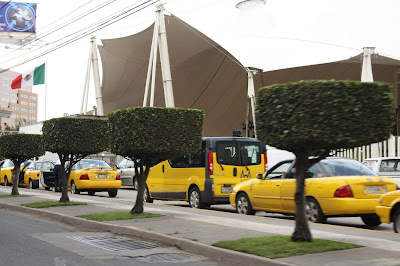
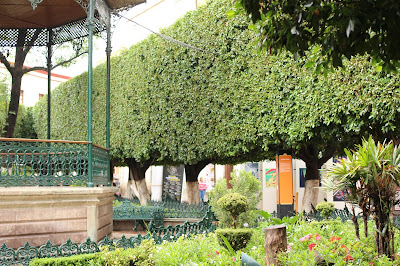
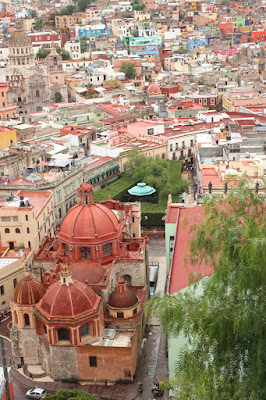
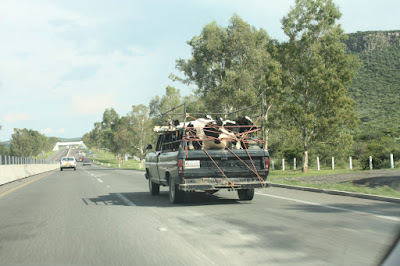
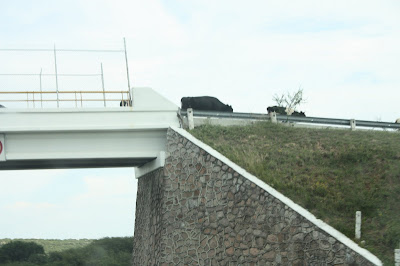
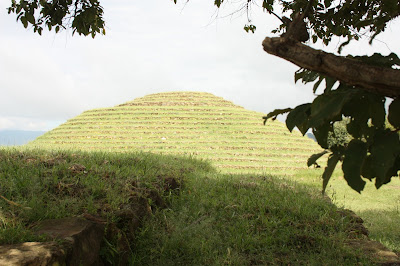
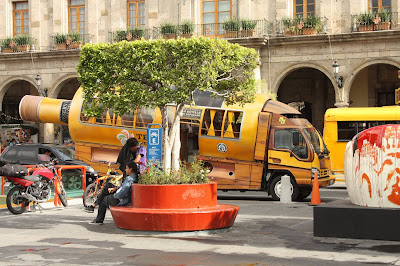
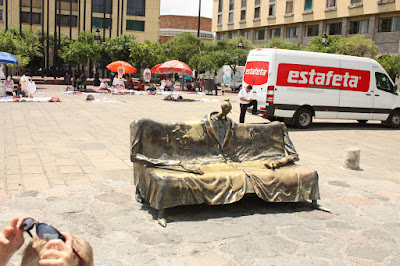
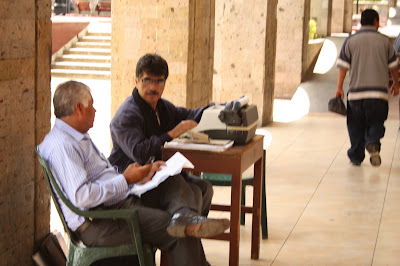
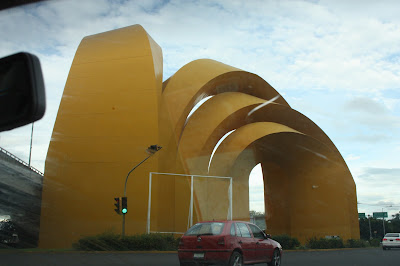
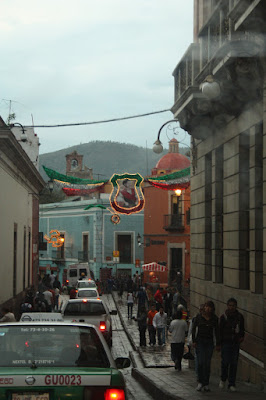
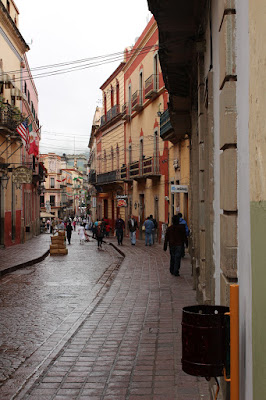
The fourth in a series; see also parts 1, 2, and 3. This post is going to be more a photolog than a narrative, and I apologize in advance for it being a bit disjointed. I ve already touched on these themes a bit in the other post, but now it s time to focus on them. Immediately after leaving the airport, it s quite clear that things are a little different. Trees are square. People ride around in the backs of pickups sometimes on top of piles of debris. Left turns are made in front of other lanes of traffic going the same way. But those are just the things obvious from the road. It s a lot of fun to enjoy the differences. First, the ubiquitous square trees. They look pretty, and are found all over. I also found carefully-manicured trees in cone shapes, more cylindrical shapes, etc. It seems that tree care is taken seriously in Mexico. It was also not uncommon to see the bottom few feet of a tree painted white. A park in Guanajuato had a whole bunch of trees carefully trimmed. And from up on the mountain, it still looked impressive (the green area behind the dome). Driving in Mexico was interesting for a lot of reasons. The highways there aren t quite as limited access as the freeways in the USA. It was quite common to see bicyclists, walkers, a mule, or some cattle ambling along the side of the road. Roadside taco stands don t require taking an exit. You just pull off the road because it s right there. Some sights were a bit surprising. Cattle in a pickup, with rope, for instance. Or cattle crossing the highway on the overpass. Street vendors were everywhere. Stop at a red light and someone might spring from the side of the road and suddenly start washing your windshield (expecting a tip); try to sell you flowers, juice, or bug zappers; or even throw business card-sized advertisements for adult websites into any open windows they can find. One night we saw an incredible fire juggler. I would have tipped him well but he was too far away to do so before the light turned green. Mexico s history stretches back into prehistoric times, and we saw the Teuchitlan ruins at Guachimontones one day. It was truly a remarkable feeling to be able to walk down the middle of the ancient ball court, or to climb up one pyramid and see the other from it. It s not exactly architecture, but Jacob and Oliver sure enjoyed visiting the hot springs at Bosque de la Primavera. Jacob still remembers that where the steam is, the water is 200 degrees, and we CAN T TOUCH IT THERE! Back in Guadalajara, here s a photo from the inside of the grand old cathedral. Compared to the cathedrals we saw in Europe, this was of a similar general size and design, and perhaps only slightly newer. But one big difference: worshipers outnumbered tourists at every Mexican cathedral I saw, whether in the center of Guadalajara or at a rainy intersection in Guanajuato or a plaza in Tlaquepaque. It made them feel more alive, and perhaps more sacred as well. One surprise was seeing people sitting on the steps of the cathedral in downtown Guadalajara selling trinkets such as beads. I think the only other place I had seen something like that was in New Orleans. All of Guadalajara s Centro was beautiful. Much of it survives from colonial days; I think a person could spend days exploring its museums and buildings. Way too many of my 900 photos were taken in Centro to post on the blog, but just for flavor, here s one of the less than historic scenes. Yes, that is a bus shaped like a tequila bottle. Fountains were beautiful and common across Mexico. A few of them were easily reachable by boys, and ours sure loved those. There was a lot of public art, including this interesting chair/skeleton/I m not sure what it is: And, just for good measure while walking around Centro, they tossed in an apparent Redundant Array of Inexpensive Typewriters. I don t know what they were doing, but there were about a dozen guys sitting out in the sun typing on their manual typewriters on their identical tables. And who can leave Guadalajara without seeing one of North America s most impressive traffic circles. I ve got to hand it to the Mexicans for making something that is normally really boring into an interesting work of art. Over in Guanajuato, a lot of driving takes place in the city s vast underground tunnel system. Here s a scene emerging from one of them. Guanajuato was already getting decorated for Mexican independence day festivities (Sept. 15-16) while we were there. Here s a typical Guanajuato street scene. Many of the streets were closed to traffic and perhaps not wide enough to handle vehicles anyway. Those streets had a wonderful peaceful and slow feel to them. I feel that I ve barely done the trip justice with this post. The feelings of walking down a beautiful Guanajuato street, or stepping into a Spanish cathedral, or even seeing a bunch of guys with typewriters, just can t be replicated. It s brimming with history and character, and shouldn t be missed.

13 September 2011

Kai Wasserb ch: Time-critical: Sign the petition against a new data retention law

If you're a German citizen and haven't signed the petition against a new data retention law, then sign it immediately, please. There are approximately [UPDATE]five twenty-five*[/UPDATE] hours left (after that you can still sign the petition until 2011-10-06, but it won't help in the endeavour to cause a public meeting of the petition committee). If you know somebody, who hasn't signed, get the word to them. [UPDATE]* According to netzpolitik.org the deadline for triggering a public meeting of the petition committee was moved to 2011-09-14 23:59 (CEST), which gives you another 24 hours to sign the petition in time (or get others to sign it). Please use that time![/UPDATE] [UPDATE2 (2011-09-14)]netzpolitik.org moved the entry about the deadline change to a new blog post, thus I've updated the link above. If you need instructions for the signing process, you can watch Endspurt: Petition gegen die Vorratsdatenspeicherung .[/UPDATE2 (2011-09-14)] [UPDATE3 (2011-09-14)]We did it! Keep it up![/UPDATE3 (2011-09-14)]

Christian Perrier: 10 years being Debian Developer - part 4: NM process

So, this story begins in January 2001, when I applied in the Debian New Maintainer Process. I wanted to maintain Geneweb, which I was using to publish my genealogy research results. And I wanted to keep it up-to-date while upstream was doing a quite fast development. Moreover, I quickly noticed that Geneweb had big trouble in respecting the way data is organized on a Debian system, and respect the FHS. How to have weveral users able to publish their data on the same server without compromizing the overall system security, etc. Upstream development didn't really care about that. Daniel de Rauglaudre is an excellent genealogist and developer but he was not interested in making Geneweb clean "the Debian way". For instance, at that time, it wasn't easy to setup a server, where genealogy databases could be published without having to manually launch a daemon in user mode at each reboot. Arranging this was indeed my first contribution. I contributed a few patches to make it easier to turn Geneweb into something FHS-compliant...and I developed init scripts and an organization allowing one to have shared databases after system reboots. That was rapidly a great introduction to Debian maintainer scripts and even security-related challenges. And all this....because I needed it. Basically, in 2001, the geneweb package adopted the organization it still has in Debian and Ubuntu, 10 years later: While doing so, I was going through the New Maintainer Process. The Debian developer who had signed my key was Sam Tardieu, of of those longstanding "Freenix" dudes I was sometimes hanging around. I don't remember who did write my advocacy. Michael Mattice was my first Application Manager. Interestingly, here are the three first questions he asked my as part of the Policy and Procedures check : Mike actually asked the questions on February 17th and I probably answered immediately. Unfortunately it seems that I lost my answers. Maybe they are in some archive somewhere. Would be interesting to see how I ended giving an answer about the TeX exception.:-) Immediately, Mike moved to the Tasks and Skills step and checked my geneweb and lifelines packages (I already prepared a package for that other genealogy software). From my records, he found a few lintian warnings, which I probably made my best to fix, then later on, on March 12th, he answered me that thigns were OK and he was marking the T&S step as passed...handing things over to the NM database, asking me what username I wanted on debian.org (obviously, you know what I answered to this!). Then nothing happened..:-) I was not that impatient, but finally, around June 27th, I politely mailed NM Frontdesk (I guess) to get news...and I got a very quick answer by Martin Michlmayr. Martin was indeed worried about the situation (he told me I was on his radar....fun as, many years later, as many DDs, Martin probably went on mine because of pending localization work..:-)) Finally, Martin decided he was not entirely happy with the (maybe too short) processing for P&P and proposed me (very politely, you know how Martin is!) to do it again. So, some more questions...:-) Here, I have the answers. Really fun ro read. Hang on, pure bubulle style, very verbose! What a bunch of questions..:-). Reading my answers ten years after, I see that some answers are somehow naive but, after all, they're not so bad. I really remember spending hours in writing them (my English was somehow more shaky at that time) The last question was: "Please tell me about about yourself and what you intend to do for Debian". Here, Martin opened a big can of worms..:-) So, you'll learn about this in the next episode..:-)

12 September 2011

Antonio Terceiro: Laptop fun, or "WTF, HP?"

A couple of weeks ago my old laptop decided to rest forever, and I was forced to impose some economic pressure onto the consumption of the planet resources by acquiring a new one. Fortunately this happened while I am still here in Canada, where it is reasonably cheaper to get a decent laptop than it is in Brazil. Although I did not have the budget I wanted for buying a really kick ass laptop, I was able to buy a decent one, an HP Pavilion G6 1B74CA. I went on 4 different shops with a USB stick loaded with Debian Live to check whether all the hardware would work ok. I always asked one of the salesman before rebooting the laptops, but it was funny to see the reactions of the different employees who came by to check what I was doing: some of them barely noticed that GNOME was not Windows XYZ, and and some asked whether I was hacking the laptops. Unfortunately, I wasn t able to find a single laptop in which the wireless worked out of the box with the Squeeze kernel, which sucks. I searched over the internet a lot, and it seems that even the vendors recommended by the FSF do not provide laptops with wireless cards that work without non-free blobs. Other issue I had was with the Intel graphics. After the kernel enables the modesetting, the backlight goes to the minimum and it looks like you have no video. There are a couple of workarounds in the internet, and the one in which you add acpi_osi=Linux acpi_backlight=vendor to the kernel parameters makes the laptop turn on by itself in the morning. This is probably caused by broken ACPI handling in the BIOS, who almost always is written by people on crack. The other issues I had were related to the keyboard. First, the BIOS came by default with Access keys mode enabled, which means that by default pressing F2-F12 actually activated the multimedia keys instead of the real function keys. It was disapointing to hit F12 and have my wireless turned off. After disabling this in the BIOS setup, it was OK. Well, not quite: for some reason, Fn+F4 did not generate the expected keycodes. After some research on the internet, I found a interesting Ubuntu bug . It seems that the latest and greatest version of Windows starts its video setup application via the Meta+P shortcut ( Meta is the actual name of what Windows people call the Windows key ). Guess what the morons writing the HP BIOS did yes, they made the keys Fn+F4 (where F4 has video setup as its multimedia key ) generate the keycodes for Meta+P! It would be a lot easier for everyone in the world if the people at Microsoft just make their stuff listen to both Meta+P and the video setup keycode, which is generated by every laptop out there, to activate the Windows screen setup thing. This way the very smart dudes writing BIOS at HP wouldn t need to make Fn+F4 generate the keycodes for Meta+P and break every single desktop that is not procuced at Redmond.

Wouter Verhelst: "Yoe" or "wouter"?

For the longest time, I went by the nick "Yoe" when I went on IRC. When I chose this nick for myself, I was sixteen, and the Internet computer at the local public library had an IRC client installed that I tried out. Obviously, my first choice of nick -- "wouter", a fairly common first name in Dutch-speaking regions -- was already chosen, so I had to come up with something else. If I'd realized that I'd still be using this nick today, seventeen years later, I might have chosen that nick with a bit more care... Over the years, some people have asked me what the nickname meant, where it came from. I've never really told anyone the entire story, mainly because it was somewhat embarrasing. But hey, we've all been 16, right? In the early nineties, there was a show on TV called "Het huis van wantrouwen". On this show, they had a running joke involving a short clip of Belgian members of parliament informally voting on a subject by raising hands (literally); the joke was that this clip was dubbed with a bunch of people saying "Yoe, de manne" -- which is dutch for something along the lines of "Yo, guys". As a young geeky teenager, I found this joke way more funny than it actually was; and as such, a few years later, during one of the more weird episodes of my life, I started pranking people by sneaking up to them from behind and shouting "Yoe, de manne" right next to their ears. I even managed to do this to one of our teachers who was walking on the playground. This was just around the time when I first tried out this "IRC" thing. It didn't take me too long to realize I was the only person who thought this "joke" was funny; but somehow the nick stuck, and here we are, 17 years later, I'm still using it. Or, well, I was. As of today, if you want to catch me on IRC, you'll find me going by "wouter" instead of "Yoe". Of course someone had registered that nick several years ago, but then he hadn't been using it in years, and so after a quick request to the OFTC admins they made it available for me. Whee.

11 September 2011

Andrea Veri: A few other additions to my Mutt and Desktop setup!

A few days ago I blogged about my main computer s configuration files and desktop s appearance and today I managed to add a few little tweaks to those, they are: Curious to know how you can easily integrate your Google s contacts into Mutt? Well, you should be able to achieve that within a few minutes after reading this small HowTo: 1. Download and install goobook as explained here. 2. Setup a .goobookrc file into your Home directory. It should look like this:
machine google.com
 login example@gmail.com
 password yourpassword
3. Add the relevant configuration bits into your /etc/Muttrc file:
set query_command="goobook query '%s'"
bind editor <Tab> complete-query
macro index,pager a "<pipe-message>goobook add<return>" "Add sender's address to your Google contacts"
4. Your configuration should be good to go now, so here s a few examples on goobook s usage within Mutt: We can now move on on customizing your Login Screen running GDM3. Let s begin with a screenshoot: I definitely love it, it s clear and clean and most of all it has everything I need, no extra toolbars or menus. If you agree with me, open up the /etc/gdm3/greeter.gconf-defaults file and do the needed changes. This is how your greeter.gconf-defaults file should look like:
/desktop/gnome/background/picture_filename      /path/to/your/dusty-bg/file # dusty's background can be downloaded here.
/desktop/gnome/interface/gtk_theme              Darklooks # this is my main theme, feel free to adapt that to your needs.
/apps/gdm/simple-greeter/logo_icon_name         debian-swirl # this is the default on Debian's systems.
/desktop/gnome/sound/event_sounds               false # I don't like hearing any sound when when I am prompted to insert my user's details on the Login Screen.
/apps/gdm/simple-greeter/disable_user_list      true # users list will be disabled, you won't be able to select your username from a list but you'll have to insert that yourself.
/apps/metacity/general/compositing_manager      false # default, no need to change this.
/apps/gnome-power-manager/ui/icon_policy        never # default, no need to change this.
We are close to the end but we are missing an important detail: how can you safely remove bottom s toolbar and menus for a clearer and cleaner Login Screen? Open up the /var/lib/gdm3/.gconf.mandatory/%gconf-tree.xml file, search for the <dir name= general > section and apply the following change:
- <entry name="compositing_manager" mtime="1315580582" type="bool" value="false"/>
+ <entry name="compositing_manager" mtime="1315580582" type="bool" value="true"/>
But what if you prefer keeping the toolbar as it is, but you definitely don t like seeing the Accessibility icon appearing on your Login Screen? On the same file as above, search for the <dir name= accessibility > section and modify the following string as it follows:
- <entry name="enable" mtime="1315580582" type="bool" value="true"/>
+ <entry name="enable" mtime="1315580582" type="bool" value="false"/>
See you on my next blog post and don t forget to have a look at my GitHub s repository! Oh and follow me on Twitter!

Next.

Previous.