Search Results: "zed"

4 February 2023

Jonathan Dowland: FreedomBox

personal servers Moxie Marlinspike, former CEO of Signal, wrote a very interesting blog post about "web3", the crypto-scam1. It's worth a read if you are interested in that stuff. This blog post, however, is not about crypto-scams; but I wanted to quote from the beginning of the article:
People don t want to run their own servers, and never will. The premise for web1 was that everyone on the internet would be both a publisher and consumer of content as well as a publisher and consumer of infrastructure. We d all have our own web server with our own web site, our own mail server for our own email, our own finger server for our own status messages, our own chargen server for our own character generation. However and I don t think this can be emphasized enough that is not what people want. People do not want to run their own servers.
What's interesting to me about this is I feel that he's right: the vast, vast majority of people almost certainly do not want to run their own servers. Yet, I decided to. I started renting a Linux virtual server2 close to 20 years ago3, but more recently, decided to build and run a home NAS, which was a critical decision for getting my personal data under control. FreedomBox and Debian I am almost entirely dormant within the Debian project these days, and that's unlikely to change in the near future, at least until I wrap up some other commitments. I do sometimes mull over what I would do within Debian, if/when I return to the fold. And one thing I could focus on, since I am running my own NAS, would be software support for that sort of thing. FreedomBox is a project that bills itself as a private server for non-experts: in other words, it's almost exactly the thing that Marlinspike states people don't want. Nonetheless, it is an interesting project. And, it's a Debian Pure Blend: which is to say (quoting the previous link) a subset of Debian that is tailored to be used out-of-the-box in a particular situation or by a particular target group. So FreedomBox is a candidate project for me to get involved with, especially (or more sensibly, assuming that) I end up using some of it myself. But, that's not the only possibility, especially after a really, really good conversation I had earlier today with old friends Neil McGovern and Chris Boot

  1. crypto-scam is my characterisation, not Marlinspike's.
  2. hosting, amongst other things, the site you are reading
  3. The Linux virtual servers replaced an ancient beige Pentium that was running as an Internet server from my parent's house in the 3-4 years before that.

2 February 2023

John Goerzen: Using Yggdrasil As an Automatic Mesh Fabric to Connect All Your Docker Containers, VMs, and Servers

Sometimes you might want to run Docker containers on more than one host. Maybe you want to run some at one hosting facility, some at another, and so forth. Maybe you d like run VMs at various places, and let them talk to Docker containers and bare metal servers wherever they are. And maybe you d like to be able to easily migrate any of these from one provider to another. There are all sorts of very complicated ways to set all this stuff up. But there s also a simple one: Yggdrasil. My blog post Make the Internet Yours Again With an Instant Mesh Network explains some of the possibilities of Yggdrasil in general terms. Here I want to show you how to use Yggdrasil to solve some of these issues more specifically. Because Yggdrasil is always Encrypted, some of the security lifting is done for us.

Background Often in Docker, we connect multiple containers to a single network that runs on a given host. That much is easy. Once you start talking about containers on multiple hosts, then you start adding layers and layers of complexity. Once you start talking multiple providers, maybe multiple continents, then the complexity can increase. And, if you want to integrate everything from bare metal servers to VMs into this well, there are ways, but they re not easy. I m a believer in the KISS principle. Let s not make things complex when we don t have to.

Enter Yggdrasil As I ve explained before, Yggdrasil can automatically form a global mesh network. This is pretty cool! As most people use it, they join it to the main Yggdrasil network. But Yggdrasil can be run entirely privately as well. You can run your own private mesh, and that s what we ll talk about here. All we have to do is run Yggdrasil inside each container, VM, server, or whatever. We handle some basics of connectivity, and bam! Everything is host- and location-agnostic.

Setup in Docker The installation of Yggdrasil on a regular system is pretty straightforward. Docker is a bit more complicated for several reasons:
  • It blocks IPv6 inside containers by default
  • The default set of permissions doesn t permit you to set up tunnels inside a container
  • It doesn t typically pass multicast (broadcast) packets
Normally, Yggdrasil could auto-discover peers on a LAN interface. However, aside from some esoteric Docker networking approaches, Docker doesn t permit that. So my approach is going to be setting up one or more Yggdrasil router containers on a given Docker host. All the other containers talk directly to the router container and it s all good.

Basic installation In my Dockerfile, I have something like this:
FROM jgoerzen/debian-base-security:bullseye
RUN echo "deb http://deb.debian.org/debian bullseye-backports main" >> /etc/apt/sources.list && \
    apt-get --allow-releaseinfo-change update && \
    apt-get -y --no-install-recommends -t bullseye-backports install yggdrasil
...
COPY yggdrasil.conf /etc/yggdrasil/
RUN set -x; \
    chown root:yggdrasil /etc/yggdrasil/yggdrasil.conf && \
    chmod 0750 /etc/yggdrasil/yggdrasil.conf && \
    systemctl enable yggdrasil
The magic parameters to docker run to make Yggdrasil work are:
--cap-add=NET_ADMIN --sysctl net.ipv6.conf.all.disable_ipv6=0 --device=/dev/net/tun:/dev/net/tun
This example uses my docker-debian-base images, so if you use them as well, you ll also need to add their parameters. Note that it is NOT necessary to use --privileged. In fact, due to the network namespaces in use in Docker, this command does not let the container modify the host s networking (unless you use --net=host, which I do not recommend). The --sysctl parameter was the result of a lot of banging my head against the wall. Apparently Docker tries to disable IPv6 in the container by default. Annoying.

Configuration of the router container(s) The idea is that the router node (or more than one, if you want redundancy) will be the only ones to have an open incoming port. Although the normal Yggdrasil case of directly detecting peers in a broadcast domain is more convenient and more robust, this can work pretty well too. You can, of course, generate a template yggdrasil.conf with yggdrasil -genconf like usual. Some things to note for this one:
  • You ll want to change Listen to something like Listen: ["tls://[::]:12345"] where 12345 is the port number you ll be listening on.
  • You ll want to disable the MulticastInterfaces entirely by just setting it to [] since it doesn t work anyway.
  • If you expose the port to the Internet, you ll certainly want to firewall it to only authorized peers. Setting AllowedPublicKeys is another useful step.
  • If you have more than one router container on a host, each of them will both Listen and act as a client to the others. See below.

Configuration of the non-router nodes Again, you can start with a simple configuration. Some notes here:
  • You ll want to set Peers to something like Peers: ["tls://routernode:12345"] where routernode is the Docker hostname of the router container, and 12345 is its port number as defined above. If you have more than one local router container, you can simply list them all here. Yggdrasil will then fail over nicely if any one of them go down.
  • Listen should be empty.
  • As above, MulticastInterfaces should be empty.

Using the interfaces At this point, you should be able to ping6 between your containers. If you have multiple hosts running Docker, you can simply set up the router nodes on each to connect to each other. Now you have direct, secure, container-to-container communication that is host-agnostic! You can also set up Yggdrasil on a bare metal server or VM using standard procedures and everything will just talk nicely!

Security notes Yggdrasil s mesh is aggressively greedy. It will peer with any node it can find (unless told otherwise) and will find a route to anywhere it can. There are two main ways to make sure your internal comms stay private: by restricting who can talk to your mesh, and by firewalling the Yggdrasil interface. Both can be used, and they can be used simultaneously. By disabling multicast discovery, you eliminate the chance for random machines on the LAN to join the mesh. By making sure that you firewall off (outside of Yggdrasil) who can connect to a Yggdrasil node with a listening port, you can authorize only your own machines. And, by setting AllowedPublicKeys on the nodes with listening ports, you can authenticate the Yggdrasil peers. Note that part of the benefit of the Yggdrasil mesh is normally that you don t have to propagate a configuration change to every participatory node that s a nice thing in general! You can also run a firewall inside your container (I like firehol for this purpose) and aggressively firewall the IPs that are allowed to connect via the Yggdrasil interface. I like to set a stable interface name like ygg0 in yggdrasil.conf, and then it becomes pretty easy to firewall the services. The Docker parameters that allow Yggdrasil to run are also sufficient to run firehol.

Naming Yggdrasil peers You probably don t want to hard-code Yggdrasil IPs all over the place. There are a few solutions:
  • You could run an internal DNS service
  • You can do a bit of scripting around Docker s --add-host command to add things to /etc/hosts

Other hints & conclusion Here are some other helpful use cases:
  • If you are migrating between hosts, you could leave your reverse proxy up at both hosts, both pointing to the target containers over Yggdrasil. The targets will be automatically found from both sides of the migration while you wait for DNS caches to update and such.
  • This can make services integrate with local networks a lot more painlessly than they might otherwise.
This is just an idea. The point of Yggdrasil is expanding our ideas of what we can do with a network, so here s one such expansion. Have fun!
Note: This post also has a permanent home on my webiste, where it may be periodically updated.

1 February 2023

Simon Josefsson: Apt Archive Transparency: debdistdiff & apt-canary

I ve always found the operation of apt software package repositories to be a mystery. There appears to be a lack of transparency into which people have access to important apt package repositories out there, how the automatic non-human update mechanism is implemented, and what changes are published. I m thinking of big distributions like Ubuntu and Debian, but also the free GNU/Linux distributions like Trisquel and PureOS that are derived from the more well-known distributions. As far as I can tell, anyone who has the OpenPGP private key trusted by a apt-based GNU/Linux distribution can sign a modified Release/InRelease file and if my machine somehow downloads that version of the release file, my machine could be made to download and install packages that the distribution didn t intend me to install. Further, it seems that anyone who has access to the main HTTP server, or any of its mirrors, or is anywhere on the network between them and my machine (when plaintext HTTP is used), can either stall security updates on my machine (on a per-IP basis), or use it to send my machine (again, on a per-IP basis to avoid detection) a modified Release/InRelease file if they had been able to obtain the private signing key for the archive. These are mighty powers that warrant overview. I ve always put off learning about the processes to protect the apt infrastructure, mentally filing it under so many people rely on this infrastructure that enough people are likely to have invested time reviewing and improving these processes . Simultaneous, I ve always followed the more free-software friendly Debian-derived distributions such as gNewSense and have run it on some machines. I ve never put them into serious production use, because the trust issues with their apt package repositories has been a big question mark for me. The enough people part of my rationale for deferring this is not convincing. Even the simple question of is someone updating the apt repository is not easy to understand on a running gNewSense system. At some point in time the gNewSense cron job to pull in security updates from Debian must have stopped working, and I wouldn t have had any good mechanism to notice that. Most likely it happened without any public announcement. I ve recently switched to Trisquel on production machines, and these questions has come back to haunt me. The situation is unsatisfying and I looked into what could be done to improve it. I could try to understand who are the key people involved in each project, and may even learn what hardware component is used, or what software is involved to update and sign apt repositories. Is the server running non-free software? Proprietary BIOS or NIC firmware? Are the GnuPG private keys on disk? Smartcard? TPM? YubiKey? HSM? Where is the server co-located, and who has access to it? I tried to do a bit of this, and discovered things like Trisquel having a DSA1024 key in its default apt trust store (although for fairness, it seems that apt by default does not trust such signatures). However, I m not certain understanding this more would scale to securing my machines against attacks on this infrastructure. Even people with the best intentions, and the state of the art hardware and software, will have problems. To increase my trust in Trisquel I set out to understand how it worked. To make it easier to sort out what the interesting parts of the Trisquel archive to audit further were, I created debdistdiff to produce human readable text output comparing one apt archive with another apt archive. There is a GitLab CI/CD cron job that runs this every day, producing output comparing Trisquel vs Ubuntu and PureOS vs Debian. Working with these output files has made me learn more about how the process works, and I even stumbled upon something that is likely a bug where Trisquel aramo was imported from Ubuntu jammy while it contained a couple of package (e.g., gcc-8, python3.9) that were removed for the final Ubuntu jammy release. After working on auditing the Trisquel archive manually that way, I realized that whatever I could tell from comparing Trisquel with Ubuntu, it would only be something based on a current snapshot of the archives. Tomorrow it may look completely different. What felt necessary was to audit the differences of the Trisquel archive continously. I was quite happy to have developed debdistdiff for one purpose (comparing two different archives like Trisquel and Ubuntu) and discovered that the tool could be used for another purpose (comparing the Trisquel archive at two different points in time). At this time I realized that I needed a log of all different apt archive metadata to be able to produce an audit log of the differences in time for the archive. I create manually curated git-repositories with the Release/InRelease and the Packages files for each architecture/component of the well-known distributions Trisquel, Ubuntu, Debian and PureOS. Eventually I wrote scripts to automate this, which are now published in the debdistget project. At this point, one of the early question about per-IP substitution of Release files were lingering in my mind. However with the tooling I now had available, coming up with a way to resolve this was simple! Merely have apt compute a SHA256 checksum of the just downloaded InRelease file, and see if my git repository had the same file. At this point I started reading the Apt source code, and now I had more doubts about the security of my systems than I ever had before. Oh boy how the name Apt has never before felt more Apt?! Oh well, we must leave some exercises for the students. Eventually I realized I wanted to touch as little of apt code basis as possible, and noticed the SigVerify::CopyAndVerify function called ExecGPGV which called apt-key verify which called GnuPG s gpgv. By setting Apt::Key::gpgvcommand I could get apt-key verify to call another tool than gpgv. See where I m going? I thought wrapping this up would now be trivial but for some reason the hash checksum I computed locally never matched what was on my server. I gave up and started working on other things instead. Today I came back to this idea, and started to debug exactly how the local files looked that I got from apt and how they differed from what I had in my git repositories, that came straight from the apt archives. Eventually I traced this back to SplitClearSignedFile which takes an InRelease file and splits it into two files, probably mimicking the (old?) way of distributing both Release and Release.gpg. So the clearsigned InRelease file is split into one cleartext file (similar to the Release file) and one OpenPGP signature file (similar to the Release.gpg file). But why didn t the cleartext variant of the InRelease file hash to the same value as the hash of the Release file? Sadly they differ by the final newline. Having solved this technicality, wrapping the pieces up was easy, and I came up with a project apt-canary that provides a script apt-canary-gpgv that verify the local apt release files against something I call a apt canary witness file stored at a URL somewhere. I m now running apt-canary on my Trisquel aramo laptop, a Trisquel nabia server, and Talos II ppc64el Debian machine. This means I have solved the per-IP substitution worries (or at least made them less likely to occur, having to send the same malicious release files to both GitLab and my system), and allow me to have an audit log of all release files that I actually use for installing and downloading packages. What do you think? There are clearly a lot of work and improvements to be made. This is a proof-of-concept implementation of an idea, but instead of refining it until perfection and delaying feedback, I wanted to publish this to get others to think about the problems and various ways to resolve them. Btw, I m going to be at FOSDEM 23 this weekend, helping to manage the Security Devroom. Catch me if you want to chat about this or other things. Happy Hacking!

29 January 2023

Petter Reinholdtsen: Is the desktop recommending your program for opening its files?

Linux desktop systems have standardized how programs present themselves to the desktop system. If a package include a .desktop file in /usr/share/applications/, Gnome, KDE, LXDE, Xfce and the other desktop environments will pick up the file and use its content to generate the menu of available programs in the system. A lesser known fact is that a package can also explain to the desktop system how to recognize the files created by the program in question, and use it to open these files on request, for example via a GUI file browser. A while back I ran into a package that did not tell the desktop system how to recognize its files and was not used to open its files in the file browser and fixed it. In the process I wrote a simple debian/tests/ script to ensure the setup keep working. It might be useful for other packages too, to ensure any future version of the package keep handling its own files. For this to work the file format need a useful MIME type that can be used to identify the format. If the file format do not yet have a MIME type, it should define one and preferably also register it with IANA to ensure the MIME type string is reserved. The script uses the xdg-mime program from xdg-utils to query the database of standardized package information and ensure it return sensible values. It also need the location of an example file for xdg-mime to guess the format of.
#!/bin/sh
#
# Author: Petter Reinholdtsen
# License: GPL v2 or later at your choice.
#
# Validate the MIME setup, making sure motor types have
# application/vnd.openmotor+yaml associated with them and is connected
# to the openmotor desktop file.
retval=0
mimetype="application/vnd.openmotor+yaml"
testfile="test/data/real/o3100/motor.ric"
mydesktopfile="openmotor.desktop"
filemime="$(xdg-mime query filetype "$testfile")"
if [ "$mimetype" != "$filemime" ] ; then
    retval=1
    echo "error: xdg-mime claim motor file MIME type is $filemine, not $mimetype"
else
    echo "success: xdg-mime report correct mime type $mimetype for motor file"
fi
desktop=$(xdg-mime query default "$mimetype")
if [ "$mydesktopfile" != "$desktop" ]; then
    retval=1
    echo "error: xdg-mime claim motor file should be handled by $desktop, not $mydesktopfile"
else
    echo "success: xdg-mime agree motor file should be handled by $mydesktopfile"
fi
exit $retval
It is a simple way to ensure your users are not very surprised when they try to open one of your file formats in their file browser. As usual, if you use Bitcoin and want to show your support of my activities, please send Bitcoin donations to my address 15oWEoG9dUPovwmUL9KWAnYRtNJEkP1u1b.

Gunnar Wolf: miniDebConf Tamil Nadu 2023

Greetings from Viluppuram, Tamil Nadu, South India! As a preparation and warm-up for DebConf in September, the Debian people in India have organized a miniDebConf. Well, I don t want to be unfair to them They have been regularly organizing miniDebConfs for over a decade, and while most of the attendees are students local to this state in South India (the very tip of the country; Tamil Nadu is the Eastern side, and Kerala, where Kochi is and DebConf will be held, is the Western side), I have talked with attendees from very different regions of this country. This miniDebConf is somewhat similar to similarly-scoped events I have attended in Latin America: It is mostly an outreach conference, but it s also a great opportunity for DDs in India to meet in the famous hallway track. India is incredibly multicultural. Today at the hotel, I was somewhat surprised to see people from Kerala trying to read a text written in Tamil: Not only the languages are different, but the writing systems also are. From what I read, Tamil script is a bit simpler to Kerala s Mayalayam, although they come from similar roots. Of course, my school of thought is that, whenever you visit a city, culture or country that differs from the place you were born, a fundamental component to explore and to remember is Food! And one of the things I most looked forward for this trip was that precisely. I arrived to the Chennai Airport (MAA) 8:15 local time yesterday morning, so I am far from an expert but I have been given (and most happily received) three times biryani (pictured in the photo by this paragraph). It is delicious, although I cannot yet describe the borders of what should or should not be considered proper biryani): The base dish is rice, and you go mixing it with different sauces or foods. What managed to surprise us foreigners is, strangely, well known for us all: there is no spoon. No, the food is not pushed to your mouth using metal or wooden utensils. Not even using a tortilla as back home, or by breaking bits of the injera that serves also as a dish, as in Ethiopia. Sure, there is naan, but it is completely optional, and would be a bit too much for as big a big dish as what we have got. Biryani is eaten With the tools natural to us primates: the fingers. We have learnt some differnt techniques but so far, I am still using the base technique (thumb-finger-middle). I m closing the report with the photo of the closing of the conference as it happens. And I will, of course, share our adventures as they unfold in the next couple of days. Because Well, we finished with the conference-y part of the trip, but we have a full week of (pre-)DebConf work ahead of us!

Valhalla's Things: Hello World!

Posted on January 29, 2023
Welcome to my new blog! Or rather, strictly speaking, welcome to my first blog! Back when everybody had a blog, I had an old-fashioned personal website where pages were organized by topic rather than by date, so now that blogs are dead (or so they say), I guess it s time for me to have one :) . The old website is still online, but updating it is getting harder, both for organizational reasons and because the static generator I ve used is no longer supported and requires python 2; lately I ve started publish some specific categories of material such as sewing patterns into their own website (you can find a list in the about page), but I was missing a place to post about the history and experiences of the things I publish elsewhere, as well as more uncategorized things. Of course I ve chosen to use a static site generator, but since I m picky I ve discarded most of the common ones mostly because they enforce assumptions I don t agree with. On the other hand, one day I wouldn t mind learning a bit of Haskell, so I decided to look for trouble and use Hakyll, hoping that nobody will add a level 20 wandering monster to it. Right now I m using mostly the default theme, because I know that if I start fiddling with it I m not going to start posting content ever; maybe one day I ll decide to completely change the look. As for contents, on the bits side of things you can expect me to talk about Debian, the Fediverse, Python, my inventory manging program and a bit of arduino-level electronics; on the atom side you should definitely expect sewing, modern and mostly historically inspired, some fiber crafts (spinning, knitting, crochet), maybe some bad attempts at painting (watercolours and acrilics), printing (screen and linocut), things that are written on paper and, well, any other craft I will happen to collect. Before the blog gets too full I plan to add tag management to help people who are only interested in some of these contents. This being a blog, of course it has an atom feed you can add to your favourite (and ideally self-hosted) rss reader, and since this is a personal blog there will be no periodicity, posts will happen when I ll have something to say on some topic. Until next time

28 January 2023

Scarlett Gately Moore: KDE Snaps, Debian uploads and much more in the works!

Witch Wells, AZ SnowWitch Wells, AZ Snow
It has been a very busy few weeks as we endured snowstorm after snowstorm! I have made some progress on the Mycroft in debian adventure! This will slow down as we enter freeze for bookworm and there is no way we will make it into bookworm as there are some significant issues to solve. On the KDE side of things: In the Snap arena, I have made my first significant contribution to snapcraft upstream! It has been a great learning experience as I convert my Ruby knowledge to Python. Formatting is something I need to get used to! https://github.com/snapcore/snapcraft/pull/4023 Snaps have been on hold due to the kde-neon extension not having core22 support and the above pull request fixes that. Meanwhile, I have been working on getting core20 apps ( 22.08.3 final KDE apps version for this base. ) rebuilt for security updates. As many of you know, I am seeking employment. I am a hard worker, that thrives on learning new things. I am a self starter, knowledge sponge, and eager to be an asset to < insert your company here > ! Meanwhile, as interview processes are much longer than I remember and the industry exploding in layoffs, I am coming up short on living expenses as my unemployment lingers on. Please consider donating to my gofundme. Thank you for your consideration. GoFundMe

27 January 2023

Matthew Garrett: Further adventures in Apple PKCS#11 land

After my previous efforts, I wrote up a PKCS#11 module of my own that had no odd restrictions about using non-RSA keys and I tested it. And things looked much better - ssh successfully obtained the key, negotiated with the server to determine that it was present in authorized_keys, and then went to actually do the key verification step. At which point things went wrong - the Sign() method in my PKCS#11 module was never called, and a strange
debug1: identity_sign: sshkey_sign: error in libcrypto
sign_and_send_pubkey: signing failed for ECDSA "testkey": error in libcrypto"

error appeared in the ssh output. Odd. libcrypto was originally part of OpenSSL, but Apple ship the LibreSSL fork. Apple don't include the LibreSSL source in their public source repo, but do include OpenSSH. I grabbed the OpenSSH source and jumped through a whole bunch of hoops to make it build (it uses the macosx.internal SDK, which isn't publicly available, so I had to cobble together a bunch of headers from various places), and also installed upstream LibreSSL with a version number matching what Apple shipped. And everything worked - I logged into the server using a hardware-backed key.

Was the difference in OpenSSH or in LibreSSL? Telling my OpenSSH to use the system libcrypto resulted in the same failure, so it seemed pretty clear this was an issue with the Apple version of the library. The way all this works is that when OpenSSH has a challenge to sign, it calls ECDSA_do_sign(). This then calls ECDSA_do_sign_ex(), which in turn follows a function pointer to the actual signature method. By default this is a software implementation that expects to have the private key available, but you can also register your own callback that will be used instead. The OpenSSH PKCS#11 code does this by calling EC_KEY_set_method(), and as a result calling ECDSA_do_sign() ends up calling back into the PKCS#11 code that then calls into the module that communicates with the hardware and everything works.

Except it doesn't under macOS. Running under a debugger and setting a breakpoint on EC_do_sign(), I saw that we went down a code path with a function called ECDSA_do_sign_new(). This doesn't appear in any of the public source code, so seems to be an Apple-specific patch. I pushed Apple's libcrypto into Ghidra and looked at ECDSA_do_sign() and found something that approximates this:
nid = EC_GROUP_get_curve_name(curve);
if (nid == NID_X9_62_prime256v1)  
  return ECDSA_do_sign_new(dgst,dgst_len,eckey);
 
return ECDSA_do_sign_ex(dgst,dgst_len,NULL,NULL,eckey);
What this means is that if you ask ECDSA_do_sign() to sign something on a Mac, and if the key in question corresponds to the NIST P256 elliptic curve type, it goes down the ECDSA_do_sign_new() path and never calls the registered callback. This is the only key type supported by the Apple Secure Enclave, so I assume it's special-cased to do something with that. Unfortunately the consequence is that it's impossible to use a PKCS#11 module that uses Secure Enclave keys with the shipped version of OpenSSH under macOS. For now I'm working around this with an SSH agent built using Go's agent module, forwarding most requests through to the default session agent but appending hardware-backed keys and implementing signing with them, which is probably what I should have done in the first place.

comment count unavailable comments

26 January 2023

Matt Brown: Goals for 2023

This is the second of a two-part post covering my goals for 2023. See the first part to understand the vision, mission and strategy driving these goals. I want to thank my friend Nat, and Will Larson whose annual reviews I ve always enjoyed reading for inspiring me to write these posts. I ve found the process articulating my motivations and goals very useful to clarify my thoughts and create tangible next steps. I m grateful for that in and of itself, but I also hope that by publishing this you too might find it interesting, and the additional public accountability it creates will be a positive encouragement to me.

2023 Goals My focus for 2023 is to bootstrap a business that I can use to build software that solves real problems (see the strategy from the previous post for more details on this). I m going to track this via three goals:
  1. Execute a series of successful consulting engagements, building a reputation for myself and leaving happy customers willing to provide testimonials that support a pipeline of future opportunities.
  2. Grow my product development skill set by taking several ideas to MVP stage with customer feedback received, and launch at least one product which generates revenue and has growth potential.
  3. Develop and maintain a broad professional network.

Consulting Based on my background and experience, I plan to target my consulting across three areas:
  1. Leadership - building and growing operationally focused software teams following SRE/devops principles. A typical engagement may involve helping a client establish a brand new SRE/devops practice, or to strengthen and mature the existing practices used to build and operate reliable software in their team(s).
  2. Architecture - applying deep technical expertise to the design of large software systems, particularly focusing on their reliability and operability. A typical engagement may involve design input and decision making support for key aspects of a new system, providing external review and analysis to improve an existing system, or delivering actionable, tactical next steps during or immediately after a reliability crisis.
  3. Technology Strategy - translating high-level business needs into a technical roadmap that provides understandable explanations of the value software can deliver in that context, and the iterative series of appropriately sized projects required to realise it. A typical customer for this would be a small to medium sized business outside of the software industry with a desire to use software in a transformative way to improve their business but who does not employ the necessary in-house expertise to lead that transition.

Product Development There are three, currently extremely high level, product ideas that I m excited to explore:
  1. Improve co-ordination of electricity resources to accelerate the electrification of NZ s energy demand and the transition to zero carbon grid. NZ has huge potential to be a world-leader in decarbonising energy use through electrification, but requires a massive transition to realise the benefits. Many of the challenges to that transition involve coordination of an order of magnitude more distributed energy resources (DER) in a much more dynamic and software-oriented manner than the electricity industry is traditionally experienced with. The concept of improving DER coordination is not novel, but our grid has unique characteristics that mean we re likely to need to build localised solutions. There is a strong match between my experience with large, high-reliability distributed software systems, and this need. With renewed motivation in the industry for rapid progress and many conversations and consultations still in their early stages this a very compelling space to explore with the intent of developing a more detailed product opportunity to pursue.
  2. Reduce agricultural emissions by making high performance farm management, including effortless compliance reporting, straightforward, fun and effective for busy farmers. NZ s commitments to reduce agricultural emissions (our largest single sector) place increased compliance and reporting burdens on busy farmers who don t want to report the same data multiple times to different regulators and authorities. In tandem, rising business costs and constraints drive a need for continuous improvements in efficiency, performance and farm management processes in order to remain profitable. This in turn drives increases in complexity and the volume of data that farmers must work with. Many industry organisations and associated software developers offer existing products aimed at addressing aspects of these problems, but anecdotal feedback indicates these are poorly integrated, piecemeal solutions that are often frustrating to use - a burden rather than a source of continuous improvement. It looks like there could be an opportunity for a delightful, comprehensive farm management and reporting system to disrupt the industry and help farmers run more profitable and sustainable farms while also reducing compliance costs and effort.
  3. Lower sickness rates and improve cognitive performance by enabling every indoor space to benefit from continuous ventilation monitoring and reporting. Indoor air quality is important in reducing disease transmission risk and promoting optimal cognitive performance, but despite the current pandemic temporarily raising its profile, a focus on indoor air quality generally remains under the radar for most people. One factor contributing to this is the lack of widely available systems for continuously monitoring and reporting on air quality. I built https://co2mon.nz/ to help address this problem in my children s school during 2022. I see potential to further grow this business through marketing and raising awareness of the value of ventilation monitoring in all indoor environments.
In addition to these mission aligned product ideas, I m also interested in exploring the creation of small to medium sized SaaS applications that deliver useful value by serving the needs of a specialised or niche business or industry. Even when not directly linked to the overall mission, the development and operation of products of this type can support the strategy. Each application adds direct revenue and also contributes to achieving better economies of scale in the many backend processes and infrastructure required to deliver secure, reliable and performant software systems.

Developing my professional network To help make this goal more actionable and measurable I will track 3 sub goals:
  1. To build a professional relationship with at least 30 new people this year, meaning that we ve met and had a decent conversation at least a couple of times and keep in touch at least every few months in some form.
  2. To publish a piece of writing on this site at least once a week, and for many of those to generate interesting conversations and feedback. I ll use this as an opportunity to explore product ideas, highlight my consulting expertise and generally contribute interesting technical content into the world.
  3. To support the growth of my local technical community by volunteering my experience and knowledge with others through activities such as mentoring, conference talks and similar.

Next Steps Over the coming weeks I ll write more about each of these topics - you can use the box in the sidebar (or on the front page, if you re on a phone) to be notified when I post new writing (there s also an RSS feed here, for the geeks). I d love to have your feedback and engagement on these goals too - please drop me an email with your thoughts or even book a meeting - it won t be a distraction to me, you ll be helping me meet my goal of developing and maintaining my network :)

22 January 2023

Dirk Eddelbuettel: Rcpp 1.0.10 on CRAN: Regular Update

rcpp logo The Rcpp team is thrilled to announce the newest release 1.0.10 of the Rcpp package which is hitting CRAN now and will go to Debian shortly. Windows and macOS builds should appear at CRAN in the next few days, as will builds in different Linux distribution and of course at r2u. The release was prepared a few days ago, but given the widespread use at CRAN it took a few days to be processed. As always, our sincere thanks to the CRAN maintainers Uwe Ligges and Kurt Hornik. This release continues with the six-months cycle started with release 1.0.5 in July 2020. As a reminder, we do of course make interim snapshot dev or rc releases available via the Rcpp drat repo and strongly encourage their use and testing I run my systems with these versions which tend to work just as well, and are also fully tested against all reverse-dependencies. Rcpp has become the most popular way of enhancing R with C or C++ code. Right now, around 2623 packages on CRAN depend on Rcpp for making analytical code go faster and further, along with 252 in BioConductor. On CRAN, 13.7% of all packages depend (directly) on CRAN, and 58.7% of all compiled packages do. From the cloud mirror of CRAN (which is but a subset of all CRAN downloads), Rcpp has been downloaded 67.1 million times. This release is incremental as usual, preserving existing capabilities faithfully while smoothing our corners and / or extending slightly. Of particular note is the now fully-enabled use of the unwind protection making some operations a little faster by default; special thanks to I aki for spearheading this. Kevin and I also polished a few other bugs off as detailed below. The full list of details follows.

Changes in Rcpp release version 1.0.10 (2023-01-12)
  • Changes in Rcpp API:
    • Unwind protection is enabled by default (I aki in #1225). It can be disabled by defining RCPP_NO_UNWIND_PROTECT before including Rcpp.h. RCPP_USE_UNWIND_PROTECT is not checked anymore and has no effect. The associated plugin unwindProtect is therefore deprecated and will be removed in a future release.
    • The 'finalize' method for Rcpp Modules is now eagerly materialized, fixing an issue where errors can occur when Module finalizers are run (Kevin in #1231 closing #1230).
    • Zero-row data.frame objects can receive push_back or push_front (Dirk in #1233 fixing #1232).
    • One remaining sprintf has been replaced by snprintf (Dirk and Kevin in #1236 and #1237).
    • Several conversion warnings found by clang++ have been addressed (Dirk in #1240 and #1241).
  • Changes in Rcpp Attributes:
    • The C++20, C++2b (experimental) and C++23 standards now have plugin support like the other C++ standards (Dirk in #1228).
    • The source path for attributes received one more protection from spaces (Dirk in #1235 addressing #1234).
  • Changes in Rcpp Deployment:
    • Several GitHub Actions have been updated.

Thanks to my CRANberries, you can also look at a diff to the previous release. Questions, comments etc should go to the rcpp-devel mailing list off the R-Forge page. Bugs reports are welcome at the GitHub issue tracker as well (where one can also search among open or closed issues); questions are also welcome under rcpp tag at StackOverflow which also allows searching among the (currently) 2932 previous questions. If you like this or other open-source work I do, you can sponsor me at GitHub.

This post by Dirk Eddelbuettel originated on his Thinking inside the box blog. Please report excessive re-aggregation in third-party for-profit settings.

Simon Josefsson: Understanding Trisquel

Ever wondered how Trisquel and Ubuntu differs and what s behind the curtain from a developer perspective? I have. Sharing what I ve learnt will allow you to increase knowledge and trust in Trisquel too.
Trisquel GNU/Linux logo
The scripts to convert an Ubuntu archive into a Trisquel archive are available in the ubuntu-purge repository. The easy to read purge-focal script lists the packages to remove from Ubuntu 20.04 Focal when it is imported into Trisquel 10.0 Nabia. The purge-jammy script provides the same for Ubuntu 22.04 Jammy and (the not yet released) Trisquel 11.0 Aramo. The list of packages is interesting, and by researching the reasons for each exclusion you can learn a lot about different attitudes towards free software and understand the desire to improve matters. I wish there were a wiki-page that for each removed package summarized relevant links to earlier discussions. At the end of the script there is a bunch of packages that are removed for branding purposes that are less interesting to review. Trisquel adds a couple of Trisquel-specific packages. The source code for these packages are in the trisquel-packages repository, with sub-directories for each release: see 10.0/ for Nabia and 11.0/ for Aramo. These packages appears to be mostly for branding purposes. Trisquel modify a set of packages, and here is starts to get interesting. Probably the most important package to modify is to use GNU Linux-libre instead of Linux as the kernel. The scripts to modify packages are in the package-helpers repository. The relevant scripts are in the helpers/ sub-directory. There is a branch for each Trisquel release, see helpers/ for Nabia and helpers/ for Aramo. To see how Linux is replaced with Linux-libre you can read the make-linux script. This covers the basic of approaching Trisquel from a developers perspective. As a user, I have identified some areas that need more work to improve trust in Trisquel: I hope to publish more about my work into these areas. Hopefully this will inspire similar efforts in related distributions like PureOS and the upstream distributions Ubuntu and Debian. Happy hacking!

19 January 2023

Antoine Beaupr : Mastodon comments in ikiwiki

Today I noticed bounces in my mail box. They were from ikiwiki trying to send registration confirmation email to users who probably never asked for it. I'm getting truly fed up with spam in my wiki. At this point, all comments are manually approved and I still get trouble: now it's scammers spamming the registration form with dummy accounts, which bounce back to me when I make new posts, or just generate backscatter spam for the confirmation email. It's really bad. I have hundreds of users registered on my blog, and I don't know which are spammy, which aren't. So. I'm considering ditching ikiwiki comments altogether. I am testing Mastodon as a commenting platforms. Others (e.g. JAK) have implemented this as a server but a simpler approach is toload them dynamically from Mastodon, which is what Carl Shwan has done. They are using Hugo, however, so they can easily embed page metadata in the template to load the right server with the right comment ID. I wasn't sure how to do this in ikiwiki: it's typically hard to access page-specific metadata in templates. Even the page name is not there, for example. I have tried using templates, and that (obviously?) fails because the <script> stuff gets sanitized away. It seems I would need to split the JavaScript out of the template into a base template and then make the page template refer to a function in there. It's kind of horrible and messy. I wish there was a way to just access page metadata from the page template itself... I found out the meta plugin passes along its metadata, but that's not (easily) extensible. So i'd need to either patch that module, and my history of merged patches is not great so far. So: another plugin. I have something that kind of works that's a combination of a page.tmpl patch and a plugin. The plugin adds a mastodon directive that feeds the page.tmpl with the right stuff. On clicking a button, it injects comments from the Mastodon API, with a JavaScript callback. It's not pretty (it's not themed at all!), but it works. If you want to do this at home, you need this page.tmpl (or at least this patch and that one) and the mastodon.pm plugin from my mastodon-plugin branch. I'm not sure this is a good idea. The first test I did was a "test comment" which led to half a dozen "test reply". I then realized I couldn't redact individual posts from there. I don't even know if, when I mute a user, it actually gets hidden from everyone else too... So I'll test this for a while, I guess. I have also turned off all CGI on this site. It will keep users from registering while I cleanup this mess and think about next steps. I have other options as well if push comes to shove, but I'm unlikely to go back to ikiwiki comments. Mastodon comments are nice because they don't require me to run any extra software: either I have my own federated service I reuse, or I use someone else's, but I don't need to run something extra. And, of course, comments are published in a standard way that's interoperable with everything... On the other hand, now I won't have comments enabled until the blog is posted on Mastodon... Right now this happens only when feed2exec runs and the HTTP cache expires, which can take up to a day. I should probably do this some other way, like flush the cache when a new post arrives, or run post-commit hooks, but for now, this will have to do. Update: I figured out a way to make this work in a timely manner:
  1. there's a post-merge hook in my ikiwiki git repository which calls feed2exec in /home/w-anarcat/source/.git/hooks/ took me a while to find it! I tried post-update and post-receive first, but ikiwiki actually pulls from the bare directory in the source directory, so only post-merge fires (even though it's not a merge)
  2. feed2exec then finds new blog posts (if any!) and fires up the new ikiwikitoot plugin which then...
  3. posts the toot using the toot command (it just works, why reinvent the wheel), keeping the toot URL
  4. finds the Markdown source file associated with the post, and adds the magic mastodon directive
  5. commits and pushes the result
This will make the interaction with Mastodon much smoother: as soon as a blog post is out of "draft" (i.e. when it hits the RSS feeds), this will immediately trigger and post the blog entry to Mastodon, enabling comments. It's kind of a tangled mess of stuff, but it works! I have briefly considered not using feed2exec for this, but it turns out it does an important job of parsing the result of ikiwiki's rendering. Otherwise I would have to guess which post is really a blog post, is this just an update or is it new, is it a draft, and so on... all sorts of questions where the business logic already resides in ikiwiki, and that I would need to reimplement myself. Plus it goes alongside moving more stuff (like my feed reader) to dedicated UNIX accounts (in this case, the blog sandbox) for security reasons. Whee!

16 January 2023

Gunnar Wolf: Back to Understanding Computers and Cognition

As many of you know, I work at UNAM, Mexico s largest university. My work is split in two parts: My full-time job is to be the systems and network administrator at the Economics Research Institute, and I do some hours of teaching at the Engineering Faculty. At the Institute, my role is academic but although I have tried to frame my works in a way amenable to analysis grounded on the Social Sciences (Construcci n Colaborativa del Conocimiento, Hecho con Creative Commons, Mecanismos de privacidad y anonimato), so far, I have not taken part of academic collaboration with my coworkers Economics is a field very far from my interests, to somehow illustrate it. I was very happy when I was invited to be a part of a Seminar on The Digital Economy in the age of Artificial Intelligence . I talked with the coordinator, and we agreed we have many Economic Science experts but understanding what does Artificial Intelligence mean eludes then, so I will be writing one of the introductory chapters to this analysis. But Hey, I m no expert in Artificial Intelligence. If anything, I could be categorized as an AI-skeptical! Well, at least I might be the closest thing at hand in the Institute So I have been thinking about what I will be writing, and finding and reading material to substantiate what I ll be writing. One of the readings I determined early on I would be going back to is Terry Winograd and Fernando Flores 1986 book, Understanding Computers and Cognition: A New Foundation for Design (oh, were you expecting a link to buy it instead of reading it online?) I first came across this book by mere chance. Back in the last day of year 2000, my friend Ariel invited me and my then-girlfriend to tag along and travel by land to the USA to catch some just-after-Christmas deals in San Antonio. I was not into shopping, but have always enjoyed road trips, so we went together. We went, yes, to the never-ending clothing shops, but we also went to some big libraries And the money I didn t spend at other shops, I spent there. And then some more. There was a little, somewhat oldish book that caught my eye. And I ll be honest: I looked at this book only because it was obviously produced by the LaTeX typesetting system (the basics of which I learnt in 1983, and with which I have written well, basically everything substantial I ve ever done). I remember I read this book with most interest back in that year, and finished it with a Wow, that was a strange trip! And Although I have never done much that could be considered AI-related, this has always been my main reference. But not for explaining what is a perceptron, how is an expert system to ponder the weight of given information, or whether a neural network is convolutional or recurrent, or how to turn from a network trained to recognize feature x into a generational network. No, our book is not technical. Well Not in that sense. This book tackles cognition. But in order to discuss cognition, it must first come to a proper definition of it. And to do so, it has to base itself on philosophy, starting by noting the author s disagreement with what they term as the rationalistic tradition: what we have come to term valid reasoning in Western countries. Their main claim is that the rationalistic tradition cannot properly explain a process as complex as cognition (how much bolder can you be than proposing something like this?). So, this book presents many constructs of Heidggerian origin, aiming to explain what it is understanding and being. In doing so, it follows Humberto Maturana s work. Maturana is also a philosopher, but comes from a background in biology he published works on animal neurophysiology that are also presented here. Writing this, I must ensure you I am not a philosopher, and lack field-specific knowledge to know whether this book is so unique. I know from the onset it does not directly help me to write the chapter I will be writing (but it will surely help me write some important caveats that will make the chapter much more interesting and different to what anybody with a Web browser could write about artificial intelligence). One last note: Although very well written, and notable for bringing hard to grasp concepts to mere technical staff as myself, this is not light, easy reading. I started re-reading this book a couple of weeks ago, and have just finished chapter 5 (page 69). As some reviewers state, this is one of those books you have to go back a paragraph or two over and over. But it is a most enjoyable and interesting reading.

14 January 2023

Matt Brown: Rebooting...

Hi! After nearly 7 years of dormancy, I m rebooting this website and have a goal to write regularly on a variety of topics going forward. More on that and my goals in a coming post For now, this is just a placeholder note to help double-check that everything on the new site is working as expected and the letters are flowing through the pipes in the right places.

Technical Details I ve migrated the site from Wordpress, to a fully static configuration using Hugo and TailwindCSS for help with styling. For now hosting is still on a Linode VM in Fremont, CA, but my plan is to move to a more specialized static hosting service with better CDN reach in the very near future. If you want to inspect the innards further, it s all at https://github.com/mattbnz/web-matt.

Still on the TODO list
  • Improve the hosting situation as noted above.
  • Integrate Bert Hubert s nice audience minutes analytics script.
  • Write up (or find) LinkedIn/Twitter/Mastodon integration scripts to automatically post updates when a new piece of writing appears on the site, to build/notify followers and improve the social reach. Ideally, the script would then also update the page here with links to the thread(s), so that readers can easily join/follow any resulting conversation on the platform of their choice. I m not planning to add any direct comment or feedback functinoality on the site itself.
  • Add a newsletter/subscription option for folks who don t use RSS and would prefer updates via email rather than a social feed.

8 January 2023

Anuradha Weeraman: Parallelizing and running distributed builds with distcc

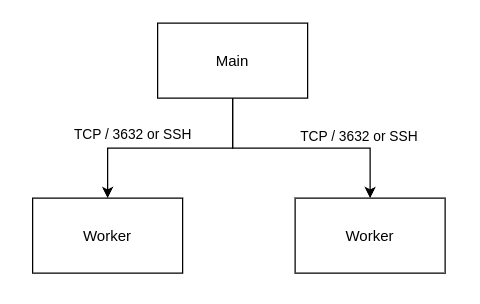
Parallelizing the compilation of a large codebase is a breeze with distcc, which allows you to spread the load across multiple nodes and speed up the compilation time.Here s a sample network topology for a distributed build:
Install distcc on the three Debian/Ubuntu-based nodes:
# apt install distcc
Edit /etc/default/distcc and set:
STARTDISTCC="true"

# Customize for your environment
ALLOWEDNETS="192.168.2.0/24"

# Specify your network device
LISTENER="192.168.2.146"
Additionally, the JOBS and NICE variables can be tweaked to suit the compute power that you have available.Start distcc:
# systemctl start distcc
Do the same all the nodes, and if you have a firewall enabled with ufw, you will need to open up the port 3632 to the master node.
# ufw allow 3632/tcp
Additionally, if you d like to use ssh over untrusted networks so code and communication with the worker nodes happen over a secure channel, ensure that SSH is running and is opened up to the master node in the same manner as above with the key of the master node in ~/.ssh/authorized_keys of the worker nodes. Opening port 3632 in this manner is a security hole, so take precautions over untrusted networks.Back in the master node, setup a DISTCC_HOSTS environment variable that lists the worker nodes, including the master node. Note the order of the hosts, as it is important. The first host will be more heavily used, and distcc has no way of knowing the capacity and capability of the hosts, so specify the most powerful host first.
export DISTCC_HOSTS='localhost 192.168.2.107 192.168.2.91'
At this point, you re ready to compile.Go to your codebase, in this case we use the Linux kernel source code for the purpose of example.
$ make tinyconfig
$ time make -j$(nproc) CC=distcc bzImage
On another terminal, you can monitor the status of the distributed compilation with distmoncc-text or tools such as top or bpytop.Network throughput and latency will be a big factor in how much distcc will help speed up your build process. Using ssh may additionally introduce overhead, so play with the variables to see how much distcc can help speed up or optimize the build for your specific scenario. You may want to additionally consider ccache to speed up the build process.There are some aspects of the build process that are not effectively parallizable in this manner, such as the final linking step of the executable, for which you will not see any performance improvement with distcc.Give distcc a spin, and put any spare compute you have lying around in your home lab to good use.

4 January 2023

Junichi Uekawa: debcargo rust repository and some observations.

debcargo rust repository and some observations. It's been about a week since I first started looking at Debian rust packages and adding some packages in preparation for crosvm. Some things that don't work quite well right now yet. My local branches disappeared. I don't have access and everything is through a merge request, presumably that is not a generally supported workflow and the team members are using branches to manage pending works. ./release.sh is optimized for updates and for new packages, they only build source packages and then I need to rebuild a binary-full package for the NEW queue. Maybe I will figure out. I haven't quite gotten the right IRC client. I was using the web UI but that seemed to disconnect without any warnings, and didn't tell me even when it is disconnected, it just can't post more messages and doesn't receive messages. That's not very useful. I started using Emacs IRC (rcirc) client. Not sure how useful that is.

2 January 2023

Gunnar Wolf: Refueling the blog

So, it s this weird time of year where we make a balance and share with the world some ideas about the future. And yes, it s time to take care of this blog, as its activity has dropped once again. So maybe it d be nice to start this post by checking how much have I blogged over the years: (yes, this is an old blog) So yes, there is a clear downwards trend towards the last few years. And it does make sense, all in all: Not only have I managed to keep myself busier than before, but Blogging is a social endeavor. And as people have moved over to the different flavors of social networks, there is somewhat less fueling us to share our thoughts and experiences in this fashion. So this connects me to my first point: Staring at Noodles Emptiness, I got to a campaign to Bring Back Blogging. I stand by all of what they suggest: Blogs are a great invention, they allow the sharing of a great insight into a person s mind, ideas and worldview (and even more so if, like mine, it shows already a window of almost two decades of life! This year my blog will be old enough to vote!), they are completely decentralized, and can be easily grouped according to each readers preferences via the RSS format. Anyway I do want to write a post summing up 2022, as well as sharing some hopes and projects I have for 2023. But I don t want to make it too long to read. So That shall be the blog post for today! (post caption image by Walt Stoneburner on Flickr; CC BY 2.0)

30 December 2022

Simon Josefsson: Preseeding Trisquel Virtual Machines Using netinst Images

I m migrating some self-hosted virtual machines to Trisquel, and noticed that Trisquel does not offer cloud-images similar to the Debian Cloud and Ubuntu Cloud images. Thus my earlier approach based on virt-install --cloud-init and cloud-localds does not work with Trisquel. While I hope that Trisquel will eventually publish cloud-compatible images, I wanted to document an alternative approach for Trisquel based on preseeding. This is how I used to install Debian and Ubuntu in the old days, and the automated preseed method is best documented in the Debian installation manual. I was hoping to forget about the preseed format, but maybe it will become one of those legacy technologies that never really disappears? Like FAT16 and 8-bit microcontrollers. Below I assume you have a virtual machine host server up that runs libvirt and has virt-install and similar tools; install them with the following command. I run a pre-release version of Trisquel 11 aramo on my VM-host, but I believe any recent dpkg-based distribution like Trisquel 9/10, PureOS 10, Debian 11 or Ubuntu 20.04/22.04 would work.
apt-get install libvirt-daemon-system virtinst genisoimage cloud-image-utils osinfo-db-tools
The approach can install Trisquel 9 (etiona), Trisquel 10 (nabia) and the pre-release of Trisquel 11. First download and verify the integrity of the netinst images that we will need. Unfortunately the Trisquel 11 netinst beta image does not have any checksum or signature available.
mkdir -p /root/iso
cd /root/iso
wget -q https://mirror.fsf.org/trisquel-images/trisquel-netinst_9.0.2_amd64.iso
wget -q https://mirror.fsf.org/trisquel-images/trisquel-netinst_9.0.2_amd64.iso.asc
wget -q https://mirror.fsf.org/trisquel-images/trisquel-netinst_9.0.2_amd64.iso.sha256
wget -q https://mirror.fsf.org/trisquel-images/trisquel-netinst_10.0.1_amd64.iso
wget -q https://mirror.fsf.org/trisquel-images/trisquel-netinst_10.0.1_amd64.iso.asc
wget -q https://mirror.fsf.org/trisquel-images/trisquel-netinst_10.0.1_amd64.iso.sha256
wget -q -O- https://archive.trisquel.info/trisquel/trisquel-archive-signkey.gpg   gpg --import
sha256sum -c trisquel-netinst_9.0.2_amd64.iso.sha256
gpg --verify trisquel-netinst_9.0.2_amd64.iso.asc
sha256sum -c trisquel-netinst_10.0.1_amd64.iso.sha256
gpg --verify trisquel-netinst_10.0.1_amd64.iso.asc
wget -q https://cdbuilds.trisquel.org/aramo/trisquel-netinst_11.0-20221225_amd64.iso
echo '179566639ca8f14f0c3d5658209c59a0916d9e3bf9c026660cc07b28f2311631  trisquel-netinst_11.0-20221225_amd64.iso'   sha256sum -c
I have developed the following fairly minimal preseed file that works with all three Trisquel releases. Compare it against the official Trisquel 11 preseed skeleton and the Debian 11 example preseed file. You should modify obvious things like SSH key, host/IP settings, partition layout and decide for yourself how to deal with passwords. While Ubuntu/Trisquel usually wants to setup a user account, I prefer to login as root hence setting passwd/root-login to true and passwd/make-user to false.

root@trana:~# cat>trisquel.preseed 
d-i debian-installer/locale select en_US
d-i keyboard-configuration/xkb-keymap select us
d-i netcfg/choose_interface select auto
d-i netcfg/disable_autoconfig boolean true
d-i netcfg/get_ipaddress string 192.168.10.201
d-i netcfg/get_netmask string 255.255.255.0
d-i netcfg/get_gateway string 192.168.10.46
d-i netcfg/get_nameservers string 192.168.10.46
d-i netcfg/get_hostname string trisquel
d-i netcfg/get_domain string sjd.se
d-i clock-setup/utc boolean true
d-i time/zone string UTC
d-i mirror/country string manual
d-i mirror/http/hostname string ftp.acc.umu.se
d-i mirror/http/directory string /mirror/trisquel/packages
d-i mirror/http/proxy string
d-i partman-auto/method string regular
d-i partman-partitioning/confirm_write_new_label boolean true
d-i partman/choose_partition select finish
d-i partman/confirm boolean true
d-i partman/confirm_nooverwrite boolean true
d-i partman-basicfilesystems/no_swap boolean false
d-i partman-auto/expert_recipe string myroot :: 1000 50 -1 ext4 \
     $primary    $bootable    method  format   \
     format    use_filesystem    filesystem  ext4   \
     mountpoint  /   \
    .
d-i partman-auto/choose_recipe select myroot
d-i passwd/root-login boolean true
d-i user-setup/allow-password-weak boolean true
d-i passwd/root-password password r00tme
d-i passwd/root-password-again password r00tme
d-i passwd/make-user boolean false
tasksel tasksel/first multiselect
d-i pkgsel/include string openssh-server
popularity-contest popularity-contest/participate boolean false
d-i grub-installer/only_debian boolean true
d-i grub-installer/with_other_os boolean true
d-i grub-installer/bootdev string default
d-i finish-install/reboot_in_progress note
d-i preseed/late_command string mkdir /target/root/.ssh ; echo ssh-ed25519 AAAAC3NzaC1lZDI1NTE5AAAAILzCFcHHrKzVSPDDarZPYqn89H5TPaxwcORgRg+4DagE cardno:FFFE67252015 > /target/root/.ssh/authorized_keys
^D
root@trana:~# 
Use the file above as a skeleton for preparing a VM-specific preseed file as follows. The environment variables HOST and IPS will be used later on too.

root@trana:~# HOST=foo
root@trana:~# IP=192.168.10.197
root@trana:~# sed -e "s,get_ipaddress string.*,get_ipaddress string $IP," -e "s,get_hostname string.*,get_hostname string $HOST," < trisquel.preseed > vm-$HOST.preseed
root@trana:~# 
The following script is used to prepare the ISO images with the preseed file that we will need. This script is inspired by the Debian Wiki Preseed EditIso page and the Trisquel ISO customization wiki page. There are a couple of variations based on earlier works. Paths are updated to match the Trisquel netinst ISO layout, which differ slightly from Debian. We modify isolinux.cfg to boot the auto label without a timeout. On Trisquel 11 the auto boot label exists, but on Trisquel 9 and Trisquel 10 it does not exist so we add it in order to be able to start the automated preseed installation.

root@trana:~# cat gen-preseed-iso 
#!/bin/sh
# Copyright (C) 2018-2022 Simon Josefsson -- GPLv3+
# https://wiki.debian.org/DebianInstaller/Preseed/EditIso
# https://trisquel.info/en/wiki/customizing-trisquel-iso
set -e
set -x
ISO="$1"
PRESEED="$2"
OUTISO="$3"
LASTPWD="$PWD"
test -f "$ISO"
test -f "$PRESEED"
test ! -f "$OUTISO"
TMPDIR=$(mktemp -d)
mkdir "$TMPDIR/mnt"
mkdir "$TMPDIR/tmp"
cp "$PRESEED" "$TMPDIR"/preseed.cfg
cd "$TMPDIR"
mount "$ISO" mnt/
cp -rT mnt/ tmp/
umount mnt/
chmod +w -R tmp/
gunzip tmp/initrd.gz
echo preseed.cfg   cpio -H newc -o -A -F tmp/initrd
gzip tmp/initrd
chmod -w -R tmp/
sed -i "s/timeout 0/timeout 1/" tmp/isolinux.cfg
sed -i "s/default vesamenu.c32/default auto/" tmp/isolinux.cfg
if ! grep -q auto tmp/adtxt.cfg; then
    cat<<EOF >> tmp/adtxt.cfg
label auto
	menu label ^Automated install
	kernel linux
	append auto=true priority=critical vga=788 initrd=initrd.gz --- quiet
EOF
fi
cd tmp/
find -follow -type f   xargs md5sum  > md5sum.txt
cd ..
cd "$LASTPWD"
genisoimage -r -J -b isolinux.bin -c boot.cat \
            -no-emul-boot -boot-load-size 4 -boot-info-table \
            -o "$OUTISO" "$TMPDIR/tmp/"
rm -rf "$TMPDIR"
exit 0
^D
root@trana:~# chmod +x gen-preseed-iso 
root@trana:~# 
Next run the command on one of the downloaded ISO image and the generated preseed file.

root@trana:~# ./gen-preseed-iso /root/iso/trisquel-netinst_10.0.1_amd64.iso vm-$HOST.preseed vm-$HOST.iso
+ ISO=/root/iso/trisquel-netinst_10.0.1_amd64.iso
+ PRESEED=vm-foo.preseed
+ OUTISO=vm-foo.iso
+ LASTPWD=/root
+ test -f /root/iso/trisquel-netinst_10.0.1_amd64.iso
+ test -f vm-foo.preseed
+ test ! -f vm-foo.iso
+ mktemp -d
+ TMPDIR=/tmp/tmp.mNEprT4Tx9
+ mkdir /tmp/tmp.mNEprT4Tx9/mnt
+ mkdir /tmp/tmp.mNEprT4Tx9/tmp
+ cp vm-foo.preseed /tmp/tmp.mNEprT4Tx9/preseed.cfg
+ cd /tmp/tmp.mNEprT4Tx9
+ mount /root/iso/trisquel-netinst_10.0.1_amd64.iso mnt/
mount: /tmp/tmp.mNEprT4Tx9/mnt: WARNING: source write-protected, mounted read-only.
+ cp -rT mnt/ tmp/
+ umount mnt/
+ chmod +w -R tmp/
+ gunzip tmp/initrd.gz
+ echo preseed.cfg
+ cpio -H newc -o -A -F tmp/initrd
5 blocks
+ gzip tmp/initrd
+ chmod -w -R tmp/
+ sed -i s/timeout 0/timeout 1/ tmp/isolinux.cfg
+ sed -i s/default vesamenu.c32/default auto/ tmp/isolinux.cfg
+ grep -q auto tmp/adtxt.cfg
+ cat
+ cd tmp/
+ find -follow -type f
+ xargs md5sum
+ cd ..
+ cd /root
+ genisoimage -r -J -b isolinux.bin -c boot.cat -no-emul-boot -boot-load-size 4 -boot-info-table -o vm-foo.iso /tmp/tmp.mNEprT4Tx9/tmp/
I: -input-charset not specified, using utf-8 (detected in locale settings)
Using GCRY_000.MOD;1 for  /tmp/tmp.mNEprT4Tx9/tmp/boot/grub/x86_64-efi/gcry_sha512.mod (gcry_sha256.mod)
Using XNU_U000.MOD;1 for  /tmp/tmp.mNEprT4Tx9/tmp/boot/grub/x86_64-efi/xnu_uuid.mod (xnu_uuid_test.mod)
Using PASSW000.MOD;1 for  /tmp/tmp.mNEprT4Tx9/tmp/boot/grub/x86_64-efi/password_pbkdf2.mod (password.mod)
Using PART_000.MOD;1 for  /tmp/tmp.mNEprT4Tx9/tmp/boot/grub/x86_64-efi/part_sunpc.mod (part_sun.mod)
Using USBSE000.MOD;1 for  /tmp/tmp.mNEprT4Tx9/tmp/boot/grub/x86_64-efi/usbserial_pl2303.mod (usbserial_ftdi.mod)
Using USBSE001.MOD;1 for  /tmp/tmp.mNEprT4Tx9/tmp/boot/grub/x86_64-efi/usbserial_ftdi.mod (usbserial_usbdebug.mod)
Using VIDEO000.MOD;1 for  /tmp/tmp.mNEprT4Tx9/tmp/boot/grub/x86_64-efi/videotest.mod (videotest_checksum.mod)
Using GFXTE000.MOD;1 for  /tmp/tmp.mNEprT4Tx9/tmp/boot/grub/x86_64-efi/gfxterm_background.mod (gfxterm_menu.mod)
Using GCRY_001.MOD;1 for  /tmp/tmp.mNEprT4Tx9/tmp/boot/grub/x86_64-efi/gcry_sha256.mod (gcry_sha1.mod)
Using MULTI000.MOD;1 for  /tmp/tmp.mNEprT4Tx9/tmp/boot/grub/x86_64-efi/multiboot2.mod (multiboot.mod)
Using USBSE002.MOD;1 for  /tmp/tmp.mNEprT4Tx9/tmp/boot/grub/x86_64-efi/usbserial_usbdebug.mod (usbserial_common.mod)
Using MDRAI000.MOD;1 for  /tmp/tmp.mNEprT4Tx9/tmp/boot/grub/x86_64-efi/mdraid09.mod (mdraid09_be.mod)
Size of boot image is 4 sectors -> No emulation
 22.89% done, estimate finish Thu Dec 29 23:36:18 2022
 45.70% done, estimate finish Thu Dec 29 23:36:18 2022
 68.56% done, estimate finish Thu Dec 29 23:36:18 2022
 91.45% done, estimate finish Thu Dec 29 23:36:18 2022
Total translation table size: 2048
Total rockridge attributes bytes: 24816
Total directory bytes: 40960
Path table size(bytes): 64
Max brk space used 46000
21885 extents written (42 MB)
+ rm -rf /tmp/tmp.mNEprT4Tx9
+ exit 0
root@trana:~#
Now the image is ready for installation, so invoke virt-install as follows. The machine will start directly, launching the preseed automatic installation. At this point, I usually click on the virtual machine in virt-manager to follow screen output until the installation has finished. If everything works OK the machines comes up and I can ssh into it.

root@trana:~# virt-install --name $HOST --disk vm-$HOST.img,size=5 --cdrom vm-$HOST.iso --osinfo linux2020 --autostart --noautoconsole --wait
Using linux2020 default --memory 4096
Starting install...
Allocating 'vm-foo.img'                                                                                                                                     0 B  00:00:00 ... 
Creating domain...                                                                                                                                          0 B  00:00:00     
Domain is still running. Installation may be in progress.
Waiting for the installation to complete.
Domain has shutdown. Continuing.
Domain creation completed.
Restarting guest.
root@trana:~# 
There are some problems that I have noticed that would be nice to fix, but are easy to work around. The first is that at the end of the installation of Trisquel 9 and Trisquel 10, the VM hangs after displaying Sent SIGKILL to all processes followed by Requesting system reboot. I kill the VM manually using virsh destroy foo and start it up again using virsh start foo. For production use I expect to be running Trisquel 11, where the problem doesn t happen, so this does not bother me enough to debug further. The remaining issue that once booted, a Trisquel 11 VM has lost its DNS nameserver configuration, presumably due to poor integration with systemd-resolved. Both Trisquel 9 and Trisquel 10 uses systemd-resolved where DNS works after first boot, so this appears to be a Trisquel 11 bug. You can work around it with rm -f /etc/resolv.conf && echo 'nameserver A.B.C.D' > /etc/resolv.conf or drink the systemd Kool-Aid. If you want to clean up and re-start the process, here is how you wipe out what you did. After this, you may run the sed, ./gen-preseed-iso and virt-install commands again. Remember, use virsh shutdown foo to gracefully shutdown a VM.

root@trana:~# virsh destroy foo
Domain 'foo' destroyed
root@trana:~# virsh undefine foo --remove-all-storage
Domain 'foo' has been undefined
Volume 'vda'(/root/vm-foo.img) removed.
root@trana:~# rm vm-foo.*
root@trana:~# 
Happy hacking on your virtal machines!

26 December 2022

Vincent Bernat: Managing infrastructure with Terraform, CDKTF, and NixOS

A few years ago, I downsized my personal infrastructure. Until 2018, there were a dozen containers running on a single Hetzner server.1 I migrated my emails to Fastmail and my DNS zones to Gandi. It left me with only my blog to self-host. As of today, my low-scale infrastructure is composed of 4 virtual machines running NixOS on Hetzner Cloud and Vultr, a handful of DNS zones on Gandi and Route 53, and a couple of Cloudfront distributions. It is managed by CDK for Terraform (CDKTF), while NixOS deployments are handled by NixOps. In this article, I provide a brief introduction to Terraform, CDKTF, and the Nix ecosystem. I also explain how to use Nix to access these tools within your shell, so you can quickly start using them.

CDKTF: infrastructure as code Terraform is an infrastructure-as-code tool. You can define your infrastructure by declaring resources with the HCL language. This language has some additional features like loops to declare several resources from a list, built-in functions you can call in expressions, and string templates. Terraform relies on a large set of providers to manage resources.

Managing servers Here is a short example using the Hetzner Cloud provider to spawn a virtual machine:
variable "hcloud_token"  
  sensitive = true
 
provider "hcloud"  
  token = var.hcloud_token
 
resource "hcloud_server" "web03"  
  name = "web03"
  server_type = "cpx11"
  image = "debian-11"
  datacenter = "nbg1-dc3"
 
resource "hcloud_rdns" "rdns4-web03"  
  server_id = hcloud_server.web03.id
  ip_address = hcloud_server.web03.ipv4_address
  dns_ptr = "web03.luffy.cx"
 
resource "hcloud_rdns" "rdns6-web03"  
  server_id = hcloud_server.web03.id
  ip_address = hcloud_server.web03.ipv6_address
  dns_ptr = "web03.luffy.cx"
 
HCL expressiveness is quite limited and I find a general-purpose language more convenient to describe all the resources. This is where CDK for Terraform comes in: you can manage your infrastructure using your preferred programming language, including TypeScript, Go, and Python. Here is the previous example using CDKTF and TypeScript:
import   App, TerraformStack, Fn   from "cdktf";
import   HcloudProvider   from "./.gen/providers/hcloud/provider";
import * as hcloud from "./.gen/providers/hcloud";
class MyStack extends TerraformStack  
  constructor(scope: Construct, name: string)  
    super(scope, name);
    const hcloudToken = new TerraformVariable(this, "hcloudToken",  
      type: "string",
      sensitive: true,
     );
    const hcloudProvider = new HcloudProvider(this, "hcloud",  
      token: hcloudToken.value,
     );
    const web03 = new hcloud.server.Server(this, "web03",  
      name: "web03",
      serverType: "cpx11",
      image: "debian-11",
      datacenter: "nbg1-dc3",
      provider: hcloudProvider,
     );
    new hcloud.rdns.Rdns(this, "rdns4-web03",  
      serverId: Fn.tonumber(web03.id),
      ipAddress: web03.ipv4Address,
      dnsPtr: "web03.luffy.cx",
      provider: hcloudProvider,
     );
    new hcloud.rdns.Rdns(this, "rdns6-web03",  
      serverId: Fn.tonumber(web03.id),
      ipAddress: web03.ipv6Address,
      dnsPtr: "web03.luffy.cx",
      provider: hcloudProvider,
     );
   
 
const app = new App();
new MyStack(app, "cdktf-take1");
app.synth();
Running cdktf synth generates a configuration file for Terraform, terraform plan previews the changes, and terraform apply applies them. Now that you have a general-purpose language, you can use functions.

Managing DNS records While using CDKTF for 4 web servers may seem a tad overkill, this is quite different when it comes to managing a few DNS zones. With DNSControl, which is using JavaScript as a domain-specific language, I was able to define the bernat.ch zone with this snippet of code:
D("bernat.ch", REG_NONE, DnsProvider(DNS_BIND, 0), DnsProvider(DNS_GANDI),
  DefaultTTL('2h'),
  FastMailMX('bernat.ch',  subdomains: ['vincent'] ),
  WebServers('@'),
  WebServers('vincent');
This generated 38 records. With CDKTF, I use:
new Route53Zone(this, "bernat.ch", providers.aws)
  .sign(dnsCMK)
  .registrar(providers.gandiVB)
  .www("@", servers)
  .www("vincent", servers)
  .www("media", servers)
  .fastmailMX(["vincent"]);
All the magic is in the code that I did not show you. You can check the dns.ts file in the cdktf-take1 repository to see how it works. Here is a quick explanation:
  • Route53Zone() creates a new zone hosted by Route 53,
  • sign() signs the zone with the provided master key,
  • registrar() registers the zone to the registrar of the domain and sets up DNSSEC,
  • www() creates A and AAAA records for the provided name pointing to the web servers,
  • fastmailMX() creates the MX records and other support records to direct emails to Fastmail.
Here is the content of the fastmailMX() function. It generates a few records and returns the current zone for chaining:
fastmailMX(subdomains?: string[])  
  (subdomains ?? [])
    .concat(["@", "*"])
    .forEach((subdomain) =>
      this.MX(subdomain, [
        "10 in1-smtp.messagingengine.com.",
        "20 in2-smtp.messagingengine.com.",
      ])
    );
  this.TXT("@", "v=spf1 include:spf.messagingengine.com ~all");
  ["mesmtp", "fm1", "fm2", "fm3"].forEach((dk) =>
    this.CNAME( $ dk ._domainkey ,  $ dk .$ this.name .dkim.fmhosted.com. )
  );
  this.TXT("_dmarc", "v=DMARC1; p=none; sp=none");
  return this;
 
I encourage you to browse the repository if you need more information.

About Pulumi My first tentative around Terraform was to use Pulumi. You can find this attempt on GitHub. This is quite similar to what I currently do with CDKTF. The main difference is that I am using Python instead of TypeScript because I was not familiar with TypeScript at the time.2 Pulumi predates CDKTF and it uses a slightly different approach. CDKTF generates a Terraform configuration (in JSON format instead of HCL), delegating planning, state management, and deployment to Terraform. It is therefore bound to the limitations of what can be expressed by Terraform, notably when you need to transform data obtained from one resource to another.3 Pulumi needs specific providers for each resource. Many Pulumi providers are thin wrappers encapsulating Terraform providers. While Pulumi provides a good user experience, I switched to CDKTF because writing providers for Pulumi is a chore. CDKTF does not require such a step. Outside the big players (AWS, Azure and Google Cloud), the existence, quality, and freshness of the Pulumi providers are inconsistent. Most providers rely on a Terraform provider and they may lag a few versions behind, miss a few resources, or have a few bugs of their own. When a provider does not exist, you can write one with the help of the pulumi-terraform-bridge library. The Pulumi project provides a boilerplate for this purpose. I had a bad experience with it when writing providers for Gandi and Vultr: the Makefile automatically installs Pulumi using a curl sh pattern and does not work with /bin/sh. There is a lack of interest for community-based contributions4 or even for providers for smaller players.

NixOS & NixOps Nix is a functional, purely-functional programming language. Nix is also the name of the package manager that is built on top of the Nix language. It allows users to declaratively install packages. nixpkgs is a repository of packages. You can install Nix on top of a regular Linux distribution. If you want more details, a good resource is the official website, and notably the learn section. There is a steep learning curve, but the reward is tremendous.

NixOS: declarative Linux distribution NixOS is a Linux distribution built on top of the Nix package manager. Here is a configuration snippet to add some packages:
environment.systemPackages = with pkgs;
  [
    bat
    htop
    liboping
    mg
    mtr
    ncdu
    tmux
  ];
It is possible to alter an existing derivation5 to use a different version, enable a specific feature, or apply a patch. Here is how I enable and configure Nginx to disable the stream module, add the Brotli compression module, and add the IP address anonymizer module. Moreover, instead of using OpenSSL 3, I keep using OpenSSL 1.1.6
services.nginx =  
  enable = true;
  package = (pkgs.nginxStable.override  
    withStream = false;
    modules = with pkgs.nginxModules; [
      brotli
      ipscrub
    ];
    openssl = pkgs.openssl_1_1;
   );
If you need to add some patches, it is also possible. Here are the patches I added in 2019 to circumvent the DoS vulnerabilities in Nginx until they were fixed in NixOS:7
services.nginx.package = pkgs.nginxStable.overrideAttrs (old:  
  patches = oldAttrs.patches ++ [
    # HTTP/2: reject zero length headers with PROTOCOL_ERROR.
    (pkgs.fetchpatch  
      url = https://github.com/nginx/nginx/commit/dbdd[ ].patch;
      sha256 = "a48190[ ]";
     )
    # HTTP/2: limited number of DATA frames.
    (pkgs.fetchpatch  
      url = https://github.com/nginx/nginx/commit/94c5[ ].patch;
      sha256 = "af591a[ ]";
     )
    #  HTTP/2: limited number of PRIORITY frames.
    (pkgs.fetchpatch  
      url = https://github.com/nginx/nginx/commit/39bb[ ].patch;
      sha256 = "1ad8fe[ ]";
     )
  ];
 );
If you are interested, have a look at my relatively small configuration: common.nix contains the configuration to be applied to any host (SSH, users, common software packages), web.nix contains the configuration for the web servers, isso.nix runs Isso into a systemd container.

NixOps: NixOS deployment tool On a single node, NixOS configuration is in the /etc/nixos/configuration.nix file. After modifying it, you have to run nixos-rebuild switch. Nix fetches all possible dependencies from the binary cache and builds the remaining packages. It creates a new entry in the boot loader menu and activates the new configuration. To manage several nodes, there exists several options, including NixOps, deploy-rs, Colmena, and morph. I do not know all of them, but from my point of view, the differences are not that important. It is also possible to build such a tool yourself as Nix provides the most important building blocks: nix build and nix copy. NixOps is one of the first tools available but I encourage you to explore the alternatives. NixOps configuration is written in Nix. Here is a simplified configuration to deploy znc01.luffy.cx, web01.luffy.cx, and web02.luffy.cx, with the help of the server and web functions:
let
  server = hardware: name: imports:  
    deployment.targetHost = "$ name .luffy.cx";
    networking.hostName = name;
    networking.domain = "luffy.cx";
    imports = [ (./hardware/. + "/$ hardware .nix") ] ++ imports;
   ;
  web = hardware: idx: imports:
    server hardware "web$ lib.fixedWidthNumber 2 idx " ([ ./web.nix ] ++ imports);
in  
  network.description = "Luffy infrastructure";
  network.enableRollback = true;
  defaults = import ./common.nix;
  znc01 = server "exoscale" [ ./znc.nix ];
  web01 = web "hetzner" 1 [ ./isso.nix ];
  web02 = web "hetzner" 2 [];
 

Tying everything together with Nix The Nix ecosystem is a unified solution to the various problems around software and configuration management. A very interesting feature is the declarative and reproducible developer environments. This is similar to Python virtual environments, except it is not language-specific.

Brief introduction to Nix flakes I am using flakes, a new Nix feature improving reproducibility by pinning all dependencies and making the build hermetic. While the feature is marked as experimental,8 it is widely used and you may see flake.nix and flake.lock at the root of some repositories. As a short example, here is the flake.nix content shipped with Snimpy, an interactive SNMP tool for Python relying on libsmi, a C library:
 
  inputs =  
    nixpkgs.url = "nixpkgs";
    flake-utils.url = "github:numtide/flake-utils";
   ;
  outputs =   self, ...  @inputs:
    inputs.flake-utils.lib.eachDefaultSystem (system:
      let
        pkgs = inputs.nixpkgs.legacyPackages."$ system ";
      in
       
        # nix build
        packages.default = pkgs.python3Packages.buildPythonPackage  
          name = "snimpy";
          src = self;
          preConfigure = ''echo "1.0.0-0-000000000000" > version.txt'';
          checkPhase = "pytest";
          checkInputs = with pkgs.python3Packages; [ pytest mock coverage ];
          propagatedBuildInputs = with pkgs.python3Packages; [ cffi pysnmp ipython ];
          buildInputs = [ pkgs.libsmi ];
         ;
        # nix run + nix shell
        apps.default =   
          type = "app";
          program = "$ self.packages."$ system ".default /bin/snimpy";
         ;
        # nix develop
        devShells.default = pkgs.mkShell  
          name = "snimpy-dev";
          buildInputs = [
            self.packages."$ system ".default.inputDerivation
            pkgs.python3Packages.ipython
          ];
         ;
       );
 
If you have Nix installed on your system:
  • nix run github:vincentbernat/snimpy runs Snimpy,
  • nix shell github:vincentbernat/snimpy provides a shell with Snimpy ready-to-use,
  • nix build github:vincentbernat/snimpy builds the Python package, tests included, and
  • nix develop . provides a shell to hack around Snimpy when run from a fresh checkout.9
For more information about Nix flakes, have a look at the tutorial from Tweag.

Nix and CDKTF At the root of the repository I use for CDKTF, there is a flake.nix file to set up a shell with Terraform and CDKTF installed and with the appropriate environment variables to automate my infrastructure. Terraform is already packaged in nixpkgs. However, I need to apply a patch on top of the Gandi provider. Not a problem with Nix!
terraform = pkgs.terraform.withPlugins (p: [
  p.aws
  p.hcloud
  p.vultr
  (p.gandi.overrideAttrs
    (old:  
      src = pkgs.fetchFromGitHub  
        owner = "vincentbernat";
        repo = "terraform-provider-gandi";
        rev = "feature/livedns-key";
        hash = "sha256-V16BIjo5/rloQ1xTQrdd0snoq1OPuDh3fQNW7kiv/kQ=";
       ;
     ))
]);
CDKTF is written in TypeScript. I have a package.json file with all the dependencies needed, including the ones to use TypeScript as the language to define infrastructure:
 
  "name": "cdktf-take1",
  "version": "1.0.0",
  "main": "main.js",
  "types": "main.ts",
  "private": true,
  "dependencies":  
    "@types/node": "^14.18.30",
    "cdktf": "^0.13.3",
    "cdktf-cli": "^0.13.3",
    "constructs": "^10.1.151",
    "eslint": "^8.27.0",
    "prettier": "^2.7.1",
    "ts-node": "^10.9.1",
    "typescript": "^3.9.10",
    "typescript-language-server": "^2.1.0"
   
 
I use Yarn to get a yarn.lock file that can be used directly to declare a derivation containing all the dependencies:
nodeEnv = pkgs.mkYarnModules  
  pname = "cdktf-take1-js-modules";
  version = "1.0.0";
  packageJSON = ./package.json;
  yarnLock = ./yarn.lock;
 ;
The next step is to generate the CDKTF providers from the Terraform providers and turn them into a derivation:
cdktfProviders = pkgs.stdenvNoCC.mkDerivation  
  name = "cdktf-providers";
  nativeBuildInputs = [
    pkgs.nodejs
    terraform
  ];
  src = nix-filter  
    root = ./.;
    include = [ ./cdktf.json ./tsconfig.json ];
   ;
  buildPhase = ''
    export HOME=$(mktemp -d)
    export CHECKPOINT_DISABLE=1
    export DISABLE_VERSION_CHECK=1
    export PATH=$ nodeEnv /node_modules/.bin:$PATH
    ln -nsf $ nodeEnv /node_modules node_modules
    # Build all providers we have in terraform
    for provider in $(cd $ terraform /libexec/terraform-providers; echo */*/*/*); do
      version=''$ provider##*/ 
      provider=''$ provider%/* 
      echo "Build $provider@$version"
      cdktf provider add --force-local $provider@$version   cat
    done
    echo "Compile TS   JS"
    tsc
  '';
  installPhase = ''
    mv .gen $out
    ln -nsf $ nodeEnv /node_modules $out/node_modules
  '';
 ;
Finally, we can define the development environment:
devShells.default = pkgs.mkShell  
  name = "cdktf-take1";
  buildInputs = [
    pkgs.nodejs
    pkgs.yarn
    terraform
  ];
  shellHook = ''
    # No telemetry
    export CHECKPOINT_DISABLE=1
    # No autoinstall of plugins
    export CDKTF_DISABLE_PLUGIN_CACHE_ENV=1
    # Do not check version
    export DISABLE_VERSION_CHECK=1
    # Access to node modules
    export PATH=$PWD/node_modules/.bin:$PATH
    ln -nsf $ nodeEnv /node_modules node_modules
    ln -nsf $ cdktfProviders  .gen
    # Credentials
    for p in \
      njf.nznmba.pbz/Nqzvavfgengbe \
      urgmare.pbz/ivaprag@oreang.pu \
      ihyge.pbz/ihyge@ivaprag.oreang.pu; do
        eval $(pass show $(echo $p   tr 'A-Za-z' 'N-ZA-Mn-za-m')   grep '^export')
    done
    eval $(pass show personal/cdktf/secrets   grep '^export')
    export TF_VAR_hcloudToken="$HCLOUD_TOKEN"
    export TF_VAR_vultrApiKey="$VULTR_API_KEY"
    unset VULTR_API_KEY HCLOUD_TOKEN
  '';
 ;
The derivations listed in buildInputs are available in the provided shell. The content of shellHook is sourced when starting the shell. It sets up some symbolic links to make the JavaScript environment built at an earlier step available, as well as the generated CDKTF providers. It also exports all the credentials.10 I am also using direnv with an .envrc to automatically load the development environment. This also enables the environment to be available from inside Emacs, notably when using lsp-mode to get TypeScript completions. Without direnv, nix develop . can activate the environment. I use the following commands to deploy the infrastructure:11
$ cdktf synth
$ cd cdktf.out/stacks/cdktf-take1
$ terraform plan --out plan
$ terraform apply plan
$ terraform output -json > ~-automation/nixops-take1/cdktf.json
The last command generates a JSON file containing various data to complete the deployment with NixOps.

NixOps The JSON file exported by Terraform contains the list of servers with various attributes:
 
  "hardware": "hetzner",
  "ipv4Address": "5.161.44.145",
  "ipv6Address": "2a01:4ff:f0:b91::1",
  "name": "web05.luffy.cx",
  "tags": [
    "web",
    "continent:NA",
    "continent:SA"
  ]
 
In network.nix, this list is imported and transformed into an attribute set describing the servers. A simplified version looks like this:
let
  lib = inputs.nixpkgs.lib;
  shortName = name: builtins.elemAt (lib.splitString "." name) 0;
  domainName = name: lib.concatStringsSep "." (builtins.tail (lib.splitString "." name));
  server = hardware: name: imports:  
    networking =  
      hostName = shortName name;
      domain = domainName name;
     ;
    deployment.targetHost = name;
    imports = [ (./hardware/. + "/$ hardware .nix") ] ++ imports;
   ;
  cdktf-servers-json = (lib.importJSON ./cdktf.json).servers.value;
  cdktf-servers = map
    (s:
      let
        tags-maybe-import = map (t: ./. + "/$ t .nix") s.tags;
        tags-import = builtins.filter (t: builtins.pathExists t) tags-maybe-import;
      in
       
        name = shortName s.name;
        value = server s.hardware s.name tags-import;
       )
    cdktf-servers-json;
in
 
  // [ ]
  // builtins.listToAttrs cdktf-servers
For web05, this expands to:
web05 =  
  networking =  
    hostName = "web05";
    domainName = "luffy.cx";
   ;
  deployment.targetHost = "web05.luffy.cx";
  imports = [ ./hardware/hetzner.nix ./web.nix ];
 ;
As for CDKTF, at the root of the repository I use for NixOps, there is a flake.nix file to set up a shell with NixOps configured. Because NixOps do not support rollouts, I usually use the following commands to deploy on a single server:12
$ nix flake update
$ nixops deploy --include=web04
$ ./tests web04.luffy.cx
If the tests are OK, I deploy the remaining nodes gradually with the following command:
$ (set -e; for h in web 03..06 ; do nixops deploy --include=$h; done)
nixops deploy rolls out all servers in parallel and therefore could cause a short outage where all Nginx are down at the same time.
This post has been a work-in-progress for the past three years, with the content being updated and refined as I experimented with different solutions. There is still much to explore13 but I feel there is enough content to publish now.

  1. It was an AMD Athlon 64 X2 5600+ with 2 GB of RAM and 2 400 GB disks with software RAID. I was paying something around 59 per month for it. While it was a good deal in 2008, by 2018 it was no longer cost-effective. It was running on Debian Wheezy with Linux-VServer for isolation, both of which were outdated in 2018.
  2. I also did not use Python because Poetry support in Nix was a bit broken around the time I started hacking around CDKTF.
  3. Pulumi can apply arbitrary functions with the apply() method on an output. It makes it easy to transform data that are not known during the planning stage. Terraform has functions to serve a similar purpose, but they are more limited.
  4. The two mentioned pull requests are not merged yet. The second one is superseded by PR #61, submitted two months later, which enforces the use of /bin/bash. I also submitted PR #56, which was merged 4 months later and quickly reverted without an explanation.
  5. You may consider packages and derivations to be synonyms in the Nix ecosystem.
  6. OpenSSL 3 has outstanding performance regressions.
  7. NixOS can be a bit slow to integrate patches since they need to rebuild parts of the binary cache before releasing the fixes. In this specific case, they were fast: the vulnerability and patches were released on August 13th 2019 and available in NixOS on August 15th. As a comparison, Debian only released the fixed version on August 22nd, which is unusually late.
  8. Because flakes are experimental, many documentations do not use them and it is an additional aspect to learn.
  9. It is possible to replace . with github:vincentbernat/snimpy, like in the other commands, but having Snimpy dependencies without Snimpy source code is less interesting.
  10. I am using pass as a password manager. The password names are only obfuscated to avoid spam.
  11. The cdktf command can wrap the terraform commands, but I prefer to use them directly as they are more flexible.
  12. If the change is risky, I disable the server with CDKTF. This removes it from the web service DNS records.
  13. I would like to replace NixOps with an alternative handling progressive rollouts and checks. I am also considering switching to Nomad or Kubernetes to deploy workloads.

21 December 2022

Russ Allbery: Review: Shutdown

Review: Shutdown, by Adam Tooze
Publisher: Viking
Copyright: September 2021
ISBN: 0-593-29756-3
Format: Kindle
Pages: 305
Shutdown is a history of the world macroeconomic response to COVID-19, covering 2020 and the very beginning of 2021. But wait, you might be saying. It's only the end of 2022 right now, and this book was published in September of 2021. That's not history, that's journalism. And yes, I think that's a valid critique. Shutdown is doing something rather odd, and I'm not certain it was a good idea, but I do think it has a (somewhat narrow) audience. Descriptions first. After an awkward introduction (more on that later), Tooze launches into an essentially chronological history in four parts: the initial viral spread and early political and public health response, the economic hard stop and macroeconomic response, the summer fallout and political complications, and the more-organized aftershocks of the fall. The early chapters are closer to a history, with a clear timeline and the tracery of cause and effect. The closer the narrative comes to the time Tooze was writing it, the more that clarity drops away. The last few chapters feel like a collection of simultaneous events that may or may not be related or have long-term significance. Everyone reading this lived through those events, and if you're at all like me, consumed far more news coverage of them than was healthy. The obvious question, then, is why read a book that rehashes all of that? For me, there are two answers: Tooze pays attention to more of the world than makes it into the local headlines and tries to synthesize a larger picture, and the focus of this book is the macroeconomic facilities used in the response. I remember the fights over school closures in the US. I didn't know about the impact of unprecedented Federal Reserve action on the bond market for emerging market government debt. If you're the sort of person who reads The Economist religiously (which I am not), you may not learn anything new here. If you're not, and you have a general interest in international finance, there were probably some wrinkles you missed. Even if you stay up-to-date on the more technical news, Shutdown provides an intermediate consolidation and restructuring. It's not ready to be a history in the traditional sense, but it's a first pass at putting events in order and tracing the implications for the global financial system. Read in that sense, Shutdown felt like a continuation of Tooze's Crashed, following the same themes of a hegemonic but unstable dollar system and a Federal Reserve that has increasingly taken on the role of backstop to the entire world (and how the only tools it has available tend to increase wealth inequality). If you've not read Crashed, read it first. I think it's the stronger and more thorough book (not the least because it had more time and data to construct a coherent history), and it's the best introduction to the international macroeconomic risks that Tooze traces in Shutdown. This book was, for me, an update of the Tooze's thinking in Crashed for the COVID era. Tooze is very good at clearly describing macroeconomic shocks. I recently read Lev Menand's The Fed Unbound, which is in part about the same intervention during the COVID shock that Tooze describes here, and yet it wasn't until I read Shutdown that I grasped that the Treasury purchases by the Fed had arguably crossed the political red line of monetizing government debt, even though the Fed probably had no choice and few people noticed in the middle of the crisis. This is where Tooze's background as a historian is helpful. Most people writing on this topic are either economists, who seem to take inferences like that for granted and dive into the technical debate, or journalists, who rarely understand the nuance and often jump to facile conclusions. Tooze is a historian with an extensive economics background; he can explain the mechanics while still focusing on the limitations of politics, which is the sort of analysis that I want to read. The problem with this book as a history is that it necessarily raises more questions than it answers. In the conclusion, Tooze writes:
A severe tightening in U.S. monetary policy or even a full-fledged taper tantrum would put global resilience to a stern test. So too would a violent escalation of geopolitical tension in one of the major regions of the world economy.
Both of those events have subsequently happened, which throws any tentative conclusions Tooze can offer into question. For another example, when Tooze wrote Shutdown, China's zero COVID policy was widely celebrated inside China and had enabled a fast economic recovery while the rest of the world was still in serious difficulty. Before Omicron, it was conceivable (if extremely risky) that China could continue to avoid a major COVID surge. In December of 2022, it's obvious they only managed to delay, and while delay meant vaccination and the price in deaths may well be smaller than was paid for the route taken by most of the rest of the world, the trade-offs are now even harder to analyze. There are, of course, other examples, the most obvious of which is the rise of global inflation simultaneous with a strengthening dollar. A history written from a distance of several decades would have included that aftermath. A snap history with a distance of only a few months cannot. The other problem with this book is that it's not as polished. Viking did an amazing job turning publication around in roughly six months, dramatically faster than publishing normally works, but there are parts that could have used more editing. The introduction, in particular, reads more like a blog post than an edited book, and while I'm a happy reader of Tooze's Chartbook, the recap of COVID's impact was a bit trite and Tooze's abstract musings on polycrisis could have used tightening and clarity. The meat of the book is better, but there is a messy stream-of-consciousness feel that is inherent in a book written to this tight of a timeline. I think the audience of this book is, narrowly, people who have read Crashed and want to follow that line of reasoning into the COVID era. Crashed is one of the better books on macroeconomic history that I've read, and I did indeed want to follow that train of thought, so I am part of that audience. This is not the sort of book that I would widely recommend, however. If you want to read it, you probably know that already; if you are new to Tooze's analysis, Crashed is the place to start. Rating: 7 out of 10

Next.

Previous.