Dirk Eddelbuettel: #41: Using r2u in Codespaces
 Welcome to the 41th post in the $R^4 series. This
post draws on joint experiments first started by Grant building on the
lovely work done by Eitsupi as
part of our Rocker Project. In
short, r2u is an ideal
match for Codespaces, a
Microsoft/GitHub service to run code locally but in the cloud via
browser or Visual Studio
Code. This posts co-serves as the README.md in the
Welcome to the 41th post in the $R^4 series. This
post draws on joint experiments first started by Grant building on the
lovely work done by Eitsupi as
part of our Rocker Project. In
short, r2u is an ideal
match for Codespaces, a
Microsoft/GitHub service to run code locally but in the cloud via
browser or Visual Studio
Code. This posts co-serves as the README.md in the .devcontainer
directory as well as a vignette
for r2u.
So let us get into it. Starting from the r2u repository, the .devcontainer
directory provides a small self-containted file
devcontainer.json to launch an executable environment R
using r2u. It is based on the example in Grant
McDermott s codespaces-r2u repo and reuses its documentation. It is
driven by the Rocker
Project s Devcontainer Features repo creating a fully functioning R
environment for cloud use in a few minutes. And thanks to r2u you can add easily to
this environment by installing new R packages in a fast and failsafe
way.
Try it out
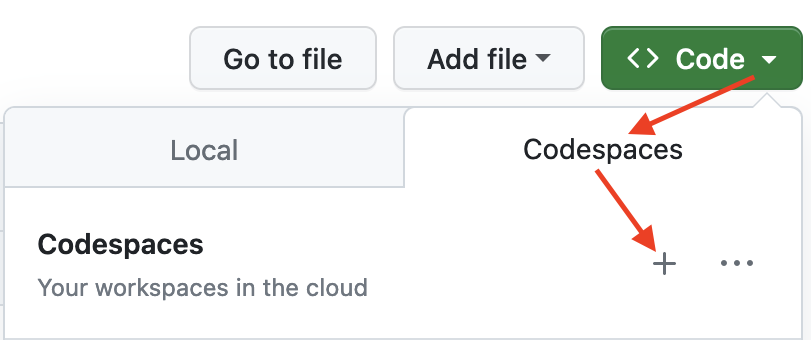
To get started, simply click on the green Code button at the top
right. Then select the Codespaces tab and click the + symbol to
start a new Codespace.
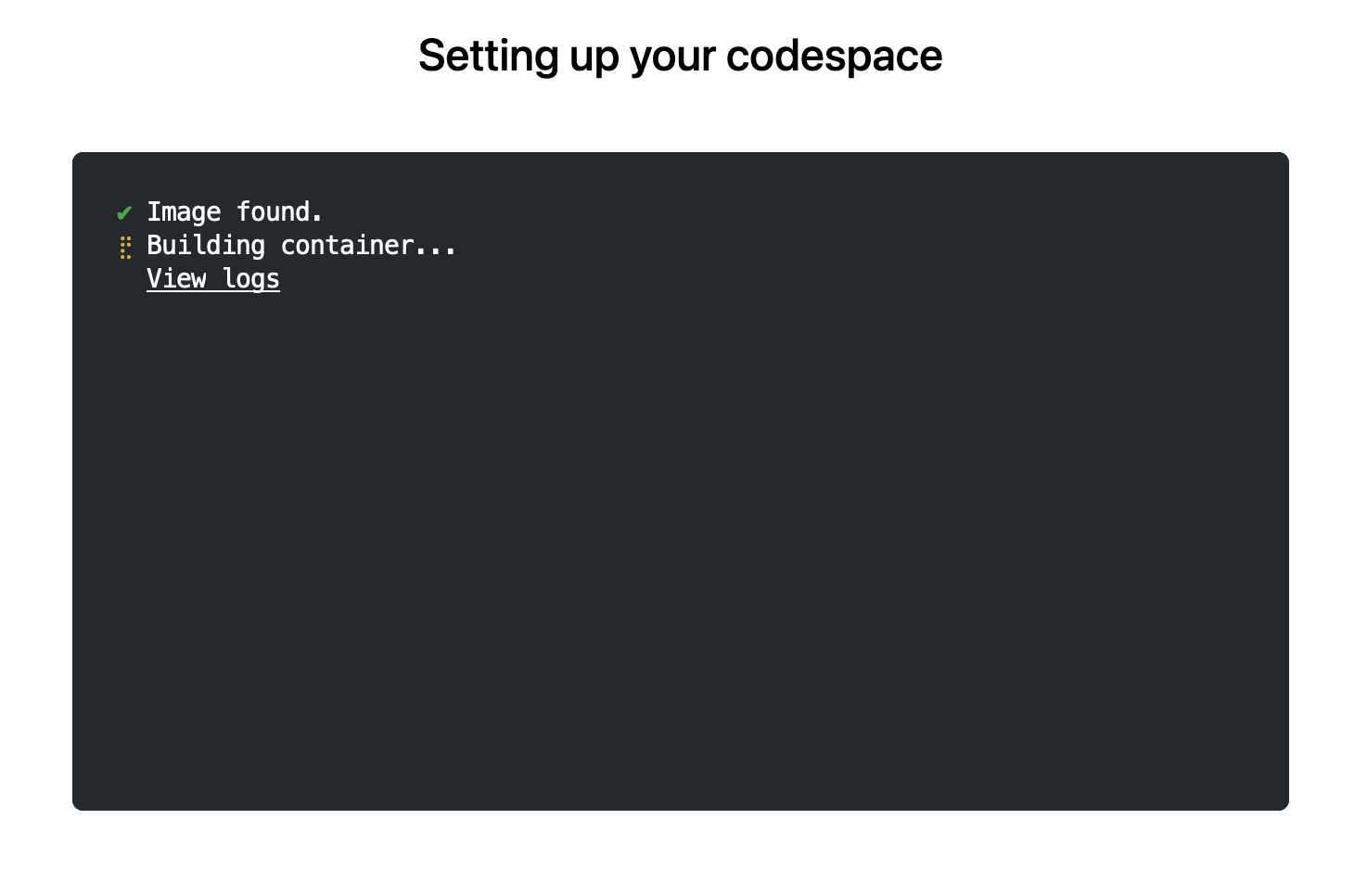
 The first time you do this, it will open up a new browser tab where
your Codespace is being instantiated. This first-time instantiation
will take a few minutes (feel free to click View logs to see how
things are progressing) so please be patient. Once built, your Codespace
will deploy almost immediately when you use it again in the future.
The first time you do this, it will open up a new browser tab where
your Codespace is being instantiated. This first-time instantiation
will take a few minutes (feel free to click View logs to see how
things are progressing) so please be patient. Once built, your Codespace
will deploy almost immediately when you use it again in the future.
 After the VS Code editor opens up in your browser, feel free to open
up the
After the VS Code editor opens up in your browser, feel free to open
up the examples/sfExample.R
file. It demonstrates how r2u enables us install
packages and their system-dependencies with ease, here
installing packages sf (including all its
geospatial dependencies) and ggplot2 (including
all its dependencies). You can run the code easily in the browser
environment: Highlight or hover over line(s) and execute them by hitting
Cmd+Return (Mac) /
Ctrl+Return (Linux / Windows).
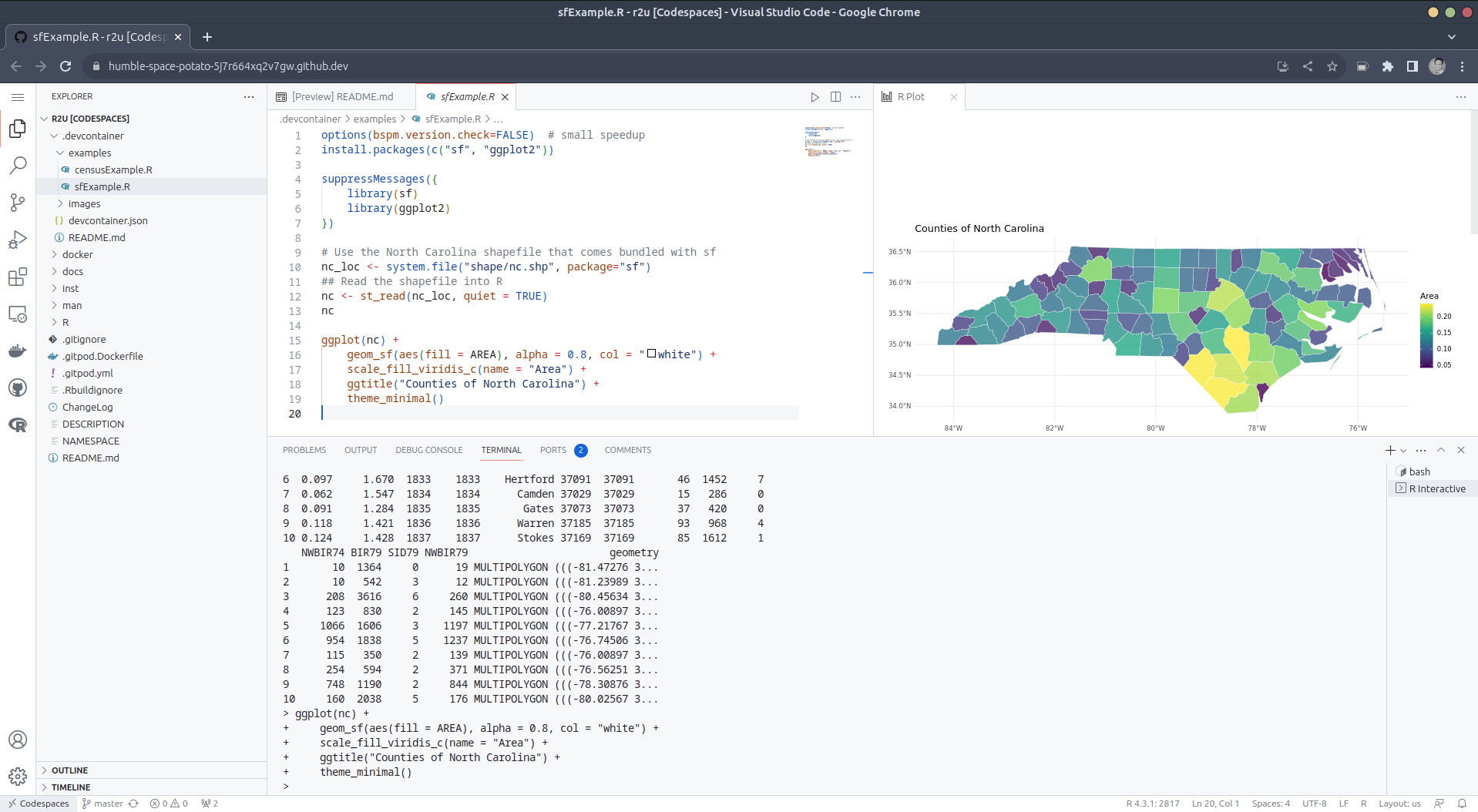 (Both example screenshots reflect the initial codespaces-r2u
repo as well as personal scratchspace one which we started with, both of
course work here too.)
Do not forget to close your Codespace once you have finished using
it. Click the Codespaces tab at the very bottom left of your code
editor / browser and select Close Current Codespace in the resulting
pop-up box. You can restart it at any time, for example by going to
https://github.com/codespaces and clicking on your instance.
(Both example screenshots reflect the initial codespaces-r2u
repo as well as personal scratchspace one which we started with, both of
course work here too.)
Do not forget to close your Codespace once you have finished using
it. Click the Codespaces tab at the very bottom left of your code
editor / browser and select Close Current Codespace in the resulting
pop-up box. You can restart it at any time, for example by going to
https://github.com/codespaces and clicking on your instance.
Extend r2u with r-universe
r2u offers
fast, easy, reliable access to all of CRAN via binaries for
Ubuntu focal and jammy. When using the latter (as is the default), it
can be combined with r-universe
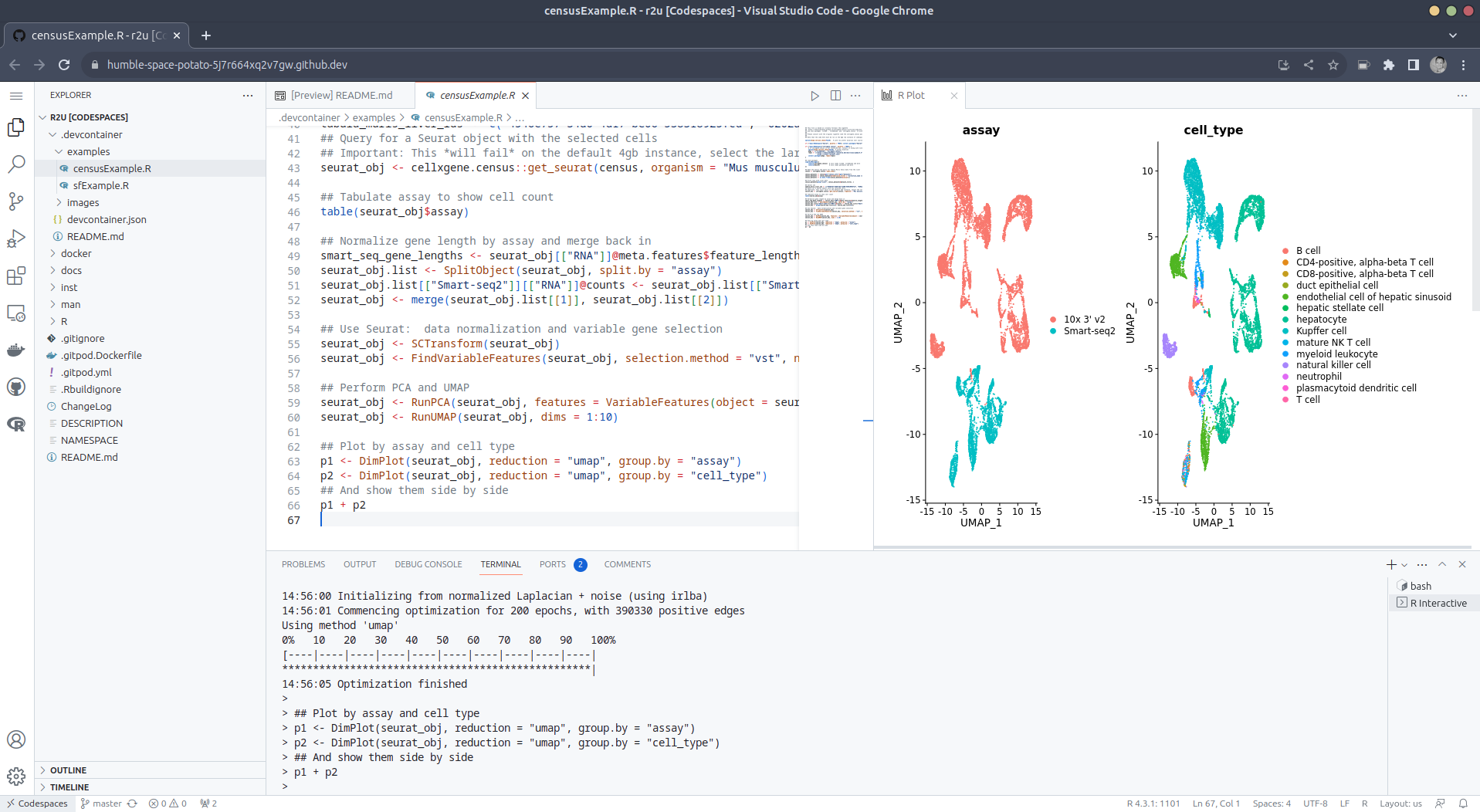
and its Ubuntu jammy binaries. We demontrates this in a second example
file examples/censusExample.R
which install both the cellxgene-census
and tiledbsoma R
packages as binaries from r-universe (along with about 100
dependencies), downloads single-cell data from Census and uses Seurat to create PCA and
UMAP decomposition plots. Note that in order run this you have to
change the Codespaces default instance from small (4gb ram) to large
(16gb ram).
Local DevContainer build
Codespaces are DevContainers running in the cloud (where
DevContainers are themselves just Docker images running with some VS
Code sugar on top). This gives you the very powerful ability to edit
locally but run remotely in the hosted codespace. To test this setup
locally, simply clone the repo and open it up in VS Code. You will need
to have Docker installed and running on your system (see here). You will also
need the Remote
Development extension (you will probably be prompted to install it
automatically if you do not have it yet). Select Reopen in Container
when prompted. Otherwise, click the >< tab at the
very bottom left of your VS Code editor and select this option. To shut
down the container, simply click the same button and choose Reopen
Folder Locally . You can always search for these commands via the
command palette too (Cmd+Shift+p /
Ctrl+Shift+p).
Use in Your Repo
To add this ability of launching Codespaces in the browser (or
editor) to a repo of yours, create a directory
.devcontainers in your selected repo, and add the file .devcontainers/devcontainer.json.
You can customize it by enabling other feature, or use the
postCreateCommand field to install packages (while taking
full advantage of r2u).
Acknowledgments
There are a few key plumbing pieces that make everything work here.
Thanks to:
- My Rocker Project
colleague @eitsupi
for maintaining the R
DevContainer Features.
- @renkun-ken and the rest of the VS Code R
extension team.
- @Enchufa2 for
bspm making
package installation to the sysstem so seamless.
- @grantmcdermott for the initial
codespaces-r2u
setup from which we derived this.
- Last but not least everybody who helped me make r2u possible, tested it,
or sent hints for improvement.
Colophon
More information about r2u is at its site, and we
answered some question in issues, and at stackoverflow. More questions
are always welcome!
If you like this or other open-source work I do, you can now sponsor me at
GitHub.
examples/censusExample.R
which install both the cellxgene-census
and tiledbsoma R
packages as binaries from r-universe (along with about 100
dependencies), downloads single-cell data from Census and uses Seurat to create PCA and
UMAP decomposition plots. Note that in order run this you have to
change the Codespaces default instance from small (4gb ram) to large
(16gb ram).
Local DevContainer build
Codespaces are DevContainers running in the cloud (where
DevContainers are themselves just Docker images running with some VS
Code sugar on top). This gives you the very powerful ability to edit
locally but run remotely in the hosted codespace. To test this setup
locally, simply clone the repo and open it up in VS Code. You will need
to have Docker installed and running on your system (see here). You will also
need the Remote
Development extension (you will probably be prompted to install it
automatically if you do not have it yet). Select Reopen in Container
when prompted. Otherwise, click the >< tab at the
very bottom left of your VS Code editor and select this option. To shut
down the container, simply click the same button and choose Reopen
Folder Locally . You can always search for these commands via the
command palette too (Cmd+Shift+p /
Ctrl+Shift+p).
Use in Your Repo
To add this ability of launching Codespaces in the browser (or
editor) to a repo of yours, create a directory
.devcontainers in your selected repo, and add the file .devcontainers/devcontainer.json.
You can customize it by enabling other feature, or use the
postCreateCommand field to install packages (while taking
full advantage of r2u).
Acknowledgments
There are a few key plumbing pieces that make everything work here.
Thanks to:
- My Rocker Project
colleague @eitsupi
for maintaining the R
DevContainer Features.
- @renkun-ken and the rest of the VS Code R
extension team.
- @Enchufa2 for
bspm making
package installation to the sysstem so seamless.
- @grantmcdermott for the initial
codespaces-r2u
setup from which we derived this.
- Last but not least everybody who helped me make r2u possible, tested it,
or sent hints for improvement.
Colophon
More information about r2u is at its site, and we
answered some question in issues, and at stackoverflow. More questions
are always welcome!
If you like this or other open-source work I do, you can now sponsor me at
GitHub.
.devcontainers in your selected repo, and add the file .devcontainers/devcontainer.json.
You can customize it by enabling other feature, or use the
postCreateCommand field to install packages (while taking
full advantage of r2u).
Acknowledgments
There are a few key plumbing pieces that make everything work here.
Thanks to:
- My Rocker Project
colleague @eitsupi
for maintaining the R
DevContainer Features.
- @renkun-ken and the rest of the VS Code R
extension team.
- @Enchufa2 for
bspm making
package installation to the sysstem so seamless.
- @grantmcdermott for the initial
codespaces-r2u
setup from which we derived this.
- Last but not least everybody who helped me make r2u possible, tested it,
or sent hints for improvement.
Colophon
More information about r2u is at its site, and we
answered some question in issues, and at stackoverflow. More questions
are always welcome!
If you like this or other open-source work I do, you can now sponsor me at
GitHub.
bspm making
package installation to the sysstem so seamless.This post by Dirk Eddelbuettel originated on his Thinking inside the box blog. Please report excessive re-aggregation in third-party for-profit settings.
Originally posted 2023-08-13, minimally edited 2023-08-15 which changed the timestamo and URL.

 I dug out a computer running Fedora 28, which was released 2018-04-01 - over 5 years ago. Backing up the data and re-installing seemed tedious, but the current version of Fedora is 38, and while Fedora supports updates from N to N+2 that was still going to be 5 separate upgrades. That seemed tedious, so I figured I'd just try to do an update from 28 directly to 38. This is, obviously, extremely unsupported, but what could possibly go wrong?








 I've never been a fan of IoT devices for obvious reasons: not only do they tend
to be excellent at being expensive vendor locked-in machines, but far too often,
they also end up turning into e-waste after a short amount of time.
Manufacturers can go out of business or simply decide to
I've never been a fan of IoT devices for obvious reasons: not only do they tend
to be excellent at being expensive vendor locked-in machines, but far too often,
they also end up turning into e-waste after a short amount of time.
Manufacturers can go out of business or simply decide to 



 . Internet shutdowns impact women


 The DebConf video team has been







 Over the years, the