Search Results: "mt"

2 October 2020

Ian Jackson: Mailman vs DKIM - a novel solution

tl;dr: Do not configure Mailman to replace the mail domains in From: headers. Instead, try out my small new program which can make your Mailman transparent, so that DKIM signatures survive. Background and narrative DKIM NB: This explanation is going to be somewhat simplified. I am going to gloss over some details and make some slightly approximate statements. DKIM is a new anti-spoofing mechanism for Internet email, intended to help fight spam. DKIM, paired with the DMARC policy system, has been remarkably successful at stemming the flood of joe-job spams. As usually deployed, DKIM works like this: When a message is originally sent, the author's MUA sends it to the MTA for their From: domain for outward delivery. The From: domain mailserver calculates a cryptographic signature of the message, and puts the signature in the headers of the message. Obviously not the whole message can be signed, since at the very least additional headers need to be added in transit, and sometimes headers need to be modified too. The signing MTA gets to decide what parts of the message are covered by the signature: they nominate the header fields that are covered by the signature, and specify how to handle the body. A recipient MTA looks up the public key for the From: domain in the DNS, and checks the signature. If the signature doesn't match, depending on policy (originator's policy, in the DNS, and recipient's policy of course), typically the message will be treated as spam. The originating site has a lot of control over what happens in practice. They get to publish a formal (DMARC) policy in the DNS which advises recipients what they should do with mails claiming to be from their site. As mentioned, they can say which headers are covered by the signature - including the ability to sign the absence of a particular headers - so they can control which headers downstreams can get away with adding or modifying. And they can set a normalisation policy, which controls how precisely the message must match the one that they sent. Mailman Mailman is, of course, the extremely popular mailing list manager. There are a lot of things to like about it. I choose to run it myself not just because it's popular but also because it provides a relatively competent web UI and a relatively competent email (un)subscription interfaces, decent bounce handling, and a pretty good set of moderation and posting access controls. The Xen Project mailing lists also run on mailman. Recently we had some difficulties with messages sent by Citrix staff (including myself), to Xen mailing lists, being treated as spam. Recipient mail systems were saying the DKIM signatures were invalid. This was in fact true. Citrix has chosen a fairly strict DKIM policy; in particular, they have chosen "simple" normalisation - meaning that signed message headers must precisely match in syntax as well as in a semantic sense. Examining the the failing-DKIM messages showed that this was definitely a factor. Applying my Opinions about email My Bayesian priors tend to suggest that a mail problem involving corporate email is the fault of the corporate email. However in this case that doesn't seem true to me. My starting point is that I think mail systems should not not modify messages unnecessarily. None of the DKIM-breaking modifications made by Mailman seemed necessary to me. I have on previous occasions gone to corporate IT and requested quite firmly that things I felt were broken should be changed. But it seemed wrong to go to corporate IT and ask them to change their published DKIM/DMARC policy to accomodate a behaviour in Mailman which I didn't agree with myself. I felt that instead I shoud put (with my Xen Project hat on) my own house in order. Getting Mailman not to modify messages So, I needed our Mailman to stop modifying the headers. I needed it to not even reformat them. A brief look at the source code to Mailman showed that this was not going to be so easy. Mailman has a lot of features whose very purpose is to modify messages. Personally, as I say, I don't much like these features. I think the subject line tags, CC list manipulations, and so on, are a nuisance and not really Proper. But they are definitely part of why Mailman has become so popular and I can definitely see why the Mailman authors have done things this way. But these features mean Mailman has to disassemble incoming messages, and then reassemble them again on output. It is very difficult to do that and still faithfully reassemble the original headers byte-for-byte in the case where nothing actually wanted to modify them. There are existing bug reports[1] [2] [3] [4]; I can see why they are still open. Rejected approach: From:-mangling This situation is hardly unique to the Xen lists. Many other have struggled with it. The best that seems to have been come up with so far is to turn on a new Mailman feature which rewrites the From: header of the messages that go through it, to contain the list's domain name instead of the originator's. I think this is really pretty nasty. It breaks normal use of email, such as reply-to-author. It is having Mailman do additional mangling of the message in order to solve the problems caused by other undesirable manglings! Solution! As you can see, I asked myself: I want Mailman not modify messages at all; how can I get it to do that? Given the existing structure of Mailman - with a lot of message-modifying functionality - that would really mean adding a bypass mode. It would have to spot, presumably depending on config settings, that messages were not to be edited; and then, it would avoid disassembling and reassembling the message at at all, and bypass the message modification stages. The message would still have to be parsed of course - it's just that the copy send out ought to be pretty much the incoming message. When I put it to myself like that I had a thought: couldn't I implement this outside Mailman? What if I took a copy of every incoming message, and then post-process Mailman's output to restore the original? It turns out that this is quite easy and works rather well! outflank-mailman outflank-mailman is a 233-line script, plus documentation, installation instructions, etc. It is designed to run from your MTA, on all messages going into, and coming from, Mailman. On input, it saves a copy of the message in a sqlite database, and leaves a note in a new Outflank-Mailman-Id header. On output, it does some checks, finds the original message, and then combines the original incoming message with carefully-selected headers from the version that Mailman decided should be sent. This was deployed for the Xen Project lists on Tuesday morning and it seems to be working well so far. If you administer Mailman lists, and fancy some new software to address this problem, please do try it out. Matters arising - Mail filtering, DKIM Overall I think DKIM is a helpful contribution to the fight against spam (unlike SPF, which is fundamentally misdirected and also broken). Spam is an extremely serious problem; most receiving mail servers experience more attempts to deliver spam than real mail, by orders of magnitude. But DKIM is not without downsides. Inherent in the design of anything like DKIM is that arbitrary modification of messages by list servers is no longer possible. In principle it might be possible to design a system which tolerated modifications reasonable for mailing lists but it would be quite complicated and have to somehow not tolerate similar modifications in other contexts. So DKIM means that lists can no longer add those unsubscribe footers to mailing list messages. The "new way" (RFC2369, July 1998), to do this is with the List-Unsubscribe header. Hopefully a good MUA will be able to deal with unsubscription semiautomatically, and I think by now an adequate MUA should at least display these headers by default. Sender: There are implications for recipient-side filtering too. The "traditional" correct way to spot mailing list mail was to look for Resent-To:, which can be added without breaking DKIM; the "new" (RFC2919, March 2001) correct way is List-Id:, likewise fine. But during the initial deployment of outflank-mailman I discovered that many subscribers were detecting that a message was list traffic by looking at the Sender: header. I'm told that some mail systems (apparently Microsoft's included) make it inconvenient to filter on List-Id. Really, I think a mailing list ought not to be modifying Sender:. Given Sender:'s original definition and semantics, there might well be reasonable reasons for a mailing list posting to have different From: and and then the original Sender: ought not to be lost. And a mailing list's operation does not fit well into the original definition of Sender:. I suspect that list software likes to put in Sender mostly for historical reasons; notably, a long time ago it was not uncommon for broken mail systems to send bounces to the Sender: header rather than the envelope sender (SMTP MAIL FROM). DKIM makes this more of a problem. Unfortunately the DKIM specifications are vague about what headers one should sign, but they pretty much definitely include Sender: if it is present, and some materials encourage signing the absence of Sender:. The latter is Exim's default configuration when DKIM-signing is enabled. Franky there seems little excuse for systems to not readily support and encourage filtering on List-Id, 20 years later, but I don't want to make life hard for my users. For now we are running a compromise configuration: if there wasn't a Sender: in the original, take Mailman's added one. This will result in (i) misfiltering for some messages whose poster put in a Sender:, and (ii) DKIM failures for messages whose originating system signed the absence of a Sender:. I'm going to mine the db for some stats after it's been deployed for a week or so, to see which of these problems is worst and decide what to do about it. Mail routing For DKIM to work, messages being sent From: a particular mail domain must go through a system trusted by that domain, so they can be signed. Most users tend to do this anyway: their mail provider gives them an IMAP server and an authenticated SMTP submission server, and they configure those details in their MUA. The MUA has a notion of "accounts" and according to the user's selection for an outgoing message, connects to the authenticated submission service (usually using TLS over the global internet). Trad unix systems where messages are sent using the local sendmail or localhost SMTP submission (perhaps by automated systems, or perhaps by human users) are fine too. The smarthost can do the DKIM signing. But this solution is awkward for a user of a trad MUA in what I'll call "alias account" setups: where a user has an address at a mail domain belonging to different people to the system on which they run their MUA (perhaps even several such aliases for different hats). Traditionally this worked by the mail domain forwarding incoming the mail, and the user simply self-declaring their identity at the alias domain. Without DKIM there is nothing stopping anyone self-declaring their own From: line. If DKIM is to be enabled for such a user (preventing people forging mail as that user), the user will have to somehow arrange that their trad unix MUA's outbound mail stream goes via their mail alias provider. For a single-user sending unix system this can be done with tolerably complex configuration in an MTA like Exim. For shared systems this gets more awkward and might require some hairy shell scripting etc.
edited 2020-10-01 21:22 and 21:35 and -02 10:50 +0100 to fix typos and 21:28 to linkify "my small program" in the tl;dr


comment count unavailable comments

28 September 2020

Vincent Bernat: Syncing RIPE, ARIN and APNIC objects with a custom Ansible module

Internet is split into five regional Internet registry: AFRINIC, ARIN, APNIC, LACNIC and RIPE. Each RIR maintains an Internet Routing Registry. An IRR allows one to publish information about the routing of Internet number resources.1 Operators use this to determine the owner of an IP address and to construct and maintain routing filters. To ensure your routes are widely accepted, it is important to keep the prefixes you announce up-to-date in an IRR. There are two common tools to query this database: whois and bgpq4. The first one allows you to do a query with the WHOIS protocol:
$ whois -BrG 2a0a:e805:400::/40
[ ]
inet6num:       2a0a:e805:400::/40
netname:        FR-BLADE-CUSTOMERS-DE
country:        DE
geoloc:         50.1109 8.6821
admin-c:        BN2763-RIPE
tech-c:         BN2763-RIPE
status:         ASSIGNED
mnt-by:         fr-blade-1-mnt
remarks:        synced with cmdb
created:        2020-05-19T08:04:58Z
last-modified:  2020-05-19T08:04:58Z
source:         RIPE
route6:         2a0a:e805:400::/40
descr:          Blade IPv6 - AMS1
origin:         AS64476
mnt-by:         fr-blade-1-mnt
remarks:        synced with cmdb
created:        2019-10-01T08:19:34Z
last-modified:  2020-05-19T08:05:00Z
source:         RIPE
The second one allows you to build route filters using the information contained in the IRR database:
$ bgpq4 -6 -S RIPE -b AS64476
NN = [
    2a0a:e805::/40,
    2a0a:e805:100::/40,
    2a0a:e805:300::/40,
    2a0a:e805:400::/40,
    2a0a:e805:500::/40
];
There is no module available on Ansible Galaxy to manage these objects. Each IRR has different ways of being updated. Some RIRs propose an API but some don t. If we restrict ourselves to RIPE, ARIN and APNIC, the only common method to update objects is email updates, authenticated with a password or a GPG signature.2 Let s write a custom Ansible module for this purpose!

Notice I recommend that you read Writing a custom Ansible module as an introduction, as well as Syncing MySQL tables for a more instructive example.

Code The module takes a list of RPSL objects to synchronize and returns the body of an email update if a change is needed:
- name: prepare RIPE objects
  irr_sync:
    irr: RIPE
    mntner: fr-blade-1-mnt
    source: whois-ripe.txt
  register: irr

Prerequisites The source file should be a set of objects to sync using the RPSL language. This would be the same content you would send manually by email. All objects should be managed by the same maintainer, which is also provided as a parameter. Signing and sending the result is not the responsibility of this module. You need two additional tasks for this purpose:
- name: sign RIPE objects
  shell:
    cmd: gpg --batch --user noc@example.com --clearsign
    stdin: "  irr.objects  "
  register: signed
  check_mode: false
  changed_when: false
- name: update RIPE objects by email
  mail:
    subject: "NEW: update for RIPE"
    from: noc@example.com
    to: "auto-dbm@ripe.net"
    cc: noc@example.com
    host: smtp.example.com
    port: 25
    charset: us-ascii
    body: "  signed.stdout  "
You also need to authorize the PGP keys used to sign the updates by creating a key-cert object and adding it as a valid authentication method for the corresponding mntner object:
key-cert:  PGPKEY-A791AAAB
certif:    -----BEGIN PGP PUBLIC KEY BLOCK-----
certif:    
certif:    mQGNBF8TLY8BDADEwP3a6/vRhEERBIaPUAFnr23zKCNt5YhWRZyt50mKq1RmQBBY
[ ]
certif:    -----END PGP PUBLIC KEY BLOCK-----
mnt-by:    fr-blade-1-mnt
source:    RIPE
mntner:    fr-blade-1-mnt
[ ]
auth:      PGPKEY-A791AAAB
mnt-by:    fr-blade-1-mnt
source:    RIPE

Module definition Starting from the skeleton described in the previous article, we define the module:
module_args = dict(
    irr=dict(type='str', required=True),
    mntner=dict(type='str', required=True),
    source=dict(type='path', required=True),
)
result = dict(
    changed=False,
)
module = AnsibleModule(
    argument_spec=module_args,
    supports_check_mode=True
)

Getting existing objects To grab existing objects, we use the whois command to retrieve all the objects from the provided maintainer.
# Per-IRR variations:
# - whois server
whois =  
    'ARIN': 'rr.arin.net',
    'RIPE': 'whois.ripe.net',
    'APNIC': 'whois.apnic.net'
 
# - whois options
options =  
    'ARIN': ['-r'],
    'RIPE': ['-BrG'],
    'APNIC': ['-BrG']
 
# - objects excluded from synchronization
excluded = ["domain"]
if irr == "ARIN":
    # ARIN does not return these objects
    excluded.extend([
        "key-cert",
        "mntner",
    ])
# Grab existing objects
args = ["-h", whois[irr],
        "-s", irr,
        *options[irr],
        "-i", "mnt-by",
        module.params['mntner']]
proc = subprocess.run("whois", *args, capture_output=True)
if proc.returncode != 0:
    raise AnsibleError(
        f"unable to query whois:  args ")
output = proc.stdout.decode('ascii')
got = extract(output, excluded)
The first part of the code setup some IRR-specific constants: the server to query, the options to provide to the whois command and the objects to exclude from synchronization. The second part invokes the whois command, requesting all objects whose mnt-by field is the provided maintainer. Here is an example of output:
$ whois -h whois.ripe.net -s RIPE -BrG -i mnt-by fr-blade-1-mnt
[ ]
inet6num:       2a0a:e805:300::/40
netname:        FR-BLADE-CUSTOMERS-FR
country:        FR
geoloc:         48.8566 2.3522
admin-c:        BN2763-RIPE
tech-c:         BN2763-RIPE
status:         ASSIGNED
mnt-by:         fr-blade-1-mnt
remarks:        synced with cmdb
created:        2020-05-19T08:04:59Z
last-modified:  2020-05-19T08:04:59Z
source:         RIPE
[ ]
route6:         2a0a:e805:300::/40
descr:          Blade IPv6 - PA1
origin:         AS64476
mnt-by:         fr-blade-1-mnt
remarks:        synced with cmdb
created:        2019-10-01T08:19:34Z
last-modified:  2020-05-19T08:05:00Z
source:         RIPE
[ ]
The result is passed to the extract() function. It parses and normalizes the results into a dictionary mapping object names to objects. We store the result in the got variable.
def extract(raw, excluded):
    """Extract objects."""
    # First step, remove comments and unwanted lines
    objects = "\n".join([obj
                         for obj in raw.split("\n")
                         if not obj.startswith((
                                 "#",
                                 "%",
                         ))])
    # Second step, split objects
    objects = [RPSLObject(obj.strip())
               for obj in re.split(r"\n\n+", objects)
               if obj.strip()
               and not obj.startswith(
                   tuple(f" x :" for x in excluded))]
    # Last step, put objects in a dict
    objects =  repr(obj): obj
               for obj in objects 
    return objects
RPSLObject() is a class enabling normalization and comparison of objects. Look at the module code for more details.
>>> output="""
... inet6num:       2a0a:e805:300::/40
... [ ]
... """
>>> pprint( k: str(v) for k,v in extract(output, excluded=[]) )
 '<Object:inet6num:2a0a:e805:300::/40>':
   'inet6num:       2a0a:e805:300::/40\n'
   'netname:        FR-BLADE-CUSTOMERS-FR\n'
   'country:        FR\n'
   'geoloc:         48.8566 2.3522\n'
   'admin-c:        BN2763-RIPE\n'
   'tech-c:         BN2763-RIPE\n'
   'status:         ASSIGNED\n'
   'mnt-by:         fr-blade-1-mnt\n'
   'remarks:        synced with cmdb\n'
   'source:         RIPE',
 '<Object:route6:2a0a:e805:300::/40>':
   'route6:         2a0a:e805:300::/40\n'
   'descr:          Blade IPv6 - PA1\n'
   'origin:         AS64476\n'
   'mnt-by:         fr-blade-1-mnt\n'
   'remarks:        synced with cmdb\n'
   'source:         RIPE' 

Comparing with wanted objects Let s build the wanted dictionary using the same structure, thanks to the extract() function we can use verbatim:
with open(module.params['source']) as f:
    source = f.read()
wanted = extract(source, excluded)
The next step is to compare got and wanted to build the diff object:
if got != wanted:
    result['changed'] = True
    if module._diff:
        result['diff'] = [
            dict(before_header=k,
                 after_header=k,
                 before=str(got.get(k, "")),
                 after=str(wanted.get(k, "")))
            for k in set((*wanted.keys(), *got.keys()))
            if k not in wanted or k not in got or wanted[k] != got[k]]

Returning updates The module does not have a side effect. If there is a difference, we return the updates to send by email. We choose to include all wanted objects in the updates (contained in the source variable) and let the IRR ignore unmodified objects. We also append the objects to be deleted by adding a delete: attribute to each them them.
# We send all source objects and deleted objects.
deleted_mark = f" 'delete:':16 deleted by CMDB"
deleted = "\n\n".join([f" got[k].raw \n deleted_mark "
                       for k in got
                       if k not in wanted])
result['objects'] = f" source \n\n deleted "
module.exit_json(**result)

The complete code is available on GitHub. The module supports both --diff and --check flags. It does not return anything if no change is detected. It can work with APNIC, RIPE and ARIN. It is not perfect: it may not detect some changes,3 it is not able to modify objects not owned by the provided maintainer4 and some attributes cannot be modified, requiring to manually delete and recreate the updated object.5 However, this module should automate 95% of your needs.

  1. Other IRRs exist without being attached to a RIR. The most notable one is RADb.
  2. ARIN is phasing out this method in favor of IRR-online. RIPE has an API available, but email updates are still supported and not planned to be deprecated. APNIC plans to expose an API.
  3. For ARIN, we cannot query key-cert and mntner objects and therefore we cannot detect changes in them. It is also not possible to detect changes to the auth mechanisms of a mntner object.
  4. APNIC do not assign top-level objects to the maintainer associated with the owner.
  5. Changing the status of an inetnum object requires deleting and recreating the object.

21 September 2020

Jonathan McDowell: Mainline Linux on the MikroTik RB3011

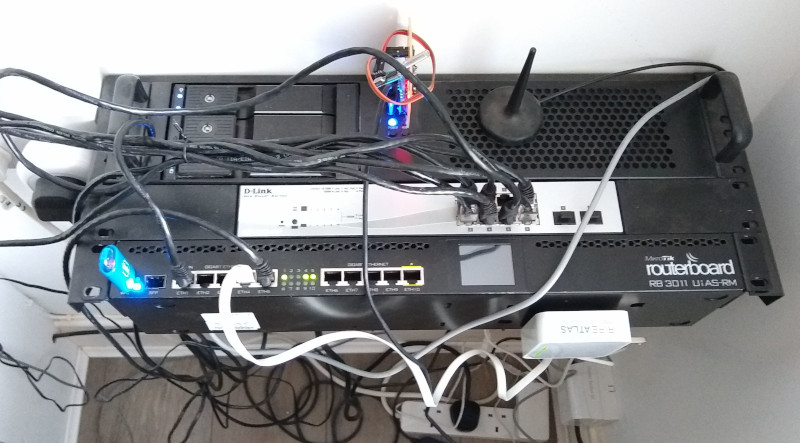
I upgraded my home internet connection to fibre (FTTP) last October. I m still on an 80M/20M service, so it s no faster than my old VDSL FTTC connection was, and as a result for a long time I continued to use my HomeHub 5A running OpenWRT. However the FTTP ONT meant I was using up an additional ethernet port on the router, and I was already short, so I ended up with a GigE switch in use as well. Also my wifi is handled by a UniFi, which takes its power via Power-over-Ethernet. That mean I had a router, a switch and a PoE injector all in close proximity. I wanted to reduce the number of devices, and ideally upgrade to something that could scale once I decide to upgrade my FTTP service speed. Looking around I found the MikroTik RB3011UiAS-RM, which is a rack mountable device with 10 GigE ports (plus an SFP slot) and a dual core Qualcomm IPQ8064 ARM powering it. There s 1G RAM and 128MB NAND flash, as well as a USB3 port. It also has PoE support. On paper it seemed like an ideal device. I wasn t particularly interested in running RouterOS on it (the provided software), but that s based on Linux and there was some work going on within OpenWRT to add support, so it seemed like a worthwhile platform to experiment with (what, you expected this to be about me buying an off the shelf device and using it with only the supplied software?). As an added bonus a friend said he had one he wasn t using, and was happy to sell it to me for a bargain price. RB3011 router in use I did try out RouterOS to start with, but I didn t find it particularly compelling. I m comfortable configuring firewalling and routing at a Linux command line, and I run some additional services on the router like my MQTT broker, and mqtt-arp, my wifi device presence monitor. I could move things around such that they ran on the house server, but I consider them core services and as a result am happier with them on the router. The first step was to get something booting on the router. Luckily it has an RJ45 serial console port on the back, and a reasonably featured bootloader that can manage to boot via tftp over the network. It wants an ELF binary rather than a plain kernel, but Sergey Sergeev had done the hard work of getting u-boot working for the IPQ8064, which mean I could just build normal u-boot images to try out. Linux upstream already had basic support for a lot of the pieces I was interested in. There s a slight fudge around AUTO_ZRELADDR because the network coprocessors want a chunk of memory at the start of RAM, but there s ongoing discussions about how to handle this cleanly that I m hopeful will eventually mean I can drop that hack. Serial, ethernet, the QCA8337 switches (2 sets of 5 ports, tied to different GigE devices on the processor) and the internal NOR all had drivers, so it was a matter of crafting an appropriate DTB to get them working. That left niggles. First, the second switch is hooked up via SGMII. It turned out the IPQ806x stmmac driver didn t initialise the clocks in this mode correctly, and neither did the qca8k switch driver. So I need to fix up both of those (Sergey had handled the stmmac driver, so I just had to clean up and submit his patch). Next it turned out the driver for talking to the Qualcomm firmware (SCM) had been updated in a way that broke the old method needed on the IPQ8064. Some git archaeology figured that one out and provided a solution. Ansuel Smith helpfully provided the DWC3 PHY driver for the USB port. That got me to the point I could put a Debian armhf image onto a USB stick and mount that as root, which made debugging much easier. At this point I started to play with configuring up the device to actually act as a router. I make use of a number of VLANs on my home network, so I wanted to make sure I could support those. Turned out the stmmac driver wasn t happy reconfiguring its MTU because the IPQ8064 driver doesn t configure the FIFO sizes. I found what seem to be the correct values and plumbed them in. Then the qca8k driver only supported port bridging. I wanted the ability to have a trunk port to connect to the upstairs switch, while also having ports that only had a single VLAN for local devices. And I wanted the switch to handle this rather than requiring the CPU to bridge the traffic. Thankfully it s easy to find a copy of the QCA8337 datasheet and the kernel Distributed Switch Architecture is pretty flexible, so I was able to implement the necessary support. I stuck with Debian on the USB stick for actually putting the device into production. It makes it easier to fix things up if necessary, and the USB stick allows for a full Debian install which would be tricky on the 128M of internal NAND. That means I can use things like nftables for my firewalling, and use the standard Debian packages for things like collectd and mosquitto. Plus for debug I can fire up things like tcpdump or tshark. Which ended up being useful because when I put the device into production I started having weird IPv6 issues that turned out to be a lack of proper Ethernet multicast filter support in the IPQ806x ethernet device. The driver would try and setup the multicast filter for the IPv6 NDP related packets, but it wouldn t actually work. The fix was to fall back to just receiving all multicast packets - this is what the vendor driver does. Most of this work will be present once the 5.9 kernel is released - the basics are already in 5.8. Currently not queued up that I can think of are the following: Overall I consider the device a success, and it s been entertaining getting it working properly. I m running a mostly mainline kernel, it s handling my house traffic without breaking a sweat, and the fact it s running Debian makes it nice and easy to throw more things on it as I desire. However it turned out the RB3011 isn t as perfect device as I d hoped. The PoE support is passive, and the UniFi wants 802.1af. So I was going to end up with 2 devices. As it happened I picked up a cheap D-Link DGS-1210-10P switch, which provides the PoE support as well as some additional switch ports. Plus it runs Linux, so more on that later
20 September 2020

Dirk Eddelbuettel: RcppSpdlog 0.0.2: New upstream, awesome new stopwatch

Following up on the initial RcppSpdlog 0.0.1 release earlier this week, we are pumped to announce release 0.0.2. It contains upstream version 1.8.0 for spdlog which utilizes (among other things) a new feature in the embedded fmt library, namely completely automated formatting of high resolution time stamps which allows for gems like this (taken from this file in the package and edited down for brevity):
    spdlog::stopwatch sw;                                   // instantiate a stop watch

    // some other code

    sp->info("Elapsed time:  ", sw);
What we see is all there is: One instantiates a stopwatch object, and simply references it. The rest, as they say, is magic. And we get tic / toc alike behaviour in modern C++ at essentially no cost us (as code authors). So nice. Output from the (included in the package) function exampleRsink() (again edited down just a little):
R> RcppSpdlog::exampleRsink()
[13:03:23.845114] [fromR] [I] [thread 793264] Welcome to spdlog!
[...]
[13:03:23.845205] [fromR] [I] [thread 793264] Elapsed time: 0.000103611
[...]
[13:03:23.845281] [fromR] [I] [thread 793264] Elapsed time: 0.00018203
R> 
We see that the two simple logging instances come 10 and 18 microseconds into the call. RcppSpdlog bundles spdlog, a wonderful header-only C++ logging library with all the bells and whistles you would want that was written by Gabi Melman, and also includes fmt by Victor Zverovic. The NEWS entry for this release follows.

Changes in RcppSpdlog version 0.0.2 (2020-09-17)
  • Upgraded to upstream release 1.8.0
  • Switched Travis CI to using BSPM, also test on macOS
  • Added 'stopwatch' use to main R sink example

Courtesy of my CRANberries, there is a diffstat report relative to previous release. More detailed information is on the RcppSpdlog page. The only sour grapes, again, are once more over the CRAN processing. And just how 0.0.1 was delayed for no good reason for three weeks, 0.0.2 was delayed by three days just because well that is how CRAN rules sometimes. I d be even more mad if I had an alternative but I don t. We remain grateful for all they do but they really could have let this one through even at one-day update delta. Ah well, now we re three days wiser and of course nothing changed in the package. If you like this or other open-source work I do, you can now sponsor me at GitHub. For the first year, GitHub will match your contributions.

This post by Dirk Eddelbuettel originated on his Thinking inside the box blog. Please report excessive re-aggregation in third-party for-profit settings.

Andy Simpkins: Using an IP camera in conference calls

My webcam has broken, something that I have been using a lot during the last few months for some reason. A friend of mine suggested that I use the mic and camera on my mobile phone instead. There is a simple app droidcam that makes the phone behave as a simple webcam, it also has a client application to run on your PC to capture the web-stream and present it as a video device. All well and good but I would like to keep propitiatory software off my PCs (I have a hard enough time accepting it on a phone but I have to draw a line somewhere). I decided that there had to be a simple way to ingest that stream and present it as a local video device on a Linux box. It turns out that it is a lot simpler than I thought it would be. I had it working within 10 minutes! Packages needed: ffmpeg, v4l2loopback-utils
sudo apt-get install ffmpeg v4l2loopback-utils
Start the loop-back device:
sudo modprobe v4l2loopback
Ingest video and present on loop-back device:
ffmpeg -re -i <URL_VideoStream> -vcodec rawvideo -pix_fmt yuv420p -f v4l2 /dev/video0
Where

-re
Read input at native frame rate. Mainly used to simulate a grab
device, or live input stream (e.g. when reading from a file). Should
not be used with actual grab devices or live input streams (where it
can cause packet loss). By default ffmpeg attempts to read the
input(s) as fast as possible. This option will slow down the reading
of the input(s) to the native frame rate of the input(s). It is
useful for real-time output (e.g. live streaming).
-i <source>
In this case my phone running droidcam http://10.14.1.100:4747/video
-vcodec rawvideo
Select the output video codec to raw video (as expected for /dev/video#)
-pix_fmt yuv420p
Set pixel format. in this example tell ffmpeg that the video will
be yuv colour space at 420p resolution
-f v4l2 /dev/video0
Force the output to be in video for Linux 2 (v4l2) format bound to
device /dev/video0

17 September 2020

Dirk Eddelbuettel: RcppSpdlog 0.0.1: New and Exciting Logging Package

Very thrilled to announce a new package RcppSpdlog which is now on CRAN in its first release 0.0.1. We had tweeted once about the earliest version which had already caught the eyes of Gabi upstream. RcppSpdlog bundles spdlog, a wonderful header-only C++ logging library with all the bells and whistles you would want that was written by Gabi Melman, and also includes fmt by Victor Zverovic. I had meant to package this for a few years now but didn t find an (easy, elegant) way to completely lift stdout / stderr and related uses which R wants us to remove for smoother operations from R itself including synchronized input/output. It was only a few weeks ago that I realized I should subclass a logger (or, more concretely, a sink for a logger) which could then use R input/output. With the right idea the implementaton was easy, and [Gabi]((https://github.com/gabime) was most helpful in making sure R CMD check would not see one or two remaining C++ i/o operations (which we currently do by not activating a default logger, and substituing REprintf() in one call). So this is now clean and sween and a simple use is included in an example in the package we can show here too (in slightly shorter form minus the documentation header):
// this portmanteau include also defines the r_sink we use below, and which
// diverts all logging to R via the Rcpp::Rcout replacement for std::cout
#include <RcppSpdlog>

// [[Rcpp::export]]
void exampleRsink()  

    std::string logname = "fromR";                          // fix a name for this logger
    auto sp = spdlog::get(logname);                         // retrieve existing one
    if (sp == nullptr) sp = spdlog::r_sink_mt(logname);     // or create new one if needed

    // change log pattern (changed from [%H:%M:%S %z] [%n] [%^---%L---%$] )
    sp->set_pattern("[%H:%M:%S.%f] [%n] [%^%L%$] [thread %t] %v");

    sp->info("Welcome to spdlog!");
    sp->error("Some error message with arg:  ", 1);

    sp->warn("Easy padding in numbers like  :08d ", 12);
    sp->critical("Support for int:  0:d ;  hex:  0:x ;  oct:  0:o ; bin:  0:b ", 42);
    sp->info("Support for floats  :03.2f ", 1.23456);
    sp->info("Positional args are  1   0 ..", "too", "supported");
    sp->info(" :<30 ", "left aligned");

 
The NEWS entry for the first release follows.

Changes in RcppSpdlog version 0.0.1 (2020-09-08)
  • Initial release with added R/Rcpp logging sink example

The only sour grapes, if any, are over the CRAN processing. This was originally uploaded three weeks ago. As a new package, it got extra attention and some truly idiosyncratic attention to two details that were already supplied in the first uploaded version. Yet it needed two rounds of going back and forth for really no great net gain, yet wasting a week each time. I am not all that impressed by this, and not particularly pleased either, but I presume is the tax we all pay in order to enjoy the unsurpassed richness of the CRAN repository system which continues to work just flawlessly. If you like this or other open-source work I do, you can now sponsor me at GitHub. For the first year, GitHub will match your contributions.

This post by Dirk Eddelbuettel originated on his Thinking inside the box blog. Please report excessive re-aggregation in third-party for-profit settings.

15 September 2020

Jonathan Dowland: Come Together

Primal Scream   Come Together
This one rarely returns to its proper place, instead living in the small pile of records permanently next to my turntable. I'm a late convert to Primal Scream: I first heard the 10 minute Andrew Weatherall mix of Come Together on Tom Robinson's 6Music show. It's a remarkable record, more so to think that it's quite hard, in isolation, to actually hear Primal Scream's contribution. This is very much Weatherall's track, and (to me, at least) it does a great job of encapsulating the house music explosion of the time. It's interesting to hear Terry Farley's mix, partially because the band's contribution is more evident, so you can get a glimpse of the material that Weatherall had to work with. RIP Andrew Weatherall, 1963-2020.

Russell Coker: More About the PowerEdge R710

I ve got the R710 (mentioned in my previous post [1]) online. When testing the R710 at home I noticed that sometimes the VGA monitor I was using would start flickering when in some parts of the BIOS setup, it seemed that the horizonal sync wasn t working properly. It didn t seem to be a big deal at the time. When I deployed it the KVM display that I had planned to use with it mostly didn t display anything. When the display was working the KVM keyboard wouldn t work (and would prevent a regular USB keyboard from working if they were both connected at the same time). The VGA output of the R710 also wouldn t work with my VGA->HDMI device so I couldn t get it working with my portable monitor. Fortunately the Dell front panel has a display and tiny buttons that allow configuring the IDRAC IP address, so I was able to get IDRAC going. One thing Dell really should do is allow the down button to change 0 to 9 when entering numbers, that would make it easier to enter 8.8.8.8 for the DNS server. Another thing Dell should do is make the default gateway have a default value according to the IP address and netmask of the server. When I got IDRAC going it was easy to setup a serial console, boot from a rescue USB device, create a new initrd with the driver for the MegaRAID controller, and then reboot into the server image. When I transferred the SSDs from the old server to the newer Dell server the problem I had was that the Dell drive caddies had no holes in suitable places for attaching SSDs. I ended up just pushing the SSDs in so they are hanging in mid air attached only by the SATA/SAS connectors. Plugging them in took the space from the above drive, so instead of having 2*3.5 disks I have 1*2.5 SSD and need the extra space to get my hand in. The R710 is designed for 6*3.5 disks and I m going to have trouble if I ever want to have more than 3*2.5 SSDs. Fortunately I don t think I ll need more SSDs. After booting the system I started getting alerts about a fault in one SSD, with no detail on what the fault might be. My guess is that the SSD in question is M.2 and it s in a M.2 to regular SATA adaptor which might have some problems. The data seems fine though, a BTRFS scrub found no checksum errors. I guess I ll have to buy a replacement SSD soon. I configured the system to use the nosmt kernel command line option to disable hyper-threading (which won t provide much performance benefit but which makes certain types of security attacks much easier). I ve configured BOINC to run on 6/8 CPU cores and surprisingly that didn t cause the fans to be louder than when the system was idle. It seems that a system that is designed for 6 SAS disks doesn t need a lot of cooling when run with SSDs. Update: It s a R710 not a T710. I mostly deal with Dell Tower servers and typed the wrong letter out of habit.

31 August 2020

Jacob Adams: Command Line 101

How to Work in a Text-Only Environment.

What is this thing? When you first open a command-line (note that I use the terms command-line and shell interchangably here, they re basically the same, but command-line is the more general term, and shell is the name for the program that executes commands for you) you ll see something like this: thisfolder This line is called a command prompt and it tells you four pieces of information:

  1. jaadams: The username of the user that is currently running this shell.
  2. bg7: The name of the computer that this shell is running on, important for when you start accessing shells on remote machines.
  3. /tmp/thisfolder: The folder or directory that your shell is currently running in. Like a file explorer (like Window s Explorer or Mac s Finder) a shell always has a working directory, from which all relative paths (see sidenote below) are resolved.
When you first opened a shell, however, you might notice that is looks more like this: home This is a shorthand notation that the shell uses to make this output shorter when possible. ~ stands for your home directory, usually /home/<username>. Like C:\Users\<username>\ on Windows or /Users/<username> on Mac, this directory is where all your files should go by default. Thus a command prompt like this: downloads actually tells you that you are currently in the /home/jaadams/Downloads directory.

Sidenote: The Unix Filesystem and Relative Paths folders on Linux and other Unix-derived systems like MacOS are usually called directories. These directories are represented by paths, strings that indicate where the directory is on the filesystem. The one unusual part is the so-called root directory . All files are stored in this folder or directories under it. Its path is just / and there are no directories above it. For example, the directory called home typically contains all user directories. This is stored in the root directory, and each users specific data is stored in a directory named after that user under home. Thus, the home directory of the user jacob is typically /home/jacob, the directory jacob under the home directory stored in the root directory /. If you re interested in more details about what goes in what directory, man hier has the basics and the Filesystem Hierarchy Standard governs the layout of the filesystem on most Linux distributions. You don t always have to use the full path, however. If the path does not begin with a /, it is assumed that the path actually begins with the path of the current directory. So if you use a path like my/folders/here, and you re in the /home/jacob directory, the path will be treated like /home/jacob/my/folders/here. Each folder also contains the symbolic links .. and .. Symbolic links are a very powerful kind of file that is actually a reference to another file. .. always represents the parent directory of the current directory, so /home/jacob/.. links to /home/. . always links to the current directory, so /home/jacob/. links to /home/jacob.

Running commands To run a command from the command prompt, you type its name and then usually some arguments to tell it what to do. For example, the echo command displays the text passed as arguments.
jacob@lovelace/home/jacob$ echo hello world
hello world
Arguments to commands are space-separated, so in the previous example hello is the first argument and world is the second. If you need an argument to contain spaces, you ll want to put quotes around it, echo "like so". Certain arguments are called flags , or options (options if they take another argument, flags otherwise) usually prefixed with a hyphen, and they change the way a program operates. For example, the ls command outputs the contents of a directory passed as an argument, but if you add -l before the directory, it will give you more details on the files in that directory.
jacob@lovelace/tmp/test$ ls /tmp/test
1  2  3  4  5  6
jacob@lovelace/tmp/test$ ls -l /tmp/test
total 0
-rw-r--r-- 1 jacob jacob 0 Aug 26 22:06 1
-rw-r--r-- 1 jacob jacob 0 Aug 26 22:06 2
-rw-r--r-- 1 jacob jacob 0 Aug 26 22:06 3
-rw-r--r-- 1 jacob jacob 0 Aug 26 22:06 4
-rw-r--r-- 1 jacob jacob 0 Aug 26 22:06 5
-rw-r--r-- 1 jacob jacob 0 Aug 26 22:06 6
jacob@lovelace/tmp/test$
Most commands take different flags to change their behavior in various ways.

File Management
  • cd <path>: Change the current directory of the running shell to <path>.
  • ls <path>: Output the contents of <path>. If no path is passed, it prints the contents of the current directory.
  • touch <filename>: create an new empty file called <filename>. Used on an existing file, it updates the file s last accessed and modified times. Most text editors can also create a new file for you, which is probably more useful.
  • mkdir <directory>: Create a new folder/directory at path <directory>.
  • mv <src> <dest>: Move a file or directory at path <src> to <dest>.
  • cp <src> <dest>: Copy a file or directory at path <src> to <dest>.
  • rm <file>: Remove a file at path <file>.
  • zip -r <zipfile> <contents...>: Create a zip file <zipfile> with contents <contents>. <contents> can be multiple arguments, and you ll usually want to use the -r argument when including directories in your zipfile, as otherwise only the directory will be included and not the files and directories within it.

Searching
  • grep <thing> <file>: Look for the string <thing> in <file>. If no <file> is passed it searches standard input.
  • find <path> -name <name>: Find a file or directory called <name> somwhere under <path>. This command is actually very powerful, but also very complex. For example you can delete all files in a directory older than 30 days with:
    find -mtime +30 -exec rm  \;
    
  • locate <name>: A much easier to use command to find a file with a given name, but it is not usually installed by default.

Outputting Files
  • cat <files...>: Output (concatenate) all the files passed as arguments.
  • head <file>: Output the beginning of <file>
  • tail <file>: Output the end of <file>

How to Find the Right Command All commands (at least on sane Linux distributions like Debian or Ubuntu) are documented with a manual page, in man section 1 (for more information on manual sections, run man intro). This can be accessed using man <command> You can search for the right command using the -k flag, as in man -k <search>. You can also view manual pages in your browser, on sites like https://manpages.debian.org or https://linux.die.net/man. This is not always helpful, however, because some command s descriptions are not particularly useful, and also there are a lot of manual pages, which can make searching for a specific one difficult. For example, finding the right command to search inside text files is quite difficult via man (it s grep). When you can t find what you need with man I recommend falling back to searching the Internet. There are lots of bad Linux tutorials out there, but here are some reputable sources I recommend:
  • https://www.cyberciti.biz: nixCraft has excellent tutorials on all things Linux
  • Hosting providers like Digital Ocean or Linode: Good intro documentation, but can sometimes be outdated
  • https://tldp.org: The Linux Documentation project is great, but it can also be a little outdated sometimes.
  • https://stackoverflow.com: Oftentimes has great answers, but quality varies wildly since anyone can answer.
These are certainly not the only options but they re the sources I would recommend when available.

How to Read a Manual Page Manual pages consist of a series of sections, each with a specific purpose. Instead of attempting to write my own description here, I m going to borrow the excellent one from The Linux Documentation Project
The NAME section is the only required section. Man pages without a name section are as useful as refrigerators at the north pole. This section also has a standardized format consisting of a comma-separated list of program or function names, followed by a dash, followed by a short (usually one line) description of the functionality the program (or function, or file) is supposed to provide. By means of makewhatis(8), the name sections make it into the whatis database files. Makewhatis is the reason the name section must exist, and why it must adhere to the format I described. (Formatting explanation cut for brevity) The SYNOPSIS section is intended to give a short overview on available program options. For functions this sections lists corresponding include files and the prototype so the programmer knows the type and number of arguments as well as the return type. The DESCRIPTION section eloquently explains why your sequence of 0s and 1s is worth anything at all. Here s where you write down all your knowledge. This is the Hall Of Fame. Win other programmers and users admiration by making this section the source of reliable and detailed information. Explain what the arguments are for, the file format, what algorithms do the dirty jobs. The OPTIONS section gives a description of how each option affects program behaviour. You knew that, didn t you? The FILES section lists files the program or function uses. For example, it lists configuration files, startup files, and files the program directly operates on. (Cut details about installing files) The ENVIRONMENT section lists all environment variables that affect your program or function and tells how, of course. Most commonly the variables will hold pathnames, filenames or default options. The DIAGNOSTICS section should give an overview of the most common error messages from your program and how to cope with them. There s no need to explain system error error messages (from perror(3)) or fatal signals (from psignal(3)) as they can appear during execution of any program. The BUGS section should ideally be non-existent. If you re brave, you can describe here the limitations, known inconveniences and features that others may regard as misfeatures. If you re not so brave, rename it the TO DO section ;-) The AUTHOR section is nice to have in case there are gross errors in the documentation or program behaviour (Bzzt!) and you want to mail a bug report. The SEE ALSO section is a list of related man pages in alphabetical order. Conventionally, it is the last section.

Remote Access One of the more powerful uses of the shell is through ssh, the secure shell. This allows you to remotely connect to another computer and run a shell on that machine:
user@host:~$ ssh other@example.com
other@example:~$
The prompt changes to reflect the change in user and host, as you can see in the example above. This allows you to work in a shell on that machine as if it was right in front of you.

Moving Files Between Machines There are several ways you can move files between machines over ssh. The first and easiest is scp, which works much like the cp command except that paths can also take a user@host argument to move files across computers. For example, if you wanted to move a file test.txt to your home directory on another machine, the command would look like:
scp test.txt other@example.com:
(The home directory is the default path) Otherwise you can move files by reversing the order of the arguments and put a path after the colon to move files from another directory on the remote host. For example, if you wanted to fetch the file /etc/issue.net from example.com:
scp other@example.com:/etc/issue.net .
Another option is the sftp command, which gives you a very simple shell-like interface in which you can cd and ls, before either puting files onto the local machine or geting files off of it. The final and most powerful option is rsync which syncs the contents of one directory to another, and doesn t copy files that haven t changed. It s powerful and complex, however, so I recommend reading the USAGE section of its man page.

Long-Running Commands The one problem with ssh is that it will stop any command running in your shell when you disconnect. If you want to leave something on and come back later then this can be a problem. This is where terminal multiplexers come in. tmux and screen both allow you to run a shell in a safe environment where it will continue even if you disconnect from it. You do this by running the command without any arguments, i.e. just tmux or just screen. In tmux you can disconnect from the current session by pressing Ctrl+b then d, and reattach with the tmux attach command. screen works similarly, but with Ctrl+a instead of b and screen -r to reattach.

Command Inputs and Outputs Arguments are not the only way to pass input to a command. They can also take input from what s called standard input , which the shell usually connects to your keyboard. Output can go to two places, standard output and standard error, both of which are directed to the screen by default.

Redirecting I/O Note that I said above that standard input/output/error are only usually connected to the keyboard and the terminal? This is because you can redirect them to other places with the shell operators <, > and the very powerful .

File redirects The operators < and > redirect the input and output of a command to a file. For example, if you wanted a file called list.txt that contained a list of all the files in a directory /this/one/here you could use:
ls /this/one/here > list.txt

Pipelines The pipe character, , allows you to direct the output of one command into the input of another. This can be very powerful. For example, the following pipeline lists the contents of the current directory searches for the string test , then counts the number of results. (wc -l counts the number of lines in its input)
ls   grep test   wc -l
For a better, but even more contrived example, say you have a file myfile, with a bunch of lines of potentially duplicated and unsorted data
test
test
1234
4567
1234
You can sort it and output only the unique lines with sort and uniq:
$ uniq < myfile   sort
1234
1234
4567
test

Save Yourself Some Typing: Globs and Tab-Completion Sometimes you don t want to type out the whole filename when writing out a command. The shell can help you here by autocompleting when you press the tab key. If you have a whole bunch of files with the same suffix, you can refer to them when writing arguments as *.suffix. This also works with prefixes, prefix*, and in fact you can put a * anywhere, *middle*. The shell will expand that * into all the files in that directory that match your criteria (ending with a specific suffix, starting with a specific prefix, and so on) and pass each file as a separate argument to the command. For example, if I have a series of files called 1.txt, 2.txt, and so on up to 9, each containing just the number for which it s named, I could use cat to output all of them like so:
jacob@lovelace/tmp/numbers$ ls
1.txt  2.txt  3.txt  4.txt  5.txt  6.txt  7.txt  8.txt	9.txt
jacob@lovelace/tmp/numbers$ cat *.txt
1
2
3
4
5
6
7
8
9
Also the ~ shorthand mentioned above that refers to your home directory can be used when passing a path as an argument to a command.

Ifs and For loops The files in the above example were generated with the following shell commands:
for i in 1 2 3 4 5 6 7 8 9
do
echo $i > $i.txt
done
But I ll have to save variables, conditionals and loops for another day because this is already too long. Needless to say the shell is a full programming language, although a very ugly and dangerous one.

24 August 2020

Jonathan Dowland: Out of control (21 minutes of madness mix)

Chemical Brothers   Out Of Control (21 Minutes of Madness remix) Copy 1143 of 1999 Chemical Brothers Out Of Control (21 Minutes of Madness remix) Copy 1143 of 1999
Also known as The Secret Psychedelic Mix. I picked this up last year. It was issued to promote the 20th anniversary re-issue of the parent album "Surrender". I remember liking this song back when it came out. At that time I didn't know who the guest singer was Bernard Sumner and if I had it wouldn't mean anything to me. This is a pretty good mix. There's nothing "extra" in the mix, really, it's the same elements as the original 7 minute version, for 21 minutes this time, with perhaps some more production elements (more dubby stuff) but it doesn't seem to overstay its welcome.

Arnaud Rebillout: Send emails from your terminal with msmtp

In this tutorial, we'll configure everything needed to send emails from the terminal. We'll use msmtp, a lightweight SMTP client. For the sake of the example, we'll use a GMail account, but any other email provider can do. Your OS is expected to be Debian, as usual on this blog, although it doesn't really matter. We will also see how to store the credentials for the email account in the system keyring. And finally, we'll go the extra mile, and see how to configure various command-line utilities so that they automatically use msmtp to send emails. Even better, we'll make msmtp the default email sender, to actually avoid configuring these utilities one by one. Prerequisites Strong prerequisites (if you don't recognize yourself here, you probably landed on the wrong page):
  • You run Linux on your computer (let's assume a Debian-like distro).
  • You want to send emails from your terminal.
Weak prerequisites (if your setup doesn't match those points exactly, that's fine, you can still read on):
  • Your email account is a GMail one.
  • Your desktop environment is GNOME.
GMail account setup For a GMail account, there's a bit of configuration to do. For other email providers, I have no idea, maybe you can just skip this part, or maybe you will have to go through a similar procedure. If you want an external program (msmtp in this case) to talk to the GMail servers on your behalf, and send emails, you can't just use your usual GMail password. Instead, GMail requires you to generate so-called app passwords, one for each application that needs to access your GMail account. This approach has several advantages:
  • it will basically work, GMail won't block you because it thinks that you're trying to sign in from an unknown device, a weird location or whatever.
  • your main GMail password remains secret, you won't have to write it down in any configuration file or anywhere else.
  • you can change your main GMail password, no breakage, apps will still work as each of them use their own passwords.
  • you can revoke an app password anytime, without impacting anything else.
So app passwords are a good idea, it just requires a bit of work to set it up. Let's see what it takes. First, 2-Step Verification must be enabled on your GMail account. Visit https://myaccount.google.com/security, and if that's not the case, enable it. You'll need to authorize all of your devices (computer(s), phone(s) and so on), and it can be a bit tedious, granted. But you only have to do it once in a lifetime, and after it's done, you're left with a more secure account, so it's not that bad, right? Enabling the 2-Step Verification will unlock the feature we need: App passwords. Visit https://myaccount.google.com/apppasswords, and under "Signing in to Google", click "App passwords", and generate one. An app password is a 16 characters string, something like qwertyuiopqwerty. It's supposed to be used from only one place, ie. from ONE application that is installed on ONE device. That's why it's common to give it a name of the form application@device, so in our case it could be msmtp@laptop, but really it's free form, choose whatever name suits you, as long as it makes sense to you. So let's give a name to this app password, write it down for now, and we're done with the GMail config. Send your first email Time to get started with msmtp. First thing first, installation, trivial:
sudo apt install msmtp
Let's try to send an email. At this point, we did not create any configuration file for msmtp yet, so we have to provide every details on the command line.
# Write a dummy email
cat << EOF > message.txt
From: YOUR_LOGIN@gmail.com
To: SOMEONE_ELSE@SOMEWHERE_ELSE.com
Subject: Cafe Sua Da
Iced-coffee with condensed milk
EOF
# Send it
cat message.txt   msmtp \
    --auth=on --tls=on \
    --host smtp.gmail.com \
    --port 587 \
    --user YOUR_LOGIN \
    --read-envelope-from \
    --read-recipients
# msmtp prompts you for your password:
# this is where goes the app password!
Obviously, in this example you should replace the uppercase words with the real thing, that is, your email login, and real email addresses. Also, let me insist, you must enter the app password that was generated previously, not your real GMail password. And it should work already, this email should have been sent and received by now. So let me explain quickly what happened here. In the file message.txt, we provided From: (the email address of the person sending the email) and To: (the destination email address). Then we asked msmtp to re-use those values to set the envelope of the email with --read-envelope-from and --read-recipients. What about the other parameters?
  • --auth=on because we want to authenticate with the server.
  • --tls=on because we want to make sure that the communication with the server is encrypted.
  • --host and --port tells where to find the server. If you don't use GMail, adjust that accordingly.
  • --user is obviously your GMail username.
For more details, you should refer to the msmtp documentation. Write a configuration file So we could send an email, that's cool already. However the command to do that was a bit long, and we don't want to juggle with all these arguments every time we send an email. So let's write down all of that into a configuration file. msmtp supports two locations: ~/.msmtprc and ~/.config/msmtp/config, at your preference. In this tutorial we'll use ~/.msmtprc for brevity:
cat << 'EOF' > ~/.msmtprc
defaults
tls on
account gmail
auth on
host smtp.gmail.com
port 587
user YOUR_LOGIN
from YOUR_LOGIN@gmail.com
account default : gmail
EOF
And for a quick explanation:
  • under defaults are the default values for all the following accounts.
  • under account are the settings specific to this account, until another account line is found.
  • finally, the last line defines which account is the default.
All in all it's pretty simple, and it's becoming easier to send an email:
# Write a dummy email. Note that the
# header 'From:' is no longer needed,
# it's already in '~/.msmtprc'.
cat << 'EOF' > message.txt
To: SOMEONE_ELSE@SOMEWHERE_ELSE.com
Subject: Flat White
The milky way for coffee
EOF
# Send it
cat message.txt   msmtp \
    --account default \
    --read-recipients
Actually, --account default is not needed, as it's the default anyway if you don't provide a --account argument. Furthermore --read-recipients can be shortened as -t. So we can make it real short now:
msmtp -t < message.txt
At this point, life is good! Except for one thing maybe: we still have to type the password every time we send an email. Surely it must be possible to avoid that annoyance... Store your password in the system keyring For this part, we'll make use of the libsecret tool to store the password in the system keyring via the Secret Service API. It means that your desktop environment should implement the Secret Service specification, which is the case for both GNOME and KDE. Note that GNOME provides Seahorse to have a look at your secrets, KDE has the KDE Wallet. There's also KeePassXC, which I have only heard of but never used. I guess it can be your password manager of choice if you use neither GNOME nor KDE. For those running an up-to-date Debian unstable, you should have msmtp >= 1.8.11-2, and you're all good to go. For those having an older version than that however, you will have to install the package msmtp-gnome in order to have msmtp built with libsecret support. Note that this package depends on seahorse, hence it pulls in a good part of the GNOME stack when you install it. For those not running GNOME, that's unfortunate. All of this was discussed and fixed in #962689. Alright! So let's just make sure that the libsecret tools are installed:
sudo apt install libsecret-tools
And now we can store our password in the system keyring with this command:
secret-tool store --label msmtp \
    host smtp.gmail.com \
    service smtp \
    user YOUR_LOGIN
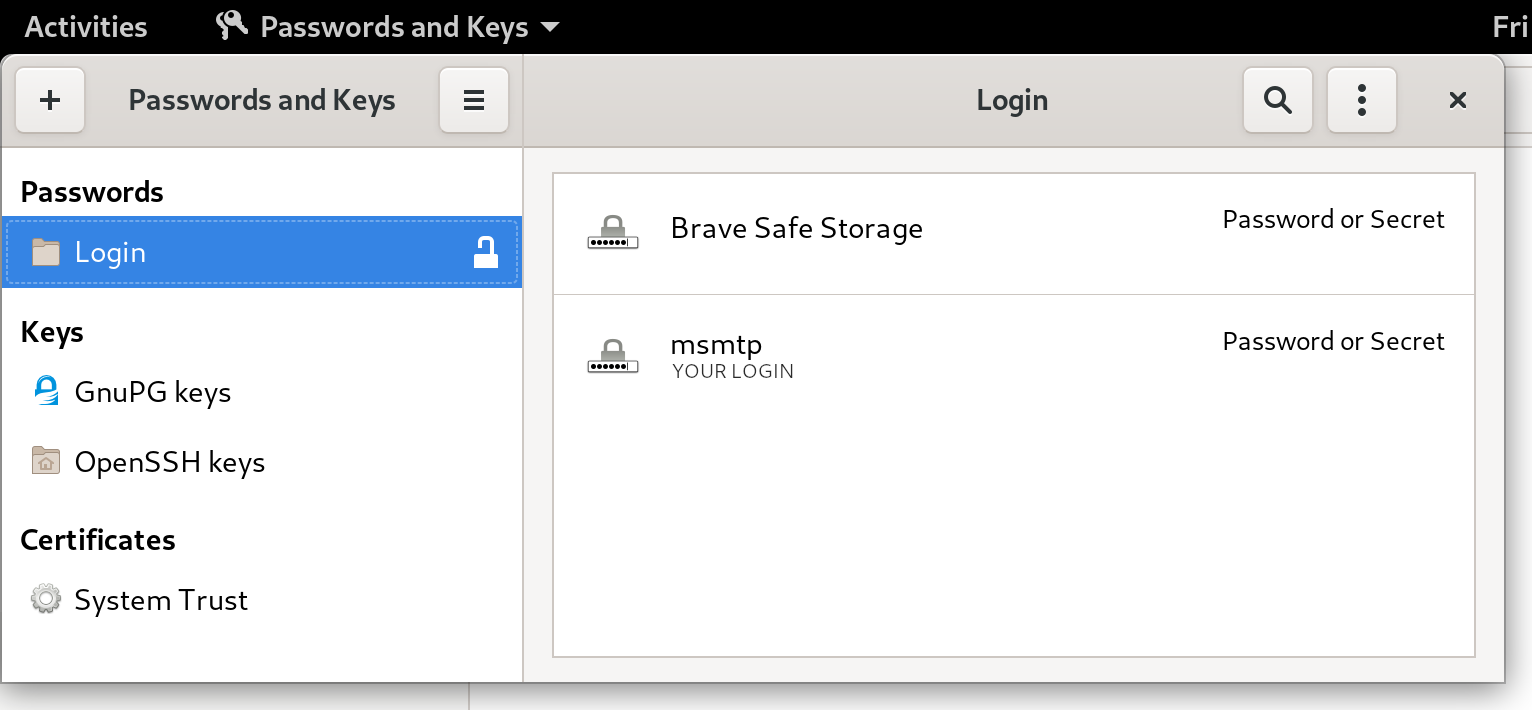
If this looks a bit too magic, and you want something more visual, you can actually fire a GUI like seahorse (for GNOME users), or kwalletmanager5 (for KDE users), and then you will see what passwords are stored in there. Here's a screenshot of Seahorse, with a msmtp password stored: seahorse with msmtp password Let's try to send an email again:
msmtp -t < message.txt
No need for a password anymore, msmtp got it from the system keyring! For more details on how msmtp handle the passwords, and to see what other methods are supported, refer to the extensive documentation. Use-cases and integration Let's go over a few use-cases, situations where you might end up sending emails from the command-line, and what configuration is required to make it work with msmtp. Git Send-Email Sending emails with git is a common workflow for some projects, like the Linux kernel. How does git send-email actually send emails? From the git-send-email manual page:
the built-in default is to search for sendmail in /usr/sbin, /usr/lib and $PATH if such program is available
It is possible to override this default though:
--smtp-server=
[...] Alternatively it can specify a full pathname of a sendmail-like program instead; the program must support the -i option.
So in order to use msmtp here, you'd add a snippet like that to your ~/.gitconfig file:
[sendemail]
    smtpserver = /usr/bin/msmtp
For a full guide, you can also refer to https://git-send-email.io. Debian developer tools Tools like bts or reportbug are also good examples of command-line tools that need to send emails. From the bts manual page:
--sendmail=SENDMAILCMD
Specify the sendmail command [...] Default is /usr/sbin/sendmail.
So if you want bts to send emails with msmtp instead of sendmail, you must use bts --sendmail='/usr/bin/msmtp -t'. Note that bts also loads settings from the file /etc/devscripts.conf and ~/.devscripts, so you could also set BTS_SENDMAIL_COMMAND='/usr/bin/msmtp -t' in one of those files. From the reportbug manual page:
--mta=MTA
Specify an alternate MTA, instead of /usr/sbin/sendmail (the default).
In order to use msmtp here, you'd write reportbug --mta=/usr/bin/msmtp. Note that reportbug reads it settings from /etc/reportbug.conf and ~/.reportbugrc, so you could as well set mta /usr/bin/msmtp in one of those files. So who is this sendmail again? By now, you probably noticed that sendmail seems to be considered the default tool for the job, the "traditional" command that has been around for ages. Rather than configuring every tool to use something else than sendmail, wouldn't it be simpler to actually replace sendmail by msmtp? Like, create a symlink that points to msmtp, something like ln -sr /usr/bin/msmtp /usr/sbin/sendmail? So that msmtp acts as a drop-in replacement for sendmail, and there's nothing else to configure? Answer is yes, kind of. Actually, the first msmtp feature that is listed on the homepage is "Sendmail compatible interface (command line options and exit codes)". Meaning that msmtp is a drop-in replacement for sendmail, that seems to be the intent. However, you should refrain from creating or modifying anything in /usr, as it's the territory of the package manager, apt. Any change in /usr might be overwritten by apt the next time you run an upgrade or install new packages. In the case of msmtp, there is actually a package named msmtp-mta that will create this symlink for you. So if you really want a definitive replacement for sendmail, there you go:
sudo apt install msmtp-mta
From this point, sendmail is now a symlink /usr/sbin/sendmail /usr/bin/msmtp, and there's no need to configure git, bts, reportbug or any other tool that would rely on sendmail. Everything should work "out of the box". Conclusion I hope that you enjoyed reading this article! If you have any comment, feel free to send me a short email, preferably from your terminal!

22 August 2020

Norbert Preining: Converting html to mp4

Such an obvious problem, convert a piece of html/js/css, often with animations, to a video (mp4 or similar). We were just put before this problem for the TUG 2020 online conference. Searching the internet it turned up mostly web services, some of them even with lots of money to pay. At the end (below I will give a short history) it turned out to be rather simple.

The key is to use timesnap, a tool to take screenshots from web pages. It is actively maintained, and internally uses puppeteer, which in turn uses Google Chrome browser headless. This also means that rendering quality is very high. So having an html file available, with all the necessary assets, either online or local, one simply creates enough single screenshots per second so that they can be assembled later on into a video with ffmpeg. In our case, we wanted our leaders to last 10secs before the actual presentation video starts. I decided to render at 30fps, which left me with the simple invocation:
timesnap Leader.html --viewport=1920,1080 --fps=30 --duration=10 --output-pattern="leader-%03d.png"
followed by conversion of the various png images to an mp4:
ffmpeg -r 30 -f image2 -s 1920x1080 -i leader-%03d.png -vcodec libx264 -crf 25 -pix_fmt yuv420p leader.mp4
The -r is the fps, so needs to agree with the --fps above. Also the --viewport and -s values should better agree. -crf is the video quality, and -pix_fmt the pixel format. With that very simple and quick invocation a nice leader video was ready! History It was actually more complicated than normal. For similar problems, it usually takes me about 5min of googling and a bit of scripting, but this time, it was actually a long way. Simply searching for convert html to mp4 doesn t give a lot but web services, often paid for. At some point I came up with the idea to use Electron and led to Electron Recorder, which looked promising, but didn t work. A bit more searching led me to PhantomJS, which is not developed anymore, but there was some explanation how to dump frames using phantomjs and merge them using ffmpeg, very similar to the above. Unfortunately, the rendering of the html page by phantomjs was broken, and thus not usable. Thus I ventured off into searching for alternatives of PhantomJS, which brought me to puppeteer, and from there it wasn t too long a way that pointed me at timesnap. Till now it is surprising to me that such a basic task is neither well documented, so hopefully this page helps some users.

14 August 2020

Jonathan Dowland: Generic Haskell

When I did the work described earlier in template haskell, I also explored generic programming in Haskell to solve a particular problem. StrIoT is a program generator: it outputs source code, which may depend upon other modules, which need to be imported via declarations at the top of the source code files. The data structure that StrIoT manipulates contains information about what modules are loaded to resolve the names that have been used in the input code, so we can walk that structure to automatically derive an import list. The generic programming tools I used for this are from Scrap Your Boilerplate (SYB), a module written to complement a paper of the same name. In this code snippet, everything and mkQ are from SYB:
extractNames :: Data a => a -> [Name]
extractNames = everything (++) (\a -> mkQ [] f a)
     where f = (:[])
The input must be any type which implements typeclass Data, as must all its members (and their members etc.): This holds for the Template Haskell Exp types. The output is a normal list of Names. The utility function has a more specific type Name -> [Name]. This is all that's needed to walk over the heterogeneous data structures and do something specific (f) when we encounter a Name. Post-processing the Names to get a list of modules is simple
 nub . catMaybes . map nameModule . concatMap extractNames
Unfortunately, there's a weird GHC behaviour relating to the module names for some Prelude functions that makes the above less useful in practice. For example, the Prelude function words :: String -> [String] can normally be used without an explicit import (since it's a Prelude function). However, once round-tripped through a Name, it becomes GHC.OldList.words. Attempting to import GHC.OldList fails in some contexts, because it's a hidden module or package. I've been meaning to investigate further and, if necessary, file a GHC bug about this. For this reason I've scrapped all the above and gone with a different plan. We go back to requiring the user to specify their required import list explicitly. We then walk over the Exp data type prior to code generation and decanonicalize all the Names. I also use generic programming/SYB to do this:
unQualifyNames :: Exp -> Exp
unQualifyNames = everywhere (\a -> mkT f a)
     where f :: Name -> Name
           f n = if n == '(.)
            then mkName "."
            else (mkName . last . splitOn "." . pprint) n
I've had to special-case composition (.) since that code-point is also used as the delimiter between package, module and function. Otherwise this looks very similar to the earlier function, except using everywhere and mkT (make transformation) instead of everything and mkQ (make query).

7 August 2020

Jonathan Dowland: Vimwiki

At the start of the year I begun keeping a daily diary for work as a simple text file. I've used various other approaches for this over the years, including many paper diaries and more complex digital systems. One great advantage of the one-page text file was it made assembling my weekly status report email very quick, nearly just a series of copies and pastes. But of course there are drawbacks and room for improvement. vimwiki is a personal wiki plugin for the vim and neovim editors. I've tried to look at it before, years ago, but I found it too invasive, changing key bindings and display settings for any use of vim, and I use vim a lot. I decided to give it another look. The trigger was actually something completely unrelated: Steve Losh's blog post "Coming Home to vim". I've been using vim for around 17 years but I still learned some new things from that blog post. In particular, I've never bothered to Use The Leader for user-specific shortcuts. The Leader, to me, feels like a namespace that plugins should not touch: it's like the /usr/local of shortcut keys, a space for the local user only. Vimwiki's default bindings include several incorporating the Leader. Of course since I didn't use the leader, those weren't the ones that bothered me: It turns out I regularly use carriage return and backspace for moving the cursor around in normal mode, and Vimwiki steals both of those. It also truncates the display of (what it thinks are) URIs. It turns out I really prefer to see exactly what's in the file I'm editing. I haven't used vim folds since I first switched to it, despite them being why I switched. Disabling all the default bindings and URI concealing stuff and Vimwiki is now much less invasive and I can explore its features at my own pace:
let g:vimwiki_key_mappings =   'all_maps': 0,  
let g:vimwiki_conceallevel = 0
let g:vimwiki_url_maxsave = 0 
Followed by explicitly configuring the bindings I want. I'm letting it steal carriage return. And yes, I've used some Leader bindings after all.
nnoremap <leader>ww :VimwikiIndex<cr>
nnoremap <leader>wi :VimwikiDiaryIndex<cr>
nnoremap <leader>wd :VimwikiMakeDiaryNote<cr>
nnoremap <CR> :VimwikiFollowLink<cr>
nnoremap <Tab> :VimwikiNextLink<cr>
nnoremap <S-Tab> :VimwikiPrevLink<cr>
nnoremap <C-Down> :VimwikiDiaryNextDay<cr>
nnoremap <C-Up> :VimwikiDiaryPrevDay<cr>
,wd (my leader) now brings me straight to today's diary page, and I can create separate, non-diary pages for particular work items (e.g. a Ticket reference) that will span more than one day, and keep all the relevant stuff in one place.

4 August 2020

Osamu Aoki: exim4 configuration for Desktop (better gmail support)

Since gmail rewrites "From:" address now (2020) and keep changing access limitation, it is wise not to use it as smarthost any more. (If you need to access multiple gmail addresses from mutt etc, use esmtp etc.)

---
For most of our Desktop PC running with stock exim4 and mutt, I think sending out mail is becoming a bit rough since using random smarthost causes lots of trouble due to the measures taken to prevent spams.

As mentioned in Exim4 user FAQ , /etc/hosts should have FQDN with external DNS resolvable domain name listed instead of localdomain to get the correct EHLO/HELO line. That's the first step.

The stock configuration of exim4 only allows you to use single smarthost for all your mails. I use one address for my personal use which is checked by my smartphone too. The other account is for subscribing to the mailing list. So I needed to tweak ...

Usually, mutt is smart enough to set the From address since my .muttrc has

# Set default for From: for replyes for alternates.
set reverse_name

So how can I teach exim4 to send mails depending on the mail accounts listed in the From header.

For my gmail accounts, each mail should be sent to the account specific SMTP connection matching your From header to get all the modern SPAM protection data in right state. DKIM, SPF, DMARC... (Besides, they overwrite From: header anyway if you use wrong connection.)

For my debian.org mails, mails should be sent from my shell account on people.debian.org so it is very unlikely to be blocked. Sometimes, I wasn't sure some of these debian.org mails sent through my ISP's smarthost are really getting to the intended person.

To these ends, I have created small patches to the /etc/exim4/conf.d files and reported it to Debian BTS: #869480 Support multiple smarthosts (gmail support). These patches are for the source package.

To use my configuration tweak idea, you have easier route no matter which exim version you are using. Please copy and read pertinent edited files from my github site to your installed /etc/exim4/conf.d files and get the benefits.
If you really wish to keep envelope address etc. to match From: header, please rewite agressively using the From: header using eddited rewrite/31_exim4-config_rewriting as follows:

 .ifndef NO_EAA_REWRITE_REWRITE
*@+local_domains "$ lookup $ local_part lsearch /etc/email-addresses \
$value fail " f
# identical rewriting rule for /etc/mailname
*@ETC_MAILNAME "$ lookup $ local_part lsearch /etc/email-addresses \
$value fail " f
.endif
* "$h_from:" Frs

So far its working fine for me but if you find bug, let me know.

Osamu

1 August 2020

Paul Wise: FLOSS Activities July 2020

Focus This month I didn't have any particular focus. I just worked on issues in my info bubble.

Changes

Issues

Review

Administration
  • Debian wiki: unblock IP addresses, approve accounts, reset email addresses

Communication

Sponsors The purple-discord, ifenslave and psqlodbc work was sponsored by my employer. All other work was done on a volunteer basis.

21 July 2020

Jonathan Dowland: FlashFloppy OLED display

This is the tenth part in a series of blog posts. The previous post was Amiga floppy recovery project: what next?. The whole series is available here: Amiga.
Rotary encoder, OLED display and mount Rotary encoder, OLED display and mount
I haven't made any substantive progress on my Amiga floppy recovery project for a while, but I felt like some retail therapy a few days ago so I bought a rotary encoder and OLED display for the Gotek floppy disk emulator along with a 3D-printed mount for them. I'm pleased with the results! The rather undescriptive "DSKA0001" in the picture is a result of my floppy image naming scheme: the display is capable of much more useful labels such as "Lemmings", "Deluxe Paint IV", etc. The Gotek and all the new bits can now be moved inside the Amiga A500's chassis.

16 July 2020

Enrico Zini: Build Qt5 cross-builder with raspbian sysroot: compiling with the sysroot

Whack-A-Mole machines from <https://commons.wikimedia.org/wiki/File:Whac-A-Mole_Cedar_Point.jpg> This is part of a series of posts on compiling a custom version of Qt5 in order to develop for both amd64 and a Raspberry Pi. Now that I have a sysroot, I try to use it to build Qt5 with QtWebEngine. Nothing seems to work straightforwardly with Qt5's build system, and hit an endless series of significant blockers to try and work around.
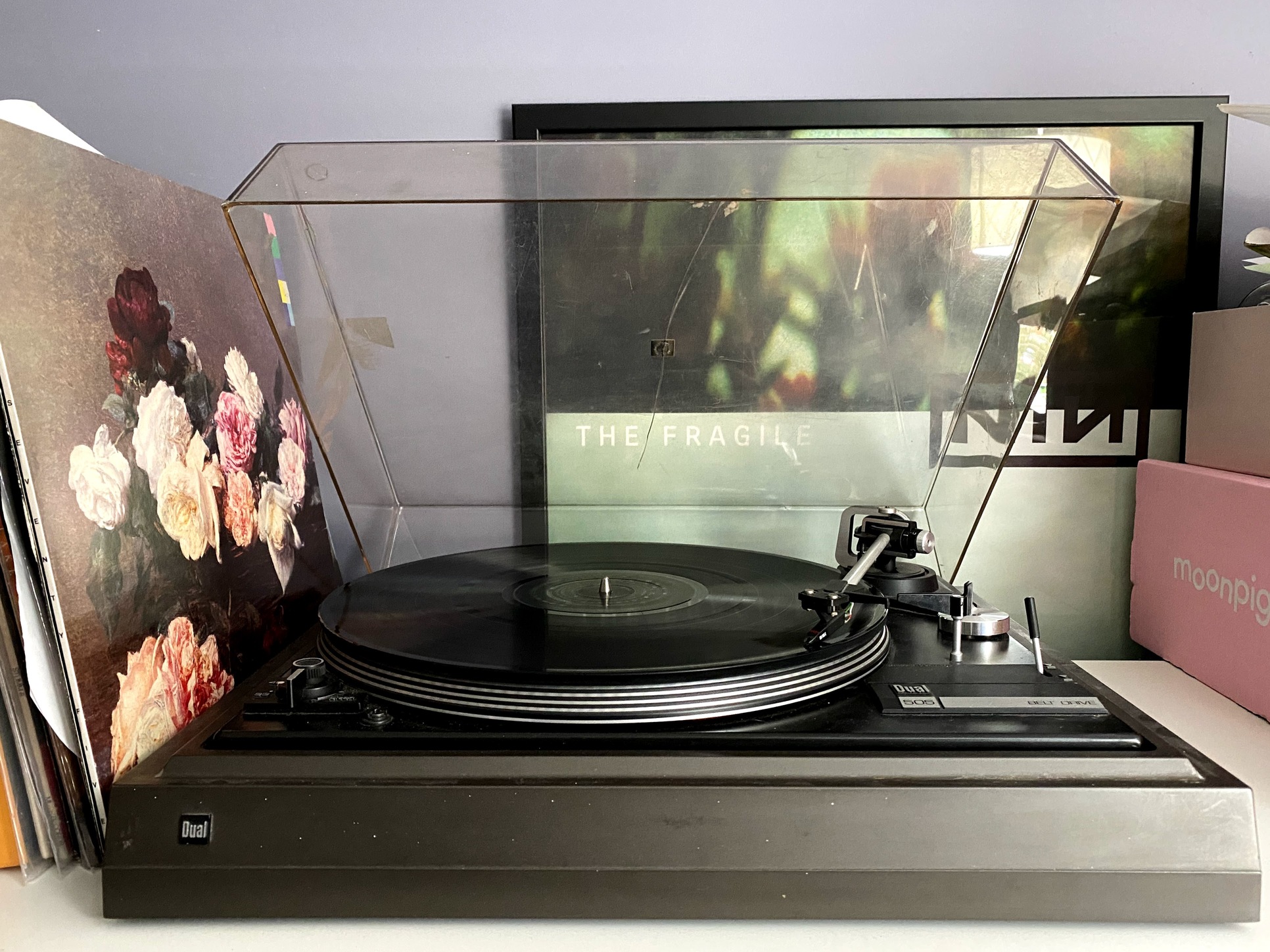
Problem in wayland code QtWayland's source currently does not compile:
../../../hardwareintegration/client/brcm-egl/qwaylandbrcmeglwindow.cpp: In constructor  QtWaylandClient::QWaylandBrcmEglWindow::QWaylandBrcmEglWindow(QWindow*) :
../../../hardwareintegration/client/brcm-egl/qwaylandbrcmeglwindow.cpp:131:67: error: no matching function for call to  QtWaylandClient::QWaylandWindow::QWaylandWindow(QWindow*&) 
     , m_eventQueue(wl_display_create_queue(mDisplay->wl_display()))
                                                                   ^
In file included from ../../../../include/QtWaylandClient/5.15.0/QtWaylandClient/private/qwaylandwindow_p.h:1,
                 from ../../../hardwareintegration/client/brcm-egl/qwaylandbrcmeglwindow.h:43,
                 from ../../../hardwareintegration/client/brcm-egl/qwaylandbrcmeglwindow.cpp:40:
../../../../include/QtWaylandClient/5.15.0/QtWaylandClient/private/../../../../../src/client/qwaylandwindow_p.h:97:5: note: candidate:  QtWaylandClient::QWaylandWindow::QWaylandWindow(QWindow*, QtWayland
Client::QWaylandDisplay*) 
     QWaylandWindow(QWindow *window, QWaylandDisplay *display);
     ^~~~~~~~~~~~~~
../../../../include/QtWaylandClient/5.15.0/QtWaylandClient/private/../../../../../src/client/qwaylandwindow_p.h:97:5: note:   candidate expects 2 arguments, 1 provided
make[5]: Leaving directory '/home/build/armhf/qt-everywhere-src-5.15.0/qttools/src/qdoc'
I am not trying to debug here. I understand that Wayland support is not a requirement, and I'm adding -skip wayland to Qt5's configure options. Next round. nss not found Qt5 embeds Chrome's sources. Chrome's sources require libnss3-dev to be available for both host and target architectures. Although I now have it installed both on the build system and in the sysroot, the pkg-config wrapper that Qt5 hooks into its Chrome's sources, failes to find it:
Command: /usr/bin/python2 /home/build/armhf/qt-everywhere-src-5.15.0/qtwebengine/src/3rdparty/chromium/build/config/linux/pkg-config.py -s /home/build/sysroot/ -a arm -p /usr/bin/arm-linux-gnueabihf-pkg-config --system_libdir lib nss -v -lssl3
Returned 1.
stderr:
Package nss was not found in the pkg-config search path.
Perhaps you should add the directory containing  nss.pc'
to the PKG_CONFIG_PATH environment variable
No package 'nss' found
Traceback (most recent call last):
  File "/home/build/armhf/qt-everywhere-src-5.15.0/qtwebengine/src/3rdparty/chromium/build/config/linux/pkg-config.py", line 248, in <module>
    sys.exit(main())
  File "/home/build/armhf/qt-everywhere-src-5.15.0/qtwebengine/src/3rdparty/chromium/build/config/linux/pkg-config.py", line 143, in main
    prefix = GetPkgConfigPrefixToStrip(options, args)
  File "/home/build/armhf/qt-everywhere-src-5.15.0/qtwebengine/src/3rdparty/chromium/build/config/linux/pkg-config.py", line 82, in GetPkgConfigPrefixToStrip
    "--variable=prefix"] + args, env=os.environ).decode('utf-8')
  File "/usr/lib/python2.7/subprocess.py", line 223, in check_output
    raise CalledProcessError(retcode, cmd, output=output)
subprocess.CalledProcessError: Command '['/usr/bin/arm-linux-gnueabihf-pkg-config', '--variable=prefix', 'nss']' returned non-zero exit status 1
See //build/config/linux/nss/BUILD.gn:15:3: whence it was called.
  pkg_config("system_nss_no_ssl_config")  
  ^---------------------------------------
See //crypto/BUILD.gn:218:25: which caused the file to be included.
    public_configs += [ "//build/config/linux/nss:system_nss_no_ssl_config" ]
                        ^--------------------------------------------------
Project ERROR: GN run error!
It's trying to look into $SYSROOT/usr/lib/pkgconfig, while it should be $SYSROOT//usr/lib/arm-linux-gnueabihf/pkgconfig. I worked around this this patch to qtwebengine/src/3rdparty/chromium/build/config/linux/pkg-config.py:
--- pkg-config.py.orig  2020-07-16 11:46:21.005373002 +0200
+++ pkg-config.py   2020-07-16 11:46:02.605296967 +0200
@@ -61,6 +61,7 @@
   libdir = sysroot + '/usr/' + options.system_libdir + '/pkgconfig'
   libdir += ':' + sysroot + '/usr/share/pkgconfig'
+  libdir += ':' + sysroot + '/usr/lib/arm-linux-gnueabihf/pkgconfig'
   os.environ['PKG_CONFIG_LIBDIR'] = libdir
   return libdir
Next round. g++ 8.3.0 Internal Compiler Error Qt5's sources embed Chrome's sources that embed the skia library sources. One of the skia library sources, when cross-compiled to ARM with -O1 or -O2 with g++ 8.3.0, produces an Internal Compiler Error:
/usr/bin/arm-linux-gnueabihf-g++ -MMD -MF obj/skia/skcms/skcms.o.d -DUSE_UDEV -DUSE_AURA=1 -DUSE_NSS_CERTS=1 -DUSE_OZONE=1 -DOFFICIAL_BUILD -DTOOLKIT_QT -D_FILE_OFFSET_BITS=64 -D_LARGEFILE_SOURCE -D_LARGEFILE64_SOURCE -DNO_UNWIND_TABLES -D__STDC_CONSTANT_MACROS -D__STDC_FORMAT_MACROS -DCR_SYSROOT_HASH=76e6068f9f6954e2ab1ff98ce5fa236d3d85bcbd -DNDEBUG -DNVALGRIND -DDYNAMIC_ANNOTATIONS_ENABLED=0 -I../../3rdparty/chromium/third_party/skia/include/third_party/skcms -Igen -I../../3rdparty/chromium -w -std=c11 -mfp16-format=ieee -fno-strict-aliasing --param=ssp-buffer-size=4 -fstack-protector -fno-unwind-tables -fno-asynchronous-unwind-tables -fPIC -pipe -pthread -march=armv7-a -mfloat-abi=hard -mtune=generic-armv7-a -mfpu=vfpv3-d16 -mthumb -Wall -U_FORTIFY_SOURCE -D_FORTIFY_SOURCE=2 -Wno-psabi -Wno-unused-local-typedefs -Wno-maybe-uninitialized -Wno-deprecated-declarations -fno-delete-null-pointer-checks -Wno-comments -Wno-packed-not-aligned -Wno-dangling-else -Wno-missing-field-initializers -Wno-unused-parameter -O2 -fno-ident -fdata-sections -ffunction-sections -fno-omit-frame-pointer -g0 -fvisibility=hidden -std=gnu++14 -Wno-narrowing -Wno-class-memaccess -Wno-attributes -Wno-class-memaccess -Wno-subobject-linkage -Wno-invalid-offsetof -Wno-return-type -Wno-deprecated-copy -fno-exceptions -fno-rtti --sysroot=../../../../../../sysroot/ -fvisibility-inlines-hidden -c ../../3rdparty/chromium/third_party/skia/third_party/skcms/skcms.cc -o obj/skia/skcms/skcms.o
during RTL pass: expand
In file included from ../../3rdparty/chromium/third_party/skia/third_party/skcms/skcms.cc:2053:
../../3rdparty/chromium/third_party/skia/third_party/skcms/src/Transform_inl.h: In function  void baseline::exec_ops(const Op*, const void**, const char*, char*, int) :
../../3rdparty/chromium/third_party/skia/third_party/skcms/src/Transform_inl.h:766:13: internal compiler error: in convert_move, at expr.c:218
 static void exec_ops(const Op* ops, const void** args,
             ^~~~~~~~
Please submit a full bug report,
with preprocessed source if appropriate.
See <file:///usr/share/doc/gcc-8/README.Bugs> for instructions.
I reported the bug at https://gcc.gnu.org/bugzilla/show_bug.cgi?id=96206 Since this source compiles with -O0, I attempted to fix this by editing qtwebkit/src/3rdparty/chromium/build/config/compiler/BUILD.gn and replacing instances of -O1 and -O2 with -O0. Spoiler: wrong attempt. We'll see it in the next round. Impossible constraint in asm Qt5's sources embed Chrome's sources that embed the ffmpeg library sources. Even if ffmpeg's development libraries are present both in the host and in the target system, the build system insists in compiling and using the bundled version. Unfortunately, using -O0 breaks the build of ffmpeg:
/usr/bin/arm-linux-gnueabihf-gcc -MMD -MF obj/third_party/ffmpeg/ffmpeg_internal/opus.o.d -DHAVE_AV_CONFIG_H -D_POSIX_C_SOURCE=200112 -D_XOPEN_SOURCE=600 -DPIC -DFFMPEG_CONFIGURATION=NULL -DCHROMIUM_NO_LOGGING -D_ISOC99_SOURCE -D_LARGEFILE_SOURCE -DUSE_UDEV -DUSE_AURA=1 -DUSE_NSS_CERTS=1 -DUSE_OZONE=1 -DOFFICIAL_BUILD -DTOOLKIT_QT -D_FILE_OFFSET_BITS=64 -D_LARGEFILE_SOURCE -D_LARGEFILE64_SOURCE -DNO_UNWIND_TABLES -DCR_SYSROOT_HASH=76e6068f9f6954e2ab1ff98ce5fa236d3d85bcbd -DNDEBUG -DNVALGRIND -DDYNAMIC_ANNOTATIONS_ENABLED=0 -DOPUS_FIXED_POINT -I../../3rdparty/chromium/third_party/ffmpeg/chromium/config/Chromium/linux/arm -I../../3rdparty/chromium/third_party/ffmpeg -I../../3rdparty/chromium/third_party/ffmpeg/compat/atomics/gcc -Igen -I../../3rdparty/chromium -I../../3rdparty/chromium/third_party/opus/src/include -fPIC -Wno-deprecated-declarations -fomit-frame-pointer -w -std=c99 -pthread -fno-math-errno -fno-signed-zeros -fno-tree-vectorize -fno-strict-aliasing --param=ssp-buffer-size=4 -fstack-protector -fno-unwind-tables -fno-asynchronous-unwind-tables -fPIC -pipe -pthread -march=armv7-a -mfloat-abi=hard -mtune=generic-armv7-a -mfpu=vfpv3-d16 -mthumb -g0 -fvisibility=hidden -Wno-psabi -Wno-unused-local-typedefs -Wno-maybe-uninitialized -Wno-deprecated-declarations -fno-delete-null-pointer-checks -Wno-comments -Wno-packed-not-aligned -Wno-dangling-else -Wno-missing-field-initializers -Wno-unused-parameter -O0 -fno-ident -fdata-sections -ffunction-sections -std=gnu11 --sysroot=../../../../../../sysroot/ -c ../../3rdparty/chromium/third_party/ffmpeg/libavcodec/opus.c -o obj/third_party/ffmpeg/ffmpeg_internal/opus.o
In file included from ../../3rdparty/chromium/third_party/ffmpeg/libavutil/intmath.h:30,
                 from ../../3rdparty/chromium/third_party/ffmpeg/libavutil/common.h:106,
                 from ../../3rdparty/chromium/third_party/ffmpeg/libavutil/avutil.h:296,
                 from ../../3rdparty/chromium/third_party/ffmpeg/libavutil/audio_fifo.h:30,
                 from ../../3rdparty/chromium/third_party/ffmpeg/libavcodec/opus.h:28,
                 from ../../3rdparty/chromium/third_party/ffmpeg/libavcodec/opus_celt.h:29,
                 from ../../3rdparty/chromium/third_party/ffmpeg/libavcodec/opus.c:32:
../../3rdparty/chromium/third_party/ffmpeg/libavcodec/opus.c: In function  ff_celt_quant_bands :
../../3rdparty/chromium/third_party/ffmpeg/libavutil/arm/intmath.h:77:5: error: impossible constraint in  asm 
     __asm__ ("usat %0, %2, %1" : "=r"(x) : "r"(a), "i"(p));
     ^~~~~~~
The same source compiles with using -O2 instead of -O0. I worked around this by undoing the previous change, and limiting -O0 to just the source that causes the Internal Compiler Error. I edited qtwebengine/src/3rdparty/chromium/third_party/skia/third_party/skcms/skcms.cc to prepend:
#pragma GCC push_options
#pragma GCC optimize ("O0")
and append:
#pragma GCC pop_options
Next round. Missing build-deps for i386 code Qt5's sources embed Chrome's sources that embed the V8 library sources. For some reason, torque, that is part of V8, wants to build some of its sources into 32 bit code with -m32, and I did not have i386 cross-compilation libraries installed:
/usr/bin/g++ -MMD -MF v8_snapshot/obj/v8/torque_base/csa-generator.o.d -DUSE_UDEV -DUSE_AURA=1 -DUSE_NSS_CERTS=1 -DUSE_OZONE=1 -DOFFICIAL_BUILD -DTOOLKIT_QT -D_FILE_OFFSET_BITS=64 -D_LARGEFILE_SOURCE -D_LARGEFILE64_SOURCE -DNO_UNWIND_TABLES -D__STDC_CONSTANT_MACROS -D__STDC_FORMAT_MACROS -DNDEBUG -DNVALGRIND -DDYNAMIC_ANNOTATIONS_ENABLED=0 -DV8_TYPED_ARRAY_MAX_SIZE_IN_HEAP=64 -DENABLE_MINOR_MC -DV8_INTL_SUPPORT -DV8_CONCURRENT_MARKING -DV8_ENABLE_LAZY_SOURCE_POSITIONS -DV8_EMBEDDED_BUILTINS -DV8_SHARED_RO_HEAP -DV8_WIN64_UNWINDING_INFO -DV8_ENABLE_REGEXP_INTERPRETER_THREADED_DISPATCH -DV8_31BIT_SMIS_ON_64BIT_ARCH -DV8_DEPRECATION_WARNINGS -DV8_TARGET_ARCH_ARM -DCAN_USE_ARMV7_INSTRUCTIONS -DCAN_USE_VFP3_INSTRUCTIONS -DUSE_EABI_HARDFLOAT=1 -DV8_HAVE_TARGET_OS -DV8_TARGET_OS_LINUX -DDISABLE_UNTRUSTED_CODE_MITIGATIONS -DV8_31BIT_SMIS_ON_64BIT_ARCH -DV8_DEPRECATION_WARNINGS -Iv8_snapshot/gen -I../../3rdparty/chromium -I../../3rdparty/chromium/v8 -Iv8_snapshot/gen/v8 -fno-strict-aliasing --param=ssp-buffer-size=4 -fstack-protector -fno-unwind-tables -fno-asynchronous-unwind-tables -fPIC -pipe -pthread -m32 -msse2 -mfpmath=sse -mmmx -Wall -U_FORTIFY_SOURCE -D_FORTIFY_SOURCE=2 -Wno-unused-local-typedefs -Wno-maybe-uninitialized -Wno-deprecated-declarations -fno-delete-null-pointer-checks -Wno-comments -Wno-packed-not-aligned -Wno-dangling-else -Wno-missing-field-initializers -Wno-unused-parameter -fno-omit-frame-pointer -g0 -fvisibility=hidden -Wno-strict-overflow -Wno-return-type -O3 -fno-ident -fdata-sections -ffunction-sections -std=gnu++14 -Wno-narrowing -Wno-class-memaccess -Wno-attributes -Wno-class-memaccess -Wno-subobject-linkage -Wno-invalid-offsetof -Wno-return-type -Wno-deprecated-copy -fvisibility-inlines-hidden -fexceptions -frtti -c ../../3rdparty/chromium/v8/src/torque/csa-generator.cc -o v8_snapshot/obj/v8/torque_base/csa-generator.o
In file included from ../../3rdparty/chromium/v8/src/torque/csa-generator.h:8,
                 from ../../3rdparty/chromium/v8/src/torque/csa-generator.cc:5:
/usr/include/c++/8/iostream:38:10: fatal error: bits/c++config.h: No such file or directory
 #include <bits/c++config.h>
          ^~~~~~~~~~~~~~~~~~
compilation terminated.
New build dependencies needed:
apt install lib32stdc++-8-dev
apt install libc6-dev-i386
dpkg --add-architecture i386
apt install linux-libc-dev:i386
Next round. OpenGL build issues Next bump are OpenGL related compiler issues:
/usr/bin/arm-linux-gnueabihf-g++ -MMD -MF obj/QtWebEngineCore/gl_ozone_glx_qt.o.d -DCHROMIUM_VERSION=\"80.0.3987.163\" -DUSE_UDEV -DUSE_AURA=1 -DUSE_NSS_CERTS=1 -DUSE_OZONE=1 -DOFFICIAL_BUILD -DTOOLKIT_QT -D_FILE_OFFSET_BITS=64 -D_LARGEFILE_SOURCE -D_LARGEFILE64_SOURCE -DNO_UNWIND_TABLES -D__STDC_CONSTANT_MACROS -D__STDC_FORMAT_MACROS -DCR_SYSROOT_HASH=76e6068f9f6954e2ab1ff98ce5fa236d3d85bcbd -DNDEBUG -DNVALGRIND -DDYNAMIC_ANNOTATIONS_ENABLED=0 -DQT_NO_LINKED_LIST -DQT_NO_KEYWORDS -DQT_USE_QSTRINGBUILDER -DQ_FORWARD_DECLARE_OBJC_CLASS=QT_FORWARD_DECLARE_CLASS -DQTWEBENGINECORE_VERSION_STR=\"5.15.0\" -DQTWEBENGINEPROCESS_NAME=\"QtWebEngineProcess\" -DBUILDING_CHROMIUM -DQTWEBENGINE_EMBEDDED_SWITCHES -DQT_NO_EXCEPTIONS -D_LARGEFILE64_SOURCE -D_LARGEFILE_SOURCE -DQT_NO_DEBUG -DQT_QUICK_LIB -DQT_GUI_LIB -DQT_QMLMODELS_LIB -DQT_WEBCHANNEL_LIB -DQT_QML_LIB -DQT_NETWORK_LIB -DQT_POSITIONING_LIB -DQT_CORE_LIB -DQT_WEBENGINECOREHEADERS_LIB -DVK_NO_PROTOTYPES -DGL_GLEXT_PROTOTYPES -DUSE_GLX -DUSE_EGL -DGOOGLE_PROTOBUF_NO_RTTI -DGOOGLE_PROTOBUF_NO_STATIC_INITIALIZER -DHAVE_PTHREAD -DU_USING_ICU_NAMESPACE=0 -DU_ENABLE_DYLOAD=0 -DUSE_CHROMIUM_ICU=1 -DU_STATIC_IMPLEMENTATION -DICU_UTIL_DATA_IMPL=ICU_UTIL_DATA_FILE -DUCHAR_TYPE=uint16_t -DWEBRTC_NON_STATIC_TRACE_EVENT_HANDLERS=0 -DWEBRTC_CHROMIUM_BUILD -DWEBRTC_POSIX -DWEBRTC_LINUX -DABSL_ALLOCATOR_NOTHROW=1 -DWEBRTC_USE_BUILTIN_ISAC_FIX=1 -DWEBRTC_USE_BUILTIN_ISAC_FLOAT=0 -DHAVE_SCTP -DNO_MAIN_THREAD_WRAPPING -DSK_HAS_PNG_LIBRARY -DSK_HAS_WEBP_LIBRARY -DSK_USER_CONFIG_HEADER=\"../../skia/config/SkUserConfig.h\" -DSK_GL -DSK_HAS_JPEG_LIBRARY -DSK_USE_LIBGIFCODEC -DSK_VULKAN_HEADER=\"../../skia/config/SkVulkanConfig.h\" -DSK_VULKAN=1 -DSK_SUPPORT_GPU=1 -DSK_GPU_WORKAROUNDS_HEADER=\"gpu/config/gpu_driver_bug_workaround_autogen.h\" -DVK_NO_PROTOTYPES -DLEVELDB_PLATFORM_CHROMIUM=1 -DLEVELDB_PLATFORM_CHROMIUM=1 -DV8_31BIT_SMIS_ON_64BIT_ARCH -DV8_DEPRECATION_WARNINGS -I../../3rdparty/chromium/skia/config -I../../3rdparty/chromium/third_party -I../../3rdparty/chromium/third_party/boringssl/src/include -I../../3rdparty/chromium/third_party/skia/include/core -Igen -I../../3rdparty/chromium -I/home/build/armhf/qt-everywhere-src-5.15.0/qtwebengine/src/core -I/home/build/armhf/qt-everywhere-src-5.15.0/qtwebengine/src/core/api -I/home/build/armhf/qt-everywhere-src-5.15.0/qtdeclarative/include/QtQuick/5.15.0 -I/home/build/armhf/qt-everywhere-src-5.15.0/qtdeclarative/include/QtQuick/5.15.0/QtQuick -I/home/build/armhf/qt-everywhere-src-5.15.0/qtbase/include/QtGui/5.15.0 -I/home/build/armhf/qt-everywhere-src-5.15.0/qtbase/include/QtGui/5.15.0/QtGui -I/home/build/armhf/qt-everywhere-src-5.15.0/qtdeclarative/include -I/home/build/armhf/qt-everywhere-src-5.15.0/qtdeclarative/include/QtQuick -I/home/build/armhf/qt-everywhere-src-5.15.0/qtbase/include -I/home/build/armhf/qt-everywhere-src-5.15.0/qtbase/include/QtGui -I/home/build/armhf/qt-everywhere-src-5.15.0/qtdeclarative/include/QtQmlModels/5.15.0 -I/home/build/armhf/qt-everywhere-src-5.15.0/qtdeclarative/include/QtQmlModels/5.15.0/QtQmlModels -I/home/build/armhf/qt-everywhere-src-5.15.0/qtdeclarative/include/QtQml/5.15.0 -I/home/build/armhf/qt-everywhere-src-5.15.0/qtdeclarative/include/QtQml/5.15.0/QtQml -I/home/build/armhf/qt-everywhere-src-5.15.0/qtbase/include/QtCore/5.15.0 -I/home/build/armhf/qt-everywhere-src-5.15.0/qtbase/include/QtCore/5.15.0/QtCore -I/home/build/armhf/qt-everywhere-src-5.15.0/qtdeclarative/include/QtQmlModels -I/home/build/armhf/qt-everywhere-src-5.15.0/qtwebchannel/include -I/home/build/armhf/qt-everywhere-src-5.15.0/qtwebchannel/include/QtWebChannel -I/home/build/armhf/qt-everywhere-src-5.15.0/qtdeclarative/include/QtQml -I/home/build/armhf/qt-everywhere-src-5.15.0/qtbase/include/QtNetwork -I/home/build/armhf/qt-everywhere-src-5.15.0/qtlocation/include -I/home/build/armhf/qt-everywhere-src-5.15.0/qtlocation/include/QtPositioning -I/home/build/armhf/qt-everywhere-src-5.15.0/qtbase/include/QtCore -I/home/build/armhf/qt-everywhere-src-5.15.0/qtwebengine/include -I/home/build/armhf/qt-everywhere-src-5.15.0/qtwebengine/include/QtWebEngineCore -I/home/build/armhf/qt-everywhere-src-5.15.0/qtwebengine/include/QtWebEngineCore/5.15.0 -I/home/build/armhf/qt-everywhere-src-5.15.0/qtwebengine/include/QtWebEngineCore/5.15.0/QtWebEngineCore -I.moc -I/home/build/sysroot/opt/vc/include -I/home/build/sysroot/opt/vc/include/interface/vcos/pthreads -I/home/build/sysroot/opt/vc/include/interface/vmcs_host/linux -Igen/.moc -I/home/build/armhf/qt-everywhere-src-5.15.0/qtbase/mkspecs/devices/linux-rasp-pi2-g++ -Igen -Igen -I../../3rdparty/chromium/third_party/libyuv/include -Igen -I../../3rdparty/chromium/third_party/jsoncpp/source/include -I../../3rdparty/chromium/third_party/jsoncpp/generated -Igen -Igen -I../../3rdparty/chromium/third_party/khronos -I../../3rdparty/chromium/gpu -I../../3rdparty/chromium/third_party/vulkan/include -I../../3rdparty/chromium/third_party/perfetto/include -Igen/third_party/perfetto/build_config -Igen -Igen -Igen/third_party/dawn/src/include -I../../3rdparty/chromium/third_party/dawn/src/include -Igen -I../../3rdparty/chromium/third_party/boringssl/src/include -I../../3rdparty/chromium/third_party/protobuf/src -Igen/protoc_out -I../../3rdparty/chromium/third_party/protobuf/src -I../../3rdparty/chromium/third_party/ced/src -I../../3rdparty/chromium/third_party/icu/source/common -I../../3rdparty/chromium/third_party/icu/source/i18n -I../../3rdparty/chromium/third_party/webrtc_overrides -I../../3rdparty/chromium/third_party/webrtc -Igen/third_party/webrtc -I../../3rdparty/chromium/third_party/abseil-cpp -I../../3rdparty/chromium/third_party/skia -I../../3rdparty/chromium/third_party/libgifcodec -I../../3rdparty/chromium/third_party/vulkan/include -I../../3rdparty/chromium/third_party/skia/third_party/vulkanmemoryallocator -I../../3rdparty/chromium/third_party/vulkan/include -Igen/third_party/perfetto -Igen/third_party/perfetto -Igen/third_party/perfetto -Igen/third_party/perfetto -Igen/third_party/perfetto -Igen/third_party/perfetto -Igen/third_party/perfetto -Igen/third_party/perfetto -Igen/third_party/perfetto -Igen/third_party/perfetto -I../../3rdparty/chromium/third_party/crashpad/crashpad -I../../3rdparty/chromium/third_party/crashpad/crashpad/compat/non_mac -I../../3rdparty/chromium/third_party/crashpad/crashpad/compat/linux -I../../3rdparty/chromium/third_party/crashpad/crashpad/compat/non_win -I../../3rdparty/chromium/third_party/libwebm/source -I../../3rdparty/chromium/third_party/leveldatabase -I../../3rdparty/chromium/third_party/leveldatabase/src -I../../3rdparty/chromium/third_party/leveldatabase/src/include -I../../3rdparty/chromium/v8/include -Igen/v8/include -I../../3rdparty/chromium/third_party/mesa_headers -fno-strict-aliasing --param=ssp-buffer-size=4 -fstack-protector -fno-unwind-tables -fno-asynchronous-unwind-tables -fPIC -pipe -pthread -march=armv7-a -mfloat-abi=hard -mtune=generic-armv7-a -mfpu=vfpv3-d16 -mthumb -Wall -U_FORTIFY_SOURCE -D_FORTIFY_SOURCE=2 -Wno-psabi -Wno-unused-local-typedefs -Wno-maybe-uninitialized -Wno-deprecated-declarations -fno-delete-null-pointer-checks -Wno-comments -Wno-packed-not-aligned -Wno-dangling-else -Wno-missing-field-initializers -Wno-unused-parameter -O2 -fno-ident -fdata-sections -ffunction-sections -fno-omit-frame-pointer -g0 -fvisibility=hidden -g -O2 -fdebug-prefix-map=/home/build/armhf/qt-everywhere-src-5.15.0=. -fstack-protector-strong -Wformat -Werror=format-security -Wdate-time -D_FORTIFY_SOURCE=2 -O2 -fno-exceptions -Wall -Wextra -D_REENTRANT -I/home/build/sysroot/usr/include/nss -I/home/build/sysroot/usr/include/nspr -std=gnu++14 -Wno-narrowing -Wno-class-memaccess -Wno-attributes -Wno-class-memaccess -Wno-subobject-linkage -Wno-invalid-offsetof -Wno-return-type -Wno-deprecated-copy -fno-exceptions -fno-rtti --sysroot=../../../../../../sysroot/ -fvisibility-inlines-hidden -g -O2 -fdebug-prefix-map=/home/build/armhf/qt-everywhere-src-5.15.0=. -fstack-protector-strong -Wformat -Werror=format-security -Wdate-time -D_FORTIFY_SOURCE=2 -O2 -std=gnu++1y -fno-exceptions -Wall -Wextra -D_REENTRANT -Wno-unused-parameter -Wno-unused-variable -Wno-deprecated-declarations -c /home/build/armhf/qt-everywhere-src-5.15.0/qtwebengine/src/core/ozone/gl_ozone_glx_qt.cpp -o obj/QtWebEngineCore/gl_ozone_glx_qt.o
In file included from ../../3rdparty/chromium/ui/gl/gl_bindings.h:497,
                 from ../../3rdparty/chromium/ui/gl/gl_gl_api_implementation.h:12,
                 from /home/build/armhf/qt-everywhere-src-5.15.0/qtwebengine/src/core/ozone/gl_ozone_glx_qt.cpp:49:
../../3rdparty/chromium/ui/gl/gl_bindings_autogen_egl.h:227:5: error:  EGLSetBlobFuncANDROID  has not been declared
     EGLSetBlobFuncANDROID set,
     ^~~~~~~~~~~~~~~~~~~~~
../../3rdparty/chromium/ui/gl/gl_bindings_autogen_egl.h:228:5: error:  EGLGetBlobFuncANDROID  has not been declared
     EGLGetBlobFuncANDROID get);
     ^~~~~~~~~~~~~~~~~~~~~
../../3rdparty/chromium/ui/gl/gl_bindings_autogen_egl.h:571:46: error:  EGLSetBlobFuncANDROID  has not been declared
                                              EGLSetBlobFuncANDROID set,
                                              ^~~~~~~~~~~~~~~~~~~~~
../../3rdparty/chromium/ui/gl/gl_bindings_autogen_egl.h:572:46: error:  EGLGetBlobFuncANDROID  has not been declared
                                              EGLGetBlobFuncANDROID get) = 0;
                                              ^~~~~~~~~~~~~~~~~~~~~
cc1plus: warning: unrecognized command line option  -Wno-deprecated-copy 
/usr/bin/arm-linux-gnueabihf-g++ -MMD -MF obj/QtWebEngineCore/display_gl_output_surface.o.d -DCHROMIUM_VERSION=\"80.0.3987.163\" -DUSE_UDEV -DUSE_AURA=1 -DUSE_NSS_CERTS=1 -DUSE_OZONE=1 -DOFFICIAL_BUILD -DTOOLKIT_QT -D_FILE_OFFSET_BITS=64 -D_LARGEFILE_SOURCE -D_LARGEFILE64_SOURCE -DNO_UNWIND_TABLES -D__STDC_CONSTANT_MACROS -D__STDC_FORMAT_MACROS -DCR_SYSROOT_HASH=76e6068f9f6954e2ab1ff98ce5fa236d3d85bcbd -DNDEBUG -DNVALGRIND -DDYNAMIC_ANNOTATIONS_ENABLED=0 -DQT_NO_LINKED_LIST -DQT_NO_KEYWORDS -DQT_USE_QSTRINGBUILDER -DQ_FORWARD_DECLARE_OBJC_CLASS=QT_FORWARD_DECLARE_CLASS -DQTWEBENGINECORE_VERSION_STR=\"5.15.0\" -DQTWEBENGINEPROCESS_NAME=\"QtWebEngineProcess\" -DBUILDING_CHROMIUM -DQTWEBENGINE_EMBEDDED_SWITCHES -DQT_NO_EXCEPTIONS -D_LARGEFILE64_SOURCE -D_LARGEFILE_SOURCE -DQT_NO_DEBUG -DQT_QUICK_LIB -DQT_GUI_LIB -DQT_QMLMODELS_LIB -DQT_WEBCHANNEL_LIB -DQT_QML_LIB -DQT_NETWORK_LIB -DQT_POSITIONING_LIB -DQT_CORE_LIB -DQT_WEBENGINECOREHEADERS_LIB -DVK_NO_PROTOTYPES -DGL_GLEXT_PROTOTYPES -DUSE_GLX -DUSE_EGL -DGOOGLE_PROTOBUF_NO_RTTI -DGOOGLE_PROTOBUF_NO_STATIC_INITIALIZER -DHAVE_PTHREAD -DU_USING_ICU_NAMESPACE=0 -DU_ENABLE_DYLOAD=0 -DUSE_CHROMIUM_ICU=1 -DU_STATIC_IMPLEMENTATION -DICU_UTIL_DATA_IMPL=ICU_UTIL_DATA_FILE -DUCHAR_TYPE=uint16_t -DWEBRTC_NON_STATIC_TRACE_EVENT_HANDLERS=0 -DWEBRTC_CHROMIUM_BUILD -DWEBRTC_POSIX -DWEBRTC_LINUX -DABSL_ALLOCATOR_NOTHROW=1 -DWEBRTC_USE_BUILTIN_ISAC_FIX=1 -DWEBRTC_USE_BUILTIN_ISAC_FLOAT=0 -DHAVE_SCTP -DNO_MAIN_THREAD_WRAPPING -DSK_HAS_PNG_LIBRARY -DSK_HAS_WEBP_LIBRARY -DSK_USER_CONFIG_HEADER=\"../../skia/config/SkUserConfig.h\" -DSK_GL -DSK_HAS_JPEG_LIBRARY -DSK_USE_LIBGIFCODEC -DSK_VULKAN_HEADER=\"../../skia/config/SkVulkanConfig.h\" -DSK_VULKAN=1 -DSK_SUPPORT_GPU=1 -DSK_GPU_WORKAROUNDS_HEADER=\"gpu/config/gpu_driver_bug_workaround_autogen.h\" -DVK_NO_PROTOTYPES -DLEVELDB_PLATFORM_CHROMIUM=1 -DLEVELDB_PLATFORM_CHROMIUM=1 -DV8_31BIT_SMIS_ON_64BIT_ARCH -DV8_DEPRECATION_WARNINGS -I../../3rdparty/chromium/skia/config -I../../3rdparty/chromium/third_party -I../../3rdparty/chromium/third_party/boringssl/src/include -I../../3rdparty/chromium/third_party/skia/include/core -Igen -I../../3rdparty/chromium -I/home/build/armhf/qt-everywhere-src-5.15.0/qtwebengine/src/core -I/home/build/armhf/qt-everywhere-src-5.15.0/qtwebengine/src/core/api -I/home/build/armhf/qt-everywhere-src-5.15.0/qtdeclarative/include/QtQuick/5.15.0 -I/home/build/armhf/qt-everywhere-src-5.15.0/qtdeclarative/include/QtQuick/5.15.0/QtQuick -I/home/build/armhf/qt-everywhere-src-5.15.0/qtbase/include/QtGui/5.15.0 -I/home/build/armhf/qt-everywhere-src-5.15.0/qtbase/include/QtGui/5.15.0/QtGui -I/home/build/armhf/qt-everywhere-src-5.15.0/qtdeclarative/include -I/home/build/armhf/qt-everywhere-src-5.15.0/qtdeclarative/include/QtQuick -I/home/build/armhf/qt-everywhere-src-5.15.0/qtbase/include -I/home/build/armhf/qt-everywhere-src-5.15.0/qtbase/include/QtGui -I/home/build/armhf/qt-everywhere-src-5.15.0/qtdeclarative/include/QtQmlModels/5.15.0 -I/home/build/armhf/qt-everywhere-src-5.15.0/qtdeclarative/include/QtQmlModels/5.15.0/QtQmlModels -I/home/build/armhf/qt-everywhere-src-5.15.0/qtdeclarative/include/QtQml/5.15.0 -I/home/build/armhf/qt-everywhere-src-5.15.0/qtdeclarative/include/QtQml/5.15.0/QtQml -I/home/build/armhf/qt-everywhere-src-5.15.0/qtbase/include/QtCore/5.15.0 -I/home/build/armhf/qt-everywhere-src-5.15.0/qtbase/include/QtCore/5.15.0/QtCore -I/home/build/armhf/qt-everywhere-src-5.15.0/qtdeclarative/include/QtQmlModels -I/home/build/armhf/qt-everywhere-src-5.15.0/qtwebchannel/include -I/home/build/armhf/qt-everywhere-src-5.15.0/qtwebchannel/include/QtWebChannel -I/home/build/armhf/qt-everywhere-src-5.15.0/qtdeclarative/include/QtQml -I/home/build/armhf/qt-everywhere-src-5.15.0/qtbase/include/QtNetwork -I/home/build/armhf/qt-everywhere-src-5.15.0/qtlocation/include -I/home/build/armhf/qt-everywhere-src-5.15.0/qtlocation/include/QtPositioning -I/home/build/armhf/qt-everywhere-src-5.15.0/qtbase/include/QtCore -I/home/build/armhf/qt-everywhere-src-5.15.0/qtwebengine/include -I/home/build/armhf/qt-everywhere-src-5.15.0/qtwebengine/include/QtWebEngineCore -I/home/build/armhf/qt-everywhere-src-5.15.0/qtwebengine/include/QtWebEngineCore/5.15.0 -I/home/build/armhf/qt-everywhere-src-5.15.0/qtwebengine/include/QtWebEngineCore/5.15.0/QtWebEngineCore -I.moc -I/home/build/sysroot/opt/vc/include -I/home/build/sysroot/opt/vc/include/interface/vcos/pthreads -I/home/build/sysroot/opt/vc/include/interface/vmcs_host/linux -Igen/.moc -I/home/build/armhf/qt-everywhere-src-5.15.0/qtbase/mkspecs/devices/linux-rasp-pi2-g++ -Igen -Igen -I../../3rdparty/chromium/third_party/libyuv/include -Igen -I../../3rdparty/chromium/third_party/jsoncpp/source/include -I../../3rdparty/chromium/third_party/jsoncpp/generated -Igen -Igen -I../../3rdparty/chromium/third_party/khronos -I../../3rdparty/chromium/gpu -I../../3rdparty/chromium/third_party/vulkan/include -I../../3rdparty/chromium/third_party/perfetto/include -Igen/third_party/perfetto/build_config -Igen -Igen -Igen/third_party/dawn/src/include -I../../3rdparty/chromium/third_party/dawn/src/include -Igen -I../../3rdparty/chromium/third_party/boringssl/src/include -I../../3rdparty/chromium/third_party/protobuf/src -Igen/protoc_out -I../../3rdparty/chromium/third_party/protobuf/src -I../../3rdparty/chromium/third_party/ced/src -I../../3rdparty/chromium/third_party/icu/source/common -I../../3rdparty/chromium/third_party/icu/source/i18n -I../../3rdparty/chromium/third_party/webrtc_overrides -I../../3rdparty/chromium/third_party/webrtc -Igen/third_party/webrtc -I../../3rdparty/chromium/third_party/abseil-cpp -I../../3rdparty/chromium/third_party/skia -I../../3rdparty/chromium/third_party/libgifcodec -I../../3rdparty/chromium/third_party/vulkan/include -I../../3rdparty/chromium/third_party/skia/third_party/vulkanmemoryallocator -I../../3rdparty/chromium/third_party/vulkan/include -Igen/third_party/perfetto -Igen/third_party/perfetto -Igen/third_party/perfetto -Igen/third_party/perfetto -Igen/third_party/perfetto -Igen/third_party/perfetto -Igen/third_party/perfetto -Igen/third_party/perfetto -Igen/third_party/perfetto -Igen/third_party/perfetto -I../../3rdparty/chromium/third_party/crashpad/crashpad -I../../3rdparty/chromium/third_party/crashpad/crashpad/compat/non_mac -I../../3rdparty/chromium/third_party/crashpad/crashpad/compat/linux -I../../3rdparty/chromium/third_party/crashpad/crashpad/compat/non_win -I../../3rdparty/chromium/third_party/libwebm/source -I../../3rdparty/chromium/third_party/leveldatabase -I../../3rdparty/chromium/third_party/leveldatabase/src -I../../3rdparty/chromium/third_party/leveldatabase/src/include -I../../3rdparty/chromium/v8/include -Igen/v8/include -I../../3rdparty/chromium/third_party/mesa_headers -fno-strict-aliasing --param=ssp-buffer-size=4 -fstack-protector -fno-unwind-tables -fno-asynchronous-unwind-tables -fPIC -pipe -pthread -march=armv7-a -mfloat-abi=hard -mtune=generic-armv7-a -mfpu=vfpv3-d16 -mthumb -Wall -U_FORTIFY_SOURCE -D_FORTIFY_SOURCE=2 -Wno-psabi -Wno-unused-local-typedefs -Wno-maybe-uninitialized -Wno-deprecated-declarations -fno-delete-null-pointer-checks -Wno-comments -Wno-packed-not-aligned -Wno-dangling-else -Wno-missing-field-initializers -Wno-unused-parameter -O2 -fno-ident -fdata-sections -ffunction-sections -fno-omit-frame-pointer -g0 -fvisibility=hidden -g -O2 -fdebug-prefix-map=/home/build/armhf/qt-everywhere-src-5.15.0=. -fstack-protector-strong -Wformat -Werror=format-security -Wdate-time -D_FORTIFY_SOURCE=2 -O2 -fno-exceptions -Wall -Wextra -D_REENTRANT -I/home/build/sysroot/usr/include/nss -I/home/build/sysroot/usr/include/nspr -std=gnu++14 -Wno-narrowing -Wno-class-memaccess -Wno-attributes -Wno-class-memaccess -Wno-subobject-linkage -Wno-invalid-offsetof -Wno-return-type -Wno-deprecated-copy -fno-exceptions -fno-rtti --sysroot=../../../../../../sysroot/ -fvisibility-inlines-hidden -g -O2 -fdebug-prefix-map=/home/build/armhf/qt-everywhere-src-5.15.0=. -fstack-protector-strong -Wformat -Werror=format-security -Wdate-time -D_FORTIFY_SOURCE=2 -O2 -std=gnu++1y -fno-exceptions -Wall -Wextra -D_REENTRANT -Wno-unused-parameter -Wno-unused-variable -Wno-deprecated-declarations -c /home/build/armhf/qt-everywhere-src-5.15.0/qtwebengine/src/core/compositor/display_gl_output_surface.cpp -o obj/QtWebEngineCore/display_gl_output_surface.o
In file included from ../../3rdparty/chromium/gpu/command_buffer/client/gles2_interface.h:8,
                 from ../../3rdparty/chromium/gpu/command_buffer/client/client_transfer_cache.h:15,
                 from ../../3rdparty/chromium/gpu/command_buffer/client/gles2_implementation.h:28,
                 from /home/build/armhf/qt-everywhere-src-5.15.0/qtwebengine/src/core/compositor/display_gl_output_surface.cpp:47:
/home/build/sysroot/opt/vc/include/GLES2/gl2.h:78: warning: "GL_FALSE" redefined
 #define GL_FALSE                          (GLboolean)0
In file included from ../../3rdparty/chromium/gpu/command_buffer/client/client_context_state.h:10,
                 from ../../3rdparty/chromium/gpu/command_buffer/client/gles2_implementation.h:27,
                 from /home/build/armhf/qt-everywhere-src-5.15.0/qtwebengine/src/core/compositor/display_gl_output_surface.cpp:47:
../../3rdparty/chromium/third_party/khronos/GLES3/gl3.h:85: note: this is the location of the previous definition
 #define GL_FALSE                          0
In file included from ../../3rdparty/chromium/gpu/command_buffer/client/gles2_interface.h:8,
                 from ../../3rdparty/chromium/gpu/command_buffer/client/client_transfer_cache.h:15,
                 from ../../3rdparty/chromium/gpu/command_buffer/client/gles2_implementation.h:28,
                 from /home/build/armhf/qt-everywhere-src-5.15.0/qtwebengine/src/core/compositor/display_gl_output_surface.cpp:47:
/home/build/sysroot/opt/vc/include/GLES2/gl2.h:79: warning: "GL_TRUE" redefined
 #define GL_TRUE                           (GLboolean)1
In file included from ../../3rdparty/chromium/gpu/command_buffer/client/client_context_state.h:10,
                 from ../../3rdparty/chromium/gpu/command_buffer/client/gles2_implementation.h:27,
                 from /home/build/armhf/qt-everywhere-src-5.15.0/qtwebengine/src/core/compositor/display_gl_output_surface.cpp:47:
../../3rdparty/chromium/third_party/khronos/GLES3/gl3.h:86: note: this is the location of the previous definition
 #define GL_TRUE                           1
In file included from ../../3rdparty/chromium/gpu/command_buffer/client/gles2_interface.h:8,
                 from ../../3rdparty/chromium/gpu/command_buffer/client/client_transfer_cache.h:15,
                 from ../../3rdparty/chromium/gpu/command_buffer/client/gles2_implementation.h:28,
                 from /home/build/armhf/qt-everywhere-src-5.15.0/qtwebengine/src/core/compositor/display_gl_output_surface.cpp:47:
/home/build/sysroot/opt/vc/include/GLES2/gl2.h:600:37: error: conflicting declaration of C function  void glShaderSource(GLuint, GLsizei, const GLchar**, const GLint*) 
 GL_APICALL void         GL_APIENTRY glShaderSource (GLuint shader, GLsizei count, const GLchar** string, const GLint* length);
                                     ^~~~~~~~~~~~~~
In file included from ../../3rdparty/chromium/gpu/command_buffer/client/client_context_state.h:10,
                 from ../../3rdparty/chromium/gpu/command_buffer/client/gles2_implementation.h:27,
                 from /home/build/armhf/qt-everywhere-src-5.15.0/qtwebengine/src/core/compositor/display_gl_output_surface.cpp:47:
../../3rdparty/chromium/third_party/khronos/GLES3/gl3.h:624:29: note: previous declaration  void glShaderSource(GLuint, GLsizei, const GLchar* const*, const GLint*) 
 GL_APICALL void GL_APIENTRY glShaderSource (GLuint shader, GLsizei count, const GLchar *const*string, const GLint *length);
                             ^~~~~~~~~~~~~~
cc1plus: warning: unrecognized command line option  -Wno-deprecated-copy 
I'm out of the allocated hour budget, and I'll stop here for now. Building Qt5 has been providing some of the most nightmarish work time in my entire professional life. If my daily job became being required to deal with this kind of insanity, I would strongly invest in a change of career. Update Andreas Gruber wrote:
Long story short, a fast solution for the issue with EGLSetBlobFuncANDROID is to remove libraspberrypi-dev from your sysroot and do a full rebuild. There will be some changes to the configure results, so please review them - if they are relevant for you - before proceeding with your work.
And thanks to Andreas, the story can continue...

15 July 2020

Jonathan Dowland: Lockdown music

Last Christmas, to make room for a tree, I dis-assembled my hifi unit and (temporarily, I thought) lugged my hi-fi and records up to the study.
Power, Corruption & Lies
I had been thinking about expanding the amount of storage I had for hifi and vinyl, perhaps moving from 2x2 storage cubes to 2x3, although Ikea don't make a 2x3 version of their stalwart vinyl storage line, the Kallax. I had begun exploring other options, both at Ikea and other places. Meanwhile, I re-purposed my old Expedit unit as storage for my daughter's Sylvanian Families. Under Lockdown, I've spent a lot more time in my study, and so I've set up the hifi there. It turns out I have a lot more opportunity to enjoy the records up here, during work, and I've begun to explore some things which I haven't listened to in a long time, or possibly ever. I thought I'd start keeping track of some of them. Power, Corruption and Lies is not something rarely listened to. It's steadily become my favourite New Order album. When I came across this copy (Factory, 1983), it was in pristine condition, but it now bears witness to my (mostly careful) use. There's now a scratch somewhere towards the end of the first track Age of Consent which causes my turntable to loop. By some good fortune the looping point is perfectly aligned to a bar. I don't always notice it straight away. This record rarely makes it back down from the turntable to where it's supposed to live.

14 July 2020

Russell Coker: Debian PPC64EL Emulation

In my post on Debian S390X Emulation [1] I mentioned having problems booting a Debian PPC64EL kernel under QEMU. Giovanni commented that they had PPC64EL working and gave a link to their site with Debian QEMU images for various architectures [2]. I tried their image which worked then tried mine again which also worked it seemed that a recent update in Debian/Unstable fixed the bug that made QEMU not work with the PPC64EL kernel. Here are the instructions on how to do it. First you need to create a filesystem in an an image file with commands like the following:
truncate -s 4g /vmstore/ppc
mkfs.ext4 /vmstore/ppc
mount -o loop /vmstore/ppc /mnt/tmp
Then visit the Debian Netinst page [3] to download the PPC64EL net install ISO. Then loopback mount it somewhere convenient like /mnt/tmp2. The package qemu-system-ppc has the program for emulating a PPC64LE system, the qemu-user-static package has the program for emulating PPC64LE for a single program (IE a statically linked program or a chroot environment), you need this to run debootstrap. The following commands should be most of what you need.
apt install qemu-system-ppc qemu-user-static
update-binfmts --display
# qemu ppc64 needs exec stack to solve "Could not allocate dynamic translator buffer"
# so enable that on SE Linux systems
setsebool -P allow_execstack 1
debootstrap --foreign --arch=ppc64el --no-check-gpg buster /mnt/tmp file:///mnt/tmp2
chroot /mnt/tmp /debootstrap/debootstrap --second-stage
cat << END > /mnt/tmp/etc/apt/sources.list
deb http://mirror.internode.on.net/pub/debian/ buster main
deb http://security.debian.org/ buster/updates main
END
echo "APT::Install-Recommends False;" > /mnt/tmp/etc/apt/apt.conf
echo ppc64 > /mnt/tmp/etc/hostname
# /usr/bin/awk: error while loading shared libraries: cannot restore segment prot after reloc: Permission denied
# only needed for chroot
setsebool allow_execmod 1
chroot /mnt/tmp apt update
# why aren't they in the default install?
chroot /mnt/tmp apt install perl dialog
chroot /mnt/tmp apt dist-upgrade
chroot /mnt/tmp apt install bash-completion locales man-db openssh-server build-essential systemd-sysv ifupdown vim ca-certificates gnupg
# install kernel last because systemd install rebuilds initrd
chroot /mnt/tmp apt install linux-image-ppc64el
chroot /mnt/tmp dpkg-reconfigure locales
chroot /mnt/tmp passwd
cat << END > /mnt/tmp/etc/fstab
/dev/vda / ext4 noatime 0 0
#/dev/vdb none swap defaults 0 0
END
mkdir /mnt/tmp/root/.ssh
chmod 700 /mnt/tmp/root/.ssh
cp ~/.ssh/id_rsa.pub /mnt/tmp/root/.ssh/authorized_keys
chmod 600 /mnt/tmp/root/.ssh/authorized_keys
rm /mnt/tmp/vmlinux* /mnt/tmp/initrd*
mkdir /boot/ppc64
cp /mnt/tmp/boot/[vi]* /boot/ppc64
# clean up
umount /mnt/tmp
umount /mnt/tmp2
# setcap binary for starting bridged networking
setcap cap_net_admin+ep /usr/lib/qemu/qemu-bridge-helper
# afterwards set the access on /etc/qemu/bridge.conf so it can only
# be read by the user/group permitted to start qemu/kvm
echo "allow all" > /etc/qemu/bridge.conf
Here is an example script for starting kvm. It can be run by any user that can read /etc/qemu/bridge.conf.
#!/bin/bash
set -e
KERN="kernel /boot/ppc64/vmlinux-4.19.0-9-powerpc64le -initrd /boot/ppc64/initrd.img-4.19.0-9-powerpc64le"
# single network device, can have multiple
NET="-device e1000,netdev=net0,mac=02:02:00:00:01:04 -netdev tap,id=net0,helper=/usr/lib/qemu/qemu-bridge-helper"
# random number generator for fast start of sshd etc
RNG="-object rng-random,filename=/dev/urandom,id=rng0 -device virtio-rng-pci,rng=rng0"
# I have lockdown because it does no harm now and is good for future kernels
# I enable SE Linux everywhere
KERNCMD="net.ifnames=0 noresume security=selinux root=/dev/vda ro lockdown=confidentiality"
kvm -drive format=raw,file=/vmstore/ppc64,if=virtio $RNG -nographic -m 1024 -smp 2 $KERN -curses -append "$KERNCMD" $NET

Next.

Previous.