Search Results: "daniel"

12 September 2014

Jonathan McDowell: Back from DebConf 14

I previously forgot to mention that I was planning to attend DebConf14, having missed DebConf13. This year the conference was held in Portland, OR. This is a city I've been to many times before, and enjoy, but I hadn't spent any time wandering around its city centre as a pedestrian. I have to say I really prefer DebConfs that are held in middle of city. It always seems a bit of a shame to travel some distance to somewhere new and spend all the time there in a conference venue. Plus these days I have the added lure of going out and playing Ingress in a new location. DebConf14 didn't disappoint in these respects; the location was super easy to get to from the airport via public transportation, all of the evening social events were within reasonable walking distance (I'll tend to default to walking when possible) and the talk venue/accommodation were close to each other and various eating + drinking options. Throw in the fact at Portland managed to produce some excellent weather (modulo my Ingress session on the last Saturday morning, when rained on me) and it's impossible to fault the physicalities of DebConf this year. This year the conference format was a bit different; previous years have had a week long DebConf before the week of the conference itself. This year went for a 9 day talk schedule (Saturday -> Sunday) with various gaps of hacking time interspersed. I've found it hard to justify a full two weeks away in the past, so this setup worked a lot better from my viewpoint. Also I rarely go to DebConf with a predetermined list of things to do; the stuff I work on naturally falls out of talks I attend and informal discussions I have. Having hack time throughout the conference helped me avoid feeling I was having to trade off hacking vs talks. Naturally enough a lot of my involvement at DebConf was around OpenPGP. Gunnar and I spent a fair bit of time getting Daniel up to speed with the keyring-maint team (Gunnar more than I, I'll confess). We finally set a hard timeframe for freeing Debian of older 1024 bit keys. I was introduced to the Gnuk, which is a particularly interesting piece of open specification hardware with a completely Free software stack on top if it that implements the OpenPGP smartcard spec. Currently it's limited to 2K keys but it's hoped that 4K support can be added (and I ended up spending a couple of hours after the closing talk hacking on the source and seeing how much needs to change for 4K support, aided by the very patient Niibe). These are the sort of things that really benefit from the face time that DebConf offers to the Debian project. I've said it before, but I think it's worth saying again: Debian is a bit like a huge telecommuting organization and it's my opinion that any such organization should try and ensure its members actually spend some time together on a regular basis. It improves the ability to work remotely a hell of a lot if you can actually put a face to the entity you're emailing / IRCing and have some sort of idea where they're coming from because you've spent some time with them, whether that's in talks or over dinner or just casual hallway chats. For once I also found myself considering alternative employment while at DebConf and it was incredibly useful to be able to have various conversations with both old friends and people who were there with an eye on recruitment. Thanks to all those whose ears I bent about the subject (and more on the outcome in a future post). Thank you also to the many people involved with the organization of DebConf; I've been on the periphery a few times over the years and it's given me a glimpse into the amount of hard work all of the volunteers (be they global team, local organizing team, video team or just random volunteers) put into making DebConf one of my must-attend yearly conferences. If you're at all involved in Debian and haven't attended I strongly urge you to do so - I'll see you all next year at DebConf15 in Heidelberg!

9 September 2014

Daniel Pocock: xTupleCon WebRTC talk schedule change, new free event

As mentioned in my earlier blog, I'm visiting several events in the US and Canada in October and November. The first of these, the talk about WebRTC in CRM at xTupleCon, has moved from the previously advertised timeslot to Wednesday, 15 October at 14:15. WebRTC meeting, Norfolk, VA Later that day, there will be a WebRTC/JavaScript meetup in Norfolk hosted at the offices of xTuple. It is not part of xTupleCon and free to attend. Please register using the Eventbrite page created by xTuple. This will be a hands on event for developers and other IT professionals, especially those in web development, network administration and IP telephony. Please bring laptops and mobile devices with the latest versions of both Firefox and Chrome to experience WebRTC. Free software developers at xTupleCon If you do want to attend xTupleCon itself, please contact xTuple directly through this form for details about the promotional tickets for free software developers.

2 September 2014

Daniel Baumann: Public Perception

I noticed at DebConf 14 that people still think I would maintain many packages in Debian. This is not true for several years. Here is to clarify once and for all I maintain 17 packages: Not more, not less, and I also do not intend to upload any new packages to Debian.

1 September 2014

Juliana Louback: Debconf 2014 and How I Became a Debian Contributor

Part 1 - Debconf 2014 This year I went to my first Debconf, which took place in Portland, OR during the last week of August 2014. All in all I have to rate my experience as very enlightening and in the end quite fun. First of all, it was a little daunting to go to a conference in 1 - A city I d never been to before; 2 - A conference with 300+ people, only 3 of which I knew and even then I only knew them virtually. Not to mention I was in the presence of some extremely brilliant and known contirbutors in the Debian community which was somewhat intimidating. Just to give you an idea, Linus Torvalds showed up for a Q&A session last Friday morning! Jealous? Actually I missed that too. It was kind of a last minute thing, booked for coincidentally the exact time I d be flying out of Portland. I found out about it much too late. But luckily for me and maybe you, the session was filmed and can be seen here. Isn t that a treat? Point made, there are lots of really talented people there, both techies and non-techies. It s easy to feel you re out of league, at least I did. But I d highly encourage you to ignore such feelings if you re ever in the same situation. Debian has been built on for a long time now, but although a lot has been done, a lot still needs to be done. The Debian community is very welcoming of new contributors and users, regardless of the level of expertise. So far I haven t been snubbed by anyone. To the contrary, all my interactions with the Debian community members has been extremely positive. So go ahead and attend the meetings and presentations, even if you think it s not your area of expertise. Debconf was organized (or at least this one was) as a series of talks, meet ups and ad hoc sessions, some of which occured simultaneously. The sessions were all about different components of the Debian universe, from presenting new features to overviews of accomplishments to discussing issues and how to fix them. A schedule with the location and description of each session was posted on the Debconf wiki. Sometimes none of the sessions at a certain time was on a topic I knew very much about. But I d sit in anyways. There s no rule to attending the sessions, no minimum qualifications required. You ll likely learn something new and you just might find out there is something you can do to contribute. There are also hackathons that are quite the thing or so I heard. Or you could walk about and meet new people, do some networking. I have to say networking was the highlight of the Debconf for me. Remember I said I knew about 3 people who were at the conference? Well, I had actually just corresponded with those people. I didn t really know them. So on my first day I spent quite some time shyly peeking at people s name tags, trying to recognize someone I had met over email or IRC. But with 300 or so people at the conference, I was unsuccessful. So I finally gave up on that strategy and walked up to a random person, stuck out my hand and said, Hi. My name is Juliana. This is my first Debconf. What s your name and what do you do for Debian? This may not be according to protocol, but it worked for me. I got to meet lots of people that way, met some Debian contributos from my home country (Brazil), some from my current city (NYC), and yet others that had similar interests as I do who I might work with in the near future. For example, I love Machine Learning, I m currently beginning my graduate studies on that track. Several Debian contributors offered to introduce me to a well known Machine Learning researcher and Debian contributor who is in NYC. Others had tried out JSCommunicator and had lots of suggestions for new features and fixes, or wanted to know more about the project and WebRTC in general. Also, not everyone there is a super experienced Debian contributor or user. There are a lot of newbies like me. I got to do a quick 20-min presentation and demo of the work I had done on JSCommunicator during GSoC 2014. Oh my goodness that was nerve-wracking, but not half as painful as I expected. My mentor (Daniel Pocock) wisely suggested that when confronted with a question I didn t know how to answer, to redirect the question to to the audience. Chances are, there is someone there that knows the answer. If not, it will at least spark a good discussion. When meeting new people at Debian, a question almost everyone asked is How did you start working with/for Debian? . So I thought it would be a good topic to post about. Part 2 - How I Became a Debian Contributor Sometime in late October of 2013 (I think) I received an email from one of my professors at UNIRIO forwarding a description of the Outreach Program for Women. OPW is a program organized by the GNOME which endeavors to get more women involved in FOSS. OPW is similar to Google Summer of Code; you work remotely from home, guided by an assigned mentor. Debian was one of the 8 participating organizations that year. There was a list of project proposals which I perused, a few of them caught my eye and these projects were all Debian. I d already been a fan of FOSS before. I had used the Ubuntu and Debian OS, I d migrated to GIMP from Photoshop and to Open Office from Microsoft Office, for example. I d strongly advocated the use of some of my prefered open source apps and programs to my friends and family. But I hadn t ever contributed to a FOSS project. There s no time like the present, so I reached out the the mentor responsible for one of the projects I was interested in, Daniel Pocock. Daniel guided me through making a small contribution to a FOSS project, which serves as a token demonstration of my abilities and is part of the application process. I added a small feature to JMXetric and suggested a fix for an issue in the xTuple project. Actually, I had forgotten about this. Recently I made another contribution to xTuple, it s funny to see things come full circle. I also had to write a profile-ish description of my experience and how I intended on contributing during OPW on the Debian wiki, if you d like you can check it out here. I wouldn t follow my example to a T, because in the end I didn t make the OPW selection. Actually, I take that back. The fact I wasn t chosen for OPW that year doesn t mean I was incompetent or incapable of making a valuable contribution. OPW and GSoC do not have unlimited resources; they can t include everyone they d like to. They receive thousands of proposals from very talented engineers and not everyone can participate at a given moment. But even though I wasn t selected, like I said, I could still pitch in. It s good to keep in mind that people usually aren t paid to contribute to FOSS. It s usually volunteer based, which I think is one of the beauties of the FOSS community and in my opinion one of the causes of it s success and great quality. People contribute because they want to, not because they have to. I will say I was a little disappointed at not being chosen. But after being reassured that this rejection wasn t due to any lack on my part, I decided to continue contributing to the Debian project I d applied to. I was begining the final semester of my undergraduate studies which included writing a thesis. To be able to focus on my thesis and graduate on time, I d stopped working temporarily and was studying full time. But I didn t want to lose practice and contributing to a FOSS project is a great way to stay in coding shape while doing something useful. So continue contributing I did. It paid off. I gained experience, added value to a FOSS project and I think my previous contributions added weight to the application I later made for GSoC 2014. I passed this time. To be honest, I really wasn t counting on it. Actually, I was certain I wouldn t pass for some reason - insecure much? But with GSoC I wasn t too anxious about it as I was with the OPW application because by then, I was already hooked . I d learned about all the benefits of becoming a FOSS contributor and I wasn t stopping anytime soon. I had every intention of still working on my FOSS project with or without GSoC. GSoC 2014 ended a week ago (August 18th 2014). There s a list of things I still want to do with JSCommunicator and you can be sure I ll keep working on them. P.S. This is not to say that programs like OPW and GSoC aren t amazing programs. Try it out if you can, it s really a great experience.

29 August 2014

Daniel Pocock: Welcoming libphonenumber to Debian and Ubuntu

Google's libphonenumber is a universal library for parsing, validating, identifying and formatting phone numbers. It works quite well for numbers from just about anywhere. Here is a Java code sample (C++ and JavaScript also supported) from their web site:
String swissNumberStr = "044 668 18 00";
PhoneNumberUtil phoneUtil = PhoneNumberUtil.getInstance();
try
PhoneNumber swissNumberProto = phoneUtil.parse(swissNumberStr, "CH");
catch (NumberParseException e)
System.err.println("NumberParseException was thrown: " + e.toString());

boolean isValid = phoneUtil.isValidNumber(swissNumberProto); // returns true
// Produces "+41 44 668 18 00"
System.out.println(phoneUtil.format(swissNumberProto, PhoneNumberFormat.INTERNATIONAL));
// Produces "044 668 18 00"
System.out.println(phoneUtil.format(swissNumberProto, PhoneNumberFormat.NATIONAL));
// Produces "+41446681800"
System.out.println(phoneUtil.format(swissNumberProto, PhoneNumberFormat.E164));
This is particularly useful for anybody working with international phone numbers. This is a common requirement in the world of VoIP where people mix-and-match phones and hosted PBXes in different countries and all their numbers have to be normalized. About the packages The new libphonenumber package provides support for C++ and Java users. Upstream also supports JavaScript but that hasn't been packaged yet. Using libphonenumber from Evolution and other software Lumicall, the secure SIP/ZRTP client for Android, has had libphonenumber from the beginning. It is essential when converting dialed numbers into E.164 format to make ENUM queries and it is also helpful to normalize all the numbers before passing them to VoIP gateways. Debian includes the GNOME Evolution suite and it will use libphonenumber to improve handling of phone numbers in contact records if enabled at compile time. Fredrik has submitted a patch for that in Debian. Many more applications can potentially benefit from this too. libphonenumber is released under an Apache license so it is compatible with the Mozilla license and suitable for use in Thunderbird plugins. Improving libphonenumber It is hard to keep up with the changes in dialing codes around the world. Phone companies and sometimes even whole countries come and go from time to time. Numbering plans change to add extra digits. New prefixes are created for new mobile networks. libphonenumber contains metadata for all the countries and telephone numbers that the authors are aware of but they also welcome feedback through their mailing list for anything that is not quite right. Now that libphonenumber is available as a package, it may be helpful for somebody to try and find a way to split the metadata from the code so that metadata changes could be distributed through the stable updates catalog along with other volatile packages such as anti-virus patterns.

28 August 2014

Gunnar Wolf: Ongoing crypto handling discussions

I love to see there is a lot of crypto discussions going on at DebConf. Maybe I'm skewed by my role as keyring-maint, but I have been involved in more than one discussion every day on what do/should signatures mean, on best key handling practices, on some ideas to make key maintenance better, on how the OpenPGPv4 format lays out a key and its components on disk, all that. I enjoy some of those discussions pose questions that leave me thinking, as I am quite far from having all answers. Discussions should be had face to face, but some start online and deserve to be answered online (and also pose opportunity to become documentation). Simon Josefsson blogs about The case for short OpenPGP key validity periods. This will be an important issue to tackle, as we will soon require keys in the Debian keyring to have a set expiration date (surprise surprise!) and I agree with Simon, setting an expiration date far in the future means very little. There is a caveat with using, as he suggests, very short expiry periods: We have a human factor sitting in the middle. Keyring updates in Debian are done approximately once a month, and I do not see the period shortening. That means, only once a month we (currently Jonathan McDowell and myself, and we expect to add Daniel Kahn Gillmor soon) take the full changeset and compile a new keyring that replaces the active one in Debian. This means that if you have, as Simon suggests, a 100-day validity key, you have to remember to update it at least every 70 days, or you might be locked out during the days it takes us to process it. I set my expiration period to two years, although I might shorten it to only one. I expect to add checks+notifications before we enable this requirement project-wide (so that Debian servers will mail you when your key is close to expiry); I think that mail can be sent at approximately [expiry date - 90 days] to give you time both to you and to us to act. Probably the optimal expiration periods under such conditions would be between 180 and 365 days. But, yes, this is by far not yet a ruling, but a point in the discussion. We still have some days of DebConf, and I'll enjoy revising this point. And Simon, even if we correct some bits for these details, I'd like to have your permission to use this fine blog post as part of our documentation! (And on completely unrelated news: Congratulations to our dear and very much missed friend Bubulle for completely losing his sanity and running for 28 hours and a half straight! He briefly describes this adventure when it was about to start, and we all want him to tell us how it was. Mr. Running French Guy, you are amazing!)

26 August 2014

Daniel Pocock: GSoC talks at DebConf 14 today

This year I mentored two students doing work in support of Debian and free software (as well as those I mentored for Ganglia). Both of them are presenting details about their work at DebConf 14 today. While Juliana's work has been widely publicised already, mainly due to the fact it is accessible to every individual DD, Andrew's work is also quite significant and creates many possibilities to advance awareness of free software. The Java project that is not just about Java Andrew's project is about recursively building Java dependencies from third party repositories such as the Maven Central Repository. It matches up well with the wonderful new maven-debian-helper tool in Debian and will help us to fill out /usr/share/maven-repo on every Debian system. Firstly, this is not just about Java. On a practical level, some aspects of the project are useful for many other purposes. One of those is the aim of scanning a repository for non-free artifacts, making a Git mirror or clone containing a dfsg branch for generating repackaged upstream source and then testing to see if it still builds. Then there is the principle of software freedom. The Maven Central repository now requires that people publish a sources JAR and license metadata with each binary artifact they upload. They do not, however, demand that the sources JAR be complete or that the binary can be built by somebody else using the published sources. The license data must be specified but it does not appeared to be verified in the same way as packages inspected by Debian's legendary FTP masters. Thanks to the transitive dependency magic of Maven, it is quite possible that many Java applications that are officially promoted as free software can't trace the source code of every dependency or build plugin. Many organizations are starting to become more alarmed about the risk that they are dependent upon some rogue dependency. Maybe they will be hit with a lawsuit from a vendor stating that his plugin was only free for the first 3 months. Maybe some binary dependency JAR contains a nasty trojan for harvesting data about their corporate network. People familiar with the principles of software freedom are in the perfect position to address these concerns and Andrew's work helps us build a cleaner alternative. It obviously can't rebuild every JAR for the very reason that some of them are not really free - however, it does give the opportunity to build a heat-map of trouble spots and also create a fast track to packaging for those heirarchies of JARs that are truly free. Making WebRTC accessible to more people Juliana set out to update rtc.debian.org and this involved working on JSCommunicator, the HTML5/JavaScript softphone based on WebRTC. People attending the session today or participating remotely are advised to set up your RTC / VoIP password at db.debian.org well in advance so the server will allow you to log in and try it during the session. It can take 30 minutes or so for the passwords to be replicated to the SIP proxy and TURN server. Please also check my previous comments about what works and what doesn't and in particular, please be aware that Iceweasel / Firefox 24 on wheezy is not suitable unless you are on the same LAN as the person you are calling.

23 August 2014

Daniel Pocock: Want to be selected for Google Summer of Code 2015?

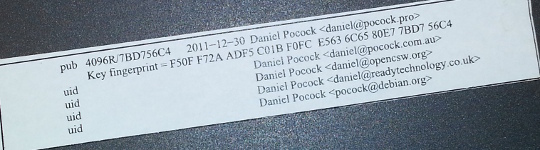
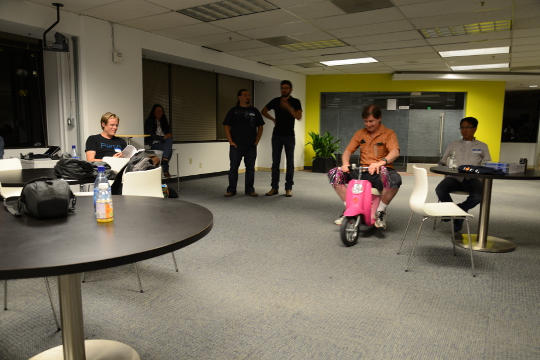
I've mentored a number of students in 2013 and 2014 for Debian and Ganglia and most of the companies I've worked with have run internships and graduate programs from time to time. GSoC 2014 has just finished and with all the excitement, many students are already asking what they can do to prepare and be selected in 2015. My own observation is that the more time the organization has to get to know the student, the more confident they can be selecting that student. Furthermore, the more time that the student has spent getting to know the free software community, the more easily they can complete GSoC. Here I present a list of things that students can do to maximize their chance of selection and career opportunities at the same time. These tips are useful for people applying for GSoC itself and related programs such as GNOME's Outreach Program for Women or graduate placements in companies. Disclaimers There is no guarantee that Google will run the program again in 2015 or any future year. There is no guarantee that any organization or mentor (including myself) will be involved until the official list of organizations is published by Google. Do not follow the advice of web sites that invite you to send pizza or anything else of value to prospective mentors. Following the steps in this page doesn't guarantee selection. That said, people who do follow these steps are much more likely to be considered and interviewed than somebody who hasn't done any of the things in this list. Understand what free software really is You may hear terms like free software and open source software used interchangeably. They don't mean exactly the same thing and many people use the term free software for the wrong things. Not all open source projects meet the definition of free software. Those that don't, usually as a result of deficiencies in their licenses, are fundamentally incompatible with the majority of software that does use genuinely free licenses. Google Summer of Code is about both writing and publishing your code and it is also about community. It is fundamental that you know the basics of licensing and how to choose a free license that empowers the community to collaborate on your code well after GSoC has finished. Please review the definition of free software early on and come back and review it from time to time. The The GNU Project / Free Software Foundation have excellent resources to help you understand what a free software license is and how it works to maximize community collaboration. Don't look for shortcuts There is no shortcut to GSoC selection and there is no shortcut to GSoC completion. The student stipend (USD $5,500 in 2014) is not paid to students unless they complete a minimum amount of valid code. This means that even if a student did find some shortcut to selection, it is unlikely they would be paid without completing meaningful work. If you are the right candidate for GSoC, you will not need a shortcut anyway. Are you the sort of person who can't leave a coding problem until you really feel it is fixed, even if you keep going all night? Have you ever woken up in the night with a dream about writing code still in your head? Do you become irritated by tedious or repetitive tasks and often think of ways to write code to eliminate such tasks? Does your family get cross with you because you take your laptop to Christmas dinner or some other significant occasion and start coding? If some of these statements summarize the way you think or feel you are probably a natural fit for GSoC. An opportunity money can't buy The GSoC stipend will not make you rich. It is intended to make sure you have enough money to survive through the summer and focus on your project. Professional developers make this much money in a week in leading business centers like New York, London and Singapore. When you get to that stage in 3-5 years, you will not even be thinking about exactly how much you made during internships. GSoC gives you an edge over other internships because it involves publicly promoting your work. Many companies still try to hide the potential of their best recruits for fear they will be poached or that they will be able to demand higher salaries. Everything you complete in GSoC is intended to be published and you get full credit for it. Imagine a young musician getting the opportunity to perform on the main stage at a rock festival. This is how the free software community works. It is a meritocracy and there is nobody to hold you back. Having a portfolio of free software that you have created or collaborated on and a wide network of professional contacts that you develop before, during and after GSoC will continue to pay you back for years to come. While other graduates are being screened through group interviews and testing days run by employers, people with a track record in a free software project often find they go straight to the final interview round. Register your domain name and make a permanent email address Free software is all about community and collaboration. Register your own domain name as this will become a focal point for your work and for people to get to know you as you become part of the community. This is sound advice for anybody working in IT, not just programmers. It gives the impression that you are confident and have a long term interest in a technology career. Choosing the provider: as a minimum, you want a provider that offers DNS management, static web site hosting, email forwarding and XMPP services all linked to your domain. You do not need to choose the provider that is linked to your internet connection at home and that is often not the best choice anyway. The XMPP foundation maintains a list of providers known to support XMPP. Create an email address within your domain name. The most basic domain hosting providers will let you forward the email address to a webmail or university email account of your choice. Configure your webmail to send replies using your personalized email address in the From header. Update your ~/.gitconfig file to use your personalized email address in your Git commits. Create a web site and blog Start writing a blog. Host it using your domain name. Some people blog every day, other people just blog once every two or three months. Create links from your web site to your other profiles, such as a Github profile page. This helps reinforce the pages/profiles that are genuinely related to you and avoid confusion with the pages of other developers. Many mentors are keen to see their students writing a weekly report on a blog during GSoC so starting a blog now gives you a head start. Mentors look at blogs during the selection process to try and gain insight into which topics a student is most suitable for. Create a profile on Github Github is one of the most widely used software development web sites. Github makes it quick and easy for you to publish your work and collaborate on the work of other people. Create an account today and get in the habbit of forking other projects, improving them, committing your changes and pushing the work back into your Github account. Github will quickly build a profile of your commits and this allows mentors to see and understand your interests and your strengths. In your Github profile, add a link to your web site/blog and make sure the email address you are using for Git commits (in the ~/.gitconfig file) is based on your personal domain. Start using PGP Pretty Good Privacy (PGP) is the industry standard in protecting your identity online. All serious free software projects use PGP to sign tags in Git, to sign official emails and to sign official release files. The most common way to start using PGP is with the GnuPG (GNU Privacy Guard) utility. It is installed by the package manager on most Linux systems. When you create your own PGP key, use the email address involving your domain name. This is the most permanent and stable solution. Print your key fingerprint using the gpg-key2ps command, it is in the signing-party package on most Linux systems. Keep copies of the fingerprint slips with you. This is what my own PGP fingerprint slip looks like. You can also print the key fingerprint on a business card for a more professional look. Using PGP, it is recommend that you sign any important messages you send but you do not have to encrypt the messages you send, especially if some of the people you send messages to (like family and friends) do not yet have the PGP software to decrypt them. If using the Thunderbird (Icedove) email client from Mozilla, you can easily send signed messages and validate the messages you receive using the Enigmail plugin. Get your PGP key signed Once you have a PGP key, you will need to find other developers to sign it. For people I mentor personally in GSoC, I'm keen to see that you try and find another Debian Developer in your area to sign your key as early as possible. Free software events Try and find all the free software events in your area in the months between now and the end of the next Google Summer of Code season. Aim to attend at least two of them before GSoC. Look closely at the schedules and find out about the individual speakers, the companies and the free software projects that are participating. For events that span more than one day, find out about the dinners, pub nights and other social parts of the event. Try and identify people who will attend the event who have been GSoC mentors or who intend to be. Contact them before the event, if you are keen to work on something in their domain they may be able to make time to discuss it with you in person. Take your PGP fingerprint slips. Even if you don't participate in a formal key-signing party at the event, you will still find some developers to sign your PGP key individually. You must take a photo ID document (such as your passport) for the other developer to check the name on your fingerprint but you do not give them a copy of the ID document. Events come in all shapes and sizes. FOSDEM is an example of one of the bigger events in Europe, linux.conf.au is a similarly large event in Australia. There are many, many more local events such as the Debian France mini-DebConf in Lyon, 2015. Many events are either free or free for students but please check carefully if there is a requirement to register before attending. On your blog, discuss which events you are attending and which sessions interest you. Write a blog during or after the event too, including photos. Quantcast generously hosted the Ganglia community meeting in San Francisco, October 2013. We had a wild time in their offices with mini-scooters, burgers, beers and the Ganglia book. That's me on the pink mini-scooter and Bernard Li, one of the other Ganglia GSoC 2014 admins is on the right. Install Linux GSoC is fundamentally about free software. Linux is to free software what a tree is to the forest. Using Linux every day on your personal computer dramatically increases your ability to interact with the free software community and increases the number of potential GSoC projects that you can participate in. This is not to say that people using Mac OS or Windows are unwelcome. I have worked with some great developers who were not Linux users. Linux gives you an edge though and the best time to gain that edge is now, while you are a student and well before you apply for GSoC. If you must run Windows for some applications used in your course, it will run just fine in a virtual machine using Virtual Box, a free software solution for desktop virtualization. Use Linux as the primary operating system. Here are links to download ISO DVD (and CD) images for some of the main Linux distributions: If you are nervous about getting started with Linux, install it on a spare PC or in a virtual machine before you install it on your main PC or laptop. Linux is much less demanding on the hardware than Windows so you can easily run it on a machine that is 5-10 years old. Having just 4GB of RAM and 20GB of hard disk is usually more than enough for a basic graphical desktop environment although having better hardware makes it faster. Your experiences installing and running Linux, especially if it requires some special effort to make it work with some of your hardware, make interesting topics for your blog. Decide which technologies you know best Personally, I have mentored students working with C, C++, Java, Python and JavaScript/HTML5. In a GSoC program, you will typically do most of your work in just one of these languages. From the outset, decide which language you will focus on and do everything you can to improve your competence with that language. For example, if you have already used Java in most of your course, plan on using Java in GSoC and make sure you read Effective Java (2nd Edition) by Joshua Bloch. Decide which themes appeal to you Find a topic that has long-term appeal for you. Maybe the topic relates to your course or maybe you already know what type of company you would like to work in. Here is a list of some topics and some of the relevant software projects:


  • System administration, servers and networking: consider projects involving monitoring, automation, packaging. Ganglia is a great community to get involved with and you will encounter the Ganglia software in many large companies and academic/research networks. Contributing to a Linux distribution like Debian or Fedora packaging is another great way to get into system administration.
  • Desktop and user interface: consider projects involving window managers and desktop tools or adding to the user interface of just about any other software.
  • Big data and data science: this can apply to just about any other theme. For example, data science techniques are frequently used now to improve system administration.
  • Business and accounting: consider accounting, CRM and ERP software.
  • Finance and trading: consider projects like R, market data software like OpenMAMA and connectivity software (Apache Camel)
  • Real-time communication (RTC), VoIP, webcam and chat: look at the JSCommunicator or the Jitsi project
  • Web (JavaScript, HTML5): look at the JSCommunicator
Before the GSoC application process begins, you should aim to learn as much as possible about the theme you prefer and also gain practical experience using the software relating to that theme. For example, if you are attracted to the business and accounting theme, install the PostBooks suite and get to know it. Maybe you know somebody who runs a small business: help them to upgrade to PostBooks and use it to prepare some reports. Make something Make some small project, less than two week's work, to demonstrate your skills. It is important to make something that somebody will use for a practical purpose, this will help you gain experience communicating with other users through Github. For an example, see the servlet Juliana Louback created for fixing phone numbers in December 2013. It has since been used as part of the Lumicall web site and Juliana was selected for a GSoC 2014 project with Debian. There is no better way to demonstrate to a prospective mentor that you are ready for GSoC than by completing and publishing some small project like this yourself. If you don't have any immediate project ideas, many developers will also be able to give you tips on small projects like this that you can attempt, just come and ask us on one of the mailing lists. Ideally, the project will be something that you would use anyway even if you do not end up participating in GSoC. Such projects are the most motivating and rewarding and usually end up becoming an example of your best work. To continue the example of somebody with a preference for business and accounting software, a small project you might create is a plugin or extension for PostBooks. Getting to know prospective mentors Many web sites provide useful information about the developers who contribute to free software projects. Some of these developers may be willing to be a GSoC mentor. For example, look through some of the following: Getting on the mentor's shortlist Once you have identified projects that are interesting to you and developers who work on those projects, it is important to get yourself on the developer's shortlist. Basically, the shortlist is a list of all students who the developer believes can complete the project. If I feel that a student is unlikely to complete a project or if I don't have enough information to judge a student's probability of success, that student will not be on my shortlist. If I don't have any student on my shortlist, then a project will not go ahead at all. If there are multiple students on the shortlist, then I will be looking more closely at each of them to try and work out who is the best match. One way to get a developer's attention is to look at bug reports they have created. Github makes it easy to see complaints or bug reports they have made about their own projects or other projects they depend on. Another way to do this is to search through their code for strings like FIXME and TODO. Projects with standalone bug trackers like the Debian bug tracker also provide an easy way to search for bug reports that a specific person has created or commented on. Once you find some relevant bug reports, email the developer. Ask if anybody else is working on those issues. Try and start with an issue that is particularly easy and where the solution is interesting for you. This will help you learn to compile and test the program before you try to fix any more complicated bugs. It may even be something you can work on as part of your academic program. Find successful projects from the previous year Contact organizations and ask them which GSoC projects were most successful. In many organizations, you can find the past students' project plans and their final reports published on the web. Read through the plans submitted by the students who were chosen. Then read through the final reports by the same students and see how they compare to the original plans. Start building your project proposal now Don't wait for the application period to begin. Start writing a project proposal now. When writing a proposal, it is important to include several things:
  • Think big: what is the goal at the end of the project? Does your work help the greater good in some way, such as increasing the market share of Linux on the desktop?
  • Details: what are specific challenges? What tools will you use?
  • Time management: what will you do each week? Are there weeks where you will not work on GSoC due to vacation or other events? These things are permitted but they must be in your plan if you know them in advance. If an accident or death in the family cut a week out of your GSoC project, which work would you skip and would your project still be useful without that? Having two weeks of flexible time in your plan makes it more resilient against interruptions.
  • Communication: are you on mailing lists, IRC and XMPP chat? Will you make a weekly report on your blog?
  • Users: who will benefit from your work?
  • Testing: who will test and validate your work throughout the project? Ideally, this should involve more than just the mentor.
If your project plan is good enough, could you put it on Kickstarter or another crowdfunding site? This is a good test of whether or not a project is going to be supported by a GSoC mentor. Learn about packaging and distributing software Packaging is a vital part of the free software lifecycle. It is very easy to upload a project to Github but it takes more effort to have it become an official package in systems like Debian, Fedora and Ubuntu. Packaging and the communities around Linux distributions help you reach out to users of your software and get valuable feedback and new contributors. This boosts the impact of your work. To start with, you may want to help the maintainer of an existing package. Debian packaging teams are existing communities that work in a team and welcome new contributors. The Debian Mentors initiative is another great starting place. In the Fedora world, the place to start may be in one of the Special Interest Groups (SIGs). Think from the mentor's perspective After the application deadline, mentors have just 2 or 3 weeks to choose the students. This is actually not a lot of time to be certain if a particular student is capable of completing a project. If the student has a published history of free software activity, the mentor feels a lot more confident about choosing the student. Some mentors have more than one good student while other mentors receive no applications from capable students. In this situation, it is very common for mentors to send each other details of students who may be suitable. Once again, if a student has a good Github profile and a blog, it is much easier for mentors to try and match that student with another project. GSoC logo generic Conclusion Getting into the world of software engineering is much like joining any other profession or even joining a new hobby or sporting activity. If you run, you probably have various types of shoe and a running watch and you may even spend a couple of nights at the track each week. If you enjoy playing a musical instrument, you probably have a collection of sheet music, accessories for your instrument and you may even aspire to build a recording studio in your garage (or you probably know somebody else who already did that). The things listed on this page will not just help you walk the walk and talk the talk of a software developer, they will put you on a track to being one of the leaders. If you look over the profiles of other software developers on the Internet, you will find they are doing most of the things on this page already. Even if you are not selected for GSoC at all or decide not to apply, working through the steps on this page will help you clarify your own ideas about your career and help you make new friends in the software engineering community.


18 August 2014

Daniel Pocock: Is WebRTC private?

With the exciting developments at rtc.debian.org, many people are starting to look more closely at browser-based real-time communications. Some have dared to ask: does it solve the privacy problems of existing solutions? Privacy is a relative term Perfect privacy and its technical manifestations are hard to define. I had a go at it in a blog on the Gold Standard for free communications technology on 5 June 2013. By pure co-incidence, a few hours later, the first Snowden leaks appeared and this particular human right was suddenly thrust into the spotlight. WebRTC and ICE privacy risk WebRTC does not give you perfect privacy. At least one astute observer at my session at Paris mini-DebConf 2014 questioned the privacy of Interactive Connectivity Establishment (ICE, RFC 5245). In its most basic form, ICE scans all the local IP addresses on your machine and NAT gateway and sends them to the person calling you so that their phone can find the optimal path to contact you. This clearly has privacy implications as a caller can work out which ISP you are connected to and some rough details of your network topology at any given moment in time. What WebRTC does bring to the table Some of this can be mitigated though: an ICE implementation can be tuned so that it only advertises the IP address of a dedicated relay host. If you can afford a little latency, your privacy is safe again. This privacy protecting initiative could be made by a browser vendor such as Mozilla or it can be done in JavaScript by a softphone such as JSCommunicator. Many individuals are now using a proprietary softphone to talk to family and friends around the world. The softphone in question has properties like a virus, siphoning away your private information. This proprietary softphone is also an insidious threat to open source and free operating systems on the desktop. WebRTC is a positive step back from the brink. It gives people a choice. WebRTC is a particularly relevant choice for business. Can you imagine going to a business and asking them to make all their email communication through hotmail? When a business starts using a particular proprietary softphone, how is it any different? WebRTC offers a solution that is actually easier for the user and can be secured back to the business network using TLS. WebRTC is based on open standards, particularly HTML5. Leading implementations, such as the SIP over WebSocket support in reSIProcate, JSCommunicator and the DruCall module for Drupal are fully open source. Not only is it great to be free, it is possible to extend and customize any of these components. What is missing There are some things that are not quite there yet and require a serious effort from the browser vendors. At the top of the list for privacy:
  • ZRTP support - browsers currently support DTLS-SRTP, which is based on X.509. ZRTP is more like PGP, a democratic and distributed peer-to-peer privacy solution without needing to trust some central certificate authority.
  • TLS with PGP - the TLS protocol used to secure the WebSocket signalling channel is also based on X.509 with the risk of a central certificate authority. There is increasing chatter about the need for TLS to use PGP instead of X.509 and WebRTC would be a big winner if this were to eventuate and be combined with ZRTP.
You may think "I'll believe it when I see it". Each of these features, including WebRTC itself, is a piece of the puzzle and even solving one piece at a time brings people further out of danger from the proprietary mess the world lives with today. To find out more about practical integration of WebRTC into free software solutions, consider coming to my talk at xTupleCon in October.

16 August 2014

Daniel Pocock: WebRTC: what works, what doesn't

With the release of the latest rtc.debian.org portal update, there are numerous improvements but there are still some known problems too. The good news is that if you have a web browser, you can probably make successful WebRTC calls from one developer to another without any need to install or configure anything else. The bad news is that not every permutation of browser and client will work. Here I list some of the limitations so people won't waste time on them. The SIP proxy supports any SIP client Just about any SIP client can connect to the proxy server and register. This does not mean that every client will be able to call each other. Generally speaking, modern WebRTC clients will be able to call each other. Standalone softphones or deskphones will call each other. Calling from a normal softphone or deskphone to a WebRTC browser, or vice-versa, will not work though. Some softphones, like Jitsi, have implemented most of the protocols to communicate with WebRTC but they are yet to put the finishing touches on it. Chat should just work for any combination of clients The new WebRTC frontend supports SIP chat messaging. There is no presence or buddy list support yet. You can even use a tool like sipsak to accept or send SIP chats from a script. Chat works for any client new or old. Although a WebRTC user can't call a softphone user, for example, they can send chats to each other. WebRTC support in Iceweasel 24 on wheezy systems is very limited On a wheezy system, the most recent Iceweasel update is version 24.7. This version supports most of WebRTC but does not support TURN relay servers to help you out of a NAT network. If you call between two wheezy machines on the same NAT network it will work. If the call has to traverse a NAT boundary it will not work. Wheezy users need to either download a newer Firefox version or use Chromium. JsSIP doesn't handle ICE elegantly Internet Connectivity Establishment (ICE, RFC 5245) is meant to prevent calls from being answered with missing audio or video streams. ICE is a mandatory part of WebRTC. When correctly implemented, the JavaScript application will exchange ICE candidates and run the connectivity checks before alerting anybody that a call is ringing. If the checks fail (for example, with Iceweasel 24 and NAT), the caller should be told the call can't be made and the callee shouldn't be disturbed at all. JsSIP is not operating in this manner though. It alerts the callee before telling the browser to start the connectivity checks. Then it even waits for the callee to answer. Only then does it tell the browser to start checking connectivity. This is not a fault with the ICE standard or the browser, it is an implementation problem. Therefore, until this is fully fixed, people may still see some calls that appear to answer but don't have any media stream. After this is fixed, such calls really will be a thing of the past. Debian RTC testing is more than just a pipe dream Although these glitches are not ideal for end users, there is a clear roadmap to resolve them. There are also a growing collection of workarounds to minimize the inconvenience. For example, JSCommunicator has a hack to detect when somebody is using Iceweasel 24 and just refuse to make the call. See the option require_relay_candidate in the config.js settings file. This also ensures that it will refuse to make a call if the TURN server is offline. Better to give the user a clear error than a call without any audio or video stream. require_relay_candidate is enabled on freephonebox.net because it makes life easier for end users. It is not enabled on rtc.debian.org because some DDs may be willing to tolerate this issue when testing on a local LAN. To find out more about practical integration of WebRTC into free software solutions, consider coming to my talk at xTupleCon in October.

14 August 2014

Gregor Herrmann: RC bugs 2014/13 - 2014/33

perl 5.20 got uploaded to debian unstable a few minutes ago; be prepared for some glitches when upgrading sid machines/chroots in the next days, while all 557 reverse dependencies are rebuilt via binNMUs. how does this relate to this blog post's title? it does, since during the last weeks I was mostly trying to help with the preparation of this transition. & we managed to fix quite a few bugs while they were not bumped to serious yet, otherwise the list below would be a bit longer :) anyway, here are the the RC bugs I've worked on in the last 20 or so weeks: p.s.: & now, go & enjoy the new perl 5.20 features :)

Daniel Pocock: Bug tracker or trouble ticket system?

One of the issues that comes up from time to time in many organizations and projects (both community and commercial ventures) is the question of how to manage bug reports, feature requests and support requests. There are a number of open source solutions and proprietary solutions too. I've never seen a proprietary solution that offers any significant benefit over the free and open solutions, so this blog only looks at those that are free and open. Support request or bug? One common point of contention is the distinction between support requests and bugs. Users do not always know the difference. Some systems, like the Github issue tracker, gather all the requests together in a single list. Calling them "Issues" invites people to submit just about anything, such as "I forgot my password". At the other extreme, some organisations are so keen to keep support requests away from their developers that they operate two systems and a designated support team copies genuine bugs from the customer-facing trouble-ticket/CRM system to the bug tracker. This reduces the amount of spam that hits the development team but there is overhead in running multiple systems and having staff doing cut and paste. Will people use it? Another common problem is that a full bug report template is overkill for some issues. If a user is asking for help with some trivial task and if the tool asks them to answer twenty questions about their system, application version, submit log files and other requirements then they won't use it at all and may just revert to sending emails or making phone calls. Ideally, it should be possible to demand such details only when necessary. For example, if a support engineer routes a request to a queue for developers, then the system may guide the support engineer to make sure the ticket includes attributes that a ticket in the developers' queue should have. Beyond Perl Some of the most well known systems in this space are Bugzilla, Request Tracker and OTRS. All of these solutions are developed in Perl. These days, Python, JavaScript/Node.JS and Java have taken more market share and Perl is chosen less frequently for new projects. Perl skills are declining and younger developers have usually encountered Python as their main scripting language at university. My personal perspective is that this hinders the ability of Perl projects to attract new blood or leverage the benefits of new Python modules that don't exist in Perl at all. Bugzilla has fallen out of the Debian and Ubuntu distributions after squeeze due to its complexity. In contrast, Fedora carries the Bugzilla packages and also uses it as their main bug tracker. Evaluation I recently started having a look at the range of options in the Wikipedia list of bug tracking systems. Some of the trends that appear:
  • Many appear to be bug tracking systems rather than issue tracking / general-purpose support systems. How well do they accept non-development issues and keep them from spamming the developers while still providing a useful features for the subset of users who are doing development?
  • A number of them try to bundle other technologies, like wiki or FAQ systems: but how well do they work with existing wikis? This trend towards monolithic products is slightly dangerous. In my own view, a wiki embedded in some other product may not be as well supported as one of the leading purpose-built wikis.
  • Some of them also appear to offer various levels of project management. For development tasks, it is just about essential for dependencies and a roadmap to be tightly integrated with the bug/feature tracker but does it make the system more cumbersome for people dealing with support requests? Many support requests, like "I've lost my password", don't really have any relationship with project management or a project roadmap.
  • Not all appear to handle incoming requests by email. Bug tracking systems can be purely web/form-based, but email is useful for helpdesk systems.
Questions This leaves me with some of the following questions:
  • Which of these systems can be used as a general purpose help-desk / CRM / trouble-ticket system while also being a full bug and project management tool for developers?
  • For those systems that don't work well for both use cases, which combinations of trouble-ticket system + bug manager are most effective, preferably with some automated integration?
  • Which are more extendable with modern programming practices, such as Python scripting and using Git?
  • Which are more future proof, with choice of database backend, easy upgrades, packages in official distributions like Debian, Ubuntu and Fedora, scalability, IPv6 support?
  • Which of them are suitable for the public internet and which are only considered suitable for private access?

13 August 2014

Daniel Pocock: WebRTC in CRM/ERP solutions at xTupleCon 2014

In October this year I'll be visiting the US and Canada for some conferences and a wedding. The first event will be xTupleCon 2014 in Norfolk, Virginia. xTuple make the popular open source accounting and CRM suite PostBooks. The event kicks off with a keynote from Apple co-founder Steve Wozniak on the evening of October 14. On October 16 I'll be making a presentation about how JSCommunicator makes it easy to add click-to-call real-time communications (RTC) to any other web-based product without requiring any browser plugins or third party softphones. Juliana Louback has been busy extending JSCommunicator as part of her Google Summer of Code project. When finished, we hope to quickly roll out the latest version of JSCommunicator to other sites including rtc.debian.org, the WebRTC portal for the Debian Developer community. Juliana has also started working on wrapping JSCommunicator into a module for the new xTuple / PostBooks web-based CRM. Versatility is one of the main goals of the JSCommunicator project and it will be exciting to demonstrate this in action at xTupleCon. xTupleCon discounts for developers xTuple has advised that they will offer a discount to other open source developers and contributers who wish to attend any part of their event. For details, please contact xTuple directly through this form. Please note it is getting close to their deadline for registration and discounted hotel bookings. Potential WebRTC / JavaScript meet-up in Norfolk area For those who don't or can't attend xTupleCon there has been some informal discussion about a small WebRTC-hacking event at some time on 15 or 16 October. Please email me privately if you may be interested.

11 August 2014

Juliana Louback: JSCommunicator - Setup and Architecture

Preface During Google Summer of Code 2014, I got to work on the Debian WebRTC portal under the mentorship of Daniel Pocock. Now I had every intention of meticulously documenting my progress at each step of development in this blog, but I was a bit late in getting the blog up and running. I ll now be publishing a series of posts to recap all I ve done during GSoC. Better late than never. Intro JSCommunicator is a SIP communication tool developed in HTML and JavaScript. The code was designed to make integrating JSCommunicator with a website or web app as simple as possible. It s quite easy, really. However, I do think a more detailed explanation on how to set things up and a guide to the JSCommunicator architecture could be of use, particularly for those wanting to modify the code in any way. Setup To begin, please fork the JSCommunicator repo. If you are new to git, feel free to follow the steps in section Setup and Clone in this post. If you read the README file (which you always should), you ll see that JSCommunicator needs a SIP proxy that supports SIP over Websockets transport. Some options are: I didn t find a tutorial for Kamailio setup, I did find one for repro setup. And bonus, here you have a great tutorial on how to setup and configure your SIP proxy AND your TURN server. In your project s root directory, you ll see a file named config-sample.js. Make a copy of that file named config.js. The config-sample.js file has comments that are very instructive. In sum, the only thing you have to modify is the turn_servers property and the websocket property. In my case, debrtc.org was the domain registered for testing my project, so my config file has:
turn_servers: [
	  server:"turn:debrtc.org"       
],
Note that unlike the sample, I didn t set a username and password so SIP credentials will be used. Now fill in the websocket property here we use sip5060.net.
websocket:  
    servers: 'wss://ws.sip5060.net',
    connection_recovery_min_interval: 2,
    connection_recovery_max_interval: 30,
   ,
I m pretty sure you can set the connection_recovery properties to whatever you like. Everything else is optional. If you set the user property, specifically display_name and uri, that will be used to fill in the Login form and takes preference over any Remember me data. If you also set sip_auth_password, JSCommunicator will automatically log in. All the other properties are for other optional functionalities and are well explained. You ll need some third-party javascript that is not included in the JSCommunicator git repo. Namely jQuery version 1.4 or higher and ArbiterJS version 1.0. Download jQuery here and ArbiterJS here and place the .js files in your project s root directory. Do make sure that you are including the correct filename in your html file. For example, in phone-dev.shtml, a file named jquery.js is included. The file you downloaded will likely have version numbers in it s file name. So rename the downloaded file or change the content of src in your includes. This is uber trivial, but I ve made the mistake several times. You ll also need JsSIP.js which can be downloaded here. Same naming care must be taken as is the case for jQuery and ArbiterJS. The recently added Instant Messaging component and some of the new features need jQuery-UI - so far version 1.11.* is known to work. From the downloaded .zip all you need is the jquery-ui-...js file and the jquery-ui-...css file, also to be placed in the project s root directory. If you ll be using the internationalization support you ll also need jquery.i18n.properties.js. To try out JSCommunicator, deploy the website locally by copying your project directory to the apache document root directory (provided you are using apache, which is a good idea.). You ll likely have to restart your server before this works. Now the demo .shtml pages only have a header with all the necessary includes, then a Server Side Include for the body of the page, with all the JSCommunicator html. The html content is in the file jscommunicator.inc. You can enable SSI on apache, OR you can simply copy and paste the content of jscommunicator.inc into phone-dev.shmtl. Start up apache, open a browser and navigate to localhost/jscommunicator/phone-dev.shmtl and you should see: jscommunicatorRaw Actually, pending updates to JSCommunicator, you should see a brand new UI! But all the core stuff will be the same. Architecture Disclaimer: I m explaining my view of the JSCommunicator architecture, which currently may not be 100% correct. But so far it s been enough for me to make my modifications and additions to the code, so it could be of use. One I get a JSCommunicator Founding Father s stamp of approval, I ll be sure to confirm the accuracy. Now to explain how the JSCommunicator code interacts, the use of each code item is described, ignoring all the html and css which will vary according to how you choose to use JSCommunicator. I m also not going to explain jQuery which is a dependency but not specific to WebRTC. The core JSCommunicator code is the following: Each of these files will be presented in what I hope is an intuitive order. The next three files could be considered utils : These two are where the magic happens: Now for some extras: Third party code: Here s a diagram of sorts to help you visualize how the code interacts: jscommArch In sum, 1 - JSCommUI.js handles what is displayed in the UI and feeds data to JSCommManager.js; 2 - JSCommManager.js actually does stuff, feeding data to be displayed to JSCommUI.js; 3 - JSCommManager.js calls functions from the three utils , parseuri.js, webrtc-check.js and jssip-helpher.js which organizes the data from config.js; 4 - JSCommManager.js initializes a SIP User Agent based on the implementation in Arbiter.js. When making any changes to JSCommunicator, you will likely only be working with JSCommUI.js and JSCommManager.js.
Juliana Louback: JSCommunicator - Setup and Architecture

Preface During Google Summer of Code 2014, I got to work on the Debian WebRTC portal under the mentorship of Daniel Pocock. Now I had every intention of meticulously documenting my progress at each step of development in this blog, but I was a bit late in getting the blog up and running. I ll now be publishing a series of posts to recap all I ve done during GSoC. Better late than never. Intro JSCommunicator is a SIP communication tool developed in HTML and JavaScript. The code was designed to make integrating JSCommunicator with a website or web app as simple as possible. It s quite easy, really. However, I do think a more detailed explanation on how to set things up and a guide to the JSCommunicator architecture could be of use, particularly for those wanting to modify the code in any way. Setup To begin, please fork the JSCommunicator repo. If you are new to git, feel free to follow the steps in section Setup and Clone in this post. If you read the README file (which you always should), you ll see that JSCommunicator needs a SIP proxy that supports SIP over Websockets transport. Some options are: I didn t find a tutorial for Kamailio setup, I did find one for repro setup. And bonus, here you have a great tutorial on how to setup and configure your SIP proxy AND your TURN server. In your project s root directory, you ll see a file named config-sample.js. Make a copy of that file named config.js. The config-sample.js file has comments that are very instructive. In sum, the only thing you have to modify is the turn_servers property and the websocket property. In my case, debrtc.org was the domain registered for testing my project, so my config file has:
turn_servers: [
	  server:"turn:debrtc.org"       
],
Note that unlike the sample, I didn t set a username and password so SIP credentials will be used. Now fill in the websocket property here we use sip5060.net.
websocket:  
    servers: 'wss://ws.sip5060.net',
    connection_recovery_min_interval: 2,
    connection_recovery_max_interval: 30,
   ,
I m pretty sure you can set the connection_recovery properties to whatever you like. Everything else is optional. If you set the user property, specifically display_name and uri, that will be used to fill in the Login form and takes preference over any Remember me data. If you also set sip_auth_password, JSCommunicator will automatically log in. All the other properties are for other optional functionalities and are well explained. You ll need some third-party javascript that is not included in the JSCommunicator git repo. Namely jQuery version 1.4 or higher and ArbiterJS version 1.0. Download jQuery here and ArbiterJS here and place the .js files in your project s root directory. Do make sure that you are including the correct filename in your html file. For example, in phone-dev.shtml, a file named jquery.js is included. The file you downloaded will likely have version numbers in it s file name. So rename the downloaded file or change the content of src in your includes. This is uber trivial, but I ve made the mistake several times. You ll also need JsSIP.js which can be downloaded here. Same naming care must be taken as is the case for jQuery and ArbiterJS. The recently added Instant Messaging component and some of the new features need jQuery-UI - so far version 1.11.* is known to work. From the downloaded .zip all you need is the jquery-ui-...js file and the jquery-ui-...css file, also to be placed in the project s root directory. If you ll be using the internationalization support you ll also need jquery.i18n.properties.js. To try out JSCommunicator, deploy the website locally by copying your project directory to the apache document root directory (provided you are using apache, which is a good idea.). You ll likely have to restart your server before this works. Now the demo .shtml pages only have a header with all the necessary includes, then a Server Side Include for the body of the page, with all the JSCommunicator html. The html content is in the file jscommunicator.inc. You can enable SSI on apache, OR you can simply copy and paste the content of jscommunicator.inc into phone-dev.shmtl. Start up apache, open a browser and navigate to localhost/jscommunicator/phone-dev.shmtl and you should see: jscommunicatorRaw Actually, pending updates to JSCommunicator, you should see a brand new UI! But all the core stuff will be the same. Architecture Disclaimer: I m explaining my view of the JSCommunicator architecture, which currently may not be 100% correct. But so far it s been enough for me to make my modifications and additions to the code, so it could be of use. One I get a JSCommunicator Founding Father s stamp of approval, I ll be sure to confirm the accuracy. Now to explain how the JSCommunicator code interacts, the use of each code item is described, ignoring all the html and css which will vary according to how you choose to use JSCommunicator. I m also not going to explain jQuery which is a dependency but not specific to WebRTC. The core JSCommunicator code is the following: Each of these files will be presented in what I hope is an intuitive order. The next three files could be considered utils : These two are where the magic happens: Now for some extras: Third party code: Here s a diagram of sorts to help you visualize how the code interacts: jscommArch In sum, 1 - JSCommUI.js handles what is displayed in the UI and feeds data to JSCommManager.js; 2 - JSCommManager.js actually does stuff, feeding data to be displayed to JSCommUI.js; 3 - JSCommManager.js calls functions from the three utils , parseuri.js, webrtc-check.js and jssip-helpher.js which organizes the data from config.js; 4 - JSCommManager.js initializes a SIP User Agent based on the implementation in Arbiter.js. When making any changes to JSCommunicator, you will likely only be working with JSCommUI.js and JSCommManager.js.

8 August 2014

Daniel Pocock: Help needed reviewing Ganglia GSoC changes

The Ganglia project has been delighted to have Google's support for 5 students in Google Summer of Code 2014. The program officially finishes in ten more days, on 18 August. If you are a user of Ganglia, Nagios, RRDtool or R or just an enthusiastic C or Python developer, you may be able to use and provide feedback for the students while benefitting from the cool new features they have been working on.
Student Technology Comments
Chandrika Parimoo Python, Nagios and some Syslog Chandrika generalized some of my ganglia-nagios-bridge code into the PyNag library. I then used it as the basis for syslog-nagios-bridge. Chandrika has also done some work on improving the ganglia-nagios-bridge configuration file format.
Oliver Hamm C Oliver has been working on metrics about Ganglia infrastructure. If you have a large and dynamic Ganglia cloud, this is for you.
Plamen Dimitrov R, RRDtool Plamen has been building an R plugin for inspecting RRD files from Ganglia or any other type of RRD.
Rana NVIDIA, C Rana has been working on improvements to Ganglia monitoring of NVIDIA GPUs, especially in HPC clusters
Zhi An Java, JMX Zhi An has been extending the JMXetric and gmetric4j projects to provide more convenient monitoring of Java server processes.
If you have any feedback or questions, please feel free to discuss on the Ganglia-general mailing list and CC the student and their mentor.

31 July 2014

Russell Coker: Links July 2014

Dave Johnson wrote an interesting article for Salon about companies ripping off the tax system by claiming that all their income is produced in low tax countries [1]. Seb Lee-Delisle wrote an insightful article about how to ask to get paid to speak [2]. I should do that. Daniel Pocock wrote an informative article about the reConServer simple SIP conferencing server [3]. I should try it out, currently most people I want to conference with are using Google Hangouts, but getting away from Google is a good thing. Fran ois Marier wrote an informative post about hardening ssh servers [4]. S. E. Smith wrote an interesting article I Am Tired of Hearing Programmers Defend Gender Essentialism [5]. Bert Archer wrote an insightful article about lazy tourism [6]. His initial example of love locks breaking bridges was a bit silly (it s not difficult to cut locks off a bridge) but his general point about lazy/stupid tourism is good. Daniel Pocock wrote an insightful post about new developments in taxis, the London Taxi protest against Uber, and related changes [7]. His post convinced me that Uber is a good thing and should be supported. I checked the prices and unfortunately Uber is more expensive than normal taxis for my most common journey. Cory Doctorow wrote an insightful article for The Guardian about the moral issues related to government spying [8]. The Verge has an interesting review of the latest Lytro Lightbox camera [9]. Not nearly ready for me to use, but interesting technology. Prospect has an informative article by Kathryn Joyce about the Protestant child sex abuse scandal in the US [10]. Billy Graham s grandson is leading the work to reform churches so that they protect children instead of pedophiles. Prospect also has an article by Kathryn Joyce about Christians home-schooling kids to try and program them to be zealots and how that hurts kids [11]. The Daily Beast has an interesting article about the way that the extreme right wing in the US are trying to kill people, it s the right wing death panel [12]. Jay Michaelson wrote an informative article for The Daily Beast about right-wing hate groups in the US who promote the extreme homophobic legislation in Russia and other countries [13]. It also connects to the Koch brothers who seem to be associated with most evil. Elias Isquith wrote an insightful article for Salon about the current right-wing obsession with making homophobic discrimination an issue of religious liberty will hurt religious people [14]. He also describes how stupid the right-wing extremists are in relation to other issues too. EconomixComix.com has a really great comic explaning the economics of Social Security in the US [15]. They also have a comic explaining the TPP which is really good [16]. They sell a comic book about economics which I m sure is worth buying. We need to have comics explaining all technical topics, it s a good way of conveying concepts. When I was in primary school my parents gave me comic books covering nuclear physics and other science topics which were really good. Mia McKenzie wrote an insightful article for BlackGirlDangerous.com about dealing with racist white teachers [17]. I think that it would be ideal to have a school dedicated to each minority group with teachers from that group.

29 July 2014

Daniel Pocock: Pruning Syslog entries from MongoDB

I previously announced the availability of rsyslog+MongoDB+LogAnalyzer in Debian wheezy-backports. This latest rsyslog with MongoDB storage support is also available for Ubuntu and Fedora users in one way or another. Just one thing was missing: a flexible way to prune the database. LogAnalyzer provides a very basic pruning script that simply purges all records over a certain age. The script hasn't been adapted to work within the package layout. It is written in PHP, which may not be ideal for people who don't actually want LogAnalyzer on their Syslog/MongoDB host. Now there is a convenient solution: I've just contributed a very trivial Python script for selectively pruning the records. Thanks to Python syntax and the PyMongo client, it is extremely concise: in fact, here is the full script:
#!/usr/bin/python
import syslog
import datetime
from pymongo import Connection
# It assumes we use the default database name 'logs' and collection 'syslog'
# in the rsyslog configuration.
with Connection() as client:
    db = client.logs
    table = db.syslog
    #print "Initial count: %d" % table.count()
    today = datetime.datetime.today()
    # remove ANY record older than 5 weeks except mail.info
    t = today - datetime.timedelta(weeks=5)
    table.remove( "time":  "$lt": t  , "syslog_fac":   "$ne" : syslog.LOG_MAIL  )
    # remove any debug record older than 7 days
    t = today - datetime.timedelta(days=7)
    table.remove( "time":  "$lt": t  , "syslog_sever": syslog.LOG_DEBUG )
    #print "Final count: %d" % table.count()
Just put it in /usr/local/bin and run it daily from cron. Customization Just adapt the table.remove statements as required. See the PyMongo tutorial for a very basic introduction to the query syntax and full details in the MongoDB query operator reference for creating more elaborate pruning rules. Potential improvements
  • Indexing the columns used in the queries
  • Logging progress and stats to Syslog

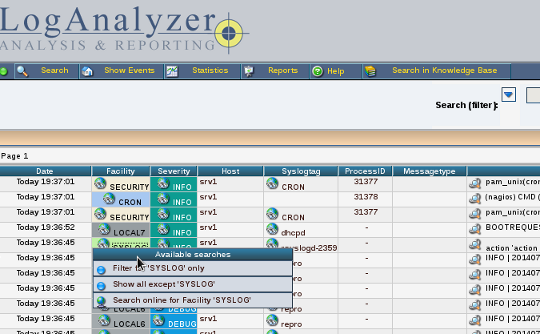
LogAnalyzer using a database backend such as MongoDB is very easy to set up and much faster than working with text-based log files

28 July 2014

Daniel Pocock: Secure that Dictaphone

2014 has been a big year for dictaphones so far. First, it was France and the secret recordings made by Patrick Buisson during the reign of President Sarkozy. Then, a US court ordered the release of the confidential Boston College tapes, part of an oral history project. Originally, each participant had agreed their recording would only be released after their death. Sinn Fein leader Gerry Adams was arrested and questioned over a period of 100 hours and released without charge. Now Australia is taking its turn. In #dictagate down under, a senior political correspondent from a respected newspaper recorded (most likely with consent) some off-the-record comments of former conservative leader Ted Baillieu. Unfortunately, this journalist misplaced the dictaphone at the state conference of Baillieu's arch-rivals, the ALP. A scandal quickly errupted. Secure recording technology There is no question that electronic voice recordings can be helpful for people, including journalists, researchers, call centers and many other purposes. However, the ease with which they can now be distributed is only dawning on people. Twenty years ago, you would need to get the assistance of a radio or TV producer to disseminate such recordings so widely. Today there is email and social media. The Baillieu tapes were emailed directly to 400 people in a matter of minutes. Just as technology brings new problems, it also brings solutions. Encryption is one of them. Is encryption worthwhile? Coverage of the Snowden revelations has revealed that many popular security technologies are not one hundred percent safe. In each of these dictaphone cases, however, NSA-level expertise was not a factor. Even the most simplistic encryption would have caused endless frustration to the offenders who distributed the Baillieu tape. How can anybody be sure encryption is reliable? Part of the problem is education. Everybody using the technology needs to be aware of the basic concepts, for example, public key cryptography. Another big question mark is back doors. There is ongoing criticism of Apple iPhone/iPod devices and the many ways that their encryption can be easily disabled by Apple engineers and presumably many former staff, security personnel and others. The message is clear: proprietary, closed-source solutions should be avoided. Free and open source technologies are the alternative. If a company does not give you the source code, how can anybody independently audit their code for security? With encryption software, what use is it if nobody has verified it? What are the options? However, given that the majority of people don't have a PhD in computer science or mathematics, are there convenient ways to get started with encryption? Reading is a good start. The Code Book by Simon Singh (author of other popular science books like Fermat's Last Theorem) is very accessible, not classified and assumes no formal training in mathematics. Even for people who do know these topics inside out, it is a good book to share with friends and family. The Guardian Project (no connection with Guardian Media of Edward Snowden fame) aims to provide a secure and easy to use selection of apps for pocket devices. This project has practical applications in business, journalism and politics alike. How should a secure dictaphone app work? Dictaphone users typically need to take their dictaphones in the field, so there is a risk of losing it or having it stolen. A strong security solution in this situation may involve creating an RSA key pair on a home/office computer, keeping the private key on the home computer and putting the public key on the dictaphone device. Configured this way, the dictaphone will not be able to play back any of the recordings itself - the user will always have to copy them to the computer for decryption.

21 July 2014

Daniel Pocock: Australia can't criticize Putin while competing with him

While much of the world is watching the tragedy of MH17 and contemplating the grim fate of 298 deceased passengers sealed into a refrigerated freight train in the middle of a war zone, Australia (with 28 victims on that train) has more than just theoretical skeletons in the closet too. At this moment, some 153 Tamil refugees, fleeing the same type of instability that brought a horrible death to the passengers of MH17, have been locked up in the hull of a customs ship on the high seas. Windowless cabins and a supply of food not fit for a dog are part of the Government's strategy to brutalize these people for simply trying to avoid the risk of enhanced imprisonment(TM) in their own country. Under international protocol for rescue at sea and political asylum, these people should be taken to the nearest port and given a humanitarian visa on arrival. Australia, however, is trying to lie and cheat their way out of these international obligations while squealing like a stuck pig about the plight of Australians in the hands of Putin. If Prime Minister Tony Abbott wants to encourage Putin to co-operate with the international community, shouldn't he try to lead by example? How can Australians be safe abroad if our country systematically abuses foreigners in their time of need?

Next.

Previous.