Search Results: "John Goerzen"

2 November 2007

John Goerzen: A little more on Vim and Emacs file handling

Yesterday's post about switching back to Emacs saw quite a few comments from people (most of them useful, even). I learned a few things.

My biggest gripe about Vim was that for the file types I worked with most, its indentation and syntax highlighting was inferior to that of Emacs. I'd like to illustrate that with an example.

Let's consider one of those file types: XML containing DocBook markup.

Vim has a DocBook mode. It doesn't autodetect DocBook files, so I have this at the top of each one:

<!-- vim: set filetype=docbkxml shiftwidth=2 autoindent expandtab tw=77 : -->

Now, why should Vim need a separate DocBook mode? DocBook is just XML or SGML, and these things have a well-formed nature. Well, part of the reason is that /usr/share/vim/vim71/syntax/docbk.vim has a ton of lines like this:

syn keyword docbkKeyword chapter citation citerefentry citetitle city contained

Yes, they are hard-coding all the DocBook element names into the editing mode. It's probably used for completion, highlighting, maybe indentation. I'm not sure, really. I remember that editing these files without the DocBook mode was much more painful anyway, but that was 8 months ago and I can't quite remember why.

Now, what about Emacs? I don't know if Emacs even has a DocBook mode, mainly because I don't have to care. The Emacs psgml mode actually parses the DTD for your XML or SGML files. It knows exactly what the valid tags are from doing so. This means it has full functionality not just for DocBook, but for any XML or SGML file with a DTD.

Not only that, but it knows more about the files than Vim does. For instance, both Emacs and Vim can do completion of various things. Vim </ C-x C-o (ooo, sounds like Emacs!) can complete my closing tags. But it can't autocomplete my opening tags, and it certainly isn't aware

Not only can Emacs autocomplete opening and closing tags, but it knows exactly what tags are valid at a given place in the document (thanks to the DTD) and will only consider those tags for completion. Moreover, depending on how you have configured it, it could also insert spots for you to add any required attributes. So, for instance, if you're editing XHTML and autocompletion gives you an <img> tag, it would add src="" in it for you, as a reminder that src is required.

There are a host of other smart things that Emacs can do with XML or SGML documents. For instance, you can get a list of all tags valid at the current point with C-c C-t or Shift-RightClick -- useful if you've forgotten the name of a tag for a moment.

The difference isn't as great with everything. But it sure is noticable as I work with XML and Haskell files.

1 November 2007

John Goerzen: So long, Vim. I'm returning to Emacs

I'd been using Emacs for quite awhile, and about 8 months ago I decided I would try using Vim. I'd only used vi for system emergency work, but knew a number of people that swore by it for regular work. So I decided I would learn Vim and use it for my regular work. I figure that with things like this, I don't get a real feel for how well they work unless I use them for all my work. So I haven't really opened Emacs at all in the past 8 months.

Yesterday I finally decided that Vim was not living up to my expectations and I'm in the process of switching back to Emacs. I thought I ought to write down why I'm doing that, for my own future reference... and since nobody has ever written about Emacs vs. Vim, I might as well post it where everyone can see it.

So here we are.

Original Reasons for Using Vim

It would lead to more comfortable typing. Lots of Vim users mention that you don't have to hold down keys while hitting other keys as much in Vim as in Emacs, and that the movement keys are all on the home row. That's true, but I didn't find it to be that big of an improvement, since Esc is a farther reach than anything in Emacs, and let me tell you, you're hitting Esc all the time in Vim. I found that removing the armrests from my chair made my hands happier than Vim ever did, and swapping Ctrl and CapsLock in Emacs will probably help there too.

It starts faster. I'm not sure if that really was true even when I switched, but it certainly isn't true on any of my machines today. Both Vim and Emacs have had major version upgrades (v7 and v22, respectively) since I started using Vim. People seem to say that Emacs 22 feels faster, though I don't know if that's true. The startup times of the two, if they're different, are imperceptible.

Vim would use less RAM. Frankly, these days, both Emacs and Vim are way down on the list of things that use up RAM. Heck, kmail has 141MB resident, and each of its two IMAP processes is using more than 30MB. Emacs in X right after start has 16MB resident, 10MB of which is shared, and 25MB VSS. gvim right after start has 8MB resident, 5MB of which is shared, and a 43MB VSS. Emacs tends to use fewer processes for things that vim. So they're not all that different, and Emacs could come out smaller in certain situations. But the difference is irrelevant on today's machines, and modern Gnome and KDE apps are many times larger than both of them.

It will make me more comfortable in rescue environments where I have only traditional vi available. Actually, the vi on AIX is so different from modern Vim that this didn't really help.

It would make me more productive. There are some editing commands that did, but as you'll see below, it was more than balanced out by other problems.

Things I Liked about Vim

The commands dt, dT, df, dF. Wonderful little things those. Emacs now has M-z (Zap), which is similar to df but can actually go to other lines (a nice addition). And there are easy ways to bind keys to the others as well, though that doesn't make it a pervasive convention like it is in Vim.

Antialiased fonts. It's crazy that Emacs doesn't have this yet. But not a showstopper; I still like good ole 10x20 just fine.

Regexp search-and-replace. Emacs actually has this now, and maybe it had it back then too. M-C-%. Apparently in Emacs22 the replacement expression can also have lisp code in it, which sounds really slick but I can't see myself using it regularly.

Annoying Things in Vim

Syntax highlighting. The syntax highlighting for most languages in Vim felt like it was about as smart as it was in Emacs about 10 years ago. Strings like "Hello!\"" (in languages where \" inserts a literal ") often confused it. Sometimes quotes within comments confused it. Sometimes it would be confused permanently. Other times, just until I scrolled around in the file or reloaded it.

Indentation. This is much more annoying than the syntax highlighting, really. In many languages -- and especially the two modes I've used most recently, XML and Haskell -- it really, really stinks. The indentation there isn't aware of syntax, or not very much. Sometimes it is smart enough to know that if an XML line starts with </ that it moves left and if it starts with an opening tag, that the next line moves right. But it's not smart enough to do this reliably. Not only that, but indentation is not handled with consistent configuration between languages. And even though Vim ships with a ton of language modes, the central docs only cover indentation for C.

I've asked Vim experts about this, and have tried all sorts of various tweaks, have read through Vim indentation mode source files, etc. There is just no way to get it anywhere near the intelligence of Emacs for most languages, short of writing my own mode, it appears. This is even worse because when using the backspace key in insert mode, for awhile it deletes individual spaces, and then all of a sudden deletes a big chunk of whitespace back to the beginning of the line. (And no, the insertion of Tab characters is disabled.) Indentation is my #1 complaint about Vim, and something that shows no progress towards being fixed any time soon.

And forget about anything like Emacs M-x reindent-region. This is a syntax-aware indenter. You can write out an entire source file with no indentation whatsoever, and it will indent the entire thing according to the indentation rules you've defined and the syntax of the language you're using. The best I've seen in Vim are commands that add or remove space at the beginning of every line in a region.

In short, Emacs seems to "understand" the file format on a much deeper level than Vim, and can automate things to a much better extent because of it.

Too many things disrupt the paste buffer. I can use Y or y to yank some text in Vim, and it's really, really easy to overwrite that buffer with other things. Yes, I know that I can yank it into a named buffer, but that's inconvenient and I don't usually know in advance that I'll have that need. In Emacs, only C-k and other "large area" commands disrupt it.

Vim doesn't like you having lots of files open at once. It's surprisingly convoluted to do this. If you use the basic documented command to edit another file, :e, it closes the file you're working on. The normal way to open multiple files at once is to use split windows. Well, I don't like split windows all that well, and often just want to make a quick change in one file -- in full screen -- and then go back to another. Even though I use set hidden in my ~/.vimrc, it still is annoying and more convoluted than it should be.

Vim can't create new top-level X windows. In Emacs, I can press C-x 5 2, and poof, I have a second Emacs window in X, and it's tied to the same editing session and Emacs process. Not a new process, with a different set of files, its own buffers, etc. The same process, same set of files. Just like a split window, but with a new top-level X window instead. gvim simply has no way to do that. This is also a large annoyance.

gqap stinks. This has burned me more than once. I'll be editing an XML document, and insert some text in the middle of a paragraph. Now I have a really wide line. So I type gqap to reformat the paragraph. My cursor is near the bottom of the screen, so I don't really see much past the current line. I then save the document and exit. Later I discover that vim considered the entire rest of the document part of the single paragraph, and removed all the different indentation levels at </para> and the like, so it's completely messed up. Emacs is smart enough to know what is a paragraph in XML mode, and M-q does the right thing. Oh, and Emacs reindent-region can fix the Vim gqap-induced mess.

John Goerzen: Those Ironic Brits

The Sith arrive at last, courtesy of the British government. (Watch the first 30s)

30 October 2007

John Goerzen: A quote

Seen today in #haskell:

<newsham> you see an opening to the north. The light shining through reveals a small booklet near the base of the door. There is a small compiler here.

John Goerzen: Review: Terk TV38 Antenna

Last year, as we were planning our move, I knew we would need to buy a new TV antenna. According to AntennaWeb (a very useful site), we are in the violet (or "fat chance") zone for several TV stations. Add to that the fact that we have a tin-covered building pretty much in the direct path to several of the transmitter. Metal buildings often cause "multipathing", where a signal bounces off buildings and arrives multiple times at the antenna. This causes ghosting on analog signals and can cause problems getting a signal lock on digital ones. We also have a fairly long run from the antenna to the receiver (a MythTV box) and are wanting to receive digital signals. Not only that, but the TV transmitters are in different areas about 40 degrees apart, and most high-gain antennas are also highly directional. So it's a difficult situation.

So in our situation, an outdoor antenna is a must. At our old place, we had used the best outdoor antenna Radio Shack sold. Despite having more friendly reception conditions, it didn't work well.

After a good deal of research, I bought a Terk TV38 outdoor antenna from Amazon. It comes with:


It comes with the hardware you need to mount it in an attic or attach it to an exterior wall or chimney in most situations. However, we wanted to attach it to the roof directly, so we purchased a tripod mount from RadioShack for that purpose. I had also purchased some quad-shield RG6 coax from Cat5ECableGuy.Com.

I assembled the antenna on the ground. That took some time, but wasn't difficult. But this was in winter, a fairly wet winter, and I knew that weather wouldn't cooperate well enough for us to get the antenna up on our roof safely some Saturday for a few weeks. So I thought I'd just leave the antenna on the ground for a little while, hook it up, and see if we get anything. I put it on the ground, aimed it about in the middle of the TV transmitters, and went to set up the MythTV.

I was shocked to discover that, even with the antenna on the ground, I got a perfect digital picture on all channels but one. Once we got the antenna mounted on the roof, reception has been perfect. I've had no need for actuators (to rotate the antenna) or amplifiers. Just the antenna itself, even with the long coax run, has performed quite well.

For anyone that needs an outdoor antenna, I highly recommend the Terk TV38.

20 October 2007

John Goerzen: Short-Term Thinking

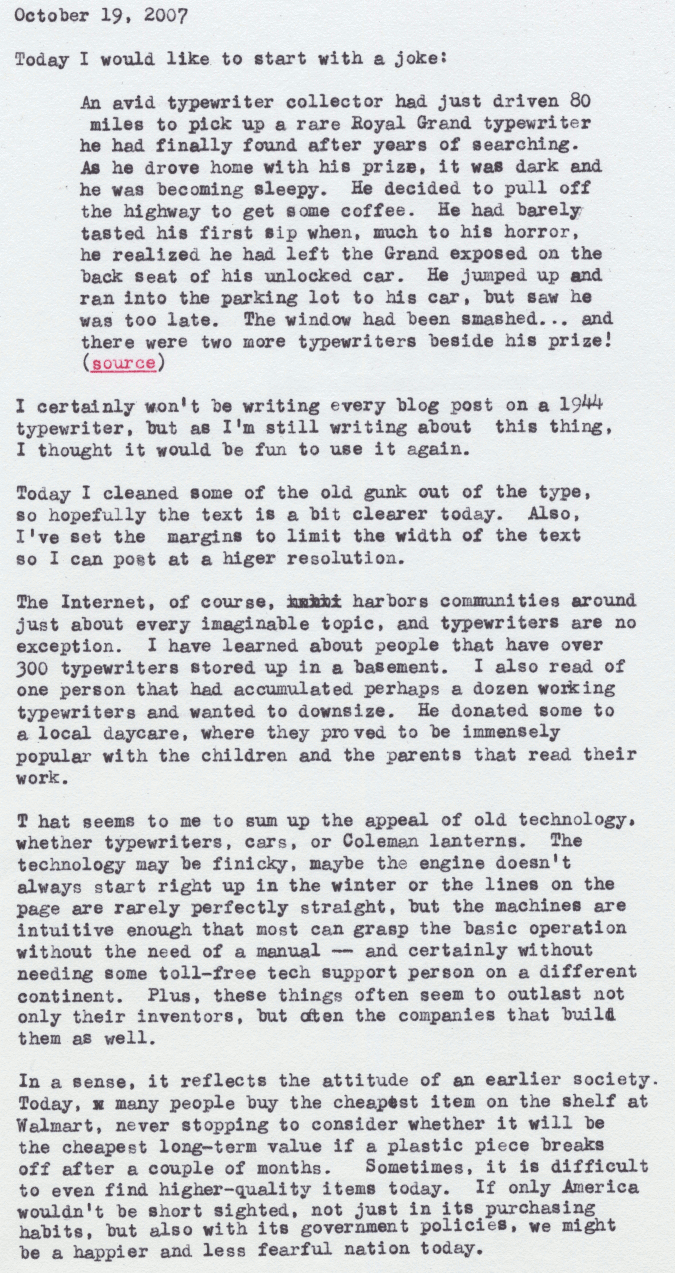
Today I would like to start with a joke:
An avid typewriter collector had just driven 80 miles to pick up a rare Royal
Grand typewriter he had finally found after years of searching.  As he drove
home with his prize, it was dark and he was becoming sleepy.  He decided
to pull off the highway to get some coffee.  He had barely tasted his first
sip when, much to his horror, he realized he had left the Grand exposed on
the back seat of his unlocked car.  He jumped up and ran into the parking
lot to his car, but saw he was too late.  The window had been smashed...
and there were two more typewriters beside his prize!
I certainly won't be writing every blog post on a 1944 typewriter, but I'm
still writing about this thing, I thought it would be fun to use it again.
Today I cleaned some of the old gunk out of the type, so hopefully the
text is a bit clearer today.  Also, I've set the margins to limit the width
of the text so I can post at a higher resolution.
The Internet, of course, harbors communities around just about every
imaginable topic, and typewriters are no exception.  I have learned about people that have over 300 typewriters stored up in a basement.  I also read of one person that had accumulated perhaps a dozen working typewriters and wanted to downsize.  He donated some to a local daycare, where they proved to be immensely popular with the children and the parents that read their work.
That seems to sum up the appeal of old technology, whether typewriters, care, or Coleman lanterns.  The technology may be finicky, maybe the engine doesn't always start right up in the winter or the lines on the page are rarely perfectly straight, but the machines are intuitive enough that most can grasp the basic operation without the need of a manual -- and certainly without needing some toll-free tech support person on a different continent.  Plus, these things often seem to outlast not only their inventors, but often the companies that build them as well.
In a sense, it reflects the attitude of an earlier society.  Today, many people buy the cheapest item on the shelf at Walmart, never stopping to consider whether it will be the cheapest long-term value if a plastic piece breaks off after a couple of months.  Sometimes, it is difficult to even find higher-quality items today.  If only America wouldn't be short sighted, not just in its purchasing habits, but also with its government policies, we might be a happier and less fearful nation today. flickr page

18 October 2007

Clint Adams: But can I read it over gopher

John Goerzen nearly transforms into Tom Robbins.

John Goerzen: First Typeblogging Experiment

Now that I have my 1944 Smith-Corona typewriter working, it's time
      to find an actual use for it.  Maybe it wil be fun to blog with a
      typewriter.
      
      I'm calling this typoblogging because I own no correction fluid,
      correction tape, or any other of those things that help a typist
      hide mistakes.  So, by calling it 'typoblogging,' I can pretend
      that all the inevitable mistakes are somehow a trendy part of the
      medium.
      
      Earlier, I was wondering whether using a typewriter would change
      how I write.  I think it has.  Before I started writing this post,
      I gave the overall structure much more thought than I normall would.
      I find I'm even planning out each sentence in greater detail.  I have
      a greater sense of accomplishment after each paragraph that comes
      out of this thing intact, too.
      
      As I was writing this, Jacob's bedtime arrived.  I started thinking
      about the things I needed to do before putting him to bed.  But
      there was nothing.  No documents to save, no place to keep.  Nothing to turn off or lock up.  That felt somehow liberating.
      
      The last question is: how do I provide a text version of this post?  I
      will try gocr on it, but I'm not sure how well it will do.  The letters
      on the typewriter need to be cleaned, and some characters like Note: red underlined links are clickable flickr photo page for this post

John Goerzen: First Typoblogging Experiment

Now that I have my 1944 Smith-Corona typewriter working, it's time
      to find an actual use for it.  Maybe it wil be fun to blog with a
      typewriter.
      
      I'm calling this typoblogging because I own no correction fluid,
      correction tape, or any other of those things that help a typist
      hide mistakes.  So, by calling it 'typoblogging,' I can pretend
      that all the inevitable mistakes are somehow a trendy part of the
      medium.
      
      Earlier, I was wondering whether using a typewriter would change
      how I write.  I think it has.  Before I started writing this post,
      I gave the overall structure much more thought than I normally would.
      I find I'm even planning out each sentence in greater detail.  I have
      a greater sense of accomplishment after each paragraph that comes
      out of this thing intact, too.
      
      As I was writing this, Jacob's bedtime arrived.  I started thinking
      about the things I needed to do before putting him to bed.  But
      there was nothing.  No documents to save, no place to keep.  Nothing to turn off or lock up.  That felt somehow liberating.
      
      The last question is: how do I provide a text version of this post?  I
      will try gocr on it, but I'm not sure how well it will do.  The letters
      on the typewriter need to be cleaned, and some characters like 'e'
      have gunk in them.  Once I have the text, though, perhaps I can put
      it in as the ALT text for the IMG tag.
      
      Anyway, to answer the question I started with: yep, this is fun. Note: red underlined links are clickable flickr photo page for this post

17 October 2007

John Goerzen: Unexpected Interest

A few days ago, I wrote about my recent purchase of an old Smith-Corona manual typewriter built in 1944. Terah and I were at an antique store, and it was $25 and sorta an impulse buy.

Since then, something unexpected has happened: I'm getting interested in using manual typewriters.

I've been busily tracking down ribbons (Nukote BW277 doesn't work on it, even though their website says it does), typing paper (business-supplies.com has it at a decent price with free overnight shipping on most orders over $50), and various tidbits of knowledge (such as: what does the lever numbered 0 to 6 beneath the right ribbon spool do?)

Today I went to a local office supply store. Not OfficeMax or OfficeDepot -- they do carry ribbons for typewriters of this era, but not the right ones for my particular machine. But the store that has been owned by the same family since it opened in 1899 on Main Street, where it remains.

And, surprise, they had the ribbon I need!

It seems that typewriters are experiencing a certain resurgence in popularity. People that have computers -- and perhaps never knew a world without them -- are buying typewriters. Because of interest, novelty, or even usefulness. There are quite a few typewriter repair shops that still exist, most of them happy to work on typewriters up to a century old.

So why am I excited about it?

Part of it is the fun of making a really old piece of technology work.

Perhaps part of it is knowing that I'll be typing at a machine that was built the same year as D-Day, the year when the first German city fell in World War II. Part of it is knowing that this 40-pound machine was built to last, in an era before planned obsolescence. And, to a certain extent, it has outlasted its manufacturer.

Part of it is curiosity: will I write differently on a typewriter than a computer? It seems that most people that have tried both say that their writing is different on a typewriter, and often better. Perhaps it is the difficulty of editing that forces more rigorous thought up front.

Christopher Watkins wrote:

[Manual typewriters] just plain shame me into working. As with any fine instrument, they're made to be used, their very design bespeaks this, and there's been many a night I've caught one of my typewriters glaring sternly at me from the shadows, implicating me in a grand failure to honor their structural destinies. Chagrined and challenged, I dutifully sit down to see what I can do to contribute to the machine-age legacy I've been called on to uphold. . .

When you sit down to write a song at the piano, you're going to write differently than if you have a banjo in your lap. And if one instrument isn't bringing the magic and the muse, maybe another will. Typewriters are the same; they make me write in a different fashion, and also provide an alternate trigger for inspiration. And as an electric guitar is different from an acoustic steel-string guitar is different from a nylon-string classical guitar is different from a national steel resonator guitar; so does each individual typewriter differ. My Underwood is different from my Royal is different from my Remington is different from my Corona is different from my Hermes. And if one isn't giving me the juice, another might.


Brian Drake added (emphasis mine):

Or you print out the document again because someone misplaced it. Misplaced it! When we were on typewriters, let me tell you, no one misplaced a hundred-page contract! That meant another two days of typing, and tying up at least two secretaries to get it done then. . .

Gore Vidal said he could tell when a book had been written on a word processor. I can, too. Sometimes I can see the cut-and-paste.

I've worked as a professional proofreader and copyeditor, and I can attest that the computer has not led to better writing. What it has led to is more writing, acres and acres of it. Books have grown fatter and fatter while their content grows slimmer and slimmer.


These seem to resonate well. More typewriter essays here.

And perhaps a typewritten blog post or two, once I try out my new ribbon.

John Goerzen: Survival

14 October 2007

John Goerzen: My New Printer

Yesterday, Terah and I were in a store selling used items. I spotted a good deal: a used printer for $25. Here are some of its features: Here are some photos:
img_3705.jpg
img_3707.jpg
img_3706.jpg

13 October 2007

John Goerzen: Young People NOT Delinquent?

Here's an interesting and probably controversial article. It starts with:

When I hear people my age (35+) rip the younger generation I usually keep my mouth shut. But I have something I need to say, so this is my public response to the people who think there is something wrong with young people today.

Let me tell you what I think about young people:

The kids coming of age right now are the greatest generation, and we don t give them the respect and freedom we were given and it is shameful.


And it goes on from there.

Also I should point out that George Bush is a baby boomer.

11 October 2007

Andrew Pollock: [tech] Dell really is hopeless

It's funny. I was reading Planet Debian, whilst I sat on hold with Dell myself, and I read John Goerzen's post, which prompted to write this one, when I wouldn't have otherwise bothered. Dell's customer service has completely degraded over the years, I think. I've been trying for a few days now to get pricing on replacement hard drives for my PowerEdge 1850. When I bought it, I made the mistake of skimping on getting the 140 Gb disks because of cost, and the 70 Gb ones are approaching capacity. As I'm going to be back in Australia soon, I'll have an opportunity to visit daedalus and physically upgrade the disks, so I thought I'd start looking into ordering some new disks now. I called the Australian 1800 number. It went something like this: Dell: Press 1 for sales and pricing information I press 1 Dell: Press 1 for home crap, 2 for small businesses with 3-400 people, press 3 for education and businesses with 400+ people I press 2 since I figure home users don't buy PowerEdge 1850s. Dell: "Dell switchboard this is blah, how may I direct your call?" Me: "I'd like to get pricing on some replacement hard drives for a PowerEdge 1850." Dell: "I'll just put you through to sales" Dell: "Home sales, how may I help you?" Me: "I'd like to get pricing on some replacement hard drives for a PowerEdge 1850." Dell: "I'm sorry, you'll need the server people, let me transfer you" Dell: "Dell switchboard this is blah, how may I direct your call?" Me: "I'd like to get pricing on some replacement hard drives for a PowerEdge 1850." Dell: "I'll just put you through to sales" Dell: "Home sales, how may I help you?" Rinse and repeat something like three times before the switchboard operator couldn't hear me and hung up on me. I swear I got the same sales droid in Home Sales at least once. Retards. So I called back, opted for the 400+ employees option, got the same thing, but this time the switchboard operator put me through to spare parts, where I sat on hold for a while and then hit voicemail. Maybe I'll be lucky tomorrow.
10 October 2007

John Goerzen: Hey Dell, Can You Hear Me Now?

A couple of years ago, I had an apparent lapse of judgement and bought a 21" Dell LCD because it seemed to be a good monitor and a good price. Even after my earlier experiences with Dell.

Last winter, it developed an odd dim area in the shape of an L. It was under warranty.

I made the mistake of contacting Dell support. It probably took 2-3 hours of calling before they agreed to replace it. I'm pretty sure I said each of these things to them at least 5 times:


Eventually I spoke to somebody that understood the concept of a serial number and agreed to send me a replacement monitor. I made the mistake of giving them a shipping address for that.

Ever since then, they have sent me stupid catalogs.

NO, DELL, I DO NOT WANT TO BUY A FLAMINGO PINK INSPIRON NOTEBOOK

that is what I think each week when I get such a catalog.

I have gone to their website to try to get off of these mailings. They have different privacy forms for their different units (home, small business, etc.), and I sent in a removal form for all of them. That didn't help. I called their customer service department, and after getting the run around yet again, they said they'd take me off right away. That didn't help either. This was all months ago. They are blatantly violating their stated privacy policy.

Today I got another magazine. Featuring Flamingo Pink inspirons yet again. And a page that says "Raze your standards." Need I say more?

I will therefore be following the advice of Junkbusters.com and will file a Prohibitory Order against Dell at my earliest convenience. That's the first time I've been motivated to do that.

And if they don't honor that, they'll be hearing from the postal inspectors.

Dell has now become my most despised company ever. Yes, even more than Sprint.

1 October 2007

John Goerzen: Spineless Democrats

The Democrats ran in 2008 on the platform of ending the Iraq war, and won largely on that platform. Now they are failing to deliver upon it.

It is true that they have a thin majority in the Senate and a not much wider one in the House. It is also true that it takes 60 votes to pass legislation in the Senate, which they don't have.

But here's the thing. It takes 60 votes to pass legislation. That means that they can easily defeat any massive Republican war spending bill.

I think they are worried about the Republicans painting them as being against the troops. So what? If the Republicans vote against a Democratic funding bill that provides adequate funds for an orderly withdrawal, aren't they doing the same? "No" votes on both are votes to prevent the funding from passing.

They easily have the votes to defeat massive Republican spending bills. So why not advance a spending bill like they campaigned for, and watch all the Republicans vote against it? If no funding at all passes, they achieve their objective, just not as cleanly, and the Republicans would be the ones voting against funding. Make the Republicans take some heat for a change, and give them no choice but to compromise.

5 September 2007

John Goerzen: Long enough in the country?

Perhaps this conversation is a sign that we've been in the country for awhile:

"Terah, if you ever drive the pickup..."

"Why would I ever do that?"

"I don't know, but if you ever do, I just want you to know something. The reason there's a towel connecting the brake pedal to the steering wheel..."

At this point I had to wait for her laughter to die down.

"As I was saying, the reason there's a towel connecting the brake pedal to the steering wheel is that, unless you park facing uphill, the brake lights stay on all the time and will drain the battery."

More laughter followed.

I didn't even have the chance to tell her to remove the towel before she starts the truck. Oh well, guess she'll figure it out.

On the other hand, perhaps this is a sign that we haven't been in the country long enough:

Today as I went to lunch, I saw a long, narrow, light gray line across the door on my car. I was pretty annoyed that somebody would have pulled keys or something across it to do that. But as I got closer, I realized it was just a spider web. Terah and I park our cars a few feet apart, and every week or so there will be a spider web connecting the two of them when we go out in the morning.

31 August 2007

John Goerzen: The Story of One Barn

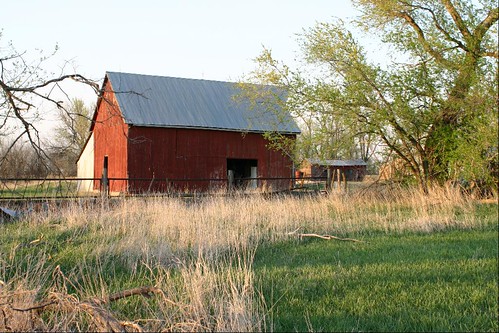
img_2575

About 80 years ago, a Kansas family -- the Janzens -- built this barn.

About 60 years ago, my grandparents moved onto the farm. Their cattle were kept right here. I remember Grandpa's red tractor being parked in the barn.

So many memories have this barn in the background. We had a visit from one of the Janzens that lived here as a child. He had fond memories of this building. My dad and his siblings once played in the deep snow in front of this barn.

Here's one memory from those times:

078.jpg

That's my grandma and grandpa on their 25th anniversary in 1970. It was a working barn back then, so they probably weren't standing right next to it for this picture, if you get my drift. But they were on the yard.

About 25 years ago, Grandma lost her battle with cancer. At some point or another, Grandpa had eased out of farming, so the barn had a lot less activity. I remember exploring his outbuildings when I got bored at family gatherings. And I used to mow the lawn next to it every summer when Grandpa went off to be a cook at a camp. I didn't mind mowing next to the barn. But I always tried to go past one corner of the house as fast as I could, because there were wasp and hornet nests right there.

About 7 years ago, it was time for Grandpa to move off the farm. It was getting to be too much to keep up the old house, the barn, the yard, and deal with things like freezing water pipes and water getting in through the windows. He moved to an independent-living duplex in town. He was always worried about what would happen to the farm. Over the next few years, the farm would sometimes be vacant, sometimes have renters. Some renters did some work on the house, but the barn sat. Grandpa would eventually move into the nursing home because of his Parkinson's.

Two and a half years ago, Grandpa passed away. I shared some memories from Grandpa's place at the funeral.

But what of the house, the farm now? Renters went, and it sat empty. Nothing was in great shape, and the house needed a lot of work. Perhaps the whole place would be leveled and turned back into the prairie that it once was, or used as farmland. Perhaps someone would have an interest someday.

A year and a half ago, Jacob was on the way. Terah and I had occasionally thought of buying Grandpa's place, but we never talked about it seriously. We figured that we better finally decide what we're doing, before we have a baby around, or a child in school. So in April 2006, we went out to the farm and checked it out. The picture at the top of this post is from that visit. Terah and I checked out the house, the barns, the granary, the pasture, and the creek. As we walked past one of the barns, a pigeon flew out. Terah jumped with a shout. I grew up around barns and didn't really notice it. In the big red barn, besides Grandpa's tractor, we found some remnants from years ago: some old bales, corn cobs that raccoons had found long ago, several generations of electric fencers, old appliances.

And we decided to go for it and buy the farm. This was right at a year after Grandpa died.

The family always liked to get together for Easter. What would happen for 2006? Well, they decided to have a picnic out at the farm. It was vacant, and a bit eerie. Yet they knew that we were working on buying the place and moving in. All but one took a last look through the house before our renovations began. The one person who didn't was my great aunt, Grandma's sister. She said, "I haven't been in this house for years. I remember how it looked back then. I don't want to remember how it looks now, run down like this. So I'm not going in. But once you have it all fixed up, THEN I'll go in!"

In June of 2006, we bought the farm.

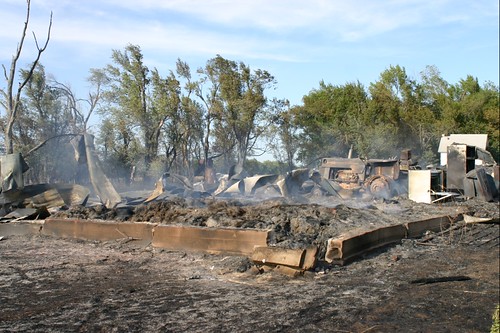
One month later, we lost this barn, and two other buildings, to a fire at our yard. This is what the beautiful red barn looked like that sad afternoon last year:

IMG_3630.JPG

As I wrote back then, nobody got hurt, the barn was insured, but "somehow, despite all these things, it still feels like we lost a little bit of Grandpa today."

2006 was a hot, dry summer. We had a patch of debris, then a patch of dirt, where the barn once stood.

7 months ago, Terah, Jacob, and I moved out to the farm. For the first time in 80 years, someone could stand in the farmhouse in the evening, look to the west, and see the colorful Kansas sunset over the pasture; the trees down by the creek; and even the neighbor's barn off in the distance. It was a beautiful sight, but it was also sad; that's not the view we had expected.

But then a surprise. This spring and summer, plants started coming up where none had grown for 80 years. But only where this barn stood -- not where the other two buildings were.

We watched as they grew tall. I'm sure decades of animals hanging out there were well appreciated by the plants.

As they grew, it looked like we might be seeing Terah's favorite flower: wild Kansas sunflowers.

And sure enough, they were.

Last weekend, Terah, Jacob, and I went out to the old barn. I took some pictures of its new appearance.

img_3429.jpg

This one stands where Grandpa's tractor used to be parked.

img_3401.jpg

And here we see a lifetime of flowers, from the old and withering, to the young just about ready to bloom.

img_3462.jpg

At the edge of the sunflowers, there's an old plow next to them. Though you might think it's barn-colored.

img_3411.jpg

Animals continue to be attracted to the area. Here's one of the smaller visitors.

img_3447.jpg

And here's a picture of almost the whole patch, right where the barn used to stand. I still mow right up to it.

I still miss the old barn. But somehow it still seems to be full of surprises and worth exploring. I wonder what next year will bring.

And I wonder if, a few years from now, Jacob will tell his friends about mowing right up to the sunflower patch, going fast to try to avoid any trouble with the bees.

30 August 2007

John Goerzen: Technology

Two days ago, I was out by the road digging a hole for our mailbox.

Along comes a guy on a tractor. The tractor was built in maybe the 1960s. It had no cab, and was loud, as tractors are. Attached to the back was a mower. It had long since lost any part of paint that was on it, and appeared to be made of rust.

The farmer driving this tractor was wearing a bluetooth earpiece for his cellphone.

(I don't think there would be any way to use a phone while driving that tractor due to the noise, but hey.)

Now, the rest of the story...

This being rural Kansas, the farmer saw me and stopped to chat, turning off the tractor first, of course. He introduced himself as "that crazy guy from south of town", and of course had a pretty good idea of who I was. After all, he's lived around here for decades and knew my grandpa.

I told him why I was digging the hole for the mailbox. There's going to be a second house down our mile, so now the post office will actually deliver to a mailbox at our driveway, rather than one almost a mile away. I thought he looked confused, so I pointed down the road and said that's our mailbox on the corner.

"Oh, I know. I probably shouldn't say this, but I knew when you moved in because I checked your mailbox one day and it didn't have 40-year-old ads piling up anymore."

We chatted a few more minutes, about the neighbor's goats, how annoying it is that he can't get DSL, why he wishes he could still use DOS instead of Windows. Then he went off towards home.

He had stopped his tractor in the middle of the road. But it wasn't a problem. Nobody drove by that whole time anyway.

29 August 2007

John Goerzen: Desktop Linux: Gnome

I had been intending to write an entire series of posts about our corporate switch to Linux on the Desktop. To date, I wrote only one introducing the project and our reasons for switching from Windows. That was back in April.

Today I'd like to start talking about it all some more.

We have standardized on Gnome for our desktops. Given the Windows background of our user base, it was pretty much a given that we would have to use either Gnome or KDE. Something like fvwm or a non-integrated environment just wouldn't be a good option.

We evaluated both Gnome and KDE. The very "clean" appearance of Gnome was a nice thing for us. KDE seemed to be to "chatty", talked about entering in audiocd:/ when it shouldn't have needed to, and generally violated the KISS and principle of least surprise too often. That said, I continue to run KDE for my personal desktop because Gnome just doesn't have the flexibility that KDE does. It is too bad that Gnome has gone on this remove functionality kick, and KDE hasn't gotten the KISS religion yet.

Anyway, Gnome worked well for the most part. We have set some defaults in gconf for things like panel icons. We also set a few mandatory defaults. I fixed a couple of bugs in the vfs system related to nfs4 support, which manifested themselves as icons for files newly saved to the desktop never showing up.

We wanted to present a customized menu to people based on what their job function is. That is, we are using a single system image, so all apps will be installed on all machines. But we didn't want people to have to see a ton of software that they don't use. That was easily enough accomplished for custom apps by creating desktop files with mode 0640 and setting the group to the set of people that should see the program on their menu. We removed a few stock programs (such as the terminal) from the menu as well, using dpkg-statoverride. That was also quite easily done. However, I will say that the entire Gnome XDG menu thing is woefully under-documented.

We use Firefox for the standard web browser. It is integrated well enough with Gnome and we have no problems there, aside from sites that are IE-only. We solve that with a Windows terminal server, which I'll discuss later.

Our network printing was already based on Cups. The individual machines are set up as Cups clients only, which works fine. We did find, however, that gnome-cups-manager automatically installs a tray monitor for cups. This monitor puts little printer icons on the tray when printers are in use. Unfortunately, it figures out which printers are in use by polling the server, and it is turned on by default out of the box, with no good way to disable it short of dpkg-statoverriding it to 0000. You can imagine that hundreds of users times dozens of printers times numerous polls per minute created quite the load on the server. This was a really braindead design and the people that wrote it should have known better. It is also quite useless to have icons coming on for all the printers on the network, which on some networks could be thousands, and not even on the same continent as the user.

Printing is generally a bit iffy in Gnome. They seem to be transitioning between about 3 different printing toolkits, all of which have different print dialog boxes with different supported features and different ways of selecting printers. One chief annoyance is that the print box in evince (the document/PDF viewer) does not let people access printer-specific features such as hole punching and stapling. So we installed gtklp and xpdf for people. The people that print heavy PDFs are huge fans of gtklp these days; it's a nicer solution than we had in Windows. Nobody really likes evince. We also have had some trouble with evince generating PostScript output that some printers can't grok. It sounds like all this should be much better in newer versions of Gnome, which if true, would be welcome news.

The Gnome screenshot tool makes it easy to save off a screenshot to a file, or to drag it into an email, but it is difficult to print it (you have to save it first). That was a common complaint around here, so I wrote a little wrapper around xwd and gtklp for printing screenshots. People really like that because gtklp gives them lots of options about orientation and size of the image if they want it, or a simple "Print" button to click if they don't care. We set a gconf default to bind this to Ctrl-PrintScr and it works well. KDE's screenshot tool is much more capable, and if we were using KDE, we wouldn't have had any problem with screenshots.

The bottom line on Gnome is that we, and are users, are happy with it after we've made these customizations. But we have had to do more customization that we should have. I still think that Gnome has been better for our users than KDE, but I do wonder how long we'll be able to survive with our "no KDE libraries" policy, as people want ksnapshot, kolour, etc.

Next.

Previous.