Search Results: "he"

11 June 2020

Louis-Philippe V ronneau: How to capture a remote IRC session live

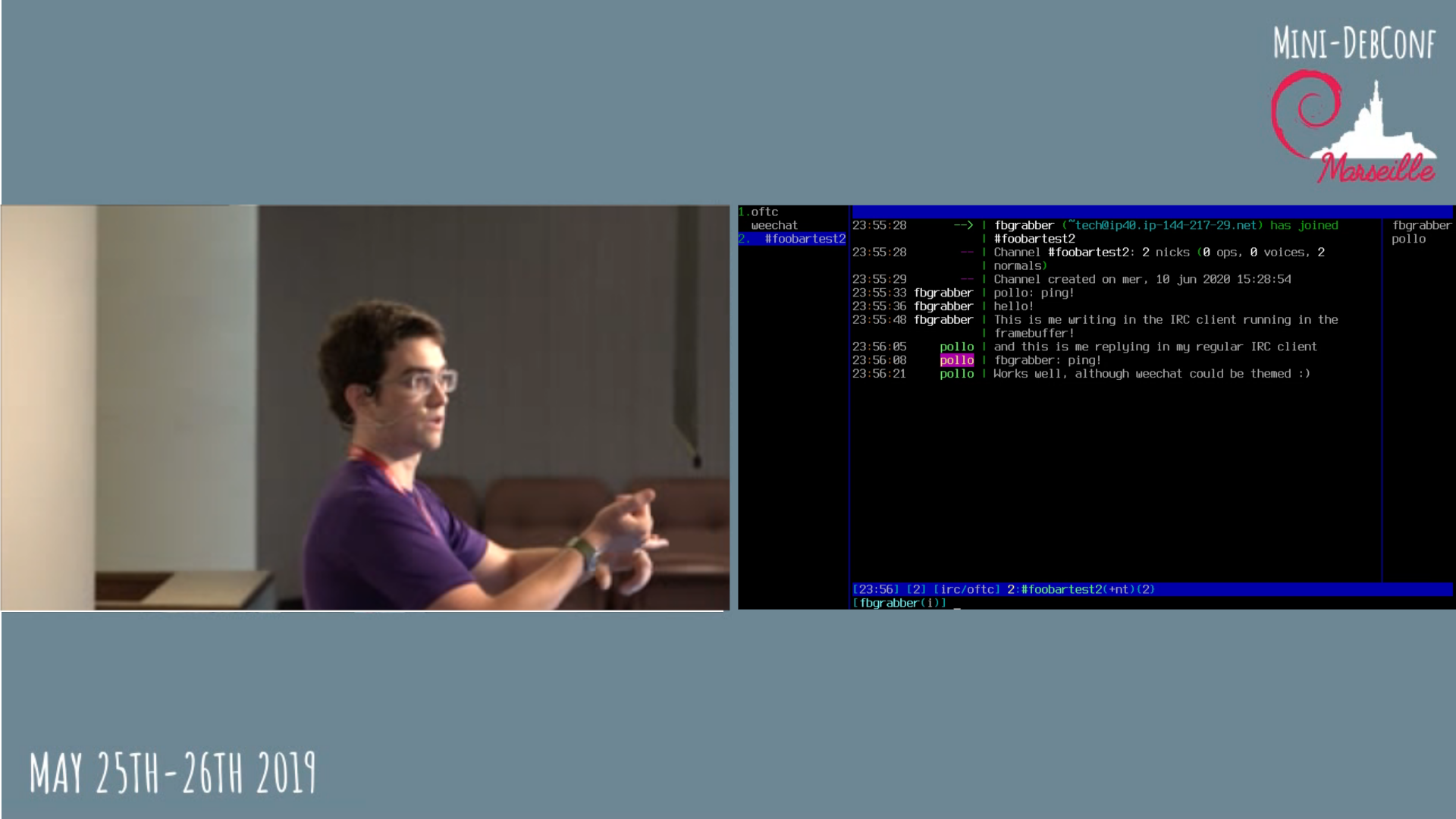
DebConf20 will be held online this year and I've started doing some work for the DebConf videoteam to prepare what's to come. One thing I want us to do is capture a live IRC session and use it as a video input in Voctomix, the live video mixer we use. This way, at the end of a talk we could show both the attendees asking questions on IRC and the presenter replying to them side-by-side. A mockup of a side-by-side voctogui window with someone on the left and a terminal running weechat on the right Capturing a live video of an IRC client on a remote headless server is somewhat more complicated than you might think; as far as I know, neither ffmpeg nor gstreamer support recording a live ssh pseudoterminal1. Worse, neither weechat nor irssi run on X: they use ncurses... Although you can capture an X11 window with ffmpeg -f x11grab, I wasn't able to get them to run with Xvfb. Capturing the framebuffer One thing I dislike with this method is the framebuffer isn't always easy to access on remote machines. If you don't have a serial connection, you can try using a VNC server that can. I did my tests in a VM on an KVM hypervisor and used virt-manager to access the framebuffer. I had a hard time setting the framebuffer resolution to a 16:9 aspect ratio. The winning combination ended up passing the nomodeset kernel parameter at boot and setting up these parameters in /etc/default/grub2:
GRUB_GFXMODE=1280x720
GRUB_GFXPAYLOAD_LINUX=keep
To make the text more readable, this is the /etc/default/console-setup file that seemed to make the most sense:
# CONFIGURATION FILE FOR SETUPCON
# Consult the console-setup(5) manual page.
ACTIVE_CONSOLES="/dev/tty[1-6]"
CHARMAP="UTF-8"
CODESET="Lat15"
FONTFACE="TerminusBold"
FONTSIZE="12x24"
Once that is done, the only thing left is to run the IRC client and launch ffmpeg. The magic command to record the framebuffer seems to be something like:
ffmpeg -f fbdev -framerate 60 -i /dev/fb0 -c:v libvpx -crf 10 -b:v 1M -auto-alt-ref 0 output.webm
Here is what I ended up with:

  1. We need something similarly flexible and featureful that can output to a TCP socket.
  2. Don't forget to run update-grub before rebooting!

Reproducible Builds (diffoscope): diffoscope 147 released

The diffoscope maintainers are pleased to announce the release of diffoscope version 147. This version includes the following changes:
[ Chris Lamb ]
* New features:
  - Add output from strings(1) to ELF binaries. It is intended this will
    expose expose build paths that are hidden somewhere within the objdump(1)
    output. (Closes: reproducible-builds/diffoscope#148)
  - Add basic zsh shell tab-completion support.
    (Closes: reproducible-builds/diffoscope#158)
* Bug fixes:
  - Prevent a traceback when comparing a PDF document that does not contain
    any metadata, ie. it is missing a PDF "/Info" stanza.
    (Closes: reproducible-builds/diffoscope#150)
  - Fix compatibility with jsondiff 1.2.0 which was causing a traceback and
    log the version of jsondiff we are using to aid debugging in the future.
    (Closes: reproducible-builds/diffoscope#159
  - Fix an issue in GnuPG keybox handling that left filenames in the diff.
  - Don't mask an existing test name; ie. ensure it is actually run.
* Reporting:
  - Log all calls to subprocess.check_output by using our own wrapper utility.
    (Closes: reproducible-builds/diffoscope#151)
* Code improvements:
  - Replace references to "WF" with "Wagner-Fischer" for clarity.
  - Drop a large number of unused imports (list_libarchive,
    ContainerExtractionError, etc.)
  - Don't assign exception to a variable that we do not use.
  - Compare string values with the equality operator, not via "is" identity.
  - Don't alias an open file to a variable when we don't use it.
  - Don't alias "filter" builtin.
  - Refactor many small parts of the HTML generation, dropping explicit
    u"unicode" strings, tidying the generation of the "Offset X, Y lines
    modified" messages, moving to PEP 498 f-strings where appropriate, etc.
  - Inline a number of single-used utility methods.
You find out more by visiting the project homepage.

10 June 2020

Joey Hess: bracketing and async exceptions in haskell

I've been digging into async exceptions in haskell, and getting more and more concerned. In particular, bracket seems to be often used in ways that are not async exception safe. I've found multiple libraries with problems. Here's an example:
withTempFile a = bracket setup cleanup a
  where
    setup = openTempFile "/tmp" "tmpfile"
    cleanup (name, h) = do
        hClose h
        removeFile name
This looks reasonably good, it makes sure to clean up after itself even when the action throws an exception. But, in fact that code can leave stale temp files lying around. If the thread receives an async exception when hClose is running, it will be interrupted before the file is removed. We normally think of bracket as masking exceptions, but it doesn't prevent async exceptions in all cases. See Control.Exception on "interruptible operations", which can receive async exceptions even when other exceptions are masked. It's a bit surprising, but hClose is such an interruptable operation, because it flushes the write buffer. The only way to know is to read the code. It can be quite hard to determine if an operation is interruptable, since it can come down to whether it retries a STM transaction, or uses a MVar that is not always full. I've been auditing libraries and I often have to look at code several dependencies away, and even then may not be sure if a library has this problem. So far, around half of the libraries I've looked at, that use bracket or onException or the like probably have this problem. What can libraries do? My impression of the state of things now is that you should be very cautious using race or cancel or withAsync or the like, unless the thread is small and easy to audit for these problems. Kind of a shame, since I had wanted to be able to cancel a thread that is big and sprawling and uses all the libraries mentioned above.
This work was sponsored by Jake Vosloo and Graham Spencer on Patreon.

Dirk Eddelbuettel: binb 0.0.6: Small enhancements

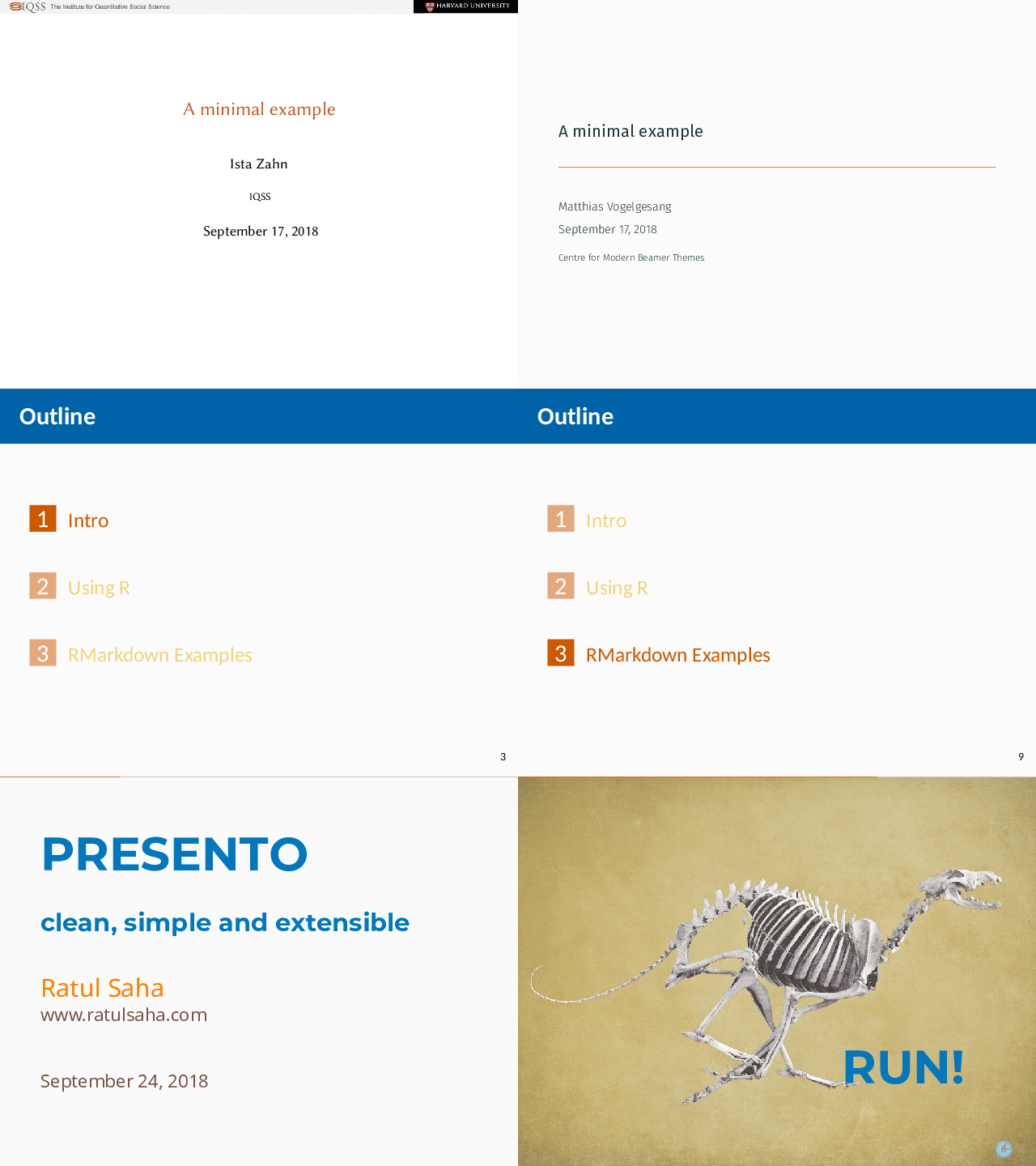
The sixth release of the binb package is now on CRAN. binb regroups four rather nice themes for writing LaTeX Beamer presentations much more easily in (R)Markdown. As a teaser, a quick demo combining all four themes follows; documentation and examples are in the package. Via two contributed PRs, this releases adds titlepage support via the YAML header for Metropolis, and suppresses nags about the changed natbib default. A little polish on the README and Travis rounds everything off.

Changes in binb version 0.0.6 (2020-06-10)
  • Support for YAML option titlegraphic was added in Metropolis (Andras Scraka in #23).
  • The README.md file received another badge (Dirk).
  • The natbib default value was updated to accomodate rmarkdown (Joseph Stachelek in #26).
  • Travis now uses R 4.0.0 and 'bionic' (Dirk).

CRANberries provides a summary of changes to the previous version. For questions or comments, please use the issue tracker at GitHub. If you like this or other open-source work I do, you can now sponsor me at GitHub. For the first year, GitHub will match your contributions.

This post by Dirk Eddelbuettel originated on his Thinking inside the box blog. Please report excessive re-aggregation in third-party for-profit settings.

Jonathan Dowland: Template Haskell and Stream-processing programs

I've written about what Template Haskell is, and given an example of what it can be used for, it's time to explain why I was looking at it in the context of my PhD work. Encoding stream-processing programs StrIoT is an experimental distributed stream-processing system that myself and others are building in order to explore our research questions. A user of StrIoT writes a stream-processing program, using a set of 8 functional operators provided for the purpose. A simple example is
streamFn :: Stream Int -> Stream Int
streamFn = streamFilter (<15)
         . streamFilter (>5)
         . streamMap (*2)
Our system is distributed: we take a stream-processing program and partition it into sub-programs, which are distributed to and run on separate nodes (perhaps cloud instances, or embedded devices like Raspberry Pis etc.). In order to do that, we need to be able to manipulate the stream-processing program as data. We've initially opted for a graph data-structure, with the vertices in the graph defined as
data StreamVertex = StreamVertex
      vertexId   :: Int
    , operator   :: StreamOperator
    , parameters :: [String]
    , intype     :: String
    , outtype    :: String
      deriving (Eq,Show)
A stream-processing program encoded this way, equivalent to the first example
path [ StreamVertex 0 Map    ["(*2)"]  "Int" "Int"
     , StreamVertex 1 Filter ["(>5)"]  "Int" "Int"
     , StreamVertex 2 Filter ["(<15)"] "Int" "Int"
     ]
We can easily manipulate instances of such types, rewrite them, partition them and generate code from them. Unfortunately, this is quite a departure from the first simple code example from the perspective of a user writing their program. Template Haskell gives us the ability to manipulate code as a data structure, and also to inspect names to gather information about them (their type, etc.). I started looking at TH to see if we could build something where the user-supplied program was as close to that first case as possible. TH limitations There are two reasons that we can't easily manipulate a stream-processing definition written as in the first example. The following expressions are equivalent, in some sense, but are not equal, and so yield completely different expression trees when quasi-quoted:
[  streamFilter (<15) . streamFilter (>5) . streamMap (*2)  ]
  \s -> streamFilter (<15) (streamFilter (>5) (streamMap (*2) s))  ]
[  streamMap (*2) >>> streamFilter (>5) >>> streamFilter (<15)  ]
[  \s -> s & streamMap (*2) & streamFilter (>5) & streamFilter (<15)  ]
[  streamFn  ] -- a named expression, defined outside the quasi-quotes
In theory, reify can give you the definition of a function from its name, but in practice it doesn't, because this was never implemented. So at the very least we would need to insist that a user included the entirety of a stream-processing program within quasi-quotes, and not split it up into separate bits, with some bits defined outside the quotes and references within (as in the last case above). We would probably have to insist on a consistent approach for composing operators together, such as always use (.) and never >>>, &, etc. which is limiting. Incremental approach After a while ruminating on this, and before moving onto something else, I thought I'd try approaching it from the other side. Could I introduce some TH into the existing approach, and improve it? The first thing I've tried is to change the parameters field to TH's ExpQ, meaning the map instance example above would be
StreamVertex 0 Map [ [  (*2)  ] ] "Int" "Int"
I worked this through. It's an incremental improvement ease and clarity for the user writing a stream-processing program. It catches a class of programming bugs that would otherwise slip through: the expressions in the brackets have to be syntactically valid (although they aren't type checked). Some of the StrIoT internals are also much improved, particularly the logical operator. Here's an excerpt from a rewrite rule that involves composing code embedded in strings, dealing with all the escaping rules and hoping we've accounted for all possible incoming expression encodings:
let f' = "(let f = ("++f++"); p = ("++p++"); g = ("++g++") in\
         \ \\ (a,b) v -> (f a v, if p v a then g b v else b))"
    a' = "("++a++","++b++")"
    q' = "(let p = ("++p++"); q = ("++q++") in \\v (y,z) -> p v y && q v z)"
And the same section after, manipulating ExpQ types:
let f' = [  \ (a,b) v -> ($(f) a v, if $(p) v a then $(g) b v else b)  ]
    a' = [  ($(a), $(b))  ]
    q' = [  \v (y,z) -> $(p) v y && $(q) v z  ]
I think the code-generation part of StrIoT could be radically refactored to take advantage of this change but I have not made huge inroads into that. Next steps This is, probably, where I am going to stop. This work is very interesting to me but not the main thrust of my research. But incrementally improving the representation gave me some ideas of what I could try next: The type would have collapsed down to
data StreamVertex = StreamVertex
      vertexId   :: Int
    , opAndParams :: ExpQ
      deriving (Eq,Show)
Example instances might be
StreamVertex 0 [  streamMap (*2)  ]
StreamVertex 1 [  streamExpand  ]
StreamVertex 2 [  streamScan (\c _ -> c+1) 0  ]
The vertexId field is a bit of wart, but we require that due to the graph data structure that we are using. A change there could eliminate it, too. By this point we are not that far away from where we started, and certainly much closer to the "pure" function application in the very first example.

Jonathan Dowland: template haskell

I've been meaning to write more about my PhD work for absolutely ages, but I've held myself back by wanting to try and keep a narrative running through the blog posts. That's not realistic for a number of reasons so I'm going to just write about different aspects of things without worrying about whether they make sense in the context of recent blog posts or not. Part of what I am doing at the moment is investigating Template Haskell to see whether it would usefully improve our system implementation. Before I write more about how it might apply to our system, I'll first write a bit about Template Haskell itself. Template Haskell (TH) is a meta-programming system: you write programs that are executed at compile time and can output code to be spliced into the parent program. The approach used by TH is really nice: you perform your meta-programming in real first-class Haskell, and it integrates really well with the main program. TH provides two pairs of special brackets. Oxford brackets surrounding any Haskell expression cause the whole expression to be replaced by the result of parsing the expression an expression tree which can be inspected and manipulated by the main program:
[  \x -> x + 1  ]
The expression data-type is a series of mutually-recursive data types that represent the complete Haskell grammar. The top-level is Exp, for expression, which has constructors for the different expression types. The above lambda expression is represented as
LamE [VarP x_1]
    (InfixE (Just (VarE x_1))
            (VarE GHC.Num.+)
            (Just (LitE (IntegerL 1))))
Such expressions can be pattern-matched against, constructed, deconstructed etc just like any other data type. The other bracket type performs the opposite operation: it takes an expression structure and splices it into code in the main program, to be compiled as normal:
 > 1 + $( litE (IntegerL 1) )
2
The two are often intermixed, sometimes nested to several levels. What follows is a typical beginner TH meta-program. The standard function fst operators on a 2-tuple and returns the first value. It cannot operate on a tuple of a different valence. However, a meta-program can generate a version of fst specialised for an n-tuple of any n:
genfst n = do
    xs <- replicateM n (newName "x")
    let ntup = tupP (map varP xs)
    [  \ $(ntup) ->  $(varE (head xs))  ]
Used like so
 > $(genfst 2) (1,2)
1
 > $(genfst 3) ('a','b','c')
'a'
 > :t $(genfst 10)
$(genfst 10) :: (a, b, c, d, e, f, g, h, i, j) -> a
That's a high-level gist of how you can use TH. I've skipped over a lot of detail, in particular an important aspect relating to scope and naming, which is key to the problem I am exploring at the moment. Oxford brackets and slice brackets do not operate directly on the simple Exp data-type, but upon an Exp within the Q Monad:
 > :t [  1  ]
[  1  ] :: ExpQ
ExpQ is a synonym for Q Exp. Eagle-eyed Haskellers will have noticed that genfst above was written in terms of some Monad. And you might also have noticed the case discrepancy between the constructor types VarE (Etc) and varE, tupP, varP used in that function definition. These are convenience functions that wrap the relevant constructor in Q. The point of the Q Monad is (I think) to handle name scoping, and avoid unintended name clashes. Look at the output of these simple expressions, passed through runQ:
 > runQ [  \x -> x  ]
LamE [VarP x_1] (VarE x_1)
 > runQ [  \x -> x  ]
LamE [VarP x_2] (VarE x_2)
Those x are not the same x in the context they are evaluated (a GHCi session). And that's the crux of the problem I am exploring. More in a later blog post!

Evgeni Golov: show your desk

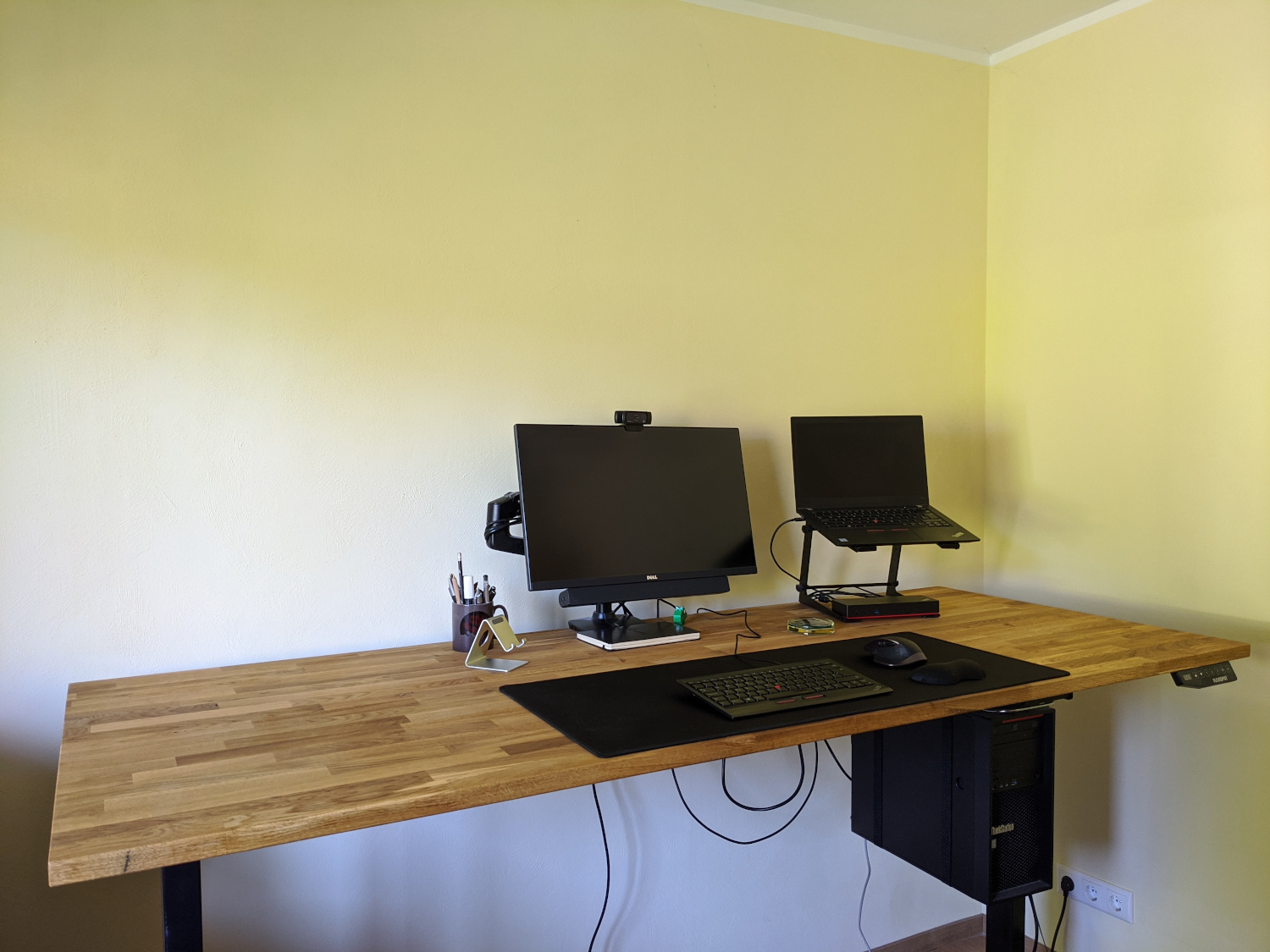
Some days ago I posted a picture of my desk on Mastodon and Twitter. standing desk with a monitor, laptop etc After that I got multiple questions about the setup, so I thought "Michael and Michael did posts about their setups, you could too!" And well, here we are ;-) desk The desk is a Flexispot E5B frame with a 200 80 2.6cm oak table top. The Flexispot E5 (the B stands for black) is a rather cheap (as in not expensive) standing desk frame. It has a retail price of 379 , but you can often get it as low as 299 on sale. Add a nice table top from a local store (mine was like 99 ), a bit of wood oil and work and you get a nice standing desk for less than 500 . The frame has three memory positions, but I only use two: one for sitting, one for standing, and a "change position" timer that I never used so far. The table top has a bit of a swing when in standing position (mine is at 104cm according to the electronics in the table), but not enough to disturb typing on the keyboard or thinking. I certainly wouldn't place a sewing machine up there, but that was not a requirement anyways ;) To compare: the IKEA Bekant table has a similar, maybe even slightly stronger swing. chair Speaking of IKEA The chair is an IKEA Volmar. They don't seem to sell it since mid 2019 anymore though, so no link here. hardware laptop A Lenovo ThinkPad T480s, i7-8650U, 24GB RAM, running Fedora 32 Workstation. Just enough power while not too big and heavy. Full of stickers, because I stickers! It's connected to a Lenovo ThinkPad Thunderbolt 3 Dock (Gen 1). After 2 years with that thing, I'm still not sure what to think about it, as I had various issues with it over the time:
  • the internal USB hub just vanishing from existence until a full power cycle of the dock was performed, but that might have been caused by my USB-switch which I recently removed.
  • the NIC negotiating at 100MBit/s instead of 1000MBit/s and then keeping on re-negotiating every few minutes, disconnecting me from the network, but I've not seen that since the Fedora 32 upgrade.
  • the USB-attached keyboard not working during boot as it needs some Thunderbolt magic.
The ThinkPad stands on a Adam Hall Stands SLT001E, a rather simple stand for laptops and other equipment (primarily made for DJs I think). The Dock fits exactly between the two feet of the stand, so that is nice and saves space on the table. Using the stand I can use the laptop screen as a second screen when I want it - but most often I do not and have the laptop lid closed while working. workstation A Lenovo ThinkStation P410, Xeon E5-2620 v4, 96GB RAM, running Fedora 32 Workstation. That's my VM playground. Having lots of RAM really helps if you need/want to run many VMs with Foreman/Katello or Red Hat Satellite as they tend to be a bit memory hungry and throwing hardware at problems tend to be an easy solution for many of them. The ThinkStation is also connected to the monitor, and I used to have an USB switch to flip my keyboard, mouse and Yubikey from the laptop to the workstation and back. But as noted above, this switch somehow made the USB hub in the laptop dock unhappy (maybe because I was switching too quickly after resume or so), so it's currently removed from the setup and I use the workstation via SSH only. It's mounted under the table using a ROLINE PC holder. You won't get any design awards with it, but it's easy to assemble and allows the computer to move with the table, minimizing the number of cables that need to have a flexible length. monitor The monitor is an older Dell UltraSharp U2515H - a 25" 2560 1440 model. It sits on an Amazon Basics Monitor Arm (which is identical to an Ergotron LX to the best of my knowledge) and is accompanied by a Dell AC511 soundbar. I don't use the adjustable arm much. It's from the time I had no real standing desk and would use the arm and a cardboard box to lift the monitor and keyboard to a standing level. If you don't want to invest in a standing desk, that's the best and cheapest solution! The soundbar is sufficient for listening to music while working and for chatting with colleagues. webcam A Logitech C920 Pro, what else? Works perfectly under Linux with the UVC driver and has rather good microphones. Actually, so good that I never use a headset during video calls and so far nobody complained about bad audio. keyboard A ThinkPad Compact USB Keyboard with TrackPoint. The keyboard matches the one in my T480s, so my brain doesn't have to switch. It was awful when I still had the "old" model and had to switch between the two. UK layout. Sue me. I like the big return key. mouse A Logitech MX Master 2. I got the MX Revolution as a gift a long time ago, and at first I was like: WTF, why would anyone pay hundred bucks for a mouse?! Well, after some time I knew, it's just that good. And when it was time to get a new one (the rubber coating gets all slippery after some time) the decision was rather easy. I'm pondering if I should try the MX Ergo or the MX Vertical at some point, but not enough to go and buy one of them yet. other notepad I'm terrible at remembering things, so I need to write them down. And I'm terrible at remembering to look at my notes, so they need to be in my view. So there is a regular A5 notepad on my desk, that gets filled with check boxes and stuff, page after page. coaster It's a wooden table, you don't want to have liquids on it, right? Thankfully a friend of mine once made coasters out of old Xeon CPUs and epoxy. He gave me one in exchange for a busted X41 ThinkPad. I still think I made the better deal ;) yubikey Keep your secrets safe! Mine is used as a GnuPG smart card for both encryption and SSH authentication, U2F on various pages and 2FA for VPN. headphones I own a pair of Bose QuietComfort 25 with an aftermarket Bluetooth adapter and Anker SoundBuds Slim+. Both are used rather seldomly while working, as my office is usually quiet and no one is disturbed when I listen to music without headphones. what's missing? light I want to add more light to the setup, noth to have a better picture during video calls but also to have better light when doing something else on the table - like soldering. The plan is to add an IKEA Tertial with some Tr dfri smart LED in it, but the Tertial is currently not available for delivery at IKEA and I'm not going to visit one in the current situation. bigger monitor Currently pondering getting a bigger (27+ inch) 4K monitor. Still can't really decide which one to get. There are so many, and they all differ in some way. But it seems no affordable one is offering an integrated USB switch and sufficient amount of USB ports, so I'll probably get whatever can get me a good picture without any extra features at a reasonable price. Changing the monitor will probably also mean rethinking the sound output, as I'm sure mounting the Dell soundbar to anything but the designated 5 year old monitor won't work too well.

9 June 2020

Ingo Juergensmann: Jabber vs. XMPP

XMPP is widely - and mabye better - known as Jabber. This was more or less the same until Cisco bought Jabber Inc and the trademark. You can read more about the story on the XMPP.org website. But is there still a Jabber around? Yes, it is! But Cisco Jabber is a whole infrastructure environment: you can't use Cisco Jabber client on its own without the other required Cisco infrastructure as Cisco CUCM and CIsco IM&P servers. So you can't just setup Prosody or ejabberd on your Debian server and connect Cisco Jabber to it. But what are the differences of Cisco Jabber to "standard" XMPP clients? Cisco Jabber The above screenshot from the official Cisco Jabber product webpage shows the new, single view layout of the Cisco Webex Teams client, but you can configure the client to have the old, classic split view layout of Contact List and Chat Window. But as you can already see from above screenshot audio & video calls is one of the core functions of Cisco Jabber whereas this feature has been added only lately to the well-known Conversations XMPP client on Android. Conversations is using Jingle extension to XMPP whereas Jabber uses SIP for voice/video calls. You can even use Cisco Jabber to control your deskphone via CTI, which is a quite common setup for Jabber. In fact you can configure Jabber to be just a CTI client to you phone or a fully featured UC client. When you don't want to have Ciscos full set of on-premise servers, you can also use Cisco Jabber in conjunction with Cisco Webex as Cisco Webex Messenger. Or in conjunction with Webex Teams in Teams Messaging Mode. Last month Cisco announced general availability of XMPP federation for Webex Teams/Jabber in Teams Messaging Mode. With that you have basic functionality in Webex Teams. And when I say "basic" I really mean basic: you can have 1:1 chat only, no group chats (MUC) and no Presence status will be possible. Hopefully this is just the beginning and not the end of XMPP support in Webex Teams. XMPP Clients Well, I'm sure many of you know "normal" XMPP clients such as Gajim or Dino on Linux, Conversations on Android or Siskin/Monal/ChatSecure on Apple IOS. There are plenty of other clients of course and maybe you used an XMPP client in the past without knowing it. For example Jitsi Meet is based on XMPP and you can still download the Jitsi Desktop client and use it as a full-featured multi-protocol client, e.g. for XMPP and SIP. In fact Jitsi Desktop is maybe the client that comes closest to Cisco Jabber as a chat/voice/video client. In fact I already connected Jitsi Desktop to Cisco CUCM/IM&P infrastructure, but of course you won't be able to use all those Cisco proprietary extensions, but you can see the benefit of open, standardized protocols such as XMPP and SIP: you are free to use any standard compliant client that you want. So, while Jitsi supported voice/video calls for a long time, even before they focussed on Jitsi Meet as a WebRTC based conference service, Conversations added this feature last month, as already stated. This had a huge effect to the whole XMPP federation, because you need an XMPP server that supports XEP-0215 to make these audio/video calls work. The well-known Compliance Tester listed the STUN/TURN features first as "Informational Tests", but quickly made this a mandatory test to pass tests and gain 100% on the Compliance Tester. But you cannot place SIP calls to other sides, because that's a different thing. As many of you are familiar with standard XMPP clients, I'll focus now on some similarity and differences between Cisco Jabber and standard XMPP... Similarities & Differences First, you can federate with Cisco Jabber users. Cisco IM&P can use standard XMPP federation with all other XMPP standard compliant servers. This is really a big benefit and way better than other solutions that usually results in vendor lock-in. Depending on the setup, you can even join from your own XMPP client in MUCs (Multi User Chats), which Cisco calls "Persistent Chat Room". The other way is not that simple: basically it is possible to join with Cisco Jabber in a MUC on a random server, but it is not as easy as you might thing. Cisco Jabber simply lacks a way to enter a room JID (as you can find them on https://search.jabber.network/. Instead you need to be added as participant by a moderator or an admin in that 3rd party MUC. Managed File Transfers is another issue. Cisco Jabber supports Peer-to-Peer file transfers and Managed File Transfers, where the uploaded file get transferred to an SFTP server as storage backend and where the IM&P server is handling the transfer via HTTPS. You can find a schematic drawing in the Configuration Guides. Although it appears similar to HTTP Upload as defined in XEP-0363, it is not very likely that it will work. I haven't tested it yet, because in my test scenario there is a gatekeeper in the path: Cisco Expressway doesn't support (yet) Managed File Transfer, but you can upvote the idea in the ideas management of Cisco or other ideas such as OMEMO support. OMEMO support? Yes, there is no end-to-end encryption (E2EE) currently planned for Cisco Jabber, while it is common nowadays for most modern XMPP clients. I think it would be good for Cisco Jabber to also (optionally) support OMEMO or its successor. Messaging clients without E2EE are not state of the art anymore. Whereas Conversations is the de-facto standard on Android, Apple IOS devices are still lacking a similar well-working client. See my blog post "XMPP - Fun with Clients" for a summary. In that regard Cisco Jabber might be the best XMPP client for IOS to some degree: you have working messaging, voice/video calls, Push Notifications and integration into Apples Call Kit. There are most likely many, many more differences and issues between Cisco Jabber and standard compliant XMPP servers and clients. But basically Cisco Jabber is still based on XMPP and extends that by proprietary extensions. Summary While I have the impression that the free clients and servers are well doing and increased development in the past years (thanks to Conversations and the Compliance Tester), the situation of Cisco Jabber is a little different. As a customer you can sometimes get the impression that Cisco has lost interest in developing Cisco Jabber. It got better in the last years, but when Cisco Spark was introduced some years ago, the impression was that Cisco is heavily focussed on Spark (now: Webex Teams). It's not like Cisco is not listening to customers or the development has been stopped on Jabber, but my impression is that most customers don't give feedback or tell Cisco as the vendor what they want. You can either submit ideas via the Colaboration Customer Ideas Tool or provide feedback via your Cisco and partner channels. I think it is important for the XMPP community to also have a large enterprise level vendor like Cisco. Otherwise the Internet will become more and more an Internet of closed silos like MS Teams, Slack, Facebook, etc. Of course there are other companies like ProcessOne (ejabberd) or Tigase, but I think you agree that Cisco is another level.
Kategorie:

Julian Andres Klode: Review: Chromebook Duet

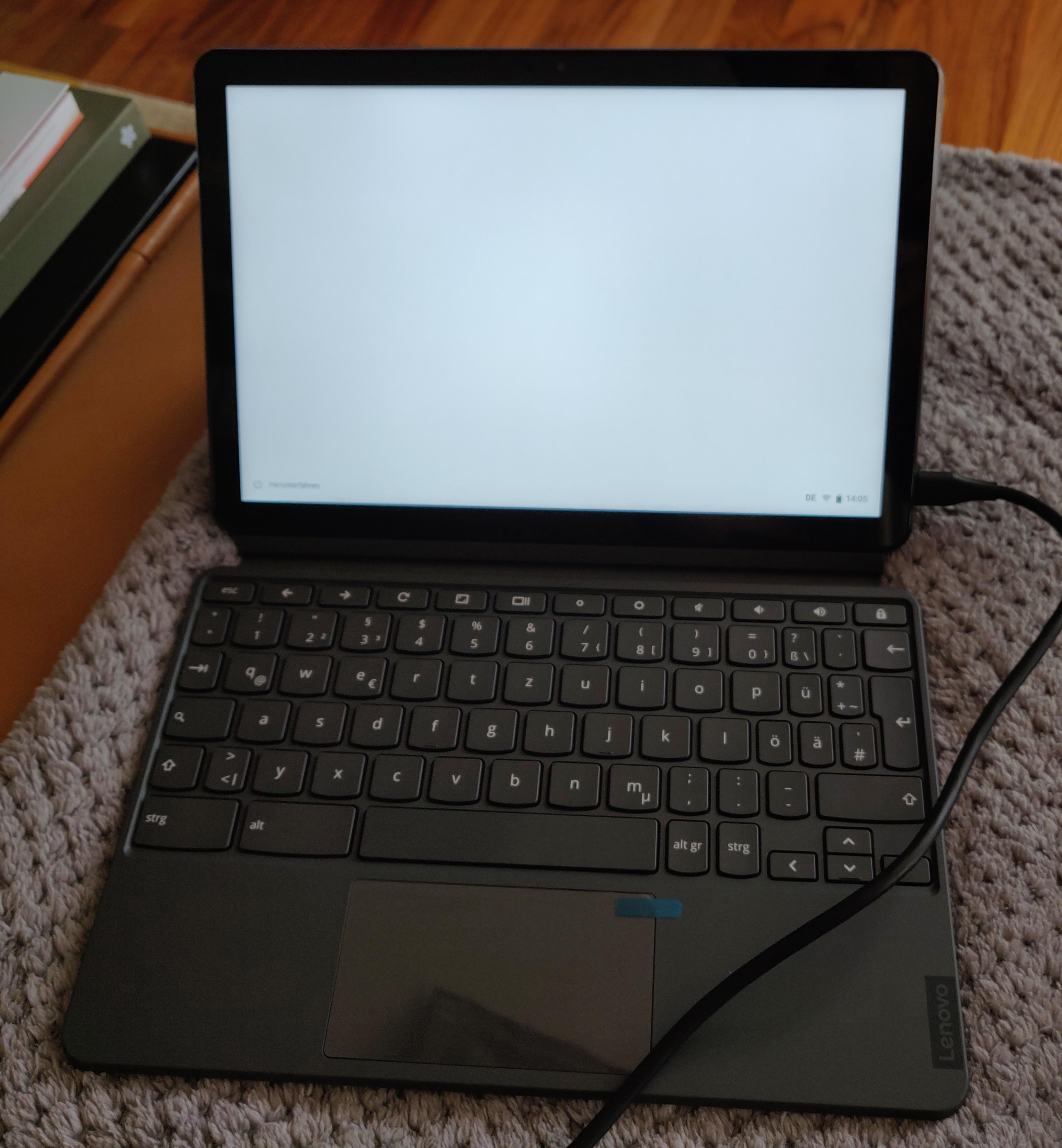
Sporting a beautiful 10.1 1920x1200 display, the Lenovo IdeaPad Duet Chromebook or Duet Chromebook, is one of the latest Chromebooks released, and one of the few slate-style tablets, and it s only about 300 EUR (300 USD). I ve had one for about 2 weeks now, and here are my thoughts.

Build & Accessories The tablet is a fairly Pixel-style affair, in that the back has two components, one softer blue one housing the camera and a metal feeling gray one. Build quality is fairly good. The volume and power buttons are located on the right side of the tablet, and this is one of the main issues: You end up accidentally pressing the power button when you want to turn your volume lower, despite the power button having a different texture. Alongside the tablet, you also find a kickstand with a textile back, and a keyboard, both of which attach via magnets (and pogo pins for the keyboard). The keyboard is crammed, with punctuation keys being halfed in size, and it feels mushed compared to my usual experiences of ThinkPads and Model Ms, but it s on par with other Chromebooks, which is surprising, given it s a tablet attachment.
fully assembled chromebook duet fully assembled chromebook duet
I mostly use the Duet as a tablet, and only attach the keyboard occasionally. Typing with the keyboard on your lap is suboptimal. My first Duet had a few bunches of dead pixels, so I returned it, as I had a second one I could not cancel ordered as well. Oh dear. That one was fine!

Hardware & Connectivity The Chromebook Duet is powered by a Mediatek Helio P60T SoC, 4GB of RAM, and a choice of 64 or 128 GB of main storage. The tablet provides one USB-C port for charging, audio output (a 3.5mm adapter is provided in the box), USB hub, and video output; though, sadly, the latter is restricted to a maximum of 1080p30, or 1440x900 at 60 Hz. It can be charged using the included 10W charger, or use up to I believe 18W from a higher powered USB-C PD charger. I ve successfully used the Chromebook with a USB-C monitor with attached keyboard, mouse, and DAC without any issues. On the wireless side, the tablet provides 2x2 Wifi AC and Bluetooth 4.2. WiFi reception seemed just fine, though I have not done any speed testing, missing a sensible connection at the moment. I used Bluetooth to connect to my smartphone for instant tethering, and my Sony WH1000XM2 headphones, both of which worked without any issues. The screen is a bright 400 nit display with excellent viewing angles, and the speakers do a decent job, meaning you can use easily use this for watching a movie when you re alone in a room and idling around. It has a resolution of 1920x1200. The device supports styluses following the USI standard. As of right now, the only such stylus I know about is an HP one, and it costs about 70 or so. Cameras are provided on the front and the rear, but produce terrible images.

Software: The tablet experience The Chromebook Duet runs Chrome OS, and comes with access to Android apps using the play store (and sideloading in dev mode) and access to full Linux environments powered by LXD inside VMs. The screen which has 1920x1200 is scaled to a ridiculous 1080x675 by default which is good for being able to tap buttons and stuff, but provides next to no content. Scaling it to 1350x844 makes things more balanced. The Linux integration is buggy. Touches register in different places than where they happened, and the screen is cut off in full screen extremetuxracer, making it hard to recommend for such uses. Android apps generally work fine. There are some issues with the back gesture not registering, but otherwise I have not found issues I can remember. One major drawback as a portable media consumption device is that Android apps only work in Widevine level 3, and hence do not have access to HD content, and the web apps of Netflix and co do not support downloading. Though one of the Duets actually said L1 in check apps at some point (reported in issue 1090330). It s also worth noting that Amazon Prime Video only renders in HD, unless you change your user agent to say you are Chrome on Windows - bad Amazon! The tablet experience also lags in some other ways, as the palm rejection is overly extreme, causing it to reject valid clicks close to the edge of the display (reported in issue 1090326). The on screen keyboard is terrible. It only does one language at a time, forcing me to switch between German and English all the time, and does not behave as you d expect it when editing existing words - it does not know about them and thinks you are starting a new one. It does provide a small keyboard that you can move around, as well as a draw your letters keyboard, which could come in handy for stylus users, I guess. In any case, it s miles away from gboard on Android. Stability is a mixed bag right now. As of Chrome OS 83, sites (well only Disney+ so far ) sometimes get killed with SIGILL or SIGTRAP, and the device rebooted on its own once or twice. Android apps that use the DRM sometimes do not start, and the Netflix Android app sometimes reports it cannot connect to the servers.

Performance Performance is decent to sluggish, with micro stuttering in a lot of places. The Mediatek CPU is comparable to Intel Atoms, and with only 4GB of RAM, and an entire Android container running, it s starting to show how weak it is. I found that Google Docs worked perfectly fine, as did websites such as Mastodon, Twitter, Facebook. Where the device really struggled was Reddit, where closing or opening a post, or getting a reply box could take 5 seconds or more. If you are looking for a Reddit browsing device, this is not for you. Performance in Netflix was fine, and Disney+ was fairly slow but still usable. All in all, it s acceptable, and given the price point and the build quality, probably the compromise you d expect.

Summary tl;dr:
  • good: Build quality, bright screen, low price, included accessories
  • bad: DRM issues, performance, limited USB-C video output, charging speed, on-screen keyboard, software bugs
The Chromebook Duet or IdeaPad Duet Chromebook is a decent tablet that is built well above its price point. It s lackluster performance and DRM woes make it hard to give a general recommendation, though. It s not a good laptop. I can see this as the perfect note taking device for students, and as a cheap tablet for couch surfing, or as your on-the-go laptop replacement, if you need it only occasionally. I cannot see anyone using this as their main laptop, although I guess some people only have phones these days, so: what do I know? I can see you getting this device if you want to tinker with Linux on ARM, as Chromebooks are quite nice to tinker with, and a tablet is super nice.

Molly de Blanc: Racism is a Free Software Issue

Racism is a free software issue. I gave a talk that touched on this at CopyLeft Conf 2019. I also talked a little bit about it at All Things Open 2019 and FOSDEM 2020 in my talk The Ethics Behind Your IoT. I know statistics, theory, and free software. I don t know about race and racism nearly as well. I might make mistakes I have made some and I will make more. Please, when I do, help me do better. I want to look at a few particular technologies and think about how they reinforce systemic racism. Worded another way: how is technology racist? How does technology hurt Black Indigenous People of Color (BIPOC)? How does technology keep us racist? How does technology make it easier to be racist?

Breathalyzers In the United States, Latinx folks are less likely to drink than white people and, overall, less likely to be arrested for DUIs3,4. However, they are more likely to be stopped by police while driving5,6. Who is being stopped by police is up to the police and they pull over a disproportionate number of Latinx drivers. After someone is pulled over for suspected drunk driving, they are given a breathalyzer test. Breathalyzers are so easy to (un)intentionally mis-calibrate that they have been banned as valid evidence in multiple states. The biases of the police are not canceled out by the technology that should, in theory, let us know whether someone is actually drunk.

Facial Recognition I could talk about for quite some time and, in fact, have. So have others. Google s image recognition software recognized black people as gorillas and to fix the issue it removed gorillas from it s image-labeling technology. Facial recognition software does a bad job at recognizing black people. In fact, it s also terrible at identifying indigenous people and other people of color. (Incidentally, it s also not great at recognizing women, but let s not talk about that right now.) As we use facial recognition technology for more things, from automated store checkouts (even more relevant in the socially distanced age of Covid-19), airport ticketing, phone unlocking, police identification, and a number of other things, it becomes a bigger problem that this software cannot tell the difference between two Asian people.

Targeted Advertising Black kids see 70% more online ads for food than white kids, and twice as many ads for junk food. In general BIPOC youth are more likely to see junk food advertisements online. This is intentional, and happens after they are identified as BIPOC youth.

Technology Reinforces Racism; Racism Builds Technology The technology we have developed reinforces racism on a society wide scale because it makes it harder for BIPOC people to interact with this world that is run by computers and software. It s harder to not be racist when the technology around us is being used to perpetuate racist paradigms. For example, if a store implements facial recognition software for checkout, black women are less likely to be identified. They are then more likely to be targeted as trying to steal from the store. We are more likely to take this to mean that black women are more likely to steal. This is how technology builds racism, People are being excluded largely because they are not building these technologies, because they are not welcome in our spaces. There simply are not enough Black and Hispanic technologists and that is a problem. We need to care about this because when software doesn t work for everyone, it doesn t work. We cannot build on the promise of free and open source software when we are excluding the majority of people.

Dirk Eddelbuettel: RcppArmadillo 0.9.900.1.0

armadillo image Armadillo is a powerful and expressive C++ template library for linear algebra aiming towards a good balance between speed and ease of use with a syntax deliberately close to a Matlab. RcppArmadillo integrates this library with the R environment and language and is widely used by (currently) 727 other packages on CRAN. Conrad recently released a new upstream version 9.900.1 of Armadillo which we packaged and tested as usual first as a release candidate build and then as the release. As usual, logs from reverse-depends runs are in the rcpp-logs repo. Apart from the new upstream release, we updated Travis use, ornamented the README a little, and smoothed over a rough corner from the recent R 4.0.0 release. All changes in the new release are noted below.

Changes in RcppArmadillo version 0.9.900.1.0 (2020-06-08)
  • Upgraded to Armadillo release 9.900.1 (Nocturnal Misbehaviour)
    • faster solve() for under/over-determined systems
    • faster eig_gen() and eig_pair() for large matrices
    • expanded eig_gen() and eig_pair() to optionally provide left and right eigenvectors
  • Switch Travis CI testing to R 4.0.0, use bionic as base distro and test R 3.6.3 and 4.0.0 in a matrix (Dirk in #298).
  • Add two badges to README for indirect use and the CSDA paper.
  • Adapt RcppArmadillo.package.skeleton() to a change in R 4.0.0 affecting what it exports in NAMESPACE.

Courtesy of CRANberries, there is a diffstat report relative to previous release. More detailed information is on the RcppArmadillo page. Questions, comments etc should go to the rcpp-devel mailing list off the R-Forge page. If you like this or other open-source work I do, you can now sponsor me at GitHub. For the first year, GitHub will match your contributions.

This post by Dirk Eddelbuettel originated on his Thinking inside the box blog. Please report excessive re-aggregation in third-party for-profit settings.

Dirk Eddelbuettel: Rcpp Webinar Recording Available

As announced in a few tweets leading up to it, I took the date of what would have been the annual R/Finance conference as an opportunity to hold the one-hour tutorial / workshop with introductory Rcpp material which I often present on the first morning preceding the conference as a self-organized webinar. The live-streaming worked actually reasonably well via obs to youtube (even though the comprehensive software by the latter complained at times about insufficient bitstream rates the joys of living with a (near) monopolistic broadband provider whom I should leave for fiber ). Apparently around seventy people connected to the stream which is more than we usually have in the seminar room at UIC for the R/Finance morning. The recording is now available here, and has already been seen over 200 times:

If you like this or other open-source work I do, you can now sponsor me at GitHub. For the first year, GitHub will match your contributions.

This post by Dirk Eddelbuettel originated on his Thinking inside the box blog. Please report excessive re-aggregation in third-party for-profit settings.

Bits from Debian: Great fonts in Debian 10 (or later)

An example of several fonts in Debian 10 Debian comes with tons of fonts for all kinds of purposes, you can easily list them all (almost) with: apt-cache search ^fonts- Above you can see a nice composition with examples of several fonts. The composition is published under the MIT (Expat) license and the source SVG (created with Inkscape) can be downloaded here. You will need the fonts to be installed in your system so the SVG is correctly rendered. If you want to learn more you can have a look at the wiki page about fonts (https://wiki.debian.org/Fonts), and if you want to contribute or maintain fonts in Debian, don't hesitate to join the Fonts Team!

7 June 2020

Enrico Zini: Cooperation links

This comic was based on this essay from Augusten Burroughs: How to live unhappily ever after. In addition to the essay, I highly recommend reading his books. It's also been described in psychology as flow.
With full English subtitles
Confict where it comes from and how to deal with it
Communication skills
Other languages
Distributed teams are where people you work with aren t physically co-located, ie. they re at another office building, home or an outsourced company abroad. They re becoming increasingly popular, for DevOps and other teams, due to recruitment, diversity, flexibility and cost savings. Challenges arise due to timezones, language barriers, cultures and ways of working. People actively participating in Open Source communities tend to be effective in distributed teams. This session looks at how to apply core Open Source principles to distributed teams in Enterprise organisations, and the importance of shared purposes/goals, (mis)communication, leading vs managing teams, sharing and learning. We'll also look at practical aspects of what's worked well for others, such as alternatives to daily standups, promoting video conferencing, time management and virtual coffee breaks. This session is relevant for those leading or working in distributed teams, wanting to know how to cultivate an inclusive culture of increased trust and collaboration that leads to increased productivity and performance.

Dirk Eddelbuettel: T^4 #5: More About Byobu

Another video in our T^4 series of video lightning talks with tips, tricks, tools, and toys (where we had seen the announcement, shells sessions one, two, and three, as well as one byobu session) is now up at YouTube. It goes a little deeper in the wonderful byobu and persistent sessions with multiple concurrent accesses illustrating why it is called both a text-based window manager and a terminal multiplexer :

The slides are here. This repo at GitHub support the series: use it to open issues for comments, criticism, suggestions, or feedback. If you like this or other open-source work I do, you can now sponsor me at GitHub. For the first year, GitHub will match your contributions.

This post by Dirk Eddelbuettel originated on his Thinking inside the box blog. Please report excessive re-aggregation in third-party for-profit settings.

Joachim Breitner: Managed by an eleven year old

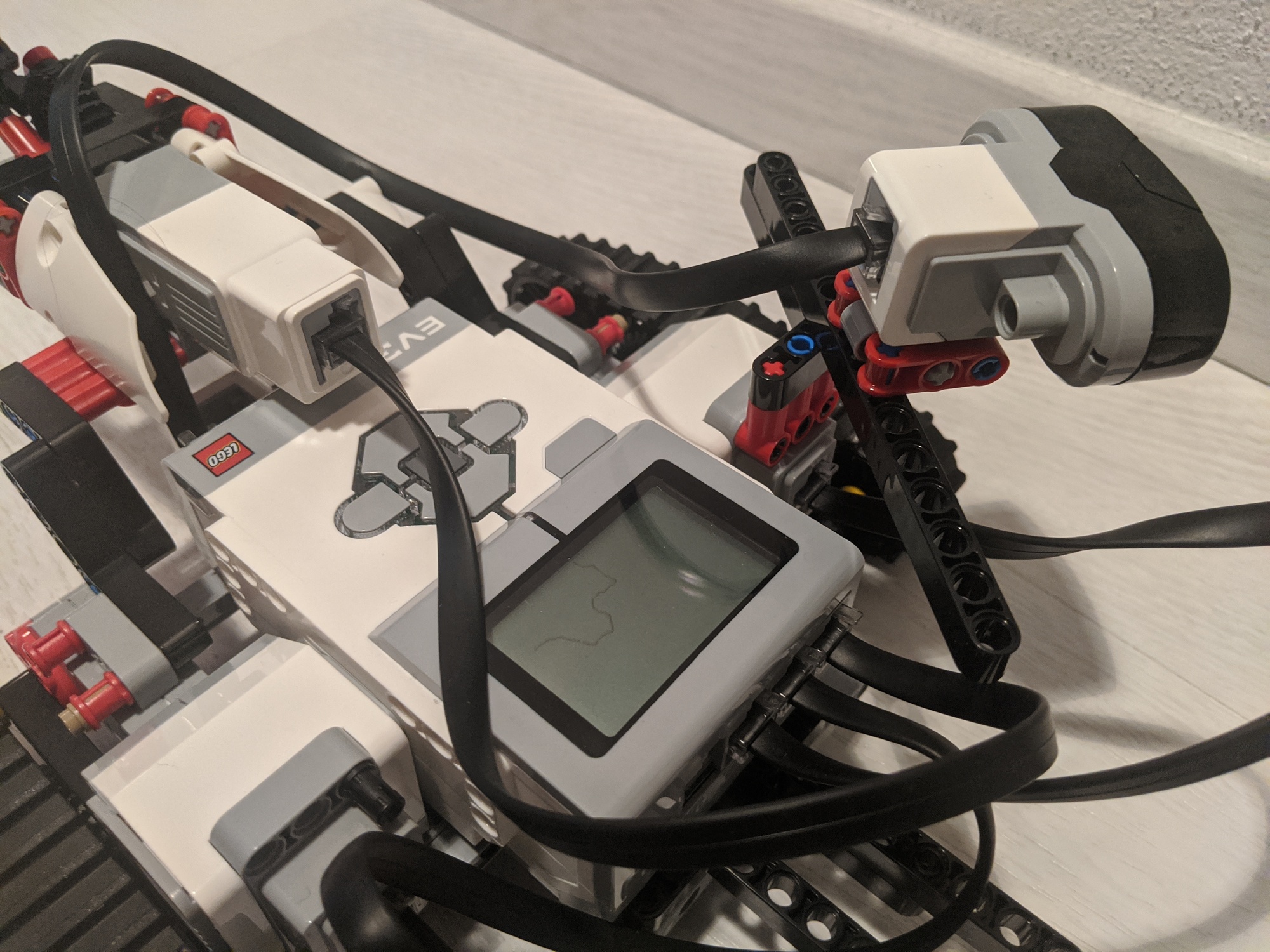
This weekend I had some pretty good uncle time. My eleven year old nephew (after beating me in a fair match of tennis) wanted to play with his Lego Mindstorms set. He never even touches it unless I am around to help him, but then he quiet enjoys. As expected, when I ask him what we should try to build, he tends to come up with completely unrealistic or impossible ideas, and we have to somehow reduce the scope to something doable. This time round, inspired by their autonomous vacuum cleaner, he wanted to build something like that. That was convenient, because now I could sell him what I wanted to try to do, namely make the robot follow a wall at more or less constant distance, as a useful first step. We mounted the infra red distance sensor at an 45 angle to the front-left, and then I built a very simple control loop measure the distance, subtract 40, apply a factor, and feed that into the steering input of the drive action, and repeat. I must admit that I was pretty proud to see just how well that very simple circuit worked: The little robot turned sharp corners in both directions, and otherwise drove nicely parallel and with constant distance to the wall. I was satisfied with that achievement and would have happily ended it here before we might be disappointed by more ambitious and then failing goals. But my nephew had not forgotten about the vacuum cleaner, and casually asked if I could make the robot draw an outline of its path, and thus of the room, on the display. Ok, where do I begin to explain just how unfeasible that is yes, it seemed one can draw to the display. But how should the robot know where it is? How far it turns? How far it went? This is programming by connecting boxes, and I would not expect such an interface to allow for complex logic (right?). And I would need trigonometry and stuff. But he didn t quite believe it, and thus got me thinking indeed, the arithmetic block can evaluate more complex formulas, involving sin and cos so maybe if I can somehow keep track of where the robot is heading well, let s give it a try. So by dragging boxes and connecting wires, I implemented a simple logic (three variables, x and y for current position, alpha for current heading; in each loop add the steering input onto alpha, and add (sin(alpha),cos(alpha)) onto the current position; throw in some linear factors to calibrate; draw pixel at (x, y)). And, to my nephew s joy and my astonishment, the robot was drawing a curvy line that clearly correlates with the taken path! It wasn t respecting the angles perfectly, a square might not properly close, but half an hour earlier I would have actively bet against that we would pull this off!
After a few turns

After a few turns

I was, I must admit, a bit proud. But not only about the technical nerding, but also about my uncleing: That night, according to his parents, my nephew said that he can t remember ever being so happy!

6 June 2020

Petter Reinholdtsen: Secure Socket API - a simple and powerful approach for TLS support in software

As a member of the Norwegian Unix User Group, I have the pleasure of receiving the USENIX magazine ;login: several times a year. I rarely have time to read all the articles, but try to at least skim through them all as there is a lot of nice knowledge passed on there. I even carry the latest issue with me most of the time to try to get through all the articles when I have a few spare minutes. The other day I came across a nice article titled "The Secure Socket API: TLS as an Operating System Service" with a marvellous idea I hope can make it all the way into the POSIX standard. The idea is as simple as it is powerful. By introducing a new socket() option IPPROTO_TLS to use TLS, and a system wide service to handle setting up TLS connections, one both make it trivial to add TLS support to any program currently using the POSIX socket API, and gain system wide control over certificates, TLS versions and encryption systems used. Instead of doing this:
int socket = socket(PF_INET, SOCK_STREAM, IPPROTO_TCP);
the program code would be doing this:
int socket = socket(PF_INET, SOCK_STREAM, IPPROTO_TLS);
According to the ;login: article, converting a C program to use TLS would normally modify only 5-10 lines in the code, which is amazing when compared to using for example the OpenSSL API. The project has set up the https://securesocketapi.org/ web site to spread the idea, and the code for a kernel module and the associated system daemon is available from two github repositories: ssa and ssa-daemon. Unfortunately there is no explicit license information with the code, so its copyright status is unclear. A request to solve this about it has been unsolved since 2018-08-17. I love the idea of extending socket() to gain TLS support, and understand why it is an advantage to implement this as a kernel module and system wide service daemon, but can not help to think that it would be a lot easier to get projects to move to this way of setting up TLS if it was done with a user space approach where programs wanting to use this API approach could just link with a wrapper library. I recommend you check out this simple and powerful approach to more secure network connections. :) As usual, if you use Bitcoin and want to show your support of my activities, please send Bitcoin donations to my address 15oWEoG9dUPovwmUL9KWAnYRtNJEkP1u1b.

Russell Coker: Comparing Compression

I just did a quick test of different compression options in Debian. The source file is a 1.1G MySQL dump file. The time is user CPU time on a i7-930 running under KVM, the compression programs may have different levels of optimisation for other CPU families. Facebook people designed the zstd compression system (here s a page giving an overview of it [1]). It has some interesting new features that can provide real differences at scale (like unusually large windows and pre-defined dictionaries), but I just tested the default mode and the -9 option for more compression. For the SQL file zstd -9 provides significantly better compression than gzip while taking only slightly less CPU time than gzip -9 while zstd with the default option (equivalent to zstd -3 ) gives much faster compression than gzip -9 while also being slightly smaller. For this use case bzip2 is too slow for inline compression of a MySQL dump as the dump process locks tables and can hang clients. The lzma and xz compression algorithms provide significant benefits in size but the time taken is grossly disproportionate. In a quick check of my collection of files compressed with gzip I was only able to fine 1 fild that got less compression with zstd with default options, and that file got better compression with zstd -9 . So zstd seems to beat gzip everywhere by every measure. The bzip2 compression seems to be obsolete, zstd -9 is much faster and has slightly smaller output. Both xz and lzma seem to offer a combination of compression and time taken that zstd can t beat (for this file type at least). The ultra compression mode 22 gives 2% smaller output files but almost 28 minutes of CPU time for compression is a bit ridiculous. There is a threaded mode for zstd that could potentially allow a shorter wall clock time for zstd --ultra -22 than lzma/xz while also giving better compression.
Compression Time Size
zstd 5.2s 130m
zstd -9 28.4s 114m
gzip -9 33.4s 141m
bzip2 -9 3m51 119m
lzma 6m20 97m
xz 6m36 97m
zstd -19 9m57 99m
zstd --ultra -22 27m46 95m
Conclusion For distributions like Debian which have large archives of files that are compressed once and transferred a lot the zstd --ultra -22 compression might be useful with multi-threaded compression. But given that Debian already has xz in use it might not be worth changing until faster CPUs with lots of cores become more commonly available. One could argue that for Debian it doesn t make sense to change from xz as hard drives seem to be getting larger capacity (and also smaller physical size) faster than the Debian archive is growing. One possible reason for adopting zstd in a distribution like Debian is that there are more tuning options for things like memory use. It would be possible to have packages for an architecture like ARM that tends to have less RAM compressed in a way that decreases memory use on decompression. For general compression such as compressing log files and making backups it seems that zstd is the clear winner. Even bzip2 is far too slow and in my tests zstd clearly beats gzip for every combination of compression and time taken. There may be some corner cases where gzip can compete on compression time due to CPU features, optimisation for CPUs, etc but I expect that in almost all cases zstd will win for compression size and time. As an aside I once noticed the 32bit of gzip compressing faster than the 64bit version on an Opteron system, the 32bit version had assembly optimisation and the 64bit version didn t at that time. To create a tar archive you can run tar czf or tar cJf to create an archive with gzip or xz compression. To create an archive with zstd compression you have to use tar --zstd -cf , that s 7 extra characters to type. It s likely that for most casual archive creation (EG for copying files around on a LAN or USB stick) saving 7 characters of typing is more of a benefit than saving a small amount of CPU time and storage space. It would be really good if tar got a single character option for zstd compression. The external dictionary support in zstd would work really well with rsync for backups. Currently rsync only supports zlib, adding zstd support would be a good project for someone (unfortunately I don t have enough spare time). Now I will change my database backup scripts to use zstd. Update: The command tar acvf a.zst filenames will create a zstd compressed tar archive, the a option to GNU tar makes it autodetect the compression type from the file name. Thanks Enrico!

Thorsten Alteholz: My Debian Activities in May 2020

FTP master This month I accepted 211 packages and rejected only 9. The overall number of packages that got accepted was 228. Debian LTS This was my seventy-first month that I did some work for the Debian LTS initiative, started by Raphael Hertzog at Freexian. This month my all in all workload has been 17.25h. During that time I did LTS uploads of: I started to work on php5 as well but did not upload a fixed version yet. Last but not least I did some days of frontdesk duties. Debian ELTS This month was the twenty third ELTS month. During my small allocated time I uploaded: I also did some days of frontdesk duties. Other stuff I improved packaging of I sponsored uploads of On my Go challenge I uploaded:
golang-github-apparentlymart-go-versions, golang-github-hashicorp-go-slug, golang-github-mozillazg-go-httpheader, golang-github-hashicorp-terraform-json, golang-github-hashicorp-terraform-plugin-test, golang-github-sean pager, golang-github-sean seed, golang-github-timberio-go-datemath,

5 June 2020

Dirk Eddelbuettel: corels 0.0.2 on CRAN: Initial upload!

Corels is now on CRAN! The package was introduced with an initial tweet which pointed to the GitHub repo. The source code repo has since been relocated from my account to the (upstream) corels org in GitHub. And renamed: as the upstream (C++) repo as well as the existing Python package simply call is corels we now do too. The repo, to be distinguishable as a directory, will remain named rcppcorels. We also describe the package a little on the corels package page. Some more work should go into along with work in the upstream repos, so please follow whichever GitHub repo you are interested in. The work on corels is also what is described in the recent arXiv paper on Rcpp and libraries: If you like this or other open-source work I do, you can now sponsor me at GitHub. For the first year, GitHub will match your contributions.

This post by Dirk Eddelbuettel originated on his Thinking inside the box blog. Please report excessive re-aggregation in third-party for-profit settings.

Next.

Previous.