Search Results: "tar"

3 November 2014

Chris Lamb: Generating gradiented fade images using ImageMagick

Whilst gradienting images is certainly possible with CSS, current browser support means that it can still make sense to do it yourself, especially if front-end performance is a concern. However, to avoid manual work in Gimp or Photoshop, you can use ImageMagick to generate them for you:
$ wget --quiet -Obackground.jpg http://i.imgur.com/WCjlJ.jpg
$ convert background.jpg \
      -alpha set -channel A \
      -sparse-color Barycentric '%w,%[fx:h-300] opaque %w,%h transparent' \
      -background '#ffcc32' -flatten \
      background-gradiented.jpg
300 here refers to the height or "speed" of the gradient and the target colour is specified by with -background. Before: https://chris-lamb.co.uk/wp-content/2014/gradient_before.png After: https://chris-lamb.co.uk/wp-content/2014/gradient_after.png

2 November 2014

Thomas Goirand: OpenStack packaging activity: October 2014

Wednesday 1:
Uploaded python-xstatic-jquery removing the .pth file from package.
Uploaded python-taskflow 0.4 to experimental, needed by Cinder Juno RC1
Uploaded Cinder Juno RC1 to experimental Thuesday 2:
Finally understood that the issue with murano-dashboard was that it doesn t build without django-nose >= 1.2. Opened new patch at: https://review.openstack.org/125565
Uploaded murano-dashboard to Experimental, now using django-nose from wheezy-backports in my jenkins setup, so murano-dashboard can be built for Wheezy.
Uploaded python-oslotest 1.1.0.0 (really is upstream 1.1.0)
Uploaded python-oslo.serialization 1.0.0-1 (needed by Ceilometer Juno RC1)
Uploaded Ceilometer Juno RC1
Uploaded Heat Juno RC1
Uploaded oslo.rootwrap 1.3.0.0
Uploaded oslo.db 1.0.2 (bugfix release)
Wrote a new system in openstack-pkg-tools to generate init scripts and. service files from a template, so we don t have to write N times the same thing. Friday 3:
Reworked openstack-pkg-tools to generate automatically sysv-rc init scripts, upstart jobs and systemd unit files, making the system more unified and consistent.
Applied the new system to all packages in Juno.
Uploaded Keystone 2014.1.3-1 to Sid
Uploaded Nova 2014.1.3-1 to Sid
Uploaded Glance 2014.1.3-1 to Sid
Uploaded Neutron 2014.1.3-1 to Sid
Uploaded Horizon 2014.1.3-1 to Sid
Uploaded Cinder 2014.1.3-1 to Sid
Uploaded Trove 2014.1.3-1 to Sid
Uploaded Ceilometer 2014.1.3-1 to Sid Saturday 4:
Uploaded Horizon Juno RC1 to Experimental
Uploaded oslotest 1.1.0.0 to Experimental
Uploaded Ironic Juno RC1 to Experimental
Uploaded Designate Juno RC1 to Experimental
Uploaded Nova Juno RC1 to Experimental
Uploaded Neutron Juno RC1 to Experimental
Uploaded openstack-meta-packages 0.10 to Sid
Uploaded openstack-pkg-tools 13 to Experimental
Uploaded murano-agent Juno RC1 to Experimental Sunday 5:
Uploaded Sahara Juno RC1 to Experimental (it s been approved by FTP masters)
Uploaded Murano Juno RC1 to Experimental (it s been approved by FTP masters)
Fixed all debian/watch file to understand ~b and ~rc releases (fixed applied on both Icehouse and Juno branches, though no upload yet, I ll wait until uploads are needed to have this in the archive ).
Uploaded Trove Juno RC1 to Experimental
Uploaded Sahara Juno RC1 to Experimental With this last upload, everything of Juno RC1 is in Debian Experimental! \o/ Monday 6:
Uploaded some fixes for Nova 2014.1.3-2 in Sid:
* Removed contrib/boto_v6/* in debian/copyright, replaced bin/nova-manage by nova/cmd/ baremetal_, manage.py.
* Mangling upstream rc and beta versions in watch file.
* Added 9990_update_german_programm_messages.patch, thanks to Helge Kreutzmann <debian@helgefjell.de>.
* Fixed correct de.po (Closes: #763682).
* Added nl.po initial Debconf translation, thanks to Frans Spiesschaert <Frans.Spiesschaert@yucom.be> (Closes: #764125).
* Standards-Version is now 3.9.6 (no change).
Upstreamed german translation of po file: https://review.openstack.org/126212
Uploaded Designate 2014.1-12 to Sid, added new de.po also to the Juno branch on alioth (but didn t upload the fix yet).
Uploaded sphinxcontrib-httpdomain new upstream 1.3.0 release, added Python 3.x support to the package, and transitionning to the correct namespaced python-sphinxcontrib.httpdomain package name.
Spent most of the day fixing python-xstatic issues:
o uploaded libjs-twitter-bootstrap-datepicker 1.3.1
o uploaded python-xstatic-bootstrap-datepicker requiring this libjs package
o fixed python-xstatic-jquery-ui package
Now Horizon Juno RC1 builds well, and can be installed again. \o/ Tuesday 7:
Backported python-libvirt 1.2.8 in Wheezy (for Nova Juno support )
Uploaded Ceilometer Juno RC1 with ceilometer-agent-ipmi added (the package will therefore go through the NEW queue).
Uploaded python-requestbuilder 0.2.2-1, needed by the maintainers of euca2ools.
Ported the unified generated init system scripts to Icehouse packages.
Uploaded to Sid updates for: openstack-pkg-tools, ceilometer, cinder, glance, keystone, cinder, nova. Wednesday 8:
Uploaded openstack-pkg-tools 16 to Sid
Uploaded murano-dashboard (with upstream fix to remove font-awesome, which was the reason for FTP master s rejection)
Uploaded ceilometer Juno RC1 with new IPMI agent package (needed for Ironic support).
Uploaded heat 2014.1.3 which I forgot.
Tested https://review.openstack.org/#/c/126777/ which solves the bug I sent to launchpad and approved the patch.
Uploaded python-requestbuilder 0.2.3 Thesday 9:
Worked on fixing Neutron Alembic migration with SQLite3.
Uploade Neutron 2014.2~rc1-3 with a fix for a patch that was destroying dhcp.py. This still doesn t include the Alembic migration fixes, which are still a WIP. Firday 10:
Finished fixing Neutron SQLite 3 Alembic migrations.
Uploaded neutron 2014.2~rc1-3 with the fixes.
Fixed Ceilometer wrong generation of sample config file, using upstream patch (after discussing with Julien Danjou so he wrote it).
Uploaded Ceilometer 2014.2~rc1-4 with the fix
Checked that all packages can be installed in non-interactive mode. This works well now! \o/ Saturday 11:
Uploaded new version of python-xstatic-angular-cookies (ie: 1.2.24.1-2) which allows a higher version of libjs-angularjs (otherwise the package is not installable in Sid/Jessie since last version of angularjs is uploaded). Sunday 12:
Uploaded factory-boy fix for FTBFS
Uploaded python-django-appconf FTBFS
Uploaded Horizon Juno RC2
Uploaded Heat Juno RC3
Uploaded Trove Juno RC2
Uploaded Glance Juno RC2
Uploaded Sahara Juno RC2
Uploaded Nova Juno RC2
Uploaded Neutron Juno RC2
Uploaded Cinder Juno RC2
Uploaded murano-dashboard Juno RC2 Monday 13:
Uploaded python-heatclient 0.2.12-1 to Experimental
Uploaded python-yaql with RC bugfix to Sid (missing dep on python3-ply). Thuesday 14:
Fixed arping newly added dependency in Neutron
Started testing install of all of openstack Juno at once Wednesday 15:
Fixed missing configuration files in Ceilometer (ceilometer-api couldn t start)
Upgraded to Ceilometer Juno RC3.
Backported python-setuptools, as keystone and others are broken due to the namespace of modules not working correctly with the old version of python-pkg-resources. With the new one, everything is back in order. Thesday 16:
Uploaded to Debian Experimental the final release of Juno (ie: 2014.2) for:
Sahara
Nova
Ceilometer
Cinder
Heat
Neutron
Glance
Keystone
Horizon (with fix for Django 1.7 in the wsgi file)
Uploaded to Sid:
Swift 2.2.0
Horizon 2014.1.3-3 with fix for Django 1.7 in the wsgi file that was crashing apache. OpenStack Juno packages are out!!! (ready the day of the upstream release ) Friday 17:
Investigated Trove RC bug #765348, couldn t reproduce, and therefore closed it.
Uploaded Ironic Juno final to Experimental
Uploaded Designate Juno final to Experimental
Uploaded a fix for python-jingo which failed to build with Django 1.7. Sent pull request upstream: https://github.com/jbalogh/jingo/pull/63
Uploaded CVE-2014-7230 & CVE-2014-7231 fixes for both Cinder and Nova in Debian Sid, as per OSSA 2014-036 patches. No need to upload a fix for Trove, as 2014.1.3 already has the fixes. Saturday 18:
Started building Trusty packages
Fixed oslo-config so that it never depends on python3-argparse, which doesn t exist (uploaded to Experimental)
Uploaded python-django-pyscss 1.0.3-2 with python-simplejson now as build-depends (it failed to build in my Trusty jenkins without it).
Uploaded a fix for stevedore and oslo-config to not depends on python3-argparse in Ubuntu (added debian/py3dist-overrides) Sunday 19:
Uploaded python-taskflow with ordereddict in debian/pydist-overrides.
Backported JS packages for Horizon and libvirt for Trusty (from Sid). My new Jenkin server is now producing a full set of Juno packages for Ubuntu trusty. And of course, it s updated on each git push, just like for the Wheezy backports. Monday 20:
Added FORCE_COULEUR=1 when running tests in python-couleur, so that it doesn t fail when running with git-buildpackage. Uploaded result in Sid.
Fixed python-mockito so that it never downloads distribute or nose on its clean target, which was annoying when running git-buildpackage. Uploaded to Sid.
Started to work again on automatic package deployment using openstack-deploy, from the openstack-meta-packages source package. Thuesday 21, Wednesday 22:
Worked on testing packages, did couples of minor fixes, reworked some of the default configuration files to match the install-guide, move configuration directive to the correct new section in nova.conf, etc. Thursday 23:
Patch the Neutron chapter in the install-guide to take into account the changes done on Thuesday 21, Wednesday 22, and simplify the install procedure in Debian. https://review.openstack.org/#/c/130501/ Friday 24:
Busy packing my stuff for moving to France Not much packaging work, except more auto-deploy stuff and some tests. Saturday 25:
Uploaded Nova, Neutron, Cinder and Horizon Icehouse in Sid, including some debconf translation updates, beating the Jessie freeze deadline in 10 days.
Fixed and uploaded openstack-debian-images in Sid: the login option wasn t modifying the default sudoers file, which always contained debian , instead of the custom login. Sunday 26:
Traveled to Moscow Monday 27 & Tuesday 28:
Fixed some murano & murano-dashboard stuff, thanks to the help of some murano team members in Moscow office. Uploaded fixes for murano & murano-dashboard. Tested that murano-dashboard works well, and now it does! :)
Uploaded version dependency fixes for python-xstatic-angular-cookies and python-xstatic-d3 which couldn t be installed in Sid/Jessie because of libjs-* updates. Wednesday 29:
Meeting with Saratov team
Updated sahara endpoints, but didn t upload the package yet to Debian. Thursday 30:
Uploaded ruby-raemon needed for Astute (part of Fuel web).
Packaged ruby-symboltable (not uploaded yet). Friday 31:
Wrote unit test runner for python-webpy (the current package doesn t have unit test runs).
Uploaded python-dbutils (needed by python-web.py unit tests) to Sid: now in NEW queue
Uploaded python-nose-parametrized & python-nose-timer to Sid: now in NEW queue
Uploaded sahara -2 fixing the API endpoint registration URL and service name.
Uploaded python-sphinxcontrib.plantuml to Sid: : now in NEW queue

1 November 2014

Andreas Metzler: GnuTLS 3 and libgcrypt transitions finished

With today's removals of gnutls26 and libgcrypt11 from jessie the respective transitions have been finished. Thanks to everybody who help accomplishing this, package maintainers and the release team, with a special thanks to Emilio. It started from a bad position: Since 2011 we had co-installable gnutls26 and gnutls28 in Debian with separate (and conflicting) development packages. Simply providing libgnutls-dev from gnutls28 was not possible because there are some incompatibilities and because we had license problems. So we ended up gradually switching packages over by sourceful uploads.
GnuTLS progress diagram, binary packages in sid Looking back, this worked both well and badly: On one hand it played nicely with testing migration. It did not break a lot of important packages at a single time or block packages from migration to testing. On the other hand over a 100 sourceful uploads are a lot, and the transition took a long time.

Thorsten Alteholz: My Debian Activities in October 2014

FTP assistant This month has been the month before the freeze. Lots of people uploaded a package at the last moment and wanted to have it in testing before everything is over. This resulted in even more processed package than in September. I was able to accept 407 packages and had to reject 77. The whole FTP team managed it to bring the NEW queue below 40 waiting packages. As the Release team doesn t like to see binary-NEW packages appearing in unstable (at least those which change the soname of a lib), this number will increase again. But, that s life I am glad that a freeze happens only every few years. So I would particularly thank my dear wife for her patience, when she saw me sitting in front of that damned computer again and again. Squeeze LTS This was my fourth month that I did some work for the Squeeze LTS initiative, started by Raphael Hertzog at Freexian. This month I got assigned a workload of 13.75h and I spent these hours to upload new versions of I also prepared a new upload of wget and still wait for some feedback. In this case some default values had to be changed and I better wait a bit before I break some scripts. Moreover five CVEs accumulated for php5, so I guess another upload has to be done for this package. This will be ready in the next days I also tried to work on libtasn1-3 and librack-ruby. There hadn t been DSAs for these packages and I tried to dig into the upstream repositories. Unfortunately I failed to find the correct patches. Kudos to the Security Team who have to struggle with all kind of commit messages on a daily basis. Other packages I didn t have time to do any work on my own packages. But during my ftp-time I saw one or another package that deals with some kind of home automation. Up to now there doesn t seem to be a Debian group who deals with this topic. Maybe it is time to start one? Support If you would like to support my Debian work you could either be part of the Freexian initiative (see above) or consider to send some bitcoins to 1JHnNpbgzxkoNexeXsTUGS6qUp5P88vHej. Contact me at donation@alteholz.eu if you prefer another way to donate. Every kind of support is most appreciated.

Riku Voipio: Using networkd for kvm tap networking

Setting up basic systemd-network was recently described by Joachim, and the post inspired me to try it as well. The twist is that in my case I need a bridge for my KVM with Lava server and arm/aarch64 qemu system emulators...For background, qemu/kvm support a few ways to provide network to guests. The default is user networking, which requires no privileges, but is slow and based on ancient SLIRP code. The other common option is tap networking, which is fast, but complicated to set up. Turns out, with networkd and qemu bridge helper, tap is easy to set up.

$ for file in /etc/systemd/network/*; do echo $file; cat $file; done
/etc/systemd/network/eth.network
[Match]
Name=eth1
[Network]
Bridge=br0

/etc/systemd/network/kvm.netdev
[NetDev]
Name=br0
Kind=bridge

/etc/systemd/network/kvm.network
[Match]
Name=br0
[Network]
DHCP=yes

Diverging from Joachims simple example, we replaced "DHCP=yes" with "Bridge=br0". Then we proceed to define the bridge (in the kvm.netdev) and give it an ip via dhcp in kvm.network. From the kvm side, if you haven't used the bridge helper before, you need to give the helper permissions (setuid root or cap_net_admin) to create a tap device to attach on the bridge. The helper needs an configuration file to tell what bridge it may meddle with.

# cat > /etc/qemu/bridge.conf <<__END__
allow br0
__END__
# setcap cap_net_admin=ep /usr/lib/qemu/qemu-bridge-helper
Now we can start kvm with bridge networking as easily as with user networking:

$ kvm -m 2048 -drive file=jessie.img,if=virtio -net bridge -net nic,model=virtio -serial stdio
The manpages systemd.network(5) and systemd.netdev(5) do a great job explaining the files. Qemu/kvm networking docs are unfortunately not as detailed.

Hideki Yamane: Meeting event with LibO people in Tokyo, Japan

We Tokyo Debian Study Meeting staff has held 119th (!) monthly meeting at SQUARE ENIX seminer room, Shinjuku, Tokyo (thanks to Takahide Nojima for arrangement) with Kanto LibreOffice Offline Meeting (thank Naruhiko Ogasawara) on 25th October.


Discussing about status for LibreOffice package in Debian and share each view for it as downstream and upstream. I hope LibO folks would investigate diff under debian/patches directory and pull some of it to upstream (it also will help Debian and other downstream distros).

And hands-on event for installation with debian-installer 8.0 bate2: find an issue with Acer laptop, probably it would be reported to BTS.


Next 120th meeting will be in 29th November at same place - people, see your there! :)

31 October 2014

Russell Coker: Links October 2014

The Verge has an interesting article about Tim Cook (Apple CEO) coming out [1]. Tim says if hearing that the CEO of Apple is gay can help someone struggling to come to terms with who he or she is, or bring comfort to anyone who feels alone, or inspire people to insist on their equality, then it s worth the trade-off with my own privacy . Graydon2 wrote an insightful article about the right-wing libertarian sock-puppets of silicon valley [2]. George Monbiot wrote an insightful article for The Guardian about the way that double-speak facilitates killing people [3]. He is correct that the media should hold government accountable for such use of language instead of perpetuating it. Anne Th riault wrote an insightful article for Vice about the presumption of innocence and sex crimes [4]. Dr Nerdlove wrote an interesting article about Gamergate as the extinction burst of gamer culture [5], we can only hope. Shweta Narayan wrote an insightful article about Category Structure and Oppression [6]. I can t summarise it because it s a complex concept, read the article. Some Debian users who don t like Systemd have started a Debian Fork project [7], which so far just has a web site and nothing else. I expect that they will never write any code. But it would be good if they did, they would learn about how an OS works and maybe they wouldn t disagree so much with the people who have experience in developing system software. A GamerGate terrorist in Utah forces Anita Sarkeesian to cancel a lecture [8]. I expect that the reaction will be different when (not if) an Islamic group tries to get a lecture cancelled in a similar manner. Model View Culture has an insightful article by Erika Lynn Abigail about Autistics in Silicon Valley [9]. Katie McDonough wrote an interesting article for Salon about Ed Champion and what to do about men who abuse women [10]. It s worth reading that while thinking about the FOSS community

Russell Coker: Samsung Galaxy Note 3

In June last year I bought a Samsung Galaxy Note 2 [1]. Generally I was very happy with that phone, one problem I had is that less than a year after purchasing it the Ingress menus burned into the screen [2]. 2 weeks ago I bought a new Galaxy Note 3. One of the reasons for getting it is the higher resolution screen, I never realised the benefits of a 1920*1080 screen on a phone until my wife got a Nexus 5 [3]. I had been idly considering a Galaxy Note 4, but $1000 is a lot of money to pay for a phone and I m not sure that a 2560*1440 screen will offer much benefit in that size. Also the Note 3 and Note 4 both have 3G of RAM, as some applications use more RAM when you have a higher resolution screen the Note 4 will effectively have less usable RAM than the Note 3. My first laptop cost me $3,800 in 1998, that s probably more than $6,000 in today s money. The benefits that I receive now from an Android phone are in many ways greater than I received from that laptop and that laptop was definitely good value for money for me. If the cheapest Android phone cost $6,000 then I d pay that, but given that the Note 3 is only $550 (including postage) there s no reason for me to buy something more expensive. Another reason for getting a new phone is the limited storage space in the Note 2. 16G of internal storage is a limit when you have some big games installed. Also the recent Android update which prevented apps from writing to the SD card meant that it was no longer convenient to put TV shows on my SD card. 32G of internal storage in the Note 3 allows me to fit everything I want (including the music video collection I downloaded with youtube-dl). The Note 2 has 16G of internal storage and an 8G SD card (that I couldn t fully use due to Android limitations) while the Note 3 has 32G (the 64G version wasn t on sale at any of the cheap online stores). Also the Note 3 supports an SD card which will be good for my music video collection at some future time, this is a significant benefit over the Nexus 5. In the past I ve written about Android service life and concluded that storage is the main issue [4]. So it is a bit unfortunate that I couldn t get a phone with 64G of storage at a reasonable price. But the upside is that getting a cheaper phone allows me to buy another one sooner and give the old phone to a relative who has less demanding requirements. In the past I wrote about the warranty support for my wife s Nexus 5 [5]. I should have followed up on that before, 3 days after that post we received a replacement phone. One good thing that Google does is to reserve money on a credit card to buy the new phone and then send you the new phone before you send the old one back. So if the customer doesn t end up sending the broken phone they just get billed for the new phone, that avoids excessive delays in getting a replacement phone. So overall the process of Google warranty support is really good, if 2 products are equal in other ways then it would be best to buy from Google to get that level of support. I considered getting a Nexus 5 as the hardware is reasonably good (not the greatest but quite good enough) and the price is also reasonably good. But one thing I really hate is the way they do the buttons. Having the home button appear on the main part of the display is really annoying. I much prefer the Samsung approach of having a hardware button for home and touch-screen buttons outside the viewable area for settings and back. Also the stylus on the Note devices is convenient on occasion. The Note 3 has a fake-leather back. The concept of making fake leather is tacky, I believe that it s much better to make honest plastic that doesn t pretend to be something that it isn t. However the texture of the back improves the grip. Also the fake stitches around the edge help with the grip too. It s tacky but utilitarian. The Note 3 is slightly smaller and lighter than the Note 2. This is a good technical achievement, but I d rather they just gave it a bigger battery. Update USB 3 One thing I initially forgot to mention is that the Note 3 has USB 3. This means that it has a larger socket which is less convenient when you try and plug it in at night. USB 3 seems unlikely to provide any benefit for me as I ve never had any of my other phones transfer data at rates more than about 5MB/s. If the Note 3 happens to have storage that can handle speeds greater than the 32MB/s a typical USB 2 storage device can handle then I m still not going to gain much benefit. USB 2 speeds would allow me to transfer the entire contents of a Note 3 in less than 20 minutes (if I needed to copy the entire storage contents). I can t imagine myself having a real-world benefit from that. The larger socket means more fumbling when charging my phone at night and it also means that the Note 3 cable can t be used in any other phone I own. In a year or two my wife will have a phone with USB 3 support and that cable can be used for charging 2 phones. But at the moment the USB 3 cable isn t useful as I don t need to have a phone charger that can only charge one phone. Conclusion The Note 3 basically does everything I expected of it. It s just like the Note 2 but a bit faster and with more storage. I m happy with it.

30 October 2014

Matthew Garrett: Hacker News metrics (first rough approach)

I'm not a huge fan of Hacker News[1]. My impression continues to be that it ends up promoting stories that align with the Silicon Valley narrative of meritocracy, technology will fix everything, regulation is the cancer killing agile startups, and discouraging stories that suggest that the world of technology is, broadly speaking, awful and we should all be ashamed of ourselves.

But as a good data-driven person[2], wouldn't it be nice to have numbers rather than just handwaving? In the absence of a good public dataset, I scraped Hacker Slide to get just over two months of data in the form of hourly snapshots of stories, their age, their score and their position. I then applied a trivial test:
  1. If the story is younger than any other story
  2. and the story has a higher score than that other story
  3. and the story has a worse ranking than that other story
  4. and at least one of these two stories is on the front page
then the story is considered to have been penalised.

(note: "penalised" can have several meanings. It may be due to explicit flagging, or it may be due to an automated system deciding that the story is controversial or appears to be supported by a voting ring. There may be other reasons. I haven't attempted to separate them, because for my purposes it doesn't matter. The algorithm is discussed here.)

Now, ideally I'd classify my dataset based on manual analysis and classification of stories, but I'm lazy (see [2]) and so just tried some keyword analysis:
KeywordPenalisedUnpenalised
Women134
Harass20
Female51
Intel23
x8634
ARM34
Airplane12
Startup4626

A few things to note:
  1. Lots of stories are penalised. Of the front page stories in my dataset, I count 3240 stories that have some kind of penalty applied, against 2848 that don't. The default seems to be that some kind of detection will kick in.
  2. Stories containing keywords that suggest they refer to issues around social justice appear more likely to be penalised than stories that refer to technical matters
  3. There are other topics that are also disproportionately likely to be penalised. That's interesting, but not really relevant - I'm not necessarily arguing that social issues are penalised out of an active desire to make them go away, merely that the existing ranking system tends to result in it happening anyway.

This clearly isn't an especially rigorous analysis, and in future I hope to do a better job. But for now the evidence appears consistent with my innate prejudice - the Hacker News ranking algorithm tends to penalise stories that address social issues. An interesting next step would be to attempt to infer whether the reasons for the penalties are similar between different categories of penalised stories[3], but I'm not sure how practical that is with the publicly available data.

(Raw data is here, penalised stories are here, unpenalised stories are here)


[1] Moving to San Francisco has resulted in it making more sense, but really that just makes me even more depressed.
[2] Ha ha like fuck my PhD's in biology
[3] Perhaps stories about startups tend to get penalised because of voter ring detection from people trying to promote their startup, while stories about social issues tend to get penalised because of controversy detection?

comment count unavailable comments

EvolvisForge blog: Tip of the day: bind tomcat7 to loopback i/f only

We already edit /etc/tomcat7/server.xml after installing the tomcat7 Debian package, to get it to talk AJP instead of HTTP (so we can use libapache2-mod-jk to put it behind an Apache 2 httpd, which also terminates SSL): We already comment out the block
    <Connector port="8080" protocol="HTTP/1.1"  
               connectionTimeout="20000"
               URIEncoding="UTF-8"
               redirectPort="8443" />
and remove the comment chars around the line
    <Connector port="8009" protocol="AJP/1.3" redirectPort="8443" />
so all we need to do is edit that line to make it look like
    <Connector address="127.0.0.1" port="8009" protocol="AJP/1.3" redirectPort="8443" />
and we re all set. (Your apache2 vhost needs a line
JkMount /?* ajp13_worker
and everything Just Works with the default configuration.) Now, tomcat7 is only accessible from localhost (Legacy IP), and we don t need to firewall the AJP (or HTTP/8080) port. Do make sure your Apache 2 access configuration works, though

Alessio Treglia: Handling identities in distributed Linux cloud instances

I ve many distributed Linux instances across several clouds, be them global, such as Amazon or Digital Ocean, or regional clouds such as TeutoStack or Enter. Probably many of you are facing the same issue: having a consistent UNIX identity across all multiple instances. While in an ideal world LDAP would be a perfect choice, letting LDAP open to the wild Internet is not a great idea. So, how to solve this issue, while being secure? The trick is to use the new NSS module for SecurePass. While SecurePass has been traditionally used into the operating system just as a two factor authentication, the new beta release is capable of holding extended attributes , i.e. arbitrary information for each user profile. We will use SecurePass to authenticate users and store Unix information with this new capability. In detail, we will: SecurePass and extended attributes The next generation of SecurePass (currently in beta) is capable of storing arbitrary data for each profile. This is called Extended Attributes (or xattrs) and -as you can imagine- is organized as key/value pair. You will need the SecurePass tools to be able to modify users extended attributes. The new releases of Debian Jessie and Ubuntu Vivid Vervet have a package for it, just:
# apt-get install securepass-tools
ERRATA CORRIGE: securepass-tools hasn t been uploaded to Debian yet, Alessio is working hard to make the package available in time for Jessie though.
For other distributions or previous releases, there s a python package (PIP) available. Make sure that you have pycurl installed and then:
# pip install securepass-tools
While SecurePass tools allow local configuration file, we highly recommend for this tutorial to create a global /etc/securepass.conf, so that it will be useful for the NSS module. The configuration file looks like:
[default]
app_id = xxxxx
app_secret = xxxx
endpoint = https://beta.secure-pass.net/
Where app_id and app_secrets are valid API keys to access SecurePass beta. Through the command line, we will be able to set UID, GID and all the required Unix attributes for each user:
# sp-user-xattrs user@domain.net set posixuid 1000
While posixuid is the bare minimum attribute to have a Unix login, the following attributes are valid: Install and Configure NSS SecurePass In a similar way to the tools, Debian Jessie and Ubuntu Vivid Vervet have native package for SecurePass:
# apt-get install libnss-securepass
For previous releases of Debian and Ubuntu can still run the NSS module, as well as CentOS and RHEL. Download the sources from: https://github.com/garlsecurity/nss_securepass Then:
./configure
make
make install (Debian/Ubuntu Only)
For CentOS/RHEL/Fedora you will need to copy files in the right place:
/usr/bin/install -c -o root -g root libnss_sp.so.2 /usr/lib64/libnss_sp.so.2
ln -sf libnss_sp.so.2 /usr/lib64/libnss_sp.so
The /etc/securepass.conf configuration file should be extended to hold defaults for NSS by creating an [nss] section as follows:
[nss]
realm = company.net
default_gid = 100
default_home = "/home"
default_shell = "/bin/bash"
This will create defaults in case values other than posixuid are not being used. We need to configure the Name Service Switch (NSS) to use SecurePass. We will change the /etc/nsswitch.conf by adding sp to the passwd entry as follows:
$ grep sp /etc/nsswitch.conf
 passwd:  files sp
Double check that NSS is picking up our new SecurePass configuration by querying the passwd entries as follows:
$ getent passwd user
 user:x:1000:100:My User:/home/user:/bin/bash
$ id user
 uid=1000(user)  gid=100(users) groups=100(users)
Using this setup by itself wouldn t allow users to login to a system because the password is missing. We will use SecurePass authentication to access the remote machine. Configure PAM for SecurePass On Debian/Ubuntu, install the RADIUS PAM module with:
# apt-get install libpam-radius-auth
If you are using CentOS or RHEL, you need to have the EPEL repository configured. In order to activate EPEL, follow the instructions on http://fedoraproject.org/wiki/EPEL Be aware that this has not being tested with SE-Linux enabled (check off or permissive). On CentOS/RHEL, install the RADIUS PAM module with:
# yum -y install pam_radius
Note: as per the time of writing, EPEL 7 is still in beta and does not contain the Radius PAM module. A request has been filed through RedHat s Bugzilla to include this package also in EPEL 7 Configure SecurePass with your RADIUS device. We only need to set the public IP Address of the server, a fully qualified domain name (FQDN), and the secret password for the radius authentication. In case of the server being under NAT, specify the public IP address that will be translated into it. After completion we get a small recap of the already created device. For the sake of example, we use secret as our secret password. Configure the RADIUS PAM module accordingly, i.e. open /etc/pam_radius.conf and add the following lines:
radius1.secure-pass.net secret 3
radius2.secure-pass.net secret 3
Of course the secret is the same we have set up on the SecurePass administration interface. Beyond this point we need to configure the PAM to correct manage the authentication. In CentOS, open the configuration file /etc/pam.d/password-auth-ac; in Debian/Ubuntu open the /etc/pam.d/common-auth configuration and make sure that pam_radius_auth.so is in the list.
auth required   pam_env.so
auth sufficient pam_radius_auth.so try_first_pass
auth sufficient pam_unix.so nullok try_first_pass
auth requisite  pam_succeed_if.so uid >= 500 quiet
auth required   pam_deny.so
Conclusions Handling many distributed Linux poses several challenges, from software updates to identity management and central logging. In a cloud scenario, it is not always applicable to use traditional enterprise solutions, but new tools might become very handy. To freely subscribe to securepass beta, join SecurePass on: http://www.secure-pass.net/open
And then send an e-mail to info@garl.ch requesting beta access.

Juliana Louback: JSCommunicator at xTupleCon 2014

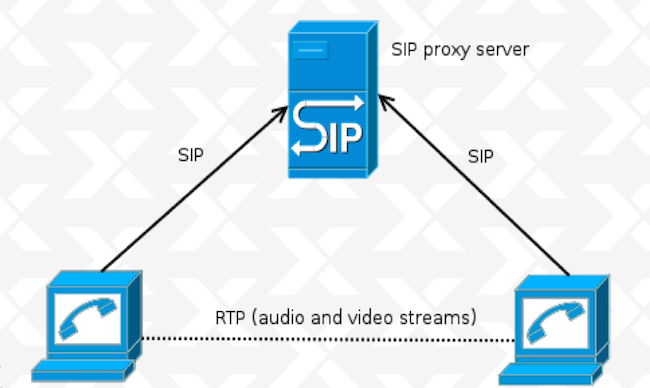
Two weeks ago I left NYC for a day trip to Norfolk, Virginia, to attend xTupleCon 2014. For those who don t know, xTuple is an incredibly reknown open source Enterprise Resource Planning (ERP) software. If you ve been following this blog, you might recall that during my participation in the Google Summer of Code 2014, I wrote a beta JSCommunicator extension for xTuple (to see how I went about doing that, look up Kickstarting the JSCommunicator-xTuple extension). Now, I wasn t flying down to Virginia on the eve of my first grad school midterms (gasp!) for fun - although I will admit, I enjoyed myself a fair amount. My GSoC mentor, Daniel Pocock was giving a talk about WebRTC and JSCommunicator at xTupleCon and invited me to participate. So that was the first perk of going to xTupleCon, I got to finally meet my GSoC mentor in person! During the presentation, Daniel provided a high level expanation of WebRTC and how it works. WebRTC (Web Real Time Communications) enables real time transmission of audio, video and data streams through browser-to-browser applications. This is one of the many perks of WebRTC; it doesn t require installation of plugins, making its use less vulnerable to security breaches. Websockets are used for the signalling channel and the SIP or XMPP can be used as the signaling protocol - in JSCommunicator, we used SIP. What was also done in JSCommunicator and can be done in other applications is to use a library to implement the signaling and SIP stack. JSCommunicator uses (and I highly reccomend) JsSIP. The basic SIP architecture is comprised of peers and a SIP Proxy Server that supports SIP over Websockets transport: sipArch If you have users behind NAT, you ll also need a TURN server for relay: sipArch2 In both cases, setup is not too difficult, particularly if using reSIProcate which offers both the SIP proxy and the TURN server. Daniel Pocock has an excellent post on how to setup and configure your SIP proxy and TURN server. With regard to JSCommunicator, it is a generic telephone in HTML5 which can easily be embedded in any web site or web app. Almost every aspect of JSCommunicator is easily customizable. More about JSCommunicator setup and architecture is detailed in a previous post. The JSCommunicator-xTuple extension can be installed in xTuple as an npm package (xtuple-jscommunicator). It is still at a very beta - or even pre-beta - stage and there are various limitations; the configuration must be hard-coded and dialing is done manually as opposed to clicking on a contact. Some of these limitations are features are on the wish list for future work. For example, some ideas for the next version of the extension are a click to dial from CRM records functionality and to bring up CRM records for an incomming call. Additionaly, the SIP proxy could be automatically installed with the xTuple server installation if desired. We closed the presentation with a live demo during which I made a video call from a JSCommunicator instance embedded in freephonebox.net to the JSCommunicator xTuple extension running on Daniel s laptop. Despite the occasionally iffy hotel Wifi, the demo was a hit - at one point I even left the conference room and took a quick walk around the hotel and invited other xTupleCon attendees to say hello to those in the room. The audience s reception was more enthusiastic than I anticipated, giving way to a pretty extensive Q&A session. It s great to see more and more people interested in WebRTC, I can t emphasize enough what a useful and versatile tool it is. Here s an action shot of part of the xTuple WebRTC presentation: xtuple

Keith Packard: Glamor cleanup

Glamor Cleanup Before I start really digging in to reworking the Render support in Glamor, I wanted to take a stab at cleaning up some cruft which has accumulated in Glamor over the years. Here's what I've done so far. Get rid of the Intel fallback paths I think it's my fault, and I'm sorry. The original Intel Glamor code has Glamor implement accelerated operations using GL, and when those fail, the Intel driver would fall back to its existing code, either UXA acceleration or software. Note that it wasn't Glamor doing these fallbacks, instead the Intel driver had a complete wrapper around every rendering API, calling special Glamor entry points which would return FALSE if GL couldn't accelerate the specified operation. The thinking was that when GL couldn't do something, it would be far faster to take advantage of the existing UXA paths than to have Glamor fall back to pulling the bits out of GL, drawing to temporary images with software, and pushing the bits back to GL. And, that may well be true, but what we've managed to prove is that there really aren't any interesting rendering paths which GL can't do directly. For core X, the only fallbacks we have today are for operations using a weird planemask, and some CopyPlane operations. For Render, essentially everything can be accelerated with the GPU. At this point, the old Intel Glamor implementation is a lot of ugly code in Glamor without any use. I posted patches to the Intel driver several months ago which fix the Glamor bits there, but they haven't seen any review yet and so they haven't been merged, although I've been running them since 1.16 was released... Getting rid of this support let me eliminate all of the _nf functions exported from Glamor, along with the GLAMOR_USE_SCREEN and GLAMOR_USE_PICTURE_SCREEN parameters, along with the GLAMOR_SEPARATE_TEXTURE pixmap type. Force all pixmaps to have exact allocations Glamor has a cache of recently used textures that it uses to avoid allocating and de-allocating GL textures rapidly. For pixmaps small enough to fit in a single texture, Glamor would use a cache texture that was larger than the pixmap. I disabled this when I rewrote the Glamor rendering code for core X; that code used texture repeat modes for tiles and stipples; if the texture wasn't the same size as the pixmap, then texturing would fail. On the Render side, Glamor would actually reallocate pixmaps used as repeating texture sources. I could have fixed up the core rendering code to use this, but I decided instead to just simplify things and eliminate the ability to use larger textures for pixmaps everywhere. Remove redundant pixmap and screen private pointers Every Glamor pixmap private structure had a pointer back to the pixmap it was allocated for, along with a pointer to the the Glamor screen private structure for the related screen. There's no particularly good reason for this, other than making it possible to pass just the Glamor pixmap private around a lot of places. So, I removed those pointers and fixed up the functions to take the necessary extra or replaced parameters. Similarly, every Glamor fbo had a pointer back to the Glamor screen private too; I removed that and now pass the Glamor screen private parameter as needed. Reducing pixmap private complexity Glamor had three separate kinds of pixmap private structures, one for 'normal' pixmaps (those allocated by them selves in a single FBO), one for 'large' pixmaps, where the pixmap was tiled across many FBOs, and a third for 'atlas' pixmaps, which presumably would be a single FBO holding multiple pixmaps. The 'atlas' form was never actually implemented, so it was pretty easy to get rid of that. For large vs normal pixmaps, the solution was to move the extra data needed by large pixmaps into the same structure as that used by normal pixmaps and simply initialize those elements correctly in all cases. Now, most code can ignore the difference and simply walk the array of FBOs as necessary. The other thing I did was to shrink the number of possible pixmap types from 8 down to three. Glamor now exposes just these possible pixmap types: Future Work

29 October 2014

Rhonda D'Vine: Feminist Year

If someone would have told me that I would visit three feminist events this year I would have slowly nodded at them and responded with "yeah, sure..." not believing it. But sometimes things take their own turns. It all started with the Debian Women Mini-Debconf in Barcelona. The organizers did ask me how they have to word the call for papers so that I would feel invited to give a speech, which felt very welcoming and nice. So we settled for "people who identify themselves as female". Due to private circumstances I didn't prepare well for my talk, but I hope it was still worth it. The next interesting part though happened later when there were lightning talks. Someone on IRC asked why there are male people in the lightning talks, which was explicitly allowed for them only. This also felt very very nice, to be honest, that my talk wasn't questioned. Those are amongst the reasons why I wrote My place is here, my home is Debconf. Second event I went to was the FemCamp Wien. It was my first event that was a barcamp, I didn't know what to expect organization wise. Topic-wise it was set about Queer Feminism. And it was the first event that I went to which had a policy. Granted, there was an extremely silly written part in it, which naturally ended up in a shit storm on twitter (which people from both sides did manage very badly, which disappointed me). Denying that there is sexism against cis-males is just a bad idea, but the background of it was that this wasn't the topic of this event. The background of the policy was that usually barcamps but events in general aren't considered that save of a place for certain people, and that this barcamp wanted to make it clear that people usually shying away from such events in the fear of harassment can feel at home there.

And what can I say, this absolutely was the right thing to do. I never felt any more welcomed and included in any event, including Debian events sorry to say that so frankly. Making it clear through the policy that everyone is on the same boat with addressing each other respectfully totally managed to do exactly that. The first session of the event about dominant talk patterns and how to work around or against them also made sure that the rest of the event was giving shy people a chance to speak up and feel comfortable, too. And the range of the sessions that were held was simply great. This was the event that I came up with the pattern that I have to define the quality of an event on the sessions that I'm unable to attend. The thing that hurt me most in the afterthought was that I couldn't attend the session about minorities within minorities. :/ Last but not least I attended AdaCamp Berlin. This was a small unconference/barcamp dedicated to increase women's participation in open technology and culture named after Ada Lovelace who is considered the first programmer. It was a small event with only 50 slots for people who identify as women. So I was totally hyper when I received the mail that was accepted. It was another event with a policy, and at first reading it looked strange. But given that there are people who are allergic to ingredients of scents, it made sense to raise awareness of that topic. And given that women are facing a fair amount of harassment in the IT and at events, it also makes sense to remind people to behave. After all it was a general policy for all AdaCamps, not for this specific one with only women.
I enjoyed the event. Totally. And that's not only because I was able to meet up with a dear friend who I haven't talked to in years, literally. I enjoyed the environment, and the sessions that were going on. And quite similar to the FemCamp, it started off with a session that helped a lot for the rest of the event. This time it was about the Impostor Syndrome which is extremely common for women in IT. And what can I say, I found myself in one of the slides, given that I just tweeted the day before that I doubted to belong there. Frankly spoken, it even crossed my mind that I was only accepted so that at least one trans person is there. Which is pretty much what the impostor syndrome is all about, isn't it. But when I was there, it did feel right. And we had great sessions that I truly enjoyed. And I have to thank one lady once again for her great definition on feminism that she brought up during one session, which is roughly that feminism for her isn't about gender but equality of all people regardless their sexes or gender definition. It's about dropping this whole binary thinking. I couldn't agree more. All in all, I totally enjoyed these events, and hope that I'll be able to attend more next year. From what I grasped all three of them think of doing it again, the FemCamp Vienna already has the date announced at the end of this year's event, so I am looking forward to meet most of these fine ladies again, if faith permits. And keep in mind, there will always be critics and haters out there, but given that thy wouldn't think of attending such an event anyway in the first place, don't get wound up about it. They just try to talk you down. P.S.: Ah, almost forgot about one thing to mention, which also helps a lot to reduce some barrier for people to attend: The catering during the day and for lunch both at FemCamp and AdaCamp (there was no organized catering at the Debian Women Mini-Debconf) did take off the need for people to ask about whether there could be food without meat and dairy products by offering mostly Vegan food in the first place, even without having to query the participants. Often enough people otherwise choose to go out of the event or bring their own food instead of asking for it, so this is an extremely welcoming move, too. Way to go!

/personal permanent link Comments: 2 Flattr this

Steve Kemp: A brief introduction to freebsd

I've spent the past thirty minutes installing FreeBSD as a KVM guest. This mostly involved fetching the ISO (I chose the latest stable release 10.0), and accepting all the defaults. A pleasant experience. As I'm running KVM inside screen I wanted to see the boot prompt, etc, via the serial console, which took two distinct steps: To configure boot messages to display via the serial console, issue the following command as the superuser:
 # echo 'console="comconsole"' >> /boot/loader.conf
To get a login: prompt you'll want to edit /etc/ttys and change "off" to "on" and "dialup" to "vt100" for the ttyu0 entry. Once you've done that reload init via:
 # kill -HUP 1
Enable remote root logins, if you're brave, or disable PAM and password authentication if you're sensible:
 vi /etc/ssh/sshd_config
 /etc/rc.d/sshd restart
Configure the system to allow binary package-installation - to be honest I was hazy on why this was required, but I ran the two command and it all worked out:
 pkg
 pkg2ng
Now you may install a package via a simple command such as:
 pkg add screen
Removing packages you no longer want is as simple as using the delete option:
 pkg delete curl
You can see installed packages via "pkg info", and there are more options to be found via "pkg help". In the future you can apply updates via:
 pkg update && pkg upgrade
Finally I've installed 10.0-RELEASE which can be upgraded in the future via "freebsd-update" - This seems to boil down to "freebsd-update fetch" and "freebsd-update install" but I'm hazy on that just yet. For the moment you can see your installed version via:
 uname -a ; freebsd-version
Expect my future CPAN releases, etc, to be tested on FreeBSD too now :)

Patrick Matth i: geoip and geoip-database news!

Hi, geoip version 1.6.2-2 and geoip-database version 20141027-1 are now available in Debian unstable/sid, with some news of more free databases available :) geoip changes:
   * Add patch for geoip-csv-to-dat to add support for building GeoIP city DB.
     Many thanks to Andrew Moise for contributing!
   * Add and install geoip-generator-asn, which is able to build the ASN DB. It
     is a modified version from the original geoip-generator. Much thanks for
     contributing also to Aaron Gibson!
   * Bump Standards-Version to 3.9.6 (no changes required).
geoip-database changes:
   * New upstream release.
   * Add new databases GeoLite city and GeoLite ASN to the new package
     geoip-database-extra. Also bump build depends on geoip to 1.6.2-2.
   * Switch to xz compression for the orig tarball.
So much thanks to both contributors!

Mike Gabriel: Join us at "X2Go: The Gathering 2014"

TL;DR; Those of you who are not able to join "X2Go: The Gathering 2014"... Join us on IRC (#x2go on Freenode) over the coming weekend. We will provide information, URLs to our TinyPads, etc. there. Spontaneous visitors are welcome during the working sessions (please let us know if you plan to come around), but we don't have spare beds anymore for accomodation. (We are still trying hard to set up some sort of video coverage--may it be life streaming or recorded sessions, this is still open, people who can offer help, see below). Our event "X2Go: The Gathering 2014" is approaching quickly. We will meet with a group of 13-15 people (number of people is still slightly fluctuating) at Linux Hotel, Essen. Thanks to the generous offerings of the Linux Hotel [1] to FLOSS community projects, costs of food and accommodation could be kept really low and affordable to many people. We are very happy that people from outside Germany are coming to that meeting (Michael DePaulo from the U.S., Kjetil Fleten (http://fleten.net) from Denmark / Norway). And we are also proud that Martin Wimpress (Mr. Ubuntu MATE Remix) will join our gathering. In advance, I want to send a big THANK YOU to all people who will sponsor our weekend, either by sending gift items, covering travel expenses or providing help and knowledge to make this event a success for the X2Go project and its community around. read more

28 October 2014

Keith Packard: Goodbye-Barnes-and-Noble

Goodbye Barnes & Noble I've read books on electronic devices for many years now; the convenience of having a huge library with me while traveling makes up for the lower quality of the presentation. I've read books on a selection of Palm devices, an old OpenInkpot compatible ereader, my phone and, most recently, on my Kobo Aura. To get reading material, I've used a variety of sources, including the venerable Project Gutenberg, the Internet Archive, directly from authors like Cory Doctorow and even our local Multnomah County Public Library. I like to have books in epub format; it's a published standard, based on HTML and CSS. My recent devices have all happily supported that, and it allows for editing when I feel the need to correct typos or formatting problems. Purchasing Books When I wanted to actually purchase a book, I bought from Barnes & Noble; they have a good selection, and reasonable automatic recommendations. According to their web site, since I started shopping there, I've purchased 51 books. I can't tell how much I've spent, but probably in excess of $500. Not knowing which device I'd be reading on at any one time, and liking to have the assurance of ongoing access to my library, I would always download the epub files to my laptop and then transfer them to whichever device I wanted to read on. This ensured that my books would be available even when I didn't have a network connection (as happened yesterday during a wind storm which cut the power to the DSLAM which connects me to the internet). I'd created a simple shell script which captured the file after it was downloaded on my laptop and prepared it for my reader. A bit of browser configuration and it really was as simple as clicking the 'download' button to get a book onto both my laptop and my reading device. Barnes & Noble Disables Downloading I was traveling in Bordeaux a couple of weeks ago and wanted to get the latest volume in a series I was reading. My library didn't have it available, and so I decided that it was worth a few dollars to purchase it for the flight home. After clicking through the Barnes & Noble store, I was ready to download the book so that I could transfer it to my reader. Going to 'My Library', I found my new purchases but the usual 'Download' button was missing. I was a bit surprised as I'd purchased and downloaded the previous volume just before leaving without any troubles. At first, I assumed there was some kind of region restriction on the distribution of this book. I'm familiar with that from DVD region locking of movies, and supposed that the same could be done with books for some reason. However, after setting up a VPN back to home and browsing through that (to ensure that my browser would appear with an Oregon address), the download button was still not present. The unhelpful Barnes & Noble representative that I accessed through the 'help' button disclosed that the 'download' "feature" had been disabled for "security" reasons. Not really having any alternative, I requested a refund for the new book. Barnes & Noble Loses a Customer With no way to actually use ebooks purchased through the Barnes & Noble store, I won't be spending any more money with them. I'm not sure how that helps their "security" issues, although if they lose enough customers and they close their doors, I guess that would make them about as secure as imaginable. Kobo Makes a Sale Having purchased a Kobo Aura, it had built-in access to their book store, which made it easy to download the book that I wanted. Then, I simply connected my reader to my laptop and copied the file over for safe keeping. Buying Books under Linux After I got home, I had to figure out how to get Adobe Digital Editions installed on my laptop. Fortunately, I discovered that version 2.0.1 runs fine under wine. Now, purchasing books can be done with my laptop (a vastly superior browsing experience). The .acsm file can be dragged straight from the iceweasel download menu to Adobe Digital Editions, which happily downloads the actual .epub file and makes it available for transferring to my reader. Of course, now that I've got Adobe Digital Editions working, I can also get digitally restricted books from all over the net, greatly expanding my options for purchasing (or borrowing) books. It's a bit less convenient, and requires that I run an icky Windows binary under wine, but at least I have choices, which is some consolation.

27 October 2014

Petter Reinholdtsen: First Jessie based Debian Edu released (alpha0)

I am happy to report that I on behalf of the Debian Edu team just sent out this announcement:
The Debian Edu Team is pleased to announce the release of Debian Edu
Jessie 8.0+edu0~alpha0
Debian Edu is a complete operating system for schools. Through its
various installation profiles you can install servers, workstations
and laptops which will work together on the school network. With
Debian Edu, the teachers themselves or their technical support can
roll out a complete multi-user multi-machine study environment within
hours or a few days. Debian Edu comes with hundreds of applications
pre-installed, but you can always add more packages from Debian.
For those who want to give Debian Edu Jessie a try, download and
installation instructions are available, including detailed
instructions in the manual[1] explaining the first steps, such as
setting up a network or adding users. Please note that the password
for the user your prompted for during installation must have a length
of at least 5 characters!
 [1] <URL: https://wiki.debian.org/DebianEdu/Documentation/Jessie >
Would you like to give your school's computer a longer life? Are you
tired of sneaker administration, running from computer to computer
reinstalling the operating system? Would you like to administrate all
the computers in your school using only a couple of hours every week?
Check out Debian Edu Jessie!
Skolelinux is used by at least two hundred schools all over the world,
mostly in Germany and Norway.
About Debian Edu and Skolelinux
===============================
Debian Edu, also known as Skolelinux[2], is a Linux distribution based
on Debian providing an out-of-the box environment of a completely
configured school network. Immediately after installation a school
server running all services needed for a school network is set up just
waiting for users and machines being added via GOsa , a comfortable
Web-UI. A netbooting environment is prepared using PXE, so after
initial installation of the main server from CD or USB stick all other
machines can be installed via the network.  The provided school server
provides LDAP database and Kerberos authentication service,
centralized home directories, DHCP server, web proxy and many other
services.  The desktop contains more than 60 educational software
packages[3] and more are available from the Debian archive, and
schools can choose between KDE, Gnome, LXDE, Xfce and MATE desktop
environment.
 [2] <URL: http://www.skolelinux.org/ >
 [3] <URL: http://people.skolelinux.org/pere/blog/Educational_applications_included_in_Debian_Edu___Skolelinux__the_screenshot_collection____.html >
Full release notes and manual
=============================
Below the download URLs there is a list of some of the new features
and bugfixes of Debian Edu 8.0+edu0~alpha0 Codename Jessie. The full
list is part of the manual. (See the feature list in the manual[4] for
the English version.) For some languages manual translations are
available, see the manual translation overview[5].
 [4] <URL: https://wiki.debian.org/DebianEdu/Documentation/Jessie/Features >
 [5] <URL: http://maintainer.skolelinux.org/debian-edu-doc/ >
Where to get it
---------------
To download the multiarch netinstall CD release (624 MiB) you can use
 * ftp://ftp.skolelinux.org/skolelinux-cd/debian-edu-8.0+edu0~alpha0-CD.iso
 * http://ftp.skolelinux.org/skolelinux-cd/debian-edu-8.0+edu0~alpha0-CD.iso
 * rsync -avzP ftp.skolelinux.org::skolelinux-cd/debian-edu-8.0+edu0~alpha0-CD.iso .
The SHA1SUM of this image is: 361188818e036ce67280a572f757de82ebfeb095
New features for Debian Edu 8.0+edu0~alpha0 Codename Jessie released 2014-10-27
===============================================================================
Installation changes
--------------------
 * PXE installation now installs firmware automatically for the hardware present.
Software updates
----------------
Everything which is new in Debian Jessie 8.0, eg:
 * Linux kernel 3.16.x
 * Desktop environments KDE "Plasma" 4.11.12, GNOME 3.14, Xfce 4.10,
   LXDE 0.5.6 and MATE 1.8 (KDE "Plasma" is installed by default; to
   choose one of the others see manual.)
 * the browsers Iceweasel 31 ESR and Chromium 38 
 * !LibreOffice 4.3.3
 * GOsa 2.7.4
 * LTSP 5.5.4
 * CUPS print system 1.7.5
 * new boot framework: systemd
 * Educational toolbox GCompris 14.07 
 * Music creator Rosegarden 14.02
 * Image editor Gimp 2.8.14
 * Virtual stargazer Stellarium 0.13.0
 * golearn 0.9
 * tuxpaint 0.9.22
 * New version of debian-installer from Debian Jessie.
 * Debian Jessie includes about 42000 packages available for
   installation.
 * More information about Debian Jessie 8.0 is provided in the release
   notes[6] and the installation manual[7].
 [6] <URL: http://www.debian.org/releases/jessie/releasenotes >
 [7] <URL: http://www.debian.org/releases/jessie/installmanual >
Fixed bugs
----------
 * Inserting incorrect DNS information in Gosa will no longer break
   DNS completely, but instead stop DNS updates until the incorrect
   information is corrected (Debian bug #710362)
 * and many others.
Documentation and translation updates
------------------------------------- 
 * The Debian Edu Jessie Manual is fully translated to German, French,
   Italian, Danish and Dutch. Partly translated versions exist for
   Norwegian Bokmal and Spanish.
Other changes
-------------
 * Due to new Squid settings, powering off or rebooting the main
   server takes more time.
 * To manage printers localhost:631 has to be used, currently www:631
   doesn't work.
Regressions / known problems
----------------------------
 * Installing LTSP chroot fails with a bug related to eatmydata about
   exim4-config failing to run its postinst (see Debian bug #765694
   and Debian bug #762103).
 * Munin collection is not properly configured on clients (Debian bug
   #764594).  The fix is available in a newer version of munin-node.
 * PXE setup for Main Server and Thin Client Server setup does not
   work when installing on a machine without direct Internet access.
   Will be fixed when Debian bug #766960 is fixed in Jessie.
See the status page[8] for the complete list.
 [8] <URL: https://wiki.debian.org/DebianEdu/Status/Jessie >
How to report bugs
------------------
<URL: http://wiki.debian.org/DebianEdu/HowTo/ReportBugs >
About Debian
============
The Debian Project was founded in 1993 by Ian Murdock to be a truly
free community project. Since then the project has grown to be one of
the largest and most influential open source projects. Thousands of
volunteers from all over the world work together to create and
maintain Debian software. Available in 70 languages, and supporting a
huge range of computer types, Debian calls itself the universal
operating system.
Contact Information
For further information, please visit the Debian web pages[9] or send
mail to press@debian.org.
 [9] <URL: http://www.debian.org/ >

26 October 2014

Joey Hess: a programmable alarm clock using systemd

I've taught my laptop to wake up at 7:30 in the morning. When it does, it will run whatever's in my ~/bin/goodmorning script. Then, if the lid is still closed, it will go back to sleep again. So, it's a programmable alarm clock that doesn't need the laptop to be left turned on to work. But it doesn't have to make noise and wake me up (I rarely want to be woken up by an alarm; the sun coming in the window is a much nicer method). It can handle other tasks like downloading my email, before I wake up. When I'm at home and on dialup, this tends to take an hour in the morning, so it's nice to let it happen before I get up. This took some time to figure out, but it's surprisingly simple. Besides ~/bin/goodmorning, which can be any program/script, I needed just two files to configure systemd to do this. /etc/systemd/system/goodmorning.timer
[Unit]
Description=good morning
[Timer]
Unit=goodmorning.service
OnCalendar=*-*-* 7:30
WakeSystem=true
Persistent=false
[Install]
WantedBy=multi-user.target
/etc/systemd/system/goodmorning.service
[Unit]
Description=good morning
RefuseManualStart=true
RefuseManualStop=true
ConditionACPower=true
[Service]
Type=oneshot
ExecStart=/bin/systemd-inhibit --what=handle-lid-switch --why=goodmorning /bin/su joey -c "/usr/bin/timeout 45m /home/joey/bin/goodmorning"
installation After installing those files, run (as root): systemctl enable goodmorning.timer; systemctl start goodmorning.timer Then, you'll also need to edit /etc/systemd/logind.conf, and set LidSwitchIgnoreInhibited=no -- this overrides the default, which is not to let systemd-inhibit block sleep on lid close. almost too easy I don't think this would be anywhere near as easy to do without systemd, logind, etc. Especially the handling of waking the system at the right time, and the behavior around lid sleep inhibiting. The WakeSystem=true relies on some hardware support for waking from sleep; my laptop supported it with no trouble but I don't know how broadly available that is. Also, notice the ConditionACPower=true, which I added once I realized I don't want the job to run if I forgot to leave the laptop plugged in overnight. Technically, it will still wake up when on battery power, but then it should go right back to sleep. Quite a lot of nice peices of systemd all working together here! xfce workaround If using xfce, xfce4-power-manager takes over handling of lid close from systemd, and currently prevents the system from going back to sleep if the lid is still closed when goodmorning finishes. Happily, there is an easy workaround; this configures xfce to not override the lid switch behavior: xfconf-query -c xfce4-power-manager -n -p /xfce4-power-manager/logind-handle-lid-switch -t bool -s true Other desktop environments may have similar issues. why not a per-user unit? It would perhaps be better to use the per-user systemd, not the system wide one. Then I could change the time the alarm runs without using root. What's prevented me from doing this is that systemd-inhibit uses policykit, and policykit prevents it from being used in this situation. It's a lot easier to run it as root and use su, than it is to reconfigure policykit.

Next.

Previous.