Search Results: "tim"

20 December 2015

Iain R. Learmonth: A Week of Debian

For the last week I have been stuck in England. For the vast majority of that time, I've had nothing to do except work on Debian and this blog post documents some of the things I worked on. Obviously spending a whole week on Debian, there's going to be some packaging involved. The following packages got new versions in unstable this last week: Packaging updates were one of the simpler tasks tackled this week though. I spent a lot of time this week on Debian Live along with others in the #debian-live IRC channel. Over the last week we achieved a number of things, possibly the most important being that all the generic live support packages (i.e. live-boot, live-config and live-tools) have now been converted into native packages, have their VCS repositories hosted on Alioth and have seen a good number of patches merged from the BTS and from the old patch system. All future patches will be managed via the BTS for Debian Live, as with other Debian projects. We've also put effort into getting documentation online again now that the live.debian.net server has been turned off and we now have the live-build documentation and the live-wrapper documentation hosted on the project's Alioth webspace. The live-wrapper user documentation was mostly written this week so may not be amazing. On the smaller task list for Debian Live, the KGB bots are now present in the channel and reporting on git commits, a number of the more popular URLs from live.debian.net are now being redirected to their new locations (although we've had to recover these URLs from web.archive.org, the list of redirections is certainly not complete) and we've made updates to the wiki pages about how to contribute to the project. Unfortunately, no one has stepped forwards as a new lead for live-build and so this package has been orphaned. This does not necessarily mean that the package will be removed from Debian any time soon, just that it does not currently have a maintainer. If you're interested in taking over maintainence of live-build, see #808048. For testing the core live support packages, new live images for stretch have been built using live-wrapper and are available here. There are known issues with the syslinux configuration and these are not isohybrid images. My other major project this week has been my efforts to form a Debian Metadata team. The Debian Metadata team would produce the frameworks and run the services that make data about Debian available in a number of formats to make the data as accessible as possible and to encourage its use both within Debian and in external projects. Currently this includes two experimental services: rdf.debian.net and map.debian.net. We're don't plan to duplicate any of the work done by UDD, but make the data aggregated in UDD more accessible to users and developers. This means publishing that data in JSON/JSONP, KML, RDF, iCalendar and any other format that makes sense. There may be instances where it makes sense to augment the published data with live data, for example mirror availability should probably be live and not just a recent snapshot. If you're interested in participating in the Debian Metadata team, you can register your interested on bug #808049. This is not a complete summary of all my activities over the last week, but for those interested, it should give you an idea of what I've been up to. Finally, for those of you that have been waiting for my write-up on the airgapped GnuPG master key, I decided in the end that my blog was not the right place for this. You can find the guide in two parts: key generation and key export to the YubiKey. I've tried to keep these guides as generic as possible while still being as useful as possible. While writing these up on the wiki, I've also created pages for OpenPGP and GnuPG and I've almost entirely rewritten the DebianKeyring wiki page. I discovered this awesome guide to OpenPGP concepts which I would recommend to anyone that is new to OpenPGP.

Iustin Pop: Nikkor 200-500mm f5.6E ED VR tests

So, lately I've been on a telephoto lens learning curve; after the 300mm prime, I said to test a zoom lens. As I found the prime reasonably easy to adapt to (compared to shorter focal length lenses), I thought that a zoom (heavier, bigger) will be the same. Oh, I was wrong. My keeper rate for the first outdoors test was quite bad around 50% only, which (when talking only about focus/sharpness) is much below my standards. I started easy; some close or medium range shots, nothing special: Usual flower picture Lonely snag But then, moving to further distances, things became less straightforward. Shooting two pictures each time meant that usually one of them was sharp, but the other not. I got really confused at this step; the shutter speed was 1/2000s and I also had VR on; either VR was unneeded (i.e. contributing blur instead of helping) or something else was going on. After much head scratching, I think it's a combination of the following factors: So, for such style of shooting, I need to train more both photographic technique and arm strength at the gym In the meantime, it is possible to get such shots reasonably sharp, for example this picture of the (start of the) Alps taken from what is technically still Z rich city: The Alps  viewed from Z rich! I'm happy with the detail (at this distance), however I was not able to correct the colour due to the haze between me and the mountains; note that the trees on the bottom of the distance were not near me, but on the next or after-next hill. This picture confirms that with more practice things will get better. Coming back to shorter distances, and shorter focal lengths, things are looking better. We were passing somewhat near some people playing with RC-controlled planes not near enough to hear them, but near enough to see the plane quickly flying. Switched camera quickly to AF-C and Dynamic-21 focus, and - to my surprise - I was able to capture four good pictures, two so-so and four more clearly out of focus. But, for such a heavy length, hand-held and on the short notice, I was happy; the first picture is one of the so-so ones, but I kept it as I like the way the propeller is seen. All pictures at 290mm plus some cropping, 1/1250s, ISO between 900 and 1800, f/5.6 (i.e wide open): RC plane: continous focus tests RC plane #2 RC plane #3: good results! RC plane #4 RC plane #5: landing? From this exercise, the conclusion is that the lens is OK-ish for tracking, although the not-so good keeper rate tells me that I need to be careful; I'll have to see how a subject moving not left-right, but instead approaching or moving away from the camera would be tracked. But enough pictures of small planes. At 500mm, but still somewhat close, trees: Trees @ 500mm At this step I'm starting to wonder if stopping down a bit would help with the sharpness; I'll have to test that in the future. Walking some more, finally a bird in flight; one of the hopes when I took the camera/lens out was that I'll see some birds, but this was the first. 500mm, heavily cropped, but quite good result for myself (same autofocus settings as before): Bird in flight @ 500mm Bird in flight: difficult light The only problem here is, as always with crows (I think these are crows), is the black bird against the light-blue sky (not even strong blue), which means the picture has a high dynamic range; recovering the shadows on the bird is difficult. But in any case, it's clear the lens can deliver, if the photographer is good. Next, a helicopter was gracious enough to pass by (pretty close): Helicopter: close shot Two minutes later, it was quite far, but since it was going in the direction of the Alps, it gave the opportunity for a nice shot: Helicopter: flying towards the Alps This picture is less sharp, but still I like it due to composition; not successful on small screens though, only if you see it full screen. Light is very difficult though and about 10 seconds earlier would have been even better (more separation between the helicopter and the mountain). And since we're talking about planes, let's see a plane at 500m, directly overhead, and quite high: High-flying plane This picture (@500mm, cropped, 1/2000s) has the most detail of a plane flying high enough to have trails (not sure how to estimate, but at least 5km, maybe more around 7-8 I'd say) that I ever took. So yes, the lens can deliver, but it's not easy. This shot, being shot more or less straight up, had the least distance through low-altitude atmosphere, so it has less problems compared to the mountains pictures. It's still not really sharp (lens wide open), but the amount of detail I'm sold :) And to finish on a more close note: Hunting!! A long focal length lens allows one to get "close" without getting close, which means animals are not disturbed. The first picture with the cat (not shown) had the cat less alert; ears not fully up, although eyes were still seeking; this picture shows it fully alert and concentrated, like it was a wild cat hunting for its survival, and not a city cat, out just for fun. So, summary: All the best to everybody for the coming holidays, and thanks for reading.

Lars Wirzenius: FUUG grant for Obnam development: what happened then

In September, The FUUG Foundation gave me a grant to buy some hardware for Obnam development. I used this money to buy a new desktop-ish machine, see below for details. It's sat in a corner, and I use it as a server: it's not normally connected to a monitor or keyboard. It runs Obnam benchmarks. Before this, I ran Obnam benchmarks and experiments on my laptop, or on BigV virtual servers donated by Bytemark. The hardware The parts: Not to brag, but it's a nice machine. Much more power than my 2012 era laptop. The SSD is the system drive, the HDDs are for running Obnam benchmarks on. The HDDs are not RAIDed. Each drive is a PV for LVM2. All the data on those drives is scratch data: it's not valuable, and I do not care if it is lost. In fact, most of the data gets created and deleted during a benchmark run, and usually the disks are empty. The SSD contains the host operating system, and the virtual disks for all the virtual machines. I assembled the machine myself, with the help of a friend, and installed Debian jessie on it. The Debian installation is pretty bare bones, just enough to run and manage a bunch of virtual machines using libvirt and ansible. All the actual work, including benchmarks, are run in virtual machines. The benchmarks The benchmarks are run by a kludge, called obbench, and the results are published at http://benchmark.obnam.org/. Here's a snapshot of the results so far:
date many files one big file
2015-09-28 2165.0 1381.9
2015-12-06 1461.6 384.0
In a bit over two months, I've made some significant progress, I think. The two benchmarks that I currently run are: These are two extreme cases of what a backup needs to deal with: either the file metadata, or its content. They incur different costs for a backup program. Thus, two benchmarks. In both cases, the benchmark consists of an initial backup, a restore, and a second backup, without changes to the live data. The second backup is an extreme case of what backups usually do: most data usually doesn't change, so keeping that in mind for optimisation is important. The above benchmarks are synthetic: they use data that's generated by a program (genbackupdata), so that they can be reproduced. Synthetic benchmarks are useful, especially for looking at particular aspects of a program's operation for optimisation. However, they do not necessarily reflect how a program behaves in actual use. I also run, by hand, experiments with real data. I have a snapshot of our home file server and my laptop on the benchmark machine. The snapshots are static, and do not get updated. I experiment by running Obnam backups manually, the initial full backup and a no-change incremental one. In early October, I couldn't finish the initial full backups. They took too long, more than a week. Now I can finish them in about a day. This remarkable change is not evident from the synthetic benchmarks. In numbers: 572986 files in the live data, containing 4.5 TiB. Initial backup, about 18.5 hours. Incremental backup, 4m13s. This is from a local disk to a local disk. In addition to these, I've run numerous experiments on the new machine. These would have been much less easy to run on my laptop, and so I probably wouldn't have. Running benchmarks was always painful on my laptop, since it does not have the necessary disk space, and I'd really rather like to use it for other things. The results Thanks to the benchmarks and experiments I've been able to take the in-development version of Obnam from being quite impractical for real use to being in experimental use for real data. I now use the new version as my primary backup of my laptop, with two secondary backups (with the old Obnam version, and rsync) in parallel. This would not have happened this year without the extra hardware. In addition to the Obnam work, I've used the new machine to develop a test suite for vmdebootstrap. My actual development still happens on my laptop, except for things that are heavy enough to be slow on the laptop. I've made sure I can do most development purely on my laptop, while offline, including running a CI system, and testing things on two architecture and three releases of Debian. I do not want my development to be dependent on incidental things such as network access, unless I'm doing things that by their nature depend on the network, such as publishing changes or releases.

Petter Reinholdtsen: Using appstream with isenkram to install hardware related packages in Debian

Around three years ago, I created the isenkram system to get a more practical solution in Debian for handing hardware related packages. A GUI system in the isenkram package will present a pop-up dialog when some hardware dongle supported by relevant packages in Debian is inserted into the machine. The same lookup mechanism to detect packages is available as command line tools in the isenkram-cli package. In addition to mapping hardware, it will also map kernel firmware files to packages and make it easy to install needed firmware packages automatically. The key for this system to work is a good way to map hardware to packages, in other words, allow packages to announce what hardware they will work with. I started by providing data files in the isenkram source, and adding code to download the latest version of these data files at run time, to ensure every user had the most up to date mapping available. I also added support for storing the mapping in the Packages file in the apt repositories, but did not push this approach because while I was trying to figure out how to best store hardware/package mappings, the appstream system was announced. I got in touch and suggested to add the hardware mapping into that data set to be able to use appstream as a data source, and this was accepted at least for the Debian version of appstream. A few days ago using appstream in Debian for this became possible, and today I uploaded a new version 0.20 of isenkram adding support for appstream as a data source for mapping hardware to packages. The only package so far using appstream to announce its hardware support is my pymissile package. I got help from Matthias Klumpp with figuring out how do add the required metadata in pymissile. I added a file debian/pymissile.metainfo.xml with this content:
<?xml version="1.0" encoding="UTF-8"?>
<component>
  <id>pymissile</id>
  <metadata_license>MIT</metadata_license>
  <name>pymissile</name>
  <summary>Control original Striker USB Missile Launcher</summary>
  <description>
    <p>
      Pymissile provides a curses interface to control an original
      Marks and Spencer / Striker USB Missile Launcher, as well as a
      motion control script to allow a webcamera to control the
      launcher.
    </p>
  </description>
  <provides>
    <modalias>usb:v1130p0202d*</modalias>
  </provides>
</component>
The key for isenkram is the component/provides/modalias value, which is a glob style match rule for hardware specific strings (modalias strings) provided by the Linux kernel. In this case, it will map to all USB devices with vendor code 1130 and product code 0202. Note, it is important that the license of all the metadata files are compatible to have permissions to aggregate them into archive wide appstream files. Matthias suggested to use MIT or BSD licenses for these files. A challenge is figuring out a good id for the data, as it is supposed to be globally unique and shared across distributions (in other words, best to coordinate with upstream what to use). But it can be changed later or, so we went with the package name as upstream for this project is dormant. To get the metadata file installed in the correct location for the mirror update scripts to pick it up and include its content the appstream data source, the file must be installed in the binary package under /usr/share/appdata/. I did this by adding the following line to debian/pymissile.install:
debian/pymissile.metainfo.xml usr/share/appdata
With that in place, the command line tool isenkram-lookup will list all packages useful on the current computer automatically, and the GUI pop-up handler will propose to install the package not already installed if a hardware dongle is inserted into the machine in question. Details of the modalias field in appstream is available from the DEP-11 proposal. To locate the modalias values of all hardware present in a machine, try running this command on the command line:
cat $(find /sys/devices/ grep modalias)
To learn more about the isenkram system, please check out my blog posts tagged isenkram.

19 December 2015

Dirk Eddelbuettel: RcppTOML 0.0.5

After a short hiatus, a new version of the (wonderfully useful, if I dare say so ;-) RcppTOML package is now on CRAN. RcppTOML lets R read the (absolutely awesome) TOML configuration file format--which is simply fabulous as it emphasizes strong readability for humans while at the same time supporting strong typing as well as immediate and clear error reports. At work, we're all fans now. The new version on CRAN mostly updates to an updated version of the underlying cpptoml library by Chase. Nothing much changed on the R side. Courtesy of CRANberries, there is a diffstat report for this release More information and examples are on the RcppTOML page.

This post by Dirk Eddelbuettel originated on his Thinking inside the box blog. Please report excessive re-aggregation in third-party for-profit settings.

Zlatan Todori : What is wrong with Jolla?

Jolla management really seems to not understand a first thing about how to deal with consumers. They "sailed" on wings people believing it will be open source product. They got litterally hunderds of request and question for why it isn't? Answers, I found once something along in these lines "we plan in future". The reallity - they aren't a good company. They still didn't ship tablets, they don't even know how to deal with that, they don't answer on people question and they even don't issue refunds for people that gave money for tablets. Jolla, you suck! They got some new funding with it but their blog post about it also sucks big time. Unless they open source SailfishOS they will go nowhere nor do I have any further interest in such bad behavior of one company that plays on community feeling. If you want a better experience and more open source then you should go with Tizen, FirefoxOS (although Mozilla closed development), Cyanogen, Android, Replicant and so on...

18 December 2015

Carl Chenet: My Free activities in November 2015

Personal projects: Debian : Others: That s all folks! See you next month!

Joachim Breitner: A multitude of early Christmas presents

Today was a nice day with a surprising number of early Christmas presents:

Martin Pitt: What s new in autopkgtest: LXD, MaaS, apt pinning, and more

The last two major autopkgtest releases (3.18 from November, and 3.19 fresh from yesterday) bring some new features that are worth spreading. New LXD virtualization backend 3.19 debuts the new adt-virt-lxd virtualization backend. In case you missed it, LXD is an API/CLI layer on top of LXC which introduces proper image management, seamlessly use images and containers on remote locations, intelligently caching them locally, automatically configure performant storage backends like zfs or btrfs, and just generally feels really clean and much simpler to use than the classic LXC. Setting it up is not complicated at all. Install the lxd package (possibly from the backports PPA if you are on 14.04 LTS), and add your user to the lxd group. Then you can add the standard LXD image server with
  lxc remote add lco https://images.linuxcontainers.org:8443
and use the image to run e. g. the libpng test from the archive:
  adt-run libpng --- lxd lco:ubuntu/trusty/i386
  adt-run libpng --- lxd lco:debian/sid/amd64
The adt-virt-lxd.1 manpage explains this in more detail, also how to use this to run tests in a container on a remote host (how cool is that!), and how to build local images with the usual autopkgtest customizations/optimizations using adt-build-lxd. I have btrfs running on my laptop, and LXD/autopkgtest automatically use that, so the performance really rocks. Kudos to St phane, Serge, Tycho, and the other LXD authors! The motivation for writing this was to make it possible to move our armhf testing into the cloud (which for $REASONS requires remote containers), but I now have a feeling that soon this will completely replace the existing adt-virt-lxc virt backend, as its much nicer to use. It is covered by the same regression tests as the LXC runner, and from the perspective of package tests that you run in it it should behave very similar to LXC. The one problem I m aware of is that autopkgtest-reboot-prepare is broken, but hardly anything is using that yet. This is a bit complicated to fix, but I expect it will be in the next few weeks. MaaS setup script While most tests are not particularly sensitive about which kind of hardware/platform they run on, low-level software like the Linux kernel, GL libraries, X.org drivers, or Mir very much are. There is a plan for extending our automatic tests to real hardware for these packages, and being able to run autopkgtests on real iron is one important piece of that puzzle. MaaS (Metal as a Service) provides just that it manages a set of machines and provides an API for installing, talking to, and releasing them. The new maas autopkgtest ssh setup script (for the adt-virt-ssh backend) brings together autopkgtest and real hardware. Once you have a MaaS setup, get your API key from the web UI, then you can run a test like this:
  adt-run libpng --- ssh -s maas -- \
     --acquire "arch=amd64 tags=touchscreen" -r wily \
     http://my.maas.server/MAAS 123DEADBEEF:APIkey
The required arguments are the MaaS URL and the API key. Without any further options you will get any available machine installed with the default release. But usually you want to select a particular one by architecture and/or tags, and install a particular distro release, which you can do with the -r/--release and --acquire options. Note that this is not wired into Ubuntu s production CI environment, but it will be. Selectively using packages from -proposed Up until a few weeks ago, autopkgtest runs in the CI environment were always seeing/using the entirety of -proposed. This often led to lockups where an application foo and one of its dependencies libbar got a new version in -proposed at the same time, and on test regressions it was not clear at all whose fault it was. This often led to perfectly good packages being stuck in -proposed for a long time, and a lot of manual investigation about root causes. . These days we are using a more fine-grained approach: A test run is now specific for a trigger , that is, the new package in -proposed (e. g. a new version of libbar) that caused the test (e. g. for foo ) to run. autopkgtest sets up apt pinning so that only the binary packages for the trigger come from -proposed, the rest from -release. This provides much better isolation between the mush of often hundreds of packages that get synced or uploaded every day. This new behaviour is controlled by an extension of the --apt-pocket option. So you can say
  adt-run --apt-pocket=proposed=src:foo,libbar1,libbar-data ...
and then only the binaries from the foo source, libbar1, and libbar-data will come from -proposed, everything else from -release. Caveat:Unfortunately apt s pinning is rather limited. As soon as any of the explicitly listed packages depends on a package or version that is only available in -proposed, apt falls over and refuses the installation instead of taking the required dependencies from -proposed as well. In that case, adt-run falls back to the previous behaviour of using no pinning at all. (This unfortunately got worse with apt 1.1, bug report to be done). But it s still helpful in many cases that don t involve library transitions or other package sets that need to land in lockstep. Unified testbed setup script There is a number of changes that need to be made to testbeds so that tests can run with maximum performance (like running dpkg through eatmydata, disabling apt translations, or automatically using the host s apt-cacher-ng), reliable apt sources, and in a minimal environment (to detect missing dependencies and avoid interference from unrelated services these days the standard cloud images have a lot of unnecessary fat). There is also a choice whether to apply these only once (every day) to an autopkgtest specific base image, or on the fly to the current ephemeral testbed for every test run (via --setup-commands). Over time this led to quite a lot of code duplication between adt-setup-vm, adt-build-lxc, the new adt-build-lxd, cloud-vm-setup, and create-nova-image-new-release. I now cleaned this up, and there is now just a single setup-commands/setup-testbed script which works for all kinds of testbeds (LXC, LXD, QEMU images, cloud instances) and both for preparing an image with adt-buildvm-ubuntu-cloud, adt-build-lx[cd] or nova, and with preparing just the current ephemeral testbed via --setup-commands. While this is mostly an internal refactorization, it does impact users who previously used the adt-setup-vm script for e. g. building Debian images with vmdebootstrap. This script is now gone, and the generic setup-testbed entirely replaces it. Misc Aside from the above, every new version has a handful of bug fixes and minor improvements, see the git log for details. As always, if you are interested in helping out or contributing a new feature, don t hesitate to contact me or file a bug report.

17 December 2015

Alberto Garc a: Improving disk I/O performance in QEMU 2.5 with the qcow2 L2 cache

QEMU 2.5 has just been released, with a lot of new features. As with the previous release, we have also created a video changelog. I plan to write a few blog posts explaining some of the things I have been working on. In this one I m going to talk about how to control the size of the qcow2 L2 cache. But first, let s see why that cache is useful. The qcow2 file format qcow2 is the main format for disk images used by QEMU. One of the features of this format is that its size grows on demand, and the disk space is only allocated when it is actually needed by the virtual machine. A qcow2 file is organized in units of constant size called clusters. The virtual disk seen by the guest is also divided into guest clusters of the same size. QEMU defaults to 64KB clusters, but a different value can be specified when creating a new image: qemu-img create -f qcow2 -o cluster_size=128K hd.qcow2 4G In order to map the virtual disk as seen by the guest to the qcow2 image in the host, the qcow2 image contains a set of tables organized in a two-level structure. These are called the L1 and L2 tables. There is one single L1 table per disk image. This table is small and is always kept in memory. There can be many L2 tables, depending on how much space has been allocated in the image. Each table is one cluster in size. In order to read or write data to the virtual disk, QEMU needs to read its corresponding L2 table to find out where that data is located. Since reading the table for each I/O operation can be expensive, QEMU keeps a cache of L2 tables in memory to speed up disk access.
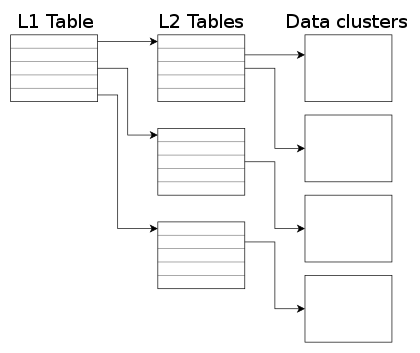
The L2 cache can have a dramatic impact on performance. As an example, here s the number of I/O operations per second that I get with random read requests in a fully populated 20GB disk image:
L2 cache size Average IOPS
1 MB 5100
1,5 MB 7300
2 MB 12700
2,5 MB 63600
If you re using an older version of QEMU you might have trouble getting the most out of the qcow2 cache because of this bug, so either upgrade to at least QEMU 2.3 or apply this patch. (in addition to the L2 cache, QEMU also keeps a refcount cache. This is used for cluster allocation and internal snapshots, but I m not covering it in this post. Please refer to the qcow2 documentation if you want to know more about refcount tables) Understanding how to choose the right cache size In order to choose the cache size we need to know how it relates to the amount of allocated space. The amount of virtual disk that can be mapped by the L2 cache (in bytes) is: disk_size = l2_cache_size * cluster_size / 8 With the default values for cluster_size (64KB) that is disk_size = l2_cache_size * 8192 So in order to have a cache that can cover n GB of disk space with the default cluster size we need l2_cache_size = disk_size_GB * 131072 QEMU has a default L2 cache of 1MB (1048576 bytes) so using the formulas we ve just seen we have 1048576 / 131072 = 8 GB of virtual disk covered by that cache. This means that if the size of your virtual disk is larger than 8 GB you can speed up disk access by increasing the size of the L2 cache. Otherwise you ll be fine with the defaults. How to configure the cache size Cache sizes can be configured using the -drive option in the command-line, or the blockdev-add QMP command. There are three options available, and all of them take bytes: There are two things that need to be taken into account:
  1. Both the L2 and refcount block caches must have a size that is a multiple of the cluster size.
  2. If you only set one of the options above, QEMU will automatically adjust the others so that the L2 cache is 4 times bigger than the refcount cache.
This means that these three options are equivalent: -drive file=hd.qcow2,l2-cache-size=2097152
-drive file=hd.qcow2,refcount-cache-size=524288
-drive file=hd.qcow2,cache-size=2621440
Although I m not covering the refcount cache here, it s worth noting that it s used much less often than the L2 cache, so it s perfectly reasonable to keep it small: -drive file=hd.qcow2,l2-cache-size=4194304,refcount-cache-size=262144 Reducing the memory usage The problem with a large cache size is that it obviously needs more memory. QEMU has a separate L2 cache for each qcow2 file, so if you re using many big images you might need a considerable amount of memory if you want to have a reasonably sized cache for each one. The problem gets worse if you add backing files and snapshots to the mix. Consider this scenario:
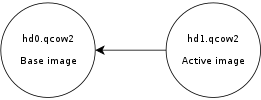
Here, hd0 is a fully populated disk image, and hd1 a freshly created image as a result of a snapshot operation. Reading data from this virtual disk will fill up the L2 cache of hd0, because that s where the actual data is read from. However hd0 itself is read-only, and if you write data to the virtual disk it will go to the active image, hd1, filling up its L2 cache as a result. At some point you ll have in memory cache entries from hd0 that you won t need anymore because all the data from those clusters is now retrieved from hd1. Let s now create a new live snapshot:
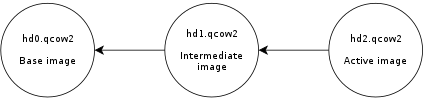
Now we have the same problem again. If we write data to the virtual disk it will go to hd2 and its L2 cache will start to fill up. At some point a significant amount of the data from the virtual disk will be in hd2, however the L2 caches of hd0 and hd1 will be full as a result of the previous operations, even if they re no longer needed. Imagine now a scenario with several virtual disks and a long chain of qcow2 images for each one of them. See the problem? I wanted to improve this a bit so I was working on a new setting that allows the user to reduce the memory usage by cleaning unused cache entries when they are not being used. This new setting is available in QEMU 2.5, and is called cache-clean-interval . It defines an interval (in seconds) after which all cache entries that haven t been accessed are removed from memory. This example removes all unused cache entries every 15 minutes: -drive file=hd.qcow2,cache-clean-interval=900 If unset, the default value for this parameter is 0 and it disables this feature. Further information In this post I only intended to give a brief summary of the qcow2 L2 cache and how to tune it in order to increase the I/O performance, but it is by no means an exhaustive description of the disk format. If you want to know more about the qcow2 format here s a few links: Acknowledgments My work in QEMU is sponsored by Outscale and has been made possible by Igalia and the invaluable help of the QEMU development team.
Enjoy QEMU 2.5!

Steinar H. Gunderson: sRGB weirdness: Doing the right thing causes a worse result

A while back, I wrote about how you should always do image calculations in linear light, not gamma space; since then, Tom Forsythe has come out with a much better metaphor than I could cough up myself, namely that you should look at sRGB value as compressed values, not integers. So naturally, when I needed a deinterlacing filter for Movit, my GPU filter library, I wanted to do it in linear light. (In fact, all pixel processing in Movit is in linear light, except in the cases where it's 100% equivalent to do it on the gamma-encoded values and the conversion can be skipped for speed.) After some deliberations, I made an implementation of Martin Weston's three-field deinterlacing filter, known in ffmpeg as w3fdif. I won't discuss deinterlacing in detail here since it's really hard, but I'll note that w3fdif works by way of applying two filters; low-frequency components are estimated from the current field, and high-frequency from the previous and next fields. (This makes intuitive sense; you cannot get the HF information from the current field since you don't have the lines you need for that, but you can hope it hasn't changed too much.) Aha! A filter. Brilliant, that's exactly when linear light means the most, too. But when implementing it, I found that it sometimes looked weird -- and ffmpeg's implementation (which works directly on the sRGB values, which we already established is wrong) didn't. After lots of tweaking back and forth, I decided to set up a synthetic test to settle this once and for all; I took a static test picture (eliminating everything related to video capture, codecs, frame rates, etc.) and compared to ffmpeg. Of course, deinterlacing is all about movement, but this would do to try to nail things down. So after lots of fruitless debugging, I did a last-ditch: What if I turned off the gamma conversions? This gave me a huge surprise; indeed it looked better! I'll provide some upscaled versions; left is the original image, middle is deinterlaced in sRGB space and right is deinterlaced in linear light: Original picture Deinterlaced in sRGB space Deinterlaced in linear light If that's not dramatic enough for you (trust me, you'll notice it when it's animated as you flicker through the two different fields), here's an even more high-contrast example (same ordering): Original picture Deinterlaced in sRGB space Deinterlaced in linear light I guess it's obvious in retrospect what happens; the HF filter picks up residue from its outer edges, and even if the coefficient is just 0.031 (well, times two; it adds that value from both the previous and next field), 3% the photons of a fully lit pixel (which is what you get when working in linear light) is actually quite a bit, whereas a 3% gray is only pixel value 8 or so, which is barely visible. So what am I to make of this? I'm honestly not sure. Maybe it's somehow related to that these filter values were chosen in 1988, where they were relatively unlikely to do this in linear light (although if they did it with analog circuitry, perhaps they could?) and it was tweaked to look good despite doing the wrong thing. Or maybe I need to change my approach here entirely. It always sucks when your fundamental assumptions are challenged, but I think it shows once again that if you notice something funny in your output, you really ought to investigate, because you never know how deep the rabbit hole goes. :-/

16 December 2015

Thomas Goirand: Django upgrades area always a pain

It s been a few years that I maintain some python-django-* packages, as part of the maintenance of the OpenStack dashboard, Horizon. Currently, this consist of: python-django-appconf, python-django-babel, python-django-bootstrap-form, python-django-compressor, python-django-discover-runner, python-django-formtools, python-django-openstack-auth, python-django-overextends, python-django-pyscss. By far, Django has been one of the biggest pain point. It moves too fast, deprecating its own API from one minor version to the next, at the rate of one minor release every 6 months. As Django 1.9 was uploaded to Sid, a bunch of problems appeared. The Django 1.9 release notes explains it all: a large chunk of its API gets removed (look for Freatures removed in that page). I had to fix a few issues: the last one I fixed was #807346 (in django-openstack-auth), which needed 2 patches. Amusingly, the patch I wrote looks the same as what is currently under review, by one of the upstream authors. Though still have #807355 to fix, and that one is more complex. To fix it, I have to package the latest commit of django-compressor, and: Even after doing all of this, django-compressor still doesn t build (unit test failures) with lots of errors ending with this: File some-path/build-area/python-django-compressor-1.6+2015.12.15.git.66feba0db5/compressor/management/commands/compress.py , line 162, in compress
followlinks=options.get( followlinks , False)):
File /usr/lib/python2.7/os.py , line 278, in walk
names = listdir(top)
TypeError: coercing to Unicode: need string or buffer, Origin found I tried fixing this last one, but failed so far. (if anyone can help, please do ) This was just the upgrade from 1.8 to 1.9, and it doesn t include some of the issues fixed earlier (when Django 1.9 was only in Experimental and easy fixes were written). All this to say: Django upgrades are always painful. As I always say: the Linux kernel is so much more complex than this kind of Python modules, and yet, they don t allow themselves break the userland API. Why most Python developers believe that it s OK to do so? It isn t possible to separate private and public API clearly in python (like it is with the kernel). So it isn t uncommon that library users start using non-public functions, classes or methods. For that, it is understandable that there are breakages (when someone uses something that isn t made to be used by the library users). But that s the only case where it is, and there s no excuse to break known used public API. Django upstream authors, if you read me, please stop breaking the world every 6 months! And no, your deprecation messages are not an excuse. If you did a design mistake in the past, that s no excuse. Too bad you ll have to live with it until the end of times and find a work-around.

Benjamin Mako Hill: TheSetup ChangeLog

Several years ago, I did a long interview with TheSetup a fantastic website that posts of interviews with nerdy people that ask the same four questions:
  1. Who are you, and what do you do?
  2. What hardware are you using?
  3. And what software?
  4. What would be your dream setup?
Because I have a very carefully considered but admittedly quite idiosyncratic setup, I spent a lot of time preparing my answers. Many people have told me that they found my write-up useful. I recently spoke with several students who said it had been assigned in one of their classes! Of course, my setup has changed since 2012. Although the vast majority is still the same, there is a growing list of modifications and additions. To address this, I ve been keeping a changelog on my wiki where I detail every major change and addition I ve made to the setup that I described in the original interview.

15 December 2015

Chris Lamb: Peake Nationalism

Timothy Peake boarded the International Space Station a few hours ago becoming the United Kingdom's first official astronaut. It has become headline news, dominating the day's news cycle. But whilst Peake left our pale blue dot with only the humble honorific "Mister", he has subsequently been awarded the dubious appellation of "British Astronaut". Now, I'm no open-borders pan-nationalist and nor do I in any wish to detract or denigrate Peake's accomplishments indeed, it is only out of a genuine respect of "our Tim's" achievements that I pen this in the first place but are we still clinging to the idea that an extraordinary effort by a co-member of our species requires a nationalistic qualifier? How much do we really have in common with our "fellow countrymen"? This is, after all, the International Space Station, to which Peake was elevated from Kazakhstan on the back of a Russian rocket, in order that he may peacefully collaborate with an American, a Ukrainian, etc. I encountered the rebuttal that support of this nature is inspirational and incentive to others, but is it really motivating to know that if you toil to achieve greatness in this life then your accomplishments will be cheaply co-opted by mediocrities who only share the same colour passport as you? In this sense, isn't national pride really a form of national insecurity? A "Briton" in space: if space travel can teach us anything, it's that broadcasting the specific patch of ground you were born in is an outdated, tribalistic contrivance and should be assigned to the dustbin of history.

Thomas Goirand: OpenStack: Mitaka beta 1 packages available, Liberty uploaded to Jessie Backports

OpenStack Mitaka beta 1 Debian packages available I didn t find the time to announce it until today, though I have finished last Friday to package Mitaka Beta 1. It is available, as usual, on the Jenkins server Debian repository: deb http://mitaka-jessie.pkgs.mirantis.com/debian jessie-mitaka-backports main
deb-src http://mitaka-jessie.pkgs.mirantis.com/debian jessie-mitaka-backports main
deb http://mitaka-jessie.pkgs.mirantis.com/debian jessie-mitaka-backports-nochange main
deb-src http://mitaka-jessie.pkgs.mirantis.com/debian jessie-mitaka-backports-nochange main Not all of the updated packages avialable above has been uploaded to Debian Experimental, mostly those needing to pass the FTP master NEW queue did. I will upload the rest as I find enough time to do so, which unfortunately may not happen before Mitaka b2 (which will be in the middle of January). OpenStack Liberty uploaded to jessie-backports Also, as python-repoze.who 2.x finally could migrate to Debian testing (after filed to be removed dependencies got removed by the FTP masters), python-pysaml2 3.0, and then Keystone also did. So this week-end, all of OpenStack Liberty reached testing. So today, I could finally upload all of OpenStack liberty in the official jessie-backports repository. This is 165 packages that I uploaded, out of which 135 are going through the backports NEW queue. I m sorry to give that much work to the FTP masters, but most OpenStack users do want to use the latest release of OpenStack on top of the latest stable distributions. So this upload really is what OpenStack Debian user will prefer (until we have PPA^Wbikesheds for Debian).

Vasudev Kamath: Persisting resource control options for systemd-nspawn containers

In my previous post on systemd-nspawn I mentioned, I was unclear on how to persist resource control options for a container. Today I accidentally discovered how can the property be persisted across boot without modifying service file or writing custom service file for container. It is done using systemctl set-property To set CPUAccounting and CPUShares for a container we need to run following command.
systemctl set-property systemd-nspawn@container.service  CPUACCounting=1 CPUShares=200
This actually persists these settings at location, /etc/systemd/systemd-nspawn@container.service.d/ folder. So in our case there will be 2 files created under above location by name 50-CPUAccounting.conf and 50-CPUShares.conf with following contents.
# 50-CPUAccounting.conf
[Service]
CPUAccounting=yes
# 50-CPUShares.conf
[Service]
CPUShares=200
Today when I discovered this folder and saw the file contents, I became curious and started to wonder who created this folder. The look at systemctl man page made showed me this.
set-property NAME ASSIGNMENT...

Set the specified unit properties at runtime where this is supported. This allows changing configuration parameter properties such as resource control settings at runtime. Not all properties may be changed at runtime, but many resource control settings (primarily those in systemd.resource-control(5)) may. The changes are applied instantly, and stored on disk for future boots, unless --runtime is passed, in which case the settings only apply until the next reboot. The syntax of the property assignment follows closely the syntax of assignments in unit files. Example: systemctl set-property foobar.service CPUShares=777

Note that this command allows changing multiple properties at the same time, which is preferable over setting them individually. Like unit file configuration settings, assigning the empty list to list parameters will reset the list.

I did remember doing this for my container and hence it became clear these files are actually written by systemctl set-property. In case you don't want to persist the properties across boot you can simply pass --runtime switch. Basically this is not just for container, resource control can be thus applied to any running service on the system. This is actually cool.

Zlatan Todori : Just read LWN or make your news

So it has been always a pain but lately going and (yes, my mistake) reading Phoronix news is just horrible (the best word I could choose, other were much more nasty). So instead writing thousand of words I just choose to make a picture. moronix I think it's pretty much clear what it is. Instead of that people should read LWN or I should start making news because it is not hard to be waaaay much better then Phoronix guy but also news that I didn't write I will not just link to it (many times not even that) and then say how I wrote article! You know, it is fine not to understand everything and ask people questions.

Sven Hoexter: Some helpful commands from the CentOS yum and rpm world

Today I learned from my coworkers about a few helpful sub commands of yum and some other things from the rpm world. Just jotting them down here so I don't forget about them. Oh and why did we've to do it? Well CentOS 6 got a grep update from 2.6 to 2.20. That upgrade lost the --mmap option and some very old stuff started to fall apart because of the now unknown option. Update: There are some interesting issues related to this update in the RedHat Bugzilla. #1287074 #1256756 I added #1291714 just for the sake of completeness.
# yum history
ID       Login user                 Date and time      Action(s)        Altered
-------------------------------------------------------------------------------
124   xxx                        2015-12-15 11:51   Downgrade           1
123   yyy                        2015-12-15 11:02   E, O, U           244 EE
122   zzz                        2015-12-15 10:57   I, O, U           255 **
Provides an overview of the last actions done with yum. On CentOS 7 (this one is from CentOS 6) the output seems to have changed slighty and it provides the commandline instead of the username.
# yum list installed   grep epel
bash-completion.noarch             1:1.3-7.el6                      @epel-Mirror
eventlog.x86_64                    0.2.13-1.el6                     @epel-Mirror
libnet.x86_64                      1.1.6-7.el6                      @epel-Mirror
pylint.noarch                      1.3.1-1.el6                      @epel-Mirror
python-astroid.noarch              1.2.1-2.el6                      @epel-Mirror
python-logilab-common.noarch       0.62.1-2.el6                     @epel-Mirror
python-unittest2.noarch            0.5.1-3.el6                      @epel-Mirror
Helps you to find out from which repository you installed which package.
# repoquery -i grep
Name        : grep
Version     : 2.20
Release     : 3.el6_7.1
Architecture: x86_64
Size        : 1197808
Packager    : CentOS BuildSystem <http://bugs.centos.org>
Group       : Applications/Text
URL         : http://www.gnu.org/software/grep/
Repository  : update
Summary     : Pattern matching utilities
Source      : grep-2.20-3.el6_7.1.src.rpm
Description : [ ... ]
Kind of the rpm -q ... stuff on a repository level instead of the local rpm database. Update: T.P. provided a small shell snippet to show updates. Thanks.

Bartosz Fe&#324;ski: Once again two full-time days to work on Debian

Thanks to my employer I had opportunity to spent two days just working on my packages.
I know it s kinda sad that I have to wait for these two special days to do my (volunteer but still) job. Anyway. I was able to dig through all changes in our policy and standards and update some of my packages. Changes include: potrace (1.13-1) unstable; urgency=low * The Akamai Technologies paid volunteer days release.
* New upstream version.
* Bumped Standards-Version (no changes needed) Bartosz Fenski Thu, 10 Dec 2015 10:37:54 +0100 ipcalc (0.41-5) unstable; urgency=low * The Akamai Technologies paid volunteer days release.
* Updating to the newest standards of basically everything.
Very cool experience
* CGI script is now optional and put into examples (Closes: #763032) Bartosz Fenski Thu, 10 Dec 2015 13:51:12 +0100 dibbler (1.0.1-1) unstable; urgency=low * The Akamai Technologies paid volunteer days release.
* New upstream release (Closes: #780232, #795493)
fixes segfaults in TClntCfgMgr::validateConfig (Closes: #732697)
* Includes debugging packages (Closes: #732707)
* Bumped Standards-Version (no changes needed) Bartosz Fenski Thu, 10 Dec 2015 13:33:56 +0100 calcurse (4.0.0-1) unstable; urgency=low * The Akamai Technologies paid volunteer days release.
* New upstream version.
* Properly handles apts file with new line sign (Closes: #749282)
* Explicitly uses autotools-dev dependency.
* Bumped Standards-Version. (no changes needed) Bartosz Fenski Mon, 14 Dec 2015 10:55:30 +0100 libstatgrab (0.91-1) unstable; urgency=low * The Akamai Technologies paid volunteer days release.
* New upstream version (Closes: #804480)
* ACK NMUs, thanks Manuel!
* Bumped Standards-Version (no changes needed) Bartosz Fenski Mon, 14 Dec 2015 14:27:37 +0100 httpie (0.9.2-1) unstable; urgency=low * The Akamai Technologies paid volunteer days release.
* ACK previous NMU, thanks a lot Vincent!
* Bumped required python-requests version (Closes: #802540) Bartosz Fenski Mon, 14 Dec 2015 15:39:37 +0100 These uploads fixed 7 bugs and 9 lintian warnings/errors. Except that I reviewed mydumper package update and I uploaded it for Mateusz Kijowski who tries to became NM. Thanks Akamai!

Michal &#268;iha&#345;: Weekly phpMyAdmin contributions

It has been already one week since last report and here comes next one. This week was half focused on fixing issues with Docker container for phpMyAdmin and on code cleanups. The Docker container got support for more options, making it better suited for various use cases. I'm still thinking whether using PHP's built in server here is a good idea or we should switch to something like nginx + PHP FPM, what would make the container bigger, but it would perform better. On the code cleanup and issues side, I started to work on two issues 11741 and 11731, which both pointed me to quite some code which could be removed or improved. Many of that was to support older PHP versions, which we no longer support. Anyway the work here is still in progress and both issues will take some time to resolve.

Filed under: English phpMyAdmin 0 comments

Next.

Previous.