Search Results: "cas"

27 May 2011

Lucas Nussbaum: Changes to Ruby in Debian (and Ubuntu)

(this is a copy of an mail sent to ruby-core@ and ruby-talk@) Since the beginning of 2011, the Debian Ruby team has been working on several big changes. Those changes all are available in Debian unstable, some of them are also available in Debian testing, and they should all be available in the next Debian and Ubuntu releases. I think that it addresses most of the reasonable concerns about Ruby in Debian. Using alternatives to switch between Ruby implementations The alternatives system is now used to manage the ruby symlink and the other related symlinks, making it easy to switch between Ruby implementations (only Ruby 1.8 and 1.9.X at the moment) (see this mail for details). The default choice for Ruby is still 1.8, but this change will make it easy for us to make a switch to 1.9.X by default (likely by the release of Debian wheezy). Installing gems executables to /usr/local/bin Rubygems (both as a standalone package, and as shipped with Ruby 1.9.X) now install executables to /usr/local/bin. (The other files still get installed under /var, see this mail) Enabling gem update system gem update system has been re-enabled. Since upgrading rubygems to a version that may not have been properly tested with the rest of the Debian system may cause issues in the user s system, there s a big warning about that. The user can confirm and upgrade rubygems anyway by defining an environment variable. New gem2deb packaging helper There s a new packaging helper, named gem2deb, that makes it very easy to generate Debian source packages from Rubygems. We are in the process of migrating all ruby libraries packaged in Debian to that new helper. It will take some time, though (help is welcomed). Transition status: http://pkg-ruby-extras.alioth.debian.org/wheezy/ One big benefit of the switch to gem2deb for the Ruby community is that, in the process, we are enabling test suites at build time for each package and each Ruby implementation. This should make it easy to detect regressions in new interpreter versions. Ruby 1.9.3 We will switch to Ruby 1.9.3 ASAP (probably when it is branched off trunk, with a package first in Debian experimental). Since the Ruby compatibility version issue is likely to stay around, we will re-evaluate how we are dealing with it (to avoid the ruby1.9.1 package <=> ruby -v = 1.9.2 problem that confuses many users). This is likely by switching the package name to ruby1.9.3 (keep a ruby1.9.1 package for compatibility). The package containing the shared library will stay libruby1.9.1. Links

26 May 2011

Tanguy Ortolo: PGP signatures with trust and verification level

Identity checks and trust Saint Peter's key, detail from a stone statue The OpenPGP web of trust is composed of keys linked to each other by two things: With these two pieces of information, GnuPG is able to determine whether or not the key of someone you never met can trusted to belong to its alleged owner. Signatures Signing a key is usually a binary action: either you sign it or you do not sign it. Thus your signature on a key will give other people a rough identity check information and no trust information at all. In fact, the OpenPGP standard does allow to publish precise identity check and trust information on signatures, but unfortunately this is now enabled with GnuPG by default. These features are called certification level and trust signatures.Certification level To indicate how careful you verified someone's identity, run GnuPG with the option --ask-cert-level, or add ask-cert-level to your configuration file .gnupg/gpg.conf. When you make a signature with this option, GnuPG will ask you how carefully you verified the key owner's identity. According to the manpage gpg(1), the available levels are: Trust level You can also indicate how much you trust someone, sign his key with the command tsign instead of sign. GnuPG will then ask you three questions:
  1. how far you trust him to verify other people's keys: marginally or fully (I personally only fully trust people that were trained or challenged by myself or by people I trust even more)
  2. how far you allow him to make trust signatures on your behalf: usually answer 1; answering 3 would allow him to issue trust signature with level 2, thus allowing other people to issue trust signatures on your behalf (this features exists to implement pyramidal certification systems, but can be interesting for signing your own keys when you have several);
  3. if you wish to restrict this signature to a domain: I have no idea of what this means so I give none.
Conclusion Although certification level and trust signatures are not very widely used, thanks to GnuPG's default settings, it allows to publish more information about your signatures, adding value to the web of trust at no cost, which I believe is a good think. Thus I think it is worth doing it. If you want to use these features with the caff wrapper, remember that it has its own GnuPG configuration .caff/gnupghome/gpg.conf. In addition it does not implement trust signatures natively: to use them, you have to abort the automatic signing, which gives you a GnuPG prompt, where you are then able to tsign, then exit to return to caff that will consider your trust signatures. Credits

25 May 2011

Russell Coker: Links May 2011

John W. Dean wrote in insightful series of three articles for Findlaw about Authoritarian Conservatives [1]. In summary there are Authoritarian Followers who follow their leader blindly and Authoritarian Leaders who do whatever it takes to gain and maintain power. The Authoritarian mindset lends itself towards right-wing politics. Mick Ebeling gave an inspiring TED talk about his work developing a system to produce art that is controlled by eye movements [2]. The development work was started to support the quadriplegic graffiti artist TEMPT1. Mick s most noteworthy point is that all the hardware design and software are free so anyone can implement it without asking an insurance company or hospital (this is one of the few occasions when a TED speaker has received a standing ovation during a talk). The Eyewriter.org site has the designs and source which is licensed under the GPL [3]. Morgan Spurlock (who is famous for Supersize Me ) gave an amusing TED talk titled The Greatest TED Talk Ever Sold [4]. He provides some interesting information about the brand sponsorship process and his new movie The Greatest Movie Ever Sold . Ralph Langner gave an interesting TED talk about reverse-engineering the Stuxnet worm and discovering that it was targetted at the Iranian nuclear program [5]. The fact that the Stuxnet environment could be turned to other uses such as disrupting power plants is a great concern, particularly as it has special code to prevent automatic safety systems from activating. Angela Belcher gave an interesting TED talk about using nature to grow batteries [6]. She is evolving and engineering viruses to manufacture parts of batteries and assemble them, the aim is to scale up the process to manufacture batteries for the Prius and other large devices at room temperature with no toxic materials. She is also working on biological methods of splitting water into hydrogen and oxygen which has the obvious potential for fuel-cell power and also solar PV cells. As an aside she mentions giving a copy of the Periodic Table to Barack Obama and he told her that he will look at it periodically . Bruce Schnier gave a good overview of the issues related to human perceptions of security in his TED talk about The Security Mirage [7]. There isn t much new in that for people who have been doing computer work but it s good to have an overview of lots of issues. TED has an interesting interview with Gerry Douglas about his work developing touch-screen computer systems for processing medical data in Malawi [8]. This is worth reading by everyone who is involved in software design, many of the things that he has done go against traditional design methods. Mike Matas gave an interesting demo at TED of the first proper digital book [9]. The book is by Al Gore and is run on the iPad/iPhone platform (hopefully they will have an Android version soon). His company is in the business of licensing software for creating digital books. The demonstration featured a mixture of pictures, video, audio, and maps with the pinch interface to move them around. Dr Sommers of Tufts University wrote an interesting post for Psychology Today titled Why it s Never About Race [10]. It seems that there are lots of patterns of people being treated differently on the basis of race but for every specific case no-one wants to believe that racial bias was involved. The Register has an amusing article about what might have happened if Kate had left Prince William at the altar [11]. Fiorenzo Omenetto gave an interesting TED talk about synthetic silk [12]. He is working on developing artificial fibers and solids based on the same proteins as silk which can be used for storing information (DVDs and holograms), medical implants (which can be re-absorbed into the body and which don t trigger an immune response), and cups among other things. Maybe my next tie will have a no pupae were harmed in the production notice. ;) The CDC has released a guide to preparing for a Zombie apocalypse [13], while it s unlikely that Zombies will attack, the same suggestions will help people prepare for the other medical emergencies that involve the CDC. Salon has an interesting article by Glenn Greenwald who interviewed Benjamin Ferencz about aggressive warfare [14]. Benjamin was a prosecutor for war crimes at Nuremberg after WW2 and compares the US actions since 9-11 with what was deemed to be illegal by the standards of WW2. Eli Pariser gave an interesting TED talk about Online Filter Bubbles [15]. He claims that services such as Facebook and Google should give more of a mixture of results rather than targetting for what people want. The problem with this idea is that presenting links that someone doesn t want to click doesn t do any good. It s not as if the filter bubble effect relies on modern media or can be easily solved. Terry Moore gave a TED talk about how to tie shoelaces [16]. Basically he advocates using a doubly-slipped Reef Knot instead of a doubly-slipped Granny Knot. Now I just need to figure out how to tie a doubly-slipped Reef Knot quickly and reliably. Terry uses this as a mathaphor for other ways in which one might habitually do something in a non-optimal way.

24 May 2011

Russell Coker: Are Assholes Essential to a Free Software Project?

What do Assholes do? Rusty just wrote a post titled If you didn t run code written by assholes, your machine wouldn t boot [1] about some of the anti-social tendencies demonstrated by programmers, including some that are implied to be fairly important. His post seems to imply that there are really great programmers who are anti-social and that we should just put up with it because of their great code. One of the problems with his post is that he doesn t define asshole . Holocaust deniers and all other Nazi supporters seem to clearly by assholes by any definition. People who have silly ideas about medicine and tell others seem to be merely misguided (although my dictionary gives stupid or irritating or ridiculous in the definition of asshole so technically they can meet the criteria). In the comments Rusty states that nuttiness is relative . While that is correct it doesn t seem to have much bearing on whether someone is an asshole. For example I know some very nice people who are utterly convinced by creationism. Is Anyone Essential to Free Software? Most projects have one person or several people in leadership positions, usually there seems to be a combination of project management and lead-programmer positions. Such people are obviously quite important to a project. But we have seen examples of people dying, being employed by Microsoft, retiring, relicensing the source in a bad way, and just losing interest without the project ceasing. It seems clear that in most cases when a project which has a significant amount of use has significant bugs and no maintainer then someone will step in. The cases where no-one takes over the project are often resolved by someone creating a competing project. If no-one takes over an abandoned Free Software project then it s a strong indication that the project wasn t particularly important anyway. I have no doubt that if any bug or missing feature made Linux systems stop booting then someone would fix it quite quickly. In a more general sense it seems that every time someone takes a position in a project that is of wide interest they are displacing someone else who might have done the job. When you volunteer to do significant work for a project you may be displacing someone who is more skillful than you this isn t necessarily a bad thing as there are plenty of other projects to work on, some of which require more skill. Growing More Programmers It seems to me that a large part of becoming a great programmer is facing great challenges. People who could be described as optimistic or arrogant will tend to take on more challenging tasks and therefore learn more. I m sure that there are a lot of people out there who have the potential to be great programmers apart from not taking on the challenging work, this seems to be an unfortunate waste of talent. Given a large enough population if someone leaves a senior position there should be someone else who can obtain the skills needed to take over. One advantage of this for Free Software development is that even if the best person to take on the challenge isn t living in the most convenient continent that won t be an obstacle, while with proprietary software development projects the teams are small and it s common that no-one else is capable of stepping up to a lead position. Another advantage is that when the lead developer leaves there are generally many candidates to replace them, all of whom can start work and be judged on the work that they do. I think that the best claims that can be made regarding essential people are not in regard to technical skill alone but to a combination of technical and people skills. Getting a group of programmers to work together is really hard but it s something that needs to be done for any significant project. Also the larger projects tend not to stand alone, being able to get changes included in other projects requires some skill. Ben Collins-Sussman and Brian Fitzpatrick gave an insightful talk at Google IO 2008 titled How to Protect Your Open Source Project From Poisonous People [2]. The first half of their talk is mostly about people who are misguided or difficult rather than what most people would consider poisonous and the second half is more about people who are actively poisonous and need to be removed. They advocate a community based on Politeness, Respect, Trust, and Humility. They describe in detail how the methods they advocate result in the members of their community being more productive, it seems obvious that those principles will lead to better career growth for people within the community and more friendly people wanting to join. When is being an Asshole OK? I once worked for a company that apparently had a team consisting solely of assholes. Apparently one asshole got promoted to management and after some internal transfers they ended up with all the assholes in the company on one team. I guess that when someone has negative interactions with everyone they won t notice the difference if they are put in a team where everyone is difficult. For a corporate environment that lacks a no jerks hiring policy this is probably a good way of improving productivity overall. I am not aware of any significant Free Software project that was comprised of mostly jerks although I have seen a few with dysfunctional environments that encourage the worst behavior from their members. The smaller Free Software projects have less need for people who can relate to other people. There are many useful Free Software projects which have only one developer, in most cases anyone can take the source code and use it without dealing with the author. But even for a single-developer project an asshole can cause some serious problems. One example I know of concerns a developer who had unclear licenses and started making legal threats in response to a request for a clear license. Another example is of a developer who released code that was designed to not work when one particular user compiled it and redistributed the binaries. Both of them caused some significant amounts of time to be wasted by people who were unfortunate enough to develop systems that interacted with the code in question, and even more time was wasted when some misguided people defended them in the inevitable flame-wars. Even for a project with only one developer it s still better for everyone if that developer isn t an asshole. One comment I ve seen related to this issue suggesting that some types of asshole behavior shouldn t be a problem an example that was cited is a colleague who cheats on a romantic partner. Jeremy Clyman (who is currently doing a Ph.D in Psychology) has written an interesting article about this for Psychology Today [3]. He reviews the movie The Dilemma which deals with someone catching their colleague s wife cheating. Jeremy analyses the psychological issues involved and how they can (among other things) impact the ability for such people to work. I once worked in an office where two married employees were very open about having an affair and we were all apparently expected to lie on their behalf if necessary, it really affected the quality of the working environment. Extreme Assholes There are lots of people involved in Free Software development who are difficult and many who are to some extent assholes. But some of them take being an asshole to the extreme, such as Holocaust deniers (an example which Rusty used). In the comments on his post the Westboro Baptist Church is also mentioned. It is possible to entirely disagree with someone on a contentious issue such as abortion but still be able to get along with them. But when someone supports a hate-based organisation such as the WBC or supports Nazis in any way then there will be many people who just can t tolerate them and no-one should be expected to tolerate such people. I have seen two instances where Free Software developers advocated pro-Nazi positions (one had an archive of neo-Nazi propaganda and the other claimed that Nazis were not responsible for the Holocaust). Neither of the pro-Nazi programmers was evicted for defending Nazis, but both of them ended up leaving the community in adverse ways after causing other damage in the mean time. I don t think it takes any great ability to predict the future to determine that someone who defends Nazis will eventually end up doing something that requires expulsion and drive away users and developers in the mean-time. There is no possibility that someone can support the Nazi or WBC ideology only when not associated with your project, it will affect all aspects of their life. When a Holocaust denier is allowed to be a member of a community it also sends out a message that members of the groups which were persecuted by Nazis aren t particularly welcome in the community. Helping Minor Assholes There are a lot of people who don t have malevolent aims but who unintentionally cause some difficulty (it seems that the truly malicious are a tiny minority). I don t think that excusing the bad things that they do on the basis of writing good code helps them in the long term. Many of the suggestions that Ben Collins-Sussman and Brian Fitzpatrick make seem likely to help people who don t want to be assholes and direct them towards positive involvement in the community. One trend that seems apparent is the non-linear response to certain types of bad behavior. There is often little difference in severity between something that gets almost no attention and something that results in a large and extremely hostile reaction. If someone persists in acting like an asshole for long enough it seems to be inevitable that they will eventually exceed some threshold for what is tolerated and get a very significant negative response. It would be good if things didn t need to get to that stage. I think that the most unfortunate aspect of Rusty s blog post is that most people will probably interpret it as encouragement to write better code as a way of getting a free pass for being an asshole. I know that this isn t what Rusty intended, but most people on the Internet don t know Rusty as well as I do. Conclusion Ben Collins-Sussman and Brian Fitzpatrick seem to have some of the best ideas for how to deal with these issues when you control a project, but most of us aren t in that position. Everyone can advocate better behavior. Extreme assholes need to be removed quickly and without a great debate about their contributions, freedom of speech, or other issues. Since considering this issue I ve been wondering about when one should avoid the lesser assholes and asshole-positive environments. People tend to adapt to their environment, so if you associate with assholes a lot then there s a good chance you will start to become like them. Is

23 May 2011

Ben Hutchings: Testing new hardware support for Debian 6.0.2

The Debian kernel team regularly backports driver updates to the Linux kernel in stable releases to add support for new hardware, and I've prepared several updates intended for point release 6.0.2. Since the kernel team does not have a large collection of hardware on which to test driver changes, we would appreciate test reports from users. It is important to test not just that new devices are supported properly, but that there are no regressions in support for older devices. Changes I have updated these drivers to the versions found in Linux 2.6.38, modulo driver API changes: I have also cherry-picked some small changes: There are more drivers that I think should be added or updated (see #624794) but they will probably have to wait for release 6.0.3. Packages The source package and binary packages for i386 and amd64 are available on people.debian.org. They can be verified by the checksums in the signed changes file. The current packages are version 2.6.32-35~test1, but there may be further test versions before an official stable update. How to test For network drivers, I suggest the following regression tests:
  1. If the driver tries to load firmware (only required for some chips), does this work once the firmware file(s) are installed?
  2. Can you receive and transmit VLAN-tagged frames after creating a VLAN interface?
  3. Does the interface work after suspend and resume?
  4. Does the interface work after removing the cable for 10 seconds and reinserting it?
  5. Does multicast configuration work? (IPv6 autoconfiguration or mDNS will cover this.)
  6. Can the interface send and receive TCP/IP across a LAN at the same speed, before and after these changes? (Use e.g. netperf to test this, but don't forget to remove the netperf package after use.)
  7. Are any warnings or errors logged by the kernel during the preceding tests?
For storage drivers, unfortunately I don't have a good idea of what tests would be suitable. In any case, please don't test on disks storing valuable data! Please send test reports to the bug reports linked above, stating the driver name, the PCI ID for the device you tested (from lspci -n) and any other device identification that the kernel log (for example, r8169 logs the 'XID' of the device).

David Welton: Summary: Built To Sell - Creating A Business That Can Thrive Without You

<iframe frameborder="0" marginheight="0" marginwidth="0" scrolling="no" src="http://rcm.amazon.com/e/cm?lt1=_blank&amp;bc1=000000&amp;IS2=1&amp;bg1=FFFFFF&amp;fc1=000000&amp;lc1=0000FF&amp;t=dedasys-20&amp;o=1&amp;p=8&amp;l=as4&amp;m=amazon&amp;f=ifr&amp;ref=ss_til&amp;asins=B004IYISQW" style="width: 120px; height: 240px; float: left; margin-right: 20px; margin-bottom: 8px;"></iframe> Many small business owners start a business with the idea of greater freedom in mind, yet end up chaining themselves to something that takes even more dedication than a regular job. This book discusses the dos and don'ts that business owners need to be conscious of in order to create a business that is independent of its owner(s) in order to be able to sell it. It does so in an easy to read format that's a bit of a gimmick - a fictional story illustrating the authors points. Like most business books, the core idea isn't that hard to explain. the book even includes a handy summary of the main points, which I'll paraphrase here:
  1. Focus on one thing you can do really well; even a service business can be 'productized' by creating a standard service that is the focus of the business.
  2. If your business revolves around one or two key clients, the risk inherent in that approach will lower the value or scare of potential buyers completely.
  3. Put a process in place, from sales through production.
  4. Don't "be" your company. If the company is all about you, what's a potential buyer really getting if you sell it and leave?
  5. By focusing on products, you can charge up front rather than having poor cash flow. If you pay people to work on a project for 3 months, and don't get paid for another month, you are, by the end, out 4 months salary while waiting for the payment.
  6. Say no to projects outside the scope of your business. Only by focusing narrowly can you really excel at what you do.
  7. Spend time doing some research and calculations to estimate your potential market size; buyers will want to know this.
  8. If you have a business that has sales people, hire at least two so that they'll compete with one another.
  9. You want people who are good at selling products, not services; the latter will want to tweak your offering for each and every client, rather than selling it as-is and trying to find how it can meet the customer's needs that way, which is the best strategy for a product.
  10. If you were previously running a more 'generic' services company, and you switch to a more productized approach, be prepared to take a hit the year when you switch.
  11. Potential acquirers will want to see at least a couple of years of steady growth with the new model after making the switch.
  12. If you grow, you'll need a management team that can work without you. Put an incentive system into place to reward their loyalty and results.
  13. When looking for an adviser to sell your company, aim for one where you will not be the largest or smallest client.
  14. If your adviser really only has one company in mind to sell yours to, they may be trying to sell you off cheap as a favor.
  15. Consider how much you could grow with the resources of a buyer. Think big, and show them what kind of growth could happen with the right backing.
  16. Think and speak like a product business with 'customers' rather than 'clients'.
  17. Stock options are more complex than simpler options like bonuses that are paid out over a period of time, in terms of ways to give people an incentive to stay.
All in all, it was an enjoyable read, with solid points. Even if you have no intention of selling your business, thinking of the business itself as a sort of "product" that is not dependent on you to work correctly is a sensible way to go about creating and growing a business. He's certainly not, nor claims to be the first one to discuss this idea, and indeed references the well known E-Myth Revisited which focuses less on selling a business, and more on how to go about extricating you and your skills from the business.

Gregor Herrmann: RC bugs 2011/11 - 2011/20

long time no post about my RC bug fixing activities. & indeed, I haven't been very active during the last weeks. here's a quick update; it includes two NMUs done for the perl 5.12 transition, the rest is just "normal" maintainance work (interesting to see how much stuff can break behind our backs ...). I still hope to find some more time in the future to look at other RC bugs; after all we want to have a not-too-long freeze for wheezy, don't we?

John Goerzen: Baptism

Today I was baptized and joined the Mennonite Church. I imagine this might surprise some of you for various reasons, so let me provide a bit of background. I ve had a lot of people, both in person and in comments responding to my blog post, express surprise with statements I have made. The view of Christianity that many people have is of a group that devalues scientific inquiry and places a lot of emphasis on things like opposition to gay marriage, evolution, and abortion, and enjoys political leaders that say bring it on. While I know some Christians that fall into that mold, there are quite a few that don t as well. Some churches, such as the one we attend, have a surprisingly diverse set of people and yet still function and get along well. Today they accepted me with joy. Nobody was concerned that I started my statement with a reference to ancient Greek philosophy, wound up suggesting that the church ought to make sure to make illegal immigrants, gays and lesbians, and prostitutes feel welcome, and embraced both religion and scientific inquiry, feeling them complimentary. Mennonites practice adult baptism rather than infant baptism. A traditional age for people to be baptized is during high school, though emphasis is placed more on the individual than their age, so it s not unheard-of for someone to do so a bit later in life as I have. Part of the baptism involves the candidate sharing their faith story. These are typically intensely personal, widely varied, heartfelt, and honest. Some people s stories involve struggles with depression, physical disabilities, or the place of religion in their lives, while others reflect little struggle at all. Mine involves letting go of a lot of things, and also seeing some things, such as serious intellectual inquiry or existential questions about God (such as is there a god? ), as a positive rather than a negative feature of a Christian life. But it also involves a recognition and deep respect for those that don t approach things in this way. Though given publicly in a church, baptism testimonies are rarely published or shared more broadly. But I m going to share mine here. I have edited it only very lightly to remove a few local references that wouldn t make sense out of the context of this community. This was delivered in front of a rather different audience than is likely to be reading this post, so if you have questions, do feel free to ask in the comments. But before I begin, I just have to pass along a joke a friend told me: John, you picked quite a day for your baptism the day after the rapture. Baptism Testimony John Goerzen May 22, 2011 Those of you that know me well will probably not be surprised that I will begin my Christian baptism testimony with a story about an ancient Greek philosopher, and also touch on the philosophical nature of truth. These are key parts of my story. As legend goes, Socrates famously said, I know that I know nothing in other words, he believed that nothing could be known with absolute certainty. The Greek Oracle thought to be infallibly wise said that Socrates, the man that thought he knew nothing, was the wisest man in all Athens. An interesting paradox, and one that sheds light on my own religious story. My story involves coming to grips with the understanding that I know very little, that no person can ultimately know much about God, and finding a way to make peace with that situation. Growing up in this community, I thought I knew some things about faith and Christianity. At a certain age, it all seemed so simple. We took the Bible to be literally true. We marveled in Sunday School at how the apostles could sometimes appear so blind. And, modeled both implicitly and explicitly, was this notion: the stronger our faith, the fewer inner questions or doubt we have about the nature of God, the literal accuracy of the entire Bible, or our relationship to God. Those I perceived held up as examples never seemed to question any of these things, and showed outwardly, at least complete certainty about them. Moreover, holding certain intellectual beliefs was key to Christian identity, and even more importantly, to eternal life. This model has quite obviously worked well for many people for many years. The good that has happened, and continues to happen, from people that have that kind of certainty is manifest all around us. And yet, it didn t seem to work out for me. I m not the kind of person that accepts a lot of things at face value. It is helpful to be able to examine and challenge ideas and even more helpful to have other people challenge my ideas. From well before I was in high school, I was questioning some things about the Bible, God, and religion in general. My thoughts ranged from the impact of evolution on religion to the apparently vengeful God of the Old Testament to the very existence of God. In the Christian context, I perceived having these questions as a personal failing, something that I ought to repress. The more I tried to repress them, the more troublesome they became. Why, for instance, should a loving merciful God decide whether to let us into heaven based on whether we hold certain intellectual beliefs? In high school, I participated in the catechism class here at this church, and was frustrated because it didn t tackle deeper meanings or the kinds of questions I had. I wasn t yet able to articulate all my thoughts and questions very well, and I probably had an overactive case of teenage cynicism. As a result, I didn t get baptized like most others my age did. As I learned more about the early history of Judaism and Christianity, I only found more reasons to question the model of faith I thought I had received the one in which Biblical literalism and a divine guarantee of sorts was key. More recently, I gradually became aware that the model of Christianity I had in mind was one of many views. Christians, Mennonites, and even this church are incredibly diverse groups, and in retrospect, I am surprised that it took me so long to realize this. Three major steps led me to baptism. The first step was the realization that, whatever our understanding of the literal accuracy of the Bible, literal truth is often inferior to metaphorical truth. As an example, many of us have read the works of Shakespeare. They are fictional, but the reason they have been revered for so many centuries is that they are true. They teach us things about ourselves and our world in a way that no history book can. By placing such an emphasis on literal truth in the Bible, I was missing out on the message right there for me. By concerning myself with creationism or evolution, I missed out on thinking about what the story in Genesis meant for the Jews, and what it could mean for me. Evolution ceased to be a threat to religion; it became simply a tool for learning about a different sort of truth than we get from religion. N. T. Wright mentions an incident that illustrates this point. A woman attending a religious conference asked the speaker, a prominent theologian, Is it true that the serpent in Genesis actually spoke like you and I speak? The theologian answered, It doesn t matter whether the serpent could speak. What matters is what the serpent said. The second step I took towards being baptized was realizing where the real core of Christianity lies. It s not some debate about Genesis, but rather the death to one s old self, and the rebirth and continual remaking of oneself in the example of Jesus. Given that, a lot of questions seem unimportant or even irrelevant. Good can be expressed in many ways, and if one person achieves a remarkably Christian life via a literal understanding of the Bible, and another via a more metaphorical reading, then it is my place only to affirm both and say that they both got it right. If we say that the task of remaking ourselves is like climbing a mountain, then what matters is not how we are climbing the mountain, but simply that we are climbing it. I used to equate faith with an intellectual belief. I have come to see that was a narrow view. Faith, to me now, is more about vision: do we see the world like Christ did? Where do our loyalties and our trust lie in God or in human institutions? What are our goals in life? We humans have failed to understand God, and probably always will. I too share in that incomplete understanding, but I have come to accept that it is OK. I know enough to know that I want my loyalty to lie in Jesus, to know what kind of vision of the world I want to have, and I have learned to accept that intellectual questions can even be a form of meditation, enlightenment, and prayer. The third step toward baptism was moving past my own shortcomings. For a long time, I thought I didn t believe the right things, didn t believe them strong enough, wasn t certain enough about God, didn t pray enough, didn t read enough, didn t understand enough, didn t love enough and ultimately, that I wasn t good enough. I request baptism today understanding that, despite the various imperfections I still have, and we all have, everyone is good enough and deserving of love and peace. God s love is for everyone. No exceptions! Following Jesus boils down to this: I too must be an agent of love and peace to everyone, without exception. My vision must be centered around the fact that we are to emulate the God that loves the entire world, sinners all, and therefore I should as well. I hope I can show others the kind of love that has been shown me. I hope, too, to share with this congregation and the global church in the vision of love. I hope that we can continually strive to re-focus on Christ s vision. As an example, we all know that many different viewpoints about whether homosexuality is sinful exist in Mennonite Church USA. These opinions are deeply held and personal for many, and have been discussed over and over and over. But ultimately, they aren t terribly relevant to the church s mission. The example of Jesus unites us all: he embraced everyone. He accepted criminals and prostitutes and showed them love and kindness. Our difficult task, which is also my difficult task, is to show this same love to absolutely everyone, regardless of our varying opinions about them and their conduct. The forgotten and repressed of our day perhaps criminals, homeless, Muslims, addicts, gays and lesbians, illegal immigrants, ethnic minorities, and still prostitutes deserve the love of Christ s church and all its members. My hope is that any one of the earth s 7 billion people could step through the doors of our church, or any church, and immediately feel Christ s love, and the unconditional, non-judgmental, welcome and love of Christ s followers, no matter what. This prayer from Ephesians 3 sums up my hope and my vision, for myself and everyone:
I pray that out of his glorious riches he may strengthen you with power through his Spirit in your inner being. I pray that Christ may dwell in your hearts through faith. And I pray that you, being rooted and established in love, may have power, together with all the Lord s people, to grasp how wide and long and high and deep is the love of Christ. And I pray that you will know this love that surpasses knowledge that you may be filled to the measure of all the fullness of God. (3.16-19)

22 May 2011

Simon Josefsson: OpenWRT with Huawei E367 and TP-Link TL-WR1043ND

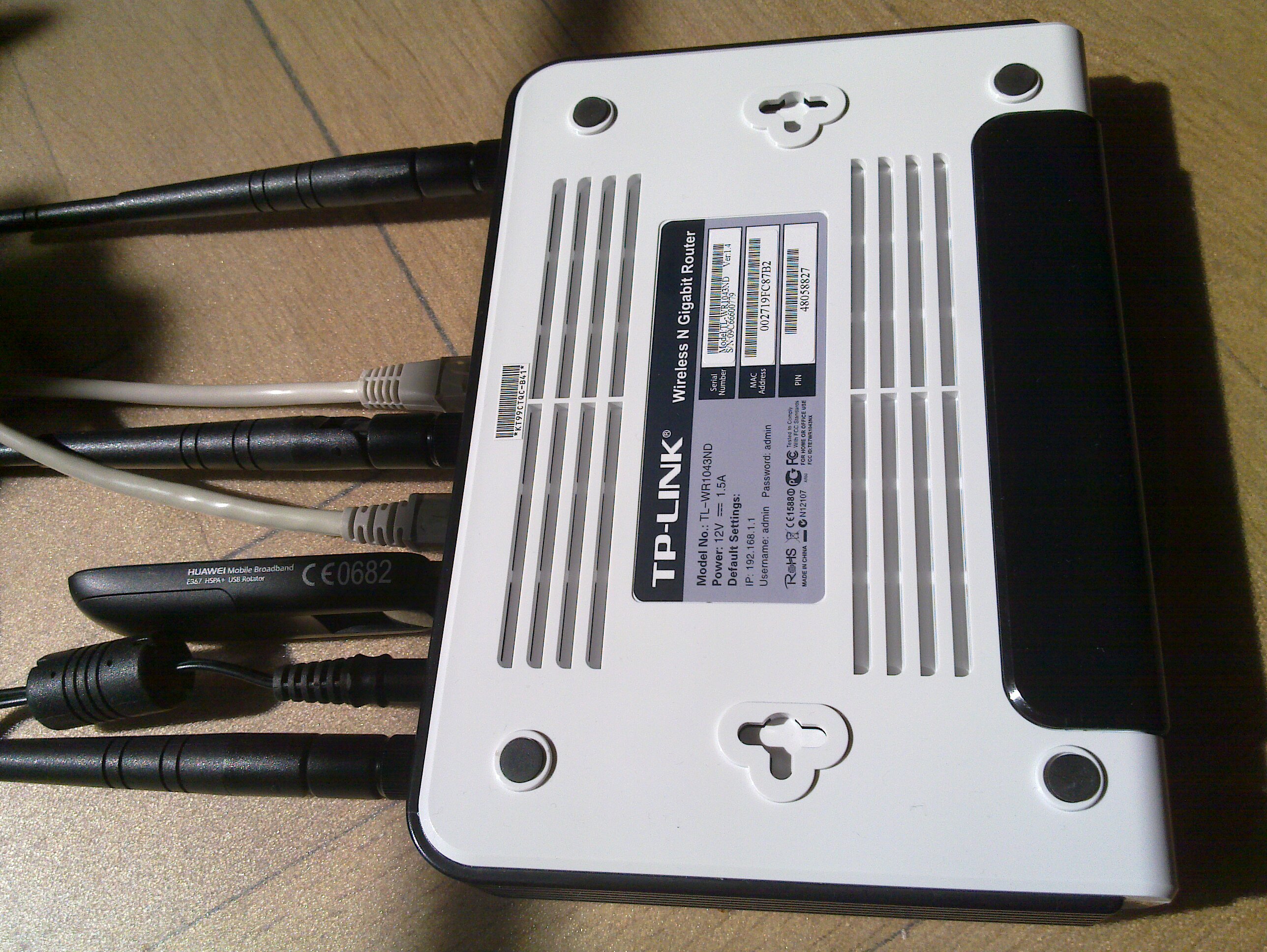
The ability to connect a 3G modem to a wireless router to form a Internet connected ad-hoc network of machines is very powerful. I ve done this many times and have written about it before (e.g., see my OpenWRT writeup page) but I recently did it with modern hardware again. Here I will use the TP-Link TL-WR1043ND wireless router (available here for around $50) together with the Huawei E367 3G UMTS/HSDPA modem. Other wireless routers and modem should work fine. The software is OpenWRT 10.03 although I hope to redo this with LibreWRT eventually. My writeup is mostly focused around what is happening around the prompt, so it is mostly a cut n'paste terminal session with a comment interlined.
TL-WR1043ND and Huawei 367

Router and modem


The first step is to flash the firmware with OpenWRT. The OpenWRT wiki page for the TL-WR1043ND covers this in detail, and for any other hardware you should find what you need in the OpenWRT wiki. If you have already installed OpenWRT on the TL-WR1043ND, and want to wipe it out and start from scratch (like I did for this writeup) here is how to do it:
root@choco:~# cd /tmp
root@choco:/tmp# wget http://downloads.openwrt.org/backfire/10.03/ar71xx/openwrt-ar71xx-tl-wr1043nd-v1-squashfs-sysupgrade.bin
Connecting to downloads.openwrt.org (78.24.191.177:80)
openwrt-ar71xx-tl-wr 100%  *******************************   2688k 00:00:00 ETA
root@choco:/tmp# md5sum openwrt-ar71xx-tl-wr1043nd-v1-squashfs-sysupgrade.bin
9927973ba5da65d0d52e255397452b87  openwrt-ar71xx-tl-wr1043nd-v1-squashfs-sysupgrade.bin
root@choco:/tmp# mtd -r write /tmp/openwrt-ar71xx-tl-wr1043nd-v1-squashfs-sysupgrade.bin firmware
Unlocking firmware ...
Writing from /tmp/openwrt-ar71xx-tl-wr1043nd-v1-squashfs-sysupgrade.bin to firmware ...
Rebooting ...
The device will reboot automatically when it is done. After say 30 seconds, try to connect to it using the default IPv4 address 192.168.1.1. I have connected the WAN port to the Internet and connect to the router over local network connected to the router s LAN1 input. Let s configure OpenWRT, I m calling the host choco and giving it the IPv4 address 192.168.1.46. I ll also set a good root password to disable telnet, and add some SSH keys to simplify remote login.
jas@latte:~$ telnet 192.168.1.1
Trying 192.168.1.1...
Connected to 192.168.1.1.
Escape character is '^]'.
 === IMPORTANT ============================
  Use 'passwd' to set your login password
  this will disable telnet and enable SSH
 ------------------------------------------
BusyBox v1.15.3 (2010-04-06 03:14:11 CEST) built-in shell (ash)
Enter 'help' for a list of built-in commands.
  _______                     ________        __
          .-----.-----.-----.          .----.    _
     -      _     -__                   _    _ 
  _______    __ _____ __ __ ________ __    ____ 
           __  W I R E L E S S   F R E E D O M
 Backfire (10.03, r20728) --------------------------
  * 1/3 shot Kahlua    In a shot glass, layer Kahlua
  * 1/3 shot Bailey's  on the bottom, then Bailey's,
  * 1/3 shot Vodka     then Vodka.
 ---------------------------------------------------
root@OpenWrt:/# passwd
Changing password for root
New password:
Retype password:
Password for root changed by root
root@OpenWrt:/# sed -i -e 's/OpenWrt/choco/' /etc/config/system
root@OpenWrt:/# sed -i -e 's/192.168.1.1/192.168.1.46/' /etc/config/network
root@OpenWrt:/# cat>/etc/dropbear/authorized_keys
ssh-rsa AAAAB3NzaC1yc2...
^D
root@OpenWrt:/# dropbearkey -y -f /etc/dropbear/dropbear_rsa_host_key
Public key portion is:
ssh-rsa AAAA... root@OpenWrt
Fingerprint: md5 45:fd:62...
root@OpenWrt:/#
You could reboot the machine here to switch from telnet to SSH, but I ll install a bunch of packages while I m at it. Run opkg update to update the package list, and then install the wireless modules for the TL-WR1043ND.
root@OpenWrt:/# opkg update
Downloading http://downloads.openwrt.org/backfire/10.03/ar71xx/packages/Packages.gz.
Inflating http://downloads.openwrt.org/backfire/10.03/ar71xx/packages/Packages.gz.
Updated list of available packages in /var/opkg-lists/packages.
root@OpenWrt:/# opkg install kmod-ath9k wpad-mini
...
Configuring iw.
Configuring kmod-crypto-core.
Configuring kmod-crypto-arc4.
Configuring kmod-crypto-aes.
Configuring wireless-tools.
Configuring kmod-cfg80211.
Configuring kmod-mac80211.
Configuring kmod-ath.
Configuring kmod-ath9k.
Configuring crda.
Configuring wpad-mini.
root@OpenWrt:/#
Next I ll install some packages that will are needed for the modem.
root@OpenWrt:/# opkg install comgt kmod-usb-serial kmod-usb2 kmod-usb-uhci kmod-usb-ohci usb-modeswitch
...
Configuring kmod-nls-base.
Configuring kmod-usb-core.
Configuring chat.
Configuring kmod-usb-ohci.
Configuring kmod-usb2.
Configuring comgt.
Configuring usb-modeswitch.
Configuring kmod-usb-serial.
Configuring kmod-usb-uhci.
root@OpenWrt:/#
Now let s reboot the machine and try to get things to really work.
root@OpenWrt:/# sync
root@OpenWrt:/# reboot
Use SSH to connect to the router, and don t forget the use its new IPv4 address! 3G modems are notoriously known for not acting as a modem directly. Instead they often simulate a CD-ROM that will install device driver software, for inferior operating systems. Fortunately the usb_modeswitch tool fixes the hardware for us. My Huawei E367 start up with the USB vendor/product IDs 0x12d1:0 1446, you normally find this out by looking in /proc/bus/usb/devices. Here is the output on my device:
root@choco:~# cat /proc/bus/usb/devices
...
T:  Bus=01 Lev=01 Prnt=01 Port=00 Cnt=01 Dev#=  2 Spd=480 MxCh= 0
D:  Ver= 2.00 Cls=00(>ifc ) Sub=00 Prot=00 MxPS=64 #Cfgs=  1
P:  Vendor=12d1 ProdID=1446 Rev= 0.00
S:  Manufacturer=Huawei Technologies
S:  Product=HUAWEI Mobile
C:* #Ifs= 2 Cfg#= 1 Atr=c0 MxPwr=500mA
I:* If#= 0 Alt= 0 #EPs= 2 Cls=08(stor.) Sub=06 Prot=50 Driver=(none)
E:  Ad=81(I) Atr=02(Bulk) MxPS= 512 Ivl=0ms
E:  Ad=01(O) Atr=02(Bulk) MxPS= 512 Ivl=0ms
I:* If#= 1 Alt= 0 #EPs= 2 Cls=08(stor.) Sub=06 Prot=50 Driver=(none)
E:  Ad=02(O) Atr=02(Bulk) MxPS= 512 Ivl=0ms
E:  Ad=82(I) Atr=02(Bulk) MxPS= 512 Ivl=0ms
root@choco:~#
This means I have to go find a usb-modeswitch configuration for this device. Fortunately, I found it on my Debian Squeeze box in /etc/usb_modeswitch.d/12d1:1446 (from the usb-modeswitch-data package). There was a slight problem with the file, it didn t specify the correct USB vendor/product ID of the device after it has been switched . My Huawei E367 switches to 12d1:1506, so I add 1506 to the TargetProductList list. Here is the final configuration:
root@choco:~# cat>/etc/usb-modeswitch.conf
EnableLogging=1
DefaultVendor= 0x12d1
DefaultProduct=0x1446
TargetVendor=  0x12d1
TargetProductList="1001,1406,140b,140c,1412,141b,14ac,1506"
CheckSuccess=20
MessageContent="55534243123456780000000000000011062000000100000000000000000000"
root@choco:~#
Now you should be able to run usb_modeswitch to perform the switch :
root@choco:~# usb_modeswitch 
Looking for target devices ...
 No devices in target mode or class found
Looking for default devices ...
 Found default devices (1)
Accessing device 002 on bus 001 ...
Using endpoints 0x01 (out) and 0x81 (in)
Inquiring device details; driver will be detached ...
Looking for active driver ...
 No driver found. Either detached before or never attached
SCSI inquiry data (for identification)
-------------------------
  Vendor String: HUAWEI
   Model String: Mass Storage
Revision String: 2.31
-------------------------
USB description data (for identification)
-------------------------
Manufacturer: Huawei Technologies
     Product: HUAWEI Mobile
  Serial No.: not provided
-------------------------
Setting up communication with interface 0 ...
Trying to send the message to endpoint 0x01 ...
 OK, message successfully sent
Checking for mode switch (max. 20 times, once per second) ...
 Waiting for original device to vanish ...
 Original device can't be accessed anymore. Good.
 Searching for target devices ...
 Searching for target devices ...
 Searching for target devices ...
 Searching for target devices ...
 Searching for target devices ...
 Found correct target device
Mode switch succeeded. Bye.
root@choco:~#
The /proc/bus/usb/devices file will now contain information about the real device:
root@choco:~# cat /proc/bus/usb/devices
...
T:  Bus=01 Lev=01 Prnt=01 Port=00 Cnt=01 Dev#=  3 Spd=480 MxCh= 0
D:  Ver= 2.00 Cls=ef(misc ) Sub=02 Prot=01 MxPS=64 #Cfgs=  1
P:  Vendor=12d1 ProdID=1506 Rev= 0.00
S:  Manufacturer=Huawei Technologies
S:  Product=HUAWEI Mobile
C:* #Ifs= 7 Cfg#= 1 Atr=c0 MxPwr=500mA
A:  FirstIf#= 1 IfCount= 2 Cls=02(comm.) Sub=00 Prot=00
I:* If#= 0 Alt= 0 #EPs= 3 Cls=ff(vend.) Sub=01 Prot=01 Driver=(none)
E:  Ad=81(I) Atr=03(Int.) MxPS=  64 Ivl=2ms
E:  Ad=82(I) Atr=02(Bulk) MxPS= 512 Ivl=0ms
E:  Ad=01(O) Atr=02(Bulk) MxPS= 512 Ivl=4ms
I:* If#= 1 Alt= 0 #EPs= 1 Cls=ff(vend.) Sub=01 Prot=09 Driver=(none)
E:  Ad=83(I) Atr=03(Int.) MxPS=  64 Ivl=2ms
I:* If#= 2 Alt= 0 #EPs= 2 Cls=ff(vend.) Sub=01 Prot=08 Driver=(none)
E:  Ad=84(I) Atr=02(Bulk) MxPS= 512 Ivl=0ms
E:  Ad=02(O) Atr=02(Bulk) MxPS= 512 Ivl=4ms
I:* If#= 3 Alt= 0 #EPs= 2 Cls=ff(vend.) Sub=01 Prot=03 Driver=(none)
E:  Ad=85(I) Atr=02(Bulk) MxPS= 512 Ivl=0ms
E:  Ad=03(O) Atr=02(Bulk) MxPS= 512 Ivl=4ms
I:* If#= 4 Alt= 0 #EPs= 2 Cls=ff(vend.) Sub=01 Prot=02 Driver=(none)
E:  Ad=86(I) Atr=02(Bulk) MxPS= 512 Ivl=0ms
E:  Ad=04(O) Atr=02(Bulk) MxPS= 512 Ivl=4ms
I:* If#= 5 Alt= 0 #EPs= 2 Cls=08(stor.) Sub=06 Prot=50 Driver=(none)
E:  Ad=87(I) Atr=02(Bulk) MxPS= 512 Ivl=0ms
E:  Ad=05(O) Atr=02(Bulk) MxPS= 512 Ivl=0ms
I:* If#= 6 Alt= 0 #EPs= 2 Cls=08(stor.) Sub=06 Prot=50 Driver=(none)
E:  Ad=06(O) Atr=02(Bulk) MxPS= 512 Ivl=0ms
E:  Ad=88(I) Atr=02(Bulk) MxPS= 512 Ivl=0ms
root@choco:~#
Let s put that command in /etc/rc.local so that it will be run on every boot.
root@choco:~# cat /etc/rc.local
# Put your custom commands here that should be executed once
# the system init finished. By default this file does nothing.
/usr/bin/usb_modeswitch
exit 0
root@choco:~#
We are not quite ready, the usbserial module needs to be told which USB vendor/product to use. The /etc/modules.d/60-usb-serial file is used during boot to set the right parameters. You can also run rmmod followed by insmod with the proper parameters to avoid a reboot. You can use the gcom info tool to find some information about the modem. Normally you use /dev/ttyUSB0 but for some reason it does not work for me and instead I had to use /dev/ttyUSB3.
root@choco:~# cat>/etc/modules.d/60-usb-serial
usbserial vendor=0x12d1 product=0x1506 maxSize=4096
root@choco:~# rmmod usbserial
root@choco:~# insmod usbserial vendor=0x12d1 product=0x1506 maxSize=4096
root@choco:~# gcom -d /dev/ttyUSB3 info
##### Wireless WAN Modem Configuration #####
Product text:
====
Manufacturer: huawei
Model: E367
Revision: 11.807.05.00.00
IMEI: 353613040739180
+GCAP: +CGSM,+DS,+ES
OK
====
Manufacturer:           huawei
IMEI and Serial Number: 353613040739180
Manufacturer's Revision:
11.807.05.00.
Hardware Revision:      NOT
Network Locked:         ERROR:
Customisation:          NOT SUPPORT
Band settings:          (NOT)
APN:                    ERROR:
##### END #####
root@choco:~#
Let s configure network and wireless. The configurations files are /etc/config/network and /etc/config/wireless. Edit them using your favorite editor, or vi. I m setting up a PSK2 encrypted WLAN and I have a WDS to connect two wireless routers. Note that you need to use the correct PIN for your SIM card (here I m using 8328) and set the APN correctly (I m using bredband.tre.se ). Reboot after making these changes.
root@choco:~# cat /etc/config/network
config 'interface' 'loopback'
       option 'ifname'   'lo'
       option 'proto'    'static'
       option 'ipaddr'   '127.0.0.1'
       option 'netmask'  '255.0.0.0'
config 'interface' 'lan'
        option 'ifname'   'eth0.1'
        option 'type'     'bridge'
        option 'proto'    'static'
        option 'ipaddr'   '192.168.1.46'
        option 'netmask'  '255.255.255.0'
#config 'interface' 'wan'
#        option 'ifname' 'eth0.2'
#        option 'proto' 'dhcp'
config 'switch'
	option 'name' 'rtl8366rb'
        option 'reset' '1'
        option 'enable_vlan' '1'
config 'switch_vlan'
        option 'device' 'rtl8366rb'
        option 'vlan' '1'
        option 'ports' '1 2 3 4 5t'
config 'switch_vlan'
        option 'device' 'rtl8366rb'
        option 'vlan' '2'
        option 'ports' '0 5t'
config interface wan
        option ifname   ppp0
        option proto    3g
        option device   /dev/ttyUSB0
        option apn      bredband.tre.se
        option pincode  8328
root@choco:~# cat /etc/config/wireless
config wifi-device  radio0
	option type     mac80211
	option channel  5
	option macaddr	00:27:19:fc:87:b2
	option hwmode	11ng
	option htmode	HT20
	list ht_capab	SHORT-GI-40
	list ht_capab	DSSS_CCK-40
config wifi-iface
	option device   radio0
	option network  lan
	option mode     ap
	option ssid     Grisslan
	option encryption psk2
	option key	  notforyoutosee
config wifi-iface
        option device     radio0
        option network    lan
        option mode       wds
        option bssid      00:1F:C6:60:D3:11
        option ssid       GrisslanWDS
        option encryption psk2
        option key        thisisalsosecret
root@choco:~# reboot
root@choco:~#
Once the machine have rebooted, you can bring up the 3G connection by using ifup wan . Look at the log by using logread and tail the log in the background by doing logread -f & .
root@choco:~# ifup wan
Trying to set PIN
PIN set successfully
root@choco:~# logread  tail -20
May 21 13:41:20 choco local2.info chat[2419]: send (ATD*99***1#^M)
May 21 13:41:20 choco local2.info chat[2419]: expect (CONNECT)
May 21 13:41:20 choco local2.info chat[2419]: ^M
May 21 13:41:20 choco local2.info chat[2419]: ATD*99***1#^M^M
May 21 13:41:20 choco local2.info chat[2419]: CONNECT
May 21 13:41:20 choco local2.info chat[2419]:  -- got it
May 21 13:41:20 choco local2.info chat[2419]: send ( ^M)
May 21 13:41:20 choco daemon.info pppd[2412]: Serial connection established.
May 21 13:41:20 choco daemon.info pppd[2412]: Using interface ppp0
May 21 13:41:20 choco daemon.notice pppd[2412]: Connect: ppp0 <--> /dev/ttyUSB0
May 21 13:41:24 choco daemon.warn pppd[2412]: Could not determine remote IP address: defaulting to 10.64.64.64
May 21 13:41:24 choco daemon.notice pppd[2412]: local  IP address 95.209.96.115
May 21 13:41:24 choco daemon.notice pppd[2412]: remote IP address 10.64.64.64
May 21 13:41:24 choco daemon.notice pppd[2412]: primary   DNS address 80.251.201.177
May 21 13:41:24 choco daemon.notice pppd[2412]: secondary DNS address 80.251.201.178
May 21 13:41:24 choco daemon.info dnsmasq[1028]: reading /tmp/resolv.conf.auto
May 21 13:41:24 choco daemon.info dnsmasq[1028]: using nameserver 80.251.201.178#53
May 21 13:41:24 choco daemon.info dnsmasq[1028]: using nameserver 80.251.201.177#53
May 21 13:41:24 choco daemon.info dnsmasq[1028]: using local addresses only for domain lan
May 21 13:41:25 choco user.notice rdate: Synced with ptbtime1.ptb.de
root@choco:~#
Hooray! Or almost so usually the first time you connect, I often get incorrect DNS servers from the server. It shows up like this in the log:
May 21 12:25:04 choco daemon.notice pppd[1157]: primary   DNS address 10.11.12.13
May 21 12:25:04 choco daemon.notice pppd[1157]: secondary DNS address 10.11.12.14
The exact reason why this happens is beyond me. There are patches floating around for pppd, but I haven t tried them. A common workaround is to hardcode static DNS servers (like Google DNS or OpenDNS). I have come up with my own workaround, based on the observation that when the problem has occurred it will not happen again if I disconnect and reconnect. Thus I have written a small script which is invoked whenever an interface is brought up (typically the WAN interface).
# Written by Simon Josefsson May 2011.
root@choco:~# cat> /etc/hotplug.d/iface/01-reconnect-if-dns-is-broken
case "$ ACTION:-ifup " in
    ifup)
	    if grep -q 10.11.12.13 /tmp/resolv.conf.auto; then
		(sleep 30 && ifdown wan && ifup wan) &
	    fi
	    ;;
esac
root@choco:~# chmod +x /etc/hotplug.d/iface/01-reconnect-if-dns-is-broken
root@choco:~#
That s it! If you found this writeup useful, please flattr it.

Russell Coker: Preventing the End of the World

Some crazy people led by Harold Camping who call themselves Christian claimed that the world was going to end yesterday [1]. Harold had previously done this in 1994 so he s got form for predictions that don t come true. The bible says that the day of the Lord so cometh as a thief in the night [2], so obviously Jesus can t return on a day when billboards all around the world are predicting him! Maybe rather than being wrong, Harold has in fact prevented the end of the world by predicting it correctly! Now if a church like Harold s can make predictions separated by slightly less than 17 years (let s round it off to 6000 days) then we only need 6000 such churches scheduled to predict different days to cause the rapture to be indefinitely deferred. If the churches were to predict which week the world would end then we would only need something less than 900 such churches or maybe 1800 so we have redundancy. It seems that Harold Camping makes his money by scaring gullible people into selling everything they own and giving the money to him [3]. If we are to achieve the goal of having someone forecast the end of the world every day then it would be good if such people were forced to raise money more often than every 17 years. A good solution to this might be a tax on end of days religious investments, money that was given to a religious corporation or sole trader following a scare about the end of the world could be subject to a 100% tax rate if not spent within 1 year. Then Harold would be forced to make a prediction for every year and thus give us greater protection from the end of the world. </Satire> But seriously we need to tax religious organisations in the same way as other companies. A religious organisation that gives money to help the needy can use that as a tax deduction, and operating expenses such as paying salaries of staff are also tax deductable. So the serious religious groups would have a tax rate that is fairly close to zero anyway. When a religious leader wants to have 27 Rolls Royces they should be forced to pay tax on all that money, and additionally they should be compelled to publish a statement of company accounts for everyone who gave money just as corporations are compelled to provide information to stock-holders. Currently various religious organisations are denouncing Harold and his followers to try and save Christianity from ridicule (here s one example [4]). It seems to me that if they want to avoid ridicule they should advocate that religious organisations be forced to open their books and pay tax on their profits so that people like Harold can t use religion as a money-making scam.

21 May 2011

Vincent Bernat: Network lab with User Mode Linux

To setup a virtual network lab, you get a lot of alternatives. You can for example use GNS3, Netkit, Marionnet or VNUML. Some of those tools, like GNS3, allow to add some closed source equipments like a Cisco 7200 or a Juniper router. All those tools are a great way to setup your network lab. Look at them! If you want to setup a virtual network lab for educational purpose, one of those should fit your purpose. However, none of those solution were a perfect match for me. I did not want to maintain some root filesystem. I wanted my lab to start in a few seconds. I wanted to keep all configuration files (including the ones for the virtual hosts) into one subdirectory of my home and be able to modify them while the lab was running. I also wanted to be able to plug some Cisco router using Dynamips/Dynagen. None of the listed solution above matched all those criteria. Therefore, I setup my own lab script with User Mode Linux. This is not a complete solution, but is more like a home-made solution to match one particular need. You cannot use the final result without tweaking it. Again, look at the other solutions first. We will go step by step to understand how the lab was built. If you are in a hurry, you can look at the result which is published on GitHub.

User Mode Linux User Mode Linux (or UML) is a Linux kernel running as a process instead of running on top of some processor. With Debian, you can install it using apt-get install user-mode-linux. You get a linux command that will run your Linux kernel as a simple process. No need to be root.
 1
 2
 3
 4
 5
 6
 7
 8
 9
10
11
12
13
14
15
16
17
18
19
20
21
22
23
24
25
$ linux
Core dump limits :
    soft - 0
    hard - NONE
Checking that ptrace can change system call numbers...OK
Checking syscall emulation patch for ptrace...OK
Checking advanced syscall emulation patch for ptrace...OK
Checking for tmpfs mount on /dev/shm...nothing mounted on /dev/shm
Checking PROT_EXEC mmap in /tmp/user/500/...OK
Checking for the skas3 patch in the host:
  - /proc/mm...not found: No such file or directory
  - PTRACE_FAULTINFO...not found
  - PTRACE_LDT...not found
UML running in SKAS0 mode
Adding 5632000 bytes to physical memory to account for exec-shield gap
Initializing cgroup subsys cpuset
Linux version 2.6.32 (2.6.32) (root@tito) (gcc version 4.4.5 (Debian 4.4.5-10) ) #2 Thu Jan 27 12:49:46 UTC 2011
[...]
console [mc-1] enabled
Couldn't stat "root_fs" : err = 2
Failed to initialize ubd device 0 :Couldn't determine size of device's file
registered taskstats version 1
VFS: Cannot open root device "98:0" or unknown-block(98,0)
Please append a correct "root=" boot option; here are the available partitions:
Kernel panic - not syncing: VFS: Unable to mount root fs on unknown-block(98,0)
You get a Linux kernel that will just panic because it does not find a disk to mount to run init from it. Usually, you build some root file system and give it as an argument to your UML kernel.

Basic setup However, you can also use your host filesystem as a root filesystem. We also specify /bin/sh as init instead of /sbin/init. This will be the first process to be started by our UML kernel.
 1
 2
 3
 4
 5
 6
 7
 8
 9
10
11
12
13
$ linux init=/bin/sh rootfstype=hostfs
[...]
Linux version 2.6.32 (2.6.32) (root@tito) (gcc version 4.4.5 (Debian 4.4.5-10) ) #2 Thu Jan 27 12:49:46 UTC 2011
[...]
VFS: Mounted root (hostfs filesystem) readonly on device 0:12.
IRQ 3/console-write: IRQF_DISABLED is not guaranteed on shared IRQs
IRQ 2/console: IRQF_DISABLED is not guaranteed on shared IRQs
IRQ 10/winch: IRQF_DISABLED is not guaranteed on shared IRQs
/bin/sh: can't access tty; job control turned off
# uname -a
Linux (none) 2.6.32 #2 Thu Jan 27 12:49:46 UTC 2011 x86_64 GNU/Linux
# echo $$
1
You may want to setup a bit your environment:
1
2
3
4
5
6
7
8
9
# hostname -b R1
# export TERM=xterm
# export PATH=/usr/local/bin:/usr/bin:/bin:/sbin:/usr/local/sbin:/usr/sbin
# mount -t proc proc /proc
# mount -t sysfs sysfs /sys
# mount -t tmpfs tmpfs /var/run -o rw,nosuid,nodev
# mount -t tmpfs tmpfs /var/log -o rw,nosuid,nodev
# mount -o bind /usr/lib/uml/modules /lib/modules
# mount -t hostfs hostfs /home/bernat/mylab -o /home/bernat/mylab
We setup /proc and /sys correctly. We also turn /var/run and /var/log as tmpfs filesystems. This will allow most daemons to run correctly: they will be able to write runtime data in /var/run and to write logs in /var/log. You can even launch your favorite syslog daemon. The line about /lib/modules is to ensure that our UML kernel is able to access its kernel modules. For example, we can now use modprobe tun. The line about /home allows to mount the home directory of your host inside UML. This was already the case, but it was mounted as read-only. One important thing to notice is that while you seem to be root inside UML, you did not run linux as root. Therefore, when the UML kernel tries to write a file it will still be bound by the permissions granted by your host kernel. See this example:
1
2
3
4
# mount -o remount,rw /
# touch /tmp/test1
# touch /etc/test1
touch: cannot touch  /etc/test1': Permission denied
This is a great way to ensure that your lab will not destroy your host. Do not run linux as root. What is interesting with such a setup is that you share the filesystem with your host. You can modify some configuration file on your host and your UML will see the modification right away. You can also modify a file inside UML and see the modification on your host too.

Console & job control There is a slight problem with this environment. You may be used to it if you already started your own GNU/Linux system with init=/bin/sh. The problem is that you don t have job control. Job control allows you to put tasks in background and interrupt them while they are running. It is job control that allows you to stop a program with ^C. Here, you don t have job control. See:
1
2
# cat
^C^C^C^C
You are stuck. The only way to go out is to kill the linux process on your host. Job control is a great mystery for me. I don t know how to enable it by hand. However, getty is able to enable job control for you. Just type this command:
1
# exec getty -n -l /bin/sh 38400 /dev/tty0
You get job control. We keep /bin/sh, but you may prefer /bin/bash since on most systems, /bin/sh is rather basic.

Writable root filesystem Let s get back to our root filesystem. Most daemons can run just fine with our setup. For example, we can start Nginx, a popular web server:
1
2
3
# mkdir /var/log/nginx
# /etc/init.d/nginx start
Starting nginx: nginx.
However, it will use the configuration file in /etc/nginx. You don t want to modify this directory for all your labs. The best way to handle this is to start Nginx with a custom configuration file:
1
2
# /etc/init.d/nginx stop
# nginx -c /home/bernat/mylab/nginx.conf
While keeping the configuration files related to your lab in your home is an important objective (all your lab related files are in the same place and you can modify them at will), it may be more convenient to still use /etc/init.d/nginx script to control Nginx. Moreover, some daemons do not allow to specify a configuration file. You will then need to modify your root filesystem. This is a pretty common problem with Live CD and it is solved by using an union mount. This is a special kind of mount that will merge two filesystems into one. One of the two filesystems can be read-only and all the changes will be reported to the second one. We will use AUFS. Ensure that you have aufs-tools package installed. Let s start from scratch for this example.
 1
 2
 3
 4
 5
 6
 7
 8
 9
10
$ linux init=/bin/sh rootfstype=hostfs
[...]
# mount -n -t proc proc /proc
# mount -n -t sysfs sysfs /sys
# mount -o bind /usr/lib/uml/modules /lib/modules
# mount -n -t tmpfs tmpfs /tmp -o rw,nosuid,nodev
# mkdir /tmp/ro /tmp/rw /tmp/aufs
# mount -n -t hostfs hostfs /tmp/ro -o /,ro
# mount -n -t aufs aufs /tmp/aufs -o noatime,dirs=/tmp/rw:/tmp/ro=ro
# exec chroot /tmp/aufs /bin/bash
It seems that AUFS with hostfs is rather fragile. We could have merged our root filesystem with some directory in our lab using hostfs like this:
1
2
3
4
# mount -n -t hostfs hostfs /tmp/rw -o /home/bernat/mylab/root,rw
# mount -n -t hostfs hostfs /tmp/ro -o /,ro
# mount -n -t aufs aufs /tmp/aufs -o noatime,dirs=/tmp/rw:/tmp/ro=ro
# exec chroot /tmp/aufs /bin/bash
However, the kernel panics on most operations. Therefore, /tmp/rw stays in a tmpfs filesystem. This means that any change to the root filesystem will be lost. I also was unable to issue a correct pivot_root before chroot. This is not really important here. UPDATED: It seems that there are other drawbacks to this setup. For some reason, if you have a separate /usr partition on your host system, you won t be able to write to it until you specify the noxino option to AUFS. Another issue is that AUFS does not notice most changes on the hostfs filesystem. You can fix this with option udba=inotify. However, this is incompatible with the noxino option. Therefore, you need to choose what is best for your lab. You can also mount some parts of your home with hostfs (for example, the source directory of the piece of software that you would like to test). Let s consider that Nginx configuration is in /home/bernat/lab/nginx. We simply uses a symbolic link:
1
2
# rm -rf /etc/nginx
# ln -s /home/bernat/mylab/nginx /etc/nginx
Since we lose the modifications to the root filesystem, the symbolic link should be done each time we start the lab. However, we can modify directly the configuration files in the host or in the UML.

Networking We know how to start our UML. Let s see how we can add some wires to it. UML supports several network adapters. The two most useful are TAP and VDE backend.

TAP A TAP interface is a virtual network kernel device which can be used by userland applications to inject layer 2 frames in it. If the kernel sends frames in a TAP device, they will be received by the application listening to it. This also works the other way around. A TAP interface is a regular ethernet device for the kernel. This means that you can bridge it or use tcpdump on it. The drawback of such interfaces is that you need to be root to create them. The application using them does not need to be run as root. I usually use this nifty shell function to setup TAP interfaces:
 1
 2
 3
 4
 5
 6
 7
 8
 9
10
11
12
13
14
15
16
17
18
19
20
21
22
23
__add_to_bridge()  
    # Optionally, add it to given bridge
    [ -z "$2" ]    
        [ -f /sys/class/net/$2/brforward ]    
            sudo brctl addbr $2
            sudo brctl stp $2 off
            sudo ip link set $2 up
         
        [ -f /sys/class/net/$2/brif/$1 ]    
            # We need to check if it is in another bridge
            bridge=$(echo /sys/class/net/*/brif/$1 2> /dev/null   \
                sed 's+/sys/class/net/\([^/]*\)/.*+\1+') 2> /dev/null
            [ -n "$bridge" ] && \
                sudo brctl delif $bridge $1
            sudo brctl addif $2 $1


tap()  
    sudo tunctl -b -u $(whoami) -t $1 > /dev/null
    sudo ip link set up dev $1
    __add_to_bridge $1 $2
 
It will create the interface and put it into a bridge. For example, you can create two interfaces linked together through a bridge to allow two UML to talk each other:
1
2
$ tap tap-R1 br-R1R2
$ tap tap-R2 br-R1R2
We can setup two UML which will use those interfaces. The first one is setup like this:
1
2
3
4
$ linux init=/bin/sh rootfstype=hostfs eth0=tuntap,tap-R1
[...]
# ip link set up dev eth0
# ip addr add 192.168.0.1/24 dev eth0
The second one:
1
2
3
4
5
6
7
8
9
$ linux init=/bin/sh rootfstype=hostfs eth0=tuntap,tap-R2
[...]
# ip link set up dev eth0
# ip addr add 192.168.0.2/24 dev eth0
# ping 192.168.0.1
PING 192.168.0.1 (192.168.0.1) 56(84) bytes of data.
Warning: time of day goes back (-13832us), taking countermeasures.
64 bytes from 192.168.0.1: icmp_req=20 ttl=64 time=0.633 ms
64 bytes from 192.168.0.1: icmp_req=21 ttl=64 time=0.157 ms
If you are running a firewall on your host, ensure that you let your host forward those packets. By default, bridging code forwards the frames through Netfilter.

VDE A VDE switch is a software emulation of a regular network switch. It is a userland component and does not need to be run as root. You need to install vde2 package to make use of it. You can run a switch using vde_switch command. You will get a console by pressing Enter. From this console, you can configure the switch: add ports, configure VLAN, etc. Like for TAP interfaces, let s setup two UML connected to this switch. The first one is like this:
1
2
3
4
$ linux init=/bin/sh rootfstype=hostfs eth0=vde
[...]
# ip link set up dev eth0
# ip addr add 192.168.0.1/24 dev eth0
And the second one:
1
2
3
4
5
6
7
8
9
$ linux init=/bin/sh rootfstype=hostfs eth0=vde
[...]
# ip link set up dev eth0
# ip addr add 192.168.0.2/24 dev eth0
# ping 192.168.0.1
PING 192.168.0.1 (192.168.0.1) 56(84) bytes of data.
64 bytes from 192.168.0.1: icmp_req=1 ttl=64 time=2.93 ms
Warning: time of day goes back (-8101us), taking countermeasures.
64 bytes from 192.168.0.1: icmp_req=2 ttl=64 time=0.503 ms

The lab So far, we had a look at what can be used to setup a lab. We need to put everything together into some script to setup the lab in a quick way. For each lab that I want to setup, I copy my latest script to a new location and adapt to the topology I want. I have put everything described below in GitHub. Feel free to browse and fork. Our lab will be about setting up a redundant VPN between two remote sites of the same company. This company is using OSPF as an IGP on each site and we will use BGP to let each site know the routes advertised in the other site. We will only use VDE switches for the layer 2 part. Redundant VPN lab Let s implement this lab. You should grab the sources first:
1
2
$ git clone https://github.com/vincentbernat/network-lab.git
$ cd network-lab/lab-redundant-vpn
You have a setup script which will setup the whole lab for you. You also have one directory for each UML. Those directories only contain configuration for the various daemons used inside UML. To make this lab work, ensure that you have quagga (Quagga, an Internet routing daemon supporting both OSPF and BGP) and racoon packages.

UML configuration First look at the end of script. There is something like this:
 1
 2
 3
 4
 5
 6
 7
 8
 9
10
11
12
13
14
15
16
17
18
19
20
21
22
23
24
25
26
27
case $$ in
    1)
        # Inside UML. Three states:
        [...]
        ;;
    *)
        TMP=$(mktemp -d)
        trap "rm -rf $TMP" EXIT
        check_dependencies
        setup_screen
        # Setup switches
        setup_switch site1
        setup_switch site101
        setup_switch internet
        # Start VM
        start_vm R1 eth0=vde,$TMP/switch-site1.sock
        start_vm R2 eth0=vde,$TMP/switch-site101.sock
        start_vm V1 eth0=vde,$TMP/switch-site1.sock eth1=vde,$TMP/switch-internet.sock
        start_vm V2 eth0=vde,$TMP/switch-site1.sock eth1=vde,$TMP/switch-internet.sock
        start_vm V3 eth0=vde,$TMP/switch-site101.sock eth1=vde,$TMP/switch-internet.sock
        start_vm V4 eth0=vde,$TMP/switch-site101.sock eth1=vde,$TMP/switch-internet.sock
        start_vm I1 eth0=vde,$TMP/switch-internet.sock
        display_help
        cleanup
        screen -X quit
        ;;
esac
The script will check its PID ($$). If it is 1, this means it has been invoked as init. Otherwise, it means it has been launched by the user. We will see the init part later. When called, we first check some dependencies, then we setup screen. Everything is run inside a screen session. No multiple windows. The next step is to setup the various switches needed for our lab. We take one switch for each site and one switch for Internet . The function that setups the switch just invokes vde_switch with the help of start-stop-daemon to record the PID (to shutdown the lab properly). Then, we start our various UML. For each of them, we need to specify which network adapters we need. For R1 and R2, we don t use a network adapter to connect to the internal network. We will use a dummy0 interface. To emulate Internet, we use another UML, I1. For each UML, our script will be used as init. In this case, its PID will be 1. As we have seen earlier, the script checks if it is called as init. If it is the case, it will setup the UML. During this setup, host specific configuration will be applied:
 1
 2
 3
 4
 5
 6
 7
 8
 9
10
11
12
13
14
15
16
17
18
19
20
21
22
23
24
25
26
27
28
29
30
31
32
33
34
35
36
37
38
39
40
41
42
43
44
45
46
47
48
49
50
echo "[+] Setup UML"
sysctl -w net.ipv4.ip_forward=1
case $ uts  in
    R1)
        modprobe dummy
        ip link set up dev dummy0
        ip addr add 192.168.15.1/24 dev dummy0
        ip addr add 192.168.1.10/24 dev eth0
        setup_quagga
        ;;
    R2)
        modprobe dummy
        ip link set up dev dummy0
        ip addr add 192.168.115.1/24 dev dummy0
        ip addr add 192.168.101.10/24 dev eth0
        setup_quagga
        ;;
    V1)
        ip addr add 192.168.1.11/24 dev eth0
        ip addr add 1.1.2.1/24 dev eth1
        ip route add default via 1.1.2.10
        setup_quagga
        setup_racoon 1.1.2.1 1.1.1.1 192.168.0.0/19-192.168.100.0/19
        ;;
    V2)
        ip addr add 192.168.1.12/24 dev eth0
        ip addr add 1.1.2.2/24 dev eth1
        ip route add default via 1.1.2.10
        setup_quagga
        setup_racoon 1.1.2.2 1.1.1.2 192.168.0.0/19-192.168.100.0/19
        ;;
    V3)
        ip addr add 192.168.101.13/24 dev eth0
        ip addr add 1.1.1.1/24 dev eth1
        ip route add default via 1.1.1.10
        setup_quagga
        setup_racoon 1.1.1.1 1.1.2.1 192.168.100.0/19-192.168.0.0/19
        ;;
    V4)
        ip addr add 192.168.101.14/24 dev eth0
        ip addr add 1.1.1.2/24 dev eth1
        ip route add default via 1.1.1.10
        setup_quagga
        setup_racoon 1.1.1.2 1.1.2.2 192.168.100.0/19-192.168.0.0/19
        ;;
    I1)
        ip addr add 1.1.1.10/24 dev eth0
        ip addr add 1.1.2.10/24 dev eth0
        ;;
esac
After all this, we drop to a shell to allow you to issue additional commands interactively.

Testing We need to wait one minute after the lab has been started. We can then check the routing table of various equipments. For example, here is R1 routing table (you need to type vtysh to get Quagga console):
 1
 2
 3
 4
 5
 6
 7
 8
 9
10
11
R1# show ip route
Codes: K - kernel route, C - connected, S - static, R - RIP, O - OSPF,
       I - ISIS, B - BGP, > - selected route, * - FIB route
C>* 127.0.0.0/8 is directly connected, lo
O   192.168.1.0/24 [110/10] is directly connected, eth0, 00:25:42
C>* 192.168.1.0/24 is directly connected, eth0
O   192.168.15.0/24 [110/10] is directly connected, dummy0, 00:25:42
C>* 192.168.15.0/24 is directly connected, dummy0
O>* 192.168.115.0/24 [110/20] via 192.168.1.11, eth0, 00:02:24
  *                           via 192.168.1.12, eth0, 00:02:24
We can see that if this router wants to contact R2, it has learned a multipath route with OSPF and can then sends its packets through V1 or V2, as expected. Here is the routing table of V3:
 1
 2
 3
 4
 5
 6
 7
 8
 9
10
11
12
V3# show ip route
Codes: K - kernel route, C - connected, S - static, R - RIP, O - OSPF,
       I - ISIS, B - BGP, > - selected route, * - FIB route
K>* 0.0.0.0/0 via 1.1.1.10, eth1
C>* 1.1.1.0/24 is directly connected, eth1
C>* 127.0.0.0/8 is directly connected, lo
O   192.168.15.0/24 [110/20] via 192.168.101.14, eth0, 00:04:26
B>* 192.168.15.0/24 [20/20] via 192.168.1.11 (recursive via 1.1.1.10), 00:07:16
O   192.168.101.0/24 [110/10] is directly connected, eth0, 00:07:30
C>* 192.168.101.0/24 is directly connected, eth0
O>* 192.168.115.0/24 [110/20] via 192.168.101.10, eth0, 00:07:18
We see that to contact R1, V3 knows two routes. One with BGP through the VPN. This is the one that will be used. The other one is through V4 but will not be used unless the BGP route is lost. We can ping R2 from R1:
1
2
3
4
R1# ping -I 192.168.15.1 192.168.115.1
PING 192.168.115.1 (192.168.115.1) from 192.168.15.1 : 56(84) bytes of data.
Warning: time of day goes back (-459129us), taking countermeasures.
64 bytes from 192.168.115.1: icmp_req=1 ttl=62 time=1.10 ms
Let s suppose we break the link between V1 and the Internet (using ip link set down eth1 on V1). The previous multipath route on R1 is now a single route through V2. Moreover, V3 has lost its BGP route to V1 and is now using its OSPF route through V4:
 1
 2
 3
 4
 5
 6
 7
 8
 9
10
11
V3# show ip route
Codes: K - kernel route, C - connected, S - static, R - RIP, O - OSPF,
       I - ISIS, B - BGP, > - selected route, * - FIB route
K>* 0.0.0.0/0 via 1.1.1.10, eth1
C>* 1.1.1.0/24 is directly connected, eth1
C>* 127.0.0.0/8 is directly connected, lo
O>* 192.168.15.0/24 [110/20] via 192.168.101.14, eth0, 00:10:13
O   192.168.101.0/24 [110/10] is directly connected, eth0, 00:13:17
C>* 192.168.101.0/24 is directly connected, eth0
O>* 192.168.115.0/24 [110/20] via 192.168.101.10, eth0, 00:13:05
We could enhance the resiliance of such a setup by adding a dedicated link between V1 and V2 and between V3 and V4 and running OSPF on this link (or iBGP). This would allow us to support several outages on our network.

Conclusion The script used to setup this lab can be adapted to setup other labs with little effort. Please, note that it depends on the configuration of your environment. However, the whole lab is contained in a single directory and is very small. You can email it to your friends or publish it on GitHub. It can also be extended to support Dynagen to include some Cisco equipments in your lab (for example, to experiment with VRF or MPLS).

17 May 2011

Vincent Bernat: Debian on Thinkpad Edge 11"

This has been several months since I didn t use much my laptop, an Asus S5N: it was crippled by a short battery life and was hit by several bugs, most of them targeting the i855GME graphic chipset thanks to the use of GEM and KMS in the latest Xorg. I did not want to invest too much in a laptop and I have found a rebate from Lenovo for Thinkpad Edge series. Voil , I have a Thinkpad Edge 11 .

Hardware Thinkpad Edge is a entry-level notebook from Lenovo. In France, it is available for around 500 , thanks to the usual parity between dollar and euro. Thinkpad Edge 11" enclosure

Hardware configuration Lenovo do not sell directly in France. Therefore, you cannot configure your laptop as you want. There is two or three configurations available. This can be a bit frustrating if you want something specific. Thinkpad Edge 11" parts Here is the configuration that I bought:
  • Intel Core i3 380UM at 1.33 GHz CPU.
  • 11.6 LED screen, with a resolution of 1366x768.
  • 4 GB RAM.
  • 320 GB hard drive.
  • Wireless network (Centrino Wireless-N) and bluetooth.
  • Broadband modem (WWAN)
It s a small laptop but it is not as light as it should be (1.5 kg or 3.3 pounds). Apart from the power supply, you don t get any extra. My Asus was shipped with a wireless mouse, a transport bag, a sleeve, an USB key and a CD burner. On one side, you get two USB ports and on the other side, one USB port, an HDMI port, a network outlet and a speaker jack. The VGA connector is placed on the rear. Thinkpad Edge 11"

BIOS First step: checking BIOS settings. WiMAX can be disabled as well as any other component that you may not need. The keyboard can be configured so that function keys are available directly instead of having to use the Fn key. There is an option called Computrace from AbsoluteSoftware which seems targeted at find back your laptop in case it gets stolen or just let the FBI know where you are. I have disabled it.

Debian installation Debian can be installed from an USB stick. This is really easy now. You grab the ISO image you want to use (I take the one for AMD64 in testing because I will run unstable) and to copy it on the USB stick:
1
# dd if=debian-testing-amd64-netinst.iso of=/dev/sdb
The previous way of making the USB stick bootable, installing a kernel, an initrd and the ISO image is deprecated (and does not work). Moreover, using testing to install Debian allows me to use a 2.6.37 kernel and circumvent some problems that may have happen with an older kernel. During the installation, I choose a guided partitioning using encrypted LVM. I choose to have several partitions but I keep /usr in the root partition since having a separate /usr is less and less supported, especially with piece of software like udev. The partitioning tool in Debian installer do not allow to resize volumes, you need to destroy them and recreate them as well as their content. However, this is still faster than writing a patch for this. When the installation is finished, the laptop boots on a 2.6.38 kernel, asks for the passphrase to decrypt the LUKS volume and display the login prompt a few seconds later.

Software configuration Most of the hardware seems to be supported. No obscure commands to run to get a working network. Therefore, I start by setting up my usual environment.

Setting up the desktop First, I change /etc/apt/sources.list to get unstable:
deb http://ftp.fr.debian.org/debian/ unstable main
deb-src http://ftp.fr.debian.org/debian/ unstable main
deb http://ftp.fr.debian.org/debian/ experimental main contrib non-free
I also want that everything that is installed from experimental to be upgraded if an update is available in experimental. This is done by creating a file /etc/apt/preferences.d/experimental:
Package: *
Pin: release experimental
Pin-Priority: 101
Then, I install the following packages:
  • zsh, my favourite shell with my hand-made maturating configuration. I should put it on GitHub one day.
  • mg, is the editor that I use to quickly edit a configuration file. I don t like vi. I have used jed for a long time but its default configuration can be cumbersome and it misses some emacs keybinding.
  • emacs, my work environment. I use it as a text editor and mail reader (with Gnus). I don t use it as a browser nor as a terminal. As for zsh, I have my configuration files ready to be copied anywhere.
  • fvwm, my window manager since quite some time. I use fvwm-crystal on top of it. My configuration is described in another post. I also use conky.
  • rxvt-unicode, a terminal. It has a very good terminal emulation and some fancy features like transparency (using compositing or not). It is light and fast and allows to search in the backbuffer. It can use a client/server system that will close all your windows when the server crashes. This almost never happens.
  • unison, a synchronisation tool that allows me to keep the same files on my different computers.
  • gdm3 is the only display manager that is able to talk correctly to ConsoleKit and get the rights set correctly without adding yourself to a lot of groups.
Nowadays, I use the kernel from Debian and I do not have to run my own configuration for it. The glory days where I had to recompile the kernel before plugging a new USB toy have passed. I remove rpcbind and nfs-common. I use ferm to setup a simple firewall. Here is my ferm.conf:
domain (ip ip6)  
  table filter  
chain INPUT  
    policy DROP;
    mod state state INVALID DROP;
    mod state state (ESTABLISHED RELATED) ACCEPT;
    interface lo ACCEPT;
    proto tcp dport ssh ACCEPT;
    
chain OUTPUT  
    policy ACCEPT;
    mod state state (ESTABLISHED RELATED) ACCEPT;
    
chain FORWARD  
    policy DROP;


unison will then sync my configuration files and my documents. After this step, my environment is ready.

Hardware configuration This is usually the most troublesome part. However, looking at the output of lspci and lsusb, everything seems pretty easy to get supported. Here is lspci output:
00:00.0 Host bridge: Intel Corporation Core Processor DRAM Controller (rev 02)
00:02.0 VGA compatible controller: Intel Corporation Core Processor Integrated Graphics Controller (rev 02)
00:16.0 Communication controller: Intel Corporation 5 Series/3400 Series Chipset HECI Controller (rev 06)
00:1a.0 USB Controller: Intel Corporation 5 Series/3400 Series Chipset USB2 Enhanced Host Controller (rev 06)
00:1b.0 Audio device: Intel Corporation 5 Series/3400 Series Chipset High Definition Audio (rev 06)
00:1c.0 PCI bridge: Intel Corporation 5 Series/3400 Series Chipset PCI Express Root Port 1 (rev 06)
00:1c.1 PCI bridge: Intel Corporation 5 Series/3400 Series Chipset PCI Express Root Port 2 (rev 06)
00:1c.5 PCI bridge: Intel Corporation 5 Series/3400 Series Chipset PCI Express Root Port 6 (rev 06)
00:1d.0 USB Controller: Intel Corporation 5 Series/3400 Series Chipset USB2 Enhanced Host Controller (rev 06)
00:1e.0 PCI bridge: Intel Corporation 82801 Mobile PCI Bridge (rev a6)
00:1f.0 ISA bridge: Intel Corporation Mobile 5 Series Chipset LPC Interface Controller (rev 06)
00:1f.2 SATA controller: Intel Corporation 5 Series/3400 Series Chipset 4 port SATA AHCI Controller (rev 06)
00:1f.3 SMBus: Intel Corporation 5 Series/3400 Series Chipset SMBus Controller (rev 06)
00:1f.6 Signal processing controller: Intel Corporation 5 Series/3400 Series Chipset Thermal Subsystem (rev 06)
03:00.0 Network controller: Intel Corporation Centrino Wireless-N 1000
09:00.0 Ethernet controller: Realtek Semiconductor Co., Ltd. RTL8111/8168B PCI Express Gigabit Ethernet controller (rev 03)
ff:00.0 Host bridge: Intel Corporation Core Processor QuickPath Architecture Generic Non-core Registers (rev 02)
ff:00.1 Host bridge: Intel Corporation Core Processor QuickPath Architecture System Address Decoder (rev 02)
ff:02.0 Host bridge: Intel Corporation Core Processor QPI Link 0 (rev 02)
ff:02.1 Host bridge: Intel Corporation Core Processor QPI Physical 0 (rev 02)
ff:02.2 Host bridge: Intel Corporation Core Processor Reserved (rev 02)
ff:02.3 Host bridge: Intel Corporation Core Processor Reserved (rev 02)
And lsusb output (I disabled the broadband modem in the BIOS and therefore, it does not appear here):
Bus 001 Device 001: ID 1d6b:0002 Linux Foundation 2.0 root hub
Bus 002 Device 001: ID 1d6b:0002 Linux Foundation 2.0 root hub
Bus 001 Device 002: ID 8087:0020 Intel Corp. Integrated Rate Matching Hub
Bus 002 Device 002: ID 8087:0020 Intel Corp. Integrated Rate Matching Hub
Bus 001 Device 003: ID 0bda:0158 Realtek Semiconductor Corp. USB 2.0 multicard reader
Bus 001 Device 004: ID 0a5c:217f Broadcom Corp. Bluetooth Controller
Bus 002 Device 003: ID 5986:01a7 Acer, Inc Lenovo Integrated Webcam
There is a dedicated page for the Thinkpad Edge 11 on ThinkWiki. This wiki is one of the best source of information when you get a Thinkpad. The kernel as shipped by Debian kernel team contains every module that you may need. One of them, thinkpad_acpi will handle most of the perks under the hood. I do not use a complete desktop like Gnome. I usually prefer to use command line tools and put them in .xsession for persistence. There is usually some graphical utility to do the same thing. There are however some configuration steps that are now far easier to do with a graphical tool. Since I use X all the time, I just rely on those tools when necessary.

BIOS upgrade From lshw output, I see that I already have the latest BIOS available. No need to update then. In case you need to update, yours, ThinkWiki has a documentation to upgrade. You can find memdisk image in syslinux package.

Graphic card The graphic card is integrated into the CPU. Intel usually ships graphic cards well supported by open source drivers. ThinkWiki tells us:
A very recent Linux distribution with kernel 2.6.33 and Intel Xorg driver 2.11 or newer is recommended. Note that XVideo (Xv) playback at certain frame sizes does not work properly unless you have at least version 2.12 of the Intel Xorg driver.
With Debian Wheezy, you get version 2.15. Therefore, configuring the graphic card is just a matter of installing xserver-xorg-video-intel and that s all. No /etc/X11/xorg.conf needed. HDMI and VGA outputs are detected without configuring anything. They can be enabled with xrandr. I did not try if it was possible to use both of them at the same time.
Screen 0: minimum 320 x 200, current 1366 x 768, maximum 8192 x 8192
LVDS1 connected 1366x768+0+0 (normal left inverted right x axis y axis) 256mm x 144mm
   1366x768       60.0*+   50.0  
   1360x768       59.8     60.0  
   1024x768       60.0  
   800x600        60.3     56.2  
   640x480        59.9  
VGA1 disconnected (normal left inverted right x axis y axis)
HDMI1 disconnected (normal left inverted right x axis y axis)
DP1 disconnected (normal left inverted right x axis y axis)
Compositing works without any problem. I use only transparency and therefore, I don t know what the speed is on a desktop with all effects turned on. Regarding video acceleration, XVideo is supported but the graphic card also features hardware decoding with i965-va-driver package. Here is the output of vainfo:
libva: libva version 0.32.0
libva: va_getDriverName() returns 0
libva: Trying to open /usr/lib/dri/i965_drv_video.so
libva: va_openDriver() returns 0
vainfo: VA API version: 0.32
vainfo: Driver version: i965 Driver 0.1
vainfo: Supported profile and entrypoints
  VAProfileMPEG2Simple            : VAEntrypointVLD
  VAProfileMPEG2Main              : VAEntrypointVLD
  VAProfileH264Baseline           : VAEntrypointVLD
  VAProfileH264Main               : VAEntrypointVLD
  VAProfileH264High               : VAEntrypointVLD
With Debian, VLC can make use of this if you put ffmpeg-hw=1 in your ~/.config/vlc/vlcrc. We are then greeted by this:
[0x2629040] avcodec decoder: Using VA API version 0.32 for hardware decoding.

Network The network card works out of the box. ThinkWiki tells us that there can be stability problems with 2.6.36 kernel. During the installation, a 2.6.37 was used without any problem. I am now running a 2.6.38 and never got a glitch. It is likely that the described problem was solved with 2.6.37.

UltraNav UltraNav is the combination of the usual touchpad and the trackpoint which is a small joystick in the center of the keyboard and is well known to Thinkpad users since most of them have one. The trackpoint is a great input device. Nowadays, all input devices are configured with the help of xinput command. Here is the output of xinput list:
  Virtual core pointer                      id=2    [master pointer  (3)]
      Virtual core XTEST pointer                id=4    [slave  pointer  (2)]
      SynPS/2 Synaptics TouchPad                id=11   [slave  pointer  (2)]
      TPPS/2 IBM TrackPoint                     id=12   [slave  pointer  (2)]
  Virtual core keyboard                     id=3    [master keyboard (2)]
  Virtual core XTEST keyboard               id=5    [slave  keyboard (3)]
  Power Button                              id=6    [slave  keyboard (3)]
  Video Bus                                 id=7    [slave  keyboard (3)]
  Power Button                              id=8    [slave  keyboard (3)]
  Integrated Camera                         id=9    [slave  keyboard (3)]
  AT Translated Set 2 keyboard              id=10   [slave  keyboard (3)]
  ThinkPad Extra Buttons                    id=13   [slave  keyboard (3)]
The command xinput list-props will give you additional information on each input device listed above. You can then configure any settings using xinput set-prop. For example, if you want to enable scrolling by using the edges of the touchpad and enable palm detection, you can use the following commands:
1
2
$ xinput set-int-prop "SynPS/2 Synaptics TouchPad" 'Synaptics Edge Scrolling' 8 1 1 0
$ xinput set-int-prop "SynPS/2 Synaptics TouchPad" 'Synaptics Palm Detection' 8 1
If you want to disable the touchpad and only use the trackpoint, use the following command:
1
$ xinput set-int-prop "SynPS/2 Synaptics TouchPad" 'Synaptics Off' 8 1
Each property has a type and a size. There is no place for guessing since every property is listed in man 4 synaptics. The same applies for the trackpoint but the correct manual page is man 4 evdev. For example, if you want to enable scrolling using the middle button, use:
1
2
$ xinput set-int-prop "TPPS/2 IBM TrackPoint" "Evdev Wheel Emulation" 8 1
$ xinput set-int-prop "TPPS/2 IBM TrackPoint" "Evdev Wheel Emulation Button" 8 2
All those commands can be tossed in ~/.xsession.

Keyboard hot keys Thinkpad laptops usually have a lot of hot keys. This is not the case of the Thinkpad Edge which only features a few of them:
  • volume control
  • brightness control
  • webcam and external screen toggle
  • wireless toggle
  • multimedia keys
All those keys trigger an event in one of the keyboard listed in xinput list. Therefore, your window manager or any other application can intercept them and act upon. You can use evtest to check which key triggers which event on which keyboard. The acpid daemon listen on those keyboards and can also trigger some actions. For example, it will run ibm-wireless.sh when you hit the wireless toggle. By default, this will enable or disable your wireless card. But you can configure the script to use a multistate toggle and disable or enable the bluetooth card as well.

Sound card As for the network card, the sound card works out of the box. I use PulseAudio because it allows per-application volume control and per-application sound card selection. It comes handy if you have some bluetooth headset. To make PulseAudio the default application for most applications, I put this in my ~/.asoundrc:
pcm.!default  
  type pulse
 
ctl.!default  
  type pulse
 

Wireless card A firmware is needed to make this card work. On Debian, you need to install firmware-iwlwifi package. Then, iwlagn module needs to be loaded. You can check with rfkill list that the wireless card has not been disabled. iw list will then give the status:
Wiphy phy0
Band 1:
    Capabilities: 0x872
        HT20/HT40
        Static SM Power Save
        RX Greenfield
        RX HT20 SGI
        RX HT40 SGI
        No RX STBC
        Max AMSDU length: 3839 bytes
        No DSSS/CCK HT40
    Maximum RX AMPDU length 65535 bytes (exponent: 0x003)
    Minimum RX AMPDU time spacing: 4 usec (0x05)
    HT RX MCS rate indexes supported: 0-15, 32
    TX unequal modulation not supported
    HT TX Max spatial streams: 1
    HT TX MCS rate indexes supported may differ
    Frequencies:
        * 2412 MHz [1] (14.0 dBm)
        * 2417 MHz [2] (14.0 dBm)
        * 2422 MHz [3] (14.0 dBm)
        * 2427 MHz [4] (14.0 dBm)
        * 2432 MHz [5] (14.0 dBm)
        * 2437 MHz [6] (14.0 dBm)
        * 2442 MHz [7] (14.0 dBm)
        * 2447 MHz [8] (14.0 dBm)
        * 2452 MHz [9] (14.0 dBm)
        * 2457 MHz [10] (14.0 dBm)
        * 2462 MHz [11] (14.0 dBm)
        * 2467 MHz [12] (14.0 dBm) (passive scanning, no IBSS)
        * 2472 MHz [13] (14.0 dBm) (passive scanning, no IBSS)
    Bitrates (non-HT):
        * 1.0 Mbps
        * 2.0 Mbps (short preamble supported)
        * 5.5 Mbps (short preamble supported)
        * 11.0 Mbps (short preamble supported)
        * 6.0 Mbps
        * 9.0 Mbps
        * 12.0 Mbps
        * 18.0 Mbps
        * 24.0 Mbps
        * 36.0 Mbps
        * 48.0 Mbps
        * 54.0 Mbps
max # scan SSIDs: 20
Supported interface modes:
     * IBSS
     * managed
     * monitor
I don t know why, but 802.11a channels have been disabled. I don t have interest in them and therefore I did not search why this happens.
iwlagn 0000:03:00.0: Detected Intel(R) Centrino(R) Wireless-N 1000 BGN, REV=0x6C
iwlagn 0000:03:00.0: device EEPROM VER=0x15d, CALIB=0x6
iwlagn 0000:03:00.0: Device SKU: 0X9
iwlagn 0000:03:00.0: Valid Tx ant: 0X1, Valid Rx ant: 0X3
iwlagn 0000:03:00.0: Tunable channels: 13 802.11bg, 0 802.11a channels
iwlagn 0000:03:00.0: irq 44 for MSI/MSI-X
iwlagn 0000:03:00.0: loaded firmware version 128.50.3.1 build 13488
Wireless is one of the thing that make me use graphical applications like Network Manager. Command line tools are too low level to quickly connect to some random wireless network. There was a large debate in debian-devel@ldo to determine if Network Manager was ready to replace ifup and ifdown commands, even for servers. It seems that this is not something impossible and therefore, I think it has become flexible enough to ensure most of the configuration tasks I need.

Bluetooth The bluetooth chipset is hosted on the USB bus. hci_usb module will take care of it. It supports AD2P and can be used to listen to music with a compatible headset. hciconfig will tell us if the chipset is working. Again, bluetooth is easier to configure with a graphical tool. BlueZ, the bluetooth stack in Linux, uses DBus to communicate with other applications. The command line tools have been deprecated and therefore, you need to fight with some DBus binding to pair your computer to your headset. gnome-bluetooth package comes with an applet which allows you to quickly pair to any device. If you install pulseaudio-module-bluetooth package, any bluetooth headset should work out of the box.

Broadband (WWAN) To configure the broadband modem, the most difficult thing to do is to grab the appropriate firmware. ThinkWiki comes with various instructions to get it. I did not keep my Windows installation and therefore, I grabbed the Qualcomm Gobi 2000 Wireless WAN driver and I unpacked it with some Windows host with msiexec as instructed (I did have to execute the installation program first, otherwise, msiexec tells that the file is invalid). I choosed the default firmware since my laptop is unlocked. ThinkWiki page explains which firmware to choose in which situation. The package gobi-loader needs to be installed. The firmware files amss.mbn, apps.mbn and UQCN.mbn should be placed in /lib/firmware/gobi. They will be loaded by udev. To avoid to reboot, I used this command:
1
# /lib/udev/gobi_loader -2000 /dev/ttyUSB0 /lib/firmware/gobi
To configure the 3G connection, I just used Network Manager. Ensure with rfkill list that your WWAN card is not blocked. I did not test the GPS part that needs to be enabled on Windows.

Webcam Nowadays, USB webcam are UVC device and there is a driver to support this class of devices. Check that the uvcvideo module is correctly loaded and you should have something like this in your dmesg:
uvcvideo: Found UVC 1.00 device Integrated Camera (5986:01a7)
cheese is a small application that can be used to check if the webcam operates as expected.

Card reader Nothing to do. This works out of the box.

Suspend to memory and disk Install the uswsusp package which will also pull pm-utils. You will get pm-suspend and pm-hibernate commands. pm-suspend will enable suspend to memory. On resume, the system takes a whole minute to become operational. I get the following message:
r8169 0000:09:00.0: eth0: unable to apply firmware patch
PM: resume of devices complete after 60786.035 msecs
PM: Finishing wakeup.
Installing firmware-realtek package solves this issue. It should also be solved by a future kernel. I also have this message when I come back from sleep:
[drm:i915_hangcheck_ring_idle] *ERROR* Hangcheck timer elapsed... render ring idle [waiting on 9297, at 9297], missed IRQ?
The X server is then slow as hell. The message can be fixed by using i915.semaphores=1 as a kernel parameter but the X server is still slow. It seems that running powertop restores the original speed. This is a known problem. On sleep, the battery loses 2% every 6 hours. This allows you to keep your laptop on sleep for several days if needed. pm-hibernate enable suspend to disk. The suspend part works well but on resume, the kernel freezes after reading back the image into memory. There are some documentation to debug this problem but I prefer to wait for 2.6.39 which may just solves this issue.

Power management Let s see on how we could enhance battery life. First, cpufrequtils package will slow down the processor when it is not used by using the ondemand governor. The frequency will drop from 1.33 GHz to 666 MHz. Several tools are then available:
  • pm-utils package comes with scripts to enable some powersaving features. Those scripts are run on ACPI events (for example, when you unplug the AC adapater). There is no way to put the laptop to sleep after two hours of inactivity for example. You need something like sleepd to handle this part. I have found nothing that could dim the screen on inactivity.
  • laptop-mode-tools is also a set of script to be run on ACPI events. It is therefore somewhat superseded by pm-utils.
  • gnome-power-manager is a daemon that makes use of upowerd. Despite its name, you can run it outside of the Gnome environment. It will put your laptop to sleep on inactivity and will dim the screen when needed. All other functionalities are handled to upowerd. This seems the way to go on today Linux desktops.
Behing the scene, upowerd will call at some point pm-powersave from pm-utils. This allows to run scripts when unplugging the AC adapter. There are some scripts shipped in /usr/lib/pm-utils/power.d. You can add your own in /etc/pm/power.d. Some scripts are configurable. For example, if you create /etc/pm/config.d/local and put SATA_ALPM_ENABLE=true in it, this will enable SATA ALPM mode on battery. You can check what needs to be done with powertop or go to a website like Less Watts to get some tips on what to configure to get a better battery life. Without adding any script, I get 5 hours of battery life with the laptop doing almost nothing. Lenovo tells that you should get 6 hours of battery life. I think that on moderate workloads, you should get 4 hours.

Conclusion This Lenovo Edge has a good value for money. It features a great keyboard for a laptop of its size. It could be lighter and thinner. Its battery life is pretty good. Almost everything works out of the box with GNU/Linux. I hope that 2.6.39 kernel will solve the remaining issues like the suspend on disk issue.

16 May 2011

Lars Wirzenius: TDDD, more thoughts

My previous blog entry about Test Driven Distro Development (TDDD) was rather rambling. Here is the condensed version, plus some further thoughts. I would like to automatically determine whether "testing" is minimally ready to be released, at any given point in time. To implement this, I would like to see Debian get tools that would allow us to define specific minimal functionality that should work in a Debian release, and automatically verify that it does. I would like us to use these tools to determine whether a release is ready for release, with manual override from the release team. Ideally, we would use the tools to prevent breakages from moving into "testing", so that it gets closer to always being releasable. Getting test coverage sufficiently high that we can replace the release team's judgement abour releasablity will never happen: Debian is rather too large and and complex for that. However, we can reap much benefit from even relatively small coverage. Here is my initial suggestion for the minimal criteria that should be satisfied, at all times, in "testing". They are aimed at making sure that even if something else breaks, at least the basic stuff works well enough that one can log in and fix things. These are minimal criteria. They're not meant to verify that everything in Debian works. After these work, adding more coverage is not just possible, but reasonably easy in many cases. Want to make sure DNS gets configured right? Write a test that logs in and does a lookup inside the test system. After the tools have evolved, writing a simple test like that should be only a line or two. The tests I am talking here are system tests, or acceptance tests for the whole system, not just for individual packages. Unit tests would test individual functions or methods or classes; integration tests would test groups of them, or possibly entire programs; system tests test groups of programs/packages. The point is not to verify that every package works in every possible case, but that the system as a whole works. Most package-specific functional tests should be part of the package's own test suite. We should also run those, but that's somewhat orthogonal to the vision I'm trying to articulate here. At least the following scenarios should be tested (the above tests should be run after each scenario): It may be useful to run the tests against "unstable" as well as "testing". However, rejecting an upload to "unstable" may be less wise than preventing packages from being copied from "unstable" to "testing". Exactly how this the development processes should adopt TDDD is an interesting question, but a reasonable toolset should be adaptable to anything we want to do. (Indeed, it would be possible to structure the toolset so that it isn't specific to developing a distro: a "system-test" tool that a sysadmin could use to verify that a server works would probably be useful to some people. Perhaps such a tool exists and could be adapted for TDDD?) Running these tests for security updates to "stable" would obviously also be a possibility that should perhaps be considered. Running these tests would happen something like this: I would further like to see Debian make it possible to have isolated branches for development. This would help with, for example, large transitions that take a long time. The transition could be prepared in a branch of its own, and when it's ready to be pushed into unstable, the automatic tests outlined above could be used to verify the transition doesn't break anything too critical. (If the tests fail, the push fails; if necessary, that can be overridden manually, but that should be rare.) In my view, branches would greatly benefit Debian development, but they're not necessary for starting to implement TDDD. My condensed versions are still too long.

15 May 2011

Steve Kemp: Images transitioned, and mysql solications.

Images Moved
So I've retired my old picture hosting sub-domain, and moved all the files which were hosted by the dynamic system into a large web-root. This means no more uploads are possible, but each link continues to work. For example: Happily the system generated "random" links, and it was just a matter of moving each uploaded file into that static location, then removing the CGI application. The code for the new site has now been made public, although I suspect there will need to be some email-pong if anybody wishes to use it. Comments welcome.
MySQL replacements?
Lets pretend I work for a company which has dealings with many MySQL users. Lets pretend that, even though it is true, such that I don't have to get into specifics. Let us pretend that we have many many hundreds of users who are very happy with MySQL, but that we have a few users who have "issues". That might be:
  • mysqld segfaulting every few months, with no real idea why.
    • Transactions are involved. So are stored proceedures.
    • MySQL paid support might have been perfect, or it might have lead to "yup, its a bug. good luck rebuilding with this patch. let us know how it turns out kthxbai."
    • Alternatively it might not have been re-producable.
  • Master-Master and Master-Slave setups being "unreliable" such that data inconsistencies arise despite MySQL regarding them as being in sync.
    • Good luck resolving that when you have two almost-identical "mysqldump" outputs which are 6Gb each and which cause "diff" to exit with "out of memory" even on a 64Gb host.
    • Is it possible to view differences in table-data, via the binary records? That'd be a fun project .. for a masochist.
  • Poor usage of resources.
  • Heavy concurrancy caused by poorly developed applications in a load-balanced environment, leading to stalling queries. (Wordpress + Poor wordpress plugins I'm looking at you; you're next on my killfile).
To compound this problem some of these installations may or may not be running Etch. let us pretend they are not, just to simplify things. (They mostly arent' these days, but I'm sure I could think of one or two if I tried) So, in this hypothetical situation what would you recommend? I know there are new forks aplenty of MySQL. Drizzle et al. I suspect most of the forks will be short-lived - lots of this stuff is hard and non-sexy. I suspect the long-lived forks are probably concentrating on edge-cases we've not hit (yet), or on sexy exciting things like new storage engines and going nosql like all the cool kids. Realistically going down the postgresql road is liable to lead to wholly different sets of problems, and a significant re-engineering of several sites, applications and tools with no proof of stability. Without wanting to jump ship entirely, what, if any, are our options?
PS. MySQL I still mostly love you, but my two most recent applications were written to use redis instead. Just a coincidence... I swear. No, put down that axe. Please can't we just talk about it?/p> ObQoote: "I've calculated your chance of survival, but I don't think you'll like it. " - Hitchhikers Film.

Christian Perrier: 2011 week 19 Debian work

That was a damn busy week. It was mostly centered about attending SambaXP, the annual Samba user and developers conference, in G ttingen, Germany. The only free software conference I attend with expenses paid by my employer, Onera. This year was the 10th edition and, as last year, to the "who was there for the nth edition" game, I won by staying alone as they asked who attended all editions of the conference. :-) That was a great week, with time spent with people as interesting as Andrew Tridgell, Jeremy Allison, John Terpstra, Volker Lendecke, Kai Blin, to name a few. A good opportunity, again, to get input from our packaging work for that big piece of software, as well as getting visibility about the future of Samba. I also had a great, even if short talk, with the kind Karolin Seeger, the release manager of Samba for 3 years now. We talked about....children, as she's now a mother since last year (with a non negligible impact on her professionnal life, as often in Germany). Great meeting, too, with Brad Kuhn, from the Software Freedom Conservacy, who had a keynote about GPL licence enforcment activities. It becomes more and more sure that Samba3 and Samba4 will reconverge together after the Samba Team releases Samba 3.6. It brings plans for our packaging work: I think we'll stick with having samba 3.6 in wheezy while the brand new shiny Samba4 probably stays separate in some way. Our users (and /me first) clearly need stability in the file and print services first. Of course, I did some packaging work there: samba 3.6.0pre3 was uploaded to experimental, about 10 days after its official announcement. I also worked on the samba *binary* package bugs, triaging them as usual. We now have 51 bugs opened against the samba binary package: 18 unclassified, 11 moreinfo (several likely to be closed as unreproducible or user error), 1 wontfix, 8 with a pending patch and 13 forwarded upstream. I'm also thinking about a possible way to ask about SMB2 support in samba: it won't be activated by default in 3.6 (mostly because us, distros, requested for that and, by "us", I mean Debian, RHEL, SuSe and their derivatives, so quite a large consensus). Still, it would be good to put some light on SMB2 support and a debconf question about it could be a solution (not shown by default and defaulting to no SMB2). I also worked quite extensively on packages maintained by No l K the, Ralf Treinen and me, aka "the pkg-running team". I did setup a git repo for my new "garmin-ant-downloader" package, that allows downloading track files from Garmin Forerunner 405 GPS watches (guess what is the brand and model of mine!). My first packaging git repository! Thanks to Ralf for his advice and help in this. I triaged bugs in the other two packages we maintain: pytrainer (more bugs forwarded upstream) and garmin-forerunner-tools (which was later uploaded by Ralf). I also setup a team mailign list so, now, we're a real team...:-) Few activity on the l10n front: a few Smith reviews are in progress and I completed 1 or 2 French translations, and reviewed some others. Regular activity, then. The only specific stuff is that I'm now pushing harder for the French DDTP effort, doing many reviews and translations there. We try to reach 100% in the "popcon500" packages. Later, we'll try to head at reaching the hieghts reached by the Italian and German teams, who are, on this l10n activity, way ahead from us. Finally, during the SambaXP conference, and as usual (except last year because of too heavy work duties), I visited my German friends, living "close to" G ttingen, accomppanied by Luk Claes and his friend and colleague Ivo, who were also attending SambaXP. Great barbecue at Andreas and Kathrin Tille's place, facing the Wernigerode castle at sunset. And the best sp tzle ever at Meike and Alex Reichle's place in Hildesheim, with a french touch on the salad's dressing as well as great Chilean wine brought by Meike's coworker Wolfram. Always a great time to see these good friends even if that means driving a few hours (and being flashed....twice!...by german speed cameras on the way to and back Andreas place!) To complete the week, I ran a 34km/800m+ trail today in the Rambouillet forest, completing it in 3h31. I'll probably blog separately about running updates as it is now quite some time that I didn't. Guess what? I'll be sleeping well tonight...

Kai Wasserb ch: LWP::Authen::OAuth in NEW

I've uploaded liblwp-authen-oauth-perl to Debian today, [UPDATE: currently the package is waiting in NEW (please note, that the previous link might not work, in case the package has entered the archive already or the page hasn't been generated yet). and is now in the archive. Thanks a lot to the FTP Masters for the quick processing!] LWP::Authen::OAuth allows to easily integrate OAuth authentication into Perl programs and libraries. Some of you might already guess, why I have an interest in OAuth for Perl: as a user (and maintainer) of Chronicle I'd find it neat, if there could be some Flattr integration (especially a automatic submission of new posts to Flattr). This sent me searching for an Perl implementation of the Flattr API. Unfortunately this turned up nothing, therefore I'm now planning to write some sort of Net::Flattr Perl module, which I can then use in Chronicle for one task or another. Net::Flattr (preliminary name, but probably the final one, as the implementation of the Twitter API is called Net::Twitter) is going to be a library, which should offer the same functionality as Flattr's PHP library. For now there are some scetches to this extent on my hard drive, but nothing showable. I hope I find the time soon to write this but it shouldn't be too difficult. ;-) Apart from my particular use case, you can use LWP::Authen::OAuth for any other OAuth-requiring API. I hope the package helps you to build more cool tools for and on your Debian system!

John Goerzen: Napoleon, Winter in May, and Silly String

This is just a diary of a random day sort of post. Nothing all that particularly unusual, but then perhaps if I only blog about the unusual, the typical gets lost. This week started out with temperatures as high at 99F. Today we didn t even reach 60, and tonight will be cold almost to freezing. It s Kansas, so while we remark on the strange weather, we re not particularly surprised by it. This morning, Jacob and Oliver went over to play across the street. Jacob then went with Terah to a birthday party for one of his classmates, while Oliver helped plant some trees with his grandparents. I was at home this morning, which gave me a small but welcome break from the past week: we had something going on 6 out of the last 7 evenings, and little time to do anything else. So I got out the Kindle and read from War and Peace. I started at the kitchen table while eating some granola, and then sat on the couch. The day was cold, windy, and overcast, and I like to use natural light, so there were only a few places to sit with enough light. I sat there reading the account of Napoleon s capture of Moscow in 1812, the characters lives uprooted by those events, and stories of violent mobs forming. And, of course, Tolstoy s essays on the mistake of overstating the importance of famous figures in history were common. I am now about 3/4 through War and Peace, which means I ve read 1,044 pages and have (only) 348 to go. As I got up to try to find slippers or a blanket for my cold feet at one point, I remembered a conversation I had while eating lunch this week. I was reading on the Kindle while reading, and a person I knew happened to walk past. She asked what I was reading. I said simply, War and Peace. There was this stunned silence, so I added, for fun. It s great! Which is true. She said, Oooookay, John, you just enjoy that then and went on her way. This isn t the first time I ve had a conversation like that about this book. It seems to be held up as some example of long, dry, literature that people are made to read but don t want to. I think that only long is accurate here. Anyhow, pretty soon Oliver arrived and, much to my surprise, said Doh! (meaning no ) when I asked him if he was ready for lunch. Instead he stood there looking at me sweetly. Taking a guess, I said, Oliver, would you like to watch train videos? Yeah yeah yeah yeah! So we did. He particularly enjoyed the steam engines today, and eventually was ready for lunch at 12:30. Jacob and Terah got home just as he was finishing. Oliver got his nap, and I played with Jacob for a bit. Ever since he had heard of the British wedding in preschool, he s been interested in weddings, so I showed him pictures from Terah and me at our wedding. This was a big hit. Then he went with Terah to decorate a Sunday School room at church, so I read a bit more Tolstoy. Tolstoy s characters sometimes are prone to not just changes in mood but changes in outlook and worldview changing from cold, logical, and uncaring to warm and loving, or from despair at the vanity and shallowness of humanity to elation at the simple honesty of a peasant and renewed trust in the human spirit. At first I marveled at this tendency in certain characters, but on reflection, and in consideration of the timeline of the novel, which spans several years, it didn t seem quite so strange. Things can happen to change the mood of individuals, or even a country; I can remember the national mood changing after 9/11, and again after Obama s election, for instance. I also felt a contrast with some of the characters who, due to their decisions or circumstances, lost things that mattered while chasing things that weren t as important. I felt fortunate to be at this place, with Jacob, Oliver, and Terah, and decided that we all ought to do something fun in the evening, but hadn t quite figured out what. And about that, the clouds started to break and Oliver woke up from his nap. I went up to his room, and much to his delight, played peekaboo with him for quite awhile. Eventually he was done with that game, but spotted my phone, so I helped guide his finger to launch Youtube and watch a train video over the wifi. This was certainly a Big Deal to him. After Terah and Jacob got back, I figured it was time figure out something fun to do. And what could be more fun, I decided on the spur of the moment, than a drive into town to pick up some cans of Silly String for the boys, neither of which had ever used it before. So we went to a restaurant, then bought the surprise toy (I hadn t told them what it would be beforehand), then went to an ice cream place, and finally back home. Oliver loved it. He needed my help to press the nozzle to make it come out, but still had a great time and shrieked with delight. Jacob then tried out his can, and stood in one place spraying his bright green strings all over the place. Then he took to running around the yard spraying string randomly in every direction until he finally completely emptied out the can. And after that, he gathered up some of the different colors of string and rolled them up into a ball which he was very proud of. A nice day.

14 May 2011

Vincent Bernat: FVWM configuration

There is actually some buzz around Gnome 3 and the new release of Ubuntu switching to Unity. I thought this was a good occasion to make this small post to tell that I still uses FVWM whose latest version was released a month ago. FVWM is a very old window manager. So old that nobody really knows what the F stands for. It comes with a ugly configuration by default and can be configured to look even uglier. However, FVWM is powerful and highly configurable. Moreover, it is pretty lightweight.

My FVWM configuration My configuration of FVWM is available on GitHub. It requires the use of fvwm-crystal. If you are running Debian or Ubuntu, there is a package for this. This is a set of powerful configuration files for FVWM which add a lot of goodies and themes. Unfortunately, the project site seems to have disappared. You can still grab the sources from your nearest Debian mirror. While those configuration files were great, I did not like to have such a complex desktop with all those icons and menus. However, what is great with fvwm-crystal is you can overlay your own configuration. If a file is present in your home directory, it will take precedence over the one installed on the system. So, I just wrote a new recipe. What you may want to steal from my configuration is the ability to alter the configuration depending on the fact that you are using one or two screens. With one screen, you get:
  • an application panel (a launcher bar) on the upper left corner,
  • an icon manager (which will contained iconified windows) on the upper right corner,
  • a systray on the left of the icon manager
  • a pager (which shows various desktops) just below it,
  • two icon managers (which act as a taskbar) on the bottom, one for regular applications and the other one for terminal windows.
One screen setup of FVWM With two screens, the organization is different. The two icon managers at the bottom are on their own screens. The pager is between the two screens and the other elements are on the upper left of the right screen. Dual screen setup of FVWM If I am using a single screen and I plug another one, I do something like this to get my setup updated:
1
2
$ xrandr --output  VGA-1 --auto --output DVI-I-1 --auto --right-of VGA-1
$ killall trayer ; FvwmCommand Restart
I also uses conky, a light-weight system monitor. It is started in my .xsession, not through FVWM.

Building wallpapers for dual-screen One difficulty with a multi-head setup is how to get the background set properly? . I have made a small script for generating one. Use it like this:
1
$ ./build-wallpaper.py -d ~/.fvwm/wallpapers -c -t ~/tmp/mywallpaper.png
It will randomly select two wallpapers and put them together to look nice on your dual-screen setup. It will also correct the aspect ratio, either by cropping the image or centering the image. You need the following dependencies to make script work: python-xpyb and python-imaging. UPDATE: Thomas Adam pointed to Nitrogen, a graphical wallpaper utility supporting multi-head setups. It is a great tool if you want to set manually your wallpaper but it does not allow to select a random one. Nowadays, I grab most of my wallpapers from InterfaceLIFT.

13 May 2011

Gustavo Noronha Silva: My experience with GNOME 3 so far

You know, GNOME Shell and I are not really strangers to each other for a long time now. I have been using it almost daily as my main desktop since late 2009, when I started shipping it to Debian experimental. That means that I had ample opportunity to both get used to it and witness the huge improvements it had with every new release. My general feeling towards GNOME 3 is this: . Yes, I love it! I love the new themes, I love the window borders, I love the top panel, the overview, the dynamic workspaces, I love the Me menu, I love the clock and the calendar, the system indicators with the beautiful symbolic icons, being able to search for applications in such a nice way, the window animations, the multi-screen support, the new nautilus, the dash, looking glass. It s hard for me to even express how thankful I am and how much admiration I have for the awesome folks who helped bring this to life. Thanks so much!
My GNOME3 desktop

My GNOME 3 desktop

After all this time, there are only two things I can say I dislike about GNOME3, apart from some minor wishlists: the alt-tab behaviour and the message tray. Let me expand on those. Message Tray Of the very few things I dislike, there is only 1 I hate and cannot see myself living with: the accordion animation in the message tray. No, really, it s such a terrible, terrible idea. Every single time I try to use that thing I overshoot while moving the mouse to the left, then overshoot again moving the mouse to the right because the frigging icon has moved. It s no good knowing that I can click in the text or in the empty area to its right, it feels wrong. It s terrible that my actual target is moving at all. Every single time I use it is a small frustration for me it s as if the message tray was playing games with me, laughing at me for not having good enough mouse pointer driving skills even more than the infamous sub-menus used to. And I had to go through that penance whenever I wanted to find the person I was chating with to resume the conversation. I wrote an extension that disables the accordion animation by simply not showing the title at all when you hover the icon, and I patched GNOME Shell s CSS to make the icons a bit bigger, so that it s easier for me to hit them with the mouse. It s clearly not ideal, and you still have to click the various people icons to figure out which of your friends who were lazy enough to not add a picture to their IM profiles is that one, but it s still much better than chasing the (smaller) ones around to figure that out. Perhaps we should have the icons be bigger and always have the title bellow them? I don t know, I trust the awesome designers who designed the awesomess that s everywhere else will come up with a great idea.
My Message Tray

My message tray with bigger icons and no accordion animation.

Alt Tab The number 1 feature of workspaces for me has always been locality being able to not see all of the other applications and windows that are open elsewhere. This lowers the amount of noise when I m trying to find something. The overview is very nice in this matter only windows in the current workspace are shown, and even when you have an extra screen, the windows in there appear in that screen. The alt-tab behaviour, on the other hand, of showing all windows and apps, even with the separator, bothers me. It s really useful to have when you want to go to a specific window no matter where it is (I usually use the dash for that, though), but it adds noise when you want to go to a specific window _in this_ workspace, which is the most common use case for my usage. So I copied the alt-tab code over to an extension and modified it so that only windows in the current workspace would be considered. In addition to that, with the windows in the extra screen always being there no matter what workspace you re in (which I think is an awesome idea), they are effectively in all workspaces, so they add constant noise even with my extension. It s also weird to have to look at the main screen to switch to a window in the extra screen. There s a huge discontinuity. What I would prefer is having alt-tab to follow the mouse regarding screens only show windows in the extra screen if you hit alt-tab in there, making sure the selector thing appears in there as well.

Mike Hommey: Debian Squeeze + btrfs = FAIL

Executive summary: Don t use btrfs on Debian Squeeze.
Longer summary: Don t use btrfs RAID with the kernel Debian Squeeze comes with. About six months ago, I set up a new server to handle this web site, mail, and various other things. The system and most services (including web and mail) was set to use an MD RAID 1 array across two small partitions on two separate disks, and the remaining space was setup in three different btrfs file systems: Three days ago, this happened:
May 10 10:18:04 goemon kernel: [3545898.548311] ata4: hard resetting link
May 10 10:18:04 goemon kernel: [3545898.867556] ata4: SATA link up 1.5 Gbps (SStatus 113 SControl 310)
May 10 10:18:04 goemon kernel: [3545898.874973] ata4.00: configured for UDMA/33
followed by other ATA related messages, then, garbage such as:
May 10 10:18:07 goemon kernel: [3545901.28123] sd3000 d]SneKy:AotdCmad[urn][ecitr
May 10 10:18:07 goemon kernel: 4[550.821 ecio es aawt es ecitr i e)
May 10 10:18:07 goemon kernel: 6[550.824     20 00 00 00 00 00 00 00 <>3491225     16 44 <>3491216]s ::::[d]Ad es:N diinlsneifrain<>3491216]s ::::[d]C:Ra(0:2 00 03 80 06 0
3491217]edrqet / ro,dvsb etr2272
May 10 10:18:07 goemon kernel: 3[550.837 ad:sb:rshdln etr2252
May 10 10:18:07 goemon kernel: 6[551214]s ::::[d]Rsl:hsbt=I_Kdiebt=RVRSNE<>3491215]s ::::[d]SneKy:AotdCmad[urn][ecitr
May 10 10:18:07 goemon kernel: 4[550.833 ecitrsnedt ihsnedsrpos(nhx:<>3491216]    7 b0 00 00 c0 a8 00 00 0
Then later on:
May 10 12:01:18 goemon kernel: [3552089.226147] lost page write due to I/O error on sdb4
May 10 12:01:18 goemon kernel: [3552089.226312] lost page write due to I/O error on sdb4
May 10 12:10:14 goemon kernel: [3552624.625669] btrfs no csum found for inode 23642 start 0
May 10 12:10:14 goemon kernel: [3552624.625783] btrfs no csum found for inode 23642 start 4096
May 10 12:10:14 goemon kernel: [3552624.625884] btrfs no csum found for inode 23642 start 8192
etc. and more garbage. At that point, I wanted to shutdown the server, check the hardware, and reboot. Shutdown didn t want to proceed completely. Btrfs just froze on the sync happening during the shutdown phase, so I had to power off violently. Nothing seemed really problematic on the hardware end, and after a reboot, both disks were properly working. The MD RAID would resynchronize, and the btrfs filesystems would be automatically mounted. It would work for a while, until such things could be seen in the logs, with more garbage as above in between:
May 10 14:41:18 goemon kernel: [ 1253.455545] __ratelimit: 35363 callbacks suppressed
May 10 14:45:04 goemon kernel: [ 1478.717749] parent transid verify failed on 358190825472 wanted 42547 found 42525
May 10 14:45:04 goemon kernel: [ 1478.717936] parent transid verify failed on 358316642304 wanted 42547 found 42515
May 10 14:45:04 goemon kernel: [ 1478.717939] parent transid verify failed on 358190825472 wanted 42547 found 42525
May 10 14:45:04 goemon kernel: [ 1478.718128] parent transid verify failed on 358316642304 wanted 42547 found 42515
May 10 14:45:04 goemon kernel: [ 1478.718131] parent transid verify failed on 358190825472 wanted 42547 found 42525
Then there would be kernel btrfs processes going on and on sucking CPU and I/O, doing whatever it was doing. At such moment, most file reading off one of the btrfs volumes would either take very long or freeze, and un-mounting would only freeze. At that point, considering the advantages of btrfs (in my case, mostly, snapshots) were outweighed by such issues (this wasn t my first btrfs fuck up, but by large, the most dreadful) and the fact that btrfs is just so slow compared to other filesystems, I decided I didn t want to care trying to save these filesystems from their agonizing death, and that I d just go with ext4 on MD RAID instead. Also, I didn t want to just try (with the possibility of going through similar pain) again with a more recent kernel. Fortunately, I had backups of most of the data (only problem being the time required to restore that amount of data), but for the few remaining things which, by force of bad timing, I didn t have a backup of, I needed to somehow get them back from these btrfs volumes. So I created new file systems to replace the btrfs volumes I could directly throw away and started recovering data from backups. I also, at the same time, tried to copy a big disk image from the remaining btrfs volume. Somehow, this worked, with the system load varying between 20 and 60 (with a lot of garbage in the logs and other services deeply impacted as well) But when trying to copy the remaining files I wanted to recover, things got worse, so I had to initiate a shutdown, and power cycle again. Since apparently the kernel wasn t going to be very helpful, the next step was to just get other things working, and get the data back some other way. What I did was to use a virtual machine to get the data off the remaining btrfs volume. The kernel could become unusable all it wanted to, I could just hard reboot without impacting the other services. In the virtual machine, things got interesting . I did try various things I ve seen on the linux-btrfs list, but nothing really did anything at all except spew some more parent transid messages. I should mention that the remaining btrfs volume was a RAID 0. To mount those, you d mount one of the constituting disks like this:
$ mount /dev/sdb /mnt
Except that it would complain that it can t find a valid whatever (I don t remember the exact term, and I threw the VM away already) so it wouldn t mount the volume. But when mounting the other constituting disk, it would just work. Well, that s kind of understandable, but what is not is that on the next boot (I had to reboot a lot, see below), it would error out on the disk that worked previously, and work on the disk that was failing before. So, here is how things went: Ain t that fun? The good thing is that in the end, despite the pain, I recovered all that needed to be recovered. I m in the process of recreating my build chroots from scratch, but that s not exactly difficult. It would just have taken a lot more time to recover them the same way, 50 files at a time. Side note: yes, I did try newer versions of btrfsck ; yes I did try newer kernels. No, nothing worked to make these btrfs volumes viable. No, I don t have an image of these completely fucked up volumes.

Next.

Previous.