Search Results: "will"

17 October 2014

Rhonda D'Vine: New Irssi

After a long time a new irssi upstream release hit the archive. While the most notable change in 0.8.16 was DNSSEC DANE support which is enabled (for linux, src:dnsval has issues to get compiled on kFreeBSD), the most visible change in 0.8.17 was addition of support for both 256 colors and truecolor. While the former can be used directly, for the later you have to explicitly switch the setting colors_ansi_24bit to on. A terminal support it is needed for that though. To test the 256 color support, your terminal has to support it, your TERM environment variable has to be properly set, and you can test it with the newly added /cubes alias. If you have an existing configuration, look at the Testing new Irssi wiki page which helps you get that alias amongst giving other useful tipps, too. The package currently only lives in unstable, but once it did flow over to testing I will update it in wheezy-backports, too. Enjoy!

/debian permanent link Comments: 0 Flattr this

Petter Reinholdtsen: Debian Jessie, PXE and automatic firmware installation

When PXE installing laptops with Debian, I often run into the problem that the WiFi card require some firmware to work properly. And it has been a pain to fix this using preseeding in Debian. Normally something more is needed. But thanks to my isenkram package and its recent tasksel extension, it has now become easy to do this using simple preseeding. The isenkram-cli package provide tasksel tasks which will install firmware for the hardware found in the machine (actually, requested by the kernel modules for the hardware). (It can also install user space programs supporting the hardware detected, but that is not the focus of this story.) To get this working in the default installation, two preeseding values are needed. First, the isenkram-cli package must be installed into the target chroot (aka the hard drive) before tasksel is executed in the pkgsel step of the debian-installer system. This is done by preseeding the base-installer/includes debconf value to include the isenkram-cli package. The package name is next passed to debootstrap for installation. With the isenkram-cli package in place, tasksel will automatically use the isenkram tasks to detect hardware specific packages for the machine being installed and install them, because isenkram-cli contain tasksel tasks. Second, one need to enable the non-free APT repository, because most firmware unfortunately is non-free. This is done by preseeding the apt-mirror-setup step. This is unfortunate, but for a lot of hardware it is the only option in Debian. The end result is two lines needed in your preseeding file to get firmware installed automatically by the installer:
base-installer base-installer/includes string isenkram-cli
apt-mirror-setup apt-setup/non-free boolean true
The current version of isenkram-cli in testing/jessie will install both firmware and user space packages when using this method. It also do not work well, so use version 0.15 or later. Installing both firmware and user space packages might give you a bit more than you want, so I decided to split the tasksel task in two, one for firmware and one for user space programs. The firmware task is enabled by default, while the one for user space programs is not. This split is implemented in the package currently in unstable. If you decide to give this a go, please let me know (via email) how this recipe work for you. :) So, I bet you are wondering, how can this work. First and foremost, it work because tasksel is modular, and driven by whatever files it find in /usr/lib/tasksel/ and /usr/share/tasksel/. So the isenkram-cli package place two files for tasksel to find. First there is the task description file (/usr/share/tasksel/descs/isenkram.desc):
Task: isenkram-packages
Section: hardware
Description: Hardware specific packages (autodetected by isenkram)
 Based on the detected hardware various hardware specific packages are
 proposed.
Test-new-install: show show
Relevance: 8
Packages: for-current-hardware
Task: isenkram-firmware
Section: hardware
Description: Hardware specific firmware packages (autodetected by isenkram)
 Based on the detected hardware various hardware specific firmware
 packages are proposed.
Test-new-install: mark show
Relevance: 8
Packages: for-current-hardware-firmware
The key parts are Test-new-install which indicate how the task should be handled and the Packages line referencing to a script in /usr/lib/tasksel/packages/. The scripts use other scripts to get a list of packages to install. The for-current-hardware-firmware script look like this to list relevant firmware for the machine:
#!/bin/sh
#
PATH=/usr/sbin:$PATH
export PATH
isenkram-autoinstall-firmware -l
With those two pieces in place, the firmware is installed by tasksel during the normal d-i run. :) If you want to test what tasksel will install when isenkram-cli is installed, run DEBIAN_PRIORITY=critical tasksel --test --new-install to get the list of packages that tasksel would install. Debian Edu will be pilots in testing this feature, as isenkram is used there now to install firmware, replacing the earlier scripts.

16 October 2014

Bits from Debian: Help empower the Debian Outreach Program for Women

Debian is thrilled to participate in the 9th round of the GNOME FOSS Outreach Program. While OPW is similar to Google Summer of Code it has a winter session in addition to a summer session and is open to non-students. Back at DebConf 14 several of us decided to volunteer because we want to increase diversity in Debian. Shortly thereafter the DPL announced Debian's participation in OPW 2014. We have reached out to several corporate sponsors and are thrilled that so far Intel has agreed to fund an intern slot (in addition to the slot offered by the DPL)! While that makes two funded slots we have a third sponsor that has offered a challenge match: for each dollar donated by an individual to Debian the sponsor will donate another dollar for Debian OPW. This is where we need your help! If we can raise $3,125 by October 22 that means we can mentor a third intern ($6,250). Please spread the word and donate today if you can at: http://debian.ch/opw2014/ If you'd like to participate as intern, the application deadline is the same (October 22nd). You can find out more on the Debian Wiki.

15 October 2014

Matthew Palmer: My entry in the "Least Used Software EVAH" competition

For some reason, I seem to end up writing software for very esoteric use-cases. Today, though, I think I ve outdone myself: I sat down and wrote a Ruby library to get and set process resource limits those things that nobody ever thinks about except when they run out of file descriptors. I didn t even have a direct need for it. Recently I was grovelling through the EventMachine codebase, looking at the filehandle limit code, and noticed that the pure-ruby implementation didn t manipulate filehandle limits. I considered adding it, then realised that there wasn t a library available to do it. Since I haven t berked around with FFI for a while, I decided to write rlimit. Now to find the time to write that patch for EventMachine Since I doubt there are many people who have a burning need to manipulate rlimits in Ruby, this gem will no doubt sit quiet and undisturbed in the dark, dusty corners of rubygems.org. However, for the three people on earth who find this useful: you re welcome.

14 October 2014

Julian Andres Klode: Key transition

I started transitioning from 1024D to 4096R. The new key is available at: https://people.debian.org/~jak/pubkey.gpg and the keys.gnupg.net key server. A very short transition statement is available at: https://people.debian.org/~jak/transition-statement.txt and included below (the http version might get extended over time if needed). The key consists of one master key and 3 sub keys (signing, encryption, authentication). The sub keys are stored on an OpenPGP v2 Smartcard. That s really cool, isn t it? Somehow it seems that GnuPG 1.4.18 also works with 4096R keys on this smartcard (I accidentally used it instead of gpg2 and it worked fine), although only GPG 2.0.13 and newer is supposed to work.
-----BEGIN PGP SIGNED MESSAGE-----
Hash: SHA1,SHA512
Because 1024D keys are not deemed secure enough anymore, I switched to
a 4096R one.
The old key will continue to be valid for some time, but i prefer all
future correspondence to come to the new one.  I would also like this
new key to be re-integrated into the web of trust.  This message is
signed by both keys to certify the transition.
the old key was:
pub   1024D/00823EC2 2007-04-12
      Key fingerprint = D9D9 754A 4BBA 2E7D 0A0A  C024 AC2A 5FFE 0082 3EC2
And the new key is:
pub   4096R/6B031B00 2014-10-14 [expires: 2017-10-13]
      Key fingerprint = AEE1 C8AA AAF0 B768 4019  C546 021B 361B 6B03 1B00
-----BEGIN PGP SIGNATURE-----
Version: GnuPG v2
iEYEARECAAYFAlQ9j+oACgkQrCpf/gCCPsKskgCgiRn7DoP5RASkaZZjpop9P8aG
zhgAnjHeE8BXvTSkr7hccNb2tZsnqlTaiQIcBAEBCgAGBQJUPY/qAAoJENc8OeVl
gLOGZiMP/1MHubKmA8aGDj8Ow5Uo4lkzp+A89vJqgbm9bjVrfjDHZQIdebYfWrjr
RQzXdbIHnILYnUfYaOHUzMxpBHya3rFu6xbfKesR+jzQf8gxFXoBY7OQVL4Ycyss
4Y++g9m4Lqm+IDyIhhDNY6mtFU9e3CkljI52p/CIqM7eUyBfyRJDRfeh6c40Pfx2
AlNyFe+9JzYG1i3YG96Z8bKiVK5GpvyKWiggo08r3oqGvWyROYY9E4nLM9OJu8EL
GuSNDCRJOhfnegWqKq+BRZUXA2wbTG0f8AxAuetdo6MKmVmHGcHxpIGFHqxO1QhV
VM7VpMj+bxcevJ50BO5kylRrptlUugTaJ6il/o5sfgy1FdXGlgWCsIwmja2Z/fQr
ycnqrtMVVYfln9IwDODItHx3hSwRoHnUxLWq8yY8gyx+//geZ0BROonXVy1YEo9a
PDplOF1HKlaFAHv+Zq8wDWT8Lt1H2EecRFN+hov3+lU74ylnogZLS+bA7tqrjig0
bZfCo7i9Z7ag4GvLWY5PvN4fbws/5Yz9L8I4CnrqCUtzJg4vyA44Kpo8iuQsIrhz
CKDnsoehxS95YjiJcbL0Y63Ed4mkSaibUKfoYObv/k61XmBCNkmNAAuRwzV7d5q2
/w3bSTB0O7FHcCxFDnn+tiLwgiTEQDYAP9nN97uibSUCbf98wl3/
=VRZJ
-----END PGP SIGNATURE-----

Filed under: Uncategorized

Julian Andres Klode: Key transition

I started transitioning from 1024D to 4096R. The new key is available at: https://people.debian.org/~jak/pubkey.gpg and the keys.gnupg.net key server. A very short transition statement is available at: https://people.debian.org/~jak/transition-statement.txt and included below (the http version might get extended over time if needed). The key consists of one master key and 3 sub keys (signing, encryption, authentication). The sub keys are stored on an OpenPGP v2 Smartcard. That s really cool, isn t it? Somehow it seems that GnuPG 1.4.18 also works with 4096R keys on this smartcard (I accidentally used it instead of gpg2 and it worked fine), although only GPG 2.0.13 and newer is supposed to work.
-----BEGIN PGP SIGNED MESSAGE-----
Hash: SHA1,SHA512
Because 1024D keys are not deemed secure enough anymore, I switched to
a 4096R one.
The old key will continue to be valid for some time, but i prefer all
future correspondence to come to the new one.  I would also like this
new key to be re-integrated into the web of trust.  This message is
signed by both keys to certify the transition.
the old key was:
pub   1024D/00823EC2 2007-04-12
      Key fingerprint = D9D9 754A 4BBA 2E7D 0A0A  C024 AC2A 5FFE 0082 3EC2
And the new key is:
pub   4096R/6B031B00 2014-10-14 [expires: 2017-10-13]
      Key fingerprint = AEE1 C8AA AAF0 B768 4019  C546 021B 361B 6B03 1B00
-----BEGIN PGP SIGNATURE-----
Version: GnuPG v2
iEYEARECAAYFAlQ9j+oACgkQrCpf/gCCPsKskgCgiRn7DoP5RASkaZZjpop9P8aG
zhgAnjHeE8BXvTSkr7hccNb2tZsnqlTaiQIcBAEBCgAGBQJUPY/qAAoJENc8OeVl
gLOGZiMP/1MHubKmA8aGDj8Ow5Uo4lkzp+A89vJqgbm9bjVrfjDHZQIdebYfWrjr
RQzXdbIHnILYnUfYaOHUzMxpBHya3rFu6xbfKesR+jzQf8gxFXoBY7OQVL4Ycyss
4Y++g9m4Lqm+IDyIhhDNY6mtFU9e3CkljI52p/CIqM7eUyBfyRJDRfeh6c40Pfx2
AlNyFe+9JzYG1i3YG96Z8bKiVK5GpvyKWiggo08r3oqGvWyROYY9E4nLM9OJu8EL
GuSNDCRJOhfnegWqKq+BRZUXA2wbTG0f8AxAuetdo6MKmVmHGcHxpIGFHqxO1QhV
VM7VpMj+bxcevJ50BO5kylRrptlUugTaJ6il/o5sfgy1FdXGlgWCsIwmja2Z/fQr
ycnqrtMVVYfln9IwDODItHx3hSwRoHnUxLWq8yY8gyx+//geZ0BROonXVy1YEo9a
PDplOF1HKlaFAHv+Zq8wDWT8Lt1H2EecRFN+hov3+lU74ylnogZLS+bA7tqrjig0
bZfCo7i9Z7ag4GvLWY5PvN4fbws/5Yz9L8I4CnrqCUtzJg4vyA44Kpo8iuQsIrhz
CKDnsoehxS95YjiJcbL0Y63Ed4mkSaibUKfoYObv/k61XmBCNkmNAAuRwzV7d5q2
/w3bSTB0O7FHcCxFDnn+tiLwgiTEQDYAP9nN97uibSUCbf98wl3/
=VRZJ
-----END PGP SIGNATURE-----

Filed under: Uncategorized

Joachim Breitner: Switching to systemd-networkd

Ever since I read about systemd-networkd being in the making I was looking forward to try it out. I kept watching for the package to appear in Debian, or at least ITP bugs. A few days ago, by accident, I noticed that I already have systemd-networkd on my machine: It is simply shipped with the systemd package! My previous setup was a combination of ifplugd to detect when I plug or unplug the ethernet cable with a plain DHCP entry in /etc/network/interface. A while ago I was using guessnet to do a static setup depending on where I am, but I don t need this flexibility any more, so the very simple approach with systemd-networkd is just fine with me. So after stopping ifplugd and
$ cat > /etc/systemd/network/eth.network <<__END__
[Match]
Name=eth0
[Network]
DHCP=yes
__END__
$ systemctl enable systemd-networkd
$ systemctl start systemd-networkd
I was ready to go. Indeed, systemd-networkd, probably due to the integrated dhcp client, felt quite a bit faster than the old setup. And what s more important (and my main motivation for the switch): It did the right thing when I put it to sleep in my office, unplug it there, go home, plug it in and wake it up. ifplugd failed to detect this change and I often had to manually run ifdown eth0 && ifup eth0; this now works. But then I was bitten by what I guess some people call the viral nature of systemd: systemd-networkd would not update /etc/resolve.conf, but rather relies on systemd-resolved. And that requires me to change /etc/resolve.conf to be a symlink to /run/systemd/resolve/resolv.conf. But of course I also use my wireless adapter, which, at that point, was still managed using ifupdown, which would use dhclient which updates /etc/resolve.conf directly. So I investigated if I can use systemd-networkd also for my wireless account. I am not using NetworkManager or the like, but rather keep wpa_supplicant running in roaming mode, controlled from ifupdown (not sure how that exactly works and what controls what, but it worked). I found out that this setup works just fine with systemd-networkd: I start wpa_supplicant with this service file (which I found in the wpasupplicant repo, but not yet in the Debian package):
[Unit]
Description=WPA supplicant daemon (interface-specific version)
Requires=sys-subsystem-net-devices-%i.device
After=sys-subsystem-net-devices-%i.device
[Service]
Type=simple
ExecStart=/sbin/wpa_supplicant -c/etc/wpa_supplicant/wpa_supplicant-%I.conf -i%I
[Install]
Alias=multi-user.target.wants/wpa_supplicant@%i.service
Then wpa_supplicant will get the interface up and down as it goes, while systemd-networkd, equipped with
[Match]
Name=wlan0
[Network]
DHCP=yes
does the rest. So suddenly I have a system without /etc/init.d/networking and without ifup. Feels a bit strange, but also makes sense. I still need to migrate how I manage my UMTS modem device to that model. The only thing that I m missing so far is a way to trigger actions when the network configuration has changes, like I could with /etc/network/if-up.d/ etc. I want to run things like killall -ALRM tincd and exim -qf. If you know how to do that, please tell me, or answer over at Stack Exchange.

Joachim Breitner: Switching to sytemd-networkd

Ever since I read about sytemd-networkd being in the making I was looking forward to try it out. I kept watching for the package to appear in Debian, or at least ITP bugs. A few days ago, by accident, I noticed that I already have systemd-networkd on my machine: It is simply shipped with the systemd package! My previous setup was a combination of ifplugd to detect when I plug or unplug the ethernet cable with a plain DHCP entry in /etc/network/interface. A while ago I was using guessnet to do a static setup depending on where I am, but I don t need this flexibility any more, so the very simple approach with systemd-networkd is just fine with me. So after stopping ifplugd and
$ cat > /etc/systemd/network/eth.network <<__END__
[Match]
Name=eth0
[Network]
DHCP=yes
__END__
$ systemctl enable systemd-networkd
$ systemctl start systemd-networkd
I was ready to go. Indeed, systemd-networkd, probably due to the integrated dhcp client, felt quite a bit faster than the old setup. And what s more important (and my main motivation for the switch): It did the right thing when I put it to sleep in my office, unplug it there, go home, plug it in and wake it up. ifplugd failed to detect this change and I often had to manually run ifdown eth0 && ifup eth0; this now works. But then I was bitten by what I guess some people call the viral nature of systemd: sytemd-networkd would not update /etc/resolve.conf, but rather relies on systemd-resolved. And that requires me to change /etc/resolve.conf to be a symlink to /run/systemd/resolve/resolv.conf. But of course I also use my wireless adapter, which, at that point, was still managed using ifupdown, which would use dhclient which updates /etc/resolve.conf directly. So I investigated if I can use systemd-networkd also for my wireless account. I am not using NetworkManager or the like, but rather keep wpa_supplicant running in roaming mode, controlled from ifupdown (not sure how that exactly works and what controls what, but it worked). I found out that this setup works just fine with systemd-networkd: I start wpa_supplicant with this service file (which I found in the wpasupplicant repo, but not yet in the Debian package):
[Unit]
Description=WPA supplicant daemon (interface-specific version)
Requires=sys-subsystem-net-devices-%i.device
After=sys-subsystem-net-devices-%i.device
[Service]
Type=simple
ExecStart=/sbin/wpa_supplicant -c/etc/wpa_supplicant/wpa_supplicant-%I.conf -i%I
[Install]
Alias=multi-user.target.wants/wpa_supplicant@%i.service
Then wpa_supplicant will get the interface up and down as it goes, while systemd-networkd, equipped with
[Match]
Name=wlan0
[Network]
DHCP=yes
does the rest. So suddenly I have a system without /etc/init.d/networking and without ifup. Feels a bit strange, but also makes sense. I still need to migrate how I manage my UMTS modem device to that model. The only thing that I m missing so far is a way to trigger actions when the network configuration has changes, like I could with /etc/network/if-up.d/ etc. I want to run things like killall -ALRM tincd and exim -qf. If you know how to do that, please tell me, or answer over at Stack Exchange.

13 October 2014

John Goerzen: Update on the systemd issue

The other day, I wrote about my poor first impressions of systemd in jessie. Here s an update. I d like to start with the things that are good. I found the systemd community to be one of the most helpful in Debian, and #debian-systemd IRC channel to be especially helpful. I was in there for quite some time yesterday, and appreciated the help from many people, especially Michael. This is a nontechnical factor, but is extremely important; this has significantly allayed my concerns about systemd right there. There are things about the systemd design that impress. The dependency system and configuration system is a lot more flexible than sysvinit. It is also a lot more complicated, and difficult to figure out what s happening. I am unconvinced of the utility of parallelization of boot to begin with; I rarely reboot any of my Linux systems, desktops or servers, and it seems to introduce needless complexity. Anyhow, on to the filesystem problem, and a bit of a background. My laptop runs ZFS, which is somewhat similar to btrfs in that it s a volume manager (like LVM), RAID manager (like md), and filesystem in one. My system runs LVM, and inside LVM, I have two ZFS pools (volume groups): one, called rpool, that is unencrypted and holds mainly the operating system; and the other, called crypt, that is stacked atop LUKS. ZFS on Linux doesn t yet have built-in crypto, which is why LVM is even in the picture here (to separate out the SSD at a level above ZFS to permit parts of it to be encrypted). This is a bit of an antiquated setup for me; as more systems have AES-NI, I m going to everything except /boot being encrypted. Anyhow, inside rpool is the / filesystem, /var, and /usr. Inside /crypt is /tmp and /home. Initially, I tried to just boot it, knowing that systemd is supposed to work with LSB init scripts, and ZFS has init scripts with carefully-planned dependencies. This was evidently not working, perhaps because /lib/systemd/systemd/ It turns out that systemd has a few assumptions that turn out to be less true with ZFS than otherwise. ZFS filesystems are normally not mounted via /etc/fstab; a ZFS pool has internal properties about which dataset gets mounted where (similar to LVM s actions after a vgscan and vgchange -ay). Even though there are ordering constraints in the units, systemd is writing files to /var before /var gets mounted, resulting in the mount failing (unlike ext4, ZFS by default will reject an attempt to mount over a non-empty directory). Partly this due to the debian-fixup.service, and partly it is due to systemd reacting to udev items like backlight. This problem was eventually worked around by doing zfs set mountpoint=legacy rpool/var, and then adding a line to fstab ( rpool/var /var zfs defaults 0 2 ) for /var and its descendent filesystems. This left the problem of /tmp; again, it wasn t getting mounted soon enough. In this case, it required crypttab to be processed first, and there seem to be a lot of bugs in the crypttab processing in systemd (more on that below). I eventually worked around that by adding After=cryptsetup.target to the zfs-import-cache.service file. For /tmp, it did NOT work to put it in /etc/fstab, because then it tried to mount it before starting cryptsetup for some reason. It probably didn t help that the system s cryptdisks.service is a symlink to /dev/null, a fact I didn t realize until after a lot of needless reboots. Anyhow, one thing I stumbled across was poor console control with systemd. On numerous occasions, I had things like two cryptsetup processes trying to read a password, plus an emergency mode console trying to do so. I had this memorable line of text at one point: (or type Control-D to continue): Please enter passphrase for disk athena-crypttank (crypt)! [ OK ] Stopped Emergency Shell. And here we venture into unsatisfying territory with systemd. One answer to this in IRC was to install plymouth, which apparently serializes console I/O. However, plymouth is an attractive boot animation in place of the text messages that normally get shown. I don t want an attractive boot animation . Nevertheless, neither systemd-sysv nor cryptsetup depends on plymouth, so by default, the prompt for a password at boot is obscured by various other text. Worse, plymouth doesn t support serial consoles, so at the moment booting a system that uses LUKS with systemd over a serial console is a matter of blind luck of typing the right password at the right time. In the end, though, the system booted and after a few more tweaks, the backlight buttons do their thing again. Whew! Update 2014-10-13: uau pointed out that Plymouth is more than a bootsplash, and can work with serial consoles, despite the description of the package. I stand corrected on that. (It is still the case, however, that packages don t depend on it where they should, and the default experience for people using cryptsetup is not very good.)

Steve McIntyre: Successful Summer of Code in Linaro

It's past time I wrote about how Linaro's students fared in this year's Google Summer of Code. You might remember me posting earlier in the year when we welcomed our students. We started with 3 student projects at the beginning of the summer. One of the students unfortunately didn't work out, but the other two were hugely successful. Gaurav Minocha was a graduate student at the University of British Columbia, Vancouver, Canada. He worked on Linux Flattened Device Tree Self-checking, mentored by Grant Likely from Linaro's Office of the CTO. Gaurav achieved all of his project's goals, and he was invited to Linaro's recent Linaro Connect USAConnect conference in California to meet people and and talk about his project. He and Grant presented a session on their work; it was filmed, and video is online. Grant said he was very happy with Gaurav's "strong, solid performance" during the project. Varad Gautam was a student at Birla Institute of Technology and Science, Pilani, India. He succeeded in porting UEFI to the BeagleBone Black. Leif Lindholm from the Linaro Enterprise Group was his mentor for the summer. At the end of the summer, Varad delivered a UEFI port ready for booting Linux and his code was included in Linaro's September UEFI release. Leif said that he was "very pleased with Varad's self sufficiency and ability to pick up an entirely new software project very quickly". We were hoping to invite Gaurad to Connect in California also, but travel document delays got in the way. With luck we'll see him at the next Connect in Hong Kong in February 2015. Well done, guys! It was great to work with these young developers for the summer, and we wish them lots more success in their future endeavours. Google have also just confirmed that they will be running the Summer of Code program again in 2015. I'm hoping that Linaro will be accepted again next year as a mentoring organisation. I'll post more about that early next year.

Dirk Eddelbuettel: Seinfeld streak at GitHub

Early last year, I referred to a Seinfeld Streak in a blog post referring to almost two months of updates to the Rcpp Gallery. This is sometimes called Jerry Seinfeld's secret to productivity: Just keep at it. Don't break the streak. I now have different streak:
github activity october 2013 to october 2014
Now we'll see how far this one will go.

This post by Dirk Eddelbuettel originated on his Thinking inside the box blog. Please report excessive re-aggregation in third-party for-profit settings.

12 October 2014

Giuseppe Iuculano: apt-get purge chromium

As you may know, I was the Debian chromium maintainer for many years. Some week ago, I decided to stop working in the chromium package because it is not possible anymore to contribute and work in the team. In fact, Michael Gilbert started to work in a manner that prevent people to help maintain the package. In the last period the git repository rarely was updated, and my requests were systematically ignored. Having an updated git repository is mandatory in a big package like Chromium, and if you don t push your changes, other people will lost their time Now, after deciding to stop maintaining Chromium, I also decided to purge it and switch to the Google Chrome binary. Why? Chromium is a pain. Huge commits not documented in changelog that caused stupid bugs because no one can double check them. In this moment we have an unusable [1] [2] [3] version of Chromium in testing because maintainer demoted grave bugs with the recommendation to rm -rf ./config/chromium and nobody can understand the sense of latest commits. flattr this!

John Goerzen: First impressions of systemd, and they re not good

Well, I finally bit the bullet. My laptop, which runs jessie, got dist-upgraded for the first time in a few months. My brightness keys stopped working, and it no longer would suspend to RAM when the lid was closed, and upon chasing things down from XFCE to policykit, eventually it appears that suddenly major parts of the desktop breaks without systemd in jessie. Sigh. So apt-get install systemd-sysv (and watch sysvinit-core get uninstalled) and reboot. Only, my system doesn t come back up. In fact, over several hours of trying to make it boot with systemd, it failed in numerous spectacular and hilarious (or, would be hilarious if my laptop would boot) ways. I had text obliterating the cryptsetup password prompt almost every time. Sometimes there were two processes trying to read a cryptsetup password at once. Sometimes a process was trying to read that while another one was trying to read an emergency shell password. Many times it tried to write to /var and /tmp before they were mounted, meaning they *wouldn t* mount because there was stuff there. I noticed it not doing much with ZFS, complaining of a dependency loop between zfs-mount and $local-fs. I fixed that, but it still wouldn t boot. In fact, it simply hung after writing something about wall passwords. I ve dug into systemd, finding a unit generator for fstab (whatever the hack that is, it s not at all made clear by systemd-fstab-generator(8)). In some cases, there s info in journalctl, but if I can t even get to an emergency mode prompt, the practice of hiding all stdout and stderr output is not all that pleasant. I remember thinking what s all the flaming about? systemd wasn t my first choice (I always thought if it ain t broke, don t fix it about sysvinit), but basically ignored the thousands of messages, thinking whatever happens, jessie will still boot. Now I m not so sure. Even if the thing boots out of the box, it seems like the boot process with systemd is colossally fragile. For now, at least zfs rollback can undo upgrades to 800 packages in about 2 seconds. But I can t stay at some early jessie checkpoint forever. Have we made a vast mistake that can t be undone? (If things like even *brightness keys* now require systemd )

11 October 2014

Dirk Eddelbuettel: RPushbullet 0.1.0 with a lot more awesome

A new release 0.1.0 of the RPushbullet package (interfacing the neat Pushbullet service) landed on CRAN today. It brings a number of goodies relative to the first release 0.0.2 of a few months ago: There is a whole boat load of more wickedness in the Pushbullet API so if anybody feels compelled to add it, fire off pull requests at GitHub. More details about the package are at the RPushbullet webpage and the RPushbullet GitHub repo. Courtesy of CRANberries, there is also a diffstat report for this release.

This post by Dirk Eddelbuettel originated on his Thinking inside the box blog. Please report excessive re-aggregation in third-party for-profit settings.

10 October 2014

Matthias Klumpp: Listaller + Glick: Some new ideas

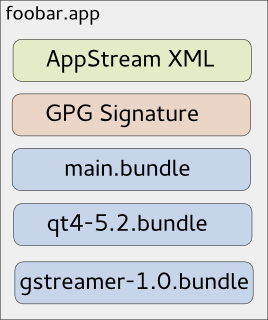
As you might know, due to invasive changes in PackageKit, I am currently rewriting the 3rd-party application installer Listaller. Since I am not the only one looking at the 3rd-party app-installation issue (there is a larger effort going on at GNOME, based on Lennarts ideas), it makes sense to redesign some concepts of Listaller. Currently, dependencies and applications are installed into directories in /opt, and Listaller contains some logic to make applications find dependencies, and to talk to the package manager to install missing things. This has some drawbacks, like the need to install an application before using it, the need for applications to be relocatable, and application-installations being non-atomic. Glick2 There is/was another 3rd-party app installer approach on the GNOME side, by Alexander Larsson, called Glick2. Glick uses application bundles (do you remember Klik from back in the days?) mounted via FUSE. This allows some neat features, like atomic installations and software upgrades, no need for relocatable apps and no need to install the application. However, it also has disadvantages. Quoting the introduction document for Glick2: Bundling isn t perfect, there are some well known disadvantages. Increased disk footprint is one, although current storage space size makes this not such a big issues. Another problem is with security (or bugfix) updates in bundled libraries. With bundled libraries its much harder to upgrade a single library, as you need to find and upgrade each app that uses it. Better tooling and upgrader support can lessen the impact of this, but not completely eliminate it. This is what Listaller does better, since it was designed to do a large effort to avoid duplication of code. Also, currently Glick doesn t have support for updates and software-repositories, which Listaller had. Combining Listaller and Glick ideas So, why not combine the ideas of Listaller and Glick? In order to have Glick share resources, the system needs to know which shared resources are available. This is not possible if there is one huge Glick bundle containing all of the application s dependencies. So I modularized Glick bundles to contain just one software component, which is e.g. GTK+ or Qt, GStreamer or could even be a larger framework (e.g. GNOME 3.14 Platform ). These components are identified using AppStream XML metadata, which allows them to be installed from the distributor s software repositories as well, if that is wanted. If you now want to deploy your application, you first create a Glick bundle for it. Then, in a second step, you bundle your application bundle with it s dependencies in one larger tarball, which can also be GPG signed and can contain additional metadata. The resulting metabundle will look like this: glick-libundle This doesn t look like we share resources yet, right? The dependencies are still bundled with the application requiring them. The trick lies in the installation step: While the application above can be executed right away without installing it, there will also be an option to install it. For the user, this will mean that the application shows up in GNOME-Shell s overview or KDEs Plasma launcher, gets properly registered with mimetypes and is if installed for all users available system-wide. Technically, this will mean that the application s main bundle is extracted and moved to a special location on the file system, so are the dependency-bundles. If bundles already exist, they will not be installed again, and the new application will simply use the existing software. Since the bundles contain information about their dependencies, the system is able to determine which software is needed and which can simply be deleted from the installation directories. If the application is started now, the bundles are combined and mounted, so the application can see the libraries it depends on. Additionally, this concept allows secure updates of applications and shared resources. The bundle metadata contains an URL which points to a bundle repository. If new versions are released, the system s auto-updater can automatically pick these up and install them this means e.g. the Qt bundle will receive security updates, even if the developer who shipped it with his/her app didn t think of updating it. Conclusion So far, no productive code exists for this I just have a proof-of-concept here. But I pretty much like the idea, and I am thinking about going further in that direction, since it allows deploying applications on the Linux desktop as well as deploying software on servers in a way which plays nice with the native package manager, and which does not duplicate much code (less risk of having not-updated libraries with security flaws around). However, there might be issues I haven t thought about yet. Also, it makes sense to look at GNOME to see how the whole 3rd-party app deployment issue develops. In case I go further with Listaller-NEXT, it is highly likely that it will make use of the ideas sketched above (comments and feedback are more than welcome!).

Martin Pitt: Running autopkgtests in the cloud

It s great to see more and more packages in Debian and Ubuntu getting an autopkgtest. We now have some 660, and soon we ll get another ~ 4000 from Perl and Ruby packages. Both Debian s and Ubuntu s autopkgtest runner machines are currently static manually maintained machines which ache under their load. They just don t scale, and at least Ubuntu s runners need quite a lot of handholding. This needs to stop. To quote Tim The Tool Man Taylor: We need more power!. This is a perfect scenario to be put into a cloud with ephemeral VMs to run tests in. They scale, there is no privacy problem, and maintenance of the hosts then becomes Somebody Else s Problem. I recently brushed up autopkgtest s ssh runner and the Nova setup script. Previous versions didn t support revert yet, tests that leaked processes caused eternal hangs due to the way ssh works, and image building wasn t yet supported well. autopkgtest 3.5.5 now gets along with all that and has a dozen other fixes. So let me introduce the Binford 6100 variable horsepower DEP-8 engine python-coated cloud test runner! While you can run adt-run from your home machine, it s probably better to do it from an autopkgtest controller cloud instance as well. Testing frequently requires copying files and built package trees between testbeds and controller, which can be quite slow from home and causes timeouts. The requirements on the controller node are quite low you either need the autopkgtest 3.5.5 package installed (possibly a backport to Debian Wheezy or Ubuntu 12.04 LTS), or run it from git ($checkout_dir/run-from-checkout), and other than that you only need python-novaclient and the usual $OS_* OpenStack environment variables. This controller can also stay running all the time and easily drive dozens of tests in parallel as all the real testing action is happening in the ephemeral testbed VMs. The most important preparation step to do for testing in the cloud is quite similar to testing in local VMs with adt-virt-qemu: You need to have suitable VM images. They should be generated every day so that the tests don t have to spend 15 minutes on dist-upgrading and rebooting, and they should be minimized. They should also be as similar as possible to local VM images that you get with vmdebootstrap or adt-buildvm-ubuntu-cloud, so that test failures can easily be reproduced by developers on their local machines. To address this, I refactored the entire knowledge how to turn a pristine default vmdebootstrap or cloud image into an autopkgtest environment into a single /usr/share/autopkgtest/adt-setup-vm script. adt-buildvm-ubuntu-cloud now uses this, you shold use it with vmdebootstrap --customize (see adt-virt-qemu(1) for details), and it s also easy to run for building custom cloud images: Essentially, you pick a suitable pristine image, nova boot an instance from it, run adt-setup-vm through ssh, then turn this into a new adt specific "daily" image with nova image-create. I wrote a little script create-nova-adt-image.sh to demonstrate and automate this, the only parameter that it gets is the name of the pristine image to base on. This was tested on Canonical's Bootstack cloud, so it might need some adjustments on other clouds. Thus something like this should be run daily (pick the base images from nova image-list):
  $ ./create-nova-adt-image.sh ubuntu-utopic-14.10-beta2-amd64-server-20140923-disk1.img
  $ ./create-nova-adt-image.sh ubuntu-utopic-14.10-beta2-i386-server-20140923-disk1.img
This will generate adt-utopic-i386 and adt-utopic-amd64. Now I picked 34 packages that have the "most demanding" tests, in terms of package size (libreoffice), kernel requirements (udisks2, network manager), reboot requirement (systemd), lots of brittle tests (glib2.0, mysql-5.5), or needing Xvfb (shotwell):
  $ cat pkglist
  apport
  apt
  aptdaemon
  apache2
  autopilot-gtk
  autopkgtest
  binutils
  chromium-browser
  cups
  dbus
  gem2deb
  glib-networking
  glib2.0
  gvfs
  kcalc
  keystone
  libnih
  libreoffice
  lintian
  lxc
  mysql-5.5
  network-manager
  nut
  ofono-phonesim
  php5
  postgresql-9.4
  python3.4
  sbuild
  shotwell
  systemd-shim
  ubiquity
  ubuntu-drivers-common
  udisks2
  upstart
Now I created a shell wrapper around adt-run to work with the parallel tool and to keep the invocation in a single place:
$ cat adt-run-nova
#!/bin/sh -e
adt-run "$1" -U -o "/tmp/adt-$1" --- ssh -s nova -- \
    --flavor m1.small --image adt-utopic-i386 \
    --net-id 415a0839-eb05-4e7a-907c-413c657f4bf5
Please see /usr/share/autopkgtest/ssh-setup/nova for details of the arguments. --image is the image name we built above, --flavor should use a suitable memory/disk size from nova flavor-list and --net-id is an "always need this constant to select a non-default network" option that is specific to Canonical Bootstack. Finally, let' run the packages from above with using ten VMs in parallel:
  parallel -j 10 ./adt-run-nova -- $(< pkglist)
After a few iterations of bug fixing there are now only two failures left which are due to flaky tests, the infrastructure now seems to hold up fairly well. Meanwhile, Vincent Ladeuil is working full steam to integrate this new stuff into the next-gen Ubuntu CI engine, so that we can soon deploy and run all this fully automatically in production. Happy testing!

9 October 2014

Ingo Juergensmann: Buildd.Net: update-buildd.net v0.99 released

Buildd.Net offers a buildd centric view to autobuilder network such as previously Debians autobuilder network or nowadays the autobuilder network of debian-ports.org. The policy of debian-ports.org requires a GPG key for the buildd to sign packages for upload that is valid for 1 year. Buildd admins are usually lazy people. At least they are running a buildd instead of building those packages all manually. Being a lazy buildd admin it might happen that you miss to renew your GPG key, which will render your buildd unable to upload newly built packages. When participating in Buildd.Net you need to run update-buildd.net, a small script that transmits some statistical data about your package building. I added now a GPG key expiry check to that script that will warn the buildd admin by mail and text on the Buildd.Net arch status page, such as for m68k. So, either your client updates automatically to the new version or you can download the script yourself.
Kategorie:

Lisandro Dami&aacute;n Nicanor P&eacute;rez Meyer: Qt 5.3.2 in Wheezy-backports: just a few hours away

In more or less 24 hs a few days most of Qt 5.3.2 will be available as a Wheezy backport. That means that if you are using Debian stable you don't need to wait for Jessie: just wait a few hours, add wheezy-backports's repo to your sources.list and get it :)

The rest of Qt 5 will arrive soon.

This is the same version that will be shipped in Jessie, so whatever you develop with it will work with the next Debian stable release :)

Don't forget: you better start porting your Qt4 apps to Qt5!

Note 2014-10-10: uups, it will still take a few days, but it will be there soon :)

Note 2014-10-15: currently building!

Chris Lamb: London Paris London 2014

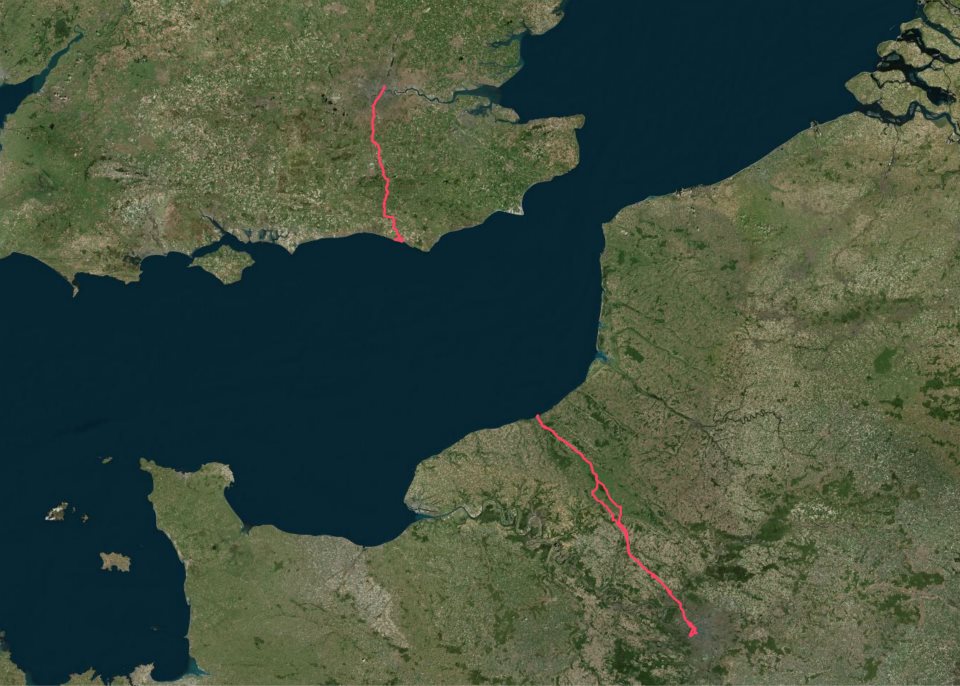
I've wanted to ride to Paris for a few months now but was put off by the hassle of taking a bicycle on the Eurostar, as well having a somewhat philosophical and aesthetic objection to taking a bike on a train in the first place. After all, if one already is possession of a mode of transport... My itinerary was straightforward:
Friday 12h00
London Newhaven
Friday 23h00
Newhaven Dieppe (ferry)
Saturday 04h00
Dieppe Paris
Saturday 23h00
(Sleep)
Sunday 07h00
Paris Dieppe
Sunday 18h00
Dieppe Newhaven (ferry)
Sunday 21h00
Newhaven Peacehaven
Sunday 23h00
(Sleep)
Monday 07h00
Peacehaven London
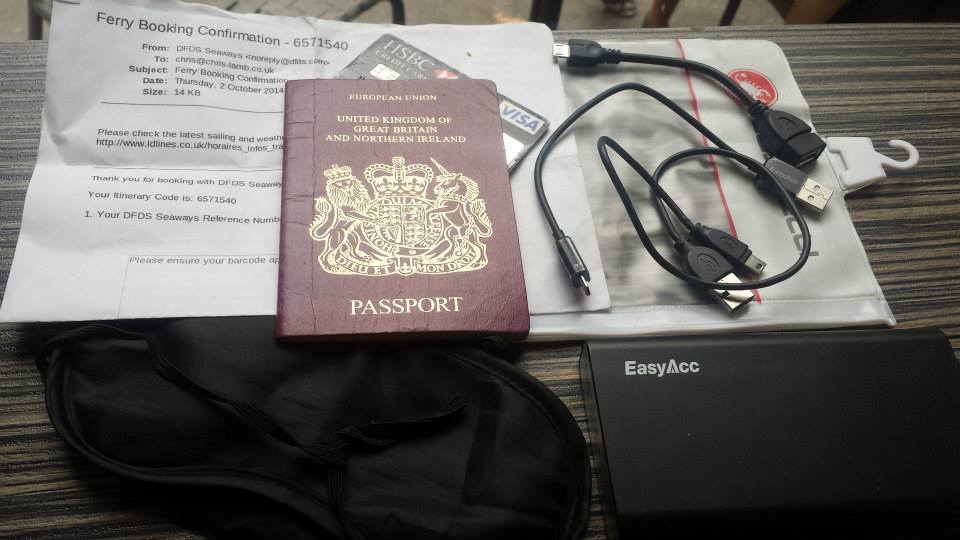
Packing list https://chris-lamb.co.uk/wp-content/2014/london-paris-london/01.jpg
  • Ferry ticket (unnecessary in the end)
  • Passport
  • Credit card
  • USB A male mini A male (charges phone, battery pack & front light)
  • USB A male mini B male (for charging or connecting to Edge 800)
  • USB mini A male OTG A female (for Edge 800 uploads via phone)
  • Waterproof pocket
  • Sleeping mask for ferry (probably unnecessary)
  • Battery pack

Not pictured:
  • Castelli Gabba Windstopper short-sleeve jersey
  • Castelli Velocissimo bib shorts
  • Castelli Nanoflex arm warmers
  • Castelli Squadra rain jacket
  • Garmin Edge 800
  • Phone
  • Front light: Lezyne Macro Drive
  • Rear lights: Knog Gekko (on bike), Knog Frog (on helmet)
  • Inner tubes (X2), Lezyne multitool, tire levers, hand pump

Day 1: London Newhaven
https://chris-lamb.co.uk/wp-content/2014/london-paris-london/02.jpg

Tower Bridge.

Many attempt to go from Tower Bridge Eiffel Tower (or Marble Arch Arc de Triomphe) in less than 24 hours. This would have been quite easy if I had left a couple of hours later.
https://chris-lamb.co.uk/wp-content/2014/london-paris-london/03.jpg

Fanny's Farm Shop, Merstham, Surrey.

https://chris-lamb.co.uk/wp-content/2014/london-paris-london/04.jpg

Plumpton, East Sussex.

https://chris-lamb.co.uk/wp-content/2014/london-paris-london/05.jpg

West Pier, Newhaven.

https://chris-lamb.co.uk/wp-content/2014/london-paris-london/07.jpg

Leaving Newhaven on the 23h00 ferry.


Day 2: Dieppe Paris
https://chris-lamb.co.uk/wp-content/2014/london-paris-london/09.jpg

Beauvoir-en-Lyons, Haute-Normandie.

https://chris-lamb.co.uk/wp-content/2014/london-paris-london/10.jpg

S rifontaine, Picardie.

https://chris-lamb.co.uk/wp-content/2014/london-paris-london/12.jpg

La tour Eiffel, Paris.

https://chris-lamb.co.uk/wp-content/2014/london-paris-london/13.jpg

Champ de Mars, Paris.

https://chris-lamb.co.uk/wp-content/2014/london-paris-london/15.jpg

Pont de Grenelle, Paris.


Day 3: Paris Dieppe
https://chris-lamb.co.uk/wp-content/2014/london-paris-london/18.jpg

Cormeilles-en-Vexin, le-de-France.

https://chris-lamb.co.uk/wp-content/2014/london-paris-london/20.jpg

Gisors, Haute-Normandie.

https://chris-lamb.co.uk/wp-content/2014/london-paris-london/21.jpg

Paris-Brest, Gisors, Haute-Normandie.

Wikipedia: This pastry was created in 1910 to commemorate the Paris Brest bicycle race begun in 1891. Its circular shape is representative of a wheel. It became popular with riders on the Paris Brest cycle race, partly because of its energizing high caloric value, and is now found in p tisseries all over France.
https://chris-lamb.co.uk/wp-content/2014/london-paris-london/22.jpg

Gournay-en-Bray, Haute-Normandie.

https://chris-lamb.co.uk/wp-content/2014/london-paris-london/23.jpg

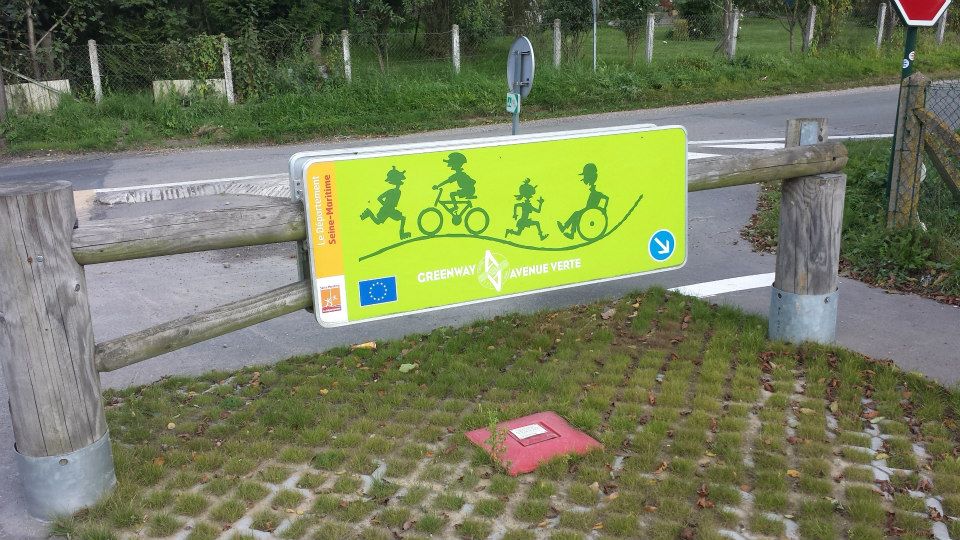
D but de l'Avenue Verte, Forges-les-Eaux, Haute-Normandie.

https://chris-lamb.co.uk/wp-content/2014/london-paris-london/24.jpg

Mesni res-en-Bray, Haute-Normandie.

https://chris-lamb.co.uk/wp-content/2014/london-paris-london/26.jpg

Dieppe, Haute-Normandie.

https://chris-lamb.co.uk/wp-content/2014/london-paris-london/28.jpg

La Mancha .


Day 4: Peacehaven London
https://chris-lamb.co.uk/wp-content/2014/london-paris-london/29.jpg

Peacehaven, East Sussex.

https://chris-lamb.co.uk/wp-content/2014/london-paris-london/31.jpg

Highbrook, West Sussex.

https://chris-lamb.co.uk/wp-content/2014/london-paris-london/33.jpg

London weather.


Summary https://chris-lamb.co.uk/wp-content/2014/london-paris-london/34.jpg
Distance
588.17 km
Pedal turns
~105,795
My only non-obvious tips would be to buy a disposable blanket in the Newhaven Co-Op to help you sleep on the ferry. In addition, as the food on the ferry is good enough you only need to get to the terminal one hour before departure, avoiding time on your feet in unpicturesque Newhaven. In terms of equipment, I would bring another light for the 4AM start on L'Avenue Verte if only as a backup and I would have checked I could arrive at my Parisian Airbnb earlier in the day - I had to hang around for five hours in the heat before I could have a shower, properly relax, etc. I had been warned not to rely on being able to obtain enough water en route on Sunday but whilst most shops were indeed shut I saw a bustling tabac or boulangerie at least once every 20km so one would never be truly stuck. Route-wise, the surburbs of London and Paris are both equally dismal and unmotivating and there is about 50km of rather uninspiring and exposed riding on the D915. However, L'Avenue Verte is fantastic even in the pitch-black and the entire trip was worth it simply for the silent and beautiful Normandy sunrise. I will be back.

Jan Wagner: Updated Monitoring Plugins Version is coming soon

Three months ago version 2.0 of Monitoring Plugins was released. Since then many changes were integrated. You can find a quick overview in the upstream NEWS. Now it's time to move forward and a new release is expected soon. It would be very welcome if you could give the latest source snapshot a try. You also can give the Debian packages a go and grab them from my 'unstable' and 'wheezy-backports' repositories at http://ftp.cyconet.org/. Right after the stable release, the new packages will be uploaded into Debian unstable. The whole packaging changes can be observed in the changelog. Feedback is very appreciated via Issue tracker or the Monitoring Plugins Development Mailinglist. Update: The official call for testing is available.

Next.

Previous.