Search Results: "tar"

2 January 2015

Jeff Licquia: Happy 2015!

[en] Look, it s 2015. How d that happen? Blogging has been pretty much nonexistent this year, apart from a public service announcement about the Heartbleed bug and a public statement about boring encryption stuff. (Which, if you re actually interested in that sort of thing: I did finally get the requisite number of signatures and replaced my key in Debian just in time to avoid the Great Key Purge of 2014.) It s a new world. Social media has made blogs obsolete, supposedly, except that they re now too busy competing with each other (and, sometimes, their own fans) to be terribly useful. I ve tried to write a blog post about that a few times, only to delete it out of frustration and long-windedness. So there s a resolution for 2015: get past these social media issues and get back to regular communication. Maybe what I need is a good social media rant. I m sure you re all waiting on pins and needles for that one. Lots has been going on. I m an empty-nester now; the youngest kid started college this fall. I ve been busy at work and busy at skill freshening, including getting on this funky Haskell bandwagon that seems to be all the rage among the cool kids. And plenty of other things going on, some of which probably deserve their own blog posts. Maybe those will get written in 2015. Plan: write. Journey of a thousand miles starting with single steps, and all that.

John Goerzen: Sound players: Adventures with Ampache, mpd, pulseaudio, Raspberry Pi, and Logitech Media Server

I finally decided it was about time to get my whole-house sound project off the ground. As an added bonus, I d like to be able to stream music from my house to my Android phone. Some Background It was about 2.5 years ago that I last revisited the music-listening picture on Linux. I used Spotify for awhile, but the buggy nature of its support for local music eventually drove me up the wall. I have a large collection of music that will never be on Spotify (local choirs, for instance) and this was an important feature. When Google Play Music added the feature of uploading your local collection, I used that; it let me stream music from my phone in my car (using the Bluetooh link to the car). I could also listen at home on a PC, or plug my phone into various devices to play. But that was a hassle, and didn t let me have music throughout the house. Google Play is reasonable for that, but it has a number of really glaring issues. One is that it often gets album artwork wrong; it doesn t use the ID3 tags embedded in the files, but rather tries to guess . Another is that the sync is only add . Move files to another place in your collection, or re-rip them to FLAC and replace your old MP3s, and suddenly they re in Google Play twice. It won t ever see updated metadata, either quite a hassle for someone that uses Musicbrainz and carefully curates metadata. My Hardware I already have an oldish PC set up as a entertainment box running MythTV. It is a diskless system (boots PAE over the network and has NFS root) and very quiet. It has video output to my TV, and audio output via S/PDIF to my receiver. It is one logical audio frontend. My workstation in my office is another obvious place. My kitchen has a radio with a line in jack, and I also have a small portable speaker with a line in jack to make the last two options. I also have a Raspberry Pi model B that I bought awhile ago and was looking for a purpose, so I thought this should be cheap and easy, right? Well. Cheap, yes. Easy, not so much. First attempt: Ampache The Ampache project produces quite a nice piece of software. Ampache has matured significantly in the last 2.5 years, and the usability of its web-interface with HTML5 and Flash players as options is quite impressive. It is easily as usable as Google s, though its learning curve is rather more steep. There are multiple Android apps for Ampache to stream remotely. And, while most are terribly buggy and broken, there is at least one that seems to work well. Ampache can also output m3u/pls files for a standalone player. It does on-the-fly transcoding. There are some chinks in the armor, however. The set of codecs that are transcoded or passed through is a global setting, not a per-device setting. The bitrates are per-account, so you can t easily have it transcode FLAC into 320Kbps mp3 for streaming on your LAN and 128Kbps MP3 for streaming to your phone. (There are some hacks involving IP address ranges and multiple accounts, but they are poorly documented and cumbersome.) Ampache also has a feature called localplay in which it drives local players instead of remote ones. I tried to use this in combination with mpd to drive music to the whole house. Ampache s mpd interface is a bit odd; it actually loads things up into mpd s queue. Sadly it shares the same global configs as the rest. Even though mpd is perfectly capable of handling FLAC audio, the Ampache web player isn t, so you have to either make it transcode mp3 for everything or forego the web player (or use a second account that has transcode everything set). Frustratingly, not one of the Android clients for Ampache is even remotely compatible with Localplay, and some will fail in surprising ways if you have been using Localplay on the web client. So let s see how this mpd thing worked out. Ampache with mpd for whole-house audio The primary method here is to use mpd s pulseaudio driver. I configured it like so:
audio_output
type "pulse"
name "MPD stream"
#server "remote_server" # optional
sink "rtp" # optional
mixer_type "software"

Then in /etc/pulse/system.pa:
load-module module-null-sink sink_name=rtp format=s16be channels=2 rate=44100 sink_properties="device.description='RTP Multicast Sink'"
load-module module-rtp-send source=rtp.monitor
This tells Pulse to use multicast streaming to the LAN for the audio packets. Pulse is supposed to have latency synchronization to achieve perfect audio everywhere. In practice, this works somewhat poorly. Plus I have to install pulse everywhere, which inserts its tentacles way too deeply into the ALSA stack for my taste. (alsamixer suddenly turns useless by default, for instance.) But I gave it a try. After much fiddling Pulse is rather poorly documented and the interactions of configuration tools with it even more so I found a working configuration. On my MythTV box, I added:
load-module module-rtp-recv
load-module module-native-protocol-tcp auth-ip-acl=127.0.0.1;x.x.x.x
The real annoyance was getting it to set the output through the S/PDIF digital port. Finally I figured out the magic potion:
set-card-profile 0 output:iec958-stereo+input:analog-stereo
This worked reasonably well. The Raspberry Pi was a much bigger challenge, however. I put Raspbian on it easily enough, and installed Pulse. But apparently it is well-known in the Pulse community that Pulse s RTP does not work well with wifi. Multicast itself works poorly with wifi in general, and Pulse won t do unicast RTP. However, Pulse assumes very low latency and just won t work well with wifi at all. Morever, pulseaudio on the rpi is something of a difficult beast to tame. It has crackling audio, etc. I eventually got it working decently with: daemon.conf:
realtime-scheduling = yes
realtime-priority = 5
resample-method = src-sinc-fastest
default-sample-rate = 44100
default-fragments = 4
default-fragment-size-msec=20
and in system.pa, commented out the module-udev-detect and module-detect, and added:
load-module module-alsa-card device_id=0 tsched=0 fragments=10 fragment_size=640 tsched_buffer_size=4194384 tsched_buffer_watermark=262144
plus the rtp-recv and tcp protocol lines as before. This got it working with decent quality, but it was always out of sync by at least a few tenths of a second, if not a whole second, with the other rooms. Brief diversion: mplayer Many players besides pulseaudio can play the RTP streams that pulseaudio generates. mplayer, for instance, can. I found this worked on the Raspberry Pi:
mplayer -really-quiet -cache 64 -cache-min 95 -demuxer rawaudio -rawaudio format=0x20776172 rtp://224.0.0.56:46510
But this produced even worse sync. It became clear that Ampache was not going to be the right solution. Logitech Media Server I have looked at this a few times over the years, but I ve somehow skipped it. But I looked at it again now. It is an open source (GPL) server, and was originally designed to work with Logitech hardware. There are now all sorts of software clients out there. There is a helpful wiki about it, although Logitech has rebranded the thing so many times, it s not even consistent internally on what the heck it s called (is it LMS? or Squeezebox Server? or Slimserver? The answer is: yes.) LMS does no web-based streaming. At all. But I thought I d give it a try. Installation is a little weird (its .deb packages up binary perl modules for things that are already in Debian, for half a dozen architectures and many Perl versions.) I had some odd issues but eventually it worked. It scanned my media collection. I installed squeezelite on my workstation as my first player, and things worked reasonably well out of the box. I proceeded to install squeezelite on the Raspberry Pi and MythTV server (where I had to compile libsoxr for wheezy, due to an obscure error I couldn t find the cause of until I used strace). Log in to the LMS web interface, tell it to enable synchronization, and bam! Perfect synchronization! Incredible. But I ran into two issues: one was that it used a lot of CPU even on my workstation (50% or more, even when idle). Strangely, it used far less CPU on the pi than did pulseaudio. Secondly, I d get annoying clicks from it from time to time. Some debugging and investigation revealed that they were both somewhat related; it was getting out of sync with the pi and correcting. Initially I assumed this to be an issue with the pi, but tracked it down to something else. I told it to upsample to 48kHz and this made the problem go away. My command on PC hardware is:
squeezelite -a 200:10 -o dmix -u hLX -z
And on the Raspberry Pi:
squeezelite -a 800:10:16:0 -n kitchen -z
It is working perfectly now. LMS even has an Android remote control app that can control all devices together, queue up playlists, etc. Very slick. The Raspberry Pi The Raspberry Pi, even the model B+, apparently has notoriously bad audio output. I noticed this first as very low volume on the output. I found a $11 USB DAC on Amazon that seems to do the trick, so we will see. I am also using the $10 Edimax USB Wifi and it seems to work well. Other Options The big-name other option here is Sonos. They have perfect sync audio already working. But they re pricy, closed, and proprietary; you have to buy Sonos speakers, transmitters, etc. for the entire house. Their receivers start at $200, and it s at least $350 to integrate an existing stereo into the system. I d be shelling out over $1000 to use Sonos for this setup. As it is, I ve bought less than $100 of equipment (a second Pi and its accessories) and getting output that, while no doubt not quite as pristine, it still quite nice and acceptable. Quite nice. Update: LMS with Apache It turns out that Logitech Media Server can automatically save created playlists to a spot where Ampache can find them. So an Ampache streaming player can be used to access the same collection LMS uses, with full features. Nice!

1 January 2015

Russ Allbery: 2014 Book Reading in Review

This year, after a series of catastrophically horrible and unethical management decisions, I walked away from my job of seventeen years and found a new job. As you might expect, reading wasn't the top priority for much of the year. I'm moderately surprised that I read as much as I did. The good side is that I'm now in a much better place both professionally and personally and no longer have to put up with draining and demoralizing nonsense happening on a regular basis. The downside for my review output is that the new job is more engrossing and is, in some ways, harder work, so I expect my reading totals going forward to stabilize somewhere below where they were in the past (although it's possible that the daily commute will change that equation somewhat). As mentioned last year, I had a feeling that something like this would happen (although not that it would be anywhere near this bad), so I had no specific reading goals for the year. Next year, I'm going to see how it goes for the first few months, and might then consider setting some goals if I want to encourage myself to take more time for reading. The below statistics are confined to the books I reviewed in 2014. I read three more books that I've not yet reviewed, partly because the end of the year isn't as packed with vacation as it was at Stanford. Those will be counted in 2014. Despite the low reading totals for the year, I read two 10 out of 10 books. My favorite book of the year was Ann Leckie's Ancillary Justice, which was one of the best science fiction novels I've ever read. Highly recommended if you like the space opera genre at all. A close second was my favorite non-fiction book of the year and the other 10 out of 10: Allie Brosh's collection Hyperbole and a Half. Those of you who have read her blog already know her brilliant and insightful style of humor. Those who haven't are in for a treat. I read a lot of non-fiction this year and not as much fiction, partly for mood reasons, so I don't have honorable mentions in the fiction department. In the non-fiction department, though, there are four more books worth mentioning. Cryptography Engineering, by Niels Ferguson, Bruce Schneier, and Tadayoshi Kohno, was the best technical book that I read last year, and a must-read for anyone who works on security or crypto software. David Graeber's Debt was the best political and economic book of the year and the book from which I learned the most. It changed the way that you think about debt and loans significantly. A close second, though, was David Roodman's Due Diligence, which is a must-read for anyone who has considered investing in microfinance or is curious about the phenomenon. We need more data-driven, thoughtful, book-length analysis like this in the world. Finally, The Knowledge, by Lewis Dartnell, is an entertaining and quixotic project. The stated goal of the book is to document the information required to rebuild civilization after a catastrophe, with hopefully fewer false starts and difficult research than was required the first time. I'm dubious about its usefulness for that goal, but it's a fascinating and entertaining book in its own right, full of detail about industrial processes and the history of manufacturing and construction that are otherwise hard to come by without extensive (and boring) research. Recommended, even if you're dubious about the efficacy of the project. The full analysis includes some additional personal reading statistics, probably only of interest to me.

Tim Retout: Looking back at 2014

I have a tendency to forget what I've been up to - so I made a list for 2014. I started the year having recently watched many 30c3 videos online - these were fantastic, and I really should get round to the ones from 31c3. January is traditionally the peak time for the recruitment industry, so at work we were kept busy dealing with all the traffic. We'd recently switched the main job search to use Solr rather than MySQL, which helped - but we did spend a lot of time during the early months of the year converting tables from MyISAM to InnoDB. At the start of February was FOSDEM, and Kate and I took Sophie (then aged 10 months) to her first software conference. I grabbed a spot in the Go devroom for the Sunday afternoon, which was awesome. Downside: we got horribly ill while in Brussels. At work I was sorting out configuration management - this led to some Perl module backporting for Debian, and I uploaded Zookeeper at some point during the year as well. We currently make use of vagrant, chef and a combination of Debian packages and cpanm for Perl modules, but I have big plans to improve on that this year. Over a break from work I hacked up apt-transport-tor, which lets you install Debian packages over the Tor network. (This was inspired by videos from 30c3 and/or LibrePlanet, I think?) Continuing the general theme of paranoia, I attended the Don't Spy On Us campaign's day of action in June. Over the summer at work I was experimenting with Statsd and Graphite for monitoring. I also wrote Toggle, a Perl module for feature flags. In July I attended a London.pm meeting for the first time, and heard Thomas Klausner talk about OX - this nudged me into various talks at LPW (see below). Pubs have a lot to answer for. At some point I got an IPv6 tunnel working at home (although my ISP-provided router's wireless doesn't forward it), and I had an XBMC install going on a Raspberry Pi as another fun hack. In August and September I worked on packaging pump.io for Debian, and attended IndieWebCamp Brighton, where I delivered a talk/workshop on setting up TLS. (This all ties in to the paranoia theme.) I stalled the work on pump.io, partly because of licensing issues at build-dependency time (if you want to run all the tests) - but I expect I'll pick this up in 2015 once jessie is released. November was the London Perl Workshop, where I presented my work from the summer on statsd/graphite and Toggle, and a Bread::Board lightning talk. LPW was more enjoyable for me this year than previous years, probably because of the interesting people discussing various aspects of how feature flags ought to work. Simultaneously was the Cambridge MiniDebConf (why do these always clash?) where I think I fixed at least one RC bug. This is not an exhaustive list of everything I've done this year - there are more changes now lined up for 2015 which I haven't shared yet. But looking back, I'm pleased that the many small experiments I get up to do add up to something over time, and I can see that I'm achieving something. Here's to another year!

Dirk Eddelbuettel: (Belated) 2014 Running Recap

Having just blogged about today's 5k, I noticed that I did not blog at all about running in 2014. There wasn't much, but another Ragnar Relay in February, again as an Ultra team. I more-or-less live tweeted this though: Pre-race warning (and that was my route!), Team photo at start, Leg 1, Leg 2, Leg 3, Leg 4, Leg 5, Leg 6, and Chilling I also ran the Philly Half-Marathon in November following up on the Penn R Workshop, and posted some tweets: Post race selfie, Strava result (thinking it was a 13.5 miler race--WTF), and Post-race chill.

This post by Dirk Eddelbuettel originated on his Thinking inside the box blog. Please report excessive re-aggregation in third-party for-profit settings.

Thorsten Alteholz: My Debian Activities in December 2014

FTP assistant This month at the end of the year has been rather quiet as well. The holiday season is not suited for lots of REJECTs, so all in all I marked 91 packages for accept and rejected only 14 packages. But be aware, the period of grace is over now. Squeeze LTS This was my sixth month that I did some work for the Squeeze LTS initiative, started by Raphael Hertzog at Freexian. This month I got assigned a workload of 20.5h and I spent these hours to upload new versions of: This month I also sponsored the upload of [DLA 126-1] ettercap security update. As far as I know, this has been the first time that someone who is not (yet?) involved in Debian as a Debian Maintainer or Debian Developer prepared a patch for Squeeze LTS. So many thanks to Nguyen Cong for doing the work. Thanks to Toshiba as well, who allowed him to work on this package. I am sure there is more to come. As December is the time of gifts, I also uploaded [DLA 104-1] pdns-recursor security update although no LTS sponsor indicated any interest. Other packages Unfortunately the Debian Med Advent Calendar wasn t as successful as the years before. Only five bugs in packages python-mne, avifile , biomaj-watcher, trimmomatic and uc-echo have been closed. Things can only get better

Russ Allbery: Review: Three Parts Dead

Review: Three Parts Dead, by Max Gladstone
Series: Craft #1
Publisher: Tor
Copyright: October 2012
ISBN: 1-4668-0203-0
Format: Kindle
Pages: 336
Tara Abernathy was a student in the Hidden Schools, learning Craft, until she was expelled. Literally expelled: thrown from the floating schools to crash painfully to earth in the Badlands, left to return to her family and village and a life of small workings of Craft and contracts on behalf of local farmers. She had largely resigned herself to that life until raiders started killing people. Tara is not the sort of person who could stand by and watch that, or someone to refrain from using Craft to fix the world. The result was undead guardians for the town, perhaps unwisely formed from the town's risen dead, and only a job offer saves Tara from the ungrateful attention of her neighbors. That's how Tara finds herself employed by the firm of Kelethras, Albrecht, and Ao, in the person of partner Elayne Kevarian. Provisionally, depending on her performance on their job: the investigation of the death of a god. It's possible to call Three Parts Dead urban fantasy if you squint at it the right way. It is fantasy that takes place largely in cities, it features the investigation of a crime (and, before long, several crimes), and Tara's attitude is reminscent of an urban fantasy heroine. But this is considerably different from the normal fare of supernatural creatures. In this world, magic, called Craft, is an occupation that requires a great deal of precision and careful construction. Small workings are described similar to magic, although with an emphasis on metaphor. Larger workings more often come in the form of energy flows, contracts, and careful hedging, and the large Craft firms bear more resemblence to mergers and acquisitions specialists than to schools of wizards. This means that the murder investigation of the god of Alt Coulumb involves a compelling mix of danger, magic, highly unusual library investigations, forensic accounting, hidden Craft machinery, unexpected political alliances, and an inhuman police force. Rather than the typical urban fantasy approach of being beaten up until the resolution of the mystery becomes obvious, Tara and her companions do quite a lot of footwork and uncover a more complex political situation than they were expecting. And, in keeping with this take on magic, the story culminates in a courtroom drama (of a sort). I really enjoyed this. It combines the stylistic elements of urban fantasy that I like with some complex and original world-building and a great take on magical contracts. I prefer worlds like this one, where any source of power people have lived with for a long time is surrounded by the controls, formal analysis, and politics that humans create around anything of value. Tara is also a great protagonist. This is a coming of age story in a sense, and Tara is sometimes unsure of her abilities, but it's refreshingly devoid of worry or angst over new-found abilities. Tara enjoys her work, and approaches it with a well-written mix of uncertainty, impulsiveness, and self-confidence (sometimes warranted, sometimes not). I've read some good stories where the protagonist gets dragged into the story against their will, and some of them are quite good, but it's refreshing to read a book about someone who takes to the story like a duck to water. This is a believable protrayal of a character with a lot of native ability and intelligence, not much wisdom (yet), but a lot of thoughtful enthusiasm. I was disappointed to learn that she isn't the protagonist of the next book in the series. The biggest flaw I found in this book is that Gladstone doesn't stick reliably to his world conception. At times, Craft collapses into something more like typical fantasy magical battles, instead of legal procedure and contract made concrete. I suppose this makes parts of the book more exciting, but I would have preferred a plot resolution that involved less combat and more argument. This isn't helped by the utterly hissable villain. There's a lot of complexity in understanding what happened and who was going to benefit (and how), but there is absolutely no doubt who the enemy is, and he's essentially without redeeming qualities. I would have preferred more nuance, given how satisfyingly complex the rest of the world-building is. Three Parts Dead also occasionally suffers from the typical first novel problem of being a bit overstuffed. The world-building comes fast and thick, and nearly everything Tara does involves introducing new concepts. But the world does have a coherent history, and quite a lot of it. It used to be a more typical fantasy world ruled by gods, each with their own territory and worshippers (and Alt Coulumb is a throwback to this era), but an epic war between gods and Craft is in Tara's past, leading to the defeat or destruction of many of the gods. She lives in a time of uneasy truce between human and inhuman powers, featuring some very complex political and economic alliances. There's a lot of material here for an ongoing series. This is a great first novel. It's not without its flaws, but I enjoyed it from beginning to end, and will definitely keep reading the series. Recommended. Followed by Two Serpents Rise. Rating: 8 out of 10

31 December 2014

Wouter Verhelst: Perl 'issues'

I just watched a CCC talk in which the speaker claims Perl is horribly broken. Watching it was fairly annoying however, since I had to restrain myself from throwing things at the screen. If you're going to complain about the language, better make sure you actually understand the language first. I won't deny that there are a few weird constructions in there, but hey. The talk boils down to a claim that perl is horrible, because the list "data type" is "broken". First of all, Netanel, in Perl, lists are not arrays. Yes, that's confusing if you haven't done more than a few hours of Perl, but hear me out. In Perl, a list is an enumeration of values. A variable with an '@' sigil is an array; a construct consisting of an opening bracket ('(') followed by a number of comma- or arrow-separated values (',' or '=>'), followed by a closing bracket, is a list. Whenever you assign more than one value to an array or a hash, you need to use a list to enumerate the values. Subroutines in perl also use lists as arguments or return values. Yes, that last bit may have been a mistake. Perl has a concept of "scalar context" and "list context". A scalar context is what a sub is in when you assign the return value of your sub to a scalar; a list context is when you assign the return value of your sub to an array or a hash, or when you use the list construct (the thing with brackets and commas) with sub calls (instead of hardcoded values or variables) as the individual values. This works as follows:
sub magic  
    if (wantarray())  
        print "You're asking for a list!";
        return ('a', 'b', 'c');
      else  
        print "You're asking for a scalar!";
        return 'a';
     
 
print ("list: ", magic(), "\n");
print "scalar: " . magic() . "\n";
The above example will produce the following output:
You're asking for a list!
list: abc
You're asking for a scalar!
scalar: a
What happens here? The first print line creates a list (because things are separated by commas); the second one does not (the '.' is perl's string concatenation operator; as you can only concatenate scalars, the result is that you call the magic() sub in scalar context). Yes, seen as how arrays are not lists, the name of the wantarray() sub is horribly chosen. Anyway. It is documented that lists cannot be nested. Lists can only be one-dimensional constructs. If you create a list, and add another list as an element (or something that can be converted to a list, like an array or a hash), then the result is that you get a flattened list. If you don't want a flattened list, you need to use a reference instead. A reference is a scalar value that, very much like a pointer in C, contains a reference to another variable. This other variable can be an array, a hash, or a scalar. But it cannot be a list, because it must be a variable -- and lists cannot be variables. If you need to create multi-dimensional constructs, you need to use references. Taking a reference is done by prepending a backslash to whatever it is you're trying to take a reference of; or, in the case of arrays of hashes, one can create an anonymous array or hash with [] resp . E.g., if you want to add a non-flattened array to a list, you instead create a reference to an array, like so:
$arrayref = [ 'this', 'is', 'an', 'anonymous', 'array'];
you can now create a multi-dimensional construct:
@multiarray = ('elem1', $arrayref);
Or you can do that in one go:
@multiarray = ('elem1', [ 'this', 'is', 'an', 'anonymous', 'array']);
Alternatively, you can create a non-anonymous array first:
@onedimarray = ('this', 'is', 'not', 'an', 'anonymous', 'array');
@multiarray = ('elem1', \@onedimarray);
In perl, curly brackets can be used to create a reference to anonymous hashes, whereas square brackets can be used to create a reference to anonymous arrays. This is all a basic part of the language; if you don't understand that, you simply don't understand Perl. In other words, whenever you see someone doing this:
%hash =  'a' => 'b' ;
or
@array = [ '1', '2' ];
you can say that they don't understand the language. For reference, the assignment to %hash will result in an (unusable) hash with a single key that is a reference to an anonymous hash (which cannot be accessed anymore) and a value of undef; the assignment to @array will result in a two-dimensional array with one element in the first dimension, and two elements in the second. The CGI.pm fix which Natanel dismisses in the Q&A part of the talk as a "warning" which won't help (because it would be too late) is actually a proper fix, which should warn people in all cases. That is, if you do this:
%hash =   'name' => $name, 'password' => $cgi->param('password')  ;
then CGI.pm's param() sub will notice that it's being called in list context, and issue a warning -- regardless of whether the user is passing one or two password query-parameters. It uses the wantarray() sub, and produces a warning if that returns true. In short, Perl is not the horribly broken construct that Natanel claims it to be. Yes, there are a few surprises (most of which exist for historical reasons), and yes, those should be fixed. This is why the Perl community has redone much of perl for Perl 6. But the fact that there are a few surprises doesn't mean the whole language is broken. There are surprises in most languages; that is a fact of life. Yes, the difference between arrays and hashes on the one hand, and lists on the other hand, is fairly confusing; it took me a while to understand this. But once you get the hang of it, it's not all that difficult. And then these two issues that Natanel found (which I suppose could be described as bugs in the core modules) aren't all that surprising anymore. So, in short: What I do agree with is that if you want to use a language, you should understand its features. Unfortunately, this single line in the final slide of Natanel's talk is just about the only thing in the whole talk that sortof made sense to me. Ah well.

30 December 2014

Michael Prokop: Installing Debian in UEFI mode with some stunts

For a recent customer setup of Debian/wheezy on a IBM x3630 M4 server we used my blog entry State of the art Debian/wheezy deployments with GRUB and LVM/SW-RAID/Crypto as a base. But this time we wanted to use (U)EFI instead of BIOS legacy boot. As usual we went for installing via Grml and grml-debootstrap. We started by dd-ing the Grml ISO to a USB stick ( dd grml64-full_2014.11.iso of=/dev/sdX bs=1M ). The IBM server couldn t boot from it though, as far as we could identify it seems to be related to a problem with the IBM server not being able to properly recognize USB sticks that are registering themselves as mass storage device instead of removable storage devices (you can check your device via the /sys/devices/ /removable setting). So we enabled Legacy Boot and USB Storage in the boot manager of the server to be able to boot Grml in BIOS/legacy mode from this specific USB stick. To install the GRUB boot loader in (U)EFI mode you need to be able to execute modprobe efivars . But our system was booted via BIOS/legacy and in that mode the modprobe efivars doesnt work. We could have used a different USB device for booting Grml in UEFI mode but because we are lazy sysadmins and wanted to save time we went for a different route instead: First of all we write the Grml 64bit ISO (which is (U)EFI capable out-of-the-box, also when dd-ing it) to the local RAID disk (being /dev/sdb in this example):
root@grml ~ # dd if=grml64-full_2014.11.iso of=/dev/sdb bs=1M
Now we should be able to boot in (U)EFI mode from the local RAID disk. To verify this before actually physically rebooting the system (and possibly getting into trouble) we can use qemu with OVMF:
root@grml ~ # apt-get update
root@grml ~ # apt-get install ovmf
root@grml ~ # qemu-system-x86_64 -bios /usr/share/qemu/OVMF.fd -hda /dev/sdb
The Grml boot splash comes up as expected, perfect. Now we actually reboot the live system and boot the ISO from the local disks in (U)EFI mode. Then we put the running Grml live system into RAM to not use and block the local disks any longer since we want to install Debian there. This can be achieved not just by the toram boot option, but also by executing grml2ram on-demand as needed from user space:
root@grml ~ # grml2ram
Now having the local disks available we verify that we re running in (U)EFI mode by executing:
root@grml ~ # modprobe efivars
root@grml ~ # echo $?
0
Great, so we can install the system in (U)EFI mode now. Starting with the according partitioning (/dev/sda being the local RAID disk here):
root@grml ~ # parted /dev/sda
GNU Parted 3.2
Using /dev/sda
Welcome to GNU Parted! Type 'help' to view a list of commands.
(parted) mklabel gpt
(parted) mkpart primary fat16 2048s 4095s
(parted) name 1 "EFI System"
(parted) mkpart primary 4096s 100%
(parted) name 2 "Linux LVM"
(parted) print
Model: IBM ServeRAID M5110 (scsi)
Disk /dev/sda: 9000GB
Sector size (logical/physical): 512B/4096B
Partition Table: gpt
Disk Flags:
  Number  Start   End     Size    File system  Name        Flags
   1      1049kB  2097kB  1049kB  fat16        EFI System
   2      2097kB  9000GB  9000GB               Linux LVM
(parted) quit
Information: You may need to update /etc/fstab.
Then setting up LVM with a logical volume for the root fs and installing Debian via grml-debootstrap on it:
root@grml ~ # pvcreate /dev/sda2
  Physical volume "/dev/sda2" successfully created
root@grml ~ # vgcreate vg0 /dev/sda2
  Volume group "vg0" successfully created
root@grml ~ # lvcreate -n rootfs -L16G vg0
  Logical volume "rootfs" created
root@grml ~ # grml-debootstrap --target /dev/mapper/vg0-rootfs --password secret --hostname foobar --release wheezy
[...]
Now finally set up the (U)EFI partition and properly install GRUB in (U)EFI mode:
root@grml ~ # mkfs.fat -F 16 /dev/sda1
mkfs.fat 3.0.26 (2014-03-07)
WARNING: Not enough clusters for a 16 bit FAT! The filesystem will be
misinterpreted as having a 12 bit FAT without mount option "fat=16".
root@grml ~ # mount /dev/mapper/vg0-rootfs /mnt
root@grml ~ # grml-chroot /mnt /bin/bash
Writing /etc/debian_chroot ...
(foobar)root@grml:/# mkdir -p /boot/efi
(foobar)root@grml:/# mount /dev/sda1 /boot/efi
(foobar)root@grml:/# apt-get install grub-efi-amd64
[...]
(foobar)root@grml:/# grub-install /dev/sda
Timeout: 10 seconds
BootOrder: 0003,0000,0001,0002,0004,0005
Boot0000* CD/DVD Rom
Boot0001* Hard Disk 0
Boot0002* PXE Network
Boot0004* USB Storage
Boot0005* Legacy Only
Boot0003* debian
Installation finished. No error reported.
(foobar)root@grml:/# ls /boot/efi/EFI/debian/
grubx64.efi
(foobar)root@grml:/# update-grub
[...]
(foobar)root@grml:/# exit
root@grml ~ # umount /mnt/boot/efi
root@grml ~ # umount /mnt/
root@grml ~ # vgchange -an
  0 logical volume(s) in volume group "vg0" now active
That s it. Now rebooting the system should bring you to your Debian installation running in (U)EFI mode. You can verify this before actually rebooting into the system by using the qemu/OVMF trick from above once again.

Michal Čihař: Gammu 1.34.0

Gammu 1.34.0 has been just released. It has been more than year from last Gammu release and it's time to release all new features and bugfixes. Full list of changes: You can download it from http://wammu.eu/download/. I will not make any promises for future releases (if there will be any) as the tool is not really in active development.

Filed under: English Gammu Wammu 0 comments Flattr this!

Benjamin Mako Hill: Consider the Redirect

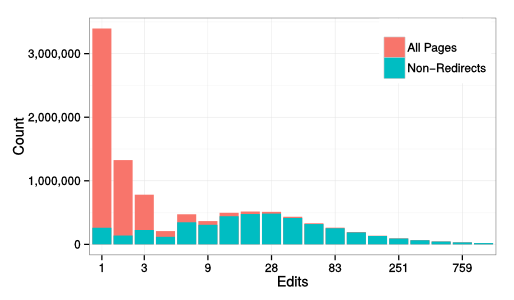
In wikis, redirects are special pages that silently take readers from the page they are visiting to another page. Although their presence is noted in tiny gray text (see the image below) most people use them all the time and never know they exist. Redirects exist to make linking between pages easier, they populate Wikipedia s search autocomplete list, and are generally helpful in organizing information. In the English Wikipedia, redirects make up more than half of all article pages. seattle_redirectOver the years, I ve spent some time contributing to to Redirects for Discussion (RfD). I think of RfD as like an ultra-low stakes version of Articles for Deletion where Wikipedians decide whether to delete or keep articles. If a redirect is deleted, viewers are taken to a search results page and almost nobody notices. That said, because redirects are almost never viewed directly, almost nobody notices if a redirect is kept either! I ve told people that if they want to understand the soul of a Wikipedian, they should spend time participating in RfD. When you understand why arguing about and working hard to come to consensus solutions for how Wikipedia should handle individual redirects is an enjoyable way to spend your spare time where any outcome is invisible you understand what it means to be a Wikipedian. That said, wiki researchers rarely take redirects into account. For years, I ve suspected that accounting for redirects was important for Wikipedia research and that several classes of findings were noisy or misleading because most people haven t done so. As a result, I worked with my colleague Aaron Shaw at Northwestern earlier this year to build a longitudinal dataset of redirects that can capture the dynamic nature of redirects. Our work was published as a short paper at OpenSym several months ago. It turns out, taking redirects into account correctly (especially if you are looking at activity over time) is tricky because redirects are stored as normal pages by MediaWiki except that they happen to start with special redirect text. Like other pages, redirects can be updated and changed over time are frequently are. As a result, taking redirects into account for any study that looks at activity over time requires looking at the text of every revision of every page. Using our dataset, Aaron and I showed that the distribution of edits across pages in English Wikipedia (a relationships that is used in many research projects) looks pretty close to log normal when we remove redirects and very different when you don t. After all, half of articles are really just redirects and, and because they are just redirects, these articles are almost never edited. edits_over_pagesAnother puzzling finding that s been reported in a few places and that I repeated myself several times is that edits and views are surprisingly uncorrelated. I ll write more about this later but the short version is that we found that a big chunk of this can, in fact, be explained by considering redirects. We ve published our code and data and the article itself is online because we paid the ACM s open access fee to ransom the article.

29 December 2014

Lunar: Reproducible builds against RC bugs

One way of working on reproducible builds is to look at packages which fail to build reproducibly on our continuous integration platform. Looking at the output of debbindiff often makes it possible to spot common problems. Sometimes, issues are more singular. sources.debian.net and codesearch are amazing helps to skim over the source code trying to figure out what is happening. When I started to work on reproducible builds for Debian a year and a half ago, I never thought it would be useful to find actual release critical bugs. Until I had a look at libical debbindiff output. Can you understand the issue and how bad it is? Answer is in bug #773916.

Neil Williams: OpenTAC hardware in manufacture

A bit of news on the development of OpenTAC the Open Hardware Test Automation Controller. I ve talked about this at the MiniDebConf 2014 in Cambridge. (Video available). The development is being tracked on the Vero-Apparatus wiki and as this is Open Hardware, the files are attached to the wiki (All files are CC BY-SA 4.0). Andy completed the schematics at the start of November, allowing work to start on the routing. With routing completed, orders were placed for manufacture of the first PCBs on the 19th December 2014. Whilst waiting for the PCBs to arrive we re working on the device tree database (my first real experience with creating a device tree) which will underpin the PDU and serial console services available to the user as well as the admin interface for control of the USB subsystems, fan control, power control and thermal monitoring. The first thing we need to do is create a data dictionary a table to correlate software identifiers with the real hardware pins. We ll then follow that through with a default device tree overlay that will leave all the associated I/O lines in a safe initial state. Once we have some code, I ll be pushing to a branch on GitHub. We ve also got an internal git repo on vero-apparatus for OpenTAC files which we will add to in due course. Image of the board as rendered prior to prototype production: OpenTAC_2V00_Model More to come once we have the hardware on the desk

28 December 2014

Ian Donnelly: New Release and Farewell to Planet Debian

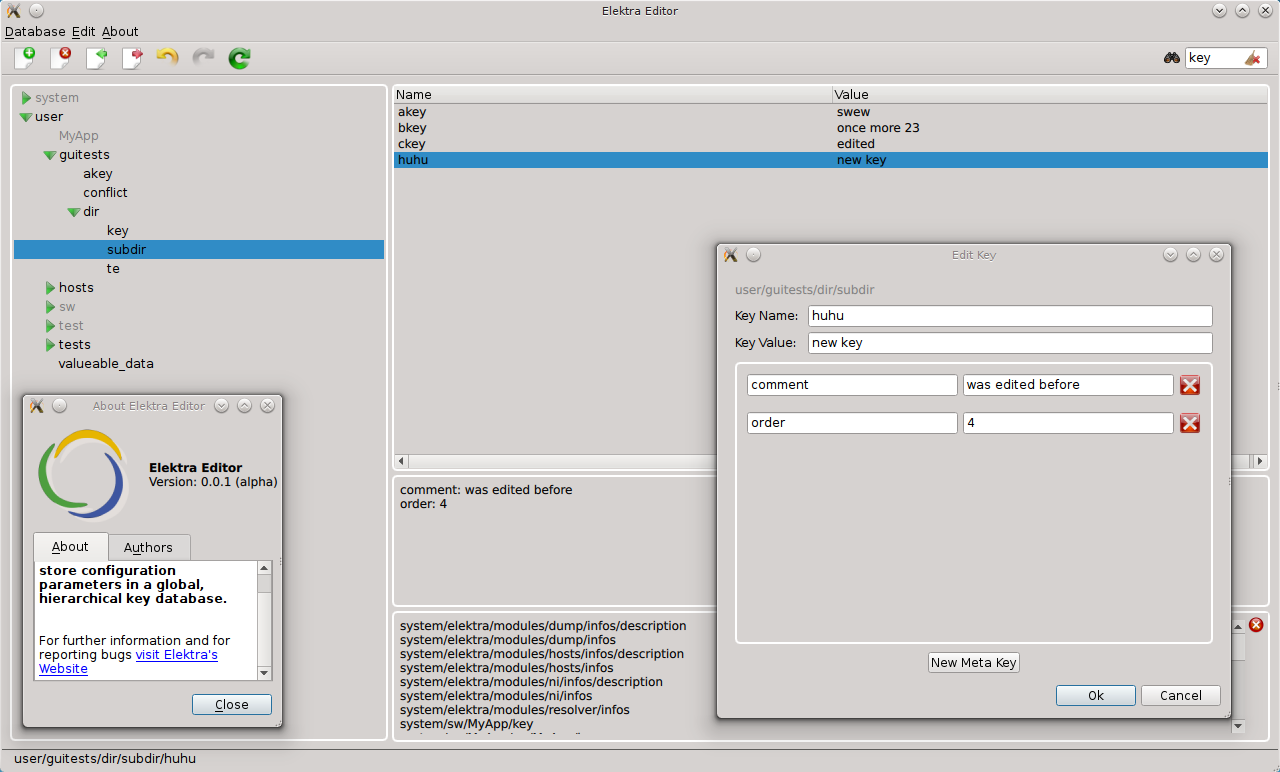
Hi Everyone, So first I want to say, that I appreciate all the interest in our project from the folks who read our posts at Planet Debian. This will be our last post there for now, I hope you enjoyed the posts about my Google Summer of Code project and other info about Elektra we posted there. To stay informed about Elektra s releases, please subscribe to this RSS feed. Today I want to thank you all and tell you about the latest exciting Elektra news, our newest release 0.8.10! This new release brings many exciting updates and features, since I didn t to a post for Elektra 0.8.9, this post will cover changes and additions from Elektra 0.8.8 to 0.8.10. First of all, there is now a new gui for KDB! A big thanks goes out to Raffael Pancheri for developing this GUI! Once included in your Elektra build, this gui can be run using the command kdb qt-gui. It is very important to note that the gui is in version 0.0.2, meaning it is an alpha project and shouldn t be considered stable yet! This GUI is a convenient tool that lets you mount, unmount, search, import and export configurations. We are very excited about this tool and we hope it makes Elektra more accessible to all users. Check out the screenshot below to see this new GUI in action:

A screenshot of the new qt-gui tool

A few other new features are that Felix added support for multi-line into the ini plugin. Users are able to turn this feature on or off for each configuration. Additionally, Kai-Uwe added support for Windows 7 to Elektra! The Windows 7 port relies on a new resolver called wresolver which is a simpler version of the regular resolver which is compatible with Windows. Additionally, there is a new Java binding, so now Elektra is compatible with applications and plugins written in Java! On top of these features, a new hosts plugin and a new rename plugin have been written. The new hosts in conjunction with improvements to the ini plugin allows for multiple styles of comments (because some ini dialects allow ; and # to be used to differentiate comments) to be used and preserved in configuration files. Additionally, this new hosts plugin is compatible with and differentiates between ipv4 and ipv6 entries. There have also been a huge number of under-the-hood improvements, changes, and fixes; there have been so many in-fact that I am going to list them: There are many more new changes that I could not mention here. Please keep up-to-date with Elektra news and releases by subscribing to this RSS feed and following our news page on GitHub. As always feel free to comment on our posts and I will get back to you as soon as possible. Again, thanks for reading our blog, enjoy the new release! Sincerely,
Ian S. Donnelly P.S. Happy New Year to everybody!

27 December 2014

Joey Hess: shell monad day 3

I have been hard at work on the shell-monad ever since it was born on Christmas Eve. It's now up to 820 lines of code, and has nearly comprehensive coverage of all shell features. Time to use it for something interesting! Let's make a shell script and a haskell program that both speak a simple protocol. This kind of thing could be used by propellor when it's deploying itself to a new host. The haskell program can ssh to a remote host and run the shell program, and talk back and forth over stdio with it, using the protocol they both speak. abstract beginnings First, we'll write a data type for the commands in the protocol.
data Proto
    = Foo String
      Bar
      Baz Integer
    deriving (Show)
Now, let's go type class crazy!
class Monad t => OutputsProto t where
    output :: Proto -> t ()
instance OutputsProto IO where
    output = putStrLn . fromProto
So far, nothing interesting; this makes the IO monad an instance of the OutputsProto type class, and gives a simple implementation to output a line of the protocol.
instance OutputsProto Script where
    output = cmd "echo" . fromProto
Now it gets interesting. The Script monad is now also a member of the OutputsProto. To output a line of the protocol, it just uses echo. Yeah -- shell code is a member of a haskell type class. Awesome -- most abstract shell code evar! Similarly, we can add another type class for monads that can input the protocol:
class Monad t => InputsProto t p where
    input :: t p
instance InputsProto IO Proto where
    input = toProto <$> readLn
instance InputsProto Script Var where
    input = do
        v <- newVar ()
        readVar v
        return v
While the IO version reads and deserializes a line back to a Proto, the shell script version of this returns a Var, which has the newly read line in it, not yet deserialized. Why the difference? Well, Haskell has data types, and shell does not ... speaking the protocol Now we have enough groundwork to write haskell code in the IO monad that speaks the protocol in arbitrary ways. For example:
protoExchangeIO :: Proto -> IO Proto
protoExchangeIO p = do
    output p
    input
fooIO :: IO ()
fooIO = do
    resp <- protoExchangeIO (Foo "starting up")
    -- etc
But that's trivial and uninteresting. Anyone who has read to here certianly knows how to write haskell code in the IO monad. The interesting part is making the shell program speak the protocol, including doing various things when it receives the commands.
foo :: Script ()
foo = do
    stopOnFailure True
    handler <- func (NamedLike "handler") $
        handleProto =<< input
    output (Foo "starting up")
    handler
    output Bar
    handler
handleFoo :: Var -> Script ()
handleFoo v = toStderr $ cmd "echo" "yay, I got a Foo" v
handleBar :: Script ()
handleBar = toStderr $ cmd "echo" "yay, I got a Bar"
handleBaz :: Var -> Script ()
handleBaz num = forCmd (cmd "seq" (Val (1 :: Int)) num) $
    toStderr . cmd "echo" "yay, I got a Baz"
serialization I've left out a few serialization functions. fromProto is used in both instances of OutputsProto. The haskell program and the script will both use this to serialize Proto.
fromProto :: Proto -> String
fromProto (Foo s) = pFOO ++ " " ++ s
fromProto Bar = pBAR ++ " "
fromProto (Baz i) = pBAZ ++ " " ++ show i
pFOO, pBAR, pBAZ :: String
(pFOO, pBAR, pBAZ) = ("FOO", "BAR", "BAZ")
And here's the haskell function to convert the other direction, which was also used earlier.
toProto :: String -> Proto
toProto s = case break (== ' ') s of
    (w, ' ':rest)
          w == pFOO -> Foo rest
          w == pBAR && null rest -> Bar
          w == pBAZ -> Baz (read rest)
          otherwise -> error $ "unknown protocol command: " ++ w
    (_, _) -> error "protocol splitting error"
We also need a version of that written in the Script monad. Here it is. Compare and contrast the function below with the one above. They're really quite similar. (Sadly, not so similar to allow refactoring out a common function..)
handleProto :: Var -> Script ()
handleProto v = do
    w <- getProtoCommand v
    let rest = getProtoRest v
    caseOf w
        [ (quote (T.pack pFOO), handleFoo =<< rest)
        , (quote (T.pack pBAR), handleBar)
        , (quote (T.pack pBAZ), handleBaz =<< rest)
        , (glob "*", do
            toStderr $ cmd "echo" "unknown protocol command" w
            cmd "false"
          )
        ]
Both toProto and handleProto split the incoming line apart into the first word, and the rest of the line, then match the first word against the commands in the protocol, and dispatches to appropriate actions. So, how do we split a variable apart like that in the Shell monad? Like this...
getProtoCommand :: Var -> Script Var
getProtoCommand v = trimVar LongestMatch FromEnd v (glob " *")
getProtoRest :: Var -> Script Var
getProtoRest v = trimVar ShortestMatch FromBeginning v (glob "[! ]*[ ]")
(This could probably be improved by using a DSL to generate the globs too..) conclusion And finally, here's a main to generate the shell script!
main :: IO ()
main = T.writeFile "protocol.sh" $ script foo
The pretty-printed shell script that produces is not very interesting, but I'll include it at the end for completeness. More interestingly for the purposes of sshing to a host and running the command there, we can use linearScript to generate a version of the script that's all contained on a single line. Also included below. I could easily have written the pretty-printed version of the shell script in twice the time that it took to write the haskell program that generates it and also speaks the protocol itself. I would certianly have had to test the hand-written shell script repeatedly. Code like for _x in $(seq 1 "$ _v#[!\ ]*[\ ] ") doesn't just write and debug itself. (Until now!) But, the generated scrpt worked 100% on the first try! Well, it worked as soon as I got the Haskell program to compile... But the best part is that the Haskell program and the shell script don't just speak the same protocol. They both rely on the same definition of Proto. So this is fairly close to the kind of type-safe protocol serialization that Fay provides, when compiling Haskell to javascript. I'm getting the feeling that I won't be writing too many nontrivial shell scripts by hand anymore! :) the complete haskell program Is here, all 99 lines of it. the pretty-printed shell program
#!/bin/sh
set -x
_handler ()   :
    _v=
    read _v
    case "$ _v%%\ * " in FOO) :
        echo 'yay, I got a Foo' "$ _v#[!\ ]*[\ ] " >&2
    : ;; BAR) :
        echo 'yay, I got a Bar' >&2
    : ;; BAZ) :
        for _x in $(seq 1 "$ _v#[!\ ]*[\ ] ")
        do :
            echo 'yay, I got a Baz' "$_x" >&2
        done
    : ;; *) :
        echo 'unknown protocol command' "$ _v%%\ * " >&2
        false
    : ;; esac
 
echo 'FOO starting up'
_handler
echo 'BAR '
_handler
the one-liner shell program
set -p; _handler ()   :;    _v=;    read _v;    case "$ _v%%\ * " in FOO) :;        echo 'yay, I got a Foo' "$ _v#[!\ ]*[\ ] " >&2;     : ;; BAR) :;        echo 'yay, I got a Bar' >&2;    : ;; BAZ) :;        for _x in $(seq 1 "$ _v#[!\ ]*[\ ] ");      do :;           echo 'yay, I got a Baz' "$_x" >&2;      done;   : ;; *) :;      echo 'unknown protocol command' "$ _v%%\ * " >&2;       false;  : ;; esac;  ; echo 'FOO starting up'; _handler; echo 'BAR '; _handler

26 December 2014

Sven Hoexter: on call one-liner: Who is sitting in my swap space?

A "nearly out of swap"-alarm during on call duty led me to quickly assemble a one-liner to grab a list of PIDs and the amount of memory swapped out from /proc/[pid]/smaps. That one-liner later got a bit polishing from my colleague H. to look like this:
for x in $(ps -eo pid h); do s=/proc/$ x /smaps; [ -e $ s  ] && awk -vp=$ x  'BEGIN   sum=0   /Swap:/   sum+=$2   END   if (sum!=0) print sum " PID " p ' $ s ; done   sort -rg
After I shared this one with some friends V. came up with a faster version (and properly formatted output :), that relies on the "VMSwap" value in /proc/[pid]/status. Since the one-liner above has to add up one "Swap" value per memory segment it's obvious why it's very slow on systems with many processes and a lot of memory.
awk 'BEGIN printf "%-7s %-16s %s (KB)\n", "PID","COMM","VMSWAP"   
if($1 == "Name:") n=$2 
if($1 == "Pid:") p=$2 
if($1 == "VmSwap:" && $2 != "0") printf "%-7s %-16s %s\n", p,n,$2   "sort -nrk3" 
 ' /proc/*/status
Drawback of this second version is that it relies on the "VmSwap" value which is only part of Linux 2.6.34 and later. It also ended up in the 2.6.32 based kernel of RHEL 6, so this one should work from RHEL 6 and Debian/wheezy onwards. The first version also works on RHEL 5 and Debian/squeeze since both have a (default) kernel with "CONFIG_PROC_PAGE_MONITOR" enabled, which is what you need to enable /proc/[pid]/smaps. Update: C.R. pointed out via mail that there is a versatile Python script smem. It's available in Debian and at least EPEL 6 and 7. Thanks for the hint. The usefulness of swap and why there is no automatic ressource assignment check and bookkeeping, based on calculations around things like the JVM -Xmx settings and other input, is a story on its own. There is room for improvement. A CMDB (Chapter 10.7) would be a starting point.

Ritesh Raj Sarraf: Linux Containers and Productization

Linux has improved many many things over the last couple of years. Of the many improvements, the one that I've started leveraging the most today, are Control Groups. In the past, when there was a need to build a prototype for a solution, we needed hardware. Then came the virtualization richness to Linux. It came in 2 major flavors, KVM (Full Virtualization) and Xen (Para Virtualization). Over the years, the difference of para vs full, for both the implementations, is almost none. KVM now has support for Para-Virtualizaiton, with para-virtualized drviers for most resource intensive tasks, like network and I/O. Similarly, Xen has Full Virtualization support with the help of Qemu-KVM. But, if you had to build a prototype implementation comprising of a multi node setup, virtualization could still be resource hungry. Otherwise too, if your focus was an application (say like a web framework), virtualization was an overkill. All thanks to Linux Containers, prototyping applicaiton based solutions, is now a breeze in Linux. The LXC project is very well designed, and well balanced, in terms of features (as compared to the recently introduced Docker implementation). From an application's point of view, linux containers provide virtualization for namespace, network and resources. Thus making more than 90% of your application's needs fulfilled. For some apps, where a dependency on the kernel is needed, linux containers will not serve the need. Beyond the defaults provided by the distribution, I like to create a base container with my customizations, as a template. This allows me to quickly create environements, without too much housekeeping to do for the initial setup. My base config, looks like:
rrs@learner:~$ sudo cat /var/lib/lxc/deb-template/config
[sudo] password for rrs:
# Template used to create this container: /usr/share/lxc/templates/lxc-debian
# Parameters passed to the template:
# For additional config options, please look at lxc.container.conf(5)
# CPU
lxc.cgroup.cpuset.cpus = 0,1
lxc.cgroup.cpu.shares = 1234
# Mem
lxc.cgroup.memory.limit_in_bytes = 2000M
lxc.cgroup.memory.soft_limit_in_bytes = 1500M
# Network
lxc.network.type = veth
lxc.network.hwaddr = 00:16:3e:0c:c5:d4
lxc.network.flags = up
lxc.network.link = lxcbr0
# Root file system
lxc.rootfs = /var/lib/lxc/deb-template/rootfs
# Common configuration
lxc.include = /usr/share/lxc/config/debian.common.conf
# Container specific configuration
lxc.mount = /var/lib/lxc/deb-template/fstab
lxc.utsname = deb-template
lxc.arch = amd64
# For apt
lxc.mount.entry = /var/cache/apt/archives var/cache/apt/archives none defaults,bind 0 0
23:07          
rrs@learner:~$
Some of the important settings to have in the templace are the mount point, to point to your local apt cache, and CPU and Memory limits. If there was one feature request to ask the LXC developers, I'd ask them to provide a util-lxc tools suite. Currently, to know the memory (soft/hard) allocation for the container, one needs to do the following:
rrs@learner:/sys/fs/cgroup/memory/lxc/deb-template$ cat memory.soft_limit_in_bytes memory.limit_in_bytes
1572864000
2097152000
23:21          
rrs@learner:/sys/fs/cgroup/memory/lxc/deb-template$ bc
bc 1.06.95
Copyright 1991-1994, 1997, 1998, 2000, 2004, 2006 Free Software Foundation, Inc.
This is free software with ABSOLUTELY NO WARRANTY.
For details type  warranty'.
1572864000/1024/1024
1500
quit
23:21          
rrs@learner:/sys/fs/cgroup/memory/lxc/deb-template$
Tools like lxc-cpuinfo, lxc-free would be much better. Finally, there's been a lot of buzz about Docker. Docker is an alternate product offering, like LXC, for Linux Containers. From what I have briefly looked at, docker doesn't seem to be providing any ground breaking new interface than what is already possible with LXC. It does take all the tidbit tools, and presents you with a unified docker interface. But other than that, I couldn't find it much appealing. And the assumption that the profiles should be pulled off the internet (Github ?) is not very exciting. I am hoping they do have other options, where dependence on the network is not really required.

Categories:

Keywords:

Ritesh Raj Sarraf: Linux Desktop in 2014

We are almost at the end of 2014. While 2014 has been a year with many mixed experiences, I think it does warrant one blog entry ;-) Recently, I've again started spending more time on Linux products / solutions, than spending time focused on a specfic subsystem. This change has been good. It has allowed me to re-cap all the advancements that have happened in the Linux world, umm... in the last 5 years. Once upon a time, the Linux kernel sucked on the Desktop. It led to many desktop improvement related initiatives. Many accepted in kernel, while others stood as it is (out-of-tree) still as of today. Over the years, there are many people that advocate for such out-of-tree features, for example the -ck patchset, claiming it has better performance. Most of the times, these are patches not carried by your distribution vendor, which leads you to alternate sources, if you want to try. Having some spare time, I tried the Alternative Kernel project. It is nothing but a bunch of patchsets, on top of the stock kernel. After trying it out, I must say that these patchsets are out-of-tree, for good. I hardly could make out any performance gain. But I did notice a considerable increase in the power consumption. On my stock Debian kernel, the power consumption lies around 15-18 W. That increased to 20+ W on the alternate kernels. I guess most advocates for the out-of-tree patchsets, only measure the 1-2% performance gain, where as completely neglect the fact that that kernel sleeps less often. But back to the generic Linux kernel performance problem...... Recently, in the last 2 years, the performance suckiness of the Linux kernel is hardly noticed. So what changed ? The last couple of years have seen a rise in high capacity RAM, at affordable consumer price. 8 - 16 GiB of RAM is common on laptops these days. If you go and look at the sucky bug report linked above, it is marked as closed, justified Working as Designed. The core problem with the bug reported, has to do with slow media. The Linux scheduler is (in?)efficient. It works hard to give you the best throughput and performance (for server workloads). I/O threads are a high priority task in the Linux kernel. Now map this scene to the typical Linux desktop. If you end up with doing too much buffered I/O, thus exhausting all your available cache, and trigger paging, you are in for some sweet experience. Given that the kernel highly priotizes I/O tasks, and if your underneath persistent storage device is slow (which is common if you have an external USB disk, or even an internal rotating magnetic disk), you end up blocking all your CPU cycles against the slow media. Which further leads to no available CPU cycles for your other desktop tasks. Hence, when you do I/O at such level, you find your desktop go terribly sluggish. It is not that your CPU is slow or in-capable. It is just that all your CPU slices are blocked. Blocked waiting for your write() to report a completion. So what exactly changed that we don't notice that problem any more ????
  1. RAM - Increase in RAM has led to more I/O be accommodated in cache. The best way to see this in action is to do a copy of a large file, something almost equivalent to the amount of RAM you have. But make sure it is less than the overall amount. For example, if you have 4 GiB of RAM, try copying a file of size 3.5 GiB in your graphical file manager. And at the same time, on the terminal, keep triggering the sync command. Check how long does it take for the sync to complete. By being able to cache large amount of data, the Linux kernel has been better at improving the overall performance in the eyes of the user.
  2. File System - But RAM is not alone. The file system has played a very important role too. Earlier, with ext3 file system, we had a commit interval of (5?) 30 seconds. That led to the above mentioned sync equivalent to get triggered every 30 secs. It was a safety measure to ensure, that at worst, you lose 30 secs worth of data. But it did hinder performance. With ext4, came delayed allocation. Delayed Allocation allowed the write() to return immediate while the data was in cache, and deferred the task of actual write() to the file system. This allowed for the allocator to find the best contiguous slot for the data to be written. Thus it improved the file system. It also brough corruption for some of the apps. :-)
  3. Solid State Drives - The file system and RAM alone aren't the sole factors that led to the drastic improvement in the overall experience of the Linux desktop. If you read through the bug report linked in this article, you'll find the core root cause to be slow persistent storage devices. Could the allocator have been improved (like Windows) to not be so pressing of the Linux desktop ? Maybe, yes. But that was a decision for the kernel devs and they believed (and believe) to keep those numbers to minimum. Thus for I/O, as for today, you have 3 schedulers and for CPU, just 1. What dramatically improved the overall Linux Desktop performance was the general availability of solid state devices. These device are real fast, which in effect made the write() calls return immediate, and did not block the CPU.
So, it was the advancement in both hardware and software that led to better overall desktop performance. Does the above mentioned bug still exist ? Yes. Its just that it is much harder to trigger it now. You'll have to ensure that you max out your cache and trigger paging. And then try to do ask for some CPU cycles. But it wasn't that back then we didn't use Linux on the desktop / laptop. It sure did suck more than, say, Windows. But hey, sometimes we have to eat our own dog food. Even then, there sure were some efforts to overcome the then limitations. The first and obvious one is the out-of-tree patchset. But ther were also some other efforts to improve the situation. The first such effort, that I can recollect, was ulatency. With Linux adding support for Control Groups, there were multiple avenues open on how to tackle and tame the resource starvation problem. The crux of the problem was that Linux gave way too much priority to the I/O tasks. I still wish Linux has a profile mechanism, where in on the kernel command line, we could specify what profile should Linux boot into. Anyways, with ulatency, we saw improvements in the Linux Desktop experience. ulatency had in-built policies to whitelist / blacklist a set of profiles. For example, KDE was a profile. Thus, ulatency would club all KDE processes into a group and give that group a higher precedence to ensure that it had its fair share of CPU cycles. Today, at almost the end of 2014, there are many more consumer of Linux's control groups. Prominent names would be: LXC and systemd. ulatency has hardly seen much development in the last year. Probably it is time for systemd to take over. systemd is expected to bring lots of features to the Linux world, thus bridging the (many) gap Linux has had on the desktop. It makes extensive use of Control Groups for a variety of (good) reasons, which has led it to be a linux-only product. I think it should have never marketed itself as the init daemon. It rather fits better when called as the System Management Daemon. The path to Linux Desktop looks much brighter in 2015 and beyond thanks to all the advancements that have happened so far. The other important players, who should be thanked are Mobile and Low Latency products (Android, ChromeBook), whose engagement to productize Linux has led to better features overall.

Categories:

Keywords:

Vasudev Kamath: Notes: LXC How-To

LXC - Linux Containers allows us to run multiple isolated Linux system under same control host. This will be useful for testing application without changing our existing system. To create an LXC container we use the lxc-create command, it can accepts the template option, with which we can choose the OS we would like to run under the virtual isolated environment. On a Debian system I see following templates supported
[vasudev@rudra: ~/ ]% ls /usr/share/lxc/templates
lxc-alpine*    lxc-archlinux*  lxc-centos*  lxc-debian*    lxc-fedora*  lxc-openmandriva*  lxc-oracle*  lxc-sshd*    lxc-ubuntu-cloud*
lxc-altlinux*  lxc-busybox*    lxc-cirros*  lxc-download*  lxc-gentoo*  lxc-opensuse*      lxc-plamo*   lxc-ubuntu*
For my application testing I wanted to create a Debian container for my By default the template provided by lxc package creates Debian stable container. This can be changed by passing the option to debootstrap after -- as shown below.
sudo MIRROR=http://localhost:9999/debian lxc-create -t debian \
     -f   container.conf -n container-name -- -r sid
-r switch is used to specify the release, MIRROR environment variable is used to choose the required Debian mirror. I wanted to use my own local approx installation, so I can save some bandwidth. container.conf is the configuration file used for creating the LXC, in my case it contains basic information on how container networking should b setup. The configuration is basically taken from LXC Debian wiki
lxc.utsname = aptoffline-dev
lxc.network.type = veth
lxc.network.flags = up
lxc.network.link = br0.1
lxc.network.name = eth0
lxc.network.ipv4 = 192.168.3.2/24
lxc.network.veth.pair = vethvm1
I'm using VLAN setup described in Debian wiki: LXC VLAN Networking page. Below is my interfaces file.
iface eth0.1 inet manual
iface br0.1  inet manual
   bridge_ports eth0.1
   bridge_fd 0
   bridge_maxwait 0
Before launching the LXC make sure you run below command
sudo ifup eth0.1
sudo ifup br0.1
# Also give ip to bridge in same subnet as lxc.network.ipv4
sudo ip addr add 192.168.3.1/24 dev br0.1
I'm giving ip address to bridge so that I can communicate with container from my control host, once it comes up. Now start the container using below command
sudo lxc-start -n container -d -c tty8
We are starting lxc in daemon mode and attaching it to console tty8. If you want, you can drop -d and -c option to start lxc in foreground. But its better you start it in background and attach using lxc-console command shown below.
sudo lxc-console -n container -t tty8
You can detach from console using Ctrl+a q combination and let lxc execute in background. Its also possible to simply ssh into the running container since we have enabled networking. Stopping the container should be done using lxc-stop command, but without -k switch (kill) this command never returned. Even with timeout container is not stopped.
sudo lxc-stop -n container
-r can be used for reboot of container. Since I couldn't get clean shutdown I normally attach the console and issue a halt command in container itself. Not sure if this is the right way, but it gets the thing done. I consider Linux container as a better alternative for spawning a virtual Linux environment instead of running a full blown VM like Virtualbox or VMware.

25 December 2014

Russ Allbery: C TAP Harness 3.2

This is a fairly minor release, mostly to have a release of files that I'm updating in rra-c-util. Most of the changes are typos and other cosmetic fixes. But I hate releasing a new version of something without a little bit of new functionality, so I implemented comment support in test lists. The runtests driver now ignores comments (lines starting with #) and blank lines in test list files, and leading whitespace in front of test names. You can get the latest version from the C TAP Harness distribution page.

Next.

Previous.