Search Results: "tach"

20 March 2015

Zlatan Todori : My journey into Debian

Notice: There were several requests for me to more elaborate on my path to Debian and impact on life so here it is. It's going to be a bit long so anyone who isn't interested in my personal Debian journey should skip it. :) In 2007. I enrolled into Faculty of Mechanical Engineering (at first at Department of Industrial Management and later transfered to Department of Mechatronics - this was possible because first 3 semesters are same for both departments). By the end of same year I was finishing my tasks (consisting primarily of calculations, some small graphical designs and write-ups) when famous virus, called by users "RECYCLER", sent my Windows XP machine into oblivion. Not only it took control over machine and just spawned so many processes that system would crash itself, it actually deleted all from hard-disk before it killed the system entirely. I raged - my month old work, full of precise calculations and a lot of design details, was just gone. I started cursing which was always continued with weeping: "Why isn't there an OS that can whithstand all of viruses, even if it looks like old DOS!". At that time, my roommate was my cousin who had used Kubuntu in past and currently was having SUSE dual-booted on his laptop. He called me over, started talking about this thing called Linux and how it's different but de facto has no viruses. Well, show me this Linux and my thought was, it's probably so ancient and not used that it probably looks like from pre Windows 3.1 era, but when SUSE booted up it had so much more beautiful UI look (it was KDE, and compared to XP it looked like the most professional OS ever). So I was thrilled, installed openSUSE, found some rough edges (I knew immediately that my work with professional CAD systems will not be possible on Linux machines) but overall I was bought. After that he even talked to me about distros. Wait, WTF distros?! So, he showed me distrowatch.com. I was amazed. There is not only a better OS then Windows - there where dozens, hundreds of them. After some poking around I installed Debian KDE - and it felt great, working better then openSUSE but now I was as most newbies, on fire to try more distros. So I was going around with Fedora, Mandriva, CentOS, Ubuntu, Mint, PCLinuxOS and in beginning of 2008 I stumbled upon Debian docs which where talking about GNU and GNU Manifesto. To be clear, I was always as a high-school kid very much attached to idea of freedom but started loosing faith by faculty time (Internet was still not taking too much of time here, youth still spent most of the day outside). So the GNU Manifesto was really a big thing for me and Debian is a social bastion of freedom. Debian (now with GNOME2) was being installed on my machine. As all that hackerdom in Debian was around I started trying to dig up some code. I never ever read a book on coding (until this day I still didn't start and finish one) so after a few days I decided to code tetris in C++ with thought that I will finish it in two days at most (the feeling that you are powerful and very bright person) - I ended it after one month in much pain. So instead I learned about keeping Debian system going on, and exploring some new packages. I got thrilled over radiotray, slimvolley (even held a tournament in my dorm room), started helping on #debian, was very active in conversation with others about Debian and even installed it on few laptops (I became de facto technical support for users of those laptops :D ). Then came 2010 which with negative flow that came in second half of 2009, started to crush me badly. I was promised to go to Norway, getting my studies on robotics and professor lied (that same professor is still on faculty even after he was caught in big corruption scandal over buying robots - he bought 15 years old robots from UK, although he got money from Norway to buy new ones). My relationship came to hard end and had big emotional impact on me. I fell a year on faculty. My father stopped financing me and stopped talking to me. My depression came back. Alcohol took over me. I was drunk every day just not to feel anything. Then came the end of 2010, I somehow got to the information that DebConf will be in Banja Luka. WHAT?! DebConf in city where I live. I got into #debconf and in December 2010/January 2011 I became part of the famous "local local organizers". I was still getting hammered by alcohol but at least I was getting out of depression. IIRC I met Holger and Moray in May, had a great day (a drop of rakia that was too much for all of us) and by their way of behaving there was something strange. Beatiful but strange. Both were sending unique energy of liberty although I am not sure they were aware of it. Later, during DebConf I felt that energy from almost all Debian people, which I can't explain. I don't feel it today - not because it's not there, it's because I think I integrated so much into Debian community that it's now a natural feeling which people here, that are close to me are saying that they feel it when I talk about Debian. DebConf time in Banja Luka was awesome - firstly I met Phil Hands and Andrew McMillan which were a crazy team, local local team was working hard (I even threw up during the work in Banski Dvor because of all heat and probably not much of sleep due to excitement), met also crazy Mexican Gunnar (aren't all Mexicans crazy?), played Mao (never again, thank you), was hanging around smart but crazy people (love all) from which I must notice Nattie (a bastion of positive energy), Christian Perrier (which had coordinated our Serbian translation effort), Steve Langasek (which asked me to find physiotherapist for his co-worker Mathias Klose, IIRC), Zach (not at all important guy at that time), Luca Capello (who gifted me a swirl on my birthday) and so many others that this would be a post for itself just naming them. During DebConf it was also a bit of hard time - my grandfather died on 6th July and I couldn't attend the funeral so I was still having that sadness in my heart, and Darjan Prtic, a local team member that came from Vienna, committed suicide on my birthday (23 July). But DebConf as conference was great, but more importantly the Debian community felt like a family and Meike Reichle told me that it was. The night it finished, me and Vedran Novakovic cried. A lot. Even days after, I was getting up in the morning having the feeling I need something to do for DebConf. After a long time I felt alive. By the end of year, I adopted package from Clint Adams and Moray became my sponsor. In last quarter of 2011 and beginning of 2012, I (as part of LUG) held talks about Linux, had Linux installation in Computer Center for the first time ever, and installed Debian on more machines. Now fast forwarding with some details - I was also on DebConf13 in Switzerland, met some great new friends such as Tincho and Santiago (and many many more), Santiago was also my roommate in Portland on the previous DebConf. In Switzerland I had really great and awesome time. Year 2014 - I was also at DebConf14, maintain a bit more packages and have applied for DD, met some new friends among which I must put out Apollon Oikonomopoulos and Costas Drogos which friendship is already deep for such a short time and I already know that they are life-long friends. Also thanks to Steve Langasek, because without his help I wouldn't be in Portland with my family and he also gave me Arduino. :) 2015. - I am currently at my village residence, have a 5 years of working experince as developer due to Debian and still a lot to go, learn and do but my love towards Debian community is by magnitude bigger then when I thought I love it at most. I am also going through my personal evolution and people from Debian showed me to fight for what you care, so I plan to do so. I can't write all and name all the people that I met, and believe me when I say that I remember most and all of you impacted my life for which I am eternally grateful. Debian, and it's community effect literally saved my life, spring new energy into me and changed me for better. Debian social impact is far bigger then technical, and when you know that Debian is a bastion of technical excellence - you can maybe picture the greatness of Debian. Some of greatest minds are in Debian but most important isn't the sheer amount of knowledge but the enormous empathy. I just hope I can in future show to more people what Debian is and to find all lost souls as me to give them the hope, to show them that we can make world a better place and that everyone is capable to live and do what they love. P.S. I am still hoping and waiting to see Bdale writing a book about Debian's history to this day - in which I think many of us would admire the work done by project members, laugh about many situations and have fun reading a book about project that was having nothing to do but fail and yet it stands stronger then ever with roots deep into our minds.

16 March 2015

Daniel Kahn Gillmor: Bootable grub USB stick (EFI and BIOS for Intel)

I'm using grub version 2.02~beta2-2. I want to make a USB stick that's capable of booting Intel architecture EFI machines, both 64-bit (x86_64) and 32-bit (ia32). I'm starting from a USB stick which is attached to a running debian system as /dev/sdX. I have nothing that i care about on that USB stick, and all data on it will be destroyed by this process. I'm also going to try to make it bootable for traditional Intel BIOS machines, since that seems handy.I'm documenting what I did here, in case it's useful to other people. Set up the USB stick's partition table:
parted /dev/sdX -- mktable gpt
parted /dev/sdX -- mkpart biosgrub fat32 1MiB 4MiB
parted /dev/sdX -- mkpart efi fat32 4MiB -1
parted /dev/sdX -- set 1 bios_grub on
parted /dev/sdX -- set 2 esp on
After this, my 1GiB USB stick looks like:
0 root@foo:~# parted /dev/sdX -- print
Model:  USB FLASH DRIVE (scsi)
Disk /dev/sdX: 1032MB
Sector size (logical/physical): 512B/512B
Partition Table: gpt
Disk Flags: 
Number  Start   End     Size    File system  Name      Flags
 1      1049kB  4194kB  3146kB  fat32        biosgrub  bios_grub
 2      4194kB  1031MB  1027MB               efi       boot, esp
0 root@foo:~# 
make a filesystem and mount it temporarily at /mnt:
mkfs -t vfat -n GRUB /dev/sdX2
mount /dev/sdX2 /mnt
ensure we have the binaries needed, and add three grub targets for the different platforms:
apt install grub-efi-ia32-bin grub-efi-amd64-bin grub-pc-bin grub2-common
grub-install --removable --no-nvram --no-uefi-secure-boot \
     --efi-directory=/mnt --boot-directory=/mnt \
     --target=i386-efi
grub-install --removable --no-nvram --no-uefi-secure-boot \
     --efi-directory=/mnt --boot-directory=/mnt \
     --target=x86_64-efi
grub-install --removable --boot-directory=/mnt \
     --target=i386-pc /dev/sdX
At this point, you should add anything else you want to /mnt here! For example: And don't forget to cleanup:
umount /mnt
sync
Tags: bios, efi, grub, tip

12 March 2015

Enrico Zini: crypttab-reuse-passwords

Reuse passwords in /etc/crypttab Today's scenario was a laptop with an SSD and a spinning disk, and the goal was to deploy a Debian system on it so that as many things as possible are encrypted. My preferred option for it is to setup one big LUKS partition in each disk, and put a LVM2 Physical Volume inside each partition. At boot, the two LUKS partition are opened, their contents are assembled into a Volume Group, and I can have everything I want inside. This has advantages: However, by default this causes cryptsetup to ask for the password once for each LUKS partition, even if the passwords are the same. Searching for ways to mitigate this gave me unsatisfactory results, like: The solution that I found was something that did not show up in any of my search results, so I'm documenting it here:
    # <target name> <source device>   <key file>   <options>
    ssd             /dev/sda2         main         luks,initramfs,discard,keyscript=decrypt_keyctl
    spin            /dev/sdb1         main         luks,initramfs,keyscript=decrypt_keyctl
This caches each password for 60 seconds, so that it can be reused to unlock other devices that use it. The documentation can be found at the beginning of /lib/cryptsetup/scripts/decrypt_keyctl, beware of the leopard . main is an arbitrary tag used to specify which devices use the same password. This is also useful to work easily with multiple LUKS-on-LV setups:
    # <target name> <source device>          <key file>  <options>
    home            /dev/mapper/myvg-chome   main        luks,discard,keyscript=decrypt_keyctl
    backup          /dev/mapper/myvg-cbackup main        luks,discard,keyscript=decrypt_keyctl
    swap            /dev/mapper/myvg-cswap   main        swap,discard,keyscript=decrypt_keyctl

8 March 2015

Carl Chenet: Verify your backups or lose them all

Follow me on Identi.ca or Twitter or Diaspora*diaspora-banner As a good sysadmin, you thought you had backups for your server but you didn t verify them before the major migration you attempted? When you need them, they re empty or full of useless files. And now it s too late
nobackup

Wen you discover that you don t have usable backups lesjoiesdusysadmin.fr

You won t guess how often this situation occurs. Backup Checker is a command line software developed in Python 3.4 on GitHub (stars appreciated :) ) allowing users to verify the integrity of archives (tar, gz, bz2, lzma, zip, tree of files) and the state of the files inside an archive in order to find corruptions or intentional of accidental changes of states or removal of files inside an archive. github-logo Install Backup Checker from PyPI The easiest way to install Backup Checker is from PyPi using the following command:
$ pip3.4 install backupchecker
Debian Wheezy and Squeeze packages for Backup Checker Backup Checker Debian packages are now available for your stable servers Wheezy and Squeeze in the MyTux Debian repositories. Debian Squeeze Just copy/paste the following command on your server to add the MyTux Debian Squeeze repository and install Backup Checker:
apt-key adv --keyserver pgp.mit.edu --recv-keys 2B24481A \
&& echo "deb http://debian.mytux.fr squeeze main" > /etc/apt/sources.list.d/mytux.list \
&& apt-get update \
&& apt-get install backupchecker
debian-squeeze-toy Debian Wheezy Just copy/paste the following command on your server to add the MyTux Debian Wheezy repository and install Backup Checker:
apt-key adv --keyserver pgp.mit.edu --recv-keys 2B24481A \
 && echo "deb http://debian.mytux.fr wheezy main" > /etc/apt/sources.list.d/mytux.list \
 && apt-get update \
 && apt-get install backupchecker
wheezy Using Backup Checker 2 steps are needed to secure your backups. First you need to generate the configuration files of your backups, using the following command: $ backupchecker -G /backups/backup-08032015.tar.gz This generates 2 files /backups/backup-08032015.conf and /backups/backup-08032015.list you need to store in order to verify this archive later (the -O option lets you define a custom location to store the files). Second step is to verify your backup. It is as simple as: $ backupchecker -c /etc/backupchecker/backup-08032015.conf -l /var/log/backupchecker.log Then check if warnings have been sent to /var/log/backupchecker.log. Really simple isn t it? Scripting this command, your backups are now verified and secured. If any modification occurs, it will be detected and pinpointed. What do you thing about it? As usual, any feedback is welcome, through bug reports, emails of the author or comments on this blog. Several companies now use Backup Checker to secure their backups. Let us know if we can help you.

25 February 2015

Eddy Petri&#537;or: Occasional Rsnapshot v1.3.0

It is almost exactly 1 year and a half since I came up with the idea of having a way of making backups using Rsnapshot automatically triggered by my laptop when I have the backup media connected to my laptop. This could mean connecting a USB drive directly to the laptop or mounting a NFS/sshfs share in my home network. Today I tagged Occasional Rsnapshot the v1.3.0 version, the first released version that makes sure even when you connect your backup media occasionally, your Rsnapshot backups are done if and when it makes sense to do it, according to the rsnapshot.conf file and the status of the existing backups on the backup media.

Quoting from the README, here is what Occasional Rsnapshot does:

This is a tool that allows automatic backups using rsnapshot when the external backup drive or remote backup media is connected.

Although the ideal setup would be to have periodic backups on a system that is always online, this is not always possible. But when the connection is done, the backup should start fairly quickly and should respect the daily/weekly/... schedules of rsnapshot so that it accurately represents history.

In other words, if you backup to an external drive or to some network/internet connected storage that you don't expect to have always connected (which is is case with laptops) you can use occasional_rsnapshot to make sure your data is backed up when the backup storage is connected.

occasional_rsnapshot is appropriate for:
  • laptops backing up on:
    • a NAS on the home LAN or
    • a remote or an internet hosted storage location
  • systems making backups online (storage mounted locally somehow)
  • systems doing backups on an external drive that is not always connected to the system
The only caveat is that all of these must be mounted in the local file system tree somehow by any arbitrary tool, occasional_rsnapshot or rsnapshot do not care, as long as the files are mounted.

So if you find yourself in a simillar situation, this script might help you to easily do backups in spite of the occasional availability of the backup media, instead of no backups at all. You can even trigger backups semi-automatically when you remember to or decide is time to backup, by simply pulging in your USB backup HDD.

But how did I end up here, you might ask?

In December 2012 I was asking about suggestions for backup solutions that would work for my very modest setup with Linux and Windows so I can backup my and my wife's system without worrying about loss of data.

One month later I was explaining my concept of a backup solution that would not trust the backup server, and leave to the clients as much as possible the decision to start the backup at their desired time. I was also pondering on the problems I might encounter.

From a security PoV, what I wanted was that:
  1. clients would be isolated from each other
  2. even in the case of a server compromise:
      • the data would not be accessible since they would be already encrypted before leaving the client
      • the clients could not be compromised


    The general concept was sane and supplemental security measures such as port knocking and initiation of backups only during specific time frames could be added.

    The problem I ran to was that when I set up this in my home network a sigle backup cycle would take more than a day, due to the fact that I wanted to do backup of all of my data and my server was a humble Linksys NSLU2 with a 3TB storage attached on USB.

    Even when the initial copy was done by attaching the USB media directly to the laptop, so the backup would only copy changed data, the backup with the HDD attached to the NSLU2 was not finished even after more than 6 hours.

    The bottleneck was the CPU speed and the USB speed. I tried even mounting the storage media over sshfs so the tiny xscale processor in the NSLU2 would not be bothered by any of the rsync computation. This proved to an exercise in futility, any attempt to put the NSLU2 anywhere in the loop resulted in an unacceptable and impractically long backup time.

    All these attempts, of course, took time, but that meant that I was aware I still didn't have appropriate backups and I wasn't getting closer to the desired result.

    So this brings us August 2013, when I realized I was trying to manually trigger Rsnapshot backups from time to time, but having to do all sorts of mental gymnastics and manual listing to evaluate if I needed to do monthly, weekly and daily backups or if weekly and daily was due.

    This had to stop.
    Triggering a backup should happen automatically as soon as the backup media is available, without any intervention from the user.
    I said.

    Then I came up with the basic concept for Occasional Rsnapshot: a very silent script that would be called from cron every 5 minutes, would check if the backup media is mounted, if is not, exit silently to not generate all sorts of noise in cron emails, but if mounted, compute which backup intervals should be triggered, and trigger them, if the appropriate amount of time passed since the most recent backup in that backup interval.

    Occasional Rsnapshot version v1.3.0 is the 8th and most recent release of the script. Even if I used Occasional Rsnapshot since the day 1, v1.3.0 is the first one I can recommend to others, without fearing they might lose data due to it.

    The backup media can be anything, starting from your regular USB mounted HDD, your sshfs mounted backup partition on the home NAS server to even a remote storage such as Amazon S3 online storage, and there are even brief instructions on how to do encrypted backups for the cases where you don't trust the remote storage.

    So if you think you might find anything that I described remotely interesting, I recommend downloading the latest release of Occasional Rsnapshot, go through the README and trying it out.

    Feedback and bug reports are welcome.
    Patches are welcomed with a 'thank you'.
    Pull requests are eagerly waited for :) .

    17 February 2015

    Peter Eisentraut: Listing screen sessions on login

    There is a lot of helpful information about screen out there, but I haven t found anything about this. I don t want to forget any screen sessions, so I d like to be notified when I log into a box and there are screens running for me. Obviously, there is screen -ls, but it needs to be wrapped in a bit logic so that it doesn t annoy when there is no screen running or even installed. After perusing the screen man page a little, I came up with this for .bash_profile or .zprofile:
    if which screen >/dev/null; then
        screen -q -ls
        if [ $? -ge 10 ]; then
            screen -ls
        fi
    fi
    
    The trick is that -q in conjuction with -ls gives you exit codes about the current status of screen. Here is an example of how this looks in practice:
    ~$ ssh host
    Last login: Fri Feb 13 11:30:10 2015 from 192.0.2.15
    There is a screen on:
            31572.pts-0.foobar      (2015-02-15 13.03.21)   (Detached)
    1 Socket in /var/run/screen/S-peter.
    peter@host:~$ 
    

    10 February 2015

    Benjamin Mako Hill: Kuchisake-onna Decision Tree

    Mika recently brought up the Japanese modern legend of Kuchisake-onna ( ). For background, I turned to the English Wikipedia article on Kuchisake-onna which had the following to say about the figure (the description matches Mika s memory):
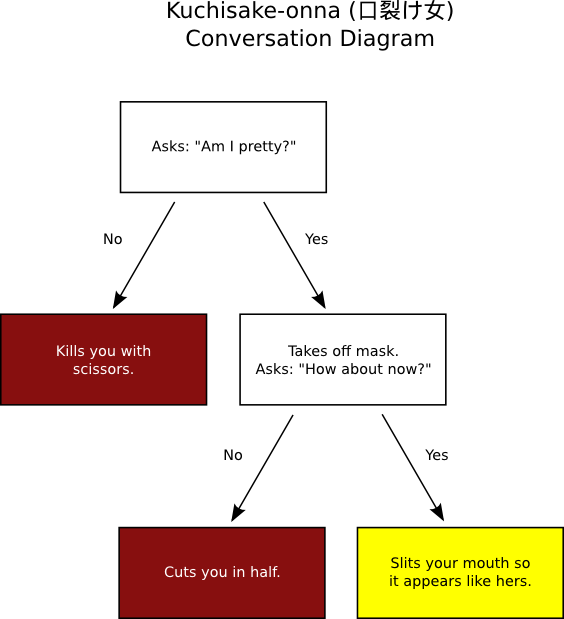
    According to the legend, children walking alone at night may encounter a woman wearing a surgical mask, which is not an unusual sight in Japan as people wear them to protect others from their colds or sickness. The woman will stop the child and ask, Am I pretty? If the child answers no, the child is killed with a pair of scissors which the woman carries. If the child answers yes, the woman pulls away the mask, revealing that her mouth is slit from ear to ear, and asks How about now? If the child answers no, he/she will be cut in half. If the child answers yes, then she will slit his/her mouth like hers. It is impossible to run away from her, as she will simply reappear in front of the victim.
    To help anyone who is not only frightened, but also confused, Mika and I made the following decision tree of possible conversations with Kuchisake-onna and their universally unfortunate outcomes.
    Decision tree of conversations with Kuchisake-onna.Decision tree of conversations with Kuchisake-onna.
    Of course, we uploaded the SVG source for the diagram to Wikimedia Commons and used the diagram to illustrate the Wikipedia article.

    6 February 2015

    Antoine Beaupr : Migrating from Drupal to Ikiwiki

    TLPL; j'ai chang de logiciel pour la gestion de mon blog. TLDR; I have changed my blog from Drupal to Ikiwiki. Note: since this post uses ikiwiki syntax (i just copied it over here), you may want to read the original version instead of this one. will continue operating for a while to
    give a chance to feed aggregators to catch that article. It will also
    give time to the Internet archive to catchup with the static
    stylesheets (it turns out it doesn't like Drupal's CSS compression at
    all!) An archive will therefore continue being available on the
    internet archive for people that miss the old stylesheet. Eventually, I will simply redirect the anarcat.koumbit.org URL to
    the new blog location, . This will likely be my
    last blog post written on Drupal, and all new content will be
    available on the new URL. RSS feed URLs should not change.

    Why I am migrating away from Drupal because it is basically impossible to
    upgrade my blog from Drupal 6 to Drupal 7. Or if it is, I'll have to
    redo the whole freaking thing again when Drupal 8 comes along. And frankly, I don't really need Drupal to run a blog. A blog was
    originally a really simple thing: a web blog. A set of articles
    written on the corner of a table. Now with Drupal, I can add
    ecommerce, a photo gallery and whatnot to my blog, but why would I do
    that? and why does it need to be a dynamic CMS at all, if I get so
    little comments? So I'm switching to ikiwiki, for the following reason:
    • no upgrades necessary: well, not exactly true, i still need to
      upgrade ikiwiki, but that's covered by the Debian package
      maintenance and I only have one patch to it, and there's no data migration! (the last such migration in ikiwiki was in 2009 and was fully supported)
    • offline editing: this is a a big thing for me: i can just note
      things down and push them when I get back online
    • one place for everything: this blog is where I keep my notes, it's
      getting annoying to have to keep track of two places for that stuff
    • future-proof: extracting content from ikiwiki is amazingly
      simple. every page is a single markdown-formatted file. that's it.
    Migrating will mean abandoning the
    barlow theme, which was
    seeing a declining usage anyways.

    What So what should be exported exactly. There's a bunch of crap in the old
    blog that i don't want: users, caches, logs, "modules", and the list
    goes on. Maybe it's better to create a list of what I need to extract:
    • nodes
      • title ([[ikiwiki/directive/meta]] title and guid tags, guid to avoid flooding aggregators)
      • body (need to check for "break comments")
      • nid (for future reference?)
      • tags (should be added as \[[!tag foo bar baz]] at the bottom)
      • URL (to keep old addresses)
      • published date ([[ikiwiki/directive/meta]] date directive)
      • modification date ([[ikiwiki/directive/meta]] updated directive)
      • revisions?
      • attached files
    • menus
      • RSS feed
      • contact
      • search
    • comments
      • author name
      • date
      • title
      • content
    • attached files
      • thumbnails
      • links
    • tags
      • each tag should have its own RSS feed and latest posts displayed

    When Some time before summer 2015.

    Who Well me, who else. You probably really don't care about that, so let'S
    get to the meat of it.

    How How to perform this migration... There are multiple paths:
    • MySQL commandline: extracting data using the commandline mysql tool (drush sqlq ...)
    • Views export: extracting "standard format" dumps from Drupal and
      parse it (JSON, XML, CSV?)
    Both approaches had issues, and I found a third way: talk directly to
    mysql and generate the files directly, in a Python script. But first,
    here are the two previous approaches I know of.

    MySQL commandline LeLutin switched using MySQL requests,
    although he doesn't specify how content itself was migrated. Comments
    importing is done with that script:
    echo "select n.title, concat('  [[!comment  format=mdwn  username=\"', c.name, '\"  ip=\"', c.hostname, '\"  subject=\"', c.subject, '\"  date=\"', FROM_UNIXTIME(c.created), '\"  content=\"\"\" ', b.comment_body_value, ' \"\"\"]]') from node n, comment c, field_data_comment_body b where n.nid=c.nid and c.cid=b.entity_id;"   drush sqlc   tail -n +2   while read line; do if [ -z "$i" ]; then i=0; fi; title=$(echo "$line"   sed -e 's/[    ]\+ .*//' -e 's/ /_/g' -e 's/[:(),?/+]//g'); body=$(echo "$line"   sed 's/[^ ]*  //'); mkdir -p ~/comments/$title; echo -e "$body" &gt; ~/comments/$title/comment_$i._comment; i=$((i+1)); done
    
    Kind of ugly, but beats what i had before (which was "nothing"). I do think it is the good direction to take, to simply talk to the
    MySQL database, maybe with a native Python script. I know the Drupal
    database schema pretty well (still! this is D6 after all) and it's
    simple enough that this should just work.

    Views export [[!img 2015-02-03-233846_1440x900_scrot.png class="align-right" size="300x" align="center" alt="screenshot of views 2.x"]] mvc recommended views data export on Lelutin's
    blog. Unfortunately, my experience with the views export interface has
    been somewhat mediocre so far. Yet another reason why I don't like
    using Drupal anymore is this kind of obtuse dialogs: I clicked through those for about an hour to get JSON output that
    turned out to be provided by views bonus instead of
    views_data_export. And confusingly enough, the path and
    format_name fields are null in the JSON output
    (whyyy!?). views_data_export unfortunately only supports XML,
    which seems hardly better than SQL for structured data, especially
    considering I am going to write a script for the conversion anyways. Basically, it doesn't seem like any amount of views mangling will
    provide me with what i need. Nevertheless, here's the [[failed-export-view.txt]] that I was able to
    come up with, may it be useful for future freedom fighters.

    Python script I ended up making a fairly simple Python script to talk directly to
    the MySQL database. The script exports only nodes and comments, and nothing else. It makes
    a bunch of assumptions about the structure of the site, and is
    probably only going to work if your site is a simple blog like mine,
    but could probably be improved significantly to encompass larger and
    more complex datasets. History is not preserved so no interaction is
    performed with git.

    Generating dump First, I imported the MySQL dump file on my local mysql server for easier
    development. It is 13.9MiO!!
    mysql -e 'CREATE DATABASE anarcatblogbak;'
    ssh aegir.koumbit.net "cd anarcat.koumbit.org ; drush sql-dump"   pv   mysql anarcatblogbak
    
    I decided to not import revisions. The majority (70%) of the content has
    1 or 2 revisions, and those with two revisions are likely just when
    the node was actually published, with minor changes. ~80% have 3
    revisions or less, 90% have 5 or less, 95% 8 or less, and 98% 10 or
    less. Only 5 articles have more than 10 revisions, with two having the
    maximum of 15 revisions. Those stats were generated with:
    SELECT title,count(vid) FROM anarcatblogbak.node_revisions group
    by nid;
    
    Then throwing the output in a CSV spreadsheet (thanks to
    mysql-workbench for the easy export), adding a column numbering the
    rows (B1=1,B2=B1+1), another for generating percentages
    (C1=B1/count(B$2:B$218)) and generating a simple graph with
    that. There were probably ways of doing that more cleanly with R,
    and I broke my promise to never use a spreadsheet again, but then
    again it was Gnumeric and it's just to get a rough idea. There are 196 articles to import, with 251 comments, which means an
    average of 1.15 comment per article (not much!). Unpublished articles
    (5!) are completely ignored. Summaries are also not imported as such (break comments are
    ignored) because ikiwiki doesn't support post summaries.

    Calling the conversion script The script is in [[drupal2ikiwiki.py]]. It is called with:
    ./drupal2ikiwiki.py -u anarcatblogbak -d anarcatblogbak blog -vv
    
    The -n and -l1 have been used for first tests as well. Use this
    command to generate HTML from the result without having to commit and
    push all:
    ikiwiki --plugin meta --plugin tag --plugin comments --plugin inline  . ../anarc.at.html
    
    More plugins are of course enabled in the blog, see the setup file for
    more information, or just enable plugin as you want to unbreak
    things. Use the --rebuild flag on subsequent runs. The actual
    invocation I use is more something like:
    ikiwiki --rebuild --no-usedirs --plugin inline --plugin calendar --plugin postsparkline --plugin meta --plugin tag --plugin comments --plugin sidebar  . ../anarc.at.html
    
    I had problems with dates, but it turns out that I wasn't setting
    dates in redirects... Instead of doing that, I started adding a
    "redirection" tag that gets ignored by the main page.

    Files and old URLs The script should keep the same URLs, as long as pathauto is enabled
    on the site. Otherwise, some logic should be easy to add to point to
    node/N. To redirect to the new blog, rewrite rules, on original blog, should
    be as simple as:
    Redirect / http://anarc.at/blog/
    
    When we're sure:
    Redirect permanent / http://anarc.at/blog/
    
    Now, on the new blog, some magic needs to happen for files. Both
    /files and /sites/anarcat.koumbit.org/files need to resolve
    properly. We can't use symlinks because
    ikiwiki drops symlinks on generation. So I'll just drop the files in /blog/files directly, the actual
    migration is:
    cp $DRUPAL/sites/anarcat.koumbit.org/files $IKIWIKI/blog/files
    rm -r .htaccess css/ js/ tmp/ languages/
    rm foo/bar # wtf was that.
    rmdir *
    sed -i 's#/sites/anarcat.koumbit.org/files/#/blog/files/#g' blog/*.mdwn
    sed -i 's#http://anarcat.koumbit.org/blog/files/#/blog/files/#g' blog/*.mdwn
    chmod -R -x blog/files
    sudo chmod -R +X blog/files
    
    A few pages to test images:
    • http://anarcat.koumbit.org/node/157
    • http://anarcat.koumbit.org/node/203
    There are some pretty big files in there, 10-30MB MP3s - but those are
    already in this wiki! so do not import them! Running fdupes on the result helps find oddities. The meta guid directive is used to keep the aggregators from finding
    duplicate feed entries. I tested it with Liferea, but it may freak out
    some other sites.

    Remaining issues
    • postsparkline and calendar archive disrespect meta(date)
    • merge the files in /communication with the ones in /blog/files
      before import
    • import non-published nodes
    • check nodes with a format different than markdown (only a few 3=Full
      HTML
      found so far)
    • replace links to this wiki in blog posts with internal links
    More progress information in [[the script drupal2ikiwiki.py]] itself.

    Gunnar Wolf: On the number of attempts on brute-force login attacks

    I would expect brute-force login attacks to be more common. And yes, at some point I got tired of ssh scans, and added rate-limiting firewall rules, even switched the daemon to a nonstandard port... But I have very seldom received an IMAP brute-force attack. I have received countless phishing scams on my users, and I know some of them have bitten because the scammers then use their passwords on my servers to send tons of spam. Activity is clearly atypical. Anyway, yesterday we got a brute-force attack on IMAP. A very childish atack, attempted from an IP in the largest ISP in Mexico, but using only usernames that would not belong in our culture (mosty English firstnames and some usual service account names). What I find interesting to see is that each login was attempted a limited (and different) amount of times: Four account names were attempted only once, eight were attempted twice, and so on following this pattern:
     1  
     2  
     3  
     4  
     5  
     6  
     7  
     8  
     9  
    10  
    11  
    12  
    13  
    14  
    15  
    16  
    17  
    18  
    19  
    20  
    21  
    22  
    
    (each dot represents four attempts) So... What's significant in all this? Very little, if anything at all. But for such a na ve login attack, it's interesting to see the number of attempted passwords per login varies so much. Yes, 273 (over of the total) did 22 requests, and another 200 were 18 and more. The rest... Fell quite shorter. In case you want to play with the data, you can grab the list of attempts with the number of requests. I filtered out all other data, as i was basically meaningless. This file is the result of:
    1. $ grep LOGIN /var/log/syslog.1
    2. grep FAILED.*201.163.94.42
    3. awk ' print $7 " " $8 '
    4. sort uniq -c
    AttachmentSize
    logins.txt27.97 KB

    3 February 2015

    Thorsten Alteholz: USB 3.0 hub and Gigabit LAN adapter

    Recently I bought an USB 3.0 Hub with three USB 3.0 ports and one Gigabit LAN port. It is manufactured by Delock and I purchased it from Reichelt (Delock 62440). Under Wheezy the USB part is recognized without problems but the kernel (3.2.0-4) does not have a driver for the ethernet part.
    The USB Id is idVendor=0b95 and idProduct=1790, the manufacturer is ASIX Elec. Corp. and the product is: AX88179. So Google led me to a product page at Asix, where I could download the driver for kernel 2.6.x and 3.x.

    mkdir -p /usr/local/src/asix/ax88179
    cd /usr/local/src/asix/ax88179
    wget www.asix.com.tw/FrootAttach/driver/AX88179_178A_LINUX_DRIVER_v1.13.0_SOURCE.tar.bz2
    tar -jxf AX88179_178A_LINUX_DRIVER_v1.13.0_SOURCE.tar.bz2
    cd AX88179_178A_LINUX_DRIVER_v1.13.0_SOURCE
    apt-get install module-assistant
    module-assistant prepare
    make
    make install
    modprobe ax88179_178a.ko
    After editing /etc/network/interfaces and doing an ifup eth1, voila, I have a new network link. I hope the hardware is as good as the installation has been easy.

    Thomas Goirand: OpenStack packaging activity, November 2014 to January 2015

    November 2014:
    Sunday 2nd:
    Travel from Moscow to Paris Monday 3rd to Sunday 8th:
    Summit in Paris Monday 10th:
    Uploaded python-rudolf to Sid (needed by Fuel)
    Uploaded python-invoke and python-invocations (needed to run fabric s unit tests)
    Uploaded python-requests-kerberos/0.5-2 fixing CVE-2014-8650: failure to handle mutual authentication. Asked the release team for unblock.
    Uploaded openstack-pkg-tools version 19 fixing startup with systemd in Jessie (added RuntimeDirectory directive). Asked the release team for unblock.
    Opened ticket to remove TripleO, Tuskar and Ironic packages from Jessie. I don t consider them ready for a Debian stable release, and there s no long term support from upstream.
    Fixed Designate Juno dbsync process which prevented it from being installed.
    Fixed Ironic Juno unowned files after purge (policy 6.8, 10.8): /var/lib/ironic/ cache, ironicdb (eg: purging these folders on purge) Thuesday 11:
    Fixed nova-api CVE-2014-3708: Nova network DoS through API filtering in both the Juno and Icehouse release. Asked the release team to unblock the Icehouse version for Jessie. See: https://bugs.debian.org/769163
    Uploaded Cinder with Duch debconf translation fix and pt.po
    Uploaded python-django-pyscss with upstream patch for Django 1.7 support instead of the Debian one that I wrote 2 months ago. Asked the release team to unblock which they did. Wednesday 12:
    Uploaded fix for horizon (see #769101) unowned files after purge (policy 6.8, 10.8). Now purging /usr/share/openstack-dashboard/openstack_dashboard on purge.
    Uploaded Ironic with Duch translations of debconf
    Uploaded Designate with Duch translations of Debconf screens
    Uploaded openstack-trove with Duch translations of Debconf screens
    Uploaded Tuskar with Duch translations of Debconf screens
    Updated python-oslotest in Experimental to version 1.2.0 Thursday 13:
    Uploaded new packages: python-oslo.middleware and python-oslo.concurrency.
    Opened a new packaging branch for Nova Kilo, and updated (build-)depends.
    Uploaded fix for Icehouse Cinder: delete volume failed due to unicode problems , and asked for unblock.
    Uploaded new package: python-pygit2 and python-xmlbuilder, needed for fuel-agent-ci.
    Uploaded sheepdog with Duch debconf translation.
    Uploaded python-daemonize to Sid (in FTP master NEW queue).
    Re-uploaded python-invoke after FTP master rejection (missing copyright information) Friday 14:
    Uploaded liberasurecode & python-pyeclib to Sid, now in the FTP masters NEW queue waiting for approval. This will soon be needed by Swift. Monday 17:
    Worked on the Cobbler packaging (all day long ) Tuesday 18:
    Worked on backporting all of Fuel packages to Wheezy. Done with fuelclient already.
    Uploaded ruby-cstruct and ruby-rethtool to Sid (needed by nailgun-agent) Wednesday 19:
    Uploaded pyeclib again, with fixes for the build-depends. Package is still in the NEW queue anyway.
    Built a Debian-based bootstrap hardware discovery image for Fuel, and it seems that it works already (to be checked )! \o/
    To be added as packages in the ISO:
    * nailgun-mcagents
    * nailgun-net-check
    * fuel-agent
    * python-tasklib Thursday 20:
    Uploaded python-tasklib to Sid (now in NEW queue )
    Continued working on the discovery bootstrap ISO Friday 21:
    Documented Sahara procedure in Debian in the official install-guide: https://review.openstack.org/136237
    Fixed oslo.messaging so it doesn t use PROTOCOL_SSLv3 because its support has been removed from Debian (due to possible protocol downgrade attacks): https://review.openstack.org/136278 and uploaded fixed packages for Sid and Experimental.
    Uploaded fixed Neutron packages for CVE-2014-7821 in both Sid and Experimental (eg: Icehouse and Juno) Monday 24:
    Uploaded new package: python-os-client-config (in NEW queue)
    Installed new Xen server to be used as my new Jenkins build machine
    Moved the juno-wheezy VM to it
    Finished to package python-pymysql and uploaded to Sid. It s now running all unit tests successfully! \o/ Tuesday 25:
    Uploaded fix for openstack-debian-images to add the -o compat=1.0 option when building an image with Qemu > 1.0. Opened bug to the release team to have it unblocked.
    Continued working on unit tests for fuel-nailgun. Wednesday 26:
    Uploaded python-os-net-config to Sid (new package)
    Worked briefly on python-cassandra-driver. It needs cassandra to be in, which is a LOT of work.
    Found a (not useable) hack to run nailgun unit tests. It works, however, it doesn t seem like fuel-nailgun is designed to be able to use unix socket for the postgres connection in its unit tests.
    Uploaded python-pykmip to Sid (new package)
    Updated the Debian wheezy backport repository for libvirt to version 1.2.9 from official wheezy-backports. Removed policykit-1 and libusb from there too, as it broke stuff to use a backported version (X and usb were not useable on my Wheezy laptop when using it ). Thursday 27 & Friday 28:
    Uploaded new Javascript packages or dependencies for Fuel: libjs-autonumeric, libjs-backbone-deep-model, libjs-backbone.stickit, libjs-cocktail, libjs-i18next, libjs-require-css, libjs-requirejs, libjs-requirejs-text Sunday 30:
    Uploaded debian/copyright fixes for libjs-backbone-deep-model, libjs-backbone.stickit and libjs-cocktail after the packages were accepted by the FTP masters and they gave remarks about copyright. DECEMBER 2014 Monday 01:
    Uploaded new Debian image to MOX, after I unerstood the issue was about the architecture field that I was wrongly filling. I ll be able to use that for Tempest checking on my dev account. Tuesday 02:
    Uploaded python-q-text-as-data to Sid (new awesome package!)
    Uploaded Horizon with some triggers mechanisms to start the compress when one of its JS depends is updated. That s very important for security!
    Uploaded a fixed version of heat-cfntools to Sid (it was missing the /usr/lib/python* folder). Asked the release team for an unblock so it can reach Jessie.
    Fixed unit tests in fuel-nailgun, thanks to a patch from Sebastian Kalinowski. Now all unit tests are passing but one (for which I opened a launchpad bug: tests are trying to write in /var/log/nailgun, which is impossible at package build time). Wednesday 03:
    Uploaded fixed version of ruby-rethtool after FTP master s rejection and upstream correction of licensing files.
    Uploaded fixed version of libjs-require-css after FTP master s rejection
    Fixed (in Git only) python-sysv-ipc missing build-depends on dh-python as per bug opened by James Page (this is not so important, but I did it still).
    Continued working on the tempest-ci scripts.
    Added to the image-guide docs about openstack-debian-images: https://review.openstack.org/#/c/138743/ Thursday 04:
    Uploaded new package: python-proliantutils. Send patch to upstream about an issue in indentation (mix-up with space and tabs) which made the package uninstallable with Python 3.4. Friday 05:
    Worked on the package CI. Monday 07:
    Worked on the package CI. All works now, up to all of the Tempest tests for Keystone. Now need to fix the neutron config. Thuesday 08:
    Continued working on the CI. Wednesday 09:
    Uploaded fix for FTBFS of python-tasklib (Closes: #772606)
    Uploaded fix for libjerasure-deb missing dependency on libgf-complete-dev, package already unblocked and will migrate to Jessie.
    Uploaded fix for Designate Juno fail to upgrade from Icehouse: this was due to the database_connection directive renamed to connection =.
    Uploaded fix for Designate purge in Sid (Icehouse release of Designate).
    Commited to git updates of the German debconf translation in both Icehouse and Juno.
    Updated nova to use libvirtd as init script dependency instead of libvirt-bin (this was renamed in the libvirt-daemon-system package).
    Do not touch the db connection directive if user didn t ask for db handling by the package. Thursday 10 to Saturday 13:
    Finally understood the issues with systemd service files not being activated by default. Fixed openstack-pkg-tools, and uploaded version 20 to Sid, after the release team accepted the changes. Sunday 14:
    Uploaded Juno 2014.2.1 to Experimental: ceilometer, cinder, glance, python-glance-store, heat, horizon, keystone Monday 15:
    Finished uploading Juno 2014.2.1 to Experimental: Nova, Neutron, Sahara Tuesday 16:
    Added crontab to flush tokens in Icehouse Keystone
    Some more CI work Wednesday 17:
    Uploaded keystone with systemd fix and crontab to flush the token table in Sid (eg: Icehouse).
    Uploaded nova Icehouse with a bunch of fixes in Sid. Thursday 18:
    Updated some issues in Nova Icehouse (Sid/Jessie) Friday 19:
    Started building a new Jenkins instance for building Kilo packages Monday 22:
    Finished building the new Jenkins instance for building Kilo packages, and rebuilt every packages there, using Jessie as a base. Tuesday 23:
    Updated version for the following packages: oslo.utils, oslo.middleware, stevedore, oslo.concurency, pecan, oslo.concurrency, python-oslo.vmware, python-glance-store
    Built so far: Ceilometer, Keystone, python-glanceclient, cinder, glance Wednesday 24:
    Continued packaging Kilo beta 1. Updated: nova, designate, neutron
    Uploaded python-tempest-lib to Debian Unstable (new package) Wednesday 31:
    Continued packaging Kilo beta 1. Updated: heat JANUARY 2015 Thursday 01:
    Continued packaging Kilo beta 1. Updated: ironic, openstack-trove, openstack-doc-tools, ceilometer Friday 02:
    Finished packaging Kilo beta 1. Updated: Sahara, Murano, Murano-dashboard, Murano-agent Sunday 04:
    Started testing Kilo beta 1. Fixed a few issues on default configuration for Ceilometer and Glance. Monday 05:
    Fixed openstack-pkg-tools which failed to create PID files at boot time, Uploaded to Sid, asked the release team for unblock.
    Uploaded ceilometer & cinder to Sid, rebuilt against openstack-pkg-tools 21.
    Did more testing of Kilo beta 1, fixed a few more minor issues. Tuesday 06:
    Uploaded glance, neutron, nova, designate, keystone, heat, trove to Sid, so that all sysv-rc init scripts are fixed with the new openstack-pkg-tools 21. Designate, heat, keystone and trove contains other minor fixes reported to the Debian BTS. Wednesday 07:
    Asked the Debian release team (open bugs with debdiff as attachment) for unblocks of glance, neutron, nova, designate, keystone, heat, trove so they migrate to Jessie.
    Fixed a few minor issues tracked in the Debian BTS on various packages. Thesday 08:
    James Page from Canonical informed me that they are now using openstack-pkg-tools for maintaining their daemons in Nova, Cinder and Keystone in Ubuntu. That s an awesome news : more QA for both platforms.
    James Page found out that dh_installinit *must* be called *after* the call of dh_systemd_enable, otherwise, daemons aren t started automatically at the first install of packages, as the unmask of systemd happens after the invoke-rc.d. Friday 09:
    Did some QA checks on the latest upload. Fixed Heat which broke because using the wrong template name (glance instead of heat). Monday 12:
    Started re-running the automated openstack-deploy scrip in Icehouse, Juno and Kilo. Found out the issue in Keystone wasn t fixed in Juno (but was fixed in other releases), and fixed it.
    Removed the use of ssl.PROTOCOL_SSLv3 from heat (removed form Debian). Uploaded the fixed package to Sid.
    All of openstack-deploy (debian/kilo branch) now works and succesfully installs OpenStack again. If dh_installinit is called before, we have:
    # Automatically added by dh_installinit
    if [ -x "/etc/init.d/keystone" ]; then
    update-rc.d keystone defaults >/dev/null
    fi
    if [ -x "/etc/init.d/keystone" ]   [ -e "/etc/init/keystone.conf" ]; then
    invoke-rc.d keystone start   true
    fi
    # End automatically added section
    # Automatically added by dh_systemd_enable
    # This will only remove masks created by d-s-h on package removal.
    deb-systemd-helper unmask keystone.service >/dev/null   true
    # was-enabled defaults to true, so new installations run enable.
    if deb-systemd-helper --quiet was-enabled keystone.service; then
    # Enables the unit on first installation, creates new
    # symlinks on upgrades if the unit file has changed.
    deb-systemd-helper enable keystone.service >/dev/null   true
    else
    # Update the statefile to add new symlinks (if any), which need to be
    # cleaned up on purge. Also remove old symlinks.
    deb-systemd-helper update-state keystone.service >/dev/null   true
    fi
    # End automatically added section
    If it s called after dh_systemd_enable, we have:
    # Automatically added by dh_systemd_enable
    # This will only remove masks created by d-s-h on package removal.
    deb-systemd-helper unmask keystone.service >/dev/null   true
    # was-enabled defaults to true, so new installations run enable.
    if deb-systemd-helper --quiet was-enabled keystone.service; then
    # Enables the unit on first installation, creates new
    # symlinks on upgrades if the unit file has changed.
    deb-systemd-helper enable keystone.service >/dev/null   true
    else
    # Update the statefile to add new symlinks (if any), which need to be
    # cleaned up on purge. Also remove old symlinks.
    deb-systemd-helper update-state keystone.service >/dev/null   true
    fi
    # End automatically added section
    # Automatically added by dh_installinit
    if [ -x "/etc/init.d/keystone" ]; then
    update-rc.d keystone defaults >/dev/null
    fi
    if [ -x "/etc/init.d/keystone" ]   [ -e "/etc/init/keystone.conf" ]; then
    invoke-rc.d keystone start   true
    fi
    # End automatically added section
    As a consequence, I have to re-upload version 22 of openstack-pkg-tools and also re-upload all OpenStack core packages to Debian Sid. Fixed a number of issues like:
    * dbc_upgrade = true check which shouldn t have been there in postinst.
    * <project>/configure_db default value is now always false
    * db_sync and pkgos_dbc_postinst are now only done if <project>/configure_db is set to true.
    Rebuilt all packages in Juno and Kilo with the above changes. Tuesday 13:
    Opened unblock bugs for the release team to unblock all fixed packages.
    Made more tests in Juno and Kilo to make sure the fixed bugs in Icehouse are fixed there too.
    Fixed numerous issues in Trove (missing trove-conductor.conf, wrong trove-api init file, etc.). More work will be needed for it for both Icehouse and newer releases. Wednesday 14:
    Did a doc meeting about debconf. Some doc contributors still want to kill the debconf / debian manual, and I have to not agree.
    Made a new patch to better document the keystone install procedure:
    Did some bug triaging in the doc about Debian.
    Uploaded new versions of core packages to Experimental (eg: Juno) built against openstack-pkg-tools >= 22~, and some fixes forward ported from Icehouse: Keystone, Ceilometer, Cinder, Glance, Heat, Ironic, Murano, Neutron, Nova, Saraha and Murano-agent. All where rebuilt in Juno (Wheezy + Trusty) and Kilo (Jessie only) on my Jenkins. Thuesday 15:
    Succesfully booted a live-build Debian live image containing mcollective and nailgun-agent as a Debian replacement for the hardware discovery / boostrap image of Fuel. Now, I need to find a way to use just a kernel + initramfs Friday 16 to Tuesday 20:
    Worked on the packaging CI. Wednesday 21:
    Fixed https://bugs.debian.org/775636 (Horizon failed to build due to a Moscow timezone change and wrong test). Uploaded to Sid, asked for unblock.
    Fixed https://bugs.debian.org/775926: CVE-2015-1195: Glance still allows users to download and delete any file in glance-api server (applied upstream patch). Uploaded to Sid, asked for unblock. Uploaded Juno version to Experimental.
    Uploaded openstack-trove with the remaining fixes, asked release team for unblock.
    Uploaded python-glanceclient 0.15.0 (Juno) to Experimental because it fixes an issue with HTTPS. Added to it a patch from James Page not yet merged, which fixes unit test with Python 2.7.9 (7 failures otherwise).
    Uploaded python-xstatic-d3 as it can t be installed anymore in Sid after a new version of d3 was uploaded. Thursday 22:
    Uploaded python-xstatic-smart-table and libjs-angularjs-smart-table to Sid (new packages, now in NEW queue). Friday 23:
    Ask for the removal of the below list of packages from Jessie:
    python-xstatic
    python-xstatic-angular
    python-xstatic-angular-cookies
    python-xstatic-angular-mock
    python-xstatic-bootstrap-datepicker
    python-xstatic-bootstrap-scss
    python-xstatic-d3
    python-xstatic-font-awesome
    python-xstatic-hogan
    python-xstatic-jasmine
    python-xstatic-jquery
    python-xstatic-jquery-migrate
    python-xstatic-jquery-ui
    python-xstatic-jquery.bootstrap.wizard
    python-xstatic-jquery.quicksearch
    python-xstatic-jquery.tablesorter
    python-xstatic-jsencrypt
    python-xstatic-qunit
    python-xstatic-rickshaw
    python-xstatic-spin
    libjs-jsencrypt
    libjs-spin.js
    libjs-twitter-bootstrap-datepicker
    libjs-twitter-bootstrap-wizard They are used only in OpenStack Horizon starting on 2014.2 (aka Juno), and Jessie is shipped with Icehouse, so it s IMO best to not carry the burden of maintaining these packages for the life of Jessie. Monday 26:
    Enhanced and review requested changes for https://review.openstack.org/147296 (ie: Keystone install with more details about what the package does).
    Finished testing network on the CI install. Now need to automate all. Tuesday 27:
    Closed all bugs on the rabbitmq-server package (2 correction, one bug triage).
    Uploaded a fix for the missing conntrack dependency in neutron-l3-agent.
    Restarted working on CI setup of Juno after success with manual install in a Xen domU.
    Uploaded fix to make sheepdog build reproducible (patch from the Debian BTS). Thursday 28:
    Fixed and uploaded to Sid openstack-debian-images 2 bugs reported by Steve McIntire. Official Debian images for OpenStack are now available at:
    http://cdimage.debian.org/cdimage/openstack/ \o/
    Note that this is the weekly build of testing. We wont get Debian Stable images before Jessie is out.
    Documented the new image thing here: http://docs.openstack.org/image-guide/content/ch_obtaining_images.html#debian-images as a new patch: https://review.openstack.org/#/c/151015/
    Fixed my patch for keystone debconf doc at: https://review.openstack.org/#/c/147296/ Wednesday 29:
    Continued working on packaging CI Thursday 30:
    Fixed CVE on Neutron (Juno): L3 agent denial of service with radvd 2.0+
    Fixed CVE on Glance (Icehouse + Juno): Glance user storage quota bypass. Asked release team for unblock.
    Fixed the image-guide patch after review (ie: https://review.openstack.org/151015)

    24 January 2015

    Dirk Eddelbuettel: RcppGSL 0.2.4

    A new version of RcppGSL is now on CRAN. This package provides an interface from R to the GNU GSL using our Rcpp package. This follows on the heels on the recent RcppGSL 0.2.3 release and extends the excellent point made by Qiang Kou in a contributed section of the vignette: We now not only allow to turn the GSL error handler off (to not abort() on error) but do so on package initialisation. No other user-facing changes were made. The NEWS file entries follows below:
    Changes in version 0.2.4 (2015-01-24)
    • Two new helper function to turn the default GSL error handler off (and to restore it) were added. The default handler is now turned off when the package is attached so that GSL will no longer abort an R session on error. Users will have to check the error code.
    • The RcppGSL-intro.Rnw vignette was expanded with a short section on the GSL error handler (thanks to Qiang Kou).
    Courtesy of CRANberries, a summary of changes to the most recent release is available. More information is on the RcppGSL page. Questions, comments etc should go to the rcpp-devel mailing list off the R-Forge page.

    This post by Dirk Eddelbuettel originated on his Thinking inside the box blog. Please report excessive re-aggregation in third-party for-profit settings.

    Diego Escalante Urrelo: Link Pack #05

    Lever Rukhin Photographs Los Angeles From His Car
    Lever Rukhin shoots the sketchiest parts of Los Angeles from his car, taking a really unique perspective that helps you perceive what LA looks like, if you were in a car An experience that is apparently common to all LA people. People drive too much in the US :-). It s a very interesting interview that goes well with his full site: Lev Rukhin. What I love about this, besides the whole premise, is that Lev went the extra mile and actually hacked his car to make the images he wanted:
    Phoblographer: It looks like many of these images have artificial lighting in them. What s your gear setup, and how do you introduce so much light into the scene from your car? Lever: About 9 months ago, I affixed a Mola beauty dish onto the roof rack of my 75 Volvo and juice it with a profoto bi-tube. This takes a bit of practice, as making a turn changes the light completely, which I always try to keep balanced. The Canon 5D3 with a 24mm f1.4 is set up on a tripod. The strobe has allowed me to capture more detail as well as creating a somewhat surreal feel to the sets.
    Lev Rukhin Lev Rukhin http://www.levrukhin.com/
    The Invisible Woman: A conversation with Bj rk
    Bj rk is that Icelandic singer we all hear about but never really pay much attention to because her music is too smart for our simple ears. In this interview she goes over how her latest album is a very personal work, and unexpectedly (?) ends talking about how problematic it s been to be a female auteur in her generation. I have seen the same problem she denounces about people assuming that the male members of a team did all the work while the women just sticked to making coffee and sandwiches. I ve worked with exceptional women that don t get enough credit, but I ve also worked with potentially exceptional women who don t give themselves enough credit. It s a very interesting read, specially since it comes from someone who couldn t be higher in the art food chain. Bj rk is god-damn Bj rk. Only thing that bugs me is that Pitchfork decided to hold back most of the interview for publishing next month. I ll try to go back and read it in full, but I wonder if the technique works for them or if perhaps they are missing the opportunity for a bigger impact. But I digress.
    Pitchfork: The world has a difficult time with the female auteur. B: I have nothing against Kanye West. Help me with this I m not dissing him this is about how people talk about him. With the last album he did, he got all the best beatmakers on the planet at the time to make beats for him. A lot of the time, he wasn t even there. Yet no one would question his authorship for a second. If whatever I m saying to you now helps women, I m up for saying it. For example, I did 80% of the beats on Vespertine and it took me three years to work on that album, because it was all microbeats it was like doing a huge embroidery piece. Matmos came in the last two weeks and added percussion on top of the songs, but they didn t do any of the main parts, and they are credited everywhere as having done the whole album. [Matmos ] Drew [Daniel] is a close friend of mine, and in every single interview he did, he corrected it. And they don t even listen to him. It really is strange.
    In Defense of the Selfie Stick
    Miguel proposes a different take on the consequences of the selfies stick:
    When you ask someone to take a picture of you, technically, they are the photographer, and they own the copyright of your picture. ( ) All of a sudden, your backpacking adventure in Europe requires you to pack a stack of legal contracts. Now your exchange goes from Can you take a picture of us? to Can you take a picture of us, making sure that the church is on the top right corner, and also, I am going to need you to sign this paper .
    I don t know what s with the selfie stick hate. Let people have fun, it doesn t hurt. If anything, it prevents them from asking you to take their photo, and if we already established you are the kind of people not a big fan of strangers, all the better, right? Why Top Tech CEOs Want Employees With Liberal Arts Degrees
    Here s a small extra. When I decided to pursue a humanities/art formal training, I got many naysayers telling me that I was screwing up not specializing even more as a formal (titled) engineer. I argued then, and now, that if I was gonna pay for training, I might as well pay for training outside my comfort zone. The result resonates perfectly with this article. Of course, it s not like the thing is settled, but I can back the various quotes in there. Working with purely technical/engineering types can be an echo chamber, and having trained myself in the humanities and arts I have become incredibly much more sensitive to the human factor of things. I used to think I was already good at this (because we hacker types have lots of confidence), but studying humanities like human communication, social conflict and development, film language, etc; it all has made me a much more capable hacker of things. There s also a nice argument to be made about joining the arts when you are already highly skilled on technical matters. Like Robert Rodr guez s teacher (mentioned in his diary/book Rebel Without a Cause, which I also have to review soon) used to say (generous paraphrasing here): the world is of those who can be their own creative and their own technician.
    Both Yi and Sheer recognize that the scientific method is valuable, with its emphasis on logic and reason, especially when dealing with data or engineering problems. But they believe this approach can sometimes be limiting. When I collaborate with people who have a strictly technical background, says Yi, the perspective I find most lacking is an understanding of what motivates people and how to balance multiple factors that are at work outside the realm of technology.
    Interesting food for thought, specially if you know an engineer that ditches the arts as of little value for personal growth in their careers/life.
    Read more Link Pack, you ll love it

    22 January 2015

    Diego Escalante Urrelo: Link Pack #04

    Writing Your Way to Happiness (nytimes.com)
    Researches believe that the way we think about, and remember, our story can be so powerful that it can actually influence our happiness and success. It s a nice little article summarizing actual research. The main study referred put fresh university students to test: a group received tools to rewrite their memory and story of their academic performance, another group didn t. The first group improved their grades and had only 1 student drop school within a year, the other group had 4 drop outs and no specific improvement. I ve been thinking about this as I recently rewrote my About page and also started writing down some past Travel journals. Looking back and rewriting your own story is incredibly empowering, it s a fantastic rush of confidence and self-assertion. Memory is always betraying us, and remembering our success is not particularly high on the list of things to keep.
    The concept is based on the idea that we all have a personal narrative that shapes our view of the world and ourselves. But sometimes our inner voice doesn t get it completely right. Some researchers believe that by writing and then editing our own stories, we can change our perceptions of ourselves and identify obstacles that stand in the way of better health. It may sound like self-help nonsense, but research suggests the effects are real. Students who had been prompted to change their personal stories improved their grade-point averages and were less likely to drop out over the next year than the students who received no information. In the control group, which had received no advice about grades, 20 percent of the students had dropped out within a year. But in the intervention group, only 1 student or just 5 percent dropped out.
    Old Masters at the Top of Their Game (nytimes.com)
    Fantastic read on how these artists defy the conventions of old meaning useless. Masters at their art, they haven t quit nor have laid to rest and cash their reputation. They keep making, they stay alive (physically and metaphorically) through art. No rush to get to their age, but still a really interesting letter from the future . Full of cheat codes, read this now.
    Now I am 79. I ve written many hundreds of essays, 10 times that number of misbegotten drafts both early and late, and I begin to understand that failure is its own reward. It is in the effort to close the distance between the work imagined and the work achieved wherein it is to be found that the ceaseless labor is the freedom of play, that what s at stake isn t a reflection in the mirror of fame but the escape from the prison of the self. T. H. White, the British naturalist turned novelist to write The Once and Future King, calls upon the druid Merlyn to teach the lesson to the young prince Arthur: You may grow old and trembling in your anatomies, you may lie awake at night listening to the disorder of your veins, you may miss your only love, you may see the world about you devastated by evil lunatics, or know your honour trampled in the sewers of baser minds. There is only one thing for it then to learn. Learn why the world wags and what wags it. That is the only thing which the mind can never exhaust, never alienate, never be tortured by, never fear or distrust, and never dream of regretting.
    A Life with a View (ribbonfarm.com)
    A somewhat tricky read, but with a nice payback. Take your time, and savor it slowly. It s a very interesting look into how we keep wanting new stuff, and how we shield from ourselves by looking for the place with no yearns , the place where we won t want anything anymore doesn t exist. Chains very well into the reads I shared a few days ago on practical contentment.
    The arrival fallacy is about seeking a life from which one can look with a complacent equanimity upon the rest of reality, without yearning. It is an ideal of a life that is defined primarily by blindness to itself. You yearn while you see your life as others see it, until you arrive at a situation where you can disappear into the broader background, and see comfortably without being seen discomfittingly, especially by yourself. Once you re there, the yearning stops, so the theory goes. Of course it is a laughably bad theory.
    How To Escape From A Moving Car (mrporter.com)
    By Adam Kirley, stunt double for Daniel Craig in the crazy crane scene of Casino Royale (where 007 jumps from monkey nuts high to donkey bonkers high, a badger bum crazy distance). Really funny, and one of those things I always find myself thinking Almost as much as what to do in case of a Post Office Showdown (xkcd.com)
    Everyone s first instinct is to put their hands or legs down first. That s the worst thing you can do: you will break something. The pointy parts of your body hurt elbows, knees, hips, ankles. Put your fists under your chin, and bring your elbows together. Keep your chin tucked in to your chest to protect your head. The best point of impact is the back of the shoulder and your back. If you dive out directly onto your shoulder you ll break it.
    What the World Looks Like with Social Anxiety (collegehumor.com)
    Funny vignettes about how the world looks like when you are socially anxious. I can only really identify with the last one:
    cfd04d22a6dfa4fb858dee8d3d5592afShea Strauss.
    Helsinki Bus Station Theory (fotocommunity.com)
    Don t get off the bus. Art comes to those who wait and persevere. At first, you replicate the same route others have done, but only if you stay long enough in such path you begin to find your own path. Although perhaps a little more classic in conception, this is an interesting text advising artists to don t give up just because they don t compare well to the masters of their current art or genre. Only those who persevere will catch up and diverge from the masters. You could say that diverging early is also a way to find your path, but there s still a case to be made for learning from those who came before. Whether you want to imitate them, or rebel against them, you still need to know them. My take: it doesn t hurt to pick up some biographies or works from past masters and see what made them masters. Create your master genealogy, kinda like in Steal Like an Artist (which I recently read but haven t got around to write about yet).
    Georges Braque has said that out of limited means, new forms emerge. I say, we find out what we will do by knowing what we will not do. And so, if your heart is set on 8 10 platinum landscapes in misty southern terrains, work your way through those who inspire you, ride their bus route and damn those who would say you are merely repeating what has been done before. Wait for the months and years to pass and soon your differences will begin to appear with clarity and intelligence, when your originality will become visible, even the works from those very first years of trepidation when everything you did seemed so done before.
    At 90, She s Designing Tech For Aging Boomers (npr.org)
    The inspiring tale of a 90 year old woman who joined IDEO to contribute a unique point of view to the design process. You can never stop learning, life never ceases to be interesting. It s short, and not incredibly shocking, but that this has happened somewhere as referenced and revered as IDEO says a lot.
    And for the bulging demographic of baby boomers growing old, Beskind has this advice: Embrace change and design for it.

    Previously on Link Pack

    17 January 2015

    Diego Escalante Urrelo: Link Pack #03

    What s that? The third edition of Link Pack of course!
    Playing with Power (7 minutes, Vimeo)
    A super awesome story about a stop motion animator that turned a Nintendo Power Glove into the perfect animation tool. It s a fun, inspiring video :-). I love the Power Glove, it s so bad. The Power Glove Angry Video Game Nerd Episode 14 (12 minutes, YouTube)
    On the topic of the Power Glove, here s the now classic Angry Video Game Nerd video about it. James Rolfe is funny. Ship Your Enemies Glitter
    A rising star in the internet business landscape. You pay them $9.99 and they send an envelope full of glitter to your worst enemy. They promise it will jump into everything, as usual. Damn you glitter. A Guide to Practical Contentment
    Be happy with what you have, but understand why:
    ( ) if you start in this place of fixing what s wrong with you, you keep looking for what else is wrong with you, what else you need to improve. So maybe now feel like you don t have enough muscles, or six pack abs, or you think your calves don t look good, or if it s not about your body, you ll find something else. So it s this never-ending cycle for your entire life. You never reach it. If you start with a place of wanting to improve yourself and feeling stuck, even if you re constantly successful and improving, you re always looking for happiness from external sources. You don t find the happiness from within, so you look to other things.
    The Comments Section For Every Video Where Someone Does A Pushup
    Comments. From YouTube. Enough said.
    These are dips. Not pushups. In the entire history of the world, no one has ever successfully performed a pushup. They re all just dips. STOP DRIVING WITH YOUR HIPS. IF YOU RE DOING A PUSHUP CORRECTLY, YOUR HIPS SHOULD CEASE TO EXIST. You could do 100 pushups like this and it wouldn t improve your strength at all. You re just bending your arms.
    Self-Taught Chinese Street Photographer Tao Liu Has an Eye for Peculiar Moments
    This Chinese photog uses his lunch break to snap interesting street photography. Funny selection by PetaPixel, his Flickr page has even more stuff. Even more in his photoblog.
    From https://www.flickr.com/photos/58083590@N05/14613273495/By Liu Tao. https://www.flickr.com/photos/58083590@N05/14613273495/
    Enrique Castro-Mendivil s Agua Dulce photo set
    Another interesting photo link. This time it s the most popular beach in Lima, with most people coming from low income neighborhoods, it shows how fragmented the city is.
    By Enrique Castro-Mendivil. http://www.castromendivilphoto.com/index.php/component/content/article/11-work/69-agua-dulceBy Enrique Castro-Mendivil. http://www.castromendivilphoto.com/index.php/component/content/article/11-work/69-agua-dulce

    Also on Link Pack

    8 January 2015

    Wouter Verhelst: ExtreMon example

    About a month ago, I blogged about extremon. As a reminder, ExtreMon is a monitoring tool that allows you to view things as they are happening, rather than with the ~5 minute delay that munin gives you, and also avoiding the quad-state limitation of Nagios' "good", "bad", "ugly", and "unknown" states. No, they're not really called that. Yes, I know you knew that. Anyway. In my blog post, I explained how you can set up ExtreMon, and I also set up a fairly limited demo version on my own server. But I have since realized that while it is functional, it doesn't actually show why ExtreMon is so great. In an effort to remedy that, I present you an example of what ExtreMon can do. Let's start with a screenshot of the ExtreMon console at the customer for which I spent time trying to figure out how to get it up and running: Click for full sized version. You'll note that even in that full-sized version, many things are unreadable. This is because the ExtreMon console allows one to move around (right mouse button drag for zoom; left mouse button drag for moving around; control+RMB for rotate; center mouse button to reset to default); so what matters is that everything fits on the screen, not whether it is all readable (if you need to read, you zoom). The image shows 18 rectangles. Each rectangle represents a single machine in this particular customer's HPC cluster. The top three rectangles are the cluster's file servers; the rest are its high performance nodes. You'll note that the left fileserver has 8 processor cores (top row), 8 network cards (bottom row, left part), and it also shows information on its memory usage (bottom row, small rectangle in the middle) as well as its NFS client and server procedure calls (bottom row, slightly larger rectangles to the right). This file server is the one on which I installed ZFS a while back; hence the large amount of disks visible in the middle row. The leftmost disk is the root filesystem (which is an ext4 off a hardware RAID1); the two rightmost "disks" are the PCIe-attached SSDs which are used for the ZFS L2ARC and write log. The other disks in this file server nicely show how ZFS does write load balancing over all its disks. The second file server has a hardware RAID1 on which it stores all its data; as such, there is only one disk graph there. It is also somewhat more limited in network, as it has only two NICs. It does, however, also have 8 cores. The last file server has no more than four processor cores; in addition, it also does not have a hardware RAID controller, so it must use software RAID over its four hard disks. This server is used for archival purposes, mostly, since it is insufficient for most anything else. As said, the other nodes are the "compute nodes", where the hard work is done. Most of these compute nodes have 16 cores each; two have 12 instead. When this particular screenshot was taken, four of the nodes (the ones showing red in their processor graphs) were hard at work; the others seem to have been mostly idling. In addition to the familiar memory, NFS (client only), network, and processor graphs, these nodes also show a "swap space" graph (just below the memory one), which seems fine for most nodes, except for the bottom left one (which shows a few bars that are coloured yellow rather than green). The green/yellow/red stuff is supposed to represent the "ok", "warning", "bad" states that would be familiar from Nagios. In this particular case, however, where "processor is busy all the time" is actually a wanted state, a low amount of idleness on the part of the processor isn't actually a problem, on the contrary. I did consider, therefore, to modify the ExtreMon configuration so that the processor graphs would not show red when the system was under high load; however, I found that differences in colour like this actually makes it more easy to see, at a glance, which machines are busy -- and that's one of the main reasons why we wanted to set this up. If you look carefully, you can find a particular processor core in the graph which shows 100% usage for "idle", "system", and "softirq", at the same time. Obviously that can't be the case, so there's a bug somewhere. Frank seems to believe it is a bug in CollectD; I haven't verified that. At any rate, though, this isn't usually a problem, due to the high update frequency of ExtreMon. The amount of data that's flowing through ExtreMon is amazing: Which renders a grand total of 2887 data points that are shown in this particular screenshot; and then I'm not even counting all the intermediate values, some of which also pass through ExtreMon. Nor am I counting the extra bits which have since been added (this screenshot is a few days old, now, and I'm still finetuning things). Yet even so, ExtreMon manages to update those values once every few seconds, in the worst case. As a result, the display isn't static for a moment, constantly moving and updating data so that what you see is never out of date for more than a second or two. Awesome.

    6 January 2015

    B lint R czey: Kodi from Debian

    The well known XBMC Media Center has been renamed to Kodi with the 14.0 Helix release and following upstream s decision the xbmc packages are renamed to kodi as well. Debian ships a slightly changed version of XBMC using the XBMC from Debian name and following that tradition ladies and gentlemen let me introduce you Kodi from Debian :
    Kodi from Debian main  screen

    Kodi from Debian main screen

    As of today Kodi from Debian uses the FFmpeg packages instead of the Libav ones which have been used by XBMC from Debian. The reason for the switch was upstream s decision of dropping the Libav compatibility code and FFmpeg becoming available again packaged in Debian (thanks to Andreas Cadhalpun). It is worth noting that while upstream Kodi 14.0 downloads and builds FFmpeg 2.4.4 by default, Debian ships FFmpeg 2.5.1 already and FFmpeg under Kodi will be updated independently from Kodi thanks to the packaging mechanism. The new kodi packages are uploaded to the NEW queue and are waiting for being accepted by the FTP Masters who are busy with preparing Jessie for the release (Many thanks to them for their hard work!), but in the meantime you can install kodi from https://people.debian.org/~rbalint/ppa/xbmc-ffmpeg/. Happy recovery from the holidays! :-)

    29 December 2014

    Neil Williams: OpenTAC hardware in manufacture

    A bit of news on the development of OpenTAC the Open Hardware Test Automation Controller. I ve talked about this at the MiniDebConf 2014 in Cambridge. (Video available). The development is being tracked on the Vero-Apparatus wiki and as this is Open Hardware, the files are attached to the wiki (All files are CC BY-SA 4.0). Andy completed the schematics at the start of November, allowing work to start on the routing. With routing completed, orders were placed for manufacture of the first PCBs on the 19th December 2014. Whilst waiting for the PCBs to arrive we re working on the device tree database (my first real experience with creating a device tree) which will underpin the PDU and serial console services available to the user as well as the admin interface for control of the USB subsystems, fan control, power control and thermal monitoring. The first thing we need to do is create a data dictionary a table to correlate software identifiers with the real hardware pins. We ll then follow that through with a default device tree overlay that will leave all the associated I/O lines in a safe initial state. Once we have some code, I ll be pushing to a branch on GitHub. We ve also got an internal git repo on vero-apparatus for OpenTAC files which we will add to in due course. Image of the board as rendered prior to prototype production: OpenTAC_2V00_Model More to come once we have the hardware on the desk

    26 December 2014

    Vasudev Kamath: Notes: LXC How-To

    LXC - Linux Containers allows us to run multiple isolated Linux system under same control host. This will be useful for testing application without changing our existing system. To create an LXC container we use the lxc-create command, it can accepts the template option, with which we can choose the OS we would like to run under the virtual isolated environment. On a Debian system I see following templates supported
    [vasudev@rudra: ~/ ]% ls /usr/share/lxc/templates
    lxc-alpine*    lxc-archlinux*  lxc-centos*  lxc-debian*    lxc-fedora*  lxc-openmandriva*  lxc-oracle*  lxc-sshd*    lxc-ubuntu-cloud*
    lxc-altlinux*  lxc-busybox*    lxc-cirros*  lxc-download*  lxc-gentoo*  lxc-opensuse*      lxc-plamo*   lxc-ubuntu*
    
    For my application testing I wanted to create a Debian container for my By default the template provided by lxc package creates Debian stable container. This can be changed by passing the option to debootstrap after -- as shown below.
    sudo MIRROR=http://localhost:9999/debian lxc-create -t debian \
         -f   container.conf -n container-name -- -r sid
    
    -r switch is used to specify the release, MIRROR environment variable is used to choose the required Debian mirror. I wanted to use my own local approx installation, so I can save some bandwidth. container.conf is the configuration file used for creating the LXC, in my case it contains basic information on how container networking should b setup. The configuration is basically taken from LXC Debian wiki
    lxc.utsname = aptoffline-dev
    lxc.network.type = veth
    lxc.network.flags = up
    lxc.network.link = br0.1
    lxc.network.name = eth0
    lxc.network.ipv4 = 192.168.3.2/24
    lxc.network.veth.pair = vethvm1
    
    I'm using VLAN setup described in Debian wiki: LXC VLAN Networking page. Below is my interfaces file.
    iface eth0.1 inet manual
    iface br0.1  inet manual
       bridge_ports eth0.1
       bridge_fd 0
       bridge_maxwait 0
    
    Before launching the LXC make sure you run below command
    sudo ifup eth0.1
    sudo ifup br0.1
    # Also give ip to bridge in same subnet as lxc.network.ipv4
    sudo ip addr add 192.168.3.1/24 dev br0.1
    
    I'm giving ip address to bridge so that I can communicate with container from my control host, once it comes up. Now start the container using below command
    sudo lxc-start -n container -d -c tty8
    
    We are starting lxc in daemon mode and attaching it to console tty8. If you want, you can drop -d and -c option to start lxc in foreground. But its better you start it in background and attach using lxc-console command shown below.
    sudo lxc-console -n container -t tty8
    
    You can detach from console using Ctrl+a q combination and let lxc execute in background. Its also possible to simply ssh into the running container since we have enabled networking. Stopping the container should be done using lxc-stop command, but without -k switch (kill) this command never returned. Even with timeout container is not stopped.
    sudo lxc-stop -n container
    
    -r can be used for reboot of container. Since I couldn't get clean shutdown I normally attach the console and issue a halt command in container itself. Not sure if this is the right way, but it gets the thing done. I consider Linux container as a better alternative for spawning a virtual Linux environment instead of running a full blown VM like Virtualbox or VMware.

    23 December 2014

    Vincent Bernat: Eudyptula Challenge: superfast Linux kernel booting

    The Eudyptula Challenge is a series of programming exercises for the Linux kernel, that start from a very basic Hello world kernel module, moving on up in complexity to getting patches accepted into the main Linux kernel source tree.
    One of the first tasks of this quite interesting challenge is to compile and boot your own kernel. eudyptula-boot is a self-contained shell script to boot any kernel image to a shell. It is packed with the following features: In the following video, eudyptula-boot is used to boot the host kernel and execute a few commands:
    In the next one, we use it to boot a custom kernel with an additional system call. This is the fifteenth task of the Eudyptula Challenge. A test program is used to check that the system call is working as expected. Additionaly, we demonstrate how to attach a debugger to the running kernel.
    While this hack could be used to run containers3 with an increased isolation, the performance of the 9p filesystem is unfortunately quite poor.

    1. The only requirement is to have 9p virtio support enabled. This can easily be enabled with make kvmconfig.
    2. Only udev is started.
    3. A good way to start a container is to combine --root, --force and --exec parameters. Add --readwrite to the mix if you want to keep the modifications.

    Next.

    Previous.