Search Results: "oku"

10 June 2007

Mike Hommey: Sudoku perverts

You might remember the Sudoku solver in XSLT. Now let me introduce you another range of perverts with solvers in SQL and regular expressions.
9 June 2007

Matthew Palmer: Good DNS Hygiene

How sure are you that the DNS infrastructure for your domains is in good health? Are they all properly delegated to the right place, with correct NS records and glue? Are all of the domains that you rely on to get your names resolved properly configured themselves? Although everyone out there is probably saying "pfft, of course!", don't be so sure. Before you assume the best, try running one or two of your domains through Squishywishywoo's DNS checker, which does a recursive query for the given record from the root servers all the way down, giving you complete information on what's being checked and what the results are. From that report, you can easily work out what's wrong with your DNS lookups, and correct the problem at it's source. It's also handy for seeing exactly how a DNS lookup works (and explaining to random nitwits how DNS queries actually work). It's actually interesting to run a few domains (run by people who should know better) through the checker and see what actually happens. There's a surprisingly large amount of breakage in people's DNS setups. So the next time you find someone's website is slow to load, perhaps run their FQDN through this DNS checker and see if it's their server or their DNS lookups that is slowing things down.

6 June 2007

Michael Prokop: Python on the console

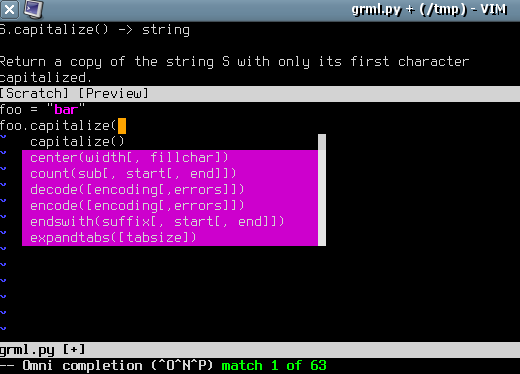
I wrote a small python webpage for the grml-wiki to provide some information regarding Python-development on grml. I just upgraded Vim on my main system to version 7.1 and omnicompletion with vim-python became better once more. So time for a short demo of ctrl-x-o: Python coding in Vim 7.1 - Screenshot I also very much like ‘%ed’ within ipython using the following snippet in my ~/.ipython/ipythonrc:
editor 1
editor /usr/bin/vim.python
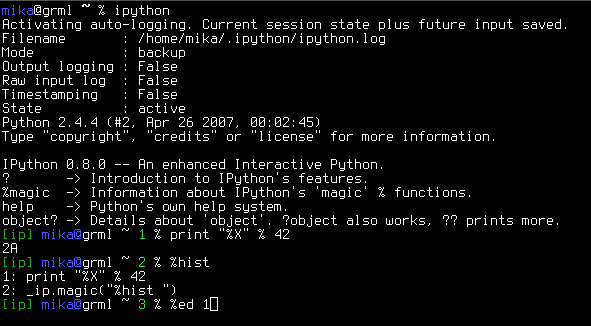
Notice: Don’t wonder about the prompt style of the following ipython-screenshot, I customized it a little bit (see python-webpage in the grml-wiki again to get an idea). ipython demo - Screenshot So running the last line containing ‘%ed 1′ will execute /usr/bin/vim.python providing the code from the first command line of ipython and I can use all the magic of Vim for editing the code. When exiting the editor I have the code within ipython. Rocking. :) Oh, don’t forget to check out the Quick tips of ipython when exploring it. Now what’s missing in ipython is the edit-command-line feature of Zsh. That would allow me to edit already typed (but not yet executed) code with an external editor. Anyone out there with an according tip? ;-)
3 June 2007

Bernd Zeimetz: gimp-plugin-registry

gimp-plugin-registry Dear lazyweb, since a few days there s gimp-plugin-registry waiting in unstable. At the moment the package contains several tiny GIMP plugins I like to use and which are not included in the gimp package or in other gimp-* packages. In my opinion a collection like this one was missing in Debian, since there re a lot of very nice plugins/scripts out there, which are too small to package them on their own.
Which plugins would you like to see in the collection? Packaging all plugins from http://registry.gimp.org/ doesn t make sense, so I d like to know which plugins other people are using and put them into the next release of the package. Any feedback is appreciated. P.S.: As I didn t find a real alternative for my needs, I ll stay with Dokuwiki. As far as I remember is a rss feed with proper html on Andi s todo list, and there re more other nice features going to come :-) Although somehow I still would like to rewrite Dokuwiki in python ;-)

26 May 2007

Chris Lamb: Pro Prolog is pro.

A lot of computer problems (and some puzzles) simply involve backtracking over the solution space and checking constraints, yet these can be fairly clunky to describe in imperative languages. Compounding this, the high cost of method calls in most VM and dynamic languages make any reasonably sane-looking implementation (read: recursive) rather slow. A much better idea is to use a language that makes this really easy, like Prolog: I have a Compiler Design exam in less than a weeks time, and a common question involves being given a number of definitions of compilers in terms of their source and target languages, along with the language the compiler itself is implemented in. The task is simply to work out whether it is possible to translate from a specified language to another. This is just two stanzas in Prolog:
can_translate(Src, Tgt, [L])   :- t_diagram(Src, Tgt, _, L).
can_translate(Src, Tgt, [H T]) :- t_diagram(Src, Via, _, H),
   can_translate(Via, Tgt, T).
Compilers can be then just be defined with
t_diagram(source, target, implemented in, name).
and querying the translation pipeline is done with
?- can_translate(source, target, Result)
(Modifying it so that it works with cycles isn’t very tricky, either.)

24 May 2007

Ross Burton: Contact Lookup Applet 0.16

This is a very overdue and probably the last release of contact-lookup-applet. Tarballs are available in the usual place. A few bug fixes in this release: I'm also looking for a co-maintainer, or even better someone to take over maintainership. I don't use this anymore, but many distributions still ship it (and Ubuntu even has it in the stock install). The codebase is pretty small and simple, so is anyone interested? NP: Peel Session, cLOUDDEAD

8 May 2007

Gerfried Fuchs: Birthdaywhisper

Some small impressions of Sunday that made it the happiest of my life: spent the day with a very special person—good indian food for lunch—Spiderman 3 in the afternoon which I enjoyed quite a bit—meeting up with friends in the Metalab, have a nice chat and quick dinner—moved over to B72 for the concert of Grossstadtgeflüster which was absolutely great—received a "Sudoku for Dummies" book from Berk with whom I did Sudokus at lunch at work until he let the company—received a pink-fluffy handbag with matching riveted belt and a mini tartan skirt—received a Mermaid mousepad from Alex—received a Grossstadtgeflüster patch from Raphael.
Hope you don't take the list of some presents as belittling the others. It's just that these meant something special to me, not that I didn't enjoy the others. Some friends were still a bit puzzled about the tickets I bought—they tried to give me the money for it. They weren't aware of the try to at least thank them with them for that they were and are there for me in bad times, giving me support and strength when I need it. And I can say that most of them enjoyed it, even though I was distracted quite a bit... And be sure, this is what you get when you let me do some birthday arrangements on my own. ;)

25 April 2007

Marc 'Zugschlus' Haber: Automatic Wikification of Configuration Files

In the company I work for, most documentation is maintained in Word format. Except mine. I have a dokuwiki and am thankfully allowed this exception as I am the only Linuxer in the company. Since Windows systems need external documentation (being hindered by the absence of commentable text configuration files), there is a policy that all configuration data needs to be explicitly documented. I hate that idea, since documentation is always outdated, and documenting configuration changes doubles the work that needs to be done. After finding out that dokuwiki has a command line interface, I implemented a mechanism that can run from cron and keeps wiki pages of configuration files up to date on an automated basis. On the target systems (the ones that need to have their configuration documented), I installed a script which generates a tarball containing the relevant configuration files on standard output. For more sensitive data, the script could do some basic sanitazion such as removing passwords from the configuration files before putting them into the tarball. On the system running the cron job, the following script runs:
#!/bin/bash
set -e
set -C
set -u
JOBNAME=“update-wiki-firewall-config”
DWPAGE=“php4 /usr/share/dokuwiki/bin/dwpage.php”
TMPBASE=“/tmp”
SSHID=“$HOME/.ssh/$USER-passphraseless-$(hostname)”
REMOTEHOST=“remote.fqdn.example”
REMOTEJOB=“pull-netfilter-init-config-tar”
SHAREDIR=“$HOME/share/$JOBNAME”
WIKINAMESPACE=“pointer:to:namespace”
start=’/*BEGIN generated firewall rules */’
end=’/*END generated firewall rules */’
insert=’/*INSERT generated firewall rules */’
umask 077
if ! TMPDIR=“$(mktemp -d $TMPBASE/fwconfig.XXXXXXXXXX)”; then
        echo >&2 “ERR: cannot create temp dir in $TMPBASE”
        exit 1
fi
cd $TMPDIR
mkdir remote
ssh -i $SSHID root@$REMOTEHOST $REMOTEJOB   \
 tar --extract --gzip --file - --directory remote
mkdir workdir
touch workdir/rulelistfile
echo “$start” >> workdir/rulelistfile
for fwfile in $(find $TMPDIR/remote/rules/up -type f   sort); do
  MTIME=“$(stat --format=”%y“ $fwfile)”
  PROSEEXPLANATION="$( $fwfile sed -n '/^#::#/ s/^#::#[[:space:]]*//;p;q; ')"
  if [ -z "$PROSEEXPLANATION" ]; then
    PROSEEXPLANATION="netfilter-init internal code"
  fi
  rm -f workdir/newwikipage
   $SHAREDIR/wikipagetemplate \
    sed \
        -e "s PLHfilenamePLH $(basename $fwfile) " \
        -e "s PLHproseexplanationPLH $PROSEEXPLANATION " \
        -e "s PLHmtimePLH $MTIME " \
        -e "/PLHcontentsPLH/r$fwfile" \
        -e "s/PLHcontentsPLH//" \
  > workdir/newwikipage
  WIKIPAGENAME=“$WIKINAMESPACE:regeln:$(basename $fwfile .rul)”
  $DWPAGE checkout $WIKIPAGENAME workdir/wikipage
  if ! cmp --quiet workdir/wikipage workdir/newwikipage; then
    cp workdir/newwikipage workdir/wikipage
    $DWPAGE -m “new contents imported from $fwfile” commit workdir/wikipage $WIKIPAGENAME
  fi
  echo “  * [[$WIKIPAGENAME $(basename $fwfile)]] - $PROSEEXPLANATION” >> workdir/rulelistfile
done
echo “$end” >> workdir/rulelistfile
$DWPAGE checkout $WIKINAMESPACE workdir/contentspage.txt
 workdir/contentspage.txt \
  sed -e "\ ^$ start//\\*/\\* \$ ,\ ^$ end//\\*/\\* \$ d; "   \
  sed -e "\ ^$ insert//\\*/\\* \$ rworkdir/rulelistfile" \
  > workdir/newcontentspage.txt
if ! cmp --quiet workdir/contentspage.txt workdir/newcontentspage.txt; then
  cp workdir/newcontentspage.txt workdir/contentspage.txt
  $DWPAGE -m “new contents page” commit workdir/contentspage.txt $WIKINAMESPACE
fi
cd /
rm -rf “$TMPDIR”
Yes, this needs some more documentation and generalization. But it’s just a proof of concept that needs some polishing before being put into real life use. Here are the two template files for wiki page and contents page:
====== Firewallregeln PLHfilenamePLH ======
Last changed on target system: PLHmtimePLH
PLHproseexplanationPLH
<code>
PLHcontentsPLH
</code>
===== Dump of firewall rules =====
/*INSERT generated firewall rules */
/*BEGIN generated firewall rules */
/*END generated firewall rules */
The index page template relys on the HiddenComment dokuwiki plugin to be installed, or the placeholders show up in the rendered wiki page. The code uses the first comment line marked with #::# to generate a short explanation of the file being pulled into the wiki. dwpage.php is a fully-fledged command line interface to dokuwiki, committed new pages are fulled versioned as if entered through the wiki web front end. This way, the documentation in the wiki is guaranteed to be current and to fit the configuration found on the live system - it is directly pulled from the live system. Yes, rendering of the code is currently suboptimal. Working on it.

22 April 2007

Michael Prokop: Booting from USB pen: troubleshooting and pitfalls

As grml supports booting from usb devices (harddisk installation via grml2hd as well as booting from usb pens via grml2usb) and I helped many people at debugging booting problems I think I stumbled upon every existing pitfall. 8-) There are several situations where booting might fail. So here we go with a summary of the most common pitfalls and possible solutions:
  1. The Bootsplash is displayed, the kernel loads but you very soon get a:
  2. ran out of input data
    System halted
    
    Reason: everything OK, except for the filesystem used on your usb device. So instead of fat16 you use for example fat32. Fix: use the appropriate filesystem (fat16 for usb pens usually).
  3. When trying to boot from USB you get something like:
  4. Invalid operating system
    
    Possible reason: the partition layout is not ok. Very probably there’s no primary partition or none has the flag ‘bootable’ set. (Read on for further details.)
  5. When trying to boot from USB you get something like:
  6. No operating system found.
    
    Possible reason: you forgot to set the boot-flag on the partition. Or you did not install an operating system at all. ;-)
  7. When trying to set up the partition(s) on the USB device cfdisk reports something like:
  8. FATAL ERROR: Bad primary partition 0: Partition ends in the final partial cylinder
    
    Reason: the partition layout is not ok. Either use fdisk (requires detailed knowledge about partition setup!) or better: use a fronted of libparted, like gparted. gparted does an excellent job at setting up an appropriate partition layout for booting from USB (read on for details about the correct setup). As long as cfdisk has problems with the layout - it will exit on errors - your usb pen very probably does not have a valid partition setup for booting. Please notice that fdisk very often uses defaults which are not OK, whereas gparted uses the appropriate heads, sectors/track and cylinders settings. So if you really want to use fdisk for setting up the appropriate partition layout you might have to enter the ‘extra functionality (experts only)’ menu of fdisk.
  9. The system never displays the bootsplash of the usb device at all? Checklist:
    • does your system support booting from USB at all? Check settings in BIOS.
    • do you use the correct USB mode in BIOS? Check BIOS again, usually you want to use USB-HDD mode. Not possible? See USB-ZIP mode.
    • is "booting from USB" in the appropriate order of the booting sequence? Check the "boot"-section in your BIOS.
    • is the bootable flag set on the boot-partition? Check for example with cfdisk.
    • is the partition used for booting the first partition and a primary one on your device? Check with cfdisk again.
    • is the partition layout ok? The first partition (the one used for booting) has to start at cylinder 1/sector 63, otherwise booting will fail on most (all?) x86 systems. Check with ‘cfdisk -P s /dev/..’ or ‘fdisk -l -u /dev/…’. Do *not* trust the output of ‘fdisk -l /dev/…’. Really.
  10. syslinux does not work on your system (b0rken BIOS for example)? Possible solution: use grub instead.
  11. Kernel boots but fails to find the root filesystem with something like:
  12. kernel-panic: unable to mount root-fs...
    
    Yes? Then the root= argument in your kernel commandline (specified in the bootloader, usually lilo, grub or isolinux/syslinux) is pointing to the wrong device. Solution: adjust the root=-option in your bootmanager’s configuration. Tip: use root=UUID instead of root=/dev/[hs]d…
  13. All of the above tips don’t work? Maybe your USB pen is even larger than 1GB?
  14. Possible reason: Some BIOSes offer different modes for USB booting. The proper mode to boot a USB stick is USB-HDD. If that doesn’t work or is not supported by your system, you need to format your USB-Stick as USB-ZIP. To do this, the syslinux source distribution contains an utility called mkdiskimage, which you can use to re-format your USB stick in USB-ZIP format. For more information refer to the USB-webpage in the grml-wiki and Bootable USB Key in the knoppix-wiki.
I mentioned the correct partition layout several times. Reminder: a first, primary partition with fat16 (as filesystem as well as partition’s system id!) with bootable-flag set. The partition should start behind MBR at 1st cylinder and 63rd sector (see www.ata-atapi.com/hiwmbr.htm and thestarman.pcministry.com/asm/mbr/index.html for more details about MBR). So how does a correct partition look like? Output in several formats as reference:
# fdisk -l -u /dev/sda
Disk /dev/sda: 1039 MB, 1039663104 bytes
255 heads, 63 sectors/track, 126 cylinders, total 2030592 sectors
Units = sectors of 1 * 512 = 512 bytes
   Device Boot      Start         End      Blocks   Id  System
/dev/sda1   *          63     2024189     1012063+   6  FAT16
# fdisk -l /dev/sda
Disk /dev/sda: 1039 MB, 1039663104 bytes
255 heads, 63 sectors/track, 126 cylinders
Units = cylinders of 16065 * 512 = 8225280 bytes
   Device Boot      Start         End      Blocks   Id  System
/dev/sda1   *           1         126     1012063+   6  FAT16
# sfdisk -d /dev/sda
# partition table of /dev/sda
unit: sectors
/dev/sda1 : start=       63, size=  2024127, Id= 6, bootable
/dev/sda2 : start=        0, size=        0, Id= 0
/dev/sda3 : start=        0, size=        0, Id= 0
/dev/sda4 : start=        0, size=        0, Id= 0
Tip: if you have a working stick, store your partition layout using ’sfdisk -d /dev/sda > sfdisk.sda’ for later restore (via ’sfdisk /dev/sda < sfdisk.sda’). This is also very useful for cloning a working setup to other devices (though you might have to adjust cylinder/units later on). And of course you can use it as backup if you ran [sc]fdisk-commands on the wrong device. ;-)

8 April 2007

Erich Schubert: Chinese hacking activities

Most of the time when I lookup the IP addresses used in FTP and SSH scans, they belong to some network in china. And apparently the last two times when the Asus website was modified (this time exploiting another unpatched vulnerability in Microsoft Internet Explorer, with .ani files), they were loading exploit code from certain servers in China. Well, I guess you just cannot trust their regime; if it isn't actively encouraging the hacking activities, it at least completely fails to do something about them (you might recall that China tries to censor much of the Internet, but apparently they aren't able to firewall off hackers going out?). It's hard to tell what their motivations are. I guess it's military interests (i.e. having points of attack in case of a war) combined with industrial espionage. To me this means, that I can't really trust developers from China, and that I better double-check their code. While I don't assume them to be bad guys, you never know what their government might force them to do. Sorry about that.

30 March 2007

Mike Hommey: Recycled LISPers ?

Who else could do things such as solving Sudoku puzzles… in XSLT ?

19 March 2007

NOKUBI Takatsugu: DocFest 2007 had finished

On last Saturday (17, Mar.), we Doc-ja Project had finished DocFest 2007 (Japanese), the first event for documentation and translation. My purpose was making all missing manpages, but I couldn't complete it. So I still get some lintian warnings. Also I could find some documentation bugs in namazu, and fixed. Anyway, the event was succeeded. Thank you all attendees, all upstream developers and Debian Project, especially Debian Policy and lintian(1).

10 March 2007

Andrew Pollock: [tech] Is (non-Apple) DAAP development dead?

Now that I've got MythStream working very nicely, it's reminded me of my other wish: to be able to play music from the iTunes library on Sarah's laptop through MythTV somehow. This leads one to an excursion into the slightly documented Digital Audio Access Protocol. Life seemed fairly good until iTunes 7.0 came out with a new version of the protocol, which seems to have broken the hell out of anything that isn't >= iTunes 7.0, which is a bit of a shame, since I only learned of DAAP at around this time, so I've never been able to experiment with using a third party DAAP client. www.opendaap.org sounds all promising, but it's really just a bunch of links to projects that don't seem to have done much for years, or only implement the iTunes 4.0 version of the protocol, which is reasonably well documented. There's a few implementations of DAAP servers that will talk the pre-iTunes 7.0 version of the protocol (which I believe that iTunes 7.0+ will work with fine), but that's not what I want. All of our music is already in iTunes, and I believe DAAP doesn't give you write-access, so it's not like we could stick all of our music on Linux and play it through iTunes the other way, because we'd still be wanting to buy music from the iTunes Store, and it'd all get very messy. So I'm trying to find out if anyone's doing any work on reverse-engineering DAAP 7.0. So far, my searching hasn't turned up anything interesting. Update A bit more searching turned up this, which suggests that even legitimate DAAP protocol licensees were caught with their pants down by this change, and so products like this one have a disclaimer about what versions of iTunes they'll work with. Sad.

7 March 2007

Joachim Breitner: A different Maybe maybe

This is a post about the implementation of data types in the programming language Haskell. If you haven t heard about that, you can proabably safely skip it. For a while I have been thinking: Isn t there a way to get rid of the intermediate Maybe construct in a common expression like fromMaybe default . lookup. It seems that a way to do that would be to pass more information to the Maybe-generating function: What to do with a Just-Value, and what to return in case of Nothing. This leads to a new definion of the Maybe data type as a function. Later I discovered that this seems to work for any algebraic data type. This is probably nothing new, but I was offline at the time of writing, so I didn t check. This means that this might also be total rubbish. Enjoy.Update: Several responses in the haskell-cafe -list told me that I just re-invented Curch-Encoding. Nice :-)

1 March 2007

NOKUBI Takatsugu: Talked with Bdale

On 21 Feb. 2007, I had met with Bdale, Junichi Uekawa, and some Debian users. It was really good experience. He seemed good guy, good father, and good president of SPI. I talked about many things like Debian, SPI, social issue related on IT, education, and so on. Especially, his children are very interesting for me. His daughter seems to have good computer knowledge. And I saw photo of his son he had made many small rockets. Then I said to him, "Your family looks like Kim Possible". Maybe his daughter will save the universe.

23 February 2007

Gunnar Wolf: Talk submitted for YAPC::EU

I just submitted my talk proposal for YAPC::EU, which will be held in Vienna in late August. The topic? Integrating Perl in a wider distribution: The Debian pkg-perl group.
I took part in YAPC::NA (Yet Another Perl Conference - North America) in 2001, in Montreal, and YAPC::EU (you guessed right: Europe) in 2002, in Munich. While in Munich, I met Debian's Erich, Weasel and the late Jens. It is a very nice conference with all kinds of Perl-heads, apt for different experience levels. the talk I am proposing will be about what do we work for in Debian, how can we get a better synergy from our upstream group and (oh, this point is quite itchy - specially in strongly opinioned communities such as Ruby's! Perl people are quite nice to play with, however, but still...) what do we (as Debian maintainers) request from them in order for life to be smoother.
Of course, I only submitted the talk. The CFP has just been launched, and so far, mine is the fourth talk offered - It can still be rejected (as it is not really related to Perl development, the heart of YAPC), but I guess it will be deemed interesting by the Perl monks reviewing them.
In any case, hope to see you in Vienna as well!

26 January 2007

NOKUBI Takatsugu: Plagger: the UNIX pipe programming for Web 2.0

On the past Monday, Yoshinori TAKESAKO, the one of the developers of Namazu, talked about Plagger in FSIJ monthly seminar. Plagger is a very useful and powerful application, and I could make a planet site in my office. It is apt-gettable but not official. The apt-line is:
deb http://debian.hansode.org/ ./ 
and the package name is libplagger-perl. However, it has no "assets", the essential components for Plagger, so you need to get them from the svn repo.
svn co http://svn.bulknews.net/repos/plagger/trunk/plagger/assets/
The following is the example of YAML:
global:
  timezone: Asia/Tokyo
  assets_path: /home/knok/plagger/assets
plugins:
  - module: Subscription::Config
    config:
      feed:
        - http://internal.host/~knok/index.rdf
  - module: Bundle::Planet
    config:
      title: Planet Office
      dir: /home/knok/planet
      url: http://internal.host/planet/
      theme: sixapart-std
      duration: 30 days
      description: The internal RSS aggregation.

17 January 2007

MJ Ray: koha 2.2.8 installer

This email in French asks after my ITP Koha bug and mentions using the list of debian package deps to build most of the dependencies which I only finished building like 3 days ago. You wait ages for a koha/debian developer, then two come along at once.

16 January 2007

Joey Hess: dealing with dialup

Prompted by a friend who finds a dialup internet connection about as appetising as being food for mosquitoes, I thought I'd share some tips for using the current internet on dialup. It's easy to say that dialup is dead, but I've transitioned from dialup to broadband and back something like 4 times so far, and since I don't want to rule out spending time in the middle of nowhere in Costa Rica, or at McMurdo, or in an RV, or in a Bigelo orbital hotel, amoung other dream destinations, I don't let availability of bandwidth deter me. Here's some habits you can learn to lessen the pain: work local This is the most important thing. ssh is great, but latency sucks. If you need to edit a file on a remote system, edit it locally, and copy it across. Since I keep most of my files in subversion, I edit it locally, commit it, and update on the remote machine. If ssh isn't appropriate, use rsync or something. Editing files is just one example; I try to avoid doing anything on a remote machine if I can do it locally. For example, even though an irc client in screen on a remote machine is a nice setup, it's to be avoided on dialup. Another example is using offlineimap to download your mail, so you can read it locally. Yet another example: I have all my projects scripted so I can make a complete release with just single locally ran command, that goes off and automatically triggers everything that needs to happen on the server. Same for blogging, and for making changes to my wikis. cache everything This is an obvious one, but worth mentioning. The most important cache is probably actually a caching dns server. Dns lookups are an easily missed slowdown (true even for many cable/dsl connections). Other useful caches include a squid web cache, and a shared apt cache. Also get in the habit of squirelling files away, instead of deleting them, to avoid re-downloads. know your traffic Look at everything that causes internet traffic, and turn off the fluff. Even the small fluff will make a difference on dialup. This includes turning off VPNs, not keeping chat programs running in the background. If you're not currently using irc, close it. Use a remote irc proxy server to cache messages while you're away, to avoid missing anything. Avoid sitting on web pages that refresh or stream content. Keep iftop running all the time, and know what all the sources of traffic on it are. You can easily waste 25% of a dialup pipe with fluff if you don't keep it under control. downloads are batch jobs Learn to treat downloads (and uploads) as batch jobs that go on in the background or overnight. Don't let your work be blocked waiting on a download if at all possible; don't sit staring at the screen every time a five minute download pops up; go do something else instead. When possible, try to anticipate what you'll need and download it the night before. Set up a remote download queue, of things you want to download at some point, sorted by priority, and rsync from it as a batch job overnight or when you don't need bandwidth for anything else. If you upload a lot of stuff, set up an upload queue too. don't try to do everything on dialup Some things are just not appropriate for dialup. There's no point in trying to download CD images, or much music, or apt-get dist-upgrade, or watch the latest videos on YouTube, or whatever. Even things like Google Maps are just not designed for dialup; the one square you want to see is always the one that will fail to download while the other 8 squares slooowly download in parallell. And AJAX sucks. So avoid this stuff on dialup, don't frustrate yourself. Schedule pit stops where there's high bandwidth to do this kind of thing. Find alternatives you can use while on dialup -- use old fashioned mapping services, and instead of pursuing the latest and greatest videos, download an e-book -- a whole book downloaded in just 5 minutes -- who said this dialup was slow?

14 January 2007

Andree Leidenfrost: Debian Pre-Release of Mondo Rescue 2.2.1, Take 2

mindi-2.21~r1021-2 and mondo-2.21~r1021-2 are now on http://people.debian.org/~andree/packages/ with the following changes:
  • petris works again during restore (self-inflicted, oh well).
  • Restore of ISO images and friends should now work when gzip (i.e. '-G') is used.
  • The network interfaces should be fine now when booting into a restored system for the first time.
Other than that:
  • The crash in mondorestore when nuking from tape has disappeared. I have no idea what caused it or why it went away again, though...
  • Kernel 2.6.18-3-k7 hangs when 'acpi=off' is specified (which is the default as per mindi's ADDITIONAL_BOOT_PARAMS, so restore fails with this kernel). I have filed bug #406809 which may or may not be related to #389931.
  • The issue with booting a (NTFS) Windows partition failing after a restore appears to be normal as per the ntfsclone manpage:
    Usually, Windows will not be able to boot, unless you copy, move or restore NTFS to the same partition which starts at the same sector on the same type of disk having the same BIOS legacy cylinder setting as the original partition and disk had.
  • I have tried a few things playing with parted and ntfsresize, but so far the only thing that works reliably in order to get Windows to boot is resizing the partition using gparted. I still have to figure out what it is that gparted does differently. (If you know, please tell me!)
Off to bed now so that I'm fine and dandy when I pick up Bruno from the airport in the morning for lca2007. :-)

Next.

Previous.