Search Results: "sto"

31 December 2013

Paul Tagliamonte: Hy 0.9.12 released

Good morning all my hungover friends. New Hy release - sounds like the perfect thing to do while you re waiting for your headaches to go away. Here s a short-list of the changes (from NEWS) - enjoy!
Changes from Hy 0.9.11
   tl;dr:
    0.9.12 comes with some massive changes,
    We finally took the time to implement gensym, as well as a few
    other bits that help macro writing. Check the changelog for
    what exactly was added. 
    
    The biggest feature, Reader Macros, landed later
    in the cycle, but were big enough to warrent a release on it's
    own. A huge thanks goes to Foxboron for implementing them
    and a massive hug goes out to olasd for providing ongoing
    reviews during the development.
    
    Welcome to the new Hy contributors, Henrique Carvalho Alves,
    Kevin Zita and Kenan B l kba . Thanks for your work so far,
    folks!
    
    Hope y'all enjoy the finest that 2013 has to offer,
      - Hy Society
    * Special thanks goes to Willyfrog, Foxboron and theanalyst for writing
      0.9.12's NEWS. Thanks, y'all! (PT)
    [ Language Changes ]
    * Translate foo? -> is_foo, for better Python interop. (PT)
    * Reader Macros!
    * Operators + and * now can work without arguments
    * Define kwapply as a macro
    * Added apply as a function
    * Instant symbol generation with gensym
    * Allow macros to return None
    * Add a method for casting into byte string or unicode depending on python version
    * flatten function added to language
    * Add a method for casting into byte string or unicode depending on python version
    * Added type coercing to the right integer for the platform
    [ Misc. Fixes ]
    * Added information about core team members
    * Documentation fixed and extended
    * Add astor to install_requires to fix hy --spy failing on hy 0.9.11.
    * Convert stdout and stderr to UTF-8 properly in the run_cmd helper.
    * Update requirements.txt and setup.py to use rply upstream.
    * tryhy link added in documentation and README
    * Command line options documented
    * Adding support for coverage tests at coveralls.io
    * Added info about tox, so people can use it prior to a PR
    * Added the start of hacking rules
    * Halting Problem removed from example as it was nonfree
    * Fixed PyPI is now behind a CDN. The --use-mirrors option is deprecated.
    * Badges for pypi version and downloads.
    [ Syntax Fixes ]
    * get allows multiple arguments
    [ Bug Fixes ]
    *  OSX: Fixes for readline Repl problem which caused HyREPL not allowing 'b'
    * Fix REPL completions on OSX
    *  Make HyObject.replace more resilient to prevent compiler breakage.
    [ Contrib changes ]
    * Anaphoric macros added to contrib
    * Modified eg/twisted to follow the newer hy syntax
    * Added (experimental) profile module

30 December 2013

Russ Allbery: Init system evaluation thanks

Most people who follow Debian are probably aware that we're currently in the middle of a major debate over the future of Debian's init system. Over the past month, and particularly over the past week, I undertook an evaluation of two of the options in that debate, using one of my packages as a test bed. I also did a lot of reading, filed a few bugs, and asked a bunch of questions. That's an extension of the questions I've been asking and discussions I've been participating in around init systems for the past year plus. I have been keeping my opinions and writeups confined to the relevant Techncial Committee bug report so that they can be read in context with their rebuttals. There are a lot of thoughtful and well-informed opinions here, of which mine are only one, and several of my conclusions have been inaccurate or at least not complete, so the context is important. You can find the full traffic in the Technical Committee bug. Most of the discussion, in a threaded view, is in the Technical Committee archives for December. However, in one of the messages I sent today, I tried to show my appreciation for the people who have assisted with this evaluation over the past week, month, and years, and I think that section deserves broader distribution outside of the ongoing discussion. It is therefore included below. Throughout this evaluation process, my interactions with upstart and systemd upstream developers and Debian packagers have been uniformly excellent. Bug reports filed against both systemd and upstart have received excellent and timely response, and all involved have been quite willing to explain things I've misunderstood, correct my false starts, and discuss technical and practical aspects of their designs. I was particularly impressed by the clear effort that the systemd and upstart maintainers in Debian have put into fully integrating their init systems in such a way that makes them easy to test and use with existing Debian packages. This includes but is not limited to update-rc.d support, invoke-rc.d support, status synchronization with sysvinit, past Policy discussion, and attention to upgrade paths and init-switching use cases. I also want to particularly thank the OpenRC upstream development team for their involvement in this process and their contributions to the discussion. I personally don't think that package is a good match for Debian's needs on Linux, but that's through no fault of the people involved, and I think they would be an excellent upstream if that package looked like a good fit for the needs of any of Debian's non-Linux ports. I also want to thank Petter Reinholdtsen, Roger Leigh, and everyone else who has worked on the sysvinit package over the years, the insserv conversion to dependency-based boot, and the inclusion of LSB support. If it weren't for their hard work, we would be in a far worse position than we are today. It's often hard to see people discussing the inadequacies of something into which you put years of hard work. I want to call attention to their long-term contributions to the distribution, and to the number of Debian systems that have booted through their efforts over the years.

Carl Chenet: Virtual environments with Python 3.3

Follow me on Identi.ca or Twitter One of the major features of Python 3.3 is the new venv module, allowing the creation of Python virtual environments on your system. 1. What is a virtual environment? A virtual environment is a directory dedicated to the execution of your Python applications. Activating your virtual environment will force Python to execute in this directory as the top level of this directory was the root of your file system. The virtual environments are interesting because of the independence they have toward the host they run on, especially when you want to install several versions of Python or if you want to install lots of dependencies without being the system administrator of the host. python-logo-master-v3-TM If you are a Python developer, you must know virtualenv. This really nice application offers a nice way to create Python virtual environment. Moreover it comes with pip already installed in your virtual environment, in order to install other dependencies you need in a really convenience way. Starting from Python 3.3, the module venv of the Python standard library offers the users to create virtual environments. This new feature will encourage all users to create virtual environments to develop their own Python applications, which is a good practice. Thanks to the experiences of several applications being used in the Python community, the module venv was written to be really efficient and widely available. The Python Enhancement Proposal 405 (PEP405) offers a really interesting reading if you wish to find more information about this topic. 2. Creating a virtual environment with Python 3.3 With Python 3.3 comes pyvenv-3.3, allowing to create Python virtual environment:
$ pyvenv-3.3 myvirtualenv
$ cd myvirtualenv/
$ tree .
.
  bin
    activate
    pydoc
    python -> python3.3
    python3 -> python3.3
    python3.3 -> /usr/bin/python3.3
  include
  lib
    python3.3
        site-packages
  pyvenv.cfg
As we can see, three directories were created.
$ cat pyvenv.cfg 
home = /usr/bin
include-system-site-packages = false
version = 3.3.2
Just before moving on, if you want to use the existing modules in your global site-packages directory on your system, the option system-site-packages is available. 3. Activate the virtual environment Lets activate our virtual environment. We need to use the bin/activate file in this environment:
$ source bin/activate 
(myvirtualenv) $
A change in our prompt indicated the good activation of the virtual environment. 4. Installing applications in the virtual environment But playing around with only the default Python interpreter is not really funny. Lets download pip, the Python installer, but before that we need a dependency setuptools:
(myvirtualenv) $ curl https://bitbucket.org/pypa/setuptools/raw/bootstrap/ez_setup.py -o ez_setup.py
 % Total % Received % Xferd Average Speed Time Time Time Current
 Dload Upload Total Spent Left Speed
 100 11356 100 11356 0 0 18507 0 --:--:-- --:--:-- --:--:-- 18495
(myvirtualenv) $ curl https://raw.github.com/pypa/pip/master/contrib/get-pip.py -o get-pip.py
 % Total % Received % Xferd Average Speed Time Time Time Current
 Dload Upload Total Spent Left Speed
 100 543k 100 543k 0 0 685k 0 --:--:-- --:--:-- --:--:-- 685k
Now lets install Setuptools and Pip:
(myvirtualenv) $ python3.3 ez_setup.py
 Downloading https://pypi.python.org/packages/source/s/setuptools/setuptools-2.0.tar.gz
 Extracting in /tmp/tmpxlrv7q
 Now working in /tmp/tmpxlrv7q/setuptools-2.0
 Installing Setuptools
... (lots of lines)...
Installed /tmp/myvirtualenv/lib/python3.3/site-packages/setuptools-2.0-py3.3.egg
 Processing dependencies for setuptools==2.0
 Finished processing dependencies for setuptools==2.0
(myvirtualenv) $ python3.3 get-pip.py
 Downloading/unpacking pip
 Downloading pip-1.4.1.tar.gz (445kB): 445kB downloaded
 Running setup.py egg_info for package pip
 ... (lots of lines)...
 Successfully installed pip
 Cleaning up...
Ok now we re ready to use pip to install anything we need in our virtual environment. Lets think one more second about what we did: we install the Setuptools and the Pip application inside our virtual environment, with nothing written on our main system. Now lets try to install Brebis, the fully automated backup checker, and run it in this environment:
(myvirtualenv) $ pip-3.3 install brebis
 Downloading/unpacking brebis
 Downloading brebis-0.8.tar.gz
 Running setup.py egg_info for package brebis
Installing collected packages: brebis
 Running setup.py install for brebis
 changing mode of build/scripts-3.3/brebis from 644 to 755
changing mode of /tmp/myvirtualenv/bin/brebis to 755
 Successfully installed brebis
 Cleaning up...
We re now ready to launch Brebis, executing in our virtual environment:
(myvirtualenv) $ brebis -h
usage: brebis [-h] [-c DIR] [-C DIR] [-d DELIMITER] [-g] [-G] [-l FILE]
 [-L DIR] [-O DIR] [-v] 
Fully automated backup checker
positional arguments:
 archives archives to check
optional arguments:
 -h, --help show this help message and exit
 -c DIR, --configpath DIR
 the path to the configurations
 -C DIR, --output-conf-dir DIR
 the directory to store the configuration file
 -d DELIMITER, --delimiter DELIMITER
 delimiter of the fields for the list of files
 -g, --gen-list generate a list of files inside a backup
 -G, --gen-full generate the configuration file and the list of files
 for the backup
 -l FILE, --log FILE the log file
 -L DIR, --output-list-dir DIR
 the directory to store the list of files inside an
 archive or tree
 -O DIR, --output-list-and-conf-dir DIR
 the directory to store the configuration file and the
 list of files inside an archive or tree
 -v, --version print the version of this program and exit
For more information: http://www.brebisproject.org
So we get an execution of the Brebis application inside our virtual environment, installed from our virtual environment with tools installed only in the virtual environment. That s a big step that such a feature is now included in the standard library. In the future, you will enjoy the possibility to create new virtual environments for each Python version right out of the box. Moreover, using the upgrade option of the pyvenv command, you will upgrade, if needed, your virtual environment in a really easy and straightforward way, making environments adaptable in time. What about you? What do you think about the Python 3 virtual environments and their features, given your own needs? Feel free to use the comments section of this post.

29 December 2013

Olivier Berger: Touchpad side scrolling enabling in gnome flashback

For whatever reason, the touchpad right edge would no longer allow me to do scrolling (like the usual middle wheel on the mouse) under the gnome flashback session in Debian testing. Here's a way to make it work : http://askubuntu.com/questions/248290/enable-both-edge-scrolling-and-two-finger-scrolling-for-touchpad/373134#373134 . This post provides a more elaborate script : http://who-t.blogspot.fr/2011/03/custom-input-device-configuration-in.html reusing an example script (in Debian, in /usr/share/doc/gnome-settings-daemon/examples/input-device-example.sh), but attention: it may be invoked twice, if like on my system, once for an "AlpsPS/2 ALPS GlidePoint" and then for a "PS/2 Mouse", but resetting the VertEdgeScroll to 0 in between. So the script looks like that on my system, now :
...
 if [ "$device" = "AlpsPS/2 ALPS GlidePoint" -o "$device" = "PS/2 Mouse" ]; then
        synclient VertEdgeScroll=1
 fi
I guess there's some kind of a bug here... but the gnome session is a hell when needing to spot the culprit package to report to, so for once, I'll let reportbug quiet. Hope this helps

Hideki Yamane: kernel.org stops using bz2

Many upstream provides their source as tar.xz format, and kernel.org also throw bz2 away - "Happy new year and good-bye bzip2".

Debian package (dpkg-deb) uses xz as default since 1.17.0 as I mentioned. If your package uses bz2, now it's a time to switch. And maybe it's good to ask upstream to switch from bzip2 to xz, too.

Russ Allbery: Review: The Incrementalists

Review: The Incrementalists, by Steven Brust & Skyler White
Publisher: Tor
Copyright: September 2013
ISBN: 0-7653-3422-4
Format: Hardcover
Pages: 304
The Incrementalists are a secret society that has been in continuous existence for forty thousand years. The members are immortal... sort of (more on that in a moment). They are extremely good at determining what signals, triggers, and actions have the most impact on people, and adept at using those triggers to influence people's behavior. And they're making the world better. Not in any huge, noticeable way, just a little bit, here and there. Incrementally. Brust and White completely had me with this concept. There are several SF novels about immortals, but (apart from the vampire subgenre) they mostly stay underground and find ways to survive without trying to change the surrounding human society. I love the idea of small, incremental changes, and I was looking forward to reading a book about how that would work. How do they choose what to do? How do they find the right place to push? What long-term goals would such an organization pursue, and what governance structure would they use? I'm still wondering about most of those things, sadly, since that isn't what this novel is about at all. I should be fair: a few of those questions hover in the background. There are some political arguments (that parallel arguments on Brust's blog), and a tiny bit about governance. But mostly this is a sort of romance, a fight over identity, and an extensive exploration of the mental "garden" that the Incrementalists use and build to hold their memories and share information with each other. The story revolves around two Incrementalists: Phil, who is one of the leaders and has one of the longest continuous identities of any of the group, and Renee, a new recruit by Phil who picks up the memories and capabilities (sort of) of the recently-deceased Incrementalist Celeste. Phil is the long-term insider, although a fairly laid-back one. Renee is the outsider, the one to which the story is happening at the beginning, who is taught how the Incrementalists' system works. The Incrementalists is told in alternating first-person viewpoint sections by Phil and Renee (making me wonder if the characters were each written by one of the authors). Once I got past my disappointment over this book not being quite what I wanted, the identity puzzles that Brust and White play with here caught my attention. The underlying "magic" of the Incrementalists is based on the "memory palace" concept of storing memories via visualizations, but takes it into something akin to personal alternate worlds. Their immortality isn't through physical immortality, but rather the ability to store their memories and personality in their garden, which is their term for the memory palace, and then have it imposed on someone else: a combination of reincarnation, mental takeover, and mental merging. This makes for complex interpersonal relationships and complex interactions between memory, belief, and identity, not to mention some major ethical issues, which come to a head in Phil and Renee's relationship and Celeste's lingering meddling. I think Brust and White are digging into some interesting questions of character here. There's a lot of emphasis in The Incrementalists on the ease with which people can be manipulated, and the Incrementalists themselves are far from immune. Choice and personal definition are both questionable concepts given how much influence other people have, how many vulnerabilities everyone carries with them, and how much one's opinions are governed by one's life history. That makes identity complex, and raises the question of whether one can truly define oneself. But, while all these ideas are raised, I think The Incrementalists dances around them more than engages them directly. It's similar to the background hook: yes, these people are slowly improving the world, and we see a little bit of that (and a little bit of them manipulating people for their own convenience), but the story doesn't fully engage with the idea. There's a romance, a few arguments, some tension, some world-building, but I don't feel like this book ever fully committed to any of them. One of the occasional failure modes of Brust for me is insufficient explanation and insufficient clarity, and I hit that here. My final impression of The Incrementalists is interesting, enjoyable, but vaguely disappointing. It's still a good story with some interesting characters and nice use of the memory palace concept, and I liked Renee throughout (although I think the development of the love story is disturbingly easy and a little weird). But I can't strongly recommend it, and I'm not sure if it's worth seeking out. Rating: 7 out of 10

Gergely Nagy: Introducing the syslog-ng Incubator

When syslog-ng 3.5.1 was released, the existence of the syslog-ng Incubator project was already announced, but I did not go into detail as to why it exists, what is in there, how to build it, or how to use it. The documentation that exists on it is almost non-existent, and what does exist, is usually in the form of a commit message and some example files. But there's nothing on how the things in the Incubator can be used, and what problems they solve.With this post, I will try to ease the situation a little, and provide some insight on how I use some of the things in there, like the Riemann destination.About the IncubatorThe idea for the Incubator existed for a long time, the first incarnation of it was called syslog-ng module collection, and had a different scope: it was a playing field not only for new modules, but updates to existing ones too. The idea was to try out new, possibly experimental features separately from syslog-ng. That didn't work well: it was a nightmare to maintain, and even harder to use. So it never got anywhere, as the developments made there were quickly merged into syslog-ng itself anyway.Then, two years later, I had a need for a new destination, but there was no open development branch to base it against, and forking and maintaining a whole syslog-ng branch for the purpose of a single module sounded like an overkill. So the Incubator was born, from the ashes of the failed module collection.The purpose of the Incubator is to be a place of experimental modules, and an easier way to enter the world syslog-ng development. It's something with far less requirements than syslog-ng (I do not care all that much about portability when it comes to the Incubator, especially not to horrible abominations like HP-UX or AIX), less rules, and more freedom. It's meant to be more developer friendly than syslog-ng proper.It also serves as an example of developing modules completely external to syslog-ng, and parts of it will be used in future posts of mine, to demonstrate the development of new modules.Compiling & InstallationThe first thing we need to do, is to compile whatever we need from the Incubator, unless we happen to have pre-built binaries available (which are going to appear in your usual third-party syslog-ng repositories over the next few weeks). For this, at a minimum, one will need syslog-ng 3.5+ and ivykis installed, along with autotools (autoconf, automake and libtool), pkg-config, bison, and depending on which modules one needs, riemann-c-client and libmongo-client too. Most of these are available packaged in better distributions, but only in recent versions, so one may need to compile those too. They follow a very similar scheme, though.If everything is installed at the standard locations, getting the Incubator to compile is as simple as this:
$ git clone https://github.com/balabit/syslog-ng-incubator.git
$ cd syslog-ng-incubator
$ autoreconf -i
$ ./configure && make && sudo make install
If anything happens to be installed in a non-standard location, one will need to adjust PKG_CONFIG_PATH to help the configure script locate the needed libraries.Once installed (the configure script will figure out where syslog-ng modules are, and modules will be put there), syslog-ng will automatically recognise the new modules. One can make sure that this is the case by running the following command after installation:
$ syslog-ng --module-registry
The PluginsNow that we're over the hard part of compiling and installing the Incubator, lets see what is inside! I will start with the easier things, and move on to the more complicated features as we progress. That is, we'll start with some template functions, have a glance at the trigger source, then explore the rss destination, and finish off with the riemann destination.Template functionsThe Incubator gives us three new template functions, some less useful than the others, and one that's a huge, ugly hack for a problem that I ended up solving in a very different way - without the hack.These functions are the $(or) template function, which takes any number of arguments, and returns the first one that is not empty. The main use case here is that if you have, say, similarly named fields, but some messages have one, the others another, and you want to normalize it, $(or) is one way to do it:
$(or $ HOST  $ HOSTNAME  $ HOST_NAME  "<unknown>")
Another function is $(//), which does the same thing as the built-in $(/) template function: divide its arguments. Except this one works with floating-point numbers only, while the built-in one is for integers exclusively. Using it is simple, too:
$(// $ some_number  3.4)
The last template function provided by the Incubator is $(state), which can be used to maintain global state, that does not depend on log messages. You can set values in here, like counters, from within a template function. It is possible to count the total amount downloaded data when processing a HTTP server log, for example. But it's slow, and there are better ways to do the same thing, syslog-ng really isn't the best tool for this kind of job. If anyone happens to find a use-case for it, please let me know. As for using it, it has two modes: set (with two arguments) and get (with one):
$(state some-variable $ VALUE )
$(state some-variable)
Trigger sourceThe trigger source has many in common with the built-in mark feature: at given intervals, it sends a message. This is mostly a debugging aid, when you want to generate messages without an external tool. It only has two options: trigger-freq() and trigger-message(), which default to 10 and "Trigger source is trigger happy.", respectively. It also accepts a number of common source options such as program-override(), host-override() and tags().To use it, one just needs to set it up like any other source, and bind it to a destination with a log statement:
source s_trigger  
 trigger(
  program-override("trigger")
  tags("trigger-happy")
  trigger-freq(5)
  trigger-message("Beep.")
 );
 ;
Without a program-override() option, messages will be attributed to syslog-ng, which is likely not what you want, even while debugging. Internal messages are usually routed somewhere else.RSS destinationThe RSS destination is an interesting beast. It offers an Atom feed of the last hundred messages routed to the destination. I could very well imagine this being useful in a situation where one already has monitoring set up to listen on various RSS sources - this would be just another. It also works well with most RSS feed readers. The length of the feed is not configurable at this time, and the number of options is limited to port(), title(), entry-title() and entry-description().The first one specifies which port the destination should listen on (it serves one client at a time!); title() can be used to set the title of the feed itself, while entry-title() and entry-description() can be used with templates to fill in the per-message Atom entries.Once we have a suitable path we want to route to the RSS destination (such as critical error messages only), we can set it up like this:
destination d_rss  
 rss(
  port(8192)
  feed-title("Critical errors in the system")
  entry-title("Error from $ PROGRAM  @ $ HOST_FROM  at $ ISODATE ")
  entry-description("$ MESSAGE ")
 );
 ;
Riemann destinationBeing the original motivator for the Incubator, I left this last. This module is the interface between your logs and the Riemann monitoring system. With this, you can take all the legacy applications that are hard to monitor, but provide log files, use syslog-ng's extraordinary log processing power, and send clear and concise events over to Riemann.One can use it to monitor logins, downloads, uploads, exceptions - pretty much anything. Just extract some metric, or state, send it over to Riemann, and that will do the heavy lifting. What exactly can be done, will be worth a separate blog post, so for now, I will give just a very tiny example:
destination d_riemann  
 riemann(
  ttl("120")
  description("syslog-ng internal errors")
  metric(int("$ SEQNUM "))
 );
 ;
Hook it up to a path that collects syslog-ng internal messages, keeps only error messages, and routes it toward this destination:
log  
  source   internal();  ;
  filter   level(err..emerg);  ;
  destination(d_riemann);
 ;
The destination itself has the following options: Closing thoughtsThe Incubator contains one more tool, one which can be used to visualise logs in strange ways. But that's not strictly related to syslog-ng, isn't a module, either, so I will not describe it here right now. The above was quite a lot already, I believe.As a closing thought, I would just like to say that while the Incubator is home for experimental modules, some of them are used in production. Don't be afraid to use them, especially when packages start to arrive to your favourite GNU/Linux distribution!

Russ Allbery: lbcd 3.5.0

This turned out to be a more substantial release than I was originally planning. lbcd is a small daemon that listens to UDP queries and returns system load and usage information and, optionally, service availability. It's designed to work with a software DNS-based load-balancing system that we use at Stanford (lbnamed), but it can also be used in other situations where you want to easily and quickly query the load of systems remotely. Debian is currently debating which new init system to adopt, and lbcd was my test package for adding upstart and systemd support. The goal was to add proper, full support as described by upstream, making use of all relevant features, so that I could get some experience with a complete integration. That is complete in this version: lbcd now supports both systemd's and upstart's readiness synchronization mechanisms (using a -Z flag to raise SIGSTOP for upstart) and supports socket activation with systemd. (upstart's socket activation support is missing numerous features, including IPv6 support and, fatally, SOCK_DGRAM support.) It also installs systemd unit files directly when built on a system with systemd support, which should make life easier for use on Red Hat versions later regardless of what happens with Debian. Of course, while doing that, I kept running across other things that needed to be fixed. For example, systemd's socket activation provides proper support for IPv6, so lbcd should as well. That's now present; that was something I'd been planning on doing for some time. It also supports a -f option to run in the foreground but still log to syslog, something needed by both upstart and systemd to avoid having to use PID files. Since PID files are no longer necessary, lbcd no longer writes one by default (an idiosyncratic choice made by the previous maintainer), and also drops the -s and -r options to stop and restart itself. Adding these to each daemon was an interesting approach, but I think it's better to leave this to the init system. While working on the code, I discovered that lbcd allowed the client to request any of the built-in service probes be run, which meant that a client could cause TCP connects to random local services. While this probably couldn't do any harm other than a DoS attack, it still seemed like a bad idea, and was a "feature" I didn't realize was there. Now, only services specified with the -w or -a options may be queried by a client. I also finally implemented the -l option, which logs each client query, and improved lbcd's recognition of whether someone is on console to allow for modern display manager sessions. The simple client included in the package, lbcdclient, has been completely rewritten using modern Perl. It supports long options, setting the timeout, setting the port, and returns an error on timeout. It no longer supports multiple servers to query on the command line, since the output just gets confusing and I don't think anyone used this feature. It also now supports IPv6 if IO::Socket::INET6 is available. Finally, a typo that prevented compilation on Mac OS X has been fixed. You can get the latest version from the lbcd distribution page.

28 December 2013

David Moreno: FOSDEM 2014

I just booked my train tickets for FOSDEM 2014. Accommodation will be sorted out later. This year I planned it well in advance to get decent prices for Thalys, unlike last year that we ended up riding the slow trains that stop in every single town in the Netherlands and Belgium taking forever. See you there!

27 December 2013

Russell Coker: Sound Device Order with ALSA

One problem I have had with my new Dell PowerEdge server/workstation [1] is that sound doesn t work correctly. When I initially installed it things were OK but after installing a new monitor sound stopped working. The command aplay -l showed the following:
**** List of PLAYBACK Hardware Devices ****
card 0: Generic [HD-Audio Generic], device 3: HDMI 0 [HDMI 0]
Subdevices: 1/1
Subdevice #0: subdevice #0
card 1: Speaker [Logitech USB Speaker], device 0: USB Audio [USB Audio]
Subdevices: 1/1
Subdevice #0: subdevice #0 So the HDMI sound hardware (which had no speakers connected) became ALSA card 0 (default playback) and the USB speakers became card 1. It should be possible to convert KDE to use card 1 and then have other programs inherit this, but I wasn t able to configure that with Debian/Wheezy. My first attempt at solving this was to blacklist the HDMI and motherboard drivers (as suggested by Lindsay on the LUV mailing list). I added the following to /etc/modprobe.d/hdmi-blacklist.conf:
blacklist snd_hda_codec_hdmi
blacklist snd_hda_intel Blacklisting the drivers works well enough. But the problem is that I will eventually want to install HDMI speakers to get better quality than the old Logitech portable USB speakers and it would be convenient to have things just work. Jason white suggested using the module options to specify the ALSA card order. The file /etc/modprobe.d/alsa-base.conf in Debian comes with an entry specifying that the USB driver is never to be card 0, which is exactly what I don t want. So I commented out the previous option for snd-usb-audio and put in the following ones to replace it:
# make USB 0 and HDMI/Intel anything else
options snd-usb-audio index=0
options snd_hda_codec_hdmi=-2
options snd_hda_intel=-2 Now I get the following from aplay -l and both KDE and mplayer will play to the desired card by default:
**** List of PLAYBACK Hardware Devices ****
card 0: Speaker [Logitech USB Speaker], device 0: USB Audio [USB Audio]
Subdevices: 1/1
Subdevice #0: subdevice #0
card 1: Generic [HD-Audio Generic], device 3: HDMI 0 [HDMI 0]
Subdevices: 1/1
Subdevice #0: subdevice #0

Asheesh Laroia: New job (what running Debian means to me)

Five weeks ago, I started a new job (Security Engineer, Eventbrite). I accepted the offer on a Friday evening at about 5:30 PM. That evening, my new boss and I traded emails to help me figure out what kind of computer I'd like. Time was of the essence because my start date was very next day, Tuesday. I wrote about how I value pixel count, and then RAM, and then a speedy disk, and then a speedy CPU. I named a few ThinkPad models that could be good, and with advice from the inimitable danjared, I pointed out that some Dell laptops come pre-installed with Ubuntu (which I could easily swap out for Debian). On Monday, my boss replied. Given the options that the IT department supports, he picked out the best one by my metrics: a MacBook Pro. The IT department would set up the company-mandated full-disk encryption and anti-virus scanning. If I wanted to run Linux, I could set up BootCamp or a virtualization solution. As I read the email, my heart nearly stopped. I just couldn't see myself using a Mac. I thought about it. Does it really matter to me enough to call up my boss and undo an IT request that is already in the works, backpedaling on what I claimed was important to me, opting for brand anti-loyalty to Apple over hardware speed? Yes, I thought to myself. I am willing to just not work there if I have to use a Mac. So I called $BOSS, and I asked, "What can we do to not get me a Mac?" It all worked out fine; I use a ThinkPad X1 Carbon running Debian for work now, and it absolutely does everything I need. It does have a slower CPU, fewer pixels, and less RAM, and I am the only person in the San Francisco engineering office not running Mac OS. But it all works. In the process, I thought it made sense to write up some text to $BOSS. Here is how it goes.
Hi $BOSS,

Thanks for hearing my concerns about having a Mac. It would basically be a fairly serious blow to my self image. It's possible I could rationalize it, but it would take a long time, and I'm not sure it would work.

I don't at all need to start work using the computer I'm going to be using for the weeks afterward. I'm OK with using something temporarily that is whatever is available, Mac or non-Mac; I could happily borrow something out of the equipment closet in the short term if there are plans in the works to replace it with something else that makes me productive in the long term.

For full-disk encryption, there are great solutions for this on Linux.

For anti-virus, it seems Symantec AV is available for Linux <http://www.symantec.com/business/support/index?page=content&id=HOWTO17995>.

It sounds like Apple and possibly Lenovo are the only brands that are available through the IT department, but it is worth mentioning that Dell sells perfectly great laptops with Linux pre-installed, such as the XPS 13. I would perfectly happily use that.

If getting me more RAM is the priority, and the T440s is a bad fit for $COMPANY, then the Lenovo X230 would be a great option, and is noticeably less expensive, and it fits 16GB of RAM.

BootCamp and the like are theoretical possibilities on Macs, but one worry I have is that if there were a configuration issue, it might not be worth me spending work time to have me fix my environment, but instead I would be encouraged for efficiency to use Mac OS, which is well-tested on Apple hardware, and then I would basically hate using my computer, which is a strong emotion, but basically how I would feel.

Another issue (less technical) is that if I took my work machine to the kinds of conferences that I go to, like Debconf, I would find myself in the extremely uncomfortable position of advertising for Apple. I am pretty strongly unexcited about doing that.

Relating to the self-image issue is that it means a lot to me to sort of carry the open source community with me as I do my technical work, even if that technical work is not making more open source software. Feeling part of this world that shares software, and Debian in particular where I have a strong feeling of attachment to the community, even while doing something different, is part of what makes using computers fun for me. So it clashes with that to use Mac OS on my main machine, or to feel like I'm externally indistinguishable from people who don't care about this sort of community.

I am unenthusiastic about making your life harder and looking like a prima donna with my possibly obscure requirements.

I am, however, excited to contribute to $COMPANY!

I hope that helps! Probably nothing you couldn't have guessed in here, but I thought it was worth spelling some of that out. Happy to talk more.

-- Asheesh.

25 December 2013

Carl Chenet: X-mas present: Brebis 0.9, the fully automated backup checker, released

Follow me also on Twitter Just in time for this 2013 Christmas, the Brebis Project released Brebis "Bouddhinette" 0.9. Hope you ll enjoy our X-mas present ;) Reminder: Brebis is the fully automated backup checker, a CLI software developed in Python, allowing users to verify the integrity of archives (tar,gz,bz2,lzma,zip) and the state of the files inside the archives. You will find more information about Brebis features on the Brebis Project homepage. What s new? The major features for this release are:
brebis-brown-big-logo

Anisette, the proud mascot of the Brebis Project

The extensive list of the supported features is available on the Brebis Project homepage. Get Brebis The official archive of Brebis 0.9 is available here. Feedback about Brebis What do you think about the Brebis project ? We at the Brebis Project welcome any feedback about Brebis. Feel free to comment on this blog, to subscribe to the Brebis-users mailing list, by Twitter or email me directly at carl.chenet@brebisproject.org
Official website: http://www.brebisproject.org
Mailing-list: http://lists.sourceforge.net/lists/listinfo/brebis-users

Michael Stapelberg: Hosting for Debian Code Search provided by Rackspace

For a number of weeks now, I have been forwarding traffic being sent to codesearch.debian.net to an instance of Debian Code Search running at Rackspace s public cloud offering. I feel like it s overdue to announce how they have been supporting the project and what that means. Context First of all, let s provide some context. Debian Code Search was launched in November 2012, hosted entirely on my private server. Since DebConf 13, I am in contact with DSA in order to get Code Search running on a DSA-provided machine and make it an official Debian service. Code Search runs best on flash storage, and only with adequate resources can we enable some use cases (e.g. package-level results) and make sure the existing use cases work at all (we currently have timeouts for some queries). Unfortunately, flash storage is scarce in Debian, hence we couldn t get any for Code Search. At some point, I got the suggestion to ask Rackspace for help, since they are quite friendly to the Open Source community. They agreed to help us out with a generous amount of resources in their public cloud offering! This means I can run Code Search at Rackspace the way it is meant to be run: with the index sharded onto 6 different machines and the source code being searched on fast flash storage. Concerns Now, when using third-party infrastructure, there are always two big concerns: proprietary infrastructure and vendor lock-in. As for the proprietary aspect, Rackspace s public cloud offering is based on OpenStack, which is FOSS. Granted, they have a couple of extensions that are not (yet?) released in OpenStack, but those are minor details and any automation that we use can trivially be ported to any other OpenStack offering. Who knows, maybe in the future we use OpenStack in Debian, too? Given the OpenStack situation, I am not concerned about vendor lock-in. However, to specifically address this concern and err on the side of caution, attention will be paid to keep Code Search able to run on non-cloud infrastructure, such that we can run our own instance on DSA-provided hardware. My current intention is that this instance will be the fall-back that we can use should there ever be problems with Rackspace. So far, however, I am very happy with Rackspace s stability. Future There are a number of improvements waiting: for users in the United States, traffic first goes to my server in Europe and then back to Rackspace in the US. Eventually, we should get rid of this indirection. Perhaps we can also spin up another instance in Europe eventually. Furthermore, Rackspace recently announced new available hardware, which we are not yet making use of. I expect a big speed-up, but will have to do some careful benchmarking. Also, I have some interesting performance data, which will be shared in subsequent blog posts. Stay tuned :). Conclusion I d like to thank Rackspace very much for their generous support of the Debian project and Code Search in particular. I hope you look forward to the upcoming posts with more details. Also, to be perfectly clear about it: I also thank DSA for their help, and hope they will continue working with me to have our independent (yet slower) instance of Code Search running on Debian hardware.

24 December 2013

Andrea Veri: Manage passwords with pass

Fighting with passwords have always been one of my favorite battles in the past and unfortunately the former always won. I never liked using the root user that much for administering a machine and made a massive use of sudo, I won t list all the benefits of using sudo, but the following wiki page has a pretty nice overview of them. Said that, when using sudo it s definitely ideal to combine a strong password that is also easy to remember and type again when prompted. Sadly strong passwords that are also easy to remember can be considered an oxymoron. How hard would it be to recall a 30+ chars long password? Honestly that would be close to impossible for an human being but what if a little software available on the major GNU/Linux distributions could handle that for us? That s where pass comes handy, but what is pass? from the pass manpage itself:
pass is a very simple password store that keeps passwords inside gpg2(1) encrypted files inside a simple directory tree residing at ~/.password-store. The pass utility provides a series of commands for manipulating the password store, allowing the user to add, remove, edit, synchronize, generate, and manipulate passwords.
I m sure that a lot of you guys have been looking for a tool like this one for ages: pass allows you to generate very strong passwords with pwgen, GPG encrypt them with your GPG Key, store them safely on your disk and make them available whenever you need them with a single command. But let s move to the practice, give the following steps a try and enjoy how powerful your pass setup will be. First setup 1. Install the software:
yum/apt-get install pass

2. Generate a GPG Key if you don t have one already, a detailed guide can be found here. 3. Initialize your passwords storage. (GPGKEYID can be retrieved by running gpg list-keys and then looking for a line similar to this one: pub 4096R/B3A6223D 2012-06-25)
pass init GPGKEYID

4. Generate your first password and call it sudo_password given you are going to make use of it as your brand new sudo password. (we want it at least 30+ chars long)
pass generate sudo_password 30

5. (Optional) Create as much passwords as you need and make sure to save them with unique names, that way you will be able to identify what a password is used for easily.
pass generate gmail_password 30

Additional maintenance commands on your password database 1. Look at the existing passwords on your database.
pass ls

Result:
Password Store
  gmail_password
  sudo_password
  root_password

2. Manually edit a password.
pass edit password_name

3. Remove a password from your database.
pass rm password_name

4. Copy a password on your clipboard and paste it.
pass -c password_name

Are you wondering if pass supports a VCS? Yeah, it does, it currently allows you to manage your passwords database with Git, so that each applied change to the database will be tracked through a VCS so that you won t forget when and how you updated a specific password.

Gergely Nagy: Some free software are really free

I read a post titled "Free software is NOT Free", and that triggered a few thoughts, which I would like to share here. While the post has some good thoughts, there are points in it which I disagree with strongly. You see, I've been writing free software almost half my life, most of the things I contributed to various projects, and the vast majority of my own projects, were made because it made me feel good. Because I scratched an itch, and sharing filled me with a sense of accomplishment.I always had bills to pay, and I have a day job to get that kind of thing sorted, yet, I do not believe that the quality of my free software work suffers because of that. Do I have less time? Yes, I do. But slower pace does not mean lesser quality - more often than not, I found that slower pace leads to better considerations, more care given to each change, because fixing it later, fast, is much more costly, so you make sure that your improvements will stand the trial of time.But I digress. I want to share a different view on the topic, based on my own experiences.When I first got into free software, I was young, bright-eyed, full of hopes and illusions of grandieur. I did my part of small contributions here and there, and every bit of "Thanks!", every bit of feedback - be it criticism or rejection - contributed to my development. This part of the free software culture is still important to me, and remains a major factor behind my desire to work on free software. Later on, there came another revelation: people actually use the stuff I write! That's an awesome feeling too, but with it, comes a burden too: supporting users, and trying to cater to every need that arises. To combat this, to not drown, you need to learn to say "No". It is hard, but as maintainer of a project, it's your task to keep it maintainable, and you need to know your limits. Would it be better if you could fulfil every wish? If you could do everything you ever dreamed of? You may think the answer is yes, but you're wrong. The answer is "No".Not everything needs to be done, not every wish needs to come true. As always, there's a balance. Limiting the amount of time that can be spent on a project helps keep that balance. And when balance is found, the project becomes more mature, maintenance stops being a chore you do not want to do, but have to, and instead becomes something you actually enjoy. We are human beings, we dream and wish for a lot, and we have a hard time realising our limits. That makes us feel sad, sometimes even inadequate. Having less time puts us into a different position, where were are forced to reevaluate how we spend the little free time we have. In the long run, I believe that is good for free software.But there's an even better way to approach the problem! You want to work on your projects, right? Yet, you also want to pay your bills. And you are a fan of free (as in freedom) software. When I found myself in a position like that, when I was looking for work, I was looking at companies which are friendly towards free software, and even have a few on their portfolio. Working for such a company allows me to be happy with myself, by not betraying my own beliefs, and on the side, still spend time on my own things.When I spend my day working on free software, I feel energised, and during lunch break, I can look through my plans for my own projects (some of which are related to my work too, which makes it even easier to spend time on them), plan ahead, and go home with a head full of ideas. No exhaustion after a daunting day of hacking proprietary software, with a sinking heart. No feeling guilty of not taking good care of your projects, because you do take care! You just do it on your own terms.So this is my suggestion to independent free software hackers: find a free software friendly company, that allows - or even encourages - you to work on your own things too. That way, you can pay your bills, and work on your hobbies, and best of all: keep them as hobbies, so it does not become a burden. When a hobby becomes your job, that often leaves a sour taste behind, when you can't fulfil every need, or fix every issue.Get a free software day-job, and keep your hobby as such, and everyone benefits. You get to keep your sanity, and users will receive better care, because the developers do what they love, and not what they have to.You give up some of your freedoms, yes, by not being independent. But being independent is not always the right choice. For some people, it may well be, for some, not so much. My experience over the past 15 years or so, is that independence brings a lot more headache than I'm willing to deal with. I'd rather work for a free software friendly company, where, after three years, I get paid to write and contribute to free software, and take care of my personal projects on the side, than try do all of it on my own.None of the software I wrote is worth a full salary, and none of them requires me to work full time on them, either. I could, mind you, I have enough ideas lined up to keep me busy for years. But do I want to? Do I want to burn myself out?No. The day job satisfies my hunger for contributing to a widely used piece of software, and my hobby projects satisfy my exploratory needs. I'm happy this way, and I'm very happy that thanks to the work and dedication of some amazing people, we got this far, that one can have a day job and independent projects too, that are all free software, without having to depend on fairly unreliable sources, such as donations (mind you, donations are a nice extra).There are, of course, different situations, and different people. What works for one, may not work for the other. This is what worked for me, and I felt the need to share it, lest anyone thinks that the world's darker than it really is.

23 December 2013

Russ Allbery: Review: The Death of Bees

Review: The Death of Bees, by Lisa O'Donnell
Publisher: HarperCollins
Copyright: 2012
Printing: 2013
ISBN: 0-06-220984-1
Format: Hardcover
Pages: 309
This is the first definite hit from my Powell's Indiespensable subscription, and a good example of why I subscribe. I never would have read or even heard of this book without it, and I thoroughly enjoyed it. Marnie and Nellie are sisters living in a housing estate in Glasgow's Maryhill district. Neither of their parents ever held regular jobs, although one does quickly learn their father had been earning money distributing drugs. The story opens, rather shockingly, with the death of both parents: their father smothered in his bed, and their mother, a day later, after refusing to notify anyone of their father's death, by hanging herself in the garden shed. In fear of being taken by social services and then separated, particularly given Nellie's unusual way of interacting with the world (she talks, and writes, like a woman in the 1950s trying to sound high-class), the girls bury both bodies in the back garden and tell everyone their parents just went on an unannounced trip without them. It wouldn't be the first time. Marnie is 15 and a year away from being legally an adult, at which point she can take custody of Nellie (who is 12) and keep them together. In the meantime, they just have to keep their parents' deaths secret and figure out how to keep food on the table and social services away. Their next-door neighbor is a formerly-closeted older gay man named Lennie who is known as the neighborhood pervert after he was arrested getting a blow job from an underage male prostitute. Both girls are quite understandably suspicious of him, but he's also the first person to notice that something is wrong and to start trying to help. The book is told in many short chapters, each written by one of Marnie, Nellie, or Lennie in their own voice. You might have guessed from the plot summary that this book needs a few warnings, but I want to emphasize that more. This is a book that opens with decaying corpses, including a few rather-too-vivid images from its transport and from Marnie's later (unnamed) post-traumatic stress. Marnie is quite sexually active, and both girls have had a nasty background full of things that I preferred not to think too much about. Most of the worst bits are only alluded to and are kept off-camera, but there's still quite a lot of background nastiness and desperation here. The Death of Bees is blunt and forthright to the point that it repeatedly made me cringe, and that sort of thing usually doesn't bother me in books. That said, this is not a horror novel, even though it contains horror. You could describe it as darkly comic, although none of the comedy is the sort that makes one laugh, except perhaps in startled surprise. The adjectives that come to mind are fierce, compassionate, empathetic, tough, and courageous. The author is completely on the side of the three protagonists, all of whom are deeply hurt in their own ways but all of whom are trying as hard as they can to support each other. I have rarely read a book that made me care as much about the characters. It's the kind of story that makes one want to passionately defend them, particularly once the one real villain, in the form of a do-gooding outsider, makes his appearance. And the reader and the author aren't alone. One of the things I loved about this book is that it doesn't artificially isolate the characters. Marnie has friends, and while Marnie doesn't always notice for Marnie, this is just her life, and many things of significance to the reader are just more of daily life for her this book is full of unexpected acts of small kindness. The surrounding characters are themselves all dealing with their own troubles and not in a great position to help anyone, and yet somehow they manage. Even Nellie, who has a great deal of difficulty interacting with other people her own age, gets unexpected help from people she thinks can't stand her. I think it's very telling that about the only character here who is entirely unsympathetic is the one who claims to be the most moral and virtuous. Unfortunately, from my perspective, this book has one major flaw: the ending. Thankfully, the ending isn't bad; if it were, it would have completely destroyed my enjoyment of the book. By the time one gets through this story, having something bad happen to these girls would break your heart. The ending does deliver the necessary catharsis, but it is far, far too short. O'Donnell builds up tension mercilessly, pushing the story down a path that's clearly desperately wrong for both of the girls, and doesn't let the story climax happen until about ten pages from the end. We get all of a page or two of denouement, and then the novel is over. I am, admittedly, a "Scouring of the Shire" sort of person. I like long denouements, particularly if I've gone through hell with the characters. I like getting to spend some happy time with them. But even for those who don't enjoy that as much as I do, I think this ending was too short. O'Donnell does an amazing job building sympathy and empathy throughout the story, and I didn't want to have to fill in all of the happily ever after from my own imagination. Maybe it would have been hard to do without getting too sentimental or without dulling some of the sharp edges of the story, but I would have really appreciated another ten pages. As is, it felt like the novel abruptly and unceremoniously dumped me out on the ground. But, that aside, this is an excellent character story. It's one that I would be careful about recommending; parts of it are extremely dark and nasty, and you have to take Marnie on her own terms for the story to work. But it's beautifully written and thoroughly engaging, and I'm very glad to have read it. Rating: 8 out of 10

B lint R czey: Introducing XBMC from Debian

available from unstable, and hopefully soon from testing, too! The longer story: The xbmc package has been uninstallable and unbuildable in Debian unstable for quite some time. Mainly due to differing preferences of the XBMC project and Debian. Original XBMC source includes several embedded libraries, some patched to work with XBMC perfectly and to provide the best user experience the XBMC project prefers building XBMC with those libraries. In Debian, on the other hand, the recommended practice is not embedding libraries, but using the packaged versions instead to reduce the amount of security updates in case a library needs a security related fix, to save space on mirrors and to avoid divergence between the embedded versions of the libraries. One consequence of using externally packaged libraries is the need for making XMBC work with newer versions of the external libraries even when the embedded one would still work perfectly or (in some cases) there are even breakages due to changing APIs or new bugs in the library. XBMC depends on many libraries and the changes to them in Debian used to break one or another XBMC use case from time to time. The XBMC project received many direct bug reports from users of the Debian-shipped XBMC package which were harder than necessary to handle due to the lack of clear differentiation from the .deb packages provided directly by
them and using the embedded libraries. To help both users and developers the xbmc package starts using the XBMC from Debian name on the main screen and in the logs, the version number used inside the application is set to the Debian package s version, and README.Debian directs users of the package to Debian s BTS instead of XBMC s forums. The most notable difference between XBMC and XBMC from Debian is that XBMC uses
its embedded patched FFmpeg, while XBMC from Debian uses libav. If movies play too slow, too fast, without sound or too loud, you should definitely check BTS first. ;-) Happy Holidays and don t stay too much in front of the screen if XBMC from Debian happens to work for hours without any crash! :-)

Russell Coker: The Nexus 5

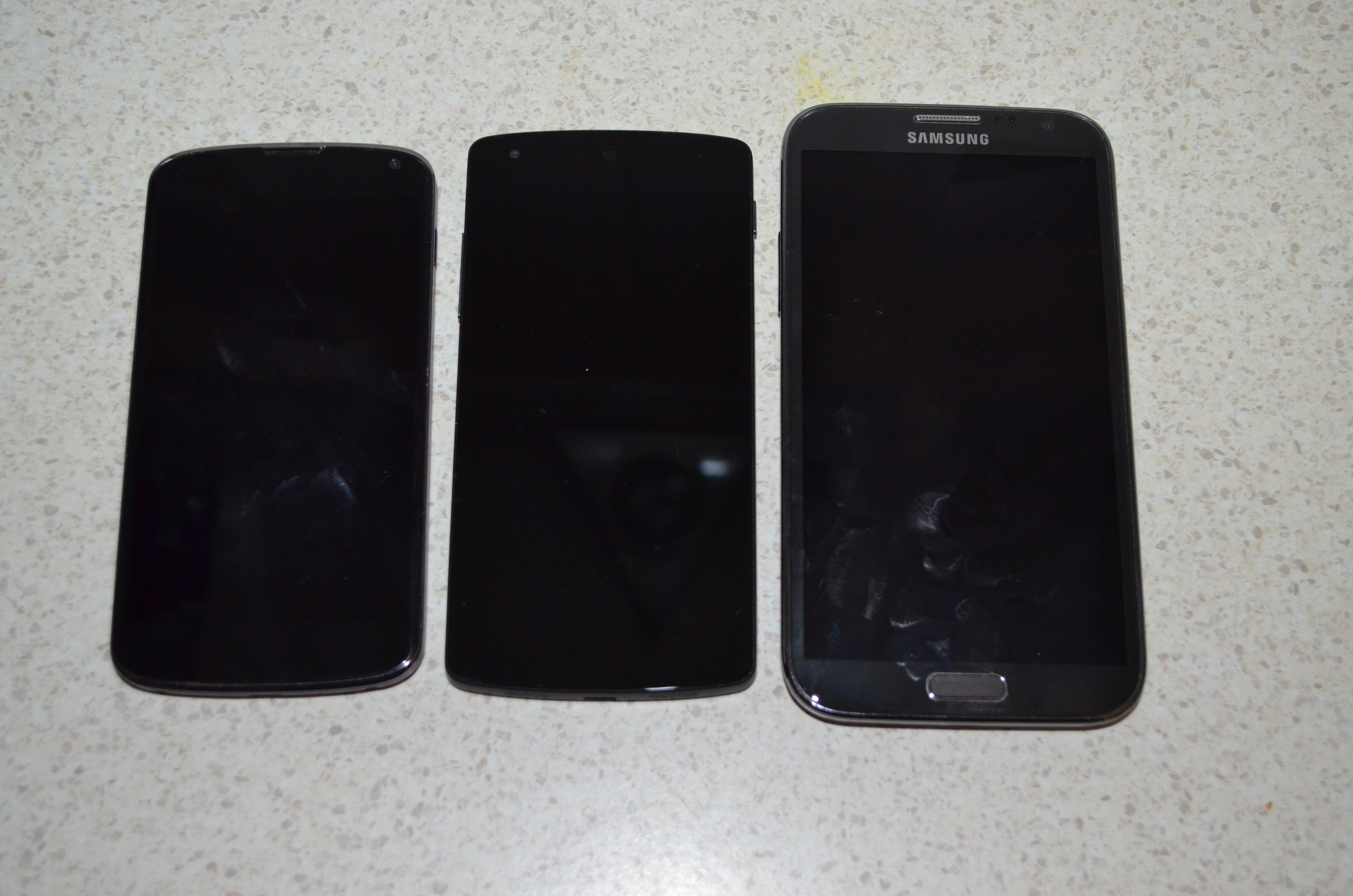
The Nexus 5 is the latest Android phone to be endorsed by Google (and manufactured by LG). It s getting good reviews and the price is good for the specs. I just bought one for my wife, I got her the 32G version because when I bought her a Nexus 4 at the start of the year [1] I chose the 8G version and regretted it ever since. The size of apps is always increasing (some Android games need more than 1G of storage) and higher resolution screens drives the use of high resolution video. Appearance back of Nexus 4, Nexus 5, and Samsung Galaxy Note 2front of Nexus 4, Nexus 5, and Samsung Galaxy Note 2 Above I have pictures of the Nexus 4, the Nexus 5, and the Samsung Galaxy Note 2. The photo of the phone backs captures part of the sparkling pattern on the back of the Nexus 4 and it looks much better in real life (IMHO) because it shimmers as you move the phone. The Nexus 4 looks so good that there s even a transparent case specifically designed to show off the rear panel [2]. It doesn t seem likely that anyone will design such a transparent case for the Nexus 5, it s a good phone to cover up IMHO. The Note 2 isn t the most attractive phone, but I think it has a streamlined elegance of being optimised for it s function. The Nexus 5 has it s camera sticking out, it would be better if they had just made the entire phone thicker and given it a bigger battery but for people who don t want good battery life I guess it s a way of providing a better focal length without making the phone thicker. Sticking the IMEI number on the back of the phone will be useful on rare occasions (and might be a security issue on more occasions) but it definitely makes the phone less attractive. Full HD The quality of the Full HD (1920*1080) display is obvious. The text is slightly clearer when viewing maps and the graphics in Ingress look nicer. Before I used the Nexus 5 I didn t think that there would be any benefit in having such a high resolution in a phone but now I realise that I was wrong. The higher resolution is clearly better. Chris Chavez wrote an article for Phandroid about a rumored Samsung phone with a 2560*1440 display [3]. If such a device had a 6.6 display (IE a new version of the Galaxy Mega) then it would have the same dot-pitch as the Nexus 5. If such a device had a 5.5 display (like the Galaxy Note 3) then it would have a 15% greater DPI than the Nexus 5. It seems that a higher DPI provides a real benefit and this is probably the biggest reason to choose the Nexus 5 over the Nexus 4 and most other Android devices. Comparing with the Nexus 4 The Nexus 5 has the same amount of RAM (2G), a slightly larger display (4.95 vs 4.7 ), higher resolution (a big deal), faster CPU and GPU, and optical zoom. Faster CPU isn t usually going to be a big deal (apart from the fact that more CPU power is needed as well as more GPU power to drive the higher resolution display). The Nexus 5 can come with 16G or 32G of storage while the Nexus 4 has options of 8G and 16G. If you want more than 16G of storage then that s a real benefit for the Nexus 5, but if you only need 16G then it s not an issue. It seems that when playing Ingress on a Nexus 5 it s more likely that running another program (such as Google Hangouts) will cause Ingress to be reloaded than it does on a Nexus 4 or a Galaxy Note 2. While I haven t done a good comparison of the Nexus 4 and the Nexus 5 in this regard I ve compared the Galaxy Note 2 and the Nexus 5 well. My Galaxy Note 2 (which has many daemons running) is much less likely to cause a reload of Ingress (IE have run low on memory and terminated Ingress) than the Nexus 5 my wife is using (which has very little running). So it seems that the OS build on the Nexus 5 uses more memory than the Galaxy Note 2. The Nexus 5 has Gorilla Glass 3 vs Gorilla Glass 2 on the Nexus 4. As my older Android phones with Gorilla Glass 1 (Galaxy S and Sony Ericsson Xperia X10i) didn t get any scratches that matter I don t think this is a benefit for me. Maybe if I lived near a beach I d care more about this. I think that the most significant benefit of the Nexus 5 over the Nexus 4 is the higher resolution display. The optical zoom should provide a theoretical benefit when taking photos, whether that results in better pictures in practice would probably depend on how you hold your phone, the available light, and other factors. I think that if it was possible to buy a Nexus 4 at a sensible price (IE something less than the $250 that Google last charged) then for most people the Nexus 4 would be a better choice than the Nexus 5. But as ebay is full of Nexus 4 phones selling for a higher prices than the Nexus 5 it seems that buying a Nexus 5 is the only option. The range of phones that Kogan sells [4] doesn t have anything for the same price that compares on features. Heat The heat produced by the Nexus 5 is significant and noticable. After some light Ingress playing on a cold day my Galaxy Note 2 with a gel case (that keeps it warm) reported itself as having a battery temperature of 34C. My wife s Nexus 5 reported a temperature of 43C. While the thermometer in the phone might not be the most accurate I don t think there was an accuracy problem, holding my wife s phone was unpleasant and felt like it could burn my hand if I held it tight (40C is the minimum temperature for burns). It seems that a Nexus 5 isn t a good choice if you want to play Ingress in a warm part of the world (EG most of Australia in summer). Also heat dissipated is directly proportional to power use which is going to be a problem for a phone that doesn t permit replacing it s battery. Conclusion I m quite disappointed with the Nexus 5. I expected it to be at least as good as the Nexus 4 in every way and better in many ways. Instead it s not always as good as the Nexus 4 and the ways that it is better won t necessarily provide benefits for everyone. The heat and power use problems are really going to hurt the use of it. But I guess we can always hope that Google release a new Android build that reduces the power use, they might even have a new build that uses less RAM too. I would not consider getting a Nexus 5 for my own use. For my use the Note 2 is clearly more suitable, the larger screen more than compensates for the clarity that the Nexus 5 gets from it s high resolution display. Also I REALLY like having a hardware home button. I ll probably get a Note 3 when the price drops, I m not interested in paying $649 for a phone and I m also not interested in replacing a phone that s less than a year old. So maybe I ll get a Note 3 in the second half of next year.

22 December 2013

Russ Allbery: Review: They Had to Go Out

Review: They Had to Go Out, by Gary J. Hudson
Publisher: Xlibris
Copyright: 2008
ISBN: 1-4363-8132-0
Format: Trade paperback
Pages: 165
They Had to Go Out, as noted on the cover, is the story of the tragedy of the Triumph and the Mermaid, a marine incident that occurred off the Oregon coast of the United States near the mouth of the Columbia River on January 12, 1961. But it's also much more than that. It's a detailed and thoroughly-researched account of a Coast Guard rescue operation, starting with background on the two coastal lifeboat stations and the types of ships involved. It covers everything from crew backgrounds to equipment issues to the general shape of the subsequent inquiry, and in the process provides a wealth of detailed information about the nature of Coast Guard rescue operations and the technology and equipment available at the time. But, beyond that, it's a gripping story, in part because of the authenticity of the authorial voice. Gary Hudson spent twenty years in the Coast Guard, ten on coastal lifeboat stations like the ones in this book, and was assigned to Point Adams (the primary station involved in this story) until 12 days before the incident, when he transferred to a light station for unrelated reasons. The writing is rough, the paragraphs are not always well-organized, the punctuation doesn't always end up in the right place, and it could have used an editor (Xlibris is a printing service company for self-publishing). But he understands the subject matter completely, and he clearly spent years of effort putting together all the details of the story. The first few chapters, where he establishes the necessary background and tells a few related stories, feel quite rough, but once he gets into the heart of the story, the rough prose stops mattering. Obviously, one of the things that makes this story so appealing is that it's a gripping human story, with the unconstructed and unexpected twists and turns of reality rather than a plot. Hudson has lived the life of the people he's writing about and can put many of their fears and thoughts into words. He captures some of what it would feel like to be out on the water in the middle of the worst seas that most of them had ever seen. And reality is unpredictable. I'm avoiding giving the exact details of what happened and I would recommend not researching the incident on Google if you plan to read this book; there's a lot of drama here, and spoilers are possible. Hudson's factual, detailed narrative style gives the reader a lot of material with which to build mental pictures, and he preserves the drama and the human impact of the story by telling it in straight chronological order. The writing is rough, but he shows a talent for pacing and perspective in the way he weaves together the viewpoints of multiple Coast Guard stations and ship crews. This is also a case study and an accident report, put together with extensive research and scope, but made approachable for the average reader. Hudson takes out the dryness and technical language and weaves the events into a narrative, but he doesn't lose much of the detail. You can know nothing at all about ships or Coast Guard operations and come away from this book with strong opinions about self-righting capabilities (and, more to the point, accurate communication to crews of the capabilities of their vessels). And, by showing a full day of Coast Guard operations (admittedly, a very unusual and difficult day), Hudson also provides the previously unfamiliar reader with a great "day in the life" picture of what Coast Guard lifesaving operations at their most dangerous look like (or at least looked like; one also gets a sense of just how much has improved, and how important the improvements are, in the final chapters). Finally, unlike most accident reports, Hudson carries the story through to the immediate family impact (which may well bring you to tears) and then, given forty years of hindsight, some of the subsequent effects on the people involved. I really liked this. One of the aspects of stories like this that often gets short shrift is that the people involved carry the incident with them for the rest of their lives, often with profound impact. Unlike a movie, where the movie ends and the characters disappear as soon as the primary action is complete, real life has messy and lingering endings, and I think Hudson manages to capture some of that feeling. Some of the best non-fiction books are not written by professional writers. Instead, they're written by people who have both expertise and passion for a particular topic and who know or teach themselves enough about telling a story to manage to get that expertise and passion out on paper. Hudson puts every aspect of this day into the book, from the people to the family impact, from the questionable decisions to the equipment failures and shortages, from the initial conditions through the inquiry and up to the subsequent impact on the lives of the people involved (including, sadly, the Coast Guard's lack of understanding of how to help people with traumatic stress). Some of the paragraphs clunk, some of the sentence construction is awkward, and some of the short biographies are a bit lost in details, but Hudson's desire to tell the complete truth as he was able to reconstruct it, and his deep empathy and understanding of how it felt to the people involved, shine through and carry this book. This is great stuff, and worth seeking out. Recommended. Rating: 9 out of 10

21 December 2013

Russell Coker: Links December 2013

Andres Lozano gave an interesting TED talk about the use of electrodes inside the brain (deep brain stimulation) to treat Alzheimers disease, Parkinson s disease, and depression [1]. Daniel Pocock wrote an interesting post commenting on some bad political decisions being made in Australia titled Evacuating Australia [2]. You can read that as a suggestion to leave Australia or to try and make Australia better. Marco Tempest gave an interesting TED talk about Nikola Tesla [3]. The presentation method is one that I ve never seen before so I recommend watching the talk even if you already know all about Tesla. Charmian Gooch gave an interesting TED talk about global corruption [4]. I think we need people to send the information on shell company ownership to organisations like Wikileaks. The punishment for leaking such information would be a lot less than Chelsea Manning is getting and the chance of getting caught is also low. Rich Mogul wrote an interesting and insightful article for Macworld about the Apple approach to security problems [5]. To avoid the problem of users disabling security features they work to make the secure way of doing things EASIER for the user. That won t work with all security problems but it s something we need to think about when working on computer security. Ray Raphael gave an interesting TED talk about the parts of the US revolution that don t appear in history books [6]. He warns the listener to beware of the narrative forms, but another way to interpret his talk is that you should present your version of history in the narrative form that is best accepted. That lesson is well known and it s easy to see history being deliberately distorted in most media outlets. Will Wright gave an interesting TED talk about how he designed the game Spore and his ideas about games in general [7]. Spore is a really good game. Chris Lintott gave an interesting TED talk about crowd-sourced astronomy titled How to Discover a Planet from Your Sofa [8]. He referenced the Zooniverse.org site which lists many crowd-sourced science projects [9]. Jake Socha gave an interesting TED talk about flying snakes, you have to see this to believe it [10]. Nikita Bier gave an interesting TED talk about his webapp to analyse economic policies [11]. Apparently 60% of people were going to vote in their best economic interest before seeing his site and 66% would do so afterwards that could change an election result. Anya Kamenetz wrote an interesting article for Salon about The Iliad Project which aims to use Indigogo to help identify new anti-biotics [12]. The current ways of discovering anti-biotics aren t working, lets hope this one does. Peter Finocchiaro wrote an interesting Salon article about how right-wing politicians in the US were opposed to Nelson Mandela [13] racism meets anti-communism. Katie McDonough wrote an interesting Salon article about Rick Santorum and Bill O Reilly comparing Obamacare to apartheid while supposedly honoring Nelson Mandela [14], Katie also notes that Nelson enshrined universal healthcare in the South African constitution something all countries should do. Mary Elizabeth Williams wrote a Salon article about Susan Boyle s announcement about being diagnosed with Asperger Syndrome [15]. Not a surprise though, some people can be diagnosed with Autism by merely watching them on TV. Amelia Hill wrote an article for The Guardian/The Observer about the educational results of Home Schooling [16]. Apparently Home-Schooled kids learn significantly more and home-educated children of working-class parents achieved considerably higher marks in tests than the children of professional, middle-class parents and that gender differences in exam results disappear among home-taught children . Wow, Home Schooling beats gender and class problems! I m sure it s even better for GLBT kids too. Robert Reich wrote an interesting Salon article about the way rich people in the US give tax-deductable (taxpayer supported) donations to charities that benefit themselves [17]. Dan Savage wrote a very funny review of Sarah Palin s latest Christmas book, one classic quote is why should I have to read the whole thing? Lord knows Sarah Palin didn t write the whole thing [18]. He makes a good point that we should use the term happy holidays instead of happy Christmas just to show that we aren t assholes.

Next.

Previous.