Daniel Leidert: Motion picture capturing: Debian + motion + Logitech C910 - part II
In my recent attempt to setup a motion detection camera I was disappointed, that my camera, which should be able to record with 30 fps in 720p mode only reached 10 fps using the software motion. Now I got a bit further. This seems to be an issue with the format used by motion. I've check the output of v4l2-ctl ... and I'm out of ideas :( So atm it lokks like I cannot use the . During writing I then discovered a solution by good old trial-and-error: Leaving the v4l2_palette variable at its default value 17 (
$ v4l2-ctl -d /dev/video1 --list-formats-ext... and motion:
[..]
ioctl: VIDIOC_ENUM_FMT
Index : 0
Type : Video Capture
Pixel Format: 'YUYV'
Name : YUV 4:2:2 (YUYV)
[..]
Size: Discrete 1280x720
Interval: Discrete 0.100s (10.000 fps)
Interval: Discrete 0.133s (7.500 fps)
Interval: Discrete 0.200s (5.000 fps)
[..]
Index : 1
Type : Video Capture
Pixel Format: 'MJPG' (compressed)
Name : MJPEG
[..]
Size: Discrete 1280x720
Interval: Discrete 0.033s (30.000 fps)
Interval: Discrete 0.042s (24.000 fps)
Interval: Discrete 0.050s (20.000 fps)
Interval: Discrete 0.067s (15.000 fps)
Interval: Discrete 0.100s (10.000 fps)
Interval: Discrete 0.133s (7.500 fps)
Interval: Discrete 0.200s (5.000 fps)
[..]
$ motionOk, so both formats
[..]
[1] [NTC] [VID] v4l2_set_pix_format: Config palette index 17 (YU12) doesn't work.
[1] [NTC] [VID] v4l2_set_pix_format: Supported palettes:
[1] [NTC] [VID] v4l2_set_pix_format: (0) YUYV (YUV 4:2:2 (YUYV))
[1] [NTC] [VID] v4l2_set_pix_format: 0 - YUV 4:2:2 (YUYV) (compressed : 0) (0x56595559)
[1] [NTC] [VID] v4l2_set_pix_format: (1) MJPG (MJPEG)
[1] [NTC] [VID] v4l2_set_pix_format: 1 - MJPEG (compressed : 1) (0x47504a4d)
[1] [NTC] [VID] v4l2_set_pix_format Selected palette YUYV
[1] [NTC] [VID] v4l2_do_set_pix_format: Testing palette YUYV (1280x720)
[1] [NTC] [VID] v4l2_do_set_pix_format: Using palette YUYV (1280x720) bytesperlines 2560 sizeimage 1843200 colorspace 00000008
[..]
YUYV and MJPG are supported and recognized and I can choose both via the v4l2palette configuration variable, citing motion.conf: # v4l2_palette allows to choose preferable palette to be use by motionNow motion uses
# to capture from those supported by your videodevice. (default: 17)
# E.g. if your videodevice supports both V4L2_PIX_FMT_SBGGR8 and
# V4L2_PIX_FMT_MJPEG then motion will by default use V4L2_PIX_FMT_MJPEG.
# Setting v4l2_palette to 2 forces motion to use V4L2_PIX_FMT_SBGGR8
# instead.
#
# Values :
# V4L2_PIX_FMT_SN9C10X : 0 'S910'
# V4L2_PIX_FMT_SBGGR16 : 1 'BYR2'
# V4L2_PIX_FMT_SBGGR8 : 2 'BA81'
# V4L2_PIX_FMT_SPCA561 : 3 'S561'
# V4L2_PIX_FMT_SGBRG8 : 4 'GBRG'
# V4L2_PIX_FMT_SGRBG8 : 5 'GRBG'
# V4L2_PIX_FMT_PAC207 : 6 'P207'
# V4L2_PIX_FMT_PJPG : 7 'PJPG'
# V4L2_PIX_FMT_MJPEG : 8 'MJPEG'
# V4L2_PIX_FMT_JPEG : 9 'JPEG'
# V4L2_PIX_FMT_RGB24 : 10 'RGB3'
# V4L2_PIX_FMT_SPCA501 : 11 'S501'
# V4L2_PIX_FMT_SPCA505 : 12 'S505'
# V4L2_PIX_FMT_SPCA508 : 13 'S508'
# V4L2_PIX_FMT_UYVY : 14 'UYVY'
# V4L2_PIX_FMT_YUYV : 15 'YUYV'
# V4L2_PIX_FMT_YUV422P : 16 '422P'
# V4L2_PIX_FMT_YUV420 : 17 'YU12'
#
v4l2_palette 17
YUYV as default mode as shown by its output. So it seems that all I have to do is to choose MJPEG in my motion.conf: v4l2_palette 8Testing again ...
$ motion... and another issue is turning up :( The output above goes on and on and on and there is no video capturing. So accordingly to $searchengine the above happens to a lot of people. I just found one often suggested fix: pre-load v4l2convert.so from libv4l-0:
[..]
[1] [NTC] [VID] vid_v4lx_start: Using V4L2
[1] [NTC] [ALL] image_ring_resize: Resizing pre_capture buffer to 1 items
[1] [NTC] [VID] v4l2_set_control: setting control "Brightness" to 25 (ret 0 )
Corrupt JPEG data: 5 extraneous bytes before marker 0xd6
[1] [CRT] [VID] mjpegtoyuv420p: Corrupt image ... continue
[1] [NTC] [VID] v4l2_set_control: setting control "Brightness" to 14 (ret 0 )
Corrupt JPEG data: 1 extraneous bytes before marker 0xd5
[1] [CRT] [VID] mjpegtoyuv420p: Corrupt image ... continue
[1] [NTC] [VID] v4l2_set_control: setting control "Brightness" to 36 (ret 0 )
Corrupt JPEG data: 3 extraneous bytes before marker 0xd2
[1] [CRT] [VID] mjpegtoyuv420p: Corrupt image ... continue
[1] [NTC] [VID] v4l2_set_control: setting control "Brightness" to 58 (ret 0 )
Corrupt JPEG data: 1 extraneous bytes before marker 0xd7
[1] [CRT] [VID] mjpegtoyuv420p: Corrupt image ... continue
[1] [NTC] [VID] v4l2_set_control: setting control "Brightness" to 80 (ret 0 )
Corrupt JPEG data: 4 extraneous bytes before marker 0xd7
[1] [CRT] [VID] mjpegtoyuv420p: Corrupt image ... continue
[1] [ERR] [ALL] motion_init: Error capturing first image
[1] [NTC] [ALL] image_ring_resize: Resizing pre_capture buffer to 16 items
Corrupt JPEG data: 4 extraneous bytes before marker 0xd1
[1] [CRT] [VID] mjpegtoyuv420p: Corrupt image ... continue
Corrupt JPEG data: 11 extraneous bytes before marker 0xd1
[1] [CRT] [VID] mjpegtoyuv420p: Corrupt image ... continue
Corrupt JPEG data: 3 extraneous bytes before marker 0xd4
[1] [CRT] [VID] mjpegtoyuv420p: Corrupt image ... continue
Corrupt JPEG data: 7 extraneous bytes before marker 0xd1
[..]
$ LD_PRELOAD=/usr/lib/x86_64-linux-gnu/libv4l/v4l2convert.so motionBut the problem persists
MJPEG format and don't get 30 fps at 1280x720 pixelsYU12) and pre-loading v4l2convert.so makes use of YU12 and the framerate at least raises to 24 fps: $ LD_PRELOAD=/usr/lib/x86_64-linux-gnu/libv4lg/v4l2convert.so motionFinally! :) The results are nice. It would maybe even be a good idea to limit the framerate a bit, to e.g. 20. So that is a tested configuration for the Logitech C910 running at a resolution of 1280x720 pixels:
[..]
[1] [NTC] [VID] v4l2_do_set_pix_format: Testing palette YU12 (1280x720)
[1] [NTC] [VID] v4l2_do_set_pix_format: Using palette YU12 (1280x720) bytesperlines 1280 sizeimage 1382400 colorspace 00000008
[..]
[1] [NTC] [EVT] event_new_video FPS 24
[..]
v4l2_palette 17Now all this made me curious, which framerate is possible at a resolution of 1920x1080 pixels now and how the results look like. Although I get 24 fps too, the resulting movie suffers of jumps every few frames. So here I got pretty good results with a more conservative setting. By increasing framerate - tested up to 15 fps with good results - pre_capture needed to be decreased accordingly to values between 1..3 to minimize jumps:
width 1280
height 720
framerate 20
minimum_frame_time 0
pre_capture 10 # 0,5 seconds pre-recording
post_capture 50 # 2,5 seconds after-recording
auto_brightness on
ffmpeg_variable_bitrate 2 # best quality
v4l2_palette 17Both configurations lead to satisfying results. Of course the latter will easily fill your hardrive :) TODOI guess, the results can be optimzed further by playing around with ffmpeg_bps and ffmpeg_variable_bitrate. Maybe then it is possible to record without jumps at higher framerates too(?). I also didn't test the various norm settings (PAL, NTSC, etc.).
width 1920
height 1080
framerate 12
minimum_frame_time 0
pre_capture 6 # 0,5 seconds pre-recording
post_capture 30 # 2,5 seconds after-recording
auto_brightness on
ffmpeg_variable_bitrate 2 # best quality
 I've been working on this for too long without really talking about
it, so let's fix that now!
VLANd is a simple (hah!) python program intended to make it easy to
manage port-based VLAN setups across multiple switches in a
network. It is designed to be vendor-agnostic, with a clean pluggable
driver API to allow for a wide range of different switches to be
controlled together.
There's more information in
the
 After the
 In past days, several new free software projects have been added to
 A new releases of the
 I was asked in

 AltOS 1.6 TeleDongle v3.0 support and bug fixes
Bdale and I are pleased to announce the release of

 My LTS January
It was very nice to hear many appreciations for our work on


 The package
 At this year's FOSDEM I gave a talk in the PostgreSQL devroom
about
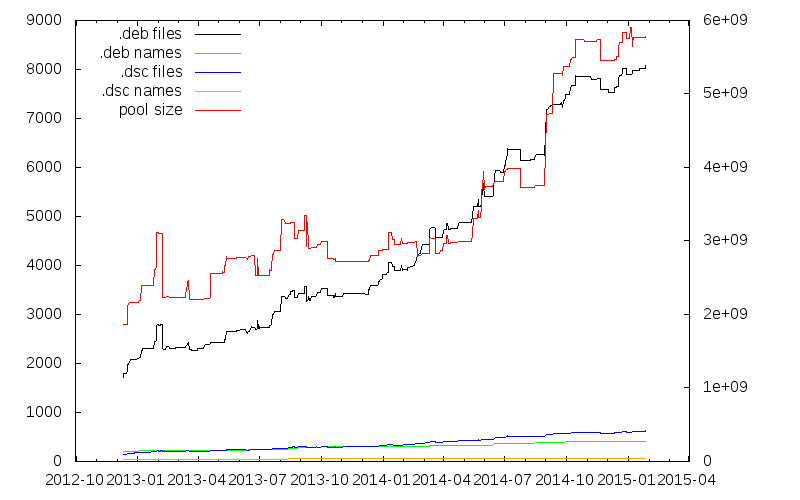 The yellow line at the very bottom is the number of different source package
names, currently 71. From that, a somewhat larger number of actual source
packages that include the "pgdgXX" version suffixes targeting the various
distributions we have is built (blue). The number of different binary package
names (green) is in about the same range. The dimension explosion then happens
for the actual number of binary packages (black, almost 8000) targeting all
distributions and architectures.
The red line is the total size of the pool/ directory, currently a bit less
than 6GB.
(The graphs sometimes decrease when packages in the -testing distributions are
promoted to the live distributions and the old live packages get removed.)
 There