156. This version includes the following changes:
[ Chris Lamb ]
* Update PPU tests for compatibility with Free Pascal versions 3.2.0 or
greater. (Closes: #968124)
* Emit a debug-level logging message when our ppudump(1) version does not
match file header.
* Add and use an assert_diff helper that loads and compares a fixture output
to avoid a bunch of test boilerplate.
[ Frazer Clews ]
* Apply some pylint suggestions to the codebase.
This guy is doing a great work, providing patches to improve kwin, and then tried Gnome3 for a week, 7 days. His verdict:
overall, after one week of using this, I can say it s f**king HORRIBLE!!! well, it s not as bad as I thought but yeah, it was overall a pretty unpleasant experienceHonestly, I can t agree more. I have tried Gnome3 for over a year, again and again, and it feels like a block of concrete put onto the feet of dissidents by Italian mafia bosses. It drowns and kills you. Here are the links: Start, Day 1, Day 2, Day 3, Day 4, Day 5, Day 6, Day 7. Thanks a lot for these blog posts, incredibly informative and convincing!
I definitely have seen improvements, but the desktop is still not in shape. I mean, it s still not as usable as KDE is .
The publisher MDPI is a spammer and lies.
If you upload a paper draft to arXiv, MDPI will send spam to the authors
to solicit submission. Within minutes of an upload I received the
following email (sent by MDPI staff, not some overly eager new editor):
We read your recent manuscript "[...]" on
arXiv, and sincerely invite you to submit it to our journal Future
Internet, if it has not been published or submitted elsewhere.
Future Internet (ISSN 1999-5903, indexed by Scopus, Ei compendex,
*ESCI*-Web of Science) is a journal on Internet technologies and the
information society. It maintains a rigorous and fast peer review system
with a median publication time of 35 days from submission to online
publication, and 3 days from acceptance to publication. The journal
scope is shown here:
https://www.mdpi.com/journal/futureinternet/about.
Editorial Board: https://www.mdpi.com/journal/futureinternet/editors.
Since Future Internet is an open access journal there is a publication
fee. Your paper will be published, with a 20% discount (amounting to 200
CHF), and provided that it is accepted after our standard peer-review
procedure.
Short status update on my KDE/Plasma packages for Debian sid and testing:
postgres), or generating/updating cache files.
Triggers are a kind of hook which run when other packages are installed. For
example, on Debian, the man(1) package
comes with a trigger which regenerates the search database index whenever any
package installs a manpage. When, for example, the
nginx(8) package is installed, a
trigger provided by the man(1) package
runs.
Over the past few decades, Open Source software has become more and more
uniform: instead of each piece of software defining its own rules, a small
number of build systems are now widely adopted.
Hence, I think it makes sense to revisit whether offering extension via hooks
and triggers is a net win or net loss.
find shard*/src/*/debian -regex ".*\(pre\ post\)\(inst\ rm\)$" on a Debian
Code Search instance.
apropos(1) command, so I don t
appreciate the man(1) package s trigger
which updates the database used by
apropos(1). The process takes a long
time and, because hooks and triggers must be executed serially (see previous
section), blocks my installation or update.
When I tell people this, they are often surprised to learn about the existance
of the apropos(1) command. I suggest
adopting an opt-in model.
PATH) via a wrapper bash script, I noticed that the overhead of those
wrapper bash scripts quickly becomes significant. For example, when using the
excellent magit interface for Git in Emacs, I encountered
second-long delays when using hermetic packages compared to standard
packages. Re-implementing wrappers in a compiled language provided a significant
speed-up.
Similarly, getting rid of an extension point which mandates using shell scripts
allows us to build an efficient and fast implementation of a predefined set of
primitives, where you can reason about their effects and interactions.
magit needs to run git a few times for displaying the full status, so small
overhead quickly adds up.
./configure && make && make install (including commonly used flags) to
build a distribution package. Integrating upstream software into a distribution
should not require custom hooks. For example, instead of requiring a hook which
updates a cache of schema files, the library used to interact with those files
should transparently (re-)generate the cache or fall back to a slower code path.
Distribution maintainers are hard to come by, so we should value their time. In
particular, there is a 1:n relationship of packages to distribution package
maintainers (software is typically available in multiple Linux distributions),
so it makes sense to spend the work in the 1 and have the n benefit.
/etc/passwd just once.
If the hook is specific to the package, it should be moved into the package
contents. This typically means moving the functionality into the program start
(or the systemd service file if we are talking about a daemon). If (while?)
upstream is not convinced, you can either wrap the program or patch it. Note
that this case is relatively rare: I have worked with hundreds of packages and
the only package-specific functionality I came across was automatically
generating host keys before starting OpenSSH s
sshd(8) .
There is one exception where moving the hook doesn t work: packages which modify
state outside of the system, such as bootloaders or kernel images.
Even that can be moved out of a package-specific hook, as Fedora
demonstrates.
--help output.
The better alternative is to configure your build system such that it stops when
any dependency was not found, and thereby have packagers acknowledge each
optional dependency by explicitly disabling the option.
--disable-nls to disable
internationalization.
However, optional dependencies are broken so often that I conclude they are
overused. Read on and see for yourself whether you would rather commit to best
practices or not introduce an optional dependency.
--disable flag.--version.distri % time make cryptimage serial=1
80.29s user 13.56s system 186% cpu 50.419 total # 19s image, 31s initrd
Of these 50 seconds,
dracut s initramfs
generation accounts for 31 seconds (62%)!
Initramfs generation time drops to 8.7 seconds once dracut no longer needs to
use the single-threaded gzip(1)
, but the
multi-threaded replacement pigz(1)
:
This brings the total time to build a distri disk image down to:
distri % time make cryptimage serial=1
76.85s user 13.23s system 327% cpu 27.509 total # 19s image, 8.7s initrd
Clearly, when you use dracut on any modern computer, you should make pigz
available. dracut should fail to compile unless one explicitly opts into the
known-slower gzip. For more thoughts on optional dependencies, see Optional
dependencies don t work .
But why does it take 8.7 seconds still? Can we go faster?
The answer is Yes! I recently built a distri-specific initramfs I m calling
minitrd. I wrote both big parts from scratch:
distri initrd)cmd/minitrd), running as /init in the initramfs.minitrd generates the initramfs image in 400ms, bringing the total time down
to:
distri % time make cryptimage serial=1
50.09s user 8.80s system 314% cpu 18.739 total # 18s image, 400ms initrd
(The remaining time is spent in preparing the file system, then installing and
configuring the distri system, i.e. preparing a disk image you can run on real
hardware.)
How can minitrd be 20 times faster than dracut?
dracut is mainly written in shell, with a C helper program. It drives the
generation process by spawning lots of external dependencies (e.g. ldd or the
dracut-install helper program). I assume that the combination of using an
interpreted language (shell) that spawns lots of processes and precludes a
concurrent architecture is to blame for the poor performance.
minitrd is written in Go, with speed as a goal. It leverages concurrency and
uses no external dependencies; everything happens within a single process (but
with enough threads to saturate modern hardware).
Measuring early boot time using qemu, I measured the dracut-generated
initramfs taking 588ms to display the full disk encryption passphrase prompt,
whereas minitrd took only 195ms.
The rest of this article dives deeper into how minitrd works.
virtio_pci module, followed by the virtio_scsi module.
How will our userland program know which kernel modules to load? Linux kernel
modules declare patterns for their supported hardware as an alias, e.g.:
initrd# grep virtio_pci lib/modules/5.4.6/modules.alias
alias pci:v00001AF4d*sv*sd*bc*sc*i* virtio_pci
Devices in sysfs have a modalias file whose content can be matched against
these declarations to identify the module to load:
initrd# cat /sys/devices/pci0000:00/*/modalias
pci:v00001AF4d00001005sv00001AF4sd00000004bc00scFFi00
pci:v00001AF4d00001004sv00001AF4sd00000008bc01sc00i00
[ ]
Hence, for the initial round of module loading, it is sufficient to locate all
modalias files within sysfs and load the responsible modules.
Loading a kernel module can result in new devices appearing. When that happens,
the kernel sends a
uevent,
which the uevent consumer in userspace receives via a netlink socket. Typically,
this consumer is udev(7)
, but in our case, it s
minitrd.
For each uevent messages that comes with a MODALIAS variable, minitrd will
load the relevant kernel module(s).
When loading a kernel module, its dependencies need to be loaded
first. Dependency information is stored in the modules.dep file in a
Makefile-like syntax:
initrd# grep virtio_pci lib/modules/5.4.6/modules.dep
kernel/drivers/virtio/virtio_pci.ko: kernel/drivers/virtio/virtio_ring.ko kernel/drivers/virtio/virtio.ko
To load a module, we can open its file and then call the Linux-specific finit_module(2)
system call. Some modules are expected to
return an error code, e.g. ENODEV or ENOENT when some hardware device is not
actually present.
Side note: next to the textual versions, there are also binary versions of the
modules.alias and modules.dep files. Presumably, those can be queried more
quickly, but for simplicitly, I have not (yet?) implemented support in
minitrd.
initrd# setfont latarcyrheb-sun32
Setting the user s keyboard layout is necessary for entering the LUKS full-disk
encryption passphrase in their preferred keyboard layout. I use the NEO
layout:
initrd# loadkeys neo
root=UUID=1fa04de7-30a9-4183-93e9-1b0061567121.
Identifying the block device or partition with the specified UUID is the
initramfs s job.
Depending on what the device contains, the UUID comes from a different
place. For example, ext4 file systems have a UUID field in their file system
superblock, whereas LUKS volumes have a UUID in their LUKS header.
Canonically, probing a device to extract the UUID is done by libblkid from the
util-linux package, but the logic can easily be re-implemented in other
languages
and changes rarely. minitrd comes with its own implementation to avoid
cgo or running the blkid(8)
program.
initrd# modprobe algif_skcipher
initrd# cryptsetup luksOpen /dev/sda4 cryptroot1
After the user entered their passphrase, the root file system can be mounted:
initrd# mount /dev/dm-0 /mnt
chdir(2)
, mount(2)
, chroot(2)
, chdir(2)
and execve(2)
system calls that is explained in this busybox switch_root
comment.
initrd# mount -t devtmpfs dev /mnt/dev
initrd# exec switch_root -c /dev/console /mnt /init
To conserve RAM, the files in the temporary file system to which the initramfs
archive is extracted are typically deleted.
cpio(1)
program. In minitrd, we read the files into memory
and generate the cpio archive using the
go-cpio package. We use the
pgzip package for parallel gzip
compression.
The following files need to go into the cpio archive:
minitrd binary is copied into the cpio archive as /init and will be run
by the kernel after extracting the archive.
Like the rest of distri, minitrd is built statically without cgo, which means
it can be copied as-is into the cpio archive.
modules.alias and modules.dep metadata files, the kernel
modules themselves reside in e.g. /lib/modules/5.4.6/kernel and need to be
copied into the cpio archive.
Copying all modules results in a 80 MiB archive, so it is common to only copy
modules that are relevant to the initramfs s features. This reduces archive size
to 24 MiB.
The filtering relies on hard-coded patterns and module names. For example, disk
encryption related modules are all kernel modules underneath kernel/crypto,
plus kernel/drivers/md/dm-crypt.ko.
When generating a host-only initramfs (works on precisely the computer that
generated it), some initramfs generators look at the currently loaded modules
and just copy those.
kbd package s setfont(8)
and loadkeys(1)
programs load console fonts and keymaps from
/usr/share/consolefonts and /usr/share/keymaps, respectively.
Hence, these directories need to be copied into the cpio archive. Depending on
whether the initramfs should be generic (work on many computers) or host-only
(works on precisely the computer/settings that generated it), the entire
directories are copied, or only the required font/keymap.
minitrd does not implement
their functionality.
As they are dynamically linked, not only the programs themselves need to be
copied, but also the ELF dynamic linking loader (path stored in the .interp
ELF section) and any ELF library dependencies.
For example, cryptsetup in distri declares the ELF interpreter
/ro/glibc-amd64-2.27-3/out/lib/ld-linux-x86-64.so.2 and declares dependencies
on shared libraries libcryptsetup.so.12, libblkid.so.1 and others. Luckily,
in distri, packages contain a lib subdirectory containing symbolic links to
the resolved shared library paths (hermetic packaging), so it is sufficient to
mirror the lib directory into the cpio archive, recursing into shared library
dependencies of shared libraries.
cryptsetup also requires the GCC runtime library libgcc_s.so.1 to be present
at runtime, and will abort with an error message about not being able to call
pthread_cancel(3)
if it is unavailable.
/etc/localtime from
the host into the cpio archive.
minitrd available outside of
distri. While the technical challenges (such as extending
the generator to not rely on distri s hermetic packages) are surmountable, I
don t want to support people s initramfs remotely.
Also, I think that people s efforts should in general be spent on rallying
behind dracut and making it work faster, thereby benefiting all Linux
distributions that use dracut (increasingly more). With minitrd, I have
demonstrated that significant speed-ups are achievable.
dracut is much slower than it needs
to be. Re-implementing its generation stage in a modern language instead of
shell helps a lot.
Of course, my minitrd does a bit less than dracut, but not drastically
so. The overall architecture is the same.
I hope my effort helps with two things:
dracut.% mkdir -p lib/modules/5.4.6
% cp -Lr /ro/lib/modules/5.4.6/* lib/modules/5.4.6/
% cp ~/busybox-1.22.0-amd64/busybox sh
To generate an initramfs from the current directory, I used:
% find . cpio -o -H newc pigz > /tmp/initrd
In distri s Makefile, I append these flags to the QEMU invocation:
-kernel /tmp/kernel \
-initrd /tmp/initrd \
-append "root=/dev/mapper/cryptroot1 rdinit=/sh ro console=ttyS0,115200 rd.luks=1 rd.luks.uuid=63051f8a-54b9-4996-b94f-3cf105af2900 rd.luks.name=63051f8a-54b9-4996-b94f-3cf105af2900=cryptroot1 rd.vconsole.keymap=neo rd.vconsole.font=latarcyrheb-sun32 init=/init systemd.setenv=PATH=/bin rw vga=836"
The vga= mode parameter is required for loading font latarcyrheb-sun32.
Once in the busybox shell, I manually prepared the required mount points and
kernel modules:
ln -s sh mount
ln -s sh lsmod
mkdir /proc /sys /run /mnt
mount -t proc proc /proc
mount -t sysfs sys /sys
mount -t devtmpfs dev /dev
modprobe virtio_pci
modprobe virtio_scsi
As a next step, I copied cryptsetup and dependencies into the initramfs directory:
% for f in /ro/cryptsetup-amd64-2.0.4-6/lib/*; do full=$(readlink -f $f); rel=$(echo $full sed 's,^/,,g'); mkdir -p $(dirname $rel); install $full $rel; done
% ln -s ld-2.27.so ro/glibc-amd64-2.27-3/out/lib/ld-linux-x86-64.so.2
% cp /ro/glibc-amd64-2.27-3/out/lib/ld-2.27.so ro/glibc-amd64-2.27-3/out/lib/ld-2.27.so
% cp -r /ro/cryptsetup-amd64-2.0.4-6/lib ro/cryptsetup-amd64-2.0.4-6/
% mkdir -p ro/gcc-libs-amd64-8.2.0-3/out/lib64/
% cp /ro/gcc-libs-amd64-8.2.0-3/out/lib64/libgcc_s.so.1 ro/gcc-libs-amd64-8.2.0-3/out/lib64/libgcc_s.so.1
% ln -s /ro/gcc-libs-amd64-8.2.0-3/out/lib64/libgcc_s.so.1 ro/cryptsetup-amd64-2.0.4-6/lib
% cp -r /ro/lvm2-amd64-2.03.00-6/lib ro/lvm2-amd64-2.03.00-6/
In busybox, I used the following commands to unlock the root file system:
modprobe algif_skcipher
./cryptsetup luksOpen /dev/sda4 cryptroot1
mount /dev/dm-0 /mnt
emacs) are hermetic. By
hermetic, I mean that the dependencies a package uses (e.g. libusb) don t
change, even when newer versions are installed.
For example, if package libusb-amd64-1.0.22-7 is available at build time, the
package will always use that same version, even after the newer
libusb-amd64-1.0.23-8 will be installed into the package store.
Another way of saying the same thing is: packages in distri are always
co-installable.
This makes the package store more robust: additions to it will not break the
system. On a technical level, the package store is implemented as a directory
containing distri SquashFS images and metadata files, into which packages are
installed in an atomic way.
$prefix/lib for shared libraries at runtime.
Debian ships about a dozen NSS
libraries
for a variety of purposes, and enterprise setups might add their own into the
mix.
systemd (as of v245) accounts for 4 NSS libraries,
e.g. nss-systemd
for user/group name resolution for users allocated through systemd s
DynamicUser=
option.
Having packages be as hermetic as possible remains a worthwhile goal despite any
exceptions: I will gladly use a 99% hermetic system over a 0% hermetic system
any day.
Side note: Xorg s driver model (which can be characterized as a plugin
mechanism) does not fall under this category because of its tight API/ABI
coupling! For this case, where drivers are only guaranteed to work with
precisely the Xorg version for which they were compiled, distri uses per-package
exchange directories.
/ro, e.g. files underneath
/ro/emacs-amd64-26.3-15 never change.
To change all paths used by a program, in practice, three strategies cover most
paths:
PT_INTERP segment), which is used to start the
program. For dynamically linked programs on 64-bit systems, this is typically
ld.so(8).
Many distributions use system-global paths such as
/lib64/ld-linux-x86-64.so.2, but distri compiles programs with
-Wl,--dynamic-linker=/ro/glibc-amd64-2.31-4/out/lib/ld-linux-x86-64.so.2 so
that the full path ends up in the binary.
The ELF interpreter is shown by file(1), but you can also use readelf -a
$BINARY grep 'program interpreter' to display it.
And secondly, the rpath, a run-time search
path for dynamic libraries. Instead of
storing full references to all dynamic libraries, we set the rpath so that
ld.so(8) will find the correct dynamic libraries.
Originally, we used to just set a long rpath, containing one entry for each
dynamic library dependency. However, we have since switched to using a single
lib subdirectory per
package
as its rpath, and placing symlinks with full path references into that lib
directory, e.g. using -Wl,-rpath=/ro/grep-amd64-3.4-4/lib. This is better for
performance, as ld.so uses a per-directory cache.
Note that program load times are significantly influenced by how quickly you can
locate the dynamic libraries. distri uses a FUSE file system to load programs
from, so getting proper -ENOENT caching into
place
drastically sped up program load times.
Instead of compiling software with the -Wl,--dynamic-linker and -Wl,-rpath
flags, one can also modify these fields after the fact using patchelf(1). For
closed-source programs, this is the only possibility.
The rpath can be inspected by using e.g. readelf -a $BINARY grep RPATH.
PATH environment
variable.
Such search paths are prevalent in scripting languages, too, to find
modules. Python has PYTHONPATH, Perl has PERL5LIB, and so on.
To set up these search path environment variables at run time, distri employs an
indirection. Instead of e.g. teensy-loader-cli, you run a small wrapper
program that calls precisely one execve system call with the desired
environment variables.
Initially, I used shell scripts as wrapper programs because they are easily
inspectable. This turned out to be too slow, so I switched to compiled
programs. I m
linking them statically for fast startup, and I m linking them against musl
libc for significantly smaller file sizes than glibc
(per-executable overhead adds up quickly in a distribution!).
Note that the wrapper programs prepend to the PATH environment variable, they
don t replace it in its entirely. This is important so that users have a way to
extend the PATH (and other variables) if they so choose. This doesn t hurt
hermeticity because it is only relevant for programs that were not present at
build time, i.e. plugin mechanisms which, by design, cannot be hermetic.
cp(1) process per file.
openssl).
The flip side of that coin is that changes to a single critical package can
break the entire system.
With hermetic packages, all reverse dependencies must be rebuilt when a
library s changes should be picked up by the whole system. E.g., when openssl
changes, curl must be rebuilt to pick up the new version of openssl.
This approach trades off using more bandwidth and more disk space (temporarily)
against reducing the blast radius of any individual package update.
tr :
'\n', e.g.:
distri0# echo $PATH
/usr/bin:/bin:/usr/sbin:/sbin:/ro/openssh-amd64-8.2p1-11/out/bin
distri0# echo $PATH tr : '\n'
/usr/bin
/bin
/usr/sbin
/sbin
/ro/openssh-amd64-8.2p1-11/out/bin
meson
build system:
meson first configures the build, it generates ninja files (think
Makefiles) which contain command lines that run the meson --internal
helper.meson returns, ninja is called as a separate process, so it will not
have the environment which the meson wrapper sets up. ninja then runs the
previously persisted meson command line. Since the command line uses the
full path to meson (not to its wrapper), it bypasses the wrapper.| technique to execute itself | uses wrapper | mitigation |
|---|---|---|
run-time: find own basename in PATH |
yes | wrapper program |
| compile-time: embed expected path | no; bypass! | configure or patch |
run-time: argv[0] or /proc/self/exe |
no; bypass! | patch |
argv[0] to the wrapper location seems like a way
to side-step this problem. We tried doing this in distri, but had to
revert
and go the other
way.
- character prepended to
argv[0], so shells like
bash or zsh cannot use wrapper
programs./ro/emacs-amd64-26.3-15) generally requires rebuilding programs,
e.g. with --prefix set./ro file system which is backed by a FUSE daemon.supersilverhaze, but verified to work on older versions, too.
Large outputs have been collapsed and can be expanded by clicking on the output.
The /bin directory contains symlinks for the union of all package s bin subdirectories:
distri0# readlink -f /bin/teensy_loader_cli/ro/teensy-loader-cli-amd64-2.1+g20180927-7/bin/teensy_loader_clibin subdirectory is small:
distri0# ls -lh $(readlink -f /bin/teensy_loader_cli)-rwxr-xr-x 1 root root 46K Apr 21 21:56 /ro/teensy-loader-cli-amd64-2.1+g20180927-7/bin/teensy_loader_clidistri0# strace -fvy /bin/teensy_loader_cli & head cat -n 1 execve("/bin/teensy_loader_cli", ["/bin/teensy_loader_cli"], ["USER=root", "LOGNAME=root", "HOME=/root", "PATH=/ro/bash-amd64-5.0-4/bin:/r"..., "SHELL=/bin/zsh", "TERM=screen.xterm-256color", "XDG_SESSION_ID=c1", "XDG_RUNTIME_DIR=/run/user/0", "DBUS_SESSION_BUS_ADDRESS=unix:pa"..., "XDG_SESSION_TYPE=tty", "XDG_SESSION_CLASS=user", "SSH_CLIENT=10.0.2.2 42556 22", "SSH_CONNECTION=10.0.2.2 42556 10"..., "SSHTTY=/dev/pts/0", "SHLVL=1", "PWD=/root", "OLDPWD=/root", "=/usr/bin/strace", "LD_LIBRARY_PATH=/ro/bash-amd64-5"..., "PERL5LIB=/ro/bash-amd64-5.0-4/ou"..., "PYTHONPATH=/ro/bash-amd64-5.b0-4/"...]) = 0
2 arch_prctl(ARCH_SET_FS, 0x40c878) = 0
3 set_tid_address(0x40ca9c) = 715
4 brk(NULL) = 0x15b9000
5 brk(0x15ba000) = 0x15ba000
6 brk(0x15bb000) = 0x15bb000
7 brk(0x15bd000) = 0x15bd000
8 brk(0x15bf000) = 0x15bf000
9 brk(0x15c1000) = 0x15c1000
10 execve("/ro/teensy-loader-cli-amd64-2.1+g20180927-7/out/bin/teensy_loader_cli", ["/ro/teensy-loader-cli-amd64-2.1+"...], ["USER=root", "LOGNAME=root", "HOME=/root", "PATH=/ro/bash-amd64-5.0-4/bin:/r"..., "SHELL=/bin/zsh", "TERM=screen.xterm-256color", "XDG_SESSION_ID=c1", "XDG_RUNTIME_DIR=/run/user/0", "DBUS_SESSION_BUS_ADDRESS=unix:pa"..., "XDG_SESSION_TYPE=tty", "XDG_SESSION_CLASS=user", "SSH_CLIENT=10.0.2.2 42556 22", "SSH_CONNECTION=10.0.2.2 42556 10"..., "SSHTTY=/dev/pts/0", "SHLVL=1", "PWD=/root", "OLDPWD=/root", "=/usr/bin/strace", "LD_LIBRARY_PATH=/ro/bash-amd64-5"..., "PERL5LIB=/ro/bash-amd64-5.0-4/ou"..., "PYTHONPATH=/ro/bash-amd64-5.0-4/"...]) = 0readelf(1):
distri0# readelf -a /ro/teensy-loader-cli-amd64-2.1+g20180927-7/out/bin/teensy_loader_cli grep 'program interpreter'[Requesting program interpreter: /ro/glibc-amd64-2.31-4/out/lib/ld-linux-x86-64.so.2]readelf(1):
distri0# readelf -a /ro/teensy-loader-cli-amd64-2.1+g20180927-7/out/bin/teensy_loader_cli grep RPATH 0x000000000000000f (RPATH) Library rpath: [/ro/teensy-loader-cli-amd64-2.1+g20180927-7/lib]distri0# find /ro/teensy-loader-cli-amd64-*/lib -type f -printf '%P -> %l\n'libc.so.6 -> /ro/glibc-amd64-2.31-4/out/lib/libc-2.31.so
libpthread.so.0 -> /ro/glibc-amd64-2.31-4/out/lib/libpthread-2.31.so
librt.so.1 -> /ro/glibc-amd64-2.31-4/out/lib/librt-2.31.so
libudev.so.1 -> /ro/libudev-amd64-245-11/out/lib/libudev.so.1.6.17
libusb-0.1.so.4 -> /ro/libusb-compat-amd64-0.1.5-7/out/lib/libusb-0.1.so.4.4.4
libusb-1.0.so.0 -> /ro/libusb-amd64-1.0.23-8/out/lib/libusb-1.0.so.0.2.0LD_DEBUG
environment variable for ld.so(8):
distri0# LD_DEBUG=libs teensy_loader_cli[ ]
678: find library=libc.so.6 [0]; searching
678: search path=/ro/teensy-loader-cli-amd64-2.1+g20180927-7/lib (RPATH from file /ro/teensy-loader-cli-amd64-2.1+g20180927-7/out/bin/teensy_loader_cli)
678: trying file=/ro/teensy-loader-cli-amd64-2.1+g20180927-7/lib/libc.so.6
678:
[ ]find /lib/ -name "libnss_*.so.2" -type f -printf '%P -> %l\n'libnss_myhostname.so.2 -> ../systemd-amd64-245-11/out/lib/libnss_myhostname.so.2
libnss_mymachines.so.2 -> ../systemd-amd64-245-11/out/lib/libnss_mymachines.so.2
libnss_resolve.so.2 -> ../systemd-amd64-245-11/out/lib/libnss_resolve.so.2
libnss_systemd.so.2 -> ../systemd-amd64-245-11/out/lib/libnss_systemd.so.2
libnss_compat.so.2 -> ../glibc-amd64-2.31-4/out/lib/libnss_compat.so.2
libnss_db.so.2 -> ../glibc-amd64-2.31-4/out/lib/libnss_db.so.2
libnss_dns.so.2 -> ../glibc-amd64-2.31-4/out/lib/libnss_dns.so.2
libnss_files.so.2 -> ../glibc-amd64-2.31-4/out/lib/libnss_files.so.2
libnss_hesiod.so.2 -> ../glibc-amd64-2.31-4/out/lib/libnss_hesiod.so.2
A first update following for the exciting RcppSimdJson 0.1.0 release last month is now on CRAN. Version 0.1.1 brings further enhancements such direct parsing of raw chars, working with compressed files as well as much expanded querying ability all thanks to Brendan, some improvements to our demos thanks to Daniel as well as a small fix via a one-liner borrowed from upstream for a reported UBSAN issue.
RcppSimdJson wraps the fantastic and genuinely impressive simdjson library by Daniel Lemire and collaborators. Via very clever algorithmic engineering to obtain largely branch-free code, coupled with modern C++ and newer compiler instructions, it results in parsing gigabytes of JSON parsed per second which is quite mindboggling. The best-case performance is faster than CPU speed as use of parallel SIMD instructions and careful branch avoidance can lead to less than one cpu cycle use per byte parsed; see the video of the talk by Daniel Lemire at QCon (also voted best talk).
The detailed list of changes follows.
Courtesy of CRANberries, there is also a diffstat report for this release. For questions, suggestions, or issues please use the issue tracker at the GitHub repo. If you like this or other open-source work I do, you can now sponsor me at GitHub. For the first year, GitHub will match your contributions.Changes in version 0.1.1 (2020-08-10)
- Corrected incorrect file deletion when mixing local and remote files (Brendan in #34) closing #33.
- Added support for raw vectors, compressed files, and compressed downloads (Dirk and Brendan in #36, #39, and #45 closing #35 and addressing issues raised in #40 and #44).
- Examples in two demos are now more self-sufficient (Daniel Lemire and Dirk in #42).
- Expanded query functionality to include single, flat, and nested queries (Brendan in #45 closing #43).
- Split error handling parameters from
error_ok/on_errorintoparse_error_ok/on_parse_errorandquery_error_ok/on_query_error(Brendan in #45).- One-line upstream change to address sanitizer error on cast.
This post by Dirk Eddelbuettel originated on his Thinking inside the box blog. Please report excessive re-aggregation in third-party for-profit settings.
What is GameMode, what does it do? About two years ago, I ran into some bugs running a game on Debian, so installed Windows 10 on a spare computer and ran it on there. I learned that when you launch a game in Windows 10, it automatically disables notifications, screensaver, reduces power saving measures and gives the game maximum priority. I thought Oh, that s actually quite nice, but we probably won t see that kind of integration on Linux any time soon . The very next week, I read the initial announcement of GameMode, a tool from Feral Interactive that does a bunch of tricks to maximise performance for games running on Linux. When GameMode is invoked it:
How GameMode is invoked
Some newer games (proprietary games like Rise of the Tomb Raider , Total War Saga: Thrones of Britannia , Total War: WARHAMMER II , DiRT 4 and Total War: Three Kingdoms ) will automatically invoke GameMode if it s installed. For games that don t, you can manually evoke it using the gamemoderun command.
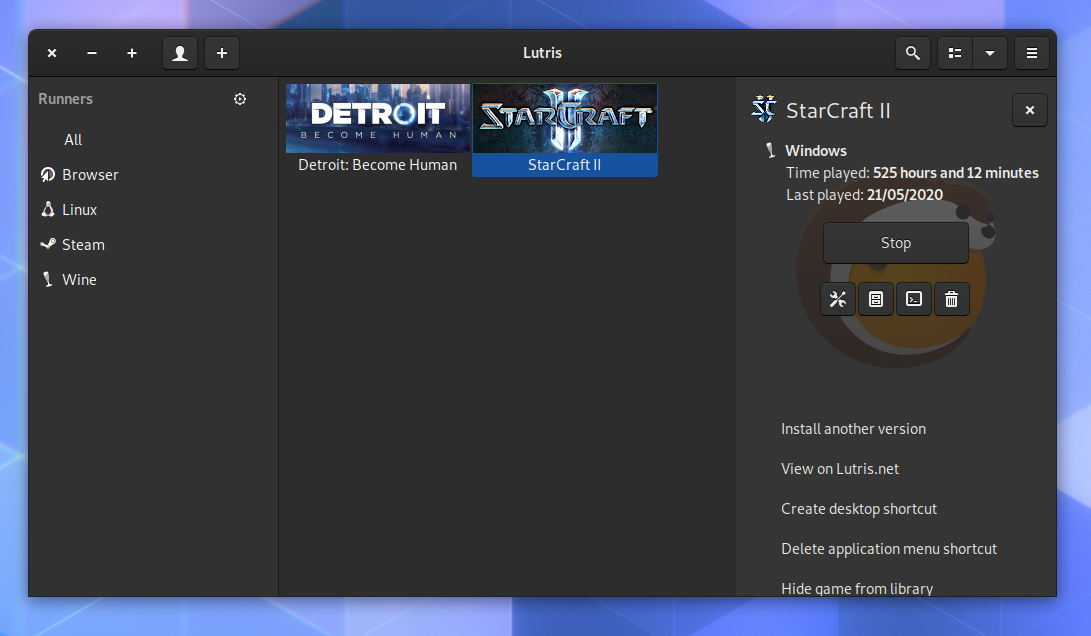
Lutris is a tool that makes it easy to install and run games on Linux, and it also integrates with GameMode. (Lutris is currently being packaged for Debian, hopefully it will make it in on time for Bullseye).
Screenshot of Lutris, a tool that makes it easy to install your non-Linux games, which also integrates with GameMode.
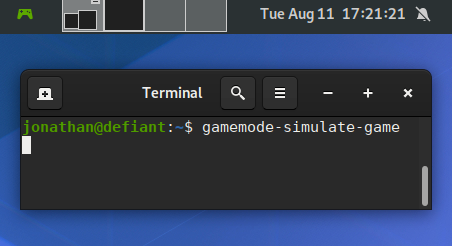
GameMode in Debian The latest GameMode is packaged in Debian (Stephan Lachnit and I maintain it in the Debian Games Team) and it s also available for Debian 10 (Buster) via buster-backports. All you need to do to get up and running with GameMode is to install the gamemode package. GameMode in Debian supports 64 bit and 32 bit mode, so running it with older games (and many proprietary games) still work. Some distributions (like Arch Linux), have dropped 32 bit support, so 32 bit games on such systems lose any kind of integration with GameMode even if you can get those games running via other wrappers on such systems. We also include a binary called gamemode-simulate-game (installed under /usr/games/). This is a minimalistic program that will invoke gamemode automatically for 10 seconds and then exit without an error if it was successful. Its source code might be useful if you d like to add GameMode support to your game, or patch a game in Debian to automatically invoke it. In Debian we install Gamemode s example config file to /etc/gamemode.ini where a user can customise their system-wide preferences, or alternatively they can place a copy of that in ~/.gamemode.ini with their personal preferences. In this config file, you can also choose to explicitly allow or deny games. GameMode might also be useful for many pieces of software that aren t games. I haven t done any benchmarks on such software yet, but it might be great for users who use CAD programs or use a combination of their CPU/GPU to crunch a large amount of data. I ve also packaged an extension for GNOME called gamemode-extension. The Debian package is called gnome-shell-extension-gamemode . You ll need to enable it using gnome-tweaks after installation, it will then display a green controller in your notification area whenever GameMode is active. It s only in testing/bullseye since it relies on a newer gnome-shell than what s available in buster.
Running gamemode-simulate-game, with the shell extension showing that it s activated in the top left corner.
In July 2020, I was originally assigned 8h of work on Debian LTS as a paid contributor, but holiday season overwhelmed me and I did not do any LTS work, at all.
The assigned hours from July I have taken with me into August 2020.
light+love,
The nanotime 0.3.0 release four days ago was so exciting that we decided to do it again! Kidding aside, and fairly extensive tests notwithstanding we were bitten by a few build errors: who knew clang on macOS needed extra curlies to be happy, another manifestation of Solaris having no idea what a timezone setting America/New_York is, plus some extra pickyness from the SAN tests and whatnot. So Leonardo and I gave it some extra care over the weekend, uploaded it late yesterday and here we are with 0.3.1. Thanks again to CRAN for prompt processing even though they are clearly deluged shortly before their (brief) summer break.
nanotime relies on the RcppCCTZ package for (efficient) high(er) resolution time parsing and formatting up to nanosecond resolution, and the bit64 package for the actual integer64 arithmetic. Initially implemented using the S3 system, it has benefitted greatly from work by Leonardo Silvestri who rejigged internals in S4 and now added new types for periods, intervals and durations.
The NEWS snippet adds full details.
Thanks to CRANberries there is also a diff to the previous version. More details and examples are at the nanotime page; code, issue tickets etc at the GitHub repository. If you like this or other open-source work I do, you can now sponsor me at GitHub. For the first year, GitHub will match your contributions.Changes in version 0.3.1 (2020-08-09)
This post by Dirk Eddelbuettel originated on his Thinking inside the box blog. Please report excessive re-aggregation in third-party for-profit settings.
snprintf.
This dates back to the early 2000s and a very early iteration of this
package. At the time, there were still some older versions of UNIX
without snprintf at all. More commonly, it was buggy. The most
common problem was that it would return -1 if the buffer wasn't large
enough rather than returning the necessary size of the buffer. Or, in
some cases, it wouldn't support a buffer size of 0 and a NULL buffer to
get the necessary size.
At the time I added this support for INN and some other packages, Solaris
had several of these issues. But C99 standardized the correct
snprintf behavior, and slowly every maintained operating system was
fixed. (I forget whether it was fixed in Solaris 8 or Solaris 9, but
regardless, Solaris has had a working snprintf for many years.)
Meanwhile, the replacement function (Patrick Powell's version, also used
by mutt and other packages) was a huge wad of code and a corresponding
test suite. Over time, I've increased the aggressiveness of linters to
try to catch more dangerous C pitfalls, and that's required carrying more
and more small modifications plus a preamble to disable various warnings
that I didn't want to try to fix.
The straw that broke the camel's back was Clang's new case fallthrough
warning. Clang stopped supporting the traditional /* fallthrough
*/ comment. It now prefers [[clang:fallthrough]] syntax, but of
course older compilers choke on that. It does support the GCC
__attribute__((__fallthrough__)) syntax, but older compilers don't
like that construction because they think it's an empty statement. It was
a mess, and I decided the time had come to drop this support effort.
At this point, if you're still running an operating system without C99
snprintf, I think it's essentially a retrocomputing or at least
extremely stable legacy production situation, and you're unlikely to want
the latest and greatest releases of new software. Hopefully that
assumption is correct, or at least correct enough.
(I realize the right solution to this problem is probably for me to use
Gnulib for portability. But
converting to it is a whole other project with a lot of other implications
and machinery, and I'm not sure that's what I want to spend time on.)
Also in this release is a fix for network tests on hosts with no IPv4
addresses (more on this when I release the next version of
remctl), fixes for style issues found by
Perl::Critic::Freenode, and some other test suite improvements.
You can get the latest version from the rra-c-util distribution page.
sudo.
I use the Apache web server, running on a Debian system. I don't think
it matters so much for this tutorial though. If you're using NGINX it's
fine, you can keep reading.
Also, I will just use the name SITE for the name of the website that we want
to analyze with GoAccess. Just replace that with the real name of your site.
I also assume the following locations for your stuff:
/var/www/SITE/var/log/apache2/SITE (yes, there is a sub-directory)/var/lib/goaccess-db/SITE./srv/SITE/ log,www instead, no worries, just
adjust the paths accordingly, I bet you can do it.
Installation
The latest version of GoAccess is v1.4, and it's not yet available in the
Debian repositories. So for this part, you can follow the instructions from
the official GoAccess download page. Install steps
are explained in details, so there's nothing left for me to say :)
When this is done, let's get started with the basics.
We're talking about the latest version v1.4 here, let's make sure:
$ goaccess --version
GoAccess - 1.4.
...
access.log, unsurprisingly.
You can check if those logs exist on your system by running this command:
find /var/log -name access.log
/etc/apache2/sites-enabled/SITE.conf:
CustomLog $ APACHE_LOG_DIR /SITE/access.log combined
/etc/nginx/sites-enabled/SITE, and the line to enable access logs would be
something like:
access_log /var/log/nginx/SITE/access.log
combined anywhere in the line
above: it's implicit.
Alright, so from now on we assume that yes, you have access log files
available, and yes, they are in the combined log format. If that's the case,
then you can already run GoAccess and generate a report, for example for the
log file /var/log/apache2/access.log
goaccess \
--log-format COMBINED \
--output /tmp/report.html \
/var/log/apache2/access.log
access.log.1 around, you can use it as well:
goaccess \
--log-format COMBINED \
--output /tmp/report.html \
/var/log/apache2/access.log \
/var/log/apache2/access.log.1
scp it to your machine,
or just move it to the document root of your site, and then open it in your web
browser.
Looks good? So let's move on to more interesting things.
Web server configuration
This part is very short, because in terms of configuration of the web server,
there's very little to do. As I said above, the only thing you want from the
web server is to create access log files. Then you want to be sure that
GoAccess and your web server agree on the format for these files.
In the part above we used the combined log format, but GoAccess supports many
other common log formats out of the box, and even allows you to parse custom
log formats. For more details, refer to the option --log-format in the
GoAccess manual page.
Another common log format is named, well, common. It even has its own
Wikipedia page. But compared to combined, the common
log format contains less information, it doesn't include the referrer and
user-agent values, meaning that you won't have it in the GoAccess report.
So at this point you should understand that, unsurprisingly, GoAccess can only
tell you about what's in the access logs, no more no less.
And that's all in term of web server configuration.
Configuration to run GoAccess unprivileged
Now we're going to create a user and group for GoAccess, so that we don't have
to run it as root. The reason is that, well, for everything running unattended
on your server, the less code runs as root, the better. It's good practice and
common sense.
In this case, GoAccess is simply a log analyzer. So it just needs to read the
logs files from your web server, and there is no need to be root for that, an
unprivileged user can do the job just as well, assuming it has read permissions
on /var/log/apache2 or /var/log/nginx.
The log files of the web server are usually part of the adm group (though it
might depend on your distro, I'm not sure). This is something you can check
easily with the following command:
ls -l /var/log grep -e apache2 -e nginx
drwxr-x--- 2 root adm 20480 Jul 22 00:00 /var/log/apache2/
apache2 belongs to the group adm. It
means that you don't need to be root to read the logs, instead any unprivileged
user that belongs to the group adm can do it.
So, let's create the goaccess user, and add it to the adm group:
adduser --system --group --no-create-home goaccess
addgroup goaccess adm
setpriv \
--reuid=goaccess --regid=goaccess \
--init-groups --inh-caps=-all \
-- \
goaccess \
--log-format COMBINED \
--output /tmp/report2.html \
/var/log/apache2/access.log
setpriv is the command used to drop privileges. The syntax is quite verbose,
it's not super friendly for tutorials, but don't be scared and read the manual
page to learn what it does.
In any case, this command should work, and at this point, it means that you
have a goaccess user ready, and we'll use it to run GoAccess unprivileged.
Integration, option A - Run GoAccess once a day, from a logrotate hook
In this part we wire things together, so that GoAccess processes the log files
once a day, adds the new logs to its internal database, and generates a report
from all that aggregated data. The result will be a single HTML page.
Introducing logrotate
In order to do that, we'll use a logrotate hook. logrotate is a little tool
that should already be installed on your server, and that runs once a day, and
that is in charge of rotating the log files. "Rotating the logs" means moving
access.log to access.log.1 and so on. With logrotate, a new log file is
created every day, and log files that are too old are deleted. That's what
prevents your logs from filling up your disk basically :)
You can check that logrotate is indeed installed and enabled with this command
(assuming that your init system is systemd):
systemctl status logrotate.timer
logrotate allows you to run scripts before
and after the rotation is performed, so it's an ideal place from where to run
GoAccess. In short, we want to run GoAccess just before the logs are rotated
away, in the prerotate hook.
But let's do things in order. At first, we need to write a little wrapper
script that will be in charge of running GoAccess with the right arguments, and
that will process all of your sites.
The wrapper script
This wrapper is made to process more than one site, but if you have only one
site it works just as well, of course.
So let me just drop it on you like that, and I'll explain afterward. Here's my
wrapper script:
1 2 3 4 5 6 7 8 9 10 11 12 13 14 15 16 17 18 19 20 21 22 23 24 25 26 27 28 29 30 31 32 33 34 35 36 37 38 39 40 41 42 43 44 45 46 47 48 49 50 | #!/bin/bash
# Process log files /var/www/apache2/SITE/access.log,
# only if /var/lib/goaccess-db/SITE exists.
# Create HTML reports in $1, a directory that must exist.
set -eu
OUTDIR=
LOGDIR=/var/log/apache2
DBDIR=/var/lib/goaccess-db
fail() echo >&2 "$@"; exit 1;
[ $# -eq 1 ] fail "Usage: $(basename $0) OUTPUT_DIRECTORY"
OUTDIR=$1
[ -d "$OUTDIR" ] fail "'$OUTDIR' is not a directory"
[ -d "$LOGDIR" ] fail "'$LOGDIR' is not a directory"
[ -d "$DBDIR" ] fail "'$DBDIR' is not a directory"
for d in $(find "$LOGDIR" -mindepth 1 -maxdepth 1 -type d); do
site=$(basename "$sitedir")
dbdir=$DBDIR/$site
logfile=$d/access.log
outfile=$OUTDIR/$site.html
if [ ! -d "$dbdir" ] [ ! -e "$logfile" ]; then
echo " Skipping site '$site'"
continue
else
echo " Processing site '$site'"
fi
setpriv \
--reuid=goaccess --regid=goaccess \
--init-groups --inh-caps=-all \
-- \
goaccess \
--agent-list \
--anonymize-ip \
--persist \
--restore \
--config-file /etc/goaccess/goaccess.conf \
--db-path "$dbdir" \
--log-format "COMBINED" \
--output "$outfile" \
"$logfile"
done
|
/usr/local/bin/goaccess-wrapper for example,
and make it executable:
chmod +x /usr/local/bin/goaccess-wrapper
--persist, meaning that we save the parsed
logs in the internal database, and --restore, meaning that we include
everything from the database in the report. In other words, we aggregate the
data at every run, and the report grows bigger every time.--config-file /etc/goaccess/goaccess.conf is a
workaround for #1849.
It should not be needed for future versions of GoAccess > 1.4./var/log/apache2/SITE/. If it's not the case, adjust that
in the wrapper accordingly.
The name of this sub-directory is then used to find the GoAccess database
directory /var/lib/goaccess-db/SITE/. This directory is expected to exist,
meaning that if you don't create it yourself, the wrapper won't process this
particular site. It's a simple way to control which sites are processed by
this GoAccess wrapper, and which sites are not.
So if you want goaccess-wrapper to process the site SITE, just create a
directory with the name of this site under /var/lib/goaccess-db:
mkdir -p /var/lib/goaccess-db/SITE
chown goaccess:goaccess /var/lib/goaccess-db/SITE
mkdir /tmp/goaccess-reports
chown goaccess:goaccess /tmp/goaccess-reports
goaccess-wrapper /tmp/goaccess-reports
ls /tmp/goaccess-reports
SITE.html
ls /var/lib/goaccess-db/SITE
goaccess-wrapper runs once a day, just before the logs are rotated away.
The logrotate config file for Apache2 is located at /etc/logrotate.d/apache2,
and for NGINX it's at /etc/logrotate.d/nginx. Among the many things you'll
see in this file, here's what is of interest for us:
daily means that your logs are rotated every daysharedscripts means that the pre-rotate and post-rotate scripts are
executed once total per rotation, and not once per log file.prerotate
if [ -d /etc/logrotate.d/httpd-prerotate ]; then \
run-parts /etc/logrotate.d/httpd-prerotate; \
fi; \
endscript
/etc/logrotate.d/httpd-prerotate/
will be executed before the rotation takes place. Refer to the man page
run-parts(8) for more details...
Putting all of that together, it means that logs from the web server are
rotated once a day, and if we want to run scripts just before the rotation, we
can just drop them in the httpd-prerotate directory. Simple, right?
Let's first create this directory if it doesn't exist:
mkdir -p /etc/logrotate.d/httpd-prerotate/
/etc/logrotate.d/httpd-prerotate/goaccess:
1 2 | #!/bin/sh
exec goaccess-wrapper /tmp/goaccess-reports
|
chmod +x /etc/logrotate.d/httpd-prerotate/goaccess
journalctl grep logrotate
setpriv.
Rather than embedding this kind of thing in a wrapper script, we can instead
run the wrapper script from a [systemd][] service, and define which user runs
the wrapper straight in the systemd service file.
Introducing systemd niceties
So we can create a systemd service, along with a systemd timer that
fires daily. We can then set the user and group that execute the script
straight in the systemd service, and there's no need for setpriv anymore.
It's a bit more streamlined.
We can even go a bit further, and use systemd parameterized units (also
called templates), so that we have one service per site (instead of one service
that process all of our sites). That will simplify the wrapper script a lot,
and it also looks nicer in the logs.
With this approach however, it seems that we can't really run exactly before
the logs are rotated away, like we did in the section above. But that's OK.
What we'll do is that we'll run once a day, no matter the time, and we'll just
make sure to process both log files access.log and access.log.1 (ie. the
current logs and the logs from yesterday). This way, we're sure not to miss any
line from the logs.
Note that GoAccess is smart enough to only consider newer entries from the log
files, and discard entries that are already in the database. In other words,
it's safe to parse the same log file more than once, GoAccess will do the right
thing. For more details see "INCREMENTAL LOG PROCESSING" from man goaccess.
systemd]: https://freedesktop.org/wiki/Software/systemd/
Implementation
And here's how it all looks like.
First, a little wrapper script for GoAccess:
1 2 3 4 5 6 7 8 9 10 11 12 13 14 15 16 17 18 19 20 21 22 23 24 25 26 27 28 29 30 31 32 | #!/bin/bash
# Usage: $0 SITE DBDIR LOGDIR OUTDIR
set -eu
SITE=$1
DBDIR=$2
LOGDIR=$3
OUTDIR=$4
LOGFILES=()
for ext in log log.1; do
logfile="$LOGDIR/access.$ext"
[ -e "$logfile" ] && LOGFILES+=("$logfile")
done
if [ $ #LOGFILES[@] -eq 0 ]; then
echo "No log files in '$LOGDIR'"
exit 0
fi
goaccess \
--agent-list \
--anonymize-ip \
--persist \
--restore \
--config-file /etc/goaccess/goaccess.conf \
--db-path "$DBDIR" \
--log-format "COMBINED" \
--output "$OUTDIR/$SITE.html" \
"$ LOGFILES[@] "
|
access.log and access.log.1, to be sure
that we don't ask GoAccess to process a file that does not exist (GoAccess
would not be happy about that).
Save this file under /usr/local/bin/goaccess-wrapper, don't forget to make it
executable:
chmod +x /usr/local/bin/goaccess-wrapper
/etc/systemd/system/goaccess@.service:
[Unit]
Description=Update GoAccess report - %i
ConditionPathIsDirectory=/var/lib/goaccess-db/%i
ConditionPathIsDirectory=/var/log/apache2/%i
ConditionPathIsDirectory=/tmp/goaccess-reports
PartOf=goaccess.service
[Service]
Type=oneshot
User=goaccess
Group=goaccess
Nice=19
ExecStart=/usr/local/bin/goaccess-wrapper \
%i \
/var/lib/goaccess-db/%i \
/var/log/apache2/%i \
/tmp/goaccess-reports
%i in the unit definition will be
replaced by this argument. In our case, the argument will be the name of the
site that we want to process.
As you can see, we use the directive ConditionPathIsDirectory= extensively,
so that if ever one of the required directories does not exist, the unit will
just be skipped (and marked as such in the logs). It's a graceful way to fail.
We run the wrapper as the user and group goaccess, thanks to User= and
Group=. We also use Nice= to give a low priority to the process.
At this point, it's already possible to test. Just make sure that you created a
directory for the GoAccess database:
mkdir -p /var/lib/goaccess-db/SITE
chown goaccess:goaccess /var/lib/goaccess-db/SITE
mkdir /tmp/goaccess-reports
chown goaccess:goaccess /tmp/goaccess-reports
systemctl daemon-reload
systemctl start goaccess@SITE.service
journalctl tail
SITE, is passed in the systemctl start
command. We just append it after the @, in the name of the unit.
Now, let's create another GoAccess service file, which sole purpose is to group
all the parameterized units together, so that we can start them all in one go.
Note that we don't use a systemd target for that, because ultimately we want to
run it once a day, and that would not be possible with a target. So instead we
use a dummy oneshot service.
So here it is, saved under /etc/systemd/system/goaccess.service:
[Unit]
Description=Update GoAccess reports
Requires= \
goaccess@SITE1.service \
goaccess@SITE2.service
[Service]
Type=oneshot
ExecStart=true
Requires= directive. In this example we have two sites named SITE1 and
SITE2.
Let's ensure that everything is still good:
systemctl daemon-reload
systemctl start goaccess.service
journalctl tail
SITE1 and SITE2 should have been processed.
And finally, let's create a timer, so that systemd runs goaccess.service once
a day. Save it under /etc/systemd/system/goaccess.timer.
[Unit]
Description=Daily update of GoAccess reports
[Timer]
OnCalendar=daily
RandomizedDelaySec=1h
Persistent=true
[Install]
WantedBy=timers.target
systemctl daemon-reload
systemctl enable --now goaccess.timer
journalctl grep goaccess
goaccess.service
instead of using a parameterized unit. Up to you.
Daily operations
So in this part, we assume that you have GoAccess all setup and running, once
a day or so. Let's just go over a few things worth noting.
Serve your report
Up to now in this tutorial, we created the reports in /tmp/goaccess-reports,
but that was just for the sake of the example. You will probably want to save
your reports in a directory that is served by your web server, so that, well,
you can actually look at it in your web browser, that was the point, right?
So how to do that is a bit out of scope here, and I guess that if you want to
monitor your website, you already have a website, so you will have no trouble
serving the GoAccess HTML report.
However there's an important detail to be aware of: GoAccess shows all the IP
addresses of your visitors in the report. As long as the report is private it's
OK, but if ever you make your GoAccess report public, then you should
definitely invoke GoAccess with the option --anonymize-ip.
Keep an eye on the logs
In this tutorial, the reports we create, along with the GoAccess databases,
will grow bigger every day, forever. It also means that the GoAccess processing
time will grow a bit each day.
So maybe the first thing to do is to keep an eye on the logs, to see how long
it takes to GoAccess to do its job every day. Also, maybe you'd like to keep
an eye on the size of the GoAccess database with:
du -sh /var/lib/goaccess-db/SITE
YEAR-MONTH in
the database directory, and in the HTML report. You can handle that
automatically in the wrapper script, for example:
sfx=$(date +'%Y-%m')
mkdir -p $DBDIR/$sfx
goaccess \
--db-path $DBDIR/$sfx \
--output "$OUTDIR/$SITE-$sfx.html" \
...
--persist option, GoAccess keeps all the information from the logs
in a database, so that it can re-use it later. In prior versions, GoAccess used
the Tokyo Cabinet key-value store for that. However starting
from v1.4, GoAccess dropped this dependency and now uses its own database format.
As a result, the previous database can't be used anymore, you will have to
remove it and restart from zero. At the moment there is no way to convert the
data from the old database to the new one. If you're interested, this is
discussed upstream at [#1783][bug-1783].
Another thing that changed with this new version is the name for some of the
command-line options. For example, --load-from-disk was dropped in favor of
--restore, and --keep-db-files became --persist. So you'll have to
look at the documentation a bit, and update your script(s) accordingly.
Other ways to use GoAccess
It's also possible to do it completely differently. You could keep GoAccess
running, pretty much like a daemon, with the --real-time-html option, and
have it process the logs continuously, rather than calling it on a regular
basis.
It's also possible to see the GoAccess report straight in the terminal, thanks
to libncurses, rather than creating a HTML report.
And much more, GoAccess is packed with features.
Conclusion
I hope that this tutorial helped some of you folks. Feel free to drop an e-mail
for comments.
Started writing some golang code.
Trying to rewrite some of the tools as a daily driver for
machine management tool. It's easier than rust in that
having a good rust compiler is a hassle though golang
preinstalled on systems can build and run. go run
is simple enough to invoke on most Debian systems.
I use everyday a VAIO Pro mk2 that I bought 5 years ago with 3 years of
warranty. It has been a few months that I was noticing that something was
slowly inflating inside. In July, things accelerated to the point that its
thickness had doubled. After we called the customer service of VAIO,
somebody came to pick up the laptop in order to make a cost estimate. Then
we learned on the phone that it would be free. It is back in my hands in
less than two weeks. Bravo VAIO !
Next.