Search Results: "tar"

5 February 2015

Holger Levsen: 20150205-lts-january-2015

My LTS January It was very nice to hear many appreciations for our work on Squeeze LTS during the last weekend at FOSDEM. People really seem to like and use LTS a lot - and start to rely on it. I was approached more than once about Wheezy LTS already... (Most of my FOSDEM time I spent with reproducible builds however, though this shall be the topic of another report, coming hopefully soon.) So, about LTS. First I'd like to describe some current practices clearly: I hope this clarifies things. And as usual, things are open for discussion and best practices will change over time. In January 2014 I spent 12h on Debian LTS work and managed to get four DLAs released, plus I've marked some CVEs as not affecting squeeze. The DLAs I released were: Thanks to everyone who is supporting Squeeze LTS in whatever form! We like to hear from you, we love your contributions, but it's also totally ok to silently enjoy a good old quality distribution :-) Finally, something for the future: checking for previous DLAs is currently best done via said mailing list archive, as DLAs are not yet integrated into the website due to a dependency loop of blocking bugs... see #761945 for a starting point.

Dirk Eddelbuettel: Introducing drat: Lightweight R Repositories

A new package of mine just got to CRAN in its very first version 0.0.1: drat. Its name stands for drat R Archive Template, and an introduction is provided at the drat page, the GitHub repository, and below. drat builds on a core strength of R: the ability to query multiple repositories. Just how one could always query, say, CRAN, BioConductor and OmegaHat---one can now adds drats of one or more other developers with ease. drat also builds on a core strength of GitHub. Every user automagically has a corresponding github.io address, and by appending drat we are getting a standardized URL. drat combines both strengths. So after an initial install.packages("drat") to get drat, you can just do either one of
library(drat)
addRepo("eddelbuettel")
or equally
drat:::add("eddelbuettel")
to register my drat. Now install.packages() will work using this new drat, as will update.packages(). The fact that the update mechanism works is a key strength: not only can you get a package, but you can gets its updates once its author replaces them into his drat. How does one do that? Easy! For a package foo_0.1.0.tar.gz we do
library(drat)
insertPackage("foo_0.1.0.tar.gz")
The default git repository locally is taken as the default ~/git/drat/ but can be overriden as both a local default (via options()) or directly on the command-line. Note that this also assumes that you a) have a gh-pages branch and b) have that branch as the currently active branch. Automating this / testing for this is left for a subsequent release. Also available is an alternative unexported short-hand function:
drat:::insert("foo_0.1.0.tar.gz", "/opt/myWork/git")
show here with the alternate use case of a local fileshare you can copy into and query from---something we do at work where we share packages only locally. The easiest way to obtain the corresponding file system layout may be to just fork the drat repository. So that is it. Two exported functions, and two unexported (potentially name-clobbering) shorthands. Now drat away! Courtesy of CRANberries, there is also a copy of the DESCRIPTION file for this initial release. More detailed information is on the drat page.

This post by Dirk Eddelbuettel originated on his Thinking inside the box blog. Please report excessive re-aggregation in third-party for-profit settings.

4 February 2015

Christoph Berg: apt.postgresql.org statistics

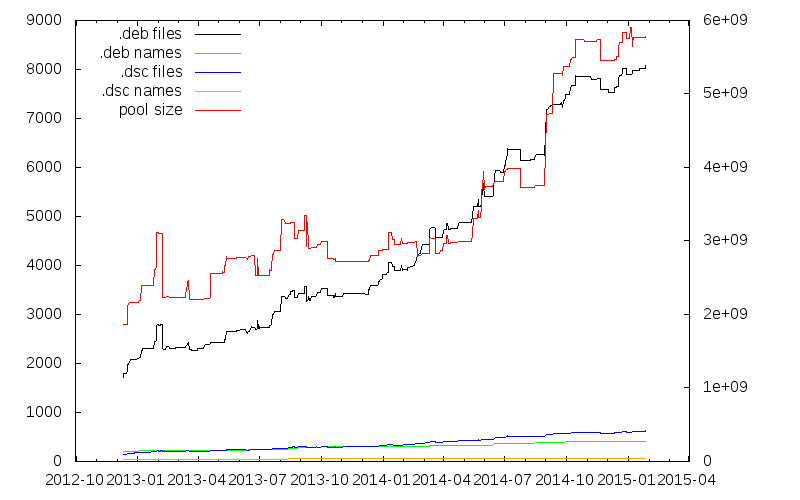
At this year's FOSDEM I gave a talk in the PostgreSQL devroom about Large Scale Quality Assurance in the PostgreSQL Ecosystem. The talk included a graph about the growth of the apt.postgresql.org repository that I want to share here as well: The yellow line at the very bottom is the number of different source package names, currently 71. From that, a somewhat larger number of actual source packages that include the "pgdgXX" version suffixes targeting the various distributions we have is built (blue). The number of different binary package names (green) is in about the same range. The dimension explosion then happens for the actual number of binary packages (black, almost 8000) targeting all distributions and architectures. The red line is the total size of the pool/ directory, currently a bit less than 6GB. (The graphs sometimes decrease when packages in the -testing distributions are promoted to the live distributions and the old live packages get removed.)

Vincent Bernat: Directory bookmarks with Zsh

There are numerous projects to implement directory bookmarks in your favorite shell. An inherent limitation of those implementations is they being only an enhanced cd command: you cannot use a bookmark in an arbitrary command. UPDATED: My initial implementation with Zsh was using dynamic named directories. I have been pointed on Twitter that there is a simpler way to implement bookmarks. The article has been updated to reflect that. As a side note, it is also possible to just use shell variables1. Zsh comes with a not well-known feature called static named directories. They are declared with the hash builtin and can be refered by prepending ~ to them:
$ hash -d -- -lldpd=/home/bernat/code/deezer/lldpd
$ echo ~-lldpd/README.md
/home/bernat/code/deezer/lldpd/README.md
$ head -n1 ~-lldpd/README.md
lldpd: implementation of IEEE 802.1ab (LLDP)
Because ~-lldpd is substituted during file name expansion, it is possible to use it in any command like a regular directory, like shown above. The - prefix is only here to avoid collision with home directories. Bookmarks are kept into a dedicated directory, $MARKPATH. Each bookmark is a symbolic link to the target directory: for example, ~-lldpd should be expanded to $MARKPATH/lldpd which points to the appropriate directory. Assuming that you have populated $MARKPATH with some links, here is how bookmarks are registered:
for link ($MARKPATH/*(N@))  
    hash -d -- -$ link:t =$ link:A 
 
You also automatically get completion and prompt expansion:
$ pwd
/home/bernat/code/deezer/lldpd/src/lib
$ echo $ (%):-%~ 
~-lldpd/src/lib
The last step is to manage bookmarks without adding or removing symbolic links manually. The following bookmark() function will display the existing bookmarks when called without arguments, will remove a bookmark when called with -d or add the current directory as a bookmark otherwise.
bookmark()  
    if (( $# == 0 )); then
        # When no arguments are provided, just display existing
        # bookmarks
        for link in $MARKPATH/*(N@); do
            local markname="$fg[green]$ link:t $reset_color"
            local markpath="$fg[blue]$ link:A $reset_color"
            printf "%-30s -> %s\n" $markname $markpath
        done
    else
        # Otherwise, we may want to add a bookmark or delete an
        # existing one.
        local -a delete
        zparseopts -D d=delete
        if (( $+delete[1] )); then
            # With  -d , we delete an existing bookmark
            command rm $MARKPATH/$1
        else
            # Otherwise, add a bookmark to the current
            # directory. The first argument is the bookmark
            # name.  .  is special and means the bookmark should
            # be named after the current directory.
            local name=$1
            [ $name == "." ] && name=$ PWD:t 
            ln -s $PWD $MARKPATH/$name
        fi
    fi
 
Find the complete version on GitHub.

Dynamic named directories Another (more complex) way to achieve the same thing is using dynamic named directories. I was initially using this solution but it is far more complex. This section is only here for historical reason. You can find the complete implementation in my GitHub repository. During file name expansion, a ~ followed by a string in square brackets is provided to the zsh_directory_name() function which will eventually reply with a directory name. This feature can be used to implement directory bookmarks:
$ cd ~[@lldpd]
$ pwd
/home/bernat/code/deezer/lldpd
$ echo ~[@lldpd]/README.md
/home/bernat/code/deezer/lldpd/README.md
$ head -n1 ~[@lldpd]/README.md
lldpd: implementation of IEEE 802.1ab (LLDP)
Like for static named directories, because ~[@lldpd] is substituted during file name expansion, it is possible to use it in any command like a regular directory.

Basic implementation Bookmarks are still kept into a dedicated directory, $MARKPATH and are still symbolic links. Here is how the core feature is implemented:
_bookmark_directory_name()  
    emulate -L zsh #  
    setopt extendedglob
    case $1 in
        n)
            [ [ $2 != ( #b)"@"(?*) ]] && return 1 #  
            typeset -ga reply
            reply=($ $ :-$MARKPATH/$match[1] :A ) #  
            return 0
            ;;
        *)
            return 1
            ;;
    esac
    return 0
 
add-zsh-hook zsh_directory_name _bookmark_directory_name
zsh_directory_name() is a function accepting hooks2: instead of defining it directly, we define another function and register it as a hook with add-zsh-hook. The hook is expected to handle different situations. The first one is to be able to transform a dynamic name into a regular directory name. In this case, the first parameter of the function is n and the second one is the dynamic name. In , the call to emulate will restore the pristine behaviour of Zsh and also ensure that any option set in the scope of the function will not have an impact outside. The function can then be reused safely in another environment. In , we check that the dynamic name starts with @ followed by at least one character. Otherwise, we declare we don t know how to handle it. Another hook will get the chance to do something. (#b) is a globbing flag. It activates backreferences for parenthesised groups. When a match is found, it is stored as an array, $match. In , we build the reply. We could have just returned $MARKPATH/$match[1] but to hide the symbolic link mechanism, we use the A modifier to ask Zsh to resolve symbolic links if possible. Zsh allows nested substitutions. It is therefore possible to use modifiers and flags on anything. $ :-$MARKPATH/$match[1] is a common trick to turn $MARKPATH/$match[1] into a parameter substitution and be able to apply the A modifier on it.

Completion Zsh is also able to ask for completion of a dynamic directory name. In this case, the completion system calls the hook function with c as the first argument.
_bookmark_directory_name()  
    # [...]
    case $1 in
        c)
            # Completion
            local expl
            local -a dirs
            dirs=($MARKPATH/*(N@:t)) #  
            dirs=("@"$ ^dirs ) #  
            _wanted dynamic-dirs expl 'bookmarked directory' compadd -S\] -a dirs
            return
            ;;
        # [...]
    esac
    # [...]
 
First, in , we create a list of possible bookmarks. In *(N@:t), N@ is a glob qualifier. N allows us to not return nothing if there is no match (otherwise, we would get an error) while @ only returns symbolic links. t is a modifier which will remove all leading pathname components. This is equivalent to use basename or $ something##*/ in POSIX shells but it plays nice with glob expressions. In , we just add @ before each bookmark name. If we have b1, b2 and b3 as bookmarks, $ ^dirs expands to b1,b2,b3 and therefore "@"$ ^dirs expands to the (@b1 @b2 @b3) array. The result is then feeded into the completion system.

Prompt expansion Many people put the name of the current directory in their prompt. It would be nice to have the bookmark name instead of the full name when we are below a bookmarked directory. That s also possible!
$ pwd
/home/bernat/code/deezer/lldpd/src/lib
$ echo $ (%):-%~ 
~[@lldpd]/src/lib
The prompt expansion system calls the hook function with d as first argument and the file name to transform.
_bookmark_directory_name()  
    # [...]
    case $1 in
        d)
            local link slink
            local -A links
            for link ($MARKPATH/*(N@))  
                links[$  #link:A $'\0'$ link:A ]=$ link:t  #  
             
            for slink ($ (@On)$ (k)links )  
                link=$ slink#*$'\0'  #  
                if [ [ $2 = ( #b)($ link )( /*) ]]; then
                    typeset -ga reply
                    reply=("@"$ links[$slink]  $(( $  #match[1]  )) )
                    return 0
                fi
             
            return 1
            ;;
        # [...]
    esac
    # [...]
 
OK. This is some black Zsh wizardry. Feel free to skip the explanation. This is a bit complex because we want to substitute the most specific bookmark, hence the need to sort bookmarks by their target lengths. In , the associative array $links is created by iterating on each symbolic link ($link) in the $MARKPATH directory. The goal is to map a target directory with the matching bookmark name. However, we need to iterate on this map from the longest to the shortest key. To achieve that, we prepend each key with its length. Remember, $ link:A is the absolute path with symbolic links resolved. So, $ #link:A is the length of this path. We concatenate the length of the target directory with the target directory name and use $'\0' as a separator because this is the only safe character for this purpose. The result is mapped to the bookmark name. The second loop is an iteration on the keys of the associative array $links (thanks to the use of the k parameter flag in $ (k)links ). Those keys are turned into an array (@ parameter flag) and sorted numerically in descending order (On parameter flag). Since the keys are directory names prefixed by their lengths, the first match will be the longest one. In , we extract the directory name from the key by removing the length and the null character at the beginning. Then, we check if the extracted directory name matches the file name we have been provided. Again, (#b) just activates backreferences. With extended globbing, we can use the or operator, . So, when either the file name matches exactly the directory name or is somewhere deeper, we create the reply which is an array whose first member is the bookmark name and the second member is the untranslated part of the file name.

Easy typing Typing ~[@ is cumbersome. Hopefully, Zsh line editor can be extended with additional bindings. The following snippet will substitute @@ (if typed without a pause) by ~[@:
vbe-insert-bookmark()  
    emulate -L zsh
    LBUFFER=$ LBUFFER "~[@"
 
zle -N vbe-insert-bookmark
bindkey '@@' vbe-insert-bookmark
In combination with the autocd option and completion, it is quite easy to jump to a bookmarked directory.

  1. For example:
    $ lldpd=/home/bernat/code/deezer/lldpd
    $ echo $lldpd/README.md
    /home/bernat/code/deezer/lldpd/README.md
    $ head -n1 $lldpd/README.md
    lldpd: implementation of IEEE 802.1ab (LLDP)
    
    The drawback is that you don t have a separate namespace for your bookmarks. You can still use a special prefix for that. Also, no prompt expansion.
  2. Other functions accepting hooks are chpwd() or precmd().

Tiago Bortoletto Vaz: Raspberry Pi Foundation moving away from its educational mission?

From the news:
"...we want to make Raspberry Pi more open over time, not less."
Right.
"For the last six months we ve been working closely with Microsoft to bring the forthcoming Windows 10 to Raspberry Pi 2"
Hmmm... From a comment:
I m sad to see Windows 10 as a selling point though. This community should not be supporting restrictive proprietary software The Pi is about tinkering and making things while Microsoft is about marketing and spying.
Right. From an answer:
"But I suggest you rethink your comments about MS, spying is going a bit far, don t you think?"
Wrong.

3 February 2015

Thorsten Alteholz: USB 3.0 hub and Gigabit LAN adapter

Recently I bought an USB 3.0 Hub with three USB 3.0 ports and one Gigabit LAN port. It is manufactured by Delock and I purchased it from Reichelt (Delock 62440). Under Wheezy the USB part is recognized without problems but the kernel (3.2.0-4) does not have a driver for the ethernet part.
The USB Id is idVendor=0b95 and idProduct=1790, the manufacturer is ASIX Elec. Corp. and the product is: AX88179. So Google led me to a product page at Asix, where I could download the driver for kernel 2.6.x and 3.x.

mkdir -p /usr/local/src/asix/ax88179
cd /usr/local/src/asix/ax88179
wget www.asix.com.tw/FrootAttach/driver/AX88179_178A_LINUX_DRIVER_v1.13.0_SOURCE.tar.bz2
tar -jxf AX88179_178A_LINUX_DRIVER_v1.13.0_SOURCE.tar.bz2
cd AX88179_178A_LINUX_DRIVER_v1.13.0_SOURCE
apt-get install module-assistant
module-assistant prepare
make
make install
modprobe ax88179_178a.ko
After editing /etc/network/interfaces and doing an ifup eth1, voila, I have a new network link. I hope the hardware is as good as the installation has been easy.

Thomas Goirand: OpenStack packaging activity, November 2014 to January 2015

November 2014:
Sunday 2nd:
Travel from Moscow to Paris Monday 3rd to Sunday 8th:
Summit in Paris Monday 10th:
Uploaded python-rudolf to Sid (needed by Fuel)
Uploaded python-invoke and python-invocations (needed to run fabric s unit tests)
Uploaded python-requests-kerberos/0.5-2 fixing CVE-2014-8650: failure to handle mutual authentication. Asked the release team for unblock.
Uploaded openstack-pkg-tools version 19 fixing startup with systemd in Jessie (added RuntimeDirectory directive). Asked the release team for unblock.
Opened ticket to remove TripleO, Tuskar and Ironic packages from Jessie. I don t consider them ready for a Debian stable release, and there s no long term support from upstream.
Fixed Designate Juno dbsync process which prevented it from being installed.
Fixed Ironic Juno unowned files after purge (policy 6.8, 10.8): /var/lib/ironic/ cache, ironicdb (eg: purging these folders on purge) Thuesday 11:
Fixed nova-api CVE-2014-3708: Nova network DoS through API filtering in both the Juno and Icehouse release. Asked the release team to unblock the Icehouse version for Jessie. See: https://bugs.debian.org/769163
Uploaded Cinder with Duch debconf translation fix and pt.po
Uploaded python-django-pyscss with upstream patch for Django 1.7 support instead of the Debian one that I wrote 2 months ago. Asked the release team to unblock which they did. Wednesday 12:
Uploaded fix for horizon (see #769101) unowned files after purge (policy 6.8, 10.8). Now purging /usr/share/openstack-dashboard/openstack_dashboard on purge.
Uploaded Ironic with Duch translations of debconf
Uploaded Designate with Duch translations of Debconf screens
Uploaded openstack-trove with Duch translations of Debconf screens
Uploaded Tuskar with Duch translations of Debconf screens
Updated python-oslotest in Experimental to version 1.2.0 Thursday 13:
Uploaded new packages: python-oslo.middleware and python-oslo.concurrency.
Opened a new packaging branch for Nova Kilo, and updated (build-)depends.
Uploaded fix for Icehouse Cinder: delete volume failed due to unicode problems , and asked for unblock.
Uploaded new package: python-pygit2 and python-xmlbuilder, needed for fuel-agent-ci.
Uploaded sheepdog with Duch debconf translation.
Uploaded python-daemonize to Sid (in FTP master NEW queue).
Re-uploaded python-invoke after FTP master rejection (missing copyright information) Friday 14:
Uploaded liberasurecode & python-pyeclib to Sid, now in the FTP masters NEW queue waiting for approval. This will soon be needed by Swift. Monday 17:
Worked on the Cobbler packaging (all day long ) Tuesday 18:
Worked on backporting all of Fuel packages to Wheezy. Done with fuelclient already.
Uploaded ruby-cstruct and ruby-rethtool to Sid (needed by nailgun-agent) Wednesday 19:
Uploaded pyeclib again, with fixes for the build-depends. Package is still in the NEW queue anyway.
Built a Debian-based bootstrap hardware discovery image for Fuel, and it seems that it works already (to be checked )! \o/
To be added as packages in the ISO:
* nailgun-mcagents
* nailgun-net-check
* fuel-agent
* python-tasklib Thursday 20:
Uploaded python-tasklib to Sid (now in NEW queue )
Continued working on the discovery bootstrap ISO Friday 21:
Documented Sahara procedure in Debian in the official install-guide: https://review.openstack.org/136237
Fixed oslo.messaging so it doesn t use PROTOCOL_SSLv3 because its support has been removed from Debian (due to possible protocol downgrade attacks): https://review.openstack.org/136278 and uploaded fixed packages for Sid and Experimental.
Uploaded fixed Neutron packages for CVE-2014-7821 in both Sid and Experimental (eg: Icehouse and Juno) Monday 24:
Uploaded new package: python-os-client-config (in NEW queue)
Installed new Xen server to be used as my new Jenkins build machine
Moved the juno-wheezy VM to it
Finished to package python-pymysql and uploaded to Sid. It s now running all unit tests successfully! \o/ Tuesday 25:
Uploaded fix for openstack-debian-images to add the -o compat=1.0 option when building an image with Qemu > 1.0. Opened bug to the release team to have it unblocked.
Continued working on unit tests for fuel-nailgun. Wednesday 26:
Uploaded python-os-net-config to Sid (new package)
Worked briefly on python-cassandra-driver. It needs cassandra to be in, which is a LOT of work.
Found a (not useable) hack to run nailgun unit tests. It works, however, it doesn t seem like fuel-nailgun is designed to be able to use unix socket for the postgres connection in its unit tests.
Uploaded python-pykmip to Sid (new package)
Updated the Debian wheezy backport repository for libvirt to version 1.2.9 from official wheezy-backports. Removed policykit-1 and libusb from there too, as it broke stuff to use a backported version (X and usb were not useable on my Wheezy laptop when using it ). Thursday 27 & Friday 28:
Uploaded new Javascript packages or dependencies for Fuel: libjs-autonumeric, libjs-backbone-deep-model, libjs-backbone.stickit, libjs-cocktail, libjs-i18next, libjs-require-css, libjs-requirejs, libjs-requirejs-text Sunday 30:
Uploaded debian/copyright fixes for libjs-backbone-deep-model, libjs-backbone.stickit and libjs-cocktail after the packages were accepted by the FTP masters and they gave remarks about copyright. DECEMBER 2014 Monday 01:
Uploaded new Debian image to MOX, after I unerstood the issue was about the architecture field that I was wrongly filling. I ll be able to use that for Tempest checking on my dev account. Tuesday 02:
Uploaded python-q-text-as-data to Sid (new awesome package!)
Uploaded Horizon with some triggers mechanisms to start the compress when one of its JS depends is updated. That s very important for security!
Uploaded a fixed version of heat-cfntools to Sid (it was missing the /usr/lib/python* folder). Asked the release team for an unblock so it can reach Jessie.
Fixed unit tests in fuel-nailgun, thanks to a patch from Sebastian Kalinowski. Now all unit tests are passing but one (for which I opened a launchpad bug: tests are trying to write in /var/log/nailgun, which is impossible at package build time). Wednesday 03:
Uploaded fixed version of ruby-rethtool after FTP master s rejection and upstream correction of licensing files.
Uploaded fixed version of libjs-require-css after FTP master s rejection
Fixed (in Git only) python-sysv-ipc missing build-depends on dh-python as per bug opened by James Page (this is not so important, but I did it still).
Continued working on the tempest-ci scripts.
Added to the image-guide docs about openstack-debian-images: https://review.openstack.org/#/c/138743/ Thursday 04:
Uploaded new package: python-proliantutils. Send patch to upstream about an issue in indentation (mix-up with space and tabs) which made the package uninstallable with Python 3.4. Friday 05:
Worked on the package CI. Monday 07:
Worked on the package CI. All works now, up to all of the Tempest tests for Keystone. Now need to fix the neutron config. Thuesday 08:
Continued working on the CI. Wednesday 09:
Uploaded fix for FTBFS of python-tasklib (Closes: #772606)
Uploaded fix for libjerasure-deb missing dependency on libgf-complete-dev, package already unblocked and will migrate to Jessie.
Uploaded fix for Designate Juno fail to upgrade from Icehouse: this was due to the database_connection directive renamed to connection =.
Uploaded fix for Designate purge in Sid (Icehouse release of Designate).
Commited to git updates of the German debconf translation in both Icehouse and Juno.
Updated nova to use libvirtd as init script dependency instead of libvirt-bin (this was renamed in the libvirt-daemon-system package).
Do not touch the db connection directive if user didn t ask for db handling by the package. Thursday 10 to Saturday 13:
Finally understood the issues with systemd service files not being activated by default. Fixed openstack-pkg-tools, and uploaded version 20 to Sid, after the release team accepted the changes. Sunday 14:
Uploaded Juno 2014.2.1 to Experimental: ceilometer, cinder, glance, python-glance-store, heat, horizon, keystone Monday 15:
Finished uploading Juno 2014.2.1 to Experimental: Nova, Neutron, Sahara Tuesday 16:
Added crontab to flush tokens in Icehouse Keystone
Some more CI work Wednesday 17:
Uploaded keystone with systemd fix and crontab to flush the token table in Sid (eg: Icehouse).
Uploaded nova Icehouse with a bunch of fixes in Sid. Thursday 18:
Updated some issues in Nova Icehouse (Sid/Jessie) Friday 19:
Started building a new Jenkins instance for building Kilo packages Monday 22:
Finished building the new Jenkins instance for building Kilo packages, and rebuilt every packages there, using Jessie as a base. Tuesday 23:
Updated version for the following packages: oslo.utils, oslo.middleware, stevedore, oslo.concurency, pecan, oslo.concurrency, python-oslo.vmware, python-glance-store
Built so far: Ceilometer, Keystone, python-glanceclient, cinder, glance Wednesday 24:
Continued packaging Kilo beta 1. Updated: nova, designate, neutron
Uploaded python-tempest-lib to Debian Unstable (new package) Wednesday 31:
Continued packaging Kilo beta 1. Updated: heat JANUARY 2015 Thursday 01:
Continued packaging Kilo beta 1. Updated: ironic, openstack-trove, openstack-doc-tools, ceilometer Friday 02:
Finished packaging Kilo beta 1. Updated: Sahara, Murano, Murano-dashboard, Murano-agent Sunday 04:
Started testing Kilo beta 1. Fixed a few issues on default configuration for Ceilometer and Glance. Monday 05:
Fixed openstack-pkg-tools which failed to create PID files at boot time, Uploaded to Sid, asked the release team for unblock.
Uploaded ceilometer & cinder to Sid, rebuilt against openstack-pkg-tools 21.
Did more testing of Kilo beta 1, fixed a few more minor issues. Tuesday 06:
Uploaded glance, neutron, nova, designate, keystone, heat, trove to Sid, so that all sysv-rc init scripts are fixed with the new openstack-pkg-tools 21. Designate, heat, keystone and trove contains other minor fixes reported to the Debian BTS. Wednesday 07:
Asked the Debian release team (open bugs with debdiff as attachment) for unblocks of glance, neutron, nova, designate, keystone, heat, trove so they migrate to Jessie.
Fixed a few minor issues tracked in the Debian BTS on various packages. Thesday 08:
James Page from Canonical informed me that they are now using openstack-pkg-tools for maintaining their daemons in Nova, Cinder and Keystone in Ubuntu. That s an awesome news : more QA for both platforms.
James Page found out that dh_installinit *must* be called *after* the call of dh_systemd_enable, otherwise, daemons aren t started automatically at the first install of packages, as the unmask of systemd happens after the invoke-rc.d. Friday 09:
Did some QA checks on the latest upload. Fixed Heat which broke because using the wrong template name (glance instead of heat). Monday 12:
Started re-running the automated openstack-deploy scrip in Icehouse, Juno and Kilo. Found out the issue in Keystone wasn t fixed in Juno (but was fixed in other releases), and fixed it.
Removed the use of ssl.PROTOCOL_SSLv3 from heat (removed form Debian). Uploaded the fixed package to Sid.
All of openstack-deploy (debian/kilo branch) now works and succesfully installs OpenStack again. If dh_installinit is called before, we have:
# Automatically added by dh_installinit
if [ -x "/etc/init.d/keystone" ]; then
update-rc.d keystone defaults >/dev/null
fi
if [ -x "/etc/init.d/keystone" ]   [ -e "/etc/init/keystone.conf" ]; then
invoke-rc.d keystone start   true
fi
# End automatically added section
# Automatically added by dh_systemd_enable
# This will only remove masks created by d-s-h on package removal.
deb-systemd-helper unmask keystone.service >/dev/null   true
# was-enabled defaults to true, so new installations run enable.
if deb-systemd-helper --quiet was-enabled keystone.service; then
# Enables the unit on first installation, creates new
# symlinks on upgrades if the unit file has changed.
deb-systemd-helper enable keystone.service >/dev/null   true
else
# Update the statefile to add new symlinks (if any), which need to be
# cleaned up on purge. Also remove old symlinks.
deb-systemd-helper update-state keystone.service >/dev/null   true
fi
# End automatically added section
If it s called after dh_systemd_enable, we have:
# Automatically added by dh_systemd_enable
# This will only remove masks created by d-s-h on package removal.
deb-systemd-helper unmask keystone.service >/dev/null   true
# was-enabled defaults to true, so new installations run enable.
if deb-systemd-helper --quiet was-enabled keystone.service; then
# Enables the unit on first installation, creates new
# symlinks on upgrades if the unit file has changed.
deb-systemd-helper enable keystone.service >/dev/null   true
else
# Update the statefile to add new symlinks (if any), which need to be
# cleaned up on purge. Also remove old symlinks.
deb-systemd-helper update-state keystone.service >/dev/null   true
fi
# End automatically added section
# Automatically added by dh_installinit
if [ -x "/etc/init.d/keystone" ]; then
update-rc.d keystone defaults >/dev/null
fi
if [ -x "/etc/init.d/keystone" ]   [ -e "/etc/init/keystone.conf" ]; then
invoke-rc.d keystone start   true
fi
# End automatically added section
As a consequence, I have to re-upload version 22 of openstack-pkg-tools and also re-upload all OpenStack core packages to Debian Sid. Fixed a number of issues like:
* dbc_upgrade = true check which shouldn t have been there in postinst.
* <project>/configure_db default value is now always false
* db_sync and pkgos_dbc_postinst are now only done if <project>/configure_db is set to true.
Rebuilt all packages in Juno and Kilo with the above changes. Tuesday 13:
Opened unblock bugs for the release team to unblock all fixed packages.
Made more tests in Juno and Kilo to make sure the fixed bugs in Icehouse are fixed there too.
Fixed numerous issues in Trove (missing trove-conductor.conf, wrong trove-api init file, etc.). More work will be needed for it for both Icehouse and newer releases. Wednesday 14:
Did a doc meeting about debconf. Some doc contributors still want to kill the debconf / debian manual, and I have to not agree.
Made a new patch to better document the keystone install procedure:
Did some bug triaging in the doc about Debian.
Uploaded new versions of core packages to Experimental (eg: Juno) built against openstack-pkg-tools >= 22~, and some fixes forward ported from Icehouse: Keystone, Ceilometer, Cinder, Glance, Heat, Ironic, Murano, Neutron, Nova, Saraha and Murano-agent. All where rebuilt in Juno (Wheezy + Trusty) and Kilo (Jessie only) on my Jenkins. Thuesday 15:
Succesfully booted a live-build Debian live image containing mcollective and nailgun-agent as a Debian replacement for the hardware discovery / boostrap image of Fuel. Now, I need to find a way to use just a kernel + initramfs Friday 16 to Tuesday 20:
Worked on the packaging CI. Wednesday 21:
Fixed https://bugs.debian.org/775636 (Horizon failed to build due to a Moscow timezone change and wrong test). Uploaded to Sid, asked for unblock.
Fixed https://bugs.debian.org/775926: CVE-2015-1195: Glance still allows users to download and delete any file in glance-api server (applied upstream patch). Uploaded to Sid, asked for unblock. Uploaded Juno version to Experimental.
Uploaded openstack-trove with the remaining fixes, asked release team for unblock.
Uploaded python-glanceclient 0.15.0 (Juno) to Experimental because it fixes an issue with HTTPS. Added to it a patch from James Page not yet merged, which fixes unit test with Python 2.7.9 (7 failures otherwise).
Uploaded python-xstatic-d3 as it can t be installed anymore in Sid after a new version of d3 was uploaded. Thursday 22:
Uploaded python-xstatic-smart-table and libjs-angularjs-smart-table to Sid (new packages, now in NEW queue). Friday 23:
Ask for the removal of the below list of packages from Jessie:
python-xstatic
python-xstatic-angular
python-xstatic-angular-cookies
python-xstatic-angular-mock
python-xstatic-bootstrap-datepicker
python-xstatic-bootstrap-scss
python-xstatic-d3
python-xstatic-font-awesome
python-xstatic-hogan
python-xstatic-jasmine
python-xstatic-jquery
python-xstatic-jquery-migrate
python-xstatic-jquery-ui
python-xstatic-jquery.bootstrap.wizard
python-xstatic-jquery.quicksearch
python-xstatic-jquery.tablesorter
python-xstatic-jsencrypt
python-xstatic-qunit
python-xstatic-rickshaw
python-xstatic-spin
libjs-jsencrypt
libjs-spin.js
libjs-twitter-bootstrap-datepicker
libjs-twitter-bootstrap-wizard They are used only in OpenStack Horizon starting on 2014.2 (aka Juno), and Jessie is shipped with Icehouse, so it s IMO best to not carry the burden of maintaining these packages for the life of Jessie. Monday 26:
Enhanced and review requested changes for https://review.openstack.org/147296 (ie: Keystone install with more details about what the package does).
Finished testing network on the CI install. Now need to automate all. Tuesday 27:
Closed all bugs on the rabbitmq-server package (2 correction, one bug triage).
Uploaded a fix for the missing conntrack dependency in neutron-l3-agent.
Restarted working on CI setup of Juno after success with manual install in a Xen domU.
Uploaded fix to make sheepdog build reproducible (patch from the Debian BTS). Thursday 28:
Fixed and uploaded to Sid openstack-debian-images 2 bugs reported by Steve McIntire. Official Debian images for OpenStack are now available at:
http://cdimage.debian.org/cdimage/openstack/ \o/
Note that this is the weekly build of testing. We wont get Debian Stable images before Jessie is out.
Documented the new image thing here: http://docs.openstack.org/image-guide/content/ch_obtaining_images.html#debian-images as a new patch: https://review.openstack.org/#/c/151015/
Fixed my patch for keystone debconf doc at: https://review.openstack.org/#/c/147296/ Wednesday 29:
Continued working on packaging CI Thursday 30:
Fixed CVE on Neutron (Juno): L3 agent denial of service with radvd 2.0+
Fixed CVE on Glance (Icehouse + Juno): Glance user storage quota bypass. Asked release team for unblock.
Fixed the image-guide patch after review (ie: https://review.openstack.org/151015)

2 February 2015

Thorsten Alteholz: My Debian Activities in January 2015

FTP assistant This month at the beginning of the year has been rather quiet as well. All in all I marked 50 packages for accept and rejected only 17 packages. Squeeze LTS This was my seventh month that I did some work for the Squeeze LTS initiative, started by Raphael Hertzog at Freexian. This month I got assigned a workload of 12h and I spent these hours to upload new versions of: In doing so, preparing the upload for php5 consumed most of the time as support from Upstream for the old version in Squeeze no longer exists. Oddly enough, a simple one-line-patch seems to have created a regression I also sponsored the upload of [DLA 133-1] unrtf security update, [DLA 134-1] curl security update and [DLA 130-1] firebird2.1 security update. Many thanks to Nguyen Cong from Toshiba who prepared the patches for these packages. I also uploaded two DLAs for polarssel ([DLA 129-1] polarssl security update and [DLA 144-1] polarssl security update) although no LTS sponsor indicated any interest. Other packages Thanks to the relentless QA work of Andreas Beckmann, his piuparts tests detected an issue in the greylistd package. If greylistd has been installed in Wheezy, removed but not purged afterwards, the whole system dist-upgraded to Jessie and afterwards greylistd is installed again, there would be an error message. RC bug taken, fixed package uploaded and unblock request approved.

1 February 2015

Iustin Pop: Morning snow

Woke up on Sunday morning to see snow! It snowed during the night, such that there were around 5 or 6 centimetres of snow on the ground. The second surprise was that, from my window at least, it seemed the snow on the street and sidewalks was still there! To see snow, uncleaned, after eight in the morning, is a welcome surprise in Switzerland! So I wanted to quickly dress and go for a short run, but I was delayed by a page from work (oncall this weekend) it became a race between me solving the page and the people who ruin the snow by making it safe to walk. So I had to work fast, skip breakfast (I like running on an empty stomach), and a while later I was finally outside, and started my run. The snow right outside was pristine, untouched by anything. Further on, some signs of cleaning (and some people busy at work with shovels). Half of the sidewalks were already cleared, but the other half was mighty fun to run in - reasonably dry snow, and soft, not at all like running on pavement. By the time I was inside, the big and "serious" cleaning machines were out on the streets, ensuring the snow doesn't endanger cars. Sigh, living in a city. But all in all, a good Sunday morning start!

Francois Marier: Upgrading Lenovo ThinkPad BIOS under Linux

The Lenovo support site offers downloadable BIOS updates that can be run either from Windows or from a bootable CD. Here's how to convert the bootable CD ISO images under Linux in order to update the BIOS from a USB stick.

Checking the BIOS version Before upgrading your BIOS, you may want to look up which version of the BIOS you are currently running. To do this, install the dmidecode package:
apt-get install dmidecode
then run:
dmidecode
or alternatively, look at the following file:
cat /sys/devices/virtual/dmi/id/bios_version

Updating the BIOS using a USB stick To update without using a bootable CD, install the genisoimage package:
apt-get install genisoimage
then use geteltorito to convert the ISO you got from Lenovo:
geteltorito -o bios.img gluj19us.iso
Insert a USB stick you're willing to erase entirely and then copy the image onto it (replacing sdX with the correct device name, not partition name, for the USB stick):
dd if=bios.img of=/dev/sdX
then restart and boot from the USB stick by pressing Enter, then F12 when you see the Lenovo logo.

31 January 2015

John Goerzen: Home Automation, part 2: Z-Wave and ISY programming

In my part 1 post yesterday, I wrote about the start of the home automation project. I mentioned that I was using Insteon switches, and they mostly were working well (I forgot to mention an annoyance: you can dim, but not totally shut off, their LED status light.) Anyhow, the Insteon battery-operated sensors seem to not be as good as their Z-Wave competition. Setting up Z-Wave Z-Wave devices get joined to the Z-Wave network in much the same way Bluetooth devices get paired with each other. The first time you use a Z-Wave device, you join it to the controller. The controller assigns it an ID on your network, and both devices discover the best route to communicate with each other. I discovered that the Z-Wave module on the ISY-994i has particularly poor reception. Combined with the generally short range of battery-operated Z-wave devices, this meant that my sensors didn t work reliably. As with Insteon, AC-powered Z-wave devices tend to be repeaters, but I didn t have any AC-powered Z-wave devices. I went looking for Z-wave repeaters, and found some. But then I discovered that a Z-wave relay-based appliance switch was actually $5 cheaper, acted as a repeater, and could be used as a switch down the road if needed. A couple of those solved my communications issues. You join them to the network as usual, but then either re-join the battery-powered sensors (so they see the new route) or do a network heal (every device on the network re-learns about its neighbors and routes to the other devices) so they see the new route. Z-Wave Motion / Occupancy Sensors If you have been in new buildings, chances are you have seen light switches with built-in occupancy sensors. My doctor s office has these. They are typically the same size as a regular light switch, but with a passive infrared (PIR) motion sensor used to automatically turn the lights off after a timeout (or even on, when someone walks into the room.) These work fine for small rooms, but if you ve ever been in a bathroom with a PIR lightswitch that goes off while you re still in the room, you are aware of their faults for larger rooms! Most of the time, when you read about occupancy sensors , it s really a PIR sensor, and the term is used interchangeably with motion detector. Motion detectors in home automation systems are commonly used for a number of purposes: detecting occuption of rooms for automatic control of lighting or HVAC systems, triggering alerts, or even locking or unlocking doors. My friend told me he had poor luck with the Insteon PIR sensors, so I tried two different Z-Wave models: the $48 Aeon/Aeotec multi-sensor and the $30 Ecolink PIRZWAVE2-ECO. The Aeon device is clearly the more capable; it can be used indoors or out, and has a lot of options that can be configured by Z-Wave configuration parameters. It also has a ball/socket mount, so it can be easily aimed in different directions. It can draw power from 4 AAA batteries, or a mini USB cable (cable, but not power supply, included). The Aeon multi-sensor also has a temperature, humidity, and illumination (lux) sensor but, as you ll see, they have some drawbacks. The Ecolink device is more basic; it has a few settings that can be altered via jumpers, but none that can be altered via Z-Wave configuration commands. That makes it a bit of a hassle, since you have to open it up to change, and when you do, it triggers a tamper alarm that is both undocumented and never seems to go away. It is powered by a single CR123A 3V Lithium battery, which are about $2 each on Amazon. Both units have a default PIR timeout of 4 minutes. That means that after sensing motion, they will transmit the on signal (meaning motion detected) and then transmit no further signals for at least 4 minutes. This is because operating the radio consumes far more battery power than simply monitoring the PIR sensor, and it cuts down on repeated on/off transmissions. In this configuration, both units should have battery life of 6 months to a year, I figure, with an edge for the Ecolink, perhaps. Both can also be configured to transmit more frequently; the Ecolink has a jumper that can change its timeout to 10 seconds, whereas the Aeon can be configured over Z-Wave for any timeout between 10 seconds and 65535 seconds (values above 4 minutes are rounded to the nearest minute, for some reason.) Both also have adjustable sensitivity; on the Aeon this is via an adjustment knob, and on the Ecolink it s via jumpers. And both can report their battery level to enable software alerts when it s getting low. The Aeon ships with its temperature, humidity, battery, and lux sensors disabled. This appears to be the cause of much confusion online, as they send one transmission and then no more. Sadly, one has to resort to the hard-to-find but very helpful MultiSensor engineering spec document to figure out the way to enable those sensors and set their interval. (It must be said, however, that I doubt most consumers will understand how to set bitfields, and this is either not covered or covered incorrectly in their other manuals.) This can be a real power drain, so I just set it to report battery level every 6 hours (so I can alert myself if it gets low) and leave it at that. The Ecolink manual claims a detection radius of 39 feet and a total angle of 90deg (45deg left or right from center) and a 3-year battery life (I m skeptical). It also is rated for indoor use only. Aeotec claims a detection radius of 16 feet and a total angle of 120 deg. Be skeptical of all these figures. Once set up with good reception, both devices have been working fine. Programming the controller The ISY-994i-Zw Pro controller I mentioned in Part 1 has its own sort of programming language. It s a lot better than the sort of GUI clicky mess that is found in most of these things, but it still has a sort of annoying Java-based editor where you select keywords from a menu and such. Although you can backup and restore the device, and import and export the programs, the file formats are XML and not really suitable for hand-editing. Sigh. The language is limited, but gets the job done. Here is a simple program that turns off the fan in a bathroom 30 minutes after the light was turned off:
If
        Status  '1st Floor / Bathroom + Laundry / Main Bath Fan' is On
    And Status  '1st Floor / Bathroom + Laundry / Main Bath Light' is Off
 
Then
        Wait  30 minutes 
        Set '1st Floor / Bathroom + Laundry / Main Bath Fan' Off
 
Else
   - No Actions - (To add one, press 'Action')
The if/then/else clauses should probably be more properly called when/do/finally. The if clauses are evaluated whenever a relevant event occurs. If the If evaluates to true, if executes the Then section. The program in Then is uninterruptible except for wait and repeat statements. So in this case, the program begins, and if the light stays off and the fan stays on, 30 minutes later it turns off the fan. But if the light comes back on, the program aborts (since there is nothing in else ). Similarly, if the fan goes off, the program aborts. A more complicated example: motion-activated lamp There is a table lamp in our living room controlled by Insteon. By adding a motion sensor in that room, it can be automatically turned on by someone walking through the room. Now, to be useful, I don t want it to turn on during the day. I also don t want it to turn on or adjust itself if other lights are on in the room, or if I turned it on myself; that could cause it to go on and off while I m watching TV, for instance. It s just to be helpful at night. Because the ISY-994i is pretty limited, having almost no control flow operations, this as with many tasks requires several programs . First, here s my main :
If
        Status  '1st Floor / Living + Dining Room / LR Table Lamp' is Off
    And $LR_Lamp_Lockout is 0
    And Status  '1st Floor / Living + Dining Room / ZW 005 Binary Sensor' is On
    And From    Sunset 
        To      Sunrise (next day)
    And $LR_Lamp_Motion_Working is not 0
    And Status  '1st Floor / Living + Dining Room / LR Floor Lamp' is Off
    And Status  '1st Floor / Living + Dining Room / Dining Light' is Off
    And Status  '1st Floor / Living + Dining Room / LR Light' is Off
 
Then
        Set '1st Floor / Living + Dining Room / LR Table Lamp' 22%
        Set '1st Floor / Living + Dining Room / LR S Remote (Table Lamp)' 22%
 
Else
   - No Actions - (To add one, press 'Action')
So, let s look at the conditions. This program triggers if the lamp is off, the sensor is on, the time is between sunset and sunrise, and three other lights are off. (I will explain the lockout and motion_working variables later). If this is the case, it sets the lamp to 22% (and also informs the wall switch for it that the lamp is at 22%). I pick this precise value because it is unlikely I would manually set it via the wall switch, and therefore lamp is 22% bright doubles as a lamp was turned on by this program flag. So this is the turning the lamp on bit. Let s look at the program that turns it back off later:
If
        Status  '1st Floor / Living + Dining Room / LR Table Lamp' is 22%
    And (
             Status  '1st Floor / Living + Dining Room / ZW 005 Binary Sensor' is Off
          Or $LR_Lamp_Motion_Working is 0
          Or Status  '1st Floor / Living + Dining Room / LR Light' is not Off
          Or Status  '1st Floor / Living + Dining Room / LR Floor Lamp' is not Off
          Or Status  '1st Floor / Living + Dining Room / Dining Light' is not Off
        )
 
Then
        Wait  15 seconds
        Set '1st Floor / Living + Dining Room / LR S Remote (Table Lamp)' Off
        Set '1st Floor / Living + Dining Room / LR Table Lamp' Off
 
Else
   - No Actions - (To add one, press 'Action')
 
This is using a sensor with a 4-minute timeout, so the lamp will always be on for at least 4 minutes and 15 seconds. This program runs if the lamp is still at the program-set level (so if, for instance, I turned the lamp full on, the program does nothing to override my setting.) Then, it looks for a condition to trigger turning the lamp off, which could be any of the sensor indicating no more motion, another program detecting it s lost communication with the sensor, or somebody turning on one of the bigger lights in the room. Then it simply sets the light (and the wall switch controlling it) to off. There are a couple more bits to this puzzle. What if the system turned the lamp on, but I really want it off? If I walked up to the wall switch and pushed off , the lamp would go off. And then, a couple seconds later, come back on, since the state of the system met the conditions for the lamp-on program. So we need a lockout that prevents this from happening. Here s my trigger lockout program:
If
        Control '1st Floor / Living + Dining Room / LR Table Lamp' is switched Off
     Or Control '1st Floor / Living + Dining Room / LR Table Lamp' is switched Fast Off
     Or Control '1st Floor / Living + Dining Room / LR S Remote (Table Lamp)' is switched Fast Off
     Or Control '1st Floor / Living + Dining Room / LR S Remote (Table Lamp)' is switched Off
 
Then
        $LR_Lamp_Lockout += 1
        Run Program 'LR Lamp Clear Lockout' (If)
 
Else
   - No Actions - (To add one, press 'Action') 
So if someone pushes the off button at the lamp switch box at the outlet it s plugged into (unlikely), or at the wall switch, it increments the lockout variable and runs another program. This other program is unique in that it is flagged disabled , meaning it is never run automatically by the system, only when called by another program. Here s the clear lockout program:
If
        $LR_Lamp_Lockout > 0
 
Then
        Wait  5 minutes 
        $LR_Lamp_Lockout  = 0
 
Else
   - No Actions - (To add one, press 'Action')
Thus by pushing the off button on the switch, the motion-triggered program won t turn the lamp back on for at least 5 minutes. Before I had reliable Z-Wave communication to the device, I had some times where it would simply drop off the Z-Wave network until a reboot. This was particularly annoying if it occured after having detected motion, since the state of the sensor in the ISY controller is simply whatever state it last received. Therefore, I wrote this program to check if it believes the motion sensor is working:
If
        Status  '1st Floor / Living + Dining Room / ZW 005 Binary Sensor' is On
 
Then
        $LR_Lamp_Motion_Working  = 1
        Wait  1 hour 
        $LR_Lamp_Motion_Working  = 0
 
Else
        $LR_Lamp_Motion_Working  = 1
We don t really care if the motion sensor is broken when the status is off; all that happens then is no lamp turns on. So this program activates when the status is set to on. It flips the working flag to true, then waits for an hour. If the sensor shows no motion within that hour, the program skips to the else (keeping the flag true). But if it is still on after an hour, it decides it must not be working and sets the working flag to false. You can see that flag used in the other programs logic. But because of the Else, which is run whenever the conditions that caused the Then clause to run become false, as soon as the system receives no motion , it will flag the sensor as working again. The final piece to this puzzle is a program flagged to run at boot time of the controller:
If
   - No Conditions - (To add one, press 'Schedule' or 'Condition')
 
Then
        $LR_Lamp_Motion_Working  = 1
 
Else
   - No Actions - (To add one, press 'Action')
This simply initializes the motion working variable to a known state. Keypads The Insteon KeypadLinc is a nice device. It can control a single load directly, but all 8 buttons are fully responsive in the Insteon system. They each also have individually-addressible LED backlights. They are commonly used to do things like ALL OFF , TV (to set lights for watching TV), AWAY (to set the system for everyone being out of the house for awhile), etc. They are the size of a regular Decora switch, and I have installed one already, but haven t programmed much of it yet. REST API The ISY has an extensive REST API, which I ve used to integrate it a bit with my Debian systems. More on that another time. Mobile app Mobile apps are a common thing people look for in these systems. You can t use the Insteon app with the ISY, but they recommend Mobilinc Pro. It does the job. Mobilinc tries to sell a $10/mo connection service, which is totally unnecessary if you can figure out SSL, and has on-screen buttons to bypass, but judging by the Google Play reviews, a lot of people thought they had to pay for that and uninstalled it afterwards. Future directions Many people put in electronic door locks. I don t plan to do that. I do plan to have the house systems be aware of the general state of things (is the house empty? is everyone asleep?) and do appropriate things with lighting and HVAC. I don t really expect the savings in power for lighting control to pay for the system anytime soon. However, if it can achieve some savings in heating and cooling, it may well be able to pay for itself in a few years. So my big next step is thermostats that can integrate with all this. I have had a water mess in my basement before, and water leak sensors are a very common item people deploy in these setups. I certainly plan to add a few of them. Door-open sensors are also useful; they trigger more instantly and reliably than motion detectors and can be used in some nice ways (is it after dark and the door is opening when the house is vacant? If so, turn on the light nearby in case their hands are full.) Issues Some issues I ran into so far are already discussed above. One other major one involves SSL on the ISY-994i Pro. The method for adding SSL keys is cumbersome, but the processor on the device which appears to run some sort of Java is just not up to working with SSL. Apparently they only recently got it fast enough to work with 2048-bit keys. This is rather undocumented, though, so I obtained a cert for a 4096-bit key, my usual. Attempting to connect to the box with SSL appeared to hang not just that but confuse a lot of other things on it as well. Turned out it wasn t hung; it just too a minute and 45 seconds to complete the SSL handshake. Moral of the story: use 2048-bit keys, or stunnel4 or some such to re-wrap the SSL communications with a stronger key. The KeypadLinc backlights can be completely shut off, and both their on and off levels can be customized. I have it set to shut off the backlight during the day and turn it on at night. The wall switches, however, can t have their brightness status LED bar entirely shut off. They can be made dim, but don t ever go away. That s rather annoying. Also annoying is that Insteon doesn t make switches in the traditional toggle switch style in colors other than white. As our house had mostly black switches, I was forced into the Decora style. Overall thoughts This has been a great learning experience for me in a number of ways. I have only begun to tap what the system can do, and the real benefits will probably come once I get the heating and cooling into the mix. It s quite a nice way for a geek to go, and the improvements in lighting have also been popular with everyone else in the house.

John Goerzen: First Steps with Home Automation and LED Lighting

I ve been thinking about home automation automating lights, switches, thermostats, etc. for years. Literally decades, in fact. When I was a child, my parents had a RadioShack X10 control module and one or two target devices. I think I had fun giving people a light show turning on or off one switch and one outlet remotely. But I was stuck there are a daunting number of standards for home automation these days. Zigbee, UPB, Z-Wave, Insteon, and all sorts of Wifi-enabled things that aren t really compatible with each other (hellooooo, Nest) or have their own ecosystem that isn t all that open (helloooo, Apple). Frankly I don t think that Wifi is a great home automation protocol; its power drain completely prohibits it being used in a lot of ways. Earlier this month, my awesome employer had our annual meeting and as part of that our technical teams had some time for anyone to talk about anything geeky. I used my time to talk about flying quadcopters, but two of my colleagues talked about home automation. I had enough to have a place to start, and was hooked. People use these systems to do all sorts of things: intelligently turn off lights when rooms aren t occupied, provide electronic door locks (unlockable via keypad, remote, or software), remote control lighting and heating/cooling via smartphone apps, detect water leakage, control switches with awkward wiring environments, buttons to instantly set multiple switches to certain levels for TV watching, turning off lights left on, etc. I even heard examples of monitoring a swamp cooler to make sure it is being used correctly. The possibilities are endless, and my geeky side was intrigued. Insteon and Z-Wave Based on what I heard from my colleagues, I decided to adopt a hybrid network consisting of Insteon and Z-Wave. Both are reliable protocols (with ACKs and retransmit), so they work far better than X10 did. Both have all sorts of controls and sensors available (browse around on smarthome.com for some ideas). Insteon is a particularly interesting system an integrated dual-mesh network. It has both powerline and RF signaling, and most hardwared Insteon devices act as repeaters for both the wired and RF network simultaneously. Insteon packets contain a maximum hop count that is decremented after each relay, and the packets repeat in such as way that they collide and strengthen one another. There is no need to maintain routing tables or anything like that; it simply scales nicely. This system addresses all sorts of potential complexities. It addresses the split-phase problem of powerline-only systems, but using an RF bridge. It addresses long distances and outbuildings by using the powerline signaling. I found it to work quite well. The downside to Insteon is that all the equipment comes from one vendor: Insteon. If you don t like their thermostat or motion sensor, you don t have any choice. Insteon devices can be used entirely without a central controller. Light switches can talk to each other directly, and you can even set them up so that one switch controls dozens of others, if you have enough patience to go around your house pressing tiny set buttons. Enter Z-Wave. Z-Wave is RF-only, and while it is also a mesh network, it is source-routed, meaning that if you move devices around, you have to heal your network as all your nodes have to re-learn the path to each other. It also doesn t have the easy distance traversal of Insteon, of course. On the other hand, hundreds of vendors make Z-Wave products, and they mostly interoperate well. Z-Wave is said to scale practically to maybe two or three dozen devices, which would have been an issue for me, buut with Insteon doing the heavy lifting and Z-Wave filling in the gaps, it s worked out well. Controlling it all While both Insteon (and, to a certain extent, Z-Wave) devices can control each other, to really spread your wings, you need more centralized control. This lets you have programs that do things like if there s motion in the room on a weekday and it s dark outside, then turn on a light, and turn it back off 5 minutes later. Insteon has several options. One, you can buy their power line modem (PLM). This can be hooked up to a PC to run either Insteon s proprietary software, or something open-source like MisterHouse, written in Perl. Or you can hook it up to a controller I ll mention in a minute. Those looking for a fairly simpe controller might get the Insteon 2242-222 Hub, which has the obligatory smartphone app and basic schedules. For more sophisticated control, my friend recommended the ISY-994i controller. Not only does it have a lot more capable programming language (though still frustrating), it supports both Insteon and Z-Wave in an integrated box, and has a comprehensive REST API for integrating with other things. I went this route. First step: LED lighting I began my project by replacing my light bulbs with LEDs. I found that I could get Cree 4-Flow 60W equivs for $10 at Home Depot. They are dimmable, a key advantage over CFL, and also maintain their brightness throughout their life far better. As I wanted to install dimmer switches, I got a combination of Cree 60W bulbs, Cree TW bulbs (which have a better color spectrum coverage for more true colors), and Cree 100W equiv bulbs for places I needed more coverage. I even put in a few LED flood lights to replace my can lights. Overall I was happy with the LEDs. They are a significant improvement over the CFLs I had been using, and use even less power to boot. I have had issues with three Cree bulbs, though: one arrived broken, and two others have had issues such as being quite dim. They have a good warranty, but it seems their QA could be better. Also, they can have a tendency to flickr when dimmed, though this plagues virtually all LED bulbs. I had done quite a bit of research. CNET has some helpful brightness guides, and Insteon has a color temperature chart. CNET also had a nifty in-depth test of LED bulbs. Second step: switches Once the LED bulbs were in place, I was then able to start installing smart switches. I picked up Insteon s basic switch, the SwitchLinc 2477D at Menard s. This is a dimmable switch and requires a neutral wire in the box, but acts as a dual-band repeater for the system as well. The way Insteon switches work, they can be standalone, or controllers, responders, or both in a scene . A scene is where multiple devices act together. You can create virtual 3-way switches in a scene, or more complicated things where different lights are turned on at different levels. Anyhow, these switches worked out quite well. I have a few boxes where there is no neutral wire, so I had to use the Insteon SwitchLinc 2474D in them. That switch is RF-only and is supposed to have a minimum load of 20W, though they seemed to work OK albeit with limited range and the occasional glitch with my LEDs. There is also the relay-based SwitchLinc 2477S for use with non-dimmable lights, fans, etc. You can also get plug-in modules for controlling lamps and such. I found the Insteon devices mostly lived up to their billing. Occasionally I could provoke a glitch by changing from dimming to brightening in rapid succession on a remote switch controlling a load on a distant one. Twice I had to power cycle an Insteon switch that got confused (rather annoying when they re hardwared). Other than that, though, it s been solid. From what I gather, this stuff isn t ever quite as reliable as a 1950s mechanical switch, but at least in this price range, this is about as good as it gets these days. Well, this post got quite long, so I will have to follow up with part 2 in a little while. I intend to write about sensors and the Z-Wave network (which didn t work quite as easily as Insteon), as well as programming the ISY and my lessons learned along the way.

30 January 2015

Manuel A. Fernandez Montecelo: Hallo, Planet Debian!

Hi! I just created this blog and asked to get it aggregated to the Debian Planet, so first things first -- in the initial post I wanted to say Hallooooo! to the people in the community and to talk about my work and interests in Debian. Probably most of you never interacted with or even heard of me before. I am contributor/Maintainer since ~2010 and Developer only for ~2 years, and most of the things that I worked in or packages that I maintain are "low profile" or unintrusive, except perhaps for work in aptitude and SDL libraries, if you happen to be interested in these packages or others that I [co-]maintain. More recently, during 2014, I was helping to bootstrap and bring to life a new architecture, OpenRISC or1k. Perhaps I should devote a future post to explain a bit more about the history, status and news --or, lately, lack thereof-- about this port. This is one of the main reasons why I thought that it would be useful to have a blog -- to register activities for which it is difficult to get information by other means. Apart from or1k, as it often happens with porting efforts in Debian, the work done also helped indirectly other architectures added last year (mips64el, arm64, ppc64el). Additionally, a few of my NMUs were directly targetted to help ppc64el to get ready in time for the architecture evaluation. None of the porters working in ppc64el were Debian Maintainers/Developers and some of the patches that they created did not benefit directly the other ports, so in the packages without active maintainers, the requests were not getting much attention in the crucial time before the evaluation. In some cases, these packages were in the critical path to build many other packages or support important user-case scenarios. So I was very pleased when I learnt that arm64 and ppc64el will be in the next stable release --Jessie-- as officially supported architectures. They came without much noise or ceremonious celebrations, but I think that this is a great success story for these architectures and for Debian, and even for the computing world in general. Time will tell. In the meantime, congratulations to all people involved! In addition to porting packages within Debian, I also sent some patches upstream to get the packages that I maintain compiling in the new architectures, and sent upstream patches needed to support or1k specifically (jemalloc, nspr, libgc, cmake, components of X.org...). Enough for the first post. Just to finish, let me say that after about a decade without a personal website or blog (the previous ones not about Debian or even computing), here I am again. Let's see how it goes and I hope to have enough interesting things to tell you to keep the blog alive. Or, in other words... To infinity and beyond!

Rapha&#235;l Hertzog: My Free Software Activities for January 2015

My monthly report covers a large part of what I have been doing in the free software world. I write it for my donators (thanks to them!) but also for the wider Debian community because it can give ideas to newcomers and it s one of the best ways to find volunteers to work with me on projects that matter to me. Debian LTS This month I have been paid to work 12 hours on Debian LTS. I did the following tasks: I want to expand on two cases that I stumbled upon in my CVE triage work and that took quite long to investigate each. While my after-the-fact description is rather straightforward, the real process involved more iterations and data gathering that I do not mention here. First I was investigating CVE-2012-6685 on libnokogiri-ruby and the upstream bug discussion revealed that libxml2 could also be part of the problem. Using the tests cases submitted there, I confirmed that libxml2 was also affected by an issue of its own then I started to analyze the history of CVE of libxml2 to find out whether that issue got a CVE assigned: yes, that was CVE-2014-0191 (although the CVE description is unrelated). But this CVE was marked as fixed in all releases. Why? It turns out that the upstream fix for this CVE is just the complement of another commit that was merged way earlier (and that was used as a basis for the commit as the copy/paste of the comment shows). When the security teams integrated the upstream patch in wheezy/squeeze, they were probably not aware that a full fix required to also include something else. In the end, I thus reopened CVE-2014-0191 on our tracker (commit here). The second problematic case was pound. Thijs Kinkhorst added pound related data on the multiple (high profile) SSL related issues. So it appeared on my radar of new vulnerable package in Squeeze because it was marked that CVE-2009-3555 was fixed in version 2.6-2 while Squeeze has 2.5-1. There was no bug reference in the security tracker and the Debian changelog for that version only mentioned an anti_beast patch which is yet another issue (CVE-2011-3389). I had to dig a bit deeper in the end I discovered that the above patch also has provisions for the CVE that was of interest to me, except that Brian May recently reported in #765649 that the package was still vulnerable to this issue I tried to understand where the above patch was failing and thus submitted my findings to the bug. And I updated the tracker data with my newly gained knowledge (commit 31751 and 31752). Tryton For me, January is always the month where I try to close the accounting books of Freexian. This year is no exception except that it s the first year where I do this with Tryton. I first upgraded to Tryton 3.4 to have the latest version. Despite this I discovered multiple problems while doing so since I don t want to have those problems next year, I reported them and prepared fixes for those related to the French chart of accounts: Saltstack I mentioned this idea last month setting up and maintaining a lot of sbuild chroots can be tiresome so I wanted to automate this as much as possible. To achieve this I created three Salt formulas and got them added to the official Saltstack repository: Each one builds on top of the former. debootstrap-formula creates chroots with debootstrap or cdebootstrap. schroot-formula does the same and registers those chroots in schroot. And sbuild-formula does the same as schroot-formula but with different defaults that are more suited to sbuild chroots (and obviously ensures that sbuild is installed and that generated chroots are buildd chroots). With the sbuild formula I can put this in pillar data:
sbuild:
  chroots:
    wheezy:
      architectures: [amd64, i386]
      extra_dists:
        - wheezy-backports
        - wheezy-security
      extra_aliases:
        - wheezy-backports
        - stable-security
        - wheezy-security
    jessie:
    [...]
And then a simple salt-call state.highstate (I m running in standalone mode) will ensure that I have all the chroots properly setup. Misc packaging I packaged new upstream releases of Django in experimental and opened a pre-approval request to get the latest 1.7.x in jessie (#775892). It seems to be a difficult sell for the release team, which is a pity because we have active Debian developers, active upstream developers, and everybody is well aware of the no-new features rule to avoid regressions. Where is the risk? I also filed an unblock request for Dolibarr (on the request of the security team which wants to see the CVE fix reach Jessie). I did small contributions to two bugs that were of special interest to some of my donators (#751339 and #774811), they were not under my responsibility but I tried to get them moving by pinging the relevant people. I prepared a security upload for Django in Wheezy (python-django_1.4.5-1+deb7u9) and sent it to the security team. While doing this I discovered a small problem in their backported patch that I reported upstream in Django s ticket #24239. Debian France With the new year, it s again time to organize a general assembly with the election of a third of its board. So we solicited candidacies among the members and I m pleased to see that we got 6 candidacies for the 3 seats. It s a good sign that we still have enough persons caring about the association. One of them is even speaking of Debconf 17 in France great plans! On my side, I announced that I would not candidate to be president for the next year. I will stay on the board though to ensure we have a smooth transition. Thanks See you next month for a new summary of my activities.

One comment Liked this article? Click here. My blog is Flattr-enabled.

Dirk Eddelbuettel: littler 0.2.2

max-heap image A new minor release of littler is available now. Several examples were added or extended: See the littler examples page for more details. Another useful change is that r now reads either one (or both) of /etc/littler.r and ~/.littler.r. These are interpreted as standard R files, allowing users to provide initialization, package loading and more. Carl Boettiger and I continue to make good use of these littler examples (to to install directly from CRAN or GitHub, or to run checks) in our Rocker builds of R for Docker. Full details for the littler release are provided as usual at the ChangeLog page. The code is available via the GitHub repo, from tarballs off my littler page and the local directory here. A fresh package has gone to the incoming queue at Debian; Michael Rutter will probably have new Ubuntu binaries at CRAN in a few days too. Comments and suggestions are welcome via the mailing list or issue tracker at the GitHub repo.

This post by Dirk Eddelbuettel originated on his Thinking inside the box blog. Please report excessive re-aggregation in third-party for-profit settings.

Laura Arjona: Going selfhosting: Installing Debian Wheezy in my home server

It was in my mind to open a new series of articles with topic selfhosting , because I really believe in free software based network services and since long time I want to plug a machine 24 7 at home to host my blog, microblog, MediaGoblin, XMPP server, mail, and, in conclusion, all the services that now I trust to very kind third parties that run them with free software, but I know I could run myself (and offer them to my family and friends). Last September I bought the domain larjona.net (curious, they say buy but it s a rent, for 1,2,3 years never yours. Pending another post about my adventures with the domain name, dynamic DNS, and SSL certs!) and I bought an HP Microserver G7 N54L, with 2 GB RAM. It had a 250GB SATA harddisk and I bought 2 more SATA harddisks, 1 TB each, to setup a RAID 1 (mirror). Total cost (with keyboard and mouse), 300 . A friend gave me a TFT monitor that was too old for him (1024 768) but it serves me well, (it s a server, no graphical interface, and I will connect remotely most of the times). Installing Debian stable (wheezy) I decided to install Debian stable. Jessie was not frozen yet, and since it was my first non-LAMP server install, I wanted to make sure that errors and problems would be my errors, not issues of the non-released-yet distro. I thought to install YunoHost or some other distro prepared for selfhosting, but I ve never tried them, and I have not much free time, so I decided to stick on Debian, my beloved distro, because it s the one that I know best and I m part of its awesome community. And maybe I could contribute back some bug reports or documentation. I wanted to try a crypto setup (just for fun, just for learn, for its benefits, and to be one more freecrypto-tester in the world) so after reading a bit: https://wiki.debian.org/DebianInstaller/SataRaid
https://wiki.archlinux.org/index.php/disk_encryption
http://madduck.net/docs/cryptdisk/
http://linuxgazette.net/140/kapil.html
http://smcv.pseudorandom.co.uk/2008/09/cryptroot/
http://www.linuxquestions.org/questions/linux-security-4/lvm-before-and-after-encryption-871379/ and some other pages, and try some different things, this is the setup that I managed to configure: Everything went well. Yay! Some doubts and one problem Everything went quite well except some doubts: After talking about this issues with friends (and in debian-women IRC channel), I decided to install the non-free driver, just in case, with the same reasoning as with the RAID: let the card do the job, so the CPU can care about other things. Again, I notice that learning a bit about benchmarking (and having some time to do some tests) would be nice And now, the problem: I left this problem apart and go on installing the software. I would think later what to do. Installing MediaGoblin The most urgent selfhosting service, for me, was GNU MediaGoblin, because I wanted to show my server to my family in Christmas, and upload the pictures of the babies and kids of the family. And it s a project where I contribute translations and I am a big fan, so I would be very proud of hosting my own instance. I followed the documentation to setup 2 instances of GNU MediaGoblin 0.7 (the stable release in the moment), with their corresponding PostgreSQL databases. Why two instances? Well, I want an instance to host and show my videos, images, and replicate videos that I like, and a private one for sharing photos and videos with my family. MediaGoblin has no privacy settings yet, so I installed separate instances, and the private one I put it in a different port, with a self-signed SSL cert, and enabled http-authorization in Nginx, so only authorized Linux users of my machine can accesss the website. Installing MediaGoblin was easier than what I thought. I only had some small doubts about the documentation, and they were solved in the IRC channel. You can access, for example, my user profile in my public instance, and see some different files that I already uploaded. I m very happy!! Face to face with the bug, again I had to solve the problem of the password not accepted in reboots. I began to think that it could be a bug in cryptsetup. Should I upgrade the package to the version in wheezy-backports? Jessie was almost frozen, maybe it was time to upgrade the whole system, to see if the problem was solved (and to see how my MediaGoblin was working or not in Jessie. It should work, it s almost packaged! But who knows). And if it didn t work, maybe it was time to file a bug So I upgraded my system to Debian Jessie. And after upgrade, the system didn t boot. But that s the story of another blog post (that I still need to finish to write don t worry, it has happy end, as you could see accessing my Mediagoblin site!). Comments? You can comment in this pump.io thread.
Filed under: My experiences and opinion Tagged: Debian, encryption, English, libre software, MediaGoblin, Moving into free software, N54L, selfhosting, sysadmin

28 January 2015

Andrea Veri: The GNOME Infrastructure Apprentice Program

Many times it happened seeing someone joining the #sysadmin IRC channel requesting participation to the team after having spent around 5 minutes trying to explain what the skills and the knowledge were and why this person felt it was the right figure for the position. And it was always very disappointing for me having to reject all these requests as we just didn t have the infrastructure in place to let new people join the rest of the team with limited privileges. With the introduction of FreeIPA, more fine-grained ACLs (and hiera-eyaml-gpg for securing tokens, secrets, passwords out of Puppet itself) we are so glad to announce the launch of the GNOME Infrastructure Apprentice Program (from now till the end of the post just Program ). If you are familiar with the Fedora Infrastructure and how it works you might know what this is about already. If you don t please read further ahead. The Program will allow apprentices to join the Sysadmin Team with a limited set of privileges which mainly consist in being able to access the Puppet repository and all the stored configuration files that run the machines powering the GNOME Infrastructure every day. Once approved to the Program apprentices will be able to submit patches for review to the team and finally see their work merged on the production environment if the proposed changes matched the expectations and addressed comments. While the Program is open to everyone to join, we have some prerequisites in place. The interested person should be:
  1. Part of an existing FOSS community
  2. Familiar with how a FOSS Project works behind the scenes
  3. Familiar with popular tools like Puppet, Git
  4. Familiar with RHEL as the OS of choice
  5. Familiar with popular Sysadmin tools, softwares and procedures
  6. Eager to learn new things, make constructive discussions with a team, provide feedback and new ideas
If you feel like having all the needed prerequisites and would be willing to join follow these steps:
  1. Subscribe to the gnome-infrastructure and infrastructure-announce mailing lists
  2. Join the #sysadmin IRC channel on irc.gnome.org
  3. Send a presentation e-mail to the gnome-infrastructure mailing list stating who you are, what your past experiences and plans are as an Apprentice
  4. Once the presentation has been sent an existing Sysadmin Team member will evaluate your application and follow-up with you introducing you to the Program
More information about the Program is available here.

27 January 2015

Laura Arjona: Upgrading my computers to Debian Jessie: Husband s laptop (Acer Aspire 5250)

This is an old laptop, with AMD E-300 processor, 6 GB RAM, Radeon HD 6310 VGA and Atheros AR9485 wireless network adapter. It was running Windows 7 (preinstalled). The hard disk failed, and I put the hard disk of another laptop (a broken Acer Aspire One D255) on it. Surprisingly, the Windows 7 on it booted (after some self-configuration that took quite long), but it was a Windows 7 Home 32bits, so it was only recognizing 4 GB RAM. That was the perfect excuse to convince my husband to install Debian in the laptop and begin his transition to a free OS. Yay! I installed Debian Jessie from scratch last summer. Everything went well (the installer went fine, 8 months before than its RC1 release, congrats Debian-boot team!). I needed the non-free radeon driver for the graphical display :/ Jessie is running GNOME3 desktop, and I ve been seeing all these months the transition to 3.14 version, and later, the integration of the Lines theme (by Juliette Belin), which I like very much. I have problems to watch high quality videos, in every player that I tried (VLC, Totem, mplayer) the audio and video are not synced, and video sometimes freezes. I m almost sure that the problem is what mplayer says: Your system is too SLOW to play this! . I tried to install the ATI non-free driver for better performance, but after successfully install it and reboot, GNOME was not starting (I got a black screen, no gdm greeting me). I could log in tty2, though. I don t know if I did something wrong, how to solve the problem, and I don t wanted to waste time, so I uninstalled it and returned to the non-free firmware that goes to the Linux kernel. For now, when I need to watch a video that gives those problems, I upload the file to my GNU MediaGoblin site, or use WinFF to reduce size/quality. Overall impression Fine! Both my husband and me are very happy. The installation went really well. I m not a GNOME expert user but I find it easy, intuitive, and he found it easy too. My husband uses the computer to surf the web, watch some videos and online series (we had to install non-free flash plugin from Adobe #grr), read mail from the browser, write something in LibreOffice and print it (hey! we just plug the printer/scanner and it works, no need to install drivers!), scan some image and send it by email I set Debian as default in GRUB, and the switch from Windows has been very natural for him (he was already using Firefox and LibreOffice in Windows. He still says I m a Windows user although he is just using Debian for months!). He bought an IPhone 4S (#grr!) and I tried to connect it as shown in the corresponding Debian wiki page, but it didn t work (I got segmentation fault when connecting the phone). However, it is recognized by Shotwell and we can copy all the photos and videos to the computer, which is what we wanted to do. So no problem on that side, either. In conclussion, one more computer at home running Debian ( future stable ), and we don t run Windows at home anymore :)
Filed under: My experiences and opinion Tagged: Debian, English, Moving into free software

Laura Arjona: Upgrading my computers to Debian Jessie

Until now, I usually run Debian stable at work (in my desktop PC) and stable or testing at home in my laptop. I was upgrading to testing during the freeze, and then, stay in testing (future stable) or stable (when it s published) until the next freeze. I have changed this conservative pattern. I ve been running Jessie for many months now, and here I ll document the different experiences in the computers that I use. Upgrade or clean install? I decided to upgrade my computers instead of making a clean install (except in the ones that were not running Debian). Although the upgrade process have been fine, I m still not sure which is the best for my needs. Installing from the beginning forces me to re-read the feature list of the different pieces of software and choose the one that fits best (not the one that I was using some years ago). And maybe I just don t need that non-free driver anymore because there s free replacement already, the installer is wise. OTOH, upgrading is easier and quicker, and I got all my software and configurations (and my rubbish) there, nothing is lost. The computers Here I will link the blog posts of each computer that I upgrade, when I finish writing the corresponding articles: Comments? You can comment in this pump.io thread.
Filed under: My experiences and opinion Tagged: Debian, English, Moving into free software

Matthias Klumpp: AppStream 0.8 released!

Yesterday I released version 0.8 of AppStream, the cross-distribution standard for software metadata, that is currently used by GNOME-Software, Muon and Apper in to display rich metadata about applications and other software components. What s new? The new release contains some tweaks on AppStreams documentation, and extends the specification with a few more tags and refinements. For example we now recommend sizes for screenshots. The recommended sizes are the ones GNOME-Software already uses today, and it is a good idea to ship those to make software-centers look great, as others SCs are planning to use them as well. Normal sizes as well as sizes for HiDPI displays are defined. This change affects only the distribution-generated data, the upstream metadata is unaffected by this (the distro-specific metadata generator will resize the screenshots anyway). Another addition to the spec is the introduction of an optional <source_pkgname/> tag, which holds the source package name the packages defined in <pkgname/> tags are built from. This is mainly for internal use by the distributor, e.g. it can decide to use this information to link to internal resources (like bugtrackers, package-watch etc.). It may also be used by software-center applications as additional information to group software components. Furthermore, we introduced a <bundle/> tag for future use with 3rd-party application installation solutions. The tag notifies a software-installer about the presence of a 3rd-party application bundle, and provides the necessary information on how to install it. In order to do that, the software-center needs to support the respective installation solution. Currently, the Limba project and Xdg-App bundles are supported. For software managers, it is a good idea to implement support for 3rd-party app installers, as soon as the solutions are ready. Currently, the projects are worked on heavily. The new tag is currently already used by Limba, which is the reason why it depends on the latest AppStream release. How do I get it? All AppStream libraries, libappstream, libappstream-qt and libappstream-glib, are supporting the 0.8 specification in their latest version so in case you are using one of these, you don t need to do anything. For Debian, the DEP-11 spec is being updated at time, and the changes will land in the DEP-11 tools soon. Improve your metadata! This call goes especilly to many KDE projects! Getting good data is partly a task for the distributor, since packaging issues can result in incorrect or broken data, screenshots need to be properly resized etc. However, flawed upstream data can also prevent software from being shown, since software with broken data or missing data will not be incorporated in the distro XML AppStream data file. Richard Hughes of Fedora has created a nice overview of software failing to be included. You can see the failed-list here the data can be filtered by desktop environment etc. For KDE projects, a Comment= field is often missing in their .desktop files (or a <summary/> tag needs to be added to their AppStream upstream XML file). Keep in mind that you are not only helping Fedora by fixing these issues, but also all other distributions cosuming the metadata you ship upstream. For Debian, we will have a similar overview soon, since it is also a very helpful tool to find packaging issues. If you want to get more information on how to improve your upstream metadata, and how new metadata should look like, take a look at the quickstart guide in the AppStream documentation.

Next.

Previous.