Search Results: "nate"

1 June 2008

Gustavo R. Montesino: Goodbye vacation

It has been some time since my last blog post... The thing is, my university vacations ended this week, and overall left a bad taste. Unfortunately, complications ranging from buying a very big new toy from some reasonably strong illness have made an already tight schedule simple impossible to follow. On the end, I haven't dedicated enough time for anything I wanted to during these vacations: Didn't sleep as much as I would like, didn't dedicate enough time to my gf, didn't advance my Summer of Code project anything near as much as I wanted, didn't help a friend to get a Linux install in his shining new laptop, didn't fix my work's server RAID array, didn't package the newest mergeant... The list goes on...

I guess what I wanted to say is: sorry. I know I'm owing a lot of stuff for a lot of people, and I'm really sorry I haven't been able to deliver what I should. I hope to fix all of these ASAP (maybe excluding the sleeping one, seems like a lost cause :P)

Now if just the Sao Paulo's metro stopped this stupid strike...

Axel Beckert: One month with Debian Lenny on the EeePC

I ogled with an ASUS EeePC since it was announced, but didn’t want to order one abroad. So I waited until they became available in Switzerland. Digitec is the official EeePC importer for Switzerland and seeems also to be the moving power for yet to come the Swiss localisation of the EeePC. But initially they only offered imported EeePCs with German keyboard layout, but since I really got used to the US layout, I didn’t want to buy ay new laptops or keyboards with German layout. When asking them about US layouts they told me they won’t import from the US and that their competitor Steg Computer is importing US models. But I wasn’t comfortable with Steg and EeePCs also were more expensive there, so I hesitated ordering at Steg. So it was quite unexpected for me when US models showed up on digitec’s website. (Interestingly I never received any mail from their advertised EeePC newsletter, not even when they added 2G models t their repertoire.) So at the end of March (and therefore later as most other geeks ;-) I ordered an ASUS EeePC at digitec. For me, white laptops look like Macs (and Macs are for sissies or masochists ;-) — so I had no problems to decide that I want a black EeePC with US keyboard layout. 2G was to small for my purposes (and also not that much cheaper) and 8G not available. So I went with the 4G, since Debian doesn’t need so much space if you choose the right packages (i.e. neither or at least not that much of GNOME or KDE ;-). I preferred the 4G over the 4G Surf because of the bigger battery capacity (and not because of the webcam which I consider funny but useless:-). Initially the delivery date was set the 28th of March. Then it was subsequently set to “beginning of April”, “mid of April”, “end of April” and “beginning of May”. It finally arrived on 8th of May. In the meanwhile there were reports that even the 4G has been equipped with the smaller battery of the 4G Surf because of some battery shortage after some battery plant burnt down. But fortunately the delivery problems with black 4G US models doesn’t seem to have its reason there and my 4G has a 5200 mAh battery (at least according to its label and ACPI). I also ordered a 2 GB bar of Corsair ValueSelect RAM so that I can pump up the RAM of my EeePC by factor four (for about 10% of the price of the EeePC itself) resulting in having half as much RAM as disk space. Well, I guess, I won’t do suspend to disk in that configuration… ;-) The original Xandros based Linux only noticed 1 GB of the installed 2 GB as already noted on many other places in the web. But that doesn’t really matter, since it only lasted until I found out how to restore it from DVD in case I want to sell the EeePC later (e.g. for getting the successor). It’s fine for novices, but Linuxes feel strange if you can’t even get a console or a terminal with a command line. ;-) The Debian EeePC installer worked fine except that it argued over a checksum error on our mirror which wasn’t reproducable after the installation anymore. I’ve chosen the EeePC to be my first (nearly) pure Lenny installation — compared to the three machines running Sid (i386, amd64 and kfreebsd-i386). It though has a few packages from experimental (mostly xulrunner-1.9) installed. As window managers I have installed ratpoison, FLWM and FVWM. ratpoison — best described as screen for X (although you can’t detach and reattach) since it’s my personal preferences for being productive without big screen resolutions and flwm for a low-resource window manager which can be used intuitivly by both, geeks and non-geeks (and still doesn’t look like Windows at all ;-). And FVWM is installed because it’s my default window manager on all machines with bigger or multiple screens – to be able to compare it with my usual environment. As web browser I’ve got Opera as primary browser (as everywhere else, too) and Conkeror (the EeePC is the test-case for upcoming Debian package of Conkeror) as well as links2 and lynx on the (nearly) text-only side on it, although I need them seldomly. As office programs (as I would ever need some ;-) I’ve got AbiWord and Gnumeric installed since I already use a few GNOME applications (e.g. Network Manager, Twitux, etc.) and OpenOffice.org would take up 170 MB more disk space (then including OOo Draw and OOo Impress) and Siag Office is no more in Debian since years. (Initially I had OpenOffice.org installed instead of AbiWord and Gnumeric until I noticed that I need some of the GNOME libraries anyway.) I also decided that I will need LaTeX then and when so TeX Live also got its chunk of the 4 GB of disk space. I also have a bunch of games on the EeePC. Unfortunately there are a few games which don’t work well on the EeePC due to it’s resolution being smaller than 800x600, so I deinstalled them already again, e.g. I can’t play Cuyo on the EeePC but flobopuyo. Sauerbraten segfaults, but Doom (prboom with freedoom WADs) works fine. Further non-working games unfortunately include Battle of Wesnoth and XFrisk. Still, although quite some parts of GNOME and GNOME Office, TeX Live, ScummVM with Flight of the Amazon Queen and Beneath a Steel Sky, GNU Emacs 22, Iceweasel 3 (aka Mozilla Firefox 3), Icedove (aka Mozilla Thunderbird) and the Iceowl (aka Mozilla Sunbird) are installed, only 2.3 GB of the available hard disk space are used by the installation (i.e. without my home directory). Oh, and btw: Although except the very compact and a little bit wobbly keyboard the EeePC doesn’t feel really small to me (I’ve got quite small hands), but when I sat down in front of my 14” ThinkPad T61 after a day or two with EeePC, the T61, — especially screen and keyboard — felt huge as if it would be some 17” or even bigger notebook. ;-)
ThinkPad vs EeePC ThinkPad vs EeePC ThinkPad vs EeePC ThinkPad vs EeePC
OTOH I still think that a 1920×1200 (which means nearly four xterms in a row) resolution on a 14” notebook would be a good idea, especially compared to the 1440×900 (which means nearly three xterms in a row) my T61 has. ;-) Personal Resumée after one month Pro EeePCContra EeePCPro ThinkPad (in direct comparision)Pro Lenny on the EeePCCon Lenny on the EeePCSummary I’m very happy with the EeePC and I didn’t expect that it would replace my 14” ThinkPad in so many (but still not all) situations. :-)

Russell Coker: Shelf-life of Hardware

Recently I’ve been having some problems with hardware dying. Having one item mysteriously fail is something that happens periodically, but having multiple items fail in a small amount of time is a concern. One problem I’ve had is with CD-ROM drives. I keep a pile of known good CD-ROM drives because as they have moving parts they periodically break and I often buy second-hand PCs with broken drives. On each of the last two occasions when I needed a CD-ROM drive I had to try several drives before I found one that worked. It appears that over the course of about a year of sitting on a shelf I have had four CD-ROM drives spontaneously die. I expect drives to die if they are used a lot from mechanical wear, I also expect them to die over time as the system cooling fans suck air through them and dust gets caught. I don’t expect them to stop working when stored in a nice dry room. I wonder whether I would find more dead drives if I tested all my CD and DVD drives or whether my practice of using the oldest drives for machines that I’m going to give away caused me to select the drives that were most likely to die. Today I had a problem with hard drives. I needed to test a Xen configuration for a client so I took two 20G disks from my pile of spare disks (which were only added to the pile after being tested). Normally I wouldn’t use a RAID-1 configuration for a test machine unless I was actually testing the RAID functionality, it was only the possibility that the client might want to borrow the machine that made me do it. But it was fortunate as one of the disks died a couple of hours later (just long enough to load all the data on the machine). Yay! RAID saved me losing my work! Then I made a mistake that I wouldn’t make on a real server (I only got lazy because it was a test machine and I didn’t have much risk). I had decided to instead make it a RAID-1 of 30G disks and to save some inconvenience I transfered the LVM from the degraded RAID on the old drive to a degraded RAID on a new disk. I was using a desktop machine and it wasn’t designed for three hard disks so it was easier to transfer the data in a way that doesn’t need to have more than two disks in the machine at any time. Then the new disk died as soon as I had finished moving the LVM data. I could have probably recovered that from the LVM backup data and even if that hadn’t worked I had only created a few LVs and they were contiguous so I could have worked out where the data was. Instead however I decided to cut my losses and reinstall it all. The ironic thing is that I had planned to make a backup of the data in question (so I would have copies of it on two disks in the RAID-1 and another separate disk), but I had a disk die before I got a chance to make a backup. Having two disks out of the four I selected die today is quite a bad result. I’m sure that some people would suggest simply buying newer parts. But I’m not convinced that a disk manufactured in 2007 would survive being kept on a shelf for a year any better than a disk manufactured in 2001. In fact there is some evidence that the failure rates are highest when a disk is new. Apart from stiction I wouldn’t expect drives to cease working from not being used, I would expect drives to last longer if not used. But my rate of losing disks in running machines is minute. Does anyone know of any research into disks dying while on the shelf?

Marc 'Zugschlus' Haber: Automatic initialization of a Option 3G Datacard

For mobile UMTS/GSM, I have been using an Option 3G Data Card for two and a half years now. I blogged about getting the card to work (in German, sorry) on Linux in July 2005. I never found the time - until now - to automate the card initialization so that I had been using a horrible chat script for card initialization when the PPP connection was built. I recently took the time to automate this, so that the PIN is transmitted to the card automatically when the card is plugged in. This article documents what I did. On a side note: Unfortunately, the vendors’ attitude towards Linux hasn’t changed since 2005. Their Hotlines still deny that their products can be used with Linux at all, and they surely do not publish any documentation that can be of help. Otoh, Vodafone has published a software that supposedly aids usage of their products under Linux. I haven’t tried it yet since it is not packaged yet for Debian. Additionally, Vodafone support media and sales do not seem to know about this effort, they still deny that their products work with Linux. Windows users happily install proprietary software products that do little more than sending a handful of AT commands to the emulated USB modem and hand over the connection to Windows’ PPP Stack. A very unsatisfying situation. Just for the record: Dear Vodafone DE, a week ago you missed the sale of a new USB UMTS interface because you don’t even document it on Linux. This motivated me to look into the drawer that holds the old, non-HSDPA PC cards that have been decommissioned at the customers’ site and use an old, used device. Your fault. But now back on topic: For a data center monitoring system, I want to send out alerts as text message (for German speakers: SMS - we have a rather strange vocabulary for mobile communications), and am reluctant to do so via IP: IP is one of the things that can fail, so it is preferred to directly inject the text messages into the network of the operator that provides service to the recipients of the text messages. Fortunately, most of the recipients are in the same network. After evaluating current hardware solutions that could be plugged directly into the “real” server doing the monitoring and running into the wall of non-support provided by the network operators and hardware vendors, I decided on taking things a little further and to build an Ethernet-Connected text message device. An old hp compaq nc8000 (no, not mine, mine still works fine and is in daily use) and an old, first generation Option Datacard 3G will be mounted near the datacenter’s windows and equipped with Debian and Nagios. That way, the text message device can itself monitor the monitoring system and even send out a warning message when the data center goes out of power: It has a built-in UPS. But now back on topic: For the text messages to go out reliably, it is necessary that the UMTS card is initialized automatically when the system comes up. A great opportunity to finally address this issue for Linux, on customers’ expense **grins**. UMTS card initialization is done in two steps: First, when the card is plugged in, the virtual OHCI host port appears. Initialization of the virtual OHCI happens automatically. Most documentation on the web says that you now need to load an appropriately parametrized usbserial module, and I did it this way for years, but that’s not necessary any more. CONFIG_USB_SERIAL_OPTION is a dedicated kernel module for the Option 3G data card, which gets automatically loaded if it is available. If you don’t have the Option module for some reason, you still need the following udev rule to automatically load the generic USB serial module. I figured that out yesterday before I learned about the Option module in a comment made to the original version of this article.

SUBSYSTEM==“usb”, \
   SYSFS idProduct ==“5000”, SYSFS idVendor ==“0af0”, \
   ACTION==“add”, \
   RUN+=“/sbin/modprobe usbserial vendor=0x$attr idVendor  product=0x$attr idProduct ”
SUBSYSTEM==“usb”, \
   SYSFS idProduct ==“5000”, SYSFS idVendor ==“0af0”, \
   ACTION==“remove”, \
   RUN+=“/sbin/modprobe -r usbserial”
Unfortunately, the usbserial and option modules stay around after the card is pulled. This doesn’t hurt though. Next, we see three virtual serial interfaces, which we can detect via udev, and assign “speaking” device names and transmit the PIN. This goes into /etc/udev/rules.d/50-option3g.rules:
SUBSYSTEM==“tty”, SUBSYSTEMS==“usb”, DRIVERS==“option”, \
   ATTRS bInterfaceNumber ==“00”, \
   ATTRS modalias ==“usb:v0AF0p5000d0000dc00dsc00dp00icFFiscFFipFF”, \
   SYMLINK=“UMTS-DATA”
SUBSYSTEM==“tty”, SUBSYSTEMS==“usb”, DRIVERS==“option”, \
   ATTRS bInterfaceNumber ==“02”, \
   ATTRS modalias ==“usb:v0AF0p5000d0000dc00dsc00dp00icFFiscFFipFF”, \
   SYMLINK=“UMTS-CONTROL”, RUN+=“/usr/local/sbin/umts-pin --device %k”
I am not sure what the modalias attribute identifies, but it looks like it identifies the hardware model: An identical Option Datacard 3G, plugged into the other PC Card Slot gets properly initialized as well. These two udev stanzas do two different things: First, they make sure that the new devices are symlinked to /dev/UMTS-DATA and /dev/UMTS-CONTROL, suggesting the intended use of the interface. The second virtual interface of the 3G Data Card does not seem to be useable at all, and you cannot build an actual data connection over the third. So, we baptize the first interface /dev/UMTS-DATA and ignore the second. The third gets called /dev/UMTS-CONTROL. Now to the real magic: /usr/local/sbin/umts-pin is a perl script that sends the PIN to the Card. %k gets expanded to the device name of the device that has just been detected, so umts-pin gets called with “--device ttyUSB2”. It makes use of Cosimo Streppone’s Device::Modem module (Device::Gsm is not yet packaged for Debian and might be of better use here) to talk to the UMTS device. Unfortunately, I have not yet fully understood the logging and answer processing features of Device::Modem, so the implementation might look a little clumsy. I hope that it can be clearly understood anyway. The actual PIN is read from a configuration file in an apache-like format, which is by default looked for in /etc/umts/pin.conf:
<pin>
        <default>
                pin xyzw
        </default>
</pin>
The reason I settled for this rather complex configuration file format is that the ultimate goal is to automatically detect which of my SIMs is currently inserted in the UMTS card and to automatically send the correct PIN. I haven’t been successful in doing so since I didn’t find an AT command yet to get the UMTS card to divulge the SIM serial number or the IMSI before the PIN is transmitted to the SIM. So currently, the only things that are supported are the “default” stanza and an identically formatted “override” stanza which takes precedence over the default stanza if present. If the first attempt to send the PIN fails, the script tries again ten seconds later. On my test system, this happens about once in twenty times. That must be some weird timing issue. So, if you have the wrong PIN configured, you’ll need the PUK after plugging in the card for the second time, since the first try will eat two of your three attempts. Beware. If you feel uncomfortable with all this scripting and the “quality” of my code, you can also use gammu’s entersecuritycode function. I discovered this after my PIN script was already written, and gammu currently forces you to expose the PIN on the command line (see #484102), and of course my script’s PIN handling is vastly superior **grins**. And one end note: More current hardware, most notably the Huawei series of cards, are reported to show themselves as virtual USB storage first to allow identification and installation of Windows drivers, and need an explicit command to show their virtual USB serial side. I have read web pages where people have managed to do this in Linux, but since I use an older card and do not have a current card available (again, Vodafone, your fault!) I cannot comment about this. But there are reports that this can be done, so don’t panic if you have more recent hardware.

31 May 2008

Kyle McMartin: it s like a party in my compiler, and i wasn t invited

I’ve spent more or less the last few days of spare time trying to figure out why gcc-4.3 built kernels were so unhappy on parisc. Basically the symptom was that any IPv4 networking operation would only complete once and a while, for example, ping would drop 90% of packets. This turned out to be a really troublesome bug to track down, and the fix was only 7 characters long. gcc-4.2 wasn’t problematic, so that provided an interesting base. A bit of thinking ruled out some obvious parts of the kernel that would likely not be an issue. For instance, ARP appeared to be fine, so it likely wasn’t an issue at the network driver level. So rebuilding net/built-in.o on gcc-4.2, copying it to the gcc-4.3 tree, and rebuilding the tree using it resulted in a working kernel. Ok, excellent, we know it’s likely an issue in net/, what else can we rule out, and what do we know? ICMP is affected, so it’s probably not a TCP problem… Rebuilding the kernel with IPv6 enabled, and testing ping6? Ok, works. So it looks like an IPv4 issue. Test that assertion… yup, net/ipv4/built-in.o compiled with gcc-4.2 works. Ok, peachy. What now? Bisecting the contents of the directory results in ip_output.c being the problematic file… Not all that helpfully, the differences between the code generated by 4.2 and 4.3 are extensive. Well, ok, let’s try turning off a variety of the added compiler options… nope, no luck, but the file works when compiled at -O0. Next, I bisected the file until I found the problematic function (unfortunately for me starting in the middle, it ended up being the first function in the file.) Which was in a chain of inline functions, eventually calling some architecture specific inline assembly for ip_fast_csum. Ok, that looks like our canary in the coal mine… Look it up… SIGH. The routine touches memory, but didn’t have “memory” in the list of clobbers. Adding the clobber and everything magically works again. Wasn’t that a party? [ Of course, this makes things sound almost easy, except that at around 10 minutes to boot a test kernel, reboot, and boot a working kernel, this gets extremely tedious. I also didn't bother to talk about how many hours I probably wasted twiddling compiler flags trying to figure out which optimization pass might be broken... ]

David Nusinow: Ruby Stuff

So Avi Bryant finally showed off the work he's been doing with the Gemstone folks at Railsconf, and it's made quite a splash. With performance improvements like that it shouldn't be a surprise. The most interesting thing about it to me though is that it's the first time in a very long while that we've seen a proprietary implementation of a major tool absolutely destroy all the Free implementations. We've had things like Intel's C compiler outperforming gcc before, but nothing on this level, especially because the main ruby implementation is so notoriously slow. Just another feather in the cap of Smalltalk's long legacy.

What's troubled me for some time about the post-Rails Ruby community is that it has a distinct bent away from its Free Software roots. I understand Matz actually used to use (not sure about today) Debian Unstable, and Ruby traditionally displayed its roots quite strongly, with a Perl heritage and a community consisting largely of hardcore *NIX people. With the advent of Rails, the move has been towards things like TextMate and OSX. Software like Gems (no relation to Gemstone) fits in fine with one of these systems, but not so well with modern Free Software systems, and I think it's symptomatic of the change. Given this propensity in the Ruby community, and given the numbers Gemstone is posting, I'd be surprised if lots of Rubyists don't move that way as soon as it's available.

Given all this, I really have to wonder if the modern Ruby fits me any more. I generally think it's important for the Free Software community to support itself first and then try to grow out from there, and the Ruby community isn't really on this path right now. That's fine, there's nothing wrong with it, it's just not something that really interests me. It does make me wonder how something like this could happen, and it really comes down to the fact that a lot of smart people who might otherwise be really passionate about Linux systems are choosing OSX instead. Maybe it's hardware support (I hope the modernization of X will help here) and maybe it's just the whole package being nice and easy to use. Whatever it is, people are choosing it and we're the poorer for it.

30 May 2008

David Welton: An impressive amount of resources

In the TechCrunch coverage of Google IO, I was impressed by this:
Not every team has the resources Google does to build for every platform. Google is betting on browser over time for mobile devices; it will be the entry point for many applications. But today, the only browsers capable for supporting mobile apps include iPhone and few others. So Google is developing Android, which includes world class Webkit browser.
Here at the world headquarters of DedaSys LLC (which for the time being happens to be "in front of David's computer, wherever that is"), we too have some suspicions about the browser becoming the platform of choice for mobile phones, although there is a big if: When will the carriers make always on, cheap internet connections widespread? Until that happens, client side apps will still probably dominate for many things. And of course for applications requiring hardware access, some kind of local program will be necessary as well for the foreseeable future. (And of course, Hecl is a good choice "for the time being", too!) Coming back to the phrase cited above, what blows me away about it is the sheer amount of time and money that they're investing in something that "over time", they're not really betting on, in the sense that they just want browsers everywhere? Jumping into a market with a new "OS", toolkit, etc... just to spread a platform with a decent browser? Wow. That is a company with a lot of spare change. Most people and companies in business are doing the best they can to stretch out their dollars or euros as best they can. I guess it really takes a behemoth to pour so much in the way of engineering talent and financial resources into something that's in some ways a bump in the road in terms of their long term vision. Or maybe I'm just reading too much into one phrase?

Russell Coker: CPU Capacity for Virtualisation

Today a client asked me to advise him on how to dramatically reduce the number of servers for his business. He needs to go from 18 active servers to 4. Some of the machines in the network are redundant servers. By reducing some of the redundancy I can remove four servers, so now it’s a need to go from 14 to 4. To determine the hardware requirements I analyzed the sar output from all machines. The last 10 days of data were available, so I took the highest daily average numbers from each machine for user and system CPU load and added them up, the result was 221%. So for the average daily CPU use three servers would have enough power to run the entire network. Then I looked at the highest 5 minute averages for user and system CPU load from each machine which add up to 582%. So if all machines were to have their peak usage times simultaneously (which doesn’t happen) then the CPU power of six machines would be needed. I conclude that the CPU power requirements are somewhere between 3 and 6 machines, so 4 machines may do an OK job. The next issue is IO capacity. The current network has 2G of RAM in each machine and I plan to run it all on 4G Xen servers, so it’s a total of 16G of RAM instead of 36G. While some machines currently have unused memory I expect that the end result of this decrease in total RAM will be more cache misses and more swapping so the total IO capacity use will increase slightly. Now four of the servers (which will eventually become Xen Dom0’s) have significant IO capacity (large RAIDs - they appear to have 10*72G disks in a RAID-5) and the rest have a smaller IO capacity (they appear to have 4*72G disks in a RAID-10). The other 14 machines have the highest daily averages for iowait adding up to 9% and the highest 5 minute averages adding up to 105%. I hope that spreading that 105% of the IO capacity of a 4 DISK RAID-10 across four sets of 10 disk RAID-5’s won’t give overly bad performance. I am concerned that there may be some flaw in the methodology that I am using to estimate capacity. One issue is that I’m very doubtful about the utility of measuring iowait, one issue is that iowait is the amount of IDLE CPU time when there are processes blocked on IO. So if for example you have 100% CPU time being used then iowait will be zero regardless of how much disk IO is in progress! One check that I performed was to add the maximum CPU time used, the maximum iowait, and the minimum IDLE time. Most machines gave totals that were very close to 100% when those columns were added, so it seems that if the maximum iowait for a 5 minute period plus the maximum CPU use plus the minimum idle time add up to 100% and the minimum idle time was not very low then it seems unlikely that there was any significant overlap between disk IO and CPU use to hide iowait. One machine had a total of 147% for those fields in the 5 minute average which suggests that the IO load may be higher than the 66% iowait number may indicate. But if I put that in a DomU on the machine with the most unused IO capacity then it should be OK. I will be interested to read any suggestions for how to proceed with this. But unfortunately it will probably be impossible to consider any suggestion which involves extra hardware or abandoning the plan due to excessive risk… I will write about the results.

28 May 2008

Russell Coker: Hosting a Xen Server

Yesterday I wrote about my search for a hosting provider for a Xen DomU [1]. One response was the suggestion to run a Dom0 and sell DomU’s to other people [2], it was pointed out that Steve Kemp’s Xen-Hosting.org project is an example of how to do this well [3]. Unfortunately Steve’s service is full and he is not planning to expand. I would be open to the idea of renting a physical machine and running the Xen server myself, but that might be a plan for some other time (of course if a bunch of people want to sign up to such a thing and start hassling me I might change my mind). But at the moment I need to get some services online soon and I don’t want to spend any significant amount of money (I want to keep what I spend on net access below my Adsense revenue). Also if someone else in the free software community wants to follow Steve’s example then I would be interested in hosting my stuff with them.

Erich Schubert: Openstreetmap

Joachim drew my attention to Openstreetmap.org. So I thought I'd give it a try. Unfortunately the don't seem to have the hardware or bandwidth resources yet for everyday use.Search results for "M nchen":
City M nchen [en:Munich], about 70km south of Ingolstadt
Village M nchen, about 4km south-west of Bad BerkaRegion M nchen, about 1km north of Unterbiberg, UnterhachingM nchen [en:Munich], less than 1km south of M nchen[...] Very funny. M nchen (Munich) itself has 1.3 Million, Ingolstadt about 120k inhabitants. The region around M nchen totals to about 3-5 Million inhabitants, depending on what you consider to be part of the region. But Unterbiberg (13k) and Unterhaching (22k) are officially part of the district of Munich.The best specification however is the fourth one: If Munich is south of Munich, Munich is also north of Munich, right? So Munich is everywhere, right?Other search highlights include a Footway "train platform direction Munich".Nevertheless, the search results make sense, the first result is what I had in mind, and I really like the references they give for each search result.I wonder if when you type in "San Francisco" it will be like "San Francisco, north of South San Francsico" (no, it's "north of Daly City")

Wouter Verhelst: Geekdinner

Another interesting geekdinner last night. Since Bart had offered to do some cooking, I offered to do the desert: my favourite, waffles. Unfortunately, Bart kindof misunderstood me, and when he decided that there were too many people for him to cook, he decided that there weren't too many people for me to make waffles. Grunt. Also, he didn't really follow my instructions in buying the ingredients, so I had to improvise a bit. All in all, I think it's safe to say the waffles were a success, so that's okay then, I guess. Anyway, going home was a bit of an adventure... 23:40(ish) – step in the car, leave Paal 00:15 – arrive at Cambio car's home, check out. 00:35 – take train to Antwerp Central station 00:40 – arrive at Antwerp Central, walk to Rooseveltplaats 00:30 – final bus of the evening left home 00:45 – arrive at Rooseveltplaats, decide to walk home, because a taxi is too damn expensive. 02:35 – arrive home, hit the sack. 07:45(ish) – wake up I hate my biological clock. I really do.

27 May 2008

Raphael Geissert: zsh fun...

from gettext.sh (gettext-base:0.17-2):
# zsh is not POSIX compliant: By default, while ". gettext.sh" is executed,
# it sets $0 to "gettext.sh", defeating the purpose of this test. But
# fortunately we know that when running under zsh, this script is always
# being sourced, not executed, because hardly anyone is crazy enough to
# install zsh as /bin/sh.

:)

Joachim Breitner: My first OpenStreetMap Contribution

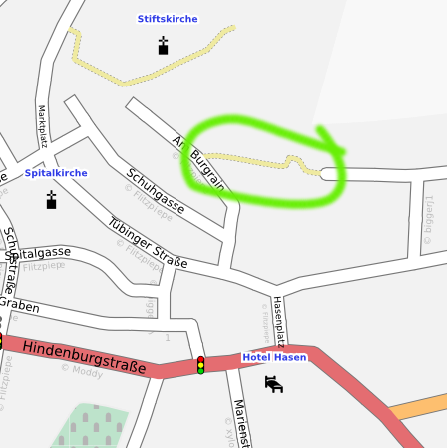
Yesterday I was visiting the Open Source Expo Karlsruhe, a new, quite small conference, at which the guys from OpenStreetMap hat a booth. I was amazed by the progress of OpenStreetMap while I wasn t looking (which is just a few months, I guess); their level of detail in some places like Karlsruhe is astonishing.Anyways, I got hooked and started to try out some of the tools and websites and finally, by tracing the Yahoo satellite image, added my first way to the map: A small footpath in Herrenberg that I know quite well:
The live data can also be seen on the OpenStreetMap map, of course.Unfortunately, there is not much to map around where I live in Karlsruhe, even the driveway to my dorm is included, but maybe I can do some proper mapping (with a GPS device) in Herrenberg someday.

Norbert Tretkowski: 5 years backports.org

Exactly 5 years ago, on the 27th May 2003 after a discussion with my former boss an some colleagues, the domain backports.org was registered. I originally planned to write a detailed article about the last 5 years, but unfortunately didn't found the time. I'll try to catch up on this as soon as possible.

26 May 2008

Chris Lawrence: The use and abuse of technology in the classroom

Michelle’s post‡ today on laptops in the classroom (in a similar vein to this article I read last month on the suggestion of Glenn Reynolds) reminded me that I had a few items from the past few weeks still in my Google Reader queue of “things to blog about” related to Margaret Soltan’s continuing crusade against the use of PowerPoint* and its ilk, and specifically Timothy Burke’s partial rebuttal:
What’s the difference between bad usage of PowerPoint in lectures and bad lectures that involve hand-outs, overhead transparencies and writing on the chalkboard? Are we just complaining about old wine in new bottles here? Is the real culprit professorial droning at classrooms of 200+ students followed by recite-repeat-and-forget examinations? I think it’s at least plausible that the technology is just giving us a new reason to pay attention to a pedagogy whose effectiveness has been suspect for two generations.
I dare say I’m among the last doctoral students who was “trained”—and I use that word loosely—to teach prior to the widespread use of PowerPoint. Four years of full-time in-classroom experience, mostly with small lectures and seminars, has brought me basically to agreement with Burke on this point—complaints about PowerPoint essentially boil down to complaints about either instructional laziness or the whole nature of lecturing, or as a Burke commenter puts it, ”[e]xactly how does one teach even 80† students at once without succumbing to passive data transfer?” The non-use of PowerPoint or some other form of instructional technology seems to me to be a luxury confined to those who only teach small seminars and graduate students, and while my personal career aspirations lean in that direction the reality is that I’m several years away (in terms of research productivity) from being there—if I ever get there. Burke in his comments hits the nail on the head, I think, when it comes to any sort of visual presentation in class:
It seems to me that the absolutely key thing is to avoid speaking the slides literally. They’re best as definitions, key concepts, images: the kind of thing you’d stop your flow of lecturing to write on the chalkboard. They’re not the lecture itself.
I think there are three useful aspects to a lecture: what you put on the board (or slides), what you say, and the general outline. If you’re preparing a handout or something to stick on Blackboard for students, the outline or outline-plus-slides is what they need, along with space to fill in the gaps. An alternative approach is to make the slides/board material the outline; several of the more effective teachers I had (my high school history teacher and a political science professor at Rose-Hulman) took that approach. But you can’t shovel your script into PowerPoint and expect that to work well, any more than you’d expect that writing it up on the board, or for that matter reading a paper verbatim at a conference would be a good presentation, to work. All this discussion leaves aside the question of teaching anything that involves symbols (chemistry, mathematics, statistics) which I think requires a different approach than bullet-points. In class, mathematics and statistics (and, by extension, social science research methods courses) lend themselves to a combination of “passive” PowerPoint-style presentation and more spontaneous problem-solving and brainstorming; for example, one of my early activities is to have the class try to operationalize (define in terms of a measurable quantity or quality) a concept like “globalization,” which you can’t really do with a static slideshow even though you can define terms like “operationalization” that way. Similarly, while you can step through the process of solving a problem in a slideshow I think it’s more effective to demonstrate how to step through the process on the board. Unfortunately, many classrooms aren’t set up to allow you to present and use a board simultaneously; some of TAMIU‘s lecture halls have a nice design where the projection screen is above the board, so you can write on the board without having to do anything special with the slideshow, but rooms most places are designed for “either-or” which can be a real pain—fiddle with the control system to blank the screen, raise the screen, write on the board, then lower the screen, switch the screen back on. After a few iterations of that in a single class, you’ll never do it again. I freely admit I haven’t figured everything out yet; my current methods slides are pretty good lecture notes but pretty rotten for projection. One of my projects for this summer (postponed from last summer after I learned I wouldn’t be teaching any methods courses this year) is to work on my research methods lectures to incorporate advice from Andrew Gelman’s book so I can lay the groundwork for my plot to take over the world effort to produce a workable, but rigorous, methods curriculum at both the undergraduate and master’s levels for political science, sociology, and (at the grad level) public administration. More on this theme from Laura at 11D, who takes note of some of the more positive technological developments associated with academe. And, another of Burke’s commenters links this hilarious example of what not to do with your slides.

* I use “PowerPoint” as shorthand for the use of a computer-projector based slideshow-style sequential presentation of items associated with a lecture, a technique obviously made famous by the Microsoft software package but also available with many other software packages such as Apple’s Keynote, OpenOffice.org Impress, and several PDF viewers including Adobe Reader, xpdf, and GNOME‘s Evince.
† I’d put the cutoff significantly lower, at around 30–40 students. Beyond that point, one might as well just blow the cap off the class.
‡ By the way, it’s nice to see Michelle’s blog back from haïtus! (Where else would I keep up with current Mexican politics?)

Manoj Srivastava: Manoj: Theming Emacs


Update Added screenshots
I spend a lot of time working in front of a screen (many hours in a dimly lit room) and eye fatigue is an issue. A consistent color scheme, especially one which is easy on the eyes, is important and it also helps to have way of doing that where the directives are not all scattered all over my Emacs-lisp setup. Enter Emacs Color Themes, available as the Debian package emacs-goodies. Aided with a HSL color picker, I set around trying to create a dark color theme for Emacs. It does not help that I am blue-green color blind, so subtle variations are often lost on me. I do want to use color contrast to increase productivity, but I also want to avoid the jarring angry fruit salad look, and so I am in the process of crafting a logical color scheme that is high contrast enough for me, without being too unpleasing. Gnus Groups In circumstances where there a lot of related faces that can be viewed, for example, the Gnus group buffer, consistent and logical color choices are the only sane option. Gnus groups can be news (bluish) or mail (greenish), have states (large number of unread messages, normal, and empty). The large number unread groups have highest luminosity (appear brighter), and the empty one have lower luminosity (appear greyer), but have the same hue and saturation. Sub states and group priorities are rendered using a color series which has constant luminosity and saturation, and vary in hue by a constant separation so all the related groups have the same brightness ( mail,news / unread,normal,empty ), and a graded selection of foreground colors. It sounds more complicated that it looks. The eye is drawn naturally to the unread groups, and first to the mail, then USENET groups (which is my preference). Gnus Groups Similar color variations occur for individual messages in a group; high scoring messages bubble to the top, and have a higher luminosity. This color schema has made me slightly faster at reading mail/USENET. In the message itself, quoted mail messages from different people are color coordinated, with high contrast between citations that are close to each other in the hierarchy, so it is less likely that one misunderstands who said what in a long conversation. The resulting scheme covers programming languages, Gnus, Erc, mail, org-mode, CUA-mode, apt-utils, bbdb, compilation buffers, changelog mode, diff and ediff, eshell, and more. This has allowed me to consolidate all my color directives into a single file, and is in a format that might be usable by others. See the wiki page for details about how to use and switch color themes in Emacs. Enjoy.

25 May 2008

Andrew Pollock: [life] Prague to Zurich, and driving in Europe in general

We got back to Zurich late last night (not quite as late as we got into Prague though, thankfully). We stopped off in Deggendorf on the way through Germany to visit our friend Christine from the Bilbys, who has moved back to Germany, along with her Australian boyfriend, who is now furiously learning German (we're talking a year-long immersion program). Deggendorf was a gorgeous little town, with cobblestone streets and more Churches than you can shake a stick at. Unfortunately we could only stay for a few hours, so we had a barbecue lunch and a quick wander around, and headed off on our way again. This morning we dropped the rental car back at the airport, had one of our typical misadventures on the train (went the wrong way at first) and then caught a tram back to the apartment. Everything being in German is a bit of a challenge. Parts of it you can make out, parts of it are totally unintelligible. There seems to be a general tendency to concatenate words, for example, our apartment is on what would translate to "Rehalp Street", but in the local vernacular, is expressed as "Rehalpstrasse". So when you're looking around and trying to follow directions, the names don't seem quite so ludicrously long and intimidating if you just drop the "strasse" or the "br cke" (bridge). The car that we rented from the Zurich airport developed some kind of non-critical fault on the way to Prague, and Sarah exchanged it for another one in Prague, as Hertz seemed unable to fix it. (It had the "check engine" and "check vehicle stability control" lights on). So we drove to Prague in a petrol Toyota Auris, and drove back in a diesel Audi A3. We both preferred the Auris over the A3, as the A3 seemed easier to stall, and harder to recover from a stall. Putting it in reverse was totally unintuitive as well. Speaking of fuel, it sure is expensive over here. We paid about 60 euros in Germany somewhere to put about three quarters of a tank in the Auris on the way to Prague, and we spent about 100 CHF to refill the A3 in Zurich. I think Sarah said the diesel cost converted to about $9 USD per gallon. So it was a nice novelty value to drive across Europe, but I don't think we'll be doing it again in a hurry. I did enjoy driving on the autobahns though. While I'm writing about driving in Europe, I might as well make a note about the traffic signs. We really should have researched them before hopping behind the wheel, as there were quite a few we didn't understand, and they weren't terribly intuitive (to us anyway). For example, European 'No Entry' sign versus European 'No vehicles' sign versus European 'No stopping' sign The first is the pretty internationally standard "no entry" sign, but when you see the third sign in isolation, it seemed to us at least, that perhaps that meant "no entry", where it actually means "no standing". "No parking" is a variant of "no standing", with just one diagonal line. The middle sign means "no vehicles", which makes no sense at all, unless you've seen (and understood) the other versions of this sign, which have lesser restrictions of "no cars" or "no bicycles" and feature an icon of either inside the circle. Speed limit signs were also a bit interesting. You'd have European speed limit sign, which specifies a speed limit, but then you'd have European end of speed limit sign, which means "End of speed limit". Our question was "well what is the speed limit now?" The answer seems to be "the default national limit for the class of road you're on". The final set of signs we didn't understand until Christine explained them to us when we saw her yesterday, were European priority road sign and European end of priority road sign, which are "priority road" and "end of priority road", respectively. We just didn't know what a priority road was. Turns out it means traffic on the priority road has right of way over traffic on roads intersecting it. I would have thought this was pretty obvious, but apparently on a non-priority road, you have to give way to traffic on the right, regardless of whether you have a stop sign or a yield/give-way sign. So there's some sort of implicit four-way stop thing going on on a non-priority road. Every time I see European traffic signs, particularly the triangular warning signs, it gives me a flash back to my childhood. My Aunty Peggy used to have a huge big bag of mixed Lego pieces, including a bunch of European traffic signs, and some square Lego mats, and when we were kids, and we used to go to her house to play, we'd build little towns out of all of the Lego. This was the first time we've driven a manual left-hand drive car, and it was fine, except your immediate subconscious reaction the first few times is to go reaching for the gear stick with your left hand, and bash it into the door. It was also the first time we've driven on a roundabout on the right hand side of the road. That was interesting, because it added an additional thing to think about: the traffic on the left.

24 May 2008

Julien Valroff: How to fix DNS zone serial numbers

A small memo in case it happens again… Maybe this can also help others… I have made a typing error when incrementing a zone serial number this morning (I though we were in year 2009!). I realized this error after the transfer was made to my secondary server, and I couldn’t figure out how I could fix this: if the serial number on the slave server is lower than the serial number on the master, the slave server will attempt to update its copy of the zone. I have read some websites explaining one should add 2147483647 (2^31-1) to the number, reload the zone, let the slave get updated and revert to the appropriate serial number. Unfortunately, this solution hasn’t worked for me. I have read in RFC 1912 (section 2.2 - SOA records), that the system was planned until year 4294. I have henced updated the number of my master server to year 4294123199 (ie. the last possible serial number), reloaded the zone. After the transfer was propagated to the slave, I could simply revert to a standard serial number.

Ond&#345;ej &#268;ert&iacute;k: Ubuntu Developer Summit in Prague

Last weekend I was at FOSSCamp. Since I live in Prague I wanted to go to Ubuntu Developer Summit (UDS) each day, but unfortunately I had some exams, so I only went on Wednesday and Friday.

On Wednesday I first met Lars Wirzenius:


we agreed to go to pub in the evening. Then I did a little work, there was quite a nice view from the window (Prague castle on the horizon):


and I went to the #ubuntu-devel-summit IRC channel and pinged Scott Kitterman, whom I new from the Debian Python Modules Team (DPMT), but didn't know how he looks like. We met and once I knew Scott, it was easy to get around, so he introduced me to Steve Langasek (pronounced Lang ek). We agreed to go to pub as well. Steve lives in Portland, OR, where I spent the summer 2005 and Scott is from Baltimore where I spent the summer 2006.
Then I also met Riku Voipio, Martin B hm, Christian Reis (whom I asked if it's possible to support Debian unstable on Ubuntu Personal Package Archives and he said that it will probably happen, so that's really cool -- I also offered my help with this) and others, so in the end, there were 14 of us going to the pub, so I chose again the same pub as with the FOSSCamp people and it seems it tasted good again:


Notice the sv kov na smetan above, my favourite meal. Good choice Scott. :)


Ok, that was on Wednesday. On Friday I arrived at around 3pm, looked at the schedule table and noticed that Matthias Klose should be at UDS too, so I started IRC and pinged him. Fortunately, Emilio Pozuelo Monfort, whom I know from DPMT as well, replied first so we met, it was cool and he showed where Matthias is. I am very glad I met him, so we discussed python-central and python-support packages and why we have them both, also with Scott later on.

When I was waiting for Matthias, I sat next to Nicolas Valc rcel, started my laptop and begun looking at some SymPy bugs and Nicolas noticed that and said -- "You are developing SymPy?", I said "Yes.", flattered. And he showed me a bug with plotting and Compiz, so we immediately reported that to pyglet.

In the evening people continued to some kind of a party, but unfortunately, I was already going to some other pub.

Overall, even though I was there for only two afternoons, it was just awesome and I utterly enjoyed meeting all the people I knew from mailinglists and IRC.

23 May 2008

Axel Beckert: Favourite Linux Desktop Applications

foosel tagged me, whatever that means. Perhaps it’s the English word for “Stöckchen” (German for “small stick”) of which I always wondered how the English blogging part of the blogosphere is calling that kind of coercing blog posts… ;-) So these are the rules:
  1. blog a list with your favorite desktop Linux software (as many or few you want)
  2. add links to the software project’s websites
  3. post these rules
  4. tag three other Linux using bloggers
Interestingly splitbrain, who started the thing just calls it “Meme”, but to me memes are the same thing just without duress. ;-) So you want to know about what Linux desktop software I like and use, hmm? Desktop means GUI, doesn’t it? There are only a few GUI application I really use often since, as you probably know, X is primarily a terminal multiplexer and screen resolutions are compared by how many 80×25 xterms with fixed font you can get on one screen without overlapping. ;-) But to be honest: Although I’m more the command line guy hacking cryptic lines into windows with small fonts, there are a few thing where I don’t want to miss X and the GUI applications: For all things web – that means web browser, feed reader, etc. But then there is also a bunch of GUI software I use occasionally or as alternative tool to some text mode or command line software. WebX / Desktop Environment
  • xtrlock – the simplest tool to lock you desktop: The mouse turns into a lock and it only goes away if you enter the right password. No screen saver included though and everyone can see what’s on your desk. I like it though. Use it on low-end machines.
  • XScreenSaver and Really Slick Screensavers (GLX Port) – Configurable and command controllable screen saver daemon. Favourite modes: GLMatrix and Substrate from XScreenSaver and Lattice Sky Rocket and Hufo’s Smoke from RSS GLX.
  • xosview – my favourite system monitor since more than a decade.
  • TerminalsAudio and VideoEditing and DevelopingGraphicsChatOther ToolsGamesNon-Desktop Applications In case someone wonders about my mail client, Jabber client, IRC client, ICQ client, file manager, notes taking application, shell and versioning system – they’re all command line or text-mode applications: Who’s next? That’s difficult: Hmmm, I think I have to look in a different corner of my circle of friends. Hmm. Ah, now I know: And no, I don’t expect posts as comprehensive as mine. :-)

    Next.

    Previous.