Neil Williams: iMX53 in the home lab
 The iMX53 Quick Start Board has been a mainstay of the Debian armhf port and has been part of LAVA until recently. It s a natural choice for seeing how LAVA and Debian can work together more closely. So, in the first steps to getting my home lab running, I set about restoring two of these boards to LAVA support.
 I will be looking into each of the possible boot methods with these boards, but the way to start is with a LAVA master image on an SD card. With the pause in iMX53 development within LAVA, this raises a couple of issues:
- u-boot on the iMX53 is old and the Linaro image tools have advanced without making allowances for the unsupported mx53loco type.
- For LAVA, this means that u-boot on the iMX53 does not understand ext4 and although there are guides on updating it, I wanted to stay with the original, at least at the start.
- Using ext4 will lead to this error:
mmc0: error 110 whilst initialising SD card
- iMX53 quick start boards come with a working Ubuntu installation on an SD card but the release is Lucid Lynx 10.04LTS. LAVA has been on Precise Pangolin 12.04LTS for some time.
- This causes issues with debootstrap which cannot unpack packages from Debian sid due to changes in the compression format inside the .deb files. It is possible to use wheezy and note that lucid, by default, will produce armel. Use
--arch=armhf, thenapt-get upgradeandapt-get dist-upgradeto testing and then to sid (not in one single step). Remember to mountprocbefore starting the upgrade.
- This causes issues with debootstrap which cannot unpack packages from Debian sid due to changes in the compression format inside the .deb files. It is possible to use wheezy and note that lucid, by default, will produce armel. Use
$ git clone git://git.linaro.org/lava/lava-master-image-scripts.git
$ cd lava-master-image-scripts
Use patch -p1 to apply this patch (apologies for the line wrapping in the blog):
diff --git a/lava-create-master b/lava-create-master
index 2e1d0e8..a1e6131 100755
--- a/lava-create-master
+++ b/lava-create-master
@@ -366,7 +366,7 @@ make_master()
         verbose " * Building vanilla image with linaro-media-create..."
         if ! linaro-media-create \
             --dev $LMC_DEV \
-            --rootfs ext4 \
+            --rootfs ext3 \
             --image-file $CACHE_DIR/pristine-images/$dev-vanilla.img \
             --image-size 1G \
             --align-boot-part \
$ sudo ./lava-create-master imx53
Without the patch applied, I simply removed the SD card, mounted the third partition on my main machine and created a tarball of the contents:
$ sudo mount /dev/mmcblk0p3 /mnt/
$ pushd /mnt
$ sudo tar -czf /tmp/imx53-rootfs.tgz ./*
$ popd
$ sudo umount /mnt/
Reformat p3 to ext3 (or ext2 if you prefer)
$ sudo mkfs.ext3 /dev/mmcblk0p3Put the rootfs back onto the replacement ext3 partition.
$ sudo mount /dev/mmcblk0p3 /mnt/
$ pushd /mnt
$ sudo tar -xzvf /tmp/imx53-rootfs.tgz
$ popd
$ sudo sync
$ sudo umount /mnt/
The bootscript is buggy, so run:
> run loaduimage
> run mmcboot
Then fix bootscript or you won t be able to reboot: Simplest way may be to set u-boot to ignore boot.scr
> setenv script
> saveenv
> reset
Device configuration in LAVA I found screen to be a bit awkward as a serial connection, (use Ctrl-A : quit) to quit. I tried autologin for the lucid image but that was not needed for the master image which uses the linaro overlay. The PDU commands are for my own setup. The daemon (the machine running the pdu daemon scripts), hostname (the hostname or IP of the PDU itself) and the port numbers will change between labs. Again, the blog has changed the line endings.
device_type = mx53loco
hostname = imx53-01
connection_command = telnet hobbes 4002
#login_prompt = lucid-desktop login:
#password_prompt = Password:
#username = lucid
#password = lucid
hard_reset_command = /usr/bin/pduclient --daemon localhost --hostname pdu --command reboot --port 05
power_off_cmd = /usr/bin/pduclient --daemon localhost --hostname pdu --command off --port 05
power_on_cmd = /usr/bin/pduclient --daemon localhost --hostname pdu --command on --port 05
testboot_offset = 3
Critical testboot_offset is currently undocumented. Without it, you will see:
** Partition 4 not valid on device 0 **You can trace this back in a LAVA test log to:
setenv bootcmd "fatload mmc 0:4 0x70000000 uImage; fatload mmc 0:4 0x72000000 uInitrd; fatload mmc 0:4 0x71ff0000 board.dtb; bootm 0x70000000 0x72000000 0x71ff0000"The correct line needs to use mmc 0:5 in each case.
This is what testboot_offset modifies the default is 2.
setenv bootcmd "fatload mmc 0:4 0x70000000 uImage; fatload mmc 0:5 0x72000000 uInitrd; fatload mmc 0:5 0x71ff0000 board.dtb; bootm 0x70000000 0x72000000 0x71ff0000"Hacking session in LAVA A hacking session in LAVA is a way of getting an SSH login directly into a deployed test image, as root. It s a test image, so look around, trash stuff, build stuff, reboot the board When you are done, use
stop-hacking and the test completes, leaving the master image unchanged, ready for the next rootfs to go onto the test image you were using.
This will be improved in later blog entries but as a starter and so that you can play with the SATA drive with a recent installation, this is the JSON for a LAVA job which gives you an SSH session inside the LAVA test image on an iMX53. The test image comes from Linaro releases 12.01. I haven t set up a proxy yet, so to save time, I downloaded it once and used a local file:// URL in the testjob.
Note the rootfstype parameter without this, LAVA will helpfully format the partition onto which the rootfs is installed to ext4, with predictable results. (This bug is currently being fixed in LAVA so that LAVA uses the same filesystem as the downloaded image. All part of making LAVA less presumptive.)
The smoke-tests-basic testdef is gratuitous and can be removed but this particular run won t be quick it took over an hour to get into the hacking session, but future topics here will improve that so the extra few minutes for the smoke-tests is not a big win.
Change the value for GATEWAY to something sane for your network, change the value for PUB_KEY to your SSH public key. Change the image location to something which works for your setup.
 "health_check": false,
 "job_name": "iMX53-hacking",
 "logging_level": "DEBUG",
 "device_type": "mx53loco",
 "timeout": 900,
 "actions": [

 "command": "deploy_linaro_image",
 "parameters":
 "image": "file:///home/linaro/lava/mx53loco-ubuntu-desktop.img.gz",
 "rootfstype": "ext3"

 ,

 "command": "lava_test_shell",
 "parameters":
 "testdef_repos": [

 "git-repo": "git://git.linaro.org/qa/test-definitions.git",
 "testdef": "ubuntu/smoke-tests-basic.yaml"
 ,

 "git-repo": "http://git.linaro.org/git/lava-team/hacking-session.git",
 "parameters":
 "GATEWAY": "10.15.0.1",
 "PUB_KEY": "...."
 ,
 "testdef": "hacking-session-debian.yaml"

 ],
 "timeout": 18000

 ,

 "command": "submit_results_on_host",
 "parameters":
 "server": "http://sylvester.codehelp/RPC2/",
 "stream": "/anonymous/codehelp/"


 ]
(Use http://jsonlint.com to reformat.) I was part of the way through running
debootstrap on the SATA drive when ser2net timed out because I hadn t changed the values at that time.
Configuring set2net for LAVA
ser2net can run on any machine capable of providing the serial connections, including a dedicated device.
Decide on a port range to use on the machine running ser2net.
If the device has more than one network interface, ensure that ser2net only offers connections on the relevant interface by prefixing the port with the IP address or hostname.
telnet is generally the easiest ser2net state to use with LAVA.
#  ::::
#     TCP port
#            Name   or  number of the TCP/IP port to accept con-
#            nections from for this device.  A port number may
#            be of the form [host,]port, such as 127.0.0.1,2000
#            or localhost,2000.  If this is specified, it will
#            only bind to the IP address specified. Otherwise
#            it will bind to all the ports on the machine.
# 10.15.0.1,4000:telnet:600:/dev/ttyUSB0:115200 8DATABITS NONE 1STOPBIT banner
Clear the timeout or long running jobs will fail.
10.15.0.1,4000:telnet:0:/dev/ttyUSB0:115200 8DATABITS NONE 1STOPBIT banner
10.15.0.1,4001:telnet:0:/dev/ttyUSB1:115200 8DATABITS NONE 1STOPBIT banner
I ve tried relatively carefully to preserve the instructions here from my notes. However, if you do try this yourself and there are problems, let me know and I ll update. I m also planning on putting all of the config files, patches, JSON examples and other code into a git repo fairly soon to make things easier.
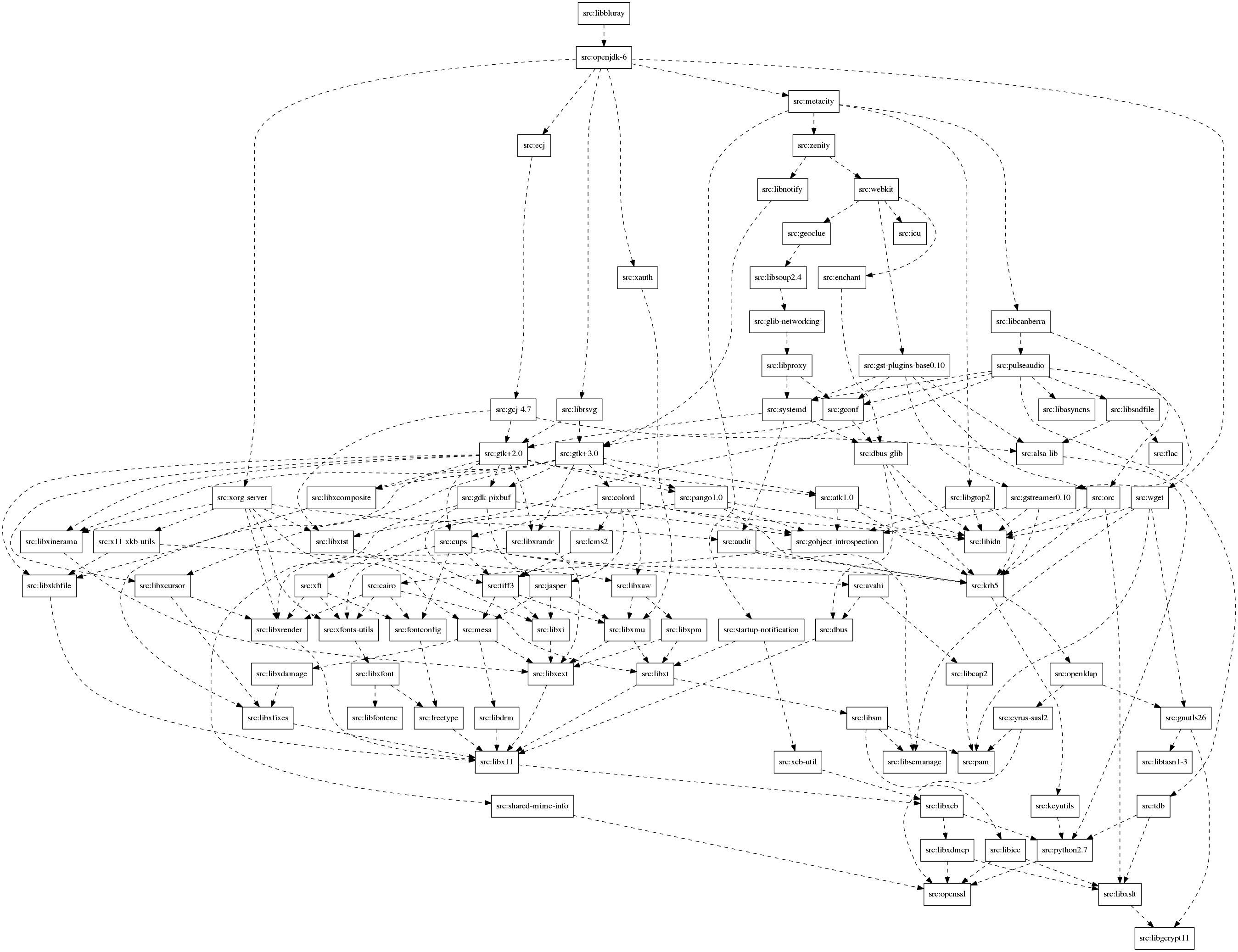
 My last update about ongoing development of botch, the bootstrap/build ordering
tool chain, was three months ago with the
 The simple external-comments code is now complete enough for me to stop poking it on a daily basis:
 I was bracing myself for a rough night, but Zoe slept through until almost 6am.
Today was playgroup again, so we just took a slow start to the day and headed
out on the bike a bit after 9am.
There was a mix of new faces and people from last week. I packed a lunchbox
this time instead of relying on the snack collection in my "Dad Bag" backpack.
We worked on trying to approach other girls to get them to play.
Unfortunately they're all that little bit younger and more shy, so we haven't had
a huge success. Zoe's been pretty happy just playing with the various toys and
playing with me. Parachute time was a big hit again.
I think there were about 25 adults there (I was the only Dad this week), with
many with multiple children. The youngest baby I saw was a 7 week old.
Zoe had been asking me what a honeydew was, so after Playgroup we dropped by
the
 This weekend I attended FOSDEM, as I did for the past 4 years. As always, it
was a great experience, even if most of the talks I attended were not so
interesting.
One of the great things about these events, is to get together with other Free
Software enthusiasts. One of them introduced me to the new kid on the block:
 When you run Puppet, it is very important to monitor whether all nodes have an uptodate catalog and did not miss the last year of changes because of a typo in a manifest or a broken cron-script. The most common solution to this is
 A new major release 0.11.0 of



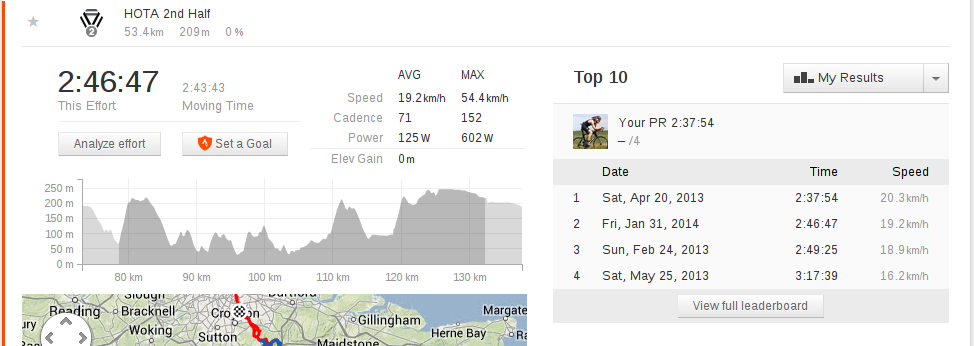 The other leaderboards can still be viewed via the usual selector:
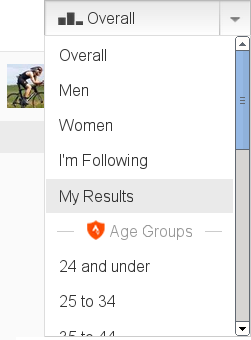 I've found it curious but not altogether surprising how this mere change of default dramatically affects one's mindset.
 Its been a while and I was not actively blogging. I wanted to start
blogging again but I was for some reason not happy with Jekyll
static site generator which was powering my previous site. So I took
this chance to explore other static site generators and redesign my
blog.
I explored a bit of Pelican, Nikola and Frog. I didn't feel
comfortable with Nikola. Frog is a static site generator written
using
 After years under Mako s loving care, iron-blogger is now under
 This year I am able to join the Debian Booth on FOSDEM again. I am also looking forward to meet some projects like foreman and many others. I also hope that I find the time to do some listmaster work, like accepting new lists or getting my new solr based search engine for lists.debian.org online. If you want to meet me, try the debian booth or drop me a short mail or twitter message (@formorer).

 Couple of weeks ago I was in the situation of having to setup up a new laptop. I decided to go with wheezy s DVD installer. So far so good. I didn t expect (somewhere in the lies-I-tell-myself dept.) to have GNOME as the default Debian desktop. However after install I ve figured it was the new GNOME3 everybody was talking about. Before that I ve seen it in Ubuntu systems used by my classmates. I thought yeah, OK GNOME3, I think that s fine for them as a Linux desktop. Turns out that I ve started using the Debian desktop aka GNOME3 and noticed that it was not as bloated as the Ubuntu desktop I ve seen before looked, so I sticked with it, (I thought for a while).
Turns out that I did like this new so called GNOME3, the non-window based but an application-based system (that is something that sticks in my head). I liked the way it makes sense as a desktop system, like when you look for applications, documents, connect to networks, use pluggable devices or just configure stuff every time with less and less effort. Good practices and concepts learned from Mac OS X-like environments and for sure taking advantage of the new features the Linux kernel and user-space environment got over the years. So, like one month later I stick with it and it makes sense for me to keep it. I had no chance to try the latest XFCE or KDE, my default choices before this experience. Kudos GNOME team, even after the depictions you guys had on GNOME Shell; as I learned.
This whole situation got me into some pondering about the past of the Linux user experience and how we in the community lead people into joining. I remember that when I guy asked: how do I configure this new monitor/VGA card/network card/Etc? the answer was in the lines of: what is the exact chipset model and specific whole product code number that your device has? Putting myself in the shoes of such people or today s people I d say: what are you talking about? what it is a chipset? I mean, like it was too technical that only one guy with more than average knowledge could grasp. From a product perspective this is similar for a car manufacturer tell to a customer to look for the exact layout or design your car s engine has, so that they are able to tell whether is the 82 s model A or 83 s model C. Simplicity on naming and identification was not in the mindset of most of us.
This is funny because as technology advances it also becomes more transparent to the customer. So, for instance, today s kids can become really power users of any new technology as if they had, indeed, many pre-set chipsets in their brain. But when going into the details we had to grasp few years ago they have some hard time figuring out the complexity of the product that presents itself on this clean and simple interface. New times, interesting times. Always good to look back. No, I m not getting old.