Search Results: "ron"

22 August 2012

Thomas Goirand: MiniUPnP now fully in Debian

IT S FINALLY IN! With this last upload of the MiniUPnP daemon 1.7-3, I ve reached a first milestone: all of the MiniUPnP libraries, daemons and clients are finally in Debian, in a shape which I am not ashamed anymore. What is UPnP for? Back in the days (around Linux 2.0.3x), the only way to share a single Internet connection was to run a Linux box as your gateway. These days are far gone, and nearly every home connection is done through a mini home router, which also often provides a small switch and a WiFi access point. Every computer on the LAN gets its connectivity through the router thanks to NAT, and to be more accurate, masquerading. That works very well for outbound connections (browse the web, send a mail, etc.), but it is then a lot harder that something connects to a server located in the LAN. If you run a permanent server with a fixed LAN IP address, that s fine, you just configure your router to do some port forwarding, so that any inbound connection will be forwarded to the computer of your choice in the LAN. But if one application needs to listen on the public IP address just for a while (for example, IRC using DCC connection), so that something can connect to it, it becomes a way more tricky. That s when UPnP comes into play. UPnP stands for Universal Plug and Play. It s a protocol so that any application on the LAN can open ports on the public IP address of the gateway. Note that an UPnP router is also often referenced as UPnP IGD (Internet Gateway Device). Why using MiniUPnP, don t we have already linux-igd? Before my packaging work, the only UPnP server that was available in Debian was linux-igd, which has a dependency on libupnpX. That library is quite big for what it does (about 500KiB, on top of which you have to install the 200KiB daemon itself), while MiniUPnP is designed to be lightweight (only 158K, with dependencies on iptables, iproute, uuid-runtime and libc6 only). That seems ridiculous, but when you have only 8MiB of flash in your old router, saving few hundreds KiB is really important, and here, we re saving more than 500 KiB, with a full implementation of the UPnP protocol, and the Microsoft NATPmP implemented as well (yes, Microsoft decided that one protocol wasn t enough, and that they should implement their own (sic!)). Who is using MiniUPNP? Probably, you already have the libminiupnpc installed in your SID/wheezy desktop, because the transmission bittorent client which is installed with Gnome by default, depends on it, and minissdpd might be in your desktop too, if you installed the Recommends: packages as well. Which is why these are scoring quite high already in popcon. Previously, transmission was embedding its own version of the MiniUPnP client library, so it s nice to have it as a standalone shared library now. Also, because of its very light weight, and the fact that UPnP is often needed for gaming (both XBOX 360 and PSP need, and can use, the MiniUPnP daemon that runs on your IGD), many ISP who ship a router to their customer, install MiniUPnP in it. For example, at least, the 2nd and 3rd largest Internet access provider in France (Free Telecom and SFR) are shipping MiniUPnPd in their box (one of them using OpenWRT on their router). So probably as well, you are also using MiniUPnP daemon without knowing it. But isn t UPnP unsafe? To this question, I d answer that connecting to Internet is unsafe. It isn t less safe than connecting to Internet on a WiFi hotspot for example. So adding UPnP support on your gateway doesn t make it less safe, especially since MiniUPnP has some features to help with security (like an ACL with IP and port lists, or a secure mode were the router will only open ports to the client requesting it). Also, we are running a distribution where dependencies are easy to check, so it s easy for you to check if a client uses UPnP or not, and decide to trust it (or not). I personally have no issue trusting transmission, x-chat or warzone2010 (more exactly: I don t trust that incoming connectivity will make it less safe for these applications, there are so many other things that could go wrong). MiniUPnP consists of what? MiniUPnP is a set of 4 source packages to handle all of your UPnP needs: - The client library, libminiupnpc (and the corresponding -dev package), with its sidekick miniupnpc client program (you can use it to check the public IP of your gateway, or manually open ports). - The UPnP IGD daemon, miniupnpd, which just reached Debian Experimental. The latest version, 1.7-3, also includes debconf configuration so that you can choose the NIC and IP address to bind on. If you installed previous version, I strongly recommend upgrading to fix previous problems. - The libnatpmp client library (and the -dev package) for implementing the Microsoft protocol as a client (it also has a client package binary for your tests). - The minissdpd daemon to keep memory of all UPnP devices that announced themselves, and speed-up using the UPnP protocol (used by the MiniUPnP client library). A long process to have MiniUPnP in Debian All these 4 pieces of the puzzle were not as easy as it seems to be packaged in Debian. Especially, the IGD daemon, MiniUPnPd, used to depend on some header files that were not packaged in Debian. This was a decision of the iptables maintainers, which even after a long discussion, refused to add the necessary headers because it wasn t supposed to be a kernel API. While this might really be truth, the issue was that there was no public API available in the Linux kernel at all, and other distributions (Fedora, Gentoo, etc.) really did supply these needed files. As a consequence, during a very long time (years literally), shamefully, it was impossible to build the MiniUPnP daemon in Debian, while it was no problem on other distributions. Note that I do not want to start a troll discussion here, I m just stating facts, both parties have very strong and respectable arguments. Anyway, this needed API was finally embedded in MiniUPnPd itself thanks to a contributor to the project, and now it builds on both the Squeeze and the Wheezy (that is Linux 3.2) kernel without any issue. Call for testing Unfortunately, I don t have a Linux box as my Internet gateway. So I did the tests that I could: I installed MiniUPnPd on one computer on my LAN, and checked that I could open ports from another computer. So it seems to work, but I had no way to really test it live , with some real clients. So if you have an Debian SID box as your Internet gateway, feedback would be highly appreciated. What is remaining to do? A transition from libminiupnpc5 to libminiupnpc8 has to happen. Of course, this is too late for Wheezy, so this will happen right after the release. There s not so many reverse dependencies, so it should be ok, but I (yet) have zero experience with transitions. BTW, I had hard time to find out what this transition process was, and maybe some more effort for documenting it would help others (I m thinking about adding some text in the Debian wiki for that). Also, I have called for help on debian-devel, because I m currently the only one maintaining all these 4 source packages, and I m trying to have all my packages checked by others, and team maintained. So if you want to give a hand, or just declare yourself as a backup if I m busy, please raise your hand! Upstream is a friend of mine, and is very reactive to any requests (it very rarely took more than 48 hours to get a reply). Enjoy MiniUPnP and report bugs! Again, feedback would be appreciated. :)

21 August 2012

Mirco Bauer: Smuxi 0.8.10 "Tracy" Release

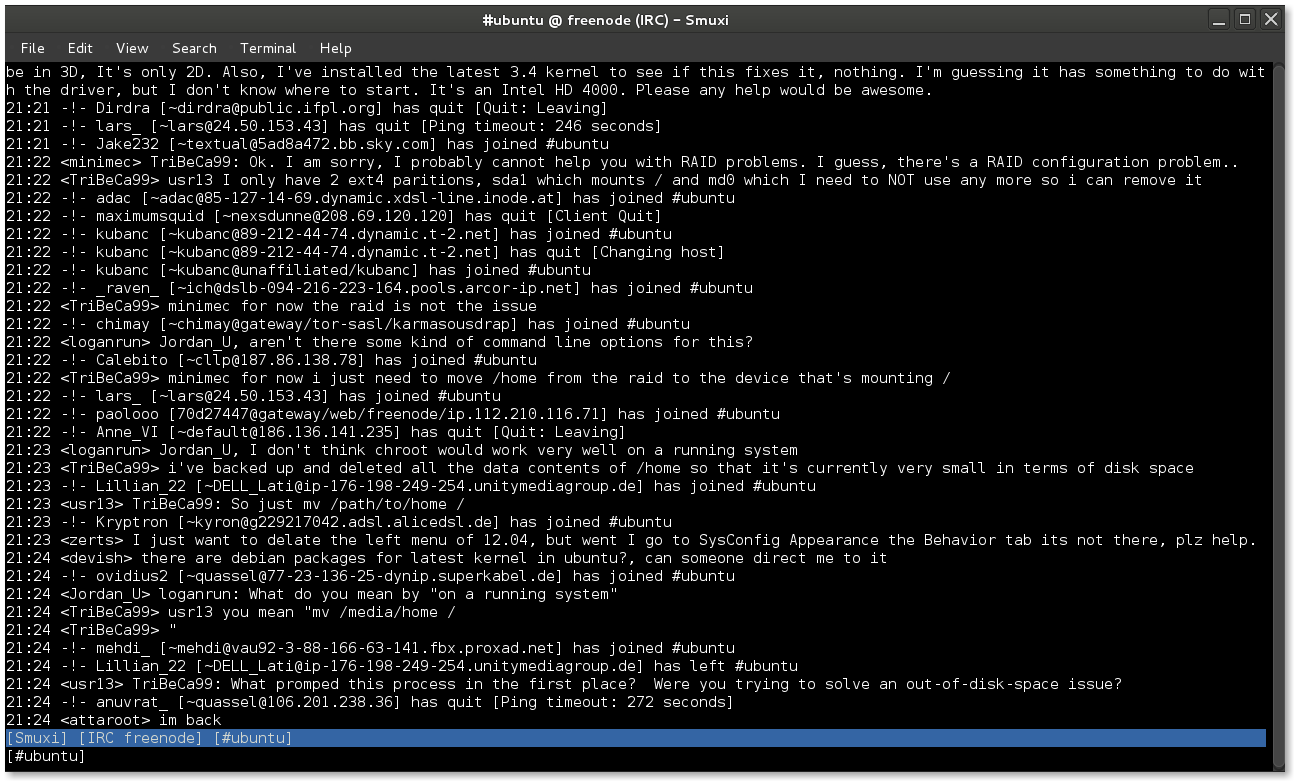
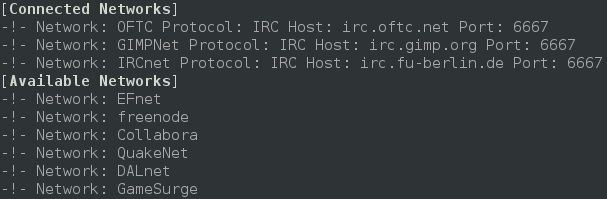
As longingly awaited I am very happy to announce Smuxi 0.8.10 codenamed "Tracy". During the development 8 bug reports and 15 feature requests in 136 commits were worked on making this release a major feature and minor bugfix release. Screenshot of Smuxi 0.8.10 in action Notable highlights in this release are: Integrated Spell Checking Everyone knows the "how do you spell that word again?" situation and either you don't care and send a possible typo or you go checking a dictionary which is kind of annoying. The good news is: with this release you no longer need to do that, as Smuxi includes automatic spell checking while you type messages. The bad news is that this feature is currently limited to Linux builds, and thus OSX and Windows build do not ship with it. The installers need to be extended and I haven't found pre-compiled OSX nor Windows binaries for the GTK+ spell checking library. Screenshot of Smuxi 0.8.10 showing spell checking in action Favicons for Server Tabs Distinguishing server tabs can be difficult, especially if you have plenty of them. All server tabs have the same icon so you need to search for the right name. I wondered why this issue doesn't happen so easily with a web browser which usually also has lots of tabs open. Besides the page name there is the favicon right in front. So why can't Smuxi make use of that simple but effective technology? Well, now it does! You connect to a known network, and Smuxi will download and show the favicon of the website. It just works and does everything in the background for you. Screenshot of Smuxi 0.8.10 showing favicons in action Quick Join Bar One thing that makes IRC really difficult for new comers is the important IRC concept that channels are network specific. So what happens is people try to find / join the channel they are looking for but on the wrong network. They have to connect to the right server/network and then switch to the right tab, before they can join the channel (using the /join command or join dialog). The developers of Smuxi had a brainstorming session and came up with something that should be easy enough for anyone to use and finally solves the issue: the quick join bar. You know which channel you want to join and which network, you enter the channel name, select the network from the list and hit the "Join Chat" button and you are done. Now Smuxi will do just the right thing for you and connects to that network if needed, joins the channel if needed, or switches to the channel if you are already there! Click here for a screencast of the Quick Join Bar in action Indention of multi-line messages Messages on IRC and also Twitter are often longer than a single line in Smuxi can show, thus it has to be split into a second line or more. The issue here is that the continuation line looks cluttered because it doesn't align with the first line. Here you can see an example for this issue: Screenshot of Smuxi 0.8.9 showing line breaks Ewww, that looks ugly, doesn't it? I will make this one short, here is the cure with indented multi-line messages: Screenshot of Smuxi 0.8.10 showing line breaks Enhanced Text Frontend The text frontend which is still in alpha state has received the following enhancements: new /exit command, new /help command, regular and xterm window title, and, several fixed crashes. Screenshot of Smuxi 0.8.10's text frontend Enhanced Commands The /network command by default shows now all connected and also available networks: Screenshot of Smuxi 0.8.10 showing network command The /connect command now allows you to connect by network name like this:
/connect freenode
Updated Translations
  • Portuguese (Pedro Ribeiro)
  • Chinese Simp (Dean Lee)
  • Danish (Joe Hansen)
  • Swedish (Martin Bagge)
  • Russian (Yuri Myasoedov)
New Translations
  • Croatian (Matias M)
  • partially Polish (lukasznaw)
Contributors Contributors to this release are the following people:
  • Mirco Bauer (126 commits)
  • Bianca Mix (translations)
  • Dean Lee (translations)
  • Joe Hansen (translations)
  • Yuri Myasoedov (translations)
  • Pedro Ribeiro (translations)
  • Matias M (translations)
  • Martin Bagge (translations)
  • lukasznaw (translations)
Thank you very much for your contributions to Smuxi! Already horny? Go here and get some! Update: Smuxi 0.8.10.1 About 2 months after the 0.8.10 release, Smuxi 0.8.10.1 with only important bugfixes and translation updates was released. This release includes the following 6 bugfixes: smuxi-server now honors the timezone of tweets, fixed a connection crash with InspIRCd-2.0 servers, quick join no longer opens another network tab, closing chats no longer crashes Smuxi sometimes, /connect irc.some-server.com works again and focusing the message area moves the focus back to the entry again.
Posted Tue Aug 21 23:16:05 2012

Alexander Pashaliyski: Google Summer of Code 2012 Clang support for build services in Debian Final Result

In the process of installing and configuring wanna-build, I had lots of problems. Because there was almost no documentation on the subject (and some of the existing was outdated), I had to figure out how everything works by reading the source code and asking people on IRC and mailing lists. I use the most recent version (from git) and since it s not stable, there were some problems and bugs. I fixed several bugs in order to set the system up. I also documented every step so now there s documentation on everything I have done. I uploaded the documentation on installing and configuring wanna-build [0]. I installed and configured reprepro on a local machine in order to use it with wanna-build. In the process I made step-by step setup instructions [1]. I installed and configured sbuild. The lastest version of sbuild contains filters but they don t work. Their purpose is to keep only the necessary variables in the environment, but apparenly the configuration file which should set them is never read. That leaves the filter list empty which causes the environment to be empty. I had to disable them to keep my work going. I installed buildd. I had some problems setting it up there was a bug in the scripts related to parsing the configuration file. I was pointed to a helpful bug report on the topic and with some additional changes I eventually got it working. In the process I had to read some of the source code of buildd. I made a patch that fixes a bug in the manual page of reprepro and got it approved. I contacted the Alioth admin team via the web site, requesting to use their server for my project Clang for build services . I got approved and I created a git repository where I m now uploading my work. The repository that I use to upload changes to sbuild and buildd is [2]. I add the name of the used compiler to the control file and to the name of the deb package. I wrote a function for parsing the debian/rules file looking for hard-coded compiler there. If there is such compiler, which is different from the one chosen as a default, the building proccess exits with a clear error. I made changes to wanna-build, dpkg, sbuild and buildd to fix bugs in them and make it possible to use a compiler different from gcc for the build process.
After my work a build compiler can be set easily. If a package can not be built with that compiler, the build process fails with a clear error. I also modified the pgstatus web interface to display build logs and create reports on user request. I wrote complete documentation about setting up wanna-build, reprepro and buildd ([0] and [1]). This makes a fully functional buildd infrastructure. Now we have a full step by step tutorial. Me and Sylvestre Ledru who was my great mentor, modified the buildd daemon so it will be possible to be run several instances of it for different architectures on a single physical server. I made a lot of changes to pgstatus this is a web interface to the wanna-build database. I had to add some features and fix several problems. In the process I read some of the code of pgstatus and buildd-tools. Now I have a better understanding of how they work. I added a new feature in pgstatus that allows the user to create a full report of the state of all builds. When a designated reports page is opened, a table with the current state of the builds is shown, together with a list of all the reports saved to files for the current distribution and architecture. The reports can be downloaded directly from the
interface. They are stored in JSON format. The log files were not accessible from pgstatus because of lack of implementation and bugs. I created a script that reads emails sent by wanna-build and extracts log files from them. I made changes to wanna-build so that it feeds the database with the necessary information about package history. I updated the wanna-build patch to include these changes. As a result the buildd logs can now be opened from the web interface of pgstatus. I applied a patch that fixes bug [3] so that config_schroot.sh (this script installs and sets the default compiler) starts with the necessary privileges. I added a new feature to sbuild that allows scripts to be run right after the dependencies are installed in the chroot and before the actual package starts building. Now anybody can configure sbuild to run such a script by modifying the appropriate configuration file. By adding the following lines: $external_commands =
chroot-pre-build-commands => [
['/root/purge-gcc.sh'],
],
; The script /root/purge-gcc.sh is run by sbuild in the chroot. This script can be necessary to set everything in the environment so that packages are built exactly as needed. Me and my mentor used this to replace gcc with a script that removes all gcc-specific packages so that we can be sure whether a package uses clang or not. I have a fully functional buildd infrastructure installed on my development system. In order to get it running, I made several patches: dpkg.patch The main patch with a lot of changes related to compiler support for building.
wanna_build.patch Fixes bugs and makes wanna-build feed the database with package history information.
sbuild.patch Fixes bugs and work-arounds the problem that some sbuild scripts are called without reading the configuration file of sbuild. Adds configuration option that allows scripts to be run right after the dependencies are installed in the chroot and before the actual package starts building.
pgstatus.patch Fixes bugs and adds reports page to pgstatus. Me and my mentor contacted the Debian wanna-build team to connect our new service with Debian. We explained what the current state of the project is and what we need from them. I thank my mentor Sylvestre Ledru for his presentation on DebConf 12 ([4], [5]). He showed our project and it was seen that people are interested in it. A nice resume of his talk has been made by Michael Larabel on Phoronix [6]. I tested everything thoroughly to make sure my changes don t break anything. I am happy to say that the project is now finished. ==== [0] http://wiki.debian.org/DebianWannaBuildInfrastructureOnOneServer
[1] http://wiki.debian.org/SetupBuildServiceForWanna-build
[2] http://anonscm.debian.org/gitweb/?p=pkg-llvm/clang-build.git;a=summary
[3] http://bugs.debian.org/cgi-bin/bugreport.cgi?bug=608840
[4] http://sylvestre.ledru.info/blog/media/5/rebuild-debian-presentation-clang-July-10.pdf
[5] http://meetings-archive.debian.net/pub/debian-meetings/2012/debconf12/high/884_Build_Debian_with_another_compiler.ogv
[6] http://www.phoronix.com/scan.php?page=news_item&px=MTEzODQ

20 August 2012

Martin Pitt: PyGObject 3.3.90 released

I just released PyGObject 3.3.90, for GNOME 3.5.90. This is now working correctly on big-endian 64 bit machines such as powerpc64, and fixes marshalling for GParamSpec attributes and return values, as well as a few small bug fixes. Thanks to all contributors! Complete list of changes:

Steve Kemp: Failing to debug a crash with epiphany-browser and webkit

Today I'm in bed, because I have le sniffles, and a painful headache. I'm using epiphany to write this post, via VNC to my main desktop, but I'm hating it as I've somehow evolved into a state where the following crashes my browser: Running under GDB shows nothing terribly helpful:
Program received signal SIGSEGV, Segmentation fault.
0x0000000000000000 in ?? ()
(gdb) bt
#0  0x0000000000000000 in ?? ()
#1  0x00007ffff51a0a46 in ?? () from /usr/lib/libwebkit-1.0.so.2
#2  0x00007ffff3d8f79d in ?? () from /usr/lib/libsoup-2.4.so.1
#3  0x00007ffff2a4947e in g_closure_invoke () from /usr/lib/libgobject-2.0.so.0
#4  0x00007ffff2a5f7f4 in ?? () from /usr/lib/libgobject-2.0.so.0
...
To get more detail I ran "apt-get install epiphany-browser-dbg" - this narrows down the crash, but not in a useful way:
Program received signal SIGSEGV, Segmentation fault.
0x0000000000000000 in ?? ()
(gdb) bt
#0  0x0000000000000000 in ?? ()
#1  0x00007ffff51a0a46 in finishedCallback (session=<value optimized out>, msg=0x7fffd801d9c0, data=<value optimized="optimized" out="out">) at ../WebCore/platform/network/soup/ResourceHandleSoup.cpp:329
#2  0x00007ffff3d8f79d in ?? () from /usr/lib/libsoup-2.4.so.1
#3  0x00007ffff2a4947e in g_closure_invoke () from /usr/lib/libgobject-2.0.so.0
#4  0x00007ffff2a5f7f4 in ?? () from /usr/lib/libgobject-2.0.so.0
..
So this crash happens in ResourceHandleSoup.cpp. Slowly I realized that this came from the webkit package. We see that the last call by name is to the function in line ResourceHandleSoup.cpp:329, that puts us at the last line of this function:
// Called at the end of the message, with all the necessary about the last informations.
// Doesn't get called for redirects.
static void finishedCallback(SoupSession *session, SoupMessage* msg, gpointer data)
 
    RefPtr<ResourceHandle> handle = adoptRef(static_cast<ResourceHandle*>(data));
    // TODO: maybe we should run this code even if there's no client?
    if (!handle)
        return;
    ResourceHandleInternal* d = handle->getInternal();
    ResourceHandleClient* client = handle->client();
    if (!client)
       return;
..
..
    client->didFinishLoading(handle.get());
 
So we see there is some validation that happens, then a call to "didFinishLoading" and somewhere shortly after that it dies. didFinishLoading looks trivial:
void WebCoreSynchronousLoader::didFinishLoading(ResourceHandle*)
 
      g_main_loop_quit(m_mainLoop);
      m_finished = true;
 
So my mental-debugging is stymied. I blame my headache. It looks like there is no obvious NULL-pointer deference, if we pretend client cannot be NULL. So the next step is to get the source, the build-dependencies and then build a debug version of webkit. I ran "apt-get source webkit", then editted the file ./debian/rules to add --enable-debug and rebuilt it:
skx@precious:~/Debian/epiphany/webkit-1.2.7$ DEB_BUILD_OPTIONS="nostrip noopt" debuild -sa
*time passes* The build fails:
  CXX    WebCore/svg/libwebkit_1_0_la-SVGUseElement.lo
../WebCore/svg/SVGUseElement.cpp: In member function  virtual void WebCore::SVGUseElement::insertedIntoDocument() :
../WebCore/svg/SVGUseElement.cpp:125: error:  class WebCore::Document  has no member named  isXHTMLDocument 
../WebCore/svg/SVGUseElement.cpp:125: error:  class WebCore::Document  has no member named  parser 
make[2]: *** [WebCore/svg/libwebkit_1_0_la-SVGUseElement.lo] Error 1
Ugh. So I guess we disable that "--enable-debug", and hope that "nostrip noopt" helps instead. *Thorin sits down and starts singing about gold* Finally the debugging build has finished and I've woken up again. Let us do this thing. I'd looked over the webkit tracker and the crashing bugs list in the meantime, but nothing jumped out at me as being similar to my issue. Anyway without the --enable-debug flag present in the call to ../configure the Debian webkit packages were built, eventually, and installed:
skx@precious:~/Debian/epiphany$ mv libwebkit-dev_1.2.7-0+squeeze2_amd64.deb x.deb
skx@precious:~/Debian/epiphany$ sudo dpkg --install libweb*deb
[sudo] password for skx:
(Reading database ... 173767 files and directories currently installed.)
Preparing to replace libwebkit-1.0-2 1.2.7-0+squeeze2 (using libwebkit-1.0-2_1.2.7-0+squeeze2_amd64.deb) ...
Unpacking replacement libwebkit-1.0-2 ...
Preparing to replace libwebkit-1.0-2-dbg 1.2.7-0+squeeze2 (using libwebkit-1.0-2-dbg_1.2.7-0+squeeze2_amd64.deb) ...
Unpacking replacement libwebkit-1.0-2-dbg ...
Preparing to replace libwebkit-1.0-common 1.2.7-0+squeeze2 (using libwebkit-1.0-common_1.2.7-0+squeeze2_all.deb) ...
Unpacking replacement libwebkit-1.0-common ...
Setting up libwebkit-1.0-common (1.2.7-0+squeeze2) ...
Setting up libwebkit-1.0-2 (1.2.7-0+squeeze2) ...
Setting up libwebkit-1.0-2-dbg (1.2.7-0+squeeze2) ...
skx@precious:~/Debian/epiphany$
Good news everybody: The crash still happens! Firing up GDB should hopefully reveal more details - but sadly it didn't.
Program received signal SIGSEGV, Segmentation fault.
0x0000000000000000 in ?? ()
(gdb) bt
#0  0x0000000000000000 in ?? ()
#1  0x00007ffff51a0a46 in finishedCallback (session=<value optimized="optimized" out="out">, msg=0xb03420, data=<value optimized="optimized" out="out">) at ../WebCore/platform/network/soup/ResourceHandleSoup.cpp:329
..
(gdb) up
#1  0x00007ffff51a0a46 in finishedCallback (session=<value optimized="optimized" out="out">, msg=0xb03420, data=<value optimized="optimized" out="out">) at ../WebCore/platform/network/soup/ResourceHandleSoup.cpp:329
329     client->didFinishLoading(handle.get());
(gdb) p client
$1 = <value optimized out>
At this point my head hurts too much, and I'm stuck. No quote today, I cannot be bothered.

17 August 2012

Gunnar Wolf: More on hacker conferences and sexual harassment

At the beginning of this year, I blogged about a Mexican security-minded hacker conference scaring away its female audience by advertising in a sexist way. I don't know if it is the need to be l33t or kewl, to show off that hackers are really socially inept, or what... but this seems to carry on. I know many are familiar with the red/yellow card project (and followup) by kdotcdot. I am (rightfully? naively?) proud that at DebConf we have achieved a clean conference environment, without such problems... Yes, I know that, during the last ~year at DebConf11 we discussed an anti-harassment policy (look at the thread, it was quite interesting!), came up with standards of respect And Debian as a whole voted on a GR that ratifies a diversity statement. The fact that we had those very positive discussions, documents and events shows we needed to have them. But, again, this shows that being a hacker does not necessarily mean being a jerk. And I'm very proud to be part of this community. I recently stumbled across a very nice, insightful post by Valerie Aurora on The Ada Initiative: Supporting women in open technology and culture DEFCON: Why conference harassment matters. Take a good read at it. I hope it helps shape other hacker groups in a less-aggressive, more welcoming way. Oh! And before closing: Be sure to at least skim through both Valerie Aurora's and kdotcdot's comments. LOTS of insight in them.

16 August 2012

Gunnar Wolf: 19 years of Debian

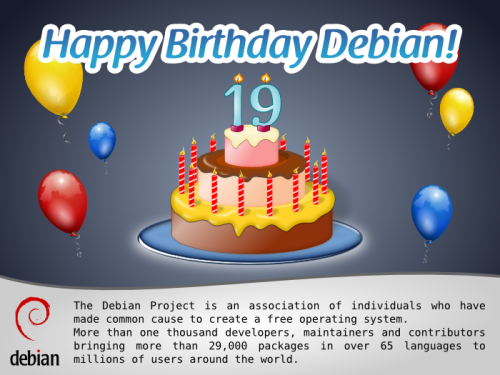
Happy 19th birthday, Debian! The Debian project is 19 years old now. Following Francesca's invitation (and Rapha l's lead, and using Leandro's image, collaboratively as it always happens here), I will tell a bit of my memories: How I got to Debian. I am a Debian user since ~2000, and a Debian Developer since April 2003. But, just as Rapha l's, my history must go somewhat further back in time. In 1992, I got my first 1200bps modem, and almost immediately became an avid BBS user (what's that? Javier Matuk talks [in Spanish] about BBSes in his newspaper column back in 1994). By mid 1993 I started operating my own BBS, CatarSYS. One of the key points that defined CatarSYS is that my focus was large-scale communication. I started connecting to several BBS networks, allowing messages to be relayed to distant people, mainly in the USA and Spain, and getting some feeds that could be seen as the poor man's Usenet. At some point during the year I kept CatarSYS going, I got connected through a strange set of gateways to pure gold: A UUCP feed! This means, during some months, I operated the first (free, hobbyist) service that offered its users a free Internet mail address in Mexico. Yes, it was completely different to what we are used to today. I tried to connect to my provider at least three times a week, but this meant less than one week turnover time for messages sent to people anywhere in the world! But, back to Debian: Via this UUCP feed, I also got some real Usenet newsgroups Including several on the comp.os category. I remember reading about Linux back then, and learning some commands, but didn't really get hooked into it. I was in Israel from July 1994 to June 1995, doing completely non-computer-related tasks. Came back in 1995, and due to my father being an academic, got dialup internet access at home. WOW, *real* Internet! It didn't take me long to start downloading Linux information and floppy images. One failed after another. But before the end of the year, I found in a bookshop a book (that included a CD-ROM) called "Build your own web server with Linux". WOW again Remember this was still 1995! I bought it, and shortly afterwards, I had a Slackware system (Linux kernel 1.0.9) running. That meant many sleepless nights full of joy and frustration (as getting hardware to work was cloe to impossible). By 1996, I got (within one week) my two first real jobs: A systems administrator at a small ISP and a highschool teacher. At the ISP, I got a spare computer to play with Linux, as of course the Big Server was running with Windows NT 3.51. Poor little machine... By then I was already a part of the Mexican Linux User Group. This group had just printed a batch of Linux CDs RedHat 4.0. This was the first release that really made me happy and allowed me to do good work. Together with a friend I took to work with us, Juan Pablo Romero, we installed over a weekend a full replacement for our buggy NT machine, in much cheaper hardware. Of course, Linux was nowhere near corporate-recognition, and our project remained a project, not touching the Windows machine. Anyway... Several years passed, and I was happy with my RedHat choice. I won't mention the milestones and job changes, as it would get boring and leave the point completely aside. By the year 2000, I was quite more involved with the LUG, as well as with the computer security group in DGSCA-UNAM. I became also an OpenBSD user, and had got so hooked up in free software that I felt the need to collaborate: To be a little part of one of those Big Projects that had given me so much. But which one? I have never been much of a programmer Yes, I can solve my everyday needs and have fun with it, and sometimes a bit beyond that. I enjoy programming. But all of my projects have begun little and stayed little. I wanted to join OpenBSD, as it was a community I really believed in, but given my skillset (and given a flame-prone, aggressive developer community), I lost motivation to do so. By 2000, I had also lost faith in RedHat. I don't have the exact dates, so I might be some months off But after RedHat's IPO, I felt a sharp change. Version 7.0 was really demotivating It tried to offer a polished desktop experience, but was really buggy, unstable, and full of bad decisions. In Mexico, Pepe Neif had taken up the job of making a derivative distribution of RedHat (called LinuxPPP), pressing hundreds of CDs and making a teaching program I was part of several times. Talking with Pepe (who continued to release based on RedHat 6), he told me he was interested in switching over to become a Debian-based distribution, but the job of migrating his installed base made the project stall LinuxPPP reached only version 6.4. But I installed Debian in early 2000, and loved it. I started getting familiar with its social philosophy and foundation documents at the same time I started migrating my servers from RedHat to Debian This must have been by Spring 2000, as I installed Potato while it was frozen but not yet stable. By January 2002 I applied for NM. My process took a long time, as my AM got MIA when he had already approved me (but before sending the AM report), so basically I had to go through AM twice And by April 16, 2003, I got accepted as a DD. Contrary to what is acceptable today, I requested the full process to be done before starting to maintain any packages, as I didn't want to bother people with package sponsorship requests, so my whole process was done evaluating packages I would eventually upload. Since becoming a DD, my main involvement in the project has been in packaging groups (I was a pkg-perl founder and member for many years, and am currently working in the pkg-ruby-extras group). But, as I said, my main strength is not programming So my main involvement in Debian has been more social than technical: I have been a DebConf organizer since 2005, a very interesting, stressing, rewarding and (for some months) time-demanding role, and since 2009 I am part of the keyring maintainence team, which is much easier workload, although carries important ramifications. So, after 19 years of Debian, and after nine years of me being part of it, Debian is clearly my strongest link to the Free Software community, a project I have grown to love and whose way of being I share and enjoy studying and explaining. And it is a technically excellent product, and a great place to start and keep learning both about how every aspect and layer of an operating system works, and how human-to-human interaction works in such a diverse, almost impossible environment happens. Congratulations, Debian!
AttachmentSize
debian-19_500.png149.81 KB

Russ Allbery: Review: Getting Started with Dwarf Fortress

Review: Getting Started with Dwarf Fortress, by Peter Tyson
Publisher: O'Reilly
Copyright: May 2012
ISBN: 1-4493-1494-5
Format: Trade paperback
Pages: 219
If you're unfamiliar with Dwarf Fortress, you're in good company. Most people are, even people who play video games regularly. It was heavily inspired by roguelike games: games such as Hack and Rogue and their more recent variations, which have been around since the 1970s and are still frequently played with simple character graphics on 2D maps. Dwarf Fortress even has a roguelike gameplay mode, but the core of the game (and the only part of the game covered in this book) is the fortress mode, where the player controls a band of dwarfs in an attempt to construct and maintain a fortress. All of this is done (by default, at least) in a simulated-text interface filled with a barrage of strange characters and symbols. A Dwarf Fortress game in progress is almost incomprehensible to the uninitiated. (There are graphical tile sets available, but all the illustrations in this book assume the default display mode.) Dwarf Fortress gains its cult popularity (sufficient to support the primary developer solely through voluntary donations; the game is free) from the incredible depth and richness of the world. Almost everything is modeled in startling detail, down to the individual items of clothing that each dwarf wears, their personalities and history, and a considerable part of the industrial lifecycle of any goods that the fortress needs to produce (such as food and all-important alcohol). That's where this book comes in. The game is so massive and involves so many variables, industries, needs, requirements, and perils that the first-time player is likely to see their first games collapse due to resource problems they have no idea how to address. Getting Started with Dwarf Fortress walks the player through the initial fortress setup, the resource cycles, and the fundamentals of the various parts of the game one has to monitor. The fact that this discussion takes over 200 pages should give you an idea of the depth of the game. I should stop here and warn that, similar to my RPG sourcebook reviews, I read this book somewhat against its intended purpose. I haven't played Dwarf Fortress and don't currently intend to. It's not quite my game type: I don't like open world construction games in which it's possible to lose (and thereby lose all the things that one has built). But the idea of the game, the way it's developed, and the fact that O'Reilly would publish a book about it is so delightfully strange that I wanted to get a feel for the game without investing the time required to learn it. Thankfully, while the book is designed to be a tutorial, it also does an excellent job at conveying the feel of a game. Getting Started with Dwarf Fortress is divided into eleven chapters. After a chapter of introduction, it goes over site selection, some of the options for your initial party, and recommended settings for both. It then provides some advice for the initial rooms and initial fortress layout to get started. Subsequent chapters are more topic-oriented, covering food, merchants, resource management (including Strange Moods), digging, and the various chains of industry. The final chapters cover some of the more intricate details of dwarven life, such as justice, vampires, and hospitals, and then provide an introduction to the military and to dwarven engineering. The engineering chapter, in particular, makes it clear that vast complexity and possibility is left unexamined. One drawback of the printed version of the book (I don't know if this also applies to the ebook) is that all of the screen shots here are black and white. This makes Dwarf Fortress's already-forbidding presentation even more difficult to understand. At times, I had a hard time picking out features that were described in the text. A look at on-line screenshots quickly shows that color is massively helpful in making sense of all the little glyphs. I'm sure color printing would have made the printed version prohibitively expensive, but it is a loss. The text, though, is excellent. Not only is it clear and helpful (although with the caveat that I've not personally tested it), it captures much of the humor and feel of the game. Dwarf Fortress incorporates computer-generated storytelling that narrates the events of the game (and the backstory of the world), which has sparked a tradition of delightfully wry commentary on games, game mechanics, and events in the game (particularly the ones that cause the cascading destruction of the whole fortress). Tyson captures that tone brilliantly, weaving it throughout his descriptions. This is a tutorial that's genuinely fun to read. (Although the Tim Denee comics ending chapters sadly didn't work for me.) It's certainly possible to get started with Dwarf Fortress without this book. There are other tutorials on-line, as well as an impressively huge wiki. But this is a great introduction and is entertainment in its own right. If you've thought about playing the game, or if, like me, you want a good feel for what it's like without investing the time in actually playing it, I recommend it. I should probably note that this book covers Dwarf Fortress up to 0.34.07, and the dead tree version that I have obviously won't be further updated. O'Reilly does note on the back cover that if you purchase the ebook edition, it will receive free updates for the "life of the edition" (however long that is). If you're worried about subsequent changes in the game making the book obsolete (given the ongoing active development, this is something of a worry, although this book mostly covers fundamentals), you may want to grab the electronic version. Rating: 8 out of 10

15 August 2012

Jon Dowland: Backup Data Mining

What if you have a mis-behaving electronic device, which might corrupt files you store on it? I'm interested in tools to inspect incremental backups, look at file changes and alert me if they are suspicious. For example, if an MP3 changes, did the MPEG data change, or the ID3 tag, or something else? An ID3 change is likely to be on purpose, MPEG data less so. Similar for JPEGs and EXIF metadata. I decided to poke around in my backups of my music player. I discovered some pretty weird stuff. Firstly, quite a few MP3s seem to have changed on my player over time. I found 788 instances of MP3s changing a very small amount: an 11 byte rdiff-format patch. This seemed particularly strange, so I investigated a little:
...
01 Fool's Day.mp3.2012-05-31T22:40:09+01:00.diff
00000000  72 73 02 36 47 00 00 59  01 ad 00                  rs.6G..Y... 
0000000b
dark_entries.mp3.2012-05-31T22:40:09+01:00.diff
00000000  72 73 02 36 47 00 00 54  0f 58 00                  rs.6G..T.X. 
0000000b
...
In a nutshell, the patches appear to do nothing, or at least copy the input file verbatim into the output. (my rdifffs source is a useful document for the rdiff file format, or failing that, the rdiff source itself.) This is probably just a behavioural nuance of my backup software. That leaves 156 changed MP3s with rdiff patches ranging in size from 21 bytes to 26k. The smallest are almost certainly no-ops, just less efficiently stored ones. The largest looks like embedded album art in the ID3 tag being added, and I'm guessing the mid-size ones are ID3 textual changes (spelling corrections etc.), but ID3 changes are very hard to inspect by eye in the raw bytestream. For this reason I think a tool that could sort through file changes and pick out things which might need human investigation might be useful. Such tools could be run automatically after backups complete, or at scheduled times. I'll probably start writing some over the next few weeks, but if you know of any that already exist or might form part of a solution, please let me know!

Sylvestre Ledru: libc++: New C++ standard library in Debian

Thanks to the work of Andrej Belym, Debian has now a new C++ standard library. This work has been done in the context of the Google Summer of Code 2012.
Available in Debian Experimental, this new packages provides both the runtime libraries (libc++abi1) and the C++ headers (libc++-dev). With this library, it is possible to build a C++-based program without any dependency on libstdc++. For example, as detailed in README.Debian, with the (amazing) C++ code:
// foo.cpp
#include <iostream> int main()
std::cout < < "plop" << std::endl;
return 0;
build with clang++ (or g++) will give:
$ clang++ -o plop foo.cpp
$ ldd plop grep c++
libstdc++.so.6 => /usr/lib/x86_64-linux-gnu/libstdc++.so.6 (0x00007f15791cb000)
Using libc++, it will drop the dependency on libstdc++ to use lib++
$ clang++ -stdlib=libc++ -o plop foo.cpp
$ ldd plop grep c++
libc++.so.1 => /usr/lib/x86_64-linux-gnu/libc++.so.1 (0x00007f87464df000)
For the record, it is not that trivial to do with g++. The command being:
g++ -nostdlib -lc++ -lc++abi -std=c++11 -o plop /usr/lib/x86_64-linux-gnu/crt1.o /usr/lib/x86_64-linux-gnu/crti.o foo.cpp /usr/lib/x86_64-linux-gnu/crtn.o -isystem/usr/include/c++/v1 -lc -lgcc_s
Besides this change, libc++ provides a support of C++ 11, considered as "correct" against the C++11 standard by upstream.
// bar.cpp
#include <chrono>
int main()
return 0;
clang++ -stdlib=libc++ -o bar bar.cpp
More information:

14 August 2012

Sven Mueller: UK going completely crazy on cryptography law.

It seems that the UK government recently passed a law that makes it illegal to be unable to decrypt what the law enforcement entities think is encrypted: From http://falkvinge.net/2012/07/12/in-the-uk-you-will-go-to-jail-not-just-for-encryption-but-for-astronomical-noise-too/:
But it s worse than that. Much worse. You re not going to be sent to jail for refusal to give up encryption keys. You re going to be sent to jail for an inability to unlock something that the police think is encrypted. Yes, this is where the hairs rise on our arms: if you have a recorded file with radio noise from the local telescope that you use for generation of random numbers, and the police asks you to produce the decryption key to show them the three documents inside the encrypted container that your radio noise looks like, you will be sent to jail for up to five years for your inability to produce the imagined documents.
This is just insane. Edit: The law was created several years ago, but the blog post somehow made me think it was more recent.

Philipp Kern: Debian s390x installation now working

With a current daily build of debian-installer you should now be able to install a VM with Debian s390x. I'm told that even installation within hercules works again. d-i's beta 1 for wheezy has a broken busybox and is hence unusable. But there were more issues:
The resulting installation even boots. But it shares some problems with squeeze's s390 port:
Tip of the day: If you see funny characters in x3270, then you maybe selected the wrong EBCDIC code page. If you use Linux you want to select CP1047 instead of the default CP037 in Options Character Set ( Euro). That's the target of the in-kernel ASCII to EBCDIC converter.

Peter Eisentraut: Funny version numbers

Often, I install a new Debian package using apt-get install, and as the progress output flies by, I wonder, Whoa!, should I really be using a piece of software with that version number? It says a lot, after all. If I see
tool 2.4.1-2
then I (subconsciously) think, yeah, the upstream maintainers are obviously sane, the tool has been around for a while, they have made several major and minor releases, and what I'm using has seen about one round of bug fixing, and a minimal amount of tweaking by the Debian maintainer. On the other hand, when I see
tool 7.0.50~6.5~rc2+0.20120405-1
I don't know what went on there. The original release version 7.0.50 was somehow wrong and had to be renamed 6.5? And then the 2nd release candidate of that? And then even that wasn't good enough, and some dated snapshot had to be taken? Now, of course, there are often reasons for things like this, but it doesn't look good, and I felt it was getting out of hand a little bit. I tried to look into this some more and find a regular expression for a reasonably sane version number. It's difficult. This is how far I've gotten: https://gist.github.com/3345974. But this still lists more than 1500 packages with funny version numbers. Which could be cause for slight concern. Take a look at what this prints. You can't make some of that stuff up.

13 August 2012

Robert Collins: minimising downtime for schema changes with postgresql

Two years ago Launchpad did schema changes once a month. Everyone would cross their fingers and hope while the system administrators took all the application servers offline, patched the database with a months worth of work and brought up the servers again running the new QA d codebase. This had two problems:
  1. due to the complexity of the system something like 300 processes have to be stopped or inhibited to take everything offline the downtime duration was often about 90 minutes long irrespective of the schema patch duration. [Some of the processes don't like being interrupted at all].
  2. We simply could not deliver any change in less than 1 week, with the on average latency for something that jumped all the queues still being 2 weeks.
About a year ago we wanted to increase the rate at which schema changes could be carried out the efforts to speed Launchpad up had consumed most low hanging fruit and more and more schema patches were required. We didn t want to introduce additional 90 minute downtime windows though. Adopting incremental migrations the sort of change process described in various places on the internet seemed like a good way to make it possible to apply the schema changes without this slow shutdown-and-restart step, which was required because the pre-patch codebase couldn t speak to the new schema. We could optimise each patch to be very fast by avoiding anything that causes a full table scan or table rewrite (such as adding indices, adding columns with a non-NULL default value). That would let us avoid the 90 minutes of downtime caused by stopping and restarting everything. However, that wasn t sufficient the reason Launchpad ended up doing monthly downtime is that previous attempts to do more frequent schema changes had too high a failure rate. A key reason for patch deployment time blowing out when everything wasn t shut down was due to Launchpad being a very busy system with the use of Slony, schema changes require an exclusive lock on all tables. [More recent versions of Slony only lock some tables, but it still requires very widespread locks for most DDL operations]. We re doing nearly 10 thousand transactions per minute, at any point in time there are always locks open on some table in the system: it was highly improbably and effectively impossible for slonik to get an exclusive lock on all tables in a reasonable timeframe. Background tasks that take many minutes to complete exacerbate this we can t just block new transactions long enough to deliver all the in-flight web pages and let locks clear that way. PGBouncer turns out to be an ideal tool here. If you route all your connections through PGBouncer, you have a single point you can deliberately interrupt to clear all database locks in a second or so (it takes time for backends to all notice that their clients have gone). So we combined these things to get what we called Fast Down Time or FDT. We set the following rules for developers:
  1. Any schema patch had to complete in <= 15 seconds in our schema staging environment (which has a full copy of the production DB), or we d roll it back and redesign.
  2. Any patch could change either code or schema, never both. schema patches were to land on a separate branch and would be promoted to trunk only after deployment. That branch also receives automated merges from trunk after every commit to trunk, so its running the latest code.
This meant that we could be confident in QA: we would QA the new schema and the application process with the current live code (we deploy trunk multiple times a day). We published some documentation about how to write fast schema patches to help socialise the approach. Then we wrote an automated tool that would:
  1. Check for known fragile processes and abort if any were found.
  2. Check for very long transactions and abort if any were found.
  3. Shutdown pgbouncer, disconnecting all clients instantly.
  4. Use slonik to apply one or more schema patches.
  5. Start pgbouncer back up again.
The code for this (call it FDTv1) is in the Launchpad source code history its pretty entangled but its there for grabbing if you need it. Read on to see why its only available in the history :) The result was wonderful we immediately were able to deploy schema changes with <= 90 seconds of downtime, which was significantly less than the 5 minutes our stakeholders had agreed to as a benchmark if we were under 5 minutes, we could schedule downtime once a day rather than once a month. We had to fix some API client code to retry more reliably, and likewise fix a few minor bugs in the database connection handling logic in the appservers, but all in all it was a pretty smooth project. Along the way we spun off a small python helper to run and control pgbouncer, which let us write effective tests for the connection handling code paths. In This gave us the following workflow for making schema changes:
  1. Land and deploy an incremental schema change.
  2. Land and deploy any indices that need to be added these are deployed live using CREATE INDEX CONCURRENTLY.
  3. Land and deploy code changes to populate any additional fields/tables from both application servers, and from cron we do a bulk backfill that does many small transactions while walking over the entire dataset that needs to be updated / populated.
  4. Land and deploy code changes to drop references to the old schema, whatever it was.
  5. Land and deploy an incremental schema change to finalise the change such as making a new column NOT NULL once the backfill is complete.
This looks long and unwieldy but its worth noting that its actually just repeated applications of a smaller primitive:
  1. Make a schema change that is fast and compatible with existing code.
  2. Change code to take advantage of the changed schema
Pretty much any change that is desired can be done using this single primitive. We wanted to go further though the multiple stages required for complex migrations became a burden with one change a day. Fortunately PostgreSQL now includes its own replication engine, which replicates the WAL logs rather than installing triggers on all tables like Slony. Stuart, our intrepid DBA migrated Launchpad to PostreSQL 9.1, updated the FDT tool to work with native replication, and migrated Launchpad off of Slony. The result is again wonderful the overhead in doing a schema patch, with all the protection I described above, is now ~5 seconds. We can do incremental changes in less time than it takes your browser to figure out that a given server is offline. We re now negotiating with the Launchpad stakeholders to get multiple downtime windows each day, with this almost unnoticable, super reliable process in place. Reliability wise, FDT has been superb. We ve had 2 failures: one where we believe we encountered a bug in Slony when dropping two tables at once, and one where we landed a patch that worked on staging but led to lock contention in production so the patch applied, but the system was very unhealthy after that until we fixed it. Thats after doing approximately 60 patches over a 1 year period. We re partway through extracting the patching logic from Launchpad s code base into a reusable tool, but the basic principles will apply to any PostgreSQL environment.

12 August 2012

Steve McIntyre: EFI installation progress

As promised last month at DebConf, I've been working on adding EFI support to debian-cd and debian-installer, hopefully to get it up and running. At the moment, this is basic support only for booting and setting up the installed system via UEFI. I'm not worrying about "Secure" (better named "Restricted"?) Boot yet - that comes later, and depends on the basic stuff working first. So, how is it going? Quite well, really. I've got a debian-cd branch that I'm working on locally, and with a relatively small amount of work there I've got a locally-built CD that boots in EFI mode, using grub-efi as a boot loader. I've borrowed a script called efi-image from Colin Watson which generates the necessary EFI boot image from bits out of the grub-efi-amd64-bin package. For some reason, this grub image isn't working with all the normal graphics code so I've not got a pretty branded startup screen yet. But, nonetheless, I do have a working EFI boot CD. Yay! Next step: the installer. At the moment, generic amd64 and i386 machines are assumed to use need dos-style partitioning, and then either lilo or grub as a bootloader. I've patched and rebuilt some of the d-i packages locally to add a new sub-architecture of "efi" for both amd64 and i386, alongside the existing "generic" and "mac" variants. Using that new sub-architecture, it's possible to add checks for amd/efi and i386/efi in various places to make the necessary changes: Why elilo? It's the default for current ia64 systems, and for EFI Macs. I tried to get grub-efi working with the grub-installer package, but with little success so far. I'll try again with grub-efi, but for now elilo is much simpler and (importantly!) it works for me. So, I have a netinst CD built that works for me in local testing in a qemu VM using James Bottomley's OVMF build of Tianocore. It's not pretty, but it works fine, covering all the normal Debian installation steps and giving me a UEFI system at the end of the process. I'm about to start testing on real hardware now, so I think it's worth sharing this netinst image with others too. Grab it from http://cdimage.debian.org/cdimage/unofficial/efi-development/upload1/ . The "bits" subdirectory contains all the tweaked d-i packages I've played with, in both source and binary form. If you have an EFI system and would like to help us get it supported well in Debian, please download this image and play with it! Feedback to the debian-cd and/or debian-boot lists, please!

John Goerzen: A Verbose, Hands-On Nexus 7 Review

Some of you may have noticed that I am not a concise author. Perhaps that has something to do with the fact that I am not a concise reader. I like facts, details, and lots of them. So as a recent Nexus 7 purchaser, here you go. Genesis I ve long used Android devices, and last year had a company-issued Motorola Xoom, which was the first Google Experience tablet with Honeycomb. That tablet has specs roughly similar to iPads; its 10.1 screen was the same, the 1280 800 screen was better than the iPad available at the time, and its 730g weight identical to the early iPads (though 10% higher than the current iPad). I lost access to it when I changed jobs, and had been without a tablet until recently. Other devices I own are the Galaxy Nexus, sporting a 4.65 screen; and what s now called the Kindle Keyboard, with an eInk screen. I had been somewhat interested in the Kindle Fire, but the closed nature and limited capability of the system kept me away. The Nexus 7 reviews, however, were stunning, as was the price. $200 for a great tablet. I wound up buying the $250 16GB model. But not until after I spent a great deal of time thinking about size. Physical Size My main concern was that the Nexus 7 would be too small to be useful. I had never been particularly pleased with my input speed on the Xoom. I tried to touch type on it, but was just never fast enough to surpass frustratingly slow. I have long been a fast and accurate typist on keyboard; well over 100 words per minute, and it is frustrating when my fingers can t maintain that speed. I figured the situation would be even worse on the Nexus 7, given its smaller size. I also found the Xoom to sometimes feel a little small with the 10 screen, and was concerned about that as well. And finally, 7 doesn t sound all that much larger than 4.65 . However, having actually had the Nexus 7 for a little while now, I m very pleased with the size, and may even prefer it. The 10 tablets are just too big and heavy to comfortably hold in one hand, and I ve realized that part of my Xoom frustration was the fact that I had to set it down and prop it up for anything beyond very brief use. At 340g, the Nexus 7 is less than half the weight of the Xoom or iPad, and it makes a huge difference. While still nowhere near where I d be with a keyboard, two-thumb typing in portrait mode, or even something approaching touch typing in landscape mode, is possible on the Nexus 7. The screen size hasn t been a bother, at all. This may be due to the fact that it s higher resolution (it s 1280 800 like the Xoom, but those pixels are crammed into only 7 ). I think it s also partly due to the fact that the browser in Jelly Bean is significantly better than the one in Honeycomb, and perhaps that websites are better at tablet-friendliness, too. Overall, the Nexus 7 feels a lot farther from the size of a laptop than did the Xoom, and as such is more prone to come with me in lots of situations, I think. It works reasonably well with foldable Bluetooth keyboards, so when thinking about a laptop replacement or alternative, that might be the way I go. A Bluetooth mouse also works with it, though I found it didn t provide near the utility that a BT keyboard does. Display The display is both amazing and disappointing. Browse some photos and some of them will show up in eye-popping clarity. Websites display fine. But the screen can also take on a washed-out appearance at times. I am notoriously picky in my displays, and this bothered me enough that I researched it. Analysis has shown that poor firmware calibration has lead to the compression of highlights, which mirrors what I was seeing. I am mostly used to it by now, but it s a disappointment. Most of the time, though, the screen is excellent. In comparison to my eInk Kindle, however, I don t think any tablet will ever be as good for book reading. The eInk screen truly is easier on the eyes, and the reflection of overhead lights on the Nexus 7 display can be distracting at first. I have had occasional issues with it not registering touches properly. This is always cleared up by touching the power button to put the unit to sleep, then waking it back up. Other Hardware There are three hardware buttons: power and volume up/down. Physically, the device fits my hand well, though I might wish it was a little lighter like my Kindle. Charging is accomplished via high-power 2A micro-USB, and there is, of course, a headphone port. There is no alert LED like my Galaxy Nexus has, and no vibration feature. The speaker is on the back, and the microphones along the left side a position which, it appears, many Nexus 7 cases are blocking. Battery Life I am astonished at how good this device is battery-wise, especially compared to the battery disaster that is the Galaxy Nexus. Google claims the Nexus 7 can survive 8 hours of solid screen-on use, and I don t doubt it. Mine s never gotten low enough to get a solid measurement. Wifi The wifi works well, as far as it goes. The wifi doesn t support 802.11n in 5GHz, which although somewhat common for devices like this, is a bit of a disappointment. Software The big story about the Nexus 7 is Jelly Bean. I had used Honeycomb on the Xoom, and Ice Cream Sandwich on my Galaxy Nexus, so I m familiar with its predecessors. Let s take a look. Project Butter Much has been made of Project Butter, Google s attempt to optimize Android to improve its responsiveness and the smoothness of things like scrolling. I can say they have done quite well. This device is so smooth you don t notice how smooth it is. It wasn t until I had been using it for a bit that I really noticed. That s a job well-done. Chrome The browser in Jelly Bean is now called Chrome. I am not sure if this is just marketing or not. It doesn t really feel all that different from previous versions of the Android browser, and the changes have been along the lines of incremental changes Google has introduced before. One of the very best new features happens when you touch a link that is close to other links on a page. Rather than getting a pretty much random page, Chrome pops up a partial-screen zoom box showing the part of the page near where your finger touched. With everything showing up huge, it is now easy to touch the precise link you want. Do so, and the box goes away, and your page loads. I am amazed at how much improvement this one change brings. Compared to ICS Browser, bookmarks can be brought up quicker, and the tab interface is nicer. All is not perfect in the land of Chrome, however. It contains several regressions from the Ice Cream Sandwich browser. I have two complaints about bookmarks. One is that previous versions of the browser would show thumbnails of sites in the bookmark viewer. This was a nice navigation aid. Chrome shows only favorites icons, if one is available, or a generic icon if not. Also, the bookmarks synced with other Android devices are called, confusingly enough, Desktop Bookmarks now, and require an extra tap to access. I have had occasional trouble with Chrome not wanting to prompt for credentials for servers on my LAN that use HTTP auth. Chrome has also removed the ICS browser s ability to save a page, including all its elements, for offline viewing. Good for things like an airline checkin screen and such. I have no idea why Chrome removed this. I installed the Firefox Beta for Android, which also doesn t have the offline save feature, but it does have a save to PDF feature. Soft Keyboard The on-screen soft keyboard in Jelly Bean is a significant regression from previous versions of Android. My biggest complaint is the lack of visual feedback for keypresses. On earlier versions of Android, when you push a key, you ll see an image of it pop up on the screen, offset a little from the location of the key itself. In JB, all that happens is that the key itself changes colors. Not very helpful, because it is under your finger at the time. This small thing frustrates me to no end. The keyboard in ICS introduced some nice features as well, mainly long-presses as shortcuts to other features. For instance, you can long-press a key on the top row of letters to get numerals without having to switch to the number mode. Similarly, long press the period and you get other common punctuation. The JB keyboard removed both of those features. Thankfully, in the Market, there is an app called Ice Cream Sandwich Keyboard. It appears geared towards people running earlier versions of Android. Sadly, it is also a step up over what we have in JB. Google Now and Voice Recognition The other main headline feature in Jelly Bean is Google Now. The somewhat-competitor to Apple s Siri, Google Now takes a bit of a different approach than Apple. It is said that Siri is better than Google Now at responding to queries, but Google Now is better at predicting what you want to know before you ever ask. I haven t ever used Siri, but I would buy that explanation. Google Now is available with a swipe up from the bottom of the screen, or with a single touch from any Home screen. Bring it up and it shows you current information about what it thinks you need to know. Examples include weather and forecast information, time to get to home or work from your current location, alerts that you need to leave soon to get to a certain place on time, flight schedules, sports scores, etc. Google Now has been mostly a gimmick to me, but that may be because I fall outside its target demographic in significant ways. I live nowhere near a public transportation system, work at home for the most part, haven t flown wince I ve had the Nexus 7, don t follow sports, and already know how long it takes to get places (and when it varies, it s because of muddy roads or harvest neither things that traffic services know about.) The weather widget always seems to show the temperature from a couple of hours ago. It does show the weather in your current location. Well, mostly. I was in Newton, KS one day. I tapped on the icon for more detail. That simply took me to a Google search for weather Newton . Which showed me the weather for Newton, Massachusetts 1600 miles away. Fail. Speech recognition in JB is definitely improved. It is somewhat useful with Google Now. I like being able to simply say set alarm for 30 minutes. And it does it a lot quicker than I could in the interface. It s supposed to be able to let me bring up my contacts in the same way, but it is much more likely to try turning such an attempt into a Google search than an actual display of a contact. It s picky on the precise language used for setting an alarm too; say it slightly differently, and it s another Google search. JB also supports limited offline speech recognition. I say limited because it s a bit strange. I have, for instance, a Remember the Milk widget on my home screen. It has a microphone icon to use to speak a new reminder. Tap it, and you can t use it offline. It also has a button that brings up the on-screen keyboard. Do that, then touch the microphone on the keyboard, and you can use offline recognition. I have no idea how to explain this difference, since both are clearly using Google s engine. The speech recognition is indeed better, and might make it suitable for use instead of a keyboard for composing short texts and such. But it rarely produces even a sentence that I don t have to correct in some way, even now. Conclusion Despite some of its shortcomings, I am very fond of the Nexus 7. It is an excellent device. And at $200-$250, it is an AMAZING device. I am truly impressed with it, and don t regret my purchase at all.

10 August 2012

Craig Small: Australia Data Retention Scheme Stalled

It s been reported in the mainstream media that the Australian Data Retention Scheme has been referred to another committee, effectively delaying it to after the next election. The Scheme was part of a broad review of the various security agencies powers and how to streamline them. The initial paper originally stated that retention would be for up to 2 years for parts of the data set, without really specifying what the data was. There has been various ideas of what this data is, depending who you ask and when. Some documents state it is only the accounting data; that user X used IP address Y at time Z, while others state it is email logs and a third have been the previous two plus web logs. There are many problems with a scheme such as this. 2 years of everyones web-browsing history is a desirable target for both legitimate and illegitimate access to that data. Leaving aside would the access to the agencies get the right level of access; who else would want this data? I m sure that AFACT (Australia s MPAA effectively) would like this data to go trawling. The recent exposure of AAPT s data by Anonymous shows that there may be some other means of obtaining this data. I actually wonder, if the scheme was in, what they would find? Take email for example; my email leaves my computer and directly communicates with the destination mail server. If someone pulled my email records they d show very little information. If it is too hard to run your own mailserver, I m sure the enterprising no-gooders that they are so interested in finding can work out how to buy a remote mailserver somewhere. If that s too hard, there s always gmail with https, or VPNs, or TOR, or.. well there are plenty of options. It probably comes down to how resourceful (if thats the word) people are. By the way, mentioning https reminded me of the great little plug-in called HTTPS Everywhere by EFF. I m glad to see that this legislation is stalled. To me the paperwork I saw appeared to be saying that they got some bad guys with what powers they have so they will catch more with more powers; therefore more powers are good, OK? It s a rather simplistic view of the world. My only worry is its not stopped, just stalled so it might be re-animated in future.

9 August 2012

Don Armstrong: Migrating from Subversion to git with git-annex

Recently, I've started converting many of my subversion repositories to git, some of which contain fairly large files (2-3G). However, git can be slow to deal with repositories with large files, and it also isn't able to selectively discard unneeded files when disk space is pressing. Thankfully, git-annex resolves most of these problems with git, but the process required to use git-annex on a converted subversion repository is slightly complicated. Basic conversion of svn to git The basic conversion of svn to git is done using git-svn:
 git svn clone file:///srv/svn/foo --no-metadata -A authors.txt -T trunk foo
where /srv/svn/foo is the subversion repository, authors.txt is a list of login = Full Name <email@example.com> pairs matching each of the subversion commit authors, and foo is the git repository to create. git-svn has a ton of useful options, but the basic invocation above is all I'm concerned with. Migrating large files from git into git-annex In order to migrate from git to a git+git-annex setup, we'll have to walk the entire commit history, and edit each commit to instead store large files in git-annex, replacing the large file with a symlink, and finally eliminate all of the references to the old large objects, and do garbage collection. Because we may have the same file move around, we're going to use the git-annex SHA1 backend instead of the default WORM backend which is based on filename and size, and init git-annex.
  cd foo; echo '* annex.backend=SHA1' > .git/info/attributes
  git annex init
Then, we're going to filter out the large files using git filter-branch. To do that, we'll first, we'll create a little helper script git_annex_add.sh, which will remove the file from the git repository, add to git annex, and fix up the symlinks:
 #!/bin/bash
 f="$1";
 git rm --cached "$ f ";
 git annex add "$ f ";
 annexdest="$(/bin/readlink -v $ f )";
 ln -sf "$ annexdest#../../ " "$ f ";
 echo -n "Added: "
 ls -l "$ f ";
Then we will run filter-branch, and annex all files larger than 5 megabytes. [Tweak the find command if you want to do something different.]
 git filter-branch  --tag-name-filter cat --tree-filter \
'find . -ipath \*.git\* -prune -o -path \*.temp\* -prune -o -size +5M -type f -print0 xargs -0 -r -n1 ~/git_annex_add.sh;
 git reset HEAD .git-rewrite; :' -- master
This operation will take a while. [It would be better to do this during the initial svn git conversion, but since that requires more knowledge of git-svn, svn, git, and git-annex internals than I have, and I only have to do this once for each repository, it's not worth my time.] Now we have successfully switched everything to using git-annex, and we need to clean out the old references to the files:
 rm .git/svn -rf;
 rm -rf .git/refs/original .git/refs/remote/trunk .git/refs/remote/git-svn;
 git reflog expire --expire=now --all
 git gc --prune=now
 git gc --prune=now --aggressive
(I'm not sure if the last two commands need to be separate; I'm cargo culting a bit there.) Storing all git-annex files in a remote repository Because git-annex allows you to easily throw away files which are no longer referred to by the tip of any branch using git annex unneeded (and because I'd like all of the files on my central remote repository), I'm going to shove all of the git annex files into the remote bare repository. Normally, you would use git annex copy --to=remote; to do this, but because that only copies needed files, not everything, we'll have to do it manually. First, create the remote repository:
 git init --bare /srv/git/foo.git
 cd /srv/git/foo.git; git annex init foo.example.com
Add the remote to the local repository, push to the remote, and sync the objects and sync the annex:
 git remote add origin ssh://foo.example.com/srv/git/foo.git
 git push origin master
 rsync -avP .git/annex/objects ssh://foo.example.com/srv/git/foo.git/annex/.;
 git annex sync
Finally, on the remote, run git annex fsck to clean up the links to the imported objects:
 cd /srv/git/foo.git; git annex fsck;
Unresolved issues I don't know if the above works properly for branches. I suspect that it does not. I also have not exhaustively tested this methodology to verify that all of the history is present in every case. But hopefully this post (or some modification of it) will be helpful to you. Credit Many of the methodologies described here I originally found in tyger's git-annex forum post, the git gc stuff came from random google searches about shrinking git repositories, and the rsync suggestion came from joeyh (author of git-annex) and the other helpful denizens of #vcs-home on irc.oftc.net.

C.J. Adams-Collier: Linus on Instantiation and Armadaification

I feel a sense of pride when I think that I was involved in the development and maintenance of what was probably the first piece of software accepted into Debian which then had and still has direct up-stream support from Microsoft. The world is a better place for having Microsoft in it. The first operating system I ever ran on an 08086-based CPU was MS-DOS 2.x. I remember how thrilled I was when we got to see how my friend s 80286 system ran BBS software that would cause a modem to dial a local system and display the application as if it were running on a local machine. Totally sweet. When we were living at 6162 NE Middle in the nine-eight 292, we got an 80386 which ran Doom. Yeah, the original one, not the fancy new one with the double barrel shotgun, but it would probably run that one, too. It was also totally sweet and all thanks to our armadillo friends down south and partially thanks to their publishers, Apogee. I suckered my brothers into giving me their allowance from Dad one time so that we could all go in on a Sound Blaster Pro 16 sound card for the family s 386. I played a lot of Team Fortress and Q2CTF on that rig. I even attended the Quake 3 Arena launch party that happened at Zoid s place. I recall that he ported the original quake to Linux. I also recall there being naughty remarks included in the README.txt. When my older brother, Aaron turned 16, he was gifted a fancy car. When asked what type of car I would like when I turned 16, I said that I d prefer a computer instead. So I got a high-end 80486 with math co-processor. It could compile the kernel in 15 minutes flat. With all the bits turned on on in /usr/src/linux/.config. But this was later. I hadn t even heard of linux when I got my system. I wanted to be entertained by the thing. I made sure to get a CD-Rom and a sound card. I got on the beta for Ultima Online and spent a summer as a virtual collier. Digging stuff out of mines north of Britannia and hauling them to town to make weapons and armor out of them. And then setting out in said armor only to be PK d because I forgot healing potions and I was no good at fighting. While I was in the middle of all this gaming, my friend Lucas told me that I should try out this lynx thing that they run at the University of Washington. He heard that it was reported to run doom faster than it ran on MS-DOS. It turns out that it did, but that it was not, in fact, called lynx. Or pine. The Doom engine ran so fast that the video couldn t keep up. This was probably because they didn t use double buffering for frame display, since they didn t want to waste the time maintaining and switching context. I think I downloaded the boot/root 3.5 disk pair and was able to get the system to a shell with an on-phone assist from the Rev. I then promptly got lost in bash and the virtual terminals (OMG! I GET SIX CONSOLES!?) and bought a book on the subject. It shipped with slackware. Which I ran. Until Debian came along. Lucas also recommended that I try out this IRC thing, so I did. And I m still doing it on #linpeople just like I did back then. I learned to write Pascal on dos. Then I learned c while they were trying to teach me c++. I learned emacs and vi when I was attending North Kitsap High School. I learned sed and only a little awk when I took Running Start classes in Lynnwood at Edmonds Community College and perl & x.509 while attending Olympic Community College and simultaneously jr-administering Sinclair Communications. I studied TCP/IP, UNP, APUE, C and algorithms & data structures while preparing for an interview with a company whose CEO claimed to have invented SCSI. I learned PGP and PHP while writing web-based adware for this company. I didn t want to write ads and instead wanted to work in security, so took a job with Security Portal. While there, I wrote what one might call a blogging platform. It worked and made it possible for authors to write prose and poetry. Editors didn t have to manage a database in order to review and publish the posts that were ready. Everyone but me was able to avoid html and cgi. Then I sold pizza. Then I helped bring the bombay company onto the interwebs using the Amazon ECS (now AWS) platform. Then I helped support MaxDB. Then I helped develop and maintain the Amazon blogging platform. And then attempted to reduce the load on the Amazon pager system by doing and enforcing code reviews. It turns out that they prefer to run their support team at full bore and a load average of 16.
<iframe allowfullscreen="" frameborder="0" height="288" scrolling="no" src="http://www.youtube.com/embed/MShbP3OpASA" width="448"></iframe>
I am now, still, fully employed in an effort to make hard things possible. The hard thing we re working on now is the implementation and ongoing operations of distributed x.500 infrastructure. This includes request handling, processing and delivery of response ( la HTTP, SMTP, IMAP, SIP, RTP, RTSP, OCSP) including authentication, authorization and auditing (AAA) of all transactions. It s a hard thing to get right, but our product development team gets it right. Consistently and reliably. We make mistakes sometimes (sorry Bago), but we correct them and make the product better. I m the newest member of an R and d team (note: big R, little d) called NTR, which sits behind the firewall that is Product Development, out of production space. In a manner that reminds me of Debian Testing. We try new things. Our current project is to allow users to compare their current (cloud-based or iron-based) IT system with what their system would be like with a BIG-IP in front of it. I can probably come up with a demo if anyone s interested in checking it out. I ll go work on that now.

C.J. Adams-Collier: Linus on Instantiation and Armadaification

I feel a sense of pride when I think that I was involved in the development and maintenance of what was probably the first piece of software accepted into Debian which then had and still has direct up-stream support from Microsoft. The world is a better place for having Microsoft in it. The first operating system I ever ran on an 08086-based CPU was MS-DOS 2.x. I remember how thrilled I was when we got to see how my friend s 80286 system ran BBS software that would cause a modem to dial a local system and display the application as if it were running on a local machine. Totally sweet. When we were living at 6162 NE Middle in the nine-eight 292, we got an 80386 which ran Doom. Yeah, the original one, not the fancy new one with the double barrel shotgun, but it would probably run that one, too. It was also totally sweet and all thanks to our armadillo friends down south and partially thanks to their publishers, Apogee. I suckered my brothers into giving me their allowance from Dad one time so that we could all go in on a Sound Blaster Pro 16 sound card for the family s 386. I played a lot of Team Fortress and Q2CTF on that rig. I even attended the Quake 3 Arena launch party that happened at Zoid s place. I recall that he ported the original quake to Linux. I also recall there being naughty remarks included in the README.txt. When my older brother, Aaron turned 16, he was gifted a fancy car. When asked what type of car I would like when I turned 16, I said that I d prefer a computer instead. So I got a high-end 80486 with math co-processor. It could compile the kernel in 15 minutes flat. With all the bits turned on on in /usr/src/linux/.config. But this was later. I hadn t even heard of linux when I got my system. I wanted to be entertained by the thing. I made sure to get a CD-Rom and a sound card. I got on the beta for Ultima Online and spent a summer as a virtual collier. Digging stuff out of mines north of Britannia and hauling them to town to make weapons and armor out of them. And then setting out in said armor only to be PK d because I forgot healing potions and I was no good at fighting. While I was in the middle of all this gaming, my friend Lucas told me that I should try out this lynx thing that they run at the University of Washington. He heard that it was reported to run doom faster than it ran on MS-DOS. It turns out that it did, but that it was not, in fact, called lynx. Or pine. The Doom engine ran so fast that the video couldn t keep up. This was probably because they didn t use double buffering for frame display, since they didn t want to waste the time maintaining and switching context. I think I downloaded the boot/root 3.5 disk pair and was able to get the system to a shell with an on-phone assist from the Rev. I then promptly got lost in bash and the virtual terminals (OMG! I GET SIX CONSOLES!?) and bought a book on the subject. It shipped with slackware. Which I ran. Until Debian came along. Lucas also recommended that I try out this IRC thing, so I did. And I m still doing it on #linpeople just like I did back then. I learned to write Pascal on dos. Then I learned c while they were trying to teach me c++. I learned emacs and vi when I was attending North Kitsap High School. I learned sed and only a little awk when I took Running Start classes in Lynnwood at Edmonds Community College and perl & x.509 while attending Olympic Community College and simultaneously jr-administering Sinclair Communications. I studied TCP/IP, UNP, APUE, C and algorithms & data structures while preparing for an interview with a company whose CEO claimed to have invented SCSI. I learned PGP and PHP while writing web-based adware for this company. I didn t want to write ads and instead wanted to work in security, so took a job with Security Portal. While there, I wrote what one might call a blogging platform. It worked and made it possible for authors to write prose and poetry. Editors didn t have to manage a database in order to review and publish the posts that were ready. Everyone but me was able to avoid html and cgi. Then I sold pizza. Then I helped bring the bombay company onto the interwebs using the Amazon ECS (now AWS) platform. Then I helped support MaxDB. Then I helped develop and maintain the Amazon blogging platform. And then attempted to reduce the load on the Amazon pager system by doing and enforcing code reviews. It turns out that they prefer to run their support team at full bore and a load average of 16.
<iframe allowfullscreen="" frameborder="0" height="288" scrolling="no" src="http://www.youtube.com/embed/MShbP3OpASA" width="448"></iframe>
I am now, still, fully employed in an effort to make hard things possible. The hard thing we re working on now is the implementation and ongoing operations of distributed x.500 infrastructure. This includes request handling, processing and delivery of response ( la HTTP, SMTP, IMAP, SIP, RTP, RTSP, OCSP) including authentication, authorization and auditing (AAA) of all transactions. It s a hard thing to get right, but our product development team gets it right. Consistently and reliably. We make mistakes sometimes (sorry Bago), but we correct them and make the product better. I m the newest member of an R and d team (note: big R, little d) called NTR, which sits behind the firewall that is Product Development, out of production space. In a manner that reminds me of Debian Testing. We try new things. Our current project is to allow users to compare their current (cloud-based or iron-based) IT system with what their system would be like with a BIG-IP in front of it. I can probably come up with a demo if anyone s interested in checking it out. I ll go work on that now.

Next.

Previous.