Laura Arjona: Upgrading my laptop to Debian Jessie
Some days ago I decided to upgrade my laptop from stable to testing.
I had tried Jessie since several months, in my husband s laptop, but that was a fresh install, and a not-so-old laptop, and we have not much software installed there.
In my netbook (Compaq Mini 110c), with stable, I already had installed Pumpa, Dianara and how-can-i-help from testing, and since the freeze is coming, I thought that I could full-upgrade and use Jessie from now on, and report my issues and help to diagnose or fix them, if possible, before the freeze.
I keep Debian stable at work for my desktop and servers (well, some of them are still in oldstable, thanks LTS team!!), and I have testing in a laptop that I use as clonezilla/drbl server (but I had issues, next week I ll put some time on them and I ll write here my findings, and report bugs, if any).
So! let s go. Here I write my experience and the issues that I found (very few! and not sure if they are bugs or configuration problems or what, I ll keep an eye on them).
The upgrade
I pointed my /etc/apt/sources.list to jessie, then apt-get update, then apt-get dist-upgrade. (With the servers I am much more careful, read the release notes, upgrade guides and so, or directly I go for a fresh install, but with my laptop, I am too lazy).
I went to bed (wow, risky LArjona!) and when I got up for going to work, the laptop was waiting for me to accept to block root from ssh access, or restart some services, and so. Ok! the upgrade resumed but I have to go to work and I wanted my laptop! Since all the packages were already downloaded, I closed the lid (double risky LArjona!) unplugged it, put everything in my bag, and catched the bus in time :)
At the bus, I opened again the lid of my laptop (crossing fingers!) and perfect, the laptop had suspended and returned back to life, and the upgrade just resumed with no problem. Wow! I love you Debian! After 15 minutes, I had to suspend again, since the bus arrived and I had to take the metro. In the metro, the upgrade resumed, and finished. I shutdown my laptop and arrive to work.
Testing testing :)
In a break for lunch, I opened my brand new laptop (the hardware is the same, but the software totally renewed, so it s brand new for me). I have to say that use xfce, with some GNOME/GTK apps installed (gedit, cheese, evince, XChat ) and some others that use Qt or are part of the KDE project (Okular, Kile, QtLinguist, Pumpa, Dianara). I don t know/care too much about desktops and tweaking my desktop: I just put the terminal and gedit in black background, Debian wallpaper is enough dark for me so ok, put the font size a bit smaller to better use my low-vertical-resolution, and that s all, I only go to configure something else if there s something that really annoys me.
My laptop booted correctly and a nice, more modern LightDM was greeting me. I logged in and everything worked ok, except some issues that follow.
Network Manager and WPA2-enterprise wireless connections
I had to reconfigure some wireless connections in Network Manager. At the University we use WPA2-enterprise, TTLS + PAP. I had stored my username and password in the connection, and network manager seemed to remember the username but not the password. No problem, I said, and I wrote it when it asked, but the Save or OK button was greyed out. I could not click it.
Then I went to edit the connections, and more or less the same, it seems that I could edit, but not save the (new) configuration. Finally, I removed the wireless connection and created it again, and everything worked as a charm.
This, I had to do it with the two wireless in my University (both of them are WPA2-enterprise TTLS + PAP). At home, I have WPA2 personal, and I had no issues, everything worked ok.
This problem is not appearing in a fresh install, since there are no old configs to keep.
Adblock Plus not working any more
I opened Iceweasel and I began to see ads in the webpages that I visited. What? I checked and Adblock plus was installed and activated I reinstalled the package xul-ext-adblock-plus and it worked again.
Strange display in programs based on Qt
When I opened Pumpa I noticed that the edges of the windows where too rough, as if it was not using a desktop theme. I asked to a friend that uses Plasma and he suggested to install qt4-qtconfig, and then, select a theme for my Qt apps. It worked like a charm, but I find strange that I didn t need it before in stable. Maybe the default xfce configuration from stable is setting a theme, and the new one is not setting it, and so, the Qt apps are left barefoot .
With qtconfig I chose a GTK+ Style GUI for my Qt apps and then, they looked similar to what I had in stable (frankly, I cannot say if it was similar or exactly the same , but I didn t find them strange as before, so I m fine). Strange display in programs from GNOME Well, this is not a Jessie problem, it s just that some programs adopted the new GNOME appearance, and since I m on xfce, not on GNOME, they look a bit strange (no menus integration, and so). I am not sure that I can run GNOME (fallback, classic?) in my 1 GB RAM laptop, I have to investigate if I can tweak it to use less memory, or what. I m not very tied to xfce, and in fact it does not look so light (well, on top of it, I don t run light programs, I run Iceweasel, Icedove, Libreoffice, and some others). At work I use GNOME in my desktop, but with GNOME shell, not the fallback or classic modes, so I m thinking about giving a chance to MATE or second chance to LXDE. We ll see. Issues when opening the lid (waking up from suspend) This is the most strange thing I found in the migration, and the most dangerous one, I think. As I said before, I don t tweak too much my desktop, if it works with the default configuration. I m not sure that I know the differences between suspend, hibernate, hard disks disconnections and so. When I was in stable, and I closed the lid of my laptop, it just shutdown the screen, then I heard something like the system going to suspend or whatever, and after some seconds, the harddisk and fans stop, the wireless led turns off, and the power led begins to blink. Ok. When I open the lid, then it was waking up itself (the power led stayed on, the wireless led turns on, and when I tap the touchpad or type anything, the screen was coming, with the xscreensaver asking for my password). Just sometimes, when the screen was turning on, I could see my desktop for less than a second, before xscreensaver turns the background black and asks for the password. Now since I migrated to Jessie, I m experiencing a different behavior. When I close the lid, the laptop behaves the same. When I open the lid, the laptop behaves the same, but when I type or tap the touchpad and xscreensaver comes to ask the password, before than I can type it, the laptop just suspends again (or hibernates, I m not sure), and I have to press the power button in order to bring it back to life (then I see the xscreensaver again asking for the password, I type it, and my desktop is there, the same as I left it when I closed the lid). Strange, isn t it? I have tried to suspend my laptop directly from the menu, and it comes to the same state in which I have to press the power button in order to bring it back to life, but then, no xscreensaver password is required (which is double strange, IMHO). Things I miss in Jessie Well, until now, the only thing I miss in Jessie is the software center. I rarely use it (I love apt) but I think it makes a good job in easing the installation of programs in Debian for people coming from other operative systems (specially after smartphones and their copied software stores became popular). I hope the maintainer can upload a new version before the freeze, and so, it enters in the release. I ll try to contact him. Update 2014/07/20: Julian Andres Klode, maintainer of software-center, just replied (see his comment below) and pointed to GNOME Software (gnome-packagekit) as alternative. I just installed and it looks neat and nice. I m very happy! TODO I have a Debian stable laptop at work (this one with xfce + GNOME), I ll try to upgrade it and see if I see the same problems that I notice in mine. Then, I ll check the corresponding packages to see if there are open bugs about them, and if not, report them to their maintainers. I have to review the wiki pages related to the Jessie Desktop theme selection, I think they wanted the wallpaper to be inside before the freeze. Maybe I can help in publicity about that, handle the votings and so. I like Joy, but it s time to change a bit, new fresh air into the room!
Filed under: My experiences and opinion Tagged: Contributing to libre software, Debian, English, Free Software, Moving into free software






 Friday was my last day at

 Something straight out from the real world: Menu cards in restaurants are
not nice to deal with if you are blind. It is an old problem we grow used
to ignoring over time, but still something that can be quite nagging.
There are a lot of psychological issues involved in this one.
Of course, you can ask for the menu to be read out to you by the staff.
While they usually do their best, you end up missing out on
some things most of the time.
First of all, depending on the current workload in the restaurant,
the staff will usually try to cut some time and not read everything to you.
What they usually do is to try to understand what type of meal you are
interested in, and just read the choices from that category to you.
While this can be considered a service in some situations (human preprocessing),
there are situations were you will definitely miss a highlight on the menu that
you would have liked to choose if you knew that it was there.
And even if the staff decides to read the complete menu to you (which is rare),
you are confronted with the 7-things-in-my-head-at-once problem.
It is usually rather hard to decide amongst a list of more then 7 items,
because our short-term memory is sort of limited. What the sighted
restaurant goers do, is to skip back and forth between the available options,
until they hit a decisive moment. True, that can take a while,
but it is definitely a lot easier if you can perform "random access reads" to
the list of choices yourself. However, if someone presents a substantial number
of choices to you in a row, as sequential speech, you loose the random
access ability. You either remember every choice from the beginning and do your
choosing mentaully (if you do have extraordinary mental abilities), or you end
up asking the staff to read previous items aloud again. This can work, but
usually it doesn't. At some point, you do not want to bother the staff anymore,
and you even start to feel stupid for asking again and again, while this is
something totally normal to every sighted person, just that
"they" do their "random access browsing" on their own, so "they"
have no need to feel bad about how long it takes them to decide, minus the typical
social pressure that arises after a a certain time for everyone, at least
if you are dining in a group.
In very rare cases, you happen to meet staff that is truly "awake", doing
their best to not let you feel that they might be pressed on time, and
really taking as much time as necessary to help you make the perfect decision.
This is rare, but if it happens, it is almost a magical moment.
One of these moments, where there are no "artificial" barriers between
humans doing communcation. Anyway, I am drifting away.
The perfect solution to this problem is to provide random access browsing
of a restaurant menu with the help of digital devices. Trying to make
braille menus available in all restaurants is a goal which is not realistically
reachable. Menus go out of date, and need changing. And getting a physical
braille copy updated and reprinted is considerably more involved as with digital media.
Restaurant owners will also likely not see the benefit to rpvide a braille
card for a very small circle of customers. With a digital online menu,
that is a completely different story.
These days, almost every blind person in at least my social circles
owns an iOS (or similar) device. These devices have speech synthesis and web
browsers.
Of course, some restaurants especially in urban areas do already
have a menu online. I have found them manually with google and
friends sometimes in the past, which has already given me the
ability to actually sit back, and really comfortably choose
amongst the available offerings myself, without having to bother
a human, and without having to feel bad about (ab)using their time.
However, the case where a restaurant really has their menu online is rather rare
still in the area where I am. And, it can be tedious to google
for a restaurant website. Sometimes, the website itself is just
marginally accessible, which makes it even more frustrating to
get a relaxed dinner-experience.
I have discovered a location-based solution for the restaurant-menu problem recently.
Foursquare offers the ability to provide a direct link to the menu in
a restaurant-entry. I figured, since all you need to do is
write a single webpage where the (common) menu items are listed per restaurant,
that I could begin to create restaurant menus for my favourite locations,
on my own. Well, not quite, but almost. I will sometimes need
help from others to get the menu digitized, but that's just a one-time
piece of work I hopefully can outsource :-). Once the actual content
is in my INBUX, I create a nice HTML page listing the menu in a rather
speech-based browser friendly way.
I have begun to do this today, with the menu of a restaurant just about
500 meters away from my apartment.
 Every now and then I decide I'll try and sort out my VoIP setup. And then I give up. Today I tried again. I really didn't think I was aiming that high. I thought I'd start by making my email address work as a SIP address. Seems reasonable, right? I threw in the extra constraints of wanting some security (so TLS, not UDP) and a soft client that would work on my laptop (I have a Grandstream hardphone and would like an Android client as well, but I figure those are the easy cases while the "I have my laptop and I want to remain connected" case is a bit trickier). I had a suitable Internet connected VM, access to control my DNS fully (so I can do SRV records) and time to read whatever HOWTOs required. And oh my ghod the state of the art is appalling.
Let's start with getting a SIP server up and running. I went with

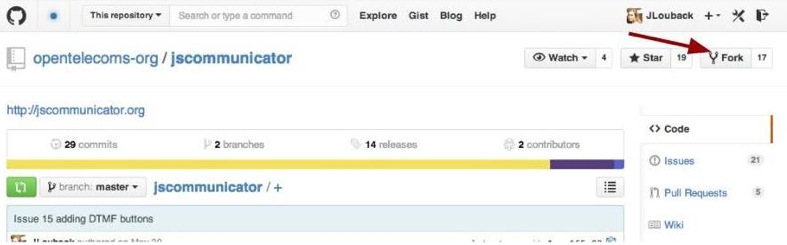 You should now have your own JSCommunicator repository on your Github account. On your main page select the tab Repositories . It should be the first on the list. The url will be https://github.com/YOUR-USERNAME/jscommunicator. My Github username is JLouback, so my jscommunicator repo can be found at https://github.com/JLouback/jscommunicator.
Clone
Now you should download all that code to your local machine so you can edit it. On your JSCommunicator page somewhere around the lower right corner you ll see a field entitled HTTPS clone URL:
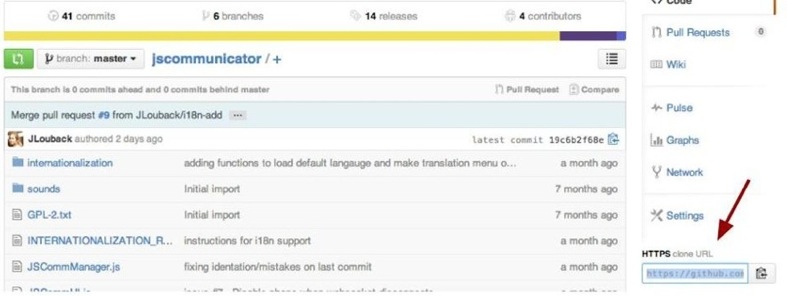 I don t know if this is correct, but you can just copy the URL on your browser too. I do that.
Now on your terminal, navigate to the directory you d like to place your repository and enter
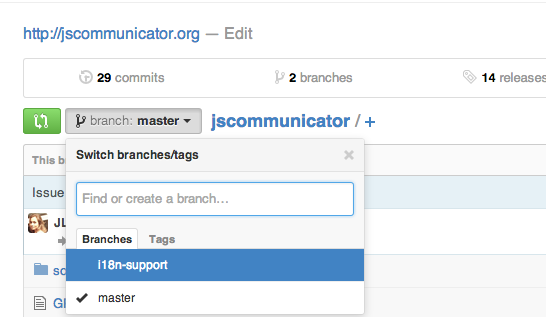 Click the green button directly to the left of the branch drop down menu shown above. This will create a pull request to add your new code to the official jscommunicator code. Once you click that button, you should see this:
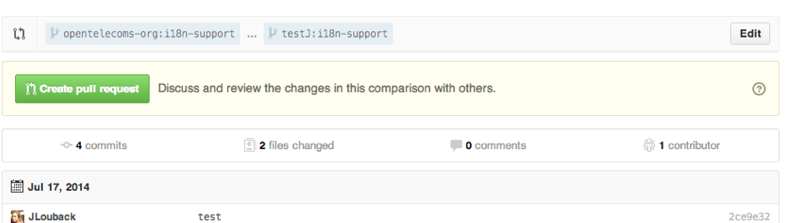 Make sure that the base repo (the first on the line above the green Create pull request button) is opentelecoms-org:i18n-support and not opentelecoms-org:master or another branch name. If it is, just click Edit on the right and you ll be able to select the branch from a dropdown like so:
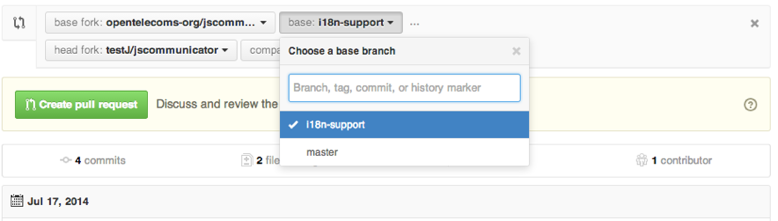 If first repo is opentelecoms-org:i18n-support and the second is YOUR_USER:i18n-support and you ve verified (scroll down) that there are 2 files changed which are your new .properties file and the added element to the available_languages.xml, go ahead and press create pull request. It ll open a window with a text box you can add an explanation to with one final Create pull request button. Click that and you re done! You ve kindly contributed with a translation for JSCommunicator!

 A common theme over the last few decades was that we could afford to simply
sit back and let computer (hardware) engineers take care of increases in
computing speed thanks to
 Dear lazyweb,

 Or yet another reason why it s really important that we succeed with Debian LTS. Last year we heard of

 My job exposes me to a large variety of computing systems and I regularly use
Mac, Windows and Linux desktops. My main desktop environment at home and work
has been Debian GNU/Linux for over 10 years. However every now and then I take
a little "holiday" and use something else for a few weeks. Often I'm spurred on
by some niggle or other on the GNOME desktop, or burn-out with whatever the
current contentious issue of the moment is in Debian. Usually I switched to
Windows and I used it as an excuse to play some computer games.
Last November I had just such an excuse to take a holiday but this time I opted
to go for Mac. I had a back-log of Mac issues to investigate at work anyway.
I haven't looked back.
It appears I have switched for good. I've been meaning to write about this for
some time, but I couldn't quite get the words right. I doubted I could express
my frustrations in a constructive, helpful way, even if I think that my
experiences are useful and my discoveries valuable, perhaps I would put them
across in a way that seemed inciteful rather than insightful. I wasn't sure
anyone cared. Certainly the GNOME community doesn't seem interested in
feedback.
I turns out that one person that doesn't care is me: I didn't realise just how
broken the F/OSS desktop is. The straw that broke the camel's back was
 So I've recently posted a few links on Twitter, and I see followers clicking them. But also I see random hits.
Tonight
 2014 and it s still annoyingly hard to find a reasonable GPG key management system for personal use All I want is to keep the key material isolated from any Internet connected host, without requiring me to jump through major inconvenience every time I want to use the key.
An HSM/Smartcard of some sort is an obvious choice, but they all suck in their own ways: