Here s my (eleventh) monthly update about the activities I ve done in the F/L/OSS world.
Debian
This was my 20th month of contributing to Debian.
I became a DM in late March last year and a DD last Christmas! \o/
Well, this month we had DebConf! \o/
(more about this later this week!)
Anyway, here are the following things I did in Debian this month:
Uploads and bug fixes:
rubocop (0.89.1+dfsg-1) - New upstream version for RuboCop::Packaging.
ruby-rubocop-ast (0.3.0+dfsg-1) - New upstream version for RuboCop's latest version.
Also, I log daily updates at gsocwithutkarsh2102.tk.
Since this is a wrap and whilst the daily updates are already available at the above site^, I ll quickly mention the important points and links here.
Continuation of GSoC for other Ruby related stuff!
Whilst working on Rubocop::Packaging, I contributed to more Ruby projects, refactoring their library a little bit and mostly fixing RuboCop issues and fixing issues that the Packaging extension reports as offensive .
Following are the PRs that I raised:
Debian (E)LTS
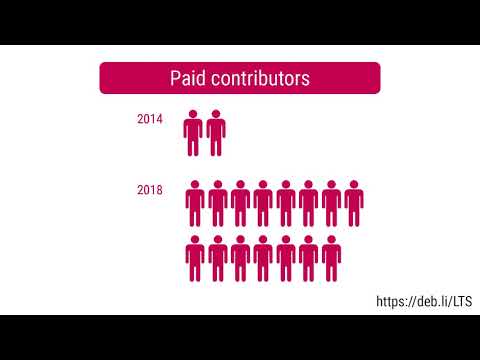
Debian Long Term Support (LTS) is a project to extend the lifetime of all Debian stable releases to (at least) 5 years. Debian LTS is not handled by the Debian security team, but by a separate group of volunteers and companies interested in making it a success.
And Debian Extended LTS (ELTS) is its sister project, extending support to the Jessie release (+2 years after LTS support).
This was my eleventh month as a Debian LTS and my second as a Debian ELTS paid contributor.
I was assigned 21.75 hours for LTS and 14.25 hours for ELTS and worked on
the following things:
Started working on uwsgi update for CVE-2020-11984. It seems that src:apache2 wasn t affected by that, but src:uwsgi was.
ELTS CVE Fixes and Announcements:
Issued ELA 255-1, fixing CVE-2020-14344, for libx11.
For Debian 8 Jessie, these problems have been fixed in version 2:1.6.2-3+deb8u3.
Issued ELA 259-1, fixing CVE-2020-10177, for pillow.
For Debian 8 Jessie, these problems have been fixed in version 2.6.1-2+deb8u5.
Issued ELA 269-1, fixing CVE-2020-11985, for apache2.
For Debian 8 Jessie, these problems have been fixed in version 2.4.10-10+deb8u17.
Started working on clamAV update, it s a major bump from v0.101.5 to v0.102.4. There were lots of movings parts. Contacted upstream maintainers to help reduce the risk of regression. Came up with a patch to loosen the libcurl version requirement. Hopefully, the update could be rolled out soon!
Other (E)LTS Work:
I spent an additional 11.15 hours working on compiling the responses of the LTS survey and preparing a gist of it for its presentation during the Debian LTS BoF at DebConf20.
I previously wrote about how I installed the Jitsi video-conferencing system on Debian [1]. We used that for a few unofficial meetings of LUV to test it out. Then we installed Big Blue Button (BBB) [2]. The main benefit of Jitsi over BBB is that it supports live streaming to YouTube. The benefits of BBB are a better text chat system and a whiteboard that allows conference participants to draw shared diagrams. So if you have the ability to run both systems then it s best to use Jitsi when you have so many viewers that a YouTube live stream is needed and to use BBB in all other situations.
One problem is with the ability to run both systems. Jitsi isn t too hard to install if you are installing it on a VM that is not used for anything else. BBB is a major pain no matter what you do. The latest version of BBB is 2.2 which was released in March 2020 and requires Ubuntu 16.04 (which was released in 2016 and has standard support until April next year) and doesn t support Ubuntu 18.04 (released in 2018 and has standard support until 2023). The install script doesn t check for correct apt repositories and breaks badly with no explanation if you don t have Ubuntu Multiverse enabled.
I expect that they rushed a release because of the significant increase in demand for video conferencing this year. But that s no reason for demanding the 2016 version of Ubuntu, why couldn t they have developed on version 18.04 for the last 2 years? Since that release they have had 6 months in which they could have released a 2.2.1 version supporting Ubuntu 18.04 or even 20.04.
The dependency list for BBB is significant, among other things it uses LibreOffice for the whiteboard. This adds to the pain of installing and maintaining it. It wouldn t surprise me if some of the interactions between all the different components have security issues.
Conclusion
If you want something that s not really painful to install and run then use Jitsi.
If you need YouTube live streaming use Jitsi.
If you need whiteboards and a good text chat system or if you generally need to run things like a classroom then BBB is a good option. But only if you can manage it, know someone who can manage it for you, or are happy to pay for a managed service provider to do it for you.
Here is my transparent report for my work on the Debian Long Term Support (LTS) and Debian Extended Long Term Support (ELTS), which extend the security support for past Debian releases, as a paid contributor.
In August, the monthly sponsored hours were split evenly among contributors depending on their max availability - I was assigned 21.75h for LTS (out of my 30 max; all done) and 14.25h for ELTS (out of my 20 max; all done).
We had a Birds of a Feathervideoconfsession at DebConf20, sadly with varying quality for participants (from very good to unusable), where we shared the first results of the LTS survey.
There were also discussions about evaluating our security reactivity, which proved surprisingly hard to estimate (neither CVE release date and criticality metrics are accurate nor easily available), and about when it is appropriate to use public naming in procedures.
Interestingly ELTS gained new supported packages, thanks to a new sponsor -- so far I'd seen the opposite, because we were close to the EOL.
As always, there were opportunities to de-dup work through mutual cooperation with the Debian Security team, and LTS/ELTS similar updates.
ELTS - Jessie
Fresh build VMs
rails/redmine: investigate issue, initially no-action as it can't be reproduced on Stretch and isn't supported in Jessie; follow-up when it's supported again
ghostscript: global triage: identify upstream fixed version, distinguish CVEs fixed within a single patch, bisect non-reproducible CVEs, reference missing commit (including at MITRE)
September.
Recently I've been writing and reading more golang code and I feel more comfortable with it. However every day I feel frustrated by the lack of features.
From Ella's childhood, she sees visions of the future. They come at first
with nose bleeds and other physical symptoms, but their worst aspect is
that they're sad and dark. Ella is black, as are those around her, and
their futures are full of shootings and gangs, death and trouble. As she
grows older, she develops her Thing: powers that let her bend, move, and
destroy things with her mind, and later to become invisible, teleport, and
reshape the world. Ella has superpowers.
Ella is not the viewpoint character of most of Riot Baby, however.
That is Kev, her younger brother, the riot baby of the title, born in
South Central on the day of the Rodney King riots. Kev grows up in Harlem
where they move after the destruction from the riots: keeping Ella's
secret, making friends, navigating gang politics, watching people be
harassed by the cops. Growing up black in the United States. Then Ella
sees something awful in the future and disappears, and some time
afterwards Kev ends up in Rikers Island.
One of the problems with writing reviews of every book I read is that
sometimes I read books that I am utterly unqualified to review. This is
one of those books. This novella is about black exhaustion and rage,
about the experience of oppression, about how it feels to be inside the
prison system. It's also a story in dialogue with an argument that isn't
mine, between the patience and suffering of endurance and not making
things worse versus the rage of using all the power that one has to force
a change. Some parts of it sat uncomfortably and the ending didn't work
for me on the first reading, but it's not possible for me to separate my
reactions to the novella from being a white man and having a far different
experience of the world.
I'm writing a review anyway because that's what I do when I read books,
but even more than normal, take this as my personal reaction expressed in
my quiet corner of the Internet. I'm not the person whose opinion of this
story should matter.
In many versions of this novella, Ella would be the main character, since
she's the one with superpowers. She does get some viewpoint scenes, but
most of the focus is on Kev even when the narrative is following Ella.
Kev trying to navigate the world, trying to survive prison, seeing his
friends murdered by the police, and living as the target of oppression
that Ella can escape. This was an excellent choice. Ella wouldn't have
been as interesting of a character if the story were more focused on her
developing powers instead of on the problems that she cannot solve.
The writing is visceral, immediate, and very evocative. Onyebuchi builds
the narrative with a series of short and vividly-described moments showing
the narrowing of Kev's life and Ella's exploration of her growing anger
and search for a way to support and protect him.
This is not a story about nonviolent resistance or about the arc of the
universe bending towards justice. Ella confronts this directly in a
memorable scene in a church towards the end of the novella that for me was
the emotional heart of the story. The previous generations, starting with
Kev and Ella's mother, preach the gospel of endurance and survival and
looking on the good side. The prison system eventually provides Kev a
path to quiet and a form of peace. Riot Baby is a story about
rejecting that approach to the continuing cycle of violence. Ella is fed
up, tired, angry, and increasingly unconvinced that waiting for change is
working.
I wasn't that positive on this story when I finished it, but it's stuck
with me since I read it and my appreciation for it has grown while writing
this review. It uses the power fantasy both to make a hard point about
the problems power cannot solve and to recast the argument about pacifism
and nonviolence in a challenging way. I'm still not certain what I think
of it, but I'm still thinking about it, which says a lot. It deserves the
positive attention that it's gotten.
Rating: 7 out of 10
approved deletion of
opencc (screenshot of the github repo),
telegram-desktop (low quality)
rejected deletion of
mumble (screenshots are versioned),
audacious (keyboard mash),
apache2/hashcat/onboard/jack-keyboard/kcharselect/inxi (spam reason)
Administration
Debian:
restarted RAM eating service
Debian wiki:
unblock IP addresses,
approve accounts
Sponsors
The cython-blis/preshed/thinc/theano bugs and smart-open/python-importlib-metadata/python-pyfakefs/python-zipp/python-threadpoolctl backports were sponsored by my employer.
All other work was done on a volunteer basis.
Here is another monthly update covering what I have been doing in the free software world during August 2020 (previous month):
Filed a pull request against django-enumfield, a library that provides an enumeration-like model field for the Django web development framework. The classproperty helper has been moved to django.utils.functional in newer versions of Django. [...]
As part of my role of being the assistant Secretary of the Open Source Initiative and a board director of Software in the Public Interest, I attended their respective monthly meetings and participated in various licensing and other discussions occurring on the internet, as well as the usual internal discussions, etc.
Filed a pull request for JSON-C, a reference counting library to allow you to easily manipulate JSON objects from C in order to make the documentation build reproducibly. [...]
Reviewed and merged some changes to my django-auto-one-to-one library for Django from Dan Palmer
(which automatically creates and destroys associated model instances) to not configure signals for models that aren't installed and to honour INSTALLED_APPS during model setup. [...]
Merged a pull request from Michael K. to cleanup the codebase after dropping support for Python 2 and Django 1.x [...] in my django-slack library which provides a convenient wrapper between projects using the Django and the Slack chat platform.
Updated my django-staticfiles-dotd utility that concatenates Debian .d-style directories containing Javascript and CSS to drop unquote usage from the six compatibility library. [...]
I uploaded Lintian versions 2.86.0, 2.87.0, 2.88.0, 2.89.0, 2.90.0, 2.91.0 and 2.92.0, as well as made the following changes:
New features:
Check for StandardOutput= and StandardError= fields that use the deprecated syslog or syslog-consolesystemd facilities. (#966617)
Add support for clzip as an alternative for lzip. (#967083)
Check for User=nobody and Group=nogroup in systemd.service files. (#966623)
Update link to the detagtive web interface code as it has been moved to the lintian salsa namespace. [...]
Drop the misleading "Beta testing" from the webpage header. [...]
Misc:
Add justification for the use of the lzip dependency in a previous debian/changelog entry. (#966817)
Update the generate-tag-summary release script to reflect change of tag definition filename extension change from .desc.tag. [...]
Revert a change to the spelling-error-in-rules-requires-root tag's severity; this is not a "spelling" check in the sense that it does not use our dictionary. [...]
Drop an unused $skip_tag argument in the extract_service_file_values routine. [...]
Reproducible Builds
One of the original promises of open source software is that distributed peer review and transparency of process results in enhanced end-user security. However, whilst anyone may inspect the source code of free and open source software for malicious flaws, almost all software today is distributed as pre-compiled binaries. This allows nefarious third-parties to compromise systems by injecting malicious code into ostensibly secure software during the various compilation and distribution processes.
The motivation behind the Reproducible Builds effort is to ensure no flaws have been introduced during this compilation process by promising identical results are always generated from a given source, thus allowing multiple third-parties to come to a consensus on whether a build was compromised.
The project is proud to be a member project of the Software Freedom Conservancy. Conservancy acts as a corporate umbrella allowing projects to operate as non-profit initiatives without managing their own corporate structure. If you like the work of the Conservancy or the Reproducible Builds project, please consider becoming an official supporter.
Responded at length to a discussion about the status of the reproducibility of ISO images [...], wrote back to the maintainer of WalletScrutiny asking why Android developers appear to be "allergic" to their application not being reproducible [...] and passed on an issue about the diffoscope website being down [...]. I also added a few short remarks on a proposal to bundle .buildinfo files within .deb archives [...].
This month, I:
Filed a pull request for JSON-C, a reference counting library to allow you to easily construct JSON objects from C in order to make the documentation build reproducibly. [...]
Categorised a large number of packages and issues in the Reproducible Builds "notes" repository.
Filed a build-failure bug against the muroar package that was discovered while doing reproducibility testing. (#968189)
We operate a large and many-featured Jenkins-based testing framework that powers tests.reproducible-builds.org. This month, I updated the self-serve package rescheduler to use HTML <pre> tags when dumping any debugging data. [...]
diffoscope
I made the following changes to diffoscope, including preparing and uploading versions 155, 156, 157 and 158 to Debian:
New features:
Support extracting data of PGP signed data. (#214)
Try files named .pgp against pgpdump(1) to determine whether they are Pretty Good Privacy (PGP) files. (#211)
Support multiple options for all file extension matching. [...]
Bug fixes:
Don't raise an exception when we encounter XML files with <!ENTITY> declarations inside the Document Type Definition (DTD), or when a DTD or entity references an external resource. (#212)
pgpdump(1) can successfully parse some binary files, so check that the parsed output contains something sensible before accepting it. [...]
Temporarily drop gnumeric from the Debian build-dependies as it has been removed from the testing distribution. (#968742)
Correctly use fallback_recognises to prevent matching .xsb binary XML files.
Correct identify signed PGP files as file(1) returns "data". (#211)
Logging improvements:
Emit a message when ppudump version does not match our file header. [...]
Don't use Python's repr(object) output in "Calling external command" messages. [...]
Include the filename in the "... not identified by any comparator" message. [...]
Codebase improvements:
Bump Python requirement from 3.6 to 3.7. Most distributions are either shipping with Python 3.5 or 3.7, so supporting 3.6 is not only somewhat unnecessary but also cumbersome to test locally. [...]
Drop some unused imports [...], drop an unnecessary dictionary comprehensions [...] and some unnecessary control flow [...].
Frontdesk duties, responding to user/developer questions, reviewing others' packages, participating in mailing list discussions, attending the Debian LTS BoF at DebConf20 etc.
Issued ELA-263-1 for qtbase-opensource-src and ELA-261-1 for qt4-x11, two components of cross-platform C++ application framework. A specially-crafted XBM image file could have caused a buffer overread.
Issued ELA-268-1 to address unsafe serialisation vulnerabilities that were discovered in the PHP-based squirrelmail webmail client.
Issued DLA 2311-1 for zabbix, the PHP-based monitoring system to fix a potential cross-site scripting vulnerability via <iframe> HTML elements.
Issued DLA 2334-1 to fix a denial of service vulnerability in ruby-websocket-extensions, a library for managing long-lived HTTP 'WebSocket' connections.
Issued DLA 2345-1 for PHP 7.0 as it was discovered that there was a use-after-free vulnerability when parsing PHAR files, a method of putting entire PHP applications into a single file.
I also updated the Extended LTS website to pluralise the "Related CVEs" text in announcement emails [...] and dropped some trailing whitespace [...].
You can find out more about the project via the following video:
Men at Arms is the fifteenth Discworld novel and a direct plot
sequel to Guards! Guards!. You could
start here without missing too much, but starting with Guards!
Guards! would make more sense. And of course there are cameos (and one
major appearance) by other characters who are established in previous
books.
Carrot, the adopted dwarf who joined the watch in Guards! Guards!,
has been promoted to corporal. He is now in charge of training new
recruits, a role that is more important because of the Night Watch's new
Patrician-ordered diversity initiative. The Watch must reflect the ethnic
makeup of the city. That means admitting a troll, a dwarf... and a woman?
Trolls and dwarfs hate each other because dwarfs mine precious things out
of rock and trolls are composed of precious things embedded in rocks, so
relations between the new recruits are tense. Captain Vimes is leaving
the Watch, and no one is sure who would or could replace him. (The reason
for this is a minor spoiler for Guards! Guards!) A magical weapon
is stolen from the Assassin's Guild. And a string of murders begins,
murders that Vimes is forbidden by Lord Vetinari from investigating and
therefore clearly is going to investigate.
This is an odd moment at which to read this book.
The Night Watch are not precisely a police force, although they are moving
in that direction. Their role in Ankh-Morpork is made much stranger by
the guild system, in which the Thieves' Guild is responsible for theft and
for dealing with people who steal outside of the quota of the guild. But
Men at Arms is in part a story about ethics, about what it means to
be a police officer, and about what it looks like when someone is very
good at that job.
Since I live in the United States, that makes it hard to avoid reading
Men at Arms in the context of the current upheavals about police
racism, use of force, and lack of accountability. Men at Arms can
indeed be read that way; community relations, diversity in the police
force, the merits of making two groups who hate each other work together,
and the allure of violence are all themes Pratchett is working with in
this novel. But they're from the perspective of a UK author writing in
1993 about a tiny city guard without any of the machinery of modern
police, so I kept seeing a point of clear similarity and then being
slightly wrong-footed by the details. It also felt odd to read a book
where the cops are the heroes, much in the style of a detective show.
This is in no way a problem with the book, and in a way it was helpful
perspective, but it was a strange reading experience.
Cuddy had only been a guard for a few days but already he had absorbed
one important and basic fact: it is almost impossible for anyone to be
in a street without breaking the law.
Vimes and Carrot are both excellent police officers, but in entirely
different ways. Vimes treats being a cop as a working-class job and is
inclined towards glumness and depression, but is doggedly persistent and
unable to leave a problem alone. His ethics are covered by a thick layer
of world-weary cynicism. Carrot is his polar opposite in personality:
bright, endlessly cheerful, effortlessly charismatic, and determined to
get along with everyone. On first appearance, this contrast makes Vimes
seem wise and Carrot seem a bit dim. That is exactly what Pratchett is
playing with and undermining in Men at Arms.
Beneath Vimes's cynicism, he's nearly as idealistic as Carrot, even though
he arrives at his ideals through grim contrariness. Carrot, meanwhile, is
nowhere near as dim as he appears to be. He's certain about how he wants
to interact with others and is willing to stick with that approach no
matter how bad of an idea it may appear to be, but he's more self-aware
than he appears. He and Vimes are identical in the strength of their
internal self-definition. Vimes shows it through the persistent, grumpy
stubbornness of a man devoted to doing an often-unpleasant job, whereas
Carrot verbally steamrolls people by refusing to believe they won't do the
right thing.
Colon thought Carrot was simple. Carrot often struck people as
simple. And he was. Where people went wrong was thinking that simple
meant the same thing as stupid.
There's a lot going on in this book apart from the profiles of two very
different models of cop. Alongside the mystery (which doubles as pointed
commentary on the corrupting influence of violence and personal weaponry),
there's a lot about dwarf/troll relations, a deeper look at the
Ankh-Morpork guilds (including a horribly creepy clown guild), another
look at how good Lord Vetinari is at running the city by anticipating how
other people will react, a sarcastic dog named Gaspode (originally seen in
Moving Pictures), and Pratchett's usual
collection of memorable lines. It is also the origin of the
now-rightfully-famous Vimes boots theory:
The reason that the rich were so rich, Vimes reasoned, was because
they managed to spend less money.
Take boots, for example. He earned thirty-eight dollars a month plus
allowances. A really good pair of leather boots cost fifty dollars.
But an affordable pair of boots, which were sort of OK for a season or
two and then leaked like hell when the cardboard gave out, cost about
ten dollars. Those were the kind of boots Vimes always bought, and
wore until the soles were so thin that he could tell where he was in
Ankh-Morpork on a foggy night by the feel of the cobbles.
But the thing was that good boots lasted for years and years. A man
who could afford fifty dollars had a pair of boots that'd still be
keeping his feet dry in ten years' time, while the poor man who could
only afford cheap boots would have spent a hundred dollars on boots in
the same time and would still have wet feet.
This was the Captain Samuel Vimes 'Boots' theory of socioeconomic
unfairness.
Men at Arms regularly makes lists of the best Discworld novels, and
I can see why. At this point in the series, Pratchett has hit his stride.
The plots have gotten deeper and more complex without losing the funny
moments, movie and book references, and glorious turns of phrase. There
is also a lot of life philosophy and deep characterization when one pays
close attention to the characters.
He was one of those people who would recoil from an assault on
strength, but attack weakness without mercy.
My one complaint is that I found it a bit overstuffed with both characters
and subplots, and as a result had a hard time following the details of the
plot. I found myself wanting a timeline of the murders or a better recap
from one of the characters. As always with Pratchett, the digressions are
wonderful, but they do occasionally come at the cost of plot clarity.
I'm not sure I recommend the present moment in the United States as the
best time to read this book, although perhaps there is no better time for
Carrot and Vimes to remind us what good cops look like. But regardless of
when one reads it, it's an excellent book, one of the best in the
Discworld series to this point.
Followed, in publication order, by Soul Music. The next Watch book
is Feet of Clay.
Rating: 8 out of 10
A new minor release 0.2.9 of RcppCCTZ is now on CRAN.
RcppCCTZ uses Rcpp to bring CCTZ to R. CCTZ is a C++ library for translating between absolute and civil times using the rules of a time zone. In fact, it is two libraries. One for dealing with civil time: human-readable dates and times, and one for converting between between absolute and civil times via time zones. And while CCTZ is made by Google(rs), it is not an official Google product. The RcppCCTZ page has a few usage examples and details. This package was the first CRAN package to use CCTZ; by now at least three others do using copies in their packages which remains less than ideal.
This version adds a header file for the recently-exported three functions.
Changes in version 0.2.9 (2020-08-30)
Provide a header RcppCCZT_API.h for client packages.
Show a simple example of parsing a YYYYMMDD HHMMSS.FFFFFF date.
What is this thing?
When you first open a command-line (note that I use the terms command-line
and shell interchangably here, they re basically the same, but command-line
is the more general term, and shell is the name for the program that executes
commands for you)
you ll see something like this:
This line is called a command prompt and it tells you four pieces of information:
jaadams: The username of the user that is currently running this shell.
bg7: The name of the computer that this shell is running on, important
for when you start accessing shells on remote machines.
/tmp/thisfolder: The folder or directory that your shell is currently
running in. Like a file explorer (like Window s Explorer or Mac s Finder) a
shell always has a working directory, from which all relative paths (see
sidenote below) are resolved.
When you first opened a shell, however, you might notice that is looks more
like this:
This is a shorthand notation that the shell uses to make this output shorter
when possible. ~ stands for your home directory, usually /home/<username>.
Like C:\Users\<username>\ on Windows or /Users/<username> on Mac,
this directory is where all your files should go by default.
Thus a command prompt like this:
actually tells you that you are currently in the /home/jaadams/Downloads
directory.
Sidenote: The Unix Filesystem and Relative Paths
folders on Linux and other Unix-derived systems like MacOS are usually
called directories.
These directories are represented by paths, strings that indicate where the
directory is on the filesystem.
The one unusual part is the so-called root directory .
All files are stored in this folder or directories under it.
Its path is just / and there are no directories above it.
For example, the directory called home typically contains all user directories.
This is stored in the root directory, and each users specific data
is stored in a directory named after that user under home.
Thus, the home directory of the user jacob is typically /home/jacob,
the directory jacob under the
home directory stored in the root directory /.
If you re interested in more details about what goes in what directory,
man hier has the basics and the
Filesystem Hierarchy Standard
governs the layout of the filesystem on most Linux distributions.
You don t always have to use the full path, however.
If the path does not begin with a /, it is assumed that the path actually
begins with the path of the current directory.
So if you use a path like my/folders/here, and you re in the /home/jacob
directory, the path will be treated like /home/jacob/my/folders/here.
Each folder also contains the symbolic links .. and ..
Symbolic links are a very powerful kind of
file that is actually a reference to another file.
.. always represents the parent directory
of the current directory, so /home/jacob/.. links to /home/.
. always links to the current directory, so /home/jacob/. links to
/home/jacob.
Running commands
To run a command from the command prompt, you type its name and then
usually some arguments to tell it what to do.
For example, the echo command displays the text passed as arguments.
jacob@lovelace/home/jacob$ echo hello world
hello world
Arguments to commands are space-separated, so in the previous example hello
is the first argument and world is the second. If you need an argument to
contain spaces, you ll want to put quotes around it, echo "like so".
Certain arguments are called flags , or options (options if they take another
argument, flags otherwise) usually prefixed with a hyphen,
and they change the way a program operates.
For example, the ls command outputs the contents of a directory passed as
an argument, but if you add -l before the directory, it will give you more
details on the files in that directory.
jacob@lovelace/tmp/test$ ls /tmp/test
1  2  3  4  5  6
jacob@lovelace/tmp/test$ ls -l /tmp/test
total 0
-rw-r--r-- 1 jacob jacob 0 Aug 26 22:06 1
-rw-r--r-- 1 jacob jacob 0 Aug 26 22:06 2
-rw-r--r-- 1 jacob jacob 0 Aug 26 22:06 3
-rw-r--r-- 1 jacob jacob 0 Aug 26 22:06 4
-rw-r--r-- 1 jacob jacob 0 Aug 26 22:06 5
-rw-r--r-- 1 jacob jacob 0 Aug 26 22:06 6
jacob@lovelace/tmp/test$
Most commands take different flags to change their behavior in various ways.
File Management
cd <path>: Change the current directory of the running shell to <path>.
ls <path>: Output the contents of <path>. If no path is passed, it prints
the contents of the current directory.
touch <filename>: create an new empty file called <filename>.
Used on an existing file, it updates the file s last accessed and modified times.
Most text editors can also create a new file for you, which is probably more useful.
mkdir <directory>: Create a new folder/directory at path <directory>.
mv <src> <dest>: Move a file or directory at path <src> to <dest>.
cp <src> <dest>: Copy a file or directory at path <src> to <dest>.
rm <file>: Remove a file at path <file>.
zip -r <zipfile> <contents...>: Create a zip file <zipfile> with contents
<contents>. <contents> can be multiple arguments, and you ll usually want
to use the -r argument when including directories in your zipfile, as otherwise
only the directory will be included and not the files and directories within it.
Searching
grep <thing> <file>: Look for the string <thing> in <file>.
If no <file> is passed it searches standard input.
find <path> -name <name>: Find a file or directory called <name> somwhere
under <path>. This command is actually very powerful, but also very complex.
For example you can delete all files in a directory older than 30 days with:
find -mtime +30 -exec rm \;
locate <name>: A much easier to use command to find a file with a given
name, but it is not usually installed by default.
Outputting Files
cat <files...>: Output (concatenate) all the files passed as arguments.
head <file>: Output the beginning of <file>
tail <file>: Output the end of <file>
How to Find the Right Command
All commands (at least on sane Linux distributions like Debian or Ubuntu)
are documented with a manual page, in man section 1 (for more information on
manual sections, run man intro).
This can be accessed using man <command>
You can search for the right command using the -k flag, as in man -k <search>.
You can also view manual pages in your browser, on sites like https://manpages.debian.org
or https://linux.die.net/man.
This is not always helpful, however, because some command s descriptions are
not particularly useful, and also there are a lot of manual pages, which can
make searching for a specific one difficult. For example, finding the right
command to search inside text files is quite difficult via man (it s grep).
When you can t find what you need with man I recommend falling back to
searching the Internet. There are lots of bad Linux tutorials out there, but
here are some reputable sources I recommend:
Hosting providers like Digital Ocean or Linode: Good intro documentation, but
can sometimes be outdated
https://tldp.org: The Linux Documentation project is great, but it can also be a little
outdated sometimes.
https://stackoverflow.com: Oftentimes has great answers, but quality varies wildly
since anyone can answer.
These are certainly not the only options but they re the sources I would
recommend when available.
How to Read a Manual Page
Manual pages consist of a series of sections, each with a specific purpose.
Instead of attempting to write my own description here, I m going to borrow
the excellent one from The Linux Documentation Project
The NAME section
is the only required section. Man pages without a name section are as useful as refrigerators at the north pole. This section also has a standardized format consisting of a comma-separated list of program or function names, followed by a dash, followed by a short (usually one line) description of the functionality the program (or function, or file) is supposed to provide. By means of makewhatis(8), the name sections make it into the whatis database files. Makewhatis is the reason the name section must exist, and why it must adhere to the format I described.
(Formatting explanation cut for brevity)
The SYNOPSIS section
is intended to give a short overview on available program options. For functions this sections lists corresponding include files and the prototype so the programmer knows the type and number of arguments as well as the return type.
The DESCRIPTION section
eloquently explains why your sequence of 0s and 1s is worth anything at all. Here s where you write down all your knowledge. This is the Hall Of Fame. Win other programmers and users admiration by making this section the source of reliable and detailed information. Explain what the arguments are for, the file format, what algorithms do the dirty jobs.
The OPTIONS section
gives a description of how each option affects program behaviour. You knew that, didn t you?
The FILES section
lists files the program or function uses. For example, it lists configuration files, startup files, and files the program directly operates on.
(Cut details about installing files)
The ENVIRONMENT section
lists all environment variables that affect your program or function and tells how, of course. Most commonly the variables will hold pathnames, filenames or default options.
The DIAGNOSTICS section
should give an overview of the most common error messages from your program and how to cope with them. There s no need to explain system error error messages (from perror(3)) or fatal signals (from psignal(3)) as they can appear during execution of any program.
The BUGS section
should ideally be non-existent. If you re brave, you can describe here the limitations, known inconveniences and features that others may regard as misfeatures. If you re not so brave, rename it the TO DO section ;-)
The AUTHOR section
is nice to have in case there are gross errors in the documentation or program behaviour (Bzzt!) and you want to mail a bug report.
The SEE ALSO section
is a list of related man pages in alphabetical order. Conventionally, it is the last section.
Remote Access
One of the more powerful uses of the shell is through ssh, the secure shell.
This allows you to remotely connect to another computer and run a shell on that
machine:
The prompt changes to reflect the change in user and host,
as you can see in the example above.
This allows you to work in a shell on that machine as if it was right in front
of you.
Moving Files Between Machines
There are several ways you can move files between machines over ssh.
The first and easiest is scp, which works much like the cp command
except that paths can also take a user@host argument to move files across
computers. For example, if you wanted to move a file test.txt to your
home directory on another machine, the command would look like:
scp test.txt other@example.com:
(The home directory is the default path)
Otherwise you can move files by reversing the order of the arguments
and put a path after the colon to move files from another directory on the
remote host. For example, if you wanted to fetch the file /etc/issue.net
from example.com:
scp other@example.com:/etc/issue.net .
Another option is the sftp command, which gives you a very simple shell-like
interface in which you can cd and ls, before either puting files onto
the local machine or geting files off of it.
The final and most powerful option is rsync which syncs the contents of one
directory to another, and doesn t copy files that haven t changed. It s powerful
and complex, however, so I recommend reading the USAGE section of its man page.
Long-Running Commands
The one problem with ssh is that it will stop any command running in your
shell when you disconnect. If you want to leave something on and come back
later then this can be a problem.
This is where terminal multiplexers come in. tmux and screen both allow
you to run a shell in a safe environment where it will continue even if you
disconnect from it. You do this by running the command without any arguments,
i.e. just tmux or just screen.
In tmux you can disconnect from the current session by
pressing Ctrl+b then d, and reattach with the tmux attach command.
screen works similarly, but with Ctrl+a instead of b and screen -r to
reattach.
Command Inputs and Outputs
Arguments are not the only way to pass input to a command. They can also take
input from what s called standard input , which the shell usually connects to
your keyboard.
Output can go to two places, standard output and standard error, both of which
are directed to the screen by default.
Redirecting I/O
Note that I said above that standard input/output/error are only usually
connected to the keyboard and the terminal? This is because you can redirect
them to other places with the shell operators <, > and the very powerful .
File redirects
The operators < and > redirect the input and output of a command to a file.
For example, if you wanted a file called list.txt that contained a list of
all the files in a directory /this/one/here you could use:
ls /this/one/here > list.txt
Pipelines
The pipe character, , allows you to direct the output of one command into
the input of another. This can be very powerful.
For example, the following pipeline lists the contents of the current directory
searches for the string test , then counts the number of results.
(wc -l counts the number of lines in its input)
ls grep test wc -l
For a better, but even more contrived example, say you have a file myfile,
with a bunch of lines of potentially duplicated and unsorted data
test
test
1234
4567
1234
You can sort it and output only the unique lines with sort and uniq:
$ uniq < myfile   sort
1234
1234
4567
test
Save Yourself Some Typing: Globs and Tab-Completion
Sometimes you don t want to type out the whole filename when writing out a
command. The shell can help you here by autocompleting when you press the tab
key.
If you have a whole bunch of files with the same suffix, you can refer to them
when writing arguments as *.suffix. This also works with prefixes, prefix*,
and in fact you can put a * anywhere, *middle*. The shell will expand that
* into all the files in that directory that match your criteria
(ending with a specific suffix, starting with a specific prefix, and so on)
and pass each file as a separate argument to the command.
For example, if I have a series of files called 1.txt, 2.txt, and so on
up to 9, each containing just the number for which it s named, I could use
cat to output all of them like so:
Also the ~ shorthand mentioned above that refers to your home directory
can be used when passing a path as an argument to a command.
Ifs and For loops
The files in the above example were generated with the following shell
commands:
for i in 1 2 3 4 5 6 7 8 9
do
echo $i > $i.txt
done
But I ll have to save variables, conditionals and loops for another day because
this is already too long. Needless to say the shell is a full programming
language, although a very ugly and dangerous one.
[Disclaimer: this has been sitting as a draft for close to three months ; I forgot to publish it, this is now finally done.]
In my previous blog post, I built Firefox in a multiple different number of configurations where I d disable the CPU turbo, some of its cores or some of its threads. That is something that was traditionally done via the BIOS, but rebooting between each attempt is not really a great experience.
Fortunately, the Linux kernel provides a large number of knobs that allow this at runtime.
Turbo
This is the most straightforward:
$ echo 0 > /sys/devices/system/cpu/cpufreq/boost
Re-enable with
$ echo 1 > /sys/devices/system/cpu/cpufreq/boost
CPU frequency throttling
Even though I haven t mentioned it, I might as well add this briefly. There are many knobs to tweak frequency throttling, but assuming your goal is to disable throttling and set the CPU frequency to its fastest non-Turbo frequency, this is how you do it:
where $n is the id of the core you want to do that for, so if you want to do that for all the cores, you need to do that for cpu0, cpu1, etc.
Re-enable with:
(assuming this was the value before you changed it ; ondemand is usually the default)
Cores and Threads
This one requires some attention, because you cannot assume anything about the CPU numbers. The first thing you want to do is to check those CPU numbers. You can do so by looking at the physical id and core id fields in /proc/cpuinfo, but the output from lscpu --extended is more convenient, and looks like the following:
Now, this output is actually the ideal case, where pairs of CPUs (virtual cores) on the same physical core are always n, n+32, but I ve had them be pseudo-randomly spread in the past, so be careful.
To turn off a core, you want to turn off all the CPUs with the same CORE identifier. To turn off a thread (virtual core), you want to turn off one CPU. On machines with multiple sockets, you can also look at the SOCKET column.
Turning off one CPU is done with:
$ echo 0 > /sys/devices/system/cpu/cpu$n/online
Re-enable with:
$ echo 1 > /sys/devices/system/cpu/cpu$n/online
Extra: CPU sets
CPU sets are a feature of Linux s cgroups. They allow to restrict groups of processes to a set of cores.
The first step is to create a group like so:
$ mkdir /sys/fs/cgroup/cpuset/mygroup
Please note you may already have existing groups, and you may want to create subgroups. You can do so by creating subdirectories.
Then you can configure on which CPUs/cores/threads you want processes in this group to run on:
The value you write in this file is a comma-separated list of CPU/core/thread numbers or ranges. 0-3 is the range for CPU/core/thread 0 to 3 and is thus equivalent to 0,1,2,3. The numbers correspond to /proc/cpuinfo or the output from lscpu as mentioned above.
There are also memory aspects to CPU sets, that I won t detail here (because I don t have a machine with multiple memory nodes), but you can start with:
There are a number of tweaks you can do to this setup, I invite you to check out the cpuset(7) manual page.
Disabling a group is a little involved. First you need to move the processes to a different group:
$ while read pid; do echo $pid > /sys/fs/cgroup/cpuset/tasks; done < /sys/fs/cgroup/cpuset/mygroup/tasks
A new release 0.2.2 of the RcppSMC package arrived on CRAN earlier today (and once again as a very quick pretest-publish within minutes of submission).
RcppSMC provides Rcpp-based bindings to R for the Sequential Monte Carlo Template Classes (SMCTC) by Adam Johansen described in his JSS article. Sequential Monte Carlo is also referred to as Particle Filter in some contexts.
This releases contains two fixes from a while back that had not been released, a CRAN-requested update plus a few more minor polishes to make it pass R CMD check --as-cran as nicely as usual.
Changes in RcppSMC version 0.2.2 (2020-08-30)
Package helper files .editorconfig added (Adam in #43).
Change const correctness and add return (Leah in #44).
Updates to continuous integration and R versions used (Dirk)
Accomodate CRAN request, other updates to CRAN Policy (Dirk in #49 fixing #48).
Dealing with the void during MiniDebConf Online #1
Between 28 and 31 May this year, we set out to create our first ever online MiniDebConf for Debian. Many people have been meaning to do something similar for a long time, but it just didn t work out yet. With many of us being in lock down due to COVID-19, and with the strong possibility looming that DebConf20 might have had to become an online event, we rushed towards organising the first ever Online MiniDebConf and put together some form of usable video stack for it.
I could go into all kinds of details on the above, but this post is about a bug that lead to a pretty nifty feature for DebConf20. The tool that we use to capture Jitsi calls is called Jibri (Jitsi Broadcasting Infrustructure). It had a bug (well, bug for us, but it s an upstream feature) where Jibri would hang up after 30s of complete silence, because it would assume that the call has ended and that the worker can be freed up again. This would result in the stream being ended at the end of every talk, so before the next talk, someone would have to remember to press play again in their media player or on the video player on the stream page. Hrmph.
Easy solution on the morning that the conference starts? I was testing a Debian Live image the night before in a KVM and thought that I might as well just start a Jitsi call from there and keep a steady stream of silence so that Jibri doesn t hang up.
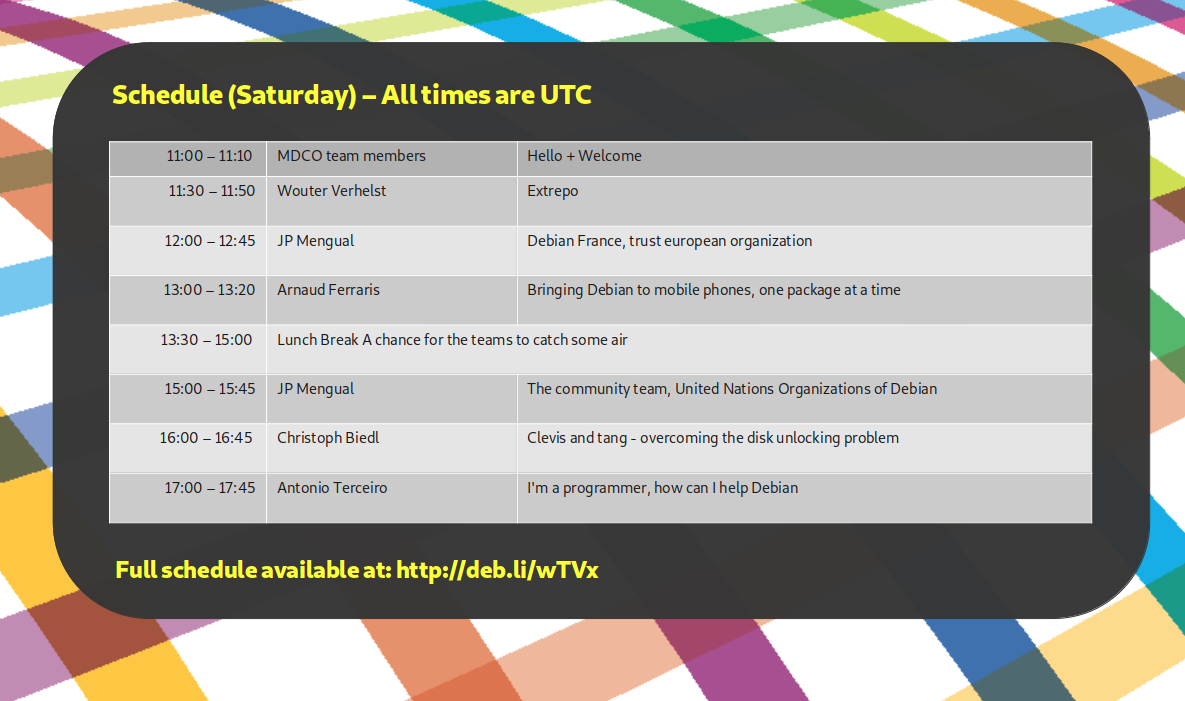
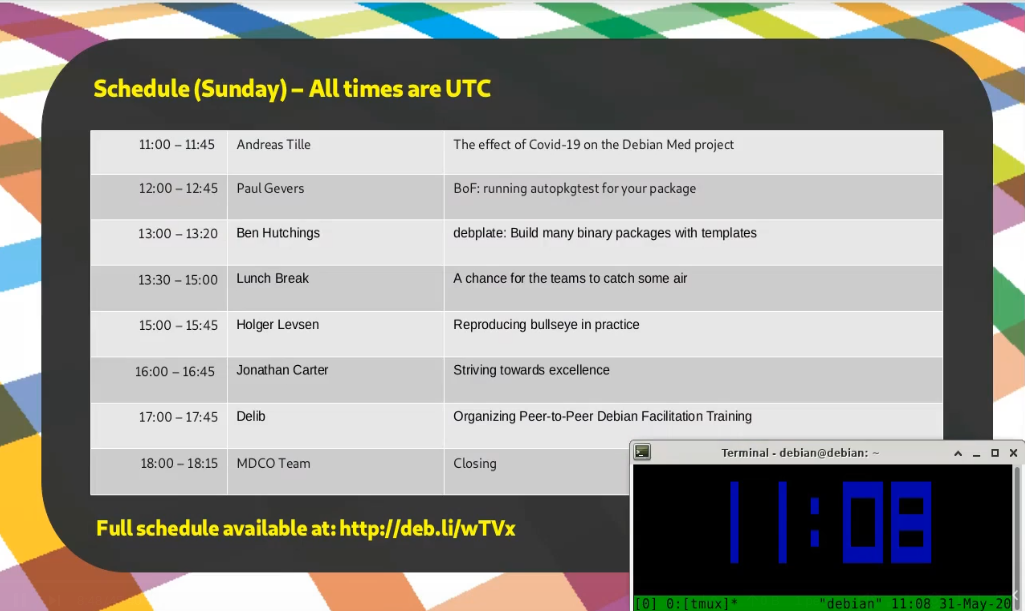
It worked! But the black screen and silence on stream was a bit eery. Because this event was so experimental in nature, and because we were on such an incredibly tight timeline, we opted not to seek sponsors for this event, so there was no sponsors loop that we d usually stream during a DebConf event. Then I thought Ah! I could just show the schedule! .
The stream looked bright and colourful (and was even useful!) and Jitsi/Jibri didn t die. I thought my work was done. As usual, little did I know how untrue that was.
The silence was slightly disturbing after the talks, and people asked for some music. Playing music on my VM and capturing the desktop audio in to Jitsi was just a few pulseaudio settings away, so I spent two minutes finding some freely licensed tracks that sounded ok enough to just start playing on the stream. I came across mini-albums by Captive Portal and Cinema Noir, During the course of the MiniDebConf Online I even started enjoying those. Someone also pointed out that it would be really nice to have a UTC clock on the stream. I couldn t find a nice clock in a hurry so I just added a tmux clock in the meantime while we deal with the real-time torrent of issues that usually happens when organising events like this.
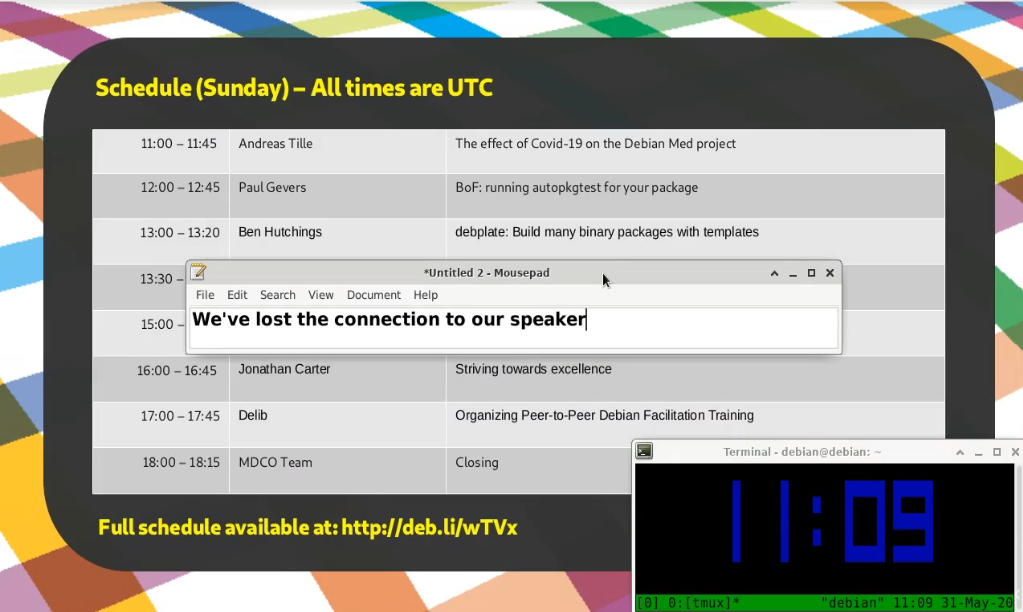
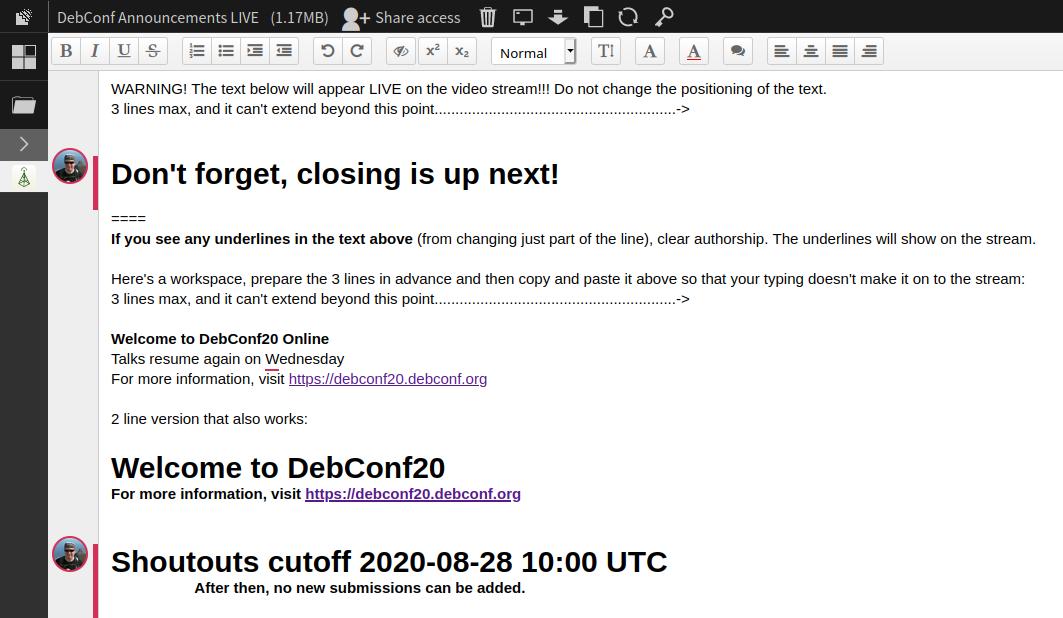
Speaking of issues, during our very first talk of the last day, our speaker had a power cut during the talk and abruptly dropped off. Oops! So, since I had a screenshare open from the VM to the stream, I thought I d just pop in a quick message in a text editor to let people know that we re aware of it and trying to figure out what s going on.
In the end, MiniDebConf Online worked out all right. Besides the power cut for our one speaker, and another who had a laptop that was way too under-powered to deal with video, everything worked out very well. Even the issues we had weren t show-stoppers and we managed to work around them.
DebConf20 Moves Online
For DebConf, we usually show a sponsors loop in between sessions. It s great that we give our sponsors visibility here, but in reality people see the sponsors loop and think Talk over! and then they look away. It s also completely silent and doesn t provide any additional useful information. I was wondering how I could take our lessons from MDCO#1 and integrate our new tricks with the sponsors loop. That is, add the schedule, time, some space to type announcements on the screen and also add some loopable music to it.
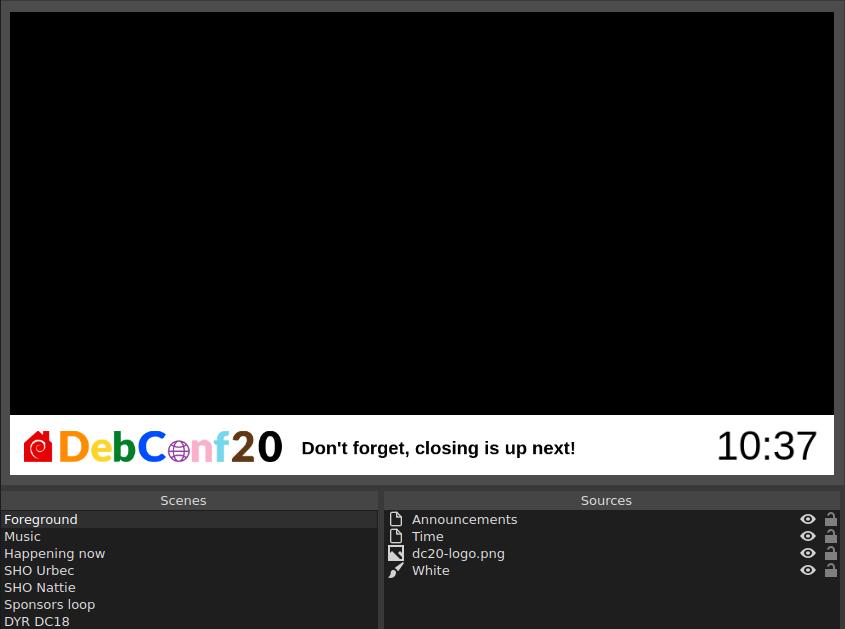
I used OBS before in making my videos, and like the flexibility it provides when working with scenes and sources. A scene is what you would think of as a screen or a document with its own collection of sources or elements. For example, a scene might contain sources such as a logo, clock, video, image, etc. A scene can also contain another scene. This is useful if you want to contain a banner or play some background music that is shared between scenes.
The above screenshots illustrate some basics of scenes and sources. First with just the DC20 banner, and then that used embedded in another scene.
For MDCO#1, I copied and pasted the schedule into a LibreOffice Impress slide that was displayed on the stream. Having to do this for all 7 days of DebConf, plus dealing with scheduling changes would be daunting. So, I started to look in to generating some schedule slides programmatically. Stefano then pointed me to the Happening Now page on the DebConf website, where the current schedule block is displayed. So all I would need to do in OBS was to display a web page. Nice!
Unfortunately the OBS in Debian doesn t have the ability to display web pages out of the box (we need to figure out CEF in Debian), but fortunately someone provides a pre-compiled version of the plugin called Linux Browser that works just fine. This allowed me to easily add the schedule page in its own scene.
Being able to display a web page solved another problem. I wasn t fond of having to type / manage the announcements in OBS. It would either be a bit prone to user error, and if you want to edit the text while the loop is running, you d have to disrupt the loop, go to the foreground scene, and edit the text before resuming the loop. That s a bit icky. Then I thought that we could probably just get that from a web page instead. We could host some nice html snippet in a repository in salsa, and then anyone could easily commit an MR to update the announcement.
But then I went a step further, use an etherpad! Then anyone in the orga team can quickly update the announcement and it would be instantly changed on the stream. Nice! So that small section of announcement text on the screen is actually a whole web browser with an added OBS filter to crop away all the pieces we don t want. Overkill? Sure, but it gave us a decent enough solution that worked in time for the start of DebConf. Also, being able to type directly on to the loop screen works out great especially in an emergency. Oh, and uhm the clock is also a website rendered in its own web browser :-P
So, I had the ability to make scenes, add elements and add all the minimal elements I wanted in there. Great! But now I had to figure out how to switch scenes automatically. It s probably worth mentioning that I only found some time to really dig into this right before DebConf started, so with all of this I was scrambling to find things that would work without too many bugs while also still being practical.
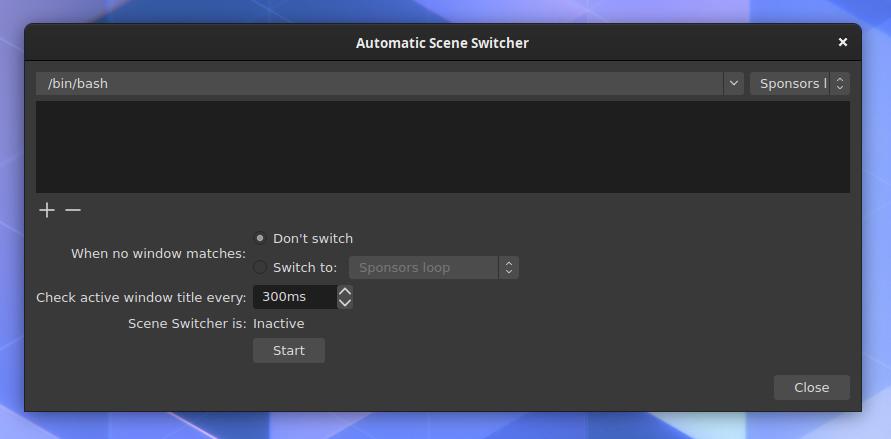
Now I needed the ability to switch between the scenes automatically / programmatically. I had never done this in OBS before. I know it has some API because there are Android apps that you can use to control OBS with from your phone. I discovered that it had an automatic scene switcher, but it s very basic. It can only switch based on active window, which can be useful in some cases, but since we won t have any windows open other than OBS, this tool was basically pointless.
After some quick searches, I found a plugin called Advanced Scene Switcher. This plugin can do a lot more, but has some weird UI choices, and is really meant for gamers and other types of professional streamers to help them automate their work flow and doesn t seem at all meant to be used for a continuous loop, but, it worked, and I could make it do something that will work for us during the DebConf.
I had a chicken and egg problem because I had to figure out a programming flow, but didn t really have any content to work with, or an idea of all the content that we would eventually have. I ve been toying with the idea in my mind and had some idea that we could add fun facts, postcards (an image with some text), time now in different timezones, Debian news (maybe procured by the press team), cards that contain the longer announcements that was sent to debconf-announce, perhaps a shout out or two and some photos from previous DebConfs like the group photos. I knew that I wouldn t be able to build anything substantial by the time DebConf starts, but adding content to OBS in between talks is relatively easy, so we could keep on building on it during DebConf.
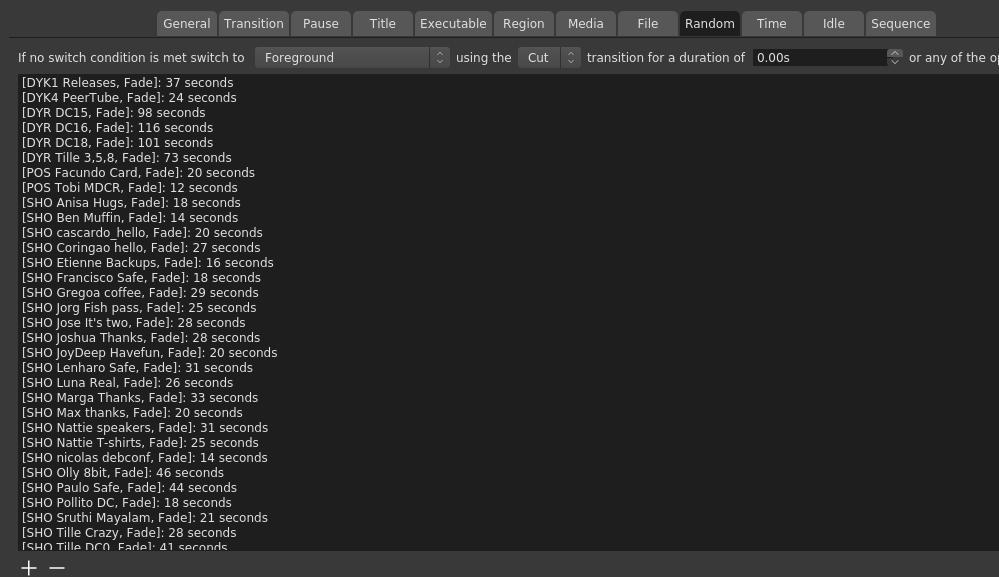
Nattie provided the first shout out, and I made 2 video loops with the DC18/19 pictures and also two Did you know cards. So the flow I ended up with was: Sponsors -> Happening Now -> Random video (which would be any of those clips) -> Back to sponsors. This ended up working pretty well for quite a while. With the first batch of videos the sponsor loop would come up on average about every 2 minutes, but as much shorter clips like shout outs started to come in faster and faster, it made sense to play a few 2-3 shout-outs before going back to sponsors.
So here is a very brief guide on how I set up the sequencing in Advanced Scene Switcher.
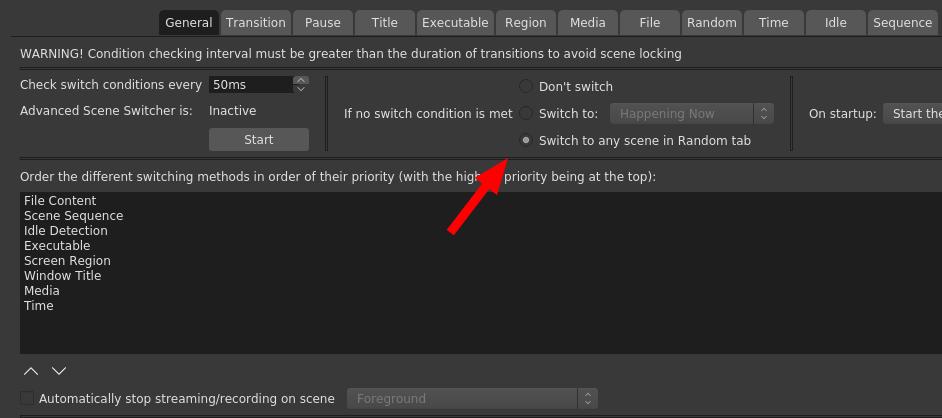
If no condition was met, a video would play from the Random tab.
Then in the Random tab, I added the scenes that were part of the random mix. Annoyingly, you have to specify how long it should play for. If you don t, the no condition thingy is triggered and another video is selected. The time is also the length of the video minus one second, because
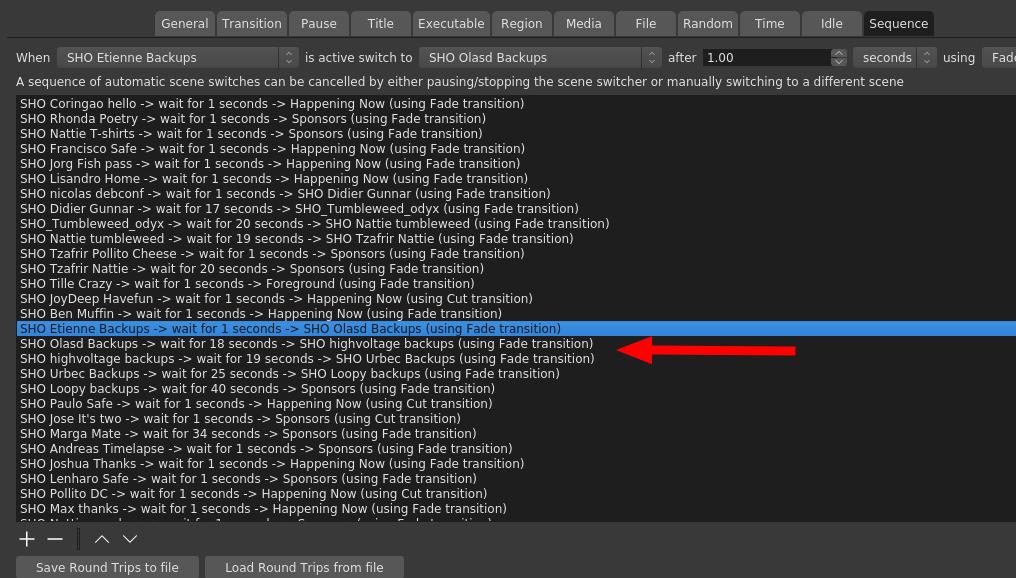
You can t just say that a random video should return back to a certain scene, you have to specify that in the sequence tab for each video. Why after 1 second? Because, at least in my early tests, and I didn t circle back to this, it seems like 0s can randomly either mean instantly, or never. Yes, this ended up being a bit confusing and tedious, and considering the late hours I worked on this, I m surprised that I didn t manage to screw it up completely at any point.
I also suspected that threads would eventually happen. That is, when people create video replies to other videos. We had 3 threads in total. There was a backups thread, beverage thread and an impersonation thread. The arrow in the screenshot above points to the backups thread. I know it doesn t look that complicated, but it was initially somewhat confusing to set up and make sense out of it.
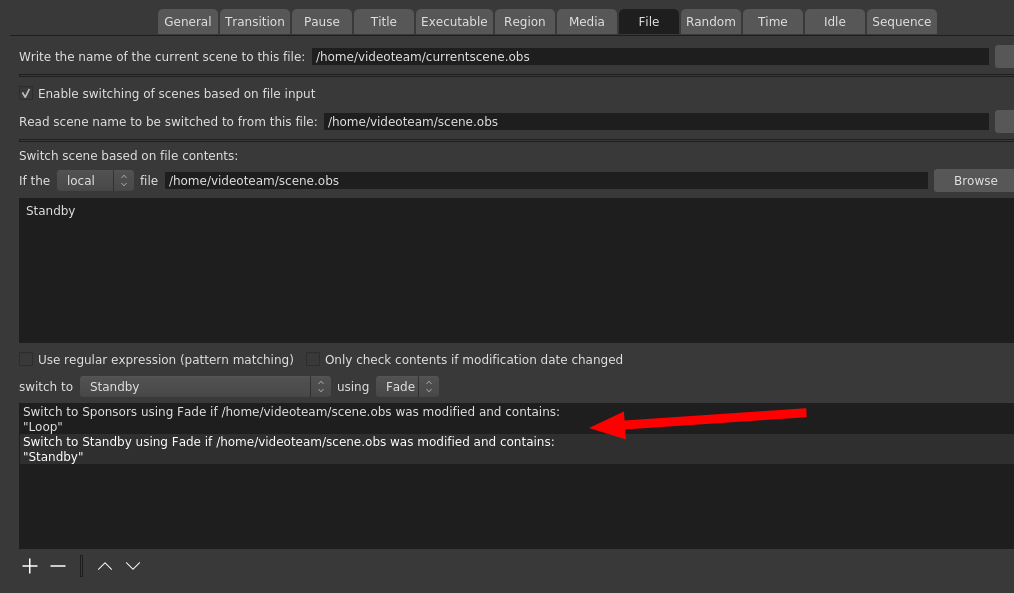
For the next event, the Advanced Scene Switcher might just get some more taming, or even be replaced entirely. There are ways to drive OBS by API, and even the Advanced Scene Switcher tool can be driven externally to some degree, but I think we definitely want to replace it by the next full DebConf. We had the problem that when a talk ended, we would return to the loop in the middle of a clip, which felt very unnatural and sometimes even confusing. So Stefano helped me with a helper script that could read the socket from Vocto, which I used to write either Loop or Standby to a file, and then the scene switcher would watch that file and keep the sponsors loop ready for start while the talks play. Why not just switch to sponsors when the talk ends? Well, the little bit of delay in switching would mean that you would see a tiny bit of loop every time before switching to sponsors. This is also why we didn t have any loop for the ad-hoc track (that would have probably needed another OBS instance, we ll look more into solutions for this for the future).
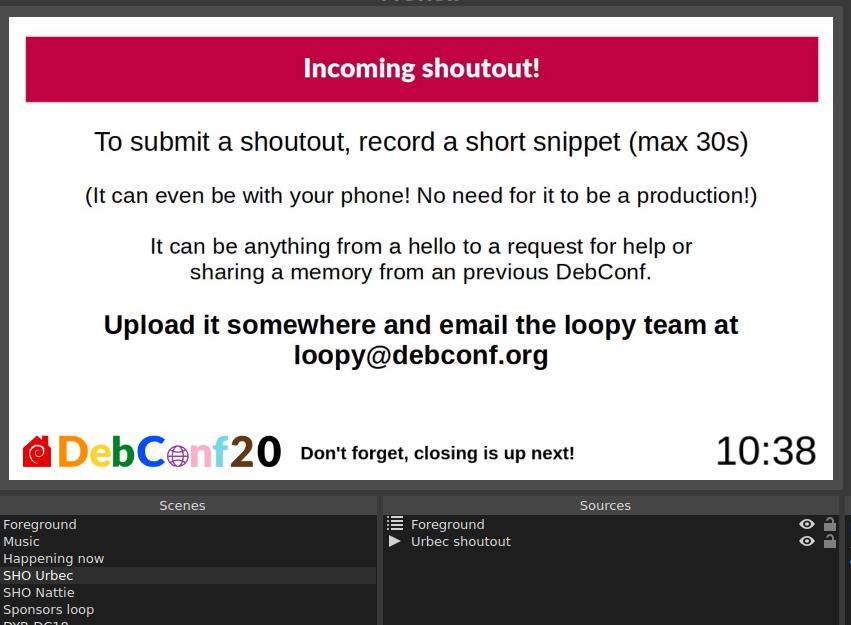
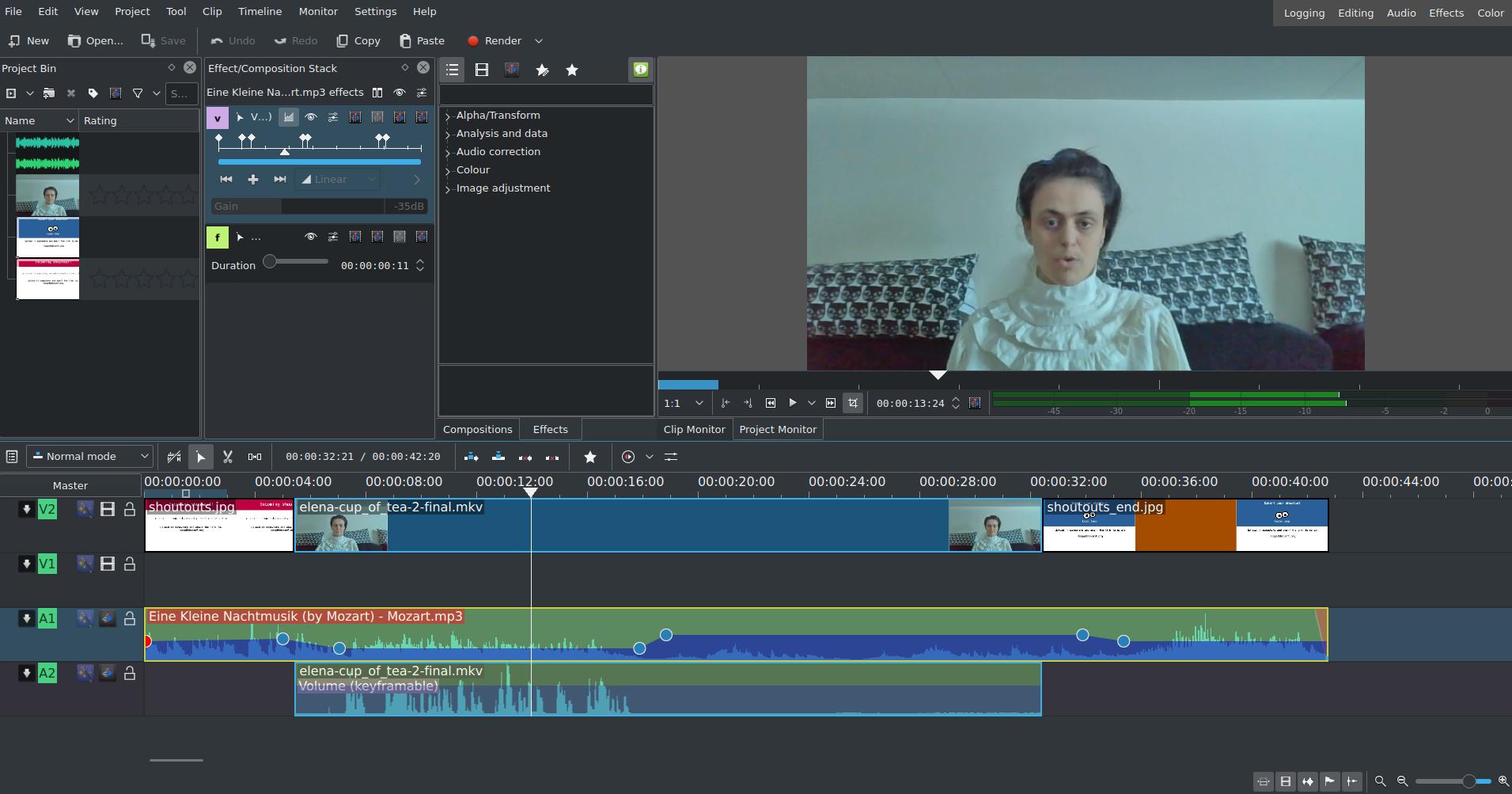
Then for all the clips. There were over 50 of them. All of them edited by hand in kdenlive. I removed any hard clicks, tried to improve audibility, remove some sections at the beginning and the end that seemed extra and added some music that would reduce in volume when someone speaks. In the beginning, I had lots of fun with choosing music for the clips. Towards the end, I had to rush them through and just chose the same tune whether it made sense or not. For comparison of what a difference the music can make, compare the original and adapted version for Valhalla s clip above, or this original and adapted video from urbec. This part was a lot more fun than dealing with the video sequencer, but I also want to automate it a bit. When I can fully drive OBS from Python I ll likely instead want to show those cards and control music volume from Python (what could possibly go wrong ).
The loopy name happened when I requested an @debconf.org alias for this. I was initially just thinking about loop@debconf.org but since I wanted to make it clear that the purpose of this loop is also to have some fun, I opted for loopy instead:
I was really surprised by how people took to loopy. I hoped it would be good and that it would have somewhat positive feedback, but the positive feedback was just immense. The idea was that people typically saw it in between talks. But a few people told me they kept it playing after the last talk of the day to watch it in the background. Some asked for the music because they want to keep listening to it while working (and even for jogging!?). Some people also asked for recordings of the loop because they want to keep it for after DebConf. The shoutouts idea proved to be very popular. Overall, I m very glad that people enjoyed it and I think it s safe to say that loopy will be back for the next event.
Also throughout this experiment Loopy Loop turned into yet another DebConf mascot. We gain one about every DebConf, some by accident and some on purpose. This one was not quite on purpose. I meant to make an image for it for salsa, and started with an infinite loop symbol. That s a loop, but by just adding two more solid circles to it, it looks like googly eyes, now it s a proper loopy loop!
I like the progress we ve made on this, but there s still a long way to go, and the ideas keep heaping up. The next event is quite soon (MDCO#2 at the end of November, and it seems that 3 other MiniDebConf events may also be planned), but over the next few events there will likely be significantly better graphics/artwork, better sequencing, better flow and more layout options. I hope to gain some additional members in the team to deal with incoming requests during DebConf. It was quite hectic this time! The new OBS also has a scripting host that supports Python, so I should be able to do some nice things even within OBS without having to drive it externally (like, display a clock without starting a web browser).
The Loopy Loop Music
The two mini albums that mostly played during the first few days were just a copy and paste from the MDCO#1 music, which was:
I have much more things to say about DebConf20, but I ll keep that for another post, and hopefully we can get all the other video stuff in a post from the video team, because I think there s been some real good work done for this DebConf. Also thanks to Infomaniak who was not only a platinum sponsor for this DebConf, but they also provided us with plenty of computing power to run all the video stuff on. Thanks again!
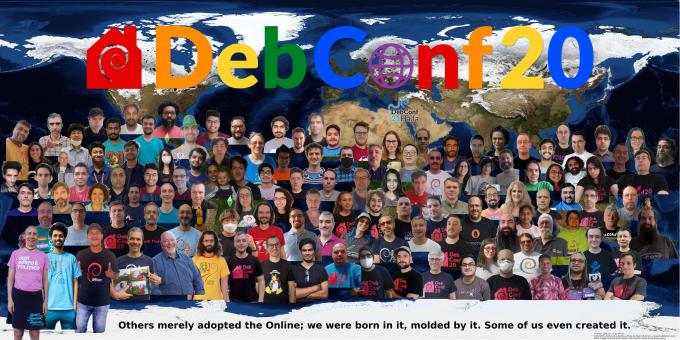
On Saturday 29 August 2020, the annual Debian Developers
and Contributors Conference came to a close.
DebConf20 has been held online for the first time, due to the coronavirus
(COVID-19) disease pandemic.
All of the sessions have been streamed, with a variety of ways of participating:
via IRC messaging, online collaborative text documents,
and video conferencing meeting rooms.
With more than 850 attendees from 80 different countries and a
total of over 100 event talks, discussion sessions,
Birds of a Feather (BoF) gatherings and other activities,
DebConf20 was a large success.
When it became clear that DebConf20 was going to be an online-only
event, the DebConf video team spent much time over the next months to
adapt, improve, and in some cases write from scratch, technology that
would be required to make an online DebConf possible. After lessons
learned from the MiniDebConfOnline in late May, some adjustments were
made, and then eventually we came up with a setup involving Jitsi, OBS,
Voctomix, SReview, nginx, Etherpad, and a newly written web-based
frontend for voctomix as the various elements of the stack.
All components of the video infrastructure are free software, and the
whole setup is configured through their public
ansible repository.
The DebConf20 schedule included
two tracks in other languages than English: the Spanish language MiniConf,
with eight talks in two days,
and the Malayalam language MiniConf, with nine talks in three days.
Ad-hoc activities, introduced by attendees over the course of the entire conference,
have been possible too, streamed and recorded. There have also been several
team gatherings to sprint on certain Debian development areas.
Between talks, the video stream has been showing the usual sponsors on the loop, but also
some additional clips including photos from previous DebConfs, fun facts about Debian
and short shout-out videos sent by attendees to communicate with their Debian friends.
For those who were not able to participate, most of the talks and sessions are already
available through the
Debian meetings archive website,
and the remaining ones will appear in the following days.
The DebConf20 website
will remain active for archival purposes and will continue to offer
links to the presentations and videos of talks and events.
Next year, DebConf21 is planned to be held
in Haifa, Israel, in August or September.
DebConf is committed to a safe and welcome environment for all participants.
During the conference, several teams (Front Desk, Welcome team and Community team)
have been available to help so participants get their best experience
in the conference, and find solutions to any issue that may arise.
See the web page about the Code of Conduct in DebConf20 website
for more details on this.
Debian thanks the commitment of numerous sponsors
to support DebConf20, particularly our Platinum Sponsors:
Lenovo,
Infomaniak,
Google
and
Amazon Web Services (AWS).
About Debian
The Debian Project was founded in 1993 by Ian Murdock to be a truly
free community project. Since then the project has grown to be one of
the largest and most influential open source projects. Thousands of
volunteers from all over the world work together to create and
maintain Debian software. Available in 70 languages, and
supporting a huge range of computer types, Debian calls itself the
universal operating system.
About DebConf
DebConf is the Debian Project's developer conference. In addition to a
full schedule of technical, social and policy talks, DebConf provides an
opportunity for developers, contributors and other interested people to
meet in person and work together more closely. It has taken place
annually since 2000 in locations as varied as Scotland, Argentina, and
Bosnia and Herzegovina. More information about DebConf is available from
https://debconf.org/.
About Lenovo
As a global technology leader manufacturing a wide portfolio of connected products,
including smartphones, tablets, PCs and workstations as well as AR/VR devices,
smart home/office and data center solutions, Lenovo
understands how critical open systems and platforms are to a connected world.
About Infomaniak
Infomaniak is Switzerland's largest web-hosting company,
also offering backup and storage services, solutions for event organizers,
live-streaming and video on demand services.
It wholly owns its datacenters and all elements critical
to the functioning of the services and products provided by the company
(both software and hardware).
About Google
Google is one of the largest technology companies in the
world, providing a wide range of Internet-related services and products such
as online advertising technologies, search, cloud computing, software, and hardware.
Google has been supporting Debian by sponsoring DebConf for more than
ten years, and is also a Debian partner sponsoring parts
of Salsa's continuous integration infrastructure
within Google Cloud Platform.
About Amazon Web Services (AWS)
Amazon Web Services (AWS) is one of the world's
most comprehensive and broadly adopted cloud platforms,
offering over 175 fully featured services from data centers globally
(in 77 Availability Zones within 24 geographic regions).
AWS customers include the fastest-growing startups, largest enterprises
and leading government agencies.
Contact Information
For further information, please visit the DebConf20 web page at
https://debconf20.debconf.org/
or send mail to press@debian.org.
One more talk from Jon "maddog" Hall and then the closing wrap up. This has been a blast: I've enjoyed it a lot and it's made me more enthusiastic than I have been for a long time. So once more with thanks to the video team It's almost the end of this year's DebConf dream As we all break up, there's a favour to ask Stay safe - wear a smile - and where needed, a mask
We'll not take you to task ; it's a favour we ask Stay safe - wear a smile - and where needed, a mask
Haifa, Pristina or Kochi - we'll see how that lands There's not much left to tidy up - wash your own hands So now if you'll join us in virtual beer We'll bring this to a close - and we'll meet up next year
So now if you'll join us - let us all raise a cheer To Debconf21 - and we'll see you next year
This is another test-only release of my module for manipulating PGP
signatures in Perl. I'm trying to get the CPAN testing failures down to a
dull roar. This iteration fixes some testing issues with systems that
have only GnuPG v1 and tries to handle systems whose gpg is GnuPG v2 but
is older than 2.1.12 and therefore doesn't have the --pinentry-mode
flag that GnuPG uses to suppress password prompting.
I handled the latter by skipping the tests if the gpg on the user's PATH
was too old. I'm not certain this is the best approach, although it makes
the CPAN automated testing more useful for me, since the module will not
work without special configuration on those systems. On the other hand,
if someone is installing it to point to some other GnuPG binary on the
system at runtime, failing the installation because their system gpg is
too old seems wrong, and the test failure doesn't indicate a bug in the
module.
Essentially, I'm missing richer test metadata in the Perl ecosystem. I
want to be able to declare a dependency on a non-Perl system binary, but
of course Perl has no mechanism to do that.
I thought about trying to deal with the Windows failures due to missing
IPC::Run features (redirecting high-numbered file descriptors) on the
Windows platform in a similar way, but decided in that case I do want the
tests to fail because PGP::Sign will never work on that platform
regardless of the runtime configuration. Here too I spent some time
searching for some way to indicate with Module::Build that the module
doesn't work on Windows, and came up empty. This seems to be a gap in
Perl's module distribution ecosystem.
In any case, hopefully this release will clean up the remaining test
failures on Linux and BSD systems, and I can move on to work on the Big
Eight signing key, which was the motivating application for these
releases.
You can get the latest release from CPAN or from the
PGP::Sign distribution page.
The Debian Janitor is an automated
system that commits fixes for (minor) issues in Debian packages that can be
fixed by software. It gradually started proposing merges in early
December. The first set of changes sent out ran lintian-brush on sid packages maintained in
Git. This post is part of a series about the progress of the
Janitor.
Last week s blog post
documented how there are now over 30,000 lintian issues
that have been fixed in git packaging repositories by the
Janitor.
It's important to note that any fixes from the Janitor that
make it into a Git packaging repository will also need
to be uploaded to the Debian archive. This currently requires
that a Debian packager clones the repository and builds
and uploads the package.
Until a change makes it into the archive, users of Debian
will unfortunately not see the benefits of improvements
made by the Janitor.
82% of the 30,000 changes from the Janitor that have made
it into a Git repository have not yet been uploaded, although
changes do slowly trickle in as maintainers make other
changes to packages and upload them along with the lintian
fixes from the Janitor. This is not just true for changes
from the Janitor, but for all sorts of other smaller improvements
as well.
However, the process of cloning and building git repositories
and uploading the resulting packages to the Debian archive
is fairly time-consuming and it s probably not worth
the time of developers to follow up every change from the
Janitor with a labour-intensive upload to the archive.
It would be great if it was easier to trigger uploads from
git commits. Projects like tag2upload will hopefully help, and
make it more likely that changes end up in the Debian archive.
The majority packages do get at least one new source version
upload per release, so most changes will eventually make
it into the archive.
For more information about the Janitor's lintian-fixes efforts, see the landing page.
A new minor release of the anytime package arrived on CRAN yesterday. This is the twentieth release, but sadly we seem to be spinning our wheels just accomodating CRAN (which the two or three last releases focused on). Code and functionality remain mature and stable, of course.
anytime is a very focused package aiming to do just one thing really well: to convert anything in integer, numeric, character, factor, ordered, format to either POSIXct or Date objects and to do so without requiring a format string as well as accomodating different formats in one input vector. See the anytime page, or the GitHub README.md for a few examples.
This release once again has to play catchup with CRAN as r-devel now changes how tzone propagates when we do as.POSIXct(as.POSIXlt(Sys.time()) which is now no longer equal to as.POSIXct(Sys.time()) even for a fixed, stored Sys.time() call result. Probably for the better, but an issue for now so we effectively just reduced test coverage. Call it progress .
The full list of changes follows.
Changes in anytime version 0.3.9 (2020-08-26)
Skip one test file that is impossible to run across different CRAN setups, and life is definitely too short for these games.
Change remaining http:// to https:// because, well, you know.

 In May, I got selected as a Google Summer of Code student for Debian again! \o/



 September.
Recently I've been writing and reading more golang code and I feel more comfortable with it. However every day I feel frustrated by the lack of features.
 Here is another monthly update covering what I have been doing in the free software world during August 2020 (

 A new minor release 0.2.9 of
 This line is called a command prompt and it tells you four pieces of information:
 This is a shorthand notation that the shell uses to make this output shorter
when possible.
 actually tells you that you are currently in the