Search Results: "ag"

29 March 2020

Sven Hoexter: Looking into Envertech Enverbridge EVB 202 SetID tool

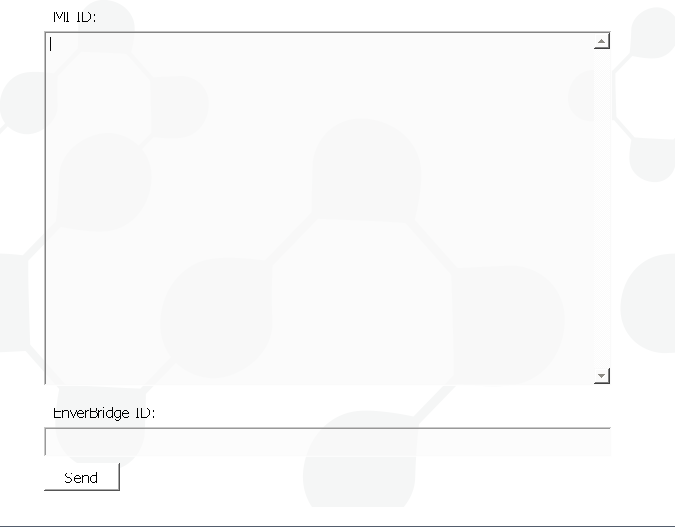
Disclaimer: I'm neither an experienced programmer nor proficient in reverse engineering, but I like at least to try to figure out how things work. Sometimes the solution is so easy, that even I manage to find it, still take this with a grain of salt. I lately witnessed the setup of an Envertech EnverBridge ENB-202 which is kind of a classic Chinese IoT device. Buy it, plug it in, use some strange setup software, and it will report your PV statistics to a web portal. The setup involved downloading a PE32 Windows executable, with an UI that basically has two input boxes and a sent button. You've to input the serial number(s) of your inverter boxes and the ID of your EnverBridge. That made me interested in what this setup process really looks like. The EnverBridge device itself has on one end a power plug, which is also used to communicate with the inverter via some Powerline protocol, and a network plug with a classic RJ45 end you plug into your network. If you power it up it will request an IPv4 address via DHCP. That brings us to the first oddity, the MAC address is in the BC:20:90 prefix which I could not find in the IEEE lists. Setting Up the SetID Software You can download the Windows software in a Zipfile, once you unpack it you end up with a Nullsoft installer .exe. Since this is a PE32 executable we've to add i386 as foreign architecture to install the wine32 package.
dpkg --add-architecture i386
apt update
apt install wine32:i386
wget http://www.envertec.com/uploads/bigfiles/Set%20ID.zip
unzip Set\ ID.zip
wine Set\ ID.exe
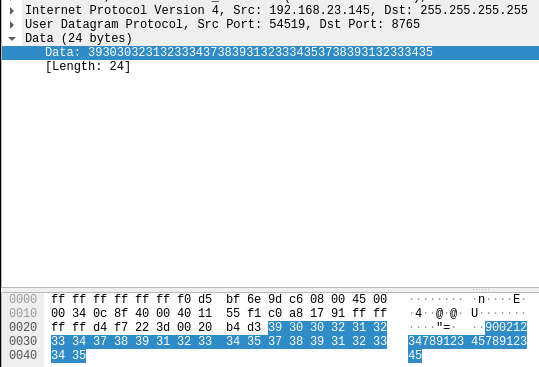
The end result is an installation in ~/.wine/drive_c/Program Files/SetID which reveals that this software is build with Qt5 according to the shipped dll's. The tool itself is in udpCilentNow.exe, and looks like this: Envertech SetID software The Network Communication To my own surprise, the communication is straight forward. A single UDP paket is sent to the broadcast address (255.255.255.255) on port 8765. Envertech SetID udp paket in wireshark I expected some strange binary protocol, but the payload is just simple numbers. They're a combination of the serial numbers of the inverter and the ID of the Enverbridge device. One thing I'm not 100% sure about are the inverter serial numbers, there are two of them, but on the inverter I've seen the serial numbers are always the same. So the payload is assembled like this: If you've more inverter the serials are just appended in the same way. Another strange thing is that the software does close to no input validation, they only check that the inverter serials start with CN and then just extract char 9 to 16. The response from the EnverBridge is also a single UDP paket to the broadcast address on port 8764, with exactly the same content we've sent. Writing a Replacement My result is probably an insult for all proficient Python coders, but based on a bit of research and some cut&paste programming I could assemble a small script to replicate the function of the Windows binary. I guess the usefulness of this exercise was mostly my personal entertainment, though it might help some none Windows users to setup this device. Usage is also very simple:
./enverbridge.py -h
Usage: enverbridge.py [options] MIIDs
Options:
  -h, --help         show this help message and exit
  -b BID, --bid=BID  Serial Number of your EnverBridge
./enverbridge.py -b 90087654 CN19100912345678 CN19100912345679
This is basically 1:1 the behaviour of the Windows binary, though I tried to add a bit more validation then the original binary and some more error messages. I also assume the serial numbers are also always the same so I take only one as the input, and duplicate it for the paket data.

Paulo Henrique de Lima Santana: My free software activities in February 2020

My free software activities in february 2020 March is ending but I finally wrote my monthly report about activities in Debian and Free Software in general for February. As I already wrote here, I attended to FOSDEM 2020 on February 1st and 2nd in Brussels. It was a amazing experience. After my return to Curitiba, I felt my energies renewed to start new challenges.

MiniDebConf Macei 2020 I continued helping to organize MiniDebConf and I got positive answers from 4Linux and Globo.com and they are sponsorsing the event.

FLISOL 2020 I started to talk with Maristela from IEP - Instituto de Engenharia do Paran and after some messages and I joined a meeting with her and other members of C mara T cnica de Eletr nica, Computa o e Ci ncias de Dados. I explained about FLISOL in Curitiba to them and they agreed to host the event at IEP. I asked to use three spaces: Auditorium for FLISOL talks, Sal o Nobre for meetups from WordPress and PostgreSQL Communities, and the hall for Install Fest. Besides FLISOL, they would like to host other events and meetups from Communities in Curitiba as Python, PHP, and so on. At least one per month. I helped to schedule a PHP Paran Community meetup on March.

New job Since 17th I started to work at Rentcars as Infrastructure Analyst. I m very happy to work there because we use a lot of FLOSS and with nice people. Ubuntu LTS is the approved OS for desktops but I could install Debian on my laptop :-)

Misc I signed pgp keys from friends I met in Brussels and I had my pgp key signed by them. Finally my MR to the DebConf20 website fixing some texts was accepted. I have watched v deos from FOSDEM
  1. Until now, I saw these great talks:
  • Growing Sustainable Contributions Through Ambassador Networks
  • Building Ethical Software Under Capitalism
  • Cognitive biases, blindspots and inclusion
  • Building a thriving community in company-led open source projects
  • Building Community for your Company s OSS Projects
  • The Ethics of Open Source
  • Be The Leader You Need in Open Source
  • The next generation of contributors is not on IRC
  • Open Source Won, but Software Freedom Hasn t Yet
  • Open Source Under Attack
  • Lessons Learned from Cultivating Open Source Projects and Communities
That s all folks!

28 March 2020

Fran ois Marier: How to get a direct WebRTC connections between two computers

WebRTC is a standard real-time communication protocol built directly into modern web browsers. It enables the creation of video conferencing services which do not require participants to download additional software. Many services make use of it and it almost always works out of the box. The reason it just works is that it uses a protocol called ICE to establish a connection regardless of the network environment. What that means however is that in some cases, your video/audio connection will need to be relayed (using end-to-end encryption) to the other person via third-party TURN server. In addition to adding extra network latency to your call that relay server might overloaded at some point and drop or delay packets coming through. Here's how to tell whether or not your WebRTC calls are being relayed, and how to ensure you get a direct connection to the other host.

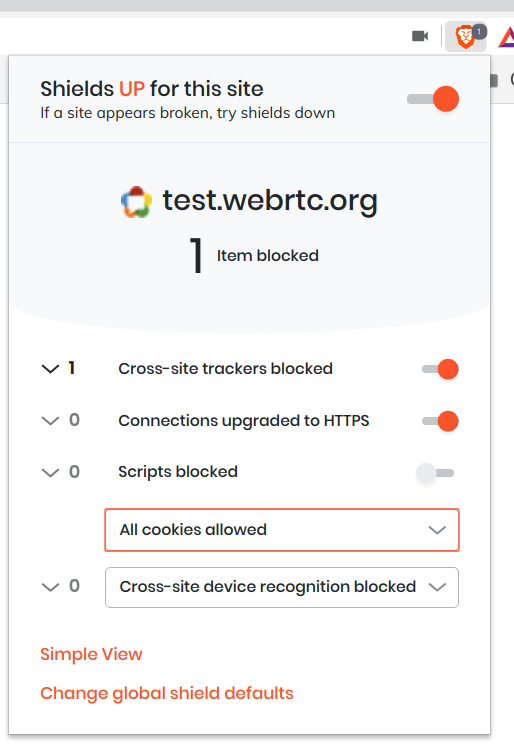
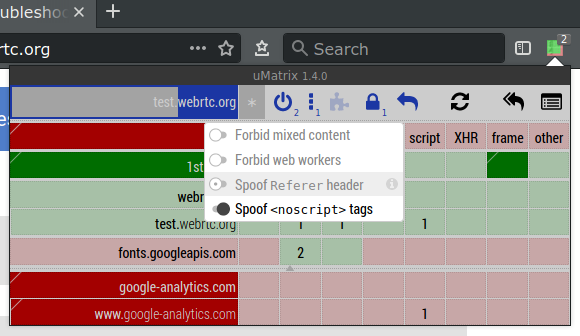
Testing basic WebRTC functionality Before you place a real call, I suggest using the official test page which will test your camera, microphone and network connectivity. Note that this test page makes use of a Google TURN server which is locked to particular HTTP referrers and so you'll need to disable privacy features that might interfere with this:
  • Brave: Disable Shields entirely for that page (Simple view) or allow all cookies for that page (Advanced view).
  • Firefox: Ensure that http.network.referer.spoofSource is set to false in about:config, which it is by default.
  • uMatrix: The "Spoof Referer header" option needs to be turned off for that site.

Checking the type of peer connection you have Once you know that WebRTC is working in your browser, it's time to establish a connection and look at the network configuration that the two peers agreed on. My favorite service at the moment is Whereby (formerly Appear.in), so I'm going to use that to connect from two different computers:
  • canada is a laptop behind a regular home router without any port forwarding.
  • siberia is a desktop computer in a remote location that is also behind a home router, but in this case its internal IP address (192.168.1.2) is set as the DMZ host.

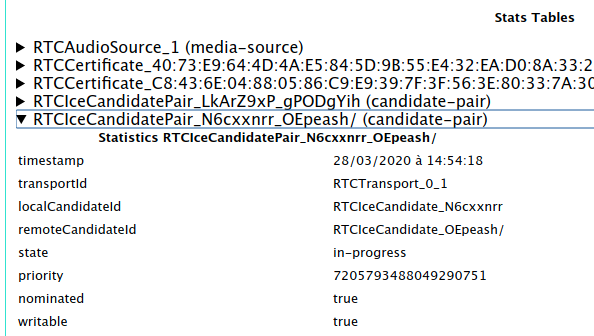
Chromium For all Chromium-based browsers, such as Brave, Chrome, Edge, Opera and Vivaldi, the debugging page you'll need to open is called chrome://webrtc-internals. Look for RTCIceCandidatePair lines and expand them one at a time until you find the one which says:
  • state: succeeded (or state: in-progress)
  • nominated: true
  • writable: true
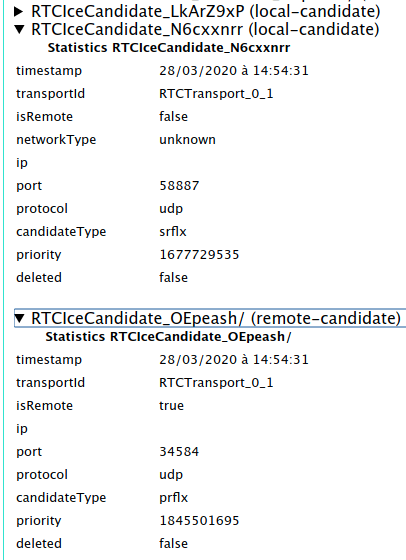
Then from the name of that pair (N6cxxnrr_OEpeash in the above example) find the two matching RTCIceCandidate lines (one local-candidate and one remote-candidate) and expand them. In the case of a direct connection, I saw the following on the remote-candidate:
  • ip shows the external IP address of siberia
  • port shows a random number between 1024 and 65535
  • candidateType: srflx
and the following on local-candidate:
  • ip shows the external IP address of canada
  • port shows a random number between 1024 and 65535
  • candidateType: prflx
These candidate types indicate that a STUN server was used to determine the public-facing IP address and port for each computer, but the actual connection between the peers is direct. On the other hand, for a relayed/proxied connection, I saw the following on the remote-candidate side:
  • ip shows an IP address belonging to the TURN server
  • candidateType: relay
and the same information as before on the local-candidate.

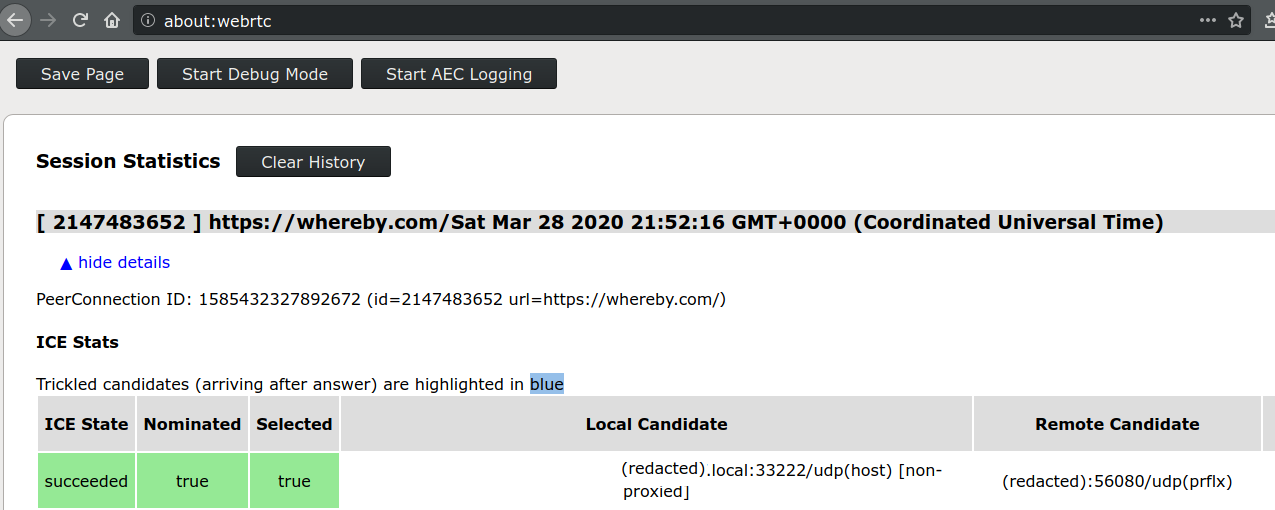
Firefox If you are using Firefox, the debugging page you want to look at is about:webrtc. Expand the top entry under "Session Statistics" and look for the line (should be the first one) which says the following in green:
  • ICE State: succeeded
  • Nominated: true
  • Selected: true
then look in the "Local Candidate" and "Remote Candidate" sections to find the candidate type in brackets.

Firewall ports to open to avoid using a relay In order to get a direct connection to the other WebRTC peer, one of the two computers (in my case, siberia) needs to open all inbound UDP ports since there doesn't appear to be a way to restrict Chromium or Firefox to a smaller port range for incoming WebRTC connections. This isn't great and so I decided to tighten that up in two ways by:
  • restricting incoming UDP traffic to the IP range of siberia's ISP, and
  • explicitly denying incoming to the UDP ports I know are open on siberia.
To get the IP range, start with the external IP address of the machine (I'll use the IP address of my blog in this example: 66.228.46.55) and pass it to the whois command:
$ whois 66.228.46.55   grep CIDR
CIDR:           66.228.32.0/19
To get the list of open UDP ports on siberia, I sshed into it and ran nmap:
$ sudo nmap -sU localhost
Starting Nmap 7.60 ( https://nmap.org ) at 2020-03-28 15:55 PDT
Nmap scan report for localhost (127.0.0.1)
Host is up (0.000015s latency).
Not shown: 994 closed ports
PORT      STATE         SERVICE
631/udp   open filtered ipp
5060/udp  open filtered sip
5353/udp  open          zeroconf
Nmap done: 1 IP address (1 host up) scanned in 190.25 seconds
I ended up with the following in my /etc/network/iptables.up.rules (ports below 1024 are denied by the default rule and don't need to be included here):
# Deny all known-open high UDP ports before enabling WebRTC for canada
-A INPUT -p udp --dport 5060 -j DROP
-A INPUT -p udp --dport 5353 -j DROP
-A INPUT -s 66.228.32.0/19 -p udp --dport 1024:65535 -j ACCEPT

Jonathan Dowland: Nintendo Switch - Virtua Racing

Screenshot of Virtua Racing
I don't play many video games any more, and I certainly don't consider myself a gamer. If I have time and brain power, I like to write code or work on my PhD; if I don't have brain power I read, watch movies or TV. However last Summer, lured by the launch titles Super Mario Odyssey and The Legend of Zelda: Breath of the Wild, I bought a Nintendo Switch. I've actually played some games on it now, although I surprised myself by playing lesser-known and indie titles rather than the AAA names. My favourite games are ones I can pick up and play for 5-10 minutes at a time without losing time to tutorials, introductory videos, and other such nonsense. I thought I'd recommend some games. First up, Virtua Racing. I actually bought this for the office Switch before I had my own. It's re-release of the 1992 arcade racer. I have fond memories of Arcades in the 90s (although I don't think I played this game). It's conceptually simple: three tracks, few options (you can choose manual or automatic transmission). But there's some hidden depth in there: it models slipstream, tyre wear and other effects. The fun of it for me is trying to beat my personal best and that of my colleagues. But I haven't actually placed above 3rd on the intermediate course or even finished the advanced one, so despite its simplicity, there's plenty of mileage in it for me. It also looks great, rending at a smooth 60fps. The large untextured polygons were once a design decision due to the limitations of the hardware in 1992 and are now an in-fashion aesthetic.

Dirk Eddelbuettel: RProtoBuf 0.4.17: Robustified

A new release 0.4.17 of RProtoBuf is now on CRAN. RProtoBuf provides R with bindings for the Google Protocol Buffers ( ProtoBuf ) data encoding and serialization library used and released by Google, and deployed very widely in numerous projects as a language and operating-system agnostic protocol. This release contains small polishes related to the release 0.4.16 which added JSON support for messages, and switched to ByteSizeLong. This release now makes sure JSON functionality is only tested where available (on version 3 of the Protocol Buffers library), and that ByteSizeLong is only called where available (version 3.6.0 or later). Of course, older versions build as before and remain fully supported.

Changes in RProtoBuf version 0.4.17 (2020-03-xx)
  • Condition use of ByteSizeLong() on building with ProtoBuf 3.6.0 or later (Dirk in #71 fixing #70).
  • The JSON unit tests are skipped if ProtoBuf 2.* is used (Dirk, also #71).
  • The configure script now extracts the version from the DESCRIPTION file ( (Dirk, also #71).

CRANberries provides the usual diff to the previous release. The RProtoBuf page has copies of the (older) package vignette, the quick overview vignette, and the pre-print of our JSS paper. Questions, comments etc should go to the GitHub issue tracker off the GitHub repo. If you like this or other open-source work I do, you can now sponsor me at GitHub. For the first year, GitHub will match your contributions.

This post by Dirk Eddelbuettel originated on his Thinking inside the box blog. Please report excessive re-aggregation in third-party for-profit settings.

26 March 2020

Jonathan Dowland: ephemeral note-taking vs preserve-everything

Assume for a minute that that best way to take notes is on paper with pens, pencils etc., and not in a digital device. (I might return to this later). I'm torn between two extremes for note-taking. One one hand, I find it useful in the short-term to make scrappy, ephemeral notes: ad-hoc daily TODO lists; mind maps and experiments, that I intend to throw away. There are lots of styles of stationary to support this: ring-bound notebooks that are easy to tear leaves from; or literally the back of envelopes. The other extreme is the "preserve everything" mentality. For my PhD, I have a single, hard-backed notebook that I try to do all my PhD note taking in. I date each entry. There's a history I can refer to, no matter whether what I'm writing is seemingly ephemeral or not. So I do both. Sometimes I want to refer back to something I did which was ephemeral and I've lost it or thrown it away. And having lots of mis-matched stationary for ephemeral storage is a bit messy, and works against the other extreme to a certain extent. I've started to wonder whether strictly doing one or the other (and most likely, the "preserve everything" approach) might be a good idea. In practise that would mean settling on a particular notebook format, and disposing of anything else; having separate notebooks by topics (PhD, work, ) with a "catch-all" for the rest. Does anyone have any advice or useful resources to read on this topic?

Jonathan Carter: Lockdown

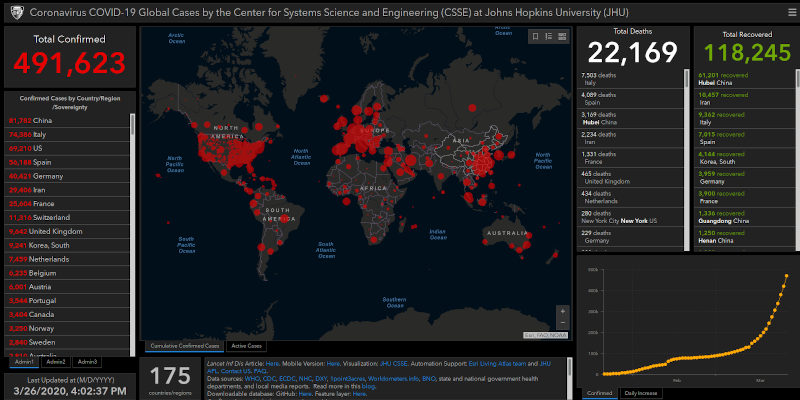
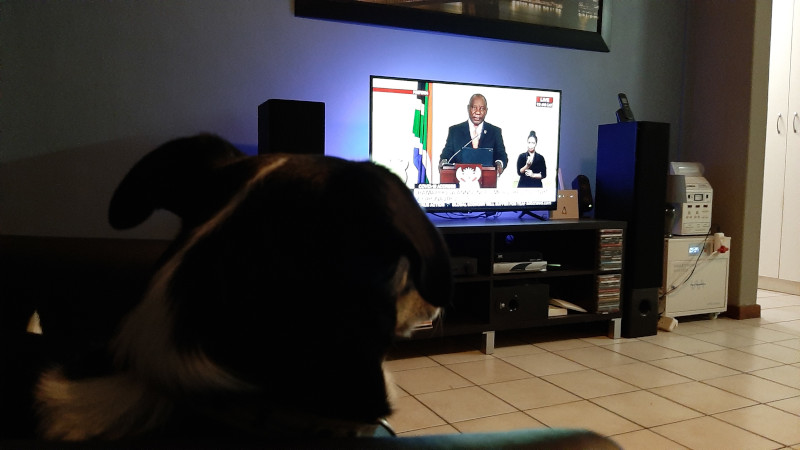
I just took my dog for a nice long walk. It s the last walk we ll be taking for the next 3 weeks, he already starts moping around if we just skip one day of walking, so I m going to have to get creative keeping him entertained. My entire country is going on lockdown starting at midnight. People won t be allowed to leave their homes unless it s for medical emergencies, to buy food or if their work has been deemed essential. Due to the Covid-19 epidemic nearing half a million confirmed infections, this has become quite common in the world right now, with about a quarter of the world s population currently under lockdown and confined to their homes.
Some people may have noticed I ve been a bit absent recently, I ve been going through some really rough personal stuff. I m dealing with it and I ll be ok, but please practice some patience with me in the immediate future if you re waiting on anything. I have a lot of things going on in Debian right now. It helps keeping me busy through all the turmoil and gives me something positive to focus on. I m running for Debian Project Leader (DPL), I haven t been able to put in quite the energy into my campaign that I would have liked, but I think it s going ok under the circumstances. I think because of everything happening in the world it s been more difficult for other Debianites to participate in debian-vote discussions as well. Recently we also announced Debian Social, a project that s still in its early phases, but we ve been trying to get it going for about 2 years, so it s nice to finally see it shaping up. There s also plans to put Debian Social and some additional tooling to the test, with the idea to host a MiniDebConf entirely online. No dates have been confirmed yet, we still have a lot of crucial bits to figure out, but you can subscribe to debian-devel-announce and Debian micronews for updates as soon as more information is available. To everyone out there, stay safe, keep your physical distance for now and don t lose hope, things will get better again.

Axel Beckert: Pictures in pure HTML with chafa and aha

I recently stumbled upon chafa, a tool to display pictures, especially color pictures on your ANSI text terminal, e.g. inside an xterm. And I occasionally use aha, the Ansi HTML Adapter to convert a colorful terminal content into HTML to show off terminal screenshots without the requirement of a picture so that it also works in e.g. text browsers or for blinds. Combining chafa and aha: Examples A moment ago I had the thought what would happen if I feed the output of chafa into aha and expected nothing really usable. But I was surprised by the quality of the outcome.
looks like this after chafa -w 9 -c full -s 160x50 DSCN4692.jpg aha -n:


Checking the Look in Text Browsers It even looks not that bad in elinks as far as I know the only text browser which supports CSS and styles:
In Lynx and Links 2, the text composing the image is displayed only in black and white, but you at least can recognise the edges in the picture:
Same Functionality in One Tool? I knew there was a tool which did this in one step. Seems to have been png2html. Tried to play around with it, too, but neither really understood how to use it (seems to require a text file for the characters to be used why?) nor did I really got it working. It always ran until I aborted it and it never filled the target file with any content. Additionally, png2html insists on one character per pixel, requiring to first properly resize the image before converting to HTML. The Keyboard in the Pictures Oh, and btw., the displayed keyboard is my Zlant. The Zlant is a 40% uniform staggered mechanical keyboard. Currently, only Zlant PCBs are available at 1UP Keyboards (USA), i.e. no complete kits. It is shown with the SA Vilebloom key cap set, currently available at MechSupply (UK).

25 March 2020

Raphaël Hertzog: Freexian s report about Debian Long Term Support, February 2020

A Debian LTS logo Like each month, here comes a report about the work of paid contributors to Debian LTS. Individual reports In February, 226 work hours have been dispatched among 14 paid contributors. Their reports are available: Evolution of the situation February began as rather calm month and the fact that more contributors have given back unused hours is an indicator of this calmness and also an indicator that contributing to LTS has become more of a routine now, which is good. In the second half of February Holger Levsen (from LTS) and Salvatore Bonaccorso (from the Debian Security Team) met at SnowCamp in Italy and discussed tensions and possible improvements from and for Debian LTS. The security tracker currently lists 25 packages with a known CVE and the dla-needed.txt file has 21 packages needing an update. Thanks to our sponsors New sponsors are in bold.

No comment Liked this article? Click here. My blog is Flattr-enabled.

24 March 2020

Dirk Eddelbuettel: New package RcppDate 0.0.1 now on CRAN!

A new small package with a new C++ header library is now on CRAN. It brings the date library by Howard Hinnant to R. This library has been in pretty wide-spread use for a while now, and adds to C++11/C++14/C++17 what will be (with minor modifications) the date library in C++20. I had been aware of it for a while, but not needed thanks to CCTZ library out of Google and our RcppCCTZ package. And like CCTZ, it builds upon std::chron adding a whole lot of functionality and useability enhancement. But a some upcoming (and quite exciting!) changes in nanotime required it, I had a reason to set about packaging it as RcppDate. And after a few days of gestation and review it is now available via CRAN. Two simple example files are included and can be accessed by Rcpp::sourceCpp(). Some brief excerpts follow. The first example shows three date constructors. Note how the month (and the leading digits) are literals. No quotes for strings anywhere. And no format (just like our anytime package for R).
  constexpr auto x1 = 2015_y/March/22;
  constexpr auto x2 = March/22/2015;
  constexpr auto x3 = 22_d/March/2015;
Note that these are constexpr that resolve at compile-time, and that the resulting year_month_day type is inferred via auto. A second example constructs the last day of the months similarly:
  constexpr auto x1 = 2015_y/February/last;
  constexpr auto x2 = February/last/2015;
  constexpr auto x3 = last/February/2015;
For more, see the copious date.h documentation. The (very bland first) NEWS entry (from a since-added NEWS file) for the initial upload follows.

Changes in version 0.0.1 (2020-01-17)
  • Initial CRAN upload of first version

If you like this or other open-source work I do, you can now sponsor me at GitHub. For the first year, GitHub will match your contributions.

This post by Dirk Eddelbuettel originated on his Thinking inside the box blog. Please report excessive re-aggregation in third-party for-profit settings.

Norbert Preining: KDE/Plasma 5.18 for Debian

Update 2020-04-03: Please see this post for updated location of the packages!!! Now for i586 and amd64 architectures! I have been trying out the Plasma Desktop for one week now, and I am very positively surprised. Compared to the clumsy history of KDE3, the current desktop is extremely small-footprint and smooth, surprisingly. Integration is as expected great, and mixing programs from the other world (Gtk/Gnome) works also extremely smooth.
If there are a few things I would change, then mostly the chaos about kwallet and Gnome keyring. I would love to have one secret storage, and it seems that Gnome Keyring is preferrable, but this is in flux at the moment. Also, it is not that pressing, because I have moved all my passwords into pass and thus don t need the secret storage that much anymore. So, after a bit of working with Plasma, I realized that Debian still ships an old version, the most recent being 5.18.3 LTS. Thus, I embarked onto a journey of updating all the necessary packages, and there are a lot: in total 106 packages I did update (and one new one!) until I finally had a new plasma-desktop package available. If you are interested, there are binaries for amd64 and sources in my Debian repository (WARNING: These packages are for Debian/sid and maybe testing, and cannot be used with Buster!):
deb https://www.preining.info/debian unstable kde
deb-src https://www.preining.info/debian unstable kde
As usual, don t forget to import my GPG key, and all packages are without warranty :-; There are two packages that I didn t manage to update: kde-gtk-config which has changed a lot and contains far less files, and breeze-icons which fails on its own symlink tests. If anyone has an idea, please let me know. If other packages are missing, please also drop me a line and I ll try to update them. Enjoy.

Christoph Berg: Announcing apt-archive.postgresql.org

Users had often asked where they could find older versions of packages from apt.postgresql.org. I had been collecting these since about April 2013, and in July 2016, I made the packages available via an ad-hoc URL on the repository master host, called "the morgue". There was little repository structure, all files belonging to a source package were stuffed into a single directory, no matter what distribution they belonged to. Besides this not being particularly accessible for users, the main problem was the ever-increasing need for more disk space on the repository host. We are now at 175 GB for the archive, of which 152 GB is for the morgue. Our friends from yum.postgresql.org have had a proper archive host (yum-archive.postgresql.org) for some time already, so it was about time to follow suit and implement a proper archive for apt.postgresql.org as well, usable from apt. So here it is: apt-archive.postgresql.org The archive covers all past and current Debian and Ubuntu distributions. The apt sources.lists entries are similar to the main repository, just with "-archive" appended to the host name and the distribution:
deb https://apt-archive.postgresql.org/pub/repos/apt DIST-pgdg-archive main
deb-src https://apt-archive.postgresql.org/pub/repos/apt DIST-pgdg-archive main
The oldest PostgreSQL server versions covered there are 8.2.23, 8.3.23, 8.4.17, 9.0.13, 9.1.9, 9.2.4, 9.3beta1, and everything newer. Some example:
$ apt-cache policy postgresql-12
postgresql-12:
  Installed: 12.2-2.pgdg+1+b1
  Candidate: 12.2-2.pgdg+1+b1
  Version table:
 *** 12.2-2.pgdg+1+b1 900
        500 http://apt.postgresql.org/pub/repos/apt sid-pgdg/main amd64 Packages
        500 https://apt-archive.postgresql.org/pub/repos/apt sid-pgdg-archive/main amd64 Packages
        100 /var/lib/dpkg/status
     12.2-2.pgdg+1 500
        500 https://apt-archive.postgresql.org/pub/repos/apt sid-pgdg-archive/main amd64 Packages
     12.2-1.pgdg+1 500
        500 https://apt-archive.postgresql.org/pub/repos/apt sid-pgdg-archive/main amd64 Packages
     12.1-2.pgdg+1 500
        500 https://apt-archive.postgresql.org/pub/repos/apt sid-pgdg-archive/main amd64 Packages
     12.1-1.pgdg+1 500
        500 https://apt-archive.postgresql.org/pub/repos/apt sid-pgdg-archive/main amd64 Packages
     12.0-2.pgdg+1 500
        500 https://apt-archive.postgresql.org/pub/repos/apt sid-pgdg-archive/main amd64 Packages
     12.0-1.pgdg+1 500
        500 https://apt-archive.postgresql.org/pub/repos/apt sid-pgdg-archive/main amd64 Packages
     12~rc1-1.pgdg+1 500
        500 https://apt-archive.postgresql.org/pub/repos/apt sid-pgdg-archive/main amd64 Packages
     12~beta4-1.pgdg+1 500
        500 https://apt-archive.postgresql.org/pub/repos/apt sid-pgdg-archive/main amd64 Packages
     12~beta3-1.pgdg+1 500
        500 https://apt-archive.postgresql.org/pub/repos/apt sid-pgdg-archive/main amd64 Packages
     12~beta2-1.pgdg+1 500
        500 https://apt-archive.postgresql.org/pub/repos/apt sid-pgdg-archive/main amd64 Packages
     12~beta1-1.pgdg+1 500
        500 https://apt-archive.postgresql.org/pub/repos/apt sid-pgdg-archive/main amd64 Packages
Because this is hosted on S3, browsing directories is only supported indirectly by static index.html files, so if you want to look at some specific URL, append "/index.html" to see it. The archive is powered by a PostgreSQL database and a bunch of python/shell scripts, from which the apt index files are built. Archiving old distributions I'm also using the opportunity to remove some long-retired distributions from the main repository host. The following distributions have been moved over: They are available as "DIST-pgdg" from the archive, e.g. squeeze:
deb https://apt-archive.postgresql.org/pub/repos/apt squeeze-pgdg main
deb-src https://apt-archive.postgresql.org/pub/repos/apt squeeze-pgdg main

Anisa Kuci: Outreachy post 5 - Final report

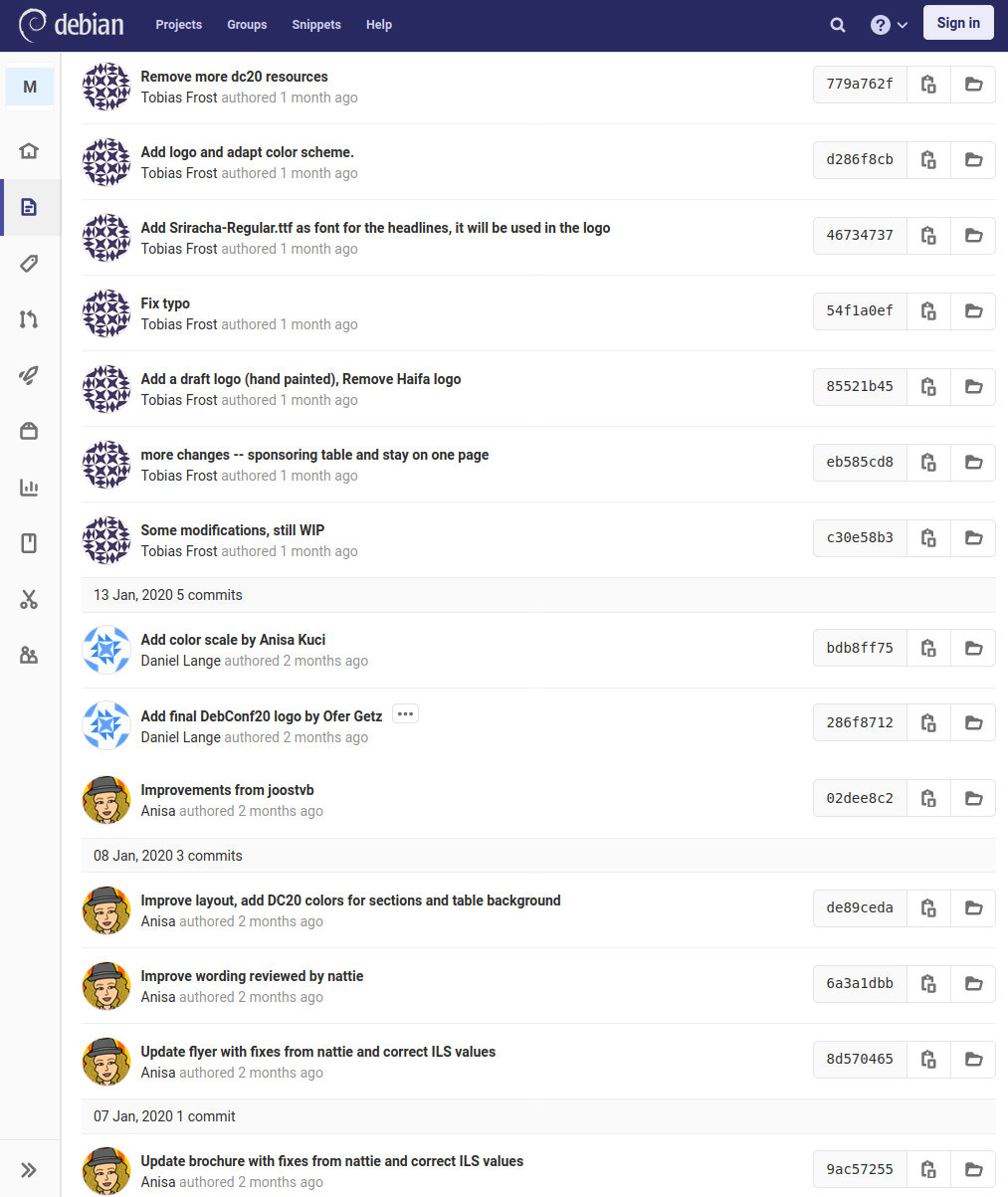
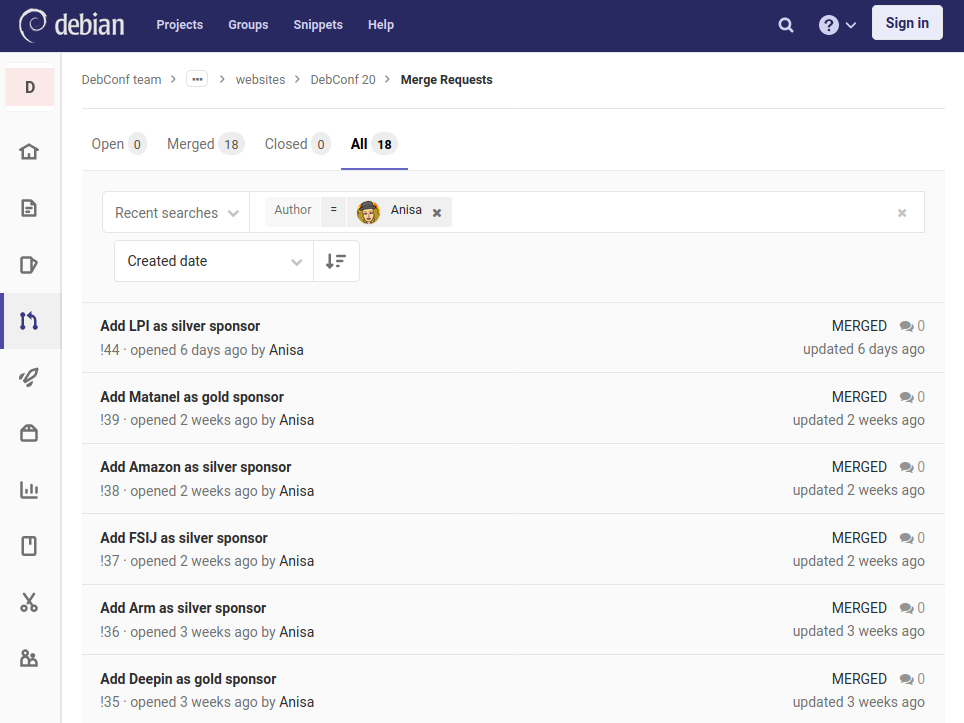
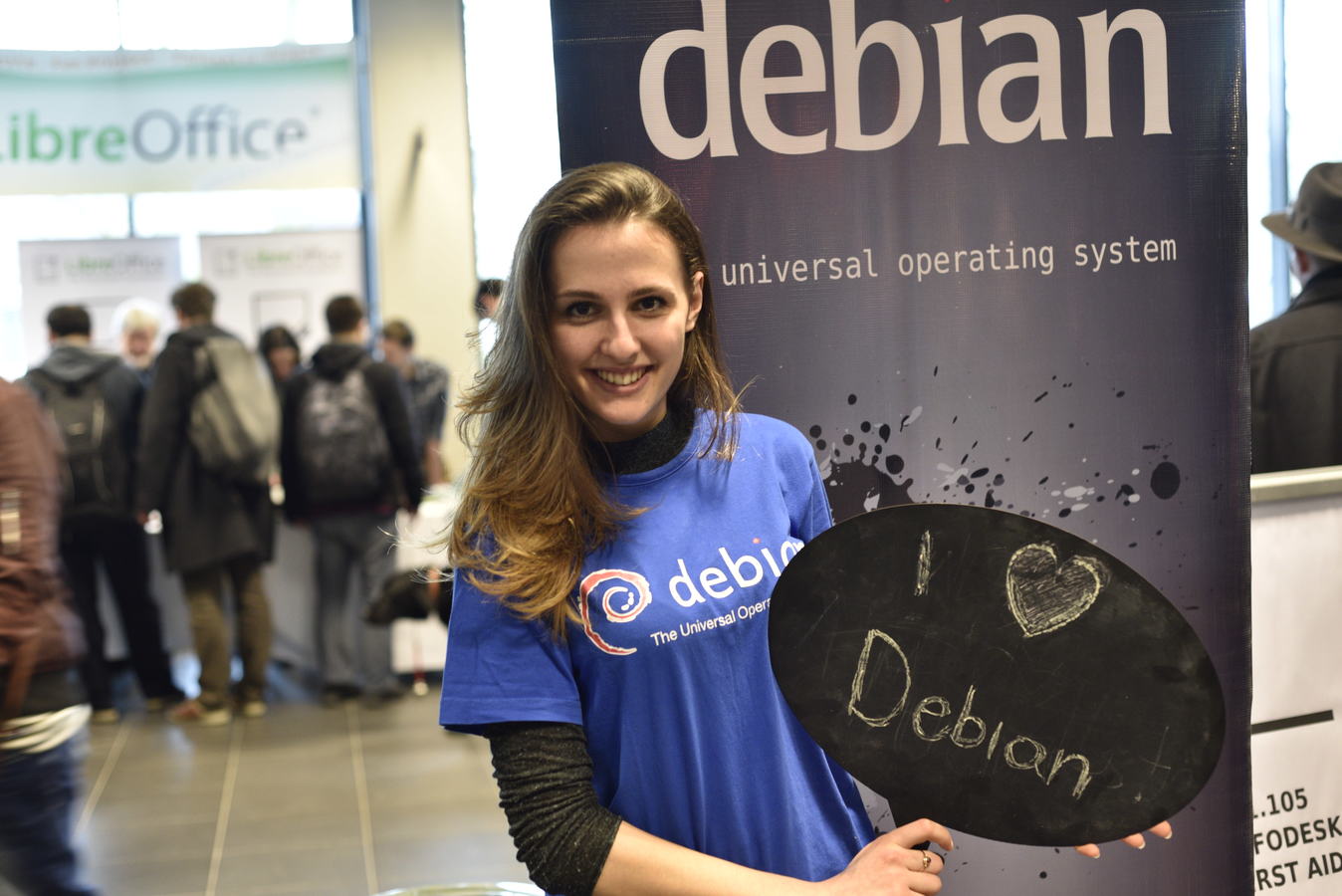
This is my last Outreachy blogpost, as my internship unfortunately has come to an end. It was a blast! Through the Outreachy internship I gained a lot of valuable knowledge and even though I dont know what the future will bring, I am more confident about myself, my skills in fundraising and my technical abilities now. During the contribution phase I did quite a lot of research so I could come up with relevant information to add on the Debian wiki as part of the contribution phase tasks. This was helpful for me to build a more deep understanding of the Debian project, the DebConf conferences and the general style of working within Debian. During this phase I completed most of the tasks given and got onto the mailing lists and IRC channels which are public. This was quite an intense experience by itself as it was like digging into a new job but in a competitive situation as other applicants, of course, were also putting in their best to get one of the 50 Outreachy internships (two in Debian) that were available. When I got selected I also got access to the sponsors@debconf.org email address and the private git repos as they would be needed for me to work on fundraising. I was also provided with an @debconf.org email address that is the one I use for sponsors communication. I learned what makes communication look professional and how to think of the recipient when formulating emails, sending replies or creating marketing messages. As the internship continued I started to learn how the DebConf organizing structure works, with a particular attention on the fundraising team. I have also quickly been given the responsibility to reach out to 100 potential sponsors and combine learning and working experience very nicely. I was given responsibility of working on the fundraising material (flyer and brochure) for DebConf20, so using LaTeX I updated the files in order to remove the translation system, I added the Israeli currency and the visual design chosen from a public logo proposal contest that is held for each DebConf. My creative side could also be put to good use as the team trusted me with selecting the images for the brochure and making sure that the usage rights granted and attribution are all compliant to Free Software/Creative Commons licences. I have continuously maintained those materials and was very happy that long term team members even asked me to approve changes they proposed on the fundraising material. The MiniDebConf team for Regensburg have taken the files I created and made them into their fundraising material (brochure, flyer) which is great to see. MiniDebConf Regensburg commits I have profited so much from other people s work, so I am very happy if community members can build on mine. Afterall sharing is caring! Through the Outreachy travel stipend I was able to attend FOSDEM 2020 and besides meeting many friends from the community and having a fundraising meeting with a sponsor, I was able to also support distributing the DebConf20 fundraising material both in electronic form and as printed versions. During the Outreachy internship I did two communication waves to potential sponsors and maintained the daily communication with them. I followed the documentation that was already available in the Debian wiki guiding me through the process of invoicing sponsors through the organizations that Debian collaborates with. As I have been in frequent contact with the sponsors, I have continuously updated the DebConf20 website with sponsor logos and links through git files, improving web pages on the wafer system and doing 18 merge requests in total. DebConf20 website merge requests I completed six email templates for the DebConf sponsor communication campaigns. While two of them have already been very useful, I hope my other proposals will be the ones used for the next waves of sponsors contacting. I committed them to the sponsors git repo so they can be easily accessible and well documented for other DebConf teams or can be recycled for smaller Debian events. Unfortunately, due to the insecurity about travel around the Corona virus pandemic, the third wave of communication, originally scheduled for the end of my internship in March, has been held. I have committed to the team to do this once the travel restrictions have been lifted and we know that DebConf20 can proceed as planned for August 2020. So yeah, I am definitely going to stay around and continue to help with DebConf fundraising! DebConf has been held for two decades and it also has a generic website, so I also updated the static sponsors page on the main website as it is the first landing page for everyone especially for people who are not necessarily insiders in Debian or DebConf. I have completed a Python tutorial, got the general understanding of the programming language and made some smaller contributions to improve existing tools in the fundraising team based on the learning. The internship was also focused on documentation, so during the whole internship I have kept notes in order to be able to improve existing documentation and I have also written new material, especially on the tasks that I have been working on more closely: Every DebConf has a new team every year, in a new country, so I hope this documentation I have worked on will be useful as a jump-starter for them to organize and finance their events. I would like to take a moment to thank again my mentors Daniel and Karina for all their support, it has been great working with them. Having them as an example, I have learned a lot. Also warm thanks to the DebConf global and local teams which have been very welcoming and always supportive during my internship. So, as you might already know, if you have read my other Outreachy blog posts, this has been a great experience for me! Outreachy provides an awesome opportunity that would not be available if it was not for the generous sponsors and volunteers making such a program for people from underrepresented groups in the FLOSS community. I really encourage people from these groups to find the confidence within themselves and apply for Outreachy! I love Debian
Russ Allbery: Review: Lost in Math

Review: Lost in Math, by Sabine Hossenfelder
Publisher: Basic
Copyright: June 2018
ISBN: 0-465-09426-0
Format: Kindle
Pages: 248
Listening to experts argue can be one of the better ways to learn about a new field. It does require some basic orientation and grounding or can be confusing or, worse, wildly misleading, so some advance research or Internet searches are warranted. But it provides some interesting advantages over reading multiple popular introductions to a field. First, experts arguing with each other are more precise about their points of agreement and disagreement because they're trying to persuade someone who is well-informed. The points of agreement are often more informative than the points of disagreement, since they can provide a feel for what is uncontroversial among experts in the field. Second, internal arguments tend to be less starry-eyed. One of the purposes of popularizations of a field is to get the reader excited about it, and that can be fun to read. But to generate that excitement, the author has a tendency to smooth over disagreements and play up exciting but unproven ideas. Expert disagreements pull the cover off of the uncertainty and highlight the boundaries of what we know and how we know it. Lost in Math (subtitled How Beauty Leads Physics Astray) is not quite an argument between experts. That's hard to find in book form; most of the arguments in the scientific world happen in academic papers, and I rarely have the energy or attention span to read those. But it comes close. Hossenfelder is questioning the foundations of modern particle physics for the general public, but also for her fellow scientists. High-energy particle physics is facing a tricky challenge. We have a solid theory (the standard model) which explains nearly everything that we have currently observed. The remaining gaps are primarily at very large scales (dark matter and dark energy) or near phenomena that are extremely difficult to study (black holes). For everything else, the standard model predicts our subatomic world to an exceptionally high degree of accuracy. But physicists don't like the theory. The details of why are much of the topic of this book, but the short version is that the theory does not seem either elegant or beautiful. It relies on a large number of measured constants that seem to have no underlying explanation, which is contrary to a core aesthetic principle that physicists use to judge new theories. Accompanying this problem is another: New experiments in particle physics that may be able to confirm or disprove alternate theories that go beyond the standard model are exceptionally expensive. All of the easy experiments have been done. Building equipment that can probe beyond the standard model is incredibly expensive, and thus only a few of those experiments have been done. This leads to two issues: Particle physics has an overgrowth of theories (such as string theory) that are largely untethered from experiments and are not being tested and validated or disproved, and spending on new experiments is guided primarily by a sense of scientific aesthetics that may simply be incorrect. Enter Lost in Math. Hossenfelder's book picks up a thread of skepticism about string theory (and, in Hossenfelder's case, supersymmetry as well) that I previously read in Lee Smolin's The Trouble with Physics. But while Smolin's critique was primarily within the standard aesthetic and epistemological framework of particle physics, Hossenfelder is questioning that framework directly. Why should nature be beautiful? Why should constants be small? What if the universe does have a large number of free constants? And is the dislike of an extremely reliable theory on aesthetic grounds a good basis for guiding which experiments we fund?
Do you recall the temple of science, in which the foundations of physics are the bottommost level, and we try to break through to deeper understanding? As I've come to the end of my travels, I worry that the cracks we're seeing in the floor aren't really cracks at all but merely intricate patterns. We're digging in the wrong places.
Lost in Math will teach you a bit less about physics than Smolin's book, although there is some of that here. Smolin's book was about two-thirds physics and one-third sociology of science. Lost in Math is about two-thirds sociology and one-third physics. But that sociology is engrossing. It's obvious in retrospect, but I hadn't thought before about the practical effects of running out of unexplained data on a theoretical field, or about the transition from more data than we can explain to having to spend billions of dollars to acquire new data. And Hossenfelder takes direct aim at the human tendency to find aesthetically appealing patterns and unified explanations, and scores some palpable hits.
I went into physics because I don't understand human behavior. I went into physics because math tells it how it is. I liked the cleanliness, the unambiguous machinery, the command math has over nature. Two decades later, what prevents me from understanding physics is that I still don't understand human behavior. "We cannot give exact mathematical rules that define if a theory is attractive or not," says Gian Francesco Giudice. "However, it is surprising how the beauty and elegance of a theory are universally recognized by people from different cultures. When I tell you, 'Look, I have a new paper and my theory is beautiful,' I don't have to tell you the details of my theory; you will get why I'm excited. Right?" I don't get it. That's why I am talking to him. Why should the laws of nature care what I find beautiful? Such a connection between me and the universe seems very mystical, very romantic, very not me. But then Gian doesn't think that nature cares what I find beautiful, but what he finds beautiful.
The structure of this book is half tour of how physics judges which theories are worthy of investigation and half personal quest to decide whether physics has lost contact with reality. Hossenfelder approaches this second thread with multiple interviews of famous scientists in the field. She probes at their bases for preferring one theory over another, at how objective those preferences can or should be, and what it means for physics if they're wrong (as increasingly appears to be the case for supersymmetry). In so doing, she humanizes theory development in a way that I found fascinating. The drawback to reading about ongoing arguments is the lack of a conclusion. Lost in Math, unsurprisingly, does not provide an epiphany about the future direction of high-energy particle physics. Its conclusion, to the extent that it has one, is a plea to find a way to put particle physics back on firmer experimental footing and to avoid cognitive biases in theory development. Given the cost of experiments and the nature of humans, this is challenging. But I enjoyed reading this questioning, contrarian take, and I think it's valuable for understanding the limits, biases, and distortions at the edge of new theory development. Rating: 7 out of 10

23 March 2020

Norbert Preining: De-uglify GTk3 tabs of terminals

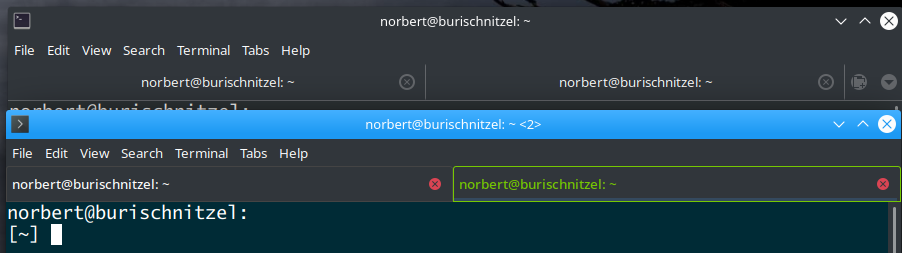
If you are puzzled by the indistinguishability of the active tab from inactive tabs in any of the GTK3 based terminal emulators (mate-terminal, gnome-terminal, terminator, ), you are not alone. I have been plagued by that for far too long, and finally found a working solution.
In the above screen shot you see the tabs in the upper part are hardly distinguishable, and in the lower part the active tab is clearly indicated with different colors. Searching for relevant search terms brings up a variety of suggestions, most of them not working. I finally found this one and adapted the code therein to fit my need. The solution is to edit ~/.config/gtk-3.0/gtk.css, and add the following at the end:
notebook tab  
    /* background-color: #222; */
    padding: 0.4em;
    border: 0;
    border-color: #444;
    border-style: solid;
    border-width: 1px;
 
 
notebook tab:checked  
    /* background-color: #000; */
    background-image: none;
    border-color: #76C802;
 
 
notebook tab:checked label  
    color: #76C802;
    font-weight: 500;
 
 
notebook tab button  
    padding: 0;
    background-color: transparent;
    color: #ccc;
 
 
notebook tab button:hover  
  border: 0;
  background-image: none;
  border-color: #444;
  border-style: solid;
  border-width: 1px;
 
Here I didn t change the background color (commented above), but changed the styling of the tab title and added a frame. The above changes the tab layout for all GTk3 elements that use the notebook widget, if one wants to restrict it to a certain terminal one need to prefix each CSS selector with the correct terminal indicator, as shown in the original post. Hope that helps.

Joey Hess: quarantimer: a coronovirus quarantine timer for your things

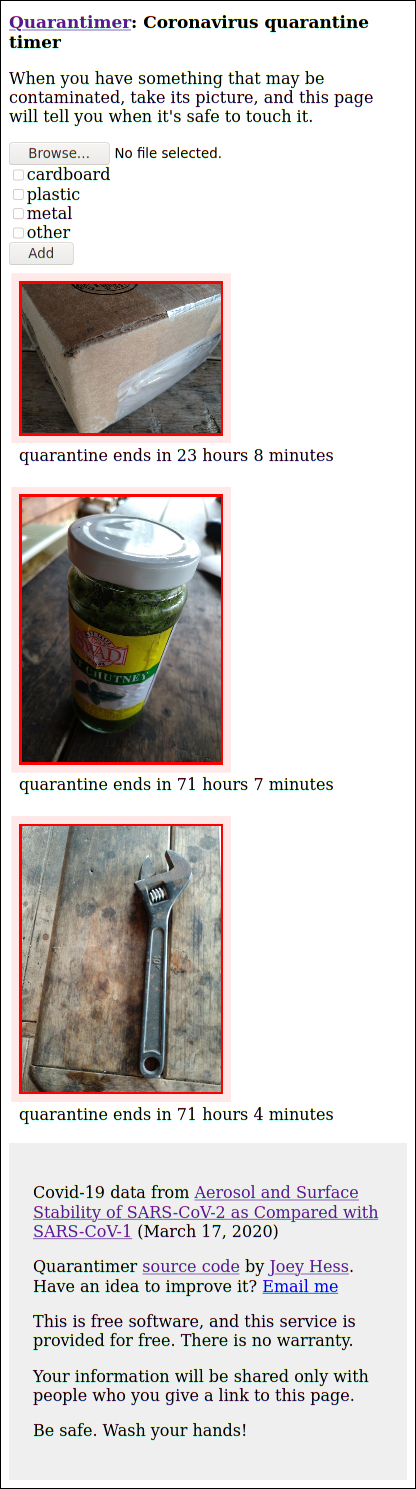
I am trying to avoid bringing coronovirus into my house on anything, and I also don't want to sterilize a lot of stuff. (Tedious and easy to make a mistake.) Currently it seems that the best approach is to leave stuff to sit undisturbed someplace safe for long enough for the virus to degrade away. Following that policy, I've quickly ended up with a porch full of stuff in different stages of quarantine, and I am quickly losing track of how long things have been in quarantine. If you have the same problem, here is a solution: https://quarantimer.app/ Open it on your mobile device, and you can take photos of each thing, select the kind of surfaces it has, and it will track the quarantine time for you. You can share the link to other devices or other people to collaborate. I anticipate the javascript and css will improve, but it's good enough for now. I will provide this website until the crisis is over. Of course, it's free software and you can also host your own. If this seems useful, please tell your friends and family about it. Be well!
This is made possible by my supporters on Patreon, particularly Jake Vosloo.

Emmanuel Kasper: Two Factor Authentification on gitlab with Yubikey

I wanted to have a working Two Factor Authentification (2FA) setup to login on salsa.debian.org, Debians s gitlab instance.
You might already know Two Factor Authentification via a One Time Password (OTP) generating app on your smartphone, like FreeOTP or Google Authenticator. But it is possible to use a physical device, and a keypress on the device is enough to authenticate (speed up things !). Here I am using a Yubikey 4, a popular USB device for Two Factor Authentification which is officially supported by gitlab, and whose tooling is well packaged in Debian.
Get to know the deviceInstall the needed packages to work with the yubikey
# apt install yubikey-manager libu2f-host0
List connected devices on your usb bus:
$ lsusb
Bus 002 Device 109: ID 1050:0407 Yubico.com Yubikey 4 OTP+U2F+CCID
Get info about the device capability
$ ykman info
Device type: YubiKey 4
Serial number: 1234567
Firmware version: 4.3.7
Enabled USB interfaces: OTP+FIDO+CCID
Applications
OTP Enabled
FIDO U2F Enabled
OpenPGP Enabled
PIV Enabled
OATH Enabled
FIDO2 Not available
The capability which interests us here is FIDO U2F. The Yubikey 4 supports Two Factor Authentification via the U2F standard, and this standard is maintained by the FIDO Industry Association, hence the name. As I plan to only use the FIDO U2F capability of the key, I set FIDO to be the single mode of the key.
ykman mode FIDO
Testing web browser interaction with Yubico demo systemNow we need to have to have a browser with support for the U2F standard. Firefox has builtin support since Version 67. Debian 10 Buster has firefox-esr Version 68, so that will work. For testing yubikeys, the manufacturer has a demo website, where you can test U2F. Go to https://demo.yubico.com and follow the Explore the Yubikey link.
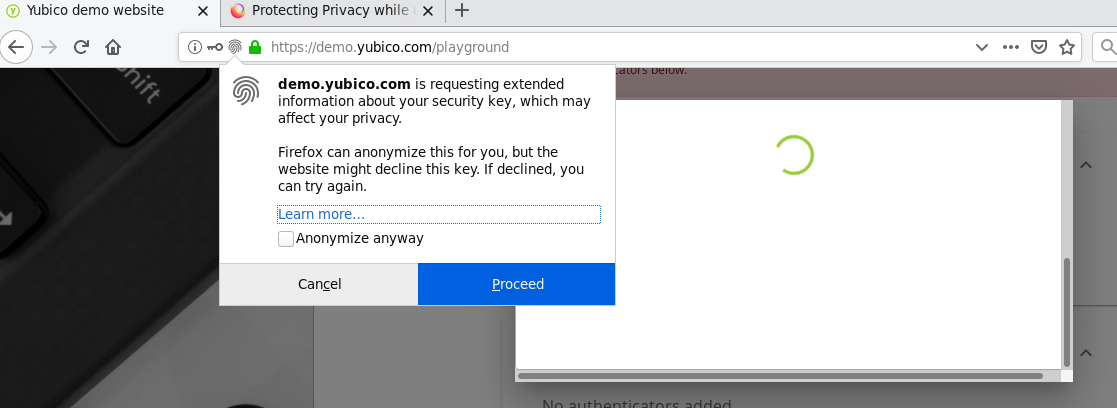
Once there you will be asked to register an account on yubicom s demo systems, to which you will add the Yubikey as an Authenticating Device. After that you can add your security key. First step will be to register the device, which will require a light touch on the Yubikey button, and acceptance of this Firefox warning Window, as the demo website wants to know the model of the device.


Firefox message on the yubikey demo site. A normal site with U2F would not require the extended information, and have a simpler popup message.
As soon as the device is registered, you can login and logout and you will be prompted again to lightly touch the Yubikey button to authenticate, in addition to the classical login / password.
Using U2F on gitlabWhen you want to register your yubikey for logging on salsa, you need first to register a One Time Password device in Settings -> Account -> Manage two-factor authentication, and Register Universal Two-Factor (U2F) Device. After the usual Firefox Popup, and the light touch on the key button, that'it you have a fast, and reliable Two Factor Authentification !
ConclusionEach time I have to look on anything close to cryptography / authentification, it is a terminology avalanche. Here we had already 2FA, OTP, U2F, FIDO. And now there is FIDO2 too. It is the next version of the U2F standard, but this time it was named after the standardizing organization, FIDO. The web browser part of FIDO2 is called Webauthn. Also sometimes the whole FIDO2 is called Webauthn too. Easy to get, isn t it ?

Bits from Debian: New Debian Developers and Maintainers (January and February 2020)

The following contributors got their Debian Developer accounts in the last two months: The following contributors were added as Debian Maintainers in the last two months: Congratulations!

Gunnar Wolf: Made in what?

Say What? Just bought a 5-pack of 64GB USB keys. Am about to test them to ensure their actual capacity. And the label is Actually true! For basically anything we are likely to encounter, specially in electronics. But still, it demands a photo before opening. How come I ve never come across anything like this before? :-] update Of course, just opening the package yielded this much more traditional (and much more permanent) piece of information:

Dima Kogan: org-babel for documentation

So I just gave a talk at SCaLE 18x about numpysane and gnuplotlib, two libraries I wrote to make using numpy bearable. With these two, it's actually quite nice! Prior to the talk I overhauled the documentation for both these projects. The gnuplotlib docs now have a tutorial/gallery page, which is interesting-enough to write about. Check it out! Mostly it is a sequence of Clearly you want the plots in the documentation to correspond to the code, so you want something to actually run each code snippet to produce each plot. Automatically. I don't want to maintain these manually, and periodically discover that the code doesn't make the plot I claim it does or worse: that the code barfs. This is vaguely what Jupyter notebooks do, but they're ridiculous, so I'm doing something better: That's it. The git repo is hosted by github, which has a rudimentary renderer for .org documents. I'm committing the .svg files, so that's enough to get rendered documentation that looks nice. Note that the usual workflow is to use org to export to html, but here I'm outsourcing that job to github; I just make the .svg files, and that's enough. Look at the link again: gnuplotlib tutorial/gallery. This is just a .org file committed to the git repo. github is doing its normal org->html thing to display this file. This has drawbacks too: github is ignoring the :noexport: tag on the init section at the end of the file, so it's actually showing all the emacs lisp goop that makes this work (described below!). It's at the end, so I guess this is good-enough. Those of us that use org-mode would be completely unsurprised to hear that the talk is also written as .org document. And the slides that show gnuplotlib plots use the same org-babel system to render the plots. It's all oh-so-nice. As with anything as flexible as org-babel, it's easy to get into a situation where you're bending it to serve a not-quite-intended purpose. But since this all lives in emacs, you can make it do whatever you want with a bit of emacs lisp. I ended up advising a few things (mailing list post here). And I stumbled on an (arguable) bug in emacs that needed working around (mailing list post here). I'll summarize both here.

Handling large Local Variables blocks
The advises I ended up with ended up longer than emacs expected, which made emacs not evaluate them when loading the buffer. As I discovered (see the mailing list post) the loading code looks for the string Local Variables in the last 3000 bytes of the buffer only, and I exceeded that. Stefan Monnier suggested a workaround in this post. Instead of the normal Local Variables block at the end:
Local Variables:
eval: (progn ... ...
             ... ...
             LONG chunk of emacs-lisp
      )
End:
I do this:
(progn ;;local-config
   lisp lisp lisp
   as long as I want
)
Local Variables:
eval: (progn (re-search-backward "^(progn ;;local-config") (eval (read (current-buffer))))
End:
So emacs sees a small chunk of code that searches backwards through the buffer (as far back as needed) for the real lisp to evaluate. As an aside, this blog is also an .org document, and the lisp snippets above are org-babel blocks that I'm not evaluating. The exporter knows to respect the emacs-lisp syntax highlighting, however.

Advises
OK, so what was all the stuff I needed to tell org-babel to do specially here? First off, org needed to be able to communicate to the Python session the name of the file to write the plot to. I do this by making the whole plist for this org-babel snippet available to python:
;; THIS advice makes all the org-babel parameters available to python in the
;; _org_babel_params dict. I care about _org_babel_params['_file'] specifically,
;; but everything is available
(defun dima-org-babel-python-var-to-python (var)
  "Convert an elisp value to a python variable.
  Like the original, but supports (a . b) cells and symbols
"
  (if (listp var)
      (if (listp (cdr var))
          (concat "[" (mapconcat #'org-babel-python-var-to-python var ", ") "]")
        (format "\"\"\"%s\"\"\"" var))
    (if (symbolp var)
        (format "\"\"\"%s\"\"\"" var)
      (if (eq var 'hline)
          org-babel-python-hline-to
        (format
         (if (and (stringp var) (string-match "[\n\r]" var)) "\"\"%S\"\"" "%S")
         (if (stringp var) (substring-no-properties var) var))))))
(defun dima-alist-to-python-dict (alist)
  "Generates a string defining a python dict from the given alist"
  (let ((keyvalue-list
         (mapcar (lambda (x)
                   (format "%s = %s, "
                           (replace-regexp-in-string
                            "[^a-zA-Z0-9_]" "_"
                            (symbol-name (car x)))
                           (dima-org-babel-python-var-to-python (cdr x))))
                 alist)))
    (concat
     "dict( "
     (apply 'concat keyvalue-list)
     ")")))
(defun dima-org-babel-python-pass-all-params (f params)
  (cons
   (concat
    "_org_babel_params = "
    (dima-alist-to-python-dict params))
   (funcall f params)))
(unless
    (advice-member-p
     #'dima-org-babel-python-pass-all-params
     #'org-babel-variable-assignments:python)
  (advice-add
   #'org-babel-variable-assignments:python
   :around #'dima-org-babel-python-pass-all-params))
So if there's a :file plist key, the python code can grab that, and write the plot to that filename. But I don't really want to specify an output file for every single org-babel snippet. All I really care about is that each plot gets a unique filename. So I omit the :file key entirely, and use this advice to generate one for me:
;; This sets a default :file tag, set to a unique filename. I want each demo to
;; produce an image, but I don't care what it is called. I omit the :file tag
;; completely, and this advice takes care of it
(defun dima-org-babel-python-unique-plot-filename
    (f &optional arg info params)
  (funcall f arg info
           (cons (cons ':file
                       (format "guide-%d.svg"
                               (condition-case nil
                                   (setq dima-unique-plot-number (1+ dima-unique-plot-number))
                                 (error (setq dima-unique-plot-number 0)))))
                 params)))
(unless
    (advice-member-p
     #'dima-org-babel-python-unique-plot-filename
     #'org-babel-execute-src-block)
  (advice-add
   #'org-babel-execute-src-block
   :around #'dima-org-babel-python-unique-plot-filename))
This uses the dima-unique-plot-number integer to keep track of each plot. I increment this with each plot. Getting closer. It isn't strictly required, but it'd be nice if each plot had the same output filename each time I generated it. So I want to reset the plot number to 0 each time:
;; If I'm regenerating ALL the plots, I start counting the plots from 0
(defun dima-reset-unique-plot-number
    (&rest args)
    (setq dima-unique-plot-number 0))
(unless
    (advice-member-p
     #'dima-reset-unique-plot-number
     #'org-babel-execute-buffer)
  (advice-add
   #'org-babel-execute-buffer
   :after #'dima-reset-unique-plot-number))
Finally, I want to lie to the user a little bit. The code I'm actually executing writes each plot to an .svg. But the code I'd like the user to see should use the default output: an interactive, graphical window. I do that by tweaking the python session to tell the gnuplotlib object to write to .svg files from org by default, instead of using the graphical terminal:
;; I'm using github to display guide.org, so I'm not using the "normal" org
;; exporter. I want the demo text to not contain the hardcopy= tags, but clearly
;; I need the hardcopy tag when generating the plots. I add some python to
;; override gnuplotlib.plot() to add the hardcopy tag somewhere where the reader
;; won't see it. But where to put this python override code? If I put it into an
;; org-babel block, it will be rendered, and the :export tags will be ignored,
;; since github doesn't respect those (probably). So I put the extra stuff into
;; an advice. Whew.
(defun dima-org-babel-python-set-demo-output (f body params)
  (with-temp-buffer
    (insert body)
    (beginning-of-buffer)
    (when (search-forward "import gnuplotlib as gp" nil t)
      (end-of-line)
      (insert
       "\n"
       "if not hasattr(gp.gnuplotlib, 'orig_init'):\n"
       "    gp.gnuplotlib.orig_init = gp.gnuplotlib.__init__\n"
       "gp.gnuplotlib.__init__ = lambda self, *args, **kwargs: gp.gnuplotlib.orig_init(self, *args, hardcopy=_org_babel_params['_file'] if 'file' in _org_babel_params['_result_params'] else None, **kwargs)\n"))
    (setq body (buffer-substring-no-properties (point-min) (point-max))))
  (funcall f body params))
(unless
    (advice-member-p
     #'dima-org-babel-python-set-demo-output
     #'org-babel-execute:python)
  (advice-add
   #'org-babel-execute:python
   :around #'dima-org-babel-python-set-demo-output))
)
And that's it. The advises in the talk are slightly different, in uninteresting ways. Some of this should be upstreamed to org-babel somehow. Now entirely clear which part, but I'll cross that bridge when I get to it.

Next.

Previous.