Ryan Kavanagh: Configuring OpenIKED VPNs for StrongSwan Clients
A few weeks ago I configured a road warrior VPN setup. The
remote end is on a VPS running OpenBSD and OpenIKED, the VPN is
an IKEv2 VPN using x509 authentication, and the local end is
StrongSwan. I also configured an IKEv2 VPN between my VPSs. Here
are the notes for how to do so.
In all cases, to use x509 authentication, you will need to
generate a bunch of certificates and keys:
For simplicity, I am going to assume that the you are managing
your CA on the same host as one of the hosts that you want to
configure for the VPN. If not, see the bit about exporting
certificates at the beginning of the section on persistent
host-host VPNs.
Create and install a key/certificate pair for your server.
Suppose for example your first server is called
server1.example.org:
Persistent host-host VPNs
For each other server that you want to use, you need to also
create a key/certificate pair on the same host as the CA
certificate, and then copy them over to the other server.
Assuming the other server is called server2.example.org:
- a CA certificate
- a key/certificate pair for each client
ikectl utility to help you do
so. Before going any further, you might find it useful to edit
/etc/ssl/ikeca.cnf to set some reasonable defaults for your
certificates.
Begin by creating and installing a CA certificate:
# ikectl ca vpn create
# ikectl ca vpn install
# ikectl ca vpn certificate server1.example.org create
# ikectl ca vpn certificate server1.example.org install
Persistent host-host VPNs
For each other server that you want to use, you need to also
create a key/certificate pair on the same host as the CA
certificate, and then copy them over to the other server.
Assuming the other server is called server2.example.org:
# ikectl ca vpn certificate server2.example.org create
# ikectl ca vpn certificate server2.example.org export
This last command will produce a tarball
server2.example.org.tgz. Copy it over to server2.example.org and
install it:
# tar -C /etc/iked -xzpvf server2.example.org.tgz
Next, it is time to configure iked. To do so, you will need to
find some information about the certificates you just generated.
On the host with the CA, run
$ cat /etc/ssl/vpn/index.txt
V       210825142056Z           01      unknown /C=US/ST=Pennsylvania/L=Pittsburgh/CN=server1.example.org/emailAddress=rak@example.org
V       210825142208Z           02      unknown /C=US/ST=Pennsylvania/L=Pittsburgh/CN=server2.example.org/emailAddress=rak@example.org
Pick one of the two hosts to play the active role (in this
case, server1.example.org). Using the information you gleaned
from index.txt, add the following to /etc/iked.conf, filling in
the srcid and dstid fields appropriately.
ikev2 'server1_server2_active' active esp from server1.example.org to server2.example.org \
	local server1.example.org peer server2.example.org \
	srcid '/C=US/ST=Pennsylvania/L=Pittsburgh/CN=server1.example.org/emailAddress=rak@example.org' \
	dstid '/C=US/ST=Pennsylvania/L=Pittsburgh/CN=server2.example.org/emailAddress=rak@example.org'
On the other host, add the following to /etc/iked.conf
ikev2 'server2_server1_passive' passive esp from server2.example.org to server1.example.org \
	local server2.example.org peer server1.example.org \
	srcid '/C=US/ST=Pennsylvania/L=Pittsburgh/CN=server2.example.org/emailAddress=rak@example.org' \
	dstid '/C=US/ST=Pennsylvania/L=Pittsburgh/CN=server1.example.org/emailAddress=rak@example.org'
Note that the names 'server1_server2_active' and
'server2_server1_passive' in the two stanzas do not matter and
can be omitted. Reload iked on both hosts:
# ikectl reload
If everything worked out, you should see the negotiated security
associations (SAs) in the output of
# ikectl show sa
On OpenBSD, you should also see some output on success or errors
in the file /var/log/daemon.
For a road warrior
Add the following to /etc/iked.conf on the remote end:
ikev2 'responder_x509' passive esp \
	from 0.0.0.0/0 to 10.0.1.0/24 \
	local server1.example.org peer any \
	srcid server1.example.org \
	config address 10.0.1.0/24 \
	config name-server 10.0.1.1 \
	tag "ROADW"
Configure or omit the address range and the name-server
configurations to suit your needs. See iked.conf(5) for details.
Reload iked:
# ikectl reload
If you are on OpenBSD and want the remote end to have an IP
address, add the following to /etc/hostname.vether0, again
configuring the address to suit your needs:
inet 10.0.1.1 255.255.255.0
Put the interface up:
# ifconfig vether0 up
Now create a client certificate for authentication. In my case,
my road-warrior client was client.example.org:
# ikectl ca vpn certificate client.example.org create
# ikectl ca vpn certificate client.example.org export
Copy client.example.org.tgz to client and run
# tar -C /etc/ipsec.d/ -xzf client.example.org.tgz -- \
	./private/client.example.org.key \
	./certs/client.example.org.crt ./ca/ca.crt
Install StrongSwan and add the following to /etc/ipsec.conf,
configuring appropriately:
ca example.org
  cacert=ca.crt
  auto=add
conn server1
  keyexchange=ikev2
  right=server1.example.org
  rightid=%server1.example.org
  rightsubnet=0.0.0.0/0
  rightauth=pubkey
  leftsourceip=%config
  leftauth=pubkey
  leftcert=client.example.org.crt
  auto=route
Add the following to /etc/ipsec.secrets:
# space is important
server1.example.org : RSA client.example.org.key
Restart StrongSwan, put the connection up, and check its status:
# ipsec restart
# ipsec up server1
# ipsec status
That should be it.
Sources:
# ikectl ca vpn certificate server2.example.org create
# ikectl ca vpn certificate server2.example.org export
# tar -C /etc/iked -xzpvf server2.example.org.tgz
$ cat /etc/ssl/vpn/index.txt
V 210825142056Z 01 unknown /C=US/ST=Pennsylvania/L=Pittsburgh/CN=server1.example.org/emailAddress=rak@example.org
V 210825142208Z 02 unknown /C=US/ST=Pennsylvania/L=Pittsburgh/CN=server2.example.org/emailAddress=rak@example.org
ikev2 'server1_server2_active' active esp from server1.example.org to server2.example.org \
local server1.example.org peer server2.example.org \
srcid '/C=US/ST=Pennsylvania/L=Pittsburgh/CN=server1.example.org/emailAddress=rak@example.org' \
dstid '/C=US/ST=Pennsylvania/L=Pittsburgh/CN=server2.example.org/emailAddress=rak@example.org'
ikev2 'server2_server1_passive' passive esp from server2.example.org to server1.example.org \
local server2.example.org peer server1.example.org \
srcid '/C=US/ST=Pennsylvania/L=Pittsburgh/CN=server2.example.org/emailAddress=rak@example.org' \
dstid '/C=US/ST=Pennsylvania/L=Pittsburgh/CN=server1.example.org/emailAddress=rak@example.org'
# ikectl reload
# ikectl show sa
/etc/iked.conf on the remote end:
ikev2 'responder_x509' passive esp \
from 0.0.0.0/0 to 10.0.1.0/24 \
local server1.example.org peer any \
srcid server1.example.org \
config address 10.0.1.0/24 \
config name-server 10.0.1.1 \
tag "ROADW"
iked.conf(5) for details.
Reload iked:
# ikectl reload
/etc/hostname.vether0, again
configuring the address to suit your needs:
inet 10.0.1.1 255.255.255.0
# ifconfig vether0 up
# ikectl ca vpn certificate client.example.org create
# ikectl ca vpn certificate client.example.org export
# tar -C /etc/ipsec.d/ -xzf client.example.org.tgz -- \
./private/client.example.org.key \
./certs/client.example.org.crt ./ca/ca.crt
/etc/ipsec.conf,
configuring appropriately:
ca example.org
cacert=ca.crt
auto=add
conn server1
keyexchange=ikev2
right=server1.example.org
rightid=%server1.example.org
rightsubnet=0.0.0.0/0
rightauth=pubkey
leftsourceip=%config
leftauth=pubkey
leftcert=client.example.org.crt
auto=route
/etc/ipsec.secrets:
# space is important
server1.example.org : RSA client.example.org.key
# ipsec restart
# ipsec up server1
# ipsec status
 Welcome to gambaru.de. Here is my monthly report (+ the first week in September) that covers what I have been doing for Debian. If you re interested in Java, Games and LTS topics, this might be interesting for you.
Debian Games

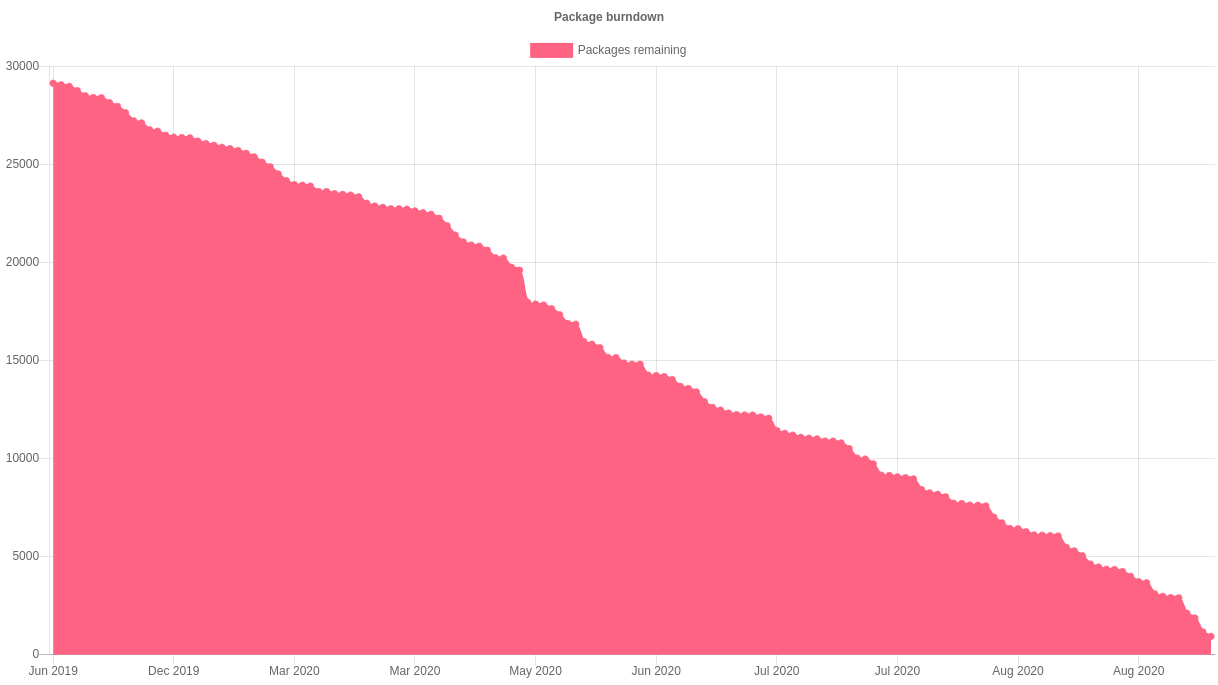
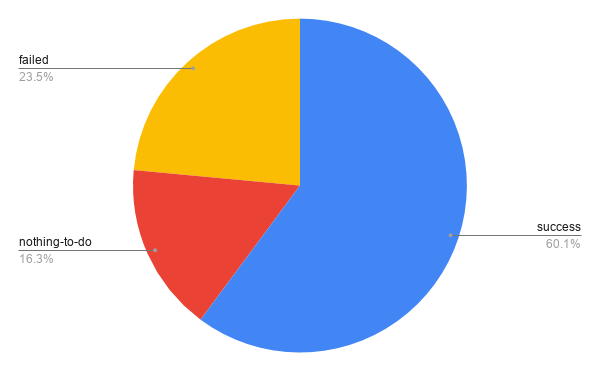 Now that the entire archive has been processed, packages
are prioritized based on the likelihood of a change being
made to them successfully.
Over the course of its existence, the Janitor has slowly
gained support for a wider variety of packaging methods.
For example, it can now edit the templates for some of
the generated control files. Many of the packages that
the janitor was unable to propose changes for the first
time around are expected to be correctly handled when they
are reprocessed.
If you re a Debian developer, you can find the list of improvements
made by the janitor in your packages by going to
 I'm happy to announce I handed out my Master's Thesis last Monday. I'm not
publishing the final copy just yet













 So Finally,
 So finally, the greatest and meanest Raspberry is fully supported with
a pure Debian image! (only tarnished by the nonfree



 Debconf2020 took place when I was on personal vacations time. But anyway I m lucky enough that my
company, the Wikimedia Foundation, paid the conference registration fee for me and allowed me to
take the time (after my vacations) to watch recordings from the conference.
This is my first time attending (or watching) a full-online conference, and I was curious to see
first hand how it would develop. I was greatly surprised to see it worked pretty nicely, so kudos
to the organization, video team, volunteers, etc!
What follows is my summary of the conference, from the different sessions and talks I watched
(again, none of them live but recordings).
The first thing I saw was the


 A new minor release of the
 To ensure
 Trying to boot Debian on Chromebook Kevin.
But I haven't yet found how to get the USB serial console device to work, and display is black. So I can't see anything.